WO2023007867A1 - チケット管理システム、プログラム、および方法 - Google Patents
チケット管理システム、プログラム、および方法 Download PDFInfo
- Publication number
- WO2023007867A1 WO2023007867A1 PCT/JP2022/016695 JP2022016695W WO2023007867A1 WO 2023007867 A1 WO2023007867 A1 WO 2023007867A1 JP 2022016695 W JP2022016695 W JP 2022016695W WO 2023007867 A1 WO2023007867 A1 WO 2023007867A1
- Authority
- WO
- WIPO (PCT)
- Prior art keywords
- ticket
- user
- electronic
- processor
- owner
- Prior art date
- Legal status (The legal status is an assumption and is not a legal conclusion. Google has not performed a legal analysis and makes no representation as to the accuracy of the status listed.)
- Ceased
Links
Images








Classifications
-
- G—PHYSICS
- G06—COMPUTING OR CALCULATING; COUNTING
- G06Q—INFORMATION AND COMMUNICATION TECHNOLOGY [ICT] SPECIALLY ADAPTED FOR ADMINISTRATIVE, COMMERCIAL, FINANCIAL, MANAGERIAL OR SUPERVISORY PURPOSES; SYSTEMS OR METHODS SPECIALLY ADAPTED FOR ADMINISTRATIVE, COMMERCIAL, FINANCIAL, MANAGERIAL OR SUPERVISORY PURPOSES, NOT OTHERWISE PROVIDED FOR
- G06Q50/00—Information and communication technology [ICT] specially adapted for implementation of business processes of specific business sectors, e.g. utilities or tourism
- G06Q50/10—Services
Definitions
- This disclosure relates to a ticket management system, program, and method.
- Patent Literature 1 discloses a system that provides benefits by purchasing an electronic ticket for an event.
- Such electronic tickets are also being applied to online live performances, but in general, electronic tickets for online events are treated as "individual viewing rights", and the connection between ownership and user ID is immutable. It is linked and managed on the intermediate table. In this case, a viewing button is provided on a page such as my page that can be accessed only by the owner.
- the user ID is associated with the intermediate table, and the intermediate table is associated with digital content such as event moving images to be distributed.
- the purpose of this disclosure is to provide a ticket management system that can ensure the liquidity of electronic tickets for online events.
- a ticket management program is a program that is executed by a ticket management system that includes a processor and manages electronic tickets for goods, services, and various benefits provided incidental thereto, wherein the processor a step of acquiring a user ID that identifies a user; A program for executing a step of mutably associating IDs and storing them in a database.
- FIG. 1 is a block diagram showing the configuration of a ticket system according to a first embodiment
- FIG. 2 is a block diagram showing the configuration of a user terminal according to the first embodiment
- FIG. 2 is a block diagram showing the configuration of a ticket management server according to the first embodiment
- FIG. 3 is a diagram showing an example of data structures of a user database, a ticket database, and a content database stored by the ticket management server
- FIG. 4 is a flowchart of user registration processing according to the first embodiment
- 4 is a flowchart of ticket issuing processing according to the first embodiment
- 6 is a flowchart of transfer processing according to the first embodiment
- It is a flow chart of ticket inspection processing of a 1st embodiment.
- FIG. 12 is a block diagram showing the configuration of a ticket management ledger according to the second embodiment
- FIG. 11 is a diagram illustrating the configuration of an external server and a ticket management ledger according to the second embodiment
- FIG. 10 is a diagram showing an example of data structures of a user database, a ticket database, and a content database managed in the second embodiment
- FIG. FIG. 12 is a block diagram showing the configuration of a ticket management ledger according to the second embodiment
- FIG. 11 is a diagram illustrating the configuration of an external server and a ticket management ledger according to the second embodiment
- FIG. 10 is a diagram showing an example of data structures of a user database, a ticket database, and a content database managed in the second embodiment
- FIG. 13 is a diagram showing another configuration example of the ticket management ledger of the second embodiment; It is a block diagram which shows the structure of the ticket system of 3rd Embodiment.
- FIG. 13 is a diagram illustrating the configuration of an external server and a ticket management ledger according to the third embodiment; It is a figure which shows an example of the data structure of the user database, ticket database, and event database which are managed in 3rd Embodiment.
- FIG. 10 is a diagram showing a configuration example in which digital content as a privilege is set in an electronic ticket;
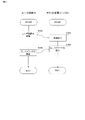
- FIG. 1 is a block diagram showing the configuration of a ticket management system 1 of this embodiment.
- the ticket management system 1 is a system that manages electronic tickets (hereinafter simply referred to as tickets) relating to goods and services, and various benefits provided accompanying them.
- An electronic ticket is an electronic certificate that certifies the right to purchase or receive goods, services, and various benefits (hereafter referred to as content in this explanation, and in particular, content realized by electronic media is referred to as digital content). is. Possession of the electronic ticket proves that payment has been made.
- an electronic ticket which is a certificate relating to the right to view an online event via an electric communication line, will be described.
- the ticket management system 1 includes a user terminal 10 and a ticket management server 20 .
- the user terminal 10 and the ticket management server 20 are connected via a network (for example, the Internet or an intranet) NW.
- NW a network
- a plurality of user terminals 10 are connected to the ticket management server 20 according to the number of users.
- the user terminal 10 is an information processing device.
- the user terminal 10 is configured to request ticket data related to an online event distributed (held) in an online environment or held in the server space from the ticket management server 20 .
- the user terminal 10 can also be called a ticket purchase terminal.
- Digital content managed by the ticket management system 1 according to the first embodiment includes videos of online events, movies provided online, videos of various broadcasts, electronic comics, electronic books, and various other content provided via digital communication. contains the content of
- the information processing device is, for example, a smartphone, a tablet terminal, a personal computer, a server computer (for example, a web server, an application server, a database server, or a combination thereof), a wearable device (for example, a smart watch, or a smart glasses), etc.
- the user terminal 10 will be described using a smart phone, which is a mobile computer connectable to the network NW, as an example.
- Ticket data is information about a ticket.
- ticket data includes information that identifies the ticket, information about the authority that the ticket certifies (e.g., information about the online event covered by the ticket), the name of the ticket owner, information about the ticket owner (such as user ID), or a combination thereof, or code information encoding them (eg, a QR code, or other one- or two-dimensional code).
- a ticket is an image of ticket data (that is, an electronic ticket) displayed on the user terminal 10 held by the user.
- the ticket management server 20 is an information processing device.
- the ticket management server 20 is configured to issue a ticket (that is, issue ticket data) in response to a request from the user terminal 10 . Further, the ticket management server 20 is configured to manage issued ticket data.
- FIG. 2 is a block diagram showing the configuration of the ticket purchase terminal of this embodiment.
- the user terminal 10 includes a storage device 11, a processor 12, an input/output interface 13, and a communication interface 14.
- User terminal 10 is connectable to at least one of input device 15 and output device 16 .
- the storage device 11 is configured to store programs and data.
- the storage device 11 is, for example, a combination of ROM (Read Only Memory), RAM (Random Access Memory), and storage (eg, flash memory or hard disk).
- Programs include, for example, the following programs. ⁇ OS (Operating System) program ⁇ Application (for example, web browser) program that executes information processing
- the data includes, for example, the following data. ⁇ Databases referenced in information processing ⁇ Data obtained by executing information processing (that is, execution results of information processing)
- the processor 12 is configured to implement the functions of the user terminal 10 by activating programs stored in the storage device 11 .
- Processor 12 is an example of a computer.
- the input/output interface 13 acquires signals (e.g., user instructions, sensing signals, or combinations thereof) from the input device 15 and outputs signals (e.g., image signals, audio signals, or combinations thereof) to the output device 16. ).
- signals e.g., user instructions, sensing signals, or combinations thereof
- signals e.g., image signals, audio signals, or combinations thereof
- the input device 15 is, for example, a keyboard, pointing device, touch panel, physical button, sensor (eg camera, vital sensor, or a combination thereof), or a combination thereof.
- the output device 16 is, for example, a display, a speaker, a printer, or a combination thereof.
- the communication interface 14 is configured to control communication between the user terminal 10 and an external device (for example, the ticket management server 20).
- FIG. 3 is a block diagram showing the configuration of the ticket management server 20 of this embodiment.
- the ticket management server 20 includes a storage device 21, a processor 22, an input/output interface 23, and a communication interface 24.
- the ticket management server 20 is connectable with at least one of an input device 25 and an output device 26 .
- the storage device 21 is configured to store programs and data.
- Storage device 21 is, for example, a combination of ROM, RAM, and storage (eg, flash memory or hard disk).
- Programs include, for example, the following programs. ⁇ OS program ⁇ Application program that executes information processing
- the data includes, for example, the following data. ⁇ Databases referenced in information processing ⁇ Execution results of information processing
- the processor 22 is configured to implement the functions of the ticket management server 20 by activating the programs stored in the storage device 21 .
- Processor 22 is an example of a computer.
- Input/output interface 23 acquires signals (e.g., user instructions, sensing signals, or combinations thereof) from input device 25 and outputs signals (e.g., image signals, audio signals, or combinations thereof) to output device 26 . ).
- signals e.g., user instructions, sensing signals, or combinations thereof
- signals e.g., image signals, audio signals, or combinations thereof
- the input device 25 is, for example, a keyboard, pointing device, touch panel, sensor, or a combination thereof.
- the output device 26 is, for example, a display, a speaker, or a combination thereof.
- the communication interface 24 is configured to control communication between the ticket management server 20 and an external device (eg, the user terminal 10).
- ticket-related data requested by a user to be obtained is associated with a changeable user ID as an owner ID that identifies the owner of the ticket, and stored in a database.
- the acquisition request includes the following aspects. ⁇ Purchase of tickets by users ⁇ Granting of tickets as benefits for the purchase of other tickets or related goods ⁇ Granting of tickets as benefits when other certain conditions are met
- the unused portion of the tickets purchased by the user will be transferred to other users as necessary.
- a user can purchase a plurality of tickets when purchasing a ticket, and separately transfer at least a portion of the purchased tickets to another user.
- Other users receive the ticket data using communication means via message tools such as e-mail and SNS.
- a viewing button for starting viewing of digital content (hereinafter simply referred to as content), which is the content of the online event, is displayed.
- content which is the content of the online event.
- the user displays the face of the ticket owned by the user on the display of the user terminal 10, and taps or clicks the viewing button included in the face of the ticket, thereby viewing the digital content related to the online live.
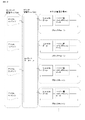
- FIG. 4 is a diagram showing an example of the data structure of the user database, ticket database, and content database stored by the ticket management server 20. As shown in FIG. 4
- the user database includes a "user ID” field, a "login PASS” field, a "user name” field, a "user attribute” field, a "contact” field, and a "payment method”. field and .
- a user ID is stored in the "user ID" field.
- a user ID is information for identifying a user.
- the "login PASS" field stores information about the login password that the user is required to enter when logging into the ticket management server 20.
- the "user name” field stores the name of the user corresponding to the user ID.
- the "user attribute” field stores information indicating the attribute of the user corresponding to the user ID.
- User attributes include age, date of birth, gender, occupation, nationality, area of residence (address), or a combination thereof.
- the "contact information” field stores information indicating the contact information of the user corresponding to the user ID.
- Contact information may be, for example, an email address, phone number, account information for a Social Networking Service (SNS) or other messaging-enabled application, or a combination thereof.
- SNS Social Networking Service
- Contact information is not limited to the examples given here and can include any type of information that can be used to send real-time notifications to viewers via user terminal 10 .
- the "payment method” field stores information about the payment method used by the user corresponding to the user ID to make an electronic payment when purchasing a ticket. Payment methods Credit card payment, payment by direct debit, payment by various electronic payment applications, etc. are included.
- Ticket data is stored in the ticket database shown in FIG. 4B.
- the ticket database includes a "ticket ID” field, a “content ID” field, an "owner ID” field, a “transfer status” field, and a "usage status” field.
- the "ticket ID" field stores the ticket ID.
- a ticket ID is information for identifying a ticket.
- the "content ID” field stores the content ID that indicates the content of the online event corresponding to the ticket ID.
- the "owner ID" field stores the user ID that indicates the owner of the ticket corresponding to the ticket ID.
- a ticket holder is primitively a ticket purchaser. The ticket owner can be changed to the transfer destination user by transfer after purchasing the ticket.
- a book database may be provided together with the ticket database.
- the book database stores a book ID indicating a book ID that treats a plurality of electronic tickets as one spelling, and an owner ID indicating the book ID. If a book database is provided, the ticket database will include a "book ID" field for storing book IDs instead of the "owner ID” field.
- Various types of information used to specify a ticket ID, such as the book ID, are called ticket-related data.
- Ticket-related data includes, for example: ⁇ Ticket ID ⁇ Book ID (an ID specified as an intermediate step to specify the ticket ID) ⁇ Management ledger ID (ID that identifies the management ledger in which the ticket ID is stored)
- the management ledger ID may be used, for example, when managing the owner of the ticket using a blockchain, which is a distributed management ledger.
- the ticket-related data is not limited to the above-described book ID, and also includes data specifying the ticket ID with a hierarchical data structure. That is, the ticket-related data is not limited by the data structure, and includes various data groups held to identify the ticket ID.
- the "transfer status" field stores information indicating the transfer history of the ticket corresponding to the ticket ID.
- the transfer history includes, for example, "before transfer” and "after transfer”. Transferring the ticket updates the status.
- information indicating the number of times of transfer may be managed. In the ticket management system 1, it is possible to limit the number of times a ticket can be transferred based on the transfer status. That is, a setting can be made so that a ticket that has already been transferred (or a ticket that has already been transferred N times) cannot be transferred again.
- the "usage status” field stores information indicating the usage status of the ticket corresponding to the ticket ID.
- the usage status of the ticket includes "before use” and “after use”. After the ticket is stolen, the ticket status is rewritten to "used".
- the content database shown in FIG. 4C stores information about contents.
- the content database includes a "content ID” field, an "event name” field, an "operating company” field, an "event type” field, a “performer” field, and a "distribution start date and time.” , a 'delivery end date and time' field, and a 'content address' field.
- a content ID is stored in the "content ID" field.
- a content ID is information for identifying various types of content.
- the "event name” field stores the event name.
- the event name is information indicating the name of the online event identified by the content ID.
- Information about the operating company is stored in the "operating company" field.
- the information about the operating company is information indicating the operating company of the event identified by the content ID.
- the information about the operating company may include the name of the operating company, the location of the operating company, and the contact information of the person in charge.
- Event type Information about the event type is stored in the "event type" field.
- the information about the event type is information indicating an overview of the online event identified by the content ID. For example, event types include “online live”, “online manzai”, and “online fan exchange meeting”.
- Performer information is stored in the "Performer" field.
- the performer information is information indicating performers for the online event identified by the content ID.
- Performer information includes individuals or groups (group names, team names, combination names, unit names, band names, etc.).
- the "delivery start date and time” field stores the delivery start date and time.
- the distribution start date and time is information indicating the date and time when distribution of the content of the online event identified by the content ID is started. That is, the distribution start date and time indicates the first date and time when the content can be viewed.
- the "delivery end date and time” field stores the delivery end date and time.
- the delivery end date and time is information indicating the date and time when the delivery of the content of the online event identified by the content ID ends. That is, the delivery start date and time indicates the last date and time when the content can be viewed.
- a content address is stored in the "content address" field.
- the content address is information that can identify the digital content, such as the address of the server where the content of the online event identified by the content ID is stored. By accessing the address, the content can be distributed.
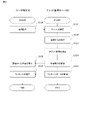
- FIG. 5 is a flowchart of user registration according to this embodiment. As shown in FIG. 5, first, by operating the user terminal 10, the user inputs attribute information such as name and registration information including payment information to apply for user registration (step S100).
- attribute information such as name and registration information including payment information to apply for user registration (step S100).
- the ticket management server 20 accepts an application for user registration (step S101). After step S101, the ticket management server 20 issues a user ID and a login password (step S102). At this time, the ticket management server 20 records the registration information input by the user, the user ID and password as a new record in the user database.
- step S102 the user terminal 10 receives the issued user ID and login password (step S103). With the above, the user registration processing ends.
- FIG. 6 is a flowchart of the ticket issuing process of this embodiment.
- the user terminal 10 accepts a purchase operation (S110).
- the processor 12 receives, via the input/output interface 13 , an operation related to purchase made on the input device 15 .
- the user can select the tickets to be purchased and input the number of tickets to be purchased as an operation related to purchase.
- An operation related to purchase may include, for example, inputting a user ID, selecting an event, selecting a date and time, specifying the number of tickets to purchase, pressing a purchase button (button object or physical button), or a combination thereof.
- the user terminal 10 issues a ticket issue request (S111).
- processor 12 generates a ticket issuance request by referring to the content of the purchase operation received in step S110.
- the ticket issuance request includes, for example, information specifying the type of ticket requested to be issued (for example, information specifying performance, date and time, and seat type).
- the processor 12 transmits a ticket issue request to the ticket management server 20 via the communication interface 14 .
- the ticket management server 20 performs ticket issuing processing (step S112). Specifically, the processor 22 of the ticket management server 20 allocates tickets to be sold based on the purchase information transmitted from the user terminal 10 . Processor 22 acquires the transmitted user ID. The processor 12 also acquires ticket data of a ticket that the user wishes to purchase.
- the ticket management server 20 updates the ticket database (S113). Specifically, the processor 22 newly registers and stores the user ID included in the ticket issuance request in the ticket database in association with the unissued ticket ID. The user ID can be changed in the ticket database. This makes it possible to identify the owner of the ticket based on the ticket ID.
- the processor 12 associates the ticket data with information that can identify the digital content and stores the ticket data in the database. Specifically, the content ID of the content database is newly registered in the ticket database.
- the ticket management server 20 provides ticket data (S114). Specifically, the processor 22 generates ticket data by referring to the updated contents of the database in step S113.
- the ticket data includes the ticket ID newly registered in step S113. Additionally, the ticket data may include at least one of the ticket holder's user IDs. Some or all of the information contained in the ticket data may be encoded in, for example, a QR code or other code information.
- Processor 22 provides the generated ticket data to the ticket owner. As an example, processor 22 transmits to user terminal 10 via communication interface 24 .
- step S114 the user terminal 10 saves the ticket data (S115). Specifically, the processor 12 obtains the ticket data provided in step S114. The processor 12 stores the acquired ticket data in the storage device 11 . This allows the processor 12 to display the ticket data as desired. With the above, the ticket issuing process is completed.
- FIG. 7 is a flowchart of transfer processing according to the present embodiment.
- the user who wants to transfer part or all of the tickets to be purchased logs in with the user ID and login PASS, and then inputs information about the transfer and instructs the transfer (step S120). .
- the user specifies the ticket to be transferred according to a predetermined input format.
- the event to be ticketed and the number of tickets may be specified.
- the information of the user to whom the ticket is to be transferred is input.
- the transferee of the ticket may be designated by designating the contact information of the message tool of the user who will be the transferee.
- the ticket management server 20 accepts a transfer instruction (step S121). Specifically, the ticket management server 20 receives transfer instruction information via the communication interface 24 .
- the ticket management server 20 confirms the transfer instruction (step S122). Specifically, the processor 22 of the ticket management server 20 identifies the ticket ID of the ticket to be transferred and the transferee of the ticket.
- the ticket management server 20 updates the ticket database (step S123). Specifically, the processor 22 of the ticket management server 20 updates the ticket database using the ticket ID of the identified ticket to be transferred and the information on the transferee of the ticket. At this time, the user database is referred to identify the owner ID of the new owner, and the "owner ID" field of the ticket database is updated. As a result, the owner ID of the transferred ticket is rewritten to the transferee. Processor 22 also updates the transfer status in the ticket database. After the ticket is transferred, the ticket data of the ticket is not displayed on the user terminal 10 of the user who transferred the ticket.
- the ticket management server 20 transmits the ticket data (step S124). Specifically, the processor 22 generates ticket data by referring to the updated contents of the database in step S123. Additionally, the ticket data may include the ticket owner's user ID. Some or all of the information contained in the ticket data may be encoded in, for example, a QR code or other code information. Processor 22 provides the generated ticket data to the ticket assignee. As an example, processor 22 transmits to another user terminal 10 that is the assignee via communication interface 24 . At this time, the processor 22 issues the URL created using the ticket data to the contact information of the transferee's message tool.
- step S125 another user terminal 10 receives the ticket data (step S125).
- the processor 12 in the other user terminal 10 acquires the ticket data provided in step S124. Specifically, the URL sent from the processor 22 is clicked to obtain the ticket data.
- the processor 12 stores the acquired ticket data in the storage device 11 . This allows the processor 12 to display the ticket data as desired.
- the ticket receiving operation shown in step S125 may be omitted.
- the user who transfers the ticket designates the contact information of the transferee, such as the transferee's email address or telephone number, and unilaterally owns the ticket without accepting the transferee's explicit receipt operation.
- a process to change the person to the transferee may be performed. In this case, if necessary, the transferee may be notified that the ownership of the ticket has been transferred (that the ticket has been transferred). With the above, the transfer processing ends.
- FIG. 8 is a flow chart of the ticket inspection process of this embodiment.
- the user viewing the online event operates the user terminal 10 to give a viewing instruction (step S130). Specifically, the processor 12 of the user terminal 10 causes the user terminal 10 to display the ticket face of the ticket data stored in the storage device 11 in response to the viewer's instruction to display the ticket face. At this time, a viewing button is displayed on the face of the ticket. The viewer presses the displayed viewing button.
- step S130 the ticket management server 20 executes ticket identification (S131).
- the ticket management server 20 determines whether viewing is possible (S132). Specifically, the processor 22 refers to the ticket data read in step S130 to determine whether or not the viewer can view the program. Specifically, the ticket database is queried for the ticket data for which the viewing button has been pressed, and it is determined whether or not the ticket data is proper ticket data with viewing authority.
- step S132 if the read ticket data is not appropriate ticket data, or if the identity of the viewer and the ticket owner cannot be confirmed, the ticket management server 20 executes viewing error processing.
- step S132 if the read ticket data is appropriate ticket data and if the identity of the viewer and the ticket owner could be confirmed, the ticket management server 20 detects the use of the ticket (S135), a so-called " Execute "Migiri processing".
- Processor 22 may create or update the check-in list during step S133.
- the check-in list is information relating to a result list of the ticket inspection process for each viewer.
- the check-in list includes at least one of the following elements as an example. ⁇ Viewing start time ⁇ Ticket ID of the ticket used by the viewer ⁇ User ID associated with the ticket ID - User name associated with user ID - Result of determination of whether or not viewing is permitted (step S133) (viewing permission/viewing refusal)
- the ticket management server 20 changes the display mode of the ticket as the ticket is used (step S134). Specifically, for example, a stamp image indicating that the ticket has been used is added to the ticket surface, the ticket surface is illuminated, the color of the ticket surface is changed, and the like. Further, as a change in the display form of the ticket face, information regarding viewing conditions may be displayed on the ticket face upon detection of tearing. The viewing conditions in an online event indicate the position of the camera that captures the stage, the angle with respect to the stage, or the sound quality of the reproduced sound. After step S134, the display of the face of the ticket displayed on the user terminal 10 changes (step S135).
- the ticket management server 20 guides the content data (step S136). Specifically, the content ID associated with the ticket ID is referenced from the content database, and the user terminal 10 is connected to the content address corresponding to the content ID.
- step S136 the user terminal 10 reproduces the content (step S137). Specifically, the processor 12 of the user terminal 10 causes the user terminal 10 to reproduce the content saved at the content address. Thus, the ticket inspection process is completed.
- FIG. 9 is a diagram showing a first screen example and a second screen example.
- the first screen example shown in FIG. 9A is an example screen when purchasing a ticket.
- the event content, price, and purchase quantity are displayed. The purchase is made by the user entering the quantity and applying for purchase.
- the second screen example shown in FIG. 9B is a screen example for displaying ticket data for which ticketing has been completed.
- a viewing button symbol A
- Viewing is started by pressing the viewing button after the distribution start date and time.
- a transfer instruction button symbol B
- the screen transitions to a screen for selecting the contact information of another user to be the transfer destination.
- the display can be switched for each owned ticket. Note that this screen example describes a user interface that transfers tickets for each ticket, but a user interface that allows the user to specify the event for which the ticket is to be transferred and then the number of tickets to be transferred is adopted. You may
- the user ID is stored in association with the ticket data in a changeable manner, and the ticket data is stored in association with the content data. Therefore, the owner of the ticket can be changed by changing the user ID.
- the ticket can be arbitrarily transferred by the owner. By doing so, it is possible to secure the liquidity of tickets.
- unused electronic tickets can be individually transferred in the same way as paper tickets, improving the experience of electronic ticket purchasers. For example, you can purchase an electronic ticket for a friend or family member together with your own electronic ticket, or you can gift an electronic ticket to an acquaintance if you have to give up watching an online live performance due to urgent business. In this way, it becomes possible to transfer electronic tickets, and by securing the circulation of tickets, the management side has more options for marketing measures.
- the ticket management system 1 accepts input of the number of tickets to be purchased as an operation related to ticket purchase, it is possible to give flexibility to the form of ticket purchase and improve convenience for the user.
- the viewing button may be displayed on the surface of the electronic ticket.
- the user can easily give an instruction to start viewing.
- this display form of the viewing button is only an example, and for example, the viewing button may be displayed on the My Page associated with the user ID, or the viewing button may be displayed on both the face of the electronic ticket and the My Page. may In this case, viewing can be started by clicking the viewing button on My Page.
- the use of the electronic ticket is detected in response to the user pressing the viewing button, so it is possible to reliably perform the tear-off process, which is the detection of use.
- the ticket management system 1 changes the display mode of the child ticket according to the detection of the use of the ticket, so that the user can easily recognize whether the ticket has already been used.
- the ticket management system 1 changes the user ID associated with the ticket data to another user to whom the ticket is to be transferred, according to the user's operation regarding the transfer of the ticket. This makes it possible to quickly change the owner of the ticket.
- the ticket management system 1 accepts input of the number of electronic tickets to be transferred as an operation related to transfer, it is possible to give a degree of freedom to the form of ticket transfer, improving user convenience.
- the ticket management system 1 transmits information on electronic tickets that are the target of operations related to transfer to other users using telecommunication lines.
- the ticket can be easily and reliably transferred using communication means such as e-mail.
- the ticket management system 2 uses blockchain to manage electronic tickets. That is, the ticket management system 2 manages each data included in the ticket database on the block chain for each ticket ID.
- the user terminal 10 and the ticket management server 30 in the ticket management system 2 are connected to the ticket management ledger 40 via the network NW.
- the ticket management server 30 stores a user database and a content database
- the ticket management ledger 40 stores a ticket database.
- FIG. 11 is a diagram showing the configuration of the ticket management ledger 40. As shown in FIG.
- the ticket management ledger 40 is a distributed system comprising signal processors 40A-40E functioning as nodes.
- the signal processing devices 40A to 40E are, for example, personal computers each connected to a network.
- the network may be a LAN, or a public network such as the Internet or a communication network provided by a telecommunications carrier.
- the signal processing devices 40A to 40E are connected to a network, for example, by wire or wirelessly.
- the signal processors 40A-40E communicate with each other using a peer-to-peer scheme.
- the signal processing devices 40A to 40E implement the ticket management ledger 40 using blockchain technology. Further, the signal processing devices 40A to 40E, for example, the signal processing device 40A of any one of the signal processing devices 40A to 40E, acquires data relating to ticket transactions to be recorded. The signal processing device 40A creates a block containing the acquired data and adds it to the blockchain. The signal processing device 40A transmits the added block information to the other signal processing device 40A. The other signal processors 40B-40E verify the correctness of the received blocks and add them to the blockchain once the correctness is verified. The signal processors 40A-40E determine the block chain according to, for example, the number of blocks to be linked (the number of approvals). As a result, the same ticket management ledger 40 is saved in the signal processing devices 40A to 40E. Note that the stored data may be encrypted as appropriate.
- the configuration of the ticket management ledger 40 is not limited to that shown in FIG.
- the number of signal processing devices 40A included in the ticket management ledger 40 may be any number as long as it is two or more.
- the signal processing device 40A includes a storage device 41, a processor 42, an input/output interface 43, and a communication interface 44.
- the signal processing device 40A is connectable with at least one of the input device 45 and the output device 46 .
- the storage device 41 is configured to store programs and data.
- the storage device 41 is, for example, a combination of ROM (Read Only Memory), RAM (Random Access Memory), and storage (eg, flash memory or hard disk).
- Programs include, for example, the following programs. ⁇ OS (Operating System) program ⁇ Application (for example, web browser) program that executes information processing
- the data includes, for example, the following data. ⁇ Databases referenced in information processing ⁇ Data obtained by executing information processing (that is, execution results of information processing)
- the processor 42 is configured to realize the functions of the signal processing device 40A by activating the program stored in the storage device 41.
- Processor 42 is an example of a computer.
- Input/output interface 43 acquires signals (e.g., user instructions, sensing signals, or combinations thereof) from input device 45 and outputs signals (e.g., image signals, audio signals, or combinations thereof) to output device 46 . ).
- signals e.g., user instructions, sensing signals, or combinations thereof
- signals e.g., image signals, audio signals, or combinations thereof
- the input device 45 is, for example, a keyboard, pointing device, touch panel, physical button, sensor (eg camera, vital sensor, or combination thereof), or a combination thereof.
- the output device 46 is, for example, a display, a speaker, a printer, or a combination thereof.
- the communication interface 44 is configured to control communication between the signal processing device 40A and an external device (eg, at least one of the user terminal 10 and the ticket management server 30).
- an external device eg, at least one of the user terminal 10 and the ticket management server 30.
- the ticket management server 30 shown in FIG. 10 includes at least a storage unit and a communication interface.
- the ticket management server 30 is a server device realized by distributed applications (DApps), for example.
- the ticket management server 30 is connected to a content management server 50 storing digital content.
- the content management server 50 is managed by, for example, a content management company that manages digital content. Specifically, a management server that manages electronic books published by a publisher (content management company) corresponds to the content management server 50 .
- the communication interface is configured to control communication between the ticket management server 30 and an external device (at least one of the user terminal 10 and the ticket management ledger 40).
- the ticket management server 30 may realize the functions of the ticket management server 30 .
- the ticket management ledger 40 is associated with the digital content of the content management server 50 via the content database recorded in the ticket management server 30.
- the ticket management ledger 40 is implemented by a blockchain, which is a distributed management ledger.
- electronic tickets are managed by a distributed management ledger.
- the ticket can refer to the transaction history associated with the transfer of ownership, which will be described later. By referring to all transaction histories related to a certain ticket, the owner of the ticket can be identified.
- a blockchain is composed of blocks that constitute contract data, and blocks that contain at least hash values and transaction data. As tickets are transferred between users, new transaction data is generated and new blocks are added after verification by the signal processing devices 40A to 40E shown in FIG.
- the blockchain uses a public blockchain and a private blockchain. For normal transactions, the transaction history is recorded on the private blockchain, and the latest information is periodically reflected on the public blockchain.
- the configuration may be such that there are multiple hierarchies.
- the ticket management system 2 manages at least a user database, a ticket database, and a content database.
- the user database shown in FIG. 13A has the same configuration as that of the first embodiment, and thus the description thereof is omitted.
- the ticket database shown in FIG. 13B includes a "ticket ID” field, a “content ID” field, an “owner ID” field, a “browsing status” field, and a “loan status” field.
- the "ticket ID” field stores the ticket ID.
- a ticket ID is information for identifying a ticket.
- the ticket ID also works with the ledger ID that indicates the blockchain address.
- the "content ID” field stores the ID of the content indicating the content of the electronic comic corresponding to the ticket ID.
- the "owner ID" field stores the user ID that indicates the owner of the ticket corresponding to the ticket ID.
- a ticket holder is primitively a ticket purchaser. The ticket owner can be changed to the transfer destination user by transfer after purchasing the ticket.
- the "browsing status” field stores information indicating whether or not the user has already browsed. If it has been viewed, the status is "viewed", and if it has not been viewed yet, it is "before viewing”. When the status is "viewed”, for example, the book is treated like a used book, and a lower price may be set for transfer to another user. Also, the following functions may be implemented depending on the viewing status. ⁇ If the status becomes "viewed”, it will not be possible to transfer it after that ⁇ If the status becomes "viewed”, the content that can be viewed will be restricted (limited content that can only be viewed in the state before viewing becomes unviewable, etc.) ⁇ When the status becomes "viewed", the displayed content changes (e.g., changing the value by displaying that it has been viewed)
- the "loan status” field stores information indicating whether or not the user who owns the electronic comic has lent it to another user. If it is lent to another user, the status becomes “on loan”, and if it is not lent to another user, the status becomes "not lent". When the lending status is "on loan”, the user who owns the electronic comic cannot view the loaned electronic comic.
- the content database includes a "content ID” field, a "comic title” field, a “publisher” field, a “type” field, an "author” field, and a “publication date” field. , a “rental terms” field and a “contents address” field.
- a content ID is stored in the "content ID" field.
- the content ID is information for identifying various types of electronic comic content.
- the "comic title” field stores the work title of the electronic comic corresponding to the content ID.
- the "publisher” field stores information about the publishing company that publishes the electronic comic corresponding to the content ID.
- the publication of electronic comics refers to the act of editing and reviewing the contents of electronic comics, putting them on electronic media, and releasing them to the market.
- the information about the publisher may include the name of the publisher, the location of the publisher, and the contact information of the person in charge.
- Information on the type of electronic comic corresponding to the content ID is stored in the "comic type” field.
- comic types in addition to types based on assumed user groups such as “boy comics”, “girl comics”, “youth magazines”, “history”, “sports”, “school stuff”, “romance”, etc. , information indicating the main theme in the content of the electronic comic.
- the "author” field stores information about the author of the electronic comic corresponding to the content ID.
- the information about the author may include the author's personal information such as the real name in addition to the pseudonym.
- the "publication date” field stores the publication date of the electronic comic corresponding to the content ID, that is, the distribution start date. After the date of publication, the user can purchase and view the electronic comic.
- the "resale conditions" field stores information about conditions (usage conditions) such as price when the electronic comic corresponding to the content ID is used secondarily by resale.
- Use of electronic comics includes purchases from publishers and purchases by resale from other users. That is, the purchase price stored as the resale condition may include a resale price when reselling an electronic comic once viewed to another user in addition to the price when newly purchasing from a publisher.
- Motives for purchasing electronic comics by resale include the fan psychology of wanting to obtain the limited number of first edition bound electronic comics or electronic comics with special benefits.
- resale conditions information such as "no resale” that prohibits resale or information about "usage period" for content that can be viewed for a limited time may be stored. Also, when the number of lending times exceeds a predetermined number of times, resale may be permitted. Note that resale conditions may be set for each ticket ID in the ticket database.
- the "rental conditions" field stores various conditions (usage conditions) required when a user who has purchased an electronic comic corresponding to a content ID makes secondary use such as lending it to another user.
- Various conditions required for lending include a fee for lending, a loan amount, a lending period, a date and time when lending is possible, and the like.
- a condition for prohibiting lending in the first place may be stored. Note that the lending conditions may be set for each ticket ID in the ticket database.
- the "content address” field stores information about the address on the content management server 50 where the content data, which is the content of the electronic comic corresponding to the content ID, is stored.
- a content address is information that can specify a digital content. By accessing the address, the content can be distributed.
- the ticket management server 30 issues a data update instruction to the ticket management ledger 40 at the timing when the data in the ticket database needs to be updated. As a result, the information of the ticket database in the ticket management ledger 40 is updated, and the owner of the ticket is updated.
- FIG. 14 is a diagram showing another structural example of content data.
- the content data according to the modification is stored in the ticket management ledger as part of the blockchain.
- digital content and ticket database information are recorded in the ticket management ledger, which is a blockchain.
- the ticket management system 3 uses blockchain to manage electronic tickets for concerts held at actual event venues. That is, the ticket management system 3 manages electronic tickets related to content (events) that do not correspond to digital content on the blockchain. Therefore, the ticket management system 3 manages each data included in the ticket database on the block chain for each ticket ID.
- the user terminal 10 and the ticket management server 30 in the ticket management system 3 are connected to the ticket management ledger 40 and the administrator terminal 60 via the network NW.
- the ticket management server 30 stores a user database and a content database
- the ticket management ledger 40 stores a ticket database. Since the configuration of the ticket management ledger 40 is the same as that of the second embodiment, the description thereof will be omitted.
- the administrator terminal 60 is a terminal operated by an administrator who manages electronic tickets using the ticket management server 30 .
- the ticket management server 30 shown in FIG. 15 includes at least a storage unit and a communication interface.
- the ticket management server 30 is a server device realized by distributed applications (DApps), for example.
- the communication interface is configured to control communication between the ticket management server 30 and an external device (at least one of the user terminal 10 and the ticket management ledger 40). Note that the ticket management server 30 may realize the functions of the ticket management server 30 .
- the ticket management ledger 40 is associated with the content database recorded in the ticket management server 30.
- the ticket management ledger 40 is implemented by a blockchain, which is a distributed management ledger.
- electronic tickets are managed by a distributed management ledger.
- the ticket can refer to the transaction history associated with the transfer of ownership, which will be described later. By referring to all transaction histories related to a certain ticket, the owner of the ticket can be identified.
- a blockchain is composed of blocks that constitute contract data, and blocks that contain at least hash values and transaction data. As tickets are transferred between users, new transaction data is generated and new blocks are added after verification by each node.
- the blockchain uses a public blockchain and a private blockchain. For normal transactions, the transaction history is recorded on the private blockchain, and the latest information is periodically reflected on the public blockchain.
- the configuration may be such that there are multiple hierarchies.
- the ticket management system 3 manages at least a user database, a ticket database, and a content database.
- the user database shown in FIG. 17A has the same configuration as that of the first embodiment, and thus the description thereof is omitted.
- the ticket database includes a "ticket ID” field, an "event ID” field, an "owner ID” field, a "transfer status” field, a “usage status” field, and a “transfer condition” field. ” field.
- the "ticket ID" field stores the ticket ID.
- a ticket ID is information for identifying a ticket.
- the "event ID” field stores the ID of the event corresponding to the ticket ID.
- the "owner ID" field stores the user ID that indicates the owner of the ticket corresponding to the ticket ID.
- a ticket holder is primitively a ticket purchaser. The ticket owner can be changed to the transfer destination user by transfer after purchasing the ticket.
- the "transfer status" field stores information indicating the transfer history of the ticket corresponding to the ticket ID.
- the transfer history includes, for example, "before transfer” and "after transfer”. Transferring the ticket updates the status.
- information indicating the number of times of transfer may be managed. In the ticket management system 1, it is possible to limit the number of times a ticket can be transferred based on the transfer status. That is, a setting can be made so that a ticket that has already been transferred (or a ticket that has already been transferred N times) cannot be transferred again.
- the "usage status” field stores information indicating the usage status of the ticket corresponding to the ticket ID.
- the usage status of the ticket includes "before use” and “after use”. After the ticket is stolen, the ticket status is rewritten to "used".
- the “transfer condition” field stores a condition (usage condition) set for secondary use by transfer of the electronic ticket corresponding to the ticket ID.
- the conditions regarding the transfer of the electronic ticket refer to the conditions set in advance regarding the transfer of the electronic ticket, and include, for example, the following.
- the predetermined action is, for example, related to the event Includes actions that contribute to sales promotion of the event, such as writing comments, spreading information about the event on SNS (tweeting, etc.), purchasing goods at the event site, and visiting a specific booth within the event site.
- the content database includes an "event ID” field, an "event name” field, an "operating company” field, an "event type” field, a “performer” field, and an "event venue” field. field, "Date” field, and "Terms of Transfer” field.
- the "event ID” field stores an ID that identifies the event.
- the "event name” field stores the name of the event corresponding to the event ID.
- the event name is information indicating the name of the event identified by the content ID.
- the "Operating Company" field stores information about the event's operating company.
- the information about the operating company is information indicating the operating company of the event identified by the content ID.
- the information about the operating company may include the name of the operating company, the location of the operating company, and the contact information of the person in charge.
- the "event type” field stores information about the type of event corresponding to the event ID.
- event types include “Budokan Live”, “Tokyo Dome Performance”, and the like.
- Performer information is stored in the "Performer" field.
- the performer information is information indicating the performers of the event corresponding to the event ID.
- Performer information includes individuals or groups (group names, team names, combination names, unit names, band names, etc.).
- the "event venue” field stores the distribution start date and time.
- the distribution start date and time is information indicating the date and time when distribution of the content of the online event identified by the content ID is started. That is, the distribution start date and time indicates the first date and time when the content can be viewed.
- the date of the event corresponding to the event ID is stored in the "date" field.
- the "transfer conditions" field stores the same items as the transfer conditions stored in the ticket database. That is, in the ticket database, ticket transfer conditions are set for each ticket, and in the content database, ticket transfer conditions are set for each event.
- the ticket management server 30 issues a data update instruction to the ticket management ledger 40 at the timing when the data in the ticket database needs to be updated.
- the ticket management server 30 updates the information in the ticket database in the ticket management ledger 40 and updates the owner of the ticket.
- the ticket management server 30 instructs the ticket management ledger 40 to update the data.
- the ticket management system 3 accepts operations related to setting and changing usage conditions from the administrator terminal. This allows the administrator to set the ticket transfer conditions for each ticket ID or each event ID. For example, the user can transfer (resell) the used electronic ticket to another user from the timing when the administrator approves the resale of the used electronic ticket.
- the electronic ticket After the event is held, the electronic ticket will function as a proof of participation in the event. For this reason, possessing a used electronic ticket (especially an electronic ticket with a seat number) to which an electronic stamp has been affixed by the pick-up process is proof of an indirect relationship with the event. Even if you didn't actually participate in the event, it will inspire some fans to collect. For this reason, used electronic tickets after the event is held are subject to transaction.
- the administrator has set the transfer of the used electronic ticket as a condition related to use, with the detection processing of the use of the electronic ticket as a trigger, the user can pick up the electronic ticket at the event venue. By doing this, this transfer condition is satisfied, and the transfer of the electronic ticket at a later date is permitted.
- FIG. 18 is a diagram showing a configuration example in which digital content as a privilege is set in an electronic ticket.
- the privilege content that is the privilege of the electronic ticket is stored in the ticket management ledger as part of the blockchain.
- digital content and ticket database information are recorded in the ticket management ledger as a blockchain.
- a management server that manages privilege content and a ticket management ledger 40 are linked via the ticket management server 30 .
- a "privilege address" field is added to the content database, and a privilege that is uniformly given to electronic tickets related to the event ID is set.
- a privilege may be set individually for each ticket ID.
- the privilege contents include digital images, digital sound sources, digital videos, etc. related to the event.
- the privilege content may be triggered by the detection of some process (for example, the use of the electronic ticket), and the content may be switched.
- the digital content which was merely image data showing the surface of the electronic ticket until the electronic ticket was peeled off, detects that the electronic ticket has been peeled off, and is treated as a privilege. may be changed to other content data.
- the privilege address itself shown in FIG. 18C may be changed, or the digital content data stored on the server corresponding to the privilege address may be changed.
- the electronic tickets handled by the ticket management system are not limited to the above-mentioned online events, e-books, and tickets for events held at event venues.
- Electronic tickets are, for example, sports competitions, other events such as game withdrawals, admission tickets to theme parks, tickets related to the use of transportation means, etc. It can be applied arbitrarily to anything related to benefits.
- the electronic ticket may be free of charge, regardless of whether it is charged.
- the storage device 11 of the user terminal 10 may be connected to the user terminal 10 via the network NW.
- the storage device 21 of the ticket management server 20 may be connected to the ticket management server 20 via the network NW. Further, the storage device 21 of the ticket management server 20 may be composed of a plurality of storage devices.
- the ticket inspection process described above may be performed by the ticket management server 20 alone as described above, or may be performed in cooperation with the ticket management server 20 and another device (for example, an external ticket inspection device).
- the content is distributed to the viewer when the identity is confirmed.
- the ticket management system 1 may distribute the content data when the viewing button is pressed without confirming the identity of the ticket owner and the viewer of the content data.
- confirmation of the identity of the ticket owner and the viewer may be performed by personal authentication required when accessing the ticket data.
- the identity of the ticket owner and the viewer may be confirmed by account information, SMS authentication, terminal ID authentication, etc. that the user inputs when displaying the ticket data.
- the user ID and password are used for authentication.
- other biometric feature amounts eg, fingerprint, palm print, iris, vein, myoelectric potential, etc.
- User-specific information may also be acquired by other sensors such as infrared, RFID, sound wave, and laser type one-dimensional bar code readers. Further, it is also possible to determine whether or not the viewer can view the content using a plurality of types of feature amounts.
- the feature amount can be acquired at the time of user registration.
- the timing of acquiring the feature amount is not limited to this. For example, after the ticket is issued, a process of transitioning from the face of the ticket displayed on the user terminal 10 to a screen for inputting the feature amount may be performed. Also, after purchasing the ticket, before issuing the ticket, the feature quantity acquired by the user terminal 10 may be input.
- the ticket is an authentication information carrier that carries authentication information.
- the authentication information carrier may also be the viewer's biometric.
- the authentication information carrier may be the viewer's face or the viewer's palm.
- Such an authentication information carrier holds, as authentication information, information regarding the viewer's feature amount.
- the ticket management server 30 can acquire the feature amount of the viewer and use the feature amount as a clue to identify the ticket ID that identifies the ticket purchased by the viewer. That is, the ticket database stores the biometric information (including the feature amount) of the user who purchased the ticket instead of the ticket ID.
- the ticket management server 20 transmits ticket data to the user terminal 10 .
- the ticket management server 20 may transmit resource information (for example, URL (Uniform Resource Locator)) for referencing the resource in which the ticket data is stored to the user terminal 10 .
- the viewer can display the ticket data on the display of the user terminal 10 by accessing the resource indicated by the resource information using his/her own user terminal 10 .
- some or all of the information included in the ticket data is coded into a two-dimensional code including, for example, a QR code (registered trademark), or other code information.
- the ticket may include a QR code as the ticket ID and reference string.
- the ticket ID may be associated with the owner ID and the owner feature amount, or only one of the owner ID or the owner feature amount may be associated with the ticket ID. That is, when purchasing or transferring a ticket, only one of the owner ID and the owner feature amount may be registered in the database.
- the process of updating the ticket database by the operation of the transferring user has been described, but the ticket database may be updated in response to the receiving process by another user who is the transferee. In this case, the ownership of the ticket remains undetermined until another user performs the receiving process.
- the user terminal 10 of the user who transfers the ticket may display that the status of the ticket is "transferred” (or “distributed") or "transferred” (or “distributed”). After that, the other user confirms the transfer according to the receipt process, and the user who transferred the ticket is in a state where the information about the ticket is not displayed.
- the image of the face of the electronic ticket for a certain online live is not limited to one type, and may be of multiple types.
- an object for example, a viewing start button or a transfer button
- a user who has purchased multiple electronic tickets can: To surely use or keep an electronic ticket with a face of one's preference and to transfer the rest of the electronic ticket to an acquaintance.
- the data managed as the owner ID is replaced by the user ID on the blockchain. It may be the user's wallet ID that can identify the user.
- Appendix 1 A program to be executed by a ticket management system comprising a processor and managing electronic tickets for goods, services, and various benefits provided incidental to them, to the processor, obtaining a user ID that identifies the user; A step of correlating ticket-related data for identifying a ticket ID identifying an electronic ticket requested by a user to a changeable user ID as an owner ID identifying the owner of the ticket, and storing the data in a database. and the program that causes it to run.
- (Appendix 2) The processor The program according to (Appendix 1), causing execution of a step of storing in a database the same number of ticket IDs as the number of tickets purchased and user IDs as owner IDs that are changeably associated with each other.
- (Appendix 6) The processor The program according to any one of (Appendix 1) to (Appendix 5), which sets a condition regarding use of an electronic ticket for a ticket ID or content corresponding to the ticket ID.
- (Appendix 10) Electronic tickets relate to the viewing of online events
- the processor Any one of (Appendix 1) to (Appendix 9) according to any one of (Appendix 1) to (Appendix 9), wherein a step of displaying a viewing button for accepting input of an operation to start playing back digital content related to an online event to the user terminal on the face of the electronic ticket is executed. program.
- a method performed by a ticket management system comprising a processor and managing electronic tickets for goods, services, and various benefits provided therewith, comprising: the processor obtaining a user ID that identifies the user; A step of correlating ticket-related data for identifying a ticket ID identifying an electronic ticket requested by a user to a changeable user ID as an owner ID identifying the owner of the ticket, and storing the data in a database. and the program to run.
- a ticket management system comprising a processor and managing electronic tickets for goods, services, and various benefits provided therewith,
- the processor means for acquiring a user ID that identifies a user;
- a ticket management system comprising:
- Ticket management system 10 Ticket purchase terminal 11 : Storage device 12 : Processor 13 : Input/output interface 14 : Communication interface 15 : Input device 16 : Output device 20 : Ticket management server 21 : Storage device 22 : Processor 23 : Input/output Interface 24: communication interface 25: input device 26: output device
Landscapes
- Business, Economics & Management (AREA)
- Tourism & Hospitality (AREA)
- Health & Medical Sciences (AREA)
- Economics (AREA)
- General Health & Medical Sciences (AREA)
- Human Resources & Organizations (AREA)
- Marketing (AREA)
- Primary Health Care (AREA)
- Strategic Management (AREA)
- Physics & Mathematics (AREA)
- General Business, Economics & Management (AREA)
- General Physics & Mathematics (AREA)
- Engineering & Computer Science (AREA)
- Theoretical Computer Science (AREA)
- Management, Administration, Business Operations System, And Electronic Commerce (AREA)
Priority Applications (1)
| Application Number | Priority Date | Filing Date | Title |
|---|---|---|---|
| JP2023538277A JPWO2023007867A1 (https=) | 2021-07-30 | 2022-03-31 |
Applications Claiming Priority (2)
| Application Number | Priority Date | Filing Date | Title |
|---|---|---|---|
| JP2021124992 | 2021-07-30 | ||
| JP2021-124992 | 2021-07-30 |
Publications (1)
| Publication Number | Publication Date |
|---|---|
| WO2023007867A1 true WO2023007867A1 (ja) | 2023-02-02 |
Family
ID=85087792
Family Applications (1)
| Application Number | Title | Priority Date | Filing Date |
|---|---|---|---|
| PCT/JP2022/016695 Ceased WO2023007867A1 (ja) | 2021-07-30 | 2022-03-31 | チケット管理システム、プログラム、および方法 |
Country Status (2)
| Country | Link |
|---|---|
| JP (1) | JPWO2023007867A1 (https=) |
| WO (1) | WO2023007867A1 (https=) |
Cited By (2)
| Publication number | Priority date | Publication date | Assignee | Title |
|---|---|---|---|---|
| JP7435890B1 (ja) | 2023-07-24 | 2024-02-21 | Toppanホールディングス株式会社 | ユーザ認証システム、ユーザ認証装置、ユーザ認証方法、およびプログラム |
| JP2024137908A (ja) * | 2023-03-22 | 2024-10-07 | 株式会社Digittle | コンテンツデータ管理システム |
Citations (3)
| Publication number | Priority date | Publication date | Assignee | Title |
|---|---|---|---|---|
| JP2018032378A (ja) * | 2016-08-17 | 2018-03-01 | Emtg株式会社 | プログラム、情報処理装置、及び情報処理システム |
| JP2018128779A (ja) * | 2017-02-07 | 2018-08-16 | playground株式会社 | 興行品質制御装置及びプログラム |
| JP2020095590A (ja) * | 2018-12-14 | 2020-06-18 | 日本電気株式会社 | チケット譲渡装置、チケット譲渡方法及びプログラム |
-
2022
- 2022-03-31 WO PCT/JP2022/016695 patent/WO2023007867A1/ja not_active Ceased
- 2022-03-31 JP JP2023538277A patent/JPWO2023007867A1/ja active Pending
Patent Citations (3)
| Publication number | Priority date | Publication date | Assignee | Title |
|---|---|---|---|---|
| JP2018032378A (ja) * | 2016-08-17 | 2018-03-01 | Emtg株式会社 | プログラム、情報処理装置、及び情報処理システム |
| JP2018128779A (ja) * | 2017-02-07 | 2018-08-16 | playground株式会社 | 興行品質制御装置及びプログラム |
| JP2020095590A (ja) * | 2018-12-14 | 2020-06-18 | 日本電気株式会社 | チケット譲渡装置、チケット譲渡方法及びプログラム |
Non-Patent Citations (1)
| Title |
|---|
| ANONYMOUS: ""LINE LIVE-VIEWING" How to purchase and watch tickets on your smartphone", LINE BLOG, 5 August 2020 (2020-08-05), pages 1 - 13, XP093029537, Retrieved from the Internet <URL:https://lineblog.me/livepress/archives/13260943.html> [retrieved on 20230307] * |
Cited By (4)
| Publication number | Priority date | Publication date | Assignee | Title |
|---|---|---|---|---|
| JP2024137908A (ja) * | 2023-03-22 | 2024-10-07 | 株式会社Digittle | コンテンツデータ管理システム |
| JP7621695B2 (ja) | 2023-03-22 | 2025-01-27 | 株式会社Digittle | コンテンツデータ管理システム |
| JP7435890B1 (ja) | 2023-07-24 | 2024-02-21 | Toppanホールディングス株式会社 | ユーザ認証システム、ユーザ認証装置、ユーザ認証方法、およびプログラム |
| JP2025017273A (ja) * | 2023-07-24 | 2025-02-05 | Toppanホールディングス株式会社 | ユーザ認証システム、ユーザ認証装置、ユーザ認証方法、およびプログラム |
Also Published As
| Publication number | Publication date |
|---|---|
| JPWO2023007867A1 (https=) | 2023-02-02 |
Similar Documents
| Publication | Publication Date | Title |
|---|---|---|
| JP7216770B2 (ja) | チケットシステム、プログラム、および方法。 | |
| US11544729B2 (en) | Blockchain-enabled crypto asset compliance system for tracking asset allocation | |
| US20210166203A1 (en) | System and process for tokenization of digital media | |
| CA2806607C (en) | System, method and computer program for enabling signing and dedication of information objects | |
| US20050273805A1 (en) | Methods and apparatus for a title transaction network | |
| US20050246193A1 (en) | Methods and apparatus for enabling transaction relating to digital assets | |
| KR101350104B1 (ko) | 라이센스 중심의 콘텐츠 소비를 위한 방법, 시스템, 및 장치 | |
| CN110622184B (zh) | 合规性文档的创建、修改和供应 | |
| US20140222607A1 (en) | Systems and Methods for Distributing Limited Edition Digital Artwork | |
| Rafati Niya et al. | Deti: A decentralized ticketing management platform | |
| JP4852550B2 (ja) | ライセンスされたコンテンツをレンダリングする方法 | |
| WO2023007867A1 (ja) | チケット管理システム、プログラム、および方法 | |
| WO2023082008A1 (en) | Systems and methods for providing a digital media rental platform | |
| WO2006009716A2 (en) | Methods and apparatus for enabling transactions in networks | |
| EP2369540A1 (en) | Registration of product information and authenticity certification | |
| JP7237233B1 (ja) | ギフティングを行うための装置、方法及びそのためのプログラム | |
| JP2024113049A (ja) | コミュニケーションシステム及びプログラム | |
| JP5923958B2 (ja) | ノベルティ配布システム、ノベルティ配布サーバ装置、電子商取引サーバ装置 | |
| Bachmann et al. | Deti: A decentralized ticketing management platform | |
| JP6047076B2 (ja) | Drmシステムを備える装置及びライセンスリポジトリ | |
| JP6232969B2 (ja) | コンテンツ提供システム | |
| JP2023087753A (ja) | デジタルコンテンツ提供システム | |
| JP2026031859A (ja) | 購入管理システム、市場サーバ、購入管理方法及びプログラム | |
| JP2024057690A (ja) | 処理装置、処理プログラム及び処理方法 | |
| HK40112265A (zh) | 通信系统和程序 |
Legal Events
| Date | Code | Title | Description |
|---|---|---|---|
| 121 | Ep: the epo has been informed by wipo that ep was designated in this application |
Ref document number: 22848950 Country of ref document: EP Kind code of ref document: A1 |
|
| WWE | Wipo information: entry into national phase |
Ref document number: 2023538277 Country of ref document: JP |
|
| NENP | Non-entry into the national phase |
Ref country code: DE |
|
| 122 | Ep: pct application non-entry in european phase |
Ref document number: 22848950 Country of ref document: EP Kind code of ref document: A1 |