WO2023007782A1 - 仮想空間内で実行されたミーティングのまとめ映像を作成するシステム及び方法 - Google Patents
仮想空間内で実行されたミーティングのまとめ映像を作成するシステム及び方法 Download PDFInfo
- Publication number
- WO2023007782A1 WO2023007782A1 PCT/JP2022/006455 JP2022006455W WO2023007782A1 WO 2023007782 A1 WO2023007782 A1 WO 2023007782A1 JP 2022006455 W JP2022006455 W JP 2022006455W WO 2023007782 A1 WO2023007782 A1 WO 2023007782A1
- Authority
- WO
- WIPO (PCT)
- Prior art keywords
- discussion
- unit
- screen
- virtual space
- group
- Prior art date
- Legal status (The legal status is an assumption and is not a legal conclusion. Google has not performed a legal analysis and makes no representation as to the accuracy of the status listed.)
- Ceased
Links
Images






Classifications
-
- G—PHYSICS
- G06—COMPUTING OR CALCULATING; COUNTING
- G06Q—INFORMATION AND COMMUNICATION TECHNOLOGY [ICT] SPECIALLY ADAPTED FOR ADMINISTRATIVE, COMMERCIAL, FINANCIAL, MANAGERIAL OR SUPERVISORY PURPOSES; SYSTEMS OR METHODS SPECIALLY ADAPTED FOR ADMINISTRATIVE, COMMERCIAL, FINANCIAL, MANAGERIAL OR SUPERVISORY PURPOSES, NOT OTHERWISE PROVIDED FOR
- G06Q10/00—Administration; Management
-
- H—ELECTRICITY
- H04—ELECTRIC COMMUNICATION TECHNIQUE
- H04N—PICTORIAL COMMUNICATION, e.g. TELEVISION
- H04N7/00—Television systems
- H04N7/14—Systems for two-way working
- H04N7/15—Conference systems
Definitions
- the present invention relates to a technology for creating summary videos of meetings held in virtual space.
- An information processing method in a system having a head-mounted device includes (a) generating virtual space data defining a virtual space 200, (b) moving the HMD (c) identifying emotions of users A, B, and C wearing HMDs; (d) updating the evaluation value of the first region R1 in the virtual space 200 according to the orientation of the HMD at the time when the specified emotion satisfies the first condition; including.” (e.g., an abstract).
- One aspect of the present invention is a system for creating a summary video of a meeting held in a virtual space, comprising one or more computing devices and one or more storage devices, wherein the one or more storage devices , storing history data of a meeting in a virtual space, one or more screens existing in the virtual space, a plurality of players participating in the meeting, and the one or more computing devices, from the history data, Extracting one or more discussion units associated with each screen of one or more screens, creating a summary video of the meeting based on the one or more discussion units, and making a plurality of players exceeding a first threshold view the same screen a sequence of time periods for which one of the one or more predetermined conditions is satisfied, the interval between adjacent time periods being less than a second threshold.
- a time period from the start time to the end time of the group is determined as a discussion unit associated with the same screen, and the one or more predetermined conditions are that there is an utterance by a player facing the same screen. including.
- 1 shows a configuration example of a computer system according to one embodiment of the present specification; 1 shows an example of hardware configuration of a virtual space management system.
- 1 shows an example of the hardware configuration of a user terminal;
- 1 shows a functional configuration example of a virtual space management system according to an embodiment of the present specification;
- 1 shows an example functional configuration of a user terminal according to an embodiment of the present specification;
- An example of a workshop being held in a virtual space is shown schematically.
- An example of screen operations by a user is schematically shown.
- 4 shows a configuration example of virtual space configuration information; 4 shows a configuration example of position/orientation information.
- 4 shows a configuration example of screen operation information;
- 4 shows a configuration example of audio information.
- FIG. 10 is a diagram for explaining processing for generating discussion units;
- FIG. 10 is a diagram for explaining a process of generating discussion groups;
- FIG. 11 is a diagram for explaining processing for generating a summary image of a discussion group;
- FIG. 10 is a diagram for explaining processing for generating a summary image of another discussion group;
- This system may be a physical computer system (one or more physical computers), or a system built on a computing resource group (multiple computing resources) such as a cloud platform.
- a computer system or a group of computing resources includes one or more interface devices (for example, including communication devices and input/output devices), one or more storage devices (for example, including memory (main storage) and auxiliary storage devices), and one Including the above arithmetic unit.
- a function When a function is realized by executing a program by an arithmetic device, the specified processing is performed using a storage device and/or an interface device as appropriate, so the function is at least part of the arithmetic device.
- the processing described with the function as the subject may be processing performed by a system having an arithmetic device.
- Programs may be installed from program sources.
- the program source may be, for example, a program distribution computer or a computer-readable storage medium (eg, a computer-readable non-transitory storage medium).
- the description of each function is an example, and multiple functions may be combined into one function, or one function may be divided into multiple functions.
- a summary video of a meeting in the virtual space In a meeting in a virtual space, a plurality of participants can divide into teams, gather together, and have discussions while taking a break. The system creates a summary video based on the screens that the participants pay attention to during the discussion. As a result, a summary video showing the content of the meeting can be created so that the user can look back on the content of the meeting.
- FIG. 1 shows a configuration example of a computer system according to this embodiment of the specification.
- the computer system includes a server 101 and multiple user terminals 104 .
- User terminal 104 accesses access point 103 either wirelessly as shown in FIG. 1 or via a cable.
- Server 101 and user terminal 104 communicate with each other via network 102 and access point 103 .
- the configuration of the communication network between the server 101 and the user terminal 104 is arbitrary.
- the server 101 is a virtual space management system that provides the user terminal 104 with a service for conducting workshops in the virtual space.
- the virtual space management system 101 can be composed of one or more computers, or can be composed of computer resources on the cloud. As such, the virtual space management system 101 can include one or more computing devices and one or more storage devices.
- a plurality of users can use the user terminals 104 to hold meetings of various sizes, such as workshops, group work, and seminars, in the virtual space provided by the virtual space management system 101.
- the user participates in the meeting by operating his/her own avatar in the virtual space using the user terminal 104 .
- the virtual space management system 101 provides multiple user-operable screens in the virtual space.
- the users discuss using the screen in one group or divided into a plurality of groups.
- An example in which a workshop is executed in a virtual space provided by the virtual space management system 101 will be described below. Users participating in the workshop or their avatars in the virtual space are called players.
- a workshop is generally conducted by a facilitator who facilitates discussion and other participants, but in the example described below, all participants are managed equally.
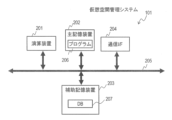
- FIG. 2 shows an example hardware configuration of the virtual space management system 101 .
- the virtual space management system 101 includes a main memory device 202 composed of volatile memory elements such as RAM, and an auxiliary memory device 203 composed of suitable non-volatile memory elements such as SSD (Solid State Drive) and hard disk drive.
- the virtual space management system 101 further reads out a program 206 stored in the auxiliary storage device 203 or the like into the main storage device 202 and executes it, performs overall control of the system itself, and performs various determinations, calculations and control processes.
- It includes an arithmetic unit 201 such as a CPU that performs
- the virtual space management system 101 includes a communication interface 204 for connecting to a network and exchanging data. These components of the virtual space management system 101 can communicate with each other via the internal bus 205 .
- the virtual space management system 101 may further include an input device such as a keyboard, mouse, and touch panel for receiving input operations from system users, and an output device such as a display for displaying processing results to the user.
- the auxiliary storage device 203 stores a program 206 for implementing the functions necessary for the virtual space management system 101 of this embodiment, as well as an information database (DB) 207 storing data necessary for various processes.
- DB information database
- the information database 207 stores information 401, 403, 405, and 407, which will be described later.
- FIG. 3 shows a hardware configuration example of the user terminal 104.
- the user terminal 104 includes a main memory device 302 composed of volatile memory elements such as RAM, and an auxiliary memory device 303 composed of appropriate non-volatile memory elements such as SSD and hard disk drive.
- the user terminal 104 further reads a program 308 stored in the auxiliary storage device 303 or the like into the main storage device 302 and executes it, performs overall control of the system itself, and performs various determinations, calculations, and control processes.
- It includes an arithmetic unit 301 such as a CPU.
- Programs 308 include programs that enable user terminals 104 to participate in workshops in virtual space.
- the user terminal 104 has a communication interface 306 for connecting to a network and exchanging data, an input device 304 such as a keyboard, mouse, touch panel, and microphone for receiving input operations from the user, and displaying processing results to the user. It includes an output device 305 such as a display and a speaker for outputting sound. These user terminal 104 components can communicate with each other via an internal bus 307 .
- the auxiliary storage device 303 stores programs 308 for implementing necessary functions and necessary information (data).
- the user terminal 104 may be, for example, a general desktop, notebook, or tablet computer, or may be, for example, a headset including a goggle-type display device, headphones, a microphone, and a gyro sensor.
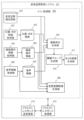
- FIG. 4 shows a functional configuration example of the virtual space management system 101 according to one embodiment of this specification.
- the functions described below are implemented by the arithmetic unit 201 of the virtual space management system 101 executing the program 206, for example.
- the virtual space management system 101 includes a main processing unit 400 , a request/response transmission/reception unit 413 , and a request/response processing unit 412 .
- the main processing unit 400 performs processing for providing the user terminal 104 with a virtual space.
- the request/response transmission/reception unit 413 and the request/response processing unit 412 perform interface processing between the user terminal 104 and the main processing unit 400 .
- the request/response transmission/reception unit 413 transmits and receives data to and from the user terminals 104 participating in the workshop in the virtual space.
- the request/response processing unit 412 performs post-processing on the data from the main processing unit 400 and transfers the data to the request/response transmission/reception unit 413 .
- the request/response processing unit 412 preprocesses the data acquired from the user terminal 104 via the request/response transmission/reception unit 413 and transfers the data to the main processing unit 400 .
- the main processing unit 400 includes information stored in the information database 207 and a plurality of processing modules.
- the information database 207 includes virtual space configuration information 401 , position/orientation information 403 , screen operation information 405 , and audio information 407 .
- the virtual space configuration information 401 manages information on objects placed in the virtual space.
- the position/orientation information 403 manages the position and orientation of the player (avatar) existing in the virtual space.
- the screen operation information 405 manages player's operations on the screen in the virtual space.
- the voice information 407 manages voices of players existing in the virtual space. Details of these pieces of information will be described later with reference to FIGS. 7-10.
- the processing modules of the main processing unit 400 include a position/orientation information acquisition unit 402, a screen operation information acquisition unit 404, an audio information acquisition unit 406, a virtual space image generation unit 408, a discussion unit generation unit 409, a discussion group generation unit 410, and A summary video generation unit 411 is included.
- the position/orientation information acquisition unit 402 extracts information on the position and orientation of the player (avatar) in the virtual space from the operation input information received from the user terminal 104 and stores it in the position/orientation information 403 .
- the operation input information indicates the operation of the user terminal 104 for the action of the player in the virtual space.
- the screen operation information acquisition unit 404 extracts information on the operation on the screen from the operation input information received from the user terminal 104 and stores it in the screen operation information 405 .
- the voice information acquisition unit 406 extracts voice information from the operation input information received from the user terminal 104 and stores it in the voice information 407 .
- the virtual space video generation unit 408 Generates an image showing the virtual space. Audio information is, for example, an audio signal (audio data).
- the virtual space video is transmitted to the user terminal 104 via the request/response processing unit 412 and the request/response transmission/reception unit 413 .
- the discussion unit generation unit 409 analyzes the information 403, 405, and 407 collected in the workshop to generate discussion units. Details of the discussion unit and discussion unit generation unit 409 will be described later with reference to FIG.
- the discussion group generation unit 410 generates a discussion group composed of one or more discussion units from the discussion units generated by the discussion unit generation unit 409 . The details of the discussion group and the processing of the discussion group generation unit 410 will be described later with reference to FIG. 15 .
- the summary video generation unit 411 generates one or more summary videos of the workshop that enable the workshop to be reviewed.
- Summary video generation unit 411 generates a summary video based on the discussion groups generated by discussion group generation unit 410 .
- the summary video and the processing of the summary video generation unit 411 will be described in detail later with reference to FIG. 16 .
- FIG. 5 shows a functional configuration example of the user terminal 104 according to one embodiment of the present specification.
- the functions described below are implemented by executing the program 308 by the arithmetic device 301 of the user terminal 104, for example.
- the user terminal 104 includes an input processing unit 501 , a request/response processing unit 502 , a request/response transmission/reception unit 503 , and a display processing unit 504 .
- the input processing unit 501 receives an input operation from the input device 304 by the user. Input operations include voice input via a microphone as well as mouse and keyboard operations.
- the request/response processing unit 502 and the request/response transmission/reception unit 503 function as interfaces for communication with the virtual space management system 101 .
- the request/response processing unit 502 performs post-processing of the input operation from the input processing unit 501 and passes it to the request/response transmission/reception unit 503 .
- the request/response transmission/reception unit 503 transmits the received information to the virtual space management system 101 .
- the request/response transmission/reception unit 503 passes the virtual space video data received from the virtual space management system 101 to the request/response processing unit 502 .
- the request/response processing unit 502 preprocesses the data and passes it to the display processing unit 504 .
- the display processing unit 504 processes the received virtual space video data and outputs the virtual space video in the output device 305 .
- FIG. 6A schematically shows an example of a workshop being held in virtual space.
- a plurality of screens 601 and a plurality of players (avatars) 602 exist in a virtual space 600 shown in FIG. 6A.
- one screen and one player are indicated by reference numerals 601 and 602, respectively.
- the screen 601 is fixed, and its position, orientation, and rotation angle about the normal are constant. Also, in the example of FIG. 6A, the screen 601 is rectangular. Note that the shape of the screen 601 is arbitrary, and the screen 601 may be movable. A user can operate an avatar 602 in the virtual space via the input device 304 of the user terminal 104 .
- the user can move the avatar to change its position and orientation.
- the output device 305 of the user terminal 104 displays an image from the avatar's viewpoint in the virtual space.
- Players 602 are divided into a plurality of player groups, and discussions are held in each player group.
- players 602 are divided into two player groups, one player group consisting of three players and the other player group consisting of two players.
- the two player groups are discussing using different screens 601 .
- Three players are discussing using one or two screens 601 .
- Two players are discussing using one screen 601 .
- FIG. 6B schematically shows an example of screen operations by the user.
- a user can post a note 603 within screen 601 or move a note 603 within screen 601 .
- one of the two notes is indicated at 603 by way of example.
- the user can direct a laser pointer 604 from his avatar 602 to a point on the screen 601 .
- FIG. 6B shows an example of screen operations, and other screen operations may be possible.
- FIG. 7 which specifically describes the information held by the virtual space management system 101, shows a configuration example of the virtual space configuration information 401.
- the virtual space configuration information 401 manages objects existing in the virtual space and is stored in advance before the workshop in the virtual space.
- the virtual space configuration information 401 manages screens arranged in the virtual space.
- the virtual space configuration information 401 has a table format. The format of any information stored in the storage device is arbitrary.
- the virtual space configuration information 401 has a screen ID column 701, a center coordinate column 702, a normal vector column 703, a size column 704, an inclination column 705, a screen name column 706, and a URL column 707.
- a screen ID column 701 indicates an identifier that uniquely identifies a screen in the virtual space.
- the center coordinate column 702 indicates the center coordinates of the screen in the virtual space.
- the virtual space is a three-dimensional space, and the center coordinates are represented by the values of three mutually perpendicular coordinate axes.
- a normal vector column 703 indicates the normal vector of the screen.
- the screen is assumed to be rectangular and flat. Note that the shape of the screen is not limited to a rectangular plane, and may be arbitrary.
- the size column 704 indicates the size of the screen, specifically, the length of two perpendicular sides of the rectangle.
- a tilt column 705 indicates a rotation angle about the normal line of the screen.
- a screen name column 706 indicates the name of the screen.
- a URL column 707 indicates the source of the image displayed by the screen. An image from the URL indicated by the URL column 707 is embedded in the screen.
- FIG. 8 shows a configuration example of the position/orientation information 403.
- the position/orientation information 403 manages the position and orientation of the player (avatar) participating in the workshop in the virtual space. As described above, information on the position and orientation of the avatar extracted from the operation input information of the user terminal 104 by the position/orientation information acquisition unit 402 is stored in the position/orientation information 403 at any time.
- the position/orientation information 403 has a table format. 8
- the position/orientation information 403 has a player ID column 801, a time column 802, a position coordinate column 803, and an orientation vector column 804. In FIG. When the player's position or orientation changes, one record indicating the corresponding information is added to the position/orientation information 403 .
- a player ID column 801 indicates an identifier that uniquely identifies a player.
- a time column 802 indicates the time when the record was added.
- a position coordinate column 803 indicates the position coordinates of the player in the virtual space.
- a direction vector column 804 indicates a vector representing the direction of the player. That is, one record indicates information on the position and orientation of the player indicated by the player ID column 801 at the time indicated by the time column 802 .
- a position coordinate column 803 indicates the position of the player in the virtual space, and a direction vector column 804 indicates the direction the player is facing. The state between successive records of the player is maintained as indicated by the previous record.
- FIG. 9 shows a configuration example of the screen operation information 405.
- FIG. The screen operation information 405 manages the player's operation on the screen arranged in the virtual space.
- the screen operation information extracted from the operation input information of the user terminal 104 by the screen operation information acquisition unit 404 is stored in the screen operation information 405 as needed.
- the screen operation information 405 has a table format.
- the screen operation information 405 has a player ID column 901 , a time column 902 , an operation target screen ID column 903 , an operation type column 904 and an operation time column 905 .
- a screen operation is executed, one record indicating corresponding information is added to the screen operation information 405 .
- a player ID column 901 indicates the identifier of the player who performed the operation on the screen.
- a time column 902 indicates the time when the player performed an operation on the screen. For example, the start time of the operation is stored.
- An operation target screen ID column 903 indicates the identifier of the operated screen.
- the operation type column 904 indicates the type of operation performed on the screen.
- FIG. 9 shows examples of multiple types of on-screen operations and laser pointers. Examples of on-screen operations include attaching a memo to the screen, moving a memo on the screen, switching images on the screen, and the like.
- the laser pointer operation the player irradiates a point on the screen with a laser beam.
- the operation time column 905 indicates the duration of the executed operation. That is, it indicates the length of time from the start of the operation to the end of the operation.
- FIG. 10 shows a configuration example of the audio information 407.
- the voice information 407 manages voices uttered by players participating in the workshop. As described above, the speech information extracted from the operation input information of the user terminal 104 by the voice information acquisition unit 406 is stored in the voice information 407 at any time.
- the audio information 407 has a table format.
- the voice information 407 has a player ID column 1001, a time column 1002, a voice text column 1003, and an utterance time column 1004.
- FIG. 10 Each time the player utters an utterance, one record indicating the corresponding information is added to the voice information 407 .
- the player ID column 1001 indicates the identifier of the player who made the utterance.
- a time column 1002 indicates the start time of the speech.
- the voice text column 1003 shows the text of the utterance content. The amount of data can be reduced by storing the utterance content as text. It should be noted that, for example, compressed audio data may be stored, and metadata that converts text into audio similar to the player's voice may be stored.
- the speech duration column 1004 indicates the length of speech.
- FIG. 11 shows a flowchart of a processing example of the user terminal 104 .
- the input processing unit 501 judges an operation input for ending participation in the workshop (S1102). If the operation input indicates exit from the workshop (S1102: YES), the user terminal 104 ends the display of the video data of the virtual space.
- the input processing unit 501 receives the operation input information via the request/response processing unit 502 and the quest/response transmitting/receiving unit 503. It is transmitted to the virtual space management system (server) 101 (S1103).
- step S1101 If there is no user operation input (S1101: NO), the flow proceeds to step S1104. If video data has not been received (S1104: NO), the flow returns to step S1101.
- the display processing unit 504 causes the output device 305 to display the newly received video in the virtual space. (S1105).
- the virtual space management system 101 generates an updated virtual space image according to an operation input from the user terminal 104 and transmits it to the user terminal 104 .
- FIG. 12 is a flowchart showing an example of virtual space management and control by the virtual space management system 101.
- the request/response transmission/reception unit 413 receives the operation input information (S1201: YES).
- the operation input information is preprocessed by the request/response processing unit 412 and passed to the main processing unit 400 .
- the main processing unit 400 generates predetermined information from the received operation input information and stores it in the information database 207 (S1202). Specifically, the position/orientation information acquisition unit 402 acquires information indicating changes in the position and orientation of the player (avatar) from the operation input information. The position/orientation information acquisition unit 402 holds information on the previous position and orientation of the player. The position/orientation information acquisition unit 402 determines a new position and orientation of the player based on the previous state and the state change indicated by the input operation information. The position/orientation information acquisition unit 402 stores information on the new state of the player in the position/orientation information 403 .
- the screen operation information acquisition unit 404 acquires information indicating the screen operation by the player from the operation input information.
- Screen operation information acquisition unit 404 stores the information in screen operation information 405 .
- a voice information acquisition unit 406 acquires voice data of the player from the operation input information.
- the voice information acquisition unit 406 converts the voice data into text and stores it in the voice information 407 together with other information.
- the virtual space video generation unit 408 generates a virtual space video for each player based on the virtual space configuration information 401, the position/orientation information 403, the screen operation information 405, and the audio data acquired from the audio information acquisition (S1203). ).
- the request/response processing unit 412 performs post-processing of the virtual space video data of each player, and the request/response transmission/reception unit 413 transmits the virtual space video data to the user terminal 104 of each player (S1204).
- the virtual space management system 101 When the virtual space management system 101 receives from the administrator an instruction to end the virtual space service (S1205), the virtual space management system 101 ends the virtual space service. If there is no instruction to end the virtual space service (S1205: NO), the flow returns to step S1201.
- the summary video is, for example, a video viewed to look back on the workshop, and is generated based on the position/orientation information 403, the screen operation information 405, and the audio information 407, which indicate the history of the workshop.
- the virtual space management system 101 extracts discussion units from workshop history data, and organizes related discussion units into discussion groups.
- the virtual space management system 101 generates summary video for each discussion group.
- FIG. 13 shows a flowchart of an example of a summary video generation method by the virtual space management system 101 .
- the discussion unit generation unit 409 reads information for generating summary video from the information database 207 (S1301). Specifically, the discussion unit generation unit 409 generates video data (history information).
- the discussion unit generation unit 409 identifies the screen that each player is viewing and the time zone during which the screen is being viewed during the workshop (S1302).
- the discussion unit generation unit 409 can identify the screen viewed by the player from the position and orientation of the screen and the position and orientation of the player.
- the method of specifying the screen viewed by the player is not limited to this example, and any appropriate method can be applied according to the design. For example, it may be determined that the viewing angle of the player is defined and the player is looking at the screen with the largest area that includes the viewing angle.
- the discussion unit generation unit 409 extracts discussion units for each screen based on the screen viewed by each player, the player's voice, and information on operations on each screen (S1303). The details of the method of extracting discussion units will be described later with reference to FIG.
- the discussion group generation unit 410 collects related discussion units and generates a discussion group (S1304).
- the discussion group generation unit 410 determines related discussion units based on player information attached to the discussion units. Details of a method of grouping related discussion units to form discussion groups will be described later with reference to FIG.
- the summary video generation unit 411 generates a summary video (also called a discussion stream) for each discussion group generated by the discussion group generation unit 410 .
- the generated summary video is stored in the auxiliary storage device 203 . Details of the method for generating the summary video will be described later with reference to FIG. Thus, the processing for generating the summary video of the workshop is completed.
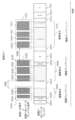
- FIG. 14 is a diagram for explaining the process of generating discussion units.
- a discussion unit is a collection of one discussion.
- a discussion in a player group consisting of multiple players can be considered to take place using the screen 601 . Therefore, in one embodiment of the present specification, one discussion unit is determined for one screen 601 .
- a discussion unit is a time slot associated with screen 601, which is regarded as one set of discussion by virtual space management system 101.
- a discussion is about one or more related topics. Players participating in the discussion may change and are not always constant in each discussion unit.
- FIG. 14 shows an example of determining discussion units for a screen with a screen ID of 4.
- the horizontal axis indicated by arrows indicates the passage of time.
- FIG. 14 shows viewing time periods 1401A to 1401I for the screen 601 of screen ID4. Each operation time period is indicated by a solid white rectangle. The numbers inside the white solid-line rectangles indicate the IDs of the players facing the screen 601 of screen ID 4 in each of the viewing time zones 1401A to 1401I in chronological order.
- FIG. 14 shows 10 operation time periods 1402A to 1402J in chronological order. Each operation time zone is indicated by a solid-line rectangle with a hatched pattern.
- FIG. 14 shows three discussion units 1403A, 1403B and 1403C in chronological order. Each discussion unit is indicated by a dotted-line rectangle with a dot pattern within the visible time zones 1401A to 1401I.
- the discussion players participating in the discussion unit 1403A are players 1, 2, and 4.
- the discussion players participating in the discussion unit 1403B are players 1, 2 and 4.
- the discussion players participating in discussion unit 1403C are players 1, 2, 3 and 4.
- the viewing time zone is a time zone during which the same player group faces the same screen.
- One player group is composed of one or more players. Therefore, the viewing time zone is a time zone during which one or more identical players face one screen. All viewing windows are separated without overlapping.
- one of the players always faces the screen 601 of screen ID4.
- the number inside the rectangle representing the viewing time zone indicates the ID of the player facing the screen 601 of screen ID4.
- several viewing time zones are described as examples. Other viewing time zones can be explained in the same way.
- the viewing time zone 1401A one player 1 faces the screen 601 with screen ID 4 .
- the viewing time zone 1401C three players 1, 2, and 4 face the screen 601 with screen ID 4.
- the operation time zone is a time zone during which the screen is being operated or the player facing the screen is uttering a sound.
- the gap between adjacent operation time zones on the time axis is a time zone (non-operation time zone) in which none of the players facing the screen 601 with screen ID 4 speaks and the screen with screen ID 4 is not operated. is.
- the players participating in the discussion express their opinions to each other or operate the screen to advance the discussion.
- the operation time period By defining the operation time period in this way, it is possible to more appropriately extract discussion units.
- a condition different from the speech and screen operation may be added, and for example, the screen operation condition may be omitted.
- player 4 moves to change position and/or orientation, and faces screen 601 with screen ID 4. From the middle of the operation time zone 1402A, players 1, 2, and 4 are facing the screen 601 with screen ID 4, and at least one of the players 1, 2, and 4 is speaking, or screen 601 with screen ID 4. is operated.
- players 1, 2 and 4 face the screen 601 with screen ID 4 and at least one of the players 1, 2 and 4 is speaking or the screen 601 with screen ID 4 is operated.
- players 2 and 4 face the screen 601 with screen ID 4 from the start time to the middle time. Also, at least one of the players 2 and 4 is speaking, or the screen 601 with the screen ID 4 is being operated. After that, player 4 leaves the screen 601 with screen ID 4 and only player 2 faces the screen 601 with screen ID 4 . Player 2 ends the operation after operating the screen 601 with screen ID 4 for a while.
- the discussion unit is determined based on the viewing time period and the operation time period.
- the discussion unit generation unit 409 selects a visible time period in which the number of players exceeds the threshold value n (first threshold value) from the visible time periods 1401A to 1401I.
- the threshold n is 1, for example. In this case, two or more players, that is, a plurality of players' viewing time zones are selected.
- the threshold value n can be set to any number equal to or greater than 1, for example. Since the discussion is conducted by a plurality of players, discussion units can be extracted more appropriately. In the example of FIG. 14, viewing time zones 1401B to 1401D and 1401F to 1401H are selected.
- the discussion unit generation unit 409 groups continuous operation time periods in which the interval between adjacent operation time periods on the time axis is less than the threshold m (second threshold).
- the threshold m may be, for example, 30 seconds.
- operation time periods 1402A and 1402B are grouped to form an operation time period group 1410A.
- Operation time periods 1402C to 1402F are grouped to form an operation time period group 1410B.
- operation time periods 1402G to 1402J are grouped to form an operation time period group 1410C.
- Each operation time period group is regarded as one time period. That is, the time period from the start time of the first operation time period to the end time of the last operation time period is the time period of the operation time period group. Intervals between consecutive operating windows are filled as times belonging to the operating window group.
- the discussion unit generation unit 409 determines the overlapping time period between the selected viewing time period and the operation time period group as a discussion unit.
- the overlapping time period between the operation time period group 1410A and the visible time period 1401B and the overlapping time period between the operation time period group 1410A and the visible time period 1401C constitute one time period.
- This time slot is determined as discussion unit 1403A.
- At least one player in the viewing time period 1401B or the viewing time period 1401C is determined as the discussion player of the discussion unit 1403A.
- the overlapping time period between the operation time period group 1410B and the viewing time period 1401C and the overlapping time period between the operation time period group 1410B and the viewing time period 1401D constitute one time period.
- This time slot is determined as discussion unit 1403B.
- At least one player in the viewing time slot 1401C or the viewing time slot 1401D is determined as the discussion player of the discussion unit 1403B.
- the overlapping time period between the operation time period group 1410C and the viewing time period 1401F and the overlapping time period between the operation time period group 1410C and the viewing time period 1401G constitute one time period.
- This time period is determined as discussion unit 1403C.
- At least one player in the viewing time period 1401F or the viewing time period 1401G is determined as the discussion player of the discussion unit 1403C.
- the discussion unit generation unit 409 determines discussion units for each screen based on the number of players and interactions between players. This makes it possible to determine the discussion unit more appropriately.
- the discussion unit generation unit 409 identifies the viewing time period during which the same player group is viewing the selected screen. Specifically, the discussion unit generation unit 409 refers to the position/orientation information 403 to specify the position and orientation of each player at each time. Furthermore, the discussion unit generation unit 409 refers to the virtual space configuration information 401 to specify the position and orientation of each screen.
- the discussion unit generation unit 409 can identify the player facing the selected screen at each time from the information on the player and the screen.
- the first screen that exists in the direction of the orientation vector from the position of the player may be determined as the screen that the player is facing.
- the discussion unit generation unit 409 identifies an operation time zone in which at least one of the screen operation on the selected screen and the voice of the player facing the screen exists.
- the discussion unit generation unit 409 can know the time period during which the selected screen was operated.
- the discussion unit generation unit 409 can refer to the voice information 407 to know the utterance time zone of the player facing the selected screen.
- the discussion unit generation unit 409 selects the viewing time period of the player exceeding the threshold value n from the viewing time period. Furthermore, the discussion unit generating unit 409 forms an operation time period group of operation time periods in which the interval between adjacent operation time periods on the time axis is less than m seconds.
- the operation time period group constitutes one time period. As described above, within an operating window group, the time between adjacent operating windows is included in the operating window group time.
- the discussion unit generation unit 409 determines each overlapping time period between the all visible time period of the player exceeding the threshold value n and the all operation time period group as a discussion unit. Also, all players facing the screen in the discussion unit are determined as discussion players of the discussion unit.
- the discussion unit generation unit 409 configures the operation time period group, and then identifies overlapping time periods between the operation time period group and the viewing time period during which multiple people are viewing the screen.
- the time period from the start time to the end time of the overlapping period is the discussion unit.
- the discussion unit generation unit 409 identifies an overlapping time period between an operation time period and a viewing time period during which a plurality of people are viewing the screen, and identifies an overlapping time period in which the interval between adjacent time periods is less than the threshold value m. can form a group.
- the time period from the start time to the end time of this group is the discussion unit.
- a time period from the start time to the end time of a group composed of one or more time periods with an interval between time periods less than the threshold value m is determined as a discussion unit associated with the same screen.
- the presence of the player's voice and the presence of operations on the same screen are set in advance as conditions for extracting discussion units. Only one of these may be set, or in addition to or instead of these, other conditions may be set in advance.
- FIG. 15 is a diagram for explaining the process of generating discussion groups.
- a discussion group is a group composed of one or more related discussion units.
- a discussion group is composed of one or more discussion units, and one discussion unit can belong to multiple discussion groups.
- a discussion group is a unit for generating summary videos. Note that generation of discussion groups may be omitted. In this example, a summary video can be generated for each discussion.
- FIG. 15 shows an example of how to organize discussion groups.
- FIG. 15 shows two discussion groups 1501A and 1501B.
- Discussion group 1501A is made up of discussion units 1505A through 1505D and 1505F.
- Discussion group 1501B is made up of discussion units 1505E and 1505F.
- the discussion unit 1505A is assigned to screen ID 4, and its discussion players are discussion players 1, 2 and 4.
- Discussion unit 1505B is assigned to screen ID 4, and its discussion players are discussion players 1, 2, and 4.
- Discussion unit 1505C is assigned to screen ID 4 and its discussion players are discussion players 1, 2, 3 and 4.
- the discussion unit 1505D is assigned to screen ID 3, and its discussion players are discussion players 1, 3 and 4.
- Discussion unit 1505E is assigned to screen ID 5, and its discussion players are discussion players 5, 6, 7 and 8.
- Discussion unit 1505F is assigned to screen ID 2, and its discussion players are discussion players 1, 2, 3, 5, 6, and 7.
- the discussion group generation unit 410 forms a discussion group by chronologically grouping discussion units in which the number of common discussion players exceeds the threshold p. As a result, consecutively related discussion units can be appropriately included in one discussion group.
- the threshold p is one. That is, discussion units having two or more discussion players in common are grouped in chronological order.
- the threshold p is appropriately set by design. In this way, by grouping discussion units according to the common number of people, mutually related discussion units can be appropriately grouped into one discussion group. However, other conditions for configuring discussion groups may be used.
- discussion players of discussion unit 1505A and discussion unit 1505B are the same, and they are included in the same discussion group 1501A.
- Discussion players 1 and 4 are common between discussion unit 1505B and discussion unit 1505D. As such, discussion unit 1505D is included in discussion group 1501A.
- Discussion players 1, 3 and 4 are common between discussion unit 1505D and discussion unit 1505C. As such, discussion unit 1505C is included in discussion group 1501A. Discussion players 1, 2 and 3 are common between discussion unit 1505C and discussion unit 1505F. As such, discussion unit 1505D is included in discussion group 1501A.
- discussion unit 1505A and discussion unit 1505E are separated into different discussion groups. That is, discussion unit 1505E is included in a different discussion group than discussion group 1501A.
- discussion unit 1505E There is no common discussion player between the discussion unit 1505E and each of the discussion units 1505B, 1505D and 1505C. As such, discussion unit 1505E is included in a different discussion group than each of discussion units 1505B, 1505D, and 1505C.
- Discussion players 5, 6 and 7 are common between discussion unit 1505E and discussion unit 1505F. As such, discussion unit 1505F is included in the same discussion group 1501B.
- discussion group generation unit 410 arranges the discussion units forming the same discussion group along the time axis.
- a discussion unit sequence for each discussion group is constructed.
- discussion group 1051A's sequence of discussion units consists of discussion units 1505A, 1505B, 1505C and 1505F
- discussion group 1051B's sequence of discussion units consists of discussion units 1505E and 1505F.
- the discussion group generation unit 410 selects the first discussion unit before grouping, for example, based on the start time. In the example of FIG. 15, unit of discourse 1505A is selected.
- the discussion group generation unit 410 compares the discussion players from the beginning of the discussion unit started after the selected discussion unit. The comparison is repeated until a discussion unit is found whose common discussion player exceeds a threshold p. If no discussion unit is found whose common discussion player exceeds the threshold p, the comparison may be repeated, for example, from the end time of the discussion unit whose start time is selected (eg, discussion unit 1505A) to the discussion unit within a specified time. . Alternatively, the comparison may continue until the last unit of discourse (eg, unit of discourse 1505F).
- the discussion group generation unit 410 selects the discussion unit 1505E whose start time is the next discussion unit after the selected discussion unit 1505A. There is no discussion player common to these. Therefore, next, discussion group generation section 410 selects discussion unit 1505B. Since they have three discussion players in common, they are included in the same discussion group 1501A.
- Discussion unit 1505D is included in discussion group 1501A. Thereafter, similar processing is repeated to include discussion unit C and discussion unit F in discussion group 1501A. In this way, the discussion group generation unit 410 adds the discussion unit after the last added discussion unit to the discussion group when the number of discussion players common to the discussion unit added last to the discussion group exceeds the threshold. Repeat to form a discussion group.
- the discussion group generation unit 410 selects the first discussion unit before grouping. In the example of FIG. 15, unit of discourse 1505E is selected.
- the discussion group generation unit 410 compares the discussion players of the discussion unit 1505E and the next discussion unit 1505B. Since there is no discussion player in common, they are determined to be unrelated and not grouped. Next, discussion group generator 410 selects discussion unit 1505D next to discussion unit 1505B. Since there is no discussion player in common, they are determined to be unrelated and not grouped.
- the discussion group generation unit 410 selects the discussion unit 1505C next to the discussion unit 1505D. Since there is no discussion player in common, they are determined to be unrelated and not grouped.
- discussion group generation unit 410 selects the discussion unit 1505F next to the discussion unit 1505C. Three discussion players are common. Discussion group generator 410 associates discussion unit 1505E with discussion unit 1505F and includes them in the same discussion group 1501B.
- the discussion group generation unit 410 constructs a sequence of discussion units on each screen along time, and selects the first discussion unit before grouping.
- the discussion group generator 410 compares the discussion players between the selected discussion unit and the next discussion unit. If the number of common discussion players exceeds the threshold, the discussion group generation unit 410 associates those discussion units and includes them in the same group. Discussion group generator 410 searches for discussion units related to the selected discussion unit along the time axis.
- the discussion group generation unit 410 searches for the related unit of discussion with the found discussion unit as the selected discussion unit. If no discussion unit related to the last added discussion unit to the discussion group is found, grouping for that discussion group ends.
- the discussion group generation unit 410 repeats the above process after selecting the top discussion unit before grouping. When all discussion units have been grouped, the discussion group generation process by the discussion group generation unit 410 ends.
- FIG. 16 is a diagram for explaining processing for generating a summary image of discussion group 1501A.
- discussion group 1501A is a discussion unit sequence consisting of discussion units 1505A, 1505B, 1505D, 1505C, and 1505F.
- Summary video generation unit 411 generates partial videos 1601A to 1606A based on discussion units, and joins these videos along the time axis to form summary video 1600A.
- the summary video generation unit 411 includes all screens used in each time slot in the discussion group in the video.
- the screen being used is the screen the player is facing.
- all players facing the screen used at each time are displayed.
- the information in the discussion group can be appropriately summarized in the video.
- the summary video generation unit 411 generates each partial video in a time zone in which the screen being used is constant. At this time, the video of the blank time slot between discussion units is omitted. As a result, unnecessary time periods can be omitted from the summary video.
- Time zone a is the time zone of discussion unit 1505A, and only the screen with screen ID 4 is used. Also, time zone b is the front part of discussion unit 1505B, and only the screen with screen ID 4 is used.
- Summary video generation unit 411 generates partial video 1601A of time zone a and time zone b showing the screen with screen ID 4 and the player watching it.
- time slot c includes the latter part of discussion unit 1505B and the front part of discussion unit 1505D. That is, the screens with screen ID3 and screen ID4 are used at the same time.
- the summary video generation unit 411 generates a partial video 1602A of time zone c showing the screens of screen ID3 and screen ID4 and the player facing them. As a result, it is possible to confirm the videos of both overlapping discussion units.
- Time zone d is the middle time zone of discussion unit 1505D, and only the screen with screen ID 3 is used.
- Summary video generation unit 411 generates partial video 1603A of time zone d showing the screen with screen ID 3 and the player watching it.
- time period e includes the latter part of discussion unit 1505D and the front part of discussion unit 1505C. That is, the screens with screen ID3 and screen ID4 are used at the same time.
- Summary video generation unit 411 generates partial video 1604A of time zone e showing the screens of screen ID3 and screen ID4 and the player facing them. As a result, it is possible to confirm the videos of both overlapping discussion units.
- Time zone f is the time zone behind discussion unit 1505C, and only the screen with screen ID 4 is used.
- Summary video generation unit 411 generates partial video 1605A of time zone d showing the screen with screen ID 4 and the player watching it.
- Time zone g is the time zone of discussion unit 1505F, and only the screen with screen ID 2 is used.
- Summary video generation unit 411 generates partial video 1606A of time period g showing the screen with screen ID 2 and the player watching it.
- Summary video generation unit 411 connects partial videos 1601A to 1606A in chronological order to form discussion stream (summary video) 1600A.
- FIG. 17 is a diagram for explaining processing for generating a summary image of discussion group 1501B. Similar to discussion group 1501A, summary video 1700A for discussion group 1501B is generated.
- Time zone h is the time zone of discussion unit 1505E, and only the screen with screen ID 5 is used.
- the summary video generation unit 411 generates a partial video 1601B of the time slot h showing the screen with the screen ID 5 and the player watching it.
- Time zone g is the time zone of discussion unit 1505F, and only the screen with screen ID 2 is used.
- Summary video generation unit 411 generates partial video 1602B of time period g showing the screen with screen ID 2 and the player watching it.
- Summary video generation unit 411 connects partial videos 1601B and 1602B in chronological order to form discussion stream (summary video) 1600B.
- the present invention is not limited to the above-described embodiments, and includes various modifications.
- the above embodiments have been described in detail for easy understanding of the present invention, and are not necessarily limited to those having all the described configurations.
- part of the configuration of one embodiment can be replaced with the configuration of another embodiment, and the configuration of another embodiment can be added to the configuration of one embodiment.
- each of the above configurations, functions, processing units, etc. may be realized by hardware, for example, by designing a part or all of them with an integrated circuit.
- each of the above configurations, functions, etc. may be realized by software by a processor interpreting and executing a program for realizing each function.
- Information such as programs, tables, and files that implement each function can be stored in a memory, a hard disk, a recording device such as an SSD (Solid State Drive), or a recording medium such as an IC card or SD card.
- control lines and information lines indicate what is considered necessary for explanation, and not all control lines and information lines are necessarily indicated on the product. In fact, it may be considered that almost all configurations are interconnected.
Landscapes
- Engineering & Computer Science (AREA)
- Business, Economics & Management (AREA)
- Operations Research (AREA)
- Quality & Reliability (AREA)
- Economics (AREA)
- Entrepreneurship & Innovation (AREA)
- Human Resources & Organizations (AREA)
- Marketing (AREA)
- Multimedia (AREA)
- Signal Processing (AREA)
- Strategic Management (AREA)
- Tourism & Hospitality (AREA)
- Physics & Mathematics (AREA)
- General Business, Economics & Management (AREA)
- General Physics & Mathematics (AREA)
- Theoretical Computer Science (AREA)
- Management, Administration, Business Operations System, And Electronic Commerce (AREA)
- Information Transfer Between Computers (AREA)
Applications Claiming Priority (2)
| Application Number | Priority Date | Filing Date | Title |
|---|---|---|---|
| JP2021-125155 | 2021-07-30 | ||
| JP2021125155A JP7546522B2 (ja) | 2021-07-30 | 2021-07-30 | 仮想空間内で実行されたミーティングのまとめ映像を作成するシステム及び方法 |
Publications (1)
| Publication Number | Publication Date |
|---|---|
| WO2023007782A1 true WO2023007782A1 (ja) | 2023-02-02 |
Family
ID=85086596
Family Applications (1)
| Application Number | Title | Priority Date | Filing Date |
|---|---|---|---|
| PCT/JP2022/006455 Ceased WO2023007782A1 (ja) | 2021-07-30 | 2022-02-17 | 仮想空間内で実行されたミーティングのまとめ映像を作成するシステム及び方法 |
Country Status (2)
| Country | Link |
|---|---|
| JP (1) | JP7546522B2 (https=) |
| WO (1) | WO2023007782A1 (https=) |
Citations (5)
| Publication number | Priority date | Publication date | Assignee | Title |
|---|---|---|---|---|
| JP2013105471A (ja) * | 2011-11-17 | 2013-05-30 | Hitachi Ltd | イベントデータ処理装置 |
| JP2016181244A (ja) * | 2015-03-24 | 2016-10-13 | 富士ゼロックス株式会社 | ユーザ注意判定システム、方法及びプログラム |
| JP2017229060A (ja) * | 2016-06-22 | 2017-12-28 | 富士ゼロックス株式会社 | 会議コンテンツを表現する方法、プログラム、及び装置 |
| JP2019174894A (ja) * | 2018-03-27 | 2019-10-10 | 株式会社日立製作所 | ワークショップ支援システムおよびワークショップ支援方法 |
| JP2021012384A (ja) * | 2017-11-02 | 2021-02-04 | グーグル エルエルシーGoogle LLC | 会議能力を有する自動アシスタント |
Family Cites Families (1)
| Publication number | Priority date | Publication date | Assignee | Title |
|---|---|---|---|---|
| JP2006279111A (ja) | 2005-03-25 | 2006-10-12 | Fuji Xerox Co Ltd | 情報処理装置、情報処理方法およびプログラム |
-
2021
- 2021-07-30 JP JP2021125155A patent/JP7546522B2/ja active Active
-
2022
- 2022-02-17 WO PCT/JP2022/006455 patent/WO2023007782A1/ja not_active Ceased
Patent Citations (5)
| Publication number | Priority date | Publication date | Assignee | Title |
|---|---|---|---|---|
| JP2013105471A (ja) * | 2011-11-17 | 2013-05-30 | Hitachi Ltd | イベントデータ処理装置 |
| JP2016181244A (ja) * | 2015-03-24 | 2016-10-13 | 富士ゼロックス株式会社 | ユーザ注意判定システム、方法及びプログラム |
| JP2017229060A (ja) * | 2016-06-22 | 2017-12-28 | 富士ゼロックス株式会社 | 会議コンテンツを表現する方法、プログラム、及び装置 |
| JP2021012384A (ja) * | 2017-11-02 | 2021-02-04 | グーグル エルエルシーGoogle LLC | 会議能力を有する自動アシスタント |
| JP2019174894A (ja) * | 2018-03-27 | 2019-10-10 | 株式会社日立製作所 | ワークショップ支援システムおよびワークショップ支援方法 |
Also Published As
| Publication number | Publication date |
|---|---|
| JP2023020023A (ja) | 2023-02-09 |
| JP7546522B2 (ja) | 2024-09-06 |
Similar Documents
| Publication | Publication Date | Title |
|---|---|---|
| JP7483798B2 (ja) | ワードフロー注釈 | |
| US20190004639A1 (en) | Providing living avatars within virtual meetings | |
| WO2021004247A1 (zh) | 视频封面生成方法、装置及电子设备 | |
| CN106663127A (zh) | 一种虚拟机器人的交互方法、系统及机器人 | |
| KR20150050753A (ko) | 카툰 이미지를 이용한 메신저 대화창 표시 방법 및 컴퓨터 판독 가능한 기록 매체 | |
| CN116521793A (zh) | 元宇宙数据处理方法及装置 | |
| CN114245099A (zh) | 视频生成方法、装置、电子设备以及存储介质 | |
| JPH11185058A (ja) | オブジェクトの選択方法およびそのシステム | |
| JP2017224166A (ja) | 画像生成装置、画像生成プログラム及び画像生成方法 | |
| US12293759B2 (en) | Method and device for presenting a CGR environment based on audio data and lyric data | |
| JP7355244B2 (ja) | 情報処理装置、情報処理方法およびプログラム | |
| JP2017064853A (ja) | ロボット、コンテンツ決定装置、コンテンツ決定方法、及びプログラム | |
| CN109753145A (zh) | 一种过渡动画的展示方法和相关装置 | |
| JP7546522B2 (ja) | 仮想空間内で実行されたミーティングのまとめ映像を作成するシステム及び方法 | |
| JP2018055270A (ja) | プレゼンテーション資料生成装置、プレゼンテーション資料生成システム、コンピュータプログラム及びプレゼンテーション資料生成方法 | |
| Zhang et al. | ST 2 VR: An interactive authoring system for spatiotemporal storytelling in virtual reality with hierarchical narrative structure | |
| JP7677328B2 (ja) | 情報処理装置及び情報処理方法 | |
| US11789602B1 (en) | Immersive gallery with linear scroll | |
| JP2022045057A (ja) | 電子会議支援装置及び電子会議支援方法 | |
| KR102751602B1 (ko) | 가상 경기장 기반의 스포츠 제공 방법 및 시스템 | |
| JP7787533B2 (ja) | プログラム、情報処理方法及び情報処理システム | |
| KR102616058B1 (ko) | 음성 기록을 시각화하여 재연하는 방법, 컴퓨터 장치, 및 컴퓨터 프로그램 | |
| US20260011098A1 (en) | Accessible individual and group interactions in a virtual environment | |
| JP7691028B2 (ja) | 情報処理システム、情報処理方法、およびプログラム | |
| US12436603B2 (en) | Audience engagement for placement of content in an HMD |
Legal Events
| Date | Code | Title | Description |
|---|---|---|---|
| 121 | Ep: the epo has been informed by wipo that ep was designated in this application |
Ref document number: 22848866 Country of ref document: EP Kind code of ref document: A1 |
|
| NENP | Non-entry into the national phase |
Ref country code: DE |
|
| 122 | Ep: pct application non-entry in european phase |
Ref document number: 22848866 Country of ref document: EP Kind code of ref document: A1 |