WO2022259865A1 - 店舗運営支援装置および店舗運営支援方法 - Google Patents
店舗運営支援装置および店舗運営支援方法 Download PDFInfo
- Publication number
- WO2022259865A1 WO2022259865A1 PCT/JP2022/021269 JP2022021269W WO2022259865A1 WO 2022259865 A1 WO2022259865 A1 WO 2022259865A1 JP 2022021269 W JP2022021269 W JP 2022021269W WO 2022259865 A1 WO2022259865 A1 WO 2022259865A1
- Authority
- WO
- WIPO (PCT)
- Prior art keywords
- person
- product
- camera image
- store
- behavior
- Prior art date
- Legal status (The legal status is an assumption and is not a legal conclusion. Google has not performed a legal analysis and makes no representation as to the accuracy of the status listed.)
- Ceased
Links
Images




Classifications
-
- G—PHYSICS
- G06—COMPUTING OR CALCULATING; COUNTING
- G06V—IMAGE OR VIDEO RECOGNITION OR UNDERSTANDING
- G06V40/00—Recognition of biometric, human-related or animal-related patterns in image or video data
- G06V40/20—Movements or behaviour, e.g. gesture recognition
-
- G—PHYSICS
- G06—COMPUTING OR CALCULATING; COUNTING
- G06Q—INFORMATION AND COMMUNICATION TECHNOLOGY [ICT] SPECIALLY ADAPTED FOR ADMINISTRATIVE, COMMERCIAL, FINANCIAL, MANAGERIAL OR SUPERVISORY PURPOSES; SYSTEMS OR METHODS SPECIALLY ADAPTED FOR ADMINISTRATIVE, COMMERCIAL, FINANCIAL, MANAGERIAL OR SUPERVISORY PURPOSES, NOT OTHERWISE PROVIDED FOR
- G06Q30/00—Commerce
- G06Q30/02—Marketing; Price estimation or determination; Fundraising
-
- G—PHYSICS
- G06—COMPUTING OR CALCULATING; COUNTING
- G06Q—INFORMATION AND COMMUNICATION TECHNOLOGY [ICT] SPECIALLY ADAPTED FOR ADMINISTRATIVE, COMMERCIAL, FINANCIAL, MANAGERIAL OR SUPERVISORY PURPOSES; SYSTEMS OR METHODS SPECIALLY ADAPTED FOR ADMINISTRATIVE, COMMERCIAL, FINANCIAL, MANAGERIAL OR SUPERVISORY PURPOSES, NOT OTHERWISE PROVIDED FOR
- G06Q30/00—Commerce
- G06Q30/02—Marketing; Price estimation or determination; Fundraising
- G06Q30/0201—Market modelling; Market analysis; Collecting market data
-
- G—PHYSICS
- G06—COMPUTING OR CALCULATING; COUNTING
- G06Q—INFORMATION AND COMMUNICATION TECHNOLOGY [ICT] SPECIALLY ADAPTED FOR ADMINISTRATIVE, COMMERCIAL, FINANCIAL, MANAGERIAL OR SUPERVISORY PURPOSES; SYSTEMS OR METHODS SPECIALLY ADAPTED FOR ADMINISTRATIVE, COMMERCIAL, FINANCIAL, MANAGERIAL OR SUPERVISORY PURPOSES, NOT OTHERWISE PROVIDED FOR
- G06Q30/00—Commerce
- G06Q30/06—Buying, selling or leasing transactions
-
- G—PHYSICS
- G06—COMPUTING OR CALCULATING; COUNTING
- G06V—IMAGE OR VIDEO RECOGNITION OR UNDERSTANDING
- G06V20/00—Scenes; Scene-specific elements
- G06V20/50—Context or environment of the image
- G06V20/52—Surveillance or monitoring of activities, e.g. for recognising suspicious objects
-
- G—PHYSICS
- G06—COMPUTING OR CALCULATING; COUNTING
- G06V—IMAGE OR VIDEO RECOGNITION OR UNDERSTANDING
- G06V40/00—Recognition of biometric, human-related or animal-related patterns in image or video data
- G06V40/10—Human or animal bodies, e.g. vehicle occupants or pedestrians; Body parts, e.g. hands
- G06V40/103—Static body considered as a whole, e.g. static pedestrian or occupant recognition
Definitions
- the present disclosure analyzes the person's item selection status based on a camera image of a person staying in front of a display area in a store, and presents the analysis result to the user to support the user's store management work.
- the present invention relates to a store operation support device and a store operation support method.
- the present disclosure provides a store operation support device and a store operation support method that enable the user to fully grasp the customer's product selection status and immediately take effective measures for improving the store operation.
- the main purpose is to
- the store operation support device of the present disclosure analyzes the item selection status of the person based on the camera image of the person staying in front of the display area in the store, and includes a processor that performs processing for presenting the analysis result to the user.
- the processor detects a person from the camera image, identifies the person to be analyzed, detects behavior of the person from the camera image, and determines the person to be analyzed.
- Behavior information for each person is acquired in association with products, the behavior information for each person is accumulated in a storage unit, and at least the time required for product selection is included based on the behavior information accumulated in the storage unit.
- Generate item determination information store the item determination information for each person in the storage unit, and obtain the analysis result visualizing the item determination status corresponding to each product based on the item determination information accumulated in the storage unit. Configuration.
- the store operation support method of the present disclosure analyzes the item selection status of the person based on the camera image of the person staying in front of the display area in the store, and presents the analysis results to the user.
- a store operation support method performed by a device wherein a person is detected from the camera image, a person to be analyzed is specified, behavior of the person is detected from the camera image, and each person to be analyzed is detected. is acquired in association with the product, the behavior information for each person is accumulated in a storage unit, and based on the behavior information accumulated in the storage unit, product determination includes at least the time required for product selection.
- the analysis result that visualizes the item selection status corresponding to each product is acquired and the analysis result is presented to the user.
- the user can fully grasp the customer's product selection status, and can immediately take effective measures to improve the management of the store.
- a first invention which has been made to solve the above-mentioned problems, is based on a camera image of a person staying in front of a display area in a store, analyzes the person's item selection status, and presents the analysis results to the user.
- a store operation support device comprising a processor for processing, wherein the processor detects a person from the camera image, identifies the person to be analyzed, detects the person's behavior from the camera image, Acquiring the behavior information of each person to be analyzed in association with the product, accumulating the behavior information of each person in a storage unit, and determining at least the product based on the behavior information accumulated in the storage unit and storing the item determination information for each person in the storage unit, and visualizing the item determination situation corresponding to each product based on the item determination information accumulated in the storage unit. It is configured to acquire the analysis result.
- the analysis result that visualizes the product selection status corresponding to each product is acquired and the analysis result is presented to the user.
- the user can fully grasp the customer's product selection status, and can immediately take effective measures to improve the management of the store.
- the processor determines that the person is a store clerk based on the feature information of the person detected from the camera image, the person is excluded from the analysis target.
- the processor detects a product holding behavior and a product gazing behavior as behaviors related to a person's product selection, and acquires the behavior information including the detection results.
- the processor outputs the analysis result including a map image in which an image visualizing the item determination information for each display area includes a map image drawn on an image representing the layout of the store. do.
- the user can immediately grasp the customer's product selection status for each display area.
- the map image at each time may be reproduced as a moving image.
- the analysis result including the camera image corresponding to the selected display area is generated by the processor in response to a user's operation to select the display area on the screen displaying the map image. is configured to output
- the user can specifically grasp the customer's product selection status by viewing the camera image for the display area that the user has focused on by viewing the map image.
- the camera image at each time may be reproduced as a moving image.
- the processor acquires the product holding count, the product watching time, and the holding product count as the product determination information based on the behavior information, and obtains the product holding frequency, product watching time, and holding product number. Based on the number of products, it is configured to acquire a product selection frequency obtained by quantifying the degree to which a person has trouble deciding on a product.
- the information processing apparatus analyzes the item selection status of the person based on the camera image of the person staying in front of the display area in the store, and presents the analysis result to the user.
- a store operation support method that detects a person from the camera image, specifies a person to be analyzed, detects behavior of the person from the camera image, and provides behavior information for each person to be analyzed. is associated with the product, the behavior information for each person is stored in a storage unit, and based on the behavior information stored in the storage unit, product determination information including at least the time required to determine the product is generated. Then, the item determination information for each person is accumulated in the storage unit, and based on the item determination information accumulated in the storage unit, the analysis result of visualizing the item determination situation corresponding to each product is acquired.
- the user can fully grasp the customer's product selection status, and can immediately take effective measures to improve store management.
- FIG. 1 is an overall configuration diagram of the store operation support system according to this embodiment.
- This store management support system analyzes the situation of customers who select items in front of display shelves in a store, presents the analysis results to the user (store manager), and supports the user's business.
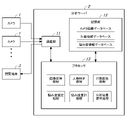
- the store operation support system includes a camera 1 , an analysis server 2 (store operation support device, information processing device), and a viewing terminal 3 . Camera 1, analysis server 2, and viewing terminal 3 are connected via a network.
- the camera 1 is installed at an appropriate place in the store.
- the camera 1 photographs a display shelf (display area) in the store and an aisle (stay area) in front of the store where customers stay to check the products.
- the analysis server 2 analyzes the customer's product selection status at the store.
- the analysis server 2 is composed of a PC or the like. Note that the analysis server 2 may be installed in a store or may be a cloud computer.
- the viewing terminal 3 is for users (such as store managers) to view the analysis results of the analysis server 2 .
- the browsing terminal 3 is composed of a PC, a tablet terminal, or the like.
- an analysis of the customer's product selection status is performed for each display area (display shelf) corresponding to the product category (noodles, rice balls, etc.).
- the camera 1 photographs the display area of the target product category.
- the analysis server 2 can analyze the customer's product selection status for each display area (product category) based on the camera image.
- a single camera 1 may be used to photograph a plurality of display areas, and the photographed image of each display area may be extracted from the camera image obtained by the camera 1 .
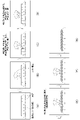
- FIG. 2 is an explanatory diagram showing a transition state of camera images when a customer decides an item.
- the camera 1 shoots from above the display shelf (display area) and the aisle (stay area) in front of it where customers stay to check out the products.
- the camera image shows the products on the display shelf and the person (customer) who checks the product in front of the display shelf. It should be noted that the camera 1 may take a picture of the display shelf and the person from the side. Further, the camera 1 regularly transmits camera images (frames) at each time taken at a predetermined frame rate to the analysis server 2 .
- FIGS. 2A and 2B a person appears in front of the display shelf.
- FIG. 2C the person reaches out to the product shelf and picks up the product on the product shelf.
- FIG. 2(D) the person gazes at the product in hand.
- FIG. 2(E) the person returns the picked product to the product shelf.
- FIGS. 2F and 2G the person disappears from the front of the display shelf.
- product holding behavior and product gazing behavior are detected as behaviors related to the customer's product selection.
- a product holding action is an action in which a person holds a product in his hand, as shown in FIGS. 2(C), (D), and (E). Based on the detection status of this product holding behavior, it can be detected that a person picks up a product on the product shelf or returns the picked product to the product shelf.
- the commodity gazing action is a behavior in which a person gazes at a commodity.
- the duration of this product gazing behavior is the time required to select the product, and represents the degree to which the customer is troubled in deciding on the product. Presumed.
- store fixtures on which products are displayed are not limited to display shelves.
- products may be displayed on display stands (trolleys) in addition to display shelves.
- FIG. 3 is a block diagram showing a schematic configuration of the analysis server 2. As shown in FIG.
- the analysis server 2 includes a communication unit 11, a storage unit 12, and a processor 13.
- the communication unit 11 communicates with the camera 1 and the viewing terminal 3.
- the storage unit 12 stores programs and the like executed by the processor 13 .
- the storage unit 12 also stores registered information in the camera image database (see FIG. 4), registered information in the action information database (see FIG. 5), and registered information in the worry level information database (see FIG. 6).
- the processor 13 performs various processes by executing programs stored in the storage unit 12 .
- the processor 13 performs image acquisition processing, person identification processing, behavior detection processing, degree-of-worry estimation processing, degree-of-worry aggregation processing, analysis result presentation processing, and the like.
- the processor 13 acquires the camera image received from the camera 1 by the communication unit 11. This camera image is registered in the camera image database (see FIG. 4) in association with the ID of the camera 1 and the shooting time.
- the processor 13 identifies the person to be analyzed based on the camera image. At this time, first, a person is detected from the camera image (person detection processing), and based on the characteristic information of the person, a person determined not to be a store clerk, that is, a customer, is given a person ID as an analysis target. do. On the other hand, if the detected person is a store clerk, that person is excluded from the analysis target (detection result) (clerk exclusion processing). If the processor 13 is the same person as the previously detected person based on the person's feature information extracted from the camera image, the processor 13 performs processing (person tracking processing) to associate the person.
- the processor 13 detects the behavior of the person analyzed by the person identification process from the camera image (frame) at each time.
- action information for each person in each camera is registered in the action information database (see FIG. 5).
- the processor 13 recognizes, as behaviors related to the customer's product selection, the behavior of a person holding a product in his/her hand (goods holding behavior) and the behavior of a person gazing at a product (goods gazing behavior). to detect
- the processor 13 associates the actions detected from the camera images (frames) at each time as a series of actions by the same person (action tracking processing). Specifically, when a new action of a person is detected from a camera image, a new action ID is assigned to the action, and the same action ID is assigned to a series of actions by the same person detected from subsequent camera images. is given.
- the processor 13 detects the product picked up by the person from the camera image and identifies the name of the product by image recognition (product detection processing).
- the processor 13 acquires the time during which the person gazes at the product (product gaze time) by measuring the duration of the person's product gaze behavior (gazing time measurement process). Specifically, the product gazing time is measured based on the number of camera images (frames) in which the product gazing behavior is detected and one cycle time corresponding to the interval between camera images (frame interval).
- the processor 13 determines whether or not there is a purchase when the person's tracking period (the period from when the person enters the shooting area of the camera 1 until it leaves) ends (purchase determination processing). At this time, by tracking the product holding behavior of the person, it is detected whether or not the product picked up by the person has been returned to the product shelf, and the presence or absence of purchase is determined according to the result. It should be noted that if a person leaves the display shelf without returning the product picked up by the person to the display shelf, it can be judged as a purchase. may be
- the processor 13 estimates the worry level of each person at each time in each display area based on the behavior information that is the detection result of the behavior detection process registered in the behavior information database (see FIG. 5). do.
- the distress level of each person at each time of each camera 1 corresponding to each display area is registered in the distress level information database (see FIG. 6).
- the difficulty level is a quantification of the degree to which a person has difficulty in selecting a product when purchasing a product.
- Concern level ⁇ 1 ⁇ product gaze time (seconds) + ⁇ 2 ⁇ number of product holdings (times) + ⁇ 3 ⁇ number of held products (pieces)
- the number of product holding times is the number of times a person has taken the product holding action.
- the product gazing time is the duration of the product gazing action in which the person gazes at the product.
- the number of held products is the number of products targeted for the product holding behavior in which a person picks up the products. Duplicates of picking up the same product repeatedly are not counted.
- the processor 13 aggregates the trouble level of each person at each time of each camera acquired in the trouble level estimation process, and calculates the trouble level of each display area corresponding to each camera at each time. .
- the processor 13 presents to the user the analysis results regarding the customer's product selection status in the store. Specifically, in response to a request from the browsing terminal 3, the in-store map screen 21 (see FIG. 10) including the trouble level heat map that visualizes the trouble level at each time for each display area acquired by the trouble level aggregation process is displayed. It is displayed on the viewing terminal 3. In addition, a camera image screen 51 (see FIG. 11) including a camera image for each display area and a degree-of-concern graph that visualizes the degree of concern for each display area at each time is displayed on the viewing terminal 3 .
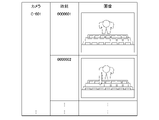
- FIG. 4 is an explanatory diagram showing registered contents of the camera image database.
- the analysis server 2 registers camera images (frames) at each time received from the camera 1 in a camera image database and manages them.
- a camera image is registered in association with the name (camera ID) of the camera 1 and the shooting time.
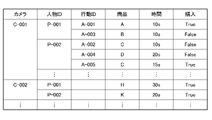
- FIG. 5 is an explanatory diagram showing the registered contents of the action information database.
- a process (behavior detection process) is performed to detect a person's behavior from camera images (frames) at each time. Registered in the information database.
- the action information database as action information for each person, the name of camera 1 (camera ID) corresponding to the display area (camera ID), person ID, action ID, product name (product ID), product gaze time, and purchase status information ( Purchased (True) and non-purchased (False) are registered as information on whether or not a purchase has been made.
- an action ID is assigned to a series of actions in which the person picks up the product and returns it, or leaves the display shelf without picking up the product and returning it. Therefore, when a person picks up and puts back a product in one display area multiple times, even if the product picked up by the person is different, or even if the product is the same, it is considered to be a different action. It is detected and given another action ID.
- FIG. 6 is an explanatory diagram showing registered contents of the worry level information database.
- a process of estimating the level of worry for each person is performed.
- the worry level is registered in the worry level information database.
- the name of camera 1 (camera ID), estimated time, person ID, and degree of concern are registered in the concern level information database as concern level information for each person.
- the process of estimating the worry level of each person is performed periodically. Therefore, as the time for which a person gazes at a product for product selection (the duration of the product-gazing action) increases, the value of the degree of concern for that person at each time gradually increases.
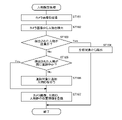
- FIG. 7 is a flowchart showing the procedure of person identification processing performed by the analysis server 2. As shown in FIG.
- processing for identifying a person to be analyzed is performed based on the camera image.
- this person identification processing the flow shown in FIG. 7 is executed each time a camera image (frame) periodically transmitted from the camera 1 is received.
- the processor 13 acquires the camera image received from the camera 1 by the communication unit 11 (image acquisition process) (ST101).
- the processor 13 detects a person from the camera image (person detection processing) (ST102). At this time, a rectangular person frame (person area) surrounding the person is set in the camera image, and the position information of the person frame on the camera image is acquired.
- the processor 13 determines whether the person detected from the camera image is a store clerk (ST103). At this time, whether or not the person is a store clerk can be determined based on the characteristics of the clothing. Specifically, whether or not the person is a store clerk can be determined according to whether or not the person is wearing a store uniform. In addition, the store clerk is confused with the customer who selects the items in front of the display shelf because the store clerk carries out work such as stocking items in front of the display shelf.
- the processor 13 determines whether the person detected from the camera image is already being tracked. is determined (ST105). If a plurality of persons are present in the camera image, and if a person who is not a store clerk (that is, a customer) is detected, the process of ST105 is performed for each person.
- the person detected from the camera image is not being tracked anymore, that is, if the person is detected for the first time from the current camera image (No in ST105), the person is added to the tracking target, and the person is added to the tracking target.
- a person ID is assigned to the person (ST106).
- the processor 13 registers the current camera image in the camera image database (see FIG. 4) in association with the camera ID and shooting time.
- Processor 13 also associates the detection result of the current camera image, that is, the position information of the person frame on the camera image with the person ID and adds it to the person tracking information (ST107).
- FIG. 8 is a flowchart showing the procedure of action detection processing performed by the analysis server 2. As shown in FIG.
- processing is performed to detect the behavior of the customer who selects the items in front of the display shelf.
- this action detection processing the flow shown in FIG. 8 is executed each time a camera image (frame) periodically transmitted from the camera 1 is received.
- the processor 13 sets the person detected from the current camera image as the person of interest, the current camera image (frame) in which the person of interest is captured, the person ID, and the position information of the person frame on the current camera image. (ST201).
- the processor 13 executes a predetermined behavior recognition process on the entire image including the person of interest, and detects the behavior of the person of interest, such as product holding behavior and product gazing behavior (ST202).
- the processor 13 extracts from the action information database the action information about the action previously detected for the person of interest and set as the tracking target (ST203).
- the processor 13 compares the behavior detected this time with respect to the person of interest and the behavior detected previously with respect to the person of interest, and determines whether the behavior previously detected with respect to the person of interest was not detected this time ( ST204).
- the processor 13 determines that the behavior detected this time for the person of interest has already been set as a tracking target. (ST205).
- the behavior detected this time regarding the person of interest has not already been set as a tracking target (No in ST205)
- the behavior detected this time regarding the person of interest is additionally set as a tracking target, and the behavior detected this time is set as a tracking target.
- a behavior ID is given to the behavior obtained (ST206).
- the processor 13 determines whether or not the action detected this time regarding the person of interest is a product gazing action (ST207).
- one cycle corresponding to the camera image interval (frame interval) is added to the cumulative value of the gazing time for that behavior. is added (ST208).
- the accumulated value of the gaze time is updated so that the time for one cycle is added every time the product gaze action is detected from the camera image (frame).
- the processor 13 updates the registered contents of the action information database (ST209).
- the behavior of the target person detected this time is a product gazing behavior
- the gazing time added this time for that behavior is registered in the behavior information database (see FIG. 5).
- processor 13 determines a tracking period for the behavior of the person of interest, and A detection result related to the camera image, that is, action information (corresponding to the action ID) of the person of interest included in the tracking period is extracted (ST210).
- the processor 13 determines whether or not the target person has purchased a product (purchase determination process) based on the behavior information (corresponding to the behavior ID) of the person of interest included in the tracking period (ST211). At this time, if it is detected that the target person returned the product to the display shelf, it is determined that the product is not purchased. On the other hand, when it is detected that the target person has put the product in the basket, or when the target person leaves the display shelf while holding the product, it is determined that the product is purchased.
- the processor 13 excludes the behavior of the person of interest that has been set as the tracking target from the tracking target (ST212).
- the processor 13 updates the registered contents of the action information database (ST209).
- the determination result of the purchase determination process that is, information on the purchase status (whether or not there is a purchase) is registered in the behavior information database (see FIG. 5).
- FIG. 9 is a flowchart showing the procedure of the degree-of-worry estimation process performed by the analysis server 2. As shown in FIG.
- processing for estimating the degree of worry for each person (worry degree estimation processing) based on the behavior information for each person registered in the behavior information database (see FIG. 5) by the behavior detection processing (see FIG. 8). is done.
- this worry level estimation process the flow shown in FIG. 9 is repeated for each person whose behavior is detected in the behavior detection process, that is, for each person whose person ID is registered in the behavior information database.
- the processor 13 acquires behavior information about the person of interest from the behavior information database (see FIG. 5) (ST301).
- the processor 13 acquires the number of product holding times, the product gaze time, and the number of held products based on the behavior information regarding the person of interest (ST302).
- the processor 13 calculates the degree of concern about the person of interest based on the number of times the item is held, the time spent gazing at the item, and the number of items held (ST303).
- the processor 13 registers the degree of concern about the person of interest in the concern level information database (see FIG. 6) together with the camera name, current time, and person ID (ST304).
- FIG. 10 is an explanatory diagram showing the in-store map screen 21 displayed on the viewing terminal 3. As shown in FIG. 10
- the viewing terminal 3 displays an in-store map screen 21 that visualizes the customer's product selection status for each display area (display shelf) and presents it to the user.
- a map display section 22 is provided on the in-store map screen 21 .
- the map display unit 22 displays a concern degree heat map 31 (map image) that visualizes the degree of concern (item selection status) for each display area on a store map showing the layout of the store.
- a display area image 32 representing a display area (display shelf) for each product category (noodles, rice balls, etc.) is drawn on the worry level heat map 31.
- the display mode changes accordingly.
- the level of concern for each display area is represented by color densities.
- a display area image 32 relating to a display area with a high degree of concern is highlighted in a dark color.
- the degree of concern (status of product selection) for each display area is visualized in the degree-of-concern heat map 31 .
- This allows the user (store manager, etc.) to immediately grasp the level of concern (item selection status) for each display area. In the example shown in FIG. 10, the user can immediately grasp that the display area for noodles has the highest degree of concern.
- the in-store map screen 21 is provided with a playback operation section 23 .
- the reproduction operation unit 23 is provided with a slider 42 that can move on a seek bar 41 .
- the seek bar 41 corresponds to the daily business hours (from opening time to closing time) of the target store.
- the worry level heat map 31 is displayed as a moving image.
- a playback button 43 is provided in the playback operation unit 23 . By operating the play button 43 , the user can play back the anxiety level heat map 31 as a moving image from the time the store opens or from an arbitrary time specified with the slider 42 . Thereby, the user can immediately grasp the changing state of the customer's degree of anxieties for each display area.
- the analysis server 2 calculates the degree of concern for each display area by aggregating the degree of concern for each person for each display area (camera 1). At this time, a totaling period of a predetermined length (for example, one minute) is set based on the display time. For example, a totaling period of a predetermined length is set immediately before the display time. Then, the degree of anxietyies for each person included in the aggregation period is aggregated, and the degree of anxieties for each display area at the display time is calculated. As a result, since the aggregation period shifts as the display time progresses, the degree of concern for each display area changes with the passage of time. The display state (for example, color density) of the area image 32 changes.
- the display state for example, color density
- the worry level heat map 31 is displayed as a moving image. This allows the user to immediately grasp the change in the degree of concern of the customer in each display area.
- the user can specify the analysis target period on the seek bar 41.
- two section designation buttons 44 are provided in the reproduction operation section 23 so as to be movable along the seek bar 41 .
- the two section designation buttons 44 correspond to the start point and end point of the analysis target period.
- the user can specify any period as the analysis target period by operating the section specification button 44 .
- a portion 45 corresponding to the analysis target period on the seek bar 41 is highlighted.
- the analysis server 2 When the analysis target period is specified in this way, the analysis server 2 performs analysis based on the customer behavior information included in the specified analysis target period, and the trouble level heat map 31 as the analysis result is displayed in the store. It is displayed on the map screen 21 . This allows the user to narrow down the time period and check the customer's level of concern.
- the in-store map screen 21 is provided with a tab 25 for selecting the screen. By operating the tab 25, the user can switch between the in-store map screen 21 (see FIG. 10) and the camera image screen 51 (see FIG. 11).
- FIG. 11 is an explanatory diagram showing a camera image screen 51 displayed on the viewing terminal 3. As shown in FIG.
- a camera image screen 51 relating to the selected display area is displayed.
- the camera image tab 25 is operated on the in-store map screen 21 , the camera image screen 51 is displayed.
- a camera image display section 52 is provided on the camera image screen 51 .
- a camera image 61 is displayed on the camera image display section 52 .
- the camera 1 shoots a display area (display shelf) and an area in front of the display area where customers stay to check the products from above.
- the camera image 61 shows the product in the display area and the customer who picks up and looks at the product. Accordingly, by viewing the camera image 61, the user can specifically visually confirm the customer's actual product selection status.
- a balloon 62 (information display section) is displayed.
- the balloon 62 displays the name of the product picked up by the person, the number of times the person picked up the product (number of times the product was held), and the time during which the person is selecting the product (product gaze time). be done.
- the name of the product may be displayed in the balloon 62 when the operation of selecting the product is performed, and the person ID may be displayed in the balloon 62 when the operation of selecting the person is performed.
- the camera image screen 51 is provided with a reproduction operation section 23 in the same manner as the in-store map screen 21 (see FIG. 10).
- a camera image at a desired time can be displayed.
- the playback button 43 the camera image can be played back as a moving image from an arbitrary time.
- a graph display section 53 is also provided on the camera image screen 51 .
- the graph display section 53 displays a worry level graph 65 regarding the display area corresponding to the camera image.
- the horizontal axis represents time and the vertical axis represents the level of worry, and the change in the level of worry over time is expressed. This allows the user to immediately grasp the change in the level of concern in the target display area.
- the camera image screen 51 is provided with a plurality of area selection buttons 54 for each display area.
- the area selection button 54 When the user operates the area selection button 54 , the screen transitions to the camera image screen 51 regarding the display area corresponding to the area selection button 54 .
- the user can easily switch to the camera image screen 51 relating to the desired display area and check the customer's item selection status in the desired display area.
- the user can immediately grasp the time when the worry level is high.
- the user can operate the reproduction operation unit 23 to display the camera image 61 at the time when the customer is concerned, so that the customer can confirm the situation in which the customer is concerned. It is possible to grasp whether or not the customer has purchased the
- the user can confirm the name of the product picked up by the customer.
- the customer's item selection status is displayed in real time based on the customer's behavior information on the current day. may be displayed in In this case, the in-store map screen 21 and the camera image screen 51 are generated based on past customer behavior information so that the user can specify conditions (date, day of the week, period, etc.) so as to meet the conditions. Just do it.
- the embodiment has been described as an example of the technology disclosed in this application.
- the technology in the present disclosure is not limited to this, and can also be applied to embodiments with modifications, replacements, additions, omissions, and the like. Further, it is also possible to combine the constituent elements described in the above embodiments to create new embodiments.
- the store operation support device and the store operation support method according to the present disclosure have the effect that the user can fully grasp the customer's product selection status and can immediately take effective measures to improve the store operation.
- Store operation support that analyzes the person's item selection status based on camera images taken of people staying in front of the display area in the store, and presents the analysis results to the user to support the user's business. It is useful as a device and a store management support method.
Landscapes
- Engineering & Computer Science (AREA)
- Business, Economics & Management (AREA)
- Finance (AREA)
- Accounting & Taxation (AREA)
- Theoretical Computer Science (AREA)
- General Physics & Mathematics (AREA)
- Development Economics (AREA)
- Physics & Mathematics (AREA)
- Strategic Management (AREA)
- Multimedia (AREA)
- Entrepreneurship & Innovation (AREA)
- Human Computer Interaction (AREA)
- Economics (AREA)
- Marketing (AREA)
- General Business, Economics & Management (AREA)
- Game Theory and Decision Science (AREA)
- Data Mining & Analysis (AREA)
- Health & Medical Sciences (AREA)
- Computer Vision & Pattern Recognition (AREA)
- General Health & Medical Sciences (AREA)
- Psychiatry (AREA)
- Social Psychology (AREA)
- Management, Administration, Business Operations System, And Electronic Commerce (AREA)
Priority Applications (2)
| Application Number | Priority Date | Filing Date | Title |
|---|---|---|---|
| US18/567,614 US20240211976A1 (en) | 2021-06-11 | 2022-05-24 | Store operation support device, and store operation support method |
| CN202280041338.4A CN117461046A (zh) | 2021-06-11 | 2022-05-24 | 店铺经营辅助装置和店铺经营辅助方法 |
Applications Claiming Priority (2)
| Application Number | Priority Date | Filing Date | Title |
|---|---|---|---|
| JP2021097760A JP7689318B2 (ja) | 2021-06-11 | 2021-06-11 | 店舗運営支援装置および店舗運営支援方法 |
| JP2021-097760 | 2021-06-11 |
Publications (1)
| Publication Number | Publication Date |
|---|---|
| WO2022259865A1 true WO2022259865A1 (ja) | 2022-12-15 |
Family
ID=84425889
Family Applications (1)
| Application Number | Title | Priority Date | Filing Date |
|---|---|---|---|
| PCT/JP2022/021269 Ceased WO2022259865A1 (ja) | 2021-06-11 | 2022-05-24 | 店舗運営支援装置および店舗運営支援方法 |
Country Status (4)
| Country | Link |
|---|---|
| US (1) | US20240211976A1 (https=) |
| JP (1) | JP7689318B2 (https=) |
| CN (1) | CN117461046A (https=) |
| WO (1) | WO2022259865A1 (https=) |
Cited By (1)
| Publication number | Priority date | Publication date | Assignee | Title |
|---|---|---|---|---|
| WO2025229742A1 (ja) * | 2024-05-01 | 2025-11-06 | 株式会社ジェイテクト | 情報分析システム |
Families Citing this family (1)
| Publication number | Priority date | Publication date | Assignee | Title |
|---|---|---|---|---|
| JP7318682B2 (ja) * | 2021-07-30 | 2023-08-01 | 富士通株式会社 | 情報処理プログラム、情報処理方法および情報処理装置 |
Citations (6)
| Publication number | Priority date | Publication date | Assignee | Title |
|---|---|---|---|---|
| WO2016174878A1 (ja) * | 2015-04-27 | 2016-11-03 | 株式会社日立ソリューションズ | 行動分析システム及び行動分析方法 |
| WO2016194274A1 (ja) * | 2015-06-02 | 2016-12-08 | パナソニックIpマネジメント株式会社 | 人物行動分析装置、人物行動分析システムおよび人物行動分析方法 |
| WO2017163909A1 (ja) * | 2016-03-22 | 2017-09-28 | 日本電気株式会社 | 画像表示装置、画像表示システム、画像表示方法及びプログラム |
| WO2017169225A1 (ja) * | 2016-03-31 | 2017-10-05 | パナソニックIpマネジメント株式会社 | 施設内活動分析装置、施設内活動分析システムおよび施設内活動分析方法 |
| JP2018195017A (ja) * | 2017-05-16 | 2018-12-06 | 富士通株式会社 | 情報処理プログラム、情報処理方法及び情報処理装置 |
| WO2021049300A1 (ja) * | 2019-09-09 | 2021-03-18 | パナソニックIpマネジメント株式会社 | 店舗利用情報配信装置及びこれを備えた店舗利用情報配信システム並びに店舗利用情報配信方法 |
Family Cites Families (2)
| Publication number | Priority date | Publication date | Assignee | Title |
|---|---|---|---|---|
| US20150269642A1 (en) * | 2014-03-18 | 2015-09-24 | Danqing Cai | Integrated shopping assistance framework |
| JP7088281B2 (ja) * | 2018-03-09 | 2022-06-21 | 日本電気株式会社 | 商品分析システム、商品分析方法および商品分析プログラム |
-
2021
- 2021-06-11 JP JP2021097760A patent/JP7689318B2/ja active Active
-
2022
- 2022-05-24 CN CN202280041338.4A patent/CN117461046A/zh active Pending
- 2022-05-24 US US18/567,614 patent/US20240211976A1/en active Pending
- 2022-05-24 WO PCT/JP2022/021269 patent/WO2022259865A1/ja not_active Ceased
Patent Citations (6)
| Publication number | Priority date | Publication date | Assignee | Title |
|---|---|---|---|---|
| WO2016174878A1 (ja) * | 2015-04-27 | 2016-11-03 | 株式会社日立ソリューションズ | 行動分析システム及び行動分析方法 |
| WO2016194274A1 (ja) * | 2015-06-02 | 2016-12-08 | パナソニックIpマネジメント株式会社 | 人物行動分析装置、人物行動分析システムおよび人物行動分析方法 |
| WO2017163909A1 (ja) * | 2016-03-22 | 2017-09-28 | 日本電気株式会社 | 画像表示装置、画像表示システム、画像表示方法及びプログラム |
| WO2017169225A1 (ja) * | 2016-03-31 | 2017-10-05 | パナソニックIpマネジメント株式会社 | 施設内活動分析装置、施設内活動分析システムおよび施設内活動分析方法 |
| JP2018195017A (ja) * | 2017-05-16 | 2018-12-06 | 富士通株式会社 | 情報処理プログラム、情報処理方法及び情報処理装置 |
| WO2021049300A1 (ja) * | 2019-09-09 | 2021-03-18 | パナソニックIpマネジメント株式会社 | 店舗利用情報配信装置及びこれを備えた店舗利用情報配信システム並びに店舗利用情報配信方法 |
Cited By (1)
| Publication number | Priority date | Publication date | Assignee | Title |
|---|---|---|---|---|
| WO2025229742A1 (ja) * | 2024-05-01 | 2025-11-06 | 株式会社ジェイテクト | 情報分析システム |
Also Published As
| Publication number | Publication date |
|---|---|
| JP7689318B2 (ja) | 2025-06-06 |
| US20240211976A1 (en) | 2024-06-27 |
| JP2022189266A (ja) | 2022-12-22 |
| CN117461046A (zh) | 2024-01-26 |
Similar Documents
| Publication | Publication Date | Title |
|---|---|---|
| RU2636102C2 (ru) | Система и способ для помощи в определении местоположения и выборе желаемого предмета в месте хранения | |
| JP4125634B2 (ja) | 顧客情報収集管理方法及びそのシステム | |
| JP5906558B1 (ja) | 顧客行動分析装置、顧客行動分析システム及び顧客行動分析方法 | |
| CA2861652C (en) | Investigation generation in an observation and surveillance system | |
| JP4778532B2 (ja) | 顧客情報収集管理システム | |
| CN109983505B (zh) | 人物动向记录装置、人物动向记录方法及存储介质 | |
| JP5974312B1 (ja) | 販売管理装置、販売管理システムおよび販売管理方法 | |
| US20170330208A1 (en) | Customer service monitoring device, customer service monitoring system, and customer service monitoring method | |
| JP5780348B1 (ja) | 情報提示プログラム及び情報処理装置 | |
| US20190108551A1 (en) | Method and apparatus for customer identification and tracking system | |
| JP5866542B1 (ja) | 施設管理支援装置、施設管理支援システムおよび施設管理支援方法 | |
| JP2011253344A (ja) | 購買行動分析装置、購買行動分析方法、およびプログラム | |
| JP2012208854A (ja) | 行動履歴管理システムおよび行動履歴管理方法 | |
| JP2009042956A (ja) | 商品販売装置、商品販売管理システム、商品販売管理方法およびプログラム | |
| JP2006113711A (ja) | マーケティング情報提供システム | |
| JP2010181920A (ja) | エリア管理システム | |
| US20140214568A1 (en) | Retail loss prevention using biometric data | |
| WO2022259865A1 (ja) | 店舗運営支援装置および店舗運営支援方法 | |
| CN113887884A (zh) | 商超服务系统 | |
| WO2010053192A1 (ja) | 行動分析装置及び行動分析方法並びに記録媒体 | |
| CN113129112A (zh) | 物品推荐方法、装置及电子设备 | |
| US20220269890A1 (en) | Method and system for visual analysis and assessment of customer interaction at a scene | |
| JP7010030B2 (ja) | 店内監視装置、店内監視方法、および店内監視プログラム | |
| JP2003150773A (ja) | 販売支援システム、販売支援装置およびプログラム | |
| CN112989988B (zh) | 信息整合方法、装置、设备、可读存储介质及程序产品 |
Legal Events
| Date | Code | Title | Description |
|---|---|---|---|
| 121 | Ep: the epo has been informed by wipo that ep was designated in this application |
Ref document number: 22820047 Country of ref document: EP Kind code of ref document: A1 |
|
| WWE | Wipo information: entry into national phase |
Ref document number: 18567614 Country of ref document: US |
|
| WWE | Wipo information: entry into national phase |
Ref document number: 202280041338.4 Country of ref document: CN |
|
| NENP | Non-entry into the national phase |
Ref country code: DE |
|
| 122 | Ep: pct application non-entry in european phase |
Ref document number: 22820047 Country of ref document: EP Kind code of ref document: A1 |