WO2022239165A1 - 表示制御装置、表示制御方法、および、表示制御プログラム - Google Patents
表示制御装置、表示制御方法、および、表示制御プログラム Download PDFInfo
- Publication number
- WO2022239165A1 WO2022239165A1 PCT/JP2021/018126 JP2021018126W WO2022239165A1 WO 2022239165 A1 WO2022239165 A1 WO 2022239165A1 JP 2021018126 W JP2021018126 W JP 2021018126W WO 2022239165 A1 WO2022239165 A1 WO 2022239165A1
- Authority
- WO
- WIPO (PCT)
- Prior art keywords
- extended
- information
- display control
- unit
- rule
- Prior art date
- Legal status (The legal status is an assumption and is not a legal conclusion. Google has not performed a legal analysis and makes no representation as to the accuracy of the status listed.)
- Ceased
Links
Images


Classifications
-
- G—PHYSICS
- G06—COMPUTING OR CALCULATING; COUNTING
- G06F—ELECTRIC DIGITAL DATA PROCESSING
- G06F9/00—Arrangements for program control, e.g. control units
- G06F9/06—Arrangements for program control, e.g. control units using stored programs, i.e. using an internal store of processing equipment to receive or retain programs
- G06F9/44—Arrangements for executing specific programs
- G06F9/451—Execution arrangements for user interfaces
-
- G—PHYSICS
- G06—COMPUTING OR CALCULATING; COUNTING
- G06F—ELECTRIC DIGITAL DATA PROCESSING
- G06F3/00—Input arrangements for transferring data to be processed into a form capable of being handled by the computer; Output arrangements for transferring data from processing unit to output unit, e.g. interface arrangements
- G06F3/01—Input arrangements or combined input and output arrangements for interaction between user and computer
- G06F3/048—Interaction techniques based on graphical user interfaces [GUI]
- G06F3/0481—Interaction techniques based on graphical user interfaces [GUI] based on specific properties of the displayed interaction object or a metaphor-based environment, e.g. interaction with desktop elements like windows or icons, or assisted by a cursor's changing behaviour or appearance
-
- G—PHYSICS
- G06—COMPUTING OR CALCULATING; COUNTING
- G06F—ELECTRIC DIGITAL DATA PROCESSING
- G06F8/00—Arrangements for software engineering
- G06F8/30—Creation or generation of source code
- G06F8/38—Creation or generation of source code for implementing user interfaces
Definitions
- the present invention relates to a display control device, a display control method, and a display control program for a screen of a Web system.
- an extended UI extended UI
- UI existing UI
- rules regarding input operations are set for each extended UI so that the user can perform appropriate input operations on the screen of the web system. For example, if the information that can be input is limited to the existing UI on the screen of the Web system, an extended UI that displays the information that can be input in a pull-down menu is prepared as an extended UI corresponding to the existing UI. Then, when the extended UI receives the user's selection input from the pull-down menu, the selected information is transferred to the existing UI. By doing so, it is possible to assist the user's operation to the screen of the Web system without modifying the Web system itself.
- the object of the present invention is to solve the above-mentioned problems and automatically generate an appropriate extended UI for the screen of the web system.
- the present invention provides an acquisition unit that acquires information on a UI (User Interface) that configures a screen of a Web system that is subject to display control, information on the UI that configures the screen of the Web system, and an extended UI for the UI.
- UI User Interface
- an extracting unit for extracting the acquired UI rule set from a database storing a rule set showing rules associated with UI information showing rules for displaying and inputting the UI; a generation unit for generating rules to be set in the extended UI of the UI constituting the screen of the web system, using UI information of the extended UI, and a setting unit for setting the generated rule in the extended UI of the UI; a display processing unit that displays an extended UI of the UI based on the settings; and UI information of the extended UI to be modified in the database when the rule of the extended UI is modified after the display of the extended UI. and a ruleset updating unit that adds UI information of an extended UI reflecting the content of the correction to the ruleset.
- an appropriate extended UI can be automatically generated for the screen of the web system.
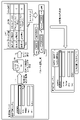
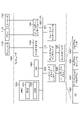
- FIG. 1 is a diagram for explaining an outline of the operation of the display control device.
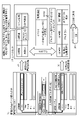
- FIG. 2 is a diagram for explaining in detail the outline of the operation of the display control device.
- FIG. 3 is a diagram for explaining an operation example when the display control device receives modification of the extended UI.
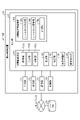
- FIG. 4 is a diagram illustrating a configuration example of a system including a display control device.
- FIG. 5 is a diagram illustrating an example of a procedure for creating a rule set by a display control device;
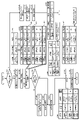
- FIG. 6 is a flowchart illustrating an example of a processing procedure of the display control device;
- FIG. 7 is a diagram illustrating an example of a computer that executes a display control program;
- the extended UI (User Interface) in this embodiment is overlaid on the existing UI (the UI originally provided in the Web system) that constitutes the screen of the Web system. Then, when the extended UI receives a user's operation, the content of the operation is transferred to the existing UI corresponding to the extended UI. Then, the Web system performs processing based on the content of the operation passed to the existing UI. As a result, the Web system treats the user's operation as having been performed on the existing UI.
- This extended UI is implemented, for example, by the technique described in Japanese Patent Application Laid-Open No. 2002-200012.
- the user of the display control device stores a rule set (details will be described later) indicating UI information of the extended UI corresponding to each existing UI that constitutes the screen (web page) of the web system in the DB. (database) 30 (see (1) in FIG. 1).
- This UI information is information that indicates the rules related to UI display and input operations. (click, change, etc.), etc.
- the display control device reads a new web page of the web system, it acquires information on the existing UI that constitutes the web page (see (2) in Fig. 1). Then, the display control device acquires the rule set of the existing UI from the DB 30 using the acquired information of the existing UI as a key.
- Extended UI rules are rules related to the display and input operations of extended UI on the screen of the web system. It is a rule such as setting the value of the customer name. Then, the display control device automatically displays the extended UI on the existing UI on the new web page using the generated extended UI rule (see (4) in FIG. 1).
- the display control device displays the existing UI text box for "Customer Name” on the new Web page "Item Management System” screen. is applied to enable pull-down input of "Denden Taro Co., Ltd.” and "Denden Hanako Co., Ltd.”.
- the display control device may add the UI information of the generated extended UI to the rule set of the existing UI in the DB 30 .
- the display control device acquires information on an existing UI that constitutes a new web page (see (1) in FIG. 2)
- the information on the existing UI is collated with the rule set group in the DB 30, and the Extract the existing UI rule set (see (2) in FIG. 2).
- the display control device automatically generates an extended UI rule based on the UI information of the extended UI shown in the extracted rule set (see reference numeral 201 in FIG. 2) (see (3) in FIG. 2).
- the rule set includes UI information (for example, label information of the extended UI, UI type, etc.) of the extended UI corresponding to the existing UI, and the usage frequency of the extended UI. is recorded. This usage frequency value is incremented, for example, each time the extended UI is operated.
- UI information for example, label information of the extended UI, UI type, etc.
- the extended UI is based on the frequency of use of each extended UI.
- UI information of UI for example, UI information of extended UI indicated by reference numeral 202
- the display control device uses the UI information of the selected extended UI to automatically generate extended UI rules corresponding to the existing UI (see (3) in FIG. 2), and uses the generated extended UI rules to The extended UI is automatically displayed (see (4) in FIG. 2).
- the display control device can automatically display an extended UI that is likely to be more appropriate on the screen of the Web system.
- Extension UI fix the extended UI that is automatically displayed as described above is not necessarily suitable for the web system. Therefore, the display control device may receive correction of the extended UI from the user (see (5) in FIG. 3).
- the display control device acquires modification information of the extended UI by the user (see (7) in FIG. 3), and puts the modification information (UI information of the modified extended UI) into the extended UI in the rule set. Associated with the UI information of the UI (see (8) in FIG. 3).
- the display control device when the display control device again generates rules for an extended UI for a new web page, the rule set including the UI information for the extended UI modified by the user in the past can be used to generate the Rules for extended UI can be automatically generated.
- the display control device can easily automatically display an appropriate extended UI on the screen of the Web system.
- the display control device feeds back the correction information to the rule set, making it easier to automatically display the appropriate extended UI on the screen of the web system.
- the display control system 100 includes a display control device 10 and a DB 30.
- the display control device 10 and the DB 30 are communicably connected via a network, for example.
- the DB 30 accumulates rule sets for each existing UI created by the display control device 10. For example, as shown in FIG. 5, this rule set is information in which UI information of an existing UI and UI information of an extended UI of the existing UI are associated with each other.
- the UI information of the existing UI is, for example, information indicating the type of UI (existing UI), the UI type of the existing UI (eg text box, etc.), the label information of the existing UI (eg customer name), etc.
- the display control device 10 acquires the HTML data of the existing UI of the web page, the display control device 10 associates the existing UI with the label information from adjacent HTML tags. Note that the display control device 10 may perform the above-described association from the position information in the image of the Web page.
- the UI information of the extended UI is information indicating the rules regarding the display and input operation of the extended UI.
- the type of UI extended UI
- the type of extended UI button, text, etc.
- events clicks, changes, etc.
- the UI type of the extended UI associated with the existing UI is "Pull-down”
- the layout information of the extended UI is "Object "base point”
- the rule set includes the usage frequency value of each extended UI.
- the usage frequency value is incremented, for example, each time an operation is performed on the extended UI. For example, as shown in FIG. 5, when the UI type of the extended UI shown in the rule set is "pulldown", the usage frequency value is incremented.
- the DB 30 is described as being arranged in the display control device 10, it is not limited to this. For example, it may be arranged within the display control device 10 . Also, the DB 30 may be shared among a plurality of display control devices 10 .
- the display control device 10 includes an input unit 11 , an output unit 12 , a communication unit 13 , a storage unit 14 and a control unit 15 .
- the input unit 11 is in charge of inputting various types of information to the display control device 10.
- the input unit 11 is, for example, a mouse, a keyboard, or the like.
- the output unit 12 controls output of various information from the display control device 10 .
- the output unit 12 is, for example, a display, and outputs a web system screen, an existing UI on the screen, an extended UI, and the like.
- the communication unit 13 manages data communication with other devices. For example, the communication unit 13 performs data communication with the DB 30 via a network.
- the storage unit 14 stores various information referred to when the control unit 15 operates and various information acquired when the control unit 15 operates.
- the storage unit 14 is, for example, a RAM (Random Access Memory), a semiconductor memory device such as a flash memory, or a storage device such as a hard disk or an optical disk. Note that although the storage unit 14 is installed inside the display control device 10 in the example of FIG. 4 , it may be installed outside the display control device 10 .
- the control unit 15 controls the display control device 10 as a whole.
- the control unit 15 includes a UI information determination unit 151 , a generation unit 152 , a setting unit 153 , a display processing unit 154 , a correction reception unit 155 and a UI information accumulation processing unit 156 .
- the UI information determination unit 151 determines UI information for displaying an extended UI on the screen of the web system (new web page).
- the UI information determination unit 151 includes an acquisition unit 151a, an extraction unit 151b, and a selection unit 151c.
- the acquisition unit 151a When the acquisition unit 151a reads the screen of the web system (new web page), it acquires the existing UI information that constitutes the new web page. For example, the acquisition unit 151a acquires information such as UI type: text box, label information: customer name, etc., as information of the existing UI that configures the new web page.
- information such as UI type: text box, label information: customer name, etc.
- the extraction unit 151b extracts the existing UI rule set from the DB 30 based on the existing UI information acquired by the acquisition unit 151a. For example, the extraction unit 151b extracts the existing UI rule set (reference numeral 201 in FIG. ) are extracted.
- the selecting unit 151c selects a UI to be used for generating an extended UI rule for the existing UI from among the UI information for the extended UI shown in the existing UI rule set (see reference numeral 201 in FIG. 2) extracted by the extracting unit 151b. Select information. For example, the selecting unit 151c selects UI information with the highest usage frequency (reference numeral 202 in FIG. 2) from the UI information group of extended UIs shown in the rule set (reference numeral 201 in FIG. 2) extracted by the extracting unit 151b. reference). Note that when there is only one piece of UI information of the extended UI indicated in the rule set, the selection unit 151c selects the UI information of the extended UI.
- the selecting unit 151c selects the UI type of the displayable extended UI via the output unit 12. , and the UI information of the extended UI of the UI type selected by the user may be selected from among them.
- the generation unit 152 generates rules regarding display of the extended UI and input operations. For example, the generation unit 152 generates rules regarding the display of the extended UI and the input operation of the extended UI based on the UI information of the extended UI selected by the selection unit 151c.
- the UI information of the extended UI selected by the selection unit 151c is the UI information shown in the rule set of FIG. : Customer name, UI type: Text box ⁇ button, Event: Set ⁇ when ⁇ value is changed”, etc.
- the setting unit 153 sets the rule generated by the generation unit 152 to the extended UI of the existing UI acquired by the acquisition unit 151a.
- Information about the rules set for the extended UI by the setting unit 153 is stored in the storage unit 14, for example.
- the display processing unit 154 displays the extended UI based on the extended UI rule set by the setting unit 153 .
- the correction accepting unit 155 accepts corrections to the extended UI. For example, when the correction accepting unit 155 accepts a correction to the extended UI displayed by the display processing unit 154 , the content of the correction is reflected in the rule of the extended UI stored in the storage unit 14 . Then, the display processing unit 154 redisplays the extended UI based on the modified rule.
- the UI information accumulation processing unit 156 performs accumulation processing of UI information.
- the UI information accumulation processing unit 156 includes a ruleset creating unit 156a, a ruleset updating unit 156b, and a measuring unit 156c.
- the rule set creation unit 156a creates a rule set (see FIG. 5). A processing procedure of the rule set creation unit 156a will be described with reference to FIG. First, the ruleset creating unit 156a reads a new Web page used for creating a ruleset via the input unit 11 (see (1) in FIG. 5).
- the web page read here is a web page with an extended UI already set.
- the extended UI of the web page may be set based on the UI information of the extended UI selected by the selection unit 151c, or may be set manually by the user.
- the ruleset creating unit 156a acquires existing UI information and extended UI information from the loaded web page. For example, the ruleset creation unit 156a acquires, as existing UI information, UI types (eg, text boxes) and label information (eg, customer names) of multiple existing UIs included in a Web page (( 2) See). Further, the ruleset creation unit 156a sets, as extended UI information, extended UI types (eg, pull-down), layout information (eg, object origin), and extended UIs corresponding to the existing UIs of the Web page. event (eg, set ⁇ when the value of ⁇ is changed), etc. (see (3) in FIG. 5).
- UI types eg, text boxes
- label information eg, customer names
- the ruleset creation unit 156a sets, as extended UI information, extended UI types (eg, pull-down), layout information (eg, object origin), and extended UIs corresponding to the existing UIs of the Web page. event (eg, set
- the ruleset creation unit 156a creates a ruleset using the acquired existing UI information and extended UI information (see (4) in FIG. 5).
- the ruleset creating unit 156a converts the UI information of the existing UI, such as the UI type of the existing UI (eg, text box) and label information (eg, customer name), into the UI type of the extended UI (eg, pull-down), Generate a rule set that associates UI information of extended UI such as layout information (eg object origin), event (eg set ⁇ when ⁇ value is changed).
- the ruleset creation unit 156a accumulates the created ruleset in the DB 30 (see (5) in FIG. 5).
- the ruleset updating unit 156b adds the UI information of the corrected extended UI to the UI information of the corrected extended UI in the ruleset in association with each other.
- a processing procedure of the ruleset updating unit 156b will be described with reference to FIG. Since the processes (1) to (4) in FIG. 3 are the same as the processes (1) to (4) in FIG. 5, the description is omitted and the description starts from (5) in FIG.
- the extended UI is modified by the user after the extended UI is automatically displayed based on the rule set generated by the processing of (1) to (4) in FIG.
- the modification receiving unit 155 receives modification of the extended UI on the editing screen of the extended UI
- the modified content is reflected in the rule of the extended UI stored in the storage unit 14 ((5 in FIG. 3). )reference).
- the display processing unit 154 redisplays the extended UI based on the modified rule (see (6) in FIG. 3).
- the ruleset updating unit 156b acquires the modified content (correction information) of the extended UI received by the correction receiving unit 155 (see (7) in FIG. 3). Then, the ruleset updating unit 156b associates the UI information of the extended UI in the ruleset with the UI information based on the correction information (see (8) in FIG. 3).
- the ruleset updating unit 156b acquires the correction information of the extended UI from the correction receiving unit 155, the UI information of the extended UI in the ruleset (UI type: pull-down, layout information: object origin, event: ⁇ is set when the value of is changed), the UI information of the extended UI based on the acquired modification information (UI type: button, placement information: object origin, event: set when ⁇ is clicked) correspond. Then, the ruleset updating unit 156b stores the ruleset associated with the UI information of the extended UI based on the correction information in the DB 30 (see (9) in FIG. 3).
- the UI information of the extended UI based on the modification information is also given a usage frequency value.
- This usage frequency value is also incremented, for example, when the extended UI is operated (used).
- the value incremented here is set to a larger value than the value incremented when an operation is performed on the extended UI that is automatically displayed. For example, if one operation is performed on the automatically displayed extended UI, the usage frequency value is incremented by +1, whereas if one operation is performed on the modified extended UI, the usage frequency is incremented by +5 (see (10) in FIG. 3).
- the ruleset updating unit 156b adds UI information for an extended UI based on correction information to the ruleset, it adds identification information indicating that the UI information is based on user corrections. For example, as shown in FIG. 3, information such as "extended UI (user modification)" is added to the UI type in the UI information of the extended UI.
- the measurement unit 156c measures the number of times the extended UI is operated, and assigns a usage frequency value to the UI information of the extended UI according to the measured number of operations. For example, the measurement unit 156c counts the number of operations for each extended UI, and increments the usage frequency value of the UI information of the extended UI according to the counted number of operations. For example, the measurement unit 156c increments the usage frequency value of the extended UI in the rule set shown in FIG.
- the measurement unit 156c sets the value to be incremented per operation for the extended UI modified by the user to be greater than the value to be incremented per operation for the automatically displayed extended UI. For example, the measurement unit 156c sets the value to be incremented by +1 for each operation on the extended UI that is automatically displayed, and sets the value to be incremented for one operation for the extended UI that is modified by the user by +5 (see FIG. 3). (10)).
- the value of the frequency of use of the modified extended UI is greater.
- the selection unit 151c selects the UI information to be used for generating the extended UI of the new web page based on the frequency of use given to the UI information of each extended UI, the extended UI modified by the user is selected. UI information is more likely to be selected. This makes it easier for the display control device 10 to automatically generate an appropriate extended UI when generating an extended UI for a new web page.
- Example of processing procedure An example of the processing procedure of the display control device 10 will be described with reference to FIG. It is assumed that the display control device 10 has previously received a selection input as to whether or not to automatically generate an extended UI for a new web page.
- the display control device 10 determines not to automatically generate an extended UI for the new web page (No in S101). Then, the display control device 10 manually sets rules for the extended UI of the new web page (S103). That is, the generating unit 152 of the display control device 10 generates extended UI rules for the new web page based on the instruction input from the user. Then, the setting unit 153 sets rules for the generated extended UI. After that, the display processing unit 154 displays the extended UI of the new web page based on the set extended UI rule (S104).
- the UI information accumulation processing unit 156 performs UI information accumulation processing (S111: UI information accumulation processing). That is, the ruleset creation unit 156a of the UI information accumulation processing unit 156 creates a ruleset by associating the UI information of the existing UI that constitutes the new web page with the UI information of the extended UI displayed in S104. create.
- the ruleset creation unit 156a creates a ruleset including UI information of the extended UI indicated by reference numeral 601 . Then, the ruleset creating unit 156a stores the created ruleset in the DB 30. FIG.
- the measurement unit 156c increments the usage frequency value of the extended UI in the rule set each time the extended UI is used (operated) (S112) (S113).
- the measurement unit 156c increments the usage frequency value of the extended UI in the rule set indicated by reference numeral 602 by +1. do.
- the UI information determination unit 151 of the display control device 10 reads the new web page (S105). ). Then, the UI information determination unit 151 determines the UI information of the extended UI to be displayed on the new web page by comparing the new web page and the rule set stored in the DB 30 (S106: UI information determination processing). ).
- the UI information determination unit 151 uses the existing UI information (label information: customer name, UI type: text box) of the new web page indicated by reference numeral 603 as a key to extract the existing UI (label information: customer name, UI type: text box).
- the UI information determination unit 151 selects the UI information of the extended UI indicated by reference numeral 605 that has the highest usage frequency among the UI information of the extended UI of the rule set indicated by reference numeral 604 .
- the generating unit 152 generates extended UI rules based on the UI information of the extended UI selected by the UI information determining unit 151, and the setting unit 153 sets the generated rules to the extended UI.
- the display processing unit 154 automatically displays the extended UI based on the set rules. That is, the display processing unit 154 automatically displays the extended UI that is frequently used (S108).
- the correction receiving unit 155 receives the user's modification of the extended UI rule on the editing screen (S109). Then, the modification receiving unit 155 modifies the extended UI rule stored in the storage unit 14 based on the received modified content of the extended UI rule. Then, the display processing unit 154 redisplays the extended UI based on the modified rule (S110).
- the ruleset updating unit 156b adds the UI information of the extended UI based on the content of the correction to the ruleset including the UI information of the extended UI to be corrected (S111: UI information accumulation processing). For example, as indicated by reference numeral 606, the rule set update unit 156b updates the UI information (label information: customer name, UI type: text box ⁇ pull-down) of the extended UI to be modified in the rule set. UI information (label information: customer name, UI type: pull-down ⁇ radio button) is associated and added.
- the measurement unit 156c increments the usage frequency value of the extended UI in the rule set (S113). For example, as indicated by reference numeral 607, the measurement unit 156c increments the usage frequency by +5 every time the user operates a modified extended UI (label information: customer name, UI type: pull-down ⁇ radio button). do.
- the UI information determination unit 151 selects the UI information of the extended UI from the extended UI rule set of the new web page based on the frequency of use. , the probability that the UI information of the extended UI modified by the user is selected increases.
- the UI information accumulation processing unit 156 performs UI information accumulation processing (S111: UI information accumulation processing).
- the ruleset creating unit 156a acquires existing UI information and extended UI information from the read web page. Then, the ruleset creation unit 156a creates a ruleset by associating the acquired existing UI information with the extended UI information, and accumulates the created ruleset in the DB 30 .
- the display control device 10 can generate and display an extended UI for a new web page.
- the frequency of use of the extended UI in the rule set for example, a value indicating the number of positions of the user's line of sight with respect to the extended UI measured by a sensor, the overlap time between the mouse pointer and the extended UI, etc. may be used. good.
- the measurement unit 156c acquires values such as the number of positions of the user's line of sight with respect to the extended UI measured by the sensor, the overlap time between the mouse pointer and the extended UI, and based on the acquired values, the rule set update the usage frequency value of the extended UI in .
- the measurement unit 156c increments the usage frequency value by +5 each time the user operates the modified extended UI
- another method for example, a method set by the user
- the extended UI usage frequency value may be updated.
- each constituent element of each part shown in the figure is functionally conceptual, and does not necessarily need to be physically configured as shown in the figure.
- the specific form of distribution and integration of each device is not limited to the illustrated one, and all or part of them can be functionally or physically distributed and integrated in arbitrary units according to various loads and usage conditions. Can be integrated and configured.
- all or any part of each processing function performed by each device can be implemented by a CPU and a program executed by the CPU, or implemented as hardware based on wired logic.
- the display control device 10 described above can be implemented by installing a program as package software or online software in a desired computer.
- the information processing device can function as the display control device 10 by causing the information processing device to execute the above program.
- the information processing apparatus referred to here includes a desktop or notebook personal computer.
- information processing devices include mobile communication terminals such as smartphones, mobile phones and PHS (Personal Handyphone Systems), and terminals such as PDAs (Personal Digital Assistants).
- the display control device 10 can also be implemented as a server device that uses a terminal device used by a user as a client and provides the client with services related to the above processing.
- the server device may be implemented as a web server, or may be implemented as a cloud that provides services related to the above processing by outsourcing.
- FIG. 7 is a diagram showing an example of a computer that executes a display control program.
- the computer 1000 has a memory 1010 and a CPU 1020, for example.
- Computer 1000 also has hard disk drive interface 1030 , disk drive interface 1040 , serial port interface 1050 , video adapter 1060 and network interface 1070 . These units are connected by a bus 1080 .
- the memory 1010 includes a ROM (Read Only Memory) 1011 and a RAM (Random Access Memory) 1012 .
- the ROM 1011 stores a boot program such as BIOS (Basic Input Output System).
- BIOS Basic Input Output System
- Hard disk drive interface 1030 is connected to hard disk drive 1090 .
- a disk drive interface 1040 is connected to the disk drive 1100 .
- a removable storage medium such as a magnetic disk or optical disk is inserted into the disk drive 1100 .
- Serial port interface 1050 is connected to mouse 1110 and keyboard 1120, for example.
- Video adapter 1060 is connected to display 1130, for example.
- the hard disk drive 1090 stores, for example, an OS 1091, application programs 1092, program modules 1093, and program data 1094. That is, the program that defines each process executed by the display control device 10 is implemented as a program module 1093 in which computer-executable code is described. Program modules 1093 are stored, for example, on hard disk drive 1090 .
- the hard disk drive 1090 stores a program module 1093 for executing processing similar to the functional configuration of the display control device 10 .
- the hard disk drive 1090 may be replaced by an SSD (Solid State Drive).
- the data used in the processes of the above-described embodiments are stored as program data 1094 in the memory 1010 or the hard disk drive 1090, for example. Then, the CPU 1020 reads out the program modules 1093 and program data 1094 stored in the memory 1010 and the hard disk drive 1090 to the RAM 1012 as necessary and executes them.
- the program modules 1093 and program data 1094 are not limited to being stored in the hard disk drive 1090, but may be stored in a removable storage medium, for example, and read by the CPU 1020 via the disk drive 1100 or the like. Alternatively, the program modules 1093 and program data 1094 may be stored in another computer connected via a network (LAN (Local Area Network), WAN (Wide Area Network), etc.). Program modules 1093 and program data 1094 may then be read by CPU 1020 through network interface 1070 from other computers.
- LAN Local Area Network
- WAN Wide Area Network
- REFERENCE SIGNS LIST 10 display control device 11 input unit 12 output unit 13 communication unit 14 storage unit 15 control unit 30 DB 100 display control system 151 UI information determination unit 151a acquisition unit 151b extraction unit 151c selection unit 152 generation unit 153 setting unit 154 display processing unit 155 correction reception unit 156 UI information accumulation processing unit 156a ruleset creation unit 156b ruleset update unit 156c measurement Department
Landscapes
- Engineering & Computer Science (AREA)
- Software Systems (AREA)
- Theoretical Computer Science (AREA)
- General Engineering & Computer Science (AREA)
- Human Computer Interaction (AREA)
- Physics & Mathematics (AREA)
- General Physics & Mathematics (AREA)
- User Interface Of Digital Computer (AREA)
Abstract
Description
本実施形態における拡張UI(User Interface)は、Webシステムの画面を構成する既存UI(もともとWebシステムに備わっているUI)にオーバーレイ表示される。そして、拡張UIがユーザの操作を受け付けると、その操作の内容を、当該拡張UIに対応する既存UIに受け渡す。そして、Webシステムは既存UIに受け渡された操作の内容に基づき処理を行う。これにより、Webシステムは、当該ユーザの操作が既存UIに対し行われたものとして処理する。この拡張UIは、例えば、特許文献1に記載の技術により実現される。
図1を用いて、本実施形態の表示制御装置の動作概要を説明する。例えば、まず、表示制御装置のユーザは、Webシステムの画面(Webページ)を構成する既存UIごとに、当該既存UIに対応する拡張UIのUI情報を示したルールセット(詳細は後記)をDB(データベース)30に蓄積する(図1の(1)参照)。このUI情報は、UIの表示や入力操作に関するルールを示した情報であり、例えば、UIの種別(既存UI/拡張UI)、UIの種類(ボタン、テキスト等)、UIに設定されているイベント(クリック、変更等)等を含む。
なお、ルールセットは、例えば、図2の符号201に示すように、既存UIに対応する拡張UIのUI情報(例えば、拡張UIのラベル情報、UI種類等)と、当該拡張UIの利用頻度とが記録される。この利用頻度の値は、例えば、当該拡張UIが操作されるたびにインクリメントされる。
しかし、上記のようにして自動表示された拡張UIが、Webシステムに対し必ずしも適切なものであるとは限らない。そのため、表示制御装置は、ユーザから当該拡張UIの修正を受け付ける場合もある(図3の(5)参照)。
図4を用いて、本実施形態に係る表示制御装置10を含むシステムの構成例を詳細に説明する。
図6を用いて、表示制御装置10の処理手順の例を説明する。なお、表示制御装置10は、事前に新規のWebページの拡張UIを自動で生成するか否かの選択入力を受け付けているものとする。
なお、ルールセットにおける拡張UIの利用頻度として、例えば、センサにより測定された当該拡張UIに対するユーザの視線位置の多さ、マウスポインタと当該拡張UIとの重なり時間等を示す値が用いられてもよい。この場合、計測部156cが、センサにより測定された当該拡張UIに対するユーザの視線位置の多さ、マウスポインタと当該拡張UIとの重なり時間等の値を取得し、取得した値に基づき、ルールセットにおける当該拡張UIの利用頻度の値を更新する。
また、図示した各部の各構成要素は機能概念的なものであり、必ずしも物理的に図示のように構成されていることを要しない。すなわち、各装置の分散・統合の具体的形態は図示のものに限られず、その全部又は一部を、各種の負荷や使用状況等に応じて、任意の単位で機能的又は物理的に分散・統合して構成することができる。さらに、各装置にて行われる各処理機能は、その全部又は任意の一部が、CPU及び当該CPUにて実行されるプログラムにて実現され、あるいは、ワイヤードロジックによるハードウェアとして実現され得る。
前記した表示制御装置10は、パッケージソフトウェアやオンラインソフトウェアとしてプログラムを所望のコンピュータにインストールさせることによって実装できる。例えば、上記のプログラムを情報処理装置に実行させることにより、情報処理装置を表示制御装置10として機能させることができる。ここで言う情報処理装置には、デスクトップ型又はノート型のパーソナルコンピュータが含まれる。また、その他にも、情報処理装置にはスマートフォン、携帯電話機やPHS(Personal Handyphone System)等の移動体通信端末、さらには、PDA(Personal Digital Assistant)等の端末等がその範疇に含まれる。
11 入力部
12 出力部
13 通信部
14 記憶部
15 制御部
30 DB
100 表示制御システム
151 UI情報判定部
151a 取得部
151b 抽出部
151c 選択部
152 生成部
153 設定部
154 表示処理部
155 修正受付部
156 UI情報蓄積処理部
156a ルールセット作成部
156b ルールセット更新部
156c 計測部
Claims (6)
- 表示制御の対象とするWebシステムの画面を構成するUI(User Interface)の情報を取得する取得部と、
Webシステムの画面を構成するUIの情報と、前記UIの拡張UIの表示および入力操作に関するルールを示したUI情報とを対応付けて示したルールセットを記憶するデータベースから、前記取得したUIのルールセットを抽出する抽出部と、
前記抽出したUIのルールセットに示される拡張UIのUI情報を用いて、前記Webシステムの画面を構成するUIの拡張UIに設定するルールを生成する生成部と、
前記生成したルールを前記UIの拡張UIに設定する設定部と、
前記設定に基づき、前記UIの拡張UIを表示する表示処理部と、
前記拡張UIの表示後、前記拡張UIのルールが修正された場合、前記データベースにおける前記修正対象の拡張UIのUI情報を含むルールセットに、前記修正の内容を反映した拡張UIのUI情報を追加するルールセット更新部と
を備えることを特徴とする表示制御装置。 - 前記ルールセット更新部は、
前記ルールセットに、前記修正の内容を反映した拡張UIのUI情報を、前記修正対象の拡張UIのUI情報と対応付けて追加する
ことを特徴とする請求項1に記載の表示制御装置。 - 前記拡張UIの操作回数を計測し、計測した操作回数に応じて当該拡張UIのUI情報に当該拡張UIの利用頻度の値を付与する計測部と、
前記拡張UIのUI情報に付与された前記拡張UIの利用頻度の値の大きさに基づき、前記抽出したUIのルールセットに示される拡張UIのUI情報の中から、前記UIの拡張UIのルールの生成に用いるUI情報を選択する選択部とをさらに備え、
前記生成部は、
前記選択部により選択された拡張UIのUI情報を用いて、前記拡張UIのルールを生成する
ことを特徴とする請求項1に記載の表示制御装置。 - 前記計測部は、
前記拡張UIに対する操作回数を計測し、計測した操作回数に応じて当該拡張UIのUI情報に当該拡張UIの利用頻度の値を付与する際、修正された拡張UIに対する1回の操作あたり増加させる利用頻度を、修正されていない拡張UIに対する1回の操作あたり増加させる利用頻度の値よりも大きい値とする
ことを特徴とする請求項2に記載の表示制御装置。 - 表示制御装置により実行される表示制御方法であって、
表示制御の対象とするWebシステムの画面を構成するUI(User Interface)の情報を取得する工程と、
Webシステムの画面を構成するUIの情報と、前記UIの拡張UIの表示および入力操作に関するルールを示したUI情報とを対応付けて示したルールセットを記憶するデータベースから、前記取得したUIのルールセットを抽出する工程と、
前記抽出したUIのルールセットに示される拡張UIのUI情報を用いて、前記Webシステムの画面を構成するUIの拡張UIに設定するルールを生成する工程と、
前記生成したルールを前記UIの拡張UIに設定する工程と、
前記設定に基づき、前記UIの拡張UIを表示する工程と、
前記拡張UIの表示後、前記拡張UIのルールが修正された場合、前記データベースにおける前記修正対象の拡張UIのUI情報を含むルールセットに、前記修正の内容を反映した拡張UIのUI情報を追加する工程と、
を含むことを特徴とする表示制御方法。 - 表示制御の対象とするWebシステムの画面を構成するUI(User Interface)の情報を取得する工程と、
Webシステムの画面を構成するUIの情報と、前記UIの拡張UIの表示および入力操作に関するルールを示したUI情報とを対応付けて示したルールセットを記憶するデータベースから、前記取得したUIのルールセットを抽出する工程と、
前記抽出したUIのルールセットに示される拡張UIのUI情報を用いて、前記Webシステムの画面を構成するUIの拡張UIに設定するルールを生成する工程と、
前記生成したルールを前記UIの拡張UIに設定する工程と、
前記設定に基づき、前記UIの拡張UIを表示する工程と、
前記拡張UIの表示後、前記拡張UIのルールが修正された場合、前記データベースにおける前記修正対象の拡張UIのUI情報を含むルールセットに、前記修正の内容を反映した拡張UIのUI情報を追加する工程と、
をコンピュータに実行させるための表示制御プログラム。
Priority Applications (3)
| Application Number | Priority Date | Filing Date | Title |
|---|---|---|---|
| US18/287,942 US20240192971A1 (en) | 2021-05-12 | 2021-05-12 | Display control device, display control method, and display control program |
| JP2023520665A JP7552888B2 (ja) | 2021-05-12 | 2021-05-12 | 表示制御装置、表示制御方法、および、表示制御プログラム |
| PCT/JP2021/018126 WO2022239165A1 (ja) | 2021-05-12 | 2021-05-12 | 表示制御装置、表示制御方法、および、表示制御プログラム |
Applications Claiming Priority (1)
| Application Number | Priority Date | Filing Date | Title |
|---|---|---|---|
| PCT/JP2021/018126 WO2022239165A1 (ja) | 2021-05-12 | 2021-05-12 | 表示制御装置、表示制御方法、および、表示制御プログラム |
Publications (1)
| Publication Number | Publication Date |
|---|---|
| WO2022239165A1 true WO2022239165A1 (ja) | 2022-11-17 |
Family
ID=84028057
Family Applications (1)
| Application Number | Title | Priority Date | Filing Date |
|---|---|---|---|
| PCT/JP2021/018126 Ceased WO2022239165A1 (ja) | 2021-05-12 | 2021-05-12 | 表示制御装置、表示制御方法、および、表示制御プログラム |
Country Status (3)
| Country | Link |
|---|---|
| US (1) | US20240192971A1 (ja) |
| JP (1) | JP7552888B2 (ja) |
| WO (1) | WO2022239165A1 (ja) |
Citations (3)
| Publication number | Priority date | Publication date | Assignee | Title |
|---|---|---|---|---|
| JPH11110205A (ja) * | 1996-09-30 | 1999-04-23 | Toshiba Corp | Gui作成支援装置、gui作成支援方法及びgui作成支援のプログラムを記録した記録媒体 |
| JP2017072872A (ja) * | 2015-10-05 | 2017-04-13 | 日本電信電話株式会社 | 操作支援システム、操作支援方法、および、操作支援プログラム |
| JP6634188B1 (ja) * | 2016-12-30 | 2020-01-22 | ドロップボックス, インコーポレイテッド | ユーザインタフェース拡張器 |
Family Cites Families (6)
| Publication number | Priority date | Publication date | Assignee | Title |
|---|---|---|---|---|
| US20070300185A1 (en) * | 2006-06-27 | 2007-12-27 | Microsoft Corporation | Activity-centric adaptive user interface |
| US20130159228A1 (en) * | 2011-12-16 | 2013-06-20 | Microsoft Corporation | Dynamic user experience adaptation and services provisioning |
| US9405427B2 (en) * | 2012-09-12 | 2016-08-02 | Facebook, Inc. | Adaptive user interface using machine learning model |
| US10223344B2 (en) * | 2015-01-26 | 2019-03-05 | Adobe Inc. | Recognition and population of form fields in an electronic document |
| US20180004544A1 (en) * | 2016-06-30 | 2018-01-04 | Sap Se | Personalized run time user interfaces |
| US11960909B1 (en) * | 2021-02-23 | 2024-04-16 | United Services Automobile Association (Usaa) | System and method for dynamic user interface experiences |
-
2021
- 2021-05-12 US US18/287,942 patent/US20240192971A1/en active Pending
- 2021-05-12 WO PCT/JP2021/018126 patent/WO2022239165A1/ja not_active Ceased
- 2021-05-12 JP JP2023520665A patent/JP7552888B2/ja active Active
Patent Citations (3)
| Publication number | Priority date | Publication date | Assignee | Title |
|---|---|---|---|---|
| JPH11110205A (ja) * | 1996-09-30 | 1999-04-23 | Toshiba Corp | Gui作成支援装置、gui作成支援方法及びgui作成支援のプログラムを記録した記録媒体 |
| JP2017072872A (ja) * | 2015-10-05 | 2017-04-13 | 日本電信電話株式会社 | 操作支援システム、操作支援方法、および、操作支援プログラム |
| JP6634188B1 (ja) * | 2016-12-30 | 2020-01-22 | ドロップボックス, インコーポレイテッド | ユーザインタフェース拡張器 |
Also Published As
| Publication number | Publication date |
|---|---|
| US20240192971A1 (en) | 2024-06-13 |
| JPWO2022239165A1 (ja) | 2022-11-17 |
| JP7552888B2 (ja) | 2024-09-18 |
Similar Documents
| Publication | Publication Date | Title |
|---|---|---|
| US11520574B2 (en) | Systems and methods for promoting a source code revision for deployment in a target environment | |
| US11699018B2 (en) | Systems and methods for the comparison of selected text | |
| CN111104123B (zh) | 应用程序的自动部署 | |
| US11016650B1 (en) | Building data metric objects through user interactions with data marks of displayed visual representations of data sources | |
| JP5336965B2 (ja) | 情報処理装置、情報処理装置の制御方法、及びプログラム | |
| US20130027406A1 (en) | System And Method For Improved Font Substitution With Character Variant Replacement | |
| JP7662050B2 (ja) | 表示制御装置、表示制御方法、および、表示制御プログラム | |
| EP3654175A1 (en) | Terminal device, ui extension method, and ui extension program | |
| US20120124068A1 (en) | Document management apparatus and method for controlling same | |
| US8984487B2 (en) | Resource tracker | |
| JP5402916B2 (ja) | ファイル管理装置、およびその制御方法とプログラム。 | |
| US11960390B2 (en) | Test apparatus, test method and program | |
| JP2020160854A (ja) | コード管理システム、及びコード管理方法 | |
| WO2022239165A1 (ja) | 表示制御装置、表示制御方法、および、表示制御プログラム | |
| US20210064673A1 (en) | Information processing apparatus and information processing system | |
| JP5278439B2 (ja) | 修正支援プログラム、修正支援装置および修正支援方法 | |
| US20230409307A1 (en) | Automatic progressive rollout of software update | |
| US20240126573A1 (en) | Display control device, display control method, and display control program | |
| US20120016890A1 (en) | Assigning visual characteristics to records | |
| CN112035100B (zh) | 数据展示方法、装置、设备及存储介质 | |
| US6295060B1 (en) | Method of quickly expanding large lists of compressed data | |
| US11029980B2 (en) | Customizable animations | |
| US20210026503A1 (en) | Settings information display system, method, and program for displaying settings information regarding remote resources | |
| JP2019016142A (ja) | 入力内容確認画面表示装置、入力内容確認画面表示方法及び入力内容確認画面表示プログラム | |
| EP4432115A1 (en) | Information processing system, program, and information processing method |
Legal Events
| Date | Code | Title | Description |
|---|---|---|---|
| 121 | Ep: the epo has been informed by wipo that ep was designated in this application |
Ref document number: 21941899 Country of ref document: EP Kind code of ref document: A1 |
|
| WWE | Wipo information: entry into national phase |
Ref document number: 2023520665 Country of ref document: JP |
|
| WWE | Wipo information: entry into national phase |
Ref document number: 18287942 Country of ref document: US |
|
| NENP | Non-entry into the national phase |
Ref country code: DE |
|
| 122 | Ep: pct application non-entry in european phase |
Ref document number: 21941899 Country of ref document: EP Kind code of ref document: A1 |