WO2022220081A1 - 文書作成支援装置、文書作成支援方法、及び文書作成支援プログラム - Google Patents
文書作成支援装置、文書作成支援方法、及び文書作成支援プログラム Download PDFInfo
- Publication number
- WO2022220081A1 WO2022220081A1 PCT/JP2022/014667 JP2022014667W WO2022220081A1 WO 2022220081 A1 WO2022220081 A1 WO 2022220081A1 JP 2022014667 W JP2022014667 W JP 2022014667W WO 2022220081 A1 WO2022220081 A1 WO 2022220081A1
- Authority
- WO
- WIPO (PCT)
- Prior art keywords
- document creation
- creation support
- processor
- support device
- area
- Prior art date
- Legal status (The legal status is an assumption and is not a legal conclusion. Google has not performed a legal analysis and makes no representation as to the accuracy of the status listed.)
- Ceased
Links
Images






Classifications
-
- G—PHYSICS
- G16—INFORMATION AND COMMUNICATION TECHNOLOGY [ICT] SPECIALLY ADAPTED FOR SPECIFIC APPLICATION FIELDS
- G16H—HEALTHCARE INFORMATICS, i.e. INFORMATION AND COMMUNICATION TECHNOLOGY [ICT] SPECIALLY ADAPTED FOR THE HANDLING OR PROCESSING OF MEDICAL OR HEALTHCARE DATA
- G16H30/00—ICT specially adapted for the handling or processing of medical images
- G16H30/40—ICT specially adapted for the handling or processing of medical images for processing medical images, e.g. editing
-
- G—PHYSICS
- G06—COMPUTING OR CALCULATING; COUNTING
- G06V—IMAGE OR VIDEO RECOGNITION OR UNDERSTANDING
- G06V10/00—Arrangements for image or video recognition or understanding
- G06V10/20—Image preprocessing
- G06V10/25—Determination of region of interest [ROI] or a volume of interest [VOI]
-
- A—HUMAN NECESSITIES
- A61—MEDICAL OR VETERINARY SCIENCE; HYGIENE
- A61B—DIAGNOSIS; SURGERY; IDENTIFICATION
- A61B6/00—Apparatus or devices for radiation diagnosis; Apparatus or devices for radiation diagnosis combined with radiation therapy equipment
- A61B6/02—Arrangements for diagnosis sequentially in different planes; Stereoscopic radiation diagnosis
- A61B6/03—Computed tomography [CT]
-
- G—PHYSICS
- G06—COMPUTING OR CALCULATING; COUNTING
- G06T—IMAGE DATA PROCESSING OR GENERATION, IN GENERAL
- G06T7/00—Image analysis
- G06T7/0002—Inspection of images, e.g. flaw detection
- G06T7/0012—Biomedical image inspection
-
- G—PHYSICS
- G06—COMPUTING OR CALCULATING; COUNTING
- G06T—IMAGE DATA PROCESSING OR GENERATION, IN GENERAL
- G06T7/00—Image analysis
- G06T7/10—Segmentation; Edge detection
- G06T7/11—Region-based segmentation
-
- G—PHYSICS
- G06—COMPUTING OR CALCULATING; COUNTING
- G06V—IMAGE OR VIDEO RECOGNITION OR UNDERSTANDING
- G06V10/00—Arrangements for image or video recognition or understanding
- G06V10/20—Image preprocessing
- G06V10/255—Detecting or recognising potential candidate objects based on visual cues, e.g. shapes
-
- G—PHYSICS
- G06—COMPUTING OR CALCULATING; COUNTING
- G06V—IMAGE OR VIDEO RECOGNITION OR UNDERSTANDING
- G06V10/00—Arrangements for image or video recognition or understanding
- G06V10/70—Arrangements for image or video recognition or understanding using pattern recognition or machine learning
- G06V10/82—Arrangements for image or video recognition or understanding using pattern recognition or machine learning using neural networks
-
- G—PHYSICS
- G06—COMPUTING OR CALCULATING; COUNTING
- G06V—IMAGE OR VIDEO RECOGNITION OR UNDERSTANDING
- G06V20/00—Scenes; Scene-specific elements
- G06V20/70—Labelling scene content, e.g. deriving syntactic or semantic representations
-
- G—PHYSICS
- G16—INFORMATION AND COMMUNICATION TECHNOLOGY [ICT] SPECIALLY ADAPTED FOR SPECIFIC APPLICATION FIELDS
- G16H—HEALTHCARE INFORMATICS, i.e. INFORMATION AND COMMUNICATION TECHNOLOGY [ICT] SPECIALLY ADAPTED FOR THE HANDLING OR PROCESSING OF MEDICAL OR HEALTHCARE DATA
- G16H15/00—ICT specially adapted for medical reports, e.g. generation or transmission thereof
-
- G—PHYSICS
- G16—INFORMATION AND COMMUNICATION TECHNOLOGY [ICT] SPECIALLY ADAPTED FOR SPECIFIC APPLICATION FIELDS
- G16H—HEALTHCARE INFORMATICS, i.e. INFORMATION AND COMMUNICATION TECHNOLOGY [ICT] SPECIALLY ADAPTED FOR THE HANDLING OR PROCESSING OF MEDICAL OR HEALTHCARE DATA
- G16H30/00—ICT specially adapted for the handling or processing of medical images
- G16H30/20—ICT specially adapted for the handling or processing of medical images for handling medical images, e.g. DICOM, HL7 or PACS
-
- G—PHYSICS
- G16—INFORMATION AND COMMUNICATION TECHNOLOGY [ICT] SPECIALLY ADAPTED FOR SPECIFIC APPLICATION FIELDS
- G16H—HEALTHCARE INFORMATICS, i.e. INFORMATION AND COMMUNICATION TECHNOLOGY [ICT] SPECIALLY ADAPTED FOR THE HANDLING OR PROCESSING OF MEDICAL OR HEALTHCARE DATA
- G16H40/00—ICT specially adapted for the management or administration of healthcare resources or facilities; ICT specially adapted for the management or operation of medical equipment or devices
- G16H40/60—ICT specially adapted for the management or administration of healthcare resources or facilities; ICT specially adapted for the management or operation of medical equipment or devices for the operation of medical equipment or devices
- G16H40/67—ICT specially adapted for the management or administration of healthcare resources or facilities; ICT specially adapted for the management or operation of medical equipment or devices for the operation of medical equipment or devices for remote operation
-
- G—PHYSICS
- G16—INFORMATION AND COMMUNICATION TECHNOLOGY [ICT] SPECIALLY ADAPTED FOR SPECIFIC APPLICATION FIELDS
- G16H—HEALTHCARE INFORMATICS, i.e. INFORMATION AND COMMUNICATION TECHNOLOGY [ICT] SPECIALLY ADAPTED FOR THE HANDLING OR PROCESSING OF MEDICAL OR HEALTHCARE DATA
- G16H50/00—ICT specially adapted for medical diagnosis, medical simulation or medical data mining; ICT specially adapted for detecting, monitoring or modelling epidemics or pandemics
- G16H50/20—ICT specially adapted for medical diagnosis, medical simulation or medical data mining; ICT specially adapted for detecting, monitoring or modelling epidemics or pandemics for computer-aided diagnosis, e.g. based on medical expert systems
-
- G—PHYSICS
- G16—INFORMATION AND COMMUNICATION TECHNOLOGY [ICT] SPECIALLY ADAPTED FOR SPECIFIC APPLICATION FIELDS
- G16H—HEALTHCARE INFORMATICS, i.e. INFORMATION AND COMMUNICATION TECHNOLOGY [ICT] SPECIALLY ADAPTED FOR THE HANDLING OR PROCESSING OF MEDICAL OR HEALTHCARE DATA
- G16H50/00—ICT specially adapted for medical diagnosis, medical simulation or medical data mining; ICT specially adapted for detecting, monitoring or modelling epidemics or pandemics
- G16H50/70—ICT specially adapted for medical diagnosis, medical simulation or medical data mining; ICT specially adapted for detecting, monitoring or modelling epidemics or pandemics for mining of medical data, e.g. analysing previous cases of other patients
-
- G—PHYSICS
- G06—COMPUTING OR CALCULATING; COUNTING
- G06T—IMAGE DATA PROCESSING OR GENERATION, IN GENERAL
- G06T2207/00—Indexing scheme for image analysis or image enhancement
- G06T2207/10—Image acquisition modality
- G06T2207/10072—Tomographic images
-
- G—PHYSICS
- G06—COMPUTING OR CALCULATING; COUNTING
- G06T—IMAGE DATA PROCESSING OR GENERATION, IN GENERAL
- G06T2207/00—Indexing scheme for image analysis or image enhancement
- G06T2207/20—Special algorithmic details
- G06T2207/20084—Artificial neural networks [ANN]
-
- G—PHYSICS
- G06—COMPUTING OR CALCULATING; COUNTING
- G06V—IMAGE OR VIDEO RECOGNITION OR UNDERSTANDING
- G06V2201/00—Indexing scheme relating to image or video recognition or understanding
- G06V2201/03—Recognition of patterns in medical or anatomical images
Definitions
- the present disclosure relates to a document creation support device, a document creation support method, and a document creation support program.
- the technology described in International Publication No. 2020/209382 includes processing for detecting abnormal shadows from medical images, processing for detecting multiple findings representing features of abnormal shadows, and generation of an interpretation report from multiple findings.
- Various operations are performed, such as identifying at least one finding that That is, the technique described in WO2020/209382 cannot easily support the generation of the interpretation report.
- the present disclosure has been made in view of the above circumstances, and aims to provide a document creation support device, a document creation support method, and a document creation support program that can easily support the generation of an interpretation report. do.
- a document creation support device of the present disclosure is a document creation support device comprising at least one processor, the processor extracting a region having one or more preset physical characteristics from a medical image, and extracting the extracted region A finding sentence is generated using a disease name associated with a physical feature of at least one of the regions.
- the processor performs control to display information representing the extracted area, receives information representing the selected area from among the extracted areas, A finding sentence may be generated using the disease name associated with the characteristic feature.
- the processor refers to data in which physical features and disease names are associated with each other, and generates an observation statement using the disease names associated with the physical features. good too.
- the processor may extract, from the medical image, an area in which pixel values are set as an area having physical characteristics.
- the processor may extract, from the medical image, an area having a shape having a set feature as an area having a physical feature.
- physical characteristics may be set for each organ.
- multiple disease names may be associated with a physical feature.
- the processor may perform control to highlight the extracted area.
- the processor may control the display of the generated remarks.
- the processor may generate a plurality of observation sentences for one disease name.
- the processor may generate a plurality of finding sentences using a plurality of disease names.
- the processor may perform control to display a plurality of generated remarks, and accept remarks selected by the user.
- the processor may guess the disease name using the medical image, and control the display mode of the generated plural observation sentences based on the result of the guess.
- the processor may guess the disease name based on the degree of similarity between the medical image and an image prepared in advance for each disease.
- the processor may guess the disease name based on the statistical values of the pixel values in the region extracted from the medical image.
- the processor has learned in advance using learning data including medical images, learning medical images, and disease names of diseases included in learning medical images.
- a disease name may be inferred based on the model.
- the processor performs control to display the extracted region in such a manner that it is identifiable as to which of a plurality of statuses related to the user's medical document creation work. good.
- the document creation support device of the present disclosure has a plurality of statuses, a status that the user has not confirmed the area, a status that the user has specified that the area is to be created and the creation work has not been completed, It may include two or more of a status indicating that the area is excluded from creation work by the user and a status indicating completion of creation work for the area.
- the processor displays a predetermined mark may be added to the area to control the status to be identifiably displayed.
- the processor may further perform control to display a list of information regarding each of the plurality of areas.
- the processor may perform control to display a list of information regarding each of the plurality of areas for each status.
- the document creation support method of the present disclosure extracts regions having one or more preset physical features from a medical image, and associates the physical features of at least one of the extracted regions with the physical features.
- a processor provided in the document creation support apparatus executes a process of generating a statement of findings using the name of the disease obtained.
- the document creation support program of the present disclosure extracts regions having one or more preset physical features from a medical image, and associates the physical features of at least one of the extracted regions with the physical features. This is for causing a processor provided in the document creation support apparatus to execute processing for generating a statement of findings using the name of the disease obtained.
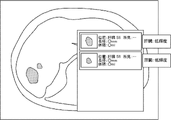
- FIG. 1 is a block diagram showing a schematic configuration of a medical information system
- FIG. 2 is a block diagram showing an example of the hardware configuration of the document creation support device
- FIG. FIG. 4 is a diagram showing an example of a disease name table according to the first embodiment
- FIG. 1 is a block diagram showing an example of a functional configuration of a document creation support device according to the first embodiment
- FIG. 10 is a diagram showing an example of the result of extraction of regions having physical features
- 7 is a flowchart showing an example of document creation support processing according to the first embodiment
- FIG. 11 is a block diagram showing an example of a functional configuration of a document creation support device according to a second embodiment
- FIG. 10 is a diagram showing a display example of a plurality of observation sentences; 9 is a flowchart showing an example of document creation support processing according to the second embodiment;
- FIG. 11 is a block diagram showing an example of a functional configuration of a document creation support device according to a third embodiment;
- FIG. It is a figure which shows an example of an observation sentence display screen. It is a figure which shows an example of an observation sentence display screen. It is a figure which shows an example of a status display screen.
- FIG. 11 is a flowchart showing an example of document creation support processing according to the third embodiment;
- FIG. It is a figure which shows an example of a list display screen. It is a figure which shows an example of a list display screen.
- the medical information system 1 is a system for taking images of a diagnostic target region of a subject and storing the medical images acquired by the taking, based on an examination order from a doctor of a clinical department using a known ordering system. .
- the medical information system 1 is a system for interpretation of medical images and creation of interpretation reports by interpretation doctors, and for viewing interpretation reports and detailed observations of medical images to be interpreted by doctors of the department that requested the diagnosis. be.
- a medical information system 1 includes a plurality of imaging devices 2, a plurality of image interpretation workstations (WorkStation: WS) 3 which are image interpretation terminals, a clinical department WS 4, an image server 5, and an image database.
- the imaging device 2, the interpretation WS3, the clinical department WS4, the image server 5, and the interpretation report server 7 are connected to each other via a wired or wireless network 9 so as to be able to communicate with each other.
- the image DB 6 is connected to the image server 5 and the interpretation report DB 8 is connected to the interpretation report server 7 .
- the imaging device 2 is a device that generates a medical image representing the diagnostic target region by imaging the diagnostic target region of the subject.
- the imaging device 2 may be, for example, a simple X-ray imaging device, an endoscope device, a CT (Computed Tomography) device, an MRI (Magnetic Resonance Imaging) device, a PET (Positron Emission Tomography) device, or the like.
- a medical image generated by the imaging device 2 is transmitted to the image server 5 and stored.
- the clinical department WS4 is a computer used by doctors in the clinical department for detailed observation of medical images, viewing interpretation reports, and creating electronic medical charts.
- each process of creating a patient's electronic medical record, requesting image browsing to the image server 5, and displaying the medical image received from the image server 5 is executed by executing a software program for each process.
- each process such as automatic detection or highlighting of a region suspected of a disease in a medical image, request for viewing an interpretation report to the interpretation report server 7, and display of an interpretation report received from the interpretation report server 7 is performed. , by executing a software program for each process.
- the image server 5 incorporates a software program that provides a general-purpose computer with the functions of a database management system (DBMS).
- DBMS database management system
- the incidental information includes, for example, an image ID (identification) for identifying individual medical images, a patient ID for identifying a patient who is a subject, an examination ID for identifying examination content, and an ID assigned to each medical image. It includes information such as a unique ID (UID: unique identification) that is assigned to the user.
- the additional information includes the examination date when the medical image was generated, the examination time, the type of imaging device used in the examination for obtaining the medical image, patient information (for example, the patient's name, age, gender, etc.).
- examination site i.e., imaging site
- imaging information e.g., imaging protocol, imaging sequence, imaging technique, imaging conditions, use of contrast agent, etc.
- multiple medical images acquired in one examination Information such as the series number or the collection number at the time is included.
- the interpretation report server 7 incorporates a software program that provides DBMS functions to a general-purpose computer.
- the interpretation report server 7 receives an interpretation report registration request from the interpretation WS 3 , the interpretation report is formatted for a database and registered in the interpretation report database 8 . Also, upon receiving a search request for an interpretation report, the interpretation report is searched from the interpretation report DB 8 .
- the interpretation report DB 8 stores, for example, an image ID for identifying a medical image to be interpreted, an interpreting doctor ID for identifying an image diagnostician who performed the interpretation, a lesion name, lesion position information, findings, and confidence levels of findings. An interpretation report in which information such as is recorded is registered.
- Network 9 is a wired or wireless local area network that connects various devices in the hospital. If the interpretation WS 3 is installed in another hospital or clinic, the network 9 may be configured to connect the local area networks of each hospital with the Internet or a dedicated line. In any case, the network 9 preferably has a configuration such as an optical network that enables high-speed transfer of medical images.
- the interpretation WS 3 requests the image server 5 to view medical images, performs various image processing on the medical images received from the image server 5, displays the medical images, analyzes the medical images, emphasizes display of the medical images based on the analysis results, and analyzes the images. Create an interpretation report based on the results.
- the interpretation WS 3 also supports the creation of interpretation reports, requests registration and viewing of interpretation reports to the interpretation report server 7 , displays interpretation reports received from the interpretation report server 7 , and the like.
- the interpretation WS3 performs each of the above processes by executing a software program for each process.
- the image interpretation WS 3 includes a document creation support device 10, which will be described later, and among the above processes, the processing other than the processing performed by the document creation support device 10 is performed by a well-known software program.
- the interpretation WS3 does not perform processing other than the processing performed by the document creation support apparatus 10, and a computer that performs the processing is separately connected to the network 9, and in response to a request for processing from the interpretation WS3, the computer You may make it perform the process which was carried out.
- the document creation support device 10 included in the interpretation WS3 will be described in detail below.
- the document creation support apparatus 10 includes a CPU (Central Processing Unit) 20, a memory 21 as a temporary storage area, and a non-volatile storage section 22.
- FIG. The document creation support apparatus 10 also includes a display 23 such as a liquid crystal display, an input device 24 such as a keyboard and a mouse, and a network I/F (InterFace) 25 connected to the network 9 .
- CPU 20 , memory 21 , storage unit 22 , display 23 , input device 24 and network I/F 25 are connected to bus 27 .
- the storage unit 22 is implemented by a HDD (Hard Disk Drive), SSD (Solid State Drive), flash memory, or the like.
- a document creation support program 30 is stored in the storage unit 22 as a storage medium.
- the CPU 20 reads out the document creation support program 30 from the storage unit 22, expands it in the memory 21, and executes the expanded document creation support program 30.
- FIG. 1 A document creation support program 30 is stored in the storage unit 22 as a storage medium.
- the CPU 20 reads out the document creation support program 30 from the storage unit 22, expands it in the memory 21, and executes the expanded document creation support program 30.
- a disease name table 32 is also stored in the storage unit 22 .
- FIG. 3 shows an example of the disease name table 32.
- the disease name table 32 includes a plurality of records in which combinations of organs and physical features included in medical images are associated with disease names.
- the disease name table 32 is an example of data in which physical characteristics and disease names are associated with each other according to the technology disclosed herein.
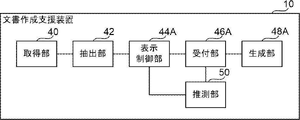
- the document creation support device 10 includes an acquisition unit 40 , an extraction unit 42 , a display control unit 44 , a reception unit 46 and a generation unit 48 .
- the CPU 20 functions as an acquisition unit 40 , an extraction unit 42 , a display control unit 44 , a reception unit 46 and a generation unit 48 by executing the document creation support program 30 .
- the acquisition unit 40 acquires a medical image to be diagnosed (hereinafter referred to as a "diagnosis target image") from the image server 5 via the network I/F 25.
- the extraction unit 42 extracts a region having one or more preset physical characteristics from the diagnosis target image acquired by the acquisition unit 40 .
- the extracting unit 42 extracts a region having physical features from the diagnostic target image using a trained model M1 for extracting a region having physical features from the diagnostic target image.
- the trained model M1 is configured by, for example, a CNN (Convolutional Neural Network) that takes a medical image as an input and outputs a region having physical features contained in the medical image.
- the learned model M1 is a model learned by machine learning using a large number of medical images in which regions having physical features are known as learning data.
- an area having physical characteristics is an area in which pixel values are set in advance.
- the area in which the pixel values are preset includes an area in which the pixel values are relatively close to the preset values compared to the surrounding area.
- the regions in which the pixel values are relatively close to a preset value compared to the surroundings include, for example, a relatively white mass region compared to the surroundings, and a relatively white mass region compared to the surroundings. , black mass areas, etc. can be cited.
- examples of areas having physical characteristics include areas having shapes having preset characteristics.
- the shape of the region having the characteristics set in advance includes, for example, a protruding region and an uneven shape region with irregular edges.
- the above physical characteristics are useful characteristics for disease evaluation.
- some features that are useful for disease assessment are organ-specific. For example, in a CT image, an area of relatively white mass in the brain compared to its surroundings is suspected of cerebral hemorrhage. Also, for example, in a CT image, a relatively dark mass area in the brain compared to its surroundings is suspected of cerebral infarction. Further, for example, in an endoscopic image, a protruded region in the large intestine is suspected to be a large intestine polyp. Further, for example, in a CT image, cirrhosis of the liver is suspected in an uneven-shaped region with an irregular edge in the liver.
- the learned model M1 according to the present embodiment is prepared for each combination of organs and physical features.
- the physical features to be extracted are preset for each organ.
- the extraction unit 42 extracts a region having one or more physical features from the diagnosis target image by inputting the diagnosis target image into the trained model M1 prepared corresponding to the organs included in the diagnosis target image. .
- FIG. 5 shows an example of the extraction result by the extraction unit 42.
- FIG. 5 shows an example in which a relatively white mass region is extracted from a CT image of the brain as compared with the surrounding area.
- the shaded area indicates a relatively white mass area compared to its surroundings.
- the display control unit 44 controls the display of information representing the area extracted by the extraction unit 42 on the display 23 . Specifically, the display control unit 44 performs control to highlight the region extracted by the extraction unit 42 by filling the region extracted by the extraction unit 42 in the diagnosis target image with a preset color. By this control, for example, the display 23 displays an image to be diagnosed in which the hatched area in FIG. 5 is filled with light blue. During this control, when a plurality of regions having different physical features are extracted by the extraction unit 42, the display control unit 44 makes the physical features identifiable by using different colors for each physical feature. good too.
- the display control unit 44 may perform control for highlighting the area extracted by the extraction unit 42 by, for example, drawing the outer edge of the area extracted by the extraction unit 42 with a line of a preset color. Further, for example, the display control unit 44 may perform control to highlight the area extracted by the extraction unit 42 by enclosing the area with a bounding box.
- the display control unit 44 displays the region extracted by the extraction unit 42 for that slice image. You may perform control which displays on the display 23 the information showing. In this case, when there are a plurality of slice images each having one region, the display control unit 44 displays information representing the region extracted by the extraction unit 42 for the slice image having the largest area of one region on the display 23. You may perform control to display.
- the display control unit 44 performs control to display on the display 23 an observation text generated by the generation unit 48, which will be described later.
- a user such as a doctor selects an area for which an interpretation report is to be created from among the areas having physical characteristics displayed on the display 23 via the input device 24 .
- the accepting unit 46 accepts information representing the area selected by the user from among the areas extracted by the extracting unit 42 .
- the generation unit 48 refers to the disease name table 32 and generates an observation statement using the disease name associated with the physical characteristics of the region received by the reception unit 46, that is, the region selected by the user. . Specifically, the generation unit 48 refers to the disease name table 32 and generates disease names associated with combinations of physical features of organs included in the diagnosis target image and regions received by the reception unit 46. get. Then, the generation unit 48 generates a finding sentence using the acquired disease name.
- observation statements related to the brain include “Intracranial hemorrhage is observed,” “Subarachnoid hemorrhage is observed,” and “Cerebral infarction is observed.”
- the generation unit 48 generates a finding statement by inputting a disease name to a recurrent neural network trained to generate text from input words. The user creates an interpretation report based on the observation text generated by the generation unit 48 and displayed on the display 23 under the control of the display control unit 44 .
- the generation unit 48 may generate a plurality of observation sentences for one disease name.
- the generating unit 48 generates, for one disease name “tumor” corresponding to the region selected by the user regarding the lungs included in the image to be diagnosed, “a tumor is found in the upper left lobe”. and "A mass of 4.2 cm with pleural invagination is found in the upper left lobe.”
- the generation unit 48 for one disease name “tumor”, “a partially solid tumor is found in the upper left lobe” and “the center is solid in the upper left lobe, A tumor with a frosted glass shape is observed in the surrounding area.”, etc., may be generated.
- the operation of the document creation support device 10 according to this embodiment will be described with reference to FIG.
- the CPU 20 executes the document creation support program 30
- the document creation support process shown in FIG. 6 is executed.
- the document creation support process shown in FIG. 6 is executed, for example, when the user inputs an instruction to start execution.
- the acquisition unit 40 acquires the diagnosis target image from the image server 5 via the network I/F 25.
- the extraction unit 42 uses the learned model M1 to extract a region having one or more preset physical features from the diagnosis target image acquired in step S10.
- the display control unit 44 controls the display 23 to display information representing the area extracted in step S12, as described above.
- the reception unit 46 receives information representing the area selected by the user from among the areas extracted at step S12.
- the generation unit 48 refers to the disease name table 32 as described above, and generates an observation sentence using the disease name associated with the physical feature of the region accepted in step S16.
- the display control unit 44 controls the display 23 to display the observation text generated in step S ⁇ b>18 .
- multiple disease names are associated with one physical feature.
- two disease names “cerebral hemorrhage” and “brain tumor”, are associated with the organ “brain” and the physical feature "relatively white mass compared to surroundings”.
- the document creation support device 10 includes an acquisition unit 40, an extraction unit 42, a display control unit 44A, a reception unit 46A, a generation unit 48A, and an estimation unit 50.
- the CPU 20 executes the document creation support program 30, it functions as an acquisition unit 40, an extraction unit 42, a display control unit 44A, a reception unit 46A, a generation unit 48A, and an estimation unit 50.
- the display control unit 44A performs control to display information representing the area extracted by the extraction unit 42 on the display 23 in the same manner as the display control unit 44 according to the first embodiment.
- the display control unit 44A performs control to display on the display 23 a plurality of observation sentences generated by the generation unit 48A, which will be described later. During this control, the display control unit 44A controls the display mode of the plurality of findings generated by the generation unit 48A based on the disease name estimation result by the estimation unit 50, which will be described later.
- the display control unit 44A selects the observation text including the disease name guessed by the guessing unit 50 from among the plurality of finding texts generated by the generating unit 48A. Control is performed to display on the display 23 with a higher priority than the observation sentences not included.
- the finding sentences generated by the generating unit 48A are two, "cerebral hemorrhage is observed" and "brain tumor is observed", and the disease name inferred by the inferring unit 50 is "brain tumor”. A case will be described.
- the display control unit 44A performs control to display the finding text including "brain tumor” above the finding text not including "brain tumor". Give higher priority to inclusion statements.
- the display control unit 44A makes the character size of the observation text including the disease name guessed by the guessing unit 50 larger than the character size of the finding text guessed by the guessing unit 50 and not including the disease name. You may Further, for example, the display control unit 44A may perform control to display a plurality of observation sentences generated by the generation unit 48A on the display 23 in colors predetermined according to priority. Further, for example, the display control unit 44A may perform control to display on the display 23 only the finding text including the disease name inferred by the estimating unit 50 among the plurality of finding texts generated by the generating unit 48A. .
- the reception unit 46A receives information representing the area selected by the user from among the areas extracted by the extraction unit 42, like the reception unit 46 according to the first embodiment.
- the accepting unit 46A also accepts an opinion text selected by the user from among the plurality of opinion texts displayed on the display 23 under the control of the display control unit 44A. This accepted statement of findings is used to create an interpretation report.
- the generation unit 48A refers to the disease name table 32 and generates a plurality of findings using a plurality of disease names associated with the physical features of the region received by the reception unit 46A, that is, the region selected by the user. generate sentences. Specifically, the generation unit 48A refers to the disease name table 32, and selects a plurality of diseases associated with combinations of physical features of organs included in the diagnosis target image and regions received by the reception unit 46A. get first name Then, the generation unit 48A generates a plurality of observation sentences using the acquired disease names. For example, the generation unit 48A generates a plurality of observation sentences by inputting disease names to a recurrent neural network trained to generate text from input words.
- the generating unit 48A may derive the recommendation level of the observation sentence for each of the generated multiple observation sentences.
- the generation unit 48A generates an observation sentence based on the image of the area portion accepted by the reception unit 46A in the diagnosis target image, the generated plural observation sentences, and the pre-learned model M3.
- Derive the recommendation level of The learned model M3 is prepared in advance using learning data including, for example, an image of a region portion received by the receiving unit 46A in the diagnosis target image, a plurality of observation sentences, and a recommendation level for each of the plurality of observation sentences. It is a trained machine learning model.
- the trained model M3 When the trained model M3 receives the image of the area portion of the diagnosis target image received by the reception unit 46A and the plurality of observation sentences generated by the generation unit 48A, the recommendation degree of each of the plurality of observation sentences is calculated. output.
- This trained model M3 includes, for example, CNN.
- the display control unit 44A may perform control to display the plurality of observation sentences generated by the generation unit 48A and the degree of recommendation derived for each of the plurality of observation sentences.
- the guessing unit 50 guesses the name of the disease using the diagnosis target image. Specifically, the estimating unit 50 generates an image of a region portion received by the receiving unit 46A in the image to be diagnosed, an image of a region portion having a physical feature in the learning medical image, and an image of the region portion.
- the disease name is estimated based on the learned model M2 that has been pre-learned using the learning data containing the disease name of the disease to be acquired.
- This trained model M2 is configured including, for example, CNN.
- the estimation unit 50 may estimate the disease name based on the degree of similarity between the image to be diagnosed and an image prepared in advance for each disease.
- the degree of similarity between images for example, a distance between feature amount vectors obtained by vectorizing a plurality of feature amounts extracted from an image can be applied.
- the estimating unit 50 takes the disease name of the image having the highest degree of similarity with the image of the area portion of the diagnosis target image accepted by the accepting unit 46A as the estimation result.
- the estimation unit 50 may estimate the disease name based on the statistical values of the pixel values in the region extracted from the diagnosis target image. Examples of statistical values in this case include at least one of mean, standard deviation, variance, maximum luminance value, and minimum luminance value.
- the document creation support process shown in FIG. 9 is executed.
- the document creation support process shown in FIG. 9 is executed, for example, when the user inputs an instruction to start execution. Steps in FIG. 9 that execute the same processing as in FIG. 6 are given the same step numbers and descriptions thereof are omitted.
- step S18A of FIG. 9 the generation unit 48A refers to the disease name table 32, as described above, and uses a plurality of disease names associated with the physical features of the region accepted in step S16. generate a statement of findings.
- step S19A the estimation unit 50 estimates the disease name using the diagnosis target image acquired in step S10, as described above.
- the display control unit 44A performs control to display on the display 23 the plurality of observation sentences generated at step S18A. During this control, the display control unit 44A controls the display mode of the plurality of findings generated in step S18A based on the disease name estimation result in step S19A, as described above.
- the reception unit 46A receives the observation text selected by the user from among the plurality of observation texts displayed on the display 23 in step S20A. This accepted statement of findings is used to create an interpretation report.
- the document creation support process ends.
- a third embodiment of the disclosed technique will be described.
- the configuration of the medical information system 1 and the hardware configuration of the document creation support apparatus 10 according to the present embodiment are the same as those of the first embodiment, and thus description thereof is omitted.
- the disease name table 32 according to the present embodiment is the same as that of the second embodiment, so description thereof will be omitted.
- the document creation support device 10 includes an acquisition unit 40, an extraction unit 42, a display control unit 44B, a reception unit 46B, and a generation unit 48B.
- the CPU 20 functions as an acquisition unit 40, an extraction unit 42, a display control unit 44B, a reception unit 46B, and a generation unit 48B.
- the display control unit 44B performs control to display information representing the area extracted by the extraction unit 42 on the display 23. In addition, the display control unit 44B performs control to display on the display 23 a plurality of observation sentences generated by the generation unit 48B, which will be described later.
- the display control unit 44B performs control to display the area extracted by the extraction unit 42 in such a manner that it can be identified as to which of the plurality of statuses related to the user's medical document creation work.
- An example of a medical document is an interpretation report. In this embodiment, an example in which the following four statuses are applied as a plurality of statuses related to medical document creation work will be described.
- the first status is a status in which the user has not confirmed the area extracted by the extraction unit 42 .
- the second status is a status in which the user has specified that the area extracted by the extraction unit 42 is to be the target of the medical document creation work, and the creation work has not been completed.
- a third status is a status in which the user designates that the region extracted by the extraction unit 42 is excluded from the medical document creation work.
- a fourth status is a status that the medical document creation work for the region extracted by the extraction unit 42 has been completed. Note that the plurality of statuses may be two or three of these four statuses.
- the display control unit 44B When the display control unit 44B performs control to initially display information representing the area extracted by the extraction unit 42 on the display 23, the display control unit 44B performs control to display the first status in an identifiable manner. Specifically, for example, the display control unit 44B performs control to display the diagnosis target image on the display 23 in a state where the region extracted by the extraction unit 42 in the diagnosis target image is filled with a preset color. In this control, when a plurality of regions having different physical characteristics are extracted by the extraction unit 42, the display control unit 44B can distinguish the physical characteristics by using different colors for each physical characteristic. can be
- the display control unit 44B adds a predetermined mark to the area to display the second status. Control to display the status in an identifiable way.
- the display control unit 44B performs control to display on the display 23 a plurality of observation sentences generated by the generation unit 48B, which will be described later, for the area when an area is designated by the user and an instruction to display an observation sentence is performed. conduct.
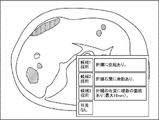
- FIG. 11 shows an example of an observation sentence display screen displayed on the display 23 by this control. As shown in FIG. 11, the observation text display screen displays a plurality of observation texts, a button that the user designates when selecting each observation text, and a button that the user designates when the user determines that there is no finding. be done.
- the display control unit 44B cancels the painting of the area and displays the outer edge of the area as a predetermined area. Control is performed to display the fourth status in an identifiable manner by drawing with colored lines.
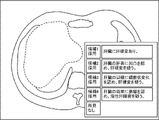
- FIG. 12 shows another example of the remark display screen.
- FIG. 11 shows an example in which a region having physical characteristics is extracted in the liver
- FIG. 12 shows an example in which the shape of the liver itself has physical characteristics.
- the display control unit 44B displays the third status in a identifiable manner by graying out the area. to control.
- this operation for example, the user designates a no finding button on the finding text display screen shown in FIG. 11 .
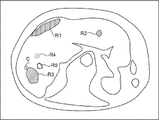
- FIG. 13 shows an example in which a liver CT image is applied as an image to be diagnosed.
- FIG. 13 shows an example in which the statuses of the areas R1 and R2 are the first status, and the area R3 is the second status.
- a check mark C is added to the region R3 as a predetermined mark.
- FIG. 13 shows an example in which the status of the area R4 is the third status and the status of the area R5 is the fourth status.
- the method of displaying the first to fourth statuses in an identifiable manner is not limited to the above example.
- the first status to the fourth status are identified by the line type or thickness of the outline of the area, the transparency or pattern of the filling of the area, the blinking of the area, the animation display of the area, and the addition of different marks. can be displayed if possible.
- the mark is not limited to a check mark, and may be an arrow or a symbol such as "+".
- the reception unit 46B receives information representing the area selected by the user from among the areas extracted by the extraction unit 42 .
- the accepting unit 46B also accepts an operation indicating which of the above four statuses the selected area should be. Further, the receiving unit 46B receives an observation text selected by the user from among the plurality of observation texts displayed on the display 23 under the control of the display control unit 44B. This accepted statement of findings is used to create an interpretation report.
- the generation unit 48B refers to the disease name table 32 and uses a plurality of disease names associated with the physical characteristics of the region received by the reception unit 46B. to generate multiple remarks. Note that the generation unit 48B, like the generation unit 48 according to the first embodiment, generates one observation sentence using one disease name associated with the physical characteristics of the region received by the reception unit 46B. may be generated.
- the document creation support process shown in FIG. 14 is executed by the CPU 20 executing the document creation support program 30 .
- the document creation support process shown in FIG. 14 is executed, for example, when the user inputs an instruction to start execution. Steps in FIG. 14 that execute the same processing as in FIG. 9 are given the same step numbers and descriptions thereof are omitted.
- the display control unit 44B controls the display 23 to display information representing the area extracted at step S12. During this control, the display control unit 44B performs control to identifiably display that the status of each area is the first status, as described above.
- the accepting unit 46B accepts an operation by the user. If the operation accepted by the accepting unit 46B in step S32 is an operation in which the user designates an area and sets the status of the designated area to the second status, the process proceeds to step S34.
- step S34 the display control unit 44B adds a predetermined mark to the area designated by the user, thereby performing control to display the second status in an identifiable manner. After the process of step S34 is completed, the process returns to step S32.
- step S32 If the operation received by the receiving unit 46B in step S32 is an instruction to display an observation text in which a region is designated by the user, the process proceeds to step S36.
- the generation unit 48B refers to the disease name table 32, as described above, and generates a plurality of finding sentences using a plurality of disease names associated with the physical characteristics of the region designated by the user. Generate.
- step S38 the display control unit 44B performs control to display on the display 23 the plurality of observation sentences generated at step S36 for the area specified by the user.
- step S40 the reception unit 46B determines whether or not the observation text selected by the user from among the plurality of observation texts displayed on the display 23 in step S38 has been received. If this determination is affirmative, the process proceeds to step S42.
- step S42 the display control unit 44B unpaints the area specified by the user and draws the outer edge of the area with lines of a predetermined color, thereby recognizably displaying the fourth status. control.
- the process of step S42 ends, the process returns to step S32.
- step S40 If the operation accepted by the accepting unit 46B in step S40 is an operation in which an area is specified by the user and the status of the specified area is set to the third status, the determination in step S40 becomes a negative determination, and the process proceeds to step S44. transition to In step S44, the display control unit 44B performs control to display the third status in an identifiable manner by graying out the area specified by the user. After the process of step S44 is completed, the process returns to step S32.
- step S32 If the operation accepted by the accepting unit 46B in step S32 is an operation to end the display of the screen, the document creation support process ends.
- the same effects as those of the first embodiment can be obtained. Moreover, according to this embodiment, the user can easily grasp the progress of the work.
- the display control units 44, 44A, and 44B display the plurality of images extracted by the extraction unit 42 when the user performs an operation to instruct display of a list. Control may be performed to display a list of information about each area. In the third embodiment, when performing the list display control, the display control unit 44B may perform the list display of information on each of the plurality of areas extracted by the extraction unit 42 for each status. The user may also select, via the input device 24 , a region for which an interpretation report is to be created from among the plurality of regions listed on the display 23 .
- the generation units 48, 48A, and 48B generate observation sentences for regions selected by the user from among the regions extracted by the extraction unit 42. Not limited.
- the generation units 48 , 48A, and 48B may be configured to generate observation sentences for all regions extracted by the extraction unit 42 .
- the extraction unit 42 may extract a region that satisfies a preset condition in the image to be diagnosed as a region having physical characteristics.
- a region that satisfies this condition is, for example, a region having a CT value equal to or greater than a first threshold and an area equal to or greater than a second threshold.
- an area that satisfies the condition in this case is, for example, an area whose CT value is less than the third threshold and whose area is equal to or greater than the second threshold.
- An area that satisfies the conditions in this case is, for example, an area in which the CT value is within a certain percentage of the top frequencies in the histogram and the area is equal to or greater than the second threshold.
- the conditions in this case may be set for each organ, for example.
- the display control units 44, 44A, and 44B provide information indicating under which conditions each of the plurality of regions extracted by the extraction unit 42 is extracted. may be controlled to be displayed on the display 23 .
- each region is a region extracted according to the condition that the liver has low luminance and has a size of a certain area or more, that is, the CT value in the liver is less than the third threshold and the area is An example of a region equal to or greater than the second threshold is shown.
- the document creation support apparatus 10 when the user corrects the name of the disease in the region extracted by the extraction unit 42, the document creation support apparatus 10 can be used to identify the physical characteristics of the region and the disease after correction by the user. A record associated with a name may be added to the disease name table 32 .
- the hardware structure of a processing unit that executes various processes includes the following various processors ( processor) can be used.
- the various processors include, in addition to the CPU, which is a general-purpose processor that executes software (programs) and functions as various processing units, circuits such as FPGAs (Field Programmable Gate Arrays), etc.
- Programmable Logic Device PLD which is a processor whose configuration can be changed, ASIC (Application Specific Integrated Circuit) etc. Circuits, etc. are included.
- One processing unit may be composed of one of these various processors, or a combination of two or more processors of the same type or different types (for example, a combination of multiple FPGAs, a combination of a CPU and an FPGA). combination). Also, a plurality of processing units may be configured by one processor.
- a single processor is configured by combining one or more CPUs and software.
- a processor functions as multiple processing units.
- SoC System on Chip
- the various processing units are configured using one or more of the above various processors as a hardware structure.
- an electric circuit combining circuit elements such as semiconductor elements can be used.
- the document creation support program 30 has been pre-stored (installed) in the storage unit 22, but is not limited to this.
- the document creation support program 30 is provided in a form recorded in a recording medium such as a CD-ROM (Compact Disc Read Only Memory), a DVD-ROM (Digital Versatile Disc Read Only Memory), and a USB (Universal Serial Bus) memory.
- a recording medium such as a CD-ROM (Compact Disc Read Only Memory), a DVD-ROM (Digital Versatile Disc Read Only Memory), and a USB (Universal Serial Bus) memory.
- the document creation support program 30 may be downloaded from an external device via a network.
Landscapes
- Engineering & Computer Science (AREA)
- Health & Medical Sciences (AREA)
- Medical Informatics (AREA)
- General Health & Medical Sciences (AREA)
- Public Health (AREA)
- Theoretical Computer Science (AREA)
- Epidemiology (AREA)
- Primary Health Care (AREA)
- Physics & Mathematics (AREA)
- General Physics & Mathematics (AREA)
- Radiology & Medical Imaging (AREA)
- Nuclear Medicine, Radiotherapy & Molecular Imaging (AREA)
- Biomedical Technology (AREA)
- Multimedia (AREA)
- Computer Vision & Pattern Recognition (AREA)
- Databases & Information Systems (AREA)
- Pathology (AREA)
- Evolutionary Computation (AREA)
- Life Sciences & Earth Sciences (AREA)
- Data Mining & Analysis (AREA)
- Computing Systems (AREA)
- Software Systems (AREA)
- Artificial Intelligence (AREA)
- Quality & Reliability (AREA)
- Heart & Thoracic Surgery (AREA)
- Optics & Photonics (AREA)
- High Energy & Nuclear Physics (AREA)
- Molecular Biology (AREA)
- Surgery (AREA)
- Animal Behavior & Ethology (AREA)
- Veterinary Medicine (AREA)
- Computational Linguistics (AREA)
- Biophysics (AREA)
- Business, Economics & Management (AREA)
- General Business, Economics & Management (AREA)
- Measuring And Recording Apparatus For Diagnosis (AREA)
- Medical Treatment And Welfare Office Work (AREA)
Priority Applications (2)
| Application Number | Priority Date | Filing Date | Title |
|---|---|---|---|
| JP2023514563A JPWO2022220081A1 (https=) | 2021-04-14 | 2022-03-25 | |
| US18/481,194 US12597505B2 (en) | 2021-04-14 | 2023-10-04 | Document creation support apparatus, document creation support method, and document creation support program |
Applications Claiming Priority (4)
| Application Number | Priority Date | Filing Date | Title |
|---|---|---|---|
| JP2021-068674 | 2021-04-14 | ||
| JP2021068674 | 2021-04-14 | ||
| JP2021208523 | 2021-12-22 | ||
| JP2021-208523 | 2021-12-22 |
Related Child Applications (1)
| Application Number | Title | Priority Date | Filing Date |
|---|---|---|---|
| US18/481,194 Continuation US12597505B2 (en) | 2021-04-14 | 2023-10-04 | Document creation support apparatus, document creation support method, and document creation support program |
Publications (1)
| Publication Number | Publication Date |
|---|---|
| WO2022220081A1 true WO2022220081A1 (ja) | 2022-10-20 |
Family
ID=83640654
Family Applications (1)
| Application Number | Title | Priority Date | Filing Date |
|---|---|---|---|
| PCT/JP2022/014667 Ceased WO2022220081A1 (ja) | 2021-04-14 | 2022-03-25 | 文書作成支援装置、文書作成支援方法、及び文書作成支援プログラム |
Country Status (3)
| Country | Link |
|---|---|
| US (1) | US12597505B2 (https=) |
| JP (1) | JPWO2022220081A1 (https=) |
| WO (1) | WO2022220081A1 (https=) |
Citations (6)
| Publication number | Priority date | Publication date | Assignee | Title |
|---|---|---|---|---|
| JP2009082443A (ja) * | 2007-09-28 | 2009-04-23 | Canon Inc | 診断支援装置及びその制御方法 |
| JP2011086276A (ja) * | 2009-09-17 | 2011-04-28 | Fujifilm Corp | 読影レポート作成装置および方法並びにプログラム |
| WO2017033516A1 (ja) * | 2015-08-24 | 2017-03-02 | 富士フイルム株式会社 | 読影支援装置及び方法 |
| JP2017191457A (ja) * | 2016-04-13 | 2017-10-19 | キヤノン株式会社 | レポート作成装置、およびその制御方法 |
| JP2020009186A (ja) * | 2018-07-09 | 2020-01-16 | キヤノンメディカルシステムズ株式会社 | 診断支援装置、診断支援方法、及び診断支援プログラム |
| WO2020129385A1 (ja) * | 2018-12-19 | 2020-06-25 | 富士フイルム株式会社 | 医療文書作成支援装置、方法およびプログラム |
Family Cites Families (4)
| Publication number | Priority date | Publication date | Assignee | Title |
|---|---|---|---|---|
| US9519753B1 (en) * | 2015-05-26 | 2016-12-13 | Virtual Radiologic Corporation | Radiology workflow coordination techniques |
| JP6906462B2 (ja) * | 2018-02-28 | 2021-07-21 | 富士フイルム株式会社 | 医用画像表示装置、方法およびプログラム |
| EP3830748A4 (en) * | 2018-08-02 | 2022-04-27 | Imedis AI Ltd | SYSTEMS AND METHODS FOR IMPROVED ANALYSIS AND GENERATION OF MEDICAL IMAGING REPORTS |
| WO2020209382A1 (ja) | 2019-04-11 | 2020-10-15 | 富士フイルム株式会社 | 医療文書作成装置、方法およびプログラム |
-
2022
- 2022-03-25 JP JP2023514563A patent/JPWO2022220081A1/ja active Pending
- 2022-03-25 WO PCT/JP2022/014667 patent/WO2022220081A1/ja not_active Ceased
-
2023
- 2023-10-04 US US18/481,194 patent/US12597505B2/en active Active
Patent Citations (6)
| Publication number | Priority date | Publication date | Assignee | Title |
|---|---|---|---|---|
| JP2009082443A (ja) * | 2007-09-28 | 2009-04-23 | Canon Inc | 診断支援装置及びその制御方法 |
| JP2011086276A (ja) * | 2009-09-17 | 2011-04-28 | Fujifilm Corp | 読影レポート作成装置および方法並びにプログラム |
| WO2017033516A1 (ja) * | 2015-08-24 | 2017-03-02 | 富士フイルム株式会社 | 読影支援装置及び方法 |
| JP2017191457A (ja) * | 2016-04-13 | 2017-10-19 | キヤノン株式会社 | レポート作成装置、およびその制御方法 |
| JP2020009186A (ja) * | 2018-07-09 | 2020-01-16 | キヤノンメディカルシステムズ株式会社 | 診断支援装置、診断支援方法、及び診断支援プログラム |
| WO2020129385A1 (ja) * | 2018-12-19 | 2020-06-25 | 富士フイルム株式会社 | 医療文書作成支援装置、方法およびプログラム |
Also Published As
| Publication number | Publication date |
|---|---|
| US12597505B2 (en) | 2026-04-07 |
| JPWO2022220081A1 (https=) | 2022-10-20 |
| US20240029870A1 (en) | 2024-01-25 |
Similar Documents
| Publication | Publication Date | Title |
|---|---|---|
| US11139067B2 (en) | Medical image display device, method, and program | |
| US10860894B2 (en) | Learning data generation support apparatus, operation method of learning data generation support apparatus, and learning data generation support program | |
| US20240029252A1 (en) | Medical image apparatus, medical image method, and medical image program | |
| JP2019153250A (ja) | 医療文書作成支援装置、方法およびプログラム | |
| JP7701493B2 (ja) | 医用画像処理装置、方法およびプログラム | |
| JP2019169049A (ja) | 医用画像特定装置、方法およびプログラム | |
| US11093699B2 (en) | Medical image processing apparatus, medical image processing method, and medical image processing program | |
| US12288611B2 (en) | Information processing apparatus, method, and program | |
| US11688498B2 (en) | Medical document display control apparatus, medical document display control method, and medical document display control program | |
| US11978274B2 (en) | Document creation support apparatus, document creation support method, and document creation support program | |
| US12406755B2 (en) | Document creation support apparatus, method, and program | |
| JP7504987B2 (ja) | 情報処理装置、情報処理方法及び情報処理プログラム | |
| JP2019008349A (ja) | 学習データ生成支援装置および学習データ生成支援方法並びに学習データ生成支援プログラム | |
| US12527528B2 (en) | Image display apparatus, method, and program | |
| US20230281810A1 (en) | Image display apparatus, method, and program | |
| US12211600B2 (en) | Information processing apparatus, information processing method, and information processing program | |
| WO2021157705A1 (ja) | 文書作成支援装置、方法およびプログラム | |
| JP7420914B2 (ja) | 情報処理装置、情報処理方法及び情報処理プログラム | |
| WO2022230641A1 (ja) | 文書作成支援装置、文書作成支援方法、及び文書作成支援プログラム | |
| US12536659B2 (en) | Medical image analysis apparatus, medical image analysis method, and medical image analysis program | |
| JP2021175454A (ja) | 医用画像処理装置、方法およびプログラム | |
| WO2022220081A1 (ja) | 文書作成支援装置、文書作成支援方法、及び文書作成支援プログラム | |
| JP2024044921A (ja) | 情報処理装置、情報処理方法及び情報処理プログラム | |
| WO2022239593A1 (ja) | 文書作成支援装置、文書作成支援方法、及び文書作成支援プログラム | |
| WO2022220158A1 (ja) | 作業支援装置、作業支援方法、及び作業支援プログラム |
Legal Events
| Date | Code | Title | Description |
|---|---|---|---|
| 121 | Ep: the epo has been informed by wipo that ep was designated in this application |
Ref document number: 22788006 Country of ref document: EP Kind code of ref document: A1 |
|
| WWE | Wipo information: entry into national phase |
Ref document number: 2023514563 Country of ref document: JP |
|
| NENP | Non-entry into the national phase |
Ref country code: DE |
|
| 122 | Ep: pct application non-entry in european phase |
Ref document number: 22788006 Country of ref document: EP Kind code of ref document: A1 |