WO2022210897A1 - 作業機械、作業機械用の荷重計算システム - Google Patents
作業機械、作業機械用の荷重計算システム Download PDFInfo
- Publication number
- WO2022210897A1 WO2022210897A1 PCT/JP2022/016055 JP2022016055W WO2022210897A1 WO 2022210897 A1 WO2022210897 A1 WO 2022210897A1 JP 2022016055 W JP2022016055 W JP 2022016055W WO 2022210897 A1 WO2022210897 A1 WO 2022210897A1
- Authority
- WO
- WIPO (PCT)
- Prior art keywords
- mode
- weight
- work machine
- display device
- loading
- Prior art date
- Legal status (The legal status is an assumption and is not a legal conclusion. Google has not performed a legal analysis and makes no representation as to the accuracy of the status listed.)
- Ceased
Links
Images



Classifications
-
- E—FIXED CONSTRUCTIONS
- E02—HYDRAULIC ENGINEERING; FOUNDATIONS; SOIL SHIFTING
- E02F—DREDGING; SOIL-SHIFTING
- E02F3/00—Dredgers; Soil-shifting machines
- E02F3/04—Dredgers; Soil-shifting machines mechanically-driven
- E02F3/96—Dredgers; Soil-shifting machines mechanically-driven with arrangements for alternate or simultaneous use of different digging elements
- E02F3/963—Arrangements on backhoes for alternate use of different tools
-
- E—FIXED CONSTRUCTIONS
- E02—HYDRAULIC ENGINEERING; FOUNDATIONS; SOIL SHIFTING
- E02F—DREDGING; SOIL-SHIFTING
- E02F9/00—Component parts of dredgers or soil-shifting machines, not restricted to one of the kinds covered by groups E02F3/00 - E02F7/00
- E02F9/20—Drives; Control devices
- E02F9/22—Hydraulic or pneumatic drives
- E02F9/2246—Control of prime movers, e.g. depending on the hydraulic load of work tools
-
- E—FIXED CONSTRUCTIONS
- E02—HYDRAULIC ENGINEERING; FOUNDATIONS; SOIL SHIFTING
- E02F—DREDGING; SOIL-SHIFTING
- E02F9/00—Component parts of dredgers or soil-shifting machines, not restricted to one of the kinds covered by groups E02F3/00 - E02F7/00
- E02F9/26—Indicating devices
-
- B—PERFORMING OPERATIONS; TRANSPORTING
- B66—HOISTING; LIFTING; HAULING
- B66C—CRANES; LOAD-ENGAGING ELEMENTS OR DEVICES FOR CRANES, CAPSTANS, WINCHES, OR TACKLES
- B66C1/00—Load-engaging elements or devices attached to lifting or lowering gear of cranes or adapted for connection therewith for transmitting lifting forces to articles or groups of articles
- B66C1/04—Load-engaging elements or devices attached to lifting or lowering gear of cranes or adapted for connection therewith for transmitting lifting forces to articles or groups of articles by magnetic means
-
- E—FIXED CONSTRUCTIONS
- E02—HYDRAULIC ENGINEERING; FOUNDATIONS; SOIL SHIFTING
- E02F—DREDGING; SOIL-SHIFTING
- E02F9/00—Component parts of dredgers or soil-shifting machines, not restricted to one of the kinds covered by groups E02F3/00 - E02F7/00
- E02F9/20—Drives; Control devices
-
- E—FIXED CONSTRUCTIONS
- E02—HYDRAULIC ENGINEERING; FOUNDATIONS; SOIL SHIFTING
- E02F—DREDGING; SOIL-SHIFTING
- E02F9/00—Component parts of dredgers or soil-shifting machines, not restricted to one of the kinds covered by groups E02F3/00 - E02F7/00
- E02F9/26—Indicating devices
- E02F9/264—Sensors and their calibration for indicating the position of the work tool
-
- G—PHYSICS
- G01—MEASURING; TESTING
- G01G—WEIGHING
- G01G19/00—Weighing apparatus or methods adapted for special purposes not provided for in the preceding groups
- G01G19/08—Weighing apparatus or methods adapted for special purposes not provided for in the preceding groups for incorporation in vehicles
- G01G19/083—Weighing apparatus or methods adapted for special purposes not provided for in the preceding groups for incorporation in vehicles lift truck scale
-
- B—PERFORMING OPERATIONS; TRANSPORTING
- B60—VEHICLES IN GENERAL
- B60Y—INDEXING SCHEME RELATING TO ASPECTS CROSS-CUTTING VEHICLE TECHNOLOGY
- B60Y2200/00—Type of vehicle
- B60Y2200/40—Special vehicles
- B60Y2200/41—Construction vehicles, e.g. graders, excavators
- B60Y2200/412—Excavators
-
- E—FIXED CONSTRUCTIONS
- E02—HYDRAULIC ENGINEERING; FOUNDATIONS; SOIL SHIFTING
- E02F—DREDGING; SOIL-SHIFTING
- E02F3/00—Dredgers; Soil-shifting machines
- E02F3/04—Dredgers; Soil-shifting machines mechanically-driven
- E02F3/28—Dredgers; Soil-shifting machines mechanically-driven with digging tools mounted on a dipper- or bucket-arm, i.e. there is either one arm or a pair of arms, e.g. dippers, buckets
- E02F3/36—Component parts
- E02F3/42—Drives for dippers, buckets, dipper-arms or bucket-arms
- E02F3/43—Control of dipper or bucket position; Control of sequence of drive operations
- E02F3/435—Control of dipper or bucket position; Control of sequence of drive operations for dipper-arms, backhoes or the like
Definitions
- the present disclosure relates to work machines and load calculation systems for work machines.
- the disclosed technology aims to improve work efficiency.
- a working machine is a working machine having a load calculation function, has a first mode and a second mode, and the accuracy of the load calculation function in the first mode is , different from the accuracy of the load calculation function in the second mode.
- a load calculation system for a work machine has a first mode and a second mode, and the accuracy of the load calculation function in the first mode is the same as that in the second mode. It is a load calculation system for working machines that is different from the accuracy of the load calculation function in
- FIG. 1 is a side view of a working machine according to an embodiment of the present invention
- FIG. 2 is a block diagram showing a configuration example of a drive system mounted on the work machine shown in FIG. 1;
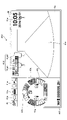
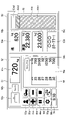
- FIG. It is a figure which shows the structural example of a main screen. It is a first diagram showing an example of a loading operation screen. It is a second diagram showing an example of the loading operation screen. It is a figure explaining the effect of this embodiment.
- FIG. 1 is a side view of work machine 100 according to an embodiment of the present invention.
- An upper revolving body 3 is mounted on a lower traveling body 1 of the work machine 100 via a revolving mechanism 2 .
- a boom 4 is attached to the upper revolving body 3 .
- An arm 5 is attached to the tip of the boom 4, and a lifting magnet 6 is attached to the tip of the arm 5 as an end attachment.
- the boom 4 and arm 5 constitute a working attachment, which is an example of an attachment.
- the boom 4 is driven by a boom cylinder 7
- the arm 5 is driven by an arm cylinder 8
- the lifting magnet 6 is driven by a lifting magnet cylinder 9 .
- a boom angle sensor S1 is attached to the boom 4, an arm angle sensor S2 is attached to the arm 5, and a lifting magnet angle sensor S3 is attached to the lifting magnet 6.
- a controller 30, a display device 40, a display device 50 (see FIG. 2), an imaging device 80, a body tilt sensor S4, and a turning angular velocity sensor S5 are attached to the upper swing body 3.
- An object detection device may be attached to the upper swing body 3 instead of the imaging device 80 or separately from the imaging device 80 .
- the controller 30 puts the lifting magnet 6 into an attraction state in which an object (magnetic body) can be attracted according to the operation of a switch provided on the operation device 26, which will be described later. Further, the controller 30 puts the lifting magnet 6 in the attracted state into the non-attracted state (released state) according to the operation of the switch provided on the operating device 26 .
- objects such as iron scraps are loaded onto the loading platform of the transportation vehicle by attracting the object with the lifting magnet 6 and releasing the object from the loading platform of the transportation vehicle.
- the transportation vehicle of this embodiment includes, for example, a dump truck, a trailer, and the like.
- the work machine 100 loads objects onto the platform of a transport vehicle in a loading yard where objects are loaded.
- the transport vehicle travels on public roads, etc. and transports the objects loaded on the carrier to the destination, so the load weight of the object must not exceed the maximum load weight of the transport vehicle. Moreover, in order to transport objects efficiently, it is preferable to load the objects on the loading platform of the transportation vehicle up to the maximum loading weight of the transportation vehicle.
- the transport vehicle usually moves to the area where the platform is installed and weighs the platform to measure the load weight of the platform.
- the transport vehicle returns to the loading yard, unloads the loaded objects by the work machine 100, and then weighs the load again. If the load weight is less than the maximum load weight, the transport vehicle returns to the loading yard, loads more objects using the work machine 100, and then weighs the objects again.
- the work machine 100 is required to load objects in the loading yard so that the load weight of the carrier of the transport vehicle approaches the maximum load weight.
- the work machine 100 of the present embodiment has a loading mode in which no weight calculation condition is set when calculating the weight of the lifted object, and a weight calculation mode when calculating the weight of the lifted object. and an adjustment mode for setting conditions.
- the accuracy of the load calculation function in adjustment mode differs from the accuracy of the load calculation function in loading mode.
- the weight calculation conditions for the adjustment mode are different from the weight calculation conditions for the loading mode.
- the controller 30 calculates the weight of the object attracted to the lifting magnet 6 when the timing is determined to be appropriate based on the boom bottom pressure, the attitude of the working machine 100, and the like. do it.
- weight calculation conditions may be provided if they are looser than those in the adjustment mode.
- the loading mode may be any mode as long as the loading operation can be performed more quickly than the adjustment mode.
- Weight calculation conditions related to speed and operation in the present embodiment include, for example, that the lifting magnet 6 passes through a specific height area, that the angle of the lifting magnet 6 is within a range considered horizontal, and that the boom The lifting speed is within a predetermined range, the arm operation is not being performed, the operation of the attachment is stopped, etc., or any combination thereof.
- the weight of the object In the loading mode, there are no weight calculation conditions for calculating the weight of the object, so the weight of the object can be calculated quickly and loaded onto the transport vehicle.
- the weight of the object is calculated with the weight calculation conditions set, so the weight of the object can be calculated with higher accuracy than in the loading mode.
- the loose weight calculation conditions mean, for example, any one of a small number of weight calculation conditions, relaxed weight calculation conditions, or no weight calculation conditions, or any of them. including any combination of Relaxation of the content of the weight calculation conditions means, for example, widening the range of the boom raising speed, which is the weight calculation condition, widening the range of angles in which the angle of the lifting magnet 6 is regarded as horizontal, and the like. is.
- an error screen may be displayed on the display device 40 when an operation that does not satisfy the weight calculation conditions is instructed.
- the operation of the attachment is restricted so as to satisfy the weight calculation condition. You may let
- work machine 100 performs loading in the loading mode until the weight of the object loaded on the platform of the transport vehicle approaches the maximum load weight of the transport vehicle.
- the loading mode is switched to adjustment mode and loading is performed.
- the loading operation in this embodiment refers to the operation of attracting an object with the lifting magnet 6, calculating the weight of the attracted object, and then releasing the attracted object onto the loading platform of the transport vehicle.
- the number of times of loading in the present embodiment is the number of times that the lifting magnet 6 sucks the object and releases the object. That is, the number of times of loading is the number of times the loading operation is performed.
- the function of calculating the weight of the object attracted to the lifting magnet 6 during the loading operation may be expressed as the load calculation function.
- the adjustment mode may be expressed as a first operation mode (first mode)
- the loading mode may be expressed as a second operation mode (second mode). That is, it can be said that the work machine 100 of this embodiment has a load calculation function, and the load calculation function in the first operation mode is more accurate than the load calculation function in the second operation mode.
- the boom angle sensor S1 is configured to detect the boom angle, which is the rotation angle of the boom 4 with respect to the upper swing body 3.
- the boom angle sensor S1 is, for example, a rotation angle sensor that detects the rotation angle of the boom 4 around the boom foot pin, a cylinder stroke sensor that detects the stroke amount of the boom cylinder 7 (boom stroke amount), or the tilt angle of the boom 4. It may be a tilt (acceleration) sensor or the like that detects the , or may be a combination of an acceleration sensor and a gyro sensor.
- the arm angle sensor S2 that detects the arm angle, which is the rotation angle of the arm 5 with respect to the boom 4
- the lifting magnet angle sensor S3 which detects the lifting magnet angle that is the rotation angle of the lifting magnet 6 with respect to the arm 5.
- the fuselage tilt sensor S4 is configured to detect the tilt of the upper revolving structure 3 (body tilt angle).
- the fuselage tilt sensor S4 is an acceleration sensor that detects the tilt angles of the upper revolving structure 3 about the longitudinal axis and the lateral axis with respect to the horizontal plane.
- the front-rear axis and the left-right axis of the upper revolving body 3 are orthogonal to each other and pass through a machine center point, which is one point on the revolving axis of the work machine 100 .
- the turning angular velocity sensor S5 is configured to detect the turning angular velocity of the upper turning body 3.
- the turning angular velocity sensor S5 is a gyro sensor.
- the turning angular velocity sensor S5 may be a resolver, a rotary encoder, or the like.
- the imaging device 80 is configured to image the surroundings of the working machine 100 .
- the imaging device 80 is, for example, a monocular camera, stereo camera, distance image camera, infrared camera, LIDAR, or the like.
- the imaging device 80 includes a back camera 80B attached to the rear end of the upper surface of the upper rotating body 3, a left camera 80L attached to the left end of the upper surface of the upper rotating body 3, and an upper surface of the upper rotating body 3. It includes a right camera 80R (not visible in FIG. 1) attached to the right end.
- the object detection device is configured to detect objects existing around work machine 100 .
- the object detection device includes a back sensor that monitors the space behind work machine 100 , a left sensor that monitors the space to the left of work machine 100 , and a right sensor that monitors the space to the right of work machine 100 .
- the object detection system may include a front sensor that monitors the space in front of work machine 100 .
- Each of the back sensor, left sensor, and right sensor is, for example, LIDAR, millimeter wave radar, stereo camera, or the like.
- Imaging device 80 may include a front camera that images the space in front of work machine 100 .
- a perimeter monitoring device for monitoring the perimeter of the excavator 100 is provided, and the perimeter monitoring device includes the imaging device 80 and the object detection device.
- a pressure sensor S6a, a pressure sensor S6b, and a boom cylinder stroke sensor S7 may be attached to the boom cylinder 7.
- the arm cylinder 8 may be provided with a pressure sensor S6c, a pressure sensor S6d, and an arm cylinder stroke sensor S8.
- the lifting magnet cylinder 9 may be provided with a pressure sensor S6e, a pressure sensor S6f, and a lifting magnet cylinder stroke sensor S9.
- the pressure sensor S6a detects the pressure in the rod-side oil chamber of the boom cylinder 7, and the pressure sensor S6b detects the pressure in the bottom-side oil chamber of the boom cylinder 7 (hereinafter referred to as "boom bottom pressure").
- the pressure sensor S6c detects the pressure in the rod-side oil chamber of the arm cylinder 8
- the pressure sensor S6d detects the pressure in the bottom-side oil chamber of the arm cylinder 8.
- the pressure sensor S6e detects the pressure in the rod-side oil chamber of the lifting magnet cylinder 9, and the pressure sensor S6f detects the pressure in the bottom-side oil chamber of the lifting magnet cylinder 9.
- a cabin 10 as an operator's cab is provided in the upper swing body 3, and a power source such as an engine 11 is mounted.
- FIG. 2 is a diagram showing a configuration example of a drive system mounted on the working machine 100.
- mechanical power transmission lines are indicated by double lines
- hydraulic oil lines are indicated by thick solid lines
- pilot lines are indicated by broken lines
- electric control lines are indicated by one-dot chain lines
- electric drive lines are indicated by thick dotted lines.
- the drive system of the work machine 100 is mainly composed of the engine 11, the main pump 14, the hydraulic pump 14G, the pilot pump 15, the control valve unit 17, the operation device 26, the controller 30, and the engine control device 74.
- the engine 11 is the power source of the work machine 100, and is, for example, a diesel engine that operates to maintain a predetermined number of revolutions.
- An output shaft of the engine 11 is connected to input shafts of the alternator 11a, the main pump 14, the hydraulic pump 14G, and the pilot pump 15, respectively.
- the main pump 14 supplies hydraulic oil to the control valve unit 17 via the hydraulic oil line 16 .
- the main pump 14 is a swash plate type variable displacement hydraulic pump.
- the regulator 14a is configured to control the discharge amount of the main pump 14.
- the regulator 14 a controls the discharge amount of the main pump 14 by adjusting the tilt angle of the swash plate of the main pump 14 according to a control signal or the like from the controller 30 .
- the pilot pump 15 is configured to supply hydraulic fluid to various hydraulic control devices including the operating device 26 via the pilot line 25 .
- the pilot pump 15 is a fixed displacement hydraulic pump.
- the pilot pump 15 may be omitted.
- the function previously performed by the pilot pump 15 may be realized by the main pump 14 .
- the main pump 14 has a function of supplying hydraulic oil to the operating device 26 and the like after reducing the pressure of the hydraulic oil by means of a throttle or the like, in addition to the function of supplying the hydraulic oil to the control valve unit 17 . good too.
- the control valve unit 17 is a hydraulic control device that controls the hydraulic system in the work machine 100.
- the control valve unit 17 is, for example, one or more of the boom cylinder 7, the arm cylinder 8, the lifting magnet cylinder 9, the left traveling hydraulic motor 1L, the right traveling hydraulic motor 1R, and the turning hydraulic motor 2A.
- the hydraulic oil discharged by the main pump 14 is selectively supplied.
- the boom cylinder 7, the arm cylinder 8, the lifting magnet cylinder 9, the left travel hydraulic motor 1L, the right travel hydraulic motor 1R, and the turning hydraulic motor 2A are collectively referred to as "hydraulic actuators.” is called
- the operating device 26 is a device used by the operator to operate the hydraulic actuator.
- the operating device 26 supplies hydraulic fluid from the pilot pump 15 to the corresponding pilot port of the flow control valve in the control valve unit 17 to generate pilot pressure.
- the operating device 26 includes a left operating lever for swing operation and arm operation, a right operating lever for boom operation and lifting magnet operation, a travel pedal, and a travel lever (none of which are shown). etc.
- the pilot pressure changes according to the details of the operation of the operating device 26 (including, for example, the direction of operation and the amount of operation).
- the operation pressure sensor 29 is configured to detect the pilot pressure generated by the operation device 26.
- the operating pressure sensor 29 detects the pilot pressure generated by the operating device 26 and outputs the detected value to the controller 30 .
- the controller 30 grasps the contents of each operation of the operation device 26 based on the output of the operation pressure sensor 29 .
- the controller 30 is a control device that executes various calculations.
- the controller 30 is a microcomputer including a CPU, a volatile memory device, a non-volatile memory device, and the like.
- the controller 30, for example, reads programs corresponding to various functions from the nonvolatile storage device and loads them into the volatile storage device, and causes the CPU to execute processes corresponding to each of the programs.
- the hydraulic pump 14G is configured to supply hydraulic fluid to the hydraulic motor 60 via the hydraulic fluid line 16a.
- the hydraulic pump 14 ⁇ /b>G is a fixed displacement hydraulic pump, and supplies working oil to the hydraulic motor 60 through the switching valve 61 .
- the switching valve 61 is configured to switch the flow of hydraulic oil discharged by the hydraulic pump 14G.
- the switching valve 61 is an electromagnetic valve whose valve position is switched according to a control command from the controller 30 .
- the switching valve 61 has a first valve position that allows communication between the hydraulic pump 14G and the hydraulic motor 60 and a second valve position that blocks communication between the hydraulic pump 14G and the hydraulic motor 60 .
- the controller 30 When the mode switching switch 62 is operated to switch the operation mode of the work machine 100 to the lifting magnet mode, the controller 30 outputs a control signal to the switching valve 61 to switch the switching valve 61 to the first valve position. Further, when the operation mode of work machine 100 is switched to other than the lifting magnet mode by operating mode switch 62, controller 30 outputs a control signal to switching valve 61 to move switching valve 61 to the second valve position. switch to FIG. 2 shows the switching valve 61 in the second valve position.
- the mode changeover switch 62 is a switch for switching the operation mode of the work machine 100 .
- it is a rocker switch installed in the cabin 10 .
- the operator operates the mode changeover switch 62 to alternatively switch between the excavator mode and the lifting magnet mode.
- the shovel mode is an operation mode when working machine 100 is operated as an excavator (shovel), and is selected when a bucket is attached to the tip of arm 5 instead of lifting magnet 6, for example.
- the lifting magnet mode is a mode when working machine 100 is operated as a working machine with a lifting magnet, and is selected when lifting magnet 6 is attached to the tip of arm 5 .
- the controller 30 may automatically switch the operation mode of the work machine 100 based on the outputs of various sensors.
- the switching valve 61 When the lifting magnet mode is selected, the switching valve 61 is set to the first valve position, and the hydraulic fluid discharged by the hydraulic pump 14G flows into the hydraulic motor 60. On the other hand, when an operation mode other than the lifting magnet mode is selected, the switching valve 61 is set to the second valve position, and the hydraulic oil discharged from the hydraulic pump 14G is allowed to flow out to the hydraulic oil tank without flowing into the hydraulic motor 60. .
- the rotating shaft of the hydraulic motor 60 is mechanically connected to the rotating shaft of the generator 63.
- the generator 63 is configured to generate electric power for exciting the lifting magnet 6 .
- the generator 63 is an alternating current generator that operates according to control instructions from the power control device 64 .
- the power control device 64 is configured to control the supply/cutoff of power for exciting the lifting magnet 6 .
- the power control device 64 controls the start/stop of AC power generation by the generator 63 according to the power generation start command/power generation stop command from the controller 30 .
- the power control device 64 is configured to convert the AC power generated by the generator 63 into DC power and supply the DC power to the lifting magnet 6 .
- a power control device 64 can control the magnitude of the voltage applied to the lifting magnet 6 and the magnitude of the current flowing through the lifting magnet 6 .
- the controller 30 outputs an attraction command to the power control device 64 when the lifting magnet switch 65 is turned on and turned on.
- the power control device 64 converts the AC power generated by the generator 63 into DC power, supplies the DC power to the lifting magnet 6 , and excites the lifting magnet 6 .
- the energized lifting magnet 6 enters an attraction state capable of attracting an object (magnetic body).
- the controller 30 outputs a release command to the power control device 64 when the lifting magnet switch 65 is turned off and turned off.
- the power control device 64 stops the power generation by the generator 63 and puts the lifting magnet 6 in the attracted state into the non-attracted state (released state).
- the release state of the lifting magnet 6 means a state in which the power supply to the lifting magnet 6 is stopped and the electromagnetic force generated by the lifting magnet 6 disappears.
- the lifting magnet switch 65 is a switch that switches between attraction and release of the lifting magnet 6 .
- the lifting magnet switch 65 includes a weak excitation button 65A and a strong excitation button 65B as pushbutton switches provided on the top of the left operating lever 26L, and a pushbutton switch provided on the top of the right operating lever 26R. and release button 65C.
- the weak excitation button 65A is an example of an input device for applying a predetermined first voltage to the lifting magnet 6 to place the lifting magnet 6 in an attracted state (weakly attracted state).
- the predetermined first voltage is, for example, a voltage set through the magnetic force adjustment dial 66 .
- the strong excitation button 65B is an example of an input device for applying a predetermined second voltage to the lifting magnet 6 to place the lifting magnet 6 in an attracted state (strongly attracted state).
- the predetermined second voltage is a voltage higher than the predetermined first voltage.
- the predetermined second voltage is, for example, the maximum allowable voltage.
- the release button 65C is an example of an input device for releasing the lifting magnet 6.
- the magnetic force adjustment dial 66 is a dial for adjusting the magnetic force (adsorption force) of the lifting magnet 6.
- the magnetic force adjustment dial 66 is installed in the cabin 10 and is configured to switch the magnetic force (adsorption force) of the lifting magnet 6 in four steps when the weak excitation button 65A is pressed.
- the magnetic force adjustment dial 66 is configured to switch the magnetic force (adsorption force) of the lifting magnet 6 in four stages from the first level to the fourth level.
- FIG. 2 shows a state in which the third level is selected with the magnetic force adjustment dial 66.
- the lifting magnet 6 is controlled, for example, to generate a level of magnetic force (adsorption force) set by the magnetic force adjustment dial 66 .
- the magnetic force adjustment dial 66 outputs data indicating the level of magnetic force (attractive force) to the controller 30 .
- the operator operates the left operating lever 26L with the left hand and the right operating lever 26R with the right hand to operate the work attachment, while the lifting magnet 6 attracts and releases an object (magnetic material) with the fingers.
- the operator presses the weak excitation button 65A while the lifting magnet 6 is in contact with an object (for example, iron scraps) to cause the lifting magnets 6 to attract the iron scraps.
- the operator gently raises the boom 4 to lift the lifting magnet 6 that has attracted the iron scrap, and then presses the strong excitation button 65B to increase the magnetic force (attractive force) of the lifting magnet 6 . This is to prevent scrap iron from falling from the lifting magnet 6 during scrap iron transportation by attachment operation (operation including at least one of boom operation, arm operation, and bucket operation) or swing operation.
- the operator can sort the objects by adjusting the magnetic force (adsorption force) of the lifting magnet 6 with the magnetic force adjustment dial 66 .
- the operator sorts the relatively light objects from the relatively heavy objects by selectively lifting and moving the relatively light objects from the pile of scrap using, for example, a relatively weak level of magnetic force (adsorption force). be able to. This is because the operator can prevent a relatively heavy object from being lifted by using a relatively weak level of magnetic force (adsorption force).
- the work machine 100 may be configured to automatically switch the operation mode to a mode in which the operation is restricted according to the presence or absence or magnitude of the magnetic force (adsorption force) of the lifting magnet 6 .
- work machine 100 may be configured to automatically switch the operation mode to the speed limit mode when weak excitation button 65A or strong excitation button 65B is pressed.
- the speed limit mode is, for example, an example of the lifting magnet mode, and is an operation mode in which one or both of the swing speed and the drive speed of the attachment are limited.
- the working machine 100 changes the state of the lifting magnet 6 by pressing the strong excitation button 65B. It may be automatically shifted to the strong adsorption state, which is the state when it is held.
- the predetermined operation is, for example, a turning operation.
- the predetermined state is, for example, a state in which the attachment is in a predetermined posture, specifically, a state in which the boom angle has reached a predetermined angle. In this case, for example, when the lifting magnet 6, which is in the weakly attracted state by pressing the weak excitation button 65A, is lifted in response to the boom raising operation, the work machine 100 is strongly rotated. Even if the excitation button 65B is not pushed, the state of the lifting magnet 6 can be automatically changed to the strong attraction state.
- the display device 40 is a device that displays various information.
- the display device 40 is fixed to a pillar (not shown) in the front right portion of the cabin 10 where the driver's seat is provided. Further, as shown in FIG. 2, the display device 40 can display information about the work machine 100 on the image display section 41 to provide information to the operator.
- the display device 40 also includes an operation unit 42 as an input device. The operator can input various commands to the controller 30 using the operation unit 42 .
- the operation unit 42 is a panel including various switches.
- the operation unit 42 includes a light switch 42a, a wiper switch 42b, and a window washer switch 42c as hardware buttons.
- the light switch 42 a is a switch for switching on/off of a light attached to the outside of the cabin 10 .
- the wiper switch 42b is a switch for switching operation/stop of the wiper.
- the window washer switch 42c is a switch for injecting the window washer fluid.
- the display device 40 is configured to operate by being supplied with power from the storage battery 70 .
- the storage battery 70 is configured to be charged with power generated by the alternator 11a.
- the power of the storage battery 70 is also supplied to electrical components 72 and the like other than the controller 30 and the display device 40 .
- a starter 11 b of the engine 11 is configured to be driven by electric power from the storage battery 70 to start the engine 11 .
- the display device 50 (second display device) is a display device provided separately from the display device 40 (first display device). When you do, the loading screen will be displayed.
- the display device 50 is fixed inside the cabin 10 similarly to the display device 40 and is driven by power supplied from the storage battery 70 .
- the display device 50 also has an image display section 51 .
- the image display unit 51 of the present embodiment is, for example, a touch panel or the like, and may perform both image display and operation input reception.
- the display device 50 of the present embodiment displays a loading operation screen including information on the loading operation by the work machine 100 . Details of the loading operation screen will be described later.
- the engine control device 74 is configured to control the engine 11 .
- the engine control device 74 collects various data indicating the state of the engine 11 and transmits the collected data to the controller 30 .
- the engine control device 74 and the controller 30 are configured as separate bodies, they may be configured integrally.
- engine controller 74 may be integrated into controller 30 .
- the engine speed adjustment dial 75 is a dial for adjusting the engine speed.
- the engine speed control dial 75 is installed in the cabin 10 and is configured to switch the engine speed in four steps.
- the engine speed adjustment dial 75 is configured to switch the engine speed in four stages of SP mode, H mode, A mode, and idling mode.
- FIG. 2 shows a state in which the engine speed control dial 75 is used to select the H mode.
- the SP mode is a rotation speed mode that is selected when you want to give priority to the amount of work, and uses the highest engine speed.
- the H mode is a rotational speed mode that is selected when it is desired to achieve both work load and fuel efficiency, and utilizes the second highest engine rotational speed.
- the A mode is a rotational speed mode selected when it is desired to operate the working machine with low noise while giving priority to fuel efficiency, and utilizes the third highest engine rotational speed.
- the idling mode is a rotation speed mode that is selected when it is desired to operate the engine in an idling state, and utilizes the lowest engine rotation speed (idling rotation speed).
- the engine 11 is controlled so that the engine speed corresponding to the speed mode set by the engine speed adjustment dial 75 is maintained.
- the engine speed adjustment dial 75 outputs data indicating the set state of the engine speed to the controller 30 .
- the main screen 41V of FIG. 3 is displayed on the image display section 41, for example, when the operation mode is the lifting magnet mode.
- the main screen 41V includes a date and time display area 41a, a driving mode display area 41b, an attachment display area 41c, a fuel consumption display area 41d, an engine control state display area 41e, an engine operating time display area 41f, a cooling water temperature display area 41g, and a remaining fuel amount display. It includes an area 41h, a rotation speed mode display area 41i, a urea solution remaining amount display area 41j, a hydraulic oil temperature display area 41k, and a camera image display area 41x.
- the running mode display area 41b, the attachment display area 41c, the engine control state display area 41e, and the rotation speed mode display area 41i are areas for displaying setting state information, which is information regarding the setting state of the working machine 100.
- FIG. A fuel consumption display area 41d, an engine operating time display area 41f, a cooling water temperature display area 41g, a fuel remaining amount display area 41h, a urea water remaining amount display area 41j, and a hydraulic oil temperature display area 41k indicate the operating state (operating state) of the work machine 100.
- ) is an area for displaying operating state information (operating state information).
- the date and time display area 41a is an area for displaying the current date and time.
- the running mode display area 41b is an area for displaying the current running mode.
- the attachment display area 41c is an area for displaying an image representing the currently attached end attachment.
- FIG. 3 shows a state in which an image representing the lifting magnet 6 is displayed.
- the fuel consumption display area 41d is an area for displaying the fuel consumption information calculated by the controller 30.
- the fuel consumption display area 41d includes an average fuel consumption display area 41d1 that displays the lifetime average fuel consumption or the section average fuel consumption, and an instantaneous fuel consumption display area 41d2 that displays the instantaneous fuel consumption.
- the engine control state display area 41e is an area where the control state of the engine 11 is displayed.
- the engine operating time display area 41f is an area for displaying the cumulative operating time of the engine 11.
- the cooling water temperature display area 41g is an area for displaying the current temperature state of the engine cooling water.
- the fuel remaining amount display area 41h is an area for displaying the remaining amount of fuel stored in the fuel tank.
- the rotation speed mode display area 41i is an area for displaying the current rotation speed mode set by the engine speed adjustment dial 75.
- the urea water remaining amount display area 41j is an area for displaying the remaining amount state of the urea water stored in the urea water tank.
- the hydraulic oil temperature display area 41k is an area for displaying the temperature state of the hydraulic oil in the hydraulic oil tank.
- the camera image display area 41x is an area for displaying an image captured by the imaging device 80.
- the camera image display area 41x displays the back camera image captured by the back camera 80B.
- the back camera image is a rearward image of the space behind the work machine 100 and includes the image 3a of the counterweight.
- controller 30 is configured to recognize that the iron scrap lifted by the lifting magnet 6 has been loaded onto the carrier of the transportation vehicle based on the image captured by the imaging device 80, and then accumulate the current weight. may This is to prevent scrap iron moved to a place other than the loading platform of the transport vehicle from being accumulated as scrap iron loaded onto the transport vehicle.
- the controller 30 may determine whether or not the iron scrap lifted by the lifting magnet 6 has been loaded onto the carrier of the transport vehicle based on the posture of the work attachment. Specifically, the controller 30, for example, when the height of the lifting magnet 6 exceeds a predetermined value (for example, the height of the loading platform of the transportation vehicle) and the release button 65C is pressed, the iron scrap is removed from the transportation vehicle. It may be determined that the vehicle has been loaded onto the platform.
- a predetermined value for example, the height of the loading platform of the transportation vehicle
- the controller 30 may be configured to output an alarm when determining that the current weight exceeds a predetermined value.
- the predetermined value is, for example, a value based on the rated lifting weight.
- the alert may be a visual alert, an audible alert, or a tactile alert. With this configuration, the controller 30 can notify the operator that the current weight exceeds the predetermined value or that there is a possibility of doing so.
- W1 is the weight of the work attachment (including the weight of the lifted object) and L1 is the horizontal distance from the tipping fulcrum to the center of gravity of the work attachment.
- W2 is the weight of the body of work machine 100 (excluding the weight of the work attachment), and L2 is the horizontal distance from the tipping fulcrum to the center of gravity of the body.
- controller 30 can sound a buzzer and cause the display device 40 to display an image indicating that the current weight exceeds a predetermined value. Therefore, the controller 30 can prevent the state in which an excessively heavy object is lifted from continuing without the operator noticing. As a result, controller 30 can improve the safety of work performed by work machine 100 .
- FIG. 4 is a first diagram showing an example of the loading operation screen.
- the loading operation screen displayed on the image display unit 51 shown in FIG. 4 includes display areas 52, 53, and 54.
- the loading operation screen displayed on the image display section 51 includes operation buttons 55a to 55h.
- the display area 52 includes a display field 52a, an operation button 52b, and a display field 52c.
- an icon image indicating the type of end attachment attached to the work machine 100 is displayed.
- an icon image representing the lifting magnet 6 is displayed in the display field 52a.
- the end attachment attached to work machine 100 is not limited to lifting magnet 6, and may be, for example, a bucket or a grapple.
- the operation button 52b is an operation button for not adding the calculated weight to the integrated weight of the object loaded on the transport vehicle when releasing the object attracted to the lifting magnet 6. This operation button 52b is operated, for example, when the lifting magnet 6 attracts an object that is not to be loaded onto the transportation vehicle.
- the display field 52c is an area for displaying the weight of the object currently being lifted by the lifting magnet 6 (hereinafter referred to as "current weight").
- FIG. 4 shows that the current weight is 720 kg.
- the controller 30 calculates the current weight based on, for example, the posture of the work attachment, the boom bottom pressure, and the specifications (weight, center of gravity position, etc.) of the work attachment registered in advance. Specifically, the controller 30 calculates the current weight based on outputs of information acquisition devices such as the boom angle sensor S1, the arm angle sensor S2, the lifting magnet angle sensor S3, and the pressure sensor S6b.
- the display area 53 includes display columns 53a, 53b, 53c, 53d, and 53e.
- the display column 53a displays the difference between the weight of the object loaded on the transport vehicle and the maximum load weight.
- the display field 53a displays the difference between the weight of the object loaded on the transport vehicle by the work machine 100 and the maximum load weight of the transport vehicle.
- the display field 53b is an area for displaying the integrated value of the weight of the object lifted by the lifting magnet 6 during a predetermined period (hereinafter referred to as "integrated weight").
- FIG. 4 shows that the accumulated weight is 22380 kg.
- the weight of the object lifted by the lifting magnet 6 is integrated, for example, each time the release button 65C is pressed.
- the predetermined period is, for example, a period that starts when the later-described operation button 55f (reset button) is pressed.
- the later-described operation button 55f reset button
- the operator of the work machine 100 loads iron scrap onto the loading platform of a transport vehicle
- the work machine 100 can suppress or prevent iron scrap from being loaded onto the loading platform of the transport vehicle, exceeding the maximum load weight of the transport vehicle.
- work machine 100 can suppress or prevent the weight of the scrap iron loaded on the platform of the transport vehicle from becoming significantly smaller than the maximum load weight of the transport vehicle.
- the work machine 100 can prevent such load weight adjustment work from occurring repeatedly. For example, work machine 100 can complete such load weight adjustment work in one go.
- the predetermined period may be, for example, the period from the time when the work for the day starts to the time when the work for the day ends. This is so that the operator or manager can easily recognize the total weight of scrap iron transported in one day's work.
- the display field 53c displays the maximum load weight of the transportation vehicle.
- the display field 53d displays the vehicle identification information (vehicle number) of the transportation vehicle and the name of the driver of the transportation vehicle.
- the maximum loading weight and vehicle number of the transport vehicle may be registered in advance when the transport vehicle is selected by operating the operation button 55b, which will be described later. Also, the driver of the transportation vehicle may be registered by operating an operation button 55a, which will be described later. Further, the name of the operator of work machine 100 may be displayed in display field 53d.
- the display field 53e displays a bar graph showing the ratio of the weight of the loaded object (loading weight) to the maximum loading weight of the transport vehicle.
- the color of the bar graph displayed in the display field 53e changes when the load weight exceeds a certain percentage.
- the corresponding bar graph area is displayed in green, and when the load weight is 80% or more of the maximum load weight, the corresponding bar graph Areas of the graph may be displayed in yellow. Then, when the load weight exceeds the maximum load weight, the area corresponding to the excess portion in the bar graph may be displayed in red. Also, when the load weight exceeds the maximum load weight, notification may be given by sound, light, or the like.
- the area 53e1 in the bar graph displayed in the display column 53e, the area 53e1 may be displayed in green and the area 53e2 may be displayed in yellow. Further, in the example of FIG. 4, the area 53e3 may be displayed in red when the load weight exceeds the maximum load weight.
- the operator of the work machine 100 can visually grasp the empty loading space. can.
- the display area 54 includes a display field 54a and an operation button 54b.
- the display column 54a displays the history of the loading operation.
- an object weighing 760 kg was loaded onto the transport vehicle in the 25th loading operation, and an object weighing 1100 kg was loaded into the transport vehicle during the 26th loading operation.
- an object weighing 70 kg was loaded onto the transport vehicle in the 27th loading operation.
- the operation button 54b is an operation button for deleting the history of the selected loading operation in the history displayed in the display field 54a.
- the weight of the object loaded on the transport vehicle in the 27th loading operation is added to the load weight. 70 kg is subtracted from the accumulated weight displayed in the display column 53b.
- the weight of the object lifted by the 27th loading operation and the 29th loading operation is different from that of the other loading operations. significantly smaller in comparison.
- the loading operation in such a case is an operation for removing non-target objects. Therefore, the operator of work machine 100 selects the 27th and 29th loading operations and histories, and selects operation button 54b to calculate the weight of the object lifted in each of the 27th and 29th times from the integrated weight. can be subtracted.
- the operation button 55a is an operation button for transitioning to a registration screen for registering the operator of the work machine 100.
- the registration screen for the operator of work machine 100 may be, for example, a screen for inputting the name of the operator of work machine 100, or a screen for displaying a list of names of operators registered in advance. good.
- the operation button 55b is an operation button for transitioning the loading operation screen displayed on the image display unit 51 to a registration screen for registering the vehicle number of the transportation vehicle displayed in the display field 53d.
- the registration screen of the vehicle number of the transport vehicle may be, for example, a screen for inputting the vehicle number of the transport vehicle, or a screen for displaying a list of pre-registered vehicle numbers of the transport vehicle.
- the operation button 55c is an operation button for causing the work machine 100 to perform a loading operation.
- the controller 30 of this embodiment adds the weight of the lifted object to the load weight displayed in the display column 53b.
- the operation button 55d is an operation button for causing the work machine 100 to unload.
- the controller 30 of this embodiment subtracts the weight of the lifted object from the load weight displayed in the display field 53b.
- the operation button 55e is an operation button for temporarily stopping the addition of the weight of the object lifted by the lifting magnet 6 to the integrated weight displayed in the display column 53b.
- the controller 30 does not add the weight of the object to the integrated weight even if the lifting magnet 6 lifts the object.
- controller 30 may cancel the temporary suspension of addition to the cumulative weight when the operation button 55e is selected again.
- the operation button 55f is an operation button that is operated when the loading operation to the transportation vehicle is completed. When the operation button 55f is operated, the integrated weight displayed in the display field 53b is reset.
- the operation button 55f may be a hardware button arranged on the operation section 42, the left operation lever 26L, the right operation lever 26R, or the like.
- controller 30 may be configured to automatically recognize the change of transportation vehicles and automatically reset the cumulative weight. In this case, the controller 30 may recognize the replacement of the transportation vehicle using the image captured by the imaging device 80, or may recognize the replacement of the transportation vehicle using the communication device.
- the controller 30 assumes that the loading operation to the transportation vehicle specified by the vehicle number displayed in the display column 52d is completed, and changes the loading operation screen to the transportation vehicle selection screen. You can transition to Then, when a transport vehicle is selected, the controller 30 may display a loading operation screen for a new transport vehicle in which the vehicle number of the selected transport vehicle is displayed in the display field 53d.
- the operation button 55g is an operation button for changing the loading operation screen displayed on the image display unit 51 to a setting screen for making various settings related to the loading operation.
- the controller 30 changes the loading operation screen to the setting screen.
- the operator of the work machine 100 moves the transport vehicle from the loading yard to the area where the platform crossing is set and performs platform crossing weighing. Receive notification of the cumulative weight, which is the weighing result, from the person in charge.
- the operator of the work machine 100 can change the weight displayed in the display field 53b on the setting screen.
- the cumulative weight can be rewritten to the cumulative weight (actual load) that is the result of weighing across the platform.
- the load weight calculated by the work machine 100 can be rewritten to the actually weighed accumulated weight. can be loaded or unloaded on the basis of actual cumulative weight.
- the operation button 55h is an operation button for switching between the loading mode and the adjustment mode in the loading operation. In this embodiment, when the operation button 55h is not selected, the loading operation is performed in the loading mode. Further, in this embodiment, when the operation button 55h is operated, the loading mode is switched to the adjustment mode.
- the operation button 55h displayed on the loading operation screen is used to switch between the loading mode and the adjustment mode, but the present invention is not limited to this. Switching between the loading mode and the adjustment mode may be performed based on the operation of a switch provided on the operating device 26, for example.
- the display column 56 displays the current time.
- the loading operation screen of the present embodiment allows switching between the loading operation mode and the adjustment mode.
- FIG. 5 is a second diagram showing an example of the loading operation screen.
- the loading operation screen shown in FIG. 5 shows an example of the loading operation screen when, for example, the transport vehicle finishes weighing across the platform, returns to the loading yard again, and unloads.
- the operation button 55d is selected and the operation of the work machine 100 is unloading. Also, in the example of FIG. 5, it can be seen that the operation button 55h is selected and the loading operation is being performed in the adjustment mode.
- the display column 52c displays the current weight as "-520 kg", and it can be seen that the current weight is subtracted from the accumulated weight.
- the cumulative weight displayed in the display column 53b exceeds the maximum load weight displayed in the display column 53c. Therefore, the display column 53a displays -2930 kg, which is the weight that must be unloaded in order to bring the cumulative weight closer to the maximum loading weight.
- the loading operation may be performed in the loading mode before weighing across the platform, and the integrated weight may be adjusted in the adjustment mode after weighing across the platform so that the integrated weight approaches the maximum load weight.
- the loading operation is provided with an adjustment mode in which weight calculation conditions are provided, and a loading mode in which the weight calculation conditions are looser than in the adjustment mode.
- Objects can be loaded onto the transport vehicle at any time.
- the loading operation screen is displayed on the image display unit 51 of the display device 50, but the present invention is not limited to this.
- this display device displays the rearward image of work machine 100 shown in FIG. It may be displayed together with the loading operation screen.
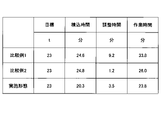
- FIG. 6 is a diagram for explaining the effects of this embodiment.
- FIG. 6 shows the result of comparing the loading time, the adjustment time, and the working time in Comparative Examples 1 and 2 when the target loading amount is 23 tons, and in the case where the present embodiment is applied. indicates
- Comparative Example 1 the weight of the object lifted by the lifting magnet 6 was not calculated when the work machine 100 was loaded onto the transport vehicle, and the operator of the work machine 100 loaded the work machine 100 by visual measurement or the like, and weighed the load. indicate the case.
- Comparative Example 2 shows a case where the weight of the object lifted by the lifting magnet 6 is calculated in the adjustment mode when the object is loaded onto the transportation vehicle, and the weight of the object is weighed.
- Comparative Example 1 From the example of FIG. 6, in Comparative Example 1, it takes 24.6 minutes from the start of loading the object to the transport vehicle until the object loaded on the transport vehicle reaches the maximum load weight. . Further, in Comparative Example 1, the adjustment time required for adjusting the integrated weight of the transport vehicle to approach the maximum load weight after performing the weighing across the platform was 9.2 minutes. Therefore, the working time of Comparative Example 1 is 33.8 minutes, which is the sum of 24.6 minutes and 9.2 minutes.
- Comparative Example 3 the loading time is 24.8 minutes and the adjustment time is 1.2 minutes, so the working time in Comparative Example 2 is 26.0 minutes.
- the loading time is 20.3 minutes
- the adjustment time is 3.5 minutes
- the working time is 23.8 minutes.
- the loading operation can be performed quickly. It can be carried out.
- the loading mode may be automatically switched to the loading mode.
Landscapes
- Engineering & Computer Science (AREA)
- Mining & Mineral Resources (AREA)
- Civil Engineering (AREA)
- General Engineering & Computer Science (AREA)
- Structural Engineering (AREA)
- Mechanical Engineering (AREA)
- Physics & Mathematics (AREA)
- General Physics & Mathematics (AREA)
- Component Parts Of Construction Machinery (AREA)
Priority Applications (5)
| Application Number | Priority Date | Filing Date | Title |
|---|---|---|---|
| JP2023511487A JPWO2022210897A1 (https=) | 2021-03-31 | 2022-03-30 | |
| KR1020237032134A KR20230163389A (ko) | 2021-03-31 | 2022-03-30 | 작업기계, 작업기계용 하중계산시스템 |
| EP22781107.2A EP4317605A4 (en) | 2021-03-31 | 2022-03-30 | WORK VEHICLE AND LOAD CALCULATION SYSTEM FOR CONSTRUCTION VEHICLE |
| CN202280023653.4A CN117083436A (zh) | 2021-03-31 | 2022-03-30 | 施工机械、施工机械用荷载计算系统 |
| US18/475,648 US20240026649A1 (en) | 2021-03-31 | 2023-09-27 | Work machine and load calculation system |
Applications Claiming Priority (2)
| Application Number | Priority Date | Filing Date | Title |
|---|---|---|---|
| JP2021-061460 | 2021-03-31 | ||
| JP2021061460 | 2021-03-31 |
Related Child Applications (1)
| Application Number | Title | Priority Date | Filing Date |
|---|---|---|---|
| US18/475,648 Continuation US20240026649A1 (en) | 2021-03-31 | 2023-09-27 | Work machine and load calculation system |
Publications (1)
| Publication Number | Publication Date |
|---|---|
| WO2022210897A1 true WO2022210897A1 (ja) | 2022-10-06 |
Family
ID=83459545
Family Applications (1)
| Application Number | Title | Priority Date | Filing Date |
|---|---|---|---|
| PCT/JP2022/016055 Ceased WO2022210897A1 (ja) | 2021-03-31 | 2022-03-30 | 作業機械、作業機械用の荷重計算システム |
Country Status (6)
| Country | Link |
|---|---|
| US (1) | US20240026649A1 (https=) |
| EP (1) | EP4317605A4 (https=) |
| JP (1) | JPWO2022210897A1 (https=) |
| KR (1) | KR20230163389A (https=) |
| CN (1) | CN117083436A (https=) |
| WO (1) | WO2022210897A1 (https=) |
Cited By (1)
| Publication number | Priority date | Publication date | Assignee | Title |
|---|---|---|---|---|
| JP2025057098A (ja) * | 2023-09-28 | 2025-04-09 | ソフトバンク株式会社 | プログラム、オペレータ端末及び管理サーバ |
Families Citing this family (1)
| Publication number | Priority date | Publication date | Assignee | Title |
|---|---|---|---|---|
| CN117043421A (zh) * | 2021-03-29 | 2023-11-10 | 住友建机株式会社 | 挖土机的显示装置、挖土机及挖土机的支援装置 |
Citations (6)
| Publication number | Priority date | Publication date | Assignee | Title |
|---|---|---|---|---|
| JP2014001040A (ja) * | 2012-06-18 | 2014-01-09 | Hitachi Constr Mach Co Ltd | 油圧ショベルの作業量計測装置 |
| JP2017227638A (ja) * | 2016-06-23 | 2017-12-28 | リープヘル−ヴェルク エーインゲン ゲーエムベーハーLiebherr−Werk EhingenGmbH | 吊りフックの荷重計量装置 |
| JP2018145753A (ja) * | 2017-03-09 | 2018-09-20 | 日立建機株式会社 | 作業機械の操作支援装置 |
| WO2020022454A1 (ja) | 2018-07-27 | 2020-01-30 | 住友建機株式会社 | 作業機械 |
| US20200087893A1 (en) * | 2018-09-14 | 2020-03-19 | Deere & Company | Controlling a work machine based on sensed variables |
| JP2021061460A (ja) | 2019-10-02 | 2021-04-15 | キヤノン株式会社 | 通信装置、通信装置の制御方法、プログラム |
Family Cites Families (9)
| Publication number | Priority date | Publication date | Assignee | Title |
|---|---|---|---|---|
| FI115162B (fi) * | 2002-07-02 | 2005-03-15 | Plustech Oy | Järjestelmä kuormien punnitsemiseksi nosto- ja siirtolaitteessa |
| US8000078B2 (en) * | 2007-12-19 | 2011-08-16 | The Electric Controller & Manufacturing Company, Llc | Method and apparatus for controlling a lifting magnet supplied with an AC source |
| WO2013065415A1 (ja) * | 2011-11-04 | 2013-05-10 | 株式会社小松製作所 | 積載システム及び運搬機 |
| JP6886258B2 (ja) * | 2016-08-31 | 2021-06-16 | 株式会社小松製作所 | ホイールローダおよびホイールローダの制御方法 |
| JP7202064B2 (ja) * | 2017-10-04 | 2023-01-11 | 株式会社小松製作所 | 作業機械制御装置および制御方法 |
| JP7027832B2 (ja) * | 2017-11-17 | 2022-03-02 | 株式会社アイシン | 運行管理システムおよび運行管理プログラム |
| JP6782271B2 (ja) * | 2018-03-15 | 2020-11-11 | 日立建機株式会社 | 作業機械 |
| JP7472751B2 (ja) * | 2020-10-02 | 2024-04-23 | コベルコ建機株式会社 | 掘削位置決定システム |
| US11965308B2 (en) * | 2021-05-12 | 2024-04-23 | Deere & Company | System and method of truck loading assistance for work machines |
-
2022
- 2022-03-30 JP JP2023511487A patent/JPWO2022210897A1/ja active Pending
- 2022-03-30 WO PCT/JP2022/016055 patent/WO2022210897A1/ja not_active Ceased
- 2022-03-30 EP EP22781107.2A patent/EP4317605A4/en active Pending
- 2022-03-30 CN CN202280023653.4A patent/CN117083436A/zh active Pending
- 2022-03-30 KR KR1020237032134A patent/KR20230163389A/ko active Pending
-
2023
- 2023-09-27 US US18/475,648 patent/US20240026649A1/en active Pending
Patent Citations (6)
| Publication number | Priority date | Publication date | Assignee | Title |
|---|---|---|---|---|
| JP2014001040A (ja) * | 2012-06-18 | 2014-01-09 | Hitachi Constr Mach Co Ltd | 油圧ショベルの作業量計測装置 |
| JP2017227638A (ja) * | 2016-06-23 | 2017-12-28 | リープヘル−ヴェルク エーインゲン ゲーエムベーハーLiebherr−Werk EhingenGmbH | 吊りフックの荷重計量装置 |
| JP2018145753A (ja) * | 2017-03-09 | 2018-09-20 | 日立建機株式会社 | 作業機械の操作支援装置 |
| WO2020022454A1 (ja) | 2018-07-27 | 2020-01-30 | 住友建機株式会社 | 作業機械 |
| US20200087893A1 (en) * | 2018-09-14 | 2020-03-19 | Deere & Company | Controlling a work machine based on sensed variables |
| JP2021061460A (ja) | 2019-10-02 | 2021-04-15 | キヤノン株式会社 | 通信装置、通信装置の制御方法、プログラム |
Non-Patent Citations (1)
| Title |
|---|
| See also references of EP4317605A4 |
Cited By (1)
| Publication number | Priority date | Publication date | Assignee | Title |
|---|---|---|---|---|
| JP2025057098A (ja) * | 2023-09-28 | 2025-04-09 | ソフトバンク株式会社 | プログラム、オペレータ端末及び管理サーバ |
Also Published As
| Publication number | Publication date |
|---|---|
| EP4317605A4 (en) | 2024-04-10 |
| CN117083436A (zh) | 2023-11-17 |
| KR20230163389A (ko) | 2023-11-30 |
| EP4317605A1 (en) | 2024-02-07 |
| JPWO2022210897A1 (https=) | 2022-10-06 |
| US20240026649A1 (en) | 2024-01-25 |
Similar Documents
| Publication | Publication Date | Title |
|---|---|---|
| CN112512952B (zh) | 施工机械 | |
| US9026317B2 (en) | Display unit of work machine and work machine mounted with the display unit | |
| JP6450268B2 (ja) | ホイールローダと、当該ホイールローダの運搬作業情報の自動積算方法 | |
| US20240026649A1 (en) | Work machine and load calculation system | |
| EP1126085A1 (en) | Capacitor-equipped working machine | |
| KR102391360B1 (ko) | 전동식 건설 기계 | |
| US9145658B2 (en) | Hybrid work machine and control method of providing information for the same | |
| JP7666871B2 (ja) | 作業機械 | |
| JP7227829B2 (ja) | 作業機械 | |
| JP7679597B2 (ja) | 作業機械及び搬送物重量計測システム | |
| JP2021021263A (ja) | 作業機械 | |
| JP7463162B2 (ja) | 作業機械 | |
| JP2024167741A (ja) | 作業機械 | |
| JP7768654B2 (ja) | 作業機械及び作業機械の支援システム | |
| JP2023178879A (ja) | 作業機械 | |
| JP7455632B2 (ja) | ショベル及びショベルの管理装置 | |
| JP2021050094A (ja) | リフティングマグネット作業機 |
Legal Events
| Date | Code | Title | Description |
|---|---|---|---|
| 121 | Ep: the epo has been informed by wipo that ep was designated in this application |
Ref document number: 22781107 Country of ref document: EP Kind code of ref document: A1 |
|
| WWE | Wipo information: entry into national phase |
Ref document number: 202280023653.4 Country of ref document: CN |
|
| WWE | Wipo information: entry into national phase |
Ref document number: 2023511487 Country of ref document: JP |
|
| WWE | Wipo information: entry into national phase |
Ref document number: 2022781107 Country of ref document: EP |
|
| ENP | Entry into the national phase |
Ref document number: 2022781107 Country of ref document: EP Effective date: 20231031 |
|
| NENP | Non-entry into the national phase |
Ref country code: DE |