WO2022070746A1 - アイトラッキングシステム、アイトラッキング方法、およびアイトラッキングプログラム - Google Patents
アイトラッキングシステム、アイトラッキング方法、およびアイトラッキングプログラム Download PDFInfo
- Publication number
- WO2022070746A1 WO2022070746A1 PCT/JP2021/032163 JP2021032163W WO2022070746A1 WO 2022070746 A1 WO2022070746 A1 WO 2022070746A1 JP 2021032163 W JP2021032163 W JP 2021032163W WO 2022070746 A1 WO2022070746 A1 WO 2022070746A1
- Authority
- WO
- WIPO (PCT)
- Prior art keywords
- user
- content
- region
- unit
- screen
- Prior art date
- Legal status (The legal status is an assumption and is not a legal conclusion. Google has not performed a legal analysis and makes no representation as to the accuracy of the status listed.)
- Ceased
Links
Images



Classifications
-
- G—PHYSICS
- G06—COMPUTING OR CALCULATING; COUNTING
- G06F—ELECTRIC DIGITAL DATA PROCESSING
- G06F3/00—Input arrangements for transferring data to be processed into a form capable of being handled by the computer; Output arrangements for transferring data from processing unit to output unit, e.g. interface arrangements
- G06F3/01—Input arrangements or combined input and output arrangements for interaction between user and computer
- G06F3/011—Arrangements for interaction with the human body, e.g. for user immersion in virtual reality
- G06F3/013—Eye tracking input arrangements
-
- G—PHYSICS
- G06—COMPUTING OR CALCULATING; COUNTING
- G06F—ELECTRIC DIGITAL DATA PROCESSING
- G06F3/00—Input arrangements for transferring data to be processed into a form capable of being handled by the computer; Output arrangements for transferring data from processing unit to output unit, e.g. interface arrangements
- G06F3/01—Input arrangements or combined input and output arrangements for interaction between user and computer
-
- A—HUMAN NECESSITIES
- A61—MEDICAL OR VETERINARY SCIENCE; HYGIENE
- A61B—DIAGNOSIS; SURGERY; IDENTIFICATION
- A61B3/00—Apparatus for testing the eyes; Instruments for examining the eyes
- A61B3/10—Objective types, i.e. instruments for examining the eyes independent of the patients' perceptions or reactions
- A61B3/113—Objective types, i.e. instruments for examining the eyes independent of the patients' perceptions or reactions for determining or recording eye movement
Definitions
- One aspect of this disclosure relates to eye tracking systems, eye tracking methods, and eye tracking programs.
- Patent Document 1 describes a method for calibrating a head-mounted eye tracking device. In this calibration method, while the wearer of the eye tracking device is looking in the reference direction, eye data regarding the position of the wearer's eyes is acquired by the eye tracking device, and the eye data is the line of sight corresponding to the reference direction. Associated with direction.
- the eye tracking device includes a spectacle frame having an ophthalmologic lens, and the line-of-sight direction corresponding to the reference direction is determined in consideration of the optical refraction function of the ophthalmologic lens.
- Patent Documents 2 and 3 describe other examples of calibration methods.
- the eye tracking system includes at least one processor. At least one processor dynamically sets the partial area as the guidance area in order to allow the user to gaze at the partial area of the first content displayed on the screen, and the movement of the user's eyes watching the guidance area. Based on this, the user's first viewpoint coordinates on the screen are specified, the difference between the specified first viewpoint coordinates and the area coordinates of the guidance area on the screen is calculated, and the second content displayed on the screen is viewed. The user's second viewpoint coordinates are calibrated using the difference.
- a guidance region for the user to gaze is dynamically set for arbitrary content (first content), and the difference for calibration is calculated using the guidance region. This makes it easier to perform calibration for eye tracking because there is no need to prepare content for calibration in advance.
- calibration for eye tracking can be easily performed.
- the assist system is a computer system that assists a user who visually recognizes the content.
- Content is information provided by a computer or computer system that is human recognizable.
- Electronic data that indicates content is called content data.
- the representation format of the content is not limited, and for example, the content may be represented by a document, an image (for example, a photograph, a video, etc.), or a combination thereof.
- the purpose and usage of the content is not limited, and for example, the content may be used for various purposes such as education, news, lectures, commerce, entertainment, medical treatment, games, and chat.
- the assist system provides the content to the user by transmitting the content data to the user terminal.
- a user is a person who seeks information from an assist system, that is, a viewer of the content.
- the user terminal can also be called a "viewer terminal”.
- the assist system may provide the content data to the user terminal at the request of the user, or may provide the content data to the user terminal based on an instruction of a distributor different from the user.
- the distributor is a person who tries to convey information to a user (viewer), that is, a sender of content.
- the assist system provides not only the content but also the assist information corresponding to the user's understanding level to the user as needed.
- the user's understanding level is an index showing the degree of the user's understanding of the content. For example, if the content contains a sentence, the user's comprehension is how well the user understands the sentence (eg, whether the user understands the meaning of the words contained in the sentence, the user. May be an index indicating whether or not the person understands the grammar of the sentence.
- Assist information is information for promoting the user's understanding of the content. For example, when the content includes a sentence, the assist information may be information indicating the meaning of the word included in the sentence, the grammar of the sentence, and the like.
- the target user whose comprehension level is estimated is referred to as a target user
- the content visually recognized by the target user is the target content. That is.
- the assist system estimates the comprehension level of the target user based on the movement of the viewpoint of the target user on the screen displaying the target content.
- the assist system refers to correspondence data showing the correspondence between the movement of the user's viewpoint and the degree of understanding of the user.
- the correspondence data is electronic data generated by performing statistical processing on the sample data acquired in advance.
- the sample data is electronic data showing a pair of the movement of the viewpoint of the user who visually recognizes the content and the degree of understanding of the user for the content.
- a user who provides sample data for generating correspondence data is referred to as a sample user, and content visually recognized by the sample user is referred to as sample content.
- the assist system acquires data indicating the movement of the viewpoint of the target user from the user terminal of the target user.
- the data showing the movement of the viewpoint is data showing how the user's viewpoint moves on the screen of the user terminal, and is also referred to as viewpoint data in the present disclosure.
- data showing the movement of the viewpoint of the target user that is, the viewpoint data of the target user
- target data data showing the movement of the viewpoint of the target user
- the assist system estimates the comprehension level of the target user by using the correspondence relationship data and the target data. After that, the assist system outputs the assist information corresponding to the understanding level of the target user to the user terminal of the target user as needed.
- the user when it is not necessary to distinguish between the sample user and the target user, these may be collectively referred to as the user.
- the viewpoint data is acquired by the eye tracking system.
- the eye tracking system specifies the user's viewpoint coordinates at a given time interval based on the movement of the user's eyes, and acquires viewpoint data indicating a plurality of viewpoint coordinates arranged in a time series.
- the viewpoint coordinates are coordinates indicating the position of the viewpoint on the screen of the user terminal.
- the viewpoint coordinates may be represented using a two-dimensional coordinate system.
- the eye tracking system may be mounted on the user terminal or may be mounted on another computer different from the user terminal. Alternatively, the tracking system may be realized by the cooperation of the user terminal and another computer.
- the eye tracking system performs calibration, which is a process for more accurately specifying the user's viewpoint coordinates.
- the eye tracking system sets a partial area of the content displayed on the screen of the user terminal as a guidance area for the user to pay attention to.
- the content in which the guidance area is set is referred to as the first content.
- the eye tracking system specifies the viewpoint coordinates of the user who gazes at the guidance area as the first viewpoint coordinates based on the movement of the user's eyes, and calculates the difference between the first viewpoint coordinates and the area coordinates of the guidance area. do.
- the area coordinates of the guidance area are coordinates indicating the position of the guidance area on the screen of the user terminal.
- the eye tracking system sets the viewpoint coordinates of the user who sees the second content based on the movement of the user's eyes. Specify as 2 viewpoint coordinates. Then, the eye tracking system calibrates the specified second viewpoint coordinates using the difference calculated in advance.
- the second content is the content that the user is viewing when the second viewpoint coordinates are calibrated.
- the purpose and usage scene of the content are not limited.
- educational content is shown as an example of the content, and the assist system assists the student who visually recognizes the educational content. Therefore, the target content is "target content for education", and the sample content is "sample content for education”.
- the educational content is content used to educate students, and may be, for example, a test such as an exercise or an examination question, or a textbook.
- Educational content may include text, mathematical formulas, graphs or graphics.
- a student is a person who receives teachings such as academics and arts. Students are an example of users (viewers).
- the distribution of the content to the viewer may be performed based on the instruction of the distributor. If the content is educational content, the distributor may be a teacher.
- a teacher is a person who teaches students academics and arts.
- the teacher may be a person with a teacher's license or a person without a teacher's license.
- educational content may be used in various schools such as nursery schools, kindergartens, elementary schools, junior high schools, high schools, universities, graduate schools, vocational schools, preparatory schools, online schools, etc. You may.
- educational content may be used for various purposes such as early childhood education, compulsory education, higher education, lifelong learning and the like.
- educational content includes content used not only in school education but also in seminars or training situations such as companies.
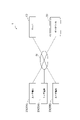
- FIG. 1 is a diagram showing an example of application of the assist system 1 according to the embodiment.
- the assist system 1 includes a server 10.
- the server 10 is communicably connected to the user terminal 20 and the database 30 via the communication network N.
- the configuration of the communication network N is not limited.
- the communication network N may be configured to include the Internet or may be configured to include an intranet.
- the server 10 is a computer that distributes content to the user terminal 20 and provides assist information to the user terminal 20 as needed.
- the server 10 may be composed of one or more computers.
- the user terminal 20 is a computer used by the user.
- the user is a student who watches educational content.
- the user terminal 20 has a function of accessing the assist system 1 to receive and display content data and assist information, and a function of transmitting viewpoint data to the assist system 1.
- the types of user terminals 20 are not limited, and are, for example, high-performance mobile phones (smartphones), tablet terminals, wearable terminals (for example, head-mounted displays (HMD), smart glasses, etc.), laptop personal computers, mobile phones, and the like. It may be a mobile terminal. Alternatively, the user terminal 20 may be a stationary terminal such as a desktop personal computer.
- FIG. 1 shows three user terminals 20, the number of user terminals 20 is not limited.
- the sample user's terminal is referred to as "user terminal 20A" and the target user's terminal is referred to as "user terminal 20B". write.
- the user can operate the user terminal 20 to log in to the assist system 1 and view the content. In this embodiment, it is assumed that the user of the assist system 1 has already logged in.
- the database 30 is a non-temporary storage device that stores the data used by the assist system 1.
- the database 30 stores content data, sample data, correspondence data, and assist information.
- the database 30 may be a single database or a set of a plurality of databases.
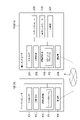
- FIG. 2 is a diagram showing an example of a hardware configuration related to the assist system 1.
- FIG. 2 shows a server computer 100 that functions as a server 10 and a terminal computer 200 that functions as a user terminal 20.
- the server computer 100 includes a processor 101, a main storage unit 102, an auxiliary storage unit 103, and a communication unit 104 as hardware components.
- the processor 101 is an arithmetic unit that executes an operating system and an application program. Examples of the processor include a CPU (Central Processing Unit) and a GPU (Graphics Processing Unit), but the type of the processor 101 is not limited to these.
- a CPU Central Processing Unit
- GPU Graphics Processing Unit
- the main storage unit 102 is a device that stores a program for realizing the server 10, a calculation result output from the processor 101, and the like.
- the main storage unit 102 is composed of, for example, at least one of a ROM (Read Only Memory) and a RAM (Random Access Memory).
- the auxiliary storage unit 103 is a device capable of storing a larger amount of data than the main storage unit 102 in general.
- the auxiliary storage unit 103 is composed of a non-volatile storage medium such as a hard disk or a flash memory.
- the auxiliary storage unit 103 stores the server program P1 for making the server computer 100 function as the server 10 and various data.
- the assist program is implemented as the server program P1.
- the communication unit 104 is a device that executes data communication with another computer via the communication network N.
- the communication unit 104 is composed of, for example, a network card or a wireless communication module.
- Each functional element of the server 10 is realized by having the processor 101 or the main storage unit 102 read the server program P1 and causing the processor 101 to execute the program.
- the server program P1 includes a code for realizing each functional element of the server 10.
- the processor 101 operates the communication unit 104 according to the server program P1 to read and write data in the main storage unit 102 or the auxiliary storage unit 103. By such processing, each functional element of the server 10 is realized.
- the server 10 may be configured by one or more computers. When a plurality of computers are used, one server 10 is logically configured by connecting these computers to each other via the communication network N.
- the terminal computer 200 includes a processor 201, a main storage unit 202, an auxiliary storage unit 203, a communication unit 204, an input interface 205, an output interface 206, and an image pickup unit 207 as hardware components.
- the processor 201 is an arithmetic unit that executes an operating system and an application program.
- the processor 201 may be, for example, a CPU or a GPU, but the type of processor 201 is not limited thereto.
- the main storage unit 202 is a device that stores a program for realizing the user terminal 20, a calculation result output from the processor 201, and the like.
- the main storage unit 202 is composed of, for example, at least one of ROM and RAM.
- the auxiliary storage unit 203 is a device capable of storing a larger amount of data than the main storage unit 202 in general.
- the auxiliary storage unit 203 is composed of a non-volatile storage medium such as a hard disk or a flash memory.
- the auxiliary storage unit 203 stores the client program P2 for making the terminal computer 200 function as the user terminal 20 and various data.
- the communication unit 204 is a device that executes data communication with another computer via the communication network N.
- the communication unit 204 is composed of, for example, a network card or a wireless communication module.
- the input interface 205 is a device that receives data based on a user's operation or operation.
- the input interface 205 is composed of at least one of a keyboard, operation buttons, a pointing device, a touch panel, a microphone, a sensor, and a camera.
- the output interface 206 is a device that outputs data processed by the terminal computer 200.
- the output interface 206 is composed of at least one of a monitor, a touch panel, an HMD and a speaker.
- the image pickup unit 207 is a device for taking an image of the real world, specifically, a camera.
- the imaging unit 207 may capture a moving image (video) or a still image (photograph).
- the image pickup unit 207 can also function as the input interface 205.
- Each functional element of the user terminal 20 is realized by having the processor 201 or the main storage unit 202 read the client program P2 and causing the processor 201 to execute the program.
- the client program P2 includes a code for realizing each functional element of the user terminal 20.
- the processor 201 operates the communication unit 204, the input interface 205, the output interface 206, or the image pickup unit 207 according to the client program P2, and reads and writes data in the main storage unit 202 or the auxiliary storage unit 203. By this process, each functional element of the user terminal 20 is realized.
- At least one of the server program P1 and the client program P2 may be provided after being temporarily recorded on a tangible recording medium such as a CD-ROM, a DVD-ROM, or a semiconductor memory.
- a tangible recording medium such as a CD-ROM, a DVD-ROM, or a semiconductor memory.
- at least one of these programs may be provided via the communication network N as a data signal superimposed on a carrier wave. These programs may be provided separately or together.
- FIG. 3 is a diagram showing an example of a functional configuration related to the assist system 1.
- the server 10 includes a content distribution unit 11, a statistical processing unit 12, an estimation unit 13, and an assist unit 14 as functional elements.
- the statistical processing unit 12 is a functional element that generates correspondence data.
- the statistical processing unit 12 generates correspondence data by performing statistical processing on the sample data stored in the database 30, and stores the correspondence data in the database 30.
- the estimation unit 13 is a functional element that estimates the degree of understanding of the target user for the target content.
- the estimation unit 13 acquires target data indicating the movement of the viewpoint of the target user from the user terminal 20B, and estimates the comprehension level of the target user based on the target data and the correspondence data.
- the assist unit 14 is a functional element that transmits assist information corresponding to the degree of understanding of the target user to the user terminal 20B.
- the user terminal 20 includes a setting unit 21, a specific unit 22, a calculation unit 23, a tracking unit 24, and a display control unit 25 as functional elements.
- the setting unit 21 is a functional element that sets a partial area of the first content displayed on the screen of the user terminal 20 as a guidance area.
- the identification unit 22 is a functional element that specifies the first viewpoint coordinates of the user based on the movement of the eyes of the user who gazes at the guidance region.
- the calculation unit 23 is a functional element that calculates the difference between the area coordinates of the guidance region set by the setting unit 21 and the first viewpoint coordinates specified by the specific unit 22.
- the tracking unit 24 is a functional element that observes the movement of the eyes of the user who sees the content displayed on the screen of the user terminal 20 and generates viewpoint data.
- the tracking unit 24 calibrates the second viewpoint coordinates of the user who views the second content using the calculated difference, and generates viewpoint data indicating the calibrated second viewpoint coordinates.
- the display control unit 25 is a functional element that controls the display of the screen on the user terminal 20.
- the eye tracking system is composed of a setting unit 21, a specific unit 22, a calculation unit 23, a tracking unit 24, and a display control unit 25.
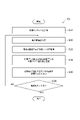
- FIG. 4 is a flowchart showing the operation of the assist system 1 as a processing flow S1. The overall picture of the processing by the assist system 1 will be described with reference to FIG.
- step S11 the statistical processing unit 12 of the server 10 performs statistical processing on a plurality of sample data and generates correspondence data.
- the content distribution unit 11 distributes sample content to each of the plurality of user terminals 20A.
- the timing of delivering the sample content to each user terminal 20A is not limited.
- the content distribution unit 11 may distribute the sample content to the user terminal 20A in response to a request from each user terminal 20A, or may distribute the sample content to two or more user terminals 20A all at once. ..
- the display control unit 25 receives and displays the sample content.
- the tracking unit 24 of the user terminal 20A generates viewpoint data indicating the movement of the viewpoint of the sample user who visually recognizes the sample content.
- the sample user inputs the degree of understanding of the sample content into the user terminal 20A in the form of answering a questionnaire, and the user terminal 20A accepts the input data.
- the user terminal 20A or the server 10 may estimate the comprehension level of the sample user based on the user's answer to the sample content (for example, the answer to the question).
- the input or estimated comprehension level indicates, for example, whether or not the meaning of the word contained in the sentence can be understood, and whether or not the grammar of the sentence can be understood.
- the user terminal 20A generates sample data indicating a pair of the generated viewpoint data and an input or estimated comprehension level, and transmits the sample data to the server 10.
- the user terminal 20A may transmit the viewpoint data to the server 10, and the server 10 may generate sample data indicating a pair of the viewpoint data and the estimated comprehension level.
- the server 10 stores the sample data in the database 30.
- the server 10 stores a plurality of sample data obtained from a plurality of user terminals 20A for a specific sample content in the database 30.
- the server 10 may store a plurality of sample data for each of the plurality of sample contents.
- the assist system 1 collects sample data by this series of processes.
- the statistical processing unit 12 reads a plurality of sample data from the database 30, performs statistical processing on the plurality of sample data, and generates correspondence data.
- the method of statistical processing by the statistical processing unit 12 and the representation format of the generated correspondence data are not limited.
- the statistical processing unit 12 generates correspondence data by clustering a plurality of sample data based on the movement of the viewpoint of the sample user and the user's understanding of the sample content.
- the statistical processing unit 12 resembles the movement of the viewpoint based on at least one of the moving speed of the viewpoint, the number of times the viewpoint is reversed (the number of times the viewpoint is changed in the moving direction), and the area of the area where the viewpoint is moved. You may judge the sex.
- the statistical processing unit 12 may determine the similarity of the comprehension of the content based on at least one of the comprehension of the meaning of the word and the comprehension of the grammar of the sentence.
- the statistical processing unit 12 may vectorize each sample data with features related to viewpoint movement and features related to comprehension as feature vectors, and sample data having the same or similar feature vectors may belong to the same cluster. ..
- the statistical processing unit 12 derives the correspondence between the movement of the user's viewpoint and the degree of understanding of the user from the result of clustering. More specifically, it can be said that this correspondence relationship shows a pair of a tendency of the movement of the user's viewpoint and a degree of understanding corresponding to the tendency.
- the statistical processing unit 12 generates correspondence data indicating the correspondence, and stores the correspondence data in the database 30.
- the statistical processing unit 12 may generate correspondence data by performing regression analysis. Specifically, the statistical processing unit 12 quantifies each of the movement of the viewpoint of the sample user and the degree of understanding of the sample user based on a predetermined rule. The statistical processing unit 12 performs regression analysis on the digitized data, and generates a regression equation using the degree of understanding of the sample user as the objective variable and the movement of the viewpoint of the sample user as the explanatory variable. At this time, the statistical processing unit 12 decomposes the movement of the viewpoint of the sample user into a plurality of elements such as the movement speed of the viewpoint and the number of times of inversion of the viewpoint, and sets a plurality of explanatory variables corresponding to the plurality of elements. May be good.
- the statistical processing unit 12 may quantify the moving speed of the viewpoint and the number of times of inversion of the viewpoint as independent explanatory variables, and perform multiple regression analysis using the plurality of explanatory variables.
- the statistical processing unit 12 stores the regression equation generated by the regression analysis in the database 30 as correspondence data.
- the method of regression analysis performed by the statistical processing unit 12 may be partial least squares regression (PLS) or support vector regression (SVR).
- the correspondence data also shows a pair of the tendency of the movement of the user's viewpoint and the degree of understanding corresponding to the tendency.
- the statistical processing unit 12 may analyze the correspondence between the movement of the viewpoint of the sample user and the degree of understanding of the sample user by machine learning and generate correspondence data.
- Machine learning may be deep learning using a neural network.
- the statistical processing unit 12 uses a machine learning model configured to output data indicating the degree of understanding of the user when data indicating the movement of the user's viewpoint is input to the input layer, and uses sample data as training data. Performs supervised learning and adjusts the weighting parameters in the learning model.
- the statistical processing unit 12 stores the model (trained model) in which the weighting parameters have been adjusted in the database 30 as correspondence data.
- the statistical processing unit 12 may preprocess the sample data stored in the database 30 and convert it into data in a format suitable for machine learning.
- the statistical processing unit 12 may appropriately select sample data to be used for statistical processing and generate a plurality of types of correspondence data. For example, the statistical processing unit 12 may generate correspondence data for each of the plurality of sample contents by using the sample data acquired from the plurality of sample users who view the sample contents. In this case, correspondence data is generated for each content. Hereinafter, this correspondence data is referred to as "content-specific correspondence data". Alternatively, the statistical processing unit 12 may generate correspondence data using sample data of a plurality of sample contents (for example, a plurality of sample contents belonging to the same category). In this case, correspondence data common to a plurality of contents (for example, a plurality of contents belonging to the same category) is generated. Hereinafter, this correspondence data is referred to as "generalized correspondence data".
- step S12 the assist unit 14 provides assist information to the target user who is visually recognizing the target content, if necessary.
- the assist unit 14 estimates the degree of understanding of the target user for the target content, and provides assist information corresponding to the degree of understanding as necessary. Details of the process for outputting assist information will be described later.
- the correspondence between the user's understanding level and the assist information is predetermined, and the assist information is stored in advance in the database 30 so that the correspondence can be specified.
- the user's understanding level and the assist information may be associated with each other so that the part where the target user's understanding of the target content is insufficient can be supplemented by the assist information.
- the meaning of the word may be associated with the assist information for the user's comprehension level indicating that the user does not understand the meaning of the word included in the sentence in the content.
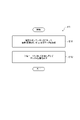
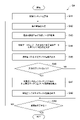
- FIG. 5 is a flowchart showing the operation of the eye tracking system as a processing flow S2.
- the processing by the eye tracking system includes a step of calculating a difference used for calibrating the viewpoint coordinates (steps S21 to S23) and a step of calibrating the user's viewpoint coordinates using the calculated difference (steps S24 and S25). It is roughly divided into.
- the setting unit 21 dynamically sets a partial area of the first content displayed on the screen of the user terminal 20 as a guidance area.
- the first content is arbitrary content distributed by the content distribution unit 11 and displayed by the display control unit 25.
- the first content may be educational content or non-educational content.
- the guidance area is an area for the user to gaze at, and is composed of a plurality of pixels arranged in succession. Dynamically setting the guidance area means that the guidance area is set in the first content in response to the display on the screen of the first content in which the area for the user to gaze is not set in advance. That means. In one example, this guidance area is set only while the first content is displayed on the screen. The position of the guidance area in the first content displayed on the screen is not limited.
- the setting unit 21 may set the guidance region at an arbitrary position such as a central portion, an upper portion, a lower portion, and a corner portion of the first content.
- the display control unit 25 displays the guidance area in the first content based on the setting.
- the shape and area (number of pixels) of the induction region are also not limited. Since the guidance area is an area to be watched by the user in order to calibrate the viewpoint coordinates, the setting unit 21 typically sets the area of the guidance area to the area of the first content displayed on the screen (that is, the area of the display device). Set considerably smaller than the area).
- the method of dynamically setting the guidance area is not limited.
- the setting unit 21 visually distinguishes the guided region and the non-guided region by making the display mode of the guided region different from the display mode of the region other than the guided region (hereinafter, this is also referred to as a non-guided region). May be distinguished.
- the method for setting the display mode is not limited.
- the setting unit 21 may distinguish between the guided region and the non-guided region by lowering the resolution of the non-guided region and relatively increasing the resolution of the guided region without changing the resolution of the guided region. good.
- the setting unit 21 may distinguish between the guided region and the non-guided region by performing a blurring process on the non-guided region without changing the display mode of the guided region.
- the setting unit 21 may perform the blurring process by setting the color of a certain target pixel in the non-induction region to the average color of the colors of a plurality of pixels adjacent to the target pixel.
- the setting unit 21 may perform the blurring process while maintaining the resolution of the non-induction region, or may perform the blurring process after lowering the resolution.
- the setting unit 21 may distinguish the guided region from the non-guided region by surrounding the outer edge of the guided region with a specific color or a frame line of a specific type.
- the setting unit 21 may distinguish the guidance region from other regions by combining any two or more methods of adjusting the resolution, blurring processing, and drawing the border.
- the setting unit 21 may set the area in which the selection object is displayed as the guidance area. That is, the setting unit 21 may specify the selected object as a partial area and set the selected object as a guidance area.
- the selection object may be a selection button or link displayed on the tutorial screen of the application program.
- the selection object may be a button for selecting the question or a button for starting the exercise or exam.
- the setting unit 21 may reduce the resolution of the non-guidance region while maintaining the resolution of the selected object set as the guidance region. In addition to or instead of this processing, the setting unit 21 may perform blurring processing on the non-guidance area, or may surround the outer edge of the selected object set as the guidance area with a specific color or a specific type of border. good.
- the setting unit 21 sets the area coordinates of the guidance area by an arbitrary method.
- the setting unit 21 may set the coordinates of the center or the center of gravity of the guidance region as the region coordinates.
- the setting unit 21 may set the position of any one pixel in the guidance region as the region coordinates.
- the specifying unit 22 specifies the viewpoint coordinates of the user who gazes at the guidance region as the first viewpoint coordinates.
- the specifying unit 22 specifies the viewpoint coordinates based on the movement of the user's eyes.
- the method of specifying the viewpoint coordinates is not limited.
- the specifying unit 22 may take an image of the periphery of the user's eye by the imaging unit 207 of the user terminal 20 and specify the viewpoint coordinates based on the position of the iris with the inner corner of the user's eye as a reference point.
- the identification unit 22 may specify the user's viewpoint coordinates using the corneal reflex method (PCCR).
- PCCR corneal reflex method
- the user terminal 20 may include an infrared emitting device and an infrared camera as a hardware configuration.
- the calculation unit 23 stores the calculated difference in an arbitrary storage device such as the main storage unit 202 and the auxiliary storage unit 203.
- the user terminal 20 may repeat the process from step S21 to step S23 a plurality of times while changing the position of the guidance region.
- the calculation unit 23 may set the calculated statistical value of the plurality of differences (for example, the average value) as the difference to be used in the subsequent calibration process (step S25).
- the tracking unit 24 specifies the viewpoint coordinates of the user who sees the second content as the second viewpoint coordinates.
- the second content is arbitrary content distributed by the content distribution unit 11 and displayed by the display control unit 25.
- the second content may be sample content or target content.
- the tracking unit 24 may specify the second viewpoint coordinates by the same method as the first viewpoint coordinates specified by the specific unit 22 (that is, the same method as the process of step S22).
- the second content may be different from or the same as the first content.
- the tracking unit 24 may repeat the processes of steps S24 and S25 to acquire a plurality of calibrated second viewpoint coordinates arranged in time series and generate viewpoint data indicating the movement of the user's viewpoint.
- the tracking unit 24 may acquire a plurality of calibrated second viewpoint coordinates, and the server 10 may generate viewpoint data based on the plurality of second viewpoint coordinates.
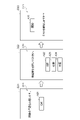
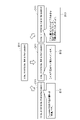
- FIGS. 6 and 7 are both views showing an example of a guidance region set in the first content by the setting unit 21.
- the setting unit 21 sets the induction region by lowering the resolution of the non-induction region.
- the user terminal 20 displays the first content C11 including the child, the lawn, and the ball, and calculates the difference while changing the position of the guidance region on the first content C11.
- the display changes in the order of screens D11, D12, and D13 as the position of the guidance region changes.
- the non-guided area is represented by a broken line.
- the setting unit 21 sets the child's face portion as the guidance region A11.
- the screen D11 corresponds to this setting.
- the setting unit 21 lowers the resolution of the region (non-guidance region) other than the guidance region A11 without changing the resolution of the guidance region A11.
- the setting unit 21 may lower the resolution of the non-induction region so that the resolution of the induction region A11 is twice or more or four times or more the resolution of the non-induction region.
- the resolution of the non-induction region may be 150 ppi or less or 75 ppi or less.
- the non-guidance region is displayed more blurry than the guidance region A11, so that the user's line of sight is usually directed to the clearly displayed guidance region A11.
- the specific unit 22 acquires the first viewpoint coordinates of the user.
- the calculation unit 23 calculates the difference between the first viewpoint coordinates and the area coordinates of the guidance area A11.
- the setting unit 21 sets the ball portion as the guidance region A12.
- the screen D12 corresponds to this setting.
- the setting unit 21 returns the resolution of the induction region A12 to the original value, and lowers the resolution of the region other than the induction region A12 (non-induction region).
- the user's line of sight is usually directed to the guidance region A12.
- the specific unit 22 acquires the first viewpoint coordinates of the user.
- the calculation unit 23 calculates the difference between the first viewpoint coordinates and the area coordinates of the guidance area A12.
- the setting unit 21 sets the lower right portion (lawn portion) of the first content C11 as the guidance region A13.
- the screen D13 corresponds to this setting.
- the setting unit 21 returns the resolution of the induction region A13 to the original value, and lowers the resolution of the region other than the induction region A13 (non-induction region). As a result, the user's line of sight is usually directed to the guidance region A13.
- the specific unit 22 acquires the first viewpoint coordinates of the user.
- the calculation unit 23 calculates the difference between the first viewpoint coordinates and the area coordinates of the guidance area A13.
- the calculation unit 23 obtains a statistical value of a plurality of calculated differences. This statistical value is used for calibration of the second viewpoint coordinates (step S25) by the tracking unit 24.
- the setting unit 21 sets the selected object in the first content C21 as the guidance area.
- the first content C21 is an online academic ability test tutorial. As the tutorial progresses, the display changes in the order of screens D11, D12, and D13.
- Screen D21 includes the character string "I will ask you a question in Japanese" and the OK button.
- the OK button is a selection object.
- the setting unit 21 sets the area where the OK button is displayed as the guidance area A21. Normally, the user gazes at the selected object when manipulating the selected object. Therefore, it is possible to specify the viewpoint coordinates (first viewpoint coordinates) of the user who gazes at the guidance region A21.
- the specific unit 22 acquires the first viewpoint coordinates of the user. Subsequently, the calculation unit 23 calculates the difference between the first viewpoint coordinates and the area coordinates of the guidance area A21.
- the display control unit 25 switches the screen D21 to the screen D22.
- the screen D22 includes a character string "Please select the number of questions” and three selection buttons "5 questions", “10 questions” and “15 questions”. These select buttons are selection objects.
- the setting unit 21 sets the areas where the three selection buttons are displayed as the guidance area A22, the guidance area A23, and the guidance area A24, respectively.
- the specific unit 22 specifies the user's viewpoint coordinates (first viewpoint coordinates).
- the calculation unit 23 calculates the difference between the first viewpoint coordinates and the area coordinates of the guidance area (any one of the guidance area A22 to the guidance area A24) corresponding to the selected object selected by the user. ..
- the display control unit 25 switches the screen D22 to the screen D23.
- the screen D23 includes the character string "Do you want to start the test?"
- the start button is a selection object.
- the setting unit 21 sets the area where the start button is displayed as the guidance area A25.
- the specific unit 22 acquires the first viewpoint coordinates of the user.
- the calculation unit 23 calculates the difference between the first viewpoint coordinates and the area coordinates of the guidance area A25.
- the calculation unit 23 obtains a statistical value of a plurality of calculated differences. This statistical value is used for calibration of the second viewpoint coordinates (step S25) by the tracking unit 24.
- FIG. 8 is a flowchart showing an example of the operation of the assist system 1 as the processing flow S3.
- the processing flow S3 shows a processing procedure for providing assist information to a target user who views the target content.
- the processing flow S3 is based on the premise that the target user is logged in to the assist system 1. It is also assumed that the eye tracking system has already calculated the difference used to calibrate the viewpoint coordinates.
- step S31 the display control unit 25 of the user terminal 20B displays the target content on the screen of the user terminal 20B.
- the display control unit 25 receives, for example, the content data distributed from the content distribution unit 11 from the server 10, and displays the target content based on the content data.
- step S32 the tracking unit 24 of the user terminal 20B acquires the viewpoint coordinates (second viewpoint coordinates) of the target user who visually recognizes the target content. Specifically, the tracking unit 24 specifies the viewpoint coordinates (viewpoint coordinates before calibration) based on the movement of the eyes of the target user who sees the target content, and calibrates the specified viewpoint coordinates using the difference calculated in advance. do. The tracking unit 24 acquires the calibrated viewpoint coordinates at a given time interval, and obtains the viewpoint data (that is, the target data indicating the movement of the viewpoint of the target user) in which the plurality of viewpoint coordinates are arranged in a time series. May be generated.
- the viewpoint coordinates that is, the target data indicating the movement of the viewpoint of the target user
- the estimation unit 13 acquires the target data.
- the estimation unit 13 may receive the target data from the tracking unit 24 of the user terminal 20B.
- the tracking unit 24 may sequentially transmit a plurality of calibrated viewpoint coordinates to the server 10, and the estimation unit 13 may generate viewpoint data (target data) in which the plurality of viewpoint coordinates are arranged in time series.
- the estimation unit 13 refers to the database 30 to acquire correspondence data, and estimates the degree of understanding of the target user for the target content based on the target data and the correspondence data.
- the estimation unit 13 estimates the comprehension level indicated by the cluster to which the target data belongs as the comprehension level of the target user.
- the estimation unit 13 applies the target data to the regression equation to estimate the comprehension level of the target user.
- the estimation unit 13 estimates the comprehension level of the target user by inputting the target data into the trained model.
- step S35 the assist unit 14 acquires the assist information corresponding to the understanding level of the target user from the database 30, and transmits the assist information to the user terminal 20B.
- the display control unit 25 of the user terminal 20B displays the assist information on the screen of the user terminal 20B.
- the output timing of assist information is not limited.
- the display control unit 25 may output the assist information after a predetermined time (for example, 15 seconds) has elapsed from the time when the target content is displayed on the screen of the user terminal 20.
- the display control unit 25 may output assist information in response to a request from the user.
- the display control unit 25 may adjust the display time of the assist information according to the degree of understanding of the user.
- the display control unit 25 may display the assist information only during the display time set in advance by the user or the like.
- the assist unit 14 may display the assist information until the display of the target content is switched, or may display the assist information until the user input (for example, the answer to the question) for the target content is performed.
- the assist unit 14 may end the process without outputting the assist information.
- the output mode of the assist information is not limited.
- the assist information includes voice data
- the user terminal 20 may output the voice data from the speaker.
- step S36 the assist system 1 repeats the processes from step S32 to step S35 while the user terminal 20B is displaying the target content.
- the assist system 1 repeats a series of processes while the target content is displayed.
- FIG. 9 is a flowchart showing an example of the operation of the assist system 1 as a processing flow S4.
- the processing flow S4 also relates to a process of providing assist information to a target user who views the target content, but the specific procedure is different from the processing flow S3.
- the processing flow S4 also assumes that the target user is logged in to the assist system 1 and that the eye tracking system has already calculated the difference.
- step S41 the display control unit 25 of the user terminal 20B displays the target content on the screen of the user terminal 20B.
- the tracking unit 24 of the user terminal 20B acquires the viewpoint coordinates (second viewpoint coordinates) of the target user who visually recognizes the target content.
- step S43 the estimation unit 13 acquires target data indicating the movement of the viewpoint of the target user. This series of processes is the same as in steps S31 to S33.
- step S44 the estimation unit 13 refers to the database 30 to acquire generalized correspondence data, and the degree of understanding of the target user to the target content based on the target data and the generalized correspondence data (first). 1) Estimate the degree of comprehension.
- the specific estimation method is the same as in step S34.
- step S45 the assist unit 14 acquires the assist information corresponding to the first understanding level of the target user from the database 30, and transmits the assist information to the user terminal 20B.
- the display control unit 25 of the user terminal 20B outputs assist information to the screen of the user terminal 20B.
- step S46 it is determined whether or not the assist unit 14 provides additional assist to the target user, that is, whether or not to provide additional assist information to the target user. If it is determined that the assist unit 14 does not perform additional assist, the process proceeds to step S49. If the assist unit 14 determines that additional assist is to be performed, the process proceeds to step S47. As an example, when the user input for the target content (for example, the answer to the question) is performed within the predetermined time, the assist unit 14 determines that the additional assist is not performed, and the user input is performed within the predetermined time. If not, the assist unit 14 may determine to perform additional assist.
- the assist unit 14 may determine to perform additional assist.
- step S47 the estimation unit 13 refers to the database 30 to acquire correspondence data specific to the target content, and the degree of understanding of the target user to the target content based on the target data and the correspondence data specific to the content (second understanding). Degree) is estimated.
- This process assumes that the same content is used as sample content and target content.
- the specific estimation method is the same as in step S34.
- step S48 the assist unit 14 acquires additional assist information corresponding to the second comprehension level of the target user from the database 30, and transmits the assist information to the user terminal 20B.
- the display control unit 25 of the user terminal 20B outputs additional assist information to the screen of the user terminal 20B.
- step S49 the assist system 1 repeats the processes from step S42 to step S48 while the user terminal 20B is displaying the target content.
- the assist system 1 repeats a series of processes while the target content is displayed.
- FIG. 10 is a diagram showing an example of assist information.
- the assist system 1 has a comprehension level Ra indicating "insufficient vocabulary”, a comprehension level Rb indicating "insufficient grammar”, and a comprehension level Rc indicating "insufficient understanding of the background of the sentence”.
- correspondence data that contains information about. For example, if the estimation unit 13 estimates that the target user's vocabulary is insufficient based on the target data and its correspondence data, the assist unit 14 outputs the assist information B11 corresponding to the degree of understanding. do.
- the assist unit 14 When the estimation unit 13 estimates that the target user's grammatical ability is insufficient, the assist unit 14 outputs the assist information B12 corresponding to the degree of understanding. When the estimation unit 13 estimates that the target user does not understand the background of the sentence, the assist unit 14 outputs the assist information B13 corresponding to the understanding level.
- the display control unit 25 of the user terminal 20B displays the output assist information. The target user can solve the problem by referring to the assist information.
- the eye tracking system includes at least one processor.
- At least one processor dynamically sets the partial area as the guidance area in order to allow the user to gaze at the partial area of the first content displayed on the screen, and the movement of the user's eyes watching the guidance area. Based on this, the user's first viewpoint coordinates on the screen are specified, the difference between the specified first viewpoint coordinates and the area coordinates of the guidance area on the screen is calculated, and the second content displayed on the screen is viewed. The user's second viewpoint coordinates are calibrated using the difference.
- the eye tracking method is performed by an eye tracking system including at least one processor.
- the eye tracking method includes a step of dynamically setting the partial area as a guidance area in order to allow the user to gaze at a partial area of the first content displayed on the screen, and a movement of the user's eyes watching the guidance area. Based on, a step of specifying the first viewpoint coordinates of the user on the screen, a step of calculating the difference between the specified first viewpoint coordinates and the area coordinates of the guidance area on the screen, and a step displayed on the screen. It includes a step of calibrating the second viewpoint coordinates of the user viewing the second content using the difference.
- the eye tracking program includes a step of dynamically setting a partial area of the first content displayed on the screen as a guiding area and a guiding area in order to allow the user to gaze at the partial area.
- the computer is made to perform a step of calibrating the second viewpoint coordinates of the user who sees the second content displayed on the screen by using the difference.
- a guidance area for the user to gaze is dynamically set for any content (first content), and the difference for calibration is calculated using the guidance area. This makes it easier to perform calibration for eye tracking because there is no need to prepare content for calibration in advance.
- At least one processor sets a partial area as a guidance area by adjusting the screen resolution so that the resolution of the partial area is higher than the resolution of the area other than the partial area. You may. By increasing the resolution of the guidance region relatively higher than the resolution of the other regions, the line of sight of the user who sees the first content can be naturally directed to the guidance region.
- At least one processor may set the partial area as the guidance area by performing the blurring process on the area other than the partial area. In this case, since the guided region is displayed more clearly than the non-guided region, the line of sight of the user who sees the first content can be naturally directed to the guided region.
- At least one processor may set the partial area as the guidance area by surrounding the outer edge of the partial area with a frame line. In this case, since the guidance area and the other areas are distinguished by the frame line, the user can easily recognize the position of the guidance area.
- At least one processor may set the area where the selection object selectable by the user is displayed as the guidance area.
- the selection object selectable by the user is displayed as the guidance area.
- At least one processor may change the setting location of the guidance region in the first content and calculate the difference a plurality of times.
- a plurality of calculated differences can be used for calibration of the second viewpoint coordinates, and the calibration accuracy can be improved.
- the assist system 1 is configured by using the server 10, but the assist system 1 may be configured without using the server 10.
- each functional element of the server 10 may be mounted on any user terminal 20, for example, mounted on either a terminal used by a content distributor or a terminal used by a content viewer. May be done.
- the individual functional elements of the server 10 may be implemented separately in a plurality of user terminals 20, for example, may be implemented separately in a terminal used by the distributor and a terminal used by the viewer.
- the assist program may be implemented as a client program. Since the user terminal 20 has the function of the server 10, the load on the server 10 can be reduced.
- information about the viewer of the content such as a student (for example, data indicating the movement of the viewpoint) is not transmitted to the outside of the user terminal 20, it becomes possible to more reliably protect the secret of the viewer.
- the eye tracking system is configured only by the user terminal 20, but the system may be configured by using the server 10.
- some functional elements of the user terminal 20 may be implemented in the server 10.
- a functional element corresponding to the calculation unit 23 may be implemented in the server 10.
- the assist information is displayed separately from the target content, but the assist information may be displayed in a manner that constitutes a part of the target content.
- the assist unit 14 may highlight a part of the sentence (for example, a part important for understanding the sentence) as assist information. That is, the assist information may be a visual effect added to the target content.
- the assist unit 14 may execute highlighting by making the color or font of a part of the text that is the target of the assist information different from the other parts.
- the assist system 1 outputs assist information corresponding to the understanding level of the target user.
- the assist system 1 may output the assist information without using the comprehension level. An example of this modification will be described below.
- the server 10 acquires the viewpoint data indicating the movement of the viewpoint of the sample user who visually recognizes the sample content and the sample data indicating the assist information presented to the sample user from the respective user terminals 20A, and obtains the sample data in the database.
- the assist information presented to the sample user (that is, the assist information corresponding to the sample user) is specified by a manual experiment or survey, a questionnaire to the sample user, or the like, and is input to the user terminal 20A.
- the statistical processing unit 12 performs statistical processing on the sample data in the database 30, generates correspondence data showing the correspondence between the movement of the user's viewpoint and the assist information of the content, and transfers the correspondence data to the database 30.
- the method of statistical processing and the representation format of the generated correspondence data are not limited. Therefore, the statistical processing unit 12 may generate correspondence data by various methods such as clustering, regression analysis, and machine learning.
- the server 10 outputs the assist information corresponding to the target data based on the target data received from the user terminal 20B and the correspondence data thereof.
- the estimation unit 13 refers to the database 30 to acquire correspondence-related data, and identifies assist information corresponding to the target data.
- the estimation unit 13 specifies the assist information indicated by the cluster to which the target data belongs.
- the estimation unit 13 applies the target data to the regression equation to provide assist information.
- the estimation unit 13 specifies the assist information by inputting the target data into the trained model.
- the assist unit 14 acquires the specified assist information from the database 30 and transmits the assist information to the user terminal 20B.
- the expression "at least one processor executes the first process, executes the second process, ... executes the nth process", or the expression corresponding thereto is the first. It is a concept including a case where the execution subject (that is, the processor) of n processes from the process 1 to the process n changes in the middle. That is, this expression is a concept including both a case where all n processes are executed by the same processor and a case where the processor changes according to an arbitrary policy in the n processes.
- the processing procedure of the method executed by at least one processor is not limited to the example in the above embodiment. For example, some of the steps (processes) described above may be omitted, or the steps may be executed in a different order. Further, any two or more steps among the above-mentioned steps may be combined, or a part of the steps may be modified or deleted. Alternatively, other steps may be performed in addition to each of the above steps.
- Imaging unit A11, A12, A13, A21, A22, A23, A24 , A25 ... Guidance area, C11, C21 ... First content, D11, D12, D13, D21, D22, D23 ... Screen, N ... Communication network, P1 ... Server program, P2 ... Client program.
Landscapes
- Engineering & Computer Science (AREA)
- General Engineering & Computer Science (AREA)
- Theoretical Computer Science (AREA)
- Human Computer Interaction (AREA)
- Physics & Mathematics (AREA)
- General Physics & Mathematics (AREA)
- User Interface Of Digital Computer (AREA)
- Health & Medical Sciences (AREA)
- Life Sciences & Earth Sciences (AREA)
- Position Input By Displaying (AREA)
- Ophthalmology & Optometry (AREA)
- Biomedical Technology (AREA)
- Heart & Thoracic Surgery (AREA)
- Medical Informatics (AREA)
- Molecular Biology (AREA)
- Surgery (AREA)
- Animal Behavior & Ethology (AREA)
- General Health & Medical Sciences (AREA)
- Public Health (AREA)
- Veterinary Medicine (AREA)
- Biophysics (AREA)
- Eye Examination Apparatus (AREA)
Priority Applications (3)
| Application Number | Priority Date | Filing Date | Title |
|---|---|---|---|
| CN202180035662.0A CN115916032B (zh) | 2020-09-30 | 2021-09-01 | 眼动追踪系统、眼动追踪方法以及记录介质 |
| US17/997,976 US20230210364A1 (en) | 2020-09-30 | 2021-09-01 | Eye tracking system, eye tracking method, and eye tracking program |
| US19/001,237 US12554324B2 (en) | 2020-09-30 | 2024-12-24 | Eye tracking system, eye tracking method, and eye tracking program |
Applications Claiming Priority (2)
| Application Number | Priority Date | Filing Date | Title |
|---|---|---|---|
| JP2020-166486 | 2020-09-30 | ||
| JP2020166486A JP7034228B1 (ja) | 2020-09-30 | 2020-09-30 | アイトラッキングシステム、アイトラッキング方法、及びアイトラッキングプログラム |
Related Child Applications (2)
| Application Number | Title | Priority Date | Filing Date |
|---|---|---|---|
| US17/997,976 A-371-Of-International US20230210364A1 (en) | 2020-09-30 | 2021-09-01 | Eye tracking system, eye tracking method, and eye tracking program |
| US19/001,237 Continuation US12554324B2 (en) | 2020-09-30 | 2024-12-24 | Eye tracking system, eye tracking method, and eye tracking program |
Publications (1)
| Publication Number | Publication Date |
|---|---|
| WO2022070746A1 true WO2022070746A1 (ja) | 2022-04-07 |
Family
ID=80950024
Family Applications (1)
| Application Number | Title | Priority Date | Filing Date |
|---|---|---|---|
| PCT/JP2021/032163 Ceased WO2022070746A1 (ja) | 2020-09-30 | 2021-09-01 | アイトラッキングシステム、アイトラッキング方法、およびアイトラッキングプログラム |
Country Status (3)
| Country | Link |
|---|---|
| US (2) | US20230210364A1 (https=) |
| JP (2) | JP7034228B1 (https=) |
| WO (1) | WO2022070746A1 (https=) |
Cited By (1)
| Publication number | Priority date | Publication date | Assignee | Title |
|---|---|---|---|---|
| US12554324B2 (en) | 2020-09-30 | 2026-02-17 | Dwango Co., Ltd. | Eye tracking system, eye tracking method, and eye tracking program |
Families Citing this family (1)
| Publication number | Priority date | Publication date | Assignee | Title |
|---|---|---|---|---|
| US12346496B2 (en) * | 2023-09-29 | 2025-07-01 | Apple Inc. | Adaptive blurring of virtual content |
Citations (7)
| Publication number | Priority date | Publication date | Assignee | Title |
|---|---|---|---|---|
| JP2007087003A (ja) * | 2005-09-21 | 2007-04-05 | Fuji Xerox Co Ltd | 画像処理プログラム、装置および方法 |
| JP2012065781A (ja) * | 2010-09-22 | 2012-04-05 | Fujitsu Ltd | 視線検出装置および補正係数算出プログラム |
| WO2013179427A1 (ja) * | 2012-05-30 | 2013-12-05 | パイオニア株式会社 | 表示装置、ヘッドマウントディスプレイ、校正方法及び校正プログラム、並びに記録媒体 |
| JP2017176414A (ja) * | 2016-03-30 | 2017-10-05 | ソニー株式会社 | 制御装置および方法並びに手術システム |
| JP2017215928A (ja) * | 2016-05-31 | 2017-12-07 | フォーブ インコーポレーテッド | 視線検出システム |
| JP2019091253A (ja) * | 2017-11-15 | 2019-06-13 | 株式会社ソニー・インタラクティブエンタテインメント | 視線検出装置 |
| JP2020525251A (ja) * | 2017-06-23 | 2020-08-27 | アダプティブ センサリー テクノロジー,インク. | 視力とその変化を試験および分析するためのシステムおよび方法 |
Family Cites Families (28)
| Publication number | Priority date | Publication date | Assignee | Title |
|---|---|---|---|---|
| CN105247447B (zh) * | 2013-02-14 | 2017-11-10 | 脸谱公司 | 眼睛跟踪校准系统及方法 |
| US20140247232A1 (en) * | 2013-03-01 | 2014-09-04 | Tobii Technology Ab | Two step gaze interaction |
| US20140375541A1 (en) * | 2013-06-25 | 2014-12-25 | David Nister | Eye tracking via depth camera |
| JP2015152939A (ja) * | 2014-02-10 | 2015-08-24 | ソニー株式会社 | 情報処理装置、情報処理方法、及びプログラム |
| CN106028913B (zh) * | 2014-02-19 | 2018-03-30 | 三菱电机株式会社 | 显示控制装置、显示控制装置的显示控制方法 |
| US9851791B2 (en) * | 2014-11-14 | 2017-12-26 | Facebook, Inc. | Dynamic eye tracking calibration |
| JP6319349B2 (ja) * | 2015-04-03 | 2018-05-09 | 株式会社デンソー | 情報提示装置 |
| JP6684559B2 (ja) * | 2015-09-16 | 2020-04-22 | 株式会社バンダイナムコエンターテインメント | プログラムおよび画像生成装置 |
| JP2017176411A (ja) | 2016-03-30 | 2017-10-05 | 株式会社平和 | 遊技機 |
| US20170344112A1 (en) * | 2016-05-31 | 2017-11-30 | Fove, Inc. | Gaze detection device |
| JP2018004950A (ja) * | 2016-07-01 | 2018-01-11 | フォーブ インコーポレーテッド | 映像表示システム、映像表示方法、映像表示プログラム |
| US20180059773A1 (en) * | 2016-08-29 | 2018-03-01 | Korea Automotive Technology Institute | System and method for providing head-up display information according to driver and driving condition |
| US10268268B1 (en) * | 2016-09-02 | 2019-04-23 | Facebook Technologies, Llc | Waveguide integrated eye tracking |
| US10152822B2 (en) * | 2017-04-01 | 2018-12-11 | Intel Corporation | Motion biased foveated renderer |
| US10304209B2 (en) * | 2017-04-19 | 2019-05-28 | The Nielsen Company (Us), Llc | Methods and systems to increase accuracy of eye tracking |
| JP2019101137A (ja) * | 2017-11-30 | 2019-06-24 | 国立大学法人東京工業大学 | 視線誘導システム |
| JP7064345B2 (ja) * | 2018-02-09 | 2022-05-10 | 株式会社デンソーテン | 表示処理装置および表示処理方法 |
| US10969865B2 (en) * | 2018-11-25 | 2021-04-06 | Htc Corporation | Method for transmission of eye tracking information, head mounted display and computer device |
| JP2020111202A (ja) * | 2019-01-11 | 2020-07-27 | 株式会社リコー | 表示制御装置、表示装置、表示システム、移動体、プログラム、画像生成方法 |
| US10810966B1 (en) * | 2019-01-15 | 2020-10-20 | Ambarella International Lp | Fusion of electronic mirror systems and driver monitoring for increased convenience and added safety |
| CN114222521A (zh) * | 2019-09-27 | 2022-03-22 | 爱尔康公司 | 即时眼睛凝视校准系统和方法 |
| CN113109941B (zh) * | 2020-01-10 | 2023-02-10 | 未来(北京)黑科技有限公司 | 一种分层成像的抬头显示系统 |
| CN115668101A (zh) * | 2020-05-21 | 2023-01-31 | 奇跃公司 | 使用眼睛跟踪对空间光调制显示器进行扭曲 |
| US11740695B2 (en) * | 2020-08-11 | 2023-08-29 | Inseye Inc. | Eye tracking system for use in head-mounted display units |
| JP7034228B1 (ja) | 2020-09-30 | 2022-03-11 | 株式会社ドワンゴ | アイトラッキングシステム、アイトラッキング方法、及びアイトラッキングプログラム |
| ES3025979T3 (en) * | 2021-09-03 | 2025-06-10 | Volkswagen Ag | Method, computer program and apparatus for controlling operation of two or more configurable systems of a motor vehicle |
| US11682357B1 (en) * | 2022-02-18 | 2023-06-20 | Harman International Industries, Incorporated | Heads up display |
| US20230359419A1 (en) * | 2022-05-09 | 2023-11-09 | Toyota Motor Engineering & Manufacturing North America, Inc. | Intelligent heads up display |
-
2020
- 2020-09-30 JP JP2020166486A patent/JP7034228B1/ja active Active
-
2021
- 2021-06-10 JP JP2021097530A patent/JP2022058150A/ja active Pending
- 2021-09-01 WO PCT/JP2021/032163 patent/WO2022070746A1/ja not_active Ceased
- 2021-09-01 US US17/997,976 patent/US20230210364A1/en not_active Abandoned
-
2024
- 2024-12-24 US US19/001,237 patent/US12554324B2/en active Active
Patent Citations (7)
| Publication number | Priority date | Publication date | Assignee | Title |
|---|---|---|---|---|
| JP2007087003A (ja) * | 2005-09-21 | 2007-04-05 | Fuji Xerox Co Ltd | 画像処理プログラム、装置および方法 |
| JP2012065781A (ja) * | 2010-09-22 | 2012-04-05 | Fujitsu Ltd | 視線検出装置および補正係数算出プログラム |
| WO2013179427A1 (ja) * | 2012-05-30 | 2013-12-05 | パイオニア株式会社 | 表示装置、ヘッドマウントディスプレイ、校正方法及び校正プログラム、並びに記録媒体 |
| JP2017176414A (ja) * | 2016-03-30 | 2017-10-05 | ソニー株式会社 | 制御装置および方法並びに手術システム |
| JP2017215928A (ja) * | 2016-05-31 | 2017-12-07 | フォーブ インコーポレーテッド | 視線検出システム |
| JP2020525251A (ja) * | 2017-06-23 | 2020-08-27 | アダプティブ センサリー テクノロジー,インク. | 視力とその変化を試験および分析するためのシステムおよび方法 |
| JP2019091253A (ja) * | 2017-11-15 | 2019-06-13 | 株式会社ソニー・インタラクティブエンタテインメント | 視線検出装置 |
Cited By (1)
| Publication number | Priority date | Publication date | Assignee | Title |
|---|---|---|---|---|
| US12554324B2 (en) | 2020-09-30 | 2026-02-17 | Dwango Co., Ltd. | Eye tracking system, eye tracking method, and eye tracking program |
Also Published As
| Publication number | Publication date |
|---|---|
| US12554324B2 (en) | 2026-02-17 |
| JP2022058150A (ja) | 2022-04-11 |
| US20250138631A1 (en) | 2025-05-01 |
| US20230210364A1 (en) | 2023-07-06 |
| JP2022057959A (ja) | 2022-04-11 |
| CN115916032A (zh) | 2023-04-04 |
| JP7034228B1 (ja) | 2022-03-11 |
Similar Documents
| Publication | Publication Date | Title |
|---|---|---|
| Bai et al. | Bringing full-featured mobile phone interaction into virtual reality | |
| US12554324B2 (en) | Eye tracking system, eye tracking method, and eye tracking program | |
| JP6980883B1 (ja) | アシストシステム、アシスト方法、およびアシストプログラム | |
| KR20140146750A (ko) | 시선 기반 교육 콘텐츠 실행 방법 및 시스템 | |
| KR101965393B1 (ko) | 시지각 트레이닝을 제공하는 컴퓨팅 장치, 헤드마운트 디스플레이 장치 기반의 시지각 트레이닝 제공방법 및 프로그램 | |
| US12572203B1 (en) | User feedback based on retention prediction | |
| KR20230049179A (ko) | 가상 현실 교육 플랫폼 시스템 및 그 동작방법 | |
| CN112166602B (zh) | 信息处理装置、信息处理方法以及程序 | |
| Emile Tatinyuy et al. | Multi-stage gaze-controlled virtual keyboard using eye tracking | |
| KR20190048144A (ko) | 발표 및 면접 훈련을 위한 증강현실 시스템 | |
| Shvarts et al. | Automatic detection of gaze convergence in multimodal collaboration: A dual eye-tracking technology | |
| JP7440889B2 (ja) | 学習支援システム、プログラム | |
| CN115916032B (zh) | 眼动追踪系统、眼动追踪方法以及记录介质 | |
| Adiani et al. | Evaluation of webcam-based eye tracking for a job interview training platform: Preliminary results | |
| Arasu et al. | A review on augmented reality technology | |
| Alagusabai et al. | An intelligent human-machine interface based on eye tracking for written communication of patients with locked-in syndrome | |
| KR20230079942A (ko) | 시선 추적을 위한 디스플레이 제어 장치 및 그 방법 | |
| US20260046478A1 (en) | Content distribution system, content distribution method, and content distribution program | |
| Sadeghzadeh et al. | Assistive Visual Tool: Enhancing Safe Navigation with Video Remapping in AR Headsets | |
| Yu | The Impact of Human-Computer Interaction Based on VR Technology on User Experience and Improvement Strategies | |
| Nartey | Inclusive Virtual Reality: A Novel Myopia Enhancement Framework for Personalized Vision Improvement | |
| Emam et al. | Enhancing Educational Videos for ADHD Learners: A Review of Multimedia Design and Deep Learning Frameworks | |
| Peney | Visual Cognition in Immersive Virtual Reality: Theoretical and Practical Insights | |
| Du et al. | Talk to Me, Not the Slides: A Real-Time Wearable Assistant for Improving Eye Contact in Presentations | |
| Hosseini | Modeling of Eye contact behavior |
Legal Events
| Date | Code | Title | Description |
|---|---|---|---|
| 121 | Ep: the epo has been informed by wipo that ep was designated in this application |
Ref document number: 21875048 Country of ref document: EP Kind code of ref document: A1 |
|
| NENP | Non-entry into the national phase |
Ref country code: DE |
|
| 122 | Ep: pct application non-entry in european phase |
Ref document number: 21875048 Country of ref document: EP Kind code of ref document: A1 |