WO2021220589A1 - インクデータの修正方法、情報処理装置、及びプログラム - Google Patents
インクデータの修正方法、情報処理装置、及びプログラム Download PDFInfo
- Publication number
- WO2021220589A1 WO2021220589A1 PCT/JP2021/006084 JP2021006084W WO2021220589A1 WO 2021220589 A1 WO2021220589 A1 WO 2021220589A1 JP 2021006084 W JP2021006084 W JP 2021006084W WO 2021220589 A1 WO2021220589 A1 WO 2021220589A1
- Authority
- WO
- WIPO (PCT)
- Prior art keywords
- ink data
- data
- character string
- handwritten character
- ink
- Prior art date
- Legal status (The legal status is an assumption and is not a legal conclusion. Google has not performed a legal analysis and makes no representation as to the accuracy of the status listed.)
- Ceased
Links
Images

Classifications
-
- G—PHYSICS
- G06—COMPUTING OR CALCULATING; COUNTING
- G06F—ELECTRIC DIGITAL DATA PROCESSING
- G06F40/00—Handling natural language data
- G06F40/10—Text processing
- G06F40/166—Editing, e.g. inserting or deleting
- G06F40/171—Editing, e.g. inserting or deleting by use of digital ink
-
- G—PHYSICS
- G06—COMPUTING OR CALCULATING; COUNTING
- G06F—ELECTRIC DIGITAL DATA PROCESSING
- G06F3/00—Input arrangements for transferring data to be processed into a form capable of being handled by the computer; Output arrangements for transferring data from processing unit to output unit, e.g. interface arrangements
- G06F3/01—Input arrangements or combined input and output arrangements for interaction between user and computer
- G06F3/048—Interaction techniques based on graphical user interfaces [GUI]
- G06F3/0487—Interaction techniques based on graphical user interfaces [GUI] using specific features provided by the input device, e.g. functions controlled by the rotation of a mouse with dual sensing arrangements, or of the nature of the input device, e.g. tap gestures based on pressure sensed by a digitiser
- G06F3/0488—Interaction techniques based on graphical user interfaces [GUI] using specific features provided by the input device, e.g. functions controlled by the rotation of a mouse with dual sensing arrangements, or of the nature of the input device, e.g. tap gestures based on pressure sensed by a digitiser using a touch-screen or digitiser, e.g. input of commands through traced gestures
- G06F3/04883—Interaction techniques based on graphical user interfaces [GUI] using specific features provided by the input device, e.g. functions controlled by the rotation of a mouse with dual sensing arrangements, or of the nature of the input device, e.g. tap gestures based on pressure sensed by a digitiser using a touch-screen or digitiser, e.g. input of commands through traced gestures for inputting data by handwriting, e.g. gesture or text
-
- G—PHYSICS
- G06—COMPUTING OR CALCULATING; COUNTING
- G06F—ELECTRIC DIGITAL DATA PROCESSING
- G06F40/00—Handling natural language data
- G06F40/20—Natural language analysis
- G06F40/232—Orthographic correction, e.g. spell checking or vowelisation
-
- G—PHYSICS
- G06—COMPUTING OR CALCULATING; COUNTING
- G06V—IMAGE OR VIDEO RECOGNITION OR UNDERSTANDING
- G06V10/00—Arrangements for image or video recognition or understanding
- G06V10/98—Detection or correction of errors, e.g. by rescanning the pattern or by human intervention; Evaluation of the quality of the acquired patterns
-
- G—PHYSICS
- G06—COMPUTING OR CALCULATING; COUNTING
- G06V—IMAGE OR VIDEO RECOGNITION OR UNDERSTANDING
- G06V30/00—Character recognition; Recognising digital ink; Document-oriented image-based pattern recognition
- G06V30/10—Character recognition
- G06V30/18—Extraction of features or characteristics of the image
- G06V30/1801—Detecting partial patterns, e.g. edges or contours, or configurations, e.g. loops, corners, strokes or intersections
- G06V30/18076—Detecting partial patterns, e.g. edges or contours, or configurations, e.g. loops, corners, strokes or intersections by analysing connectivity, e.g. edge linking, connected component analysis or slices
-
- G—PHYSICS
- G06—COMPUTING OR CALCULATING; COUNTING
- G06V—IMAGE OR VIDEO RECOGNITION OR UNDERSTANDING
- G06V30/00—Character recognition; Recognising digital ink; Document-oriented image-based pattern recognition
- G06V30/10—Character recognition
- G06V30/32—Digital ink
- G06V30/333—Preprocessing; Feature extraction
- G06V30/347—Sampling; Contour coding; Stroke extraction
-
- G—PHYSICS
- G06—COMPUTING OR CALCULATING; COUNTING
- G06V—IMAGE OR VIDEO RECOGNITION OR UNDERSTANDING
- G06V30/00—Character recognition; Recognising digital ink; Document-oriented image-based pattern recognition
- G06V30/10—Character recognition
- G06V30/32—Digital ink
- G06V30/36—Matching; Classification
- G06V30/387—Matching; Classification using human interaction, e.g. selection of the best displayed recognition candidate
Definitions
- the present invention relates to an ink data correction method, an information processing device, and a program, and more particularly to a method of correcting ink data representing a character string, and an information processing device and a program that realizes such a correction method.
- the information processing device When inputting with a stylus, the information processing device is configured to generate ink data including one or more stroke data.
- the stroke data is data including a series of coordinates indicating the locus of the indicated position of the stylus from the time when the pen tip of the stylus touches the touch surface to the time when the stylus leaves the touch surface.
- the information processing device when a user inputs a character string using a stylus, the information processing device generates stroke data for each stroke and stores it in a storage unit as a series of ink data.
- the ink data generated in this way finally becomes data representing a character string input by the user.
- Patent Document 1 discloses an example of such ink data.
- one of the objects of the present invention is to provide an ink data correction method, an information processing device, and a program that can automatically correct ink data including spelling mistakes.
- the method for correcting ink data is based on a determination step of determining a method for correcting ink data by detecting a spelling error contained in a handwritten character string represented by the ink data, and the method for correcting ink data. It is a correction method of ink data corresponding to a handwritten character string including a correction step of correcting the ink data by manipulating the ink data.
- the information processing apparatus has a correction method determination unit that determines a correction method for the ink data by detecting a spelling error included in a handwritten character string represented by the ink data, and the correction method based on the correction method. It is an information processing device including a correction operation unit that corrects the ink data by manipulating the ink data.
- the program according to the present invention includes a correction method determination unit that determines a correction method for the ink data by detecting a spelling error contained in a handwritten character string represented by the ink data, and the correction method.
- This is a program for operating the ink data based on the above to function as a correction operation unit for correcting the ink data.
- FIG. 1 It is a figure which shows an example of the structure and use state of the tablet terminal 1 by embodiment of this invention. It is a figure which shows the internal structure of the tablet terminal 1. It is a figure which shows the data which is stored in the functional block of a host processor 10 and the storage part 11. It is a figure which shows an example of the processing executed by the spelling error detection unit 20b. It is a figure explaining the operation of ink data for correcting a character omission. It is a figure explaining the operation of ink data for correcting a syllabary. It is a figure explaining the operation of ink data for correcting a typographical error. It is a flow chart which shows the whole flow of the ink data correction process executed by a host processor 10.
- FIG. 1 is a diagram showing an example of a configuration and a usage state of the tablet terminal 1 according to the embodiment of the present invention.
- the tablet terminal 1 is an information processing device that supports input by the stylus P, and is configured to have a panel surface 2 that also serves as a display surface and a touch surface.
- the input method using the stylus P is not limited, but for example, an active electrostatic method (AES) or an electromagnetic induction method (EMR) can be preferably used. In the following, the description will be continued on the premise of using the active electrostatic method.
- AES active electrostatic method
- EMR electromagnetic induction method
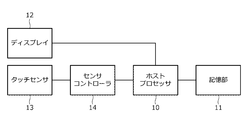
- FIG. 2 is a diagram showing the internal configuration of the tablet terminal 1.
- the tablet terminal 1 includes a host processor 10, a storage unit 11, a display 12, a touch sensor 13, and a sensor controller 14.
- the host processor 10 is a central processing unit of the tablet terminal 1, and plays a role of executing various applications such as the operating system of the tablet terminal 1 and drawing software by executing a program stored in the storage unit 11.
- the drawing software has a function of generating a file for storing ink data in the storage unit 11, and stroke data based on coordinates and data sequentially supplied from the sensor controller 14 from pen down to pen up, which will be described later. Is generated, sequentially rendered and displayed on the display 12, and the generated stroke data is associated with each other as a series of ink data and written in the storage unit, and the generated ink data is taken out from the storage unit 11 and rendered. It includes a function to be displayed on the display 12.
- the storage unit 11 includes, for example, a main storage device composed of a DRAM (Dynamic Random Access Memory) and an auxiliary storage device composed of, for example, a flash memory or a hard disk.
- a main storage device composed of a DRAM (Dynamic Random Access Memory)
- an auxiliary storage device composed of, for example, a flash memory or a hard disk.
- the storage unit 11 stores various data used or generated by the host processor 10.
- this data includes identification information of the tablet terminal 1, login information for logging in to the operating system or various applications described above, and the like.
- the display 12 is a device that visually outputs the result of processing by the host processor 10, and is composed of, for example, a liquid crystal display or an organic EL display.
- the touch sensor 13 is a device having a plurality of sensor electrodes arranged over the entire panel surface 2 shown in FIG.
- the plurality of sensor electrodes include a plurality of X electrodes extending in the Y direction and a plurality of Y electrodes extending in the X direction, respectively.
- the common electrodes arranged in the display 12 may be used as a plurality of X electrodes, and the tablet terminal 1 in such a configuration is called an "in-cell type".
- the sensor controller 14 is an integrated circuit that uses the touch sensor 13 to detect the positions of the stylus P and the finger in the panel surface 2 and receive the data transmitted by the stylus P.
- the data received from the stylus P includes a pen pressure value indicating the pressure applied to the pen tip of the stylus P, a pen ID assigned to each stylus P in advance, and the like.
- the pen pressure value in the sensor controller 14, the stylus P came into contact with the panel surface 2 (pen down) and the stylus P was separated from the panel surface 2 based on the pen pressure value received from the stylus P (pen down). It is configured to detect pen-up).
- the sensor controller 14 sequentially supplies the coordinates indicating the detected position, the received data, and the pen-down or pen-up information to the host processor 10.
- the drawing software executed in the host processor 10 is configured to generate stroke data based on various data supplied from the sensor controller 14 and store it in the storage unit 11 in association with a series of ink data generated in advance. Will be done.
- the drawing software generates stroke data by arranging a series of coordinates and pen pressure values supplied from the sensor controller 14 in time series from pen down to pen up, and the stroke data. It is configured to be associated with a series of ink data and stored in association with the user information indicating the user who entered.
- the specific content of the user information may be the pen ID supplied from the sensor controller 14, the identification information of the tablet terminal 1, or the login information of the operating system or the drawing application. good.
- the drawing software is also configured to take out the generated ink data from the storage unit 11, render it, and display it on the display 12.
- a predetermined interpolated curve such as the Catmull-Rom curve, is used to complement the coordinates between a series of coordinates.
- the pen pressure value is used to control the line width or transparency.
- the character string of "patent application” shown in the figure is an example of a handwritten character string represented by ink data.
- a feature of the tablet terminal 1 according to the present embodiment is that spelling mistakes included in such a handwritten character string are automatically detected, and ink data is automatically corrected based on the result. This point will be described in detail below.
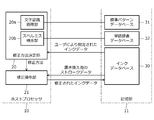
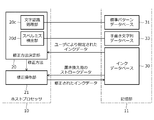
- FIG. 3 is a diagram showing data stored in the functional block of the host processor 10 and the storage unit 11. The figure shows only the parts related to the above features.
- the host processor 10 is functionally configured to include a correction method determination unit 20 and a correction operation unit 21.
- the correction method determination unit 20 includes a character recognition processing unit 20a and a misspelling detection unit 20b.
- the correction method determination unit 20 and the correction operation unit 21 are preferably implemented as one of the functions in the drawing software described above.
- the storage unit 11 stores the ink database 30, the standard pattern database 31, and the word dictionary database 32.
- the ink database 30 is a database that stores ink data generated by the host processor 10.
- Ink database 30 may store not only the host processor 10 of the tablet terminal 1 but also the ink data generated by the host processor of another information processing apparatus.
- the correction method determination unit 20 is a functional unit that determines a correction method for the ink data by detecting a spelling error included in a character string represented by the ink data stored in the ink database 30.
- the ink data to be detected for misspelling is specified by the user, for example.
- the correction method determination unit 20 first executes a character recognition process using the character recognition processing unit 20a to acquire text data indicating a character string represented by the ink data to be processed. ..
- the correction method determination unit 20 detects a misspelling included in the acquired text data by using the misspelling detection unit 20b.
- the method of correcting the ink data is determined based on the content of the detected misspelling. The details will be described below.
- the character recognition processing unit 20a is a functional unit that executes character recognition processing by performing the same processing as the so-called OCR (Optical Character Recognition) using the standard pattern database 31. Specifically, when the ink data is input, the character recognition processing unit 20a first analyzes the layout and cuts out lines and characters (including spaces). Next, the character recognition processing unit 20a extracts feature values from each of the cut out characters.
- OCR Optical Character Recognition
- the standard pattern for each character of the above feature value is stored in advance.
- the character recognition processing unit 20a that extracts the feature value from each of the cut out characters selects one character for each cut out character by collating the extracted feature value with the standard pattern in the standard pattern database 31.
- the character recognition processing unit 20a outputs a series of characters selected in this way as text data indicating a character string represented by the ink data to be processed.
- the text data output from the character recognition processing unit 20a is stored in the ink database 30 in association with the ink data to be processed.
- the correction operation unit 21 acquires the additional stroke data group described later from the ink database 30, the additional stroke data group to be acquired is determined based on the text data stored in association with each ink data. It becomes possible to do.
- the misspelling detection unit 20b uses the word dictionary database 32 in which word data composed of a combination of one or more characters is stored in advance, and detects misspellings included in the text data output from the character recognition processing unit 20a. It is a functional part to detect. Specifically, the spelling error detection unit 20b first divides the text data output from the character recognition processing unit 20a into words. This division may be performed based on the space between characters in a word-separating language such as English. On the other hand, in the case of a language that does not divide words such as Japanese, words may be extracted by performing knowledge processing based on the words stored in the word dictionary database 32, and the words may be divided based on the result.
- the spelling error detection unit 20b subsequently determines whether or not a matching or similar word exists in the word dictionary database 32 for each of the one or more words obtained by the division.
- a matching or similar word exists in the word dictionary database 32 for each of the one or more words obtained by the division.
- the misspelling detector 20b concludes that the word does not contain a misspelling.
- the misspelling detection unit 20b concludes that the word does not contain a misspelling. This conclusion is due to the high possibility that the word is not listed in the dictionary, such as a proper noun.
- the misspelling detection unit 20b concludes that the word contains a misspelling.
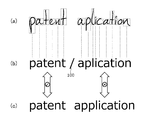
- FIG. 4 is a diagram showing an example of the above processing executed by the misspelling detection unit 20b.
- FIG. 4A shows ink data
- FIG. 4B shows text data output from the character recognition processing unit 20a based on the ink data of FIG. 4A.
- FIG. 4B also shows the word delimiter 100 obtained as a result of the above-mentioned division of the text data.
- FIG. 4C shows words found in the word dictionary database 32 by the spelling error detection unit 20b for each part of the text data of FIG. 4B divided by the delimiter 100.
- misspelling detection unit 20b concludes that the word "patent” does not include a misspelling.
- the misspelling detection unit 20b concludes that the word "application” includes a misspelling.
- misspelling is a misspelling that a necessary character is missing
- misspelling is a misspelling that an unnecessary character is mixed in
- typographical error is a misspelling that a necessary character is replaced with another character.
- the correction method determination unit 20 determines the correction method of the ink data based on the detection results of these misspellings. The correction method determined in this way is to add characters in the case of omission, delete characters in the case of typographical errors, and replace characters in the case of typographical errors.
- the correction operation unit 21 is a functional unit that corrects the ink data by manipulating the ink data based on the correction method determined by the correction method determination unit 20.
- the processing performed by the correction operation unit 21 will be described in detail with reference to FIGS. 5 to 7.
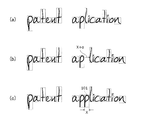
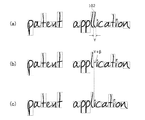
- FIG. 5 is a diagram illustrating an operation of ink data for correcting omissions.
- FIG. 5A shows an example of ink data to be processed.
- the ink data according to this example is the "patent application” shown in FIG. 4, and one "p” is missing as compared with the "patent application” written in the correct spelling.
- the correction method determined by the correction method determination unit 20 that receives the input of the ink data of FIG. 5A is, for example, adding “p” between “p” and “l” in “application”. It becomes something like.
- the correction operation unit 21 first selects one or more ink data input by the same user as the user who input the ink data to be processed from the ink database 30 shown in FIG.
- the ink data selected here may include the ink data currently being processed.
- the correction operation unit 21 acquires one or more stroke data representing the character “p” to be added from the selected one or more ink data.
- one or more stroke data acquired in this way will be referred to as an "additional stroke data group".
- the character 101 shown in FIG. 5C indicates the additional stroke data group thus acquired.
- the correction operation unit 21 determines the width X of the character 101 to be added based on the size of each character constituting the ink data to be processed and the content of the character to be added. Then, among the plurality of characters represented by the ink data to be processed, the one located on the right side in the same line as the insertion portion of the character 101 to be added is selected, and one or more selected characters are selected based on the determined width X. To the right. Specifically, the movement distance is relative to each of the series of coordinates included in the stroke data corresponding to the character to be moved so that the selected one or more characters move to the right by the distance corresponding to the width X. Performs the process of adding the numerical value of the minute.
- the specific movement distance of each stroke data by this operation may be a distance obtained by adding a predetermined adjustment value ⁇ to the width X, for example, as shown in FIG. 5 (b).
- the adjustment value ⁇ may be a positive value, a negative value, or zero.
- the correction operation unit 21 adjusts a series of coordinate values constituting the additional stroke data group so that the rendering result of the ink data to which the additional stroke data group is added becomes natural.
- the additional stroke is displayed so that the character "p" displayed as a result of rendering the additional stroke data group is displayed at the position determined by the correction method determination unit 20 with the width X determined earlier. Adjust the values of a series of coordinates that make up the data group.
- the correction operation unit 21 may also adjust the insertion position of the additional stroke data group in the file constituting the ink data so that the reproduction order when the ink data is automatically reproduced becomes natural.
- the correction operation unit 21 that has executed the adjustment ends the operation of the ink data by adding the adjusted additional stroke data group to the ink data.
- a series of stroke data located on the right side of the part where the additional stroke data group is inserted is moved to the right side, but depending on the language and its writing method, it may be moved to the right side.
- a different method may be adopted. For example, in a language such as Arabic that writes from left to right, a series of stroke data located on the left side of the part where the additional stroke data group is inserted is moved to the left side. Further, in vertically written Japanese, a series of stroke data located below the portion where the additional stroke data group is inserted is moved downward.
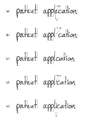
- FIG. 6 is a diagram illustrating the operation of ink data for correcting the syllabary.
- FIG. 6A shows the ink data to be processed according to this example. This ink data is called “patent application”, and one unnecessary “l” is added as compared with "patent application” written in the correct spelling.
- the character 102 corresponds to this “l”.
- the correction method determined by the correction method determination unit 20 that has received the input of the ink data of FIG. 6A is to delete one "l" in the "application".
- the correction operation unit 21 acquires the width Y of the character “l” to be deleted in the ink data to be processed.
- one or more stroke data corresponding to the character “l” to be deleted is deleted from the plurality of stroke data constituting the ink data.
- the correction method determination unit 20 is located on one side (on the right side in the example of FIG. 6) in the same line as the deleted character "l" among the plurality of characters represented by the ink data to be processed. Is selected, and one or more selected characters are moved to the left based on the width Y. Specifically, the distance traveled from each of the series of coordinates included in the stroke data corresponding to the character to be moved so that one or more selected characters move to the left by the distance corresponding to the width Y. Performs the process of subtracting the numerical value of.
- the specific moving distance of each character by this operation may be a distance obtained by adding a predetermined adjustment value ⁇ to the width Y, for example, as shown in FIG. 6B. However, the adjustment value ⁇ may be a positive value, a negative value, or zero.
- the correction operation unit 21 completes the operation of the ink data by the processing up to this point.
- the stroke data located on the right side of the deleted character is moved to the left side, but a method different from this depends on the language and its writing method. Can be adopted. For example, in a language such as Arabic that writes from left to right, the stroke data located on the left side of the deleted character is moved to the right side. Further, in vertically written Japanese, the stroke data located below the deleted character is moved upward.
- FIG. 7 is a diagram illustrating an operation of ink data for correcting a typographical error.
- FIG. 7A shows the ink data to be processed according to this example. This ink data is called “patent application”, and “i” after “appl” is replaced with “e” when compared with “patent application” written in the correct spelling.
- the character 103 corresponds to this “e”.
- the correction method determined by the correction method determination unit 20 that receives the input of the ink data in FIG. 7A is to replace "e" in "application” with "i".
- the correction operation unit 21 first, as shown in FIGS. 7 (a) to 7 (c), is the same as that described with reference to FIG. 6 with "e” as the deletion target. Perform the operation of the ink data of. Subsequently, the correction operation unit 21 displays FIG. 5 so that “i” is added between “l” and “c” as shown in FIGS. 7 (c) to 7 (e). Perform the same ink data operations as described with reference.
- the operation of the ink data for correcting the typographical error is composed of a combination of the operation of the ink data for correcting the typographical error and the operation of the ink data for correcting the missing character.
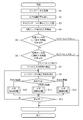
- FIG. 8 is a flow diagram showing an overall flow of ink data correction processing executed by the host processor 10. As shown in the figure, the host processor 10 first acquires ink data from the ink database 30 (step S1) and executes character recognition processing (step S2). The details of this character recognition process are as described above.
- the host processor 10 divides the text data obtained by the character recognition process into words (step S3). The details of this division process are as described above. After that, the host processor 10 executes the processes of steps S5 to S13 for each word in the text data obtained by the division in step S3 (step S4).
- the host processor 10 first determines whether or not a matching word exists in the word dictionary database 32 shown in FIG. 3 (step S5). As a result, if present, the host processor 10 concludes that there is no misspelling and moves on to the next word. On the other hand, if it does not exist, the host processor 10 further determines whether or not a similar word exists in the word dictionary database 32 (step S6). The similar meanings referred to here are as described above. If it is determined in step S6 that it does not exist, the host processor 10 concludes that there is no misspelling and moves on to the next word.
- the host processor 10 detects the content of the misspelling included in the word to be processed by comparing the word to be processed with a similar word in the word dictionary database 32 (step S7). ..
- the spelling mistakes detected in this way may include three types: misspelling, misspelling, and typographical error.
- the host processor 10 determines a method for correcting ink data based on the content of the misspelling detected in step S7 (step S8).
- the content of the misspelling detected in step S7 is not limited to one. If a word contains a plurality of misspellings, the host processor 10 selects one of them and determines a correction method for correcting the selected misspellings.
- step S9 determines whether the correction method determined in step S8 is character addition, character deletion, or character replacement (step S9).
- the character addition process step S10 is executed if the character is added
- the character deletion process step S11 is executed if the character is deleted
- the character replacement process step S12 is executed if the character is replaced. ..
- the details of each will be described in detail later with reference to FIGS. 9 to 11.
- the host processor 10 that has completed any of steps S10 to S12 determines whether or not all the spelling mistakes included in the word to be processed have been corrected (step S13), and if it is determined that the correction has not been completed. Goes back to step S8 and corrects the remaining misspellings. On the other hand, the host processor 10 that determines that the process is completed shifts the process to the next word. When the processing for all the words in the text data obtained by the division in step S3 is completed, the host processor 10 ends the ink data correction processing.
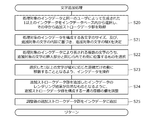
- FIG. 9 is a flow chart showing details of the character addition process (step S10) shown in FIG.
- the host processor 10 that executes this process first selects and selects one or more ink data generated by the same user as the ink data to be processed (the one acquired in step S1 of FIG. 8) from the ink database 30.
- the above-mentioned additional stroke data group is acquired from the one or more ink data obtained (step S20).
- the host processor 10 determines the width X of the character to be added based on the size of each character constituting the ink data to be processed and the content of the character to be added (step S21). Subsequently, the host processor 10 selects a plurality of characters represented by the ink data to be processed, which are located on the right side in the same line as the insertion portion of the character to be added (step S22), and selects one or more characters.
- the ink data is manipulated so that the character of is moved to the right by the distance corresponding to the width X (specifically, the distance X + ⁇ shown in FIG. 5) (step S23). The details of this operation are as described above.
- the host processor 10 adjusts the values of a series of coordinates constituting the additional stroke data group so that the rendering result of the ink data to which the additional stroke data group is added becomes natural (step S24). The details of this adjustment process are as described above. After that, the host processor 10 adds the adjusted additional stroke data group to the ink data (step S25), and ends the character addition process.
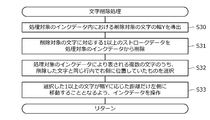
- FIG. 10 is a flow chart showing details of the character deletion process (step S11) shown in FIG.
- the host processor 10 that executes this process first derives the width Y of the character to be deleted in the ink data to be processed (step S30). After that, the host processor 10 deletes one or more stroke data corresponding to the character to be deleted from the ink data to be processed (step S31).
- the host processor 10 selects a plurality of characters represented by the ink data to be processed that are located on the right side in the same line as the deleted characters (step S32). Then, the ink data to be processed is manipulated so that the selected one or more characters move to the left by a distance corresponding to the width Y (specifically, the distance Y + ⁇ shown in FIG. 6) (step S33). ). The details of this operation are as described above. The host processor 10 ends the character deletion process when step S33 is completed.
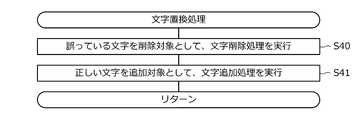
- FIG. 11 is a flow chart showing details of the character replacement process (step S12) shown in FIG.
- this process is a combination of the character deletion process and the character addition process.
- the host processor 10 first executes the character deletion process shown in FIG. 10 with the erroneous character as the deletion target (step S40). As a result, erroneous characters are deleted from the ink data to be processed, and the space created by the deletion is filled.
- the host processor 10 executes the character addition process shown in FIG. 9 so that the correct character is added to the position where the erroneous character is deleted (step S41). As a result, the correct character is inserted at the position where the typographical error in the ink data to be processed is deleted.
- the host processor 10 ends the character replacement process after the step S41 is completed.
- the ink data correction method As described above, according to the ink data correction method, the information processing device, and the program according to the present embodiment, spelling mistakes included in the character string represented by the ink data are automatically detected, and based on the result.
- the ink data can be modified. Therefore, it becomes possible to automatically correct the ink data including the misspelling.
- the additional stroke data group is acquired from the ink data input in the past by the same user who input the ink data to be processed, so other It is possible to prevent characters having different parts and strokes from being mixed in the ink data.
- the additional stroke data group is added to the ink data. Therefore, it is possible to obtain a natural rendering result even after the correction.
- one or more ink data input by the same user as the user who input the ink data to be processed is selected from the ink database 30, but the ink data selected from the ink database 30. Does not necessarily have to be entered by the same user.
- the correction method determination unit 20 shown in FIG. 3 acquires text data indicating a character string represented by the ink data to be processed by executing the character recognition process using the character recognition processing unit 20a.
- the correction method determination unit 20 corrects the size, inclination, and the like of the handwritten character string represented by the ink data to be processed by executing the character recognition process using the character recognition processing unit 20a, thereby correcting the handwritten character.
- the spelling error detection unit 20 in the correction method determination unit 20 targets the handwritten character strings themselves. 20b may be used to detect spelling mistakes included in the acquired handwritten character string.
- FIG. 12 is a diagram showing data stored in the functional block of the host processor 10 and the storage unit 11 according to the modified example of the above-described embodiment configured as described above.
- the host processor 10 according to this modification has a character recognition processing unit 20c instead of the character recognition processing unit 20a, and has a spelling error detection unit 20d instead of the spelling error detection unit 20b.
- the storage unit 11 has a handwritten character string database 33 instead of the word dictionary database 32.
- the handwritten character string database 33 is a database that stores a normalized handwritten character string.
- the handwritten character string database 33 is configured to store examples of handwritten character strings for as many words as possible.
- the character recognition processing unit 20c normalizes the character string by executing the character recognition process on the ink data to be detected for misspelling. Specifically, the character recognition processing unit 20c first cuts out a line and a character by performing the same processing as the character recognition processing unit 20a, and selects one character for each cut out character. Then, the cut out character is shaped so as to be close to the shape expected as the shape of the selected character (that is, the shape of the character stored in the handwritten character string database 33). As described above, this shaping includes tilt correction and the like. In addition, the size of each character after shaping is adjusted so that the sizes of the cut characters are, for example, equal to each other.
- the spelling error detection unit 20d detects a spelling error by comparing the formatted handwritten character string output from the character recognition processing unit 20c with the handwritten character string registered in the handwritten character string database 33. Specifically, the spelling error detection unit 20d first divides the handwritten character string output from the character recognition processing unit 20c for each word. This process may be the same as the process of dividing the text data performed by the misspelling detection unit 20b. Then, for each of the one or more words obtained by the division, it is determined whether or not there is a matching or similar handwritten character string in the handwritten character string database 33. If there is a matching handwritten string for a word, the misspelling detector 20d concludes that the word does not contain a misspelling.
- the misspelling detection unit 20d concludes that the word does not include a misspelling. On the other hand, if there is no matching handwritten character string for a certain word, but a similar handwritten character string exists, the misspelling detection unit 20d concludes that the word contains a misspelling.
- the processing of the correction method determination unit 20 and the correction operation unit 21 that received this conclusion is as described in the above embodiment.
- the characters before and after may be concatenated, for example, in English cursive. Therefore, when the correction operation unit 21 adds the additional stroke data group to the ink data, the correction operation unit 21 determines two stroke data to be connected after the addition, and the two determined stroke data are connected so that the two determined stroke data are connected.
- One or both shapes (including position and / or thickness) of one straw data may be deformed.
- two stroke data that should be connected after performing the move operation are The shape (including the position and / or the thickness) of one or both of the two straw data may be deformed so that the determined and determined two stroke data are concatenated. By doing so, it becomes possible to realize a continuous stroke that connects the characters before and after.
- At least one of the ink database 30, the standard pattern database 31, the word dictionary database 32, and the handwritten character string database 33 shown in FIG. 12 is connected to the host processor 10 via a network. It may be configured.
- a part or all of the processing performed by the host processor 10 shown in FIG. 3 may be executed via a network using, for example, cloud computing technology.
Landscapes
- Engineering & Computer Science (AREA)
- Theoretical Computer Science (AREA)
- General Physics & Mathematics (AREA)
- Physics & Mathematics (AREA)
- Computer Vision & Pattern Recognition (AREA)
- Multimedia (AREA)
- General Engineering & Computer Science (AREA)
- Computational Linguistics (AREA)
- General Health & Medical Sciences (AREA)
- Health & Medical Sciences (AREA)
- Audiology, Speech & Language Pathology (AREA)
- Artificial Intelligence (AREA)
- Human Computer Interaction (AREA)
- Quality & Reliability (AREA)
- Document Processing Apparatus (AREA)
- Machine Translation (AREA)
Priority Applications (4)
| Application Number | Priority Date | Filing Date | Title |
|---|---|---|---|
| JP2022518619A JP7690465B2 (ja) | 2020-04-27 | 2021-02-18 | インクデータの修正方法、情報処理装置、及びプログラム |
| CN202180027543.0A CN115398489B (zh) | 2020-04-27 | 2021-02-18 | 墨水数据的改正方法、信息处理装置及计算机程序产品 |
| EP21796961.7A EP4105823B1 (en) | 2020-04-27 | 2021-02-18 | Ink data modification method, information processing device, and program |
| US17/903,804 US12190050B2 (en) | 2020-04-27 | 2022-09-06 | Ink data modification method, information processing device, and program thereof |
Applications Claiming Priority (2)
| Application Number | Priority Date | Filing Date | Title |
|---|---|---|---|
| JP2020-078718 | 2020-04-27 | ||
| JP2020078718 | 2020-04-27 |
Related Child Applications (1)
| Application Number | Title | Priority Date | Filing Date |
|---|---|---|---|
| US17/903,804 Continuation US12190050B2 (en) | 2020-04-27 | 2022-09-06 | Ink data modification method, information processing device, and program thereof |
Publications (1)
| Publication Number | Publication Date |
|---|---|
| WO2021220589A1 true WO2021220589A1 (ja) | 2021-11-04 |
Family
ID=78331937
Family Applications (1)
| Application Number | Title | Priority Date | Filing Date |
|---|---|---|---|
| PCT/JP2021/006084 Ceased WO2021220589A1 (ja) | 2020-04-27 | 2021-02-18 | インクデータの修正方法、情報処理装置、及びプログラム |
Country Status (5)
| Country | Link |
|---|---|
| US (1) | US12190050B2 (cg-RX-API-DMAC7.html) |
| EP (1) | EP4105823B1 (cg-RX-API-DMAC7.html) |
| JP (1) | JP7690465B2 (cg-RX-API-DMAC7.html) |
| CN (1) | CN115398489B (cg-RX-API-DMAC7.html) |
| WO (1) | WO2021220589A1 (cg-RX-API-DMAC7.html) |
Families Citing this family (1)
| Publication number | Priority date | Publication date | Assignee | Title |
|---|---|---|---|---|
| JP7559415B2 (ja) * | 2020-08-06 | 2024-10-02 | 株式会社リコー | 情報処理装置、情報処理方法、情報処理プログラム、情報処理システム |
Citations (4)
| Publication number | Priority date | Publication date | Assignee | Title |
|---|---|---|---|---|
| JPH0877297A (ja) * | 1994-09-06 | 1996-03-22 | Matsushita Electric Ind Co Ltd | 携帯端末装置 |
| JP2005190199A (ja) * | 2003-12-25 | 2005-07-14 | Seiko Epson Corp | 手書き文字入力表示装置及び手書き文字入力表示方法ならびにそのプログラム |
| JP2018049502A (ja) * | 2016-09-23 | 2018-03-29 | 株式会社Nttドコモ | 情報処理装置 |
| JP2019036366A (ja) | 2013-11-19 | 2019-03-07 | 株式会社ワコム | デジタルインクの出力方法 |
Family Cites Families (20)
| Publication number | Priority date | Publication date | Assignee | Title |
|---|---|---|---|---|
| US5412771A (en) * | 1992-02-07 | 1995-05-02 | Signature Software, Inc. | Generation of interdependent font characters based on ligature and glyph categorizations |
| US6754386B1 (en) * | 2000-08-22 | 2004-06-22 | Microsft Corporation | Method and system of matching ink processor and recognizer word breaks |
| US7227993B2 (en) * | 2003-01-27 | 2007-06-05 | Microsoft Corporation | Learning-based system and process for synthesizing cursive handwriting |
| US7561740B2 (en) * | 2004-12-10 | 2009-07-14 | Fuji Xerox Co., Ltd. | Systems and methods for automatic graphical sequence completion |
| US7567711B2 (en) * | 2005-08-01 | 2009-07-28 | Microsoft Corporation | Cleaning up of handwriting intra-stroke and inter-stroke overtracing |
| CN101354748A (zh) * | 2007-07-23 | 2009-01-28 | 英华达(上海)电子有限公司 | 一种文字识别装置和方法、及移动终端 |
| CN101930545A (zh) * | 2009-06-24 | 2010-12-29 | 夏普株式会社 | 手写识别方法和设备 |
| CN101853126B (zh) * | 2010-05-12 | 2012-02-15 | 中国科学院自动化研究所 | 一种联机手写句子实时识别方法 |
| US9176666B2 (en) * | 2011-12-23 | 2015-11-03 | Symbol Technologies, Llc | Method and device for a multi-touch based correction of a handwriting sentence system |
| CN102902987B (zh) * | 2012-08-22 | 2017-03-01 | 北京壹人壹本信息科技有限公司 | 手写输入文字的处理方法、处理系统及电子装置 |
| CN104008405A (zh) * | 2013-02-26 | 2014-08-27 | 佳能株式会社 | 手写字符识别方法和装置 |
| US9880990B2 (en) * | 2013-03-14 | 2018-01-30 | Microsoft Technology Licensing, Llc | Leveraging previous instances of handwriting for handwriting beautification and other applications |
| US10387721B2 (en) * | 2013-07-17 | 2019-08-20 | Lenovo (Singapore) Pte. Ltd. | Information handling device handwriting clean-up |
| US20150309984A1 (en) * | 2014-04-25 | 2015-10-29 | Nuance Communications, Inc. | Learning language models from scratch based on crowd-sourced user text input |
| CN104063176B (zh) * | 2014-06-25 | 2017-08-08 | 哈尔滨工业大学深圳研究生院 | 手写序列可编辑的连续手写输入方法与系统 |
| US10402734B2 (en) * | 2015-08-26 | 2019-09-03 | Google Llc | Temporal based word segmentation |
| US10387034B2 (en) * | 2015-09-03 | 2019-08-20 | Microsoft Technology Licensing, Llc | Modifying captured stroke information into an actionable form |
| NO20161728A1 (en) * | 2016-11-01 | 2018-05-02 | Bja Holding As | Written text transformer |
| CN107885345A (zh) * | 2017-10-17 | 2018-04-06 | 深圳市金立通信设备有限公司 | 一种辅助修正文字的方法、终端及计算机可读介质 |
| US10783323B1 (en) * | 2019-03-14 | 2020-09-22 | Michael Garnet Hawkes | Analysis system |
-
2021
- 2021-02-18 WO PCT/JP2021/006084 patent/WO2021220589A1/ja not_active Ceased
- 2021-02-18 CN CN202180027543.0A patent/CN115398489B/zh active Active
- 2021-02-18 EP EP21796961.7A patent/EP4105823B1/en active Active
- 2021-02-18 JP JP2022518619A patent/JP7690465B2/ja active Active
-
2022
- 2022-09-06 US US17/903,804 patent/US12190050B2/en active Active
Patent Citations (4)
| Publication number | Priority date | Publication date | Assignee | Title |
|---|---|---|---|---|
| JPH0877297A (ja) * | 1994-09-06 | 1996-03-22 | Matsushita Electric Ind Co Ltd | 携帯端末装置 |
| JP2005190199A (ja) * | 2003-12-25 | 2005-07-14 | Seiko Epson Corp | 手書き文字入力表示装置及び手書き文字入力表示方法ならびにそのプログラム |
| JP2019036366A (ja) | 2013-11-19 | 2019-03-07 | 株式会社ワコム | デジタルインクの出力方法 |
| JP2018049502A (ja) * | 2016-09-23 | 2018-03-29 | 株式会社Nttドコモ | 情報処理装置 |
Non-Patent Citations (1)
| Title |
|---|
| See also references of EP4105823A4 |
Also Published As
| Publication number | Publication date |
|---|---|
| CN115398489A (zh) | 2022-11-25 |
| CN115398489B (zh) | 2026-03-06 |
| EP4105823A4 (en) | 2023-08-09 |
| EP4105823B1 (en) | 2025-01-01 |
| US20220415070A1 (en) | 2022-12-29 |
| JP7690465B2 (ja) | 2025-06-10 |
| US12190050B2 (en) | 2025-01-07 |
| JPWO2021220589A1 (cg-RX-API-DMAC7.html) | 2021-11-04 |
| EP4105823A1 (en) | 2022-12-21 |
Similar Documents
| Publication | Publication Date | Title |
|---|---|---|
| EP3104305B1 (en) | Apparatus and method of reducing storage of handwritten strokes | |
| JP7105695B2 (ja) | デジタルインク対話性のためのシステムおよび方法 | |
| US20160048318A1 (en) | Detecting selection of digital ink | |
| JP6914260B2 (ja) | デジタルインクを美しくするためのシステム及び方法 | |
| US20140297276A1 (en) | Editing apparatus, editing method, and computer program product | |
| WO2021238446A1 (zh) | 文本识别方法、设备及存储介质 | |
| KR102694644B1 (ko) | 텍스트 라인 추출 | |
| US11663398B2 (en) | Mapping annotations to ranges of text across documents | |
| US8572480B1 (en) | Editing the sequential flow of a page | |
| KR102747853B1 (ko) | 핸드라이팅에서의 구조 분해 | |
| US12190050B2 (en) | Ink data modification method, information processing device, and program thereof | |
| US20050276480A1 (en) | Handwritten input for Asian languages | |
| JPWO2016170691A1 (ja) | 入力処理プログラム、入力処理装置、入力処理方法、文字特定プログラム、文字特定装置、及び文字特定方法 | |
| US9229911B1 (en) | Detecting continuation of flow of a page | |
| US20180032244A1 (en) | Input control device, input control method, character correction device, and character correction method | |
| JP2761679B2 (ja) | オンライン手書き文字認識装置 | |
| JP3167799B2 (ja) | オンライン手書き文字認識装置 | |
| JPH04336688A (ja) | 手書文字認識装置 | |
| US20240143901A1 (en) | Information processing device, method, computer-readable medium, and system | |
| JP3153704B2 (ja) | 文字認識装置 | |
| US20230123071A1 (en) | Techniques for modifying markings on a digitized document | |
| CN120451987A (zh) | 加点字注音的批改方法、装置、电子设备及存储介质 | |
| JP2023088511A (ja) | 情報処理装置、及び制御方法 | |
| WO2019049187A1 (ja) | プログラム、情報処理装置、及び情報処理方法 | |
| JPH04353964A (ja) | 文書作成装置 |
Legal Events
| Date | Code | Title | Description |
|---|---|---|---|
| 121 | Ep: the epo has been informed by wipo that ep was designated in this application |
Ref document number: 21796961 Country of ref document: EP Kind code of ref document: A1 |
|
| ENP | Entry into the national phase |
Ref document number: 2022518619 Country of ref document: JP Kind code of ref document: A |
|
| ENP | Entry into the national phase |
Ref document number: 2021796961 Country of ref document: EP Effective date: 20220914 |
|
| NENP | Non-entry into the national phase |
Ref country code: DE |