WO2021166515A1 - 情報処理方法、サーバ装置、プログラム - Google Patents
情報処理方法、サーバ装置、プログラム Download PDFInfo
- Publication number
- WO2021166515A1 WO2021166515A1 PCT/JP2021/001516 JP2021001516W WO2021166515A1 WO 2021166515 A1 WO2021166515 A1 WO 2021166515A1 JP 2021001516 W JP2021001516 W JP 2021001516W WO 2021166515 A1 WO2021166515 A1 WO 2021166515A1
- Authority
- WO
- WIPO (PCT)
- Prior art keywords
- image
- information
- event data
- event
- data
- Prior art date
- Legal status (The legal status is an assumption and is not a legal conclusion. Google has not performed a legal analysis and makes no representation as to the accuracy of the status listed.)
- Ceased
Links
Images














Classifications
-
- G—PHYSICS
- G06—COMPUTING OR CALCULATING; COUNTING
- G06F—ELECTRIC DIGITAL DATA PROCESSING
- G06F16/00—Information retrieval; Database structures therefor; File system structures therefor
- G06F16/50—Information retrieval; Database structures therefor; File system structures therefor of still image data
- G06F16/58—Retrieval characterised by using metadata, e.g. metadata not derived from the content or metadata generated manually
-
- G—PHYSICS
- G06—COMPUTING OR CALCULATING; COUNTING
- G06F—ELECTRIC DIGITAL DATA PROCESSING
- G06F3/00—Input arrangements for transferring data to be processed into a form capable of being handled by the computer; Output arrangements for transferring data from processing unit to output unit, e.g. interface arrangements
- G06F3/01—Input arrangements or combined input and output arrangements for interaction between user and computer
- G06F3/048—Interaction techniques based on graphical user interfaces [GUI]
- G06F3/0484—Interaction techniques based on graphical user interfaces [GUI] for the control of specific functions or operations, e.g. selecting or manipulating an object, an image or a displayed text element, setting a parameter value or selecting a range
- G06F3/04842—Selection of displayed objects or displayed text elements
-
- G—PHYSICS
- G06—COMPUTING OR CALCULATING; COUNTING
- G06F—ELECTRIC DIGITAL DATA PROCESSING
- G06F16/00—Information retrieval; Database structures therefor; File system structures therefor
- G06F16/50—Information retrieval; Database structures therefor; File system structures therefor of still image data
- G06F16/51—Indexing; Data structures therefor; Storage structures
-
- G—PHYSICS
- G06—COMPUTING OR CALCULATING; COUNTING
- G06F—ELECTRIC DIGITAL DATA PROCESSING
- G06F3/00—Input arrangements for transferring data to be processed into a form capable of being handled by the computer; Output arrangements for transferring data from processing unit to output unit, e.g. interface arrangements
- G06F3/01—Input arrangements or combined input and output arrangements for interaction between user and computer
- G06F3/048—Interaction techniques based on graphical user interfaces [GUI]
- G06F3/0481—Interaction techniques based on graphical user interfaces [GUI] based on specific properties of the displayed interaction object or a metaphor-based environment, e.g. interaction with desktop elements like windows or icons, or assisted by a cursor's changing behaviour or appearance
- G06F3/0482—Interaction with lists of selectable items, e.g. menus
-
- G—PHYSICS
- G11—INFORMATION STORAGE
- G11B—INFORMATION STORAGE BASED ON RELATIVE MOVEMENT BETWEEN RECORD CARRIER AND TRANSDUCER
- G11B27/00—Editing; Indexing; Addressing; Timing or synchronising; Monitoring; Measuring tape travel
- G11B27/02—Editing, e.g. varying the order of information signals recorded on, or reproduced from, record carriers
- G11B27/031—Electronic editing of digitised analogue information signals, e.g. audio or video signals
-
- H—ELECTRICITY
- H04—ELECTRIC COMMUNICATION TECHNIQUE
- H04N—PICTORIAL COMMUNICATION, e.g. TELEVISION
- H04N21/00—Selective content distribution, e.g. interactive television or video on demand [VOD]
- H04N21/40—Client devices specifically adapted for the reception of or interaction with content, e.g. set-top-box [STB]; Operations thereof
- H04N21/45—Management operations performed by the client for facilitating the reception of or the interaction with the content or administrating data related to the end-user or to the client device itself, e.g. learning user preferences for recommending movies, resolving scheduling conflicts
- H04N21/4508—Management of client data or end-user data
- H04N21/4532—Management of client data or end-user data involving end-user characteristics, e.g. viewer profile, preferences
-
- H—ELECTRICITY
- H04—ELECTRIC COMMUNICATION TECHNIQUE
- H04N—PICTORIAL COMMUNICATION, e.g. TELEVISION
- H04N21/00—Selective content distribution, e.g. interactive television or video on demand [VOD]
- H04N21/80—Generation or processing of content or additional data by content creator independently of the distribution process; Content per se
- H04N21/81—Monomedia components thereof
- H04N21/8146—Monomedia components thereof involving graphical data, e.g. 3D object, 2D graphics
- H04N21/8153—Monomedia components thereof involving graphical data, e.g. 3D object, 2D graphics comprising still images, e.g. texture, background image
-
- H—ELECTRICITY
- H04—ELECTRIC COMMUNICATION TECHNIQUE
- H04N—PICTORIAL COMMUNICATION, e.g. TELEVISION
- H04N21/00—Selective content distribution, e.g. interactive television or video on demand [VOD]
- H04N21/80—Generation or processing of content or additional data by content creator independently of the distribution process; Content per se
- H04N21/85—Assembly of content; Generation of multimedia applications
- H04N21/854—Content authoring
Definitions
- This technology is related to information processing methods, server devices, and programs, especially the process of creating image collections of events.
- Patent Document 1 describes a technique for transferring and sharing an image taken by a camera to a smartphone or the like.
- the image collection of the event is fun for the participants, and they often want to see it as soon as possible after the event. For example, assuming a wedding ceremony, the bride and groom and participants will be more impressed if they can appreciate the captured images immediately after the wedding ceremony and while the lingering sound remains. However, for example, when a large number of photographs are taken at a wedding ceremony, it is troublesome for the viewer to simply look at them in order, and it cannot be said that it is appropriate. Therefore, the present technology proposes a technology that can be used to generate and provide an image collection appropriately edited using, for example, selected images as quickly as possible.
- the information processing method is a process of storing image data received by communication with an imaging device and additional information including rating information corresponding to at least the image data as event data related to a specific event, and an event corresponding to an operation input.
- Event data management processing that updates data
- user interface control processing that controls the presentation of image and rating information related to event data of a specific event and detects operation input
- an external server that stores or updates event data.
- the information processing device performs communication control processing that controls communication that synchronizes event data with the device. For example, as a function of the application program of the terminal device, when the image data captured by the image pickup device and additional information are sequentially transmitted by communication with the image pickup device, it is stored as event data related to a specific event. Let it be managed. It also presents this event data to the user and accepts operations. In addition, the event data should be synchronized with the external server device.
- the event data management process it is possible to perform a process of acquiring event data of the specific event from the server device in response to the selection of the specific event. Conceivable. For example, when a user selects a specific event from the event list as the application screen of the terminal device, the event data of the specific event can be acquired from the server device and the images and the like can be displayed in a list.
- the event data includes preset information
- the image data included in the event data is edited according to the edit information in the preset information. It is conceivable to control the image display based on the edited image data. For example, for a certain event, editing information such as retouch parameters applied to each image is preset. Then, with respect to the image data added to the event data, the image edited according to the editing information can be displayed.
- control is performed to provide a user interface capable of inputting edit information about image data included in the event data, and the event data management process is performed.
- the event data management process is performed.
- control is performed to provide a user interface capable of inputting rating information for image data included in the event data, and the event data management process is performed.
- the event data management process is performed.
- the rating information set on the imaging device side is added to the image of a certain event, but the rating information of each image included in the event data can be arbitrarily changed.
- a user interface control process a user interface capable of setting selection information for creating an image collection by selectively using image data included in event data is provided. It is conceivable to perform the provided control and, as the event data management process, perform a process of updating the event data according to the setting operation of the selection information.
- the camera staff makes a selection to set which image to use, which image to use as the cover, and so on. A user interface for this is provided, and selection information according to the setting operation is reflected in the event data.
- the selection information includes used image information indicating that the image included in the image collection has been selected. That is, the used image information indicating that the image is used for the image collection is stored in the event data in association with the image.
- the selection information includes cover image information indicating that the image has been selected as the cover image of the image collection. That is, the information indicating the image used as the cover of the image collection is stored in the event data in association with a specific image.
- the selection information includes highlighted image information indicating that the image to be highlighted in the image collection has been selected. That is, in the image collection, information indicating the selected state of the image to be emphasized more than other images such as increasing the size is associated with the image and stored in the event data.
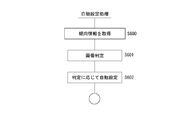
- the server device it is conceivable to perform an automatic setting process for automatically setting the selection information based on the tendency information generated based on the past selection information of the user.
- the tendency of setting the past selection information of the camera staff who uses the terminal device is learned, and the tendency information is set.
- the tendency information may be set by the terminal device itself. The terminal device automatically sets the selection information based on the tendency information of the camera staff who use it.
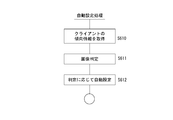
- the server device it is conceivable to perform an automatic setting process for automatically setting the selection information based on the tendency information generated based on the orientation of the client user.
- the preference is determined from the past behavior of the user who is a client, and the tendency information is set.
- the tendency of a favorite image is determined from the behavior of the client in the SNS, and the tendency information is set.
- the terminal device automatically sets the selection information based on the tendency information of the client.
- the server device is an event data management unit that stores image data and event data including rating information corresponding to the image data and manages updates in response to receiving information about a specific event from the terminal device.
- an event data management unit that stores image data and event data including rating information corresponding to the image data and manages updates in response to receiving information about a specific event from the terminal device.
- processing is performed to store and manage the image data and rating information as event data related to a specific event.
- the server device includes an event data provision control unit that executes transmission for providing event data to the terminal device.
- the event data of a specific event is transmitted to the terminal device so that it can be displayed when the user selects a specific event from the event list as the application screen of the terminal device.
- the event data management unit stores and updates event data including selection information or editing information corresponding to image data in response to receiving information on a specific event from the terminal device. It is conceivable to manage. When editing information such as retouch parameters for an image of a certain event or selection information indicating that the image has been selected as a candidate for an image collection is received from the terminal device, the event data is stored or updated accordingly. I do.
- the server device includes an image collection generation unit that generates image collection data for a specific event by using the selection information and the editing information. That is, the image collection is generated on the server device side.
- the selection information includes used image information indicating that the image included in the image collection has been selected. That is, on the server device side as well, the used image information indicating that the image is used for the image collection is stored in the event data in association with the image.
- the selection information includes cover image information indicating that the image has been selected as the cover image of the image collection. That is, on the server device side as well, the information indicating the image used as the cover of the image collection is stored in the event data in association with the specific image.
- the selection information includes highlighted image information indicating that the image to be highlighted in the image collection has been selected. That is, both on the server device side and in the image collection, information indicating the selected state of the image to be emphasized more than other images such as increasing the size is associated with the image and stored in the event data.
- the server device includes a data output unit that transmits the image data included in the event data as a file in a predetermined format to the terminal device.
- the server device can download various data included in the event data, such as metadata and image data, in response to a request from the terminal device.
- the information processing method of the present technology includes a process in which the terminal device stores image data received by communication with the image pickup device and additional information including rating information corresponding to at least the image data as event data related to a specific event, and operation input.
- Event data management process that updates event data according to Controls user interface control processing that controls the presentation of image and rating information related to event data of a specific event and detects operation input, and controls communication that synchronizes event data with an external server device according to the storage or update of event data.
- cameramen and their assistants are collectively called camera staff.
- client is a general term for not only the ordering party but also the users who can receive and browse the image collection. For example, the bride and groom, their relatives, friends, and other related parties are collectively referred to as clients.
- the image collection broadly refers to the content that collects images (still images and moving images) such as a photo album, and the form of provision thereof does not matter, but in the present embodiment, as an example, an image collection as a web gallery and a book It shall be possible to provide a collection of images of delivery.
- the image collection of the web gallery referred to here is an electronic image collection that enables the photograph of the event to be quickly browsed on the website after the event such as a wedding ceremony is completed.
- a website is used as an example, but this is an example.
- a provision form in which a content file as an image collection can be transmitted to a client terminal device using e-mail, electronic message, SNS, or the like. May be.
- the image collection of this delivery is, for example, an image collection of an event that the camera staff officially produces as a photo album and provides it to the client at a later date.
- the image data captured at the event may be edited to obtain an electronic image collection as image album contents, slide show contents, or the like, or for example, an image collection in a paper medium may be created.
- the electronic image collection may be provided by download, streaming, etc., or may be stored and provided in a portable storage medium such as a disk-shaped storage medium, a card-shaped storage medium, a tape-shaped storage medium, or a flash memory medium. It may be a thing.
- an image collection that can be quickly viewed by a client can be generated before the image collection of the present delivery.
- the image collection of the web gallery is not simply a large number of captured images arranged side by side, but is a selected image so that the viewer can enjoy the quality.
- the image collection of this delivery is positioned so that the camera staff can take the time to edit and create it with more creativity.
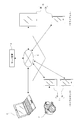
- FIG. 1 shows terminal devices 1A and 1B, an image pickup device 2, a personal computer 3, a server device 4, terminal devices 5A and 5B, and a network 6.
- the terminal devices 1A and 1B indicate terminal devices used by the camera staff, and these are collectively referred to as the staff terminal 1 for the sake of explanatory distinction.
- the terminal devices 5A and 5B indicate the terminal devices used by the user as the above-mentioned client, and for the sake of description, these are collectively referred to as the client terminal 5.
- a portable terminal device such as a smartphone or a tablet device is exemplified here.
- the terminal device 1A is assumed to be a smartphone used by a cameraman
- the terminal device 1B is assumed to be a smartphone used by an assistant.
- the terminal device 5A is assumed to be a smartphone used by the bride
- the terminal device 5B is assumed to be a tablet device used by a friend at the venue.
- the staff terminal 1 and the client terminal 5 may be so-called information processing devices, and specific examples thereof include personal computer devices, mobile phone devices, game devices, audio devices, video devices, communication devices, and television devices. Various examples are assumed.
- the staff terminal 1 or the client terminal 5 of the present disclosure can be used.
- the terminal is a portable terminal such as a smartphone or a tablet device.
- the image pickup device 2 various image pickup devices such as a video camera and a still camera are assumed.
- the image pickup device 2 shown is assumed to be a camera used by a cameraman at a wedding venue.
- Data communication is possible between the image pickup device 2 and the staff terminal 1 (for example, the terminal device 1A).
- data communication is performed by FTP (File Transfer Protocol) communication.
- the terminal device 1A serves as an FTP server, and the image files (including image data and metadata) captured by the image pickup device 2 can be uploaded sequentially or collectively by FTP communication. Conceivable. Therefore, it is assumed that the image pickup device 2 is set with FTP for data transfer to the terminal device 1A.
- the contents of the FTP setting information include the host name of the FTP server, the save destination path, the user name, the password, the connection type, and the like.
- the image pickup device 2 and the terminal device 1A are not necessarily limited to FTP, and other protocols may be used.
- the image or metadata may be transferred between the image pickup device 2 and the terminal device 1A by some communication method.
- short-range wireless communication such as Bluetooth (Bluetooth: registered trademark), WI-FI (Wireless Fidelity: registered trademark), NFC (Near Field Communication: registered trademark), infrared communication, etc. enable mutual information communication. You may do it.
- the image pickup device 2 and the terminal device 1A may be made capable of communicating with each other by a wired connection communication such as a wired LAN.
- the personal computer 3 is exemplified as an information processing device used by the camera staff to create the image collection contents of the present delivery, for example.
- the personal computer 3 is used for the work of acquiring data related to the image of the event from the server device 4 and creating the image collection content of the present delivery by an image editing application or the like.
- the server device 4 provides and manages various information for the camera staff to create a web gallery and an image collection of the main delivery.
- the staff terminal 1 has an application program for the image collection providing service installed, and performs the processing described later according to the application program.
- the server device 4 manages data related to the event, generates a web gallery, and the like.
- the staff terminal 1 and the server device 4 are always connected, for example, while the above application program is running, and event data is synchronized. Examples of event data will be described later, but include image data captured at the event and data used for generating a web gallery.
- synchronization means that at least a part of the event data stored in the staff terminal 1 and the event data stored in the server device 4 is maintained so as to have the same data content.
- the target data to be synchronized includes image data, rating information, selection information, editing information, and the like. The contents of each will be described later.
- the network 6 is assumed to be, for example, the Internet, a home network, a LAN (Local Area Network), a satellite communication network, and various other networks.
- the staff terminal 1 can upload image data or the like to the server device 4 or transmit information for synchronization via the network 6.
- the client terminal 5 can access the web page provided by the server device 4 via the network 6 and browse the web gallery.
- the personal computer 3 can acquire an image file for creating the image collection content of the present delivery from the server device 4 via the network 6.
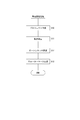
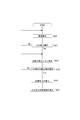
- Pre-setting is performed as step S1.
- the camera staff sets communication settings between the staff terminal 1 and the image pickup device 2, event settings, image retouching settings, and the like. This preset should be done before the wedding starts.
- step S2 imaging / transfer / automatic editing during the wedding ceremony is performed.
- the image files captured by the cameraman with the image pickup device 2 are sequentially transferred to the staff terminal 1 (for example, the terminal device 1A).
- the staff terminal 1 takes in the image file, transfers the image file or the like to the server device 4, and automatically edits the image according to the preset setting.
- Step S3 shows the work that can be done on the day after the wedding.
- the camera staff uses the staff terminal 1 to operate the selection. Selection includes selection of images to be posted in the web gallery, selection of cover images, highlight images, and even image editing.
- the staff terminal 1 performs event data update processing and the like according to the operation of the camera staff. Processing for synchronizing event data with the server device 4 side is also performed sequentially.
- the web gallery delivery process is performed in step S4.
- a web gallery is created in the server device 4 based on the event data. After the camera staff confirms the contents of the web gallery on the staff terminal 1, the operation is performed so that the client can view the contents. As a result, the client can browse the web gallery, which is a collection of images of the wedding ceremony, for example, on the day after the wedding ceremony.
- step S5 the creation of the image collection of the main delivery and the processing of the main delivery are shown.
- the camera staff will later create the image collection content of this delivery using, for example, the personal computer 3 and provide it to the client.
- the client can receive the image collection content as the main delivery.
- FIG. 3 shows a configuration example of an information processing device 10 that can be configured as a staff terminal 1, a client terminal 5, a server device 4, or a personal computer 3.
- the staff terminal 1, the personal computer 3, or the server device 4 can execute the processing described later by providing the following configuration of the information processing device 10.
- the CPU (Central Processing Unit) 71 of the information processing device 10 performs various processes according to the program stored in the ROM (Read Only Memory) 72 or the program loaded from the storage unit 79 into the RAM (Random Access Memory) 73. Run.
- the RAM 73 also appropriately stores data and the like necessary for the CPU 71 to execute various processes.
- the CPU 71, ROM 72, and RAM 73 are connected to each other via a bus 74.
- An input / output interface 75 is also connected to the bus 74.
- An input unit 76 including an operator and an operation device is connected to the input / output interface 75.
- various controls and operation devices such as a keyboard, mouse, keys, dial, touch panel, touch pad, and remote controller are assumed.
- the user's operation is detected by the input unit 76, and the signal corresponding to the input operation is interpreted by the CPU 71.
- a display unit 77 composed of a liquid crystal panel (LCD: Liquid Crystal Display), an organic EL (Electro-Luminescence) display, etc., and an audio output unit 78 composed of a speaker or the like are connected to the input / output interface 75 as one or as a separate body.
- LCD Liquid Crystal Display
- organic EL Electro-Luminescence
- an audio output unit 78 composed of a speaker or the like are connected to the input / output interface 75 as one or as a separate body.
- the display unit 77 is a display unit that performs various displays, and is composed of, for example, a display device provided in the housing of the information processing device 10, a separate display device connected to the information processing device 10, and the like.
- the display unit 77 executes the display of various images for image processing, moving images to be processed, and the like on the display screen based on the instruction of the CPU 71. Further, the display unit 77 displays various operation menus, icons, messages, etc., that is, as a GUI (Graphical User Interface) based on the instruction of the CPU 71.
- GUI Graphic User Interface
- the input / output interface 75 may be connected to a storage unit 79 composed of a hard disk, a solid-state memory, or the like, or a communication unit 80 that communicates in various communication methods.
- the communication unit 80 performs communication processing via a transmission line such as the Internet, wire / wireless communication with various devices, bus communication, and the like.
- the communication unit 80 has a function of FTP communication with the image pickup device 2 and a function of communicating with the server device 4 via the network 6.
- the communication unit 80 may have a function of performing communication by short-range wireless communication such as the above-mentioned Bluetooth, WI-FI, NFC, infrared communication, wired connection communication, or the like.
- the communication unit 80 may have a function of performing communication by a communication line for a mobile phone such as LTE (Long Term Evolution).
- LTE Long Term Evolution
- a drive 82 is also connected to the input / output interface 75, if necessary, and a removable recording medium 81 such as a magnetic disk, an optical disk, a magneto-optical disk, or a semiconductor memory is appropriately mounted.
- the drive 82 can read data files such as image files and various computer programs from the removable recording medium 81.
- the read data file is stored in the storage unit 79, and the image and sound included in the data file are output by the display unit 77 and the sound output unit 78. Further, the computer program or the like read from the removable recording medium 81 is installed in the storage unit 79 as needed.
- software for the processing of the present disclosure can be installed via network communication by the communication unit 80 or a removable recording medium 81.
- the software may be stored in the ROM 72, the storage unit 79, or the like in advance.
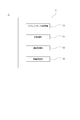
- FIG. 4 shows an event data management unit 30, a UI (user interface) control unit 31, a communication control unit 32, and an automatic setting unit 33 as functions provided in the information processing device 10 which is the staff terminal 1.
- the event data management unit 30 is a processing function that stores image data received by communication with the image pickup device 2 and additional information including rating information corresponding to the image data as event data related to a specific event. The event data management unit 30 also updates the event data according to the operation input of the camera staff.
- FIG. 5 shows event data 60 for an event whose event name is “event2”.
- the event data 60 includes the preset information 61, the imaging / editing information table 62, and the tendency information 63.
- the preset information 61 is information set by the camera staff by the preset in step S1 of FIG. Includes editing information such as retouch parameters.
- the imaging / editing information table 62 is a table in which information is sequentially added / updated in the processes of steps S2 and S3 of FIG.
- various information is described corresponding to the image file transferred from the imaging device 2.
- the image file transferred from the image pickup apparatus 2 includes image data and metadata.
- This image data is managed as the original image data, and the added metadata is also managed.
- the image data includes, for example, raw (RAW) data or data compressed by the JPEG method, and the data format does not matter, but here, the data compressed by the JPEG method such as "DSC0001.jpg" is used.
- the metadata includes the imaging date and time of the image data, camera information, data format, data size, angle of view information, focus point information, and other information added by the various imaging devices 2.
- the rating information is information indicating the evaluation value that the cameraman or the like evaluated the image.
- the number of star marks is “no star”, “1 star”, “2 stars”, “3 stars”, “4 stars”. It is evaluation information of 6 stages such as "5 stars”. For example, the higher the number of stars, the higher the evaluation. Of course, such evaluation information is an example. Since such rating information serves as a reference for image selection for the camera staff, for example, when setting the selection flag (setting of image information to be used) described later, the rating information shows a higher evaluation. It can be said that the image is an image that is likely to be used in a web gallery or this delivery.
- This rating information can be given by confirming the captured image when the cameraman captures the image.
- the image pickup apparatus 2 is provided with a user interface for inputting rating information. It is conceivable that this rating information is included in the metadata corresponding to the image data, for example, and is transferred to the staff terminal 1 together with the image data. Alternatively, it may be written in the XMP area of Exif in the image file.
- the staff terminal 1 extracts and manages rating information from metadata (or Exif data). This rating information can be added or updated in correspondence with the image data by the operation of the staff terminal 1.
- Selection information corresponding to the image data is stored in the imaging / editing information table 62.
- image information indicating whether or not the image is to be posted on the web gallery. This is a "selection flag" (also referred to simply as a "flag"), which will be described later.
- Flag-off indicates that the image is not used in the web gallery, and flag-on indicates that the image is selected for use in the web gallery.
- cover image information indicating that the image is selected as the cover image arranged as the cover image at the top of the web gallery.
- a highlighted image information indicating that the image is selected to be highlighted (highlighted) in the web gallery.
- the highlight display shall be displayed larger than other images.
- the normal image is a monochrome image, but the highlight image may be displayed in color.
- the normal image in the sense of emphasis, is a color image, but the highlight image may be an image displayed in monochrome.
- the normal image may be distinguished as a borderless display, and the highlight image may be distinguished as a bordered display. There are many ways to highlight.
- the editing information includes various image processing parameters such as retouch parameters and tilt correction parameters.
- the retouch parameters include image quality adjustment parameters such as brightness adjustment value, color adjustment value, contrast adjustment value, and sharpness adjustment value.
- Retouch parameters can be set in advance, but can also be set for individual images.
- the tilt correction parameters are set individually. From these things, the editing information corresponding to the image data is stored so that the parameters set for each image can be stored.
- the imaging / editing information table 62 may store the editing information corresponding to the image data.
- the edited image data is image data in which the original image data is image-edited based on the editing information determined in advance or the editing information individually set. Further, not only the image data retouched by the editing information but also the image data edited image data in which the quality of the image is changed may be used.
- the quality change includes, for example, a change in image size, a change in resolution, a cutout, and a change in frame rate in a moving image.
- the edited image data is indicated by adding "E" to the file name such as "DSC0001E.jpg" to distinguish it from the original image data.
- This edited image data is used for display on the user interface on the staff terminal 1.
- Such edited image data does not necessarily have to be created and stored, and for example, when displaying an image, the edited information may be applied and displayed each time. Therefore, in the imaging / editing information table 62, the editing information may be updated and managed, and the edited image data may not be stored. However, by generating and storing the edited image data at any time as shown in the figure, it is effective in reducing the processing load during the display processing.
- the event data 60 may store trend information 63.
- the tendency information is characteristic information such as the selection tendency of the camera staff and the tendency of the favorite image of the client (for example, the bride). An example using this tendency information 63 will be described later.
- the format of the event data 60 and the format of the imaging / editing information table 62 are merely examples, and any format may be used as long as the above contents are managed at least for each event.
- the original image data, metadata, rating information, selection information, editing information, and edited image data included in the imaging / editing information table 62 are not limited to being collectively stored as a table. Any format and mode may be used as long as metadata, rating information, selection information, editing information, and edited image data can be associated with at least one original image data.
- the UI control unit 31 of FIG. 4 is a function that controls the presentation of images, rating information, and the like related to the event data 60 of a specific event, and also performs a process of detecting an operation input. In other words, it is a function that performs user interface processing.
- User interface processing includes presentation of various information, provision of an environment in which operation input is possible, processing for detecting operation by the user, processing for detecting / estimating the intention of the user, and the like.
- the UI control unit 31 causes, for example, the display unit 77 and the voice output unit 78 to execute output such as display output and voice output to the user to provide the user with an operation input environment and present information. Perform control processing.
- the UI control unit 31 performs a process of detecting an operation by the user, for example.
- the UI control unit 31 performs both a process of providing an operation input environment to the user and a process of detecting the operation by the user, for example.
- the UI control unit 31 may perform other user interface processing.
- the communication control unit 32 is a function of controlling communication for synchronizing event data with an external server device 4 in response to storage or update of event data 60. For example, when the image transfer is received from the image pickup device 2, the communication control unit 32 controls the process of transferring the image data from the communication unit 80 to the server device 4, or updates the contents of the event data 60 according to the update. Controls such as notifying the contents to the server device 4.
- the automatic setting unit 33 is a function for automatically setting rating information, selection information, or editing information using the above-mentioned tendency information 63.
- the processing of the automatic setting unit 33 will be described later together with the tendency information 63.
- FIG. 4 The above functions of FIG. 4 are merely examples.
- the information processing device 10 includes at least an event data management unit 30, a UI control unit 31, and a communication control unit 32, the information processing device 10 comes to perform processing as the staff terminal 1 of the present embodiment. ..
- Each such function is realized, for example, by the information processing apparatus 10 installing an application program for creating an image collection content.
- the server device 4 is the information processing device 10 as shown in FIG. 3, in the information processing device 10, the functional configuration as shown in FIG. 6 is constructed in the CPU 71 by software (application program).
- FIG. 6 as functions provided in the information processing device 10 which is the server device 4, an event data management unit 40, an image collection generation unit 41, an event data provision control unit 42, a data output unit 43, and a trend information generation unit 44 are shown. Shown.
- the event data management unit 40 is a processing function for storing / updating event data in the server device 4.
- the contents of the event data 90 on the server device 4 side are schematically shown in FIG. Similar to FIG. 5, the event data 90 is for an event whose event name is “event2”. In this example, it is assumed that the event data 90 includes the preset information 91 and the imaging / editing information table 92.
- the preset information 91 is the same information as the preset information 61 in the staff terminal 1. For example, the contents set in the preset settings in step S1 of FIG. 2 are similarly managed in the server device 4.
- the imaging / editing information table 92 has substantially the same information as the imaging / editing information table 62. That is, the original image data, metadata, rating information, selection information, and editing information can be managed for each image.
- the image editing / editing information table 92 does not associate the edited image data, but this is because the edited image is created when the web gallery is generated.
- the server device 4 may also generate sequential edited image data so that the edited image data is associated with the original image data in the imaging / editing information table 92.
- the CPU 71 of the information processing device 10 which is the server device 4 executes additional storage and updating of information about the event data 90 as described above by the function of the event data management unit 40 of FIG.
- the image collection generation unit 41 of FIG. 6 is a function of generating image collection contents as a web gallery of a specific event.
- the image collection generation unit 41 generates image collection data, that is, data of a web page to be a web gallery (web gallery data 95) by referring to the selection information and editing information in the event data 90.
- An example of the generated web gallery data 95 is shown in FIG.
- the server device 4 generates web gallery data 95 including, for example, web page setting information 96 and an image folder 97.
- the web page setting information 96 is, for example, page information in HTML (HyperText Markup Language) format or XML (Extensible Markup Language) format.
- the image folder 97 is a folder in which images called from the web page setting information 96 and displayed in the page are collected.
- the image folder 97 contains edited image data about the image adopted as the web gallery.
- the event data provision control unit 42 of FIG. 6 is a function of controlling the staff terminal 1 to execute transmission for providing the event data 90. For example, when the staff terminal 1 logs in to the server device 4 and specifies an event, all or part of the event data 90 of the event is transmitted to the staff terminal 1. The staff terminal 1 sets the received content as event data 60 under its own control. As a result, for example, the assistant can operate using the event data 60 on the terminal device 1B side. Of course, it is also assumed that the event data provision control unit 42 controls the event data provision to the terminal device 1A and the personal computer 3.
- the data output unit 43 sets a part or all of data included in the event data, for example, metadata, rating information, selection information, editing information, or image data (for example, original image data) as a file in a predetermined format (for example,). Controls transmission to the personal computer 3). That is, it is a processing function that provides the camera staff with the data necessary for creating the image collection content of this delivery.
- the tendency information generation unit 44 is a function of learning the image selection tendency of the camera staff and the evaluation tendency of the image of the user as a client, and generating the feature information thereof.
- the processing of the trend information generation unit 44 will be described later together with the processing of the automatic setting unit 33 of the staff terminal 1.
- FIG. 6 The above functions of FIG. 6 are merely examples. Since the information processing device 10 includes the event data management unit 40, event data can be synchronized between the staff terminal 1 and the server device 4. Further, since the server device 4 includes the image collection generation unit 41, the web gallery can be generated quickly.
- Each function of FIG. 6 is realized by, for example, the information processing apparatus 10 installing an application program for creating an image collection content.
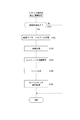
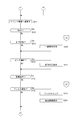
- FIG. 9 shows the processing of the staff terminal 1.
- the camera staff uses the staff terminal 1 to start an application program and perform an operation for preparatory processing.
- the CPU 71 executes the processes after step S10.
- step S10 the staff terminal 1 performs a project creation process.
- This is a process of setting an event for creating an image collection.
- the project list screen 110 is displayed on the display unit 77 of the staff terminal 1 that has started the application program, as shown in FIG. 10A.
- the project list screen 110 is provided with a list area 111 in which event names for each project are displayed in a list. Further, an additional icon 112, a camera icon 134, a menu icon 127, and the like are displayed.
- the camera staff creates a project to be created as an image collection. For example, an operation to create one project is performed by inputting an event name or the like. For example, by operating the add icon 112, a project setting screen (not shown) is displayed, and the project title (for example, event name), the date and time of the event, the location, whether or not the auto retouch setting is applied, and the like can be set.
- the camera staff inputs items as appropriate and performs operations to set the project contents.
- the staff terminal 1 creates one project and displays it in the list area 111.
- FIG. 10B shows an example in which two projects with the names “event1” and “event2” are displayed. For example, for each project, information such as event name, date and time, location is presented.
- the staff terminal 1 controls to provide such a screen user interface by the function of the UI control unit 31, and performs the project creation process according to the operation of the camera staff.
- this project creation process is performed, for example, so that the staff terminal 1 and the server device 4 are connected online.
- the staff terminal 1 transmits information for synchronization processing to the server device 4 according to the operation content of the user by the function of the communication control unit 32.
- the information as one project can be entered in a synchronous manner.
- step S11 of FIG. 9 the staff terminal 1 sets the transfer.
- This transfer setting is a setting for FTP transfer to and from the image pickup apparatus 2, and is, for example, a setting for a file format to be transferred, an FTP connection server, and the like.
- the staff terminal 1 executes a screen display for transfer setting to the camera staff by the function of the UI control unit 31, and makes necessary transfer settings according to the operation of the camera staff.
- the staff terminal 1 sets the auto retouch.
- the auto-retouch setting is a process of setting parameters of an image editing process that is commonly applied to each image.
- the staff terminal 1 executes a screen display for auto-retouch setting for the camera staff by the function of the UI control unit 31, and performs necessary auto-retouch setting according to the operation of the camera staff.
- the parameter of this auto retouch setting is described in the event data 60 of the created project as the preset information 61.
- this auto-retouch setting is also performed so that, for example, the staff terminal 1 and the server device 4 are connected online, and the staff terminal 1 transmits the parameter information set for auto-retouch to the server device 4 for synchronization processing.
- the server device 4 can also store the preset information 91 having the same contents as the preset information 61 of the event data 60 as the event data 90 of the project.
- the staff terminal 1 sets a watermark.
- a cameraman's name can be inserted as a watermark (digital watermark) in the image of the web gallery.
- the watermark setting is a process for setting the presence / absence and contents of the watermark.
- the staff terminal 1 executes a screen display for watermark setting for the camera staff by the function of the UI control unit 31, and sets the necessary watermark according to the operation of the camera staff.
- This watermark setting information is also described as preset information 61 in the event data 60 of the created project. Further, this watermark setting is also performed so that the staff terminal 1 and the server device 4 are connected online, and the staff terminal 1 transmits the watermark setting information to the server device 4 for synchronization processing.
- the server device 4 can also store the preset information 91 synchronized with the preset information 61 in the event data 90 of the project.
- steps S11, S12, and S13 may be different. Further, the processing of each step does not have to be performed as a series of processing, and may be performed each time according to a user's operation during startup, for example. Further, each process may be skipped if it is not necessary.
- the transfer setting in step S11 may be performed each time a project is created in step S10, but after the FTP transfer setting is once made and if there is no particular need to change the setting, after the project is created in step S10. May skip step S11 and move to step S12.
- steps S12 and S13 is the same, and if there is no particular need to change after setting, these may be skipped.
- communication with the server device 4 for synchronization may be performed at the timing of each process, but preset information can be obtained by collectively transmitting the information when some settings are made. 61, 91 may be synchronized. Further, if there is a content set in an environment where the online connection with the server device 4 is not possible, the set information is transmitted and the preset information 61 and 91 are synchronized when the online connection state is established. It is good to be taken.
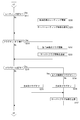
- the staff terminal 1 checks whether or not the image file transfer from the image pickup apparatus 2 has been started in step S101 of FIG. During the period when the image transfer is not performed, the processing of FIG. 11 is not particularly performed. For example, during a wedding ceremony, a cameraman uses an image pickup device 2 to capture a scene of a ceremony or reception. The image pickup device 2 sequentially transfers the image file to the staff terminal 1 after the still image is captured, for example, automatically or in response to the operation of the cameraman.
- the transfer timing is an example. The transfer may be performed for each image captured, or a plurality of images may be transferred together.
- it may be transferred in the unit in which the recording start / stop is performed during the non-recording period, or may be transferred during the recording period after the recording start. All recorded video may be transferred, or only the first predetermined period may be transferred.
- the cameraman can add rating information to the captured image by operating the image pickup device 2 side. For example, immediately after imaging, the image is confirmed and rating information is input. This rating information is described in the metadata.
- the transfer of the image file including the image data and the metadata may be executed, for example, in response to the cameraman confirming the captured image and inputting the rating information.
- step S101 When the staff terminal 1 detects that the transfer of such an image file has started, the process proceeds from step S101 to step S102 to receive the image data and the metadata.
- the received image data is managed as the original image data in the imaging / editing information table 62 of the event data 60. Also, the received metadata will be managed accordingly.
- the staff terminal 1 performs image compression processing in step S103.
- the compression process is performed so as to increase the compression rate of the received image data.
- This is a process of generating image data to be transmitted to the server device 4.
- step S104 the staff terminal 1 manages rating information. This is a process of confirming the metadata of the received image file, extracting the rating information given by the image pickup apparatus 2, and managing the event data 60 so that it can be updated and managed in the image pickup / edit information table 62. be.
- step S105 the staff terminal 1 transmits information to the server device 4 for synchronization of event data 60 and 90.
- the staff terminal 1 transmits the image data, metadata, and rating information compressed in step S103 to the server device 4.
- the event data 90 is updated in response to receiving the event data 90, and the synchronization state with the event data 60 is maintained.
- step S106 the staff terminal 1 performs an auto-retouch application process. That is, the original image data is automatically subjected to image processing according to the preset retouch parameters to generate the edited image data, which is managed by the imaging / editing information table 62. This edited image data will be generated for use in the UI display on the staff terminal 1.
- the auto-retouch application process is performed as the process when the image file is received, but it may be performed at other times, for example, when the display of one image is requested. good. It is also conceivable to perform image processing on the compressed image data generated in step S103. In that case, for example, the processing order of steps S105 and S106 may be changed so that the image processing for applying auto-retouch to the compressed image data is performed and then transmitted to the server.
- the staff terminal 1 is in a state where an image is captured according to the image taken by the cameraman and the information according to the image is managed by the event data 60. For example, when the wedding is over, all the captured images are managed by the event data 60. Further, since the transmission for sequential synchronization is performed, the event data 90 on the server device 4 side is in a state of being synchronized with the event data 60 on the staff terminal 1 side during and at the end of the wedding ceremony.
- the camera staff can capture the image into the staff terminal 1 by displaying the list of images transferred from the image pickup apparatus 2 and the communication status on the event screen 120 or the like described later. Etc. can be confirmed.
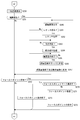
- FIGS. 12 to 17 show a series of flowcharts separately, and the connection relationship is shown by "c1", “c2", “c3", “c4", "c5", “c6", and "c7".
- the processing of these flowcharts is the processing by the functions of the event data management unit 30, the UI control unit 31, and the communication control unit 32 of FIG.
- Step S201 of FIG. 12 shows a process of displaying a list of projects (event names, etc.) on the project list screen 110 as shown in FIG. 10B.
- the staff terminal 1 monitors whether or not a project selection operation has been performed on the project list screen 110, and monitors the end operation of the application program in step S203. When the end operation of the application program is performed, the application program is closed and the process is completed.
- the camera staff when performing a selection immediately after a wedding ceremony, performs an operation of selecting a target project on the project list screen 110. For example, an operation such as tapping one of the projects displayed in the list area 111 is performed.
- the staff terminal 1 advances the process from step S202 to step S204 and acquires the latest event data for the selected project.
- the staff terminal 1 requests the event data 90 of the selected project from the server device 4, and takes in the transmitted event data 90. Then, it is compared with the event data 60 held by itself and updated to the latest information content.
- some information that can determine whether the information is old or new such as update date / time information and version control information for the event data 60 and the event data 90, is compared, and if they are different, the event data 60 is set to the latest information content. ..
- an assistant may input rating information and selection information on the terminal device 1B side during a wedding ceremony, and these are event data on the terminal device 1A side. It may not be reflected in 60. Further, when the rating information or the selection information is to be input on the terminal device 1B side possessed by the assistant, it is appropriate to input the latest information on the terminal device 1A side as a reference. Therefore, the staff terminal 1 receives the event data 90 of the server device 4 to which the latest information is transmitted from any of the terminal devices 1A and 1B, and if its own event data 60 is not the latest, the information of the event data 60. To update.
- step S204 may not be necessary.
- the staff terminal 1 proceeds to step S211 of FIG. 13 to display a list of event images.
- the event screen 120 as shown in FIG. 18 is displayed.
- the event title 121 is displayed on the event screen 120, and the all flag icon 123, the next icon 132, the camera icon 134, the menu icon 127, and the like are displayed.
- the menu icon 127 is an operator for displaying various menu items.
- the camera icon 134 is an icon that displays the FTP communication status with the image pickup device 2.
- the all flag icon 123 is an operator for setting on / off of a flag (selection flag) which is used image information for all images.
- the next icon 132 is an operator for transitioning to the next screen.
- An image area 128 is provided on the event screen 120, and the images transferred from the image pickup apparatus 2 are displayed in a list by thumbnail images. For example, images are displayed in chronological order according to the imaging time. Further, all tabs 125 and candidate tabs 126 are provided for displaying the image area 128. When the all tab 125 is selected, the image transferred from the image pickup apparatus 2 is displayed in the image area 128 regardless of whether the flag state as the used image information is on or off.
- FIG. 18 is a list display when all tab 125 is selected.
- the candidate tab 126 when the candidate tab 126 is selected, only the images for which the flag is set are displayed in a list in the image area 128 among all the images transferred from the image pickup apparatus 2.
- FIG. 19 shows an example of list display when the candidate tab 126 is selected. The on / off of the flag is set by manipulating each image depending on whether or not the image is adopted by the camera staff for the web gallery.
- the event screen 120 is provided with a filter designation area 129.
- the filter designation area 129 enables the image to be narrowed down by, for example, a rating of 6 levels. For example, an operator as the number of stars is provided, filtering is performed according to the designated operator, and the extracted images are listed in the image area 128. For example, when a three-star operator is operated, an image whose rating information is "3 stars" or more (that is, an image corresponding to any of "3 stars", "4 stars", and "5 stars") is extracted. Is displayed in a list. Alternatively, in this case, only the images whose rating information is "3 stars" may be extracted and displayed in a list. Further, in the filter designation area 129, the number of images whose rating is set is also shown together with the operator represented by the number of stars.
- the staff terminal 1 processes the monitoring loop from step S212 to step S219 in FIG. 14 in the state where such an event screen 120 is displayed in step S211.
- step S212 of FIG. 13 the staff terminal 1 monitors the operation of the next icon 132.
- the process when the operation of the next icon 132 is detected will be described later.
- step S213 the staff terminal 1 monitors the tab switching operation.
- the tab switching operation is an operation of the candidate tab 126 during the list display on the all tab 125, or an operation of the all tab 125 during the list display on the candidate tab 126.
- the staff terminal 1 performs a process of switching the list display contents in the image area 128 according to the selected tab in step S220.
- step S214 the staff terminal 1 monitors the pinch operation performed by the camera staff on the image area 128.
- the pinch operation referred to here is a pinch-out operation for enlarging an image and a pinch-in operation for reducing an image.
- the staff terminal 1 enlarges or reduces the display state in the image area 128 in step S221.
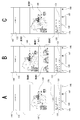
- FIG. 20A, 20B, and 20C show an example of a change in the display of the image area 128 in response to pinch-in / pinch-out.
- FIG. 20A is the same normal display state as that of FIG.
- the pinch-out operation is performed, the images displayed in the list are enlarged as shown in FIG. 20B. Further, the pinch-out operation is performed to enlarge the image as shown in FIG. 20C.
- the state is reduced from the state shown in FIG. 20C to the state shown in FIG. 20B, and further, the pinch-in operation returns to the state shown in FIG. 20A.
- the rating icon 130 and the flag setting icon correspond to the images as shown in FIGS. 20B and 20C. 131 is displayed. That is, when the size becomes easy to see or operate, the rating icon 130 and the flag setting icon 131 are displayed corresponding to the image. Of course, even in the state of FIG. 20A, the rating icon 130 and the flag setting icon 131 may be displayed corresponding to the image.
- the staff terminal 1 performs a process of changing the display state of the image area 128 in response to the pinch operation as in the above example.
- the rating icon 130 not only displays rating information set by the number of stars, but is also used as an operator for changing the rating. For example, by tapping or sliding the portion of the rating icon 130, the number of stars can be changed, and this is the rating change operation.
- the flag setting icon 131 expresses on / off of the flag by, for example, a change in the color or brightness of the icon.
- the flag setting icon 131 is also used as an operator for switching the flag on / off. For example, the flag can be switched on / off by tapping.
- step S215 the staff terminal 1 monitors whether or not one of the images displayed in the image area 128 has been selected. For example, it is an operation such as tapping one thumbnail image. The process when this selection operation is detected will be described later.
- step S216 the staff terminal 1 monitors the filter operation. That is, it is an operation of the operator indicating the rating of the filter designated area 129.
- the staff terminal 1 proceeds to step S223, performs filtering processing according to the controls, and extracts the corresponding image. Then, the images extracted in step S224 are listed in the image area 128.
- step S217 of FIG. 14 the staff terminal 1 monitors the rating operation. For example, it is an operation for the rating icon 130 as shown in FIGS. 20B and 20C.
- the staff terminal 1 proceeds to step S230 and updates the event data 60 so that the rating information of the image corresponding to the rating icon 130 becomes a value corresponding to the operation.
- step S231 the staff terminal 1 transmits the updated rating information to the server device 4, so that the event data 90 is updated on the server device 4 side. That is, the synchronous state is maintained.
- step S2108 the staff terminal 1 monitors the flag on / off operation. For example, it is an operation for the flag setting icon 131 as shown in FIGS. 20B and 20C.
- the staff terminal 1 proceeds to step S232 and updates the event data 60 so that the flag in the selection information of the image corresponding to the flag setting icon 131 is switched on / off.
- step S233 the staff terminal 1 transmits the updated flag information to the server device 4, so that the event data 90 is updated on the server device 4 side. That is, the synchronous state is maintained.
- step S219 the staff terminal 1 monitors the operation of the all flag icon 123.
- the staff terminal 1 proceeds to step S234 and branches the process depending on whether or not the flags of all the images are currently turned on. If some images are flag-on or all are flag-off and not all images are flag-on, the staff terminal 1 proceeds to step S236 and updates the event data 60 so that all images are flag-on.
- the staff terminal 1 proceeds to step S235 and updates the event data 60 so that the flags are turned off for all the images. Further, step S237 staff terminal 1 transmits the updated flag information to the server device 4, so that the event data 90 is updated on the server device 4 side. That is, the synchronous state is maintained.
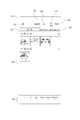
- step S215 of FIG. 13 the process of the staff terminal 1 proceeds to step S250 of FIG. 15 to display the single display screen 140 as shown in FIG.
- the single image display screen 140 is provided with a single image display area 142, and the selected image is displayed in a large size.
- the image displayed in the single display area 142 is, for example, an image based on the edited image data managed by the event data 60. That is, it is the edited image data generated by the auto-retouching process in step S106 of FIG. 11, and is a reproduced image of the image data reflecting the retouching parameter in the preset information 61. Further, a focus point mark 149 indicating the focusing position in the image may be displayed on the image.
- a return icon 133 which is an operator for returning the display to the event screen 120, a rating icon 130 for the displayed image, and a flag setting icon 131 are displayed.
- an edit icon 145, a focus point operation icon 146, an export icon 147, and an original icon 148 for operations related to the displayed image are displayed.
- the staff terminal 1 performs the monitoring loop processing of steps S251 to S257 of FIGS. 15 and 16.
- step S251 the staff terminal 1 monitors the operation of the edit icon 145.
- the staff terminal 1 proceeds to step S260 to display an edit screen (not shown).
- the editing screen for example, a user interface capable of retouching operation and tilt correction operation is prepared, and the camera staff can perform image editing operation by the user interface.
- the retouching operation for example, a brightness adjustment value, a color adjustment value, a contrast adjustment value, a sharpness adjustment value, and the like can be set as retouch parameters.
- the tilt correction operation for example, an operator for adjusting the angle of the image is prepared.
- the editing screen may be a screen different from the one-sheet display screen 140, or may be a screen that is superimposed on the one-sheet display screen 140 to display various controls.
- step S261 When the staff terminal 1 detects the retouching operation, the staff terminal 1 proceeds from step S261 to step S262 to perform the retouching process.
- This is a process of further editing the edited image data by the retouch parameters input by the operation of the camera staff. Further, the retouch parameter input in this case is stored in the event data 60 as editing information for the individual image data.
- step S263 When the staff terminal 1 detects the tilt correction operation, the staff terminal 1 proceeds from step S263 to step S264 to perform the tilt correction process of the image.
- This is a process of editing the edited image data by the tilt correction parameter input by the operation of the camera staff. Further, the tilt correction parameter input in this case is stored in the event data 60 as editing information for the individual image data.
- step S265 When the end of the editing operation is detected in step S265, the staff terminal 1 transmits the editing information of the event data 60 updated according to the editing process to the server device 4 in step S266, and the event data 90 is updated on the server device 4 side. To do so. That is, the synchronous state is maintained.
- step S267 the staff terminal 1 ends the editing screen and returns to the normal single display screen 140. The image displayed at this time should reflect the editing result. In this way, the camera staff can retouch and correct the tilt of an arbitrary image by operating from the edit icon 145.
- the staff terminal 1 monitors the operation of the focus point operation icon 146 in step S252.
- the staff terminal 1 proceeds to step S270 and branches the process depending on whether or not the focus point mark 149 is currently displayed on the image of the single image display area 142. If the focus point mark 149 is not currently displayed, the staff terminal 1 proceeds to step S271 to acquire focus point information about the displayed image.
- the focus point is information indicating a position in which the image pickup apparatus 2 is in focus in the image at the time of imaging, and is described in the metadata. For example, the focus point is described by the coordinate information of one point in the image.
- the staff terminal 1 acquires focus point information from the metadata of the displayed image, and displays the focus point mark 149 on the displayed image according to the information, as shown in FIG. 21.
- the focus point mark 149 is displayed as an area having a predetermined spread centering on the coordinate information of one point in the image stored as the focus point. This allows the user to confirm the subject in focus at the time of imaging.
- the above-mentioned "spread" as the region indicated by the focus point mark 149 may be variable, and for example, the amount of spread may be changed according to the position in the image and the subject as a result of subject recognition. For example, if the pupil of the person in FIG.
- the focus point mark 149 is displayed in a region as small as the pupil region, and if the bouquet is in focus, the focus point mark 149 is displayed so as to include the entire bouquet. It may be displayed widely.
- the display mode of the focus point mark 149 is a mark (square represented by parentheses) for displaying the four corners in FIG. 21, but other display modes such as a quadrangular frame and a circular frame may be used.
- FIG. 21 shows a case where there is only one focus point, there are cases where a plurality of subjects (for example, a bride) in the image are in focus, or there are a plurality of subjects (for example, a bride and a groom).
- the focus point mark 149 is displayed on the single image display screen.
- the focus point mark 149 is displayed on the images listed in the image area of the event screen of FIG. You may do it.
- step S252 If the operation of the focus point operation icon 146 is detected in step S252 while the focus point operation icon 146 is being displayed, the staff terminal 1 proceeds from step S270 to step S273, and the focus point operation icon 146 is displayed. To end. Therefore, the camera staff can turn on / off the display of the focus point mark 149 by the focus point operation icon 146.
- the staff terminal 1 monitors the operation of the export icon 147 in step S253 of FIG. 16 in the display state of the single display screen 140.
- the staff terminal 1 proceeds to step S280 to perform the export process. That is, the information related to the displayed image data is exported.
- step S254 the staff terminal 1 monitors the image switching operation.
- the image switching operation in this case is the operation of the original icon 148.
- the staff terminal 1 proceeds to step S281 to switch between the image based on the original image data and the image based on the edited image data. That is, if the reproduced image based on the edited image data is displayed at that time, the reproduced image based on the original image data is displayed. If the reproduced image based on the original image data is displayed at that time, the reproduced image based on the edited image data is displayed. Therefore, the camera staff can arbitrarily compare the edited image with the original image by operating the original icon 148.
- the rating icon 130 for the displayed image is displayed.
- the staff terminal 1 monitors the rating operation.
- the staff terminal 1 proceeds to step S282 and updates the event data 60 so that the rating information of the displayed image is a value corresponding to the operation.
- the staff terminal 1 transmits the updated rating information to the server device 4, so that the event data 90 is updated on the server device 4 side. That is, the synchronous state is maintained.
- the flag setting icon 131 for the displayed image is displayed.
- the staff terminal 1 monitors the flag on / off operation, that is, the operation of the flag setting icon 131.
- the staff terminal 1 proceeds to step S284 and updates the event data 60 so that the flag in the selection information of the displayed image is switched on / off.
- the staff terminal 1 transmits the updated flag information to the server device 4, so that the event data 90 is updated on the server device 4 side. That is, the synchronous state is maintained.
- step S257 the staff terminal 1 monitors the operation of the return icon 133.
- the staff terminal 1 proceeds to step S211 of FIG. 13 to end the single display screen 140 and return to the state of displaying the event screen 120.
- step S212 of FIG. 13 the process when the operation of the next icon 132 is detected in step S212 of FIG. 13 will be described.
- the process of the staff terminal 1 proceeds to step S300 of FIG. 17, and the cover / highlight selection screen 150 as shown in FIG. 22 is displayed.
- the cover / highlight selection screen 150 is a screen for the camera staff to select an image to be a cover (cover) or an image to be highlighted (highlighted) in the web gallery.
- the return icon 133 and the next icon 132 are displayed on the cover / highlight selection screen 150.
- the cover / highlight selection screen 150 is provided with a list designation area 153, and a candidate tab 151 and a selection tab 152 are prepared.
- the flag-on images that is, the images selected for use in the web gallery
- the list designation area 153 A highlight button 155 and a cover button 156 are displayed for each image.
- the highlight button 155 is an operator for designating an image as a highlight
- the cover button 156 is an operator for designating an image as a cover.
- the highlight button 155 may also express the presence or absence of the current highlight setting depending on the display mode, and the cover button 156 may express the current cover setting state according to the display mode.
- the selection tab 152 is selected, the cover-designated or highlighted images are listed in the list-designated area 153.
- the camera staff operates the cover / highlight selection screen 150 to select an image to be covered or an image to be highlighted.
- the staff terminal 1 processes the monitoring loop from step S301 to step S305.
- step S301 the staff terminal 1 monitors the operation of the cover button 156.
- the staff terminal 1 proceeds to step S310, sets the cover image information in the selection information so as to set the corresponding image as the cover image, and updates the event data 60.
- step S311 the staff terminal 1 transmits the updated selection information to the server device 4, so that the event data 90 is updated on the server device 4 side. That is, the synchronous state is maintained.
- step S302 the staff terminal 1 monitors the operation of the highlight button 155.
- the staff terminal 1 proceeds to step S320, sets the highlighted image information in the selection information so as to set the corresponding image as the highlight image, and updates the event data 60.
- step S321 the staff terminal 1 transmits the updated selection information to the server device 4, so that the event data 90 is updated on the server device 4 side. That is, the synchronous state is maintained.
- step S303 the staff terminal 1 monitors the tab switching operation.
- the tab switching operation in this case is an operation of the selection tab 152 during the list display on the candidate tab 151, or an operation of the candidate tab 151 during the list display on the selection tab 152.
- the staff terminal 1 performs a process of switching the list display contents in the list designation area 153 according to the selected tab in step S330.
- step S305 the staff terminal 1 monitors the operation of the return icon 133.
- the staff terminal 1 proceeds to step S211 of FIG. 13 to return to the display state of the event screen 120. This allows the camera staff to suspend cover highlighting and redo the selection from the flag settings.
- step S304 of FIG. 17 the staff terminal 1 monitors the operation of the next icon 132.
- the staff terminal 1 proceeds to step S340 and displays a confirmation screen.
- FIG. 23 shows an example of the confirmation screen 160.
- a return icon 133 and a next icon 132 are prepared, and a detail area 161 is prepared, and the final confirmation content is displayed.
- detailed information such as the number of flagged images used in the web gallery, the number of images to be highlighted, the title, and the date is displayed.
- the staff terminal 1 monitors the operation of the next icon 132 in step S341 of FIG. 17, and monitors the operation of the return icon 133 in step S342. When the operation of the return icon 133 is detected, the staff terminal 1 returns to step S300 and returns to the display state of the cover / highlight selection screen 150.
- step S343 When the operation of the next icon 132 is detected, the staff terminal 1 proceeds to step S343 and transmits the web gallery generation request to the server device 4. Then, the process proceeds to step S201 of FIG. 12, and the display state of the project list screen 110 is returned. In this case, the process may proceed to step S211 in FIG. 13 to return to the event screen 120.
- the camera staff had to repeat the decision (flag on / off) as to whether or not to select the image to be used for the web gallery. Therefore, even when a plurality of similar images (images having similar subject type, subject pose, angle of view, etc.) are continuously photographed (also referred to as when the same scene is photographed).
- a plurality of similar images images having similar subject type, subject pose, angle of view, etc.
- a touch panel as the input unit 76 of the staff terminal 1
- the image pickup device 2 is equipped with a function for recognizing scene information, by including the scene information of each image in the metadata of the image file transferred to the staff terminal 1, a plurality of captured images can be captured for each scene. Can be grouped. Alternatively, if the staff terminal 1 is provided with a recognition function, the staff terminal 1 can group images for each scene.
- the camera staff may input a scene name suitable for each grouped scene via the input unit 76, or the CPU 71 may access a predetermined database and automatically input the scene.
- processing examples as the selection in step S3 of FIG. 2 will be described below with reference to the flowchart of FIG. 31 and the screen example of FIG. 32.
- the processing of the flowchart of FIG. 31 is a processing by the function of the UI control unit 31 of FIG. It should be noted that this processing example can be said to be an example in which the processing of steps S218, S232 and / or S233 in FIG. 14 is repeatedly processed for all images.
- Step S381 of FIG. 31 is a process in which the staff terminal 1 displays an image as illustrated in FIGS. 20A, 20B, and 20C.
- the staff terminal 1 monitors the flag on / off operation for the displayed image. For example, it is an operation for the flag setting icon 131 as shown in FIGS. 20B and 20C.
- the staff terminal 1 updates the event data 60 so that the flag in the selection information of the image corresponding to the flag setting icon 131 is switched on / off.
- step S383 the staff terminal 1 receives the result of the flag operation performed in step 382 and counts the number of flag-on, which is the number of images for which the flag is determined to be on in the same grouped scene.
- step S384 the staff terminal 1 compares a predetermined number of flag-ons determined in advance for each scene with the number of flag-ons counted in step S383, and determines whether or not the predetermined number of flag-ons has been reached.
- the predetermined number of flag-ons may be determined in advance by the camera staff for each scene, or may be determined according to the number of images in the same scene group.
- step S385 monitors whether an operation for displaying the next image has been performed, and if so, step S386. Go to and continue to control the display of the next image in the same scene.
- step S387 the staff terminal 1 monitors whether or not an operation for displaying the next image has been performed, and the operation is performed. In this case, the process proceeds to step S388 to control the display of an image of the scene of the next group different from the scene of the previous group. This process can be repeated until the process of the scenes of all groups is completed.
- step S384 If it is determined in step S384 that the predetermined number of flag-ons has been reached without going through step S387, the next step is to proceed to step S388 to select a scene of the next group different from the scene of the previous group. You may control the display of the image.
- FIG. 32A and 32B are screen examples showing the display order of images.
- FIG. 32A is an example in which all images (images A to E) are displayed in order regardless of the scene of the image.
- FIG. 32B is an example in which some images are not displayed (display is skipped) according to the scene and the number of flag-ons. For example, when the predetermined number of flag-ons in the scene SN1 is "1" and the image A is subjected to the flag-off process, the number of flag-ons is "0 (zero)" and the predetermined number of flag-ons has not been reached. Therefore, FIG. 32B As shown in the above, the display control of the next image B in the scene SN1 which is the same scene is performed.
- the image B is subjected to the flag-on processing
- the number of flag-ons becomes "1" and the predetermined number of flag-ons is reached. Therefore, the next image C in the same scene is not displayed as shown in the figure, and the next image C is displayed.
- the image D which is an image of the scene SN2, is displayed and controlled. Further, when the predetermined number of flag-on in the scene SN2 is "1" and the image D is subjected to the flag-on process, the number of flag-on becomes "1" and the predetermined number of flag-on is reached. Image E is not displayed, and the image of the next scene is displayed.
- the camera staff may want to review and replace the rating information and selection information once set in the selection in step S3 of FIG. In that case, each information may be changed by operating the rating icon 130 and the flag setting icon 131 again, but if the rating information and selection information given to the two images can be exchanged, the selection process is more efficient. Can be done.
- the processing of the flowchart of FIG. 33 is a processing by the function of the UI control unit 31 of FIG.
- Step S420 in FIG. 33 is a step in which the staff terminal 1 displays the single display screen 140 as shown in FIG. 34A.
- the same numbers as those in FIG. 21 are given the same numbers, but a replacement icon 170 for instructing replacement of information is newly added, and the displayed image is referred to as image W. ..
- the staff terminal 1 monitors the operation of the replacement icon 170.
- the staff terminal 1 displays an image list including an image in the vicinity of the displayed image in step S422.
- the neighborhood may be an image having a similar shooting order, an image having a similar number as a file name of image data, or an image in the same scene.
- FIG. 34B shows a state in which the image X, the image Y, and the image Z are displayed in a list below the image W as an image in the vicinity of the image W.
- step S423 the staff terminal 1 monitors the operation of selecting an image from the image list.
- the information added to the original image is replaced with the information of the selected image in step S424, and the selected image is displayed in the following step S425.
- FIG. 34C the rating information and the selection information of the original image W and the selected image Y are exchanged according to the selection of the image Y among the images in the vicinity of FIG. 34B, and the image Y is displayed. The state is shown.
- step S424 and step S425 may also perform a process in which the steps are reversed, that is, a process in which step S425 is preceded.
- the information replacement process as in the above example may be a process of replacing both the rating information and the selection information, or a process of replacing only one of the rating information and the selection information. In that case, an operation step may be added to indicate which one to replace.
- FIG. 35 is a conceptual diagram showing that the rating information has been replaced. When the rating information of the image W was "3 stars" and the rating information of the image Y was "no stars" as shown in FIG. 35A, the processing of FIG. 33 according to the user's replacement operation was performed as shown in FIG. 35B.
- FIG. 36 is a conceptual diagram showing that the flags as selection information have been replaced.
- the image W was flag-off and the image Y was flag-on as shown in FIG. 36A
- the image W was flag-on and the image Y was flag-off as shown in FIG. 36B by the process of FIG. 33 according to the user's replacement operation. It is shown that.
- FIG. 24 shows the processing of the server device 4 corresponding to the communication from the staff terminal 1.
- the processing of the server device 4 referred to below is a processing performed by the CPU 71 of the information processing device 10 having the function of FIG. In FIG. 24, the processing is mainly executed by the functions of the event data management unit 40 and the image collection generation unit 41.
- step S1 in FIG. 2 preset information from the staff terminal 1 is transmitted to the server device 4.
- the server device 4 receives the information regarding the project setting from the staff terminal 1, the process proceeds from step S500 to step S510, and the project setting process is performed in the server device 4.
- the project setting communication from the staff terminal 1 is the communication that the staff terminal 1 performs to the server in the processes from steps S10 to S13 of FIG. For example, information such as the event name, date and time, and location of the created project will be sent. Based on this information, the server device 4 sets a new project and sets the event data 90. Further, on the staff terminal 1 side, not only the setting of the project itself but also the auto retouch setting and the watermark setting are performed, and the setting information is sequentially transmitted to the server device 4. By describing this information as the preset information 91 of the event data 90, the server device 4 synchronizes the event data 60 with the event data 60 in the preset state.
- the metadata including the image and rating information transferred from the image pickup device 2 is transmitted to the server device 4 by the process of step S105 of FIG. 11 of the staff terminal 1.
- the server device 4 receives the image or metadata from the staff terminal 1
- the server device 4 proceeds from step S501 to step S520 in FIG. 24, and takes in the image or metadata as information of the event data 90 of the corresponding project.
- the rating information in the metadata is extracted from the metadata and managed in the event data 90 in a state where it can be updated thereafter.
- step S3 in FIG. 2 various information for maintaining synchronization is transmitted from the staff terminal 1 to the image pickup device 2 to the server device 4 in the process of the processing of FIGS. 12 to 17 of the staff terminal 1.
- the server device 4 When the server device 4 receives the rating information from the staff terminal 1, the server device 4 proceeds from step S502 to step S530 in FIG. 24 to update the rating information for the corresponding image in the event data 90 of the corresponding project.
- step S503 the server device 4 proceeds from step S503 to step S540 to update the selection information for the corresponding image in the event data 90 of the corresponding project. That is, the image information used by setting the flag, the cover image information as the cover, the highlighted image information by setting the highlight, and the like are sequentially updated on the server device 4 side as well.
- step S504 the server device 4 receives the editing information from the staff terminal 1
- step S550 the server device 4 proceeds from step S504 to step S550 to update the editing information about the corresponding image in the event data 90 of the corresponding project.
- step S560 This is the information transmitted by the staff terminal 1 in step S343 of FIG.
- step S560 of FIG. 24 the server device 4 first performs an image editing process using parameters as editing information (including editing information according to the preset information 61) for each image flag-on as used image information, and then performs an image editing process on the Web. Export as an image for the gallery. That is, each edited image stored in the image folder 97 of FIG. 8 is generated.
- step S561 of FIG. 24 the server device 4 performs a web gallery generation process. That is, for example, the web gallery data 95 of FIG. 8 including the web page setting information 96 as HTML data and the image folder 97 is generated and entered as a web page. This forms a web gallery.
- the server device 4 transmits the URL (uniform resource locator) of the web gallery to the staff terminal 1. This allows the staff terminal 1 to browse the web gallery. At this point, the web gallery is still set to be private, and only the staff terminal 1 to which the URL is sent can be viewed.
- the URL uniform resource locator
- a share request is transmitted from the staff terminal 1 to the server device 4 as the step S4 in FIG. 2 (described later in FIG. 25).
- the staff terminal 1 proceeds from step S506 to step S570 in FIG. 24 to set the corresponding web gallery as a public setting. For example, it can be viewed from the client terminal 5.
- FIG. 25 shows the processing of the staff terminal 1 after acquiring the URL.
- the staff terminal 1 accesses the web page using the URL acquired in step S350.
- the web gallery can be previewed and viewed on the staff terminal 1.
- the web gallery created in the preview area 183 is displayed, and an edit button 181 and a share button 182 are prepared.
- the content of the web gallery displayed in the preview area 183 has a configuration in which images for which flags are set are arranged in chronological order, for example.
- the image for which the cover image information is set is displayed at the top as the cover.
- the image highlighted by the highlighted image information is displayed in a larger size than the image not set to be highlighted. Even if the image is not highlighted, it may be automatically arranged in a large size. This is done to balance and sharpen the entire gallery.
- the browsing end operation is monitored in step S351 of FIG. 25
- the operation of the edit button 181 is monitored in step S352
- the operation of the share button 182 is monitored in step S353.
- browsing the web page is terminated.
- the staff terminal 1 proceeds to step S360 to perform the editing process.
- the camera staff can check the contents of the web gallery in the preview area 183 and operate the edit button 181 as needed for further editing.
- the staff terminal 1 displays the interface image for editing, accepts the operation of the camera staff, and edits the preview image accordingly. For example, the background color, title font, title color, title position, slide show music, etc. can be edited.
- the editing information is transmitted to the server device 4 so that the editing operation is reflected in the web gallery.
- the camera staff operates the share button 182 after performing editing operations as necessary.
- the staff terminal 1 proceeds to step S370 and transmits a share request to the server device 4.
- the server device 4 sets the web gallery publicly in step S570 of FIG. 24 in response to the share request.
- the staff terminal 1 performs a process corresponding to the screen display and screen operation of the delivery completion of the web gallery in step S371 of FIG.
- the staff terminal 1 displays the web gallery delivery screen 190 of FIG. 27.
- a notification of the completion of creation of the web gallery, a valid period, and a URL 193 of the web gallery are displayed.
- the copy button 191 and the share button 192 are displayed.
- the camera staff can operate the copy button 191 to copy the URL, attach it to an e-mail or the like, and send it to the client terminal 5.
- the share button 192 can be operated to provide the URL to the SNS or the like so that the client can browse the web gallery via the SNS.
- the client will be able to browse the web gallery at an extremely early stage, such as during the day after the wedding.
- the URL is distributed to the client so that the image collection can be viewed as a web gallery.
- an image collection content corresponding to the above web gallery may be created and distributed to a client as a content file.
- This delivery process is performed at the stage of step S5 in FIG.
- FIG. 28 shows the processing at the final delivery stage. This is a process performed by, for example, the personal computer 3 or the staff terminal 1. Hereinafter, the processing performed by the personal computer 3 will be described.
- the camera staff operates using the personal computer 3, accesses the server device 4 as step S400, and requests information reading for the main delivery.
- the event data 90 is acquired from the server device 4.
- the server device 4 downloads the rating information, the selection information, or the editing information as an XMP file so that it can be applied to the RAW image file in the personal computer 3. That is, the rating information, the used image information indicating the flag setting, the cover image information indicating that the cover image is set, the highlighted image information indicating the highlight setting, and the like are inherited by the personal computer 3.
- all of the event data 90 may be provided to the personal computer 3.
- the camera staff takes the RAW image data as the image data captured by the image pickup device 2 into the personal computer 3 and uses the RAW image data to generate the image collection of the present delivery.
- the creation work can be made more efficient.
- step S402 the necessary editing process is performed in step S402 to complete the image collection of the present delivery.
- step S403 the process for the main delivery is performed.
- content data as image collection content is generated and electronically transmitted, recorded on a recording medium, or printed as print data.
- the created content data, the recording medium on which the content data is recorded, or the image collection in the printed paper medium is delivered to the client.
- the selection information is automatically set based on the tendency information generated based on the past selection information of the camera staff who is the user of the staff terminal 1 by the function of the automatic setting unit 33 of FIG. This is an example of processing.
- the server device 4 manages event data 90 for a plurality of projects of a certain camera staff. Then, the server device 4 can perform learning processing on the event data 90 related to the camera staff by the function of the tendency information generation unit 44 of FIG. 6 and generate the tendency information of the selection tendency of the camera staff. For example, as machine learning, a flag-on set image, a highlight set image, a cover set image, etc. are used as learning data, and the flag-on set image feature information, the highlight set image feature information, and the cover are used as learning data. Generate trend information including feature information of the set image.
- step S600 the staff terminal 1 acquires the tendency information of the camera staff generated by the server device 4.
- step S601 the staff terminal 1 determines each image transferred from the image pickup apparatus 2 based on the tendency information, and has a feature to be flag-on set, a feature to be highlighted, or a cover setting. It is determined whether or not the product has the characteristics to be used.
- step S602 the staff terminal 1 automatically sets a flag, a highlight, and a cover for each image according to the above determination result.
- the camera staff can operate the selection described with reference to FIGS. 13 to 17 in such an automatically set state. This increases the possibility that the work of the camera staff can be streamlined.
- the above processing can also be applied to ratings, and rating information can be set automatically. That is, the server device 4 uses the function of the trend information generation unit 44 to analyze the images of each rating level using the event data 90 of the past project of the camera staff, and the feature information of the "starless” image, ""1star” image feature information, "2 star” image feature information, "3 star” image feature information, "4 star” image feature information, "5 star” image Generate feature information for. Of course, instead of all of this, for example, it is conceivable to generate only the feature information of the "five-star” image. Then, the staff terminal 1 automatically sets the rating information of all or part of the images by acquiring the tendency information including such feature information and determining the matching with the feature information of each image. This also makes it possible to streamline operations when selecting camera staff.
- FIG. 30 shows an example in which the staff terminal 1 automatically sets the selection information based on the tendency information generated based on the orientation of the client user by the function of the automatic setting unit 33.
- the preference is determined from the past behavior of the client (the bride who is the orderer of the image collection), and the tendency information is set.
- the tendency of a favorite image is determined from the behavior of the client in the SNS (such as giving a "like" to the image) or the transmitted image in the own SNS, and the tendency information is set.
- the process of FIG. 30 is performed at the timing of displaying the event screen 120 in step S211 of FIG. 13 or at a timing before that.
- the staff terminal 1 acquires the tendency information of the client (for example, the bride) of the project generated by the server device 4.
- the staff terminal 1 determines each image transferred from the image pickup apparatus 2 based on the tendency information, and determines whether or not the staff terminal 1 has a feature that matches the taste of the client.
- step S612 the staff terminal 1 automatically sets a flag for each image according to the above determination result.
- images that match the client's taste are adopted in the web gallery.
- the highlight setting and the cover setting may be performed.
- the camera staff can operate the selection described with reference to FIGS. 13 to 17 in such an automatically set state. As a result, the work of the camera staff can be streamlined, and the possibility of creating an image collection that enhances the satisfaction of the client is increased.
- the above processing can also be applied to ratings, and rating information can be set automatically. That is, the server device 4 generates the tendency information including the feature information of the image preferred by the client by the function of the tendency information generation unit 44.
- the staff terminal 1 automatically sets the rating information by acquiring the tendency information including such feature information and determining the matching with the feature information of each image. This not only makes the operation of the camera staff selection more efficient, but also improves the satisfaction of the client.
- the staff terminal 1 of the embodiment stores image data received by communication with the image pickup device 2 and metadata (additional information) including rating information corresponding to at least the image data as event data 60 related to a specific event. It has an event data management unit 30 that updates the event data 60 in response to an operation input. Further, the staff terminal 1 has a UI control unit 31 that controls the presentation of images and rating information related to the event data 60 of a specific event as a project target and detects an operation input. Further, the staff terminal 1 has a communication control unit 32 that controls communication that synchronizes the event data 60 and the event data 90 with the external server device 4 according to the storage or update of the event data 60.
- the information processing device 10 as the staff terminal 1 stores the image data received by the communication between the image pickup device and 2 and additional information including rating information corresponding to at least the image data as event data related to a specific event.
- Event data management processing including update processing of event data according to input, UI control processing to control presentation of image and rating information related to event data of a specific event and detect operation input, and to store or update event data It performs communication control processing that controls communication that synchronizes event data with an external server device.
- Such a staff terminal 1 can manage images and metadata sequentially transferred from the image pickup apparatus 2 as event data of a specific event, and can present this to the camera staff, for example, in a list. Therefore, the camera staff can confirm the image that is the basis of the image collection such as the web gallery by using the staff terminal 1. Moreover, at this time, the rating information attached by the cameraman on the image pickup device 2 for each image is also displayed as the rating icon 130, which can assist the cameraman himself or the camera staff such as an assistant in selecting the image to be adopted in the image collection. It becomes. Further, communication is performed so that the event data 60 of the staff terminal 1 (terminal devices 1A and 1B) and the event data 90 of the server device 4 are kept in synchronization.
- the terminal device 1B logged in to the server device 4 is the latest synchronized with the terminal device 1A.
- the operation can be performed while reflecting the event data contents of. This makes it possible to efficiently create an image collection.
- the image pickup device 2 and the staff terminal 1 are separate bodies, for example, the image pickup device 2 and the staff terminal 1 may be integrated.
- the event data management unit 30 acquires the event data of the specific event from the server device 4 in response to the selection of the specific event (see step S204 of FIG. 12).
- the event data is synchronized in the server device 4 by the communication from the staff terminal 1, and therefore the event data in the server device 4 is the latest event data.
- the application program is started on the staff terminal 1, the event list is displayed.
- the latest event data can be acquired by first loading the event data on the server device 4 side.
- the rating information is up to date. For example, even when the assistant uses the terminal device 1B, the cameraman can confirm the latest rating when the rating is set / changed on the image pickup device 2 or the terminal device 1A in the past.
- the event data 60 includes the preset information 61
- the UI control unit 31 uses the edited image data edited according to the edit information in the preset information for the image data included in the event data 60.
- the display is performed (see step S250 in FIG. 15).
- editing information such as retouch parameters as the preset information 61
- each image captured and captured can be automatically edited and displayed. This is effective when creating a unified atmosphere for each image in a web gallery or the like.
- automatic editing eliminates the need to perform similar editing operations on individual images, making the work of camera staff extremely easy.
- the UI control unit 31 controls to provide a user interface capable of inputting edit information about the image data included in the event data 60, and the event data management unit 30 responds to the edit information input operation.
- the event data is updated (see step S251 and step S260 to step S267 in FIG. 15).
- the UI control unit 31 controls to provide a user interface capable of inputting rating information about the image data included in the event data 60, and the event data management unit 30 controls to input rating information.
- the event data is updated according to the above (see steps S217, S230, S231 in FIG. 14, steps S255, S282, S283 in FIG. 16 and the like).
- the UI control unit 31 controls to provide a user interface capable of setting selection information for creating an image collection by selectively using the image data included in the event data 60, and performs an event.
- the data management unit 30 is configured to perform a process of updating the event data according to the selection operation setting operation (steps S218, S219, S232 to S237 in FIG. 14, steps S256, S284, S285, and FIG. 17 in FIG. Steps S301, S302, S310, S311, S320, S321, etc.).
- the server device 4 automatically creates the web gallery based on the synchronized event data 90, an image collection reflecting the intention of the camera staff can be created. This makes it possible to provide clients with a web gallery that covers the production intentions of the camera staff extremely quickly.
- the selection information includes the used image information indicating that the image included in the image collection has been selected.
- the used image information indicating that the image included in the image collection has been selected.
- the selection information includes cover image information indicating that the image has been selected as the cover image of the image collection.
- the cover image can be set as selection information indicating which image is used for the cover of the web gallery.
- the selection information includes the highlighted image information indicating that the image to be highlighted in the image collection has been selected.
- the image to be highlighted in the web gallery for example, by making it larger than other images, can be selected by the highlight setting.
- the highlight setting allows the camera staff to select the image to emphasize.
- the highlight setting also allows the web gallery to be created as a non-monotonous image collection, even if it is automatically generated.
- the server device 4 may create a web gallery that highlights an image that has not been highlighted. Further, the highlight setting may be set to highlight by brightness, color, frame display, etc., instead of increasing the size.
- the staff terminal 1 includes an automatic setting unit 33 that automatically sets the selection information based on the tendency information generated based on the past selection information of the camera staff.
- Learn past selection settings and set trend information such as what kind of image to use, cover image, or highlight image. That is, the feature points of an image that is easily flag-on, an image that is easily set, an image that is easily covered, and the like are analyzed and used as trend information.
- the work of the camera staff can be facilitated to some extent.
- the camera staff can set it manually after the automatic selection setting, so it is possible to create an image collection that reflects the intention of the camera staff.
- the automatic setting of the selection information may be performed on the server device 4 side, and the event data reflecting the automatic setting may be provided to the staff terminal 1. Further, although it is assumed that the tendency information is generated on the server device 4 side, the staff terminal 1 may be provided with a tendency information generation unit to generate the tendency information.
- the staff terminal 1 has described an example including an automatic setting unit 33 that automatically sets selection information based on the tendency information generated based on the orientation of the client user.
- the tendency of the client's favorite image is learned, the feature points of the favorite image are analyzed, and the tendency information is used.
- the automatic setting of the selection information may be performed on the server device 4 side, and the event data reflecting the automatic setting may be provided to the staff terminal 1.
- the staff terminal 1 may be provided with a tendency information generation unit to generate the tendency information.
- the server device 4 of the embodiment is an event that stores and manages the update of the event data 90 including the image data and the rating information corresponding to the image data in response to the reception of the information about the specific event from the staff terminal 1.
- a data management unit 40 is provided.
- the server device 4 adds and updates the event data 90 so that the image data and the rating information transmitted from the staff terminal 1 are reflected in the event data 90 of the specific event.
- the event data 60 on the staff terminal 1 side and the event data 90 in which the image and the rating information are synchronized can be stored.
- the rating information can be arbitrarily changed on the staff terminal 1 side, but the server device 4 can retain the latest event data 90 by reflecting the change.
- the server device 4 receives the image data and the rating information corresponding to the image data from the staff terminal 1, but the server device 4 includes the image data and the rating information corresponding to the image data directly from the image pickup device 2.
- the metadata may be transmitted.
- the server device 4 of the embodiment includes an event data provision control unit 42 that executes transmission for providing event data to the staff terminal 1.
- the event data is synchronized in the server device 4 by the communication from the staff terminal 1, and therefore the event data in the server device 4 is the latest event data.
- the application program is started on the staff terminal 1, and when an event is selected, the display based on the latest event data can be executed. Therefore, the cameraman and the assistant can perform various operations in the latest state by the staff terminal 1.
- the event data management unit 40 of the server device 4 of the embodiment stores and updates the event data 90 including the selection information or the editing information corresponding to the image data in response to the reception of the information about the specific event from the staff terminal 1. It was decided to manage. Event data is also updated on the server device 4 side in response to receiving editing information such as retouch parameters and selection information related to flags, covers, highlights, and the like. As a result, the synchronization state with the event data of the staff terminal 1 can be maintained.
- the server device 4 of the embodiment includes an image collection generation unit 41 that generates a web gallery that is image collection data for a specific event by using selection information and editing information. Since the event data 60 and 90 are synchronized between the server device 4 side and the staff terminal 1, the camera staff using the staff terminal 1 can refer to the edit information and the selection information in the event data 90 on the server device 4 side. It is possible to generate an image collection (web gallery) according to the intention. Further, by generating the image collection on the server device 4, the processing load of the staff terminal 1, which is a terminal device having a small resource, can be reduced.
- the selection information in the event data 90 on the server device 4 side of the embodiment includes the used image information indicating that the image included in the image collection has been selected.
- the selection information it is possible to generate an image collection (web gallery) using the images selected by the camera staff using the staff terminal 1.
- the selection information in the event data 90 on the server device 4 side of the embodiment includes the cover image information indicating that the image has been selected as the cover image of the image collection.
- the selection information it is possible to generate an image collection (web gallery) using the cover image selected by the camera staff using the staff terminal 1 as the cover.
- the selection information in the event data 90 on the server device 4 side of the embodiment includes the highlighted image information indicating that the image to be highlighted in the image collection has been selected. Thereby, by referring to the selection information, it is possible to generate an image collection (web gallery) in which the highlight image selected by the camera staff using the staff terminal 1 is emphasized.
- the server device 4 of the embodiment includes a data output unit 43 that transmits all or a part of the event data 90 as a file in a predetermined format to the terminal device (personal computer 3 or staff terminal 1).
- the terminal device personal computer 3 or staff terminal 1
- the personal computer 3 or the staff terminal 1 can be used to efficiently acquire the material of the image collection for the main delivery, perform necessary editing, etc., and easily obtain the image collection for the main delivery. You will be able to generate it.
- the image file from the image pickup device 2 is transferred to the staff terminal 1 and the staff terminal 1 uploads the image file to the server device 4, but the image pickup device 2 directly uploads the image file to the server device 4. May be good.
- the description has been made assuming the generation of an image collection of still images, but the image collection may include a moving image as a part of the content, or may generate an image collection of a plurality of moving images.
- the processing described in the embodiment can be applied in the same manner.
- the moving image in this case may be a moving image with sound or a moving image having only image information without sound.
- the program of the embodiment is a program for causing, for example, a CPU, a DSP, or a device including these to execute the processes shown in FIGS. 11 to 17 and 25.
- the program may further cause a CPU or the like to execute the processes shown in FIGS. 29 and 30. That is, the program of the embodiment responds to a process of storing image data received by communication with the image pickup apparatus 2 and additional information including rating information corresponding to at least the image data as event data 60 related to a specific event, and an operation input.
- the event data management process that updates the event data 60
- the UI control process that controls the presentation of image and rating information related to the event data 60 of a specific event, and the operation input detection, and the storage or update of the event data 60.
- the staff terminal 1 described above can be realized in, for example, a mobile terminal device, a personal computer, or other device capable of executing information processing.
- a program that realizes such a staff terminal 1 can be recorded in advance in an HDD as a recording medium built in a device such as a computer device, a ROM in a microcomputer having a CPU, or the like.
- a recording medium built in a device such as a computer device, a ROM in a microcomputer having a CPU, or the like.
- flexible discs CD-ROMs (Compact Disc Read Only Memory), MO (Magneto Optical) discs, DVDs (Digital Versatile Discs), Blu-ray discs (Blu-ray Discs (registered trademarks)), magnetic discs, semiconductor memories, It can be temporarily or permanently stored (recorded) on a removable recording medium such as a memory card.
- a removable recording medium can be provided as so-called package software.
- it can also be downloaded from a download site via a network such as a LAN (Local Area Network) or the Internet.
- LAN Local Area Network
- a program it is suitable for a wide range of provision of the staff terminal 1 of the embodiment.
- a mobile terminal device such as a smartphone or tablet, a mobile phone, a personal computer, a game device, a video device, a PDA (Personal Digital Assistant), etc.
- the smartphone or the like functions as the staff terminal 1 of the present disclosure. Can be made to.
- Event data that stores the image data received by communication with the image pickup device and additional information including rating information corresponding to at least the image data as event data related to a specific event, and updates the event data according to the operation input.
- Management process and User interface control processing that controls the presentation of image and rating information related to event data of a specific event and detects operation input
- An information processing method in which an information processing device performs communication control processing that controls communication that synchronizes event data with an external server device in response to storage or update of event data.
- Event data contains preset information
- the image data included in the event data is controlled to be displayed based on the edited image data edited according to the edited information in the preset information.
- the information according to (1) or (2) above.
- Processing method (4) As the user interface control process, control is performed to provide a user interface capable of inputting editing information about image data included in the event data.
- the information processing method (5) according to any one of (1) to (3) above, which performs a process of updating event data in response to an edit information input operation as the event data management process.
- control is performed to provide a user interface capable of inputting rating information for image data included in event data.
- the information processing method (6) according to any one of (1) to (4) above, which performs a process of updating event data according to an operation of inputting rating information as the event data management process.
- control is performed to provide a user interface capable of setting selection information for creating an image collection by selectively using the image data included in the event data.
- the information processing method (7) according to any one of (1) to (5) above, which performs a process of updating event data according to a selection information setting operation as the event data management process.
- a server device including an event data management unit that stores image data and event data including rating information corresponding to the image data and manages updates in response to receiving information about a specific event from the terminal device.
- the terminal device according to (12) above which includes an event data provision control unit that executes transmission for providing event data to the terminal device.
- the event data management unit manages storage and update of event data including selection information or editing information corresponding to image data in response to receiving information about a specific event from the terminal device (12) or (13). ).
- the selection information includes used image information indicating that the image included in the image collection has been selected.
- the selection information includes cover image information indicating that the image has been selected as the cover image of the image collection.
- the selection information includes highlighted image information indicating that the image to be highlighted in the image collection has been selected.
- the terminal device Event data that stores the image data received by communication with the image pickup device and additional information including rating information corresponding to at least the image data as event data related to a specific event, and updates the event data according to the operation input.
- Management process and User interface control processing that controls the presentation of image and rating information related to event data of a specific event and detects operation input
- Communication control processing that controls communication that synchronizes event data with an external server device according to the storage or update of event data
- Information processing method to perform (21) Event data that stores the image data received by communication with the image pickup device and additional information including rating information corresponding to at least the image data as event data related to a specific event, and updates the event data according to the operation input.
- Management process and User interface control processing that controls the presentation of image and rating information related to event data of a specific event and detects operation input
- Communication control processing that controls communication that synchronizes event data with an external server device according to the storage or update of event data, A program to be executed by the terminal device.
- the present technology can also adopt the following configurations.
- Event data that stores the image data received by communication with the image pickup device and additional information including rating information corresponding to at least the image data as event data related to a specific event, and updates the event data according to the operation input.
- a user interface control unit that controls the presentation of image and rating information related to event data of a specific event and detects operation input
- a terminal device including a communication control unit that controls communication that synchronizes event data with an external server device in response to storage or update of event data.
- Event data contains preset information
- the terminal device according to (22) or (23) above, wherein the user interface control unit displays an image based on the edited image data edited according to the editing information in the preset information with respect to the image data included in the event data.
- the user interface control unit controls to provide a user interface capable of inputting editing information about image data included in the event data.
- the terminal device according to any one of (22) to (24) above, wherein the event data management unit performs a process of updating event data in response to an edit information input operation.
- the user interface control unit controls to provide a user interface capable of inputting rating information for image data included in event data.
- the terminal device according to any one of (22) to (25) above, wherein the event data management unit performs a process of updating event data in response to an operation of inputting rating information.
- the user interface control unit controls to provide a user interface capable of setting selection information for creating an image collection by selectively using the image data included in the event data.
- the terminal device according to any one of (22) to (26) above, wherein the event data management unit performs a process of updating event data according to an operation of setting selection information.
- the selection information includes used image information indicating that the image included in the image collection has been selected.
- the selection information includes cover image information indicating that the image has been selected as the cover image of the image collection.
- the selection information includes highlighted image information indicating that the image to be highlighted in the image collection has been selected.
- (31) Described in any of (27) to (30) above, which is provided with an automatic setting unit that automatically sets the selection information based on the tendency information generated based on the user's past selection information.
- Terminal device The terminal device according to any one of (27) to (31) above, which is provided with an automatic setting unit that automatically sets the selection information based on the tendency information generated based on the orientation of the client user. ..
Landscapes
- Engineering & Computer Science (AREA)
- Theoretical Computer Science (AREA)
- General Engineering & Computer Science (AREA)
- Physics & Mathematics (AREA)
- General Physics & Mathematics (AREA)
- Databases & Information Systems (AREA)
- Multimedia (AREA)
- Human Computer Interaction (AREA)
- Signal Processing (AREA)
- Data Mining & Analysis (AREA)
- Software Systems (AREA)
- Library & Information Science (AREA)
- Computer Security & Cryptography (AREA)
- Computer Graphics (AREA)
- Management, Administration, Business Operations System, And Electronic Commerce (AREA)
- Information Transfer Between Computers (AREA)
- Studio Devices (AREA)
Priority Applications (4)
| Application Number | Priority Date | Filing Date | Title |
|---|---|---|---|
| EP21757781.6A EP4109877A4 (en) | 2020-02-17 | 2021-01-18 | INFORMATION PROCESSING METHOD, SERVER DEVICE, AND PROGRAM |
| JP2022501704A JPWO2021166515A1 (https=) | 2020-02-17 | 2021-01-18 | |
| US17/798,683 US20230139463A1 (en) | 2020-02-17 | 2021-01-18 | Information processing method, server device, and program |
| CN202180013721.4A CN115066888A (zh) | 2020-02-17 | 2021-01-18 | 信息处理方法、服务器设备以及程序 |
Applications Claiming Priority (2)
| Application Number | Priority Date | Filing Date | Title |
|---|---|---|---|
| JP2020-024624 | 2020-02-17 | ||
| JP2020024624 | 2020-02-17 |
Publications (1)
| Publication Number | Publication Date |
|---|---|
| WO2021166515A1 true WO2021166515A1 (ja) | 2021-08-26 |
Family
ID=77392084
Family Applications (1)
| Application Number | Title | Priority Date | Filing Date |
|---|---|---|---|
| PCT/JP2021/001516 Ceased WO2021166515A1 (ja) | 2020-02-17 | 2021-01-18 | 情報処理方法、サーバ装置、プログラム |
Country Status (5)
| Country | Link |
|---|---|
| US (1) | US20230139463A1 (https=) |
| EP (1) | EP4109877A4 (https=) |
| JP (1) | JPWO2021166515A1 (https=) |
| CN (1) | CN115066888A (https=) |
| WO (1) | WO2021166515A1 (https=) |
Citations (6)
| Publication number | Priority date | Publication date | Assignee | Title |
|---|---|---|---|---|
| JP2013120414A (ja) * | 2011-12-06 | 2013-06-17 | Canon Inc | 情報処理装置、情報処理装置の制御方法、プログラム |
| JP2015109558A (ja) * | 2013-12-04 | 2015-06-11 | キヤノン株式会社 | 情報処理装置、情報処理方法、及びプログラム |
| JP2016081173A (ja) | 2014-10-14 | 2016-05-16 | オリンパス株式会社 | 画像処理装置、画像処理方法、画像処理プログラム、画像送信装置及びユースシーン分析方法 |
| JP2018018140A (ja) * | 2016-07-25 | 2018-02-01 | 富士フイルム株式会社 | 画像処理装置、画像処理方法、プログラムおよび記録媒体 |
| JP2018125664A (ja) * | 2017-01-31 | 2018-08-09 | キヤノン株式会社 | 記憶装置、記憶装置の制御方法、プログラム及び画像管理システム |
| JP2020021414A (ja) * | 2018-08-03 | 2020-02-06 | 株式会社Mynt | 催事画像編集支援装置 |
Family Cites Families (8)
| Publication number | Priority date | Publication date | Assignee | Title |
|---|---|---|---|---|
| US9544379B2 (en) * | 2009-08-03 | 2017-01-10 | Wolfram K. Gauglitz | Systems and methods for event networking and media sharing |
| US9552376B2 (en) * | 2011-06-09 | 2017-01-24 | MemoryWeb, LLC | Method and apparatus for managing digital files |
| US20130130729A1 (en) * | 2011-11-21 | 2013-05-23 | Ronald Steven Cok | User method for making event-related media collection |
| JP2013238991A (ja) * | 2012-05-14 | 2013-11-28 | Sony Corp | 情報処理装置、情報処理方法及びプログラム |
| GB2513836A (en) * | 2013-03-15 | 2014-11-12 | Taptron Ltd | Automated diary population II |
| US9864778B1 (en) * | 2014-09-29 | 2018-01-09 | Amazon Technologies, Inc. | System for providing events to users |
| US20170139918A1 (en) * | 2015-11-13 | 2017-05-18 | Salesforce.Com, Inc. | Managing importance ratings related to event records in a database system |
| US10817472B2 (en) * | 2017-10-23 | 2020-10-27 | Dropbox, Inc. | Storage organization system with associated storage utilization values |
-
2021
- 2021-01-18 JP JP2022501704A patent/JPWO2021166515A1/ja not_active Abandoned
- 2021-01-18 WO PCT/JP2021/001516 patent/WO2021166515A1/ja not_active Ceased
- 2021-01-18 EP EP21757781.6A patent/EP4109877A4/en not_active Withdrawn
- 2021-01-18 CN CN202180013721.4A patent/CN115066888A/zh not_active Withdrawn
- 2021-01-18 US US17/798,683 patent/US20230139463A1/en not_active Abandoned
Patent Citations (6)
| Publication number | Priority date | Publication date | Assignee | Title |
|---|---|---|---|---|
| JP2013120414A (ja) * | 2011-12-06 | 2013-06-17 | Canon Inc | 情報処理装置、情報処理装置の制御方法、プログラム |
| JP2015109558A (ja) * | 2013-12-04 | 2015-06-11 | キヤノン株式会社 | 情報処理装置、情報処理方法、及びプログラム |
| JP2016081173A (ja) | 2014-10-14 | 2016-05-16 | オリンパス株式会社 | 画像処理装置、画像処理方法、画像処理プログラム、画像送信装置及びユースシーン分析方法 |
| JP2018018140A (ja) * | 2016-07-25 | 2018-02-01 | 富士フイルム株式会社 | 画像処理装置、画像処理方法、プログラムおよび記録媒体 |
| JP2018125664A (ja) * | 2017-01-31 | 2018-08-09 | キヤノン株式会社 | 記憶装置、記憶装置の制御方法、プログラム及び画像管理システム |
| JP2020021414A (ja) * | 2018-08-03 | 2020-02-06 | 株式会社Mynt | 催事画像編集支援装置 |
Non-Patent Citations (1)
| Title |
|---|
| See also references of EP4109877A4 |
Also Published As
| Publication number | Publication date |
|---|---|
| JPWO2021166515A1 (https=) | 2021-08-26 |
| EP4109877A1 (en) | 2022-12-28 |
| US20230139463A1 (en) | 2023-05-04 |
| EP4109877A4 (en) | 2023-08-09 |
| CN115066888A (zh) | 2022-09-16 |
Similar Documents
| Publication | Publication Date | Title |
|---|---|---|
| US9633693B2 (en) | Interface for media publishing | |
| US9910341B2 (en) | Shared image device designation | |
| JP5236061B2 (ja) | 連携画像撮像 | |
| JP7666495B2 (ja) | 情報処理装置、情報処理方法、プログラム | |
| CN103049229B (zh) | 信息提供设备、信息提供系统、信息提供方法及终端装置 | |
| US9082456B2 (en) | Shared image device designation | |
| JP2025142231A (ja) | プログラム、情報処理方法 | |
| JP7732497B2 (ja) | 情報処理装置、情報処理方法、プログラム | |
| JP7708117B2 (ja) | 情報処理装置、情報処理方法、プログラム | |
| WO2023021759A1 (ja) | 情報処理装置、情報処理方法 | |
| WO2021166515A1 (ja) | 情報処理方法、サーバ装置、プログラム | |
| JP7708116B2 (ja) | 情報処理装置、情報処理方法、プログラム | |
| JP2021035025A (ja) | 情報処理装置、情報処理方法、プログラム | |
| JP4115416B2 (ja) | 画像処理方法、及び画像処理装置、及び画像処理システム、及び画像処理プログラム | |
| WO2020024106A1 (zh) | 文件浏览方法、电子设备、机器可读存储介质 | |
| JP5677119B2 (ja) | フォトブック作成装置及びその制御方法 | |
| KR101963298B1 (ko) | 사진 관리 전용 어플리케이션이 구동되는 스마트기기 및 그 사진관리방법 | |
| JP2005196614A (ja) | 情報処理システムおよび情報処理方法 | |
| TW202435620A (zh) | 視訊通話期間拍攝圖像的方法、可讀取記錄媒體以及終端裝置 | |
| JP2005277944A (ja) | 画像処理方法、及び画像処理装置、及び画像処理システム、及び画像処理プログラム | |
| JP2009231888A (ja) | 撮像装置、再生方法および情報開示プログラム |
Legal Events
| Date | Code | Title | Description |
|---|---|---|---|
| 121 | Ep: the epo has been informed by wipo that ep was designated in this application |
Ref document number: 21757781 Country of ref document: EP Kind code of ref document: A1 |
|
| ENP | Entry into the national phase |
Ref document number: 2022501704 Country of ref document: JP Kind code of ref document: A |
|
| NENP | Non-entry into the national phase |
Ref country code: DE |
|
| ENP | Entry into the national phase |
Ref document number: 2021757781 Country of ref document: EP Effective date: 20220919 |