WO2020050352A1 - 情報処理装置 - Google Patents
情報処理装置 Download PDFInfo
- Publication number
- WO2020050352A1 WO2020050352A1 PCT/JP2019/034916 JP2019034916W WO2020050352A1 WO 2020050352 A1 WO2020050352 A1 WO 2020050352A1 JP 2019034916 W JP2019034916 W JP 2019034916W WO 2020050352 A1 WO2020050352 A1 WO 2020050352A1
- Authority
- WO
- WIPO (PCT)
- Prior art keywords
- user
- online meeting
- unit
- character string
- users
- Prior art date
- Legal status (The legal status is an assumption and is not a legal conclusion. Google has not performed a legal analysis and makes no representation as to the accuracy of the status listed.)
- Ceased
Links
Images




Classifications
-
- G—PHYSICS
- G06—COMPUTING OR CALCULATING; COUNTING
- G06F—ELECTRIC DIGITAL DATA PROCESSING
- G06F13/00—Interconnection of, or transfer of information or other signals between, memories, input/output devices or central processing units
Definitions
- the present invention relates to an information processing device.
- Patent Document 1 a chat room is opened for each URL that is unique and satisfies unpredictability, and is simply allocated, using a character string that can be arbitrarily selected by the user. Chat rooms cannot be opened. Further, if the URL transmitted to a person who wants to participate in the chat room is leaked for some reason, anyone can participate in the chat room using the URL. For this reason, a security problem occurs, but specific means for solving the problem is not particularly disclosed in Patent Document 1.
- the present invention has been made in view of such a situation, and provides a technology that assists a user to perform a more convenient online meeting by using a character string arbitrarily selected by the user. With the goal.
- an information processing device of one embodiment of the present invention Acquiring means for acquiring a first character string input by a first user; Opening means for opening, on the Web, a virtual place where the participating users can communicate with each other for each of the acquired first character strings; Determining means for determining whether or not the second user can participate in the place based on the second character string input by the second user and the first character string; Is provided.
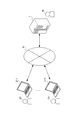
- FIG. 1 is a block diagram illustrating a configuration of an information processing system including a server according to a first embodiment of the information processing apparatus of the present invention.
- FIG. 2 is a block diagram illustrating an example of a hardware configuration of a server in the information processing system illustrated in FIG. 1.
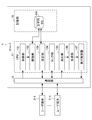
- FIG. 3 is a functional block diagram illustrating an example of a functional configuration that realizes a place providing process, a lock process, and a whiteboard display process among the functional configurations of the server in FIG. 2.
- FIG. 9 is a diagram illustrating a specific example of a UI when an online meeting is established for each character string.
- FIG. 9 is a diagram illustrating a specific example of a UI when a user has participated in an online meeting.
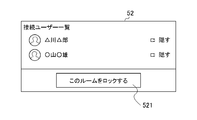
- FIG. 9 is a diagram illustrating a specific example of a UI when performing a predetermined operation for prohibiting (locking) a user from additionally participating in an online meeting.
- FIG. 9 is a diagram illustrating a specific example of a whiteboard displayed in an online meeting.
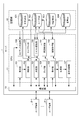
- place provision processing, lock processing, shared tool provision processing, evidence support processing, attendee reception processing, capture processing, text conversion processing, screen It is a functional block diagram showing an example of the functional composition which realizes amendment processing and business management processing.
- FIG. 1 is a block diagram illustrating a configuration of an information processing system including a server according to a first embodiment of the information processing apparatus of the present invention.
- the information processing system shown in FIG. 1 includes a server 1 managed by a service provider M and user terminals 2-1 to 2-n operated by users U1 to Un (n is an integer of 1 or more). It is configured to include each.
- the server 1 and the user terminals 2-1 to 2-n are mutually connected via a network N such as the Internet.
- a network N such as the Internet.
- user U when it is not necessary to individually distinguish each of the users U1 to Un, they are collectively referred to as “user U”. Further, when it is not necessary to individually distinguish each of the user terminals 2-1 to 2-n, they are collectively referred to as "user terminal 2".
- the server 1 manages each operation of the user terminal 2.
- the server 1 performs various processes in order to provide the user U with a virtual place (hereinafter, referred to as “online meeting”) A in which a plurality of users U can communicate with each other on the Web. Execute.
- the processing performed by the server 1 regarding the provision of the online meeting A is referred to as “place providing processing”.
- the server 1 executes the following processing as a part of the place providing processing. In other words, triggered by the execution of a predetermined operation, a process for inhibiting (locking) the user U from additionally participating in the online meeting A thereafter (hereinafter referred to as “lock process”) is executed. .
- the server 1 displays a whiteboard 53 that can be simultaneously viewed and drawn by a plurality of users U participating in the online meeting A (hereinafter, referred to as a “whiteboard” Display process ”).
- a whiteboard 53 that can be simultaneously viewed and drawn by a plurality of users U participating in the online meeting A
- the user terminal 2 includes, for example, a personal computer, a smartphone, a tablet, and the like, and is operated by the user U.
- the user terminal 2 is configured by a smartphone or a tablet, the following advantages can be enjoyed by utilizing the portability. That is, when an online meeting A is held with a customer using a smartphone or tablet, the merits can be enjoyed when the product to be sold has no portability, such as the sale of a used car or the sale of real estate. That is, the used car dealer can make a business negotiation with a customer (user U) who is considering purchasing a used car at home while viewing the used car in real time. In addition, a real estate seller can conduct business negotiations with a customer (user U) who is considering purchasing real estate at home while viewing the real estate for sale in real time.
- FIG. 2 is a block diagram showing an example of a hardware configuration of a server in the information processing system shown in FIG.
- the server 1 includes a CPU (Central Processing Unit) 11, a ROM (Read Only Memory) 12, a RAM (Random Access Memory) 13, a bus 14, an input / output interface 15, an output unit 16, an input unit 17, , A storage unit 18, a communication unit 19, and a drive 20.
- CPU Central Processing Unit
- ROM Read Only Memory
- RAM Random Access Memory
- the CPU 11 executes various processes according to a program recorded in the ROM 12 or a program loaded from the storage unit 18 to the RAM 13.
- the RAM 13 also stores data and the like necessary for the CPU 11 to execute various processes.
- the CPU 11, the ROM 12, and the RAM 13 are connected to each other via a bus 14.
- the bus 14 is also connected to an input / output interface 15.
- the output unit 16, the input unit 17, the storage unit 18, the communication unit 19, and the drive 20 are connected to the input / output interface 15.
- the output unit 16 is configured by a display such as a liquid crystal and displays various images.
- the input unit 17 is composed of various hardware buttons and the like, and inputs various information in accordance with an instruction operation of an operator.
- the storage unit 18 is configured by a DRAM (Dynamic Random Access Memory) or the like, and stores various data.
- the communication unit 19 controls communication performed with another device (user terminal 2) via the network N including the Internet.
- the drive 20 is provided as needed.
- a removable medium 30 made of a magnetic disk, an optical disk, a magneto-optical disk, a semiconductor memory, or the like is appropriately mounted.
- the program read from the removable medium 30 by the drive 20 is installed in the storage unit 18 as needed. Further, the removable medium 30 can store various data stored in the storage unit 18 in the same manner as the storage unit 18.
- the user terminal 2 in the information processing system in FIG. 1 can have the same configuration as the hardware configuration of the server 1 in FIG.
- the output terminal 16 and the input unit 17 include a touch panel.
- the service provider M can provide the user U with an online meeting.
- FIG. 3 is a functional block diagram illustrating an example of a functional configuration that realizes a place providing process, a lock process, and a shared tool providing process among the functional configurations of the server in FIG. 2.
- the obtaining unit 101, the opening unit 102, and the determining unit 103 function.
- the lock unit 104 functions.
- the receiving unit 105, the generating unit 106, and the display control unit 107 function.
- a character string DB 401 is provided in one area of the storage unit 18 of the server 1.
- the obtaining unit 101 obtains a first character string input by a first user. Specifically, when the character string K is input by the user U who wants to participate in the online meeting, the obtaining unit 101 obtains the character string K.
- the specific number of characters of the character string K is not particularly limited.
- a desired character string K of the user U1 who establishes the online meeting A can be used.
- a character string K having a number of characters such as one character, five characters, ten characters, and twenty characters can be used.
- the user can use not only a simple character string such as a URL but an arbitrary character string that is easy for the user to use. For example, any user can easily use a short character string that can be easily stored. You can open an online meeting.
- the establishing unit 102 establishes a virtual place on the Web where the users can communicate with each other for each of the acquired first character strings. Specifically, the establishment unit 102 establishes each of the online meetings A1 to Am on the Web for each of the character strings K1 to Km (m is an arbitrary integer value of 1 or more) acquired by the acquisition unit 101. . That is, the online meeting A is established one-to-one with a predetermined character string K. When the online meetings A1 to Am are opened, the character strings K1 to Km are stored and managed as “character strings in use” in the character string DB 401.
- a specific example of a UI (User Interface) for establishing an online meeting for each character string K will be described later with reference to FIG.
- the determining unit 103 determines whether or not to participate in the place of the second user based on the second character string input by the second user and the first character string. More specifically, for example, if the user U2 who wants to join the online meeting A1 can join the online meeting when there is an online meeting corresponding to the character string input by the user U2, the determining unit 103 can join the online meeting A1. .
- a specific example of the UI in a state where the user U has participated in the online meeting A will be described later with reference to FIG.
- the server 1 executes the lock process to prohibit (lock) the user U from additionally participating in the online meeting.
- the lock unit 104 functions.
- the lock unit 104 prohibits (locks) the user U from additionally participating in the venue, triggered by a predetermined operation being performed. Specifically, for example, the lock unit 104 prohibits (locks) the user U from participating in the online meeting A1 thereafter, triggered by a predetermined input operation by the user U1 who opened the online meeting A1. As a result, the user U1 who has opened the online meeting A1 can prohibit (lock) the participation of the other users U at the stage where the desired user U's participation in the online meeting A1 can be confirmed. As a result, the user U1 can cause only the user U intended to participate in the online meeting A1, so that, for example, leakage of information exchanged in the online meeting A1 can be prevented.
- the lock unit 104 does not prohibit all users U from participating in the online meeting A1 after the above-described predetermined operation, but prohibits anyone other than the predetermined user U from participating in the online meeting A1. be able to.
- the lock unit 104 may register the user U who is permitted to participate in the online meeting A1 in advance.
- a specific example of a UI for performing a predetermined operation for inhibiting (locking) the user U from additionally participating in the online meeting A will be described later with reference to FIG.
- White board display processing When the user U attends the online meeting A, the user U can communicate with other participants. Specifically, communication can be performed using various tools such as chat and voice communication. In addition, when it is desired to share materials between participants, a whiteboard that can be viewed and drawn by the participants at the same time can be displayed. At this time, the server 1 executes a whiteboard display process. As described above, when the white board display process is performed, the receiving unit 105, the generating unit 106, and the display control unit 107 function.
- the receiving unit 105 receives the drawing input of each of a plurality of users participating in the venue. Specifically, when a drawing input is performed on the whiteboard 53 displayed on the user terminal 2 by an operation of a plurality of users U participating in the online meeting A, the accepting unit 105 determines that the plurality of users U Accept each drawing input.
- the generation unit 106 generates drawing information according to the received drawing input. Specifically, the generation unit 106 generates drawing information in accordance with the drawing input of each of the plurality of users U received by the receiving unit 105.
- the display control unit 107 executes control for displaying the generated drawing information on the display unit. Specifically, the display control unit 107 executes control to display the drawing information generated by the generation unit 106 on each of the user terminals 2 operated by each of the plurality of users U.
- the drawing input by the user U1 is displayed on the user terminals 2-1 to 2-3 in real time.
- the content of communication between the participants of the online meeting A1 is enhanced, and the online meeting A1 can be used efficiently.
- a specific example of the whiteboard 53 displayed in the online meeting A will be described later with reference to FIG.
- the character string DB 401 stores and manages one or more character strings K used for establishing the online meeting A.
- FIG. 4 is a diagram illustrating a specific example of the UI 50 when the online meeting A is opened for each character string K.
- the user U who wants to open the online meeting A can easily open the online meeting A by inputting a desired character string K into the input field 501.
- “abcde” is input as the character string K. Therefore, when the connection button 502 is pressed, the character string “abcde” is acquired by the acquiring unit 101 (FIG. 3). Then, if the character string “abcde” is not in use, the opening unit 102 (FIG. 3) opens an online meeting A corresponding to “abcde”.
- the UI 50 is provided with a button 503 and a button 504 below the input field 501 and the connection button 502.
- the button 503 is a button for copying a URL for accessing the online meeting A. By pressing this button 503, the URL can be easily pasted into another text file or mail document.
- the button 504 is a button for transmitting an invitation mail for having another user U participate in the online meeting A. By pressing this button 504, the user U who has opened the online meeting A can easily send an invitation mail to the desired user U.
- the transmitted invitation mail displays an invitation text, a URL for accessing and joining the online meeting A, a link button, and the like.
- the user U who has received the invitation mail can easily join the online meeting A simply by clicking the URL or the link button. That is, the user U that has received the invitation mail can easily participate in the online meeting A without performing an operation of setting an ID and a password to log in or downloading a special application program or the like. Furthermore, in this service, it is possible to easily exchange keywords without necessarily using the above-mentioned invitation mail. That is, in the present service, the user U who wants to participate in the online meeting A simply inputs an arbitrary character string K (for example, “abcde”) on the top page of a website or the like that operates the present service. At the online meeting A. In general, this arbitrary character string K can be set as a character string that is shorter and easier to remember than a URL or the like. Therefore, it is possible to easily exchange data simply by transmitting the character string by telephone or the like.
- an arbitrary character string K for example, “abcde”
- FIG. 5 is a diagram showing a specific example of the UI 51 in a state where the user U has participated in the online meeting A.
- the UI 51 displays a captured image of the user U and a chat 511 as a communication tool using text. Further, the UI 51 is provided with a button 512, a button 513, a button 514, and a button 515.
- the button 512 is a button to be pressed when a predetermined screen is to be shared among a plurality of users U participating in the online meeting A. When the button 512 is pressed, for example, the screen displayed on the user terminal 2-1 of the user U1, which is one of the participants, is shared with other participants (that is, the screen is simultaneously visible). .
- the button 513 is a button to be pressed when a plurality of users U participating in the online meeting A want to share a memo.
- a shared memo that can be viewed and edited by all the participants is displayed.
- the button 514 is pressed when a plurality of users U participating in the online meeting A display the whiteboard 53 that can be simultaneously viewed and drawn.
- the button 514 is pressed, the above-described white board display processing is executed in the server 1 and the white board 53 is displayed on each of the user terminals 2 of the participants.
- the button 515 is a button to be pressed when the user wants to capture the displayed screen.
- Such various functions associated with the service are particularly useful when the service is used in a business meeting or the like. That is, when a business meeting is held, it is necessary to exchange opinions among participating users, unlike chat and the like. Furthermore, such exchange of opinions often involves specialized knowledge and complicated exchanges, and it is often difficult to understand simply by exchanging messages on the Web. In such a case, for example, by adopting the white boat process of the present service, each of the users participating in the online meeting A can hold a meeting while appropriately inserting figures and tables, and exchange opinions more easily. It can be carried out.
- FIG. 6 is a diagram showing a specific example of the UI 52 for performing a predetermined operation for prohibiting (locking) the user U from additionally participating in the online meeting A.
- the server 1 is caused to execute the lock processing as described above. Specifically, as shown in FIG. 6, a UI 52 for executing the lock process is displayed, so that the user U who has opened the online meeting A confirms the participation (ie, connection) of all the participants. Button 521 is pressed. In other words, a list of users U who have already joined (that is, connected), including the user U who has opened the online meeting A, is displayed in the “connected user list”. In the example of FIG. 6, two users U, “Tetsuro Takakawa” and “Yu Oyama” have already participated (ie, connected).
- such a lock function is particularly useful when this service is used in a business meeting or the like. That is, in a business meeting, it is extremely important to manage the contents of the meeting, and it is necessary for the participants of the meeting to strictly manage them. Further, for example, even in the same online meeting, a specification that limits the users who can participate in accordance with the information exchanged is also conceivable. More specifically, it is assumed that A1 to A3 related to the company A and B1 to B3 related to the party B participate in the online meeting A. In this regard, it is generally desirable that a total of six people A1 to A3 and B1 to B3 actively exchange opinions.
- FIG. 7 is a diagram showing a specific example of the whiteboard 53 displayed in the online meeting A.
- the server 1 executes a whiteboard display process, and the whiteboard 53 as shown in FIG.
- the whiteboard 53 can be used as follows. That is, as an example, it is assumed that the participants of the online meeting A1 are only the user U1 who is the creator and the user U2 who has received the invitation mail from the user U2. In this case, if the user U1 is a diplomat of an insurance company that sells insurance products and the user U2 is the customer, information that cannot be transmitted by e-mail or telephone can be exchanged at the online meeting A1.
- the user U2 transmits a chat message such as “Is this compensation content true?” While drawing the item included in the compensation content of a certain insurance product in a red circle. Can also.
- the user U1 can transmit a message by chat such as “True.
- the content of the compensation is exactly the centerpiece of this insurance”.
- the user U2 can also transmit a message by chat such as "this compensation content is also noteworthy” while drawing another matter in a blue circle.
- the content of communication between the participants of the online meeting A1 is enhanced, and the online meeting A1 can be used efficiently.
- the hardware configuration of the server according to the second embodiment of the information processing apparatus of the present invention and the configuration of the information processing system including the server are all the same as the respective configurations shown in the first embodiment. Therefore, the description of the hardware configuration of the server according to the second embodiment of the information processing apparatus of the present invention and the configuration of the information processing system including the server will be omitted.
- the server 1 according to the second embodiment of the information processing apparatus of the present invention includes, as a part of the place providing processing, in addition to the above processing, evidence support processing, attendee reception processing, capture processing, text conversion processing, screen Correction processing and business management processing can be further executed.
- “Evidence support processing” refers to processing for supporting evidence on contracts and the like exchanged between participants of the online meeting A.
- the “attendance reception process” refers to a process of receiving the participation of a person who intends to participate in online meeting A by stealth for the purpose of assistance or the like.
- the “capture process” refers to a process of displaying a capture screen that can be visually recognized and drawn by the participants of the online meeting A at the same time.
- the “text conversion process” is a process of converting the contents (voice data) spoken by a participant of the online meeting A into text data in a language used by each of the other participants (transcription) and displaying the converted text data.
- “Screen modification processing” refers to processing for modifying the appearance of a screen displaying the UI of online meeting A.
- “Business management processing” refers to processing for managing the business of the participants of the online meeting A.
- FIG. 8 shows, among the functional configurations of the server according to the second embodiment of the information processing apparatus of the present invention, place providing processing, lock processing, shared tool providing processing, evidence support processing, attendee reception processing, capture processing, text processing. It is a functional block diagram showing an example of a functional configuration which realizes conversion processing, screen correction processing, and business management processing.
- the evidence support unit 108 functions.
- the determination unit 103 functions.
- the receiving unit 105, the generation unit 106, the display control unit 107, and the capture unit 109 function.
- the text conversion process is performed, the text conversion unit 110 functions.
- the screen correction processing is performed, the screen correction unit 111 functions.
- the business management unit 112 functions. In one area of the storage unit 18 of the server 1, a character string DB 401, a user DB 402, an imprint DB 403, and a voice DB 404 are provided. Note that the functional configuration for realizing each of the place providing process, the lock process, and the shared tool providing process in the CPU 11 of the server 1 according to the second embodiment is the same as the functional configuration of the above-described first embodiment. Therefore, the description is omitted.
- the evidence support unit 108 provides support for providing public evidence to documents such as contracts exchanged at the venue. Specifically, though not shown, when a button provided with a notation such as “application for electronic certificate” provided on the UI of the online meeting A is pressed, the evidence support unit 108 performs the following processing. I do. That is, the evidence support unit 108 displays a screen for registering a seal or a signature (hereinafter, referred to as a “seal or the like”) to be attached to a contract or the like to be evidenced (hereinafter, referred to as a “seal or the like registration screen”). Display.
- a seal or a signature hereinafter, referred to as a “seal or the like”
- the user U has a selection for registering an imprint or the like from the displayed imprint or the like registration screen, and is issued a credential (an electronic certificate issued by a third-party organization) for the selected imprint or the like. Can apply for The registered imprints and the like are stored and managed in the imprint etc. DB 403.
- the evidence support unit 108 presents the user U with a seal imprint or the like on which the credential was issued, to a contract or the like to be subject to the evidence. Accordingly, by participating in the online meeting A, the user U can perform a series of contract activities up to negotiation, agreement, and contract while communicating with other users U. As a result, it is possible to increase the efficiency of contract activities that have been inefficient by performing face-to-face from the viewpoint of certainty.
- the user U can easily participate in the online meeting A only by inputting a predetermined character string in a predetermined field of the UI, but without knowing the existence of the other users U, in a so-called stealth manner. You can also participate.
- the server 1 executes the attendee reception process.
- the determination unit 103 functions.
- the determining unit 103 determines whether or not the third user who wants to participate in the place by stealth can participate in the venue for the purpose of assistance in addition to the processing shown in the first embodiment (FIG. 3).
- the decision unit 103 approves the participation of the third user, the third user can stealthly participate in the venue.
- the user U can stealthly participate as a “seat” for the purpose of, for example, assisting the online meeting A (for example, creating minutes).
- the user U who is a direct supervisor of the user U who is a normal participant can also participate in stealth as a "seat" for the purpose of giving a lecture to the user U who reports to the subordinate.
- Capture processing When the user U participates in the online meeting A, the user U can display a capture screen that can be viewed and drawn simultaneously with other participants. At this time, the server 1 executes a capture process. As described above, when the capture processing is performed, the reception unit 105, the generation unit 106, the display control unit 107, and the capture unit 109 function.
- the capture unit 109 captures a screen displayed on one user's terminal among a plurality of users participating in the venue, and executes control to display the captured screen on another user's terminal. Specifically, the capture unit 109 captures a screen displayed on the user terminal 2 of one or more of the users U among the plurality of users U participating in the online meeting A, and converts the captured screen to another user U. The control for displaying on each user terminal 2 of U is executed.
- the receiving unit 105 receives drawing input to the capture screen by each of a plurality of users participating in the venue. More specifically, the reception unit 105 draws on the capture screen displayed on each of the user terminals 2-1 to 2-n by operating each of the plurality of users U1 to Un participating in the online meeting A. When an input is made, the drawing input is accepted.
- the generating unit 106 generates drawing information according to the drawing input received by the receiving unit 105. Specifically, the generation unit 106 generates the drawing information according to the contents of the drawing input to the capture screen by each of the users U1 to Un received by the receiving unit 105.
- the display control unit 107 executes control for displaying the generated drawing information on the display unit. Specifically, the display control unit 107 executes control to superimpose the drawing information generated by the generating unit 106 on the capture screen displayed on each of the user terminals 2-1 to 2-n. Thus, for example, when the capture screen of a certain user terminal 2 is displayed on each of the other user terminals 2, the result of drawing input on the capture screen is directly reflected on the respective display screens of the other user terminals 2. . Specifically, for example, when the examination items in the online meeting A relate to the UI under development, the UI under development is displayed on all the user terminals 2 of the participants, and the specific examination point is determined. Discussions can be advanced while sharing. As a result, an easy-to-understand and efficient online meeting can be realized for all the participants.
- the user U can have the contents (voice data) spoken by another participant of the online meeting A converted to text data in a language used by the user U (transcription).
- the server 1 executes a text conversion process. As described above, when the text conversion process is performed, the text conversion unit 110 functions.
- the text conversion unit 110 stores, in the voice DB 404, data of voice uttered by the user participating in the venue. Then, control is performed to convert the voice data into text data in a language used by each of the other users participating in the venue and display the text data.
- the language used by each of the other users participating in the venue is recorded in the user DB 402. That is, the text conversion unit 110 executes a control of converting voice data spoken by the user U in the online meeting A into text data in a language used by another user and displaying the text data.
- the text conversion unit 110 converts the voice data spoken in English by the user U1 into text data in a language other than English (eg, Japanese, Chinese, etc.) used by each of the users U2 to Un.
- the control executes the control to convert (transcribe and translate) and display.
- the converted text data can be displayed in captions for each of the users U2 to Un, and the minutes can be created for each language.
- the service can be applied to an international conference in which a plurality of languages fly. Further, it is possible to support the work of the user U who has hearing impairment.
- the user U can correct the appearance of the UI of the online meeting A displayed on the user terminal 2.
- the server 1 executes a screen correction process.
- the screen correction unit 111 functions.
- the screen correction unit 111 performs control for correcting the appearance of a UI displayed on a terminal of a user who participates in a venue. Specifically, the screen correction unit 111 executes control for correcting the appearance of the UI displayed on the user terminal 2 of the user U participating in the online meeting A.
- the specific method by which the screen correction unit 111 corrects the appearance of the UI displayed on the user terminal 2 is not particularly limited. For example, by adjusting the brightness and the like, “visibility” and “favorableness” given to the user U who sees the UI can be improved.
- the screen correction unit 111 may adjust the brightness or the like according to the content of the operation of the user U on the user terminal 2 or may automatically adjust the brightness or the like according to the content displayed on the UI (for example, the brightness of the captured image of the user U). May be used to adjust the brightness and the like.
- the work management unit 112 manages the work time of the user by counting the time at which the user has participated in the venue. Specifically, the work management unit 112 manages the work time of the user U by counting the time when the user U has participated in the online meeting A, which is recorded in the user DB 402. Accordingly, for example, when the user U participates in the online meeting A as an operator of the call center, the participation time is automatically counted. As a result, the employer of the user U can pay the user U a reward according to the automatically counted time.
- the present invention is not limited to the above-described embodiments, and modifications, improvements, and the like within a range that can achieve the object of the present invention are included in the present invention. is there.
- the effects described in the above embodiments merely enumerate the most preferable effects resulting from the present invention, and the effects according to the present invention are not limited to those described in the above embodiments. .
- a method of inputting in the input field 501 shown in FIG. 4 is used as a specific example of the predetermined input method for inputting the character string K when opening the online meeting A.
- voice input may be performed via a microphone (not shown) provided in the user terminal 2, or another method may be used.
- a method of inviting a desired user U to the online meeting A by using an invitation mail is used, but this is merely an example.
- a method of inviting the user U to the online meeting A by transmitting a character string K corresponding to the online meeting A by telephone or the like may be used.
- the user U who has received the transmission of the character string K can participate in the online meeting A by inputting the character string K using a predetermined input method.
- the “predetermined input method” here is not particularly limited, and any input method such as input via the UI displayed on the user terminal 2 or input by voice can be used.
- a program constituting the software is installed in a computer or the like from a network or a recording medium.
- the computer may be a computer embedded in dedicated hardware. Further, the computer may be a computer that can execute various functions by installing various programs, for example, a general-purpose personal computer.
- a recording medium including such a program is provided to the user in a state where the recording medium is not only configured as a removable medium distributed separately from the apparatus main body to provide the program to the user but also pre-installed in the apparatus main body. It is composed of a recording medium and the like.
- the removable medium includes, for example, a magnetic disk (including a floppy disk), an optical disk, a magneto-optical disk, or the like.
- the optical disc is composed of, for example, a CD-ROM (Compact Disc-Only Only Memory Y), a DVD (Digital Versatile Disc), and the like.
- the magneto-optical disk is constituted by an MD (MINI @ DISK) or the like.
- the recording medium provided to the user in a state where the recording medium is pre-installed in the apparatus main body includes, for example, a ROM in which a program is recorded, a hard disk included in a storage unit, and the like.
- the steps of describing a program recorded on a recording medium are not only performed in chronological order according to the order, but are not necessarily performed in chronological order. This also includes the processing to be executed. Further, in the present specification, the term system refers to an entire apparatus including a plurality of devices and a plurality of means.
- the system configuration shown in FIG. 1 is merely an example for achieving the object of the present invention, and is not particularly limited. That is, it is only necessary that a function capable of performing the role of each device is provided in the information processing system, and each device may be directly connected without going through a network.
- Each hardware configuration shown in FIG. 2 is merely an example for achieving the object of the present invention, and is not particularly limited.
- one piece of hardware may have the function of another piece of hardware, or a plurality of pieces of hardware having the same function may be included.
- the functional configuration in FIG. 3 is merely an example and is not particularly limited. That is, it is sufficient that the server 1 has a function capable of executing the series of processes described above as a whole, and what kind of functional block is used to realize this function is not particularly limited to the example of FIG. Further, one functional block may be constituted by hardware alone, may be constituted by software alone, or may be constituted by a combination thereof.
- the information processing apparatus to which the present invention is applied only needs to have the following configuration, and can take various embodiments. That is, the information processing apparatus to which the present invention is applied (for example, the server 1 in FIG. 1) An obtaining unit (for example, the obtaining unit 101 in FIG. 3) that obtains a first character string (for example, the character string K1) input by the first user (for example, the user U1); Opening means (for example, the opening unit 102 in FIG. 3) for opening a virtual place (for example, online meeting A) on the Web where the participating users can communicate with each other for each of the acquired first character strings.
- a first character string for example, the character string K1
- Opening means for example, the opening unit 102 in FIG. 3
- a virtual place for example, online meeting A
- Means for example, the determination unit 103 in FIG. 3; Is provided. Accordingly, anyone can easily open an online meeting using a short character string that can be easily stored, instead of a redundant character string such as a URL.
- a lock means (for example, FIG. 3 shown in FIG. 3) that prohibits another user from participating in the place after that when a predetermined operation (for example, an operation via the UI 52 in FIG. 6) is performed.
- a lock section 104) can be further provided.
- the user U who has opened the online meeting A can prohibit (lock) the participation of the other users U at the stage where the participation of the desired user U in the online meeting A can be confirmed.
- a display means for example, a whiteboard 53 in FIG. 7) that can be visually recognized by a plurality of users participating in the place;
- a receiving unit for example, the receiving unit 105 in FIG. 3) that receives the drawing input of each of the plurality of users;
- Generating means for example, the generating unit 106 in FIG. 3) for generating drawing information according to the received drawing input;
- a display control unit for example, a display control unit 107 in FIG. 3) for performing control to display the generated drawing information on the display unit; Can be further provided.
- the drawing input by the user U1 is displayed on the user terminals 2-1 to 2-3 in real time.
- the content of communication between the participants of the online meeting A1 is enhanced, and the online meeting A1 can be used efficiently.
- a capture control unit for example, the capture unit 109 in FIG. 8 for executing
- the receiving means for example, the receiving unit 105 in FIG. 8) receives drawing input to the capture screen by each of the plurality of users participating in the place
- the generating unit for example, the generating unit 106 in FIG. 8) generates drawing information according to the drawing input received by the receiving unit
- the display control unit (for example, the display control unit 107 in FIG. 8) can execute control for displaying the generated drawing information on the capture screen.
- a screen displayed on the terminal of one user among a plurality of users participating in a virtual place where the participating users can communicate with each other is captured. Then, the capture screen is displayed on a terminal of another user other than the one user.
- the result of drawing input on the capture screen is directly reflected on each display screen of the other user terminal 2.
- Evidence support means for example, the evidence support unit 108 in FIG. 8 for executing control requested to the institution can be further provided.
- support is provided for providing evidence to a predetermined document exchanged in a virtual place where the participating users can communicate with each other.
- This allows the user to perform a series of contract activities up to negotiation, agreement, and contract online while communicating with other users.
- the determination means (for example, the determination unit 103 in FIG. 8) can further determine whether or not the third user for the purpose of assistance can participate in the place by stealth.
- the boss of a normal participant can also participate in stealth as a "seat attendant" for the purpose of giving a lecture to his / her direct reports.
Landscapes
- Engineering & Computer Science (AREA)
- Theoretical Computer Science (AREA)
- Physics & Mathematics (AREA)
- General Engineering & Computer Science (AREA)
- General Physics & Mathematics (AREA)
- Information Transfer Between Computers (AREA)
- Management, Administration, Business Operations System, And Electronic Commerce (AREA)
Priority Applications (1)
| Application Number | Priority Date | Filing Date | Title |
|---|---|---|---|
| JP2020520164A JP6883902B2 (ja) | 2018-09-06 | 2019-09-05 | 情報処理装置 |
Applications Claiming Priority (2)
| Application Number | Priority Date | Filing Date | Title |
|---|---|---|---|
| JP2018-166829 | 2018-09-06 | ||
| JP2018166829 | 2018-09-06 |
Publications (1)
| Publication Number | Publication Date |
|---|---|
| WO2020050352A1 true WO2020050352A1 (ja) | 2020-03-12 |
Family
ID=69722411
Family Applications (1)
| Application Number | Title | Priority Date | Filing Date |
|---|---|---|---|
| PCT/JP2019/034916 Ceased WO2020050352A1 (ja) | 2018-09-06 | 2019-09-05 | 情報処理装置 |
Country Status (2)
| Country | Link |
|---|---|
| JP (2) | JP6883902B2 (enExample) |
| WO (1) | WO2020050352A1 (enExample) |
Cited By (1)
| Publication number | Priority date | Publication date | Assignee | Title |
|---|---|---|---|---|
| JP2021163250A (ja) * | 2020-03-31 | 2021-10-11 | 株式会社リコー | 会議登録システム、ユーザ端末、管理システム、情報処理方法、及びプログラム |
Citations (6)
| Publication number | Priority date | Publication date | Assignee | Title |
|---|---|---|---|---|
| US6167432A (en) * | 1996-02-29 | 2000-12-26 | Webex Communications, Inc., | Method for creating peer-to-peer connections over an interconnected network to facilitate conferencing among users |
| JP2002259315A (ja) * | 2001-02-27 | 2002-09-13 | Fujitsu Ltd | 会議サーバプログラム |
| JP2003169051A (ja) * | 2001-11-29 | 2003-06-13 | Shachihata Inc | 電子印鑑システム |
| JP2005190317A (ja) * | 2003-12-26 | 2005-07-14 | Canon Sales Co Inc | ネットワーク会議サーバ、ネットワーク会議方法及びそのプログラム |
| JP2006146629A (ja) * | 2004-11-22 | 2006-06-08 | Hitachi Ltd | 画面共有システム及び情報処理装置 |
| WO2008124373A1 (en) * | 2007-04-10 | 2008-10-16 | Microsoft Corporation | Emulation of room lock and lobby feature in distributed conferencing system |
Family Cites Families (3)
| Publication number | Priority date | Publication date | Assignee | Title |
|---|---|---|---|---|
| JPH1141578A (ja) * | 1997-07-18 | 1999-02-12 | Ricoh Co Ltd | 電子会議システム |
| JP2005191642A (ja) * | 2003-12-24 | 2005-07-14 | Ricoh Co Ltd | 仮想オフィス空間提供プログラム、仮想オフィス空間提供装置、仮想オフィス空間提供方法、仮想オフィス空間提供システム、及び仮想オフィス空間提供プログラムを記憶する記憶媒体 |
| JP7024175B2 (ja) * | 2016-03-24 | 2022-02-24 | カシオ計算機株式会社 | 端末、サーバ、システム、管理方法及びプログラム |
-
2019
- 2019-09-05 WO PCT/JP2019/034916 patent/WO2020050352A1/ja not_active Ceased
- 2019-09-05 JP JP2020520164A patent/JP6883902B2/ja active Active
-
2021
- 2021-04-28 JP JP2021076568A patent/JP7391390B2/ja active Active
Patent Citations (6)
| Publication number | Priority date | Publication date | Assignee | Title |
|---|---|---|---|---|
| US6167432A (en) * | 1996-02-29 | 2000-12-26 | Webex Communications, Inc., | Method for creating peer-to-peer connections over an interconnected network to facilitate conferencing among users |
| JP2002259315A (ja) * | 2001-02-27 | 2002-09-13 | Fujitsu Ltd | 会議サーバプログラム |
| JP2003169051A (ja) * | 2001-11-29 | 2003-06-13 | Shachihata Inc | 電子印鑑システム |
| JP2005190317A (ja) * | 2003-12-26 | 2005-07-14 | Canon Sales Co Inc | ネットワーク会議サーバ、ネットワーク会議方法及びそのプログラム |
| JP2006146629A (ja) * | 2004-11-22 | 2006-06-08 | Hitachi Ltd | 画面共有システム及び情報処理装置 |
| WO2008124373A1 (en) * | 2007-04-10 | 2008-10-16 | Microsoft Corporation | Emulation of room lock and lobby feature in distributed conferencing system |
Cited By (2)
| Publication number | Priority date | Publication date | Assignee | Title |
|---|---|---|---|---|
| JP2021163250A (ja) * | 2020-03-31 | 2021-10-11 | 株式会社リコー | 会議登録システム、ユーザ端末、管理システム、情報処理方法、及びプログラム |
| JP7491025B2 (ja) | 2020-03-31 | 2024-05-28 | 株式会社リコー | 会議登録システム、管理システム、情報処理方法、及びプログラム |
Also Published As
| Publication number | Publication date |
|---|---|
| JPWO2020050352A1 (ja) | 2020-09-17 |
| JP2021144715A (ja) | 2021-09-24 |
| JP6883902B2 (ja) | 2021-06-09 |
| JP7391390B2 (ja) | 2023-12-05 |
Similar Documents
| Publication | Publication Date | Title |
|---|---|---|
| Yankelovich et al. | Meeting central: making distributed meetings more effective | |
| US7966370B1 (en) | Templating and provisioning of collaborative facilities for a data-agnostic collaboration service | |
| US9380264B1 (en) | System and method for video communication | |
| Hurst | Web conferencing and collaboration tools and trends | |
| US20230412539A1 (en) | Limited functionality interface for communication platform | |
| US8200758B2 (en) | Management of organizational boundaries in unified communications systems | |
| CN115668185B (zh) | 用于在基于组的通信系统中管理外部批准供应和外部消息传递通信请求的方法和设备 | |
| US20100306122A1 (en) | System and Method for Providing an Electronic Literature Club in a Network Environment | |
| US10404631B2 (en) | Creating groups in a messaging system | |
| US9832423B2 (en) | Displaying concurrently presented versions in web conferences | |
| US20100321465A1 (en) | Method, System and Computer Program Product for Mobile Telepresence Interactions | |
| JP2012511747A (ja) | デジタル相互作用を管理するシステムおよび方法 | |
| JP7672827B2 (ja) | 情報処理装置、情報処理方法、及びプログラム | |
| US20130262992A1 (en) | Methods and systems for electronic editing and/or signing | |
| JP2022530962A (ja) | 感情状態を評価するための電子システム及び方法 | |
| JP7491025B2 (ja) | 会議登録システム、管理システム、情報処理方法、及びプログラム | |
| US9237140B1 (en) | Acceptance of policies for cross-company online sessions | |
| JP7391390B2 (ja) | 情報処理装置 | |
| JP2023011598A (ja) | テキストデータ送受信システム、共用端末、情報処理装置、ユーザ端末、情報処理方法及びプログラム | |
| WO2017074848A1 (en) | Protection of content displayed on a communal device | |
| Antoniou et al. | ‘Waiting at the dinner table for scraps’: a qualitative study of the help-seeking experiences of heterosexual men living with HIV infection | |
| JP7496658B1 (ja) | 情報処理装置、システムおよび情報処理方法 | |
| Cooper | The digital mediator: How technology is setting the new standard | |
| Jain et al. | Synchronized development using webrtc real-time collaboration in webrtc | |
| US20250330344A1 (en) | Method for eliminating digital signing delays in online conferences |
Legal Events
| Date | Code | Title | Description |
|---|---|---|---|
| ENP | Entry into the national phase |
Ref document number: 2020520164 Country of ref document: JP Kind code of ref document: A |
|
| 121 | Ep: the epo has been informed by wipo that ep was designated in this application |
Ref document number: 19856933 Country of ref document: EP Kind code of ref document: A1 |
|
| NENP | Non-entry into the national phase |
Ref country code: DE |
|
| 122 | Ep: pct application non-entry in european phase |
Ref document number: 19856933 Country of ref document: EP Kind code of ref document: A1 |