WO2019215845A1 - 表示制御装置および表示制御方法 - Google Patents
表示制御装置および表示制御方法 Download PDFInfo
- Publication number
- WO2019215845A1 WO2019215845A1 PCT/JP2018/017945 JP2018017945W WO2019215845A1 WO 2019215845 A1 WO2019215845 A1 WO 2019215845A1 JP 2018017945 W JP2018017945 W JP 2018017945W WO 2019215845 A1 WO2019215845 A1 WO 2019215845A1
- Authority
- WO
- WIPO (PCT)
- Prior art keywords
- menu button
- display control
- touch
- touch panel
- mode
- Prior art date
- Legal status (The legal status is an assumption and is not a legal conclusion. Google has not performed a legal analysis and makes no representation as to the accuracy of the status listed.)
- Ceased
Links
Images











Classifications
-
- G—PHYSICS
- G06—COMPUTING OR CALCULATING; COUNTING
- G06F—ELECTRIC DIGITAL DATA PROCESSING
- G06F3/00—Input arrangements for transferring data to be processed into a form capable of being handled by the computer; Output arrangements for transferring data from processing unit to output unit, e.g. interface arrangements
- G06F3/01—Input arrangements or combined input and output arrangements for interaction between user and computer
- G06F3/048—Interaction techniques based on graphical user interfaces [GUI]
- G06F3/0481—Interaction techniques based on graphical user interfaces [GUI] based on specific properties of the displayed interaction object or a metaphor-based environment, e.g. interaction with desktop elements like windows or icons, or assisted by a cursor's changing behaviour or appearance
- G06F3/0482—Interaction with lists of selectable items, e.g. menus
-
- G—PHYSICS
- G06—COMPUTING OR CALCULATING; COUNTING
- G06F—ELECTRIC DIGITAL DATA PROCESSING
- G06F3/00—Input arrangements for transferring data to be processed into a form capable of being handled by the computer; Output arrangements for transferring data from processing unit to output unit, e.g. interface arrangements
- G06F3/01—Input arrangements or combined input and output arrangements for interaction between user and computer
- G06F3/048—Interaction techniques based on graphical user interfaces [GUI]
- G06F3/0484—Interaction techniques based on graphical user interfaces [GUI] for the control of specific functions or operations, e.g. selecting or manipulating an object, an image or a displayed text element, setting a parameter value or selecting a range
-
- G—PHYSICS
- G06—COMPUTING OR CALCULATING; COUNTING
- G06F—ELECTRIC DIGITAL DATA PROCESSING
- G06F3/00—Input arrangements for transferring data to be processed into a form capable of being handled by the computer; Output arrangements for transferring data from processing unit to output unit, e.g. interface arrangements
- G06F3/01—Input arrangements or combined input and output arrangements for interaction between user and computer
- G06F3/048—Interaction techniques based on graphical user interfaces [GUI]
- G06F3/0487—Interaction techniques based on graphical user interfaces [GUI] using specific features provided by the input device, e.g. functions controlled by the rotation of a mouse with dual sensing arrangements, or of the nature of the input device, e.g. tap gestures based on pressure sensed by a digitiser
- G06F3/0488—Interaction techniques based on graphical user interfaces [GUI] using specific features provided by the input device, e.g. functions controlled by the rotation of a mouse with dual sensing arrangements, or of the nature of the input device, e.g. tap gestures based on pressure sensed by a digitiser using a touch-screen or digitiser, e.g. input of commands through traced gestures
Definitions
- This invention relates to display control of a touch panel.
- Patent Document 1 discloses a technique for displaying a menu button at a position touched by a user on a touch panel.
- the menu button is a button to which some function is assigned, and when the user presses the menu button, the function assigned to the menu button is executed.
- the present invention has been made to solve the above-described problems, and an object of the present invention is to display a menu button on a touch panel so that the menu button cannot be seen in response to a touch operation.
- the display control device of the present invention includes a detection unit that detects a touch operation on the touch panel, a display control unit that displays a menu button on the touch panel according to the touch operation, and a menu button when the detection unit detects a touch operation on the menu button. And a processing unit that executes a process associated with.
- the display control unit determines whether the entire menu button can be displayed on the touch panel in the first mode in which the menu button has a predetermined shape and the predetermined position of the menu button is arranged at the touch position of the touch operation. If it is determined that display is possible in the first mode, the entire menu button is displayed on the touch panel in the first mode, and if it is determined that display is not possible in the first mode, the shape and position of the menu button are determined. At least one of the menu buttons is displayed on the touch panel in a second mode changed from the first mode so that the entire menu button is displayed on the touch panel.
- the display control method of the present invention detects a touch operation on the touch panel, performs display control to display a menu button on the touch panel according to the touch operation, and supports the menu button when the touch operation is a touch operation on the menu button.
- This is a display control method for executing attached processing.
- the display control is a first mode in which the menu button has a predetermined shape and the predetermined position of the menu button is arranged at the touch position of the touch operation, and whether or not the entire menu button can be displayed on the touch panel is determined.
- the entire menu button is displayed on the touch panel in the first mode, and if it is determined that display is not possible in the first mode, at least the shape and position of the menu button One of the menu buttons is displayed on the touch panel in a second mode that is changed from the first mode so that the entire menu button is displayed on the touch panel.
- the menu button is displayed on the touch panel in the first mode when the menu button can be displayed in the first mode, and in the second mode when the menu button cannot be displayed.
- the menu button can be displayed on the touch panel so that it cannot be seen.
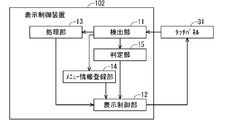
- FIG. 1 is a block diagram illustrating a configuration of a display control device according to a first embodiment.
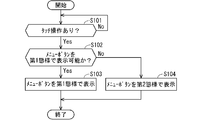
- 3 is a flowchart illustrating an operation of the display control apparatus according to the first embodiment.
- 6 is a block diagram illustrating a configuration of a display control apparatus according to Embodiment 2.
- FIG. It is a figure which shows the setting screen of the shape of a menu button. It is a figure which shows the setting screen of the function allocated to each component of a menu button. It is a figure which shows the setting screen of the change content from the 1st aspect in the 2nd aspect of a menu button.
- 10 is a flowchart illustrating the operation of the display control apparatus according to the second embodiment. It is a figure which shows the example of a display of a touchscreen.
- FIG. 1 is a block diagram illustrating a configuration of the display control apparatus 101 according to the first embodiment.
- the display control apparatus 101 controls display of menu buttons on the touch panel 31 that is a user input interface to the display control apparatus 102.
- the menu button is a button to which a function executable by the processing unit 13 described later is assigned. That is, the user can cause the processing unit 13 to execute a predetermined process by operating a menu button displayed on the touch panel 31.
- the display control apparatus 101 includes a detection unit 11, a display control unit 12, a processing unit 13, and a menu information registration unit 14.
- the detection unit 11 detects a user's touch operation on the touch panel 31. Specifically, when the user touches the touch panel 31, the detection unit 11 detects the touch position.
- the touch position detected by the detection unit 11 is output to the display control unit 12 and the processing unit 13.
- the display control unit 12 displays menu buttons on the touch panel 31 according to the touch operation.
- the display mode of the menu button includes a first mode and a second mode.
- the first mode is a mode in which menu buttons are displayed in a default shape registered in the menu information registration unit 14 according to the touch position.
- the second mode is a mode in which at least one of the shape and the arrangement position of the menu button is changed from the first mode, and the entire menu button is displayed on the touch panel 31.
- the display control unit 12 determines whether the menu button can be displayed in the first mode, that is, whether the entire menu button is displayed on the touch panel 31 when the menu button is displayed in the first mode.
- the display control unit 12 determines that the menu button can be displayed in the first mode
- the display control unit 12 displays the menu button on the touch panel 31 in the first mode.
- the display control unit 12 determines that the menu button cannot be displayed in the first mode, that is, if at least a part of the menu button is cut off when the menu button is displayed in the first mode, the second The menu button is displayed on the touch panel 31 in a manner.
- Registered in the menu information registration unit 14 is information on the display mode of the menu button, such as information on the shape of the menu button and information on changes to the menu button when the menu button cannot be displayed at the touch position. ing.
- the display control unit 12 refers to the information registered in the menu information registration unit 14 and performs display control of the menu button.
- the processing unit 13 executes the function assigned to the menu button when the menu button is operated, that is, when the detecting unit 11 detects a touch operation on the display area of the menu button.
- a function executable by the processing unit 13 is assigned to the menu button.
- the processing unit 13 executes a function assigned to the menu button.
- the display control device 101 is a vehicle navigation device
- a “route search to a registered location” function or the like frequently used by the user can be assigned to the menu button.
- the processing unit 13 performs a route search process from the current location of the vehicle to the registered location, for example, the user's home.
- FIG. 2 is a flowchart showing the display control operation of the menu button by the display control apparatus 101.
- the display control operation of the display control apparatus 101 will be described along the flow of FIG.
- the detection unit 11 determines whether or not there is a touch operation on the touch panel 31 (step S101).
- the display control apparatus 101 repeats step S101 until the detection unit 11 detects a touch operation on the touch panel 31.
- the display control unit 12 determines whether or not the menu button can be displayed in the first mode (Step S102). Here, it is assumed that no menu button is currently displayed on the touch panel 31.
- the display control unit 12 acquires the default shape of the menu button from the menu information registration unit 14, and determines whether the menu button of the default shape can be displayed according to the touch position based on this and the touch position. To do. Note that “display in accordance with the touch position” means that a specific area of the menu button is displayed so as to overlap the touch position.
- the display control unit 12 determines that the menu button can be displayed in the first mode
- the display control unit 12 displays the menu button on the touch panel 31 in the first mode (step S103).
- the display control unit 12 displays the menu button on the touch panel 31 in the second mode (step S104).
- the display control unit 12 changes at least one of the shape of the menu button and the arrangement position from the first mode so that the entire menu button is displayed on the touch panel 31.
- the display control unit 12 selects the shape from the options registered in the menu information registration unit 14. This is the end of the menu button display control operation.
- the detection unit 11 detects a touch operation on the menu button. And the process part 13 performs the process allocated to the menu button.
- the display control apparatus 101 includes a detection unit 11 that detects a touch operation on the touch panel 31, a display control unit 12 that displays a menu button on the touch panel 31 according to the touch operation, and a detection unit that touches the menu button. And a processing unit 13 that executes processing associated with the menu button when an operation is detected. Then, the display control unit 12 displays the entire menu button on the touch panel 31 in a first mode in which the menu button has a predetermined shape and the predetermined position of the menu button is arranged at the touch position of the touch operation.
- the entire menu button is displayed on the touch panel 31 in the first mode, and when it is determined that display is not possible in the first mode, the menu button The menu button is displayed on the touch panel 31 in a second mode in which at least one of the shape and the arrangement position is changed from the first mode so that the entire menu button is displayed on the touch panel 31.
- the menu button is displayed so as to overlap the touch position. Therefore, since the menu button is displayed at the touch position of the user, the user can operate the menu button with ease of use.
- the menu button when the menu button is displayed when the menu button is displayed over the touch position, the shape of the menu button is changed, the position of the menu button is changed, or both are changed.
- the entire menu button is displayed on the touch panel 31. Therefore, even when the user touches the end of the touch panel 31, the menu button is displayed on the touch panel 31 without being completely viewed.
- the display control method of the first embodiment detects a touch operation on the touch panel 31, performs display control to display a menu button on the touch panel 31 according to the touch operation, and the touch operation is a touch operation on the menu button.
- This is a display control method for executing processing associated with a menu button.
- the display control is a first mode in which the menu button has a predetermined shape and the predetermined position of the menu button is arranged at the touch position of the touch operation, and whether or not the entire menu button can be displayed on the touch panel 31. If it is determined that display is possible in the first mode, the entire menu button is displayed on the touch panel 31 in the first mode. If it is determined that display is not possible in the first mode, the shape and arrangement of the menu button are determined.
- the menu button is displayed on the touch panel 31 in a second mode in which at least one of the positions is changed from the first mode so that the entire menu button is displayed on the touch panel 31.
- a menu button is displayed over the touch position. Therefore, since the menu button is displayed at the touch position of the user, the user can operate the menu button with ease of use.
- the menu button is displayed when the menu button is displayed over the touch position, the shape of the menu button is changed, the position of the menu button is changed, or both are changed.
- the entire menu button is displayed on the touch panel 31. Therefore, even when the user touches the end of the touch panel 31, the menu button is displayed on the touch panel 31 without being completely viewed.
- FIG. 3 is a block diagram illustrating a configuration of the display control apparatus 102 according to the second embodiment.
- the display control device 102 controls display of menu buttons on the touch panel 31 that is a user input interface to the display control device 102.
- the display control apparatus 102 includes a determination unit 15 in addition to the configuration of the display control apparatus 101 of the first embodiment.
- the touch panel 31 is mounted on the vehicle.
- the display control device 102 is a navigation device mounted on a vehicle. In addition to a general navigation function, the display control device 102 receives a television broadcast, browses the web, receives a radio broadcast, and a connected external medium such as a USB memory.
- the processing unit 13 has a route search function, a television broadcast reception function, a web search function, a radio broadcast reception function, a sound source reproduction function of external media, and the like.
- the determination unit 15 determines the type of the touch operation. Specifically, the determination unit 15 determines whether the touch operation is a single tap or a double tap. Single tap means an operation of touching the touch panel 31 once. A double tap is an operation of touching the touch panel 31 twice in succession. Whether the touch has been performed once or twice, the second touch is performed within a specified time (for example, 0.5 seconds) from the first touch, and the touch position in the first touch and the second touch. Is determined based on whether the distance is within a threshold (for example, 1 cm).
- a threshold for example, 1 cm
- the display control unit 12 performs display control of the menu button when the touch operation on the touch panel 31 is a double tap. On the other hand, when the touch operation on the touch panel 31 is a single tap, display control assigned to a single tap other than the menu button is performed.
- the double tap is adopted as the type of touch operation for which the menu button display control is to be performed, but other types of touch operations may be adopted.
- other types of touch operations a long press touch or a multi-touch is assumed.
- the determination unit 15 determines that the touch is a long press when the touch continues for a predetermined time (for example, 2 seconds).
- a predetermined time for example, 2 seconds.
- many general navigation devices have a function of continuing to scroll the map in the direction of the touch position when a long press touch is performed.
- the long press touch is often used for the map scroll operation, it is difficult to differentiate the determination condition from the map scroll operation when the long press touch is used for the display control of the menu button. is there.
- a navigation device that supports multi-touch the operation of two-point touch is usually assigned to pinch-in or pinch-out on the screen, so that multi-touch of three or more points is used for display control of menu buttons.
- a navigation device that supports three or more multi-touches is not common and lacks versatility.
- menu button> Next, the configuration of the menu button will be described. 4 to 6 show various setting screens related to the menu button 50. FIG. These setting screens are displayed on the touch panel 31 by the display control unit 12.
- FIG. 4 is a setting screen for the default shape of the menu button 50.
- the menu button 50 includes one main part 51 and four sub-parts 52-55, and the shape is defined by arranging these parts in the vertical direction, the horizontal direction, or both the vertical and horizontal directions.
- FIG. 4 shows a shape A in which the main part 51 and the sub-parts 52-55 are arranged in a horizontal row, a shape B in which the sub-parts 52-55 are arranged in a cross shape around the main part 51, and the main parts A shape C in which 51 and sub-components 52-55 are arranged in a vertical row is shown.
- the user can select one of the shapes AC on the setting screen. 4 shows only the shape AC, but there may be other shapes such as a T-shape or an L-shape.
- the shape A is set as the default shape of the menu button 50.
- FIG. 5 is a setting screen for the function assigned to each part of the menu button 50. Normally, after the default shape of the menu button 50 is set on the setting screen shown in FIG. 4, the touch panel 31 transitions to the screen shown in FIG. In the setting screen of FIG. 5, a menu button 50 having a default shape selected on the setting screen of FIG. 4 and icons 61-66 of functions that can be assigned to the respective parts of the menu button 50 are displayed. The user can assign a function by dragging the icon 61-66 to each component 51-55 of the menu button 50. For example, when the user drags the “MAP” icon 61 indicating the display function of the vehicle position vicinity map to the sub part 55 of the menu button 50, the display function of the vehicle position vicinity map is assigned to the sub part 55.
- MAP MAP
- the display control unit 12 displays the menu button 50 on the touch panel 31 with the default shape and the main component 51 aligned with the touch position.
- This display mode is referred to as a first mode.
- the display control unit 12 changes the shape of the menu button 50 from the default shape, changes the component to be overlapped at the touch position from the main component 51, or changes them. Both changes are made to display the menu button 50 on the touch panel 31.
- a display mode in which such a change has been made is referred to as a second mode.
- FIG. 6 is a setting screen for changing contents from the first mode in the second mode.
- the setting items include “shape” and “arrangement destination”.
- shape when the menu button 50 cannot be displayed in the first mode, it is set whether the shape of the menu button 50 is not deformed (no deformation) or is deformed in the default shape.
- placement destination if the menu button 50 cannot be displayed in the first mode, the placement position of the menu button 50 is changed to a predetermined fixed position (fixed), or the sub-part 52- Whether to change any of 55 so as to match the touch position (variable) is set.
- menu information registration unit 14 Information relating to the menu button 50 set on the setting screen of FIGS. 4 to 6 is registered in the menu information registration unit 14.
- FIG. 4 to FIG. 6 it has been described that the user performs various settings regarding the menu button 50. However, these settings are not necessarily performed by the user, and may be set in advance.
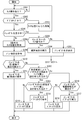
- FIG. 7 is a flowchart showing display control processing of the touch panel 31 by the display control apparatus 102.
- the display control process of the touch panel 31 by the display control apparatus 102 will be described with reference to FIG.
- the detection unit 11 determines whether or not there is a touch operation on the touch panel 31 (step S201).
- the display control apparatus 102 repeats step S201 until the detection unit 11 detects a touch operation on the touch panel 31.
- the determination unit 15 determines whether the touch operation is a double tap (step S202).
- step S202 when the determination unit 15 determines that the user's touch operation is not a double tap, that is, a single tap, the display control unit 12 or the processing unit 13 executes a predetermined process corresponding to the single tap (step S203). ).
- the display control unit 12 performs processing related to display control on the touch panel 31, and the processing unit 13 performs other processing. Thereafter, the display control process returns to step S201.
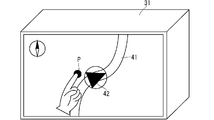
- a single tap operation is performed in a situation where a map around the vehicle position including the travel route 41 and the vehicle position icon 42 is displayed on the touch panel 31 as shown in FIG. Scroll processing for moving the center position of the map in the direction of the touch position P is performed.
- the display control of the menu button 50 is performed only for the double tap touch operation, the user can operate the menu button 50 at a timing intended by the user.
- step S202 when the determination unit 15 determines that the user's touch operation is a double tap, the display control unit 12 determines whether the menu button 50 is being displayed on the touch panel 31 (step S204).
- step S204 the display control unit 12 acquires the second touch position in the double tap from the determination unit 15 (step S205), and further the menu information registration unit 14
- the default shape of the menu button 50 is acquired from (Step S206).
- the shape B shown in FIG. 4 is a default shape.
- the display control unit 12 determines whether the menu button 50 can be displayed in the default shape and the main component 51 can be displayed in accordance with the touch position, that is, whether the menu button 50 can be displayed in the first mode (step S207).
- step S207 the display control unit 12 displays the menu button 50 on the touch panel 31 in the first mode (step S208).
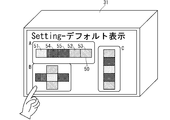
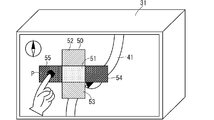
- FIG. 9 is a display example of the first mode of the menu button 50.
- the user performs a double tap in a situation where the vehicle position surrounding map is displayed on the touch panel 31 shown in FIG. 8, the second touch position P of the double tap is aligned with the main component 51 as shown in FIG.
- the menu button 50 is displayed in a default cross shape.
- step S ⁇ b> 204 the display control unit 12 determines whether or not the touch operation detected in step S ⁇ b> 201 is an operation on the menu button 50. (Step S209). Whether or not the operation is on the menu button 50 is determined by comparing the touch position of the touch operation with the display position of the menu button 50.
- step S209 when the display control unit 12 determines that the touch operation is an operation on the menu button 50, the touch position of the touch operation is compared with the display position of each component 51-55 of the menu button 50, and the menu button 50 is checked. The operated part is determined. Then, the processing unit 13 executes a function assigned to the operated part (step S210).
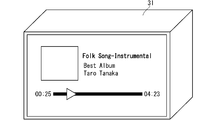
- FIG. 10 shows a state in which the user touches the sub part 55 of the menu button 50. If the “music playback function” is assigned to the sub-part 55, the processing unit 13 performs music playback processing, and the display control unit 12 causes the touch panel 31 to display playback music information. As a result, the display on the touch panel 31 transitions as shown in FIG.
- step S209 when the display control unit 12 determines in step S209 that the touch operation is not an operation on the menu button 50, the display control unit 12 performs display control to hide the currently displayed menu button 50 (step S211).
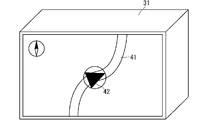
- FIG. 12 shows a state where the user touches a place other than the menu button 50. At this time, the display on the touch panel 31 transitions as shown in FIG. 13, and the menu button 50 is not displayed.
- the display control unit 12 controls the display of the menu button 50 in the second mode.
- 14 to 19 show display patterns in the second mode of the menu button 50.
- Pattern 1 shown in FIG. 14 is a display when “shape: undeformed” and “placement destination: variable” are set on the setting screen of FIG.
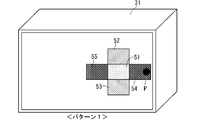
- the pattern 1 has the shape of the menu button 50 kept the default cross shape, and the component displayed in accordance with the touch position P is changed from the main component 51 to the sub component 54.
- Pattern 2 displayed in FIG. 15 is a display when “shape: undeformed” and “placement destination: fixed” are set on the setting screen of FIG.
- the arrangement position of the menu button 50 is changed so that the main component 51 is positioned at the center of the screen of the touch panel 31 while maintaining the default cross shape.
- the center of the screen is determined in advance as an arrangement movement destination of the menu button 50 in the second mode.
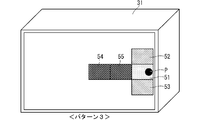
- Patterns 3 to 5 displayed in FIGS. 16 to 18 are displayed when “shape: deformation” and “placement destination: fixed” are set on the setting screen of FIG.
- the patterns 3 to 5 are compared with the first mode, the part displayed in accordance with the touch position P remains the main part 51, but the shape of the menu button 50 is changed from the default cross shape.
- the menu buttons 50 are arranged in a T shape in the pattern 3, arranged in a line in the horizontal direction in the pattern 4, and arranged in an L shape in the pattern 5.
- the pattern 6 displayed in FIG. 19 is a display when “shape: deformation” and “placement destination: variable” are set on the setting screen of FIG.
- the shape of the menu button 50 is changed from the default cross shape, and the component displayed in accordance with the touch position P is changed to the sub-component 54.
- the display control unit 12 determines whether or not the menu button 50 can be displayed by changing the shape of the menu button 50 so that any of the components 51 to 55 is aligned with the touch position. (Step S212).
- the display control unit 12 acquires a shape other than the default shape of the menu button 50 from the menu information registration unit 14. Then, the display control unit 12 determines whether or not the entire menu button 50 can be displayed on the touch panel 31 by adjusting any of the components 51 to 55 to the touch position when the other shape is applied.
- step S212 the display control unit 12 can display the menu button 50 in accordance with the touch position P when the shape of the menu button 50 is changed to the shape determined to be displayable in step S212. Whether or not (step S213).
- the display control unit 12 determines that the menu button 50 can be displayed in accordance with the touch position P by changing the shape of the menu button 50 (Yes in Step S213), That is, the menu button 50 is displayed on the touch panel 31 in any of patterns 3-5 shown in FIGS. 16-18 (step S214).
- the display control unit 12 displays a specific one. A shape is selected, and the touch panel 31 is displayed in the selected shape.
- the display control unit 12 may set priorities for the shapes that the menu button 50 can take in advance, and select the shapes in descending order of priority.
- step S213 the display control unit 12 determines that the menu button 50 cannot be displayed in accordance with the touch position P even if the shape of the menu button 50 is changed (No in step S213), the display control unit 12 is illustrated in FIG. In this manner, the menu button 50 is displayed on the touch panel 31 with the pattern 6 (step S215). That is, the display control unit 12 changes the shape of the menu button 50 and causes the touch panel 31 to display the menu button 50 with any one of the sub-components 52 to 55 being aligned with the touch position P.
- step S212 determines whether or not the placement destination of the menu button 50 is fixed (step S216). If the arrangement destination of the menu button 50 is fixed, the display control unit 12 displays the menu button 50 on the touch panel 31 with the pattern 2 as shown in FIG. 15 (step S217). That is, the menu button 50 is displayed with the default shape moved to a fixed placement destination.
- the display control unit 12 displays the menu button 50 on the touch panel 31 with the pattern 2 as shown in FIG. 16 (step S218). That is, the menu button 50 is displayed in a state where any of the sub-components 52-55 is aligned with the touch position P while maintaining the default shape.
- the shape is first changed. If the main part 51 of the menu button 50 cannot be displayed in accordance with the touch position even if the shape is changed, the arrangement position of the menu button 50 is changed. As described above, the shape of the menu button 50 is changed in preference to the arrangement position, but this priority may be reversed.
- the shape of the menu button 50 is shown as a default shape in FIGS. However, both the arrangement position and the shape of the menu button 50 may be changed at the same time.
- the display control apparatus 102 controls the display of the menu button 50 on the touch panel 31 mounted on the vehicle.
- the touch panel 31 When operating the touch panel 31 during driving, it is not desirable that the movement of the line of sight increases with the operation.
- the menu button 50 is displayed in accordance with the touch position as much as possible. The movement of the line of sight when the button 50 is operated is reduced. Further, when driving, it is not always possible to touch the target place and there is a case where the end of the touch panel 31 may be touched. Even in such a case, the menu button 50 can be displayed reliably.
- the display control apparatus 102 includes a determination unit 15 that determines the type of touch operation detected by the detection unit 11. Then, the display control unit 12 displays the menu button 50 on the touch panel 31 when the type of the touch operation determined by the determination unit 15 is a double tap. Accordingly, other touch operations such as single tap, long press, and multi-touch can be assigned to operations other than the display of the menu button 50.
- the menu button 50 is composed of an array of a plurality of parts including one main part 51 and at least one sub-part 52-55. Then, the display control unit 12 changes the shape of the menu button 50 by changing the arrangement of the main component 51 and the sub components 52-55. Accordingly, the display control unit 12 can appropriately change the shape of the menu button 50 so that the menu button 50 cannot be seen.
- the display control unit 12 arranges the main component 51 at the touch position of the touch operation in the first mode. Therefore, the user can easily operate the menu button 50 following the touch operation for displaying the menu button 50.
- the display control unit 12 can arrange the sub-components 52-55 at the touch position of the touch operation in the second mode. Therefore, the menu button 50 can be displayed reliably and the user can easily operate the menu button 50.
- the display control apparatus 102 when the menu button 50 is being displayed on the touch panel 31, and the detection unit 11 detects a touch operation outside the display area of the menu button 50, the display control unit 12 The menu button 50 is not displayed on the touch panel 31. Therefore, the user can turn off the display of the menu button 50 with a simple operation.
- the shape of the menu button 50 in the first mode can be set by the user. Therefore, the user can set the shape of the menu button 50 to a shape that is easy for the user to use, and can easily operate the menu button 50.
- the detection unit 11, the display control unit 12, the processing unit 13, and the menu information registration unit 14 are realized by a processing circuit 71 illustrated in FIG. That is, the processing circuit 71 includes a detection unit 11, a display control unit 12, a processing unit 13, and a menu information registration unit 14 (hereinafter referred to as “display control unit 12 etc.”).
- Dedicated hardware may be applied to the processing circuit 71, or a processor that executes a program stored in the memory may be applied.
- the processor is, for example, a central processing unit, a processing unit, an arithmetic unit, a microprocessor, a microcomputer, a DSP (Digital Signal Processor) or the like.
- the processing circuit 71 When the processing circuit 71 is dedicated hardware, the processing circuit 71 includes, for example, a single circuit, a composite circuit, a programmed processor, a parallel programmed processor, an ASIC (Application Specific Integrated Circuit), an FPGA (Field-Programmable). Gate Array) or a combination of these.
- Each function of each unit such as the display control unit 12 may be realized by a plurality of processing circuits 71, or the functions of each unit may be realized by a single processing circuit.
- the processing circuit 71 When the processing circuit 71 is a processor, the functions of the display control unit 12 and the like are realized by a combination of software and the like (software, firmware or software and firmware). Software or the like is described as a program and stored in a memory. As shown in FIG. 21, the processor 72 applied to the processing circuit 71 implements the functions of the respective units by reading and executing the program stored in the memory 73.
- the display control devices 101 and 102 detect a touch operation when executed by the processing circuit 71, perform a display control to display the menu button 50 on the touch panel 31 according to the touch operation, and touch
- a step of executing a process associated with the menu button 50 and a memory 73 for storing a program to be executed as a result are provided.
- the step of performing the display control is a first mode in which the menu button 50 is formed in a predetermined shape and the predetermined position of the menu button 50 is arranged at the touch position of the touch operation.
- this program causes a computer to execute procedures and methods such as the display control unit 12.
- the memory 73 is nonvolatile, such as RAM (Random Access Memory), ROM (Read Only Memory), flash memory, EPROM (Erasable Programmable Read Only Memory), EEPROM (Electrically Erasable Programmable Read Only Memory), etc. Or volatile semiconductor memory, HDD (Hard Disk Drive), magnetic disk, flexible disk, optical disk, compact disk, mini disk, DVD (Digital Versatile Disk) and its drive device, or any storage media used in the future There may be.
- RAM Random Access Memory
- ROM Read Only Memory
- flash memory EPROM (Erasable Programmable Read Only Memory), EEPROM (Electrically Erasable Programmable Read Only Memory), etc.
- volatile semiconductor memory HDD (Hard Disk Drive), magnetic disk, flexible disk, optical disk, compact disk, mini disk, DVD (Digital Versatile Disk) and its drive device, or any storage media used in the future There may be.
- each function of the display control unit 12 and the like is realized by either hardware or software has been described above.
- the present invention is not limited to this, and a configuration in which a part of the display control unit 12 or the like is realized by dedicated hardware and another part is realized by software or the like.
- the function of the display control unit 12 is realized by a processing circuit as dedicated hardware, and otherwise, the processing circuit 71 as the processor 72 reads and executes a program stored in the memory 73. A function can be realized.
- the processing circuit can realize the functions described above by hardware, software, or the like, or a combination thereof.
- the menu information registration unit 14 is configured by the memory 73, but they may be configured by a single memory 73, or each may be configured by an individual memory.
- the display control device 102 has been described as an in-vehicle device.
- the in-vehicle device a PND (Portable Navigation Device), a communication terminal (for example, a mobile terminal such as a mobile phone, a smartphone, and a tablet), and installed therein
- the present invention can also be applied to a navigation system constructed as a system by appropriately combining the functions of the application to be executed and the server.
- each function or each component of the display control device 102 described above may be distributed and arranged in each device that constructs the navigation system, or may be concentrated on any device. Good.
- FIG. 22 the structural example of the display control apparatus 102 by the vehicle A and the server B is shown.
- the detection unit 11, the display control unit 12, and the touch panel 31 are arranged on the vehicle A, and the processing unit 13, the menu information registration unit 14, and the determination unit 15 are arranged on the server B.
- the touch panel 31 is illustrated as the configuration of the display control device 102, but the touch panel 31 may be provided in the display control device 102 or may be an external configuration of the display control device 102.
Landscapes
- Engineering & Computer Science (AREA)
- General Engineering & Computer Science (AREA)
- Theoretical Computer Science (AREA)
- Human Computer Interaction (AREA)
- Physics & Mathematics (AREA)
- General Physics & Mathematics (AREA)
- User Interface Of Digital Computer (AREA)
- Fittings On The Vehicle Exterior For Carrying Loads, And Devices For Holding Or Mounting Articles (AREA)
Abstract
本発明は、タッチ操作に応じてメニューボタンを見切れないようタッチパネル上に表示することを目的とする。本発明の表示制御装置(101)において、表示制御部(102)は、メニューボタン(50)を予め定められた形状とし、かつメニューボタン(50)の予め定められた位置をタッチ操作のタッチ位置(P)に配置する第1態様で、メニューボタン(50)の全体をタッチパネル(31)に表示可能か否かを判断し、第1態様で表示可能と判断した場合は、メニューボタン(50)の全体を第1態様でタッチパネル(31)に表示させ、第1態様で表示不可と判断した場合は、メニューボタン(50)の形状および配置位置の少なくともいずれかを、メニューボタン(50)の全体がタッチパネル(31)に表示されるよう第1態様から変更した第2態様で、メニューボタン(50)をタッチパネル(31)に表示させる。
Description
この発明は、タッチパネルの表示制御に関する。
特許文献1には、タッチパネル上のユーザがタッチした位置にメニューボタンを表示する技術が開示されている。ここで、メニューボタンとは、何らかの機能が割り当てられたボタンであり、ユーザがメニューボタンを押すことによって、当該メニューボタンに割り当てられた機能が実行されるものである。
メニューボタンがユーザのタッチ位置にあわせて表示されると、ユーザにとっては、自身が指定した位置にメニューボタンが表示されることになり、使い勝手の良い表示となる。しかし、ユーザが例えばタッチパネルの端の方をタッチした場合には、メニューボタンが見切れてしまうという問題がある。本発明は、上記の問題点を解決するためになされたものであり、タッチ操作に応じてメニューボタンを見切れないようタッチパネル上に表示することを目的とする。
本発明の表示制御装置は、タッチパネルに対するタッチ操作を検出する検出部と、タッチ操作に応じてメニューボタンをタッチパネルに表示させる表示制御部と、検出部がメニューボタンに対するタッチ操作を検出すると、メニューボタンに対応付けられた処理を実行する処理部と、を備える。表示制御部は、メニューボタンを予め定められた形状とし、かつメニューボタンの予め定められた位置をタッチ操作のタッチ位置に配置する第1態様で、メニューボタンの全体をタッチパネルに表示可能か否かを判断し、第1態様で表示可能と判断した場合は、メニューボタンの全体を第1態様でタッチパネルに表示させ、第1態様で表示不可と判断した場合は、メニューボタンの形状および配置位置の少なくともいずれかを、メニューボタンの全体がタッチパネルに表示されるよう第1態様から変更した第2態様で、メニューボタンをタッチパネルに表示させる。
本発明の表示制御方法は、タッチパネルに対するタッチ操作を検出し、タッチ操作に応じてメニューボタンをタッチパネルに表示させる表示制御を行い、タッチ操作がメニューボタンに対するタッチ操作である場合に、メニューボタンに対応付けられた処理を実行する、表示制御方法である。表示制御は、メニューボタンを予め定められた形状とし、かつメニューボタンの予め定められた位置をタッチ操作のタッチ位置に配置する第1態様で、メニューボタンの全体をタッチパネルに表示可能か否かを判断し、第1態様で表示可能と判断した場合は、メニューボタンの全体を第1態様でタッチパネルに表示させ、第1態様で表示不可と判断した場合は、メニューボタンの形状および配置位置の少なくともいずれかを、メニューボタンの全体がタッチパネルに表示されるよう第1態様から変更した第2態様で、メニューボタンをタッチパネルに表示させる。
本発明の表示制御装置によれば、メニューボタンが第1態様で表示可能な場合には第1態様で、表示不可能な場合には第2態様で、メニューボタンがタッチパネルに表示されるため、タッチ操作に応じてメニューボタンを見切れないようタッチパネル上に表示することができる。本発明の目的、特徴、態様、および利点は、以下の詳細な説明と添付図面とによって、より明白となる。
<A.実施の形態1>
<A-1.構成>
図1は、実施の形態1に係る表示制御装置101の構成を示すブロック図である。表示制御装置101は、表示制御装置102に対するユーザの入力インタフェースであるタッチパネル31におけるメニューボタンの表示を制御する。メニューボタンとは、後述する処理部13が実行可能な機能が割り当てられたボタンである。すなわち、ユーザはタッチパネル31に表示されたメニューボタンを操作することによって、処理部13に所定の処理を実行させることができる。
<A-1.構成>
図1は、実施の形態1に係る表示制御装置101の構成を示すブロック図である。表示制御装置101は、表示制御装置102に対するユーザの入力インタフェースであるタッチパネル31におけるメニューボタンの表示を制御する。メニューボタンとは、後述する処理部13が実行可能な機能が割り当てられたボタンである。すなわち、ユーザはタッチパネル31に表示されたメニューボタンを操作することによって、処理部13に所定の処理を実行させることができる。
表示制御装置101は、検出部11、表示制御部12、処理部13、およびメニュー情報登録部14を備えている。検出部11は、タッチパネル31に対するユーザのタッチ操作を検出する。具体的には、検出部11は、ユーザがタッチパネル31をタッチしたとき、そのタッチ位置を検出する。
検出部11で検出されたタッチ位置は表示制御部12と処理部13に出力される。表示制御部12は、タッチ操作に応じてメニューボタンをタッチパネル31に表示させる。メニューボタンの表示態様には第1態様と第2態様がある。第1態様とは、メニューボタンがメニュー情報登録部14に登録されたデフォルト形状でタッチ位置にあわせて表示される態様である。第2態様とは、メニューボタンの形状または配置位置の少なくともいずれかが第1態様から変更され、メニューボタンの全体がタッチパネル31上に表示される態様である。表示制御部12は、メニューボタンを第1態様で表示可能か、すなわちメニューボタンを第1態様で表示したときに、タッチパネル31上にメニューボタンの全体が表示されるか否かを判断する。そして、表示制御部12はメニューボタンを第1態様で表示可能と判断した場合には、第1態様でメニューボタンをタッチパネル31に表示させる。一方、表示制御部12はメニューボタンを第1態様で表示不可能と判断した場合、すなわちメニューボタンを第1態様で表示したときにメニューボタンの少なくとも一部が見切れてしまう場合には、第2態様でメニューボタンをタッチパネル31に表示させる。
メニュー情報登録部14には、メニューボタンの形状、さらにはメニューボタンをタッチ位置にあわせて表示することが出来ない場合のメニューボタンの変更内容に関する情報等、メニューボタンの表示態様に関する情報が登録されている。表示制御部12は、メニュー情報登録部14に登録された情報を参照してメニューボタンの表示制御を行う。
処理部13は、メニューボタンが操作された場合、すなわちメニューボタンの表示領域に対するタッチ操作を検出部11が検出した場合に、メニューボタンに割り当てられた機能の実行処理を行う。言い換えれば、メニューボタンには、処理部13が実行可能な機能が割り当てられている。ユーザがメニューボタンにタッチすると、メニューボタンに割り当てられた機能を処理部13が実行する。例えば、表示制御装置101が車両のナビゲーション装置である場合、ユーザが高頻度に使用する「登録地への経路探索」機能等がメニューボタンに割り当てられ得る。この場合、ユーザがメニューボタンにタッチすると、処理部13は車両の現在地から登録地、例えばユーザの自宅への経路探索処理を行う。
<A-2.動作>
図2は、表示制御装置101によるメニューボタンの表示制御動作を示すフローチャートである。以下、図2のフローに沿って、表示制御装置101の表示制御動作を説明する。
図2は、表示制御装置101によるメニューボタンの表示制御動作を示すフローチャートである。以下、図2のフローに沿って、表示制御装置101の表示制御動作を説明する。
まず、検出部11は、タッチパネル31に対するタッチ操作の有無を判断する(ステップS101)。表示制御装置101は、検出部11がタッチパネル31に対するタッチ操作を検出するまでステップS101を繰り返す。検出部11がタッチパネル31に対するタッチ操作を検出すると(ステップS101でYes)、表示制御部12が、メニューボタンを第1態様で表示可能か否かを判断する(ステップS102)。ここで、現在タッチパネル31にはメニューボタンが表示されていないことを前提とする。
具体的には、表示制御部12はメニュー情報登録部14からメニューボタンのデフォルト形状を取得し、これとタッチ位置に基づき、デフォルト形状のメニューボタンをタッチ位置にあわせて表示可能か否かを判断する。なお、「タッチ位置にあわせて表示」とは、メニューボタンの特定の領域がタッチ位置に重なるように表示することをいう。
表示制御部12は、メニューボタンを第1態様で表示可能と判断すると、メニューボタンを第1態様でタッチパネル31に表示させる(ステップS103)。一方、表示制御部12は、メニューボタンを第2態様で表示可能と判断すると、メニューボタンを第2態様でタッチパネル31に表示させる(ステップS104)。なお、本ステップで表示制御部12は、メニューボタンの全体がタッチパネル31に表示されるように、メニューボタンの形状と配置位置の少なくともいずれか一方を第1態様から変更する。表示制御部12はメニューボタンの形状を変更する場合、例えばメニュー情報登録部14に登録された選択肢から形状を選択する。以上で、メニューボタンの表示制御動作は終了する。
なお、ステップS103またはステップS104でメニューボタンがタッチパネル31に表示された状態で、ユーザがメニューボタンにタッチすると、検出部11がメニューボタンに対するタッチ操作を検出する。そして、処理部13がメニューボタンに割り当てられた処理を実行する。
<A-3.効果>
実施の形態1の表示制御装置101は、タッチパネル31に対するタッチ操作を検出する検出部11と、タッチ操作に応じてメニューボタンをタッチパネル31に表示させる表示制御部12と、検出部がメニューボタンに対するタッチ操作を検出すると、メニューボタンに対応付けられた処理を実行する処理部13と、を備える。そして、表示制御部12は、メニューボタンを予め定められた形状とし、かつメニューボタンの予め定められた位置をタッチ操作のタッチ位置に配置する第1態様で、メニューボタンの全体をタッチパネル31に表示可能か否かを判断し、第1態様で表示可能と判断した場合は、メニューボタンの全体を第1態様でタッチパネル31に表示させ、第1態様で表示不可と判断した場合は、メニューボタンの形状および配置位置の少なくともいずれかを、メニューボタンの全体がタッチパネル31に表示されるよう第1態様から変更した第2態様で、メニューボタンをタッチパネル31に表示させる。これにより、表示制御装置101によれば、可能な場合には、タッチ位置に重ねてメニューボタンが表示される。従って、ユーザは自身のタッチ位置にメニューボタンが表示されるため、使い勝手良くメニューボタンを操作することができる。また、タッチ位置に重ねてメニューボタンを表示するとメニューボタンが見切れてしまう場合には、メニューボタンの形状が変更されるか、あるいはメニューボタンの配置位置が変更されるか、あるいはその両方の変更によって、メニューボタンの全体がタッチパネル31に表示される。従って、ユーザがタッチパネル31の端をタッチした場合でも、メニューボタンが見切れることなくタッチパネル31に表示される。
実施の形態1の表示制御装置101は、タッチパネル31に対するタッチ操作を検出する検出部11と、タッチ操作に応じてメニューボタンをタッチパネル31に表示させる表示制御部12と、検出部がメニューボタンに対するタッチ操作を検出すると、メニューボタンに対応付けられた処理を実行する処理部13と、を備える。そして、表示制御部12は、メニューボタンを予め定められた形状とし、かつメニューボタンの予め定められた位置をタッチ操作のタッチ位置に配置する第1態様で、メニューボタンの全体をタッチパネル31に表示可能か否かを判断し、第1態様で表示可能と判断した場合は、メニューボタンの全体を第1態様でタッチパネル31に表示させ、第1態様で表示不可と判断した場合は、メニューボタンの形状および配置位置の少なくともいずれかを、メニューボタンの全体がタッチパネル31に表示されるよう第1態様から変更した第2態様で、メニューボタンをタッチパネル31に表示させる。これにより、表示制御装置101によれば、可能な場合には、タッチ位置に重ねてメニューボタンが表示される。従って、ユーザは自身のタッチ位置にメニューボタンが表示されるため、使い勝手良くメニューボタンを操作することができる。また、タッチ位置に重ねてメニューボタンを表示するとメニューボタンが見切れてしまう場合には、メニューボタンの形状が変更されるか、あるいはメニューボタンの配置位置が変更されるか、あるいはその両方の変更によって、メニューボタンの全体がタッチパネル31に表示される。従って、ユーザがタッチパネル31の端をタッチした場合でも、メニューボタンが見切れることなくタッチパネル31に表示される。
実施の形態1の表示制御方法は、タッチパネル31に対するタッチ操作を検出し、タッチ操作に応じてメニューボタンをタッチパネル31に表示させる表示制御を行い、タッチ操作がメニューボタンに対するタッチ操作である場合に、メニューボタンに対応付けられた処理を実行する、表示制御方法である。前記表示制御は、メニューボタンを予め定められた形状とし、かつメニューボタンの予め定められた位置をタッチ操作のタッチ位置に配置する第1態様で、メニューボタンの全体をタッチパネル31に表示可能か否かを判断し、第1態様で表示可能と判断した場合は、メニューボタンの全体を第1態様でタッチパネル31に表示させ、第1態様で表示不可と判断した場合は、メニューボタンの形状および配置位置の少なくともいずれかを、メニューボタンの全体がタッチパネル31に表示されるよう第1態様から変更した第2態様で、メニューボタンをタッチパネル31に表示させる。これにより、可能な場合には、タッチ位置に重ねてメニューボタンが表示される。従って、ユーザは自身のタッチ位置にメニューボタンが表示されるため、使い勝手良くメニューボタンを操作することができる。また、タッチ位置に重ねてメニューボタンを表示するとメニューボタンが見切れてしまう場合には、メニューボタンの形状が変更されるか、あるいはメニューボタンの配置位置が変更されるか、あるいはその両方の変更によって、メニューボタンの全体がタッチパネル31に表示される。従って、ユーザがタッチパネル31の端をタッチした場合でも、メニューボタンが見切れることなくタッチパネル31に表示される。
<B.実施の形態2>
<B-1.全体構成>
図3は、実施の形態2に係る表示制御装置102の構成を示すブロック図である。表示制御装置102は、表示制御装置102に対するユーザの入力インタフェースであるタッチパネル31におけるメニューボタンの表示を制御する。表示制御装置102は、実施の形態1の表示制御装置101の構成に加えて、判定部15を備える。タッチパネル31は車両に搭載されている。また、表示制御装置102は、車両に搭載されたナビゲーション装置であり、一般的なナビゲーション機能の他、テレビ放送の受信、ウェブの閲覧、ラジオ放送の受信、USBメモリなどの接続された外部メディアの音源の再生、といったマルチメディア機能を有するものとする。すなわち、処理部13は、経路探索機能、テレビ放送の受信機能、ウェブの検索機能、ラジオ放送の受信機能、外部メディアの音源の再生機能等を有する。
<B-1.全体構成>
図3は、実施の形態2に係る表示制御装置102の構成を示すブロック図である。表示制御装置102は、表示制御装置102に対するユーザの入力インタフェースであるタッチパネル31におけるメニューボタンの表示を制御する。表示制御装置102は、実施の形態1の表示制御装置101の構成に加えて、判定部15を備える。タッチパネル31は車両に搭載されている。また、表示制御装置102は、車両に搭載されたナビゲーション装置であり、一般的なナビゲーション機能の他、テレビ放送の受信、ウェブの閲覧、ラジオ放送の受信、USBメモリなどの接続された外部メディアの音源の再生、といったマルチメディア機能を有するものとする。すなわち、処理部13は、経路探索機能、テレビ放送の受信機能、ウェブの検索機能、ラジオ放送の受信機能、外部メディアの音源の再生機能等を有する。
判定部15は、検出部11がタッチパネル31に対するタッチ操作を検出すると、当該タッチ操作の種類を判定する。具体的には、判定部15は、タッチ操作がシングルタップであるかダブルタップであるかを判定する。シングルタップとは、タッチパネル31に1度きりタッチする操作をいう。ダブルタップとは、タッチパネル31に2度連続してタッチする操作をいう。タッチが1度きりか2度連続したかは、1度目のタッチから規定時間(例えば、0.5秒)内に2度目のタッチが行われ、1度目のタッチと2度目のタッチにおけるタッチ位置の距離が閾値(例えば、1cm)内にあるかどうかにより、判定される。
表示制御部12は、タッチパネル31へのタッチ操作がダブルタップである場合に、メニューボタンの表示制御を行う。一方、タッチパネル31へのタッチ操作がシングルタップである場合には、メニューボタン以外のシングルタップに割り当てられた表示制御を行う。
なお、上記の例では、メニューボタンの表示制御を行うべきタッチ操作の種類としてダブルタップが採用されたが、他の種類のタッチ操作が採用されても良い。他の種類のタッチ操作として、長押しタッチまたはマルチタッチが想定される。
例えば、判定部15は、規定時間(例えば、2秒)以上タッチが継続した場合に長押しタッチと判定する。しかし、一般的なナビゲーション装置では、長押しタッチが行われた場合、タッチ位置の方向に地図をスクロールし続けるという機能を持つものが多い。このように、長押しタッチは地図のスクロール操作に利用されることが多いため、長押しタッチをメニューボタンの表示制御に用いる場合には、地図のスクロール操作との判定条件の差別化が困難である。
また、マルチタッチに対応するナビゲーション装置の場合、通常2点タッチの操作は画面のピンチインまたはピンチアウトに割り当てられるため、3点以上のマルチタッチをメニューボタンの表示制御に用いることとなる。しかし、3点以上のマルチタッチに対応するナビゲーション装置は一般的ではなく汎用性に欠ける。また、例えば3点のマルチタッチではタッチ位置が3つ存在するため、どの位置を、メニューボタンを表示すべき「タッチ位置」とすべきかの判断が難しく、ユーザが想定する「タッチ位置」も各ユーザによって異なると考えられる。このような観点から、メニューボタンの表示制御を行うべきタッチ操作の種類として、ダブルタップを用いることが望ましい。
<B-2.メニューボタン>
次に、メニューボタンの構成について説明する。図4から図6は、メニューボタン50に関する各種の設定画面を示している。これらの設定画面は、表示制御部12によりタッチパネル31に表示される。
次に、メニューボタンの構成について説明する。図4から図6は、メニューボタン50に関する各種の設定画面を示している。これらの設定画面は、表示制御部12によりタッチパネル31に表示される。
図4は、メニューボタン50のデフォルト形状の設定画面である。図4に示すように、メニューボタン50は1つのメイン部品51と4つのサブ部品52-55からなり、これらの部品が縦方向、横方向または縦横両方向に配列されることにより形状が規定される。図4には、メイン部品51とサブ部品52-55が横一列に配列された形状A、メイン部品51を中心にサブ部品52-55がその周囲に十字型に配列された形状B、メイン部品51とサブ部品52-55が縦一列に配列された形状Cが示されている。ユーザは、設定画面上で形状A-Cのいずれかを選択することが可能である。なお、図4には形状A-Cのみを示しているが、T字型またはL字型など他の形状があっても良い。ここでは、形状Aがメニューボタン50のデフォルト形状として設定されたものとして以下の説明を行う。
図5は、メニューボタン50の各部品に割り当てる機能の設定画面である。通常、図4に示した設定画面でメニューボタン50のデフォルト形状が設定された後、タッチパネル31は図5の画面に遷移する。図5の設定画面には、図4の設定画面で選択されたデフォルト形状のメニューボタン50と、メニューボタン50の各部品に割り当て可能な機能のアイコン61-66が表示されている。ユーザは、アイコン61-66をメニューボタン50の各部品51-55にドラッグすることで、機能の割り当てを行うことができる。例えば、ユーザが自車位置周辺地図の表示機能を示す「MAP」アイコン61をメニューボタン50のサブ部品55までドラッグすると、サブ部品55に自車位置周辺地図の表示機能が割り当てられる。
表示制御部12は、メニューボタン50をデフォルト形状、かつメイン部品51をタッチ位置に合わせて、タッチパネル31上に表示させる。この表示態様を第1態様と称する。しかし、第1態様ではメニューボタン50が見切れてしまう場合、表示制御部12はメニューボタン50の形状をデフォルト形状から変更するか、タッチ位置に重ねる部品をメイン部品51から変更するか、またはそれらの両方の変更を行って、メニューボタン50をタッチパネル31上に表示させる。このような変更を行った表示態様を第2態様と称する。
図6は、第2態様における第1態様からの変更内容の設定画面である。設定項目には「形状」と「配置移動先」とがある。「形状」の欄では、メニューボタン50が第1態様で表示不可能な場合、メニューボタン50の形状をデフォルト形状のまま変形しない(無変形)か、あるいは変形するかが設定される。また、「配置移動先」の欄では、メニューボタン50が第1態様で表示不可能な場合、メニューボタン50の配置位置を予め定められた固定位置に変更するか(固定)、サブ部品52-55のいずれかをタッチ位置にあわせるように変更するか(可変)が設定される。
図4から図6の設定画面により設定されたメニューボタン50に関する情報は、メニュー情報登録部14に登録される。図4から図6では、メニューボタン50に関する種々の設定をユーザが行うことについて説明した。しかし、これらの設定は必ずしもユーザにより行われる必要はなく、予め設定されていても良い。
<B-3.動作>
図7は、表示制御装置102によるタッチパネル31の表示制御処理を示すフローチャートである。以下、図7に沿って表示制御装置102によるタッチパネル31の表示制御処理を説明する。
図7は、表示制御装置102によるタッチパネル31の表示制御処理を示すフローチャートである。以下、図7に沿って表示制御装置102によるタッチパネル31の表示制御処理を説明する。
まず、検出部11が、タッチパネル31に対するタッチ操作の有無を判断する(ステップS201)。表示制御装置102は、検出部11がタッチパネル31に対するタッチ操作を検出するまでステップS201を繰り返す。検出部11がタッチパネル31に対するタッチ操作を検出すると(ステップS201でYes)、判定部15が、当該タッチ操作がダブルタップであるか否かを判断する(ステップS202)。
ステップS202において、判定部15がユーザのタッチ操作をダブルタップでない、すなわちシングルタップであると判断した場合、表示制御部12または処理部13がシングルタップに対応した所定の処理を実行する(ステップS203)。ここでは、タッチパネル31における表示制御に関する処理を表示制御部12が行い、それ以外の処理を処理部13が行う。その後、表示制御処理はステップS201に戻る。例えば、図8に示すようにタッチパネル31に走行経路41と自車位置アイコン42とを含む自車位置周辺地図が表示されている状況でシングルタップ操作が行われた場合、表示制御部12は、タッチ位置Pの方向に地図の中心位置を移動するスクロール処理を行う。このように、ダブルタップのタッチ操作に対してのみメニューボタン50の表示制御が行われるため、ユーザは自身が意図したタイミングでメニューボタン50の操作を行うことが可能となる。
ステップS202において、判定部15がユーザのタッチ操作をダブルタップであると判断した場合、表示制御部12は、メニューボタン50がタッチパネル31に表示中であるか否かを判断する(ステップS204)。
表示制御部12は、ステップS204において、メニューボタン50がタッチパネル31に表示中でないと判断すると、判定部15からダブルタップにおける2度目のタッチ位置を取得し(ステップS205)、さらにメニュー情報登録部14からメニューボタン50のデフォルト形状を取得する(ステップS206)。ここでは、図4に示す形状Bをデフォルト形状とする。そして、表示制御部12は、メニューボタン50をデフォルト形状かつメイン部品51をタッチ位置にあわせて表示可能か、すなわちメニューボタン50を第1態様で表示可能か否か判断する(ステップS207)。表示制御部12は、第1態様でメニューボタン50を表示可能であると判断した場合、メニューボタン50を第1態様でタッチパネル31に表示させる(ステップS208)。
図9は、メニューボタン50の第1態様の表示例である。図8に示すタッチパネル31に自車位置周辺地図が表示されている状況で、ユーザがダブルタップを行うと、図9に示すように、ダブルタップの2回目のタッチ位置Pをメイン部品51にあわせてメニューボタン50がデフォルトの十字形状で表示される。
図7のフローに戻り、表示制御部12はステップS204においてメニューボタン50がタッチパネル31に表示中であると判断すると、ステップS201で検出されたタッチ操作がメニューボタン50に対する操作か否かを判断する(ステップS209)。メニューボタン50に対する操作か否かは、タッチ操作のタッチ位置とメニューボタン50の表示位置とを比較して判断される。
ステップS209において、表示制御部12はタッチ操作がメニューボタン50に対する操作であると判断すると、タッチ操作のタッチ位置とメニューボタン50の各部品51-55の表示位置とを比較して、メニューボタン50の操作された部品を判定する。そして、処理部13は、操作された部品に割り当てられた機能を実行する(ステップS210)。
図10は、ユーザがメニューボタン50のサブ部品55にタッチする様子を示している。サブ部品55に「音楽再生機能」が割り当てられているとすると、処理部13は音楽再生処理を行い、表示制御部12は再生音楽の情報をタッチパネル31に表示させる。これにより、タッチパネル31の表示は図11のように遷移する。
図7のフローに戻り、ステップS209において、表示制御部12はタッチ操作がメニューボタン50に対する操作でないと判断すると、現在表示中のメニューボタン50を非表示にする表示制御を行う(ステップS211)。
図12は、ユーザがメニューボタン50以外の場所にタッチする様子を示している。このとき、タッチパネル31の表示は図13に示すように遷移し、メニューボタン50が非表示となる。
メニューボタン50が第1態様で表示不可能な場合、表示制御部12はメニューボタン50を第2態様で表示制御する。図14から図19は、メニューボタン50の第2態様における表示パターンを示している。図14に示されるパターン1は、図6の設定画面で「形状:無変形」かつ「配置移動先:可変」と設定された場合の表示である。パターン1は第1態様と比較すると、メニューボタン50の形状がデフォルトの十字型を保ちつつ、タッチ位置Pに合わせて表示される部品がメイン部品51からサブ部品54に変更されている。図15に表示されるパターン2は、図6の設定画面で「形状:無変形」かつ「配置移動先:固定」と設定された場合の表示である。パターン2を第1態様と比較すると、メニューボタン50はデフォルトの十字形状を保ちつつ、メイン部品51がタッチパネル31の画面の中央に位置するように配置位置が変更される。なお、この例では、第2態様におけるメニューボタン50の配置移動先として、画面の中央が予め定められているものとする。図16から図18に表示されるパターン3から5は、図6の設定画面で「形状:変形」かつ「配置移動先:固定」と設定された場合の表示である。パターン3から5を第1態様と比較すると、タッチ位置Pに合わせて表示される部品はメイン部品51のままであるが、メニューボタン50の形状はデフォルトの十字形状から変更される。メニューボタン50は、パターン3ではT字型に配列され、パターン4では横方向に一列に配列され、パターン5ではL字型に配列される。図19に表示されるパターン6は、図6の設定画面で「形状:変形」かつ「配置移動先:可変」と設定された場合の表示である。パターン6を第1態様と比較すると、メニューボタン50の形状がデフォルトの十字形状から変更され、さらにタッチ位置Pに合わせて表示される部品がサブ部品54に変更される。
メニューボタン50の第2態様による表示制御処理を、図7のフローに沿って説明する。図7のステップS207でNoの場合、表示制御部12は、メニューボタン50の形状を変更することにより、いずれかの部品51-55をタッチ位置にあわせてメニューボタン50を表示可能か否か判断する(ステップS212)。ここで、表示制御部12はメニュー情報登録部14から、メニューボタン50のデフォルト形状以外の他の形状を取得する。そして、表示制御部12は、当該他の形状を適用した場合にいずれかの部品51-55をタッチ位置にあわせることにより、メニューボタン50の全体をタッチパネル31に表示可能か否かを判断する。
ステップS212でYesの場合、表示制御部12は、ステップS212で表示可能と判断した形状にメニューボタン50の形状を変更した場合に、メイン部品51をタッチ位置Pにあわせてメニューボタン50を表示可能か否か判断する(ステップS213)。
表示制御部12は、メニューボタン50の形状を変更することにより、メイン部品51をタッチ位置Pにあわせてメニューボタン50を表示することができると判断すると(ステップS213でYes)、その通りに、すなわち図16-18に示すパターン3-5のいずれかでメニューボタン50をタッチパネル31に表示させる(ステップS214)。パターン3-5のように、メイン部品51をタッチ位置Pにあわせた状態でメニューボタン50を表示することが可能なメニューボタン50の形状が複数存在する場合、表示制御部12は特定の一つの形状を選択し、選択した形状でタッチパネル31を表示させる。例えば、表示制御部12はメニューボタン50の取り得る形状に予め優先度を設定し、優先度の高い順に形状を選択しても良い。
表示制御部12は、メニューボタン50の形状を変更しても、メイン部品51をタッチ位置Pにあわせてメニューボタン50を表示することができないと判断すると(ステップS213でNo)、図18に示すようにパターン6でメニューボタン50をタッチパネル31に表示させる(ステップS215)。すなわち、表示制御部12は、メニューボタン50の形状を変更し、サブ部品52-55のいずれかをタッチ位置Pにあわせてメニューボタン50をタッチパネル31に表示させる。
メニューボタン50の形状を変更しても、いずれかの部品51-55をタッチ位置にあわせてメニューボタン50を表示することができない場合、または、図6の設定画面でメニューボタン50の形状が「無変形」に設定されている場合、ステップS212の判断はNoとなる。この場合、表示制御部12は、メニューボタン50の配置移動先が固定か否かを判断する(ステップS216)。そして、メニューボタン50の配置移動先が固定であれば、表示制御部12はメニューボタン50を図15に示すようなパターン2でタッチパネル31に表示させる(ステップS217)。すなわち、メニューボタン50はデフォルト形状のまま、固定の配置移動先へ移動して表示される。一方、配置移動先が可変であれば、表示制御部12はメニューボタン50を図16に示すようなパターン2でタッチパネル31に表示させる(ステップS218)。すなわち、メニューボタン50はデフォルト形状のまま、いずれかのサブ部品52-55をタッチ位置Pにあわせて表示される。
以上で、表示制御部12による表示制御処理は終了する。
図7のフローによれば、メニューボタン50はタッチ位置にあわせてデフォルト形状で表示することが出来ない場合に、まずその形状が変更される。そして、形状を変更してもメニューボタン50のメイン部品51をタッチ位置にあわせて表示することができない場合に、メニューボタン50の配置位置が変更される。このように、メニューボタン50の形状が配置位置に優先して変更されるが、この優先順位は逆であっても良い。
また、メニューボタン50の配置位置が変更される場合、図14および図15では、メニューボタン50の形状をデフォルト形状で示している。しかし、メニューボタン50の配置位置と形状の両方が同時に変更されても良い。
<B-4.効果>
実施の形態2に係る表示制御装置102は、車両に搭載されたタッチパネル31におけるメニューボタン50の表示を制御する。運転時にタッチパネル31を操作する際、操作に伴い視線の移動が大きくなることは望ましくないが、表示制御装置102によれば、可能な限りタッチ位置にあわせてメニューボタン50が表示されるため、メニューボタン50を操作する際の視線の移動が軽減される。また、運転時には必ずしも狙い通りの場所にタッチできるとは限らず、タッチパネル31の端にタッチせざるを得ない場合があるが、そのような場合でもメニューボタン50を確実に表示することができる。
実施の形態2に係る表示制御装置102は、車両に搭載されたタッチパネル31におけるメニューボタン50の表示を制御する。運転時にタッチパネル31を操作する際、操作に伴い視線の移動が大きくなることは望ましくないが、表示制御装置102によれば、可能な限りタッチ位置にあわせてメニューボタン50が表示されるため、メニューボタン50を操作する際の視線の移動が軽減される。また、運転時には必ずしも狙い通りの場所にタッチできるとは限らず、タッチパネル31の端にタッチせざるを得ない場合があるが、そのような場合でもメニューボタン50を確実に表示することができる。
実施の形態2に係る表示制御装置102は、検出部11が検出したタッチ操作の種類を判定する判定部15を備える。そして、表示制御部12は、判定部15が判定したタッチ操作の種類がダブルタップである場合に、メニューボタン50をタッチパネル31に表示させる。従って、シングルタップ、長押し、マルチタッチといった他のタッチ操作をメニューボタン50の表示以外の他の操作に割り当てることができる。
実施の形態2に係る表示制御装置102において、メニューボタン50は、1つのメイン部品51と少なくとも1つのサブ部品52-55からなる複数の部品の配列で構成される。そして、表示制御部12は、メイン部品51およびサブ部品52-55の配列を変更することによりメニューボタン50の形状を変更する。従って、表示制御部12は、メニューボタン50が見切れないように適宜メニューボタン50の形状を変更することが可能である。
実施の形態2に係る表示制御装置102において、表示制御部12は、第1態様ではメイン部品51をタッチ操作のタッチ位置に配置する。従って、ユーザはメニューボタン50を表示させるためのタッチ操作に続けて、メニューボタン50の操作を容易に行うことができる。
実施の形態2に係る表示制御装置102において、表示制御部12は、第2態様ではサブ部品52-55をタッチ操作のタッチ位置に配置することが可能である。従って、メニューボタン50を確実に表示すると共に、ユーザにメニューボタン50を容易に操作させることができる。
実施の形態2に係る表示制御装置102において、メニューボタン50がタッチパネル31に表示中であり、検出部11がメニューボタン50の表示領域外へのタッチ操作を検出した場合に、表示制御部12はタッチパネル31にメニューボタン50を表示させないようにする。従って、ユーザは簡単な操作でメニューボタン50の表示を消すことができる。
実施の形態2に係る表示制御装置102において、第1態様におけるメニューボタン50の形状はユーザが設定可能である。従って、ユーザはメニューボタン50の形状を自身が使いやすい形状に設定することができ、メニューボタン50の操作を容易に行うことができる。
<C.ハードウェア>
上述した表示制御装置101,102における、検出部11、表示制御部12、処理部13およびメニュー情報登録部14は、図20に示す処理回路71により実現される。すなわち、処理回路71は、検出部11、表示制御部12、処理部13およびメニュー情報登録部14(以下、「表示制御部12等」と称する)を備える。処理回路71には、専用のハードウェアが適用されても良いし、メモリに格納されるプログラムを実行するプロセッサが適用されても良い。プロセッサは、例えば中央処理装置、処理装置、演算装置、マイクロプロセッサ、マイクロコンピュータ、DSP(Digital Signal Processor)等である。
上述した表示制御装置101,102における、検出部11、表示制御部12、処理部13およびメニュー情報登録部14は、図20に示す処理回路71により実現される。すなわち、処理回路71は、検出部11、表示制御部12、処理部13およびメニュー情報登録部14(以下、「表示制御部12等」と称する)を備える。処理回路71には、専用のハードウェアが適用されても良いし、メモリに格納されるプログラムを実行するプロセッサが適用されても良い。プロセッサは、例えば中央処理装置、処理装置、演算装置、マイクロプロセッサ、マイクロコンピュータ、DSP(Digital Signal Processor)等である。
処理回路71が専用のハードウェアである場合、処理回路71は、例えば、単一回路、複合回路、プログラム化したプロセッサ、並列プログラム化したプロセッサ、ASIC(Application Specific Integrated Circuit)、FPGA(Field-Programmable Gate Array)、またはこれらを組み合わせたものが該当する。表示制御部12等等の各部の機能それぞれは、複数の処理回路71で実現されてもよいし、各部の機能をまとめて一つの処理回路で実現されてもよい。
処理回路71がプロセッサである場合、表示制御部12等の機能は、ソフトウェア等(ソフトウェア、ファームウェアまたはソフトウェアとファームウェア)との組み合わせにより実現される。ソフトウェア等はプログラムとして記述され、メモリに格納される。図21に示すように、処理回路71に適用されるプロセッサ72は、メモリ73に記憶されたプログラムを読み出して実行することにより、各部の機能を実現する。すなわち、表示制御装置101,102は、処理回路71により実行されるときに、タッチ操作を検出するステップと、タッチ操作に応じてメニューボタン50をタッチパネル31に表示させる表示制御を行うステップと、タッチ操作がメニューボタン50に対するタッチ操作である場合に、メニューボタン50に対応付けられた処理を実行するステップと、が結果的に実行されることになるプログラムを格納するためのメモリ73を備える。なお、表示制御を行うステップは、メニューボタン50を予め定められた形状とし、かつメニューボタン50の予め定められた位置をタッチ操作のタッチ位置に配置する第1態様で、メニューボタン50の全体をタッチパネル31に表示可能か否かを判断するステップと、第1態様で表示可能と判断した場合に、メニューボタン50の全体を第1態様でタッチパネル31に表示させるステップと、第1態様で表示不可と判断した場合に、メニューボタン50の形状および配置位置の少なくともいずれかを、メニューボタン50の全体がタッチパネル31に表示されるよう第1態様から変更した第2態様で、メニューボタン50をタッチパネル31に表示させるステップと、を有する。換言すれば、このプログラムは、表示制御部12等の手順や方法をコンピュータに実行させるものであるともいえる。ここで、メモリ73には、例えば、RAM(Random Access Memory)、ROM(Read Only Memory)、フラッシュメモリ、EPROM(Erasable Programmable Read Only Memory)、EEPROM(Electrically Erasable Programmable Read Only Memory)などの、不揮発性または揮発性の半導体メモリ、HDD(Hard Disk Drive)、磁気ディスク、フレキシブルディスク、光ディスク、コンパクトディスク、ミニディスク、DVD(Digital Versatile Disk)及びそのドライブ装置等、または、今後使用されるあらゆる記憶媒体であってもよい。
以上、表示制御部12等の各機能が、ハードウェア及びソフトウェア等のいずれか一方で実現される構成について説明した。しかしこれに限ったものではなく、表示制御部12等の一部を専用のハードウェアで実現し、別の一部をソフトウェア等で実現する構成であってもよい。例えば、表示制御部12については専用のハードウェアとしての処理回路でその機能を実現し、それ以外についてはプロセッサ72としての処理回路71がメモリ73に格納されたプログラムを読み出して実行することによってその機能を実現することが可能である。
以上のように、処理回路は、ハードウェア、ソフトウェア等、またはこれらの組み合わせによって、上述の各機能を実現することができる。なお、メニュー情報登録部14は、メモリ73から構成されるが、それらは単一のメモリ73から構成されてもよいし、それぞれが個別のメモリから構成されてもよい。
また、実施の形態2では表示制御装置102を車載装置として説明したが、車載装置、PND(Portable Navigation Device)、通信端末(例えば携帯電話、スマートフォン、およびタブレットなどの携帯端末)、およびこれらにインストールされるアプリケーションの機能、並びにサーバなどを適宜に組み合わせてシステムとして構築されるナビゲーションシステムにも適用することができる。この場合、以上で説明した表示制御装置102の各機能または各構成要素は、ナビゲーションシステムを構築する各機器に分散して配置されてもよいし、いずれかの機器に集中して配置されてもよい。図22に、車両AとサーバBによる表示制御装置102の構成例を示す。図22の構成によれば、検出部11、表示制御部12およびタッチパネル31が車両Aに配置され、処理部13、メニュー情報登録部14および判定部15がサーバBに配置される。なお、図22ではタッチパネル31を表示制御装置102の構成として示しているが、タッチパネル31は、表示制御装置102に備えられていても良いし、表示制御装置102の外部構成であっても良い。
なお、本発明は、その発明の範囲内において、各実施の形態を自由に組み合わせたり、各実施の形態を適宜、変形、省略することが可能である。この発明は詳細に説明されたが、上記した説明は、すべての態様において、例示であって、この発明がそれに限定されるものではない。例示されていない無数の変形例が、この発明の範囲から外れることなく想定され得るものと解される。
11 検出部、12 表示制御部、13 処理部、14 メニュー情報登録部、15 判定部、31 タッチパネル、50 メニューボタン、51 メイン部品、52-55 サブ部品、71 処理回路、72 プロセッサ、73 メモリ、101,102 表示制御装置。
Claims (9)
- タッチパネルに対するタッチ操作を検出する検出部と、
前記タッチ操作に応じてメニューボタンを前記タッチパネルに表示させる表示制御部と、
前記検出部が前記メニューボタンに対するタッチ操作を検出すると、前記メニューボタンに対応付けられた処理を実行する処理部と、を備え、
前記表示制御部は、前記メニューボタンを予め定められた形状とし、かつ前記メニューボタンの予め定められた位置を前記タッチ操作のタッチ位置に配置する第1態様で、前記メニューボタンの全体を前記タッチパネルに表示可能か否かを判断し、前記第1態様で表示可能と判断した場合は、前記メニューボタンの全体を前記第1態様で前記タッチパネルに表示させ、前記第1態様で表示不可と判断した場合は、前記メニューボタンの形状および配置位置の少なくともいずれかを、前記メニューボタンの全体が前記タッチパネルに表示されるよう前記第1態様から変更した第2態様で、前記メニューボタンを前記タッチパネルに表示させる、
表示制御装置。 - 前記タッチパネルは、車両に搭載されている、
請求項1に記載の表示制御装置。 - 前記検出部が検出した前記タッチ操作の種類を判定する判定部をさらに備え、
前記表示制御部は、前記判定部が判定した前記タッチ操作の種類がダブルタップである場合に、前記メニューボタンを前記タッチパネルに表示させる、
請求項1に記載の表示制御装置。 - 前記メニューボタンは、1つのメイン部品と少なくとも1つのサブ部品からなる複数の部品の配列で構成され、
前記表示制御部は、前記メイン部品および前記サブ部品の配列を変更することにより前記メニューボタンの形状を変更する、
請求項1に記載の表示制御装置。 - 前記メニューボタンは、1つのメイン部品と少なくとも1つのサブ部品からなる複数の部品の配列で構成され、
前記表示制御部は、前記第1態様では前記メイン部品を前記タッチ操作のタッチ位置に配置する、
請求項1に記載の表示制御装置。 - 前記表示制御部は、前記第2態様では前記サブ部品を前記タッチ操作のタッチ位置に配置する、
請求項5に記載の表示制御装置。 - 前記メニューボタンが前記タッチパネルに表示中であり、前記検出部が前記メニューボタンの表示領域外へのタッチ操作を検出した場合に、前記表示制御部は前記タッチパネルに前記メニューボタンを表示させないようにする、
請求項1に記載の表示制御装置。 - 前記第1態様における前記メニューボタンの形状はユーザが設定可能である、
請求項1に記載の表示制御装置。 - タッチパネルに対するタッチ操作を検出し、
前記タッチ操作に応じてメニューボタンを前記タッチパネルに表示させる表示制御を行い、
前記タッチ操作が前記メニューボタンに対するタッチ操作である場合に、前記メニューボタンに対応付けられた処理を実行する、表示制御方法であって、
前記表示制御は、前記メニューボタンを予め定められた形状とし、かつ前記メニューボタンの予め定められた位置を前記タッチ操作のタッチ位置に配置する第1態様で、前記メニューボタンの全体を前記タッチパネルに表示可能か否かを判断し、前記第1態様で表示可能と判断した場合は、前記メニューボタンの全体を前記第1態様で前記タッチパネルに表示させ、前記第1態様で表示不可と判断した場合は、前記メニューボタンの形状および配置位置の少なくともいずれかを、前記メニューボタンの全体が前記タッチパネルに表示されるよう前記第1態様から変更した第2態様で、前記メニューボタンを前記タッチパネルに表示させる、
表示制御方法。
Priority Applications (2)
| Application Number | Priority Date | Filing Date | Title |
|---|---|---|---|
| PCT/JP2018/017945 WO2019215845A1 (ja) | 2018-05-09 | 2018-05-09 | 表示制御装置および表示制御方法 |
| JP2020517676A JP6991320B2 (ja) | 2018-05-09 | 2018-05-09 | 表示制御装置および表示制御方法 |
Applications Claiming Priority (1)
| Application Number | Priority Date | Filing Date | Title |
|---|---|---|---|
| PCT/JP2018/017945 WO2019215845A1 (ja) | 2018-05-09 | 2018-05-09 | 表示制御装置および表示制御方法 |
Publications (1)
| Publication Number | Publication Date |
|---|---|
| WO2019215845A1 true WO2019215845A1 (ja) | 2019-11-14 |
Family
ID=68466725
Family Applications (1)
| Application Number | Title | Priority Date | Filing Date |
|---|---|---|---|
| PCT/JP2018/017945 Ceased WO2019215845A1 (ja) | 2018-05-09 | 2018-05-09 | 表示制御装置および表示制御方法 |
Country Status (2)
| Country | Link |
|---|---|
| JP (1) | JP6991320B2 (ja) |
| WO (1) | WO2019215845A1 (ja) |
Cited By (1)
| Publication number | Priority date | Publication date | Assignee | Title |
|---|---|---|---|---|
| USD985590S1 (en) | 2021-08-23 | 2023-05-09 | Waymo Llc | Display screen or portion thereof with graphical user interface |
Citations (3)
| Publication number | Priority date | Publication date | Assignee | Title |
|---|---|---|---|---|
| JP2009252190A (ja) * | 2008-04-10 | 2009-10-29 | Canvas Mapple Co Ltd | メニュー画面表示装置、メニュー画面表示方法、及びコンピュータプログラム |
| JP2010034998A (ja) * | 2008-07-30 | 2010-02-12 | Sony Corp | 情報処理装置、情報処理システムおよび情報処理方法 |
| JP2011135376A (ja) * | 2009-12-24 | 2011-07-07 | Samsung Yokohama Research Institute Co Ltd | 撮像装置及び画像処理方法 |
Family Cites Families (2)
| Publication number | Priority date | Publication date | Assignee | Title |
|---|---|---|---|---|
| JP6271388B2 (ja) | 2014-10-14 | 2018-01-31 | 株式会社東海理化電機製作所 | 静電検出装置 |
| JP2018026015A (ja) | 2016-08-10 | 2018-02-15 | パナソニックIpマネジメント株式会社 | 表示装置、表示方法及びプログラム |
-
2018
- 2018-05-09 WO PCT/JP2018/017945 patent/WO2019215845A1/ja not_active Ceased
- 2018-05-09 JP JP2020517676A patent/JP6991320B2/ja not_active Expired - Fee Related
Patent Citations (3)
| Publication number | Priority date | Publication date | Assignee | Title |
|---|---|---|---|---|
| JP2009252190A (ja) * | 2008-04-10 | 2009-10-29 | Canvas Mapple Co Ltd | メニュー画面表示装置、メニュー画面表示方法、及びコンピュータプログラム |
| JP2010034998A (ja) * | 2008-07-30 | 2010-02-12 | Sony Corp | 情報処理装置、情報処理システムおよび情報処理方法 |
| JP2011135376A (ja) * | 2009-12-24 | 2011-07-07 | Samsung Yokohama Research Institute Co Ltd | 撮像装置及び画像処理方法 |
Cited By (1)
| Publication number | Priority date | Publication date | Assignee | Title |
|---|---|---|---|---|
| USD985590S1 (en) | 2021-08-23 | 2023-05-09 | Waymo Llc | Display screen or portion thereof with graphical user interface |
Also Published As
| Publication number | Publication date |
|---|---|
| JP6991320B2 (ja) | 2022-01-12 |
| JPWO2019215845A1 (ja) | 2020-12-10 |
Similar Documents
| Publication | Publication Date | Title |
|---|---|---|
| US10996844B2 (en) | Program, method, and device for controlling application, and recording medium | |
| US10877624B2 (en) | Method for displaying and electronic device thereof | |
| KR101998941B1 (ko) | 사용자 인터페이스 및 타일의 의미 스케일을 조정하기 위한 방법 | |
| CN104603736B (zh) | 用于改变对象位置的方法及其电子装置 | |
| JP2012098873A (ja) | 車載機器、及び、車載機器の制御方法 | |
| US20140089829A1 (en) | System supporting manual user interface based control of an electronic device | |
| KR20150135840A (ko) | 사용자 인터페이스 제공 장치 및 방법 | |
| US20150089451A1 (en) | User terminal, electronic device, and control method thereof | |
| US20220210238A1 (en) | Notifications and subscriptions for a device news application | |
| CN107850988A (zh) | 显示控制装置以及显示控制方法 | |
| JP6991320B2 (ja) | 表示制御装置および表示制御方法 | |
| JP2013131190A (ja) | 入力システム、入力方法、及び入力プログラム | |
| WO2019239450A1 (ja) | 入力制御装置、操作装置および入力制御方法 | |
| JP5814332B2 (ja) | アプリケーション制御のプログラム、方法、装置、及び記録媒体 | |
| JP6906289B2 (ja) | 入力装置、車載装置、表示システムおよび入力装置の制御方法 | |
| US10838610B2 (en) | Graphical user interface control device and method for controlling graphical user interface | |
| WO2020008619A1 (ja) | タッチパネル付き表示装置、及び、その操作決定方法 | |
| JP6379822B2 (ja) | 入力装置及び電子機器 | |
| JP6309926B2 (ja) | アプリケーション制御のプログラム、方法、装置、及び記録媒体 | |
| JP2017219968A (ja) | タッチパネル装置及びタッチパネルの制御方法 | |
| JP6328358B2 (ja) | 表示制御装置および表示制御方法 | |
| KR20160063451A (ko) | 차량용 화면 표시장치 및 그 제어방법 | |
| JP2016103047A (ja) | 電子機器、該電子機器を備えた車載機器及び該電子機器を用いて実行すべき処理の指示方法 | |
| KR100987512B1 (ko) | 메뉴 표시 방법 및 미디어 장치 | |
| JP2012173980A (ja) | 表示装置、表示方法、及び表示プログラム |
Legal Events
| Date | Code | Title | Description |
|---|---|---|---|
| 121 | Ep: the epo has been informed by wipo that ep was designated in this application |
Ref document number: 18917662 Country of ref document: EP Kind code of ref document: A1 |
|
| ENP | Entry into the national phase |
Ref document number: 2020517676 Country of ref document: JP Kind code of ref document: A |
|
| NENP | Non-entry into the national phase |
Ref country code: DE |
|
| 122 | Ep: pct application non-entry in european phase |
Ref document number: 18917662 Country of ref document: EP Kind code of ref document: A1 |