WO2018037520A1 - モバイル端末、画像処理方法、および、プログラム - Google Patents
モバイル端末、画像処理方法、および、プログラム Download PDFInfo
- Publication number
- WO2018037520A1 WO2018037520A1 PCT/JP2016/074721 JP2016074721W WO2018037520A1 WO 2018037520 A1 WO2018037520 A1 WO 2018037520A1 JP 2016074721 W JP2016074721 W JP 2016074721W WO 2018037520 A1 WO2018037520 A1 WO 2018037520A1
- Authority
- WO
- WIPO (PCT)
- Prior art keywords
- image
- specific area
- document
- image data
- orientation
- Prior art date
- Legal status (The legal status is an assumption and is not a legal conclusion. Google has not performed a legal analysis and makes no representation as to the accuracy of the status listed.)
- Ceased
Links
Images









Classifications
-
- G—PHYSICS
- G06—COMPUTING OR CALCULATING; COUNTING
- G06V—IMAGE OR VIDEO RECOGNITION OR UNDERSTANDING
- G06V10/00—Arrangements for image or video recognition or understanding
- G06V10/10—Image acquisition
Definitions
- the present invention relates to a mobile terminal, an image processing method, and a program.
- Patent Document 1 a technique for automatically erecting a character description direction such as an address included in a mail image displayed on a video coding terminal.
- Patent Document 1 has a problem that only the postal matter is subjected to the upright correction because the layout determination specialized in the prescribed form called postal matter is performed.
- the present invention has been made in view of the above-described problems.
- the user can instantly correct a predetermined area in a document image captured by a mobile terminal without being caught by the document type, and can immediately perform a user operation even on a small screen of the mobile terminal.
- An object of the present invention is to provide a mobile terminal, an image processing method, and a program that can be displayed so as to be confirmed.
- a mobile terminal includes a captured image acquisition unit that acquires captured image data of a captured image captured by a capturing unit, and original image data of an original image included in the captured image.
- Document acquisition means for acquiring, specific area acquisition means for acquiring specific area image data of a specific area in the original image, specifying the direction of content in the original image, and based on the direction of the content,
- Original direction specifying means for specifying the orientation
- specific area orientation correcting means for acquiring corrected specific area image data of the specific area corrected upright based on the direction of the original image, and the corrected specific area image data
- a post-correction image display means for displaying.
- the image processing method includes a captured image acquisition step of acquiring captured image data of a captured image captured by an imaging unit, and a document acquisition step of acquiring document image data of a document image included in the captured image.
- a display step is a display step.
- the program according to the present invention includes a captured image acquisition step of acquiring captured image data of a captured image captured by the imaging unit, a document acquisition step of acquiring document image data of a document image included in the captured image, A specific area acquisition step of acquiring specific area image data of a specific area of the original image; an original direction specifying step of specifying the direction of the content in the original image and specifying the direction of the original image based on the direction of the content; A specific area orientation correcting step for acquiring post-correction specific area image data of the specific area that has been erected based on the orientation of the original image, and a post-correction image display step for displaying the post-correction specific area image data And making the computer execute.
- the present invention it is possible to confirm the original image taken by the user with the mobile camera as it was taken immediately, and to save an image appropriately applied with the direction correction.
- FIG. 1 is a block diagram illustrating an example of a configuration of a mobile terminal according to the present embodiment.
- FIG. 2 is a flowchart illustrating an example of processing in the mobile terminal according to the present embodiment.
- FIG. 3 is a diagram illustrating an example of image display in the present embodiment.
- FIG. 4 is a diagram showing an example of image display in the present embodiment.
- FIG. 5 is a diagram illustrating an example of image display in the present embodiment.
- FIG. 6 is a diagram illustrating an example of image display in the present embodiment.
- FIG. 7 is a diagram illustrating an example of image display in the present embodiment.
- FIG. 8 is a diagram illustrating an example of image display in the present embodiment.
- FIG. 9 is a diagram illustrating an example of image display in the present embodiment.
- FIG. 1 is a block diagram illustrating an example of a configuration of a mobile terminal according to the present embodiment.
- FIG. 2 is a flowchart illustrating an example of processing in the mobile terminal according to the present
- FIG. 10 is a diagram showing an example of image display in the present embodiment.
- FIG. 11 is a diagram illustrating an example of image display in the present embodiment.
- FIG. 12 is a diagram illustrating an example of image display in the present embodiment.
- FIG. 13 is a diagram illustrating an example of image display in the present embodiment.
- FIG. 14 is a diagram illustrating an example of image display in the present embodiment.
- FIG. 15 is a diagram illustrating an example of image display in the present embodiment.
- FIG. 16 is a diagram illustrating an example of image display in the present embodiment.
- FIG. 17 is a diagram illustrating an example of shooting retry control in the present embodiment.
- FIG. 18 is a diagram illustrating an example of shooting retry control in the present embodiment.
- FIG. 19 is a schematic diagram illustrating an example of the specific area display process in the present embodiment.
- FIG. 1 is a block diagram illustrating an example of a configuration of the mobile terminal 100 according to the present embodiment.
- the embodiment described below exemplifies the mobile terminal 100 for embodying the technical idea of the present invention, and is not intended to specify the present invention to the mobile terminal 100, and claims.
- the present invention is equally applicable to the mobile terminal 100 of other embodiments included in the scope of the above.
- the form of function distribution in the mobile terminal 100 exemplified in the present embodiment is not limited to the following, and may be configured to be functionally or physically distributed / integrated in arbitrary units within a range where similar effects and functions can be achieved. be able to.
- the mobile terminal 100 is a portable information processing having portability such as a tablet terminal, a mobile phone, a smartphone, a PHS, a PDA, a notebook personal computer, or a wearable computer such as a glasses type or a watch type. It may be a device.
- the mobile terminal 100 is generally configured to include a control unit 102, a storage unit 106, a photographing unit 110, an input / output unit 112, a sensor unit 114, and a communication unit 116.
- an input / output interface unit (not shown) for connecting the input / output unit 112 and the control unit 102 may be further provided.
- Each unit of the mobile terminal 100 is connected to be communicable via an arbitrary communication path.
- the communication unit 116 is a network interface (NIC (Network Interface Controller) or the like), Bluetooth (registered trademark), or the like for transmitting and receiving IP data by wired communication and / or wireless communication (WiFi (registered trademark), etc.), or An interface that performs wireless communication by infrared communication or the like may be used.
- NIC Network Interface Controller
- Bluetooth registered trademark
- WiFi registered trademark
- WiFi registered trademark
- An interface that performs wireless communication by infrared communication or the like may be used.
- the mobile terminal 100 may be communicably connected to an external device via a network using the communication unit 116.
- the sensor unit 114 detects a physical quantity and converts it into a signal (digital signal) of another medium.
- the sensor unit 114 includes a proximity sensor, a direction sensor, a magnetic field sensor, a linear acceleration sensor, a luminance sensor, a gyro sensor, a pressure sensor, a gravity sensor, an acceleration sensor, an atmospheric pressure sensor, and / or a temperature sensor. Also good.
- the input / output unit 112 performs data input / output (I / O).
- the input / output unit 112 may be, for example, a key input unit, a touch panel, a control pad (for example, a touch pad and a game pad), a mouse, a keyboard, and / or a microphone.
- the input / output unit 112 may be a display unit that displays a display screen of an application or the like (for example, a display, a monitor, a touch panel, or the like configured by liquid crystal or organic EL).
- a display screen of an application or the like for example, a display, a monitor, a touch panel, or the like configured by liquid crystal or organic EL.
- the input / output unit 112 may be an audio output unit (for example, a speaker or the like) that outputs audio information as audio.
- the input / output unit (touch panel) 112 may include a sensor unit 114 that detects physical contact and converts it into a signal (digital signal).
- the photographing unit 110 acquires continuous (moving image) image data (frames) by continuously photographing a subject (for example, a document or the like).
- the imaging unit 110 may acquire video data.
- the imaging unit 110 may acquire ancillary data.
- the photographing unit 110 may be a camera or the like provided with an image sensor such as a CCD (Charge Coupled Device) and / or a CMOS (Complementary Metal Oxide Semiconductor).
- an image sensor such as a CCD (Charge Coupled Device) and / or a CMOS (Complementary Metal Oxide Semiconductor).
- the photographing unit 110 may acquire captured image data of a captured image that is a still image by capturing a still image of the subject.
- the captured image data may be uncompressed image data.
- the captured image data may be high-resolution image data.
- the high resolution may be full high vision, 4K resolution, super high vision (8K resolution), or the like.
- the photographing unit 110 may shoot moving images at 24 fps, 30 fps, or the like.
- the storage unit 106 stores various databases, tables, and / or files.
- the storage unit 106 may store various application programs (for example, user applications).
- the storage unit 106 is storage means, for example, a memory such as RAM / ROM, a fixed disk device such as a hard disk, a solid state drive (SSD), a flexible disk, and / or a tangible storage device such as an optical disk, Alternatively, a memory circuit can be used.
- a memory such as RAM / ROM, a fixed disk device such as a hard disk, a solid state drive (SSD), a flexible disk, and / or a tangible storage device such as an optical disk, Alternatively, a memory circuit can be used.
- the storage unit 106 stores a computer program and the like for giving instructions to the controller and performing various processes.
- the dictionary data file 106a stores dictionary data.
- the dictionary data may be data relating to characters, numbers, symbols and the like of each language.
- the image data file 106b stores image data (such as a frame).
- the image data file 106b may store photographed image data, original image data, corrected original image data, specific area image data, and / or corrected specific area image data.
- the image data file 106b may store document data and / or position data such as a specific area.
- the image data file 106b may store character data corresponding to the image data.
- the image data file 106b may store video data.
- the image data file 106b may store ancillary data.
- control unit 102 is a CPU that centrally controls the mobile terminal 100, a many-core CPU, a GPU (Graphics Processing Unit), a DSP (Digital Signal Processor), an LSI (Large Scale Integration), and an ASIC (Application Specification). And / or a tangible controller including a FPGA (Field-Programmable Gate Array) or the like, or a control circuit.
- a CPU Centrally controls the mobile terminal 100
- a many-core CPU a GPU (Graphics Processing Unit), a DSP (Digital Signal Processor), an LSI (Large Scale Integration), and an ASIC (Application Specification).
- / or a tangible controller including a FPGA (Field-Programmable Gate Array) or the like, or a control circuit.
- the control unit 102 has an internal memory for storing a control program, a program defining various processing procedures, and necessary data, and performs information processing for executing various processes based on these programs.
- control unit 102 conceptually has a captured image acquisition unit 102a, a document acquisition unit 102b, a blur detection unit 102c, a specific area acquisition unit 102d, a document orientation specification unit 102e, a specific region orientation correction unit 102f, and a document orientation.
- a correction unit 102g and an image display unit 102h are provided.
- the captured image acquisition unit 102a acquires image data.
- the captured image acquisition unit 102a may acquire captured image data of a captured image captured by the capturing unit 110.
- the captured image acquisition unit 102a may acquire non-compressed and high-resolution image data.
- the captured image acquisition unit 102a may acquire image data (frame) corresponding to one frame by controlling continuous image capturing or moving image capturing by the capturing unit 110.
- the captured image acquisition unit 102a may acquire image data by controlling still image capturing by the capturing unit 110.
- the captured image acquisition unit 102a may acquire ancillary data.
- the document acquisition unit 102b acquires document image data of a document image included in the photographed image.
- the document acquisition unit 102b may specify a document image included in the photographed image and acquire document image data.
- the document acquisition unit 102b may detect the position data of the document image from the captured image data.
- the document acquisition unit 102b may detect corner coordinates (four points) of the document image from the captured image data.
- the document acquisition unit 102b may detect the layout of the document image from the captured image data.
- the document may be a rectangular document.
- the document acquisition unit 102b detects the position data of the document image from the photographed image data using the edge detection method and / or the feature point matching method, and specifies the document image based on the position data of the document image. Then, document image data may be acquired.
- the blur detection unit 102c detects a blur of an image.
- the blur detection unit 102c may detect a part of the document image in which blur is equal to or greater than a predetermined reference value as a blur region.
- the specific area acquisition unit 102d acquires specific area image data of a specific area in the document image.
- the specific area may be an upper area of the document image.
- the specific area acquisition unit 102d may acquire specific area image data using the blurred area as the specific area. Further, the specific area acquisition unit 102d may estimate an important part included in the document image and acquire the specific area image data using the important part as the specific area.
- the important portion may be an area composed of large, bold, and / or differently colored characters located above the original image after the upright correction included in the original image.
- the important part may be an area composed of letters, numbers, and / or symbols indicating the amount of money included in the document image.
- the specific area acquisition unit 102d may acquire specific area image data using a part of the document image selected by the user as the specific area.
- the specific area acquisition unit 102d may acquire specific area image data with the entire document image as the specific area when the blur area is not detected by the blur detection unit 102c.
- the document orientation specifying unit 102e specifies the orientation of the document image.
- the document orientation specifying unit 102e may specify the orientation of the content in the document image, and may specify the orientation of the document image based on the orientation of the content.
- the document orientation specifying unit 102e may specify the orientation of the content in the specific area, and specify the orientation of the document image based on the orientation of the content.
- the document orientation specifying unit 102e may specify the orientation of characters in the document image, and may specify the orientation of the document image based on the orientation of the characters.
- the document orientation specifying unit 102e specifies a character region indicating a character in the document image by labeling processing on the document image data, and based on a comparison between the character region data in the character region and the dictionary data, The direction of the document image may be specified based on the direction of the characters.
- the document orientation specifying unit 102e specifies the direction of characters in the specific area based on the comparison between the specific area data of the specific area and the dictionary data, and specifies the direction of the original image based on the direction of the characters. Also good.
- the specific area orientation correcting unit 102f acquires post-correction specific area image data of the specific area that has been erected.
- the specific area orientation correcting unit 102f may acquire the corrected specific area image data of the specific area that has been corrected upright based on the orientation of the document image.
- the document orientation correction unit 102g acquires corrected document image data of the document image that has been corrected upright.
- the document orientation correcting unit 102g may acquire the corrected document image data of the document image that has been corrected upright based on the orientation of the document image.
- the image display unit 102h displays image data.
- the image display unit 102h may display captured image data, document image data, specific area image data, corrected specific area image data, and / or corrected original image data.
- the image display unit 102h may display the original image data and display the corrected specific area image data in an enlarged manner. Further, the image display unit 102h may enlarge and display the corrected specific area image data on the original image data.
- the image display unit 102h may display document image data and allow the user to select a part of the document image. Further, the image display unit 102 h may display the image data on the input / output unit 112. The image display unit 102h may display character data.
- FIG. 2 is a flowchart illustrating an example of processing in the mobile terminal 100 of the present embodiment.
- the photographed image acquisition unit 102 a controls photographing by a photographing unit (camera) 110 using a rectangular document as a subject, and obtains photographed image data of a photographed image obtained by photographing by the photographing unit 110. (Step SA-1).
- the document acquisition unit 102b detects the position data of the document image from the captured image data using the edge detection method and / or the feature point matching method, and includes the captured image based on the position data of the document image.
- the original image to be specified is specified, and the original image data is acquired (step SA-2).
- the specific area acquisition unit 102d acquires specific area image data of a specific area in the document image (step SA-3).
- the original orientation specifying unit 102e specifies a character area indicating a character in the original image by performing a labeling process on the original image data, and compares the character area data of the character area with the dictionary data stored in the dictionary data file 106a. Based on the character direction, the direction of the original image is specified based on the character direction (step SA-4).
- the specific area direction correcting unit 102f acquires post-correction specific area image data of the specific area corrected upright based on the orientation of the document image (step SA-5).
- the image display unit 102h displays the corrected specific area image data on the input / output unit 112, and allows the user to check the blur of the specific area (step SA-6).
- FIGS. 3 to 16 are diagrams showing an example of image display in the present embodiment.
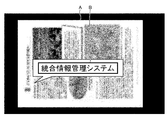
- the image display unit 102 h may cause the input / output unit 112 to superimpose and display the image data of the specific character region B corrected for erecting with the document image data of the document image A as the background.
- a specific character area that can be read by the user is displayed after the shooting in order for the user to confirm the completion of shooting of the document.
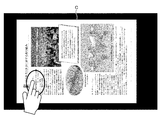
- the image display unit 102h displays the document image data of the document image C as shown in FIG. 4 and is tapped by the user via the input / output unit 112, as shown in FIG.
- the image data of the region D corresponding to the tapped position may be superimposed on the input / output unit 112.
- the image display unit 102h may pop-up image data in a state where the tapped area is corrected upright.
- the image display unit 102 h simultaneously outputs a plurality of corrected specific region image data such as a region E blurred in the document image and a location F likely to be important in the document image. May be displayed.
- the image display unit 102h inputs / outputs the specific area image data of the specific area H on the original image data of the original image G even when an upright original is photographed. You may make it superimpose on the part 112 and display.
- the image display unit 102 h may display the image data of the upper region J of the original image on the input / output unit 112 on the original image data of the original image I.
- the image display unit 102 h may display only the image data of a partial area of the rotated document image on the input / output unit 112 without displaying the document image data on the background. .
- the image display unit 102h does not display the image data of the partial area, and the document image data of the document image corrected upright. May be displayed on the input / output unit 112.
- a general manuscript is often located at the top of the manuscript image when an important part such as a title is upright, and the character size is often larger than other characters.
- the image display unit 102h displays the original image L as shown in FIG.
- the image data of the location K may be superimposed on the input / output unit 112 on the original image data.
- the image data of the portion corrected for erecting may be displayed in an enlarged manner.
- the image display unit 102h displays the receipt image as shown in FIG.
- the image data of the region M corrected upright may be superimposed and displayed on the input / output unit 112 on the N receipt image data.
- the image display unit 102h may enlarge and display the image data of the area indicating the upright corrected amount. Good.
- the image display unit 102h displays the business card of the business card image Q as shown in FIG.
- the image data of the region P corrected upright may be superimposed on the image data on the input / output unit 112.
- the image display unit 102h may display the image data of the area indicating the upright corrected name or the company name in an enlarged manner.
- control unit 102 determines whether or not an instruction indicating that re-photographing is necessary is input via the input / output unit 112 based on the confirmation of the user (step SA-7).
- step SA-7 If the control unit 102 determines that an instruction indicating that re-shooting is necessary is input (step SA-7: Yes), the control unit 102 shifts the processing to step SA-1.
- FIG. 17 is a diagram illustrating an example of shooting retry control in the present embodiment.
- the user is made to determine whether or not to re-shoot by checking the specific area (character area) R that is most blurred in the document image.
- the user when the user determines that the specific area that is most blurred is unreadable, the user may be instructed to shoot the same document again.
- the user can determine whether or not the same document needs to be captured again.
- step SA-7 when the control unit 102 determines that the user confirmation that re-shooting is unnecessary is input (step SA-7: No), the control unit 102 shifts the process to step SA-8.
- the document orientation correcting unit 102g acquires the document image data after the correction of the upright-corrected document image based on the orientation of the document image (step SA-8).
- the document orientation correcting unit 102g saves (stores) the corrected document image data in the image data file 106b (step SA-9), and ends the process.
- FIG. 18 is a diagram illustrating an example of shooting retry control in the present embodiment.
- FIG. 19 is a schematic diagram illustrating an example of the specific area display process in the present embodiment.
- a document is photographed by a mobile terminal (step SB-1), and a document image is acquired from the photographed image (step SB-2).
- the orientation of the document image is determined (step SB-3), and the position used in the orientation determination, the specific area that is a large blur or the important portion is corrected in the document image.
- the obtained image data is acquired (step SB-4).
- the entire original image without orientation correction is displayed at the same time, and at the same time, a specific area with orientation correction is enlarged and the result is confirmed by the user (step SB-5). ).
- step SB-6 when a user confirmation that re-photographing is unnecessary is input (step SB-6), the orientation of the entire document image is corrected to display thumbnails, and at the same time, the mobile terminal or cloud The data is stored above (step SB-7), and the process ends.
- the user cuts out after photographing the target document, performs a direction correction process on only a partial region of the document image, and displays the region to which the direction correction is applied in front. The user can confirm the result.
- a document image is captured by a mobile camera, a character area is extracted from the extracted document image, the orientation of the extracted character area is determined and the orientation is corrected, and the orientation of the entire document image is corrected.
- a method for displaying a character area on a mobile terminal is provided.
- the mobile terminal 100 may perform processing in a stand-alone form, performs processing in response to a request from a client terminal (which is a separate housing from the mobile terminal 100), and outputs the processing result to the client terminal You may make it return to.
- a client terminal which is a separate housing from the mobile terminal 100
- all or a part of the processes described as being automatically performed can be manually performed, or all of the processes described as being manually performed can be performed.
- a part can be automatically performed by a known method.
- processing procedure, control procedure, specific name, information including parameters such as registration data or search conditions for each processing, screen examples, or database configuration shown in the description and drawings are specially noted. It can be changed arbitrarily except for.
- each illustrated component is functionally conceptual and does not necessarily need to be physically configured as illustrated.
- each device of the mobile terminal 100 particularly the processing functions performed by the control unit 102, are realized by the CPU and a program interpreted and executed by the CPU.
- it may be realized as hardware by wired logic.
- the program is recorded on a non-transitory computer-readable recording medium including a programmed instruction for causing a computer to execute the method according to the present invention, which will be described later, and the mobile terminal 100 as necessary.
- OS Operating System
- the computer program may be stored in an application program server connected to the mobile terminal 100 via an arbitrary network, and may be downloaded in whole or in part as necessary. .
- the program according to the present invention may be stored in a computer-readable recording medium, or may be configured as a program product.
- the “recording medium” includes a memory card, USB memory, SD card, flexible disk, magneto-optical disk, ROM, EPROM, EEPROM, CD-ROM, DVD, Blu-ray (registered trademark) Disc, etc. Including any “portable physical medium”.
- program is a data processing method described in an arbitrary language or description method, and may be in any form such as source code or binary code. Note that the “program” is not necessarily limited to a single configuration, and functions are achieved in cooperation with a separate configuration such as a plurality of modules and libraries or a separate program represented by the OS. Including things. In addition, a well-known structure and procedure can be used about the specific structure for reading a recording medium in each apparatus shown in embodiment, a reading procedure, or the installation procedure after reading.
- Various databases and the like stored in the storage unit 106 are storage means such as a memory device such as a RAM or a ROM, a fixed disk device such as a hard disk, a flexible disk, and / or an optical disk.
- Various programs, tables, databases, and / or web page files used may be stored.
- the mobile terminal 100 may be configured as an information processing apparatus such as a known personal computer, or may be configured by connecting an arbitrary peripheral device to the information processing apparatus.
- the mobile terminal 100 may be realized by installing software (including programs, data, and the like) that causes the information processing apparatus to implement the method of the present invention.
- the specific form of distribution / integration of the devices is not limited to that shown in the figure, and all or a part of them may be functional or physical in arbitrary units according to various additions or according to functional loads. Can be distributed and integrated. That is, the above-described embodiments may be arbitrarily combined and may be selectively implemented.
- the mobile terminal, the image processing method, and the program can be implemented in many industrial fields, particularly in the image processing field that handles images read by a camera, and are extremely useful.
Landscapes
- Engineering & Computer Science (AREA)
- Physics & Mathematics (AREA)
- General Physics & Mathematics (AREA)
- Multimedia (AREA)
- Theoretical Computer Science (AREA)
- Character Input (AREA)
- Studio Devices (AREA)
- Image Processing (AREA)
Abstract
撮影部の撮影による撮影画像の撮影画像データを取得し、撮影画像に含まれる原稿画像を特定し、原稿画像における部分領域の部分領域画像データを取得し、部分領域のボケを検出し、ボケに基づいて、部分領域を原稿画像の向きの識別を行う特定領域として設定し、特定領域におけるコンテンツの向きを特定し、コンテンツの向きに基づいて、原稿画像の向きを特定し、原稿画像の向きに基づいて、正立補正した原稿画像の補正後画像データを取得する。
Description
本発明は、モバイル端末、画像処理方法、および、プログラムに関する。
従来から、画像を正立補正させる技術が開示されている。
ここで、ビデオコーディング端末で表示される郵便物画像に含まれる宛名等の文字記載方向を、自動的に正立表示させる技術が開示されている(特許文献1を参照)。
しかしながら、従来のビデオコーディングシステム(特許文献1)においては、郵便物という規定帳票に特化したレイアウト判定を行うため、郵便物のみしか正立補正の対象としていないという問題点を有していた。
本発明は、上記問題点に鑑みてなされたもので、原稿種に捕らわれることなく、モバイル端末にて撮影した原稿画像中の所定の領域を向き補正して、モバイル端末の小さな画面でも即座にユーザが確認できるように表示させることができるモバイル端末、画像処理方法、および、プログラムを提供することを目的とする。
このような目的を達成するため、本発明に係るモバイル端末は、撮影部の撮影による撮影画像の撮影画像データを取得する撮影画像取得手段と、前記撮影画像に含まれる原稿画像の原稿画像データを取得する原稿取得手段と、前記原稿画像における特定領域の特定領域画像データを取得する特定領域取得手段と、前記原稿画像におけるコンテンツの向きを特定し、当該コンテンツの向きに基づいて、前記原稿画像の向きを特定する原稿向き特定手段と、前記原稿画像の向きに基づいて、正立補正した前記特定領域の補正後特定領域画像データを取得する特定領域向き補正手段と、前記補正後特定領域画像データを表示させる補正後画像表示手段と、を備えたことを特徴とする。
また、本発明に係る画像処理方法は、撮影部の撮影による撮影画像の撮影画像データを取得する撮影画像取得ステップと、前記撮影画像に含まれる原稿画像の原稿画像データを取得する原稿取得ステップと、前記原稿画像における特定領域の特定領域画像データを取得する特定領域取得ステップと、前記原稿画像におけるコンテンツの向きを特定し、当該コンテンツの向きに基づいて、前記原稿画像の向きを特定する原稿向き特定ステップと、前記原稿画像の向きに基づいて、正立補正した前記特定領域の補正後特定領域画像データを取得する特定領域向き補正ステップと、前記補正後特定領域画像データを表示させる補正後画像表示ステップと、を含むことを特徴とする。
また、本発明に係るプログラムは、撮影部の撮影による撮影画像の撮影画像データを取得する撮影画像取得ステップと、前記撮影画像に含まれる原稿画像の原稿画像データを取得する原稿取得ステップと、前記原稿画像における特定領域の特定領域画像データを取得する特定領域取得ステップと、前記原稿画像におけるコンテンツの向きを特定し、当該コンテンツの向きに基づいて、前記原稿画像の向きを特定する原稿向き特定ステップと、前記原稿画像の向きに基づいて、正立補正した前記特定領域の補正後特定領域画像データを取得する特定領域向き補正ステップと、前記補正後特定領域画像データを表示させる補正後画像表示ステップと、をコンピュータに実行させることを特徴とする。
この発明によれば、ユーザがモバイルカメラで撮影した原稿画像を直後に撮影した向きのまま確認することができ、且つ、適切に向き補正が適用された画像を保存することが可能となる。
以下に、本発明に係るモバイル端末、画像処理方法、および、プログラムの実施形態を図面に基づいて詳細に説明する。なお、この実施形態により本発明が限定されるものではない。
[本実施形態の構成]
以下、本発明の実施形態に係るモバイル端末100の構成の一例について図1を参照して説明し、その後、本実施形態の処理等について詳細に説明する。図1は、本実施形態に係るモバイル端末100の構成の一例を示すブロック図である。
以下、本発明の実施形態に係るモバイル端末100の構成の一例について図1を参照して説明し、その後、本実施形態の処理等について詳細に説明する。図1は、本実施形態に係るモバイル端末100の構成の一例を示すブロック図である。
但し、以下に示す実施形態は、本発明の技術思想を具体化するためのモバイル端末100を例示するものであって、本発明をこのモバイル端末100に特定することを意図するものではなく、請求の範囲に含まれるその他の実施形態のモバイル端末100にも等しく適用し得るものである。
また、本実施形態で例示するモバイル端末100における機能分散の形態は以下に限られず、同様の効果や機能を奏し得る範囲において、任意の単位で機能的または物理的に分散・統合して構成することができる。
ここで、モバイル端末100は、例えば、タブレット端末、携帯電話、スマートフォン、PHS、PDA、ノート型のパーソナルコンピュータ、または、メガネ型もしくは時計型などのウェアラブルコンピュータ等の可搬性を有する携帯型の情報処理装置であってもよい。
まず、図1に示すように、モバイル端末100は、概略的に、制御部102と記憶部106と撮影部110と入出力部112とセンサ部114と通信部116とを備えて構成される。
ここで、図1では省略しているが、本実施形態において、更に、入出力部112と制御部102とを接続する入出力インターフェース部(図示せず)を備えていてもよい。これらモバイル端末100の各部は任意の通信路を介して通信可能に接続されている。
ここで、通信部116は、有線通信および/または無線通信(WiFi(登録商標)等)によりIPデータを送受信するためのネットワークインターフェース(NIC(Network Interface Controller)等)、Bluetooth(登録商標)、または、赤外線通信等によって無線通信を行うインターフェースであってもよい。
ここで、モバイル端末100は、通信部116を用いて、ネットワークを介して外部装置と通信可能に接続されていてもよい。
また、センサ部114は、物理量を検出して別媒体の信号(デジタル信号)に変換する。ここで、センサ部114は、近接センサ、方角センサ、磁場センサ、直線加速センサ、輝度センサ、ジャイロセンサ、圧力センサ、重力センサ、加速度センサ、気圧センサ、および/または、温度センサ等を含んでいてもよい。
また、入出力部112は、データの入出力(I/O)を行う。ここで、入出力部112は、例えば、キー入力部、タッチパネル、コントロールパッド(例えば、タッチパッド、および、ゲームパッド等)、マウス、キーボード、および/または、マイク等であってもよい。
また、入出力部112は、アプリケーション等の表示画面を表示する表示部(例えば、液晶または有機EL等から構成されるディスプレイ、モニタ、または、タッチパネル等)であってもよい。
また、入出力部112は、音声情報を音声として出力する音声出力部(例えば、スピーカ等)であってもよい。また、入出力部(タッチパネル)112は、物理的接触を検出し、信号(デジタル信号)に変換するセンサ部114を含んでいてもよい。
また、撮影部110は、被写体(例えば、原稿等)を連続画像撮影(動画撮影)することで、連続(動画)の画像データ(フレーム)を取得する。例えば、撮影部110は、映像データを取得してもよい。また、撮影部110は、アンシラリデータを取得してもよい。
ここで、撮影部110は、CCD(Charge Coupled Device)、および/または、CMOS(Complementary Metal Oxide Semiconductor)等の撮像素子を備えたカメラ等であってもよい。
また、撮影部110は、被写体を静止画撮影することで、静止画である撮影画像の撮影画像データを取得してもよい。ここで、撮影画像データは、非圧縮の画像データであってもよい。また、撮影画像データは、高解像度の画像データであってもよい。
ここで、高解像度とは、フルハイビジョン、4K解像度、または、スーパーハイビジョン(8K解像度)等であってもよい。また、撮影部110は、24fpsまたは30fps等で動画撮影してもよい。
記憶部106は、各種のデータベース、テーブル、および/または、ファイルなどを格納する。また、記憶部106は、各種アプリケーションプログラム(例えば、ユーザアプリケーション等)を記憶していてもよい。
また、記憶部106は、ストレージ手段であり、例えばRAM・ROM等のメモリ、ハードディスクのような固定ディスク装置、SSD(Solid State Drive)、フレキシブルディスク、および/または、光ディスク等の有形の記憶装置、または、記憶回路を用いることができる。
また、記憶部106には、コントローラ等に命令を与え各種処理を行うためのコンピュータプログラム等が記録されている。
これら記憶部106の各構成要素のうち、辞書データファイル106aは、辞書データを記憶する。ここで、辞書データは、各言語の文字、数字、および、記号等に関するデータであってもよい。
画像データファイル106bは、画像データ(フレーム等)を記憶する。
ここで、画像データファイル106bは、撮影画像データ、原稿画像データ、補正後原稿画像データ、特定領域画像データ、および/または、補正後特定領域画像データを記憶していてもよい。
また、画像データファイル106bは、原稿画像、および/または、特定領域等の位置データを記憶していてもよい。また、画像データファイル106bは、画像データに対応する文字データを記憶していてもよい。
また、画像データファイル106bは、映像データを記憶していてもよい。また、画像データファイル106bは、アンシラリデータを記憶していてもよい。
また、制御部102は、モバイル端末100を統括的に制御するCPU、メニーコアCPU、GPU(Graphics Processing Unit)、DSP(Digital Signal Processor)、LSI(Large Scale Integration)、ASIC(Application Specific Integrated Circuit)、および/または、FPGA(Field-Programmable Gate Array)等を含む有形のコントローラ、または、制御回路から構成されてもよい。
制御部102は、制御プログラムと各種の処理手順等を規定したプログラムと所要データとを格納するための内部メモリを有し、これらプログラムに基づいて種々の処理を実行するための情報処理を行う。
ここで、制御部102は、機能概念的に、撮影画像取得部102a、原稿取得部102b、ボケ検出部102c、特定領域取得部102d、原稿向き特定部102e、特定領域向き補正部102f、原稿向き補正部102g、および、画像表示部102hを備える。
撮影画像取得部102aは、画像データを取得する。ここで、撮影画像取得部102aは、撮影部110の撮影による撮影画像の撮影画像データを取得してもよい。また、撮影画像取得部102aは、非圧縮且つ高解像度の画像データを取得してもよい。
また、撮影画像取得部102aは、撮影部110による連続画像撮影または動画撮影を制御して、1コマに相当する画像データ(フレーム)を取得してもよい。
また、撮影画像取得部102aは、撮影部110による静止画撮影を制御して、画像データを取得してもよい。また、撮影画像取得部102aは、アンシラリデータを取得してもよい。
原稿取得部102bは、撮影画像に含まれる原稿画像の原稿画像データを取得する。ここで、原稿取得部102bは、撮影画像に含まれる原稿画像を特定し、原稿画像データを取得してもよい。
また、原稿取得部102bは、撮影画像データから原稿画像の位置データを検出してもよい。ここで、原稿取得部102bは、撮影画像データから原稿画像のコーナー座標(4点)を検出してもよい。
また、原稿取得部102bは、撮影画像データから原稿画像のレイアウトを検出してもよい。ここで、原稿は、矩形原稿であってもよい。
また、原稿取得部102bは、エッジ検出法、および/または、特徴点マッチング法を用いて、撮影画像データから原稿画像の位置データを検出し、原稿画像の位置データに基づいて、原稿画像を特定し、原稿画像データを取得してもよい。
ボケ検出部102cは、画像のボケを検出する。ここで、ボケ検出部102cは、ボケが所定の基準値以上となる原稿画像の一部をボケ領域として検出してもよい。
特定領域取得部102dは、原稿画像における特定領域の特定領域画像データを取得する。ここで、特定領域は、原稿画像の上部領域であってもよい。
また、特定領域取得部102dは、ボケ領域を特定領域として、特定領域画像データを取得してもよい。また、特定領域取得部102dは、原稿画像に含まれる重要箇所を推定し、重要箇所を特定領域として、特定領域画像データを取得してもよい。
ここで、重要箇所は、原稿画像に含まれる正立補正後に原稿画像上部に位置する、サイズの大きい、太字の、および/または、色の異なる文字から構成される領域であってもよい。
また、重要箇所は、原稿画像に含まれる金額を示す文字、数字、および/または、記号から構成される領域であってもよい。
また、特定領域取得部102dは、ユーザに選択された原稿画像の一部を特定領域として、特定領域画像データを取得してもよい。
また、特定領域取得部102dは、ボケ検出部102cによりボケ領域が検出されなかった場合、原稿画像全体を特定領域として、特定領域画像データを取得してもよい。
原稿向き特定部102eは、原稿画像の向きを特定する。ここで、原稿向き特定部102eは、原稿画像におけるコンテンツの向きを特定し、当該コンテンツの向きに基づいて、原稿画像の向きを特定してもよい。
また、原稿向き特定部102eは、特定領域におけるコンテンツの向きを特定し、当該コンテンツの向きに基づいて、原稿画像の向きを特定してもよい。
また、原稿向き特定部102eは、原稿画像における文字の向きを特定し、当該文字の向きに基づいて、原稿画像の向きを特定してもよい。
ここで、原稿向き特定部102eは、原稿画像データに対するラベリング処理により、原稿画像における文字を示す文字領域を特定し、文字領域の文字領域データと辞書データとの比較に基づいて、文字領域における文字の向きを特定し、文字の向きに基づいて、原稿画像の向きを特定してもよい。
また、原稿向き特定部102eは、特定領域の特定領域データと辞書データとの比較に基づいて、特定領域における文字の向きを特定し、文字の向きに基づいて、原稿画像の向きを特定してもよい。
特定領域向き補正部102fは、正立補正した特定領域の補正後特定領域画像データを取得する。ここで、特定領域向き補正部102fは、原稿画像の向きに基づいて、正立補正した特定領域の補正後特定領域画像データを取得してもよい。
原稿向き補正部102gは、正立補正した原稿画像の補正後原稿画像データを取得する。ここで、原稿向き補正部102gは、原稿画像の向きに基づいて、正立補正した原稿画像の補正後原稿画像データを取得してもよい。
画像表示部102hは、画像データを表示させる。ここで、画像表示部102hは、撮影画像データ、原稿画像データ、特定領域画像データ、補正後特定領域画像データ、および/または、補正後原稿画像データを表示させてもよい。
ここで、画像表示部102hは、原稿画像データを表示させ、且つ、補正後特定領域画像データを拡大表示させてもよい。また、画像表示部102hは、原稿画像データ上に、補正後特定領域画像データを拡大して重畳表示させてもよい。
また、画像表示部102hは、原稿画像データを表示させ、原稿画像の一部をユーザに選択させてもよい。また、画像表示部102hは、画像データを入出力部112に表示させてもよい。また、画像表示部102hは、文字データを表示させてもよい。
[本実施形態の処理]
上述した構成のモバイル端末100で実行される処理の一例について、図2から図19を参照して説明する。図2は、本実施形態のモバイル端末100における処理の一例を示すフローチャートである。
上述した構成のモバイル端末100で実行される処理の一例について、図2から図19を参照して説明する。図2は、本実施形態のモバイル端末100における処理の一例を示すフローチャートである。
図2に示すように、まず、撮影画像取得部102aは、矩形原稿を被写体とした撮影部(カメラ)110による撮影を制御して、撮影部110の撮影による撮影画像の撮影画像データを取得する(ステップSA-1)。
そして、原稿取得部102bは、エッジ検出法、および/または、特徴点マッチング法を用いて、撮影画像データから原稿画像の位置データを検出し、原稿画像の位置データに基づいて、撮影画像に含まれる原稿画像を特定し、原稿画像データを取得する(ステップSA-2)。
そして、特定領域取得部102dは、原稿画像における特定領域の特定領域画像データを取得する(ステップSA-3)。
そして、原稿向き特定部102eは、原稿画像データに対するラベリング処理により、原稿画像における文字を示す文字領域を特定し、文字領域の文字領域データと辞書データファイル106aに記憶された辞書データとの比較に基づいて、文字領域における文字の向きを特定し、文字の向きに基づいて、原稿画像の向きを特定する(ステップSA-4)。
そして、特定領域向き補正部102fは、原稿画像の向きに基づいて、正立補正した特定領域の補正後特定領域画像データを取得する(ステップSA-5)。
そして、画像表示部102hは、補正後特定領域画像データを入出力部112に表示させ、ユーザに特定領域のボケを確認させる(ステップSA-6)。
ここで、図3から図16を参照して、本実施形態における画像表示の一例について説明する。図3から図16は、本実施形態における画像表示の一例を示す図である。
図3に示すように、画像表示部102hは、原稿画像Aの原稿画像データを背景として、正立補正した特定の文字領域Bの画像データを入出力部112に重畳表示させてもよい。
このように、本実施形態においては、撮影後、ユーザが原稿の撮影完了を確認するために、ユーザが可読可能な特定の文字領域を表示している。
また、画像表示部102hは、図4に示すように、原稿画像Cの原稿画像データを表示させ、ユーザにより入出力部112を介してタップされた場合、図5に示すように、正立補正したタップ位置に相当する領域Dの画像データを入出力部112に重畳表示させてもよい。
このように、画像表示部102hは、入出力部112上でユーザが見たい領域をタップした場合、タップされた領域が正立補正された状態の画像データをポップアップ表示してもよい。
また、図6に示すように、画像表示部102hは、原稿画像においてボケている領域E、および、原稿画像において重要そうな箇所F等の複数の補正後特定領域画像データを同時に入出力部112に表示させてもよい。
また、図7に示すように、画像表示部102hは、正立状態の原稿が撮影された場合であっても、原稿画像Gの原稿画像データ上に特定領域Hの特定領域画像データを入出力部112に重畳表示させてもよい。
また、図8に示すように、画像表示部102hは、原稿画像Iの原稿画像データ上に、原稿画像の上部領域Jの画像データを入出力部112に重畳表示させてもよい。
また、図9に示すように、画像表示部102hは、背景に原稿画像データを表示させずに、回転させた原稿画像の一部領域の画像データのみを入出力部112に表示させてもよい。
また、図10に示すように、画像表示部102hは、原稿画像にボケ領域が無く、可読可能な場合、一部領域の画像データを表示させずに、正立補正した原稿画像の原稿画像データを入出力部112に表示させてもよい。
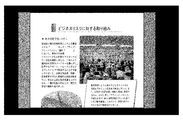
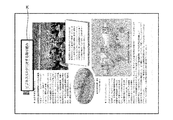
ここで、一般的な原稿は、タイトル等の重要箇所が正立時の原稿画像上部に位置することが多く、他の文字に比べ文字サイズが大きいことが多い。
また、図11の枠で囲まれた部分のように、正立時に原稿画像上部、且つ、文字ポイントが大きい箇所Kがある場合、図12に示すように、画像表示部102hは、原稿画像Lの原稿画像データ上に、箇所Kの画像データを入出力部112に重畳表示させてもよい。
このように、一般的な原稿の場合、タイトル等の重要な箇所が正立時の原稿画像上部に位置することが多く、他の文字に比べ文字サイズが大きいことが多いため、画像表示部102hは、正立補正した当該箇所の画像データを拡大表示させてもよい。
また、図13の枠で囲まれた部分のように、領収書画像中に金額を示す文字から構成される領域Mがある場合、図14に示すように、画像表示部102hは、領収書画像Nの領収書画像データ上に、正立補正した領域Mの画像データを入出力部112に重畳表示させてもよい。
このように、請求書、領収書およびレシート等の帳票の場合、金額(数値)が重要であるため、画像表示部102hは、正立補正した金額を示す領域の画像データを拡大表示させてもよい。
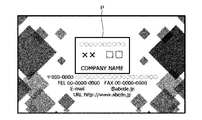
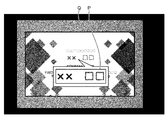
また、図15の枠で囲まれた部分のように、名刺画像における名前を示す文字から構成される領域Pがある場合、図16に示すように、画像表示部102hは、名刺画像Qの名刺画像データ上に、正立補正した領域Pの画像データを入出力部112に重畳表示させてもよい。
このように、名刺の場合、名前または会社名等が重要であるため、画像表示部102hは、正立補正した名前または会社名等を示す領域の画像データを拡大表示させてもよい。
そして、制御部102は、ユーザの確認により、入出力部112を介して再撮影が必要であるとの指示が入力されたか否かを判定する(ステップSA-7)。
そして、制御部102は、再撮影が必要であるとの指示が入力されたと判定した場合(ステップSA-7:Yes)、処理をステップSA-1に移行させる。
ここで、図17を参照して、本実施形態における撮影リトライ制御の一例について説明する。図17は、本実施形態における撮影リトライ制御の一例を示す図である。
図17に示すように、本実施形態においては、ユーザに原稿画像の一番ボケている特定領域(文字領域)Rを確認させることによって、ユーザに撮影をし直すかどうかの判断をさせる。
そして、本実施形態においては、ユーザが一番ボケている特定領域が可読不可と判断した場合、ユーザに再度同じ原稿の撮影を指示させてもよい。
このように、本実施形態において、ユーザは、再度同じ原稿の撮影が必要であるか否かを判断できる。
一方、制御部102は、再撮影が不必要であるとのユーザ確認が入力されたと判定した場合(ステップSA-7:No)、処理をステップSA-8に移行させる。
そして、原稿向き補正部102gは、原稿画像の向きに基づいて、正立補正した原稿画像の補正後原稿画像データを取得する(ステップSA-8)。
そして、原稿向き補正部102gは、補正後原稿画像データを画像データファイル106bに保存(格納)し(ステップSA-9)、処理を終了する。
図18を参照して、本実施形態における撮影リトライ制御の一例について説明する。図18は、本実施形態における撮影リトライ制御の一例を示す図である。
図18に示すように、本実施形態においては、ユーザが一番ボケている特定領域Sが可読可能と判断した場合、再度の撮影が必要無いため、正立補正した原稿画像の補正後原稿画像データの保存を行った後、次の原稿の撮影に移ることができる。
ここで、図19を参照して、本実施形態における特定領域表示処理の概要の一例について説明する。図19は、本実施形態における特定領域表示処理の一例を示す概要図である。
図19に示すように、本実施形態においては、モバイル端末にて原稿を撮影し(ステップSB-1)、撮影画像から原稿画像の取得を行う(ステップSB-2)。
そして、本実施形態においては、原稿画像の向き判定を実施し(ステップSB-3)、原稿画像において、向き判定に使用された箇所、ボケが大きい箇所または重要な箇所である特定領域を向き補正した画像データを取得する(ステップSB-4)。
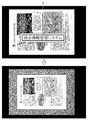
そして、本実施形態においては、確認を容易にするため、向き補正なしの原稿画像を全体表示すると同時に、向き補正ありの特定領域を拡大表示し、ユーザにその結果を確認させる(ステップSB-5)。
そして、本実施形態においては、再撮影が不必要であるとのユーザ確認が入力された場合(ステップSB-6)、原稿画像全体の向き補正を実施してサムネイル表示すると同時に、モバイル端末またはクラウド上にデータ保存し(ステップSB-7)、処理を終了する。
このように、本実施形態においては、ユーザが対象原稿を撮影した後に切り出しを行い、原稿画像の一部領域のみ向き補正処理を行い、向き補正が適用された領域を前面に表示することで、ユーザがその結果を確認することができる。
近年、スマートフォンまたはタブレット等のモバイル端末の普及に伴い、従来ではスキャナが利用されてきた業務が、カメラを有するモバイル端末を利用する業務に変化している。
これは、カメラによるスキャニングは場所を問わないこと、または、媒体の制限が無いことによる自由度が高いという利点があるからである。
一方、従来のモバイル端末においては、ユーザがモバイルカメラで原稿を撮影し、直後に原稿画像の文字が読めるのか等を確認したい際に、自動で向き補正処理が施されて原稿画像が回転してしまう、または、文字サイズが小さくなってしまうことで、確認が困難となるという問題があった。
また、従来のモバイル端末においては、複数の原稿の撮影と確認とを繰り返す場合、文字が読めている状態なのかをデバイスを縦にして確認した直後に、デバイスを横にして次の原稿を撮影する必要もあった。
このように、従来のモバイル端末においては、モバイルカメラで原稿を撮影する場合、ユーザは文字が読めるかどうかすぐに確認したいが、自動的に正立補正が行われると、原稿が回転してしまい、画像も縮小されてしまう場合もあるため読みづらくなってしまうという問題があった。
そこで、本実施形態においては、モバイルカメラで撮影し原稿画像を切り出し、切り出した原稿画像から文字領域を抽出し、抽出した文字領域の向きを判定して向き補正し、原稿画像全体と向き補正した文字領域とをモバイル端末上で表示する方法を提供している。
[他の実施形態]
さて、これまで本発明の実施形態について説明したが、本発明は、上述した実施形態以外にも、請求の範囲に記載した技術的思想の範囲内において種々の異なる実施形態にて実施されてよいものである。
さて、これまで本発明の実施形態について説明したが、本発明は、上述した実施形態以外にも、請求の範囲に記載した技術的思想の範囲内において種々の異なる実施形態にて実施されてよいものである。
例えば、モバイル端末100は、スタンドアローンの形態で処理を行ってもよく、クライアント端末(モバイル端末100とは別筐体である)からの要求に応じて処理を行い、その処理結果を当該クライアント端末に返却するようにしてもよい。
また、実施形態において説明した各処理のうち、自動的に行われるものとして説明した処理の全部または一部を手動的に行うこともでき、あるいは、手動的に行われるものとして説明した処理の全部または一部を公知の方法で自動的に行うこともできる。
このほか、明細書中および図面中で示した処理手順、制御手順、具体的名称、各処理の登録データもしくは検索条件等のパラメータを含む情報、画面例、または、データベース構成については、特記する場合を除いて任意に変更することができる。
また、モバイル端末100に関して、図示の各構成要素は機能概念的なものであり、必ずしも物理的に図示の如く構成されていることを要しない。
例えば、モバイル端末100の各装置が備える処理機能、特に制御部102にて行われる各処理機能については、その全部または任意の一部を、CPUおよび当該CPUにて解釈実行されるプログラムにて実現してもよく、また、ワイヤードロジックによるハードウェアとして実現してもよい。
なお、プログラムは、後述する、コンピュータに本発明に係る方法を実行させるためのプログラム化された命令を含む、一時的でないコンピュータ読み取り可能な記録媒体に記録されており、必要に応じてモバイル端末100に機械的に読み取られる。すなわち、ROMまたはHDDなどの記憶部106などには、OS(Operating System)と協働してCPUに命令を与え、各種処理を行うためのコンピュータプログラムが記録されている。このコンピュータプログラムは、RAMにロードされることによって実行され、CPUと協働して制御部を構成する。
また、このコンピュータプログラムは、モバイル端末100に対して任意のネットワークを介して接続されたアプリケーションプログラムサーバに記憶されていてもよく、必要に応じてその全部または一部をダウンロードすることも可能である。
また、本発明に係るプログラムを、コンピュータ読み取り可能な記録媒体に格納してもよく、また、プログラム製品として構成することもできる。ここで、この「記録媒体」とは、メモリーカード、USBメモリ、SDカード、フレキシブルディスク、光磁気ディスク、ROM、EPROM、EEPROM、CD-ROM、DVD、および、Blu-ray(登録商標) Disc等の任意の「可搬用の物理媒体」を含むものとする。
また、「プログラム」とは、任意の言語や記述方法にて記述されたデータ処理方法であり、ソースコードやバイナリコード等の形式を問わない。なお、「プログラム」は必ずしも単一的に構成されるものに限られず、複数のモジュールやライブラリとして分散構成されるものや、OSに代表される別個のプログラムと協働してその機能を達成するものをも含む。なお、実施形態に示した各装置において記録媒体を読み取るための具体的な構成、読み取り手順、あるいは、読み取り後のインストール手順等については、周知の構成や手順を用いることができる。
記憶部106に格納される各種のデータベース等は、RAMもしくはROM等のメモリ装置、ハードディスク等の固定ディスク装置、フレキシブルディスク、および/または、光ディスク等のストレージ手段であり、各種処理やウェブサイト提供に用いる各種のプログラム、テーブル、データベース、および/または、ウェブページ用ファイル等を格納してもよい。
また、モバイル端末100は、既知のパーソナルコンピュータ等の情報処理装置として構成してもよく、また、該情報処理装置に任意の周辺装置を接続して構成してもよい。また、モバイル端末100は、該情報処理装置に本発明の方法を実現させるソフトウェア(プログラム、データ等を含む)を実装することにより実現してもよい。
更に、装置の分散・統合の具体的形態は図示するものに限られず、その全部または一部を、各種の付加等に応じて、または、機能負荷に応じて、任意の単位で機能的または物理的に分散・統合して構成することができる。すなわち、上述した実施形態を任意に組み合わせて実施してもよく、実施形態を選択的に実施してもよい。
以上のように、モバイル端末、画像処理方法、および、プログラムは、産業上の多くの分野、特にカメラで読み込んだ画像を扱う画像処理分野で実施することができ、極めて有用である。
100 モバイル端末
102 制御部
102a 撮影画像取得部
102b 原稿取得部
102c ボケ検出部
102d 特定領域取得部
102e 原稿向き特定部
102f 特定領域向き補正部
102g 原稿向き補正部
102h 画像表示部
106 記憶部
106a 辞書データファイル
106b 画像データファイル
110 撮影部
112 入出力部
114 センサ部
116 通信部
102 制御部
102a 撮影画像取得部
102b 原稿取得部
102c ボケ検出部
102d 特定領域取得部
102e 原稿向き特定部
102f 特定領域向き補正部
102g 原稿向き補正部
102h 画像表示部
106 記憶部
106a 辞書データファイル
106b 画像データファイル
110 撮影部
112 入出力部
114 センサ部
116 通信部
Claims (16)
- 撮影部の撮影による撮影画像の撮影画像データを取得する撮影画像取得手段と、
前記撮影画像に含まれる原稿画像の原稿画像データを取得する原稿取得手段と、
前記原稿画像における特定領域の特定領域画像データを取得する特定領域取得手段と、
前記原稿画像におけるコンテンツの向きを特定し、当該コンテンツの向きに基づいて、前記原稿画像の向きを特定する原稿向き特定手段と、
前記原稿画像の向きに基づいて、正立補正した前記特定領域の補正後特定領域画像データを取得する特定領域向き補正手段と、
前記補正後特定領域画像データを表示させる補正後画像表示手段と、
を備えたことを特徴とする、モバイル端末。 - 前記補正後画像表示手段は、
前記原稿画像データを表示させ、且つ、前記補正後特定領域画像データを拡大表示させる、請求項1に記載のモバイル端末。 - ボケが所定の基準値以上となる前記原稿画像の一部をボケ領域として検出するボケ検出手段、
を更に備え、
前記特定領域取得手段は、
前記ボケ領域を前記特定領域として、前記特定領域画像データを取得する、請求項1または2に記載のモバイル端末。 - 前記特定領域取得手段は、
前記原稿画像に含まれる重要箇所を推定し、前記重要箇所を前記特定領域として、前記特定領域画像データを取得する請求項1または2に記載のモバイル端末。 - 前記原稿画像データを表示させ、前記原稿画像の一部をユーザに選択させる原稿画像表示手段、
を更に備え、
前記特定領域取得手段は、
前記ユーザに選択された前記原稿画像の一部を前記特定領域として、前記特定領域画像データを取得する、請求項1または2に記載のモバイル端末。 - 前記重要箇所は、
前記原稿画像に含まれる正立補正後に原稿画像上部に位置する、サイズの大きい、太字の、および/または、色の異なる文字から構成される領域である、請求項4に記載のモバイル端末。 - 前記重要箇所は、
前記原稿画像に含まれる金額を示す文字、数字、および/または、記号から構成される領域である、請求項4に記載のモバイル端末。 - 前記補正後画像表示手段は、
前記原稿画像データ上に、前記補正後特定領域画像データを拡大して重畳表示させる、請求項1から7のいずれか一つに記載のモバイル端末。 - 前記原稿画像の向きに基づいて、正立補正した前記原稿画像の補正後原稿画像データを取得する原稿向き補正手段、
を更に備えた、請求項1から8のいずれか一つに記載のモバイル端末。 - 前記補正後原稿画像データを表示させる補正後原稿画像表示手段、
を更に備えた、請求項9に記載のモバイル端末。 - 前記特定領域は、
前記原稿画像の上部領域である、請求項1または2に記載のモバイル端末。 - ボケが所定の基準値以上となる前記原稿画像の一部をボケ領域として検出するボケ検出手段、
を更に備え、
前記特定領域取得手段は、
前記ボケ検出手段により前記ボケ領域が検出されなかった場合、前記原稿画像全体を前記特定領域として、前記特定領域画像データを取得する、請求項1または2に記載のモバイル端末。 - 前記原稿向き特定手段は、
前記特定領域におけるコンテンツの向きを特定し、当該コンテンツの向きに基づいて、前記原稿画像の向きを特定する、請求項1から12のいずれか一つに記載のモバイル端末。 - 前記原稿向き特定手段は、
前記原稿画像における文字の向きを特定し、当該文字の向きに基づいて、前記原稿画像の向きを特定する、請求項1から12のいずれか一つに記載のモバイル端末。 - 撮影部の撮影による撮影画像の撮影画像データを取得する撮影画像取得ステップと、
前記撮影画像に含まれる原稿画像の原稿画像データを取得する原稿取得ステップと、
前記原稿画像における特定領域の特定領域画像データを取得する特定領域取得ステップと、
前記原稿画像におけるコンテンツの向きを特定し、当該コンテンツの向きに基づいて、前記原稿画像の向きを特定する原稿向き特定ステップと、
前記原稿画像の向きに基づいて、正立補正した前記特定領域の補正後特定領域画像データを取得する特定領域向き補正ステップと、
前記補正後特定領域画像データを表示させる補正後画像表示ステップと、
を含むことを特徴とする、画像処理方法。 - 撮影部の撮影による撮影画像の撮影画像データを取得する撮影画像取得ステップと、
前記撮影画像に含まれる原稿画像の原稿画像データを取得する原稿取得ステップと、
前記原稿画像における特定領域の特定領域画像データを取得する特定領域取得ステップと、
前記原稿画像におけるコンテンツの向きを特定し、当該コンテンツの向きに基づいて、前記原稿画像の向きを特定する原稿向き特定ステップと、
前記原稿画像の向きに基づいて、正立補正した前記特定領域の補正後特定領域画像データを取得する特定領域向き補正ステップと、
前記補正後特定領域画像データを表示させる補正後画像表示ステップと、
をコンピュータに実行させるためのプログラム。
Priority Applications (2)
| Application Number | Priority Date | Filing Date | Title |
|---|---|---|---|
| PCT/JP2016/074721 WO2018037520A1 (ja) | 2016-08-24 | 2016-08-24 | モバイル端末、画像処理方法、および、プログラム |
| JP2018535994A JP6697829B2 (ja) | 2016-08-24 | 2016-08-24 | モバイル端末、画像処理方法、および、プログラム |
Applications Claiming Priority (1)
| Application Number | Priority Date | Filing Date | Title |
|---|---|---|---|
| PCT/JP2016/074721 WO2018037520A1 (ja) | 2016-08-24 | 2016-08-24 | モバイル端末、画像処理方法、および、プログラム |
Publications (1)
| Publication Number | Publication Date |
|---|---|
| WO2018037520A1 true WO2018037520A1 (ja) | 2018-03-01 |
Family
ID=61245631
Family Applications (1)
| Application Number | Title | Priority Date | Filing Date |
|---|---|---|---|
| PCT/JP2016/074721 Ceased WO2018037520A1 (ja) | 2016-08-24 | 2016-08-24 | モバイル端末、画像処理方法、および、プログラム |
Country Status (2)
| Country | Link |
|---|---|
| JP (1) | JP6697829B2 (ja) |
| WO (1) | WO2018037520A1 (ja) |
Citations (7)
| Publication number | Priority date | Publication date | Assignee | Title |
|---|---|---|---|---|
| JPH06208645A (ja) * | 1993-01-11 | 1994-07-26 | Toshiba Corp | 文字認識装置 |
| JPH0969136A (ja) * | 1995-08-31 | 1997-03-11 | Canon Inc | 文書方向判定方法及び装置及び文字認識装置、及びコンピュータ制御装置 |
| JPH1063776A (ja) * | 1996-08-16 | 1998-03-06 | Fujitsu Ltd | 文字列方向推定方法および装置 |
| JPH11272792A (ja) * | 1998-03-24 | 1999-10-08 | Fuji Xerox Co Ltd | 用紙方向判定装置及び方法 |
| JP2003242441A (ja) * | 2002-02-15 | 2003-08-29 | Glory Ltd | 帳票処理方法および装置並びにプログラム |
| JP2007034521A (ja) * | 2005-07-25 | 2007-02-08 | Sony Corp | 認証装置及び認証方法 |
| JP2014071866A (ja) * | 2012-10-02 | 2014-04-21 | Nidec Sankyo Corp | 画像処理装置、画像処理方法及びプログラム |
Family Cites Families (1)
| Publication number | Priority date | Publication date | Assignee | Title |
|---|---|---|---|---|
| JP2007034531A (ja) * | 2005-07-25 | 2007-02-08 | Sharp Corp | 文字認識装置、文字認識方法、文字認識プログラム、および記録媒体 |
-
2016
- 2016-08-24 JP JP2018535994A patent/JP6697829B2/ja not_active Expired - Fee Related
- 2016-08-24 WO PCT/JP2016/074721 patent/WO2018037520A1/ja not_active Ceased
Patent Citations (7)
| Publication number | Priority date | Publication date | Assignee | Title |
|---|---|---|---|---|
| JPH06208645A (ja) * | 1993-01-11 | 1994-07-26 | Toshiba Corp | 文字認識装置 |
| JPH0969136A (ja) * | 1995-08-31 | 1997-03-11 | Canon Inc | 文書方向判定方法及び装置及び文字認識装置、及びコンピュータ制御装置 |
| JPH1063776A (ja) * | 1996-08-16 | 1998-03-06 | Fujitsu Ltd | 文字列方向推定方法および装置 |
| JPH11272792A (ja) * | 1998-03-24 | 1999-10-08 | Fuji Xerox Co Ltd | 用紙方向判定装置及び方法 |
| JP2003242441A (ja) * | 2002-02-15 | 2003-08-29 | Glory Ltd | 帳票処理方法および装置並びにプログラム |
| JP2007034521A (ja) * | 2005-07-25 | 2007-02-08 | Sony Corp | 認証装置及び認証方法 |
| JP2014071866A (ja) * | 2012-10-02 | 2014-04-21 | Nidec Sankyo Corp | 画像処理装置、画像処理方法及びプログラム |
Also Published As
| Publication number | Publication date |
|---|---|
| JP6697829B2 (ja) | 2020-05-27 |
| JPWO2018037520A1 (ja) | 2018-12-06 |
Similar Documents
| Publication | Publication Date | Title |
|---|---|---|
| JP4341629B2 (ja) | 撮像装置、画像処理方法及びプログラム | |
| US9402025B2 (en) | Detection apparatus, method for detecting feature point and storage medium | |
| US10810743B2 (en) | Image processing device, image processing method, and computer program product | |
| JP6581288B2 (ja) | モバイル端末、画像処理方法、および、プログラム | |
| JP6503478B2 (ja) | モバイル端末、画像処理方法、および、プログラム | |
| JP6716014B2 (ja) | 画像撮像装置、制御方法及び制御プログラム | |
| JP6596512B2 (ja) | モバイル端末、画像処理方法、および、プログラム | |
| JP6600090B2 (ja) | 画像処理装置、画像処理方法、および、プログラム | |
| JP6697829B2 (ja) | モバイル端末、画像処理方法、および、プログラム | |
| JP2019207735A (ja) | モバイル端末、画像処理方法、および、プログラム | |
| US9396405B2 (en) | Image processing apparatus, image processing method, and image processing program | |
| JP6613378B2 (ja) | モバイル端末、画像処理方法、および、プログラム | |
| WO2018003090A1 (ja) | 画像処理装置、画像処理方法、および、プログラム | |
| US12273606B2 (en) | Device and method for capturing images or video | |
| US20110109763A1 (en) | Apparatus and method for image registration in portable terminal | |
| US20160224854A1 (en) | Information processing apparatus, information processing method, and storage medium | |
| JP6115673B2 (ja) | 装置、及びプログラム | |
| JP5532748B2 (ja) | 撮像装置 | |
| JP5920448B2 (ja) | 撮像装置、プログラム | |
| JP5655916B2 (ja) | 画像検索システム | |
| JP2013141053A (ja) | 画像処理装置、画像処理方法及びプログラム | |
| WO2017158814A1 (ja) | モバイル端末、画像処理方法、および、プログラム | |
| JP2012156628A (ja) | 電子カメラ、画像処理装置および画像処理プログラム |
Legal Events
| Date | Code | Title | Description |
|---|---|---|---|
| WWE | Wipo information: entry into national phase |
Ref document number: 2018535994 Country of ref document: JP |
|
| 121 | Ep: the epo has been informed by wipo that ep was designated in this application |
Ref document number: 16914194 Country of ref document: EP Kind code of ref document: A1 |
|
| NENP | Non-entry into the national phase |
Ref country code: DE |
|
| 122 | Ep: pct application non-entry in european phase |
Ref document number: 16914194 Country of ref document: EP Kind code of ref document: A1 |