WO2018025316A1 - ページ表示プログラム、ページ表示装置、及びページ表示方法 - Google Patents
ページ表示プログラム、ページ表示装置、及びページ表示方法 Download PDFInfo
- Publication number
- WO2018025316A1 WO2018025316A1 PCT/JP2016/072567 JP2016072567W WO2018025316A1 WO 2018025316 A1 WO2018025316 A1 WO 2018025316A1 JP 2016072567 W JP2016072567 W JP 2016072567W WO 2018025316 A1 WO2018025316 A1 WO 2018025316A1
- Authority
- WO
- WIPO (PCT)
- Prior art keywords
- content
- display
- page
- scroll
- screen
- Prior art date
- Legal status (The legal status is an assumption and is not a legal conclusion. Google has not performed a legal analysis and makes no representation as to the accuracy of the status listed.)
- Ceased
Links
Images






Classifications
-
- G—PHYSICS
- G06—COMPUTING OR CALCULATING; COUNTING
- G06F—ELECTRIC DIGITAL DATA PROCESSING
- G06F3/00—Input arrangements for transferring data to be processed into a form capable of being handled by the computer; Output arrangements for transferring data from processing unit to output unit, e.g. interface arrangements
- G06F3/01—Input arrangements or combined input and output arrangements for interaction between user and computer
- G06F3/048—Interaction techniques based on graphical user interfaces [GUI]
- G06F3/0484—Interaction techniques based on graphical user interfaces [GUI] for the control of specific functions or operations, e.g. selecting or manipulating an object, an image or a displayed text element, setting a parameter value or selecting a range
- G06F3/0485—Scrolling or panning
-
- G—PHYSICS
- G06—COMPUTING OR CALCULATING; COUNTING
- G06F—ELECTRIC DIGITAL DATA PROCESSING
- G06F3/00—Input arrangements for transferring data to be processed into a form capable of being handled by the computer; Output arrangements for transferring data from processing unit to output unit, e.g. interface arrangements
- G06F3/01—Input arrangements or combined input and output arrangements for interaction between user and computer
- G06F3/048—Interaction techniques based on graphical user interfaces [GUI]
- G06F3/0487—Interaction techniques based on graphical user interfaces [GUI] using specific features provided by the input device, e.g. functions controlled by the rotation of a mouse with dual sensing arrangements, or of the nature of the input device, e.g. tap gestures based on pressure sensed by a digitiser
- G06F3/0488—Interaction techniques based on graphical user interfaces [GUI] using specific features provided by the input device, e.g. functions controlled by the rotation of a mouse with dual sensing arrangements, or of the nature of the input device, e.g. tap gestures based on pressure sensed by a digitiser using a touch-screen or digitiser, e.g. input of commands through traced gestures
Definitions
- the present invention relates to a page display program, a page display device, and a page display method.
- FIG. 1 shows an example of the display screen of such a portable terminal device.
- the user when the content 101 included in the web page displayed on the screen is scrolled up and down, the user performs a scroll operation of sliding the screen up and down with the finger 102 as indicated by the arrow 103. Thereby, the user can browse information such as desired text and images included in the content 101.
- Such a problem is not limited to the scroll operation in the portable terminal device, but also occurs when the scroll operation is performed in another information processing apparatus such as a desktop personal computer (PC).
- PC desktop personal computer
- an object of the present invention is to enable efficient use of a display target page and content when scrollable content is included in the display target page.
- the page display program causes the computer to execute the following processing.
- the computer includes a scroll function in which the content included in the display target page receives a scroll operation for the content, and the width or height of the display area of the content or the width of the content relative to the screen displaying the display target page or If the height ratio is in a predetermined state, the scroll function is disabled.
- the computer displays the display target page on the screen in a state where the operation request for the content is received.
- the display target page and the content can be efficiently used.
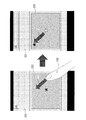
- FIG. 2 shows an example of content embedded in a web page. It is assumed that the map content 202 is embedded in the scrollable web page 201 and the user wants to scroll through the web page 201 and browse other information in the web page 201. At this time, if the user's finger 102 accidentally touches the map content 202 and scrolls the map content 202 in the direction indicated by the arrow 211, the map content 202 is scrolled as indicated by the arrow 212, and the web page 201 is Does not scroll.
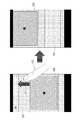
- FIG. 3 shows an example of the scroll operation for the web page 201 of FIG.
- the entire web page 201 including the map content 202 is scrolled upward, and the lower information in the web page 201 is displayed on the screen.
- the size of the map content 202 occupies most of the screen, it is difficult to scroll the web page 201.
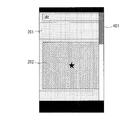
- FIG. 4 shows an example of a display screen in which a scroll bar is added to the web page 201 of FIG.
- the scroll bar 401 is added to the web page 201, the user can use the scroll bar 401 to scroll the entire web page 201 up and down.
- the scroll bar 401 has an elongated shape, it is desirable that the scroll bar 401 is carefully operated on the screen of the mobile terminal device, and a smooth scroll operation is not always realized.
- the scroll bar 401 is enlarged and displayed.
- the screen size of the mobile terminal device is limited, when the scroll bar 401 is enlarged and displayed, the display area of the web page 201 becomes narrow and the web page 201 and the map content 202 are difficult to see. Thus, it is difficult to achieve both the scroll operation for the web page 201 and the maximum display of the map content 202.
- a method of adding a trigger based on the following measurement to the browser can be considered.
- A Pressure measurement When the user strongly presses the map content 202 in the web page 201, a scroll operation is performed on the map content 202, and when the user presses the map content 202 weakly, a scroll operation is performed on the web page 201.
- B Acceleration measurement When the user slides the map content 202 in the web page 201 quickly, a scroll operation is performed on the map content 202. When the user slides the map content 202 slowly, the scroll operation on the web page 201 is performed. Done.
- C Movement amount measurement When the user slides the map content 202 in the web page 201 greatly, a scroll operation is performed on the map content 202. When the user slides the map content 202 small, the scroll operation on the web page 201 is performed. Done.
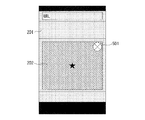
- FIG. 5 shows an example of a display screen in which a non-display button is added to the map content 202 of FIG.
- the browser changes the map content 202 to a non-display state. Thereby, the user can scroll the web page 201 smoothly.
- the non-display button 501 when the non-display button 501 is arranged in the map content 202, a part of the map content 202 is hidden. Furthermore, in the case of a mobile terminal device, there is no room for arranging the non-display button 501 on the browser toolbar, and the arrangement of the non-display button 501 in the menu displayed by the menu button complicates the selection operation.
- FIG. 6 shows an example of a display screen in which the size of the map content 202 in FIG. 2 is limited.
- the browser restricts the size of the map content 202 to a predetermined size or less and displays the map content 202 in a small size, so that the operable area of the web page 201 is widened. For this reason, the scroll operation with respect to the web page 201 becomes easy.
- the map content 202 is displayed in a small size, the visibility and operability of the map content 202 are reduced, and the use thereof is restricted.
- a part of another content in the web page 201 is displayed in an area freed by reducing the map content 202 and the layout of the entire web page 201 is destroyed.
- these contents are displayed side by side, and the operability of the scroll operation on the web page 201 may not be changed after all.
- FIG. 7 shows a functional configuration example of the page display device of the embodiment.
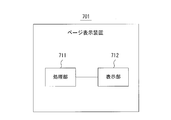
- the page display device 701 in FIG. 2 includes a processing unit 711 and a display unit 712.
- FIG. 8 is a flowchart showing an example of page display processing performed by the page display device 701 in FIG.
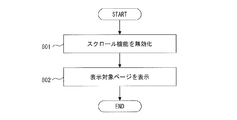
- the processing unit 711 includes a scroll function in which the content included in the display target page receives a scroll operation for the content, and the width or height of the display area of the content or the width of the content with respect to the screen displaying the display target page Alternatively, if the height ratio is in a predetermined state, the scroll function is invalidated (step 801). Then, the display unit 712 displays the display target page on the screen in a state where the operation request for the content is received (step 802).
- a page display device 701 when a scrollable content is included in the display target page, the display target page and the content can be efficiently used.
- FIG. 9 shows a specific example of the page display device 701 in FIG.
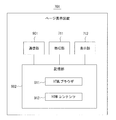
- the page display device 701 in FIG. 9 includes a processing unit 711, a display unit 712, a communication unit 901, and a storage unit 902.
- the storage unit 902 stores an HTML browser 911 and HTML content 412.
- the page display device 701 may be a mobile terminal device such as a smartphone, a tablet, or a car navigation device, or may be a desktop PC or the like.
- the processing unit 711 requests the HTML content 912 from an external server via the communication network by executing the HTML browser 911.
- the communication unit 901 receives the HTML content 912 from an external server via the communication network, and stores the received HTML content 912 in the storage unit 902. Then, the processing unit 711 executes the HTML browser 911, analyzes the HTML content 912, converts it into Document Object Model (DOM) information, and visualizes the HTML content 912 based on the DOM information.
- DOM Document Object Model
- HTML content 912 is scrollable content representing a display target page, and HTML content 912 includes another scrollable content.
- the HTML content 912 and the content included therein include a scroll function for receiving a scroll operation.
- scrollable content included in the HTML content 912 may be referred to as internal content.
- the processing unit 711 invalidates the operation event for the internal content having a size that prevents the scroll operation for the HTML content 912 by executing the HTML browser 911. Thereby, the operation function including the scroll function of the internal content is invalidated. Then, the display unit 712 displays the display target page on the screen in a state of accepting an operation request for the internal content.
- FIG. 10 shows an example of an operation for displaying the map content 202 on another page when the web page 201 and the map content 202 of FIG. 2 are the display target page and the internal content, respectively.
- the processing unit 711 invalidates the operation event for the map content 202.
- the predetermined size is a size that prevents a scroll operation on the web page 201 that is a display target page.
- the operation event for the map content 202 is invalidated, even if the user touches the map content 202 and scrolls, the map content 202 is not scrolled. Therefore, even if the size of the map content 202 occupies most of the screen, the user can easily perform a scroll operation on the web page 201.
- the processing unit 711 displays the map content 202 on a page different from the web page 201 as shown in the screen 1002. Then, the processing unit 711 validates an operation event for the map content 202 on the screen 1002. Thereby, the user can perform a scroll operation on the map content 202 on another page.
- the operation request for the map content 202 on the screen 1001 may be a touch operation such as a tap, a double tap, and a long press, for example.
- FIG. 11 shows an example of an operation of scrolling the map content 202 on the screen 1002 of FIG.
- the processing unit 711 receives a scroll operation for scrolling the map content 202 in the direction indicated by the arrow 1103 on the screen 1002, as illustrated in the screen 1101, the processing unit 711 scrolls the map content 202 to display the scrolled map content 1104. Is displayed.
- the processing unit 711 can determine whether the size of the internal content is a size that hinders the scroll operation on the HTML content 912 based on the width, height, area, or the like of the display area of the internal content. .
- the processing unit 711 can also determine whether the size of the internal content is a size that hinders the scroll operation on the HTML content 912 based on the ratio of the size of the internal content to the size of the screen.
- FIG. 12 shows an example of the size of the screen and internal content.
- FIG. 12A shows a case where the screen of the display unit 712 is a vertically long rectangle.
- the width and height of the screen are w and h, respectively, and the width and height of the display area of the internal content 1201 are x and y, respectively. Size information indicating x and y is described in the HTML content 912.
- FIG. 12B shows a case where the screen is a horizontally long rectangle.
- the width and height of the screen are w and h, respectively, and the width and height of the display area of the internal content 1202 are x and y, respectively.
- the display area of the internal content 1202 does not fit within the screen, only a part of the internal content 1202 is displayed on the screen.
- the processing unit 711 can determine that the size of the internal content is a size that hinders the scroll operation on the HTML content 912 when x and y satisfy any of the following conditions.
- (C2) y is larger than a predetermined value.
- (C3) x ⁇ y is larger than a predetermined value.
- (C4) The ratio of x to w is greater than a predetermined value.
- C5 The ratio of y to h is greater than a predetermined value.
- C6 The ratio of x ⁇ y to w ⁇ h is larger than a predetermined value.
- the condition (c6) when the condition (c6) is applied with the predetermined value being 40%, the ratio of the area of the internal content 1201 to the area of the screen in FIG. 12A is equal to or less than the predetermined value. Therefore, it is determined that the size of the internal content 1201 does not hinder the scroll operation for the HTML content 912.
- the ratio of the area of the internal content 1202 to the area of the screen in FIG. 12B is larger than a predetermined value. Therefore, it is determined that the size of the internal content 1202 hinders the scroll operation for the HTML content 912.
- the predetermined values in the conditions (c1) to (c6) may be set by the user, or may be set by the processing unit 711 by a predetermined algorithm.
- the processing unit 711 determines whether the changed size is a size that prevents a scroll operation on the HTML content 912 each time the size is changed.
- FIG. 13 is a flowchart showing a specific example of the page display process performed by the page display device 701 in FIG.
- the processing unit 711 performs the page display process of FIG. 13 by executing the HTML browser 911.
- the processing unit 711 displays the HTML content 912 as a display target page on the screen (step 1301), and determines whether or not to perform a DOM operation using a script described in the HTML content 912 (step 1302).
- the script is described in, for example, an object-oriented script language, and the processing unit 711 can update the display information of the elements included in the DOM information by interpreting and executing the script.
- the element included in the DOM information represents the internal content
- the position and size of the internal content in the display target page may be changed by updating the display information.
- the script may be JavaScript (registered trademark).
- the processing unit 711 When performing the DOM operation by the script (step 1302, YES), the processing unit 711 updates the DOM information according to the script (step 1303). Then, the processing unit 711 analyzes the HTML content 912 and checks whether or not scrollable internal content is included (step 1304). For example, the processing unit 711 can determine that the scrollable internal content is included in the following cases.
- P In the HTML content 912, an “iframe” tag indicating an inline frame of the internal content exists.
- the HTML content 912 there is an internal content tag with a description such as “overflow: scroll” indicating the setting of scroll bar display.
- the processing unit 711 checks whether the internal content prevents a scroll operation on the HTML content 912 (step 1305). At this time, the processing unit 711 checks whether the internal content prevents the scroll operation on the HTML content 912 using any of the conditions (c1) to (c6).
- the processing unit 711 invalidates the operation event for the internal content (step 1306).
- the processing unit 711 performs the processing after step 1304.
- the processing unit 711 ends the processing. If the internal content does not hinder the scroll operation on the HTML content 912 (step 1305, NO), the processing unit 711 ends the process.
- FIG. 14 is a flowchart of the first operation event invalidation process in step 1306 of FIG.
- the processing unit 711 generates a snapshot image of the internal content displayed in the HTML content 912 (Step 1401).
- the processing unit 711 converts the internal content into a snapshot image on the screen, and displays the snapshot image in a state of accepting an operation request for the internal content (step 1402).
- the processing unit 711 checks whether or not an operation request for internal content has been received from the user (step 1403).
- the processing unit 711 displays the internal content on another page with the operation event enabled (step 1404). Thereby, the user can perform a scroll operation on the internal content on another page.
- the processing unit 711 checks whether or not an operation for returning to the display of the HTML content 912 has been received from the user (step 1405).
- the processing unit 711 newly generates a snapshot image of the displayed internal content (step 1406).
- the processing unit 711 displays the original HTML content 912 displayed before displaying another page on the screen (step 1407). Then, the processing unit 711 converts the internal content in the HTML content 912 into a newly generated snapshot image (step 1408). When a scroll operation is performed on the internal content on another page, the internal content after scrolling is displayed in the original HTML content 912.
- step 1403 When the operation request for the internal content is not received (step 1403, NO), or when the operation for returning to the display of the HTML content 912 is not received (step 1405, NO), the processing unit 711 ends the process.
- FIG. 15 shows the first conversion process when the “iframe” tag of the internal content exists in the HTML content 912.
- menu In the html screen 1501, menuLunch. An html inline frame 1502 is displayed. menu. There is an “iframe” tag in html, and the width and height in the “iframe” tag are size information indicating the width and height of the inline frame 1502, respectively.
- step 1401 the processing unit 711 generates a snapshot image 1503 of the inline frame 1502.
- step 1402 the processing unit 711 causes the menu.
- the inline frame 1502 in the screen 1501 is converted into a snapshot image 1503 by converting the “iframe” tag in html into a “canvas” tag.
- the processing unit 711 adds an “a href” tag that defines an operation when an operation request for the snapshot image 1503 is received.
- a href tag As the Uniform Resource Locator (URL) of the link destination in the “a href” tag, menuLunch. html is specified.
- the processing unit 711 receives an operation request for the snapshot image 1503, the menuLunch.
- the html can be displayed on another page 1504.
- FIG. 16 shows a first conversion process in the case where the HTML content 912 has an internal content tag indicating the scroll bar display setting.
- menu In this example, menu.
- the width and height in the “div” tag are size information indicating the width and height of the internal content, respectively.
- the processing unit 711 receives an operation request for a snapshot image, the menuLunch. Another page representing html can be generated and displayed.
- the scroll operation on the HTML content 912 can be invalidated by converting the internal content in the HTML content 912 into a snapshot image.
- the HTML content 912 can be displayed without hindering the use of the internal content.
- FIG. 17 is a flowchart of the second operation event invalidation process in step 1306 of FIG.
- the processing unit 711 changes the HTML browser 911 so as to ignore the operation event for the internal content included in the HTML content 912 (step 1701).
- the processing unit 711 adds a function of accepting an operation request for internal content to the HTML browser 911 (step 1702).
- the processing in the next steps 1703 to 1705 is the same as the processing in steps 1403 to 1405 in FIG.
- the processing unit 711 displays the original HTML content 912 that was displayed before displaying another page on the screen (step). 1706).
- a scroll operation is performed on the internal content on another page, the internal content after scrolling is displayed in the original HTML content 912.
- FIG. 18 shows a second conversion process when the “iframe” tag of the internal content exists in the HTML content 912.
- menu In this example, menu.
- menuLunch There is an “iframe” tag for html.
- the width and height in the “iframe” tag are size information indicating the width and height of the internal content, respectively.
- step 1701 the processing unit 711 causes the menu. described in html, menuLunch.
- the HTML browser 911 is changed so that an operation event (not shown) for html is ignored.
- step 1702 the processing unit 711 causes menuLunch. A function of accepting an operation request for html is added to the HTML browser 911.
- the processing unit 711 causes the menuLunch.
- menuLunch When an operation request for html is received, menuLunch. Another page representing html can be generated and displayed. menuLunch.
- the “script” tag In html, the “script” tag is used to display window. “opener” is described.
- the processing unit 711 displays the window. by opener, menu. A reference to DOM information can be returned to html.
- FIG. 19 shows a second conversion process when the HTML content 912 includes an internal content tag indicating the scroll bar display setting.
- the HTML content 912 includes an internal content tag indicating the scroll bar display setting.
- menu In this example, menu.
- the width and height in the “div” tag are size information indicating the width and height of the internal content, respectively.
- step 1701 the processing unit 711 causes the menu.
- the HTML browser 911 is changed so as to ignore the operation event (not shown) for the internal content described in the html.
- step 1702 the processing unit 711 adds a function of accepting an operation request for internal content to the HTML browser 911.
- the processing unit 711 receives an operation request for the internal content, the menuLunch. Another page representing html can be generated and displayed.
- the processing unit 711 is similar to the menuLunch. window.html in html. by opener, menu. A reference to DOM information can be returned to html.
- the scroll operation for the HTML content 912 can be invalidated by changing the HTML browser 911 so as to ignore the operation event for the internal content. Further, by adding a function for accepting an operation request for the internal content to the HTML browser 911, the HTML content 912 can be displayed without hindering the use of the internal content.
- the display screens of FIGS. 1 to 6 and FIGS. 10 to 12 are merely examples, and the display screen changes according to the content to be displayed.
- the content to be displayed is not limited to the HTML content 912, but may be another content including internal content such as content described in eXtensible Markup Language (XML).
- FIG. 20 shows a configuration example of an information processing device (computer) used as the page display device 701 in FIGS. 20 includes a central processing unit (CPU) 2001, a memory 2002, an input device 2003, a display device 2004, an auxiliary storage device 2005, a medium driving device 2006, and a network connection device 2007. These components are connected to each other by a bus 2008.
- CPU central processing unit
- the memory 2002 is a semiconductor memory such as a Read Only Memory (ROM), a Random Access Memory (RAM), or a flash memory, and stores programs and data used for page display processing.
- ROM Read Only Memory
- RAM Random Access Memory
- flash memory any type of non-volatile memory
- the memory 2002 can be used as the storage unit 902 in FIG.
- the CPU 2001 operates as the processing unit 711 in FIGS. 7 and 9 by executing a program using the memory 2002, for example.
- the input device 2003 is, for example, a keyboard, a pointing device, or the like, and is used for inputting instructions or information from an operator or a user.
- a touch panel can be used as the input device 2003.
- a display device 2004 is used for inquiring or instructing an operator or a user and outputting a processing result.
- the processing result may be HTML content 912 or internal content.
- the display device 2004 can be used as the display unit 712 in FIGS.
- the auxiliary storage device 2005 is, for example, a magnetic disk device, an optical disk device, a magneto-optical disk device, a tape device, or the like.
- the auxiliary storage device 2005 may be a hard disk drive or a flash memory.
- a flash memory can be used as the auxiliary storage device 2005.
- the information processing apparatus can store programs and data in the auxiliary storage device 2005 and load them into the memory 2002 for use.
- the auxiliary storage device 2005 can be used as the storage unit 902 in FIG.
- the medium drive device 2006 drives the portable recording medium 2009 and accesses the recorded contents.
- the portable recording medium 2009 is a memory device, a flexible disk, an optical disk, a magneto-optical disk, or the like.
- the portable recording medium 2009 may be a Compact Disk Read Only Memory (CD-ROM), Digital Versatile Disk (DVD), Universal Serial Bus (USB) memory, or the like.
- CD-ROM Compact Disk Read Only Memory
- DVD Digital Versatile Disk
- USB Universal Serial Bus
- the computer-readable recording medium for storing the program and data used for the page display processing is a physical (non-temporary) such as the memory 2002, the auxiliary storage device 2005, or the portable recording medium 2009. ) A recording medium.
- the network connection device 2007 is a communication interface that is connected to a communication network such as Local Area Network or Wide Area Network, and performs data conversion accompanying communication.
- the information processing apparatus can receive a program and data from an external apparatus via the network connection apparatus 2007, and can use them by loading them into the memory 2002.
- the network connection device 2007 can be used as the communication unit 901 in FIG.
- the information processing apparatus does not have to include all of the components shown in FIG. 20, and some of the components can be omitted depending on the application or conditions.
- the medium driving device 2006 may be omitted.
- the information processing device may include a device for a call such as a microphone and a speaker.
Landscapes
- Engineering & Computer Science (AREA)
- General Engineering & Computer Science (AREA)
- Theoretical Computer Science (AREA)
- Human Computer Interaction (AREA)
- Physics & Mathematics (AREA)
- General Physics & Mathematics (AREA)
- User Interface Of Digital Computer (AREA)
Abstract
コンピュータは、表示対象ページに含まれるコンテンツが、そのコンテンツに対するスクロール操作を受け付けるスクロール機能を含み、コンテンツの表示領域の幅又は高さ、又は表示対象ページを表示する画面に対するコンテンツの幅又は高さの比率が、所定の状態である場合、スクロール機能を無効化する(ステップ801)。そして、コンピュータは、コンテンツに対する操作要求を受け付ける状態で、表示対象ページを画面上に表示する(ステップ802)。
Description
本発明は、ページ表示プログラム、ページ表示装置、及びページ表示方法に関する。
近年、スマートフォン、タブレット、カーナビゲーション装置等のように、タッチパネルを用いて操作可能な携帯端末装置が増加している。
図1は、このような携帯端末装置の表示画面の例を示している。例えば、画面上に表示されたウェブページに含まれるコンテンツ101を上下にスクロールする場合、ユーザは、矢印103が示すように、指102で画面を上下にスライドさせるスクロール操作を行う。これにより、ユーザは、コンテンツ101に含まれる所望のテキスト、画像等の情報を閲覧することができる。
“canvas”タグを用いて一方のページコンテンツに他方のページコンテンツを重畳するページ表示方法も知られている(例えば、特許文献1を参照)。
携帯端末装置の画面のサイズは限られているため、スクロール可能なウェブページ内に別のスクロール可能なコンテンツが埋め込まれている場合、ウェブページに対するスクロール操作が困難になることがある。
なお、かかる問題は、携帯端末装置におけるスクロール操作に限らず、デスクトップ型パーソナルコンピュータ(PC)等の他の情報処理装置においてスクロール操作を行う場合にも生ずるものである。
1つの側面において、本発明は、表示対象ページ内にスクロール可能なコンテンツが含まれている場合に、表示対象ページ及びコンテンツの効率的な利用を可能にすることを目的とする。
1つの案では、ページ表示プログラムは、以下の処理をコンピュータに実行させる。
(1)コンピュータは、表示対象ページに含まれるコンテンツが、そのコンテンツに対するスクロール操作を受け付けるスクロール機能を含み、コンテンツの表示領域の幅又は高さ、又は表示対象ページを表示する画面に対するコンテンツの幅又は高さの比率が、所定の状態である場合、スクロール機能を無効化する。
(2)コンピュータは、コンテンツに対する操作要求を受け付ける状態で、表示対象ページを画面上に表示する。
(1)コンピュータは、表示対象ページに含まれるコンテンツが、そのコンテンツに対するスクロール操作を受け付けるスクロール機能を含み、コンテンツの表示領域の幅又は高さ、又は表示対象ページを表示する画面に対するコンテンツの幅又は高さの比率が、所定の状態である場合、スクロール機能を無効化する。
(2)コンピュータは、コンテンツに対する操作要求を受け付ける状態で、表示対象ページを画面上に表示する。
実施形態によれば、表示対象ページ内にスクロール可能なコンテンツが含まれている場合に、表示対象ページ及びコンテンツの効率的な利用が可能になる。
以下、図面を参照しながら、実施形態を詳細に説明する。
画面のサイズが限られている携帯端末装置の場合、スクロール可能なウェブページ内に別のスクロール可能なコンテンツが埋め込まれていると、ウェブページに対するスクロール操作が円滑に行われないことがある。特に、埋め込まれたコンテンツの表示領域が画面のほとんどを占有している場合、ウェブページに対するスクロール操作が困難になる。
画面のサイズが限られている携帯端末装置の場合、スクロール可能なウェブページ内に別のスクロール可能なコンテンツが埋め込まれていると、ウェブページに対するスクロール操作が円滑に行われないことがある。特に、埋め込まれたコンテンツの表示領域が画面のほとんどを占有している場合、ウェブページに対するスクロール操作が困難になる。
図2は、ウェブページ内に埋め込まれたコンテンツの例を示している。スクロール可能なウェブページ201内に地図コンテンツ202が埋め込まれており、ユーザがウェブページ201をスクロールして、ウェブページ201内の別の情報を閲覧したい場合を想定する。このとき、ユーザの指102が誤って地図コンテンツ202に接触し、地図コンテンツ202を矢印211が示す向きにスクロールした場合、矢印212が示すように、地図コンテンツ202がスクロールされて、ウェブページ201はスクロールされない。
図3は、図2のウェブページ201に対するスクロール操作の例を示している。ユーザが、ウェブページ201を矢印311が示す向きに指102でスクロールした場合、地図コンテンツ202を含むウェブページ201全体が上方へスクロールされて、ウェブページ201内の下方の情報が画面上に表示される。しかし、地図コンテンツ202のサイズが画面のほとんどを占有している場合、ウェブページ201をスクロールすることが困難になる。
図4は、図2のウェブページ201にスクロールバーを付加した表示画面の例を示している。ウェブページ201にスクロールバー401を付加した場合、ユーザは、スクロールバー401を用いて、ウェブページ201全体を上下にスクロールすることができる。しかし、スクロールバー401は細長い形状であるため、携帯端末装置の画面上では注意深く操作することが望ましく、必ずしも円滑なスクロール操作が実現されるとは限らない。
そこで、スクロールバー401を拡大して表示することも考えられる。しかし、携帯端末装置の画面のサイズは限られているため、スクロールバー401を拡大して表示すると、ウェブページ201の表示領域が狭くなり、ウェブページ201及び地図コンテンツ202が見づらくなる。このように、ウェブページ201に対するスクロール操作と地図コンテンツ202の最大限の表示とを両立させることは困難である。
この問題を解決するために、以下のような計測に基づくトリガをブラウザに追加する方法が考えられる。
(a)圧力計測
ユーザがウェブページ201内の地図コンテンツ202を強く押した場合、地図コンテンツ202に対するスクロール操作が行われ、地図コンテンツ202を弱く押した場合、ウェブページ201に対するスクロール操作が行われる。
(b)加速度計測
ユーザがウェブページ201内の地図コンテンツ202を速くスライドさせた場合、地図コンテンツ202に対するスクロール操作が行われ、地図コンテンツ202をゆっくりとスライドさせた場合、ウェブページ201に対するスクロール操作が行われる。
(c)移動量計測
ユーザがウェブページ201内の地図コンテンツ202を大きくスライドさせた場合、地図コンテンツ202に対するスクロール操作が行われ、地図コンテンツ202を小さくスライドさせた場合、ウェブページ201に対するスクロール操作が行われる。
(a)圧力計測
ユーザがウェブページ201内の地図コンテンツ202を強く押した場合、地図コンテンツ202に対するスクロール操作が行われ、地図コンテンツ202を弱く押した場合、ウェブページ201に対するスクロール操作が行われる。
(b)加速度計測
ユーザがウェブページ201内の地図コンテンツ202を速くスライドさせた場合、地図コンテンツ202に対するスクロール操作が行われ、地図コンテンツ202をゆっくりとスライドさせた場合、ウェブページ201に対するスクロール操作が行われる。
(c)移動量計測
ユーザがウェブページ201内の地図コンテンツ202を大きくスライドさせた場合、地図コンテンツ202に対するスクロール操作が行われ、地図コンテンツ202を小さくスライドさせた場合、ウェブページ201に対するスクロール操作が行われる。
しかし、(a)~(c)のいずれの計測を用いた場合も、計測値に対する閾値に依存して、ユーザの意図とは異なる情報がスクロールされる可能性がある。
図5は、図2の地図コンテンツ202に非表示ボタンを付加した表示画面の例を示している。この例では、ユーザが地図コンテンツ202内に表示された非表示ボタン501を押すと、ブラウザが地図コンテンツ202を非表示状態に変更する。これにより、ユーザは、ウェブページ201を円滑にスクロールすることが可能になる。
しかし、地図コンテンツ202を再度表示した場合、地図コンテンツ202が画面を占有していると、ウェブページ201に対するスクロール操作は困難な状態のままである。このため、地図コンテンツ202を表示する状態に戻ることが難しくなる。
また、地図コンテンツ202内に非表示ボタン501を配置すると、地図コンテンツ202の一部が隠れてしまう。さらに、携帯端末装置の場合、ブラウザのツールバーには非表示ボタン501を配置する余裕がなく、メニューボタンによって表示されるメニュー内に非表示ボタン501を配置すると、選択操作が複雑になる。
図6は、図2の地図コンテンツ202のサイズを制限した表示画面の例を示している。ブラウザが地図コンテンツ202のサイズを所定サイズ以下に制限して、地図コンテンツ202を小さく表示することで、ウェブページ201の操作可能領域が広くなる。このため、ウェブページ201に対するスクロール操作が容易になる。
しかし、携帯端末装置の場合、地図コンテンツ202を小さく表示すると、地図コンテンツ202の視認性及び操作性が低下するため、その利用に制約が生じる。また、地図コンテンツ202を縮小することで空いた領域に、ウェブページ201内の別のコンテンツの一部が表示されて、ウェブページ201全体のレイアウトが崩れる可能性がある。さらに、ウェブページ201内にスクロール可能な複数のコンテンツが含まれている場合、それらのコンテンツが横並びに小さく表示されて、結局、ウェブページ201に対するスクロール操作の操作性が変わらない可能性もある。
図7は、実施形態のページ表示装置の機能的構成例を示している。図2のページ表示装置701は、処理部711及び表示部712を含む。
図8は、図7のページ表示装置701が行うページ表示処理の例を示すフローチャートである。まず、処理部711は、表示対象ページに含まれるコンテンツが、そのコンテンツに対するスクロール操作を受け付けるスクロール機能を含み、コンテンツの表示領域の幅又は高さ、又は表示対象ページを表示する画面に対するコンテンツの幅又は高さの比率が、所定の状態である場合、スクロール機能を無効化する(ステップ801)。そして、表示部712は、コンテンツに対する操作要求を受け付ける状態で、表示対象ページを画面上に表示する(ステップ802)。
このようなページ表示装置701によれば、表示対象ページ内にスクロール可能なコンテンツが含まれている場合に、表示対象ページ及びコンテンツの効率的な利用が可能になる。
図9は、図7のページ表示装置701の具体例を示している。図9のページ表示装置701は、処理部711、表示部712、通信部901、及び記憶部902を含む。記憶部902は、HTMLブラウザ911及びHTMLコンテンツ412を記憶する。ページ表示装置701は、スマートフォン、タブレット、カーナビゲーション装置等の携帯端末装置であってもよく、デスクトップ型PC等であってもよい。
処理部711は、HTMLブラウザ911を実行することで、通信ネットワークを介して外部のサーバにHTMLコンテンツ912を要求する。通信部901は、通信ネットワークを介して外部のサーバからHTMLコンテンツ912を受信し、受信したHTMLコンテンツ912を記憶部902に格納する。そして、処理部711は、HTMLブラウザ911を実行することで、HTMLコンテンツ912を解析してDocument Object Model(DOM)情報に変換し、DOM情報に基づいてHTMLコンテンツ912を視覚化する。
HTMLコンテンツ912は、表示対象ページを表すスクロール可能なコンテンツであり、HTMLコンテンツ912の内部には、別のスクロール可能なコンテンツが含まれている。HTMLコンテンツ912及びその内部に含まれているコンテンツは、スクロール操作を受け付けるスクロール機能を含む。以下では、HTMLコンテンツ912の内部に含まれているスクロール可能なコンテンツを、内部コンテンツと記載する場合がある。
処理部711は、HTMLブラウザ911を実行することで、HTMLコンテンツ912に対するスクロール操作を妨げるサイズを有する、内部コンテンツに対する操作イベントを無効化する。これにより、内部コンテンツのスクロール機能を含む操作機能が無効化される。そして、表示部712は、内部コンテンツに対する操作要求を受け付ける状態で、表示対象ページを画面上に表示する。
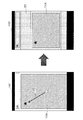
図10は、図2のウェブページ201及び地図コンテンツ202が、それぞれ、表示対象ページ及び内部コンテンツである場合に、地図コンテンツ202を別のページに表示する操作の例を示している。処理部711は、画面1001上に表示された地図コンテンツ202のサイズが所定サイズである場合、地図コンテンツ202に対する操作イベントを無効化する。所定サイズは、表示対象ページであるウェブページ201に対するスクロール操作を妨げるサイズである。
地図コンテンツ202に対する操作イベントが無効化されるため、ユーザが地図コンテンツ202をタッチしてスクロールした場合であっても、地図コンテンツ202がスクロールされることはない。したがって、地図コンテンツ202のサイズが画面のほとんどを占有している場合であっても、ユーザは、ウェブページ201に対するスクロール操作を容易に行うことができる。
画面1001上でユーザから地図コンテンツ202に対する操作要求を受け付けた場合、処理部711は、画面1002に示すように、ウェブページ201とは別のページに地図コンテンツ202を表示する。そして、処理部711は、画面1002上における地図コンテンツ202に対する操作イベントを有効化する。これにより、ユーザは、別のページ上で、地図コンテンツ202に対するスクロール操作を行うことが可能になる。画面1001上における地図コンテンツ202に対する操作要求は、例えば、タップ、ダブルタップ、長押し等のタッチ操作であってもよい。
図11は、図10の画面1002上で地図コンテンツ202をスクロールする操作の例を示している。処理部711は、画面1002上で、地図コンテンツ202を矢印1103が示す向きにスクロールするスクロール操作を受け付けた場合、画面1101に示すように、地図コンテンツ202をスクロールして、スクロール後の地図コンテンツ1104を表示する。
次に、画面1101上でユーザからウェブページ201の表示に戻す操作を受け付けた場合、画面1102に示すように、ウェブページ201内の地図コンテンツ202をスクロール後の地図コンテンツ1104に置き換えて、ウェブページ201を表示する。これにより、ユーザは、スクロール後の地図コンテンツ1104を、ウェブページ201とともに閲覧することが可能になる。
ところで、処理部711は、内部コンテンツのサイズがHTMLコンテンツ912に対するスクロール操作を妨げるサイズであるか否かを、内部コンテンツの表示領域の幅、高さ、又は面積等に基づいて判定することができる。また、処理部711は、内部コンテンツのサイズがHTMLコンテンツ912に対するスクロール操作を妨げるサイズであるか否かを、画面のサイズに対する内部コンテンツのサイズの比率に基づいて判定することもできる。
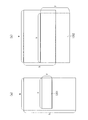
図12は、画面及び内部コンテンツのサイズの例を示している。図12(a)は、表示部712の画面が縦長の矩形である場合を示している。画面の幅及び高さは、それぞれ、w及びhであり、内部コンテンツ1201の表示領域の幅及び高さは、それぞれ、x及びyである。x及びyを示すサイズ情報は、HTMLコンテンツ912内に記述されている。
一方、図12(b)は、画面が横長の矩形である場合を示している。画面の幅及び高さは、それぞれ、w及びhであり、内部コンテンツ1202の表示領域の幅及び高さは、それぞれ、x及びyである。この場合、内部コンテンツ1202の表示領域が画面内に納まらないため、内部コンテンツ1202の一部のみが画面上に表示される。
処理部711は、x及びyが以下のいずれかの条件を満たす場合に、内部コンテンツのサイズがHTMLコンテンツ912に対するスクロール操作を妨げるサイズであると判定することができる。
(c1)xが所定値よりも大きい。
(c2)yが所定値よりも大きい。
(c3)x×yが所定値よりも大きい。
(c4)wに対するxの比率が所定値よりも大きい。
(c5)hに対するyの比率が所定値よりも大きい。
(c6)w×hに対するx×yの比率が所定値よりも大きい。
(c1)xが所定値よりも大きい。
(c2)yが所定値よりも大きい。
(c3)x×yが所定値よりも大きい。
(c4)wに対するxの比率が所定値よりも大きい。
(c5)hに対するyの比率が所定値よりも大きい。
(c6)w×hに対するx×yの比率が所定値よりも大きい。
例えば、所定値を40%として条件(c6)を適用した場合、図12(a)の画面の面積に対する内部コンテンツ1201の面積の比率は、所定値以下である。したがって、内部コンテンツ1201のサイズは、HTMLコンテンツ912に対するスクロール操作を妨げないと判定される。
一方、図12(b)の画面の面積に対する内部コンテンツ1202の面積の比率は、所定値よりも大きくなる。したがって、内部コンテンツ1202のサイズは、HTMLコンテンツ912に対するスクロール操作を妨げると判定される。
条件(c1)~条件(c6)における所定値は、ユーザが設定してもよく、所定のアルゴリズムによって処理部711が設定してもよい。処理部711は、DOM情報によって内部コンテンツのサイズが変更される場合、そのサイズが変更される度に、変更後のサイズがHTMLコンテンツ912に対するスクロール操作を妨げるサイズであるか否かを判定する。
図13は、図9のページ表示装置701が行うページ表示処理の具体例を示すフローチャートである。処理部711は、HTMLブラウザ911を実行することで、図13のページ表示処理を行う。
まず、処理部711は、HTMLコンテンツ912を表示対象ページとして画面上に表示し(ステップ1301)、HTMLコンテンツ912に記述されたスクリプトによるDOM操作を行うか否かを判定する(ステップ1302)。
スクリプトは、例えば、オブジェクト指向のスクリプト言語によって記述され、処理部711は、スクリプトを解釈して実行することで、DOM情報に含まれる要素の表示情報を更新することができる。DOM情報に含まれる要素が内部コンテンツを表す場合、その表示情報の更新によって、表示対象ページ内における内部コンテンツの位置及びサイズが変更されることがある。スクリプトは、JavaScript(登録商標)であってもよい。
スクリプトによるDOM操作を行う場合(ステップ1302,YES)、処理部711は、スクリプトに従ってDOM情報を更新する(ステップ1303)。そして、処理部711は、HTMLコンテンツ912を解析して、スクロール可能な内部コンテンツが含まれているか否かをチェックする(ステップ1304)。例えば、処理部711は、以下のような場合に、スクロール可能な内部コンテンツが含まれていると判定することができる。
(p)HTMLコンテンツ912内に、内部コンテンツのインラインフレームを示す“iframe”タグが存在する。
(q)HTMLコンテンツ912内に、スクロールバー表示の設定を示す“overflow:scroll”等の記述を伴う内部コンテンツのタグが存在する。
(p)HTMLコンテンツ912内に、内部コンテンツのインラインフレームを示す“iframe”タグが存在する。
(q)HTMLコンテンツ912内に、スクロールバー表示の設定を示す“overflow:scroll”等の記述を伴う内部コンテンツのタグが存在する。
HTMLコンテンツ912にスクロール可能な内部コンテンツが含まれている場合(ステップ1304,YES)、処理部711は、その内部コンテンツがHTMLコンテンツ912に対するスクロール操作を妨げるか否かをチェックする(ステップ1305)。このとき、処理部711は、条件(c1)~条件(c6)のいずれかを用いて、内部コンテンツがHTMLコンテンツ912に対するスクロール操作を妨げるか否かをチェックする。
内部コンテンツがHTMLコンテンツ912に対するスクロール操作を妨げる場合(ステップ1305,YES)、処理部711は、その内部コンテンツに対する操作イベントを無効化する(ステップ1306)。
スクリプトによるDOM操作を行わない場合(ステップ1302,NO)、処理部711は、ステップ1304以降の処理を行う。HTMLコンテンツ912にスクロール可能な内部コンテンツが含まれていない場合(ステップ1304,NO)、処理部711は、処理を終了する。また、内部コンテンツがHTMLコンテンツ912に対するスクロール操作を妨げない場合(ステップ1305,NO)、処理部711は、処理を終了する。
図13のページ表示処理によれば、スクリプトによるDOM操作によって内部コンテンツのサイズが変更される度に、変更後のサイズがHTMLコンテンツ912に対するスクロール操作を妨げるサイズであるか否かが判定される。したがって、内部コンテンツのサイズが変更された場合であっても、変更後のサイズに基づいて、その内部コンテンツに対する操作イベントを無効化することができる。
図14は、図13のステップ1306における第1の操作イベント無効化処理のフローチャートである。まず、処理部711は、HTMLコンテンツ912内に表示されている内部コンテンツのスナップショット画像を生成する(ステップ1401)。次に、処理部711は、画面上で、その内部コンテンツをスナップショット画像に変換し、内部コンテンツに対する操作要求を受け付ける状態でスナップショット画像を表示する(ステップ1402)。そして、処理部711は、ユーザから内部コンテンツに対する操作要求を受け付けたか否かをチェックする(ステップ1403)。
内部コンテンツに対する操作要求を受け付けた場合(ステップ1403,YES)、処理部711は、操作イベントを有効化した状態で、内部コンテンツを別のページに表示する(ステップ1404)。これにより、ユーザは、別のページ上で内部コンテンツに対するスクロール操作を行うことが可能になる。
次に、処理部711は、ユーザからHTMLコンテンツ912の表示に戻す操作を受け付けたか否かをチェックする(ステップ1405)。HTMLコンテンツ912の表示に戻す操作を受け付けた場合(ステップ1405,YES)、処理部711は、表示されている内部コンテンツのスナップショット画像を新たに生成する(ステップ1406)。
次に、処理部711は、別のページを表示する前に表示されていた、元のHTMLコンテンツ912を画面上に表示する(ステップ1407)。そして、処理部711は、HTMLコンテンツ912内の内部コンテンツを、新たに生成したスナップショット画像に変換する(ステップ1408)。別のページ上で内部コンテンツに対するスクロール操作が行われた場合、元のHTMLコンテンツ912内には、スクロール後の内部コンテンツが表示される。
内部コンテンツに対する操作要求を受け付けていない場合(ステップ1403,NO)、又は、HTMLコンテンツ912の表示に戻す操作を受け付けていない場合(ステップ1405,NO)、処理部711は、処理を終了する。
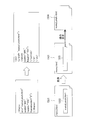
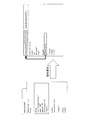
図15は、HTMLコンテンツ912内に内部コンテンツの“iframe”タグが存在する場合の第1の変換処理を示している。この例では、HTMLコンテンツ912を表すmenu.htmlの画面1501内に、内部コンテンツを表すmenuLunch.htmlのインラインフレーム1502が表示されている。menu.html内には“iframe”タグが存在し、“iframe”タグ内のwidth及びheightは、それぞれ、インラインフレーム1502の幅及び高さを示すサイズ情報である。
width=“80%”は、画面1501の幅に対するインラインフレーム1502の幅の比率が80%であることを表し、height=“15%”は、画面1501の高さに対するインラインフレーム1502の高さの比率が15%であることを表す。
この場合、ステップ1401において、処理部711は、インラインフレーム1502のスナップショット画像1503を生成する。次に、ステップ1402において、処理部711は、menu.html内の“iframe”タグを“canvas”タグに変換することで、画面1501内のインラインフレーム1502をスナップショット画像1503に変換する。
そして、処理部711は、スナップショット画像1503に対する操作要求を受け付けた場合の動作を規定する“a href”タグを付加する。“a href”タグ内のリンク先のUniform Resource Locator(URL)としては、menuLunch.htmlが指定される。これにより、処理部711は、スナップショット画像1503に対する操作要求を受け付けた場合に、menuLunch.htmlを別のページ1504に表示することができる。
図16は、HTMLコンテンツ912内にスクロールバー表示の設定を示す内部コンテンツのタグが存在する場合の第1の変換処理を示している。この例では、HTMLコンテンツ912を表すmenu.html内に、内部コンテンツを表すid=“lunch”を含む“div”タグと、内部コンテンツに対するスクロールバー表示の設定を示す“overflow:scroll”とが存在する。“div”タグ内のwidth及びheightは、それぞれ、内部コンテンツの幅及び高さを示すサイズ情報である。
この場合、ステップ1401において、処理部711は、内部コンテンツを表すid=“lunch”が指定された“div”タグのスナップショット画像を生成する。次に、ステップ1402において、処理部711は、“div”タグ内を“canvas”タグに変換することで、id=“lunch”が指定された“div”タグをスナップショット画像に変換する。そして、処理部711は、id=“lunch”が指定された“div”タグ内とそれに関連するDOM情報を参照できるようなmenuLunch.htmlを作成し、図15の場合と同様に、menuLunch.htmlをリンク先のURLに指定した“a href”タグを付加する。
これにより、処理部711は、スナップショット画像に対する操作要求を受け付けた場合、menuLunch.htmlを表す別のページを生成して表示することができる。
図14の操作イベント無効化処理によれば、HTMLコンテンツ912内の内部コンテンツをスナップショット画像に変換することで、HTMLコンテンツ912に対するスクロール操作を無効化することができる。また、内部コンテンツに対する操作要求を受け付ける状態でスナップショット画像を表示することで、内部コンテンツの利用を妨げることなく、HTMLコンテンツ912を表示することができる。
図17は、図13のステップ1306における第2の操作イベント無効化処理のフローチャートである。まず、処理部711は、HTMLコンテンツ912に含まれている内部コンテンツに対する操作イベントを無視するように、HTMLブラウザ911を変更する(ステップ1701)。次に、処理部711は、内部コンテンツに対する操作要求を受け付ける機能を、HTMLブラウザ911に付加する(ステップ1702)。
次のステップ1703~ステップ1705の処理については、図14のステップ1403~ステップ1405の処理と同様である。HTMLコンテンツ912の表示に戻す操作を受け付けた場合(ステップ1705,YES)、処理部711は、別のページを表示する前に表示されていた、元のHTMLコンテンツ912を画面上に表示する(ステップ1706)。別のページ上で内部コンテンツに対するスクロール操作が行われた場合、元のHTMLコンテンツ912内には、スクロール後の内部コンテンツが表示される。
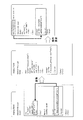
図18は、HTMLコンテンツ912内に内部コンテンツの“iframe”タグが存在する場合の第2の変換処理を示している。この例では、HTMLコンテンツ912を表すmenu.html内に、内部コンテンツを表すmenuLunch.htmlの“iframe”タグが存在する。“iframe”タグ内のwidth及びheightは、それぞれ、内部コンテンツの幅及び高さを示すサイズ情報である。
この場合、ステップ1701において、処理部711は、menu.html内に記述されている、menuLunch.htmlに対する操作イベント(不図示)を無視するように、HTMLブラウザ911を変更する。次に、ステップ1702において、処理部711は、menuLunch.htmlに対する操作要求を受け付ける機能を、HTMLブラウザ911に付加する。
これにより、処理部711は、menuLunch.htmlに対する操作要求を受け付けた場合、menuLunch.htmlを表す別のページを生成して表示することができる。menuLunch.html内には、“script”タグを用いてwindow.openerが記述されている。処理部711は、このwindow.openerによって、menu.htmlへDOM情報の参照を返すことができる。
図19は、HTMLコンテンツ912内にスクロールバー表示の設定を示す内部コンテンツのタグが存在する場合の第2の変換処理を示している。この例では、HTMLコンテンツ912を表すmenu.html内に、内部コンテンツを表すid=“lunch”を含む“div”タグと、内部コンテンツに対するスクロールバー表示の設定を示す“overflow:scroll”とが存在する。“div”タグ内のwidth及びheightは、それぞれ、内部コンテンツの幅及び高さを示すサイズ情報である。
この場合、ステップ1701において、処理部711は、図18の場合と同様に、menu.html内に記述されている、内部コンテンツに対する操作イベント(不図示)を無視するように、HTMLブラウザ911を変更する。次に、ステップ1702において、処理部711は、内部コンテンツに対する操作要求を受け付ける機能を、HTMLブラウザ911に付加する。
これにより、処理部711は、内部コンテンツに対する操作要求を受け付けた場合、menuLunch.htmlを表す別のページを生成して表示することができる。処理部711は、図18の場合と同様に、menuLunch.html内のwindow.openerによって、menu.htmlへDOM情報の参照を返すことができる。
図17の操作イベント無効化処理によれば、内部コンテンツに対する操作イベントを無視するようにHTMLブラウザ911を変更することで、HTMLコンテンツ912に対するスクロール操作を無効化することができる。また、内部コンテンツに対する操作要求を受け付ける機能をHTMLブラウザ911に付加することで、内部コンテンツの利用を妨げることなく、HTMLコンテンツ912を表示することができる。
図7及び図9のページ表示装置701の構成は一例に過ぎず、ページ表示装置701の用途又は条件に応じて一部の構成要素を省略又は変更してもよい。
図8、図13、図14、及び図17のフローチャートは一例に過ぎず、ページ表示装置701の構成又は条件に応じて一部の処理を省略又は変更してもよい。例えば、スクリプトによるDOM操作が行われない場合は、図13のステップ1302及びステップ1303の処理を省略することができる。
図1~図6及び図10~図12の表示画面は一例に過ぎず、表示画面は、表示対象のコンテンツに応じて変化する。表示対象のコンテンツは、HTMLコンテンツ912に限られず、eXtensible Markup Language(XML)で記述されたコンテンツのように、内部コンテンツを含む別のコンテンツであってもよい。
図15、図16、図18、及び図19のHTMLコンテンツ912及び内部コンテンツは一例に過ぎず、表示対象のコンテンツは、ページ表示装置701の用途又は条件に応じて変化する。
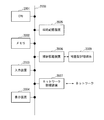
図20は、図7及び図9のページ表示装置701として用いられる情報処理装置(コンピュータ)の構成例を示している。図20の情報処理装置は、Central Processing Unit(CPU)2001、メモリ2002、入力装置2003、表示装置2004、補助記憶装置2005、媒体駆動装置2006、及びネットワーク接続装置2007を含む。これらの構成要素はバス2008により互いに接続されている。
メモリ2002は、例えば、Read Only Memory(ROM)、Random Access Memory(RAM)、フラッシュメモリ等の半導体メモリであり、ページ表示処理に用いられるプログラム及びデータを格納する。メモリ2002は、図9の記憶部902として用いることができる。
CPU2001(プロセッサ)は、例えば、メモリ2002を利用してプログラムを実行することにより、図7及び図9の処理部711として動作する。
入力装置2003は、例えば、キーボード、ポインティングデバイス等であり、オペレータ又はユーザからの指示又は情報の入力に用いられる。情報処理装置が携帯端末装置である場合、入力装置2003としてタッチパネルを用いることができる。表示装置2004は、オペレータ又はユーザへの問い合わせ又は指示、及び処理結果の出力に用いられる。処理結果は、HTMLコンテンツ912又は内部コンテンツであってもよい。表示装置2004は、図7及び図9の表示部712として用いることができる。
補助記憶装置2005は、例えば、磁気ディスク装置、光ディスク装置、光磁気ディスク装置、テープ装置等である。補助記憶装置2005は、ハードディスクドライブ又はフラッシュメモリであってもよい。情報処理装置が携帯端末装置である場合、補助記憶装置2005としてフラッシュメモリを用いることができる。情報処理装置は、補助記憶装置2005にプログラム及びデータを格納しておき、それらをメモリ2002にロードして使用することができる。補助記憶装置2005は、図9の記憶部902として用いることができる。
媒体駆動装置2006は、可搬型記録媒体2009を駆動し、その記録内容にアクセスする。可搬型記録媒体2009は、メモリデバイス、フレキシブルディスク、光ディスク、光磁気ディスク等である。可搬型記録媒体2009は、Compact Disk Read Only Memory(CD-ROM)、Digital Versatile Disk(DVD)、Universal Serial Bus(USB)メモリ等であってもよい。情報処理装置が携帯端末装置である場合、可搬型記録媒体2009としてメモリカードを用いることができる。オペレータ又はユーザは、この可搬型記録媒体2009にプログラム及びデータを格納しておき、それらをメモリ2002にロードして使用することができる。
このように、ページ表示処理に用いられるプログラム及びデータを格納するコンピュータ読み取り可能な記録媒体は、メモリ2002、補助記憶装置2005、又は可搬型記録媒体2009のような、物理的な(非一時的な)記録媒体である。
ネットワーク接続装置2007は、Local Area Network、Wide Area Network等の通信ネットワークに接続され、通信に伴うデータ変換を行う通信インタフェースである。情報処理装置は、プログラム及びデータを外部の装置からネットワーク接続装置2007を介して受信し、それらをメモリ2002にロードして使用することができる。ネットワーク接続装置2007は、図9の通信部901として用いることができる。
なお、情報処理装置が図20のすべての構成要素を含む必要はなく、用途又は条件に応じて一部の構成要素を省略することも可能である。例えば、可搬型記録媒体2009を使用しない場合は、媒体駆動装置2006を省略してもよい。
情報処理装置が携帯端末装置である場合、情報処理装置は、マイク及びスピーカのような通話用の装置を含んでいてもよい。
開示の実施形態とその利点について詳しく説明したが、当業者は、特許請求の範囲に明確に記載した本発明の範囲から逸脱することなく、様々な変更、追加、省略をすることができるであろう。
Claims (11)
- 表示対象ページに含まれるコンテンツが前記コンテンツに対するスクロール操作を受け付けるスクロール機能を含み、前記コンテンツの表示領域の幅又は高さ、又は前記表示対象ページを表示する画面に対する前記コンテンツの幅又は高さの比率が、所定の状態である場合、前記スクロール機能を無効化し、
前記コンテンツに対する操作要求を受け付ける状態で、前記表示対象ページを画面上に表示する、
処理をコンピュータに実行させるページ表示プログラム。 - 前記コンピュータは、前記コンテンツをスナップショット画像に変換することで、前記スクロール機能を無効化することを特徴とする請求項1記載のページ表示プログラム。
- 前記コンピュータは、前記表示対象ページに記述された前記スクロール操作を無視することで、前記スクロール機能を無効化することを特徴とする請求項1記載のページ表示プログラム。
- 前記コンピュータは、前記コンテンツに対する前記操作要求を受け付けた場合、前記表示対象ページとは別のページに前記コンテンツを表示し、表示した前記コンテンツに対するスクロール操作を受け付けることを特徴とする請求項1乃至3のいずれか1項に記載のページ表示プログラム。
- 前記コンピュータは、前記別のページの表示を前記表示対象ページの表示に戻す操作を受け付けた場合、前記表示対象ページ内の前記コンテンツをスクロール後のコンテンツに置き換えて、前記表示対象ページを表示することを特徴とする請求項4記載のページ表示プログラム。
- 前記コンピュータは、前記表示対象ページに記述された前記コンテンツのサイズに基づいて、前記表示領域の幅又は高さ、又は前記画面に対する前記コンテンツの幅又は高さの比率が、前記所定の状態であると判定することを特徴とする請求項1乃至5のいずれか1項に記載のページ表示プログラム。
- 前記コンピュータは、前記コンテンツのサイズが変更される度に、変更後のコンテンツの表示領域の幅又は高さ、又は前記画面に対する変更後のコンテンツの幅又は高さの比率が、前記所定の状態であるか否かを判定することを特徴とする請求項1乃至6のいずれか1項に記載のページ表示プログラム。
- 表示対象ページに含まれるコンテンツが前記コンテンツに対するスクロール操作を受け付けるスクロール機能を含み、前記コンテンツの表示領域の幅又は高さ、又は前記表示対象ページを表示する画面に対する前記コンテンツの幅又は高さの比率が、所定の状態である場合、前記スクロール機能を無効化する処理部と、
前記コンテンツに対する操作要求を受け付ける状態で、前記表示対象ページを画面上に表示する表示部と、
を備えることを特徴とするページ表示装置。 - 前記処理部は、前記コンテンツをスナップショット画像に変換することで、前記スクロール機能を無効化することを特徴とする請求項8記載のページ表示装置。
- コンピュータが、
表示対象ページに含まれるコンテンツが前記コンテンツに対するスクロール操作を受け付けるスクロール機能を含み、前記コンテンツの表示領域の幅又は高さ、又は前記表示対象ページを表示する画面に対する前記コンテンツの幅又は高さの比率が、所定の状態である場合、前記スクロール機能を無効化し、
前記コンテンツに対する操作要求を受け付ける状態で、前記表示対象ページを画面上に表示する、
ことを特徴とするページ表示方法。 - 前記コンピュータは、前記コンテンツをスナップショット画像に変換することで、前記スクロール機能を無効化することを特徴とする請求項10記載のページ表示方法。
Priority Applications (3)
| Application Number | Priority Date | Filing Date | Title |
|---|---|---|---|
| PCT/JP2016/072567 WO2018025316A1 (ja) | 2016-08-01 | 2016-08-01 | ページ表示プログラム、ページ表示装置、及びページ表示方法 |
| JP2018531004A JP6721049B2 (ja) | 2016-08-01 | 2016-08-01 | ページ表示プログラム、ページ表示装置、及びページ表示方法 |
| US16/262,090 US20190163338A1 (en) | 2016-08-01 | 2019-01-30 | Page display device and page display method |
Applications Claiming Priority (1)
| Application Number | Priority Date | Filing Date | Title |
|---|---|---|---|
| PCT/JP2016/072567 WO2018025316A1 (ja) | 2016-08-01 | 2016-08-01 | ページ表示プログラム、ページ表示装置、及びページ表示方法 |
Related Child Applications (1)
| Application Number | Title | Priority Date | Filing Date |
|---|---|---|---|
| US16/262,090 Continuation US20190163338A1 (en) | 2016-08-01 | 2019-01-30 | Page display device and page display method |
Publications (1)
| Publication Number | Publication Date |
|---|---|
| WO2018025316A1 true WO2018025316A1 (ja) | 2018-02-08 |
Family
ID=61073612
Family Applications (1)
| Application Number | Title | Priority Date | Filing Date |
|---|---|---|---|
| PCT/JP2016/072567 Ceased WO2018025316A1 (ja) | 2016-08-01 | 2016-08-01 | ページ表示プログラム、ページ表示装置、及びページ表示方法 |
Country Status (3)
| Country | Link |
|---|---|
| US (1) | US20190163338A1 (ja) |
| JP (1) | JP6721049B2 (ja) |
| WO (1) | WO2018025316A1 (ja) |
Cited By (1)
| Publication number | Priority date | Publication date | Assignee | Title |
|---|---|---|---|---|
| JP7612433B2 (ja) | 2021-01-25 | 2025-01-14 | キヤノン株式会社 | 情報処理装置、情報処理方法、及びプログラム |
Families Citing this family (1)
| Publication number | Priority date | Publication date | Assignee | Title |
|---|---|---|---|---|
| CN111158839A (zh) * | 2019-12-31 | 2020-05-15 | 中国银行股份有限公司 | 段落内容展示方法及装置 |
Citations (3)
| Publication number | Priority date | Publication date | Assignee | Title |
|---|---|---|---|---|
| JP2014164719A (ja) * | 2013-02-27 | 2014-09-08 | Kyocera Corp | 電子機器、制御方法、及び制御プログラム |
| JP2014194747A (ja) * | 2013-02-28 | 2014-10-09 | Canon Inc | 情報処理装置、情報処理方法及びコンピュータプログラム |
| JP2016066247A (ja) * | 2014-09-25 | 2016-04-28 | 株式会社Socket | ウェブページ上での操作制御装置および操作制御用プログラム |
Family Cites Families (4)
| Publication number | Priority date | Publication date | Assignee | Title |
|---|---|---|---|---|
| US6389437B2 (en) * | 1998-01-07 | 2002-05-14 | Ion Systems, Inc. | System for converting scrolling display to non-scrolling columnar display |
| US20030115167A1 (en) * | 2000-07-11 | 2003-06-19 | Imran Sharif | Web browser implemented in an Internet appliance |
| US9329765B2 (en) * | 2013-06-14 | 2016-05-03 | Htc Corporation | Method and electronic apparatus for scrolling frame content and recording medium using the same |
| US9613161B2 (en) * | 2013-09-05 | 2017-04-04 | Paypal, Inc. | Seamless pagination |
-
2016
- 2016-08-01 JP JP2018531004A patent/JP6721049B2/ja not_active Expired - Fee Related
- 2016-08-01 WO PCT/JP2016/072567 patent/WO2018025316A1/ja not_active Ceased
-
2019
- 2019-01-30 US US16/262,090 patent/US20190163338A1/en not_active Abandoned
Patent Citations (3)
| Publication number | Priority date | Publication date | Assignee | Title |
|---|---|---|---|---|
| JP2014164719A (ja) * | 2013-02-27 | 2014-09-08 | Kyocera Corp | 電子機器、制御方法、及び制御プログラム |
| JP2014194747A (ja) * | 2013-02-28 | 2014-10-09 | Canon Inc | 情報処理装置、情報処理方法及びコンピュータプログラム |
| JP2016066247A (ja) * | 2014-09-25 | 2016-04-28 | 株式会社Socket | ウェブページ上での操作制御装置および操作制御用プログラム |
Cited By (1)
| Publication number | Priority date | Publication date | Assignee | Title |
|---|---|---|---|---|
| JP7612433B2 (ja) | 2021-01-25 | 2025-01-14 | キヤノン株式会社 | 情報処理装置、情報処理方法、及びプログラム |
Also Published As
| Publication number | Publication date |
|---|---|
| JPWO2018025316A1 (ja) | 2019-04-11 |
| JP6721049B2 (ja) | 2020-07-08 |
| US20190163338A1 (en) | 2019-05-30 |
Similar Documents
| Publication | Publication Date | Title |
|---|---|---|
| US20210026456A1 (en) | Method, apparatus and system for interacting with content on web browsers | |
| US9262051B2 (en) | Method and apparatus for displaying pop-up | |
| CN1922896B (zh) | 用于自动选择窗体进行显示的方法和设备 | |
| JP4533943B2 (ja) | 情報処理装置、表示制御方法およびプログラム | |
| US20120096344A1 (en) | Rendering or resizing of text and images for display on mobile / small screen devices | |
| CN113934339B (zh) | 一种基于rem的页面自适应布局的方法及装置 | |
| JP2014067420A (ja) | 電子ドキュメント内の関心領域を選択し、表示するための方法とデバイス | |
| US7434174B2 (en) | Method and system for zooming in and out of paginated content | |
| CN113536173B (zh) | 一种页面处理方法、装置、电子设备及可读存储介质 | |
| JP2015049592A (ja) | 電子機器および方法 | |
| US20160196240A1 (en) | Method of displaying content and electronic device implementing same | |
| US10983625B2 (en) | Systems and methods for measurement of unsupported user interface actions | |
| CN110909274A (zh) | 页面浏览方法、装置及电子设备 | |
| JP2014106625A (ja) | 携帯端末、携帯端末の制御方法、プログラム、および記録媒体 | |
| JP2011070380A (ja) | Webページの閲覧支援プログラム、装置及び方法 | |
| JP6721049B2 (ja) | ページ表示プログラム、ページ表示装置、及びページ表示方法 | |
| JP2010092103A (ja) | Webページ表示方法、サーバ装置、及びプログラム | |
| KR101294458B1 (ko) | 모바일 디바이스에서의 텍스트 입력장치 및 그 방법 | |
| JP2012181693A (ja) | ウェブページ表示制御装置およびスクロール制御方法 | |
| JP6699730B2 (ja) | 描画データ生成プログラム、描画データ生成装置、及び描画データ生成方法 | |
| JP2012173946A (ja) | ウェブページ表示装置およびフォーカス制御方法 | |
| CN116088718B (zh) | 信息显示方法、装置、设备及介质 | |
| CN118227250B (zh) | 页面中的工具栏显示方法、装置、计算机设备和存储介质 | |
| JP5463405B1 (ja) | 情報処理装置、情報処理方法およびプログラム | |
| JP2020091333A (ja) | 表示制御方法、装置、及びプログラム |
Legal Events
| Date | Code | Title | Description |
|---|---|---|---|
| 121 | Ep: the epo has been informed by wipo that ep was designated in this application |
Ref document number: 16911577 Country of ref document: EP Kind code of ref document: A1 |
|
| ENP | Entry into the national phase |
Ref document number: 2018531004 Country of ref document: JP Kind code of ref document: A |
|
| NENP | Non-entry into the national phase |
Ref country code: DE |
|
| 122 | Ep: pct application non-entry in european phase |
Ref document number: 16911577 Country of ref document: EP Kind code of ref document: A1 |