WO2016129118A1 - プレゼンテーション支援方法、プレゼンテーション支援プログラム及びプレゼンテーション支援装置 - Google Patents
プレゼンテーション支援方法、プレゼンテーション支援プログラム及びプレゼンテーション支援装置 Download PDFInfo
- Publication number
- WO2016129118A1 WO2016129118A1 PCT/JP2015/054030 JP2015054030W WO2016129118A1 WO 2016129118 A1 WO2016129118 A1 WO 2016129118A1 JP 2015054030 W JP2015054030 W JP 2015054030W WO 2016129118 A1 WO2016129118 A1 WO 2016129118A1
- Authority
- WO
- WIPO (PCT)
- Prior art keywords
- highlight
- display
- area
- color
- unit
- Prior art date
- Legal status (The legal status is an assumption and is not a legal conclusion. Google has not performed a legal analysis and makes no representation as to the accuracy of the status listed.)
- Ceased
Links
Images




Classifications
-
- G—PHYSICS
- G06—COMPUTING OR CALCULATING; COUNTING
- G06F—ELECTRIC DIGITAL DATA PROCESSING
- G06F3/00—Input arrangements for transferring data to be processed into a form capable of being handled by the computer; Output arrangements for transferring data from processing unit to output unit, e.g. interface arrangements
- G06F3/01—Input arrangements or combined input and output arrangements for interaction between user and computer
- G06F3/048—Interaction techniques based on graphical user interfaces [GUI]
Definitions
- the present invention relates to a presentation support method, a presentation support program, and a presentation support apparatus.
- An information processing apparatus with a voice recognition function has been proposed as an example of a technology that supports presentation.
- this information processing apparatus with a voice recognition function when a presentation screen is operated using voice recognition, and a word input by voice matches a character string displayed on the screen, the character string displayed on the screen is changed. Add effects and try to provide more effective presentations.
- JP 2002-169588 A Japanese Patent Laid-Open No. 2000-089881 JP 2005-208292 A
- voice recognition is used, but when erroneous recognition occurs in voice recognition, a place where the presenter is not explaining due to the erroneous recognition is highlighted. May not be highlighted. In this case, the information processing apparatus with a voice recognition function cannot present the explanation location to the presenter or the listener, and may hinder the progress of the presentation.
- an object of the present invention is to provide a presentation support method, a presentation support program, and a presentation support apparatus that can support the progress of a presentation.
- the computer determines a region to be highlighted in a page displayed on the screen by the display device, the brightness of the display device, and the distance from the screen to the presenter.
- the first highlight color determined from the distance from the screen to the audience and the display color of the area, and the first highlight color that can be perceived by the presenter among the presenter and the audience And a process of executing a first highlight display for displaying.
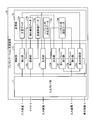
- FIG. 1 is a diagram illustrating the configuration of the presentation support system according to the first embodiment.
- FIG. 2 is a block diagram illustrating a functional configuration of the presentation support apparatus according to the first embodiment.
- FIG. 3 is a diagram illustrating an example of extracted word data.
- FIG. 4 is a diagram illustrating an example of highlight color determination data.
- FIG. 5 is a diagram showing an example of the first highlight display.
- FIG. 6 is a flowchart illustrating a procedure of extracted word data generation processing according to the first embodiment.
- FIG. 7 is a flowchart illustrating a procedure of highlight color setting data generation processing according to the first embodiment.
- FIG. 8 is a flowchart illustrating the procedure of the speech recognition process according to the first embodiment.
- FIG. 9 is a flowchart illustrating the procedure of the display control process according to the first embodiment.
- FIG. 10 is a diagram illustrating a hardware configuration example of a computer that executes the presentation support program according to the first embodiment and the second embodiment.
- FIG. 1 is a diagram illustrating the configuration of the presentation support system according to the first embodiment.
- the presentation support system 1 shown in FIG. 1 highlights an area including a word obtained as a result of recognition of speech input from the microphone 3 in a presentation screen on which a document file is displayed on the display device 5. I will provide a.
- highlight display is realized by voice recognition is illustrated, but highlight display may not necessarily be realized by voice recognition, as will be described later.
- the presentation support system 1 includes a specific area in the first highlight color that can be visually recognized by the presenter among the participants participating in the presentation, for example, an area that includes keywords that are important for advancing the presentation.
- the first highlight is displayed. This supports the progress of the presentation.
- the cancel instruction when the cancel instruction is accepted, the first highlight is canceled, and when the confirmation instruction is accepted, the second highlight color that can be visually recognized by both the presenter and the audience The second highlight is displayed. Therefore, the presenter suppresses a situation where an erroneous highlight, for example, a place where the presenter is not explaining, is viewed even to the listener.
- the presentation support system 1 accommodates a microphone 3, a display device 5, an input device 7, and a presentation support device 10.
- the peripheral devices such as the microphone 3, the display device 5 and the input device 7 and the presentation support device 10 are connected by wire or wirelessly.
- the microphone 3 is a device that converts sound into an electrical signal, and is sometimes called a microphone.
- the microphone 3 can be attached to a presenter who performs a presentation.
- a headset-type or tie-pin type microphone can be attached to a predetermined position of the presenter's body or clothes, or a hand-type microphone can be carried by the presenter.
- the microphone 3 can also be installed at a predetermined position in a range where the utterance of the presenter can be collected.
- the microphone 3 may be an attachment type or a stationary type microphone.
- a microphone having any type of directivity can be adopted as the microphone 3, but sounds other than the presenter's utterance, for example, the utterance of the listener and the noise such as noise are collected.
- the sensitivity of the microphone can be limited to the speaking direction of the presenter.
- the microphone 3 can employ any conversion method such as a dynamic type, an electret capacitor type, or a capacitor type.
- the analog signal obtained by collecting sound in the microphone 3 is converted into a digital signal and then input to the presentation support apparatus 10.
- the display device 5 is a device that displays various types of information.
- the display device 5 may be a liquid crystal display or an organic EL (electroluminescence) display that realizes display by light emission, or a projector that realizes display by projection.
- the number of installed display devices 5 is not necessarily limited to one, and a plurality of display devices 5 may be provided.
- a projector and a screen that displays an image projected by the projector are mounted as a shared display device that is viewed by both presenters and listeners who are participants of the presentation.
- the display device 5 displays a presentation screen according to an instruction from the presentation support device 10 as an example.
- the display device 5 displays a slide of a document file opened by presentation software that operates on the presentation support device 10.
- the display device 5 can display any slide specified by the presenter via the input device 7 among the slides included in the document file, and the slide show function of the presentation software is set to the ON state.
- the slides included in the document file can be switched and displayed in the order in which the slides are created.
- the input device 7 is a device that receives instruction inputs for various types of information.
- a laser pointer indicating the position on the screen projected on the screen can be mounted as the input device 7. That is, among laser pointers, there is also a laser pointer with a remote control function provided with an operation unit such as various buttons for advancing and returning a slide page.
- the operation unit of the laser pointer with a remote control function can be used as the input device 7.
- an image sensor that senses the position of the light spot pointed by the laser pointer can be mounted as the input device 7.
- the input device 7 can employ a mouse or a keyboard, or a touch sensor bonded on the liquid crystal display.
- the input device 7 accepts a specification of a document file to be executed by the presentation software on the presentation support device 10, an operation of advancing a slide page, an operation of returning a slide page, and the like.
- the operation accepted through the input device 7 in this way is output to the presentation support device 10.
- the presentation support apparatus 10 is a computer on which presentation software is executed.
- the presentation support apparatus 10 may employ an information processing apparatus such as a desktop or notebook personal computer.
- the presentation support apparatus 10 can employ not only a stationary terminal such as the personal computer but also various portable terminal apparatuses.
- a stationary terminal such as the personal computer
- portable terminal apparatuses for example, as an example of the mobile terminal device, mobile communication terminals such as smartphones, mobile phones and PHS (Personal Handyphone System), and slate terminals such as PDA (Personal Digital Assistants) are included in the category.
- PHS Personal Handyphone System
- slate terminals such as PDA (Personal Digital Assistants) are included in the category.
- the presentation support apparatus 10 provides the above-described presentation support service in a stand-alone manner that independently executes the above-described presentation software without depending on external resources.
- the presentation support service is not limited to the implementation provided in a stand-alone manner.
- a client server system can be constructed by providing a server that provides the presentation support service to a client that executes presentation software.
- FIG. 2 is a block diagram illustrating a functional configuration of the presentation support apparatus 10 according to the first embodiment.
- the presentation support apparatus 10 includes an input / output I / F (InterFace) unit 11, a storage unit 13, and a control unit 15.
- I / F InterFace
- FIG. 2 shows a solid line representing the input / output relationship of data, but FIG. 2 shows only a minimum part for convenience of explanation.
- the input / output of data related to each processing unit is not limited to the illustrated example, and the input / output of data other than those illustrated, for example, between the processing unit and the processing unit, between the processing unit and the data, and between the processing unit and the external Data input / output between devices may be performed.
- the input / output I / F unit 11 is an interface for performing input / output with peripheral devices such as the microphone 3, the display device 5, and the input device 7.
- the input / output I / F unit 11 outputs the audio data input from the microphone 3 to the control unit 15. Further, the input / output I / F unit 11 outputs the slide image data output from the control unit 15 to the display device 5, highlights an area included in the slide output from the control unit 15, or cancels the instruction. An instruction is output to the display device 5. The input / output I / F unit 11 outputs various operations input from the input device 7 to the control unit 15.
- the storage unit 13 is a device that stores data used for various programs such as an OS (Operating System) and presentation software executed by the control unit 15 and application programs.
- OS Operating System
- presentation software executed by the control unit 15 and application programs.
- the storage unit 13 is implemented as a main storage device in the presentation support apparatus 10.
- various semiconductor memory elements such as RAM (Random Access Memory) and flash memory can be employed for the storage unit 13.
- the storage unit 13 can also be implemented as an auxiliary storage device. In this case, HDD (Hard Disk Drive), optical disk, SSD (Solid State Drive), etc. can be adopted.
- the storage unit 13 includes document data 13a, extracted word data 13b, highlight color determination data 13c, highlight color setting data 13d, and recognized word data 13e as an example of data used in a program executed by the control unit 15.
- the extracted word data 13b, highlight color determining data 13c, highlight color setting data 13d, and recognized word data 13e other than the document data 13a will be described together in the description of the control unit 15.
- the storage unit 13 can also store other electronic data such as a presentation timetable.
- Document data 13a is data relating to a document.
- a document file in which one or a plurality of slides are created using presentation software can be adopted as the document data 13a.
- Such slides can be imported with text and graphics as well as content created by other application programs. For example, you can import documents created with word processing software, tables and graphs created with spreadsheet software, images and movies taken with an imaging device, and images and movies edited with image editing software. And can be imported.
- meta information including a character string such as an explanatory word or a description of the content is added to the content other than the text before the presentation is started. Can do.
- the control unit 15 has an internal memory for storing various programs and control data, and executes various processes using these.
- control unit 15 is implemented as a central processing unit, a so-called CPU (Central Processing Unit).
- CPU Central Processing Unit
- the control unit 15 does not necessarily have to be implemented as a central processing unit, and may be implemented as an MPU (Micro Processing Unit).
- MPU Micro Processing Unit
- the control unit 15 can be realized by hard wired logic such as ASIC (Application Specific Integrated Circuit) or FPGA (Field Programmable Gate Array).
- the control unit 15 virtually implements the following processing unit by executing various programs.
- the control unit 15 includes an extraction unit 15a, a generation unit 15b, a recognition unit 15c, a determination unit 15d, a display control unit 15e, a first highlight execution unit 15f, 2 highlight execution unit 15g.
- the extraction unit 15a is a processing unit that extracts words registered in dictionary data used for speech recognition from slides included in a document file as extracted word data 13b.
- the extraction unit 15a can automatically start the process of extracting the extracted word data 13b or can be started by manual setting. For example, when starting automatically, when the presentation software saves the document file in the storage unit 13 and then closes, or when the document file is saved in the storage unit 13 while editing the document file via the presentation, Can be activated.
- the processing can be activated when an instruction to execute presentation pre-processing is received via the input device 7. In any case, the processing is started by reading out the document file corresponding to the save or execution instruction from the document files included in the document data 13a stored in the storage unit 13.
- the extraction unit 15a has received an instruction to execute a preprocessing of a document file that has been saved or a presentation among document files included in the document data 13a stored in the storage unit 13. Read a document file.
- a document file is not limited to this.
- the extraction unit 15a can also acquire a document file from an auxiliary storage device such as a hard disk or an optical disk, or a removable medium such as a memory card or a USB (Universal Serial Bus) memory.
- the extraction unit 15a can also acquire a document file by receiving it from an external device via a network.
- the extraction unit 15a divides the slide included in the previously read document file into a plurality of areas. For example, the extraction unit 15a divides the slide in units of one sentence, line, paragraph, and the like. In this case, the extraction unit 15a scans a character string included in the slide, detects a delimiter character corresponding to a space, a punctuation point, or a line feed, and sets the delimiter character as a boundary of the region. The extraction unit 15a divides the character string included in the slide before and after such a boundary. Thus, the slide is divided into a plurality of areas for each delimiter character. After that, the extraction unit 15a assigns an index for identifying the area to the area obtained by dividing the slide.
- the slide may be divided by manual setting by designating the boundary of the area via the input device 7 or the like.
- the extraction unit 15a selects one area from among a plurality of areas included in the slide. Subsequently, the extraction unit 15a extracts a word by executing natural language processing on the character string included in the previously selected region. For example, the extraction unit 15a extracts a word whose part of speech is a noun from morphemes obtained by performing morphological analysis or the like on a character string in the region. Then, the extraction unit 15a assigns an index assigned to a region including the word to each previously extracted word. Thereafter, the extraction unit 15a repeatedly executes the extraction of the word and the assignment of the index until all the regions included in the slide are selected.
- the extraction unit 15a calculates the appearance frequency f k of the word k for each word included in the slide.
- the appearance frequency the extraction unit 15a calculates the total number of appearances for each word by counting the number of times the word k appears on the same slide. Then, the extraction unit 15a assigns a word weight w k corresponding to the appearance frequency f k previously calculated for each word. In this case, the extraction unit 15a uses a weight calculation formula in which the weight w k becomes smaller as the appearance frequency f k becomes higher.
- the extraction unit 15 a registers the extracted word data 13 b in which the word k, the index idx, and the weight w k are associated with the storage unit 13.
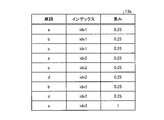
- FIG. 3 is a diagram illustrating an example of the extracted word data 13b.
- FIG. 3 shows extracted word data relating to one slide out of a plurality of slides.
- the word “a”, since frequency is "2”, 0.25 is assigned as a weight to compute the 1/2 2.
- 0.25 is given as a weight.
- FIG. 3 illustrates the extracted word data related to one slide. However, in the other slides, the value of each item is different, but the computer can identify the word region and weight as in the example of FIG. Extracted word data is stored.
- the extraction unit 15a can calculate the word weight fk using a factor other than the above total number of appearances, or add another factor to the above total number of appearances and add the word weight fk. k can be calculated.
- the generation unit 15b is a processing unit that generates highlight color setting data 13d using the highlight color determination data 13c.
- the generation unit 15b starts generating the highlight color setting data 13d at a timing before or after or at the same time as the generation of the extracted word data 13b by the extraction unit 15a. At this time, when the generation unit 15b starts generating the highlight color setting data 13d before the extraction unit 15a, the generation unit 15b performs processing for dividing the slide into a plurality of regions and processing for assigning an index to each region. Can be done instead.
- the generation of the highlight color setting data 13d will be described.
- the generation unit 15b issues an instruction to execute preprocessing of a document file or presentation that has been saved among the document files included in the document data 13a stored in the storage unit 13. Read the accepted document file.
- the generation unit 15b acquires identification information of a venue where a presentation related to the document file is performed, for example, a conference room or a hall.
- venue identification information as a search key
- identification of information such as the brightness with which the display device 5 displays a slide on the screen, the distance between the presenter and the screen, and the distance between the listener and the screen is specified. Is possible.
- the venue identification information includes the equipment available at the venue, for example, the model number of the projector installed at the venue, and the seat arrangement at the venue, such as the distance from the screen where the projector displays the slide to the presenter's place and the screen.
- the venue information may be managed in a state associated with the distance to the auditorium.
- the generation unit 15b associates the performance information of the projector (not shown), for example, the amount of light (light output) irradiated to the screen, power consumption, resolution, and the like with the model number.
- the light quantity associated with the model number is read by referring to the catalog specification. Thereby, the brightness at which the display device 5 displays the slide on the screen is acquired.
- the generation unit 15b can use it as the distance between the presenter and the screen.
- the distance from the screen to the auditorium can be searched, as an example, the distance from the screen to the nearest auditorium is used as the distance between the listener and the screen, or as another example, from the screen to each auditorium.
- a predetermined statistical value for example, the mode value, the median value, or the average value can be used as the distance between the listener and the screen.
- the generation unit 15b selects one slide among the slides included in the document file, and further, among the indexes assigned to the area included in the previously selected slide. Select one index. Then, the generation unit 15b extracts the background color on which the character string is drawn in the area corresponding to the previously selected index. For example, when the image is drawn in the RGB color system, the generation unit 15b extracts the luminance value of R (red), the luminance value of G (green), and the luminance value of B (blue) as the background color of the region. .
- the generation unit 15b uses the highlight color included in the highlight color determination data 13c to obtain the brightness of the display device 5 obtained from the previously acquired venue identification information, the distance between the presenter and the screen. And extracting the highlight color corresponding to the distance between the audience and the screen and the background color of the previously extracted area, thereby determining the first highlight color used for displaying the background of the area. To do.
- the highlight color determination data 13c includes, for example, the first highlight color according to the brightness of the display device 5, the background color, the distance between the presenter and the screen, and the distance between the listener and the screen. Can be used.
- the first highlight color is defined based on the knowledge that presenters near the screen are easier to identify colors than listeners for the following reasons. For example, one reason for the above is that in the presentation, the presenter is more likely to be near the screen on which the slide is projected than the listener. Second, the amount of light reaching the screen decreases in inverse proportion to the square of the distance. In addition, the third is that the color discrimination ability decreases as the amount of light decreases. From these, it can be said that the presenter is more likely to identify the color than the listener.
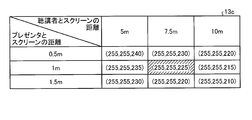
- FIG. 4 is a diagram showing an example of highlight color determination data 13c.
- FIG. 4 shows the first highlight color when the brightness at which the display device 5 displays a slide on the screen is 3000 lm and the luminance values of RGB of the background color are white (255, 255, 255). It is shown.
- FIG. 4 shows a case where white is changed to yellowish white by decreasing the brightness value of B (blue) when the background is white.
- the first highlight display is realized by displaying a color in which yellowishness is emphasized over other backgrounds where highlight display is not performed is illustrated.
- 4 exemplifies the case where the brightness of the display device 5 is 3000 lm and the luminance value of RGB of the background color is white (255, 255, 255).
- the first highlight color is stored in a state in which the computer can realize the first highlight display in the same manner as in the example of FIG.
- the distance between the presenter and the screen is 0.5 m, 1 m or 1.5 m, and the distance between the listener and the screen is 5 m, 7.5 m or 10 m.
- the first highlight color is shown, in which the presenter can visually recognize the highlight display on the screen, and it is difficult for the listener to visually recognize the highlight display on the screen.
- the brightness of the display device 5 is 3000 lm
- the luminance values of RGB of the background color are white (255, 255, 255)
- the distance between the presenter and the screen is 1 m
- FIG. 5 is a diagram showing an example of the first highlight display.
- FIG. 5 shows an area including a character string “This character string is highlighted.”
- the upper part of FIG. 5 shows a display visually recognized when the distance from the screen is 1 m, and the lower part of FIG. 5 is visually recognized when the distance from the screen is 7.5 m.
- the display is shown.
- yellowishness emphasized by the first highlight display is schematically expressed by dot filling.
- the presenter existing at a position 1 m away from the screen has the background of the area including the character string “This character string is highlighted” as described above.
- the first highlight display can be recognized because it is visually recognized as yellowish than the background of the region.
- an area including the character string “This character string is highlighted” is used for the listener who exists at a distance of 7.5 m from the screen.
- the first highlight display cannot be recognized because the background is visually recognized as white in the same manner as the background color of other regions.
- the generation unit 15b extracts the brightness of the display device 5 obtained from the previously acquired venue identification information, the distance between the presenter and the screen, and the distance between the listener and the screen first. By extracting the highlight color corresponding to the background color of the selected region from the highlight color determination data 13c, the first highlight color can be determined.
- the generation unit 15b targets the first highlight color and the second highlight color until the first highlight color and the second highlight color are determined for all the regions included in all the slides.
- the process of determining the highlight color is repeatedly executed.
- the generation unit 15b stores, in the storage unit 13, highlight color setting data 13d in which the first highlight color and the second highlight color used for highlight display of the region are associated with each region index. sign up.
- region which a slide contains was processed one by one was illustrated here, it cannot be overemphasized that each area
- the recognition unit 15c is a processing unit that performs voice recognition.
- the recognition unit 15c is activated when the presentation software receives a presentation start instruction with the document file opened, and waits until an audio signal having a predetermined time length is input from the microphone 3. For example, it waits for an audio signal having a time length of at least one frame, for example, 10 msec.
- the recognizing unit 15 c performs voice recognition such as word spotting on the voice signal every time a voice signal having a predetermined time length is input from the microphone 3. At this time, the recognizing unit 15c extracts the extracted word data related to the slide that is included in the document file that is being executed by the presentation software among the extracted word data 13b stored in the storage unit 13 and that is being displayed on the display device 5. Apply to word spotting.
- the recognition unit 15c recognizes whether or not a word extracted from each region included in the slide being displayed exists in the utterance of the presenter. Then, when a word is recognized from the audio signal, the recognition unit 15 c registers the recognition word data 13 e in which the word and the time when the word is recognized are associated with each other in the storage unit 13. When the same word is recognized a plurality of times as time passes, the last, that is, the latest recognized time is registered in the storage unit 13.
- the recognition unit 15c determines whether or not there is a word that has passed a predetermined period of time after being registered in the storage unit 13 among the recognized word data 13e stored in the storage unit 13. For example, for each word included in the recognition word data 13e, the recognition unit 15c has a difference between the time registered in association with the word and the time when the recognition unit 15c refers to the recognition word data 13e, that is, the current time. It is determined whether or not a predetermined threshold is exceeded. At this time, the recognizing unit 15c can change the threshold value used for the above determination according to a unit in which the slide is divided, for example, one sentence, line, paragraph, or the like.
- the slide when the slide is divided in units of lines, it can be assumed that the number of characters read out in one area is approximately 20 to 30 characters. In this case, 5 to 10 seconds can be used as an example of the threshold value. Further, when the slide is divided in units of paragraphs, it can be assumed that a time longer than the line unit is devoted to reading. In this case, 20 to 30 seconds can be used as an example of the above threshold.
- the recognition unit 15c deletes the record related to the word from the recognized word data 13e stored in the storage unit 13.
- the recognition unit 15c leaves the word included in the recognized word data 13e stored in the storage unit 13 without deleting it.
- the recognition unit 15c determines whether or not the slide page displayed on the display device 5 has been changed. For example, the recognizing unit 15 c determines whether a slide is switched by a slide show, or an operation for advancing a slide page or an operation for returning a slide page is received via the input device 7. At this time, when the slide page displayed on the display device 5 is changed, it is highly possible that the description of the presenter is switched from the slide of the page before the change to the slide of the page after the change. In this case, the recognition unit 15c deletes the recognized word data 13e stored in the storage unit 13. On the other hand, when the slide page displayed on the display device 5 is not changed, there is a high possibility that the page explained by the presenter will not change. In this case, the recognition unit 15c leaves the word included in the recognized word data 13e stored in the storage unit 13 without deleting it.
- the recognition unit 15c recognizes a word that is highly likely to be explained by the presenter in the displayed slide.
- a word included in the extracted word data 13b is described as an “extracted word”
- a word included in the recognized word data 13e is described as a “recognized word” to distinguish the labels from each other. is there.
- the determination unit 15d is a processing unit that determines an area in which the first highlight or the second highlight is executed.
- the determination unit 15d calculates the degree of association between the area in the slide being displayed and the word obtained as a voice recognition result, and sets the area having the highest degree of association as a highlight execution target. decide.
- the determination unit 15d selects one of the indexes of the area included in the slide that is being displayed on the display device 5. Subsequently, the determination unit 15d determines the area from the weight given to the extracted word that matches the recognized word of the recognized word data 13e among the extracted words of the extracted word data 13b associated with the previously selected index area. The relevance of is calculated. For example, when calculating the degree of association r x of the region x using the above-described word weight w k , the determination unit 15d adds the weight w k given to the extracted words that match the recognized word, thereby calculating the degree of association. r x can be calculated.
- the determination unit 15d determines the region having the highest relevance level among the regions included in the slide being displayed on the display device 5 as a highlight execution target.
- the display control unit 15e is a processing unit that executes display control for the display device 5.
- the display control unit 15e when the document file is opened by the presentation software, the display control unit 15e causes the display device 5 to display the slide included in the document file. At this time, the display control unit 15e may display the slide of the first page among the slides included in the document file, or may display the slide of the page edited last. Thereafter, when receiving a presentation start instruction, the display control unit 15e performs the first highlight display or the second highlight display according to the instruction from the first highlight execution unit 15f or the second highlight execution unit 15g. Execute. The display control unit 15 e changes the slide to be displayed on the display device 5 when receiving a page switching instruction via the input device 7.
- the display control unit 15e causes the display device 5 to display a slide on the next page of the slide being displayed. Further, when the operation of returning the page is received, the display control unit 15e causes the display device 5 to display the slide of the previous page of the displayed slide.
- the first highlight execution unit 15f is a processing unit that executes a first highlight display that displays the region determined by the determination unit 15d in the first highlight color.
- the first highlight execution unit 15f determines the highlight of the first highlight color included in the highlight color setting data 13d when the determination unit 15d determines the area to be highlighted.
- the display control unit 15e is instructed to display the background color of the area in the first highlight color associated with the area determined to be implemented. Thereby, the first highlight display of the area is realized.
- the second highlight execution unit 15g is a processing unit that controls whether or not the second highlight display is executed after the execution of the first highlight display.
- the second highlight execution unit 15g cancels the first highlight display via the input device 7 when the first highlight display is executed by the first highlight execution unit 15f. It waits for either a cancel instruction or a change instruction to change from the first highlight display to the second highlight display.
- the second highlight execution unit 15g cancels the first highlight display and returns the background color of the area to the same color as the other areas where the highlight display is not performed.
- the highlight display can be canceled before the second highlight display is executed, that is, before the highlight display is visually recognized by the listener.
- the second highlight execution unit 15g refers to the highlight color setting data 13d, and displays an instruction to display the background color of the area where the first highlight display has been executed in the second highlight color. It performs to the control part 15e. As a result, the highlight display of the area is changed from the first highlight display to the second highlight display.
- the second highlight execution unit 15g displays the highlight color setting data.
- the display control unit 15e is instructed to display the background color of the area where the first highlight display has been executed in the second highlight color. As a result, the highlight display of the area is changed from the first highlight display to the second highlight display.
- the presentation support apparatus 10 executes (1) extracted word data generation processing, (2) highlight color setting data generation processing, (3) speech recognition processing, and (4) display control processing in this order. I will explain.
- FIG. 6 is a flowchart illustrating a procedure of extracted word data generation processing according to the first embodiment.
- This process can be started automatically or manually. For example, when starting automatically, when the presentation software saves the document file in the storage unit 13 and then closes, or when the document file is saved in the storage unit 13 while editing the document file via the presentation, Can be activated.
- the processing can be activated when an instruction to execute presentation pre-processing is received via the input device 7. In any case, the processing is started by reading out the document file corresponding to the save or execution instruction from the document files included in the document data 13a stored in the storage unit 13.
- the extraction unit 15a divides the slide included in the document file into a plurality of regions in units of one sentence, line, paragraph, or the like (step S101). Subsequently, the extraction unit 15a assigns an index for identifying each region to the region obtained in step S101 (step S102).
- the extraction part 15a selects one index among the indexes allocated by step S102 (step S103). Subsequently, the extraction unit 15a extracts a word whose part of speech is a noun from morphemes obtained by performing morphological analysis or the like on the character string in the index area selected in step S103 (step S104). Thereafter, the extraction unit 15a gives each word extracted in step S104 an index assigned to the area including the word (step S105).
- the extraction unit 15a repeatedly executes the processing from step S103 to step S105 described above until all the indexes assigned in step S102 are selected (No in step S106).
- step S106 Yes the extraction unit 15a calculates the appearance frequency f k of the word k for each word included in the slide (step S107). Then, the extraction unit 15a gives a word weight w k corresponding to the appearance frequency f k calculated for each word in step S107 (step S108). On top of that, the extraction unit 15a, the word k, and registers the extracted word data 13b index idx and weights w k is associated to the storage unit 13 (step S109), and ends the process.
- FIG. 7 is a flowchart illustrating a procedure of highlight color setting data generation processing according to the first embodiment.
- the generation of the highlight color setting data 13d is started at the timing before, after, or simultaneously with the process shown in FIG.
- the generation unit 15b executes the processing of step 101 and step S102 shown in FIG. 6 instead of the extraction unit 15a. You can do that.
- the generation unit 15 b reads out a document file that has been saved from among document files included in the document data 13 a stored in the storage unit 13 or a document file that has received an instruction to execute a preprocessing of a presentation. (Step S201). Thereafter, the generation unit 15b acquires identification information of a venue where a presentation related to the document file is performed, for example, a conference room or a hall (step S202). By using such venue identification information as a search key, identification of information such as the brightness with which the display device 5 displays a slide on the screen, the distance between the presenter and the screen, and the distance between the listener and the screen is specified. Is possible.
- the generation unit 15b selects one slide from among the slides included in the document file (step S203). Further, the generation unit 15b selects one index among the indexes assigned to the area included in the slide selected in step S203 (step S204).
- Step S205 extracts the background color on which the character string is drawn in the area corresponding to the index selected in Step S204.
- the generation unit 15b among the highlight colors included in the highlight color determination data 13c, the brightness, presenter, and screen of the display device 5 that can be called from the venue identification information acquired in step S202.
- the first highlight color corresponding to the distance between the listener and the screen between the listener and the screen and the background color of the area extracted in step S205 is extracted, and the first color used for displaying the background of the area is extracted.
- the highlight color of 1 is determined, and the background color in which the difference from the background color of other areas where highlight display is not executed is emphasized more than the first highlight color is determined as the second highlight color ( Step S206).
- the generation unit 15b repeatedly executes the processing from step S204 to step S206 described above until the selection of indexes assigned to all the areas included in the slide selected in step S203 (No in step S207).
- step S207 Yes when the index assigned to all the areas included in the slide selected in step S203 has been selected (step S207 Yes), the generation unit 15b determines that all the slides included in the document file acquired in step S201. Until the selection is completed (No in step S208), the processing from step S203 to step S207 is repeated.
- step S208 Yes the generation unit 15b executes the following process. That is, the generation unit 15b stores the highlight color setting data 13d in which the first highlight color and the second highlight color used for highlight display of the region are associated with each other for each index of the region. Registration is performed (step S209), and the process ends.
- FIG. 8 is a flowchart illustrating the procedure of voice recognition processing according to the first embodiment. This process is started when the presentation software receives a presentation start instruction with the document file opened, and is repeatedly executed until a presentation end instruction is received.
- the recognition unit 15c waits until an audio signal having a predetermined time length is input from the microphone 3, for example, until an audio signal having a time length of at least one frame, for example, 10 msec is input (Step S15). S301).
- Step S301 when an audio signal having a predetermined time length is input from the microphone 3 (Yes at Step S301), the recognition unit 15c performs voice recognition such as word spotting on the audio signal (Step S302).
- word spotting is executed in step S302
- the slide is included in the document file being executed by the presentation software among the extracted word data 13b stored in the storage unit 13 and is being displayed on the display device 5.
- Extracted word data relating to a certain slide is applied as dictionary data.
- the recognition unit 15c stores the recognized word data 13e in which the word recognized in step S302 and the time when the word is recognized are associated with each other. (Step S304), and the process proceeds to step S305.
- Step S301 or Step S303 when a voice signal having a predetermined time length is not input from the microphone 3 or when a word is not recognized from the voice signal (No in Step S301 or Step S303), the subsequent processing is skipped and the processing proceeds to Step S305. .
- the recognizing unit 15c determines whether or not there is a word for which a predetermined period has elapsed since registration in the storage unit 13 among the recognized word data 13e stored in the storage unit 13 (step S305). If there is a word for which a predetermined period has elapsed since registration in the storage unit 13 (step S305 Yes), the recognition unit 15c deletes the record related to the word from the recognized word data 13e stored in the storage unit 13. (Step S306). If there is no word for which a predetermined period has elapsed since registration in the storage unit 13 (No in step S305), the process of step S306 is skipped and the process proceeds to step S307.
- the recognition unit 15c determines whether or not the slide page displayed on the display device 5 has been changed (step S307). At this time, when the slide page displayed on the display device 5 is changed (Yes in step S307), the recognition unit 15c deletes the recognized word data 13e stored in the storage unit 13 (step S308), and in step S301. Return to processing. If the slide page displayed on the display device 5 has not been changed (No at Step S307), the process returns to Step S301 without executing Step S308.
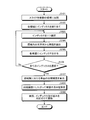
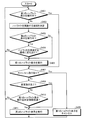
- FIG. 9 is a flowchart illustrating the procedure of the display control process according to the first embodiment. This process is executed in parallel with the voice recognition process shown in FIG. 8, and is started when the presentation software receives a presentation start instruction with the document file opened, and gives a presentation end instruction. It is repeatedly executed until it is accepted.
- the cycle in which the execution of the process is repeated may be the same as or different from the voice recognition process shown in FIG. 8, and is executed in synchronization with the voice recognition process shown in FIG. It can also be executed asynchronously.
- step S401 when the first highlight display is not being performed on the slide being displayed on the display device 5 (No in step S401), the determination unit 15d determines the region in the slide being displayed on the display device 5 Then, the degree of association with the word obtained as a result of the speech recognition is calculated, and the area having the highest degree of association is determined as the area for performing highlighting (step S402). If the first highlight display is being executed on the slide being displayed on the display device 5 (Yes in step S401), the process of step S402 to step S405 is skipped and the process proceeds to step S407.
- the first highlight execution unit 15f determines whether or not the second highlight display is being executed on the slide being displayed on the display device 5 (step S403). If the second highlight display is not being executed (No in step S403), the process proceeds to step S405.
- step S403 Yes the first highlight execution unit 15f performs the highlight in step S402 and the area where the second highlight display is being executed. It is further determined whether or not the area determined as the area to be changed is different (step S404). If both areas are the same (No in step S404), the process returns to step S401.
- the first highlight execution unit 15f An instruction to display the background color of the first highlight color included in the color setting data 13d in the first highlight color associated with the area determined to be highlighted in step S402 is displayed. By performing the control on the control unit 15e, the first highlight display of the area is executed (step S405).
- step S407 When a cancel instruction is received via the input device 7 after the first highlight display is executed in this way (Yes in step S407), the area where the highlighting is determined in step S402 is not appropriate. The possibility increases. In this case, the second highlight execution unit 15g cancels the first highlight display (step S408), and returns the background color of the area to the same color as other areas where the highlight display is not performed. Thereafter, the process returns to step S401.
- step S409 Yes when a change instruction is received via the input device 7 (step S409 Yes), there is a high possibility that the area where the highlighting is determined in step S402 is appropriate.
- the second highlight execution unit 15g skips the process of step S410 and proceeds to the process of step S411. That is, the second highlight execution unit 15f refers to the highlight color setting data 13d, and performs display control for an instruction to display the background color of the area where the first highlight display has been performed in the second highlight color. By performing this on the part 15e, the highlight display of the area is changed from the first highlight display to the second highlight display (step S411), and the process returns to step S401.
- step S407 No, step S409 No and step S410 Yes when neither a cancel instruction nor a change instruction is received over a predetermined period after the first highlight display is executed (step S407 No, step S409 No and step S410 Yes), the second highlight execution unit 15g With reference to the color setting data 13d, the display control unit 15e is instructed to display the background color of the area where the first highlight display has been executed in the second highlight color, thereby highlighting the area. Is changed from the first highlight display to the second highlight display (step S411), and the process returns to step S401.
- step S401 If neither the cancel instruction nor the change instruction has been received, and the predetermined period has not elapsed since the first highlight display was executed (No in step S407, step S409 and step S410), the process in step S401 Return to.
- the presentation support apparatus 10 displays the highlight color that the presenter can visually recognize among the participants in the presentation, the brightness of the display apparatus 5, the distance between the presenter and the screen, and the distance between the listener and the screen.
- the highlight color is determined based on the display color of the slide. Therefore, according to the presentation support apparatus 10 according to the present embodiment, it is possible to support the progress of the presentation.
- the presentation support device 10 generates extracted word data in the same manner as in the first embodiment by extracting words from character strings included in meta information set in graphs, tables, images, and moving images. be able to.
- the presentation support apparatus 10 may perform the first highlight display or the second highlight display on the font or display color of characters.
- the presentation support device 10 refers to the schedule data in which the time elapsed from the start of the presentation or the time based on the calendar is associated with the area scheduled to be highlighted at the time, and the time elapses. Therefore, the scheduled area associated with the time may be determined as the area to be highlighted.
- the first highlight color and the second color are determined from four factors including the brightness of the display device 5, the distance between the presenter and the screen, the distance between the listener and the screen, and the background color of the region.
- the presentation support apparatus 10 acquires the brightness of the venue from an illuminance sensor installed in the venue where the presentation is performed, and further adds the brightness of the venue to the first highlight color and the second highlight color. May be determined.
- the presentation support device 10 stores at least one of the presenter's visual acuity and / or the visual acuity of the listener, and further adds the presenter's visual acuity, the visual acuity of the listener, or the visual acuity of both to provide the first highlight.
- the color and the second highlight color may be determined.
- the appearance frequency is not necessarily limited to the total number of appearances.
- the number of appearances between regions in which the number of times the word k appears between the regions can be counted can be used as the appearance frequency.
- the frequency of appearance between the areas is 1/3, so the weight of the word k is 1 / ( 1/3) 2 is given. At this time, the number of times that the word k appears in one region is not counted as the total number of times, and the same weight is given even if it appears multiple times.
- the weight is given to the word k according to the appearance frequency of the word k is exemplified, but the weight can be given to the word k by a factor other than the appearance frequency.
- the extraction unit 15a can give a weight to the word k according to the number of mora of the word k. Specifically, the extraction unit 15a can give a larger weight as the number of mora of the word k is larger.
- the following two formulas can be used as an example of a weight calculation formula.
- the accuracy of speech recognition tends to decrease as the number of mora phonemes decreases. Therefore, according to the above weighting method, a larger weight is given when the number of mora phonemes of the word k is larger than when the number of mora phonemes of the word k is small. As a result that can be given, the calculation accuracy of the relevance can be improved.
- the weighting method described in this section can be implemented by using it alone instead of the weighting method described in the first embodiment, or the weighting method described in the first embodiment. It can also be implemented in combination with other weighting methods described in the second embodiment.
- the presentation support apparatus 10 can give a weight to a recognized word after voice recognition is performed. That is, when speech recognition is performed, the likelihood that the recognized word is a correct answer such as learning data, that is, a so-called score is often calculated together with the recognized word. For this reason, the presentation support apparatus 10 can also give a weight to the recognized word according to the score. It should be noted that the weighting method described in this section can be implemented by using it alone instead of the weighting method described in the first embodiment, or the weighting method described in the first embodiment. It can also be implemented in combination with other weighting methods described in the second embodiment.
- the above-mentioned ratio is used as it is as the degree of relevance, or the total value obtained by adding the weights of the extracted words that match the recognized word is normalized using the above-mentioned ratio, thereby increasing the calculation accuracy of the degree of relevance.
- the weighting method described in this section can be implemented by using it alone instead of the weighting method described in the first embodiment, or the weighting method described in the first embodiment. It can also be implemented in combination with other weighting methods described in the second embodiment.
- the presentation support apparatus 10 provides the presentation support service in a stand-alone manner in which the presentation software 10 is independently executed without depending on an external resource.
- a client server system can be constructed by providing a server that provides the presentation support service to a client that executes presentation software.
- the server device can be implemented by installing a presentation support program for realizing the above presentation support service as package software or online software.
- the server device may be implemented as a Web server that provides the presentation support service, or may be implemented as a cloud that provides the presentation support service by outsourcing.
- the client starts the presentation after uploading the document file used for the presentation and the identification information of the venue where the presentation is performed to the server device.
- the client uploads the audio signal collected from the microphone 3 in real time, and uploads the slide page information every time the slide page being displayed on the display device 5 is switched.
- the server apparatus can execute the processes shown in FIGS.
- the client can also be constructed as a thin client system by transmitting operation information related to the input device 7 to the server and causing the display device 5 to display only the processing result transmitted from the server.
- various resources such as document data are also held by the server, and the presentation software is also implemented as a virtual machine on the server.
- the presentation support program is added to the presentation software.
- the presentation support program is It can also be plugged in.
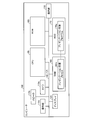
- FIG. 10 is a diagram illustrating a hardware configuration example of a computer that executes the presentation support program according to the first and second embodiments.
- the computer 100 includes an operation unit 110a, a speaker 110b, a camera 110c, a display 120, and a communication unit 130. Further, the computer 100 includes a CPU 150, a ROM 160, an HDD 170, and a RAM 180. These units 110 to 180 are connected via a bus 140.
- the HDD 170 includes the extraction unit 15a, the generation unit 15b, the recognition unit 15c, the determination unit 15d, the display control unit 15e, the first highlight execution unit 15f, and the second example described in the first embodiment.
- a presentation support program 170a that performs the same function as the highlight execution unit 15g is stored.
- the presentation support program 170a includes the extraction unit 15a, the generation unit 15b, the recognition unit 15c, the determination unit 15d, the display control unit 15e, the first highlight execution unit 15f, and the second highlight execution unit 15g illustrated in FIG. As with the components, they may be integrated or separated. That is, the HDD 170 does not necessarily have to store all the data shown in the first embodiment, and data used for processing may be stored in the HDD 170.
- the CPU 150 reads the presentation support program 170a from the HDD 170 and develops it on the RAM 180.
- the presentation support program 170a functions as a presentation support process 180a as shown in FIG.
- the presentation support process 180a expands various data read from the HDD 170 in an area allocated to the presentation support process 180a in the storage area of the RAM 180, and executes various processes using the expanded data. For example, as an example of processing executed by the presentation support process 180a, processing shown in FIGS. 6 to 9 and the like are included. Note that the CPU 150 does not necessarily operate all the processing units described in the first embodiment, and the processing unit corresponding to the process to be executed may be virtually realized.
- the presentation support program 170a may not necessarily be stored in the HDD 170 or the ROM 160 from the beginning.
- each program is stored in a “portable physical medium” such as a flexible disk inserted into the computer 100, so-called FD, CD-ROM, DVD disk, magneto-optical disk, or IC card. Then, the computer 100 may acquire and execute each program from these portable physical media.
- each program is stored in another computer or server device connected to the computer 100 via a public line, the Internet, a LAN, a WAN, etc., and the computer 100 acquires and executes each program from these. It may be.
Landscapes
- Engineering & Computer Science (AREA)
- General Engineering & Computer Science (AREA)
- Theoretical Computer Science (AREA)
- Human Computer Interaction (AREA)
- Physics & Mathematics (AREA)
- General Physics & Mathematics (AREA)
- User Interface Of Digital Computer (AREA)
Abstract
プレゼンテーション支援装置(10)は、表示装置(5)がスクリーンに表示するページのうちハイライトの実行対象とする領域を決定する処理と、表示装置(5)の明るさと、スクリーンからプレゼンタまでの距離と、スクリーンから聴講者までの距離と、領域の表示色とから定める第1のハイライト色であってプレゼンタ及び聴講者のうちプレゼンタが知覚できる第1のハイライト色で領域を表示する第1のハイライト表示を実行する処理とを実行する。
Description
本発明は、プレゼンテーション支援方法、プレゼンテーション支援プログラム及びプレゼンテーション支援装置に関する。
プレゼンテーションを支援する技術の一例として、音声認識機能付き情報処理装置が提案されている。この音声認識機能付き情報処理装置では、音声認識を用いてプレゼンテーション画面の操作を行い、音声入力された単語と画面上に表示された文字列が一致した場合、画面上に表示された文字列に効果を加え、より効果的なプレゼンテーションの提供を試みる。
しかしながら、上記の技術では、次に説明するように、プレゼンテーションの進行を支援できない場合がある。
すなわち、上記の音声認識機能付き情報処理装置では、音声認識が用いられるが、音声認識で誤認識が発生する場合、誤認識に伴ってプレゼンタが説明中でない箇所がハイライト表示される結果、プレゼンタの説明箇所がハイライト表示されない場合がある。この場合、音声認識機能付き情報処理装置は、プレゼンタや聴講者に説明箇所を提示できず、プレゼンテーションの進行を妨げてしまうことがある。
1つの側面では、本発明は、プレゼンテーションの進行を支援できるプレゼンテーション支援方法、プレゼンテーション支援プログラム及びプレゼンテーション支援装置を提供することを目的とする。
一態様のプレゼンテーション支援方法は、コンピュータが、表示装置がスクリーンに表示するページのうちハイライトの実行対象とする領域を決定する処理と、前記表示装置の明るさと、前記スクリーンからプレゼンタまでの距離と、前記スクリーンから聴講者までの距離と、前記領域の表示色とから定める第1のハイライト色であって前記プレゼンタ及び前記聴講者のうち前記プレゼンタが知覚できる第1のハイライト色で前記領域を表示する第1のハイライト表示を実行する処理とを実行する。
プレゼンテーションの進行を支援できる。
以下に添付図面を参照して本願に係るプレゼンテーション支援方法、プレゼンテーション支援プログラム及びプレゼンテーション支援装置について説明する。なお、この実施例は開示の技術を限定するものではない。そして、各実施例は、処理内容を矛盾させない範囲で適宜組み合わせることが可能である。
[システム構成]
図1は、実施例1に係るプレゼンテーション支援システムの構成を示す図である。図1に示すプレゼンテーション支援システム1は、文書ファイルが表示装置5に表示されたプレゼンテーション画面のうちマイク3から入力される音声の認識結果として得られた単語を含む領域をハイライト表示させるプレゼンテーション支援サービスを提供する。なお、ここでは、音声認識によりハイライト表示が実現される場合を例示するが、後述のように、必ずしもハイライト表示が音声認識により実現されずともかまわない。
図1は、実施例1に係るプレゼンテーション支援システムの構成を示す図である。図1に示すプレゼンテーション支援システム1は、文書ファイルが表示装置5に表示されたプレゼンテーション画面のうちマイク3から入力される音声の認識結果として得られた単語を含む領域をハイライト表示させるプレゼンテーション支援サービスを提供する。なお、ここでは、音声認識によりハイライト表示が実現される場合を例示するが、後述のように、必ずしもハイライト表示が音声認識により実現されずともかまわない。
かかるプレゼンテーション支援サービスの一環として、プレゼンテーション支援システム1は、プレゼンテーションに参加する参加者のうちプレゼンタが視認できる第1のハイライト色で特定の領域、例えばプレゼンテーションを進行する上で重要なキーワードを含む領域等を表示する第1のハイライトを実行する。これによって、プレゼンテーションの進行を支援する。加えて、第1のハイライトの実行後、キャンセル指示を受け付けた場合に第1のハイライトをキャンセルし、確定指示を受け付けた場合にプレゼンタ及び聴講者の両方が視認できる第2のハイライト色を表示する第2のハイライトを実行する。もって、プレゼンタはまだしも聴講者にまで誤ったハイライト、例えばプレゼンタが説明中でない箇所等が閲覧される事態を抑制する。
ここで、以下では、一例として、上記の表示制御に関する機能がプレゼンテーションソフトにアドオンされる場合を想定し、当該プレゼンテーションソフトを用いて作成された文書ファイルが含む1または複数のスライドを表示装置5に表示させることによってプレゼンテーションが進行される場合を想定する。かかるスライドには、テキストや図形を始め、他のアプリケーションプログラムによって作成されたコンテンツをインポートすることができる。例えば、ワープロソフトで作成された文書、表計算ソフトで作成された表やグラフをインポートしたり、撮像装置で撮像された画像や動画、さらには、画像編集ソフトで編集された画像や動画などをインポートしたりすることができる。
図1に示すように、プレゼンテーション支援システム1には、マイク3と、表示装置5と、入力装置7と、プレゼンテーション支援装置10とが収容される。これらマイク3、表示装置5及び入力装置7などの周辺機器と、プレゼンテーション支援装置10との間は、有線または無線により接続される。
マイク3は、音声を電気信号に変換する装置であり、マイクロフォンと呼ばれることもある。例えば、マイク3は、プレゼンテーションを実施するプレゼンタに装着させることができる。この場合、ヘッドセット型やタイピン型のマイクをプレゼンタの身体や衣服の所定位置に装着させたり、ハンド型のマイクをプレゼンタに携帯させたりすることができる。また、マイク3は、プレゼンタの発話が集音できる範囲の所定位置に設置することもできる。この場合、マイク3には、取付け型や据置き型のマイクを採用することもできる。これらいずれの場合においても、マイク3には、任意のタイプの指向性を持つマイクを採用できるが、プレゼンタの発話以外の音声、例えば聴講者等の発話や騒音などの雑音が集音されるのを抑制するために、マイクの感度をプレゼンタの発声方向に限定することもできる。なお、マイク3には、ダイナミック型、エレクトレットコンデンサ型、コンデンサ型などの任意の変換方式を採用することができる。
このマイク3に音声を採取することにより得られたアナログ信号は、デジタル信号へ変換された上でプレゼンテーション支援装置10へ入力される。
表示装置5は、各種の情報を表示する装置である。例えば、表示装置5には、発光により表示を実現する液晶ディスプレイや有機EL(electroluminescence)ディスプレイなどを採用することもできるし、投影により表示を実現するプロジェクタを採用することもできる。また、表示装置5の設置台数は、必ずしも1台に限定されずともよく、複数の台数であってかまわない。以下では、一例として、プレゼンテーションの参加者であるプレゼンタ及び聴講者の両者が閲覧する共用の表示装置としてプロジェクタ及びプロジェクタが投影する画像を映すスクリーンが実装される場合を想定する。
この表示装置5は、一例として、プレゼンテーション支援装置10からの指示にしたがってプレゼンテーション画面を表示する。例えば、表示装置5は、プレゼンテーション支援装置10上で動作するプレゼンテーションソフトが開く文書ファイルのスライドを表示する。この場合、表示装置5は、文書ファイルが含むスライドのうちプレゼンタが入力装置7を介して指定する任意のスライドを表示させることもできるし、プレゼンテーションソフトが有するスライドショーの機能がON状態に設定された場合、各スライドが作成されたページ順に文書ファイルが含むスライドを切り替えて表示させることもできる。
入力装置7は、各種の情報に対する指示入力を受け付ける装置である。例えば、表示装置5がプロジェクタとして実装される場合、スクリーンに映し出された画面上の位置を指し示すレーザポインタを入力装置7として実装することもできる。すなわち、レーザポインタの中には、スライドのページを進めたり、戻したりする各種のボタンなどの操作部が設けられたリモコン機能付きのレーザポインタも存在する。このリモコン機能付きのレーザポインタが有する操作部を入力装置7として援用することもできる。さらには、レーザポインタによって指し示された光点の位置をセンシングする画像センサを入力装置7として実装することもできる。なお、表示装置5が液晶ディスプレイとして実装される場合、入力装置7には、マウスやキーボードを採用したり、液晶ディスプレイ上に貼り合わせられたタッチセンサを採用したりすることもできる。
この入力装置7は、一例として、プレゼンテーション支援装置10上でプレゼンテーションソフトに実行させる文書ファイルの指定、スライドのページを進める操作やスライドのページを戻す操作などを受け付ける。このように入力装置7を介して受け付けられた操作は、プレゼンテーション支援装置10へ出力されることになる。
プレゼンテーション支援装置10は、プレゼンテーションソフトが実行されるコンピュータである。
一実施形態として、プレゼンテーション支援装置10には、デスクトップ型またはノート型のパーソナルコンピュータなどの情報処理装置を採用することができる。この他、プレゼンテーション支援装置10には、上記のパーソナルコンピュータなどの据置き型の端末のみならず、各種の携帯端末装置を採用することもできる。例えば、携帯端末装置の一例として、スマートフォン、携帯電話機やPHS(Personal Handyphone System)などの移動体通信端末、さらには、PDA(Personal Digital Assistants)などのスレート端末などがその範疇に含まれる。
なお、本実施例では、あくまで一例として、プレゼンテーション支援装置10が上記のプレゼンテーションソフトを外部のリソースに依存せずに単独で実行するスタンドアローンで上記のプレゼンテーション支援サービスを提供する場合を想定する。詳細は後述するが、上記のプレゼンテーション支援サービスは、スタンドアローンで提供される実装に限定されない。例えば、プレゼンテーションソフトを実行するクライアントに対し、上記のプレゼンテーション支援サービスを提供するサーバを設けることによってクライアントサーバシステムとして構築することもできる。
[プレゼンテーション支援装置10の構成]
続いて、本実施例に係るプレゼンテーション支援装置10の機能的構成について説明する。図2は、実施例1に係るプレゼンテーション支援装置10の機能的構成を示すブロック図である。図2に示すように、プレゼンテーション支援装置10は、入出力I/F(InterFace)部11と、記憶部13と、制御部15とを有する。なお、図2には、データの入出力の関係を表す実線が示されているが、図2には、説明の便宜上、最小限の部分について示されているに過ぎない。すなわち、各処理部に関するデータの入出力は、図示の例に限定されず、図示以外のデータの入出力、例えば処理部及び処理部の間、処理部及びデータの間、並びに、処理部及び外部装置の間のデータの入出力が行われることとしてもかまわない。
続いて、本実施例に係るプレゼンテーション支援装置10の機能的構成について説明する。図2は、実施例1に係るプレゼンテーション支援装置10の機能的構成を示すブロック図である。図2に示すように、プレゼンテーション支援装置10は、入出力I/F(InterFace)部11と、記憶部13と、制御部15とを有する。なお、図2には、データの入出力の関係を表す実線が示されているが、図2には、説明の便宜上、最小限の部分について示されているに過ぎない。すなわち、各処理部に関するデータの入出力は、図示の例に限定されず、図示以外のデータの入出力、例えば処理部及び処理部の間、処理部及びデータの間、並びに、処理部及び外部装置の間のデータの入出力が行われることとしてもかまわない。
入出力I/F部11は、マイク3、表示装置5及び入力装置7などの周辺機器との間で入出力を行うインタフェースである。
一実施形態として、入出力I/F部11は、マイク3から入力された音声データを制御部15へ出力する。また、入出力I/F部11は、制御部15から出力されたスライドの画像データを表示装置5へ出力したり、制御部15から出力されたスライドに含まれる領域に対するハイライト指示またはそのキャンセル指示を表示装置5へ出力したりする。また、入出力I/F部11は、入力装置7から入力された各種の操作を制御部15へ出力する。
記憶部13は、制御部15で実行されるOS(Operating System)やプレゼンテーションソフトを始め、アプリケーションプログラムなどの各種プログラムに用いられるデータを記憶するデバイスである。
一実施形態として、記憶部13は、プレゼンテーション支援装置10における主記憶装置として実装される。例えば、記憶部13には、各種の半導体メモリ素子、例えばRAM(Random Access Memory)やフラッシュメモリを採用できる。また、記憶部13は、補助記憶装置として実装することもできる。この場合、HDD(Hard Disk Drive)、光ディスクやSSD(Solid State Drive)などを採用できる。
記憶部13は、制御部15で実行されるプログラムに用いられるデータの一例として、文書データ13a、抽出単語データ13b、ハイライト色決定用データ13c、ハイライト色設定データ13d及び認識単語データ13eを記憶する。なお、上記の文書データ13a以外の抽出単語データ13b、ハイライト色決定用データ13c、ハイライト色設定データ13d及び認識単語データ13eは、制御部15の説明で併せて説明することとする。また、記憶部13には、上記のデータ以外にも、他の電子データ、例えばプレゼンテーションの時間割なども併せて記憶することもできるのは言うまでもない。
文書データ13aは、文書に関するデータである。
一実施形態として、文書データ13aには、プレゼンテーションソフトを用いて1または複数のスライドが作成された文書ファイルを採用できる。かかるスライドには、テキストや図形を始め、他のアプリケーションプログラムによって作成されたコンテンツをインポートすることができる。例えば、ワープロソフトで作成された文書、表計算ソフトで作成された表やグラフをインポートしたり、撮像デバイスで撮像された画像や動画、さらには、画像編集ソフトで編集された画像や動画などをインポートしたりすることができる。このように、テキスト以外のコンテンツには、音声認識によるキーワード検索を実現するために、プレゼンテーションの開始前までに当該コンテンツの説明語句や説明文などの文字列を含むメタ情報を付与しておくことができる。
制御部15は、各種のプログラムや制御データを格納する内部メモリを有し、これらによって種々の処理を実行するものである。
一実施形態として、制御部15は、中央処理装置、いわゆるCPU(Central Processing Unit)として実装される。なお、制御部15は、必ずしも中央処理装置として実装されずともよく、MPU(Micro Processing Unit)として実装されることとしてもよい。また、制御部15は、ASIC(Application Specific Integrated Circuit)やFPGA(Field Programmable Gate Array)などのハードワイヤードロジックによっても実現できる。
制御部15は、各種のプログラムを実行することによって下記の処理部を仮想的に実現する。例えば、制御部15は、図2に示すように、抽出部15aと、生成部15bと、認識部15cと、決定部15dと、表示制御部15eと、第1ハイライト実行部15fと、第2ハイライト実行部15gとを有する。
抽出部15aは、文書ファイルに含まれるスライドから音声認識で用いる辞書データに登録する単語を抽出単語データ13bとして抽出する処理部である。
一実施形態として、抽出部15aは、上記の抽出単語データ13bを抽出する処理を自動的に開始することもできるし、手動設定で開始することもできる。例えば、自動的に開始する場合、プレゼンテーションソフトが文書ファイルを記憶部13に保存した上で閉じる場合、あるいはプレゼンテーションを介する文書ファイルの編集中に文書ファイルが記憶部13に保存された場合に、処理を起動させることができる。また、手動設定で開始する場合、入力装置7を介してプレゼンテーションの前処理の実行指示を受け付けた場合に、処理を起動させることができる。いずれの場合においても、記憶部13に記憶された文書データ13aが含む文書ファイルのうち、保存または実行指示に対応する文書ファイルを読み出すことによって処理が開始される。
かかる抽出単語データ13bの生成について説明すると、抽出部15aは、記憶部13に記憶された文書データ13aが含む文書ファイルのうち保存が実行された文書ファイルあるいはプレゼンテーションの前処理の実行指示を受け付けた文書ファイルを読み出す。ここでは、一例として、抽出部15aが記憶部13から文書ファイルを読み出す場合を例示したが、文書ファイルの入手経路はこれに限定されない。例えば、抽出部15aは、ハードディスクや光ディスクなどの補助記憶装置またはメモリカードやUSB(Universal Serial Bus)メモリなどのリムーバブルメディアから文書ファイルを取得することもできる。また、抽出部15aは、外部装置からネットワークを介して受信することによって文書ファイルを取得することもできる。
続いて、抽出部15aは、先に読み出した文書ファイルに含まれるスライドを複数の領域へ分割する。例えば、抽出部15aは、一文、行、段落などの単位でスライドを分割する。この場合、抽出部15aは、スライドが含む文字列を走査して、スペース、句点または改行に対応する区切り文字を検出し、当該区切り文字を領域の境界に設定する。かかる境界を前後に、抽出部15aは、スライドが含む文字列を区切る。これによって、スライドが複数の領域へ区切り文字ごとに分割される。その上で、抽出部15aは、スライドの分割によって得られた領域に当該領域を識別するインデックスを割り当てる。なお、ここでは、スライドを自動的に分割する場合を例示したが、入力装置7等を介して領域の境界を指定させることによってスライドを手動設定で分割することとしてもかまわない。
スライドの分割後に、抽出部15aは、当該スライドに含まれる複数の領域のうち領域を1つ選択する。続いて、抽出部15aは、先に選択された領域が含む文字列に対し、自然言語処理を実行することによって単語を抽出する。例えば、抽出部15aは、領域内の文字列に形態素解析等を実行することにより得られた形態素のうち品詞が名詞である単語を抽出する。そして、抽出部15aは、先に抽出された各単語に当該単語が含まれる領域に割り当てられたインデックスを付与する。その後、抽出部15aは、スライドが含む領域が全て選択されるまで上記の単語の抽出及び上記のインデックスの付与を繰返し実行する。
このようにして全ての領域から単語が抽出された後に、抽出部15aは、スライドに含まれる単語ごとに当該単語kの出現頻度fkを算出する。かかる出現頻度の一例として、抽出部15aは、単語kが同一のスライドに出現する回数を集計することによって単語別の総出現回数を算出する。そして、抽出部15aは、先に単語別に算出された出現頻度fkに対応する単語の重みwkを付与する。この場合、抽出部15aは、出現頻度fkが高くなるにしたがって重みwkが小さい値となる重みの算出式を用いる。例えば、抽出部15aは、重みの算出式「wk=1/fk
2」に出現頻度fkを代入することによって計算された重みwkを単語kに付与する。その上で、抽出部15aは、単語k、インデックスidx及び重みwkが対応付けられた抽出単語データ13bを記憶部13へ登録する。
図3は、抽出単語データ13bの一例を示す図である。図3には、複数のスライドのうち1つのスライドに関する抽出単語データが抜粋して示されている。図3に示す抽出単語データ13bの例で言えば、単語“a”が領域「idx1」及び領域「idx2」の2つの領域に出現することを意味する。さらに、単語“a”は、出現頻度が「2」であるので、1/22の計算により0.25が重みとして付与されている。また、単語“b”が領域「idx1」及び領域「idx3」の2つの領域に出現することを意味する。さらに、単語“b”も出現頻度が「2」であるので、0.25が重みとして付与されている。また、単語“c”が領域「idx1」及び領域「idx2」の2つの領域に出現することを意味する。さらに、単語“c”も出現頻度が「2」であるので、0.25が重みとして付与されている。また、単語“d”が領域「idx2」及び領域「idx3」の2つの領域に出現することを意味する。さらに、単語“d”も出現頻度が「2」であるので、0.25が重みとして付与されている。最後に、単語“e”が領域「idx3」の1つの領域に出現することを意味する。そして、単語“e”は、出現頻度が「1」であるので、1/12の計算により1が重みとして付与されている。なお、図3には、1つのスライドに関する抽出単語データを例示したが、他のスライドについても各項目の値は異なれども図3の例と同様にコンピュータが単語の領域や重みを識別できる状態で抽出単語データが記憶される。
なお、単語の重みfkの算出方法に関する応用例の詳細については後述するが、単語の重みfkは上記の例に限定されない。すなわち、抽出部15aは、上記の総出現回数以外の他の因子を用いて単語の重みfkを算出することもできるし、あるいは上記の総出現回数に他の因子を加えて単語の重みfkを算出することができる。
生成部15bは、ハイライト色決定用データ13cを用いて、ハイライト色設定データ13dを生成する処理部である。
一実施形態として、生成部15bは、抽出部15aにより抽出単語データ13bの生成が開始されるタイミングと前後または同時のタイミングで、ハイライト色設定データ13dの生成を開始する。このとき、生成部15bは、抽出部15aよりも前にハイライト色設定データ13dの生成を開始する場合、スライドを複数の領域へ分割する処理及び各領域にインデックスを割り当てる処理を抽出部15aの代わりに行うことができる。
かかるハイライト色設定データ13dの生成について説明すると、生成部15bは、記憶部13に記憶された文書データ13aが含む文書ファイルのうち保存が実行された文書ファイルあるいはプレゼンテーションの前処理の実行指示を受け付けた文書ファイルを読み出す。
その後、生成部15bは、当該文書ファイルに関するプレゼンテーションが実施される会場、例えば会議室やホールなどの識別情報を取得する。このような会場の識別情報を検索キーに利用することにより、表示装置5がスクリーンにスライドを表示する明るさ、プレゼンタ及びスクリーン間の距離、及び、聴講者及びスクリーン間の距離などの情報の特定が可能になる。
例えば、上記の会場の識別情報は、会場で利用可能な設備、例えば会場に設置されたプロジェクタの型番と、会場における座席配置、例えばプロジェクタがスライドを映し出すスクリーンからプレゼンタの持ち場までの距離やスクリーンから聴講席までの距離などと対応付けられた状態で会場情報として管理される場合がある。
かかる会場情報からプロジェクタの型番の検索に成功した場合、生成部15bは、図示しないプロジェクタの性能情報、例えばスクリーンへ照射する光量(光出力)を始め、消費電力や解像度などが型番に対応付けられたカタログスペックを参照することにより、型番に対応付けられた光量を読み出す。これによって、表示装置5がスクリーンにスライドを表示する明るさが取得されることになる。
また、スクリーンからプレゼンタの持ち場、例えば席や壇上までの距離が検索できた場合、生成部15bは、それをプレゼンタ及びスクリーン間の距離として用いることができる。さらに、スクリーンから聴講席までの距離が検索できた場合、一例として、スクリーンから最も近い聴講席までの距離を聴講者及びスクリーン間の距離として用いたり、他の一例として、スクリーンから各聴講席までの距離のうち所定の統計値、例えば最頻値、中央値や平均値などを聴講者及びスクリーン間の距離として用いたりすることもできる。
このように会場の識別情報の取得後、生成部15bは、文書ファイルに含まれるスライドのうちスライドを1つ選択し、さらに、先に選択されたスライドに含まれる領域に割り当てられたインデックスのうちインデックスを1つ選択する。そして、生成部15bは、先に選択されたインデックスに対応する領域で文字列が描画される背景の色を抽出する。例えば、生成部15bは、RGB表色系で画像が描画される場合、R(赤)の輝度値、G(緑)の輝度値及びB(青)の輝度値を領域の背景色として抽出する。
その上で、生成部15bは、ハイライト色決定用データ13cに含まれるハイライト色のうち、先に取得された会場の識別情報から得られる表示装置5の明るさ、プレゼンタ及びスクリーン間の距離、及び、聴講者及びスクリーン間の距離と、先に抽出された領域の背景色とに対応するハイライト色を抽出することにより、当該領域の背景の表示に用いる第1のハイライト色を決定する。
かかるハイライト色決定用データ13cには、一例として、表示装置5の明るさ別、背景色別、プレゼンタ及びスクリーン間の距離別、及び聴講者及びスクリーン間の距離別に、第1のハイライト色が対応付けられたデータを採用できる。
ここで、第1のハイライト色は、下記の理由から、スクリーンの近くにいるプレゼンタの方が聴講者に比べて色を識別しやすいという知見の下、定義される。例えば、上記の理由の1つ目としては、プレゼンテーションにおいてプレゼンタは聴講者よりもスライドが映し出されるスクリーンの近くにいる公算が高いことが挙げられる。さらに、2つ目としては、スクリーンから届く光の量は距離の二乗に反比例して減少することが挙げられる。加えて、3つ目としては、光の量が減少するほど色の識別能力は低下することが挙げられる。これらのことから、プレゼンタの方が聴講者に比べて色を識別しやすい公算は十分に高いと言える。
図4は、ハイライト色決定用データ13cの一例を示す図である。図4には、表示装置5がスクリーンにスライドを表示させる明るさが3000lmであり、かつ背景色のRGBの各輝度値が白(255,255,255)である場合の第1のハイライト色が示されている。図4には、背景が白色である場合にB(青色)の輝度値を減少させることにより白色を黄ばんだ白色へ変化させる場合が示されている。この結果、ハイライト表示が行われない他の背景よりも黄色みが強調された色が表示されることにより、第1のハイライト表示が実現される場合が例示されている。なお、図4の例では、表示装置5の明るさが3000lmであり、かつ背景色のRGBの輝度値が白(255,255,255)である場合について例示したが、他の明るさ及び他の背景色についても各項目の値は異なれども図4の例と同様にコンピュータが第1のハイライト表示を実現できる状態で第1のハイライト色が記憶される。
さらに、図4の例で言えば、プレゼンタ及びスクリーン間の距離が0.5m、1mまたは1.5mである場合と、聴講者及びスクリーン間の距離が5m、7.5mまたは10mである場合との各組合せに関し、プレゼンタがスクリーン上のハイライト表示を視認でき、かつ聴講者がスクリーン上のハイライト表示を視認するのが困難である第1のハイライト色が示されている。例えば、表示装置5の明るさが3000lmであり、背景色のRGBの各輝度値が白(255,255,255)であり、プレゼンタ及びスクリーン間の距離が1mであり、かつ聴講者及びスクリーン間の距離が7.5mである場合、すなわち図中の塗りつぶしの部分の場合、第1のハイライト色が(R,G,B)=(255,255,225)であることが定義されている。
このような第1のハイライト色により第1のハイライト表示が行われた場合、第1のハイライト表示は図5に示す通りとなる。図5は、第1のハイライト表示の一例を示す図である。図5には、第1のハイライト色が(R,G,B)=(255,255,225)である場合に、「この文字列がハイライトされています。」という文字列を含む領域の背景が第1のハイライト色(R,G,B)=(255,255,225)で表示されることにより、に第1のハイライト表示が実行された場合が示されている。さらに、図5の上部には、スクリーンからの距離が1mである場合に視認される表示が示されると共に、図5の下部には、スクリーンからの距離が7.5mである場合に視認される表示が示されている。なお、図5の例では、第1のハイライト表示で強調される黄ばみが点の塗りつぶしにより模式的に表現されている。
図5の上部に示すように、スクリーンからの距離が1mである位置に存在するプレゼンタには、上記の「この文字列がハイライトされています。」という文字列を含む領域の背景が他の領域の背景よりも黄ばんで視認されるので、第1のハイライト表示を認識できる。一方、図5の下部に示すように、スクリーンからの距離が7.5mである位置に存在する聴講者には、上記の「この文字列がハイライトされています。」という文字列を含む領域の背景が他の領域の背景色と同様に白色と視認されるので、第1のハイライト表示は認識できない。
このように、生成部15bは、先に取得された会場の識別情報から得られる表示装置5の明るさ、プレゼンタ及びスクリーン間の距離、及び、聴講者及びスクリーン間の距離と、先に抽出された領域の背景色とに対応するハイライト色をハイライト色決定用データ13cから抽出することにより、第1のハイライト色を決定できる。
その後、生成部15bは、先に決定された第1のハイライト色よりもハイライト表示が実行されない他の領域の背景色との差が強調された背景色を第2のハイライト色として決定する。例えば、第1のハイライト色が(R,G,B)=(255,255,225)である場合、より黄色が強調された背景色(R,G,B)=(255,255,200)を第2のハイライト色として決定する。
このように、生成部15bは、全てのスライドに含まれる全ての領域を対象に、第1のハイライト色及び第2のハイライト色が決定されるまで、第1のハイライト色及び第2のハイライト色を決定する処理を繰り返し実行する。この結果、領域ごとに当該領域のハイライト表示に用いる第1のハイライト色及び第2のハイライト色が得られる。その後、生成部15bは、各領域のインデックスごとに当該領域のハイライト表示に用いる第1のハイライト色及び第2のハイライト色が対応付けられたハイライト色設定データ13dを記憶部13へ登録する。なお、ここでは、スライドが含む領域を1つずつ順番に処理する場合を例示したが、各領域を並列して処理することができるのは言うまでもない。
認識部15cは、音声認識を実行する処理部である。
一実施形態として、認識部15cは、プレゼンテーションソフトが文書ファイルを開いた状態でプレゼンテーションの開始指示を受け付けた場合に起動し、マイク3から所定時間長の音声信号が入力されるまで待機する。例えば、少なくとも1フレーム分の時間長、例えば10msecの音声信号が入力されるのを待機する。そして、認識部15cは、マイク3から所定時間長の音声信号が入力される度に、当該音声信号にワードスポッティングなどの音声認識を実行する。このとき、認識部15cは、記憶部13に記憶された抽出単語データ13bのうちプレゼンテーションソフトが実行中である文書ファイルが含むスライドであり、かつ表示装置5に表示中であるスライドに関する抽出単語データをワードスポッティングに適用する。これによって、認識部15cは、プレゼンタの発話の中に表示中のスライドに含まれる各領域から抽出された単語が存在するか否かを認識する。そして、認識部15cは、音声信号から単語が認識された場合、当該単語及びその単語が認識された時間が対応付けられた認識単語データ13eを記憶部13へ登録する。なお、同一の単語が時間経過に伴って複数回にわたって認識される場合には、最後、すなわち最新に認識された時刻が記憶部13へ登録される。
その後、認識部15cは、記憶部13に記憶された認識単語データ13eのうち記憶部13へ登録されてから所定の期間が経過した単語が存在するか否かを判定する。例えば、認識部15cは、認識単語データ13eに含まれる単語ごとに、当該単語に対応付けて登録された時間と、認識部15cが認識単語データ13eを参照する時間、すなわち現時間との差が所定の閾値を超過するか否かを判定する。このとき、認識部15cは、スライドが分割された単位、例えば一文、行や段落などによって上記の判定に用いる閾値を変えることができる。例えば、スライドが行単位で分割される場合、1つの領域で読み上げられる文字数はおよそ20~30文字であると想定できる。この場合、上記の閾値の一例として、5~10秒を用いることができる。また、スライドが段落単位で分割される場合、行単位よりも長い時間が読み上げに割かれると想定できる。この場合、上記の閾値の一例として、20~30秒を用いることができる。
ここで、記憶部13へ登録されてから所定の期間が経過した単語が存在する場合、当該単語を含むスライドの領域に関する説明が終了している可能性が高まる。このような単語を残しておくと、説明が終了している領域がハイライトで表示される可能性も高まる。よって、認識部15cは、記憶部13に記憶された認識単語データ13eから当該単語に関するレコードを削除する。一方、記憶部13へ登録されてから所定の期間が経過した単語が存在しない場合、認識単語データ13eに含まれる単語が出現するスライドの領域に関する説明が終了していない可能性が高まる。この場合、説明が終了している領域がハイライトで表示される可能性は低い。よって、認識部15cは、記憶部13に記憶された認識単語データ13eに含まれる単語を削除せずにそのまま残す。
また、認識部15cは、表示装置5に表示されるスライドのページが変更されたか否かを判定する。例えば、認識部15cは、スライドショーによりスライドが切り替えられたり、入力装置7を介してスライドのページを進める操作またはスライドのページを戻す操作を受け付けたりしたかを判定する。このとき、表示装置5に表示されるスライドのページが変更された場合、プレゼンタの説明も変更前のページのスライドから変更後のページのスライドへ切り替わった可能性が高い。この場合、認識部15cは、記憶部13に記憶された認識単語データ13eを削除する。一方、表示装置5に表示されるスライドのページが変更されていない場合、プレゼンタが説明するページにも変りがない可能性が高い。この場合、認識部15cは、記憶部13に記憶された認識単語データ13eに含まれる単語を削除せずにそのまま残す。
これら一連の動作により、認識部15cは、表示中であるスライドの中でプレゼンタが説明中である可能性が高い単語を認識する。以下では、抽出単語データ13bに含まれる単語のことを「抽出単語」と記載すると共に、認識単語データ13eに含まれる単語のことを「認識単語」と記載し、互いのラベルを区別する場合がある。
決定部15dは、第1のハイライトまたは第2のハイライトを実行する領域を決定する処理部である。
一実施形態として、決定部15dは、表示中であるスライド内の領域と、音声認識結果として得られた単語との関連度を算出し、関連度が最高である領域をハイライトの実行対象として決定する。
これを具体的に説明すると、決定部15dは、表示装置5に表示中であるスライドが含む領域のインデックスのうちインデックスを1つ選択する。続いて、決定部15dは、先に選択されたインデックスの領域に対応付けられた抽出単語データ13bの抽出単語のうち認識単語データ13eの認識単語と一致する抽出単語に付与された重みから当該領域の関連度を算出する。例えば、上記の単語の重みwkを用いて領域xの関連度rxを算出する場合、決定部15dは、認識単語と一致する抽出単語に付与された重みwkを合計することによって関連度rxを算出できる。このとき、インデックスの領域に対応付けられた抽出単語の中に認識単語と一致する単語が存在しない場合、当該領域の関連度はゼロと算出されることになる。このような算出ロジックによって、スライド内の各領域の記述内容がプレゼンタの発話内容との間で関連している度合いを上記の「関連度」として求める。その上で、決定部15dは、関連度を算出する度に、表示装置5に表示中であるスライドに含まれる領域のうち関連度が最高である領域をハイライトの実行対象として決定する。
表示制御部15eは、表示装置5に対する表示制御を実行する処理部である。
一実施形態として、表示制御部15eは、プレゼンテーションソフトにより文書ファイルが開かれた場合、当該文書ファイルが含むスライドを表示装置5に表示させる。このとき、表示制御部15eは、文書ファイルが含むスライドのうち最初のページのスライドを表示させることとしてもよいし、最後に編集が行われたページのスライドを表示させることとしてもよい。その後、表示制御部15eは、プレゼンテーションの開始指示を受け付けた場合、第1ハイライト実行部15fまたは第2ハイライト実行部15gからの指示にしたがって第1のハイライト表示または第2のハイライト表示を実行する。また、表示制御部15eは、入力装置7を介してページの切替え指示を受け付けた場合、表示装置5に表示させるスライドを変更する。例えば、ページを進める操作を受け付けた場合、表示制御部15eは、表示中のスライドの次ページのスライドを表示装置5に表示させる。また、ページを戻る操作を受け付けた場合、表示制御部15eは、表示中のスライドの前ページのスライドを表示装置5に表示させる。
第1ハイライト実行部15fは、決定部15dにより決定された領域を第1のハイライト色で表示する第1のハイライト表示を実行する処理部である。
一実施形態として、第1ハイライト実行部15fは、決定部15dによりハイライトを実施する領域が決定された場合、ハイライト色設定データ13dに含まれる第1のハイライト色のうちハイライトの実施が決定された領域に対応付けられた第1のハイライト色で当該領域の背景色を表示させる指示を表示制御部15eに行う。これによって、当該領域の第1のハイライト表示を実現する。
第2ハイライト実行部15gは、第1のハイライト表示の実行後に、第2のハイライト表示を実行するか否かを制御する処理部である。
一実施形態として、第2ハイライト実行部15gは、第1ハイライト実行部15fにより第1のハイライト表示が実行された場合、入力装置7を介して、第1のハイライト表示をキャンセルするキャンセル指示または第1のハイライト表示から第2のハイライト表示へ変更する変更指示のいずれかの指示を待機する。
このとき、入力装置7を介してキャンセル指示を受け付けた場合には、決定部15dによりハイライトの実施が決定された領域が適切でない可能性が高まる。例えば、認識部15cの誤認識等に起因してプレゼンタが説明中でない箇所、言い換えれば説明と無関係の領域がハイライト表示されているおそれがある。この場合、第2ハイライト実行部15gは、第1のハイライト表示をキャンセルし、当該領域の背景色をハイライト表示が行われていない他の領域と同一の色に戻す。このようなキャンセル制御により、第2のハイライト表示が実行される前、すなわち聴講者によりハイライト表示が視認される前の段階でハイライト表示をキャンセルできる。
一方、入力装置7を介して変更指示を受け付けた場合には、決定部15dによりハイライトの実施が決定された領域が適切である可能性が高まる。例えば、認識部15cによる音声認識の結果に誤りがなく、プレゼンタが説明中である箇所、言い換えれば説明と関係がある領域がハイライト表示されている可能性が高まる。この場合、第2ハイライト実行部15gは、ハイライト色設定データ13dを参照し、第1のハイライト表示が実行されていた領域の背景色を第2のハイライト色で表示させる指示を表示制御部15eに行う。これによって、当該領域のハイライト表示を第1のハイライト表示から第2のハイライト表示へ変更する。このような変更制御により、第1のハイライト表示が適切である場合に聴講者が視認できる第2のハイライト表示へ速やかに変更できる。
また、第1のハイライト表示が実行されてから所定期間、例えば30秒間などにわたってキャンセル指示または変更指示のいずれも受け付けなかった場合にも、第2ハイライト実行部15gは、ハイライト色設定データ13dを参照し、第1のハイライト表示が実行されていた領域の背景色を第2のハイライト色で表示させる指示を表示制御部15eに行う。これによって、当該領域のハイライト表示を第1のハイライト表示から第2のハイライト表示へ変更する。
[処理の流れ]
次に、本実施例に係るプレゼンテーション支援装置10の処理の流れについて説明する。なお、ここでは、プレゼンテーション支援装置10によって実行される(1)抽出単語データの生成処理、(2)ハイライト色設定データの生成処理、(3)音声認識処理、(4)表示制御処理の順に説明することとする。
次に、本実施例に係るプレゼンテーション支援装置10の処理の流れについて説明する。なお、ここでは、プレゼンテーション支援装置10によって実行される(1)抽出単語データの生成処理、(2)ハイライト色設定データの生成処理、(3)音声認識処理、(4)表示制御処理の順に説明することとする。
(1)抽出単語データの生成処理
図6は、実施例1に係る抽出単語データの生成処理の手順を示すフローチャートである。この処理は、自動的に開始することもできるし、手動設定で開始することもできる。例えば、自動的に開始する場合、プレゼンテーションソフトが文書ファイルを記憶部13に保存した上で閉じる場合、あるいはプレゼンテーションを介する文書ファイルの編集中に文書ファイルが記憶部13に保存された場合に、処理を起動させることができる。また、手動設定で開始する場合、入力装置7を介してプレゼンテーションの前処理の実行指示を受け付けた場合に、処理を起動させることができる。いずれの場合においても、記憶部13に記憶された文書データ13aが含む文書ファイルのうち、保存または実行指示に対応する文書ファイルを読み出すことによって処理が開始される。
図6は、実施例1に係る抽出単語データの生成処理の手順を示すフローチャートである。この処理は、自動的に開始することもできるし、手動設定で開始することもできる。例えば、自動的に開始する場合、プレゼンテーションソフトが文書ファイルを記憶部13に保存した上で閉じる場合、あるいはプレゼンテーションを介する文書ファイルの編集中に文書ファイルが記憶部13に保存された場合に、処理を起動させることができる。また、手動設定で開始する場合、入力装置7を介してプレゼンテーションの前処理の実行指示を受け付けた場合に、処理を起動させることができる。いずれの場合においても、記憶部13に記憶された文書データ13aが含む文書ファイルのうち、保存または実行指示に対応する文書ファイルを読み出すことによって処理が開始される。
図6に示すように、抽出部15aは、文書ファイルに含まれるスライドを一文、行または段落などの単位で複数の領域へ分割する(ステップS101)。続いて、抽出部15aは、ステップS101で得られた領域に各領域を識別するインデックスを割り当てる(ステップS102)。
そして、抽出部15aは、ステップS102で割り当てられたインデックスのうちインデックスを1つ選択する(ステップS103)。続いて、抽出部15aは、ステップS103で選択されたインデックスの領域内の文字列に形態素解析等を実行することにより得られた形態素のうち品詞が名詞である単語を抽出する(ステップS104)。その後、抽出部15aは、ステップS104で抽出された各単語に当該単語が含まれる領域に割り当てられたインデックスを付与する(ステップS105)。
そして、抽出部15aは、ステップS102で割り当てられたインデックスが全て選択されるまで(ステップS106No)、上記のステップS103~ステップS105までの処理を繰返し実行する。
その後、ステップS102で割り当てられたインデックスが全て選択された場合(ステップS106Yes)、抽出部15aは、スライドに含まれる単語ごとに当該単語kの出現頻度fkを算出する(ステップS107)。そして、抽出部15aは、ステップS107で単語別に算出された出現頻度fkに対応する単語の重みwkを付与する(ステップS108)。その上で、抽出部15aは、単語k、インデックスidx及び重みwkが対応付けられた抽出単語データ13bを記憶部13へ登録し(ステップS109)、処理を終了する。
(2)ハイライト色設定データの生成処理
図7は、実施例1に係るハイライト色設定データの生成処理の手順を示すフローチャートである。この処理は、図6に示した処理と前後または同時のタイミングで、ハイライト色設定データ13dの生成を開始する。なお、図6に示した処理よりも前にハイライト色設定データ13dの生成を開始する場合、図6に示したステップ101及びステップS102の処理を抽出部15aの代わりに生成部15bに実行させることとすればよい。
図7は、実施例1に係るハイライト色設定データの生成処理の手順を示すフローチャートである。この処理は、図6に示した処理と前後または同時のタイミングで、ハイライト色設定データ13dの生成を開始する。なお、図6に示した処理よりも前にハイライト色設定データ13dの生成を開始する場合、図6に示したステップ101及びステップS102の処理を抽出部15aの代わりに生成部15bに実行させることとすればよい。
図7に示すように、生成部15bは、記憶部13に記憶された文書データ13aが含む文書ファイルのうち保存が実行された文書ファイルあるいはプレゼンテーションの前処理の実行指示を受け付けた文書ファイルを読み出す(ステップS201)。その後、生成部15bは、当該文書ファイルに関するプレゼンテーションが実施される会場、例えば会議室やホールなどの識別情報を取得する(ステップS202)。このような会場の識別情報を検索キーに利用することにより、表示装置5がスクリーンにスライドを表示する明るさ、プレゼンタ及びスクリーン間の距離、及び、聴講者及びスクリーン間の距離などの情報の特定が可能になる。
このように会場の識別情報の取得後、生成部15bは、文書ファイルに含まれるスライドのうちスライドを1つ選択する(ステップS203)。さらに、生成部15bは、ステップS203で選択されたスライドに含まれる領域に割り当てられたインデックスのうちインデックスを1つ選択する(ステップS204)。
そして、生成部15bは、ステップS204で選択されたインデックスに対応する領域で文字列が描画される背景の色を抽出する(ステップS205)。
その上で、生成部15bは、ハイライト色決定用データ13cに含まれるハイライト色のうち、ステップS202で取得された会場の識別情報から呼び出すことのできる表示装置5の明るさ、プレゼンタ及びスクリーン間の距離、及び、聴講者及びスクリーン間の距離と、ステップS205で抽出された領域の背景色とに対応する第1のハイライト色を抽出することにより、当該領域の背景の表示に用いる第1のハイライト色を決定すると共に、ハイライト表示が実行されない他の領域の背景色との差が第1のハイライト色よりも強調された背景色を第2のハイライト色として決定する(ステップS206)。
そして、生成部15bは、ステップS203で選択されたスライドに含まれる全ての領域に割り当てられたインデックスを選択し終えるまで(ステップS207No)、上記のステップS204~ステップS206までの処理を繰り返し実行する。
その後、ステップS203で選択されたスライドに含まれる全ての領域に割り当てられたインデックスを選択し終えた場合(ステップS207Yes)、生成部15bは、ステップS201で取得された文書ファイルに含まれる全てのスライドを選択し終えるまで(ステップS208No)、上記のステップS203~ステップS207までの処理を繰り返し実行する。
そして、ステップS201で取得された文書ファイルに含まれる全てのスライドを選択し終えた場合(ステップS208Yes)、生成部15bは、次のような処理を実行する。すなわち、生成部15bは、各領域のインデックスごとに当該領域のハイライト表示に用いる第1のハイライト色及び第2のハイライト色が対応付けられたハイライト色設定データ13dを記憶部13へ登録し(ステップS209)、処理を終了する。
(3)音声認識処理
図8は、実施例1に係る音声認識処理の手順を示すフローチャートである。この処理は、プレゼンテーションソフトが文書ファイルを開いた状態でプレゼンテーションの開始指示を受け付けた場合に起動し、プレゼンテーションの終了指示を受け付けるまで繰返し実行される。
図8は、実施例1に係る音声認識処理の手順を示すフローチャートである。この処理は、プレゼンテーションソフトが文書ファイルを開いた状態でプレゼンテーションの開始指示を受け付けた場合に起動し、プレゼンテーションの終了指示を受け付けるまで繰返し実行される。
図8に示すように、認識部15cは、マイク3から所定時間長の音声信号が入力されるまで、例えば少なくとも1フレーム分の時間長、例えば10msecの音声信号が入力されるまで待機する(ステップS301)。
そして、マイク3から所定時間長の音声信号が入力されると(ステップS301Yes)、認識部15cは、当該音声信号にワードスポッティングなどの音声認識を実行する(ステップS302)。かかるステップS302でワードスポッティングが実行される場合には、記憶部13に記憶された抽出単語データ13bのうちプレゼンテーションソフトが実行中である文書ファイルが含むスライドであり、かつ表示装置5に表示中であるスライドに関する抽出単語データが辞書データとして適用される。
このとき、音声信号から単語が認識された場合(ステップS303Yes)、認識部15cは、ステップS302で認識された単語及びその単語が認識された時間が対応付けられた認識単語データ13eを記憶部13へ登録し(ステップS304)、ステップS305の処理へ移行する。
一方、マイク3から所定時間長の音声信号が入力されていない場合、あるいは音声信号から単語が認識されなかった場合(ステップS301NoまたはステップS303No)、以降の処理を飛ばしてステップS305の処理へ移行する。
ここで、認識部15cは、記憶部13に記憶された認識単語データ13eのうち記憶部13へ登録されてから所定の期間が経過した単語が存在するか否かを判定する(ステップS305)。そして、記憶部13へ登録されてから所定の期間が経過した単語が存在する場合(ステップS305Yes)、認識部15cは、記憶部13に記憶された認識単語データ13eから当該単語に関するレコードを削除する(ステップS306)。なお、記憶部13へ登録されてから所定の期間が経過した単語が存在しない場合(ステップS305No)には、ステップS306の処理を飛ばしてステップS307の処理へ移行する。
その後、認識部15cは、表示装置5に表示されるスライドのページが変更されたか否かを判定する(ステップS307)。このとき、表示装置5に表示されるスライドのページが変更された場合(ステップS307Yes)、認識部15cは、記憶部13に記憶された認識単語データ13eを削除し(ステップS308)、ステップS301の処理へ戻る。なお、表示装置5に表示されるスライドのページが変更されていない場合(ステップS307No)、ステップS308の処理を実行せずにステップS301の処理へ戻る。
(4)表示制御処理
図9は、実施例1に係る表示制御処理の手順を示すフローチャートである。この処理は、図8に示した音声認識処理と並行して実行される処理であり、プレゼンテーションソフトが文書ファイルを開いた状態でプレゼンテーションの開始指示を受け付けた場合に起動し、プレゼンテーションの終了指示を受け付けるまで繰返し実行される。なお、処理の実行が繰り返される周期は、図8に示した音声認識処理と同様であってもよいし、異なってもよく、図8に示した音声認識処理と同期して実行されることとしてもよいし、非同期で実行されることとしてもかまわない。
図9は、実施例1に係る表示制御処理の手順を示すフローチャートである。この処理は、図8に示した音声認識処理と並行して実行される処理であり、プレゼンテーションソフトが文書ファイルを開いた状態でプレゼンテーションの開始指示を受け付けた場合に起動し、プレゼンテーションの終了指示を受け付けるまで繰返し実行される。なお、処理の実行が繰り返される周期は、図8に示した音声認識処理と同様であってもよいし、異なってもよく、図8に示した音声認識処理と同期して実行されることとしてもよいし、非同期で実行されることとしてもかまわない。
図9に示すように、表示装置5へ表示中のスライドで第1のハイライト表示が実行中でない場合(ステップS401No)、決定部15dは、表示装置5に表示中であるスライド内の領域と、音声認識結果として得られた単語との関連度を算出し、関連度が最高である領域をハイライトを実施する領域として決定する(ステップS402)。なお、表示装置5へ表示中のスライドで第1のハイライト表示が実行中である場合(ステップS401Yes)、ステップS402~ステップS405の処理を飛ばしてステップS407の処理へ移行する。
ハイライトを実施する領域の決定後、第1ハイライト実行部15fは、表示装置5へ表示中のスライドで第2のハイライト表示が実行中であるか否かを判定する(ステップS403)。なお、第2のハイライト表示が実行中でない場合(ステップS403No)、ステップS405の処理へ移行する。
このとき、第2のハイライト表示が実行中である場合(ステップS403Yes)、第1ハイライト実行部15fは、第2のハイライト表示が実行中である領域と、ステップS402でハイライトを実施する領域として決定された領域とが異なるか否かをさらに判定する(ステップS404)。なお、両者の領域が同一である場合(ステップS404No)には、ステップS401の処理へ戻る。
そして、第2のハイライト表示が実行中である領域と、ステップS402でハイライトを実施する領域として決定された領域とが異なる場合(ステップS404Yes)、第1ハイライト実行部15fは、ハイライト色設定データ13dに含まれる第1のハイライト色のうちステップS402でハイライトの実施が決定された領域に対応付けられた第1のハイライト色で当該領域の背景色を表示させる指示を表示制御部15eに行うことにより、当該領域の第1のハイライト表示を実行する(ステップS405)。
このようして第1のハイライト表示が実行された後に、入力装置7を介してキャンセル指示を受け付けた場合(ステップS407Yes)には、ステップS402でハイライトの実施が決定された領域が適切でない可能性が高まる。この場合、第2ハイライト実行部15gは、第1のハイライト表示をキャンセルし(ステップS408)、当該領域の背景色をハイライト表示が行われていない他の領域と同一の色に戻す。その後、ステップS401の処理へ戻る。
一方、入力装置7を介して変更指示を受け付けた場合(ステップS409Yes)には、ステップS402でハイライトの実施が決定された領域が適切である可能性が高まる。この場合、第2ハイライト実行部15gは、ステップS410の処理を飛ばし、ステップS411の処理へ移行する。すなわち、第2ハイライト実行部15fは、ハイライト色設定データ13dを参照し、第1のハイライト表示が実行されていた領域の背景色を第2のハイライト色で表示させる指示を表示制御部15eに行うことにより、当該領域のハイライト表示を第1のハイライト表示から第2のハイライト表示へ変更し(ステップS411)、ステップS401の処理へ戻る。
また、第1のハイライト表示が実行されてから所定期間にわたってキャンセル指示または変更指示のいずれも受け付けなかった場合(ステップS407No、ステップS409NoかつステップS410Yes)、第2ハイライト実行部15gは、ハイライト色設定データ13dを参照し、第1のハイライト表示が実行されていた領域の背景色を第2のハイライト色で表示させる指示を表示制御部15eに行うことにより、当該領域のハイライト表示を第1のハイライト表示から第2のハイライト表示へ変更し(ステップS411)、ステップS401の処理へ戻る。
なお、キャンセル指示または変更指示のいずれも受け付けておらずとも、第1のハイライト表示が実行されてから所定期間が経過していない場合(ステップS407No、ステップS409NoかつステップS410No)、ステップS401の処理へ戻る。
[効果の一側面]
上述してきたように、本実施例に係るプレゼンテーション支援装置10は、プレゼンテーションの参加者のうちプレゼンタが視認できるハイライト色を表示装置5の明るさ、プレゼンタと画面の距離、聴講者と画面の距離及びスライドの表示色から決めてハイライト表示する。したがって、本実施例に係るプレゼンテーション支援装置10によれば、プレゼンテーションの進行を支援できる。
上述してきたように、本実施例に係るプレゼンテーション支援装置10は、プレゼンテーションの参加者のうちプレゼンタが視認できるハイライト色を表示装置5の明るさ、プレゼンタと画面の距離、聴講者と画面の距離及びスライドの表示色から決めてハイライト表示する。したがって、本実施例に係るプレゼンテーション支援装置10によれば、プレゼンテーションの進行を支援できる。
さて、これまで開示の装置に関する実施例について説明したが、本発明は上述した実施例以外にも、種々の異なる形態にて実施されてよいものである。そこで、以下では、本発明に含まれる他の実施例を説明する。
[テキスト以外のハイライト表示]
上記の実施例1では、スライドのうち文字列を含む領域をハイライト表示させる場合を例示したが、スライドには、文字列以外にも、グラフ、表、画像や動画などが含まれていてもかまわない。この場合、例えば、プレゼンテーション支援装置10は、グラフ、表、画像や動画に設定されたメタ情報に含まれる文字列から単語を抽出することによって上記の実施例1と同様に抽出単語データを生成することができる。
上記の実施例1では、スライドのうち文字列を含む領域をハイライト表示させる場合を例示したが、スライドには、文字列以外にも、グラフ、表、画像や動画などが含まれていてもかまわない。この場合、例えば、プレゼンテーション支援装置10は、グラフ、表、画像や動画に設定されたメタ情報に含まれる文字列から単語を抽出することによって上記の実施例1と同様に抽出単語データを生成することができる。
[ハイライト方法]
上記の実施例1では、背景色のハイライト表示を実行する場合を例示したが、これに限定されない。例えば、プレゼンテーション支援装置10は、文字のフォントや表示色に対し、第1のハイライト表示や第2のハイライト表示を実行することとしてもかまわない。
上記の実施例1では、背景色のハイライト表示を実行する場合を例示したが、これに限定されない。例えば、プレゼンテーション支援装置10は、文字のフォントや表示色に対し、第1のハイライト表示や第2のハイライト表示を実行することとしてもかまわない。
[ハイライト部分の決定方法]
上記の実施例1では、ハイライトを実施する領域を決定するのに音声認識を用いる場合を例示したが、必ずしも音声認識を用いずともかまわない。例えば、プレゼンテーション支援装置10は、プレゼンテーションの開始時点から経過する時間または暦に基づく時間と、当該時間でハイライトを実施する予定の領域とが対応付けられたスケジュールデータを参照し、時間の経過にしたがって時間に対応付けられた予定の領域をハイライトを実施する領域として決定することとしてもかまわない。
上記の実施例1では、ハイライトを実施する領域を決定するのに音声認識を用いる場合を例示したが、必ずしも音声認識を用いずともかまわない。例えば、プレゼンテーション支援装置10は、プレゼンテーションの開始時点から経過する時間または暦に基づく時間と、当該時間でハイライトを実施する予定の領域とが対応付けられたスケジュールデータを参照し、時間の経過にしたがって時間に対応付けられた予定の領域をハイライトを実施する領域として決定することとしてもかまわない。
[ハイライト色の決定方法]
上記の実施例1では、表示装置5の明るさと、プレゼンタ及びスクリーン間の距離と、聴講者及びスクリーン間の距離と、領域の背景色との4つの因子から第1のハイライト色及び第2のハイライト色を決定する場合を例示したが、これに限定されない。例えば、プレゼンテーション支援装置10は、プレゼンテーションが実施される会場に設置された照度センサから会場の明るさを取得し、会場の明るさをさらに加えて第1のハイライト色及び第2のハイライト色を決定することとしてもよい。また、プレゼンテーション支援装置10は、プレゼンタの視力または聴講者の視力の少なくといずれか1つを記憶しておき、プレゼンタの視力、聴講者の視力または両者の視力をさらに加えて第1のハイライト色及び第2のハイライト色を決定することとしてもよい。
上記の実施例1では、表示装置5の明るさと、プレゼンタ及びスクリーン間の距離と、聴講者及びスクリーン間の距離と、領域の背景色との4つの因子から第1のハイライト色及び第2のハイライト色を決定する場合を例示したが、これに限定されない。例えば、プレゼンテーション支援装置10は、プレゼンテーションが実施される会場に設置された照度センサから会場の明るさを取得し、会場の明るさをさらに加えて第1のハイライト色及び第2のハイライト色を決定することとしてもよい。また、プレゼンテーション支援装置10は、プレゼンタの視力または聴講者の視力の少なくといずれか1つを記憶しておき、プレゼンタの視力、聴講者の視力または両者の視力をさらに加えて第1のハイライト色及び第2のハイライト色を決定することとしてもよい。
[出現頻度の応用例]
上記の実施例1では、単語kが同一のスライドに出現する回数が集計された総出現回数を出現頻度として用いる場合を例示したが、必ずしも出現頻度は総出現回数に限定されない。例えば、単語kが各領域間で出現する回数が集計された領域間の出現回数を出現頻度として用いることもできる。一例を挙げれば、インデックスidx1~idx3の3つの領域のうち単語kが1つの領域に出現される場合には、領域間の出現頻度が1/3であるので、単語kの重みとして1/(1/3)2を付与する。このとき、単語kが1つの領域に出現する回数はのべ回数では集計されず、複数回にわたって出現しても同様の重みが付与される。
上記の実施例1では、単語kが同一のスライドに出現する回数が集計された総出現回数を出現頻度として用いる場合を例示したが、必ずしも出現頻度は総出現回数に限定されない。例えば、単語kが各領域間で出現する回数が集計された領域間の出現回数を出現頻度として用いることもできる。一例を挙げれば、インデックスidx1~idx3の3つの領域のうち単語kが1つの領域に出現される場合には、領域間の出現頻度が1/3であるので、単語kの重みとして1/(1/3)2を付与する。このとき、単語kが1つの領域に出現する回数はのべ回数では集計されず、複数回にわたって出現しても同様の重みが付与される。
[重み付与方法の応用例1]
また、上記の実施例1では、単語kの出現頻度に応じて単語kに重みを付与する場合を例示したが、出現頻度以外の因子によって単語kに重みを付与することもできる。例えば、抽出部15aは、単語kのモーラ数によって単語kに重みを付与することもできる。具体的には、抽出部15aは、単語kのモーラ数が多いほど大きい重みを付与することができる。例えば、重みの算出式の一例として、次の2式を用いることができる。すなわち、単語kのモーラ数mの重みをwmとしたとき、モーラ数mが固定値M、例えば「6」よりも大きい場合には、「wm=1(m>M)」を用いる一方で、モーラ数mが固定値M以下である場合には、「wm=m/M(m≦M)」を用いる。なお、ここでは、モーラ音素を用いる場合を例示したが、他の音素を用いることができるのは言うまでもない。
また、上記の実施例1では、単語kの出現頻度に応じて単語kに重みを付与する場合を例示したが、出現頻度以外の因子によって単語kに重みを付与することもできる。例えば、抽出部15aは、単語kのモーラ数によって単語kに重みを付与することもできる。具体的には、抽出部15aは、単語kのモーラ数が多いほど大きい重みを付与することができる。例えば、重みの算出式の一例として、次の2式を用いることができる。すなわち、単語kのモーラ数mの重みをwmとしたとき、モーラ数mが固定値M、例えば「6」よりも大きい場合には、「wm=1(m>M)」を用いる一方で、モーラ数mが固定値M以下である場合には、「wm=m/M(m≦M)」を用いる。なお、ここでは、モーラ音素を用いる場合を例示したが、他の音素を用いることができるのは言うまでもない。
一般に、モーラ音素が少ないほど音声認識の精度は低下する傾向にある。それ故、上記の重み付与方法により、単語kのモーラ音素が少ない場合よりも単語kのモーラ音素が多い場合の方が大きい重みを付与することで、音声認識の精度が高くなるにつれて大きな重みを付与できる結果、関連度の算出精度も高めることができる。なお、本項で説明した重み付与方法は、上記の実施例1で説明した重み付与方法の代わりに単独で用いて実施することもできるし、また、上記の実施例1で説明した重み付与方法や実施例2で説明する他の重み付与方法と組み合わせて実施することもできる。
[重み付与方法の応用例2]
また、上記の実施例1では、音声認識が実行される前に抽出単語に重みを付与する場合を例示したが、重み付与方法はこれに限定されない。例えば、プレゼンテーション支援装置10は、音声認識が実行された後に認識単語に重みを付与することもできる。すなわち、音声認識が実行される場合には認識単語と共に認識単語が学習データ等の正解である尤もらしさ、いわゆるスコアが算出されることが多い。このため、プレゼンテーション支援装置10は、認識単語にスコアの多寡に応じて重みを付与することもできる。なお、本項で説明した重み付与方法は、上記の実施例1で説明した重み付与方法の代わりに単独で用いて実施することもできるし、また、上記の実施例1で説明した重み付与方法や実施例2で説明する他の重み付与方法と組み合わせて実施することもできる。
また、上記の実施例1では、音声認識が実行される前に抽出単語に重みを付与する場合を例示したが、重み付与方法はこれに限定されない。例えば、プレゼンテーション支援装置10は、音声認識が実行された後に認識単語に重みを付与することもできる。すなわち、音声認識が実行される場合には認識単語と共に認識単語が学習データ等の正解である尤もらしさ、いわゆるスコアが算出されることが多い。このため、プレゼンテーション支援装置10は、認識単語にスコアの多寡に応じて重みを付与することもできる。なお、本項で説明した重み付与方法は、上記の実施例1で説明した重み付与方法の代わりに単独で用いて実施することもできるし、また、上記の実施例1で説明した重み付与方法や実施例2で説明する他の重み付与方法と組み合わせて実施することもできる。
[関連度の算出方法の応用例]
上記の実施例1では、認識単語と一致する抽出単語の数により関連度を領域ごとに算出する場合を例示したが、関連度の算出方法はこれに限定されない。すなわち、上記の実施例1では、認識単語と一致する抽出単語の重みを足し合わせる場合を例示したが、抽出単語の総数に対する、認識単語と一致する抽出単語の数の割合により、関連度を領域ごとに算出することもできる。このような関連度の算出方法を用いる理由は、各領域から抽出される抽出単語の総数が必ずしも同一または略同一であるとは限らないからである。このため、認識単語と一致する抽出単語の重みを足し合わせる場合、抽出単語の総数の少ない領域の方が抽出単語の総数の多い領域よりも関連度が不当に低く算出されることもある。このことから、上記の割合をそのまま関連度として用いたり、上記の割合を用いて認識単語と一致する抽出単語の重みが足し合わされた合計値を正規化することにより、関連度の算出精度を高めることができる。なお、本項で説明した重み付与方法は、上記の実施例1で説明した重み付与方法の代わりに単独で用いて実施することもできるし、また、上記の実施例1で説明した重み付与方法や実施例2で説明する他の重み付与方法と組み合わせて実施することもできる。
上記の実施例1では、認識単語と一致する抽出単語の数により関連度を領域ごとに算出する場合を例示したが、関連度の算出方法はこれに限定されない。すなわち、上記の実施例1では、認識単語と一致する抽出単語の重みを足し合わせる場合を例示したが、抽出単語の総数に対する、認識単語と一致する抽出単語の数の割合により、関連度を領域ごとに算出することもできる。このような関連度の算出方法を用いる理由は、各領域から抽出される抽出単語の総数が必ずしも同一または略同一であるとは限らないからである。このため、認識単語と一致する抽出単語の重みを足し合わせる場合、抽出単語の総数の少ない領域の方が抽出単語の総数の多い領域よりも関連度が不当に低く算出されることもある。このことから、上記の割合をそのまま関連度として用いたり、上記の割合を用いて認識単語と一致する抽出単語の重みが足し合わされた合計値を正規化することにより、関連度の算出精度を高めることができる。なお、本項で説明した重み付与方法は、上記の実施例1で説明した重み付与方法の代わりに単独で用いて実施することもできるし、また、上記の実施例1で説明した重み付与方法や実施例2で説明する他の重み付与方法と組み合わせて実施することもできる。
[文書ファイルの応用例]
上記の実施例1では、プレゼンテーションソフトによって作成された文書ファイルを用いる場合を例示したが、他のアプリケーションプログラムによって作成された文書ファイルを用いることができる。すなわち、表示時に画面単位で表示されるページを含む文書ファイルであれば、ワープロソフトの文書ファイルが有するページをスライドに読み替えたり、表計算ソフトの文書ファイルが有するシートをスライドに読み替えることによって図7~図9に示した処理を同様に適用できる。
上記の実施例1では、プレゼンテーションソフトによって作成された文書ファイルを用いる場合を例示したが、他のアプリケーションプログラムによって作成された文書ファイルを用いることができる。すなわち、表示時に画面単位で表示されるページを含む文書ファイルであれば、ワープロソフトの文書ファイルが有するページをスライドに読み替えたり、表計算ソフトの文書ファイルが有するシートをスライドに読み替えることによって図7~図9に示した処理を同様に適用できる。
[他の実装例]
上記の実施例1では、プレゼンテーション支援装置10が上記のプレゼンテーションソフトを外部のリソースに依存せずに単独で実行するスタンドアローンで上記のプレゼンテーション支援サービスを提供する場合を例示したが、他の実装形態を採用することもできる。例えば、プレゼンテーションソフトを実行するクライアントに対し、上記のプレゼンテーション支援サービスを提供するサーバを設けることによってクライアントサーバシステムとして構築することもできる。この場合、パッケージソフトウェアやオンラインソフトウェアとして上記のプレゼンテーション支援サービスを実現するプレゼンテーション支援プログラムをインストールさせることによってサーバ装置を実装できる。例えば、サーバ装置は、上記のプレゼンテーション支援サービスを提供するWebサーバとして実装することとしてもよいし、アウトソーシングによって上記のプレゼンテーション支援サービスを提供するクラウドとして実装することとしてもかまわない。この場合、クライアントは、サーバ装置に対し、プレゼンテーションに用いる文書ファイル及びプレゼンテーションを実施する会場の識別情報をアップロードした後に、プレゼンテーションが開始される。プレゼンテーションが開始されると、クライアントは、マイク3から採取された音声信号をリアルタイムでアップロードし、表示装置5に表示中のスライドのページが切り替わる度にスライドのページ情報をアップロードする。これによって、サーバ装置は、図6~図9に示した処理が実行可能となる。さらに、クライアントは、入力装置7に関する操作情報をサーバへ伝送し、サーバから伝送される処理結果だけを表示装置5に表示させることにより、シンクライアントシステムとして構築することもできる。この場合には、各種のリソース、例えば文書データもサーバにより保持されると共に、プレゼンテーションソフトもサーバで仮想マシンとして実装されることになる。なお、上記の実施例1では、プレゼンテーション支援プログラムがプレゼンテーションソフトにアドオンされる場合を想定したが、ライセンス権限を有するクライアントからプレゼンテーション支援プログラムをライブラリとして参照する要求を受け付けた場合に、プレゼンテーション支援プログラムをプラグインさせることもできる。
上記の実施例1では、プレゼンテーション支援装置10が上記のプレゼンテーションソフトを外部のリソースに依存せずに単独で実行するスタンドアローンで上記のプレゼンテーション支援サービスを提供する場合を例示したが、他の実装形態を採用することもできる。例えば、プレゼンテーションソフトを実行するクライアントに対し、上記のプレゼンテーション支援サービスを提供するサーバを設けることによってクライアントサーバシステムとして構築することもできる。この場合、パッケージソフトウェアやオンラインソフトウェアとして上記のプレゼンテーション支援サービスを実現するプレゼンテーション支援プログラムをインストールさせることによってサーバ装置を実装できる。例えば、サーバ装置は、上記のプレゼンテーション支援サービスを提供するWebサーバとして実装することとしてもよいし、アウトソーシングによって上記のプレゼンテーション支援サービスを提供するクラウドとして実装することとしてもかまわない。この場合、クライアントは、サーバ装置に対し、プレゼンテーションに用いる文書ファイル及びプレゼンテーションを実施する会場の識別情報をアップロードした後に、プレゼンテーションが開始される。プレゼンテーションが開始されると、クライアントは、マイク3から採取された音声信号をリアルタイムでアップロードし、表示装置5に表示中のスライドのページが切り替わる度にスライドのページ情報をアップロードする。これによって、サーバ装置は、図6~図9に示した処理が実行可能となる。さらに、クライアントは、入力装置7に関する操作情報をサーバへ伝送し、サーバから伝送される処理結果だけを表示装置5に表示させることにより、シンクライアントシステムとして構築することもできる。この場合には、各種のリソース、例えば文書データもサーバにより保持されると共に、プレゼンテーションソフトもサーバで仮想マシンとして実装されることになる。なお、上記の実施例1では、プレゼンテーション支援プログラムがプレゼンテーションソフトにアドオンされる場合を想定したが、ライセンス権限を有するクライアントからプレゼンテーション支援プログラムをライブラリとして参照する要求を受け付けた場合に、プレゼンテーション支援プログラムをプラグインさせることもできる。
[プレゼンテーション支援プログラム]
また、上記の実施例で説明した各種の処理は、予め用意されたプログラムをパーソナルコンピュータやワークステーションなどのコンピュータで実行することによって実現することができる。そこで、以下では、図10を用いて、上記の実施例と同様の機能を有するプレゼンテーション支援プログラムを実行するコンピュータの一例について説明する。
また、上記の実施例で説明した各種の処理は、予め用意されたプログラムをパーソナルコンピュータやワークステーションなどのコンピュータで実行することによって実現することができる。そこで、以下では、図10を用いて、上記の実施例と同様の機能を有するプレゼンテーション支援プログラムを実行するコンピュータの一例について説明する。
図10は、実施例1及び実施例2に係るプレゼンテーション支援プログラムを実行するコンピュータのハードウェア構成例を示す図である。図10に示すように、コンピュータ100は、操作部110aと、スピーカ110bと、カメラ110cと、ディスプレイ120と、通信部130とを有する。さらに、このコンピュータ100は、CPU150と、ROM160と、HDD170と、RAM180とを有する。これら110~180の各部はバス140を介して接続される。
HDD170には、図10に示すように、上記の実施例1で示した抽出部15a、生成部15b、認識部15c、決定部15d、表示制御部15e、第1ハイライト実行部15f及び第2ハイライト実行部15gと同様の機能を発揮するプレゼンテーション支援プログラム170aが記憶される。このプレゼンテーション支援プログラム170aは、図2に示した抽出部15a、生成部15b、認識部15c、決定部15d、表示制御部15e、第1ハイライト実行部15f及び第2ハイライト実行部15gの各構成要素と同様、統合又は分離してもかまわない。すなわち、HDD170には、必ずしも上記の実施例1で示した全てのデータが格納されずともよく、処理に用いるデータがHDD170に格納されればよい。
このような環境の下、CPU150は、HDD170からプレゼンテーション支援プログラム170aを読み出した上でRAM180へ展開する。この結果、プレゼンテーション支援プログラム170aは、図10に示すように、プレゼンテーション支援プロセス180aとして機能する。このプレゼンテーション支援プロセス180aは、RAM180が有する記憶領域のうちプレゼンテーション支援プロセス180aに割り当てられた領域にHDD170から読み出した各種データを展開し、この展開した各種データを用いて各種の処理を実行する。例えば、プレゼンテーション支援プロセス180aが実行する処理の一例として、図6~図9に示す処理などが含まれる。なお、CPU150では、必ずしも上記の実施例1で示した全ての処理部が動作せずともよく、実行対象とする処理に対応する処理部が仮想的に実現されればよい。
なお、上記のプレゼンテーション支援プログラム170aは、必ずしも最初からHDD170やROM160に記憶されておらずともかまわない。例えば、コンピュータ100に挿入されるフレキシブルディスク、いわゆるFD、CD-ROM、DVDディスク、光磁気ディスク、ICカードなどの「可搬用の物理媒体」に各プログラムを記憶させる。そして、コンピュータ100がこれらの可搬用の物理媒体から各プログラムを取得して実行するようにしてもよい。また、公衆回線、インターネット、LAN、WANなどを介してコンピュータ100に接続される他のコンピュータまたはサーバ装置などに各プログラムを記憶させておき、コンピュータ100がこれらから各プログラムを取得して実行するようにしてもよい。
1 プレゼンテーション支援システム
3 マイク
5 表示装置
7 入力装置
10 プレゼンテーション支援装置
11 入出力I/F部
13 記憶部
13a 文書データ
13b 抽出単語データ
13c ハイライト色決定用データ
13d ハイライト色設定データ
13e 認識単語データ
15 制御部
15a 抽出部
15b 生成部
15c 認識部
15d 決定部
15e 表示制御部
15f 第1ハイライト実行部
15g 第2ハイライト実行部
3 マイク
5 表示装置
7 入力装置
10 プレゼンテーション支援装置
11 入出力I/F部
13 記憶部
13a 文書データ
13b 抽出単語データ
13c ハイライト色決定用データ
13d ハイライト色設定データ
13e 認識単語データ
15 制御部
15a 抽出部
15b 生成部
15c 認識部
15d 決定部
15e 表示制御部
15f 第1ハイライト実行部
15g 第2ハイライト実行部
Claims (12)
- コンピュータが、
表示装置がスクリーンに表示するページのうちハイライトの実行対象とする領域を決定する処理と、
前記表示装置の明るさと、前記スクリーンからプレゼンタまでの距離と、前記スクリーンから聴講者までの距離と、前記領域の表示色とから定める第1のハイライト色であって前記プレゼンタ及び前記聴講者のうち前記プレゼンタが知覚できる第1のハイライト色で前記領域を表示する第1のハイライト表示を実行する処理と
を実行することを特徴とするプレゼンテーション支援方法。 - 前記コンピュータが、
第1の指示または第2の指示のいずれかを受け付ける処理と、
前記第1の指示が受け付けられた場合に前記第1のハイライト表示をキャンセルし、前記第2の指示が受け付けられた場合に前記第1のハイライト表示よりも前記領域以外の他の領域との表示色の差が強調される第2のハイライト色であって前記聴講者が知覚できる第2のハイライト色で前記領域を表示する第2のハイライト表示を実行する処理とをさらに実行することを特徴とする請求項1に記載のプレゼンテーション支援方法。 - 前記決定する処理は、
音声認識を実行する処理と、
前記表示装置に表示中であるページ内の領域ごとに当該領域から抽出された第1の単語と前記音声認識の結果として得られる第2の単語とから関連度を算出する処理と、
前記表示装置に表示中であるページ内の領域のうち前記関連度が最高である領域を前記ハイライトの実行対象とする領域として決定する処理とを含むことを特徴とする請求項1に記載のプレゼンテーション支援方法。 - 前記コンピュータが、
前記表示装置がスクリーンに表示するページに含まれる領域ごとに当該領域の表示色を取得する処理をさらに実行し、
前記第1のハイライト表示を実行する処理は、
前記領域ごとに前記第1のハイライト色を決定することを特徴とする請求項1に記載のプレゼンテーション支援方法。 - コンピュータに、
表示装置がスクリーンに表示するページのうちハイライトの実行対象とする領域を決定する処理と、
前記表示装置の明るさと、前記スクリーンからプレゼンタまでの距離と、前記スクリーンから聴講者までの距離と、前記領域の表示色とから定める第1のハイライト色であって前記プレゼンタ及び前記聴講者のうち前記プレゼンタが知覚できる第1のハイライト色で前記領域を表示する第1のハイライト表示を実行する処理と
を実行させることを特徴とするプレゼンテーション支援プログラム。 - 前記コンピュータに、
第1の指示または第2の指示のいずれかを受け付ける処理と、
前記第1の指示が受け付けられた場合に前記第1のハイライト表示をキャンセルし、前記第2の指示が受け付けられた場合に前記第1のハイライト表示よりも前記領域以外の他の領域との表示色の差が強調される第2のハイライト色であって前記聴講者が知覚できる第2のハイライト色で前記領域を表示する第2のハイライト表示を実行する処理とをさらに実行させることを特徴とする請求項5に記載のプレゼンテーション支援プログラム。 - 前記決定する処理は、
音声認識を実行する処理と、
前記表示装置に表示中であるページ内の領域ごとに当該領域から抽出された第1の単語と前記音声認識の結果として得られる第2の単語とから関連度を算出する処理と、
前記表示装置に表示中であるページ内の領域のうち前記関連度が最高である領域を前記ハイライトの実行対象とする領域として決定する処理とを含むことを特徴とする請求項5に記載のプレゼンテーション支援プログラム。 - 前記コンピュータに、
前記表示装置がスクリーンに表示するページに含まれる領域ごとに当該領域の表示色を取得する処理をさらに実行させ、
前記第1のハイライト表示を実行する処理は、
前記領域ごとに前記第1のハイライト色を決定することを特徴とする請求項5に記載のプレゼンテーション支援プログラム。 - 表示装置がスクリーンに表示するページのうちハイライトの実行対象とする領域を決定する決定部と、
前記表示装置の明るさと、前記スクリーンからプレゼンタまでの距離と、前記スクリーンから聴講者までの距離と、前記領域の表示色とから定める第1のハイライト色であって前記プレゼンタ及び前記聴講者のうち前記プレゼンタが知覚できる第1のハイライト色で前記領域を表示する第1のハイライト表示を実行する第1ハイライト実行部と
を有することを特徴とするプレゼンテーション支援装置。 - 第1の指示または第2の指示のいずれかを受け付ける受付部と、
前記第1の指示が受け付けられた場合に前記第1のハイライト表示をキャンセルし、前記第2の指示が受け付けられた場合に前記第1のハイライト表示よりも前記領域以外の他の領域との表示色の差が強調される第2のハイライト色であって前記聴講者が知覚できる第2のハイライト色で前記領域を表示する第2のハイライト表示を実行する第2ハイライト実行部とをさらに有することを特徴とする請求項9に記載のプレゼンテーション支援装置。 - 音声認識を実行する認識部と、
前記表示装置に表示中であるページ内の領域ごとに当該領域から抽出された第1の単語と前記音声認識の結果として得られる第2の単語とから関連度を算出する算出部とをさらに有し、
前記決定部は、前記表示装置に表示中であるページ内の領域のうち前記関連度が最高である領域を前記ハイライトの実行対象とする領域として決定することを特徴とする請求項9に記載のプレゼンテーション支援装置。 - 前記表示装置がスクリーンに表示するページに含まれる領域ごとに当該領域の表示色を取得する取得部をさらに有し、
前記第1ハイライト実行部は、前記領域ごとに前記第1のハイライト色を決定することを特徴とする請求項9に記載のプレゼンテーション支援装置。
Priority Applications (2)
| Application Number | Priority Date | Filing Date | Title |
|---|---|---|---|
| JP2016574608A JP6372577B2 (ja) | 2015-02-13 | 2015-02-13 | プレゼンテーション支援方法、プレゼンテーション支援プログラム及びプレゼンテーション支援装置 |
| PCT/JP2015/054030 WO2016129118A1 (ja) | 2015-02-13 | 2015-02-13 | プレゼンテーション支援方法、プレゼンテーション支援プログラム及びプレゼンテーション支援装置 |
Applications Claiming Priority (1)
| Application Number | Priority Date | Filing Date | Title |
|---|---|---|---|
| PCT/JP2015/054030 WO2016129118A1 (ja) | 2015-02-13 | 2015-02-13 | プレゼンテーション支援方法、プレゼンテーション支援プログラム及びプレゼンテーション支援装置 |
Publications (1)
| Publication Number | Publication Date |
|---|---|
| WO2016129118A1 true WO2016129118A1 (ja) | 2016-08-18 |
Family
ID=56614394
Family Applications (1)
| Application Number | Title | Priority Date | Filing Date |
|---|---|---|---|
| PCT/JP2015/054030 Ceased WO2016129118A1 (ja) | 2015-02-13 | 2015-02-13 | プレゼンテーション支援方法、プレゼンテーション支援プログラム及びプレゼンテーション支援装置 |
Country Status (2)
| Country | Link |
|---|---|
| JP (1) | JP6372577B2 (ja) |
| WO (1) | WO2016129118A1 (ja) |
Cited By (2)
| Publication number | Priority date | Publication date | Assignee | Title |
|---|---|---|---|---|
| JP2019008419A (ja) * | 2017-06-21 | 2019-01-17 | カシオ計算機株式会社 | データ送信方法、データ送信装置、及びプログラム |
| JP2024096530A (ja) * | 2023-01-03 | 2024-07-16 | アクションパワー コーポレイション | 音声認識結果及び参照データにおいて重要部分を決定し、連携する方法{method for determining and linking important parts among stt result and reference data} |
Citations (5)
| Publication number | Priority date | Publication date | Assignee | Title |
|---|---|---|---|---|
| JP2008140044A (ja) * | 2006-11-30 | 2008-06-19 | Brother Ind Ltd | 画像投影装置、画像投影プログラム及び画像修正方法 |
| JP2009036997A (ja) * | 2007-08-01 | 2009-02-19 | Sharp Corp | 表示装置および表示方法 |
| JP2009063636A (ja) * | 2007-09-04 | 2009-03-26 | Sharp Corp | 表示装置 |
| JP2009271814A (ja) * | 2008-05-09 | 2009-11-19 | Seiko Epson Corp | 表示装置、および、表示装置における表示方法 |
| JP2014056030A (ja) * | 2012-09-11 | 2014-03-27 | Ricoh Co Ltd | 画像投影システム、画像投影システムの運用方法、画像投影装置、及び画像投影システムの遠隔操作装置 |
Family Cites Families (1)
| Publication number | Priority date | Publication date | Assignee | Title |
|---|---|---|---|---|
| JP2006106845A (ja) * | 2004-09-30 | 2006-04-20 | Seiko Epson Corp | 文書概要作成装置、表示装置、情報処理装置、プレゼンテーションシステム、文書概要作成プログラム、文書概要作成装置制御プログラム、表示装置制御プログラム、情報処理装置制御プログラム、文書概要作成方法、文書概要作成装置制御方法、表示装置制御方法及び情報処理装置制御方法 |
-
2015
- 2015-02-13 WO PCT/JP2015/054030 patent/WO2016129118A1/ja not_active Ceased
- 2015-02-13 JP JP2016574608A patent/JP6372577B2/ja not_active Expired - Fee Related
Patent Citations (5)
| Publication number | Priority date | Publication date | Assignee | Title |
|---|---|---|---|---|
| JP2008140044A (ja) * | 2006-11-30 | 2008-06-19 | Brother Ind Ltd | 画像投影装置、画像投影プログラム及び画像修正方法 |
| JP2009036997A (ja) * | 2007-08-01 | 2009-02-19 | Sharp Corp | 表示装置および表示方法 |
| JP2009063636A (ja) * | 2007-09-04 | 2009-03-26 | Sharp Corp | 表示装置 |
| JP2009271814A (ja) * | 2008-05-09 | 2009-11-19 | Seiko Epson Corp | 表示装置、および、表示装置における表示方法 |
| JP2014056030A (ja) * | 2012-09-11 | 2014-03-27 | Ricoh Co Ltd | 画像投影システム、画像投影システムの運用方法、画像投影装置、及び画像投影システムの遠隔操作装置 |
Cited By (3)
| Publication number | Priority date | Publication date | Assignee | Title |
|---|---|---|---|---|
| JP2019008419A (ja) * | 2017-06-21 | 2019-01-17 | カシオ計算機株式会社 | データ送信方法、データ送信装置、及びプログラム |
| JP2024096530A (ja) * | 2023-01-03 | 2024-07-16 | アクションパワー コーポレイション | 音声認識結果及び参照データにおいて重要部分を決定し、連携する方法{method for determining and linking important parts among stt result and reference data} |
| JP7541424B2 (ja) | 2023-01-03 | 2024-08-28 | アクションパワー コーポレイション | 音声認識結果及び参照データにおいて重要部分を決定し、連携する方法{method for determining and linking important parts among stt result and reference data} |
Also Published As
| Publication number | Publication date |
|---|---|
| JP6372577B2 (ja) | 2018-08-15 |
| JPWO2016129118A1 (ja) | 2017-10-12 |
Similar Documents
| Publication | Publication Date | Title |
|---|---|---|
| JP6432405B2 (ja) | プレゼンテーション支援装置、プレゼンテーション支援方法及びプレゼンテーション支援プログラム | |
| JP5353148B2 (ja) | 画像情報検索装置、画像情報検索方法およびそのコンピュータプログラム | |
| US11281707B2 (en) | System, summarization apparatus, summarization system, and method of controlling summarization apparatus, for acquiring summary information | |
| US20150179173A1 (en) | Communication support apparatus, communication support method, and computer program product | |
| US12200322B2 (en) | Systems and methods for generating a video summary of a virtual event | |
| JP2010073114A6 (ja) | 画像情報検索装置、画像情報検索方法およびそのコンピュータプログラム | |
| CN110462608A (zh) | 针对捕获内容的自动叙述创建 | |
| US12579710B2 (en) | Transforming content across visual mediums using artificial intelligence and user generated media | |
| JP2017016296A (ja) | 画像表示装置 | |
| JP2017146672A (ja) | 画像表示装置、画像表示方法、画像表示プログラム及び画像表示システム | |
| JP6372577B2 (ja) | プレゼンテーション支援方法、プレゼンテーション支援プログラム及びプレゼンテーション支援装置 | |
| JP2011248444A (ja) | 表示制御装置およびそれを用いたプレゼンテーション方法 | |
| US20080243510A1 (en) | Overlapping screen reading of non-sequential text | |
| JP2018005011A (ja) | プレゼンテーション支援装置、プレゼンテーション支援システム、プレゼンテーション支援方法及びプレゼンテーション支援プログラム | |
| JP6304396B2 (ja) | プレゼンテーション支援方法、プレゼンテーション支援プログラム及びプレゼンテーション支援装置 | |
| CN110992960A (zh) | 控制方法、装置、电子设备和存储介质 | |
| US20130179165A1 (en) | Dynamic presentation aid | |
| US20210165540A1 (en) | Information processing device, information processing method, and program | |
| JP2017102939A (ja) | オーサリング装置、オーサリング方法、およびプログラム | |
| JPWO2020116001A1 (ja) | 情報処理装置および情報処理方法 | |
| US20140297678A1 (en) | Method for searching and sorting digital data | |
| JP2024001050A (ja) | ポインティングに基づく情報提供方法およびシステム | |
| JP6399221B2 (ja) | プレゼンテーション支援装置、プレゼンテーション支援方法及びプレゼンテーション支援プログラム | |
| CN113849145A (zh) | 显示界面的信息处理方法、装置、电子设备及存储介质 | |
| JP6350682B2 (ja) | プレゼンテーション支援装置、プレゼンテーション支援方法及びプレゼンテーション支援プログラム |
Legal Events
| Date | Code | Title | Description |
|---|---|---|---|
| 121 | Ep: the epo has been informed by wipo that ep was designated in this application |
Ref document number: 15881992 Country of ref document: EP Kind code of ref document: A1 |
|
| ENP | Entry into the national phase |
Ref document number: 2016574608 Country of ref document: JP Kind code of ref document: A |
|
| NENP | Non-entry into the national phase |
Ref country code: DE |
|
| 122 | Ep: pct application non-entry in european phase |
Ref document number: 15881992 Country of ref document: EP Kind code of ref document: A1 |