WO2015178093A1 - 端末装置、制御プログラムおよび該制御プログラムを記録したコンピュータ読み取り可能な記録媒体 - Google Patents
端末装置、制御プログラムおよび該制御プログラムを記録したコンピュータ読み取り可能な記録媒体 Download PDFInfo
- Publication number
- WO2015178093A1 WO2015178093A1 PCT/JP2015/058917 JP2015058917W WO2015178093A1 WO 2015178093 A1 WO2015178093 A1 WO 2015178093A1 JP 2015058917 W JP2015058917 W JP 2015058917W WO 2015178093 A1 WO2015178093 A1 WO 2015178093A1
- Authority
- WO
- WIPO (PCT)
- Prior art keywords
- area
- input
- contact
- region
- terminal device
- Prior art date
- Legal status (The legal status is an assumption and is not a legal conclusion. Google has not performed a legal analysis and makes no representation as to the accuracy of the status listed.)
- Ceased
Links
Images


Classifications
-
- G—PHYSICS
- G06—COMPUTING OR CALCULATING; COUNTING
- G06F—ELECTRIC DIGITAL DATA PROCESSING
- G06F3/00—Input arrangements for transferring data to be processed into a form capable of being handled by the computer; Output arrangements for transferring data from processing unit to output unit, e.g. interface arrangements
- G06F3/01—Input arrangements or combined input and output arrangements for interaction between user and computer
- G06F3/03—Arrangements for converting the position or the displacement of a member into a coded form
- G06F3/041—Digitisers, e.g. for touch screens or touch pads, characterised by the transducing means
-
- G—PHYSICS
- G06—COMPUTING OR CALCULATING; COUNTING
- G06F—ELECTRIC DIGITAL DATA PROCESSING
- G06F3/00—Input arrangements for transferring data to be processed into a form capable of being handled by the computer; Output arrangements for transferring data from processing unit to output unit, e.g. interface arrangements
- G06F3/01—Input arrangements or combined input and output arrangements for interaction between user and computer
- G06F3/048—Interaction techniques based on graphical user interfaces [GUI]
- G06F3/0487—Interaction techniques based on graphical user interfaces [GUI] using specific features provided by the input device, e.g. functions controlled by the rotation of a mouse with dual sensing arrangements, or of the nature of the input device, e.g. tap gestures based on pressure sensed by a digitiser
- G06F3/0488—Interaction techniques based on graphical user interfaces [GUI] using specific features provided by the input device, e.g. functions controlled by the rotation of a mouse with dual sensing arrangements, or of the nature of the input device, e.g. tap gestures based on pressure sensed by a digitiser using a touch-screen or digitiser, e.g. input of commands through traced gestures
Definitions
- the present invention relates to a terminal device, a control program for the terminal device, and a computer-readable recording medium on which the control program is recorded.
- terminal In a conventional portable information processing terminal (hereinafter simply referred to as “terminal”), as shown in FIGS. 7A and 7B, a frame portion is provided on the periphery of the main body, In many cases, a configuration in which only the inside is used as an input surface such as a touch panel is employed. However, the input surface is usually installed so as to overlap the display surface of a liquid crystal display or the like, and if the frame portion as described above is provided, the display surface is equivalent to the frame portion compared to the size of the entire terminal. There has been a problem that the area of the device becomes small.
- the operation is disabled at the edge of the display surface.
- an operation prohibited area or an operation invalid area; hereinafter simply referred to as “invalid area” for simplicity
- the terminal when an invalid area is touched while an arbitrary function is being executed, the invalid area and the release icon are displayed on the display.
- the terminal when a temporary release operation is performed by operating the release icon, the invalid area setting is temporarily released. Further, the terminal resets the invalid area after a predetermined time has elapsed after the invalid area setting cancellation operation.
- the conventional technique in which the frame portion of the terminal is narrowed and the invalid area is provided in a part of the display area has the following problems.
- the present invention has been made in view of the above problems, and enables the input to the invalid area without a special user operation, and allows an erroneous input after the input to the invalid area is validated. It is an object to provide a terminal device or the like that can be prevented.
- a terminal device includes a contact area specifying unit that specifies a contact area related to a contact operation on an input surface, a preset in the input surface, It is determined whether or not there is an overlapping part between the temporary invalid area where the input in the area is temporarily invalidated and the contact area specified by the contact area specifying unit. And an area determination unit that determines whether or not the area of the contact region is less than a predetermined threshold when it is determined that the provisional invalid region and the contact region have an overlapping portion. And an input validation unit that validates an input related to the contact area when it is determined that the area of the contact area is less than the threshold value.
- FIG. 4 is a block diagram which shows the structure of the terminal device which concerns on one Embodiment of this invention. It is a figure for demonstrating operation
- 4 is a flowchart showing a flow of operations of the terminal device according to the first embodiment.
- FIGS. 1 to 6 Embodiments of the present invention will be described with reference to FIGS. 1 to 6 as follows.
- components having the same functions as those described in the specific embodiment may be denoted by the same reference numerals and description thereof may be omitted.
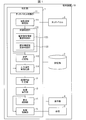
- FIG. 1 is a block diagram illustrating a configuration of the terminal device 10.
- the terminal device 10 includes a control unit 1, a storage unit 2, a touch panel 3, a display unit 4, and each unit 5.
- the control unit 1 comprehensively controls each member included in the terminal device 10 by executing a control program or the like (not shown) stored in advance in the storage unit 2. Details of each control block provided in the control unit 1 shown in FIG.
- the storage unit 2 includes a readable and non-writable memory (ROM) in which fixed data such as a control program executed by the control unit 1 is stored.
- the storage unit 2 is a readable and writable memory (RAM; Random Access) that stores variable data such as data that the control unit 1 refers to for calculation and data generated by the control unit 1 through calculation. Memory).
- the touch panel 3 is placed over the display unit 4 (display panel), and for example, by detecting a change in capacitance, a touch operation (contact) on the touch panel 3 surface (hereinafter simply referred to as “input surface”) by the user. Operation). Specifically, the touch panel 3 receives a touch operation by detecting a change in the capacitance of an area on the touch panel 3 touched by a user with a finger or a touch pen. Note that the touch panel 3 is not limited to the capacitive type, and may use another method as long as it detects a user's touch operation on the input surface.
- the display unit 4 displays a user interface that accepts user input operations.
- Examples of the user interface include, but are not limited to, a menu screen including an object that is a target of a user input operation.
- Each unit 5 conceptually shows each member provided in the terminal device 10 other than the members explicitly described in this specification. As an example of each member, a speaker, a microphone, etc. can be listed, for example.
- the control unit 1 includes a touch panel control unit 11, a process content specifying unit 12, a process execution unit 13, a display control unit 14, and each unit control unit 15.
- the touch panel control unit 11 further includes a contact area specifying unit 111, an overlap determining unit 112, an area determining unit 113, and an input operation enabling unit (input enabling unit) 114.
- the contact area specifying unit 111 specifies a contact area related to a user's touch operation on the input surface. Specifically, the contact area specifying unit 111 can specify the position of the contact point (contact area) on the input surface touched by the user based on a change in capacitance on the touch panel 3 or the like. Further, the position of an area (contact area) on the input surface touched by the user can be specified.
- the overlap determination unit 112 further includes a provisional invalid region overlap determination unit 1121 and a terminal end region overlap determination unit 1122.
- the temporary invalid area overlap determination unit 1121 determines whether or not a temporary invalid area, which will be described later, and the contact area specified by the contact area specifying unit 111 have an overlapping portion.
- the temporary invalid area is an area that is set in advance on the input surface and starts from the end of the input surface, and an input in the area is temporarily invalidated.
- the contact area generated by the touch operation on the temporary invalid area for holding the terminal other than the explicit input operation by the user often overlaps the area starting from the end of the input surface. Therefore, in the present embodiment, a region starting from the end of the input surface is set as a temporary invalid region. A specific example of the temporary invalid area will be described later.
- the terminal end area overlap determination unit 1122 determines whether or not a terminal end area described later and the contact area specified by the contact area specifying unit 111 have an overlapping portion.
- the terminal end area is an area set in advance on the input surface and is narrower than the provisional invalid area starting from the end of the input surface. By setting the terminal end area, it is possible to more strictly determine whether or not the touch operation by the user is in contact with the end of the input surface as compared with the provisional invalid area. A specific example of the terminal end area will be described later.
- the area determination unit 113 of the present embodiment calculates the area of the contact region when the temporary invalid region overlap determination unit 1121 determines that the temporary invalid region and the contact region have an overlapping portion, and calculates the calculated contact region It is determined whether the area is less than a predetermined threshold value or less than a predetermined threshold value.
- the threshold value for determining the size of the area of the contact region may be set in advance based on the area of point touch by a general user.
- the input operation validation unit 114 validates the input related to the contact area (cancels the setting of the invalid area partially or is invalid A part of the area is set as the effective area). On the other hand, if the area determination unit 113 determines that the area of the contact area is equal to or greater than the threshold, the input operation validation unit 114 does not validate the input related to the contact area (leave the invalid area set, or To disable).
- the processing content specifying unit 12 specifies the processing content instructed by the user via the input operation based on the valid input operation specified by the touch panel control unit 11.
- the process execution unit 13 controls the display control unit 14 and each unit control unit 15 to execute the processing content specified by the processing content specifying unit 12 and causes the display unit 4 to perform necessary display, or each unit 5 To perform necessary actions.
- the display control unit 14 controls the display unit 4 so that the display unit 4 performs necessary display.
- Each unit control unit 15 performs overall control of each unit 5 of the terminal device 10.
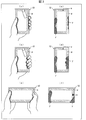
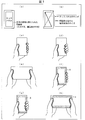
- FIG. 2 is a figure for demonstrating operation
- 2A and 2B show a state where the terminal device 10 is held lightly with one hand and an input operation is performed with the other hand.
- FIG. 2A shows the relationship between the handle and the operating finger.
- a region ⁇ shown in the figure is an example of the provisional invalid region described above.
- the temporary invalid area shown in the figure has a rectangular ring shape having a certain width, but the shape of the temporary invalid area is not limited to this.
- the provisional invalid area may have a ring shape whose width is not constant.
- the area of the contact a and the area ⁇ are touch inputs including the area ⁇ (overlapping with the area ⁇ ), but the area of the contact a which is a touch location that the user intentionally touched is compared with the area ⁇ .
- the area is small.
- the operation is effective and the touch input is treated as a normal effective input.
- the area ⁇ has a large area, the operation is invalid, and the touch input is handled as an invalid input (or no input) instead of a normal valid input.
- FIG. 2C shows the relationship between the handle and the operating finger.
- the area of the contact a and the area ⁇ are both touch inputs including the area ⁇ , but the area of the contact a, which is a touch location where the user intentionally touches, is smaller than the area ⁇ .
- the operation is effective, and the touch input is handled as a normal effective input.
- the area ⁇ has a large area, the operation is invalid, and the touch input is handled as an invalid input (or no input) instead of a normal valid input.
- FIG. 2 (e) and FIG. 2 (f) show a state when the input operation is performed with the thumb while holding the terminal device 10 with both hands.
- FIG. 2E shows the relationship between the handle and the operating finger.
- the area of the contact a and the area ⁇ are both touch inputs including the area ⁇ , but the area of the contact a, which is a touch location where the user intentionally touches, is smaller than the area ⁇ . Since the operation is performed while holding the terminal device 10 as the operation of the right hand, the palm portion holding the terminal device 10 is in wide contact with the input surface, but the touch location (the portion where the operation is actually desired ( Note that contact a) has a small area.
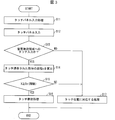
- FIG. 3 is a flowchart showing an operation flow of the communication terminal 10 according to the first embodiment.
- step S hereinafter, “step” is omitted
- touch panel input processing is started, and the process proceeds to S12.
- step 12 the user performs a touch operation (or input operation) on the input surface and proceeds to S13.
- the contact area specifying unit 111 specifies the contact area.
- the overlap determination unit 112 determines whether each of the contact a and the region ⁇ overlaps with the region ⁇ . That is, here, it is determined whether or not the touch operation on the input surface is a touch input to the region ⁇ (whether or not the touch input includes the region ⁇ ).
- both the contact point a and the region ⁇ overlap with the region ⁇ . Proceed to S14. If the identified contact area does not overlap with the area ⁇ , the process proceeds to S16.
- the area determination unit 113 calculates the area x of the region of the contact a and the area x of the region ⁇ , and proceeds to S15.
- the area determination unit 113 determines whether or not the area x ⁇ Dx (threshold) is satisfied. In the following, in the example shown in FIG. 2B, FIG. 2D, and FIG. 2F, the area of the contact a is small, so that the area x ⁇ Dx is satisfied, and the region ⁇ Since the area is large, the area x ⁇ Dx is satisfied. At this time, since the contact a does not satisfy the area x ⁇ Dx, the process proceeds to S17. On the other hand, since the area ⁇ satisfies the area x ⁇ Dx, the process proceeds to S16.
- the input operation validation unit 114 invalidates the input related to the region ⁇ , performs the touch invalidation process, and ends.
- the input operation validation unit 114 validates the input related to the contact a, and the process corresponding to the contact a (touch position) is performed, and the process ends. More specifically, the processing content specifying unit 12 specifies the processing content corresponding to the input, and then the processing execution unit 13 executes the specified processing content and corresponds to the contact point a. Processing is performed.
- invalid area As described above, among the inputs to the provisional invalid area (for example, the above-described area ⁇ ; hereinafter, simply referred to as “invalid area”), if the input is an explicit input operation by the user, the input is the handle portion. It is often a point touch that is smaller than the area. Therefore, in the terminal device 10 according to the present embodiment, among the inputs in which the invalid area and the contact area overlap each other, an input having a small area of the contact area (having an area less than the threshold Dx) is treated as a valid input. I am doing so. Thus, whether or not the input to the invalid area is validated is determined by whether or not the area of the contact area is less than the threshold value Dx. Therefore, validation of the input to the invalid area is not accompanied by a special user operation. Can be possible.
- the terminal device 10 even after the input to the invalid area is once validated, whether or not the subsequent invalid area is validated again determines whether the area of the contact area is less than the threshold value Dx. Therefore, it is possible to prevent erroneous input after being validated. As described above, according to the terminal device 10, it is possible to validate the input to the invalid area without any special user operation, and it is possible to prevent an erroneous input after validating the input to the invalid area.
- the input operation enabling unit 114 enables the input related to the contact region when the area determining unit 113 determines that the area x of the contact region is equal to or greater than the threshold Dx. Do not do (disable). The area of the contact area generated by the touch operation on the invalid area for gripping the terminal other than the explicit input operation by the user tends to be larger than the area of the contact area related to the explicit input operation by the user. . Therefore, in the terminal device 10 according to the present embodiment, among the inputs in which the invalid region and the contact region overlap, an input having an area of the contact region equal to or larger than the threshold is not treated as a valid input. (Invalid) Thereby, it can prevent that the touch operation with respect to the invalid area
- the terminal device 10 determines validity / invalidity within the range of the touch operation on the invalid area, a special operation such as a user performing an invalid area releasing operation is not necessary.
- a special operation such as a user performing an invalid area releasing operation is not necessary.
- the touch input intended by the user is validated, so that the operability is improved.
- FIG. 4 is a figure for demonstrating operation
- a region ⁇ illustrated in FIG. 4A is an example of the temporary invalid region described above.
- the region ⁇ is an example of the terminal end region described above.
- This embodiment is different from the first embodiment described above in that a terminal end area (for example, area ⁇ ) is newly set on the input surface in addition to the temporary invalid area.
- region shown in the figure has made the square ring shape which has a fixed width
- region is not limited to this.
- the shape of the terminal end region may be a ring shape whose width is not constant.
- FIG. 4 (a) shows a state where four contact areas ⁇ 1 to ⁇ 4 are generated by a user's touch operation. Hereinafter, handling of each of these contact areas will be described.
- the inputs related to the areas ⁇ 1 and ⁇ 2 are both treated as invalid.
- the area is small (less than the threshold value Dx), but since the region ⁇ 3 starts from the region ⁇ (the region ⁇ 3 overlaps with the region ⁇ ), the input related to the region ⁇ 3 is invalid. handle.
- the area ⁇ 4 has a small area (less than the threshold value Dx) and the area ⁇ 4 does not include the area ⁇ (the area ⁇ 4 does not overlap with the area ⁇ ), so the input related to the area ⁇ 4 is treated as valid. .
- FIG. 4B and FIG. 4C show a state where the terminal device 10 is held lightly with one hand and an input operation is performed with the other hand.
- FIG. 4B shows the relationship between the handle and the operating finger.
- the area of the contact a has a small area (less than the threshold value Dx) and does not overlap with the area ⁇ . Therefore, the touch input is valid and is treated as a normal valid input.
- the area ⁇ 1 and the area ⁇ 2 have a large area (the threshold is equal to or greater than the threshold Dx), and the area ⁇ 1 and the area ⁇ 2 start from the area ⁇ (the area ⁇ 1 and the area ⁇ 2 overlap with the area ⁇ ). Therefore, the input related to the region ⁇ 1 and the region ⁇ 2 is treated as an invalid input (or not input).
- FIG. 5 is a flowchart showing an operation flow of the communication terminal 10 according to the second embodiment.
- the flowchart shown in FIG. 5 is different from the flowchart shown in FIG. 3 in that S18 is newly arranged between S13 and S14. Therefore, only the parts different from the flowchart shown in FIG. 3 will be described below, and description of the other parts will be omitted.
- the contact area specifying unit 111 specifies the contact area.
- the overlap determination unit 112 provisional invalid region overlap determination unit 1121 determines whether or not the contact region and the provisional invalid region (for example, the region ⁇ described above) overlap. That is, here, it is determined whether or not the touch operation on the input surface is a touch input to the temporary invalid area. As a result of the determination, if the contact area and the temporary invalid area overlap, the process proceeds to S18. On the other hand, if the contact area and the provisional invalid area do not overlap, the process proceeds to S17.
- the overlap determination unit 112 determines whether or not the contact region and the terminal end region (for example, the region ⁇ described above) do not overlap. That is, here, it is determined whether or not the touch operation on the input surface is a touch input that does not include an input to the terminal end region. As a result of the determination, if the contact area and the terminal end area do not overlap, the process proceeds to S14. On the other hand, if the contact area and the terminal end area overlap, the process proceeds to S16.
- the area determination unit 113 determines that the area x of the contact region is less than a predetermined threshold Dx, and the overlap determination unit 112 (terminal end region overlap determination unit 1122). However, if it is determined that the terminal end area and the contact area do not have an overlapping portion, the input operation validation unit 114 validates the input related to the contact area.
- the area determination unit 113 determines that the area x of the contact region is less than a predetermined threshold Dx, and the overlap determination unit 112 (terminal end region overlap determination unit). 1122) determines that the terminal end area and the contact area have an overlapping portion, the input operation enabling unit 114 does not validate (invalidate) the input related to the contact area.
- the area x of the contact area is less than the threshold value Dx, if the terminal end area and the contact area have an overlapping portion, the area to the invalid area for gripping the terminal other than the explicit input operation by the user High probability of touch operation. Therefore, in the configuration described above, when it is determined that the terminal end region and the contact region have an overlapping portion, the input related to the contact region is not treated as valid. Thereby, it can prevent that the touch operation with respect to the invalid area
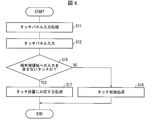
- FIG. 6 is a flowchart showing a flow of a modified example of the operation of the terminal device 10 according to the second embodiment.
- the flowchart of this example is different from the flowchart shown in FIG. 5 in that S13, S14, and S15 are omitted. Therefore, only the parts different from the flowchart shown in FIG. 5 will be described below, and description of the other parts will be omitted.
- the user performs a touch operation (or input operation) on the input surface, and proceeds to S18.
- the overlap determination unit 112 determines whether or not the contact region and the terminal end region (for example, the region ⁇ described above) do not overlap. That is, here, it is determined whether or not the touch operation on the input surface is a touch input that does not include an input to the terminal end region. As a result of the determination, if the contact area and the terminal end area do not overlap, the process proceeds to S17. On the other hand, if the contact area and the terminal end area overlap, the process proceeds to S16.
- the touch operation is effective when the temporary invalid area is touched continuously without touching the terminal edge area. Become. However, it is considered that the touch operation described above should be treated as invalid because it is determined as an erroneous input. Therefore, in order to prevent erroneous input more surely, as in the second embodiment, first, the validity / invalidity is determined based on the area of the contact area, and then whether or not the contact is from the end (contact area and terminal) It is preferable to perform a two-stage check for determining validity / invalidity based on whether or not the edge region overlaps.
- a control block (particularly, the contact area specifying unit 111, the overlap determining unit 112, the area determining unit 113, and the input operation enabling unit 114) of the terminal device 10 is a logic circuit (hardware) formed in an integrated circuit (IC chip) or the like. It may be realized by software, or may be realized by software using a CPU (Central Processing Unit).
- the terminal device 10 includes a CPU that executes instructions of a control program that is software that implements each function, a ROM or a storage device in which the control program and various data are recorded so as to be readable by a computer (or CPU). These are referred to as “recording media”), and a RAM for developing the control program.
- the computer (or CPU) reads the control program from the recording medium and executes it, thereby achieving the object of the present invention.
- a “non-temporary tangible medium” such as a tape, a disk, a card, a semiconductor memory, a programmable logic circuit, or the like can be used.
- the control program may be supplied to the computer via any transmission medium (communication network, broadcast wave, etc.) capable of transmitting the control program.
- the present invention can also be realized in the form of a data signal embedded in a carrier wave in which the control program is embodied by electronic transmission.
- the terminal device (10) includes a contact area specifying unit (111) that specifies a contact area related to a touch operation on the input surface, and preset from the input surface and starting from an end of the input surface.
- An overlap determination that determines whether or not a temporary invalid area in which an input in the area is temporarily invalidated and the contact area specified by the contact area specifying unit have an overlapping portion
- An area determination unit that determines whether the area of the contact area is less than a predetermined threshold when it is determined that the temporary invalid area and the contact area have an overlapping portion (112); 113) and an input validation unit (input operation validation unit 114) that validates the input related to the contact region when the area of the contact region is determined to be less than the threshold value.
- invalid area Invalid area
- the input in the case of an input that is explicitly input by the user, the input may be a point touch that is smaller than the area of the handle portion. Many. Therefore, in the above configuration, among inputs in which the invalid region and the contact region overlap, an input having an area of the contact region less than the threshold is treated as a valid input. As a result, whether or not the input to the invalid area is validated is determined by whether or not the area of the contact area is less than the threshold value, so that the invalid area can be validated without any special user operation. It can be.
- the threshold value for determining the size of the area of the contact region described above may be set in advance based on the area of a general point touch by the user.
- the input validation unit determines that the area of the contact region is equal to or larger than the threshold value by the area determination unit, the contact region It is preferable not to validate the input according to.
- the area of the contact area generated by the contact operation to the invalid area for gripping the terminal other than the explicit input operation by the user tends to be larger than the area of the contact area related to the explicit input operation by the user. . Therefore, in the above configuration, among the inputs in which the invalid region and the contact region overlap, an input having an area of the contact region equal to or larger than the threshold is not treated as a valid input. Thereby, it is possible to prevent a contact operation on the invalid area for holding the terminal other than an explicit input operation by the user from being erroneously input.
- the provisional invalid area is an area where the overlap determination unit is preset in the input surface and starts from an end of the input surface. It is determined whether the terminal end region, which is a narrower region, and the contact region have an overlapping portion, the input validation unit, the area of the contact region is less than a predetermined threshold, and When it is determined that the terminal end area and the contact area do not have an overlapping portion, the input related to the contact area may be validated.
- a part of the finger that holds the terminal may come into contact with the terminal due to a contact operation on the invalid area.
- the validity / invalidity of the input is switched only by the size of the area of the contact area, there is a possibility that the original function of the invalid area cannot be performed. Therefore, in the above configuration, a region narrower than the provisional invalid region starting from the end of the input surface is set as the terminal end region, and when it is determined that the terminal end region and the contact region do not have an overlapping portion, the above contact The input related to the area is treated as valid. Thereby, it can prevent that the contact operation which concerns on the contact area produced by the contact operation which starts from the edge of an input surface turns into an erroneous input.
- the input validation unit has an area of the contact area that is less than a predetermined threshold, and the terminal end area and the contact area Is determined not to be valid, the input relating to the contact area is preferably not valid.
- the terminal device may be realized by a computer.
- the terminal device is controlled by the computer by causing the computer to operate as each unit included in the terminal device.
- a program and a computer-readable recording medium on which the program is recorded also fall within the scope of the present invention.
- the present invention can be suitably used for each terminal device such as a smartphone, a mobile phone, a tablet PC (Personal Computer), a PC, and a television receiver.
- a smartphone a mobile phone
- a tablet PC Personal Computer
- PC Personal Computer
- television receiver a television receiver
Landscapes
- Engineering & Computer Science (AREA)
- General Engineering & Computer Science (AREA)
- Theoretical Computer Science (AREA)
- Human Computer Interaction (AREA)
- Physics & Mathematics (AREA)
- General Physics & Mathematics (AREA)
- Position Input By Displaying (AREA)
- User Interface Of Digital Computer (AREA)
Abstract
入力面に対する接触操作に係る接触領域が特定され、暫定無効領域と接触領域とが重複部分を有すると判定され、接触領域の面積が閾値未満であると判定された場合、接触領域に係る入力を有効とする入力操作有効化部(114)を備える。
Description
本発明は、端末装置、該端末装置の制御プログラム、および該制御プログラムを記録したコンピュータ読み取り可能な記録媒体に関する。
従来の携帯型の情報処理端末(以下、単に「端末」という)では、図7の(a)および図7の(b)に示すように、本体の周縁に額縁部を設け、該額縁部の内側のみをタッチパネル等の入力面とする構成が採用されることが多かった。しかし、上記入力面は、通常液晶ディスプレイ等の表示面と重ねて設置されており、上述のような額縁部を設けてしまうと、その分端末全体のサイズに比べて額縁部の分だけ表示面の面積が小さくなってしまうという課題があった。
また、近年、端末全体のサイズを大きくしなくても表示面の面積を大きく取れるように、持ち手が接触する箇所にもタッチパネル等を設置する狭額縁の端末が増加している。しかし、図7の(c)~図7の(e)に示すように、端末の縁ぎりぎりまで表示面の面積を大きくすると、端末を把持する手や指による誤入力が頻発してしまうという課題があった。
以上のような端末を把持する手や指による誤入力の問題を解決するために、例えば、図7の(f)~図7の(h)に示すように、表示面の端縁に操作無効領域Aを設ける従来技術が多く存在する。例えば、このような従来技術として特許文献1に開示された携帯端末がある。この携帯端末では、タッチパネルのタッチ有効領域の左側および右側のそれぞれに操作禁止領域(または操作無効領域;以下、簡単のため、単に「無効領域」という)が設定される。また、同端末では、任意の機能が実行されている状態で無効領域にタッチされると、無効領域および解除アイコンがディスプレイに表示されるようになっている。また、上記の解除アイコンを操作して一時解除の操作が為されると、無効領域の設定が一時的に解除されるようになっている。さらに、同端末では、無効領域の設定の解除操作後、一定時間経過後に無効領域を再設定している。
しかし、上述のように端末の額縁部を狭くし、表示領域の一部(たとえば端末周縁部)に無効領域を設ける従来技術には、以下のような問題点がある。
第1に、上述した従来技術には、無効領域への入力を有効/無効として切り換えて設定できるようになっているものがあるが、この設定操作のために別途何等かの特別なユーザ操作が必要となるという問題点がある。例えば、上記特許文献1に開示された携帯端末では、無効領域内への入力を有効にしようとする場合には、解除アイコンを操作して一旦無効領域の設定の一部を解除した上で、改めて入力操作を行う必要がある。
第2に、上述した従来技術には、無効領域への入力を行うために、無効領域の設定の一部を解除することができるものがあるが、無効領域の設定の解除操作後の一定時間内の誤入力を防止することができないという問題点がある。例えば、上記特許文献1に開示された携帯端末では、無効領域の設定の解除操作後、一定時間経過後に無効領域を再設定するようになっているため、無効領域の設定の解除操作後、無効領域が再設定されるまでの一定時間内の誤入力を防止することができない。
本発明は、以上の問題点に鑑みて為されたものであり、無効領域に対する入力の有効化を特別なユーザ操作を伴うことなく可能とし、無効領域に対する入力を有効化した後の誤入力を防止することができる端末装置などを提供することを目的とする。
上記の課題を解決するために、本発明の一態様に係る端末装置は、入力面に対する接触操作に係る接触領域を特定する接触領域特定部と、上記入力面に予め設定され、上記入力面の端から始まる領域であって、その領域内の入力が暫定的に無効にされる暫定無効領域と、上記接触領域特定部によって特定された上記接触領域と、が重複部分を有するか否かを判定する重複判定部と、上記暫定無効領域と上記接触領域とが重複部分を有すると判定された場合、上記接触領域の面積が予め定められた閾値未満であるか否かを判定する面積判定部と、上記接触領域の面積が上記閾値未満であると判定された場合、上記接触領域に係る入力を有効とする入力有効化部と、を備えることを特徴としている。
本発明の一態様によれば、無効領域に対する入力の有効化を特別なユーザ操作を伴うことなく可能とし、無効領域に対する入力を有効化した後の誤入力を防止することができるという効果を奏する。
本発明の他の目的、特徴、および優れた点は、以下に示す記載によって十分分かるであろう。また、本発明の利点は、添付図面を参照した次の説明で明白になるであろう。
本発明の実施の形態について図1~図6に基づいて説明すれば、次の通りである。以下、説明の便宜上、特定の実施形態にて説明した構成と同一の機能を有する構成については、同一の符号を付記し、その説明を省略する場合がある。
〔端末装置10の構成について〕
まず、図1に基づき、本発明の実施の一形態に係る端末装置10の構成について説明する。図1は、端末装置10の構成を示すブロック図である。同図に示すように、端末装置10は、制御部1、記憶部2、タッチパネル3、表示部4、および各部5を備える。制御部1は、記憶部2に予め格納されている制御プログラムなど(不図示)を実行することにより、端末装置10の備える各部材を統括的に制御する。なお、同図に示す制御部1が備える各制御ブロックの詳細については後述する。
まず、図1に基づき、本発明の実施の一形態に係る端末装置10の構成について説明する。図1は、端末装置10の構成を示すブロック図である。同図に示すように、端末装置10は、制御部1、記憶部2、タッチパネル3、表示部4、および各部5を備える。制御部1は、記憶部2に予め格納されている制御プログラムなど(不図示)を実行することにより、端末装置10の備える各部材を統括的に制御する。なお、同図に示す制御部1が備える各制御ブロックの詳細については後述する。
記憶部2は、制御部1によって実行される制御プログラムなどの固定データが格納される、読み出し可能かつ書き込み不能なメモリ(ROM;Read Only Memory)を備えている。また、記憶部2は、制御部1が演算のために参照するデータや、制御部1が演算によって生成したデータなどの可変データが格納される、読み出し可能かつ書き込み可能なメモリ(RAM;Random Access Memory)を備えている。
タッチパネル3は、表示部4(表示パネル)に重ねて設置され、例えば、静電容量の変化を検出することにより、ユーザのタッチパネル3面(以下、単に「入力面」という)に対するタッチ操作(接触操作)を受け付ける。具体的には、タッチパネル3は、ユーザによって指またはタッチペンなどでタッチされた当該タッチパネル3上の領域の静電容量の変化を検知することによってタッチ操作を受け付ける。なお、タッチパネル3は静電容量式に限られるものではなく、ユーザの入力面へのタッチ操作を検出するものであれば、他の方式を用いたものであってもよい。
表示部4は、ユーザの入力操作を受け付けるユーザインターフェース等を表示する。当該ユーザインターフェースとしては、例えば、ユーザの入力操作の対象となるオブジェクトを含んだメニュー画面などが挙げられるが、これに限定されるものではない。各部5は、端末装置10が備える、本明細書にて明示的に説明する部材以外の各部材を概念的に示すものである。各部材の例としては、例えば、スピーカやマイクロフォンなどを挙示することができる。
次に、制御部1が備える各制御ブロックの詳細について説明する。図1に示すように、制御部1は、タッチパネル制御部11、処理内容特定部12、処理実行部13、表示制御部14、および各部制御部15を備える。タッチパネル制御部11は、さらに、接触領域特定部111、重複判定部112、面積判定部113、および入力操作有効化部(入力有効化部)114を備える。
接触領域特定部111は、入力面に対するユーザのタッチ操作に係る接触領域を特定するものである。具体的には、接触領域特定部111は、タッチパネル3における静電容量の変化などに基づき、ユーザによってタッチされた入力面上の接点(接触領域)の位置を特定できるようになっている。また、ユーザによってタッチされた入力面上の領域(接触領域)の位置などを特定できるようになっている。
重複判定部112は、さらに、暫定無効領域重複判定部1121および端末端領域重複判定部1122を備える。暫定無効領域重複判定部1121は、後述する暫定無効領域と、接触領域特定部111によって特定された接触領域とが重複部分を有するか否かを判定する。暫定無効領域は、入力面に予め設定され、入力面の端から始まる領域であり、その領域内の入力が暫定的に無効にされる領域である。ユーザによる明示的な入力操作以外の端末を把持するための暫定無効領域へのタッチ操作によって生じる接触領域は、入力面の端から始まる領域と重複することが多い。そこで、本実施形態では、入力面の端から始まる領域を暫定無効領域としている。なお、暫定無効領域の具体例については後述する。
端末端領域重複判定部1122は、後述する端末端領域と、接触領域特定部111によって特定された接触領域とが重複部分を有するか否かを判定するものである。端末端領域は、入力面に予め設定される領域であり、入力面の端から始まる暫定無効領域よりも狭い領域である。この端末端領域を設定することにより、暫定無効領域と比較して、ユーザによるタッチ操作が入力面の端と接触しているか否かをより厳密に判定することができる。なお、端末端領域の具体例については後述する。
本実施形態の面積判定部113は、暫定無効領域重複判定部1121によって暫定無効領域と接触領域とが重複部分を有すると判定された場合に、接触領域の面積を算出し、算出された接触領域の面積が予め定められた閾値未満および閾値以下のいずれであるかを判定する。なお、上記の接触領域の面積の大小を判定するための閾値は、一般的なユーザによる点タッチの面積に基づいて予め設定しておけば良い。
入力操作有効化部114は、面積判定部113によって接触領域の面積が閾値未満であると判定された場合、接触領域に係る入力を有効とする(無効領域の設定を一部解除する、または無効領域の一部を有効領域とする)。一方、入力操作有効化部114は、面積判定部113によって接触領域の面積が閾値以上であると判定された場合、接触領域に係る入力を有効としない(無効領域の設定のままとする、または無効にする)。
処理内容特定部12は、タッチパネル制御部11によって特定される有効な入力操作に基づいて、ユーザが入力操作を介して指示した処理内容を特定する。処理実行部13は、処理内容特定部12によって特定された処理内容を実行すべく、表示制御部14や各部制御部15を制御して、表示部4に必要な表示を行わせたり、各部5に必要な動作を行わせたりする。表示制御部14は、表示部4を統括制御して、表示部4に必要な表示を行わせる。各部制御部15は、端末装置10の各部5を統括制御する。
〔実施形態1〕
次に、図2は、本発明の実施形態1に係る端末装置10の動作を説明するための図である。図2の(a)および図2の(b)は、端末装置10を一方の手で軽く押さえるように持ち、他方の手で入力操作を行うときの状態を示す。図2の(a)は、持ち手と操作指の関係を示している。この図におけるタッチパネル等の入力面に対するタッチ操作に係る接触領域のみを表示すると図2の(b)に示すようになる。同図に示す領域αは、上述した暫定無効領域の一例である。なお、同図に示す暫定無効領域は、一定の幅を有する四角環形状を為しているが、暫定無効領域の形状はこれに限定されない。例えば、暫定無効領域の形状は、幅が一定でない環形状などであっても良い。接点aの領域と領域γとは、いずれも領域αを含む(領域αと重複する)タッチ入力であるがユーザが意図してタッチしたタッチ箇所である接点aの領域は、領域γと比較して面積が小さい。
次に、図2は、本発明の実施形態1に係る端末装置10の動作を説明するための図である。図2の(a)および図2の(b)は、端末装置10を一方の手で軽く押さえるように持ち、他方の手で入力操作を行うときの状態を示す。図2の(a)は、持ち手と操作指の関係を示している。この図におけるタッチパネル等の入力面に対するタッチ操作に係る接触領域のみを表示すると図2の(b)に示すようになる。同図に示す領域αは、上述した暫定無効領域の一例である。なお、同図に示す暫定無効領域は、一定の幅を有する四角環形状を為しているが、暫定無効領域の形状はこれに限定されない。例えば、暫定無効領域の形状は、幅が一定でない環形状などであっても良い。接点aの領域と領域γとは、いずれも領域αを含む(領域αと重複する)タッチ入力であるがユーザが意図してタッチしたタッチ箇所である接点aの領域は、領域γと比較して面積が小さい。
このように接点aの領域は、面積(タッチ面積)が小さいため、操作有効とし、タッチ入力を通常の有効な入力として扱う。また、領域γは、面積が大きいため、操作無効とし、タッチ入力を通常の有効な入力ではなく無効な入力(または未入力)として扱う。
次に、図2の(c)および図2の(d)は、端末装置10を一方の手で握り込むように持ち、他方の手で入力操作を行うときの状態を示す。図2の(c)は、持ち手と操作指の関係を示している。この図におけるタッチパネル等の入力面に対するタッチ操作に係る接触領域のみを表示すると図2の(d)に示すようになる。接点aの領域と領域γとは、いずれも領域αを含むタッチ入力であるがユーザが意図してタッチしたタッチ箇所である接点aの領域は、領域γと比較して面積が小さい。このように接点aの領域は、面積が小さいため、操作有効とし、タッチ入力を通常の有効な入力として扱う。また、領域γは、面積が大きいため、操作無効とし、タッチ入力を通常の有効な入力ではなく無効な入力(または未入力)として扱う。
次に、図2の(e)および図2の(f)は、端末装置10を両手で包むように持った状態で、親指で入力操作を行うときの状態を示す。図2の(e)は、持ち手と操作指の関係を示している。この図におけるタッチパネル等の入力面に対するタッチ操作に係る接触領域のみを表示すると図2の(f)に示すようになる。接点aの領域と領域γとは、いずれも領域αを含むタッチ入力であるがユーザが意図してタッチしたタッチ箇所である接点aの領域は、領域γと比較して面積が小さい。右手の操作として、端末装置10を持ちながら操作を行っているため、端末装置10を保持する手のひら部分は広く入力面に触れているが、実際に操作を行いたい部分に対してのタッチ箇所(接点a)は面積が小さいことに注目する。
次に、図3は、上記実施形態1に係る通信端末10の動作の流れを示すフローチャートである。ステップS(以下、「ステップ」は省略する)11にてタッチパネル入力処理を開始してS12に進む。S12では、ユーザが、入力面に対してタッチ操作(または入力操作)を行ってS13に進む。
S13では、まず、接触領域特定部111が、接触領域を特定する。以下では簡単のため、図2の(b)、図2の(d)および図2の(f)に示す接点aおよび領域γが接触領域として特定されたものとする。次に、重複判定部112は、接点aおよび領域γのそれぞれと、領域αとが重複しているか否かを判定する。すなわち、ここでは、入力面に対するタッチ操作が領域αへのタッチ入力か否か(領域αを含むタッチ入力か否か)を判定する。
上記判定の結果、例えば、図2の(b)、図2の(d)および図2の(f)に示す例では、接点aおよび領域γのいずれもが領域αと重複しているため、S14に進む。なお、特定した接触領域が領域αと重複していない場合は、S16に進む。
S14では、面積判定部113が、接点aの領域の面積x、および領域γの面積xを算出してS15に進む。S15では、面積判定部113が、面積x≧Dx(閾値)を満たすか否かを判定する。なお、以下では、図2の(b)、図2の(d)および図2の(f)に示す例では、接点aの面積は小さいので、面積x<Dxを満たすものとし、領域γの面積は大きいので面積x≧Dxを満たすものとする。このとき、接点aは、面積x≧Dxを満たさないので、S17に進む。一方、領域γは、面積x≧Dxを満たすので、S16に進む。
S16では、入力操作有効化部114が、領域γに係る入力を無効にして、タッチ無効処理が行われ、終了となる。一方、S17では、入力操作有効化部114が、接点aに係る入力を有効にして、上記の接点a(タッチ位置)に対応した処理が行われ終了となる。より具体的には、処理内容特定部12が、上記入力に対応する処理内容を特定し、次に、処理実行部13が、特定された処理内容を実行して、上記の接点aに対応した処理が行われる。
上述したように暫定無効領域(例えば、上述した領域α;以下、単に「無効領域」という)に対する入力のうち、ユーザが明示的に入力操作を行った入力の場合、その入力は持ち手部分の面積に比べて小さく点タッチであることが多い。そこで、本実施形態に係る端末装置10では、無効領域と接触領域とが重複部分を有する入力のうち、接触領域の面積が小さいもの(閾値Dx未満の面積を持つもの)を有効な入力として扱うようにしている。これにより、無効領域に対する入力を有効にするか否かを、接触領域の面積が閾値Dx未満であるか否かによって決定するので、無効領域に対する入力の有効化を特別なユーザ操作を伴うことなく可能とすることができる。
また、本実施形態に係る端末装置10では、一旦無効領域に対する入力の有効化を行った後でも、その後の無効領域に対する入力を有効にするか否かを、再度接触領域の面積が閾値Dx未満であるか否かによって決定するので、有効化した後の誤入力を防止することができる。以上により、端末装置10によれば、無効領域に対する入力の有効化を特別なユーザ操作を伴うことなく可能とし、無効領域に対する入力を有効化した後の誤入力を防止することができる。
また、本実施形態に係る端末装置10では、入力操作有効化部114は、面積判定部113によって接触領域の面積xが閾値Dx以上であると判定された場合、接触領域に係る入力を有効にしないようにしている(無効にしている)。ユーザによる明示的な入力操作以外の端末を把持するための無効領域へのタッチ操作によって生じる接触領域の面積は、ユーザによる明示的な入力操作に係る接触領域の面積に比べて大きくなる傾向がある。そこで、本実施形態に係る端末装置10では、無効領域と接触領域とが重複部分を有する入力のうち、接触領域の面積が閾値以上の面積を持つものを有効な入力として扱わないようにしている(無効としている)。これにより、ユーザによる明示的な入力操作以外の端末を把持するための無効領域に対するタッチ操作が誤入力となってしまうことを防止することができる。
以上のように、本実施形態に係る端末装置10では、無効領域に対するタッチ操作の範囲で有効/無効を判断するので、ユーザが無効領域の解除操作を行う等の特別な操作は不要である。また、ユーザの入力が直ぐに反映され、誤入力を防止する無効領域を設けていても、ユーザの意図したタッチ入力は有効とされるので操作性が向上する。
〔実施形態2〕
次に、図4は、本発明の実施形態2に係る端末装置10の動作を説明するための図である。図4の(a)に示す領域αは、上述した暫定無効領域の一例である。一方、領域βは、上述した端末端領域の一例である。本実施形態では、上述した実施形態1と比較して、入力面上に、暫定無効領域に加えて、新たに端末端領域(例えば、領域β)が設定されている点で異なっている。なお、同図に示す端末端領域は、一定の幅を有する四角環形状を為しているが、端末端領域の形状はこれに限定されない。例えば、端末端領域の形状は、幅が一定でない環形状などであっても良い。また、図4の(a)には、ユーザによるタッチ操作によって領域γ1~γ4までの4つの接触領域が生じている様子を示されている。以下、これらの各接触領域の取り扱いについて説明する。
次に、図4は、本発明の実施形態2に係る端末装置10の動作を説明するための図である。図4の(a)に示す領域αは、上述した暫定無効領域の一例である。一方、領域βは、上述した端末端領域の一例である。本実施形態では、上述した実施形態1と比較して、入力面上に、暫定無効領域に加えて、新たに端末端領域(例えば、領域β)が設定されている点で異なっている。なお、同図に示す端末端領域は、一定の幅を有する四角環形状を為しているが、端末端領域の形状はこれに限定されない。例えば、端末端領域の形状は、幅が一定でない環形状などであっても良い。また、図4の(a)には、ユーザによるタッチ操作によって領域γ1~γ4までの4つの接触領域が生じている様子を示されている。以下、これらの各接触領域の取り扱いについて説明する。
領域γ1,γ2については、面積が大きいため(閾値Dx以上であるとする)、領域γ1および領域γ2に係る入力は、ともに無効として取り扱う。領域γ3については、面積が小さい(閾値Dx未満とする)が、領域γ3が領域βから開始されている(領域γ3が領域βと重複している)ため、領域γ3に係る入力は、無効として取り扱う。領域γ4については、面積が小さく(閾値Dx未満とする)、かつ、領域γ4が領域βを含まない(領域γ4が領域βと重複していない)ため、領域γ4に係る入力は、有効として取り扱う。
次に、図4の(b)および図4の(c)は、端末装置10を一方の手で軽く押さえるように持ち、他方の手で入力操作を行うときの状態を示す。図4の(b)は、持ち手と操作指の関係を示している。この図におけるタッチパネル等の入力面に対するタッチ操作に係る接触領域のみを表示すると図4の(c)に示すようになる。
接点aの領域は、面積が小さく(閾値Dx未満とする)、領域βと重複していないため、タッチ入力を有効とし、通常の有効な入力として扱う。次に、領域γ1および領域γ2は、面積が大きく(閾値Dx以上とする)、領域γ1および領域γ2は、領域βから開始されている(領域γ1および領域γ2が領域βと重複している)ため、領域γ1および領域γ2に係る入力は、無効な入力(または未入力)として取り扱う。
次に、図5は、上記実施形態2に係る通信端末10の動作の流れを示すフローチャートである。図5に示すフローチャートは、図3に示すフローチャートと比較して、S13とS14との間に、新たにS18が配置されている点で異なっている。そこで、以下では、図3に示すフローチャートと異なっている部分のみを説明し、その他の部分については説明を省略する。
S13では、まず、接触領域特定部111が、接触領域を特定する。次に、重複判定部112(暫定無効領域重複判定部1121)は、接触領域と、暫定無効領域(例えば、上述した領域α)と、が重複しているか否かを判定する。すなわち、ここでは、入力面に対するタッチ操作が暫定無効領域へのタッチ入力か否かを判定する。上記判定の結果、接触領域と暫定無効領域とが重複している場合は、S18に進む。一方、接触領域と暫定無効領域とが重複していない場合は、S17に進む。
S18では、重複判定部112(端末端領域重複判定部1122)は、接触領域と端末端領域(例えば、上述した領域β)とが重複していないか否かを判定する。すなわち、ここでは、入力面に対するタッチ操作が端末端領域への入力を含まないタッチ入力か否かを判定する。上記の判定の結果、接触領域と端末端領域とが重複していない場合、S14に進む。一方、接触領域と端末端領域とが重複している場合、S16に進む。
本実施形態に係る端末装置10では、面積判定部113が、接触領域の面積xが予め定められた閾値Dx未満であると判定し、かつ、重複判定部112(端末端領域重複判定部1122)が、端末端領域と接触領域とが重複部分を有さないと判定した場合、入力操作有効化部114は、接触領域に係る入力を有効にする。
無効領域に対するタッチ操作によって、端末を把持した手指の一部が端末に接触することがある。このとき、接触領域の面積の大きさのみで入力の有効/無効を切り替えてしまうと、無効領域本来の役目を果たせなくなってしまう可能性がある。そこで、本実施形態に係る端末装置10では、入力面の端から始まる暫定無効領域よりも狭い領域を端末端領域として設定し、端末端領域と接触領域とが重複部分を有さないと判定された場合に、上記接触領域に係る入力を有効として扱うようにしている。これにより、入力面の端から始まるタッチ操作によって生じる接触領域に係るタッチ操作が誤入力となってしまうことを防止することができる。
また、本実施形態に係る端末装置10では、面積判定部113が、接触領域の面積xが予め定められた閾値Dx未満であると判定し、かつ、重複判定部112(端末端領域重複判定部1122)が、端末端領域と接触領域とが重複部分を有すると判定した場合、入力操作有効化部114は、接触領域に係る入力を有効としない(無効とする)。
接触領域の面積xが閾値Dx未満であっても、端末端領域と接触領域とが重複部分を有している場合、ユーザによる明示的な入力操作以外の端末を把持するための無効領域へのタッチ操作である蓋然性が高い。そこで、上記構成では、端末端領域と接触領域とが重複部分を有すると判定された場合に、上記接触領域に係る入力を有効として扱わないようにしている。これにより、ユーザによる明示的な入力操作以外の端末を把持するための無効領域に対するタッチ操作が誤入力となってしまうことを防止することができる。
〔変形例〕
次に、図6に基づき、上記実施形態2に係る端末装置10の動作の変形例について説明する。図6は、上記実施形態2に係る端末装置10の動作の変形例の流れを示すフローチャートである。本例のフローチャートは、図5に示すフローチャートと比較して、S13、S14、およびS15が省略されている点で異なっている。そこで、以下では、図5に示すフローチャートと異なっている部分のみを説明し、その他の部分については説明を省略する。
次に、図6に基づき、上記実施形態2に係る端末装置10の動作の変形例について説明する。図6は、上記実施形態2に係る端末装置10の動作の変形例の流れを示すフローチャートである。本例のフローチャートは、図5に示すフローチャートと比較して、S13、S14、およびS15が省略されている点で異なっている。そこで、以下では、図5に示すフローチャートと異なっている部分のみを説明し、その他の部分については説明を省略する。
S12では、ユーザが、入力面に対してタッチ操作(または入力操作)を行ってS18に進む。S18では、重複判定部112(端末端領域重複判定部1122)は、接触領域と端末端領域(例えば、上述した領域β)とが重複していないか否かを判定する。すなわち、ここでは、入力面に対するタッチ操作が端末端領域への入力を含まないタッチ入力か否かを判定する。上記の判定の結果、接触領域と端末端領域とが重複していない場合、S17に進む。一方、接触領域と端末端領域とが重複している場合、S16に進む。
なお、本例のように接触領域と端末端領域とが重複しているか否かのみを判定する場合、端末端領域に触れずに暫定無効領域に持続的に触れたときにタッチ操作は有効になる。しかしながら、本来は上記のタッチ操作は誤入力と判断し無効と扱う必要があるものと考えられる。よって、より確実に誤入力を防止するには、上記実施形態2のように、まず、接触領域の面積で有効/無効を判断し、次に端部からの接触か否か(接触領域と端末端領域とが重複しているか否か)で有効/無効を判断する2段階のチェックを行うことが好ましい。
〔実施形態3;ソフトウェアによる実現例〕
端末装置10の制御ブロック(特に接触領域特定部111,重複判定部112,面積判定部113,入力操作有効化部114)は、集積回路(ICチップ)等に形成された論理回路(ハードウェア)によって実現してもよいし、CPU(Central Processing Unit)を用いてソフトウェアによって実現してもよい。
端末装置10の制御ブロック(特に接触領域特定部111,重複判定部112,面積判定部113,入力操作有効化部114)は、集積回路(ICチップ)等に形成された論理回路(ハードウェア)によって実現してもよいし、CPU(Central Processing Unit)を用いてソフトウェアによって実現してもよい。
後者の場合、端末装置10は、各機能を実現するソフトウェアである制御プログラムの命令を実行するCPU、上記制御プログラムおよび各種データがコンピュータ(またはCPU)で読み取り可能に記録されたROMまたは記憶装置(これらを「記録媒体」と称する)、上記制御プログラムを展開するRAMなどを備えている。そして、コンピュータ(またはCPU)が上記制御プログラムを上記記録媒体から読み取って実行することにより、本発明の目的が達成される。上記記録媒体としては、「一時的でない有形の媒体」、例えば、テープ、ディスク、カード、半導体メモリ、プログラマブルな論理回路などを用いることができる。また、上記制御プログラムは、該制御プログラムを伝送可能な任意の伝送媒体(通信ネットワークや放送波等)を介して上記コンピュータに供給されてもよい。なお、本発明は、上記制御プログラムが電子的な伝送によって具現化された、搬送波に埋め込まれたデータ信号の形態でも実現され得る。
〔まとめ〕
本発明の態様1に係る端末装置(10)は、入力面に対する接触操作に係る接触領域を特定する接触領域特定部(111)と、上記入力面に予め設定され、上記入力面の端から始まる領域であって、その領域内の入力が暫定的に無効にされる暫定無効領域と、上記接触領域特定部によって特定された上記接触領域と、が重複部分を有するか否かを判定する重複判定部(112)と、上記暫定無効領域と上記接触領域とが重複部分を有すると判定された場合、上記接触領域の面積が予め定められた閾値未満であるか否かを判定する面積判定部(113)と、上記接触領域の面積が上記閾値未満であると判定された場合、上記接触領域に係る入力を有効とする入力有効化部(入力操作有効化部114)と、を備える構成である。
本発明の態様1に係る端末装置(10)は、入力面に対する接触操作に係る接触領域を特定する接触領域特定部(111)と、上記入力面に予め設定され、上記入力面の端から始まる領域であって、その領域内の入力が暫定的に無効にされる暫定無効領域と、上記接触領域特定部によって特定された上記接触領域と、が重複部分を有するか否かを判定する重複判定部(112)と、上記暫定無効領域と上記接触領域とが重複部分を有すると判定された場合、上記接触領域の面積が予め定められた閾値未満であるか否かを判定する面積判定部(113)と、上記接触領域の面積が上記閾値未満であると判定された場合、上記接触領域に係る入力を有効とする入力有効化部(入力操作有効化部114)と、を備える構成である。
暫定無効領域(以下、単に「無効領域」という)に対する入力のうち、ユーザが明示的に入力操作を行った入力の場合、その入力は持ち手部分の面積に比べて小さく点タッチであることが多い。そこで、上記構成では、無効領域と接触領域とが重複部分を有する入力のうち、接触領域の面積が閾値未満の面積を持つものを有効な入力として扱うようにしている。これにより、無効領域に対する入力を有効にするか否かを、接触領域の面積が閾値未満であるか否かによって決定するので、無効領域に対する入力の有効化を特別なユーザ操作を伴うことなく可能とすることができる。
また、上記構成によれば、一旦無効領域に対する入力の有効化を行った後でも、その後の無効領域に対する入力を有効にするか否かを、再度接触領域の面積が閾値未満であるか否かによって決定するので、有効化した後の誤入力を防止することができる。以上により、上記構成によれば、無効領域に対する入力の有効化を特別なユーザ操作を伴うことなく可能とし、無効領域に対する入力を有効化した後の誤入力を防止することができる。なお、上述した接触領域の面積の大小を判定するための閾値は、ユーザによる一般的な点タッチの面積に基づいて予め設定しておけば良い。
また、本発明の態様2に係る端末装置は、上記態様1において、上記入力有効化部が、上記面積判定部によって上記接触領域の面積が上記閾値以上であると判定された場合、上記接触領域に係る入力を有効としないことが好ましい。
ユーザによる明示的な入力操作以外の端末を把持するための無効領域への接触操作によって生じる接触領域の面積は、ユーザによる明示的な入力操作に係る接触領域の面積に比べて大きくなる傾向がある。そこで、上記構成では、無効領域と接触領域とが重複部分を有する入力のうち、接触領域の面積が閾値以上の面積を持つものを有効な入力として扱わないようにしている。これにより、ユーザによる明示的な入力操作以外の端末を把持するための無効領域に対する接触操作が誤入力となってしまうことを防止することができる。
また、本発明の態様3に係る端末装置は、上記態様1または2において、上記重複判定部が、上記入力面に予め設定される領域であって、上記入力面の端から始まる上記暫定無効領域よりも狭い領域である端末端領域と、上記接触領域とが重複部分を有するか否かを判定し、上記入力有効化部が、上記接触領域の面積が予め定められた閾値未満であり、かつ、上記端末端領域と上記接触領域とが重複部分を有さないと判定された場合、上記接触領域に係る入力を有効としても良い。
無効領域に対する接触操作によって、端末を把持した手指の一部が端末に接触することがある。このとき、接触領域の面積の大きさのみで入力の有効/無効を切り替えてしまうと、無効領域本来の役目を果たせなくなってしまう可能性がある。そこで、上記構成では、入力面の端から始まる暫定無効領域よりも狭い領域を端末端領域として設定し、端末端領域と接触領域とが重複部分を有さないと判定された場合に、上記接触領域に係る入力を有効として扱うようにしている。これにより、入力面の端から始まる接触操作によって生じる接触領域に係る接触操作が誤入力となってしまうことを防止することができる。
また、本発明の態様4に係る端末装置は、上記態様3において、上記入力有効化部が、上記接触領域の面積が予め定められた閾値未満であり、かつ、上記端末端領域と上記接触領域とが重複部分を有すると判定された場合、上記接触領域に係る入力を有効としないことが好ましい。
接触領域の面積が閾値未満であっても、端末端領域と接触領域とが重複部分を有している場合、ユーザによる明示的な入力操作以外の端末を把持するための無効領域への接触操作である蓋然性が高い。そこで、上記構成では、端末端領域と接触領域とが重複部分を有すると判定された場合に、上記接触領域に係る入力を有効として扱わないようにしている。これにより、ユーザによる明示的な入力操作以外の端末を把持するための無効領域に対する接触操作が誤入力となってしまうことを防止することができる。
本発明の各態様に係る端末装置は、コンピュータによって実現してもよく、この場合には、コンピュータを上記端末装置が備える各部として動作させることにより上記端末装置をコンピュータにて実現させる端末装置の制御プログラム、およびそれを記録したコンピュータ読み取り可能な記録媒体も、本発明の範疇に入る。
本発明は上述した各実施形態に限定されるものではなく、請求項に示した範囲で種々の変更が可能であり、異なる実施形態にそれぞれ開示された技術的手段を適宜組み合わせて得られる実施形態についても本発明の技術的範囲に含まれる。さらに、各実施形態にそれぞれ開示された技術的手段を組み合わせることにより、新しい技術的特徴を形成することができる。
本発明は、スマートフォン、携帯電話、タブレット型PC(Personal Computer)、PC、およびテレビジョン受像機などの各端末装置に好適に利用することができる。
10 端末装置
111 接触領域特定部
112 重複判定部
113 面積判定部
114 入力操作有効化部(入力有効化部)
a 接点(接触領域)
α 領域(暫定無効領域)
β 領域(端末端領域)
γ,γ1~γ4 領域(接触領域)
111 接触領域特定部
112 重複判定部
113 面積判定部
114 入力操作有効化部(入力有効化部)
a 接点(接触領域)
α 領域(暫定無効領域)
β 領域(端末端領域)
γ,γ1~γ4 領域(接触領域)
Claims (6)
- 入力面に対する接触操作に係る接触領域を特定する接触領域特定部と、
上記入力面に予め設定され、上記入力面の端から始まる領域であって、その領域内の入力が暫定的に無効にされる暫定無効領域と、上記接触領域特定部によって特定された上記接触領域と、が重複部分を有するか否かを判定する重複判定部と、
上記暫定無効領域と上記接触領域とが重複部分を有すると判定された場合、上記接触領域の面積が予め定められた閾値未満であるか否かを判定する面積判定部と、
上記接触領域の面積が上記閾値未満であると判定された場合、上記接触領域に係る入力を有効とする入力有効化部と、を備えることを特徴とする端末装置。 - 上記入力有効化部は、上記面積判定部によって上記接触領域の面積が上記閾値以上であると判定された場合、上記接触領域に係る入力を有効としないことを特徴とする請求項1に記載の端末装置。
- 上記重複判定部は、上記入力面に予め設定される領域であって、上記入力面の端から始まる上記暫定無効領域よりも狭い領域である端末端領域と、上記接触領域とが重複部分を有するか否かを判定し、
上記入力有効化部は、上記接触領域の面積が予め定められた閾値未満であり、かつ、上記端末端領域と上記接触領域とが重複部分を有さないと判定された場合、上記接触領域に係る入力を有効とすることを特徴とする請求項1または2に記載の端末装置。 - 上記入力有効化部は、上記接触領域の面積が予め定められた閾値未満であり、かつ、上記端末端領域と上記接触領域とが重複部分を有すると判定された場合、上記接触領域に係る入力を有効としないことを特徴とする請求項3に記載の端末装置。
- 請求項1から4までのいずれか1項に記載の端末装置における各部としてコンピュータを動作させるための端末装置の制御プログラム。
- 請求項5に記載の制御プログラムを記録したコンピュータ読み取り可能な記録媒体。
Applications Claiming Priority (2)
| Application Number | Priority Date | Filing Date | Title |
|---|---|---|---|
| JP2014105424 | 2014-05-21 | ||
| JP2014-105424 | 2014-05-21 |
Publications (1)
| Publication Number | Publication Date |
|---|---|
| WO2015178093A1 true WO2015178093A1 (ja) | 2015-11-26 |
Family
ID=54553770
Family Applications (1)
| Application Number | Title | Priority Date | Filing Date |
|---|---|---|---|
| PCT/JP2015/058917 Ceased WO2015178093A1 (ja) | 2014-05-21 | 2015-03-24 | 端末装置、制御プログラムおよび該制御プログラムを記録したコンピュータ読み取り可能な記録媒体 |
Country Status (1)
| Country | Link |
|---|---|
| WO (1) | WO2015178093A1 (ja) |
Citations (4)
| Publication number | Priority date | Publication date | Assignee | Title |
|---|---|---|---|---|
| US20130234982A1 (en) * | 2012-03-07 | 2013-09-12 | Pantech Co., Ltd. | Mobile terminal and display control method |
| JP2014052950A (ja) * | 2012-09-10 | 2014-03-20 | Sharp Corp | 情報端末 |
| JP2014063366A (ja) * | 2012-09-21 | 2014-04-10 | Sharp Corp | タッチパネル装置 |
| JP2014203183A (ja) * | 2013-04-03 | 2014-10-27 | カシオ計算機株式会社 | 情報処理装置及びプログラム |
-
2015
- 2015-03-24 WO PCT/JP2015/058917 patent/WO2015178093A1/ja not_active Ceased
Patent Citations (4)
| Publication number | Priority date | Publication date | Assignee | Title |
|---|---|---|---|---|
| US20130234982A1 (en) * | 2012-03-07 | 2013-09-12 | Pantech Co., Ltd. | Mobile terminal and display control method |
| JP2014052950A (ja) * | 2012-09-10 | 2014-03-20 | Sharp Corp | 情報端末 |
| JP2014063366A (ja) * | 2012-09-21 | 2014-04-10 | Sharp Corp | タッチパネル装置 |
| JP2014203183A (ja) * | 2013-04-03 | 2014-10-27 | カシオ計算機株式会社 | 情報処理装置及びプログラム |
Similar Documents
| Publication | Publication Date | Title |
|---|---|---|
| US10754539B2 (en) | Touch Operation Processing Method and Terminal Device | |
| KR101714857B1 (ko) | 터치 입력 제어방법, 장치, 프로그램 및 기록매체 | |
| JP6543273B2 (ja) | タッチポイント認識方法及び装置 | |
| US10402005B2 (en) | Touch method and device, touch display apparatus | |
| JP6140773B2 (ja) | 電子機器及び電子機器の動作方法 | |
| KR102090750B1 (ko) | 지문 인식을 위한 전자 장치 및 방법 | |
| US20090160808A1 (en) | Method for controlling electronic apparatus and electronic apparatus using the method | |
| JP5837955B2 (ja) | 電子装置の機能の実行方法及びその電子装置 | |
| KR102056316B1 (ko) | 터치 스크린 동작 방법 및 그 전자 장치 | |
| US9335925B2 (en) | Method of performing keypad input in a portable terminal and apparatus | |
| US9785284B2 (en) | Touch screen device | |
| CN107506130B (zh) | 一种文字删除方法及移动终端 | |
| JP2014178768A (ja) | 情報処理装置 | |
| JP6034508B2 (ja) | 適応的入力 | |
| CN106020689A (zh) | 触摸屏的解锁方法、装置及可穿戴设备 | |
| WO2016086363A1 (zh) | 一种处理操作方法及终端 | |
| JP2017504878A (ja) | コンピューティングデバイスへの装置のバインディング | |
| JP6928652B2 (ja) | 電子機器、電子機器の制御方法およびプログラム | |
| TW201941028A (zh) | 可攜式電子裝置及解鎖方法 | |
| US20150054795A1 (en) | Terminal device | |
| WO2015178093A1 (ja) | 端末装置、制御プログラムおよび該制御プログラムを記録したコンピュータ読み取り可能な記録媒体 | |
| WO2015029239A1 (ja) | 情報処理装置、表示制御方法およびプログラム | |
| US10708405B2 (en) | Electronic apparatus, control device, and recording medium | |
| TW201633119A (zh) | 電子裝置、使用者介面操作方法以及其電腦程式產品 | |
| US20190179528A1 (en) | Information processing method, information processing terminal, and non-transitory computer-readable recording medium storing program for information processing |
Legal Events
| Date | Code | Title | Description |
|---|---|---|---|
| 121 | Ep: the epo has been informed by wipo that ep was designated in this application |
Ref document number: 15795867 Country of ref document: EP Kind code of ref document: A1 |
|
| NENP | Non-entry into the national phase |
Ref country code: DE |
|
| NENP | Non-entry into the national phase |
Ref country code: JP |
|
| 122 | Ep: pct application non-entry in european phase |
Ref document number: 15795867 Country of ref document: EP Kind code of ref document: A1 |