WO2015163361A1 - 携帯端末装置 - Google Patents
携帯端末装置 Download PDFInfo
- Publication number
- WO2015163361A1 WO2015163361A1 PCT/JP2015/062220 JP2015062220W WO2015163361A1 WO 2015163361 A1 WO2015163361 A1 WO 2015163361A1 JP 2015062220 W JP2015062220 W JP 2015062220W WO 2015163361 A1 WO2015163361 A1 WO 2015163361A1
- Authority
- WO
- WIPO (PCT)
- Prior art keywords
- terminal device
- mobile terminal
- display
- image
- event
- Prior art date
- Legal status (The legal status is an assumption and is not a legal conclusion. Google has not performed a legal analysis and makes no representation as to the accuracy of the status listed.)
- Ceased
Links
Images





Classifications
-
- G—PHYSICS
- G06—COMPUTING OR CALCULATING; COUNTING
- G06F—ELECTRIC DIGITAL DATA PROCESSING
- G06F3/00—Input arrangements for transferring data to be processed into a form capable of being handled by the computer; Output arrangements for transferring data from processing unit to output unit, e.g. interface arrangements
- G06F3/01—Input arrangements or combined input and output arrangements for interaction between user and computer
- G06F3/048—Interaction techniques based on graphical user interfaces [GUI]
-
- G—PHYSICS
- G06—COMPUTING OR CALCULATING; COUNTING
- G06F—ELECTRIC DIGITAL DATA PROCESSING
- G06F3/00—Input arrangements for transferring data to be processed into a form capable of being handled by the computer; Output arrangements for transferring data from processing unit to output unit, e.g. interface arrangements
- G06F3/14—Digital output to display device ; Cooperation and interconnection of the display device with other functional units
-
- G—PHYSICS
- G09—EDUCATION; CRYPTOGRAPHY; DISPLAY; ADVERTISING; SEALS
- G09G—ARRANGEMENTS OR CIRCUITS FOR CONTROL OF INDICATING DEVICES USING STATIC MEANS TO PRESENT VARIABLE INFORMATION
- G09G5/00—Control arrangements or circuits for visual indicators common to cathode-ray tube indicators and other visual indicators
-
- H—ELECTRICITY
- H04—ELECTRIC COMMUNICATION TECHNIQUE
- H04M—TELEPHONIC COMMUNICATION
- H04M1/00—Substation equipment, e.g. for use by subscribers
Definitions
- the present invention relates to a mobile terminal device, and more particularly to a mobile terminal device capable of cooperating with other mobile terminal devices.
- mobile terminal devices such as mobile phones and smartphones have various functions and are promoted to enlarge the screen size, and have a display having a size corresponding to the entire surface of the housing.
- Such a mobile terminal device may be used as a multi-screen (large screen) as a whole by arranging a plurality of mobile terminal devices in parallel.
- Patent Document 1 discloses a mobile terminal device.
- the mobile terminal device includes a contact detection unit that detects contact with another device, and when the contact detection unit detects contact with the other device, the other device has contact identification information indicating that the other device has been contacted, and the mobile terminal device.
- An image signal generation unit that generates an image signal of an image to be displayed on a display unit of another device, and an image signal transmission unit that transmits the image signal generated by the image generation unit to the other device.
- the mobile terminal device has a function of notifying the user of an alarm, mail reception, news, etc. using a display.
- the mobile terminal device needs to notify the user when important information such as an earthquake early warning mail is received.
- Patent Document 1 The technology disclosed in Patent Document 1 is to display the contents to be displayed on the master portable terminal on a larger screen using the slave portable terminal.
- the case where an important event to be notified to the user on the slave portable terminal side is not taken into consideration. Therefore, according to the technology disclosed in Patent Document 1, when the slave mobile terminal screen is controlled by the master mobile terminal and the slave mobile terminal receives important information such as emergency bulletin, The information may be missed without being displayed on the screen.
- the present invention has been made in order to solve the above-described problems, and even if the screen is displayed in cooperation with other portable terminal devices, information important to the user can be surely obtained.
- An object of the present invention is to provide a portable terminal device that can be notified to.
- a mobile terminal device having a first display includes a contact detection unit that detects contact with another mobile terminal device having a second display, and a configuration that includes configuration information of the first display when contact is detected by the contact detection unit.
- a terminal information transmission unit that transmits one terminal information to another portable terminal device, and an image generated by another portable terminal device based on the first terminal information transmitted by the terminal information transmission unit.
- An image receiving unit that receives from the device, a display control unit that displays the received image on the first display, and when the image is displayed on the first display, based on a predetermined criterion, An event determination unit that determines whether or not an event to be notified to the user has occurred, and an image generation unit that generates a first image related to the event when the event occurs.
- the display control unit stops displaying the received image and displays the first image on the first display.
- FIG. 1 is a schematic diagram showing an overall configuration of an information processing system according to a first embodiment.
- 3 is a block diagram showing a hardware configuration of a mobile terminal device according to Embodiment 1.
- FIG. It is the schematic which shows the structural example of the contact sensor according to Embodiment 1.
- FIG. 6 is a schematic diagram showing an example of arrangement of magnets in the contact sensor according to the first embodiment.
- FIG. 3 is a functional block diagram of a mobile terminal device according to the first embodiment.
- FIG. 1 is a schematic diagram showing an overall configuration of an information processing system according to the first embodiment.
- the information processing system according to the first embodiment includes a mobile terminal device 10A and a mobile terminal device 10B.
- mobile terminal device 10 For ease of explanation, in the following, when the configuration and function common to each of the mobile terminal devices 10A and 10B are described, they are also collectively referred to as “mobile terminal device 10”.
- the portable terminal device 10 is a smart phone.
- the mobile terminal device 10 may be, for example, a tablet terminal device or a PDA (Personal Digital Assistance).
- PDA Personal Digital Assistance
- the mobile terminal device 10A and the mobile terminal device 10B are configured to be able to communicate with each other via a communication interface.
- the mobile terminal device 10A and the mobile terminal device 10B communicate with each other using a wireless LAN (Local Area Network).
- LAN Local Area Network
- the mobile terminal device 10 includes a display 108 as a display unit and a touch panel in which a position input device capable of detecting a position (touch position) touch-inputted to the display 108 is integrated.
- the mobile terminal device 10 detects contact with another mobile terminal device using a contact sensor provided on the side surface of the housing, and displays a series of display screens using the display 108 of its own device and the display of another mobile terminal device. It is possible to form.
- FIG. 2 is a block diagram showing a hardware configuration of portable terminal device 10 according to the first embodiment.
- a mobile terminal device 10 includes, as main components, a CPU (Central Processing Unit) 102, a memory 104, a touch panel 106, a display 108, a wireless communication unit 110, a communication antenna 112, A memory interface (I / F) 114, a communication interface (I / F) 116, and a contact sensor 118 are included.
- a CPU Central Processing Unit
- the CPU 102 controls the operation of each unit of the mobile terminal device 10 by reading and executing the program stored in the memory 104. More specifically, the CPU 102 implements each process (step) of the mobile terminal device 10 to be described later by executing the program.
- the memory 104 is realized by a RAM (Random Access Memory), a ROM (Read-Only Memory), a flash memory, or the like.
- the memory 104 stores a program executed by the CPU 102 or data used by the CPU 102.
- the touch panel 106 is provided on a display 108 having a function as a display unit, and is, for example, a capacitance type.
- the touch panel 106 detects a touch operation on the touch panel 106 by an external object every predetermined time, and inputs touch coordinates to the CPU 102.
- the display 108 is, for example, a liquid crystal display or an organic EL display, and is a display device without a frame. Thereby, the screen display can be performed as if one display is used substantially by using a display device without a frame of a plurality of personal digital assistant devices in contact.
- the wireless communication unit 110 connects to the mobile communication network via the communication antenna 112 and transmits and receives signals for wireless communication. Thereby, the mobile terminal device 10 can communicate with other mobile terminal devices via a mobile communication network such as a third generation mobile communication system (3G) or LTE (Long Term Evolution).
- a mobile communication network such as a third generation mobile communication system (3G) or LTE (Long Term Evolution).
- Memory interface (I / F) 114 reads data from external storage medium 115 or writes data to storage medium 115.
- the CPU 102 reads data from the memory 104 and stores the data in an external storage medium 115 via the memory interface 114.
- the storage medium 115 is a medium for storing a program in a nonvolatile manner such as a CD (Compact Disc), a DVD (Digital Versatile Disk), a BD (Blu-ray (registered trademark) Disc), or a USB (Universal Serial Bus) memory. Is mentioned.
- the communication interface (I / F) 116 is a communication interface for exchanging various data with other portable terminal devices, and is realized by an adapter, a connector, or the like.
- the communication method may be, for example, wireless communication using Bluetooth (registered trademark), wireless LAN, or wired communication using USB or the like.
- the contact sensor 118 includes an electrostatic sensor that detects contact with another mobile terminal device, and a magnet for stably maintaining a contact state between the mobile terminal device 10 and the other mobile terminal device. For example, the contact sensor 118 applies a weak current to the magnet, and detects a change in the weak current (a change in capacitance) when another mobile terminal device contacts the mobile terminal device 10. The contact between 10 and another portable terminal device is grasped.
- the contact sensor 118 may include a known type of sensor instead of the electrostatic sensor.
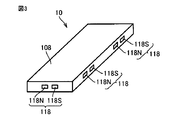
- FIG. 3 is a schematic diagram showing a configuration example of the contact sensor according to the first embodiment.
- a display 108 is provided on the upper surface of the housing of the mobile terminal device 10, and one or more contact sensors 118 are provided on each side surface of the housing.
- the contact sensor 118 includes a set of magnets composed of an S pole magnet 118S and an N pole magnet 118N.
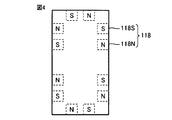
- FIG. 4 is a schematic diagram showing an example of arrangement of magnets in the contact sensor according to the first embodiment.
- the schematic diagram shown in FIG. 4 is a view when the mobile terminal device 10 is viewed from the side where the display 108 is disposed (the upper surface side of the housing).
- the S-pole magnet 118S and the N-pole magnet 118N are in contact with the upper, lower, left, and right sides of the casing of the display 108.
- the magnets are arranged in the order of the N-pole magnet 118N and the S-pole magnet 118S from the upper side on the left side of the display 108, and the S-pole magnet 118S from the upper side on the right side of the display 108.
- Each magnet is arranged in the order of the N-pole magnet 118N.
- the magnets are arranged in the order of the S-pole magnet 118S and the N-pole magnet 118N from the left on the side of the casing on the upper side of the display 108.
- the magnets are arranged in the order of the magnet 118N and the S pole magnet 118S.
- the mobile terminal device 10 is brought into contact with other mobile terminal devices even when the mobile terminal device 10 is rotated 90 degrees, 180 degrees, or 270 degrees clockwise on the plane where the display 108 exists. be able to.
- the mobile terminal device 10 may include, as a hardware configuration, a button for receiving an instruction from the user, a microphone for receiving an utterance to the mobile terminal device 10, and a speaker for outputting sound.
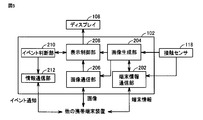
- FIG. 5 is a functional block diagram of portable terminal device 10 according to the first embodiment.
- the CPU 102 of the mobile terminal device 10 has, as its main functional configuration, a terminal information communication unit 202, an image generation unit 204, an image communication unit 206, a display control unit 208, and an event determination unit 210. And an information communication unit 212.
- These functions are mainly realized by the CPU 102 of the mobile terminal device 10 executing a program stored in the memory 104 and giving a command to the components of the mobile terminal device 10.
- the CPU 102 has a function as a control unit that controls the entire operation of the mobile terminal device 10. Note that some or all of these functional configurations may be realized by hardware.
- the terminal information communication unit 202 transmits terminal information including the configuration information of the display 108 of the own device to the other mobile terminal device.
- the configuration information of the display 108 includes information such as the number of vertical and horizontal pixels, the size, the number of colors, and the pixel pitch of the display 108.
- the pixel pitch is the size per pixel (one dot) on the screen (the length of one side per pixel). Since the pixel pitch may be different for each display of the mobile terminal device, if the pixel pitch is different between adjacent screens, the images are displayed shifted on the adjacent screens. Therefore, the mobile terminal device set as the master acquires the pixel pitch information of other mobile terminal devices that are in contact with each other, and appropriately enlarges or reduces the image to be displayed, so that the image is displayed on the adjacent screen. Can be prevented from being displayed in a shifted manner.
- the terminal information further includes terminal identification information for identifying the mobile terminal device 10.
- the terminal identification information may be information that can uniquely identify the mobile terminal device 10 such as a MAC address (Media Access Control address) and machine information of the mobile terminal device 10.
- the terminal identification information can be used as a destination for communicating with other portable terminal devices.
- the terminal information communication unit 202 receives terminal information including configuration information of a display of another mobile terminal device from another mobile terminal device.
- the terminal information communication unit 202 stores the terminal information of its own device and the terminal information of other portable terminal devices in the memory 104.
- the image generation unit 204 generates an image (its image signal) to be displayed on the display 108 of its own device and an image to be displayed on the display of another mobile terminal device. Specifically, the image generation unit 204 divides one original image based on the terminal information of the own device and the terminal information of other portable terminal devices received by the terminal information communication unit 202, thereby generating the own device. The divided image to be displayed on the display 108 and the divided image to be displayed on the display of another mobile terminal device are generated. In this case, a series of display screens are formed by the display 108 of the own device and the display of another mobile terminal device, and the original image is displayed on the display screen. Note that the image generation unit 204 may generate an image so that the same original image is displayed on each of the display 108 of its own device and the display of another mobile terminal device.
- the image communication unit 206 transmits an image to be displayed on the display of another mobile terminal device generated by the image generation unit 204 to the other mobile terminal device. Further, in another aspect, the image communication unit 206 receives an image to be displayed on the display 108 of the own device generated by another mobile terminal device from the other mobile terminal device.
- the display control unit 208 displays an image on the display 108 of the own device. Specifically, the display control unit 208 selects one of the image generated by the image generation unit 204 and the image generated by another mobile terminal device received by the image communication unit 206, and automatically selects the selected image. It is displayed on the display 108 of the apparatus.
- the event determination unit 210 determines whether an event to be notified to the user has occurred based on a predetermined criterion when an image received from another mobile terminal device is displayed on the display 108 of the own device. Judging. At this time, the display control unit 208 notifies the event determination unit 210 that an image received from another portable terminal device is displayed on the display 108.
- the event determination unit 210 refers to the content of the event that is registered in advance in the memory 104 and should be notified to the user, and makes the determination. Alternatively, when a plurality of events are ranked and registered in the memory 104 for each importance, the event determination unit 210 refers to the memory 104 and selects an event having an importance of a predetermined rank or higher as a user. It may be determined as an event to be notified to.
- the event is, for example, an alarm notification, an emergency mail such as an earthquake early warning, or an incoming call.
- the event determination unit 210 determines whether or not the event continues after an event to be notified to the user occurs.
- the case where the event continues is, for example, the case where the alarm notification is continued.
- the information communication unit 212 transmits event notification information indicating that the event has occurred to another mobile terminal device. In another aspect, the information communication unit 212 receives event notification information indicating that the event has occurred on the other mobile terminal device side.
- the display control unit 208 stops displaying the image received by the image communication unit 206 when the event occurs. Then, the display control unit 208 displays an image related to the event generated by the image generation unit 204 on the display 108 of the own apparatus. In addition, the image communication unit 206 transmits an image related to the event generated for the display of the other mobile terminal device by the image generation unit 204 to the other mobile terminal device.
- ⁇ Processing procedure> 6 and 7 are diagrams illustrating an example of an operation sequence of the mobile terminal device 10A and the mobile terminal device 10B.
- FIG. 8 is a diagram illustrating a display example when the mobile terminal device 10A and the mobile terminal device 10B come into contact with each other. The following steps are realized by the CPUs 102 of the mobile terminal devices 10 ⁇ / b> A and 10 ⁇ / b> B executing programs stored in the respective memories 104.
- the mobile terminal devices 10A and 10B can be arbitrarily set as masters or slaves.
- the display of the other mobile terminal device is used as the display of its own device.
- the display of the own device is used as the display of the other mobile terminal device.
- each mobile terminal device confirms contact with another mobile terminal device via contact sensor 118. (Steps S12 and S14).
- the contact sensor 118 detects the contact by flowing a weak current constantly or periodically between the S pole magnet 118S and the N pole magnet 118N. For example, when a current flows (when the resistance value between the S-pole magnet 118S and the N-pole magnet 118N is no longer infinite), each mobile terminal device is in contact with another mobile terminal device. to decide.
- the mobile terminal device 10A transmits the contact information and the terminal information of the own device to the mobile terminal device 10B (step S16). Communication between the mobile terminal device 10A and the mobile terminal device 10B is performed via the wireless communication unit 110 or the communication interface 116.
- Contact information is unique information for identifying a contact, which is set by the CPU 102 of the mobile terminal device 10 when the mobile terminal device 10 contacts another mobile terminal device.
- the CPU 102 stores the contact information in the memory 104 until contact between the mobile terminal device 10 and another mobile terminal device is not detected.
- the contact information includes contact position information indicating a position where the mobile terminal device 10 is in contact with another mobile terminal device.
- the contact position information is information indicating which of the magnets described with reference to FIGS. 3 and 4 is in contact with another mobile terminal device.
- the mobile terminal device 10B transmits the terminal information of the mobile terminal device 10B and the received contact information to the mobile terminal device 10A (step). S18). Note that the mobile terminal device 10B stores the terminal information and contact information of the mobile terminal device 10A in the memory 104 of its own device.
- the mobile terminal device 10A generates an image to be displayed on the display 108 of the mobile terminal device 10B based on the received terminal information of the mobile terminal device 10B (step S20), and transmits the image to the mobile terminal device 10B (step S20). S22).
- the mobile terminal device 10A stores the received terminal information of the mobile terminal device 10B in the memory 104.
- the mobile terminal device 10A generates an image based on the terminal information of the own device and displays the generated image on the display 108 of the own device (step S24).
- the mobile terminal device 10B displays the received image on the display 108 of the own device (step S26).
- the mobile terminal device 10B switches the image to be displayed on the display 108 of the own device from the image generated by the own device to the image received from the mobile terminal device 10A.
- the image generated by the mobile terminal device 10A is displayed on the display 108 of the mobile terminal device 10B.
- FIG. 8A when one image (here, a character image “ABCDEFGH”) is displayed, the image is divided into two, and the divided image is the mobile terminal device. It is displayed on each display 108 of 10A and 10B.
- step S28 determines whether or not an event that should be notified to the user has occurred. If the event has not occurred (NO in step S28), portable terminal device 10B repeats the process of step S28. On the other hand, when the event occurs (YES in step S28), the mobile terminal device 10B executes the process of step S30 in FIG.
- mobile terminal device 10B notifies mobile terminal device 10A that the event to be notified to the user has occurred on mobile terminal device 10B, and carries the contact information and the terminal information of the device itself. It transmits to the terminal device 10A (step S30). Note that sending the contact information and the terminal information of the device itself to the mobile terminal device 10A may correspond to the notification.
- the mobile terminal device 10A receives the notification and the terminal information and contact information of the mobile terminal device 10B from the mobile terminal device 10B
- the mobile terminal device 10B receives the terminal information and the received contact information of the mobile terminal device 10B. Transmit (step S32).
- the mobile terminal device 10B generates an image to be displayed on the display 108 of the mobile terminal device 10A based on the received terminal information of the mobile terminal device 10A (step S34), and transmits the image to the mobile terminal device 10A (step S34). S36). Specifically, the mobile terminal device 10B generates an image (an image related to the event) for notifying the user of the event for the display 108 of the mobile terminal device 10A, and the generated image is transmitted to the mobile terminal device 10A. Send. The mobile terminal device 10B stores the received terminal information of the mobile terminal device 10A in the memory 104.
- the mobile terminal device 10B generates an image for notifying the event (an image related to the event) for the display 108 of the own device, and displays the generated image on the display 108 of the own device (step S37).
- the mobile terminal device 10A receives the image transmitted from the mobile terminal device 10B
- the mobile terminal device 10A displays the received image on the display 108 of the own device (step S38).
- the mobile terminal device 10A stops displaying the image displayed on the display 108 of the own device in step S24, and displays the image received from the mobile terminal device 10B on the display 108 of the own device.
- the image generated by the mobile terminal device 10B is displayed on the display 108 of the mobile terminal device 10A.
- the character image “Please be careful about the occurrence of an earthquake” is divided into two.
- the divided images are displayed on the displays 108 of the mobile terminal devices 10A and 10B. That is, when an image generated by the master mobile terminal device 10A is displayed on the display 108 of the slave mobile terminal device 10B, an event to be notified to the user occurs on the mobile terminal device 10B side.
- the role as the master moves from the portable terminal device 10A to the portable terminal device 10B, and the role as the slave moves from the portable terminal device 10B to the portable terminal device 10A.
- the mobile terminal device 10B determines whether or not the event that has occurred continues (step S40).
- the mobile terminal device 10B resets the contact detection (step S44). Specifically, the mobile terminal device 10B temporarily stops the contact detection operation by the contact sensor 118. Accordingly, the mobile terminal device 10B determines that the mobile terminal device 10A is not in contact with the mobile terminal device 10A, and the mobile terminal device 10A and the mobile terminal device 10B execute the processing from step S10. That is, the mobile terminal device 10A functions again as a master, and the mobile terminal device 10B functions again as a slave. Therefore, as shown in FIG. 8C, the image display of the earthquake early warning is canceled, and the character image “ABCDEFGH” is divided and displayed on the respective displays 108 of the mobile terminal devices 10A and 10B.
- the mobile terminal device 10B determines whether or not it is in contact with the mobile terminal device 10A (step S42).
- step S42 the processing from step S34 is repeated. Specifically, the mobile terminal device 10B generates an image to be displayed on the display 108 of the mobile terminal device 10A while in contact with the mobile terminal device 10A, and transmits the generated image to the mobile terminal device 10A. While in contact with the mobile terminal device 10B, the mobile terminal device 10A displays an image received from the mobile terminal device 10B on the display 108 of the mobile terminal device 10A.
- step S42 If the mobile terminal device 10B and the mobile terminal device 10A are not in contact (NO in step S42), the mobile terminal device 10A and the mobile terminal device 10B execute the processing from step S10.
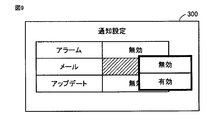
- FIG. 9 shows a user interface screen for event notification setting.
- FIG. 10 is a diagram showing a setting table showing notification settings for each event.
- the CPU 102 of the mobile terminal device 10 displays the user interface screen 300 on the display 108. For example, based on a user instruction via the touch panel 106, the CPU 102 sets, for each of a plurality of events, whether to notify the user that the event has occurred (valid) or not (invalid).
- the plurality of events are, for example, an alarm, an email, and an update, respectively.
- CPU 102 stores the contents set on user interface screen 300 in memory 104 as setting table 400.
- the setting table 400 is setting information indicating whether or not to notify the user of the occurrence of the event for each of a plurality of events.
- the CPU 102 (event determination unit 210) refers to the setting table 400 and can determine whether or not an event should be notified to the user when an event occurs.
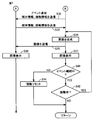
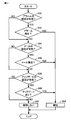
- FIG. 11 is a flowchart showing an example of event notification determination processing executed by the mobile terminal device according to the second embodiment. This flowchart shows a modification of the determination process in step S28 of FIG. Here, it is assumed that the mobile terminal device 10B executes an event notification determination process.
- CPU 102 of mobile terminal device 10B refers to setting table 400 to determine whether the alarm notification setting for the user is valid (step S50). If the notification setting is invalid (NO in step S50), CPU 102 executes the process of step S54. On the other hand, when the notification setting is valid (YES in step S50), CPU 102 determines whether an alarm has occurred (step S52).
- step S52 determines that the alarm is to be notified to the user (step S64) and ends the process. This corresponds to the case where the CPU 102 determines in FIG. 6 that an event to be notified to the user has occurred (YES in step S28).
- step S64 determines whether the notification setting for the user of mail reception is valid (step S54). If the notification setting is invalid (NO in step S54), CPU 102 executes the process of step S58. On the other hand, when the notification setting is valid (YES in step S54), the CPU 102 determines whether or not the mobile terminal device 10B has received an email (step S56).
- step S56 When the mail is received (YES in step S56), the CPU 102 determines that the mail reception is notified (step S64) and ends the process. On the other hand, when the mail has not been received (NO in step S56), the CPU 102 determines whether or not the notification setting for the update reception user such as the application is valid (step S58). If the notification setting is invalid (NO in step S58), CPU 102 executes the process of step S62. On the other hand, when the notification setting is valid (YES in step S58), CPU 102 determines whether portable terminal device 10B has received the update notification (step S60).
- step S60 If the mobile terminal device 10B has received the update (YES in step S60), the CPU 102 determines that the update is to be notified to the user (step S64), and ends the process. On the other hand, when the mobile terminal device 10B has not received the update (NO in step S60), the CPU 102 determines that the user is not notified even if these events occur (step S62), The process ends. This corresponds to the case where it is determined not to notify the event generated by the CPU 102 in FIG. 6 (NO in step S28).
- the CPU 102 may execute a series of processes A in steps S50 and S52, a series of processes B in steps S54 and S56, and a series of processes C in steps S58 and S60, respectively. Further, the CPU 102 may execute the process A, the process B, and the process C in parallel.
- the CPU 102 may change whether to notify the event or ignore it according to the number of event notifications. Further, the CPU 102 may change whether the notification is made by the mail transmission destination or ignored when the mail is received.
- a program that causes a computer to function and execute control as described in the above flowchart.
- a program is recorded on a non-temporary computer-readable recording medium such as a flexible disk attached to the computer, a CD-ROM (Compact Disk Read Only Memory), a ROM, a RAM, and a memory card as a program product. It can also be provided.
- the program can be provided by being recorded on a recording medium such as a hard disk built in the computer.
- a program can also be provided by downloading via a network.
- the program may be a program module that is provided as a part of an operating system (OS) of a computer and that calls necessary modules in a predetermined arrangement at a predetermined timing to execute processing.
- OS operating system
- the program itself does not include the module, and the process is executed in cooperation with the OS.
- a program that does not include such a module can also be included in the program according to the present embodiment.
- 10, 10A, 10B mobile terminal device 102 CPU, 104 memory, 106 touch panel, 108 display, 110 wireless communication unit, 112 communication antenna, 114 memory interface, 115 storage medium, 116 communication interface, 118 contact sensor, 118N, 118S magnet , 202 terminal information communication unit, 204 image generation unit, 206 image communication unit, 208 display control unit, 210 event determination unit, 212 information communication unit, 300 user interface screen, 400 setting table.
Landscapes
- Engineering & Computer Science (AREA)
- Theoretical Computer Science (AREA)
- General Engineering & Computer Science (AREA)
- Physics & Mathematics (AREA)
- General Physics & Mathematics (AREA)
- Human Computer Interaction (AREA)
- Signal Processing (AREA)
- Computer Hardware Design (AREA)
- Telephone Function (AREA)
Abstract
他の携帯端末装置と連携して画面表示をしている場合であっても、ユーザにとって重要な情報を確実に報知することが可能な携帯端末装置を提供する。ディスプレイを有する携帯端末装置は、他の携帯端末装置との接触を検出する接触検出部と、当該接触が検出されている場合に、ディスプレイの構成情報を含む端末情報を他の携帯端末装置に送信する端末情報送信部と、端末情報に基づいて他の携帯端末装置により生成された画像を受信する画像受信部と、受信された画像をディスプレイに表示させる表示制御部と、予め定められた基準に基づいて、ユーザに報知すべきイベントが発生したか否かを判断するイベント判断部と、イベントに関する第1の画像を生成する画像生成部とを備える。表示制御部は、イベントが発生した場合には、受信された画像の表示を停止して、第1の画像をディスプレイに表示させる。
Description
本発明は、携帯端末装置に関し、特に、他の携帯端末装置と連携可能な携帯端末装置に関する。
近年、携帯電話機やスマートフォンなどのような携帯端末装置は、さまざまな機能を有するとともに画面サイズの拡大化も促進されており、筐体の表面全域に相当する大きさのディスプレイを有している。このような携帯端末装置は、複数台を並列配置することにより、全体としてマルチ画面(大画面)化して使用される場合がある。
たとえば、特開2010-85853号公報(特許文献1)には、携帯端末装置が開示されている。当該携帯端末装置は、他装置との接触を検出する接触検出部と、接触検出部が他装置との接触を検出した場合、他装置に、他装置と接触したことを示す接触識別情報及び自装置の端末識別情報を送信する送信部と、他装置から、他装置の端末識別情報、他装置の端末情報、接触識別情報を受信する受信部と、受信部が受信した端末情報に基づいて、他装置の表示部で表示する画像の画像信号を生成する画像信号生成部と、他装置に、画像生成部が生成した画像信号を送信する画像信号送信部とを備えている。
ところで、携帯端末装置は、ディスプレイを利用してアラーム、メール受信、ニュースなどをユーザに報知する機能を有している。たとえば、携帯端末装置は、緊急地震速報メールなどの重要な情報を受信した場合にはユーザに報知する必要がある。
特許文献1に開示された技術は、マスターの携帯端末で表示させる内容をスレーブの携帯端末を利用してより大画面化して表示するものである。しかしながら、スレーブの携帯端末側でユーザに報知すべき重要なイベントが発生した場合については考慮されていない。そのため、特許文献1に開示された技術によると、スレーブの携帯端末の画面がマスターの携帯端末で制御されているときに、スレーブの携帯端末で緊急速報などの重要な情報を受信した場合には、当該情報が画面に表示されずに見逃される可能性がある。
本発明は、上記のような問題点を解決するためになされたものであって、他の携帯端末装置と連携して画面表示をしている場合であっても、ユーザにとって重要な情報を確実に報知することが可能な携帯端末装置を提供することを目的とする。
ある実施の形態に従うと、第1のディスプレイを有する携帯端末装置が提供される。携帯端末装置は、第2のディスプレイを有する他の携帯端末装置との接触を検出する接触検出部と、接触検出部により接触が検出されている場合に、第1のディスプレイの構成情報を含む第1の端末情報を他の携帯端末装置に送信する端末情報送信部と、端末情報送信部により送信された第1の端末情報に基づいて他の携帯端末装置により生成された画像を他の携帯端末装置から受信する画像受信部と、受信された画像を第1のディスプレイに表示させる表示制御部と、第1のディスプレイに当該画像が表示されている場合に、予め定められた基準に基づいて、ユーザに報知すべきイベントが発生したか否かを判断するイベント判断部と、イベントが発生した場合に、イベントに関する第1の画像を生成する画像生成部とを備える。表示制御部は、イベントが発生した場合には、受信された画像の表示を停止して、第1の画像を第1のディスプレイに表示させる。
本発明によると、他の携帯端末装置と連携して画面表示をしている場合であっても、ユーザにとって重要な情報を確実に報知することが可能となる。
以下、図面を参照しつつ、本発明の実施の形態について説明する。以下の説明では、同一の部品には同一の符号を付してある。それらの名称および機能も同じである。したがって、それらについての詳細な説明は繰り返さない。
[実施の形態1]
<システム構成>
図1は、実施の形態1に従う情報処理システムの全体構成を示す概略図である。図1を参照して、実施の形態1に従う情報処理システムは、携帯端末装置10Aと、携帯端末装置10Bとを含む。なお、説明の容易化のために、以下では、携帯端末装置10A,10Bの各々に共通の構成や機能を説明する際には、それらを「携帯端末装置10」とも総称する。さらに、以下の説明では、携帯端末装置10がスマートフォンである場合について説明する。ただし、携帯端末装置10は、たとえば、タブレット端末装置、PDA(Personal Digital Assistance)などであってもよい。
<システム構成>
図1は、実施の形態1に従う情報処理システムの全体構成を示す概略図である。図1を参照して、実施の形態1に従う情報処理システムは、携帯端末装置10Aと、携帯端末装置10Bとを含む。なお、説明の容易化のために、以下では、携帯端末装置10A,10Bの各々に共通の構成や機能を説明する際には、それらを「携帯端末装置10」とも総称する。さらに、以下の説明では、携帯端末装置10がスマートフォンである場合について説明する。ただし、携帯端末装置10は、たとえば、タブレット端末装置、PDA(Personal Digital Assistance)などであってもよい。
携帯端末装置10Aと携帯端末装置10Bとは、それぞれ通信インターフェイスを介して互いに通信可能に構成される。たとえば、携帯端末装置10Aと携帯端末装置10Bとは、無線LAN(Local Area Network)を利用した通信が行なわれる。
携帯端末装置10は、表示部としてのディスプレイ108と、当該ディスプレイ108に対してタッチ入力された位置(タッチ位置)を検出可能な位置入力装置とが一体化されたタッチパネルとを含む。
携帯端末装置10は、筐体側面に設けられた接触センサにより他の携帯端末装置との接触を検出し、自装置のディスプレイ108と他の携帯端末装置のディスプレイとを用いて一連の表示画面を形成することが可能である。
<ハードウェア構成>
図2は、実施の形態1に従う携帯端末装置10のハードウェア構成を示すブロック図である。図2を参照して、携帯端末装置10は、主たる構成要素として、CPU(Central Processing Unit)102と、メモリ104と、タッチパネル106と、ディスプレイ108と、無線通信部110と、通信アンテナ112と、メモリインターフェイス(I/F)114と、通信インターフェイス(I/F)116と、接触センサ118とを含む。
図2は、実施の形態1に従う携帯端末装置10のハードウェア構成を示すブロック図である。図2を参照して、携帯端末装置10は、主たる構成要素として、CPU(Central Processing Unit)102と、メモリ104と、タッチパネル106と、ディスプレイ108と、無線通信部110と、通信アンテナ112と、メモリインターフェイス(I/F)114と、通信インターフェイス(I/F)116と、接触センサ118とを含む。
CPU102は、メモリ104に記憶されたプログラムを読み出して実行することで、携帯端末装置10の各部の動作を制御する。より詳細にはCPU102は、当該プログラムを実行することによって、後述する携帯端末装置10の処理(ステップ)の各々を実現する。
メモリ104は、RAM(Random Access Memory)、ROM(Read-Only Memory)、フラッシュメモリなどによって実現される。メモリ104は、CPU102によって実行されるプログラム、またはCPU102によって用いられるデータなどを記憶する。
タッチパネル106は、表示部としての機能を有するディスプレイ108上に設けられており、たとえば、静電容量方式タイプである。タッチパネル106は、所定時間毎に外部物体によるタッチパネル106へのタッチ操作を検知し、タッチ座標をCPU102に入力する。
ディスプレイ108は、たとえば、液晶ディスプレイ、有機ELディスプレイであり、フレームのない表示デバイスである。これにより、複数の携帯端末装置のフレームのない表示デバイスを接触させて使用することで、実質的に1つのディスプレイを使用しているように画面表示を行なうことができる。
無線通信部110は、通信アンテナ112を介して移動体通信網に接続し無線通信のための信号を送受信する。これにより、携帯端末装置10は、たとえば、第3世代移動通信システム(3G)、LTE(Long Term Evolution)などの移動体通信網を介して他の携帯端末装置との通信が可能となる。
メモリインターフェイス(I/F)114は、外部の記憶媒体115からデータを読み出し、または、記憶媒体115にデータを書き込む。CPU102は、メモリ104からデータを読み出して、メモリインターフェイス114を介して当該データを外部の記憶媒体115に格納する。なお、記憶媒体115としては、CD(Compact Disc)、DVD(Digital Versatile Disk)、BD(Blu-ray(登録商標) Disc)、USB(Universal Serial Bus)メモリなどの不揮発的にプログラムを格納する媒体が挙げられる。
通信インターフェイス(I/F)116は、他の携帯端末装置との間で各種データをやり取りするための通信インターフェイスであり、アダプタやコネクタなどによって実現される。なお、通信方式としては、たとえば、Bluetooth(登録商標)、無線LANなどによる無線通信であってもよいし、USBなどを利用した有線通信であってもよい。
接触センサ118は、他の携帯端末装置との接触を検出する静電センサと、携帯端末装置10と他の携帯端末装置との接触状態を安定して維持するためのマグネットとを含む。たとえば、接触センサ118は、マグネットに微弱電流を流して、他の携帯端末装置が携帯端末装置10に接触したときの微弱電流の変化(静電容量の変化)を検出することで、携帯端末装置10と他の携帯端末装置との接触を把握する。接触センサ118は、静電センサではなく公知の他種類のセンサを含んでいてもよい。
図3は、実施の形態1に従う接触センサの構成例を示す概略図である。図3を参照して、携帯端末装置10の筺体の上面にはディスプレイ108が設けられており、筺体の各側面には1つ以上の接触センサ118が設けられている。接触センサ118は、S極マグネット118SおよびN極マグネット118Nで構成される1組のマグネットを含む。
図4は、実施の形態1に従う接触センサにおけるマグネットの配置例を示す概略図である。図4に示す概略図は、携帯端末装置10をディスプレイ108が配置されている側(筐体上面側)から視認したときの図である。S極マグネット118SおよびN極マグネット118Nは、ディスプレイ108の上下左右の筐体側面に接している。
ディスプレイ108の左側の筐体側面には、上方向からN極マグネット118N、S極マグネット118Sの順に各マグネットが配置され、ディスプレイ108の右側の筐体側面には、上方向からS極マグネット118S、N極マグネット118Nの順に各マグネットが配置される。また、ディスプレイ108の上側の筐体側面には、左方向からS極マグネット118S、N極マグネット118Nの順に各マグネットが配置され、ディスプレイ108の下側の筐体側面には、左方向からN極マグネット118N、S極マグネット118Sの順に各マグネットが配置される。
このように各マグネットを配置することで、携帯端末装置10をディスプレイ108が存在する平面上で時計回りに90度、180度、または270度回転させた状態でも、他の携帯端末装置と接触させることができる。
なお、携帯端末装置10は、ハードウェア構成として、ユーザからの指示を受け付けるためのボタン、携帯端末装置10に対する発話を受け付けるマイク、音声を出力するためのスピーカを含んでいてもよい。
<機能構成>
図5は、実施の形態1に従う携帯端末装置10の機能ブロック図である。図5を参照して、携帯端末装置10のCPU102は、その主たる機能構成として、端末情報通信部202と、画像生成部204と、画像通信部206と、表示制御部208と、イベント判断部210と、情報通信部212とを含む。これらの機能は、主に、携帯端末装置10のCPU102がメモリ104に格納されたプログラムを実行し、携帯端末装置10の構成要素へ指令を与えることなどによって実現される。CPU102は、携帯端末装置10の動作全体を制御する制御部としての機能を有する。なお、これらの機能構成の一部または全部はハードウェアで実現されていてもよい。
図5は、実施の形態1に従う携帯端末装置10の機能ブロック図である。図5を参照して、携帯端末装置10のCPU102は、その主たる機能構成として、端末情報通信部202と、画像生成部204と、画像通信部206と、表示制御部208と、イベント判断部210と、情報通信部212とを含む。これらの機能は、主に、携帯端末装置10のCPU102がメモリ104に格納されたプログラムを実行し、携帯端末装置10の構成要素へ指令を与えることなどによって実現される。CPU102は、携帯端末装置10の動作全体を制御する制御部としての機能を有する。なお、これらの機能構成の一部または全部はハードウェアで実現されていてもよい。
端末情報通信部202は、接触センサ118により他の携帯端末装置との接触が検出されている場合に、自装置のディスプレイ108の構成情報を含む端末情報を他の携帯端末装置に送信する。ディスプレイ108の構成情報は、ディスプレイ108の縦横の画素数、サイズ、色数、画素ピッチなどの情報を含む。
画素ピッチとは、画面の1画素(1ドット)当たりの大きさ(1画素当たりの一辺の長さ)である。画素ピッチは、携帯端末装置のディスプレイごとに異なる場合があるため、隣り合う画面で画素ピッチが異なると、隣り合う画面で画像がずれて表示される。そこで、マスターとして設定されている携帯端末装置は、接触している他の携帯端末装置の画素ピッチ情報を取得して、表示する画像の拡大または縮小を適切に行なうことで、隣り合う画面で画像がずれて表示されることを防ぐことができる。
端末情報は、携帯端末装置10を識別するための端末識別情報をさらに含む。端末識別情報は、たとえば、MACアドレス(Media Access Control address)、携帯端末装置10の機体情報など携帯端末装置10を一意に特定できる情報であればよい。端末識別情報は、他の携帯端末装置と通信するための宛先として利用することが可能である。
また、端末情報通信部202は、別の局面では、他の携帯端末装置のディスプレイの構成情報を含む端末情報を他の携帯端末装置から受信する。端末情報通信部202は、自装置の端末情報と、他の携帯端末装置の端末情報とをメモリ104に格納する。
画像生成部204は、自装置のディスプレイ108に表示させる画像(の画像信号)と、他の携帯端末装置のディスプレイに表示させる画像とを生成する。具体的には、画像生成部204は、自装置の端末情報と、端末情報通信部202が受信した他の携帯端末装置の端末情報とに基づいて、1つの元画像を分割することにより自装置のディスプレイ108に表示させる分割画像と、他の携帯端末装置のディスプレイに表示させる分割画像とを生成する。この場合、自装置のディスプレイ108および他の携帯端末装置のディスプレイにより一連の表示画面が形成され、当該表示画面に元画像が表示されることになる。なお、画像生成部204は、自装置のディスプレイ108および他の携帯端末装置のディスプレイのそれぞれに同じ元画像が表示されるように画像を生成してもよい。
画像通信部206は、画像生成部204により生成された他の携帯端末装置のディスプレイに表示させる画像を他の携帯端末装置に送信する。また、別の局面では、画像通信部206は、他の携帯端末装置により生成された自装置のディスプレイ108に表示させる画像を他の携帯端末装置から受信する。
表示制御部208は、自装置のディスプレイ108に画像を表示させる。具体的には、表示制御部208は、画像生成部204が生成した画像および画像通信部206が受信した他の携帯端末装置が生成した画像のうち一方を選択して、当該選択した画像を自装置のディスプレイ108に表示させる。
イベント判断部210は、他の携帯端末装置から受信した画像が自装置のディスプレイ108に表示されている場合に、予め定められた基準に基づいて、ユーザに報知すべきイベントが発生したか否かを判断する。このとき、表示制御部208は、他の携帯端末装置から受信した画像をディスプレイ108に表示させていることをイベント判断部210に通知するものとする。
具体的には、イベント判断部210は、メモリ104に予め登録されている、ユーザに報知すべきイベントの内容を参照して当該判断を行なう。または、複数のイベントが重要度ごとにランク分けしてメモリ104に登録されている場合には、イベント判断部210は、メモリ104を参照して、所定のランク以上の重要度を有するイベントをユーザに報知すべきイベントとして判断してもよい。なお、イベントとは、たとえば、アラーム通知、緊急地震速報などの緊急メールの受信、着信などである。
また、イベント判断部210は、別の局面では、ユーザに報知すべきイベントが発生した後、当該イベントが継続しているか否かを判断する。イベントが継続している場合とは、たとえば、アラーム通知が継続している場合などである。
情報通信部212は、ユーザに報知すべきイベントが発生したとイベント判断部210により判断された場合に、当該イベントが発生したことを示すイベント通知情報を他の携帯端末装置に送信する。また、別の局面では、情報通信部212は、他の携帯端末装置側で当該イベントが発生したことを示すイベント通知情報を受信する。
なお、表示制御部208は、当該イベントが発生した場合には、画像通信部206により受信された画像の表示を停止する。そして、表示制御部208は、画像生成部204により生成されたイベントに関する画像を自装置のディスプレイ108に表示させる。また、画像通信部206は、画像生成部204により他の携帯端末装置のディスプレイ用に生成されたイベントに関する画像を他の携帯端末装置に送信する。
<処理手順>
図6および図7は、携帯端末装置10Aおよび携帯端末装置10Bの動作シーケンスの一例を示す図である。図8は、携帯端末装置10Aおよび携帯端末装置10Bが接触した場合の表示例を示す図である。以下の各ステップは、携帯端末装置10A,10Bの各々のCPU102が各々のメモリ104に格納されたプログラムを実行することによって実現される。
図6および図7は、携帯端末装置10Aおよび携帯端末装置10Bの動作シーケンスの一例を示す図である。図8は、携帯端末装置10Aおよび携帯端末装置10Bが接触した場合の表示例を示す図である。以下の各ステップは、携帯端末装置10A,10Bの各々のCPU102が各々のメモリ104に格納されたプログラムを実行することによって実現される。
ここでは、携帯端末装置10Aと携帯端末装置10Bとを接触させる場合について説明する。また、携帯端末装置10Aがマスターとして、携帯端末装置10Bがスレーブとして予め設定されている状態からの動作シーケンスについて説明する。なお、携帯端末装置10A,10Bは、マスターとしても、スレーブとしても、任意に設定され得る。
ここで、マスターとして設定されている携帯端末装置は、スレーブとして設定されている他の携帯端末装置と接触した場合に、当該他の携帯端末装置のディスプレイを自装置のディスプレイとして使用する。また、スレーブとして設定されている携帯端末装置は、マスターとして設定されている他の携帯端末装置と接触した場合に、自装置のディスプレイを、当該他の携帯端末装置のディスプレイとして使用される。
図6を参照して、携帯端末装置10Aと携帯端末装置10Bとが接触すると(ステップS10)、各々の携帯端末装置は、接触センサ118を介して他の携帯端末装置と接触したことを確認する(ステップS12,S14)。
接触センサ118は、S極マグネット118SとN極マグネット118Nとの間に微弱電流を常時または定期的に流すことにより当該接触を検出する。たとえば、電流が流れた場合(S極マグネット118SとN極マグネット118Nとの間の抵抗値が無限大でなくなった場合)、各々の携帯端末装置は、他の携帯端末装置と接触状態であると判断する。
携帯端末装置10Aは、接触センサ118により当該接触が検出されている場合に、接触情報および自装置の端末情報を携帯端末装置10Bに送信する(ステップS16)。なお、携帯端末装置10Aと携帯端末装置10Bとの間の通信は、無線通信部110または通信インターフェイス116を介して行なわれる。
接触情報は、携帯端末装置10と他の携帯端末装置とが接触した場合に携帯端末装置10のCPU102によって設定される、接触を識別するための固有の情報である。CPU102は、携帯端末装置10と他の携帯端末装置との接触が検出されなくなるまで接触情報をメモリ104に格納する。また、接触情報は、携帯端末装置10が他の携帯端末装置と接触している位置を示す接触位置情報を含む。具体的には、接触位置情報は、図3および図4で説明した各マグネットのうち、どのマグネットで他の携帯端末装置と接触しているかを示す情報である。
次に、携帯端末装置10Bは、携帯端末装置10Aの端末情報および接触情報を携帯端末装置10Aから受信すると、携帯端末装置10Bの端末情報および受信した接触情報を携帯端末装置10Aに送信する(ステップS18)。なお、携帯端末装置10Bは、携帯端末装置10Aの端末情報および接触情報を自装置のメモリ104に格納する。
携帯端末装置10Aは、受信した携帯端末装置10Bの端末情報に基づいて、携帯端末装置10Bのディスプレイ108に表示させる画像を生成し(ステップS20)、当該画像を携帯端末装置10Bに送信する(ステップS22)。なお、携帯端末装置10Aは、受信した携帯端末装置10Bの端末情報をメモリ104に格納する。
携帯端末装置10Aは、自装置の端末情報に基づいて、画像を生成して当該生成した画像を自装置のディスプレイ108に表示する(ステップS24)。一方、携帯端末装置10Bは、携帯端末装置10Aから送信された画像を受信すると、当該受信した画像を自装置のディスプレイ108に表示する(ステップS26)。具体的には、携帯端末装置10Bは、自装置のディスプレイ108に表示させる画像を、自装置で生成した画像から、携帯端末装置10Aから受信した画像に切り替える。これにより、携帯端末装置10Aにより生成された画像が、携帯端末装置10Bのディスプレイ108に表示される。たとえば、図8(a)に示すように、1つの画像(ここでは、「ABCDEFGH」との文字画像)を表示する場合、当該画像が2つに分割され、当該分割された画像が携帯端末装置10A,10Bのそれぞれのディスプレイ108に表示される。
次に、携帯端末装置10Bは、ユーザに報知すべきイベントが発生したか否かを判断する(ステップS28)。当該イベントが発生していない場合には(ステップS28においてNO)、携帯端末装置10BはステップS28の処理を繰り返す。これに対して、当該イベントが発生した場合には(ステップS28においてYES)、携帯端末装置10Bは、図7のステップS30の処理を実行する。
図7を参照して、携帯端末装置10Bは、携帯端末装置10B側でユーザに報知すべき当該イベントが発生したことを携帯端末装置10Aに通知するとともに、接触情報および自装置の端末情報を携帯端末装置10Aに送信する(ステップS30)。なお、接触情報および自装置の端末情報を携帯端末装置10Aに送信することが、当該通知に相当する場合であってもよい。
次に、携帯端末装置10Aは、当該通知と、携帯端末装置10Bの端末情報および接触情報を携帯端末装置10Bから受信すると、携帯端末装置10Aの端末情報および受信した接触情報を携帯端末装置10Bに送信する(ステップS32)。
携帯端末装置10Bは、受信した携帯端末装置10Aの端末情報に基づいて、携帯端末装置10Aのディスプレイ108に表示させる画像を生成し(ステップS34)、当該画像を携帯端末装置10Aに送信する(ステップS36)。具体的には、携帯端末装置10Bは、ユーザに当該イベントを報知するための画像(イベントに関する画像)を携帯端末装置10Aのディスプレイ108用に生成して、当該生成した画像を携帯端末装置10Aに送信する。なお、携帯端末装置10Bは、受信した携帯端末装置10Aの端末情報をメモリ104に格納する。
携帯端末装置10Bは、当該イベントを報知するための画像(イベントに関する画像)を自装置のディスプレイ108用に生成して、当該生成した画像を自装置のディスプレイ108に表示させる(ステップS37)。一方、携帯端末装置10Aは、携帯端末装置10Bから送信された画像を受信すると、当該受信した画像を自装置のディスプレイ108に表示する(ステップS38)。具体的には、携帯端末装置10Aは、ステップS24において自装置のディスプレイ108に表示している画像の表示を停止して、携帯端末装置10Bから受信した画像を自装置のディスプレイ108に表示する。
これにより、携帯端末装置10Bにより生成された画像が、携帯端末装置10Aのディスプレイ108に表示される。たとえば、図8(b)に示すように、携帯端末装置10Bがユーザに報知すべき緊急地震速報を受信した場合には、「地震発生に注意して下さい」との文字画像が2つに分割され、当該分割された画像が携帯端末装置10A,10Bの各々のディスプレイ108に表示される。すなわち、スレーブ側の携帯端末装置10Bのディスプレイ108において、マスター側の携帯端末装置10Aにより生成された画像を表示している場合に、携帯端末装置10B側においてユーザに報知すべきイベントが発生したときには、マスターとしての役割が携帯端末装置10Aから携帯端末装置10Bに移るとともに、スレーブとしての役割が携帯端末装置10Bから携帯端末装置10Aに移ることになる。
次に、携帯端末装置10Bは、発生したイベントが継続しているか否かを判断する(ステップS40)。イベントが継続していない場合には(ステップS40においてNO)、携帯端末装置10Bは、接触検出をリセットする(ステップS44)。具体的には、携帯端末装置10Bは、接触センサ118による接触検出動作を一時的に停止する。これにより、携帯端末装置10Bは、携帯端末装置10Aと接触していないと判断することになり、携帯端末装置10Aおよび携帯端末装置10Bは、ステップS10からの処理を実行する。すなわち、携帯端末装置10Aはマスターとして再び機能し、携帯端末装置10Bはスレーブとして再び機能することになる。そのため、図8(c)に示すように、緊急地震速報の画像表示が解除され、「ABCDEFGH」との文字画像が分割されて、携帯端末装置10A,10Bの各々のディスプレイ108に表示される。
これに対して、イベントが継続中である場合には(ステップS40においてYES)、携帯端末装置10Bは、携帯端末装置10Aと接触しているか否かを判断する(ステップS42)。携帯端末装置10Bと携帯端末装置10Aとが接触している場合には(ステップS42においてYES)、ステップS34からの処理がを繰り返される。具体的には、携帯端末装置10Bは、携帯端末装置10Aと接触している間、携帯端末装置10Aのディスプレイ108に表示させる画像を生成し、当該生成した画像を携帯端末装置10Aに送信する。携帯端末装置10Aは、携帯端末装置10Bと接触している間、携帯端末装置10Bから受信した画像を携帯端末装置10Aのディスプレイ108に表示させる。
携帯端末装置10Bと携帯端末装置10Aとが接触していない場合には(ステップS42においてNO)、携帯端末装置10Aおよび携帯端末装置10Bは、ステップS10からの処理を実行する。
[実施の形態2]
実施の形態2では、複数のイベントの各々について、当該イベントがユーザにとって重要な報知すべきイベントであるか否かを設定できる構成について説明する。具体的には、実施の形態2では、実施の形態1におけるイベント判断処理(図6中のステップS28)の変形例について説明する。
実施の形態2では、複数のイベントの各々について、当該イベントがユーザにとって重要な報知すべきイベントであるか否かを設定できる構成について説明する。具体的には、実施の形態2では、実施の形態1におけるイベント判断処理(図6中のステップS28)の変形例について説明する。
図9は、イベントの報知設定をするためのユーザインターフェイス画面である。図10は、各々のイベントについての報知設定を示す設定テーブルを示す図である。
図9を参照して、携帯端末装置10のCPU102は、ユーザインターフェイス画面300をディスプレイ108に表示する。たとえば、CPU102は、タッチパネル106を介したユーザの指示に基づいて、複数のイベントの各々について、当該イベントが発生したことをユーザに報知するか(有効)、報知しないか(無効)を設定する。なお、複数のイベントは、一例として、それぞれアラーム、メール、アップデートであるとする。
図10を参照して、CPU102は、ユーザインターフェイス画面300において設定された内容を設定テーブル400として、メモリ104に格納する。具体的には、設定テーブル400は、複数のイベントの各々について、当該イベントの発生をユーザに報知するか否かを示す設定情報である。CPU102(イベント判断部210)は、設定テーブル400を参照して、あるイベントが発生したときにそのイベントがユーザに報知すべきイベントか否かを判断することができる。
図11は、実施の形態2に従う携帯端末装置が実行するイベント報知判断処理の一例を示すフローチャートである。このフローチャートは、図6のステップS28の判断処理の変形例を示すものである。ここでは、携帯端末装置10Bがイベント報知判断処理を実行するものとする。
図11を参照して、携帯端末装置10BのCPU102は、設定テーブル400を参照して、アラームのユーザへの報知設定が有効か否かを判断する(ステップS50)。当該報知設定が無効である場合には(ステップS50においてNO)、CPU102はステップS54の処理を実行する。これに対して、当該報知設定が有効である場合には(ステップS50においてYES)、CPU102はアラームが発生しているか否かを判断する(ステップS52)。
アラームが発生している場合には(ステップS52においてYES)、CPU102はアラームをユーザに報知すると判断して(ステップS64)、処理を終了する。これは、図6においてCPU102がユーザに報知すべきイベントが発生したと判断する場合(ステップS28においてYES)に相当する。これに対して、アラームが発生していない場合には(ステップS52においてNO)、CPU102は、メール受信のユーザへの報知設定が有効か否かを判断する(ステップS54)。当該報知設定が無効である場合には(ステップS54においてNO)、CPU102はステップS58の処理を実行する。これに対して、当該報知設定が有効である場合には(ステップS54においてYES)、CPU102は、携帯端末装置10Bがメールを受信したか否かを判断する(ステップS56)。
メールを受信した場合には(ステップS56においてYES)、CPU102はメール受信を報知すると判断して(ステップS64)、処理を終了する。これに対して、メールを受信していない場合には(ステップS56においてNO)、CPU102は、アプリケーションなどのアップデート受信のユーザへの報知設定が有効か否かを判断する(ステップS58)。当該報知設定が無効である場合には(ステップS58においてNO)、CPU102はステップS62の処理を実行する。これに対して、当該報知設定が有効である場合には(ステップS58においてYES)、CPU102は、携帯端末装置10Bがアップデート通知を受信したか否かを判断する(ステップS60)。
携帯端末装置10Bがアップデートを受信している場合には(ステップS60においてYES)、CPU102はアップデート受信をユーザに報知すると判断して(ステップS64)、処理を終了する。これに対して、携帯端末装置10Bがアップデートを受信していない場合には(ステップS60においてNO)、CPU102はこれらのイベントが発生してもユーザには報知しないと判断して(ステップS62)、処理を終了する。これは、図6においてCPU102が発生したイベントを報知しないと判断する場合(ステップS28においてNO)に相当する。
上記において、CPU102は、ステップS50,S52の一連の処理Aと、ステップS54,S56の一連の処理Bと、ステップS58,S60の一連の処理Cとをそれぞれ入れ替えて実行してもよい。また、CPU102は、処理Aと、処理Bと、処理Cとを並行して実行してもよい。
また、CPU102は、イベントの報知回数に応じて、当該イベントを報知するのか、無視するのかを変更してもよい。また、CPU102は、メールを受信した場合にメール送信先によって報知するのか、無視するのかを変更してもよい。
[その他の実施の形態]
なお、コンピュータを機能させて、上述のフローチャートで説明したような制御を実行させるプログラムを提供することもできる。このようなプログラムは、コンピュータに付属するフレキシブルディスク、CD-ROM(Compact Disk Read Only Memory)、ROM、RAMおよびメモリカードなどの一時的でないコンピュータ読取り可能な記録媒体にて記録させて、プログラム製品として提供することもできる。あるいは、コンピュータに内蔵するハードディスクなどの記録媒体にて記録させて、プログラムを提供することもできる。また、ネットワークを介したダウンロードによって、プログラムを提供することもできる。
なお、コンピュータを機能させて、上述のフローチャートで説明したような制御を実行させるプログラムを提供することもできる。このようなプログラムは、コンピュータに付属するフレキシブルディスク、CD-ROM(Compact Disk Read Only Memory)、ROM、RAMおよびメモリカードなどの一時的でないコンピュータ読取り可能な記録媒体にて記録させて、プログラム製品として提供することもできる。あるいは、コンピュータに内蔵するハードディスクなどの記録媒体にて記録させて、プログラムを提供することもできる。また、ネットワークを介したダウンロードによって、プログラムを提供することもできる。
プログラムは、コンピュータのオペレーティングシステム(OS)の一部として提供されるプログラムモジュールのうち、必要なモジュールを所定の配列で所定のタイミングで呼出して処理を実行させるものであってもよい。その場合、プログラム自体には上記モジュールが含まれずOSと協働して処理が実行される。このようなモジュールを含まないプログラムも、本実施の形態にかかるプログラムに含まれ得る。
[実施の形態の効果]
本実施の形態によると、スレーブ側の携帯端末装置に対してアラーム、メール受信などのイベントが発生した場合、当該イベントがユーザに報知すべき重要な情報であるときには、マスター側の携帯端末装置との表示連携が一旦解除され、当該イベントに関する情報がスレーブ側およびマスター側の画面に表示される。これにより、スレーブ側にとって重要な情報をユーザに確実に報知することができる。また、ユーザにとって重要なイベントでなければ無視されるため、無用な表示連携の解除を避けることもできる。
本実施の形態によると、スレーブ側の携帯端末装置に対してアラーム、メール受信などのイベントが発生した場合、当該イベントがユーザに報知すべき重要な情報であるときには、マスター側の携帯端末装置との表示連携が一旦解除され、当該イベントに関する情報がスレーブ側およびマスター側の画面に表示される。これにより、スレーブ側にとって重要な情報をユーザに確実に報知することができる。また、ユーザにとって重要なイベントでなければ無視されるため、無用な表示連携の解除を避けることもできる。
本実施の形態によると、イベントの発生をユーザに報知するのか、無視するのかを個々のイベントごとに設定することができるため、ユーザの使用形態に合った設定が可能となる。
今回開示された実施の形態はすべての点で例示であって制限的なものではないと考えられるべきである。本発明の範囲は、上記した説明ではなく、請求の範囲によって示され、請求の範囲と均等の意味および範囲内でのすべての変更が含まれることが意図される。
10,10A,10B 携帯端末装置、102 CPU、104 メモリ、106 タッチパネル、108 ディスプレイ、110 無線通信部、112 通信アンテナ、114 メモリインターフェイス、115 記憶媒体、116 通信インターフェイス、118 接触センサ、118N,118S マグネット、202 端末情報通信部、204 画像生成部、206 画像通信部、208 表示制御部、210 イベント判断部、212 情報通信部、300 ユーザインターフェイス画面、400 設定テーブル。
Claims (5)
- 第1のディスプレイを有する携帯端末装置であって、
第2のディスプレイを有する他の携帯端末装置との接触を検出する接触検出部と、
前記接触検出部により前記接触が検出されている場合に、前記第1のディスプレイの構成情報を含む第1の端末情報を前記他の携帯端末装置に送信する端末情報送信部と、
前記端末情報送信部により送信された前記第1の端末情報に基づいて前記他の携帯端末装置により生成された画像を前記他の携帯端末装置から受信する画像受信部と、
前記受信された画像を前記第1のディスプレイに表示させる表示制御部と、
前記第1のディスプレイに当該画像が表示されている場合に、予め定められた基準に基づいて、ユーザに報知すべきイベントが発生したか否かを判断するイベント判断部と、
前記イベントが発生した場合に、前記イベントに関する第1の画像を生成する画像生成部とを備え、
前記表示制御部は、前記イベントが発生した場合には、前記受信された画像の表示を停止して、前記第1の画像を前記第1のディスプレイに表示させる、携帯端末装置。 - 前記イベントが発生した場合に、前記イベントが発生したことを前記他の携帯端末装置に通知する通知部と、
前記他の携帯端末装置が前記イベントの通知を受信した場合に前記他の携帯端末装置から送信される、前記第2のディスプレイの構成情報を含む第2の端末情報を受信する端末情報受信部とをさらに備え、
前記画像生成部は、前記第2の端末情報に基づいて、前記イベントに関する第2の画像をさらに生成し、
前記第2の画像を前記他の携帯端末装置に送信する画像送信部をさらに備える、請求項1に記載の携帯端末装置。 - 複数のイベントの各々について、当該イベントの発生をユーザに報知するか否かを示す設定情報を記憶するための記憶部をさらに備え、
前記イベント判断部は、前記設定情報に基づいて、ユーザに報知すべきイベントが発生したか否かを判断する、請求項1または請求項2に記載の携帯端末装置。 - 前記イベント判断部は、ユーザに報知すべきイベントが発生した後、当該イベントが継続しているか否かをさらに判断し、
前記接触検出部は、当該イベントが継続していない場合には、前記他の携帯端末装置との接触の検出を一時的に停止する、請求項1~請求項3のいずれか1項に記載の携帯端末装置。 - 第1のディスプレイを有する携帯端末装置であって、
第2のディスプレイを有する他の携帯端末装置との接触を検出する接触検出部と、
前記接触検出部により前記接触が検出されている場合に前記他の携帯端末装置から送信される、前記第2のディスプレイの構成情報を含む端末情報を受信する端末情報受信部と、
前記端末情報受信部により受信された当該端末情報に基づいて、前記第2のディスプレイに表示させる画像を生成する画像生成部と、
前記生成された画像を前記他の携帯端末装置に送信する画像送信部と、
前記第2のディスプレイに当該画像が表示されている場合に前記他の携帯端末装置から送信される、ユーザに報知すべきイベントが前記他の携帯端末装置側で発生したことを示すイベント通知を受信する通知受信部と、
前記イベント通知が受信された場合に、前記第1のディスプレイの構成情報を含む端末情報を前記他の携帯端末装置に送信する端末情報送信部と、
前記端末情報送信部により送信された当該端末情報に基づいて前記他の携帯端末装置により生成された画像を受信する画像受信部と、
前記受信された画像を前記第1のディスプレイに表示させる表示制御部とを備える、携帯端末装置。
Applications Claiming Priority (2)
| Application Number | Priority Date | Filing Date | Title |
|---|---|---|---|
| JP2014-090202 | 2014-04-24 | ||
| JP2014090202 | 2014-04-24 |
Publications (1)
| Publication Number | Publication Date |
|---|---|
| WO2015163361A1 true WO2015163361A1 (ja) | 2015-10-29 |
Family
ID=54332524
Family Applications (1)
| Application Number | Title | Priority Date | Filing Date |
|---|---|---|---|
| PCT/JP2015/062220 Ceased WO2015163361A1 (ja) | 2014-04-24 | 2015-04-22 | 携帯端末装置 |
Country Status (1)
| Country | Link |
|---|---|
| WO (1) | WO2015163361A1 (ja) |
Citations (2)
| Publication number | Priority date | Publication date | Assignee | Title |
|---|---|---|---|---|
| JP2007184943A (ja) * | 2007-01-22 | 2007-07-19 | Sony Corp | 表示制御装置および方法、プログラム、並びに表示システム |
| JP2010085853A (ja) * | 2008-10-01 | 2010-04-15 | Fujitsu Ltd | 携帯端末装置 |
-
2015
- 2015-04-22 WO PCT/JP2015/062220 patent/WO2015163361A1/ja not_active Ceased
Patent Citations (2)
| Publication number | Priority date | Publication date | Assignee | Title |
|---|---|---|---|---|
| JP2007184943A (ja) * | 2007-01-22 | 2007-07-19 | Sony Corp | 表示制御装置および方法、プログラム、並びに表示システム |
| JP2010085853A (ja) * | 2008-10-01 | 2010-04-15 | Fujitsu Ltd | 携帯端末装置 |
Similar Documents
| Publication | Publication Date | Title |
|---|---|---|
| KR102350498B1 (ko) | 외부 장치를 통해 오디오 신호를 재생하기 위한 전자 장치 및 그의 동작 방법 | |
| US20150317286A1 (en) | Communications apparatus and multi-window display methods | |
| CN111937063A (zh) | 用于控制信号的输出定时的电子设备和方法 | |
| EP2778897A1 (en) | Computer program product, information processing method, and information processing apparatus | |
| EP3754458B1 (en) | Method and apparatus for scanning a touch screen, and a medium | |
| KR20170022967A (ko) | 아이콘 배지 표시 방법, 장치, 프로그램 및 저장매체 | |
| JP5908691B2 (ja) | 携帯電子機器 | |
| EP2784661B1 (en) | Computer program product, information processing method, and information processing apparatus | |
| KR20170120707A (ko) | 터치 스크린의 포인트 보고를 처리하는 방법, 장치, 프로그램 및 기록매체 | |
| CN110221882A (zh) | 显示方法、装置、移动终端以及存储介质 | |
| CN112424744B (zh) | 电子设备和电子设备的音量调节方法 | |
| JP6215128B2 (ja) | 携帯電子機器、制御方法及び制御プログラム | |
| JP2005332118A (ja) | 携帯端末及び携帯端末の情報入力方法 | |
| WO2015070718A1 (en) | Communication number notification method and communication device | |
| JP6518220B2 (ja) | 端末検出方法および通信装置 | |
| WO2015163361A1 (ja) | 携帯端末装置 | |
| JP2019041187A (ja) | 携帯端末及びシステム | |
| CN109062536B (zh) | 屏幕发声方法、装置、电子装置及存储介质 | |
| KR20220017302A (ko) | 전자 장치 및 그의 진동 출력 제어 방법 | |
| US11303765B2 (en) | Image reading system, image reading apparatus, information processing apparatus, method for controlling them, and storage medium | |
| US20180063269A1 (en) | Electronic device and event notifying method | |
| JP6405024B1 (ja) | 電子機器、制御方法及び制御プログラム | |
| US9332525B2 (en) | Intelligent repeat of notifications | |
| JP2018005350A (ja) | 電子機器、文字入力制御方法、及び文字入力制御プログラム | |
| JP2008085784A (ja) | モバイル機器システムおよびモバイル機器 |
Legal Events
| Date | Code | Title | Description |
|---|---|---|---|
| 121 | Ep: the epo has been informed by wipo that ep was designated in this application |
Ref document number: 15782399 Country of ref document: EP Kind code of ref document: A1 |
|
| NENP | Non-entry into the national phase |
Ref country code: DE |
|
| NENP | Non-entry into the national phase |
Ref country code: JP |
|
| 122 | Ep: pct application non-entry in european phase |
Ref document number: 15782399 Country of ref document: EP Kind code of ref document: A1 |