WO2015033937A1 - 情報処理装置、情報処理装置の制御方法、プログラム、および記録媒体 - Google Patents
情報処理装置、情報処理装置の制御方法、プログラム、および記録媒体 Download PDFInfo
- Publication number
- WO2015033937A1 WO2015033937A1 PCT/JP2014/073089 JP2014073089W WO2015033937A1 WO 2015033937 A1 WO2015033937 A1 WO 2015033937A1 JP 2014073089 W JP2014073089 W JP 2014073089W WO 2015033937 A1 WO2015033937 A1 WO 2015033937A1
- Authority
- WO
- WIPO (PCT)
- Prior art keywords
- superimposed
- display
- layer
- unit
- superimposed object
- Prior art date
- Legal status (The legal status is an assumption and is not a legal conclusion. Google has not performed a legal analysis and makes no representation as to the accuracy of the status listed.)
- Ceased
Links
Images












Classifications
-
- G—PHYSICS
- G06—COMPUTING OR CALCULATING; COUNTING
- G06F—ELECTRIC DIGITAL DATA PROCESSING
- G06F3/00—Input arrangements for transferring data to be processed into a form capable of being handled by the computer; Output arrangements for transferring data from processing unit to output unit, e.g. interface arrangements
- G06F3/01—Input arrangements or combined input and output arrangements for interaction between user and computer
- G06F3/048—Interaction techniques based on graphical user interfaces [GUI]
- G06F3/0484—Interaction techniques based on graphical user interfaces [GUI] for the control of specific functions or operations, e.g. selecting or manipulating an object, an image or a displayed text element, setting a parameter value or selecting a range
- G06F3/04845—Interaction techniques based on graphical user interfaces [GUI] for the control of specific functions or operations, e.g. selecting or manipulating an object, an image or a displayed text element, setting a parameter value or selecting a range for image manipulation, e.g. dragging, rotation, expansion or change of colour
-
- G—PHYSICS
- G06—COMPUTING OR CALCULATING; COUNTING
- G06F—ELECTRIC DIGITAL DATA PROCESSING
- G06F3/00—Input arrangements for transferring data to be processed into a form capable of being handled by the computer; Output arrangements for transferring data from processing unit to output unit, e.g. interface arrangements
- G06F3/01—Input arrangements or combined input and output arrangements for interaction between user and computer
- G06F3/048—Interaction techniques based on graphical user interfaces [GUI]
- G06F3/0481—Interaction techniques based on graphical user interfaces [GUI] based on specific properties of the displayed interaction object or a metaphor-based environment, e.g. interaction with desktop elements like windows or icons, or assisted by a cursor's changing behaviour or appearance
- G06F3/0482—Interaction with lists of selectable items, e.g. menus
-
- G—PHYSICS
- G06—COMPUTING OR CALCULATING; COUNTING
- G06F—ELECTRIC DIGITAL DATA PROCESSING
- G06F3/00—Input arrangements for transferring data to be processed into a form capable of being handled by the computer; Output arrangements for transferring data from processing unit to output unit, e.g. interface arrangements
- G06F3/01—Input arrangements or combined input and output arrangements for interaction between user and computer
- G06F3/048—Interaction techniques based on graphical user interfaces [GUI]
- G06F3/0487—Interaction techniques based on graphical user interfaces [GUI] using specific features provided by the input device, e.g. functions controlled by the rotation of a mouse with dual sensing arrangements, or of the nature of the input device, e.g. tap gestures based on pressure sensed by a digitiser
- G06F3/0488—Interaction techniques based on graphical user interfaces [GUI] using specific features provided by the input device, e.g. functions controlled by the rotation of a mouse with dual sensing arrangements, or of the nature of the input device, e.g. tap gestures based on pressure sensed by a digitiser using a touch-screen or digitiser, e.g. input of commands through traced gestures
-
- G—PHYSICS
- G06—COMPUTING OR CALCULATING; COUNTING
- G06F—ELECTRIC DIGITAL DATA PROCESSING
- G06F3/00—Input arrangements for transferring data to be processed into a form capable of being handled by the computer; Output arrangements for transferring data from processing unit to output unit, e.g. interface arrangements
- G06F3/01—Input arrangements or combined input and output arrangements for interaction between user and computer
- G06F3/048—Interaction techniques based on graphical user interfaces [GUI]
- G06F3/0487—Interaction techniques based on graphical user interfaces [GUI] using specific features provided by the input device, e.g. functions controlled by the rotation of a mouse with dual sensing arrangements, or of the nature of the input device, e.g. tap gestures based on pressure sensed by a digitiser
- G06F3/0488—Interaction techniques based on graphical user interfaces [GUI] using specific features provided by the input device, e.g. functions controlled by the rotation of a mouse with dual sensing arrangements, or of the nature of the input device, e.g. tap gestures based on pressure sensed by a digitiser using a touch-screen or digitiser, e.g. input of commands through traced gestures
- G06F3/04886—Interaction techniques based on graphical user interfaces [GUI] using specific features provided by the input device, e.g. functions controlled by the rotation of a mouse with dual sensing arrangements, or of the nature of the input device, e.g. tap gestures based on pressure sensed by a digitiser using a touch-screen or digitiser, e.g. input of commands through traced gestures by partitioning the display area of the touch-screen or the surface of the digitising tablet into independently controllable areas, e.g. virtual keyboards or menus
-
- G—PHYSICS
- G06—COMPUTING OR CALCULATING; COUNTING
- G06F—ELECTRIC DIGITAL DATA PROCESSING
- G06F7/00—Methods or arrangements for processing data by operating upon the order or content of the data handled
- G06F7/06—Arrangements for sorting, selecting, merging, or comparing data on individual record carriers
- G06F7/08—Sorting, i.e. grouping record carriers in numerical or other ordered sequence according to the classification of at least some of the information they carry
-
- G—PHYSICS
- G06—COMPUTING OR CALCULATING; COUNTING
- G06F—ELECTRIC DIGITAL DATA PROCESSING
- G06F2203/00—Indexing scheme relating to G06F3/00 - G06F3/048
- G06F2203/048—Indexing scheme relating to G06F3/048
- G06F2203/04805—Virtual magnifying lens, i.e. window or frame movable on top of displayed information to enlarge it for better reading or selection
Definitions
- the present invention relates to an information processing apparatus used for browsing content.
- Patent Document 1 in an information processing apparatus including a touch panel, an image of a position where a touch operation is performed is enlarged, and the touch operation is comfortably performed by superimposing the image on the operation position. To be able to. Further, in the technique of the following Patent Document 2, an image of an area designated as a copy or movement target is displayed as a selection object, and the image of the area is copied or moved by moving the selection object to a desired page. To be able to move.
- Japanese Published Patent Publication Japanese Patent Laid-Open No. 2012-043452” (published March 1, 2012) Japanese Patent Publication “JP 2012-088807 A” (published May 10, 2012)
- a method for solving such a problem there is a method in which a superimposed object that includes an image in a range specified in the content displayed on the display screen and is movable on the display screen is displayed superimposed on the content. Conceivable.
- the superimposed object since a part of the content is hidden by the superimposed object, it is preferable that the superimposed object can be temporarily hidden in order to secure the viewability of the content.
- the superimposed object is hidden, the superimposed object is temporarily hidden, but the user cannot determine whether it can be redisplayed or cannot be redisplayed. It is also conceivable that the superimposed object corresponding to which position of the content was displayed after being hidden. Thereby, although the user can redisplay the superimposed object, the user may perform a useless process of specifying the range again to newly display the superimposed object.
- the present invention has been made in view of the above problems, and its purpose is to provide a superimposed object corresponding to any position of the content in a state where the superimposed object displayed superimposed on the content is temporarily hidden.
- An object of the present invention is to provide an information processing apparatus or the like that allows a user to recognize whether it exists.
- an information processing apparatus is an information processing apparatus that displays content, and includes a superimposed object including an image in a range specified from the displayed content.
- Superimposition display means for displaying the content superimposed on the content, and information display means for displaying notification information indicating the position of the range on the content in a state where the superimposed object is temporarily hidden.
- FIG. 1 It is a block diagram which shows an example of the principal part structure of the information processing apparatus which concerns on one Embodiment of this invention. It is a figure which shows the aspect of the superimposed display by the said information processing apparatus,
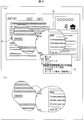
- the figure (a) is a figure which shows the example of a screen in the range designation
- the figure (b) is designated in the figure (a) The example of a screen in the state which superimposed and displayed the image of the range is shown.
- FIGS. 7A and 7B are diagrams illustrating examples of user operations for performing association between superimposed objects.
- FIG. 4A is a diagram relating to copying of linked superimposed objects.
- FIG. 4A shows an example of an operation for executing copying
- FIG. 4B shows an example of copied text
- the figure (a) shows the example of operation which performs priority setting
- the figure (b) shows the example of a screen after a priority is set.
- the figure (a) shows the example of operation which performs rearrangement
- the figure (b) shows the example of a screen after rearrangement.
- the figure (a) shows the example of operation which performs switching of a detailed display and a keyword display
- the figure (b) shows the example of the superposition object which became the keyword display state.
- the figure (a) shows the example of operation which performs switching of a detailed display and a keyword display
- the figure (b) is after switching to a keyword display.
- An example screen is shown.
- FIG. 1 It is a figure which shows the specific example of a background layer management table. It is a figure which shows the specific example of a superimposition layer management table. It is a figure which shows the specific example of a priority list table. It is a figure explaining a map, the figure (a) shows the example of a setting of a map, and the figure (b) shows the example of the layer display based on the map of the figure (a). It is a figure which shows an example of the method of specifying the touch position on a superimposition layer from a reference
- the information processing apparatus 1 is an apparatus having a browser function for displaying a web page, and displays an enlarged image of a range specified in the displayed web page superimposed on the web page.
- a web page is content on a network, and is a collection of data displayed at a time by a browser.
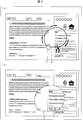
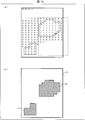
- FIG. 2 is a diagram showing an aspect of superimposed display, in which FIG. 2A is a diagram showing an example of a screen in a range designated state, and FIG. 2B is a range designated in FIG. 2A. The example of a screen in the state which superimposedly displayed the image of this is shown.
- (A) of the figure shows a state in which the range surrounded by the line B is designated by moving the cursor A on the displayed web page.
- the information processing apparatus 1 displays an image of the designated range in a superimposed manner on the original web page, as shown in FIG.
- this image to be superimposed and displayed is referred to as a superimposed object.
- the illustrated superimposed object C includes an image obtained by enlarging an image in a specified range. That is, the superimposed object C is an object including an image in a range (range surrounded by the line B) specified from the displayed web page (content).
- the superimposition object C operates independently of the original web page. Further, the superimposed object C can be moved to an arbitrary position on the display screen.
- a double-tap operation an operation that touches the display screen twice continuously for a short time
- the information processing apparatus 1 displays the web page corresponding to the superimposed object C (in this example, Display the original web page in full screen.
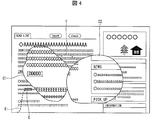
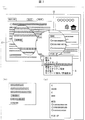
- FIG. 6A is a diagram showing that an off-screen drag, which is an operation of dragging the superimposed object C to the outside of the display screen, is performed, and FIG. It is a figure which shows the example of a screen by which the string image E was displayed.
- the end point D of the string image E is displayed so as to be positioned within the designated range when the superimposed object C is generated.
- the user can visually display that the image at the end point D can be displayed in an enlarged manner, that is, the superimposed object C can be displayed. Can be recognized.
- the other end of the string image E is displayed at a position (an end portion of the display screen) where the superimposed object is moved in order to hide the superimposed object C. That is, the string image E is an image that reminds the user that the superimposed object displayed at the position of the end point D is hidden by moving it to the end of the display screen.
- the user can trace the end of the string and the user's memory, and can easily remember what superimposed object is displayed.
- the user actually attaches a string to the superimposed object, and when it is unnecessary, drives the superimposed object away from the content as if to remove the superimposed object. Can be redisplayed as if pulling out. That is, the user can switch display / non-display of the superimposed object by an intuitive operation.
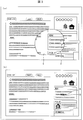
- the screen display in a state where the superimposed object and another superimposed object are linked will be described with reference to FIG.
- the superimposed object C1 and the superimposed object C2 are linked, and a string image F that connects the superimposed object C1 and the superimposed object C2 is displayed.
- a string image E (having an end point C within the designated range) indicating the presence of another superimposed object that is temporarily hidden is also displayed.
- FIG. 5 shows an example of operations for linking and releasing overlapping objects.
- FIG. 4A shows an operation using two-point touch
- FIG. 4B shows an operation of superimposing overlapping objects.
- a so-called pinch-in operation is performed in a state where the cursor A1 is touched with the superimposed object C1 and the cursor A2 is touched with the superimposed object C2 as shown in FIG.
- a string image F connecting the superimposed objects is displayed.
- Each superimposed object is associated with the inside of the information processing apparatus 1.
- a so-called pinch-out operation is performed in a state where each of the linked superimposed objects is touched, the linking is canceled and the display of the string image F is ended.
- each superimposed object is linked. May be.
- the operation for associating the superimposed objects is not particularly limited, but it is preferable that the association is performed by an intuitive operation as in the illustrated example.
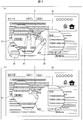
- FIG. 6A shows a state in which an image capture operation is performed on the superimposed object C2.
- an image of the superimposed object C2 is captured by displaying the menu G on the superimposed object C2 to be screen-captured and selecting the “screen capture” item included therein.
- the menu G for performing an operation on the superimposed object may be displayed by, for example, a long press operation that continues to touch the superimposed object for a certain period of time.
- the superimposed object C1 is associated with the superimposed object C2.
- the image of the superimposed object C1 and the string image are also captured together with the image of the superimposed object C2.
- it is not essential to capture the string image it is preferable to capture the string image because the user can recognize that both superimposed objects C1 and C2 have been captured as the effect of the stringing.
- FIG. 7A shows a state in which a copy operation is performed on the superimposed object C2.
- the text included in the superimposed object C1 is copied as text data as shown in FIG. 5B
- the text included in the superimposed object C2 is copied as text data as shown in FIG.
- FIG. 8 is a diagram relating to priority setting of linked superimposed objects.
- one superimposed object is selected from the linked superimposed objects C1 to C4, and priority setting is selected from the menu G. Thereby, a priority value can be set for each superimposed object.
- the superimposed object C3 is selected and the menu G is displayed.
- a setting window (not shown) for setting the priority value of the superimposed object C3 is displayed.
- the priority value of the superimposed object C3 can be set by selecting or inputting a desired priority value from the setting window.
- the priority values of the associated superimposed objects C2 to C4 are set as shown in FIG. 5B, and the set priority values are displayed as H1 to H3. Is done.
- FIG. 9 is a diagram illustrating an example of rearrangement of linked superimposed objects.
- the superimposed object C3 is selected and the menu G is displayed.
- the superimposed objects C1 to C4 associated with each other are rearranged based on the priority values H1 to H3 respectively set, and FIG. ).
- the superimposed objects C2 to C4 are arranged from the left in order of increasing priority value.
- the superimposed object C1 for which no priority value is set is not a target of rearrangement, but the display position changes with the movement of the associated superimposed object C2.
- the superimposed objects C3 and C4 are connected by the string image F3. However, in FIG.
- the superimposed objects C2 and C4 are connected by the string image F3.
- the string image only needs to be displayed so that the user can recognize the linked superimposed object, and the display position of the string image within the group of the superimposed objects linked to each other with the rearrangement. May be changed.
- FIG. 10A shows an operation of setting a keyword for the superimposed object and displaying the set keyword
- FIG. 10B shows the superimposed object in the keyword display state.
- the menu G is displayed in a state where the character string “human rights declaration” displayed on the superimposed object C is selected and highlighted.
- the superimposed object C enters a keyword display state using the selected character string as a keyword.
- the selected superimposed object hereinafter referred to as a keyword object
- the selected superimposed object J including the character “human rights declaration” is displayed.
- the display size of the keyword object J is smaller than that of the superimposed object C, the available space on the display screen is expanded. Further, since the character string displayed on the keyword object J is the character string included in the superimposed object C, the user can easily recognize that the keyword object J corresponds to the superimposed object C. .
- the superimposed object C1 and the keyword objects J1 to J4 are connected by string images F1 to F4, respectively.
- the superimposed objects C1 and C2 are connected by a string image F5
- the superimposed objects C2 and C3 are connected by a string image F6
- the superimposed objects C3 and C4 are connected by a string image F7. That is, the illustrated superimposed objects C1 to C4 and keyword objects J1 to J4 are all linked to each other.
- the menu G is displayed on the superimposed object C4 as shown in the figure, and “keyword display / detail display”, which is an item for switching between keyword display and detail display, is selected.
- the superimposed object C4 is replaced with the keyword object J7 as shown in FIG.
- the superimposed objects C2 and C3 linked to the superimposed object C4 may also be replaced with the keyword objects J5 and J6, respectively. Further, even if the superimposed object is linked like the superimposed object C1, the replacement with the keyword object may not be performed.
- whether or not a superimposed object associated with a keyword object is not replaced with a keyword object, or one of a plurality of superimposed objects associated with a keyword object is left as a superimposed object. May be judged.
- the menu G is displayed in the same manner as in the figure (a), and the "keyword display / detailed display” is selected to return to the display state in the figure (a). be able to.
- FIG. 1 is a block diagram illustrating an example of a main configuration of the information processing apparatus 1.
- the information processing apparatus 1 includes a control unit 100, a storage unit 200, a display unit 300, an input unit 400, and a communication unit 500.
- the control unit 100 controls the functions of the information processing apparatus 1 in an integrated manner, and includes an operation determination unit 10, a page display processing unit 11, a superimposed display processing unit (superimposed display unit) 12, a touch processing unit 13, and a scroll process.
- Unit 14 deformation unit 15, movement processing unit 16, magnification change unit 17, display control unit 18, page storage unit 19, copy unit 20, capture unit 21, bookmark control unit 22, background linking unit (information display means) 23 ,
- the operation determination unit 10 receives an input signal corresponding to the input operation received by the input unit 400, and performs an operation performed by the user based on the content of the input signal and the content of the image displayed on the display unit 300. Is identified. Then, each unit of the control unit 100 is caused to execute processing corresponding to the identified operation.
- the page display processing unit 11 performs processing for displaying a web page.
- the superimposed display processing unit 12 performs a process of displaying a superimposed object (see FIG. 2). Details of these processes will be described later.
- the touch processing unit 13 performs processing corresponding to the touch operation. Specifically, when the link of the website is displayed at the position where the tap operation has been performed, the touch processing unit 13 updates the image at that position to the linked image. In addition, when a button is displayed at the position where the tap operation is performed, processing associated with the button in advance (for example, starting a predetermined program) is performed.
- the scroll processing unit 14 performs a process corresponding to the scroll operation. Specifically, when a scroll operation (for example, a predetermined operation such as a drag operation or a flick operation) is performed, the scroll processing unit 14 scrolls the image displayed at the position where the operation is performed. Display. In other words, when a scroll operation is performed on the superimposed object, the image of the superimposed object is scroll-displayed. When a scroll operation is performed on the web page displayed in the background, the image of the web page is scrolled. Display.
- a scroll operation for example, a predetermined operation such as a drag operation or a flick operation
- the deforming unit 15 deforms the superimposed object according to the input operation. Since the range of the image displayed on the superimposed object is changed by deforming the superimposed object, it can be said that the deforming unit 15 is changing the range of the superimposed object.
- the movement processing unit 16 moves the superimposed object to a position corresponding to the input operation. Further, when an input operation for rotating the superimposed object is performed, the movement processing unit 16 rotates the superimposed object at a direction and a rotation angle corresponding to the input operation, and changes the direction of the superimposed object on the display surface. .
- the magnification changing unit 17 changes the display magnification of the image displayed at the position where the input operation is performed according to the content of the input operation. Specifically, when an input operation for changing the display magnification on the superimposed object is performed, an input operation for changing the display magnification of the image of the superimposed object and changing the display magnification on the web page displayed in the background. Is performed, the display magnification of the web page is changed.
- the display control unit 18 performs control to display an image on the display unit 300. Specifically, the display control unit 18 transmits data stored in a display data storage unit 35 described later to the display unit 300 for display.
- the page storage unit 19 performs processing for storing the web page as a file
- the copy unit 20 performs processing for storing the text of the superimposed object (see FIGS. 7B and 7C).
- the capture unit 21 performs a process of storing the superimposed object as an image (see FIG. 6B).
- the bookmark control part 22 performs the process regarding the bookmark of a web page.
- the background linking unit 23 In a state where the superimposed object is temporarily hidden, the background linking unit 23 superimposes notification information indicating the position on the web page on which the image that is the basis of the superimposed object is displayed on the content. To display. Specifically, the background linking unit 23 associates the superimposed object with the web page displayed on the background (the web page that is the basis of the superimposed object). When the superimposed object is dragged to the edge of the screen, instead of the superimposed object, the location of the web page that is the origin of the superimposed object (the position specified when displaying the superimposed object) and the superimposed object A string image (notification information) that connects the place where the object was last displayed (the position moved to temporarily hide the superimposed object) is displayed (see FIG. 3B).
- the inter-layer linking unit 24 associates superimposed objects when a plurality of superimposed objects are displayed, and links the associated superimposed objects as information indicating that the association is made. An image is displayed (see FIG. 4). These processes are called linking between superimposed objects (superimposed layers). When a specific process is performed on one of the superimposed objects associated with each other, the same specific process is performed on another superimposed object associated with the superimposed object. That is, the processing for the linked superimposed objects can be performed collectively. In addition, the superimposed objects that are associated with each other are subjected to a rearrangement process that will be described later.
- the copy unit 20 associates with the superimposed object. Check if other superimposed objects exist. Then, if it exists, the other superimposed object may also be a copy target, and the character string included in each superimposed object may be copied.
- the processing targeted for batch processing is not limited to the above example, and for example, the following arbitrary processing can be targeted for batch processing.
- any of these components can function as a collective processing unit.
- the keyword display part 25 performs the process which sets a keyword about a superimposition object (refer Fig.10 (a)). Further, a process of switching the superimposed object to the keyword display state (displaying the keyword object instead of the superimposed object) is performed (see FIG. 10B). Needless to say, the keyword setting and the display switching may be executed in separate blocks.
- the priority display processing unit 26 sets the priority value for the superimposed object (see FIGS. 8A and 8B), and rearranges the rearrangement process for rearranging the plurality of superimposed objects based on the priority value (FIG. 9A). b)). These processes can be executed by an operation on the menu G shown in FIGS. 6 to 11, for example. Needless to say, the priority value setting and the rearrangement may be executed in individual blocks.
- the storage unit 200 is a storage device that stores various data used by the information processing apparatus 1, and includes a background layer management table 30, a superimposed layer management table 31, a map 32, a page data storage unit 33, a superimposed data storage unit 34, and a display.
- a data storage unit 35, a copy text storage unit 36, a captured image storage unit 37, a bookmark table 38, and a priority list table 39 are included.
- the background layer management table 30 is information used by the page display processing unit 11 to display a web page
- the superimposed layer management table 31 is information used by the superimposed display processing unit 12 to display a superimposed object. is there.
- the layer in which the page display processing unit 11 displays the web page is different from the layer in which the superimposed display processing unit 12 displays the superimposed object.
- a layer that is processed by the page display processing unit 11 is referred to as a background layer
- a layer that is processed by the superimposed display processing unit 12 is referred to as a superimposed layer. Since the superimposed object is displayed based on the superimposed layer, linking of the superimposed object can also be expressed as linking of the superimposed layer.
- the map 32 is information indicating which of the background layer data and the superimposed layer data is displayed on the display unit 300. Details of the map 32 will be described later.
- the page data storage unit 33 stores image data to be displayed on the background layer
- the superimposed data storage unit 34 stores image data to be displayed on the superimposed layer
- the display data storage unit 35 stores image data to be displayed on the display unit 300.
- the copy text storage unit 36 stores text data to be copied by the copy unit 20.
- the capture image storage unit 37 stores the image data captured by the capture unit 21.
- the bookmark table 38 is information used by the bookmark control unit 22 for managing bookmarks.
- the priority list table 39 is information for designating the display order when the superimposed object rearrangement process is performed. Details of the priority list table 39 will be described later.
- the display unit 300 is a display device that displays an image according to the control of the control unit 100.
- the input unit 400 is an input device that receives an input operation of the user of the information processing apparatus 1 and outputs the input operation to the control unit 100.
- the display unit 300 and the input unit 400 are configured so that the display surface of the display unit 300 becomes the input surface of the input unit 400 will be described. That is, here, an example in which the information processing apparatus 1 includes a touch panel will be described.
- the display unit 300 only needs to have a function of displaying an image
- the input unit 400 only needs to have a function of accepting an input operation, and is not limited to this example.
- the display unit 300 and the input unit 400 may be external devices externally attached to the information processing apparatus 1.
- the communication unit 500 is a communication device for the information processing device 1 to communicate with an external device. Specifically, the information processing apparatus 1 uses the communication unit 500 to receive content such as a web page via a network such as the Internet.
- FIG. 12 is a diagram illustrating a specific example of the background layer management table 30.
- the illustrated background layer management table 30 is a table in which browser operation parameters, display update area parameters, and data storage destinations are associated with each other.
- the browser operation parameter is a parameter necessary for displaying a web page on the background layer and operating the web page.
- the display update area parameter is a parameter indicating an area to be updated on the display screen, and is used when the display of the background layer is updated.
- the rectangular area to be updated is indicated by the coordinates (x, y), width (1200 pixels), and height (800 pixels) of the upper left corner.
- the data storage destination indicates a storage destination address in the page data storage unit 33 of the web page displayed on the background layer.
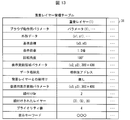
- FIG. 13 is a diagram showing a specific example of the superimposed layer management table 31.
- the superimposition layer management table 31 shown in the drawing includes browser operation parameters, outline data, reference coordinates, display magnification, rotation angle, display update area parameters, data storage destination, background layer association, return display update parameters, association. It is a table in which Gr (group), associated layers, priority values, and display keywords are associated with each other.
- the browser operation parameter is a parameter necessary for displaying a web page on the overlay layer and operating the web page.
- the outer shape data is data indicating the outer shape of the superimposed object. In the example shown in the figure, all coordinates constituting the locus of the operation for designating the range of the superimposed object are stored as outline data.
- the reference coordinates are coordinates serving as a reference when converting the coordinates of the touch position on the display screen into the coordinates of the touch position on the superimposed layer. Details of the reference coordinates will be described later.
- the display magnification is a parameter indicating how many times the image to be displayed on the superimposed object is displayed relative to the image of the original web page.
- the rotation angle is a parameter indicating how much the image to be displayed on the superimposed object is rotated with respect to the original web page image.
- the display update area parameter is a parameter indicating an area to be updated on the display screen, and is used when updating the display of the superimposed layer.
- the rectangular area to be updated is indicated by the coordinates (x2, y2), width (300 pixels), and height (400 pixels) of the upper left corner.
- the data storage destination indicates the storage destination address in the superimposed data storage unit 34 of the content to be displayed on the superimposed layer.
- ⁇ Associating with the background layer indicates whether the superimposed layer and the background layer are associated with each other.
- the parameter is “none”, indicating that the superimposed layer is not associated with the background layer.
- this parameter is updated to “present”, and the string image is displayed instead of the superimposed object. Therefore, it can be determined from the value of this parameter whether the image displayed on the superimposed layer is a superimposed object or a string image.
- the return display update parameter is used when redisplaying the superimposed object instead of the string image.
- a rectangular area to be updated when redisplayed is indicated by coordinates (x3, y3), width (300 pixels), and height (400 pixels) of the upper left corner.
- the linked group is a parameter for identifying a plurality of linked superimposed objects as one group, and the superimposed objects linked to each other are assumed to belong to the same group. Set the same.
- the linking group is 2, which indicates that the linking group is linked to another superimposition layer having the linking group of 2.
- the linked layers indicate other superimposed layers (superposed objects) that are linked.
- Priority value is a parameter indicating the priority order of display of superimposed objects, and is used when rearranging the superimposed objects.
- the display keyword indicates a keyword displayed when the superimposed object is displayed as a keyword.
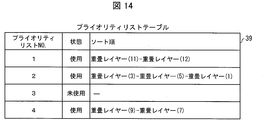
- FIG. 14 is a diagram showing a specific example of the priority list table 39.
- the priority list table 39 shown in FIG. It is a table in which (number), state, and sort order are associated with each other. A combination of the priority list number, state, and sort order is called a priority list.
- the priority list number is a value associated with the linking group in the superimposed layer management table 31, and the priority list number can be specified from the linking group.
- the tied group and the priority list number of the priority list used for rearranging the tied group are set to the same value.
- the sorting is performed in the priority list specified by the priority list number of the same number as that linking group. For example, when sorting is performed for the superimposition layer (1) in FIG. 13, since the linking group is 2, the superimposition layers (3)-(5)-( Sorted in the order of 1).
- FIG. 15A and 15B are diagrams for explaining the map 32.
- FIG. 15A shows a setting example of the map 32
- FIG. 15B shows an example of layer display based on the map 32 of FIG. Yes.
- FIG. 9A the range of pixels in which data is stored in the superimposed data storage unit 34 is indicated by a broken line.
- the information processing apparatus 1 displays data of the same layer for pixels for which the same value is set.
- the background layer image L1 is displayed on the pixels set with the value “0” as shown in FIG. Then, among the pixels whose data is stored in the superimposed data storage unit 34, the display is performed based on the data of the pixels for which the value of “1” is set, and as a result, the superimposed layer image L2 is displayed. Similarly, an image L3 of another superimposed layer is displayed on the pixel for which the value “2” is set.
- the map 32 indicates the area where the pixel data of the superimposition layer should be displayed. Therefore, by referring to the map 32, only a part of the web page of the superimposition layer is superimposed on the web page of the background layer. Can be displayed. That is, in the information processing apparatus 1, when an operation for designating the range of the web page is performed, the web page is opened in a new layer (superimposition layer). Then, according to the map 32, only the portion corresponding to the specified range of the newly opened web page is displayed on the screen, thereby realizing the display of the superimposed object.
- “string image” that is an attribute for displaying a string image, and “layer to be superimposed” indicating a superimposition relationship between superimposed layers are set in the map 32. The setting of these attributes will be described later.
- FIG. 16 is a diagram illustrating a method for specifying the touch position on the superimposed layer from the reference coordinates.
- the superimposed layer is indicated by L4 and the background layer is indicated by L5.
- the superimposed layer L4 is larger than the background layer L5.
- the image corresponding to the superimposition attribute pixel in the map 32 inside the background layer L5 is displayed. That is, only the portion corresponding to the pixel having the superimposition attribute in the image of the superimposition layer L4 is displayed as the superimposition object.
- a rectangular area including a superimposed object is indicated by a broken line.
- the coordinates of the upper left corner of this rectangular area are reference coordinates. That is, the reference coordinates can be obtained by specifying the rectangular area from the outline data of the superimposed object.
- the reference coordinates are expressed as (x1, y1) with respect to the origin of the upper left corner of the overlay layer L4 in the overlay layer L4, and (x2, y2) with respect to the origin of the upper left corner of the background layer L5 in the background layer L5. It is expressed.
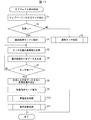
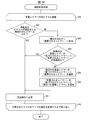
- FIG. 17 is a flowchart illustrating an example of the object display process.
- the operation determination unit 10 detects from the information notified from the input unit 400 that a touch operation on the displayed web page has been performed (S1). Then, the operation determination unit 10 determines whether the touch operation is a long press (whether the same position is touched for a predetermined time or more) (S2).
- the operation determination unit 10 determines that a normal touch operation has been performed, and notifies the touch processing unit 13 of the coordinates of the touch position. Then, the normal touch process is performed (S3).
- the touch processing unit 13 performs a process according to the touched position. For example, when a link is displayed at the touched position, processing for displaying the linked content is performed, and when a button is displayed, processing corresponding to the button is performed.
- the information processing apparatus 1 ends the object display process.
- the operation determination unit 10 notifies the superimposed display processing unit 12 to that effect.
- the superimposed display processing unit 12 that has received this notification shifts to the range designation mode (S4).
- the superimposed display processing unit 12 that has shifted to the range designation mode displays a cursor stored in advance for the range designation mode instead of the cursor that has been displayed so far. Then, the superimposed display processing unit 12 acquires the coordinate value of the touch position input to the input unit 400 via the operation determination unit 10 (S5, reception step).
- the superimposed display processing unit 12 generates outline data indicating the outline of the selection range (the locus of the touch position in the range designation mode) from the acquired coordinate values (S6), and determines whether the touch operation has been completed (S7). ).
- the process returns to S5.
- the superimposed display processing unit 12 sets reference coordinates based on the generated outline data (S8).
- the superimposed display processing unit 12 cancels the range designation mode (S9), and performs a superimposed setting process (S10, superimposed display step).
- the display control unit 18 performs a display update process (S11), whereby the superimposed object is displayed, and the object display process ends.
- the content data of the background layer whose range has been specified (data that constitutes a web page, for example, an HTML file and image data) is stored in the page data storage unit 33, and superposition layer management is performed.
- a storage address is set in the table 31.
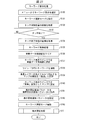
- FIG. 18 is a flowchart illustrating an example of the superimposition setting process.
- the superimposition setting process is a process for superimposing and displaying a superimposed object on a web page.
- the superimposed display processing unit 12 initializes the parameters for the superimposed layer browser operation in the superimposed layer management table 31 (S20). Further, the superimposed display processing unit 12 decodes (or analyzes) the content data indicated by the storage destination address included in the superimposed layer management table 31 (S21). Then, the superimposed display processing unit 12 enlarges the character string and the image obtained by decoding at a predetermined enlargement ratio, and lays out in the superimposed data storage unit 34 (S22). If there is no need for enlargement, the enlargement ratio may be set to 1.
- the superimposition display processing unit 12 sets coordinates specified for the range (coordinates constituting the locus of the operation for specifying the range) in the superimposition attribute on the map 32 based on the outline data generated in S6 of FIG. S23).
- the superimposed display processing unit 12 sets the inside of the specified range (the region surrounded by the locus of the operation for specifying the range) as the superimposed attribute in the map 32 (S24).
- the superimposed display processing unit 12 sets display update area parameters (for example, parameters indicating the reference coordinates and the width and height of the rectangular area including the outline data) indicating the area for updating the display (S25).
- display update area parameters for example, parameters indicating the reference coordinates and the width and height of the rectangular area including the outline data
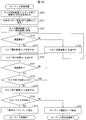
- FIG. 19 is a flowchart illustrating an example of the display update process.
- the display control unit 18 Upon receiving the notification that the display update area parameter has been updated, the display control unit 18 performs processing from LP1 to LP2 for all coordinates in the display update area. First, the display control unit 18 determines the coordinates to be updated from the display update area parameter (S30). Specifically, the display control unit 18 determines one coordinate from the area indicated by the display update area parameter. Subsequently, the display control unit 18 refers to the map 32 and determines whether the attribute of the determined coordinate is “transparent” (S31).
- the display control unit 18 If it is determined that the transmission is “transparent” (YES in S31), the display control unit 18 reads out pixel data corresponding to the coordinates determined in S30 from the page data storage unit 33 (S32). Proceed to processing. On the other hand, when it is determined that it is not “transmission” (“superimposition”) (NO in S31), the display control unit 18 reads out pixel data corresponding to the coordinates determined in S30 from the superimposition data storage unit 34. (S33). In addition, the display control unit 18 converts the coordinates into coordinates after rotation based on the rotation angle of the superimposed layer and the reference coordinates (S34), and proceeds to the process of S35.
- the display control unit 18 calculates a write destination address corresponding to the coordinates (coordinates determined in S30 or coordinates after conversion in the case of performing conversion in S34) in the display data storage unit 35. . Then, the display control unit 18 sets the pixel data read in S32 or S33 in the display data storage unit 35 (S36). After performing the processing from S30 to S36 described above for all coordinates in the area indicated by the display update area parameter, the display control unit 18 transfers the data in the display data storage unit 35 to the display unit 300 (S37). Thereby, the image displayed on the display part 300 is updated, and a display update process is complete
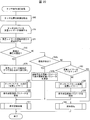
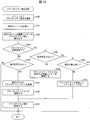
- FIG. 20 is a flowchart illustrating an example of touch operation handling processing. Note that the touch operation is an operation performed by touching the display surface with one finger.
- the operation determination unit 10 detects from the information notified from the input unit 400 that a touch operation has been performed on the web page being displayed, the operation determination unit 10 acquires the coordinates of the touch position (S40). Thereafter, the operation determination unit 10 searches the superimposed layer touched with reference to the map 32, and repeats the processing from LP3 to LP4 until the search for the superimposed layer is completed.
- the operation determination unit 10 first reads out the detected rotation angle and reference coordinates of the superimposed layer from the superimposed layer management table 31, and uses the coordinates acquired in S40 as the center for the rotation angle.
- the coordinate conversion is performed so as to reversely rotate (S41). If the detected superimposed layer is not rotated, the rotation angle is set to 0 and the process of S41 is performed. In this case, the coordinates do not change in S41, but by adopting such a configuration, the processing procedure can be shared regardless of the presence or absence of rotation.
- the operation determination unit 10 refers to the map 32 and determines whether the attribute of the coordinates obtained by the conversion in S41 is transparent (S42). If it is determined that the attribute is not transparent (superimposition) (NO in S42), the operation determination unit 10 notifies the background linking unit 23 to that effect. Upon receiving the notification, the background linking unit 23 determines whether the detected superimposed layer is in the string display state (S49a). Specifically, information on the superposed layer detected from the superposed layer management table 31 is read, and when the link with the background layer is “present”, it is determined that the superposed layer is in the string display state.
- the background linking unit 23 notifies the superimposed display processing unit 12 to that effect.
- the superimposed display processing unit 12 updates the display update region parameter with the return display update parameter in the superimposed layer management table 31 (S49b), and notifies the display control unit 18 of the update of the display update region parameter.
- the display control unit 18 performs display update processing (S11), and the touch operation handling processing ends. Thereby, instead of the displayed string image, the superimposed object corresponding to the detected superimposed layer is displayed again.
- the operation for redisplaying the superimposed object may be an operation of dragging the string image or an operation other than this.
- the background linking unit 23 notifies the operation determination unit 10 to that effect.
- the operation determination unit 10 determines whether the edge (outer edge) of the superimposed layer has been touched (S43). Specifically, the operation determination unit 10 refers to the map 32, and the coordinates acquired in S40 are on a pixel (outermost pixel) that defines the outer shape of the superimposed layer or within a predetermined range from the pixel. When it exists on the pixel of a superimposition layer, it determines with the edge being touched.
- the operation determination unit 10 determines that the deformation process has been performed, and notifies the deformation unit 15 of the fact.
- the deforming unit 15 that has received this notification performs a deforming process in accordance with the touch operation to deform the superimposed object (S44), thereby ending the touch operation handling process.
- the touch process or the scroll process is performed on the superimposed layer (S45).
- the operation determination unit 10 displays the coordinates of the touch position and the superimposed layer that is the target of the operation as a touch processing unit 13.
- touch processing when there is a link at the touch position, the touch processing unit 13 downloads and decodes the content of the link destination, and superimposes the character string and the image included in the content data with a predetermined enlargement ratio.
- the layout is stored in the storage unit 34.
- the operation determination unit 10 When the touch position changes within a predetermined time, the operation determination unit 10 notifies the scroll processing unit 14 of the touch position before and after the change and the superimposed layer that is the target of the operation, and performs scroll processing. Make it.
- the data stored in the superimposed data storage unit 34 is changed according to the magnitude of the change in the coordinate value of the touch position.
- the touch processing unit 13 or the scroll processing unit 14 sets a display update region parameter indicating a region including the superimposed layer that is the operation target (S46), and notifies the display control unit 18 of the update of the display update region parameter. To do. Thereafter, the display control unit 18 performs the above-described display update process (S11), whereby the image displayed on the display unit 300 is updated, and the touch operation handling process ends.
- the operation determination unit 10 determines that the coordinate attribute is transparent in S42 (YES in S42), if all the search for the superimposed layer is completed, the touch processing or scrolling is performed for the background layer. Processing is performed (S47). Note that the touch process and the scroll process in the background layer are the same as those in S45 except that the layer to be processed is different, and thus detailed description thereof is omitted here. Then, the touch processing unit 13 or the scroll processing unit 14 sets a display update region parameter indicating the region of the background layer (S48), and notifies the display control unit 18 of this. Thereafter, the display control unit 18 performs a display update process (S11), whereby the image displayed on the display unit 300 is updated, and the touch operation handling process ends.
- S11 display update process
- FIGS. 21 and 22 are flowcharts showing an example of the two-finger touch operation handling process, and A in FIG. 21 and A in FIG. 22 are connected.
- the two-finger touch operation is an operation performed by simultaneously touching the display surface with two fingers. As described above, in touch operation with one finger, touch processing or scroll processing is performed. On the other hand, in the two-finger touch operation, the object is moved or rotated. Thus, in the information processing apparatus 1, different processes are performed according to the number of fingers used for the operation.
- the operation determination unit 10 acquires the coordinates of the two touched points from the information notified from the input unit 400, and sets these coordinates as “previously acquired coordinates” (S60). Next, the operation determination unit 10 refers to the map 32 and determines whether the same layer is touched with two fingers (S61).
- the operation determination unit 10 refers to the background layer management table 30 and one of the layers touched with two fingers is the background. It is determined whether it is a layer (S75). If it is determined that one is the background layer (YES in S75), the operation determination unit 10 determines that a normal touch operation has been performed, notifies the touch processing unit 13 of the coordinates of the touch position, and the above-described operation. The normal touch process is performed (S3). Thus, the two-finger touch operation handling process ends.
- the operation determination unit 10 notifies the inter-layer linking unit 24 to that effect. Further, after this notification, the two-point touch position is notified to the inter-layer linking unit 24 during the period in which the two fingers are touching different superimposed layers. Thereby, the inter-layer linking process is performed by the inter-layer linking unit 24 (S76). Details of the inter-layer linking process will be described later.
- the operation determination unit 10 determines whether the touch continues for a predetermined time (S62). If the touch is canceled before the predetermined time has elapsed (NO in S62), the operation determination unit 10 changes the magnification of the coordinates of the touch position until the touch is canceled and the layer that is the target of the operation. The notification is sent to the unit 17, and the magnification changing process is performed (S63). In the magnification changing process, the magnification changing unit 17 is configured to display the data (page data storage unit 33 or the superimposed data storage unit 34) of the layer to be operated so that the display is performed at the display magnification corresponding to the notified coordinates. Update the data stored in.
- the display image is updated to be reduced when a so-called pinch-in operation is performed, and is updated to be enlarged when a pinch-out operation is performed.
- the magnification change unit 17 sets a display update region parameter including the updated region, and notifies the display control unit 18 to that effect.
- the display control unit 18 performs the above-described display update process, whereby the image displayed on the display unit 300 is updated, and the two-finger touch operation handling process ends.
- the operation determination unit 10 notifies the movement processing unit 16 of the fact and the coordinates set in S60. Receiving this notification, the movement processing unit 16 shifts to the rotation / movement mode (S64).
- the movement processing unit 16 that has shifted to the rotation / movement mode displays a cursor stored in advance for the rotation / movement mode instead of the cursor that has been displayed so far.
- the movement processing unit 16 acquires the coordinates of the current touch position via the operation determination unit 10, and sets these coordinates to “newly acquired coordinates” (S65).
- the operation determination unit 10 determines a midpoint of “newly acquired coordinates”, that is, a midpoint of coordinates indicating the positions of two fingers that are currently touching the display surface.
- the operation determination unit 10 refers to the background layer management table, and the middle point is located in the outer periphery of the display update area of the background layer and the border area of the background layer (the outer edge area of the background layer) that is a few pixels inside. It is determined whether or not it has been reached. Thereby, the operation determination unit 10 determines whether or not the superimposed layer is dragged out of the screen (S66).
- the operation determination unit 10 When it is determined that the superimposed layer has been dragged out of the screen (YES in S66), the operation determination unit 10 notifies the background linking unit 23 to that effect. In response to the notification, the background linking unit 23 performs off-screen drag processing (S67). Details of the off-screen drag processing will be described later.
- the movement processing unit 16 transmits the “previously acquired coordinates” notified from the operation determination unit 10 and the “newly acquired”. From the coordinates, an angle for rotating the superimposed object is obtained (S68). Specifically, the movement processing unit 16 has the same “coordinates acquired previously” and “newly acquired coordinates” (coordinates whose value difference is within a predetermined range may be regarded as the same coordinates). If is present, this coordinate is specified as the center coordinate.
- the movement processing unit 16 obtains the movement amount of the superimposed object from “the previously acquired coordinates” and “the newly acquired coordinates” (S69). Specifically, the movement processing unit 16 calculates the coordinates of the middle position between the two “previously acquired coordinates” and the middle position of the two “newly acquired coordinates”, and these coordinates. Calculate the distance between them. Then, the movement amount corresponding to the calculated distance is calculated, and the movement direction is specified from the positional relationship between these coordinates. For example, a movement amount and a movement direction in which the superimposed object moves following the touch position may be specified.
- the movement processing unit 16 executes attribute change processing based on the obtained movement amount, and updates the attribute of the map 32 (S70). Details of the attribute change processing will be described later. Then, the movement processing unit 16 sets a display update region parameter specifying the region including the superimposed layer before and after the movement (S71), notifies the display control unit 18 to that effect, and executes the display update processing described above. (S11).
- the movement processing unit 16 sets the “newly acquired coordinates” up to that time to “previously acquired coordinates” (S73). Return to processing.
- the movement processing unit 16 cancels the rotation / movement mode and returns the cursor (S74).
- the two-finger touch operation handling process ends.
- the user can move and rotate by drawing an arc with one finger starting from one finger while sliding the two fingers touching the display surface. Can be performed simultaneously. Therefore, an input for displaying the superimposed object in a desired direction at a desired position can be performed quickly and smoothly by an intuitive operation.
- the method of determining whether or not the user has dragged out of the screen is not limited to the above example.
- the movement processing unit 16 is in a state where at least one coordinate included in the outline data of the superimposed object is not included in the display update area of the background layer (at least a part of the superimposed object is not displayed). It may be determined that the user has been dragged out of the screen.
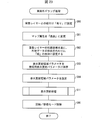
- FIG. 23 is a flowchart illustrating an example of the off-screen drag processing. Note that dragging outside the screen is a drag operation performed until the touch position reaches the edge of the display screen. By dragging the superimposed object to the edge of the display screen, the superimposed object has moved to the edge of the display screen. Later, it is hidden.
- the background linking unit 23 that has received notification that the superimposed layer has been dragged out of the screen has a link with the background layer of the superimposed layer corresponding to the dragged superimposed object in the superimposed layer management table 31. (S80). Subsequently, the background associating unit 23 changes the map attribute of the pixel related to the superimposed layer to “transparent” (S81). Furthermore, the background linking unit 23 sets the shape of the string instead of the shape of the outline data of the superimposed layer based on the initial coordinates, and sets the map attribute of the pixel corresponding to the shape of the string to the “string image”. Change (S82).
- the “string image” is a kind of superimposition attribute, and a predetermined color is displayed on a pixel having this attribute.
- the initial coordinates are reference coordinates at the time when the superimposed layer is generated, and are stored in advance.
- the shape of the string is a shape in which the position specified when generating the superimposed object corresponding to the superimposed layer is one end, and the position (end of the screen) where the superimposed object was last displayed is the other end. To do. As a result, the range from the position specified in the range to the position where the superimposed object is hidden is displayed in the predetermined color, and this is recognized as a string image.
- the background linking unit 23 stores the display update area parameter at the position where the superimposed object was last displayed in the return display update parameter (S83). Further, the background linking unit 23 sets a display update region parameter indicating the region in which the shape of the string has been set in S82 (S84), notifies the display control unit 18 of the update of the display update region parameter, and updates the display. Processing is performed (S11). Thereby, a string image is displayed instead of the superimposed object. Further, the background linking unit 23 notifies the movement processing unit 16 of the completion of the processing, and the movement processing unit 16 that has received this notification cancels the rotation / movement mode and returns the cursor (S85). As a result, the off-screen drag processing ends.
- a string image indicating that the superimposed object dragged outside the screen is not displayed is displayed based on the initial coordinates.
- a display update area parameter indicating the position of the superimposed object immediately before being hidden is recorded in the return display update parameter.
- the superimposed object can be displayed again at the position.
- the position at which the superimposed object is redisplayed is not limited to the position immediately before being hidden.
- the display update area parameter immediately before the operation of hiding the superimposed object in this example, the drag operation
- the superimposed object can be displayed again at the position immediately before the drag operation is performed.
- the display update area parameter at the initial display position of the superimposed object (the display position at the time when the superimposed object is generated and displayed) may be recorded in the return display update parameter.
- the superimposed object can be displayed again at the initial display position.
- FIG. 24 is a flowchart illustrating an example of attribute change processing.
- the movement processing unit 16 that has calculated the movement amount of the superimposed object performs the processing from LP5 to LP6 on all the pixels that are the movement destination of the superimposed object. First, the movement processing unit 16 determines whether the map attribute of the destination pixel is transparent or a pixel included in the same overlapping layer as the moving overlapping layer (S90). If the map attribute of the destination pixel is transparent, or the pixel is included in the same overlay layer as the moving overlay layer (YES in S90), the move processing unit 16 maps the map attribute of the destination pixel. Is changed to the superimposition attribute (S91), and the next pixel is processed.
- the movement processing unit 16 informs that fact between layers. Notify the attaching unit 24.
- the inter-layer linking unit 24 sets the map attribute of the superimposed layer displayed on the movement destination pixel to “layer to be superimposed” (S92).
- the inter-layer linking unit 24 refers to the superimposed layer management table 31 and determines whether or not the layer to be superimposed is registered in the “linked layer” of the moving superimposed layer (S93). .
- the movement processing unit 16 when the layer to be superimposed is registered in the “linked layer” of the overlapping layer being moved (YES in S93), the movement processing unit 16 is notified of this. Upon receiving the notification, the movement processing unit 16 changes the map attribute of the movement destination to a superposition attribute corresponding to the superposition layer being moved (S91), and performs processing for the next pixel.
- the inter-layer linking unit 24 is in the process of moving included in the superimposed layer management table 31.
- the layer to be superimposed is registered in the “linked layer” of the superimposed layer (S94).
- the inter-layer linking unit 24 registers the superimposed layer being moved in the “linked layer” for the layer to be superimposed included in the superimposed layer management table 31 (S95), and moves that effect.
- the processing unit 16 is notified. Upon receiving the notification, the movement processing unit 16 changes the map attribute of the destination pixel to a superposition attribute corresponding to the superposition layer being moved (S91), and performs processing for the next pixel.
- FIG. 25 is a flowchart showing an example of the inter-layer linking process.
- the inter-layer linking unit 24 that has received a notification from the operation determining unit 10 that two fingers are touching different superimposed layers, the inter-layer linking unit 24 touches the two superimposed layers with two fingers different from each other. While it is determined that the current state continues, the processing from LP7 to LP8 is repeated.
- the superimposition layer touched by one finger is assumed to be layer A, and the superposition layer touched by the other finger is assumed to be layer B.
- the inter-layer linking unit 24 determines whether a so-called pinch-in operation has been performed based on information indicating the touch position output from the operation determination unit 10 (S100). When it is determined that the pinch-in operation has been performed (YES in S100), the inter-layer linking unit 24 determines whether the linking groups of the layers A and B are equal (S101). If it is determined that the pegging groups are equal (YES in S101), the process from LP7 to LP8 is repeated again if the state in which the two fingers are touching different superimposed layers continues.
- the inter-layer linking unit 24 sets the layer B to the “linked layer” of the layer A included in the superimposed layer management table 31 ( S102). Similarly, the inter-layer linking unit 24 sets the layer A to the “linked layer” of the layer B included in the superimposed layer management table 31 (S103).
- the inter-layer linking unit 24 sets a linking group (S104) and performs a string image setting process (S105).
- S104 sets a linking group
- S105 performs a string image setting process
- the procedure for setting the linking group and the linking image setting process will be described later. Further, after the process of S105 is performed, if the state where two fingers are touching different superimposed layers continues, the processes of LP7 to LP8 are repeated again.
- the inter-layer linking unit 24 determines whether a so-called pinch-out operation has been performed based on the information output from the operation determination unit 10 ( S106). If it is determined that the pinch-out operation has been performed (YES in S106), it is determined whether the linking groups of layers A and B are different (S107).
- the inter-layer linking unit 24 deletes the layer B from the “linked layer” of the layer A included in the superimposed layer management table 31 (S108). ). Similarly, the inter-layer linking unit 24 deletes the layer A from the “linked layer” of the layer B included in the superimposed layer management table 31 (S109).
- the inter-layer linking unit 24 sets the linking group of the layer A and the layer B included in the superimposed layer management table 31 to none (value: 0) (S110), and thereafter performs the linking image release process. Perform (S111). After the process of S111, if the state where two fingers are touching different superimposed layers continues, the processes of LP7 to LP8 are repeated again.
- Linkage group settings The procedure for setting the linking group performed in S104 of FIG. 25 will be described below.
- the linking group having a small value is unified. That is, of the two linking groups, the value of the linking group having the larger value is updated with the value of the linking group having the smaller value.
- the priority list is updated in accordance with the change of the linking group. That is, the status of the priority list corresponding to the linking group that is no longer used (the linking group with the larger value) is updated to unused.
- a pegging group of a superimposition layer in which a pegging group is set to a pegging group of a superimposed layer for which no pegging group is set Set the value of.
- FIG. 26 is a flowchart illustrating an example of a string image setting / releasing process.
- the inter-layer linking unit 24 acquires the center coordinates of the layers A and B, which are superimposed layers respectively touched by two fingers (S120).
- the center coordinates are rectangular center coordinates surrounding the superimposed object corresponding to the superimposed layer, and can be specified by referring to the display update area parameter of the superimposed layer management table 31.
- the inter-layer linking unit 24 specifies coordinates on a straight line connecting the acquired center coordinates (S121).
- the inter-layer linking unit 24 performs the processing from LP9 to LP10 for each specified coordinate.
- the inter-layer linking unit 24 determines whether the map attribute of the coordinates to be processed is equal to the layer A or B, that is, whether the value is a value indicating the layer A or B (S122). ). If the map attribute matches the attribute of layer A or B (YES in S122), the process from LP9 to LP10 is performed for the next coordinates.
- the inter-layer linking unit 24 determines whether the setting is a lace image (S123). That is, it is determined whether it is a string image setting process or a string image releasing process. If it is determined that the string image is set (YES in S123), that is, if it is a string image setting process, the map attribute of the coordinate to be processed is set to “string image” (S124), and the next The processing from LP9 to LP10 is performed for the coordinates of.
- the map attribute of the coordinate to be processed is set to “transparent” (S124). For the next coordinates, the processing from LP9 to LP10 is performed.
- a string image is displayed so as to connect layers A and B. Further, according to the string image releasing process, the string image connecting the layers A and B is deleted. In addition, you may replace with the curve the straight line (straight line which shows the coordinate which displays a string image) determined by the process of S120, S121. Further, the end point of the straight line or curve may be any point included in each of the superimposed object included in the layer A and the superimposed object included in the layer B.
- FIG. 27 is a flowchart showing an example of the keyword display process.
- the operation determination unit 10 determines that an operation for selecting a keyword display from the menu of a specific superimposed object has been performed (S130), the operation determination unit 10 notifies the keyword display unit 25 to that effect and shifts to the keyword selection mode (S131). ).
- the keyword display unit 25 acquires the coordinates of the touch start position from the coordinates of the touch position transmitted from the operation determination unit 10 (S132), and waits for the end of the touch (S133).
- the keyword display unit 25 acquires the coordinates of the touch end position (the coordinates received last from the operation determination unit 10) (S134). Subsequently, the keyword display unit 25 performs keyword acquisition processing based on the acquired coordinates of the touch start position and end position (S135). Details of the keyword acquisition process will be described later.
- the keyword display unit 25 clears the data stored in the superimposed data storage unit 34 for the superimposed object to be displayed as a keyword (S136). Subsequently, the keyword display unit 25 generates a keyword display window, draws it in the superimposed data storage unit 34 (S137), and draws the keyword acquired in S135 in the keyword display window (S138). Further, the keyword display unit 25 sets the map attribute corresponding to each pixel of the superimposed layer to “transparent” (S139), and subsequently sets the map attribute corresponding to each pixel corresponding to the drawn keyword display window. “Superimposition” is set (S140).
- the keyword display unit 25 sets the display update area parameter of the superimposed layer as the return display update parameter in the superposition layer management table 31 (S141), and then displays the rectangular area including the keyword display window as the display update area.
- the parameter is set (S142). Thereafter, the keyword display unit 25 cancels the keyword selection mode (S143), notifies the display control unit 18 of the update of the display update area parameter, and the display control unit 18 performs display update processing (S11). Thereby, the keyword display process ends.
- the user can change the superimposed object to the keyword display. Further, since the display position of the superimposed object is stored in the return display update parameter, the superimposed object can be displayed again at the position before the change to the keyword display by referring to this parameter.
- the keyword acquisition process is performed when an operation for selecting the keyword display from the menu is performed.
- the keyword acquisition process may be performed before such an operation is performed.
- the processing of S131 to S135 is omitted.
- the superimposed object that is the target of keyword display may include only the superimposed object on which the menu is displayed, or may include other superimposed objects that are associated with the superimposed object. .
- FIG. 28 is a flowchart illustrating an example of the keyword acquisition process.
- the x component of coordinates is represented as coordinates (x)
- the y component of coordinates is represented as coordinates (y).
- the keyword display unit 25 obtains the coordinates of the midpoint between the touch start coordinate (y) that is the y coordinate of the touch start position and the touch end coordinate (y) that is the y coordinate of the touch end position (S150). Then, the obtained coordinates of the midpoint are set as y-coordinates that serve as a reference for starting and ending copying (S151).
- the keyword display unit 25 sets the x coordinate of the touch start position to the copy start coordinate (x) (S152).
- the x and y coordinates of the copy start position are determined by the processing of S151 and S152.
- the keyword display unit 25 determines whether or not the map attribute of this copy start coordinate is superimposed (S153). If it is determined that the map attribute of the copy start coordinate is not superposition (NO in S153), the keyword display unit 25 increases the copy start coordinate (x) by a certain value (for example, 1) (S154), and again the copy start coordinate. It is determined whether the map attribute is superimposed (S153).
- the keyword display unit 25 determines the current copy start coordinate (x) as the copy start coordinate (x) (S155). Further, the keyword display unit 25 sets the copy start coordinate (x) as the initial value of the copy end coordinate (x).
- the operation determination unit 10 increases the copy end coordinate (x) by a certain value (for example, 1) (S156), and determines whether the map attribute of the copy end coordinate is transparent (S157). If it is determined that the map attribute of the copy end coordinate is not transparent (NO in S157), the process returns to S156.
- a certain value for example, 1
- the keyword display unit 25 determines whether the copy end coordinate (x) is equal to or less than the touch end coordinate (x) (S158). ). If the copy end coordinate (x) is equal to or less than the touch end coordinate (x) (YES in S158), the process returns to S156.
- the keyword display unit 25 Determines the current copy end coordinate (x) as the final copy end coordinate (x) (S159).
- the keyword display unit 25 determines whether there is a character string to be copied in the range from the copy start coordinate to the copy end coordinate (S160). If there is a character string to be copied (YES in S160), the character string is set as a display keyword in the superimposed layer management table 31 (S161), and the keyword acquisition process is terminated.
- the keyword display unit 25 cancels the keyword selection mode (S162), and the keyword display process. Exit.
- the character string on the superimposed object that is sandwiched between the touch start position and the touch end position is set as a keyword in the keyword selection mode. Further, since the copy start coordinate (y) and the copy end coordinate (y) are equal, only the character string included in one line corresponding to the designated position on the superimposed object is included among the character strings on the superimposed object. Subject to keyword setting.
- FIG. 29 is a flowchart illustrating an example of the detailed display process.
- the operation determination unit 10 determines that an operation for selecting a detailed display from the menu (an operation for selecting an item of “keyword display / detail display” from the menu displayed on the keyword object) has been performed (S170). This is notified to the keyword display unit 25. Upon receiving the notification, the keyword display unit 25 clears the data stored in the superimposed data storage unit 34 corresponding to the keyword object (S171). Subsequently, the keyword display unit 25 sets the map attribute to “transparent” based on the display update area parameter (S172). As a result, the keyword display window is hidden. The keyword display unit 25 notifies the superimposed display processing unit 12 to redisplay the superimposed object corresponding to the keyword object.
- the superimposition display processing unit 12 performs the superimposition object superimposition setting process (S10), and then the display control unit 18 performs display update processing (S11). Thereby, the superimposed object is displayed again, and the detailed display process ends.
- FIG. 30 is a flowchart illustrating an example of priority setting processing.
- the operation determination unit 10 determines that the priority setting is selected from the menu (S180)
- the operation determination unit 10 notifies the priority display processing unit 26 to that effect.
- the priority display processing unit 26 displays a setting window (S181).
- the setting window is a user interface for setting the priority value of the selected superimposed layer (the superimposed layer corresponding to the superimposed object on which the menu is displayed).
- the priority display processing unit 26 tries to read the priority value of the selected superimposed layer from the superimposed layer management table 31 (S182), and determines whether the priority value is set (S183).
- the priority display processing unit 26 determines whether the priority value is set in the setting window (S184). When the priority value is not set (NO in S184), the priority setting process is terminated. On the other hand, when the priority value is set (YES in S184), the priority display processing unit 26 acquires the priority list corresponding to the linked group of the selected superimposed layer from the priority list table 39 (S185).
- the priority display processing unit 26 registers the selected superimposed layer in the acquired priority list based on the set priority value (S186). More specifically, the sort order of the acquired priority list is registered so as to be the order of priority values. In addition, the priority display processing unit 26 sets the set priority value in the superimposed layer management table 31 (S187), and ends the priority setting process.
- the priority display processing unit 26 determines whether the priority value is set in the setting window (S188). When the priority value is not set (NO in S188), the priority display processing unit 26 deletes the selected superimposed layer from the priority list (S189). Subsequently, the processing from S187 is executed.
- the priority display processing unit 26 determines whether the set priority value is the same as the current value (the value read in S182) (S190). . If it is determined that they are the same (YES in S190), the priority display processing unit 26 ends the priority setting process. On the other hand, if it is determined that they are different (NO in S190), the priority display processing unit 26 sorts the priority list based on the set priority value (S191). Thereafter, the processing after S187 is executed.
- the set priority value is set in the superposition layer management table 31.
- the sort order included in the priority list table 39 is maintained based on the priority value of the superimposed layer management table 31.
- FIG. 31 is a flowchart showing an example of the rearrangement process.
- the rearrangement process is executed when the operation determination unit 10 notifies the priority display processing unit 26 that the rearrangement is selected in the menu for the selected superimposed object (superimposed layer).
- the priority display processing unit 26 acquires from the priority list table 39 a priority list corresponding to the linked group of the selected superimposed layer (S200), and performs a linked layer deletion process (S201). Details of the linking layer deletion process will be described later.
- the priority display processing unit 26 After completion of the linking layer erasing process, the priority display processing unit 26 acquires the superimposition layer that is the head in the sort order of the priority list (S202). Subsequently, the priority display processing unit 26 sets the rearrangement reference coordinates from the reference coordinates of the superposed layer to be rearranged (S203). For example, among the superposition layers included in the sort order of the priority list, the reference coordinates of the superposition layer having the smallest x coordinate and y coordinate (the superposition layer corresponding to the superposition object closest to the upper left corner of the screen) are used as the rearrangement reference coordinates. Also good.
- the priority display processing unit 26 acquires the superimposed layers included in the priority list in the sort order, and performs the processing from LP11 to LP12 on the acquired superimposed layers.
- the priority display processing unit 26 updates the map attribute of the target overlapping layer based on the rearrangement reference coordinates (S204). Specifically, the rearrangement reference coordinates are set as the reference coordinates of the target overlapping layer, and the map attribute of the area indicated by the display update area parameter with reference to the reference coordinates is updated. Further, the priority display processing unit 26 updates the reordering reference coordinates (S205).
- the reference coordinates of the superimposed layer corresponding to the superimposed object second closest to the upper left corner of the screen among the superimposed layers included in the sorting order of the priority list may be used as the rearrangement reference coordinates.
- the reordering reference coordinates are updated by adding the width of the target overlapping layer and a predetermined value to the x component of the reordering reference coordinates so that the superimposed objects are arranged in order from the left end of the screen. May be. Thereafter, the priority display processing unit 26 performs the processing from LP11 to LP12 with the next overlapping layer in the priority list as the target overlapping layer.
- the superimposed layers linked are arranged in the order of the set priority values. Note that the direction of the arrangement may be changed as appropriate. Further, as in the example of FIG. 9B, the display of the string image may be updated so that the string image is displayed between the adjacent superimposed objects.
- FIG. 32 is a flowchart showing an example of the linking layer erasing process.
- the priority display processing unit 26 that has acquired the priority list performs the processing from LP15 to LP16 in order from the top of the sort order for the superimposed layer included in the priority list. First, the priority display processing unit 26 sets the map attribute of the pixel corresponding to the coordinates included in the outline data of the target overlapping layer to be transparent (S210).
- the priority display processing unit 26 reads the overlapping layer associated with the target overlapping layer from the overlapping layer management table 31, and performs the processing from LP17 to LP18 on each of the read overlapping layers. That is, the priority display processing unit 26 sets the map attribute of the pixel corresponding to the coordinates included in the outline data of the superimposed layer associated with the target superimposed layer to be transparent (S211), and reads the superimposed process Do this for each layer. Thereafter, if there is another superimposed layer registered in the priority list, the priority display processing unit 26 performs the process from S210 on the superimposed layer.
- the example which displays a string image as notification information which shows the position on the background layer used as the origin of the non-displayed superimposition object was shown.
- the notification information may be any information that allows the user to recognize the position on the background layer from which the superimposed object is based, and is not limited to this example. For example, the presence of a superimposed object that has been hidden by characters, symbols, or the like, and the position on the content corresponding to the superimposed object (position on the specified range) may be indicated.
- the notification information is preferably a linear image.
- a linear image such as a string image
- the trigger for updating is not limited to this example.
- the parameter may be updated to “present”.
- the string image is displayed if this parameter is “present”, and the string image is not displayed if this parameter is “none”.
- the display of the superimposed object may be terminated. Thereby, it is possible to switch to display of the string image only for the superimposed object that the user wants to reconfirm.
- how to define the input operation may be determined according to the specifications of the apparatus, and is not limited to the above example.
- movement / rotation is performed using two fingers, but these processes may be performed by an operation with one finger.
- content to be displayed as a superimposed object is not limited to a web page as long as the content is displayed on a page basis.
- the information processing apparatus 1 is an electronic dictionary
- an image may be displayed based on data in a format such as XMDF, and a superimposed object corresponding to a specified range in the displayed image may be superimposed.
- the information processing apparatus 1 is an apparatus capable of displaying an electronic book
- an image is displayed based on data in a format such as EPUB, and a superimposed object corresponding to a specified range in the displayed image is superimposed and displayed. May be.
- Such data indicates each element (text or image, or a reference destination thereof) constituting the content, arrangement information for arranging these elements on the screen, and a link, similarly to the HTML content. Tags etc. are included. For this reason, it is possible to receive a user's input operation independently of the original page and display a superimposed object in which the result of the input operation is reflected in the display by the same processing as in the above embodiment.
- the same processing as the bookmark processing described above is performed, and information for accessing the content that is the basis of the superimposed object and information indicating the specified range are stored in association with each other. By doing so, it is possible to reproduce the display state in which the superimposed object is displayed.
- some devices that display electronic books and electronic dictionaries have a function of inserting a “bookmark” for display from a read page.
- information indicating a page that is a source of the displayed superimposed object, and the superimposed object Information indicating the range may be stored in association with each other.
- the stored information is used to display the page where the “bookmark” is inserted, and the superimposed object is displayed on the page. May be.
- the information processing apparatus 1 basically assumes that the user browses the content and does not assume that the content is to be edited. Therefore, the content to be displayed is content that is not subject to editing (browsing Dedicated content).
- the acquisition destination of the content is not particularly limited.
- the content stored in the storage unit 200 may be displayed, or a recording medium such as a memory card storing the content may be connected to the information processing apparatus 1 and the content acquired from the recording medium may be displayed. Good.
- the control block (especially the control unit 100) of the information processing apparatus 1 may be realized by a logic circuit (hardware) formed in an integrated circuit (IC chip) or the like, or software using a CPU (Central Processing Unit). It may be realized by.
- the information processing apparatus 1 includes a CPU that executes instructions of a program that is software that realizes each function, and a ROM (Read Only Memory) in which the program and various data are recorded so as to be readable by a computer (or CPU).
- a storage device (these are referred to as “recording media”), a RAM (Random Access Memory) for expanding the program, and the like are provided.
- the objective of this invention is achieved when a computer (or CPU) reads the said program from the said recording medium and runs it.
- a “non-temporary tangible medium” such as a tape, a disk, a card, a semiconductor memory, a programmable logic circuit, or the like can be used.
- the program may be supplied to the computer via an arbitrary transmission medium (such as a communication network or a broadcast wave) that can transmit the program.
- a transmission medium such as a communication network or a broadcast wave
- the present invention can also be realized in the form of a data signal embedded in a carrier wave in which the program is embodied by electronic transmission.
- An information processing apparatus (1) is an information processing apparatus that displays content, and superimposes a superimposed object including an image in a range specified from the displayed content on the content.
- Superimposed display means (superimposed display processing unit 12) to be displayed and information display means (background) for displaying notification information indicating the position of the range on the content in a state where the superimposed object is temporarily hidden.
- a tying portion 23 ).
- the superimposed object is displayed superimposed on the content. Then, in a state where the superimposed object is not displayed, notification information indicating the position of the range (a range where an image included in the superimposed object is displayed) on the content is superimposed and displayed on the content.
- the user can recognize the presence of the superimposed object corresponding to the position indicated by the notification information. As a result, the user can view the content in consideration of whether the superimposed object corresponding to the position of the content exists even in the non-display state, and corresponds to the necessary position at a necessary timing. It is also possible to redisplay the superimposed object.
- the notification information when the superimposed object is temporarily hidden.
- the notification information may not be displayed exceptionally.
- the state of being temporarily hidden refers to a state that is not displayed in that state but can be displayed again.
- the superimposed display unit may display the superimposed object again according to an operation on the notification information.
- the superimposed object is redisplayed according to the operation on the notification information. Accordingly, the user can re-display the superimposed object by an intuitive and smooth operation of recognizing the presence of the superimposed object based on the notification information and performing an operation on the notification information.
- the superimposed display means temporarily hides the superimposed object when the superimposed object is moved to the end of the display screen.
- the notification information may further indicate the position of the end where the superimposed object is moved.
- the user can temporarily hide the superimposed object by an intuitive operation of moving the superimposed object to the end of the display screen. Since the notification information further indicates the position where the superimposed object has been moved to temporarily hide it, a series of operations from when the superimposed object is displayed until it is temporarily hidden. It is easy to remind the user.
- the notification information is a linear image connecting a point within the range and the end
- the operation for redisplaying the superimposed object may be an operation of dragging the linear image.
- the information processing apparatus is the information processing apparatus according to any one of aspects 1 to 3, in which the superimposed display unit displays a plurality of superimposed objects, and performs specific processing for one superimposed object. If there is another superimposed object associated with the superimposed object when executing the above, the batch processing means (such as the copy unit 20) that executes the specific process for the other superimposed object is also provided. May be.
- the same identification can be performed for other superimposed objects associated with the superimposed object.
- the specific process is image recording
- the information processing apparatus is the keyword display means (keyword display unit 25) for displaying the character string associated with the superimposed object in place of the superimposed object in any of the above aspects 1 to 4. May be provided.
- the character string is displayed instead of the superimposed object, it is possible to reduce the amount of information superimposed on the content and improve the viewability of the content. Further, since the character string to be displayed is a character string associated with the superimposed object, it is possible for the user to recognize what kind of superimposed object is displayed from the character string.
- An information processing apparatus includes the keyword setting unit (keyword display unit 25) that acquires a character string associated with the superimposed object from one line designated on the superimposed object in aspect 5. May be.
- the character string associated with the superimposed object is acquired from the designated line on the superimposed object.
- a character string can be acquired from one line even when the user mistakenly specifies a position extending over a plurality of lines. This is particularly useful when the position is specified by a touch operation on a small display screen (small characters).
- the information processing device is the information processing apparatus according to any one of aspects 1 to 6, wherein the superimposed display unit displays a plurality of the superimposed objects.
- the information processing apparatus may be realized by a computer.
- a control program for the processing apparatus and a computer-readable recording medium on which the control program is recorded also fall within the scope of the present invention.
- the information processing apparatus control method is a method for controlling an information processing apparatus that displays content, and superimposes a superimposed object including an image in a range specified from the displayed content on the content.
- the present invention can be suitably used for smartphones, tablet terminals, PCs (Personal Computers) equipped with a web browser, and the like.
Landscapes
- Engineering & Computer Science (AREA)
- Theoretical Computer Science (AREA)
- General Engineering & Computer Science (AREA)
- Physics & Mathematics (AREA)
- General Physics & Mathematics (AREA)
- Human Computer Interaction (AREA)
- User Interface Of Digital Computer (AREA)
- Controls And Circuits For Display Device (AREA)
Abstract
情報処理装置は、重畳オブジェクト(C)をコンテンツに重畳して表示させる重畳表示処理部と、重畳オブジェクトが一時的に非表示となっている状態において、上記コンテンツ上において当該重畳オブジェクトを表示させるために指定した範囲の位置を示す通知情報(E,D)を表示させる背景紐付け部とを備える。
Description
本発明は、コンテンツの閲覧に使用する情報処理装置に関する。
従来から、ウェブページを快適に閲覧するためのユーザインターフェースの開発が進められている。例えば、複数のウェブページをタブで切り替えて表示させることのできるブラウザが開発され、広く利用されるようになっている。
また、情報処理装置をより快適に使用するためのユーザインターフェースの開発も進められている。例えば、下記の特許文献1の技術では、タッチパネルを備えた情報処理装置において、タッチ操作が行われた位置の画像を拡大し、その操作位置に重畳表示することによって、タッチ操作を快適に行うことができるようにしている。また、下記の特許文献2の技術では、コピーまたは移動の対象として指定された領域の画像を選択オブジェクトとして表示し、この選択オブジェクトを所望のページに移動させることによって、上記領域の画像をコピーまたは移動することができるようにしている。
ここで、1つのウェブページには様々な情報が含まれていることが通常であり、このため、ユーザが着目した情報が、1つのウェブページ上で分散して配置された状態となることも多い。そして、上記従来のブラウザでウェブページを表示した場合、ユーザは着目した各情報を閲覧するために、表示画面上の離れた位置に目線を移動させる必要があり、また、各情報が一画面に表示されていない場合には、表示のスクロールを繰り返す必要が生じる。
このような問題を解決する方法として、表示画面上に表示されているコンテンツにおいて指定された範囲の画像を含み、上記表示画面上で移動可能な重畳オブジェクトを、コンテンツに重畳して表示させる方法が考えられる。また、この方法では重畳オブジェクトでコンテンツの一部が隠れるため、コンテンツの閲覧性を確保するために、重畳オブジェクトを一時的に非表示とすることができるようにすることが好ましい。
しかしながら、重畳オブジェクトを非表示とした場合、その重畳オブジェクトが一時的に非表示とされているが再表示が可能であるか、再表示が不能であるかをユーザは判断できない。また、非表示とした後でコンテンツの何れの位置に対応する重畳オブジェクトを表示させていたかを忘れてしまうことも考えられる。これにより、ユーザは、重畳オブジェクトを再表示させることができるにもかかわらず、再度範囲指定して新たに重畳オブジェクトを表示させるといった無駄な処理を行ってしまう恐れがある。
本発明は上記問題を鑑みてなされたものであり、その目的は、コンテンツに重畳して表示させた重畳オブジェクトを一時的に非表示とした状態において、コンテンツの何れの位置に対応する重畳オブジェクトが存在しているかをユーザに認識させることのできる情報処理装置等を提供することにある。
上記の課題を解決するために、本発明の一態様に係る情報処理装置は、コンテンツを表示させる情報処理装置であって、表示されている上記コンテンツから指定された範囲の画像を含む重畳オブジェクトを当該コンテンツに重畳して表示させる重畳表示手段と、上記重畳オブジェクトが一時的に非表示となっている状態において、上記コンテンツ上における上記範囲の位置を示す通知情報を表示させる情報表示手段とを備える。
本発明の一態様によれば、重畳オブジェクトを一時的に非表示とした状態において、コンテンツの何れの位置に対応する重畳オブジェクトが存在しているかをユーザに認識させることができるという効果を奏する。
〔実施形態1〕
本実施形態に係る情報処理装置1は、ウェブページを表示するブラウザ機能を有する装置であり、表示したウェブページにおいて指定された範囲の画像を、そのウェブページに重畳して拡大表示する。なお、ウェブページとは、ネットワーク上のコンテンツであり、ブラウザによって一度に表示されるデータのまとまりである。
本実施形態に係る情報処理装置1は、ウェブページを表示するブラウザ機能を有する装置であり、表示したウェブページにおいて指定された範囲の画像を、そのウェブページに重畳して拡大表示する。なお、ウェブページとは、ネットワーク上のコンテンツであり、ブラウザによって一度に表示されるデータのまとまりである。
情報処理装置1の表示について図2に基づいて説明する。図2は、重畳表示の態様を示す図であり、同図(a)は範囲指定された状態における画面例を示す図であり、同図(b)は同図(a)において指定された範囲の画像を重畳表示した状態における画面例を示す。
同図(a)では、表示されているウェブページ上においてカーソルAを移動させることにより、線Bで囲まれる範囲を指定した状態を示している。範囲が指定されると、情報処理装置1は、同図(b)に示すように、指定された範囲の画像を元のウェブページに重畳して表示する。以下では、重畳表示するこの画像を重畳オブジェクトと呼ぶ。図示の重畳オブジェクトCは、指定範囲の画像を拡大した画像を含む。つまり、重畳オブジェクトCは、表示されているウェブページ(コンテンツ)から指定された範囲(線Bで囲まれる範囲)の画像を含むオブジェクトである。
重畳オブジェクトCは、元のウェブページと独立して動作する。また、重畳オブジェクトCは、表示画面上の任意の位置に移動させることができる。なお、重畳オブジェクトCに対してダブルタップ操作(表示画面に対して2回続けて短時間触れる操作)が行われた場合、情報処理装置1は、重畳オブジェクトCに対応するウェブページ(この例では元のウェブページ)を全画面表示する。
続いて、重畳オブジェクトを一時的に非表示状態とする操作について図3に基づいて説明する。同図(a)は、重畳オブジェクトCを表示画面外へドラッグする操作である画面外ドラッグが行われていることを示す図であり、同図(b)は重畳オブジェクトCが非表示状態となったことにより紐画像Eが表示された画面例を示す図である。
同図(a)に示すように、カーソルAを重畳オブジェクトCに合わせてタッチした状態で、重畳オブジェクトCを表示画面外までドラッグする操作を行ったときには、情報処理装置1は、同図(b)に示すように、重畳オブジェクトCの代わりに紐画像Eを表示する。これにより、非表示状態となっている重畳オブジェクトCの存在が視覚的に示される。また、カーソルAを紐画像Eに合わせてタッチした状態でドラッグされた場合、紐画像Eの代わりに重畳オブジェクトCを再表示する。
また、紐画像Eの端点Dは、重畳オブジェクトCが生成される際の指定範囲内に位置するように表示される。これにより、同図(b)の表示状態において、紐画像Eをドラッグすることにより、端点Dの位置の画像を拡大表示した画像、すなわち重畳オブジェクトCを表示させることができることをユーザに視覚的に認識させることができる。
さらに、紐画像Eの他端は、重畳オブジェクトCを非表示とするために該重畳オブジェクトを移動させた位置(表示画面の端部)に表示されている。つまり、紐画像Eは、端点Dの位置で表示させた重畳オブジェクトを表示画面の端部まで移動させることによって非表示としたことをユーザに想起させる画像となっている。これにより、ユーザは、紐の端から端を辿ると共に、自らの記憶を辿ることができ、どのような重畳オブジェクトを表示させたかを思い出すことが容易になる。
以上のように、情報処理装置1によれば、ユーザは実際に重畳オブジェクトに紐を付け、不要なときはこれを払いのける感覚でコンテンツ上から追い出し、必要なときには紐を手繰って重畳オブジェクトを引っ張り出すような感覚で再表示させることができる。つまり、ユーザは直感的な操作で重畳オブジェクトの表示/非表示を切り替えることができる。
重畳オブジェクトと他の重畳オブジェクトとが紐付けされた状態における画面表示について、図4に基づき説明する。同図において重畳オブジェクトC1と重畳オブジェクトC2とが紐付けされており、重畳オブジェクトC1と重畳オブジェクトC2とを結ぶ紐画像Fが表示されている。詳細は後述するが、重畳オブジェクト同士を紐付けることにより、複数の重畳オブジェクトについてまとめて処理を行うことが可能になる。また、同図の例では、一時的に非表示となっている他の重畳オブジェクトの存在を示す紐画像E(その指定範囲内に端点Cを有する)も表示されている。
重畳オブジェクト同士の紐付けおよび解除の操作の例を図5に示している。同図(a)は2点タッチを用いた操作を示しており、同図(b)は重畳オブジェクト同士を重ね合わせる操作を示している。同図(a)に示すように、カーソルA1を重畳オブジェクトC1に合わせてタッチしており、かつ、カーソルA2を重畳オブジェクトC2に合わせてタッチした状態で、いわゆるピンチイン操作が行われた場合、各重畳オブジェクトを結ぶ紐画像Fが表示される。また、この各重畳オブジェクトが情報処理装置1の内部において対応付けられる。また、紐付けられた重畳オブジェクトのそれぞれがタッチされている状態で、いわゆるピンチアウト操作が行われた場合、紐付けは解除され、紐画像Fの表示は終了される。
また、同図(b)に示すように、カーソルA1を重畳オブジェクトC1に合わせてタッチした状態で、重畳オブジェクトC2に重ね合わせるようにドラッグする操作が行われた場合に、各重畳オブジェクトを紐付けてもよい。なお、重畳オブジェクト同士を紐付けるための操作は特に限定されないが、図示の例のように、直感的な操作で紐付けがなされるようにすることが好ましい。
重畳オブジェクトの画面キャプチャおよびコピーに関する操作について図6および図7に基づき説明する。図6の(a)は重畳オブジェクトC2に対して画像キャプチャ操作が行われている状態を示している。
図示のように、画面キャプチャの対象とする重畳オブジェクトC2にメニューGを表示させ、その中に含まれる「画面キャプチャ」の項目を選択することにより、重畳オブジェクトC2の画像がキャプチャされる。なお、重畳オブジェクトに対する操作を行うためのメニューGは、例えば重畳オブジェクトに対して一定時間以上タッチし続ける長押し操作によって表示されるようにしてもよい。
ここで、重畳オブジェクトC2には、重畳オブジェクトC1が紐付けられている。このため、同図の(b)に示すように、重畳オブジェクトC2の画像と共に、重畳オブジェクトC1の画像および紐画像もキャプチャされる。なお、紐画像のキャプチャは必須ではないが、紐画像もキャプチャした方が、紐付けの効果として重畳オブジェクトC1およびC2の両方がキャプチャされたことをユーザに認識させることができるので好ましい。
このように、重畳オブジェクト同士を紐付けることによって、複数のオブジェクトに対する処理を一括して行うことが可能になる。例えば、重畳オブジェクトに含まれる文字列をコピーする処理についても一括して行うことができる。これについて、図7に基づいて説明する。
図7(a)は重畳オブジェクトC2に対してコピー操作が行われている状態を示している。この場合、重畳オブジェクトC1に含まれるテキストが同図(b)に示すようなテキストデータとしてコピーされると共に、重畳オブジェクトC2に含まれるテキストが同図(c)に示すようなテキストデータとしてコピーされる。
プライオリティの設定について、図8に基づいて説明する。図8は、紐付けされた重畳オブジェクトのプライオリティ設定に関する図である。同図(a)の例では、紐付けられた重畳オブジェクトC1~C4のうち、一つの重畳オブジェクトが選択され、メニューGからプライオリティ設定が選択されている。これにより、各重畳オブジェクトにそれぞれプライオリティ値を設定することができる。
より詳細には、同図(a)では、重畳オブジェクトC3が選択され、メニューGが表示されている。この状態においてメニューGのプライオリティ設定の項目がカーソルAにて選択された場合、重畳オブジェクトC3のプライオリティ値を設定するための設定ウィンドウ(図示せず)が表示される。そして、設定ウィンドウから所望のプライオリティ値を選択または入力することにより、重畳オブジェクトC3のプライオリティ値を設定することができる。この操作を各重畳オブジェクトについて行うことにより、同図(b)に示すように、紐付けられた重畳オブジェクトC2~C4のプライオリティ値が設定され、設定されたプライオリティ値がH1~H3のように表示される。
続いて、紐付けされた重畳オブジェクトのプライオリティ値に基づく並べ替えについて図9に基づいて説明する。図9は紐付けされた重畳オブジェクトの並び替えの例を示す図である。
同図(a)では、重畳オブジェクトC3が選択され、メニューGが表示されている。この状態においてメニューGの並べ替えの項目がカーソルAで選択された場合、紐付けられた重畳オブジェクトC1~C4は、それぞれに設定されたプライオリティ値H1~H3に基づき並べ替えられ、同図(b)に示す状態となる。同図(b)では、重畳オブジェクトC2~C4が、プライオリティ値の小さい順に左から並んでいる。また、プライオリティ値が設定されていない重畳オブジェクトC1については、並べ替えの対象とはされないが、紐付けられた重畳オブジェクトC2の移動に伴い、表示位置が変わっている。なお、同図(a)では重畳オブジェクトC3とC4とが紐画像F3で結ばれているが、同図(b)では重畳オブジェクトC2とC4とが紐画像F3で結ばれている。このように、紐画像は、紐付けられた重畳オブジェクトをユーザが認識できるように表示されていればよく、並び替えに伴って、互いに紐付けられた重畳オブジェクトのグループ内で紐画像の表示位置を変更してもよい。
重畳オブジェクトのキーワード設定およびキーワード表示について、図10および図11に基づき説明する。図10(a)は重畳オブジェクトに対してキーワードを設定し、設定したキーワード表示させる操作を示し、同図(b)はキーワード表示状態となった重畳オブジェクトを示す。
同図(a)では、重畳オブジェクトCに表示されている“人権宣言”という文字列を選択して反転表示させた状態でメニューGが表示されている。この状態において、メニューGの“キーワード表示/詳細表示”がカーソルAにより選択された場合に、重畳オブジェクトCは選択された文字列をキーワードとしたキーワード表示状態となる。具体的には、同図(b)に示すように、重畳オブジェクトCの代わりに、選択されていた“人権宣言”という文字を含む重畳オブジェクト(以下、キーワードオブジェクトと呼ぶ)Jが表示される。
キーワードオブジェクトJは、重畳オブジェクトCよりも表示サイズが小さいので、利用可能な表示画面上の空間が広がる。また、キーワードオブジェクトJに表示される文字列は、重畳オブジェクトCに含まれていた文字列であるから、ユーザはキーワードオブジェクトJが重畳オブジェクトCに対応していることを容易に認識することができる。
図11(a)の例では、重畳オブジェクトC1とキーワードオブジェクトJ1~J4とがそれぞれ紐画像F1~F4にて結ばれている。また、重畳オブジェクトC1とC2とが紐画像F5で結ばれ、重畳オブジェクトC2とC3とが紐画像F6で結ばれ、重畳オブジェクトC3とC4とが紐画像F7で結ばれている。つまり、図示の重畳オブジェクトC1~C4およびキーワードオブジェクトJ1~J4は何れも相互に紐付けられている。
この状態において、図示のように重畳オブジェクトC4においてメニューGを表示させ、キーワード表示と詳細表示とを切り替えるための項目である“キーワード表示/詳細表示”を選択する。これにより、同図(b)に示すように、重畳オブジェクトC4がキーワードオブジェクトJ7に置換される。このとき、同図に示すように、重畳オブジェクトC4に紐付けられている重畳オブジェクトC2およびC3についても、キーワードオブジェクトJ5およびJ6にそれぞれ置換してもよい。また、重畳オブジェクトC1のように、紐付けられている重畳オブジェクトであっても、キーワードオブジェクトへの置換は行わないようにしてもよい。この他、キーワードオブジェクトが紐付けられた重畳オブジェクトはキーワードオブジェクトに置換しない、あるいは紐付けられた複数の重畳オブジェクトのうち1つは重畳オブジェクトとして残るようにする、等の条件に基づいて置換の可否を判断してもよい。
また、このようにして表示されたキーワードオブジェクトについて、同図(a)と同様にメニューGを表示させ、“キーワード表示/詳細表示”を選択することにより、同図(a)の表示状態に戻すことができる。
〔装置構成〕
続いて、情報処理装置1の構成を図1に基づいて説明する。図1は、情報処理装置1の要部構成の一例を示すブロック図である。図示のように、情報処理装置1は、制御部100、記憶部200、表示部300、入力部400、および通信部500を備えている。
続いて、情報処理装置1の構成を図1に基づいて説明する。図1は、情報処理装置1の要部構成の一例を示すブロック図である。図示のように、情報処理装置1は、制御部100、記憶部200、表示部300、入力部400、および通信部500を備えている。
制御部100は、情報処理装置1の機能を統括して制御するものであり、操作判定部10、ページ表示処理部11、重畳表示処理部(重畳表示手段)12、タッチ処理部13、スクロール処理部14、変形部15、移動処理部16、倍率変更部17、表示制御部18、ページ保存部19、コピー部20、キャプチャ部21、ブックマーク制御部22、背景紐付け部(情報表示手段)23、レイヤー間紐付け部24、キーワード表示部(キーワード表示手段、キーワード設定手段)25、および優先表示処理部(並替手段)26を含む。
操作判定部10は、入力部400が受け付けた入力操作に応じた入力信号を受け付け、該入力信号の内容と、表示部300に表示させている画像の内容とに基づいて、ユーザが行った操作を特定する。そして、特定した操作に応じた処理を、制御部100の各部に実行させる。
ページ表示処理部11は、ウェブページを表示させる処理を行う。また、重畳表示処理部12は、重畳オブジェクトを表示させる処理を行う(図2参照)。これらの処理の詳細は後述する。
タッチ処理部13は、タッチ操作に対応する処理を行う。具体的には、タッチ処理部13は、タップ操作が行われた位置にウェブサイトのリンクが表示されている場合に、その位置の画像を、リンク先の画像に更新する。また、タップ操作が行われた位置にボタンが表示されている場合には、そのボタンに予め対応付けられた処理(例えば所定のプログラムを起動する等)を行う。
スクロール処理部14は、スクロール操作に対応する処理を行う。具体的には、スクロール処理部14は、スクロール操作(例えばドラッグ操作やフリック操作等の予め定められた操作)が行われたときに、該操作が行われた位置に表示されている画像をスクロール表示させる。つまり、重畳オブジェクト上でスクロール操作がなされた場合には、重畳オブジェクトの画像をスクロール表示させ、背景に表示されているウェブページ上でスクロール操作がなされた場合には、そのウェブページの画像をスクロール表示させる。
変形部15は、重畳オブジェクトを変形させる入力操作が行われたときに、その入力操作に応じて重畳オブジェクトを変形させる。なお、重畳オブジェクトを変形することにより、重畳オブジェクトに表示される画像の範囲が変更されるので、変形部15は、重畳オブジェクトの範囲を変更しているとも言える。
移動処理部16は、重畳オブジェクトを移動させる入力操作が行われたときに、その入力操作に応じた位置に重畳オブジェクトを移動させる。また、移動処理部16は、重畳オブジェクトを回転させる入力操作が行われたときに、その入力操作に応じた向きおよび回転角度で重畳オブジェクトを回転させ、表示面上における重畳オブジェクトの向きを変更する。
倍率変更部17は、表示倍率を変更する入力操作が行われたときに、その入力操作が行われた位置に表示されている画像の表示倍率を、その入力操作の内容に応じて変更する。具体的には、重畳オブジェクト上で表示倍率を変更する入力操作が行われたときには、重畳オブジェクトの画像の表示倍率を変更し、背景に表示されているウェブページ上で表示倍率を変更する入力操作が行われたときには、そのウェブページの表示倍率を変更する。
表示制御部18は、表示部300に画像を表示させる制御を行う。具体的には、表示制御部18は、後述の表示データ格納部35に格納されたデータを表示部300に送信して表示させる。
ページ保存部19は、ウェブページをファイルとして保存する処理を行い、コピー部20は、重畳オブジェクトのテキストを記憶する処理を行う(図7(b)(c)参照)。また、キャプチャ部21は、重畳オブジェクトを画像として記憶する処理を行う(図6(b)参照)。そして、ブックマーク制御部22は、ウェブページのブックマークに関する処理を行う。これらの処理は、例えば図6~図11に示したメニューGに対する操作によって実行させることができる。
背景紐付け部23は、重畳オブジェクトが一時的に非表示となっている状態において、当該重畳オブジェクトの元になった画像が表示されているウェブページ上の位置を示す通知情報をコンテンツに重畳して表示させる。具体的には、背景紐付け部23は、重畳オブジェクトをその背景に表示されているウェブページ(その重畳オブジェクトの元になったウェブページ)と対応付ける。そして、重畳オブジェクトが画面端までドラッグされたときに、その重畳オブジェクトの代わりに、その重畳オブジェクトの元になったウェブページの箇所(重畳オブジェクトを表示させる際に範囲指定した位置)と、その重畳オブジェクトが最後に表示されていた箇所(重畳オブジェクトを一時的に非表示とするために移動させた位置)とを結ぶ紐画像(通知情報)を表示する(図3(b)参照)。
レイヤー間紐付け部24は、複数の重畳オブジェクトが表示されている場合に、重畳オブジェクト同士を対応付けし、対応付けがなされていることを示す情報として、対応付けられた重畳オブジェクト間を結ぶ紐画像を表示する(図4参照)。これらの処理を重畳オブジェクト(重畳レイヤー)間の紐付けと呼ぶ。紐付けられた重畳オブジェクトの1つに対して特定の処理が行われたときには、その重畳オブジェクトに紐付けられた他の重畳オブジェクトについても同じ特定の処理が行われる。つまり、紐付けられた重畳オブジェクトに対する処理は一括して行うことができる。また、紐付けられた重畳オブジェクトは、後述の並替え処理の対象となる。
ここで、紐付けられた重畳オブジェクトに対する一括処理について説明する。図6(a)に示したように、紐付けられた重畳オブジェクトの一方に対して画面キャプチャの処理を行う旨の操作が行われた場合、キャプチャ部21は、その重畳オブジェクトに紐付けられた他の重畳オブジェクトが存在するか確認する。そして、存在する場合には、当該他の重畳オブジェクトについてもキャプチャの対象とする。また、この場合、これらの重畳オブジェクト間に表示されている紐画像もキャプチャの対象としてもよい。
同様に、図7(a)に示したように、紐付けられた重畳オブジェクトの一方に対してコピーの処理を行う旨の操作が行われた場合、コピー部20は、その重畳オブジェクトに紐付けられた他の重畳オブジェクトが存在するか確認する。そして、存在する場合には、当該他の重畳オブジェクトについてもコピーの対象とし、各重畳オブジェクトに含まれる文字列をそれぞれコピーしてもよい。
なお、一括処理の対象とする処理は上記の例に限られず、例えば、以下の任意の処理を一括処理の対象とすることができる。
(1)ブックマーク制御部22によるブックマーク登録処理
(2)ページ保存部19によるウェブページをファイルとして保存する処理
(3)スクロール処理部14による表示のスクロール処理
(4)変形部15による変形処理
(5)移動処理部16による重畳オブジェクトの表示位置の移動処理
(6)倍率変更部17による倍率変更処理
つまり、これらの構成要素は、何れも一括処理手段として機能し得る。
(1)ブックマーク制御部22によるブックマーク登録処理
(2)ページ保存部19によるウェブページをファイルとして保存する処理
(3)スクロール処理部14による表示のスクロール処理
(4)変形部15による変形処理
(5)移動処理部16による重畳オブジェクトの表示位置の移動処理
(6)倍率変更部17による倍率変更処理
つまり、これらの構成要素は、何れも一括処理手段として機能し得る。
キーワード表示部25は、重畳オブジェクトについてキーワードを設定する処理を行う(図10(a)参照)。また、重畳オブジェクトをキーワード表示状態に切り替える(重畳オブジェクトの代わりにキーワードオブジェクトを表示する)処理を行う(図10(b)参照)。なお、キーワードの設定と、表示切替とを個別のブロックで実行するように構成してもよいことは言うまでもない。
優先表示処理部26は、重畳オブジェクトについてプライオリティ値を設定する処理(図8(a)(b)参照)、およびプライオリティ値に基づき複数の重畳オブジェクトを並べ替える並替え処理(図9(a)(b)参照)を行う。これらの処理は、例えば図6~図11に示したメニューGに対する操作によって実行させることができる。なお、プライオリティ値の設定と、並べ替えとを個別のブロックで実行するように構成してもよいことは言うまでもない。
記憶部200は、情報処理装置1が使用する各種データを格納する記憶装置であり、背景レイヤー管理テーブル30、重畳レイヤー管理テーブル31、マップ32、ページデータ格納部33、重畳データ格納部34、表示データ格納部35、コピーテキスト格納部36、キャプチャ画像格納部37、ブックマークテーブル38、およびプライオリティリストテーブル39を含む。
背景レイヤー管理テーブル30は、ページ表示処理部11がウェブページを表示させるために使用する情報であり、重畳レイヤー管理テーブル31は、重畳表示処理部12が重畳オブジェクトを表示させるために使用する情報である。なお、ページ表示処理部11がウェブページを表示させるレイヤーと、重畳表示処理部12が重畳オブジェクトを表示させるレイヤーとは異なっている。以下では、ページ表示処理部11が処理の対象とするレイヤーを背景レイヤーと呼び、重畳表示処理部12が処理の対象とするレイヤーを重畳レイヤーと呼ぶ。重畳オブジェクトは、重畳レイヤーに基づいて表示されるものであるから、重畳オブジェクトの紐付けは重畳レイヤーの紐付けと表現することもできる。
マップ32は、背景レイヤーのデータおよび重畳レイヤーのデータの何れを表示部300に表示するかを示す情報である。マップ32の詳細は後述する。
ページデータ格納部33は、背景レイヤーに表示させる画像データを格納するものであり、重畳データ格納部34は、重畳レイヤーに表示させる画像データを格納するものである。そして、表示データ格納部35は、表示部300に表示させる画像データを格納するものである。ページデータ格納部33に格納されたデータと、重畳データ格納部34に格納されたデータとを、マップ32に従って表示データ格納部35に格納することにより、重畳オブジェクトがウェブページに重畳して表示される。これらの格納部は、例えばVRAM(Video RAM)で構成することもできる。
コピーテキスト格納部36は、コピー部20がコピー対象としたテキストデータを格納するものである。また、キャプチャ画像格納部37は、キャプチャ部21がキャプチャした画像データを格納するものである。そして、ブックマークテーブル38は、ブックマーク制御部22がブックマークの管理に使用する情報である。
プライオリティリストテーブル39は、重畳オブジェクトの並替え処理を行う際の表示順を指定する情報である。プライオリティリストテーブル39の詳細は後述する。
表示部300は、制御部100制御に従って画像を表示する表示装置である。また、入力部400は、情報処理装置1のユーザの入力操作を受け付けて制御部100に出力する入力装置である。ここでは、表示部300の表示面が入力部400の入力面となるように表示部300および入力部400を構成した例を説明する。つまり、ここでは、情報処理装置1がタッチパネルを備えている例を説明する。無論、表示部300は画像を表示する機能を有していればよく、また入力部400は入力操作の受け付け機能を有していればよく、この例に限られない。さらに、表示部300および入力部400は、情報処理装置1に外付けされた外部の装置であってもよい。
通信部500は、情報処理装置1が外部の機器と通信するための通信装置である。具体的には、情報処理装置1は、通信部500を用いることにより、インターネット等のネットワークを介してウェブページ等のコンテンツを受信する。
〔テーブルの具体例〕
図12は、背景レイヤー管理テーブル30の具体例を示す図である。図示の背景レイヤー管理テーブル30は、ブラウザ動作用パラメータ、表示更新領域パラメータ、およびデータ格納先が対応付けられたテーブルである。
図12は、背景レイヤー管理テーブル30の具体例を示す図である。図示の背景レイヤー管理テーブル30は、ブラウザ動作用パラメータ、表示更新領域パラメータ、およびデータ格納先が対応付けられたテーブルである。
ブラウザ動作用パラメータは、背景レイヤーにウェブページを表示し、該ウェブページを動作させるために必要なパラメータである。また、表示更新領域パラメータは、表示画面上において更新の対象となる領域を示すパラメータであり、背景レイヤーの表示を更新する際に使用される。図示の例では、更新の対象となる矩形領域が、その左上隅の座標(x,y)と幅(1200ピクセル)および高さ(800ピクセル)とで示されている。そして、データ格納先は、背景レイヤーに表示させるウェブページのページデータ格納部33における格納先アドレスを示す。
図13は、重畳レイヤー管理テーブル31の具体例を示す図である。図示の重畳レイヤー管理テーブル31は、ブラウザ動作用パラメータ、外形データ、基準座標、表示倍率、回転角度、表示更新領域パラメータ、データ格納先、背景レイヤーとの紐付け、復帰用表示更新パラメータ、紐付けGr(グループ)、紐付けされたレイヤー、プライオリティ値、および表示キーワードが対応付けられたテーブルである。
ブラウザ動作用パラメータは、重畳レイヤーにウェブページを表示し、該ウェブページを動作させるために必要なパラメータである。また、外形データは、重畳オブジェクトの外形形状を示すデータである。図示の例では、重畳オブジェクトの範囲を指定する操作の軌跡を構成する全座標が外形データとして格納されている。そして、基準座標は、表示画面上におけるタッチ位置の座標を、重畳レイヤー上のタッチ位置の座標に変換するときの基準となる座標である。基準座標の詳細は後述する。また、表示倍率は、重畳オブジェクトに表示させる画像を、元のウェブページの画像に対して何倍に表示するかを示すパラメータである。また、回転角度は、重畳オブジェクトに表示させる画像を、元のウェブページの画像に対してどれだけ回転させて表示するかを示すパラメータである。そして、表示更新領域パラメータは、表示画面上において更新の対象となる領域を示すパラメータであり、重畳レイヤーの表示を更新する際に使用される。図示の例では、更新の対象となる矩形領域が、その左上隅の座標(x2,y2)と幅(300ピクセル)および高さ(400ピクセル)とで示されている。また、データ格納先は、重畳レイヤーに表示させるコンテンツの、重畳データ格納部34における格納先アドレスを示す。
背景レイヤーとの紐付けは、重畳レイヤーと背景レイヤーとが紐付けられているか否かを示す。図示の例では、当該パラメータは“無し”となっており、当該重畳レイヤーが背景レイヤーと紐付けられていないことを示している。ここでは、重畳オブジェクトを画面外にドラッグしたときに、このパラメータを“有り”に更新して、その重畳オブジェクトの代わりに紐画像を表示する。よって、このパラメータの値から、当該重畳レイヤーに表示される画像が重畳オブジェクトであるか紐画像であるかを判断することができる。
復帰用表示更新パラメータは、紐画像の代わりに重畳オブジェクトを再表示する際に使用される。図示の例では、再表示する際に更新の対象となる矩形領域が、その左上隅の座標(x3,y3)と幅(300ピクセル)および高さ(400ピクセル)とで示されている。
紐付けグループは、紐付けされている複数の重畳オブジェクトを1つのグループとして識別するためのパラメータであり、互いに紐付けられた重畳オブジェクトについては、同じグループに属するものとして、紐付けグループのパラメータが同一に設定される。図示の例では、紐付けグループが2となっており、これにより紐付けグループが2である他の重畳レイヤーと紐付けられていることを示している。また、紐付けされたレイヤーは、紐付けされている他の重畳レイヤー(重畳オブジェクト)を示す。
プライオリティ値は、重畳オブジェクトの表示の優先順を示すパラメータであり、重畳オブジェクトを並び替える際に用いられる。また、表示キーワードは、重畳オブジェクトをキーワード表示する際に表示するキーワードを示している。
図14は、プライオリティリストテーブル39の具体例を示す図である。図示のプライオリティリストテーブル39は、プライオリティリストNO.(ナンバー)、状態、およびソート順が対応付けられたテーブルである。なお、プライオリティリストナンバー、状態、およびソート順の組み合わせをプライオリティリストと呼ぶ。
プライオリティリストナンバーは、重畳レイヤー管理テーブル31の紐付けグループと関連付けられた値であり、紐付けグループからプライオリティリストナンバーを特定することができる。ここでは、紐付けグループと、その紐付けグループの並べ替えに使用するプライオリティリストのプライオリティリストナンバーとを同じ値としている。
つまり、ある紐付けグループについて並べ替えを行うときには、その紐付けグループと同じ番号のプライオリティリストナンバーで特定されるプライオリティリストのソート順で並べ替える。例えば、図13の重畳レイヤー(1)について並べ替えを行う場合、紐付けグループが2であるから、図14のナンバー2のプライオリティリストのソート順に従い、重畳レイヤー(3)-(5)-(1)の順に並べ替えられる。
〔マップ〕
マップ32について、図15に基づいて説明する。図15は、マップ32を説明する図であり、同図(a)はマップ32の設定例を示し、同図(b)は同図(a)のマップ32に基づくレイヤー表示の例を示している。また、同図(a)では、重畳データ格納部34にデータが格納されるピクセルの範囲を破線で示している。
マップ32について、図15に基づいて説明する。図15は、マップ32を説明する図であり、同図(a)はマップ32の設定例を示し、同図(b)は同図(a)のマップ32に基づくレイヤー表示の例を示している。また、同図(a)では、重畳データ格納部34にデータが格納されるピクセルの範囲を破線で示している。
マップ32では、表示させる画像を構成する各ピクセルについて、背景レイヤーのデータを表示させる属性である「透過」、または重畳レイヤーのデータを表示させる属性である「重畳」を設定している。より詳細には、透過属性のピクセルの値を「0」に設定し、重畳属性のピクセルの値をn(nは1以上の整数)に設定している。同図(a)の例では、「0」、「1」、または「2」の値が各ピクセルに設定されている。そして、情報処理装置1は、同じ値が設定されているピクセルには、同じレイヤーのデータを表示する。
つまり、同図(a)のマップ32を用いることにより、同図(b)に示すように、「0」の値が設定されたピクセルには背景レイヤーの画像L1が表示される。そして、重畳データ格納部34にデータが格納されたピクセルのうち、「1」の値が設定されたピクセルのデータに基づいて表示が行われる結果、重畳レイヤーの画像L2が表示される。同様に、「2」の値が設定されたピクセルには他の重畳レイヤーの画像L3が表示される。
以上のように、マップ32は重畳レイヤーのピクセルのデータを表示すべき領域を示すものであるから、マップ32を参照することにより、重畳レイヤーのウェブページの一部分のみを背景レイヤーのウェブページに重畳して表示することができる。つまり、情報処理装置1では、ウェブページの範囲を指定する操作が行われたときに、そのウェブページを新たなレイヤー(重畳レイヤー)で開く。そして、マップ32に従って、新たに開いたウェブページの、指定された範囲に対応する部分のみを画面表示することによって、重畳オブジェクトの表示を実現している。
また、上記以外の属性として、紐画像を表示させる属性である「紐画像」、および重畳レイヤー同士の重畳関係を示す「重畳されるレイヤー」がマップ32に設定される。これらの属性の設定については後述する。
〔基準座標から重畳レイヤー上のタッチ位置を特定する方法〕
基準座標から重畳レイヤー上のタッチ位置を特定する方法について、図16に基づいて説明する。図16は、基準座標から重畳レイヤー上のタッチ位置を特定する方法を示す図である。同図では、重畳レイヤーをL4で示し、背景レイヤーをL5で示している。
基準座標から重畳レイヤー上のタッチ位置を特定する方法について、図16に基づいて説明する。図16は、基準座標から重畳レイヤー上のタッチ位置を特定する方法を示す図である。同図では、重畳レイヤーをL4で示し、背景レイヤーをL5で示している。
重畳レイヤーL4には、背景レイヤーL5のウェブページが拡大表示されるため、重畳レイヤーL4の方が背景レイヤーL5よりも大きくなっている。ただし、重畳レイヤーL4の画像のうち、表示の対象となるのは、背景レイヤーL5の内側の、マップ32において重畳属性のピクセルに対応する部分の画像のみである。つまり、重畳レイヤーL4の画像のうち、重畳属性のピクセルに対応する部分のみが重畳オブジェクトとして表示される。
同図では、重畳オブジェクトを含む矩形領域を破線で示している。この矩形領域の左上隅の座標が基準座標である。つまり、重畳オブジェクトの外形データから上記の矩形領域を特定することによって、基準座標を求めることができる。基準座標は、重畳レイヤーL4では、重畳レイヤーL4の左上隅の原点を基準として(x1,y1)と表され、背景レイヤーL5では、背景レイヤーL5の左上隅の原点を基準として(x2,y2)と表される。
ここで、重畳オブジェクト上の点xに対してタッチ操作が行われたとする。このタッチ操作が行われた位置の座標(背景レイヤーL5の左上隅の原点を基準とする)を(x,y)とすると、重畳レイヤー上のタッチ位置の座標は、(x1-x2+x,y1-y2+y)と表される。この座標値を用いることにより、重畳レイヤーに対してどのような操作が行われたか(例えば何れのリンクが選択されたか)を特定することができる。
〔オブジェクト表示処理〕
続いて、重畳オブジェクトを表示させる処理であるオブジェクト表示処理(表示制御方法)の流れを図17に基づいて説明する。図17は、オブジェクト表示処理の一例を示すフローチャートである。
続いて、重畳オブジェクトを表示させる処理であるオブジェクト表示処理(表示制御方法)の流れを図17に基づいて説明する。図17は、オブジェクト表示処理の一例を示すフローチャートである。
まず、操作判定部10は、入力部400から通知される情報から、表示中のウェブページに対するタッチ操作が行われたことを検出する(S1)。そして、操作判定部10は、タッチ操作が長押しであるか(同じ位置が所定時間以上タッチされているか)判定する(S2)。
ここで、タッチ操作が長押しではないと判定した場合(S2でNO)、操作判定部10は、通常のタッチ操作が行われたと判断し、タッチ処理部13にタッチ位置の座標を通知して、通常タッチ処理を行わせる(S3)。通常タッチ処理では、タッチ処理部13は、タッチされた位置に応じた処理を行う。例えば、タッチされた位置にリンクが表示されている場合には、そのリンク先のコンテンツを表示させる処理を行い、ボタンが表示されている場合にはそのボタンに対応する処理を行う。通常タッチ処理を行った場合、情報処理装置1は、オブジェクト表示処理を終了する。
一方、タッチ操作が長押しであると判定した場合(S2でYES)、操作判定部10は、その旨を重畳表示処理部12に通知する。この通知を受信した重畳表示処理部12は、範囲指定モードに移行する(S4)。範囲指定モードに移行した重畳表示処理部12は、それまでに表示されていたカーソルの代わりに、範囲指定モード用に予め記憶されたカーソルを表示させる。そして、重畳表示処理部12は、入力部400に入力されたタッチ位置の座標値を、操作判定部10を介して取得する(S5、受付ステップ)。続いて、重畳表示処理部12は、取得した座標値から選択範囲の外形(範囲指定モードにおけるタッチ位置の軌跡)を示す外形データを生成し(S6)、タッチ操作が終了したか判定する(S7)。
ここで、タッチ操作が終了していないと判定した場合(S7でNO)、処理はS5に戻る。一方、タッチ操作が終了したと判定した場合(S7でYES)、重畳表示処理部12は、生成した外形データを元に基準座標を設定する(S8)。そして、重畳表示処理部12は、範囲指定モードを解除して(S9)、重畳設定処理を行う(S10、重畳表示ステップ)。この後、表示制御部18が表示更新処理を行い(S11)、これにより重畳オブジェクトが表示され、オブジェクト表示処理は終了する。
なお、S10の処理が行われるまでに、範囲指定された背景レイヤーのコンテンツデータ(ウェブページを構成するデータであり、例えばHTMLファイルおよび画像データ)をページデータ格納部33へ格納し、重畳レイヤー管理テーブル31に格納先アドレスを設定しておく。
〔重畳設定処理〕
続いて、図17のS10で行われる重畳設定処理の詳細を図18に基づいて説明する。図18は、重畳設定処理の一例を示すフローチャートである。重畳設定処理は、重畳オブジェクトをウェブページに重畳して表示させるための処理である。
続いて、図17のS10で行われる重畳設定処理の詳細を図18に基づいて説明する。図18は、重畳設定処理の一例を示すフローチャートである。重畳設定処理は、重畳オブジェクトをウェブページに重畳して表示させるための処理である。
まず、重畳表示処理部12は、重畳レイヤー管理テーブル31の重畳レイヤーブラウザ動作用のパラメータを初期化する(S20)。また、重畳表示処理部12は、重畳レイヤー管理テーブル31が含む格納先アドレスが示すコンテンツデータをデコード(または解析)する(S21)。そして、重畳表示処理部12は、デコードによって得た文字列および画像を所定の拡大率で拡大し、重畳データ格納部34にレイアウトする(S22)。なお、拡大の必要がない場合には、拡大率を1倍としてもよい。
続いて、重畳表示処理部12は、図17のS6で生成した外形データに基づき、マップ32において、範囲指定された座標(範囲指定する操作の軌跡を構成する座標)を重畳属性に設定する(S23)。また、重畳表示処理部12は、マップ32において、指定された範囲の内側(範囲指定する操作の軌跡で囲まれた領域)を重畳属性に設定する(S24)。そして、重畳表示処理部12は、表示を更新する領域を示す表示更新領域パラメータ(例えば基準座標と、外形データを含む矩形領域の幅および高さとを示すパラメータ)を設定し(S25)、重畳レイヤー管理テーブル31に格納する。また、重畳表示処理部12は、表示更新領域パラメータを更新した旨を表示制御部18に通知し、これにより、重畳設定処理は終了する。
〔表示更新処理〕
続いて、図17のS11で行われる表示更新処理の詳細を図19に基づいて説明する。図19は、表示更新処理の一例を示すフローチャートである。表示更新領域パラメータを更新した旨の通知を受信した表示制御部18は、表示更新領域内の全座標について、LP1からLP2の処理を行う。まず、表示制御部18は、表示更新領域パラメータから、更新する座標を決定する(S30)。具体的には、表示制御部18は、表示更新領域パラメータの示す領域内から1つの座標を決定する。続いて、表示制御部18は、マップ32を参照して、決定した座標の属性が「透過」であるか判定する(S31)。
続いて、図17のS11で行われる表示更新処理の詳細を図19に基づいて説明する。図19は、表示更新処理の一例を示すフローチャートである。表示更新領域パラメータを更新した旨の通知を受信した表示制御部18は、表示更新領域内の全座標について、LP1からLP2の処理を行う。まず、表示制御部18は、表示更新領域パラメータから、更新する座標を決定する(S30)。具体的には、表示制御部18は、表示更新領域パラメータの示す領域内から1つの座標を決定する。続いて、表示制御部18は、マップ32を参照して、決定した座標の属性が「透過」であるか判定する(S31)。
ここで、「透過」であると判定した場合(S31でYES)、表示制御部18は、ページデータ格納部33から、S30で決定した座標に対応するピクセルのデータを読み出し(S32)、S35の処理に進む。一方、「透過」ではない(「重畳」である)と判定した場合(S31でNO)、表示制御部18は、重畳データ格納部34から、S30で決定した座標に対応するピクセルのデータを読み出す(S33)。また、表示制御部18は、重畳レイヤーの回転角度と基準座標とを元に、当該座標を回転後の座標に変換し(S34)、S35の処理に進む。
S35では、表示制御部18は、表示データ格納部35における、上記座標(S30で決定した座標、またはS34で変換を行っている場合には変換後の座標)に応じた書き込み先アドレスを算出する。そして、表示制御部18は、S32またはS33で読み出したピクセルのデータを表示データ格納部35に設定する(S36)。以上説明したS30からS36の処理を、表示更新領域パラメータの示す領域内の全座標について行った後、表示制御部18は、表示データ格納部35のデータを表示部300に転送する(S37)。これにより、表示部300に表示される画像が更新され、表示更新処理は終了する。
〔タッチ操作対応処理〕
続いて、タッチ操作が行われたときに実行されるタッチ操作対応処理について図20に基づいて説明する。図20は、タッチ操作対応処理の一例を示すフローチャートである。なお、タッチ操作とは、表示面に対して1本指で触れることによって行う操作である。
続いて、タッチ操作が行われたときに実行されるタッチ操作対応処理について図20に基づいて説明する。図20は、タッチ操作対応処理の一例を示すフローチャートである。なお、タッチ操作とは、表示面に対して1本指で触れることによって行う操作である。
まず、操作判定部10は、入力部400から通知される情報から、表示中のウェブページに対するタッチ操作が行われたことを検出すると、タッチ位置の座標を取得する(S40)。この後、操作判定部10は、マップ32を参照してタッチされている重畳レイヤーを検索し、重畳レイヤーの検索が終了するまでLP3からLP4の処理を繰り返す。
LP3からLP4の処理では、操作判定部10は、まず、検出した重畳レイヤーの回転角度および基準座標を重畳レイヤー管理テーブル31から読み出し、S40で取得した座標を、基準座標を中心として、上記回転角度だけ逆回転する座標変換を行う(S41)。なお、検出した重畳レイヤーが回転されていない場合には、回転角度を0としてS41の処理を行う。この場合、S41で座標は変化しないが、このような構成とすることにより、回転の有無によらず処理の手順を共通化することができる。
次に、操作判定部10は、マップ32を参照して、S41の変換にて得た座標の属性が透過であるか判定する(S42)。ここで、属性が透過ではない(重畳である)と判定した場合(S42でNO)、操作判定部10は、その旨を背景紐付け部23に通知する。その通知を受けた背景紐付け部23は、検出した重畳レイヤーが紐表示状態であるかを判定する(S49a)。具体的には、重畳レイヤー管理テーブル31から検出した重畳レイヤーに関する情報を読み出し、背景レイヤーとの紐付けが“有り”である場合に、当該重畳レイヤーが紐表示状態であると判定する。
ここで、検出した重畳レイヤーが紐表示状態であると判定した場合(S49aでYES)、背景紐付け部23は、その旨を重畳表示処理部12へ通知する。重畳表示処理部12は、その通知を受けて、重畳レイヤー管理テーブル31の復帰用表示更新パラメータで表示更新領域パラメータを更新し(S49b)、表示更新領域パラメータの更新を表示制御部18に通知する。表示制御部18は、その通知を受けて表示更新処理を行い(S11)、タッチ操作対応処理は終了する。これにより、表示されていた紐画像の代わりに、検出した重畳レイヤーに対応する重畳オブジェクトが再表示される。なお、重畳オブジェクトを再表示するための操作は、紐画像をドラッグする操作としてもよいし、これ以外の操作としてもよい。
一方、検出した重畳レイヤーが紐表示状態ではないと判定した場合(S49aでNO)、背景紐付け部23は操作判定部10にその旨を通知する。その通知を受けた操作判定部10は、重畳レイヤーのフチ(外縁部)がタッチされたか判定する(S43)。具体的には、操作判定部10は、マップ32を参照して、S40で取得した座標が、上記重畳レイヤーの外形を規定するピクセル(最も外側のピクセル)上、または該ピクセルから所定範囲内の重畳レイヤーのピクセル上に存在した場合に、フチがタッチされたと判定する。
ここで、フチがタッチされたと判定した場合(S43でYES)、操作判定部10は、変形処理が行われたと判定し、変形部15にその旨を通知する。この通知を受信した変形部15は、タッチ操作に応じて変形処理を行って重畳オブジェクトを変形し(S44)、これによりタッチ操作対応処理は終了する。
一方、フチはタッチされていない(重畳オブジェクト外縁部の内側の領域がタッチされた)と判定した場合(S43でNO)、重畳レイヤーについて、タッチ処理またはスクロール処理が行われる(S45)。具体的には、タッチ位置が変化せず、かつ所定時間以内にタッチが終了した場合、操作判定部10は、そのタッチ位置の座標と、操作の対象となった重畳レイヤーとをタッチ処理部13に通知して、タッチ処理を行わせる。タッチ処理では、タッチ処理部13は、タッチ位置にリンクがある場合に、そのリンク先のコンテンツをダウンロードし、デコードして、当該コンテンツデータに含まれる文字列、画像を所定の拡大率で重畳データ格納部34にレイアウトする。また、所定時間以内にタッチ位置が変化した場合、操作判定部10は、変化の前後のタッチ位置と、操作の対象となった重畳レイヤーとをスクロール処理部14に通知して、スクロール処理を行わせる。スクロール処理では、タッチ位置の座標値の変化の大きさに応じて重畳データ格納部34に格納するデータを変化させる。そして、タッチ処理部13またはスクロール処理部14は、操作の対象となった重畳レイヤーを含む領域を示す表示更新領域パラメータを設定し(S46)、表示更新領域パラメータの更新を表示制御部18に通知する。この後、表示制御部18が上述の表示更新処理を行い(S11)、これにより表示部300に表示される画像が更新され、タッチ操作対応処理は終了する。
ここで、操作判定部10がS42において座標の属性が透過であると判定したとき(S42でYES)に、重畳レイヤーの検索が全て終了していた場合には、背景レイヤーについて、タッチ処理またはスクロール処理が行われる(S47)。なお、背景レイヤーにおけるタッチ処理およびスクロール処理は、処理対象となるレイヤーが異なるだけで処理の内容はS45と同様であるから、ここでは詳細な説明を省略する。そして、タッチ処理部13またはスクロール処理部14は、背景レイヤーの領域を示す表示更新領域パラメータを設定し(S48)、これを表示制御部18に通知する。この後、表示制御部18が表示更新処理を行い(S11)、これにより表示部300に表示される画像が更新され、タッチ操作対応処理は終了する。
〔2本指タッチ操作対応処理〕
続いて、2本指タッチ操作対応処理について図21および図22に基づいて説明する。図21および図22は、2本指タッチ操作対応処理の一例を示すフローチャートであり、図21のAと図22のAとは接続されている。なお、上記2本指タッチ操作とは、表示面に対して2本の指で同時に触れることによって行う操作である。上述のように、1本指によるタッチ操作では、タッチ処理またはスクロール処理が行われる。これに対し、2本指タッチ操作では、オブジェクトの移動または回転が行われる。このように、情報処理装置1では、操作に使う指の本数に応じて異なる処理が行われるようになっている。
続いて、2本指タッチ操作対応処理について図21および図22に基づいて説明する。図21および図22は、2本指タッチ操作対応処理の一例を示すフローチャートであり、図21のAと図22のAとは接続されている。なお、上記2本指タッチ操作とは、表示面に対して2本の指で同時に触れることによって行う操作である。上述のように、1本指によるタッチ操作では、タッチ処理またはスクロール処理が行われる。これに対し、2本指タッチ操作では、オブジェクトの移動または回転が行われる。このように、情報処理装置1では、操作に使う指の本数に応じて異なる処理が行われるようになっている。
まず、操作判定部10は、入力部400から通知される情報から、タッチされた2点の座標を取得し、これらの座標を「以前に取得した座標」に設定する(S60)。次に、操作判定部10は、マップ32を参照して、2本の指で同一のレイヤーがタッチされているか判定する(S61)。
ここで、同一レイヤーがタッチされていないと判定した場合(S61でNO)、操作判定部10は、背景レイヤー管理テーブル30を参照して、2本の指でタッチされているレイヤーの一方が背景レイヤーであるか判定する(S75)。そして、一方が背景レイヤーであると判定した場合(S75でYES)、操作判定部10は、通常のタッチ操作が行われたと判断し、タッチ処理部13にタッチ位置の座標を通知して、上述の通常タッチ処理を行わせる(S3)。これにより、2本指タッチ操作対応処理は終了する。一方、2本の指でタッチされているレイヤーの一方が背景レイヤーではないと判定した場合(S75でNO)、すなわち、2本の指がそれぞれ異なる重畳レイヤーにタッチしている場合、操作判定部10は、レイヤー間紐付け部24にその旨を通知する。また、この通知の後、2本の指がそれぞれ異なる重畳レイヤーにタッチしている状態が継続している期間中、2点のタッチ位置をレイヤー間紐付け部24に通知する。これにより、レイヤー間紐付け部24によってレイヤー間紐付け処理が行われる(S76)。レイヤー間紐付け処理の詳細については後述する。
一方、同一レイヤーがタッチされていると判定した場合(S61でYES)、操作判定部10は、タッチが所定時間継続しているか判定する(S62)。ここで、所定時間経過前にタッチが解消された場合(S62でNO)、操作判定部10は、タッチが解消されるまでのタッチ位置の座標と、操作の対象となったレイヤーとを倍率変更部17に通知して、倍率変更処理を行わせる(S63)。倍率変更処理では、倍率変更部17は、通知された上記座標に応じた表示倍率で表示が行われるように、操作の対象となったレイヤーのデータ(ページデータ格納部33または重畳データ格納部34に格納するデータ)を更新する。具体的には、いわゆるピンチイン操作が行われたときには表示画像が縮小するように更新し、ピンチアウト操作が行われたときには拡大するように更新する。そして、倍率変更部17は、更新した領域を含む表示更新領域パラメータを設定して、その旨を表示制御部18に通知する。この後、表示制御部18が上述の表示更新処理を行い、これにより表示部300に表示される画像が更新され、2本指タッチ操作対応処理は終了する。
一方、S62において、タッチが所定時間継続していると判定した場合(S62でYES)、操作判定部10は、その旨およびS60で設定した座標を移動処理部16に通知する。この通知を受信した移動処理部16は、回転/移動モードに移行する(S64)。回転/移動モードに移行した移動処理部16は、それまでに表示されていたカーソルの代わりに、回転/移動モード用に予め記憶されたカーソルを表示させる。
続いて、移動処理部16は、現時点のタッチ位置の座標を、操作判定部10を介して取得し、これらの座標を「新しく取得した座標」に設定する(S65)。次に、操作判定部10は、「新しく取得した座標」の中点、すなわち現時点で表示面にタッチしている2本の指の位置を示す座標の中点を決定する。続いて、操作判定部10は、背景レイヤー管理テーブルを参照し、背景レイヤーの表示更新領域の外周とその内側数ピクセルである背景レイヤーのフチ領域(背景レイヤーの外縁領域)に、当該中点が達しているか否かを判定する。これにより、操作判定部10は、重畳レイヤーが画面外へドラッグされたか否かの判定する(S66)。
重畳レイヤーが画面外へドラッグされたと判定した場合(S66でYES)、操作判定部10は、背景紐付け部23へその旨を通知する。背景紐付け部23は、その通知を受けて画面外ドラッグ処理を実行する(S67)。画面外ドラッグ処理の詳細については後述する。
一方、重畳レイヤーが画面外へドラッグされていないと判定した場合(S66でNO)、移動処理部16は、操作判定部10から通知された「以前に取得した座標」と、上記「新しく取得した座標」とから、重畳オブジェクトを回転させる角度を求める(S68)。具体的には、移動処理部16は、「以前に取得した座標」と「新しく取得した座標」とで同一(値の差異が所定範囲以内の座標を同一の座標とみなしてもよい)の座標が存在する場合、この座標を中心座標と特定する。そして、この中心座標と「以前に取得した座標」の他の座標とを結ぶ線分と、該中心座標と「新しく取得した座標」の他の座標とを結ぶ線分とがなす角度を求める。一方、中心座標が存在しない場合、移動処理部16は、「以前に取得した座標」と、「新しく取得した座標」とから、重畳オブジェクトの移動量を求める(S69)。具体的には、移動処理部16は、2つの「以前に取得した座標」の中間の位置の座標と、2つの「新しく取得した座標」の中間の位置の座標とを算出し、これらの座標間の距離を算出する。そして、算出した距離に応じた移動量を算出し、またこれらの座標間の位置関係から移動方向を特定する。例えば、タッチ位置に追従して重畳オブジェクトが移動するような移動量および移動方向を特定してもよい。
次に、移動処理部16は、求めた移動量に基づいて属性変更処理を実行し、マップ32の属性を更新する(S70)。属性変更処理の詳細については後述する。そして、移動処理部16は、移動前後の当該重畳レイヤーを含む領域を指定した表示更新領域パラメータを設定し(S71)、その旨を表示制御部18に通知して、上述の表示更新処理を実行させる(S11)。
ここで、タッチ操作が継続されている場合(S72でNO)、移動処理部16は、それまでの「新しく取得した座標」を、「以前に取得した座標」に設定し(S73)、S65の処理に戻る。一方、タッチ操作が終了している場合(S72でYES)、移動処理部16は、回転/移動モードを解除し、カーソルを元に戻す(S74)。これにより、2本指タッチ操作対応処理は終了する。上記の2本指タッチ操作対応処理によれば、ユーザは、表示面に触れた2本の指をスライドさせながら、一方の指を始点として他方の指で弧を描くことにより、移動と回転とを同時に行わせることもできる。よって、重畳オブジェクトを所望の位置に所望の向きで表示させるための入力を、直感的な操作で迅速かつスムーズに行うことができる。
なお、画面外にドラッグされたか否かの判定方法は上記の例に限られない。例えば、移動処理部16は、重畳オブジェクトの外形データに含まれる少なくとも1つの座標が背景レイヤーの表示更新領域に含まれない状態となっている場合(重畳オブジェクトの少なくとも一部が表示されない状態となっている場合)に、画面外にドラッグされたと判定してもよい。
〔画面外ドラッグ処理〕
続いて図22のS67で行われる画面外ドラッグ処理について、図23に基づき説明する。図23は画面外ドラッグ処理の一例を示すフローチャートである。なお、画面外へのドラッグとは、タッチ位置が表示画面の端部に達するまで行うドラッグ操作であり、重畳オブジェクトを画面外にドラッグすることにより、この重畳オブジェクトは表示画面の端部まで移動した後、非表示となる。
続いて図22のS67で行われる画面外ドラッグ処理について、図23に基づき説明する。図23は画面外ドラッグ処理の一例を示すフローチャートである。なお、画面外へのドラッグとは、タッチ位置が表示画面の端部に達するまで行うドラッグ操作であり、重畳オブジェクトを画面外にドラッグすることにより、この重畳オブジェクトは表示画面の端部まで移動した後、非表示となる。
まず、重畳レイヤーが画面外へドラッグされた旨の通知を受けた背景紐付け部23は、重畳レイヤー管理テーブル31において、ドラッグされた重畳オブジェクトに対応する重畳レイヤーの背景レイヤーとの紐付けを有りに設定する(S80)。続いて、背景紐付け部23は、この重畳レイヤーに係るピクセルのマップ属性を「透過」に変更する(S81)。さらに、背景紐付け部23は、初期座標を基に、当該重畳レイヤーの外形データの形状の代わりに紐の形状を設定し、当該紐の形状に対応するピクセルのマップ属性を「紐画像」に変更する(S82)。「紐画像」は、重畳属性の一種であり、この属性のピクセルには所定の色が表示される。なお、初期座標は、当該重畳レイヤーが生成された時点における基準座標であり、予め記憶しておく。また、紐の形状は、上記重畳レイヤーに対応する重畳オブジェクトを生成するときに範囲指定された位置を一端とし、重畳オブジェクトが最後に表示されていた位置(画面端)を他端とした形状とする。これにより、範囲指定された位置から重畳オブジェクトが非表示となった位置までが上記所定の色で表示され、これが紐画像と認識される。
また、背景紐付け部23は、重畳オブジェクトが最後に表示されていた位置の表示更新領域パラメータを復帰用表示更新パラメータに保存する(S83)。さらに、背景紐付け部23は、S82にて紐の形状を設定した領域を示す表示更新領域パラメータを設定し(S84)、表示更新領域パラメータの更新を表示制御部18に通知して、表示更新処理を行わせる(S11)。これにより、重畳オブジェクトの代わりに紐画像が表示される。また、背景紐付け部23は移動処理部16へ処理の完了を通知し、この通知を受信した移動処理部16は回転/移動モードを解除し、カーソルを元に戻す(S85)。これにより、画面外ドラッグ処理は終了する。
以上の処理により、画面外にドラッグされた重畳オブジェクトが非表示となっていることを示す紐画像が初期座標を基に表示される。また、非表示となる直前の重畳オブジェクトの位置を示す表示更新領域パラメータが、復帰用表示更新パラメータに記録される。これにより、当該位置に重畳オブジェクトを再表示させることができる。なお、重畳オブジェクトを再表示させる位置は、非表示となる直前の位置に限られない。例えば、重畳オブジェクトを非表示にする操作(この例ではドラッグ操作)が行われる直前の表示更新領域パラメータを復帰用表示更新パラメータに記録しておいてもよい。この場合、重畳オブジェクトをドラッグ操作を行う直前の位置に再表示させることができる。また例えば、重畳オブジェクトの初期表示位置(重畳オブジェクトが生成され、表示された時点の表示位置)における表示更新領域パラメータを復帰用表示更新パラメータに記録しておいてもよい。この場合、重畳オブジェクトを初期表示位置に再表示させることができる。
〔属性変更処理〕
続いて、図22のS70で行われる属性変更処理について図24に基づき説明する。図24は属性変更処理の一例を示すフローチャートである。
続いて、図22のS70で行われる属性変更処理について図24に基づき説明する。図24は属性変更処理の一例を示すフローチャートである。
重畳オブジェクトの移動量を算出した移動処理部16は、当該重畳オブジェクトの移動先となる全ピクセルについてLP5からLP6の処理を行う。まず、移動処理部16は、移動先のピクセルのマップ属性が透過であるか、または移動中の重畳レイヤーと同じ重畳レイヤーに含まれるピクセルであるかを判定する(S90)。移動先のピクセルのマップ属性が透過であるか、または移動中の重畳レイヤーと同じ重畳レイヤーに含まれるピクセルである場合(S90でYES)、移動処理部16は、当該移動先のピクセルのマップ属性を重畳属性に変更し(S91)、次のピクセルについて処理を行う。
一方、移動先のピクセルのマップ属性が透過ではなく、かつ移動中の重畳レイヤーと異なる重畳レイヤーに含まれるピクセルであった場合(S90でNO)、移動処理部16は、その旨をレイヤー間紐付け部24へ通知する。その通知を受けたレイヤー間紐付け部24は、移動先のピクセルに表示されている重畳レイヤーのマップ属性を「重畳されるレイヤー」に設定する(S92)。
続いて、レイヤー間紐付け部24は、重畳レイヤー管理テーブル31を参照し、移動中の重畳レイヤーの「紐付けされたレイヤー」に、重畳されるレイヤーが登録されているかを判定する(S93)。
ここで、移動中の重畳レイヤーの「紐付けされたレイヤー」に、重畳されるレイヤーが登録されていた場合(S93でYES)、その旨を移動処理部16へ通知する。その通知を受けた移動処理部16は、当該移動先のマップ属性を、移動中の重畳レイヤーに対応する重畳属性に変更し(S91)、次のピクセルについて処理を行う。
一方、移動中の重畳レイヤーの紐付けされたレイヤーに、重畳されるレイヤーが登録されていなかった場合(S93でNO)、レイヤー間紐付け部24は、重畳レイヤー管理テーブル31に含まれる移動中の重畳レイヤーについての「紐付けされたレイヤー」に、重畳されるレイヤーを登録する(S94)。同様に、レイヤー間紐付け部24は、重畳レイヤー管理テーブル31に含まれる重畳されるレイヤーについての「紐付けされたレイヤー」に、移動中の重畳レイヤーを登録し(S95)、その旨を移動処理部16へ通知する。その通知を受けた移動処理部16は、当該移動先のピクセルのマップ属性を、移動中の重畳レイヤーに対応する重畳属性に変更し(S91)、次のピクセルについて処理を行う。
以上の処理により、重畳オブジェクトが他の重畳オブジェクトと重なるように移動された場合に、これらの重畳オブジェクトが紐付けられる。すなわち、ユーザは、図5(b)に示したように、重畳オブジェクト同士を重ねる操作を行うことで、当該重畳オブジェクト同士を紐付けることができる。
〔レイヤー間紐付け処理〕
次に、図21のS76で行われるレイヤー間紐付け処理について、図25に基づいて説明する。図25はレイヤー間紐付け処理の一例を示すフローチャートである。
次に、図21のS76で行われるレイヤー間紐付け処理について、図25に基づいて説明する。図25はレイヤー間紐付け処理の一例を示すフローチャートである。
操作判定部10から2本の指がそれぞれ異なる重畳レイヤーにタッチしている旨の通知を受け取ったレイヤー間紐付け部24は、操作判定部10が2本の指がそれぞれ異なる重畳レイヤーにタッチしている状態が継続していると判定している間、LP7からLP8の処理を繰り返す。なお、ここでは、一方の指がタッチしている重畳レイヤーをレイヤーA、他方の指がタッチしている重畳レイヤーをレイヤーBとする。
まず、レイヤー間紐付け部24は、操作判定部10の出力するタッチ位置を示す情報に基づき、いわゆるピンチイン動作が行われたかを判定する(S100)。ピンチイン動作が行われたと判定した場合(S100でYES)、レイヤー間紐付け部24は、レイヤーAおよびBの紐付けグループが等しいか判定する(S101)。紐付けグループが等しいと判定した場合(S101でYES)、2本の指がそれぞれ異なる重畳レイヤーにタッチしている状態が継続していれば、再度LP7からLP8の処理が繰り返される。
一方、紐付けグループが異なると判定した場合(S101でNO)、レイヤー間紐付け部24は、重畳レイヤー管理テーブル31に含まれるレイヤーAの「紐付けされたレイヤー」にレイヤーBを設定する(S102)。同様に、レイヤー間紐付け部24は、重畳レイヤー管理テーブル31に含まれるレイヤーBの「紐付けされたレイヤー」にレイヤーAを設定する(S103)。
続いて、レイヤー間紐付け部24は、紐付けグループを設定し(S104)、紐画像設定処理を行う(S105)。紐付けグループを設定する手順、および紐画像設定処理については後述する。また、S105の処理が行われたのちに、2本の指がそれぞれ異なる重畳レイヤーにタッチしている状態が継続していれば、再度LP7からLP8の処理が繰り返される。
S100においてピンチイン動作が行われたと判定されなかった場合(S100でNO)、レイヤー間紐付け部24は、操作判定部10の出力する情報に基づき、いわゆるピンチアウト動作が行われたかを判定する(S106)。ピンチアウト動作が行われたと判定した場合(S106でYES)、レイヤーAおよびBの紐付けグループが異なるか判定する(S107)。
ここで、紐付けグループが異なる場合(S107でYES)、2本の指がそれぞれ異なる重畳レイヤーにタッチしている状態が継続していれば、再度LP7からLP8の処理が繰り返される。一方、紐付けグループが同じである場合(S107でNO)、レイヤー間紐付け部24は、重畳レイヤー管理テーブル31に含まれるレイヤーAの「紐付けされたレイヤー」からレイヤーBを削除する(S108)。同様に、レイヤー間紐付け部24は、重畳レイヤー管理テーブル31に含まれるレイヤーBの「紐付けされたレイヤー」からレイヤーAを削除する(S109)。続いて、レイヤー間紐付け部24は、重畳レイヤー管理テーブル31に含まれるレイヤーA及びレイヤーBの紐付けグループをなし(値:0)に設定し(S110)、その後に、紐画像解除処理を行う(S111)。S111の処理が行われたのちに、2本の指がそれぞれ異なる重畳レイヤーにタッチしている状態が継続していれば、再度LP7からLP8の処理が繰り返される。
S106においてピンチアウト動作が行われたと判定されなかった場合(S106でNO)、2本の指がそれぞれ異なる重畳レイヤーにタッチしている状態が継続していれば、再度LP7からLP8の処理が繰り返される。
以上の処理により、図5(a)に示したように、紐付けられていない二つの重畳オブジェクトにタッチしてピンチイン動作が行われた場合、当該二つの重畳オブジェクトは紐付けられる。また、紐付けられた二つの重畳オブジェクトにタッチしたまま、ピンチアウト動作が行われた場合、当該二つの重畳オブジェクトの紐付けは解除される。
〔紐付けグループの設定〕
図25のS104で行われる紐付けグループの設定の手順について以下説明する。レイヤーAおよびBの双方に紐付けグループが設定されている場合、小さい値の紐付けグループに統一する。つまり、二つの紐付けグループのうち、値が大きい方の紐付けグループの値を、小さい方の紐付けグループの値で更新する。また、紐付けグループの変更に合わせて、プライオリティリストも更新する。すなわち、使用されなくなった紐付けグループ(値が大きい方の紐付けグループ)に対応するプライオリティリストの状態を未使用に更新する。
図25のS104で行われる紐付けグループの設定の手順について以下説明する。レイヤーAおよびBの双方に紐付けグループが設定されている場合、小さい値の紐付けグループに統一する。つまり、二つの紐付けグループのうち、値が大きい方の紐付けグループの値を、小さい方の紐付けグループの値で更新する。また、紐付けグループの変更に合わせて、プライオリティリストも更新する。すなわち、使用されなくなった紐付けグループ(値が大きい方の紐付けグループ)に対応するプライオリティリストの状態を未使用に更新する。
一方、レイヤーAおよびBの何れにも紐付けグループが設定されていない場合、プライオリティリストテーブル39から未使用のプライオリティリストナンバーを取得する。そして、このナンバーをレイヤーAおよびBについての紐付けグループとして、それぞれの重畳レイヤー管理テーブル31に設定する。
また、レイヤーAまたはBの一方のみに紐付けグループが設定されている場合、紐付けグループが設定されていない重畳レイヤーの紐付けグループに、紐付けグループが設定されている重畳レイヤーの紐付けグループの値を設定する。
〔紐画像設定・解除処理〕
図25のS105、S111で行われる紐画像設定処理および紐画像解除処理について、図26に基づき説明する。図26は、紐画像設定・解除処理の一例を示すフローチャートである。
図25のS105、S111で行われる紐画像設定処理および紐画像解除処理について、図26に基づき説明する。図26は、紐画像設定・解除処理の一例を示すフローチャートである。
まず、レイヤー間紐付け部24は、2本の指によりそれぞれタッチされている重畳レイヤーであるレイヤーAおよびBの中心座標をそれぞれ取得する(S120)。なお、中心座標は、重畳レイヤーに対応する重畳オブジェクトを囲む矩形の中心座標であり、重畳レイヤー管理テーブル31の表示更新領域パラメータを参照することで特定することができる。続いて、レイヤー間紐付け部24は、取得されたそれぞれの中心座標をつなぐ直線上の座標を特定する(S121)。
次に、レイヤー間紐付け部24は、特定した各座標を対象としてLP9からLP10の処理を行う。まず、レイヤー間紐付け部24は、処理の対象となっている座標のマップ属性がレイヤーAまたはBに等しいか、すなわち、その値がレイヤーAまたはBを示す値であるかを判定する(S122)。当該マップ属性がレイヤーAまたはBの属性と一致する場合(S122でYES)、次の座標について、LP9からLP10の処理を行う。
一方、当該マップ属性がレイヤーAおよびBの何れの属性とも一致しない場合(S122でNO)、レイヤー間紐付け部24は、紐画像の設定であるかを判定する(S123)。すなわち、紐画像設定処理であるか、紐画像解除処理であるかを判定する。紐画像の設定であると判定した場合(S123でYES)、すなわち、紐画像設定処理である場合、処理の対象となっている座標のマップ属性を「紐画像」に設定し(S124)、次の座標について、LP9からLP10の処理を行う。
一方、紐画像の設定ではないと判定した場合(S123でNO)、すなわち、紐画像解除処理である場合、処理の対象となっている座標のマップ属性を「透過」に設定し(S124)、次の座標について、LP9からLP10の処理を行う。
以上のように、紐画像設定処理によれば、レイヤーAとBとをつなぐように紐画像が表示される。また、紐画像解除処理によれば、レイヤーAとBとをつなぐ紐画像が消去される。なお、S120、S121の処理により決定される直線(紐画像を表示する座標を示す直線)は、曲線で置き換えてもよい。また、当該直線または曲線の端点は、レイヤーAに含まれる重畳オブジェクトおよびレイヤーBに含まれる重畳オブジェクトそれぞれに含まれる何れかの点であってもよい。
〔キーワード表示処理〕
重畳オブジェクトの代わりにキーワードオブジェクトを表示させる処理であるキーワード表示処理について、図27に基づき説明する。図27はキーワード表示処理の一例を示すフローチャートである。
重畳オブジェクトの代わりにキーワードオブジェクトを表示させる処理であるキーワード表示処理について、図27に基づき説明する。図27はキーワード表示処理の一例を示すフローチャートである。
操作判定部10は、特定の重畳オブジェクトのメニューからキーワード表示を選択する操作が行われたと判定した場合(S130)、その旨をキーワード表示部25に通知して、キーワード選択モードに移行させる(S131)。キーワード選択モードにおいて、キーワード表示部25は、操作判定部10から送信されるタッチ位置の座標から、タッチ開始位置の座標を取得し(S132)、タッチの終了を待ち受ける(S133)。
タッチが終了したと判定した場合(S133でYES)、キーワード表示部25は、タッチ終了位置の座標(操作判定部10から最後に受信した座標)を取得する(S134)。続いて、キーワード表示部25は、取得したタッチ開始位置および終了位置の座標に基づいてキーワード取得処理を行う(S135)。キーワード取得処理の詳細については後述する。
次に、キーワード表示部25は、キーワード表示の対象とする重畳オブジェクトについて、重畳データ格納部34に格納されたデータをクリアする(S136)。続いて、キーワード表示部25は、キーワード表示ウィンドウを生成し、重畳データ格納部34に描画し(S137)、S135で取得したキーワードを上記キーワード表示ウィンドウ内に描画する(S138)。さらに、キーワード表示部25は、当該重畳レイヤーの各ピクセルに対応するマップ属性を「透過」に設定し(S139)、続いて、描画されたキーワード表示ウィンドウと対応する各ピクセルに対応するマップ属性を「重畳」に設定する(S140)。
また、キーワード表示部25は、重畳レイヤー管理テーブル31において、当該重畳レイヤーの表示更新領域パラメータを復帰用表示更新パラメータに設定し(S141)、その後に、キーワード表示ウィンドウを含む矩形領域を表示更新領域パラメータに設定する(S142)。その後、キーワード表示部25は、キーワード選択モードを解除し(S143)、表示更新領域パラメータの更新を表示制御部18に通知し、表示制御部18は表示更新処理を行う(S11)。これにより、キーワード表示処理は終了する。
以上の処理により、ユーザは、重畳オブジェクトをキーワード表示に変更することができる。また、重畳オブジェクトの表示位置が復帰用表示更新パラメータに保存されているので、このパラメータを参照することにより、キーワード表示への変更前の位置に重畳オブジェクトを再表示することができる。
なお、上述の例では、メニューからキーワード表示を選択する操作が行われた場合に、キーワード取得処理を行っているが、キーワード取得処理はこのような操作が行われる前に行われてもよい。この場合、S131~S135の処理が省略される。また、キーワード表示の対象とする重畳オブジェクトには、メニューが表示されていた重畳オブジェクトのみが含まれていてもよいし、この重畳オブジェクトに紐付けられた他の重畳オブジェクトも含まれていてもよい。
〔キーワード取得処理〕
続いて、図27のS135で行われるキーワード取得処理について、図28に基づいて説明する。図28はキーワード取得処理の一例を示すフローチャートである。ここでは、座標のx成分を座標(x)と表し、座標のy成分を座標(y)と表す。
続いて、図27のS135で行われるキーワード取得処理について、図28に基づいて説明する。図28はキーワード取得処理の一例を示すフローチャートである。ここでは、座標のx成分を座標(x)と表し、座標のy成分を座標(y)と表す。
まず、キーワード表示部25は、タッチ開始位置のy座標であるタッチ開始座標(y)と、タッチ終了位置のy座標であるタッチ終了座標(y)との中点の座標を求める(S150)。そして、求めた中点の座標をコピーの開始および終了の基準とするy座標に設定する(S151)。
また、キーワード表示部25は、タッチ開始位置のx座標をコピー開始座標(x)に設定する(S152)。S151およびS152の処理により、コピー開始位置のxおよびy座標が決定される。そして、キーワード表示部25は、このコピー開始座標のマップ属性が重畳であるかを判定する(S153)。コピー開始座標のマップ属性が重畳ではないと判定した場合(S153でNO)、キーワード表示部25は、コピー開始座標(x)を一定値(例えば1)増やし(S154)、再度、コピー開始座標のマップ属性が重畳であるかを判定する(S153)。
一方、コピー開始座標のマップ属性が重畳であると判定した場合(S153でYES)、キーワード表示部25は、現在のコピー開始座標(x)をコピー開始座標(x)として決定する(S155)。さらに、キーワード表示部25は、このコピー開始座標(x)をコピー終了座標(x)の初期値に設定する。
続いて、操作判定部10は、コピー終了座標(x)を一定値(例えば1)増やし(S156)、コピー終了座標のマップ属性が透過であるかを判定する(S157)。コピー終了座標のマップ属性が透過でないと判定した場合(S157でNO)、S156の処理に戻る。
一方、コピー終了座標のマップ属性が透過であると判定した場合(S157でYES)、キーワード表示部25は、コピー終了座標(x)がタッチ終了座標(x)以下であるかを判定する(S158)。コピー終了座標(x)がタッチ終了座標(x)以下であった場合(S158でYES)、S156の処理に戻る。
一方、コピー終了座標(x)がタッチ終了座標(x)以下でなかった場合、つまりコピー終了座標(x)とタッチ終了座標(x)とが一致した場合(S158でNO)、キーワード表示部25は、現在のコピー終了座標(x)を最終的なコピー終了座標(x)として決定する(S159)。
続いて、キーワード表示部25は、コピー開始座標からコピー終了座標までの範囲にコピーの対象となる文字列があるかを判定する(S160)。コピーの対象となる文字列があった場合(S160でYES)、重畳レイヤー管理テーブル31において、表示キーワードとして当該文字列を設定し(S161)、キーワード取得処理を終了する。
一方、コピー開始座標とコピー終了座標とが示す範囲にコピーの対象となる文字列が無かった場合(S160でNO)、キーワード表示部25は、キーワード選択モードを解除し(S162)、キーワード表示処理を終了する。
以上の処理により、キーワード選択モードにおいて、タッチ開始位置とタッチ終了位置とにはさまれる重畳オブジェクト上の文字列がキーワードとして設定される。また、コピー開始座標(y)とコピー終了座標(y)が等しいため、重畳オブジェクト上の文字列のうち、該重畳オブジェクト上の指定された位置に対応する一つの行に含まれる文字列のみがキーワード設定の対象となる。
〔詳細表示処理〕
次に、キーワード表示状態となっている重畳オブジェクトを詳細表示状態に戻す処理である詳細表示処理について、図29に基づいて説明する。図29は詳細表示処理の一例を示すフローチャートである。
次に、キーワード表示状態となっている重畳オブジェクトを詳細表示状態に戻す処理である詳細表示処理について、図29に基づいて説明する。図29は詳細表示処理の一例を示すフローチャートである。
まず、操作判定部10が、メニューより詳細表示を選択する操作(キーワードオブジェクトに表示させたメニューから“キーワード表示/詳細表示”の項目を選択する操作)が行われたと判定した場合(S170)、その旨をキーワード表示部25に通知する。その通知を受けたキーワード表示部25は、当該キーワードオブジェクトに対応する重畳データ格納部34に格納されているデータをクリアする(S171)。続いて、キーワード表示部25は、表示更新領域パラメータに基づいてマップ属性を「透過」に設定する(S172)。これにより、キーワード表示ウィンドウが非表示となる。また、キーワード表示部25は、上記キーワードオブジェクトに対応する重畳オブジェクトを再表示するように重畳表示処理部12に通知する。
この後、重畳表示処理部12により上記重畳オブジェクトの重畳設定処理が行われ(S10)、続いて表示制御部18により表示更新処理が行われる(S11)。これにより、重畳オブジェクトが再表示され、詳細表示処理は終了する。
〔プライオリティ設定処理〕
重畳オブジェクトの並べ替えのためのプライオリティを設定するプライオリティ設定処理について、図30に基づいて説明する。図30はプライオリティ設定処理の一例を示すフローチャートである。
重畳オブジェクトの並べ替えのためのプライオリティを設定するプライオリティ設定処理について、図30に基づいて説明する。図30はプライオリティ設定処理の一例を示すフローチャートである。
操作判定部10は、メニューからプライオリティ設定が選択されたと判定した場合(S180)、その旨を優先表示処理部26へ通知する。この通知を受信した優先表示処理部26は、設定ウィンドウを表示する(S181)。設定ウィンドウとは、選択されている重畳レイヤー(メニューが表示された重畳オブジェクトに対応する重畳レイヤー)のプライオリティ値を設定するためのユーザインターフェースである。次に、優先表示処理部26は、選択されている重畳レイヤーのプライオリティ値の重畳レイヤー管理テーブル31からの読み出しを試行し(S182)、プライオリティ値の設定があるかを判定する(S183)。
ここで、プライオリティ値の設定がないと判定した場合(S183でNO)、優先表示処理部26は、設定ウィンドウによってプライオリティ値が設定されたかを判定する(S184)。プライオリティ値が設定されなかった場合(S184でNO)、プライオリティ設定処理を終了する。一方、プライオリティ値が設定された場合(S184でYES)、優先表示処理部26は、選択されている重畳レイヤーの紐付けグループに対応するプライオリティリストをプライオリティリストテーブル39から取得する(S185)。
続いて、優先表示処理部26は、設定されたプライオリティ値に基づき、取得したプライオリティリストに選択された重畳レイヤーを登録する(S186)。より詳細には、取得したプライオリティリストのソート順を、プライオリティ値の順となるように登録する。また、優先表示処理部26は、設定されたプライオリティ値を重畳レイヤー管理テーブル31に設定し(S187)、プライオリティ設定処理を終了する。
ここで、S183においてプライオリティ値の設定有りと判定した場合(S183でYES)には、優先表示処理部26は、設定ウィンドウによってプライオリティ値が設定されたかを判定する(S188)。プライオリティ値が設定されていなかった場合(S188でNO)、優先表示処理部26は、選択された重畳レイヤーをプライオリティリストから削除する(S189)。続いて、S187からの処理が実行される。
S188においてプライオリティ値が設定されていた場合(S188でYES)、優先表示処理部26は、設定されたプライオリティ値が現在の値(S182で読み出した値)と同じであるかを判定する(S190)。同じと判定した場合(S190でYES)、優先表示処理部26は、プライオリティ設定処理を終了する。一方、異なると判定した場合(S190でNO)、優先表示処理部26は、設定されたプライオリティ値に基づきプライオリティリストをソートする(S191)。この後S187以降の処理が実行される。
以上の処理により、設定されたプライオリティ値が重畳レイヤー管理テーブル31に設定される。また、プライオリティリストテーブル39に含まれるソート順は、重畳レイヤー管理テーブル31のプライオリティ値に基づくものであることが維持される。
〔並び替え処理〕
プライオリティリストに従って重畳オブジェクト(重畳レイヤー)を並び替える並び替え処理について、図31に基づいて説明する。図31は並び替え処理の一例を示すフローチャートである。なお、並び替え処理は、選択されている重畳オブジェクト(重畳レイヤー)に対するメニューにおいて並び替えが選択されたことを操作判定部10が優先表示処理部26へ通知したときに実行される。
プライオリティリストに従って重畳オブジェクト(重畳レイヤー)を並び替える並び替え処理について、図31に基づいて説明する。図31は並び替え処理の一例を示すフローチャートである。なお、並び替え処理は、選択されている重畳オブジェクト(重畳レイヤー)に対するメニューにおいて並び替えが選択されたことを操作判定部10が優先表示処理部26へ通知したときに実行される。
まず、優先表示処理部26は、選択されている重畳レイヤーの紐付けグループと対応するプライオリティリストをプライオリティリストテーブル39から取得し(S200)、紐付けレイヤー消去処理を行う(S201)。紐付けレイヤー消去処理の詳細は後述する。
紐付けレイヤー消去処理の完了後、優先表示処理部26は、プライオリティリストのソート順において先頭となっている重畳レイヤーを取得する(S202)。続いて、優先表示処理部26は、並べ替えの対象となる重畳レイヤーの基準座標から、並替え基準座標を設定する(S203)。例えば、プライオリティリストのソート順に含まれる重畳レイヤーのうち、x座標およびy座標が共に最小の重畳レイヤー(画面の左上隅に最も近い重畳オブジェクトに対応する重畳レイヤー)の基準座標を並替え基準座標としてもよい。
続いて、優先表示処理部26は、プライオリティリストに含まれる重畳レイヤーをソート順で取得し、取得した重畳レイヤーを対象としてLP11からLP12の処理を行う。まず、優先表示処理部26は、並替え基準座標を基に対象となる重畳レイヤーのマップ属性を更新する(S204)。具体的には、並替え基準座標を、対象となる重畳レイヤーの基準座標に設定し、この基準座標を基準とした表示更新領域パラメータに示される領域のマップ属性を更新する。また、優先表示処理部26は、並替え基準座標を更新する(S205)。例えば、プライオリティリストのソート順に含まれる重畳レイヤーのうち、画面の左上隅に2番目に近い重畳オブジェクトに対応する重畳レイヤーの基準座標を並替え基準座標としてもよい。また、例えば、重畳オブジェクトが画面左端から順に整列するように、並替え基準座標のx成分に、対象となる重畳レイヤーの幅と、予め定めた値とを足すことにより、並替え基準座標を更新してもよい。その後、優先表示処理部26は、プライオリティリストの次の順の重畳レイヤーを対象となる重畳レイヤーとして、LP11からLP12の処理を行う。
以上の処理により、紐付けられた重畳レイヤーが、設定されたプライオリティ値の順に配列する。なお、配列の方向は適宜変更してもよい。また、図9(b)の例のように、近接する重畳オブジェクト間に紐画像が表示されるように、紐画像の表示についても更新してもよい。
〔紐付けレイヤー消去処理〕
続いて、図31のS201で行われる紐付けレイヤー消去処理について、図32に基づいて説明する。図32は紐付けレイヤー消去処理の一例を示すフローチャートである。
続いて、図31のS201で行われる紐付けレイヤー消去処理について、図32に基づいて説明する。図32は紐付けレイヤー消去処理の一例を示すフローチャートである。
プライオリティリストを取得した優先表示処理部26は、当該プライオリティリストに含まれる重畳レイヤーを対象として、ソート順の先頭から順にLP15からLP16の処理を行う。まず、優先表示処理部26は、対象となる重畳レイヤーの外形データに含まれる座標に対応するピクセルのマップ属性を透過に設定する(S210)。
続いて、優先表示処理部26は、対象となる重畳レイヤーに紐付けされた重畳レイヤーを重畳レイヤー管理テーブル31から読み出し、読み出した各重畳レイヤーを対象として、LP17からLP18の処理を行う。すなわち、優先表示処理部26は、対象となる重畳レイヤーと紐付けされた重畳レイヤーの外形データに含まれる座標に対応するピクセルのマップ属性を透過に設定する(S211)という処理を、読み出した重畳レイヤーのそれぞれについて行う。その後、優先表示処理部26は、プライオリティリストに登録された他の重畳レイヤーが存在すれば、その重畳レイヤーを対象としてS210からの処理を行う。
以上の処理により、選択された重畳レイヤーおよび選択された重畳レイヤーと直接または間接に紐付けられた重畳レイヤーがすべて非表示となる。
〔実施形態2〕
上記実施形態では、非表示となった重畳オブジェクトの元になった背景レイヤー上の位置を示す通知情報として紐画像を表示する例を示した。しかしながら、通知情報はその重畳オブジェクトの元になった背景レイヤー上の位置をユーザが認識できる情報であればよく、この例に限られない。例えば、文字や記号等によって非表示となった重畳オブジェクトの存在およびその重畳オブジェクトに対応するコンテンツ上の位置(指定範囲上の位置)を示してもよい。ただし、紐画像のような線状の画像であれば、その重畳オブジェクトの元になったコンテンツ(背景レイヤー)上の位置と、その重畳オブジェクトが画面外にドラッグされた位置とを併せてユーザに認識させることができる。また、表示画面上で占有する面積が小さく、背景のウェブページの閲覧の妨げになりにくいので、通知情報は線状の画像とすることが好ましい。重畳オブジェクト間で紐付けが行われていることを示す情報についても同様であり、紐画像のような線状の画像が好ましいが、この例に限定されない。
上記実施形態では、非表示となった重畳オブジェクトの元になった背景レイヤー上の位置を示す通知情報として紐画像を表示する例を示した。しかしながら、通知情報はその重畳オブジェクトの元になった背景レイヤー上の位置をユーザが認識できる情報であればよく、この例に限られない。例えば、文字や記号等によって非表示となった重畳オブジェクトの存在およびその重畳オブジェクトに対応するコンテンツ上の位置(指定範囲上の位置)を示してもよい。ただし、紐画像のような線状の画像であれば、その重畳オブジェクトの元になったコンテンツ(背景レイヤー)上の位置と、その重畳オブジェクトが画面外にドラッグされた位置とを併せてユーザに認識させることができる。また、表示画面上で占有する面積が小さく、背景のウェブページの閲覧の妨げになりにくいので、通知情報は線状の画像とすることが好ましい。重畳オブジェクト間で紐付けが行われていることを示す情報についても同様であり、紐画像のような線状の画像が好ましいが、この例に限定されない。
上記実施形態では、重畳オブジェクトが画面外にドラッグされたときに、その重畳オブジェクトに対応する重畳レイヤー管理テーブル31の“背景レイヤーとの紐付け”のパラメータを“有り”に更新する例を示したが、更新の契機はこの例に限られない。例えば、ユーザが所定の操作(例えば重畳オブジェクトと背景のウェブページとを同時にタッチする操作)を行ったときに、このパラメータを“有り”に更新してもよい。この場合、重畳オブジェクトが画面外にドラッグされる等して非表示となったときに、このパラメータが“有り”であれば紐画像を表示し、“無し”であれば紐画像を表示せずにその重畳オブジェクトの表示を終了してもよい。これにより、ユーザが再確認したい重畳オブジェクトのみを対象に紐画像の表示への切り換えを行うことができる。
情報処理装置1において、入力操作をどのように規定するかは、装置の仕様等に応じて決定すればよく、上述の例に限られない。例えば、上述の例では2本の指を用いて移動・回転を行っているが、1本の指による操作でこれらの処理を行うようにしてもよい。
また、上記では、ウェブページに重畳オブジェクトを表示する例を示したが、重畳オブジェクトの表示の対象とするコンテンツは、ページ単位で表示するコンテンツであればよく、ウェブページに限られない。例えば、情報処理装置1を電子辞書とした場合には、XMDF等の形式のデータに基づいて画像を表示し、表示した画像中において指定された範囲に対応する重畳オブジェクトを重畳表示してもよい。また、情報処理装置1を電子書籍の表示が可能な装置とした場合、EPUB等の形式のデータに基づいて画像を表示し、表示した画像中において指定された範囲に対応する重畳オブジェクトを重畳表示してもよい。このようなデータには、HTMLのコンテンツと同様に、コンテンツを構成する各要素(テキストや画像、あるいはその参照先)、およびこれらの要素を画面上に配置するための配置情報や、リンクを示すタグ等が含まれている。このため、上記実施形態と同様の処理により、元のページとは独立にユーザの入力操作を受け付け、その入力操作の結果が表示に反映される重畳オブジェクトを表示することができる。
また、ウェブページ以外のコンテンツについても、上述のブックマーク処理と同様の処理を行い、重畳オブジェクトの元になったコンテンツにアクセスするための情報と、指定された範囲を示す情報とを対応付けて記憶することにより、重畳オブジェクトが表示された表示状態を再現することができる。例えば、電子書籍や電子辞書を表示させる装置には、読みかけのページから表示させるための「しおり」を挿入する機能を有するものがある。このような装置において、重畳オブジェクトが表示されている状態で「しおり」を挿入する操作が行われたときに、表示されている重畳オブジェクトの元になったページを示す情報と、その重畳オブジェクトの範囲を示す情報とを対応付けて記憶してもよい。そして、その「しおり」のページを開く操作が行われたときに、記憶した上記情報を用いて、「しおり」が挿入されたページを表示すると共に、そのページに重畳して上記重畳オブジェクトを表示してもよい。
なお、情報処理装置1では、基本的に、コンテンツをユーザに閲覧させることを想定しており、編集させることは想定していないため、表示させるコンテンツは、編集の対象となっていないコンテンツ(閲覧専用のコンテンツ)であってもよい。
そして、上記では、通信ネットワークを介して取得したコンテンツ(ウェブページ)を表示する例を示したが、コンテンツの取得先は特に限定されない。例えば、記憶部200に格納されたコンテンツを表示してもよいし、コンテンツが格納されたメモリカードなどの記録媒体を情報処理装置1に接続し、その記録媒体から取得したコンテンツを表示してもよい。
〔実施形態3〕
情報処理装置1の制御ブロック(特に制御部100)は、集積回路(ICチップ)等に形成された論理回路(ハードウェア)によって実現してもよいし、CPU(Central Processing Unit)を用いてソフトウェアによって実現してもよい。
情報処理装置1の制御ブロック(特に制御部100)は、集積回路(ICチップ)等に形成された論理回路(ハードウェア)によって実現してもよいし、CPU(Central Processing Unit)を用いてソフトウェアによって実現してもよい。
後者の場合、情報処理装置1は、各機能を実現するソフトウェアであるプログラムの命令を実行するCPU、上記プログラムおよび各種データがコンピュータ(またはCPU)で読み取り可能に記録されたROM(Read Only Memory)または記憶装置(これらを「記録媒体」と称する)、上記プログラムを展開するRAM(Random Access Memory)などを備えている。そして、コンピュータ(またはCPU)が上記プログラムを上記記録媒体から読み取って実行することにより、本発明の目的が達成される。上記記録媒体としては、「一時的でない有形の媒体」、例えば、テープ、ディスク、カード、半導体メモリ、プログラマブルな論理回路などを用いることができる。また、上記プログラムは、該プログラムを伝送可能な任意の伝送媒体(通信ネットワークや放送波等)を介して上記コンピュータに供給されてもよい。なお、本発明は、上記プログラムが電子的な伝送によって具現化された、搬送波に埋め込まれたデータ信号の形態でも実現され得る。
〔まとめ〕
本発明の態様1に係る情報処理装置(1)は、コンテンツを表示させる情報処理装置であって、表示されている上記コンテンツから指定された範囲の画像を含む重畳オブジェクトを当該コンテンツに重畳して表示させる重畳表示手段(重畳表示処理部12)と、上記重畳オブジェクトが一時的に非表示となっている状態において、上記コンテンツ上における上記範囲の位置を示す通知情報を表示させる情報表示手段(背景紐付け部23)とを備えている。
本発明の態様1に係る情報処理装置(1)は、コンテンツを表示させる情報処理装置であって、表示されている上記コンテンツから指定された範囲の画像を含む重畳オブジェクトを当該コンテンツに重畳して表示させる重畳表示手段(重畳表示処理部12)と、上記重畳オブジェクトが一時的に非表示となっている状態において、上記コンテンツ上における上記範囲の位置を示す通知情報を表示させる情報表示手段(背景紐付け部23)とを備えている。
上記の構成によれば、重畳オブジェクトをコンテンツに重畳して表示させる。そして、この重畳オブジェクトが非表示となった状態おいて、上記コンテンツ上における上記範囲(当該重畳オブジェクトが含む画像が表示されている範囲)の位置を示す通知情報をコンテンツに重畳して表示させる。
よって、重畳オブジェクトを一時的に非表示とした状態においても、ユーザは、通知情報が示す位置に対応する重畳オブジェクトの存在を認識することができる。これにより、ユーザは、非表示状態においてもコンテンツの何れの位置に対応する重畳オブジェクトが存在しているかを考慮してコンテンツを閲覧することができ、必要となったタイミングで必要な位置に対応する重畳オブジェクトを再表示させることも可能になる。
なお、重畳オブジェクトが一時的に非表示となっている状態において、通知情報を常に表示させる必要はない。例えば、画面のスクロールなどにより上記重畳オブジェクトが非表示となった場合には、例外的に通知情報を表示させないようにしてもよい。また、重畳オブジェクトが一時的に非表示となっている期間中、常に通知情報を表示させる必要もない。そして、一時的に非表示となっている状態とは、その状態においては非表示であるが、再表示させることができる状態を指す。
本発明の態様2に係る情報処理装置は、上記態様1において、上記重畳表示手段は、上記通知情報に対する操作に応じて上記重畳オブジェクトを再度表示させてもよい。
上記の構成によれば、通知情報に対する操作に応じて重畳オブジェクトを再表示する。これにより、ユーザは、通知情報によって重畳オブジェクトの存在を認識し、その通知情報に対して操作を行うという直感的かつスムーズな操作によって重畳オブジェクトを再表示させることができる。
本発明の態様3に係る情報処理装置では、上記態様1または2において、上記重畳表示手段は、上記重畳オブジェクトが表示画面の端部まで移動されたときに該重畳オブジェクトを一時的に非表示とし、上記通知情報は、上記重畳オブジェクトが移動された上記端部の位置をさらに示すものであってもよい。
これにより、ユーザは、表示画面の端部まで重畳オブジェクトを移動させるという直感的な操作によってその重畳オブジェクトを一時的に非表示とすることができる。そして、通知情報が、その重畳オブジェクトを一時的に非表示とするために移動させた位置をさらに示しているため、その重畳オブジェクトを表示させてから一時的に非表示とするまでの一連の操作をユーザに想起させやすい。
また、上記通知情報は、上記範囲内の点と上記端部とを結ぶ線状の画像であり、重畳オブジェクトを再表示させる操作は、上記線状の画像をドラッグする操作であってもよい。これにより、ユーザは画面外に追い出された重畳オブジェクトを引っ張り出す感覚で直感的に非表示となっている重畳オブジェクトを再表示させることができる。
本発明の態様4に係る情報処理装置は、上記態様1から3の何れかにおいて、上記重畳表示手段が上記重畳オブジェクトを複数表示させている場合に、一つの上記重畳オブジェクトを対象として特定の処理を実行するときに、当該重畳オブジェクトに対応付けられた他の重畳オブジェクトがあれば、該他の重畳オブジェクトについても当該特定の処理を実行する一括処理手段(コピー部20等)を備える構成であってもよい。
上記の構成によれば、複数の重畳オブジェクトを対応付け、そのうちの1つの重畳オブジェクトを対象として特定の処理を実行させることにより、その重畳オブジェクトに対応付けられている他の重畳オブジェクトについても同じ特定の処理を実行させることができる。つまり、複数の重畳オブジェクトについて一括して特定の処理を実行させることができる。上記特定の処理としては、例えば表示位置の移動、ブックマークの登録、画像の記録、テキストのコピー等が挙げられる。
なお、上記特定の処理が画像の記録である場合、対応付けられた複数の重畳オブジェクトの画像と共に、それら重畳オブジェクトが対応付けられていることを示す情報も記録することが好ましい。これにより、重畳オブジェクトがそれぞれ対応付けられていたことを記録された画像から認識することが可能になる。
本発明の態様5に係る情報処理装置は、上記態様1から4の何れかにおいて、上記重畳オブジェクトと対応付けられた文字列を該重畳オブジェクトの代わりに表示するキーワード表示手段(キーワード表示部25)を備えていてもよい。
上記の構成によれば、重畳オブジェクトの代わりに文字列を表示するので、コンテンツに重畳される情報量を削減して、コンテンツの閲覧性を向上させることが可能になる。また、表示する文字列は、重畳オブジェクトと対応付けられた文字列であるから、その文字列からどのような重畳オブジェクトが表示されていたのかをユーザに認識させることも可能である。
本発明の態様6に係る情報処理装置は、上記態様5において、上記重畳オブジェクトと対応付ける文字列を、上記重畳オブジェクト上で指定された一行から取得するキーワード設定手段(キーワード表示部25)を備えていてもよい。
上記の構成によれば、重畳オブジェクトと対応付ける文字列を、その重畳オブジェクト上の指定された一行から取得する。この構成では、複数行にまたがる文字列は取得されないので、ユーザが誤って複数行にまたがる位置を指定した場合であっても、1つの行から文字列を取得することができる。これは、特に位置の指定を小さい表示画面(小さい文字)に対するタッチ操作で行う場合に有用である。
本発明の態様7に係る情報処理装置は、上記態様1から6の何れかにおいて、上記重畳表示手段が上記重畳オブジェクトを複数表示させている場合に、表示させている複数の重畳オブジェクトのうち対応付けがなされている2以上の重畳オブジェクトを予め定められた優先順に並び替える並替手段(優先表示処理部26)を備えていてもよい。この構成によれば、対応付けた重畳オブジェクトを優先順に並び替えるので、複数の重畳オブジェクトの並び順を整理することが容易になる。
本発明の各態様に係る情報処理装置は、コンピュータによって実現してもよく、この場合には、コンピュータを上記情報処理装置が備える各部として動作させることにより上記情報処理装置をコンピュータにて実現させる情報処理装置の制御プログラム、およびそれを記録したコンピュータ読み取り可能な記録媒体も、本発明の範疇に入る。
また、本発明の情報処理装置の制御方法は、コンテンツを表示させる情報処理装置の制御方法であって、表示されている上記コンテンツから指定された範囲の画像を含む重畳オブジェクトを当該コンテンツに重畳して表示させる重畳表示ステップ(S10)と、上記重畳オブジェクトが一時的に非表示となっている状態において、上記コンテンツ上における上記範囲の位置を示す通知情報を表示させる情報表示ステップ(S67)とを含むことを特徴としている。この構成によれば、上記態様1の情報処理装置と同様の作用効果を奏する。
本発明は上述した各実施形態に限定されるものではなく、請求項に示した範囲で種々の変更が可能であり、異なる実施形態にそれぞれ開示された技術的手段を適宜組み合わせて得られる実施形態についても本発明の技術的範囲に含まれる。さらに、各実施形態にそれぞれ開示された技術的手段を組み合わせることにより、新しい技術的特徴を形成することができる。
本発明は、特にウェブブラウザを備えたスマートフォン、タブレット端末、PC(Personal Computer)などに好適に利用することができる。
1 情報処理装置
12 重畳表示処理部(重畳表示手段)
23 背景紐付け部(情報表示手段)
25 キーワード表示部(キーワード表示手段、キーワード設定手段)
26 優先表示処理部(並替手段)
12 重畳表示処理部(重畳表示手段)
23 背景紐付け部(情報表示手段)
25 キーワード表示部(キーワード表示手段、キーワード設定手段)
26 優先表示処理部(並替手段)
Claims (10)
- コンテンツを表示させる情報処理装置であって、
表示されている上記コンテンツから指定された範囲の画像を含む重畳オブジェクトを当該コンテンツに重畳して表示させる重畳表示手段と、
上記重畳オブジェクトが一時的に非表示となっている状態において、上記コンテンツ上における上記範囲の位置を示す通知情報を表示させる情報表示手段とを備えることを特徴とする情報処理装置。 - 上記重畳表示手段は、上記通知情報に対する操作に応じて上記重畳オブジェクトを再度表示させることを特徴とする請求項1に記載の情報処理装置。
- 上記重畳表示手段は、上記重畳オブジェクトが表示画面の端部まで移動されたときに該重畳オブジェクトを一時的に非表示とし、
上記通知情報は、上記重畳オブジェクトが移動された上記端部の位置をさらに示すことを特徴とする請求項1または2に記載の情報処理装置。 - 上記重畳表示手段が上記重畳オブジェクトを複数表示させている場合に、一つの上記重畳オブジェクトを対象として特定の処理を実行するときに、当該重畳オブジェクトに対応付けられた他の重畳オブジェクトがあれば、該他の重畳オブジェクトについても当該特定の処理を実行する一括処理手段を備えることを特徴とする請求項1から3の何れか1項に記載の情報処理装置。
- 上記重畳オブジェクトと対応付けられた文字列を該重畳オブジェクトの代わりに表示するキーワード表示手段を備えることを特徴とする請求項1から4の何れか1項に記載の情報処理装置。
- 上記重畳オブジェクトと対応付ける文字列を、上記重畳オブジェクト上で指定された一行から取得するキーワード設定手段を備えることを特徴とする請求項5に記載の情報処理装置。
- 上記重畳表示手段が上記重畳オブジェクトを複数表示させている場合に、表示させている複数の重畳オブジェクトのうち対応付けがなされている2以上の重畳オブジェクトを予め定められた優先順に並び替える並替手段を備えることを特徴とする請求項1から6の何れか1項に記載の情報処理装置。
- コンテンツを表示させる情報処理装置の制御方法であって、
表示されている上記コンテンツから指定された範囲の画像を含む重畳オブジェクトを当該コンテンツに重畳して表示させる重畳表示手段と、
上記重畳オブジェクトが一時的に非表示となっている状態において、上記コンテンツ上における上記範囲の位置を示す通知情報を表示させる情報表示手段とを備える、情報処理装置の制御方法。 - コンピュータに、請求項8に記載の情報処理装置の制御方法を実行させるためのコンピュータプログラム。
- 請求項9に記載のプログラムを記録したことを特徴とするコンピュータ読み取り可能な記録媒体。
Priority Applications (2)
| Application Number | Priority Date | Filing Date | Title |
|---|---|---|---|
| CN201480048485.XA CN105518600A (zh) | 2013-09-04 | 2014-09-02 | 信息处理装置、信息处理装置的控制方法、程序和记录介质 |
| US14/915,701 US20160196049A1 (en) | 2013-09-04 | 2014-09-02 | Information processing device, control method for information processing device, and recording medium |
Applications Claiming Priority (2)
| Application Number | Priority Date | Filing Date | Title |
|---|---|---|---|
| JP2013-183431 | 2013-09-04 | ||
| JP2013183431A JP6018996B2 (ja) | 2013-09-04 | 2013-09-04 | 情報処理装置 |
Publications (1)
| Publication Number | Publication Date |
|---|---|
| WO2015033937A1 true WO2015033937A1 (ja) | 2015-03-12 |
Family
ID=52628411
Family Applications (1)
| Application Number | Title | Priority Date | Filing Date |
|---|---|---|---|
| PCT/JP2014/073089 Ceased WO2015033937A1 (ja) | 2013-09-04 | 2014-09-02 | 情報処理装置、情報処理装置の制御方法、プログラム、および記録媒体 |
Country Status (4)
| Country | Link |
|---|---|
| US (1) | US20160196049A1 (ja) |
| JP (1) | JP6018996B2 (ja) |
| CN (1) | CN105518600A (ja) |
| WO (1) | WO2015033937A1 (ja) |
Cited By (1)
| Publication number | Priority date | Publication date | Assignee | Title |
|---|---|---|---|---|
| CN105912209A (zh) * | 2016-04-11 | 2016-08-31 | 珠海市魅族科技有限公司 | 图像显示方法及装置 |
Families Citing this family (3)
| Publication number | Priority date | Publication date | Assignee | Title |
|---|---|---|---|---|
| JP2014222439A (ja) | 2013-05-14 | 2014-11-27 | ソニー株式会社 | 情報処理装置、パーツ生成利用方法及びプログラム |
| JP6696737B2 (ja) * | 2015-06-26 | 2020-05-20 | シャープ株式会社 | コンテンツ表示装置及びプログラム |
| JP6723749B2 (ja) * | 2016-01-25 | 2020-07-15 | キヤノン株式会社 | 画像表示装置、画像表示方法、およびプログラム |
Citations (4)
| Publication number | Priority date | Publication date | Assignee | Title |
|---|---|---|---|---|
| JPH0863314A (ja) * | 1994-08-26 | 1996-03-08 | Canon Inc | 編集装置および方法 |
| JP2011013861A (ja) * | 2009-06-30 | 2011-01-20 | Toshiba Corp | 情報処理装置およびタッチ操作支援プログラム |
| JP2012088807A (ja) * | 2010-10-15 | 2012-05-10 | Sharp Corp | 情報処理装置、情報処理装置の制御方法、プログラム、および記録媒体 |
| JP2013054591A (ja) * | 2011-09-05 | 2013-03-21 | Toshiba Tec Corp | 棚割支援装置及び棚割支援プログラム |
Family Cites Families (9)
| Publication number | Priority date | Publication date | Assignee | Title |
|---|---|---|---|---|
| JP4389090B2 (ja) * | 2007-10-03 | 2009-12-24 | シャープ株式会社 | 情報表示装置 |
| US8584031B2 (en) * | 2008-11-19 | 2013-11-12 | Apple Inc. | Portable touch screen device, method, and graphical user interface for using emoji characters |
| US20100235734A1 (en) * | 2009-03-16 | 2010-09-16 | Bas Ording | Methods and Graphical User Interfaces for Editing on a Multifunction Device with a Touch Screen Display |
| JP5027905B2 (ja) * | 2009-09-30 | 2012-09-19 | 楽天株式会社 | 情報表示装置、情報表示方法、情報表示プログラム、記録媒体及び情報表示システム |
| JP5829390B2 (ja) * | 2010-09-07 | 2015-12-09 | ソニー株式会社 | 情報処理装置、および情報処理方法 |
| JP2012073809A (ja) * | 2010-09-29 | 2012-04-12 | Brother Ind Ltd | 表示端末および制御プログラム |
| US20130017526A1 (en) * | 2011-07-11 | 2013-01-17 | Learning Center Of The Future, Inc. | Method and apparatus for sharing a tablet computer during a learning session |
| KR101834987B1 (ko) * | 2011-08-08 | 2018-03-06 | 삼성전자주식회사 | 휴대용 단말기에서 화면 캡쳐를 위한 장치 및 방법 |
| CN102663056B (zh) * | 2012-03-29 | 2014-05-28 | 北京奇虎科技有限公司 | 一种图片元素显示方法和装置 |
-
2013
- 2013-09-04 JP JP2013183431A patent/JP6018996B2/ja active Active
-
2014
- 2014-09-02 CN CN201480048485.XA patent/CN105518600A/zh active Pending
- 2014-09-02 WO PCT/JP2014/073089 patent/WO2015033937A1/ja not_active Ceased
- 2014-09-02 US US14/915,701 patent/US20160196049A1/en not_active Abandoned
Patent Citations (4)
| Publication number | Priority date | Publication date | Assignee | Title |
|---|---|---|---|---|
| JPH0863314A (ja) * | 1994-08-26 | 1996-03-08 | Canon Inc | 編集装置および方法 |
| JP2011013861A (ja) * | 2009-06-30 | 2011-01-20 | Toshiba Corp | 情報処理装置およびタッチ操作支援プログラム |
| JP2012088807A (ja) * | 2010-10-15 | 2012-05-10 | Sharp Corp | 情報処理装置、情報処理装置の制御方法、プログラム、および記録媒体 |
| JP2013054591A (ja) * | 2011-09-05 | 2013-03-21 | Toshiba Tec Corp | 棚割支援装置及び棚割支援プログラム |
Cited By (2)
| Publication number | Priority date | Publication date | Assignee | Title |
|---|---|---|---|---|
| CN105912209A (zh) * | 2016-04-11 | 2016-08-31 | 珠海市魅族科技有限公司 | 图像显示方法及装置 |
| CN105912209B (zh) * | 2016-04-11 | 2019-04-12 | 珠海市魅族科技有限公司 | 图像显示方法及装置 |
Also Published As
| Publication number | Publication date |
|---|---|
| JP6018996B2 (ja) | 2016-11-02 |
| CN105518600A (zh) | 2016-04-20 |
| JP2015049858A (ja) | 2015-03-16 |
| US20160196049A1 (en) | 2016-07-07 |
Similar Documents
| Publication | Publication Date | Title |
|---|---|---|
| JP7342208B2 (ja) | 画像処理装置、画像処理装置の制御方法及びプログラム | |
| JP5752572B2 (ja) | 表示制御装置、表示方法、制御プログラム、および記録媒体 | |
| US10684757B2 (en) | Information processing apparatus and information processing method for independently moving and regrouping selected objects | |
| JP5839057B2 (ja) | 画像表示装置、画像表示方法およびプログラム | |
| TWI570580B (zh) | 巡覽一瀏覽器中之複數個內容項目的方法、電腦系統及電腦程式產品 | |
| JP6131072B2 (ja) | 表示制御装置 | |
| JP5572843B2 (ja) | 制御方法、プログラム、制御装置 | |
| US20110138313A1 (en) | Visually rich tab representation in user interface | |
| US20140359435A1 (en) | Gesture Manipulations for Configuring System Settings | |
| US20150082211A1 (en) | Terminal and method for editing user interface | |
| JPWO2009072436A1 (ja) | 階層構造表示装置、階層構造表示方法および階層構造表示制御プログラム | |
| JP2012008686A (ja) | 情報処理装置および方法、並びにプログラム | |
| WO2014196639A1 (ja) | 情報処理装置および制御プログラム | |
| JP6018996B2 (ja) | 情報処理装置 | |
| WO2015005383A1 (ja) | 情報処理装置および制御プログラム | |
| JP6025473B2 (ja) | 情報処理装置、情報処理方法、およびプログラム | |
| US11436776B2 (en) | Information processing apparatus and control method thereof | |
| WO2013168805A1 (ja) | 情報処理装置、情報処理装置の制御方法、制御プログラム、および記録媒体 | |
| JP5875262B2 (ja) | 表示制御装置 | |
| US20170038953A1 (en) | Display apparatus and display method for displaying main data and data related to that main data, and a memory medium | |
| JP2006293477A (ja) | 入力座標処理プログラムおよび入力座標処理装置 | |
| JP2022179604A (ja) | 情報処理装置、情報処理方法、及びプログラム | |
| JP2016177335A (ja) | 表示制御装置、表示制御方法および表示制御プログラム | |
| US20180173411A1 (en) | Display device, display method, and non-transitory computer readable recording medium | |
| US20180173362A1 (en) | Display device, display method used in the same, and non-transitory computer readable recording medium |
Legal Events
| Date | Code | Title | Description |
|---|---|---|---|
| 121 | Ep: the epo has been informed by wipo that ep was designated in this application |
Ref document number: 14842152 Country of ref document: EP Kind code of ref document: A1 |
|
| WWE | Wipo information: entry into national phase |
Ref document number: 14915701 Country of ref document: US |
|
| NENP | Non-entry into the national phase |
Ref country code: DE |
|
| 122 | Ep: pct application non-entry in european phase |
Ref document number: 14842152 Country of ref document: EP Kind code of ref document: A1 |