WO2014203737A1 - 表示装置、およびプログラム - Google Patents
表示装置、およびプログラム Download PDFInfo
- Publication number
- WO2014203737A1 WO2014203737A1 PCT/JP2014/064907 JP2014064907W WO2014203737A1 WO 2014203737 A1 WO2014203737 A1 WO 2014203737A1 JP 2014064907 W JP2014064907 W JP 2014064907W WO 2014203737 A1 WO2014203737 A1 WO 2014203737A1
- Authority
- WO
- WIPO (PCT)
- Prior art keywords
- screen
- display
- displayed
- rule
- transition
- Prior art date
- Legal status (The legal status is an assumption and is not a legal conclusion. Google has not performed a legal analysis and makes no representation as to the accuracy of the status listed.)
- Ceased
Links
Images










Classifications
-
- G—PHYSICS
- G06—COMPUTING OR CALCULATING; COUNTING
- G06F—ELECTRIC DIGITAL DATA PROCESSING
- G06F3/00—Input arrangements for transferring data to be processed into a form capable of being handled by the computer; Output arrangements for transferring data from processing unit to output unit, e.g. interface arrangements
- G06F3/01—Input arrangements or combined input and output arrangements for interaction between user and computer
- G06F3/048—Interaction techniques based on graphical user interfaces [GUI]
- G06F3/0481—Interaction techniques based on graphical user interfaces [GUI] based on specific properties of the displayed interaction object or a metaphor-based environment, e.g. interaction with desktop elements like windows or icons, or assisted by a cursor's changing behaviour or appearance
- G06F3/0482—Interaction with lists of selectable items, e.g. menus
-
- G—PHYSICS
- G01—MEASURING; TESTING
- G01J—MEASUREMENT OF INTENSITY, VELOCITY, SPECTRAL CONTENT, POLARISATION, PHASE OR PULSE CHARACTERISTICS OF INFRARED, VISIBLE OR ULTRAVIOLET LIGHT; COLORIMETRY; RADIATION PYROMETRY
- G01J3/00—Spectrometry; Spectrophotometry; Monochromators; Measuring colours
- G01J3/02—Details
- G01J3/0262—Constructional arrangements for removing stray light
-
- G—PHYSICS
- G01—MEASURING; TESTING
- G01J—MEASUREMENT OF INTENSITY, VELOCITY, SPECTRAL CONTENT, POLARISATION, PHASE OR PULSE CHARACTERISTICS OF INFRARED, VISIBLE OR ULTRAVIOLET LIGHT; COLORIMETRY; RADIATION PYROMETRY
- G01J3/00—Spectrometry; Spectrophotometry; Monochromators; Measuring colours
- G01J3/02—Details
- G01J3/0264—Electrical interface; User interface
-
- G—PHYSICS
- G01—MEASURING; TESTING
- G01J—MEASUREMENT OF INTENSITY, VELOCITY, SPECTRAL CONTENT, POLARISATION, PHASE OR PULSE CHARACTERISTICS OF INFRARED, VISIBLE OR ULTRAVIOLET LIGHT; COLORIMETRY; RADIATION PYROMETRY
- G01J3/00—Spectrometry; Spectrophotometry; Monochromators; Measuring colours
- G01J3/02—Details
- G01J3/0272—Handheld
-
- G—PHYSICS
- G01—MEASURING; TESTING
- G01J—MEASUREMENT OF INTENSITY, VELOCITY, SPECTRAL CONTENT, POLARISATION, PHASE OR PULSE CHARACTERISTICS OF INFRARED, VISIBLE OR ULTRAVIOLET LIGHT; COLORIMETRY; RADIATION PYROMETRY
- G01J3/00—Spectrometry; Spectrophotometry; Monochromators; Measuring colours
- G01J3/46—Measurement of colour; Colour measuring devices, e.g. colorimeters
- G01J3/50—Measurement of colour; Colour measuring devices, e.g. colorimeters using electric radiation detectors
-
- G—PHYSICS
- G06—COMPUTING OR CALCULATING; COUNTING
- G06F—ELECTRIC DIGITAL DATA PROCESSING
- G06F3/00—Input arrangements for transferring data to be processed into a form capable of being handled by the computer; Output arrangements for transferring data from processing unit to output unit, e.g. interface arrangements
- G06F3/14—Digital output to display device ; Cooperation and interconnection of the display device with other functional units
- G06F3/147—Digital output to display device ; Cooperation and interconnection of the display device with other functional units using display panels
-
- G—PHYSICS
- G09—EDUCATION; CRYPTOGRAPHY; DISPLAY; ADVERTISING; SEALS
- G09G—ARRANGEMENTS OR CIRCUITS FOR CONTROL OF INDICATING DEVICES USING STATIC MEANS TO PRESENT VARIABLE INFORMATION
- G09G5/00—Control arrangements or circuits for visual indicators common to cathode-ray tube indicators and other visual indicators
- G09G5/14—Display of multiple viewports
-
- G—PHYSICS
- G09—EDUCATION; CRYPTOGRAPHY; DISPLAY; ADVERTISING; SEALS
- G09G—ARRANGEMENTS OR CIRCUITS FOR CONTROL OF INDICATING DEVICES USING STATIC MEANS TO PRESENT VARIABLE INFORMATION
- G09G2340/00—Aspects of display data processing
- G09G2340/14—Solving problems related to the presentation of information to be displayed
- G09G2340/145—Solving problems related to the presentation of information to be displayed related to small screens
-
- G—PHYSICS
- G09—EDUCATION; CRYPTOGRAPHY; DISPLAY; ADVERTISING; SEALS
- G09G—ARRANGEMENTS OR CIRCUITS FOR CONTROL OF INDICATING DEVICES USING STATIC MEANS TO PRESENT VARIABLE INFORMATION
- G09G2354/00—Aspects of interface with display user
Definitions
- the present invention relates to a display device and a program.
- Colorimeters that quantitatively measure the color of various objects to be measured including automobiles and foods are widely known and used.
- the colorimeter is provided with a display unit for displaying functions and operation contents, measurement results, and the like.
- the colorimeter is reduced in size to facilitate carrying, the size and resolution of the display unit are reduced.
- a configuration in which screens are transitioned between a plurality of screens that are hierarchized and associated in a dendritic shape is employed.
- the functions displayed on the display unit are related to each other in a three-layered structure of upper layer (upper layer), middle layer (middle layer), and lower layer (lower layer).
- a technique that is classified and each function is executed by operating a switch for example, Patent Document 1.
- a screen presenting a plurality of options belonging to the upper hierarchy is displayed and one option is selected on the screen, a plurality of options belonging to the middle hierarchy are selected for the selected one option.
- a screen to present is displayed.
- a screen that presents a plurality of options belonging to the lower hierarchy for the selected one option is displayed.
- the present invention has been made in view of the above problems, and an object of the present invention is to provide a display technique capable of easily and quickly finding a desired item in a small display unit.
- a display device stores a display unit, information indicating a plurality of screen transition rules including a first screen transition rule and a second screen transition rule, and a plurality of screen data.
- a designation part for specifying one of the plurality of screen transition rules, and input according to the user's action
- the screen displayed on the display unit is changed from the screen related to one screen data of the plurality of screen data.
- a display control unit that makes a transition to a screen related to another screen data different from the one screen data, and the plurality of screen data includes a first screen data, a second screen data, and a third screen data.
- the first screen transition rule is input in response to a first action by a user in a state where the first screen related to the first screen data is displayed on the display unit.
- the display control unit displays the screen displayed on the display unit in response to a signal input according to a second operation different from the first operation by the user.
- the second screen transition rule is (2a) by the user in a state where the first screen is displayed on the display unit.
- the display device is the display device according to the first aspect, and the first screen transition rule starts from one screen of the highest layer among (1c) two or more layers.
- the second screen transition rule includes: (2c) two or more screens displayed on the display unit by the display control unit in response to a signal input in response to the third operation by the user. All screen data belonging to the hierarchy All screen according contains rules for transition to appear in this order.
- a display device is the display device according to the first or second aspect, wherein the plurality of screen data includes fourth screen data, fifth screen data, and sixth screen data.
- the first screen transition rule is (1d) in response to a signal input in response to a fourth operation by the user in a state where the fourth screen related to the fourth screen data is displayed on the display unit.
- a rule for causing the display control unit to transition the screen displayed on the display unit from the fourth screen to the fifth screen related to the fifth screen data; and (1e) the fourth screen is displayed on the display unit.
- the screen displayed on the display unit in response to a signal input in response to a fifth operation different from the fourth operation by the user from the fourth screen to the second screen by the display control unit.
- the second screen transition rule is input according to the third action by the user in a state in which the fourth screen is displayed on the display unit.
- a rule for causing the display control unit to transition the screen displayed on the display unit in response to the received signal from the fourth screen to the fifth screen, and (2e) displaying the fifth screen on the display unit The display control unit causes the display control unit to transition the screen displayed on the display unit from the fifth screen to the sixth screen in response to a signal input in response to the third operation by the user.
- (2f) in a state where any one screen of the first screen group including the first screen and the fourth screen is displayed on the display unit it is set in advance by the user.
- a rule for transitioning the screen displayed on the display unit in response to a signal input in accordance with the operation so that two or more screens constituting the first screen group are sequentially displayed by the display control unit (2g) In a state where any one of the second screen groups including the second screen and the fifth screen is displayed on the display unit, it is input in accordance with a preset operation by the user.
- a display device is the display device according to any one of the first to third aspects, wherein the display unit sends a signal corresponding to a user operation to the designation unit and the display control unit.
- the operation unit that outputs to
- a display device is the display device according to any one of the first to fourth aspects, and an operation unit that outputs a signal according to a user operation to the designation unit and the display control unit Is provided.
- the program according to the sixth aspect is a program that causes the display device to function as the display device according to any one of the first to fifth aspects by being executed by a processor included in the display device. .
- the display device can easily and quickly find a desired item in a small display unit.
- the display device for example, it is possible to confirm while comparing the corresponding screens.
- the display device for example, it is not necessary to provide an operation unit separately from the display unit, so that the display device can be reduced in size.
- the display unit can be reduced in size.
- FIG. 1 is a diagram schematically illustrating the appearance of a colorimeter according to an embodiment.
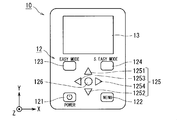
- FIG. 2 is a plan view schematically showing the appearance of the control unit according to the embodiment.
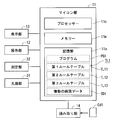
- FIG. 3 is a block diagram illustrating a functional configuration of the colorimeter according to the embodiment.
- FIG. 4 is a block diagram showing a functional configuration realized by the processor.
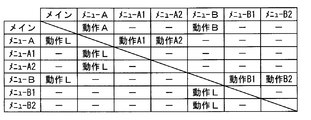
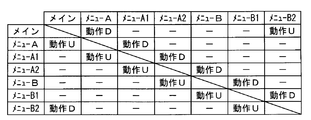
- FIG. 5 is a diagram illustrating a specific example of the first rule table.
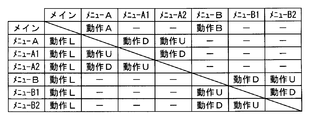
- FIG. 6 is a diagram illustrating a specific example of the second rule table.
- FIG. 7 is a diagram illustrating a specific example of the third rule table.
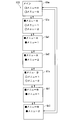
- FIG. 8 is a diagram illustrating a transition mode of the display screen according to the normal screen transition rule.
- FIG. 9 is a diagram illustrating a transition mode of the display screen according to the simple screen transition rule.
- FIG. 10 is a diagram illustrating a transition mode of the display screen according to the full screen sequential transition rule.
- FIG. 11 is a diagram illustrating a main screen.
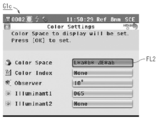
- FIG. 12 is a diagram illustrating a menu screen related to color setting.
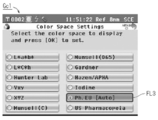
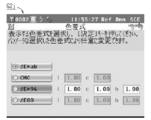
- FIG. 13 is a diagram illustrating a menu screen related to setting of the color space.
- FIG. 14 shows Ph. It is a figure which illustrates the menu screen which concerns on the hue setting of EU.
- FIG. 15 is a diagram illustrating information stored in the storage unit 11s according to the first modification.
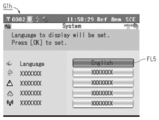
- FIG. 16 is a diagram illustrating a menu screen related to system settings.
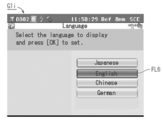
- FIG. 17 is a diagram illustrating a screen related to language setting.
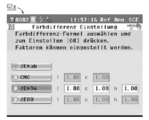
- FIG. 18 is a diagram illustrating a screen written in English.
- FIG. 19 is a diagram illustrating a screen described in Japanese.
- FIG. 20 is a diagram illustrating a screen described in Chinese.
- FIG. 21 is a diagram illustrating a screen described in German.
- FIG. 22 is a diagram illustrating a transition mode of the display screen according to the second modification.
- FIG. 23 is a block diagram illustrating a functional configuration of a colorimeter according to a modification.
- 1 and 2 are provided with a right-handed XYZ coordinate system in which the direction in which the connecting portion 20 extends is the ⁇ Z direction.
- FIG. 1 is a diagram schematically illustrating the appearance of a colorimeter 1 according to an embodiment.
- the colorimeter 1 includes a control unit 10, a connection unit 20, and a measurement unit 30.
- FIG. 2 is a plan view showing the control unit 10 as viewed from the + Z direction.
- the control unit 10 includes a housing 10bd, a microcomputer unit (hereinafter referred to as a microcomputer unit) 11, an operation unit 12, a display unit 13, and a reading unit 14 provided in the housing 10bd.
- a microcomputer unit hereinafter referred to as a microcomputer unit
- an operation unit 12 a display unit 13
- a reading unit 14 provided in the housing 10bd.
- the housing 10bd has, for example, a substantially cubic configuration.
- the microcomputer unit 11 is provided in the housing 10bd.
- an operation unit 12 and a display unit 13 are provided on one main surface of the housing 10bd in the + Z direction, and a reading unit 14 is provided on a side portion in the ⁇ Y direction of the housing 10bd.
- the microcomputer unit 11 controls operations of the display unit 13, the reading unit 14, the measurement unit 30, and the like according to a signal input from the operation unit 12.
- the operation unit 12 receives an operation by the user of the colorimeter 1 and outputs a signal corresponding to the operation to the microcomputer unit 11.
- the display unit 13 displays various screens under the control of the microcomputer unit 11.
- the reading unit 14 is, for example, a part where the storage medium Cd1 is detachable.
- the storage medium Cd1 may be a memory card, for example.
- the microcomputer unit 11 reads various information stored in the storage medium Cd1 and writes various information to the storage medium Cd1 by the reading unit 14.
- the connecting unit 20 connects the control unit 10 and the measurement unit 30.
- the connecting portion 20 has a substantially cylindrical configuration extending in the Z direction. And the connection part 20 is hold
- the measurement unit 30 includes a housing 30bd, and a light source unit 31 and a measurement unit 32 provided in the housing 30bd.
- the housing 30bd has, for example, a substantially cubic configuration.
- An opening 30op is provided on one main surface in the ⁇ Z direction of the housing 30bd.
- the opening 30op has a configuration in which a transparent plate material is fitted into an opening provided in the housing 30bd.
- the transparent plate material may be a glass plate, for example. Note that when the colorimeter 1 measures the color of the object to be measured, the housing 30bd is brought into contact with the object to be measured so that the opening 30op is closed.
- the light source unit 31 emits light of a predetermined color (also referred to as irradiation light) set in advance.
- the predetermined color may be white, for example.
- the light source unit 31 is configured by a xenon lamp or an LED, white light can be emitted from the light source unit 31.
- the light source part 31 emits irradiation light by control by the microcomputer part 11, and this irradiation light is irradiated to a to-be-measured object through the opening part 30op.
- the measurement unit 32 receives light (also referred to as measurement light) emitted from the measurement object by irradiating the measurement object with the irradiation light from the light source unit 31 under the control of the microcomputer unit 11 and measures the measurement target. Measure the characteristics of light.
- the measurement unit 32 receives the light after separating the reflected light and acquires data related to the spectral spectrum of the reflected light.
- the spectrum of the reflected light may be performed by, for example, a diffraction grating.
- the reflected light after the spectroscopy may be received by, for example, a CCD in which pixels are arranged in a line.
- the optical characteristic of the measurement object can be obtained based on the spectral characteristic of the measurement light and the wavelength spectrum of the irradiation light emitted from the light source unit 31.
- Data indicating the optical characteristics of the measurement object obtained by the measurement unit 32 is sent to the microcomputer unit 11.
- an operation unit 12 and a display unit 13 are arranged on one main surface of the control unit 10 in the + Z direction.
- the colorimeter 1 plays a role as a display device having the small display unit 13.
- the operation unit 12 includes buttons 121 to 124, a cross button 125, and an enter button 126.
- the button 121 is a button (also referred to as a power button) for starting the colorimeter 1 by supplying power from a power supply unit such as a battery (not shown).
- the button 122 is a button (also referred to as a menu button) for displaying various menus on the display unit 13.
- the button 123 serves as a button for slightly simplifying transition of a screen (also referred to as a display screen) displayed on the display unit 13, for example.
- the button 124 serves as a button for greatly simplifying the transition of the display screen displayed on the display unit 13, for example.
- the cross button 125 includes an upper button 1251, a lower button 1252, a left button 1253, and a right button 1254.
- the determination button 126 serves as a button for determining selection of various options on the display screen of the display unit 13.
- the display unit 13 displays various screens.
- a liquid crystal display or the like in which a plurality of pixels are arranged in a matrix is employed.
- a matrix arrangement of a plurality of pixels for example, a first predetermined number of pixels are arranged in the X direction as the horizontal direction, and a second predetermined number of pixel rows are arranged in the Y direction as the vertical direction.
- 320 may be adopted as the first predetermined number
- and 240 may be adopted as the second predetermined number, for example.
- FIG. 3 is a block diagram showing a functional configuration of the colorimeter 1. As shown in FIG. 3, the operation unit 12, the display unit 13, the reading unit 14, the light source unit 31, and the measurement unit 32 are connected to the microcomputer unit 11.
- the microcomputer unit 11 mainly includes a processor 11c, a memory 11m, and a storage unit 11s.
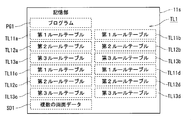
- the storage unit 11s stores various data such as a program PG1, a plurality of rule tables TL1, and a plurality of screen data SD1.
- Various functions in the microcomputer unit 11 are executed by the processor 11c executing the program PG1. That is, by executing the program PG1 in the processor 11c, various functions in the colorimeter 1 as a display device are realized.
- the plurality of rule tables TL1 are information indicating rules (also referred to as screen transition rules) that define the transition of the display screen displayed on the display unit 13.
- the plurality of rule tables TL1 include first to third rule tables TL11 to TL13. That is, the first rule table TL11 is information indicating a rule that defines a normal transition of the display screen displayed on the display unit 13 (also referred to as a normal screen transition rule).
- the second rule table TL12 is information indicating rules that define simple transitions of the display screen displayed on the display unit 13 (also referred to as simple screen transition rules).
- the third rule table TL13 is information indicating a rule that defines a very simple transition of the display screen displayed on the display unit 13 (also referred to as a full screen sequential transition rule).
- the plurality of screen data SD1 is data indicating a display screen displayed on the display unit 13.
- FIG. 4 is a diagram showing a functional configuration realized by the microcomputer unit 11 when the program PG1 is executed by the processor 11c.
- the microcomputer unit 11 includes a designation unit 111 and a display control unit 112 as a functional configuration.
- the designation unit 111 selectively designates one screen transition rule out of a plurality of rule tables TL1 each indicating a screen transition rule in response to a signal input according to the operation of the operation unit 12 by the user. Specifically, any one of the first to third rule tables TL11 to TL13 is designated.
- the designation of one rule table is realized by a specific operation of the operation unit 12 by the user, for example.
- the specific operation is a simple depression of the button 121 as the power button
- the first rule table TL11 is designated.
- the specific operation is an operation in which the button 121 is pressed while the button 123 is pressed
- the second rule table TL12 is specified.
- the third rule table TL13 is specified.
- the display control unit 112 controls screen display on the display unit 13. For example, the display control unit 112 is displayed on the display unit 13 based on one screen transition rule designated by the designation unit 111 in response to a signal input according to the operation of the operation unit 12 by the user. Transition the display screen. Specifically, the screen related to one screen data among the plurality of screen data SD1 is changed to the screen related to one other screen data different from the one screen data.
- FIG. 5 shows a specific example of the first rule table TL11 that defines the normal screen transition rule.
- FIG. 6 shows a specific example of the second rule table TL12 that defines simple screen transition rules.
- FIG. 7 shows a specific example of the third rule table TL13 that defines full screen sequential transition rules.
- an operation necessary for changing the display screen of the display unit 13 is described.
- any one of the main screen G1m, the menu A screen G1a, the menu A1 screen Ga1, the menu A2 screen Ga2, the menu B screen G1b, the menu B1 screen Gb1, and the menu B2 screen Gb2 is displayed on the display unit 13.
- An example to be shown is shown.
- the operation A shows an operation of selecting the menu A
- the operation B shows an operation of selecting the menu B
- the operation L shows an operation of pressing the left button 1253
- the operation A1 shows the menu A1.
- the operation to select is shown
- operation A2 shows the operation to select menu A2.
- the operation B1 indicates an operation for selecting the menu B1
- the operation B2 indicates an operation for selecting the menu B2
- the operation U indicates an operation for pressing the upper button 1251
- the operation D indicates the operation for pressing the lower button 1252.
- the plurality of screen data SD1 includes main screen data, menu A screen data, menu A1 screen data, menu A2 screen data, menu B screen data, menu B1 screen data, and menu B2 screen data.
- the main screen G1m is displayed on the display unit 13 based on the main screen data.
- the menu A screen G1a is displayed on the display unit 13 based on the menu A screen data
- the menu A1 screen Ga1 is displayed on the display unit 13 based on the menu A1 screen data
- the menu A2 screen Ga2 is the menu A2 screen data. Is displayed on the display unit 13.
- the menu B screen G1b is displayed on the display unit 13 based on the menu B screen data
- the menu B1 screen Gb1 is displayed on the display unit 13 based on the menu B1 screen data
- the menu B2 screen Gb2 is the menu B2 screen data. Is displayed on the display unit 13.
- FIG. 8 to FIG. 10 are diagrams illustrating display screen transition modes according to each screen transition rule.
- FIG. 8 illustrates a transition mode of the display screen according to the normal screen transition rule defined by the first rule table TL11 illustrated in FIG.
- FIG. 9 illustrates a display screen transition mode in accordance with the simple screen transition rule defined in the second rule table TL12 illustrated in FIG.
- FIG. 10 illustrates a display screen transition mode in accordance with the full-screen sequential transition rule defined in the third rule table TL13 illustrated in FIG. 8 to 10 show that a transition from a screen located at the start point of the arrow to a screen located at the end point of the arrow is possible.
- the normal screen transition rule defined in the first rule table TL11 associates a plurality of screens in a dendritic manner, and the display screens of the display unit 13 are related between screens associated with each other in the hierarchy. This is a rule to be changed by the display control unit 112.
- the main screen G1m related to the main screen data is defined as one screen that is the starting point of the highest first layer H1. That is, the main screen G1m belongs to the first hierarchy H1.
- a plurality of screens related to a plurality of items as options presented on the main screen G1m belong to the second layer H2 as one layer below the first layer H1.
- the plurality of screens belonging to the second hierarchy H2 are the menu A screen G1a and the menu B screen G1b.
- a plurality of screens related to a plurality of items as options respectively presented on each screen belonging to the second layer H2 belong to the third layer H3 as a layer below the second layer H2.
- the plurality of screens belonging to the third hierarchy H3 include a menu A1 screen Ga1 and a menu A2 screen Ga2 related to options of the menu A screen G1a of the second hierarchy H2. Further, the plurality of screens belonging to the third hierarchy H3 include a menu B1 screen Gb1 and a menu B2 screen Gb2 related to options of the menu B screen G1b of the second hierarchy H2.
- the normal screen transition rule stipulates that one screen related to screen data of one layer among the first to third layers H1 to H3 is displayed on the display unit 13.
- the normal screen transition rule is a display control of the display screen of the display unit 13 in response to a signal input according to the user's operation in a state where one screen of one layer is displayed on the display unit 13.
- the part 112 includes a rule for transitioning from one screen to another screen related to screen data of another layer one layer lower than the first layer.
- the normal screen transition rule stipulates screen transitions between the first to third hierarchies H1 to H3, and a relatively higher hierarchy screen is selected as the relatively higher hierarchy screen. Including a rule for transition to a screen of a relatively lower hierarchy related to the selected option.
- the display screen of the display unit 13 is changed in response to a signal input according to the first operation by the user in a state where the first screen is displayed on the display unit 13. It includes a rule for causing the display control unit 112 to transition from the first screen to the second screen.
- the first operation may be, for example, an operation for selecting an option related to the second screen on the first screen.
- the first screen may be a screen related to the first screen data
- the second screen may be a screen related to the second screen data.
- the normal screen transition rule is to display control the display screen of the display unit 13 in response to a signal input in response to the second operation by the user in a state where the first screen is displayed on the display unit 13. It includes a rule for transition from the first screen to the third screen by the unit 112.
- the second operation is an operation different from the first operation, and may be an operation for selecting an option related to the third screen on the first screen, for example.
- the third screen may be a screen related to the third screen data.
- the normal screen transition rule is that the display control unit 112 controls the display screen in response to a signal input according to the user's operation in a state where one screen of one layer is displayed on the display unit 13. It includes a rule for making a transition to another screen related to screen data of another layer one layer above the screen.
- the normal screen transition rule stipulates screen transitions between the first to third hierarchies H1 to H3, and a rule for transitioning a relatively lower hierarchy screen to a relatively higher hierarchy screen. including.
- the user's operation at this time may be an operation for returning to a preset upper layer screen, for example, an operation for pressing the left button 1253.
- the normal screen transition rules include rules for defining screen transitions indicated by the following [1A] to [1L].
- the display screen is changed from the main screen G1m to the menu A screen G1a according to the operation of selecting the menu A by the user.
- the operation for selecting the menu A is performed, for example, by moving the thick frame FL0 up and down by depressing the upper button 1251 and the lower button 1252 on the main screen G1m, and in the state where the menu A is surrounded by the thick frame FL0. As long as the operation is pressed.
- the display screen is changed from the menu A screen G1a to the main screen G1m according to the operation of returning to the upper layer screen by the user.
- the operation for returning to the upper layer screen may be, for example, an operation in which the left button 1253 is pressed while the menu A screen G1a is displayed.
- the display screen is changed from the menu A screen G1a to the menu A1 screen Ga1 according to the operation of selecting the menu 1 by the user.
- the operation for selecting the menu 1 is performed by, for example, moving the thick frame FL0 up and down by pressing the upper button 1251 and the lower button 1252 on the menu A screen G1a, and pressing the enter button in a state where the menu 1 is surrounded by the thick frame FL0. Any operation that depresses 126 may be used.
- the display screen is changed from the menu A screen G1a to the menu A2 screen Ga2 according to the operation of selecting the menu 2 by the user.
- the operation for selecting the menu 2 is performed by, for example, moving the thick frame FL0 up and down on the menu A screen G1a and pressing the upper button 1251 and the lower button 1252 down and enclosing the menu 2 with the thick frame FL0. As long as the operation is pressed.
- the display screen is changed from the main screen G1m to the menu B screen G1b according to the operation of selecting the menu B by the user.
- the operation for selecting the menu B is performed, for example, by moving the thick frame FL0 up and down by depressing the upper button 1251 and the lower button 1252 on the main screen G1m, and in the state where the menu B is surrounded by the thick frame FL0. As long as the operation is pressed.
- the display screen is changed from the menu B screen G1b to the menu B1 screen Gb1 according to the operation of selecting the menu 1 by the user.
- the operation for selecting the menu 1 is performed by, for example, moving the thick frame FL0 up and down by pressing the upper button 1251 and the lower button 1252 on the menu B screen G1b, and pressing the enter button while the menu 1 is surrounded by the thick frame FL0. Any operation that depresses 126 may be used.
- the display screen is changed from the menu B screen G1b to the menu B2 screen Gb2 according to the operation of selecting the menu 2 by the user.
- the operation for selecting the menu 2 is performed by, for example, moving the thick frame FL0 up and down by pressing the upper button 1251 and the lower button 1252 on the menu B screen G1b, Any operation that depresses 126 may be used.
- the simple screen transition rule defined in the second rule table TL12 is a screen transition rule in which the number of layers defined in the normal screen transition rule is reduced.
- This simple screen transition rule defines the second hierarchy H2A in which the screen of the lowest third hierarchy H3 in the normal screen transition rule is incorporated in the second hierarchy H2 one level higher. That is, in the simple screen transition rule, the first to third hierarchies H1 to H3 defined in the normal screen transition rule are changed to the first and second hierarchies H1 and H2A.
- screen transitions between layers and screen transitions within the second layer H2A are defined.
- the main screen G1m related to the main screen data is defined as one screen that is the starting point of the highest first layer H1. That is, the main screen G1m belongs to the first hierarchy H1.
- the second hierarchy H2A which is one lower hierarchy of the first hierarchy H1 is presented on a plurality of screens related to a plurality of items as options presented on the main screen G1m and each screen of the plurality of screens.
- a plurality of screens related to a plurality of items belong.
- the plurality of screens belonging to the second hierarchy H2A include a menu A screen G1a and a menu B screen G1b.
- the plurality of screens belonging to the second hierarchy H2A include a menu A1 screen Ga1 and a menu A2 screen Ga2 related to a plurality of items presented on the menu A screen G1a. Further, the plurality of screens belonging to the second hierarchy H2A include a menu B1 screen Gb1 and a menu B2 screen Gb2 related to a plurality of items presented on the menu B screen G1b.
- the simple screen transition rule stipulates that one screen related to screen data of one layer of the first and second layers H1 and H2A is displayed on the display unit 13.
- the simple screen transition rule is that the display screen of the display unit 13 is displayed in response to a signal input according to the user's operation in the state where the main screen G1m is displayed on the display unit 13.
- the user's operation may be an operation for selecting an option corresponding to the first screen on the main screen G1m, for example.
- the 1st screen should just be the menu A screen G1a and the menu B screen G1b which belong to the 2nd hierarchy H2A as a lower hierarchy. That is, the simple screen transition rule includes a rule for transitioning a relatively higher layer screen to a relatively lower layer screen related to the option selected on the relatively higher layer screen.
- the simple screen transition rule is a display control of the display screen of the display unit 13 in response to a signal input in response to the third operation by the user in a state where the first screen is displayed on the display unit 13.
- a rule for causing the unit 112 to transition from the first screen to the second screen is included.
- the third operation may be a predetermined operation set in advance.
- the predetermined operation may be an operation of pressing the down button 1252, for example.
- the first screen is a screen related to the first screen data and may be any one of the menu A screen G1a and the menu B screen G1b.
- the second screen is a screen related to the second screen data. For example, if the first screen is the menu A screen G1a, the second screen may be the menu A1 screen Ga1, for example, the first screen is the menu. If it is B screen G1b, the 2nd screen should just be menu B1 screen Gb1.
- the simple screen transition rule is to display the display screen of the display unit 13 in response to a signal input in response to a predetermined third operation by the user in a state where the second screen is displayed on the display unit 13. It includes a rule for causing the display control unit 112 to transition from the second screen to the third screen.
- the third operation may be a predetermined operation set in advance.
- the third screen is a screen related to the third screen data. For example, if the second screen is the menu A1 screen Ga1, the third screen may be the menu A2 screen Ga2. For example, the second screen is the menu. If it is B1 screen Gb1, the 3rd screen should just be menu B2 screen Gb2.
- the simple screen transition rule is a display control of the display screen of the display unit 13 in response to a signal input in response to a specific operation by the user in a state where the second screen is displayed on the display unit 13.
- a rule for causing the unit 112 to transition from the second screen to the first screen is included.
- the specific operation may be a predetermined operation set in advance, for example, an operation of pressing the upper button 1251.
- the simple screen transition rule is a display control of the display screen of the display unit 13 in response to a signal input in response to a specific operation by the user in a state where the third screen is displayed on the display unit 13. It includes a rule for transition from the third screen to the second screen by the unit 112.
- the simple screen transition rule is displayed on the display unit 13 in response to a signal input according to the user's operation in a state where the screen related to the screen data of the second hierarchy H2A is displayed on the display unit 13.
- a rule for causing the display control unit 112 to transition the screen to the main screen G1m is included. That is, the simple screen transition rule includes a rule for transitioning a relatively lower layer screen to a relatively higher layer screen.
- the user's action at this time may be an action set in advance, for example, an action of pressing the left button 1253.
- the simple screen transition rules include rules for defining screen transitions indicated by the following [2A] to [2O].
- the display screen is changed from the menu A screen G1a to the menu A1 screen Ga1 in accordance with an operation for selecting display of the next screen.
- the operation for selecting the display of the next screen may be a predetermined operation set in advance as the third operation, for example, an operation of pressing the down button 1252.
- the display screen is changed from the menu A screen G1a to the menu A2 screen Ga2 according to the operation of selecting the display of the previous screen.
- the operation for selecting the display of the previous screen may be a predetermined operation set in advance, for example, an operation for pressing the upper button 1251.
- the hierarchical structure related to the transition of the display screen is simplified. Therefore, it is possible to easily and quickly find a desired item in the small display unit 13 with a limited amount of information that can be displayed at one time.
- the full screen sequential transition rule defined in the third rule table TL13 is a screen transition rule in which a dendritic hierarchical structure indicating the association of screens defined in the normal screen transition rule is decomposed. is there.
- the full-screen sequential transition rule is a single screen in which the middle-level second-level H2 screen and the lowest-level third-level H3 screen in the normal-screen transition rule are incorporated in the highest-level first-level H1.
- One layer H1B is defined.
- the first to third hierarchies H1 to H3 defined by the normal screen transition rule and the first and second hierarchies H1 and H2A defined by the simple screen transition rule are a single one hierarchy. It has been changed to H1B.
- the full-screen sequential transition rule stipulates that one screen related to a single screen data of one layer H1B is displayed on the display unit 13. Further, the full screen sequential transition rule defines a screen transition in which all screens in one layer H1B are displayed in order.
- the full screen sequential transition rule is such that all the screens related to all screen data are sequentially displayed by the display control unit 112 in response to a signal input according to the third operation by the user.
- the third operation may be a predetermined operation set in advance.
- the predetermined operation may be an operation of pressing the down button 1252, for example.
- a plurality of screens belonging to all the hierarchies H1 to H3 in the normal screen transition rule as the first screen transition rule are It may be displayed in a first order.
- a plurality of screens belonging to all the hierarchies H1 and H2A in the simple screen transition rule can be displayed in the first order in a single single hierarchy H1B.
- the full screen sequential transition rule changes the display screen of the display unit 13 to the first screen by the display control unit 112 in response to a signal input according to the third operation by the user.
- the first screen is a screen related to the first screen data and may be any one of the menu A screen G1a and the menu B screen G1b.
- the second screen is a screen related to the second screen data. For example, if the first screen is the menu A screen G1a, the second screen may be the menu A1 screen Ga1, for example, the first screen. If the menu B screen G1b, the second screen may be the menu B1 screen Gb1.
- the full screen sequential transition rule is similar to the simple screen transition rule in that the display screen of the display unit 13 is displayed on the second screen by the display control unit 112 in response to a signal input according to the third operation by the user. Includes a rule for transition from to the third screen.
- the third screen is a screen related to the third screen data. For example, if the second screen is the menu A1 screen Ga1, the third screen may be the menu A2 screen Ga2. For example, the second screen is the menu. If it is B1 screen Gb1, the 3rd screen should just be menu B2 screen Gb2.
- the display screen transitions according to the second order every time a specific action is performed by the user.
- the display screen changes so that the screens are displayed in order.
- the specific operation may be a predetermined operation set in advance.
- the specific operation may be, for example, an operation of pressing the upper button 1251. That is, according to the full screen sequential transition rule as the second screen transition rule, a plurality of screens belonging to all the hierarchies H1 to H3 in the normal screen transition rule as the first screen transition rule are It may be displayed in a second order. From another viewpoint, according to the full screen sequential transition rule, a plurality of screens belonging to all the hierarchies H1 and H2A in the simple screen transition rule can be displayed in the second order in a single single hierarchy H1B.
- the full screen sequential transition rule includes a rule for defining screen transitions indicated by the following [3A] to [3N].
- the display screen is changed from the main screen G1m to the menu A screen G1a according to an operation of selecting display of the next screen.
- the operation for selecting the display of the next screen may be a predetermined operation set in advance as the third operation, for example, an operation of pressing the down button 1252.
- the display screen is changed from the menu B2 screen Gb2 to the menu B1 screen Gb1 according to the operation of selecting the display of the previous screen.
- the operation for selecting the display of the previous screen may be a predetermined operation set in advance, for example, an operation for pressing the upper button 1251.
- display screen> 11 to 15 are diagrams illustrating specific examples of display screens displayed on the display unit 13.
- a case where the display screen transitions according to the normal screen transition rule will be described as an example.
- FIG. 11 shows an example of the main screen G1m.
- icons relating to eight choices are arranged.
- the user operates the cross button 125 to set a desired one of the eight icons surrounded by a thick frame FL1.
- an option related to the icon surrounded by the thick frame FL1 is selected. For example, when an item for setting a color (Color) is selected, a menu screen G1c (FIG. 12) listing the setting contents of five items related to the setting of the color (Color) is displayed on the display unit 13. .
- a menu screen G1c FIG. 12
- display screen transition is performed by selectively specifying one screen transition rule among a plurality of screen transition rules.
- the hierarchical structure related to can be simplified or eliminated.
- a user who has a deep understanding of the function of the colorimeter 1 can change the display screen of the colorimeter 1 by specifying a normal screen transition rule that defines a hierarchical structure related to the transition of the display screen, for example. It can be done freely.
- a user who does not understand the functions of the colorimeter 1 can display more screens in order by a simple operation by simplifying or eliminating the hierarchical structure related to the transition of the display screen.
- the display screen can be easily changed to a desired screen.
- even a user who has no knowledge about the transition of the display screen of the colorimeter 1 can confirm all the screens in order by eliminating the hierarchical structure related to the transition of the display screen.
- a screen showing a menu that is set less frequently often belongs to a lower hierarchy, and therefore it is not easy for the user to change the display screen to such a screen.
- the user cannot simplify the hierarchical structure related to the transition of the display screen, and can easily display it by the transition of the display screen by displaying more screens in order by a simple operation.
- the display screen can be easily changed to the screen.
- the user can easily change the display screen to a desired screen. This makes it possible to easily and quickly find a desired item on the small display unit 13 with a limited amount of information that can be displayed at one time.
- the display elements can be improved by comprehensively checking the intuitiveness of the display elements such as the menu items and the icons indicating the battery charging status, etc., and the quality of the design. . Furthermore, even when a person who does not have knowledge about the colorimeter 1 can create a manual for the colorimeter 1, all the screens can be photographed without omission.
- the language indicating the character information displayed on the screen may be switchable.
- the screen data relating to the screen described in each language with the same content may be included in the plurality of screen data SD1.
- the main screen data related to the main screen described in the first language and the main screen data related to the main screen described in the second language are stored in the storage unit 11s.
- the menu A screen data as the first screen data related to the menu A screen as the first screen described in the first language and the fourth screen described in the second language are stored.
- Menu A1 screen data as fifth screen data relating to the menu A1 screen is stored. Further, for example, in the storage unit 11s, the menu A2 screen data as the third screen data related to the menu A2 screen as the third screen described in the first language and the sixth screen described in the second language. Menu A2 screen data as sixth screen data relating to the menu A2 screen is stored.
- the first language may be, for example, Japanese
- the second language may be, for example, English.
- the first to third rule tables TL11 to TL13 may be replaced with the first to third rule tables TL11a to TL11d, TL12a to TL12d, TL13a to TL13d, and TL14a to TL14d.
- the first to third rule tables TL11a to TL13a are rule tables related to Japanese
- the first to third rule tables TL11b to TL13b are rule tables related to English
- the first to third rule tables TL11c to TL13c are rule tables related to Chinese
- the first to third rule tables TL11d to TL13d are rule tables related to German.
- the designation unit 111 performs, for example, the first to third rule tables TL11a to TL11d, TL12a to TL12d, TL13a to TL13d, TL14a to TL14d.
- One of the rule tables may be selectively specified.
- a menu screen G1h in which the setting contents of five items related to the system setting are listed. (FIG. 16) is displayed on the display unit 13.
- the cross button 125 when the user presses the cross button 125, a region indicating a desired one of the four languages is set in a state surrounded by a thick frame FL6. At this time, when the user presses the enter button 126, one language surrounded by the thick frame FL6 is selected.
- the rule table selectively designated by the designation unit 111 is changed according to the language selected here. For example, if the language is changed from Japanese to English while the third rule table TL13a is specified by the specification unit 111, the third rule table TL13b is specified by the specification unit 111.
- 18 to 21 are diagrams illustrating screens showing the same contents described in each language.
- 18 shows a screen G2e written in English
- FIG. 19 shows a screen G2j written in Japanese
- FIG. 20 shows a screen G2c written in Chinese
- FIG. 21 shows a screen G2g described in German.
- the normal screen transition rule defined in the first rule table TL11a is displayed in response to a signal input in response to the first operation by the user while the first screen is displayed on the display unit 13.
- the display screen of the unit 13 includes a rule for causing the display control unit 112 to transition from the first screen to the second screen.
- the first operation may be, for example, an operation for selecting an option related to the second screen on the first screen.
- the normal screen transition rule defined in the first rule table TL11a is displayed in response to a signal input in response to the second operation by the user in a state where the first screen is displayed on the display unit 13.
- a rule for causing the display control unit 112 to transition from the first screen to the third screen is included.
- the second operation may be, for example, an operation for selecting an option related to the third screen on the first screen.
- the first screen may be, for example, a menu A screen written in Japanese or a menu B screen written in Japanese.
- the second screen may be a menu A1 screen written in Japanese.
- the second screen may be a menu B1 screen written in Japanese.
- the third screen may be a menu A2 screen written in Japanese.
- the first screen is a menu B screen written in Japanese
- the third screen may be a menu B2 screen written in Japanese.
- the normal screen transition rule defined in the first rule table TL11b is in response to a signal input in response to a fourth operation by the user in a state where the fourth screen is displayed on the display unit 13. And a rule for causing the display control unit 112 to change the display screen of the display unit 13 from the fourth screen to the fifth screen.
- the fourth operation may be, for example, an operation for selecting an option related to the fifth screen on the fourth screen.
- the normal screen transition rule defined in the first rule table TL11b is displayed in response to a signal input in response to the fifth operation by the user in a state where the fourth screen is displayed on the display unit 13.
- a rule for causing the display control unit 112 to transition from the fourth screen to the sixth screen is included.
- the fifth operation is different from the fourth operation, and may be an operation for selecting an option related to the sixth screen on the fourth screen, for example.
- the fourth screen may be, for example, a menu A screen written in English or a menu B screen written in English.
- the fifth screen may be a menu A1 screen written in English.
- the fourth screen is a menu B screen written in English
- the fifth screen may be a menu B1 screen written in English.
- the sixth screen may be a menu A2 screen written in English.
- the fourth screen is a menu B screen written in English
- the sixth screen may be a menu B2 screen written in English.
- the display screen transition similar to the simple screen transition rule shown in FIGS. Executed. Further, in the above configuration, regardless of which rule table of the third rule tables TL13a to TL13d is specified by the specifying unit 111, the display screen transition is the same as the full screen sequential transition rule shown in FIGS. Is executed.
- the hierarchical structure related to display screen transition can be simplified or eliminated. Thereby, the same effect as the above-described embodiment can be obtained.
- the design and development stage of the colorimeter 1 it is possible to efficiently check all screens for each language without omission. As a result, for example, it is possible to easily and efficiently confirm the problem that the character information protrudes from the region to be described due to the occurrence of words and sentences due to language replacement on each screen. As a result, it is possible to reduce work and time required for correction related to language replacement.
- the display screen when the screen related to the first language is displayed, the display screen is changed so that the full screen Gp1 related to the first language is sequentially displayed in response to the third operation by the user.
- the display screen transitions in the first order each time the third action is performed by the user.
- the display screen transitions so that the full screen Gp1 related to is sequentially displayed.
- the third operation may be a predetermined operation set in advance. This predetermined operation may be an operation of pressing down button 1252, for example.
- the first language may be Japanese, for example.
- the display screen when the screen related to the second language is displayed, the display screen is changed so that the full screen Gp2 related to the second language is sequentially displayed in response to the third operation by the user.
- the display screen transitions in the first order each time the third action is performed by the user.
- the display screen transitions so that the full screen Gp2 related to is displayed in order.
- the second language may be English, for example.
- the display screen when the screen related to the third language is displayed, the display screen is changed so that the full screen Gp3 related to the third language is displayed in order in response to the third operation by the user.
- the display screen transitions in the first order each time the third action is performed by the user.
- the display screen transitions so that the full screen Gp3 related to is sequentially displayed.
- the third language may be, for example, Chinese.
- the display screen when the screen related to the fourth language is displayed, the display screen is changed so that the full screen Gp4 related to the fourth language is displayed in order in response to the third operation by the user.
- the display screen transitions in the first order each time the third action is performed by the user.
- the display screen transitions so that the full screen Gp4 related to is sequentially displayed.
- the fourth language may be German, for example.
- the display screen transitions so that screens related to all languages related to one content are sequentially displayed in response to a specific operation by the user. Is done.
- the display screen transitions according to the third order each time a specific action is performed by the user.
- the display screen transitions so that screens of all languages related to are sequentially displayed.
- the specific operation may be a predetermined operation, for example, an operation of pressing the right button 1254.
- the display screen is displayed each time another specific action is performed by the user. Transition in accordance with the fourth order, the display screen transitions so that screens of all languages related to one content are displayed in order.
- the other specific operation may be a predetermined operation set in advance, for example, an operation of pressing the left button 1253.
- the display screen transitions so that two or more screens constituting the first screen group Gr1 are displayed in order.
- a mode in which two or more screens are displayed in order includes a mode in which two or more screens are repeatedly displayed so as to circulate, a mode in which two or more screens are repeatedly displayed so as to reciprocate, and the like.
- the display screen is changed in response to a specific operation by the user.
- the transition is made so that two or more screens constituting the second screen group Gr2 are displayed in order. Further, for example, in a state where any one screen of the third screen group Gr3 related to the same content including the third screen and the sixth screen is displayed, the display screen is changed in response to a specific operation by the user. The transition is made so that two or more screens constituting the third screen group Gr3 are displayed in order.
- FIG. 22 is a diagram illustrating a transition aspect of the display screen according to the second modification. Note that FIG. 22 shows that a transition from the screen located at the start point of the solid line arrow to the screen located at the end point of the solid line arrow is possible. A broken arrow indicates that the screen can be changed via another screen not shown.
- the full-screen sequential transition rule related to the first language displays the display screen of the display unit 13 in response to a signal input according to the third operation of the user.
- 112 includes a rule for transition from the first screen to the second screen.
- the first screen is a menu A screen G1a1 related to Japanese as the first language
- the second screen is a menu A1 screen Ga11 related to Japanese as the first language.
- the full-screen sequential transition rule according to the first language is configured to change the display screen of the display unit 13 from the second screen to the third screen by the display control unit 112 in response to a signal input according to the third operation by the user.
- the second screen is a menu A1 screen Ga11 related to Japanese as the first language
- the third screen is a menu A2 screen Ga21 related to Japanese as the first language.
- the full-screen sequential transition rule related to the second language is obtained by changing the display screen of the display unit 13 by the display control unit 112 in response to a signal input in response to the third operation by the user, for example.
- the fourth screen is a screen related to the fourth screen data
- the fifth screen is a screen related to the fifth screen data. For example, if the fourth screen is the menu A screen G1a2 related to English as the second language, the fifth screen is the menu A1 screen Ga12 related to English as the second language.
- the full-screen sequential transition rule related to the second language is configured to change the display screen of the display unit 13 from the fifth screen to the sixth screen by the display control unit 112 in response to a signal input according to the third operation by the user. Includes rules for transitioning to the screen.
- the sixth screen is a screen related to the sixth screen data. For example, if the fifth screen is a menu A1 screen Ga12 related to English as the second language, the sixth screen is a menu A2 screen Ga22 related to English as the second language.
- the full-screen sequential transition rule related to the first to fourth languages is a screen including the main screens G1m1 to G1m4 related to the first to fourth languages in response to a signal input according to a user's specific operation. It includes a rule for changing the display screen so that two or more screens of the group Gr0 are displayed in order.
- the user's specific action may be an action set in advance. For example, when displaying the main screens G1m1 to G1m4 in this order, the action may be an action of pressing the right button 1254. For example, when displaying the main screens G1m1 to G1m4 in the reverse order, the user's action may be an action of pressing the left button 1253.
- the full-screen sequential transition rule related to the first to fourth languages is a screen group including menu A screens G1a1 to G1a4 related to the first to fourth languages in response to a signal input according to the user's operation. It includes a rule for changing the display screen so that two or more screens of Gr1 are displayed in order.
- the full-screen sequential transition rule related to the first to fourth languages is a screen group including menu A1 screens Ga11 to Ga14 related to the first to fourth languages in response to a signal input according to the user's operation. It includes a rule for changing the display screen so that two or more screens of Gr2 are displayed in order.
- the full-screen sequential transition rule related to the first to fourth languages is a screen group including menu A2 screens Ga21 to Ga24 related to the first to fourth languages in response to a signal input according to the user's operation. It includes a rule for changing the display screen so that two or more screens of Gr3 are displayed in order.
- the colorimeter 1 as the display device for example, if a normal screen transition rule is selectively specified, a plurality of screens constituting each group of a plurality of groups are hierarchized. Thus, the screen transition associated with the dendritic state is performed.
- the plurality of screens forming each group are, for example, a plurality of screens described in each language.
- a plurality of screens forming each group are sequentially displayed according to a predetermined operation by the user.
- a screen transition for sequentially displaying corresponding screens among a plurality of groups is performed in accordance with a specific operation by the user.
- the corresponding screen is, for example, a screen showing the same content. Then, it is possible to switch between a state where the display screen transition is performed according to the normal screen transition rule and a state where the display screen transition is performed according to the full screen sequential transition rule. Thereby, the user can confirm while comparing the corresponding screens. Therefore, for example, problems caused by language replacement can be more easily and efficiently confirmed on each screen. As a result, it is possible to further reduce work and time required for correction related to language replacement.
- a plurality of screens are associated in a tree shape so as to form three layers, but the present invention is not limited thereto.
- a plurality of screens may be associated in a dendritic shape so as to form two layers, or a plurality of screens may be associated in a dendritic shape so as to form four or more layers. That is, in the normal screen transition rule, it is only necessary that a plurality of screens are associated in a dendritic form so as to form two or more hierarchies.
- the normal screen transition rule is that the display unit responds to a signal input according to the user's operation in a state where one screen of two or more layers is displayed on the display unit 13.
- the display control unit 112 includes a rule for causing the display control unit 112 to transition to the 13th display screen. That is, it includes a rule for transitioning from one screen related to screen data of one layer to another screen related to screen data of another layer one level lower than one of the two or more layers.
- the normal screen transition rule is that the display unit 13 responds to a signal input according to the user's operation in a state where one screen of two or more layers is displayed on the display unit 13.
- Including a rule for causing the display control unit 112 to transition to a screen one level higher That is, it includes a rule for transitioning from one screen related to screen data of one layer to another screen related to screen data of another layer one level higher than one of two or more layers.
- all screens belonging to one layer in the normal screen transition rule are incorporated in a layer above the one layer.
- at least a part of screens belonging to one hierarchy in the normal transition rule may be incorporated in a hierarchy higher than the one hierarchy.
- any one of the first to third rule tables TL11 to TL13 is performed by pressing the buttons 123 and 124 when the button 121 is pressed. It was executed depending on the presence or absence of, but is not limited to this. In response to selection of an option on the display screen, any one of the first to third rule tables TL11 to TL13 may be designated by the designation unit 111.
- the display screen is changed in response to pressing of the cross button 125.
- the present invention is not limited to this.
- the display screen may be changed in response to pressing of another button.
- the display screen may be changed in response to selection of an option on the display screen. Examples of options include “next”, “previous”, “return”, “next language”, “previous language”, and the like.
- the display unit 13 in response to a signal input according to the operation of the operation unit 12 by the user, the selective specification of the rule table and the transition of the display screen are performed. It is not limited to this.
- the display unit 13 may be changed to a display unit 13 ⁇ / b> A to which an operation unit 12 ⁇ / b> A that outputs a signal corresponding to a user's operation to the microcomputer unit 11 is added. Accordingly, a signal corresponding to the user's operation can be output from the operation unit 12A to the designation unit 111 and the display control unit 112.
- An example of such a display unit 13A is a touch panel type liquid crystal display.
- the operation unit 12 it is not necessary to provide the operation unit 12 separately from the display unit 13A, so that the colorimeter 1 as a display device can be downsized.
- the operation unit 12 is provided separately from the display unit 13 as in the one embodiment and the various modifications, the display unit 13 can be downsized.
- signals are input in response to user operations on the operation unit 12 and the display unit 13A, but the present invention is not limited to this.
- a configuration in which a signal is output to the microcomputer unit 11 in response to various operations such as a user's voice may be employed.
- a configuration that performs speech recognition and outputs a signal is conceivable.
- the rules for changing the display screen are defined by the first to third rule tables TL11 to TL13, TL11a to TL13a, TL11b to TL13b, TL11c to TL13c, TL11d to TL13d.
- each rule may be described in a form other than the table.
- the normal screen transition rule, the simple screen transition rule, and the full screen sequential transition rule are employed, but the present invention is not limited to this.
- one of the simple screen transition rule and the full screen sequential transition rule may be employed.
- the colorimeter 1 as a display device has been described.
- the display device according to the present invention is a small display unit such as a portable music player and an IC recorder. Can be applied to various electronic devices in general.
- Control unit 11 Microcomputer part 111 Specification part 112 Display control part 11c Processor 11s Storage part 12, 12A Operation part 13, 13A Display part G1a, G1a1-G1a4 Menu A screen G1m, G1m1-G1m4 Main screen Ga1, Ga11 To Ga14 Menu A1 screen Ga2, Ga21 to Ga24 Menu A2 screen Gb1 Menu B1 screen Gb2 Menu B2 screen Gp1 to Gp4 Full screen Gr1 to Gr3 First to third screen groups PG1 Program TL1 Rule table TL11, TL11a to TL11d First rule table TL12 , TL12a to TL12d Second rule table TL13, TL13a to TL13d Third rule table
Landscapes
- Physics & Mathematics (AREA)
- Engineering & Computer Science (AREA)
- Spectroscopy & Molecular Physics (AREA)
- General Physics & Mathematics (AREA)
- Theoretical Computer Science (AREA)
- General Engineering & Computer Science (AREA)
- Human Computer Interaction (AREA)
- Computer Hardware Design (AREA)
- User Interface Of Digital Computer (AREA)
- Spectrometry And Color Measurement (AREA)
Abstract
Description
<(1-1)測色計の構成>
図1は、一実施形態に係る測色計1の外観を模式的に示す図である。図1で示されるように、測色計1は、制御ユニット10、連結部20および測定ユニット30を備えている。図2は、制御ユニット10を+Z方向から見た様子を示す平面図である。
図5から図7は、各ルールテーブルTL1の具体例を示す図である。図5には、通常画面遷移ルールを規定する第1ルールテーブルTL11の一具体例が示されている。図6には、簡易画面遷移ルールを規定する第2ルールテーブルTL12の一具体例が示されている。図7には、全画面順次遷移ルールを規定する第3ルールテーブルTL13の一具体例が示されている。各ルールテーブルTL11~TL13では、表示部13の表示画面を遷移させるために必要な動作が記述されている。ここでは、メイン画面G1m、メニューA画面G1a、メニューA1画面Ga1、メニューA2画面Ga2、メニューB画面G1b、メニューB1画面Gb1およびメニューB2画面Gb2のうちの何れか1つの画面が表示部13に表示される例が示されている。
図8で示されるように、第1ルールテーブルTL11で規定される通常画面遷移ルールは、複数の画面を樹枝状に関連付け、表示部13の表示画面を、階層間で関連付けられた画面間において、表示制御部112によって遷移させるルールである。
図9で示されるように、第2ルールテーブルTL12で規定される簡易画面遷移ルールは、通常画面遷移ルールで規定される階層の数が低減された画面遷移ルールである。この簡易画面遷移ルールは、通常画面遷移ルールにおける最下位の第3階層H3の画面が1つ上の第2階層H2に組み込まれた第2階層H2Aを規定している。つまり、簡易画面遷移ルールでは、通常画面遷移ルールで規定される第1~3階層H1~H3が、第1および第2階層H1,H2Aに変更されている。また、簡易画面遷移ルールでは、階層間における画面の遷移および第2階層H2A内における画面の遷移が規定されている。
図10で示されるように、第3ルールテーブルTL13で規定される全画面順次遷移ルールは、通常画面遷移ルールで規定される画面の関連付けを示す樹枝状の階層構造が分解された画面遷移ルールである。換言すれば、全画面順次遷移ルールは、通常画面遷移ルールにおける中位の第2階層H2の画面および最下位の第3階層H3の画面が最上位の第1階層H1に組み込まれた単一の一階層H1Bを規定している。つまり、全画面順次遷移ルールでは、通常画面遷移ルールで規定される第1~3階層H1~H3ならびに簡易画面遷移ルールで規定される第1および第2階層H1,H2Aが、単一の一階層H1Bに変更されている。そして、全画面順次遷移ルールは、単一の一階層H1Bの画面データに係る一画面が表示部13に表示されることが規定されている。また、全画面順次遷移ルールは、一階層H1B内における全ての画面が順に表示されるような画面の遷移を規定している。
図11から図15は、表示部13に表示される表示画面の具体例を示す図である。ここでは、通常画面遷移ルールに従って表示画面が遷移する場合を一例として説明する。
以上のように、一実施形態に係る表示装置としての役割を果たす測色計1では、複数の画面遷移ルールのうちの1つの画面遷移ルールが選択的に指定されることで、表示画面の遷移に係る階層構造が簡易化または解消され得る。これにより、測色計1の機能についての理解が深いユーザーは、例えば、表示画面の遷移に係る階層構造を規定する通常画面遷移ルールを指定することで、測色計1の表示画面の遷移を自由自在に行うことができる。一方、測色計1の機能についての理解が乏しいユーザーは、表示画面の遷移に係る階層構造を簡易化または解消することで、簡単な動作によって、より多くの画面を順に表示させることができるため、表示画面を所望の画面まで容易に遷移させることができる。
なお、本発明は上述の一実施形態に限定されるものではなく、本発明の要旨を逸脱しない範囲において種々の変更、改良等が可能である。
上記一実施形態に係る測色計1において、画面上に表示される文字情報を示す言語が切り替え可能であっても良い。
また、上記第1変形例においては、言語の選択に応じて、単純に指定部111で指定されるルールテーブルが変更されたが、これに限られない。例えば、第3ルールテーブルTL13a~TL13dの何れか1つが指定部111によって指定されている場合には、ユーザーによる予め設定された動作に応じて、表示画面が、同一内容の他言語で記述された画面の間で遷移されても良い。すなわち、ユーザーによる予め設定された動作に応じて、指定部111によって、第3ルールテーブルTL13a~TL13dの間で指定されているルールテーブルが変更されても良い。
例えば、上記一実施形態および上記各変形例では、通常画面遷移ルールにおいて、複数の画面が3階層を成すように樹枝状に関連付けられたが、これに限られない。例えば、複数の画面が2階層を成すように樹枝状に関連付けられても良いし、複数の画面が4以上の階層を成すように樹枝状に関連付けられても良い。すなわち、通常画面遷移ルールにおいては、複数の画面が2以上の階層を成すように樹枝状に関連付けられていれば良い。
10 制御ユニット
11 マイコン部
111 指定部
112 表示制御部
11c プロセッサー
11s 記憶部
12,12A 操作部
13,13A 表示部
G1a,G1a1~G1a4 メニューA画面
G1m,G1m1~G1m4 メイン画面
Ga1,Ga11~Ga14 メニューA1画面
Ga2,Ga21~Ga24 メニューA2画面
Gb1 メニューB1画面
Gb2 メニューB2画面
Gp1~Gp4 全画面
Gr1~Gr3 第1~3画面群
PG1 プログラム
TL1 ルールテーブル
TL11,TL11a~TL11d 第1ルールテーブル
TL12,TL12a~TL12d 第2ルールテーブル
TL13,TL13a~TL13d 第3ルールテーブル
Claims (6)
- 表示部と、
第1画面遷移ルールおよび第2画面遷移ルールを含む複数の画面遷移ルールを示す情報ならびに複数の画面データを記憶する記憶部と、
ユーザーの動作に応じて入力される信号に応答して、前記複数の画面遷移ルールのうちの1つの画面遷移ルールを指定する指定部と、
ユーザーの動作に応じて入力される信号に応答して、前記指定部によって指定された前記1つの画面遷移ルールに基づき、前記表示部に表示されている画面を、前記複数の画面データのうちの1つの画面データに係る画面から該1つの画面データとは異なる他の1つの画面データに係る画面に遷移させる表示制御部と、を備え、
前記複数の画面データは、
第1画面データ、第2画面データおよび第3画面データを含んでおり、
前記第1画面遷移ルールは、
(1a)前記第1画面データに係る第1画面が前記表示部に表示されている状態において、ユーザーによる第1動作に応じて入力される信号に応答して前記表示部に表示されている画面を前記表示制御部によって前記第1画面から前記第2画面データに係る第2画面に遷移させるルール、および(1b)前記第1画面が前記表示部に表示されている状態において、ユーザーによる前記第1動作とは異なる第2動作に応じて入力される信号に応答して前記表示部に表示されている画面を前記表示制御部によって前記第1画面から前記第3画面データに係る第3画面に遷移させるルールを含み、
前記第2画面遷移ルールは、
(2a)前記第1画面が前記表示部に表示されている状態において、ユーザーによる第3動作に応じて入力される信号に応答して前記表示部に表示されている画面を前記表示制御部によって前記第1画面から前記第2画面に遷移させるルール、および(2b)前記第2画面が前記表示部に表示されている状態において、ユーザーによる前記第3動作に応じて入力される信号に応答して前記表示部に表示されている画面を前記表示制御部によって前記第2画面から前記第3画面に遷移させるルールを含むことを特徴とする表示装置。 - 請求項1に記載の表示装置であって、
前記第1画面遷移ルールは、
(1c)2以上の階層のうちの最上位の階層の1つの画面を起点となる画面とし、前記2以上の階層のうちの一階層の画面データに係る一画面が前記表示部に表示されている状態において、ユーザーによる動作に応じて入力される信号に応答して、前記表示部に表示されている画面を、前記表示制御部によって前記一画面から前記2以上の階層のうちの前記一階層よりも1つ下の他階層の画面データに係る他画面に遷移させるルールを含み、
前記第2画面遷移ルールは、
(2c)ユーザーによる前記第3動作に応じて入力される信号に応答して、前記表示部に表示されている画面を、前記表示制御部によって前記2以上の階層に属する全ての画面データに係る全ての画面が順に表示されるように遷移させるルールを含むことを特徴とする表示装置。 - 請求項1または請求項2に記載の表示装置であって、
前記複数の画面データは、
第4画面データ、第5画面データおよび第6画面データを含んでおり、
前記第1画面遷移ルールは、
(1d)前記第4画面データに係る第4画面が前記表示部に表示されている状態において、ユーザーによる第4動作に応じて入力される信号に応答して前記表示部に表示されている画面を前記表示制御部によって前記第4画面から前記第5画面データに係る第5画面に遷移させるルール、および(1e)前記第4画面が前記表示部に表示されている状態において、ユーザーによる前記第4動作とは異なる第5動作に応じて入力される信号に応答して前記表示部に表示されている画面を前記表示制御部によって前記第4画面から前記第6画面データに係る第6画面に遷移させるルールをさらに含み、
前記第2画面遷移ルールは、
(2d)前記第4画面が前記表示部に表示されている状態において、ユーザーによる前記第3動作に応じて入力される信号に応答して前記表示部に表示されている画面を前記表示制御部によって前記第4画面から前記第5画面に遷移させるルール、および(2e)前記第5画面が前記表示部に表示されている状態において、ユーザーによる前記第3動作に応じて入力される信号に応答して前記表示部に表示されている画面を前記表示制御部によって前記第5画面から前記第6画面に遷移させるルールを含むとともに、さらに、(2f)前記第1画面と前記第4画面とを含む第1画面群の何れか1つの画面が前記表示部に表示されている状態において、ユーザーによる予め設定された動作に応じて入力される信号に応答して前記表示部に表示されている画面を前記表示制御部によって前記第1画面群を構成する2以上の画面が順に表示されるように遷移させるルール、(2g)前記第2画面と前記第5画面とを含む第2画面群の何れか1つの画面が前記表示部に表示されている状態において、ユーザーによる予め設定された動作に応じて入力される信号に応答して前記表示部に表示されている画面を前記表示制御部によって前記第2画面群を構成する2以上の画面が順に表示されるように遷移させるルール、および(2h)前記第3画面と前記第6画面とを含む第3画面群の何れか1つの画面が前記表示部に表示されている状態において、ユーザーによる予め設定された動作に応じて入力される信号に応答して前記表示部に表示されている画面を前記表示制御部によって前記第3画面群を構成する2以上の画面が順に表示されるように遷移させるルールを含むことを特徴とする表示装置。 - 請求項1から請求項3の何れか1つの請求項に記載の表示装置であって、
前記表示部が、
ユーザーの動作に応じた信号を前記指定部および前記表示制御部に出力する操作部を含むことを特徴とする表示装置。 - 請求項1から請求項4の何れか1つの請求項に記載の表示装置であって、
ユーザーの操作に応じた信号を前記指定部および前記表示制御部に出力する操作部を備えることを特徴とする表示装置。 - 表示装置に含まれているプロセッサーにおいて実行されることにより、前記表示装置を、請求項1から請求項5の何れか1つの請求項に記載の表示装置として機能させるプログラム。
Priority Applications (2)
| Application Number | Priority Date | Filing Date | Title |
|---|---|---|---|
| JP2015511749A JP5751400B2 (ja) | 2013-06-21 | 2014-06-05 | 表示装置、およびプログラム |
| US14/900,507 US9946439B2 (en) | 2013-06-21 | 2014-06-05 | Display device and non-transitory computer readable recording medium |
Applications Claiming Priority (2)
| Application Number | Priority Date | Filing Date | Title |
|---|---|---|---|
| JP2013-130188 | 2013-06-21 | ||
| JP2013130188 | 2013-06-21 |
Publications (1)
| Publication Number | Publication Date |
|---|---|
| WO2014203737A1 true WO2014203737A1 (ja) | 2014-12-24 |
Family
ID=52104477
Family Applications (1)
| Application Number | Title | Priority Date | Filing Date |
|---|---|---|---|
| PCT/JP2014/064907 Ceased WO2014203737A1 (ja) | 2013-06-21 | 2014-06-05 | 表示装置、およびプログラム |
Country Status (3)
| Country | Link |
|---|---|
| US (1) | US9946439B2 (ja) |
| JP (1) | JP5751400B2 (ja) |
| WO (1) | WO2014203737A1 (ja) |
Cited By (6)
| Publication number | Priority date | Publication date | Assignee | Title |
|---|---|---|---|---|
| JPWO2016153020A1 (ja) * | 2015-03-26 | 2017-12-28 | Necソリューションイノベータ株式会社 | 学習支援装置、学習支援方法、及びコンピュータ読み取り可能な記録媒体 |
| JP2018097617A (ja) * | 2016-12-13 | 2018-06-21 | キヤノン株式会社 | 電子機器およびその制御方法 |
| JP2018112531A (ja) * | 2017-01-13 | 2018-07-19 | キヤノン株式会社 | 計測装置、計測方法、およびプログラム |
| JP2022077581A (ja) * | 2020-11-12 | 2022-05-24 | セイコーエプソン株式会社 | 測色装置 |
| JP2024141837A (ja) * | 2023-03-29 | 2024-10-10 | 株式会社富士通ゼネラル | 空気調和機用のリモートコントローラ |
| JP2025061944A (ja) * | 2020-11-12 | 2025-04-11 | セイコーエプソン株式会社 | 測色装置 |
Families Citing this family (1)
| Publication number | Priority date | Publication date | Assignee | Title |
|---|---|---|---|---|
| JP7521455B2 (ja) * | 2021-02-22 | 2024-07-24 | 株式会社デンソー | コンテントの表示制御装置、表示制御方法及び表示制御プログラム |
Citations (4)
| Publication number | Priority date | Publication date | Assignee | Title |
|---|---|---|---|---|
| JPH04223236A (ja) * | 1990-12-25 | 1992-08-13 | Minolta Camera Co Ltd | 測色計 |
| JP2008242964A (ja) * | 2007-03-28 | 2008-10-09 | Kai Design:Kk | ユーザーインターフェース設計プログラムおよびユーザーインターフェース設計方法 |
| JP2012032880A (ja) * | 2010-07-28 | 2012-02-16 | Canon Inc | 情報処理装置およびその動作方法 |
| JP2012133470A (ja) * | 2010-12-20 | 2012-07-12 | Toshiba Corp | 画面遷移制御装置 |
Family Cites Families (2)
| Publication number | Priority date | Publication date | Assignee | Title |
|---|---|---|---|---|
| JP2008092219A (ja) | 2006-09-29 | 2008-04-17 | Sunx Ltd | 検出センサ |
| US20130198610A1 (en) * | 2012-01-20 | 2013-08-01 | Vistaprint Limited | Defining external website content sources |
-
2014
- 2014-06-05 US US14/900,507 patent/US9946439B2/en active Active
- 2014-06-05 JP JP2015511749A patent/JP5751400B2/ja active Active
- 2014-06-05 WO PCT/JP2014/064907 patent/WO2014203737A1/ja not_active Ceased
Patent Citations (4)
| Publication number | Priority date | Publication date | Assignee | Title |
|---|---|---|---|---|
| JPH04223236A (ja) * | 1990-12-25 | 1992-08-13 | Minolta Camera Co Ltd | 測色計 |
| JP2008242964A (ja) * | 2007-03-28 | 2008-10-09 | Kai Design:Kk | ユーザーインターフェース設計プログラムおよびユーザーインターフェース設計方法 |
| JP2012032880A (ja) * | 2010-07-28 | 2012-02-16 | Canon Inc | 情報処理装置およびその動作方法 |
| JP2012133470A (ja) * | 2010-12-20 | 2012-07-12 | Toshiba Corp | 画面遷移制御装置 |
Cited By (9)
| Publication number | Priority date | Publication date | Assignee | Title |
|---|---|---|---|---|
| JPWO2016153020A1 (ja) * | 2015-03-26 | 2017-12-28 | Necソリューションイノベータ株式会社 | 学習支援装置、学習支援方法、及びコンピュータ読み取り可能な記録媒体 |
| US10529246B2 (en) | 2015-03-26 | 2020-01-07 | Nec Solution Innovators, Ltd. | Learning assistance apparatus, learning assistance method, and computer-readable storage medium |
| JP2018097617A (ja) * | 2016-12-13 | 2018-06-21 | キヤノン株式会社 | 電子機器およびその制御方法 |
| JP2018112531A (ja) * | 2017-01-13 | 2018-07-19 | キヤノン株式会社 | 計測装置、計測方法、およびプログラム |
| JP2022077581A (ja) * | 2020-11-12 | 2022-05-24 | セイコーエプソン株式会社 | 測色装置 |
| JP7639304B2 (ja) | 2020-11-12 | 2025-03-05 | セイコーエプソン株式会社 | 測色装置 |
| JP2025061944A (ja) * | 2020-11-12 | 2025-04-11 | セイコーエプソン株式会社 | 測色装置 |
| JP2024141837A (ja) * | 2023-03-29 | 2024-10-10 | 株式会社富士通ゼネラル | 空気調和機用のリモートコントローラ |
| JP7670083B2 (ja) | 2023-03-29 | 2025-04-30 | 株式会社富士通ゼネラル | 空気調和機用のリモートコントローラ |
Also Published As
| Publication number | Publication date |
|---|---|
| US9946439B2 (en) | 2018-04-17 |
| JP5751400B2 (ja) | 2015-07-22 |
| US20180046329A1 (en) | 2018-02-15 |
| JPWO2014203737A1 (ja) | 2017-02-23 |
Similar Documents
| Publication | Publication Date | Title |
|---|---|---|
| JP5751400B2 (ja) | 表示装置、およびプログラム | |
| US20060290530A1 (en) | Control unit with variable visual indicator | |
| JP2006277013A (ja) | キーボード装置 | |
| DE202006020451U1 (de) | Berührungsfeld mit Symbolen basierend auf Modus | |
| JP2007522573A (ja) | 表示装置、表示方法、及び表示装置を使用するキーボード | |
| KR960043870A (ko) | 일체형 더블/와이드 텔레비젼 수상기에서 메트릭스 방식의 입·출력원 선택 방법 및 그 장치 | |
| US7214897B2 (en) | Illuminated keyboard with illuminated patterns displayed on top surface of keyboard | |
| TW201303643A (zh) | 自定義鍵盤及其自定義方法 | |
| JP2005045745A5 (ja) | ||
| US20080079600A1 (en) | Programmable illuminated display sign | |
| CN103637773A (zh) | 多任务交替操作协调测量系统 | |
| JP2005300526A (ja) | センサ装置 | |
| AU2001264476B2 (en) | Control unit with variable visual indicator | |
| US7408127B2 (en) | Keypad structure | |
| JP2002149094A (ja) | 表示装置 | |
| WO2013057658A4 (en) | Enhancement of presentation or online collaboration meeting | |
| CN101292504B (zh) | 信息呈现设备 | |
| JP2006235426A (ja) | カラオケ選曲装置 | |
| Piechnik-Czyż et al. | COLOR AS A TOOL FOR CONVEYING INFORMATION IN INFOGRAPHICS | |
| JP2005242144A (ja) | 表示装置 | |
| JP5681006B2 (ja) | Kvmスイッチ及びプログラム | |
| JP2005310004A (ja) | 携帯情報端末装置及び携帯情報端末装置の電力管理方法 | |
| JP3143541U (ja) | マルチモード表示機能付押ボタン構造 | |
| JP2007242302A (ja) | キーシート及びそれを備えたキーユニット | |
| JP2017532828A (ja) | 携帯端末 |
Legal Events
| Date | Code | Title | Description |
|---|---|---|---|
| 121 | Ep: the epo has been informed by wipo that ep was designated in this application |
Ref document number: 14813435 Country of ref document: EP Kind code of ref document: A1 |
|
| ENP | Entry into the national phase |
Ref document number: 2015511749 Country of ref document: JP Kind code of ref document: A |
|
| NENP | Non-entry into the national phase |
Ref country code: DE |
|
| WWE | Wipo information: entry into national phase |
Ref document number: 14900507 Country of ref document: US |
|
| 122 | Ep: pct application non-entry in european phase |
Ref document number: 14813435 Country of ref document: EP Kind code of ref document: A1 |