WO2014104398A1 - 携帯端末、携帯端末の制御方法、およびデバイス制御システム - Google Patents
携帯端末、携帯端末の制御方法、およびデバイス制御システム Download PDFInfo
- Publication number
- WO2014104398A1 WO2014104398A1 PCT/JP2013/085326 JP2013085326W WO2014104398A1 WO 2014104398 A1 WO2014104398 A1 WO 2014104398A1 JP 2013085326 W JP2013085326 W JP 2013085326W WO 2014104398 A1 WO2014104398 A1 WO 2014104398A1
- Authority
- WO
- WIPO (PCT)
- Prior art keywords
- identification information
- control apparatus
- control
- device control
- mobile terminal
- Prior art date
- Legal status (The legal status is an assumption and is not a legal conclusion. Google has not performed a legal analysis and makes no representation as to the accuracy of the status listed.)
- Ceased
Links
Images


Classifications
-
- H—ELECTRICITY
- H04—ELECTRIC COMMUNICATION TECHNIQUE
- H04N—PICTORIAL COMMUNICATION, e.g. TELEVISION
- H04N1/00—Scanning, transmission or reproduction of documents or the like, e.g. facsimile transmission; Details thereof
- H04N1/00127—Connection or combination of a still picture apparatus with another apparatus, e.g. for storage, processing or transmission of still picture signals or of information associated with a still picture
- H04N1/00281—Connection or combination of a still picture apparatus with another apparatus, e.g. for storage, processing or transmission of still picture signals or of information associated with a still picture with a telecommunication apparatus, e.g. a switched network of teleprinters for the distribution of text-based information, a selective call terminal
- H04N1/00307—Connection or combination of a still picture apparatus with another apparatus, e.g. for storage, processing or transmission of still picture signals or of information associated with a still picture with a telecommunication apparatus, e.g. a switched network of teleprinters for the distribution of text-based information, a selective call terminal with a mobile telephone apparatus
-
- G—PHYSICS
- G06—COMPUTING OR CALCULATING; COUNTING
- G06F—ELECTRIC DIGITAL DATA PROCESSING
- G06F3/00—Input arrangements for transferring data to be processed into a form capable of being handled by the computer; Output arrangements for transferring data from processing unit to output unit, e.g. interface arrangements
- G06F3/14—Digital output to display device ; Cooperation and interconnection of the display device with other functional units
- G06F3/1423—Digital output to display device ; Cooperation and interconnection of the display device with other functional units controlling a plurality of local displays, e.g. CRT and flat panel display
- G06F3/1431—Digital output to display device ; Cooperation and interconnection of the display device with other functional units controlling a plurality of local displays, e.g. CRT and flat panel display using a single graphics controller
-
- G—PHYSICS
- G09—EDUCATION; CRYPTOGRAPHY; DISPLAY; ADVERTISING; SEALS
- G09G—ARRANGEMENTS OR CIRCUITS FOR CONTROL OF INDICATING DEVICES USING STATIC MEANS TO PRESENT VARIABLE INFORMATION
- G09G5/00—Control arrangements or circuits for visual indicators common to cathode-ray tube indicators and other visual indicators
- G09G5/003—Details of a display terminal, the details relating to the control arrangement of the display terminal and to the interfaces thereto
- G09G5/006—Details of the interface to the display terminal
-
- H—ELECTRICITY
- H04—ELECTRIC COMMUNICATION TECHNIQUE
- H04M—TELEPHONIC COMMUNICATION
- H04M1/00—Substation equipment, e.g. for use by subscribers
- H04M1/72—Mobile telephones; Cordless telephones, i.e. devices for establishing wireless links to base stations without route selection
- H04M1/724—User interfaces specially adapted for cordless or mobile telephones
-
- H—ELECTRICITY
- H04—ELECTRIC COMMUNICATION TECHNIQUE
- H04N—PICTORIAL COMMUNICATION, e.g. TELEVISION
- H04N1/00—Scanning, transmission or reproduction of documents or the like, e.g. facsimile transmission; Details thereof
- H04N1/00127—Connection or combination of a still picture apparatus with another apparatus, e.g. for storage, processing or transmission of still picture signals or of information associated with a still picture
- H04N1/00204—Connection or combination of a still picture apparatus with another apparatus, e.g. for storage, processing or transmission of still picture signals or of information associated with a still picture with a digital computer or a digital computer system, e.g. an internet server
-
- H—ELECTRICITY
- H04—ELECTRIC COMMUNICATION TECHNIQUE
- H04N—PICTORIAL COMMUNICATION, e.g. TELEVISION
- H04N2201/00—Indexing scheme relating to scanning, transmission or reproduction of documents or the like, and to details thereof
- H04N2201/0077—Types of the still picture apparatus
- H04N2201/0094—Multifunctional device, i.e. a device capable of all of reading, reproducing, copying, facsimile transception, file transception
-
- H—ELECTRICITY
- H04—ELECTRIC COMMUNICATION TECHNIQUE
- H04N—PICTORIAL COMMUNICATION, e.g. TELEVISION
- H04N2201/00—Indexing scheme relating to scanning, transmission or reproduction of documents or the like, and to details thereof
- H04N2201/0096—Portable devices
Definitions
- the present invention relates to a mobile terminal capable of operating a device control apparatus connected via a network, a control method for the mobile terminal, and a device control system including the mobile terminal and the device control apparatus.
- Patent Document 1 discloses a system in which a display size of a mobile terminal is registered in a server device, and setting screen data corresponding to the display size of the mobile terminal is transmitted from the server device. The user displays the transmitted setting screen data on the mobile terminal and remotely operates the device control apparatus.
- Patent Document 1 has a problem that the system becomes complicated because a server device is required.
- An object of the present invention is to provide a mobile terminal that can remotely control a device control apparatus with a simple system configuration, a control method for the mobile terminal, and a device control system including the mobile terminal and the device control apparatus.
- a mobile terminal is connectable to a device control apparatus via a network, and identifies a predetermined function of the mobile terminal as an internal device connected to the mobile terminal.
- An identification information storage unit that stores virtual device identification information, an identification information transmission unit that transmits virtual device identification information to the device control apparatus, and an internal device that the device control apparatus has identified according to the virtual device identification information
- data communication with the internal device is converted to the first data format, and data communication with the device control apparatus is converted to the second data format and controlled. Control means.
- the device control system includes a device control apparatus and the portable terminal described above.
- the mobile terminal control method can be connected to a device control apparatus via a network, and includes virtual device identification information for identifying a predetermined function of the mobile terminal as an internal device connected to the mobile terminal.
- a method for controlling a portable terminal having an identification information storage means for storing, an identification information transmission step for transmitting virtual device identification information to a device control apparatus, and an internal device identified by the device control apparatus in accordance with the virtual device identification information Is controlled according to a control request from the device control apparatus, data communication with the internal device is converted to the first data format, and data communication with the device control apparatus is converted to the second data format.
- a virtualization control step for controlling.
- the present invention it is possible to operate the device control apparatus using the internal device of the mobile terminal with a simple system configuration by virtualizing the internal device included in the mobile terminal from the device control apparatus on the network. It becomes possible.
- FIG. 4A It is a block diagram which shows an example of the device control system by the 2nd Embodiment of this invention. It is a sequence diagram for demonstrating the process at the time of carrying out virtualization control of the touchscreen of a portable terminal from a device control apparatus in the device control system shown in FIG.
- FIG. 1 is a block diagram showing an example of a device control system according to the first embodiment of the present invention.
- the information processing apparatus 10 and the device control apparatus 20 are connected via a local area network (LAN) of a wired line or a wireless line.
- LAN local area network
- the device control apparatus 20 and the mobile terminal 30 are connected via a wireless communication path such as a 3G line or Wi-Fi (registered trademark).
- the information processing apparatus 10 is an apparatus such as a personal computer (PC) used by a user.
- the device control apparatus 20 is, for example, a peripheral device such as a printer or a multi-function multi-function peripheral (MFP), according to a command from the information processing apparatus 10 or the portable terminal 30, or the device control apparatus 20 alone. Perform functions such as printing, scanning, and copying.
- PC personal computer
- MFP multi-function multi-function peripheral
- FIG. 1 In the device control system shown in FIG. 1, only one information processing apparatus 10, device control apparatus 20, and portable terminal 30 are shown. However, the information processing apparatus 10, device control apparatus 20, and portable terminal 30 are shown. Is not limited to the illustrated example.
- the device control device 20 is, for example, a peripheral device such as a printer or a multi-function multifunction peripheral (MFP), and has a hardware configuration such as a CPU, a memory, a communication unit (both not shown), and a storage unit 200 and a touch panel 209.
- the touch panel 209 has both an input function and a display function, and is connected to an input I / F 207 and a display I / F 208 via an internal bus 206, respectively.
- the CPU controls the entire device control device 20.
- the memory is RAM or ROM.
- the communication unit is an interface for connecting to a LAN and a wireless communication path, and transmits and receives data between the information processing apparatus 10 and the mobile terminal 30.
- the storage unit 200 stores an operating system (hereinafter referred to as OS: not shown) that is software, a communication control unit 204, a virtualization control unit 203, a device driver 202, and an application 201, as well as other functions. Such software is stored. These software are read into the memory and operate according to the control of the CPU.
- OS operating system
- the application 201 is a software program for controlling the internal device 40 of the portable terminal 30 by instructing a data input / output request to the device driver 202.
- the device driver 202 converts a data input / output request from the OS or application 201 into data in a data format corresponding to the internal device 40 of the mobile terminal 30 (hereinafter referred to as a control command), and controls the control command for virtualization control. Send to section 203. Further, the device driver 202 notifies the application 201 of a response to the control command.
- the device driver 202 is generally a software component provided by a manufacturer, and the device control apparatus 20 can control the internal device 40 of the portable terminal 30 by the device driver 202 corresponding to each device.
- the virtualization control unit 203 converts the control command (that is, data input / output request) sent from the device driver 202 into packet data (hereinafter referred to as USB data) conforming to the USB data format. Also, the virtualization control unit 203 converts the USB data sent from the communication control unit 204 into a data format similar to the control command and sends it to the device driver 202.
- the virtualization control unit 203 is the same as when the internal device 40 of the mobile terminal 30 is directly connected (locally connected) to the device controller 20 in response to a data transmission / reception request to the internal device 40 of the mobile terminal 30.
- the device control apparatus 20 can recognize and transmit data by recognizing that the internal device 40 (display function and input function of the touch panel 309) of the mobile terminal 30 is locally connected. .
- the communication control unit 204 performs a conversion process between the USB data sent from the virtualization control unit 203 and a network packet when communicating with the mobile terminal 30, and controls data transmission / reception with the mobile terminal 30. Further, the communication control unit 204 controls the start and disconnection of a session with the mobile terminal 30 in response to a data transmission / reception request sent from the application 201 or the device driver 202 via the virtualization control unit 203.
- the mobile terminal 30 is a device such as a mobile phone, a PDA, or a smartphone, for example, and includes a CPU, a memory, a communication unit (both not shown), a storage unit 300, and a touch panel 309 as hardware configurations. .
- the touch panel 309 has both an input function and a display function, and is connected to an input I / F 307 and a display I / F 308 via an internal bus 306, respectively.
- the touch panel 309 is positioned as the internal device 40 of the mobile terminal 30. Note that an input device and a display device may be provided instead of the touch panel 309.
- the storage unit 300 stores an OS (not shown) that is software, a communication control unit 301, a virtualization communication unit 302, and a virtual device control unit 303, as well as software related to other functions. These software are read into the memory and operate according to the control of the CPU.
- the communication control unit 301 controls transmission / reception of input / output data and the like performed with the device control apparatus 20.
- the virtualization communication unit 302 recognizes and controls the internal device 40 provided in the mobile terminal 30 as if it is locally connected to the device control apparatus 20, so that the virtualization control of the device control apparatus 20 is performed.
- the internal device 40 is controlled in accordance with (in conjunction with) a control request from the unit 203.
- the virtual device control unit 303 includes virtual device identification information 304 and a data format conversion processing unit 305. Further, the virtual device control unit 303 includes a user interface for switching the internal device 40 provided in the mobile terminal 30 to a virtual USB device.
- the virtual device identification information 304 is used for causing the device control apparatus 20 to recognize the internal device 40. Since the touch panel 309 which is the internal device 40 does not have information corresponding to the individual identification information, the device control apparatus 20 cannot recognize the internal device 40 without the virtual device identification information 304.
- the virtual device identification information 304 corresponding to the individual identification information is assigned to each of the internal devices 40, and the device controller 20 recognizes the touch panel 309 as a USB device.
- virtual device identification information 304 is obtained by artificially creating configuration information (hereinafter referred to as a USB descriptor) that defines the data structure of a USB device.
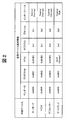
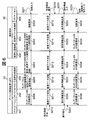
- FIG. 2 is a diagram showing an example of the virtual device identification information 304 shown in FIG.
- the touch panel 309 has an input function and a display function, the input function corresponds to a keyboard, a mouse, and a digitizer, and the display function corresponds to a display.
- the input function corresponds to a keyboard, a mouse, and a digitizer
- the display function corresponds to a display.
- pseudo USB descriptors that is, virtual device identification information
- the pseudo USB descriptor shown in FIG. 2 includes a vendor ID, a product ID, a serial number, a class, a subclass, a protocol, and an interface.
- the vendor ID is identification information assigned to each company or manufacturing company
- the product ID is a code assigned by the company or company having the vendor ID so as not to be duplicated for each product or model.
- the vendor ID and product ID assigned to the device control apparatus 20 are used.
- the class, subclass, protocol, and interface are information defined by the USB standard according to the type of device such as a keyboard, mouse, digitizer, and display. Then, a pseudo USB descriptor in which the vendor ID and product ID are associated with the class, subclass, protocol, and interface is created, and the virtual device control unit 303 holds (stores) it as the virtual device identification information 304.
- the virtual device control unit 303 When a connection operation for starting a connection to the internal device 40 is performed on the touch panel 309 by a user operation or the like, the virtual device control unit 303 sends virtual device identification information 304 to the virtualization communication unit 302. On the other hand, when the end operation is performed, the virtual device control unit 303 ends the virtualization control of the internal device 40.
- the data format conversion processing unit 305 performs conversion processing between packet data (USB data) conforming to the USB data format sent from the virtualization communication unit 302 and data in a data format that can be processed by the internal device 40, and Data transmission / reception between the device control apparatus 20 and the input I / F 307 and the display I / F 308 connected to 40 is enabled.
- packet data USB data
- the data format conversion processing unit 305 performs conversion processing between packet data (USB data) conforming to the USB data format sent from the virtualization communication unit 302 and data in a data format that can be processed by the internal device 40, and Data transmission / reception between the device control apparatus 20 and the input I / F 307 and the display I / F 308 connected to 40 is enabled.
- the virtual device control unit 303 sends the USB descriptor that identifies the HID class to the virtualization communication unit 302 as the virtual device identification information 304 related to the input function of the touch panel.
- the data format conversion processing unit 305 converts input data input from the input function of the touch panel into USB data of HID class, and sends the data to the virtualization communication unit 302 via the input I / F 307.
- the virtual device control unit 303 sends a USB descriptor identifying the vendor specific information (vendor class) to the virtualization communication unit 302 as the virtual device identification information 304 related to the display function of the touch panel.
- the data format conversion processing unit 305 converts the USB data sent from the virtualization communication unit 302 into a data format of the display function of the touch panel, and sends it to the touch panel 309 via the display I / F 308. If the USB data sent from the virtualization communication unit 302 can be passed without data conversion, it is sent to the touch panel 309 via the display I / F 308 without data conversion.
- the virtual device identification information 304 as described above is displayed on the network according to the switching operation from the touch panel 309.
- the touch panel 309 that is the internal device 40 that is, keyboard input and display output
- the device control apparatus 20 on the network can be remotely operated from the touch panel 309 provided in the portable terminal 30.
- the internal device 40 is an input / output device (touch panel) having an input function and a display function, and is connected to the input I / F 307 and the display I / F 308 via the internal bus 306, respectively.
- the input function processes input from the touch panel 309
- the display function processes display on the touch panel 309 and is used when operating the mobile terminal 30.
- the internal bus 306 connects the blocks of the mobile terminal 30 to each other to transmit and receive various data and supply power.
- the internal device 40 is described as the touch panel 309, but is not limited thereto, and may be a storage device (not shown) in the mobile terminal 30.
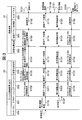
- FIG. 3 is a sequence diagram for explaining an operation when the device control apparatus 20 performs virtualization control of the internal device 40 provided in the mobile terminal 30 in the device control system shown in FIG.
- the virtualization control of the internal device 40 is started by a user operation from the mobile terminal 30.
- the user displays an operation screen on the touch panel 309 by a predetermined operation, and operates (connects) the operation screen to start connection with the internal device 40 (touch panel 309) (step S101).
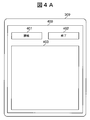
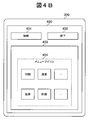
- FIG. 4A and 4B are diagrams illustrating an example of the operation screen 400 instructing the start and end of virtualization control displayed on the touch panel 309 of the mobile terminal 30.
- FIG. 4A shows an operation screen 400 before the start of virtualization control displayed on the touch panel 309 of the mobile terminal 30, and
- FIG. 4B shows an operation screen after the start of virtualization control displayed on the touch panel 309 of the mobile terminal 30. 400 is shown.
- an operation screen 400 shown in FIG. 4A is displayed on the touch panel 309.
- the operation screen 400 displays a connection button 401 for instructing start of virtualization control of the internal device 40, an end button 402 for instructing end (disconnection of virtualization control), and screen data sent from the device control apparatus 20. It is composed of a reception screen display area 403.
- connection button 401 When the user presses the connection button 401 shown in FIG. 4, virtualization control of the internal device 40 is started by the device control apparatus 20, and the display state is switched from FIG. 4A to FIG. 4B. At this time, for example, a menu icon 404 of the device control apparatus 20 is displayed in the reception screen display area 403 as screen data sent from the device control apparatus 20. The screen data is converted into a data format that can be displayed on the touch panel 309 by the data format conversion processing unit 305.
- the user can operate the device control device 20 by inputting to the touch panel 309 according to the menu icon 404 displayed in the reception screen display area 403.
- connection button 401 displayed on the operation screen 400 of the touch panel 309 of the mobile terminal 30 (step S ⁇ b> 101)
- a connection request is sent from the touch panel 309 to the virtual device control unit 303. Is transmitted (step S102).
- the virtual device control unit 303 notifies the connection request by transmitting the virtual device identification information 304 related to the touch panel 309 to the virtualization communication unit 302 (virtual device identification information transmission: step S103).
- the virtualization communication unit 302 notifies the connection request for the touch panel 309 to the virtualization control unit 203 of the device control apparatus 20 (step S104).
- the virtualization control unit 203 of the device control apparatus 20 notifies the device driver 202 of the virtual device identification information 304 related to the touch panel 309 (internal device 40) received from the virtualization communication unit 302 of the mobile terminal 30 (step S105).
- Application 201 receives a connection request for touch panel 309 (internal device 40) from device driver 202 (step S106). Upon receiving a connection request for the touch panel 309 (internal device 40), the application 201 instructs the virtualization control unit 203 to start virtualization control of the touch panel 309 (internal device 40), and the virtualization control unit 203 Virtualization control of 30 touch panels 309 (internal device 40) is started. Then, the device control apparatus 20 generates and activates software components necessary for virtualization control, and starts connection with the touch panel 309 (internal device 40) using these software components.
- the application 201 captures the display screen of the touch panel 209 and acquires screen data (step S110).
- the application 201 transmits the acquired screen data of the touch panel 209 to the device driver 202 (step S111).
- the device driver 202 transmits the screen data received from the application 201 to the virtualization control unit 203 (step S112).
- the virtualization control unit 203 transmits screen data to the virtualization communication unit 302 of the mobile terminal 30 (step S113).
- the virtualization communication unit 302 transmits screen data to the virtual device control unit 303 (step S114).
- the data format conversion processing unit 305 of the virtual device control unit 303 converts the USB data sent from the virtualization communication unit 302 into the data format (first data format) of the touch panel 309, and touches the touch panel via the display I / F 308. It transmits to 309 (step S115).
- the touch panel 309 displays a screen based on the screen data sent from the device control apparatus 20, and waits for input to the device control apparatus 20 (step S116). If the USB data sent from the virtualization communication unit 302 can be passed through the display I / F 308 without data conversion, the USB data is sent to the touch panel 309 via the display I / F 308 without data conversion. Further, in the case where not all the acquired screen data is transmitted in the above-described step S111 but only the difference from the previously transmitted screen data is transmitted, the difference between the screen data already received here and the screen data of the difference. Are combined and displayed.
- the user inputs operation information for remotely operating the device control apparatus 20 using the touch panel 309 of the mobile terminal 30 (step S121).
- the touch panel 309 transmits operation information to the virtual device control unit 303 via the input I / F 307 (step S122).
- the virtual device control unit 303 converts the operation information (input data) received via the input I / F 307 into USB data (second data format) and transmits it to the virtualization communication unit 302 (step S123).
- the virtualization communication unit 302 transmits the received operation information to the virtualization control unit 203 of the device control apparatus 20 (step S124).
- the virtualization control unit 203 of the device control apparatus 20 transmits the received operation information to the device driver 202 (step S125).
- the device driver 202 transmits the operation information received from the virtualization control unit 203 to the application 201 (step S126).
- the application 201 executes an operation (processing) according to the operation information received from the device driver 202 (step S127).
- the device control apparatus 20 displays the execution result of the process (function) on the touch panel 209.
- the screen data displayed on the touch panel 209 is transmitted to the portable terminal 30 and displayed on the touch panel 309 of the portable terminal 30 in the same manner as Steps S107 to S116 described above.
- step S106 when the connection between the touch panel 309 (internal device 40) and the application 201 is started in step S106, the processing (screen transfer processing) in steps S107 to S116 is performed until the connection is disconnected (terminated) in step S136 described later. ) And steps S121 to S127 (remote operation processing) are repeated asynchronously (in parallel).
- the virtual communication unit 302 and the virtual device control unit 303 perform data transmission / reception between the internal device 40 and the device control apparatus 20 via the network.
- step S131 The user presses the end button 402 shown in FIG. 4B when the virtualization control of the internal device 40 of the mobile terminal 30 by the device control apparatus 20 is ended (step S131). Thereby, the touch panel 309 requests the virtual device control unit 303 to disconnect communication (control end) (step S132). The virtual device control unit 303 notifies the virtualization communication unit 302 of a disconnection request (step S133).
- the virtualization communication unit 302 notifies the virtualization control unit 203 of the device control apparatus 20 of a disconnection request (control end) for the internal device 40 (step S134).
- the virtualization control unit 203 notifies the device driver 202 of the disconnection request received from the virtualization communication unit 302 of the mobile terminal 30 (step S135).
- the device driver 202 notifies the application 201 of the disconnection request received from the virtualization control unit 203 (step S136) and ends the control of the touch panel 309 (internal device 40). As a result, communication between the application 201 and the touch panel 309 (internal device 40) is disconnected.
- the virtualization control of the internal device 40 of the mobile terminal 30 by the device control apparatus 20 is finished, and the operation screen 400 of the mobile terminal 30 is switched from the display state of FIG. 4B to FIG. 4A.
- the device control apparatus 20 performs virtualization control of the internal device 40 provided in the mobile terminal 30, and the internal device 40 is directly connected using the device driver 202. Since the behavior can be simulated as in the case of (local connection), the user can use the device control apparatus 20 by using the internal device 40 (for example, a touch panel) provided in the mobile terminal 30. it can.
- the internal device 40 for example, a touch panel
- FIG. 5 is a block diagram showing an example of a device control system according to the second embodiment of the present invention. The same components as those in the device control system shown in FIG.
- the device control apparatus 20 has been described as an MFP having a touch panel, but in the second embodiment, an MFP or a single-function peripheral apparatus (SFP: Single Function Peripheral) without a touch panel will be described.
- the device control apparatus 20A is a single function peripheral device, and the storage unit 200 includes an application 201, a device driver 202, a virtualization control unit 203, and a communication control unit 204.
- FIG. 6 is a sequence diagram for explaining processing when the touch panel of the mobile terminal is virtualized and controlled from the device control apparatus in the device control system shown in FIG. 5 and the function of the device control apparatus (SFP) 20A is used. is there.
- step S201 to step S206 Since the processing from step S201 to step S206 is the same as the processing from step S101 to step S106 described in the first embodiment, the description thereof is omitted.
- the application 201 of the device control apparatus 20 When the connection between the touch panel 309 (internal device 40) and the application 201 is started in steps S201 to S206, the application 201 of the device control apparatus 20 generates a display screen in response to a connection request for the touch panel 309 of the mobile terminal 30. (Step S210).
- Step S211 to Step S236 Since the processing after Step 211 (Step S211 to Step S236) is the same as the processing of Step S111 to Step S136 described in the first embodiment, description thereof is omitted.
- the device control apparatus 20A since the device control apparatus 20A does not include a touch panel, instead of the display screen acquisition process (step S107 in FIG. 3) described in the first embodiment, A display screen generation process (step S210 in FIG. 6) is performed.
- the device control apparatus 20A virtualizes and controls the internal device 40 provided in the mobile terminal 30, and behaves in the same manner as when the internal device 40 is directly connected (locally connected) using the device driver 202. Therefore, even in the device control apparatus 20A (SFP) that does not include a display device (display function), the user can connect the internal device 40 (for example, touch panel) provided in the mobile terminal 30 to the device control apparatus.
- the device control apparatus 20A can be used by substituting as a display apparatus (display function) of 20A.
- the application 201 of the device control apparatus may switch the control content described in the first embodiment and the second embodiment according to the function of the device control apparatus in which the device control apparatus is installed.
- the application 201 of the device control apparatus may switch the control content described in the first embodiment and the second embodiment according to the function of the device control apparatus in which the device control apparatus is installed.
- An application developed for the device control apparatus 20 can be operated on the device control apparatus 20A without a touch panel, and the development cost of the application can be suppressed.
- the device that is virtualized and controlled by the device control apparatus has been described as the internal device 40 (eg, touch panel 309) of the mobile terminal 30, but a storage device such as a flash memory (eg, SD memory card) built in the mobile terminal 30 Or a camera built in the portable terminal 30.
- a storage device such as a flash memory (eg, SD memory card) built in the mobile terminal 30
- a camera built in the portable terminal 30.
- the device control apparatus 20 When an external device (not shown) is connected to the mobile terminal 30 via a communication I / F (not shown), the device control apparatus 20 performs virtualization control of the external device of the mobile terminal 30 and connects to the external device. Data transmission / reception can be performed.
- the external device is, for example, an input device such as a keyboard, a mouse, a digitizer, and a numeric keypad, a display device such as a liquid crystal display, a storage device such as a USB memory, and the external device is connected to the device controller 20 such as a USB interface. Connected by communication I / F.
- the function of the above embodiment may be used as a control method, and this control method may be executed by the device control apparatus. Further, a program having the functions of the above-described embodiments may be used as a control program, and the control program may be executed by a computer included in the device control apparatus.
- the control program is recorded on a computer-readable recording medium, for example.
- the aspect of the present invention is also achieved by a computer of a system or apparatus (or a device such as a CPU or MPU) that reads and executes a program stored in a storage device in order to realize the functions of the above-described embodiments,
- the steps are also achieved by a method executed by a computer of a system or apparatus by reading and executing a program stored in a storage device to realize the functions of the above-described embodiments, for example.
- the program is provided to the computer, for example, via a network or from various recording media that serve as storage devices (eg, computer-readable media).
Landscapes
- Engineering & Computer Science (AREA)
- Theoretical Computer Science (AREA)
- Signal Processing (AREA)
- Human Computer Interaction (AREA)
- General Physics & Mathematics (AREA)
- Multimedia (AREA)
- Physics & Mathematics (AREA)
- General Engineering & Computer Science (AREA)
- Computer Hardware Design (AREA)
- Computing Systems (AREA)
- Computer Graphics (AREA)
- Computer Networks & Wireless Communication (AREA)
- Telephone Function (AREA)
- Facsimiles In General (AREA)
- Mobile Radio Communication Systems (AREA)
- Digital Computer Display Output (AREA)
- Computer And Data Communications (AREA)
- User Interface Of Digital Computer (AREA)
Priority Applications (1)
| Application Number | Priority Date | Filing Date | Title |
|---|---|---|---|
| US14/744,249 US20150288834A1 (en) | 2012-12-27 | 2015-06-19 | Portable terminal, and control method for portable terminal |
Applications Claiming Priority (2)
| Application Number | Priority Date | Filing Date | Title |
|---|---|---|---|
| JP2012284993A JP6216510B2 (ja) | 2012-12-27 | 2012-12-27 | 携帯端末、携帯端末の制御方法、およびデバイス制御システム |
| JP2012-284993 | 2012-12-27 |
Related Child Applications (1)
| Application Number | Title | Priority Date | Filing Date |
|---|---|---|---|
| US14/744,249 Continuation US20150288834A1 (en) | 2012-12-27 | 2015-06-19 | Portable terminal, and control method for portable terminal |
Publications (1)
| Publication Number | Publication Date |
|---|---|
| WO2014104398A1 true WO2014104398A1 (ja) | 2014-07-03 |
Family
ID=51021452
Family Applications (1)
| Application Number | Title | Priority Date | Filing Date |
|---|---|---|---|
| PCT/JP2013/085326 Ceased WO2014104398A1 (ja) | 2012-12-27 | 2013-12-25 | 携帯端末、携帯端末の制御方法、およびデバイス制御システム |
Country Status (3)
| Country | Link |
|---|---|
| US (1) | US20150288834A1 (enExample) |
| JP (1) | JP6216510B2 (enExample) |
| WO (1) | WO2014104398A1 (enExample) |
Cited By (1)
| Publication number | Priority date | Publication date | Assignee | Title |
|---|---|---|---|---|
| US9395941B2 (en) | 2012-12-28 | 2016-07-19 | Canon Imaging Systems Inc. | Information processing apparatus, portable terminal, and control method therefor |
Families Citing this family (2)
| Publication number | Priority date | Publication date | Assignee | Title |
|---|---|---|---|---|
| CN105867866B (zh) * | 2016-04-15 | 2018-09-21 | 浪潮集团有限公司 | 一种kvm芯片、kvm控制系统和方法 |
| CN105915975B (zh) * | 2016-05-31 | 2019-02-01 | 深圳市灰度科技有限公司 | 用移动设备更新led屏内容的异步控制系统及方法 |
Citations (2)
| Publication number | Priority date | Publication date | Assignee | Title |
|---|---|---|---|---|
| JP2005157419A (ja) * | 2003-11-20 | 2005-06-16 | Sony Corp | 情報処理システム、情報処理装置および方法、並びにプログラム |
| JP2008210115A (ja) * | 2007-02-26 | 2008-09-11 | Nec Corp | リモートコンピュータ上でローカル端末のusbデバイスを操作するシステム、その方法及びそのプログラム |
Family Cites Families (1)
| Publication number | Priority date | Publication date | Assignee | Title |
|---|---|---|---|---|
| US20070005867A1 (en) * | 2005-06-30 | 2007-01-04 | Nimrod Diamant | Virtual peripheral device interface and protocol for use in peripheral device redirection communication |
-
2012
- 2012-12-27 JP JP2012284993A patent/JP6216510B2/ja not_active Expired - Fee Related
-
2013
- 2013-12-25 WO PCT/JP2013/085326 patent/WO2014104398A1/ja not_active Ceased
-
2015
- 2015-06-19 US US14/744,249 patent/US20150288834A1/en not_active Abandoned
Patent Citations (2)
| Publication number | Priority date | Publication date | Assignee | Title |
|---|---|---|---|---|
| JP2005157419A (ja) * | 2003-11-20 | 2005-06-16 | Sony Corp | 情報処理システム、情報処理装置および方法、並びにプログラム |
| JP2008210115A (ja) * | 2007-02-26 | 2008-09-11 | Nec Corp | リモートコンピュータ上でローカル端末のusbデバイスを操作するシステム、その方法及びそのプログラム |
Cited By (1)
| Publication number | Priority date | Publication date | Assignee | Title |
|---|---|---|---|---|
| US9395941B2 (en) | 2012-12-28 | 2016-07-19 | Canon Imaging Systems Inc. | Information processing apparatus, portable terminal, and control method therefor |
Also Published As
| Publication number | Publication date |
|---|---|
| US20150288834A1 (en) | 2015-10-08 |
| JP2014127121A (ja) | 2014-07-07 |
| JP6216510B2 (ja) | 2017-10-18 |
Similar Documents
| Publication | Publication Date | Title |
|---|---|---|
| JP5307276B2 (ja) | Usb装置の遠隔制御方法及びこれを実行するシステム | |
| EP2530587B1 (en) | Method and apparatus to develop an application of an image forming apparatus | |
| US10805484B2 (en) | Image processing device to execute communication processing with information processing device, non-transitory computer-readable recording medium for image processing device, and image processing system | |
| TWI463364B (zh) | 觸控裝置之外部操作系統與方法 | |
| CN103839398B (zh) | 遥控器的键值信息处理方法及控制设备、遥控器 | |
| WO2014104398A1 (ja) | 携帯端末、携帯端末の制御方法、およびデバイス制御システム | |
| CN110278338A (zh) | 图像形成装置、图像形成系统 | |
| JP6481462B2 (ja) | 画像形成装置の検索方法、携帯端末及びプログラム | |
| EP2829985A1 (en) | Information processing system, information processing method, server, control method therefor, and control program | |
| WO2017211260A1 (zh) | 一种访问数据的方法及相关设备 | |
| JP6212367B2 (ja) | 情報処理装置、携帯端末、デバイス制御システム、およびその制御方法 | |
| KR101764513B1 (ko) | 디바이스 제어 장치, 그 제어 방법 및 디바이스 제어 시스템 | |
| JP5707366B2 (ja) | Usb端末の制御方法及びこれを実行する装置 | |
| JP2019089336A (ja) | 画像形成装置、端末装置、エラー画面提供方法、およびコンピュータプログラム | |
| JP2017010192A (ja) | デバイス制御装置、その制御方法、およびデバイス制御システム | |
| JP6298292B2 (ja) | デバイス制御装置およびその制御方法 | |
| JP6614081B2 (ja) | 端末装置 | |
| JP6481531B2 (ja) | 画像形成装置、端末装置、エラー画面提供方法、およびコンピュータプログラム | |
| JP2015220587A (ja) | 無線通信システムおよびその通信方法、並びにプログラム | |
| JP2018112773A (ja) | プリンタドライバのインストール方法、インストールシステム、プログラム及び画像形成装置 | |
| JP2017182735A (ja) | 情報処理装置、その制御方法、およびデバイス制御システム | |
| JP2018097757A (ja) | デバイス制御装置、デバイス制御方法およびデバイス制御システム |
Legal Events
| Date | Code | Title | Description |
|---|---|---|---|
| 121 | Ep: the epo has been informed by wipo that ep was designated in this application |
Ref document number: 13868775 Country of ref document: EP Kind code of ref document: A1 |
|
| NENP | Non-entry into the national phase |
Ref country code: DE |
|
| 122 | Ep: pct application non-entry in european phase |
Ref document number: 13868775 Country of ref document: EP Kind code of ref document: A1 |