WO2014045443A1 - 情報処理装置、情報処理装置の制御方法、プログラム、及びウェブサーバ - Google Patents
情報処理装置、情報処理装置の制御方法、プログラム、及びウェブサーバ Download PDFInfo
- Publication number
- WO2014045443A1 WO2014045443A1 PCT/JP2012/074410 JP2012074410W WO2014045443A1 WO 2014045443 A1 WO2014045443 A1 WO 2014045443A1 JP 2012074410 W JP2012074410 W JP 2012074410W WO 2014045443 A1 WO2014045443 A1 WO 2014045443A1
- Authority
- WO
- WIPO (PCT)
- Prior art keywords
- input
- notification
- content
- user
- input form
- Prior art date
- Legal status (The legal status is an assumption and is not a legal conclusion. Google has not performed a legal analysis and makes no representation as to the accuracy of the status listed.)
- Ceased
Links
Images





Classifications
-
- G—PHYSICS
- G06—COMPUTING OR CALCULATING; COUNTING
- G06F—ELECTRIC DIGITAL DATA PROCESSING
- G06F3/00—Input arrangements for transferring data to be processed into a form capable of being handled by the computer; Output arrangements for transferring data from processing unit to output unit, e.g. interface arrangements
- G06F3/01—Input arrangements or combined input and output arrangements for interaction between user and computer
- G06F3/048—Interaction techniques based on graphical user interfaces [GUI]
- G06F3/0481—Interaction techniques based on graphical user interfaces [GUI] based on specific properties of the displayed interaction object or a metaphor-based environment, e.g. interaction with desktop elements like windows or icons, or assisted by a cursor's changing behaviour or appearance
- G06F3/0482—Interaction with lists of selectable items, e.g. menus
-
- G—PHYSICS
- G06—COMPUTING OR CALCULATING; COUNTING
- G06Q—INFORMATION AND COMMUNICATION TECHNOLOGY [ICT] SPECIALLY ADAPTED FOR ADMINISTRATIVE, COMMERCIAL, FINANCIAL, MANAGERIAL OR SUPERVISORY PURPOSES; SYSTEMS OR METHODS SPECIALLY ADAPTED FOR ADMINISTRATIVE, COMMERCIAL, FINANCIAL, MANAGERIAL OR SUPERVISORY PURPOSES, NOT OTHERWISE PROVIDED FOR
- G06Q40/00—Finance; Insurance; Tax strategies; Processing of corporate or income taxes
- G06Q40/08—Insurance
-
- G—PHYSICS
- G06—COMPUTING OR CALCULATING; COUNTING
- G06F—ELECTRIC DIGITAL DATA PROCESSING
- G06F3/00—Input arrangements for transferring data to be processed into a form capable of being handled by the computer; Output arrangements for transferring data from processing unit to output unit, e.g. interface arrangements
- G06F3/01—Input arrangements or combined input and output arrangements for interaction between user and computer
- G06F3/048—Interaction techniques based on graphical user interfaces [GUI]
- G06F3/0484—Interaction techniques based on graphical user interfaces [GUI] for the control of specific functions or operations, e.g. selecting or manipulating an object, an image or a displayed text element, setting a parameter value or selecting a range
- G06F3/04842—Selection of displayed objects or displayed text elements
-
- G—PHYSICS
- G06—COMPUTING OR CALCULATING; COUNTING
- G06F—ELECTRIC DIGITAL DATA PROCESSING
- G06F40/00—Handling natural language data
- G06F40/10—Text processing
- G06F40/166—Editing, e.g. inserting or deleting
- G06F40/174—Form filling; Merging
-
- G—PHYSICS
- G16—INFORMATION AND COMMUNICATION TECHNOLOGY [ICT] SPECIALLY ADAPTED FOR SPECIFIC APPLICATION FIELDS
- G16H—HEALTHCARE INFORMATICS, i.e. INFORMATION AND COMMUNICATION TECHNOLOGY [ICT] SPECIALLY ADAPTED FOR THE HANDLING OR PROCESSING OF MEDICAL OR HEALTHCARE DATA
- G16H40/00—ICT specially adapted for the management or administration of healthcare resources or facilities; ICT specially adapted for the management or operation of medical equipment or devices
- G16H40/60—ICT specially adapted for the management or administration of healthcare resources or facilities; ICT specially adapted for the management or operation of medical equipment or devices for the operation of medical equipment or devices
- G16H40/67—ICT specially adapted for the management or administration of healthcare resources or facilities; ICT specially adapted for the management or operation of medical equipment or devices for the operation of medical equipment or devices for remote operation
Definitions
- the present invention relates to an information processing apparatus, a control method for the information processing apparatus, a program, and a web server.
- Patent Literature 1 describes a technique for customizing notification items to be input by a user based on the type of insurance that the user applies for.
- the present invention has been made in view of the above problems, and its purpose is an information processing apparatus capable of reducing a burden when a user inputs insurance notification content, a control method for the information processing apparatus, To provide a program and a web server.
- an information processing apparatus is an information processing apparatus that accepts an input of notification contents regarding the health status of an insurance policyholder, and displays an input form for each of a plurality of notification items on a screen.
- Display control means for receiving, receiving means for receiving input of notification contents by the user for each input form, first input control means for inputting the notification contents to the input form in which the user has input the notification contents, and the plurality
- the notification content input to the input form of the other notification item associated with the notification item is input to the input form.
- a second input control means for inputting.
- a control method for an information processing device is a control method for an information processing device that accepts an input of notification contents related to a health condition of an insurance policyholder, and displays an input form for each of a plurality of notification items on a screen.
- a control step a reception step for accepting an input of notification content by a user for each input form, a first input control step for inputting the notification content to an input form into which the user has input the notification content, and the plurality of notifications
- the notification contents input to the input forms of other notification items associated with the notification item are input to the input form.
- a second input control step is a control method for an information processing device that accepts an input of notification contents related to a health condition of an insurance policyholder, and displays an input form for each of a plurality of notification items on a screen.
- the program according to the present invention is a computer that accepts input of notification contents regarding the health status of an insurance policyholder, display control means for displaying each input form of a plurality of notification items on a screen, and notification contents by a user for each input form
- Receiving means for receiving the input, first input control means for inputting the notification content to the input form in which the user has input the notification content, and the user with respect to any one of the plurality of notification items.
- the input form is caused to function as second input control means for inputting the notification content input in the input form of the other notification item associated with the notification item.
- the web server according to the present invention includes means for transmitting the program to a computer.
- the information processing apparatus when the user inputs the content of notification to any input form of the plurality of notification items, is associated with one or more items associated with the notification item.
- the control means inputs the notification content selected by the user from the displayed notification content to the input form.
- the information processing apparatus is associated with a notification item to be input when the user inputs a notification content to any input form of the plurality of notification items. Based on the determination result of the determination means, the determination means for determining whether or not the notification content input in the input form of the other notification item is the content related to the notification item to be input, the second And a means for determining whether or not to execute processing by the input control means.
- the accepting unit accepts input by the user regarding the treatment contents of the insurance contractor's injury or illness or the examination content of the examination, and the determining unit associates with the notification item to be input. It is characterized in that it is determined whether or not the treatment content of the wound or the disease or the examination content of the examination input in the input form of the other notification item is the content related to the notification item to be input.
- the accepting unit accepts an input by the user regarding the name of the insurance contractor's disease or examination
- the determining unit is associated with the notification item to be input. It is characterized in that it is determined whether or not the name of the injury or the disease or the name of the examination input in the other notification item input form is a name related to the notification item to be input.
- the accepting unit accepts input by the user for a treatment period of a sickness or sickness of the insurance policyholder or an examination period of the examination, and the determining unit associates with the notification item to be input. It is characterized in that it is determined whether or not the treatment period of the wound or the disease or the examination period of the examination input in the input form of the other notification items is a period related to the notification item to be input.
- the information processing apparatus displays a plurality of notification content candidates on the screen.
- Candidate display control means for displaying wherein the accepting means accepts an input of notice content by the user by accepting selection by the user from among the plurality of notice content candidates, and the candidate display control means comprises: The notification content candidates input to the input form of other notification items associated with the notification item to be input are preferentially displayed over the other notification content candidates.
- the information processing apparatus performs means for restricting input of the notification content by the user for each input form and a release operation associated with each of the plurality of notification items. If the user inputs notification content to the input form for which the input restriction for the notification item is released and the input form for which the input restriction is released, the input notification content is Means for determining whether or not the content is related to the notification item, and means for determining that the other notification item has been canceled based on the determination result of the means. And
- the information processing apparatus according to the present invention is applicable to various computers such as a personal computer, a mobile phone (smart phone), and a personal digital assistant (PDA).
- a personal computer such as a personal computer, a mobile phone (smart phone), and a personal digital assistant (PDA).
- PDA personal digital assistant
- an insurance contract system including an information processing apparatus according to the present invention will be described.
- FIG. 1 is a diagram showing an overall configuration of an insurance contract system.
- the insurance contract system S includes an information processing apparatus 1 and a web server 2.
- Each device included in the insurance contract system S is connected via a network so that data communication is possible.
- the information processing apparatus 1 includes a control unit 10, a storage unit 11, an operation unit 12, a display unit 13, an input unit 14, and a communication unit 15. Note that the information processing apparatus 1 may include other configurations not shown.
- the control unit 10 includes, for example, a CPU and the like.
- the control unit 10 executes programs stored in the storage unit 11 to perform various processes, and transmits / receives various data to / from the information processing apparatus 1 via the communication unit 15.
- the storage unit 11 includes, for example, a memory such as a hard disk or a RAM.
- the storage unit 11 stores various programs such as a game program, various data, and the like.
- the operation unit 12 includes a mouse, a keyboard, and the like, and transmits a user operation content to the control unit 10.
- the display unit 13 includes a liquid crystal display panel and the like, and displays various screens according to instructions from the control unit 10.
- the input unit 14 includes a DVD playback device and the like, and inputs various data from an external storage device.
- the communication unit 15 is a communication device such as a network card, for example.
- the web server 2 is, for example, a known server computer.
- the web server 2 transmits HTML data to the information processing apparatus 1 in response to a request from the information processing apparatus 1.
- the information processing apparatus 1 displays various screens on the display unit 13 based on the HTML data received from the web server 2 or executes a Java script (registered trademark) included in the HTML data.
- the web server 2 includes a control unit 20, a storage unit 21, and a communication unit 22. Since the control unit 20, the storage unit 21, and the communication unit 22 have the same hardware configurations as the control unit 10, the storage unit 11, and the communication unit 15, respectively, description thereof will be omitted.
- the storage unit 21 is a computer-readable information storage medium that stores HTML data and the like, and the communication unit 15 functions as a means for transmitting HTML data including a Java script to the information processing apparatus 1.
- the web server 2 may include a keyboard, a monitor, an information storage medium reader, and the like (not shown).
- the information processing apparatus 1 displays a web page for a user to apply for an insurance contract on a web browser based on the HTML data received from the web server 2.
- the user applies for an insurance contract by making various inputs from the web page.
- various types of well-known insurance can be applied as insurance applied by the user, such as life insurance, medical insurance, health insurance, cancer insurance, death insurance, and the like.
- the user applies for an insurance contract according to the following procedure.
- the information input from the web browser is transmitted to the web server 2 and the application for insurance contract is completed.
- (Procedure 1) Enter personal information such as the name and address of the policyholder (insured person).
- (Procedure 2) Confirm important matters such as regulations.
- (Procedure 3) Enter various notices related to the health status of the policyholder.
- (Procedure 4) Select a payment method for insurance premiums.
- Final confirmation of input information is performed.
- the notification content is information related to the current or past policyholder's injury (including disability and sequelae) or examination.
- the user who inputs the notification content from the web browser may be the same person as the policyholder or a different person.
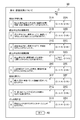
- FIG. 2 is a diagram showing an example of a notification content input screen for a user to input notification content.
- the notification content input screen 30 allows the user to select questions 31A to 31H relating to the health status of the policyholder (hereinafter collectively referred to simply as the question 31) and the answer to the question.
- Radio buttons 32A to 32H (hereinafter collectively referred to simply as radio buttons 32).
- the question 31 is, for example, a question regarding whether or not an insurance policyholder is injured or not.
- the user moves the cursor C and inputs the notification content of each notification item while answering the question 31.
- the radio button 32 is for the user to select an answer to the question 31.
- an input form for the user to input notification contents of various notification items (types of contents to be notified by the user) related to the question 31 Is displayed on the notification content input screen 30.
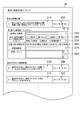
- FIG. 3 is a diagram showing an example of the notification content input screen 30 when the radio button 32A indicating “Yes” is selected.
- FIG. 3 there are a plurality of notification items related to the question 31 ⁇ / b> A, and an input form for the user to input notification contents is displayed for each of the plurality of notification items.
- the notification item is a matter to be notified by the user about the health condition of the policyholder, and a plurality of notification items are defined for each question 31. Note that when the user selects the radio button 32A indicating “No”, these input forms are not displayed.
- the name input form 33 ⁇ / b> A is an area for accepting input by the user regarding the name or examination name of the policyholder.
- the user operates the operation unit 12 to input a character string indicating the current or past name of an injured policy or a name of an examination into the name input form 33A.
- candidates for injury and / or disease names or examination names in the HTML data in advance so that the user can select an injury and / or disease name or examination name from a pull-down menu or the like.
- the period input form 34 ⁇ / b> A is an area for accepting input by the user regarding the treatment period of the sick or illness of the policyholder or the examination period of the examination.
- the user operates the operation unit 12 to select a treatment period or examination period from the pull-down menu of the period input form 34A, thereby inputting the treatment period or examination period in the period input form 34A.
- the numerical value displayed in the pull-down menu is included in the HTML data.
- the user may be allowed to directly input a numerical value to the period input form 34A without using the pull-down menu.
- the state input form 35A is an area for accepting input by the user regarding the current state of the insurance contractor's disease or examination.
- a plurality of types of states in the case of FIG. 3, three types of “complete cure”, “under treatment”, and “following observation”) are prepared.
- the state input form 35A is an area for the user to select one of these multiple types of states.
- the user operates the operation unit 12 to select one of the radio buttons of the state input form 35A, thereby inputting the current state of the insurance contractor's injury or examination.
- a check box may be used without using a radio button, or the user may be allowed to directly input a character string to the state input form 35A.
- the content input form 36A is an area for accepting input by the user regarding the treatment content or examination content of the policyholder.
- a plurality of types of treatment contents or examination contents (in the case of FIG. 3, “inspection / diagnosis / inquiry”, “medicine”, “outpatient”, “hospital”, and “surgery”) are prepared.
- the content input form 36A is for the user to select one of these multiple types of treatment content or examination content.
- the user operates the operation unit 12 and selects at least one of the check boxes on the content input form 36 ⁇ / b> A to input the treatment content or examination content of the policyholder.
- a radio button may be used without using a check box, or the user may be allowed to directly input a character string to the content input form 36A.
- the medical institution input form 37A is an area for accepting input by the user with respect to the name of the medical institution where the insurance contractor has been treated or examined. For example, the user operates the operation unit 12 to input a character string indicating a medical institution name into the medical institution input form 37A.
- the detailed input form 38A is an area for accepting input by the user regarding details of treatment or examination of the policyholder.
- the user operates the operation unit 12 to input a character string indicating details of the treatment or examination of the policyholder into the medical institution input form 37A.
- the contents entered in the medical institution input form 37A include the cause and symptom of the insurer's injury and illness, the reason for the examination and the progress of the examination, the current situation, and the name of the drug when there is medication.
- the user When the user finishes inputting the notification content for each notification item of the question 31A, the user selects the radio button 32B corresponding to the next question 31B and makes an answer to the question 31B. Similarly to the above, when the radio button 32B indicating “Yes” is selected for the question 31B, various input forms for the user to input the notification content are displayed on the notification content input screen 30.
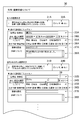
- FIG. 4 is a diagram illustrating an example of the notification content input screen 30 when the radio button 32B indicating “Yes” is selected.
- the radio button 32B indicating “Yes” is selected.
- the user inputs the notification content regarding the question 31B, the name input form 33B, the period input form 34B, the status input form 35B, the content input form 36B, and the medical institution input form 37B are the same as in FIG. , And a detailed input form 38B is displayed.
- the radio button 32B indicating “No” these input forms are not displayed.
- the notification item related to the question 31A and the notification item related to the question 31B are related to each other, and the user inputs the same type of content.
- both the question 31A and the question 31B are notification items related to the recent injury or illness of the policyholder. For this reason, the user is highly likely to input the same notification content again in the name input form 33B or the like. Therefore, in the present embodiment, when the user moves the cursor C to focus the name input form 33B and the like, it is possible to take over the notification content input to the name input form 33A and the like.
- FIG. 5 is a diagram showing an example of the notification content input screen 30 when the name input form 33B is focused. As shown in FIG. 5, a menu 39 is displayed near the name input form 33B. The menu 39 displays the notification content already entered by the user in the question 31A.
- the menu 39 includes the notification content (in this case, the name of the disease or examination) entered by the user in the name input form 33A. Is displayed. When the notification content displayed on the menu 39 is selected, the selected notification content is input to the name input form 33B.
- the user when the user places the cursor C on the medical institution input form 37B or the detailed input form 38B and focuses, the user inputs into the medical institution input form 37A or the detailed input form 38A.
- the notified content is displayed on the menu 39.
- the user selects the notification content displayed on the menu 39, the selected content is input to the medical institution input form 37B or the detailed input form 38B.
- the insurance contract system S of the present embodiment when a user inputs notification contents to an input form of a certain notification item, other input items related to the notification item are displayed on the input form. It is configured to reduce the input burden on the user by taking over the notification content entered in the input form.
- the present technology will be described in detail.
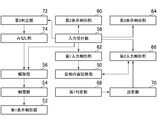
- FIG. 6 is a block diagram illustrating functions realized by the information processing apparatus 1. As shown in FIG. 6, in the information processing apparatus 1, the notification content storage unit 50, the first display control unit 52, the restriction unit 54, the release unit 56, the input reception unit 58, the second display control unit 60, the first input A control unit 62, a third display control unit 64, and a second input control unit 66 are realized.
- Each function shown in FIG. 6 is realized by the control unit 10 operating according to a program read from the storage unit 11 and a Java script described in HTML data received from the web server 2.
- the notification content storage unit 50 is realized mainly by the storage unit 11, and other functions are realized mainly by the control unit 10.
- essential functions are the first display control unit 52, the input receiving unit 58, the first input control unit 62, the third display control unit 64, and the second input control unit 66. Other functions may be omitted.
- the notification content storage unit 50 stores information related to the notification content input by the user. That is, the notification content storage unit 50 stores information related to user input content for each input form displayed on the notification content input screen 30. The notification content of the user stored in the notification content storage unit 50 is transmitted to the web server 2 at a given timing.
- the 1st display control part 52 displays each input form (for example, name input form 33 etc.) of a some notification item on a screen (for example, notification content input screen 30).
- the input form is an area on the screen for the user to input the notification content.
- a text input field for the user to input text character string
- a radio button for example, a radio button, a check box, a pull-down select box, a list It is a select box of the format.
- restriction unit 54 restricts the input of notification contents by the user for each input form. “Restrict input” is to prevent the input form from being input (input or displayed) even if the user performs an operation, for example, to temporarily hide the input form. Or restricting the focus on the input form.
- the canceling unit 56 cancels the restriction on the input of the notification item to the input form.
- the canceling operation is a predetermined operation and is a predetermined operation set for each notification item.
- the act of selecting the “Yes” radio button 32 as an answer to each question 31 corresponds to a release operation.
- “Release the input restriction on the input form” means to enter the notification content into the input form according to the user's operation, for example, to display a hidden input form on the screen, or For example, allowing focus on the input form.
- the release unit 56 displays the name input form 33 and the like that were not displayed on the notification content input screen 30. Become.
- the input receiving unit 58 receives an input of notification content by the user for each input form (for example, the name input form 33). Based on the detection signal from the operation unit 12, the input reception unit 58 receives text input, selection of a radio button, selection of a check box, or selection of a selection box based on a detection signal from the operation unit 12.
- the second display control unit 60 displays a plurality of notification content candidates on a screen (for example, for example) when the user inputs notification content to any input form (for example, the name input form 33) of the plurality of notification items. It is displayed on the notification content input screen 30).
- the case where the user inputs the notification content means that the user has selected the input form or can enter the input form, and the input form is focused. For example, when the user moves the cursor to an input form or selects a pull-down menu of a select box, it corresponds to a case where the user inputs notification contents.
- the notification content candidate is a candidate for notification content to be input by the user, for example, a symbol string (character string or numeric string) to be input as the notification content, or an item to be selected by the user.
- Notification content candidates are included in, for example, HTML data. For example, a symbol string written together with a radio button or a check box or a symbol string displayed in a select box corresponds to a notification content candidate.
- the second display control unit 60 displays a plurality of notification content candidates included in the HTML data of the notification content input screen 30 on the notification content input screen 30.
- the input reception unit 58 receives a selection by the user from among a plurality of notification content candidates, and thereby the user makes a selection. Accepts notification content. That is, the input reception unit 58 receives the notification content candidate selected by the user from the notification content candidates displayed on the notification content input screen 30 as the notification content input by the user.
- the first input control unit 62 inputs the notification content into an input form (for example, the name input form 33 or the like) in which the user has input the notification content.
- “Enter notification content” means to display the notification content on the input form, for example, to reflect (display) the symbol string on the input form, or to select the content of the user in the radio button, check box, or select box Is reflected (displayed).
- [3-8. Third display control unit] When the user inputs the content of notification to any input form (for example, the name input form 33) of the plurality of notification items, the third display control unit 64 is associated with the notification item.
- the contents of notification input by the user for the input forms of a plurality of other notification items are displayed on the screen (for example, the notification content input screen 30).
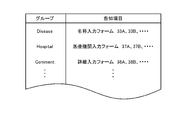
- FIG. 7 is a diagram showing the association between one notification item and another notification item.
- the association shown in FIG. 7 is defined in the HTML data of the notification content input screen 30.
- the information items are classified into a plurality of groups based on the nature (type) of the notification items, and one or a plurality of notification items belong to each group.
- Notification items belonging to the same group are notification items associated with each other.
- the third display control unit 64 refers to the association defined in the HTML data, and specifies other notification items associated with the notification item to be input by the user. Then, the third display control unit 64 refers to the notification content storage unit 50, acquires the notification content input in the other specified notification items, and displays it on the menu 39. For example, when there are a plurality of other notification items associated with the notification item to be input and the notification content is input in each input form of these other notification items, the third display control unit 64 The plurality of input notification contents are displayed as a list in the menu 39.
- the input receiving unit 58 receives the selection by the user from the notification contents displayed on the menu 39.
- the input accepting unit 58 accepts selection of at least one of a plurality of notification contents displayed on the menu 39 based on an operation signal from the operation unit 12.
- the second input control unit 66 associates the notification form with the notification item when the user inputs the notification content to any one of the plurality of notification items (for example, the name input form 33B).
- the notification content input by the user is input to the input form (for example, name input form 33A) of the other notification items.
- the second input control unit 66 refers to the notification content storage unit 50, acquires the notification content input in other notification items associated with the input item to be input, and inputs the input item of the notification item to be input To enter.
- the second input control unit 66 inputs the notification content selected by the user from the notification content displayed on the menu 39 to the input form of the notification item to be input.
- the second input control unit 66 inputs the notification content selected by the user from among the plurality of notification contents displayed on the menu 39 to this input form.
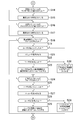
- Processing executed in information processing apparatus] 8 to 10 are flowcharts showing an example of processing executed in the information processing apparatus 1.
- the processing shown in FIGS. 8 to 10 is executed by the control unit 10 operating according to a program read from the storage unit 11 and a program acquired from the web server 2.
- the processing shown in FIGS. 8 to 10 is executed when the information processing apparatus 1 receives the HTML data of the notification content input screen 30 from the web server 2.
- the control unit 10 displays a notification content input screen 30 on the display unit 13 based on the HTML data received from the web server 2 (S1).
- the HTML data of the notification content input screen 30 includes a Java script, and includes, for example, data defining associations between a plurality of notification items and data indicating a plurality of notification content candidates.
- the Java script is executed by the control unit 10, the processing described below is performed.
- a notification content input screen 30 in the state shown in FIG. In this state, since the radio button 32 has not yet been selected, the name input forms 33 and the like corresponding to the questions 31 are hidden, and the user input to the name input forms 33 and the like is restricted. Become.
- the control unit 10 determines whether or not the radio button 32 indicating “Yes” is selected as an answer to the question 31 based on the operation signal from the operation unit 12 (S2). When it is determined that the radio button 32 indicating “Yes” is selected (S2; Y), the control unit 10 displays the name input form 33 and the like on the notification content input screen 30 (S3). In S3, since the focus on the name input form 33 or the like is possible, the user input restriction on the name input form 33 is released. Information for identifying the radio button 32 selected by the user is recorded in the storage unit 11.
- the control unit 10 determines whether or not the name input form 33 has been focused based on the operation signal from the operation unit 12 (S4). When it is determined that the name input form 33 has been focused (S4; Y), the control unit 10 refers to the storage content of the storage unit 11 and the user has already entered the name or form of the injury or examination for the other name input form 33. It is determined whether a name has been input (S5).
- the control unit 10 displays the character string input by the user from the operation unit 12, The name is entered in the name input form 33 (S6).
- the control unit 10 temporarily records the character string input by the user on the name input form 33 in the storage unit 11 and displays the character string on the focused name input form 33.
- the control unit 10 displays a menu including the inputted name of the disease or examination or examination name. 39 is generated and displayed on the notification content input screen 30 (S7).
- the control unit 10 determines whether or not the user has selected the injury / illness name or examination name displayed on the menu 39 based on the operation signal from the operation unit 12 (S8). When it is determined that the user has selected the injury or disease name or examination name displayed on the menu 39 (S8; Y), the control unit 10 inputs the selected injury or disease name or examination name into the name input form 33 ( S9). In S9, the control unit 10 temporarily records the character string indicating the name of the disease or examination selected by the user in the storage unit 11 as the character string input to the focused name input form 33, and The character string is displayed on the focused name input form 33.
- the control unit 10 determines whether or not the period input form 34 is focused based on the operation signal from the operation unit 12 (S10). When it is determined that the period input form 34 is focused (S10; Y), the control unit 10 displays the numerical value (notification content candidate) described in the HTML data on the pull-down menu of the period input form 34 (S11). . In S ⁇ b> 11, the control unit 10 displays a list of numerical values indicating date, etc. on the pull-down menu of the period input form 34.
- the control unit 10 determines whether the numerical value displayed on the pull-down menu of the period input form 34 has been selected based on the operation signal from the operation unit 12 (S12). When it is determined that the numerical value displayed in the pull-down menu is selected (S12; Y), the control unit 10 inputs the selected numerical value into the period input form 34 (S13). In S ⁇ b> 13, the control unit 10 temporarily records the numerical value selected by the user from the pull-down menu of the period input form 34 in the storage unit 11 and displays the numerical value on the focused period input form 34. .
- the control unit 10 determines whether or not the radio button of the state input form 35 is selected based on the operation signal from the operation unit 12 (S14). When it is determined that the radio button of the state input form 35 is selected (S14; Y), the control unit 10 inputs an item corresponding to the selected radio button to the state input form 35 (S15). In S15, the control unit 10 temporarily records information for identifying the item selected by the user among the radio buttons of the state input form 35 in the storage unit 11, and in the focused state input form 35, The selected radio button is displayed as selected.
- the control unit 10 determines whether or not the check box of the content input form 36 is selected based on the operation signal from the operation unit 12 (S16). When it is determined that the check box of the content input form 36 is selected (S16; Y), the control unit 10 inputs an item corresponding to the selected check box to the content input form 36 (S17). In S17, the control unit 10 temporarily records information for identifying the item selected by the user among the check boxes of the content input form 36 in the storage unit 11, and in the focused content input form 36, The selected check box is displayed as selected.
- the control unit 10 determines whether or not the medical institution input form 37 is focused (S18). When it is determined that the medical institution input form 37 has been focused (S18; Y), the control unit 10 refers to the storage contents of the storage unit 11, and the user has already performed a medical institution on the other medical institution input form 37. It is determined whether or not the name is input (S19).
- the control unit 10 converts the character string input from the operation unit 12 into the medical It inputs into the institution input form 37 (S20).
- the control unit 10 temporarily records the character string input by the user in the medical institution input form 37 in the storage unit 11, and the character string is focused on the medical institution input form 37 in focus. To display.
- the control unit 10 displays the menu 39 including the name of the input medical institution. Is displayed on the notification content input screen 30 (S21).
- the control unit 10 determines whether or not the name of the medical institution displayed on the menu 39 is selected by the user based on the operation signal from the operation unit 12 (S22). When it is determined that the name of the medical institution displayed on the menu 39 is selected by the user (S22; Y), the control unit 10 inputs the name of the selected medical institution into the medical institution input form 37 (S23). ). In S23, the control unit 10 temporarily records the character string indicating the name of the medical institution selected by the user in the storage unit 11 as the character string input to the focused medical institution input form 37, and The character string is displayed on the focused medical institution input form 37.
- the control unit 10 determines whether or not the detailed input form 38 is focused (S24). When it is determined that the detailed input form 38 has been focused (S24; Y), the control unit 10 refers to the storage content of the storage unit 11, and the user has already been injured or inspected for the other detailed input form 38. It is determined whether or not details have been input (S25).
- the control unit 10 details the character string input from the operation unit 12. It inputs into the input form 38 (S26). In S26, the control unit 10 temporarily records the character string input by the user on the detailed input form 38 in the storage unit 11, and displays the character string on the focused detailed input form 38.
- control unit 10 displays a menu including the inputted details of the disease or examination. 39 is generated and displayed on the notification content input screen 30 (S27).
- the control unit 10 determines whether or not the user has selected the wound or disease displayed on the menu 39 based on the operation signal from the operation unit 12 (S28). When it is determined that the user has selected the details of the disease or examination displayed on the menu 39 (S28; Y), the control unit 10 inputs the details of the selected disease or examination on the detail input form 38 ( S29). In S29, the control unit 10 temporarily records, in the storage unit 11, a character string indicating details of the injury or disease selected by the user as a character string input to the focused detail input form 38, and The character string is displayed on the focused detail input form 38.
- the control unit 10 determines whether or not the next button 40 has been selected (S30). When it is determined that the next button 40 has been selected (S30; Y), the control unit 10 refers to the storage contents of the storage unit 11 and determines whether or not the radio buttons 32 of all the questions 31 have been selected. (S31).
- the control unit 10 When it is determined that all the radio buttons 32 have been selected (S31; Y), the control unit 10 refers to the storage contents of the storage unit 11 and determines whether all the notification items have been answered (S32). . In S ⁇ b> 32, the control unit 10 determines whether or not the user has input notification contents for all notification items.
- control unit 10 transmits a display request for the next screen to the web server 2 (S33), and the process ends.
- the various notification contents recorded in the storage unit 11 are transmitted to the web server 2 at a predetermined timing.
- the control unit 10 displays an error image. Is displayed on the display unit 13 (S34), and the process returns to S2. In this case, the input of the notification item for which the user has not yet input the notification content is accepted.
- the burden on the user can be reduced by taking over the notification contents already input in the other questions 31 when the user answers the notification contents for the question 31.
- the user can select from the notification content displayed in the menu 39.
- FIG. 11 is a functional block diagram in the modified example. As shown in FIG. 11, in the modification, in addition to the functions of the embodiment, a first determination unit 68, a determination unit 70, a second determination unit 72, and a deemed unit 74 are realized. Each of these functions is realized mainly by the control unit 10.
- the processing content for taking over the notification content in the input form focused by the user is It may be different. That is, only when the notification content input to the input form of a certain notification item satisfies a given condition, the notification content may be transferred to the input form of another notification item.
- FIG. 12 is a diagram illustrating an example of conditions defined for each notification item.
- each notification item has a condition regarding the notification content input to the other notification items.
- the condition defined for a certain notification item is satisfied, the notification content of the other notification item is succeeded to the notification item.
- This condition is a condition indicating whether or not the health status of the policyholder is in a given state, and is a condition indicating whether or not the notification contents of other notification items are given contents.
- the information processing apparatus 1 of the modification example (1-1) includes a first determination unit 68 and a determination unit 70.
- the first determination unit 68 inputs the input to the other notification item input form associated with the input target notification item. It is determined whether the notified content is the content related to the input notification item.
- the first determination unit 68 determines whether or not the treatment content of the wound or the examination input in the input form of the other notification item associated with the notification item to be input is the content related to the notification item to be input. Determine whether.
- the content related to the notification item to be input is the treatment content of the given type or the test content of the given type, and is the treatment content or the test content related to the content of the question 31 to be input.
- the first determination unit 68 refers to the stored content of the notification content storage unit 50, and specifies the treatment content of the wound or the illness or the examination content of the examination related to the other notification item associated with the notification item to be input.
- the first determination unit 68 compares the identified treatment content or examination content with the content (conditions shown in FIG. 12) defined in the notification item to be input.
- the given treatment content or the given examination content is hospitalized.
- the given treatment content or the given examination content is an operation.
- the given treatment content or the given examination content is an examination.
- the determination unit 70 determines whether or not to execute the process by the second input control unit 66 based on the determination result of the first determination unit 68. When it is determined that the notification content input in the input form of another notification item is the content related to the input item to be input, the determination unit 70 determines to execute the process by the second input control unit 66, and the like. When it is determined that the notification content input in the notification item input form is not the content related to the notification item to be input, it is determined not to execute the processing by the second input control unit 66. “Do not execute the process by the second input control unit 66” means that the second input control unit 66 is restricted (suppressed) from inputting the notification content to the input form.
- the modified example (1) it is possible to prevent the notification contents relating to the contents of the injury or illness that are not related to the notification items to be input from being taken over.
- the first determination unit 68 of the modified example (1-2) uses the name of the wound or the disease or the name of the examination input in the input form of another notification item associated with the notification item to be input as the notification item to be input. It is determined whether or not the name is related.
- the name related to the notification item to be input is the name of the injury or illness related to the question 31 to be input or the name of the examination.
- the name of a given injury or illness or the name of an examination is a character string of “cancer” or “cancer” or “cancer”.
- the first determination unit 68 refers to the storage content of the notification content storage unit 50, and specifies the name of the wound or the examination related to the other notification item associated with the notification item to be input.
- the first determination unit 68 compares the specified injury or illness name or examination name with the contents (conditions shown in FIG. 12) defined in the notification item to be input.
- the comparison process is a match determination process (including a forward match or a backward match) with a specific character string (for example, “Gun”).
- the determination unit 70 determines to execute the process by the second input control unit 66, and the like.
- it is determined that the notification content input in the notification item input form is not the content related to the notification item to be input it is determined not to execute the processing by the second input control unit 66.
- the first determination unit 68 of the modified example (1-3) is configured to notify the input target of the treatment period of the wound or the examination period input in the input form of other notification items associated with the input target notification item. It is determined whether it is a period related to the item.
- the period relating to the notification item to be input is a period included in the content of the question 31 to be input. For example, if it is a notification item regarding the health condition within the past five years as in the question 31B, the period from the current five years to the present time is the period related to the notification item. In addition, for example, in the case of a notification item related to a health condition within the past two years as in the question 31D, the period from the current two years to the present time is the period related to the notification item.
- the first determination unit 68 refers to the stored content of the notification content storage unit 50, and specifies the treatment period of the wound or the illness or the examination period of the examination related to the other notification item associated with the notification item to be input.
- the first determination unit 68 compares the treatment period of the specified injury or illness or the examination period of the examination with the contents (conditions shown in FIG. 12) defined in the notification item to be input.
- the determination unit 70 determines that the wound treatment period or examination period input in the other notification item input form is the period related to the notification item to be input, the determination unit 70 performs processing by the second input control unit 66. If it is determined that the treatment period of the wound or the disease or the examination period of the examination input in the other notification item input form is not the period related to the notification item to be input, the processing by the second input control unit 66 Is determined not to execute.
- the second display control unit 60 of the modified example (2) uses the notification content candidate input to the input form of other notification items associated with the notification item to be input to which the user inputs the notification content as other notification content. Display with priority over candidates. “Preferentially displaying” means that the order in which the notification content candidates are displayed is advanced, and the position where the notification content candidates are displayed is set to a predetermined position.
- the input of the notification content of the notification item related to the question 31 is canceled.
- the input of the notification contents of other notification items may be canceled.
- the radio button 32B of “Yes” is selected as an answer to the question 31B. Therefore, when “hospitalization” is selected in the content input form 36A, the name input form 33B and the like may be displayed automatically assuming that the “yes” radio button 32B is selected. .
- the insurance contract system S of the modified example (3) includes a second determination unit 72 and a deeming unit 74.
- the second determination unit 72 determines whether or not the input notification content is content related to another notification item when the user inputs the notification content to the input form whose input restriction has been removed. To do.
- the contents related to other notification items are notification contents associated with other notification items, and are contents to be notified in other notification items. For example, a given injury or illness name or examination name, a given period, a given condition of injury or illness or examination, a given treatment content or examination content, a given medical institution name, etc. related to other notification items It can be said.
- the contents related to other notification items are defined in a Java script of HTML data.
- the second determination unit 72 compares the notification content input by the user with the content related to other notification items, and determines whether or not they match.
- the deeming unit 74 considers that other notification item release operations have been performed based on the determination result of the second determination unit 72. “Consider that the release operation has been performed” means to execute a process when the release operation is performed, and here, to release the restriction on the input of the notification content. In the case where the notification content input by the user matches the content related to another notification item, the deeming unit 74 cancels the input restriction on the other notification item.
- input by the user may be requested for all notification items, or input for predetermined notification items may not be requested.
Landscapes
- Engineering & Computer Science (AREA)
- Theoretical Computer Science (AREA)
- Business, Economics & Management (AREA)
- Health & Medical Sciences (AREA)
- General Engineering & Computer Science (AREA)
- General Physics & Mathematics (AREA)
- Physics & Mathematics (AREA)
- Accounting & Taxation (AREA)
- Finance (AREA)
- General Business, Economics & Management (AREA)
- Biomedical Technology (AREA)
- General Health & Medical Sciences (AREA)
- Human Computer Interaction (AREA)
- Marketing (AREA)
- Technology Law (AREA)
- Economics (AREA)
- Development Economics (AREA)
- Strategic Management (AREA)
- Computational Linguistics (AREA)
- Audiology, Speech & Language Pathology (AREA)
- Artificial Intelligence (AREA)
- Epidemiology (AREA)
- Medical Informatics (AREA)
- Primary Health Care (AREA)
- Public Health (AREA)
- Financial Or Insurance-Related Operations Such As Payment And Settlement (AREA)
- User Interface Of Digital Computer (AREA)
Description
以下、本発明に係る実施形態について、図面に基づき詳細に説明する。本発明に係る情報処理装置は、パーソナルコンピュータ、携帯電話機(スマートフォン)、携帯情報端末(PDA)等の種々のコンピュータに適用可能である。なお、以降説明する実施形態では、本発明に係る情報処理装置を含む保険契約システムについて説明する。
図1は、保険契約システムの全体構成を示す図である。図1に示すように、保険契約システムSは、情報処理装置1とウェブサーバ2とを含む。保険契約システムSに含まれる各装置は、ネットワークを介してデータ通信可能に接続される。
(手順1)保険契約者(被保険者)の氏名や住所等の個人情報を入力する。
(手順2)規約等の重要事項を確認する。
(手順3)保険契約者の健康状態に係る各種告知内容について入力する。
(手順4)保険料の支払方法を選択する。
(手順5)入力した情報の最終確認を行う。
図6は、情報処理装置1によって実現される機能を示すブロック図である。図6に示すように、情報処理装置1においては、告知内容記憶部50、第1表示制御部52、制限部54、解除部56、入力受付部58、第2表示制御部60、第1入力制御部62、第3表示制御部64、及び第2入力制御部66が実現される。
告知内容記憶部50は、ユーザが入力した告知内容に関する情報を記憶する。即ち、告知内容記憶部50は、告知内容入力画面30に表示された各入力フォームに対するユーザの入力内容に関する情報を記憶する。告知内容記憶部50に記憶されたユーザの告知内容は、所与のタイミングでウェブサーバ2に送信される。
第1表示制御部52は、複数の告知項目の各々の入力フォーム(例えば、名称入力フォーム33等)を画面(例えば、告知内容入力画面30)に表示させる。入力フォームは、ユーザが告知内容を入力するための画面上の領域であり、例えば、テキスト(文字列)をユーザが入力するためのテキスト入力欄、ラジオボタン、チェックボックス、プルダウン形式のセレクトボックス、リスト形式のセレクトボックス等である。
制限部54は、各入力フォームに対する、ユーザによる告知内容の入力を制限する。「入力を制限する」とは、ユーザが操作をしても入力フォームに告知内容を入力(入力又は表示)しないように抑止することであり、例えば、入力フォームを一時的に非表示にすること、又は、入力フォームに対するフォーカスを制限すること等である。
解除部56は、複数の告知項目の各々に関連付けられた解除操作が行われた場合、当該告知項目の入力フォームに対する入力の制限を解除する。解除操作は、予め定められた操作であり、告知項目毎に設定された所定操作である。本実施形態では、各質問31に対する回答として「はい」のラジオボタン32を選択する行為が、解除操作に相当する。
入力受付部58は、各入力フォーム(例えば、名称入力フォーム33等)に対する、ユーザによる告知内容の入力を受け付ける。入力受付部58は、操作部12からの検出信号に基づいて、テキスト入力欄に対するテキストの入力、ラジオボタンの選択、チェックボックスの選択、又はセレクトボックスの選択を受け付ける。
第2表示制御部60は、複数の告知項目のうちの何れかの入力フォーム(例えば、名称入力フォーム33)に対してユーザが告知内容を入力する場合、複数の告知内容候補を画面(例えば、告知内容入力画面30)に表示させる。
第1入力制御部62は、ユーザが告知内容を入力した入力フォーム(例えば、名称入力フォーム33等)に、当該告知内容を入力する。「告知内容を入力する」とは、告知内容を入力フォームに表示させることであり、例えば、入力フォームに記号列を反映(表示)させること、ラジオボタン、チェックボックス、又はセレクトボックスにユーザの選択内容を反映(表示)させることである。
第3表示制御部64は、複数の告知項目のうちの何れかの入力フォーム(例えば、名称入力フォーム33等)に対してユーザが告知内容を入力する場合、当該告知項目に関連付けられた一又は複数の他の告知項目の入力フォームに対してユーザが入力した告知内容を画面(例えば、告知内容入力画面30)に表示させる。
第2入力制御部66は、複数の告知項目のうちの何れかの入力フォーム(例えば、名称入力フォーム33B)に対してユーザが告知内容を入力する場合、当該入力フォームに、当該告知項目に関連付けられた他の告知項目の入力フォーム(例えば、名称入力フォーム33A)に対してユーザが入力した告知内容を入力する。第2入力制御部66は、告知内容記憶部50を参照し、入力対象の告知項目に関連付けられた他の告知項目に入力されている告知内容を取得して、入力対象の告知項目の入力フォームに入力する。
図8~図10は、情報処理装置1において実行される処理の一例を示すフロー図である。図8~図10に示す処理は、制御部10が、記憶部11から読み出されたプログラム及びウェブサーバ2から取得したプログラムに従って動作することによって実行される。図8~図10に示す処理は、情報処理装置1が、ウェブサーバ2から告知内容入力画面30のHTMLデータを受信した場合に実行される。
なお、本発明は、以上説明した実施形態に限定されるものではなく、本発明の趣旨を逸脱しない範囲で適宜変更可能である。
Claims (11)
- 保険契約者の健康状態に関する告知内容の入力を受け付ける情報処理装置であって、
複数の告知項目の各々の入力フォームを画面に表示させる表示制御手段と、
各入力フォームに対する、ユーザによる告知内容の入力を受け付ける受付手段と、
前記ユーザが告知内容を入力した入力フォームに、当該告知内容を入力する第1入力制御手段と、
前記複数の告知項目のうちの何れかの入力フォームに対して前記ユーザが告知内容を入力する場合、当該入力フォームに、当該告知項目に関連付けられた他の告知項目の入力フォームに入力された告知内容を入力する第2入力制御手段と、
を含むことを特徴とする情報処理装置。 - 前記情報処理装置は、
前記複数の告知項目のうちの何れかの入力フォームに対して前記ユーザが告知内容を入力する場合、当該告知項目に関連付けられた一又は複数の他の告知項目の入力フォームに入力された告知内容を前記画面に表示させる手段と、
当該表示された告知内容のうちから前記ユーザによる選択を受け付ける手段と、
を更に含み、
前記第2入力制御手段は、前記入力フォームに、前記表示された告知内容のうちから前記ユーザにより選択された告知内容を入力する、
ことを特徴とする請求項1に記載の情報処理装置。 - 前記情報処理装置は、
前記複数の告知項目のうちの何れかの入力フォームに対して前記ユーザが告知内容を入力する場合、当該入力対象の告知項目に関連付けられた他の告知項目の入力フォームに入力された告知内容が、当該入力対象の告知項目に係る内容であるか否かを判定する判定手段と、
前記判定手段の判定結果に基づいて、前記第2入力制御手段による処理を実行するか否かを決定する手段と、
を更に含むことを特徴とする請求項1に記載の情報処理装置。 - 前記受付手段は、前記保険契約者の傷病の治療内容又は検査の検査内容について、前記ユーザによる入力を受け付け、
前記判定手段は、前記入力対象の告知項目に関連付けられた他の告知項目の入力フォームに入力された前記傷病の治療内容又は前記検査の検査内容が、前記入力対象の告知項目に係る内容であるか否かを判定する、
ことを特徴とする請求項3に記載の情報処理装置。 - 前記受付手段は、前記保険契約者の傷病の名称又は検査の名称について、前記ユーザによる入力を受け付け、
前記判定手段は、前記入力対象の告知項目に関連付けられた他の告知項目の入力フォームに入力された前記傷病の名称又は前記検査の名称が、前記入力対象の告知項目に係る名称であるか否かを判定する、
ことを特徴とする請求項3に記載の情報処理装置。 - 前記受付手段は、前記保険契約者の傷病の治療期間又は検査の検査期間について、前記ユーザによる入力を受け付け、
前記判定手段は、前記入力対象の告知項目に関連付けられた他の告知項目の入力フォームに入力された前記傷病の治療期間又は前記検査の検査期間が、前記入力対象の告知項目に係る期間であるか否かを判定する、
ことを特徴とする請求項3に記載の情報処理装置。 - 前記情報処理装置は、
前記複数の告知項目のうちの何れかの入力フォームに対して前記ユーザが告知内容を入力する場合、複数の告知内容候補を前記画面に表示させる候補表示制御手段を更に含み、
前記受付手段は、前記複数の告知内容候補のうちから前記ユーザによる選択を受け付けることによって、前記ユーザによる告知内容の入力を受け付け、
前記候補表示制御手段は、前記入力対象の告知項目に関連付けられた他の告知項目の入力フォームに入力された告知内容候補を、他の告知内容候補よりも優先的に表示させる、
ことを特徴とする請求項1に記載の情報処理装置。 - 前記情報処理装置は、
各入力フォームに対する、前記ユーザによる前記告知内容の入力を制限する手段と、
前記複数の告知項目の各々に関連付けられた解除操作が行われた場合、当該告知項目の入力フォームに対する入力の制限を解除する手段と、
入力の制限が解除された入力フォームに対して前記ユーザが告知内容を入力した場合、当該入力された告知内容が、他の告知項目に係る内容であるか否かを判定する手段と、
当該手段の判定結果に基づいて、前記他の告知項目の解除操作が行われたものとみなす手段と、
を更に含むことを特徴とする請求項1に記載の情報処理装置。 - 保険契約者の健康状態に関する告知内容の入力を受け付ける情報処理装置の制御方法であって、
複数の告知項目の各々の入力フォームを画面に表示させる表示制御ステップと、
各入力フォームに対する、ユーザによる告知内容の入力を受け付ける受付ステップと、
前記ユーザが告知内容を入力した入力フォームに、当該告知内容を入力する第1入力制御ステップと、
前記複数の告知項目のうちの何れかの入力フォームに対して前記ユーザが告知内容を入力する場合、当該入力フォームに、当該告知項目に関連付けられた他の告知項目の入力フォームに入力された告知内容を入力する第2入力制御ステップと、
を含むことを特徴とする情報処理装置の制御方法。 - 保険契約者の健康状態に関する告知内容の入力を受け付けるコンピュータを、
複数の告知項目の各々の入力フォームを画面に表示させる表示制御手段、
各入力フォームに対する、ユーザによる告知内容の入力を受け付ける受付手段、
前記ユーザが告知内容を入力した入力フォームに、当該告知内容を入力する第1入力制御手段、
前記複数の告知項目のうちの何れかの入力フォームに対して前記ユーザが告知内容を入力する場合、当該入力フォームに、当該告知項目に関連付けられた他の告知項目の入力フォームに入力された告知内容を入力する第2入力制御手段、
として機能させるためのプログラム。 - 請求項10に記載のプログラムを前記コンピュータに送信する手段を含むことを特徴とするウェブサーバ。
Priority Applications (3)
| Application Number | Priority Date | Filing Date | Title |
|---|---|---|---|
| US14/428,675 US11080473B2 (en) | 2012-09-24 | 2012-09-24 | Information processing device, method for controlling information processing device, program, and web server |
| PCT/JP2012/074410 WO2014045443A1 (ja) | 2012-09-24 | 2012-09-24 | 情報処理装置、情報処理装置の制御方法、プログラム、及びウェブサーバ |
| JP2014505426A JP5663114B2 (ja) | 2012-09-24 | 2012-09-24 | 情報処理装置、情報処理装置の制御方法、及びプログラム |
Applications Claiming Priority (1)
| Application Number | Priority Date | Filing Date | Title |
|---|---|---|---|
| PCT/JP2012/074410 WO2014045443A1 (ja) | 2012-09-24 | 2012-09-24 | 情報処理装置、情報処理装置の制御方法、プログラム、及びウェブサーバ |
Publications (1)
| Publication Number | Publication Date |
|---|---|
| WO2014045443A1 true WO2014045443A1 (ja) | 2014-03-27 |
Family
ID=50340791
Family Applications (1)
| Application Number | Title | Priority Date | Filing Date |
|---|---|---|---|
| PCT/JP2012/074410 Ceased WO2014045443A1 (ja) | 2012-09-24 | 2012-09-24 | 情報処理装置、情報処理装置の制御方法、プログラム、及びウェブサーバ |
Country Status (3)
| Country | Link |
|---|---|
| US (1) | US11080473B2 (ja) |
| JP (1) | JP5663114B2 (ja) |
| WO (1) | WO2014045443A1 (ja) |
Cited By (2)
| Publication number | Priority date | Publication date | Assignee | Title |
|---|---|---|---|---|
| JP2019207549A (ja) * | 2018-05-29 | 2019-12-05 | 株式会社売れるネット広告社 | ウェブページ提供装置およびウェブページ提供プログラム |
| JP2020021443A (ja) * | 2018-09-28 | 2020-02-06 | 太陽生命保険株式会社 | 申込者による保険に対する申し込みを支援する端末装置、及び、この端末装置に通信可能に設けられたサーバ装置 |
Families Citing this family (1)
| Publication number | Priority date | Publication date | Assignee | Title |
|---|---|---|---|---|
| TWI664595B (zh) * | 2018-05-17 | 2019-07-01 | 台灣人壽保險股份有限公司 | 電子要保書的產生方法及系統 |
Citations (5)
| Publication number | Priority date | Publication date | Assignee | Title |
|---|---|---|---|---|
| JP2001167160A (ja) * | 1999-11-30 | 2001-06-22 | American Family Life Assurance Co Of Columbus | 契約支援システム並びにこれに用いられる契約申込端末および契約受付サーバ |
| JP2003067577A (ja) * | 2001-08-10 | 2003-03-07 | Zurich Life Insurance Co Ltd | コンピュータシステム、コンピュータシステムの制御方法及びプログラム |
| JP2004102340A (ja) * | 2002-09-04 | 2004-04-02 | Tokio Marine & Nichido Life Insurance Co Ltd | 保険販売業務支援サーバ、保険販売業務支援端末、保険販売業務支援装置、方法及びプログラム |
| JP2008299744A (ja) * | 2007-06-01 | 2008-12-11 | Ricoh Co Ltd | 帳票入力支援システム、プログラムおよび記録媒体 |
| JP2012093810A (ja) * | 2010-10-25 | 2012-05-17 | Hitachi Ltd | データ入力支援方法、中継サーバ、プログラム及び記憶媒体 |
Family Cites Families (11)
| Publication number | Priority date | Publication date | Assignee | Title |
|---|---|---|---|---|
| US5845300A (en) * | 1996-06-05 | 1998-12-01 | Microsoft Corporation | Method and apparatus for suggesting completions for a partially entered data item based on previously-entered, associated data items |
| US6651217B1 (en) * | 1999-09-01 | 2003-11-18 | Microsoft Corporation | System and method for populating forms with previously used data values |
| WO2001097909A2 (en) * | 2000-06-14 | 2001-12-27 | Medtronic, Inc. | Deep computing applications in medical device systems |
| US6795828B2 (en) * | 2001-03-21 | 2004-09-21 | International Business Machines Corporation | Navigation among conditional questions and answers in computer and network based questionnaires |
| JP4821065B2 (ja) * | 2001-07-31 | 2011-11-24 | 大日本印刷株式会社 | 電子帳票システム及びそのプログラム |
| US7426496B2 (en) * | 2004-03-03 | 2008-09-16 | Microsoft Corporation | Assisted form filling |
| US7660779B2 (en) * | 2004-05-12 | 2010-02-09 | Microsoft Corporation | Intelligent autofill |
| US7685144B1 (en) * | 2005-12-29 | 2010-03-23 | Google Inc. | Dynamically autocompleting a data entry |
| US20090204881A1 (en) * | 2008-02-08 | 2009-08-13 | M/S. Scmooth (India) Private Limited | Method and system for knowledge-based filling and verification of complex forms |
| JP5685130B2 (ja) * | 2010-04-05 | 2015-03-18 | 隆之 土岐 | カード決済金額自動分割承認システム、カード決済金額自動分割承認方法及びプログラム |
| WO2015157235A1 (en) * | 2014-04-07 | 2015-10-15 | Kansara Himanshu | System and method for clinical trial management |
-
2012
- 2012-09-24 WO PCT/JP2012/074410 patent/WO2014045443A1/ja not_active Ceased
- 2012-09-24 JP JP2014505426A patent/JP5663114B2/ja active Active
- 2012-09-24 US US14/428,675 patent/US11080473B2/en active Active
Patent Citations (5)
| Publication number | Priority date | Publication date | Assignee | Title |
|---|---|---|---|---|
| JP2001167160A (ja) * | 1999-11-30 | 2001-06-22 | American Family Life Assurance Co Of Columbus | 契約支援システム並びにこれに用いられる契約申込端末および契約受付サーバ |
| JP2003067577A (ja) * | 2001-08-10 | 2003-03-07 | Zurich Life Insurance Co Ltd | コンピュータシステム、コンピュータシステムの制御方法及びプログラム |
| JP2004102340A (ja) * | 2002-09-04 | 2004-04-02 | Tokio Marine & Nichido Life Insurance Co Ltd | 保険販売業務支援サーバ、保険販売業務支援端末、保険販売業務支援装置、方法及びプログラム |
| JP2008299744A (ja) * | 2007-06-01 | 2008-12-11 | Ricoh Co Ltd | 帳票入力支援システム、プログラムおよび記録媒体 |
| JP2012093810A (ja) * | 2010-10-25 | 2012-05-17 | Hitachi Ltd | データ入力支援方法、中継サーバ、プログラム及び記憶媒体 |
Non-Patent Citations (1)
| Title |
|---|
| AKIKO KITAMI: "Mendo na Data Nyuryoku o Koritsuteki ni! 'Nyuryoku Shien', 'Control' o Full Katsuyo", NIKKEI PC21, vol. 17, no. 7, 24 March 2012 (2012-03-24), pages 101 * |
Cited By (3)
| Publication number | Priority date | Publication date | Assignee | Title |
|---|---|---|---|---|
| JP2019207549A (ja) * | 2018-05-29 | 2019-12-05 | 株式会社売れるネット広告社 | ウェブページ提供装置およびウェブページ提供プログラム |
| JP7017739B2 (ja) | 2018-05-29 | 2022-02-09 | 株式会社売れるネット広告社 | ウェブページ提供装置およびウェブページ提供プログラム |
| JP2020021443A (ja) * | 2018-09-28 | 2020-02-06 | 太陽生命保険株式会社 | 申込者による保険に対する申し込みを支援する端末装置、及び、この端末装置に通信可能に設けられたサーバ装置 |
Also Published As
| Publication number | Publication date |
|---|---|
| US11080473B2 (en) | 2021-08-03 |
| US20150242954A1 (en) | 2015-08-27 |
| JPWO2014045443A1 (ja) | 2016-08-18 |
| JP5663114B2 (ja) | 2015-02-04 |
Similar Documents
| Publication | Publication Date | Title |
|---|---|---|
| Solomon et al. | Global barriers to the diagnosis of multiple sclerosis: data from the Multiple Sclerosis International Federation Atlas of MS | |
| Curtin et al. | Explicit criteria as clinical tools to minimize inappropriate medication use and its consequences | |
| Patel et al. | Mini-cog performance: novel marker of post discharge risk among patients hospitalized for heart failure | |
| Corsetti et al. | The global impact of IBS: time to think about IBS-specific models of care? | |
| Karter et al. | Ethnic differences in geriatric conditions and diabetes complications among older, insured adults with diabetes: the diabetes and aging study | |
| Wheldon et al. | An integrative theoretical framework for HPV vaccine promotion among male sexual minorities | |
| US20090178004A1 (en) | Methods and systems for workflow management in clinical information systems | |
| Garrett et al. | Racial disparities in psychiatric decisional capacity consultations | |
| Moore et al. | eHealth in wound care: from conception to implementation | |
| Avdagovska et al. | Capturing the impact of patient portals based on the quadruple aim and benefits evaluation frameworks: scoping review | |
| US20140172457A1 (en) | Medical information processing apparatus and recording medium | |
| Ruyobeza et al. | Hurdles to developing and scaling remote patients’ health management tools and systems: A scoping review | |
| Holihan et al. | How long is long enough to identify a surgical site infection? | |
| Zepeda et al. | Toward an effective design of behavioral health care delivery: An empirical analysis of care for depression | |
| Hahn et al. | Utilization of a multidisciplinary hospital-based approach to reduce readmission rates | |
| JP5663114B2 (ja) | 情報処理装置、情報処理装置の制御方法、及びプログラム | |
| Downing et al. | Missed opportunities for HIV diagnosis | |
| Van Hout et al. | Women living with HIV, diabetes and/or hypertension multi-morbidity in Uganda: a qualitative exploration of experiences accessing an integrated care service | |
| Fassas et al. | Public health interventions in the emergency department: a framework for evaluation | |
| Bonner et al. | A primary care intervention to increase HIV pre-exposure prophylaxis (PrEP) uptake in patients with syphilis | |
| JP2012198732A (ja) | 読影レポート作成システム及び読影レポート表示方法 | |
| Liu et al. | Assessing the Impact of Telemedicine Interventions on Health Care Costs and Utilization: A Scoping Review | |
| Phillips | Detecting diagnostic error in psychiatry | |
| Abraham et al. | Facilitators and barriers to implementing chest radiography in tuberculosis systematic screening of clinically high-risk groups in Ethiopia: a qualitative study | |
| Loewen | Ethical issues in pharmacy practice research: an introductory guide |
Legal Events
| Date | Code | Title | Description |
|---|---|---|---|
| ENP | Entry into the national phase |
Ref document number: 2014505426 Country of ref document: JP Kind code of ref document: A |
|
| 121 | Ep: the epo has been informed by wipo that ep was designated in this application |
Ref document number: 12885018 Country of ref document: EP Kind code of ref document: A1 |
|
| WWE | Wipo information: entry into national phase |
Ref document number: 14428675 Country of ref document: US |
|
| NENP | Non-entry into the national phase |
Ref country code: DE |
|
| 122 | Ep: pct application non-entry in european phase |
Ref document number: 12885018 Country of ref document: EP Kind code of ref document: A1 |