WO2013183115A1 - ログ管理システム及びプログラム - Google Patents
ログ管理システム及びプログラム Download PDFInfo
- Publication number
- WO2013183115A1 WO2013183115A1 PCT/JP2012/064468 JP2012064468W WO2013183115A1 WO 2013183115 A1 WO2013183115 A1 WO 2013183115A1 JP 2012064468 W JP2012064468 W JP 2012064468W WO 2013183115 A1 WO2013183115 A1 WO 2013183115A1
- Authority
- WO
- WIPO (PCT)
- Prior art keywords
- operation log
- log
- group
- business
- name
- Prior art date
- Legal status (The legal status is an assumption and is not a legal conclusion. Google has not performed a legal analysis and makes no representation as to the accuracy of the status listed.)
- Ceased
Links
Images













Classifications
-
- G—PHYSICS
- G06—COMPUTING OR CALCULATING; COUNTING
- G06F—ELECTRIC DIGITAL DATA PROCESSING
- G06F11/00—Error detection; Error correction; Monitoring
- G06F11/30—Monitoring
- G06F11/34—Recording or statistical evaluation of computer activity, e.g. of down time, of input/output operation ; Recording or statistical evaluation of user activity, e.g. usability assessment
- G06F11/3438—Recording or statistical evaluation of computer activity, e.g. of down time, of input/output operation ; Recording or statistical evaluation of user activity, e.g. usability assessment monitoring of user actions
-
- G—PHYSICS
- G06—COMPUTING OR CALCULATING; COUNTING
- G06F—ELECTRIC DIGITAL DATA PROCESSING
- G06F11/00—Error detection; Error correction; Monitoring
- G06F11/30—Monitoring
- G06F11/34—Recording or statistical evaluation of computer activity, e.g. of down time, of input/output operation ; Recording or statistical evaluation of user activity, e.g. usability assessment
- G06F11/3452—Performance evaluation by statistical analysis
-
- G—PHYSICS
- G06—COMPUTING OR CALCULATING; COUNTING
- G06F—ELECTRIC DIGITAL DATA PROCESSING
- G06F16/00—Information retrieval; Database structures therefor; File system structures therefor
- G06F16/10—File systems; File servers
- G06F16/18—File system types
- G06F16/1865—Transactional file systems
-
- G—PHYSICS
- G06—COMPUTING OR CALCULATING; COUNTING
- G06F—ELECTRIC DIGITAL DATA PROCESSING
- G06F16/00—Information retrieval; Database structures therefor; File system structures therefor
- G06F16/20—Information retrieval; Database structures therefor; File system structures therefor of structured data, e.g. relational data
- G06F16/21—Design, administration or maintenance of databases
-
- G—PHYSICS
- G06—COMPUTING OR CALCULATING; COUNTING
- G06F—ELECTRIC DIGITAL DATA PROCESSING
- G06F16/00—Information retrieval; Database structures therefor; File system structures therefor
- G06F16/20—Information retrieval; Database structures therefor; File system structures therefor of structured data, e.g. relational data
- G06F16/28—Databases characterised by their database models, e.g. relational or object models
- G06F16/284—Relational databases
- G06F16/285—Clustering or classification
-
- G—PHYSICS
- G06—COMPUTING OR CALCULATING; COUNTING
- G06F—ELECTRIC DIGITAL DATA PROCESSING
- G06F11/00—Error detection; Error correction; Monitoring
- G06F11/30—Monitoring
- G06F11/34—Recording or statistical evaluation of computer activity, e.g. of down time, of input/output operation ; Recording or statistical evaluation of user activity, e.g. usability assessment
- G06F11/3466—Performance evaluation by tracing or monitoring
- G06F11/3476—Data logging
Definitions
- the present invention relates to a log management system and program, and more particularly to a technique for analyzing and managing logs in a client computer.
- logs generated by the client computer are collected, and various operation histories in the client computer are collected according to the collected logs. There is a request to figure out.
- Patent Document 1 discloses calculating the work hours of an operator based on entry / exit data and login / logout data.
- the management system can analyze the user's operation log more appropriately and manage the user's business situation more appropriately.
- One embodiment of the present invention is a log management system that includes a processor and a storage device that analyzes and manages logs acquired by a computer.
- the storage device stores a log in the computer.
- the processor refers to the log stored in the storage device and creates a plurality of log groups each including a plurality of log records.
- the processor specifies an active period in which a display area is active in each of the plurality of log groups.
- the processor compares a start / end period from a start time to an end time of a reference log group selected from the plurality of log groups with each active period of a target log group other than the reference log group, and starts the start A target log group having an active period included in the end period is specified.
- the processor includes each of the identified target log groups in the same first cluster as the reference log group based on an active period length within the start / end period of each of the identified target log groups. It is determined whether or not.
- One aspect of the present invention is to more appropriately analyze a log of a computer operated by a user so that a business administrator can appropriately grasp the business situation of the user and reduce the burden for the business situation. It can be managed more appropriately.
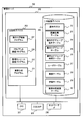
- Example 1 a configuration example of a computer system including a client computer and a management system for the client computer is schematically shown.
- the structure of the management server is shown typically.
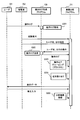
- Example 1 is a sequence diagram which shows the operation example of a computer system.
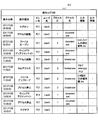
- Example 1 an example of operation log DB is shown.
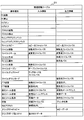
- Example 1 an example of the relation definition table is shown.
- 10 is a flowchart illustrating a processing example of operation log record grouping and task name assignment by the task analysis program in the first embodiment.
- Example 1 an example of the operation log record to be analyzed is shown.
- Example 1 the example of the result of having grouped operation log records into a plurality of groups is shown.
- Example 9 is a flowchart of an example of processing for creating an operation log group by a business analysis program in the first embodiment.
- Example 1 an example of the operation log group name table is shown.
- the operation log group name assigned to each operation log group by the method of the first embodiment is shown.
- 10 is a flowchart illustrating an example of a method for assigning a name to an operation log group in the first embodiment.
- the example of the operation log group table which stores the information of the operation log group which the business analysis program created is shown.
- FIG. 12 shows active periods of two operation log groups stored in the operation log group table shown in FIG.
- Example 1 the example of the operation log group time table obtained as a result of the time calculation of the operation log group shown in FIG. 13 is shown.
- FIG. 6 is a flowchart illustrating a processing example for registering data in an operation log group time table in the first embodiment.
- two operation log clusters are created from six operation log groups.
- two operation log clusters are created from six operation log groups.
- Example 1 the determination result of the clustering determination described with reference to FIGS. 16A and 16B is shown.
- 10 is a flowchart illustrating an example of an operation log cluster creation process in the first embodiment.
- 19 is a flowchart illustrating an example of clustering determination in FIG. 18 in the first embodiment.
- 10 is a flowchart illustrating an example of processing for narrowing down assigned business names in the first embodiment.
- Example 1 the example of a structure of a user table is shown.
- Example 1 the structural example of the work table is shown.
- Example 1 the structural example of the work analysis result table is shown.
- a configuration example of an operation log cluster created from an operation log on a specified date of a specified user is shown.
- a configuration example of an operation log cluster created from an operation log on a specified date of a specified user is shown.
- Example 1 the example of a structure of a learning table is shown.
- Example 1 the entry selected from the learning table for calculating the probability of the operation log on the designated date of the designated user is shown.
- Example 1 the result of the probability calculation of the business name candidate of two operation log clusters is shown.
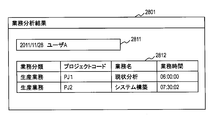
- Example 1 the example of a display image of a work analysis result is shown.
- the management system manages the client computer (user) using an operation log (log resulting from a user operation) acquired in the client computer.
- the management system groups a plurality of operation log records acquired from operation logs in the client computer to create a plurality of operation log groups.
- the management system further creates a cluster (also referred to as an operation log cluster) by collecting a plurality of related operation log groups.
- the management system compares the period from the start time to the end time of the reference operation log group with the active period in each of the other operation log groups, and compares the reference operation log group with the other operation log group. It is determined whether each operation log group is an associated operation log group.
- the active period is a period during which the display area is active.
- the display area is an area where the process or thread displays an image for the user, and is, for example, a window or a tab page.
- the display area becomes active, and the other display areas become inactive (also called passive). For example, there is one display area that is active at a certain time.
- the time when the operation log record indicates the start of the process or the activation of the window is the active period.
- the time when the other operation log record indicates the end of the process or the deactivation of the window is the active period.
- the reference operation log group and the other operation log group belong to the same cluster based on the active period length of the other operation log group included in the start / end period of the reference operation log group. Can be determined.
- the management system It is determined that it is included. In this way, by creating a cluster from related operation log groups, it is possible to collect related operation log records and accurately grasp the user's business situation.
- FIG. 1 schematically shows a configuration example of a computer system according to the present embodiment including a client computer operated by a user and a management system for the client computer.
- the management system includes a management server 100 and a management console 110.
- FIG. 1 illustrates one client computer 130 from which an operation log is acquired.
- a plurality of client computers are included in the management target of the management system.
- Each computer is communicably connected via the network 120.
- the management console 110 is a computer that an administrator uses to manage the client computer 130.
- the administrator accesses the management server 100 from the management console 110, instructs the management server 100 to perform processing, and causes the management console 110 to acquire and display the processing result of the management server 100.
- the administrator uses the management console 110 to perform management based on the operation log of the client computer 130.
- the management system may not have the management console 110, and the administrator may use an input / output device directly connected to the management server 100 instead of the management console 110.
- the management console 110 has a CPU 111 as a processor, a storage device 112, a display device 115, an input device 116, and a network interface 117.
- the management console 110 is connected to the network 120 via the network interface 117.
- the storage device 112 includes a main storage device 113 and a secondary storage device 114.
- the main storage device 113 is typically a volatile semiconductor memory, and stores a Web browser 103 that is a program. An administrator can use the Web browser 103 to access the management server 100 and operate it.
- the CPU 111 operates as a functional unit that realizes a predetermined function by executing a program stored in the main storage device 113.
- the program to be executed includes an OS (Operating System) (not shown) in addition to the Web browser 103 shown in FIG.
- the Web browser 103 is shown in the main storage device 113, but typically the Web browser 103 is loaded from the storage area of the secondary storage device 114 to the storage area of the main storage device 113.
- the secondary storage device 114 is a storage device including a non-volatile non-transitory storage medium that stores programs and data necessary for realizing a predetermined function.
- the secondary storage device 114 may be an external storage device connected via the network 120.
- a typical example of the input device 116 is a keyboard and a pointer device, but a different device may be used.
- the display device 115 is typically a display monitor, and displays a processing result in the management server 100.
- the client computer 130 is a computer used by the user and is a management target of the management system. The client computer 130 acquires an operation log of a user who uses it, and transmits it to the management server 100.
- the client computer 130 includes a CPU 131 as a processor, a storage device 132, a display device 135, an input device 136, and a network interface 137.
- the client computer 130 is connected to the network 120 via the network interface 137.
- Typical examples of the input device 136 are a keyboard and a pointer device, and the typical display device 135 is a display monitor, but may be a different device.
- the storage device 132 includes a main storage device 133 and a secondary storage device 134.
- the main storage device 133 is typically a volatile semiconductor memory, and stores a manager communication program 138, an operation log acquisition program 139, and a plurality of application programs 140 in addition to an OS (not shown). Each of these is a part of the operation log client program, and details of the operation of these programs will be described later.
- the CPU 131 implements a predetermined function by executing a program stored in the main storage device 133.
- the CPU 131 operates as an operation log acquisition unit by operating according to the operation log acquisition program 139.
- the client computer 130 is a device or system that includes these functional units.
- the programs 138 to 140 are shown in the main storage device 133, but typically the programs 138 to 140 are loaded from the storage area of the secondary storage device 134 to the storage area of the main storage device 133. Is done.
- the secondary storage device 134 is a storage device including a non-volatile non-transitory storage medium that stores programs and data necessary for realizing a predetermined function.
- the secondary storage device 134 may be an external storage device connected via the network 120.
- FIG. 2 schematically shows the configuration of the management server 100.
- the management server 100 is a computer and includes a CPU 201 as a processor, a storage device 202, an input / output interface 205, and a network interface 206.
- the management server 100 is connected to the network 120 via the communication interface 206.
- the storage device 202 includes a main storage device 203 and a secondary storage device 204.
- the main storage device 203 is typically a volatile semiconductor memory, and stores an operation log storage program 207, a client communication program 209, a management console communication program 210, and a job analysis program 211 in addition to an OS (not shown). Yes. Each of these is a part of the operation log management program, and details of the operation of each program will be described later.
- the secondary storage device 204 is a storage device including a nonvolatile non-transitory storage medium that stores programs and data necessary for realizing a predetermined function.
- the secondary storage device 204 includes an operation log database (DB) 212, an association definition table 213, an operation log group name table 214, an operation log group table 215, an operation log group time table 216, a user table 217, and a business table. 218, a learning table 219, and a work analysis result table 220 are stored.
- the secondary storage device 204 may be an external storage device connected via the network 120.
- the programs 207 and 209 to 211 are shown in the main storage device 203, and information (data) 212 to 220 necessary for processing of the management server 100 is shown in the secondary storage device 204.
- these programs and information (data) are loaded from the storage area of the secondary storage device 204 to the storage area of the main storage device 203 and used by the CPU 201.
- the CPU 201 implements a predetermined function by executing a program while using data stored in the main storage device 203.
- the CPU 201 operates according to each of the operation log storage program 207, the client communication program 209, the management console communication program 210, and the business analysis program 211, thereby operating log storage processing unit, operation log grouping unit, client communication unit, management Operates as console communication department and business analysis department.
- the management server 100 is a device or system including these functional units.
- the management server 100 is a single computer, but a plurality of computers execute processing equivalent to the processing executed by the management server 100 in order to increase the speed and reliability of the management processing. May be. These plural computers are included in the management system of the present embodiment.
- the client computer 130 can take part of management processing, and the management system can include (partial functions of) the client computer.
- the programs of the management server 100, the management console 110, and the client computer 130 are executed by the CPUs 201, 111, and 131, so that the determined processing is performed using the storage devices 202, 112, and 132 and other devices. While doing. Therefore, the description with the program as the subject in this embodiment may be the description with the CPUs 201, 111 and 131 as the subject. Alternatively, the processing executed by the program is processing performed by the computers 100, 110, and 130 on which the program operates and the computer system including them.
- the client computer 130 acquires an operation log of the user operation there and transmits it to the management server 100.
- the operation log acquisition program 139 operating on the client computer 130 acquires operation information (operation log) of each application 140. Since the processing method of the operation log acquisition program 139 is widely known and is not a feature of the present invention itself, detailed description thereof is omitted here.
- FIG. 3 is a sequence diagram showing an operation example of the computer system.
- the user 351 operates the client computer 130, and the operation log acquisition program 139 acquires the operation log (S301).
- the administrator 351 requests the management server 100 to start the job analysis program 211 using the input device 116 of the management console 110.
- the activation request specifies a user name for identifying the user and an operation log date for analysis.
- the task analysis program 211 may start the analysis regardless of a request from the administrator. For example, the analysis is started at a predetermined time every day.
- the business analysis program 211 holds information that associates a user name with a client computer to be used, and requests the client computer 130 to transmit an operation log with reference to the information. This request is transmitted by the client communication program 209 and specifies the user name and date.
- the manager communication program 138 of the client computer 130 selects the operation log specified by the specified user name and date from the operation log acquired by the operation log acquisition program 139, and the selected operation log is transmitted to the network interface 137 and The data is transmitted to the management server 100 via the network 120 (S302).
- the client computer 130 may transmit all untransmitted operation logs to the management server 100, and the management server 100 may select a necessary operation log. Further, the client computer 130 may transmit the operation log at a predetermined time regardless of a request from the management server 100.
- the business analysis program 211 uses another program to store the received operation log in the operation log DB 212.
- the client communication program 209 receives the operation log transmitted from the client computer 130 via the network interface 206.
- the client communication program 209 passes the received operation log to the operation log storage program 207.
- the operation log storage program 207 stores the received operation log in the operation log DB 212.
- the business analysis program 211 acquires an operation log record with a specified user name and date from the operation log DB 212 and performs analysis. Specifically, the task analysis program 211 groups operation log records (S303). The grouping generates an operation log group including a plurality of operation log records, and further generates an operation log cluster including one or more operation log groups. An operation log cluster is a group of one or more operation log records. Details of the grouping will be described later.
- the business analysis program 211 assigns a name to the operation log cluster obtained as a result of grouping (S304).
- this name is the business name of the user. Details of the name assignment will be described later.
- the business analysis program 211 uses the client communication program 209 to transmit display data that displays the analysis results, that is, the operation log record grouping and name assignment results, to the client computer 130.
- the user 351 confirms the result on the display device 135 of the client computer 130, and inputs data indicating it through the input device 136 if correction is necessary.
- the manager communication program 138 transmits a necessary correction request to the management server 100.
- the business analysis program 211 also transmits an analysis result in response to a request from the administrator 352.
- the business analysis program 211 registers the analysis result with the necessary corrections. Specifically, the task analysis program 211 updates the learning table 219 and the task analysis result table 220 with the analysis result (S305). Details of these will be described later.
- the operation log storage program 207 of the management server 100 acquires data to be stored in the operation log DB 212 from the received operation log and stores the data in the operation log DB 212.
- FIG. 4 shows an example of the operation log DB 212 of this example.
- the operation log DB 212 is represented by one table.
- the operation log DB 212 of this example includes an operation date / time column, an operation type column, a machine name column, a user name column, a process ID column, a process name column, an input information column, and an output information column.
- the operation log DB 212 may further include information not shown.
- the operation date / time indicates the date / time when the operation was performed.
- the operation type indicates the type of operation by the user. This example exemplifies operation types such as logon, process activation, file opening, window activation, window deactivation, and the like.
- the machine name is the name of the client computer on which the operation was performed.
- the machine name is a unique identifier for identifying the client computer. When there are a plurality of client computers, different machine names are assigned to the respective machine names.
- User name indicates the name of the user who logged in and operated. When there are a plurality of users, the user name is a unique identifier in one client computer 130, and different user names are assigned to different users in one client computer 130. When there are a plurality of client computers, the user name is typically unique among all client computers.
- Process ID is an identifier that identifies the process in which the operation was performed.
- a process is an instance of a program.
- a plurality of processes generated from the same program can operate in parallel.
- the operation log acquisition program 139 can obtain the value of the process ID from the OS, for example.
- As the process ID for example, a monotonically increasing number is assigned to the process according to the order in which the process is generated. For example, numerical values from the minimum value to the maximum value are repeatedly assigned in order.
- the process name is the name of the process.
- the name of the program or a part thereof is used.
- browser.exe is the process name of the Web browser
- document.exe is the process name of the word processor.
- Operation log records having the same process ID can have different operation types.
- Input information is information for identifying an input by an operation.
- output information is information for identifying an output by an operation. Details of the input information and the output information will be described later.
- operation log records are grouped using a process ID, input information, and output information.
- a plurality of operation log records (entries) included in the operation log DB 212 are arranged in order from the operation with the oldest operation date and time.
- Some operation log records contain data that specifically identifies their contents in all fields, but some operation log record fields (fields with hyphens) are No data is stored. For example, these fields store NULL values.
- all operation log records store data (data other than NULL) specific to the operation date / time, operation type, machine name, and user name.
- Some operation log records do not include a process ID value.
- the log-on operation (and log-off operation) does not include a specific process corresponding thereto, and therefore the operation log record does not include a specific process ID and process name.
- some operation log records have specific input information or specific output information, and other operation log records have neither input information nor output information.
- specific inputs are defined for each operation of web access and file open, and information (identifier) indicating them is stored in each operation log record.
- this example shows an operation log of an operation by one user (user name: UserA) in one client computer 130 (machine name: PC1), there are a plurality of client computers or a plurality of users.
- the operation log DB 212 stores all the operation logs.
- the operation log storage program 207 of the management server 100 obtains data of each operation log record from the operation log received from the client computer 130 and stores it in the operation log DB 212.
- the operation log storage program 207 refers to the related definition table 213 and identifies input information and output information of each operation.
- FIG. 5 shows an example of the relation definition table 213.
- the related definition table 213 is an example, and the related definition table 213 can include other operation types, and can also include other definitions of information associated with each operation type.
- the association definition table 213 of this example includes an operation type column, an input information column, and an output information column. The columns of input information and output information define the type of information corresponding to each operation type.
- one or both of input information and output information are defined for some operation types, but both input information and output information are defined for other operation types. No (synonymous with being defined as nonexistent). There is no input / output information in these operations.
- the operation type defined in the related definition table 213 is the same as the operation type registered in the operation log DB 212.
- all the operation types that can be stored in the operation log DB 212 are defined in the relation definition table 213 for the input / output information (including the fact that they do not exist).
- the window activation operation is an operation that enables a user to perform work (computer operation) on the window by starting a process or selecting a window.
- Window deactivation is an operation to change an active window to inactive (passive).
- the active window is deactivated by stopping the process or selecting a display area different from that window.
- the input information of the file open operation type is an open file path.
- the file path is the full path of the file, and includes directory information (storage address) and file name (not including directory information).
- Output information is not defined for file open.
- the file upload input information is the upload source file path.
- Output information is not defined.
- the output information of the file download is the save destination file path, and the input information is not defined.
- input information is defined and is a reference URL. It is not defined in the output information.
- Information associated with web access may be defined in part of the URL. The same applies to URLs in other operation types.
- output information is defined for the operation type of clipboard copy
- input information is defined for the operation type of clipboard pasting.
- Clipboard copy includes an operation for maintaining copy source data (so-called copy operation) and an operation for deleting (so-called cut operation).
- the defined output information and input information are copy data and paste data, respectively.
- Appropriate information is used by design as input information or output information associated with the operation type. For example, as described above, a hash value of data may be used in addition to the full path of data and the data itself.
- the clipboard program sequentially assigns identifiers to copy operations and cut operations, which can be used as the input information and output information.
- the operation log storage program 207 determines input information and output information for one operation (operation log record) in the operation log received from the client computer 130 with reference to the related definition table 213.
- the operation log storage program 207 acquires input information and output information defined for the selected operation from the received operation log, and stores them in the operation log DB 212.
- the operation log transmitted from the client computer 130 includes more detailed information about the user operation than information stored in the operation log DB 212.
- the operation log storage program 207 determines an operation type corresponding to a plurality of events (entries) included in the received operation log according to the definition information, and stores other data (from these events stored in the operation log DB 212 ( Information).
- the operation log storage program 207 stores the operation log record (data) thus generated in the operation log DB 212.
- the operation log acquisition program 139 in the client computer 130 transmits an operation log including the values of each field of the operation log record in the operation log DB 212 to the management server 100, and the operation log storage program 207 reads the operation log record from the received operation log. (Data) may be selected and stored in the operation log DB 212.
- the operation log acquisition program 139 may transmit only data stored in the operation log DB 212 to the management server 100.
- the association definition table 213 in FIG. 5 shows information associating operation types with corresponding input information and output information.
- the definition information that associates the operation type with the information does not need to be included in one table, and may have any data structure.
- the definition information may be included in the operation log storage program 207 without forming a table.
- the operation log DB 212 the relation definition table 213, the operation log group name table 214, the operation log group table 215, the operation log group time table 216, the user table 217, the business table 218, the brace table 219, the business analysis result
- the information included in the table 220 may be represented by any data structure. Thus, in this embodiment, information does not depend on the data structure. Further, in describing the contents of each information, expressions such as “identification information”, “identifier”, “name”, and “ID” are used, but these can be replaced with each other.
- the task analysis program 211 acquires operation log records for the specified user and date from the operation log DB 212 and groups them (S303). Further, the task analysis program 211 assigns a task name to the operation log cluster created by grouping (S304).
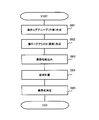
- FIG. 6 is a flowchart showing a processing example of the operation log record grouping S303 and name assignment S304 by the business analysis program 211.
- the business analysis program 211 creates an operation log group including a plurality of operation log records (S601). In this example, each operation log group is estimated to correspond to one work. Further, the task analysis program 211 generates an operation log cluster from the operation log group generated in step S601 (S602). The operation log cluster includes a plurality of operation log groups. In this example, the operation log cluster is estimated to correspond to one business.
- the operation log cluster is composed of a plurality of operation log records, and is a group of operation log records, similar to the operation log group.
- the former in order to distinguish the group of operation log records created in step S601 from the group of operation log records created in step S602, the former is called an operation log group and the latter is called an operation log cluster.
- Steps S601 and S602 correspond to the operation log grouping S303 in FIG.
- the task analysis program 211 narrows down task names in order to assign names (task names) to operation log clusters (S603), and further performs probability calculation for determining task names (S604).
- the task analysis program 211 determines a task name to be assigned to the operation log cluster based on the calculation result of the probability calculation S604 (S605). Steps S603 to S605 correspond to name assignment S304 in the sequence diagram of FIG.
- the task analysis program 211 creates an operation log group corresponding to the work in the grouping of operation log records (S601), and further, an operation corresponding to the task from the created operation log group A log cluster is created (S602).
- an operation log group creation method (S601) will be described in detail.
- FIG. 7 shows an example of an operation log record to be analyzed.
- This example shows operation log records 701 to 711 for one day by one user UserA.
- the operation log records 701 to 711 in this example match the contents of the operation log DB 212 shown in FIG.
- FIG. 8 shows the result of grouping (S601) these operation log records 701 to 711 into a plurality of groups (two operation log groups in this example).
- the operation log group 801 is composed of operation log records 702 to 704, 709, and 710.
- the other operation log group 802 is composed of operation log records 705 to 708.
- the business analysis program 211 collects a plurality of operation log records estimated to be related to create one operation log group.
- the task analysis program 211 creates an operation log group so that operation log records that are highly relevant in the operation log and are estimated to be included in a series of operations are included in the same group. Creation of an operation log group in this example mainly includes two steps.
- the first step is to determine the group to which the operation log record belongs according to the attribute of the operation log record.
- the business analysis program 211 refers to data included in the operation log record and determines a group of the log record. Specifically, this step determines a group to which the operation log record belongs based on a group identifier included in the operation log record, in one example, a process ID.
- the operation log group 801 is a group consisting of operation log records with a process ID of 1
- the operation log group 802 is a group consisting of operation log records with a process ID of 2.
- the next step associates different groups that are presumed to be included in a series of operations of the same task.
- the task analysis program 211 determines the relationship between different groups based on the output information and input information of operation log records belonging to different groups. In this way, by integrating a plurality of groups based on the input / output information, a series of operations (operation groups) in the same work are appropriately associated.
- the business analysis program 211 associates different groups including operation log records whose output information and input information match.
- the task analysis program 211 estimates that two groups including operation log records whose output information and input information match are included in a series of operations of the same work, and includes them in the integrated group.
- this integrated group is also called an operation log group.
- the output information / input information of the operation log record group 801 does not match the input information / output information of the operation log record group 802. Therefore, these are not integrated, and the definition as another operation log group is maintained.
- the business analysis program 211 determines the relationship between the groups based on the input / output information, and generates one integrated group by a plurality of groups related to each other.
- One group may be related to a plurality of groups according to input / output information, and one group may be related to another group in a chain through other related groups.
- the integrated group includes a plurality of groups that are related in this way according to input / output information, and may include three or more groups.
- the operation log group created in step S601 is composed of a plurality of operation log records created in the first step and is a group not integrated with other operation log groups, or a group in which a plurality of operation log groups are integrated. is there.
- step S601 creates a plurality of operation log groups that can be clustered.
- FIG. 9 is a flowchart of an example of an operation log group creation process by the business analysis program 211.
- the job analysis program 211 refers to the process ID and input / output information to create an operation log group.
- the business analysis program 211 first extracts an operation log of the user and date that has received a business analysis request from the operation log DB 212 (S902). The extracted operation log is stored in the storage device 202.
- the task analysis program 211 divides the extracted operation log into groups based on the process ID, and stores the divided group in the operation log group table 215 (S903). Specifically, as described above, the task analysis program 211 refers to the process ID of each operation log record of the extracted operation log, and includes operation log records having the same process ID in the same group.
- the task analysis program 211 searches for operation log records whose output information and input information match from the operation log records of the group divided by the process ID (S904).
- the search is a relationship between operation log records belonging to different groups, and excludes a match between output information and input information in the same group. If the business analysis program 211 finds an operation log record in which the output information and the input information match in this search, the business analysis program 211 considers that the group to which each operation log record belongs is related.
- step S904 a group having an operation log record of output information is called an output group, and a group including an operation log record of the same input information as output information is called an input group.
- step S906 the task analysis program 211 determines the number of groups having the same input information in the operation log record with respect to the output information of one operation log record. If the number is 1, the task analysis program 211 moves to step S907. In step S907, the task analysis program 211 copies the operation log included in the output group to the input group.
- step S908 the task analysis program 211 copies the operation log included in the output group to the input group i (each of a plurality of input groups that are sequentially selected). The task analysis program 211 executes this step S908 for all the groups found in steps S905 and S906.
- the business analysis program 211 can generate an integrated group by associating an output group with an input group, the operation log need not be copied.
- the task analysis program 211 stores information for associating (defining) groups constituting the integrated group in the operation log group table 215. This is the same in step S907.
- step S909 the task analysis program 211 deletes the output group table from the operation log group table 215.
- the task analysis program 211 copies the operation log record of the output group to the corresponding input group.
- the output group table is deleted from the operation log group table 215 in step S909.
- the business analysis program 211 gives a name to the created operation log group after necessary integration of a plurality of operation log groups.
- the job analysis program 211 refers to the operation log group name table 214 and uses the data of the operation log record in the operation log group to determine the name of the operation log group.
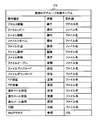
- FIG. 10A shows an example of the operation log group name table 214.
- the operation log group name table 214 defines predicates and object data types for the operation types.
- the name of the operation log group group is generated by combining a predicate and an object. For example, when the name is determined by the process activation operation, the name is “execution” of “process name” (the process name depends on each operation).
- the task analysis program 211 identifies the operation type of the operation log record selected from the operation log group, and selects the predicate and object data type associated with the operation type from the operation log group name table 214.
- the task analysis program 211 acquires data of the selected object data type from the operation log DB 212 or the operation log group table 215, and generates a name of the group (task) from the predicate and the object data.
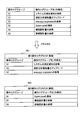
- FIG. 10B shows operation log group names given to the operation log groups 801 and 802 by the method of this example.
- the business analysis program 211 sequentially selects operation log groups by grouping, and generates a name for each operation log group.
- FIG. 11 is a flowchart illustrating an example of a method for assigning a name to an operation log group.
- the task analysis program 211 refers to the operation log group name table 214 to determine the name of each operation log group (an integrated group or a group that has not been integrated).
- the business analysis program 211 first sorts operation log records in the selected operation log group in order of date and time (S1101). This step may be omitted. Next, the task analysis program 211 selects information on the newest operation log record (S1102). This is because the purpose of the work is often an operation at or near the end of the work.
- step S1104 the task analysis program 211 specifies the predicate of the selected operation type and the data type of the object with reference to the operation log group name table 214, and the data of the data type of the object is stored in the operation log DB 211. Get from.
- the task analysis program 211 further generates a work (group) name from the acquired predicate and object data.
- step S1105 the task analysis program 211 determines whether or not an undetermined operation log record remains in the group. When the operation log record remains (S1105: YES), the task analysis program 211 moves to step S1106. If no operation log record remains (S1105: NO), the task analysis program 211 proceeds to step S1107.
- step S1106 the task analysis program 211 acquires information on the operation log record that is the next newest operation log record after the previously selected operation log record, that is, the latest operation log record in the remaining operation log records. Thereafter, the task analysis program 211 returns to step S1103.
- step S1107 the task analysis program 211 determines the operation type of the newest operation log record in the group because the operation (operation log record) for generating the task (group) name does not exist in the operation log of the group. Use to generate the name of the operation log group.
- an appropriate name can be given to the work of the operation log group.
- definition information that associates the operation type with the work name is prepared in advance, and the work name (operation log group name) is determined from the operation type and definition information selected from the operation log group. You can give it a name.
- the business analysis program 211 may generate a name based on an operation type selected by a different method. For example, a priority may be given to each operation type, and the task analysis program 211 may select an operation type to be used for name determination according to the priority.
- the business analysis program 211 may not use the definition information.
- the operation log group name table 214 which is definition information in this example, indicates the data type of the predicate and the object associated with the operation type, but a different name determination method may be used.
- the task analysis program 211 may generate a name that does not include a portion corresponding to the predicate by using the operation type instead of the predicate.
- FIG. 12 shows an example of an operation log group table 215 that stores information on operation log groups created by the job analysis program 211.
- Each operation log group is uniquely identified by the value of the operation log group ID.
- the operation log group IDs of the operation log groups 801 and 802 are 1 and 2, respectively.
- the name of the operation log group 801 is “refer to the current status data of the system.doc”, and the name of the operation log group 802 is “upload of the current status analysis report.doc”.
- the operation log group table 215 is integrated with the operation log group integrated using the input / output information and any operation log group. Missing operation log groups can be included.
- the task analysis program 211 performs clustering of operation log groups stored in the operation log group table 215 (step S602 in FIG. 6).
- the task analysis program 211 determines whether to include two operation log groups in the same cluster based on the active period of the other operation log group in the period from the start to the end of one operation log group.
- the start time of the operation log group is the operation time of the oldest operation log record
- the end time is the time of the newest operation log record.
- the start time is the time of the oldest process activation operation log record in the operation log group.
- One operation log group can include records of a plurality of processes.
- the active period is a period during which the user operation in the operation log group is valid, and in this example, the window is active.
- the window is activated (active state).
- the active window is deactivated, and the state of the window becomes inactive or passive.
- FIG. 13 shows active periods of two operation log groups 801 and 802 stored in the operation log group table 215 shown in FIG.
- the operation log group 801 has two active periods.
- the first active period is a period from operation log records 702 to 704, and the next active period is a period of operation log records 709 and 710.
- the start operation of the first active period is process activation (operation log record 702), and the end operation is window deactivate (operation log record 704).
- operation log record 702 is also a start record of the operation log group 801. Process activation activates the window.
- the start time of the first active period is 08:59:59, and the end time is 10:59:59. Therefore, the period length of the first active period is 2 hours.
- the start operation of the next active period is window activation (operation log record 709), and the end operation is process stop (operation log record 710).
- the operation log record 710 is also an end record of the operation log group 801. A process stop deactivates the window.
- the start time of this active period is 13: 00: 00: 00 and the end time is 16: 00: 00: 00. Therefore, the period length of this active period is 3 hours.
- the operation log group 802 has only one active period, and is a period from operation log records 705 to 708. In this example, two operation log groups are not active at the same time.
- the start operation in the active period is a process start (operation log record 705), and the end operation is a process stop (operation log record 708).
- the operation log record 705 is also a start record of the operation log group 802, and the operation log record 708 is also an end record of the operation log group 802.
- the start time of this active period is 11:00 and the end time is 12:00. Therefore, the period length of this active period is 1 hour.
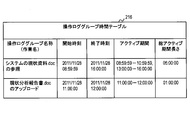
- FIG. 14 shows an example of the operation log group time table 216 obtained as a result of the time calculation of the operation log groups 801 and 802 shown in FIG.
- the operation log group time table 216 of this example has two entries, the first entry is the operation log group 801 entry, and the next entry is the operation log group 802 entry.
- the start time and end time columns store the start time and end time of the operation log group, respectively.
- the active period column stores the start time and end time of each active period in each operation log group.
- the operation log group 801 has two active periods, and the operation log group 802 has one active period.
- the column of the total active period length is the sum total of the lengths of all active periods of each operation log group.
- FIG. 15 is a flowchart showing a processing example of time calculation for each operation log group, that is, a processing example for registering data in the operation log group time table 216.
- the task analysis program 211 sequentially repeats steps S1501 to S1511 for each operation log group. Further, the task analysis program 211 sequentially repeats steps S1502 to S1510 for each operation log record in the selected operation log group.
- the business analysis program 211 first refers to the operation log group table 215 and acquires information on the oldest operation log record in the selected reference operation log group.
- the task analysis program 211 determines the operation time of the operation log record as the start time of the reference operation log group and the start time of the first active period (S1501).
- the task analysis program 211 registers the start time of this operation log group in the operation log group time table 216.
- the business analysis program 211 acquires operation log records in the operation log group from the operation log group table 215 in order from the oldest operation date (S1502).
- the task analysis program 211 determines whether the operation type of the acquired operation log record is window deactivate (S1503).
- step S1503 determines the operation time of the operation log record as the end time of the active period (S1504), and uses the active period as the operation log. It is registered in the group time table 216 (S1505). Thereafter, the task analysis program 211 returns to step S1502, and executes steps S1502 to S1510 for the next operation log record.
- step S1503 determines whether the operation type of the operation log record is process stop (S1506).
- step S1506 determines whether the operation type of the operation log record is window activate. Is determined (S1507). The task analysis program 211 enters this step S1507 after the previous active period is registered in the operation log group time table 216.
- the task analysis program 211 determines the window activation operation date and time as the start time of the next active period (S1508). Thereafter, the task analysis program 211 returns to step S1502, and executes steps S1502 to S1510 for the next operation log record.
- step S1506 determines the operation time of the operation log record as the end time of the active period (S1509).
- the task analysis program 211 further registers the end time of the active period in the operation log group time table 216 (S1510).
- the task analysis program 211 determines the end time of the last active period as the end time of the operation log group and registers it in the operation log group time table 216.
- the job analysis program 211 Since the business analysis program 211 has completed registration of all active periods of the operation log group, the job analysis program 211 adds the lengths of all active periods of the operation log group stored in the operation log group table 215. Calculate the total active period length.
- the task analysis program 211 registers the calculated total active period length value in the operation log group time table 216, and selects the next operation log group from the operation log group table 215 (S1511).
- the task analysis program 211 executes steps S1501 to S1511 for the next operation log group.
- 16A and 16B show an example in which two operation log clusters 1601 and 1602 are created from six operation log groups G1 and G2.
- FIG. 16A shows a sequence of operation log groups
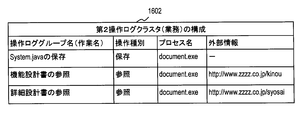
- FIG. 16B shows the names (work names) of the operation log groups and the configuration of operation log clusters 1601 and 1602.
- the first operation log cluster 1601 includes operation log groups G1 to G3, and the second operation log cluster 1602 includes operation log groups G4 to G6.
- a rectangle in each operation log group indicates an active period.
- the names of the operation log groups (each work) illustrated in FIG. 16B are assigned according to the flowchart described with reference to FIG.
- the task analysis program 211 determines whether or not two operation log groups are included in the same cluster from the start to the end of one operation log group (also referred to as a reference operation log group) (also referred to as a start / end period). For the other operation log group (also referred to as a target operation log group).
- the start time of the oldest (uppermost) active period is the start time of the operation log group
- the end time of the newest (lowermost) active period is the end of the operation log group It's time.
- hatched rectangles 1611 to 1617 indicate active periods included in the start / end periods of other operation log groups. The rectangles 1611 to 1617 are arranged from top to bottom in order of oldness.
- the task analysis program 211 includes two operation log records in the same cluster based on the active period length of the target operation log group included (overlapping) in the start / end period of the reference operation log group. It is determined whether or not. The task analysis program 211 determines that two operation log records are included in the same cluster when the overlapped active period length is equal to or greater than a predetermined value, and two operation log records when it is less than the predetermined value. Are not included in the same cluster.
- a rectangle with a fine line hatch indicates an active period that satisfies the condition of the active period length
- a rectangle with a thick line hatch indicates an active period that does not satisfy the above condition.
- At least one active period of the target operation log group is included in the period from the start time to the end time of the reference operation log group, and the start time of the target operation log group is the start of the reference operation log group
- the end time of the target operation log group may be later than the end time of the reference operation log group.
- the active period 1611 of the operation log group G2 (target operation log group) is within the start / end period of the operation log group G1 (reference operation log group) and satisfies the above condition because the length thereof is long. Therefore, the operation log group G2 is included in the same operation log cluster as the operation log group G1.
- the active period 1613 of the operation log group G3 (target operation log group) is within the start / end period of the operation log group G2 (reference operation log group) and satisfies the above condition because of its long length. Therefore, the operation log group G3 is included in the same operation log cluster as the operation log group G2. As described above, the operation log group G2 is included in the same operation log cluster as the operation log group G1.
- the operation log groups G1, G2, and G3 are included in the same cluster.
- all operations of the two pairs are performed. It is determined that the log group is included in the same cluster.
- the active period 1615 of the operation log group G2 (target operation log group) is within the start / end period of the operation log group G4 (reference operation log group), but the length thereof is short, so the above condition is not satisfied. Therefore, the task analysis program 211 determines that the operation log group G2 is not included in the same operation log cluster as the operation log group G4.
- the active periods 1614 and 1617 of the operation log group G4 are within the start and end periods of the operation log groups G2 and G5 (reference operation log group), respectively. Does not meet. Therefore, the task analysis program 211 determines that the operation log group G4 is not included in the same operation log cluster as the operation log groups G2 and G5.
- the active periods 1616 and 1618 of the operation log group G5 are both within the start and end periods of the operation log group G4 (reference operation log group). Furthermore, the total length of these active periods 1616 and 1618 (active period length) satisfies the above condition. For this reason, the task analysis program 211 determines that the operation log group G5 is included in the same operation log cluster as the operation log group G5.
- the result of the clustering determination may also change.
- a plurality of active periods of the target operation log group are included in the start / end period of the reference operation log group as in the active periods 1616 and 1618, this example is based on the sum of the lengths of the plurality of active periods. Perform clustering judgment.
- the active period 1619 of the operation log group G6 (target operation log group) is within the start / end period of the operation log group G4 (reference operation log group), and satisfies the above condition because its length is long. Therefore, the operation log group G6 is included in the same operation log cluster as the operation log group G4.
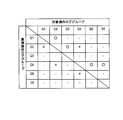
- FIG. 17 shows the determination result of the clustering determination described with reference to FIGS. 16A and 16B.
- “ ⁇ ” indicates that the target operation log log group is determined to be included in the same cluster as the reference operation log group.
- “ ⁇ ” indicates that the target operation log group has one or more active periods included in the start and end periods of the reference operation log group, but the target operation log group is the same as the reference operation log group because the active period length is short Indicates that it is not included in the cluster. “-” Indicates that any active period of the target operation log group is not included in the start / end period of the reference operation log group.
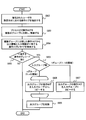
- FIG. 18 and 19 are flowcharts of an example of processing for creating an operation log cluster.
- FIG. 19 shows an example of clustering determination processing in creating an operation log cluster.
- the task analysis program 211 selects each of all operation log groups as a reference operation log group, and selects all other operation log groups as target operation log groups for the selected reference operation log group. Select as.
- the job analysis program 211 sequentially selects the created operation log groups from the operation log group time table 216, and treats each of the selected operation log groups as a reference operation log group. Furthermore, the task analysis program 211 sequentially selects the target operation log group from the operation log group time table 216, compares the start / end period of the reference operation log group with the active period of the target operation log group, and compares the target operation log group. It is determined whether the group is included in the same operation log cluster as the reference operation log group.
- the task analysis program 211 executes steps S1801 and S1802 for each operation log group.
- the operation log group in the loop is a reference operation log group.
- the task analysis program 211 acquires information about the start time and end time of the reference operation log group from the operation log group time table 216 (S1801).
- the task analysis program 211 selects all other operation log groups that are active between the start time and the end time (S1802).
- the task analysis program 211 acquires information about the active period of operation log groups other than the reference operation log group from the operation log group time table 216.
- the active period is included in the period from the start time to the end time (start end period) of the reference operation log group, it is determined that the target operation log group has become active between the start time and the end time.
- the other operation log groups that are active in the start / end period are the operation log groups G1, G3, and G4.
- steps S1801 and S1802 By repeating steps S1801 and S1802 as all operation log groups as reference operation log groups, all target operation logs that are activated during the start and end periods of each reference operation log group with each operation log group as a reference operation log group A record is identified. Thereafter, the task analysis program 211 performs clustering determination (S1803), and further creates each operation log cluster with the operation log group determined to be included in the same cluster (S1804).
- step S1804 the task analysis program 211 identifies all operation log groups included in the same cluster.
- an operation log group that has not been clustered with any other operation log group is treated as an operation log cluster in subsequent processing.
- FIG. 19 is a flowchart showing an example of clustering determination (S1803) in FIG.
- the task analysis program 211 executes steps S1901 to S1907 for each operation log group.
- the task analysis program 211 selects one operation log group as a reference operation log group (S1901).
- the task analysis program 211 repeats S1902 to S1907 for each target operation log group activated between the start time and end time of the selected reference operation log group. As described with reference to FIG. 18, each target operation log group activated between the start time and the end time of each reference operation log group has been identified.
- the business analysis program 211 selects a target operation log group that has not been determined for clustering (S1902).
- the task analysis program 211 acquires information on the overlapping active period for the reference operation log group of the selected target operation log group (S1903). Specifically, the task analysis program 211 acquires from the operation log group time table 216 information on the start time and end time of the reference operation log group and information on the active period of the selected target operation log group.
- the task analysis program 211 compares the start time and end time of each active period with the start time and end time of the reference operation log group, and determines whether each active period is within the start and end periods of the reference operation log group. Can be determined. As a result, the overlapping active period, which is the active period within the start / end period of the reference operation log group, is specified.
- the task analysis program 211 calculates the ratio of the overlapping active period length to the total active period length of the reference operation log group (S1904).
- the total active period length is a total value of the lengths of the active periods.
- the duplication active period length of the operation log group 802 is 01: 00: 00: 00.
- the task analysis program 211 determines whether the calculated ratio is equal to or greater than a predetermined threshold (S1905). If the calculated ratio is equal to or greater than the threshold (S1905: YES), the task analysis program 211 determines to include the reference operation log group and the selected target operation log group in the same cluster (S1906). When the calculated ratio is less than the threshold (S1905: NO), the task analysis program 211 determines not to include the reference operation log group and the selected target operation log group in the same cluster (S1907).
- the ratio in the example of FIG. 13 is 0.2, so that the operation log group 802 and the operation log group 801 are clustered.
- the ratio is approximately 0.05. Yes, below threshold. This does not satisfy the clustering condition, and the task analysis program 211 determines that the target operation log group is not included in the operation log cluster of the reference operation log group.
- the presence / absence of clustering is determined based on the ratio of the overlapping active period length of the target operation log group to the total active period length of the reference operation log group.
- the business analysis program 211 may perform clustering determination by a different method.
- the task analysis program 211 may determine the presence or absence of clustering based on the ratio of the overlapping active period length of the target operation log group to the length of the start / end period of the reference operation log group.
- the task analysis program 211 may determine the presence or absence of clustering based on the ratio of the total active period length of the target operation log group or the overlap active period length of the target operation log group to the length of the start / end period.
- the business analysis program 211 may determine the presence or absence of clustering by directly comparing the overlap active period length with a predetermined threshold. If the overlap active period length is greater than or equal to the threshold value, it is determined that the target operation log group is included in the operation log cluster of the reference operation log group, and if it is less than the threshold value, the target operation log group is the reference operation log group. It is determined that it is not included in the operation log cluster.
- the overlap active period length is long and a predetermined value (the predetermined value is the total active period length or start / end period length of the reference operation log cluster). If the target operation log group is equal to or greater than (including a value that varies depending on the value), it is determined that the target operation log group is included in the operation log cluster of the reference operation log group.
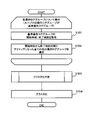
- the task analysis program 211 assigns a name (task name) to each operation log cluster. As shown in the flowchart of FIG. 6, the task analysis program 211 narrows down the task names to be assigned (S603), and further calculates the probability that each narrowed task name is a task name appropriate for the operation log cluster. (S604), a business name is determined according to the calculation result (S605).
- FIG. 20 is a flowchart illustrating an example of processing (S603) for narrowing down the business names to be assigned.
- the business analysis program 211 narrows down the business name based on the business classification of the user and the business configuration of the business classification.
- Information on the business classification of the user is registered in the user table 217.
- the business configuration of each business classification is registered in the business table 218.
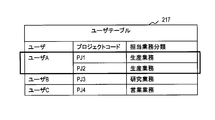
- FIG. 21 shows a configuration example of the user table 217.
- the user table 217 associates the user with the current business task project (also called PJ) and the business task classification.
- the user A is in charge of two projects, and their project codes are “PJ1” and “PJ2”. Further, the user A is in charge of production work in the project PJ1, and is also in charge of “production work” in the project PJ2.
- “Production business” is one of business categories.
- FIG. 22 shows a configuration example of the business table 218.
- the business table 218 includes columns for business classification, business name, business content, and process number.
- the business classification is composed of a plurality of business, and the business name column stores the business name of the business included in each business classification.
- FIG. 22 shows a part of data included in the business table 218, and three business classifications of “production business”, “sales business”, and “non-business” are illustrated.
- the business content column stores data indicating the business content of each business.
- the value in the process number column indicates the order of tasks in the task classification. In each job classification, jobs are executed sequentially with a small process number.
- the assigned business names are narrowed down based on the previous business (for example, last business day) of the user.
- the task analysis program 211 selects the user's previous task and the tasks before and after the task. These business names are narrowed business names. When there is no pre-process work or post-process work of the previous work, the work analysis program 211 selects only an existing work name.
- the business analysis program 211 can obtain information on the previous business of the user from the business analysis result table 220.
- FIG. 23 shows a configuration example of the work analysis result table 220.
- the business analysis program 211 registers the analysis result in the business analysis result table 220.
- the business analysis result table 220 includes columns for business date, user, business in charge, project code, business name, and business time.
- the assigned job column stores the job classification of the job handled by the user.
- the business name stores the business name of the business in charge in the business classification.
- the business time column stores the total value of the lengths of all active periods in the operation log cluster of the business. This is the length of time estimated that the user was actually doing the work, and the work time can be estimated appropriately.
- the entry of the business analysis result table 220 associates the business analysis result with the specified user and date.
- the analysis results are stored in different entries.
- the work in charge of the last business day in the project PJ1 of the user A is “current state analysis” in “production work”, and the work in charge of the last business day in the project PJ2 is “production work”.
- the operations selected by narrowing down the project PJ1 are the “current state analysis” operation (process number 1) which is the operation in charge of user A on the last business day, and the “outline design” operation of process number 2 which is the subsequent process. It is.
- the operations selected by narrowing down the project PJ2 are the “detailed design” operation (process number 4) that is the operation in charge of the last business day, the “functional design” operation of the process number 3 that is the previous process, and the subsequent process. This is a “system construction” operation of a certain process number 5.
- the business analysis program 211 first acquires information on the “in-charge” and “project code” of the designated user from the user table 217 (S2001). Next, the business analysis program 211 acquires information on “business in charge”, “project code”, and “business name” of the user's last business day from the business analysis result table 220 (S2002).
- the task analysis program 211 executes steps S2003 to S2005 for each of the projects acquired from the user table 217. Further, the business analysis program 211 executes step S2003 for the project of the last business day acquired from the business analysis result table 220.
- step S203 the business analysis program 211 determines that the business category name of the business category in charge and the project code of the business project acquired from the user table 217 are the business category name of the business category in charge of the last business day and the project code of the project in charge. It is determined whether the set matches.
- the business analysis program 211 is Information on all the tasks included in the set of task classifications acquired from the table 217 is acquired from the task table 218 (S2005).
- the combination of the business classification name of the assigned business classification and the project code of the assigned project acquired from the user table 217 matches the set of the business classification name of the assigned business classification of the last business day and the project code of the assigned project (S2003: YES) )
- the business analysis program 211 acquires business information that matches the business name of the last business day and business information before and after the business from the business table 218 (S2004).
- the business name assigned to the operation log cluster being analyzed is the business name of the business in charge of the last business day of the project the user is currently in charge of and the business name of the business before and after that, or the business classification of the project. Narrow down to all business names. In this way, by narrowing down the business names to be assigned according to the current business classification of the user, the business names to be appropriately assigned can be narrowed down.
- the business names can be more appropriately narrowed down by selecting the business names of the business in charge on the last business day and the business operations of the processes before and after the business day. This is because the user generally performs the same business as the business on the last business day or the business before and after the business. If the business process does not return, only the business name of the business of the last business day and the business name of the next process may be selected.
- the business analysis program 211 may select the latest entry of the project from the business analysis result table 220.
- the business date of the entry is the last business day or a date before that.
- a condition may be added to the business date of the selectable entry. For example, there is a condition that selection is possible only from entries within a specified period from the date of the operation log being analyzed.
- the job analysis program 211 may acquire information on all jobs in the job category in charge from the job table 218. .
- the task analysis program 211 calculates the probability that each selected task name is the task name of the operation log cluster being analyzed from the history information of task names assigned to the operation log cluster in the past. Thereby, an appropriate business name can be assigned to the operation log cluster.
- the task analysis program 211 identifies the characteristics of each operation log group that constitutes the operation log cluster.
- a set of features of these operation log groups is also referred to as a feature of an operation log cluster.
- the business analysis program 211 calculates, using the past history, the probability assigned to the operation log cluster having the characteristics (operation characteristics) of the operation log cluster for each business name selected by narrowing down. By determining the business name to be assigned based on the matching probability calculated from the past history, the business name estimated to be optimal can be assigned.
- the probabilities of business name candidates for all projects are calculated for each operation log cluster.
- the probability calculation uses the Hayes theorem in this example.
- the task analysis program 211 assigns a task name indicating the highest probability to the operation log cluster.
- the task analysis program 211 calculates a probability P (task name
- the task analysis program 211 assigns a task name having the highest probability.
- business characteristics) P (business characteristics
- feature feature) is the business name of the operation log cluster having all the features (feature features) of the operation log group (work) constituting the operation log cluster. Is the probability of This is a posterior probability. In the probability calculation of all business name candidates, P (feature characteristic) is common. Therefore, in the probability calculation of business name candidates, P (business name
- business name) is the probability that the business feature (operation log group feature set) will appear in the operation log cluster of the business name.
- P (business name) is a probability that the business name is assigned to the operation log cluster, and is a probability that the business name is assigned to all past business. This is a prior probability.
- P (feature characteristic) is the probability that a work having the characteristic of the work appears in all past work.
- business name) is further expressed by the following mathematical formula.
- Business Name) P (work feature 1
- the operation log cluster (business) is configured by N (N is an integer of 2 or more) operation log groups (operations).
- N is an integer of 2 or more) operation log groups (operations).
- business name) P (work 1 feature
- work name) is the probability that an operation log group with work feature k will appear in the operation log cluster with the work name.
- work name) is a probability that the operation log cluster of the work name includes all of the operation log group of the work feature 1 to the operation log group of the work feature N.
- 24A and 24B show configuration examples of two operation log clusters 1601 and 1602 created from operation logs on a specified date of a specified user. This example is consistent with the example of FIG. 16B.
- the task analysis program 211 creates these tables and temporarily stores them in the storage device 202.
- the operation type, process name, and external information are associated with each of the three operation log groups of the first operation log cluster 1601.
- each of the three operation log groups of the second operation log cluster 1602 is associated with an operation type, a process name, and external information.
- the characteristics of the operation log group are defined by a set of these three types of data.
- the operation type, process name, and external information fields of each entry are information of one operation log record selected from the operation log group of the entry.
- the external information is an identifier of a communication destination communicated (transmitted or received) by the client computer. For example, in an operation (operation type) of “upload”, “download”, “FTP transmission”, “FTP reception”, “Web access”, “clipboard copy”, “clipboard paste”, an external communication with the client computer This is the identifier of the communication destination (access destination).
- the type of external information is defined in advance in association with the operation type.
- the operation type field stores an operation type identifier for access to the access destination indicated by the external information.
- the process name field stores the process name (process type identifier) of the process that has performed the operation indicated by the operation type field.
- the job analysis program 211 selects the latest operation record including external information in the operation log group, and sets the operation type, process name, and access destination identifier (external information) in the operation log record to the operation log. Used as a log group feature. As described above, the operation log records constituting the operation log group can be acquired from the operation log group table 215.
- the business analysis program 211 selects, for example, the operation log record selected in determining the name (work name) of the operation log group.
- the external information is not included in the feature of the operation log group.
- the task analysis program 211 calculates the probability of the task name from the history of past task names assigned to the operation log cluster.
- the past history is stored in the learning table 219.
- FIG. 25 shows a configuration example of the learning table 219.
- the learning table 219 includes columns for business classification, business name, operation type, process name, external information, and number of appearances.
- the task analysis program 211 updates the learning table 219 with new analysis results.
- One entry includes an operation type, a process name, a work feature determined by a set of external information, a work classification and a work name assigned to an operation log cluster including an operation log group (work) having the work feature, and Corresponds to the number of appearances of a set of work features and business names.
- Each field of the appearance count column indicates the number of times that an operation log group having the work feature (operation type, process name, external information) appears in the operation log cluster of the business classification and business name of the entry. That is, it is the number of times that the business name is assigned to the operation log cluster including the work (operation log group) having the work feature in the past.
- an operation log cluster is composed of two operation log groups X and Y having different work characteristics, and business classification A and business name B are assigned to the operation log cluster.
- the task analysis program 211 increases the number of appearances by one in the task feature entry of the task category A, task name B, and operation log group X, and the task feature of task category A, task name B, and operation log group Y. The number of appearances is incremented by 1 in the entry.
- the business analysis program 211 selects data to be used for probability calculation of the operation log cluster under analysis from the learning table 219.
- the business analysis program 211 selects an entry having the same business name as the business name selected as the business name candidate of the operation log cluster to be analyzed.
- FIG. 26 shows the operation log probability calculation on the specified date of the specified user, that is, the entries selected from the learning table 219 for the probability calculation of the first operation log cluster 1601 and the second operation log cluster 1601 in this example. Show.
- the business analysis program 211 creates this table and stores it in the storage device 202.
- the projects of the first and second operation log clusters 1601 and 1602 are unknown.
- the business name candidates of the first operation log cluster 1601 and the second operation log cluster are business name candidates of the two projects PJ1 and PJ2.
- the task analysis program 211 acquires all entries of these task names from the learning table 219.
- the business analysis program 211 For each of the first operation log cluster 1601 and the second operation log cluster 1602, the business analysis program 211 stores business name candidates “current status analysis”, “overview design”, “functional design”, “detailed design”, “system”. Each probability of “construction” (probability that is an appropriate business name) is calculated using the history information selected from the learning table 219. As described above, since P (work name
- business name) of "current analysis” is P ((reference, document.exe, zzzz.co.jp/genjyo)
- a part of the URL is omitted. The same applies to the following probability representations.
- current analysis) is 2/5
- current analysis) is 3 / 5.
- the task analysis program 211 is assumed to have a number of appearances of 1 (plus smoothing). Therefore, P ((reference, browser.exe, yyyy.ne.jp/system)
- the task analysis program 211 calculates the probabilities of the other task name candidates “outline design”, “functional design”, “detailed design”, and “system construction” in the same way by the same method. Further, the business analysis program 211 uses the same method as the probability calculation for the operation log cluster 1601 to identify each business name candidate “current status analysis”, “overview design”, “functional design”, and “detailed design” of the operation log cluster 1602. The probability of “system construction” can be calculated.
- FIG. 27 shows the result of the probability calculation of the business name candidates of the first and second operation log clusters 1601 and 1602.
- the business name having the highest relevance probability is “current state analysis” of the project PJ1.
- the business name having the highest relevance probability is “system construction” of the project PJ2.
- the task analysis program 211 determines to assign “current state analysis” to the first operation log cluster 1601 and to assign “system construction” to the second operation log cluster 1602.
- the task analysis program 211 registers the analysis result in the task analysis result table 220, and further updates the learning table 219 with the analysis result.
- FIG. 28 shows a display image example 2801 of the business analysis result.
- the business analysis program 211 can generate image data based on information acquired from the business analysis result table 220.
- the business analysis program 211 creates the generated image data and transmits it to the management console 110 or the client computer 130.
- the business analysis result image 2801 includes a section 2811 indicating the user and date designated for analysis, and a section 2812 of a list of business of analysis results.
- a section 2812 displays a list of operations performed by the user, and indicates the operation classification, project code, operation name, and operation time of each operation.
- the business time is the total active period length of the corresponding operation log cluster.
- the display image 2801 is an example, and the display image 2801 of the analysis result can display a part of this example or contents different from this example.
- the display image 2801 may display business details including the contents of work (operation log group) included in the business.
- the business analysis program 211 uses the management console communication program 210 to transmit the analysis result to the management console 110 through the network I / F 206 and the network 120.
- the business analysis program 211 transmits an analysis result to the client computer 130 through the network I / F 206 and the network 120 using the client communication program 209.
- the management console 110 receives the analysis result through the network I / F 117 and stores it in the storage device 112.
- the web browser 103 displays the received result on the display device 115.
- the administrator can easily confirm the user's work by referring to the image 2801. As a result, it is possible to effectively support the grasp and management of user tasks by the administrator.
- the client computer 130 receives the analysis result through the network I / F 137 and stores it in the storage device 132.
- the manager communication program 138 displays the received result on the display device 135. The user can refer to the analysis result and confirm whether the result is correct.
- the user transmits a response indicating the analysis result to the management server 100.
- the analysis result is incorrect, the user transmits correct information to the management server 100.
- the business analysis program 211 that has received the correction of the analysis result corrects the business analysis result table 220 and the learning table 219 based on the received information.
- Embodiment 1 groups operation log records by process ID.
- the task analysis program 211 may create an operation log group from the operation log record using a different group identifier.
- the task analysis program 211 groups operation log records by display area identifiers (for example, identifiers called window handles).
- the identifier of the display area can be obtained from the OS, for example.
- the identifier of the display area identifies, for example, a window on the screen.
- Different identifiers may be assigned to multiple child windows in the parent window by MDI (Multiple Document Interface).
- MDI Multiple Document Interface
- TDI Tabled Document Interface
- different display area identifiers may be assigned to the respective tabs.
- the thread ID may be used as a group identifier.
- an operation log group can be created by an identifier of an object that receives an operation, such as a process, window, or thread that receives the operation.
- the business analysis program 211 may determine a group to which the operation log record belongs based on a second group identifier different from the process ID. For example, the task analysis program 211 groups operation logs according to two different types of group identifiers: process ID and context information. By creating an operation log group with a plurality of different identifiers, it is possible to create an operation log group that is more appropriate for a user operation.
- Context information is information indicating an operation target.
- the process start operation, the process stop operation, and the file open context information are information for identifying a program (file) that generates a process, for example, a file path indicating an access destination.
- the Web access context information is a URL of a Web access destination (Web page transmission source) or a part of the URL (for example, a domain).
- the context information of the file download operation is a URL of a download source to be accessed for downloading a file or a part of the URL.
- Embodiment 1 creates a new operation log group by integrating different operation log groups based on input / output information.
- the task analysis program 211 may omit the integration of the operation log group.
- a name (work name) is given to each operation log group, but this may be omitted, and the work name may be determined by another method.
- the business analysis program 211 may create an operation log cluster from operation log records in a plurality of client computers.
- the period in which the window is active is specified, and the clustering is determined based on the active period.
- the operation log group grouping uses the display area identifier or context information to identify a tab page or MDI child window in TDI
- the task analysis program 211 counts the active period of the tab page or child window.
- the task analysis program 211 identifies and counts the active period of the display area of the type suitable for the operation log group grouping.
- the business analysis program 211 may determine a business name by a method different from the method shown in the first embodiment.
- the business analysis program 211 may omit narrowing down of business name candidates.
- the business analysis program 211 may create a business name from the information of the operation log cluster instead of assigning a single business name selected from a list of predetermined business names to the operation log cluster.
- the business analysis program 211 may indicate the names of one or a plurality of operation log groups included in the operation log cluster as the operation log cluster name (business name).
- the characteristics of work in the probability calculation in the business name assignment may be determined by only a part of the above three elements or different elements. Further, the matching probability of the business name with respect to the operation log cluster may be calculated by other calculation methods.
- all operation log groups are sequentially selected as reference operation log groups, and clustering is determined.
- the task analysis program 211 may select only a part of the operation log groups as the reference operation log group and perform the clustering determination. For example, the task analysis program 211 performs clustering determination with the operation log group with the earliest start time as the reference operation log group, and the same operation is performed for the remaining operation log groups that are not included in the same cluster as the reference operation log group. Repeat the process.
- the management system can include a plurality of management servers that collect operation logs in a plurality of client computers in addition to the management server and the management console.
- the central management server collects operation logs from a plurality of other management servers and analyzes the operation logs.
- a non-temporary storage medium storing software program codes for realizing the above functions is supplied to a system or apparatus, and a computer (or CPU or MPU) of the system or apparatus stores the non-temporary storage medium. It is also achieved by reading and executing the programmed program code.
- the program code itself read from the non-temporary storage medium realizes the functions of the above-described embodiments, and the non-temporary storage medium storing the program code constitutes the present invention.
- the present invention distributes a program code of software that realizes the functions of the above-described embodiments via a network, so that a storage means such as a hard disk or a memory of a system or apparatus or a non-transitory storage medium such as a CD or DVD And the computer (or CPU or MPU) of the system or apparatus reads out and executes the program code stored in the storage means or the non-temporary storage medium.
- a storage means such as a hard disk or a memory of a system or apparatus or a non-transitory storage medium such as a CD or DVD
- the computer (or CPU or MPU) of the system or apparatus reads out and executes the program code stored in the storage means or the non-temporary storage medium.
Landscapes
- Engineering & Computer Science (AREA)
- Theoretical Computer Science (AREA)
- General Engineering & Computer Science (AREA)
- Physics & Mathematics (AREA)
- General Physics & Mathematics (AREA)
- Databases & Information Systems (AREA)
- Quality & Reliability (AREA)
- Computer Hardware Design (AREA)
- Data Mining & Analysis (AREA)
- Bioinformatics & Cheminformatics (AREA)
- Probability & Statistics with Applications (AREA)
- Evolutionary Biology (AREA)
- Bioinformatics & Computational Biology (AREA)
- Life Sciences & Earth Sciences (AREA)
- Debugging And Monitoring (AREA)
Description
本発明は、ログ管理システム及びプログラムに関し、特に、クライアント計算機におけるログを分析、管理する技術に関する。
ユーザ(作業者)が使用するクライアント計算機とサーバ計算機とがネットワークによって通信可能に接続された計算機システムにおいて、クライアント計算機の生成するログを収集し、収集されたログによって、クライアント計算機におけるさまざまな操作履歴を把握することへの要求がある。
また、近年、業務効率の改善やコンプライアンスの向上等の背景から、ユーザの業務状況を把握することへのニーズが増大している。例えば、ユーザによるクライアント計算機の操作により、ユーザの業務状況を監視するというニーズが存在する。例えば、特開2002-208050号公報(特許文献1)は、入退室データやログイン・ログアウトデータを基に、作業者の業務時間を計算することを開示する。
ユーザの業務状況を把握するため、ユーザが利用するクライアント計算機の操作ログ(ユーザ操作に起因するログ)を収集・分析する必要がある。業務管理者がユーザの業務状況を適切に把握すると共にそのための負担を軽減するため、管理システムが、ユーザの操作ログをより適切に分析し、ユーザの業務状況をより適切に管理できることが望まれる。
本発明の一態様は、計算機において取得されたログを解析し、管理する、プロセッサと記憶デバイスを含むログ管理システムである。前記記憶デバイスは、前記計算機におけるログを記憶する。前記プロセッサは、前記記憶デバイスに記憶されている前記ログを参照して、それぞれが複数ログレコードからなる複数ロググループを作成する。前記プロセッサは、前記複数ロググループのそれぞれにおいて、表示領域がアクティブであるアクティブ期間を特定する。前記プロセッサは、前記複数ロググループから選択された基準ロググループの開始時刻から終了時刻までの開始終了期間と、前記基準ロググループ以外の対象ロググループのそれぞれのアクティブ期間とを比較して、前記開始終了期間に含まれるアクティブ期間を有する対象ロググループを特定する。前記プロセッサは、前記特定した対象ロググループのそれぞれの、前記開始終了期間内におけるアクティブ期間長さに基づいて、前記特定した対象ロググループのそれぞれを、前記基準ロググループと同一の第1クラスタに含めるか否かを判定する。
本発明の一態様は、業務管理者がユーザの業務状況を適切に把握すると共にそのための負担を軽減できるように、ユーザに操作される計算機のログをより適切に分析し、ユーザの業務状況をより適切に管理できる。
以下、図面を参照しつつ、本発明を実施するための形態を説明する。説明の明確化のため、以下の記載及び図面は、適宜、省略及び簡略化がなされている。本実施形態の管理システムは、クライアント計算機において取得される操作ログ(ユーザ操作に起因するログ)を使用して、そのクライアント計算機(ユーザ)を管理する。
本実施形態の一態様の管理システムは、クライアント計算機における操作ログから取得した複数の操作ログレコードをグループ化し、複数の操作ロググループを作成する。管理システムは、さらに、関連する複数の操作ロググループを纏めてクラスタ(操作ログクラスタとも呼ぶ)を作成する。
例えば、ユーザが異なるプログラムを使用して異なる作業を並行して行った場合、それら異なる作業の異なる操作ロググループが作成され、これら操作ロググループの開始から終了までの期間(開始終了期間とも呼ぶ)が、部分的に重なる。これらの操作ロググループの関連性が高い場合、これらを同一のクラスタに含めることで、ユーザの作業状況をより正確に分析し、管理することができる。作業管理者及びユーザは、管理システムの分析結果を参照することで、容易かつ適切にユーザの業務状況を把握することができる。
具体的には、管理システムは、基準となる操作ロググループの開始時刻から終了時刻までの期間と、他の操作ロググループそれぞれにおけるアクティブ期間とを比較して、基準となる操作ロググループと他の操作ロググループのそれぞれが関連する操作ロググループであるか判定する。アクティブ期間は、表示領域がアクティブである期間である。
表示領域は、プロセスやスレッドがユーザのために画像を表示する領域であって、例えば、ウィンドウやタブページである。表示領域が選択されると、その表示領域はアクティブとなり、他の表示領域は非アクティブ(パッシブとも呼ぶ)となる。例えば、ある時刻でアクティブである表示領域は一つである。
例えば、操作ログレコードがプロセスの起動やウィンドウのアクティベイトを示す時刻から、他の操作ログレコードがそのプロセスの終了やそのウィンドウのディアクティベイトを示す時刻が、アクティブ期間である。一つの操作ロググループにおいて、離間する複数のアクティブ期間が存在し得る。
管理システムは、基準となる操作ロググループの開始終了期間に含まれる、他の操作ロググループのアクティブ期間長さに基づいて、基準となる操作ロググループと他の操作ロググループとが同一クラスタに属するか判定することができる。
基準となる操作ロググループの開始終了期間に含まれるアクティブ期間長さが長く、その結果、このアクティブ期間長さから得られる値が規定の範囲に含まれる場合、管理システムは、それらが同一クラスタに含まれると判定する。このように、関連する操作ロググループからクラスタを作成することで、関連する操作ログレコードをまとめてユーザの業務状況を正確に把握することができる。
以下において、本実施例におけるクライアント計算機の管理を、図を参照して具体的に説明する。図1は、ユーザに操作されるクライアント計算機及びそのクライアント計算機の管理システムを含む、本実施例の計算機システムの構成例を模式的に示している。管理システムは、管理サーバ100と管理コンソール110を含む。図1は、操作ログが取得される1つのクライアント計算機130を例示するが、典型的には、複数のクライアント計算機が管理システムによる管理対象に含まれる。各計算機は、ネットワーク120により通信可能に接続している。
管理コンソール110は、管理者がクライアント計算機130の管理に利用する計算機である。管理者は、管理コンソール110から管理サーバ100にアクセスし、管理サーバ100に処理を指示するとともに、管理コンソール110に管理サーバ100の処理結果を取得、表示させる。このように、管理者は、管理コンソール110を利用して、クライアント計算機130の操作ログによる管理を行う。管理システムは管理コンソール110を有していなくともよく、管理者は、管理コンソール110に代えて、管理サーバ100に直接接続されている入出力デバイスを使用してもよい。
図1に示すように、管理コンソール110は、プロセッサであるCPU111、記憶デバイス112、表示デバイス115、入力デバイス116、そしてネットワークインターフェース117を有する。管理コンソール110は、ネットワークインターフェース117によって、ネットワーク120に接続する。
記憶デバイス112は、主記憶デバイス113及び二次記憶デバイス114を含む。主記憶デバイス113は、典型的には揮発性の半導体メモリであり、プログラムであるWebブラウザ103を格納している。管理者は、Webブラウザ103を使用して、管理サーバ100へアクセスし、それを操作することができる。
CPU111は、主記憶デバイス113に記憶されているプログラムを実行することによって所定の機能を実現する機能部として動作する。実行されるプログラムは、図1に示すWebブラウザ103の他、不図示のOS(Operating System)を含む。
説明の便宜上、Webブラウザ103は主記憶デバイス113内に示されているが、典型的には、Webブラウザ103は、二次記憶デバイス114の記憶領域から主記憶デバイス113の記憶領域にロードされる。二次記憶デバイス114は、所定の機能を実現するために必要なプログラム及びデータを格納する、不揮発性の非一時的記憶媒体を含む記憶装置である。二次記憶デバイス114は、ネットワーク120を介して接続された外部の記憶デバイスでもよい。
入力デバイス116の典型的な例は、キーボード及びポインタデバイスであるが、これらと異なるデバイスでもよい。表示デバイス115は、典型的には、表示モニタであり、管理サーバ100における処理結果を表示する。クライアント計算機130は、ユーザが使用する計算機あって、管理システムの管理対象である。クライアント計算機130は、それを使用するユーザの操作ログを取得し、それを管理サーバ100に送信する。
図1に示すように、クライアント計算機130は、プロセッサであるCPU131、記憶デバイス132、表示デバイス135、入力デバイス136、そしてネットワークインターフェース137を有する。クライアント計算機130は、ネットワークインターフェース137によって、ネットワーク120に接続する。入力デバイス136の典型的な例はキーボード及びポインタデバイスであり、典型的表示デバイス135は表示モニタであるが、これらと異なるデバイスでもよい。
記憶デバイス132は、主記憶デバイス133及び二次記憶デバイス134を含む。主記憶デバイス133は、典型的には揮発性半導体メモリであり、不図示のOSの他、マネージャ通信プログラム138、操作ログ取得プログラム139、複数のアプリケーションプログラム140を格納している。これらは、それぞれ、操作ログクライアントプログラムの一部であり、これらプログラムの動作の詳細は後述する。
CPU131は、主記憶デバイス133に記憶されているプログラムを実行することによって所定の機能を実現する。例えば、CPU131は、操作ログ取得プログラム139に従って動作することで、操作ログ取得部として動作する。他のプログラムについても同様である。クライアント計算機130は、これら機能部を含む装置又はシステムである。
説明の便宜上、プログラム138~140は主記憶デバイス133内に示されているが、典型的には、プログラム138~140は、二次記憶デバイス134の記憶領域から主記憶デバイス133の記憶領域にロードされる。二次記憶デバイス134は、所定の機能を実現するために必要なプログラム及びデータを格納する、不揮発性の非一時的記憶媒体を含む記憶デバイスである。二次記憶デバイス134は、ネットワーク120を介して接続された外部の記憶デバイスでもよい。
図2は、管理サーバ100の構成を模式的に示している。管理サーバ100は計算機であって、プロセッサであるCPU201、記憶デバイス202、入出力インターフェース205、そしてネットワークインターフェース206を有する。管理サーバ100は、通信インターフェース206によって、ネットワーク120に接続する。
記憶デバイス202は、主記憶デバイス203及び二次記憶デバイス204を含む。主記憶デバイス203は、典型的には揮発性半導体メモリであり、不図示のOSの他、操作ログ格納プログラム207、クライアント通信プログラム209、管理コンソール通信プログラム210、そして業務分析プログラム211を格納している。これらは、それぞれ、操作ログ管理プログラムの一部であり、それぞれのプログラムの動作の詳細は後述する。
二次記憶デバイス204は、所定の機能を実現するために必要なプログラム及びデータを格納する、不揮発性の非一時的記憶媒体を含む記憶デバイスである。図2において、二次記憶デバイス204は、操作ログデータベース(DB)212、関連定義テーブル213、操作ロググループ名称テーブル214、操作ロググループテーブル215、操作ロググループ時間テーブル216、ユーザテーブル217、業務テーブル218、学習テーブル219、そして業務分析結果テーブル220を格納している。
これらは、操作ログ管理データである。DB又はテーブルのエントリにおいて、フィールドの値が互いに対応づけられている。格納されている情報の詳細は後述する。二次記憶デバイス204は、ネットワーク120を介して接続された外部の記憶デバイスでもよい。
説明の便宜上、プログラム207、209~211は主記憶デバイス203内に示されており、管理サーバ100の処理に必要な情報(データ)212~220は二次記憶デバイス204に示されているが、典型的には、これらプログラム及び情報(データ)は、二次記憶デバイス204の記憶領域から主記憶デバイス203の記憶領域にロードされ、CPU201によって使用される。
CPU201は、主記憶デバイス203に記憶されているデータを使用しつつプログラムを実行することによって、所定の機能を実現する。例えば、CPU201は、操作ログ格納プログラム207、クライアント通信プログラム209、管理コンソール通信プログラム210、業務分析プログラム211のそれぞれに従って動作することで、操作ログ格納処理部、操作ロググルーピング部、クライアント通信部、管理コンソール通信部、業務分析部として動作する。管理サーバ100は、これら機能部を含む装置又はシステムである。
図1及び2の例において、管理サーバ100は1台の計算機であるが、管理処理の高速化及び高信頼化のため、管理サーバ100の実行する処理と同等の処理を、複数の計算機が実行してもよい。これら複数の計算機は、本実施例の管理システムに含まれる。クライアント計算機130は管理処理の一部を担うことができ、管理システムはクライアント計算機(の一部機能)を含むことができる。
上述のように、管理サーバ100、管理コンソール110及びクライアント計算機130のプログラムは、CPU201、111、131によって実行されることで、定められた処理を記憶デバイス202、112、132及び他のデバイスを用いながら行う。従って、本実施例においてプログラムを主語とする説明は、CPU201、111、131を主語とした説明でもよい。若しくは、プログラムが実行する処理は、そのプログラムが動作する計算機100、110、130及びそれらを含む計算機システムが行う処理である。
上述のように、クライアント計算機130は、そこでのユーザ操作の操作ログを取得し、管理サーバ100に送信する。具体的には、クライアント計算機130上で動作する操作ログ取得プログラム139は、各アプリケーション140の操作情報(操作ログ)を取得する。操作ログ取得プログラム139の処理方法は広く知られており、それ自体は本発明の特徴ではないため、ここでの詳細な説明を省略する。
図3は、本計算機システムの動作例を示すシーケンス図である。ユーザ351が、クライアント計算機130を操作し、その操作ログを操作ログ取得プログラム139が取得する(S301)。管理者351は、管理コンソール110の入力デバイス116を使用して、管理サーバ100に業務分析プログラム211の起動の起動を要求する。起動要求は、ユーザを識別するユーザ名と分析を行う操作ログの日付を指定する。
本例において、ユーザが使用するクライアント計算機は一つであるとする。業務分析プログラム211は、管理者からの要求によらず、分析を開始してもよい。例えば、毎日の既定の時刻に分析を開始する。
業務分析プログラム211は、ユーザ名と使用クライアント計算機とを対応付ける情報を保持しており、その情報を参照して、クライアント計算機130に対して、操作ログの送信を要求する。この要求は、クライアント通信プログラム209により送信され、上記ユーザ名と日付とを指定する。
クライアント計算機130のマネージャ通信プログラム138は、操作ログ取得プログラム139が取得した操作ログから、上記指定されたユーザ名と日付によって特定される操作ログを選択し、選択した操作ログを、ネットワークインタフェース137及びネットワーク120を介して、管理サーバ100へ送信する(S302)。
クライアント計算機130は全ての未送信操作ログを管理サーバ100に送信し、管理サーバ100が必要な操作ログを選択してもよい。また、クライアント計算機130は、管理サーバ100からの要求によらず、既定の時刻に操作ログを送信してもよい。
業務分析プログラム211は、他のプログラムを使用して、受信した操作ログを、操作ログDB212に格納する。具体的には、管理サーバ100において、クライアント通信プログラム209は、ネットワークインタフェース206を介して、クライアント計算機130から送信された操作ログを受信する。クライアント通信プログラム209は、受信した操作ログを操作ログ格納プログラム207へ渡す。操作ログ格納プログラム207は、受信した操作ログを、操作ログDB212に格納する。
業務分析プログラム211は、操作ログDB212から、指定されたユーザ名及び日付の操作ログレコードを取得し、分析を行う。具体的には、業務分析プログラム211は、操作ログレコードのグルーピングを行う(S303)。グルーピングは、複数の操作ログレコードからなる操作ロググループを生成し、さらに、1以上の操作ロググループからなる操作ログクラスタを生成する。操作ログクラスタは、1以上の操作ログレコードのグループである。グルーピングの詳細は後述する。
その後、業務分析プログラム211は、グルーピングの結果得られる操作ログクラスタに対して、名称を割り当てる(S304)。本例において、この名称はユーザの業務名である。名称の割り当ての詳細は後述する。
業務分析プログラム211は、分析結果、つまり、操作ログレコードのグルーピング及び名称の割り当ての結果を表示する表示データを、クライアント通信プログラム209を使用して、クライアント計算機130に送信する。ユーザ351は、クライアント計算機130の表示デバイス135で結果を確認し、修正が必要であれば、それを示すデータを入力デバイス136により入力する。マネージャ通信プログラム138は、必要な修正の要求を管理サーバ100に送信する。業務分析プログラム211は、管理者352からの要求に対しても、分析結果を送信する。
業務分析プログラム211は、必要な修正をされた分析結果を登録する。具体的には、業務分析プログラム211は、その分析結果により、学習テーブル219及び業務分析結果テーブル220を更新する(S305)。これらの詳細は後述する。
図3を参照して説明したように、管理サーバ100の操作ログ格納プログラム207は、受け取った操作ログから操作ログDB212へ格納するためのデータを取得して、そのデータを操作ログDB212へ格納する。図4は、本例の操作ログDB212の一例を示している。本例において、操作ログDB212は一つのテーブルで表されている。
本例の操作ログDB212は、操作日時のカラム、操作種別のカラム、マシン名のカラム、ユーザ名のカラム、プロセスIDのカラム、プロセス名のカラム、入力情報のカラム、出力情報のカラムを有する。操作ログDB212は、図示していない情報をさらに含んでいてもよい。
操作日時は、操作がなされた日時を示す。操作種別は、ユーザによる操作の種別を示す。本例は、例えば、ログオン、プロセス起動、ファイルオープン、ウィンドウアクティベイト、ウィンドウディアクティベイトなどの操作種別を例示している。マシン名は、操作がなされたクライアント計算機の名前である。マシン名は、クライアント計算機を識別する一意の識別子であり、複数のクライアント計算機が存在する場合、それぞれ異なるマシン名が割り当てられる。
ユーザ名は、ログインして操作を行ったユーザの名前を示す。複数のユーザが存在する場合、ユーザ名は1つのクライアント計算機130において一意の識別子であり、1つのクライアント計算機130において異なるユーザには異なるユーザ名が割り当てられる。複数のクライアント計算機が存在する場合、典型的には、ユーザ名は、全てのクライアント計算機において一意である。
プロセスIDは、操作が行われたプロセスを識別する識別子である。プロセスは、プログラムのインスタンスである。同一のプログラムから生成された複数のプロセスが、並列して動作しうる。操作ログ取得プログラム139は、例えば、OSからプロセスIDの値を得ることができる。プロセスIDとして、例えば、プロセスが生成された順所に従って、プロセスに単調増加する数字が割り当てられる。例えば、最小値から最大値までの数値が、順に、繰り返し割り当てられる。
プロセス名はプロセスの名前であり、例えば、プログラムの名前又はその一部が使用される。例えば、本例において、browser.exeはWebブラウザのプロセス名であり、document.exeはワードプロセッサのプロセス名である。
同一プロセスIDを有する操作ログレコードは、異なる操作種別を持ちうる。入力情報は操作による入力を識別する情報であり、同様に、出力情報は、操作による出力を識別する情報である。入力情報及び出力情報の詳細については、さらに後述する。後述するように、本例は、プロセスID、入力情報及び出力情報を使用して操作ログレコードをグルーピングする。
図4の例において、操作ログDB212に含まれる複数の操作ログレコード(エントリ)は、操作日時の古い操作から順に配列されている。操作ログレコードの一部は、全てのフィールドにそれらの内容を具体的に特定するデータを格納しているが、一部の操作ログレコードのフィールド(ハイフンが示されているフィールド)はそのようなデータを格納していない。例えば、これらのフィールドは、NULL値を格納している。
具体的には、全ての操作ログレコードは、操作日時、操作種別、マシン名、ユーザ名に特定の(NULL以外のデータ)データを格納している。いくつかの操作のログレコードは、プロセスIDの値を含まない。例えば、ログオン操作(及びログオフ操作)は、対応する特定プロセスが存在しないため、操作ログレコードは、特定のプロセスID及びプロセス名を含まない。
図4の例において、一部の操作ログレコードは、特定の入力情報又は特定の出力情報を有しており、他の操作ログレコードは、入力情報及び出力情報のいずれも有していない。例えば、Webアクセス及びファイルオープンの各操作に対して、特定の入力が定義されており、それらを示す情報(識別子)が、各操作ログレコードに格納されている。
本例は、1台のクライアント計算機130(マシン名:PC1)における、1人のユーザ(ユーザ名:UserA)による操作の操作ログを示しているが、複数のクライアント計算機又は複数のユーザが存在する場合、操作ログDB212は、それら全ての操作ログを格納する。
上述のように、管理サーバ100の操作ログ格納プログラム207は、クライアント計算機130から受信した操作ログから、各操作ログレコードのデータを得て、操作ログDB212に格納する。本構成例において、操作ログ格納プログラム207は、関連定義テーブル213を参照して、各操作の入力情報及び出力情報を特定する。
図5は、関連定義テーブル213の一例を示している。この関連定義テーブル213は一例であり、関連定義テーブル213は他の操作種別を含むことができ、又、各操作種別に関連付けられる情報の他の定義を含むことができる。本例の関連定義テーブル213は、操作種別のカラム、入力情報のカラム、出力情報のカラムを有している。入力情報、出力情報のカラムは、それぞれ、各操作種別に対応する情報の種別を定義する。
図5に示すように、一部の操作種別に対して入力情報、出力情報の一方又は双方が定義されているが、他の操作種別に対しては入力情報、出力情報のいずれも定義されていない(存在しないと定義されていることと同義)。これらの操作において入出力情報が存在しない。
関連定義テーブル213において規定されている操作種別は、操作ログDB212において登録される操作種別と同様である。例えば、操作ログDB212に格納されうる全ての操作種別が関連定義テーブル213において、その入出力情報について(それらが存在しないことを含む)が定義されている。
例えば、ウィンドウアクティベイト及びウィンドウディアクティベイトの操作種別には、入力情報も出力情報も定義されていない。ウィンドウアクティベイト操作は、プロセスの起動やウィンドウの選択により、当該ウィンドウ上でのユーザによる作業(計算機操作)を可能とする操作である。
ウィンドウディアクティベイトは、アクティブなウィンドウを非アクティブ(パッシブ)に変更する操作である。プロセスの停止や当該ウィンドウと異なる表示領域の選択により、アクティブなウィンドウがディアクティベイトされる。
他の例として、ファイルオープンの操作種別の入力情報は、オープンファイルパスである。本実施例で説明する構成例において、ファイルパスはファイルのフルパスであり、ディレクトリ情報(格納アドレス)とファイル名(ディレクトリ情報を含まない)を含む。ファイルオープンに対しては、出力情報は定義されていない。
他の例として、ファイルアップロードの入力情報は、アップロード元ファイルパスである。出力情報は定義されていない。ファイルダウンロードの出力情報は保存先ファイルパスであり、入力情報は定義されていない。Webアクセスに対しては、入力情報が定義されており、参照先URLである。出力情報には定義されていない。Webアクセスに関連付けられた情報は、URLの一部で定義されてもよい。これは他の操作種別におけるURLについて同様である。
この他、図5の関連定義テーブル213において、クリップボードコピーの操作種別に対して出力情報が、そしてクリップボード貼り付けの操作種別に対して入力情報が定義されている。クリップボードコピーは、コピー元データを維持する操作(いわゆるコピー操作)及び削除する操作(いわゆる切り取り操作)を含む。定義された出力情報及び入力情報は、それぞれ、コピーデータ及び貼り付けデータである。
操作種別に関連づけられる入力情報又は出力情報として、設計により適切な情報が使用される。例えば、上述のように、データのフルパスやデータそのものの他、データのハッシュ値を使用してもよい。クリップボードの場合は、クリップボードのプログラムがコピー操作や切り取り操作に対してシーケンシャルに識別子を割り当て、これを上記入力情報及び出力情報として使用することができる。
操作ログ格納プログラム207は、クライアント計算機130から受信した操作ログにおける1つの操作(操作ログレコード)に対する入力情報、出力情報を、関連定義テーブル213を参照して決定する。操作ログ格納プログラム207は、受信した操作ログから、選択している操作に対して定義されている入力情報、出力情報を取得して、操作ログDB212に格納する。
例えば、クライアント計算機130から送信される操作ログは、操作ログDB212に格納する情報よりも、ユーザ操作についての詳細で多くの情報を含む。例えば、操作ログ格納プログラム207は、受信した操作ログに含まれる複数のイベント(エントリ)から、それらに対応する操作種別を定義情報に従って決定し、それらイベントから操作ログDB212に格納する他のデータ(情報)を抽出する。
操作ログ格納プログラム207は、このように生成した操作ログレコード(のデータ)を操作ログDB212に格納する。クライアント計算機130における操作ログ取得プログラム139が、操作ログDB212の操作ログレコードの各フィールドの値を含む操作ログを管理サーバ100に送信し、操作ログ格納プログラム207は、受信した操作ログから操作ログレコード(のデータ)を選択して、それを操作ログDB212に格納してもよい。操作ログ取得プログラム139は、操作ログDB212に格納するデータのみを管理サーバ100に送信してもよい。
本例は、操作種別と、対応する入力情報、出力情報と、を関連付ける情報を、図5の関連定義テーブル213で示す。しかし、操作種別と情報とを関連づける定義情報は、1つのテーブルに含まれている必要はなく、どのようなデータ構造を有していてもよい。定義情報は、テーブルを構成することなく操作ログ格納プログラム207内に含まれていてもよい。
同様のことは、本実施形態の管理システムが、クライアント計算機管理において使用する全ての情報について同様である。具体的には、操作ログDB212、関連定義テーブル213、操作ロググループ名称テーブル214、操作ロググループテーブル215、操作ロググループ時間テーブル216、ユーザテーブル217、業務テーブル218、ガキ周テーブル219、業務分析結果テーブル220が有する情報は、どのようなデータ構造により表されていてもよい。このように、本実施形態において、情報はデータ構造に依存しない。また、各情報の内容を説明する際に、「識別情報」、「識別子」、「名」、「ID」等の表現を用いるが、これらについてはお互いに置換が可能である。
図3を参照して説明したように、業務分析プログラム211は、操作ログDB212から指定されたユーザ及び日付の操作ログレコードを取得し、それらのグルーピングを行う(S303)。さらに、業務分析プログラム211は、グルーピングにより作成された操作ログクラスタに業務名を割り当てる(S304)。図6は、業務分析プログラム211による、操作ログレコードのグルーピングS303及び名称割り当てS304の処理例を示すフローチャートである。
業務分析プログラム211は、複数の操作ログレコードからなる操作ロググループを作成する(S601)。本例において、各操作ロググループは、一つの作業に対応すると推定される。さらに、業務分析プログラム211は、ステップS601で生成した操作ロググループから、操作ログクラスタを生成する(S602)。操作ログクラスタは、複数の操作ロググループからなる。本例において、操作ログクラスタは、一つの業務に対応すると推定される。
操作ログクラスタは、複数の操作ログレコードで構成されており、操作ロググループと同様に、操作ログレコードのグループである。本例においては、ステップS601が作成する操作ログレコードのグループと、ステップS602が作成する操作ログレコードのグループとを区別するため、前者を操作ロググループと呼び、後者を操作ログクラスタと呼ぶ。ステップS601、S602は、図3における操作ロググルーピングS303に対応する。
次に、業務分析プログラム211は、操作ログクラスタに対する名称(業務名)割り当てのため、業務名の絞り込みを行い(S603)、さらに、業務名決定のための確率計算を行う(S604)。業務分析プログラム211は、確率計算S604の計算結果に基づいて、操作ログクラスタに割り当てる業務名を決定する(S605)。ステップS603~S605は、図3のシーケンス図における名称割り当てS304に対応する。
図6のフローチャートにおいて示すように、業務分析プログラム211は、操作ログレコードのグルーピングにおいて、作業に対応する操作ロググループを作成し(S601)、さらに、作成した操作ロググループから、業務に対応する操作ログクラスタを作成する(S602)。まず、操作ロググループの作成方法(S601)を具体的に説明する。
図7は、分析対象の操作ログレコードの一例を示す。この例は、一人のユーザUserAによる、一日における操作ログレコード701~711を示す。本例の操作ログレコード701~711は、図4に示す操作ログDB212の内容と一致している。図8は、これら操作ログレコード701~711を、複数のグループ(本例で二つの操作ロググループ)にグループ化(S601)した結果を示す。
図8において、操作ロググループ801は、操作ログレコード702~704、709、710で構成されている。他の操作ロググループ802は操作ログレコード705~708で構成されている。業務分析プログラム211は、関連あると推定される複数の操作ログレコードを纏めて、一つの操作ロググループを作成する。本例において、業務分析プログラム211は、操作ログにおいて、関連性が高く、一連の操作に含まれると推定される操作ログレコードが同一グループに含まれるように、操作ログレグループを作成する。本例の操作ロググループの作成は、主に、二つのステップを含む。
一つ目のステップは、操作ログレコードの属性によって、その操作ログレコードが属するグループを決定する。業務分析プログラム211は、操作ログレコードに含まれるデータを参照して、そのログレコードのグループを決定する。具体的には、このステップは、操作ログレコードに含まれるグループ識別子、一例において、プロセスIDに基づいて、その操作ログレコードが属するグループを決定する。
図8の例において、操作ロググループ801は、プロセスIDが1の操作ログレコードからなるグループであり、操作ロググループ802は、プロセスIDが2の操作ログレコードからなるグループである。
次のステップは、同一作業の一連の操作に含まれると推測される異なるグループを関連付ける。業務分析プログラム211は、異なるグループに属する操作ログレコードの出力情報と入力情報とによって、異なるグループ間の関係を決定する。このように、入出力情報によって複数のグループを統合することで、同一作業における一連の操作(操作のグループ)を適切に関連付ける。
具体的には、業務分析プログラム211は、出力情報と入力情報とが一致する操作ログレコードを含む異なるグループを関連付ける。業務分析プログラム211は、出力情報と入力情報とが一致する操作ログレコードを含む2つのグループは、同一作業の一連の操作に含まれると推測し、それらを統合グループに含める。本例は、この統合グループも操作ロググループと呼ぶ。
図8の例においては、操作ログレコードのグループ801の出力情報/入力情報は、操作ログレコードのグループ802の入力情報/出力情報と一致しない。そのため、これらは統合されず、別の操作ロググループとしての定義が維持される。
業務分析プログラム211は、入出力情報によって各グループ間の関連性を決定し、互いに関連する複数のグループによって1つの統合グループを生成する。1つのグループは、入出力情報によって複数のグループと関連することがあり、1つのグループは、関連する他のグループを介してさらに他のグループと連鎖的に関連することがある。統合グループは、入出力情報によってこのように関連付けられた複数のグループを含み、3以上のグループを含みうる。
ステップS601が作成する操作ロググループは、第1ステップで作成された複数操作ログレコードで構成され、他の操作ロググループと統合されていないグループ、又は、複数の操作ロググループが統合されたグループである。本例では、ステップS601はクラスタ化の対象となりえる、複数の操作ロググループを作成する。
図9は、業務分析プログラム211による操作ロググループの作成処理例のフローチャートである。業務分析プログラム211は、上述のように、プロセスIDと入出力情報を参照して、操作ロググループを作成する。図9のフローチャートにおいて、業務分析プログラム211は、まず、操作ログDB212から、業務分析の要求を受けたユーザ及日付の操作ログを抽出する(S902)。抽出された操作ログは、記憶デバイス202に格納される。
次に、業務分析プログラム211は、抽出した操作ログをプロセスIDによりグループに分割し、分割したグループを操作ロググループテーブル215に格納する(S903)。具体的には、上述のように、業務分析プログラム211は、抽出した操作ログの各操作ログレコードのプロセスIDを参照し、同一のプロセスIDを有する操作ログレコードを同一のグループに含める。
次に、業務分析プログラム211は、プロセスIDによって分割したグループの操作ログレコードから、出力情報と入力情報が一致する操作ログレコードを検索する(S904)。検索は、異なるグループに属する操作ログレコードの関係であり、同一グループ内の出力情報と入力情報の一致を除外する。業務分析プログラム211は、この検索において、出力情報と入力情報が一致する操作ログレコードを見つけると、それぞれの操作ログレコードが属するグループに関連があるとみなす。
以下の説明において、出力情報の操作ログレコードを有するグループを出力グループ、出力情報と同じ入力情報の操作ログレコードに含むグループを入力グループと呼ぶ。ステップS904における検索結果が、一致する操作ログレコードが存在することを示す場合(S905:YES)、業務分析プログラム211は、ステップS906に移る。一致する操作ログレコードが存在しない場合(S905:NO)、フローは終了する。
ステップS906において、業務分析プログラム211は、1つの操作ログレコードの出力情報に対して同一の入力情報を操作ログレコードにもつグループの個数を判定する。個数が1の場合、業務分析プログラム211はステップS907へ移る。ステップS907において、業務分析プログラム211は、出力グループに含まれる操作ログを、入力グループにコピーする。
個数がn(2以上の整数)の場合、業務分析プログラム211は、ステップS908へ移る。ステップS908において、業務分析プログラム211は、出力グループに含まれる操作ログを、入力グループi(順次選択される複数の入力グループのそれぞれ)にコピーする。業務分析プログラム211は、このステップS908を、ステップS905、S906で見つけた全てのグループに対して実行する。
業務分析プログラム211は、出力グループと入力グループを関連付けて統合グループを生成することができれば、上記操作ログのコピーを行わなくてもよい。例えば、業務分析プログラム211は、統合グループを構成するグループを関連付ける(定義する)情報を操作ロググループテーブル215に格納する。これは、ステップS907において同様である。
ステップS909において、業務分析プログラム211は、出力グループのテーブルを、操作ロググループテーブル215から削除する。業務分析プログラム211は、出力グループの操作ログレコードを、対応する入力グループにコピーする。出力グループのテーブルは、ステップS909で、操作ロググループテーブル215から削除される。
本例において、業務分析プログラム211は、複数操作ロググループの必要な統合の後に、作成した操作ロググループに名称を付与する。業務分析プログラム211は、操作ロググループ名称テーブル214を参照して、操作ロググループ内の操作ログレコードのデータを使用して、その操作ロググループの名称を決定する。
図10Aは、操作ロググループ名称テーブル214の一例を示している。図10Aに示す例において、操作ロググループ名称テーブル214は、操作種別に対して、その述語と、目的語のデータ種別とを定義する。操作ロググループグループの名称は、述語と目的語を組み合わせて生成される。例えば、プロセス起動の操作により名称が決まる場合、その名称は「プロセス名」(プロセス名は各操作に依存)の「実行」である。
業務分析プログラム211は、操作ロググループから選択した操作ログレコードの操作種別を特定し、その操作種別に関連付けられている述語と目的語のデータ種別とを、操作ロググループ名称テーブル214から選択する。業務分析プログラム211は、操作ログDB212又は操作ロググループテーブル215から、選択した目的語のデータ種別のデータを取得し、述語及び目的語のデータから当該グループ(業務)の名称を生成する。図10Bは、本例の手法により操作ロググループ801、802のそれぞれに付与された操作ロググループ名を示している。
業務分析プログラム211は、グループ化による操作ロググループを順次選択して、各操作ロググループの名称を生成する。図11は、操作ロググループへの名称付与の方法の一例を示すフローチャートである。本例において、業務分析プログラム211が、操作ロググループ名称テーブル214を参照して、各操作ロググループ(統合グループ又は統合されなかったグループ)の名称を決定する。
業務分析プログラム211は、まず、選択した操作ロググループ内の操作ログレコードを日時の新しい順にソートする(S1101)。このステップは省略してもよい。次に、業務分析プログラム211は、一番新しい操作ログレコードの情報を選択する(S1102)。作業の目的は、その作業の最後又はその近くの操作であることが多いからである。
選択した操作ログレコードの操作種別が操作ロググループ名称テーブル214のいずれかのエントリに一致する場合(S1103:YES)、業務分析プログラム211は、ステップS1104に移る。それが、いずれのエントリとも一致しない場合(S1103:NO)、業務分析プログラム211は、ステップS1105へ移る。
ステップS1104において、業務分析プログラム211は、選択した操作種別の述語、目的語のデータ種別を、操作ロググループ名称テーブル214を参照して特定し、その目的語のデータ種別のデータを、操作ログDB211から取得する。業務分析プログラム211は、さらに、取得した述語、目的語のデータから、作業(グループ)の名称を生成する。
ステップS1105において、業務分析プログラム211は、当該グループの未判定の操作ログレコードが残っているかを判定する。操作ログレコードが残っている場合(S1105:YES)、業務分析プログラム211は、ステップS1106に移る。操作ログレコードが残っていない場合(S1105:NO)、業務分析プログラム211は、ステップS1107へ移る。
ステップS1106において、業務分析プログラム211は、前回選択した操作ログレコードの次に新しい操作ログレコード、つまり、残っている操作ログレコードにおいて最も新しい操作ログレコードの情報を取得する。その後、業務分析プログラム211は、ステップS1103に戻る。
ステップS1107において、業務分析プログラム211は、業務(グループ)名を生成するための操作(操作ログレコード)が当該グループの操作ログに存在しないため、当該グループにおける一番新しい操作ログレコードの操作種別を使用して、当該操作ロググループの名称を生成する。
上記方法のように、操作ロググループにおける情報に応じてその操作ロググループの名称を決定することで、その操作ロググループの作業に適切な名称をつけることができる。さらに、予め操作種別と作業名とを関連付ける定義情報を用意し、操作ロググループから選択した操作種別と定義情報から作業名(操作ロググループ名)を決定することで、そのグループの作業により適切な名称をつけることができる。
業務分析プログラム211は、これと異なる方法によって選択した操作種別により名称を生成してもよい。例えば、各操作種別に対して優先度を付与し、業務分析プログラム211は、その優先度に従って名称決定に使用する操作種別を選択してもよい。
業務分析プログラム211は、定義情報を使用しなくともよい。本例における定義情報である操作ロググループ名称テーブル214は、操作種別と関連付けられた述語と目的語のデータ種別を示すが、これと異なる名称決定方法でもよい。例えば、業務分析プログラム211は、述語の代わりに操作種別を使用して、述語に相当する部分を含まない名称を生成してもよい。
図12は、業務分析プログラム211が作成した操作ロググループの情報を格納する操作ロググループテーブル215の一例を示している。各操作ロググループは、操作ロググループIDの値で一意に識別される。操作ロググループ801、802の操作ロググループIDは、それぞれ、1、2である。操作ロググループ801の名称は「システムの現状資料.docの参照」であり、操作ロググループ802の名称は「現状分析報告書.docのアップロード」である。本例のいずれの操作ロググループも他の操作ロググループと統合されていないが、操作ロググループテーブル215は、入出力情報を使用して統合された操作ロググループといずれの操作ロググループとも統合されなかった操作ロググループを含むことができる。
次に、業務分析プログラム211は、操作ロググループテーブル215に格納されている操作ロググループのクラスタ化(図6におけるステップS602)を行う。業務分析プログラム211は、二つの操作ロググループを同一のクラスタに含めるか否かを、一方の操作ロググループの開始から終了までの期間における、他方の操作ロググループのアクティブ期間に基づいて決定する。
本例において、操作ロググループの開始時刻は、最も古い操作ログレコードの操作時刻であり、終了時刻は最も新しい操作ログレコードの時刻である。他の例において、開始時刻は、操作ロググループにおける最も古いプロセス起動の操作ログレコードの時刻である。一つの操作ロググループは複数のプロセスのレコードを含み得る。
アクティブ期間は、操作ロググループにおけるユーザ操作が有効である期間であり、本例において、ウィンドウがアクティブである期間である。プロセスが起動される又は当該プロセスによるウィンドウが選択されると、そのウィンドウがアクティベイトされる(アクティブ状態)。
一方、ウィンドウがアクティベイトされた後に、他のウィンドウやデスクトップ等が選択されると、アクティブであったウィンドウがディアクティベイトされ、当該ウィンドウの状態は非アクティブ又はパッシブとなる。本例においては、アクティブ期間において、ユーザがそのウィンドウ(プロセス)を使用して業務を行っていると推定される。
図13は、図12に示す操作ロググループテーブル215が格納する二つの操作ロググループ801、802のアクティブ期間を示している。操作ロググループ801は、二つのアクティブ期間を有し、最初のアクティブ期間は操作ログレコード702~704までの期間であり、次のアクティブ期間は操作ログレコード709、710の期間である。
最初のアクティブ期間の開始操作は、プロセス起動(操作ログレコード702)であり、終了操作はウィンドウディアクティベイト(操作ログレコード704)である。上述のように、操作ログレコード702は、操作ロググループ801の開始レコードでもある。プロセス起動は、ウィンドウをアクティベイトする。最初のアクティブ期間の開始時刻が08:59:59であり、終了時刻は10:59:59である。従って、最初のアクティブ期間の期間長さは、2時間である。
次のアクティブ期間の開始操作は、ウィンドウアクティベイト(操作ログレコード709)であり、終了操作はプロセス停止(操作ログレコード710)である。操作ログレコード710は、操作ロググループ801の終了レコードでもある。プロセス停止は、ウィンドウをディアクティベイトする。このアクティブ期間の開始時刻が13:00:00であり、終了時刻は16:00:00である。従って、このアクティブ期間の期間長さは、3時間である。
操作ロググループ801が非アクティブである間において、他方の操作ロググループ802がアクティブである。操作ロググループ802は、一つアクティブ期間のみを有し、操作ログレコード705~708までの期間である。本例において、二つの操作ロググループが同時にアクティブであることはない。
アクティブ期間の開始操作は、プロセス起動(操作ログレコード705)であり、終了操作はプロセス停止(操作ログレコード708)である。操作ログレコード705は、操作ロググループ802の開始レコードでもあり、操作ログレコード708は、操作ロググループ802の終了レコードでもある。このアクティブ期間の開始時刻が11:00:00であり、終了時刻は12:00:00である。従って、このアクティブ期間の期間長さは、1時間である。
図14は、図13に示す操作ロググループ801、802の時間計算の結果得られる操作ロググループ時間テーブル216の例を示す。本例の操作ロググループ時間テーブル216は二つエントリを有し、最初のエントリが操作ロググループ801のエントリであり、次のエントリが、操作ロググループ802のエントリである。
開始時刻と終了時刻のカラムは、それぞれ、操作ロググループの開始時刻と終了時刻を格納する。アクティブ期間のカラムは、各操作ロググループにおける、各アクティブ期間の開始時刻と終了時刻を格納する。操作ロググループ801は二つのアクティブ期間を有し、操作ロググループ802は一つのアクティブ期間を有する。総アクティブ期間長さのカラムは、各操作ロググループの全アクティブ期間の長さの総和である。
図15は、各操作ロググループの時間計算の処理例、つまり、操作ロググループ時間テーブル216へのデータ登録のための処理例を示すフローチャートである。業務分析プログラム211は、ステップS1501~S1511を各操作ロググループについて、順次繰り返す。また、業務分析プログラム211は、ステップS1502~S1510を、選択した操作ロググループ内の各操作ログレコードについて、順次繰り返す。
業務分析プログラム211は、まず、操作ロググループテーブル215を参照し、選択した基準操作ロググループにおいて、最も古い操作ログレコードの情報を取得する。業務分析プログラム211は、この操作ログレコードの操作時刻を、当該基準操作ロググループの開始時刻であり、かつ、最初のアクティブ期間の開始時刻と決定する(S1501)。業務分析プログラム211は、この操作ロググループの開始時刻を、操作ロググループ時間テーブル216に登録する。
業務分析プログラム211は、操作ロググループテーブル215から、当該操作ロググループ内の操作ログレコードを操作日時が古いものから順に取得する(S1502)。業務分析プログラム211は、取得した操作ログレコードの操作種別が、ウィンドウディアクティベイトであるか判定する(S1503)。
ステップS1503の判定結果が肯定的である場合(S1503:YES)、業務分析プログラム211は、当該操作ログレコードの操作時刻を、アクティブ期間の終了時刻と決定し(S1504)、当該アクティブ期間を操作ロググループ時間テーブル216に登録する(S1505)。その後、業務分析プログラム211は、ステップS1502に戻り、次の操作ログレコードについてステップS1502~S1510を実行する。
ステップS1503の判定結果が否定的である場合(S1503:NO)、業務分析プログラム211は、当該操作ログレコードの操作種別がプロセス停止であるか判定する(S1506)。
ステップS1506の判定結果が否定的である、つまり、当該操作ログレコードの操作種別がプロセス停止ではない場合(S1506:NO)、業務分析プログラム211は、当該操作ログレコードの操作種別が、ウィンドウアクティベイトであるか判定する(S1507)。業務分析プログラム211は、前回アクティブ期間が操作ロググループ時間テーブル216に登録された後に、このステップS1507に入る。
S1507の判定結果が肯定的である場合(S1507:YES)、業務分析プログラム211は、ウィンドウアクティベイトの操作日時を次のアクティブ期間の開始時刻と決定する(S1508)。その後、業務分析プログラム211は、ステップS1502に戻り、次の操作ログレコードについてステップS1502~S1510を実行する。
一方、ステップS1506の判定結果が肯定的である場合(S1506:YES)、業務分析プログラム211は、当該操作ログレコードの操作時刻を、当該アクティブ期間の終了時刻と決定する(S1509)。業務分析プログラム211は、さらに、当該アクティブ期間の終了時刻を操作ロググループ時間テーブル216に登録する(S1510)。業務分析プログラム211は、最後のアクティブ期間の終了時刻を操作ロググループの終了時刻と決定し、操作ロググループ時間テーブル216に登録する。
業務分析プログラム211は、当該操作ロググループの全てのアクティブ期間の登録が終了しているので、操作ロググループテーブル215に格納されている当該操作ロググループの全てのアクティブ期間の長さを加算し、総アクティブ期間長さを算出する。業務分析プログラム211は、算出した総アクティブ期間長さの値を操作ロググループ時間テーブル216に登録し、次の操作ロググループを操作ロググループテーブル215から選択する(S1511)。業務分析プログラム211は、ステップS1501~S1511を次の操作ロググループについて実行する。
次に、関連する操作ロググループのクラスタ化を説明する。本例において、同一クラスタに含まれる異なる操作ロググループは、同一業務内の異なる作業であると推定される。図16A、図16Bは、六つの操作ロググループG1~G2から、二つの操作ログクラスタ1601、1602を作成する例を示す。図16Aは操作ロググループのシーケンスを示し、図16Bは、各操作ロググループの名称(作業名)及び操作ログクラスタ1601、1602の構成を示す。
第1操作ログクラスタ1601は、操作ロググループG1~G3から成り、第2操作ログクラスタ1602は、操作ロググループG4~G6から成る。図16Aにおいて、各操作ロググループにおける矩形は、アクティブ期間を示している。図16Bに示す各操作ロググループ(各作業)の名称は、図11を参照して説明したフローチャートに従い割り当てられている。
業務分析プログラム211は、二つの操作ロググループが同一のクラスタに含まれるか否かを、一方の操作ロググループ(基準操作ロググループとも呼ぶ)の開始から終了までの期間(開始終了期間とも呼ぶ)に対する、他方の操作ロググループ(対象操作ロググループとも呼ぶ)のアクティブ期間の重なりに基づいて判定する。
図16Aにおいて、各操作ロググループにおいて、最も古い(最も上の)アクティブ期間の開始時刻が操作ロググループの開始時刻であり、最も新しい(最も下の)アクティブ期間の終了時刻が操作ロググループの終了時刻である。また、ハッチされた矩形1611~1617は、他の操作ロググループの開始終了期間に含まれるアクティブ期間を示す。矩形1611~1617は、古い順に上から下に配置されている。
本例において、業務分析プログラム211は、基準操作ロググループの開始終了期間に含まれる(重なる)、対象操作ロググループのアクティブ期間長さに基づいて、二つの操作ログレコードが同一のクラスタに含まれるか否かを判定する。業務分析プログラム211は、重なるアクティブ期間長さが所定の値以上である場合、二つの操作ログレコードが同一のクラスタに含まれると判定し、所定の値未満下である場合に二つの操作ログレコードが同一のクラスタに含まれないと判定する。
図16Aにおいて、細線ハッチの矩形は、上記アクティブ期間長さの条件を満たすアクティブ期間を示し、太線ハッチの矩形は、上記条件を満たさないアクティブ期間を示している。具体的に説明する。操作ロググループG1(対象操作ロググループ)のアクティブ期間1612は、操作ロググループG2(基準操作ロググループ)の開始終了期間内にあるが、その長さが短いため、上記条件を満たさない。
本例において、対象操作ロググループの少なくとも一つのアクティブ期間が基準操作ロググループの開始時刻から終了時刻までの期間に含まれていればよく、対象操作ロググループの開始時刻が基準操作ロググループの開始時刻よりも早い又は対象操作ロググループの終了時刻が基準操作ロググループの終了時刻よりも遅くともよい。
一方、操作ロググループG2(対象操作ロググループ)のアクティブ期間1611は、操作ロググループG1(基準操作ロググループ)の開始終了期間内にあり、その長さが長いために上記条件を満たす。従って、操作ロググループG2は、操作ロググループG1と同一操作ログクラスタに含められる。
操作ロググループG3(対象操作ロググループ)のアクティブ期間1613は、操作ロググループG2(基準操作ロググループ)の開始終了期間内にあり、その長さが長いために上記条件を満たす。従って、操作ロググループG3は、操作ロググループG2と同一操作ログクラスタに含まれる。上述のように、操作ロググループG2は操作ロググループG1と同一の操作ログクラスタに含まれる。
本例において、操作ロググループG1、G2、G3が、同一クラスタに含まれる。このように、本例は、基準操作ロググループと対象操作ロググループの二つのペアがそれぞれ同一クラスタに含まれ、二つのペアが共通の操作ロググループを含む場合、その二つのペアの全ての操作ロググループが同一のクラスタに含まれると判定する。
操作ロググループG2(対象操作ロググループ)のアクティブ期間1615は、操作ロググループG4(基準操作ロググループ)の開始終了期間内にあるが、その長さが短いため、上記条件を満たさない。したがって、業務分析プログラム211は、操作ロググループG2は、操作ロググループG4と同一操作ログクラスタに含まれないと判定する。
操作ロググループG4(対象操作ロググループ)のアクティブ期間1614、1617は、それぞれ、操作ロググループG2、G5(基準操作ロググループ)の開始終了期間内にあるが、その長さが短いため、上記条件を満たさない。したがって、業務分析プログラム211は、操作ロググループG4は、操作ロググループG2、G5と同一操作ログクラスタに含まれないと判定する。
一方、操作ロググループG5(対象操作ロググループ)のアクティブ期間1616、1618は、共に、操作ロググループG4(基準操作ロググループ)の開始終了期間内にある。さらに、これらアクティブ期間1616、1618の合計長さ(アクティブ期間長さ)は、上記条件を満たす。このため、業務分析プログラム211は、操作ロググループG5は、操作ロググループG5と同一操作ログクラスタに含まれると判定する。
操作ロググループG4、G5のように、基準操作ロググループと対象操作ロググループが入れ替わると、クラスタ化判定の結果も変化し得る。アクティブ期間1616、1618のように、対象操作ロググループの複数のアクティブ期間が基準操作ロググループの開始終了期間に含まれる場合、本例は、その複数のアクティブ期間の長さの和に基づいて、クラスタ化判定を行う。
操作ロググループG6(対象操作ロググループ)のアクティブ期間1619は、操作ロググループG4(基準操作ロググループ)の開始終了期間内にあり、その長さが長いために上記条件を満たす。従って、操作ロググループG6は、操作ロググループG4と同一操作ログクラスタに含まれる。
図17は、図16A、16Bを参照して説明したクラスタ化判定の判定結果を示している。図17において、「○」は、対象操作ログロググープが基準操作ロググループと同一のクラスタに含まれると判定されたことを示す。
「×」は、対象操作ロググループの1以上のアクティブ期間が基準操作ロググループの開始終了期間に含まれるが、そのアクティブ期間長さが短いために、対象操作ロググループが基準操作ロググループと同一のクラスタに含まれないと判定されたことを示す。「-」は、対象操作ロググループのいずれのアクティブ期間も基準操作ロググループの開始終了期間内に含まれないことを示す。
図18及び図19は、操作ログクラスタの作成処理例のフローチャートである。図19は、操作ログクラスタの作成におけるクラスタ化判定処理の例を示す。本例において、業務分析プログラム211は、全ての操作ロググループのそれぞれを基準操作ロググループとして選択し、選択した基準操作ロググループに対して、他の全ての操作ロググループのそれぞれを対象操作ロググループとして選択する。
業務分析プログラム211は、作成された操作ロググループを操作ロググループ時間テーブル216から順次選択し、選択した操作ロググループのそれぞれを基準操作ロググループとして扱う。さらに、業務分析プログラム211は、対象操作ロググループを操作ロググループ時間テーブル216から順次選択して、基準操作ロググループの開始終了期間と対象操作ロググループのアクティブ期間とを比較して、対象操作ロググループが基準操作ロググループと同一の操作ログクラスタに含まれるかを判定する。
図18に示すように、業務分析プログラム211は、ステップS1801、S1802を各操作ロググループについて実行する。当該ループ中の操作ロググループが基準操作ロググループである。業務分析プログラム211は、基準操作ロググループの開始時刻、終了時刻の情報を、操作ロググループ時間テーブル216から取得する(S1801)。
次に、業務分析プログラム211は、開始時刻から終了時刻の間にアクティブになった全ての他の操作ロググループを選択する(S1802)。業務分析プログラム211は、操作ロググループ時間テーブル216から、基準操作ロググループ以外の操作ロググループのアクティブ期間の情報を取得する。アクティブ期間が、基準操作ロググループの開始時刻から終了時刻までの期間(開始終了期間)に含まれている場合、当該対象操作ロググループは、開始時刻から終了時刻の間にアクティブになったと判定される。
例えば、図16Aに示す例において、操作ロググループG2が基準操作ロググループであるとして、その開始終了期間においてアクティブになった他の操作ロググループは、操作ロググループG1、G3、G4である。
ステップS1801、S1802を全ての操作ロググループを基準操作ロググループとして繰り返すことで、各操作ロググループを基準操作ロググループとして、各基準操作ロググループの開始終了期間にアクティベイトされる全ての対象操作ログレコードが特定される。その後、業務分析プログラム211は、クラスタ化判定を実行し(S1803)、さらに、同一クラスタに含まれると判定された操作ロググループで各操作ログクラスタを作成する(S1804)。
上述のように、第1及び第2の操作ロググループのそれぞれが、それらと異なる第3の操作ロググループとクラスタ化される場合、第1の操作ロググループと第2の操作ロググループは、第3の操作ロググループを介してクラスタ化される。ステップS1804において、業務分析プログラム211は、同一クラスタに含まれる全ての操作ロググループを特定する。本例において、他のいずれの操作ロググループともクラスタ化されなかった操作ロググループも、その後の処理において、操作ログクラスタとして扱われる。このフローにより、同一業務に含まれると推定される全ての操作ロググループを適切に纏めることができる。
図19は、図18におけるクラスタ化判定(S1803)の例を示すフローチャートである。業務分析プログラム211は、ステップS1901~S1907を各操作ロググループについて実行する。業務分析プログラム211は、一つの操作ロググループを基準操作ロググループとして選択する(S1901)。
業務分析プログラム211は、選択した基準操作ロググループの開始時刻から終了時刻の間にアクティベイトされた各対象操作ロググループのために、S1902~S1907を繰り返す。図18を参照して説明したように、各基準操作ロググループの開始時刻から終了時刻の間にアクティベイトされた各対象操作ロググループは特定済みである。
業務分析プログラム211は、クラスタ化について未判定の対象操作ロググループを選択する(S1902)。業務分析プログラム211は、選択した対象操作ロググループの基準操作ロググループに対する重複アクティブ期間の情報を取得する(S1903)。具体的には、業務分析プログラム211は、操作ロググループ時間テーブル216から、基準操作ロググループの開始時刻及び終了時刻の情報、並びに、選択した対象操作ロググループのアクティブ期間の情報を取得する。
業務分析プログラム211は、各アクティブ期間の開始時刻及び終了時刻と、基準操作ロググループの開始時刻及び終了時刻とを比較して、各アクティブ期間が、基準操作ロググループの開始終了期内にあるか判定することができる。これにより、基準操作ロググループの開始終了期内にあるアクティブ期間である、重複アクティブ期間が特定される。
次に、業務分析プログラム211は、基準操作ロググループの総アクティブ期間長さに対する、重複アクティブ期間長さの割合を計算する(S1904)。総アクティブ期間長さは、アクティブ期間の長さの合計値であり、図13の例において、操作ロググループ801の総アクティブ期間長さは、(02:00:00+03:00:00)=05:00:00である。
図13の例において、操作ロググループ802の重複アクティブ期間長さは、01:00:00である。操作ロググループ801が基準操作ロググループであり、操作ロググループ802が対象操作ロググループである場合、割合は、01:00:00/05:00:00=0.2である。複数の重複アクティブ期間が存在する場合、重複アクティブ期間長さは、それらの合計値である。
次に、業務分析プログラム211は、算出した割合が所定の閾値以上であるか判定する(S1905)。算出した割合が閾値以上である場合(S1905:YES)、業務分析プログラム211は、基準操作ロググループと、選択した対象操作ロググループとを、同一クラスタに含めることを決定する(S1906)。算出した割合が閾値未満である場合(S1905:NO)、業務分析プログラム211は、基準操作ロググループと、選択した対象操作ロググループとを、同一クラスタに含めないことを決定する(S1907)。
例えば、閾値が0.1であるとすると、図13の例での割合が0.2であるので、操作ロググループ802と操作ロググループ801とは、クラスタ化される。例えば、基準操作ロググループの総アクティブ期間長さが09:00:00であり、対象操作ロググループの重複アクティブ期間長さが00:30:00であるとすると、その割合は略0.05であり、閾値未満である。これは、クラスタ化条件を満たさず、業務分析プログラム211は、対象操作ロググループは基準操作ロググループの操作ログクラスタに含まれないと判定する。
重複アクティブ期間長さに基づくクラスタ化判定の上記例は、基準操作ロググループの総アクティブ期間長さに対する対象操作ロググループの重複アクティブ期間長さの割合によりクラスタ化の有無を判定する。これにより、適切に同一操作ログクラスタ(同一業務)に含める操作ロググループを特定することができる。業務分析プログラム211は、これと異なる方法により、クラスタ化判定を行ってもよい。
例えば、業務分析プログラム211は、基準操作ロググループの開始終了期間の長さに対する対象操作ロググループの重複アクティブ期間長さの割合によりクラスタ化の有無を判定してもよい。若しくは、業務分析プログラム211は、対象操作ロググループの総アクティブ期間長さ又は開始終了期間の長さに対する対象操作ロググループの重複アクティブ期間長さの割合によりクラスタ化の有無を判定してもよい。
業務分析プログラム211は、重複アクティブ期間長さを、直接に、予め決定された閾値と比較してクラスタ化の有無を判定してもよい。重複アクティブ期間長さが閾値以上であれば、対象操作ロググループは基準操作ロググループの操作ログクラスタに含まれると判定され、それが閾値未満であれば、対象操作ロググループは基準操作ロググループの操作ログクラスタに含まれないと判定される。
重複アクティブ期間長さに基づくクラスタ化判定の上記複数例が示すように、重複アクティブ期間長さが長く、所定の値(所定の値は基準操作ログクラスタの総アクティブ期間長さや開始終了期間長さ等によって変化する値を含む)以上である場合に、対象操作ロググループは基準操作ロググループの操作ログクラスタに含まれると判定される。
次に、業務分析プログラム211は、各操作ログクラスタに対して名称(業務名)を割り当てる。図6のフローチャートが示すように、業務分析プログラム211は、割り当てる業務名を絞りこみ(S603)、さらに、絞り込んだ各業務名が当該操作ログクラスタに適切な業務名であるかの確率計算を行い(S604)、その計算結果に従って業務名を決定する(S605)。
図20は、割り当てる業務名を絞りこむ処理(S603)の例を示すフローチャートである。本例において、業務分析プログラム211は、ユーザの担当業務分類及び業務分類の業務構成に基づいて、業務名を絞りこむ。ユーザの担当業務分類の情報は、ユーザテーブル217に登録されている。各業務分類の業務構成は、業務テーブル218に登録されている。
図21は、ユーザテーブル217の構成例を示しており、本例において、ユーザテーブル217は、ユーザと現在の担当業務プロジェクト(PJとも呼ぶ)及び担当業務分類を対応付ける。例えば、ユーザAは、二つのプロジェクトを担当しており、それらのプロジェクトコードは、「PJ1」、「PJ2」である。さらに、ユーザAは、プロジェクトPJ1において生産業務を担当し、プロジェクトPJ2においても「生産業務」を担当している。「生産業務」は、業務分類の一つである。
図22は、業務テーブル218の構成例を示す。業務テーブル218は、業務分類、業務名、業務内容、そして工程番号のカラムを有する。業務分類は複数の業務で構成されており、業務名カラムは、各業務分類に含まれる業務の業務名を格納する。図22は、業務テーブル218に含まれる一部のデータを示しおり、「生産業務」、「営業業務」、そして「業務外」の三つの業務分類が例示されている。
業務内容カラムは、各業務の業務内容を示すデータを格納する。工程番号カラムの値は、業務分類における業務の順序を示す。各業務分類において、業務は、工程番号の小さい順次実行される。
本例は、ユーザの前回(例えば昨営業日)の担当業務に基づいて、割り当てる業務名の絞り込みを行う。一例において、業務分析プログラム211は、ユーザの前回の担当業務及びその前後工程の業務を、選択する。これら業務の業務名が、絞り込まれた業務名である。前回業務の前工程業務又は後工程業務が存在しない場合は、業務分析プログラム211は、存在する業務名のみを選択する。
業務分析プログラム211は、業務分析結果テーブル220から、ユーザの前回担当業務の情報を得ることができる。図23は、業務分析結果テーブル220の構成例を示す。業務分析プログラム211は、業務分析が終了すると、その分析結果を業務分析結果テーブル220に登録する。
本例において、業務分析結果テーブル220は、業務日付、ユーザ、担当業務、プロジェクトコード、業務名、業務時間のカラムを有する。担当業務カラムは、ユーザが担当する業務の業務分類を格納する。業務名は、業務分類における担当業務の業務名を格納する。業務時間カラムは、当該業務の操作ログクラスタにおける全アクティブ期間の長さの合計値を格納する。これは、ユーザがその業務を実際に行っていたと推定される時間の長さであり、これにより適切に業務時間を推定できる。
業務分析結果テーブル220のエントリは、指定されたユーザ及び日付に、その業務分析結果を対応付ける。ユーザが一日に複数の業務を担当している場合、それらの分析結果は異なるエントリに格納されている。
例えば、業務分析結果テーブル220において、ユーザAのプロジェクトPJ1における昨営業日の担当業務が、「生産業務」における「現状分析」であり、プロジェクトPJ2における昨営業日の担当業務が、「生産業務」における「詳細設計」であるとする。
「生産業務」における「現状分析」は、図22の業務テーブル218におけるエントリ2201である。また、さらに、「生産業務」における「詳細設計」は、業務テーブル218におけるエントリ2202である。
プロジェクトPJ1に対して絞り込みにより選択される業務は、ユーザAの昨営業日の担当業務である「現状分析」業務(工程番号1)、そして、後工程である工程番号2の「概要設計」業務である。プロジェクトPJ2に対して絞り込みにより選択される業務は、昨営業日の担当業務である「詳細設計」業務(工程番号4)、前工程である工程番号3の「機能設計」業務、そして後工程である工程番号5の「システム構築」業務である。
図20のフローチャートを参照して、業務名の絞り込み処理を説明する。業務分析プログラム211は、まず、ユーザテーブル217から、指定されているユーザの「担当業務」及び「プロジェクトコード」の情報を取得する(S2001)。次に、業務分析プログラム211は、業務分析結果テーブル220からユーザの昨営業日の「担当業務」、「プロジェクトコード」「業務名」の情報を取得する(S2002)。
次に、業務分析プログラム211は、ステップS2003~S2005を、ユーザテーブル217から取得したプロジェクトのそれぞれについて実行する。また、業務分析プログラム211は、ステップS2003を、業務分析結果テーブル220から取得した昨営業日のプロジェクトについて実行する。
ステップS203において、業務分析プログラム211は、ユーザテーブル217から取得した担当業務分類の業務分類名と担当プロジェクトのプロジェクトコードの組が、昨営業日の担当業務分類の業務分類名と担当プロジェクトのプロジェクトコードの組と一致するか判定する。
昨営業日のいずれの組も、ユーザテーブル217から取得した組と一致しない場合、つまり、昨営業日のいずれの組についてもステップS2003の判定結果がNOである場合、業務分析プログラム211は、ユーザテーブル217から取得した組の業務分類に含まれる全ての業務の情報を業務テーブル218から取得する(S2005)。
ユーザテーブル217から取得した担当業務分類の業務分類名と担当プロジェクトのプロジェクトコードの組と、昨営業日の担当業務分類の業務分類名と担当プロジェクトのプロジェクトコードの組が一致する場合(S2003:YES)、業務分析プログラム211は、業務テーブル218から、昨営業日の業務名と一致する業務の情報と、その業務の前後工程の業務の情報を取得する(S2004)。
このフローの結果、分析中の操作ログクラスタに割り当てる業務名は、ユーザが現在担当しているプロジェクトの昨営業日の担当業務及びその前後工程の業務の業務名、又は、当該プロジェクトの業務分類の全ての業務の業務名に絞り込まれる。このように、ユーザの現在担当の業務分類によって割り当てる業務名を絞り込むことで、適切に割り当てる業務名を絞り込むことができる。
さらに、昨営業日の担当業務に基づき業務名を絞り込むことで、適切に絞り込む業務名の数を減らすことができる。特に、昨営業日の担当業務及びその前後工程の業務の業務名を選択することで、より適切に業務名を絞り込むことができる。ユーザは、昨営業日の業務と同一又は、その前後工程の業務を一般に行うからである。業務工程が戻ることがない場合には、昨営業日の業務と同一業務及び次工程の業務の業務名のみを選択してもよい。
他の例において、業務分析プログラム211は、業務分析結果テーブル220から、当該プロジェクトの最新のエントリを選択してもよい。当該エントリの業務日付は、昨営業日又はそれより前の日付である。また、最新のエントリの選択において、選択可能なエントリの業務日付に条件が付されていてもよい。例えば、分析している操作ログの日付から規定期間以内のエントリからのみ選択可能という条件が付される。
指定ユーザの現在担当プロジェクト(ユーザテーブル217の登録プロジェクト)に一致するエントリを選択できない場合、業務分析プログラム211は、そのプロジェクトにおける担当業務分類の全ての業務の情報を業務テーブル218から取得すればよい。
次に、絞り込みにより得られた各業務名が、操作ログクラスタに対する正しい業務名であることの確率計算を説明する。業務分析プログラム211は、過去に操作ログクラスタに割り当てられた業務名の履歴情報から、選択された各業務名が、分析中の操作ログクラスタの業務名である確率を算出する。これにより、適切な業務名を操作ログクラスタに割り当てることができる。
以下に説明する例において、業務分析プログラム211は、操作ログクラスタを構成する各操作ロググループの特徴を特定する。本例は、これら操作ロググループの特徴の組を、操作ログクラスタの特徴とも呼ぶ。操作ログクラスタに含まれる操作ロググループの特徴を使用して業務名を特定することで、様々な構成を有する操作ログクラスタの業務名を適切に特定することができる。
業務分析プログラム211は、絞り込みにより選択された各業務名について、当該操作ログクラスタの特徴(業務の特徴)を有する操作ログクラスタに対して割り当てられる確率を、過去の履歴を使用して計算する。過去の履歴から計算される適合確率により割り当てる業務名を決定することで、最適と推定される業務名を割り当てることができる。
上記例のように、複数の担当プロジェクトが存在している場合には、全てのプロジェクトの業務名候補のそれぞれの確率を、各操作ログクラスタについて計算する。確率計算は、本例において、ヘイズの定理を使用する。業務分析プログラム211は、最も高い確率を示す業務名を、当該操作ログクラスタに割り当てる。
具体的に説明する。業務分析プログラム211は、下記数式により、分析中の操作ログクラスタの特徴(条件)において、業務名が割り当てられる(業務名が正しい)確率P(業務名|作業の特徴)を計算する。業務分析プログラム211は、この確率が最も大きい業務名を割り当てる。
P(業務名|業務の特徴)
=P(業務の特徴|業務名)×P(業務名)/P(業務の特徴)
P(業務名|業務の特徴)
=P(業務の特徴|業務名)×P(業務名)/P(業務の特徴)
上述のように、P(業務名|業務の特徴)は、操作ログクラスタを構成する操作ロググループ(作業)の全ての特徴(業務の特徴)を有する操作ログクラスタの業務名が、当該業務名である確率である。これは、事後確率である。全ての業務名候補の確率計算においてP(業務の特徴)は共通であるため、業務名候補の確率計算において、P(業務名|業務の特徴)は、P(業務の特徴|業務名)×P(業務名)に比例する。
P(業務の特徴|業務名)は、当該業務名の操作ログクラスタにおいて、当該業務の特徴(操作ロググループの特徴の組)が現れる確率である。P(業務名)は、操作ログクラスタにその業務名が割り当てられる確率であり、過去の全ての業務において当該業務名が割り当てられた確率である。これは、事前確率である。P(業務の特徴)は、過去の全業務において、その業務の特徴を持った業務が出現する確率である。
P(業務の特徴|業務名)は、さらに、次の数式で表される。
P(業務の特徴|業務名)
=P(作業の特徴1|業務名)×・・・P(作業の特徴N|業務名)
P(業務の特徴|業務名)
=P(作業の特徴1|業務名)×・・・P(作業の特徴N|業務名)
ここで、操作ログクラスタ(業務)は、N個(Nは2以上の整数)の操作ロググループ(作業)で構成されている。業務(操作ログクラスタ)が一つの操作ロググループで構成されている場合、P(業務の特徴|業務名)=P(作業1の特徴|業務名)である。
P(作業の特徴k|業務名)は、当該業務名の操作ログクラスタにおいて、作業の特徴kの操作ロググループが現れる確率である。P(業務の特徴|業務名)は、当該業務名の操作ログクラスタに、作業の特徴1の操作ロググループ~作業の特徴Nの操作ロググループの全てが含まれる確率である。
以下において、確率計算の具体例を説明する。図24A、24Bは、指定ユーザの指定日付における操作ログから作成された二つの操作ログクラスタ1601、1602の構成例を示している。この例は、図16Bの例と一致している。業務分析プログラム211は、これらテーブルを作成して記憶デバイス202に一時的に格納する。
第1操作ログクラスタ1601の三つの操作ロググループのそれぞれに、操作種別、プロセス名、外部情報が対応づけられている。同様に、第2操作ログクラスタ1602の三つの操作ロググループのそれぞれに、操作種別、プロセス名、外部情報が対応づけられている。操作ロググループの特徴は、これら3種類のデータの組で定義される。
各エントリの操作種別、プロセス名、外部情報のフィールドは、当該エントリの操作ロググループから選択された一つの操作ログレコードの情報である。外部情報は、クライアント計算機の通信(送信又は受信)した通信先の識別子である。例えば、「アップロード」、「ダウンロード」、「FTP送信」、「FTP受信」、「Webアクセス」、「クリップボードコピー」、「クリップボード貼り付け」の操作(操作種別)において、クライアント計算機と通信した外部の通信先(アクセス先)の識別子である。外部情報の種別は、操作種別に対応づけて予め定義されている。
操作種別のフィールドは、外部情報が示すアクセス先へのアクセスにおける、操作の種別の識別子を格納する。プロセス名のフィールドは、操作種別フィールドが示す操作を行ったプロセスのプロセス名(プロセス種別の識別子)を格納する。
一例において、業務分析プログラム211は、操作ロググループにおいて、外部情報を含む最新の操作レコードを選択し、その操作ログレコードにおける、操作種別、プロセス名及びアクセス先の識別子(外部情報)を、当該操作ロググループの特徴として使用する。上述のように、操作ロググループを構成する操作ログレコードは、操作ロググループテーブル215から取得できる。
操作ロググループが、外部情報を有する操作ログレコードを含まない場合、業務分析プログラム211は、例えば、操作ロググループの名称(作業名)の決定において選択した操作ログレコードを選択する。この場合、当該操作ロググループの特徴に、外部情報は含まれない。
上述のように、業務分析プログラム211は、操作ログクラスタに割り当てられた過去の業務名の履歴から、業務名の確率を計算する。過去履歴は、学習テーブル219に格納されている。図25は、学習テーブル219の構成例を示している。学習テーブル219は、業務分類、業務名、操作種別、プロセス名、外部情報、出現回数のカラムを有する。業務分析プログラム211は、新たな分析結果によって、学習テーブル219を更新する。
一つのエントリは、操作種別、プロセス名、外部情報の組で決まる作業特徴、その作業特徴を有する操作ロググループ(作業)が含まれる操作ログクラスタに割り当てられた業務分類及び業務名、そして、その作業特徴と業務名との組の出現回数を対応付ける。
出現回数カラムの各フィールドは、そのエントリの業務分類及び業務名の操作ログクラスタにおいて、当該作業特徴(操作種別、プロセス名、外部情報)を有する操作ロググループが現れた回数を示す。つまり、過去にその作業特徴を有する作業(操作ロググループ)を含む操作ログクラスタに、その業務名を割り当てた回数である。
例えば、操作ログクラスタが、作業特徴が異なる二つの操作ロググループX、Yで構成されており、その操作ログクラスタに業務分類A、業務名Bが割り当てられたとする。業務分析プログラム211は、学習テーブル211において、業務分類A及び業務名B並びに操作ロググループXの作業特徴のエントリにおいて出現回数を1増やし、業務分類A及び業務名B並びに操作ロググループYの作業特徴のエントリにおいて出現回数を1増やす。
業務分析プログラム211は、分析中の操作ログクラスタの確率計算に使用するデータを、学習テーブル219から選択する。業務分析プログラム211は、分析対象の操作ログクラスタの業務名候補として選択した業務名と同一業務名のエントリを選択する。
図26は、指定ユーザの指定日付における操作ログの確率計算、つまり、本例において、第1操作ログクラスタ1601及び第2操作ログクラスタ1601の確率計算のために学習テーブル219から選択されたエントリを示している。業務分析プログラム211は、このテーブルを作成して記憶デバイス202に格納する。
第1及び第2操作ログクラスタ1601、1602のそれぞれのプロジェクトは、不明である。第1操作ログクラスタ1601及び第2操作ログクラスタのそれぞれの業務名候補は、二つのプロジェクトPJ1、PJ2の業務名候補である。
それらは、プロジェクトPJ1の「生産業務」における「現状分析」及び「生産業務」における「概要設計」、並びに、プロジェクトPJ2の「生産業務」における「詳細設計」、「機能設計」、及び「システム構築」である。業務分析プログラム211は、学習テーブル219から、これらの業務名の全てのエントリを取得する。
業務分析プログラム211は、第1操作ログクラスタ1601及び第2操作ログクラスタ1602のそれぞれのために、業務名候補「現状分析」、「概要設計」、「機能設計」、「詳細設計」、「システム構築」のそれぞれの確率(適切な業務名である確率)を、学習テーブル219から選択した上記履歴情報を使用して計算する。上述のように、P(業務名|業務の特徴)は、P(業務の特徴|業務名)×P(業務名)に比例するため、業務分析プログラム211は、P(業務の特徴|業務名)×P(業務名)を計算すればよい。
以下において、第1操作ログクラスタ1601に対する業務名「現状分析」の適合確率の計算例を説明する。第1操作ログクラスタ1601の操作ロググループの特徴は図24Aに示されている。「現状分析」のP(業務の特徴|業務名)は、P((参照、document.exe、zzzz.co.jp/genjyo)|現状分析)×P((アップロード、browser.exe、zzzz.co.jp/bunseki)|現状分析)×P((参照、browser.exe、yyyy.ne.jp/system)|現状分析)である。なお、URLの一部を省略した。以下の確率の表記において同様である。
図26の例において、全てのエントリの出現回数の総和が43、業務名「現状分析」の出現回数の総和が5であるとする。この例において、P(業務名)は、5/43である。さらに、「現状分析、参照、document.exe、zzzz.co.jp/genjyo」のエントリの出現回数が2、「現状分析、アップロード、browser.exe、zzzz.co.jp/bunseki」のエントリの出現回数が3、「現状分析、参照、browser.exe、yyyy.ne.jp/system」のエントリの出現回数が未知(エントリが未登録)であるとする。
P((参照、document.exe、zzzz.co.jp/genjyo)|現状分析)は2/5、P((アップロード、browser.exe、zzzz.co.jp/bunseki)|現状分析)は3/5である。本例において、出現回数が未知(未登録)の場合、業務分析プログラム211は、その出現回数が1であると仮定される(プラススムージング)。従って、P((参照、browser.exe、yyyy.ne.jp/system)|現状分析)は、1/5である。
上記値を使用して、「現状分析」のP(業務の特徴|業務名)×P(業務名)は以下のように計算される。
{(2/5)×(3/5)×(1/5)}×(5/43)=6/1075
6/1075は約0.006である。
{(2/5)×(3/5)×(1/5)}×(5/43)=6/1075
6/1075は約0.006である。
業務分析プログラム211は、同様の方法により、操作ログクラスタ1601の他の業務名候補「概要設計」、「機能設計」、「詳細設計」、「システム構築」のそれぞれの確率を計算する。さらに、業務分析プログラム211は、操作ログクラスタ1601についての確率計算と同様の方法により、操作ログクラスタ1602の各業務名候補「現状分析」、「概要設計」、「機能設計」、「詳細設計」、「システム構築」の確率を計算することができる。
図27は、第1及び第2操作ログクラスタ1601、1602の業務名候補の確率計算の結果を示している。第1操作ログクラスタ1601に対して、適合確率が最も大きい業務名はプロジェクトPJ1の「現状分析」である。第2操作ログクラスタ1602に対して、適合確率が最も大きい業務名はプロジェクトPJ2の「システム構築」である。
業務分析プログラム211は、第1操作ログクラスタ1601に「現状分析」を割り当て、第2操作ログクラスタ1602に「システム構築」を割り当てることを決定する。業務分析プログラム211は、分析結果を、業務分析結果テーブル220に登録し、さらに、分析結果によって学習テーブル219を更新する。
図28は、業務分析結果の表示画像例2801を示している。業務分析プログラム211は、業務分析結果テーブル220から取得した情報により、画像データを生成することができる。業務分析プログラム211は、生成した画像データを作成して、管理コンソール110又はクライアント計算機130に送信する。
業務分析結果画像2801は、分析を指定されたユーザ及び日付を示すセクション2811と、分析結果の業務のリストのセクション2812を含む。セクション2812は、ユーザが行った業務のリストを表示し、各業務の業務分類、プロジェクトコード、業務名、業務時間を示す。業務時間は、対応する操作ログクラスタの総アクティブ期間長である。
図28は、表示画像2801は一例であって、分析結果の表示画像2801は、この例の一部又はこの例と異なる内容を表示することができる。例えば、表示画像2801は、業務に含まれる作業(操作ロググループ)の内容を含む業務詳細を表示してもよい。
業務分析プログラム211は、管理コンソール通信プログラム210を使用して、ネットワークI/F206及びネットワーク120を通じて、分析結果を管理コンソール110へ送信する。業務分析プログラム211は、クライアント通信プログラム209を使用して、ネットワークI/F206及びネットワーク120を通じて、分析結果をクライアント計算機130に送信する。
管理コンソール110は、ネットワークI/F117を通じて分析結果を受信し、それを記憶デバイス112に格納する。Webブラウザ103は、受信した結果を、表示デバイス115によって表示する。管理者は、画像2801を参照することで、ユーザの業務を容易に確認することがでる。これによって、管理者によるユーザ業務の把握、管理を効果的に支援することができる。
クライアント計算機130は、ネットワークI/F137を通じて分析結果を受信し、それを記憶デバイス132に格納する。マネージャ通信プログラム138は、受信した結果を、表示デバイス135によって表示する。ユーザは、分析結果を参照して、その結果が正しいものであるか確認することができる。
ユーザは、その分析結果が正しい場合には、それを示す応答を管理サーバ100に送信し、分析結果が正しくない場合は、正しい情報を管理サーバ100に送信する。分析結果の訂正を受信した業務分析プログラム211は、その受信した情報により、業務分析結果テーブル220及び学習テーブル219を訂正する。
他の実施例
実施例1は、プロセスIDによって操作ログレコードをグループ化する。業務分析プログラム211は、これと異なるグループ識別子を使用して、操作ログレコードから操作ロググループを作成してもよい。
実施例1は、プロセスIDによって操作ログレコードをグループ化する。業務分析プログラム211は、これと異なるグループ識別子を使用して、操作ログレコードから操作ロググループを作成してもよい。
例えば、業務分析プログラム211は、表示領域の識別子(例えばウィンドウハンドルと呼ばれる識別子)により操作ログレコードをグルーピングする。表示領域の識別子は、例えば、OSから得ることができる。表示領域の識別子は、例えば、画面上のウィンドウを識別する。
MDI(Multiple Document Interface)による親ウィンドウ内の複数子ウィンドウには、それぞれ異なる識別子を割り当ててもよい。クライアント計算機130が、TDI(Tabbed Document Interface)を使用し、1つのウィンドウが、タブによって複数のドキュメントを切り替えて表示する場合、それぞれのタブに異なる表示領域識別子を割り当ててもよい。
このほか、スレッドIDをグループ識別子として使用してもよい。このように、操作を受けるプロセス、ウィンドウ又はスレッドなどの、操作を受けるオブジェクトの識別子によって、操作ロググループを作成することができる。
業務分析プログラム211は、プロセスIDとは異なる第二のグループ識別子に基づいて、操作ログレコードが属するグループを決定してもよい。例えば、業務分析プログラム211は、プロセスIDとコンテキスト情報という二つの異なる種別のグループ識別子によって、操作ログをグルーピングする。異なる複数の識別子により操作ロググループを作成することで、ユーザ操作により即した操作ロググループを作成することができる。
コンテキスト情報は、操作の対象を示す情報である。例えば、プロセス起動操作、プロセス停止操作、ファイルオープンのコンテキスト情報は、プロセスを生成するプログラム(ファイル)を識別する情報であり、例えば、アクセス先を示すファイルパスである。Webアクセスのコンテキスト情報は、Webアクセス先(Webページ送信元)のURL又はそのURLの一部(例えばドメイン)である。
例えば、ブラウザの一プロセスが、ウィンドウ内に異なるタブページを表示する場合、タブページのアクセス先が異なるドメインであれば、それらは異なる操作ロググループに振り分けられる。ユーザが、同一ブラウザプロセスにおいて異なるWebアプリケーション(例えば異なるメーラ)を利用する場合に、それら操作は異なる操作ロググループに含まれる。ファイルダウンロード操作のコンテキスト情報は、ファイルをダウンロードするためのアクセスするダウンロード元のURL又はそのURLの一部である。
実施例1は、入出力情報により、異なる操作ロググループを統合して新たな操作ロググループを作成する。業務分析プログラム211は、この操作ロググループの統合を省略してもよい。実施例1は、各操作ロググループに名称(作業名)を付与するが、これを省略してもよく、他の方法により作業名を決定してもよい。業務分析プログラム211は、複数のクライアント計算機における操作ログレコードから、操作ログクラスタを作成してもよい。
実施例1のアクティブ期間の計算は、ウィンドウがアクティブである期間を特定し、そのアクティブ期間によりクラスタ化の判定を行う。操作ロググループのグルーピングが、表示領域の識別子やコンテキスト情報を使用してTDIにおけるタブページやMDIの子ウィンドウを識別する場合、業務分析プログラム211は、タブページや子ウィンドウのアクティブ期間をカウントする。業務分析プログラム211は、操作ロググループのグルーピングに適した種別の表示領域のアクティブ期間を特定し、カウントする。
業務分析プログラム211は、実施例1に示す方法とは異なる方法で業務名を決定してもよい。業務分析プログラム211は、業務名候補の絞り込みを省略してもよい。業務分析プログラム211は、操作ログクラスタに対して予め決められた業務名のリストから選択した一つの業務名を割り当てるのではなく、業務名を操作ログクラスタの情報から作成してもよい。業務分析プログラム211は、操作ログクラスタに含まれる1又は複数の操作ロググループの名称を、操作ログクラスタの名称(業務名)として示してもよい。
業務名割り当てにおける確率計算における作業の特徴は、上記三つの要素の一部のみ又はこれらと異なる要素により決定されてもよい。また、業務名の操作ログクラスタに対する適合確率は他の計算方法により算出されてもよい。
実施例1は、全ての操作ロググループを順次基準操作ロググループとして選択して、クラスタ化の判定を行う。これと異なり、業務分析プログラム211は、一部の操作ロググループのみ基準操作ロググループとして選択して、クラスタ化の判定を行ってもよい。例えば、業務分析プログラム211は、最も開始時刻が早い操作ロググループを基準操作ロググループとしてクラスタ化判定を行い、当該基準操作ロググループと同一クラスタに含まれなかった残りの操作ロググループについて、同様の処理を繰り返す。
以上、本発明の実施形態を説明したが、本発明が上記の実施形態に限定されるものではない。当業者であれば、上記の実施形態の各要素を、本発明の範囲において容易に変更、追加、変換することが可能である。
管理システムは、上記管理サーバと管理コンソールの他、複数のクライアント計算機における操作ログを収集する複数の管理サーバを含むことができる。例えば、中央の管理サーバは、複数の他の管理サーバから操作ログを収集し、それの操作ログ分析を行う。
上記の各構成及び機能は、それらの一部又は全部を、例えば集積回路で設計して得られるハードウェアで実現してもよい。本発明は、上記機能を実現するソフトウェアのプログラムコードを記憶した非一時的記憶媒体を、システム又は装置に供給し、そのシステム又は装置のコンピュータ(又はCPUやMPU)が非一時的記憶媒体に格納されたプログラムコードを読み出して実行することによっても達成される。この場合、非一時的記憶媒体から読み出されたプログラムコード自体が上記実施の形態の機能を実現することになり、そのプログラムコードを記憶した非一時的記憶媒体は本発明を構成する。
本発明は、上記実施の形態の機能を実現するソフトウェアのプログラムコードがネットワークを介して配信されることにより、システム又は装置のハードディスクやメモリ等の記憶手段又はCD、DVD等の非一時的記憶媒体に格納され、そのシステム又は装置のコンピュータ(又はCPUやMPU)が当該記憶手段や当該非一時的記憶媒体に格納されたプログラムコードを読み出して実行することによっても、達成される。
Claims (14)
- 計算機において取得されたログを解析し、管理する、プロセッサと記憶デバイスを含むログ管理システムであって、
前記記憶デバイスは、前記計算機におけるログを記憶し、
前記プロセッサは、前記記憶デバイスに記憶されている前記ログを参照して、それぞれが複数ログレコードからなる複数ロググループを作成し、
前記プロセッサは、前記複数ロググループのそれぞれにおいて、表示領域がアクティブであるアクティブ期間を特定し、
前記プロセッサは、前記複数ロググループから選択された基準ロググループの開始時刻から終了時刻までの開始終了期間と、前記基準ロググループ以外の対象ロググループのそれぞれのアクティブ期間とを比較して、前記開始終了期間に含まれるアクティブ期間を有する対象ロググループを特定し、
前記プロセッサは、前記特定した対象ロググループのそれぞれの、前記開始終了期間内におけるアクティブ期間長さに基づいて、前記特定した対象ロググループのそれぞれを、前記基準ロググループと同一の第1クラスタに含めるか否かを判定する、ログ管理システム。 - 請求項1に記載のログ管理システムであって、
前記プロセッサは、前記基準ロググループの総アクティブ期間長さに対する、前記特定した各対象ロググループの前記開始終了期間内のアクティブ期間長さの割合、を算出し、
前記算出した割合が所定の値以上である場合に、前記プロセッサは、前記特定した各対象ロググループを前記第1クラスタ含めると判定する、ログ管理システム。 - 請求項2に記載のログ管理システムであって、
前記プロセッサは、前記第1クラスタに含まれる全ロググループのそれぞれの総アクティブ期間長さを算出し、
前記プロセッサは、前記算出した前記全ロググループのそれぞれの総アクティブ期間長さから、前記第1クラスタの業務に費やされた業務時間を推定する、ログ管理システム。 - 請求項3に記載のログ管理システムであって、
前記プロセッサは、前記第1クラスタに含まれる各ロググループの特徴を、当該各ロググループの操作ログレコードが示すアクセス先及び当該アクセス先へのアクセスの操作種別を使用して決定し、
前記プロセッサは、ロググループの特徴とクラスタに割り当てられた名称との関係の過去履歴を参照し、前記決定した特徴に基づいて前記第1クラスタに割り当てる名称を決定し、
前記プロセッサは、前記名称と前記業務時間とを表示する画像データを出力する、ログ管理システム。 - 請求項4に記載のログ管理システムであって、
前記プロセッサは、予め用意されているリストから前記第1クラスタに割り当てる名称候補を選択し、
前記記憶デバイスは、前記名称候補が過去に割り当てられたクラスタに含まれていたロググループの特徴、及び、当該ロググループの特徴のそれぞれが前記名称候補のそれぞれの割り当てにおいて出現した回数、の情報を記憶し、
前記プロセッサは、前記情報を参照して、前記名称候補のそれぞれが割り当てられる場合に、前記第1クラスタの各ロググループの特徴が現れる確率を算出し、
前記プロセッサは、前記算出した確率を使用して、前記名称候補のそれぞれが割り当てられる場合に、前記第1クラスタの全ロググループの特徴が現れる確率を算出し、
前記プロセッサは、算出した前記全ロググループの特徴が現れる確率を使用して、前記第1クラスタに割り当てる名称を前記名称候補から選択する、ログ管理システム。 - 請求項5に記載のログ管理システムであって、
前記記憶デバイスは、前記計算機のユーザの現在の担当業務分類と、当該業務分類において前回担当した業務と、を示す第1情報を記憶し、
前記プロセッサは、前記第1情報を参照して、前記前回担当した業務の業務名及びその後工程の業務の業務名を含む、前記名称候補を選択する、ログ管理システム。 - 請求項1に記載のログ管理システムであって、
前記プロセッサは、前記複数のロググループからロググループを順次選択し、順次選択したロググループのそれぞれについて、
前記選択したロググループの開始終了期間と、前記複数ロググループの他のロググループのそれぞれのアクティブ期間とを比較して、前記選択したロググループの前記開始終了期間に含まれるアクティブ期間を有する他のロググループを特定し、
前記特定した他のロググループのそれぞれの、前記選択したロググループの開始終了期間内におけるアクティブ期間長さに基づいて、前記特定した他のロググループのそれぞれを、前記選択したロググループと同一のクラスタに含めるか否かを判定し、
前記プロセッサは、異なるロググループを共通のロググループと同一クラスタに含めると判定した場合に、前記異なるロググループを同一のクラスタに含めると判定する、ログ管理システム。 - 管理システムに、計算機において取得されたログを分析、管理する方法を実行させるプログラムであって、
前記計算機において取得されたログを受信し、
前記受信したログを参照して、それぞれが複数ログレコードからなる複数ロググループを作成し、
前記複数ロググループのそれぞれにおいて、表示領域がアクティブであるアクティブ期間を特定し、
前記複数ロググループから選択された基準ロググループの開始時刻から終了時刻までの開始終了期間と、前記基準ロググループ以外の対象ロググループのそれぞれのアクティブ期間とを比較して、前記開始終了期間に含まれるアクティブ期間を有する対象ロググループを特定し、
前記特定した対象ロググループのそれぞれの、前記開始終了期間内におけるアクティブ期間長さに基づいて、前記特定した対象ロググループのそれぞれを、前記基準ロググループと同一の第1クラスタに含めるか否かを判定する、手順を前記管理システムに実行させるプログラム。 - 請求項8に記載のプログラムであって、
前記基準ロググループの総アクティブ期間長さに対する、前記特定した各対象ロググループの前記開始終了期間内のアクティブ期間長さの割合、を算出し、
前記算出した割合が所定の値以上である場合に、前記特定した各対象ロググループを前記第1クラスタ含めると判定する、手順を前記管理システムに実行させるプログラム。 - 請求項8に記載のプログラムであって、
前記第1クラスタに含まれる全ロググループのそれぞれの総アクティブ期間長さを算出し、
前記算出した前記全ロググループのそれぞれの総アクティブ期間長さから、前記第1クラスタの業務に費やされた業務時間を推定する、手順を前記管理システムに実行させるプログラム。 - 請求項8に記載のプログラムであって、
前記第1クラスタに含まれる各ロググループの特徴を、当該各ロググループの操作ログレコードが示すアクセス先及び当該アクセス先へのアクセスの操作種別を使用して決定し、
ロググループの特徴とクラスタに割り当てられた名称との関係の過去履歴を参照し、前記決定した特徴に基づいて前記第1クラスタに割り当てる名称を決定し、
前記名称と前記業務時間とを表示する画像データを出力する、手順を前記管理システムに実行させるプログラム。 - 請求項8に記載のプログラムであって、
予め用意されているリストから前記第1クラスタに割り当てる名称候補を選択し、
前記名称候補が過去に割り当てられたクラスタに含まれていたロググループの特徴、及び、当該ロググループの特徴のそれぞれが前記名称候補のそれぞれの割り当てにおいて出現した回数、の情報を参照して、前記名称候補のそれぞれが割り当てられる場合に、前記第1クラスタの各ロググループの特徴が現れる確率を算出し、
前記算出した確率を使用して、前記名称候補のそれぞれが割り当てられる場合に、前記第1クラスタの全ロググループの特徴が現れる確率を算出し、
算出した前記全ロググループの特徴が現れる確率を使用して、前記第1クラスタに割り当てる名称を前記名称候補から選択する、手順を前記管理システムに実行させるプログラム。 - 請求項12に記載のプログラムであって、
前記名称候補を選択する手順は、前記計算機のユーザの現在の担当業務分類と、当該業務分類において前回担当した業務と、を示す第1情報を参照して、前記前回担当した業務の業務名及びその後工程の業務の業務名を含む前記名称候補を選択する、ことを含む、プログラム。 - 請求項8に記載のプログラムであって、
前記複数のロググループからロググループを順次選択し、順次選択したロググループのそれぞれについて、
前記選択したロググループの開始終了期間と、前記複数ロググループの他のロググループのそれぞれのアクティブ期間とを比較して、前記選択したロググループの前記開始終了期間に含まれるアクティブ期間を有する他のロググループを特定し、
前記特定した他のロググループのそれぞれの、前記選択したロググループの開始終了期間内におけるアクティブ期間長さに基づいて、前記特定した他のロググループのそれぞれを、前記選択したロググループと同一のクラスタに含めるか否かを判定し、
異なるロググループを共通のロググループと同一クラスタに含めると判定した場合に、前記異なるロググループを同一のクラスタに含めると判定する、手順を前記管理システムに実行させるプログラム。
Priority Applications (2)
| Application Number | Priority Date | Filing Date | Title |
|---|---|---|---|
| US13/581,433 US8738625B2 (en) | 2012-06-05 | 2012-06-05 | Log management system and program |
| PCT/JP2012/064468 WO2013183115A1 (ja) | 2012-06-05 | 2012-06-05 | ログ管理システム及びプログラム |
Applications Claiming Priority (1)
| Application Number | Priority Date | Filing Date | Title |
|---|---|---|---|
| PCT/JP2012/064468 WO2013183115A1 (ja) | 2012-06-05 | 2012-06-05 | ログ管理システム及びプログラム |
Publications (1)
| Publication Number | Publication Date |
|---|---|
| WO2013183115A1 true WO2013183115A1 (ja) | 2013-12-12 |
Family
ID=49671618
Family Applications (1)
| Application Number | Title | Priority Date | Filing Date |
|---|---|---|---|
| PCT/JP2012/064468 Ceased WO2013183115A1 (ja) | 2012-06-05 | 2012-06-05 | ログ管理システム及びプログラム |
Country Status (2)
| Country | Link |
|---|---|
| US (1) | US8738625B2 (ja) |
| WO (1) | WO2013183115A1 (ja) |
Cited By (6)
| Publication number | Priority date | Publication date | Assignee | Title |
|---|---|---|---|---|
| JPWO2016075915A1 (ja) * | 2014-11-10 | 2017-08-17 | 日本電気株式会社 | ログ分析システム、ログ分析方法およびプログラム記録媒体 |
| JP2018109921A (ja) * | 2017-01-06 | 2018-07-12 | 株式会社日立製作所 | 業務システム再設計支援方法および装置 |
| JPWO2020255219A1 (ja) * | 2019-06-17 | 2020-12-24 | ||
| JP2021060933A (ja) * | 2019-10-09 | 2021-04-15 | Nttテクノクロス株式会社 | 操作ログ解析装置、操作ログ解析方法及びプログラム |
| JP2022059636A (ja) * | 2019-10-09 | 2022-04-13 | Nttテクノクロス株式会社 | 操作ログ解析装置、操作ログ解析方法及びプログラム |
| JP7163463B1 (ja) | 2021-08-26 | 2022-10-31 | アビームシステムズ株式会社 | 業務分析装置、業務分析方法、およびプログラム |
Families Citing this family (8)
| Publication number | Priority date | Publication date | Assignee | Title |
|---|---|---|---|---|
| US11385774B2 (en) * | 2014-01-06 | 2022-07-12 | Red Hat, Inc. | Intuitive workspace management |
| US10223232B2 (en) | 2014-05-30 | 2019-03-05 | Teracloud Sa | System and method for recording the beginning and ending of job level activity in a mainframe computing environment |
| JP2017045238A (ja) * | 2015-08-26 | 2017-03-02 | 株式会社リコー | 情報処理システム、情報処理装置、及び情報処理方法 |
| US10394868B2 (en) * | 2015-10-23 | 2019-08-27 | International Business Machines Corporation | Generating important values from a variety of server log files |
| US20180052862A1 (en) * | 2015-10-26 | 2018-02-22 | Hitachi, Ltd. | Log collection system and log collection method |
| US9946627B2 (en) | 2016-08-08 | 2018-04-17 | International Business Machines Corporation | Managing logger source code segments |
| JP7110915B2 (ja) * | 2018-10-31 | 2022-08-02 | 株式会社Jvcケンウッド | 情報処理装置、情報処理方法及びプログラム |
| CN111813630A (zh) * | 2020-07-14 | 2020-10-23 | 深圳市友杰智新科技有限公司 | 收集日志信息的方法、装置和计算机设备 |
Citations (3)
| Publication number | Priority date | Publication date | Assignee | Title |
|---|---|---|---|---|
| JP2009116617A (ja) * | 2007-11-06 | 2009-05-28 | Sky Kk | 操作監視システム |
| JP2011164936A (ja) * | 2010-02-09 | 2011-08-25 | Fujitsu Ltd | 業務時間集計装置、業務時間集計方法及び業務時間集計プログラム |
| JP2012098958A (ja) * | 2010-11-02 | 2012-05-24 | Canon Electronics Inc | 情報処理装置、情報処理方法、情報処理システムおよびプログラム |
Family Cites Families (12)
| Publication number | Priority date | Publication date | Assignee | Title |
|---|---|---|---|---|
| US5696702A (en) * | 1995-04-17 | 1997-12-09 | Skinner; Gary R. | Time and work tracker |
| US6581025B2 (en) * | 1995-04-17 | 2003-06-17 | Discovision Associates | Time and work tracker for wireless devices |
| US6065138A (en) * | 1996-03-29 | 2000-05-16 | Magnitude Llc | Computer activity monitoring system |
| JP4736185B2 (ja) | 2001-01-10 | 2011-07-27 | 大日本印刷株式会社 | ネットワーク勤怠管理システム |
| US7647321B2 (en) * | 2004-04-26 | 2010-01-12 | Google Inc. | System and method for filtering electronic messages using business heuristics |
| US7707284B2 (en) * | 2005-08-03 | 2010-04-27 | Novell, Inc. | System and method of searching for classifying user activity performed on a computer system |
| US8364514B2 (en) * | 2006-06-27 | 2013-01-29 | Microsoft Corporation | Monitoring group activities |
| US8413250B1 (en) * | 2008-06-05 | 2013-04-02 | A9.Com, Inc. | Systems and methods of classifying sessions |
| US20100324964A1 (en) * | 2009-06-19 | 2010-12-23 | International Business Machines Corporation | Automatically monitoring working hours for projects using instant messenger |
| US8352414B2 (en) * | 2009-10-07 | 2013-01-08 | International Business Machines Corporation | System for discovering business processes from noisy activities logs |
| US20130110588A1 (en) * | 2011-10-26 | 2013-05-02 | Iex Corporation | Application usage and process monitoring in an enterprise environment |
| US9819753B2 (en) * | 2011-12-02 | 2017-11-14 | Location Labs, Inc. | System and method for logging and reporting mobile device activity information |
-
2012
- 2012-06-05 US US13/581,433 patent/US8738625B2/en not_active Expired - Fee Related
- 2012-06-05 WO PCT/JP2012/064468 patent/WO2013183115A1/ja not_active Ceased
Patent Citations (3)
| Publication number | Priority date | Publication date | Assignee | Title |
|---|---|---|---|---|
| JP2009116617A (ja) * | 2007-11-06 | 2009-05-28 | Sky Kk | 操作監視システム |
| JP2011164936A (ja) * | 2010-02-09 | 2011-08-25 | Fujitsu Ltd | 業務時間集計装置、業務時間集計方法及び業務時間集計プログラム |
| JP2012098958A (ja) * | 2010-11-02 | 2012-05-24 | Canon Electronics Inc | 情報処理装置、情報処理方法、情報処理システムおよびプログラム |
Cited By (11)
| Publication number | Priority date | Publication date | Assignee | Title |
|---|---|---|---|---|
| JPWO2016075915A1 (ja) * | 2014-11-10 | 2017-08-17 | 日本電気株式会社 | ログ分析システム、ログ分析方法およびプログラム記録媒体 |
| JP2018109921A (ja) * | 2017-01-06 | 2018-07-12 | 株式会社日立製作所 | 業務システム再設計支援方法および装置 |
| JPWO2020255219A1 (ja) * | 2019-06-17 | 2020-12-24 | ||
| WO2020255219A1 (ja) * | 2019-06-17 | 2020-12-24 | 日本電信電話株式会社 | 分類装置、分類方法及び分類プログラム |
| JP7207537B2 (ja) | 2019-06-17 | 2023-01-18 | 日本電信電話株式会社 | 分類装置、分類方法及び分類プログラム |
| JP2021060933A (ja) * | 2019-10-09 | 2021-04-15 | Nttテクノクロス株式会社 | 操作ログ解析装置、操作ログ解析方法及びプログラム |
| JP7025392B2 (ja) | 2019-10-09 | 2022-02-24 | Nttテクノクロス株式会社 | 操作ログ解析装置、操作ログ解析方法及びプログラム |
| JP2022059636A (ja) * | 2019-10-09 | 2022-04-13 | Nttテクノクロス株式会社 | 操作ログ解析装置、操作ログ解析方法及びプログラム |
| JP7295291B2 (ja) | 2019-10-09 | 2023-06-20 | Nttテクノクロス株式会社 | 操作ログ解析装置、操作ログ解析方法及びプログラム |
| JP7163463B1 (ja) | 2021-08-26 | 2022-10-31 | アビームシステムズ株式会社 | 業務分析装置、業務分析方法、およびプログラム |
| JP2023032157A (ja) * | 2021-08-26 | 2023-03-09 | アビームシステムズ株式会社 | 業務分析装置、業務分析方法、およびプログラム |
Also Published As
| Publication number | Publication date |
|---|---|
| US8738625B2 (en) | 2014-05-27 |
| US20130325913A1 (en) | 2013-12-05 |
Similar Documents
| Publication | Publication Date | Title |
|---|---|---|
| WO2013183115A1 (ja) | ログ管理システム及びプログラム | |
| US12026155B2 (en) | Executing one query based on results of another query | |
| US12093318B2 (en) | Recommending query parameters based on tenant information | |
| US11720537B2 (en) | Bucket merging for a data intake and query system using size thresholds | |
| US11880558B1 (en) | Interface layout profiles including interface actions in an information technology and security operations application | |
| US11113294B1 (en) | Recommending query templates during query formation | |
| US11263268B1 (en) | Recommending query parameters based on the results of automatically generated queries | |
| US11216511B1 (en) | Executing a child query based on results of a parent query | |
| US11604799B1 (en) | Performing panel-related actions based on user interaction with a graphical user interface | |
| US11922222B1 (en) | Generating a modified component for a data intake and query system using an isolated execution environment image | |
| US11636128B1 (en) | Displaying query results from a previous query when accessing a panel | |
| US20230161760A1 (en) | Applying data-determinant query terms to data records with different formats | |
| US9031925B2 (en) | Hadoop access via hadoop interface services based on function conversion | |
| US11573971B1 (en) | Search and data analysis collaboration system | |
| US12072939B1 (en) | Federated data enrichment objects | |
| US20130066869A1 (en) | Computer system, method of managing a client computer, and storage medium | |
| US11416278B2 (en) | Presenting hypervisor data for a virtual machine with associated operating system data | |
| US20120317112A1 (en) | Operation log management system and operation log management method | |
| JP2014081811A (ja) | ログ管理システム、および、ログ管理方法 | |
| CN103026334A (zh) | 数据分类 | |
| US10599472B2 (en) | Information processing apparatus, stage-out processing method and recording medium recording job management program | |
| JP6506773B2 (ja) | 情報処理装置、方法およびプログラム | |
| JP5076290B2 (ja) | 運用管理ルール流用装置、運用管理ルール流用方法およびプログラム | |
| JP6901533B2 (ja) | 計算機システム及び業務の支援方法 | |
| US8015207B2 (en) | Method and apparatus for unstructured data mining and distributed processing |
Legal Events
| Date | Code | Title | Description |
|---|---|---|---|
| WWE | Wipo information: entry into national phase |
Ref document number: 13581433 Country of ref document: US |
|
| 121 | Ep: the epo has been informed by wipo that ep was designated in this application |
Ref document number: 12878233 Country of ref document: EP Kind code of ref document: A1 |
|
| NENP | Non-entry into the national phase |
Ref country code: DE |
|
| 122 | Ep: pct application non-entry in european phase |
Ref document number: 12878233 Country of ref document: EP Kind code of ref document: A1 |
|
| NENP | Non-entry into the national phase |
Ref country code: JP |