WO2013176019A1 - 情報入力装置、情報入力方法、およびプログラム - Google Patents
情報入力装置、情報入力方法、およびプログラム Download PDFInfo
- Publication number
- WO2013176019A1 WO2013176019A1 PCT/JP2013/063556 JP2013063556W WO2013176019A1 WO 2013176019 A1 WO2013176019 A1 WO 2013176019A1 JP 2013063556 W JP2013063556 W JP 2013063556W WO 2013176019 A1 WO2013176019 A1 WO 2013176019A1
- Authority
- WO
- WIPO (PCT)
- Prior art keywords
- key input
- input screen
- display
- information
- key
- Prior art date
- Legal status (The legal status is an assumption and is not a legal conclusion. Google has not performed a legal analysis and makes no representation as to the accuracy of the status listed.)
- Ceased
Links
Images







Classifications
-
- G—PHYSICS
- G06—COMPUTING OR CALCULATING; COUNTING
- G06F—ELECTRIC DIGITAL DATA PROCESSING
- G06F3/00—Input arrangements for transferring data to be processed into a form capable of being handled by the computer; Output arrangements for transferring data from processing unit to output unit, e.g. interface arrangements
- G06F3/01—Input arrangements or combined input and output arrangements for interaction between user and computer
- G06F3/018—Input/output arrangements for oriental characters
-
- G—PHYSICS
- G06—COMPUTING OR CALCULATING; COUNTING
- G06F—ELECTRIC DIGITAL DATA PROCESSING
- G06F3/00—Input arrangements for transferring data to be processed into a form capable of being handled by the computer; Output arrangements for transferring data from processing unit to output unit, e.g. interface arrangements
- G06F3/01—Input arrangements or combined input and output arrangements for interaction between user and computer
- G06F3/02—Input arrangements using manually operated switches, e.g. using keyboards or dials
- G06F3/023—Arrangements for converting discrete items of information into a coded form, e.g. arrangements for interpreting keyboard generated codes as alphanumeric codes, operand codes or instruction codes
- G06F3/0233—Character input methods
- G06F3/0237—Character input methods using prediction or retrieval techniques
-
- G—PHYSICS
- G06—COMPUTING OR CALCULATING; COUNTING
- G06F—ELECTRIC DIGITAL DATA PROCESSING
- G06F3/00—Input arrangements for transferring data to be processed into a form capable of being handled by the computer; Output arrangements for transferring data from processing unit to output unit, e.g. interface arrangements
- G06F3/01—Input arrangements or combined input and output arrangements for interaction between user and computer
- G06F3/048—Interaction techniques based on graphical user interfaces [GUI]
- G06F3/0487—Interaction techniques based on graphical user interfaces [GUI] using specific features provided by the input device, e.g. functions controlled by the rotation of a mouse with dual sensing arrangements, or of the nature of the input device, e.g. tap gestures based on pressure sensed by a digitiser
- G06F3/0488—Interaction techniques based on graphical user interfaces [GUI] using specific features provided by the input device, e.g. functions controlled by the rotation of a mouse with dual sensing arrangements, or of the nature of the input device, e.g. tap gestures based on pressure sensed by a digitiser using a touch-screen or digitiser, e.g. input of commands through traced gestures
- G06F3/04886—Interaction techniques based on graphical user interfaces [GUI] using specific features provided by the input device, e.g. functions controlled by the rotation of a mouse with dual sensing arrangements, or of the nature of the input device, e.g. tap gestures based on pressure sensed by a digitiser using a touch-screen or digitiser, e.g. input of commands through traced gestures by partitioning the display area of the touch-screen or the surface of the digitising tablet into independently controllable areas, e.g. virtual keyboards or menus
Definitions
- the present invention relates to an information input device, an information input method, and a program.
- a software keyboard and a space for displaying characters input via the software keyboard are displayed on the operation screen of the display.
- the key size of the software keyboard is displayed large by making the maximum use of the width of the display. For this reason, the area occupied by the software keyboard increases.
- conversion candidates are displayed in order of priority from the character string before input confirmation, and a conversion candidate for selecting a character string to be input by the user from the conversion candidates A list is displayed.
- This conversion candidate list is displayed at a position adjacent to the upper part of the software keyboard in the operation screen.
- the approach of a finger is detected and based on the approach range and the tilt direction
- the lower selection candidate keys (which require a selection operation) are arranged and displayed in an arc shape at a position where the next selection operation can be easily performed without overlapping the approach range (for example, Patent Document 1). reference).
- the selected candidate such as kanji
- a character string obtained by changing the provisionally confirmed character string according to its characteristics is displayed as a variation candidate, and when a slide operation is performed on the provisionally confirmed character string, the character string specified by the operation
- the candidate display is updated so that only the character string of the character length is displayed. Further, when one of the variation candidates is selected, the provisionally confirmed character string is updated with the selected candidate character string, and the candidate of the symbol or character connected to the character string is displayed. Some display is updated (for example, see Patent Document 2).
- the conversion candidate that the user wants to specify in the conversion candidate list may be displayed at a position away from the user's finger on the operation screen.
- the thumb does not reach the conversion candidate display position, and the conversion candidate cannot be specified without using the finger of the other hand.
- the situation that cannot be operated occurs.
- there has been a problem that the operability when designating conversion candidates is impaired.
- An object of the present invention is to provide an information input device, an information input method, and a program that can solve the above-described problems.
- the present invention has been made to solve the above-described problems.
- the present invention provides a display that displays a key input screen that accepts a key input, and an electrostatic display that is superimposed on the key input screen and that corresponds to an operation on the screen.
- a touch panel that outputs a detection signal indicating a change in capacity; and a first detection processing unit that outputs touch position information indicating a touch position at which an operator touches the key input screen based on the detection signal output from the touch panel;
- Second detection processing for outputting proximity detection information indicating a proximity state of the operation element with respect to the key input screen according to a distance between the key input screen and the operation element based on the detection signal output from the touch panel And a specified key input based on the touch position information, and the operating element is based on the proximity detection information.
- the operation content determination unit that determines whether or not the screen is close to the input screen, and the operation content determination unit determines that the operator is close to the key input screen in a state in which the key input is received by the operation content determination unit.
- a display control unit that displays a conversion candidate related to the input key at a proximity position where the operator is detected to be close on the key input screen. .
- the present invention also includes a step of displaying a key input screen for accepting key input on the touch panel, a step of outputting a detection signal indicating a change in capacitance of the touch panel in response to an operation on the key input screen, and the detection A step of outputting touch position information indicating a touch position at which the operator touches the key input screen based on the signal; and the key corresponding to a distance between the key input screen and the operator based on the detection signal.
- Outputting proximity detection information indicating a proximity state of the operation element to the input screen; accepting a specified key input based on the touch position information; and operating the controller based on the proximity detection information on the key input screen.
- An information input method comprising:
- the present invention also provides a computer, Means for displaying a key input screen for accepting key input on the touch panel; means for outputting a detection signal indicating a change in capacitance of the touch panel in response to an operation on the key input screen; -Means for outputting touch position information indicating a touch position at which an operator touches the key input screen based on the detection signal; Means for outputting proximity detection information indicating a proximity state of the operation element with respect to the key input screen according to a distance between the key input screen and the operation element based on the detection signal; Means for receiving a designated key input based on the touch position information and determining whether the operator is close to the key input screen based on the proximity detection information; -When it is determined that the operation element is close to the key input screen in a state where key input is received, the proximity position where the operation element is detected close to the key input screen is detected. Means for displaying conversion candidates related to the input key; A program to make it function as is also provided.
- FIG. 1 is a front view of a portable electronic device 1 including an information input device according to an embodiment of the present invention.
- the present embodiment is a portable electronic device such as a mobile phone or a PDA (Personal Digital Assistant), and can be used as an information input device mounted on the portable electronic device 1 having a capacitive touch panel on a display.
- a portable electronic device 1 a smartphone, a portable game machine, a PDA, a tablet PC (Personal Computer), a notebook PC, or the like can be used.
- the portable electronic device 1 according to the present embodiment is an electronic device including a touch panel 111 and a display 103 so as to occupy most of the front surface of the main body.
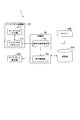
- FIG. 2 is a functional block diagram of the portable electronic device 1 shown in FIG. FIG. 2 shows only functional blocks related to the present invention.
- the portable electronic device 1 includes a display 103 as a display unit and a capacitive touch panel 111 as an operation (input) unit.
- the portable electronic device 1 includes a touch panel processing unit 101 including a capacitive touch panel 111 and a touch panel processor 112, a control unit 102, a storage unit 104, and a timer 105.
- the display 103 for example, a display device such as an LCD (Liquid Crystal Display) or an organic EL (Electroluminescence) display can be used.
- the display 103 displays a key input screen that accepts key input.
- the display 103 can display information such as an operation screen and other images on the display surface.
- a capacitive touch panel 111 is disposed so as to overlap. The user can perform a touch operation on the display surface, that is, the operation surface of the capacitive touch panel 111 while viewing the information displayed on the display 103.
- the touch panel processor 112 outputs a drive signal to the capacitive touch panel 111.
- the touch panel processor 112 receives a detection signal from the capacitive touch panel 111 corresponding to the drive signal.
- This detection signal is a signal indicating a change in capacitance according to an operation on the key input screen.
- the touch panel processor 112 measures the capacitance generated between the drive electrode that is formed on the capacitive touch panel 111 and receives the drive signal and the detection electrode that outputs the detection signal. That is, the detection signal input from the capacitive touch panel 111 is information indicating the measurement result of the capacitance.
- the touch panel processor 112 determines whether the finger is in contact with the capacitive touch panel 111 or a certain distance from the capacitive touch panel 111 based on the change amount of the electrostatic capacitance and the area where the change is detected. It is possible to distinguish between the separated positions, i.e., the hover state.
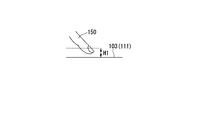
- the hover state refers to a state where the distance between the surface of the capacitive touch panel 111 and the user's finger is within a predetermined distance H1.
- the touch panel processor 112 transmits touch position information and proximity detection information to the control unit 102 based on the detection signal input from the capacitive touch panel 111.
- the touch position information is position information indicating which point on the capacitive touch panel 111 is touched with an operator such as a finger.
- the touch position information is a coordinate value defined on the display surface of the capacitive touch panel 111, and the position on the display surface of the capacitive touch panel 111 that is touched by an operator such as a user's finger or a dedicated touch pen. It is information which shows.
- the proximity detection information is information indicating whether an operator such as a finger is in proximity to the capacitive touch panel 111.
- This proximity detection information is information indicating the proximity state of the operation element to the display surface according to the distance between the display surface of the capacitive touch panel 111 and the operation element such as a user's finger. Further, the proximity detection information includes coordinate values defined on the display surface of the capacitive touch panel 111 and information indicating the position on the display surface of the capacitive touch panel 111 where the proximity state is detected.
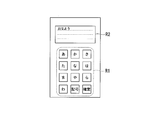
- the display 103 displays a key input screen including a key input reception area R1 including a confirmation button and an input information display area R2 under the control of the control unit 102. Further, the display 103 displays a conversion candidate list R3 for displaying conversion candidates on the key input screen under the control of the control unit 102 (refer to FIG. 4A and subsequent drawings for R1 to R3). In the present embodiment, the display 103 displays the conversion candidate list R3 so as to be superimposed on the key input reception area R1.
- the control unit 102 is a CPU (Central Processing Unit) provided in the mobile electronic device 1.
- the control unit 102 includes an operation content determination unit 121 and a display control unit 122.
- the operation content determination unit 121 receives a key input designated by the user based on touch position information input from the touch panel processor 112. That is, when the operation content determination unit 121 receives touch position information, the operation content determination unit 121 determines that a key displayed at a position on the display surface of the display 103 indicated by the touch position information is designated. Further, based on the proximity detection information input from the touch panel processor 112, the operation content determination unit 121 determines whether the user's finger is close to the key input screen of the capacitive touch panel 111 (in other words, the display surface of the display 103). Determine whether. The operation content determination unit 121 outputs information indicating the determination result to the display control unit 122.
- the operation content determination unit 121 outputs information indicating the determination result to the display control unit 122.
- the display control unit 122 causes the display 103 to display a key input screen including the key input reception area R1 and the input information display area R2.
- the display control unit 122 controls the display content of the key input screen based on information indicating the determination result input from the operation content determination unit 121. More specifically, the display control unit 122 displays the conversion candidate list R3 in the vicinity of the user's finger based on the character input operation by the touch of the user's finger and the hover state of the user's finger. In other words, the display control unit 122 receives the key input by the operation content determination unit 121, and determines that the user's finger is close to the key input screen (is in the hover state).
- the conversion candidate related to the input key is displayed at a position in the screen where the user's finger is detected as being close. Further, when the display control unit 122 receives a certain character by touching the key input receiving area R1, the word predicting the character as the initial character is displayed on the conversion candidate list R3. The order of conversion candidates to be displayed is determined based on the user's past conversion history.
- FIG. 3 is a flowchart showing the processing flow.
- the beginning of the processing flow is when the portable electronic device 1 is in a state of waiting for a character input by the user.
- the user activates the mail text editing function, and the control unit 102 transitions to a state waiting for a user to enter a text in the mail text.
- the key input receiving area R ⁇ b> 1 character input area
- the display control section 122 of the control section 102 is displayed on the display 103 under the control of the display control section 122 of the control section 102.
- Step ST102 The operation content determination unit 121 of the control unit 102 determines whether or not the software key is touched by the user based on the touch position information input from the touch panel processor 112.
- Step ST103 When the operation content determination unit 121 determines that the user has touched the key in the key input reception area R ⁇ b> 1, the determination result is input to the display control unit 122. Then, the display control unit 122 causes the input information display area R2 (character display area) of the display 103 to display characters, numbers, alphabets, or the like corresponding to the key selected by the user.
- Step ST104 the operation content determination unit 121 of the control unit 102 determines whether or not the user's finger is in the hover state based on the proximity detection information input from the touch panel processor 112. That is, the operation content determination unit 121 determines whether the user's finger is close to the key input screen based on the proximity detection information. Specifically, the operation content determination unit 121 determines that the user's finger has been in a hover state with respect to the capacitive touch panel 111 for a predetermined time or longer. It is determined that the finger is in the hover state.
- Step ST105 When the display control unit 122 determines that the user's finger is in the hover state with respect to the capacitive touch panel 111 based on the determination result of the operation content determination unit 121, the character input by the user at this time A conversion candidate list R3 in which conversion candidates with the initials are arranged is displayed so as to be superimposed on the key input area R1 and in the vicinity of the user's finger.
- the display control unit 122 may determine the order of conversion candidates to be displayed in the conversion candidate list R3 based on the conversion history of the user so far. For example, the display control unit 122 may display the one with the highest number of conversion histories of the user or the one with the latest conversion history at the top in the display frame for displaying the conversion candidate list R3. .
- Step ST106 Based on the touch position information, the operation content determination unit 121 determines whether an operation for touching the display area displaying the conversion candidate list R3 on the key input screen of the capacitive touch panel 111 has been performed. To do.
- Step ST107 When the conversion candidate list R3 is displayed on the key input reception area R1, when the user selects a desired conversion candidate from the conversion candidate list R3 by touching, the operation content determination unit 121 is based on the touch position information. It is determined that selection input of the touched conversion candidate is instructed.
- the display control unit 122 displays the touched conversion candidate in the input information display region R2 based on the determination result of the operation content determination unit 121. That is, the operation content determination unit 121 receives input of conversion candidates whose input has been confirmed, and the display control unit 122 displays the conversion candidates whose input has been confirmed in the input information display area R2.
- Step ST108 On the other hand, when the user removes his / her finger from the capacitive touch panel 111 and the hover state is not detected, or after the conversion candidate list R3 is displayed, the conversion candidate is selected by the user's touch for a predetermined time or more. If not, it is determined in step ST106 that “the operation for touching the display area displaying the conversion candidate list R3 has not been performed”, and the display control unit 122 erases the display of the conversion candidate list R3. That is, the display control unit 122 ends the display of the conversion candidate list R3 that is displayed superimposed on the key input reception area R1, and displays a normal key in the key input reception area R1. Then, the control unit 102 returns to step ST104 and returns to a state of waiting for input of proximity detection information indicating that the hover state has been detected again.
- Step ST109 In step ST104, when the hover state is not detected, the control unit 102 determines whether or not there is a request for input confirmation from the user. For example, when the “confirm button” key displayed in the key input reception area R1 is touched by the user, the control unit 102 displays the input confirmed characters in the input information display area R2 (see step ST107).
- FIGS. 4A to 8B are state transition diagrams of display images of the portable electronic device 1 according to the present embodiment.
- 4B, 5B,..., 8B are diagrams showing the distance between the capacitive touch panel 111 and the user's finger, respectively.
- the key input receiving area R1 is, for example, a software keyboard similar to a numeric keypad displayed on a general portable electronic device 1. It is assumed that the user's finger 150 touches (contacts) the key button “A” displayed in the key input reception area R1 five times. That is, touch position information indicating the position of the key button “A” is continuously input to the operation content determination unit 121 five times. As a result, the operation content determination unit 121 determines that the “o” key input has been received, and outputs the determination result to the display control unit 122.
- the display control unit 122 displays “o” in the input information display area R2.
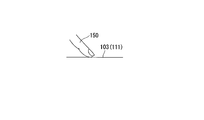
- the operation in which the user touches the key button means a state in which the user's finger 150 is in contact with the display surface of the display 103 (or the capacitive touch panel 111) as shown in FIG. 4B.
- the operation content determination unit 121 determines that the “ha” key input has been received, and outputs the determination result to the display control unit 122.
- the display control unit 122 displays “ha” behind “o” in the input information display area R2.
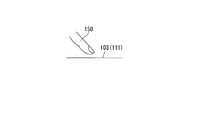
- the operation in which the user touches the key button refers to a state in which the user's finger 150 is in contact with the display surface of the display 103 (or the capacitive touch panel 111) as shown in FIG. 5B.
- the operation content determination unit 121 includes the proximity detection information. Based on this, it is determined that the finger 150 is in the hover state (see step ST104 above). In the present embodiment, the operation content determination unit 121 is in a hover state when the user's finger 150 is located within a predetermined distance H1 on the key input reception area R1 on the display surface of the display 103. Judge that.
- the display control unit 122 Based on the determination result by the operation content determination unit 121, the display control unit 122 displays the conversion candidate list R3 so that the finger 150 is superimposed on the input information display region R2 near a certain position. That is, when the operation content determination unit 121 determines that the finger 150 is in the hover state, the display control unit 122 displays the display 103 (or the user's finger 150 determined to be in the hover state based on the proximity detection information (or The position on the display surface of the capacitive touch panel 111) is detected. Then, the display control unit 122 superimposes the conversion candidate list R3 on the input information display region R2, as shown in FIG. 6A, according to the position where the user's finger 150 determined to be in the hover state is detected. To display.
- the conversion candidate list R3 includes, for example, “good morning”, “good morning”, “story”, “grandmother”, “early”, etc. as conversion candidates starting with “oha”. Display the display column.
- the display control unit 122 refers to the storage unit 104 to determine conversion candidates to be displayed in the conversion candidate list R3 based on the conversion history of the user so far.
- the operation content determination unit 121 receives touch position information indicating a position where “good morning” is displayed in the conversion candidate list R3. Thereby, the operation content determination unit 121 determines that the “Good morning” key input has been received, and outputs the determination result to the display control unit 122. Then, as shown in FIG. 7A, the display control unit 122 displays “Good morning” in the input information display area R2.
- the conversion candidate list is erased, and the input wait state by the numeric keypad is entered. That is, when the distance between the user's finger 150 and the display surface of the display 103 (or the capacitive touch panel 111) is greater than a predetermined distance H1, the operation content determination unit 121 is based on the proximity detection information. , It is determined that the finger 150 is not in the hover state. In addition, the operation content determination unit 121 determines that the touch state is not entered when the touch position information is not input.
- the operation content determination unit 121 measures the elapsed time from when the conversion candidate list R3 is displayed superimposed on the key input reception area R1, based on the time information measured by the timer 105.
- the operation content determination unit 121 converts the conversion candidates in the conversion candidate list R3. Is determined not to be selected. That is, when the operation content determination unit 121 determines that the hover state is lost, or when none of the conversion candidates displayed in the conversion candidate R3 is selected until a predetermined time T1 has elapsed, The conversion candidate list R3 displayed superimposed on the input reception area R1 is deleted.
- the first effect is that when a conversion candidate function is used in a user character input operation, the conversion candidate list is not displayed adjacent to the upper part of the software keyboard but displayed so as to be superimposed on the software keyboard. That is, when the operation content determination unit 121 determines that the user's finger 150 is in the hover state, the display control unit 122 causes the conversion candidate list R3 to be displayed so as to be superimposed on the key input reception area R1.
- the key input receiving area R1 and the input information display area are displayed because they are displayed superimposed on the key input receiving area R1. It is not necessary to narrow the region of R2. Therefore, since the display area can be secured for the key input receiving area R1 and the input information display area R2, the convenience of character input is not impaired.
- the second effect is that when the conversion candidate function is used in the user character input operation, the conversion candidate list is not displayed adjacent to the upper part of the software keyboard, but superimposed on the software keyboard, and , Displayed near the position of the user's finger. That is, when the operation content determination unit 121 determines that the user's finger 150 is in the hover state, the display control unit 122 superimposes the conversion candidate list R3 in the vicinity of the user's finger 150 on the key input reception area R1. To display.
- the conversion candidate can be selected by the user moving his / her finger in an area in the software keyboard. Therefore, the user does not have to move his / her finger greatly, so that the difficulty of selecting a conversion candidate as in the prior art is eliminated, and the operability of character input is improved.
- the conversion candidate when the conversion candidate is displayed outside the key input receiving area R1, the normal user touches and operates the key displayed in the key input receiving area R1, and therefore the conversion candidate is outside the operation area. Will be displayed.
- the conversion candidate may be displayed in a place where the user's finger cannot reach.
- a conversion candidate when a conversion candidate is displayed at a position where the user's operability is poor, there is a possibility that an unintended conversion candidate is selected by mistake. In this case, it is necessary for the user to erase the input characters and perform the key input operation again, and the operability is extremely poor. According to this embodiment, such inconvenience of operability can be improved and the limited display area of the display 103 can be used effectively.
- the mobile electronic device 2 has the main functional blocks of the mobile electronic device 1 and the processing flow is the same as that.
- the display control unit 122 displays the conversion candidate list
- the display time of the conversion candidate list R3 is set. The difference is that processing that can be determined by the user has been added.
- the display time of the conversion candidate list R3 can be determined, for example, when the user inputs the display time on the character input setting screen and the storage unit 104 stores the input time.
- FIG. 9 is a flowchart showing a processing flow of the information input method by the portable electronic device 2 according to the present embodiment. Steps ST101 to ST105 and ST107 to ST109 are the same as those in the first embodiment, and thus detailed description thereof is omitted. (Step ST206) Based on the touch position information, the operation content determination unit 121 performs a touch operation of touching a display area displaying the conversion candidate list R3 on the key input screen of the capacitive touch panel 111. It is determined whether or not the user input time T2 set by the user has elapsed since the time of display.
- an operation content determination unit 121 receives a key input of a touched conversion candidate.
- the content determination unit 121 ends the display of the conversion candidate list R3 after the user set time T2 has elapsed. That is, when the user setting time T2 has passed without the conversion candidate in the conversion candidate list R3 being touched, the display control unit 122 deletes the conversion candidate list R3.
- the conversion candidate list R3 is displayed at a time determined by the user, so that even a user who operates the portable electronic device 1 is surely touched the conversion candidate. It becomes possible to do.
- FIGS. 10A and 10B a third embodiment of the present invention will be described with reference to FIGS. 10A and 10B.
- the portable electronic device 3 according to the present embodiment has the same main configuration as the above-described portable electronic device 1, and therefore will be described below using the same reference numerals and detailed description thereof will be omitted.
- the portable electronic device 3 has the main functional blocks of the portable electronic device 1, and the processing flow is the same as that.
- the conversion candidate is displayed in the conversion candidate list R3
- the location closest to the position of the user's finger The difference is that conversion candidates with higher priorities are displayed in order.
- FIG. 10A is a diagram illustrating an example of a display image of the mobile electronic device 3 according to the present embodiment.
- the operation content determination unit 121 includes the proximity detection information. Based on this, it is determined that the finger 150 is in the hover state. Also in the present embodiment, the operation content determination unit 121 is in the hover state when the user's finger 150 is located within the predetermined distance H1 on the key input reception area R1 on the display surface of the display 103. Determine that there is.
- the display control unit 122 displays the display 103 (or electrostatics) of the user's finger 150 determined to be in the hover state based on the proximity detection information. The position on the display surface of the capacitive touch panel 111) is detected. Further, the display control unit 122 refers to the storage unit 104 and creates a conversion candidate list R4 in which conversion candidates are arranged so as to be closer to the finger position from the highest conversion frequency in the conversion history of the user so far. . Then, the display control unit 122 displays the conversion candidate list R4 according to the position on the display surface of the display 103 that is determined to be in the hover state.
- the display control unit 122 displays the conversion candidate “good morning” immediately below the user's finger 150 in the conversion candidate list R4. Further, the display control unit 122 displays the conversion candidate “story” and the conversion candidate “early” so as to be adjacent to this conversion candidate “good morning”.
- the desired conversion candidate is determined from the conversion candidate list by displaying the conversion candidate with the highest possibility of conversion with reference to the history directly under the finger 150 as in the present embodiment, the operation of the finger Opportunities for reducing the range increase and the convenience of character input can be further enhanced.
- a touch panel mounted on a display and PDAs (Personal Digital Assistants)
- PDAs Personal Digital Assistants
- a user interface using a touch panel can be used instead of an input device such as a conventional hardware keyboard or numeric keypad.
- input device such as a conventional hardware keyboard or numeric keypad.
- application activation and selection of operation from the initial screen by touch, and input operations such as character input are performed by touching a software keyboard displayed on the display.
- a software keyboard and a space for displaying the input characters are mainly displayed on the display.
- the key size of the software keyboard is displayed in a large size by making the maximum use of the horizontal width of the display, so that the area occupied by the software keyboard becomes large.
- conversion candidates are displayed in order of priority from the character string before input confirmation, and a conversion candidate for selecting a character string to be input by the user from the conversion candidates A list is displayed. This conversion candidate list is arranged adjacent to the upper part of the software keyboard.
- the display area of the display is limited, if you increase the space in the conversion candidate list to increase the number of conversion candidates, you must also consider the software keyboard area, so you can It is not possible to secure a sufficient space for displaying.
- the conversion candidate list is at the top of the software keyboard, so if the character string that the user wants to select is located away from the finger, It becomes difficult to reach and the problem that the operability is impaired occurs. According to the present invention, as described above, such a problem can be solved.
- the information input device (or the portable electronic device 1 including the same) has a computer system therein.
- the process of operation is stored in a computer-readable recording medium in the form of a program, and the above-described processing is performed by the computer system reading and executing this program.
- the “computer system” herein includes a CPU, various memories, an OS, and hardware such as peripheral devices. Further, the “computer system” includes a homepage providing environment (or display environment) if a WWW system is used.
- the “computer-readable recording medium” means a flexible disk, a magneto-optical disk, a ROM, a writable nonvolatile memory such as a flash memory, a portable medium such as a CD-ROM, a hard disk built in a computer system, etc. This is a storage device.
- the “computer-readable recording medium” refers to a volatile memory (for example, DRAM (Dynamic DRAM)) in a computer system that becomes a server or a client when a program is transmitted via a network such as the Internet or a communication line such as a telephone line. Random Access Memory)), etc., which hold programs for a certain period of time.
- the program may be transmitted from a computer system storing the program in a storage device or the like to another computer system via a transmission medium or by a transmission wave in the transmission medium.
- the “transmission medium” for transmitting the program refers to a medium having a function of transmitting information, such as a network (communication network) such as the Internet or a communication line (communication line) such as a telephone line.
- the program may be for realizing a part of the functions described above. Furthermore, what can implement
- the minimum component of the information input device is: A display 103 (display unit) that displays a key input screen that accepts key input; A touch panel 111 (input unit) that outputs a detection signal superimposed on the key input screen and indicating a change in capacitance according to an operation on the screen; A first detection processing unit 112_1 that outputs touch position information indicating a touch position where an operator such as a finger contacts the key input screen based on the detection signal output from the touch panel 111; Second detection processing for outputting proximity detection information indicating a proximity state of the operation element with respect to the key input screen according to a distance between the key input screen and the operation element based on the detection signal output from the touch panel Part 112_2, An operation content determination unit 121 that receives a specified key input based on the touch position information and determines whether the operator is close to the key input screen based on the proximity detection information; -In a state where key input is received by the operation content determination unit, if it is determined that the operation element is close
Landscapes
- Engineering & Computer Science (AREA)
- General Engineering & Computer Science (AREA)
- Theoretical Computer Science (AREA)
- Human Computer Interaction (AREA)
- Physics & Mathematics (AREA)
- General Physics & Mathematics (AREA)
- User Interface Of Digital Computer (AREA)
Description
本発明は、情報入力装置、情報入力方法、およびプログラムに関する。
例えば、ディスプレイにタッチパネルが搭載された携帯電子機器において文字入力を行う場合、ディスプレイの操作画面には、ソフトウェアキーボードと、このソフトウェアキーボードを介して入力した文字を表示するスペースが表示される。
一般的には、誤入力を避けるためにソフトウェアキーボードのキーサイズはディスプレイの横幅を最大限に利用して大きく表示される。このため、ソフトウェアキーボードが占める面積は大きくなる。
一般的には、誤入力を避けるためにソフトウェアキーボードのキーサイズはディスプレイの横幅を最大限に利用して大きく表示される。このため、ソフトウェアキーボードが占める面積は大きくなる。
また、文字入力の操作を省略するために、入力確定前の文字列に対して、優先順位の高い順に変換候補を表示させ、その変換候補からユーザーが入力したい文字列を選択するための変換候補リストが表示される。この変換候補リストは、操作画面内においてソフトウェアキーボードの上部に隣接するような位置に表示される。
例えば、携帯電話機におけるカナ文字入力のように、1つのキー項目に複数の選択候補キーが割り当てられている文字入力をタッチパネルで行う場合に、指の接近を検出し、接近範囲および傾き方向に基づいて、下位の(選択動作が必要な)選択候補キーを、当該接近範囲に重ならず、次の選択操作がし易い位置に円弧状に配置して表示するものがある(例えば、特許文献1参照)。
また別の公知例では、日本語の音を示す読み文字列の入力に応じて候補表示領域16に表示された一次候補の中の1つが選択されると、選択された(漢字などの)候補の文字列を仮確定し、文字入力領域内の読み文字列に置き替えて表示する。さらに呼び出し操作に応じて、仮確定文字列をその特性に応じて変化させた文字列をバリエーション候補として表示し、仮確定文字列に対するスライド操作が行われた場合には、その操作により指定された文字長の文字列のみが表示されるように、候補の表示を更新する。さらに、バリエーション候補の1つが選択されると、選択された候補の文字列により仮確定文字列を更新するとともに、この文字列に繋がる記号や文字などの候補が表示されるように候補表示領域の表示を更新するものがある(例えば、特許文献2参照)。
また別の公知例では、日本語の音を示す読み文字列の入力に応じて候補表示領域16に表示された一次候補の中の1つが選択されると、選択された(漢字などの)候補の文字列を仮確定し、文字入力領域内の読み文字列に置き替えて表示する。さらに呼び出し操作に応じて、仮確定文字列をその特性に応じて変化させた文字列をバリエーション候補として表示し、仮確定文字列に対するスライド操作が行われた場合には、その操作により指定された文字長の文字列のみが表示されるように、候補の表示を更新する。さらに、バリエーション候補の1つが選択されると、選択された候補の文字列により仮確定文字列を更新するとともに、この文字列に繋がる記号や文字などの候補が表示されるように候補表示領域の表示を更新するものがある(例えば、特許文献2参照)。
しかしながら、変換候補リストのうちユーザーが指定したい変換候補が、操作画面上におけるユーザーの指から離れた位置に表示される場合がある。この場合、ユーザーが片手で携帯電子機器を持ちながら親指で文字入力を行う際、親指が変換候補の表示位置に届かず、他方の手の指を使用しなければ変換候補を指定できず片手で操作できない事態が生じる。このように、変換候補を指定する際の操作性が損なわれるという問題があった。
本発明は、上記の課題を解決することができる情報入力装置、情報入力方法、およびプログラムを提供することを目的とする。
この発明は上述した課題を解決するためになされたもので、本発明は、キー入力を受け付けるキー入力画面を表示するディスプレイと、前記キー入力画面に重畳され、当該画面に対する操作に応じた静電容量の変化を示す検出信号を出力するタッチパネルと、前記タッチパネルが出力した前記検出信号に基づき、前記キー入力画面に操作子が接触したタッチ位置を示すタッチ位置情報を出力する第1検出処理部と、前記タッチパネルが出力した前記検出信号に基づき、前記キー入力画面と前記操作子との距離に応じた、前記キー入力画面に対する前記操作子の近接状態を示す近接検出情報を出力する第2検出処理部と、前記タッチ位置情報に基づき、指定されたキー入力を受け付けるとともに、前記近接検出情報に基づき前記操作子が前記キー入力画面に近接しているか否かを判定する操作内容判定部と、前記操作内容判定部によってキー入力を受け付けた状態において、前記操作子が前記キー入力画面に近接していると判定された場合、前記キー入力画面において前記操作子が近接していることが検出された近接位置に、前記入力されたキーに関連する変換候補を表示させる表示制御部と、を備える情報入力装置を提供する。
本発明はまた、キー入力を受け付けるキー入力画面をタッチパネル上に表示するステップと、前記キー入力画面に対する操作に応じた前記タッチパネルの静電容量の変化を示す検出信号を出力するステップと、前記検出信号に基づき、前記キー入力画面に操作子が接触したタッチ位置を示すタッチ位置情報を出力するステップと、前記検出信号に基づき、前記キー入力画面と前記操作子との距離に応じた、前記キー入力画面に対する前記操作子の近接状態を示す近接検出情報を出力するステップと、前記タッチ位置情報に基づき、指定されたキー入力を受け付けるとともに、前記近接検出情報に基づき前記操作子が前記キー入力画面に近接しているか否かを判定するステップと、キー入力を受け付けた状態において、前記操作子が前記キー入力画面に近接していると判定された場合、前記キー入力画面において前記操作子が近接していることが検出された近接位置に、前記入力されたキーに関連する変換候補を表示させるステップと、を備える情報入力方法も提供する。
本発明はまた、コンピュータを、
・キー入力を受け付けるキー入力画面をタッチパネル上に表示する手段、前記キー入力画面に対する操作に応じた前記タッチパネルの静電容量の変化を示す検出信号を出力する手段、
・前記検出信号に基づき、前記キー入力画面に操作子が接触したタッチ位置を示すタッチ位置情報を出力する手段、
・前記検出信号に基づき、前記キー入力画面と前記操作子との距離に応じた、前記キー入力画面に対する前記操作子の近接状態を示す近接検出情報を出力する手段、
・前記タッチ位置情報に基づき、指定されたキー入力を受け付けるとともに、前記近接検出情報に基づき前記操作子が前記キー入力画面に近接しているか否かを判定する手段、
・キー入力を受け付けた状態において、前記操作子が前記キー入力画面に近接していると判定された場合、前記キー入力画面において前記操作子が近接していることが検出された近接位置に、前記入力されたキーに関連する変換候補を表示させる手段、
として機能させるためのプログラムも提供する。
・キー入力を受け付けるキー入力画面をタッチパネル上に表示する手段、前記キー入力画面に対する操作に応じた前記タッチパネルの静電容量の変化を示す検出信号を出力する手段、
・前記検出信号に基づき、前記キー入力画面に操作子が接触したタッチ位置を示すタッチ位置情報を出力する手段、
・前記検出信号に基づき、前記キー入力画面と前記操作子との距離に応じた、前記キー入力画面に対する前記操作子の近接状態を示す近接検出情報を出力する手段、
・前記タッチ位置情報に基づき、指定されたキー入力を受け付けるとともに、前記近接検出情報に基づき前記操作子が前記キー入力画面に近接しているか否かを判定する手段、
・キー入力を受け付けた状態において、前記操作子が前記キー入力画面に近接していると判定された場合、前記キー入力画面において前記操作子が近接していることが検出された近接位置に、前記入力されたキーに関連する変換候補を表示させる手段、
として機能させるためのプログラムも提供する。
本発明によれば、変換候補を指定する際の操作性を向上させることができる。
[第1実施形態]
以下、図面を参照して本発明の一実施形態について説明する。
図1は、本発明の一実施形態に係る情報入力装置を備える携帯電子機器1の正面図である。本実施形態は、携帯電話機やPDA(Personal Digital Assistant)のような携帯電子機器であって、静電容量式のタッチパネルをディスプレイに備えた携帯電子機器1に搭載される情報入力装置として利用され得る。
この携帯電子機器1としては、スマートフォン、携帯ゲーム機、PDA、タブレット型PC(Personal Computer)、あるいは、ノート型PC等が利用可能である。
本実施形態に係る携帯電子機器1は、例えば、図1に示す通り、本体正面の大部分を占めるようにタッチパネル111及びディスプレイ103を備える電子機器である。
以下、図面を参照して本発明の一実施形態について説明する。
図1は、本発明の一実施形態に係る情報入力装置を備える携帯電子機器1の正面図である。本実施形態は、携帯電話機やPDA(Personal Digital Assistant)のような携帯電子機器であって、静電容量式のタッチパネルをディスプレイに備えた携帯電子機器1に搭載される情報入力装置として利用され得る。
この携帯電子機器1としては、スマートフォン、携帯ゲーム機、PDA、タブレット型PC(Personal Computer)、あるいは、ノート型PC等が利用可能である。
本実施形態に係る携帯電子機器1は、例えば、図1に示す通り、本体正面の大部分を占めるようにタッチパネル111及びディスプレイ103を備える電子機器である。
図2は、図1に示す携帯電子機器1の機能ブロック図である。この図2では、本発明に関わる機能ブロックのみを示している。本発明を携帯電子機器1に適用する場合には、携帯電子機器1の他の機能を実現するための機能ブロックが必要であるが、それらは公知であるのでここでは省略する。
図2に示したように、携帯電子機器1は、表示手段としてのディスプレイ103と、操作(入力)手段としての静電容量式タッチパネル111とを備える。また、携帯電子機器1は、静電容量式タッチパネル111と、タッチパネルプロセッサ112とを含むタッチパネル処理部101と、制御部102と、記憶部104と、タイマー105とを備える。
図2に示したように、携帯電子機器1は、表示手段としてのディスプレイ103と、操作(入力)手段としての静電容量式タッチパネル111とを備える。また、携帯電子機器1は、静電容量式タッチパネル111と、タッチパネルプロセッサ112とを含むタッチパネル処理部101と、制御部102と、記憶部104と、タイマー105とを備える。
ディスプレイ103は、例えばLCD(Liquid Crystal Display)、有機EL(Electroluminescence)ディスプレイ等の表示デバイスが利用可能である。このディスプレイ103は、キー入力を受け付けるキー入力画面を表示する。また、ディスプレイ103は、その他、操作画面やその他画像等の情報をその表示面上に表示することができる。
このディスプレイ103には、静電容量式タッチパネル111が重ねて配置されている。ユーザーは、ディスプレイ103に表示される情報を見ながら表示面、すなわち、静電容量式タッチパネル111の操作面へのタッチ操作を行うことができる。
このディスプレイ103には、静電容量式タッチパネル111が重ねて配置されている。ユーザーは、ディスプレイ103に表示される情報を見ながら表示面、すなわち、静電容量式タッチパネル111の操作面へのタッチ操作を行うことができる。
タッチパネルプロセッサ112は、静電容量式タッチパネル111に駆動信号を出力する。また、タッチパネルプロセッサ112は、駆動信号に対応した静電容量式タッチパネル111からの検出信号を受信する。この検出信号は、キー入力画面に対する操作に応じた静電容量の変化を示す信号である。
このタッチパネルプロセッサ112は、静電容量式タッチパネル111に形成されている、駆動信号が入力される駆動電極と、検出信号が出力される検出電極との間に発生する静電容量を測定する。つまり、静電容量式タッチパネル111から入力する検出信号は、この静電容量の測定結果を示す情報である。
ユーザーの指のような接地された物体が接触すると、指と駆動電極との間に結合容量が発生し、それに応じて駆動電極と検出電極との間の静電容量が変化する。この静電容量の変化が、検出信号に反映される。
静電容量の変化量及び変化を検出したエリア(指のタッチ位置に対応)は、静電容量式タッチパネル111と指が接触した場合に最も大きくなり、指が静電容量式タッチパネル111から離れると徐々に小さくなる。したがって、タッチパネルプロセッサ112は静電容量の変化量と、上記変化を検出したエリアに基づき、指が静電容量式タッチパネル111に接触しているか、または、静電容量式タッチパネル111と一定の距離を隔てた位置、すなわち、ホバー状態であるかを区別することができる。ここで、ホバー状態とは、静電容量式タッチパネル111の表面とユーザーの指の距離が予め決められた距離H1以内である状態をいう。
このタッチパネルプロセッサ112は、静電容量式タッチパネル111に形成されている、駆動信号が入力される駆動電極と、検出信号が出力される検出電極との間に発生する静電容量を測定する。つまり、静電容量式タッチパネル111から入力する検出信号は、この静電容量の測定結果を示す情報である。
ユーザーの指のような接地された物体が接触すると、指と駆動電極との間に結合容量が発生し、それに応じて駆動電極と検出電極との間の静電容量が変化する。この静電容量の変化が、検出信号に反映される。
静電容量の変化量及び変化を検出したエリア(指のタッチ位置に対応)は、静電容量式タッチパネル111と指が接触した場合に最も大きくなり、指が静電容量式タッチパネル111から離れると徐々に小さくなる。したがって、タッチパネルプロセッサ112は静電容量の変化量と、上記変化を検出したエリアに基づき、指が静電容量式タッチパネル111に接触しているか、または、静電容量式タッチパネル111と一定の距離を隔てた位置、すなわち、ホバー状態であるかを区別することができる。ここで、ホバー状態とは、静電容量式タッチパネル111の表面とユーザーの指の距離が予め決められた距離H1以内である状態をいう。
また、タッチパネルプロセッサ112は、静電容量式タッチパネル111から入力される検出信号に基づき、タッチ位置情報および近接検出情報を、制御部102へ送信する。
具体的に説明すると、タッチ位置情報は、静電容量式タッチパネル111のどの点が指等の操作子でタッチされているかの位置情報である。例えば、タッチ位置情報は、静電容量式タッチパネル111の表示面上に定義される座標値で、ユーザーの指や専用のタッチペン等の操作子が接触した静電容量式タッチパネル111の表示面における位置を示す情報である。
また、近接検出情報は、静電容量式タッチパネル111に指等の操作子が近接した状態であるのかを表わす情報である。この近接検出情報は、静電容量式タッチパネル111の表示面とユーザーの指等の操作子との距離に応じた表示面に対する操作子の近接状態を示す情報である。また、近接検出情報は、静電容量式タッチパネル111の表示面上に定義される座標値で、近接状態が検出された静電容量式タッチパネル111の表示面における位置を示す情報も含む。
具体的に説明すると、タッチ位置情報は、静電容量式タッチパネル111のどの点が指等の操作子でタッチされているかの位置情報である。例えば、タッチ位置情報は、静電容量式タッチパネル111の表示面上に定義される座標値で、ユーザーの指や専用のタッチペン等の操作子が接触した静電容量式タッチパネル111の表示面における位置を示す情報である。
また、近接検出情報は、静電容量式タッチパネル111に指等の操作子が近接した状態であるのかを表わす情報である。この近接検出情報は、静電容量式タッチパネル111の表示面とユーザーの指等の操作子との距離に応じた表示面に対する操作子の近接状態を示す情報である。また、近接検出情報は、静電容量式タッチパネル111の表示面上に定義される座標値で、近接状態が検出された静電容量式タッチパネル111の表示面における位置を示す情報も含む。
ディスプレイ103は、制御部102の制御により、確定ボタンを含むキー入力受付領域R1、入力情報表示領域R2を含むキー入力画面を表示する。また、ディスプレイ103は、制御部102の制御により、変換候補を表示する変換候補リストR3を、キー入力画面上に表示する(R1~R3については、図4A以降を参照)。
本実施形態において、ディスプレイ103は、キー入力受付領域R1の上に重畳させて変換候補リストR3を表示させる。
本実施形態において、ディスプレイ103は、キー入力受付領域R1の上に重畳させて変換候補リストR3を表示させる。
制御部102は、携帯電子機器1の内部に備えられるCPU(Central Processing Unit)である。制御部102は、操作内容判定部121と、表示制御部122とを備える。
操作内容判定部121は、タッチパネルプロセッサ112から入力されるタッチ位置情報に基づき、ユーザーから指定されたキー入力を受け付ける。つまり、操作内容判定部121は、タッチ位置情報を受信した場合、このタッチ位置情報が示すディスプレイ103の表示面上の位置に表示されているキーが指定されたと判定する。
また操作内容判定部121は、タッチパネルプロセッサ112から入力する近接検出情報に基づき、ユーザーの指が静電容量式タッチパネル111のキー入力画面(言い換えると、ディスプレイ103の表示面)に近接しているか否かを判定する。
操作内容判定部121は、判定結果を示す情報を表示制御部122に出力する。
操作内容判定部121は、タッチパネルプロセッサ112から入力されるタッチ位置情報に基づき、ユーザーから指定されたキー入力を受け付ける。つまり、操作内容判定部121は、タッチ位置情報を受信した場合、このタッチ位置情報が示すディスプレイ103の表示面上の位置に表示されているキーが指定されたと判定する。
また操作内容判定部121は、タッチパネルプロセッサ112から入力する近接検出情報に基づき、ユーザーの指が静電容量式タッチパネル111のキー入力画面(言い換えると、ディスプレイ103の表示面)に近接しているか否かを判定する。
操作内容判定部121は、判定結果を示す情報を表示制御部122に出力する。
表示制御部122は、キー入力受付領域R1および入力情報表示領域R2を含むキー入力画面をディスプレイ103に表示させる。また、表示制御部122は、操作内容判定部121から入力する判定結果を示す情報に基づき、キー入力画面の表示内容を制御する。
具体的に説明すると、表示制御部122は、ユーザーの指のタッチによる文字入力操作及びユーザーの指のホバー状態に基づき、変換候補リストR3をユーザーの指が位置する付近に表示する。言い換えると、表示制御部122は、操作内容判定部121によってキー入力を受け付けた状態において、ユーザーの指がキー入力画面に近接している(ホバー状態である)と判定された場合、キー入力画面においてユーザーの指が近接していることが検出された画面内の位置に、入力されたキーに関連する変換候補を表示させる。
また、表示制御部122は、キー入力受付領域R1のタッチによりある文字を受け取ると、その文字を頭文字とする単語を予測して変換候補リストR3に表示する。表示する変換候補の順番は、ユーザーの過去の変換履歴に基づき決定される。
具体的に説明すると、表示制御部122は、ユーザーの指のタッチによる文字入力操作及びユーザーの指のホバー状態に基づき、変換候補リストR3をユーザーの指が位置する付近に表示する。言い換えると、表示制御部122は、操作内容判定部121によってキー入力を受け付けた状態において、ユーザーの指がキー入力画面に近接している(ホバー状態である)と判定された場合、キー入力画面においてユーザーの指が近接していることが検出された画面内の位置に、入力されたキーに関連する変換候補を表示させる。
また、表示制御部122は、キー入力受付領域R1のタッチによりある文字を受け取ると、その文字を頭文字とする単語を予測して変換候補リストR3に表示する。表示する変換候補の順番は、ユーザーの過去の変換履歴に基づき決定される。
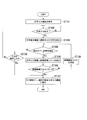
次に、図3を参照し、本実施形態に係る携帯電子機器1による情報入力方法の処理フローについて説明する。図3は、当該処理フローを示すフローチャートである。
処理フローの始まりは、携帯電子機器1が、ユーザーによる文字入力待ちの状態になった時点である。例えば、携帯電子機器1においてメールを作成する場合に、ユーザーがメール本文の編集機能を起動させ、制御部102が、ユーザーによるメール本文の文字入力待ち状態に遷移した時点である。
(ステップST101)
まず、制御部102の表示制御部122の制御により、キー入力受付領域R1(文字入力領域)がディスプレイ103に表示される。
(ステップST102)
制御部102の操作内容判定部121は、タッチパネルプロセッサ112から入力するタッチ位置情報に基づき、ユーザーによってソフトウェアキーがタッチされたか否かを判定する。
(ステップST103)
ユーザーによってキー入力受付領域R1内のキーがタッチされたことが操作内容判定部121により判定されると、この判定結果が表示制御部122に入力される。そして、表示制御部122は、ディスプレイ103の入力情報表示領域R2(文字表示領域)に、ユーザーが選択したキーに対応する文字や数字あるいは英字等を表示させる。
処理フローの始まりは、携帯電子機器1が、ユーザーによる文字入力待ちの状態になった時点である。例えば、携帯電子機器1においてメールを作成する場合に、ユーザーがメール本文の編集機能を起動させ、制御部102が、ユーザーによるメール本文の文字入力待ち状態に遷移した時点である。
(ステップST101)
まず、制御部102の表示制御部122の制御により、キー入力受付領域R1(文字入力領域)がディスプレイ103に表示される。
(ステップST102)
制御部102の操作内容判定部121は、タッチパネルプロセッサ112から入力するタッチ位置情報に基づき、ユーザーによってソフトウェアキーがタッチされたか否かを判定する。
(ステップST103)
ユーザーによってキー入力受付領域R1内のキーがタッチされたことが操作内容判定部121により判定されると、この判定結果が表示制御部122に入力される。そして、表示制御部122は、ディスプレイ103の入力情報表示領域R2(文字表示領域)に、ユーザーが選択したキーに対応する文字や数字あるいは英字等を表示させる。
(ステップST104)
次に、制御部102の操作内容判定部121は、タッチパネルプロセッサ112から入力される近接検出情報に基づき、ユーザーの指がホバー状態であるか否かを判定する。つまり、操作内容判定部121は、近接検出情報に基づきユーザーの指がキー入力画面に近接しているか否かを判定する。具体的には、操作内容判定部121は、ユーザーの指が静電容量式タッチパネル111に対してホバー状態であると判定された時間が、予め決められた時間以上継続している場合、ユーザーの指がホバー状態であると判定する。
(ステップST105)
そして、表示制御部122は、操作内容判定部121の判定結果に基づき、ユーザーの指が静電容量式タッチパネル111に対してホバー状態であると判定された場合、ユーザーがこの時点で入力した文字を頭文字とする変換候補を並べた変換候補リストR3を、キー入力領域R1に重畳するように、かつ、ユーザーの指が位置する付近に表示させる。
ここで、表示制御部122は、変換候補リストR3に表示させる変換候補の順番を、ユーザーのこれまでの変換履歴に基づいて決定してもよい。例えば、表示制御部122は、ユーザーの変換履歴の回数が最も多いものや、変換履歴が最近のものを、この変換候補リストR3を表示する表示枠内の上部に表示するものであってもよい。
次に、制御部102の操作内容判定部121は、タッチパネルプロセッサ112から入力される近接検出情報に基づき、ユーザーの指がホバー状態であるか否かを判定する。つまり、操作内容判定部121は、近接検出情報に基づきユーザーの指がキー入力画面に近接しているか否かを判定する。具体的には、操作内容判定部121は、ユーザーの指が静電容量式タッチパネル111に対してホバー状態であると判定された時間が、予め決められた時間以上継続している場合、ユーザーの指がホバー状態であると判定する。
(ステップST105)
そして、表示制御部122は、操作内容判定部121の判定結果に基づき、ユーザーの指が静電容量式タッチパネル111に対してホバー状態であると判定された場合、ユーザーがこの時点で入力した文字を頭文字とする変換候補を並べた変換候補リストR3を、キー入力領域R1に重畳するように、かつ、ユーザーの指が位置する付近に表示させる。
ここで、表示制御部122は、変換候補リストR3に表示させる変換候補の順番を、ユーザーのこれまでの変換履歴に基づいて決定してもよい。例えば、表示制御部122は、ユーザーの変換履歴の回数が最も多いものや、変換履歴が最近のものを、この変換候補リストR3を表示する表示枠内の上部に表示するものであってもよい。
(ステップST106)
操作内容判定部121は、タッチ位置情報に基づき、静電容量式タッチパネル111のキー入力画面上のうち、変換候補リストR3を表示している表示領域をタッチする操作が行われたか否かを判定する。
(ステップST107)
変換候補リストR3がキー入力受付領域R1上に表示されている状態において、ユーザーが変換候補リストR3の中から所望の変換候補をタッチにより選択すると、操作内容判定部121は、タッチ位置情報に基づき、タッチされた変換候補の選択入力が指示されたと判定する。表示制御部122は、操作内容判定部121の当該判定結果に基づき、タッチされた変換候補を入力情報表示領域R2に表示させる。すなわち、操作内容判定部121が、入力確定した変換候補の入力を受け付けるとともに、表示制御部122は、入力確定した変換候補を入力情報表示領域R2に表示させる。
操作内容判定部121は、タッチ位置情報に基づき、静電容量式タッチパネル111のキー入力画面上のうち、変換候補リストR3を表示している表示領域をタッチする操作が行われたか否かを判定する。
(ステップST107)
変換候補リストR3がキー入力受付領域R1上に表示されている状態において、ユーザーが変換候補リストR3の中から所望の変換候補をタッチにより選択すると、操作内容判定部121は、タッチ位置情報に基づき、タッチされた変換候補の選択入力が指示されたと判定する。表示制御部122は、操作内容判定部121の当該判定結果に基づき、タッチされた変換候補を入力情報表示領域R2に表示させる。すなわち、操作内容判定部121が、入力確定した変換候補の入力を受け付けるとともに、表示制御部122は、入力確定した変換候補を入力情報表示領域R2に表示させる。
(ステップST108)
一方、ユーザーが指を静電容量式タッチパネル111から離して、ホバー状態が検出されなくなった場合、あるいは、変換候補リストR3を表示後、予め決められた時間以上ユーザーのタッチによる変換候補の選択がなかった場合、上記ステップST106において「変換候補リストR3を表示している表示領域をタッチする操作が行われなかった」と判定され、表示制御部122は、変換候補リストR3の表示を消去する。
つまり、表示制御部122は、キー入力受付領域R1に重畳して表示している変換候補リストR3の表示を終了し、キー入力受付領域R1に通常のキーを表示させる。そして、制御部102は、ステップST104に戻って、再度ホバー状態が検出されたことを示す近接検出情報の入力を待つ状態に戻る。
一方、ユーザーが指を静電容量式タッチパネル111から離して、ホバー状態が検出されなくなった場合、あるいは、変換候補リストR3を表示後、予め決められた時間以上ユーザーのタッチによる変換候補の選択がなかった場合、上記ステップST106において「変換候補リストR3を表示している表示領域をタッチする操作が行われなかった」と判定され、表示制御部122は、変換候補リストR3の表示を消去する。
つまり、表示制御部122は、キー入力受付領域R1に重畳して表示している変換候補リストR3の表示を終了し、キー入力受付領域R1に通常のキーを表示させる。そして、制御部102は、ステップST104に戻って、再度ホバー状態が検出されたことを示す近接検出情報の入力を待つ状態に戻る。
(ステップST109)
また、ステップST104において、ホバー状態の検出がない場合、制御部102は、ユーザーからの入力確定の要求があるか否かを判定する。
例えば、キー入力受付領域R1に表示されている“確定ボタン”キーがユーザーによってタッチされると、制御部102は、入力情報表示領域R2に、入力確定した文字を表示する(ステップST107参照)。
また、ステップST104において、ホバー状態の検出がない場合、制御部102は、ユーザーからの入力確定の要求があるか否かを判定する。
例えば、キー入力受付領域R1に表示されている“確定ボタン”キーがユーザーによってタッチされると、制御部102は、入力情報表示領域R2に、入力確定した文字を表示する(ステップST107参照)。
次に、図4A~8Bを参照して、ユーザーによる操作と表示例について説明する。図4A、5A、…、8Aは、本実施形態に係る携帯電子機器1の表示画像の状態遷移図である。また、図4B、5B、…、8Bは、それぞれ静電容量式タッチパネル111とユーザーの指の距離を示す図である。
図4A,4Bを参照して、静電容量式タッチパネル111を介して「お」を入力する際の操作と表示例について説明する。
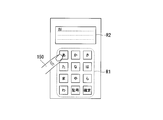
図4Aに示す通り、キー入力受付領域R1は、例えば、一般的な携帯電子機器1に表示されるテンキーと同様のソフトウェアキーボードである。ユーザーの指150が、キー入力受付領域R1に表示されているキーボタン「あ」を5回タッチ(接触)したとする。つまり、操作内容判定部121に、キーボタン「あ」の位置を示すタッチ位置情報が、連続して5回入力される。これにより、操作内容判定部121は、「お」のキー入力を受け付けたことを判定し、判定結果を表示制御部122に出力する。そして、表示制御部122は、入力情報表示領域R2に、「お」を表示させる。
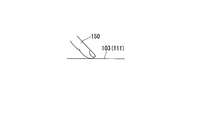
なお、ここでユーザーがキーボタンをタッチする操作は、図4Bに示す通り、ユーザーの指150がディスプレイ103(あるいは静電容量式タッチパネル111)の表示面に接触している状態をいう。
図4Aに示す通り、キー入力受付領域R1は、例えば、一般的な携帯電子機器1に表示されるテンキーと同様のソフトウェアキーボードである。ユーザーの指150が、キー入力受付領域R1に表示されているキーボタン「あ」を5回タッチ(接触)したとする。つまり、操作内容判定部121に、キーボタン「あ」の位置を示すタッチ位置情報が、連続して5回入力される。これにより、操作内容判定部121は、「お」のキー入力を受け付けたことを判定し、判定結果を表示制御部122に出力する。そして、表示制御部122は、入力情報表示領域R2に、「お」を表示させる。
なお、ここでユーザーがキーボタンをタッチする操作は、図4Bに示す通り、ユーザーの指150がディスプレイ103(あるいは静電容量式タッチパネル111)の表示面に接触している状態をいう。
次いで、図5Aに示す通り、ユーザーの指150が、キー入力受付領域R1に表示されているキーボタン「は」を1回タッチ(接触)したとする。つまり、操作内容判定部121には、キーボタン「は」の位置を示すタッチ位置情報が1回入力される。これにより、操作内容判定部121は、「は」のキー入力を受け付けたことを判定し、判定結果を表示制御部122に出力する。そして、表示制御部122は、入力情報表示領域R2の「お」の後ろに、「は」を表示させる。
なお、ここでユーザーがキーボタンをタッチする操作は、図5Bに示す通り、ユーザーの指150がディスプレイ103(あるいは静電容量式タッチパネル111)の表示面に接触している状態をいう。
なお、ここでユーザーがキーボタンをタッチする操作は、図5Bに示す通り、ユーザーの指150がディスプレイ103(あるいは静電容量式タッチパネル111)の表示面に接触している状態をいう。
そして、図6Bに示す通り、ユーザーが指150を、ディスプレイ103(あるいは静電容量式タッチパネル111)の表示面に近接して静止(ホバー)させたとする。ここで、ユーザーの指150と、ディスプレイ103(あるいは静電容量式タッチパネル111)の表示面との距離が、予め決められた距離H1以内である場合、操作内容判定部121は、近接検出情報に基づき、指150がホバー状態であることを判定する(上記ステップST104参照)。
本実施形態において、操作内容判定部121は、ディスプレイ103の表示面のうち、キー入力受付領域R1の上でユーザーの指150が予め決められた距離H1以内の位置にある場合、ホバー状態であることを判定する。
表示制御部122は、この操作内容判定部121による判定結果に基づき、指150がある位置付近に、かつ、入力情報表示領域R2に重畳するようにして、変換候補リストR3を表示する。
つまり、表示制御部122は、操作内容判定部121によって指150がホバー状態であると判定された場合、近接検出情報に基づき、ホバー状態であると判定されたユーザーの指150のディスプレイ103(あるいは静電容量式タッチパネル111)の表示面上の位置を検出する。そして、表示制御部122は、このホバー状態であると判定されたユーザーの指150が検出された位置に応じて、図6Aに示す通り、変換候補リストR3を、入力情報表示領域R2に重畳させて表示させる。
図示のように、変換候補リストR3は、「おは」を頭文字とする変換候補として、例えば「おはよう」、「お早う」、「お話」、「おばあさん」、「お早め」・・・を含む表示欄を表示する。表示制御部122は、この変換候補リストR3に表示する変換候補を、記憶部104を参照し、ユーザーのこれまでの変換履歴に基づいて決定する。
本実施形態において、操作内容判定部121は、ディスプレイ103の表示面のうち、キー入力受付領域R1の上でユーザーの指150が予め決められた距離H1以内の位置にある場合、ホバー状態であることを判定する。
表示制御部122は、この操作内容判定部121による判定結果に基づき、指150がある位置付近に、かつ、入力情報表示領域R2に重畳するようにして、変換候補リストR3を表示する。
つまり、表示制御部122は、操作内容判定部121によって指150がホバー状態であると判定された場合、近接検出情報に基づき、ホバー状態であると判定されたユーザーの指150のディスプレイ103(あるいは静電容量式タッチパネル111)の表示面上の位置を検出する。そして、表示制御部122は、このホバー状態であると判定されたユーザーの指150が検出された位置に応じて、図6Aに示す通り、変換候補リストR3を、入力情報表示領域R2に重畳させて表示させる。
図示のように、変換候補リストR3は、「おは」を頭文字とする変換候補として、例えば「おはよう」、「お早う」、「お話」、「おばあさん」、「お早め」・・・を含む表示欄を表示する。表示制御部122は、この変換候補リストR3に表示する変換候補を、記憶部104を参照し、ユーザーのこれまでの変換履歴に基づいて決定する。
ここで、図7A、7Bに示す通り、変換候補リストR3の中から「おはよう」をユーザーの指150がタッチしたとする。つまり、操作内容判定部121は、変換候補リストR3において「おはよう」を表示する位置を示すタッチ位置情報を受けとる。これにより、操作内容判定部121は、「おはよう」のキー入力を受け付けたことを判定し、判定結果を表示制御部122に出力する。そして、表示制御部122は、図7Aに示すように、入力情報表示領域R2に、「おはよう」を表示させる。
その後、図8A、8Bに示す通り、ユーザーが指150をディスプレイ103(あるいは静電容量式タッチパネル111)の表示面から離すと、変換候補リストは消去され、テンキーによる入力待ち状態となる。
つまり、ユーザーの指150と、ディスプレイ103(あるいは静電容量式タッチパネル111)の表示面との距離が、予め決められた距離H1より離れた場合、操作内容判定部121は、近接検出情報に基づき、指150がホバー状態でないことを判定する。また、操作内容判定部121は、タッチ位置情報を入力していない場合、タッチ状態でないことを判定する。
さらに、操作内容判定部121は、キー入力受付領域R1に重畳して変換候補リストR3を表示させたときからの経過時間をタイマー105によって計時される計時情報に基づき、測定する。キー入力受付領域R1に重畳して変換候補リストR3を表示させたときからの経過時間が予め決められた時間T1以上となった場合、操作内容判定部121は、変換候補リストR3内の変換候補が選択されなかったと判定する。
すなわち、操作内容判定部121は、ホバー状態でなくなったと判定した場合、あるいは、予め決められた時間T1を経過するまで変換候補R3に表示されているいずれの変換候補も選択されなかった場合、キー入力受付領域R1上に重畳して表示している変換候補リストR3を消去する。
つまり、ユーザーの指150と、ディスプレイ103(あるいは静電容量式タッチパネル111)の表示面との距離が、予め決められた距離H1より離れた場合、操作内容判定部121は、近接検出情報に基づき、指150がホバー状態でないことを判定する。また、操作内容判定部121は、タッチ位置情報を入力していない場合、タッチ状態でないことを判定する。
さらに、操作内容判定部121は、キー入力受付領域R1に重畳して変換候補リストR3を表示させたときからの経過時間をタイマー105によって計時される計時情報に基づき、測定する。キー入力受付領域R1に重畳して変換候補リストR3を表示させたときからの経過時間が予め決められた時間T1以上となった場合、操作内容判定部121は、変換候補リストR3内の変換候補が選択されなかったと判定する。
すなわち、操作内容判定部121は、ホバー状態でなくなったと判定した場合、あるいは、予め決められた時間T1を経過するまで変換候補R3に表示されているいずれの変換候補も選択されなかった場合、キー入力受付領域R1上に重畳して表示している変換候補リストR3を消去する。
上述の通り、本実施形態によれば、以下に記載するような効果を奏する。
第1の効果は、ユーザーの文字入力操作で変換候補の機能を利用するときに、変換候補リストがソフトウェアキーボードの上部に隣り合うように表示されず、ソフトウェアキーボードに重畳するように表示される。つまり、ユーザーの指150がホバー状態であると操作内容判定部121が判定した場合、表示制御部122は、キー入力受付領域R1に重畳させて、変換候補リストR3を表示させる。
これにより、変換候補リストR3に表示される変換候補の数を増やした場合でもあっても、キー入力受付領域R1の上に重畳して表示されるため、キー入力受付領域R1および入力情報表示領域R2の領域を狭めなくてすむ。よって、キー入力受付領域R1および入力情報表示領域R2を表示エリアは確保することができため、文字入力の利便性が損なわれないことである。
第1の効果は、ユーザーの文字入力操作で変換候補の機能を利用するときに、変換候補リストがソフトウェアキーボードの上部に隣り合うように表示されず、ソフトウェアキーボードに重畳するように表示される。つまり、ユーザーの指150がホバー状態であると操作内容判定部121が判定した場合、表示制御部122は、キー入力受付領域R1に重畳させて、変換候補リストR3を表示させる。
これにより、変換候補リストR3に表示される変換候補の数を増やした場合でもあっても、キー入力受付領域R1の上に重畳して表示されるため、キー入力受付領域R1および入力情報表示領域R2の領域を狭めなくてすむ。よって、キー入力受付領域R1および入力情報表示領域R2を表示エリアは確保することができため、文字入力の利便性が損なわれないことである。
また、第2の効果は、ユーザーの文字入力操作で変換候補の機能を利用するときに、変換候補リストがソフトウェアキーボードの上部に隣り合うように表示されず、ソフトウェアキーボードに重畳するように、かつ、ユーザーの指の位置付近に表示される。つまり、ユーザーの指150がホバー状態であると操作内容判定部121が判定した場合、表示制御部122は、キー入力受付領域R1に重畳させて、変換候補リストR3を、ユーザーの指150の付近に表示させる。
これにより、ユーザーが指をソフトウェアキーボード内の領域で動かすことで、変換候補を選択することができる。したがって、ユーザーは指を大きく動かす必要がなくなるため、従来のような変換候補の選択のし難さが解消され、文字入力の操作性を高めることである。
例えば、変換候補がキー入力受付領域R1の外側に表示された場合、通常ユーザーはキー入力受付領域R1に表示されるキーにタッチして操作しているため、この操作エリアの外側に変換候補が表示されることとなる。この場合、ユーザーの指が届かない場所に変換候補が表示されるおそれがある。このように、ユーザーの操作性が悪い位置に変換候補が表示された場合、誤って意図しない変換候補を選択するおそれがある。この場合、ユーザーは、入力された文字を消去して、再度キー入力作業をやり直す必要があり、操作性が極めて悪かった。
本実施形態によれば、このような操作性の不便を改善し、限られたディスプレイ103の表示領域を有効に利用することができる。
これにより、ユーザーが指をソフトウェアキーボード内の領域で動かすことで、変換候補を選択することができる。したがって、ユーザーは指を大きく動かす必要がなくなるため、従来のような変換候補の選択のし難さが解消され、文字入力の操作性を高めることである。
例えば、変換候補がキー入力受付領域R1の外側に表示された場合、通常ユーザーはキー入力受付領域R1に表示されるキーにタッチして操作しているため、この操作エリアの外側に変換候補が表示されることとなる。この場合、ユーザーの指が届かない場所に変換候補が表示されるおそれがある。このように、ユーザーの操作性が悪い位置に変換候補が表示された場合、誤って意図しない変換候補を選択するおそれがある。この場合、ユーザーは、入力された文字を消去して、再度キー入力作業をやり直す必要があり、操作性が極めて悪かった。
本実施形態によれば、このような操作性の不便を改善し、限られたディスプレイ103の表示領域を有効に利用することができる。
[第2実施形態]
次に、図9を参照して、本発明の第2実施形態について説明する。なお、本実施形態に係る携帯電子機器2は、上述の携帯電子機器1と主な構成が同一であるため、以下では同一の符号を用いて説明し、詳細な説明は省略する。
携帯電子機器2は、携帯電子機器1の主な機能ブロックを有し、処理フローもそれと同様であるが、表示制御部122が変換候補リストを表示するときに、変換候補リストR3の表示時間をユーザーによって決定できる処理が追加されている点で異なる。
変換候補リストR3の表示時間の決定は、例えば文字入力の設定画面でユーザーが表示時間を入力し、その入力された時間を記憶部104が保存することで実現できる。
次に、図9を参照して、本発明の第2実施形態について説明する。なお、本実施形態に係る携帯電子機器2は、上述の携帯電子機器1と主な構成が同一であるため、以下では同一の符号を用いて説明し、詳細な説明は省略する。
携帯電子機器2は、携帯電子機器1の主な機能ブロックを有し、処理フローもそれと同様であるが、表示制御部122が変換候補リストを表示するときに、変換候補リストR3の表示時間をユーザーによって決定できる処理が追加されている点で異なる。
変換候補リストR3の表示時間の決定は、例えば文字入力の設定画面でユーザーが表示時間を入力し、その入力された時間を記憶部104が保存することで実現できる。
図9は、本実施形態に係る携帯電子機器2による情報入力方法の処理フローを示すフローチャートである。なお、ステップST101~ST105、ST107~ST109については、第1実施形態と同様であるため、詳細な説明は省略する。
(ステップST206)
操作内容判定部121は、タッチ位置情報に基づき、静電容量式タッチパネル111のキー入力画面上のうち、変換候補リストR3を表示している表示領域をタッチするタッチ操作が、変換候補リストR3を表示したときからユーザーによって設定されたユーザー設定時間T2が経過するまでに入力されたか否かを判定する。
変換候補リストR3を表示したときからユーザーによって設定されたユーザー設定時間T2が経過するまでに、変換候補リストR3を表示している表示領域をタッチするタッチ操作が入力された場合、操作内容判定部121は、タッチされた変換候補のキー入力を受け付ける。
一方、変換候補リストR3を表示したときからユーザーによって設定されたユーザー設定時間T2が経過するまでに、変換候補リストR3を表示している表示領域をタッチするタッチ操作が入力されなかった場合、操作内容判定部121は、ユーザー設定時間T2が経過した後、変換候補リストR3の表示を終了する。
つまり、変換候補リストR3内の変換候補がタッチされないままユーザー設定時間T2が経過した場合、表示制御部122は、変換候補リストR3を消去する。これにより、変換候補リストR3から所望の変換候補を選択するときに、ユーザーが決めた時間で変換候補リストR3が表示されるため、携帯電子機器1の操作が遅いユーザーでも確実に変換候補をタッチすることが可能となる。
(ステップST206)
操作内容判定部121は、タッチ位置情報に基づき、静電容量式タッチパネル111のキー入力画面上のうち、変換候補リストR3を表示している表示領域をタッチするタッチ操作が、変換候補リストR3を表示したときからユーザーによって設定されたユーザー設定時間T2が経過するまでに入力されたか否かを判定する。
変換候補リストR3を表示したときからユーザーによって設定されたユーザー設定時間T2が経過するまでに、変換候補リストR3を表示している表示領域をタッチするタッチ操作が入力された場合、操作内容判定部121は、タッチされた変換候補のキー入力を受け付ける。
一方、変換候補リストR3を表示したときからユーザーによって設定されたユーザー設定時間T2が経過するまでに、変換候補リストR3を表示している表示領域をタッチするタッチ操作が入力されなかった場合、操作内容判定部121は、ユーザー設定時間T2が経過した後、変換候補リストR3の表示を終了する。
つまり、変換候補リストR3内の変換候補がタッチされないままユーザー設定時間T2が経過した場合、表示制御部122は、変換候補リストR3を消去する。これにより、変換候補リストR3から所望の変換候補を選択するときに、ユーザーが決めた時間で変換候補リストR3が表示されるため、携帯電子機器1の操作が遅いユーザーでも確実に変換候補をタッチすることが可能となる。
[第3実施形態]
次に、図10A,10Bを参照して、本発明の第3実施形態について説明する。なお、本実施形態に係る携帯電子機器3は、上述の携帯電子機器1と主な構成が同一であるため、以下では同一の符号を用いて説明し、詳細な説明は省略する。
携帯電子機器3は、携帯電子機器1の主な機能ブロックを有し、処理フローもそれと同様であるが、変換候補リストR3において変換候補を表示するときに、ユーザーの指の位置に最も近い箇所から順に優先度の高い変換候補を表示させる点が異なる。
図10Aは、本実施形態に係る携帯電子機器3の表示画像の一例を示す図である。例えば、ユーザーがキー入力受付領域R1を操作して、「おは」と入力した後、図10Bに示す通り、指150をキー入力受付領域R1の上でホバーさせるとする。ここで、ユーザーの指150と、ディスプレイ103(あるいは静電容量式タッチパネル111)の表示面との距離が、予め決められた距離H1以内である場合、操作内容判定部121は、近接検出情報に基づき、指150がホバー状態であることを判定する。本実施形態においても、操作内容判定部121は、ディスプレイ103の表示面のうち、キー入力受付領域R1の上でユーザーの指150が予め決められた距離H1以内の位置にある場合、ホバー状態であることを判定する。
表示制御部122は、操作内容判定部121によって指150がホバー状態であると判定された場合、近接検出情報に基づき、ホバー状態であると判定されたユーザーの指150のディスプレイ103(あるいは静電容量式タッチパネル111)の表示面上の位置を検出する。
また、表示制御部122は、記憶部104を参照して、ユーザーのこれまでの変換履歴で変換頻度の高い順から指の位置に近くなるように変換候補を並べた変換候補リストR4を作成する。そして、表示制御部122は、ユーザーがホバー状態であると判定されたディスプレイ103の表示面上の位置に応じて、変換候補リストR4を表示させる。
本実施形態において、ユーザーのこれまでの変換履歴で変換頻度の高い順で変換候補を並べると、「おはよう」、「お話」、「お早め」の順である。よって、表示制御部122は、変換候補リストR4において、ユーザーの指150の直下に変換候補「おはよう」を表示させる。また、表示制御部122は、この変換候補「おはよう」に隣接するように変換候補「お話」、変換候補「お早め」を表示させる。
本実施形態のように、指150の直下に、履歴を参照して最も変換の可能性が高い変換候補を表示することによって、変換候補リストから所望の変換候補を決定するときに、指の動作範囲が小さくなる機会が増えて、文字入力の利便性をより高めることが可能となる。
次に、図10A,10Bを参照して、本発明の第3実施形態について説明する。なお、本実施形態に係る携帯電子機器3は、上述の携帯電子機器1と主な構成が同一であるため、以下では同一の符号を用いて説明し、詳細な説明は省略する。
携帯電子機器3は、携帯電子機器1の主な機能ブロックを有し、処理フローもそれと同様であるが、変換候補リストR3において変換候補を表示するときに、ユーザーの指の位置に最も近い箇所から順に優先度の高い変換候補を表示させる点が異なる。
図10Aは、本実施形態に係る携帯電子機器3の表示画像の一例を示す図である。例えば、ユーザーがキー入力受付領域R1を操作して、「おは」と入力した後、図10Bに示す通り、指150をキー入力受付領域R1の上でホバーさせるとする。ここで、ユーザーの指150と、ディスプレイ103(あるいは静電容量式タッチパネル111)の表示面との距離が、予め決められた距離H1以内である場合、操作内容判定部121は、近接検出情報に基づき、指150がホバー状態であることを判定する。本実施形態においても、操作内容判定部121は、ディスプレイ103の表示面のうち、キー入力受付領域R1の上でユーザーの指150が予め決められた距離H1以内の位置にある場合、ホバー状態であることを判定する。
表示制御部122は、操作内容判定部121によって指150がホバー状態であると判定された場合、近接検出情報に基づき、ホバー状態であると判定されたユーザーの指150のディスプレイ103(あるいは静電容量式タッチパネル111)の表示面上の位置を検出する。
また、表示制御部122は、記憶部104を参照して、ユーザーのこれまでの変換履歴で変換頻度の高い順から指の位置に近くなるように変換候補を並べた変換候補リストR4を作成する。そして、表示制御部122は、ユーザーがホバー状態であると判定されたディスプレイ103の表示面上の位置に応じて、変換候補リストR4を表示させる。
本実施形態において、ユーザーのこれまでの変換履歴で変換頻度の高い順で変換候補を並べると、「おはよう」、「お話」、「お早め」の順である。よって、表示制御部122は、変換候補リストR4において、ユーザーの指150の直下に変換候補「おはよう」を表示させる。また、表示制御部122は、この変換候補「おはよう」に隣接するように変換候補「お話」、変換候補「お早め」を表示させる。
本実施形態のように、指150の直下に、履歴を参照して最も変換の可能性が高い変換候補を表示することによって、変換候補リストから所望の変換候補を決定するときに、指の動作範囲が小さくなる機会が増えて、文字入力の利便性をより高めることが可能となる。
なお、近年、ディスプレイにタッチパネルが搭載された携帯電話機やPDA(Personal Digital Assistant)のような携帯電子機器が普及してきている。タッチパネルの搭載により、従来のハードウェアのキーボードやテンキーのような入力デバイスの代わりに、タッチパネルを利用したユーザーインターフェースが可能になっている。このユーザーインターフェースでは、タッチによる初期画面からのアプリケーションの起動や操作の選択、また、ディスプレイ上に表示されるソフトウェアキーボードをタッチすることにより、文字入力などの入力操作が行われる。
前述のように、ディスプレイにタッチパネルが搭載された携帯電子機器で文字入力を行う場合、ディスプレイ上には主にソフトウェアキーボード、入力した文字を表示するスペースが表示される。一般的には、誤入力を避けるためにソフトウェアキーボードのキーサイズはディスプレイの横幅を最大限に利用して大きく表示されるため、ソフトウェアキーボードが占める面積は大きくなる。
また、文字入力の操作を省略するために、入力確定前の文字列に対して、優先順位の高い順に変換候補を表示させ、その変換候補からユーザーが入力したい文字列を選択するための変換候補リストが表示される。この変換候補リストは、ソフトウェアキーボードの上部に隣接するように配置される。
また、文字入力の操作を省略するために、入力確定前の文字列に対して、優先順位の高い順に変換候補を表示させ、その変換候補からユーザーが入力したい文字列を選択するための変換候補リストが表示される。この変換候補リストは、ソフトウェアキーボードの上部に隣接するように配置される。
しかしながら、ディスプレイの表示面積の大きさは限られたものであるため、変換候補の数を増やすために変換候補リストのスペースを大きくすると、ソフトウェアキーボードの領域も考慮しなければならないため、入力した文字を表示するスペースを十分に確保することができない。
また、ユーザーが片手で携帯電子機器を持ちながら親指で文字入力を行う際、変換候補リストがソフトウェアキーボードの上部にあるため、ユーザーが選択したい文字列が指から離れた位置にある場合、指が届きにくくなり、操作性が損なわれるという問題が発生する。
本発明によれば、上述のように、このような問題を解決することができる。
また、ユーザーが片手で携帯電子機器を持ちながら親指で文字入力を行う際、変換候補リストがソフトウェアキーボードの上部にあるため、ユーザーが選択したい文字列が指から離れた位置にある場合、指が届きにくくなり、操作性が損なわれるという問題が発生する。
本発明によれば、上述のように、このような問題を解決することができる。
なお、本実施の形態に係る情報入力装置(または、これを備える携帯電子機器1)は、内部にコンピュータシステムを有している。そして、動作の過程は、プログラムの形式でコンピュータ読み取り可能な記録媒体に記憶されており、このプログラムをコンピュータシステムが読み出して実行することによって、上述した処理が行われる。ここでいう「コンピュータシステム」とは、CPU及び各種メモリやOS、周辺機器等のハードウェアを含むものである。
また、「コンピュータシステム」は、WWWシステムを利用している場合であれば、ホームページ提供環境(あるいは表示環境)も含むものとする。
また、「コンピュータシステム」は、WWWシステムを利用している場合であれば、ホームページ提供環境(あるいは表示環境)も含むものとする。
また、「コンピュータ読み取り可能な記録媒体」とは、フレキシブルディスク、光磁気ディスク、ROM、フラッシュメモリ等の書き込み可能な不揮発性メモリ、CD-ROM等の可搬媒体、コンピュータシステムに内蔵されるハードディスク等の記憶装置のことをいう。
さらに「コンピュータ読み取り可能な記録媒体」とは、インターネット等のネットワークや電話回線等の通信回線を介してプログラムが送信された場合のサーバやクライアントとなるコンピュータシステム内部の揮発性メモリ(例えばDRAM(Dynamic Random Access Memory))のように、一定時間プログラムを保持しているものも含むものとする。
また、上記プログラムは、このプログラムを記憶装置等に格納したコンピュータシステムから、伝送媒体を介して、あるいは、伝送媒体中の伝送波により他のコンピュータシステムに伝送されてもよい。ここで、プログラムを伝送する「伝送媒体」は、インターネット等のネットワーク(通信網)や電話回線等の通信回線(通信線)のように情報を伝送する機能を有する媒体のことをいう。
また、上記プログラムは、前述した機能の一部を実現するためのものであっても良い。
さらに、前述した機能をコンピュータシステムに既に記録されているプログラムとの組合せで実現できるもの、いわゆる差分ファイル(差分プログラム)であっても良い。
また、上記プログラムは、このプログラムを記憶装置等に格納したコンピュータシステムから、伝送媒体を介して、あるいは、伝送媒体中の伝送波により他のコンピュータシステムに伝送されてもよい。ここで、プログラムを伝送する「伝送媒体」は、インターネット等のネットワーク(通信網)や電話回線等の通信回線(通信線)のように情報を伝送する機能を有する媒体のことをいう。
また、上記プログラムは、前述した機能の一部を実現するためのものであっても良い。
さらに、前述した機能をコンピュータシステムに既に記録されているプログラムとの組合せで実現できるもの、いわゆる差分ファイル(差分プログラム)であっても良い。
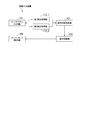
なお、本発明に係る情報入力装置の最小の構成要素は、
・キー入力を受け付けるキー入力画面を表示するディスプレイ103(表示部)と、
・前記キー入力画面に重畳され、当該画面に対する操作に応じた静電容量の変化を示す検出信号を出力するタッチパネル111(入力部)と、
・前記タッチパネル111が出力した前記検出信号に基づき、前記キー入力画面に指などの操作子が接触したタッチ位置を示すタッチ位置情報を出力する第1検出処理部112_1と、
・前記タッチパネルが出力した前記検出信号に基づき、前記キー入力画面と前記操作子との距離に応じた、前記キー入力画面に対する前記操作子の近接状態を示す近接検出情報を出力する第2検出処理部112_2と、
・前記タッチ位置情報に基づき、指定されたキー入力を受け付けるとともに、前記近接検出情報に基づき前記操作子が前記キー入力画面に近接しているか否かを判定する操作内容判定部121と、
・前記操作内容判定部によってキー入力を受け付けた状態において、前記操作子が前記キー入力画面に近接していると判定された場合、前記キー入力画面において前記操作子が近接していることが検出された位置に、前記入力されたキーに関連する変換候補を表示させる表示制御部122と、
である。この構成を図11に示す。
・キー入力を受け付けるキー入力画面を表示するディスプレイ103(表示部)と、
・前記キー入力画面に重畳され、当該画面に対する操作に応じた静電容量の変化を示す検出信号を出力するタッチパネル111(入力部)と、
・前記タッチパネル111が出力した前記検出信号に基づき、前記キー入力画面に指などの操作子が接触したタッチ位置を示すタッチ位置情報を出力する第1検出処理部112_1と、
・前記タッチパネルが出力した前記検出信号に基づき、前記キー入力画面と前記操作子との距離に応じた、前記キー入力画面に対する前記操作子の近接状態を示す近接検出情報を出力する第2検出処理部112_2と、
・前記タッチ位置情報に基づき、指定されたキー入力を受け付けるとともに、前記近接検出情報に基づき前記操作子が前記キー入力画面に近接しているか否かを判定する操作内容判定部121と、
・前記操作内容判定部によってキー入力を受け付けた状態において、前記操作子が前記キー入力画面に近接していると判定された場合、前記キー入力画面において前記操作子が近接していることが検出された位置に、前記入力されたキーに関連する変換候補を表示させる表示制御部122と、
である。この構成を図11に示す。
この出願は、2012年5月22日に出願された日本出願特願2012-116205号を基礎とする優先権を主張し、その開示の全てをここに取り込む。
本発明によれば、変換候補を指定する際の操作性を向上させることができる。
1…携帯電子機器
101…タッチパネル処理部
102…制御部
103…ディスプレイ
104…記憶部
105…タイマー
111…タッチパネル
112…タッチパネルプロセッサ
121…操作内容判定部
122…表示制御部
101…タッチパネル処理部
102…制御部
103…ディスプレイ
104…記憶部
105…タイマー
111…タッチパネル
112…タッチパネルプロセッサ
121…操作内容判定部
122…表示制御部
Claims (6)
- キー入力を受け付けるキー入力画面を表示するディスプレイと、
前記キー入力画面に重畳され、当該画面に対する操作に応じた静電容量の変化を示す検出信号を出力するタッチパネルと、
前記タッチパネルが出力した前記検出信号に基づき、前記キー入力画面に操作子が接触したタッチ位置を示すタッチ位置情報を出力する第1検出処理部と、
前記タッチパネルが出力した前記検出信号に基づき、前記キー入力画面と前記操作子との距離に応じた、前記キー入力画面に対する前記操作子の近接状態を示す近接検出情報を出力する第2検出処理部と、
前記タッチ位置情報に基づき、指定されたキー入力を受け付けるとともに、前記近接検出情報に基づき前記操作子が前記キー入力画面に近接しているか否かを判定する操作内容判定部と、
前記操作内容判定部によってキー入力を受け付けた状態において、前記操作子が前記キー入力画面に近接していると判定された場合、前記キー入力画面において前記操作子が近接していることが検出された近接位置に、前記入力されたキーに関連する変換候補を表示させる表示制御部と、
を備えることを特徴とする情報入力装置。 - 前記表示制御部は、前記キー入力画面内において前記キー入力を受け付けるキー入力受付領域に重畳して、前記変換候補を表示させることを特徴とする請求項1に記載の情報入力装置。
- 前記表示制御部は、前記入力されたキーに関連する変換候補を表示したときから予め決められた時間が経過した場合、表示されている前記変換候補を消去することを特徴とする請求項1または2に記載の情報入力装置。
- 前記表示制御部は、
記憶された、過去にキー入力を受け付けた履歴情報を参照して、前記操作内容判定部によってキー入力を受け付けた入力情報に基づき、当該入力情報に関連する前記履歴情報を検索し、
検索によって得た前記履歴情報に基づいて、前記変換候補を変換頻度が高いほど前記近接位置の近くに表示させる
ことを特徴とする請求項1から3のうちいずれか一項に記載の情報入力装置。 - キー入力を受け付けるキー入力画面をタッチパネル上に表示するステップと、
前記キー入力画面に対する操作に応じた前記タッチパネルの静電容量の変化を示す検出信号を出力するステップと、
前記検出信号に基づき、前記キー入力画面に操作子が接触したタッチ位置を示すタッチ位置情報を出力するステップと、
前記検出信号に基づき、前記キー入力画面と前記操作子との距離に応じた、前記キー入力画面に対する前記操作子の近接状態を示す近接検出情報を出力するステップと、
前記タッチ位置情報に基づき、指定されたキー入力を受け付けるとともに、前記近接検出情報に基づき前記操作子が前記キー入力画面に近接しているか否かを判定するステップと、
キー入力を受け付けた状態において、前記操作子が前記キー入力画面に近接していると判定された場合、前記キー入力画面において前記操作子が近接していることが検出された近接位置に、前記入力されたキーに関連する変換候補を表示させるステップと、
を備えることを特徴とする情報入力方法。 - コンピュータを、
キー入力を受け付けるキー入力画面をタッチパネル上に表示する手段、
前記キー入力画面に対する操作に応じた前記タッチパネルの静電容量の変化を示す検出信号を出力する手段、
前記検出信号に基づき、前記キー入力画面に操作子が接触したタッチ位置を示すタッチ位置情報を出力する手段、
前記検出信号に基づき、前記キー入力画面と前記操作子との距離に応じた、前記キー入力画面に対する前記操作子の近接状態を示す近接検出情報を出力する手段、
前記タッチ位置情報に基づき、指定されたキー入力を受け付けるとともに、前記近接検出情報に基づき前記操作子が前記キー入力画面に近接しているか否かを判定する手段、
キー入力を受け付けた状態において、前記操作子が前記キー入力画面に近接していると判定された場合、前記キー入力画面において前記操作子が近接していることが検出された近接位置に、前記入力されたキーに関連する変換候補を表示させる手段、
として機能させるためのプログラム。
Applications Claiming Priority (2)
| Application Number | Priority Date | Filing Date | Title |
|---|---|---|---|
| JP2012-116205 | 2012-05-22 | ||
| JP2012116205 | 2012-05-22 |
Publications (1)
| Publication Number | Publication Date |
|---|---|
| WO2013176019A1 true WO2013176019A1 (ja) | 2013-11-28 |
Family
ID=49623713
Family Applications (1)
| Application Number | Title | Priority Date | Filing Date |
|---|---|---|---|
| PCT/JP2013/063556 Ceased WO2013176019A1 (ja) | 2012-05-22 | 2013-05-15 | 情報入力装置、情報入力方法、およびプログラム |
Country Status (1)
| Country | Link |
|---|---|
| WO (1) | WO2013176019A1 (ja) |
Cited By (1)
| Publication number | Priority date | Publication date | Assignee | Title |
|---|---|---|---|---|
| CN114527919A (zh) * | 2020-11-19 | 2022-05-24 | 北京搜狗科技发展有限公司 | 一种信息展示方法、装置和电子设备 |
Citations (4)
| Publication number | Priority date | Publication date | Assignee | Title |
|---|---|---|---|---|
| JP2003295891A (ja) * | 2002-02-04 | 2003-10-15 | Matsushita Electric Ind Co Ltd | インタフェース装置、動作制御方法、画面表示方法 |
| JP2009288881A (ja) * | 2008-05-27 | 2009-12-10 | Ntt Docomo Inc | 文字入力装置及び文字入力方法 |
| JP2012003545A (ja) * | 2010-06-17 | 2012-01-05 | Nec Corp | 情報処理端末およびその操作制御方法 |
| JP2012048586A (ja) * | 2010-08-27 | 2012-03-08 | Kyocera Corp | 文字入力装置、文字入力方法および文字入力プログラム |
-
2013
- 2013-05-15 WO PCT/JP2013/063556 patent/WO2013176019A1/ja not_active Ceased
Patent Citations (4)
| Publication number | Priority date | Publication date | Assignee | Title |
|---|---|---|---|---|
| JP2003295891A (ja) * | 2002-02-04 | 2003-10-15 | Matsushita Electric Ind Co Ltd | インタフェース装置、動作制御方法、画面表示方法 |
| JP2009288881A (ja) * | 2008-05-27 | 2009-12-10 | Ntt Docomo Inc | 文字入力装置及び文字入力方法 |
| JP2012003545A (ja) * | 2010-06-17 | 2012-01-05 | Nec Corp | 情報処理端末およびその操作制御方法 |
| JP2012048586A (ja) * | 2010-08-27 | 2012-03-08 | Kyocera Corp | 文字入力装置、文字入力方法および文字入力プログラム |
Cited By (2)
| Publication number | Priority date | Publication date | Assignee | Title |
|---|---|---|---|---|
| CN114527919A (zh) * | 2020-11-19 | 2022-05-24 | 北京搜狗科技发展有限公司 | 一种信息展示方法、装置和电子设备 |
| CN114527919B (zh) * | 2020-11-19 | 2024-05-28 | 北京搜狗科技发展有限公司 | 一种信息展示方法、装置和电子设备 |
Similar Documents
| Publication | Publication Date | Title |
|---|---|---|
| KR102245289B1 (ko) | 휴대 단말 및 휴대 단말에서의 사용자 인터페이스 방법과 휴대 단말의 커버 | |
| CN103988159B (zh) | 显示控制装置和显示控制方法 | |
| KR101019039B1 (ko) | 터치 스크린을 구비한 단말기 및 데이터 검색 방법. | |
| US9292161B2 (en) | Pointer tool with touch-enabled precise placement | |
| KR101016981B1 (ko) | 데이터 처리 시스템, 사용자로 하여금 데이터 처리 시스템과 대화하도록 하는 방법, 및 컴퓨터 프로그램 제품을 저장한 컴퓨터 판독가능 매체 | |
| CN102483666B (zh) | 用于移动装置的压敏用户接口 | |
| CN108121457B (zh) | 提供字符输入界面的方法和设备 | |
| US20130002553A1 (en) | Character entry apparatus and associated methods | |
| US8508476B2 (en) | Touch-sensitive control systems and methods | |
| US9703418B2 (en) | Mobile terminal and display control method | |
| JP2012242851A (ja) | タッチ・スクリーンを備える携帯式電子機器および制御方法 | |
| CN101996037A (zh) | 将字符输入到具有触摸屏的便携终端的方法和装置 | |
| US10387033B2 (en) | Size reduction and utilization of software keyboards | |
| JP2012088754A (ja) | 情報処理装置、情報処理装置の入力制御方法及びプログラム | |
| CN104641324A (zh) | 姿势发起的键盘功能 | |
| TWI659353B (zh) | 電子設備以及電子設備的工作方法 | |
| CN103380412A (zh) | 输入装置、输入方法及计算机程序 | |
| CN101593081A (zh) | 便携式终端及信息显示方法 | |
| TW201331812A (zh) | 電子裝置及控制電子裝置的方法 | |
| CN104133621A (zh) | 显示装置、输入控制方法以及输入控制程序 | |
| KR20090049153A (ko) | 터치스크린을 구비한 단말기 및 그 문자 입력 방법 | |
| CN102292695A (zh) | 输入设备、信息处理设备、输入方法和程序 | |
| JP2014175689A (ja) | 情報機器、表示方法、及びプログラム | |
| CN107102797A (zh) | 一种对选定的对象内容执行搜索操作的方法及终端 | |
| JP2010113656A (ja) | 手書き入力機能を有する情報処理装置 |
Legal Events
| Date | Code | Title | Description |
|---|---|---|---|
| 121 | Ep: the epo has been informed by wipo that ep was designated in this application |
Ref document number: 13793184 Country of ref document: EP Kind code of ref document: A1 |
|
| NENP | Non-entry into the national phase |
Ref country code: DE |
|
| 122 | Ep: pct application non-entry in european phase |
Ref document number: 13793184 Country of ref document: EP Kind code of ref document: A1 |
|
| NENP | Non-entry into the national phase |
Ref country code: JP |