WO2013136571A1 - 端末装置およびその制御方法、ならびに、記憶媒体 - Google Patents
端末装置およびその制御方法、ならびに、記憶媒体 Download PDFInfo
- Publication number
- WO2013136571A1 WO2013136571A1 PCT/JP2012/076301 JP2012076301W WO2013136571A1 WO 2013136571 A1 WO2013136571 A1 WO 2013136571A1 JP 2012076301 W JP2012076301 W JP 2012076301W WO 2013136571 A1 WO2013136571 A1 WO 2013136571A1
- Authority
- WO
- WIPO (PCT)
- Prior art keywords
- content
- information
- terminal
- stored
- server
- Prior art date
- Legal status (The legal status is an assumption and is not a legal conclusion. Google has not performed a legal analysis and makes no representation as to the accuracy of the status listed.)
- Ceased
Links
Images


Classifications
-
- G—PHYSICS
- G06—COMPUTING OR CALCULATING; COUNTING
- G06Q—INFORMATION AND COMMUNICATION TECHNOLOGY [ICT] SPECIALLY ADAPTED FOR ADMINISTRATIVE, COMMERCIAL, FINANCIAL, MANAGERIAL OR SUPERVISORY PURPOSES; SYSTEMS OR METHODS SPECIALLY ADAPTED FOR ADMINISTRATIVE, COMMERCIAL, FINANCIAL, MANAGERIAL OR SUPERVISORY PURPOSES, NOT OTHERWISE PROVIDED FOR
- G06Q10/00—Administration; Management
- G06Q10/10—Office automation; Time management
Definitions
- the present invention relates to a terminal device, a control method thereof, and a storage medium, and more particularly to a terminal device for reproducing content, a control method thereof, and a storage medium.
- Patent Document 1 Japanese Patent Laid-Open No. 2007-323204 discloses a technique in which a content reproduction device calls and displays a content list stored in a content list server.
- Patent Document 2 Japanese Patent Laid-Open No. 2007-294068 discloses a technique for storing a content list in an audio device that reproduces content.
- the public content data acquisition means accesses an external content distribution server through the network interface, and acquires the main data and accompanying data of the content. Then, a content list is displayed based on the accompanying data.
- the content list is displayed by the content-associated data management means (201) acquiring the associated data from the associated data storage unit (1Ab) inside the apparatus.
- the content reproduction apparatus cannot display the content list unless the apparatus is connected to the network.
- the present invention has been conceived in view of such circumstances, and its purpose is to browse a list of contents in a terminal device without introducing a complicated control configuration even when the terminal device is not connected to a network. Is to make it possible.
- a terminal device for playing back content stored in a storage unit includes an internal server for providing information about content stored in the storage unit, and an acquisition unit for acquiring information about content that the user of the terminal device has usage rights from, an external server device Is provided.
- the acquisition unit acquires information about the content stored in the storage unit from the internal server, and stores the information in the storage unit.
- the internal server provides information about the content stored in the storage unit to the acquisition unit using the same protocol as the external server device provides information about the content.
- the acquisition unit causes the display device to display information about the content acquired from the internal server or the external server device.
- the acquisition unit determines a display mode of information about each content based on the storage location of the content.
- the acquisition unit determines a display mode of information about each content based on whether the content is stored in the storage unit.
- the acquisition unit includes a first mode in which information about the content provided from the internal server is displayed on the display device, and a second mode in which information about the content acquired from the external server is displayed on the display device. Switchable between them.
- the acquisition unit operates in the second mode when communication with an external server is possible, and operates in the first mode when communication with an external server is not possible.
- a method for controlling a terminal device which is executed in a terminal device including a storage unit for storing content stored in the storage unit.
- the control method includes a step of acquiring information about content that the user of the terminal device has usage rights from an external server device and storing the information in a storage unit, and an external server device providing information about the content. Providing information about the content stored in the storage using the same protocol.
- a storage medium that non-temporarily records a control program executed in a computer of a terminal device including a storage unit for storing content stored in the storage unit.
- the control program obtains information about content that the user of the terminal device has usage rights from an external server device and stores the information in a storage unit to the computer, and the external server device provides information about the content. And providing information about the content stored in the storage unit using the same protocol as described above.
- the acquisition unit can store information about content acquired from an external server device in the storage unit. Thereby, even if the terminal device cannot communicate with an external server, the acquisition unit can display information about the content stored in the storage unit on the display device.
- the acquisition unit can acquire information using the same protocol between the external server device and the internal server. As a result, it is not necessary to incorporate separate protocols for communicating with each of the external server device and the internal device in the acquisition unit, and the device configuration can be prevented from becoming complicated.
- FIG. 2 is a diagram schematically illustrating a functional configuration of the system of FIG. 1. It is a figure which shows typically the hardware constitutions of a terminal. It is a figure which shows the function structure of a terminal typically. It is a figure which shows typically the hardware constitutions of a content server. It is a figure which shows an example of the content of the meta information file of a content list. It is a figure which shows an example of the bookshelf screen displayed on a display device, when the terminal is operate
- FIG. 1 is a diagram schematically showing an overall configuration of a content distribution system including an embodiment of a terminal device and a server device of the present invention.
- the “terminal device” may be simply referred to as “terminal” for convenience.
- each of the terminals 100A to 100C communicates with the content server 300 via the network 1000.
- the contents are downloaded, stored, and reproduced in each of the terminals 100A to 100C.
- the reproduction of content in the terminals 100A to 100C is not limited to being performed after downloading, and may be performed by streaming.
- the terminals 100A to 100C may be collectively referred to as “terminal 100”.
- the terminals 100A to 100C may be owned by the same user, for example.
- the user can download content on one or more of the terminals 100A to 100C and play the content on each terminal with respect to the content that the user has the right to use by purchasing or the like.
- the user has the right to use the content is not limited to the case where the user purchases the content, but is qualified to play the content by becoming a member of a specific group. If the content can be played back by storing the content created by the user in a storage device accessible by the user, the free content can be played back for so-called free content provided to everyone. Including cases where possible.
- the terminals 100A to 100C are owned by the same user, and the user has the right to use the contents 901, 902, and 903.
- the user downloads the content 901 from the terminal 100A, downloads the content 902 from the terminal 100B, and downloads the content 903 from the terminal 100C.
- content means files of various formats such as electronic books, audio files, moving image files, and text files.
- browsing of an electronic book is mainly described as an example of content reproduction.
- the type of content to be played back in the present invention is not limited to an electronic book, and files of various forms such as music content, moving image content, and still image content are targeted.
- the book database (DB) 310 is provided in the system of FIG.
- the book DB 310 stores data on the main body of each content, information for identifying content purchased by each user (user purchase history DB), and information such as the storage location of each content.
- the book DB 310 generates a list of contents (content list) each user has a right to use based on information stored in the user purchase history DB and the bibliographic information DB, and distributes the list to the terminals 100A to 100C.
- Each of the terminals 100A to 100C obtains a content list for content that the user of each terminal has usage rights from the book DB 310.
- FIG. 2 is a diagram schematically showing a functional configuration of the system of FIG.
- terminal 100 has a bookshelf function 110, a local HTTP (HyperText Transfer Protocol) server 130, a book DB 140, and a communication middleware (MW) 120 as its functions.
- HTTP HyperText Transfer Protocol
- MW communication middleware
- the book DB 140 stores data of the main body of content (electronic book) and information indicating content attributes and the like.
- the bookshelf function 110 is a function for displaying an electronic book on the terminal 100 so as to be viewable.
- the bookshelf function 110 operates by switching between the local mode and the online mode.
- the “local mode” is a mode for displaying a list of contents stored in the content DB of the terminal 100.
- the “online mode” is a mode for displaying a list of contents that the user of the terminal 100 has usage rights and is not stored in the content DB of the terminal 100.
- the local HTTP server 130 supplies the data stored in the book DB 140 to the bookshelf function 110 as an internal server in the terminal 100.
- the bookshelf function 110 When the terminal 100 operating in the local mode is requested to display the content list, the bookshelf function 110 requests the local HTTP server 130 for data necessary for the list. In response to this, the local HTTP server 130 acquires such data from the book DB 140 and sends it back to the bookshelf function 110. In response to this, the bookshelf function 110 displays the above list on the terminal 100.
- display on the terminal 100 means not only a case where a screen or the like is displayed on a display device (display device 14 described later) included in the terminal 100, but also that the terminal 100 displays on another display device. This includes a case where a predetermined screen is displayed on the other display device by transmitting data.
- the bookshelf function 110 requests the local HTTP server 130 for data of the content.
- the local HTTP server 130 acquires the requested content data from the book DB 140 and transmits it to the bookshelf function 110.
- the bookshelf function 110 displays the received content on the terminal 100.
- the data of the content body may be stored in a storage device outside the terminal 100 instead of the book DB 140.
- the information on each content stored in the content DB in the terminal 100 includes information for specifying the path to the data storage location of the content body.
- the bookshelf function 110 acquires a path to the storage location of the content from the list, accesses the storage device according to the path, and then stores the storage device. From the content body, and displays it on the terminal 100.
- the bookshelf function 110 mainly communicates with an external server device (content server 300).
- the bookshelf function 110 when display of a content list is requested in the terminal 100 operating in the online mode, the bookshelf function 110 requests the content server 300 for data necessary for the list. In response to this, the content server 300 acquires such data from the book DB 310 and returns it to the bookshelf function 110. In response to this, the bookshelf function 110 displays the above list on the terminal 100.
- the bookshelf function 110 requests the content server 300 for data of the content.
- the content server 300 acquires the requested content data from the book DB 310 and transmits it to the bookshelf function 110.
- the bookshelf function 110 displays the received content on the terminal 100.
- the local HTTP server 130 and the content server 300 can communicate with the bookshelf function 110 using the same protocol. Specifically, in the present embodiment, both servers can communicate using HTTP. Thereby, in the terminal 100, the bookshelf function 110 should just communicate at least by HTTP.
- the bookshelf function 110 transmits a content acquisition request to the server 390 storing the predetermined content.
- the server 390 transmits auxiliary information such as the content main body and bibliographic information to the terminal 100.
- the communication MW 120 receives the data transmitted from the server 390 and stores the data in the book DB 140.
- the server 390 registers information related to the transmission of the content in the book DB 310. The information registered at this time includes information for specifying which content is transmitted in association with which user ID.
- transmission of content from the server 390 to the terminal 100 includes not only direct transmission from the server 390 to the terminal 100 but also transmission through another server.
- FIG. 3 is a diagram schematically illustrating a hardware configuration of the terminal 100.
- terminal 100 includes a CPU (Central Processing Unit) 10 that is an arithmetic device for controlling the entire terminal 100 and a ROM (Read Only Memory) for storing a program executed by the CPU 10.
- a RAM (Random Access Memory) 12 for functioning as a work area when the CPU 10 executes a program
- a display device 14 realized by a display device such as a liquid crystal display, and an operation input to the terminal 100
- Input device 15 a storage device 16 for storing programs executed by the CPU 10, and a medium for reading and writing files from and to a removable storage medium for the terminal 100 main body Controller 17 and network such as LAN (Local Area Network) mentioned above
- the modem for control of communication via and a configured communication apparatus 18.
- the input device 15 is realized by an input device such as a keyboard or a mouse.
- the input device 15 is realized by a touch sensor, and may be realized as a touch panel integrally with the display device 14.
- the program, content, and content list executed by the CPU 10 may be stored in the storage medium.
- Storage media include CD-ROM (Compact Disc-Read Only Memory), DVD-ROM (Digital Versatile Disk-Read Only Memory), USB (Universal Serial Bus) memory, memory card, FD (Flexible Disk), hard disk, magnetic Non-volatile programs such as tape, cassette tape, MO (Magnetic Optical Disc), MD (Mini Disc), IC (Integrated Circuit) card, optical card, mask ROM, EPROM, EEPROM (Electronically Erasable Programmable Read-Only Memory) The medium which stores is mentioned. Further, the program executed by the CPU 10 may be installed in the storage device 16 via a network.
- the RAM 12 includes a cache memory.
- the cache memory is a non-volatile memory in which the stored content does not disappear even when the power is turned off, and temporarily stores a content list downloaded from the content server 300 as cache data, as will be described later.
- FIG. 4 is a diagram schematically illustrating a functional configuration of the terminal 100.
- terminal 100 has an external network connection I / F for communicating with other devices such as content server 300 in addition to bookshelf function 110 described with reference to FIG. (Interface) 150 and an operation unit 120 for receiving instructions.
- the bookshelf function 110 is realized by the CPU 10 executing an appropriate program, for example.
- the external network connection I / F 150 is realized by the communication device 18.
- the local HTTP server 130 is realized by the CPU 10 executing an appropriate program, for example.
- the operation unit 120 is realized by the input device 120, for example.
- the operation unit 120 is realized by the communication device 18 that receives input of instruction information from the external device.
- the book DB 140 is realized by the storage device 16.
- An example of a program for realizing the bookshelf function 110 is an application for browsing an electronic book.
- the application is referred to as an “electronic book application”.
- the application for realizing the bookshelf function 110 is not limited to an application dedicated to content reproduction such as an electronic book application.
- the bookshelf function 110 acquires the above-described list and content data from the content server 300 or the local HTTP server 130, and generates a display generation information acquisition processing unit 112 and a screen generation information acquisition processing unit. And a display screen generation processing unit 111 that executes processing for causing the display device 14 or an external display device to display the display data generated by 112.
- the bookshelf function 110 communicates with the local HTTP server 130 in accordance with HTTP, and acquires data stored in the book DB 140. Further, the bookshelf function 110 acquires data stored in the book DB 310 by communicating with the content server 300 according to HTTP via the network connection I / F 150.
- FIG. 5 is a diagram schematically illustrating the hardware configuration of the content server 300.
- the content server 300 is a communication unit configured by a processing unit 301 that generally controls the operation of the content server 300, a storage unit 302 configured by a storage medium, and a communication device such as a modem. Part 303.
- the storage unit 302 includes a book DB 310.
- the processing unit 301 includes a processor such as a CPU.
- the processing unit 301 includes a list generation unit 301A, a list distribution unit 301B, and a content distribution unit 301X as its functions.
- the book DB 310 includes at least a user purchase history DB for storing content purchase history for each user, a bibliographic information DB for storing bibliographic information for each content, and a content storage unit for storing content main body data.
- the list generation unit 301A generates a content list for each user based on information stored in the user purchase history DB and the bibliographic information DB.
- the list distribution unit 301B transmits the content list requested to be transmitted to the terminal 100 or the like via the communication unit 303 and the network 1000.
- the content distribution unit 301X distributes the content main body data. If there is a distribution request for content not stored in the book DB 310, the content distribution unit 301X instructs the server (for example, the server 390) that stores the requested content to transmit the content to the terminal 100. To do.
- the book DB 310 is configured to be included in the content server 300, but the book DB 310 may be configured with a device different from the content server 300.
- the user purchase history DB, the bibliographic information DB, and the content storage unit included in the book DB 310 may be included in the same device or may be included in different devices.
- the book DB 140 of the terminal 100 includes a content DB that stores information on content stored in the book DB 140.
- the contents stored in the content DB will be described.
- Table 1 schematically shows the stored contents.
- a content ID, a content file name, a content storage destination, a cover image file name, and a cover image storage destination are stored in association with each other.
- the content ID is information for specifying each content.
- the content file name is the file name of the main file of each content.
- the content storage destination is information for specifying the storage location in the book DB 140 of the main file of each content.
- the cover image file name is a file name of a file displayed as an image showing an outline of each content when content information is displayed in a list (on a bookshelf screen or the like described later) on the terminal 100.
- a cover image file name is a file name of a thumbnail image of a cover of an actual book corresponding to the electronic book.
- an example of a cover image file name is a thumbnail image of a jacket image of an album in which the content is recorded.
- the cover image storage destination is information for specifying the storage location of the cover image in the book DB 140.
- the content list distributed from the content server 300 is associated with at least a content ID, a content file name, and a cover image file name.
- the content storage destination and the cover image storage destination are added to the information such as the content ID and stored in the content DB.
- the user ID and the purchased content ID are stored in association with each other.
- the user ID is information for identifying each user who uses the system of FIG.
- the purchased content ID is a content ID of content purchased by each user on a content purchase site or the like. Note that the content ID of the content for which the user has usage rights may be stored as the purchased content ID.
- the content ID, title, author, publisher name, release date, price, product summary, file name, download URL (1), cover image file name, and download URL (2) is stored in association with each other.
- the content ID is information for specifying each content.
- the title and author are the title and author of each content.
- the publisher name is information that identifies the company that published the electronic book when the target content is an electronic book, and is a label or the like when the target content is music content.
- the release date and price are the release date and price of the target content.
- the product overview is information representing an overview of the content of the target content.
- the file name is the file name of the main body of the target content.
- the download URL (1) is a URL (Uniform Resource Locator) that is accessed to download the main content file of the target content.
- the cover image file name is the file name of the cover image described above.
- the download URL (2) is a URL that is accessed to download a cover image file of the target content.
- the content server 300 transmits a content list for the user of the terminal 100 to the terminal 100.
- the list generation unit 301A acquires a user ID that is a target of the content list from the terminal 100. In response to this, the list generation unit 301A extracts the purchased content ID associated with the acquired user ID in the user purchase history DB of the book DB 310. Then, the list generation unit 301 ⁇ / b> A extracts information associated with the content ID extracted as the purchased content ID in the bibliographic information DB of the book DB 310 to generate a content list.
- the list generation unit 301A when the user ID “SC0001” is acquired as the target of the content list, the list generation unit 301A, in the user purchase history DB of the book DB 310, the content ID “ABCD1234” and the content ID “ABCD1235” associated with the user ID. To get. Then, information corresponding to these content IDs (information associated with these content IDs shown in Table 3) is extracted from the bibliographic information DB of the book DB 310, and the extracted information is used as a content list.
- the content list includes data of each item in the bibliographic information DB of Table 3 for the content associated with the user ID of the target user in the user purchase history DB of Table 2.
- the list generation unit 301A generates a meta information file of the content list together with the generation of the content list.
- An example of the contents of the meta information file is shown in FIG.
- the meta information file is constituted by a manifest file compliant with, for example, HTML (HyperText Markup Language) 5.
- HTML HyperText Markup Language
- the list generation unit 301A can generate information as shown in FIG. 6 as a separate file from the content list, and can also include such information in the content list.
- the terminal 100 reproduces an electronic book (content) so that the user can browse the electronic book.
- terminal 100 can operate in two modes, “local mode” and “online mode”, for browsing electronic books.
- the terminal 100 may be configured such that the operation mode is switched between them based on an operation on the input device 15 or a change in the attitude of the terminal 100 main body, or the terminal 100 may be operable in any mode. There is also.
- the content that is not stored in the content DB of the terminal 100 for the “online mode” is the content of the terminal 100 that is actually operated by the user even if it is stored in the content DB of another terminal 100 owned by the user. It includes content that is not stored in the DB. More specifically, when the terminal 100A is being operated, even if the content is stored in the content DB of the terminal 100B but is not stored in the content DB of the terminal 100A, the terminal 100A In the online mode operation, the content is not stored in the content DB 140.
- the terminal 100 can operate online in either the local mode or the online mode.
- offline mode operation is possible only in the local mode.
- online means a state connected to the network
- offline means a state not connected to the network.
- FIG. 7 is a diagram illustrating an example of a bookshelf screen displayed on the display device 14 when the terminal 100 is operating in the local mode.
- the bookshelf screen 500 is a screen that displays a list of contents that can be browsed.
- the bookshelf screen 500 includes a display field 501 for designating a display format, a display field 502 for designating a mode, and display fields 511 to 517 for displaying a list of information such as titles of electronic books. .
- Each content whose information is displayed in the display columns 511 to 517 is content in which data of the main body is stored in the book DB 140.
- “Title” is selected.
- the contents stored in the book DB 140 are arranged and displayed in the display columns 511 to 517 in the order of the 50 sounds of the title.
- the software button 521 is a button for displaying detailed information of each book.
- the software button 522 is a button that is operated to search for content constituting a series of each content.
- the software button 523 is a button for registering each content as a favorite.
- the software button 524 is a button for performing registration (secret registration) for displaying only when a user who designates each content operates.
- the software button 525 is a button operated for posting shared information such as impressions on a specific site on the network for each content.
- “store in terminal” indicating the local mode is displayed.
- the user can recognize that the bookshelf screen 500 is a bookshelf screen in the local mode.
- FIG. 8 is a diagram illustrating an example of a bookshelf screen displayed on the display device 14 when the terminal 100 is operating in the online mode.
- the bookshelf screen 600 includes display fields 601 and 602 corresponding to the display fields 501 and 502 in FIG.
- the bookshelf screen 600 includes software buttons 621 to 625 having the same functions as the software buttons 521 to 525 of FIG.
- the bookshelf screen 600 includes display fields 611 to 617. Display columns 611 to 617 indicate contents that are included in the content list received from the content server 300 and are not stored in the book DB 140 of the terminal 100.
- FIG. 9 is a flowchart of processing executed by the bookshelf function 110 to display a bookshelf screen as described with reference to FIG. 7 or 8 on the terminal 100.
- bookshelf function 110 displays the home screen of the electronic book application on display device 14 in step S10, and the process proceeds to step S20. Proceed.
- step S20 the bookshelf function 110 determines whether or not an operation for requesting the display of the bookshelf screen has been performed on the input device 15, and if it is determined that such an operation has been performed, the process proceeds to step S30.
- step S30 the bookshelf function 110 accepts selection of an operation mode in the electronic book application.
- the bookshelf function 110 proceeds to step S60 when the online mode is selected, and proceeds to step S40 when the local mode is selected.
- step S40 the bookshelf function 110 reads content data (in-terminal content DB shown in Table 1) stored in the book DB 140 from the content DB in the terminal 100, and proceeds to step S50. Proceed.
- content data in-terminal content DB shown in Table 1
- step S50 the bookshelf function 110 generates data for displaying a bookshelf screen as described with reference to FIG. 7, and advances the process to step S90.
- the information in the display column 501 of the bookshelf screen 500 in FIG. 7 is information set by default.
- the information can be changed by a user operation or the like while the electronic book application is activated.
- information displayed in the display columns 511 to 517 As information displayed in the display columns 511 to 517, information stored in the terminal content DB as shown in Table 1 is used. Specifically, information (title, author, publisher, etc.) registered for each content in the in-terminal content DB is extracted and displayed in each of the display columns 511 to 517.
- step S60 the bookshelf function 110 reads the content list distributed from the content server 300, and advances the process to step S70.
- the reading of the content list in step S60 will be described later with reference to FIG.
- step S70 the bookshelf function 110 calculates the difference between the content list received from the content server 300 and the content DB data stored in the content DB in the terminal 100, and proceeds to step S80.
- step S70 content that is registered in the content list transmitted from the content server 300 and is not stored in the book DB 140 of the terminal 100 is extracted.
- step S80 the bookshelf function 110 generates data for displaying a bookshelf screen as described with reference to FIG. 8 for the content extracted in step S70, and proceeds to step S90.
- step S90 the bookshelf function 110 displays the bookshelf screen on which the display data is generated in step S50 or step S80 on the display device 14, and ends the process.
- the bookshelf screen corresponding to the selected operation mode (local mode or online mode) is displayed on the display device 14.
- FIG. 10 is a flowchart of the processing subroutine in step S60 of FIG.
- step SA10 the bookshelf function 110 determines whether or not the terminal 100 can be connected to the content server 300 at that time, and if it determines that the connection is possible, the process proceeds to step SA20. If it is determined that the server cannot be connected, the bookshelf function 110 returns the process to step S40 (see FIG. 9). Thereby, the operation mode of the terminal 100 is switched to the local mode.
- step SA20 the bookshelf function 110 requests the content server 300 to obtain and transmit the meta information file of the content list.
- the bookshelf function 110 transmits information (for example, a user ID) that identifies the user to the content server 300.
- the user ID is stored in the storage device 16, for example.
- the bookshelf function 110 may require the user to input login information when using the terminal 100. In such a case, in step SA20, the bookshelf function 110 transmits the user ID input as the login information to the content server 300.
- the processing unit 301 of the content server 300 in step SB10 When receiving the request for acquiring the meta information file from the terminal 100, the processing unit 301 of the content server 300 in step SB10, in the user purchase history DB of the book DB 310, the content ID associated with the user ID transmitted from the terminal 100. (Purchase history inquiry).
- the processing unit 301 transmits an inquiry to the apparatus from the user ID received from the terminal 100. With. In response, in step SC10, the device transmits a content ID associated with the received user ID (purchase history transmission).
- the processing unit 301 acquires bibliographic information corresponding to the content ID acquired in step SB10 from the bibliographic information DB of the book DB 310.
- the processing unit 301 transmits the content ID acquired in step SB10 to the device, and also includes the bibliographic information. Make an inquiry.
- the apparatus transmits bibliographic information corresponding to the content ID received from the content server 300.
- the bookshelf function 110 generates a content list corresponding to the user ID acquired in step SB10 based on the bibliographic information acquired by the processing in step SB20, and generates a meta information file for the generated content list. Then, the process proceeds to step SB40.
- step SB40 the processing unit 301 transmits the meta information file generated in step SB30 to the terminal 100.
- the bookshelf function 110 of the terminal 10 determines in step SA30 whether or not the meta information file received from the content server 300 matches the meta information file of the content list already stored in the cache memory. If it is determined that they match, the process proceeds to step SA60, and if it does not match, the process proceeds to step SA40.
- step SA40 the bookshelf function 110 requests the content server 300 to acquire a content list.
- the processing unit 301 of the content server 300 transmits the content list generated in step SB30 to the terminal 100.
- the bookshelf function 110 of the terminal 100 reads the received content list in step SA50 and returns the process to FIG.
- step SA10 when the bookshelf screen is displayed in the online mode, it is first determined whether or not the terminal 100 can be connected to the content server 300 (step SA10). If not, the operation mode is switched to the local mode.
- the terminal 100 makes a request to acquire the meta information file of the content list to the content server 300 (step SA20).
- the content server 300 In response to this, the content server 300 generates a content list again (step SB30), and a meta information file of the content list is transmitted to the terminal 100 (step SB40).
- the terminal 100 that has received the meta information file determines whether or not the meta information file of the content list already stored in the cache memory matches the received meta information file (step SA30). If they match, the content list already stored in the cache memory is read without receiving the content list again from the content server 300 (step SA60). On the other hand, if the meta information files do not match, the terminal 100 requests the content server to acquire a content list (step SA40).
- the terminal 100 reads the content list received from the content server 300 (step SA50).
- the content list and the meta information file are generated every time a request for acquisition of the meta information file is made from the terminal 100.
- This timing is not limited to that described with reference to FIG.
- it may be when the history information about the target user ID is updated in the user purchase history DB of the book DB 310, when a certain amount of time has elapsed since the last generation of the content list or the like.
- the processing unit 301 of the content server 300 requests (step SA20).
- step SB40 the meta information file corresponding to the target user ID already generated and stored in the storage unit 302 or the like is transmitted to the terminal 100.
- the processing unit 301 transmits the content list already stored in the storage unit 302 or the like to the terminal 100 as the processing in step SB50.
- ⁇ Content display processing> In the electronic book application of the terminal 100, as described with reference to FIG. 7 or FIG. 8, a bookshelf screen is displayed. Display columns 511 to 517 and 611 to 617 for selecting each content are displayed on the bookshelf screens 500 and 600, respectively.
- FIG. 11 is a flowchart of the processing executed by the bookshelf function 110.
- bookshelf function 110 is selected in step SA110. It is determined whether or not the stored content is stored in the book DB 140 of the terminal 100. If it is determined that the content is stored, the process proceeds to step SA150, and is determined not to be stored, that is, stored in the content server 300. Then, the process proceeds to step SA120.
- step SA150 the bookshelf function 110 is the content stored in the book DB 140, displays the selected content on the display device 14 with a viewer, and ends the process.
- step SA120 the bookshelf function 110 transmits a download request for a file of the main body of the selected content to the content server 300.
- the processing unit 201 of the content server 300 delivers the requested content to the terminal 100 (step SE110).
- the bookshelf function 110 of the terminal 100 receives the content in step SA130, stores the content in the book DB 140, updates the information in the content DB according to the information after storage, and proceeds to step SA140. To proceed. As a result, content information newly stored in the book DB 140 is added to the in-terminal content DB (see Table 1).
- step SA140 the bookshelf function 110 displays the content received in step SA130 on the display device 14 with a viewer, and ends the process.
- FIG. 12 is a diagram showing an example of a content screen displayed on the display device 14.
- the content display screen such as the screen 1100 is displayed on the display device 14.
- FIG. 13 is a diagram illustrating an example of a bookshelf screen displayed on the terminal 100 according to the second embodiment.
- a display field 710 for displaying a message acquired in the electronic book application a display field 720 for displaying advertisement information, a sorting condition for displaying content information, and the like are set.
- a display field 740 for displaying information on content for which the user has usage rights is included.
- the display column 740 includes display columns 741 to 749 corresponding to individual contents. In FIG. 13, content information is shown only in the display columns 741 to 745.
- each of the display columns 741 to 745 content titles are displayed.
- a character string such as “title PA (1)” is shown as an example of the title of the content.
- the display columns 742, 743, and 745 show a button 740A indicating that the content is stored in the content storage unit 104A of the terminal 100.
- a character string (“DL finished”) indicating that the content has been downloaded to the terminal 100 is displayed.
- the display fields 742 and 743 in which the button 740A is displayed. , 745 the user can visually recognize that the content is stored in the terminal 100. Furthermore, the user can visually recognize that other contents (contents corresponding to the display columns 741 and 744) are not stored in the terminal 100 but are stored in the content server 300.
- FIG. 14 is a flowchart of processing executed in the terminal 100 to display the bookshelf screen 700 as shown in FIG.
- bookshelf function 110 displays the home screen of the electronic book application on display device 14 in step S ⁇ b> 10, and the process proceeds to step S ⁇ b> 20. To proceed.
- step S20 the bookshelf function 110 determines whether or not a request for displaying a bookshelf screen has been made by operating the input device 15 or the like. If it is determined that such a request has been made, the process proceeds to step S60. .
- step S60 as described with reference to FIG. 9, the bookshelf function 110 reads the content list stored in the content server 300 and advances the process to step S70. Also in the present embodiment, reading of the content list is realized by the processing described with reference to FIG. 10, for example.
- step S70 the bookshelf function 110 reads the content DB data stored in the content DB 104B, calculates the difference from the content list acquired in step S60, and advances the process to step S81.
- the bookshelf function 110 includes content stored in the book DB 140 of the terminal 100, such as the bookshelf screen 700 described with reference to FIG. 13, and content server 300 that is not stored in the book DB 140.
- the data for displaying the bookshelf screen including the content information stored in is generated, and the process proceeds to step S90.
- content information for which the user has usage rights is distinguished from those stored in the book DB 140 and those not stored in the book DB 140 in different display modes (FIG. 13 buttons 740A attached or not).
- step S90 the bookshelf function 110 displays a bookshelf screen on the display device 14 based on the display data generated in step S81, and the process is terminated.
- the user who has visually recognized the bookshelf screen 700 can view all the content that he / she has the right to use on one screen, and which content is among them. It is possible to visually recognize which content is stored in the terminal 100 being operated and which content is not stored in the terminal 100.
- each content is displayed on the viewer, A download request is made to the server 300.
- the content corresponding to the display field is read from the book DB 140 and displayed on the viewer.
- the bookshelf function 110 makes a download request to the content server 300 for the content corresponding to the display column. Note that before making a download request to the content server 300, the bookshelf function 110 may inquire the user of the necessity of download.
- the terminal 100 can be realized by various devices as long as it is an information processing apparatus having a content reproduction function.
- the terminal 100 may be realized by a tablet terminal as shown in FIG.
- the tablet terminal (terminal 100) shown in FIG. 15 is provided with an operation button 15A along with the display device 14 in its casing.
- a touch sensor is provided so as to overlap the display device 14, and the input device 15 includes the touch sensor and / or the operation button 15 ⁇ / b> A.
- the terminal 100 may be realized by a smartphone terminal, that is, a terminal having a call function.
- the smartphone terminal (terminal 100) shown in FIG. 16 is provided with operation buttons 15B to 15D along with the display device 14 in its casing.
- the touch sensor is provided so as to overlap the display device 14.
- the input device 15 is realized by the touch sensor and / or the operation buttons 15B to 15D.
- the terminal 100 may be realized not by a terminal having portability but by a personal computer installed in an office or the like.
- a monitor 14A, a keyboard 15E, and a mouse 15F are connected to a terminal 100 realized by a personal computer.
- the display device 14 controls display on the monitor 14A. That is, it is realized by the driver software or the driver circuit board of the monitor 14A.
- the input device 15 is configured by the keyboard 15E and / or the mouse 15F.
- the terminal 100 includes a monitor and a remote controller (hereinafter referred to as “remote controller”), which is realized by the television receiver.
- the input device 15 is configured by a remote controller
- the display device 14 is configured by a monitor.
Landscapes
- Engineering & Computer Science (AREA)
- Business, Economics & Management (AREA)
- Strategic Management (AREA)
- Entrepreneurship & Innovation (AREA)
- Human Resources & Organizations (AREA)
- Operations Research (AREA)
- Economics (AREA)
- Marketing (AREA)
- Data Mining & Analysis (AREA)
- Quality & Reliability (AREA)
- Tourism & Hospitality (AREA)
- Physics & Mathematics (AREA)
- General Business, Economics & Management (AREA)
- General Physics & Mathematics (AREA)
- Theoretical Computer Science (AREA)
- Information Transfer Between Computers (AREA)
- Information Retrieval, Db Structures And Fs Structures Therefor (AREA)
Abstract
端末装置は、記憶部に格納されたコンテンツを再生する。端末装置では、取得部は、内部サーバから、記憶部に格納されたコンテンツについての情報を取得して、記憶部に記憶する。内部サーバは、外部のサーバ装置がコンテンツについての情報を提供するのと同じプロトコルを使用して、取得部に、記憶部に格納されたコンテンツについての情報を提供する。取得部は、内部サーバまたは外部のサーバ装置から取得したコンテンツについての情報を表示装置に表示させる。
Description
本発明は、端末装置およびその制御方法、ならびに、記憶媒体に関し、特に、コンテンツを再生させるための端末装置およびその制御方法、ならびに、記憶媒体に関する。
従来から、ユーザごとに閲覧可能なコンテンツをサーバで管理し、当該コンテンツのリストを、ユーザが操作する端末においても表示できるような技術があった。
たとえば、特許文献1(特開2007-323204号公報)には、コンテンツ再生装置が、コンテンツリストサーバに格納されたコンテンツリストを呼び出して表示する技術が開示されている。
また、特許文献2(特開2007-294068号公報)には、コンテンツを再生するオーディオ装置内にもコンテンツリストを格納させる技術が開示されている。オーディオ装置では、パブリックコンテンツデータ取得手段は、ネットワークインターフェースを通じて外部のコンテンツ配信サーバにアクセスし、コンテンツのメインデータと付随データを取得する。そして、付随データに基づいて、コンテンツリストが表示される。また、当該装置の内部では、コンテンツ付随データ管理手段(201)が付随データ蓄積部(1Ab)から付随データを取得することによって、コンテンツリストが表示される。
特許文献1に記載の技術によれば、コンテンツ再生装置では、当該装置をネットワークに接続させなければ、当該装置においてコンテンツリストを表示させることができなかった。
一方、特許文献2に記載の技術によれば、オーディオ装置の内部の記憶装置に付随データが蓄積されているため、当該装置がネットワークに接続されていなくともコンテンツリストを表示させることができた。しかしながら、特許文献2に記載の技術によれば、付随データの取得に関し、外部のサーバに蓄積された付随データを取得するための手段(パブリックコンテンツデータ取得手段)の他に、別途、内部の記憶装置にアクセスして付随データを取得するための手段(コンテンツ付随データ管理手段)を必要とされ、複雑な制御構成を必要とされた。
近年、装置の多機能化が進む中、コスト面も考慮し、制御手段の構成の簡素化を図り、より低スペックで高機能を実現することが求められている。
本発明は、かかる実情に鑑み考え出されたものであり、その目的は、端末装置において、複雑な制御構成を導入することなく、ネットワークに接続されていない状態であってもコンテンツのリストの閲覧を可能とすることである。
ある局面によれば、記憶部に格納されたコンテンツを再生するための端末装置が提供される。端末装置は、記憶部に格納されたコンテンツについての情報を提供するための内部サーバと、外部のサーバ装置から、端末装置のユーザが使用権を有するコンテンツについての情報を取得するための取得部とを備える。取得部は、内部サーバから、記憶部に格納されたコンテンツについての情報を取得して、記憶部に記憶する。内部サーバは、外部のサーバ装置がコンテンツについての情報を提供するのと同じプロトコルを使用して、取得部に、記憶部に格納されたコンテンツについての情報を提供する。取得部は、内部サーバまたは外部のサーバ装置から取得したコンテンツについての情報を表示装置に表示させる。
好ましくは、取得部は、コンテンツの格納場所に基づいて、各コンテンツについての情報の表示態様を決定する。
好ましくは、取得部は、コンテンツが記憶部に記憶されているか否かに基づいて、各コンテンツについての情報の表示態様を決定する。
好ましくは、取得部は、内部サーバから提供されたコンテンツの情報を表示装置に表示させる第1のモードと、外部のサーバから取得したコンテンツについての情報を表示装置に表示させる第2のモードとの間で、切り替え可能に動作する。
好ましくは、取得部は、外部のサーバと通信可能な場合には、第2のモードで動作し、外部のサーバと通信不能の場合には、第1のモードで動作する。
他の局面によれば、記憶部に格納されたコンテンツを格納するための記憶部を備える端末装置において実行される、当該端末装置の制御方法が提供される。当該制御方法は、外部のサーバ装置から、端末装置のユーザが使用権を有するコンテンツについての情報を取得して記憶部に記憶するステップと、外部のサーバ装置がコンテンツについての情報を提供するのと同じプロトコルを使用して、記憶部に格納されたコンテンツについての情報を提供するステップとを備える。
さらに他の局面によれば、記憶部に格納されたコンテンツを格納するための記憶部を備える端末装置のコンピュータにおいて実行される制御プログラムを非一時的に記録した記憶媒体が提供される。制御プログラムは、コンピュータに、外部のサーバ装置から、端末装置のユーザが使用権を有するコンテンツについての情報を取得して記憶部に記憶するステップと、外部のサーバ装置がコンテンツについての情報を提供するのと同じプロトコルを使用して、記憶部に格納されたコンテンツについての情報を提供するステップとを実行させる。
本発明によれば、取得部は、外部のサーバ装置から取得したコンテンツについての情報を記憶部に記憶させておくことができる。これにより、端末装置が外部のサーバと通信不能であっても、取得部は、記憶部に記憶させた、コンテンツについての情報を、表示装置に表示させることができる。また、取得部は、外部のサーバ装置と内部サーバとで、同じプロトコルで、情報を取得することができる。これにより、取得部に、外部のサーバ装置と内部装置のそれぞれと通信するための別々のプロトコルを組み込む必要がなくなり、装置構成が複雑化することを回避できる。
以下、本発明の端末装置の実施の形態について、図面を参照して説明する。なお、以下の説明において、同一の機能および作用を有する要素については、同じ各図を通して同じ符号を付し、重複する説明を繰返さない。
[第1の実施の形態]
<システムの全体構成>
図1は、本発明の端末装置およびサーバ装置の一実施の形態を含むコンテンツ配信システムの全体構成を模式的に示す図である。なお、本明細書では、「端末装置」を、便宜上単に「端末」と呼ぶ場合もある。
<システムの全体構成>
図1は、本発明の端末装置およびサーバ装置の一実施の形態を含むコンテンツ配信システムの全体構成を模式的に示す図である。なお、本明細書では、「端末装置」を、便宜上単に「端末」と呼ぶ場合もある。
図1に示されたシステムでは、端末100A~100Cのそれぞれが、ネットワーク1000を介して、コンテンツサーバ300と通信する。これにより、端末100A~100Cのそれぞれでは、コンテンツがダウンロードされ、格納され、再生される。なお、端末100A~100Cにおけるコンテンツの再生は、ダウンロードの後に行われるものに限らず、ストリーミングで行われる場合もあり得る。また、本明細書では、端末100A~100Cを、総称して「端末100」と呼ぶ場合もある。
端末100A~100Cは、たとえば、同一のユーザによって所有される場合もある。当該ユーザは、自己が購入等することにより使用権を有するコンテンツについて、端末100A~100Cのうちの1以上の端末でコンテンツをダウンロードし、それぞれの端末において当該コンテンツを再生することができる。
本明細書において、「ユーザがコンテンツの使用権を有する」とは、当該ユーザが当該コンテツを購入した場合に限らず、特定のグループの会員になることによってコンテンツの再生をする資格を有している場合や、自己が制作したコンテンツを自己がアクセス可能な記憶装置に格納していることによって当該コンテンツを再生させることができる場合、万人に提供されるいわゆるフリーコンテンツについて当該フリーコンテンツの再生が可能である場合などを含む。
図1のシステムにおいて、端末100A~100Cは、同一のユーザによって所有され、また、当該ユーザは、コンテンツ901,902,903の使用権を有する。そして、図1のシステムにおいて、当該ユーザは、端末100Aでコンテンツ901をダウンロードし、端末100Bでコンテンツ902をダウンロードし、そして、端末100Cでコンテンツ903をダウンロードしている。
本実施の形態において、コンテンツとは、電子書籍や音声ファイル、動画ファイル、テキストファイルなど、種々の形式のファイルを意味する。本明細書では、コンテンツの再生の一例として、主に、電子書籍の閲覧について説明する。なお、本発明において再生の対象となるコンテンツの種類は、電子書籍に限定されず、音楽コンテンツや、動画像コンテンツ、静止画像コンテンツ等の種々の形態のファイルが対象となるものとする。
図1のシステムには、書籍データベース(DB)310が設けられている。
書籍DB310には、各コンテンツの本体のデータ、各ユーザが購入したコンテンツを特定する情報(ユーザ購入履歴DB)、および、各コンテンツの格納場所などの情報が格納されている。なお、書籍DB310は、ユーザ購入履歴DBおよび書誌情報DBに格納された情報に基づいて、各ユーザが使用権を有するコンテンツのリスト(コンテンツリスト)を生成し、端末100A~100Cに配信する。
書籍DB310には、各コンテンツの本体のデータ、各ユーザが購入したコンテンツを特定する情報(ユーザ購入履歴DB)、および、各コンテンツの格納場所などの情報が格納されている。なお、書籍DB310は、ユーザ購入履歴DBおよび書誌情報DBに格納された情報に基づいて、各ユーザが使用権を有するコンテンツのリスト(コンテンツリスト)を生成し、端末100A~100Cに配信する。
端末100A~100Cのそれぞれは、書籍DB310から、各端末のユーザが使用権を有するコンテンツについてのコンテンツリストを取得する。
<システムの機能構成の概略的な説明>
図2は、図1のシステムの機能構成を概略的に示す図である。
図2は、図1のシステムの機能構成を概略的に示す図である。
図2を参照して、端末100は、その機能として、ブックシェルフ機能110、ローカルHTTP(HyperText Transfer Protocol)サーバ130、書籍DB140、および、通信ミドルウェア(MW)120を有する。
書籍DB140には、コンテンツ(電子書籍)の本体のデータおよびコンテンツの属性等を示す情報のデータが格納されている。
ブックシェルフ機能110は、端末100において電子書籍を閲覧可能に表示させる機能である。なお、本実施の形態では、ブックシェルフ機能110は、ローカルモードとオンラインモードの間で切り替えられて動作する。「ローカルモード」とは、端末100のコンテンツDBに格納されたコンテンツの一覧を表示するモードである。「オンラインモード」とは、端末100のユーザが使用権を有するコンテンツであって、当該端末100のコンテンツDBに格納されていないコンテンツの一覧を表示するためのモードである。
ローカルHTTPサーバ130は、端末100において内部サーバとして、ブックシェルフ機能110に、書籍DB140に格納されているデータを供給する。
そして、ローカルモードで動作している端末100において、コンテンツのリストの表示が要求されると、ブックシェルフ機能110は、ローカルHTTPサーバ130に対して、当該リストに必要なデータを要求する。これに応じて、ローカルHTTPサーバ130は、書籍DB140から、そのようなデータを取得し、ブックシェルフ機能110へと返信する。これに応じて、ブックシェルフ機能110は、端末100において、上記したリストを表示する。
なお、本明細書において、「端末100において表示する」とは、端末100が備える表示装置(後述する表示装置14)に画面等を表示させる場合だけでなく、端末100が他の表示装置に表示データを送信することにより当該他の表示装置において所定の画面を表示させる場合も含む。
また、ローカルモードで動作している端末100において、コンテンツの表示(再生)を要求されると、ブックシェルフ機能110は、ローカルHTTPサーバ130に対して、当該コンテンツのデータを要求する。これに応じて、ローカルHTTPサーバ130は、要求されたコンテンツのデータを書籍DB140から取得して、ブックシェルフ機能110へ送信する。これに応じて、ブックシェルフ機能110は、受信したコンテンツを端末100において表示する。
なお、コンテンツ本体のデータは、書籍DB140ではなく、端末100外の記憶装置に格納されている場合もあり得る。この場合、端末100内のコンテンツDBに格納される各コンテンツの情報は、当該コンテンツ本体のデータの格納場所へのパスを特定する情報を含む。そして、ブックシェルフ機能110は、コンテンツの表示(再生)を要求されると、上記リストから当該コンテンツの格納場所へのパスを取得し、当該パスに従って上記記憶装置にアクセスし、そして、当該記憶装置からコンテンツ本体のデーtあを取得して、端末100において表示する。
一方、オンラインモードで動作している端末100では、ブックシェルフ機能110は、主に外部のサーバ装置(コンテンツサーバ300)と通信する。
具体的には、オンラインモードで動作している端末100において、コンテンツのリストの表示が要求されると、ブックシェルフ機能110は、コンテンツサーバ300に対して、当該リストに必要なデータを要求する。これに応じて、コンテンツサーバ300は、書籍DB310から、そのようなデータを取得し、ブックシェルフ機能110へと返信する。これに応じて、ブックシェルフ機能110は、端末100において、上記したリストを表示する。
また、オンラインモードで動作している端末100において、コンテンツの表示(再生)を要求されると、ブックシェルフ機能110は、コンテンツサーバ300に対して、当該コンテンツのデータを要求する。これに応じて、コンテンツサーバ300は、要求されたコンテンツのデータを書籍DB310から取得して、ブックシェルフ機能110へ送信する。これに応じて、ブックシェルフ機能110は、受信したコンテンツを端末100において表示する。
本実施の形態のコンテンツ配信システムでは、ローカルHTTPサーバ130とコンテンツサーバ300は、同じプロトコルで、ブックシェルフ機能110と通信することができる。具体的には、本実施の形態では、両サーバは、HTTPで通信することができる。これにより、端末100では、ブックシェルフ機能110は、少なくともHTTPで通信できればよい。
また、オンラインモードで動作中に所定のコンテンツのダウンロードが指示されると、ブックシェルフ機能110は、当該所定のコンテンツを格納しているサーバ390に対してコンテンツの取得要求を送信する。これに応じて、サーバ390は、端末100に対してコンテンツの本体および書誌情報等の補助的な情報を送信する。端末100では、通信MW120が、サーバ390から送信されてきたデータを受信し、当該データを書籍DB140に格納する。サーバ390は、端末100にコンテンツを送信すると、当該コンテンツの送信に関する情報を書籍DB310に登録する。このときに登録される情報は、どのユーザIDに関連付けてどのコンテンツを送信したかを特定する情報を含む。
また、「サーバ390から端末100へのコンテンツの送信」は、サーバ390から端末100への直接の送信だけでなく、他のサーバを介する送信も含む。
<端末のハードウェア構成>
図3は、端末100のハードウェア構成を模式的に示す図である。
図3は、端末100のハードウェア構成を模式的に示す図である。
図3を参照して、端末100は、端末100全体を制御するための演算装置であるCPU(Central Processing Unit)10と、CPU10で実行されるプログラムなどを記憶するためのROM(Read Only Memory)11と、CPU10でプログラムを実行する際の作業領域として機能するためのRAM(Random Access Memory)12と、液晶ディスプレイ等の表示装置によって実現される表示装置14と、端末100に対する操作入力を受付けるための入力装置15と、CPU10によって実行されるプログラム等を保存するための記憶装置16と、端末100本体に対して着脱可能な記憶媒体にアクセスしてそこからファイルを読み出したり書き込んだりするためのメディアコントローラ17と、上記したLAN(Local Area Network)等のネットワークを介した通信の制御のためにモデム等により構成される通信装置18とを含む。
入力装置15は、たとえばキーボードやマウスなどの入力装置によって実現される。なお、入力装置15は、タッチセンサによって実現され、表示装置14と一体的に、タッチパネルとして実現される場合も有り得る。
本実施の形態では、たとえば、CPU10が適切なプログラムを実行することにより、本明細書に記載された端末100の機能の少なくとも一部が実現される。
CPU10が実行するプログラムやコンテンツ、コンテンツリストは、上記記憶媒体に記憶されていても良い。記憶媒体としては、CD-ROM(Compact Disc - Read Only Memory)、DVD-ROM(Digital Versatile Disk - Read Only Memory)、USB(Universal Serial Bus)メモリ、メモリカード、FD(Flexible Disk)、ハードディスク、磁気テープ、カセットテープ、MO(Magnetic Optical Disc)、MD(Mini Disc)、IC(Integrated Circuit)カード、光カード、マスクROM、EPROM、EEPROM(Electronically Erasable Programmable Read-Only Memory)などの、不揮発的にプログラムを格納する媒体が挙げられる。また、CPU10が実行されるプログラムは、ネットワークを介して記憶装置16にインストールされる場合も有り得る。
RAM12は、キャッシュメモリを含む。キャッシュメモリは、電源を切っても記憶した内容の消えない不揮発性メモリであり、後述するようにコンテンツサーバ300からダウンロードされたコンテンツリストをキャッシュデータとして一時的に記録する。
<端末の機能構成>
図4は、端末100の機能構成を模式的に示す図である。
図4は、端末100の機能構成を模式的に示す図である。
図4を参照して、端末100は、その機能として、図1を参照して説明したブックシェルフ機能110に加えて、コンテンツサーバ300等の他の装置と通信するための外部ネットワーク接続I/F(インターフェース)150と、指示を受け付けるための操作部120とを含む。ブックシェルフ機能110は、たとえば、CPU10が適切なプログラムを実行することによって実現される。外部ネットワーク接続I/F150は、通信装置18によって実現される。ローカルHTTPサーバ130は、たとえばCPU10が適切なプログラムを実行することによって実現される。操作部120は、たとえば入力装置120によって実現される。なお、端末100が外部の装置からの指示に従って動作する場合には、操作部120は、当該外部の装置から指示情報の入力を受け付ける通信装置18によって実現される。書籍DB140は、記憶装置16によって実現される。
ブックシェルフ機能110を実現させるためのプログラムの一例としては、電子書籍を閲覧するためのアプリケーションを挙げることができる。本明細書では、以下、当該アプリケーションを「電子書籍アプリ」と称する。なお、ブックシェルフ機能110を実現するためのアプリケーションは、電子書籍アプリ等の、コンテンツ再生専用のアプリケーションに限定されるものではない。
ブックシェルフ機能110は、コンテンツサーバ300またはローカルHTTPサーバ130から上記したリストやコンテンツのデータを取得し、表示用のデータを生成するための画面生成情報取得処理部112と、画面生成情報取得処理部112によって生成された表示用のデータを表示装置14または外部の表示装置に表示させるための処理を実行する表示画面生成処理部111とを含む。
ブックシェルフ機能110は、HTTPに従って、ローカルHTTPサーバ130と通信し、書籍DB140に格納されたデータを取得する。また、ブックシェルフ機能110は、ネットワーク接続I/F150を介して、HTTPに従って、コンテンツサーバ300と通信することにより、書籍DB310に格納されたデータを取得する。
<コンテンツサーバのハードウェア構成>
図5は、コンテンツサーバ300のハードウェア構成を模式的に示す図である。
図5は、コンテンツサーバ300のハードウェア構成を模式的に示す図である。
図5を参照して、コンテンツサーバ300は、当該コンテンツサーバ300の動作を全体的に制御する処理部301と、記憶媒体によって構成される記憶部302と、モデム等の通信装置によって構成される通信部303とを含む。記憶部302は、書籍DB310を含む。
処理部301は、CPU等のプロセッサを含む。そして、処理部301は、その機能として、リスト生成部301Aとリスト配信部301Bとコンテンツ配信部301Xを含む。
書籍DB310は、少なくとも、ユーザごとのコンテンツの購入履歴を格納するユーザ購入履歴DBと、コンテンツごとの書誌的情報を格納する書誌情報DBと、コンテンツ本体のデータを格納するコンテンツ格納部とを含む。
リスト生成部301Aは、ユーザ購入履歴DBと書誌情報DBに格納された情報に基づいて、ユーザ毎のコンテンツリストを生成する。リスト配信部301Bは、送信を要求されたコンテンツリストを、通信部303およびネットワーク1000を介して、端末100等に送信する。コンテンツ配信部301Xは、端末100からの要求に応じて、コンテンツ本体のデータを配信する。なお、書籍DB310に格納されていないコンテンツの配信要求があった場合には、コンテンツ配信部301Xは、要求されたコンテンツを格納するサーバ(たとえば、サーバ390)に、端末100に対するコンテンツの送信を指示する。
図5に示された例では、書籍DB310がコンテンツサーバ300に含まれるように構成されているが、書籍DB310はコンテンツサーバ300とは異なる装置で構成されてもよい。また、書籍DB310に含まれるユーザ購入履歴DBと書誌情報DBとコンテンツ格納部は、同じ装置に含まれてもよいし、互いに異なる装置に含まれてもよい。
<端末内のコンテンツDB>
端末100の書籍DB140は、書籍DB140に格納されるコンテンツの情報を格納するコンテンツDBを含む。ここで、当該コンテンツDBの記憶内容について説明する。表1に、当該記憶内容を模式的に示す。
端末100の書籍DB140は、書籍DB140に格納されるコンテンツの情報を格納するコンテンツDBを含む。ここで、当該コンテンツDBの記憶内容について説明する。表1に、当該記憶内容を模式的に示す。

コンテンツDBには、コンテンツIDと、コンテンツファイル名と、コンテンツ保存先と、表紙画像ファイル名と、表紙画像保存先とが、互いに関連付けられて記憶されている。
コンテンツIDは、各コンテンツを特定する情報である。
コンテンツファイル名は、各コンテンツの本体のファイルのファイル名である。
コンテンツファイル名は、各コンテンツの本体のファイルのファイル名である。
コンテンツ保存先は、各コンテンツの本体のファイルの、書籍DB140における記憶場所を特定する情報である。
表紙画像ファイル名は、端末100においてコンテンツの情報が、(後述する本棚画面等において)一覧表示される際に、各コンテンツの概要を示す画像として表示されるファイルのファイル名である。たとえば、当該コンテンツが電子書籍である場合には、表紙画像ファイル名の一例として、当該電子書籍に対応する実書籍の表紙のサムネイル画像のファイル名が挙げられる。また、当該コンテンツが音楽コンテンツである場合には、表紙画像ファイル名の一例として、当該コンテンツが収録されるアルバムのジャケット画像のサムネイル画像が挙げられる。
表紙画像保存先は、上記表紙画像の、書籍DB140における記憶場所を特定する情報である。
コンテンツサーバ300から配信されるコンテンツリストには、少なくともコンテンツIDとコンテンツファイル名と表紙画像ファイル名とが関連付けられている。そして、当該コンテンツおよびその表紙画像がダウンロードされて書籍DB140に格納されると、上記コンテンツID等の情報に、コンテンツ保存先と表紙画像保存先とが追加されて、コンテンツDBに格納される。
<ユーザ購入履歴DB>
次に、コンテンツサーバ300における、ユーザ購入履歴DBの記憶内容について説明する。表2に、当該記憶内容を模式的に示す。
次に、コンテンツサーバ300における、ユーザ購入履歴DBの記憶内容について説明する。表2に、当該記憶内容を模式的に示す。

ユーザIDは、図1のシステムを利用する各ユーザを特定する情報である。
購入済コンテンツIDとは、コンテンツ購入サイト等において各ユーザが購入したコンテンツのコンテンツIDである。なお、購入済コンテンツIDとして、ユーザが使用権を有するコンテンツのコンテンツIDが格納される場合もあり得る。
購入済コンテンツIDとは、コンテンツ購入サイト等において各ユーザが購入したコンテンツのコンテンツIDである。なお、購入済コンテンツIDとして、ユーザが使用権を有するコンテンツのコンテンツIDが格納される場合もあり得る。
表2によれば、ユーザID「SC0001」のユーザは、コンテンツID「ABCD1234」とコンテンツID「ABCD1235」の、少なくとも2つのコンテンツを購入したことが記録されている。
<書誌情報DB>
次に、コンテンツサーバ300における、書誌情報DBの記憶内容について説明する。表3には、当該記憶内容が模式的に示されている。
次に、コンテンツサーバ300における、書誌情報DBの記憶内容について説明する。表3には、当該記憶内容が模式的に示されている。
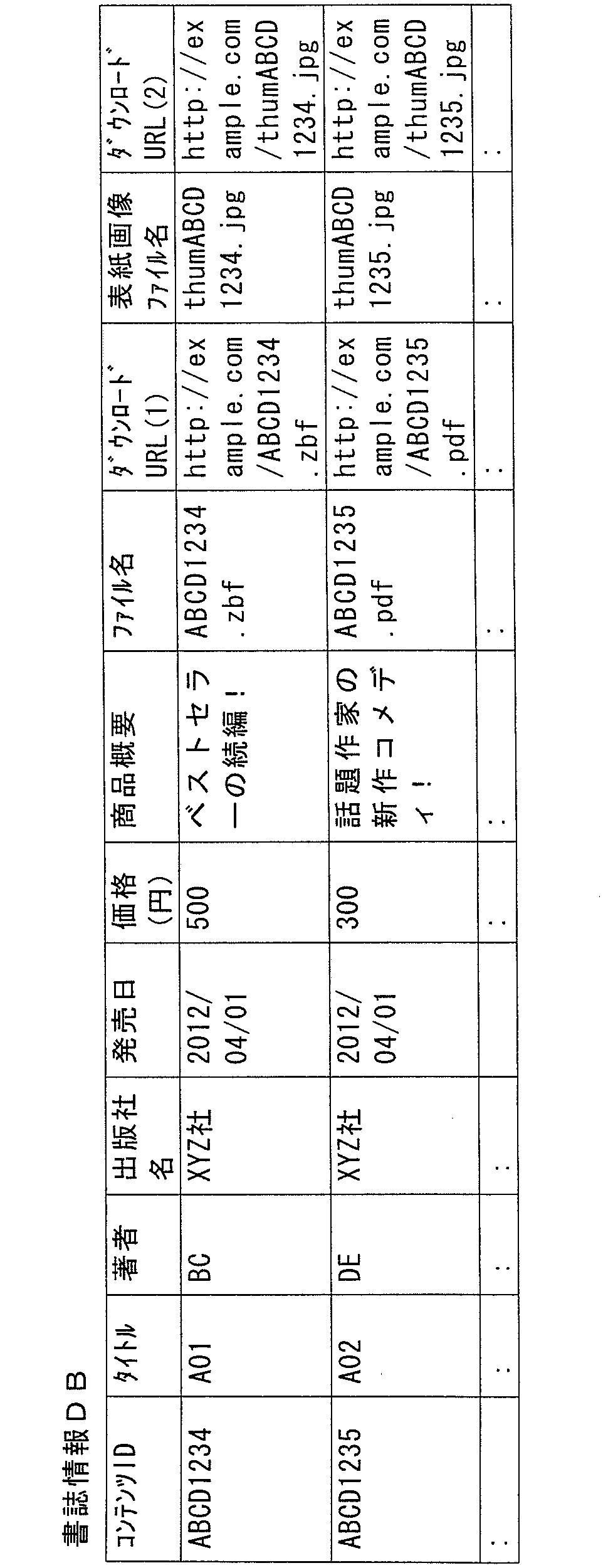
書誌情報DBには、コンテンツIDと、タイトルと、著者と、出版社名と、発売日と、価格と、商品概要と、ファイル名と、ダウンロードURL(1)と、表紙画像ファイル名と、ダウンロードURL(2)とが、互いに関連付けられて記憶されている。
コンテンツIDは、各コンテンツを特定するための情報である。
タイトルおよび著者は、各コンテンツのタイトルおよび著者である。
タイトルおよび著者は、各コンテンツのタイトルおよび著者である。
出版社名は、対象となるコンテンツが電子書籍である場合には、当該電子書籍を出版した企業を特定する情報であり、対象となるコンテンツが音楽コンテンツである場合には、レーベル等である。
発売日および価格は、対象となるコンテンツの発売日および販売された価格である。
商品概要とは、対象となるコンテンツの内容等の概要を表わす情報である。
商品概要とは、対象となるコンテンツの内容等の概要を表わす情報である。
ファイル名とは、対象となるコンテンツの本体のファイル名である。
ダウンロードURL(1)とは、対象となるコンテンツの本体のファイルをダウンロードするためにアクセスするURL(Uniform Resource Locator)である。
ダウンロードURL(1)とは、対象となるコンテンツの本体のファイルをダウンロードするためにアクセスするURL(Uniform Resource Locator)である。
表紙画像ファイル名とは、上記した表紙画像のファイル名である。
ダウンロードURL(2)とは、対象となるコンテンツの表紙画像のファイルをダウンロードするためにアクセスするURLである。
ダウンロードURL(2)とは、対象となるコンテンツの表紙画像のファイルをダウンロードするためにアクセスするURLである。
<コンテンツリスト>
上記したように、本実施の形態のシステムでは、コンテンツサーバ300は、端末100に、当該端末100のユーザについてのコンテンツリストを送信する。
上記したように、本実施の形態のシステムでは、コンテンツサーバ300は、端末100に、当該端末100のユーザについてのコンテンツリストを送信する。
リスト生成部301Aは、端末100からコンテンツリストの対象となるユーザIDを取得する。これに応じて、リスト生成部301Aは、書籍DB310のユーザ購入履歴DBにおいて、取得したユーザIDに関連付けられている購入済コンテンツIDを抽出する。そして、リスト生成部301Aは、書籍DB310の書誌情報DBにおいて、購入済コンテンツIDとして抽出したコンテンツIDに関連付けられている情報を抽出して、コンテンツリストを生成する。
たとえば、コンテンツリストの対象としてユーザID「SC0001」を取得すると、リスト生成部301Aは、書籍DB310のユーザ購入履歴DBにおいて、当該ユーザIDに関連付けられているコンテンツID「ABCD1234」とコンテンツID「ABCD1235」を取得する。そして、書籍DB310の書誌情報DBから、これらのコンテンツIDに対応する情報(表3に示されたこれらのコンテンツIDに関連付けられた情報)を抽出し、当該抽出した情報を、コンテンツリストとする。
つまり、コンテンツリストは、表2のユーザ購入履歴DBにおいて対象となるユーザのユーザIDに関連付けられたコンテンツについての、表3の書誌情報DBにおける各項目のデータを含む。
<メタ情報ファイル>
リスト生成部301Aは、コンテンツリストの生成とともに、当該コンテンツリストのメタ情報ファイルを生成する。メタ情報ファイルの内容の一例を、図6に示す。
リスト生成部301Aは、コンテンツリストの生成とともに、当該コンテンツリストのメタ情報ファイルを生成する。メタ情報ファイルの内容の一例を、図6に示す。
図6を参照して、メタ情報ファイルは、たとえば、HTML(HyperText Markup Language)5に準拠したマニフェストファイルによって構成される。
図6に示されたメタ情報ファイルは、「# Version cid=」以下に示されるコンテンツリストのバージョンを示す情報や、「# Valid until on」以下に示されるコンテンツリストの有効期限を示す情報を含む。
なお、リスト生成部301Aは、コンテンツリストと別ファイルとして図6に示したような情報を生成することもできるし、コンテンツリストにそのような情報を含めることもできる。
<コンテンツの再生>
次に、端末100におけるコンテンツの再生について説明する。本実施の形態の端末100は、ユーザに電子書籍を閲覧させるために、電子書籍(コンテンツ)を再生する。
次に、端末100におけるコンテンツの再生について説明する。本実施の形態の端末100は、ユーザに電子書籍を閲覧させるために、電子書籍(コンテンツ)を再生する。
本実施の形態の端末100では、電子書籍の閲覧に関し、「ローカルモード」と「オンラインモード」の2つのモードで動作が可能であるとする。端末100は、入力装置15に対する操作や端末100本体の姿勢の変化等に基づいてこれらの間で動作モードが切り替わるように構成されている場合もあれば、いずれかのモードで動作可能である場合もある。
なお、「オンラインモード」について、端末100のコンテンツDBに格納されていないコンテンツとは、当該ユーザが所有する他の端末100のコンテンツDBに格納されていても、現にユーザが操作する端末100のコンテンツDBには格納されていないコンテンツも含む。より具体的には、端末100Aを操作している場合に、端末100BのコンテンツDBに格納されているコンテンツであっても、端末100AのコンテンツDBに格納されていないコンテンツであれば、端末100Aにおけるオンラインモードの操作においては、コンテンツDB140に格納されていないコンテンツということになる。
端末100は、オンラインでは、ローカルモードとオンラインモードのいずれのモードでも動作可能である。一方、オフラインでは、ローカルモードでのみ、動作が可能である。なお、本明細書において、オンラインとは、ネットワークに接続されている状態を、オフラインとは、ネットワークに接続されていない状態を指す。
<本棚画面(端末保存済みのコンテンツの情報を表示するための画面)>
図7は、端末100がローカルモードで動作しているときに表示装置14に表示される本棚画面の一例を示す図である。
図7は、端末100がローカルモードで動作しているときに表示装置14に表示される本棚画面の一例を示す図である。
本棚画面500は、閲覧可能なコンテンツのリストを表示する画面である。
本棚画面500には、表示形式を指定するための表示欄501と、モードを指定するための表示欄502と、電子書籍のタイトル等の情報をリスト表示するための表示欄511~517とを含む。表示欄511~517に情報を表示された各コンテンツは、書籍DB140にその本体のデータを格納されたコンテンツである。また、表示欄501では、「タイトル」が選択されている。これにより、表示欄511~517には、書籍DB140に本体を格納されたコンテンツが、タイトルの50音順に、配列されて表示されている。
本棚画面500には、表示形式を指定するための表示欄501と、モードを指定するための表示欄502と、電子書籍のタイトル等の情報をリスト表示するための表示欄511~517とを含む。表示欄511~517に情報を表示された各コンテンツは、書籍DB140にその本体のデータを格納されたコンテンツである。また、表示欄501では、「タイトル」が選択されている。これにより、表示欄511~517には、書籍DB140に本体を格納されたコンテンツが、タイトルの50音順に、配列されて表示されている。
また、本棚画面500には、ソフトウェアボタン521~525が表示されている。ソフトウェアボタン521は、各書籍の詳細な情報を表示させるためのボタンである。ソフトウェアボタン522は、各コンテンツのシリーズを構成するコンテンツを検索するために操作されるボタンである。ソフトウェアボタン523は、各コンテンツをお気に入り登録するためのボタンである。ソフトウェアボタン524は、各コンテンツを指定したユーザが操作するときのみ表示させるための登録(シークレット登録)をするためのボタンである。ソフトウェアボタン525は、各コンテンツについて、ネットワーク上の特定のサイトに感想等の共有情報を投稿するために操作されるボタンである。
本棚画面500の表示欄502には、ローカルモードであることを表す「端末に保存」が示されている。表示欄502の表示内容を視認することにより、ユーザは、本棚画面500がローカルモードの本棚画面であることを認識することができる。
<本棚画面(サーバ保管のコンテンツの情報を表示するための画面)>
図8は、端末100がオンラインモードで動作しているときに表示装置14に表示される本棚画面の一例を示す図である。
図8は、端末100がオンラインモードで動作しているときに表示装置14に表示される本棚画面の一例を示す図である。
図8を参照して、本棚画面600は、図7の表示欄501,502のそれぞれに対応する表示欄601,602を含む。また、本棚画面600は、図7のソフトウェアボタン521~525のそれぞれと同じ機能を有するソフトウェアボタン621~625を含む。
そして、本棚画面600には、表示欄611~617が含まれる。表示欄611~617は、コンテンツサーバ300から受信したコンテンツリストに含まれるコンテンツであって、当該端末100の書籍DB140に格納されていないコンテンツを示す。
本棚画面600の表示欄602には、オンラインモードであることを表す「サーバに保存」が示されている。表示欄602の表示内容を視認することにより、ユーザは、本棚画面600がオンラインモードの本棚画面であることを認識することができる。
<本棚画面表示処理>
図9は、端末100において図7または図8を参照して説明したような本棚画面を表示させるためにブックシェルフ機能110が実行する処理のフローチャートである。
図9は、端末100において図7または図8を参照して説明したような本棚画面を表示させるためにブックシェルフ機能110が実行する処理のフローチャートである。
図9を参照して、端末100において電子書籍アプリが起動されると、ブックシェルフ機能110は、ステップS10で、当該電子書籍アプリのホーム画面を表示装置14に表示させて、ステップS20へ処理を進める。
ステップS20では、ブックシェルフ機能110は、入力装置15に対して本棚画面の表示を要求する操作がなされたか否かを判断し、そのような操作がなされたと判断するとステップS30へ処理を進める。
ステップS30では、ブックシェルフ機能110は、電子書籍アプリにおける動作モードの選択を受付ける。そして、ブックシェルフ機能110は、オンラインモードが選択された場合にはステップS60へ処理を進め、ローカルモードが選択された場合にはステップS40へ処理を進める。
ステップS40では、ブックシェルフ機能110は、当該端末100内のコンテンツDBから、書籍DB140に格納されているコンテンツのデータ(表1に示された端末内コンテンツDB)を読出して、ステップS50へ処理を進める。
ステップS50では、ブックシェルフ機能110は、図7を参照して説明したような本棚画面を表示させるためのデータを生成して、ステップS90へ処理を進める。
なお、図7の本棚画面500の表示欄501内の情報は、デフォルトで設定された情報である。当該情報は、電子書籍アプリの起動中のユーザ操作等によって、変更することができる。
表示欄511~517に表示する情報としては、表1に示されたような端末内コンテンツDBに格納される情報が利用される。具体的には、表示欄511~517のそれぞれには、端末内コンテンツDBの各コンテンツについて登録された情報(タイトル、著者、出版社、等)が抽出されて、表示される。
図9に戻って、ステップS60では、ブックシェルフ機能110は、コンテンツサーバ300から配信されるコンテンツリストを読出して、ステップS70へ処理を進める。なお、ステップS60におけるコンテンツリストの読出については、図10を参照して後述する。
ステップS70では、ブックシェルフ機能110は、コンテンツサーバ300から受信したコンテンツリストと端末100内のコンテンツDBに格納されたコンテンツDBのデータとの差分を算出して、ステップS80へ処理を進める。ステップS70の処理により、コンテンツサーバ300から送信されたコンテンツリストに登録されているコンテンツであって、当該端末100の書籍DB140に格納されていないコンテンツが抽出される。
ステップS80では、ブックシェルフ機能110は、ステップS70で抽出したコンテンツについて、図8を参照して説明したような本棚画面を表示するためのデータを生成して、ステップS90へ処理を進める。
ステップS90では、ブックシェルフ機能110は、ステップS50またはステップS80で表示用のデータを生成した本棚画面を表示装置14に表示させて、処理を終了する。
以上、図9を参照して説明した処理によれば、選択された動作モード(ローカルモードまたはオンラインモード)に対応した本棚画面が、表示装置14に表示される。
<コンテンツサーバから送信されるコンテンツリストの読出>
図10は、図9のステップS60における処理のサブルーチンのフローチャートである。
図10は、図9のステップS60における処理のサブルーチンのフローチャートである。
なお、当該処理は、コンテンツサーバ300における処理と協働して実現される。したがって、図10では、端末100側の処理のフローチャートに加えて、コンテンツサーバ300における処理のフローチャートも示されている。
図10を参照して、ブックシェルフ機能110は、ステップSA10で、その時点で当該端末100がコンテンツサーバ300と接続が可能か否かを判断し、接続が可能であると判断するとステップSA20へ処理を進め、当該サーバに接続できないと判断すると、ブックシェルフ機能110は、ステップS40(図9参照)へ処理を戻す。これにより、端末100の動作モードがローカルモードへ切り換えられる。
ステップSA20では、ブックシェルフ機能110は、コンテンツサーバ300に、コンテンツリストのメタ情報ファイルの送信取得を要求する。このとき、ブックシェルフ機能110は、コンテンツサーバ300に対して、ユーザを特定する情報(たとえば、ユーザID)を送信する。ユーザIDは、たとえば、記憶装置16に格納されている。なお、ブックシェルフ機能110は、端末100の利用に際して、ユーザにログイン情報の入力を求めてもよい。このような場合には、ステップSA20では、ブックシェルフ機能110は、当該ログイン情報として入力されたユーザIDを、コンテンツサーバ300へ送信する。
端末100からメタ情報ファイルの取得の要求を受けると、コンテンツサーバ300の処理部301は、ステップSB10で、書籍DB310のユーザ購入履歴DBにおいて、端末100から送信されたユーザIDに関連付けられたコンテンツIDを取得する(購入履歴問合せ)。
なお、書籍DB310のユーザ購入履歴DBが、コンテンツサーバ300とは別の装置によって構成される場合には、処理部301は、当該装置に対して、問合せを、端末100から受信したユーザIDの送信とともに行なう。これに応じて、当該装置は、ステップSC10で、受信したユーザIDに関連付けられたコンテンツIDを送信する(購入履歴送信)。
また、処理部301は、ステップSB10で取得したコンテンツIDに対応する書誌情報を、書籍DB310の書誌情報DBから取得する。なお、書籍DB310の書誌情報DBがコンテンツサーバ300とは別の装置で構成されている場合には、処理部301は、当該装置に対して、ステップSB10で取得したコンテンツIDを送信とともに、書誌情報の問合せを行なう。当該装置は、これに応じて、コンテンツサーバ300から受信したコンテンツIDに対応する書誌情報を送信する。
ブックシェルフ機能110は、ステップSB20の処理によって取得した書誌情報に基づいて、ステップSB10で取得したユーザIDに対応するコンテンツリストを生成し、そして、当該生成したコンテンツリストについてのメタ情報ファイルを生成して、ステップSB40へ処理を進める。
ステップSB40では、処理部301は、端末100に対して、ステップSB30で生成したメタ情報ファイルを送信する。
端末10のブックシェルフ機能110は、これに応じて、ステップSA30で、コンテンツサーバ300から受信したメタ情報ファイルが、既にキャッシュメモリに格納されているコンテンツリストのメタ情報ファイルと一致するか否かを判断し、一致すると判断するとステップSA60へ処理を進め、一致しないと判断するとステップSA40へ処理を進める。
ステップSA40では、ブックシェルフ機能110は、コンテンツサーバ300に対してコンテンツリストの取得を要求する。
ステップSA40におけるコンテンツリスト取得要求に応じて、コンテンツサーバ300の処理部301は、端末100に対してステップSB30で生成したコンテンツリストを送信する。
コンテンツサーバ300からのコンテンツリストの送信に応じて、端末100のブックシェルフ機能110は、ステップSA50で、受信したコンテンツリストを読出して、処理を図9へリターンさせる。
以上、図10を参照して説明した処理によれば、オンラインモードで本棚画面が表示される際には、まず端末100がコンテンツサーバ300に接続可能か否かが判断され(ステップSA10)、接続できない場合にはローカルモードへと、動作モードが切り換えられる。
一方、コンテンツサーバ300に接続可能な場合、端末100からコンテンツサーバ300に対して、コンテンツリストのメタ情報ファイルの取得要求がなされる(ステップSA20)。
これに応じて、コンテンツサーバ300では、改めてコンテンツリストが生成され(ステップSB30)、そして、当該コンテンツリストのメタ情報ファイルが端末100へ送信される(ステップSB40)。
当該メタ情報ファイルを受信した端末100では、キャッシュメモリに既に格納されているコンテンツリストのメタ情報ファイルと、受信したメタ情報ファイルが一致するか否かが判断される(ステップSA30)。そして、一致する場合には、改めてコンテンツサーバ300からコンテンツリストを受信することなく、既にキャッシュメモリに格納されているコンテンツリストを読出す(ステップSA60)。一方、メタ情報ファイルが一致しなかった場合には、端末100はコンテンツサーバにコンテンツリストの取得を要求する(ステップSA40)。
そして、端末100では、コンテンツサーバ300から受信したコンテンツリストが読出される(ステップSA50)。
なお、コンテンツサーバ300では、ステップSB10~ステップSB30で示したように、端末100からメタ情報ファイルの取得要求がなされるたびにコンテンツリストおよびそのメタ情報ファイルが生成されたが、これらの生成は、このタイミングは図10を参照して説明されたものに限定されない。たとえば、書籍DB310のユーザ購入履歴DBにおいて対象となるユーザIDについての履歴情報が更新されたとき、前回コンテンツリスト等が生成されてから一定の時間が経過したとき、等であってもよい。このように、端末100からのメタ情報ファイルの取得要求の受信とは異なるタイミングでコンテンツリストおよびそのメタ情報ファイルが生成される場合には、コンテンツサーバ300の処理部301は、要求(ステップSA20)を受信すると、既に生成され記憶部302等に格納された、対象となるユーザIDに対応するメタ情報ファイルを、ステップSB40で、端末100へ送信する。そして、ステップSA40のコンテンツリスト取得要求を受けると、処理部301は、ステップSB50の処理として、既に記憶部302等に格納されているコンテンツリストを、端末100へ送信する。
<コンテンツ表示処理>
端末100の電子書籍アプリでは、図7または図8を参照して説明したように、本棚画面が表示される。本棚画面500,600のそれぞれには、各コンテンツを選択するための表示欄511~517,611~617が表示される。
端末100の電子書籍アプリでは、図7または図8を参照して説明したように、本棚画面が表示される。本棚画面500,600のそれぞれには、各コンテンツを選択するための表示欄511~517,611~617が表示される。
そして、本棚画面500,600のそれぞれにおいて、表示欄511~517,611~617のいずれかが選択されると、当該表示欄に対応するコンテンツを表示するための処理が実行される。
図11は、ブックシェルフ機能110が実行する当該処理のフローチャートである。
図11を参照して、本棚画面500,600のいずれかにおいて、表示欄511~517,611~617のいずれかを選択する操作がなされると、ブックシェルフ機能110は、ステップSA110において、選択されたコンテンツが端末100の書籍DB140内に格納されているか否かが判断され、格納されている判断するとステップSA150へ処理を進め、格納されていない、つまり、コンテンツサーバ300に格納されていると判断するとステップSA120へ処理を進める。
図11を参照して、本棚画面500,600のいずれかにおいて、表示欄511~517,611~617のいずれかを選択する操作がなされると、ブックシェルフ機能110は、ステップSA110において、選択されたコンテンツが端末100の書籍DB140内に格納されているか否かが判断され、格納されている判断するとステップSA150へ処理を進め、格納されていない、つまり、コンテンツサーバ300に格納されていると判断するとステップSA120へ処理を進める。
ステップSA150では、ブックシェルフ機能110は、書籍DB140に格納されたコンテンツであって、選択されたコンテンツを、ビューアで表示装置14に表示させて、処理を終了する。
一方、ステップSA120では、ブックシェルフ機能110は、コンテンツサーバ300に対して、選択されたコンテンツの本体のファイルのダウンロード要求を送信する。
これに応じて、コンテンツサーバ300の処理部201は、要求されたコンテンツを端末100へ配信する(ステップSE110)。
これに応じて、端末100のブックシェルフ機能110は、ステップSA130で、コンテンツを受信し、書籍DB140に格納するとともに、格納後の情報に応じてコンテンツDBの情報を更新して、ステップSA140へ処理を進める。これにより、新たに書籍DB140に格納されたコンテンツの情報が、端末内コンテンツDB(表1参照)に追加される。
ステップSA140では、ブックシェルフ機能110は、ステップSA130で受信したコンテンツを、ビューアで表示装置14に表示させて、処理を終了する。
図12は、表示装置14において表示されるコンテンツの画面の一例を示す図である。コンテンツがビューアで表示装置14に表示されることにより、表示装置14には、画面1100のような、コンテンツの表示画面が表示される。
[第2の実施の形態]
第2の実施の形態の端末100において表示される本棚画面では、当該端末100のコンテンツ記憶部104Aに格納されたコンテンツと、当該コンテンツ記憶部104Aには格納されていないが当該端末100のユーザが使用権を有しコンテンツサーバ300に格納されているコンテンツの情報が、同じ画面に表示される。
第2の実施の形態の端末100において表示される本棚画面では、当該端末100のコンテンツ記憶部104Aに格納されたコンテンツと、当該コンテンツ記憶部104Aには格納されていないが当該端末100のユーザが使用権を有しコンテンツサーバ300に格納されているコンテンツの情報が、同じ画面に表示される。
図13は、第2の実施の形態の端末100において表示される本棚画面の一例を示す図である。
図13を参照して、本棚画面700には、電子書籍アプリにおいて取得されたメッセージを表示する表示欄710と、広告情報を表示する表示欄720と、コンテンツ情報の表示におけるソートの条件などを設定するための操作ボタンを表示する表示欄730とともに、ユーザが使用権を有するコンテンツの情報を表示する表示欄740を含む。
表示欄740には、個々のコンテンツに対応する表示欄741~749を含む。なお、図13では、表示欄741~745にのみ、コンテンツの情報が示されている。
表示欄741~745のそれぞれには、コンテンツのタイトルが表示されている。図7では、コンテンツのタイトルの例示として、「タイトルPA(1)」等の文字列が示されている。
また、表示欄741~745のうち、表示欄742,743,745については、当該端末100のコンテンツ記憶部104Aにコンテンツが格納されていることを示すボタン740Aが示されている。なお、ボタン740Aの中には、端末100へのコンテンツのダウンロードが完了していることを示す文字列(「DL済」)が表示されている。
つまり、図13に示された本棚画面700の表示欄740に情報を表示されたコンテンツ(表示欄741~745のそれぞれに対応するコンテンツ)のうち、ボタン740Aを表示されている表示欄742,743,745に対応するコンテンツについては、端末100内に格納されていることを、ユーザは視認することができる。さらに、それ以外のコンテンツ(表示欄741,744に対応するコンテンツ)については、端末100には格納されておらずコンテンツサーバ300に格納されていることを、ユーザは視認することができる。
図14は、図13に示したような本棚画面700を表示するために、端末100において実行される処理のフローチャートである。
図14を参照して、端末100において電子書籍アプリを起動する操作がなされると、ブックシェルフ機能110は、ステップS10で、表示装置14に電子書籍アプリのホーム画面を表示させ、ステップS20へ処理を進める。
ステップS20では、ブックシェルフ機能110は、入力装置15への操作等によって本棚画面を表示するための要求がなされたか否かを判断し、そのような要求がなされたと判断するとステップS60へ処理を進める。
ステップS60では、ブックシェルフ機能110は、図9を参照して説明したように、コンテンツサーバ300に格納されているコンテンツリストを読出して、ステップS70へ処理を進める。なお、本実施の形態においても、コンテンツリストの読出については、たとえば図10を参照して説明した処理によって実現される。
ステップS70では、ブックシェルフ機能110は、コンテンツDB104Bに格納されたコンテンツDBのデータを読出し、ステップS60で取得したコンテンツリストとの差分を算出して、ステップS81へ処理を進める。
ステップS81では、ブックシェルフ機能110は、図13を参照して説明した本棚画面700のような、端末100の書籍DB140に格納されているコンテンツと、書籍DB140には格納されていないがコンテンツサーバ300に格納されているコンテンツの情報とを含めた本棚画面を表示するためのデータを生成して、ステップS90へ処理を進める。
本実施の形態では、図13を参照して説明したように、ユーザが使用権を有するコンテンツの情報が、書籍DB140に格納されているものといないものとで区別され、異なる表示態様で(図13のボタン740Aの添付の有無等)表示される。
ステップS90では、ブックシェルフ機能110は、ステップS81で生成した表示データに基づいて本棚画面を表示装置14に表示させて、処理を終了する。
以上説明した本実施の形態の端末100によれば、本棚画面700を視認したユーザは、自己が使用権を有するすべてのコンテンツを1つの画面で見ることができ、そして、その中でどのコンテンツが操作中の端末100に格納され、どのコンテンツが当該端末100には格納されていないかを視認することができる。
また、本実施の形態においても、各コンテンツに対応する表示欄(図13の表示欄741~745)のいずれかに対して操作がなされると、各コンテンツについて、ビューアで表示がなされたり、コンテンツサーバ300に対してダウンロード要求がなされたりする。
具体的には、たとえば表示欄742に対して操作がなされると、当該表示欄に対応するコンテンツが、書籍DB140から読出されて、ビューアで表示される。
一方、表示欄741に対して操作がなされると、ブックシェルフ機能110は、当該表示欄に対応するコンテンツについて、コンテンツサーバ300に対してダウンロード要求をする。なお、コンテンツサーバ300に対するダウンロード要求を行なう前に、ブックシェルフ機能110は、ユーザに対してダウンロードの要否を問合せてもよい。
[その他の変形例]
以上説明した本実施の形態において、端末100は、コンテンツの再生機能を有する情報処理装置であれば、種々の機器によって実現することができる。
以上説明した本実施の形態において、端末100は、コンテンツの再生機能を有する情報処理装置であれば、種々の機器によって実現することができる。
たとえば、端末100は、図15に示されるように、タブレット端末によって実現されてもよい。
図15に示されたタブレット端末(端末100)では、その筐体に、表示装置14とともに、操作ボタン15Aが備えられている。図15に示された端末100では、表示装置14と重ねられてタッチセンサが設けられ、入力装置15は、当該タッチセンサおよび/または操作ボタン15Aによって、構成される。
また、端末100は、図16に示されるように、スマートフォン端末によって、つまり、通話機能を有するような端末によって実現される場合もある。
図16に示されたスマートフォン端末(端末100)では、その筐体に、表示装置14とともに、操作ボタン15B~15Dが備えられている。図16に示された端末100では、タッチセンサは、表示装置14と重ねられて設けられている。入力装置15は、当該タッチセンサおよび/または操作ボタン15B~15Dによって、実現される。
また、端末100は、図17に示されるように、携帯性を備えた端末ではなく、オフィス等において設置されるパーソナルコンピュータによって実現される場合もあり得る。
パーソナルコンピュータによって実現される端末100には、モニタ14Aと、キーボード15Eおよびマウス15Fとが、接続されている。この場合、表示装置14は、モニタ14Aにおける表示を制御する。つまり、モニタ14Aのドライバソフトウェアまたはドライバ回路基板によって、実現される。この例では、キーボード15Eおよび/またはマウス15Fによって、入力装置15が構成される。
また、端末100は、図18に示されるように、テレビジョン受像機によって実現される端末100は、モニタと、リモートコントローラ(以下、「リモコン」と称する)とを含む。このような例では、リモコンによって入力装置15が構成され、また、モニタによって表示装置14が構成される。
今回開示された各実施の形態はすべての点で例示であって制限的なものではないと考えられるべきである。本発明の範囲は上記した説明ではなくて請求の範囲によって示され、請求の範囲と均等の意味および範囲内でのすべての変更が含まれることが意図される。
100 端末、110 ブックシェルフ機能、130 ローカルHTTPサーバ、140,310 書籍DB、300 コンテンツサーバ、1000 ネットワーク。
Claims (7)
- 記憶部に格納されたコンテンツを再生するための端末装置であって、
前記記憶部に格納されたコンテンツについての情報を提供するための内部サーバと、
外部のサーバ装置から、前記端末装置のユーザが使用権を有するコンテンツについての情報を取得するための取得部とを備え、
前記取得部は、前記内部サーバから、前記記憶部に格納されたコンテンツについての情報を取得して、前記記憶部に記憶し、
前記内部サーバは、前記外部のサーバ装置が前記コンテンツについての情報を提供するのと同じプロトコルを使用して、前記取得部に、前記記憶部に格納されたコンテンツについての情報を提供し、
前記取得部は、前記内部サーバまたは前記外部のサーバ装置から取得したコンテンツについての情報を表示装置に表示させる、端末装置。 - 前記取得部は、コンテンツの格納場所に基づいて、各コンテンツについての情報の表示態様を決定する、請求項1に記載の端末装置。
- 前記取得部は、前記コンテンツが前記記憶部に記憶されているか否かに基づいて、各コンテンツについての情報の表示態様を決定する、請求項2に記載の端末装置。
- 前記取得部は、前記内部サーバから提供された前記コンテンツの情報を前記表示装置に表示させる第1のモードと、前記外部のサーバから取得した前記コンテンツについての情報を前記表示装置に表示させる第2のモードとの間で、切り替え可能に動作する、請求項1~請求項3のいずれか1項に記載の端末装置。
- 前記取得部は、
前記外部のサーバと通信可能な場合には、前記第2のモードで動作し、
前記外部のサーバと通信不能の場合には、前記第1のモードで動作する、請求項4に記載の端末装置。 - 記憶部に格納されたコンテンツを格納するための記憶部を備える端末装置において実行される、当該端末装置の制御方法であって、
外部のサーバ装置から、前記端末装置のユーザが使用権を有するコンテンツについての情報を取得して前記記憶部に記憶するステップと、
前記外部のサーバ装置が前記コンテンツについての情報を提供するのと同じプロトコルを使用して、前記記憶部に格納されたコンテンツについての情報を提供するステップとを備える、端末装置の制御方法。 - 記憶部に格納されたコンテンツを格納するための記憶部を備える端末装置のコンピュータにおいて実行される制御プログラムを非一時的に記録した記憶媒体であって、
前記制御プログラムは、前記コンピュータに、
外部のサーバ装置から、前記端末装置のユーザが使用権を有するコンテンツについての情報を取得して前記記憶部に記憶するステップと、
前記外部のサーバ装置が前記コンテンツについての情報を提供するのと同じプロトコルを使用して、前記記憶部に格納されたコンテンツについての情報を提供するステップとを実行させる、記憶媒体。
Applications Claiming Priority (2)
| Application Number | Priority Date | Filing Date | Title |
|---|---|---|---|
| JP2012-054630 | 2012-03-12 | ||
| JP2012054630A JP2013190844A (ja) | 2012-03-12 | 2012-03-12 | 端末装置、その制御プログラム、および、その制御方法 |
Publications (1)
| Publication Number | Publication Date |
|---|---|
| WO2013136571A1 true WO2013136571A1 (ja) | 2013-09-19 |
Family
ID=49160525
Family Applications (1)
| Application Number | Title | Priority Date | Filing Date |
|---|---|---|---|
| PCT/JP2012/076301 Ceased WO2013136571A1 (ja) | 2012-03-12 | 2012-10-11 | 端末装置およびその制御方法、ならびに、記憶媒体 |
Country Status (2)
| Country | Link |
|---|---|
| JP (1) | JP2013190844A (ja) |
| WO (1) | WO2013136571A1 (ja) |
Families Citing this family (1)
| Publication number | Priority date | Publication date | Assignee | Title |
|---|---|---|---|---|
| WO2016084262A1 (ja) * | 2014-11-28 | 2016-06-02 | 富士通株式会社 | 情報処理装置、方法、およびプログラム |
Citations (3)
| Publication number | Priority date | Publication date | Assignee | Title |
|---|---|---|---|---|
| JP2003173287A (ja) * | 2001-12-05 | 2003-06-20 | Nippon Telegr & Teleph Corp <Ntt> | コンテンツ配信方法、サーバ選択装置、ハイパーテキスト配信サーバ、およびそのためのプログラム |
| JP2007207171A (ja) * | 2006-02-06 | 2007-08-16 | Ricoh Co Ltd | 文書アクセス制御システム |
| JP2009095017A (ja) * | 2003-08-21 | 2009-04-30 | Casio Comput Co Ltd | 電子機器、及び、プログラム |
-
2012
- 2012-03-12 JP JP2012054630A patent/JP2013190844A/ja active Pending
- 2012-10-11 WO PCT/JP2012/076301 patent/WO2013136571A1/ja not_active Ceased
Patent Citations (3)
| Publication number | Priority date | Publication date | Assignee | Title |
|---|---|---|---|---|
| JP2003173287A (ja) * | 2001-12-05 | 2003-06-20 | Nippon Telegr & Teleph Corp <Ntt> | コンテンツ配信方法、サーバ選択装置、ハイパーテキスト配信サーバ、およびそのためのプログラム |
| JP2009095017A (ja) * | 2003-08-21 | 2009-04-30 | Casio Comput Co Ltd | 電子機器、及び、プログラム |
| JP2007207171A (ja) * | 2006-02-06 | 2007-08-16 | Ricoh Co Ltd | 文書アクセス制御システム |
Also Published As
| Publication number | Publication date |
|---|---|
| JP2013190844A (ja) | 2013-09-26 |
Similar Documents
| Publication | Publication Date | Title |
|---|---|---|
| JP4383690B2 (ja) | デジタルコンテンツ出力方法およびシステム | |
| EP1617626B1 (en) | Remote access to content management information through a server | |
| US7890606B2 (en) | Information processing apparatus and method, and program | |
| JP4946592B2 (ja) | ダウンロード装置および方法、コンテンツ送受信システムおよび方法 | |
| JP2007164078A (ja) | 楽曲再生装置および楽曲情報配信サーバ | |
| JP7540546B2 (ja) | インストールシステム、サーバ装置、ユーザ側装置及びインストール方法 | |
| JP7548215B2 (ja) | 広告配信システム、情報処理装置および情報処理方法 | |
| WO2013080713A1 (ja) | 情報処理装置およびプログラム | |
| US9313264B2 (en) | System capable of providing plurality of digital contents and method using same | |
| JP5573297B2 (ja) | 端末装置、電子機器およびプログラム | |
| JP5331686B2 (ja) | ネットワークavコンテンツ再生端末、サーバ、及びシステム | |
| US20040078385A1 (en) | Content reception program content receiving method | |
| JP5683658B1 (ja) | デジタルコンテンツの再生サービスを提供するサーバ及び方法 | |
| EP2246801A1 (en) | Terminal device, information provision system, file access method, and data structure | |
| JP2009163595A (ja) | 情報処理システム、情報処理装置、および情報処理方法、並びにコンピュータ・プログラム | |
| WO2013136571A1 (ja) | 端末装置およびその制御方法、ならびに、記憶媒体 | |
| JP5813535B2 (ja) | 端末装置、その制御方法、および、その制御プログラム | |
| JP6234080B2 (ja) | 複数のデジタルコンテンツを提供可能なシステム及びこれを用いた方法 | |
| JP2010186281A (ja) | 情報表示装置および情報表示システム | |
| JP2009009500A (ja) | コンテンツ取得装置、プログラム、及びコンテンツ取得方法 | |
| JP2024063875A (ja) | 電子書籍情報集約装置、プログラム及び電子書籍システム | |
| JP2002297993A (ja) | 広告プロモーション装置ならびにその方法 | |
| JP4471946B2 (ja) | カラオケシステム | |
| JP2008010002A (ja) | デジタルコンテンツ視聴方法およびシステム | |
| JP7444297B2 (ja) | インストールシステム、サーバ装置、ユーザ側装置及びインストール方法 |
Legal Events
| Date | Code | Title | Description |
|---|---|---|---|
| 121 | Ep: the epo has been informed by wipo that ep was designated in this application |
Ref document number: 12871264 Country of ref document: EP Kind code of ref document: A1 |
|
| NENP | Non-entry into the national phase |
Ref country code: DE |
|
| 122 | Ep: pct application non-entry in european phase |
Ref document number: 12871264 Country of ref document: EP Kind code of ref document: A1 |