WO2013054995A1 - User terminal device and method for controlling a renderer thereof - Google Patents
User terminal device and method for controlling a renderer thereof Download PDFInfo
- Publication number
- WO2013054995A1 WO2013054995A1 PCT/KR2012/002903 KR2012002903W WO2013054995A1 WO 2013054995 A1 WO2013054995 A1 WO 2013054995A1 KR 2012002903 W KR2012002903 W KR 2012002903W WO 2013054995 A1 WO2013054995 A1 WO 2013054995A1
- Authority
- WO
- WIPO (PCT)
- Prior art keywords
- control
- object image
- renderer
- displayed
- content
- Prior art date
- Legal status (The legal status is an assumption and is not a legal conclusion. Google has not performed a legal analysis and makes no representation as to the accuracy of the status listed.)
- Ceased
Links
Images




Classifications
-
- H—ELECTRICITY
- H04—ELECTRIC COMMUNICATION TECHNIQUE
- H04L—TRANSMISSION OF DIGITAL INFORMATION, e.g. TELEGRAPHIC COMMUNICATION
- H04L12/00—Data switching networks
- H04L12/02—Details
- H04L12/12—Arrangements for remote connection or disconnection of substations or of equipment thereof
-
- G—PHYSICS
- G06—COMPUTING OR CALCULATING; COUNTING
- G06F—ELECTRIC DIGITAL DATA PROCESSING
- G06F3/00—Input arrangements for transferring data to be processed into a form capable of being handled by the computer; Output arrangements for transferring data from processing unit to output unit, e.g. interface arrangements
- G06F3/01—Input arrangements or combined input and output arrangements for interaction between user and computer
- G06F3/048—Interaction techniques based on graphical user interfaces [GUI]
-
- G—PHYSICS
- G06—COMPUTING OR CALCULATING; COUNTING
- G06F—ELECTRIC DIGITAL DATA PROCESSING
- G06F3/00—Input arrangements for transferring data to be processed into a form capable of being handled by the computer; Output arrangements for transferring data from processing unit to output unit, e.g. interface arrangements
- G06F3/01—Input arrangements or combined input and output arrangements for interaction between user and computer
- G06F3/048—Interaction techniques based on graphical user interfaces [GUI]
- G06F3/0484—Interaction techniques based on graphical user interfaces [GUI] for the control of specific functions or operations, e.g. selecting or manipulating an object, an image or a displayed text element, setting a parameter value or selecting a range
- G06F3/04847—Interaction techniques to control parameter settings, e.g. interaction with sliders or dials
-
- G—PHYSICS
- G06—COMPUTING OR CALCULATING; COUNTING
- G06F—ELECTRIC DIGITAL DATA PROCESSING
- G06F3/00—Input arrangements for transferring data to be processed into a form capable of being handled by the computer; Output arrangements for transferring data from processing unit to output unit, e.g. interface arrangements
- G06F3/01—Input arrangements or combined input and output arrangements for interaction between user and computer
- G06F3/048—Interaction techniques based on graphical user interfaces [GUI]
- G06F3/0487—Interaction techniques based on graphical user interfaces [GUI] using specific features provided by the input device, e.g. functions controlled by the rotation of a mouse with dual sensing arrangements, or of the nature of the input device, e.g. tap gestures based on pressure sensed by a digitiser
- G06F3/0488—Interaction techniques based on graphical user interfaces [GUI] using specific features provided by the input device, e.g. functions controlled by the rotation of a mouse with dual sensing arrangements, or of the nature of the input device, e.g. tap gestures based on pressure sensed by a digitiser using a touch-screen or digitiser, e.g. input of commands through traced gestures
-
- G—PHYSICS
- G06—COMPUTING OR CALCULATING; COUNTING
- G06F—ELECTRIC DIGITAL DATA PROCESSING
- G06F3/00—Input arrangements for transferring data to be processed into a form capable of being handled by the computer; Output arrangements for transferring data from processing unit to output unit, e.g. interface arrangements
- G06F3/01—Input arrangements or combined input and output arrangements for interaction between user and computer
- G06F3/048—Interaction techniques based on graphical user interfaces [GUI]
- G06F3/0487—Interaction techniques based on graphical user interfaces [GUI] using specific features provided by the input device, e.g. functions controlled by the rotation of a mouse with dual sensing arrangements, or of the nature of the input device, e.g. tap gestures based on pressure sensed by a digitiser
- G06F3/0488—Interaction techniques based on graphical user interfaces [GUI] using specific features provided by the input device, e.g. functions controlled by the rotation of a mouse with dual sensing arrangements, or of the nature of the input device, e.g. tap gestures based on pressure sensed by a digitiser using a touch-screen or digitiser, e.g. input of commands through traced gestures
- G06F3/04883—Interaction techniques based on graphical user interfaces [GUI] using specific features provided by the input device, e.g. functions controlled by the rotation of a mouse with dual sensing arrangements, or of the nature of the input device, e.g. tap gestures based on pressure sensed by a digitiser using a touch-screen or digitiser, e.g. input of commands through traced gestures for inputting data by handwriting, e.g. gesture or text
-
- H—ELECTRICITY
- H04—ELECTRIC COMMUNICATION TECHNIQUE
- H04L—TRANSMISSION OF DIGITAL INFORMATION, e.g. TELEGRAPHIC COMMUNICATION
- H04L12/00—Data switching networks
- H04L12/02—Details
- H04L12/16—Arrangements for providing special services to substations
-
- H—ELECTRICITY
- H04—ELECTRIC COMMUNICATION TECHNIQUE
- H04W—WIRELESS COMMUNICATION NETWORKS
- H04W88/00—Devices specially adapted for wireless communication networks, e.g. terminals, base stations or access point devices
- H04W88/02—Terminal devices
-
- Y—GENERAL TAGGING OF NEW TECHNOLOGICAL DEVELOPMENTS; GENERAL TAGGING OF CROSS-SECTIONAL TECHNOLOGIES SPANNING OVER SEVERAL SECTIONS OF THE IPC; TECHNICAL SUBJECTS COVERED BY FORMER USPC CROSS-REFERENCE ART COLLECTIONS [XRACs] AND DIGESTS
- Y02—TECHNOLOGIES OR APPLICATIONS FOR MITIGATION OR ADAPTATION AGAINST CLIMATE CHANGE
- Y02D—CLIMATE CHANGE MITIGATION TECHNOLOGIES IN INFORMATION AND COMMUNICATION TECHNOLOGIES [ICT], I.E. INFORMATION AND COMMUNICATION TECHNOLOGIES AIMING AT THE REDUCTION OF THEIR OWN ENERGY USE
- Y02D30/00—Reducing energy consumption in communication networks
- Y02D30/50—Reducing energy consumption in communication networks in wire-line communication networks, e.g. low power modes or reduced link rate
Definitions
- the present invention relates generally to a user terminal device and a method for controlling a renderer thereof, and more particularly, to a user terminal device for controlling a renderer using an object image and a method for controlling the renderer thereof.
- DLNA Digital Living Network Alliance
- the DLNA provides a simple manner for sharing music, photos, and videos between several different devices.
- DMR Digital Media Server
- DMP Digital Media Player
- a device that controls the content playing device is a Digital Multimedia Controller (DMC). If a user selects a content sharing function using a user terminal device, the user terminal device can perform the DMC function.
- DMC Digital Multimedia Controller
- UI User Interface
- Embodiments of the present invention address at least the above problems and/or disadvantages and other disadvantages not described above.
- the present invention provides a user terminal device to efficiently and conveniently control a renderer according to manipulated matters by displaying an object image to be manipulated by users, and a method for controlling the renderer of the user terminal device.
- a method for controlling a renderer of a user terminal device including selecting a renderer to share contents, transmitting the contents to the selected renderer, displaying control UI including an object image of which position is moved according to user s touch manipulation, and controlling the renderer according to the movements of the object image on the control UI.
- a method further including displaying a background image, displaying contents stored in at least one device of the user terminal device and other devices connected in a network if an icon corresponding to a content sharing function is selected on the background image, playing, if one content is selected from the displayed contents, the selected content, and displaying a device list when a renderer selection menu is selected.
- a user terminal device including a storage unit which stores contents, a UI unit which outputs UI to select a renderer to share the contents, an interface unit which transmits the contents to the renderer selected in the UI, and a control unit which controls the UI unit to display a control UI including an object image whose position moves according to users touch manipulations if the contents are transferred. If the object image moves on the control UI, according to movements of the object image, the control unit may perform a control operation to control the renderer.
- FIG. 1 illustrates a constitution of a content sharing system according to an embodiment of the present invention
- FIG. 2 illustrates a constitution of a user terminal device according to an embodiment of the present invention
- FIG. 3 illustrates an example of a UI constitution to perform a content sharing function
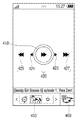
- FIGS. 4 to 8 illustrate control UI constitutions and methods for operating the control UI according to embodiments of the present invention
- FIG. 9 illustrates an object image manipulation and an example of a control operation according to the object image manipulation
- FIGS. 10 and 11 illustrate a method for sharing contents according to embodiments of the present invention.
- FIG. 12 illustrates another example of the UI constitution to perform a content sharing function.
- FIG. 1 illustrates a constitution of a content sharing system according to an embodiment of the present invention.
- the content sharing system comprises a user terminal device 100, an Access Point (AP), and a plurality of devices 10, 20, 30, 40.
- the user terminal device and each device 10, 20, 30, 40 form a network through the AP.
- FIG. 1 illustrates a network structure connected by the AP, and may be applied to an environment of a network wherein devices are directly connected.
- the user terminal device 100 searches each device 10, 20, 30, 40 which is connected to a network through the AP.
- the content sharing function can play by involving DLNA, i.e., by sharing contents among a plurality of devices.
- the user terminal device 100 may be operated as a DMS that provides contents for itself, or as a DMR or a DMP, which play contents provided by other devices.
- a device playing contents is referred to as a renderer in embodiments of the present invention.
- the user terminal device 100 searches each device 10, 20, 30, 40 which is connected to a network and requests content information. Specifically, the user terminal device 100 broadcasts a signal requesting the information through the AP. Each device 10, 20, 30, 40 which receives the signal requesting the information through the AP transmits a response signal including their own information. The user terminal device 100 can obtain information on contents by connecting to each device using the information on each device. A device corresponding to a DMS to provide contents among the devices 10, 20, 30, 40 which are connected to a network notifies information on contents which the device can provide to the user terminal device 100, which acquires detailed information on contents using SOAP (Simple Object Access Protocol) based on the notified content information.
- SOAP Simple Object Access Protocol
- the user terminal device 100 displays the acquired detailed information on contents so as to enable a user to select one of the contents.
- the user terminal device 100 requests a content transmission to DMS in which the selected content is stored.
- the DMS transmits the requested content using HTTP (Hypertext Transfer Protocol).
- the user can select a renderer to play a content provided by the DMS.
- the user terminal device 100 may receive contents from the first device 10 and send the contents to the second device 20, or control the first device 10 to send the contents directly to the second device 20.
- the second device 20 plays the provided contents.
- An operation of the second device 20 is controlled by a DMC, the role of which is played by a selected device in the content sharing system of FIG. 1.
- the user terminal device 100 may also perform as the DMC.
- the user terminal device 100 displays a control UI, on which is displayed an object image.
- a user can touch or drag the object image, which accordingly may change in shape and display position, for example.
- the object image returns to the original position and the original shape when the user's touch or drag terminates.
- the user terminal device 100 performs a control operation corresponding to a user's manipulation of the object image.
- the user terminal device 100 can control the renderer 20 to raise the volume when the object image is dragged upward. If dragging of the object image terminates, it returns to the original state and the state of raised volume is maintained.
- the user terminal device 100 may control the renderer 20 to play the next video content.
- control operations are performed by manipulating the object image, a user can easily control an operation of the renderer 10 without continuously watching a control UI displayed in the user terminal device 100.
- FIG. 2 illustrates a user terminal device 100 according to an embodiment of the present invention.
- the user terminal device 100 comprises an interface unit 110, a control unit 120, a UI unit 130, and a storage unit 140.
- the interface unit 110 is connected to a network. If it is constituted as the content sharing system of FIG. 1, the interface unit 110 may be connected to each device 10, 20, 30, 40 through an AP. For instance, the interface unit 110 may be connected to a network by using mobile communication protocol or Wireless Fidelity (Wi-Fi) protocol.
- Wi-Fi Wireless Fidelity
- the UI unit 130 may display various forms of UI, including a control UI. If the UI unit 130 includes a touch screen, a user may input various user commands by touching the control UI of the UI unit 130. If the UI unit 130 does not include a touch screen, the user may control an object image of the control UI using at least one key provided in a main body of the user terminal device 100, or various input means such as a mouse, keyboard or joystick which are connected to the user terminal device 100.
- the storage unit 140 stores contents or various programs. Various types of multimedia contents including video, photo, and music may be stored in the storage unit 140, along with information about manipulations of the object image and control operations corresponding to the object image manipulations.
- the control unit 120 performs a variety of functions by controlling an operation of the user terminal device 100 in accordance with a user command. If the content sharing function is selected, the control unit 120 searches contents that can be shared. If one content is selected from the searched contents and a renderer is selected, the control unit 120 controls the UI unit 130 to display the control UI. If the object image is manipulated in the control UI, the control unit 120 confirms information on a control operation corresponding to the manipulation from the storage unit 140 and performs the confirmed control operation.
- FIG. 3 illustrates an example of a UI constitution to perform a content sharing function. If the content sharing function is performed, the user terminal device 100 displays UI (a) including an image 310, a mode selection menu 320, and an information display area 330, which correspond to the content sharing function.
- UI a
- the user terminal device 100 displays UI (a) including an image 310, a mode selection menu 320, and an information display area 330, which correspond to the content sharing function.
- the image 310 corresponding to the content sharing function may be a preset and stored image.
- the image 310 corresponding to a default mode is displayed in an initial UI screen.
- FIG. 3 illustrates a state of displaying the image 310 corresponding to the local mode.
- the mode selection menu 320 is displayed when the user terminal device 100 supports both the local mode and the network mode. In other words, a user may select one of the modes by adjusting the mode selection menu 320 left or right.
- the mode selection menu 320 may be omitted.
- the information display area 330 shows contents divided into categories. A user can select a category in the information display area 330.
- contents included in the photo category are displayed in the UI (b), such as by thumbnails.
- Taps 341, 342, 343 corresponding to each category may be displayed in a upper part of the UI.
- the content is played on a screen (c) of the user terminal device 100.
- Various menus 351 to input play/stop and change of contents, and a menu 352 to select a renderer may be displayed in a lower part of the playing screen (c).
- the menu 352 to select a renderer may display the number of renderers that are connected to a current network.
- the menu 352 can be displayed in various formats. For instance, if the menu 352 is selected, a list 360 which can select a renderer is displayed on the UI (d).
- the user terminal device 100 is connected to the AP, if a renderer that can share contents is not involved on a network, re-searching may be performed.
- a list 360 of the renderer is provided by a pop-up as shown in FIG. 3 (d).
- control UI (e) is displayed.
- Control menus varying depending on content types may be displayed in a lower part of the control UI (e), which illustrates a state of displaying a thumbnail view 370.
- the thumbnail view 370 gives a relevant mark respectively to an inactive content, a content currently being played, and a content being loaded, and enables the user to easily understand a current state of contents.
- the menu 352 to select a renderer is displayed on one side of the thumbnail view 370 (e). In other words, the user can change the renderer by selecting the menu 352 even while selecting the renderer and playing a content.
- FIG. 4 illustrates a constitution of control UI according to an embodiment of the present invention.
- the control UI displays an object image 410, an indicator 420, a message area 430, and a bar graph 440.
- the object image 410 is displayed in a button form in the center of the control UI.
- Each of the indicators 420 is arranged on the side of top, bottom, left, and right on a basis of the object image 410.
- FIG. 4 illustrates eight indicators (421, 422, 423, 424, 425, 426, 427, 428) in total. It may be possible for the indicators (421, 422, 423, 424) which are displayed in an arrow shape on the side of top and bottom, or left and right so as to indicate a moving direction of the object image 410 and the indicators (425, 426, 427, 428) which are to notify an operation performed when moving in such a direction to be displayed together.
- FIG. 4 illustrates eight indicators 420. However, the number of the indicators 420 may vary depending upon various environments such as content types and renderer operations. In other words, two arrow shaped indicators may be displayed on the side of top and bottom, or left and right, or eight arrow shaped indicators and eight indicators for representing their functions may be displayed diagonally in addition to on every side as above.
- the bar indicator 430 shows a progress of playing contents.
- contents such as video or music, which are played for a certain time, are played in a renderer
- the control UI may display the bar indicator 430 as shown in FIG. 4.
- a length of the bar indicator 430 varies depending upon user manipulations, and accordingly a content playing point of time changes in the renderer.
- a current play time is displayed on the right side of the bar indicator 430 and a remaining time until a content finishes being played is displayed on the left side of the bar indicator 430.
- a menu that can change the renderer 440 is displayed on one side of the bar indicator 430.
- Control operations corresponding to forms of the indicators 420, display positions of the indicators 420 and manipulations of the indicators 420 may vary depending on content types.
- the control UI as shown in FIG. 5 may be displayed.
- thumbnail images 450 of other photo contents are displayed on a lower side of an object image in the control UI.
- a user may select one image from the thumbnail images. If one of the thumbnail images 450 is selected, the selected thumbnail image is displayed in the renderer.
- the thumbnail images 450 aligned on the lower side of the object image are scrolled to the left or to the right by the user's manipulation. Accordingly, the user may easily select an image to be displayed in the renderer.
- a menu 460 which can select a renderer is displayed on one side of the thumbnail images 450.
- the indicators of FIGS. 4 and 5 may be displayed continuously or fixedly while the control UI is displayed.
- FIG. 6 illustrates a constitution of a control UI and an operation thereof according to an embodiment of the present invention.
- an object image 610 is arranged in the center of the control UI.
- An indicator 620 and a message area 630 are displayed in a position adjacent to the object image during a preset time after the control UI is initially displayed.
- the message area 630 is displayed on an upper side on a basis of the object image 610.
- a text is displayed to explain a control operation performed by movements of the object image.
- An initially displayed indicator 620 is an image that displays directionality only, but the indicator 620 displayed being separated from the object image 610 is changed to an image of a form corresponding to a control operation.
- the message area 630 is displayed during a preset time together with the indicator 620, and then disappears. Thereafter, the message area 630 is displayed during a preset time, and then disappears even when the object image moves and a control operation is performed.
- FIG. 7 illustrates a constitution of a control UI and an operation thereof according to an embodiment of the present invention.
- the indicator 620 is displayed adjacent to the object image 610, and then disappears. If the object image 610 is not touched during a preset time, it is displayed as shaking vertically or horizontally in a default position within the control UI, as shown in the upper right illustration. By such a vibration display of the object image 610, the user can easily understand that a position can be changed by touching the object image 610.
- the indicator 620 is thereafter displayed flicking on a regular basis in a state of being separated from the object image 610. In FIG. 7, the indicator 620 is displayed only on the left and right of the object image 610.
- FIG. 8 illustrates a constitution of a control UI and an operation thereof according to an embodiment of the present invention.
- the indicator 620 and the message area 630 are displayed for a moment and disappear at the beginning of displaying the control UI. Thereafter, the indicator 620 is not displayed and the object image 610 is displayed vibrating on a regular basis, as shown in the right-most illustration.
- the indicator 620 is not displayed fixedly and changes in various manners, a user can avoid misinterpreting an indicator as a button.
- FIG. 9 illustrates various methods for manipulating an object image and an example of a control operation corresponding to the methods.
- “Touch sensor interaction” indicates names of manipulating operations and manipulating directions
- “Graphic feedback” indicates display changes of graphs shown on the control UI when a relevant manipulating operation is performed.
- “text” is a text displayed in a message area
- " Description is a brief explanation on a control operation according to a relevant manipulating operation.
- Photo, video, and music refer to content types to which the manipulating operations are applied.
- “Notice” provides other explanations about the manipulating operations and the control operations.
- the bar indicator 430 as illustrated in FIG. 4 and the thumbnail image as illustrated in FIG. 5 can be applied equally to the various forms of control UI as illustrated in FIGS. 6 to 8.
- the fast-forward and the rewind may be performed by Touch and Move.
- the user may perform a tap operation touching more than once or twice without dragging the object image 410 to one side. If the tap operation is performed, an image ⁇ corresponding to pause or an image ⁇ corresponding to play is displayed inside the object image 410, a text such as Pause or Play is displayed in the message area, and an operation of pause or play is performed. Such a display state and control operation are made alternately every time the tap is repeatedly performed. If a photo content is displayed, pause or play is not involved, and thus a control operation such as a slide show play or stop can be matched to the tap.
- the user flicks from bottom to top or from top to bottom, an image corresponding to volume up or volume down, a text is displayed in each place, and an operation of the volume up or volume down is performed.
- the control operation is applied to photos.
- a mark to notify zoom-in or zoom- out is displayed around the object image and a text such as "Zoom-in” or "Zoom-out” is displayed in the message area.
- a photo that is output in a renderer is enlarged or reduced.
- the user can perform Touch and Move wherein an object image is touched and moves to one side. In this case, a position of the enlarged photo moves.
- a text such as panning is displayed in the message area, and a mark such as an arrow is displayed around the object image.
- the operations including zoom-in, zoom-out, and panning are applied only to photos, and not to videos and music.
- the manipulations of the object image may be stored while matched to various control operations.
- an object image itself is touched and manipulated.
- the manipulation of the object image and the example of the control operation matched thereto are not limited to the illustration in FIG. 9.
- Fig. 10 explains a method for controlling a content device according to an embodiment of the present invention.
- a renderer is selected in the user terminal device in step S1010, content is transmitted to the selected renderer in step S1020.
- a process of selecting content may be performed before or after selecting the renderer, or may be embodied as a working example of immediately transmitting content currently being played without a selection.
- a control UI is displayed in the user terminal device in step S1030.
- the control UI displays an object image.
- a user can manipulate the object image in various directions by touching in step S1040.
- a renderer is controlled by sending the renderer a control signal to make a control operation perform according to the user's manipulation in step S1050.
- the control UI can be embodied in various forms as illustrated in FIGs. 4 to 8. A constitution and an operation of the control UI are described in detail in the above portions in relation to FIGS. 4 to 9, and thus an explanation that repeats the above is omitted.
- FIG. 11 explains more specifically a method for controlling a content device according to an embodiment of the present invention.
- the user terminal device executes the selected application in step S1110.
- the application may be an application to execute a content sharing function.
- the user terminal device 100 displays a browser regarding relevant content in step S1120.
- the browser refers to a UI which searches content stored in devices connected in the user terminal device 100 or a network and displays the content. A user can select content by the content browser.
- the user terminal device 100 plays the selected content in step S1130. In this state, if the user selects a renderer, the user terminal device 100 transmits the content to the selected renderer in step S1140.
- the user terminal device 100 sends the DMS a control signal commanding a transmission of the content to the renderer, and thus can control so that DMS can directly send the content.
- the renderer 10 receives content from the user terminal device 100 or DMS in step S1210, and then plays the content in step S1220.
- the played content may be various types of multimedia contents such as videos, photos and music.
- the user terminal device 100 displays a control UI in step S1150.
- the control UI is for controlling an operation of the renderer 10.
- the control UI displays an object image, which is manipulated by a user.
- the user terminal device 100 analyzes the manipulation in step S1160. If analysis confirms that a control operation is matched to the manipulation, a control signal is transmitted to perform the confirmed control operation in step S1170.
- the renderer 10 receives the control signal and performs an operation according to the control signal in step S1230.
- FIG. 11 includes step S1130 of playing the selected content in the user terminal device, but in accordance with embodiments, the content is not played in the user terminal device, and a list to select a renderer may be immediately displayed.
- control UI The constitution and operation method of the control UI are described in detail in the above, and thus an explanation repeating the above is omitted.
- a user can manipulate an object image although touching a certain area in the control UI without accurately touching the object image.
- forms or display positions of the object image vary depending on movements of touched points and a message area displays a text corresponding to the variation.
- a UI provided when executing a content sharing function may be displayed in a constitution different from the illustration in FIG. 3.
- FIG. 12 illustrates an example of a UI according to an embodiment of the present invention.
- Icons for applications installed in the user terminal device 100 are displayed on a background image. If a user selects an icon corresponding to a content sharing function, a UI of FIG. 12 is displayed.
- the UI displays UI (a) including a tap 310 to search contents stored in the user terminal device 100 and a tap 320 to search remote devices.
- UI (a) displays devices connected to a network, which are searched by the tap 320. Under this state, if a user selects one device, UI (b) displays categories that divide contents stored in the selected device.
- UI (c) displays contents included in the selected category.
- the contents of FIG. 12 are displayed in a list, and may be displayed as a thumbnail image.
- UI (d) including the list 330 of a renderer is displayed.
- the user terminal device 100 displays a control UI if a renderer is selected.
- a mode that searches the contents stored in the user terminal device 100 may be referred to as a local mode.
- a mode that searches contents of devices connected to a network may be referred to as a network mode.
- the user terminal device 100 functions as a DMS.
- the tap 310 When the tap 310 is selected and is operated as a local mode, the user terminal device 100 functions as a DMS.
- access to other DMSs and content information loading are not performed, which reduces the process time.
- the local mode it is not possible to browse or library for other devices, but it is possible to have a rendering function which makes it possible to play by providing a renderer with contents or a control function which controls a playing state. In other words, the user terminal device can perform a DMC function.
- a user selects a tap as necessary and can conveniently select a local mode and a network mode.
- a UI is displayed equally for a selected tap, but according to embodiments, the UI may vary depending on modes.
- the local mode may display a local mode UI and the network mode may display a network mode UI.
- the local mode UI and the network mode UI are formed differently from each other and display searched contents.
- a user can easily control operations of a renderer that is provided with contents without continuously watching a screen of the user terminal device 100.
- the control operations of the renderer vary depending on at least one of moving direction, moving speed, time of touch manipulation, and touch method of an object image.
- Programs to perform the method according to embodiments of the present invention may be stored in various types of recording media and used.
- codes to execute the described methods may be stored in various types of terminal-readable recording media including RAM (Random Access Memory), flash memory, ROM (Read Only Memory), EPROM (Erasable Programmable ROM), EEPROM (Electronically Erasable and Programmable ROM), register, hard disk, removable disk, memory card, Universal Serial Bus (USB) memory, CD-ROM, and the like.
- RAM Random Access Memory
- ROM Read Only Memory
- EPROM Erasable Programmable ROM
- EEPROM Electrical Erasable and Programmable ROM
- register hard disk, removable disk, memory card, Universal Serial Bus (USB) memory, CD-ROM, and the like.
- USB Universal Serial Bus
Landscapes
- Engineering & Computer Science (AREA)
- General Engineering & Computer Science (AREA)
- Theoretical Computer Science (AREA)
- Human Computer Interaction (AREA)
- Physics & Mathematics (AREA)
- General Physics & Mathematics (AREA)
- Computer Networks & Wireless Communication (AREA)
- Signal Processing (AREA)
- User Interface Of Digital Computer (AREA)
- Position Input By Displaying (AREA)
Priority Applications (4)
| Application Number | Priority Date | Filing Date | Title |
|---|---|---|---|
| IN3462CHN2014 IN2014CN03462A (enExample) | 2011-10-14 | 2012-04-17 | |
| EP12840827.5A EP2767032A4 (en) | 2011-10-14 | 2012-04-17 | USER DEVICE AND METHOD FOR CONTROLLING A TRANSMITTER THEREFOR |
| CN201280050215.3A CN103874977B (zh) | 2011-10-14 | 2012-04-17 | 用户终端装置和控制该用户终端装置的渲染器的方法 |
| AU2012321635A AU2012321635B2 (en) | 2011-10-14 | 2012-04-17 | User terminal device and method for controlling a renderer thereof |
Applications Claiming Priority (2)
| Application Number | Priority Date | Filing Date | Title |
|---|---|---|---|
| KR10-2011-0105485 | 2011-10-14 | ||
| KR1020110105485A KR101850302B1 (ko) | 2011-10-14 | 2011-10-14 | 사용자 단말 장치 및 그 렌더링 장치 제어 방법 |
Publications (1)
| Publication Number | Publication Date |
|---|---|
| WO2013054995A1 true WO2013054995A1 (en) | 2013-04-18 |
Family
ID=48082026
Family Applications (1)
| Application Number | Title | Priority Date | Filing Date |
|---|---|---|---|
| PCT/KR2012/002903 Ceased WO2013054995A1 (en) | 2011-10-14 | 2012-04-17 | User terminal device and method for controlling a renderer thereof |
Country Status (7)
| Country | Link |
|---|---|
| US (1) | US20130097533A1 (enExample) |
| EP (1) | EP2767032A4 (enExample) |
| KR (1) | KR101850302B1 (enExample) |
| CN (1) | CN103874977B (enExample) |
| AU (1) | AU2012321635B2 (enExample) |
| IN (1) | IN2014CN03462A (enExample) |
| WO (1) | WO2013054995A1 (enExample) |
Families Citing this family (9)
| Publication number | Priority date | Publication date | Assignee | Title |
|---|---|---|---|---|
| KR101900319B1 (ko) * | 2012-02-07 | 2018-09-19 | 삼성전자 주식회사 | 서비스 연동 수행 방법과 이를 위한 시스템 |
| US9740375B2 (en) * | 2012-11-16 | 2017-08-22 | Empire Technology Development Llc | Routing web rendering to secondary display at gateway |
| WO2015179688A1 (en) * | 2014-05-21 | 2015-11-26 | Mersive Technologies, Inc. | Intelligent shared display infrastructure and associated methods |
| USD765672S1 (en) * | 2014-12-08 | 2016-09-06 | Kpmg Llp | Electronic device with portfolio risk view graphical user interface |
| JP6909961B2 (ja) | 2017-04-21 | 2021-07-28 | パナソニックIpマネジメント株式会社 | 表示方法、プログラム、及び、表示システム |
| JP2018181270A (ja) * | 2017-04-21 | 2018-11-15 | パナソニックIpマネジメント株式会社 | 表示方法、プログラム、及び、表示システム |
| USD914042S1 (en) * | 2018-10-15 | 2021-03-23 | Koninklijke Philips N.V. | Display screen with graphical user interface |
| KR102339553B1 (ko) * | 2019-12-19 | 2021-12-16 | ㈜오버플로우 | 화면을 확대하여 표시하며 실시간으로 중계하는 장치 및 이의 동작 방법 |
| KR102729608B1 (ko) * | 2021-11-22 | 2024-11-13 | 주식회사 카카오 | 영상 콘텐츠 추천 및 제공 방법 및 서버 |
Citations (5)
| Publication number | Priority date | Publication date | Assignee | Title |
|---|---|---|---|---|
| KR20090017167A (ko) * | 2007-08-14 | 2009-02-18 | 삼성테크윈 주식회사 | 디스플레이 장치 및 이의 통신 방법 |
| KR20090029518A (ko) * | 2007-09-18 | 2009-03-23 | 엘지전자 주식회사 | 터치스크린을 구비하는 휴대 단말기 및 그 동작 제어방법 |
| US20110131520A1 (en) | 2009-12-02 | 2011-06-02 | Osama Al-Shaykh | System and method for transferring media content from a mobile device to a home network |
| US20110164060A1 (en) * | 2010-01-07 | 2011-07-07 | Miyazawa Yusuke | Display control apparatus, display control method, and display control program |
| US20110231676A1 (en) | 2010-03-22 | 2011-09-22 | International Business Machines Corporation | Power bus current bounding using local current-limiting soft-switches and device requirements information |
Family Cites Families (15)
| Publication number | Priority date | Publication date | Assignee | Title |
|---|---|---|---|---|
| EP1639439A2 (en) * | 2003-06-13 | 2006-03-29 | The University Of Lancaster | User interface |
| KR20070113018A (ko) * | 2006-05-24 | 2007-11-28 | 엘지전자 주식회사 | 터치스크린 장치 및 그 실행방법 |
| US8074178B2 (en) * | 2007-06-12 | 2011-12-06 | Microsoft Corporation | Visual feedback display |
| KR20090043753A (ko) | 2007-10-30 | 2009-05-07 | 엘지전자 주식회사 | 터치스크린을 구비한 단말장치의 멀티태스킹 제어 방법 및장치 |
| US9767681B2 (en) * | 2007-12-12 | 2017-09-19 | Apple Inc. | Handheld electronic devices with remote control functionality and gesture recognition |
| KR20090066368A (ko) * | 2007-12-20 | 2009-06-24 | 삼성전자주식회사 | 터치 스크린을 갖는 휴대 단말기 및 그의 기능 제어 방법 |
| KR20090077480A (ko) | 2008-01-11 | 2009-07-15 | 삼성전자주식회사 | 조작 가이드를 표시하는 ui 제공방법 및 이를 적용한멀티미디어 기기 |
| KR101467293B1 (ko) * | 2008-04-22 | 2014-12-02 | 삼성전자주식회사 | 촬영될 영상에 관련된 메뉴를 표시하는 ui 제공방법 및이를 적용한 촬영장치 |
| JP5695819B2 (ja) * | 2009-03-30 | 2015-04-08 | 日立マクセル株式会社 | テレビ操作方法 |
| NO332170B1 (no) * | 2009-10-14 | 2012-07-16 | Cisco Systems Int Sarl | Anordning og fremgangsmate for kamerakontroll |
| US20110231796A1 (en) * | 2010-02-16 | 2011-09-22 | Jose Manuel Vigil | Methods for navigating a touch screen device in conjunction with gestures |
| US8792429B2 (en) * | 2010-12-14 | 2014-07-29 | Microsoft Corporation | Direct connection with side channel control |
| KR101757870B1 (ko) * | 2010-12-16 | 2017-07-26 | 엘지전자 주식회사 | 이동 단말기 및 그 제어방법 |
| US20120158839A1 (en) * | 2010-12-16 | 2012-06-21 | Microsoft Corporation | Wireless network interface with infrastructure and direct modes |
| WO2012110804A1 (en) * | 2011-02-14 | 2012-08-23 | Metaswitch Networks Ltd | Telecommunication with associated data communication |
-
2011
- 2011-10-14 KR KR1020110105485A patent/KR101850302B1/ko not_active Expired - Fee Related
-
2012
- 2012-04-17 EP EP12840827.5A patent/EP2767032A4/en not_active Withdrawn
- 2012-04-17 WO PCT/KR2012/002903 patent/WO2013054995A1/en not_active Ceased
- 2012-04-17 CN CN201280050215.3A patent/CN103874977B/zh not_active Expired - Fee Related
- 2012-04-17 IN IN3462CHN2014 patent/IN2014CN03462A/en unknown
- 2012-04-17 AU AU2012321635A patent/AU2012321635B2/en not_active Expired - Fee Related
- 2012-09-11 US US13/610,189 patent/US20130097533A1/en not_active Abandoned
Patent Citations (5)
| Publication number | Priority date | Publication date | Assignee | Title |
|---|---|---|---|---|
| KR20090017167A (ko) * | 2007-08-14 | 2009-02-18 | 삼성테크윈 주식회사 | 디스플레이 장치 및 이의 통신 방법 |
| KR20090029518A (ko) * | 2007-09-18 | 2009-03-23 | 엘지전자 주식회사 | 터치스크린을 구비하는 휴대 단말기 및 그 동작 제어방법 |
| US20110131520A1 (en) | 2009-12-02 | 2011-06-02 | Osama Al-Shaykh | System and method for transferring media content from a mobile device to a home network |
| US20110164060A1 (en) * | 2010-01-07 | 2011-07-07 | Miyazawa Yusuke | Display control apparatus, display control method, and display control program |
| US20110231676A1 (en) | 2010-03-22 | 2011-09-22 | International Business Machines Corporation | Power bus current bounding using local current-limiting soft-switches and device requirements information |
Non-Patent Citations (1)
| Title |
|---|
| See also references of EP2767032A4 * |
Also Published As
| Publication number | Publication date |
|---|---|
| EP2767032A1 (en) | 2014-08-20 |
| AU2012321635A1 (en) | 2014-03-20 |
| KR101850302B1 (ko) | 2018-04-20 |
| AU2012321635B2 (en) | 2016-11-17 |
| IN2014CN03462A (enExample) | 2015-10-09 |
| CN103874977A (zh) | 2014-06-18 |
| EP2767032A4 (en) | 2015-06-03 |
| KR20130040609A (ko) | 2013-04-24 |
| CN103874977B (zh) | 2018-02-02 |
| US20130097533A1 (en) | 2013-04-18 |
Similar Documents
| Publication | Publication Date | Title |
|---|---|---|
| WO2013054995A1 (en) | User terminal device and method for controlling a renderer thereof | |
| WO2016048024A1 (en) | Display apparatus and displaying method thereof | |
| WO2011059201A2 (en) | Image display apparatus, camera and control method of the same | |
| WO2012023823A2 (en) | Method of configuring menu screen, user device for performing the method and computer-readable storage medium having recorded thereon program for executing the method | |
| WO2014069926A1 (en) | Display apparatus and control method for displaying an operational state of a user's input | |
| WO2014092476A1 (en) | Display apparatus, remote control apparatus, and method for providing user interface using the same | |
| WO2012154006A2 (en) | Method and apparatus for sharing data between different network devices | |
| WO2017116071A1 (en) | Display apparatus, user terminal, control method, and computer-readable medium | |
| WO2017039243A1 (en) | Content viewing device and method for displaying content viewing options thereon | |
| WO2013172607A1 (en) | Method of operating a display unit and a terminal supporting the same | |
| EP2767136A1 (en) | User terminal device and content sharing method thereof | |
| EP2613553A1 (en) | Electronic apparatus and display control method | |
| EP2788857A1 (en) | Display apparatus for displaying screen divided into a plurality of areas and method thereof | |
| WO2016190545A1 (en) | User terminal apparatus and control method thereof | |
| US20120162101A1 (en) | Control system and control method | |
| WO2015046837A1 (ko) | 컨텐츠 공유 장치 및 방법 | |
| WO2015065018A1 (ko) | 디스플레이 기기에서 복수의 서브 화면들을 제어하는 방법 및 이를 위한 디스플레이 장치 | |
| WO2014119852A1 (ko) | 스마트 텔레비전용 원격 제어 방법 | |
| WO2014104686A1 (en) | Display apparatus and method for controlling display apparatus thereof | |
| WO2014182140A1 (en) | Display apparatus and method of providing a user interface thereof | |
| WO2014038838A1 (ko) | 다중 홈 미디어 컨텐츠 공유를 수행하는 dlna 디바이스 및 그 방법 | |
| EP3000236A1 (en) | Display apparatus and control method thereof | |
| WO2014030929A1 (ko) | 홈 네트워크에서의 미디어 콘텐츠 공유를 위한 사용자 인터페이스를 제공하는 장치 및 프로그램이 기록된 기록매체 | |
| CN103634634A (zh) | 遥控器以及呈现受控设备显示器的快照的方法 | |
| WO2014123303A1 (ko) | 썸네일을 활용한 동영상 탐색 사용자인터페이스 제공 방법 및 그 장치 |
Legal Events
| Date | Code | Title | Description |
|---|---|---|---|
| 121 | Ep: the epo has been informed by wipo that ep was designated in this application |
Ref document number: 12840827 Country of ref document: EP Kind code of ref document: A1 |
|
| WWE | Wipo information: entry into national phase |
Ref document number: 2012840827 Country of ref document: EP |
|
| ENP | Entry into the national phase |
Ref document number: 2012321635 Country of ref document: AU Date of ref document: 20120417 Kind code of ref document: A |
|
| NENP | Non-entry into the national phase |
Ref country code: DE |