WO2012160674A1 - 情報処理装置、制御方法及びプログラム - Google Patents
情報処理装置、制御方法及びプログラム Download PDFInfo
- Publication number
- WO2012160674A1 WO2012160674A1 PCT/JP2011/061999 JP2011061999W WO2012160674A1 WO 2012160674 A1 WO2012160674 A1 WO 2012160674A1 JP 2011061999 W JP2011061999 W JP 2011061999W WO 2012160674 A1 WO2012160674 A1 WO 2012160674A1
- Authority
- WO
- WIPO (PCT)
- Prior art keywords
- housing
- display unit
- screen display
- information processing
- processing apparatus
- Prior art date
- Legal status (The legal status is an assumption and is not a legal conclusion. Google has not performed a legal analysis and makes no representation as to the accuracy of the status listed.)
- Ceased
Links
Images







Classifications
-
- G—PHYSICS
- G06—COMPUTING OR CALCULATING; COUNTING
- G06F—ELECTRIC DIGITAL DATA PROCESSING
- G06F3/00—Input arrangements for transferring data to be processed into a form capable of being handled by the computer; Output arrangements for transferring data from processing unit to output unit, e.g. interface arrangements
- G06F3/01—Input arrangements or combined input and output arrangements for interaction between user and computer
- G06F3/048—Interaction techniques based on graphical user interfaces [GUI]
- G06F3/0487—Interaction techniques based on graphical user interfaces [GUI] using specific features provided by the input device, e.g. functions controlled by the rotation of a mouse with dual sensing arrangements, or of the nature of the input device, e.g. tap gestures based on pressure sensed by a digitiser
- G06F3/0488—Interaction techniques based on graphical user interfaces [GUI] using specific features provided by the input device, e.g. functions controlled by the rotation of a mouse with dual sensing arrangements, or of the nature of the input device, e.g. tap gestures based on pressure sensed by a digitiser using a touch-screen or digitiser, e.g. input of commands through traced gestures
Definitions
- the present invention relates to an information processing apparatus, a control method, and a program.
- portable information processing devices such as electronic notebooks, PDAs (Personal Digital Assistance), smartphones, and tablet devices in which a touch panel unit and a display unit are integrated.
- portable information processing devices are configured such that the device housing is held with both hands or one hand and is operated using a finger or a pen, and by touching an object such as an icon, a tab, or a menu displayed on the screen. A program or the like is started or the display on the screen is switched.
- an object is to provide a technique for preventing a process corresponding to an object from being immediately executed by a contact operation on the object displayed on the screen. .
- the information processing apparatus includes a screen display unit capable of displaying information and detecting a touch operation on the surface, a display unit displaying an object on the screen display unit, and the screen displayed on the screen display unit.
- a control unit that executes a process according to the selected object when a predetermined operation different from the contact operation on the selected object is performed after the object is selected by the contact operation on the object;
- the display unit displays predetermined information about the selected object on the screen display unit, and the predetermined operation displays the predetermined information displayed on the screen display unit. This is a contact operation for.
- the information processing apparatus it is possible to prevent a process corresponding to an object from being immediately executed by a contact operation on the object displayed on the screen.
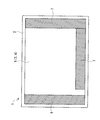
- FIG. 1 is an external view of an information processing apparatus 1 according to the first embodiment.
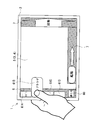
- FIG. 2 is a diagram illustrating the information processing apparatus 1 when the tab 60 and the tabs 61A to 61D are displayed in the object display area 6 of the screen display unit 5.
- FIG. 3 shows a state in which the tab 61 ⁇ / b> B displayed in the object display area 6 of the screen display unit 5 is selected and “Startup” as an example of the control process is displayed in the slide detection area 7 of the screen display unit 5.
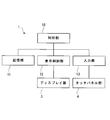
- FIG. FIG. 4 is a functional block diagram of the information processing apparatus 1 according to the first embodiment.
- FIG. 5 is a diagram illustrating a hardware configuration of the information processing apparatus 1 according to the first embodiment.
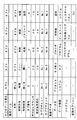
- FIG. 6 is a diagram showing attribute data and registration data of the first tab group (tab group 1).
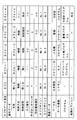
- FIG. 7 is a diagram showing attribute data and registration data of the second tab group in the lower hierarchy of the first tab group.
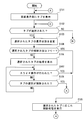
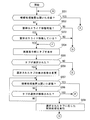
- FIG. 8 is a flowchart of object selection confirmation processing according to the first embodiment.
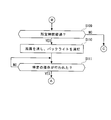
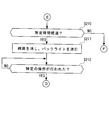
- FIG. 9 is a flowchart of object selection confirmation processing according to the first embodiment.
- FIG. 10 is a diagram illustrating a state where the display state of the selected tab 61 is changed.
- FIG. 11 is a diagram illustrating a state where the display state of the selected tab 61 has been changed.
- FIG. 12 is a diagram showing the screen display unit 5 when 61E-61H is newly displayed in the object display area 6.
- FIG. 13 is a diagram illustrating a state in which a slide operation is performed on [START] displayed in the slide detection area 7 of the screen display unit 5.
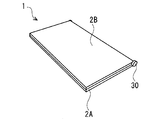
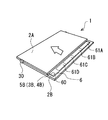
- FIG. 14 is an external view of the information processing apparatus 1 according to the second embodiment.
- FIG. 15A is an external view of the information processing apparatus 1 in a state where the information processing apparatus 1 according to the second embodiment is closed.
- FIG. 15B is an external view of the information processing apparatus 1 in a state where the information processing apparatus 1 according to the second embodiment is closed.
- FIG. 16 is a functional block diagram of the information processing apparatus 1 according to the second embodiment.
- FIG. 17 is a diagram illustrating a hardware configuration of the information processing apparatus 1 according to the second embodiment.
- FIG. 18 is a flowchart of object selection confirmation processing according to the second embodiment.
- FIG. 19 is a flowchart of object selection confirmation processing according to the second embodiment.
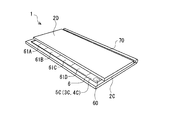
- FIG. 20 is an external view of the information processing apparatus 1 in a state where the information processing apparatus 1 according to the second embodiment is closed.
- FIG. 21A is an external view of the information processing apparatus 1 in a state where the information processing apparatus 1 according to the third embodiment is closed.
- FIG. 21B is an external view of the information processing apparatus 1 in a state where the information processing apparatus 1 according to the third embodiment is opened.
- FIG. 22A is an external view of the information processing apparatus 1 before the housing 2D is slid in a state where the information processing apparatus 1 is closed.
- FIG. 22B is an external view of the information processing apparatus 1 after the housing 2D is slid in a state where the information processing apparatus 1 is closed.
- FIG. 22A is an external view of the information processing apparatus 1 before the housing 2D is slid in a state where the information processing apparatus 1 is closed.
- FIG. 22B is an external view of the information processing apparatus 1 after the housing
- FIG. 23 is a flowchart of object selection confirmation processing according to the third embodiment.
- FIG. 24 is a flowchart of object selection confirmation processing according to the third embodiment.
- FIG. 25 is an external view of the information processing apparatus 1 when the object display area 6 is arranged on the screen display unit 5D.
- FIG. 1 is an external view of an information processing apparatus 1 according to the first embodiment.
- the information processing apparatus 1 according to the first embodiment is an apparatus in which a processing unit is provided in a portable case and a screen display unit is installed on one surface of the case, and is also referred to as a portable information processing device.
- the information processing apparatus 1 is, for example, an electronic notebook, a PDA (Personal Digital Assistance), a smartphone, a tablet device, a mobile phone, an electronic book, or the like.
- PDA Personal Digital Assistance
- the information processing apparatus 1 is provided with a screen display unit 5 in which a display unit 3 and a touch panel unit 4 are integrated on one surface of a housing 2. Since the screen display unit 5 includes the display unit 3 and the touch panel unit 4, the reference numerals of the display unit 3 and the touch panel unit 4 are shown in parentheses in FIG. Objects, images, characters, and the like are displayed on the screen of the display unit 3. The object is, for example, an icon, a tab, a button, a menu, or the like. In the touch panel unit 4, a contact operation on the surface of the touch panel unit 4 is performed with a finger or a pen, and the contact operation on the surface of the touch panel unit 4 is detected.
- an object display area 6 is arranged at the left end of the screen display section 5.
- slide detection areas 7 are arranged at the right end and the lower end of the screen display unit 5.
- an object is displayed and an object is selected (designated) by a touch operation (pressing operation) on the screen display unit 5. That is, an object displayed on the screen display unit 5 is selected by touching an object displayed on the screen display unit 5 with a finger or a pen.
- the operator can select an object displayed in the object display area 6 of the screen display unit 5 with the finger of the left hand while holding the information processing apparatus 1 with the left hand.
- the operator may select an object displayed in the object display area 6 of the screen display unit 5 with the finger of the right hand.
- a control process corresponding to the selected object is displayed.
- the selected object is an object for starting the program
- [Start] is displayed in the slide detection area 7 as a control process corresponding to the selected object.
- predetermined information related to the control process corresponding to the selected object is displayed in the slide detection area 7.
- the predetermined information related to the control process is information that can identify the control process, and includes, for example, a control process name, an identification number, a mark, a sign, and the like.
- a slide operation is performed, so that the control process corresponding to the selected object is confirmed.
- the slide operation refers to an operation of moving a finger or a pen or the like while the finger or pen or the like is in contact with the screen display unit 5.
- a slide operation is performed on the slide detection area 7 while [Start] is displayed in the slide detection area 7, so that the program start processing is performed. Determine.
- the information processing apparatus 1 activates the program.
- a control operation corresponding to a selected object is confirmed by performing a slide operation in the slide detection area 7.
- the present invention is not limited to this, and a control process corresponding to the selected object may be confirmed by performing a contact operation in the slide detection area 7.
- a physical button, switch, or the like may be provided on the housing 2, and the control process corresponding to the selected object may be determined by pressing the button, switch, or the like.
- FIG. 2 is a diagram showing the information processing apparatus 1 when the tab 60 and the tabs 61A-61D are displayed in the object display area 6 of the screen display unit 5.
- FIG. 2 in the object display area 6 of the screen display unit 5, tabs 60 and tabs 61A-61D are displayed.
- a tab which is an example of an object
- the object display area 6 of the screen display unit 5 will be described. Also good.
- the tabs 61A-61D are collectively referred to, or when any one or more of the tabs 61A-61D are indicated, they are referred to as tabs 61.
- FIG. 3 shows a state in which the tab 61 ⁇ / b> B displayed in the object display area 6 of the screen display unit 5 is selected and “Startup” as an example of the control process is displayed in the slide detection area 7 of the screen display unit 5.
- the tab 61 displayed in the object display area 6 defines attribute data and registration data. Based on the attribute data defined in the tab 61, predetermined information regarding control processing corresponding to the selected tab 61 is stored. It is displayed in the slide detection area 7.
- the attribute data defined in the tab 61 is data defining the name and design of the tab 61, a control process corresponding to the selected tab 61, and the like.
- the registration data defined in the tab 61 is data defining the name of the tab 61 when the tab 61 is selected, the name and type of the control process executed when the tab 61 is selected.
- the control processing includes, for example, program and application startup processing, database and system setting browsing processing and setting processing, password input processing, fingerprint authentication processing, information display processing, screen switching processing, and the like.
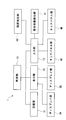
- FIG. 4 is a functional block diagram of the information processing apparatus 1 according to the first embodiment.
- the information processing apparatus 1 includes a display unit 3, a touch panel unit 4, a control unit 10, a storage unit 11, a display unit 12, and an input unit 13.
- the control unit 10 sends a command to the display unit 12 based on the data stored in the storage unit 11 so that objects, images, characters, and the like are displayed on the screen of the display unit 3.
- the control unit 10 acquires information related to the contact operation from the touch panel unit 4 via the input unit 13.
- the control unit 10 refers to the information about the object stored in the storage unit 11 and performs control processing corresponding to the selected object on the display unit 3. Display on the screen.
- the control unit 10 executes a control process corresponding to the selected object based on data stored in the storage unit 11.
- the storage unit 11 stores object data displayed on the screen of the display unit 3 and data necessary for the control unit 10 to perform processing.
- the display unit 12 outputs data such as an object, an image, and a character to the display unit 3 based on a command from the control unit 10.
- the display unit 3 displays objects, images, characters, and the like on the screen in accordance with data such as objects, images, and characters output from the display unit 12.
- the input unit 13 acquires information on the touch operation from the touch panel unit 4 when the touch operation is performed on the touch panel unit 4. Further, the input unit 13 passes information related to the contact operation acquired from the touch panel unit 4 to the control unit 10.
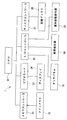
- FIG. 5 is a diagram illustrating a hardware configuration of the information processing apparatus 1 according to the first embodiment.
- the information processing apparatus 1 includes a CPU (Central Processing Unit) 20, a memory controller 21, a main memory 22, a video card 23, a display 24, an I / O controller 25, a touch panel 26, a disk controller 27, and a storage.
- a disk device 28 is provided.
- the CPU 20 reads, interprets and executes the program and data on the main memory 22 via the memory controller 21.
- the execution result is stored in the main memory 22 via the memory controller 21 and displayed on the display 24 via the video card 23. Further, the CPU 20 recognizes a touch operation on the touch panel 26 via the I / O controller 25. Further, the CPU 20 causes the program and data to be read from the storage disk 28 to the main memory 22 via the disk controller 27 and writes the execution result and data on the main memory 22 to the storage disk 28 as necessary. Sloppy.
- the memory controller 21 controls the main memory 22 and writes necessary data to the storage disk 28 via the CPU 20 and the disk controller 27.
- the main memory 22 stores and outputs programs and data according to the control of the memory controller 21.
- the main memory 22 is, for example, a volatile RAM (Random Access Memory), a nonvolatile ROM (Read Only Memory), or the like.
- the video card 23 outputs image data to the display 24 in response to an instruction from the CPU 20.
- the display 24 receives the output of the image data from the video card 23 and displays an image.
- the display 24 is, for example, a liquid crystal display device, a plasma display panel, an electroluminescence panel, or the like.
- the I / O controller 25 notifies the CPU 20 of the touch operation on the touch panel 26 as an input signal.
- the touch panel 26 notifies the I / O controller 25 as an input signal of a contact operation on the surface.
- the touch panel 26 may be any type of panel as long as it can be operated with a finger, a pen, or the like.
- the touch panel 26 may be an optical type, resistive film type, capacitance type, ultrasonic type panel or the like. Also good.
- the disk controller 27 outputs data to the storage disk device 28 and reads data from the storage disk 28 in accordance with instructions from the CPU 20.
- the storage disk 28 stores data and outputs data to the disk controller 27 according to the control of the disk controller 27.
- the storage disk device 28 is, for example, a magnetic disk device or an optical disk device.
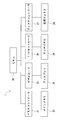
- FIG. 6 is a diagram showing attribute data and registration data of the first tab group (tab group 1).
- the first tab group includes attribute data and registration data defined in the tab 60 and attribute data and registration data defined in the tabs 61A to 61D as one group.
- the tab group that is initially displayed in the object display area 6 of the screen display unit 5 after the information processing apparatus 1 is activated is the first tab group.
- the attribute data and registration data of [Tab 0] shown in FIG. 6 are attribute data and registration data of the special tab of the system reservation.
- information regarding the end of the activated program is defined.
- the attribute data and registration data of [Tab 1] [Tab 2] [Tab 3] [Tab 4] shown in FIG. 6 are used for browsing a startup tab for starting a program, an application, etc., a database, a system setting, and the like. This is attribute data such as a browsing tab and registration data.
- names of tabs 60 and 61A-61D displayed in the object display area 6 of the screen display unit 5 are defined.
- [Close] in the “Name” field of the attribute data in [Tab 0] shown in FIG. 6 ⁇ Close> is displayed in the object display area 6 of the screen display unit 5 as shown in FIG.
- the indicated tab 60 is displayed.
- [Tab 1] in the “Name” field of the attribute data in [Tab 1] shown in FIG. 6 ⁇ Tab 1> is displayed in the object display area 6 of the screen display unit 5 as shown in FIG.
- a tab 60 on which> is displayed is displayed.
- the names of the tabs 60 and 61A-61D displayed in the object display area 6 of the screen display unit 5 can be arbitrarily changed by the operator of the information processing apparatus 1.
- “Restrict” is set in the “Control method” field of the attribute data in [Tab 2].
- the [activation] set in the “control processing” field of the attribute data in [tab 2] shown in FIG. Is displayed in the slide detection area 7 of the screen display unit 5 (see FIG. 3).
- [Tab group 2] is set in the "data name” field of the registration data of [tab 1] shown in FIG.
- [Tab] is set in the “data type” field of the registered data in [Tab 1] shown in FIG.
- the tab group (first tab group) to which the tab 61B ([tab 1]) belongs and the tab group (second tab group) specified by [tab group 2] are related to each other. become.
- the first tab group becomes an upper layer tab group
- the second tab group specified by [tab group 2] becomes a lower layer tab group.
- the first tab group is a tab group that is first displayed in the object display area 6 of the screen display unit 5 after the information processing apparatus 1 is activated.
- the first tab group is a tab group in the highest hierarchy.
- “tab” is set in the “data type” field of the registered data
- the name of the tab group in the lower hierarchy ([tab group 2] in FIG. 6) is set in the “data name” field of the registered data.
- the tab 61 displayed in the object display area 6 has a hierarchical structure. Since the tab 61 displayed in the object display area 6 has a hierarchical structure, when the tab 61 displayed in the object display area 6 is selected, a new tab 61 is displayed in the object display area 6. . The operator of the information processing apparatus 1 can select a new tab 61 displayed in the object display area 6.
- each field of “tab number” of the attribute data shown in FIG. 6 a unique number for identifying the tab 60 and the tabs 61A-61D is defined.
- Each field of “call counter” of the attribute data shown in FIG. 6 stores the number of times the tabs 61A-61D displayed in the object display area 6 are selected.
- each field of “fixed priority” of the attribute data shown in FIG. 6 the priority of tabs 61A-61D is defined.
- the priority value set in each field of the “fixed priority” of the attribute data can be arbitrarily changed. For example, when a contact operation is performed on the tabs 61B-61D displayed in the object display area 6, the tab 61B having the highest priority among the tabs 61B-61D on which the contact operation has been performed is selected.
- the tabs 61 may be displayed in descending order of priority from the upper side to the lower side of the object display area 6 of the screen display unit 5. Alternatively, the tabs 61 may be displayed in descending order of priority from the lower side to the upper side of the object display area 6 of the screen display unit 5.
- Each field of “Tab Design 1” of the attribute data shown in FIG. 6 specifies a design for displaying the tab 60 and the tabs 61A-61D at the normal time (before selection) on the screen display unit 5. Yes.
- the number of the file storing the design data of the normal tabs 60 and 61A-61D is set in each field of “tab design 1” of the attribute data.
- the normal design data of the tabs 60 and 61A-61D may be directly registered in each field of the “tab design 1” of the attribute data.
- a design when the selected tab 60 and tabs 61A-61D are displayed on the screen display unit 5 is designated.
- the number of the file storing the design data of the selected tabs 60 and 61A-61D is set in each field of the “tab design 2” of the attribute data.
- the design data of the selected tabs 60 and 61A-61D may be directly registered in each field of the “tab design 2” of the attribute data.
- the operator can recognize that the tab 61 has been selected because the design of the normal tab 61 and the design of the selected tab 61 are different.
- the following (1) to (4) may be adopted as an example in which the design of the normal tab 61 and the design of the selected tab 61 are different.
- the display size of the tab 61 at the normal time is different from the display size of the tab 61 after selection.
- the display size of the tab 61 after selection is made larger than the display size of the tab 61 at the normal time.
- the tab 61 color at the normal time is different from the color of the tab 61 after selection.
- the color of the tab 61 after selection is reversed with respect to the color of the tab 61 at the normal time.
- the display of the tab 61 at the normal time is not blinked, and the display of the tab 61 after selection is blinked.
- the normal tab 61 is displayed on the screen display unit 5 in a stationary state, and is displayed on the screen display unit 5 while the selected tab 61 is moving by animation.
- the normal tab 61 and the selected tab 61 may be displayed on the screen display unit 5 by any one of the above (1) to (4) or a combination of the above (1) to (4). Further, the tab 61 that has not been selected may be made inconspicuous, and the tab 61 after selection and the tab 61 that has not been selected may be displayed on the screen display unit 5.
- [Default] which is the name of the first tab group (tabs 60, 61A-61D)
- tabs 60, 61A-61D is set in the “data name” field of the registration data of [tab 0] shown in FIG.
- the names of the selected tabs 61A-61D are set in the fields of “data name” of the registered data of [tab 1] [tab 2] [tab 3] [tab 4] shown in FIG.
- a tab 61B in which ⁇ Browser> is displayed in the object display area 6 of the screen display unit 5 (FIG. 3). reference).
- the type of control processing to be executed is defined in each field of “data type” of the registration data shown in FIG.
- a tab 60 displayed in the object display area 6 of the screen display unit 5 is one of the special tabs for system reservation. Therefore, [System] is set in the “data type” field of the registration data of [Tab 0] shown in FIG.
- FIG. 7 is a diagram showing attribute data and registration data of the second tab group in the lower hierarchy of the first tab group.
- data and registration data records have been created.
- [work relation] that is the name of the second tab group is set.
- FIG. 8 and FIG. 9 illustrate the object selection confirmation process according to the first embodiment.
- the CPU 20 of the information processing apparatus 1 executes an object selection confirmation process by a computer program that is executed in the main memory 22 so as to be executable.
- the display unit 12 initializes the screen of the screen display unit 5, and displays the tabs 60 and 61A-61D in the object display area 6 of the screen display unit 5. Further, the display unit 12 may display the tabs 60 and 61A-61D in the object display area 6 of the screen display unit 5 without initializing the screen of the screen display unit 5 as necessary.
- FIG. 8 and FIG. 9 after the information processing apparatus 1 is activated, an example in which tabs 60 and 61A-61D are displayed in the object display area 6 of the screen display unit 5 as shown in FIG. It explains using.
- the control unit 10 determines whether or not the tab 61 displayed in the object display area 6 of the screen display unit 5 has been selected. That is, the control unit 10 determines whether or not a touch operation has been performed on the tab 61 displayed in the object display area 6 of the screen display unit 5.
- the process proceeds to S103 in FIG.
- the process proceeds to S109 in FIG. The processing after S109 in FIG. 9 will be described later.
- the display unit 12 changes the display state of the selected tab 61.
- the control unit 10 performs the plurality of tabs 61 on which the contact operation has been performed according to a predetermined standard. Is selected as the selected tab 61. The following can be illustrated as a determination method according to a predetermined standard.
- the control unit 10 refers to the value of each field of “fixed priority” of the attribute data, and determines the tab 61 in which the largest value is set as the selected tab 61. When there is no difference in the value of each field of the “fixed priority” of the attribute data, the control unit 10 refers to the value of each field of the “call counter” of the attribute data and selects the tab 61 having the largest value. Tab 61 is determined. That is, the control unit 10 determines the tab 61 with the largest number of selected times as the selected tab 61.
- the control unit 10 When there is no difference in the value of each field of the “call counter” of the attribute data, the control unit 10 refers to the value of each field of the “tab number” of the attribute data and selects the tab 61 in which the smallest number is set. The selected tab 61 is determined. However, the control unit 10 does not refer to the value of each field of “fixed priority” of the attribute data, and sets the value of each field of “call counter” of the attribute data and each field of “tab number” of the attribute data. The tab 61 may be determined with reference to the value. Further, the control unit 10 does not refer to the value of each field of the “fixed priority” of the attribute data and the value of each field of the “call counter” of the attribute data, and sets each field of the “tab number” of the attribute data. The tab 61 may be determined with reference to the value.
- FIG. 10 and 11 are diagrams showing the screen display unit 5 when the display state of the selected tab 61 is changed.
- FIG. 10 shows a state where the tab 61B is selected and the display state of the tab 61B is changed.
- the display state of the tab 61B is changed by making the horizontal width of the tab 61B larger than the horizontal width of the tabs 61A, 61C and 61D.
- “Browser” is set in the “data name” field of the registered data of the selected tab 61B ([Tab 2]). Therefore, as shown in FIG. 10, the name of the selected tab 61B is changed from [Tab 2] to [Browser].
- FIG. 11 shows a state in which the tab 61A is selected and the display state of the tab 61A is changed.
- the display state of the tab 61A is changed by making the horizontal width of the tab 61A larger than the horizontal width of the tabs 61B, 61C and 61D.
- “tab group 2” is set in the “data name” field of the registration data of the selected tab 61A ([tab 1]).
- information ([tab group 2] in FIG. 6) for specifying a lower-level tab group (second tab group) is set in the “data name” field of the registered data, as shown in FIG.
- the name of the selected tab 61A is changed from [Tab 2] to [Work relation] which is the name of the second tab group.
- the control unit 10 determines whether “free” is set in the “control method” field of the attribute data of the selected tab 61. If “free” is set in the “control method” field of the attribute data of the selected tab 61 (S104 of FIG. 8: YES), the process proceeds to S105 of FIG. On the other hand, when “free” is not set in the “control method” field of the attribute data of the selected tab 61 (S104 of FIG. 8: NO), the process proceeds to S106 of FIG.
- the control unit 10 executes a control process corresponding to the selected tab 61 based on the attribute data and registration data of the selected tab 61.
- the “data type” of the registered data of the selected tab 61 is “tab”
- the tab 61E-61H is newly added to the object display area 6 in place of the tabs 61A-61D as shown in FIG. Is displayed.
- tabs 61E-61H may be newly displayed in the object display area 6.
- the display unit 12 displays the name set in the “control processing” of the attribute data of the selected tab 61 in the slide detection area 7 of the screen display unit 5. For example, as shown in FIG. 3, “Startup” set in the “control processing” of the attribute data of the selected tab 61 is displayed in the slide detection area 7 of the screen display unit 5.
- the control unit 10 determines whether or not a slide operation has been performed in the slide detection area 7 of the screen display unit 5.
- a slide operation is performed in the slide detection area 7 of the screen display unit 5 (S107 in FIG. 8: YES)
- the process proceeds to S105 in FIG. FIG. 13 shows a state in which a slide operation has been performed on [Startup] displayed in the slide detection area 7 of the screen display unit 5.
- the control process corresponding to the selected tab 61 is confirmed. That is, the control process executed according to the selected tab 61 is determined.
- the process proceeds to S108 in FIG.
- the control unit 10 determines whether or not the selection of the tab 61 is released. For example, when the contact operation is performed on any of the tabs 61A, 61C, or 61D in a state where the tab 61B is selected, the control unit 10 may determine that the selection of the tab 61 has been released. . For example, when the finger that has been in contact with the tab 61B is released, the control unit 10 may determine that the selection of the tab 61 has been released. When the selection of the tab 61 is canceled (S108 in FIG. 8: YES), the process proceeds to S101 in FIG. On the other hand, when the selection of the tab 61 is not released (S108 in FIG. 8: NO), the process proceeds to S107 in FIG.
- the control unit 10 determines whether or not the no-operation state for the information processing apparatus 1 has passed for a predetermined period. An arbitrary value can be set for the predetermined time.
- the process proceeds to S110 in FIG.
- the process proceeds to S102 in FIG.
- the display unit 12 turns off the screen displayed on the screen display unit 5 and turns off the backlight of the screen display unit 5.
- the display unit 12 holds the display of the screen display unit 5.
- the control unit 10 determines whether or not a specific operation has been performed.
- the specific operation is, for example, some operation on the information processing apparatus 1 such as a contact operation on the screen display unit 5 or a pressing operation of a start button provided on the housing 2.
- S111 in FIG. 9: YES the process proceeds to S101 in FIG.
- S111 in FIG. 9: NO the process proceeds to S111 in FIG. That is, the control unit 10 repeats the process of S111 in FIG. 9 until a specific operation is performed.
- the object display area 6 may be arranged at the right end of the screen display unit 5.
- the slide detection area 7 may be arranged at the left end and the lower end of the screen display unit 5.
- the control process corresponding to the tab 61 is performed on the screen display unit 5.
- the control process corresponding to the selected tab 61 is confirmed (instructed), and the control unit 10 Control processing corresponding to the selected tab 61 is executed.
- the contact operation is performed according to a predetermined criterion.
- One of the plurality of tabs 61 is determined as the selected tab 61. Therefore, by determining one of the plurality of tabs 61 on which the touch operation has been performed as the selected tab 61, the plurality of tabs 61 displayed in the object display area 6 of the screen display unit 5 are selected. Can be suppressed.
- FIG. 14 is an external view of the information processing apparatus 1 according to the second embodiment.
- the information processing apparatus 1 according to the second embodiment is a device that includes a processing unit in a portable case, a screen display unit is installed on the inner surface of the case, and can be folded at the center of the case. Also called a portable information processing device.
- the information processing apparatus 1 is, for example, an electronic notebook, a PDA (Personal Digital Assistance), a smartphone, a tablet device, a mobile phone, an electronic book, or the like.
- PDA Personal Digital Assistance
- a screen display unit 5A in which a display unit 3A and a touch panel unit 4A are integrated is provided on the inner surface of the housing 2A.
- a screen display unit 5B in which the display unit 3B and the touch panel unit 4B are integrated is provided. Since the screen display unit 5A includes the display unit 3A and the touch panel unit 4A, the reference numerals of the display unit 3A and the touch panel unit 4A are shown in parentheses in FIG. Further, since the screen display unit 5B includes the display unit 3B and the touch panel unit 4B, the reference numerals of the display unit 3B and the touch panel unit 4B are shown in parentheses in FIG.
- the information processing apparatus 1 connects the housing 2A and the housing 2B, and can rotate the housing 2A and the housing 2B around the connection portion between the housing 2A and the housing 2B. It has the folding part 30 made into.
- the folding unit 30 is an example of a coupling mechanism.
- the operator closes the information processing apparatus 1 by rotating one or both of the housing 2A and the housing 2B and performing an operation of overlapping the inner surface of the housing 2A and the inner surface of the housing 2A. Is possible.
- an operation of rotating one or both of the housing 2A and the housing 2B and overlapping the inner surface of the housing 2A and the inner surface of the housing 2A is expressed as an operation of closing the information processing apparatus 1. To do.
- the state in which the inner surface of the housing 2A and the inner surface of the housing 2A are overlapped is referred to as a state in which the information processing apparatus 1 is closed.
- the operator rotates one or both of the housing 2A and the housing 2B from the closed state of the information processing apparatus 1 and performs an operation of separating the inner surface of the housing 2A from the inner surface of the housing 2B.
- the information processing apparatus 1 can be opened.
- an operation of rotating one or both of the housing 2A and the housing 2B from the closed state of the information processing apparatus 1 and pulling the inner surface of the housing 2A and the inner surface of the housing 2B apart is performed. This is referred to as an operation for opening the processing apparatus 1.
- a state where the inner side surface of the housing 2A and the inner side surface of the housing 2B are separated is referred to as a state where the information processing apparatus 1 is opened.
- Objects, images, characters, etc. are displayed on the screens of the display units 3A and 3B.
- the objects are, for example, tabs, tags, icons, buttons, menus, and the like.
- the image or characters displayed on the screens of the display units 3A and 3B are contacted with a finger or a pen.
- the object display area 6 is arranged at the left end of the screen display unit 5A. .
- the screen display unit 5A is located on the left and the screen display unit 5B is located on the right as viewed from the operator, the lower end of the screen display unit 5A and the right end of the screen display unit 5B are displayed.
- the slide detection area 7 is arranged at the bottom and bottom ends.
- a tab 60 and tabs 61A-61D are displayed in the object display area 6 of the screen display section 5A.
- the object display area 6, the slide detection area 7, the tab 60, and the tabs 61A-61D are the same as those in the first embodiment, and the description thereof is omitted.
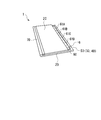
- 15A and 15B are external views of the information processing apparatus 1 in a state where the information processing apparatus 1 according to the second embodiment is closed.
- the inner surface of the housing 2A and the inner surface of the housing 2B are overlapped, and the information processing apparatus 1 is in a closed state.
- the inner surface of the housing 2A and the inner surface of the housing 2B have the same size, and the screen display unit 5A and the screen display unit 5B have the same size. Therefore, when the information processing apparatus 1 is closed, the object display area 6 of the screen display unit 5A is covered with the housing 2B and the screen display unit 5B, and tabs displayed in the object display area 6 of the screen display unit 5A. 61A-61D cannot be selected.
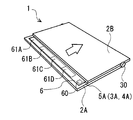
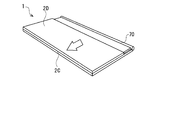
- the housing 2B is slid in a state where the information processing apparatus 1 is closed, and a part of the screen display unit 5A is exposed.
- the screen display unit can be obtained by sliding (translating) the housing 2B in the direction in which the folding unit 30 is disposed in a state where the inner surface of the housing 2A and the inner surface of the housing 2B are overlapped.
- the object display area 6 of 5A is exposed. For example, as shown in FIG.
- the folding unit 30 is placed in a state where the housing 2A is on the lower side, the housing 2B is on the upper side, and the inner surface of the housing 2A and the inner surface of the housing 2B are overlapped.
- the object display area 6 of the screen display unit 5A may be exposed by sliding (translating) the housing 2B in the arranged direction.
- the housing 2A is on the lower side, the housing 2B is on the upper side, and the inner surface of the housing 2A and the inner surface of the housing 2B are overlapped, opposite to the direction in which the folding unit 30 is disposed.
- the object display area 6 of the screen display unit 5A may be exposed by sliding the housing 2A in the direction (parallel movement).
- the slide mechanism may be, for example, a rail part and a slider that moves the rail part.
- a rail portion may be provided on the inner surface of the housing 2A, and a slider may be provided on the inner surface of the housing 2B. Further, a slider may be provided on the inner surface of the housing 2A, and a rail portion may be provided on the inner surface of the housing 2B.
- the operator can display the tabs 61A-61D displayed in the object display area 6 of the screen display unit 5A.
- Contact operation is possible.
- the operator selects the tabs 61A-61D displayed in the object display area 6 of the screen display unit 5A with the finger of the left hand while holding the information processing apparatus 1 with the left hand while the information processing apparatus 1 is closed. Is possible.
- the operator may select the tabs 61A-61D displayed in the object display area 6 of the screen display unit 5A with the finger of the right hand.
- the operator may select the tabs 61A-61D displayed in the object display area 6 of the screen display unit 5A while the information processing apparatus 1 is open.
- the information processing apparatus 1 may be configured not to slide the casing 2A and the casing 2B.
- the tabs 61A-61D displayed in the object display area 6 of the screen display unit 5A are opened by opening the information processing apparatus 1. Selection becomes possible.
- FIG. 16 is a functional block diagram of the information processing apparatus 1 according to the second embodiment.
- the information processing apparatus 1 includes display units 3A and 3B, touch panel units 4A and 4B, a control unit 10, a storage unit 11, a display unit 12, an input unit 13, an open / close detection unit 40, and a case movement detection. A portion 41 is provided.
- the information processing apparatus 1 according to the second embodiment includes display sections 3A and 3B instead of the display section 3, and replaces the touch panel section 4 with the touch panel section 4A and 4B, and further includes an open / close detection unit 40 and a casing movement detection unit 41. Therefore, the information processing apparatus 1 according to the second embodiment will be described with respect to differences from the information processing apparatus 1 according to the first embodiment, and the description of points that are common to the information processing apparatus 1 according to the first embodiment will be omitted.
- Objects, images, characters, etc. are displayed on the screens of the display units 3A and 3B.
- touch panel units 4A and 4B a touch operation on the surfaces of touch panel units 4A and 4B is performed with a finger or a pen, and the touch operation on the surfaces of touch panel units 4A and 4B is detected.
- the opening / closing detection unit 40 detects opening / closing of the information processing apparatus 1 and inputs a signal related to opening / closing of the information processing apparatus 1 to the control unit 10 via the input unit 13.
- the housing movement detection unit 41 detects the sliding movement of the housing 2B and inputs a signal related to the sliding movement of the housing 2B to the control unit 10 via the input unit 13.
- FIG. 17 is a diagram illustrating a hardware configuration of the information processing apparatus 1 according to the second embodiment.
- the information processing apparatus 1 includes a CPU 20, a memory controller 21, a main memory 22, a video card 23, a display 24, an I / O controller 25, a touch panel 26, a disk controller 27, a storage disk device 28, and an open / close detection. And a case movement detector 51.
- the information processing apparatus 1 according to the second embodiment is different from the information processing apparatus 1 according to the first embodiment in that it further includes an open / close detector 50 and a housing movement detector 51. Therefore, the information processing apparatus 1 according to the second embodiment will be described with respect to differences from the information processing apparatus 1 according to the first embodiment, and the description of points that are common to the information processing apparatus 1 according to the first embodiment will be omitted.
- the open / close detector 50 detects opening / closing of the information processing apparatus 1 and inputs a signal related to opening / closing of the information processing apparatus 1 to the CPU 20 via the I / O controller 25.
- the housing movement detector 51 detects the sliding movement of the housing 2 ⁇ / b> B and inputs a signal related to the sliding movement of the housing 2 ⁇ / b> B to the CPU 20 via the I / O controller 25.
- the open / close detector 50 and the housing movement detector 51 are, for example, a magnetic sensor (for example, Hall IC) provided in the housing 2A and a magnet provided in the housing 2B.
- the open / close detector 50 detects opening / closing of the information processing apparatus 1, and the housing movement detector 51 is used for the housing 2A or the housing 2B. Detects slide movement.
- ⁇ Processing flow> 18 and 19 illustrate object selection confirmation processing according to the second embodiment.
- the CPU 20 of the information processing apparatus 1 executes an object selection confirmation process by a computer program that is executed in the main memory 22 so as to be executable.
- the control unit 10 determines whether or not the information processing apparatus 1 is in an open state. If the information processing apparatus 1 is in an open state (S201: YES in FIG. 18), the process proceeds to S101 in FIG.
- the object selection confirmation process according to the second embodiment is the same as the object selection confirmation process according to the first embodiment. Since the object selection confirmation process according to the first embodiment has already been described with reference to FIGS. 8 and 9, the description thereof is omitted here.
- the process proceeds to S202 in FIG.
- the control unit 10 determines whether or not at least one of the housing 2A and the housing 2B is slidable.
- the process proceeds to S203 in FIG.
- the process proceeds to S201 of FIG.
- the control part 10 determines whether at least one of the housing
- the process proceeds to S204 in FIG.
- the process proceeds to S201 in FIG.
- the display unit 12 initializes the screen of the screen display unit 5A, and displays the tabs 60 and 61A-61D in the object display area 6 of the screen display unit 5A. Further, the display unit 12 may display the tabs 60 and 61A-61D in the object display area 6 of the screen display unit 5A without initializing the screen of the screen display unit 5A as necessary.
- the processing flow shown in FIGS. 18 and 19 will be described using an example in which tabs 60 and 61A-61D are displayed in the object display area 6 of the screen display unit 5A as shown in FIG.
- the control unit 10 determines whether or not the tab 61 displayed in the object display area 6 of the screen display unit 5A has been selected. That is, the control unit 10 determines whether or not a touch operation has been performed on the tab 61 displayed in the object display area 6 of the screen display unit 5A.
- the process proceeds to S206 in FIG.
- the tab 61 displayed in the object display area 6 of the screen display unit 5A is not selected (S205: NO in FIG. 18)
- the process proceeds to S210 in FIG. The processes after S210 in FIG. 19 will be described later.
- the display unit 12 changes the display state of the selected tab 61. Since the process of S206 in FIG. 18 is the same as the process of S103 in FIG. 8, detailed description of the process in S206 of FIG. 18 is omitted.
- the control unit 10 determines whether or not the information processing apparatus 1 is in an open state. If the information processing apparatus 1 is in an open state (S207 in FIG. 18: YES), the process proceeds to S208 in FIG. On the other hand, when the information processing apparatus 1 is not in an open state (S207 in FIG. 18: NO), the process proceeds to S209 in FIG.
- control unit 10 executes a control process corresponding to the selected tab 61 based on the attribute data and registration data of the selected tab 61.
- execution of the control process by the control unit 10 ends, the process proceeds to S201 in FIG.
- the control unit 10 determines whether or not the selection of the tab 61 is released. For example, when the contact operation is performed on any of the tabs 61A, 61C, or 61D in a state where the tab 61B is selected, the control unit 10 may determine that the selection of the tab 61 has been released. . For example, when the finger that has been in contact with the tab 61B is released, the control unit 10 may determine that the selection of the tab 61 has been released. When the selection of the tab 61 is canceled (S209 in FIG. 18: YES), the process proceeds to S204 in FIG. On the other hand, if the selection of the tab 61 has not been released (S209 in FIG. 18: NO), the process proceeds to S207 in FIG.
- the control unit 10 determines whether or not a no-operation state for the information processing apparatus 1 has passed for a predetermined period.
- An arbitrary value can be set for the predetermined time.
- the process proceeds to S211 in FIG.
- the process proceeds to S204 in FIG.
- the display unit 12 turns off the screen displayed on the screen display unit 5A and turns off the backlight of the screen display unit 5A.
- the display unit 12 holds the display of the screen display unit 5A.
- the control unit 10 determines whether or not a specific operation has been performed.
- the specific operation is, for example, some operation on the information processing apparatus 1 such as a contact operation on the screen display unit 5A or a pressing operation of a start button provided on the housing 2A.
- S212 in FIG. 19: YES the process proceeds to S201 in FIG.
- S212 of FIG. 19: NO the process proceeds to S212 of FIG. That is, the control unit 10 repeats the process of S212 in FIG. 19 until a specific operation is performed.
- the information processing apparatus 1 may be used such that the screen display unit 5A is positioned on the right and the screen display unit 5B is positioned on the left as viewed from the operator. That is, the information processing apparatus 1 may be used in a state where the information processing apparatus 1 is rotated 180 degrees so that the position of the screen display section 5A and the position of the screen display section 5B shown in FIG.
- the object display area 6 is arranged at the right end of the screen display unit 5A, and the lower end of the screen display unit 5A.
- the slide detection area 7 may be arranged at the left end and the lower end of the screen display unit 5B. The operator selects the tabs 61A-61D displayed on the object display area 6 of the screen display unit 5A with the finger of the right hand while holding the information processing apparatus 1 with the right hand while the information processing apparatus 1 is closed. Is possible.
- the screen display unit 5A is provided on the inner side surface of the housing 2A, and the screen display unit 5B is provided on the inner side surface of the housing 2B.
- the present invention is not limited to this.
- the screen display unit 5A is provided on the inner side surface of the housing 2A, and the screen display unit 5B is not provided on the inner side surface of the housing 2B. Also good.
- the object display area 6 is arranged on the screen display unit 5A in the information processing apparatus 1 according to the second embodiment.
- the present invention is not limited to this, and in the information processing apparatus 1 according to the second embodiment, the object display area 6 may be arranged at the right end of the screen display unit 5B.
- the folding unit 30 is in a state where the inner surface of the housing 2A and the inner surface of the housing 2B are overlapped.
- the object display area 6 of the screen display unit 5B may be exposed by sliding (translating) the housing 2A in the arranged direction.
- the inner surface of the housing 2A and the inner surface of the housing 2B are overlapped, opposite to the direction in which the folding unit 30 is disposed.
- the object display area 6 of the screen display unit 5B may be exposed by sliding the housing 2B in the direction (parallel movement).
- the screen display unit 5B may be provided on the inner side surface of the housing 2B, and the screen display unit 5A may not be provided on the inner side surface of the housing 2A.
- the control unit 10 executes the control process corresponding to the tab 61.
- the operator After the operator selects the tab 61 displayed in the object display area 6 of the screen display unit 5A or 5B and continues to open the information processing apparatus 1, the operator displays the object display area 6 of the screen display unit 5A or 5B.
- the selection of the displayed tab 61 can be cancelled. Therefore, even when the tab 61 displayed in the object display area 6 of the screen display section 5A or 5B is selected due to an erroneous operation, the operator is displayed in the object display area 6 of the screen display section 5A or 5B.
- the selection of the tab 61 can be redone.
- the contact operation is performed according to a predetermined criterion.
- One of the plurality of tabs 61 that has been subjected to is determined as the selected tab 61. Accordingly, by determining one of the plurality of tabs 61 on which the contact operation has been performed as the selected tab 61, the plurality of tabs 61 displayed in the object display area 6 of the screen display unit 5A or 5B are displayed. Selection can be suppressed.
- the information processing apparatus 1 according to the third embodiment is a device that includes a processing unit in a portable case, a screen display unit is installed on the inner surface of the case, and can be folded at the center of the case. Also called a portable information processing device.
- the information processing apparatus 1 is, for example, an electronic notebook, a PDA (Personal Digital Assistance), a smartphone, a tablet device, a mobile phone, an electronic book, or the like.
- the information processing apparatus 1 is provided with a screen display unit 5C in which a display unit 3C and a touch panel unit 4C are integrated on the inner surface of the housing 2C.
- a screen display unit 5D in which the display unit 3D and the touch panel unit 4D are integrated is provided on the inner surface. Since the screen display unit 5C includes the display unit 3C and the touch panel unit 4C, the reference numerals of the display unit 3C and the touch panel unit 4C are shown in parentheses in FIGS. 21A and 21B. Since the screen display unit 5D includes the display unit 3D and the touch panel unit 4D, the reference numerals of the display unit 3D and the touch panel unit 4D are shown in parentheses in FIG. 21B.
- the information processing apparatus 1 connects the housing 2C and the housing 2D, and the housing 2C and the housing 2D are connected to each other with the connection portion between the housing 2C and the housing 2D as an axis. It has the folding part 70 which enables rotation.
- the folding unit 70 is an example of a coupling mechanism. The operator closes the information processing apparatus 1 by rotating one or both of the housing 2C and the housing 2D and performing an operation of overlapping the inner surface of the housing 2C and the inner surface of the housing 2D. Is possible.
- a state in which the inner side surface of the housing 2C and the inner side surface of the housing 2D are overlapped is referred to as a state in which the information processing apparatus 1 is closed.
- the operator rotates one or both of the housing 2C and the housing 2D from the state in which the information processing apparatus 1 is closed, and performs an operation of separating the inner surface of the housing 2C from the inner surface of the housing 2D.
- the information processing apparatus 1 can be opened.
- a state where the inner side surface of the housing 2C and the inner side surface of the housing 2D are separated from each other is referred to as a state where the information processing apparatus 1 is opened.
- Objects, images, characters, etc. are displayed on the screens of the display units 3C and 3D.
- the object is, for example, an icon, a tab, a button, a menu, or the like.
- On the surfaces of the touch panel units 4C and 4D an image or characters displayed on the screens of the display units 3C and 3D are contacted with a finger or a pen.
- the object display area 6 is arranged at the left end of the screen display unit 5C.
- the screen display unit 5C is located on the left and the screen display unit 5D is located on the right as viewed from the operator, the lower end of the screen display unit 5C and the right end of the screen display unit 5D are displayed.
- the slide detection area 7 is arranged at the bottom and bottom ends.
- a tab 60 and tabs 61A-61D are displayed in the object display area 6 of the screen display unit 5C.
- the object display area 6, the slide detection area 7, the tab 60, and the tabs 61A-61D are the same as those in the first embodiment, and the description thereof is omitted.
- the inner surface of the housing 2C and the inner surface of the housing 2D have different sizes, and the screen display unit 5C and the screen display unit 5D have different sizes.
- the lateral width of the housing 2C is larger than the lateral width of the housing 2D
- the lateral width of the screen display unit 5C is larger than the lateral width of the screen display unit 5D. Therefore, when the information processing apparatus 1 is closed, a part of the screen display unit 5C, that is, the object display area 6 of the screen display unit 5C is exposed.
- the tabs 61A-61D displayed in the object display area 6 of the screen display unit 5C can be selected.
- the operator selects the tabs 61A-61D displayed in the object display area 6 of the screen display unit 5C with the finger of the left hand while holding the information processing apparatus 1 with the left hand while the information processing apparatus 1 is closed. Is possible.
- the operator may select the tabs 61A-61D displayed in the object display area 6 of the screen display unit 5C with the finger of the right hand.
- the operator may select the tabs 61A-61D displayed in the object display area 6 of the screen display unit 5C while the information processing apparatus 1 is open.
- FIG. 22A is an external view of the information processing apparatus 1 before the housing 2D is slid in a state where the information processing apparatus 1 is closed.
- the slide mechanism may be, for example, a rail part and a slider that moves the rail part.
- a rail portion may be provided on the inner surface of the housing 2C, and a slider may be provided on the inner surface of the housing 2D. Further, a slider may be provided on the inner surface of the housing 2C, and a rail portion may be provided on the inner surface of the housing 2D.
- the functional configuration and hardware configuration of the information processing apparatus 1 according to the third embodiment are the same as the functional configuration and hardware configuration of the information processing apparatus 1 according to the second embodiment.
- ⁇ Processing flow> 23 and 24 exemplify object selection confirmation processing according to the third embodiment.
- the CPU 20 of the information processing apparatus 1 executes an object selection confirmation process by a computer program that is executed in the main memory 22 so as to be executable.
- the control unit 10 determines whether or not the information processing apparatus 1 is in an open state.
- the process proceeds to S101 in FIG.
- the object selection confirmation process executed by the information processing apparatus 1 according to the third embodiment is the same as the object selection confirmation process executed by the information processing apparatus 1 according to the first embodiment. Processing is performed. Since the object selection confirmation process executed by the information processing apparatus 1 according to the first embodiment has already been described with reference to FIGS. 8 and 9, the description thereof is omitted here.
- the process proceeds to S302 in FIG.
- the control unit 10 determines whether or not the housing 2C is slidable.
- the housing 2C is slidable (S302 in FIG. 23: YES)
- the process proceeds to S303 in FIG.
- the housing 2C is not slidable (S302 of FIG. 23: NO)
- the process proceeds to S304 of FIG.
- the control part 10 determines whether the housing
- the process proceeds to S304 in FIG.
- the display unit 12 initializes the screen of the screen display unit 5C, and displays the tabs 60 and 61A-61D in the object display area 6 of the screen display unit 5C. Further, the display unit 12 may display the tabs 60 and 61A-61D in the object display area 6 of the screen display unit 5 without initializing the screen of the screen display unit 5C as necessary.
- the processing flow shown in FIGS. 23 and 24 will be described using an example in which tabs 60 and 61A-61D are displayed in the object display area 6 of the screen display unit 5C as shown in FIG. 21A.
- the control unit 10 determines whether or not the tab 61 displayed in the object display area 6 of the screen display unit 5C has been selected. That is, the control unit 10 determines whether or not a touch operation has been performed on the tab 61 displayed in the object display area 6 of the screen display unit 5C.
- the process proceeds to S306 in FIG.
- the process proceeds to S310 in FIG. The processes after S310 in FIG. 24 will be described later.
- the display unit 12 changes the display state of the selected tab 61. Since the process of S306 in FIG. 23 is the same as the process of S103 in FIG. 8, detailed description of the process in S306 of FIG. 23 is omitted.
- the control unit 10 determines whether or not the information processing apparatus 1 is in an open state. If the information processing apparatus 1 is in an open state (S307 in FIG. 23: YES), the process proceeds to S308 in FIG. On the other hand, when the information processing apparatus 1 is not in the open state (S307 in FIG. 23: NO), the process proceeds to S309 in FIG.
- control unit 10 executes a control process corresponding to the selected tab 61 based on the attribute data and registration data of the selected tab 61.
- the process proceeds to S301 in FIG.
- the control unit 10 determines whether or not the selection of the tab 61 is released. For example, when the contact operation is performed on any of the tabs 61A, 61C, or 61D in a state where the tab 61B is selected, the control unit 10 may determine that the selection of the tab 61 has been released. . Further, for example, the display unit 12 displays a deselection mark in the object display area 6 of the screen display unit 5C. And when contact operation is performed with respect to the selection cancellation
- the control unit 10 determines whether or not a predetermined period has elapsed for the no-operation state for the information processing apparatus 1.
- An arbitrary value can be set for the predetermined time.
- the process proceeds to S311 in FIG.
- the process proceeds to S304 of FIG.
- the display unit 12 turns off the screen displayed on the screen display unit 5C and turns off the backlight of the screen display unit 5C.
- the display unit 12 holds the display of the screen display unit 5C.
- the control unit 10 determines whether or not a specific operation has been performed.
- the specific operation is, for example, some operation on the information processing apparatus 1 such as a contact operation on the screen display unit 5C or a pressing operation of a start button provided on the housing 2C. If a specific operation has been performed (S312 in FIG. 24: YES), the process proceeds to S301 in FIG. On the other hand, when a specific operation has not been performed (S312 in FIG. 24: NO), the process proceeds to S312 in FIG. That is, the control unit 10 repeats the process of S312 in FIG. 24 until a specific operation is performed.
- the information processing apparatus 1 may be used so that the screen display unit 5A is positioned on the right and the screen display unit 5B is positioned on the left as viewed from the operator. That is, the information processing apparatus 1 may be used in a state where the information processing apparatus 1 is rotated 180 degrees so that the position of the screen display unit 5C and the position of the screen display unit 5D illustrated in FIG.
- the object display area 6 is arranged at the right end of the screen display unit 5C, and the lower end of the screen display unit 5D.
- the slide detection area 7 may be arranged at the left end and the lower end of the screen display unit 5D.
- the operator selects tabs 61A-61D displayed in the object display area 6 of the screen display unit 5C with the finger of the right hand while holding the information processing apparatus 1 with the right hand while the information processing apparatus 1 is closed. Is possible.
- the screen display unit 5C is provided on the inner side surface of the housing 2C, and the screen display unit 5D is provided on the inner side surface of the housing 2D.
- the present invention is not limited to this.
- the screen display unit 5C is provided on the inner surface of the housing 2C, and the screen display unit 5D is not provided on the inner surface of the housing 2D. Also good.
- FIG. 25 is an external view of the information processing apparatus 1 when the object display area 6 is arranged on the screen display unit 5D. As shown in FIG. 25, the inner surface of the housing 2C and the inner surface of the housing 2D have different sizes, and the screen display unit 5C and the screen display unit 5D have different sizes.
- the lateral width of the housing 2D is larger than the lateral width of the housing 2C
- the lateral width of the screen display unit 5D is larger than the lateral width of the screen display unit 5C. Therefore, when the information processing apparatus 1 is closed, a part of the screen display unit 5D, that is, the object display area 6 of the screen display unit 5D is exposed.
- the tabs 61A-61D displayed in the object display area 6 of the screen display unit 5D can be selected.
- the operator selects tabs 61A-61D displayed in the object display area 6 of the screen display unit 5D with the finger of the right hand while holding the information processing apparatus 1 with the right hand while the information processing apparatus 1 is closed. Is possible.
- the operator may select a tab 61A-61D displayed in the object display area 6 of the screen display unit 5D with the finger of the left hand.
- the operator may select the tabs 61A-61D displayed in the object display area 6 of the screen display unit 5D while the information processing apparatus 1 is open.
- the screen display unit 5D may be provided on the inner surface of the housing 2D, and the screen display unit 5C may not be provided on the inner surface of the housing 2C. Further, in the information processing apparatus 1 according to the third embodiment, by providing a slide mechanism (not shown), the housing 2C is slid (translated) while the information processing apparatus 1 is closed, and the object of the screen display unit 5D is displayed. The display area 6 may be covered with the housing 2C. By covering the object display area 6 of the screen display unit 5D with the housing 2C, the screen display unit 5D can be protected by the housing 2C.
- the slide mechanism may be, for example, a rail part and a slider that moves the rail part.
- a rail portion may be provided on the inner surface of the housing 2C, and a slider may be provided on the inner surface of the housing 2D. Further, a slider may be provided on the inner surface of the housing 2C, and a rail portion may be provided on the inner surface of the housing 2D.
- the control unit 10 executes the control process corresponding to the tab 61.
- the operator After the operator selects the tab 61 displayed in the object display area 6 of the screen display unit 5C or 5D and performs an operation for opening the information processing apparatus 1, the operator displays the object display area 6 of the screen display unit 5C or 5D.
- the selection of the displayed tab 61 can be cancelled. Therefore, even when the tab 61 displayed in the object display area 6 of the screen display section 5C or 5D is selected due to an erroneous operation, the operator is displayed in the object display area 6 of the screen display section 5C or 5D.
- the selection of the tab 61 can be redone.
- the contact operation is performed according to a predetermined criterion.
- One of the plurality of tabs 61 that has been subjected to is determined as the selected tab 61. Therefore, by determining one of the plurality of tabs 61 on which the touch operation has been performed as the selected tab 61, the plurality of tabs 61 displayed in the object display area 6 of the screen display unit 5C or 5D are displayed. Selection can be suppressed.
- Computer-readable recording medium A program for causing a computer or other machine or device (hereinafter, a computer or the like) to realize any of the above functions can be recorded on a recording medium that can be read by the computer or the like.
- the function can be provided by causing a computer or the like to read and execute the program of the recording medium.
- a computer-readable recording medium is a recording medium that stores information such as data and programs by electrical, magnetic, optical, mechanical, or chemical action and can be read from a computer or the like.
- Examples of such a recording medium that can be removed from a computer or the like include, for example, a memory such as a flexible disk, a magneto-optical disk, a CD-ROM, a CD-R / W, a DVD, a Blu-ray disc, a DAT, an 8 mm tape, and a flash memory.
- a memory such as a flexible disk, a magneto-optical disk, a CD-ROM, a CD-R / W, a DVD, a Blu-ray disc, a DAT, an 8 mm tape, and a flash memory.
- cards There are cards.
- a hard disk, a ROM, and the like as a recording medium fixed to a computer or the like.
Landscapes
- Engineering & Computer Science (AREA)
- General Engineering & Computer Science (AREA)
- Theoretical Computer Science (AREA)
- Human Computer Interaction (AREA)
- Physics & Mathematics (AREA)
- General Physics & Mathematics (AREA)
- User Interface Of Digital Computer (AREA)
Abstract
情報処理装置は、情報の表示と、表面への接触操作の検出とが可能な画面表示部と、前記画面表示部にオブジェクトを表示する表示部と、前記画面表示部に表示された前記オブジェクトに対する接触操作によって前記オブジェクトが選択された後、選択された前記オブジェクトに対する接触操作と異なる所定の操作が行われた場合、選択された前記オブジェクトに応じた処理を実行する制御部と、を備え、前記表示部は、前記オブジェクトが選択された場合、選択された前記オブジェクトに関する所定の情報を前記画面表示部に表示し、前記所定の操作は、前記画面表示部に表示された前記所定の情報に対する接触操作である。
Description
本発明は、情報処理装置、制御方法及びプログラムに関する。
タッチパネル部とディスプレイ部とが一体化された電子手帳、PDA(Personal Digital Assistance)、スマートフォン及びタブレット装置等の携帯型情報処理装置がある。これらの携帯型情報処理装置は、両手又は片手で装置筐体が保持され、指やペンを用いて操作する形態であり、画面に表示されるアイコン、タブ及びメニュー等のオブジェクトへの接触操作によってプログラム等が起動され、又は画面の表示が切り替えられる。
画面に表示されるアイコン、タブ及びメニュー等のオブジェクトに指やペンが誤って接触した場合、本来、起動させる必要のないプログラムが起動する場合がある。この場合、起動させる必要のないプログラムの終了処理を余分に行う必要がある。また、起動させたいプログラムの起動処理を新たに行う必要があるが、起動させる必要のないプログラムが起動したままの状態の場合、メモリの使用可能領域が減少する。メモリの使用可能領域が減少した状態が続くと、新たなプログラムの起動が出来なくなったり、CPU(Central Processing Unit)の処理が遅くなったりする。また、画面に表示されるアイコン、タブ及びメニュー等のオブジェクトへの接触操作によって画面の表示が切り替えられる場合、意図せずにプライバシー情報が画面に表示されてしまう事がある。このような問題点に鑑み、実施形態の一態様に係る目的は、画面に表示されるオブジェクトに対する接触操作によって、オブジェクトに応じた処理が直ちに実行されることを抑止する技術を提供することにある。
開示の技術の一側面は、次の情報処理装置の構成によって例示される。すなわち、情報処理装置は、情報の表示と、表面への接触操作の検出とが可能な画面表示部と、前記画面表示部にオブジェクトを表示する表示部と、前記画面表示部に表示された前記オブジェクトに対する接触操作によって前記オブジェクトが選択された後、選択された前記オブジェクトに対する接触操作と異なる所定の操作が行われた場合、選択された前記オブジェクトに応じた処理を実行する制御部と、を備え、前記表示部は、前記オブジェクトが選択された場合、選択された前記オブジェクトに関する所定の情報を前記画面表示部に表示し、前記所定の操作は、前記画面表示部に表示された前記所定の情報に対する接触操作である。
情報処理装置によれば、画面に表示されるオブジェクトに対する接触操作によって、オブジェクトに応じた処理が直ちに実行されることを抑止することができる。
以下、図面を参照して、一実施形態に係る情報処理装置について説明する。以下の実施形態の構成は例示であり、本情報処理装置は実施形態の構成には限定されない。
以下、図1から図13に基づいて、実施例1に係る情報処理装置1を説明する。図1は、実施例1に係る情報処理装置1の外観図である。実施例1に係る情報処理装置1は、持ち運び可能な筐体内に処理部を備え、筐体の一方面に画面表示部が設置された装置であり、携帯型情報処理装置とも呼ばれる。情報処理装置1は、例えば、電子手帳、PDA(Personal Digital Assistance)、スマートフォン、タブレット装置、携帯電話、電子ブック等である。
図1に示すように、情報処理装置1は、筐体2の一方面にディスプレイ部3とタッチパネル部4とが一体化された画面表示部5が設けられている。画面表示部5は、ディスプレイ部3及びタッチパネル部4を有しているので、図1において、ディスプレイ部3及びタッチパネル部4の符号を()内に示した。ディスプレイ部3の画面には、オブジェクト、画像及び文字等が表示される。オブジェクトは、例えば、アイコン、タブ、ボタン及びメニュー等である。タッチパネル部4では、指又はペン等によってタッチパネル部4の表面に対する接触操作が行われ、タッチパネル部4の表面に対する接触操作を検出する。
図1に示すように、画面表示部5の左端部にオブジェクト表示領域6が配置されている。また、図1に示すように、画面表示部5の右端部及び下端部にスライド検出領域7が配置されている。オブジェクト表示領域6では、オブジェクトの表示が行われるとともに、画面表示部5に対する接触操作(押下操作)によってオブジェクトの選択(指定)が行われる。すなわち、指又はペン等が画面表示部5に表示されるオブジェクトに接触することによって、画面表示部5に表示されるオブジェクトの選択が行われる。操作者は、情報処理装置1を左手で持ちつつ、左手の指で画面表示部5のオブジェクト表示領域6に表示されるオブジェクトの選択を行うことが可能である。操作者は、右手の指で画面表示部5のオブジェクト表示領域6に表示されるオブジェクトの選択を行ってもよい。
スライド検出領域7には、選択されたオブジェクトに応じた制御処理が表示される。選択されたオブジェクトが、プログラムを起動するためのオブジェクトの場合、選択されたオブジェクトに応じた制御処理として、[起動]がスライド検出領域7に表示される。すなわち、選択されたオブジェクトに応じた制御処理に関する所定の情報がスライド検出領域7に表示される。制御処理に関する所定の情報は、制御処理を特定可能な情報であり、例えば、制御処理の名称、識別番号、マーク、標識等である。
また、スライド検出領域7では、スライド操作が行われることにより、選択されたオブジェクトに応じた制御処理が確定する。スライド操作とは、画面表示部5に対して指又はペン等を接触させた状態で、指又はペン等を移動させる操作をいう。選択されたオブジェクトがプログラムを起動するためのオブジェクトの場合、スライド検出領域7に[起動]が表示された状態で、スライド検出領域7に対してスライド操作が行われることにより、プログラムの起動処理が確定する。プログラムの起動処理が確定した場合、情報処理装置1によってプログラムが起動される。
選択されたオブジェクトが、他のオブジェクトを画面表示部5に表示するためのオブジェクトの場合、選択されたオブジェクトに応じた制御処理として、[開く]がスライド検出領域7に表示される。選択されたオブジェクトが他のオブジェクトを画面表示部5に表示するためのオブジェクトの場合、スライド検出領域7に[開く]が表示された状態で、スライド検出領域7に対してスライド操作が行われることにより、他のオブジェクトを画面表示部5に表示する処理が確定する。他のオブジェクトを画面表示部5に表示する処理が確定した場合、画面表示部5に他のオブジェクトが表示される。
ここでは、スライド検出領域7においてスライド操作が行われることにより、選択されたオブジェクトに応じた制御処理が確定する例を示した。これに限らず、スライド検出領域7において接触操作が行われることにより、選択されたオブジェクトに応じた制御処理が確定するようにしてもよい。また、物理的なボタンやスイッチ等を筐体2に対して設け、ボタンやスイッチ等を押下することにより、選択されたオブジェクトに応じた制御処理が確定されるようにしてもよい。
図2は、画面表示部5のオブジェクト表示領域6に、タブ60及びタブ61A-61Dが表示された場合の情報処理装置1を示す図である。図2に示すように、画面表示部5のオブジェクト表示領域6には、タブ60及びタブ61A-61Dが表示されている。以下では、オブジェクトの一例であるタブを画面表示部5のオブジェクト表示領域6に表示する場合について説明するが、タブに替えてアイコンやメニュー等を画面表示部5のオブジェクト表示領域6に表示してもよい。なお、タブ61A-61Dを総称する場合や、タブ61A-61Dのうちのいずれか一つ又は複数を指す場合、タブ61と表記する。
オブジェクト表示領域6に表示されたタブ60が選択された場合、画面表示部5に表示されているデータを閉じる処理や、起動しているプログラムを終了する処理等が行われる。オブジェクト表示領域6に表示されたタブ61が選択された場合、選択されたタブ61に応じた制御処理がスライド検出領域7に表示される。例えば、選択されたタブ61がアプリケーションの起動に関する事項である場合、選択されたタブ61に応じた制御処理は[起動]となる。図3は、画面表示部5のオブジェクト表示領域6に表示されたタブ61Bが選択され、制御処理の一例である[起動]が、画面表示部5のスライド検出領域7に表示された状態を示す図である。
オブジェクト表示領域6に表示されるタブ61には属性データ及び登録データが規定されており、タブ61に規定される属性データに基づいて、選択されたタブ61に応じた制御処理に関する所定の情報がスライド検出領域7に表示される。タブ61に規定される属性データは、タブ61の名称、デザイン及び選択されたタブ61に応じた制御処理等を定義したデータである。タブ61に規定される登録データは、タブ61が選択された場合のタブ61の名称、タブ61が選択された際に実行される制御処理の名称や種類等を定義したデータである。制御処理は、例えば、プログラムやアプリケーションの起動処理、データベースやシステム設定の閲覧処理及び設定処理、パスワードの入力処理、指紋認証処理、情報の表示処理、画面の切り替え処理等である。
<情報処理装置の機能構成>
図4は、実施例1に係る情報処理装置1の機能ブロック図である。図4に示すように、情報処理装置1は、ディスプレイ部3、タッチパネル部4、制御部10、記憶部11、表示部12及び入力部13を有している。
図4は、実施例1に係る情報処理装置1の機能ブロック図である。図4に示すように、情報処理装置1は、ディスプレイ部3、タッチパネル部4、制御部10、記憶部11、表示部12及び入力部13を有している。
制御部10は、記憶部11に記憶されているデータに基づいて、ディスプレイ部3の画面にオブジェクト、画像及び文字等が表示されるように、表示部12に命令を送る。制御部10は、入力部13を介して、タッチパネル部4から接触操作に関する情報を取得する。制御部10は、入力部13を介して接触操作に関する情報を取得した場合、記憶部11に記憶されているオブジェクトに関する情報を参照して、選択されたオブジェクトに応じた制御処理をディスプレイ部3の画面に表示する。ディスプレイ部3の画面に表示されたオブジェクトが選択された場合、制御部10は、記憶部11に記憶されているデータに基づいて、選択されたオブジェクトに応じた制御処理を実行する。
記憶部11は、ディスプレイ部3の画面に表示されるオブジェクトのデータや制御部10が処理を行うのに必要なデータを記憶する。表示部12は、制御部10からの命令に基づいて、ディスプレイ部3にオブジェクト、画像及び文字等のデータを出力する。ディスプレイ部3は、表示部12から出力されたオブジェクト、画像及び文字等のデータに従って、オブジェクト、画像及び文字等を画面に表示する。
入力部13は、タッチパネル部4に対して接触操作が行われた場合、接触操作に関する情報をタッチパネル部4から取得する。また、入力部13は、タッチパネル部4から取得した接触操作に関する情報を制御部10に引き渡す。
<情報処理装置のハードウェア構成>
図5は、実施例1に係る情報処理装置1のハードウェア構成を示す図である。図5に示すように、情報処理装置1は、CPU(Central Processing Unit)20、メモリコントローラ21、メインメモリ22、ビデオカード23、ディスプレイ24、I/Oコントローラ25、タッチパネル26、ディスクコントローラ27及び記憶ディスク装置28を有している。
図5は、実施例1に係る情報処理装置1のハードウェア構成を示す図である。図5に示すように、情報処理装置1は、CPU(Central Processing Unit)20、メモリコントローラ21、メインメモリ22、ビデオカード23、ディスプレイ24、I/Oコントローラ25、タッチパネル26、ディスクコントローラ27及び記憶ディスク装置28を有している。
CPU20は、メモリコントローラ21を経由してメインメモリ22上のプログラム及びデータを読み込み、解釈し実行する。実行の結果は、メモリコントローラ21を経由してメインメモリ22に格納されるとともに、ビデオカード23を経由してディスプレイ24に表示される。また、CPU20は、I/Oコントローラ25を経由してタッチパネル26に対する接触操作を認識する。更に、CPU20は、必要に応じて、ディスクコントローラ27を経由して、記憶ディスク28からプログラム及びデータをメインメモリ22に読み込ませたり、実行の結果やメインメモリ22上のデータを記憶ディスク28に書き込んだりする。
メモリコントローラ21は、メインメモリ22を制御し、必要なデータをCPU20やディスクコントローラ27を経由して記憶ディスク28に書き込む。メインメモリ22は、メモリコントローラ21の制御に従い、プログラムやデータを記憶したり出力したりする。メインメモリ22は、例えば、揮発性のRAM(Random Access Memory)、不揮発性のROM(Read Only Memory)等である。ビデオカード23は、CPU20の命令を受けて、ディスプレイ24に画像データを出力する。ディスプレイ24は、ビデオカード23からの画像データの出力を受けて、画像を表示する。ディスプレイ24は、例えば、液晶表示装置、プラズマディスプレイパネル、エレクトロルミネッセンスパネル等である。
I/Oコントローラ25は、タッチパネル26に対する接触操作を、CPU20へ入力信号として通知する。タッチパネル26は、その表面に対する接触操作を、I/Oコントローラ25へ入力信号として通知する。タッチパネル26は、指やペン等で操作可能であれば、どのような方式のパネルであってもよく、例えば、光学式、抵抗膜式、静電容量式、超音波式等のパネルであってもよい。
ディスクコントローラ27は、CPU20の命令に従い、データを記憶ディスク装置28に出力したり、記憶ディスク28からデータを読み出したりする。記憶ディスク28は、ディスクコントローラ27の制御に従い、データを記憶したり、データをディスクコントローラ27に出力したりする。記憶ディスク装置28は、例えば、磁気ディスク装置、光ディスク装置等である。
<属性データ及び登録データの説明>
図6は、第1のタブ群(タブ群1)の属性データ及び登録データを示す図である。第1のタブ群は、タブ60に規定された属性データ及び登録データと、タブ61A-61Dに規定された属性データ及び登録データとを一つのグループとしている。また、情報処理装置1の起動後において、画面表示部5のオブジェクト表示領域6に最初に表示されるタブ群を、第1のタブ群としている。
図6は、第1のタブ群(タブ群1)の属性データ及び登録データを示す図である。第1のタブ群は、タブ60に規定された属性データ及び登録データと、タブ61A-61Dに規定された属性データ及び登録データとを一つのグループとしている。また、情報処理装置1の起動後において、画面表示部5のオブジェクト表示領域6に最初に表示されるタブ群を、第1のタブ群としている。
図6に示す[タブ0][タブ1][タブ2][タブ3][タブ4]の列に、画面表示部5のオブジェクト表示領域6に表示されるタブ60、61A-61Dの属性データ及び登録データの各レコードが作成されている。
図6に示す[タブ0]の属性データ及び登録データは、システム予約の特別タブの属性データ及び登録データである。図6に示す[タブ0]の属性データ及び登録データには、起動されているプログラムの終了等に関する情報が規定されている。
図6に示す[タブ1][タブ2][タブ3][タブ4]の属性データ及び登録データは、プログラムやアプリケーション等を起動するための起動タブ、データベースやシステム設定等を閲覧するための閲覧タブ等の属性データ及び登録データである。
図6に示す属性データの『名称』の各フィールドには、画面表示部5のオブジェクト表示領域6に表示されるタブ60、61A-61Dの名称が定義されている。図6に示す[タブ0]における属性データの『名称』のフィールドに[閉じる]が設定されることにより、図2に示すように、画面表示部5のオブジェクト表示領域6に、〈閉じる〉が表記されたタブ60が表示される。図6に示す[タブ1]における属性データの『名称』のフィールドに[タブ1]が設定されることにより、図2に示すように、画面表示部5のオブジェクト表示領域6に、〈タブ1〉が表記されたタブ60が表示される。画面表示部5のオブジェクト表示領域6に表示されるタブ60、61A-61Dの名称は、情報処理装置1の操作者が任意に変更することが可能である。
図6に示す属性データの『制御方法』の各フィールドには、画面表示部5のオブジェクト表示領域6に表示されるタブ61が選択された場合の動作方法として、[制限]又は[フリー]の2パターンが設定される。図6に示す属性データの『制御処理』の各フィールドには、画面表示部5のオブジェクト表示領域6に表示されるタブ61が選択された場合に実行される制御処理が設定される。
図6に示すように、[タブ2]における属性データの『制御方法』のフィールドに[制限]が設定されている。この場合、画面表示部5のオブジェクト表示領域6に表示されるタブ61Bが選択されると、図6に示す[タブ2]における属性データの『制御処理』のフィールドに設定されている[起動]が、画面表示部5のスライド検出領域7に表示される(図3参照)。
図6に示すように、[タブ1]における属性データの『制御方法』のフィールドに[フリー]が設定されている。この場合、画面表示部5のオブジェクト表示領域6に表示されるタブ61Aが選択されると、図6に示す[タブ1]における属性データの『制御処理』のフィールドに定義されている[開く]という処理が直ちに実行される。すなわち、属性データの『制御方法』のフィールドに[フリー]が設定されている場合、属性データの『制御処理』のフィールドに設定されている処理を示す情報は、画面表示部5のスライド検出領域7に表示されない。
図6に示す[タブ1]の登録データの『データ名』のフィールドには[タブ群2]が設定されている。図6に示す[タブ1]における登録データの『データ種類』のフィールドには[タブ]が設定されている。これにより、タブ61B([タブ1])が属しているタブ群(第1のタブ群)と、[タブ群2]によって特定されるタブ群(第2のタブ群)とが関係付けられることになる。そして、第1のタブ群が上位階層のタブ群となり、[タブ群2]によって特定される第2のタブ群が下位階層のタブ群となる。また、上述したように、第1のタブ群は、情報処理装置1の起動後において、画面表示部5のオブジェクト表示領域6に最初に表示されるタブ群である。したがって、第1のタブ群は、最上位階層のタブ群となる。このように、登録データの『データ種類』のフィールドに[タブ」を設定し、登録データの『データ名』のフィールドに下位階層のタブ群の名称(図6においては[タブ群2])を設定することにより、オブジェクト表示領域6に表示されるタブ61は階層構造となる。オブジェクト表示領域6に表示されるタブ61を階層構造とすることにより、オブジェクト表示領域6に表示されるタブ61を選択した場合、オブジェクト表示領域6には新たなタブ61が表示されることになる。情報処理装置1の操作者は、オブジェクト表示領域6に表示された新たなタブ61を選択することが可能となる。
図6に示す属性データの『タブ番号』の各フィールドには、タブ60、タブ61A-61Dを識別するための重複の無い一意の番号が定義されている。図6に示す属性データの『呼び出しカウンタ』の各フィールドには、オブジェクト表示領域6に表示されたタブ61A-61Dが選択された回数が記憶される。
図6に示す属性データの『固定優先順位』の各フィールドには、タブ61A-61Dの優先順位が定義されている。属性データの『固定優先順位』の各フィールドに設定される優先順位の値は、任意に変更可能である。例えば、オブジェクト表示領域6に表示されたタブ61B-61Dに対して接触操作が行われた場合、接触操作が行われたタブ61B-61Dの中で最も優先順位が高いタブ61Bが選択される。なお、画面表示部5のオブジェクト表示領域6の上側から下側に向かって、優先順位の高い順にタブ61を表示するようにしてもよい。又は、画面表示部5のオブジェクト表示領域6の下側から上側に向かって、優先順位の高い順にタブ61を表示するようにしてもよい。
図6に示す属性データの『タブデザイン1』の各フィールドには、通常時(選択される前)のタブ60、タブ61A-61Dが画面表示部5に表示される際のデザインが指定されている。図6に示す例では、属性データの『タブデザイン1』の各フィールドに、通常時のタブ60、61A-61Dのデザインデータが格納されたファイルの番号が設定されている。ただし、属性データの『タブデザイン1』の各フィールドに、通常時のタブ60、61A-61Dのデザインデータを直接登録してもよい。
図6に示す属性データの『タブデザイン2』の各フィールドには、選択後のタブ60、タブ61A-61Dが画面表示部5に表示される際のデザインが指定されている。図6に示す例では、属性データの『タブデザイン2』の各フィールドに、選択後のタブ60、61A-61Dのデザインデータが格納されたファイルの番号が設定されている。ただし、属性データの『タブデザイン2』の各フィールドに、選択後のタブ60、61A-61Dのデザインデータを直接登録してもよい。
通常時のタブ61のデザインと選択後のタブ61のデザインとが異なることによって、操作者は、タブ61が選択されたことを認識することができる。例えば、通常時のタブ61のデザインと選択後のタブ61のデザインとを異なるようにする例として、以下の(1)-(4)を採用してもよい。(1)通常時のタブ61の表示サイズと、選択後のタブ61の表示サイズとが異なるようにする。例えば、通常時のタブ61の表示サイズよりも、選択後のタブ61の表示サイズを大きくする。(2)通常時のタブ61の色と、選択後のタブ61の色とが異なるようにする。例えば、通常時のタブ61の色に対して、選択後のタブ61の色を反転させる。(3)通常時のタブ61の表示を点滅させないようにし、選択後のタブ61の表示を点滅させるようにする。(4)通常時のタブ61を静止させた状態で画面表示部5に表示し、アニメーションによって選択時のタブ61が動いている状態で画面表示部5に表示する。上記(1)-(4)の何れか一つ又は上記(1)-(4)の組み合わせによって、通常時のタブ61と選択後のタブ61とを画面表示部5に表示してもよい。また、選択されていないタブ61を目立たないようにして、選択後のタブ61と選択されていないタブ61とを画面表示部5に表示するようにしてもよい。
図6に示す[タブ0]の登録データの『データ名』のフィールドには、第1のタブ群(タブ60、61A-61D)の名称である[デフォルト]が設定されている。図6に示す[タブ1][タブ2][タブ3][タブ4]の登録データの『データ名』の各フィールドには、選択後のタブ61A-61Dの名称が設定されている。例えば、画面表示部5のオブジェクト表示領域6に表示されたタブ61Bが選択された場合、画面表示部5のオブジェクト表示領域6に、〈ブラウザ〉が表記されたタブ61Bが表示される(図3参照)。
図6に示す登録データの『データ種類』の各フィールドには、実行される制御処理の種類が定義されている。画面表示部5のオブジェクト表示領域6に表示されるタブ60は、システム予約の特別タブのうちの一つである。そのため、図6に示す[タブ0]の登録データの『データ種類』のフィールドには、[システム]が設定されている。
図6に示す登録データの『プログラム』の各フィールドには、プログラムの名称が定義されている。図6に示す登録データの『起動オプション』の各フィールドには、プログラムの起動オプションに関する情報が設定されている。
図7は、第1のタブ群の下位階層の第2のタブ群の属性データ及び登録データを示す図である。図7に示す『タブのデータ項目』の[タブ0][タブ2-1][タブ2-2][タブ2-3][タブ2-4]の列に、第2のタブ群の属性データ及び登録データのレコードが作成されている。図7に示す[タブ0]の登録データの『データ名』のフィールドには、第2のタブ群の名称である[仕事関係]が設定されている。
登録データの『データ種類』については、「タブ」、「画像」、「テキスト」、「音声」、「プログラム」、「システム」、「パスワードでロックされているデータ」、「指紋認証処理でロックされているデータ」を例として挙げることができる。登録データの『データ種類』のフィールドに「タブ」が設定される場合、属性データの『制御処理』のフィールドには「開く」が設定される。登録データの『データ種類』のフィールドに「画像」又は「テキスト」が設定される場合、属性データの『制御処理』のフィールドには「編集」又は「表示」が設定される。登録データの『データ種類』のフィールドに「音声」が設定される場合、属性データの『制御処理』のフィールドには「再生」が設定される。登録データの『データ種類』のフィールドに「システム」が設定される場合、属性データの『制御処理』のフィールドには「開く」、「設定」又は「閉じる」が設定される。登録データの『データ種類』のフィールドに「パスワードでロックされているデータ」が設定される場合、属性データの『制御処理』のフィールドには「パスワード」が設定される。登録データの『データ種類』のフィールドに「指紋認証処理でロックされているデータ」が設定される場合、属性データの『制御処理』のフィールドには「指紋認証」が設定される。
<処理フロー>
図8及び図9に、実施例1に係るオブジェクト選択確定処理を例示する。情報処理装置1のCPU20は、メインメモリ22に実行可能に展開されたコンピュータプログラムによりオブジェクト選択確定処理を実行する。
図8及び図9に、実施例1に係るオブジェクト選択確定処理を例示する。情報処理装置1のCPU20は、メインメモリ22に実行可能に展開されたコンピュータプログラムによりオブジェクト選択確定処理を実行する。
図8及び図9に示す処理フローは、情報処理装置1が起動されることにより開始される。例えば、筐体2に設けられている起動ボタンが押下されることにより、情報処理装置1が起動される。まず、図8のS101において、表示部12は、画面表示部5の画面を初期化し、画面表示部5のオブジェクト表示領域6にタブ60、61A-61Dを表示する。また、表示部12は、必要に応じて、画面表示部5の画面を初期化せずに、画面表示部5のオブジェクト表示領域6にタブ60、61A-61Dを表示してもよい。図8及び図9に示す処理フローにおいては、情報処理装置1の起動後、図2のように、画面表示部5のオブジェクト表示領域6にタブ60、61A-61Dが表示される場合の例を用いて説明する。
次に、図8のS102において、制御部10は、画面表示部5のオブジェクト表示領域6に表示されたタブ61が選択されたか否かを判定する。すなわち、制御部10は、画面表示部5のオブジェクト表示領域6に表示されたタブ61に対して接触操作が行われたか否かを判定する。画面表示部5のオブジェクト表示領域6に表示されたタブ61が選択された場合(図8のS102:YES)、処理が図8のS103に進む。一方、画面表示部5のオブジェクト表示領域6に表示されたタブ61が選択されていない場合(図8のS102:NO)、処理が図9のS109に進む。図9のS109以降の処理については、後述する。
図8のS103において、表示部12は、選択されたタブ61の表示状態を変更する。なお、画面表示部5のオブジェクト表示領域6に表示された複数のタブ61に対して接触操作が行われた場合、制御部10は、所定の基準に従って、接触操作が行われた複数のタブ61のうちの一つを、選択されたタブ61として決定する。所定の基準に従った決定方法として、以下を例示することができる。
制御部10は、属性データの『固定優先順位』の各フィールドの値を参照し、最も大きい値が設定されているタブ61を、選択されたタブ61として決定する。属性データの『固定優先順位』の各フィールドの値に差がない場合、制御部10は、属性データの『呼び出しカウンタ』の各フィールドの値を参照し、最も大きい値のタブ61を、選択されたタブ61として決定する。すなわち、制御部10は、選択された回数が最も多いタブ61を、選択されたタブ61として決定する。
属性データの『呼び出しカウンタ』の各フィールドの値に差がない場合、制御部10は、属性データの『タブ番号』の各フィールドの値を参照し、最も小さい番号が設定されているタブ61を、選択されたタブ61として決定する。ただし、制御部10は、属性データの『固定優先順位』の各フィールドの値を参照せずに、属性データの『呼び出しカウンタ』の各フィールドの値及び属性データの『タブ番号』の各フィールドの値を参照してタブ61を決定してもよい。また、制御部10は、属性データの『固定優先順位』の各フィールドの値及び属性データの『呼び出しカウンタ』の各フィールドの値を参照せずに、属性データの『タブ番号』の各フィールドの値を参照してタブ61を決定してもよい。
図10及び図11は、選択されたタブ61の表示状態が変更された場合の画面表示部5を示す図である。図10は、タブ61Bが選択され、タブ61Bの表示状態が変更された状態を示している。図10に示すように、タブ61Bの横幅を、タブ61A、61C及び61Dの横幅よりも大きくすることにより、タブ61Bの表示状態が変更されている。図6を用いて説明したように、選択されたタブ61B([タブ2])の登録データの『データ名』のフィールドには、[ブラウザ]が設定されている。したがって、図10に示すように、選択されたタブ61Bの名称が、[タブ2]から[ブラウザ]に変更されている。
図11は、タブ61Aが選択され、タブ61Aの表示状態が変更された状態を示している。図11に示すように、タブ61Aの横幅を、タブ61B、61C及び61Dの横幅よりも大きくすることにより、タブ61Aの表示状態が変更されている。図6を用いて説明したように、選択されたタブ61A([タブ1])の登録データの『データ名』のフィールドには、[タブ群2]が設定されている。登録データの『データ名』のフィールドに、下位階層のタブ群(第2のタブ群)を特定する情報(図6においては[タブ群2])が設定されている場合、図11に示すように、選択されたタブ61Aの名称が、[タブ2]から第2のタブ群の名称である[仕事関係]に変更される。
図8の処理フローの説明に戻る。図8のS104において、制御部10は、選択されたタブ61の属性データの『制御方法』のフィールドに「フリー」が設定されているか否かを判定する。選択されたタブ61の属性データの『制御方法』のフィールドに「フリー」が設定されている場合(図8のS104:YES)、処理が図8のS105に進む。一方、選択されたタブ61の属性データの『制御方法』のフィールドに「フリー」が設定されていない場合(図8のS104:NO)、処理が図8のS106に進む。
図8のS105において、制御部10は、選択されたタブ61の属性データ及び登録データに基づいて、選択されたタブ61に応じた制御処理を実行する。なお、選択されたタブ61の登録データの『データ種類』が[タブ]である場合、図12に示すように、オブジェクト表示領域6には、タブ61A-61Dに替わってタブ61E-61Hが新たに表示される。ただし、オブジェクト表示領域6のタブ61A-61Dに加えて、タブ61E-61Hをオブジェクト表示領域6に新たに表示するようにしてもよい。制御部10による制御処理の実行が終了すると、処理が図8のS101に進む。
次いで、図8のS106において、表示部12は、選択されたタブ61の属性データの『制御処理』に設定されている名称を、画面表示部5のスライド検出領域7に表示する。例えば、図3に示したように、選択されたタブ61の属性データの『制御処理』に設定されている[起動]が、画面表示部5のスライド検出領域7に表示される。
そして、図8のS107において、制御部10は、画面表示部5のスライド検出領域7でスライド操作が行われたか否かを判定する。画面表示部5のスライド検出領域7でスライド操作が行われた場合(図8のS107:YES)、処理が図8のS105に進む。図13は、画面表示部5のスライド検出領域7に表示された[起動]に対してスライド操作が行われた状態を示している。画面表示部5のスライド検出領域7に表示された制御処理の名称に対してスライド操作が行われることにより、選択されたタブ61に応じた制御処理が確定する。すなわち、選択されたタブ61に応じて実行される制御処理が確定する。一方、画面表示部5のスライド検出領域7でスライド操作が行われていない場合(図8のS107:NO)、処理が図8のS108に進む。
次に、図8のS108において、制御部10は、タブ61の選択が解除されたか否かを判定する。例えば、タブ61Bが選択されている状態で、タブ61A、61C又は61Dのいずれかに対して接触操作が行われた場合、制御部10は、タブ61の選択が解除されたと判定してもよい。また、例えば、タブ61Bに接触して居た指が離された場合、制御部10は、タブ61の選択が解除されたと判定してもよい。タブ61の選択が解除された場合(図8のS108:YES)、処理が図8のS101に進む。一方、タブ61の選択が解除されていない場合(図8のS108:NO)、処理が図8のS107に進む。
次に、図9のS109以降の処理について説明する。図9のS109において、制御部10は、情報処理装置1に対する無操作状態が所定期間経過したか否かを判定する。所定時間は、任意の値を設定することができる。情報処理装置1に対する無操作状態が所定期間経過した場合(図9のS109:YES)、処理が図9のS110に進む。一方、情報処理装置1に対する無操作状態が所定期間経過していない場合(図9のS109:NO)、処理が図8のS102に進む。
図9のS110において、表示部12は、画面表示部5に表示されている画面を消すとともに、画面表示部5のバックライトを消灯する。画面表示部5が電子ペーパーを利用している場合、表示部12は、画面表示部5の表示を保持する。
図9のS111において、制御部10は、特定の操作が行われたか否かを判定する。特定の操作は、例えば、画面表示部5に対する接触操作又は筐体2に設けられている起動ボタンの押下操作などの情報処理装置1に対する何らかの操作である。特定の操作が行われた場合(図9のS111:YES)、処理が図8のS101に進む。一方、特定の操作が行われていない場合(図9のS111:NO)、処理が図9のS111に進む。すなわち、特定の操作が行われるまで、制御部10は、図9のS111の処理を繰り返す。
実施例1に係る情報処理装置1では、画面表示部5の左端部にオブジェクト表示領域6を配置する例を示した。しかし、これに限定されず、本実施形態に係る情報処理装置1では、画面表示部5の右端部にオブジェクト表示領域6を配置するようにしてもよい。この場合、画面表示部5の左端部及び下端部にスライド検出領域7を配置するようにしてもよい。画面表示部5の右端部にオブジェクト表示領域6が配置されている場合、操作者は、情報処理装置1を右手で持ちつつ、右手の指で画面表示部5のオブジェクト表示領域6に表示されるオブジェクトの選択を行うことが可能である。
実施例1に係る情報処理装置1によれば、画面表示部5のオブジェクト表示領域6に表示されたタブ61が選択(指定)された場合、タブ61に応じた制御処理が、画面表示部5のスライド検出領域7に表示される。そして、画面表示部5のスライド検出領域7に表示された制御処理に対してスライド操作が行われることにより、選択されたタブ61に応じた制御処理が確定(指示)され、制御部10は、選択されたタブ61に応じた制御処理を実行する。
したがって、誤操作によって画面表示部5のオブジェクト表示領域6に表示されたタブ61が選択された場合であっても、選択されたタブ61に応じた制御処理が直ちに実行されることを抑止できる。例えば、秘密情報やプライバシー情報の閲覧を可能にする制御処理の起動タブが誤操作によって選択された場合であっても、画面表示部5に秘密情報やプライバシー情報が直ちに表示されることを抑止できる。また、例えば、起動させる必要のないプログラムの起動タブが誤操作によって選択された場合であっても、起動させる必要のないプログラムが直ちに実行されることを抑止できる。その結果、起動させる必要のないプログラムの起動時間の削減が可能となり、無駄なメモリ領域の消費を抑制することができる。
操作者は、画面表示部5のスライド検出領域7に表示された制御処理に対してスライド操作を行うまでは、画面表示部5のオブジェクト表示領域6に表示されたタブ61の選択を解除することができる。したがって、誤操作によって画面表示部5のオブジェクト表示領域6に表示されたタブ61が選択された場合であっても、操作者は、画面表示部5のオブジェクト表示領域6に表示されたタブ61の選択をやり直すことができる。
実施例1に係る情報処理装置1によれば、画面表示部5のオブジェクト表示領域6に表示された複数のタブ61に対して接触操作が行われた場合、所定の基準に従って、接触操作が行われた複数のタブ61のうちの一つが、選択されたタブ61として決定される。したがって、接触操作が行われた複数のタブ61のうちの一つを、選択されたタブ61として決定することにより、画面表示部5のオブジェクト表示領域6に表示された複数のタブ61が選択されることを抑止することができる。
以下、図14から図20を参照して、実施例2に係る情報処理装置1を説明する。図14は、実施例2に係る情報処理装置1の外観図である。実施例2に係る情報処理装置1は、持ち運び可能な筐体内に処理部を備え、筐体の内側面に画面表示部が設置され、筐体の中央部分で折り畳むことが可能な装置であり、携帯型情報処理装置とも呼ばれる。情報処理装置1は、例えば、電子手帳、PDA(Personal Digital Assistance)、スマートフォン、タブレット装置、携帯電話、電子ブック等である。
図14に示すように、情報処理装置1は、筐体2Aの内側面にディスプレイ部3Aとタッチパネル部4Aとが一体化された画面表示部5Aが設けられており、筐体2Bの内側面にディスプレイ部3Bとタッチパネル部4Bとが一体化された画面表示部5Bが設けられている。画面表示部5Aは、ディスプレイ部3A及びタッチパネル部4Aを有しているので、図14において、ディスプレイ部3A及びタッチパネル部4Aの符号を()内に示した。また、画面表示部5Bは、ディスプレイ部3B及びタッチパネル部4Bを有しているので、図14においては、ディスプレイ部3B及びタッチパネル部4Bの符号を()内に示した。
図14に示すように、情報処理装置1は、筐体2Aと筐体2Bとを連結し、筐体2Aと筐体2Bとの連結部分を軸として筐体2A及び筐体2Bを回動可能にする折り畳み部30を有している。折り畳み部30は、連結機構の一例である。操作者は、筐体2A及び筐体2Bの一方又は両方を回動させ、筐体2Aの内側面と筐体2Aの内側面とを重ね合わせる操作を行うことにより、情報処理装置1を閉じることが可能である。実施例2では、筐体2A及び筐体2Bの一方又は両方を回動させ、筐体2Aの内側面と筐体2Aの内側面とを重ね合わせる操作を、情報処理装置1を閉じる操作と表記する。また、実施例2では、筐体2Aの内側面と筐体2Aの内側面とを重ね合わせた状態を、情報処理装置1が閉じた状態と表記する。操作者は、情報処理装置1が閉じた状態から筐体2A及び筐体2Bの一方又は両方を回動させ、筐体2Aの内側面と筐体2Bの内側面とを引き離す操作を行うことにより、情報処理装置1を開くことが可能である。実施例2では、情報処理装置1が閉じた状態から筐体2A及び筐体2Bの一方又は両方を回動させ、筐体2Aの内側面と筐体2Bの内側面とを引き離す操作を、情報処理装置1を開く操作と表記する。また、実施例2では、筐体2Aの内側面と筐体2Bの内側面とが離れた状態を、情報処理装置1が開いた状態と表記する。
ディスプレイ部3A及び3Bの画面には、オブジェクト、画像及び文字等が表示される。オブジェクトは、例えば、タブ、タグ、アイコン、ボタン及びメニュー等である。タッチパネル部4A及び4Bの表面では、ディスプレイ部3A及び3Bの画面に表示された画像や文字等に対して指又はペン等による接触が行われる。
図14に示すように、操作者から見て、画面表示部5Aが左に位置し、画面表示部5Bが右に位置する場合、画面表示部5Aの左端部にオブジェクト表示領域6が配置される。また、図14に示すように、操作者から見て、画面表示部5Aが左に位置し、画面表示部5Bが右に位置する場合、画面表示部5Aの下端部、画面表示部5Bの右端部及び下端部にスライド検出領域7が配置される。更に、図14に示すように、画面表示部5Aのオブジェクト表示領域6には、タブ60及びタブ61A-61Dが表示される。オブジェクト表示領域6、スライド検出領域7、タブ60及びタブ61A-61Dは、実施例1と同様であり、その説明を省略する。
図15A及び図15Bは、実施例2に係る情報処理装置1が閉じた状態における情報処理装置1の外観図である。図15A及び図15Bに示すように、筐体2Aの内側面と筐体2Bの内側面とが重ね合わされており、情報処理装置1が閉じた状態となっている。情報処理装置1は、筐体2Aの内側面と筐体2Bの内側面とが同じ大きさになっており、画面表示部5Aと画面表示部5Bとが同じ大きさになっている。そのため、情報処理装置1が閉じた状態では、画面表示部5Aのオブジェクト表示領域6は筐体2B及び画面表示部5Bによって覆われており、画面表示部5Aのオブジェクト表示領域6に表示されるタブ61A-61Dの選択ができない。
そこで、実施例2に係る情報処理装置1では、不図示のスライド機構を備えることにより、情報処理装置1が閉じた状態で筐体2Bをスライド移動させ、画面表示部5Aの一部を露出させる。すなわち、筐体2Aの内側面と筐体2Bの内側面とが重ね合わさった状態で、折り畳み部30が配置されている方向に筐体2Bをスライド移動(平行移動)させることで、画面表示部5Aのオブジェクト表示領域6を露出させる。例えば、図15Bに示すように、筐体2Aを下側にし、筐体2Bを上側にして、筐体2Aの内側面と筐体2Bの内側面とが重ね合わさった状態で、折り畳み部30が配置されている方向に筐体2Bをスライド移動(平行移動)させることで、画面表示部5Aのオブジェクト表示領域6を露出させてもよい。また、筐体2Aを下側にし、筐体2Bを上側にして、筐体2Aの内側面と筐体2Bの内側面とが重ね合わさった状態で、折り畳み部30が配置されている方向と反対方向に筐体2Aをスライド移動(平行移動)させることで、画面表示部5Aのオブジェクト表示領域6を露出させてもよい。スライド機構は、例えば、レール部及びレール部を移動するスライダ等であってもよい。筐体2Aの内側面にレール部を設け、筐体2Bの内側面にスライダを設けるようにしてもよい。また、筐体2Aの内側面にスライダを設け、筐体2Bの内側面にレール部を設けるようにしてもよい。
したがって、情報処理装置1が閉じた状態であっても、画面表示部5Aの一部を露出させることにより、操作者は、画面表示部5Aのオブジェクト表示領域6に表示されるタブ61A-61Dに対する接触操作が可能となる。操作者は、情報処理装置1が閉じた状態で、情報処理装置1を左手で持ちつつ、左手の指で画面表示部5Aのオブジェクト表示領域6に表示されるタブ61A-61Dの選択を行うことが可能である。操作者は、右手の指で画面表示部5Aのオブジェクト表示領域6に表示されるタブ61A-61Dの選択を行ってもよい。操作者は、情報処理装置1が開いた状態で、画面表示部5Aのオブジェクト表示領域6に表示されるタブ61A-61Dの選択を行ってもよい。
なお、情報処理装置1は、筐体2A及び筐体2Bをスライド移動させないようにしてもよい。スライド移動しない筐体2A及び筐体2Bを備える情報処理装置1においては、情報処理装置1を開いた状態にすることにより、画面表示部5Aのオブジェクト表示領域6に表示されるタブ61A-61Dの選択が可能となる。
<情報処理装置の機能構成>
図16は、実施例2に係る情報処理装置1の機能ブロック図である。図16に示すように、情報処理装置1は、ディスプレイ部3A、3B、タッチパネル部4A、4B、制御部10、記憶部11、表示部12、入力部13、開閉検知部40及び筐体移動検知部41を有している。実施例2に係る情報処理装置1は、実施例1に係る情報処理装置1と比較して、ディスプレイ部3に替えてディスプレイ部3A及び3Bを有し、タッチパネル部4に替えてタッチパネル部4A及び4Bを有し、開閉検知部40及び筐体移動検知部41を更に有する点が異なっている。そこで、実施例2に係る情報処理装置1については、実施例1に係る情報処理装置1と異なる点について説明し、実施例1に係る情報処理装置1と共通する点については説明を省略する。
図16は、実施例2に係る情報処理装置1の機能ブロック図である。図16に示すように、情報処理装置1は、ディスプレイ部3A、3B、タッチパネル部4A、4B、制御部10、記憶部11、表示部12、入力部13、開閉検知部40及び筐体移動検知部41を有している。実施例2に係る情報処理装置1は、実施例1に係る情報処理装置1と比較して、ディスプレイ部3に替えてディスプレイ部3A及び3Bを有し、タッチパネル部4に替えてタッチパネル部4A及び4Bを有し、開閉検知部40及び筐体移動検知部41を更に有する点が異なっている。そこで、実施例2に係る情報処理装置1については、実施例1に係る情報処理装置1と異なる点について説明し、実施例1に係る情報処理装置1と共通する点については説明を省略する。
ディスプレイ部3A及び3Bの画面には、オブジェクト、画像及び文字等が表示される。タッチパネル部4A及び4Bでは、指又はペン等によってタッチパネル部4A及び4Bの表面に対する接触操作が行われ、タッチパネル部4A及び4Bの表面に対する接触操作を検出する。開閉検知部40は、情報処理装置1の開閉を検知し、入力部13を介して、制御部10に情報処理装置1の開閉に関する信号を入力する。筐体移動検知部41は、筐体2Bのスライド移動を検知し、入力部13を介して、制御部10に筐体2Bのスライド移動に関する信号を入力する。
<情報処理装置のハードウェア構成>
図17は、実施例2に係る情報処理装置1のハードウェア構成を示す図である。図17に示すように、情報処理装置1は、CPU20、メモリコントローラ21、メインメモリ22、ビデオカード23、ディスプレイ24、I/Oコントローラ25、タッチパネル26、ディスクコントローラ27、記憶ディスク装置28、開閉検知器50及び筐体移動検知器51を有している。実施例2に係る情報処理装置1は、実施例1に係る情報処理装置1と比較して、開閉検知器50及び筐体移動検知器51を更に有する点が異なっている。そこで、実施例2に係る情報処理装置1については、実施例1に係る情報処理装置1と異なる点について説明し、実施例1に係る情報処理装置1と共通する点については説明を省略する。
図17は、実施例2に係る情報処理装置1のハードウェア構成を示す図である。図17に示すように、情報処理装置1は、CPU20、メモリコントローラ21、メインメモリ22、ビデオカード23、ディスプレイ24、I/Oコントローラ25、タッチパネル26、ディスクコントローラ27、記憶ディスク装置28、開閉検知器50及び筐体移動検知器51を有している。実施例2に係る情報処理装置1は、実施例1に係る情報処理装置1と比較して、開閉検知器50及び筐体移動検知器51を更に有する点が異なっている。そこで、実施例2に係る情報処理装置1については、実施例1に係る情報処理装置1と異なる点について説明し、実施例1に係る情報処理装置1と共通する点については説明を省略する。
開閉検知器50は、情報処理装置1の開閉を検知し、I/Oコントローラ25を介して、CPU20に情報処理装置1の開閉に関する信号を入力する。筐体移動検知器51は、筐体2Bのスライド移動を検知し、I/Oコントローラ25を介して、CPU20に筐体2Bのスライド移動に関する信号を入力する。開閉検知器50及び筐体移動検知器51は、例えば、筐体2Aに設けられた磁気センサ(例えば、ホールIC)及び筐体2Bに設けられた磁石である。筐体2Aに設けられた磁気センサが磁界の変化を検出することにより、開閉検知器50は、情報処理装置1の開閉を検知し、筐体移動検知器51は、筐体2A又は筐体2Bのスライド移動を検知する。
<処理フロー>
図18及び図19に、実施例2に係るオブジェクト選択確定処理を例示する。情報処理装置1のCPU20は、メインメモリ22に実行可能に展開されたコンピュータプログラムによりオブジェクト選択確定処理を実行する。
図18及び図19に、実施例2に係るオブジェクト選択確定処理を例示する。情報処理装置1のCPU20は、メインメモリ22に実行可能に展開されたコンピュータプログラムによりオブジェクト選択確定処理を実行する。
図18及び図19に示す処理フローは、情報処理装置1が起動されることにより開始される。例えば、筐体2Aに設けられている起動ボタンが押下されることにより、情報処理装置1が起動される。まず、図18のS201において、制御部10は、情報処理装置1が開いた状態であるか否かを判定する。情報処理装置1が開いた状態である場合(図18のS201:YES)、処理が図8のS101に進む。情報処理装置1が開いた状態である場合、実施例2に係るオブジェクト選択確定処理は、実施例1に係るオブジェクト選択確定処理と同じ処理が行われる。実施例1に係るオブジェクト選択確定処理は、図8及び図9を用いて既に説明したので、ここではその説明を省略する。
一方、情報処理装置1が開いた状態でない場合(図18のS201:NO)、処理が図18のS202に進む。次に、図18のS202において、制御部10は、筐体2A及び筐体2Bの少なくとも一方がスライド移動可能であるか否かを判定する。筐体2A及び筐体2Bの少なくとも一方がスライド移動可能である場合(図18のS202:YES)、処理が図18のS203に進む。一方、筐体2A及び筐体2Bの少なくとも一方がスライド移動可能ではない場合(図18のS202:NO)、処理が図18のS201に進む。
そして、図18のS203において、制御部10は、筐体2A及び筐体2Bの少なくとも一方がスライド移動しているか否かを判定する。筐体2A及び筐体2Bの少なくとも一方がスライド移動している場合(図18のS203:YES)、処理が図18のS204に進む。一方、筐体2A及び筐体2Bの少なくとも一方がスライド移動していない場合(図18のS203:NO)、処理が図18のS201に進む。
次いで、図18のS204において、表示部12は、画面表示部5Aの画面を初期化し、画面表示部5Aのオブジェクト表示領域6にタブ60、61A-61Dを表示する。また、表示部12は、必要に応じて、画面表示部5Aの画面を初期化せずに、画面表示部5Aのオブジェクト表示領域6にタブ60、61A-61Dを表示してもよい。図18及び図19に示す処理フローにおいては、図14のように、画面表示部5Aのオブジェクト表示領域6にタブ60、61A-61Dが表示される場合の例を用いて説明する。
次に、図18のS205において、制御部10は、画面表示部5Aのオブジェクト表示領域6に表示されたタブ61が選択されたか否かを判定する。すなわち、制御部10は、画面表示部5Aのオブジェクト表示領域6に表示されたタブ61に対して接触操作が行われたか否かを判定する。画面表示部5Aのオブジェクト表示領域6に表示されたタブ61が選択された場合(図18のS205:YES)、処理が図18のS206に進む。一方、画面表示部5Aのオブジェクト表示領域6に表示されたタブ61が選択されていない場合(図18のS205:NO)、処理が図19のS210に進む。図19のS210以降の処理については、後述する。
そして、図18のS206において、表示部12は、選択されたタブ61の表示状態を変更する。図18のS206の処理は、図8のS103の処理と同様であるので、図18のS206の処理の詳細な説明は省略する。次いで、図18のS207において、制御部10は、情報処理装置1が開いた状態であるか否かを判定する。情報処理装置1が開いた状態である場合(図18のS207:YES)、処理が図18のS208に進む。一方、情報処理装置1が開いた状態でない場合(図18のS207:NO)、処理が図18のS209に進む。
次に、図18のS208において、制御部10は、選択されたタブ61の属性データ及び登録データに基づいて、選択されたタブ61に応じた制御処理を実行する。制御部10による制御処理の実行が終了すると、処理が図18のS201に進む。
次いで、図18のS209において、制御部10は、タブ61の選択が解除されたか否かを判定する。例えば、タブ61Bが選択されている状態で、タブ61A、61C又は61Dのいずれかに対して接触操作が行われた場合、制御部10は、タブ61の選択が解除されたと判定してもよい。また、例えば、タブ61Bに接触して居た指が離された場合、制御部10は、タブ61の選択が解除されたと判定してもよい。タブ61の選択が解除された場合(図18のS209:YES)、処理が図18のS204に進む。一方、タブ61の選択が解除されていない場合(図18のS209:NO)、処理が図18のS207に進む。
次に、図19のS210以降の処理について説明する。図19のS210において、制御部10は、情報処理装置1に対する無操作状態が所定期間経過したか否かを判定する。所定時間は、任意の値を設定することができる。情報処理装置1に対する無操作状態が所定期間経過した場合(図19のS210:YES)、処理が図19のS211に進む。一方、情報処理装置1に対する無操作状態が所定期間経過していない場合(図19のS210:NO)、処理が図18のS204に進む。
そして、図19のS211において、表示部12は、画面表示部5Aに表示されている画面を消すとともに、画面表示部5Aのバックライトを消灯する。画面表示部5Aが電子ペーパーを利用している場合、表示部12は、画面表示部5Aの表示を保持する。
図19のS212において、制御部10は、特定の操作が行われたか否かを判定する。特定の操作は、例えば、画面表示部5Aに対する接触操作又は筐体2Aに設けられている起動ボタンの押下操作などの情報処理装置1に対する何らかの操作である。特定の操作が行われた場合(図19のS212:YES)、処理が図19のS201に進む。一方、特定の操作が行われていない場合(図19のS212:NO)、処理が図19のS212に進む。すなわち、特定の操作が行われるまで、制御部10は、図19のS212の処理を繰り返す。
実施例2においては、操作者から見て、画面表示部5Aが右に位置し、画面表示部5Bが左に位置するようにして、情報処理装置1が使用されてもよい。すなわち、図14に示す画面表示部5Aの位置と画面表示部5Bの位置とが入れ替わるように情報処理装置1が180度回転した状態で、情報処理装置1が使用されてもよい。操作者から見て、画面表示部5Aが右に位置し、画面表示部5Bが左に位置する場合、画面表示部5Aの右端部にオブジェクト表示領域6が配置され、画面表示部5Aの下端部、画面表示部5Bの左端部及び下端部にスライド検出領域7が配置されてもよい。操作者は、情報処理装置1が閉じた状態で、情報処理装置1を右手で持ちつつ、右手の指で画面表示部5Aのオブジェクト表示領域6に表示されるタブ61A-61Dの選択を行うことが可能である。
実施例2に係る情報処理装置1では、筐体2Aの内側面に画面表示部5Aを設け、筐体2Bの内側面に画面表示部5Bを設ける例を示した。しかし、これに限定されず、実施例2に係る情報処理装置1において、筐体2Aの内側面に画面表示部5Aを設け、筐体2Bの内側面に画面表示部5Bを設けないようにしてもよい。
実施例2に係る情報処理装置1では、画面表示部5Aにオブジェクト表示領域6を配置する例を示した。しかし、これに限定されず、実施例2に係る情報処理装置1において、画面表示部5Bの右端部にオブジェクト表示領域6を配置するようにしてもよい。例えば、図20に示すように、筐体2Aを上側にし、筐体2Bを下側にして、筐体2Aの内側面と筐体2Bの内側面とが重ね合わさった状態で、折り畳み部30が配置されている方向に筐体2Aをスライド移動(平行移動)させることで、画面表示部5Bのオブジェクト表示領域6を露出させてもよい。また、筐体2Aを上側にし、筐体2Bを下側にして、筐体2Aの内側面と筐体2Bの内側面とが重ね合わさった状態で、折り畳み部30が配置されている方向と反対方向に筐体2Bをスライド移動(平行移動)させることで、画面表示部5Bのオブジェクト表示領域6を露出させてもよい。
したがって、情報処理装置1が閉じた状態であっても、画面表示部5Bの一部を露出させることにより、画面表示部5Bのオブジェクト表示領域6に表示されるタブ61A-61Dに対する接触操作が可能となる。操作者は、情報処理装置1が閉じた状態で、情報処理装置1を右手で持ちつつ、右手の指で画面表示部5Bのオブジェクト表示領域6に表示されるタブ61A-61Dの選択を行うことが可能である。操作者は、左手の指で画面表示部5Bのオブジェクト表示領域6に表示されるタブ61A-61Dの選択を行ってもよい。操作者は、情報処理装置1が開いた状態で、画面表示部5Bのオブジェクト表示領域6に表示されるタブ61A-61Dの選択を行ってもよい。また、実施例2に係る情報処理装置1において、筐体2Bの内側面に画面表示部5Bを設け、筐体2Aの内側面に画面表示部5Aを設けないようにしてもよい。
実施例2に係る情報処理装置1によれば、画面表示部5A又は5Bのオブジェクト表示領域6に表示されたタブ61が選択(指定)された後、情報処理装置1を開く操作が行われることにより、タブ61に応じた制御処理が確定(指示)され、制御部10は、タブ61に応じた制御処理を実行する。
したがって、誤操作によって画面表示部5A又は5Bのオブジェクト表示領域6に表示されたタブ61が選択された場合であっても、タブ61に応じた制御処理が直ちに実行されることを抑止できる。例えば、秘密情報やプライバシー情報の閲覧を可能にする制御処理の起動タブが誤操作によって選択された場合であっても、画面表示部5A又は5Bに秘密情報やプライバシー情報が直ちに表示されることを抑止できる。また、例えば、起動させる必要のないプログラムの起動タブが誤操作によって選択された場合であっても、起動させる必要のないプログラムが直ちに実行されることを抑止できる。その結果、起動させる必要のないプログラムの起動時間の削減が可能となり、無駄なメモリ領域の消費を抑制することができる。
操作者は、画面表示部5A又は5Bのオブジェクト表示領域6に表示されたタブ61を選択した後、情報処理装置1を開く操作を行うまでは、画面表示部5A又は5Bのオブジェクト表示領域6に表示されたタブ61の選択を解除することができる。したがって、誤操作によって画面表示部5A又は5Bのオブジェクト表示領域6に表示されたタブ61が選択された場合であっても、操作者は、画面表示部5A又は5Bのオブジェクト表示領域6に表示されたタブ61の選択をやり直すことができる。
実施例2に係る情報処理装置1によれば、画面表示部5A又は5Bのオブジェクト表示領域6に表示された複数のタブ61に対して接触操作が行われた場合、所定の基準に従って、接触操作が行われた複数のタブ61のうちの一つが、選択されたタブ61として決定される。したがって、接触操作が行われた複数のタブ61のうちの一つを、選択されたタブ61として決定することにより、画面表示部5A又は5Bのオブジェクト表示領域6に表示された複数のタブ61が選択されることを抑止することができる。
以下、図21Aから図24に基づいて、実施例3に係る情報処理装置1を説明する。図21A及び図21Bは、実施例3に係る情報処理装置1の外観図である。実施例3に係る情報処理装置1は、持ち運び可能な筐体内に処理部を備え、筐体の内側面に画面表示部が設置され、筐体の中央部分で折り畳むことが可能な装置であり、携帯型情報処理装置とも呼ばれる。情報処理装置1は、例えば、電子手帳、PDA(Personal Digital Assistance)、スマートフォン、タブレット装置、携帯電話、電子ブック等である。
図21A及び図21Bに示すように、情報処理装置1は、筐体2Cの内側面にディスプレイ部3Cとタッチパネル部4Cとが一体化された画面表示部5Cが設けられており、筐体2Dの内側面にディスプレイ部3Dとタッチパネル部4Dとが一体化された画面表示部5Dが設けられている。画面表示部5Cは、ディスプレイ部3C及びタッチパネル部4Cを有しているので、図21A及び図21Bにおいて、ディスプレイ部3C及びタッチパネル部4Cの符号を()内に示した。また、画面表示部5Dは、ディスプレイ部3D及びタッチパネル部4Dを有しているので、図21Bにおいて、ディスプレイ部3D及びタッチパネル部4Dの符号を()内に示した。
図21A及び図21Bに示すように、情報処理装置1は、筐体2Cと筐体2Dとを連結し、筐体2Cと筐体2Dとの連結部分を軸として筐体2C及び筐体2Dを回動可能にする折り畳み部70を有している。折り畳み部70は、連結機構の一例である。操作者は、筐体2C及び筐体2Dの一方又は両方を回動させ、筐体2Cの内側面と筐体2Dの内側面とを重ね合わせる操作を行うことにより、情報処理装置1を閉じることが可能である。実施例3では、筐体2Cの内側面と筐体2Dの内側面とを重ね合わせた状態を、情報処理装置1が閉じた状態と表記する。操作者は、情報処理装置1が閉じた状態から筐体2C及び筐体2Dの一方又は両方を回動させ、筐体2Cの内側面と筐体2Dの内側面とを引き離す操作を行うことにより、情報処理装置1を開くことが可能である。実施例3では、筐体2Cの内側面と筐体2Dの内側面とが離れた状態を、情報処理装置1が開いた状態と表記する。
ディスプレイ部3C及び3Dの画面には、オブジェクト、画像及び文字等が表示される。オブジェクトは、例えば、アイコン、タブ、ボタン及びメニュー等である。タッチパネル部4C及び4Dの表面では、ディスプレイ部3C及び3Dの画面に表示された画像や文字等に対して指又はペン等による接触が行われる。
図21Bに示すように、操作者から見て、画面表示部5Cが左に位置し、画面表示部5Dが右に位置する場合、画面表示部5Cの左端部にオブジェクト表示領域6が配置される。また、図21Bに示すように、操作者から見て、画面表示部5Cが左に位置し、画面表示部5Dが右に位置する場合、画面表示部5Cの下端部、画面表示部5Dの右端部及び下端部にスライド検出領域7が配置される。更に、図21Bに示すように、画面表示部5Cのオブジェクト表示領域6には、タブ60及びタブ61A-61Dが表示される。オブジェクト表示領域6、スライド検出領域7、タブ60及びタブ61A-61Dは、実施例1と同様であり、その説明を省略する。
筐体2Cの内側面と筐体2Dの内側面とが異なる大きさになっており、画面表示部5Cと画面表示部5Dとが異なる大きさになっている。具体的には、筐体2Cの横幅が筐体2Dの横幅よりも大きくなっており、画面表示部5Cの横幅が画面表示部5Dの横幅よりも大きくなっている。そのため、情報処理装置1が閉じた状態において、画面表示部5Cの一部、すなわち、画面表示部5Cのオブジェクト表示領域6が露出することになる。
情報処理装置1が閉じた状態であっても、画面表示部5Cの一部が露出し、画面表示部5Cのオブジェクト表示領域6に表示されるタブ61A-61Dに対する接触操作が可能となる。したがって、情報処理装置1が閉じた状態であっても、画面表示部5Cのオブジェクト表示領域6に表示されるタブ61A-61Dの選択が可能となる。操作者は、情報処理装置1が閉じた状態で、情報処理装置1を左手で持ちつつ、左手の指で画面表示部5Cのオブジェクト表示領域6に表示されるタブ61A-61Dの選択を行うことが可能である。操作者は、右手の指で画面表示部5Cのオブジェクト表示領域6に表示されるタブ61A-61Dの選択を行ってもよい。操作者は、情報処理装置1が開いた状態で、画面表示部5Cのオブジェクト表示領域6に表示されるタブ61A-61Dの選択を行ってもよい。
実施例3に係る情報処理装置1では、不図示のスライド機構を備えることにより、図22Bに示すように、情報処理装置1が閉じた状態で筐体2Dをスライド移動(平行移動)させ、画面表示部5Cのオブジェクト表示領域6が筐体2Dによって覆われるようにしてもよい。すなわち、筐体2Cの内側面と筐体2Dの内側面とが重ね合わさった状態で、折り畳み部70が配置されている方向と反対方向に筐体2Dをスライド移動(平行移動)させることで、画面表示部5Cのオブジェクト表示領域6が筐体2Dによって覆われるようにしてもよい。図22Aは、情報処理装置1が閉じた状態において、筐体2Dをスライド移動させる前の情報処理装置1の外観図である。図22Bは、情報処理装置1が閉じた状態において、筐体2Dをスライド移動させた後の情報処理装置1の外観図である。画面表示部5Cのオブジェクト表示領域6が筐体2Dによって覆われることにより、画面表示部5Cを筐体2Dによって保護することが可能となる。スライド機構は、例えば、レール部及びレール部を移動するスライダ等であってもよい。筐体2Cの内側面にレール部を設け、筐体2Dの内側面にスライダを設けるようにしてもよい。また、筐体2Cの内側面にスライダを設け、筐体2Dの内側面にレール部を設けるようにしてもよい。
実施例3に係る情報処理装置1の機能構成及びハードウェア構成については、実施例2に係る情報処理装置1の機能構成及びハードウェア構成と同様である。
<処理フロー>
図23及び図24に、実施例3に係るオブジェクト選択確定処理を例示する。情報処理装置1のCPU20は、メインメモリ22に実行可能に展開されたコンピュータプログラムによりオブジェクト選択確定処理を実行する。
<処理フロー>
図23及び図24に、実施例3に係るオブジェクト選択確定処理を例示する。情報処理装置1のCPU20は、メインメモリ22に実行可能に展開されたコンピュータプログラムによりオブジェクト選択確定処理を実行する。
図23及び図24に示す処理フローは、情報処理装置1が起動されることにより開始される。例えば、筐体2Cに設けられている起動ボタンが押下されることにより、情報処理装置1が起動される。まず、図23のS301において、制御部10は、情報処理装置1が開いた状態であるか否かを判定する。情報処理装置1が開いた状態である場合(図23のS301:YES)、処理が図8のS101に進む。情報処理装置1が開いた状態である場合、実施例3に係る情報処理装置1で実行されるオブジェクト選択確定処理は、実施例1に係る情報処理装置1で実行されるオブジェクト選択確定処理と同じ処理が行われる。実施例1に係る情報処理装置1で実行されるオブジェクト選択確定処理は、図8及び図9を用いて既に説明したので、ここではその説明を省略する。
一方、情報処理装置1が開いた状態でない場合(図23のS301:NO)、処理が図23のS302に進む。次に、図23のS302において、制御部10は、筐体2Cがスライド移動可能であるか否かを判定する。筐体2Cがスライド移動可能である場合(図23のS302:YES)、処理が図23のS303に進む。一方、筐体2Cがスライド移動可能ではない場合(図23のS302:NO)、処理が図23のS304に進む。
そして、図23のS303において、制御部10は、筐体2Cがスライド移動しているか否かを判定する。すなわち、制御部10は、筐体2Cがスライド移動することにより、画面表示部5Cのオブジェクト表示領域6が筐体2Cによって覆われているか否かを判定する。筐体2Cがスライド移動している場合(図23のS303:YES)、処理が図23のS301に進む。筐体2Cがスライド移動している場合は、画面表示部5Cのオブジェクト表示領域6が筐体2Cによって覆われている状態である。そのため、処理が図23のS301に進み、制御部10は、情報処理装置1が開いた状態であるか否かの判定を行うことになる。
一方、筐体2Cがスライド移動していない場合(図23のS303:NO)、処理が図23のS304に進む。筐体2Cがスライド移動していない場合は、画面表示部5Cのオブジェクト表示領域6が筐体2Cによって覆われていない状態である。次いで、図23のS304において、表示部12は、画面表示部5Cの画面を初期化し、画面表示部5Cのオブジェクト表示領域6にタブ60、61A-61Dを表示する。また、表示部12は、必要に応じて、画面表示部5Cの画面を初期化せずに、画面表示部5のオブジェクト表示領域6にタブ60、61A-61Dを表示してもよい。図23及び図24に示す処理フローにおいては、図21Aのように、画面表示部5Cのオブジェクト表示領域6にタブ60、61A-61Dが表示される場合の例を用いて説明する。
次に、図23のS305において、制御部10は、画面表示部5Cのオブジェクト表示領域6に表示されたタブ61が選択されたか否かを判定する。すなわち、制御部10は、画面表示部5Cのオブジェクト表示領域6に表示されたタブ61に対して接触操作が行われたか否かを判定する。画面表示部5Cのオブジェクト表示領域6に表示されたタブ61が選択された場合(図23のS305:YES)、処理が図23のS306に進む。一方、画面表示部5Cのオブジェクト表示領域6に表示されたタブ61が選択されていない場合(図23のS305:NO)、処理が図24のS310に進む。図24のS310以降の処理については、後述する。
そして、図23のS306において、表示部12は、選択されたタブ61の表示状態を変更する。図23のS306の処理は、図8のS103の処理と同様であるので、図23のS306の処理の詳細な説明は省略する。次いで、図23のS307において、制御部10は、情報処理装置1が開いた状態であるか否かを判定する。情報処理装置1が開いた状態である場合(図23のS307:YES)、処理が図23のS308に進む。一方、情報処理装置1が開いた状態でない場合(図23のS307:NO)、処理が図23のS309に進む。
次に、図23のS308において、制御部10は、選択されたタブ61の属性データ及び登録データに基づいて、選択されたタブ61に応じた制御処理を実行する。制御部10による制御処理の実行が終了すると、処理が図23のS301に進む。
次いで、図23のS309において、制御部10は、タブ61の選択が解除されたか否かを判定する。例えば、タブ61Bが選択されている状態で、タブ61A、61C又は61Dのいずれかに対して接触操作が行われた場合、制御部10は、タブ61の選択が解除されたと判定してもよい。また、例えば、表示部12が、画面表示部5Cのオブジェクト表示領域6に選択解除のマークの表示を行う。そして、画面表示部5Cのオブジェクト表示領域6に表示された選択解除のマークに対して接触操作が行われた場合、制御部10は、タブ61の選択が解除されたと判定してもよい。タブ61の選択が解除された場合(図23のS309:YES)、処理が図23のS304に進む。一方、タブ61の選択が解除されていない場合(図23のS309:NO)、処理が図23のS307に進む。
次に、図24のS310以降の処理について説明する。図24のS310において、制御部10は、情報処理装置1に対する無操作状態が所定期間経過したか否かを判定する。所定時間は、任意の値を設定することができる。情報処理装置1に対する無操作状態が所定期間経過した場合(図24のS310:YES)、処理が図24のS311に進む。一方、情報処理装置1に対する無操作状態が所定期間経過していない場合(図24のS310:NO)、処理が図23のS304に進む。
そして、図24のS311において、表示部12は、画面表示部5Cに表示されている画面を消すとともに、画面表示部5Cのバックライトを消灯する。画面表示部5Cが電子ペーパーを利用している場合、表示部12は、画面表示部5Cの表示を保持する。
図24のS312において、制御部10は、特定の操作が行われたか否かを判定する。特定の操作は、例えば、画面表示部5Cに対する接触操作又は筐体2Cに設けられている起動ボタンの押下操作などの情報処理装置1に対する何らかの操作である。特定の操作が行われた場合(図24のS312:YES)、処理が図23のS301に進む。一方、特定の操作が行われていない場合(図24のS312:NO)、処理が図24のS312に進む。すなわち、特定の操作が行われるまで、制御部10は、図24のS312の処理を繰り返す。
実施例3においては、操作者から見て、画面表示部5Aが右に位置し、画面表示部5Bが左に位置するようにして、情報処理装置1が使用されてもよい。すなわち、図21Bに示す画面表示部5Cの位置と画面表示部5Dの位置とが入れ替わるように情報処理装置1が180度回転した状態で、情報処理装置1が使用されてもよい。操作者から見て、画面表示部5Cが右に位置し、画面表示部5Dが左に位置する場合、画面表示部5Cの右端部にオブジェクト表示領域6が配置され、画面表示部5Dの下端部、画面表示部5Dの左端部及び下端部にスライド検出領域7が配置されてもよい。操作者は、情報処理装置1が閉じた状態で、情報処理装置1を右手で持ちつつ、右手の指で画面表示部5Cのオブジェクト表示領域6に表示されるタブ61A-61Dの選択を行うことが可能である。
実施例3に係る情報処理装置1では、筐体2Cの内側面に画面表示部5Cを設け、筐体2Dの内側面に画面表示部5Dを設ける例を示した。しかし、これに限定されず、実施例3に係る情報処理装置1において、筐体2Cの内側面に画面表示部5Cを設け、筐体2Dの内側面に画面表示部5Dを設けないようにしてもよい。
実施例3に係る情報処理装置1では、画面表示部5Cにオブジェクト表示領域6を配置する例を示した。しかし、これに限定されず、実施例3に係る情報処理装置1において、画面表示部5Dの右端部にオブジェクト表示領域6を配置するようにしてもよい。図25は、画面表示部5Dにオブジェクト表示領域6を配置した場合の情報処理装置1の外観図である。図25に示すように、筐体2Cの内側面と筐体2Dの内側面とが異なる大きさになっており、画面表示部5Cと画面表示部5Dとが異なる大きさになっている。具体的には、筐体2Dの横幅が筐体2Cの横幅よりも大きくなっており、画面表示部5Dの横幅が画面表示部5Cの横幅よりも大きくなっている。そのため、情報処理装置1が閉じた状態において、画面表示部5Dの一部、すなわち、画面表示部5Dのオブジェクト表示領域6が露出することになる。
情報処理装置1が閉じた状態であっても、画面表示部5Dの一部が露出し、画面表示部5Dのオブジェクト表示領域6に表示されるタブ61A-61Dに対する接触操作が可能となる。したがって、情報処理装置1が閉じた状態であっても、画面表示部5Dのオブジェクト表示領域6に表示されるタブ61A-61Dの選択が可能となる。操作者は、情報処理装置1が閉じた状態で、情報処理装置1を右手で持ちつつ、右手の指で画面表示部5Dのオブジェクト表示領域6に表示されるタブ61A-61Dの選択を行うことが可能である。操作者は、左手の指で画面表示部5Dのオブジェクト表示領域6に表示されるタブ61A-61Dの選択を行ってもよい。操作者は、情報処理装置1が開いた状態で、画面表示部5Dのオブジェクト表示領域6に表示されるタブ61A-61Dの選択を行ってもよい。
また、実施例3に係る情報処理装置1において、筐体2Dの内側面に画面表示部5Dを設け、筐体2Cの内側面に画面表示部5Cを設けないようにしてもよい。更に、実施例3に係る情報処理装置1において、不図示のスライド機構を備えることにより、情報処理装置1が閉じた状態で筐体2Cをスライド移動(平行移動)させ、画面表示部5Dのオブジェクト表示領域6が筐体2Cによって覆われるようにしてもよい。画面表示部5Dのオブジェクト表示領域6が筐体2Cによって覆われることにより、画面表示部5Dを筐体2Cによって保護することが可能となる。スライド機構は、例えば、レール部及びレール部を移動するスライダ等であってもよい。筐体2Cの内側面にレール部を設け、筐体2Dの内側面にスライダを設けるようにしてもよい。また、筐体2Cの内側面にスライダを設け、筐体2Dの内側面にレール部を設けるようにしてもよい。
実施例3に係る情報処理装置1によれば、画面表示部5C又は5Dのオブジェクト表示領域6に表示されたタブ61が選択(指定)された後、情報処理装置1を開く操作が行われることにより、タブ61に応じた制御処理が確定(指示)され、制御部10は、タブ61に応じた制御処理を実行する。
したがって、誤操作によって画面表示部5C又は5Dのオブジェクト表示領域6に表示されたタブ61が選択された場合であっても、タブ61に応じた制御処理が直ちに実行されることを抑止できる。例えば、秘密情報やプライバシー情報の閲覧を可能にする制御処理の起動タブが誤操作によって選択された場合であっても、画面表示部5C又は5Dに秘密情報やプライバシー情報が直ちに表示されることを抑止できる。また、例えば、起動させる必要のないプログラムの起動タブが誤操作によって選択された場合であっても、起動させる必要のないプログラムが直ちに実行されることを抑止できる。その結果、起動させる必要のないプログラムの起動時間の削減が可能となり、無駄なメモリ領域の消費を抑制することができる。
操作者は、画面表示部5C又は5Dのオブジェクト表示領域6に表示されたタブ61を選択した後、情報処理装置1を開く操作を行うまでは、画面表示部5C又は5Dのオブジェクト表示領域6に表示されたタブ61の選択を解除することができる。したがって、誤操作によって画面表示部5C又は5Dのオブジェクト表示領域6に表示されたタブ61が選択された場合であっても、操作者は、画面表示部5C又は5Dのオブジェクト表示領域6に表示されたタブ61の選択をやり直すことができる。
実施例3に係る情報処理装置1によれば、画面表示部5C又は5Dのオブジェクト表示領域6に表示された複数のタブ61に対して接触操作が行われた場合、所定の基準に従って、接触操作が行われた複数のタブ61のうちの一つが、選択されたタブ61として決定される。したがって、接触操作が行われた複数のタブ61のうちの一つを、選択されたタブ61として決定することにより、画面表示部5C又は5Dのオブジェクト表示領域6に表示された複数のタブ61が選択されることを抑止することができる。
《コンピュータが読み取り可能な記録媒体》
コンピュータその他の機械、装置(以下、コンピュータ等)に上記いずれかの機能を実現させるプログラムをコンピュータ等が読み取り可能な記録媒体に記録することができる。そして、コンピュータ等に、この記録媒体のプログラムを読み込ませて実行させることにより、その機能を提供させることができる。
コンピュータその他の機械、装置(以下、コンピュータ等)に上記いずれかの機能を実現させるプログラムをコンピュータ等が読み取り可能な記録媒体に記録することができる。そして、コンピュータ等に、この記録媒体のプログラムを読み込ませて実行させることにより、その機能を提供させることができる。
ここで、コンピュータ等が読み取り可能な記録媒体とは、データやプログラム等の情報を電気的、磁気的、光学的、機械的、または化学的作用によって蓄積し、コンピュータ等から読み取ることができる記録媒体をいう。このような記録媒体のうちコンピュータ等から取り外し可能なものとしては、例えばフレキシブルディスク、光磁気ディスク、CD-ROM、CD-R/W、DVD、ブルーレイディスク、DAT、8mmテープ、フラッシュメモリなどのメモリカード等がある。また、コンピュータ等に固定された記録媒体としてハードディスクやROM等がある。
1 情報処理装置
2、2A、2B、2C、2D 筐体
3、3A、3B、3C、3D ディスプレイ部
4、4A、4B、4C、4D タッチパネル部
5、5A、5B、5C、5D 画面表示部
6 オブジェクト表示領域
7 スライド検出領域
10 制御部
11 記憶部
12 表示部
13 入力部
20 CPU(Central Processing Unit)
21 メモリコントローラ
22 メインメモリ
23 ビデオカード
24 ディスプレイ
25 I/Oコントローラ
26 タッチパネル
27 ディスクコントローラ
28 記憶ディスク装置
30、70 折り畳み部
40 開閉検知部
41 筐体移動検知部
50 開閉検知器
51 筐体移動検知器
60、61、61A-61H タブ
2、2A、2B、2C、2D 筐体
3、3A、3B、3C、3D ディスプレイ部
4、4A、4B、4C、4D タッチパネル部
5、5A、5B、5C、5D 画面表示部
6 オブジェクト表示領域
7 スライド検出領域
10 制御部
11 記憶部
12 表示部
13 入力部
20 CPU(Central Processing Unit)
21 メモリコントローラ
22 メインメモリ
23 ビデオカード
24 ディスプレイ
25 I/Oコントローラ
26 タッチパネル
27 ディスクコントローラ
28 記憶ディスク装置
30、70 折り畳み部
40 開閉検知部
41 筐体移動検知部
50 開閉検知器
51 筐体移動検知器
60、61、61A-61H タブ
Claims (15)
- 情報の表示と、表面への接触操作の検出とが可能な画面表示部と、
前記画面表示部にオブジェクトを表示する表示部と、
前記画面表示部に表示された前記オブジェクトに対する接触操作によって前記オブジェクトが選択された後、選択された前記オブジェクトに対する接触操作と異なる所定の操作が行われた場合、選択された前記オブジェクトに応じた処理を実行する制御部と、
を備え、
前記表示部は、前記オブジェクトが選択された場合、選択された前記オブジェクトに関する所定の情報を前記画面表示部に表示し、
前記所定の操作は、前記画面表示部に表示された前記所定の情報に対する接触操作である、
情報処理装置。 - 第1の筐体と、
第2の筐体と、
前記第1の筐体と前記第2の筐体とを連結し、前記第1の筐体と前記第2の筐体との連結部分を軸として前記第1の筐体及び前記第2の筐体を回動可能にする連結機構と、を備え、
前記画面表示部は、前記第1の筐体の内側面及び前記第2の筐体の内側面の少なくとも一方に設けられ、
前記オブジェクトの選択は、前記画面表示部の一部が露出するように前記第1の筐体の内側面と前記第2の筐体の内側面とを重ね合わせた状態で行われ、
前記所定の操作は、前記第1の筐体の内側面と前記第2の筐体の内側面とが重ね合わされた状態から前記第1の筐体及び前記第2の筐体の少なくとも一方を回動させることにより、前記第1の筐体の内側面と前記第2の筐体の内側面とを引き離す操作である、
請求項1に記載の情報処理装置。 - 前記第1の筐体の内側面と前記第1の筐体の内側面とは同じ大きさであり、
前記オブジェクトの選択は、前記第1の筐体の内側面と前記第2の筐体の内側面とを重ね合わせ、前記第1の筐体及び前記第2の筐体の少なくとも一方を平行移動させることにより、前記画面表示部の一部が露出した状態で行われる、
請求項2に記載の情報処理装置。 - 前記第1の筐体の内側面は、前記第2の筐体の内側面よりも大きくなっており、
前記画面表示部は、少なくとも前記第1の筐体の内側面に設けられ、
前記オブジェクトの選択は、前記第1の筐体の内側面と前記第2の筐体の内側面とを重ね合わせることにより、前記第1の筐体の内側面に設けられた前記画面表示部の一部が露出した状態で行われる、
請求項2に記載の情報処理装置。 - 前記表示部は、前記画面表示部に複数のオブジェクトを表示し、
前記制御部は、前記画面表示部に表示された複数の前記オブジェクトに対して接触操作が行われた場合、接触操作が行われた複数の前記オブジェクトのうちの一つを、所定の基準に従って選択された前記オブジェクトとして決定する、
請求項1から4の何れか一項に記載の情報処理装置。 - 情報の表示と、表面への接触操作の検出とが可能な画面表示部を備える情報処理装置の制御方法であって、
前記情報処理装置が、
前記画面表示部にオブジェクトを表示する表示ステップと、
前記画面表示部に表示された前記オブジェクトに対する接触操作によって前記オブジェクトが選択された後、選択された前記オブジェクトに対する接触操作と異なる所定の操作が行われた場合、選択された前記オブジェクトに応じた処理を実行する制御ステップと、
を実行し、
前記表示ステップは、前記オブジェクトが選択された場合、選択された前記オブジェクトに関する所定の情報を前記画面表示部に表示し、
前記所定の操作は、前記画面表示部に表示された前記所定の情報に対する接触操作である、
情報処理装置の制御方法。 - 前記情報処理装置は、
第1の筐体と、
第2の筐体と、
前記第1の筐体と前記第2の筐体とを連結し、前記第1の筐体と前記第2の筐体との連結部分を軸として前記第1の筐体及び前記第2の筐体を回動可能にする連結機構と、を備え、
前記画面表示部は、前記第1の筐体の内側面及び前記第2の筐体の内側面の少なくとも一方に設けられ、
前記オブジェクトの選択は、前記画面表示部の一部が露出するように前記第1の筐体の内側面と前記第2の筐体の内側面とを重ね合わせた状態で行われ、
前記所定の操作は、前記第1の筐体の内側面と前記第2の筐体の内側面とが重ね合わされた状態から前記第1の筐体及び前記第2の筐体の少なくとも一方を回動させることにより、前記第1の筐体の内側面と前記第2の筐体の内側面とを引き離す操作である、
請求項6に記載の情報処理装置の制御方法。 - 前記第1の筐体の内側面と前記第1の筐体の内側面とは同じ大きさであり、
前記オブジェクトの選択は、前記第1の筐体の内側面と前記第2の筐体の内側面とを重ね合わせ、前記第1の筐体及び前記第2の筐体の少なくとも一方を平行移動させることにより、前記画面表示部の一部が露出した状態で行われる、
請求項7に記載の情報処理装置の制御方法。 - 前記第1の筐体の内側面は、前記第2の筐体の内側面よりも大きくなっており、
前記画面表示部は、少なくとも前記第1の筐体の内側面に設けられ、
前記オブジェクトの選択は、前記第1の筐体の内側面と前記第2の筐体の内側面とを重ね合わせることにより、前記第1の筐体の内側面に設けられた前記画面表示部の一部が露出した状態で行われる、
請求項7に記載の情報処理装置の制御方法。 - 前記表示ステップは、前記画面表示部に複数のオブジェクトを表示し、
前記制御ステップは、前記画面表示部に表示された複数の前記オブジェクトに対して接触操作が行われた場合、接触操作が行われた複数の前記オブジェクトのうちの一つを、所定の基準に従って選択された前記オブジェクトとして決定する、
請求項6から9の何れか一項に記載の情報処理装置の制御方法。 - 情報の表示と、表面への接触操作の検出とが可能な画面表示部を備える情報処理装置の制御プログラムであって、
前記情報処理装置に、
前記画面表示部にオブジェクトを表示する表示ステップと、
前記画面表示部に表示された前記オブジェクトに対する接触操作によって前記オブジェクトが選択された後、選択された前記オブジェクトに対する接触操作と異なる所定の操作が行われた場合、選択された前記オブジェクトに応じた処理を実行する制御ステップと、
を実行させ、
前記表示ステップは、前記オブジェクトが選択された場合、選択された前記オブジェクトに関する所定の情報を前記画面表示部に表示し、
前記所定の操作は、前記画面表示部に表示された前記所定の情報に対する接触操作である、
情報処理装置の制御プログラム。 - 前記情報処理装置は、
第1の筐体と、
第2の筐体と、
前記第1の筐体と前記第2の筐体とを連結し、前記第1の筐体と前記第2の筐体との連結部分を軸として前記第1の筐体及び前記第2の筐体を回動可能にする連結機構と、を備え、
前記画面表示部は、前記第1の筐体の内側面及び前記第2の筐体の内側面の少なくとも一方に設けられ、
前記オブジェクトの選択は、前記画面表示部の一部が露出するように前記第1の筐体の内側面と前記第2の筐体の内側面とを重ね合わせた状態で行われ、
前記所定の操作は、前記第1の筐体の内側面と前記第2の筐体の内側面とが重ね合わされた状態から前記第1の筐体及び前記第2の筐体の少なくとも一方を回動させることにより、前記第1の筐体の内側面と前記第2の筐体の内側面とを引き離す操作である、
請求項11に記載の情報処理装置の制御プログラム。 - 前記第1の筐体の内側面と前記第1の筐体の内側面とは同じ大きさであり、
前記オブジェクトの選択は、前記第1の筐体の内側面と前記第2の筐体の内側面とを重ね合わせ、前記第1の筐体及び前記第2の筐体の少なくとも一方を平行移動させることにより、前記画面表示部の一部が露出した状態で行われる、
請求項12に記載の情報処理装置の制御プログラム。 - 前記第1の筐体の内側面は、前記第2の筐体の内側面よりも大きくなっており、
前記画面表示部は、少なくとも前記第1の筐体の内側面に設けられ、
前記オブジェクトの選択は、前記第1の筐体の内側面と前記第2の筐体の内側面とを重ね合わせることにより、前記第1の筐体の内側面に設けられた前記画面表示部の一部が露出した状態で行われる、
請求項12に記載の情報処理装置の制御プログラム。 - 前記表示ステップは、前記画面表示部に複数のオブジェクトを表示し、
前記制御ステップは、前記画面表示部に表示された複数の前記オブジェクトに対して接触操作が行われた場合、接触操作が行われた複数の前記オブジェクトのうちの一つを、所定の基準に従って選択された前記オブジェクトとして決定する、
請求項11から14の何れか一項に記載の情報処理装置の制御プログラム。
Priority Applications (1)
| Application Number | Priority Date | Filing Date | Title |
|---|---|---|---|
| PCT/JP2011/061999 WO2012160674A1 (ja) | 2011-05-25 | 2011-05-25 | 情報処理装置、制御方法及びプログラム |
Applications Claiming Priority (1)
| Application Number | Priority Date | Filing Date | Title |
|---|---|---|---|
| PCT/JP2011/061999 WO2012160674A1 (ja) | 2011-05-25 | 2011-05-25 | 情報処理装置、制御方法及びプログラム |
Publications (1)
| Publication Number | Publication Date |
|---|---|
| WO2012160674A1 true WO2012160674A1 (ja) | 2012-11-29 |
Family
ID=47216776
Family Applications (1)
| Application Number | Title | Priority Date | Filing Date |
|---|---|---|---|
| PCT/JP2011/061999 Ceased WO2012160674A1 (ja) | 2011-05-25 | 2011-05-25 | 情報処理装置、制御方法及びプログラム |
Country Status (1)
| Country | Link |
|---|---|
| WO (1) | WO2012160674A1 (ja) |
Cited By (3)
| Publication number | Priority date | Publication date | Assignee | Title |
|---|---|---|---|---|
| CN110727317A (zh) * | 2014-02-10 | 2020-01-24 | 三星电子株式会社 | 用户终端装置及其显示方法 |
| US10831343B2 (en) | 2014-02-10 | 2020-11-10 | Samsung Electronics Co., Ltd. | User terminal device and displaying method thereof |
| US10928985B2 (en) | 2014-02-10 | 2021-02-23 | Samsung Electronics Co., Ltd. | User terminal device and displaying method thereof |
Citations (3)
| Publication number | Priority date | Publication date | Assignee | Title |
|---|---|---|---|---|
| JP2009003851A (ja) * | 2007-06-25 | 2009-01-08 | Nec Corp | タッチパネルを備えた情報機器、それに使用されるアイコン選択方法及びプログラム |
| JP2009124449A (ja) * | 2007-11-14 | 2009-06-04 | Ntt Docomo Inc | 移動体端末装置及びその操作方法 |
| JP2010134587A (ja) * | 2008-12-03 | 2010-06-17 | Sony Corp | 情報処理装置および撮像装置 |
-
2011
- 2011-05-25 WO PCT/JP2011/061999 patent/WO2012160674A1/ja not_active Ceased
Patent Citations (3)
| Publication number | Priority date | Publication date | Assignee | Title |
|---|---|---|---|---|
| JP2009003851A (ja) * | 2007-06-25 | 2009-01-08 | Nec Corp | タッチパネルを備えた情報機器、それに使用されるアイコン選択方法及びプログラム |
| JP2009124449A (ja) * | 2007-11-14 | 2009-06-04 | Ntt Docomo Inc | 移動体端末装置及びその操作方法 |
| JP2010134587A (ja) * | 2008-12-03 | 2010-06-17 | Sony Corp | 情報処理装置および撮像装置 |
Cited By (15)
| Publication number | Priority date | Publication date | Assignee | Title |
|---|---|---|---|---|
| CN110727317A (zh) * | 2014-02-10 | 2020-01-24 | 三星电子株式会社 | 用户终端装置及其显示方法 |
| EP3637223A1 (en) * | 2014-02-10 | 2020-04-15 | Samsung Electronics Co., Ltd. | User terminal device and displaying method thereof |
| US10831343B2 (en) | 2014-02-10 | 2020-11-10 | Samsung Electronics Co., Ltd. | User terminal device and displaying method thereof |
| US10928985B2 (en) | 2014-02-10 | 2021-02-23 | Samsung Electronics Co., Ltd. | User terminal device and displaying method thereof |
| US10936166B2 (en) | 2014-02-10 | 2021-03-02 | Samsung Electronics Co., Ltd. | User terminal device and displaying method thereof |
| EP3105667B1 (en) * | 2014-02-10 | 2021-06-09 | Samsung Electronics Co., Ltd. | User terminal device and displaying method thereof |
| US11334222B2 (en) | 2014-02-10 | 2022-05-17 | Samsung Electronics Co., Ltd. | User terminal device and displaying method Thereof |
| US11347372B2 (en) | 2014-02-10 | 2022-05-31 | Samsung Electronics Co., Ltd. | User terminal device and displaying method thereof |
| EP4095665A1 (en) * | 2014-02-10 | 2022-11-30 | Samsung Electronics Co., Ltd. | User terminal device and displaying method thereof |
| US11543940B2 (en) | 2014-02-10 | 2023-01-03 | Samsung Electronics Co., Ltd. | User terminal device and displaying method thereof |
| US11789591B2 (en) | 2014-02-10 | 2023-10-17 | Samsung Electronics Co., Ltd. | User terminal device and displaying method thereof |
| CN110727317B (zh) * | 2014-02-10 | 2024-03-12 | 三星电子株式会社 | 用户终端装置及其显示方法 |
| US11960705B2 (en) | 2014-02-10 | 2024-04-16 | Samsung Electronics Co., Ltd. | User terminal device and displaying method thereof |
| US12229388B2 (en) | 2014-02-10 | 2025-02-18 | Samsung Electronics Co., Ltd. | User terminal device and displaying method thereof |
| US12248662B2 (en) | 2014-02-10 | 2025-03-11 | Samsung Electronics Co., Ltd. | User terminal device and displaying method thereof |
Similar Documents
| Publication | Publication Date | Title |
|---|---|---|
| JP5310403B2 (ja) | 情報処理装置、情報処理方法およびプログラム | |
| TWI357012B (en) | Method for operating user interface and recording | |
| CN104834353B (zh) | 移动终端、移动终端中的用户界面方法和移动终端的护盖 | |
| US20110283212A1 (en) | User Interface | |
| US20120169776A1 (en) | Method and apparatus for controlling a zoom function | |
| JP6225911B2 (ja) | 情報処理装置、情報処理方法及びプログラム | |
| WO2012159254A1 (en) | Invisible control | |
| US20170351394A1 (en) | Information processing apparatus and method of controlling same | |
| TW201239730A (en) | Method for customizing user interface and electronic device thereof | |
| US20160162177A1 (en) | Method of processing input and electronic device thereof | |
| KR20110104088A (ko) | 정보 처리 장치, 표시 제어 방법 및 표시 제어 프로그램을 기록한 컴퓨터 판독 가능한 매체 | |
| EP2975508A1 (en) | Display control | |
| WO2012160674A1 (ja) | 情報処理装置、制御方法及びプログラム | |
| EP2631754B1 (en) | Peekable user interface on a portable electronic device | |
| US20140189603A1 (en) | Gesture Based Partition Switching | |
| JP5232033B2 (ja) | 情報処理装置、情報操作方法およびプログラム | |
| CN104395874A (zh) | 处理设备、操作控制方法和程序 | |
| US20120151409A1 (en) | Electronic Apparatus and Display Control Method | |
| US20110307827A1 (en) | Display Processing Apparatus and Display Processing Method | |
| CN107807785B (zh) | 一种在触摸屏上选择对象的方法及系统 | |
| JP5810648B2 (ja) | 情報処理装置及び情報処理方法、並びにプログラム | |
| JP5908326B2 (ja) | 表示装置および表示プログラム | |
| JP7684871B2 (ja) | 情報処理装置、情報処理装置の制御方法及びプログラム | |
| JP2016130976A (ja) | 情報処理装置、情報処理装置の制御方法、および制御プログラム | |
| JP6114886B2 (ja) | 情報処理装置、情報処理装置の制御方法および制御プログラム |
Legal Events
| Date | Code | Title | Description |
|---|---|---|---|
| 121 | Ep: the epo has been informed by wipo that ep was designated in this application |
Ref document number: 11866053 Country of ref document: EP Kind code of ref document: A1 |
|
| NENP | Non-entry into the national phase |
Ref country code: DE |
|
| 122 | Ep: pct application non-entry in european phase |
Ref document number: 11866053 Country of ref document: EP Kind code of ref document: A1 |
|
| NENP | Non-entry into the national phase |
Ref country code: JP |