WO2012153714A1 - 情報端末、情報端末の制御方法、制御プログラムおよび記録媒体 - Google Patents
情報端末、情報端末の制御方法、制御プログラムおよび記録媒体 Download PDFInfo
- Publication number
- WO2012153714A1 WO2012153714A1 PCT/JP2012/061692 JP2012061692W WO2012153714A1 WO 2012153714 A1 WO2012153714 A1 WO 2012153714A1 JP 2012061692 W JP2012061692 W JP 2012061692W WO 2012153714 A1 WO2012153714 A1 WO 2012153714A1
- Authority
- WO
- WIPO (PCT)
- Prior art keywords
- application
- unit
- terminal
- user
- power consumption
- Prior art date
- Legal status (The legal status is an assumption and is not a legal conclusion. Google has not performed a legal analysis and makes no representation as to the accuracy of the status listed.)
- Ceased
Links
Images

Classifications
-
- G—PHYSICS
- G06—COMPUTING OR CALCULATING; COUNTING
- G06F—ELECTRIC DIGITAL DATA PROCESSING
- G06F1/00—Details not covered by groups G06F3/00 - G06F13/00 and G06F21/00
- G06F1/26—Power supply means, e.g. regulation thereof
- G06F1/32—Means for saving power
- G06F1/3203—Power management, i.e. event-based initiation of a power-saving mode
- G06F1/3206—Monitoring of events, devices or parameters that trigger a change in power modality
-
- G—PHYSICS
- G06—COMPUTING OR CALCULATING; COUNTING
- G06F—ELECTRIC DIGITAL DATA PROCESSING
- G06F1/00—Details not covered by groups G06F3/00 - G06F13/00 and G06F21/00
- G06F1/26—Power supply means, e.g. regulation thereof
- G06F1/32—Means for saving power
- G06F1/3203—Power management, i.e. event-based initiation of a power-saving mode
- G06F1/3206—Monitoring of events, devices or parameters that trigger a change in power modality
- G06F1/3228—Monitoring task completion, e.g. by use of idle timers, stop commands or wait commands
-
- G—PHYSICS
- G06—COMPUTING OR CALCULATING; COUNTING
- G06F—ELECTRIC DIGITAL DATA PROCESSING
- G06F11/00—Error detection; Error correction; Monitoring
- G06F11/30—Monitoring
- G06F11/3003—Monitoring arrangements specially adapted to the computing system or computing system component being monitored
- G06F11/3013—Monitoring arrangements specially adapted to the computing system or computing system component being monitored where the computing system is an embedded system, i.e. a combination of hardware and software dedicated to perform a certain function in mobile devices, printers, automotive or aircraft systems
-
- G—PHYSICS
- G06—COMPUTING OR CALCULATING; COUNTING
- G06F—ELECTRIC DIGITAL DATA PROCESSING
- G06F11/00—Error detection; Error correction; Monitoring
- G06F11/30—Monitoring
- G06F11/3058—Monitoring arrangements for monitoring environmental properties or parameters of the computing system or of the computing system component, e.g. monitoring of power, currents, temperature, humidity, position, vibrations
- G06F11/3062—Monitoring arrangements for monitoring environmental properties or parameters of the computing system or of the computing system component, e.g. monitoring of power, currents, temperature, humidity, position, vibrations where the monitored property is the power consumption
-
- G—PHYSICS
- G06—COMPUTING OR CALCULATING; COUNTING
- G06F—ELECTRIC DIGITAL DATA PROCESSING
- G06F11/00—Error detection; Error correction; Monitoring
- G06F11/30—Monitoring
- G06F11/32—Monitoring with visual or acoustical indication of the functioning of the machine
-
- H—ELECTRICITY
- H04—ELECTRIC COMMUNICATION TECHNIQUE
- H04M—TELEPHONIC COMMUNICATION
- H04M1/00—Substation equipment, e.g. for use by subscribers
- H04M1/72—Mobile telephones; Cordless telephones, i.e. devices for establishing wireless links to base stations without route selection
- H04M1/724—User interfaces specially adapted for cordless or mobile telephones
-
- H—ELECTRICITY
- H04—ELECTRIC COMMUNICATION TECHNIQUE
- H04W—WIRELESS COMMUNICATION NETWORKS
- H04W52/00—Power management, e.g. Transmission Power Control [TPC] or power classes
- H04W52/02—Power saving arrangements
- H04W52/0209—Power saving arrangements in terminal devices
- H04W52/0251—Power saving arrangements in terminal devices using monitoring of local events, e.g. events related to user activity
-
- H—ELECTRICITY
- H04—ELECTRIC COMMUNICATION TECHNIQUE
- H04W—WIRELESS COMMUNICATION NETWORKS
- H04W52/00—Power management, e.g. Transmission Power Control [TPC] or power classes
- H04W52/02—Power saving arrangements
- H04W52/0209—Power saving arrangements in terminal devices
- H04W52/0261—Power saving arrangements in terminal devices managing power supply demand, e.g. depending on battery level
- H04W52/0264—Power saving arrangements in terminal devices managing power supply demand, e.g. depending on battery level by selectively disabling software applications
-
- Y—GENERAL TAGGING OF NEW TECHNOLOGICAL DEVELOPMENTS; GENERAL TAGGING OF CROSS-SECTIONAL TECHNOLOGIES SPANNING OVER SEVERAL SECTIONS OF THE IPC; TECHNICAL SUBJECTS COVERED BY FORMER USPC CROSS-REFERENCE ART COLLECTIONS [XRACs] AND DIGESTS
- Y02—TECHNOLOGIES OR APPLICATIONS FOR MITIGATION OR ADAPTATION AGAINST CLIMATE CHANGE
- Y02D—CLIMATE CHANGE MITIGATION TECHNOLOGIES IN INFORMATION AND COMMUNICATION TECHNOLOGIES [ICT], I.E. INFORMATION AND COMMUNICATION TECHNOLOGIES AIMING AT THE REDUCTION OF THEIR OWN ENERGY USE
- Y02D30/00—Reducing energy consumption in communication networks
- Y02D30/70—Reducing energy consumption in communication networks in wireless communication networks
Definitions
- the present invention relates to an information terminal that executes various applications, an information terminal control method, a control program, and a recording medium.
- the battery consumption is relatively limited.
- Patent Document 1 discloses an error control device that achieves both battery life and user convenience. Specifically, the current consumption is reduced by transmitting two types of packets and performing error correction encoding or error detection encoding according to the packet type.
- Patent Document 2 discloses a mobile communication system that can be controlled by changing a function to be controlled for each area among functions provided in a mobile terminal device.
- the restriction mode is set when the portable terminal device receives a restriction signal periodically transmitted by radio from a transmission station installed in a plurality of areas. Further, the restriction mode is canceled when the mobile terminal device receives a release signal periodically transmitted by radio from a transmission station installed near the entrance of the area.
- Patent Document 3 describes that a series of usage rules are defined. Specifically, when the wireless device is in a restricted area (for example, hospital, movie theater, etc.), the specific function (for example, ringing tone, use of camera, etc.) of the wireless device is disabled. Or, power off the device forcibly.
- a restricted area for example, hospital, movie theater, etc.
- the specific function for example, ringing tone, use of camera, etc.
- the function restriction technology described in Patent Document 2 or Patent Document 3 restricts the function of the terminal or the device depending on the place, and does not restrict the function depending on the battery consumption. Therefore, the battery life cannot be improved.
- the present invention has been made in view of the above-described problems, and its object is to provide a warning target state in which battery power may be consumed unintentionally by a user in order to improve battery life.
- an information terminal, a control method for the information terminal, a control program, and a recording medium that can notify the user of that fact are realized.
- the information terminal is an information terminal that executes an application, and the user can unintentionally consume power stored in a power supply unit that supplies power to the terminal.
- Power consumption state determination means for determining whether or not there is a self-terminal in the warning target state, and when the power consumption state determination means determines that the self-terminal is in the warning target state,
- Power consumption state notification means for presenting to the user power consumption state notification information indicating that the state is a warning target state.
- the information terminal control method is an information terminal control method for executing an application, and the user can unintentionally consume power stored in a power supply unit that supplies power to the terminal. If it is determined in the power consumption state determination step that determines whether or not the own terminal is in the warning target state having the characteristic and the power consumption state determination step, the own terminal is in the warning target state. Including a power consumption state notification step of presenting to the user power consumption state notification information indicating that the device is in the warning target state.
- the information terminal when the own terminal is in a warning target state that may unintentionally consume the power stored in the power supply unit, for example, a large amount of power is consumed. If there is a possibility that an application that is not intended by the user is automatically activated and there is a possibility that power is wasted, the user can be informed of this.
- specific conditions for determining whether or not the terminal is in a warning target state include, specifically, a battery reduction rate, current consumption, operation time, current consumption within the operation time, and the number of application activations within a certain time. It is possible to use whether or not the application has been downloaded for free, the number of past activations, the average current consumption of the application, the number of forced terminations, the number of application downloads, and the like.
- the user can grasp the power consumption state of the information terminal, and it is possible to prevent the power from being suddenly reduced or lost without the user's knowledge. .
- the information terminal may be realized by a computer.
- the information terminal control program for causing the information terminal to be realized by the computer by causing the computer to operate as the respective means, and the program recorded therein.
- Computer-readable recording media are also within the scope of the present invention.
- the information terminal has its own terminal in a warning target state that may unintentionally consume the power stored in the power supply unit that supplies power to the own terminal.
- Power consumption state notification information indicating that the terminal is in the warning target state when the power consumption state determination unit determines that the terminal is in the warning target state.
- Power consumption state notifying means for presenting to the user.
- the own terminal in a warning target state that may unintentionally consume power stored in a power supply unit that supplies power to the own terminal?
- a power consumption state indicating that the terminal is in the warning target state when it is determined that the terminal is in the warning target state in the power consumption state determination step and the power consumption state determination step.
- the user can grasp the power consumption state of the information terminal, and it is possible to prevent the power from being suddenly reduced or lost without the user's knowledge.
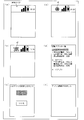
- FIG. 2 is an explanatory diagram showing an outline of processing of the mobile phone shown in FIG. 1, and (a) to (f) show examples of screens displayed according to processing transition.
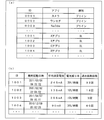
- FIG. 2 is an explanatory diagram of data used by the mobile phone shown in FIG. 1, wherein (a) shows an application determination information management table and (b) shows an application operation history information management table.
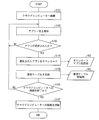
- 3 is a flowchart illustrating an example of processing for downloading an application in the mobile phone illustrated in FIG. 1.
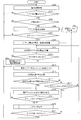
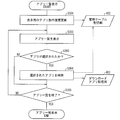
- 7 is a flowchart illustrating an example of an application deletion process in the mobile phone illustrated in FIG. 1.
- 6 is a flowchart illustrating an example of an application list process in the application deletion process illustrated in FIG. 5.
- the information terminal according to the present embodiment is realized as a smartphone (mobile phone) that has a touch panel and can be connected to the Internet. For this reason, hereinafter, the information terminal according to the present embodiment is simply referred to as a mobile phone.
- the present invention can be applied to a mobile phone, a smartphone, a personal digital assistant (PDA), etc. that employs an Android (registered trademark) OS developed by Google Inc.
- PDA personal digital assistant
- the present invention is not limited to such a mobile phone but can be applied to general information terminals that can execute applications.
- FIG. 2 is a diagram illustrating an example of a processing outline of the present embodiment.
- the process of notifying the user with a warning icon according to the operation state of the automatically started application and the battery consumption state, and the process of deleting the application based on the user's operation will be described as an example. To do.
- FIG. 2 is a figure which shows an example of a screen display when the application is not started in the background in the mobile phone 1 (information terminal; see FIG. 1). As illustrated, the warning icon a1 or a2 (see (b) or (c) of FIG. 2) is not displayed in the notification area.
- a warning icon a1 (first warning display) indicating that the application is being executed is displayed above. Displayed stationary in the notification area. Here, it is assumed that the application is downloaded by the user.
- the battery depletion rate is a ratio at which the remaining amount of the battery has dropped to a certain time.
- the case where the battery reduction rate exceeds the threshold is, for example, a case where the remaining battery level has decreased by 5% or more in 60 minutes, that is, the battery reduction rate has become 5% or more. The details of the battery reduction rate calculation process will be described later.
- the warning icon is described as an icon having the same shape changing from a stationary state to a rotating state.
- the user displays the warning icon displayed in the notification area (the warning icon a1 displayed stationary or rotated and displayed) on the mobile phone 1.
- the touched warning icon a2) is touched, as shown in FIG. 2 (d)
- the names (execution history information) of up to 10 downloaded applications that have recently started in the background and the operation for each application are displayed in a list for each application.
- the operation history for each displayed application is not particularly limited.
- the number of forced terminations and the number of downloads There are also the number of activations within one month.
- a deletion confirmation screen is displayed.
- the deletion confirmation screen When the user selects “Yes” on the deletion confirmation screen, the selected application is deleted, and a message to that effect is displayed as shown in FIG. On the other hand, if the user selects “No”, the screen returns to the original screen (starting application list screen; see FIG. 2D).
- a list of applications that are simultaneously activated may be displayed on the “activated application list screen” ((d) in FIG. 2). Then, the activated application may be terminated by the user's selection, or the application may be deleted after the termination.
- the “active application list screen” ((d) in FIG. 2) may not be displayed, and the currently operating application may be terminated, or the termination may be performed. After that, the application may be deleted.
- FIG. 1 is a block diagram showing a main configuration of the mobile phone 1.
- the mobile phone 1 includes a communication unit 10, a display unit 20, an input unit 30, a storage unit 40, a control unit 50, a battery remaining amount measurement unit 60, a timer 70, power And a supply unit 80.
- the mobile phone 1 may include members such as a speaker and a microphone in addition to these members, but these members are not shown because they are not directly related to the features of the invention.
- the communication unit 10 transmits / receives data to / from a server such as a cloud computer (not shown).
- a cloud computer can provide various computer resources such as software, hardware, a database, and a server via the Internet. If there is an environment connected to the Internet, the user can use various services such as application download and e-mail.
- the display unit 20 displays an image according to an instruction from the control unit 50.
- the display unit 20 for example, an LCD (liquid crystal display), an organic EL display, a plasma display, or the like can be applied.
- the input unit 30 is, for example, a keyboard or a touch sensor that acquires a user operation instruction and generates an instruction signal.
- this embodiment is realized as a mobile phone including a touch panel, the display unit 20 and a part or all of the input unit 30 are actually integrated. For convenience of explanation, the display unit 20 and the input unit 30 will be described separately according to the functions of the mobile phone 1.
- the storage unit 40 reads various control programs and OS programs executed by the control unit 50 and various types of functions that the control unit 50 reads when the mobile phone 1 has various functions (for example, an application list display function described later). Is stored.
- the storage unit 40 includes, for example, preinstalled applications (hereinafter referred to as pre-in apps), downloaded applications (hereinafter referred to as download apps), and a management table (see FIG. 3). (See (a), (b)).
- the storage unit 40 is realized by, for example, an EPROM, an EEPROM, a flash memory, or the like, which is a nonvolatile memory capable of rewriting contents. Note that the storage unit for storing information that does not require rewriting of contents may be realized by a ROM that is a read-only semiconductor memory, not shown, different from the storage unit 40.
- the storage unit 40 further includes a pre-in application storage unit 401, a download application storage unit 402 (storage unit), and a management table storage unit 403.
- the pre-in application storage unit 401 stores an application (pre-in application) pre-installed in the mobile phone 1.
- a management number (ID) for the pre-in app is added to each pre-in app and stored.
- the download application storage unit 402 stores an application (download application) downloaded by the user.
- an application download application
- ID management number
- management number for the pre-in application The details of the management number for the pre-in application and the management number for the download application will be described later.
- the management table storage unit 403 stores an application determination information management table T1 (see FIG. 3A) and an application operation history information management table T2 (see FIG. 3B).
- FIG. 3 is a diagram showing an example of a management table used in the present embodiment.
- FIG. 3A shows an example of the application determination information management table T1.
- FIG. 3B shows an example of the application operation history information management table T2 in the download application.
- the application identification information management table T1 stores a management number (ID) and a type (pre-in application / download application) in association with each application name.
- ID management number
- pre-in application and the download application are abbreviated as “pre-in” and “DL”, respectively.
- management number for the pre-in application and the management number for the download application will be described in detail.
- “0001” to “1000” are assigned as management numbers for the pre-in application. Also, “1001” and later are assigned as management numbers for download applications.
- the application discrimination information management table T1 is used when discriminating whether an application is preinstalled or downloaded.
- information stored in the application determination information management table T1 is preferably stored as follows. First, a management number (ID), an application name, and a type are associated with each other and stored in the application determination information management table T1 in advance. Each time the downloaded application is downloaded, the management number (ID), the application name, and the type are associated with each other and stored in the application determination information management table T1 one by one.
- the management number is not particularly limited, and any management number may be used if it is not necessary to distinguish between the pre-in application and the download application. Further, in this embodiment, when discriminating between the pre-in app and the download app, the discriminating is based on the “type” stored in association with the management number. Alternatively, it may be determined by a management number that is distinguished from download application.
- the application operation history information management table T2 includes a management number (ID), a last activation date, an average current consumption, a battery reduction rate, and the number of past activations. Stored in association. That is, the application operation history information management table T2 manages various operation histories (last activation date / time, average current consumption, battery reduction rate, number of past activations) of the downloaded application to which the management number (ID) belongs.
- the application operation history information management table T2 is used when displaying an application list (started application list screen; see FIG. 2D).
- the remaining battery level measuring unit 60 calculates the remaining battery level of the power supply unit 80.
- it can be realized by a gas gauge or the like.
- a gas gauge measures the voltage of a battery and calculates the remaining charge of the battery from the voltage.
- Timer 70 measures the elapsed time.
- the timer 70 measures time in order to control the timing when the battery remaining amount measuring unit 60 measures the battery remaining amount.
- the power supply unit 80 stores power and supplies the stored power to the mobile phone 1.
- the control unit 50 performs various calculations by executing a program read from the storage unit 40 to a temporary storage unit (not shown), and comprehensively controls each unit included in the mobile phone 1. .
- control unit 50 includes a communication control unit 501, an application download control unit 502, a determination information update unit 503, an application control unit 504 (application stop unit, application deletion unit), and an application determination unit 505 ( Automatic activation determination means, download determination means), warning icon display control section 506 (power consumption state notification means, first warning display means), operation history calculation section 507, condition determination section 508 (power consumption state determination means). And an application list display control unit 509 (execution history display means).
- the CPU reads a program stored in a storage device realized by a ROM or the like to a temporary storage unit (not shown) realized by a RAM or the like and executes the program. This can be achieved.
- the communication control unit 501 causes the communication unit 10 to communicate with the cloud computer or disconnect the communication.
- an application download instruction is received from the application download control unit 502 described later, based on the notified application identification information (for example, application name, application identification number, etc.), the application is downloaded.
- the communication unit 10 is controlled.
- the application download control unit 502 When the application download control unit 502 receives an application download instruction from the user via the input unit 30, the application download control unit 502 notifies the communication control unit 501 of the download instruction and identification information of the application to be downloaded. If the download is successful, the downloaded application is added to the download application management number (ID) and stored in the download application storage unit 402. In addition, the discrimination information update unit 503 is notified of the success.
- ID download application management number
- the discrimination information update unit 503 When receiving the notification that the download is successful from the application download control unit 502, the discrimination information update unit 503 adds a management number for the new download application to the downloaded application name, and “DL” (ie, download) Along with a type of “app”, the information is added to the application discrimination information management table T1.
- the application control unit 504 starts, terminates, or deletes an application. Specifically, when the application is activated, the application determination unit 505 is notified of information indicating that the application has been activated and the management number (ID) of the activated application. In addition, when an instruction to delete an application is received from an application list display control unit 509, which will be described later, the application is deleted based on the notified management number (ID) of the application. Then, in the application determination information management table T1 and the application operation history information management table T2, the record corresponding to the management number (ID) is deleted, and the management tables (T1, T2) are updated.
- the application determination unit 505 receives information indicating that the application has been activated from the application control unit 504, is the application automatically activated (not activated by the user) first? It is to judge whether or not.
- it is determined that the application is automatically started it is determined whether the application is a pre-in application or a download application.
- the app discrimination information management table T1 stored in the management table storage unit 403, based on the management number (ID) of the notified application, The type of application (pre-in app or download app) is detected and determined. If it is determined that the application is a download application, a notification to that effect is sent to the warning icon display control unit 506 and the operation history calculation unit 507.
- the warning icon display control unit 506 displays the warning icon a1 on the display unit 20 in a stationary state.
- the warning icon a2 is rotated and displayed on the display unit 20 based on an instruction from a condition determination unit 508 described later.
- the operation history calculation unit 507 When the operation history calculation unit 507 receives the notification from the application determination unit 505, the operation history calculation unit 507 acquires or calculates the last activation date and time, the average current consumption, the battery reduction rate, and the past activation number for each application as the operation history. It is.
- the operation history calculation unit 507 acquires, by the application control unit 504, the time when the application is activated as the “last activation date”. Further, the battery remaining amount measuring unit 60 and the timer 70 calculate the average current consumption and the battery reduction rate for the application. Then, in the application operation history information management table T2, the “past activation count” is incremented by one from the record corresponding to the management number (ID) of the application and updated. Also, the records corresponding to the management number (ID) of the application are updated with the acquired “last activation date / time”, the above calculated “average current consumption”, and “battery reduction rate”, respectively.
- the timer 70 notifies the battery remaining amount measuring unit 60 every 10 minutes. Then, when the battery remaining amount measuring unit 60 receives the notification from the timer 70, the battery remaining amount measuring unit 60 measures the battery remaining amount and notifies the operation history calculating unit 507.
- the operation history calculation unit 507 calculates the difference between the remaining battery levels received twice before and after (that is, current consumption for 10 minutes, hereinafter referred to as “current consumption”). Then, the operation history calculation unit 507 uses the calculation result of the current consumption for a predetermined number of times (for example, 6 times) (for example, divides the total of the 6 times of current consumption by 6) for 10 minutes. The average current consumption for each is calculated.
- the operation history calculation unit 507 repeats the above processing every 10 minutes, and sets the average consumption current for every 10 minutes calculated at that time as the average consumption current for a predetermined application at that time.
- the timer 70 measures the remaining battery level every time a predetermined time (for example, 60 minutes) elapses. Notification to the unit 60.
- the remaining battery amount measuring unit 60 measures the remaining battery amount and transmits the remaining battery amount measurement result to the operation history calculating unit 507.
- the operation history calculation unit 507 calculates how much the received battery remaining amount measurement result is reduced compared to the previously received battery remaining amount measurement result as a battery reduction rate as a percentage.
- the operation history calculation unit 507 repeats the above processing every predetermined time (for example, 60 minutes), and sets the battery decrease rate calculated at that time as the battery decrease rate for a predetermined application at that time.
- the operation history calculation unit 507 is also for calculating the battery depletion rate of the entire mobile phone 1. Specifically, the battery reduction rate of the entire mobile phone 1 is calculated via the battery remaining amount measuring unit 60 and the timer 70. Also, the calculated “battery reduction rate” of the entire mobile phone 1 is transmitted to the condition determination unit 508.
- the battery remaining amount measuring unit 60 first measures the battery remaining amount and stores it in the storage unit 40 as the original battery remaining amount. Then, the timer 70 measures the time and notifies the battery remaining amount measuring unit 60 whenever a certain time (for example, 60 minutes) passes. Thereafter, when the battery remaining amount measuring unit 60 receives the notification from the timer 70, the remaining battery amount is measured again, and the measurement result of the remaining battery amount is transmitted to the operation history calculating unit 507. Then, the operation history calculation unit 507 compares the remaining battery level received from the remaining battery level measurement unit 60 with the original remaining battery level acquired from the storage unit 40 as a percentage as a battery reduction rate.
- a certain time for example, 60 minutes
- control unit 50 resets the remaining battery level stored in the storage unit 40, and uses the remaining battery level measured by the remaining battery level measurement unit 60 as a new remaining battery level.
- the operation history calculation unit 507 repeats the above processing every certain time (for example, 60 minutes), and uses the battery reduction rate calculated at that time as the battery reduction rate of the entire mobile phone 1 at that time. .
- the condition determining unit 508 determines whether or not a predetermined battery depletion rate threshold has been exceeded based on the battery depletion rate of the entire mobile phone 1 received from the operation history calculating unit 507. If the condition determination unit 508 determines that the threshold value has been exceeded, the warning icon display control unit 506 is instructed to rotate and display the warning icon a2.
- the application list display control unit 509 causes the display unit 20 to display a list of the 10 most recently activated applications (all applications activated when the number of recently activated applications is less than 10). . Further, the application operation history (last activation date / time, average current consumption, battery reduction rate, number of past activations) is acquired from the application operation history information management table T2 and displayed for each application. Then, when the user selects an application on the application list display screen and presses the confirm button, the application list display control unit 509 displays the management number (ID) of the application selected by the user and the deletion instruction, The application control unit 504 is notified.
- ID management number
- FIG. 4 is a flowchart illustrating an example of processing for downloading an application in the mobile phone 1.
- the communication control unit 501 connects the communication unit so as to connect to the cloud computer. 10 is controlled (S101).
- the communication unit 10 acquires a list of applications that can be downloaded from the cloud computer and displays the list on the display unit 20 (S102).
- the application download control unit 502 determines whether or not an application is selected in the list of applications displayed on the display unit 20 (S103). If the application download control unit 502 determines that no application has been selected (NO in S103), the application download control unit 502 instructs the display unit 20 to continue displaying a list of applications (S102).
- the application download control unit 502 determines that an application has been selected (YES in S103)
- the application download control unit 502 sends the identification information (eg, application name, application identification number, etc.) of the selected application via the communication control unit 501.
- the communication unit 10 downloads the selected application from the cloud computer.
- the application download control unit 502 adds a download application management number (ID) to the downloaded application and stores it in the download application storage unit 402 of the storage unit 40 (S104).
- ID download application management number
- the discrimination information update unit 503 associates the application name of the downloaded application with the management number (ID) for the downloaded application and the type (here, “DL” indicating the downloaded application).
- the management table (T1) is updated (S105).
- the communication control unit 501 determines whether or not to end the connection to the cloud computer (S106). In the case of ending (YES in S106), the communication control unit 501 instructs the communication unit 10 to disconnect the connection to the cloud computer (S107). On the other hand, if not finished (NO in S106), the communication control unit 501 instructs the display unit 20 to continue displaying the application list on the display unit 20 (S102).
- FIG. 5 is a flowchart showing an example of application deletion processing in the mobile phone 1.
- FIG. 6 is a flowchart illustrating an example of the application list process in the application deletion process.
- the remaining battery level measurement unit 60 acquires the remaining battery level of the mobile phone and stores it in the storage unit 40 (S201).
- the application control unit 504 activates the application based on a user instruction. Even if there is no user instruction, for example, when “background data communication permission” and “automatic synchronization permission” are set in advance by the user, an automatic synchronization of an application automatically communicating with the server is performed. When the control unit 50 detects the request signal, the application is automatically activated.
- background data communication permission is a setting item indicating that communication in the background is permitted for an application that has moved to the background.
- automated synchronization permission is a service in which data for users is updated on the server independently of the mobile phone 1 (specifically, various services using an account (for example, a telephone book, Gmail (registration)). Trademark), Picasa (registered trademark), calendar, etc.))) is a setting item indicating that it is permitted to automatically update (synchronize) data.
- both “Background data communication permission” and “Automatic synchronization permission” need to be set in order to perform automatic synchronization for the various services of the above account. In other words, if both “Background data communication permission” and “Automatic synchronization permission” are set, the application will be automatically launched in the background (automatically) to communicate with the server. There is.
- the application determination unit 505 monitors in real time whether or not the application is activated (S202). Specifically, when the application control unit 504 starts the application, the application control unit 504 notifies the application determination unit 505 of an application management number (ID) and information indicating that the application has been started. Then, the application determination unit 505 determines that the application is activated when the notification is received from the application control unit 504, and determines that the application is not activated when the notification is not received.
- ID application management number
- the application determination unit 505 determines that the application is not activated (NO in S202), it continues to monitor the activation of the application (S202).
- the application determination unit 505 determines whether the application has been started (YES in S202).
- the application determination unit 505 determines whether the application is automatically started (hereinafter referred to as “automatic start”) ( S203).
- the application determination unit 505 determines that the application is not automatically activated (NO in S203)
- the application activation is continuously monitored (S202).
- the application determination unit 505 determines that the activation is automatic (YES in S203), the management number (ID) of the application received from the application control unit 504 from the application determination information management table T1 from the management table storage unit 403. ) Is detected (S204), and it is determined whether it is a pre-in app or a download app (S205).
- the application determining unit 505 determines that the activated application is a pre-in application (NO in S205)
- the application determining unit 505 continues to monitor the activation of the application (S202).
- the operation history calculation unit 507 acquires the last activation date / time of the application from the application control unit 504, The past activation count is incremented by 1 and stored in the application operation history information management table T2 stored in the management table 403 (S206).
- the operation history calculation unit 507 calculates an average application current consumption and a battery depletion rate as a display application operation history used for application list processing to be described later, and stores it in a temporary storage unit (not shown).
- the application operation history for display is operation history information for each application displayed on the display unit 20 in application list processing described later.
- the application operation history for display includes the average current consumption of the application, the battery reduction rate, the number of past activations, and the like.
- control unit 50 determines whether or not the application is terminated by the application control unit 504 (S208).
- the control unit 50 determines that the application is terminated (YES in S208)
- the display application operation history (the average current consumption of the application and the battery reduction rate) calculated by the operation history calculation unit 507 is used.
- the application operation history information management table T2 is updated (S209).
- the application determination unit 505 continues to monitor the activation of the application (S202).
- the warning icon display control unit 506 displays a warning icon a1 ((b) in FIG. 2) in the notification area of the display unit 20.
- the display unit 20 is controlled to display (see S210).
- the operation history calculation unit 507 calculates the battery reduction rate of the entire mobile phone 1 (hereinafter referred to as “total battery reduction rate”) (S211). Specifically, in S201, the remaining battery level stored in the storage unit 40 is acquired by the remaining battery level measurement unit 60. Then, it is determined whether or not a certain time (for example, 60 minutes) has elapsed since the battery remaining amount was acquired last time. When it is determined that a certain time (for example, 60 minutes) has elapsed, the remaining battery level is measured by the remaining battery level measurement unit 60 and acquired. Then, the overall battery reduction rate is calculated from the original battery remaining amount and the current battery remaining amount. Then, the calculated result is transmitted to the condition determination unit 508 as the overall battery reduction rate. In addition, the control unit 50 resets the remaining amount of the original battery stored in the storage unit 40, and sets the remaining battery amount measured this time by the remaining battery amount measurement unit 60 as a new remaining remaining battery amount in the storage unit 40.
- the reason for transmitting “0” as the total battery depletion rate is that the determination result is always “NO” in the step (S212) of determining whether or not the total battery depletion rate, which will be described later, exceeds a threshold value. It is to make it.
- condition determination unit 508 determines whether or not the overall battery reduction rate of the mobile phone 1 received from the operation history calculation unit 507 has exceeded a predetermined threshold (for example, 5% here). (S212; power consumption state determination step).
- the control unit 50 displays the warning icon a1 displayed on the display unit 20 by the user. It is determined whether or not it has been touched (S213).
- the application list display control unit 509 performs a process of displaying an application list (that is, an application list process) (S216). Details of specific processing will be described later.
- the control unit 50 determines whether or not the application is terminated by the application control unit 504 (S217). If the control unit 50 determines that the application has been terminated (YES in S217), the application determination unit 505 continues to monitor activation of the application (S202). On the other hand, when the control unit 50 determines that the application has not been terminated (NO in S217), the operation history calculation unit 507 uses the average current consumption of the application as an application operation history for display used in application list processing to be described later. And the battery depletion rate are calculated and stored in a temporary storage unit (not shown) (S207).
- the operation history calculation unit 507 calculates the application average as the application operation history for display used for application list processing described later.
- the current consumption and the battery reduction rate are calculated and stored in a temporary storage unit (not shown) (S207).
- the warning icon display control unit 506 is displayed in the notification area of the display unit 20. Then, the display unit 20 is controlled so as to dynamically display the warning icon a2 (see FIG. 2C) (while rotating) (S214; power consumption state notification step).
- control part 50 judges whether the warning icon a2 currently displayed on the display part 20 was touched by the user (S215).
- the display unit 20 continues to display the warning icon a2 dynamically (S214).
- the application list display control unit 509 performs a process of displaying an application list (S216).
- the display application operation history (here, the average current consumption of the application and the battery reduction rate) calculated by the operation history calculation unit 507 is stored in the management table 403.
- the application operation history information management table T2 is updated (S301).
- the application list display control unit 509 displays the 10 most recently activated applications on the display unit 20 based on the last activation date / time in the application operation history information management table T2 stored in the management table storage unit 403.
- the display unit 20 is controlled so as to be displayed (when there are less than 10 applications activated most recently, all activated applications are displayed) (S302).
- control part 50 judges whether the application was selected by the user from the list of the applications displayed on the display part 20 (S303). Note that one or more applications may be selected.
- the management number (ID) of the selected application is transmitted to the application control unit 504. Then, the application control unit 504 deletes the application corresponding to the management number (ID) of the application from the download application storage unit 402 (S304).
- the application determination information management table T1 and the application operation history information management table T2 stored in the management table storage unit 403 the record corresponding to the management number (ID) of the application is deleted, and the two management tables (T1, T2) is updated.
- control unit 50 determines whether or not the application list process is to be terminated when a “clear” key or the like is input by the user or due to a timeout or the like (S305).
- control unit 50 determines to end the application list process (YES in S305).
- the control unit 50 ends the application list process.
- the application list display control unit 509 controls the display unit 20 to continue displaying the list of applications (S302). .
- the condition for dynamically displaying the warning icon a2 is not limited to the contents described in the above embodiment, and for example, there are conditions described in Modifications 1 to 7 below. Modifications 1 to 7 are all the same as in the above embodiment except for the condition for dynamically displaying the warning icon a2.
- the condition for dynamically displaying the warning icon a2 is when the overall average current consumption of the mobile phone 1 exceeds a predetermined threshold.
- the operation history calculation unit 507 calculates the average current consumption of the entire mobile phone 1 (hereinafter referred to as “total average current consumption”). Then, the calculated result is transmitted to the condition determining unit 508 as the overall average current consumption.
- the timer 70 notifies the battery remaining amount measuring unit 60 every 10 minutes. Then, when the battery remaining amount measuring unit 60 receives the notification from the timer 70, the battery remaining amount measuring unit 60 measures the battery remaining amount and notifies the operation history calculating unit 507.
- the operation history calculation unit 507 calculates the difference between the remaining battery levels received twice before and after (that is, the current consumption for 10 minutes, hereinafter referred to as “current consumption”). Then, the operation history calculation unit 507 uses the calculation result of the current consumption for a predetermined number of times (for example, 6 times) (for example, divides the total of the 6 times of current consumption by 6) every 10 minutes. The overall average current consumption is calculated.
- the operation history calculation unit 507 repeats the above processing every 10 minutes, and sets the overall average consumption current for every 10 minutes calculated at that time as the overall average consumption current at that time.
- condition determination unit 508 determines whether or not the overall average current consumption received from the operation history calculation unit 507 has exceeded a predetermined threshold (for example, 100 mA, for example).
- the warning icon display control unit 506 dynamically (rotates) the warning icon a2 in the notification area of the display unit 20.
- the display unit 20 is controlled to display.
- calculation target here is not limited to the overall average current consumption of the mobile phone 1, but may be the overall current consumption of the mobile phone 1, for example.
- the condition for dynamically displaying the warning icon a2 is when the time during which the application is operating in the mobile phone 1 exceeds a predetermined threshold.
- the operation history calculation unit 507 acquires the time during which the application is operating (hereinafter referred to as “operation time”) from the timer 70 in the mobile phone 1. And the acquired result is transmitted to the condition determination part 508 as operation time.
- condition determination unit 508 determines whether or not the operation time received from the operation history calculation unit 507 has exceeded a predetermined threshold (for example, 2 hours here).
- the warning icon display control unit 506 dynamically (rotates) the warning icon a2 in the notification area of the display unit 20.
- the display unit 20 is controlled to display.
- the condition for dynamically displaying the warning icon a2 is the time that is the current consumed by the operating application in the mobile phone 1 within a predetermined time (for example, 1 hour). This is a case where the internal current consumption exceeds a predetermined threshold value.
- the operation history calculation unit 507 calculates the current consumption (time consumption current) within a certain time in the mobile phone 1 via the battery remaining amount measurement unit 60 and the timer 70. Then, the calculated result is transmitted to the condition determination unit 508 as an in-time consumption current.
- the timer 70 notifies the battery remaining amount measuring unit 60 every time a certain time (for example, 60 minutes) elapses. Then, when the battery remaining amount measuring unit 60 receives the notification from the timer 70, the battery remaining amount measuring unit 60 measures the battery remaining amount and notifies the operation history calculating unit 507.
- the operation history calculation unit 507 calculates the difference between the remaining battery levels (that is, current consumption during time) received twice before and after. The operation history calculation unit 507 repeats the above processing every certain time (for example, 60 minutes), and the current consumption calculated at that time is used as the current consumption during that time.
- condition determination unit 508 determines whether or not the in-time consumption current received from the operation history calculation unit 507 has exceeded a predetermined threshold (for example, 100 mAh).
- the warning icon display control unit 506 dynamically (rotates) the warning icon a2 in the notification area of the display unit 20.
- the display unit 20 is controlled to display.
- the condition for dynamically displaying the warning icon a2 is that the number of applications started within the predetermined time (for example, 1 hour) on the mobile phone 1 (hereinafter referred to as “number of startups in time”). Is a case where a predetermined threshold value is exceeded.
- the operation history calculation unit 507 displays the number of applications activated within a predetermined time (for example, 1 hour), and the application operation history information management table stored in the management table storage unit 403. Calculated from T2. Then, the calculated result is transmitted to the condition determination unit 508 as the number of in-time activation cases.
- the operation history calculation unit 507 reads the application operation history information management table T2 stored in the management table storage unit 403, and based on the “last activation date”. The number of applications started within the past hour from the current time (the number of startups within the hour) is calculated. The operation history calculation unit 507 repeats the above processing every hour, and sets the number of activations in time calculated at that time as the number of activations in time at that time.
- condition determination unit 508 determines whether or not the number of in-time activation cases received from the operation history calculation unit 507 exceeds a predetermined threshold (for example, 5 cases here).
- the warning icon display control unit 506 dynamically displays the warning icon a2 in the notification area of the display unit 20 ( The display unit 20 is controlled to display (while rotating).
- the condition for dynamically displaying the warning icon a2 is a case where an application running on the mobile phone 1 is downloaded free of charge by the user.
- condition determination unit 508 determines whether or not the currently operating application is downloaded for free by the user.
- the warning icon display control unit 506 displays the warning icon a2 dynamically (while rotating) in the notification area of the display unit 20. Thus, the display unit 20 is controlled.
- the condition for dynamically displaying the warning icon a2 is a case where the number of past uses of the operating application in the mobile phone 1 is less than a predetermined threshold.
- the operation history calculation unit 507 acquires the past activation count of the currently operating application from the application operation history information management table T2 stored in the management table storage unit 403. Then, the acquired number of past activations is increased by one (the amount used this time), and is transmitted to the condition determination unit 508 as the number of past usages.
- condition determination unit 508 determines whether or not the past usage count received from the operation history calculation unit 507 is less than a predetermined threshold (for example, 5 times here).
- the warning icon display control unit 506 dynamically (rotates) the warning icon a2 in the notification area of the display unit 20.
- the display unit 20 is controlled to display.
- the condition for dynamically displaying the warning icon a2 is that the average current consumption for each application (hereinafter referred to as “app average current consumption”) in the mobile phone 1 is a predetermined reference value (for example, it is a case where a predetermined ratio (for example, 5% of the reference value) is exceeded with respect to 100 mAh).
- a predetermined ratio for example, 5% of the reference value
- the operation history calculation unit 507 calculates the average current consumption of the application currently operating. Then, the calculated result is transmitted to the condition determining unit 508 as the average application current consumption.
- condition determination unit 508 determines a ratio (here, the average application current consumption received from the operation history calculation unit 507 with respect to a predetermined reference value (for example, 100 mAh)). Thus, for example, it is determined whether or not it exceeds 5%.
- the warning icon display control unit 506 dynamically displays the warning icon a2 in the notification area of the display unit 20.
- the display unit 20 is controlled so as to display the image (while rotating).
- the value measured for each application is not limited to the average current consumption, but may be a current consumption within a certain time, the number of activations within a certain time, the number of downloads, or the like.
- the conditions for dynamically displaying the warning icon a2 are N (from N to a positive integer) from the one that consumes a large amount of current for each application in the mobile phone 1. For example, all of them are cases where a predetermined threshold value (here, for example, 100 mA) is exceeded. That is, assume that one application is started a plurality of times. Regardless of the operation time, N (top N) are selected in descending order from the current consumed from the start to the end in each operation of the application, and any of the top N is selected by the above threshold ( For example, when exceeding 100 mA), the warning icon a ⁇ b> 2 is displayed dynamically (while rotating).
- a predetermined threshold value here, for example, 100 mA
- the operation history calculation unit 507 calculates a single current consumption from startup to end (hereinafter referred to as “current consumption every startup”) for each application.
- the calculated result is stored in the storage unit 40 for each application.
- the condition determination unit 508 acquires the result calculated for the application so far, that is, the current consumption for each activation from the storage unit 40.
- the number of acquired results is N or more
- the top N in the descending order of current consumption is selected, and it is determined whether or not any of the top N exceeds a predetermined threshold (for example, 100 mA).
- the warning icon display control unit 506 displays the warning icon a2 in the notification area of the display unit 20.
- the display unit 20 is controlled to display dynamically.
- the present invention can be particularly suitably used for a mobile phone employing an Android (registered trademark) OS.
- a mobile phone adopting an Android (registered trademark) OS has an excellent feature compared to other mobile phones, in that a user can freely create an application and the user can freely download the application. Users can download and enjoy applications from the Android Market.
- the Android market is a distribution service for application software for mobile phones, operated by Google Inc. in the United States.
- application software data that runs on a mobile phone equipped with an Android (registered trademark) OS of Google Inc. can be downloaded for a fee or free of charge.
- a mobile phone adopting an Android (registered trademark) OS can be set to “background data communication permission” and “automatic synchronization permission”. This is because when using software such as Gmail (registered trademark) or calendar, there is a user's need to automatically communicate with a server and automatically update data.
- the present invention can notify the user of the current state of current consumption and the state predicted in the future for an application automatically started in the background. Therefore, the user can satisfy the need for automatic communication for software such as Gmail (registered trademark), and the battery can be prevented from running out without knowing it.
- Gmail registered trademark
- the power consumption of the application installed in advance at the time of factory shipment is basically known in advance. Therefore, the consumption current of the downloaded application can be calculated by subtracting the consumption current of the application installed in advance from the total consumption current of the mobile phone. Therefore, it is possible to determine whether the consumption rate of the downloaded application exceeds the threshold value, such as the battery reduction rate or the average consumption current.
- the application downloaded by the user is notified if it is not activated by the user at a certain time (for example, one month).
- the user may be notified of this by displaying an icon in the area (see FIG. 2).
- the PopUp screen or the like may be automatically displayed to notify the user of detailed information.
- the PopUp screen or the like may be displayed to notify the user of detailed information.
- the icon may be realized as a warning icon (a1 and / or a2) described in the embodiment.
- a history of downloading / deleting an application is stored on a server such as a cloud computer, and the history can be received, browsed, edited, or deleted on the mobile phone.
- an icon representing a server such as a cloud computer is displayed in the notification area (see FIG. 2), and when the icon is touched, the server connects to a server such as a cloud computer to view, edit, It may be deleted.
- a warning icon is displayed to notify the user.
- the present invention is not limited to this, for example, a PopUp screen is displayed. The user may be notified, or may be notified to the user by sound or vibration without being displayed on the screen.
- the mobile phone according to the present invention may have the following configuration.
- the mobile phone determines whether or not the own terminal is in a warning target state that may consume the power stored in the power supply unit that supplies power to the own terminal involuntarily by the user.
- a condition determination unit, and a warning icon display control unit that presents to the user power consumption state notification information indicating that the terminal is in the warning target state when the condition determination unit determines that the terminal is in the warning target state. You may prepare.
- an application determination unit that determines whether or not the application being executed is one that the terminal has automatically started without being instructed by the user, and the condition determination unit is an application that is being executed by the application determination unit. The above determination may be performed only when it is determined that is activated automatically.
- the application determination unit includes an application determination unit that determines whether or not the application being executed is downloaded according to a user instruction and stored in the downloaded application storage unit, and the condition determination unit includes an application that is being executed by the application determination unit. The above determination may be performed only when it is determined that is downloaded according to a user instruction and stored in the download application storage unit.
- warning icon display control unit displays a warning display as the power consumption state notification information, and when the operation input for selecting the warning display is performed by the user, the application control unit stops the application being executed. May be provided.
- the warning icon display control unit displays a warning display as the power consumption state notification information, and includes at least an application being executed in the past when an operation input for selecting the warning display is performed by the user. You may provide the application list display control part which displays the execution log information which shows the executed application.
- an application control unit that deletes an application selected by the user from the execution history information displayed by the application list display control unit from the downloaded application storage unit that stores the application may be provided.
- an application determination unit that determines whether or not the application being executed is one that the terminal has automatically started regardless of a user instruction, and the application that is being executed by the application determination unit is automatically started
- a warning icon display control unit that displays a first warning display indicating that an application that has been automatically started is being executed when it is determined that the application is automatically executed.
- the first warning display displayed by the warning icon display control unit may be changed to the second warning display as the power consumption state notification information and displayed.
- the application being executed may be one that is automatically started by the user's terminal regardless of the user's instruction, and may be executed without displaying the execution screen in the background.
- condition determination unit may determine that the mobile phone is in the warning target state when the consumption state of the power stored in the power supply unit in a predetermined time becomes a predetermined state.
- each block of the mobile phone 1, in particular, the control unit 50 may be configured by hardware logic, or may be realized by software using a CPU as follows.
- the mobile phone 1 includes a storage device (recording device) such as a CPU that executes instructions of a control program that realizes each function, a ROM that stores the program, a RAM that expands the program, a memory that stores the program and various data, and the like. Medium).
- An object of the present invention is to provide a recording medium on which a program code (execution format program, intermediate code program, source program) of a control program for the mobile phone 1 which is software for realizing the above-described functions is recorded so as to be readable by a computer. This can also be achieved by supplying the mobile phone 1 and reading and executing the program code recorded on the recording medium by the computer (or CPU or MPU).
- Examples of the recording medium include tapes such as magnetic tapes and cassette tapes, magnetic disks such as floppy (registered trademark) disks / hard disks, and disks including optical disks such as CD-ROM / MO / MD / DVD / CD-R.
- Card system such as IC card, IC card (including memory card) / optical card, or semiconductor memory system such as mask ROM / EPROM / EEPROM / flash ROM.
- the mobile phone 1 may be configured to be connectable to a communication network, and the program code may be supplied via the communication network.
- the communication network is not particularly limited.
- the Internet intranet, extranet, LAN, ISDN, VAN, CATV communication network, virtual private network, telephone line network, mobile communication network, satellite communication. A net or the like is available.
- the transmission medium constituting the communication network is not particularly limited.
- wired such as IEEE 1394, USB, power line carrier, cable TV line, telephone line, ADSL line, etc.
- infrared rays such as IrDA and remote control, Bluetooth (Registered trademark), 802.11 wireless, HDR, mobile phone network, satellite line, terrestrial digital network, and the like can also be used.
- the present invention can also be realized in the form of a computer data signal embedded in a carrier wave in which the program code is embodied by electronic transmission.
- the information terminal (mobile phone) according to the present invention will be supplemented below.
- the information terminal is an information terminal that executes an application, and in a warning target state that may unintentionally consume power stored in a power supply unit that supplies power to the terminal itself.
- the power consumption state determining means for determining whether or not the own terminal is present and the power consumption state determining means determine that the own terminal is in the warning target state it indicates that the own terminal is in the warning target state
- the information terminal control method is an information terminal control method for executing an application, and the user can unintentionally consume power stored in a power supply unit that supplies power to the terminal. If it is determined in the power consumption state determination step that determines whether or not the own terminal is in the warning target state having the characteristic and the power consumption state determination step, the own terminal is in the warning target state. Including a power consumption state notification step of presenting to the user power consumption state notification information indicating that the device is in the warning target state.
- the information terminal when the own terminal is in a warning target state that may unintentionally consume the power stored in the power supply unit, for example, a large amount of power is consumed. If there is a possibility that an application that is not intended by the user is automatically activated and there is a possibility that power is wasted, the user can be informed of this.
- specific conditions for determining whether or not the terminal is in a warning target state include, specifically, a battery reduction rate, current consumption, operation time, current consumption within the operation time, and the number of application activations within a certain time. It is possible to use whether or not the application has been downloaded for free, the number of past activations, the average current consumption of the application, the number of forced terminations, the number of application downloads, and the like.
- the user can grasp the power consumption state of the information terminal, and it is possible to prevent the power from being suddenly reduced or lost without the user's knowledge. .
- the information terminal includes an automatic activation determining unit that determines whether or not the application being executed is automatically activated regardless of a user instruction, and the power consumption state
- the determination means is characterized in that the determination is performed only when the automatic start determination means determines that the application being executed is automatically started.
- the power consumption state determination unit can perform the determination for only the application that is automatically started. That is, it is not necessary to perform the above determination for an application activated by a user operation.
- An application that may consume the power unintentionally by the user is started without permission from the user. Therefore, the above determination may be performed only for applications that are launched without the user's knowledge.
- the load on the information terminal can be determined only by automatically starting applications. As a result, the processing speed can be improved and power consumption can be saved.
- the information terminal further comprises download determining means for determining whether or not the running application is downloaded according to a user instruction and stored in the storage unit, and the power consumption state determining means includes: The above-described determination is performed only when it is determined that the application being executed by the download determination means is downloaded according to a user instruction and stored in the storage unit.
- the power consumption state determination unit can perform the determination for only the application to be downloaded. That is, it is not necessary to perform the above determination for an application that is already installed in the information terminal at the time of shipment.
- the load on the information terminal can be further reduced, the processing speed can be improved, and the power consumption can be saved.
- the power consumption state notifying unit displays a warning display as the power consumption state notification information, and when an operation input for selecting the warning display is performed by the user. And an application stopping means for stopping the running application.
- the running application can be stopped.
- the user can confirm the warning display with his / her eyes, and it is easier for the user to understand and quicker to confirm than the other notification methods (for example, sound and vibration), and the running application is stopped. Sometimes, the operation can be easily performed.
- the other notification methods for example, sound and vibration
- the power consumption state notifying unit displays a warning display as the power consumption state notification information, and when an operation input for selecting the warning display is performed by the user.
- the apparatus includes an execution history display means for displaying execution history information indicating an application executed in the past, including at least an application being executed.
- the execution history information of the application executed in the past including at least the application being executed on the display unit or the like.
- the execution history information in addition to information for identifying an application executed in the past (for example, the name of the application), information related to the application (for example, average current consumption, battery reduction rate, number of past executions, etc.) May be displayed.
- the user terminal when the user terminal is in a warning target state, the user can check the application being executed and the application executed so far and investigate the reason.
- the information terminal includes an application deletion unit that deletes the application selected by the user from the execution history information displayed by the execution history display unit from the storage unit that stores the application. Yes.
- the application selected by the user can be deleted from the execution history information.
- the user can immediately delete an application that may unintentionally consume the power stored in the power supply unit when the terminal enters a warning target state. Therefore, the application stored in the information terminal can be easily managed, and the convenience of the user can be improved.
- the information terminal includes an automatic activation determination unit that determines whether or not the application being executed is one that is automatically activated without depending on a user instruction, and the automatic activation determination unit And a first warning display means for displaying a first warning display indicating that the automatically started application is being executed when it is determined that the currently running application is automatically started.
- the power consumption state notification unit displays the first warning display displayed by the first warning display unit as the power consumption state. It is characterized by changing to the second warning display as notification information.
- the power consumption state determination means determines that the terminal is in the warning target state. Therefore, when notifying the user of the second warning display, there is a possibility that a large amount of power has already been consumed.
- the first warning display is displayed to the user. I can inform you.
- an application that may consume power unintentionally is an application that is activated without the user's knowledge.
- the user can recognize that the application is automatically started by the first warning display, and can confirm or terminate the application as necessary. Therefore, when the user notices the second warning display, it is possible to prevent the information terminal from already consuming a large amount of power and causing a delay.
- the application being executed is one in which the terminal is automatically activated regardless of the user's instruction, and is executed without displaying a screen at the time of execution in the background. It is characterized by being.
- the application being executed is automatically executed in the background and cannot be confirmed directly on the screen.
- the user of the power consumption state notification information it is possible to particularly effectively prevent the power from rapidly decreasing or disappearing without the user's knowledge.
- the power consumption state determining means is configured such that when the consumption state of the power accumulated in the power supply unit for a predetermined time becomes a predetermined state, the terminal enters the warning target state. It is characterized by determining that there is.
- the present invention can be used for information terminals.
- it can be suitably used for an information terminal that executes various applications.
Landscapes
- Engineering & Computer Science (AREA)
- Theoretical Computer Science (AREA)
- Physics & Mathematics (AREA)
- General Engineering & Computer Science (AREA)
- General Physics & Mathematics (AREA)
- Computing Systems (AREA)
- Computer Networks & Wireless Communication (AREA)
- Signal Processing (AREA)
- Quality & Reliability (AREA)
- Human Computer Interaction (AREA)
- Mathematical Physics (AREA)
- Telephone Function (AREA)
Abstract
携帯電話機(1)は、自端末に電力を供給する電力供給部(80)に蓄積された電力をユーザの不本意に消費する可能性がある警告対象状態に、自端末があるか否かを判別する条件判定部(508)と、条件判定部(508)が自端末が警告対象状態にあると判別した場合、自端末が警告対象状態にあることを示す電力消費状態通知情報をユーザに提示する警告アイコン表示制御部(506)とを備える。
Description
本発明は、各種アプリケーションを実行する情報端末、情報端末の制御方法、制御プログラムおよび記録媒体に関するものである。
近年、携帯電話機を代表とする情報端末では、さまざまなアプリケーションが実行されており、ユーザの利便性が向上している。しかし、多くのアプリケーションは消費電流を考慮して作ったものではなく、CPU負荷を最大で動作させたりすることがあるため、電流の消費量が短期間で急激に増加し、ユーザが知らないうちに、電池が減っていたり、切れたりすることがよく見られる。特に、iPhone(登録商標)や、アンドロイド(Android;登録商標)携帯などのスマートフォンでは、音楽や動画などを再生したり、データ通信などを行ったりするため、電池の消費量が非常に多い。また、サーバ上のデータと自動的に同期するデータ同期機能を備える情報端末において、自動的にバックグラウンドでデータ同期が行われると、ユーザの知らないうちに、電池が減ってしまって、切れる場合さえあり、ユーザに不便をもたらすことがある。
そこで、電池の消費量を抑え、電池の持ちを改善するため、電池の消費量が比較的に多いものを制限することが行われている。
従来では、電池の持ちを改善するために、下記のような技術が開示されている。
例えば、特許文献1には、電池寿命とユーザの利便性の両立を図る誤り制御装置が開示されている。具体的には、2種類のパケットを送信することで、パケット種類に応じて誤り訂正符号化または誤り検出符号化することで、消費電流の低減を図る。
また、機能を制限する技術としては、以下のものがある。
例えば、特許文献2には、携帯端末装置に備えられた各機能の中でエリア別に規制対象とする機能を変えて規制することのできる移動通信システムが開示されている。具体的には、複数のエリアの中に設置された発信局から無線により定期的に発信される規制信号を携帯端末装置が受けることで規制モードが設定される。また、エリアの入り口付近に設置された発信局から無線により定期的に発信される解除信号を携帯端末装置が受けることで規制モードが解除される。
また、特許文献3には、一連の使い方のルールが定義されることが記載されている。具体的には、無線機器が、制限された領域(例えば、病院、映画館など)内にある場合には、無線機器の特定の機能(例えば、呼出音、カメラの使用など)を無効にする、あるいは機器の電源を強制的に切断する。
しかしながら、特許文献1に記載の誤り制御装置は、音楽や動画などを再生する場合や、大容量のデータ通信を行う場合などにおいて、消費電流の低減ができない。
また、特許文献2または特許文献3に記載の機能制限技術は、場所に応じて、端末または機器の機能を制限するものであって、電池の消費量に応じて機能を制限するものではない。よって、電池の持ちを改善することができない。
本発明は、上記の問題点に鑑みてなされたものであり、その目的は、電池の持ちを改善するために、電池の電力をユーザの不本意に消費する可能性がある警告対象状態にある場合、その旨をユーザに告知することが可能な情報端末および情報端末の制御方法、制御プログラムおよび記録媒体を実現することにある。
上記課題を解決するために、本発明に係る情報端末は、アプリケーションを実行する情報端末であって、自端末に電力を供給する電力供給部に蓄積された電力をユーザの不本意に消費する可能性がある警告対象状態に、自端末があるか否かを判別する電力消費状態判別手段と、上記電力消費状態判別手段が自端末が上記警告対象状態にあると判別した場合、自端末が上記警告対象状態にあることを示す電力消費状態通知情報をユーザに提示する電力消費状態通知手段と、を備えることを特徴としている。
また、本発明に係る情報端末の制御方法は、アプリケーションを実行する情報端末の制御方法であって、自端末に電力を供給する電力供給部に蓄積された電力をユーザの不本意に消費する可能性がある警告対象状態に、自端末があるか否かを判別する電力消費状態判別ステップと、上記電力消費状態判別ステップにて、自端末が上記警告対象状態にあると判別した場合、自端末が上記警告対象状態にあることを示す電力消費状態通知情報をユーザに提示する電力消費状態通知ステップと、を含むことを特徴としている。
上記の構成によれば、情報端末において、電力供給部に蓄積された電力をユーザの不本意に消費する可能性がある警告対象状態に、自端末がある場合、例えば、電力が大量に消費されるおそれがある場合、や、ユーザが意図しないアプリケーションが自動的に起動され、電力を無駄に消費するおそれがある場合には、その旨をユーザに知らせることができる。ここで、自端末が警告対象状態にあるか否かの判別条件としては、具体的には、電池減り率、消費電流、動作時間、動作時間内の消費電流、一定時間内にアプリケーションの起動回数、無料ダウンロードされたアプリであるか否か、過去起動回数、アプリケーションの平均消費電流、強制終了回数、アプリケーションのダウンロード回数などを利用することができる。
よって、ユーザは、上記情報端末の電力の消費状況を把握することができ、ユーザの知らないうちに、電力が急激に減っていたり、なくなったりすることを防ぐことが可能となるという効果を奏する。
なお、上記情報端末は、コンピュータによって実現してもよく、この場合には、コンピュータを上記各手段として動作させることにより上記情報端末をコンピュータにて実現させる情報端末の制御プログラム、およびそれを記録したコンピュータ読み取り可能な記録媒体も、本発明の範疇に入る。
以上のように、本発明に係る情報端末は、自端末に電力を供給する電力供給部に蓄積された電力をユーザの不本意に消費する可能性がある警告対象状態に、自端末があるか否かを判別する電力消費状態判別手段と、上記電力消費状態判別手段が自端末が上記警告対象状態にあると判別した場合、自端末が上記警告対象状態にあることを示す電力消費状態通知情報をユーザに提示する電力消費状態通知手段と、を備える構成である。
また、本発明に係る情報端末の制御方法は、自端末に電力を供給する電力供給部に蓄積された電力をユーザの不本意に消費する可能性がある警告対象状態に、自端末があるか否かを判別する電力消費状態判別ステップと、上記電力消費状態判別ステップにて、自端末が上記警告対象状態にあると判別した場合、自端末が上記警告対象状態にあることを示す電力消費状態通知情報をユーザに提示する電力消費状態通知ステップと、を含む方法である。
よって、ユーザは、上記情報端末の電力の消費状況を把握することができ、ユーザの知らないうちに、電力が急激に減っていたり、なくなったりすることを防ぐことができるという効果を奏する。
本発明の一実施形態に係る情報端末について、図面を参照して説明すれば以下のとおりである。なお、本実施形態に係る情報端末は、タッチパネルを有して、インターネットと接続することができるスマートフォン(携帯電話機)として実現されている。このため、以下では、本実施形態に係る情報端末を端的に携帯電話機と呼称する。
本発明は、特に米グーグル社が開発したアンドロイド(登録商標)OSを採用した携帯電話やスマートフォン、携帯情報端末(PDA)などに適用できる。ただし、本発明は、そのような携帯電話機に限らず、アプリケーションが実行できる情報端末一般に適用することができる。
〔実施形態〕
本発明の一実施形態について図1から図6に基づいて説明すれば、以下のとおりである。
本発明の一実施形態について図1から図6に基づいて説明すれば、以下のとおりである。
(処理概要)
本実施形態の処理概要について、図2に基づいて説明する。図2は、本実施形態の処理概要の一例を示す図である。ここで、自動的に起動されたアプリケーションの動作状態および電池の消費状態に応じて、ユーザに警告アイコンによって通知する処理、および、ユーザの操作に基づいて、アプリケーションを削除する処理を、例として説明する。
本実施形態の処理概要について、図2に基づいて説明する。図2は、本実施形態の処理概要の一例を示す図である。ここで、自動的に起動されたアプリケーションの動作状態および電池の消費状態に応じて、ユーザに警告アイコンによって通知する処理、および、ユーザの操作に基づいて、アプリケーションを削除する処理を、例として説明する。
図2の(a)は、携帯電話機1(情報端末;図1を参照)において、バックグラウンドでアプリケーションが起動されていない場合の画面表示の一例を示す図である。図示のように、通知エリアには、警告アイコンa1またはa2(図2の(b)または(c)を参照)が表示されていない。
次に、図2の(b)に示すように、バックグランドでアプリケーションが自動的に起動された場合には、当該アプリケーションが実行中である旨を示す警告アイコンa1(第1警告表示)が上記通知エリアに静止状態で表示される。なお、ここで、当該アプリケーションがユーザによりダウンロードされたものとする。
次に、ユーザは携帯電話機1に対して、何も操作しなければ、携帯電話機1における電池減り率が、予め決められている閾値を超えた場合、図2の(c)に示すように、電池に蓄積された電力をユーザの不本意に過度消費する可能性がある旨を示す警告アイコンa2(電力消費状態通知情報、警告表示、第2警告表示)が回転して表示される。ここで、電池減り率とは、電池の残量が一定時間に下がった比率である。また、電池減り率が閾値を超えた場合とは、例えば、60分間に、電池の残量が5%以上下がった、すなわち、電池減り率が5%以上になった場合である。なお、上記電池減り率の計算処理の詳細は後述する。
本実施の形態では、警告アイコンは同じ形状のアイコンが静止状態から回転状態に変化するものとして説明している。ただし、ユーザがダウンロードしたアプリケーションがバックグランドで動作されている状態と、さらに携帯電話機1の電池減り率が閾値を超えた状態とで違いがわかればよく、色違いや別形状のアイコンを用いても良い。また、文字で表示してもよい。
なお、図2の(b)または図2の(c)において、ユーザは携帯電話機1に対して、通知エリアに表示されている警告アイコン(静止で表示されている警告アイコンa1または回転して表示されている警告アイコンa2)をタッチした場合、図2の(d)に示すように、直近にバックグランドで起動された最大10個のダウンロードアプリケーションの名称(実行履歴情報)とともに、アプリケーション毎の動作履歴である平均消費電流(実行履歴情報)、電池減り率(実行履歴情報)、過去起動回数(実行履歴情報)が、アプリケーション毎にリスト表示される。
なお、ここで、表示されているアプリケーション毎の動作履歴については、特に限定されず、例えば、上記列挙されている平均消費電流、電池減り率、過去起動回数のほかに、強制終了回数、ダウンロード回数、1ヶ月以内の起動回数などもある。
そして、ユーザは、図2の(d)に示す携帯電話機の表示画面にて、削除したいアプリケーションをタッチして選択する。そして、図2の(e)に示すように、削除確認画面が表示される。
上記削除確認画面において、ユーザが「はい」を選択したら、選択されたアプリケーションが削除され、図2の(f)に示すように、その旨を表すメッセージが表示される。一方、ユーザが「いいえ」を選択したら、元の画面(起動アプリ一覧画面;図2の(d)を参照)に戻る。
ここで、ユーザが「起動アプリ一覧画面」(図2の(d))に表示されているアプリケーションを削除することを例として説明した。しかしながら、本発明は、それに限定されず、例えば、動作中のアプリケーションを強制的に終了することができるようなインターフェースをユーザに提供してもよい。
また、複数のアプリケーションが同時に動作している場合には、上記「起動アプリ一覧画面」(図2の(d))には、同時に起動しているアプリケーションのリストを表示してもよい。そして、ユーザの選択によって、起動しているアプリケーションを終了してもよいし、終了した後、そのアプリケーションを削除してもよい。
また、警告アイコン(a1またはa2)がタッチされたら、上記「起動アプリ一覧画面」(図2の(d))を表示せず、直接動作中のアプリケーションを終了してもよいし、さらに、終了した後、そのアプリケーションを削除してもよい。
(携帯電話機の要部構成)
本実施形態に係る携帯電話機1の要部構成について、図1に基づいて説明する。図1は、携帯電話機1の要部構成を示すブロック図である。
本実施形態に係る携帯電話機1の要部構成について、図1に基づいて説明する。図1は、携帯電話機1の要部構成を示すブロック図である。
図1に示すように、携帯電話機1は、通信部10と、表示部20と、入力部30と、記憶部40と、制御部50と、電池残量計測部60と、タイマ70と、電力供給部80とを備えている。なお、携帯電話機1は、これらの部材以外にも、スピーカ、マイク等の部材を備えていてもよいが、発明の特徴点とは直接関係がないため当該部材を図示していない。
通信部10は、クラウドコンピュータ(不図示)等のサーバとの間で、データの送受信を行うものである。
ここで、クラウドコンピュータとは、インターネットを経由して、ソフトウェア、ハードウェア、データベース、サーバなどの各種コンピュータ資源を提供できるものである。ユーザは、インターネットへ接続する環境があれば、アプリケーションのダウンロードや、電子メールなど、さまざまなサービスを利用することができる。
表示部20は、制御部50の指示に従って画像を表示するものである。表示部20は、例えば、LCD(液晶ディスプレイ)、有機ELディスプレイ、プラズマディスプレイなどを適用することが可能である。
入力部30は、ユーザの操作指示を取得して、指示信号を生成する、例えば、キーボードやタッチセンサなどである。
本実施形態は、タッチパネルを備える携帯電話機として実現されているため、実際に、表示部20と、入力部30の一部または全部とが一体化されている。なお、説明の便宜上、携帯電話機1における機能によって、表示部20と、入力部30とを分けて説明する。
記憶部40は、制御部50が実行する制御プログラムおよびOSプログラム、ならびに、制御部50が、携帯電話機1が有する各種機能(例えば、後述の、アプリ一覧表示機能など)を実行するときに読み出す各種のデータを記憶するものである。本実施形態では、記憶部40には、例えば、プリインストールされたアプリケーション(以下では、プリインアプリと称する)、ダウンロードされたアプリケーション(以下では、ダウンロードアプリと称する)、および、管理テーブル(図3の(a)、(b)を参照)などのデータを記憶する。記憶部40は、例えば、内容の書き換えが可能な不揮発性メモリである、EPROM、EEPROM、フラッシュメモリなどで実現される。なお、内容の書き換えが不要な情報を記憶する記憶部としては、記憶部40とは別の、図示しない、読出し専用の半導体メモリであるROMなどで実現されてもよい。
記憶部40は、さらに、プリインアプリ記憶部401と、ダウンロードアプリ記憶部402(記憶部)と、管理テーブル記憶部403とを備える。
プリインアプリ記憶部401は、携帯電話機1にプリインストールされたアプリケーション(プリインアプリ)を格納するものである。プリインアプリ記憶部401には、プリインアプリ用の管理番号(ID)が各プリインアプリに付加されて記憶される。
ダウンロードアプリ記憶部402は、ユーザによってダウンロードされたアプリケーション(ダウンロードアプリ)を格納するものである。ダウンロードアプリ記憶部402には、ダウンロードアプリ用の管理番号(ID)が各ダウンロードアプリに付加されて記憶される。
なお、プリインアプリ用の管理番号と、ダウンロードアプリ用の管理番号との詳細については、後述する。
管理テーブル記憶部403は、アプリ判別情報管理テーブルT1(図3の(a)を参照)と、アプリ動作履歴情報管理テーブルT2(図3の(b)を参照)とを格納するものである。
以下では、アプリ判別情報管理テーブルT1と、アプリ動作履歴情報管理テーブルT2とを、図3に基づいて説明する。
図3は、本実施形態に用いる管理テーブルの例を示す図である。図3の(a)はアプリ判別情報管理テーブルT1の一例を示す図である。図3の(b)はダウンロードアプリにおけるアプリ動作履歴情報管理テーブルT2の一例を示す図である。
図3の(a)に示すように、アプリ判別情報管理テーブルT1には、各アプリケーション名に、管理番号(ID)と、種別(プリインアプリ/ダウンロードアプリ)とが対応付けられて格納されている。なお、図3の(a)において、プリインアプリおよびダウンロードアプリを、それぞれ、「プリイン」および「DL」と略称する。以下では、プリインアプリ用の管理番号と、ダウンロードアプリ用の管理番号とを詳細に説明する。
本実施形態では、「0001」~「1000」はプリインアプリ用の管理番号として割り当てられる。また、「1001」以降はダウンロードアプリ用の管理番号として割り当てられる。アプリ判別情報管理テーブルT1は、アプリケーションが、プリインストールされたものであるか、または、ダウンロードされたものであるかを判別する際に使われる。
なお、アプリ判別情報管理テーブルT1に格納する情報については、以下のように格納することが好ましい。まず、すべてのプリインアプリに対して、予め、管理番号(ID)と、アプリケーション名と、種別とを、対応付けて、アプリ判別情報管理テーブルT1に格納する。そして、ダウンロードアプリに対して、ダウンロードされる度に、管理番号(ID)と、アプリケーション名と、種別とを、対応付けて、1つずつ上記アプリ判別情報管理テーブルT1に格納する。
また、管理番号について、特に限定されず、プリインアプリ用と、ダウンロードアプリ用とを区別しなくてもよい場合には、どの管理番号でも構わない。また、本実施形態では、プリインアプリと、ダウンロードアプリとを判別する際、管理番号と対応付けられて格納されている「種別」によって判別するが、それに限定することなく、例えば、プリインアプリ用と、ダウンロードアプリ用とが区別された管理番号によって判別してもよい。
また、図3の(b)に示すように、アプリ動作履歴情報管理テーブルT2には、管理番号(ID)と、最終起動日時と、平均消費電流と、電池減り率と、過去起動回数とが対応付けられて格納されている。すなわち、上記アプリ動作履歴情報管理テーブルT2によって、管理番号(ID)が属する、ダウンロードアプリの各種動作履歴(最終起動日時、平均消費電流、電池減り率、過去起動回数)が管理されている。アプリ動作履歴情報管理テーブルT2は、アプリケーション一覧(起動アプリ一覧画面;図2の(d)を参照)を表示する際に使われる。
図1に戻り、電池残量計測部60は、電力供給部80の電池残量を計算するものである。例えば、ガスゲージなどによって実現することができる。ガスゲージとは、電池の電圧を測定して、その電圧から電池の充電残量を算出するものである。
タイマ70は、経過時間を計測するものである。本実施形態では、タイマ70は、電池残量計測部60が電池残量を計測するタイミングを制御するために、時間を計測するものである。
電力供給部80は、電力を蓄積し、携帯電話機1に、蓄積した電力を供給するものである。
制御部50は、記憶部40から一時記憶部(不図示)に読み出されたプログラムを実行することにより、各種の演算を行うとともに、携帯電話機1が備える各部を統括的に制御するものである。
本実施形態では、制御部50は、通信制御部501と、アプリダウンロード制御部502と、判別情報更新部503と、アプリ制御部504(アプリケーション停止手段、アプリケーション削除手段)と、アプリ判別部505(自動起動判別手段、ダウンロード判別手段)と、警告アイコン表示制御部506(電力消費状態通知手段、第1警告表示手段)と、動作履歴計算部507と、条件判定部508(電力消費状態判別手段)と、アプリ一覧表示制御部509(実行履歴表示手段)とを備えている。これらの制御部50の各部(501~509)は、CPUが、ROM等で実現された記憶装置に記憶されているプログラムをRAM等で実現された一時記憶部(不図示)に読み出して実行することで実現できる。
以下では、制御部50が備える各部について説明する。
通信制御部501は、通信部10を、クラウドコンピュータと通信させる、または、通信を切断させるものである。また、後述するアプリダウンロード制御部502から、アプリケーションのダウンロード指示を受信したら、通知されたアプリケーションの識別情報(例えば、アプリケーション名、アプリケーションの識別番号など)に基づいて、そのアプリケーションをダウンロードするように、通信部10を制御する。
アプリダウンロード制御部502は、ユーザから入力部30を介して、アプリケーションのダウンロード指示を受けたら、そのダウンロード指示およびダウンロードするアプリケーションの識別情報を通信制御部501に通知する。そして、ダウンロードが成功したら、ダウンロードしたアプリケーションを、ダウンロードアプリ用の管理番号(ID)を付加して、ダウンロードアプリ記憶部402に記憶する。また、成功した旨を判別情報更新部503に通知する。
判別情報更新部503は、アプリダウンロード制御部502から、ダウンロードが成功した旨の通知を受信したら、ダウンロードしたアプリケーション名に、新たなダウンロードアプリ用の管理番号を付加し、「DL」(すなわち、ダウンロードアプリ)という種別とともに、アプリ判別情報管理テーブルT1に追加するものである。
アプリ制御部504は、アプリケーションを起動させたり、終了させたり、削除させたりするものである。具体的には、アプリケーションを起動した場合、アプリケーションが起動されたことを示す情報、および、起動されたアプリケーションの管理番号(ID)をアプリ判別部505に通知する。また、後述するアプリ一覧表示制御部509から、アプリケーションを削除する指示を受信したら、通知されたアプリケーションの管理番号(ID)に基づいて、そのアプリケーションを削除する。そして、アプリ判別情報管理テーブルT1と、アプリ動作履歴情報管理テーブルT2とにおいて、上記管理番号(ID)に対応する記録を削除して、それらの管理テーブル(T1、T2)を更新する。
アプリ判別部505は、アプリ制御部504から、アプリケーションが起動されたことを示す情報を受信したら、まず、そのアプリケーションが自動的に起動されたもの(ユーザによって起動されたものではない)であるか否かを判断するものである。そして、自動的に起動されたものであると判断した場合、そのアプリケーションがプリインアプリであるか、または、ダウンロードアプリであるかを判別するものである。プリインアプリであるか、または、ダウンロードアプリであるかを判別する際、管理テーブル記憶部403に記憶されているアプリ判別情報管理テーブルT1において、通知されたアプリケーションの管理番号(ID)に基づいて、アプリケーションの種別(プリインアプリか、または、ダウンロードアプリか)を検出して判別する。そして、ダウンロードアプリと判別した場合、その旨を、警告アイコン表示制御部506と、動作履歴計算部507とに通知する。
警告アイコン表示制御部506は、アプリ判別部505からの通知を受信したら、警告アイコンa1を静止の状態で、表示部20に表示させるものである。また、後述する条件判定部508からの指示に基づいて、警告アイコンa2を回転して表示部20に表示させるものである。
動作履歴計算部507は、アプリ判別部505からの通知を受信したら、動作履歴として、アプリケーション毎の最終起動日時と、平均消費電流と、電池減り率と、過去起動回数とを取得または計算するものである。
具体的には、動作履歴計算部507は、アプリ制御部504によって、アプリケーションが起動された時刻を、「最終起動日時」として取得する。また、電池残量計測部60およびタイマ70によって、該アプリケーションに対して、平均消費電流および電池減り率を計算する。そして、アプリ動作履歴情報管理テーブルT2において、該アプリケーションの管理番号(ID)に対応する記録から、「過去起動回数」を1つ増やして更新する。また、該アプリケーションの管理番号(ID)に対応する記録を、上記取得した「最終起動日時」と、上記計算した「平均消費電流」と、「電池減り率」とで、それぞれ更新する。
以下では、アプリケーション毎の平均消費電流(所定のアプリケーションに対する平均消費電流)および電池減り率(所定のアプリケーションに対する電池減り率)の計算方法について説明する。
所定のアプリケーションに対する平均消費電流の計算方法としては、例えば、所定のアプリケーションが動作しているときに、タイマ70は、10分間が経つたびに電池残量計測部60に通知する。そして、電池残量計測部60は、タイマ70からの通知を受けた時点で、電池残量を計測し、動作履歴計算部507に通知する。動作履歴計算部507は、前後2回受信した電池残量の差(すなわち、10分間の消費電流であり、以降、「消費電流」と称する)を算出する。そして、動作履歴計算部507は、予め決められている回数(例えば、6回)の消費電流の計算結果を利用して(例えば、6回の消費電流の総和を6に割って)、10分間毎の平均消費電流を算出する。上記の処理を、動作履歴計算部507は、10分間毎に繰り返し、その時点で算出された10分間毎の平均消費電流をその時点での所定のアプリケーションに対する平均消費電流とする。
また、所定のアプリケーションに対する電池減り率の計算方法としては、例えば、所定のアプリケーションが動作しているときに、タイマ70は、一定の時間(例えば、60分間)が経つたびに、電池残量計測部60に通知する。そして、電池残量計測部60は、タイマ70からの通知を受けた時点で、電池残量を計測し、電池残量の計測結果を動作履歴計算部507に送信する。そして、動作履歴計算部507は、受信した電池残量の計測結果が、前回受信した電池残量の計測結果と比較して、どれぐらい減っているかを、電池減り率としてパーセンテージで算出する。上記の処理を、動作履歴計算部507は、一定の時間(例えば、60分間)毎に繰り返し、その時点で算出された電池減り率をその時点での所定のアプリケーションに対する電池減り率とする。
また、動作履歴計算部507は、携帯電話機1全体の電池減り率を計算するものでもある。具体的には、電池残量計測部60およびタイマ70を介して、携帯電話機1全体の電池減り率を計算する。また、計算した携帯電話機1全体の「電池減り率」を条件判定部508に送信する。
携帯電話機1全体の電池減り率の計算方法としては、例えば、まず、電池残量計測部60は、電池残量を計測し、元電池残量として、記憶部40に記憶する。そして、タイマ70は、時間を計測し、一定の時間(例えば、60分間)が経つたびに、電池残量計測部60に通知する。その後、電池残量計測部60は、タイマ70からの通知を受けた時点で、電池残量を再度計測し、電池残量の計測結果を、動作履歴計算部507に送信する。そして、動作履歴計算部507は、電池残量計測部60から受信した電池残量を、記憶部40から取得した元電池残量と比較して、どれぐらい減っているかを、電池減り率としてパーセンテージで算出する。続いて、制御部50は、記憶部40に記憶されている元電池残量をリセットし、電池残量計測部60が今回計測した電池残量を、新たな元電池残量として、記憶部40に記憶する。上記の処理を、動作履歴計算部507は、一定の時間(例えば、60分間)毎に繰り返し、その時点で算出された電池減り率を、その時点での携帯電話機1全体の電池減り率とする。
条件判定部508は、動作履歴計算部507から受信した携帯電話機1全体の電池減り率に基づいて、予め決められている電池減り率の閾値を超えたか否かを判断するものである。そして、条件判定部508が、上記閾値を超えたと判断した場合、警告アイコン表示制御部506に指示して、警告アイコンa2を回転して表示させる。
アプリ一覧表示制御部509は、直近で起動された10個のアプリケーション(直近起動されたアプリケーションが10個未満の場合、起動されたすべてのアプリケーション)のリストを、表示部20に表示させるものである。また、アプリケーションの動作履歴(最終起動日時、平均消費電流、電池減り率、過去起動回数)を、アプリ動作履歴情報管理テーブルT2から取得して、アプリケーション毎に表示する。そして、ユーザがアプリケーション一覧表示画面にて、アプリケーションを選択し、確定ボタンを押したら、アプリ一覧表示制御部509は、ユーザによって選択されたアプリケーションの管理番号(ID)と削除指示とを一緒に、アプリ制御部504に通知する。
(アプリケーションダウンロード処理の流れ)
携帯電話機1におけるアプリケーションのダウンロード処理の流れについて、図4に基づいて説明する。図4は、携帯電話機1において、アプリケーションをダウンロードする処理の一例を示すフローチャートである。
携帯電話機1におけるアプリケーションのダウンロード処理の流れについて、図4に基づいて説明する。図4は、携帯電話機1において、アプリケーションをダウンロードする処理の一例を示すフローチャートである。
図4に示すように、まず、制御部50が、ユーザから入力部30によって入力された、クラウドコンピュータへ接続する指示を検出したら、通信制御部501は、クラウドコンピュータへ接続するように、通信部10を制御する(S101)。
次に、通信部10は、クラウドコンピュータから、ダウンロードできるアプリケーションの一覧を取得し、表示部20に表示する(S102)。
そして、アプリダウンロード制御部502は、表示部20にて表示されているアプリケーションの一覧において、アプリケーションが選択されたか否かを判断する(S103)。アプリダウンロード制御部502は、アプリケーションが選択されていないと判断した場合(S103でNO)、アプリケーションの一覧を表示し続けるように、表示部20に指示する(S102)。
一方、アプリダウンロード制御部502は、アプリケーションが選択されたと判断した場合(S103でYES)、選択されたアプリケーションの識別情報(例えば、アプリケーション名、アプリケーションの識別番号など)を、通信制御部501を介して、通信部10に送信する。そして、通信部10は、クラウドコンピュータから上記選択されたアプリケーションをダウンロードする。次に、アプリダウンロード制御部502は、ダウンロードアプリ用の管理番号(ID)を、ダウンロードされたアプリケーションに付加して、記憶部40のダウンロードアプリ記憶部402に記憶する(S104)。
次に、判別情報更新部503は、上記ダウンロードされたアプリケーションのアプリケーション名に、ダウンロードアプリ用の管理番号(ID)と、種別(ここで、ダウンロードアプリであることを示す「DL」)とを対応付けて、管理テーブル記憶部403に記憶されているアプリ判別情報管理テーブルT1に追加して、その管理テーブル(T1)を更新する(S105)。
そして、通信制御部501は、クラウドコンピュータへの接続を終了するか否かを判断する(S106)。終了する場合(S106でYES)、通信制御部501は、クラウドコンピュータへの接続を切断するように、通信部10に指示する(S107)。一方、終了しない場合(S106でNO)、通信制御部501は、表示部20にて、アプリケーションの一覧を表示し続けるように、表示部20に指示する(S102)。
(アプリケーション削除処理の流れ)
次に、携帯電話機1におけるアプリケーションの削除処理の流れについて、図5および図6に基づいて説明する。図5は、携帯電話機1におけるアプリケーションの削除処理の一例を示すフローチャートである。図6は、アプリケーションの削除処理におけるアプリケーション一覧処理の一例を示すフローチャートである。
次に、携帯電話機1におけるアプリケーションの削除処理の流れについて、図5および図6に基づいて説明する。図5は、携帯電話機1におけるアプリケーションの削除処理の一例を示すフローチャートである。図6は、アプリケーションの削除処理におけるアプリケーション一覧処理の一例を示すフローチャートである。
図5に示すように、まず、電池残量計測部60は、携帯電話機の電池残量を取得して、記憶部40に記憶する(S201)。
次に、アプリ制御部504は、ユーザの指示に基づいてアプリケーションを起動する。また、ユーザの指示がなくても、例えば、ユーザによって、事前に「バックグラウンドデータ通信許可」と「自動同期許可」とが設定された場合、あるアプリケーションが自動的にサーバと通信する自動同期の要求信号を制御部50が検出したら、自動的にそのアプリケーションが起動される。
ここで、「バックグラウンドデータ通信許可」とは、バックグラウンドに回ったアプリケーションに対して、バックグラウンドのままで通信を許可することを示す設定項目である。また、「自動同期許可」とは、ユーザ向けのデータが携帯電話機1とは独立にサーバ上で更新されるサービス(具体的には、アカウントを用いた各種サービス(例えば、電話帳、Gmail(登録商標)、Picasa(登録商標)、カレンダーなど))のデータ更新(同期)を自動で行うことを許可することを示す設定項目である。
なお、上記アカウントの各種サービスに対して、自動同期を行うためには、「バックグランドデータ通信許可」および「自動同期許可」の両方が設定されることが必要となる。言い換えると、「バックグランドデータ通信許可」および「自動同期許可」の両方が設定されている場合には、アプリケーションがサーバと通信するために、バックグランドで勝手に(自動的に)起動されることがある。
次に、アプリ判別部505は、アプリケーションが起動されたか否かを、リアルタイムで監視する(S202)。具体的には、アプリ制御部504は、アプリケーションを起動したら、アプリケーションの管理番号(ID)と、アプリケーションが起動された旨を示す情報とをアプリ判別部505に通知する。そして、アプリ判別部505は、アプリ制御部504から、上記通知を受信した場合、アプリケーションが起動されたと判断する一方、上記通知を受信していない場合、アプリケーションが起動されていないと判断する。
そして、アプリ判別部505は、アプリケーションが起動されていないと判断した場合(S202でNO)、アプリケーションの起動を監視し続ける(S202)。
一方、アプリ判別部505は、アプリケーションが起動されたと判断した場合(S202でYES)、上記アプリケーションの起動は、自動による起動(以降、「自動起動」と称する)であるか否かを判断する(S203)。
次に、アプリ判別部505が、自動起動ではないと判断した場合(S203でNO)、アプリケーションの起動を監視し続ける(S202)。
一方、アプリ判別部505は、自動起動であると判断した場合(S203でYES)、管理テーブル記憶部403から、アプリ判別情報管理テーブルT1から、アプリ制御部504から受信したアプリケーションの管理番号(ID)に対応する種別を検出して(S204)、プリインアプリであるか、または、ダウンロードアプリであるかを判断する(S205)。
アプリ判別部505は、上記起動したアプリケーションが、プリインアプリであると判断した場合(S205でNO)、アプリケーションの起動を監視し続ける(S202)。
一方、アプリ判別部505は、上記起動したアプリケーションが、ダウンロードアプリであると判断した場合(S205でYES)、動作履歴計算部507は、アプリの最終起動日時を、アプリ制御部504から取得し、過去起動回数を1つ増やして、管理テーブル403に記憶されているアプリ動作履歴情報管理テーブルT2に記憶する(S206)。
次に、動作履歴計算部507は、後述するアプリケーション一覧処理に用いる表示用のアプリケーション動作履歴として、アプリケーションの平均消費電流と、電池減り率とを計算し、一時記憶部(不図示)に記憶する(S207)。ここで、表示用のアプリケーション動作履歴とは、後述するアプリケーション一覧処理において、表示部20に表示させるアプリケーション毎の動作履歴情報である。例えば、図2の(d)に示すように、表示用のアプリケーション動作履歴は、アプリケーションの平均消費電流、電池減り率、過去起動回数などが挙げられる。
次に、制御部50は、アプリ制御部504によって、アプリケーションが終了されたか否かを判断する(S208)。制御部50は、アプリケーションが終了されたと判断した場合(S208でYES)、上記動作履歴計算部507によって計算された表示用のアプリケーション動作履歴(ここで、アプリケーションの平均消費電流および電池減り率)を用いて、上記アプリ動作履歴情報管理テーブルT2を更新する(S209)。その後、アプリ判別部505は、アプリケーションの起動を監視し続ける(S202)。
一方、制御部50は、アプリケーションが終了されていないと判断した場合(S208でNO)、警告アイコン表示制御部506は、表示部20の通知エリアにて、警告アイコンa1(図2の(b)を参照)を表示するように、表示部20を制御する(S210)。
そして、動作履歴計算部507は、携帯電話機1全体の電池減り率(以降、「全体電池減り率」と称する)を計算する(S211)。具体的には、S201にて、電池残量計測部60によって記憶部40に記憶されている元電池残量を取得する。そして、前回、電池残量取得してから、一定の時間(例えば、60分間)が経過したか否かを判断する。一定の時間(例えば、60分間)を経過したと判断した場合、現時点での電池残量を、電池残量計測部60によって計測させて、取得する。そして、元電池残量と、現時点での電池残量とによって、全体電池減り率を算出する。そして、算出した結果を、全体電池減り率として、条件判定部508に送信する。また、制御部50は、記憶部40に記憶されている元電池残量をリセットし、電池残量計測部60が今回計測した電池残量を、新たな元電池残量として、記憶部40に記憶する。
なお、一定の時間(例えば、60分間)を経過していないと判断した場合、全体電池減り率として、「0」を条件判定部508に送信する。
ここで、「0」を全体電池減り率として送信する理由は、後述する全体電池減り率が閾値を超えたか否かを判断するステップ(S212)において、その判断結果を必ず「NO」になるようにするためである。
次に、条件判定部508は、動作履歴計算部507から受信した携帯電話機1の全体電池減り率が、予め決められている閾値(ここで、例えば、5%)を超えたか否かを判断する(S212;電力消費状態判別ステップ)。
条件判定部508が、上記全体電池減り率が閾値(5%)を超えていないと判断した場合(S212でNO)、制御部50は、表示部20に表示されている警告アイコンa1がユーザによってタッチされたか否かを判断する(S213)。
制御部50が、警告アイコンa1がタッチされたと判断した場合(S213でYES)、アプリ一覧表示制御部509は、アプリケーション一覧を表示する処理(すなわち、アプリケーション一覧処理)を行う(S216)。なお、具体的な処理の詳細は後述する。
つづいて、アプリケーション一覧を表示する処理が終了した後は、制御部50は、アプリ制御部504によって、アプリケーションが終了されたか否かを判断する(S217)。制御部50は、アプリケーションが終了されたと判断した場合(S217でYES)、アプリ判別部505は、アプリケーションの起動を監視し続ける(S202)。一方、制御部50は、アプリケーションが終了されていないと判断した場合(S217でNO)、動作履歴計算部507は、後述するアプリケーション一覧処理に用いる表示用のアプリケーション動作履歴として、アプリケーションの平均消費電流と、電池減り率とを計算し、一時記憶部(不図示)に記憶する(S207)。
一方、制御部50が、警告アイコンa1がタッチされていないと判断した場合(S213でNO)、動作履歴計算部507は、後述するアプリケーション一覧処理に用いる表示用のアプリケーション動作履歴として、アプリケーションの平均消費電流と、電池減り率とを計算し、一時記憶部(不図示)に記憶する(S207)。
また、S212において、条件判定部508が、上記全体電池減り率が閾値(5%)を超えたと判断した場合(S212でYES)、警告アイコン表示制御部506は、表示部20の通知エリアにて、警告アイコンa2(図2の(c)を参照)を動的に(回転しながら)表示するように、表示部20を制御する(S214;電力消費状態通知ステップ)。
そして、制御部50は、表示部20に表示されている警告アイコンa2がユーザによってタッチされたか否かを判断する(S215)。
制御部50が、警告アイコンa2がタッチされていないと判断した場合(S215でNO)、表示部20は警告アイコンa2を動的に表示し続ける(S214)。
一方、制御部50が、警告アイコンa2がタッチされたと判断した場合(S215でYES)、アプリ一覧表示制御部509は、アプリケーション一覧を表示する処理を行う(S216)。
(アプリケーション一覧処理の流れ)
以下では、アプリケーション一覧を表示する処理(すなわち、アプリケーション一覧処理)の流れについて、図6に基づいて説明する。
以下では、アプリケーション一覧を表示する処理(すなわち、アプリケーション一覧処理)の流れについて、図6に基づいて説明する。
図6に示すように、まず、動作履歴計算部507によって計算された表示用のアプリケーション動作履歴(ここで、アプリケーションの平均消費電流および電池減り率)を用いて、管理テーブル403に記憶されているアプリ動作履歴情報管理テーブルT2を更新する(S301)。
次に、アプリ一覧表示制御部509は、管理テーブル記憶部403に記憶されているアプリ動作履歴情報管理テーブルT2において、最終起動日時に基づいて、直近起動した10個のアプリケーションを表示部20に表示する(直近で起動したアプリケーションが10個未満の場合、起動したすべてのアプリケーションを表示する)ように、表示部20を制御する(S302)。
そして、制御部50は、表示部20に表示されているアプリケーションの一覧から、ユーザによって、アプリケーションが選択されたか否かを判断する(S303)。なお、選択されるアプリケーションは1つであってもよいし、複数であってもよい。
制御部50が、アプリケーションが選択されたと判断した場合(S303でYES)、選択されたアプリケーションの管理番号(ID)をアプリ制御部504に送信する。そして、アプリ制御部504は、そのアプリケーションの管理番号(ID)に対応するアプリケーションを、ダウンロードアプリ記憶部402から削除する(S304)。
そして、管理テーブル記憶部403に記憶されているアプリ判別情報管理テーブルT1およびアプリ動作履歴情報管理テーブルT2において、そのアプリケーションの管理番号(ID)に対応する記録を削除して、上記2つの管理テーブル(T1、T2)を更新する。
そして、制御部50は、ユーザによって「クリア」キーなどが入力されたことによって、または、タイムアウトなどによって、アプリケーション一覧処理を終了するか否かを判断する(S305)。
制御部50は、アプリケーション一覧処理を終了すると判断した場合(S305でYES)、アプリケーション一覧処理を終了する。
一方、制御部50は、アプリケーション一覧処理を終了しないと判断した場合(S305でNO)、アプリ一覧表示制御部509は、アプリケーションの一覧を表示し続けるように、表示部20を制御する(S302)。
本発明では、警告アイコンa2を動的に表示する条件としては、上記実施形態に記載の内容に限定されず、例えば、下記変形例1~変形例7に記載の条件もある。また、変形例1~変形例7では、警告アイコンa2を動的に表示する条件以外は、すべて上記実施形態と同様である。
なお、上記実施形態と同じ構成要素については、同一の部材番号を付し、その説明を省略する。以下の各変形例では、上記実施形態との相違点を中心に説明し、特に説明していない構成要素は、上記実施形態と同様の構成および機能を有するものとする。
〔変形例1〕
本変形例では、警告アイコンa2を動的に表示する条件は、携帯電話機1の全体平均消費電流が、予め決められている閾値を超えた場合である。
本変形例では、警告アイコンa2を動的に表示する条件は、携帯電話機1の全体平均消費電流が、予め決められている閾値を超えた場合である。
具体的には、動作履歴計算部507は、携帯電話機1全体の平均消費電流(以降、「全体平均消費電流」と称する)を計算する。そして、算出した結果を、全体平均消費電流として、条件判定部508に送信する。
ここで、全体平均消費電流の計算方法としては、例えば、タイマ70は、10分間が経つたびに電池残量計測部60に通知する。そして、電池残量計測部60は、タイマ70からの通知を受けた時点で、電池残量を計測し、動作履歴計算部507に通知する。動作履歴計算部507は、前後2回受信した電池残量の差(すなわち、10分間の消費電流であり、以降、「消費電流」と称する)を計算する。そして、動作履歴計算部507は、予め決められている回数(例えば、6回)の消費電流の計算結果を使って(例えば、6回の消費電流の総和を6に割って)、10分間毎の全体平均消費電流を算出する。上記の処理を、動作履歴計算部507は、10分間毎に繰り返し、その時点で算出された10分間毎の全体平均消費電流をその時点での全体平均消費電流とする。
次に、条件判定部508は、動作履歴計算部507から受信した全体平均消費電流が、予め決められている閾値(ここで、例えば、100mA)を超えたか否かを判定する。
そして、条件判定部508が、全体平均消費電流が閾値(100mA)を超えたと判断した場合、警告アイコン表示制御部506は、表示部20の通知エリアにて、警告アイコンa2を動的に(回転しながら)表示するように、表示部20を制御する。
なお、ここでの計算対象は、携帯電話機1の全体平均消費電流に限定されず、例えば、携帯電話機1の全体消費電流であってもよい。
〔変形例2〕
本変形例では、警告アイコンa2を動的に表示する条件は、携帯電話機1において、アプリケーションが動作している時間が、予め決められている閾値を超えた場合である。
本変形例では、警告アイコンa2を動的に表示する条件は、携帯電話機1において、アプリケーションが動作している時間が、予め決められている閾値を超えた場合である。
具体的には、動作履歴計算部507は、携帯電話機1において、アプリケーションが動作している時間(以降、「動作時間」と称する)を、タイマ70から取得する。そして、取得した結果を、動作時間として、条件判定部508に送信する。
次に、条件判定部508は、動作履歴計算部507から受信した動作時間が、予め決められている閾値(ここで、例えば、2時間)を超えたか否かを判定する。
そして、条件判定部508が、動作時間が閾値(2時間)を超えたと判断した場合、警告アイコン表示制御部506は、表示部20の通知エリアにて、警告アイコンa2を動的に(回転しながら)表示するように、表示部20を制御する。
〔変形例3〕
本変形例では、警告アイコンa2を動的に表示する条件としては、携帯電話機1において、予め決められている時間(例えば、1時間)内に、動作しているアプリケーションが消費する電流である時間内消費電流が、予め決められている閾値を超えた場合である。
本変形例では、警告アイコンa2を動的に表示する条件としては、携帯電話機1において、予め決められている時間(例えば、1時間)内に、動作しているアプリケーションが消費する電流である時間内消費電流が、予め決められている閾値を超えた場合である。
具体的には、動作履歴計算部507は、電池残量計測部60と、タイマ70とを介して、携帯電話機1における一定時間内の消費電流(時間内消費電流)を計算する。そして、算出した結果を、時間内消費電流として、条件判定部508に送信する。
ここで、時間内消費電流の計算方法としては、例えば、タイマ70は、一定の時間(例えば、60分間)が経つたびに電池残量計測部60に通知する。そして、電池残量計測部60は、タイマ70からの通知を受けた時点で、電池残量を計測し、動作履歴計算部507に通知する。動作履歴計算部507は、前後2回受信した電池残量の差(すなわち、時間内消費電流)を算出する。上記の処理を、動作履歴計算部507は、一定の時間(例えば、60分間)毎に繰り返し、その時点で算出された時間内消費電流をその時点での時間内消費電流とする。
次に、条件判定部508は、動作履歴計算部507から受信した時間内消費電流が、予め決められている閾値(ここで、例えば、100mAh)を超えたか否かを判定する。
そして、条件判定部508が、時間内消費電流が閾値(100mAh)を超えたと判断した場合、警告アイコン表示制御部506は、表示部20の通知エリアにて、警告アイコンa2を動的に(回転しながら)表示するように、表示部20を制御する。
〔変形例4〕
本変形例では、警告アイコンa2を動的に表示する条件は、携帯電話機1において、予め決められている時間(例えば、1時間)以内に、起動したアプリケーションの件数(以降、「時間内起動件数」と称する場合がある)が、予め決められている閾値を超えた場合である。
本変形例では、警告アイコンa2を動的に表示する条件は、携帯電話機1において、予め決められている時間(例えば、1時間)以内に、起動したアプリケーションの件数(以降、「時間内起動件数」と称する場合がある)が、予め決められている閾値を超えた場合である。
具体的には、動作履歴計算部507は、予め決められている時間(例えば、1時間)以内に、起動したアプリケーションの件数を、管理テーブル記憶部403に記憶されているアプリ動作履歴情報管理テーブルT2から算出する。そして、算出した結果を、時間内起動件数として、条件判定部508に送信する。
ここで、時間内起動件数の算出方法としては、例えば、動作履歴計算部507は、管理テーブル記憶部403に記憶されているアプリ動作履歴情報管理テーブルT2を読み取り、「最終起動日時」に基づいて、現時点から過去1時間以内に起動したアプリケーションの件数(時間内起動件数)を算出する。上記の処理を、動作履歴計算部507は、1時間毎に繰り返し、その時点で算出された時間内起動件数をその時点での時間内起動件数とする。
次に、条件判定部508は、動作履歴計算部507から受信した時間内起動件数が、予め決められている閾値(ここで、例えば、5件)を超えたか否かを判定する。
そして、条件判定部508が、時間内起動件数が閾値(5件)を超えたと判断した場合、警告アイコン表示制御部506は、表示部20の通知エリアにて、警告アイコンa2を動的に(回転しながら)表示するように、表示部20を制御する。
〔変形例5〕
本変形例では、警告アイコンa2を動的に表示する条件は、携帯電話機1において、動作しているアプリケーションが、ユーザによって無料でダウンロードされたものの場合である。
本変形例では、警告アイコンa2を動的に表示する条件は、携帯電話機1において、動作しているアプリケーションが、ユーザによって無料でダウンロードされたものの場合である。
具体的には、条件判定部508は、現時点で動作しているアプリケーションが、ユーザによって無料でダウンロードされたものであるか否かを判断する。
そして、条件判定部508が、無料でダウンロードされたものと判断した場合、警告アイコン表示制御部506は、表示部20の通知エリアにて、警告アイコンa2を動的に(回転しながら)表示するように、表示部20を制御する。
〔変形例6〕
本変形例では、警告アイコンa2を動的に表示する条件は、携帯電話機1において、動作しているアプリケーションの過去利用回数が、予め決められている閾値より少ない場合である。
本変形例では、警告アイコンa2を動的に表示する条件は、携帯電話機1において、動作しているアプリケーションの過去利用回数が、予め決められている閾値より少ない場合である。
具体的には、動作履歴計算部507は、管理テーブル記憶部403に記憶されているアプリ動作履歴情報管理テーブルT2から、現在動作しているアプリケーションの過去起動回数を取得する。そして、取得した過去起動回数を、1つ(今回利用分を)増やして、過去利用回数として、条件判定部508に送信する。
次に、条件判定部508は、動作履歴計算部507から受信した過去利用回数が、予め決められている閾値(ここで、例えば、5回)より少ないか否かを判定する。
そして、条件判定部508が、過去利用回数が閾値(5件)より少ないと判断した場合、警告アイコン表示制御部506は、表示部20の通知エリアにて、警告アイコンa2を動的に(回転しながら)表示するように、表示部20を制御する。
〔変形例7〕
本変形例では、警告アイコンa2を動的に表示する条件は、携帯電話機1において、アプリケーション毎の平均消費電流(以降、「アプリ平均消費電流」と称する)が、予め決められている基準値(例えば、100mAh)に対して、予め決められている比率(例えば、基準値の5%)を超えた場合である。
本変形例では、警告アイコンa2を動的に表示する条件は、携帯電話機1において、アプリケーション毎の平均消費電流(以降、「アプリ平均消費電流」と称する)が、予め決められている基準値(例えば、100mAh)に対して、予め決められている比率(例えば、基準値の5%)を超えた場合である。
具体的には、動作履歴計算部507は、現時点で動作しているアプリケーションの平均消費電流を計算する。そして、計算した結果を、アプリ平均消費電流として、条件判定部508に送信する。
次に、条件判定部508は、動作履歴計算部507から受信したアプリ平均消費電流が、予め決められている基準値(ここで、例えば、100mAh)に対して、予め決められている比率(ここで、例えば、5%)より上回るか否かを判定する。
そして、条件判定部508が、上記基準値に対して上記比率(5%)より上回ると判断した場合、警告アイコン表示制御部506は、表示部20の通知エリアにて、警告アイコンa2を動的に(回転しながら)表示するように、表示部20を制御する。
なお、ここで、各アプリケーションに対して計測する値としては、平均消費電流に限定されず、一定時間内の消費電流や、一定時間内の起動回数や、ダウンロード回数などを利用してもよい。
〔変形例8〕
本変形例では、警告アイコンa2を動的に表示する条件は、携帯電話機1において、アプリケーション毎に対して、1回の消費電流の多いものからN個(ここで、Nは正整数であり、例えば、5個である)のいずれも、予め決められている閾値(ここで、例えば、100mA)を超えた場合である。すなわち、まず、1つのアプリケーションが複数回起動されたものとする。そして、動作時間と関係なく、当該アプリケーションが毎回の動作において、起動から終了までに消費した電流の中から、多い順にN個(トップN個)を選び、そのトップN個のいずれも上記閾値(例えば、100mA)を超えた場合、警告アイコンa2を動的に(回転させながら)表示させる。
本変形例では、警告アイコンa2を動的に表示する条件は、携帯電話機1において、アプリケーション毎に対して、1回の消費電流の多いものからN個(ここで、Nは正整数であり、例えば、5個である)のいずれも、予め決められている閾値(ここで、例えば、100mA)を超えた場合である。すなわち、まず、1つのアプリケーションが複数回起動されたものとする。そして、動作時間と関係なく、当該アプリケーションが毎回の動作において、起動から終了までに消費した電流の中から、多い順にN個(トップN個)を選び、そのトップN個のいずれも上記閾値(例えば、100mA)を超えた場合、警告アイコンa2を動的に(回転させながら)表示させる。
具体的には、動作履歴計算部507は、アプリケーション毎に、起動から終了までの1回の消費電流(以降、「起動毎の消費電流」と称する)を計算する。そして、計算した結果を、アプリケーション別に記憶部40に記憶する。
次に、条件判定部508は、アプリケーションが起動されたとき、当該アプリケーションについてそれまでに計算した結果、すなわち、起動毎の消費電流を、記憶部40から取得する。取得した結果がN個以上の場合、消費電流の多い順におけるトップN個を選択し、そのトップN個のいずれも予め決められている閾値(例えば、100mA)を上回るか否かを判断する。
そして、条件判定部508が、上記トップN個のいずれも上記閾値(例えば、100mA)を上回ると判断した場合、警告アイコン表示制御部506は、表示部20の通知エリアにて、警告アイコンa2を動的に表示するように、表示部20を制御する。
〔その他〕
本発明は、アンドロイド(登録商標)OSを採用した携帯電話に、特に好適に利用することができる。
本発明は、アンドロイド(登録商標)OSを採用した携帯電話に、特に好適に利用することができる。
アンドロイド(登録商標)OSを採用した携帯電話では、ほかの携帯電話と比べて、優れた特徴として、ユーザが自由にアプリケーションを作成でき、そのアプリケーションをユーザが自由にダウンロードできることがある。ユーザは、アンドロイドマーケットから、アプリケーションをダウンロードして楽しめる。ここで、アンドロイドマーケットとは、米国グーグル社が運営する、携帯電話向けアプリケーションソフトの配信サービスのことである。アンドロイドマーケットでは、グーグル社のアンドロイド(登録商標)OSを搭載した携帯電話で動作するアプリケーションソフトのデータを、有償または無償でダウンロードできる。
また、アンドロイド(登録商標)OSを採用した携帯電話は、「バックグラウンドデータ通信許可」および「自動同期許可」の設定が可能である。それは、Gmail(登録商標)やカレンダーなどのソフトを利用するとき、サーバと自動通信して、データを自動的に更新するユーザのニーズがあるためである。
しかしながら、ダウンロードしたアプリケーションの多くは、消費電流を考慮して作成されたものではなく、その中には、サーバと自動通信する機能を持つアプリケーションが少なくない。そのため、上記「バックグラウンドデータ通信許可」と「自動同期許可」とが設定されている場合には、それらのダウンロードしたアプリケーションが、ユーザが知らないうちに勝手にバックグランドで起動され、サーバと通信することがある。よって、ユーザの知らないうちに、電池が大量に減っていたり、切れたりすることがある。
そこで、ユーザの上記ニーズを満足するとともに、ユーザの知らないうちに電池が切れたりすることを防止することが必要となっている。
本発明は、バックグランドで自動的に起動したアプリケーションについて、消費電流の現在の状態や将来予測される状態をユーザに告知することができる。よって、ユーザがGmail(登録商標)などのソフトに対する自動通信のニーズを満足させるとともに、知らないうちに電池が切れることを防ぐことができるという効果を奏する。
また、工場出荷時に予めインストールされているアプリケーションは、基本的に、電力の消費量が事前に把握されている。よって、ダウンロードされたアプリケーションの消費電流は、携帯電話の全体消費電流から、予めインストールされているアプリケーションの消費電流を引くことで算出することができる。従って、ダウンロードされたアプリケーションの消費電流を、電池の減り率や平均消費電流などが、閾値を超えたか否かを判断することができる。
また、ユーザが興味本位でダウンロードしたアプリケーションを削除することを忘れたことを防ぐために、ユーザによってダウンロードされたアプリケーションについては、一定の時間(例えば、1ヶ月)にユーザによって起動されなかった場合、通知エリア(図2を参照)にアイコンを表示するなどによって、その旨をユーザに告知してもよい。また、告知してから予め決められた時間(例えば、5分)が経つと、自動的にPopUp画面などを表示して、詳細情報をユーザに通知してもよいし、ユーザによって、上記アイコンがタッチされたら、PopUp画面などを表示して、詳細情報をユーザに通知してもよい。なお、上記アイコンは、上記実施形態に記載されている警告アイコン(a1、および/または、a2)として実現してもよい。
また、アプリケーションのダウンロード/削除の履歴を、クラウドコンピュータなどのサーバに置いておき、その履歴を受信することで、携帯電話機において、閲覧、編集、削除することができることが好ましい。また、通知エリア(図2を参照)に、クラウドコンピュータなどのサーバを代表するアイコンを表示して、そのアイコンがタッチされたら、クラウドコンピュータなどのサーバに接続して、上記履歴を閲覧、編集、削除してもよい。
また、本実施形態では、電池の消費量が多い可能性がある場合には、警告アイコンで表示して、ユーザに告知するが、本発明は、それに限定せず、例えば、PopUp画面などを表示してユーザに告知してもよいし、画面に表示せず、音や振動などでユーザに告知してもよい。
なお、本発明に係る携帯電話機は、以下の構成を備えてもよい。
本発明に係る携帯電話機は、自端末に電力を供給する電力供給部に蓄積された電力をユーザの不本意に消費する可能性がある警告対象状態に、自端末があるか否かを判別する条件判定部と、条件判定部が自端末が警告対象状態にあると判別した場合、自端末が警告対象状態にあることを示す電力消費状態通知情報をユーザに提示する警告アイコン表示制御部とを備えてもよい。
さらに、実行中のアプリケーションがユーザの指示によらずに自端末が自動的に起動したものであるか否かを判別するアプリ判別部を備え、条件判定部は、アプリ判別部が実行中のアプリケーションが自動的に起動したものであると判別した場合のみに、上記判別を行ってもよい。
さらに、実行中のアプリケーションがユーザの指示に従ってダウンロードして、ダウンロードアプリ記憶部に格納したものであるか否かを判別するアプリ判別部を備え、条件判定部は、アプリ判別部が実行中のアプリケーションがユーザの指示に従ってダウンロードして、ダウンロードアプリ記憶部に格納したものであると判別した場合のみに、上記判別を行ってもよい。
さらに、警告アイコン表示制御部は、電力消費状態通知情報として、警告表示を表示するものであり、警告表示を選択する操作入力がユーザによって行われたとき、実行中のアプリケーションを停止するアプリ制御部を備えてもよい。
さらに、警告アイコン表示制御部は、電力消費状態通知情報として、警告表示を表示するものであり、警告表示を選択する操作入力がユーザによって行われたとき、実行中のアプリケーションを少なくとも含む、過去に実行したアプリケーションを示す実行履歴情報を表示するアプリ一覧表示制御部を備えてもよい。
さらに、アプリ一覧表示制御部が表示した実行履歴情報からユーザによって選択されたアプリケーションを、当該アプリケーションを記憶したダウンロードアプリ記憶部から削除するアプリ制御部を備えてもよい。
さらに、実行中のアプリケーションがユーザの指示によらずに自端末が自動的に起動したものであるか否かを判別するアプリ判別部と、アプリ判別部が実行中のアプリケーションが自動的に起動したものであると判別したとき、自動的に起動したアプリケーションを実行中であることを示す第1警告表示を表示する警告アイコン表示制御部とを備え、警告アイコン表示制御部は、条件判定部が自端末が警告対象状態にあると判別した場合、警告アイコン表示制御部が表示している第1警告表示を、電力消費状態通知情報としての第2警告表示に変更して表示してもよい。
さらに、上記実行中のアプリケーションは、ユーザの指示によらず自端末が自動的に起動したものであり、バックグラウンドで実行時の画面を表示せずに実行されているものであってもよい。
さらに、上記条件判定部は、上記電力供給部に蓄積された電力の所定時間における消費状況が所定の状況となったとき、自携帯電話機が上記警告対象状態にあると判別してもよい。
〔補足〕
本発明は上述した実施形態に限定されるものではなく、請求項に示した範囲で種々の変更が可能であり、異なる実施形態にそれぞれ開示された技術的手段を適宜組み合わせて得られる実施形態についても本発明の技術的範囲に含まれる。
本発明は上述した実施形態に限定されるものではなく、請求項に示した範囲で種々の変更が可能であり、異なる実施形態にそれぞれ開示された技術的手段を適宜組み合わせて得られる実施形態についても本発明の技術的範囲に含まれる。
最後に、携帯電話機1の各ブロック、特に制御部50は、ハードウェアロジックによって構成してもよいし、次のようにCPUを用いてソフトウェアによって実現してもよい。
すなわち、携帯電話機1は、各機能を実現する制御プログラムの命令を実行するCPU、上記プログラムを格納したROM、上記プログラムを展開するRAM、上記プログラムおよび各種データを格納するメモリ等の記憶装置(記録媒体)などを備えている。そして、本発明の目的は、上述した機能を実現するソフトウェアである携帯電話機1の制御プログラムのプログラムコード(実行形式プログラム、中間コードプログラム、ソースプログラム)をコンピュータで読み取り可能に記録した記録媒体を、上記携帯電話機1に供給し、そのコンピュータ(またはCPUやMPU)が記録媒体に記録されているプログラムコードを読み出し実行することによっても、達成可能である。
上記記録媒体としては、例えば、磁気テープやカセットテープ等のテープ系、フロッピー(登録商標)ディスク/ハードディスク等の磁気ディスクやCD-ROM/MO/MD/DVD/CD-R等の光ディスクを含むディスク系、ICカード(メモリカードを含む)/光カード等のカード系、あるいはマスクROM/EPROM/EEPROM/フラッシュROM等の半導体メモリ系などを用いることができる。
また、携帯電話機1を通信ネットワークと接続可能に構成し、上記プログラムコードを通信ネットワークを介して供給してもよい。この通信ネットワークとしては、特に限定されず、例えば、インターネット、イントラネット、エキストラネット、LAN、ISDN、VAN、CATV通信網、仮想専用網(virtual private network)、電話回線網、移動体通信網、衛星通信網等が利用可能である。また、通信ネットワークを構成する伝送媒体としては、特に限定されず、例えば、IEEE1394、USB、電力線搬送、ケーブルTV回線、電話線、ADSL回線等の有線でも、IrDAやリモコンのような赤外線、Bluetooth(登録商標)、802.11無線、HDR、携帯電話網、衛星回線、地上波デジタル網等の無線でも利用可能である。なお、本発明は、上記プログラムコードが電子的な伝送で具現化された、搬送波に埋め込まれたコンピュータデータ信号の形態でも実現され得る。
また、本発明に係る情報端末(携帯電話機)について、以下に補足する。
本発明に係る情報端末は、アプリケーションを実行する情報端末であって、自端末に電力を供給する電力供給部に蓄積された電力をユーザの不本意に消費する可能性がある警告対象状態に、自端末があるか否かを判別する電力消費状態判別手段と、上記電力消費状態判別手段が自端末が上記警告対象状態にあると判別した場合、自端末が上記警告対象状態にあることを示す電力消費状態通知情報をユーザに提示する電力消費状態通知手段と、を備えることを特徴としている。
また、本発明に係る情報端末の制御方法は、アプリケーションを実行する情報端末の制御方法であって、自端末に電力を供給する電力供給部に蓄積された電力をユーザの不本意に消費する可能性がある警告対象状態に、自端末があるか否かを判別する電力消費状態判別ステップと、上記電力消費状態判別ステップにて、自端末が上記警告対象状態にあると判別した場合、自端末が上記警告対象状態にあることを示す電力消費状態通知情報をユーザに提示する電力消費状態通知ステップと、を含むことを特徴としている。
上記の構成によれば、情報端末において、電力供給部に蓄積された電力をユーザの不本意に消費する可能性がある警告対象状態に、自端末がある場合、例えば、電力が大量に消費されるおそれがある場合、や、ユーザが意図しないアプリケーションが自動的に起動され、電力を無駄に消費するおそれがある場合には、その旨をユーザに知らせることができる。ここで、自端末が警告対象状態にあるか否かの判別条件としては、具体的には、電池減り率、消費電流、動作時間、動作時間内の消費電流、一定時間内にアプリケーションの起動回数、無料ダウンロードされたアプリであるか否か、過去起動回数、アプリケーションの平均消費電流、強制終了回数、アプリケーションのダウンロード回数などを利用することができる。
よって、ユーザは、上記情報端末の電力の消費状況を把握することができ、ユーザの知らないうちに、電力が急激に減っていたり、なくなったりすることを防ぐことが可能となるという効果を奏する。
また、本発明に係る情報端末は、実行中のアプリケーションがユーザの指示によらずに自端末が自動的に起動したものであるか否かを判別する自動起動判別手段を備え、上記電力消費状態判別手段は、上記自動起動判別手段が実行中のアプリケーションが自動的に起動したものであると判別した場合のみに、上記判別を行うことを特徴としている。
上記の構成によれば、さらに、自動的に起動されたアプリケーションのみに対して、上記電力消費状態判別手段は、上記判別を行うことができる。すなわち、ユーザの操作によって起動されたアプリケーションに対して、上記判別を行わなくてもよい。
電力をユーザの不本意に消費する可能性があるアプリケーションは、ほとんどユーザの知らないうちに勝手に起動されたものである。よって、ユーザの知らないうちに勝手に起動されたアプリケーションのみを対象として、上記判別を行えばよい。
よって、ユーザの知らないうちに、電力が急激に減っていたり、なくなったりすることを防ぐことができることに加えて、自動的に起動されたアプリケーションのみを判断対象とすることで、情報端末に対する負荷を低減することができ、処理速度の向上と、消費電力の節約とを期待できるという効果を奏する。
さらに、本発明に係る情報端末は、実行中のアプリケーションがユーザの指示に従ってダウンロードして、記憶部に格納したものであるか否かを判別するダウンロード判別手段を備え、上記電力消費状態判別手段は、上記ダウンロード判別手段が実行中のアプリケーションがユーザの指示に従ってダウンロードして、記憶部に格納したものであると判別した場合のみに、上記判別を行うことを特徴としている。
上記の構成によれば、さらに、ダウンロードするアプリケーションのみに対して、上記電力消費状態判別手段は、上記判別を行うことができる。すなわち、出荷時に既に情報端末にインストールされているアプリケーションについては、上記判別を行わなくてもよい。
工場出荷時に、予めインストールされているアプリケーションは、基本的に、電力の消費量を考慮しながら作成されているものである。しかし、ユーザが個人の好みでダウンロードしたアプリケーションは、すべて電力の消費量を考慮しながら作成されているものとは限らず、中には、大量の電力を消費したり、ユーザの知らないうちに勝手に起動していたり、勝手に通信を行ったりするものが多い。
よって、ダウンロードされたアプリケーションのみを対象として、上記判別を行う場合には、それほど、判別精度が落ちることなく、電力が急激に減っていたり、なくなったりすることを防ぐことができるという効果を維持することができる。
また、判断対象がさらに減っていたため、情報端末に対する負荷をさらに低減することができ、処理速度を向上し、消費電力を節約することができるという効果を奏する。
さらに、本発明に係る情報端末は、上記電力消費状態通知手段は、上記電力消費状態通知情報として、警告表示を表示するものであり、上記警告表示を選択する操作入力がユーザによって行われたとき、実行中のアプリケーションを停止するアプリケーション停止手段を備えることを特徴としている。
上記の構成によれば、さらに、上記警告表示を情報端末の表示部などに、上記電力消費状態通知情報として、表示することによって、自端末が警告対象状態にあることをユーザに知らせることができる。また、ユーザによって上記警告表示が操作されることによって、実行中のアプリケーションを停止することができる。
よって、ユーザが目で上記警告表示を確認することができ、ほかの通知方法(例えば、音や、振動など)に比べて、ユーザにとって、分かりやすく、確認も早く、実行中のアプリケーションを停止するときに、操作も簡単にできるという効果を奏する。
また、表示部に表示するので、上記警告対象状態でなくなるまでに、ずっと表示することができる。よって、音や、振動など一時的に通知する方法に比べて、ユーザの確認漏れを防ぐことができるという効果を奏する。
さらに、表示部に表示するだけでよいので、ほかの通知方法(例えば、音や、振動など)に比べて、消費電力が少ないという効果も奏する。
さらに、本発明に係る情報端末は、上記電力消費状態通知手段は、上記電力消費状態通知情報として、警告表示を表示するものであり、上記警告表示を選択する操作入力がユーザによって行われたとき、実行中のアプリケーションを少なくとも含む、過去に実行したアプリケーションを示す実行履歴情報を表示する実行履歴表示手段を備えることを特徴としている。
上記の構成によれば、さらに、実行中のアプリケーションを少なくとも含む、過去実行されたアプリケーションの実行履歴情報を、表示部などに表示することができる。ここで、実行履歴情報としては、過去に実行したアプリケーションを特定するための情報(例えば、アプリケーションの名称)の他、当該アプリケーションに関する情報(例えば、平均消費電流、電池減り率、過去実行回数など)を表示してもよい。
よって、ユーザは、自端末が警告対象状態にあるときに、実行中のアプリケーションおよびそれまでに実行されたアプリケーションを確認して、その理由を調べることができる。
さらに、本発明に係る情報端末は、上記実行履歴表示手段が表示した上記実行履歴情報からユーザによって選択されたアプリケーションを、当該アプリケーションを記憶した記憶部から削除するアプリケーション削除手段を備えることを特徴としている。
上記の構成によれば、さらに、上記実行履歴情報からユーザによって選択されたアプリケーションを削除することができる。
従って、ユーザは、自端末が警告対象状態になったときに直ちに、電力供給部に蓄積された電力をユーザの不本意に消費する可能性があるアプリケーションを削除することができる。それゆえ、容易に情報端末に保存されているアプリケーションを管理することができ、ユーザの利便性を向上できるという効果を奏する。
さらに、本発明に係る情報端末は、実行中のアプリケーションがユーザの指示によらずに自端末が自動的に起動したものであるか否かを判別する自動起動判別手段と、上記自動起動判別手段が実行中のアプリケーションが自動的に起動したものであると判別したとき、自動的に起動したアプリケーションを実行中であることを示す第1警告表示を表示する第1警告表示手段とを備え、上記電力消費状態通知手段は、上記電力消費状態判別手段が自端末が上記警告対象状態にあると判別した場合、上記第1警告表示手段が表示している上記第1警告表示を、上記電力消費状態通知情報としての第2警告表示に変更して表示することを特徴としている。
ここで、実行されているアプリケーションが、上記電力消費状態判別手段が自端末が上記警告対象状態にあると判別するまでには、時間がかかる場合がある。よって、ユーザに上記第2警告表示を知らせるときには、既に大量の電力が消費されてしまっているおそれがある。
そこで、上記の構成によれば、さらに、自端末が上記警告対象状態にあるか否かが分からなくても、自動的に起動されたものと判断された場合、上記第1警告表示をユーザに知らせることができる。なお、電力をユーザの不本意に消費する可能性があるアプリケーションは、ほとんどユーザの知らないうちに勝手に起動されたものである。
よって、ユーザは、上記第1警告表示によって、アプリケーションが自動的に起動されていることが認識でき、必要に応じて確認したり、そのアプリケーションを終了したりすることができる。よって、ユーザは、上記第2警告表示に気づいたときに、情報端末において、既に大量の電力が消費され、手遅れが発生することを防ぐことができるという効果を奏する。
さらに、本発明に係る情報端末は、上記実行中のアプリケーションは、ユーザの指示によらず自端末が自動的に起動したものであり、バックグラウンドで実行時の画面を表示せずに実行されていることを特徴としている。
上記構成によれば、さらに、上記実行中のアプリケーションは、バックグランドで自動的に実行され、画面上で直接確認することができない。この場合には、上記電力消費状態通知情報をユーザに告知することで、ユーザの知らないうちに、電力が急激に減っていたり、なくなったりすることを特に有効に防ぐことができる。
さらに、本発明に係る情報端末は、上記電力消費状態判別手段は、上記電力供給部に蓄積された電力の所定時間における消費状況が所定の状況となったとき、自端末が上記警告対象状態にあると判別することを特徴としている。
上記構成によれば、さらに、電力の所定時間における消費状況によって、自端末が上記警告対象状態にあるか否かを判別することができる。
よって、所定時間内の電力の消費状況によって、これからの消費状況を推測できる。従って、自端末が上記警告対象状態にあるか否かを速やかに判別でき、電力が大量に消費される前にユーザに告知することができる。従って、ユーザの知らないうちに、電力が急激に減っていたり、なくなったりすることを防ぐことができるという効果を奏する。
本発明は、情報端末に利用することができる。特に、各種アプリケーションを実行する情報端末に好適に利用することができる。
1 携帯電話機(情報端末)
80 電力供給部
402 ダウンロードアプリ記憶部(記憶部)
504 アプリ制御部(アプリケーション停止手段、アプリケーション削除手段)
505 アプリ判別部(自動起動判別手段、ダウンロード判別手段)
506 警告アイコン表示制御部(電力消費状態通知手段、第1警告表示手段)
508 条件判定部(電力消費状態判別手段)
509 アプリ一覧表示制御部(実行履歴表示手段)
S212 電力消費状態判別ステップ
S214 電力消費状態通知ステップ
80 電力供給部
402 ダウンロードアプリ記憶部(記憶部)
504 アプリ制御部(アプリケーション停止手段、アプリケーション削除手段)
505 アプリ判別部(自動起動判別手段、ダウンロード判別手段)
506 警告アイコン表示制御部(電力消費状態通知手段、第1警告表示手段)
508 条件判定部(電力消費状態判別手段)
509 アプリ一覧表示制御部(実行履歴表示手段)
S212 電力消費状態判別ステップ
S214 電力消費状態通知ステップ
Claims (12)
- アプリケーションを実行する情報端末であって、
自端末に電力を供給する電力供給部に蓄積された電力をユーザの不本意に消費する可能性がある警告対象状態に、自端末があるか否かを判別する電力消費状態判別手段と、
上記電力消費状態判別手段が自端末が上記警告対象状態にあると判別した場合、自端末が上記警告対象状態にあることを示す電力消費状態通知情報をユーザに提示する電力消費状態通知手段と、を備えることを特徴とする情報端末。 - 実行中のアプリケーションがユーザの指示によらずに自端末が自動的に起動したものであるか否かを判別する自動起動判別手段を備え、
上記電力消費状態判別手段は、上記自動起動判別手段が実行中のアプリケーションが自動的に起動したものであると判別した場合のみに、上記判別を行うことを特徴とする請求項1に記載の情報端末。 - 実行中のアプリケーションがユーザの指示に従ってダウンロードして、記憶部に格納したものであるか否かを判別するダウンロード判別手段を備え、
上記電力消費状態判別手段は、上記ダウンロード判別手段が実行中のアプリケーションがユーザの指示に従ってダウンロードして、記憶部に格納したものであると判別した場合のみに、上記判別を行うことを特徴とする請求項1に記載の情報端末。 - 上記電力消費状態通知手段は、上記電力消費状態通知情報として、警告表示を表示するものであり、
上記警告表示を選択する操作入力がユーザによって行われたとき、実行中のアプリケーションを停止するアプリケーション停止手段を備えることを特徴とする請求項1から3のいずれか1項に記載の情報端末。 - 上記電力消費状態通知手段は、上記電力消費状態通知情報として、警告表示を表示するものであり、
上記警告表示を選択する操作入力がユーザによって行われたとき、実行中のアプリケーションを少なくとも含む、過去に実行したアプリケーションを示す実行履歴情報を表示する実行履歴表示手段を備えることを特徴とする請求項1から3のいずれか1項に記載の情報端末。 - 上記実行履歴表示手段が表示した上記実行履歴情報からユーザによって選択されたアプリケーションを、当該アプリケーションを記憶した記憶部から削除するアプリケーション削除手段を備えることを特徴とする請求項5に記載の情報端末。
- 実行中のアプリケーションがユーザの指示によらずに自端末が自動的に起動したものであるか否かを判別する自動起動判別手段と、
上記自動起動判別手段が実行中のアプリケーションが自動的に起動したものであると判別したとき、自動的に起動したアプリケーションを実行中であることを示す第1警告表示を表示する第1警告表示手段とを備え、
上記電力消費状態通知手段は、上記電力消費状態判別手段が自端末が上記警告対象状態にあると判別した場合、上記第1警告表示手段が表示している上記第1警告表示を、上記電力消費状態通知情報としての第2警告表示に変更して表示することを特徴とする請求項1に記載の情報端末。 - 実行中のアプリケーションは、ユーザの指示によらず自端末が自動的に起動したものであり、バックグラウンドで実行時の画面を表示せずに実行されていることを特徴とする請求項1から7のいずれか1項に記載の情報端末。
- 上記電力消費状態判別手段は、上記電力供給部に蓄積された電力の所定時間における消費状況が所定の状況となったとき、自端末が上記警告対象状態にあると判別することを特徴とする請求項1~8に記載の情報端末。
- 請求項1から9のいずれか1項に記載の情報端末としてコンピュータを機能させるための制御プログラムであって、コンピュータを上記各手段として機能させるための制御プログラム。
- 請求項10に記載の制御プログラムを記録したコンピュータ読み取り可能な記録媒体。
- アプリケーションを実行する情報端末の制御方法であって、
自端末に電力を供給する電力供給部に蓄積された電力をユーザの不本意に消費する可能性がある警告対象状態に、自端末があるか否かを判別する電力消費状態判別ステップと、
上記電力消費状態判別ステップにて、自端末が上記警告対象状態にあると判別した場合、自端末が上記警告対象状態にあることを示す電力消費状態通知情報をユーザに提示する電力消費状態通知ステップと、を含むことを特徴とする情報端末の制御方法。
Applications Claiming Priority (2)
| Application Number | Priority Date | Filing Date | Title |
|---|---|---|---|
| JP2011107649 | 2011-05-12 | ||
| JP2011-107649 | 2011-05-12 |
Publications (1)
| Publication Number | Publication Date |
|---|---|
| WO2012153714A1 true WO2012153714A1 (ja) | 2012-11-15 |
Family
ID=47139193
Family Applications (1)
| Application Number | Title | Priority Date | Filing Date |
|---|---|---|---|
| PCT/JP2012/061692 Ceased WO2012153714A1 (ja) | 2011-05-12 | 2012-05-07 | 情報端末、情報端末の制御方法、制御プログラムおよび記録媒体 |
Country Status (1)
| Country | Link |
|---|---|
| WO (1) | WO2012153714A1 (ja) |
Cited By (2)
| Publication number | Priority date | Publication date | Assignee | Title |
|---|---|---|---|---|
| JP2014102836A (ja) * | 2012-11-16 | 2014-06-05 | Samsung Electronics Co Ltd | 携帯用電子装置の節電モードでのプロセッサ活動の監視及び管理方法とこれを支援する電子装置 |
| JP2016115212A (ja) * | 2014-12-16 | 2016-06-23 | Kddi株式会社 | ソフトウェア決定装置、端末装置、ソフトウェア決定方法、ソフトウェア決定プログラムおよび通信システム |
Citations (4)
| Publication number | Priority date | Publication date | Assignee | Title |
|---|---|---|---|---|
| JPH07141069A (ja) * | 1993-11-19 | 1995-06-02 | Sanyo Electric Co Ltd | 携帯型デ−タ処理装置 |
| JP2007520777A (ja) * | 2003-07-02 | 2007-07-26 | シンビアン ソフトウェア リミテッド | リソースを節約するマルチタスク計算装置を可能にする方法 |
| JP2008539524A (ja) * | 2005-04-25 | 2008-11-13 | ガイデッド セラピー システムズ, エル.エル.シー. | コンピュータ周辺機器の安全性を向上させるための方法および装置 |
| JP2009122774A (ja) * | 2007-11-12 | 2009-06-04 | Toshiba Corp | 電子機器 |
-
2012
- 2012-05-07 WO PCT/JP2012/061692 patent/WO2012153714A1/ja not_active Ceased
Patent Citations (4)
| Publication number | Priority date | Publication date | Assignee | Title |
|---|---|---|---|---|
| JPH07141069A (ja) * | 1993-11-19 | 1995-06-02 | Sanyo Electric Co Ltd | 携帯型デ−タ処理装置 |
| JP2007520777A (ja) * | 2003-07-02 | 2007-07-26 | シンビアン ソフトウェア リミテッド | リソースを節約するマルチタスク計算装置を可能にする方法 |
| JP2008539524A (ja) * | 2005-04-25 | 2008-11-13 | ガイデッド セラピー システムズ, エル.エル.シー. | コンピュータ周辺機器の安全性を向上させるための方法および装置 |
| JP2009122774A (ja) * | 2007-11-12 | 2009-06-04 | Toshiba Corp | 電子機器 |
Cited By (7)
| Publication number | Priority date | Publication date | Assignee | Title |
|---|---|---|---|---|
| JP2014102836A (ja) * | 2012-11-16 | 2014-06-05 | Samsung Electronics Co Ltd | 携帯用電子装置の節電モードでのプロセッサ活動の監視及び管理方法とこれを支援する電子装置 |
| US9588568B2 (en) | 2012-11-16 | 2017-03-07 | Samsung Electronics Co., Ltd. | Monitoring and managing processor activity in power save mode of portable electronic device |
| EP2733572A3 (en) * | 2012-11-16 | 2018-04-04 | Samsung Electronics Co., Ltd | Monitoring and managing processor activity in power save mode of portable electronic device |
| CN108491065A (zh) * | 2012-11-16 | 2018-09-04 | 三星电子株式会社 | 便携式电子设备和在其中操作的方法 |
| EP3739430A1 (en) * | 2012-11-16 | 2020-11-18 | Samsung Electronics Co., Ltd. | Monitoring and managing processor activity in power save mode of portable electronic device |
| CN108491065B (zh) * | 2012-11-16 | 2021-08-20 | 三星电子株式会社 | 便携式电子设备和在其中操作的方法 |
| JP2016115212A (ja) * | 2014-12-16 | 2016-06-23 | Kddi株式会社 | ソフトウェア決定装置、端末装置、ソフトウェア決定方法、ソフトウェア決定プログラムおよび通信システム |
Similar Documents
| Publication | Publication Date | Title |
|---|---|---|
| US8156363B2 (en) | Information processing device and mobile phone including comparison of power consumption information and remaining power | |
| TWI424312B (zh) | 在電池供電型電子裝置中用於功能性保存的電力消耗管理 | |
| JP4786707B2 (ja) | 携帯端末及び機能動作制御方法 | |
| KR101980135B1 (ko) | 사용자 활동에 기초한 모바일 디바이스의 동적 조정 | |
| TWI488035B (zh) | 用於聚集重覆性排程以最佳化資源耗用之電腦可讀取媒體、方法與系統 | |
| CN103597423B (zh) | 具有电池优化的移动设备操作 | |
| CN103823543B (zh) | 便携式电子设备和在其中操作的方法 | |
| EP2610701B1 (en) | Power supply management for portable electronic devices | |
| US20080263375A1 (en) | Method And System For Managing Activities In A Battery Powered Device | |
| US20120233480A1 (en) | Power saving notification system, terminal device, power saving notification method, and power saving notification program | |
| CN109417300B (zh) | 信息处理装置和充电方法 | |
| US11122510B2 (en) | Power and notification management for a wearable device | |
| US20160007296A1 (en) | Power Management of a Mobile Communications Device | |
| US20080201587A1 (en) | Anticipatory power management for battery-powered electronic device | |
| JP2006350481A (ja) | 端末装置 | |
| WO2008032479A1 (en) | Communication device | |
| CN106919428A (zh) | 清理移动终端内存的方法、装置及移动终端 | |
| US20130132750A1 (en) | Electronic device and method for updating a time identifier associated therewith | |
| WO2012153714A1 (ja) | 情報端末、情報端末の制御方法、制御プログラムおよび記録媒体 | |
| WO2012153787A1 (ja) | 情報端末、情報端末の制御方法、制御プログラムおよび記録媒体 | |
| JP2013135242A (ja) | 携帯端末、アプリケーションソフト制御方法、アプリケーションソフト制御プログラム及び記録媒体 | |
| JP5913921B2 (ja) | 情報端末、その制御方法、および、制御プログラムおよびコンピュータ読み取り可能な記録媒体 | |
| JP5794118B2 (ja) | プレゼンス連動携帯端末 | |
| JP2010130252A (ja) | 携帯電子機器 | |
| JP2015026120A (ja) | 情報処理装置、サーバ装置、アプリケーションプログラムの管理方法、およびプログラム |
Legal Events
| Date | Code | Title | Description |
|---|---|---|---|
| 121 | Ep: the epo has been informed by wipo that ep was designated in this application |
Ref document number: 12781621 Country of ref document: EP Kind code of ref document: A1 |
|
| NENP | Non-entry into the national phase |
Ref country code: DE |
|
| 122 | Ep: pct application non-entry in european phase |
Ref document number: 12781621 Country of ref document: EP Kind code of ref document: A1 |
|
| NENP | Non-entry into the national phase |
Ref country code: JP |