WO2012147579A1 - 表示装置、表示方法、表示プログラム、及びプロセッサ - Google Patents
表示装置、表示方法、表示プログラム、及びプロセッサ Download PDFInfo
- Publication number
- WO2012147579A1 WO2012147579A1 PCT/JP2012/060434 JP2012060434W WO2012147579A1 WO 2012147579 A1 WO2012147579 A1 WO 2012147579A1 JP 2012060434 W JP2012060434 W JP 2012060434W WO 2012147579 A1 WO2012147579 A1 WO 2012147579A1
- Authority
- WO
- WIPO (PCT)
- Prior art keywords
- display
- book
- unread
- electronic
- electronic book
- Prior art date
- Legal status (The legal status is an assumption and is not a legal conclusion. Google has not performed a legal analysis and makes no representation as to the accuracy of the status listed.)
- Ceased
Links
Images







Classifications
-
- G—PHYSICS
- G06—COMPUTING OR CALCULATING; COUNTING
- G06F—ELECTRIC DIGITAL DATA PROCESSING
- G06F3/00—Input arrangements for transferring data to be processed into a form capable of being handled by the computer; Output arrangements for transferring data from processing unit to output unit, e.g. interface arrangements
- G06F3/01—Input arrangements or combined input and output arrangements for interaction between user and computer
- G06F3/048—Interaction techniques based on graphical user interfaces [GUI]
- G06F3/0481—Interaction techniques based on graphical user interfaces [GUI] based on specific properties of the displayed interaction object or a metaphor-based environment, e.g. interaction with desktop elements like windows or icons, or assisted by a cursor's changing behaviour or appearance
- G06F3/0482—Interaction with lists of selectable items, e.g. menus
-
- G—PHYSICS
- G06—COMPUTING OR CALCULATING; COUNTING
- G06Q—INFORMATION AND COMMUNICATION TECHNOLOGY [ICT] SPECIALLY ADAPTED FOR ADMINISTRATIVE, COMMERCIAL, FINANCIAL, MANAGERIAL OR SUPERVISORY PURPOSES; SYSTEMS OR METHODS SPECIALLY ADAPTED FOR ADMINISTRATIVE, COMMERCIAL, FINANCIAL, MANAGERIAL OR SUPERVISORY PURPOSES, NOT OTHERWISE PROVIDED FOR
- G06Q10/00—Administration; Management
- G06Q10/10—Office automation; Time management
-
- G—PHYSICS
- G06—COMPUTING OR CALCULATING; COUNTING
- G06F—ELECTRIC DIGITAL DATA PROCESSING
- G06F15/00—Digital computers in general; Data processing equipment in general
- G06F15/02—Digital computers in general; Data processing equipment in general manually operated with input through keyboard and computation using a built-in program, e.g. pocket calculators
Definitions
- the present invention relates to a display device, a display method, a display program, and a processor.
- This application claims priority based on Japanese Patent Application No. 2011-098438 filed in Japan on April 26, 2011, the contents of which are incorporated herein by reference.
- Patent Document 1 describes a portable terminal measure that extracts conversion candidates from a dictionary unit according to an input, accepts selection of the extracted conversion candidates, and executes a process according to the accepted selection target. Yes.
- the present invention has been made in view of the above points, and provides a display device, a display method, a display program, and a processor that can easily use an electronic book service.
- a display device is a display device that displays an electronic book, and an application that displays the contents of the electronic book. Is displayed on the entire screen, the display unit displays information indicating that there is an unread electronic book.
- the display unit may be configured to simultaneously display information indicating that there is an unread electronic book related to at least two or more groups.
- the display unit displays, as information indicating that there is an unread electronic book, an unread number indicating the number of unread electronic books, or an image indicating that there is an unread electronic book. It may be configured to.
- the display unit may be configured to display an image indicating that there is an unread electronic book as information indicating that there is an unread electronic book.
- the display unit when the number of unread electronic books is larger than a predetermined value, the display unit is configured to display information indicating that the value is equal to or larger than the predetermined value. Also good.
- the display unit may be configured to display a first list of images representing unread electronic books.
- the display device displays a second list of images representing an electronic book, and determines the display order of the images in the first list based on the display order of the second list.
- a control unit may be provided.
- the display unit may be configured to display the first list in the display order determined by the display control unit.
- the display device may include a display control unit that determines an image display order in the first list based on a group to which the electronic book belongs.
- the display unit may be configured to display the first list in the display order determined by the display control unit.
- the display device may include a display area control unit that determines an image display area in the first list based on a group to which the electronic book belongs.
- the display unit may be configured to display the first list in a display area determined by the display area control unit.
- a display method is a display method in a display device, and there is an unread electronic book when an application for displaying the contents of the electronic book is not displayed on the entire screen. A step of displaying information indicating the above.
- the display program according to another aspect of the present invention indicates that there is an unread electronic book when an application for displaying the contents of the electronic book is not displayed on the entire screen on the computer of the display device. A step of displaying information is executed.
- the electronic book service can be easily used.
- FIG. 1 is a schematic diagram showing an example of a communication system according to the first embodiment of the present invention.
- the communication system includes an electronic terminal device 1, a base station device 2, a network 3, and a store server 4.
- the electronic terminal device 1 is a mobile terminal device, an electronic book device, or the like.
- the electronic terminal device 1 provides functions such as downloading, storing, and displaying electronic books.
- the store server 4 provides the electronic terminal device 1 with the electronic book and information about the electronic book via the network 3 and the base station device 2.
- Information related to electronic books includes group information indicating the group to which the electronic book belongs (“Book” or “Recommended”), and electronic books with regular / non-regular subscriptions (serial publications, periodicals, irregular publications) Information indicating that the information is included.
- the store server 4 provides information (also referred to as a store page, see FIG. 4) to be displayed on the browser of the electronic terminal device 1. Further, the store server 4 distributes the notification information to the electronic terminal device 1.
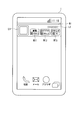
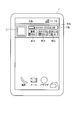
- FIG. 2 is a schematic diagram illustrating an example of display (vertical display) in the electronic terminal device 1 according to the present embodiment.
- an image denoted by reference symbol W1 is a widget W1.
- the widget W1 is displayed embedded in a page or screen.
- the widget W1 can be displayed even when a dedicated application (also referred to as an electronic book application) for the electronic book service is not activated, not displayed on the entire screen, or activated on the back.
- the widget refers to a simple application (a kind of application) displayed and operated on a part of the screen (top screen or home screen) displayed when the electronic terminal device 1 starts to be used.
- the widget displays information related to the electronic terminal device 1 or the application without activating the application itself, or provides a part of the functions of the electronic terminal device 1 or the application. Since the widget uses only a part of the screen, it is possible to immediately check various information by arranging a plurality of widgets on the screen. In addition, the widget can operate as a button for starting an application and does not consume much resources (memory, CPU, display, etc.) of the electronic terminal device 1, so that the standby screen of the electronic terminal device 1 can be used. It is suitable for displaying. On the widget W1, store logos L1 and L2 are displayed. The widget W1 is 4 ⁇ 1 in size.
- the number of unread electronic books is displayed for each group.
- an image W11 with a reference sign W11 represents that there are 100 or more unread electronic books in the electronic books belonging to the “book” group.
- An image W12 denoted by reference sign W12 represents that there are 100 or more unread electronic books in the electronic books belonging to the “recommended” group.
- the number W11 and W12 when the number of unread electronic books is smaller than 100, the number is displayed.
- An image W13 denoted by reference sign W13 indicates that there are “46” unread notice information items.
- An “unread” image is an image indicating that there is an unread electronic book.
- the electronic terminal device 1 displays an “unread” image or the number of unread electronic books regarding at least two or more groups in the area of the operation unit (touch panel) that starts the application. As described above, in this embodiment, even when the electronic book application is not activated, an “unread” image or the number of unread electronic books is displayed, so that the user can easily use the electronic book service.
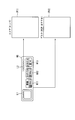
- FIG. 3 is a schematic diagram illustrating an example of a link of the widget W1 according to the present embodiment.
- This figure shows that when the logo L2 is selected (tapped, clicked), the electronic terminal device 1 displays the store page P11 (see FIG. 4). Further, this figure shows that when an area other than the logo L2 is selected, the electronic terminal device 1 displays a desk page P12 (see FIG. 5).
- the electronic terminal device 1 may display the store page P11.
- images W11, W12, and W13 are selected, a page related to the corresponding group may be displayed. For example, when the image W12 is selected, the electronic terminal device 1 may display a list of electronic books belonging to the “recommended” group on the store page or the desk page.
- the image W13 is selected, the electronic terminal device 1 may display a list of notification information as a store page, a desk page, or a list dedicated to notification.
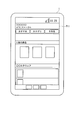
- FIG. 4 is a schematic diagram illustrating an example of the store page P11 according to the present embodiment. This figure shows a case where the electronic terminal device 1 starts a browser and displays a store page P11 downloaded from the store server 4 on the browser.
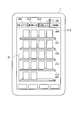
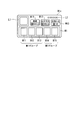
- FIG. 5 is a schematic diagram illustrating an example of the desk page P12 according to the present embodiment. This figure is a figure when the electronic terminal device 1 starts the electronic book application and displays the desk page P12. In FIG. 5, the electronic terminal device 1 does not display the widget W1. However, the present invention is not limited to this, and the widget W1 may be displayed over the desk page P12.
- images m11 to m14 denoted by reference numerals m11 to m14 are images used for selecting the groups “unread / recommended”, “recently read book”, “favorite”, and “subscription”, respectively.
- unread / recommended an electronic book purchased by a user or an unread electronic book distributed under a subscription contract is displayed in order, or an electronic book distributed free of charge from the store server 4 is displayed in order. Is done.
- “Recently read books” electronic books are displayed in order of reading start date and time.
- “Favorites” electronic books are displayed in the order in which the user registers them as favorites.
- “subscription” electronic books distributed in accordance with a subscription contract are sequentially displayed.
- a hatched image m13 is selected, and an image (thumbnail image) representing an electronic book belonging to the “favorite” group is displayed in a region R1 denoted by reference symbol R1.
- images of five-level book shelves s11 to s15 are displayed, and thumbnail images of electronic books are displayed as if books are placed on the bookshelves.
- a maximum of four thumbnail images of an electronic book are displayed on a single shelf and are displayed in a predetermined order.
- images and thumbnail images of the bookshelves s11 to s15 are displayed in the same manner.
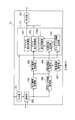
- FIG. 6 is a schematic block diagram showing the configuration of the electronic terminal device 1 according to this embodiment.
- an electronic terminal device 1 includes an input unit 101, a communication unit 102, an electronic book acquisition unit 103, an electronic book storage unit 104, a notification information acquisition unit 105, a management information storage unit 106, a management information update unit 107, a display control.
- the unit 11 and the display unit 121 are included.
- Each storage unit may be a storage capacity mounted on the main body or a storage device connected from the outside.
- the display control unit 11 includes a browser display control unit 111, a desk display control unit 112, an unread number generation unit 113, and a widget display control unit 114.
- the electronic terminal device 1 has a known function in the electronic terminal device (not shown) in addition to the above configuration.
- the input unit 101 receives input from a user.
- the input unit 101 outputs information corresponding to the received input to the communication unit 102, the management information update unit 107, and the display control unit 11.
- the input unit 101 is realized by a touch panel or operation buttons.
- the communication unit 102 communicates with the base station apparatus 2 based on information input from the input unit 101 or according to an instruction of a computer program.
- the communication unit 102 receives information from the store server 4 and outputs the information to each unit of the electronic terminal device 1. For example, the communication unit 102 receives a store page from the store server 4 and outputs the received store page to the browser display control unit 111.
- the electronic book acquisition unit 103 receives an electronic book and information on the electronic book from the store server 4 via the communication unit 102.
- the electronic book acquisition unit 103 stores the received electronic book (for example, the book ID and the content information of the electronic book) in the electronic book storage unit 104.
- the electronic book acquisition unit 103 stores the received information on the electronic book as book management information in the book management information table of the management information storage unit 104 (see FIGS. 7 and 8).
- the electronic book acquisition unit 103 allocates and stores book management information for each group (“book” and “recommendation”) indicated by the group information included in the information related to the electronic book.
- the notification information acquisition unit 105 receives the notification information distributed from the store server 4 via the communication unit 102.
- the notification information acquisition unit 105 stores the received notification information in the notification information table of the management information storage unit 106 (see FIG. 9).
- the management information update unit 107 updates the information stored in the management information update unit 107 based on the information input from the input unit 101. For example, when the user opens an electronic book, the management information update unit 107 writes the date and time in the reading start date and time corresponding to the book ID of the opened electronic book.
- the browser display control unit 111 generates store page display information based on the store page input from the communication unit 102.
- the browser display control unit 111 outputs the generated display information to the display unit 121.
- the desk display control unit 112 reads the information stored in the management information storage unit 104 and the electronic book stored in the electronic book storage unit 104 in accordance with the information input from the input unit 101.
- the desk display control unit 112 generates display information of the desk page based on the read information, and outputs the generated display information to the display unit 121.
- the unread number generation unit 113 calculates the number of unread books for each group and the number of unread notification information.
- the unread number generation unit 113 outputs information indicating the calculated unread number to the widget display control unit 114.
- the widget display control unit 114 generates display information of the widget W1.
- the widget W1 includes display information of the number of unread items indicated by the information input from the unread number generation unit 113.
- the widget display control unit 114 outputs the generated display information to the display unit 121.
- the display unit 121 displays the display information input from the browser display control unit 111, the desk display control unit 112, and the widget display control unit 114.
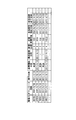
- FIG. 7 is a schematic diagram illustrating an example of a book management information table according to the present embodiment.
- This book management information table shows a book management information table related to electronic books in the “book” group.
- the “books” group of e-books are e-books subscribed to by users, such as those purchased by users (including serials, periodicals, and non-periodic publications) or free of charge. Included in the download.
- the book management information table includes a book ID, download date / time, subscription date / time, issue date / time, reading start date / time, last reading date / time, number of readings, reading accumulated time, effective period start date / time, effective period end date / time, subscription flag. Each item.
- the book management information table has book management information for each book ID.
- book ID is identification information of an electronic book.
- the download date and time is the date and time when the electronic terminal device 1 downloaded the electronic book with the book ID.
- the subscription date and time is the date and time when the user subscribes to the electronic book with the book ID.
- the subscription date and time for electronic books of serial publications, periodicals, and non-periodic publications is the publication date of each publication.
- the issue date and time is the issue date and time of the electronic book with the book ID.
- the issue date and time is information set by the book issuer and is included in the information related to the electronic book.
- the reading start date and time is the date and time when the user first opened the electronic book with the book ID. In the book management information of an electronic book that has not yet been opened, “unread” is written at the reference date.
- the last reading date and time is the date and time when the user last opened the electronic book with the book ID.
- the number of readings is the number of times the user has opened an electronic book with a book ID. Note that the number of readings may be one when the number of readings within a predetermined period is one or more. For example, when counting once a day, it is the number of days when the user opened an electronic book with a book ID.
- the cumulative reading time is the cumulative time during which the user has opened the electronic book with the book ID.
- the effective period start date and time and the effective period end date and time are the start date and the end date and time at which the electronic book with the book ID can be referenced, respectively. That is, the electronic terminal device 1 provides the user with the electronic book with the book ID only during the period between the effective period start date and time and the effective period end date and time.
- the subscription flag is information indicating whether or not the electronic book with the book ID is a periodical publication. In addition, information indicating that it is a periodic publication may be set for serial books and non-periodical electronic books.
- the book management information on the first line in FIG. 7 indicates that an electronic book with a book ID “12345” was issued to “2011/4/20” and purchased and downloaded by the user on the same day. .
- This book management information indicates that the electronic book whose book ID is “12345” is “unread”, that is, has not yet been opened and the reading start date has not been written.
- an electronic book whose book ID is “23456” is first opened on “2011/4/17”, and by “2011/4/19”, This indicates that the cumulative time “720 minutes” has been opened for a total of “4” times.
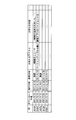
- FIG. 8 is a schematic diagram illustrating an example of another book management information table according to the present embodiment.
- This book management information table shows a book management information table related to electronic books in the “recommended” group.
- the “recommended” group of electronic books is an electronic book recommended to the user, and includes, for example, an electronic book set by a store manager or an electronic book provider, and an electronic book set by a computer program.
- the book management information table includes items of book ID, download date / time, issue date / time, reading start date / time, last reading date / time, number of readings, reading accumulated time, effective period start date / time, and effective period end date / time. Yes.
- the book management information table has book management information for each book ID.
- the contents of each item in FIG. 8 are the same as the items in FIG.
- the book management information on the first line in FIG. 8 indicates that an electronic book with a book ID “98765” was issued to “2011/4/18” and purchased and downloaded by the user on the same day. .
- This book management information indicates that the electronic book with the book ID “98765” is “unread”, that is, has not yet been opened and the reading start date has not been written.
- FIG. 9 is a schematic diagram illustrating an example of the notification information table according to the present embodiment.
- the notification information table has items of ID of notification information, download date / time, subscription date / time, issue date / time, reference date / time, notification title, and notification content.
- the value of each item of the notification information table in FIG. 9 is a schematic diagram illustrating an example of the notification information table according to the present embodiment.
- the notification information table has items of ID of notification information, download date / time, subscription date / time, issue date / time, reference date / time, notification title, and notification content.
- ID is identification information of notification information.
- the download date and time is the date and time when the ID notification information is downloaded to the electronic terminal device 1.
- the issue date is the issue date of the notification information.
- the reference date and time is the date and time when the electronic terminal device 1 first displays the notification content corresponding to the ID. It should be noted that “unread” is written at the reference date in the notification information for which the notification content is not yet displayed.
- the notice title is the title of the notice content.
- the notification title is used when displaying a list.
- the notification content is the content of the notification.
- the notification information on the first line in FIG. 9 indicates that the notification with the ID “abcde” was issued on “2011/4/18” and was purchased and downloaded by the user on the same day.
- This notification information indicates that the title is “A function release” and the content is “A function added ...”.
- This notification information indicates that the notification whose ID is “abcde” is “unread”, that is, it has not been opened yet and the reference date has not been written.
- FIG. 10 is a flowchart illustrating an example of the operation of the electronic terminal device 1 according to the present embodiment.
- the electronic terminal device 1 transmits information indicating that an electronic book is to be purchased to the store server 4 based on a user operation.
- the store server 4 stores the user ID, the book ID, and the subscription date in association with each other. Then, it progresses to step S102. If the user has a subscription contract, the electronic book to be automatically transmitted to the electronic terminal device 1 is determined by the processing of the store server 4 without the user performing a purchase operation of the electronic book.
- the electronic terminal device 1 transmits information indicating that an electronic book is downloaded to the store server 4 based on an input from the user.
- This information includes a user ID and a book ID.
- the store server 4 stores the electronic book of the book ID and the information about the electronic book as electronic information. It transmits to the terminal device 1.
- the information on the electronic book includes group information, the purchase date and time stored in step S101, the valid period start date and time, the valid period end date and time, and the subscription flag.
- the information transmitted from the electronic terminal book 1 may not include the book ID.
- the store server 4 manages electronic books to be transmitted for each user ID, and when there is a request from the electronic terminal device 1, information on the electronic book and the electronic book corresponding to the user ID is obtained. Send.
- the electronic book acquisition unit 103 of the electronic terminal device 1 stores the electronic book downloaded from the store server 4 in the electronic book storage unit 104.
- the electronic book acquisition unit 103 stores information related to the electronic book downloaded from the store server 4 in the book management information table of the group indicated by the group information included in this information.
- the electronic terminal device 1 may not have a book management information table for each group. In this case, information on books in different groups of electronic books is stored in a mixed state, and one item in the information has an item for identifying the group.
- the electronic book acquisition unit 103 writes the current time in the download date and time, and writes “unread” in the reading start date and time.
- the electronic book acquisition unit 103 writes “0” times as the number of readings and “0” s as the accumulated reading time. Thereafter, the process proceeds to step S103.
- Step S103 The desk display control unit 112 displays a desk page based on the input from the user and the electronic book application.
- the management information update unit 107 determines whether or not the user has started reading by determining whether or not the electronic book has been opened based on an input from the user. If it is determined that reading has started (YES), the process proceeds to step S104. On the other hand, if it is not determined that reading has started (NO), the process returns to step S103.
- Step S104 The management information updating unit 107 reads out the book management information of the electronic book determined to have started reading in step S103, and determines whether there is a reading start date and time of the read book management information. If there is a reading start date and time (YES), the process proceeds to step S106. On the other hand, when the reading start date / time is not written (the reading start date / time is “unread”) (NO), the process proceeds to step S105.
- Step S105 The management information update unit 107 writes the current time in the reading start date and time of the book management information read in step S104. Thereafter, the process proceeds to step S106.
- Step S106 The management information update unit 107 adds “1” times to the number of readings of the book management information read in step S104. Thereafter, the process proceeds to step S107.
- Step S107 The management information update unit 107 writes the current time for every elapse of a predetermined time (for example, 1 minute) in the final reading date and time of the book management information read in step S104. Thereafter, the process proceeds to step S108.
- Step S108 The management information update unit 107 adds the time to a cumulative reading time of the book management information read in step S104 every time a predetermined time (for example, 1 minute) has elapsed. Thereafter, the process proceeds to step S109. Note that the management information update unit 107 may not add to the accumulated reading time when an electronic book is not displayed (for example, when a standby screen is displayed or when another application is displayed).
- Step S109 The management information updating unit 107 determines whether or not reading of the electronic book has ended based on an input from the user. Specifically, the management information update unit 107 determines that reading of the electronic book has ended when the electronic book is closed or when the electronic book application is ended. When the reading of the electronic book is finished (YES), the electronic terminal device 1 finishes the operation. On the other hand, when the reading of the electronic book is not completed (NO), the process returns to step S107.
- FIG. 11 is a flowchart illustrating an example of the operation of the electronic terminal device 1 according to the present embodiment. This figure shows the operation when displaying a widget.
- Step S201 The electronic terminal device 1 is activated. Then, it progresses to step S201.
- Step S202 From the book management information table of the “book” group, the unread number generation unit 113 has a current time between the effective period start date and the effective period end date and the reading start date is not written. Count the number of book management information (unread count). The unread number generation unit 113 sets the counted unread number as the number of unread electronic books in the “book” group.
- the unread number generation unit 113 counts the number of book management information (number of unread items) in which the reading start date / time is not written from the book management information table of the “recommended” group. The unread number generation unit 113 sets the counted unread number as the number of unread electronic books in the “recommended” group. The unread number generation unit 113 counts the number of book management information (number of unread cases) in which the reading start date / time is not written from the notification information table. The unread number generation unit 113 sets the counted unread number as the number of “Notification” unread. Note that the management information update unit 107 may determine whether it is within the validity period, and delete the electronic book that has passed the validity period independently by another process.
- Step S205 The widget display control unit 114 displays the widget W1.
- the widget display control unit 114 displays the number of unread items calculated in step S202 (the number of unread items after the change when changed in step S204) for each group. Note that the widget display control unit 114 does not display the number of unread items and the “unread” images for the group whose number of unread items is “0”. For this reason, the user can easily distinguish from the case where one or more unreads exist only by looking at the widget. Thereafter, the process proceeds to step S206.
- Step S206 The unread number generation unit 113 determines whether or not information (record) has been added to the table of the management information storage unit 106. If it is determined that information has been added to the table (YES), the process returns to step S202. That is, the electronic terminal device 1 updates the number of unread items when, for example, downloading of a book is completed, or when downloading of a periodicals or recommended information is completed. Thereby, the electronic terminal device 1 can display the latest number of unread items. On the other hand, if it is determined that no information is added to the table (NO), the process proceeds to step S207.
- Step S207 The unread number generation unit 113 determines whether the reading start date or the reference date in the table of the management information storage unit 106 has been updated. When it is determined that the reading start date or the reference date has been updated (YES), the process returns to step S202. That is, the electronic terminal device 1 updates the number of unread cases when, for example, an electronic book is opened. Specifically, after displaying the contents of an unread electronic book with a viewer (opening the electronic book) and then transitioning to the OS screen, the number of unread books is reduced by one. Thereby, the electronic terminal device 1 can display the latest number of unread items. On the other hand, if it is determined that the reading start date or the reference date has not been updated (NO), the process proceeds to step S208.
- Step S208 The unread number generation unit 113 determines whether or not a predetermined period has elapsed since the previous step S208. If it is determined that the predetermined period has elapsed (YES), the process returns to step S202. That is, for example, the electronic terminal device 1 updates the number of unread cases every time a predetermined period elapses. Thereby, the electronic terminal device 1 can exclude, for example, an electronic book whose valid period end date has passed without being read from the number of unread items. Therefore, the electronic terminal device 1 can display the latest number of unread items. On the other hand, if it is determined that the predetermined period has not elapsed (NO), the process proceeds to step S209. (Step S209) When the electronic terminal device 1 is switched off (YES), the operation is terminated. On the other hand, when the electronic terminal device 1 is not switched off (NO), the process returns to step S206.
- the display unit 121 displays an unread electronic book when an application (electronic book application) that displays the contents of the electronic book is not activated or is not displayed on the entire screen. Displays information indicating that there is Thereby, the electronic terminal device 1 can make a user use an electronic book service simply. According to the present embodiment, the display unit 121 displays the number of unread items. Thereby, the electronic terminal device 1 can inform the user of the number of unread items, and can prompt the user to read the electronic book.
- an application electronic book application
- the display unit 121 displays information indicating that it is equal to or larger than this value when the number of unread messages is larger than a predetermined value. Thereby, the electronic terminal device 1 can inform the user of the number of unread items without increasing the display area. Also, the number of unread messages becomes enormous, and it is possible to prevent the user from ignoring the number of unread messages and feeling stressed about the number of unread messages. According to the present embodiment, the display unit 121 displays the number of unread electronic books belonging to a group for each predetermined group. Thereby, the electronic terminal device 1 can inform the user of the number of unread items for each group.
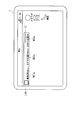
- FIG. 12 is a schematic diagram illustrating another example of display (horizontal display) in the electronic terminal device 1 according to the present embodiment.
- This figure shows an example of a display when the electronic terminal device 1 of FIG. 2 is rotated 90 degrees.
- the widget W1a is shorter in the vertical direction and longer in the horizontal direction than the widget 1.
- the group name and the number of unread messages are displayed on the same line (displayed on different lines in FIG. 2).
- the electronic terminal device 1 displays the widget W1a having a short vertical length by displaying the group name and the number of unread messages on the same line.
- the user can use the area in the vertical direction of the screen in an area other than the widget W1a without being pressed.
- FIG. 13 is a schematic diagram illustrating an example of display in the electronic terminal device 1 according to the first modification of the present embodiment. 13 is different from the widget W1 in FIG. 2 in that the widget W1b has a telop display portion T1b.
- the telop display unit T1b displays a character string such as an advertisement distributed from the store server 4. This character string has a predetermined number of characters (for example, 200 characters) or less and is displayed in a loop in the telop display portion T1b.
- the electronic terminal device 1 displays the telop display unit T1b. Instead, the widget W1 of FIG. 2 may be displayed.
- a logo L2b is displayed on the telop display portion T1b. When the logo L2b is selected, the electronic terminal device 1 displays the store page P11.
- FIG. 14 is a schematic diagram illustrating an example of display in the electronic terminal device 1 according to the second embodiment of the present invention. Comparing the widget W1c of FIG. 14 with the widget W1 of FIG. 2, the difference is that the widget W1c has a thumbnail image display portion B1. In the thumbnail image display section B1, thumbnail images B11 to B15 of electronic books are displayed in this order.
- the thumbnail image displayed on the thumbnail image display unit B1 is a thumbnail image of an unread electronic book. When there are five or more thumbnail images, the thumbnail images can be scrolled in the thumbnail image display section B1.
- the widget W1 is 4 ⁇ 2 in size.
- FIG. 15 is a schematic block diagram showing the configuration of the electronic terminal device 1c according to the present embodiment.
- an electronic terminal device 1c includes an input unit 101, a communication unit 102, an electronic book acquisition unit 103, an electronic book storage unit 104, a notification information acquisition unit 105, a management information storage unit 106, a management information update unit 107, a display control.
- the unit 11 c and the display unit 121 are included.
- the electronic terminal device 1c (FIG. 15) is compared with the electronic terminal device 1 (FIG. 6), the electronic terminal device 1c is different in that it includes a thumbnail image generation unit 115c.
- the thumbnail image generation unit 115c arranges the thumbnail images and generates display information for displaying the thumbnail images in the arranged order. Specifically, the thumbnail image generation unit 115c arranges the thumbnail images in one of the following orders or a combination of the following orders. (1) Order displayed on the desk page or store page (2) Download date / time, issue date / time, purchase date / time (3) Group information order
- the management information storage unit 106 stores display order information in which the book ID is associated with the display order in the display order table.
- the desk display control unit 112 stores display order information indicating the display order when the list (second list) is displayed on the desk page in the display order table.
- the electronic book acquisition unit 103 and the notification information acquisition unit 105 store display order information indicating the display order when displaying the list (second list) on the store page in the display order table.
- the thumbnail image generation unit 115c arranges thumbnail images of unread electronic books based on information stored in the management information storage unit 106. In other words, the thumbnail image generation unit 115c arranges thumbnail images of unread electronic books according to the order displayed on the bookshelf displayed on the desk page or the store page.
- the thumbnail image generation unit 115c based on the information stored in the management information storage unit 106, thumbnails of unread electronic books in the new order of download date / time, issue date / time, and purchase date / time. Align images.
- the present invention is not limited to this, and the thumbnail image generation unit 115c may arrange the download date / time, issue date / time, and purchase date / time in the oldest order.
- the thumbnail image generating unit 115c arranges thumbnail images of unread electronic books in a predetermined group order based on information stored in the management information storage unit 106.
- the order of the groups may be “book” and “recommended”, or “recommended” and “book”.
- “book” refers to an electronic book purchased by a user or an electronic book acquired through a subscription contract
- “recommended” refers to an electronic book transmitted free of charge from the store server 4.
- the way of dividing is not limited to this.
- the thumbnail image generation unit 115c may determine the order of the groups according to the usage history of the user as in the following (a) to (c).
- the thumbnail image generation unit 115c determines the order of groups so that a group including an electronic book with a new download date / time (or may be an issue date / time or purchase date / time) is given priority. May be.
- the thumbnail image generation unit 115c is the first “book” group including the electronic book (book ID “12345”) with the latest download date “2011/4/20”.
- the “recommended” group including the new “2011/4/18” electronic book is set in the second order.
- the thumbnail image generation unit 115c may determine the order of groups so that a group with a large number of unread items is prioritized. Thereby, the opportunity for a user to refer to the electronic book of a group with many unread cases can be increased.
- the present invention is not limited to this, and the thumbnail image generation unit 115c may determine the order of groups so that priority is given to a group with a small number of unread items. Thereby, it is possible to make it easy for the user to refer to the electronic book of a group with a small number of unread items, that is, a group often used by the user.
- the thumbnail image generation unit 115c may determine the order of the groups based on the number of books instead of the number of unread cases. That is, the thumbnail image generation unit 115c may determine the order of the groups based on the total number of unread and read electronic books.
- the thumbnail image generating unit 115c may determine the order of groups so that a group with a large total number of reading counts or reading cumulative time is prioritized.
- the present invention is not limited to this, and the thumbnail image generation unit 115c may determine the order of the groups so that priority is given to a group with a small total number of readings or total reading time.
- FIG. 16 is a flowchart showing an example of the operation of the electronic terminal device 1c according to the present embodiment. Comparing the operation of the electronic terminal device 1c (FIG. 16) and the operation of the electronic terminal device 1 (FIG. 11), the operation of the electronic terminal device 1c is different in that it includes steps S310 and S305.
- Step S310 The thumbnail image generation unit 115c arranges the thumbnail images in the order of (1) to (3) described above. Note that the thumbnail image generation unit 115c sets the current time between the effective period start date and time and the effective period end date and time to be aligned. Thereafter, the process proceeds to step S305. (Step S305) The widget display control unit 114 displays the widget W1c.
- the display unit 121 displays a list (first list) of thumbnail images representing unread electronic books.
- the electronic terminal device 1 can display the thumbnail image of the unread electronic book for the user, and can easily use the electronic book service.
- the display control unit 11c determines the display order of images on the thumbnail image display unit B1 based on the display order of the list on the desk page or the store page. To do. Thereby, even when the desk page or the store page changes, the electronic terminal device 1 can display the image list in the same order as the thumbnail images displayed on the widget W1c. Thereby, the electronic terminal device 1 can provide a smooth service to the user.
- the electronic terminal device 1 can prevent the electronic book of the thumbnail image displayed on the widget W1c from being displayed on the desk page or the list of the store page and preventing the user from using the service smoothly.
- the display control unit 11c determines the display order of images on the thumbnail image display unit B1 based on the group to which the electronic book belongs.
- the display unit 121 displays a list of thumbnail images in the display order determined by the display control unit 11c. Thereby, for example, the electronic terminal device 1 can preferentially display a list of thumbnail images of a group having a high priority.
- the electronic terminal device 1c may allocate the display area of the thumbnail image display unit B1 for each group.
- FIG. 17 is a schematic diagram illustrating an example of display on the electronic terminal device 1c according to the second modification of the present embodiment.
- the display areas of the thumbnail images B11 to B13 are assigned to the first group.
- the display areas for the thumbnail images B14 and B15 are assigned to the second group.
- the first group is a “book” group
- the second group is a “recommended” group.
- the thumbnail image generation unit 115c extracts thumbnail images of unread electronic books for each group and arranged in the display order.
- the thumbnail image generation unit 115c selects thumbnail images in the arrangement order by a predetermined number for each group.
- the thumbnail image generation unit 115c generates display information for displaying the selected thumbnail image in a predetermined display area.
- the thumbnail image generation unit 115c as shown in (d) to (f) below, according to the usage history of the user, the order in the display area and the size of the display area (vertical width, horizontal width, ratio, etc.) ) May be determined.
- the thumbnail image generation unit 115c has a group order or display area so that priority is given to a group including an electronic book with a new download date / time (or issue date / time or purchase date / time). May be determined.
- the thumbnail image generation unit 115c displays the thumbnail images of the electronic books belonging to the “book” group first from the left, and the display area of three thumbnail images.
- the thumbnail image generation unit 115c displays the thumbnail image of the electronic book belonging to the “recommended” group second from the left, and also displays two thumbnail images. That is, the thumbnail image generation unit 115c displays the thumbnail image of the electronic book belonging to the priority group in a larger area on the left side.
- the thumbnail image generation unit 115c may determine the order of groups or the size of the display area so that priority is given to a group having a large number of unread items. However, the present invention is not limited to this, and the thumbnail image generation unit 115c may determine the order of the groups or the size of the display area so that priority is given to a group with a small number of unread items.
- (F) Order of the number of readings or the cumulative reading time For example, the thumbnail image generation unit 115c determines the order of the groups or the size of the display area so as to give priority to a group having a large total value of the number of readings or the cumulative reading time. May be. However, the present invention is not limited to this, and the thumbnail image generation unit 115c may determine the order of the groups or the size of the display area so that priority is given to a group with a small number of readings or total reading time. .
- the display control unit 11c determines the image display area on the thumbnail image display unit B1 based on the group to which the electronic book belongs.
- the display unit 121 displays a list of thumbnail images in the display order determined by the display control unit 11c.
- the electronic terminal device 1 can preferentially display a list of thumbnail images of a group having a high priority.
- the electronic terminal device 1 can allocate a display area to a group with a low priority, for example, and can increase the number of groups to be displayed.
- the program for realizing the control function may be recorded on a computer-readable recording medium, and the program recorded on the recording medium may be read by a computer system and executed.
- the “computer system” here is a computer system built in the display devices 1 and 1c, and includes an OS and hardware such as peripheral devices.
- the “computer-readable recording medium” refers to a storage device such as a flexible medium, a magneto-optical disk, a portable medium such as a ROM or a CD-ROM, and a hard disk incorporated in a computer system.
- the “computer-readable recording medium” is a medium that dynamically holds a program for a short time, such as a communication line when transmitting a program via a network such as the Internet or a communication line such as a telephone line,
- a volatile memory inside a computer system serving as a server or a client may be included and a program that holds a program for a certain period of time.
- the program may be a program for realizing a part of the functions described above, and may be a program capable of realizing the functions described above in combination with a program already recorded in a computer system.
- LSI Large Scale Integration
- Each functional block of the display devices 1 and 1c may be individually made into a processor, or a part or all of them may be integrated into a processor.
- the method of circuit integration is not limited to LSI, and may be realized by a dedicated circuit or a general-purpose processor. Further, in the case where an integrated circuit technology that replaces LSI appears due to progress in semiconductor technology, an integrated circuit based on the technology may be used.
- the present invention can be applied to a mobile phone, an electronic book device, and the like.
Landscapes
- Engineering & Computer Science (AREA)
- Business, Economics & Management (AREA)
- Theoretical Computer Science (AREA)
- Entrepreneurship & Innovation (AREA)
- Human Resources & Organizations (AREA)
- Strategic Management (AREA)
- Physics & Mathematics (AREA)
- General Physics & Mathematics (AREA)
- General Engineering & Computer Science (AREA)
- Quality & Reliability (AREA)
- Tourism & Hospitality (AREA)
- Operations Research (AREA)
- General Business, Economics & Management (AREA)
- Marketing (AREA)
- Economics (AREA)
- Data Mining & Analysis (AREA)
- Human Computer Interaction (AREA)
- User Interface Of Digital Computer (AREA)
- Information Transfer Between Computers (AREA)
- Information Retrieval, Db Structures And Fs Structures Therefor (AREA)
Abstract
Description
本願は、2011年4月26日に、日本に出願された特願2011-098438号に基づき優先権を主張し、その内容をここに援用する。
しかしながら、電子端末では、電子書籍に関する情報を確認するためには、専用アプリを起動しなければならない。つまり、利用者は、電子書籍に関する情報を容易に確認できず、電子書籍サービスを簡便に利用できることができなかった。
以下、図面を参照しながら本発明の実施形態について詳しく説明する。
図1は、本発明の第1の実施形態に係る通信システムの一例を示す概略図である。この図において、通信システムは、電子端末装置1、基地局装置2、ネットワーク3、ストアサーバ4を具備する。
ストアサーバ4は、電子書籍や電子書籍に関する情報を、ネットワーク3及び基地局装置2を介して、電子端末装置1へ提供する。なお、電子書籍に関する情報には、電子書籍が属するグループ(「書籍」又は「おすすめ」)を示すグループ情報や、定期・不定期購読の電子書籍(逐次刊行物、定期刊行物、不定期刊行物も含む)であることを示す情報等が含まれる。また、ストアサーバ4は、電子端末装置1のブラウザに表示させる情報(ストアページとも称する。図4参照)を提供する。また、ストアサーバ4は、お知らせ情報を電子端末装置1へ配信する。
ここで、ウィジェットとは、電子端末装置1の使用開始時に表示される画面(トップ画面もしくはホーム画面)において、画面の一部に表示され、動作する簡易アプリ(アプリの一種)を指す。ウィジェットは、電子端末装置1もしくはアプリケーションに関連する情報をそのアプリケーション自身を起動することなく表示したり、電子端末装置1もしくはアプリケーションの一部の機能を提供する。ウィジェットは画面の一部だけを使用するため、複数のウィジェットを画面に配置しておくことで、すぐに様々な情報を確認することも可能となる。また、ウィジェットは、アプリケーションの起動をするためのボタンとしても動作することが可能なうえ、電子端末装置1の資源(メモリ、CPU、ディスプレイ等)をあまり消費しないため、電子端末装置1の待ち受け画面に表示することに適している。
ウィジェットW1には、ストアのロゴL1、L2が表示されている。なお、ウィジェットW1は、横4×縦1のサイズである。
このように、本実施形態では、電子書籍アプリを起動していない場合でも、「未」の画像、又は電子書籍の未読件数を表示するので、利用者が電子書籍サービスを簡便に利用できる。
なお、ロゴL1が選択された場合には、電子端末装置1がストアページP11を表示してもよい。また、画像W11、W12、W13が選択された場合には、それぞれで対応するグループに関するページを表示してもよい。例えば、画像W12が選択された場合には、電子端末装置1は、ストアページ又はデスクページで「おすすめ」グループに属する電子書籍の一覧を表示してもよい。また、画像W13が選択された場合には、電子端末装置1は、ストアページ、デスクページ又はお知らせ専用のリストでお知らせ情報の一覧を表示してもよい。
通信部102は、入力部101から入力された情報に基づいて、又はコンピュータプログラムの指示に従って、基地局装置2と通信を行う。通信部102は、ストアサーバ4からの情報を受信し、電子端末装置1の各部へ出力する。例えば、通信部102は、ストアサーバ4からストアページを受信し、受信したストアページをブラウザ表示制御部111へ出力する。
管理情報更新部107は、入力部101から入力された情報に基づいて、管理情報更新部107が記憶する情報を更新する。例えば、管理情報更新部107は、利用者が電子書籍を開いたときに、開いた電子書籍の書籍IDに対応する読書開始日時に、その日時を書き込む。
デスク表示制御部112は、入力部101から入力された情報に応じて、管理情報記憶部104が記憶する情報、及び電子書籍記憶部104が記憶する電子書籍を読み出す。デスク表示制御部112は、読み出した情報に基づいてデスクページの表示情報を生成し、生成した表示情報を表示部121へ出力する。
ウィジェット表示制御部114は、ウィジェットW1の表示情報を生成する。ここで、ウィジェットW1には、未読件数生成部113から入力された情報が示す未読件数の表示情報が含まれる。ウィジェット表示制御部114は、生成した表示情報を表示部121へ出力する。
表示部121は、ブラウザ表示制御部111、デスク表示制御部112、及びウィジェット表示制御部114から入力された表示情報を表示する。
図7において、書籍管理情報テーブルは、書籍ID、ダウンロード日時、購読日時、発行日時、読書開始日時、最終読書日時、読書回数、読書累積時間、有効期間開始日時、有効期間終了日時、定期購読フラグの各項目を有している。書籍管理情報テーブルでは、書籍ID毎に書籍管理情報を有している。なお、図7の書籍管理情報テーブルの各項目の値において、日時に関する項目では、時間の記載を省略してある。
ダウンロード日時は、書籍IDの電子書籍を電子端末装置1がダウンロードした日時である。購読日時は、利用者が書籍IDの電子書籍の購読契約した日時である。なお、逐次刊行物、定期刊行物、不定期刊行物の電子書籍についての購読日時は、刊行物各々の発行日時となる。発行日時は、書籍IDの電子書籍の発行日時である。発行日時は、書籍の発行者が設定した情報であり、電子書籍に関する情報に含まれる。
読書開始日時は、利用者が書籍IDの電子書籍を最初に開いたときの日時である。なお、未だ開いていない電子書籍の書籍管理情報では、参照日時に「未読」が書き込まれている。
読書累積時間は、利用者が書籍IDの電子書籍を開いていた時間の累計時間である。
また、例えば、図7の2行目の書籍管理情報は、書籍IDが「23456」の電子書籍が、「2011/4/17」に最初に開かれ、「2011/4/19」までに、合計「4」回で累積時間「720分」開かれたことを示す。
図8において、書籍管理情報テーブルは、書籍ID、ダウンロード日時、発行日時、読書開始日時、最終読書日時、読書回数、読書累積時間、有効期間開始日時、有効期間終了日時の各項目を有している。書籍管理情報テーブルでは、書籍ID毎に書籍管理情報を有している。なお、図8の書籍管理情報テーブルの各項目の値において、日時に関する項目では、時間の記載を省略してある。また、図8の各項目の内容は、図7の項目と同じであるので、説明は省略する。
ダウンロード日時は、IDのお知らせ情報を電子端末装置1にダウンロードした日時である。発行日時は、お知らせ情報の発行日時である。参照日時は、電子端末装置1がIDに対応するお知らせ内容を最初に表示したときの日時である。なお、未だお知らせ内容が表示されていないお知らせ情報では、参照日時に「未読」が書き込まれている。
お知らせタイトルは、お知らせ内容のタイトルである。お知らせタイトルは、一覧表示する場合などに用いられる。お知らせ内容は、お知らせの内容である。
(ステップS101)電子端末装置1は、利用者の操作に基づいて、電子書籍を購入することを示す情報をストアサーバ4へ送信する。ストアサーバ4は、利用者IDと書籍IDと購読日時を対応付けて記憶する。その後、ステップS102へ進む。なお、購読契約している場合は、利用者が電子書籍の購入操作をすることなく、ストアサーバ4の処理により自動的に電子端末装置1へ送信する電子書籍が決定される。
(ステップS102)電子端末装置1は、利用者からの入力に基づいて、電子書籍をダウンロードすることを示す情報をストアサーバ4へ送信する。この情報には、利用者IDと書籍IDが含まれている。ストアサーバ4は、電子端末装置1が送信した情報とステップS101で記憶した情報との利用者IDと書籍IDが同じである場合には、この書籍IDの電子書籍と電子書籍に関する情報を、電子端末装置1へ送信する。ここで、電子書籍に関する情報には、グループ情報、ステップS101で記憶した購入日時、有効期間開始日時、有効期間終了日時、及び定期購読フラグが含まれている。なお、電子端末書籍1から送信する情報に書籍IDが含まれていなくてもよい。この場合、ストアサーバ4が利用者IDごとに送信すべき電子書籍を管理しておき、電子端末装置1から要求があった際に、当該利用者IDに対応する電子書籍と電子書籍に関する情報を送信する。
(ステップS104)管理情報更新部107は、ステップS103で読書を開始したと判定した電子書籍の書籍管理情報を読み出し、読み出した書籍管理情報の読書開始日時があるか否かを判定する。読書開始日時がある場合(YES)、ステップS106へ進む。一方、読書開始日時が書き込まれていない(読書開始日時が「未読」)場合(NO)、ステップS105へ進む。
(ステップS106)管理情報更新部107は、ステップS104で読み出した書籍管理情報の読書回数に「1」回を加算する。その後、ステップS107へ進む。
(ステップS107)管理情報更新部107は、ステップS104で読み出した書籍管理情報の最終読書日時に、予め定めた時間(例えば1分)経過毎に現在時刻を書き込む。その後、ステップS108へ進む。
(ステップS108)管理情報更新部107は、ステップS104で読み出した書籍管理情報の読書累積時間に、予め定めた時間(例えば1分)経過毎にその時間を加算する。その後、ステップS109へ進む。なお、管理情報更新部107は、電子書籍が表示されていない場合(例えば、待ち受け画面の表示時や他アプリの表示時)には、読書累積時間に加算しなくてもよい。
一方、電子書籍の読書が終了していない場合(NO)、ステップS107へ戻る。
(ステップS201)電子端末装置1が起動される。その後、ステップS201へ進む。
(ステップS202)未読件数生成部113は、「書籍」グループの書籍管理情報テーブルから、現在時刻が有効期間開始日時と有効期間終了日時との間にあり、かつ、読書開始日時が書き込まれていない書籍管理情報の数(未読件数)を計数する。未読件数生成部113は、計数した未読件数を、「書籍」グループの電子書籍の未読件数とする。未読件数生成部113は、「おすすめ」グループの書籍管理情報テーブルから、読書開始日時が書き込まれていない書籍管理情報の数(未読件数)を計数する。未読件数生成部113は、計数した未読件数を、「おすすめ」グループの電子書籍の未読件数とする。未読件数生成部113は、お知らせ情報テーブルから、読書開始日時が書き込まれていない書籍管理情報の数(未読件数)を計数する。未読件数生成部113は、計数した未読件数を、「お知らせ」の未読件数とする。なお、管理情報更新部107は、有効期間内であるか判定し、有効期間を過ぎた電子書籍の削除を別の処理で独立して行ってもよい。
(ステップS204)未読件数生成部113は、閾値以上の未読件数を「T以上」(例えば、「100以上」)に変更する。その後、ステップS205へ進む。
一方、テーブルに情報が追加されていないと判定した場合(NO)、ステップS207へ進む。
一方、読書開始日又は参照日時が更新されていないと判定した場合(NO)、ステップS208へ進む。
一方、予め定めた期間が経過していないと判定した場合(NO)、ステップS209へ進む。
(ステップS209)電子端末装置1のスイッチが切られた場合(YES)、動作を終了する。一方、電子端末装置1のスイッチが切られていない場合(NO)、ステップS206へ戻る。
また、本実施形態によれば、表示部121は、未読件数を表示する。これにより、電子端末装置1は、利用者に対して未読件数を知らせることができ、電子書籍を読むことを促すことができる。
また、本実施形態によれば、表示部121は、予め定められたグループ毎に、グループに属する電子書籍の未読件数を表示する。これにより、電子端末装置1は、グループ毎に、利用者に対して未読件数を知らせることができる。
図12において、ウェジェットW1aは、ウィジェット1と比較して縦方向が短くなり、横方向が長くなっている。例えば、画像W11a~W13aでは、グループ名と未読件数が同じ行に表示されている(図2では別の行に表示されている)。換言すれば、電子端末装置1は、グループ名と未読件数が同じ行に表示することにより、縦方向の長さが短いウィジェットW1aを表示する。これにより、利用者は、ウィジェットW1a以外の領域において、画面の縦方向の長さを圧迫されることなく利用できる。
図13は、本実施形態の変形例1に係る電子端末装置1における表示の一例を表す概略図である。
図13のウィジェットW1bと図2のウィジェットW1とを比較すると、ウィジェットW1bがテロップ表示部T1bを有する点で異なる。テロップ表示部T1bは、ストアサーバ4から配信される広告等の文字列を表示する。この文字列の予め定められた文字数(例えば、200文字)以下の文字列であり、テロップ表示部T1b内でループして表示される。なお、ストアサーバ4から文字列を受信できない場合、又は、ストアサーバ4から受信した文字列が予め定めた期間(例えば1週間)更新されない場合、電子端末装置1は、テロップ表示部T1bを表示せずに、図2のウィジェットW1を表示するようにしてもよい。
図13において、テロップ表示部T1bには、ロゴL2bが表示されている。なお、ロゴL2bが選択された場合には、電子端末装置1がストアページP11を表示する。
以下、図面を参照しながら本発明の第2の実施形態について詳しく説明する。
図14は、本発明の第2の実施形態に係る電子端末装置1における表示の一例を表す概略図である。図14のウィジェットW1cと図2のウィジェットW1とを比較すると、ウィジェットW1cがサムネイル画像表示部B1を有する点で異なる。
サムネイル画像表示部B1には、電子書籍のサムネイル画像B11~B15の順に表示されている。ここで、サムネイル画像表示部B1に表示されるサムネイル画像は、未読の電子書籍のサムネイル画像である。サムネイル画像が5個以上ある場合には、サムネイル画像表示部B1では、サムネイル画像をスクロールできる。なお、ウィジェットW1は、横4×縦2のサイズである。
(1)デスクページ又はストアページで表示する順序
(2)ダウンロード日時、発行日時、購入日時の順序
(3)グループ情報の順序
サムネイル画像生成部115cは、管理情報記憶部106が記憶する情報に基づいて、未読の電子書籍のサムネイル画像を整列する。換言すれば、サムネイル画像生成部115cは、デスクページ又はストアページで表示する書棚で表示される順序に従って、未読の電子書籍のサムネイル画像を整列する。
また、サムネイル画像生成部115cは、以下の(a)~(c)のように、利用者の利用履歴に応じて、グループの順序を決定してもよい。
例えば、サムネイル画像生成部115cは、ダウンロード日時(又は発行日時、購入日時であってもよい)が新しい電子書籍を含むグループを優先させるように、グループの順序を決定してもよい。例えば、図7と図8の書籍管理情報では、サムネイル画像生成部115cは、ダウンロード日時が最新「2011/4/20」の電子書籍(書籍ID「12345」)を含む「書籍」グループを1番目の順とし、次に新しい「2011/4/18」の電子書籍を含む「おすすめ」グループを2番目の順とする。
例えば、サムネイル画像生成部115cは、未読件数が多いグループを優先させるように、グループの順序を決定してもよい。これにより、利用者が未読件数の多いグループの電子書籍を参照する機会を増やすことができる。ただし、本発明はこれに限らず、サムネイル画像生成部115cは、未読件数が少ないグループを優先させるように、グループの順序を決定してもよい。これにより、利用者が未読件数の少ないグループ、つまり、利用者がよく利用するグループの電子書籍を参照し易くすることができる。
また、サムネイル画像生成部115cは、未読件数に代えて書籍件数に基づいて、グループの順序を決定してもよい。つまり、サムネイル画像生成部115cは、未読と既読の電子書籍の合計件数に基づいて、グループの順序を決定してもよい。
例えば、サムネイル画像生成部115cは、読書回数又は読書累積時間の合計値が多いグループを優先させるように、グループの順序を決定してもよい。ただし、本発明はこれに限らず、サムネイル画像生成部115cは、読書回数又は読書累積時間の合計値が少ないグループを優先させるように、グループの順序を決定してもよい。
(ステップS305)ウィジェット表示制御部114は、ウィジェットW1cを表示する。
また、本実施形態によれば、表示制御部11c(サムネイル画像生成部115c)は、デスクページ又はストアページでの一覧の表示順序に基づいて、サムネイル画像表示部B1での画像の表示順序を決定する。これにより、電子端末装置1は、デスクページ又はストアページが遷移する場合でも、ウィジェットW1cに表示されるサムネイル画像と同じ順序で、画像一覧を表示できる。これにより、電子端末装置1は、利用者に対して円滑なサービスを提供できる。例えば、電子端末装置1は、ウィジェットW1cに表示されているサムネイル画像の電子書籍が、デスクページ又はストアページの一覧では表示されず、利用者が円滑にサービスを利用できなくなることを防止できる。
また、本実施形態によれば、表示制御部11cは、電子書籍が属するグループに基づいて、サムネイル画像表示部B1での画像の表示順序を決定する。表示部121は、表示制御部11cが決定した表示順序で、サムネイル画像の一覧を表示する。これにより、電子端末装置1は、例えば、優先順位の高いグループのサムネイル画像の一覧を優先して表示できる。
なお、本実施形態において、電子端末装置1cは、グループ毎にサムネイル画像表示部B1の表示領域を割り当ててもよい。
図17は、本実施形態の変形例2に係る電子端末装置1cにおける表示の一例を表す概略図である。この図において、ウィジェットW1cでは、サムネイル画像B11~B13の表示領域が、第1グループに割り当てられている。また、ウィジェットW1cでは、サムネイル画像B14、B15の表示領域が、第2グループに割り当てられている。例えば、第1グループが「書籍」グループであり、第2グループが「おすすめ」グループである。
また、サムネイル画像生成部115cは、以下の(d)~(f)のように、利用者の利用履歴に応じて、表示領域での順序や表示領域の大きさ(縦幅、横幅、割合等)を決定してもよい。
例えば、サムネイル画像生成部115cは、ダウンロード日時(又は発行日時、購入日時であってもよい)が新しい電子書籍を含むグループを優先させるように、グループの順序又は表示領域の大きさを決定してもよい。例えば、図7と図8の書籍管理情報では、サムネイル画像生成部115cは、「書籍」グループに属する電子書籍のサムネイル画像を左から1番目に表示し、また、3個のサムネイル画像の表示領域とする。この場合、サムネイル画像生成部115cは、「おすすめ」グループに属する電子書籍のサムネイル画像を左から2番目に表示し、また、2個のサムネイル画像の表示領域とする。つまり、サムネイル画像生成部115cは、優先するグループに属する電子書籍のサムネイル画像ほど、左側に大きな領域で表示する。
例えば、サムネイル画像生成部115cは、未読件数が多いグループを優先させるように、グループの順序又は表示領域の大きさを決定してもよい。ただし、本発明はこれに限らず、サムネイル画像生成部115cは、未読件数が少ないグループを優先させるように、グループの順序又は表示領域の大きさを決定してもよい。
(f)読書回数又は読書累積時間の順序
例えば、サムネイル画像生成部115cは、読書回数又は読書累積時間の合計値が多いグループを優先させるように、グループの順序又は表示領域の大きさを決定してもよい。ただし、本発明はこれに限らず、サムネイル画像生成部115cは、読書回数又は読書累積時間の合計値が少ないグループを優先させるように、グループの順序又は表示領域の大きさを決定してもよい。
また、上述した実施形態における表示装置1、1c装置の一部、または全部を、LSI(Large Scale Integration)等の集積回路として実現しても良い。表示装置1、1cの各機能ブロックは個別にプロセッサ化してもよいし、一部、または全部を集積してプロセッサ化しても良い。また、集積回路化の手法はLSIに限らず専用回路、または汎用プロセッサで実現しても良い。また、半導体技術の進歩によりLSIに代替する集積回路化の技術が出現した場合、当該技術による集積回路を用いても良い。
2 基地局装置
3 ネットワーク
4 ストアサーバ
101 入力部
102 通信部
103 電子書籍取得部
104 電子書籍記憶部
105 お知らせ情報取得部
106 管理情報記憶部
107 管理情報更新部
11、11c 表示制御部
121 表示部
111 ブラウザ表示制御部
112 デスク表示制御部
113 未読件数生成部
114 ウィジェット表示制御部
115c サムネイル画像生成部
Claims (11)
- 電子書籍を表示する表示装置であって、
電子書籍の内容を表示するアプリケーションが画面全体に表示されていない場合に、未読の電子書籍があることを表す情報を表示する表示部
を備える表示装置。 - 前記表示部は、少なくとも2つ以上のグループに関する未読の電子書籍があることを表す情報を同時に表示する請求項1に記載の表示装置
- 前記表示部は、未読の電子書籍があることを表す情報として、未読の電子書籍の数を示す未読件数、又は未読の電子書籍があることを表す画像を表示する請求項1又は請求項2に記載の表示装置。
- 前記表示部は、未読の電子書籍があることを表す情報として、未読の電子書籍があることを表す画像を表示する請求項1から請求項3のいずれか一項に記載の表示装置。
- 前記表示部は、前記未読の電子書籍の数が予め定めた値より大きい場合には、当該値以上であることを表す情報を表示する請求項1から請求項4のいずれか一項に記載の表示装置。
- 前記表示部は、未読の電子書籍を表す画像の第1の一覧を表示する請求項1から請求項5のいずれか一項に記載の表示装置。
- 前記表示部は、電子書籍を表す画像の第2の一覧を表示し、
前記第2の一覧の表示順序に基づいて、前記第1の一覧での画像の表示順序を決定する表示制御部を備え、
前記表示部は、前記表示制御部が決定した表示順序で、前記第1の一覧を表示する請求項6に記載の表示装置。 - 電子書籍が属するグループに基づいて、前記第1の一覧での画像の表示順序を決定する表示制御部を備え、
前記表示部は、前記表示制御部が決定した表示順序で、前記第1の一覧を表示する請求項6に記載の表示装置。 - 電子書籍が属するグループに基づいて、前記第1の一覧での画像の表示領域を決定する表示領域制御部を備え、
前記表示部は、前記表示領域制御部が決定した表示領域に、前記第1の一覧を表示する請求項7又は請求項8に記載の表示装置。 - 表示装置における表示方法おいて、
電子書籍の内容を表示するアプリケーションが画面全体に表示されていない場合に、未読の電子書籍があることを表す情報を表示する工程を有する表示方法。 - 表示装置のコンピュータに、
電子書籍の内容を表示するアプリケーションが画面全体に表示されていない場合に、未読の電子書籍があることを表す情報を表示する工程を実行させるための表示プログラム。
Priority Applications (3)
| Application Number | Priority Date | Filing Date | Title |
|---|---|---|---|
| JP2013512027A JP5507757B2 (ja) | 2011-04-26 | 2012-04-18 | 表示装置、表示方法、表示プログラム、及びプロセッサ |
| CN2012800186828A CN103477315A (zh) | 2011-04-26 | 2012-04-18 | 显示装置、显示方法、显示程序以及处理器 |
| US14/113,536 US9495077B2 (en) | 2011-04-26 | 2012-04-18 | Display device, display method, and non-transitory computer-readable recording medium |
Applications Claiming Priority (2)
| Application Number | Priority Date | Filing Date | Title |
|---|---|---|---|
| JP2011-098438 | 2011-04-26 | ||
| JP2011098438 | 2011-04-26 |
Publications (1)
| Publication Number | Publication Date |
|---|---|
| WO2012147579A1 true WO2012147579A1 (ja) | 2012-11-01 |
Family
ID=47072100
Family Applications (1)
| Application Number | Title | Priority Date | Filing Date |
|---|---|---|---|
| PCT/JP2012/060434 Ceased WO2012147579A1 (ja) | 2011-04-26 | 2012-04-18 | 表示装置、表示方法、表示プログラム、及びプロセッサ |
Country Status (4)
| Country | Link |
|---|---|
| US (1) | US9495077B2 (ja) |
| JP (1) | JP5507757B2 (ja) |
| CN (1) | CN103477315A (ja) |
| WO (1) | WO2012147579A1 (ja) |
Cited By (5)
| Publication number | Priority date | Publication date | Assignee | Title |
|---|---|---|---|---|
| JP2014149832A (ja) * | 2013-01-31 | 2014-08-21 | Samsung Electronics Co Ltd | 客体表示方法、客体提供方法及びそのためのシステム |
| JP2015060514A (ja) * | 2013-09-20 | 2015-03-30 | シャープ株式会社 | 処理装置、処理方法、および処理プログラム |
| JP2015169943A (ja) * | 2014-03-04 | 2015-09-28 | 株式会社ニコン | 電子コンテンツ出力装置および電子コンテンツ出力プログラム |
| JP2020034991A (ja) * | 2018-08-27 | 2020-03-05 | オムロン株式会社 | 入力デバイス、携帯端末、入力デバイス制御方法、および入力デバイス制御プログラム |
| CN114925285A (zh) * | 2022-06-30 | 2022-08-19 | 抖音视界(北京)有限公司 | 书籍信息处理方法、装置、设备和存储介质 |
Families Citing this family (12)
| Publication number | Priority date | Publication date | Assignee | Title |
|---|---|---|---|---|
| US9229613B2 (en) * | 2012-02-01 | 2016-01-05 | Facebook, Inc. | Transitions among hierarchical user interface components |
| USD744494S1 (en) * | 2012-03-06 | 2015-12-01 | Apple Inc. | Display screen or portion thereof with graphical user interface |
| USD708638S1 (en) | 2012-03-07 | 2014-07-08 | Apple Inc. | Display screen or portion thereof with graphical user interface |
| AU349475S (en) * | 2013-01-18 | 2013-06-27 | Samsung Electronics Co Ltd | Electric oven with image display |
| JP5942978B2 (ja) * | 2013-12-26 | 2016-06-29 | ソニー株式会社 | 情報処理装置、情報処理方法およびプログラム |
| JP6533085B2 (ja) | 2015-03-31 | 2019-06-19 | Line株式会社 | 端末、情報処理方法、及びプログラム |
| US10078424B2 (en) * | 2015-11-12 | 2018-09-18 | International Business Machines Corporation | Recognition and display of reading progress |
| CN110633036A (zh) * | 2018-06-22 | 2019-12-31 | 中兴通讯股份有限公司 | 图片浏览方法、装置及移动终端、计算机可读存储介质 |
| USD937846S1 (en) * | 2018-08-31 | 2021-12-07 | Mitsubishi Electric Corporation | Display screen with graphical user interface |
| JP1632789S (ja) * | 2018-08-31 | 2019-06-03 | 車両設備稼動状態管理機能付き電子計算機 | |
| CN115757255A (zh) * | 2022-11-23 | 2023-03-07 | 北京字跳网络技术有限公司 | 一种书籍信息展示方法及装置 |
| CN116796070A (zh) * | 2023-06-25 | 2023-09-22 | 北京字跳网络技术有限公司 | 一种信息展示方法、装置、计算机设备及存储介质 |
Citations (3)
| Publication number | Priority date | Publication date | Assignee | Title |
|---|---|---|---|---|
| JP2003150618A (ja) * | 2001-11-13 | 2003-05-23 | Sony Corp | コンテンツ検索提示システム、コンテンツ検索提示装置、コンテンツ検索提示方法、コンテンツ検索提示プログラム及びコンテンツ検索提示プログラム格納媒体 |
| JP2003298715A (ja) * | 2002-04-01 | 2003-10-17 | Nec Saitama Ltd | 携帯端末における機能呼出方法及び該方法を用いる携帯端末 |
| JP2007129506A (ja) * | 2005-11-04 | 2007-05-24 | Hitachi Advanced Digital Inc | 移動体通信機における着信履歴表示方式 |
Family Cites Families (17)
| Publication number | Priority date | Publication date | Assignee | Title |
|---|---|---|---|---|
| US5697793A (en) * | 1995-12-14 | 1997-12-16 | Motorola, Inc. | Electronic book and method of displaying at least one reading metric therefor |
| US7290285B2 (en) * | 2000-06-30 | 2007-10-30 | Zinio Systems, Inc. | Systems and methods for distributing and viewing electronic documents |
| US6640655B1 (en) | 2000-10-03 | 2003-11-04 | Varco I/P, Inc. | Self tracking sensor suspension mechanism |
| US6725228B1 (en) * | 2000-10-31 | 2004-04-20 | David Morley Clark | System for managing and organizing stored electronic messages |
| JP2004139440A (ja) * | 2002-10-18 | 2004-05-13 | Matsushita Electric Ind Co Ltd | サービス提供システム及び、それに関する、装置または方法または記録媒体またはプログラム |
| AU2003291042A1 (en) * | 2002-11-18 | 2004-06-15 | America Online, Inc. | Enhanced buddy list interface |
| US7669140B2 (en) * | 2003-08-21 | 2010-02-23 | Microsoft Corporation | System and method for providing rich minimized applications |
| EP1672884B1 (en) * | 2004-12-20 | 2017-01-04 | Samsung Electronics Co., Ltd. | Apparatus and method for providing user assistance in a wireless terminal employing an avatar |
| JP4405939B2 (ja) * | 2005-05-18 | 2010-01-27 | キヤノン株式会社 | 画像処理装置とその制御方法および画像処理システム |
| WO2007116705A1 (ja) * | 2006-03-31 | 2007-10-18 | Nec Corporation | ウェブコンテンツ閲覧情報表示装置、方法、プログラム |
| EP2157513A4 (en) * | 2007-05-08 | 2012-01-18 | Sharp Kk | DEVICE FORMING COMMUNICATION TERMINAL |
| JP4457318B2 (ja) * | 2007-07-17 | 2010-04-28 | ソニー株式会社 | 携帯情報端末 |
| JP2009135715A (ja) | 2007-11-29 | 2009-06-18 | Sharp Corp | コンテンツ起動携帯端末装置 |
| JP4702434B2 (ja) * | 2008-11-14 | 2011-06-15 | ブラザー工業株式会社 | 通信装置および制御プログラム |
| JP5872753B2 (ja) * | 2009-05-01 | 2016-03-01 | ソニー株式会社 | サーバ装置、電子機器、電子書籍提供システム、サーバ装置の電子書籍提供方法、電子機器の電子書籍表示方法及びプログラム |
| US20120303418A1 (en) * | 2011-05-23 | 2012-11-29 | Illan Poreh | Dynamic pricing of access to content where pricing varies with user behavior over time to optimize total revenue and users are matched to specific content of interest |
| CA2864850A1 (en) * | 2012-01-18 | 2013-07-25 | Yoav Lorch | Incremental content purchase and management systems and methods |
-
2012
- 2012-04-18 JP JP2013512027A patent/JP5507757B2/ja active Active
- 2012-04-18 US US14/113,536 patent/US9495077B2/en not_active Expired - Fee Related
- 2012-04-18 WO PCT/JP2012/060434 patent/WO2012147579A1/ja not_active Ceased
- 2012-04-18 CN CN2012800186828A patent/CN103477315A/zh active Pending
Patent Citations (3)
| Publication number | Priority date | Publication date | Assignee | Title |
|---|---|---|---|---|
| JP2003150618A (ja) * | 2001-11-13 | 2003-05-23 | Sony Corp | コンテンツ検索提示システム、コンテンツ検索提示装置、コンテンツ検索提示方法、コンテンツ検索提示プログラム及びコンテンツ検索提示プログラム格納媒体 |
| JP2003298715A (ja) * | 2002-04-01 | 2003-10-17 | Nec Saitama Ltd | 携帯端末における機能呼出方法及び該方法を用いる携帯端末 |
| JP2007129506A (ja) * | 2005-11-04 | 2007-05-24 | Hitachi Advanced Digital Inc | 移動体通信機における着信履歴表示方式 |
Cited By (7)
| Publication number | Priority date | Publication date | Assignee | Title |
|---|---|---|---|---|
| JP2014149832A (ja) * | 2013-01-31 | 2014-08-21 | Samsung Electronics Co Ltd | 客体表示方法、客体提供方法及びそのためのシステム |
| US10165061B2 (en) | 2013-01-31 | 2018-12-25 | Samsung Electronics Co., Ltd. | Method and system for displaying object, and method and system for providing the object |
| US10819807B2 (en) | 2013-01-31 | 2020-10-27 | Samsung Electronics Co., Ltd. | Method and system for displaying object, and method and system for providing the object |
| JP2015060514A (ja) * | 2013-09-20 | 2015-03-30 | シャープ株式会社 | 処理装置、処理方法、および処理プログラム |
| JP2015169943A (ja) * | 2014-03-04 | 2015-09-28 | 株式会社ニコン | 電子コンテンツ出力装置および電子コンテンツ出力プログラム |
| JP2020034991A (ja) * | 2018-08-27 | 2020-03-05 | オムロン株式会社 | 入力デバイス、携帯端末、入力デバイス制御方法、および入力デバイス制御プログラム |
| CN114925285A (zh) * | 2022-06-30 | 2022-08-19 | 抖音视界(北京)有限公司 | 书籍信息处理方法、装置、设备和存储介质 |
Also Published As
| Publication number | Publication date |
|---|---|
| US20140096079A1 (en) | 2014-04-03 |
| CN103477315A (zh) | 2013-12-25 |
| JP5507757B2 (ja) | 2014-05-28 |
| JPWO2012147579A1 (ja) | 2014-07-28 |
| US9495077B2 (en) | 2016-11-15 |
Similar Documents
| Publication | Publication Date | Title |
|---|---|---|
| JP5507757B2 (ja) | 表示装置、表示方法、表示プログラム、及びプロセッサ | |
| KR101215175B1 (ko) | 다중 대기화면 제공 시스템 및 방법 | |
| US8775935B2 (en) | Personification of software agents | |
| EP2568372A1 (en) | Electronic device and method for operating application programs | |
| US20120260202A1 (en) | Customized launching of applications | |
| AU2014408285A1 (en) | Device, method, and graphical user interface for presenting and installing applications | |
| JP6313438B2 (ja) | プロフィール提供方法及びその方法を実行するユーザ端末 | |
| JP2009540415A (ja) | 端末への情報の自動配信を提供するための方法、装置、およびコンピュータプログラム | |
| WO2011046846A2 (en) | Routing user data entries to applications | |
| JPWO2016121552A1 (ja) | 情報処理装置及びプログラム | |
| US9946427B1 (en) | Dynamic home screen | |
| JP6401726B2 (ja) | 情報処理装置、情報処理方法、及びプログラム | |
| JP5695966B2 (ja) | 興味推定装置、方法及びプログラム | |
| JP4704286B2 (ja) | コンテンツ表示装置、コンテンツ表示方法、プログラム、および記録媒体 | |
| JP2017091393A (ja) | 表示制御方法、端末、情報処理装置、及びプログラム | |
| CN109753612B (zh) | 问卷显示的控制方法、装置、存储介质和电子设备 | |
| JP2012103868A (ja) | 情報処理装置、情報処理方法およびプログラム | |
| KR100635556B1 (ko) | 휴대 단말기의 고객 맞춤형 사용자 인터페이스 제공 방법 | |
| US20190347145A1 (en) | Enhanced notifications | |
| JP5855059B2 (ja) | アプリケーション販促装置、アプリケーション販促システム、アプリケーション販促方法、及びアプリケーション販促プログラム | |
| JP6282859B2 (ja) | スケジュール管理システムおよびスケジュール管理用プログラム | |
| JP6744468B1 (ja) | 情報処理システム、方法、及びプログラム | |
| JP7391789B2 (ja) | 情報処理システム、方法、及びプログラム | |
| JP5068349B2 (ja) | 情報表示装置、方法及びプログラム | |
| CN106293745A (zh) | 一种应用程序图标的管理方法及系统 |
Legal Events
| Date | Code | Title | Description |
|---|---|---|---|
| 121 | Ep: the epo has been informed by wipo that ep was designated in this application |
Ref document number: 12776278 Country of ref document: EP Kind code of ref document: A1 |
|
| ENP | Entry into the national phase |
Ref document number: 2013512027 Country of ref document: JP Kind code of ref document: A |
|
| WWE | Wipo information: entry into national phase |
Ref document number: 14113536 Country of ref document: US |
|
| NENP | Non-entry into the national phase |
Ref country code: DE |
|
| 122 | Ep: pct application non-entry in european phase |
Ref document number: 12776278 Country of ref document: EP Kind code of ref document: A1 |