WO2012147253A1 - ストレージ装置および携帯端末 - Google Patents
ストレージ装置および携帯端末 Download PDFInfo
- Publication number
- WO2012147253A1 WO2012147253A1 PCT/JP2012/001172 JP2012001172W WO2012147253A1 WO 2012147253 A1 WO2012147253 A1 WO 2012147253A1 JP 2012001172 W JP2012001172 W JP 2012001172W WO 2012147253 A1 WO2012147253 A1 WO 2012147253A1
- Authority
- WO
- WIPO (PCT)
- Prior art keywords
- content
- user
- storage device
- conversion
- information
- Prior art date
- Legal status (The legal status is an assumption and is not a legal conclusion. Google has not performed a legal analysis and makes no representation as to the accuracy of the status listed.)
- Ceased
Links
Images




Classifications
-
- H—ELECTRICITY
- H04—ELECTRIC COMMUNICATION TECHNIQUE
- H04N—PICTORIAL COMMUNICATION, e.g. TELEVISION
- H04N5/00—Details of television systems
- H04N5/76—Television signal recording
- H04N5/91—Television signal processing therefor
-
- H—ELECTRICITY
- H04—ELECTRIC COMMUNICATION TECHNIQUE
- H04N—PICTORIAL COMMUNICATION, e.g. TELEVISION
- H04N21/00—Selective content distribution, e.g. interactive television or video on demand [VOD]
- H04N21/40—Client devices specifically adapted for the reception of or interaction with content, e.g. set-top-box [STB]; Operations thereof
- H04N21/43—Processing of content or additional data, e.g. demultiplexing additional data from a digital video stream; Elementary client operations, e.g. monitoring of home network or synchronising decoder's clock; Client middleware
- H04N21/433—Content storage operation, e.g. storage operation in response to a pause request, caching operations
- H04N21/4333—Processing operations in response to a pause request
-
- H—ELECTRICITY
- H04—ELECTRIC COMMUNICATION TECHNIQUE
- H04N—PICTORIAL COMMUNICATION, e.g. TELEVISION
- H04N21/00—Selective content distribution, e.g. interactive television or video on demand [VOD]
- H04N21/40—Client devices specifically adapted for the reception of or interaction with content, e.g. set-top-box [STB]; Operations thereof
- H04N21/43—Processing of content or additional data, e.g. demultiplexing additional data from a digital video stream; Elementary client operations, e.g. monitoring of home network or synchronising decoder's clock; Client middleware
- H04N21/433—Content storage operation, e.g. storage operation in response to a pause request, caching operations
- H04N21/4334—Recording operations
-
- H—ELECTRICITY
- H04—ELECTRIC COMMUNICATION TECHNIQUE
- H04N—PICTORIAL COMMUNICATION, e.g. TELEVISION
- H04N21/00—Selective content distribution, e.g. interactive television or video on demand [VOD]
- H04N21/40—Client devices specifically adapted for the reception of or interaction with content, e.g. set-top-box [STB]; Operations thereof
- H04N21/43—Processing of content or additional data, e.g. demultiplexing additional data from a digital video stream; Elementary client operations, e.g. monitoring of home network or synchronising decoder's clock; Client middleware
- H04N21/44—Processing of video elementary streams, e.g. splicing a video clip retrieved from local storage with an incoming video stream or rendering scenes according to encoded video stream scene graphs
- H04N21/44008—Processing of video elementary streams, e.g. splicing a video clip retrieved from local storage with an incoming video stream or rendering scenes according to encoded video stream scene graphs involving operations for analysing video streams, e.g. detecting features or characteristics in the video stream
-
- H—ELECTRICITY
- H04—ELECTRIC COMMUNICATION TECHNIQUE
- H04N—PICTORIAL COMMUNICATION, e.g. TELEVISION
- H04N21/00—Selective content distribution, e.g. interactive television or video on demand [VOD]
- H04N21/40—Client devices specifically adapted for the reception of or interaction with content, e.g. set-top-box [STB]; Operations thereof
- H04N21/43—Processing of content or additional data, e.g. demultiplexing additional data from a digital video stream; Elementary client operations, e.g. monitoring of home network or synchronising decoder's clock; Client middleware
- H04N21/44—Processing of video elementary streams, e.g. splicing a video clip retrieved from local storage with an incoming video stream or rendering scenes according to encoded video stream scene graphs
- H04N21/4402—Processing of video elementary streams, e.g. splicing a video clip retrieved from local storage with an incoming video stream or rendering scenes according to encoded video stream scene graphs involving reformatting operations of video signals for household redistribution, storage or real-time display
-
- H—ELECTRICITY
- H04—ELECTRIC COMMUNICATION TECHNIQUE
- H04N—PICTORIAL COMMUNICATION, e.g. TELEVISION
- H04N21/00—Selective content distribution, e.g. interactive television or video on demand [VOD]
- H04N21/40—Client devices specifically adapted for the reception of or interaction with content, e.g. set-top-box [STB]; Operations thereof
- H04N21/45—Management operations performed by the client for facilitating the reception of or the interaction with the content or administrating data related to the end-user or to the client device itself, e.g. learning user preferences for recommending movies, resolving scheduling conflicts
- H04N21/458—Scheduling content for creating a personalised stream, e.g. by combining a locally stored advertisement with an incoming stream; Updating operations, e.g. for OS modules ; time-related management operations
- H04N21/4583—Automatically resolving scheduling conflicts, e.g. when a recording by reservation has been programmed for two programmes in the same time slot
-
- H—ELECTRICITY
- H04—ELECTRIC COMMUNICATION TECHNIQUE
- H04N—PICTORIAL COMMUNICATION, e.g. TELEVISION
- H04N5/00—Details of television systems
- H04N5/76—Television signal recording
- H04N5/91—Television signal processing therefor
- H04N5/93—Regeneration of the television signal or of selected parts thereof
-
- H—ELECTRICITY
- H04—ELECTRIC COMMUNICATION TECHNIQUE
- H04N—PICTORIAL COMMUNICATION, e.g. TELEVISION
- H04N9/00—Details of colour television systems
- H04N9/79—Processing of colour television signals in connection with recording
- H04N9/80—Transformation of the television signal for recording, e.g. modulation, frequency changing; Inverse transformation for playback
- H04N9/82—Transformation of the television signal for recording, e.g. modulation, frequency changing; Inverse transformation for playback the individual colour picture signal components being recorded simultaneously only
- H04N9/8205—Transformation of the television signal for recording, e.g. modulation, frequency changing; Inverse transformation for playback the individual colour picture signal components being recorded simultaneously only involving the multiplexing of an additional signal and the colour video signal
Definitions
- the present invention relates to a storage device and a portable terminal having a content conversion function.
- An apparatus related to conventional storage has been proposed as shown below for the apparatus having a function to support the browsing of content by the user.
- Patent Document 1 realizes a function of converting and reserving content for viewing on a portable device and notifying of the completion.
- Patent Document 2 proposes a function to complete content conversion in the shortest time by adjusting feature point information and conversion format of content.
- An object of the present invention is to improve the usability of a storage device and a portable terminal.
- feature point information related to content is utilized to extract the content desired by the user, content near the feature point is increased in conversion rate (code amount necessary for conversion), and others are reduced in conversion rate, overall conversion Make the conversion while adjusting the time.
- conversion rate code amount necessary for conversion
- others are reduced in conversion rate, overall conversion Make the conversion while adjusting the time.
- the information specified by the user is provided in the form of being clearly indicated in the content.
- the usability of the storage device and the portable terminal can be improved.
- Example 1 It is the hardware connection block diagram which showed the implementation method.
- Example 1 It is function explanatory drawing of the Example of this invention.
- Example 1 It is a software block diagram which showed the implementation method.
- Example 1 It is DB (file, face information) block diagram which showed the implementation method.
- Example 1 It is DB (reservation information) block diagram which showed the implementation method.
- Example 1 It is a processing flow figure showing contents conversion reservation processing.
- Example 1 It is a processing flow figure showing contents conversion reservation processing.
- Example 2 It is a processing flow figure showing information superimposition processing at the time of contents conversion.
- Example 3 Video conversion specification explanatory drawing showing the implementation method (Example 1) Hardware configuration of mobile terminal showing implementation method (Example 1)
- FIG. 1 is a hardware connection configuration diagram showing an implementation method.
- Reference numeral 100 denotes an external storage device (hereinafter referred to as a storage device) in the present embodiment.
- Reference numeral 110 denotes another external storage device in the present embodiment, which is equivalent to the external storage device 110.
- a mobile terminal 120 is a portable information terminal provided with a UI (User Interface) function such as command input from a user and screen display and a communication function with an external device.
- Reference numeral 130 denotes a personal computer (hereinafter, referred to as a PC), which, like the mobile terminal 120, is a computer terminal provided with a UI function such as command input from a user or screen display and a communication function with an external device.
- Reference numeral 140 denotes a network, to which devices having a communication function are connected.
- the storage device 100 is a usage form connected on the network as a NAS (Network Attached Storage), and the storage device 110 shows a usage form connected to the personal computer 130.
- NAS Network Attached Storage
- the storage device and the mobile terminal 120 and the PC 130 are connected to the network 140 and can communicate with each other.
- connection with the network 140 will be described as being connected to a LAN (Local Area Network), and the connection between the PC and the storage apparatus B will be described as being connected by a Universal Serial Bus (USB).
- USB Universal Serial Bus
- it may be a general connection path regardless of eSATA (external Serial ATA) or other wired or wireless.
- FIG. 2 is a functional explanatory diagram of the embodiment of the present invention.
- 210 shows an operation screen of the mobile terminal 120. The user selects the content selection, conversion method, etc. while viewing this screen.
- Reference numeral 220 denotes original content (original content) stored in the storage apparatus 100
- reference numeral 230 denotes converted content.
- Reference numeral 231 denotes nearby content extracted as feature information specified by the user, which is a portion that may be converted to low image quality for content length adjustment.
- Reference numeral 232 denotes a content extracted as feature information designated by the user, which extracts similar images within a possible range according to the content length designated by the user, and is also converted to high image quality.
- FIG. 240 shows a display example of the operation screen 210 of the mobile terminal 120.
- Reference numeral 241 denotes an interface for specifying feature information.
- Reference numeral 243 denotes an interface for reproduction. The converted content is played back while converting in real time, which will be described later.
- FIG. 244 shows an interface for specifying a content length.
- the original length is converted, or a user desired length is designated.
- Reference numeral 245 denotes an interface for specifying related feature information.
- the storage device may analyze the content in advance and analyze it from the acquired information, such as a scene of entering and exiting sports club content and a goal scene for a soccer game, and present the result of searching related information on the Internet You may.
- FIG. 9 is an explanatory diagram of handling of content operated by the function of the embodiment of the present invention.
- An area 910 is a region near a scene corresponding to user-specified feature information, and indicates a scene that is a candidate for a region to be used when the converted content fits within the range of the user-specified length. This is an area to be converted to low image quality.
- Reference numeral 911 denotes a scene corresponding to user-specified feature information, which is converted to high image quality.
- Reference numeral 230 denotes the above-described example of converted content, in which the user-specified length is shorter than the original. If the user-specified length is longer than the original, it may be generated by adding it as a digest scene before or after the original.
- Reference numeral 260 denotes an example of a reproduction screen of a scene corresponding to user-specified feature information.
- a superimposed display is performed so that the name corresponding to the feature information and the position in the screen can be determined.
- information may be superimposed and displayed on which part of the screen a person, an object, or the like corresponding to the feature information designated by the user appears.
- FIG. 3 is a software configuration diagram showing an implementation method.
- Reference numeral 300 denotes the processing range of the external storage apparatus in the present embodiment.
- Reference numeral 301 denotes an external device connected to the present device to transmit and receive data.
- Reference numeral 301 may be an apparatus similar to the apparatus of this embodiment, or a PC or other storage apparatus.
- the external device may be a portable terminal, and the connection destination may be singular or plural.
- Reference numeral 302 denotes a communication control unit, which performs transmission / reception control of data with an external device.
- LAN Local Area Network
- USB universal serial bus
- Reference numeral 303 denotes a CPU control unit, which controls each processing unit of the entire apparatus. Unless otherwise noted, the CPU control unit performs processing.
- Reference numeral 304 denotes a DB (Data Base) operation unit, which performs processing related to the operation of a DB stored in a storage described later.
- DB Data Base
- Reference numeral 305 denotes a reservation control unit, which performs processing for content conversion reservation of data stored in the storage with an external device.
- a content control unit 306 performs control for extracting a content desired by the user at the time of content conversion, joining, conversion to another format, and the like.
- An R / W control unit 307 performs control to read and write various data stored in the storage.
- Reference numeral 308 denotes a storage, which is a recording medium for storing various data.
- Reference numeral 309 denotes a video conversion unit, which extracts an appropriate frame (same as a still image here) from still image data and moving image data, and performs information compression processing. For example, the resizing process of the image is shown.
- Reference numeral 310 denotes a face recognition processing unit, which identifies the location where the face appears from the content, and indicates the processing of extracting the position in the image.
- face recognition processing is used, but object recognition can also be diverted by using an object suitable for recognition as comparison data used for recognition.
- face recognition is selected to explain the embodiment, it may be replaced with feature recognition processing specific to content, scene change, moving object recognition or the like as described in the function description above.
- FIG. 1 An exemplary configuration of a DB used in the apparatus according to this embodiment is shown in FIG.
- the DB shown in the figure is used by the above-mentioned DB operation unit 304.
- An area 401 for managing the ID is a unique number of data managed by the DB. When video data is newly added, a new number is used.
- Reference numeral 402 denotes an area for managing the file name, which is designated by the user when the video data is stored in the storage 308 or a file name determined by the apparatus is set, and this file name information is managed.
- Reference numeral 403 denotes an area for managing tags, information on whether or not the device in which the video data is stored is the main body, information on which face recognition processing has been performed (shown as FR in the example in the figure), thumbnail images In the example in the figure, FACE and SCENE are stored.
- Reference numeral 404 denotes an area for managing tag addition information, in which additional information (for example, an ID for specifying detected face information, etc.) regarding a tag in which video data is stored is stored.
- Reference numeral 405 denotes time information, in which position information of a scene related to tag information is stored.
- Reference numeral 406 denotes a tag ID, and when the tag information is, for example, content related to face recognition, indicates a unique ID for managing the face recognition result.
- Reference numeral 407 denotes a file name, and, for example, in the case of content related to face recognition, stores a file name including the face.
- Reference numeral 408 denotes feature information, and, for example, in the case of content related to face recognition, a template number used for detection and information indicating a feature amount are stored.
- Reference numeral 409 denotes name tag information, which stores name information of a part managed by the tag ID.
- Reference numeral 410 denotes coordinates and size information, and, for example, in the case of content related to face recognition, stores the position in the frame (image) of the recognized face and size information of the face.
- FIG. 1 An exemplary configuration of a DB used in the reservation function used in the apparatus according to this embodiment is shown in FIG.
- the DB shown in the figure is used by the above-mentioned DB operation unit 304.
- An area 501 for managing the reservation ID is a number unique to reservation data managed by the DB. When reservation data is newly added, a new number is used.
- Reference numeral 502 denotes an area for managing the file name, which stores the original file name of the content designated by the user as the reservation setting target.
- Reference numeral 503 denotes a converted file name, and in this case, a virtual file name for accessing the converted content from the mobile terminal is stored.
- Reference numeral 504 denotes additional information, which stores feature information specified by the user, progress information during conversion, and the like.
- Reference numeral 505 denotes time information, which stores the content length (reproduction time) designated by the user.
- An embodiment 1 for realizing content conversion from content stored in the NAS reserved by the user from the mobile terminal and face information and content length similarly designated by the user according to this embodiment will be described below. Note that operations such as content designation on the mobile terminal, a face recognition algorithm, and a format conversion algorithm for video use a known method, and therefore will not be described here.
- FIG. 6 is a process flow diagram showing the content conversion reservation process.
- the CPU control unit 303 mainly controls the processing unless otherwise described.
- the communication control unit 302 and the CPU control unit 303 acquire information related to content conversion from an external user terminal, and the DB control unit 304 makes reservation information in the storage 308 via the R / W control unit 307.
- the storage of information it is assumed that the information stored in the storage is stored or retrieved by the same route, unless otherwise described.
- step S102 the CPU control unit 303 checks the presence or absence of the feature information. If the feature information is present, the specified feature extraction processing described later is performed. If not present, the specified feature extraction processing is not performed, and the process proceeds to the subsequent processing.
- the CPU control unit 303 specifies a target portion while performing DB search for the original content of the user-specified virtual content file stored in the storage. If the user-specified feature information is the image itself, the face recognition processing unit 310 extracts feature information and uses this information. For example, when the user designates a face as feature information, all the parts that may contain the face, that is, the ones with high to low similarity of the feature information are extracted as candidates. .
- step S104 the CPU control unit 303 checks the presence / absence of designation of content reproduction time (content length). If there is, the conversion adjustment processing described later is performed. If there is not, conversion adjustment processing is not performed, and the process proceeds to the subsequent processing.
- the CPU control unit 303 selects a content conversion method specified by the user or at the user's terminal, and then adjusts the converted content so that it matches the user specified length.
- the content length is estimated and calculated, and if all the specified feature extraction part is included and converted, if it exceeds the specified length, the content length is adjusted while releasing the candidate sequentially from the candidate with the largest difference based on the specified feature information By the way, we move on to the processing of the latter stage.
- the communication control unit 302 notifies that to the user terminal.
- the communication control unit 302 notifies the user terminal that conversion conversion is reserved with the content conversion content estimated as described above.
- the reservation control unit 305 updates the reservation information via the DB operation unit 304.
- the video conversion unit 309 and the content control unit 310 perform content conversion processing based on the reservation information determined above.
- the communication control unit 302 via the reservation control unit 305 notifies the user terminal.
- the converted content is transmitted to the user terminal via the communication control unit 302.
- the case of making a reservation is described, but when a high-performance CPU, a dedicated content conversion LSI, or the like is installed, the content is converted in real time after the flow and transmitted to the user terminal. Is also possible.
- the user's mobile terminal can acquire and view a video including a scene desired to be viewed with the user's desired length for the content designated by the user.
- the reference numeral 1000 indicates the target portable terminal in this embodiment, and the controller 1004 controls each unit constituting the portable terminal, displays it on the display unit 1007, and inputs and outputs voice unless otherwise noted. This is performed by the microphone 1008 and the speaker 1009.
- a communication control unit including an antenna 1001, a transmitter 1002, and a receiver 1003 is provided to perform connection processing with the storage apparatus 300.
- the portable terminal has a key operation unit 1010 for inputting a specification from the user, and when the connection processing is completed, the storage device 300 receives user-specified content information, content length, feature information, etc. input from the key operation unit 1010. Send to This transmission process may be input by the GUI of the mobile terminal shown in FIG.
- the portable terminal Based on the transmitted information, the portable terminal receives the data converted by the storage device 300 described above, and the signal processor 1006 performs a reproduction process of the converted data. For example, the user designates a soccer game of 120 minutes as content information, and designates a specific player as feature information. In addition, when the user designates 15 minutes as the content length, this information is also sent. In this case, the storage device 300 performs a face recognition process of a specific player, and converts the appearance scene of this player into 15 minutes. Depending on the type of the content, characteristic information unique to the content other than user-specified characteristic information, for example, in a soccer game, may be transmitted to the portable terminal as converted data including the goal scene.
- Example 2 has much in common with Example 1, a difference is described below.
- FIG. 7 is a processing flow diagram showing content conversion reservation processing.
- FIG. 7 describes differences from the flow diagram 6 of the first embodiment described above.
- the CPU control unit 303 mainly controls the processing unless otherwise described.
- the period including the feature point is set to a high bit rate (high image quality), and the video before and after that is set to a low bit rate (low image quality).
- the user's mobile terminal can acquire and view a video including a scene desired to be viewed with the user's desired length in a higher image quality state with respect to the content designated by the user.
- Example 3 has much in common with Examples 1 and 2, a difference is described below.
- FIG. 8 is a process flow diagram showing information superimposition processing at the time of content conversion.
- the CPU control unit 303 mainly executes the processing in the content control unit 306.
- feature information is extracted by the face recognition processing unit 310 at the relevant frame position, or is read out and acquired by the 304 DB control unit.
- the video can be acquired and viewed on the mobile terminal of the user in a state where the characteristic information designated by the user can be confirmed in the relevant scene.
- 300 External storage device in the present embodiment 301 ⁇ ⁇ ⁇ External unit 302 ⁇ ⁇ ⁇ Communication control unit 303 ⁇ ⁇ ⁇ CPU control unit 304 ⁇ ⁇ ⁇ ⁇ DB (Data Base) operation unit 305 ⁇ ⁇ ⁇ reservation control unit 306 ... content control unit 307 ... R / W control unit 308 ... storage 309 ... image conversion unit 310 ... face recognition processing unit
Landscapes
- Engineering & Computer Science (AREA)
- Multimedia (AREA)
- Signal Processing (AREA)
- Software Systems (AREA)
- Databases & Information Systems (AREA)
- Two-Way Televisions, Distribution Of Moving Picture Or The Like (AREA)
- Television Signal Processing For Recording (AREA)
Abstract
従来の技術では、映像データ等の変換予約通知機能はあったものの、コンテンツからユーザの所望する部分を抽出する機能を提供することは考慮されていなかった。 また、コンテンツ変換時に完了時間を最短にする技術では、必ずしもユーザ所望の部分を抽出した結果が得られないことがあった。 本発明では、上述のような課題に対して、コンテンツに関する特徴点情報を活用し、ユーザ所望の内容を抽出、特徴点近傍のコンテンツは変換レート(変換時に必要な符号量)を上げ、その他は変換レートを下げ、全体の変換時間を調整しながら変換するようにする。また、ユーザが指定した情報をコンテンツ中に明示した形で提供する。
Description
本発明は、コンテンツ変換機能を有するストレージ装置および携帯端末に関する。
近年、映像データのデジタル化が進んだことや、ストレージ製品の価格も下がり、ユーザが手軽に映像データ等を保存するために必要なストレージ製品として、ビデオや写真、音楽データ等のコンテンツを保存するための装置を購入する機会も増えている。
従来のストレージに関する装置は、ユーザがコンテンツの閲覧を支援する機能を有するものについて、以下に示すように提案されている。
上記特許文献1の発明は、携帯機器で視聴するためのコンテンツを変換予約し、その完了を通知する機能を実現したものである。
上記特許文献2の発明は、コンテンツ変換をコンテンツの特徴点情報や変換フォーマットを調整し最短時間で完了する機能を提案するものである。
従来の技術では、映像データ等の変換予約通知機能はあったものの、コンテンツからユーザの所望する部分を抽出する機能を提供することは考慮されていなかった。
また、コンテンツ変換時に完了時間を最短にする技術では、必ずしもユーザ所望の部分を抽出した結果が得られないことがあった。
本発明の目的は、ストレージ装置および携帯端末の使い勝手を向上させることを目的とする。
本発明では、例えばコンテンツに関する特徴点情報を活用し、ユーザ所望の内容を抽出、特徴点近傍のコンテンツは変換レート(変換時に必要な符号量)を上げ、その他は変換レートを下げ、全体の変換時間を調整しながら変換するようにする。また、ユーザが指定した情報をコンテンツ中に明示した形で提供する。
本発明によれば、ストレージ装置および携帯端末の使い勝手を向上させることができる。
以下、本発明の実施例を説明する。
図1は、実施方法を示したハードウェア接続構成図である。
100は、本実施例における外付けストレージ装置(以下、ストレージ装置と記す)を示したものである。110は、本実施例における別の外付けストレージ装置を示したものであり、外付けストレージ装置110と同等の装置である。120は、モバイル端末であり、ユーザからのコマンド入力や画面表示などのUI(User Interface)機能と外部機器との通信機能を備えた携帯情報端末である。130は、パソコン(以下、PCと記す)であり、モバイル端末120と同様に、ユーザからのコマンド入力や画面表示などのUI機能と外部機器との通信機能を備えたコンピュータ端末である。140は、ネットワークであり、通信機能を備えた機器が接続される。ストレージ装置100は、NAS(Network Attached Storage)として、ネットワーク上に接続される利用形態で、ストレージ装置110は、パソコン130に接続した利用形態を示す。
図1では、ストレージ装置およびモバイル端末120およびPC130が、ネットワーク140に接続されており、相互に通信が可能である。
本実施例ではネットワーク140との接続をLAN(Local Area Network)に接続されているものとして説明し、PCとストレージ装置Bとの接続をUSB(Universal Serial Bus)で接続されているものとして説明するが、eSATA(external Serial ATA)やその他有線、無線を問わず汎用の接続経路であっても良い。
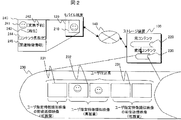
図2は、本発明の実施例の機能説明図である。
210は、モバイル端末120の操作画面を示す。ユーザはこの画面を見ながらコンテンツの選択、変換の方法等を選択する。
220は、ストレージ装置100に格納された、元コンテンツ(オリジナルコンテンツ)を示し、230は、変換後のコンテンツを示す。
231は、ユーザが指定した特徴情報として抽出された近傍のコンテンツを示し、コンテンツ長調整のため低画質に変換される可能性のある部分である。
232は、ユーザが指定した特徴情報として抽出されたコンテンツで、ユーザが指定したコンテンツ長に合わせて可能な範囲で類似の映像を抽出し、また、高画質に変換される部分である。
240は、モバイル端末120の操作画面210の表示例を示す。
241は、特徴情報指定用のインタフェースを示す。
242は、変換予約用のインタフェースを示す。
243は、再生用のインタフェースを示す。変換完了したコンテンツや、後述のリアルタイムで変換しながらの再生を行う。
244は、コンテンツ長を指定するインタフェースを示す。ここで、オリジナルのままの長さで変換するか、あるいは、ユーザ所望の長さを指定する。
245は、関連特徴情報を指定するためのインタフェースを示す。対象となるコンテンツ特有の特徴情報を指定する。例えば、運動会コンテンツなら入退場のシーン、サッカーの試合ならゴールシーンなど、ストレージ装置が予めコンテンツの解析をして取得済みの情報から提示しても良いし、関連情報をインターネットで検索した結果を提示しても良い。
図9は、本発明の実施例の機能で操作するコンテンツの扱いについての説明図である。
250は、オリジナルのコンテンツ220と同じ再生長を維持しながら、ユーザ指定の特徴情報に該当する範囲を高画質にその他を低画質に変換してサイズをモバイル端末120で再生するための負荷軽減を行う。
910は、ユーザ指定の特徴情報に該当するシーンの近傍の領域で、ユーザ指定長の範囲内に変換後のコンテンツが収まる場合は利用する領域の候補となるシーンを示す。ここは低画質に変換される領域である。
911は、ユーザ指定の特徴情報に該当するシーンで、高画質に変換される。
230は、前述の変換後のコンテンツ例で、ユーザ指定長がオリジナルより短い場合の例である。ユーザ指定長がオリジナルより長い場合、オリジナルの前あるいは後ろにダイジェストシーンとして付加して生成しても良い。
260は、ユーザ指定の特徴情報に該当するシーンの再生画面例を示す。特徴情報に該当する名前や、画面内の位置が判別できるような重畳表示を行う。該当シーン近傍の場合、画面中のどの辺りからユーザ指定の特徴情報に該当する人、物等が現れるかといった情報を重畳して表示しても良い。
図3は、実施方法を示したソフトウェア構成図である。
300は、本実施例における外付けストレージ装置の処理範囲を示したものである。301は、本装置と接続されデータを送受信する外部装置を示す。301は、本実施例の装置と同様の装置でも良いし、PCあるいは、その他のストレージ装置でも良い。また、外部装置は携帯端末でもよく、接続先は、単数でも複数でも良い。
302は、通信制御部を示し、外部装置とのデータの送受信制御を行う。本実施例ではLAN(Local Area Network)に接続されているものとして説明するが、USB(Universal Serial Bus)やその他汎用の接続経路であっても良い。
303は、CPU制御部を示し、装置全体の各処理部を制御する。以降特に記載がない場合は、CPU制御部が処理を行うものとする。
304は、DB(Data Base)操作部を示し、後述のストレージに格納されるDBの操作に関する処理を行う。
305は、予約制御部を示し、外部装置との間でストレージに格納されるデータのコンテンツ変換予約の処理を行う。
306は、コンテンツ制御部を示し、コンテンツ変換時にユーザ所望のコンテンツ切り出し、接合、別フォーマットへの変換を行うための制御を行う。
307は、R/W制御部を示し、ストレージに格納される各種データを読み書きする制御を行う。
308は、ストレージを示し、各種データを保存するための記録媒体である。
DB操作部304がストレージ308内の情報を更新する際には必ずR/W制御部307経由で処理される。よって以降特に明記されない場合は、DBの更新は上記手順で行われるものとする。
309は、映像変換部を示し、静止画データや、動画データから適当なフレーム(ここでは静止画と同様)を取り出し、情報の圧縮処理を行う。例えば、画像のリサイズ処理等を示す。
310は、顔認識処理部を示し、コンテンツから顔が映っている箇所を特定し、その画像内の位置を抽出する処理を示す。本実施例では、顔認識処理としているが、認識に用いられる比較データとして認識したい物体に適したものを用いることで物体認識にも流用可能である。実施例説明のため顔認識を選択したが、前述の機能説明のような、コンテンツ特有の特徴認識処理や、シーンチェンジ、動体認識等と置き換えても良い。
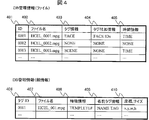
本実施例による装置で使用するDBの構成例を図4に示す。
図に示したDBは、前述のDB操作部304にて使用される。
401は、IDを管理する領域を示し、DBにて管理するデータの固有の番号である。新たに映像データが追加されると新たな番号が使用される。
402は、ファイル名を管理する領域を示し、映像データがストレージ308に格納される際にユーザが指定するか、装置が決めたファイル名が設定され、このファイル名情報を管理する。
403は、タグを管理する領域を示し、映像データが格納される装置が本体か否かに関する情報や、顔認識処理を実施された情報(図中の例では、FRと表記)、サムネイル画像(図中の例では、FACEやSCENEと表記)を格納する。
404は、タグ付加情報を管理する領域を示し、映像データが格納されるタグに関する付加情報(例えば、検出した顔情報を特定するためのID等)が格納される。
405は、時間情報を示し、タグ情報に関係するシーンの位置情報が格納される。
次いで、特徴情報を管理するDBの構成例を示す。
406は、タグIDを示し、タグ情報が例えば顔認識に関する内容の場合、顔認識結果の管理用のユニークなIDを示す。
407は、ファイル名を示し、例えば顔認識に関する内容の場合、当該の顔が含まれるファイル名を格納する。
408は、特徴情報を示し、例えば顔認識に関する内容の場合、検出に使用したテンプレート番号や、特徴量を示す情報を格納する。
409は、名前タグ情報を示し、タグIDで管理される部品の名前情報を格納する。
410は、座標、サイズ情報を示し、例えば顔認識に関する内容の場合、認識された顔のフレーム(画像)中の位置や、顔のサイズ情報を格納する。
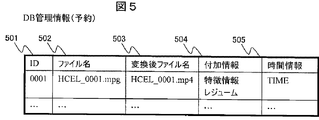
本実施例による装置で使用する予約機能にて使用するDBの構成例を図5に示す。
図に示したDBは、前述のDB操作部304にて使用される。
501は、予約IDを管理する領域を示し、DBにて管理する予約データ固有の番号である。新たに予約データが追加されると新たな番号が使用される。
502は、ファイル名を管理する領域を示し、ユーザが予約設定対象として指定したコンテンツのオリジナルのファイル名を格納する。
503は、変換後ファイル名を示し、ここではモバイル端末から変換後のコンテンツをアクセスするための仮想ファイル名を格納する。
504は、付加情報を示し、ユーザが指定した特徴情報や、変換中の場合経過情報等を格納する。
505は、時間情報を示し、ユーザが指定したコンテンツ長(再生時間)を格納する。
本実施例による、ユーザがモバイル端末から予約したNASに格納されたコンテンツと、同じくユーザが指定した顔情報とコンテンツ長から、コンテンツ変換を実現する実施例1について、以下説明する。なお、モバイル端末でのコンテンツ指定等の操作や、顔認識アルゴリズム、映像のフォーマット変換アルゴリズムついては、既知の方式を採用するのでここでは説明しない。
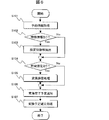
図6は、コンテンツ変換予約処理を示した処理フロー図である。
特に記述がない場合、主に処理を司るのはCPU制御部303である。
S101にて、通信制御部302とCPU制御部303にて、外部のユーザ端末からのコンテンツ変換に関わる情報を取得し、DB制御部304にてR/W制御部307経由でストレージ308に予約情報を格納する。以後、情報の格納については、特に記述がない場合は、ストレージに格納される情報については同様のルートにより格納あるいは取出しが行われるものとする。
S102にて、CPU制御部303が、特徴情報の有無をチェックし、有る場合は後述の指定特徴部抽出処理を行い、無い場合は指定特徴部抽出処理を行わず後段の処理に移る。
S103にて、CPU制御部303が、ストレージに格納されているユーザ指定の仮想コンテンツファイルのオリジナルコンテンツについて、DB検索しながら対象部分の特定を行う。ユーザ指定の特徴情報が画像そのものであった場合、顔認識処理部310にて特徴情報を抽出してこの情報を使用する。例えば、ユーザが顔を特徴情報として指定している場合、当該の顔が含まれている可能性のある部分は全て、すなわち特徴情報の類似度が高いものから低いものまで含めて候補として抽出する。
S104にて、CPU制御部303が、コンテンツ再生時間(コンテンツ長)指定の有無をチェックし、有る場合は後述の変換調整処理を行い、無い場合は変換調整処理を行わず後段の処理へ移る。
S105にて、CPU制御部303が、ユーザ指定のあるいはユーザの端末にあったコンテンツの変換方式を選択した上で、変換後のコンテンツがユーザ指定の長さに合うように調整する。コンテンツ長を見積もり計算し、もし、指定特徴抽出部分を全て含んで変換すると指定長を超える場合、指定特徴情報を元に、差異が大きいものから順次候補から解除しながらコンテンツ長調整し、収まったところで後段の処理に移る。フローに記載しないが、もし調整不可能な場合は通信制御部302でその旨ユーザ端末に通知する。
S106にて、前述までで見積りされたコンテンツ変換内容にて変換予約される旨、通信制御部302でユーザ端末に通知する。
S107にて、予約制御部305がDB操作部304経由で予約情報を更新する。
以後、上述で確定した予約情報に基づき映像変換部309、コンテンツ制御部310にてコンテンツ変換処理がされる。完了後、予約制御部305経由通信制御部302でユーザ端末に通知する。その後、通信制御部302経由で変換後のコンテンツをユーザ端末へ送信する。
なお、本実施例では、予約する場合に関して示したが、高性能CPUや、専用のコンテンツ変換LSI等を搭載している場合は、上述のフロー後リアルタイムにコンテンツ変換してユーザ端末へ送信することも可能である。
上述により、ユーザが指定したコンテンツに関して、ユーザ所望の長さで視聴したいシーンを含む映像をユーザのモバイル端末で取得、視聴が可能となる。
ここで、携帯端末の動作を図10により詳細に説明する。
1000は、本実施例で対象の携帯端末を示し、以降特に記載ない場合は、コントローラ1004が携帯端末を構成する各ユニットの制御を行い、表示は表示部1007にて行い、音声の入出力はマイク1008とスピーカ1009にて行う。アンテナ1001、トランスミッタ1002、レシーバ1003からなる通信制御部を有し、ストレージ装置300と接続処理を行う。本携帯端末はユーザからの指定を入力するキー操作部1010を有しており、接続処理が完了したらキー操作部1010から入力されるユーザ指定のコンテンツ情報、コンテンツ長、特徴情報などをストレージ装置300に送信する。この送信処理は、図2で示したモバイル端末のGUIによって入力されても良い。送信された情報に基づき、上述のストレージ装置300が変換したデータを携帯端末は受信し、この変換されたデータの再生処理をシグナルプロセッサ1006にて行う。例えば、ユーザが120分のサッカーの試合をコンテンツ情報として指定し、特定の選手を特徴情報として指定する。また、ユーザがコンテンツ長として15分を指定した場合には、この情報も送られる。この場合、ストレージ装置300は、特定の選手の顔認識処理を行い、この選手の登場シーンを15分に変換する。なお、コンテンツの種類によっては、ユーザ指定の特徴情報以外の該コンテンツ特有の特徴情報、例えばサッカーの試合で言えば、ゴールシーンを含めて、変換されたデータとして携帯端末に送信しても良い。
本実施例による、ユーザがモバイル端末から予約したNASに格納されたコンテンツと、同じくユーザが指定した顔情報とコンテンツ長から、コンテンツ変換を実現する実施例2について、以下説明する。なお、実施例2は実施例1と共通部分が多いので、差分について以下記載する。
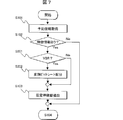
図7は、コンテンツ変換予約処理を示した処理フロー図である。
図7は、前述の実施例1のフロー図6との差分について記載する。
特に記述がない場合、主に処理を司るのはCPU制御部303である。
S201にて、ユーザ指定の変換後のコンテンツがVBR(Variable BitRate)をサポートの有無をチェックし、有る場合は後述の変換ビットレート配分処理を行い、無い場合は変換ビットレート配分処理を行わず後段の処理に移る。
S202にて、前述の機能説明で記した通り、当該の特徴点を含む期間を高ビットレート(高画質)に設定し、その前後の映像では低ビットレート(低画質)に設定する。
以降、実施例1と同様である。
上述により、ユーザが指定したコンテンツに関して、ユーザ所望の長さで視聴したいシーンをより高画質な状態で含む映像をユーザのモバイル端末で取得、視聴が可能となる。
本実施例による、ユーザがモバイル端末から予約したNASに格納されたコンテンツと、同じくユーザが指定した顔情報とコンテンツ長から、コンテンツ変換を実現する実施例3について、以下説明する。なお、実施例3は実施例1、2と共通部分が多いので、差分について以下記載する。
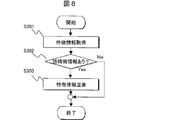
図8は、コンテンツ変換時の情報重畳処理を示した処理フロー図である。
特に記述がない場合、主に処理はCPU制御部303がコンテンツ制御部306にて実施する。
S301にて、コンテンツ変換処理にてユーザ指定の変換コンテンツを生成する際に、当該のフレーム位置で特徴情報を顔認識処理部310にて抽出、もしくは304DB制御部にて読み出し取得する。
S302にて、当該のフレームでユーザ指定の特徴情報と合致あるいは類似する情報の有無をチェックし、有る場合は後述の特徴情報重畳処理を行い、無い場合は特徴情報重畳処理を行わず後段の処理に移る。
S303にて、フレームに当該特徴情報領域に枠線等の情報を重ねてコンテンツ変換処理を続ける。なお、変換後のコンテンツのフォーマットがタグ情報付帯に対応している場合は、タグ情報として構成しても良い。
上述により、ユーザが指定したコンテンツに関して、ユーザが指定した特徴情報を当該のシーンにて当該の箇所が確認できる状態で映像をユーザのモバイル端末で取得、視聴が可能となる。
なお、上述の実施例は夫々組み合わせて実施も可能である。
300・・・本実施例における外付けストレージ装置
301・・・外部装置
302・・・通信制御部
303・・・CPU制御部
304・・・DB(Data Base)操作部
305・・・予約制御部
306・・・コンテンツ制御部
307・・・R/W制御部
308・・・ストレージ
309・・・映像変換部
310・・・顔認識処理部
301・・・外部装置
302・・・通信制御部
303・・・CPU制御部
304・・・DB(Data Base)操作部
305・・・予約制御部
306・・・コンテンツ制御部
307・・・R/W制御部
308・・・ストレージ
309・・・映像変換部
310・・・顔認識処理部
Claims (9)
- ネットワークに接続可能なストレージ装置であって、
ネットワークを介してデータを送受信する送受信部と、
コンテンツを格納するストレージと、
前記ストレージに格納されるコンテンツに含まれる映像データから、特定の映像に関連する映像データを抽出する認識処理部と、
前記認識処理部により抽出された映像データに基づき、格納されるコンテンツを変換する変換部と、
を有し、
前記変換部で変換されたデータを送信する、
ストレージ装置。 - 請求項1記載のストレージ装置であって、
前記認識処理部は、ユーザにより指定される特徴情報に基づいて、前記ストレージに格納されるコンテンツに含まれる映像データから、特定情報に関連する映像データを抽出する、
ストレージ装置。 - 請求項2記載のストレージ装置であって、
前記変換部は、ユーザからの変換予約を受付け、該受付けに基づいて格納されるコンテンツを変換する、
ストレージ装置。 - 請求項3記載のストレージ装置であって、
前記ユーザからの変換予約を受付けた場合は、変換が完了した旨をユーザに送信する、ストレージ装置。 - 請求項2記載のストレージ装置であって、
前記変換部は、ユーザからの変換指示を受けた場合には、該指示に基づいて格納されるコンテンツをリアルタイムに変換する、
ストレージ装置。 - 請求項2記載のストレージ装置であって、
前記変換部は、ユーザ指定の特徴情報と応じたシーンを、その他シーンに比して高画質で変換する、
ストレージ装置。 - 請求項2記載のストレージ装置であって、
前記変換部は、ユーザ指定の特徴情報に応じた部分を明示した可能なフォーマットでコンテンツ変換する、
ストレージ装置。 - 外部ストレージ装置に接続可能な携帯端末であって、
ユーザが、コンテンツ情報とコンテンツ長と特徴情報とを入力するキー操作部と、
前記キー操作部に入力された情報を外部ストレージ装置に送信する送信手段と、
前記ユーザが入力したコンテンツ情報とコンテンツ長と特徴情報とに関連する変換されたデータを受信する受信部と、
前記受信部が受信した変換されたデータを表示する表示部と、
を有する、
携帯端末。 - 請求項8記載の携帯端末であって、
前記特徴情報は、顔または名前に関する情報である、
携帯端末。
Applications Claiming Priority (2)
| Application Number | Priority Date | Filing Date | Title |
|---|---|---|---|
| JP2011-098943 | 2011-04-27 | ||
| JP2011098943A JP2012231349A (ja) | 2011-04-27 | 2011-04-27 | ストレージ装置および携帯端末 |
Publications (1)
| Publication Number | Publication Date |
|---|---|
| WO2012147253A1 true WO2012147253A1 (ja) | 2012-11-01 |
Family
ID=47071789
Family Applications (1)
| Application Number | Title | Priority Date | Filing Date |
|---|---|---|---|
| PCT/JP2012/001172 Ceased WO2012147253A1 (ja) | 2011-04-27 | 2012-02-22 | ストレージ装置および携帯端末 |
Country Status (2)
| Country | Link |
|---|---|
| JP (1) | JP2012231349A (ja) |
| WO (1) | WO2012147253A1 (ja) |
Citations (7)
| Publication number | Priority date | Publication date | Assignee | Title |
|---|---|---|---|---|
| JP2000285253A (ja) * | 1999-01-28 | 2000-10-13 | Toshiba Corp | 物体領域情報記述方法及び物体領域情報生成装置並びに映像情報処理方法及び情報処理装置 |
| JP2004015523A (ja) * | 2002-06-07 | 2004-01-15 | Nippon Hoso Kyokai <Nhk> | 映像関連コンテンツ生成装置、映像関連コンテンツ生成方法及び映像関連コンテンツ生成プログラム |
| JP2005020283A (ja) * | 2003-06-25 | 2005-01-20 | Matsushita Electric Ind Co Ltd | ダイジェスト映像自動作成・表示装置、ダイジェスト映像自動作成方法、及びそのプログラムを記載した記録媒体 |
| JP2005328416A (ja) * | 2004-05-17 | 2005-11-24 | Sony Corp | 情報処理装置および情報処理方法、並びに、プログラム |
| JP2005341382A (ja) * | 2004-05-28 | 2005-12-08 | Sony Corp | 画像処理装置,撮像装置,コンピュータプログラムおよび画像処理方法 |
| JP2008283486A (ja) * | 2007-05-10 | 2008-11-20 | Sony Corp | 情報処理装置、情報処理方法、およびプログラム |
| JP2010158046A (ja) * | 2010-02-19 | 2010-07-15 | Casio Computer Co Ltd | 撮像装置、動画生成方法及びプログラム |
Family Cites Families (1)
| Publication number | Priority date | Publication date | Assignee | Title |
|---|---|---|---|---|
| JP5213764B2 (ja) * | 2009-03-04 | 2013-06-19 | Kddi株式会社 | 映像コンテンツへの位置情報付与システムおよび方法 |
-
2011
- 2011-04-27 JP JP2011098943A patent/JP2012231349A/ja active Pending
-
2012
- 2012-02-22 WO PCT/JP2012/001172 patent/WO2012147253A1/ja not_active Ceased
Patent Citations (7)
| Publication number | Priority date | Publication date | Assignee | Title |
|---|---|---|---|---|
| JP2000285253A (ja) * | 1999-01-28 | 2000-10-13 | Toshiba Corp | 物体領域情報記述方法及び物体領域情報生成装置並びに映像情報処理方法及び情報処理装置 |
| JP2004015523A (ja) * | 2002-06-07 | 2004-01-15 | Nippon Hoso Kyokai <Nhk> | 映像関連コンテンツ生成装置、映像関連コンテンツ生成方法及び映像関連コンテンツ生成プログラム |
| JP2005020283A (ja) * | 2003-06-25 | 2005-01-20 | Matsushita Electric Ind Co Ltd | ダイジェスト映像自動作成・表示装置、ダイジェスト映像自動作成方法、及びそのプログラムを記載した記録媒体 |
| JP2005328416A (ja) * | 2004-05-17 | 2005-11-24 | Sony Corp | 情報処理装置および情報処理方法、並びに、プログラム |
| JP2005341382A (ja) * | 2004-05-28 | 2005-12-08 | Sony Corp | 画像処理装置,撮像装置,コンピュータプログラムおよび画像処理方法 |
| JP2008283486A (ja) * | 2007-05-10 | 2008-11-20 | Sony Corp | 情報処理装置、情報処理方法、およびプログラム |
| JP2010158046A (ja) * | 2010-02-19 | 2010-07-15 | Casio Computer Co Ltd | 撮像装置、動画生成方法及びプログラム |
Also Published As
| Publication number | Publication date |
|---|---|
| JP2012231349A (ja) | 2012-11-22 |
Similar Documents
| Publication | Publication Date | Title |
|---|---|---|
| EP3631613B1 (en) | Display device and operating method thereof | |
| CN111010610B (zh) | 一种视频截图方法及电子设备 | |
| KR102570379B1 (ko) | 스크린 미러링 기능을 제공하는 디스플레이 장치 및 그의 동작 방법 | |
| EP3449635B1 (en) | Display device and method of operating the same | |
| KR20240134817A (ko) | 디스플레이 장치, 디스플레이 장치의 배경음악 제공방법 및 배경음악 제공 시스템 | |
| CN106961617B (zh) | 显示设备及其操作方法 | |
| KR102479487B1 (ko) | 디스플레이 장치 | |
| JP6999516B2 (ja) | 情報処理装置 | |
| US8984561B2 (en) | Moving-image playing apparatus and method | |
| KR20200091188A (ko) | 전자 장치 및 그의 컨텐트 제공 방법 | |
| US12469493B2 (en) | Display device and operating method thereof | |
| US10983745B2 (en) | Display device and display system including same | |
| CN107851129A (zh) | 信息处理装置、信息处理方法和程序 | |
| JP6212719B2 (ja) | 映像受信装置、情報表示方法および映像受信システム | |
| KR102511385B1 (ko) | 디스플레이 장치 | |
| US20250203171A1 (en) | Display device | |
| JP2012231349A (ja) | ストレージ装置および携帯端末 | |
| KR102623186B1 (ko) | 디스플레이 장치 | |
| US20250021290A1 (en) | Display device and operation method thereof | |
| US20130178152A1 (en) | Data send device and data reception device | |
| CN116527972B (zh) | 显示装置及其操作方法 | |
| EP4496326A1 (en) | Display device | |
| EP4618568A1 (en) | Transparent display device and operating method therefor | |
| JP5416599B2 (ja) | 動画作成装置及び動画作成方法 | |
| CN116074558B (zh) | 显示装置及其操作方法 |
Legal Events
| Date | Code | Title | Description |
|---|---|---|---|
| 121 | Ep: the epo has been informed by wipo that ep was designated in this application |
Ref document number: 12777626 Country of ref document: EP Kind code of ref document: A1 |
|
| NENP | Non-entry into the national phase |
Ref country code: DE |
|
| 122 | Ep: pct application non-entry in european phase |
Ref document number: 12777626 Country of ref document: EP Kind code of ref document: A1 |