WO2012073577A1 - 表示システムおよび表示装置 - Google Patents
表示システムおよび表示装置 Download PDFInfo
- Publication number
- WO2012073577A1 WO2012073577A1 PCT/JP2011/070994 JP2011070994W WO2012073577A1 WO 2012073577 A1 WO2012073577 A1 WO 2012073577A1 JP 2011070994 W JP2011070994 W JP 2011070994W WO 2012073577 A1 WO2012073577 A1 WO 2012073577A1
- Authority
- WO
- WIPO (PCT)
- Prior art keywords
- display
- touch panel
- mode
- unit
- control unit
- Prior art date
- Legal status (The legal status is an assumption and is not a legal conclusion. Google has not performed a legal analysis and makes no representation as to the accuracy of the status listed.)
- Ceased
Links
Images







Classifications
-
- G—PHYSICS
- G06—COMPUTING OR CALCULATING; COUNTING
- G06F—ELECTRIC DIGITAL DATA PROCESSING
- G06F3/00—Input arrangements for transferring data to be processed into a form capable of being handled by the computer; Output arrangements for transferring data from processing unit to output unit, e.g. interface arrangements
- G06F3/01—Input arrangements or combined input and output arrangements for interaction between user and computer
- G06F3/03—Arrangements for converting the position or the displacement of a member into a coded form
- G06F3/041—Digitisers, e.g. for touch screens or touch pads, characterised by the transducing means
- G06F3/044—Digitisers, e.g. for touch screens or touch pads, characterised by the transducing means by capacitive means
- G06F3/0443—Digitisers, e.g. for touch screens or touch pads, characterised by the transducing means by capacitive means using a single layer of sensing electrodes
-
- G—PHYSICS
- G06—COMPUTING OR CALCULATING; COUNTING
- G06F—ELECTRIC DIGITAL DATA PROCESSING
- G06F3/00—Input arrangements for transferring data to be processed into a form capable of being handled by the computer; Output arrangements for transferring data from processing unit to output unit, e.g. interface arrangements
- G06F3/01—Input arrangements or combined input and output arrangements for interaction between user and computer
- G06F3/03—Arrangements for converting the position or the displacement of a member into a coded form
- G06F3/033—Pointing devices displaced or positioned by the user, e.g. mice, trackballs, pens or joysticks; Accessories therefor
- G06F3/0354—Pointing devices displaced or positioned by the user, e.g. mice, trackballs, pens or joysticks; Accessories therefor with detection of two-dimensional [2D] relative movements between the device, or an operating part thereof, and a plane or surface, e.g. 2D mice, trackballs, pens or pucks
- G06F3/03547—Touch pads, in which fingers can move on a surface
-
- G—PHYSICS
- G06—COMPUTING OR CALCULATING; COUNTING
- G06F—ELECTRIC DIGITAL DATA PROCESSING
- G06F3/00—Input arrangements for transferring data to be processed into a form capable of being handled by the computer; Output arrangements for transferring data from processing unit to output unit, e.g. interface arrangements
- G06F3/01—Input arrangements or combined input and output arrangements for interaction between user and computer
- G06F3/03—Arrangements for converting the position or the displacement of a member into a coded form
- G06F3/041—Digitisers, e.g. for touch screens or touch pads, characterised by the transducing means
- G06F3/042—Digitisers, e.g. for touch screens or touch pads, characterised by the transducing means by opto-electronic means
-
- G—PHYSICS
- G06—COMPUTING OR CALCULATING; COUNTING
- G06F—ELECTRIC DIGITAL DATA PROCESSING
- G06F3/00—Input arrangements for transferring data to be processed into a form capable of being handled by the computer; Output arrangements for transferring data from processing unit to output unit, e.g. interface arrangements
- G06F3/01—Input arrangements or combined input and output arrangements for interaction between user and computer
- G06F3/048—Interaction techniques based on graphical user interfaces [GUI]
- G06F3/0487—Interaction techniques based on graphical user interfaces [GUI] using specific features provided by the input device, e.g. functions controlled by the rotation of a mouse with dual sensing arrangements, or of the nature of the input device, e.g. tap gestures based on pressure sensed by a digitiser
- G06F3/0488—Interaction techniques based on graphical user interfaces [GUI] using specific features provided by the input device, e.g. functions controlled by the rotation of a mouse with dual sensing arrangements, or of the nature of the input device, e.g. tap gestures based on pressure sensed by a digitiser using a touch-screen or digitiser, e.g. input of commands through traced gestures
-
- G—PHYSICS
- G06—COMPUTING OR CALCULATING; COUNTING
- G06F—ELECTRIC DIGITAL DATA PROCESSING
- G06F2203/00—Indexing scheme relating to G06F3/00 - G06F3/048
- G06F2203/033—Indexing scheme relating to G06F3/033
- G06F2203/0339—Touch strips, e.g. orthogonal touch strips to control cursor movement or scrolling; single touch strip to adjust parameter or to implement a row of soft keys
Definitions
- Some displays for digital signage have two modes: normal mode and demo mode.
- normal mode in both the normal mode and the demo mode, a predetermined display is performed when the user touches the touch panel on the display position of a button or icon.
- Such an operation is normal in the normal mode, but such an operation may be troublesome for the user in the demo mode.
- a display device includes: A display unit; A display control unit; A translucent touch panel provided on the front side of the display unit; A conductive member provided on an outer portion of an image display area on which an image is displayed by the display unit, The display control unit controls the display unit to perform a predetermined display when the touch panel or the conductive member is touched.
- a display device includes: A display unit; A display control unit; A translucent touch panel provided on the front side of the display unit; A conductive member disposed so that a part of the touch panel region overlaps the outside of the video display area of the display unit and the detectable area of the touch panel, and The display control unit controls the display unit to perform a predetermined display when the touch panel or the conductive member is touched.
- FIG. 1 is an external view of an outdoor display system 100 according to a first embodiment of the present invention.
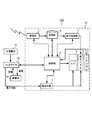
- 1 is a block diagram of an outdoor display system 100 according to a first embodiment of the present invention. It is a flowchart which shows an example of the screen operation control which concerns on 1st Embodiment of this invention. It is a figure which shows an example of the screen display change which concerns on this invention.
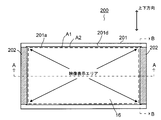
- It is a front view of the display apparatus 200 which concerns on 2nd Embodiment of this invention.
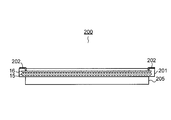
- It is a side view of the display apparatus 200 which concerns on 2nd Embodiment of this invention.
- It is a bottom view of the display apparatus 200 which concerns on 2nd Embodiment of this invention.
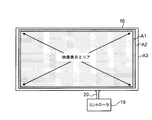
- It is a front view of a touch panel.
- FIG. 6 is a partial cross-sectional view of the AA cross section in FIG. 5. It is the figure which showed only the cabinet in FIG.
- FIG. 6 is a partial cross-sectional view of the BB cross section in FIG. 5.
- It is a block block diagram of the display system 300 which concerns on 2nd Embodiment of this invention. It is a flowchart which shows an example of the screen operation control which concerns on 2nd Embodiment of this invention. It is a front view of the kiosk terminal 400 which concerns on one Embodiment of this invention.
- FIG. 44 is a diagram showing a modification 200 ′′ of the display device according to the present invention. It is a partial cross section figure which shows the modification of the display apparatus which concerns on this invention. It is a partial cross section figure which shows the modification of the display apparatus which concerns on this invention.
- FIG. 1 shows an external view of an outdoor display system 100 according to the first embodiment of the present invention.
- the outdoor display system 100 includes a solar cell 10, an installation table 20, and a display device 30.
- the outdoor display system 100 includes a controller 40 and a storage battery 50 on the back side of the display device 30.
- the solar cell 10 is installed on an installation table 20 provided on the display device 30, and generates electricity by photoelectrically converting received sunlight.
- the electric power obtained by the solar battery 10 is stored in the storage battery 50 via the controller 40.
- the storage battery 50 is, for example, a lithium ion battery.
- the display device 30 includes a display panel 5.
- the display device 30 displays content received from an external content server or broadcast station.
- a touch panel 6 is provided on the front side of the display device 30, and the user can operate on the screen by touching the touch panel 6. *
- the display device 30 includes an antenna and can receive content wirelessly.
- the controller 40 supplies the power generated by the solar cell 10 to the display device 30 and the storage battery 50.
- the controller 40 supplies most of the power generated by the solar cell 10 to the display device 30 as it is. Then, surplus power (difference power between the power generated by the solar battery 10 and the power consumption of the display device 30) is supplied to the storage battery 50.
- the controller 40 performs control so that power is supplied from the storage battery 50 to the display device 30. That is, the electric power stored in the storage battery 50 is supplied to the display device 30 via the controller 40.
- the control unit 8 is constituted by, for example, a CPU, and controls each unit of the display device 30 and collects status information of each unit. Moreover, each part is controlled according to the collected state information. In addition, distribution information of power supply to the display device 30 and the storage battery 50 is also transmitted from the controller 40 to the control unit 8.
- the display panel 5 is a part for displaying an image
- the display device 30 uses a liquid crystal (LCD: Liquid Crystal Panel) panel.
- LCD Liquid Crystal Panel
- the liquid crystal corresponding to each pixel of the panel is driven to an on state, an off state, or an intermediate state according to the content of an image to be displayed.
- the backlight 4 irradiates the display panel 5 with white light.
- a cold cathode fluorescent lamp (CCFL) or an LED light source is used. From the viewpoint of reducing power consumption, it is desirable to use an LED light source.
- the touch panel 6 is a capacitive sensor in the form of a transparent sheet placed on a protective glass (not shown) on the front side of the display panel 5.
- the touch panel 6 receives an operation input from the user.
- the receiving unit 1 includes an antenna for receiving a signal transmitted from an external content server (for example, an ASP server, a personal computer, etc.) or a broadcasting station by wireless communication (for example, a method such as WiMAX, IEEE802.11b / g), an antenna A signal processing unit for performing a demodulation process on the signal received by the mobile phone. For example, if the wireless signal is an MPEG2-TS format signal that has been modulated by the OFDM method and transmitted, the receiver 1 performs OFDM demodulation and extracts the MPEG2-TS signal. The extracted MPEG2-TS signal is output to the storage unit 2.
- an external content server for example, an ASP server, a personal computer, etc.
- a broadcasting station by wireless communication (for example, a method such as WiMAX, IEEE802.11b / g)
- an antenna A signal processing unit for performing a demodulation process on the signal received by the mobile phone. For example, if the wireless signal is an MPEG2-TS format signal that has been modulated
- the accumulating unit 2 stores the MPEG2-TS signal extracted by the receiving unit 1. That is, the content transmitted from the content server or broadcasting station is stored.
- the storage unit 2 functions as a buffer memory.
- the storage unit 2 functions as a storage medium.
- step S1 If the operation mode is the normal mode, the control unit 8 determines whether or not the touch position of the touch panel 6 is a display position of a predetermined image such as a button or icon (step S2). If it is the display position of the predetermined image (Y in step S2), the control unit 8 instructs the display control unit 3 to perform the predetermined display, and the predetermined display is performed (step S4). On the other hand, if the display position is not the predetermined image (N in Step S2), the predetermined display is not performed (Step S3).
- a predetermined image such as a button or icon
- step S1 when the operation mode is the demonstration mode, the control unit 8 instructs the display control unit 3 to perform a predetermined display regardless of the touch position of the touch panel 6, and as a result, Display is performed (step S5). That is, in the demo mode, a predetermined display is performed regardless of the position on the screen touched by the user.
- an image as shown in FIG. 4A that is, an image showing the power supply distribution of the power generated by the solar battery 10 to the storage battery 50 and the display device 30 is displayed on the display panel 5.
- An icon 60 is displayed at the lower right of the screen shown in FIG.
- the operation mode is the demo mode, as shown in FIG. 4B
- the user can touch any position on the touch panel 6 while the screen shown in FIG. Switch to the screen display. That is, even when the user touches a position other than the display position of the icon 60 on the touch panel 6, the display screen is switched.
- the operation mode is the demo mode
- a predetermined display is performed regardless of the position on the display screen that the user touches, so that the operability in the demo mode is improved.
- FIG. 5 is a front view of a display device 200 according to the second embodiment of the present invention
- FIG. 6 is a side view thereof
- FIG. 5 is a front view of a display device 200 according to the second embodiment of the present invention
- FIG. 6 is a side view thereof
- FIG. 5 is a front view of a display device 200 according to the second embodiment of the present invention
- the front cabinet 201 and the rear cabinet 205 are combined to accommodate the display panel 15, the touch panel 16, the drive substrate of the display panel 15, and the like.
- the front cabinet 201 and the rear cabinet 205 may be made of resin from the viewpoint of weight reduction, but are preferably made of metal from the viewpoint of durability when used for an outdoor display device. However, in recent years, resin cabinets that can be used outdoors by coating the surface have also appeared, and may be made of resin.
- the display panel 15 actually displays an image, and the display device 200 uses a liquid crystal display panel.
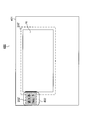
- FIG. 8 is a front view of the touch panel 16 provided in the display device 200.
- the touch panel 16 is a translucent sensor that detects a touch by a user.
- the touch panel 16 is a capacitive touch panel.
- the electrode layer comprised from a sensor wire is arrange
- a controller 19 is connected to the touch panel 16 via a flexible cable 20. When the user's fingertip touches the plate glass, the capacitance changes, and the frequency of the pulse signal input to the sensor wire changes. Based on this frequency change, the controller 19 detects the coordinate position where the fingertip is touched.
- the electrode layer may be composed of a transparent electrode.
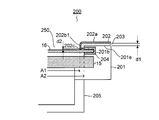
- FIG. 9 shows a part of a cross-sectional view taken along the line AA in FIG. 5 (FIG. 10 shows only the front cabinet 201 and the rear cabinet 205 in FIG. 9).
- FIG. 9 shows a left side portion when the display device 200 is viewed from the back and a right side portion when viewed from the front.
- the shape of the front cabinet 201 of the display device 200 is bilaterally symmetric, and the shape of the front cabinet 201 (when the display device 200 is viewed from the front) is the same as in FIG.
- the display panel 15 is fixed to the front part of the front cabinet 201.
- the display panel 15 and the touch panel 16 are disposed in the front opening 250 of the front cabinet 201.
- a recess 201 b is provided outside the front opening 250.
- a gasket 204 is inserted into the recess 201b along the wall surface.
- the touch panel 16 is fitted into the recess 201 b provided with the gasket 204, the end portions (left and right ends) of the touch panel 16 are sandwiched between the gaskets 204. Thereby, the touch panel 16 is fixed to the front side of the display panel 15.
- the gasket 204 is made of rubber and insulates the front cabinet 201 and the touch panel 16 and has a shock absorbing function of the touch panel 16. Further, when the front cabinet 201 is made of resin, the gasket 204 is not essential.
- the touch panel 16 includes a video display area A1 displayed on the display panel 15, a detectable area A2 where a user's touch operation can be detected, and an outer area A3.
- Area A2 is wider than area A1 (that is, most of area A2 overlaps area A1).
- A3 is wider than area A2.
- the gasket 204 in which the left and right ends of the area where the outside of the video display area A1 and the detectable area A2 do not overlap is inserted into the recess 201b of the front cabinet 201. It is pinched by.
- the size of the opening 250 of the front cabinet 201 is substantially the same as the size of the detectable area A2, and as shown in FIG. 5, the detectable area A2 of the touch panel 16 is opened from the opening 250 with the touch panel 16 fixed. Exposed. Thereby, the user can perform a touch operation not only on the video display area A1 of the touch panel 16 but also on the detectable area A2.
- FIG. 11 shows a part of a cross-sectional view of the BB cross section in FIG. 5 and also shows the vicinity of the center in the vertical direction of the display device 200.
- the extension detection area 202 is made of, for example, copper foil tape, and extends in a direction approaching the surface of the touch panel 16 from the inner end of the extension 202a so as to cover the front surface of the insulator 203 (backward direction). And a protruding portion 202b that protrudes.
- the region 202b1 having a predetermined width d3 existing in the central portion in the longitudinal direction protrudes to a position close to the surface d2 away from the surface of the touch panel 16, and the protruding amount is reduced in other regions 202b2.
- the dimension d2 may be about 1 mm
- the predetermined width d3 may be about 1 to 3 fingertips (about 2 cm).
- the protrusion 202b and the touch panel 16 may be in contact with each other with the dimension d2 set to zero, but it is desirable that the dimension d2 is not set to zero in order to prevent the touch panel 16 from being damaged.
- the protruding portion 202c protrudes outward from the back surface portion of the region 202b1 substantially at a right angle.
- the back surface portion and the protruding portion 202c of the region 202b1 are opposed to a region where the outside of the video display area A1 of the touch panel 16 and the detectable area A2 overlap (the hatched portion in FIG. 8 corresponds to this) with a distance of d2 (see FIG. 9) ).
- the extension detection area 202 is touched without directly touching the surface of the touch panel 16, it is considered that the touch panel 16 is indirectly touched, so that the surface of the touch panel 16 (particularly the video display area A ⁇ b> 1). It becomes difficult to get dirty, and deterioration of image visibility can be suppressed.
- the controller 19 determines that the touch is not actually touched by the user but is caused by the influence of noise such as ambient radio waves. Therefore, if the protruding portion 202b is provided over the entire area of the touch panel 16, if the user touches the extended detection area portion 202, it does not touch the extended detection area portion 202 but is due to the influence of noise. There is a risk of misjudgment. Therefore, in the present embodiment, only the region 202b1 at the center in the longitudinal direction of the projecting portion 202b is brought close to the touch panel 16. Thereby, misjudgment can be suppressed.
- FIG. 300 a block diagram of a display system 300 including the display device 200 is shown in FIG. Similar to the display system 100 of the first embodiment, the display system 300 is also arranged outdoors.
- the touch panel 16 is a transparent sheet-type electrostatic capacitance type sensor disposed on a protective glass (not shown) on the front surface side of the display panel 15 as in the touch panel 6 of the first embodiment. Further, as shown in FIG. 8, a controller 19 is connected to the touch panel 16, and the controller 18 controls the controller 19. Note that the control unit 18 and the controller 19 communicate with each other through an interface such as USB or RS-232C.
- the extended detection area 202 is provided in a region outside the video display area A1 of the touch panel 16 as described above.
- the extended detection area unit 202 expands an area where a touch input by the user can be detected.
- Control in the outdoor display system 300 is basically the same as that in the outdoor display system 100 of the first embodiment (see FIG. 3). However, in the outdoor display system 100, it is considered that the touch operation has been performed only when the user touches the main body of the touch panel 6 (S1 in FIG. 3). Even when the user touches the area 202, it is different in that it is considered that a touch operation has been performed (step S11).
- steps S13, S14, S15, and S16 are the same as steps S5, S2, S4, and S3 of FIG. 3, respectively.
- the touch panel 16 since the operation can be performed by touching the extended detection area 202 in the outer region of the main body of the touch panel 16 in addition to the main body portion of the touch panel 16, operability particularly in the demonstration mode. Improved and convenient. Moreover, since operation can be performed without touching the main body of the touch panel 16, the touch panel 16 can be made difficult to get dirty.
- FIG. 400 A front view of the kiosk terminal 400 is shown in FIG.
- a display device 200 ′ is installed inside the kiosk housing 401.
- the display device 200 ′ has the same configuration as the above-described display device 200, but the configuration of the extended detection area unit (202) is different. That is, the detection area extension 202 ′ is attached to the front surface of the kiosk housing 401 as shown in FIG. If this detection area expansion part 202 ′ is covered with a promotional logo 402 by painting or sticking, it becomes a design with no sense of incongruity.
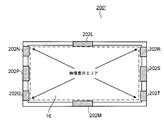
- a display device 200 ′′ according to a fourth embodiment of the present invention will be described with reference to FIG.
- the extended detection area portions 202L, 202M, 202N, 202P, 202Q, 202R, 202S, and 202T are provided on the upper side, the lower side, the upper left, the left, the lower left, the upper right, the right, and the lower right of the touch panel 16, respectively.
- the extended detection area 202L is touched when the map content is displayed on the display panel of the display device 200 ′′, the extended detection is performed such as displaying a map at a position north of the currently displayed position.
- the area part can also be used as a direction key.
- the sizes of the display panel 15 and the touch panel 16 are the same, but the size of the display panel may be smaller than the touch panel 16.
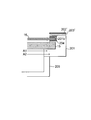
- the size of the display panel 15 ′ is smaller than that of the touch panel 16, and the outer edge portion of the display panel 15 ′ is arranged on the inner side of the protruding portion 202 b of the extension detection area portion 202. Even in such a configuration, since the back surface portion of the region 202b1 and the protruding portion 202c face the detectable area A2, it can be detected that the touch panel 16 is touched when the user touches the extended detection area portion 202.
- the structure which does not have the part (projecting part 202c etc.) which opposes the touch panel 16 may be sufficient.
- the sensitivity is reduced as compared with the configuration having the protrusions 202c and the like, such a configuration may be used as long as the touch panel 16 can detect a change in capacitance when a human finger touches the detection area expansion unit 202 ′. .
Landscapes
- Engineering & Computer Science (AREA)
- General Engineering & Computer Science (AREA)
- Theoretical Computer Science (AREA)
- Human Computer Interaction (AREA)
- Physics & Mathematics (AREA)
- General Physics & Mathematics (AREA)
- Devices For Indicating Variable Information By Combining Individual Elements (AREA)
- Controls And Circuits For Display Device (AREA)
- Position Input By Displaying (AREA)
Abstract
Description
表示部と、
表示制御部と、
タッチパネルと、
前記タッチパネルに対する接触を検知する検知部と、を備え、
前記表示制御部は、
動作モードが第1モードの場合、前記タッチパネルの所定画像の位置に前記接触があった時に所定の表示を行い、
動作モードが第2モードの場合、前記タッチパネルに前記接触があった時、所定画像の有無、及び該接触の位置に関係なく所定の表示を行うことを特徴とする。
表示部と、
表示制御部と、
前記表示部の前面側に設けられた透光性のタッチパネルと、
前記表示部により映像が表示される映像表示エリアの外側部分に設けられた導電性部材と、を備え、
前記表示制御部は、前記タッチパネルまたは前記導電性部材に接触があったときに所定の表示を前記表示部が行うよう制御することを特徴とする。
表示部と、
表示制御部と、
前記表示部の前面側に設けられた透光性のタッチパネルと、
前記表示部の映像表示エリア外と前記タッチパネルの検知可能エリアが重なる前記タッチパネルの領域にその一部が対向するよう配される導電性部材と、を備え、
前記表示制御部は、前記タッチパネルまたは前記導電性部材に接触があったときに所定の表示を前記表示部が行うよう制御することを特徴とする。
本発明の第1実施形態に係る屋外表示システム100の外観図を図1に示す。
本発明の第2実施形態に係る表示装置200の正面図を図5に、側面図を図6に、下面図を図7に示す。
本発明の第3実施形態について説明する。本実施形態は、街頭や店舗等に設置されるキオスク端末400に関する。このキオスク端末400の正面図を図14に示す。キオスク端末400においては、例えば表示装置200’がキオスク筐体401の内部に設置される。この表示装置200’は、上述の表示装置200と同様の構成であるが、拡張検知エリア部(202)の構成が相違する。即ち、検知エリア拡張部202’は、図14のように、キオスク筐体401の前面に取り付けられる。この検知エリア拡張部202’を塗装やシール等による宣伝ロゴ402で覆えば、違和感のないデザインとなる。
本発明の第4実施形態に係る表示装置200’’について、図15を参照して説明する。表示装置200’’では、タッチパネル16の上側、下側、左上、左、左下、右上、右、右下に、それぞれ拡張検知エリア部202L、202M、202N、202P、202Q、202R、202S、202Tを設けている。例えば地図コンテンツが表示装置200’’の表示パネルにより表示されているときに拡張検知エリア部202Lがタッチされると、現在表示している位置よりも北方の位置の地図を表示する等、拡張検知エリア部を方向キーとして利用することもできる。
上記実施形態では、表示パネル15とタッチパネル16のサイズを同一としているが、表示パネルのサイズをタッチパネル16より小さくしてもよい。係る実施形態について図16を参照して説明する。本実施形態では、表示パネル15’のサイズをタッチパネル16より小さく、表示パネル15’の外縁部が拡張検知エリア部202の突出部202bより内側に配置させている。係る構成でも、領域202b1の背面部と突出部202cが検知可能エリアA2に対向するので、ユーザが拡張検知エリア部202に触れるとタッチパネル16にタッチされたと検知することができる。
図17に示すように、タッチパネル16と対向する部分(突出部202c等)を有さない構成であってもよい。突出部202c等を有する構成と比較して感度は低下するものの、検知エリア拡張部202’に人の指が触れた場合にタッチパネル16が静電容量変化を検知できるのであれば、係る構成でもよい。
20 設置台
30 表示装置
40 コントローラ
50 蓄電池
60 アイコン
100 屋外表示システム
15 表示パネル
16 タッチパネル
200 表示装置
201 前方キャビネット
202 検知エリア拡張部
203 絶縁物
204 ガスケット
205 後方キャビネット
300 表示システム
400 キオスク端末
401 キオスク筐体
402 宣伝ロゴ
A1 映像表示エリア
A2 検知可能エリア
A3 外形エリア
Claims (8)
- 表示部と、
表示制御部と、
タッチパネルと、
前記タッチパネルに対する接触を検知する検知部と、を備え、
前記表示制御部は、
動作モードが第1モードの場合、前記タッチパネルの所定画像の位置に前記接触があった時に所定の表示を行い、
動作モードが第2モードの場合、前記タッチパネルに前記接触があった時、所定画像の有無、及び該接触の位置に関係なく所定の表示を行う、
ことを特徴とする表示システム。 - 前記第1モードとは通常モードであり、前記第2モードとはデモモードであることを特徴とする請求項1に記載の表示システム。
- 太陽電池と、
前記太陽電池により得られた電力を蓄電する蓄電装置と、
前記表示部と、前記表示制御部と、前記タッチパネルと、前記検知部と、を備えた表示装置と、を備え、
前記表示装置は、前記太陽電池および前記蓄電装置から電力を供給されることを特徴とする請求項1に記載の表示システム。 - 表示部と、
表示制御部と、
前記表示部の前面側に設けられた透光性のタッチパネルと、
前記表示部により映像が表示される映像表示エリアの外側部分に設けられた導電性部材と、を備え、
前記表示制御部は、前記タッチパネルまたは前記導電性部材に接触があったときに所定の表示を前記表示部が行うよう制御することを特徴とする表示装置。 - 表示部と、
表示制御部と、
前記表示部の前面側に設けられた透光性のタッチパネルと、
前記表示部の映像表示エリア外と前記タッチパネルの検知可能エリアが重なる前記タッチパネルの領域にその一部が対向するよう配される導電性部材と、を備え、
前記表示制御部は、前記タッチパネルまたは前記導電性部材に接触があったときに所定の表示を前記表示部が行うよう制御することを特徴とする表示装置。 - 前記導電性部材は、表示装置の前面に沿って延在する延在部と、前記延在部の長手方向の一部から前記タッチパネルの領域に近接して対向するよう突出する突出部と、を有することを特徴とする請求項5に記載の表示装置。
- 前記表示制御部は、動作モードが第1モードの場合、前記タッチパネルに接触があったときに所定の表示を前記表示部が行うよう制御し、動作モードが第2モードの場合、前記タッチパネルまたは前記導電性部材に接触があったときに所定の表示を前記表示部が行うよう制御することを特徴とする請求項4に記載の表示装置。
- 第1モードとは通常モードであり、第2モードとはデモモードであることを特徴とする請求項7に記載の表示装置。
Priority Applications (3)
| Application Number | Priority Date | Filing Date | Title |
|---|---|---|---|
| CN2011800530892A CN103189910A (zh) | 2010-11-30 | 2011-09-14 | 显示系统及显示装置 |
| US13/822,183 US20130169598A1 (en) | 2010-11-30 | 2011-09-14 | Display system and display device |
| JP2012546720A JPWO2012073577A1 (ja) | 2010-11-30 | 2011-09-14 | 表示システムおよび表示装置 |
Applications Claiming Priority (4)
| Application Number | Priority Date | Filing Date | Title |
|---|---|---|---|
| JP2010-266524 | 2010-11-30 | ||
| JP2010266524 | 2010-11-30 | ||
| JP2011040200 | 2011-02-25 | ||
| JP2011-040200 | 2011-02-25 |
Publications (1)
| Publication Number | Publication Date |
|---|---|
| WO2012073577A1 true WO2012073577A1 (ja) | 2012-06-07 |
Family
ID=46171533
Family Applications (1)
| Application Number | Title | Priority Date | Filing Date |
|---|---|---|---|
| PCT/JP2011/070994 Ceased WO2012073577A1 (ja) | 2010-11-30 | 2011-09-14 | 表示システムおよび表示装置 |
Country Status (4)
| Country | Link |
|---|---|
| US (1) | US20130169598A1 (ja) |
| JP (1) | JPWO2012073577A1 (ja) |
| CN (1) | CN103189910A (ja) |
| WO (1) | WO2012073577A1 (ja) |
Cited By (1)
| Publication number | Priority date | Publication date | Assignee | Title |
|---|---|---|---|---|
| JP2017530459A (ja) * | 2014-09-03 | 2017-10-12 | 華為技術有限公司Huawei Technologies Co.,Ltd. | 端末ならびに端末制御装置および端末制御方法 |
Families Citing this family (6)
| Publication number | Priority date | Publication date | Assignee | Title |
|---|---|---|---|---|
| JPWO2014196157A1 (ja) * | 2013-06-03 | 2017-02-23 | パナソニックIpマネジメント株式会社 | 表示装置、表示ユニットと会議システム |
| CN104375695B (zh) | 2014-08-27 | 2017-10-17 | 合肥京东方显示光源有限公司 | 穿戴式显示设备、皮带扣及皮带 |
| CN104732937B (zh) * | 2015-03-24 | 2018-02-16 | 珠海格力电器股份有限公司 | 显示终端及应用其的设备 |
| CN106991954A (zh) * | 2017-05-19 | 2017-07-28 | 凡方数码设备有限公司 | 显示装置及其开启方法、具有储存功能的装置 |
| CN107180601A (zh) * | 2017-05-19 | 2017-09-19 | 凡方数码设备有限公司 | 显示装置及其通信方法、具有存储功能的装置 |
| CN110570827A (zh) * | 2019-09-11 | 2019-12-13 | 南京朗熙环保科技有限公司 | 一种列车站台地面无线智能显示终端 |
Citations (7)
| Publication number | Priority date | Publication date | Assignee | Title |
|---|---|---|---|---|
| JPH1083244A (ja) * | 1997-06-30 | 1998-03-31 | Sony Corp | 画像作成装置及び画像作成方法 |
| JP2000148116A (ja) * | 1998-11-13 | 2000-05-26 | Fuji Xerox Co Ltd | 表示装置 |
| JP2001117697A (ja) * | 1999-10-14 | 2001-04-27 | Fujitsu Ltd | 情報処理装置、及び画面表示方法 |
| JP2001134225A (ja) * | 1999-08-26 | 2001-05-18 | Toppan Printing Co Ltd | 広告提供装置及び広告提供装置用の記憶媒体、展示具、表示パネル、表示ケース |
| JP2006018348A (ja) * | 2004-06-30 | 2006-01-19 | Hitachi Ltd | 大画面ディスプレイを用いたときの、入力・表示システムとその方法 |
| JP2008198369A (ja) * | 2007-02-08 | 2008-08-28 | Denso Corp | 車載タッチスイッチ装置 |
| JP2010176328A (ja) * | 2009-01-28 | 2010-08-12 | Sony Corp | 表示入力装置 |
-
2011
- 2011-09-14 US US13/822,183 patent/US20130169598A1/en not_active Abandoned
- 2011-09-14 CN CN2011800530892A patent/CN103189910A/zh active Pending
- 2011-09-14 WO PCT/JP2011/070994 patent/WO2012073577A1/ja not_active Ceased
- 2011-09-14 JP JP2012546720A patent/JPWO2012073577A1/ja not_active Withdrawn
Patent Citations (7)
| Publication number | Priority date | Publication date | Assignee | Title |
|---|---|---|---|---|
| JPH1083244A (ja) * | 1997-06-30 | 1998-03-31 | Sony Corp | 画像作成装置及び画像作成方法 |
| JP2000148116A (ja) * | 1998-11-13 | 2000-05-26 | Fuji Xerox Co Ltd | 表示装置 |
| JP2001134225A (ja) * | 1999-08-26 | 2001-05-18 | Toppan Printing Co Ltd | 広告提供装置及び広告提供装置用の記憶媒体、展示具、表示パネル、表示ケース |
| JP2001117697A (ja) * | 1999-10-14 | 2001-04-27 | Fujitsu Ltd | 情報処理装置、及び画面表示方法 |
| JP2006018348A (ja) * | 2004-06-30 | 2006-01-19 | Hitachi Ltd | 大画面ディスプレイを用いたときの、入力・表示システムとその方法 |
| JP2008198369A (ja) * | 2007-02-08 | 2008-08-28 | Denso Corp | 車載タッチスイッチ装置 |
| JP2010176328A (ja) * | 2009-01-28 | 2010-08-12 | Sony Corp | 表示入力装置 |
Cited By (3)
| Publication number | Priority date | Publication date | Assignee | Title |
|---|---|---|---|---|
| JP2017530459A (ja) * | 2014-09-03 | 2017-10-12 | 華為技術有限公司Huawei Technologies Co.,Ltd. | 端末ならびに端末制御装置および端末制御方法 |
| US10082904B2 (en) | 2014-09-03 | 2018-09-25 | Huawei Technologies Co., Ltd. | Terminal, and terminal control apparatus and method |
| KR101902135B1 (ko) | 2014-09-03 | 2018-09-27 | 후아웨이 테크놀러지 컴퍼니 리미티드 | 단말기, 단말기 제어 디바이스 및 방법 |
Also Published As
| Publication number | Publication date |
|---|---|
| JPWO2012073577A1 (ja) | 2014-05-19 |
| US20130169598A1 (en) | 2013-07-04 |
| CN103189910A (zh) | 2013-07-03 |
Similar Documents
| Publication | Publication Date | Title |
|---|---|---|
| JPWO2012073577A1 (ja) | 表示システムおよび表示装置 | |
| RU2526743C2 (ru) | Дисплей с возможностью доступа в устройстве с закрытой крышкой | |
| USRE46919E1 (en) | Display device and method for controlling display image | |
| US10698246B2 (en) | Display screen, display screen assembly, and terminal | |
| US9563279B2 (en) | Flexible apparatus and control method thereof | |
| US20110310073A1 (en) | Portable terminal, display control program, and display control method | |
| AU2013204857A1 (en) | Deformable display device and method for controlling thereof | |
| JP2016076209A (ja) | 入力装置、及び入出力装置 | |
| US20120139888A1 (en) | Display system | |
| KR20120127038A (ko) | 이동 단말기 | |
| CN206364845U (zh) | 移动终端 | |
| JP2011253096A (ja) | 屋外表示システム、及び表示装置 | |
| JP2012016086A (ja) | 屋外表示システム | |
| CN107894676A (zh) | 一种背光模组及液晶模组 | |
| JP5099040B2 (ja) | 情報処理装置 | |
| US20110216037A1 (en) | Touch screen module structure | |
| KR20120120799A (ko) | 이동 단말기 | |
| KR20130063094A (ko) | 이동단말기 | |
| CN205121519U (zh) | 一种移动终端及其触摸屏 | |
| CN213423907U (zh) | 触控显示装置及其触控面板 | |
| CN103376930A (zh) | 终端设备 | |
| CN203397307U (zh) | 光显触控键盘 | |
| KR20140001701A (ko) | 이동 단말기 | |
| KR101578726B1 (ko) | 이동 단말기 | |
| KR101911247B1 (ko) | 이동 단말기 |
Legal Events
| Date | Code | Title | Description |
|---|---|---|---|
| 121 | Ep: the epo has been informed by wipo that ep was designated in this application |
Ref document number: 11845531 Country of ref document: EP Kind code of ref document: A1 |
|
| ENP | Entry into the national phase |
Ref document number: 2012546720 Country of ref document: JP Kind code of ref document: A |
|
| WWE | Wipo information: entry into national phase |
Ref document number: 13822183 Country of ref document: US |
|
| NENP | Non-entry into the national phase |
Ref country code: DE |
|
| 122 | Ep: pct application non-entry in european phase |
Ref document number: 11845531 Country of ref document: EP Kind code of ref document: A1 |