WO2010087451A1 - 画像表示装置、画像表示方法、および画像表示プログラム - Google Patents
画像表示装置、画像表示方法、および画像表示プログラム Download PDFInfo
- Publication number
- WO2010087451A1 WO2010087451A1 PCT/JP2010/051270 JP2010051270W WO2010087451A1 WO 2010087451 A1 WO2010087451 A1 WO 2010087451A1 JP 2010051270 W JP2010051270 W JP 2010051270W WO 2010087451 A1 WO2010087451 A1 WO 2010087451A1
- Authority
- WO
- WIPO (PCT)
- Prior art keywords
- image
- face
- unit
- key
- similarity
- Prior art date
- Legal status (The legal status is an assumption and is not a legal conclusion. Google has not performed a legal analysis and makes no representation as to the accuracy of the status listed.)
- Ceased
Links
Images









Classifications
-
- G—PHYSICS
- G06—COMPUTING OR CALCULATING; COUNTING
- G06F—ELECTRIC DIGITAL DATA PROCESSING
- G06F16/00—Information retrieval; Database structures therefor; File system structures therefor
- G06F16/50—Information retrieval; Database structures therefor; File system structures therefor of still image data
- G06F16/58—Retrieval characterised by using metadata, e.g. metadata not derived from the content or metadata generated manually
-
- G—PHYSICS
- G06—COMPUTING OR CALCULATING; COUNTING
- G06F—ELECTRIC DIGITAL DATA PROCESSING
- G06F16/00—Information retrieval; Database structures therefor; File system structures therefor
- G06F16/50—Information retrieval; Database structures therefor; File system structures therefor of still image data
- G06F16/58—Retrieval characterised by using metadata, e.g. metadata not derived from the content or metadata generated manually
- G06F16/583—Retrieval characterised by using metadata, e.g. metadata not derived from the content or metadata generated manually using metadata automatically derived from the content
- G06F16/5838—Retrieval characterised by using metadata, e.g. metadata not derived from the content or metadata generated manually using metadata automatically derived from the content using colour
-
- G—PHYSICS
- G06—COMPUTING OR CALCULATING; COUNTING
- G06F—ELECTRIC DIGITAL DATA PROCESSING
- G06F16/00—Information retrieval; Database structures therefor; File system structures therefor
- G06F16/50—Information retrieval; Database structures therefor; File system structures therefor of still image data
- G06F16/58—Retrieval characterised by using metadata, e.g. metadata not derived from the content or metadata generated manually
- G06F16/583—Retrieval characterised by using metadata, e.g. metadata not derived from the content or metadata generated manually using metadata automatically derived from the content
- G06F16/5846—Retrieval characterised by using metadata, e.g. metadata not derived from the content or metadata generated manually using metadata automatically derived from the content using extracted text
Definitions
- the present invention relates to an image display device that effectively displays an image related to a key image that a user is paying attention to.
- the user can search for images with similar faces.
- an image associated with the user is not necessarily presented in a search focusing on a single face.
- a user searches for related photos by paying attention to photos taken by three people, it is desirable that the photos taken by the same three people be higher in the search results. Since a photograph in which only one of the photographed photos is shown is retrieved as a related photograph, the photograph desired by the user is not necessarily retrieved higher.
- the present invention recognizes an image storage unit that stores an image and its meta information, a face area corresponding to a human face from the image, and position information thereof, and A recognition unit that calculates a feature amount of the region; a face data storage unit that stores position information of the face region, a feature amount of the face region, and an image of the face region in association with a face ID; and the face ID And a meta information storage unit with face ID that stores the meta information in association with each other, a key image selection unit that allows a user to select a key image from the image storage unit, and the feature amount to be included in the key image.
- a similarity calculation unit that calculates a similarity vector corresponding to one or a plurality of faces, and another key stored in the key image and the image storage unit using the face ID, the meta information, and the similarity vector. Calculate image relevance And the communication calculation unit, by using the relation level, to provide an image display apparatus comprising: a display unit for displaying acquired another image high relevance from the image storage unit.
- the recognition unit calculates a feature amount using position coordinates of the feature points of the recognized face part.
- the similarity calculation unit selects a meta information extraction unit with face ID for extracting meta information with face ID of the selected key image, and selects a comparison image from the meta information with face ID.
- a comparison image selection unit that calculates a face similarity matrix between the key image and the comparison image using the feature amount, and calculates the similarity vector based on the face similarity matrix It is preferable to have a similarity vector calculation unit.
- the face similarity matrix calculation unit selects a key image face ID selection unit that selects the face ID in the key image and the face ID in the selected comparison image.
- the similarity vector calculation unit searches for a maximum value in the matrix, a key image component selection unit that selects presence / absence of the key image component of the face similarity matrix, It is preferable to have a maximum value search unit that returns row and column information, a similarity update unit that updates the similarity vector using the maximum value as a component, and a matrix element deletion unit that deletes unnecessary matrix elements.
- the recognition unit extracts an image selection unit that selects an image from the image data, an in-image face recognition unit that recognizes a face in the image, and a position coordinate of the recognized face.
- the display unit displays the information together with face information using the relevance calculated by the relevance calculation unit, the meta information with face ID, and the face data.
- the key image selection unit selects a key image candidate and face data included in the key image candidate from the face data and meta information with face ID, and displays the key image candidate together with the face image. It is preferable.
- the meta information includes time and place information, and the degree of association between the key image and the whole image is calculated using the meta information.
- the image display device preferably includes an interface on the display unit for displaying the key image candidates stored in the image storage unit as thumbnails and selecting the key image from the key image candidates. .
- an image that is more relevant to the user can be presented to the user more effectively with respect to the image that the user is paying attention from among a large number of image groups.
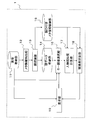
- FIG. 1 is a functional block diagram showing an image display device according to an embodiment of the present invention.
- FIG. 1 is a block diagram showing an example of the overall configuration of an image display apparatus 1 according to an embodiment of the present invention.
- the image display device 1 has an image storage unit 11 for storing image data having meta information such as a shooting date together with an image taken by a digital camera, for example.
- the meta information extraction unit 12 sequentially extracts images in the image storage unit 11, extracts meta information of the images, and supplies the images to the face recognition unit 13.
- the face recognition unit 13 recognizes whether there is a face portion in the image from which the meta information is extracted, and adds a face ID.
- the face data storage unit 14 stores the face image data (for example, face position information and feature amount).
- the face ID obtained by the face recognition unit 13 is stored in the face ID-added meta information storage unit 15 together with meta information of the face image (for example, the time and place where the image was taken).
- the user uses the face image data stored in the face data storage unit 14 through the key image selection unit 16 to select a key image including portions of a plurality of faces displayed on the display unit 19.
- the user causes the display unit 19 to display an arbitrary image in the image storage unit 11 and designates an image including a plurality of desired facial parts.
- the key image selection unit 16 selects an image designated by the user as a key image.
- the person similarity calculation unit 17 extracts the face ID information of the comparison image from the face ID-added meta information storage unit 15 and compares it with the selected key image to calculate the similarity.
- the degree-of-association calculation unit 18 obtains meta information (for example, the location and time at which the image was taken) of other images from the meta-information storage unit 15 with face ID using the previously calculated similarity. The degree is calculated, and an image having a high degree of association with the selected key image is displayed on the display unit 19.
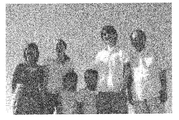
- FIG. 1 An example of image data stored in the image storage unit 11 is shown in FIG.
- This image is an image itself taken by the user, and is an image in which a plurality of people are shown.
- As an image to be stored not only a person image but also an image of a landscape or an object is generally used.
- the image meta information is attached to the image, and generally includes information such as the date and time when the image was taken and the resolution. In the present embodiment, it is assumed that the date and time of shooting and the shooting location of all images are stored in advance as meta information.
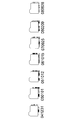
- FIG. 3 shows an example of a folder created for each date.
- all images taken on December 31, 2004 are stored in the folder 043131.
- the meta information extraction unit 12 reads all image data from the image storage unit 11 and executes a program for extracting necessary information from the image data.
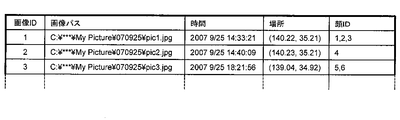
- FIG. 4 shows an example of the extracted meta information.
- the image ID representing the image identification number
- the image path representing the position on the device where the image is stored (for example, C: ⁇ *** ⁇ My Picture ⁇ 070925 ⁇ pic1.jpg), and the image was taken.
- Information of time for example, 2006/9/25, 14:33:21
- the place where the image was taken for example, 140.22, 35.21
- the time information is represented by the date and time when the image was taken
- the location information is represented by the latitude and longitude at which the image was taken.
- the face recognition unit 13 selects an image that is not selected by the user from the images read from the image storage unit 11, recognizes a human face part from the image, and determines the feature amount and position coordinates of the recognized face part. calculate.
- the face image is cut out using the face position coordinates, and the face feature amount, the face position coordinates, and the face image are stored in the face data storage unit 14 together with the face ID as the identification number. Further, a program for assigning a face ID to the image meta information of the selected image data and storing it in the face ID-added meta information storage unit 15 is executed.
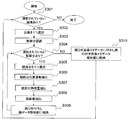
- FIG. 5 is a flowchart showing a specific example of processing in the face recognition unit 13. First, the presence / absence of image data not selected in the image data is detected (step S301). If all the images have been selected, the processing in the face recognition unit 13 ends.
- the image data is selected (step S302).
- face area candidates are extracted from the selected image data by the subspace method.
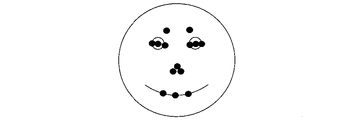
- 14 feature points are searched and extracted from the extracted region by using a separability filter from portions corresponding to, for example, the human pupil, nostril, mouth end, eyebrow end, eye front, and eye corner.
- An example of the extracted feature points is shown in FIG. A portion indicated by a small black circle in FIG. 6 is the extracted feature point.
- the candidates are narrowed down by verifying whether the extraction is accurate from the spatial arrangement and the similarity of the pattern information of each feature point, and only the candidates that are determined to be accurate are final faces
- the area is selected (step S303). It is assumed that the dictionary used for the subspace method and the pattern information of each feature point have been learned in advance.
- step S304 it is checked whether or not there is an unselected face part.
- step S305 If all the recognizable face parts have not been selected (there is an unselected face), one of the unselected faces is selected (step S305). Then, the position coordinates of the selected feature point of the face in the entire image are acquired (step S306). Since the feature points are composed of 14 points, for example, they are expressed as shown in Equation 1.
- a face image is extracted using the face position information (step S308).
- the face range can be determined using the horizontal distance fx between the pupils and the vertical distance fy between the eyebrows and the mouth.
- FIG. 7 shows an example of a method for determining the face range.
- the range of the face is determined by determining f′x and f′y as in Expression 2 and Expression 3 using the horizontal distance fx and the vertical distance fy of the feature points.
- the values of ax and ay are 1 or more.
- a face image is cut out from the selected image using f′x, f′y, and face position coordinates.
- FIG. 8 shows an example of face meta information.
- a face image path indicating the storage location of the face image corresponding to each face ID on the device, the position of the feature point of the face in the image, and the feature quantity extracted from the face area are stored as meta information. .
- FIG. 9 is an example of image meta information with face ID.
- the face ID of the face recognized by the image is given. For example, in image 1 of FIG. 9, it can be seen that three faces with face IDs 1, 2, and 3 have been selected. This face ID is the same as the face ID of the face data stored in the face data storage unit 14, and information on the face recognized in the image can be obtained by referring to the face data storage unit 14.
- the key image selection unit 16 is connected to the image storage unit 11. For example, the key image selection unit 16 displays an image as a key image candidate and allows the user to select a key image. Then, the key image selection unit 16 executes a program that reads the face data of the key image selected by the user and the meta information with face ID from the face data storage unit 14 and the meta information storage unit 15 with face ID.
- FIG. 10 is a display example of an image by the key image selection unit. In the example of FIG.
- a key image main candidate display area that displays the image temporarily selected by the user as a key image main candidate is displayed together with a key image candidate thumbnail display area that displays other key image candidates as thumbnails, A key image candidate face image display area for displaying a face image corresponding to the face ID included in the key image candidate, and a key image selection determination means serving as a trigger for selecting the key image.
- the key image candidate thumbnail When the user selects a key image candidate thumbnail, the selected thumbnail image is displayed on the key image main candidate display section as a key image main candidate.
- an image including the selected face image is displayed as a key image main candidate on the key image main candidate display unit.
- the key image selection determination unit is given in the form of a button, for example, and the key image main candidate is selected as the key image when the user presses the button.
- the image group selected as the key image candidate for example, the image group in the most recently taken folder can be considered. It is also possible to set key image candidates according to the number of face IDs of images, such as images in which X people or more than X people are shown in all folders. For example, when it is desired to use a group photo as a key image, it is appropriate to set key image candidates based on the number of people. In addition, a method of automatically selecting an image showing a person from the last browsed image or the latest image group as a key image is also possible.
- the person similarity calculation unit 17 extracts key image information from the key image selected by the user by the key image selection unit 16, selects a comparison image from the meta information with face ID, and uses the face data as a key image and The similarity matrix of the comparison image is calculated, and a program for calculating the similarity vector of the key image and other comparison images stored in the image storage unit 11 is executed from the similarity matrix. Because of the problem to be solved, it is assumed that the key image includes one or more human faces.
- FIG. 11 is a flowchart showing a specific example of processing in the person similarity calculation unit 17.
- the image of the meta information with face ID and the image meta information of the key image selected by the key image selection unit 16 are extracted as a key image and key image meta information, respectively (step S61). Further, face data corresponding to the face ID included in the key image meta information is extracted as a key image face image.
- step S62 it is determined whether or not there is an unselected comparison image other than the key image. If all the images have been selected, the process ends. If not all images have been selected, image data that has not been selected is selected as a comparison image (step S63).
- step S64 the image meta information with face ID of the selected comparison image is extracted as comparison image meta information (step S64).
- the information to be extracted is equal to the content extracted for the key image in S61.
- a face similarity matrix expressing the similarity between the face included in the key image and the face included in the comparison image is calculated (step S65).
- a face similarity vector between the key image and the comparison image is calculated based on the obtained similarity matrix (step S66), and it is determined whether there is a comparison image that has not yet been selected (step S62).
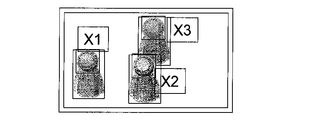
- FIG. 14 and 15 are examples of a key image and a comparative image, respectively.
- the processing of S65 and S66 will be described in more detail.
- FIG. 12 is a flowchart showing a specific example of the process in the face similarity calculation process S65.
- an empty matrix having no element is generated as an initial value of the face similarity matrix (step S651).
- step S653 If all face IDs have not been selected, one of faces that can be selected by the key image is selected (step S653). Next, it is determined whether or not there is an unselected face ID among the face IDs included in the comparison image meta information (step S654). If all face IDs have been selected, it is determined whether there is a key image face ID that has not been selected (step S652). If all face IDs have not been selected, one of faces that can be selected in the comparison image is selected (step S655). Next, the similarity between the face selected by the key image and the face selected by the comparison image is calculated (step S656). The feature amount stored in each face data is used for calculating the similarity.
- the feature amounts of the key image and the comparison image are projected onto the partial space, and the angle between the projected feature amounts is defined as the similarity between the faces.
- the partial space can be learned in advance using a learning image. For example, a method of determining the partial space by using principal component analysis so that the distance between face images of different persons increases.
- the similarity obtained by this method is normalized to the range of [0, 1] and used.
- the face similarity matrix is updated by adding the obtained similarity as an element (step S657). For example, if the i-th face of the N faces in the key image and the j-th face of the M faces in the comparison image are selected, the similarity calculated here is the face similarity matrix. It is added as an element of (i, j). After the face similarity matrix is updated, it is determined whether there is a comparison image face ID that has not been selected yet (step S654).
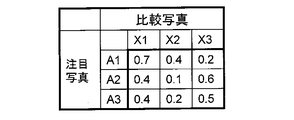
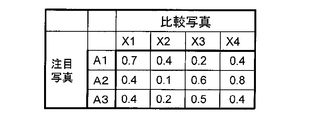
- FIG. 16 is an example of a face similarity matrix obtained after the processing is completed.
- the face similarity matrix is a 3 ⁇ 3 matrix.
- Such a face similarity matrix is obtained by the same process even when the number of faces recognized by the selected key image and the comparison image is different.
- FIG. 17 shows an example of a face similarity matrix when a comparison image showing the faces of four people is selected.
- FIG. 18 is an example of a face similarity matrix when a comparison image showing the faces of two people is selected.
- the obtained similarity matrix is an N ⁇ M matrix.
- FIG. 13 is a flowchart showing a specific example of processing in face similarity vector calculation processing S66.
- a vector having the length of the number of rows of the face similarity matrix is generated as an initial value of the face similarity vector (step S661).
- the initial values of the face similarity vector are all 0.
- step S662 it is determined whether or not there is an unselected row among the row components representing the face ID recognized in the key image in the face similarity matrix (step S662). If all face IDs have been selected, the process ends.
- the component having the highest similarity is searched from the face similarity matrix (step S663).
- the (1,1) component having the highest value of 0.7 is searched.
- the face similarity vector is updated by substituting the searched similarity (step S664).
- the searched maximum value is the (i, j) component
- the similarity is substituted for the i-th component of the face similarity vector.
- the searched maximum value 0.7 is the (1, 1) component
- the updated face similarity vector is expressed by Equation 4.
- step S665 all the elements in row i and column j including the searched maximum value are deleted from the search target (step S665), and it is determined whether there is a row element (step S662).
- FIG. 19 shows an example of element deletion. Now, since the searched maximum value 0.7 is the (1, 1) component, the components in the first row and the first column are deleted, and in the next search, the second row, the third row, the second column, Only the third column is targeted.
- Equation 5 is a face similarity vector obtained after the face similarity vector calculation unit processing S66 ends in this example.
- the face similarity vector represents how similar each of the three faces recognized in the key image is to the corresponding face in the comparison image.
- A1-X1, A2-X3, and A3-X2 correspond to each other, and the result is that the similarity is Equation 5.
- Equation 6 is a face similarity vector obtained from the face similarity matrix of FIG.
- three faces are recognized in the key image, whereas four faces are recognized in the comparison image.
- the face similarity vector can be considered to correspond to a face with a high similarity among the four comparison images for each of the three key images.
- A1-X1, A2-X4, and A3-X3 correspond to each other, and the degree of similarity is expressed by Equation 6.
- Equation 7 is a face similarity vector obtained from the face similarity matrix of FIG.
- three faces are recognized in the key image, whereas two faces are recognized in the comparison image.
- the face similarity vector can be considered to correspond to a face having a high similarity from the two comparison images for each of the three key images.
- A1-X1 and A3-X2 correspond to each other, and the respective similarities are 0.7 and 0.2 as shown in Expression 7.
- the face A2 in the key image has a face similarity of 0.0 because there is no face corresponding to the comparative photograph. This may be that A1 and A3 were shown in the comparison photo, but the face of A2 was not shown in the comparison photo.
- a face similarity vector representing a plurality of face similarity between images is obtained.
- the face similarity vector can be temporarily given as image meta information to each image other than the key image as shown in FIG.
- the relevance calculation unit 18 extracts key image meta information from the key image, acquires meta information of an image other than the key image from the meta information storage unit 15 with face ID as meta information of the comparison image, and obtains the key image and the comparison image.
- a program that calculates the degree of relevance between the two using meta information is executed. In this case, for example, photographs taken at the same place and time are considered highly relevant.
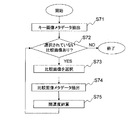
- FIG. 21 is a flowchart showing a specific example of processing in the relevance calculation unit 18.
- step S71 image meta information with a face ID of a key image is extracted as key image meta information (step S71).
- step S72 it is determined whether or not there is a comparison image not selected in the image data other than the key image (step S72). If all the images have been selected, the entire process ends.
- image data that has not been selected is selected from image data other than the key image (step S73).
- the meta information of the selected comparison image is extracted from the meta information storage unit 15 with face ID (step S74).
- the comparison image meta information has already been given a similarity vector with the key image by the processing of this embodiment.
- Equation 8 is an example of relevance calculation.
- R (i) is the relevance to be calculated
- fi is the face similarity using the face similarity vector
- tkey and ti are the time of the key image and the selected comparison image
- di is the location information where the image was taken. Differences in distance used
- t0 and d0 are normalization coefficients
- ⁇ , ⁇ , and ⁇ are weights of relevance based on face similarity, time, and distance, respectively.
- Equation 9 the distance difference di using the location information of the latitude and longitude where the image was taken is approximately expressed by Equation 9, for example.
- the longitude and latitude assigned to the key image are represented by ( ⁇ key , ⁇ key )
- the longitude and latitude assigned to the selected comparison image are represented by ( ⁇ i , ⁇ i ).
- using the face similarity vector is expressed as shown in Equation 10, for example.
- w represents the weight depending on the number of people.
- the sum of the squares of the components of the similarity vector exceeding a certain threshold fc is taken and divided by the number of persons exceeding fc.
- w is expressed as in Expression 11. If such weights are used, the face similarity is higher for a comparative image in which many people are the same as the key image.
- the normalization coefficient is set as shown in Equation 12.
- FIG. 22 is an example of a key image and a comparative image.
- the key image and the comparison image are given a face ID and a face similarity vector by the processing of the present invention in addition to the image path, location, and time information based on the image meta information.
- FIG. 22 also shows actual faces (Mr. A, Mr. B, Mr. C, and Ms. D) appearing in the image and the situation where they were actually photographed in order to clarify the effects of the invention.
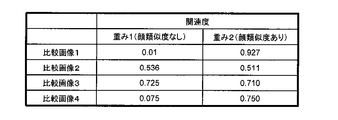
- FIG. 23 is an example of the degree of association between the key image indicated by weight 1 and weight 2 calculated by Expression 8 and the comparison image.
- the degree of relevance between the comparison image 2 and the comparison image 3 in which the captured time and place are close to the key image is large, but is also calculated using the face similarity.
- the degree of association between the comparative image 1 and the comparative image 4 is also large.
- the key image is an image taken when traveling to Okinawa at A, B, and C of the company synchronization.
- a user looks at a key image and associates with another image, it can be considered that the user thinks of an image showing a close member as well as an image of a close place and close time.
- the comparison image of FIG. 22 the user compares image 1 when traveling to Hokkaido in company synchronization, or a comparison image when traveling to XX amusement park in company synchronization. 4 is thought of. Therefore, in the comparison image group shown in FIG.
- both the comparison image 1 and the comparison image 4 are significantly different from the key image in the location and time when the images were taken. In the conventional method of searching, it is very difficult to present the comparison image 1 and the comparison image 4 to the user as images having a high degree of association with the key image.
- the face similarity using the similarity of a plurality of faces is used as the weight 2, so that A, B, and C are shown.
- the comparison image 1 is searched as the image having the highest degree of relevance, and the comparison image 4 in which Mr. A and Mr. B are reflected is searched as the image having the next highest relevance level. Therefore, the image display device 1 can search for an image closer to the image associated with the key image (company-synchronized travel image) as a highly related image.
- the display unit 19 executes a program that effectively presents to the user a comparison image group having a higher degree of association with the key image based on the obtained degree of association.
- FIG. 24 shows an example in which a comparative image is arranged on the output device using the relevance of weight 1.
- the comparative images 2 and 3 with high relevance are arranged near the key image, whereas the comparative images 1 and 4 with low relevance are arranged far away and are not presented to the user.
- FIG. 25 shows an example in which a comparative image is arranged on the output device using the degree of relevance of weight 2.
- the comparative image 1, the comparative image 3, and the comparative image 4 with high relevance are arranged near the key image, while the comparative image 2 with low relevance is arranged far away.
- FIG. 25 shows an example in which a comparison image is displayed in a two-dimensional manner with a difference in distance from the key image according to the degree of relevance to the key image.
- coordinates centered on the key image are set, and the comparative images having higher relevance are arranged so that the distance is closer. Further, the comparative images 1 to 4 are arranged clockwise from the oldest one.
- the comparison image 1 and the comparison image 4 that are considered to have a high degree of association between members are not presented to the user when only the location and time of FIG. 24 are used, whereas in FIG. Are arranged near the key image and presented to the user. In this way, by arranging images in two dimensions at a distance based on the degree of relevance including face similarity, it is possible to intuitively present to the user photos of places close to the key image, near time, and close members It has become.
- a key image is selected from the key screen main candidates as shown in FIG.
- a key image display section for displaying the selected key image
- a key image folder name display section for displaying the folder name to which the key image belongs
- a key image folder thumbnail display section for displaying thumbnails of all images belonging to the key image folder
- a key image folder face image display unit that displays a face image corresponding to a face ID included in an image belonging to the key image folder
- a comparison image display unit that displays a comparison image
- a comparative image with a high degree of association
- a comparison image folder display section that displays a folder name
- a comparison image folder thumbnail display section that displays thumbnails of all images included in the folder including the comparison image
- a face ID included in the image included in the comparison image folder A comparison image folder face image display unit for displaying a corresponding face image, and a relevance level weight adjustment unit for adjusting the weight of Equation 8
- the weight adjustment unit may be a method in which the user continuously changes ⁇ , ⁇ , and ⁇ , but when the “member” tab is selected as in this example (0.8, 0.1, 0.1) When the “Time” tab is selected (0.1, 0.8, 0.1), when the “Location” tab is selected (0.1, 0.1, 0.8), etc. Easy-to-understand pre-setting is also possible.
- comparison image folder thumbnail When the user selects a comparison image folder thumbnail, the selected image can be displayed in a large and easy-to-view form on the comparison image display unit.
- comparison image folder face image an image including the selected face can be displayed in a large and easy-to-view form on the comparison image display unit.
- the user in addition to the comparative image having a high degree of relevance calculated by the selected weight, the user can intuitively display the thumbnails and face images of the images included in the comparative image folder. It is possible to focus on a folder containing related images.
- Such a display method is possible by using the face data stored in the face data storage unit by the processing of the present invention. Further, all processing in the present embodiment is performed by software, but may be performed by hardware.
Landscapes
- Engineering & Computer Science (AREA)
- Theoretical Computer Science (AREA)
- Library & Information Science (AREA)
- Data Mining & Analysis (AREA)
- Databases & Information Systems (AREA)
- Physics & Mathematics (AREA)
- General Engineering & Computer Science (AREA)
- General Physics & Mathematics (AREA)
- Processing Or Creating Images (AREA)
- Information Retrieval, Db Structures And Fs Structures Therefor (AREA)
Abstract
本発明に係る画像表示装置では、画像格納部11から画像データをメタ情報抽出部12に送って、画像のメタ情報を抽出する。メタ情報が抽出された画像の中の顔は顔認識部13で認識して、顔データ格納部14と顔ID付きメタ情報格納部15に転送して格納する。キー画像選択部16は、顔ID付きメタ情報格納部15に格納された顔ID付きメタ情報と顔データ格納部14に格納された顔画像データを用いて、キー画像を選択する。そして、人物類似度計算部17は比較画像を抽出して、選択されたキー画像と比較して、類似度を計算する。関連度計算部18は、先に計算された類似度を用いて、関連度を計算して、関連度が高い画像を表示部19に表示する。このような画像表示装置によれば、ある複数の人間が写っている画像を見ているユーザに対して、当該画像により関連する画像を提示することができる。
Description
本発明は、ユーザが注目しているキー画像と関連する画像を有効に表示する画像表示装置に関する。
撮影デバイスの利用度の向上やストレージの大容量化により、個人が電子的な方法により所有している写真の数はますます増加している。このような写真は様々な時期に様々な場所で撮影され、それらが長年にわたり蓄積されるため、今後も個人が所有する写真の数は増加の一途をたどると考えられる。
多数の写真データを含むデータファイルから、ユーザが注目している写真(キー画像)と関連した写真を探そうとする場合、通常は、予め複数のフォルダに分類しておいた写真から探すのが一般的である。しかしながら、個人がデータとして所有する写真の枚数は今後ますます増えることが想定されることから、ユーザがすべてのフォルダの名称を覚えておくことは難しいと考えられる。したがって、フォルダに分類する方法では関連する写真を探すことは今後ますます困難になると考えられる。
一方、キー画像に写っている人間の顔を部分画像として抽出し、この部分画像を他の画像(写真)と順次照合することによって、同じ人が写っている写真を検索する技術が知られている(例えば特許文献1参照)。
この技術を用いることで、ユーザは似た顔の写っている画像を検索することができる。しかし、複数人が写っている写真を基に検索する場合には、単一の顔に注目した検索では必ずしもユーザの連想した画像が提示されるとは限らない。例えば、ユーザが3人で写っている写真に注目して関連する写真を検索する場合、同じ3人で写っている写真が検索結果のより上位にくることが望ましいが、従来の技術では、注目している写真の中の1人のみが写っている写真が関連する写真として検索されるので、必ずしもユーザの所望する写真が上位に検索されるとは限らない。
すなわち、複数の人間が写っている写真を見ているユーザが、その写真と関連する写真を検索する場合、従来の技術では適切な画像を提示することが難しい。
上記課題を解決するために、本発明は、第1の形態として、画像とそのメタ情報を格納する画像格納部と、前記画像から人間の顔に当たる顔領域とその位置情報を認識し、前記顔領域の特徴量を算出する認識部と、前記顔領域の位置情報、前記顔領域の特徴量及び、前記顔領域の画像を、顔IDに対応づけて格納する顔データ格納部と、前記顔IDと前記メタ情報とを対応づけて格納する顔ID付きメタ情報格納部と、ユーザが前記画像格納部からキー画像を選択するキー画像選択部と、前記特徴量を用いて、前記キー画像に含まれる単数または複数の顔に対応した類似度ベクトルを算出する類似度計算部と、前記顔IDと前記メタ情報と前記類似度ベクトルを用いて、前記キー画像と画像格納部に格納された他の画像の関連度を計算する関連度計算部と、前記関連度を用いて、関連度が高い他の画像を画像格納部から取得して表示する表示部とを備えることを特徴とする画像表示装置を提供する。
また、上記画像表示装置において、前記認識部は、認識された前記顔部分の特徴点の位置座標を用いて、特徴量を算出することが好ましい。
また、上記画像表示装置において、前記類似度計算部は、選択された前記キー画像の顔ID付きメタ情報を抽出する顔ID付きメタ情報抽出部と、前記顔ID付きメタ情報から比較画像を選択する比較画像選択部と、前記特徴量を用いて前記キー画像と前記比較画像の顔類似度行列を計算する顔類似度行列計算部と、前記顔類似度行列を基に前記類似度ベクトルを計算する類似度ベクトル計算部とを持つことが好ましい。
また、上記画像表示装置において、前記顔類似度行列計算部は、前記キー画像内の前記顔IDを選択するキー画像顔ID選択部と、選択された前記比較画像内の前記顔IDを選択する比較画像顔ID選択部と、選択された2つの顔の間の類似度を計算する顔類似度計算部と、計算された前記類似度を顔類似度行列の成分として追加する行列追加部とを持つことが好ましい。
また、上記画像表示装置において、前記類似度ベクトル計算部は、前記顔類似度行列の前記キー画像成分の有無を選択するキー画像成分選択部と、行列内の最大値を探索し、その値と行および列の情報を返す最大値探索部と、前記最大値を成分として前記類似度ベクトルを更新する類似度更新部と、不要な行列要素を削除する行列要素削除部を持つことが好ましい。
また、上記画像表示装置において、前記認識部は、前記画像データから画像を選択する画像選択部と、前記画像中の顔を認識する画像中顔認識部と、認識された顔の位置座標を抽出する位置座標抽出部と、認識された顔の特徴量を抽出する特徴量抽出部と、顔の画像を切り出す顔画像切り出し部と、得られた顔データを格納する顔データ格納部とを持つことが好ましい。
また、上記画像表示装置において、前記表示部は、前記関連度計算部で算出された関連度と前記顔ID付きメタ情報と前記顔データを用いて顔情報と共に表示することが好ましい。
また、上記画像表示装置において、前記キー画像選択部は、前記顔データと顔ID付きメタ情報からキー画像候補とキー画像候補に含まれる顔データを選択し、キー画像候補を顔画像と共に表示することが好ましい。
また、上記画像表示装置において、前記メタ情報は時間や場所情報を含み、前記メタ情報を用いて、前記キー画像と前記全体画像との関連度を計算することが好ましい。
また、上記画像表示装置は、前記表示部に、前記画像格納部に格納された前記キー画像の候補をサムネイルで表示して、前記キー画像候補から前記キー画像を選択するインターフェースを備えることが好ましい。
本発明によれば、大量の画像群の中からでも、ユーザが注目している画像に対して、ユーザにとってより関連性が高い画像をユーザに対してより有効に提示することが可能になる。
以下、図面を参照して、本発明の実施の形態について説明する。
図1は、本発明の一実施形態に係る画像表示装置1の全体構成例を示すブロック図である。同図に示されるように、画像表示装置1は、たとえばデジタルカメラで撮像した画像とともに、その撮影日などのメタ情報を有する画像データを格納する画像格納部11を持つ。メタ情報抽出部12は画像格納部11中の画像を順次取り出し、画像のメタ情報を抽出するとともに、画像を顔認識部13へ供給する。顔認識部13は、メタ情報が抽出された画像の中に顔の部分があるかどうかを認識して顔IDを付加する。顔データ格納部14は、画像中に顔の部分がある場合、その顔画像データ(例えば、顔の位置情報や特徴量)を格納する。顔認識部13で得た顔IDは、その顔の画像のメタ情報(例えば、撮影された時間や場所)とともに顔ID付きメタ情報格納部15に格納される。
ユーザは、キー画像選択部16を通して、顔データ格納部14に格納された顔画像データを用いて、表示部19に表示されている複数人の顔の部分を含むキー画像を選択する。たとえば、ユーザが表示部19に画像格納部11内の任意の画像を表示させて、所望とする複数人の顔の部分を含む画像を指定する。そして、キー画像選択部16は、ユーザが指定した画像をキー画像として選択する。
そして、人物類似度計算部17は、顔ID付きメタ情報格納部15から比較画像の顔ID情報を抽出して、選択されたキー画像と比較して、類似度を計算する。関連度計算部18は、先に計算された類似度を用いて、顔ID付きメタ情報格納部15からその他の画像のメタ情報(例えば、画像が撮影された場所や時間)を取得して関連度を計算して、選択されたキー画像と関連度が高い画像を表示部19に表示する。
そして、人物類似度計算部17は、顔ID付きメタ情報格納部15から比較画像の顔ID情報を抽出して、選択されたキー画像と比較して、類似度を計算する。関連度計算部18は、先に計算された類似度を用いて、顔ID付きメタ情報格納部15からその他の画像のメタ情報(例えば、画像が撮影された場所や時間)を取得して関連度を計算して、選択されたキー画像と関連度が高い画像を表示部19に表示する。
以下、各ブロックについて説明する。
画像格納部11が格納する画像データの一例を図2に示す。この画像はユーザが撮影した画像そのものであり、複数の人が写っている画像である。格納する画像としては人物画像だけでなく、風景や物体を撮影した画像なども一般的である。
画像メタ情報は画像に付与されており、一般的にはその画像が撮影された日時や解像度などの情報が含まれている。本実施形態ではすべての画像について撮影された日時および撮影された場所があらかじめメタ情報として格納されているとする。
ここでデジタルカメラなどの撮影デバイス(図示せず)から画像格納部11に画像を格納する際には、例えば、撮影された日付毎にフォルダに分けて格納される。図3は、日付毎に作成されたフォルダの例を示す。図3の例では、例えば2004年12月31日に撮影された画像は全て041231のフォルダに格納されている。前述のようにメタ情報には一般的に日付が付与されているため、仮にこのようなフォルダ分けがなされていない場合でも、画像を日付によってフォルダに再格納することは容易である。したがって、本実施例では、画像は日付毎に異なるフォルダに格納されていることを前提とする。
メタ情報抽出部12は、画像格納部11からすべての画像データを読み込み、画像データから必要な情報を抽出するプログラムを実行する。図4は、抽出されたメタ情報の例を示す。本例では、画像の識別番号を表す画像ID、画像が格納されているデバイス上の位置を表す画像パス(例えば、C:¥***¥My Picture¥070925¥pic1.jpg)、撮影された時間(例えば、2006 9/25 14:33:21)、撮影された場所(例えば、140.22, 35.21)の情報をメタ情報として抽出している。また、本例では、時間情報は撮影された年月日と時間、場所情報は撮影された緯度と経度で表されている。
顔認識部13は、画像格納部11から読み込まれている画像の中からユーザが未選択なものを選択し、画像から人間の顔部分を認識し、認識した顔部分の特徴量と位置座標を算出する。この顔の位置座標を用いて顔画像を切り出し、顔の特徴量と顔の位置座標と顔画像を、識別番号となる顔IDと共に顔データ格納部14に格納する。さらに、選択した画像データの画像メタ情報に顔IDを付与し顔ID付きメタ情報格納部15に格納するプログラムを実行する。
図5は、顔認識部13における処理の具体例を示すフローチャートである。まず、画像データの中で選択されていない画像データの有無が検出される(ステップS301)。そして、全ての画像が選択済みの場合、顔認識部13における処理は終了する。
そして、画像格納部11に格納されている画像データの中から未だ選択されていない画像データがあることが検出されれば、その画像データが選択される(ステップS302)。
次に、選択された画像データから部分空間法により顔領域候補が抽出される。そして、抽出された領域から、分離度フィルタにより、例えば、人間の瞳、鼻孔、口端、眉端、目頭、目尻に対応する部分から14点の特徴点を探索して抽出する。抽出された特徴点の例を図6に示す。図6において小さな黒丸で示される箇所が抽出された特徴点である。抽出された特徴点のそれぞれについて空間配置と各特徴点のパターン情報の類似度から抽出が正確であるかを検証して候補を絞り込み、抽出が正確であると判定された候補のみ最終的な顔領域として選択する(ステップS303)。なお、部分空間法に用いられる辞書および各特徴点のパターン情報は事前に学習されているものとする。
次に、選択されていない顔部分があるか否かをチェックする(ステップS304)。
すべての認識可能な顔部分が選択済みでない(未選択な顔がある)場合には、未選択な顔の一つが選択される(ステップS305)。そして、選択された顔の特徴点の画像全体における位置座標が取得される(ステップS306)。特徴点は14点からなるため、例えば式1のように表される。

次に、抽出された顔領域に対応する特徴量を画像から抽出する(ステップS307)。特徴量は、顔領域のヒストグラムを平滑化し、15×15の大きさの画像に正規化し、縦方向の微分処理を行うことで抽出されるため、各顔領域に対応する特徴量の次元は15×14=210次元となる。
次に、顔の位置情報を用いて顔画像を抽出する(ステップS308)。S303では特徴点として瞳、鼻孔、口端、眉端を特定しているため、瞳間の水平距離fxと眉と口の垂直距離fyを用いて顔の範囲を決定することが可能である。図7に顔の範囲の決定方法の例を示す。図7では、特徴点の水平距離fxと垂直距離fyを用いて式2と式3のようにf’x、f’yを決定することで顔の範囲を決定している。ここでaxとayの値は1以上で、例えばax=ay=1.8といった数値が経験的に考えられる。f’xとf’yと顔の位置座標を用いて、選択された画像から顔画像を切り出す。


そして、選択された顔の位置座標と特徴量に顔の識別番号を表す顔IDを付与して顔メタ情報とし、切り出された顔画像と共に顔データとして顔データ格納部14に格納する(ステップS309)。図8は、顔メタ情報の一例を示す。図8では各顔IDに対応する顔画像のデバイス上での格納場所を表す顔画像パス、画像中の顔の特徴点の位置、顔領域から抽出された特徴量がメタ情報として格納されている。
すべての認識可能な顔部分が選択済みであれば、選択された画像中で得られたすべての顔IDを画像メタ情報に付与し顔ID付きメタ情報格納部15に顔ID付き画像メタ情報として格納する。(ステップS310)。その後、まだ選択されていない画像があるか否かをチェックする(ステップS301)。図9は顔ID付き画像メタ情報の例である。図9では、メタ情報抽出部12で得られた画像パス、時間、場所の情報に加え、その画像で認識された顔の顔IDが付与されている。例えば図9の画像1では、顔ID1、2、3の3人の顔が選択されたことが分かる。この顔IDは顔データ格納部14に格納されている顔データの顔IDと同一であり、画像内で認識された顔の情報は顔データ格納部14を参照することで得られることになる。
キー画像選択部16は、画像格納部11に接続されており、例えば、ユーザに対して、キー画像の候補となる画像を表示してユーザにキー画像を選択させる。そして、キー画像選択部16は、顔データ格納部14と顔ID付きメタ情報格納部15から、ユーザが選択したキー画像の顔データおよび顔ID付きメタ情報を読み込むプログラムを実行する。図10は、キー画像選択部による画像の表示例である。図10の例では、ユーザが一時的に選択した画像をキー画像主候補として大きく表示するキー画像主候補表示領域と共に、他のキー画像候補をサムネイル表示するキー画像候補サムネイル表示領域と、すべてのキー画像候補の含まれる顔IDに対応する顔画像を表示するキー画像候補顔画像表示領域と、キー画像を選択するトリガとなるキー画像選択決定手段からなる。ユーザがキー画像候補サムネイルを選択すると、選択されたサムネイルの画像がキー画像主候補としてキー画像主候補表示部に表示される。ユーザがキー画像候補顔画像を選択すると、選択された顔画像を含む画像がキー画像主候補としてキー画像主候補表示部に表示される。キー画像選択決定部は例えばボタンのような形で与えられており、ユーザがボタンを押すことでキー画像主候補がキー画像として選択される。
キー画像候補として選択される画像群として、例えば最も新しく撮影されたフォルダ内の画像群が考えられる。またすべてのフォルダ内からX人もしくはX人以上/以下が写っている画像など、画像の顔IDの数に応じたキー画像候補の設定も可能である。例えば集合写真をキー画像にしたい場合などはこのような人数によるキー画像候補の設定が適当である。また前回閲覧した画像や最新の画像群の中から人が写っている画像を自動でキー画像として選択しておく方法も可能である。
人物類似度計算部17は、前記キー画像選択部16によってユーザが選択されたキー画像からキー画像情報を抽出し、顔ID付きメタ情報から比較画像を選択し、顔データを用いてキー画像と比較画像の類似度行列を計算し、類似度行列からキー画像と画像格納部11に格納されたその他の比較画像の類似度ベクトルを計算するプログラムを実行する。解決しようとする課題から、キー画像には単数または複数の人間の顔が含まれていることを前提とする。
図11は、人物類似度計算部17における処理の具体例を示すフローチャートである。
まず、キー画像選択部16により選択されたキー画像の顔ID付きメタ情報の画像および画像メタ情報をそれぞれキー画像とキー画像メタ情報として抽出する(ステップS61)。またキー画像メタ情報に含まれる顔IDに対応する顔データをキー画像顔画像として抽出する。
次に、キー画像以外に選択されていない比較画像があるか否かを判断する(ステップS62)。全ての画像が選択済みであれば処理を終了になる。すべての画像が選択済みでなければ、未だ選択されていない画像データを比較画像として選択する(ステップS63)。
次に、選択された比較画像の顔ID付き画像メタ情報を比較画像メタ情報として抽出する(ステップS64)。抽出する情報はS61においてキー画像について抽出された内容と等しい。キー画像に含まれる顔と比較画像に含まれる顔の類似度を総当りで表した顔類似度行列を計算する(ステップS65)。得られた類似度行列を基にキー画像と比較画像の顔類似度ベクトルを算出して(ステップS66)、まだ選択されていない比較画像があるか否かを判断する(ステップS62)。
図14、図15は、それぞれキー画像と比較画像の例である。ここでは例として図14のように顔IDがA1,A2、A3の顔が写っているキー画像と、図15のように顔IDがX1,X2,X3が写っている比較画像が選択されているとして、S65、S66の処理について更に詳しく説明する。
図12は、顔類似度計算処理S65における処理の具体例を示すフローチャートである。
まず、顔類似度行列の初期値として要素を持たない空の行列を生成する(ステップS651)。次に、キー画像メタ情報に含まれる顔IDの中で選択されていない顔IDがあるか否かを判断する(ステップS652)。ここで全ての顔IDが選択済みであれば処理を終了する。
全ての顔IDが選択済みでなければ、キー画像で選択可能な顔の一つを選択する(ステップS653)。次に、比較画像メタ情報に含まれる顔IDの中で選択されていない顔IDがあるか否かを判断する(ステップS654)。全ての顔IDが選択済みであれば、また選択されていないキー画像顔IDがあるか否かを判断する(ステップS652)。
全ての顔IDが選択済みでなければ、比較画像で選択可能な顔の一つを選択する(ステップS655)。次に、キー画像で選択された顔と比較画像で選択された顔の類似度を計算する(ステップS656)。類似度の計算には各顔データに格納されている特徴量を用いている。キー画像および比較画像の特徴量は部分空間に射影され、射影された特徴量間のなす角度を顔間の類似度とする。部分空間は学習画像を用いて事前に学習しておくことが可能であり、例えば主成分分析を用いて異なる人物の顔画像間の距離が大きくなるように部分空間を決定する方法が考えられる。
全ての顔IDが選択済みでなければ、比較画像で選択可能な顔の一つを選択する(ステップS655)。次に、キー画像で選択された顔と比較画像で選択された顔の類似度を計算する(ステップS656)。類似度の計算には各顔データに格納されている特徴量を用いている。キー画像および比較画像の特徴量は部分空間に射影され、射影された特徴量間のなす角度を顔間の類似度とする。部分空間は学習画像を用いて事前に学習しておくことが可能であり、例えば主成分分析を用いて異なる人物の顔画像間の距離が大きくなるように部分空間を決定する方法が考えられる。
本実施例ではこの手法により得られた類似度を[0, 1]の範囲に正規化して用いる。
次に、得られた類似度を要素として追加することで、顔類似度行列の更新を行う(ステップS657)。例えばキー画像中のN人の顔のi番目の顔と、比較画像中のM人の顔のj番目の顔が選択されているとすると、ここで計算された類似度は顔類似度行列の(i、j)の要素として追加される。顔類似度行列は更新されたあとに、まだ選択されていない比較画像顔IDがあるか否かを判断する(ステップS654)。
図16は、処理終了後に得られる顔類似度行列の例である。ここでは選択されているキー画像と比較画像に含まれる顔の数が共に3であるため、顔類似度行列は3×3の行列となる。このような顔類似度行列は選択されたキー画像と比較画像で認識されている顔の数が異なる場合でも同様の処理により得られる。例えば図17は4人の顔が写っている比較画像が選択されているときの顔類似度行列の例である。また図18は2人の顔が写っている比較画像が選択されているときの顔類似度行列の例である。一般的にキー画像でN人、比較画像でM人の顔が認識されている場合、得られる類似度行列はN×Mの行列となる。
図13は、顔類似度ベクトル計算処理S66における処理の具体例を示すフローチャートである。
まず、顔類似度ベクトルの初期値として顔類似度行列の行の数の長さを持つベクトルを生成する(ステップS661)。本例では顔類似度ベクトルの初期値の値は全て0とする。
次に、顔類似度行列においてキー画像中で認識されている顔IDを表す行成分の中で選択されていない行があるか否かを判断する(ステップS662)。全ての顔IDが選択済みであれば処理を終了する。
全ての顔IDが選択済みでなければ、顔類似度行列の中から類似度の最も高い成分を探索する(ステップS663)。図16の顔類似度行列の例では、最も類似度の高い0.7の値を持つ(1,1)成分が探索される。
次に、探索された類似度を代入することで顔類似度ベクトルの更新を行う(ステップS664)。今、探索された最大値が(i,j)成分であったとすると顔類似度ベクトルのi番目の成分に類似度が代入される。例では探索された最大値0.7は(1,1)成分であったため、更新された顔類似度ベクトルは式4となる。

そして、探索された最大値を含む行iと列jのすべての要素を探索の対象から削除して(ステップS665)、また行要素があるか否かを判断する(ステップS662)。図19は要素の削除の例である。今、探索された最大値0.7は(1、1)成分であったため、第1行および第1列の成分が削除され、次の探索では第2行、第3行および第2列、第3列のみが対象となる。
式5は本例で顔類似度ベクトル計算部処理S66の終了後に得られる顔類似度ベクトルである。この顔類似度ベクトルはキー画像中で認識された3つの顔それぞれが、比較画像中の対応する顔にどの程度類似しているかを表している。本実施例ではA1-X1、A2-X3、A3-X2が対応しており、その類似度が式5であるという結果になっている。

このような顔類似度ベクトルは選択されたキー画像と比較画像で認識されている顔の数が異なる場合でも同様の処理により得られる。式6は、図17の顔類似度行列から得られる顔類似度ベクトルである。ここではキー画像で3人の顔が認識されているのに対し、比較画像で4人の顔が認識されている。顔類似度ベクトルは、キー画像の3人それぞれに対して比較画像の4人の中から類似度の高い顔を対応させていると考えることができる。この例dではA1-X1、A2-X4、A3-X3が対応しており、その類似度が式6であるにいう結果となっている。

式7は、図18の顔類似度行列から得られる顔類似度ベクトルである。ここではキー画像で3人の顔が認識されているのに対し、比較画像で2人の顔が認識されている。顔類似度ベクトルは、キー画像の3人それぞれに対して比較画像の2人の中から類似度の高い顔を対応させていると考えることができる。ここではA1-X1、A3-X2が対応しており、式7のようにそれぞれの類似度は0.7と0.2になっている。キー画像のA2の顔は比較写真に対応する顔が存在しないため顔類似度が0.0になっている。これはA1、A3は比較写真に写っていた可能性があるが、A2の顔は比較写真には写っていなかったと考えることができる。

以上の人物類似度計算部17の処理により、画像間の複数対複数の顔の類似度を表した顔類似度ベクトルが得られる。顔類似度ベクトルは例えば図20のようにキー画像以外の各画像に画像メタ情報として一時的に付与することが可能である。
関連度計算部18は、キー画像からキー画像メタ情報を抽出し、顔ID付きメタ情報格納部15からキー画像以外の画像のメタ情報を比較画像のメタ情報として取得し、キー画像と比較画像のメタ情報を用いて両者の関連度を計算するプログラムを実行する。この場合、例えば、同じ場所と時間に撮られた写真は関連度が高いと見なす。
図21は、関連度計算部18における処理の具体例を示すフローチャートである。
まず、キー画像の顔ID付き画像メタ情報をキー画像メタ情報として抽出する(ステップS71)。次に、キー画像以外の画像データの中で選択されていない比較画像があるか否かを判断する(ステップS72)。全ての画像が選択済みであれば、全処理終了になる。
全ての画像が選択済みでなければ、キー画像以外の画像データから未だ選択されていない画像データを選択する(ステップS73)。
そして、選択された比較画像のメタ情報は顔ID付きメタ情報格納部15から抽出される(ステップS74)。比較画像メタ情報には本実施例の処理によりすでにキー画像との類似度ベクトルが付与されている。
次に、キー画像と選択された比較画像の情報を用いて関連度の計算を行う(ステップS75)。式8は関連度計算の例である。ここでR(i)は計算する関連度、fiは顔類似度ベクトルを用いた顔類似度、tkeyおよびtiはキー画像および選択された比較画像の時間、diは画像が撮影された場所情報を用いた距離の差分、t0、d0は正規化の係数、α、β、γはそれぞれ顔類似度、時間、距離による関連度の重みである。

画像が撮影された緯度、経度の場所情報を用いた距離の差分diは、例えば近似的に式9で表されることが知られている。式9ではキー画像に付与されている経度、緯度を(δkey,λkey)、選択された比較画像に付与されている経度、緯度を(δi,λi)で表している。

顔類似度ベクトルを用いた顔類似度|fi|は、例えば式10のように表される。wは人数による重みを表している。ここでは、類似度ベクトルの成分のうち、ある閾値fcを越えるものの2乗の和をとり、fcを越えた人数で割っている。このような値を用いることで、例えばキー画像中の2人が、比較画像中で認識されている5人中の2人である場合でも顔類似度の値は高くなることが考えられる。

また、例えば、類似度の高い人数が多いほど高い関連度を得たい場合には、閾値を超えた人数によった重みwをかけることで関連度を高くすることが可能である。例えばwは式11のように表される。このような重みを用いれば、キー画像と同じ人が多く写っている比較画像ほど顔類似度は高くなる。

また本実施例では正規化の係数は式12のように設定する。

本発明による効果を、図22、図23を用いて示す。
図22は、キー画像および比較画像の例である。キー画像および比較画像は画像メタ情報による画像パス、場所、時間の情報に加え、本発明の処理により顔ID、顔類似ベクトルが付与されている。また図22には発明の効果を明確にするために画像に写っていた実際の顔(Aさん、Bさん、Cさん、Dさん)と実際に撮影された状況も示してある。
ここで、キー画像と比較画像の関連度について、画像メタ情報にあらかじめ付与されている場所と時間のみを用いた場合と、場所と時間に加え顔類似度を用いた場合の2通りを考える。具体的には前者の例として式8においてα、β、γの値を式13のように設定した重み1の場合を考え、後者の例として式8においてα、β、γの値を式14のように設定した重み2の場合を考える。


図23は、式8により算出される重み1、重み2により示されるキー画像と比較画像の関連度の例である。場所と時間のみを用いて算出される重み1では、撮影された時間と場所がキー画像に近い比較画像2および比較画像3の関連度が大きいのに対し、顔類似度も用いて算出される重み2では、比較画像1および比較画像4の関連度も大きくなっている。
図23の結果がユーザにもたらす効果について、図22の実際の顔と実際の撮影状況を用いて説明する。キー画像は会社同期のA、B、Cで沖縄に旅行に行った際に撮影された画像である。ユーザがキー画像を見て他の画像を連想する場合を考えると、ユーザは近い場所や近い時期の画像だけでなく、近いメンバーが写っている画像を思い浮かべると考えられる。例えば図22の比較画像の中では、ユーザは、会社同期で北海道に旅行に行った際の画像である比較画像1や、会社同期でXX遊園地に旅行に行った際の画像である比較画像4を思い浮かべると考えられる。したがって、図22に示す比較画像群において、キー画像に対する関連度の大きい画像として比較画像1や比較画像4をユーザに提示できれば、多くのユーザにとって思い浮かべていた画像と同じ画像(本例では同じ会社同期で行った過去の旅行の画像)を見ることができるので、ユーザに高い満足感を与えることができる。しかし、図23の重み1の結果が示すように、比較画像1と比較画像4は、いずれも撮影された場所や時期がキー画像と大きく異なるので、場所と時間のみを用いて関連する画像を検索する従来の方法では、キー画像に対する関連度の大きい画像として比較画像1と比較画像4をユーザに提示することは非常難しい。
これに対し、本実施形態に係る画像表示装置1によれば、複数の顔の類似度を用いた顔類似度を重み2として用いているため、Aさん、Bさん、Cさんの写っている比較画像1が関連度の最も大きな画像として検索され、Aさん、Bさんの写っている比較画像4が関連度が次いで大きな画像として検索される。したがって、画像表示装置1は、ユーザがキー画像(会社同期の旅行の画像)と関連性の高い画像として連想していた画像により近い画像を検索することができる。
表示部19は、得られた関連度を基にキー画像とより関連度の高い比較画像群を効果的にユーザに提示するプログラムを実行する。
図24は、重み1の関連度を用いて比較画像を出力デバイスに配置した例である。関連度の高い比較画像2、比較画像3はキー画像の近くに配置されているのに対し、関連度の小さい比較画像1と比較画像4は遠くに配置されユーザには提示されていない。図25は重み2の関連度を用いて比較画像を出力デバイスに配置した例である。関連度の高い比較画像1、比較画像3、比較画像4がキー画像の近くに配置されているのに対し、関連度の小さい比較画像2は遠くに配置されている。
図25は、キー画像に対する関連度の大きさに応じてキー画像からの距離に差をつけて比較画像を2次元に配置して表示する例を示す。図25では、キー画像を中心にした座標を設定し、関連度が高い比較画像ほど距離が近くになるように配置している。また、比較画像1から比較画像4のうち、古いものから順に時計回りに配置している。
図23と同様に、メンバーの関連度が高いと考えられる比較画像1と比較画像4は、図24の場所と時間のみを用いた場合にはユーザに提示されないのに対し、図25では自動的にキー画像の近くに配置されユーザに提示されている。このように顔類似度を含んだ関連度による距離で2次元に画像を配置することで、キー画像に近い場所、近い時間、近いメンバーの写真をユーザに対して直感的に提示することが可能になっている。
また、本実施例では、日付によるフォルダが用いられていることを前提としている。一つのフォルダにはその日にあったイベントが撮影されていると仮定すると、フォルダ内の1枚の写真の関連度が高い場合、そのフォルダに含まれている画像全体がキー画像と関連が高いと推測できる。そのため、関連度の高い比較画像だけでなく比較画像の含まれるフォルダを有効にユーザに提示することはユーザの満足に繋がると考えられる。
また、フォルダの内容を提示する際には、フォルダに収められているイベントがどのようなイベントであったかが即座に分かることが望ましい。今、キー画像には単数または複数の人間が写っている状況を仮定しているため、ここでは関連度の高い比較画像が含まれるフォルダ内の画像に写っている人の顔を見ることができれば、ユーザはキー画像と比較画像の関連を理解しやすいと考えられる。これは、図22の例では、フォルダ内の画像にAさん、Bさん、Cさんの顔が見えたら会社の同期、Dさんが見えたら大学の同期であると即座に判断できることにあたる。
このように、関連度の高い比較画像とその比較画像が含まれるフォルダの内容を提示する方法として、例えば図26に示すような例が考えられる。
図26に示す例は、まず、図10に示すようなキー画面主候補からあるキー画像を選択する。選択されたキー画像を表示するキー画像表示部と、キー画像が属するフォルダ名を表示するキー画像フォルダ名表示部と、キー画像フォルダに属するすべての画像のサムネイルを表示するキー画像フォルダサムネイル表示部と、キー画像フォルダに属する画像に含まれる顔IDに対応する顔画像を表示するキー画像フォルダ顔画像表示部と、比較画像を表示する比較画像表示部と、関連度の高い比較画像が含まれるフォルダ名を表示する比較画像フォルダ表示部と、比較画像が含まれるフォルダに含まれるすべての画像のサムネイルを表示する比較画像フォルダサムネイル表示部と、比較画像フォルダに含まれる画像に含まれる顔IDに対応する顔画像を表示する比較画像フォルダ顔画像表示部と、式8の重みを調整する関連度重み調整部を持つ表示方法の例を表している。
重み調整部はα、β、γをユーザが連続的に変化させる方法も考えられるが、本例のように「メンバー」のタブを選んだ場合(0.8、0.1、0.1)、「時期」のタブを選んだ場合(0.1、0.8、0.1)、「場所」のタブを選んだ場合(0.1、0.1、0.8)といったようにユーザに分かりやすい事前設定も可能である。
比較画像フォルダサムネイルをユーザが選択した場合、選択された画像を比較画像表示部に大きく見やすい形で表示することが可能である。同様に比較画像フォルダ顔画像をユーザが選択した場合、選択された顔が含まれる画像を比較画像表示部に大きく見やすい形で表示することが可能である。
このような表示方法によれば、選択された重みにより計算された関連度が高い比較画像に加え、その比較画像フォルダに含まれる画像のサムネイルと顔画像を表示することにより、ユーザは直感的に関連する画像が含まれるフォルダに注目することが可能である。このような表示方法は、本発明の処理により顔データ格納部に格納されている顔データを用いることで可能になっている。また、本実施形態での全ての処理はソフトウェアで行ったが、ハードウェアで実施することもできる。
11 画像格納部
12 メタ情報抽出部
13 顔認識部
14 顔データ格納部
15 顔ID付きメタ情報格納部
16 キー画像選択部
17 人物類似度計算部
18 関連度計算部
19 表示部
12 メタ情報抽出部
13 顔認識部
14 顔データ格納部
15 顔ID付きメタ情報格納部
16 キー画像選択部
17 人物類似度計算部
18 関連度計算部
19 表示部
Claims (12)
- 画像とそのメタ情報を格納する画像格納部と、
前記画像から人間の顔に当たる顔領域とその位置情報を認識し、前記顔領域の特徴量を算出する認識部と、
前記顔領域の位置情報、前記顔領域の特徴量及び、前記顔領域の画像を、顔IDに対応づけて格納する顔データ格納部と、
前記顔IDと前記メタ情報とを対応づけて格納する顔ID付きメタ情報格納部と、
ユーザの指示に従って、前記画像格納部からキー画像を選択するキー画像選択部と、
前記特徴量を用いて、前記キー画像に含まれる複数の顔に対応した類似度ベクトルを算出する類似度計算部と、
前記顔IDと前記メタ情報と前記類似度ベクトルを用いて、前記キー画像と前記画像格納部に格納された他の画像の関連度を計算する関連度計算部と、
前記関連度が高い他の画像を前記画像格納部から取得して表示する表示部とを備えることを特徴とする画像表示装置。 - 前記認識部は、認識された前記顔部分の特徴点の位置座標を用いて、特徴量を算出することを特徴とする請求項1記載の画像表示装置。
- 前記類似度計算部は、選択された前記キー画像の顔ID付きメタ情報を抽出する顔ID付きメタ情報抽出部と、前記顔ID付きメタ情報から比較画像を選択する比較画像選択部と、前記特徴量を用いて前記キー画像と前記比較画像の顔類似度行列を計算する顔類似度行列計算部と、前記顔類似度行列を基に前記類似度ベクトルを計算する類似度ベクトル計算部とを持つことを特徴とする請求項1記載の画像表示装置。
- 前記顔類似度行列計算部は、前記キー画像内の前記顔IDを選択するキー画像顔ID選択部と、選択された前記比較画像内の前記顔IDを選択する比較画像顔ID選択部と、選択された2つの顔の間の類似度を計算する顔類似度計算部と、計算された前記類似度を顔類似度行列の成分として追加する行列追加部とを持つことを特徴とする請求項3に記載の画像表示装置。
- 前記類似度ベクトル計算部は、前記顔類似度行列の前記キー画像成分の有無を選択するキー画像成分選択部と、行列内の最大値を探索し、その値と行および列の情報を返す最大値探索部と、前記最大値を成分として前記類似度ベクトルを更新する類似度更新部と、不要な行列要素を削除する行列要素削除部を持つことを特徴とする請求項3に記載の画像表示装置。
- 前記認識部は、前記画像データから画像を選択する画像選択部と、前記画像中の顔を認識する画像中顔認識部と、認識された顔の位置座標を抽出する位置座標抽出部と、認識された顔の特徴量を抽出する特徴量抽出部と、顔の画像を切り出す顔画像切り出し部と、得られた顔データを格納する顔データ格納部とを持つことを特徴とする請求項1に記載の画像表示装置。
- 前記表示部は、前記関連度計算部で算出された関連度と前記顔ID付きメタ情報と前記顔データを用いて顔情報と共に表示することを特徴とする請求項1に記載の画像表示装置。
- 前記キー画像選択部は、前記顔データと顔ID付きメタ情報からキー画像候補とキー画像候補に含まれる顔データを選択し、キー画像候補を顔画像と共に表示することを特徴とする請求項1に記載の画像表示装置。
- 前記メタ情報は時間や場所情報を含み、前記メタ情報を用いて、前記キー画像と前記全体画像との関連度を計算することを特徴とする請求項1に記載の画像表示装置。
- 前記表示部に、前記画像格納部に格納された前記キー画像の候補をサムネイルで表示して、前記キー画像候補から前記キー画像を選択するインターフェースを備えることを特徴とする請求項1に記載の画像表示装置。
- 画像格納部が、画像とそのメタ情報を格納し、
認識部が、前記画像から人間の顔に当たる顔領域とその位置情報を認識し、前記顔領域の特徴量を算出し、
顔データ格納部が、前記顔領域の位置情報、前記顔領域の特徴量及び、前記顔領域の画像を、顔IDに対応づけて格納し、
顔ID付きメタ情報格納部が、前記顔IDと前記メタ情報とを対応づけて格納し、
キー画像選択部が、ユーザの指示に従って、前記画像格納部からキー画像を選択し、
類似度計算部が、前記特徴量を用いて、前記キー画像に含まれる単数または複数の顔に対応した類似度ベクトルを算出し、
関連度計算部が、前記顔IDと前記メタ情報と前記類似度ベクトルを用いて、前記キー画像と画像格納部に格納された他の画像の関連度を計算し、
表示部が、前記関連度を用いて、関連度が高い他の画像を画像格納部から取得して表示することを特徴とする画像表示方法。 - 画像格納部が、画像とそのメタ情報を格納するステップと、
認識部が、前記画像から人間の顔に当たる顔領域とその位置情報を認識し、前記顔領域の特徴量を算出するステップと、
顔データ格納部が、前記顔領域の位置情報、前記顔領域の特徴量及び、前記顔領域の画像を、顔IDに対応づけて格納するステップと、
顔ID付きメタ情報格納部が、前記顔IDと前記メタ情報とを対応づけて格納するステップと、
キー画像選択部が、ユーザの指示に従って、前記画像格納部からキー画像を選択するステップと、
類似度計算部が、前記特徴量を用いて、前記キー画像に含まれる単数または複数の顔に対応した類似度ベクトルを算出するステップと、
関連度計算部が、前記顔IDと前記メタ情報と前記類似度ベクトルを用いて、前記キー画像と画像格納部に格納された他の画像の関連度を計算するステップと、
表示部が、前記関連度を用いて、関連度が高い他の画像を画像格納部から取得して表示するステップとを具備することを特徴とする画像表示プログラム。
Applications Claiming Priority (2)
| Application Number | Priority Date | Filing Date | Title |
|---|---|---|---|
| JP2009018758 | 2009-01-29 | ||
| JP2009-018758 | 2009-01-29 |
Publications (1)
| Publication Number | Publication Date |
|---|---|
| WO2010087451A1 true WO2010087451A1 (ja) | 2010-08-05 |
Family
ID=42395706
Family Applications (1)
| Application Number | Title | Priority Date | Filing Date |
|---|---|---|---|
| PCT/JP2010/051270 Ceased WO2010087451A1 (ja) | 2009-01-29 | 2010-01-29 | 画像表示装置、画像表示方法、および画像表示プログラム |
Country Status (1)
| Country | Link |
|---|---|
| WO (1) | WO2010087451A1 (ja) |
Cited By (3)
| Publication number | Priority date | Publication date | Assignee | Title |
|---|---|---|---|---|
| WO2012073421A1 (ja) * | 2010-11-29 | 2012-06-07 | パナソニック株式会社 | 画像分類装置、画像分類方法、プログラム、記録媒体、集積回路、モデル作成装置 |
| JP2014048722A (ja) * | 2012-08-29 | 2014-03-17 | Ntt Docomo Inc | 画像分類装置、画像分類方法 |
| CN106407369A (zh) * | 2016-09-09 | 2017-02-15 | 华南理工大学 | 一种基于深度学习人脸识别的照片管理方法和系统 |
Citations (4)
| Publication number | Priority date | Publication date | Assignee | Title |
|---|---|---|---|---|
| JP2005339000A (ja) * | 2004-05-25 | 2005-12-08 | Casio Comput Co Ltd | 画像認識装置およびプログラム |
| JP2006236218A (ja) * | 2005-02-28 | 2006-09-07 | Fuji Photo Film Co Ltd | 電子アルバム表示システム、電子アルバム表示方法、及び電子アルバム表示プログラム |
| JP2006331091A (ja) * | 2005-05-26 | 2006-12-07 | Toshiba Corp | 人物検索装置、人物検索方法および入退場管理システム |
| JP2007156541A (ja) * | 2005-11-30 | 2007-06-21 | Toshiba Corp | 人物認識装置、人物認識方法および入退場管理システム |
-
2010
- 2010-01-29 WO PCT/JP2010/051270 patent/WO2010087451A1/ja not_active Ceased
Patent Citations (4)
| Publication number | Priority date | Publication date | Assignee | Title |
|---|---|---|---|---|
| JP2005339000A (ja) * | 2004-05-25 | 2005-12-08 | Casio Comput Co Ltd | 画像認識装置およびプログラム |
| JP2006236218A (ja) * | 2005-02-28 | 2006-09-07 | Fuji Photo Film Co Ltd | 電子アルバム表示システム、電子アルバム表示方法、及び電子アルバム表示プログラム |
| JP2006331091A (ja) * | 2005-05-26 | 2006-12-07 | Toshiba Corp | 人物検索装置、人物検索方法および入退場管理システム |
| JP2007156541A (ja) * | 2005-11-30 | 2007-06-21 | Toshiba Corp | 人物認識装置、人物認識方法および入退場管理システム |
Cited By (5)
| Publication number | Priority date | Publication date | Assignee | Title |
|---|---|---|---|---|
| WO2012073421A1 (ja) * | 2010-11-29 | 2012-06-07 | パナソニック株式会社 | 画像分類装置、画像分類方法、プログラム、記録媒体、集積回路、モデル作成装置 |
| US8953895B2 (en) | 2010-11-29 | 2015-02-10 | Panasonic Intellectual Property Corporation Of America | Image classification apparatus, image classification method, program, recording medium, integrated circuit, and model creation apparatus |
| JP5934653B2 (ja) * | 2010-11-29 | 2016-06-15 | パナソニック インテレクチュアル プロパティ コーポレーション オブ アメリカPanasonic Intellectual Property Corporation of America | 画像分類装置、画像分類方法、プログラム、記録媒体、集積回路、モデル作成装置 |
| JP2014048722A (ja) * | 2012-08-29 | 2014-03-17 | Ntt Docomo Inc | 画像分類装置、画像分類方法 |
| CN106407369A (zh) * | 2016-09-09 | 2017-02-15 | 华南理工大学 | 一种基于深度学习人脸识别的照片管理方法和系统 |
Similar Documents
| Publication | Publication Date | Title |
|---|---|---|
| JP5123288B2 (ja) | 画像コレクション間の接続の形成 | |
| JP4366119B2 (ja) | 文書処理装置 | |
| EP4057163B1 (en) | Facilitating use of images as search queries | |
| US10055640B2 (en) | Classification of feature information into groups based upon similarity, and apparatus, image processing method, and computer-readable storage medium thereof | |
| EP2618289A2 (en) | Method and apparatus to incorporate automatic face recognition in digital image collections | |
| US9002120B2 (en) | Interactive image selection method | |
| JP2007513413A (ja) | 強調画像を選択するための内容認識 | |
| CN111699478B (zh) | 图像检索装置、图像检索方法、电子设备及其控制方法 | |
| JP7431563B2 (ja) | 画像検索装置、画像検索方法、及びプログラム | |
| US20100142769A1 (en) | Information processing apparatus and information processing method | |
| JP6080409B2 (ja) | 情報処理装置、情報処理方法、およびプログラム | |
| CN102831242A (zh) | 搜索图片信息的方法及装置 | |
| KR20220000851A (ko) | 딥러닝 기술을 활용한 피부과 시술 추천 시스템 및 방법 | |
| JP2020140557A (ja) | 画像処理装置、制御方法、及びプログラム | |
| JP2016057901A (ja) | 画像処理装置、画像処理方法、プログラムおよび記録媒体 | |
| JP2007226536A (ja) | 画像検索装置、画像検索方法、および、画像検索用プログラム | |
| JP7227799B2 (ja) | 画像検索装置、画像検索方法およびコンピュータプログラム | |
| US9621505B1 (en) | Providing images with notifications | |
| US20180189602A1 (en) | Method of and system for determining and selecting media representing event diversity | |
| CN103353879B (zh) | 图像处理方法及设备 | |
| CN110866148A (zh) | 信息处理系统、信息处理装置及存储介质 | |
| JP2020140555A (ja) | 画像処理装置、制御方法、及びプログラム | |
| KR100827845B1 (ko) | 인물 태그 제공 장치 및 방법 | |
| JP5794001B2 (ja) | 情報検索方法、情報検索装置および情報検索プログラム | |
| JP2013069024A (ja) | 画像検索プログラム及び画像検索装置 |
Legal Events
| Date | Code | Title | Description |
|---|---|---|---|
| 121 | Ep: the epo has been informed by wipo that ep was designated in this application |
Ref document number: 10735913 Country of ref document: EP Kind code of ref document: A1 |
|
| NENP | Non-entry into the national phase |
Ref country code: DE |
|
| NENP | Non-entry into the national phase |
Ref country code: JP |
|
| 122 | Ep: pct application non-entry in european phase |
Ref document number: 10735913 Country of ref document: EP Kind code of ref document: A1 |