WO2010073615A1 - 撮像装置および笑顔記録プログラム - Google Patents
撮像装置および笑顔記録プログラム Download PDFInfo
- Publication number
- WO2010073615A1 WO2010073615A1 PCT/JP2009/007112 JP2009007112W WO2010073615A1 WO 2010073615 A1 WO2010073615 A1 WO 2010073615A1 JP 2009007112 W JP2009007112 W JP 2009007112W WO 2010073615 A1 WO2010073615 A1 WO 2010073615A1
- Authority
- WO
- WIPO (PCT)
- Prior art keywords
- smile
- area
- image
- recording
- imaging
- Prior art date
- Legal status (The legal status is an assumption and is not a legal conclusion. Google has not performed a legal analysis and makes no representation as to the accuracy of the status listed.)
- Ceased
Links
Images








Classifications
-
- G—PHYSICS
- G03—PHOTOGRAPHY; CINEMATOGRAPHY; ANALOGOUS TECHNIQUES USING WAVES OTHER THAN OPTICAL WAVES; ELECTROGRAPHY; HOLOGRAPHY
- G03B—APPARATUS OR ARRANGEMENTS FOR TAKING PHOTOGRAPHS OR FOR PROJECTING OR VIEWING THEM; APPARATUS OR ARRANGEMENTS EMPLOYING ANALOGOUS TECHNIQUES USING WAVES OTHER THAN OPTICAL WAVES; ACCESSORIES THEREFOR
- G03B15/00—Special procedures for taking photographs; Apparatus therefor
-
- H—ELECTRICITY
- H04—ELECTRIC COMMUNICATION TECHNIQUE
- H04N—PICTORIAL COMMUNICATION, e.g. TELEVISION
- H04N23/00—Cameras or camera modules comprising electronic image sensors; Control thereof
- H04N23/60—Control of cameras or camera modules
- H04N23/61—Control of cameras or camera modules based on recognised objects
- H04N23/611—Control of cameras or camera modules based on recognised objects where the recognised objects include parts of the human body
-
- G—PHYSICS
- G06—COMPUTING OR CALCULATING; COUNTING
- G06V—IMAGE OR VIDEO RECOGNITION OR UNDERSTANDING
- G06V40/00—Recognition of biometric, human-related or animal-related patterns in image or video data
- G06V40/10—Human or animal bodies, e.g. vehicle occupants or pedestrians; Body parts, e.g. hands
- G06V40/16—Human faces, e.g. facial parts, sketches or expressions
-
- G—PHYSICS
- G06—COMPUTING OR CALCULATING; COUNTING
- G06V—IMAGE OR VIDEO RECOGNITION OR UNDERSTANDING
- G06V40/00—Recognition of biometric, human-related or animal-related patterns in image or video data
- G06V40/10—Human or animal bodies, e.g. vehicle occupants or pedestrians; Body parts, e.g. hands
- G06V40/16—Human faces, e.g. facial parts, sketches or expressions
- G06V40/174—Facial expression recognition
- G06V40/176—Dynamic expression
-
- H—ELECTRICITY
- H04—ELECTRIC COMMUNICATION TECHNIQUE
- H04N—PICTORIAL COMMUNICATION, e.g. TELEVISION
- H04N21/00—Selective content distribution, e.g. interactive television or video on demand [VOD]
- H04N21/40—Client devices specifically adapted for the reception of or interaction with content, e.g. set-top-box [STB]; Operations thereof
- H04N21/41—Structure of client; Structure of client peripherals
- H04N21/422—Input-only peripherals, i.e. input devices connected to specially adapted client devices, e.g. global positioning system [GPS]
- H04N21/4223—Cameras
-
- H—ELECTRICITY
- H04—ELECTRIC COMMUNICATION TECHNIQUE
- H04N—PICTORIAL COMMUNICATION, e.g. TELEVISION
- H04N21/00—Selective content distribution, e.g. interactive television or video on demand [VOD]
- H04N21/40—Client devices specifically adapted for the reception of or interaction with content, e.g. set-top-box [STB]; Operations thereof
- H04N21/43—Processing of content or additional data, e.g. demultiplexing additional data from a digital video stream; Elementary client operations, e.g. monitoring of home network or synchronising decoder's clock; Client middleware
- H04N21/433—Content storage operation, e.g. storage operation in response to a pause request, caching operations
- H04N21/4334—Recording operations
-
- H—ELECTRICITY
- H04—ELECTRIC COMMUNICATION TECHNIQUE
- H04N—PICTORIAL COMMUNICATION, e.g. TELEVISION
- H04N21/00—Selective content distribution, e.g. interactive television or video on demand [VOD]
- H04N21/40—Client devices specifically adapted for the reception of or interaction with content, e.g. set-top-box [STB]; Operations thereof
- H04N21/43—Processing of content or additional data, e.g. demultiplexing additional data from a digital video stream; Elementary client operations, e.g. monitoring of home network or synchronising decoder's clock; Client middleware
- H04N21/44—Processing of video elementary streams, e.g. splicing a video clip retrieved from local storage with an incoming video stream or rendering scenes according to encoded video stream scene graphs
- H04N21/44008—Processing of video elementary streams, e.g. splicing a video clip retrieved from local storage with an incoming video stream or rendering scenes according to encoded video stream scene graphs involving operations for analysing video streams, e.g. detecting features or characteristics in the video stream
-
- H—ELECTRICITY
- H04—ELECTRIC COMMUNICATION TECHNIQUE
- H04N—PICTORIAL COMMUNICATION, e.g. TELEVISION
- H04N5/00—Details of television systems
- H04N5/76—Television signal recording
- H04N5/765—Interface circuits between an apparatus for recording and another apparatus
- H04N5/77—Interface circuits between an apparatus for recording and another apparatus between a recording apparatus and a television camera
- H04N5/772—Interface circuits between an apparatus for recording and another apparatus between a recording apparatus and a television camera the recording apparatus and the television camera being placed in the same enclosure
-
- G—PHYSICS
- G03—PHOTOGRAPHY; CINEMATOGRAPHY; ANALOGOUS TECHNIQUES USING WAVES OTHER THAN OPTICAL WAVES; ELECTROGRAPHY; HOLOGRAPHY
- G03B—APPARATUS OR ARRANGEMENTS FOR TAKING PHOTOGRAPHS OR FOR PROJECTING OR VIEWING THEM; APPARATUS OR ARRANGEMENTS EMPLOYING ANALOGOUS TECHNIQUES USING WAVES OTHER THAN OPTICAL WAVES; ACCESSORIES THEREFOR
- G03B2213/00—Viewfinders; Focusing aids for cameras; Means for focusing for cameras; Autofocus systems for cameras
- G03B2213/02—Viewfinders
- G03B2213/025—Sightline detection
Definitions
- the present invention relates to an imaging device and a smile recording program, and more particularly, to an imaging device and a smile recording program that, for example, repeatedly capture an image of a scene and record a scene image created after a smile is detected.
- Patent Document 1 An example of this type of imaging apparatus is disclosed in Patent Document 1.
- a face image is extracted from each object scene image, a time-series change of the face image is analyzed, a timing at which the face image matches a predetermined pattern is predicted, and main image shooting is performed. The time lag from smile detection to actual image shooting is shortened.
- JP 2007-2105064 [H04N 5/232, G03B 15/00, G03B 17/38, H04N 101/00]
- a main object of the present invention is to provide a novel imaging apparatus and smile recording program.
- Another object of the present invention is to provide an imaging device and a smile recording program capable of recording a target smile with high probability.
- This invention employs the following configuration in order to solve the above problems.
- reference numerals in parentheses, supplementary explanations, and the like indicate correspondence with embodiments to be described later in order to help understanding of the present invention, and do not limit the present invention.
- the first invention is an imaging means for repeatedly capturing an object scene image connected in an imaging area on an imaging surface, an assigning means for assigning a smile area in the imaging area in response to an area specifying operation via the operating means, When a smile area is assigned by the assigning means, a smile area is detected by detecting a smile image from each scene image created by the imaging means and recording a scene image including the smile image.
- the image capturing apparatus includes smile recording means that is performed within the imaging area when the smile area is not allocated by the allocation means.
- the object scene image connected within the imaging area (Ep) on the imaging surface (14f) is repeatedly captured by the imaging means (14, S231, S249).
- the assignment means (S235) assigns a smile area (Es0 to Es4) within the imaging area.
- the smile recording means (S241 to S247, S251) detects the smile image from each scene image created by the imaging means, and records the scene image including the smile image by the assignment means.
- the smile area is allocated, the process is performed within the smile area.
- the smile area is not allocated by the allocation unit, the process is performed within the imaging area.
- the first invention by limiting the smile recording execution range to the smile area by the area designation operation, it is possible to avoid a situation where the recording process is executed by a smile other than the target before the target smile is detected. it can. As a result, the possibility of recording the target smile increases. If the area designation operation is not performed, or if the release operation is performed after the area designation operation, an arbitrary smile can be recorded over a wide range.
- imaging means for repeatedly capturing a scene image connected on the imaging surface, detection means for detecting a face image from each scene image created by the imaging means, and each detected by the detection means.
- the determination means for determining whether or not the face of the face image is a smile, the determination result of the determination means for at least one face image detected by the detection means has changed from a non-smile state to a smile state
- Recording means for recording an object scene image created later by the image pickup means on a recording medium, assignment means for assigning an area to each object scene image in response to an area specifying operation via the operation means in a specific mode, and determination means
- the execution of the recording process by the recording unit is restricted based at least on the positional relationship between the face image determined to be a smile by the allocation unit and the area allocated by the allocation unit
- Comprises limit means is an imaging device.
- the object scene image connected on the imaging surface (14f) is repeatedly captured by the imaging means (14, S25, S39, S105, S113).
- the detection means (S161 to S177) detects a face image from each scene image created by the imaging means, and the determination means (S71 to S97, S121 to S135) detect the face of each face image detected by the detection means. Determine if you are smiling.
- the recording means (36, S31, S41, S111, S115) captures an image after the determination result of the determining means for at least one face image detected by the detecting means has changed from a non-smiling state to a smiling state.
- the object scene image created by the means is recorded on the recording medium (38).
- the assignment means (S63) assigns an area to each scene image, and the restriction means (S33 to S37) are smiling by the determination means.
- the execution of the recording process by the recording unit is restricted based at least on the positional relationship between the face image determined to be and the area allocated by the allocation unit.
- the restricting means restricts the recording operation of the recording means based on the positional relationship between the area designated by the user and the smile detected by the detecting means and the determining means.
- the imaging unit initially performs through shooting, interrupts through shooting in response to a change from a non-smiling state to a smiling state, and performs main shooting. Record the field image.
- the imaging means initially takes a moving image and stores a plurality of scene images in the memory (30c), and the memory (30c) according to the change from the non-smiling state to the smiling state. ), And the recording means records the read scene image.
- the restriction unit restricts execution of the recording process by the recording unit, so that the target smile can be recorded with high probability.
- a third invention is an imaging apparatus according to the second invention, wherein the restricting means records when the face image determined to be a smile by the determining means is located within the area assigned by the assigning means. While the execution of the recording process by the means is allowed, the execution of the recording process by the recording means is prohibited when the face image determined to be a smile by the determining means is located outside the area assigned by the assigning means (S33). .
- the recording process is not executed even when a smile is detected outside the area, but is executed only when a smile is detected within the area.
- the restricting unit restricts the execution of the recording process by the recording unit by pausing the recording unit itself in one embodiment, but may limit the execution of the determining unit in other embodiments. This reduces the amount of processing. Alternatively, the limitation can be made by invalidating the determination result of the determination means.
- a fourth invention is an imaging apparatus according to the third invention, wherein focus adjustment means (12, 16, S155) performs focus adjustment so that one of the face images detected by the detection means is in focus.
- the restricting means pays attention to the face image in focus when the face image in focus and the face image not in focus exist within the area assigned by the assigning means (S35). , S37).
- the limiting means pays attention to the face image in focus, that is, in focus.
- the restriction is performed based on the determination result of the in-focus face image, not the determination result of the non-face image.
- the possibility of recording the target smile is further increased.
- a fifth aspect of the invention is an imaging apparatus according to the fourth aspect of the invention, wherein one of the face images detected by the detection means is focused on one of the face images located within the area assigned by the assignment means.
- control means S221, S223 for controlling the position of the focus evaluation area (Efcs) referred to by the focus adjustment means is further provided.
- the restricting means sets the focus evaluation area to the designated smile area when the focus evaluation area (Efcs) referred to by the focus adjusting means is located outside the area (designated smile area) assigned by the assigning means. Force to move inside.
- the possibility of focusing on the target face increases, and the possibility that the target smile can be recorded is further increased.
- the sixth invention is an imaging apparatus according to any one of the first to sixth inventions, and the area specifying operation is an operation of specifying one from a plurality of fixed areas (Es0 to Es4).
- the seventh invention is an imaging apparatus according to the sixth invention, wherein a plurality of fixed areas partially overlap each other.
- the area designation operation when the target face is located near the boundary of the area is facilitated.
- the area specifying operation may be an operation for specifying at least one of position, size, and shape with respect to the variable area.
- An eighth invention is an imaging apparatus according to any one of the first to seventh inventions, wherein a through image based on each scene image created by the imaging means is displayed on the display (34). Means (32) and drawing means (42, S57) for drawing a frame image indicating the area designated by the area designation operation on the through image of the display are further provided.
- the frame image indicating the area is displayed on the through image on the screen, thereby facilitating the operation for adjusting the angle of view and the operation for designating the area.
- the drawing means starts drawing the frame image in response to the start of the area specifying operation and ends drawing the frame image in response to the completion of the area specifying operation.
- the drawing means always draws a frame image, and changes the mode (color, brightness, line thickness, etc.) of the frame image in response to the start and / or completion of the area designation operation. Also good.
- the ninth invention comprises an image sensor (14) having an imaging surface (14f), a recording means (36) for recording an image based on the output of the image sensor on a recording medium (38), and an operating means (26) operated by a user.
- the processor (24) of the imaging device (10) having the above-mentioned image is repeatedly captured by controlling the image sensor in the imaging area (Ep) on the imaging surface by controlling the image sensor.
- the smile recording process for recording the scene image including the smile image is performed when the smile area is assigned by the assigning means. It was performed in a smile area, when the allocation unit is not assigned smile area is carried out in the imaging area, for executing a smile recording step (S241 ⁇ S247,251), a smiling recording program.
- the possibility that the target smile can be recorded by the area designating operation is increased. If the area designation operation is not performed, or if the release operation is performed after the area designation operation, an arbitrary smile can be recorded over a wide range.
- the tenth invention comprises an image sensor (14) having an imaging surface (14f), a recording means (36) for recording an image based on the output of the image sensor on a recording medium (38), and an operating means (26) operated by a user.
- the determination result of the determination step for at least one face image detected by the detection step indicates a smile from a state indicating non-smile Smile recording step (S31 and S41) for controlling the recording means to record the scene image created by the imaging step after changing to the state on the recording medium (38), responding to the area specifying operation via the operating means Then, an assignment step (S63) for assigning an area to each scene image and a smile recording step based at least on the positional relationship between the face image determined to be a smile by the determination step and the area assigned by the assignment step.
- the possibility that the target smile can be recorded increases in the specific mode, and any smile can be recorded in a wide range in the other modes.
- the eleventh invention is a storage medium (40) storing a smile recording program corresponding to the ninth invention.
- the twelfth invention is a storage medium (40) storing a smile recording program corresponding to the tenth invention.
- the thirteenth invention is a smile recording method executed by the imaging device (10) corresponding to the first invention.
- the fourteenth invention is a smile recording method executed by the imaging apparatus (10) corresponding to the second invention.
- FIG. 1 is a block diagram showing the configuration of an embodiment of the present invention.
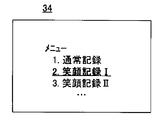
- FIG. 2 is an illustrative view showing one example of a mode selection screen applied to the embodiment in FIG.
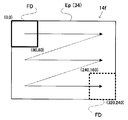
- FIG. 3 is an illustrative view showing one example of face detection processing applied to the embodiment in FIG.
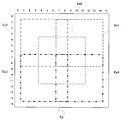
- FIG. 4 is an illustrative view showing one example of a smile area applied to the embodiment in FIG. 1.
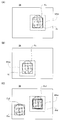
- FIG. 5 is an example of a monitor screen applied to the embodiment of FIG. 1 and is an illustrative view showing changes in the face frame and the focus evaluation area.
- FIG. 5 (A) is an initial state
- FIG. ) Shows how the face frame and the focus evaluation area follow the movement of the face
- FIG. 5C shows how the main face face frame is duplicated when the number of faces is plural.
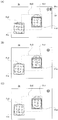
- FIG. 6 is another example of the monitor screen applied to the embodiment of FIG. 1 and is an illustration when the smile area has only a leading role.
- FIG. 6 (A) shows an initial state
- FIG. B) shows a state where a smile is detected outside the smile area
- FIG. 6C shows a state where a smile is detected within the smile area.
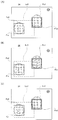
- FIG. 7 is another example of the monitor screen applied to the embodiment of FIG. 1 and is an illustrative view in the case where there is only a main role in the smile area.
- FIG. 7A shows an initial state
- FIG. (B) shows a state where a smile is detected outside the smile area
- FIG. 7 (C) shows a state where a smile is detected within the smile area.
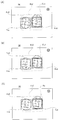
- FIG. 8 is still another example of the monitor screen applied to the embodiment in FIG. 1, and is an illustrative view in the case where both the main role and other than the main role exist in the smile area, and FIG. 8 (A) is the initial state.
- 8B shows a state in which a smile other than the main character is detected in the smile area
- FIG. 8C shows a state in which a smile of the main character is detected in the smile area.
- FIG. 9 is another example of the monitor screen applied to the embodiment of FIG. 1, and is an illustrative view showing a self-timer photographing method using a smile area
- FIG. 9 (A) shows an initial state.
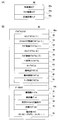
- FIG. 10 is an illustrative view showing a memory map applied to the embodiment of FIG. 1, FIG. 10 (A) shows the configuration of the SDRAM, and FIG. 10 (B) shows the configuration of the flash memory.
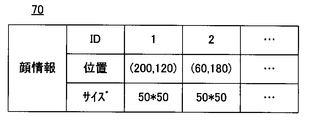
- FIG. 11 is an illustrative view showing one example of a face information table applied to the embodiment in FIG.
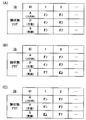
- FIG. 12 is an illustrative view showing one example of a face state flag applied to the embodiment in FIG. 1, and FIGS. 10 (A) to 10 (C) correspond to FIGS. 6 (A) to 6 (C), respectively. To do.
- FIG. 10 is an illustrative view showing a memory map applied to the embodiment of FIG. 1
- FIG. 10 (A) shows the configuration of the SDRAM
- FIG. 10 (B) shows the configuration of the flash memory.
- FIG. 11 is an illustrative view showing one example of a face information table applied to the embodiment in FIG.
- FIG. 12 is an illustrative view showing one example of a face state flag applied to
- FIG. 13 is a flowchart showing a part of the CPU operation applied to the embodiment in FIG.
- FIG. 14 is a flowchart showing another part of the CPU operation applied to the embodiment in FIG.
- FIG. 15 is a flowchart showing another part of the CPU operation applied to the embodiment in FIG.
- FIG. 16 is a flowchart showing still another part of the CPU operation applied to the embodiment in FIG.
- FIG. 17 is a flowchart showing another part of the CPU operation applied to the embodiment in FIG.
- FIG. 18 is a flowchart showing another part of the CPU operation applied to the embodiment in FIG.
- FIG. 19 is a flowchart showing still another part of the CPU operation applied to the embodiment in FIG.
- FIG. 20 is a flowchart showing another part of the CPU operation applied to the embodiment in FIG. FIG.
- FIG. 21 is a flowchart showing another part of the CPU operation applied to the embodiment in FIG.
- FIG. 22 is a flowchart showing still another part of the CPU operation applied to the embodiment in FIG.
- FIG. 23 is a flowchart showing another part of the CPU operation applied to the embodiment in FIG.
- FIG. 24 is a flowchart showing another part of the CPU operation applied to the embodiment in FIG.
- FIG. 25 is an illustrative view showing an example of a monitor screen applied to another embodiment, in which a focus evaluation area is forcibly moved into a smile area.
- FIG. 26 is a flowchart showing a part of the CPU operation applied to the embodiment in FIG.
- FIG. 27 is a flowchart showing a part of the CPU operation applied to another embodiment.
- a digital camera 10 of this embodiment includes a focus lens 12.
- the optical image of the object scene is focused on the imaging surface 14f of the image sensor 14 through the focus lens 12, and is subjected to photoelectric conversion.
- a charge representing the object scene image that is, a raw image signal is generated.
- the CPU 24 instructs the TG 18 to repeat exposure for through shooting and charge readout.
- the TG 18 gives a plurality of timing signals to the image sensor 14 in order to execute the exposure operation of the imaging surface 14f and the thinning-out readout operation of the charges obtained thereby.
- a part of the electric charge generated on the imaging surface 14f is read in the order according to the raster scanning in response to the vertical synchronization signal Vsync generated at a rate of once every 1/30 seconds.
- a raw image signal with a low resolution (for example, 320 * 240) is output from the image sensor 14 at a frame rate of 30 fps.
- the raw image signal output from the image sensor 14 is subjected to processing such as A / D by the camera processing circuit 20 and converted into raw image data which is a digital signal.
- the raw image data is written to 30a (see FIG. 10A) in the raw image area of the SDRAM 30 through the memory control circuit 28.
- the camera processing circuit 20 reads the raw image data stored in the raw image area 30a through the memory control circuit 28, and performs processing such as color separation and YUV conversion.
- the YUV image data obtained in this way is written into the YUV image area 30b (see FIG. 10A) of the SDRAM 30 through the memory control circuit 28.
- the LCD drive circuit 32 reads the image data stored in the YUV image area 30b every 1/30 seconds through the memory control circuit 28, and drives the LCD monitor 34 with the read image data. As a result, a real-time moving image (through image) of the object scene is displayed on the LCD monitor 34.
- a process of evaluating the brightness (luminance) of the object scene every 1/30 seconds based on the Y data generated by the camera processing circuit 20 is performed. It is executed by the luminance evaluation circuit.
- the CPU 24 adjusts the exposure amount of the image sensor 14 based on the luminance evaluation value obtained by the luminance evaluation circuit, and thereby the brightness of the through image displayed on the LCD monitor 34 is adjusted appropriately.
- the focus evaluation circuit 22 takes in the Y data belonging to the focus evaluation area Efcs shown in FIG. 5A among the Y data generated by the camera processing circuit 20, and integrates the high frequency components of the fetched Y data. , And the integration result, that is, the focus evaluation value is output. This series of processing is executed every 1/30 seconds in response to Vsync. Based on the focus evaluation value thus obtained, the CPU 24 executes a so-called continuous AF process (hereinafter simply referred to as “AF process”: see FIG. 21). The position of the focus lens 12 in the optical axis direction is continuously changed by the driver 16 under the control of the CPU 24.
- AF process continuous AF process
- the CPU 24 also executes face recognition processing focusing on YUV data stored in the SDRAM 30.
- the face recognition process is a kind of pattern recognition process for collating face dictionary data 72 (see FIG. 10B) corresponding to a person's eyes, nose, mouth, and the like with the focused YUV data. A face image of a person is detected.
- a face detection frame FD of a predetermined size (for example, 80 * 80) is arranged at the start position (upper left) in the image frame, and this is moved by a predetermined amount in a raster scanning manner. Meanwhile, the collation process is performed on the image in the face detection frame FD. When the face detection frame FD reaches the end position (lower right of the screen), this is returned to the start position and the same operation is repeated.
- a plurality of face detection frames having different sizes are prepared, and a plurality of detection processes using these face detection frames are sequentially or in parallel performed on each image, thereby detecting accuracy. May be improved.
- the CPU 24 When the face image is detected, the CPU 24 further calculates the size and position of the face image, and registers the calculation results in the face information table 70 together with the identifier (ID) as “face size” and “face position” (FIG. 10 (B), see FIG. 11). Specifically, the vertical and horizontal lengths (number of pixels) of the rectangular face frame Fr (see FIG. 5A, etc.) surrounding the face image are set as the size of the face image, and the position of the face frame Fr is set as the face image position. Each barycentric coordinate can be used. As the ID, for example, serial numbers 1, 2,... Are used. FIG. 11 shows numerical values when the size of the through image is 320 * 240.
- the CPU 24 moves the focus evaluation area Efcs based on the position of the face image (see FIG. 5B). Therefore, in the focus adjustment process described above, when a face is included in the object scene, the result is that the face image is mainly referred to.
- the CPU 24 also controls the LCD drive circuit 32 through the character generator (CG) 42 to draw the face frame Fr on the through image of the LCD monitor 34 (on-screen display).
- CG character generator
- the CPU 24 instructs the TG 18 to perform exposure and charge reading for the main shooting.
- the TG 18 gives one timing signal to the image sensor 14 in order to execute the exposure operation of the imaging surface 14f and the all-pixel readout operation of the charges obtained thereby. All charges generated on the imaging surface 14f are read out in an order according to raster scanning. In this way, a high-resolution raw image signal is output from the image sensor 14.
- the raw image signal output from the image sensor 14 is converted into raw image data by the camera processing circuit 20, and the raw image data is written in the raw image area 30 a of the SDRAM 30 through the memory control circuit 28. Thereafter, the camera processing circuit 20 reads the raw image data stored in the raw image area 30a through the memory control circuit 28, and converts it into image data in the YUV format. The image data in the YUV format is written into the recorded image area 30c (see FIG. 10A) of the SDRAM 30 through the memory control circuit 28. The I / F 36 reads out the image data thus written in the recording image area 30c through the memory control circuit 28 and records it in the recording medium 38 in a file format.
- a mode selection start operation pressing of the set button 26st
- the CPU 24 controls the LCD drive circuit 32 through the CG 42, so that a mode selection screen as shown in FIG. indicate.
- the mode selection screen includes characters indicating selectable modes such as normal recording, smile recording I, and smile recording II (in other embodiments, it may be a symbol mark). Of these, the cursor (underline) is placed on the character indicating the currently selected mode.
- a mode selection operation depressing the cursor key 26c
- the cursor (underline) on the screen moves to a character position indicating another mode.
- a determination operation pressing the set button 26st
- the currently selected mode is validated.
- the CPU 24 assigns a smile area arbitrarily designated by the user (hereinafter, “designated smile area”) to the frame corresponding to each image.
- designated smile area a smile area arbitrarily designated by the user
- one designated from the five smile areas Es0 to Es4 shown in FIG. 4 is assigned.
- the default for the designated smile area is the central smile area Es0.
- a smile area including the focus evaluation area Efcs at the present time may be the default.
- the smile areas Es0 to Es4 in this embodiment partially overlap each other.
- the five smile areas Es0 to Es4 may be arranged without a gap in the frame or may be arranged at intervals.
- the number of areas is not necessarily five. The larger the number of areas, the higher the possibility that the target smile can be recorded. For example, when the display color is changed for each area, the number of areas may be 4 or less due to limitations on the number of colors that can be used. . In another embodiment, only the four smile areas Es1 to Es4 excluding the central one from the smile areas Es0 to Es4 in FIG. 4 may be used. In other embodiments, only one smile area Es0 may be used.
- each area is not limited to a rectangle, and may be another shape such as a circle or a regular polygon. Areas of different shapes and / or different sizes may be mixed in the frame.
- Specified smile area is changed as follows during through shooting in smile recording mode I.
- an area designation start operation (depressing the set button 26st) is performed by the key input device 26, the CPU 24 controls the LCD drive circuit 32 through the CG 42 to display the currently designated smile area on the screen. If the current designated smile area is the smile area Es0 at the center of the screen, the smile area Es0 is displayed (see FIG. 6A, etc.). Subsequently, when an area designation operation (depressing the cursor key 26c) is performed by the key input device 26, the on-screen display is updated to a new designated smile area.
- the smile areas Es0 to Es4 are drawn with different line types for convenience, but may be drawn with different colors. Furthermore, each area may be identified by a combination of line type and color.
- the CPU 24 also controls the LCD drive circuit 32 through the CG 42 to display a smile mark Sm as shown in FIG.
- a pause mark Wm is further displayed next to the smile mark Sm, which indicates that the smile recording process is paused, and the process is resumed. Is erased from the screen (see FIG. 24).
- the smile mark Sm is also displayed in smile recording mode II described later.
- the smile mark Sm may have different modes (color, shape, etc.) in smile recording modes I and II.
- the CPU 24 pays attention to a specific portion of the face image, for example, the corner of the mouth, and repeatedly determines whether or not there is a smile feature.
- the CPU 24 also repeatedly determines whether each face image has a feature of smile when a plurality of face images are detected. If it is determined that there is a feature of smile in any face image, it is further determined whether or not the face position is inside the designated smile area. If the smile is in the area, it is determined whether or not it is the leading role. Further, if it is determined that the main character, the main photographing process and the recording process are executed. If the smile is not the main character, it is further determined whether or not there is a main character in the designated smile area. If there is no main character in the area, the main photographing process and the recording process are executed. On the other hand, if the smiling face position is outside the area, the issuance of the main shooting command is postponed. Further, even if the face position of the smile is in the area, if it is other than the main character and there is a main character in the area, the issuance of the main photographing command is postponed.
- the recording process is not executed unless someone's smile is detected within the designated smile area.
- the smile of the main character is given priority.
- the recording process is executed only when the main character laughs in the designated smile area, or when someone in the designated smile area laughs with only the main character laughing.
- FIG. 6 shows an example of a screen change when the number of faces is 2, the designated smile area is the center smile area Es0, and the smile face Es0 has only the main face Fc1.
- the face Fc1 is located in the middle of the screen, and the face Fc2 is located in the lower left of the screen.
- the face Fc1 closer to the center of the screen is selected as the main character.
- a double face frame Frd is drawn around the main face Fc1, and a single face frame frs is drawn around the non-main face Fc2.
- FIG. 7 shows an example of a screen change when the number of faces is 2, the designated smile area is the lower left smile area Es3, and the smile area Es3 has only the face Fc2 other than the main role.
- the positional relationship between the two smiles Fs1 and Fs2 and the arrangement of the double face frame Frd and the single face frame Frs are the same as in FIG.
- FIG. 8 shows a screen when the number of faces is 2, the designated smile area is the central smile area Es0, and the main face Fc1 and the non-main face Fc2 are both inside the smile area Es0.
- An example of the change is shown.
- both the face Fc1 and the face Fc2 are located near the center of the screen, but since the former is closer to the center of the screen, the double face frame Frd is on the face Fc1 side, and the single face frame Frs is the face Fc2. Arranged on each side.
- “Self-timer shooting” is a characteristic usage of smile recording mode I.
- the photographer can record his / her smile by moving to the assumed position and laughing after designating a smile area where only his / her face is present inside assuming his / her standing position. .
- a specific example is shown in FIG.
- FIG. 9A there is a face Fc1 other than yourself on the right side of the center of the screen, and the photographer designates the smile area Es2 in the upper left, assuming his / her standing position.
- the face Fc1 is outside the smile area Es2, and is not a smile. Thereafter, when the photographer moves to the assumed position, the photographer's own face Fc2 appears in the smile area Es2.
- Face Fc2 is also not a smile. In the two faces Fc1 and Fc2, since the former is closer to the center of the screen, the face Fc1 is the leading role.
- the recording process may be executed with a smile other than yourself (face Fc1 in FIG. 9).
- the smile recording mode II When the smile recording mode II is activated, the same through shooting process as described above is started. In a state where one or more face images are detected, the CPU 24 pays attention to a specific portion of each face image, for example, the corner of the mouth, and repeatedly determines whether or not there is a smile feature. If it is determined that there is a feature of smile in any face image, a main photographing command is issued and a recording process is executed.
- smile recording mode II differs from smile recording mode I in that smile recording is performed on the full screen without being restricted to the designated smile area, and each process of face detection and smile determination is performed for smile recording. It may be the same as in mode I.
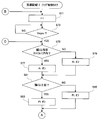
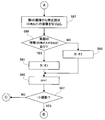
- the CPU 24 controls each hardware element shown in FIG. 1, and the mode selection task shown in FIG. 13 and the main task dedicated to the smile recording I mode shown in FIG. Task (I) ”(sometimes abbreviated as other tasks), smile area control task dedicated to smile record I mode shown in FIG. 15, and smile record I mode dedicated to smile record I mode shown in FIGS.
- the I / II mode shared face frame control task shown in FIG. 23, and the I / II mode shared face frame shown in FIG. ⁇ II It is implemented by executing the mark control tasks de shared.
- the CPU 24 can process two or more of these ten tasks in parallel under the control of the multitask OS.
- 10 programs 50 to 68 corresponding to these 10 tasks are stored in the program area 40a of the flash memory 40 (see FIG. 10B).
- a designated smile area identifier 74 indicating a current designated smile area (any of Es0 to Es4)
- a smile area control task See FIG. 15
- a standby flag (W) 76 that is turned on / off by a pause task (see FIG. 20)
- a face state flag (A1) that is turned on / off by a flag control task (see FIGS. 16 and 19) , A2,..., P1, P2,..., S1, S2,.
- A which is a kind of face state flag is a flag indicating whether the position of the face image is inside or outside the designated smile area, and ON corresponds to the inside and OFF corresponds to the outside.
- P which is another type of the face state flag, is a flag indicating whether the face image is a main character or a non-main character, and ON corresponds to the main character and OFF corresponds to other than the main character.
- S which is another type of the face state flag, is a flag indicating whether the face image is a smile or other than a smile (the latter state is referred to as “non-smile” as appropriate).
- Off corresponds to non-smile.
- Each flag subscript 1, 2,... is an ID for identifying a face image.
- the states of the two face images Fc1 and Fc2 in FIG. 6A are described by these face state flags as shown in FIG.
- the states of the two face images Fc1 and Fc2 in FIG. 6B are described as in FIG. 12B, and the states of the two face images Fc1 and Fc2 in FIG. ).
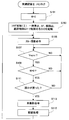
- step S3 it is determined whether or not “smile recording I” has been selected by operating the cursor key 26c and the SET key 26st. If YES, the smile recording I mode is validated. If “NO” in the step S3, it is determined whether or not “smile recording II” is selected in a step S5, and if “YES”, the smile recording II mode is validated.
- step S5 it is determined whether or not another recording mode, for example, “normal recording mode” is selected in a step S7, and if “YES”, the recording mode is validated. If “NO” in the step S7, it is determined whether or not a cancel operation is performed in a step S9. If “YES”, the mode returns to the mode immediately before the menu key is pressed. If “NO” in the step S9, the process returns to the step S3 and the same process is repeated.
- another recording mode for example, “normal recording mode” is selected in a step S7
- YES the recording mode is validated. If “NO” in the step S7, it is determined whether or not a cancel operation is performed in a step S9. If “YES”, the mode returns to the mode immediately before the menu key is pressed. If “NO” in the step S9, the process returns to the step S3 and the same process is repeated.
- the smile recording I mode will be described.
- the main task (I) is first activated, and the CPU 24 starts executing the flow corresponding to this (see FIG. 14).
- step S21 “0” is set in flag W.
- step S23 a smile area control task (I), a flag control task (I), a pause task, an AF task, a face detection task, a face frame control task, and a mark control task are activated, and the CPU 24 further corresponds to these.
- the execution of the flow is started.
- step S25 a through shooting command is issued, and the through shooting process described above is started in response to this.
- step S27 it is determined whether or not Vsync is generated by a signal generator (not shown). If NO, the process waits. If “YES” in the step S27, it is determined whether or not the flag W is “0” in a step S29, and if “NO”, the process returns to the step S27. If “YES” in the step S29, the process shifts to a step S31 to determine whether or not someone has laughed based on the state change of the flags S1, S2,... Among the face state flags 78. Return to.
- step S31 When any of the flags S1, S2,... Changes from the off state to the on state, YES is determined in the step S31, and the process proceeds to the step S33.
- step S33 whether or not this new smile (with face ID “m”) is located within the designated smile area is determined based on the position of the face m registered in the face state table 70 (see FIG. 11) and A determination is made based on the designated smile area identifier 74. If NO, the process returns to step S27.
- the CPU 24 recognizes the positions on the screen of the smile areas Es0 to Es4 shown in FIG.
- step S33 the process shifts to a step S35 to determine whether or not the smile is the main character based on the flag Pm in the face state flag 78. If “YES” in the step S35, the main photographing instruction is issued in a step S39, and then the recording process is executed by controlling the I / F 36 in a step S41. Therefore, if the smile is in the designated smile area and is the main character, a still image including the smile is recorded on the recording medium 38.
- step S35 it is determined in step S37 whether or not there is a protagonist face in the designated smile area based on the face state flag 78. If NO, steps S39 and S41 described above are executed. If there is a face in which flag A is on, flag P is on, and flag S is off with reference to face state flag 78, YES is determined in step S37, and the process returns to step S27. Therefore, if the smile is in the designated smile area and is not the main character, the recording process is executed only when there is no main character's face in the designated smile area. At that time, if the face of the leading role is in the designated smile area, the recording process is executed later when the face of the leading role becomes a smile.
- a default (smile area “Es0” in this embodiment) is set to the designated smile area identifier 74 in step S51.
- a smile area including the face image may be set as a default after waiting for any face image to be focused by the AF task (see FIG. 21).
- step S53 it is determined whether or not the set button 26st has been pressed. If “YES” in the step S53, the process proceeds to a step S55 to set “1” in the flag W, and then the designated smile area is displayed on the LCD monitor 34 by controlling the CG 42 and the like in a step S57. For example, if the designated smile area identifier 74 is “Es0”, the smile area Es0 is displayed (see FIG. 6A), and if it is “Es3”, the smile area Es3 is displayed (see FIG. 7A). .
- step S59 it is determined whether or not the cursor key 26c has been operated. If NO here, it is further determined in step S61 whether or not the set button 26st has been pressed. If NO in this case, the process returns to step S57. Repeat the same process. If “YES” in the step S59, the process proceeds to a step S63 to update the value of the designated smile area identifier 74, and then returns to the step S57 to repeat the same processing. If “YES” in the step S61, the process proceeds to a step S65 to delete the designated smile area from the monitor screen, and further, “0” is set to the flag W in a step S67, and then the process returns to the step S53 to repeat the same processing.
- step S71 when the flag control task (I) is activated, “1” is set to variable i in step S71, and then the generation of Vsync is awaited in step S73.
- Vsync occurs, the process proceeds to step S75, and it is determined based on the face information table 70 and the designated smile area identifier 74 whether or not the face i is in the designated smile area. If the determination result is YES, the flag Ai is turned on in step S77, and if NO, the flag Ai is turned off in step S79. In step S81, it is further determined whether or not the face i is the leading role.
- step S81 If the face i is in focus as a result of the AF task (that is, if the face i is surrounded by a double face frame), YES is determined in step S81, the flag Pi is turned on in step S83, and then step Proceed to S87. If “NO” in the step S81, the flag Pi is turned off in a step S85, and then the process proceeds to a step S87.
- step S87 an image of a specific portion (for example, a corner of a mouth or a corner) is cut out from the image of the face i. Then, it is determined in step S89 whether or not the cut out image has a smile feature (for example, whether the mouth corner is raised or wrinkles appear in the eyes).
- step S91 If YES, the flag Si is turned on in step S91. On the other hand, if NO, the flag Si is turned off in step S93. Then, after linking the variable i in step S95, it is determined in step S97 whether the variable i exceeds the number of faces. If YES, the process returns to step S71, and if NO, the process returns to step S75. Repeat the process. Note that the determination in step S89 can be performed based on, for example, whether the mouth shape on the face matches the face dictionary data 72 or not.
- step S141 when the pause task is activated, it is determined in step S141 whether or not the shutter button 26st has been pressed. If “YES” in the step S141, the flag W is set to “1” in a step S143. Thereafter, the process proceeds to step S145, where it is determined whether or not the shutter button 26st has been pressed. If “YES” in the step S145, the flag W is set to “0” in a step S147, and then the process returns to the step S141 to repeat the same processing.
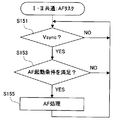
- step S153 when the AF task is activated, after waiting for the occurrence of Vsync in step S151, it is determined in step S153 whether or not the current focus evaluation value satisfies the AF activation condition. If “NO” here, the process returns to the step S151 to repeat the same processing. If “YES” in the step S153, the process proceeds to a step S155 to execute the AF process.
- focus adjustment is performed focusing on the face of the leading role determined in step S187 of the face frame control task (see FIG. 23: described later), and the face of the leading role is focused. Result. When the adjustment is completed, the process returns to step S151 and the same processing is repeated.
- step S161 when the face detection task is activated, the face information table 70 (see FIG. 11) is initialized in step S161.
- the process waits for generation of Vsync in step S165, and when Vsync occurs, the process proceeds to step S167, and the object scene image The image of the face detection frame FD is cut out from the image.
- step S169 collation processing between the cut-out image and the face dictionary data 72 is executed, and it is determined in step S171 whether or not the collation result indicates conformity.
- step S171 If “NO” in the step S171, the process returns to the step S167 to repeat the same processing, and if “YES”, the face information (ID, position and size) regarding the face is described in the face information table 70 in a step S173. Thereafter, the presence / absence of an unmatched portion is determined in step S175. If YES, the face detection frame FD is moved one step in the manner shown in FIG. 3 in step S177, and then the process returns to step S167 and the same processing is repeated. If the face detection frame FD has reached the lower right of the screen, NO is determined in the step S175, and the process returns to the step S163 to repeat the same.
- step S181 when the face frame control task is activated, after waiting for the occurrence of Vsync in step S181, it is determined whether or not a face is detected based on face information table 70 in step S183, and NO. If there is, the process returns to step S181 and the same processing is repeated. If at least one face is registered in the face information table 70, “YES” is determined in the step S183, and the process proceeds to a step S185 to further determine whether or not the number of faces is plural. If “YES” in the step S185, the process proceeds to the step S189 through the step S187, while if “NO”, the process skips the step S187 and proceeds to the step S189.
- step S187 the leading role is determined based on the positional relationship of each face.
- the distance from the center point to each face image in the screen is calculated, and the face image with the smallest calculation result is the main character.
- the distance from the digital camera 10 to each face is further measured, and the leading role may be determined in consideration of the measurement result, for example, the farthest face and the closest face are excluded from the leading role candidates.
- the CG 42 and the like are controlled to display the face frame Fr along the outline of each face (see FIG. 5A, etc.). When there are a plurality of faces, a double face frame Frd is assigned to the face of the leading role, and a single face frame Frs is assigned to faces other than the leading role (see FIG. 5C, etc.). After the face frame is displayed, the process returns to step S181 and the same processing is repeated.
- step S205 it is determined whether or not the flag W is “1”. If YES in step S205, an interruption mark Wm is further displayed in step S207, and if NO in step S205, the interruption mark Wm is deleted from the monitor screen in step S209. After executing step S205 or S207, the process returns to step S201 and the same processing is repeated.
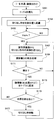
- step S101 “0” is set in flag W.
- step S103 a flag control task (II), a pause task, an AF task, a face detection task, a face frame control task, and a mark control task are activated, and the CPU 24 further performs a flow corresponding to these (FIGS. 19, 20 to 20). (See FIG. 24).
- step S105 a through shooting command is issued, and through shooting processing is started accordingly.
- step S107 it is determined whether or not Vsync has been generated. If “YES” in the step S107, it is determined whether or not the flag W is “0” in a step S109, and if “NO”, the process returns to the step S107. If “YES” in the step S109, the process shifts to a step S111 to determine whether or not someone has laughed based on the state change of the flags S1, S2,..., And if “NO” here, the process returns to the step S107.
- step S111 When any of the flags S1, S2,... Changes from the off state to the on state, YES is determined in step S111, and the process proceeds to step S113 to issue a main photographing command. Thereafter, the process proceeds to step S41, and the recording process is executed by controlling the I / F 36. Therefore, if someone laughs on the screen, a still image including the smile is recorded on the recording medium 38. After recording, the process returns to step S105 and the same processing is repeated.
- the leading role may be given priority as in the smile recording mode I. That is, even if a person other than the main character laughs, the main shooting command is not issued, but is issued when the main character laughs.
- step S121 when the flag control task (II) is activated, “1” is set to variable i in step S121, and then the generation of Vsync is awaited in step S123.
- Vsync occurs, the process proceeds to step S125, and an image of a specific portion is cut out from the image of the face i.
- step S127 it is determined whether or not the cut image has a smile feature. If YES, the flag Si is turned on in step S129, and if NO, the flag Si is turned off in step S131. Then, after linking the variable i in step S133, it is determined in step S135 whether or not the variable i exceeds the number of faces.
- step S127 can be performed based on, for example, whether the mouth shape on the face matches the face dictionary data 72 or not.
- still image recording may be performed not only during through shooting but also during moving image recording.
- the recording size (resolution) of the still image is the same as that of the moving image.
- the image data in the YUV image area 30b is duplicated in the recorded image area 30c.
- the recorded image area 30c has a capacity corresponding to 60 frames, for example.
- the image data of the oldest frame is overwritten with the latest image data from the YUV image area 30b. To go. Therefore, the image data of the latest 60 frames is always stored in the moving image area.
- the CPU 24 instructs the I / F 36 to perform moving image recording processing, and the I / F 36 periodically reads out from the moving image area through the memory control circuit 28, A moving image file including the processed image data is created on the recording medium 38.
- Such a moving image recording process is ended in response to an end operation by the key input device 26.
- the CPU 24 When a still image recording operation (pressing the shutter button 26sh) is performed during the moving image recording process, the CPU 24 causes the I / F 36 to select the frame closest to the shutter pressing point in the image data stored in the recording image area 30c. Are read out through the memory control circuit 28 and recorded on the recording medium 38 in a file format.
- the smile recording I mode and smile recording II mode can be applied to still image recording during moving image recording.
- the CPU 24 transmits the image data of the frame including the smile through the I / F 36 among the image data stored in the recorded image area 30c. What is necessary is just to record on the recording medium 38.
- smile recording mode II when someone laughs somewhere in the frame, the image data of the frame including the smile among the image data stored in the recorded image area 30c may be recorded on the recording medium 38 through the I / F 36. .
- the focus evaluation area Efcs may be forcibly moved into the designated smile area as shown in FIG. .
- the CPU 24 further executes an AF area restriction task as shown in FIG. 26 in the smile recording mode I described above.
- step S221 it is determined whether or not the focus evaluation area Efcs is located outside the designated smile area. If NO, the process waits. If YES, the focus evaluation area Efcs is moved into the designated smile area in step S223. And forcibly move. Thereafter, the process returns to step S221 and the same processing is repeated. Accordingly, it is possible to increase the possibility of focusing on the smile recording target.
- the focus matches the main role.
- an appropriate smile determination is not performed for other than the leading role, or even if an appropriate smile determination is performed, the target smile may be out of focus in the recorded image.
- the focus evaluation area Efcs follows the movement of the face
- the face Fc2 that is the target of smile recording is once arranged in the center of the screen, and the double face frame Frd is displayed on the face Fc2.
- Such a possibility is reduced if the user performs a camera operation with the composition shown in FIG.
- the digital camera 10 of this embodiment includes a CPU 24.
- the CPU 24 repeatedly captures the scene image connected on the imaging surface 14f by controlling the image sensor 14 (S25, S39, S105, S113), and detects a face image from each scene image created thereby. (S161 to S177), it is determined whether the face of each detected face image is a smile (S71 to S97, S121 to S135), and the determination result for at least one detected face image is not smile
- the scene image created after changing from the state indicating the state to the state indicating the smile is recorded on the recording medium 38 by controlling the I / F 36 (S31, S41, S111, S115).
- the CPU 24 assigns an area to each scene image in response to the area designation operation via the key input device 26 (S63), and is assigned to the face image determined to be a smile. Execution of the recording process is restricted based on at least the positional relationship with the area (S33 to S37). Thereby, the target smile can be recorded with high probability. On the other hand, since there is no such restriction in smile recording II mode, any smile can be recorded over a wide range.
- smile determination is performed over the entire imaging area Ep (that is, outside the designated smile area), but smile determination may be performed only within the designated smile area. Thereby, the processing load of the CPU 24 is reduced.
- smile determination is performed based on a change in a specific part of the face (such as an increase in mouth angle), but this is merely an example, and various determination methods can be used.
- the degree of smile may be digitized by paying attention to the entire face (distribution of contour lines, wrinkles, etc.) and each part (mouth corners, eyes, etc.), and determination may be made based on the obtained numerical values.
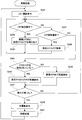
- step S233 determines whether or not an area designation operation is performed by the key input device 26. If “YES” in the step S233, the designated smile area is assigned in a step S235, and then the process returns to the step S233 to repeat the same processing. If “NO” in the step S233, the designated smile area is canceled in a step S239, and then the process returns to the step S233 to repeat the same processing. If the through display is interrupted during the area designation or release operation, it is necessary to return from step S235 or S239 to step S231.
- step S237 If “NO” in the step S237, the process shifts to a step S241 to determine whether or not the designated smile area is assigned. If “YES” here, smile detection is performed in the designated smile area, and if “NO”, the imaging area Ep is determined. Smile detection is performed in the whole area. Note that smile detection here corresponds to processing that combines the face detection and smile determination described above. Then, based on the detection result, it is determined in step S247 whether or not someone has laughed. If YES, the main imaging command is issued in step S249, and then the recording process is executed in step S251. If “NO” in the step S247, the process returns to the step S233 to repeat the same processing.
- the digital camera 10 has been described as an example.
- an image sensor for example, CCD or CMOS
- an image based on the output of the image sensor are recorded on a recording medium (for example, a memory card, hard disk, optical disk, etc.)
- the present invention can be applied to an image pickup apparatus (for example, a digital still camera, a digital movie camera, or the like) including a recording means for recording, an operation means (for example, a key input device or a touch panel) operated by a user, and a processor.
Landscapes
- Engineering & Computer Science (AREA)
- Multimedia (AREA)
- Signal Processing (AREA)
- Physics & Mathematics (AREA)
- General Physics & Mathematics (AREA)
- Health & Medical Sciences (AREA)
- General Health & Medical Sciences (AREA)
- Oral & Maxillofacial Surgery (AREA)
- Human Computer Interaction (AREA)
- Theoretical Computer Science (AREA)
- Studio Devices (AREA)
- Television Signal Processing For Recording (AREA)
Abstract
Description
なお、他の実施例では、笑顔記録モードIの場合と同様に主役を優先してもよい。すなわち、主役以外が笑っても本撮影命令を発行せず、主役が笑ったタイミングでこれを発行する。
12 …フォーカスレンズ
14 …イメージセンサ
14f …撮像面
20 …カメラ処理回路
22 …フォーカス評価回路
24 …CPU
26 …キー入力装置
42 …キャラクタジェネレータ
Claims (14)
- 撮像面上の撮像エリア内に結ばれた被写界像を繰り返し捉える撮像手段、
操作手段を介したエリア指定操作に応答して前記撮像エリア内にスマイルエリアを割り当てる割り当て手段、
前記撮像手段によって作成された各被写界画像から笑顔画像を検知して当該笑顔画像を含む被写界像を記録する笑顔記録処理を、前記割り当て手段によって前記スマイルエリアが割り当てられている場合には前記スマイルエリア内で行い、前記割り当て手段によって前記スマイルエリアが割り当てられていない場合には前記撮像エリア内で行う、笑顔記録手段を備える、撮像装置。 - 撮像面上に結ばれた被写界像を繰り返し捉える撮像手段、
前記撮像手段によって作成された各被写界画像から顔画像を検出する検出手段、
前記検出手段によって検出された各顔画像の顔が笑顔であるか否かを判定する判定手段、
前記検出手段によって検出された少なくとも1つの顔画像についての前記判定手段の判定結果が非笑顔を示す状態から笑顔を示す状態へと変化した後に前記撮像手段によって作成された被写界画像を記録媒体に記録する記録手段、
特定モードで操作手段を介したエリア指定操作に応答して前記各被写界画像にエリアを割り当てる割り当て手段、および
前記判定手段によって笑顔であると判定された顔画像と前記割り当て手段によって割り当てられたエリアとの位置関係に少なくとも基づいて前記記録手段による記録処理の実行を制限する制限手段を備える、撮像装置。 - 前記制限手段は、前記判定手段によって笑顔であると判定された顔画像が前記割り当て手段によって割り当てられたエリアの内部に位置する場合には前記記録手段による記録処理の実行を許容する一方、前記判定手段によって笑顔であると判定された顔画像が前記割り当て手段によって割り当てられたエリアの外部に位置する場合には前記記録手段による記録処理の実行を制限する、請求項2記載の撮像装置。
- 前記検出手段によって検出された顔画像の1つにピントが合うようにフォーカス調整を行うフォーカス調整手段をさらに備え、
前記制限手段は、前記割り当て手段によって割り当てられたエリアの内部にピントの合った顔画像とピントの合っていない顔画像とが存在する場合にはピントの合った顔画像に注目する、請求項3記載の撮像装置。 - 前記検出手段によって検出された顔画像のうち前記割り当て手段によって割り当てられたエリアの内部に位置する顔画像の1つにピントが合うように前記フォーカス調整手段が参照するフォーカス評価エリアの位置を制御する制御手段をさらに備える、請求項4記載の撮像装置。
- 前記エリア指定操作は複数の固定エリアから1つを指定する操作である、請求項1ないし5のいずれかに記載の撮像装置。
- 前記複数の固定エリアは一部が互いに重複している、請求項6記載の撮像装置。
- 前記撮像手段によって作成された各被写界画像に基づくスルー画像をディスプレイに表示するスルー表示手段、および
前記エリア指定操作によって指定されたエリアを示す枠画像を前記ディスプレイのスルー画像上に描画する描画手段をさらに備える、請求項1ないし7のいずれかに記載の撮像装置。 - 撮像面を有するイメージセンサと前記イメージセンサの出力に基づく画像を記録媒体に記録する記録手段とユーザによって操作される操作手段とを備える撮像装置のプロセッサに、
前記撮像面上の撮像エリア内に結ばれた被写界像を前記イメージセンサを制御して繰り返し捉える撮像ステップ、
前記操作手段を介したエリア指定操作に応答して前記撮像エリア内にスマイルエリアを割り当てる割り当てステップ、および
前記撮像ステップによって作成された各被写界画像から笑顔画像を検知して当該笑顔画像を含む被写界像を記録する笑顔記録処理を、前記割り当て手段によって前記スマイルエリアが割り当てられている場合には前記スマイルエリア内で行い、前記割り当て手段によって前記スマイルエリアが割り当てられていない場合には前記撮像エリア内で行う、笑顔記録ステップを実行させるための、笑顔記録プログラム。 - 撮像面を有するイメージセンサと前記イメージセンサの出力に基づく画像を記録媒体に記録する記録手段とユーザによって操作される操作手段とを備える撮像装置のプロセッサに、
前記撮像面上に結ばれた被写界像を前記イメージセンサを制御して繰り返し捉える撮像ステップ、
前記撮像ステップによって作成された各被写界画像から顔画像を検出する検出ステップ、
前記検出ステップによって検出された各顔画像の顔が笑顔であるか否かを判定する判定ステップ、
前記検出ステップによって検出された少なくとも1つの顔画像についての前記判定ステップの判定結果が非笑顔を示す状態から笑顔を示す状態へと変化した後に前記撮像ステップによって作成された被写界画像を前記記録手段を制御して記録媒体に記録する笑顔記録ステップ、
特定モードで前記操作手段を介したエリア指定操作に応答して前記各被写界画像にエリアを割り当てる割り当てステップ、および
前記判定ステップによって笑顔であると判定された顔画像と前記割り当てステップによって割り当てられたエリアとの位置関係に少なくとも基づいて前記笑顔記録ステップによる記録処理の実行を制限する制限ステップを実行させるための、笑顔記録プログラム。 - 撮像面を有するイメージセンサと前記イメージセンサの出力に基づく画像を記録媒体に記録する記録手段とユーザによって操作される操作手段とを備える撮像装置のプロセッサに、
前記撮像面上の撮像エリア内に結ばれた被写界像を前記イメージセンサを制御して繰り返し捉える撮像ステップ、
前記操作手段を介したエリア指定操作に応答して前記撮像エリア内にスマイルエリアを割り当てる割り当てステップ、および
前記撮像ステップによって作成された各被写界画像から笑顔画像を検知して当該笑顔画像を含む被写界像を記録する笑顔記録処理を、前記割り当て手段によって前記スマイルエリアが割り当てられている場合には前記スマイルエリア内で行い、前記割り当て手段によって前記スマイルエリアが割り当てられていない場合には前記撮像エリア内で行う、笑顔記録ステップを実行させるための、笑顔記録プログラムを記憶した記憶媒体。 - 撮像面を有するイメージセンサと前記イメージセンサの出力に基づく画像を記録媒体に記録する記録手段とユーザによって操作される操作手段とを備える撮像装置のプロセッサに、
前記撮像面上に結ばれた被写界像を前記イメージセンサを制御して繰り返し捉える撮像ステップ、
前記撮像ステップによって作成された各被写界画像から顔画像を検出する検出ステップ、
前記検出ステップによって検出された各顔画像の顔が笑顔であるか否かを判定する判定ステップ、
前記検出ステップによって検出された少なくとも1つの顔画像についての前記判定ステップの判定結果が非笑顔を示す状態から笑顔を示す状態へと変化した後に前記撮像ステップによって作成された被写界画像を前記記録手段を制御して記録媒体に記録する笑顔記録ステップ、
特定モードで前記操作手段を介したエリア指定操作に応答して前記各被写界画像にエリアを割り当てる割り当てステップ、および
前記判定ステップによって笑顔であると判定された顔画像と前記割り当てステップによって割り当てられたエリアとの位置関係に少なくとも基づいて前記笑顔記録ステップによる記録処理の実行を制限する制限ステップを実行させるための、笑顔記録プログラムを記憶した記憶媒体。 - 撮像面を有するイメージセンサと前記イメージセンサの出力に基づく画像を記録媒体に記録する記録手段とユーザによって操作される操作手段とを備える撮像装置によって実行される笑顔記録方法であって、
前記撮像面上の撮像エリア内に結ばれた被写界像を前記イメージセンサを制御して繰り返し捉える撮像ステップ、
前記操作手段を介したエリア指定操作に応答して前記撮像エリア内にスマイルエリアを割り当てる割り当てステップ、および
前記撮像ステップによって作成された各被写界画像から笑顔画像を検知して当該笑顔画像を含む被写界像を記録する笑顔記録処理を、前記割り当て手段によって前記スマイルエリアが割り当てられている場合には前記スマイルエリア内で行い、前記割り当て手段によって前記スマイルエリアが割り当てられていない場合には前記撮像エリア内で行う、笑顔記録ステップを備える、笑顔記録方法。 - 撮像面を有するイメージセンサと前記イメージセンサの出力に基づく画像を記録媒体に記録する記録手段とユーザによって操作される操作手段とを備える撮像装置のプロセッサによって実行される笑顔記録方法であって、
前記撮像面上に結ばれた被写界像を前記イメージセンサを制御して繰り返し捉える撮像ステップ、
前記撮像ステップによって作成された各被写界画像から顔画像を検出する検出ステップ、
前記検出ステップによって検出された各顔画像の顔が笑顔であるか否かを判定する判定ステップ、
前記検出ステップによって検出された少なくとも1つの顔画像についての前記判定ステップの判定結果が非笑顔を示す状態から笑顔を示す状態へと変化した後に前記撮像ステップによって作成された被写界画像を前記記録手段を制御して記録媒体に記録する笑顔記録ステップ、
特定モードで前記操作手段を介したエリア指定操作に応答して前記各被写界画像にエリアを割り当てる割り当てステップ、および
前記判定ステップによって笑顔であると判定された顔画像と前記割り当てステップによって割り当てられたエリアとの位置関係に少なくとも基づいて前記笑顔記録ステップによる記録処理の実行を制限する制限ステップを備える、笑顔記録方法。
Priority Applications (2)
| Application Number | Priority Date | Filing Date | Title |
|---|---|---|---|
| US13/142,160 US20120092516A1 (en) | 2008-12-24 | 2009-12-22 | Imaging device and smile recording program |
| CN2009801524228A CN102265601A (zh) | 2008-12-24 | 2009-12-22 | 摄像装置和笑脸记录程序 |
Applications Claiming Priority (2)
| Application Number | Priority Date | Filing Date | Title |
|---|---|---|---|
| JP2008-326785 | 2008-12-24 | ||
| JP2008326785A JP5116652B2 (ja) | 2008-12-24 | 2008-12-24 | 撮像装置および笑顔記録プログラム |
Publications (1)
| Publication Number | Publication Date |
|---|---|
| WO2010073615A1 true WO2010073615A1 (ja) | 2010-07-01 |
Family
ID=42287262
Family Applications (1)
| Application Number | Title | Priority Date | Filing Date |
|---|---|---|---|
| PCT/JP2009/007112 Ceased WO2010073615A1 (ja) | 2008-12-24 | 2009-12-22 | 撮像装置および笑顔記録プログラム |
Country Status (4)
| Country | Link |
|---|---|
| US (1) | US20120092516A1 (ja) |
| JP (1) | JP5116652B2 (ja) |
| CN (1) | CN102265601A (ja) |
| WO (1) | WO2010073615A1 (ja) |
Cited By (5)
| Publication number | Priority date | Publication date | Assignee | Title |
|---|---|---|---|---|
| US20130108164A1 (en) * | 2011-10-28 | 2013-05-02 | Raymond William Ptucha | Image Recomposition From Face Detection And Facial Features |
| US8811747B2 (en) | 2011-10-28 | 2014-08-19 | Intellectual Ventures Fund 83 Llc | Image recomposition from face detection and facial features |
| US8938100B2 (en) | 2011-10-28 | 2015-01-20 | Intellectual Ventures Fund 83 Llc | Image recomposition from face detection and facial features |
| US9025835B2 (en) | 2011-10-28 | 2015-05-05 | Intellectual Ventures Fund 83 Llc | Image recomposition from face detection and facial features |
| US9025836B2 (en) | 2011-10-28 | 2015-05-05 | Intellectual Ventures Fund 83 Llc | Image recomposition from face detection and facial features |
Families Citing this family (13)
| Publication number | Priority date | Publication date | Assignee | Title |
|---|---|---|---|---|
| JP5827491B2 (ja) * | 2011-04-28 | 2015-12-02 | キヤノン株式会社 | 撮像装置、及び撮像装置の制御方法 |
| US8965046B2 (en) * | 2012-03-16 | 2015-02-24 | Qualcomm Technologies, Inc. | Method, apparatus, and manufacture for smiling face detection |
| CN103685926B (zh) * | 2012-09-21 | 2017-05-10 | 宏达国际电子股份有限公司 | 面部区域的影像处理方法以及使用此方法的电子装置 |
| US9049355B2 (en) * | 2012-09-21 | 2015-06-02 | Htc Corporation | Methods for image processing of face regions and electronic devices using the same |
| EP2966854B1 (en) | 2013-03-06 | 2020-08-26 | Nec Corporation | Imaging device, imaging method and program |
| US9729865B1 (en) | 2014-06-18 | 2017-08-08 | Amazon Technologies, Inc. | Object detection and tracking |
| US10027883B1 (en) * | 2014-06-18 | 2018-07-17 | Amazon Technologies, Inc. | Primary user selection for head tracking |
| JP6107844B2 (ja) * | 2015-01-28 | 2017-04-05 | カシオ計算機株式会社 | 検出装置、検出制御方法、及びプログラム |
| US10981060B1 (en) | 2016-05-24 | 2021-04-20 | Out of Sight Vision Systems LLC | Collision avoidance system for room scale virtual reality system |
| US12229895B1 (en) * | 2016-12-08 | 2025-02-18 | Out of Sight Vision Systems LLC | Virtual reality detection and projection system for use with a head mounted display |
| JP2019086775A (ja) * | 2017-11-06 | 2019-06-06 | キヤノン株式会社 | 画像処理装置、その制御方法、プログラム及び記憶媒体 |
| CN108366199A (zh) * | 2018-02-01 | 2018-08-03 | 海尔优家智能科技(北京)有限公司 | 一种图像采集方法、装置、设备及计算机可读存储介质 |
| US20230098161A1 (en) * | 2020-02-14 | 2023-03-30 | Sony Group Corporation | Content processing apparatus, content processing method, and content processing program |
Citations (6)
| Publication number | Priority date | Publication date | Assignee | Title |
|---|---|---|---|---|
| JP2000196934A (ja) * | 1998-12-25 | 2000-07-14 | Casio Comput Co Ltd | 撮像方法および撮像装置 |
| JP2004343401A (ja) * | 2003-05-15 | 2004-12-02 | Fme:Kk | 監視用デジタルスチルカメラ |
| JP2007215064A (ja) * | 2006-02-13 | 2007-08-23 | Nec Corp | 自動撮影方法及び自動撮影装置並びに自動撮影プログラム |
| JP2008160701A (ja) * | 2006-12-26 | 2008-07-10 | Sky Kk | カメラ及びカメラ用撮影制御プログラム |
| JP2008252713A (ja) * | 2007-03-30 | 2008-10-16 | Nikon Corp | 撮像装置 |
| JP2008281733A (ja) * | 2007-05-10 | 2008-11-20 | Fujifilm Corp | 合焦装置および方法並びにプログラム |
Family Cites Families (5)
| Publication number | Priority date | Publication date | Assignee | Title |
|---|---|---|---|---|
| JP4121026B2 (ja) * | 2004-01-21 | 2008-07-16 | 富士フイルム株式会社 | 撮像装置および方法並びにプログラム |
| US8169484B2 (en) * | 2005-07-05 | 2012-05-01 | Shai Silberstein | Photography-specific digital camera apparatus and methods useful in conjunction therewith |
| JP4453721B2 (ja) * | 2007-06-13 | 2010-04-21 | ソニー株式会社 | 画像撮影装置及び画像撮影方法、並びにコンピュータ・プログラム |
| JP4356778B2 (ja) * | 2007-06-25 | 2009-11-04 | ソニー株式会社 | 画像撮影装置及び画像撮影方法、並びにコンピュータ・プログラム |
| JP4930302B2 (ja) * | 2007-09-14 | 2012-05-16 | ソニー株式会社 | 撮像装置、その制御方法およびプログラム |
-
2008
- 2008-12-24 JP JP2008326785A patent/JP5116652B2/ja not_active Expired - Fee Related
-
2009
- 2009-12-22 US US13/142,160 patent/US20120092516A1/en not_active Abandoned
- 2009-12-22 CN CN2009801524228A patent/CN102265601A/zh active Pending
- 2009-12-22 WO PCT/JP2009/007112 patent/WO2010073615A1/ja not_active Ceased
Patent Citations (6)
| Publication number | Priority date | Publication date | Assignee | Title |
|---|---|---|---|---|
| JP2000196934A (ja) * | 1998-12-25 | 2000-07-14 | Casio Comput Co Ltd | 撮像方法および撮像装置 |
| JP2004343401A (ja) * | 2003-05-15 | 2004-12-02 | Fme:Kk | 監視用デジタルスチルカメラ |
| JP2007215064A (ja) * | 2006-02-13 | 2007-08-23 | Nec Corp | 自動撮影方法及び自動撮影装置並びに自動撮影プログラム |
| JP2008160701A (ja) * | 2006-12-26 | 2008-07-10 | Sky Kk | カメラ及びカメラ用撮影制御プログラム |
| JP2008252713A (ja) * | 2007-03-30 | 2008-10-16 | Nikon Corp | 撮像装置 |
| JP2008281733A (ja) * | 2007-05-10 | 2008-11-20 | Fujifilm Corp | 合焦装置および方法並びにプログラム |
Cited By (6)
| Publication number | Priority date | Publication date | Assignee | Title |
|---|---|---|---|---|
| US20130108164A1 (en) * | 2011-10-28 | 2013-05-02 | Raymond William Ptucha | Image Recomposition From Face Detection And Facial Features |
| US8811747B2 (en) | 2011-10-28 | 2014-08-19 | Intellectual Ventures Fund 83 Llc | Image recomposition from face detection and facial features |
| US8938100B2 (en) | 2011-10-28 | 2015-01-20 | Intellectual Ventures Fund 83 Llc | Image recomposition from face detection and facial features |
| US9008436B2 (en) * | 2011-10-28 | 2015-04-14 | Intellectual Ventures Fund 83 Llc | Image recomposition from face detection and facial features |
| US9025835B2 (en) | 2011-10-28 | 2015-05-05 | Intellectual Ventures Fund 83 Llc | Image recomposition from face detection and facial features |
| US9025836B2 (en) | 2011-10-28 | 2015-05-05 | Intellectual Ventures Fund 83 Llc | Image recomposition from face detection and facial features |
Also Published As
| Publication number | Publication date |
|---|---|
| US20120092516A1 (en) | 2012-04-19 |
| CN102265601A (zh) | 2011-11-30 |
| JP5116652B2 (ja) | 2013-01-09 |
| JP2010153954A (ja) | 2010-07-08 |
Similar Documents
| Publication | Publication Date | Title |
|---|---|---|
| JP5116652B2 (ja) | 撮像装置および笑顔記録プログラム | |
| US10469737B2 (en) | Display control device and display control method | |
| US8831282B2 (en) | Imaging device including a face detector | |
| KR101231469B1 (ko) | 이미지 처리 지원 방법, 장치, 및 이 방법을 실행하기 위한 컴퓨터 판독 가능한 기록 매체 | |
| US8823864B2 (en) | Image capturing apparatus and associated methodology for auto-focus and facial detection | |
| US20160170585A1 (en) | Display control device, method and computer program product | |
| JP4413235B2 (ja) | 電子カメラ | |
| JP5036612B2 (ja) | 撮像装置 | |
| TWI466008B (zh) | 顯示控制裝置、顯示控制方法及電腦程式產品 | |
| US8902344B2 (en) | Display control apparatus, image capture apparatus, display control method, and image capture apparatus control method | |
| CN102223476A (zh) | 图像拍摄设备,检测框调整方法和程序 | |
| JP2012185630A (ja) | 投影装置 | |
| CN113923350A (zh) | 视频拍摄方法、装置、电子设备和可读存储介质 | |
| JP2011071573A (ja) | 画像処理装置 | |
| KR101599871B1 (ko) | 촬상 장치 및 촬상 방법 | |
| JP6061715B2 (ja) | 撮像装置、その制御方法及びプログラム | |
| US8866934B2 (en) | Image pickup apparatus capable of deleting video effect superimposed on moving image, method of controlling the apparatus, and moving image-recording apparatus, as well as storage medium | |
| JP5261769B2 (ja) | 撮像装置および集合写真撮影支援プログラム | |
| JP2018085570A (ja) | 撮像装置、撮像方法及びプログラム | |
| KR101216094B1 (ko) | 포커스 영역 설정 기능을 갖는 이동통신 단말기 및 이를이용한 방법 | |
| JP6289107B2 (ja) | 画像再生装置、その制御方法、および制御プログラム | |
| JP5188633B2 (ja) | 電子機器 | |
| JP2021089644A (ja) | 電子機器 | |
| JP5356162B2 (ja) | 物体像探索装置 | |
| JP6119380B2 (ja) | 画像取込装置、画像取込方法、画像取込プログラムおよび移動通信端末 |
Legal Events
| Date | Code | Title | Description |
|---|---|---|---|
| WWE | Wipo information: entry into national phase |
Ref document number: 200980152422.8 Country of ref document: CN |
|
| 121 | Ep: the epo has been informed by wipo that ep was designated in this application |
Ref document number: 09834423 Country of ref document: EP Kind code of ref document: A1 |
|
| NENP | Non-entry into the national phase |
Ref country code: DE |
|
| WWE | Wipo information: entry into national phase |
Ref document number: 13142160 Country of ref document: US |
|
| 122 | Ep: pct application non-entry in european phase |
Ref document number: 09834423 Country of ref document: EP Kind code of ref document: A1 |