JP7651998B2 - program - Google Patents
program Download PDFInfo
- Publication number
- JP7651998B2 JP7651998B2 JP2021123177A JP2021123177A JP7651998B2 JP 7651998 B2 JP7651998 B2 JP 7651998B2 JP 2021123177 A JP2021123177 A JP 2021123177A JP 2021123177 A JP2021123177 A JP 2021123177A JP 7651998 B2 JP7651998 B2 JP 7651998B2
- Authority
- JP
- Japan
- Prior art keywords
- image
- copy
- document
- text
- generation process
- Prior art date
- Legal status (The legal status is an assumption and is not a legal conclusion. Google has not performed a legal analysis and makes no representation as to the accuracy of the status listed.)
- Active
Links
- 238000000034 method Methods 0.000 claims description 96
- 239000002131 composite material Substances 0.000 claims description 43
- 230000010365 information processing Effects 0.000 claims description 12
- 239000003086 colorant Substances 0.000 claims description 9
- 239000007787 solid Substances 0.000 claims description 2
- 230000006870 function Effects 0.000 description 40
- 238000003780 insertion Methods 0.000 description 10
- 230000037431 insertion Effects 0.000 description 10
- 238000004891 communication Methods 0.000 description 9
- 238000010586 diagram Methods 0.000 description 8
- 238000005516 engineering process Methods 0.000 description 4
- 239000000463 material Substances 0.000 description 3
- 230000000694 effects Effects 0.000 description 2
- 239000000284 extract Substances 0.000 description 1
- 238000000605 extraction Methods 0.000 description 1
- 230000002194 synthesizing effect Effects 0.000 description 1
- 238000009966 trimming Methods 0.000 description 1
Images




Landscapes
- Image Processing (AREA)
- Editing Of Facsimile Originals (AREA)
Description
本明細書に開示される技術分野は、スキャナの制御に用いるプログラムに関する。さらに詳細には、情報処理装置に組み込まれたプログラムによって、スキャナで読み取った画像にテキストを合成する技術に関するものである。 The technical field disclosed in this specification relates to a program used to control a scanner. More specifically, it relates to a technology for synthesizing text into an image read by a scanner using a program installed in an information processing device.
従来、情報処理装置に組み込まれたプログラムによって、スキャナで読み取った画像にテキストを合成する技術が知られている。例えば特許文献1には、スキャナで原稿を読み込んでビットマップ画像を生成し、さらに管理情報となるテキストのビットマップ画像を生成し、原稿のビットマップ画像とテキストのビットマップ画像とを合成した合成画像を生成する構成が開示されている。
Conventionally, there is known a technique for combining text with an image read by a scanner using a program installed in an information processing device. For example,
スキャナで読み取った原稿の画像にテキストを合成した画像を出力する際、テキストに透明度を指定し、その透明度に基づいて透過したテキストを合成したいという要望がある。この場合、情報処理装置に組み込まれたプログラムでは、背景画像となる原稿の画像の色と、テキストの色および透明度と、から画素ごとに合成後の色を計算し、計算された色で描画するといった処理を行うことになるが、処理が煩雑になりやすい。例えば情報処理装置のオペレーティングシステム(OS)がWindows(登録商標)であった場合には、画像を合成するモジュールないしライブラリがOSメーカによって提供されるため、そのモジュール等を利用することで合成に必要な処理を簡略化することができるが、テキストの透明度までは指定できないため、透過したテキストを合成するための処理には、改善の余地がある。 When outputting an image in which text is combined with an image of a document read by a scanner, there is a demand to specify the transparency of the text and combine the transparent text based on that transparency. In this case, a program installed in an information processing device performs processing such as calculating the combined color for each pixel from the color of the document image that serves as the background image, and the color and transparency of the text, and drawing with the calculated color, but this processing tends to become complicated. For example, if the operating system (OS) of the information processing device is Windows (registered trademark), a module or library for combining images is provided by the OS manufacturer, and the processing required for combination can be simplified by using the module, etc., but the transparency of the text cannot be specified, so there is room for improvement in the processing for combining transparent text.
本明細書は、スキャナの制御に用いるプログラムであって、スキャナで読み取った原稿の画像に透過したテキストを合成するための処理をシンプルにする技術を開示する。 This specification discloses a technology that simplifies the process of combining transparent text with an image of a document read by a scanner using a program used to control the scanner.
上述した課題の解決を目的としてなされたプログラムは、情報処理装置のコンピュータによって実行可能であり、スキャナの制御に用いるプログラムであって、
前記コンピュータに、
前記スキャナによって読み取られた原稿の画像を示す原稿画像データを取得する原稿画像取得処理と、
透明度および色情報が関連付けられたテキストデータを取得するテキストデータ取得処理と、
前記原稿画像取得処理にて取得した前記原稿画像データに示される前記原稿の画像のうち、少なくともテキストが描画される領域を含む部分のコピーとなるコピー画像を示すコピー画像データを生成するコピー画像生成処理と、
前記コピー画像生成処理にて生成した前記コピー画像データに示される前記コピー画像と同じサイズであって、前記テキストデータ取得処理にて取得した前記テキストデータに関連付けられた前記色情報に対応する色で構成される特定色画像を示す特定色画像データを生成する特定色画像生成処理と、
前記情報処理装置のオペレーティングシステムによって提供される機能を利用して、前記コピー画像生成処理にて生成した前記コピー画像データに示される前記コピー画像に、前記特定色画像生成処理にて生成した前記特定色画像データに示される前記特定色画像を、前記テキストデータ取得処理にて取得した前記テキストデータに関連付けられた前記透明度に基づいて合成した合成画像を示す合成画像データを生成する合成画像生成処理と、
前記コピー画像生成処理にて生成した前記コピー画像データに示される前記コピー画像と同じサイズであって、黒色のベタ画像に前記テキストデータ取得処理にて取得した前記テキストデータに示されるテキストを白色で描画したマスク画像を示すマスク画像データを生成するマスク画像生成処理と、
前記情報処理装置のオペレーティングシステムによって提供される機能を利用して、前記原稿画像取得処理にて取得した前記原稿画像データに示される前記原稿の画像に、前記合成画像生成処理にて生成した前記合成画像データに示される前記合成画像のうち、前記マスク画像生成処理にて生成した前記マスク画像データに示される前記マスク画像の白色部分に対応する部分を描画した出力画像を示す出力画像データを生成する出力画像生成処理と、
を実行させることを特徴とする。
The program devised for solving the above-mentioned problems is executable by a computer of an information processing device and is used to control a scanner,
The computer includes:
A document image acquisition process for acquiring document image data representing an image of a document read by the scanner;
A text data acquisition process for acquiring text data associated with transparency and color information;
a copy image generation process for generating copy image data representing a copy image which is a copy of a portion of the image of the document shown in the document image data acquired in the document image acquisition process, the copy image including at least an area in which text is drawn;
a specific color image generation process for generating specific color image data indicating a specific color image having the same size as the copy image shown in the copy image data generated in the copy image generation process and configured with colors corresponding to the color information associated with the text data acquired in the text data acquisition process; and
a composite image generation process that uses a function provided by an operating system of the information processing device to generate composite image data indicating a composite image obtained by combining the copy image indicated in the copy image data generated in the copy image generation process with the specific color image indicated in the specific color image data generated in the specific color image generation process based on the transparency associated with the text data acquired in the text data acquisition process;
a mask image generation process for generating mask image data showing a mask image having the same size as the copy image shown in the copy image data generated in the copy image generation process, the mask image being a black solid image on which text shown in the text data acquired in the text data acquisition process is drawn in white;
an output image generation process that uses a function provided by an operating system of the information processing device to generate output image data indicating an output image in which a portion of the composite image indicated in the composite image data generated in the composite image generation process, which corresponds to a white portion of the mask image indicated in the mask image data generated in the mask image generation process, is drawn on the image of the document indicated in the document image data acquired in the document image acquisition process;
The present invention is characterized in that the above-mentioned is executed.
上述の構成では、オペレーティングシステムによって提供される機能を利用して、原稿の画像のコピー画像に、テキスト色で構成される特定色画像を、透明度に基づいて合成した合成画像を生成し、さらにテキストの位置に対応するマスク画像を利用して、原稿の画像に、合成画像をマスク画像のマスク部分に対応する部分だけを描画することで、透明度を指定したテキストを原稿の画像に合成した出力画像を示す出力画像データを出力できる。従って、上述の構成によれば、プログラム自身がテキスト部分に対応する画素ごとに合成後の色を計算する処理を行う場合と比較して、合成後の色を計算する手間をオペレーティングシステムに任せることになり、透明度を指定したテキストを合成した画像を出力する際のプログラムの処理をシンプルにできる。 In the above configuration, a function provided by the operating system is used to generate a composite image in which a specific color image consisting of the text color is composited based on transparency onto a copy image of an original image, and a mask image corresponding to the position of the text is used to draw only the parts of the composite image corresponding to the masked parts of the mask image onto the original image, thereby outputting output image data showing an output image in which text with specified transparency is composited onto the original image. Therefore, with the above configuration, compared to a case in which the program itself calculates the composite color for each pixel corresponding to the text portion, the effort of calculating the composite color is left to the operating system, and the program processing when outputting an image composited with text with specified transparency can be simplified.
本明細書に開示される技術によれば、スキャナの制御に用いるプログラムであって、スキャナで読み取った原稿の画像に透過したテキストを合成するための処理をシンプルにする技術が実現される。 The technology disclosed in this specification realizes a program used to control a scanner that simplifies the process of combining transparent text with an image of a document read by the scanner.
(第1実施形態)
以下、スキャンシステムを具体化した実施の形態について、添付図面を参照しつつ詳細に説明する。本形態は、本発明に係るプログラムを搭載するパーソナルコンピュータ(以下、「PC」とする)とスキャナとを含むスキャンシステムを開示するものである。
First Embodiment
Hereinafter, an embodiment of a scanning system will be described in detail with reference to the accompanying drawings. This embodiment discloses a scanning system including a personal computer (hereinafter, referred to as "PC") that has a program according to the present invention installed therein, and a scanner.
本形態のスキャンシステム100は、図1に示すように、PC1と、スキャナ3と、を含み、これらが互いに接続されたシステムである。PC1は、少なくともスキャナ3との通信機能を備え、スキャナ3へのスキャンコマンドの送信、スキャナ3から読取結果であるスキャンデータの受信、等を行う装置である。PC1は、情報処理装置の一例であり、デバイスの一例である。PC1に代えて、例えば、スマートフォン、タブレットコンピュータであってもよい。
As shown in FIG. 1, the
本形態のPC1は、図1に示すように、CPU11と、メモリ12と、を含むコントローラ10を備えている。また、PC1は、ユーザインタフェース(以下、「ユーザIF」とする)13と、通信インタフェース(以下、「通信IF」とする)14と、を備え、これらがコントローラ10に電気的に接続されている。なお、図1中のコントローラ10は、PC1の制御に利用されるハードウェアやソフトウェアを纏めた総称であって、実際にPC1に存在する単一のハードウェアを表すとは限らない。
As shown in Fig. 1, the PC 1 of this embodiment is equipped with a
CPU11は、メモリ12から読み出したプログラムに従って、また、ユーザの操作に基づいて、各種の処理を実行する。CPU11は、コンピュータの一例である。メモリ12は、PC1を起動するための起動プログラム、スキャナ3を使用するための各種のアプリケーションプログラム(以下、「アプリ」とする)等の各種のプログラムや、画像データ、文書データ等の各種のデータが記憶される記憶領域である。メモリ12は、各種の処理が実行される際の作業領域としても利用される。
The
本形態のPC1のメモリ12には、図1に示すように、OS21と、スキャンアプリ22と、スキャナドライバ23と、が記憶されている。OS21は、Windows(登録商標)である。OS21は、Windowsの他に、例えば、macOS(登録商標)、Linux(登録商標)、iOS(登録商標)、Android(登録商標)であってもよい。
As shown in FIG. 1, the
スキャンアプリ22は、例えば、スキャンを実行させる装置の指定、スキャンデータの保存形式や保存場所の指定、スキャン実行の指示等のユーザの指示を受け付けるプログラムである。スキャンアプリ22は、さらに、スキャナ3から受信したスキャンデータに基づいて、画像の編集の指示を受け付けても良い。
The
スキャナドライバ23は、スキャナ3の動作を制御するプログラムであり、スキャンに関する各種の設定を受け付ける。スキャナドライバ23は、スキャナ3のモデルに対応したプログラムであり、例えば、スキャンアプリ22にてスキャナ3でのスキャンの実行指示を受け付けた場合に、スキャンアプリ22によって起動される。スキャナドライバ23は、プログラムの一例である。スキャナドライバ23は、スキャンアプリ22の一部であっても良い。
The
本形態のスキャナドライバ23は、スキャンに関する各種の設定を受け付ける。また、本形態のスキャナドライバ23は、スキャナ3から受信したスキャンデータに基づいて生成される原稿の画像上、すなわち、背景画像上に、ユーザによって入力された文字(数字、記号、絵文字などを含む)、連番や日付などを合成した合成画像を生成する機能、所謂、インプリンタ機能を有する。なお、文字がテキストの一例である。
The
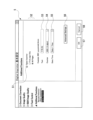
また、本形態のスキャナドライバ23は、スキャナ3でのスキャンに関する各種の設定を受け付けるために、図2に示すメイン設定画面4をユーザIF13上に表示させることができる。
In addition, the
このメイン設定画面4は、ユーザがイメージタイプを選択するための、カラー写真選択ボタン41と、ウェブ素材選択ボタン42と、モノクロ文書選択ボタン43と、を備える。図2に示すメイン設定画面4は、ユーザがカラー写真選択ボタン41を選択した状態を示す。
This
また、カラー写真選択ボタン41を選択した状態のメイン設定画面4は、解像度選択欄44と、色数選択欄45と、原稿サイズ選択欄46と、詳細設定ボタン47と、セーブボタン48と、デフォルトボタン49と、スキャン開始ボタン35と、プレスキャンボタン36と、を備えている。
When the color
したがって、本形態では、例えば、ユーザがカラー写真選択ボタン41を選択すると、カラー写真原稿をスキャナ3においてスキャンするために適正な解像度および色数などが自動的に解像度選択欄44および色数選択欄45にプリセットされる。ユーザがウェブ素材選択ボタン42もしくはモノクロ文書選択ボタン43を選択した場合もメイン設定画面4には各ボタンに適した選択欄が表示され、ウェブ素材やモノクロ文書をスキャナ3においてスキャンするために適正なプロパティがプリセットされる。
Therefore, in this embodiment, for example, when the user selects the color
また、本形態のスキャナドライバ23は、ユーザがユーザIF13を介して詳細設定ボタン47を操作すると、ユーザIF13上に詳細設定画面(図示せず)表示する。この状態において、さらに、ユーザがユーザIF13を介して詳細設定画面に表示された「Digital Imprinter」機能を選択すると、スキャナドライバ23は、図3に示すDigital Imprinter基本設定画面5をユーザIF13上に表示する。
When the user operates the
このDigital Imprinter基本設定画面5は、スキャナドライバ23が備えるインプリンタ機能に関する各種の基本設定を受け付けるための画面である。したがって、Digital Imprinter基本設定画面5は、インプリンタ機能の有効もしくは無効を選択するための選択ボタン51と、インプリンタ機能を最初の頁のみに適用するのか、全頁に亘って適用するのを選択するための適用範囲選択ボタン52と、ユーザがユーザIF13を介して1文字もしくは複数の文字を入力することができる文字入力欄53と、連番の初期値を設定するための連番選択欄54、日付や時間の表示形式を選択するための表示形式選択欄55と、Digital Imprinter詳細設定ボタン56と、Digital Imprinter基本設定画面5においてユーザが設定した各種設定を受け付けるOKボタン57と、ユーザが設定した各種設定をキャンセルするとともに図2に示すメイン設定画面4に戻るキャンセルボタン58と、を備える。
This Digital Imprinter
したがって、本形態では、スキャナドライバ23は、Digital Imprinter基本設定画面5において、ユーザがユーザIF13を介して文字入力欄53に文字を入力すると、その文字を、スキャナ3から受信したスキャンデータに基づいて生成される原稿の画像上、すなわち、背景画像上に合成する。具体的には、図3に示す状態では、ユーザが文字入力欄53に、「テキスト」の4文字を入力しているので、スキャナドライバ23は、「テキスト」の4文字を、背景画像となる原稿の画像上に合成する。
Therefore, in this embodiment, when the user inputs characters into the
更に、ユーザがユーザIF13を介してDigital Imprinter基本設定画面5上のDigital Imprinter詳細設定ボタン56を操作すると、本形態のスキャナドライバ23は、図4に示すDigital Imprinter詳細設定画面6をユーザIF13上に表示する。
Furthermore, when the user operates the Digital Imprinter
このDigital Imprinter詳細設定画面6は、スキャナドライバ23が備えるインプリンタ機能に関する各種の詳細設定を受け付けるための画面である。したがって、Digital Imprinter詳細設定画面6は、文字の挿入位置を選択するための挿入位置選択欄61と、文字の表示方向を選択するための文字表示方向選択欄62と、文字のフォント名を選択するためのフォント選択欄63と、文字のサイズを選択するための文字サイズ選択欄64と、文字のスタイルを選択するための文字スタイル選択欄65と、文字の色を選択するための文字色選択欄66と、文字の透明度、すなわち、スキャナ3から受信したスキャンデータに基づいて生成される画像上、すなわち、背景画像上に、どれだけの透明度をもって文字を合成するのかを設定するための透明度設定欄67と、Digital Imprinter詳細設定画面6上でユーザが設定したDigital Imprinter詳細設定を受け付けた後、図3に示すDigital Imprinter基本設定画面5に戻るOKボタン68と、Digital Imprinter詳細設定画面6上でユーザが設定したDigital Imprinter詳細設定をキャンセルした後、図3に示すDigital Imprinter基本設定画面5に戻るキャンセルボタン69と、を備える。
This Digital Imprinter detailed settings screen 6 is a screen for accepting various detailed settings regarding the imprinter function provided by the
図4に示すDigital Imprinter詳細設定画面6では、図3に示すDigital Imprinter基本設定画面5の文字入力欄53に入力された文字に関して、挿入位置選択欄61において文字の挿入位置として「中央」を、また、文字表示方向選択欄62において文字の文字表示方向として「水平」を、また、フォント選択欄63において文字のフォントとしてPC1で使われている「システムフォント」を、また、文字サイズ選択欄64において文字の文字サイズとして「48ポイント」を、また、文字スタイル選択欄65において文字の文字スタイルとして「標準」を、文字色選択欄66において文字の色としてカラーの文字色を、また、透明度設定欄67において文字の透明度として「50%」を、ユーザがユーザIF13を介してそれぞれ設定した状態を示している。
The Digital Imprinter detailed setting screen 6 shown in FIG. 4 shows a state in which the user has set, via the user IF 13, the following for the characters entered in the
したがって、本形態では、スキャナドライバ23は、図3に示すDigital Imprinter基本設定画面5の文字入力欄53にユーザが入力した「テキスト」の4文字ついて、背景画像となる原稿の画像上に、図4に示すDigital Imprinter詳細設定画面6上においてユーザが設定した詳細設定に基づいて合成する。
Therefore, in this embodiment, the
なお、本形態では、文字色選択欄66において設定される文字の色は、単色のカラーに限定されることはなく、単色もしくは複数色によってグラデーションのような加工が行われたカラーであっても差し支えない。また、文字色選択欄66において設定される文字の色は、グレー色を含む黒色であっても差し支えない。また、本形態では、文字の色は、ユーザがユーザIF13を介して文字色選択欄66において設定した文字の色としたが、予めスキャナドライバ23上にプリセットされた固定の文字の色を使用するものであっても良い。
In this embodiment, the character color set in the character color selection field 66 is not limited to a single color, but may be a single color or a color processed with multiple colors such as a gradation. The character color set in the character color selection field 66 may be black, including gray. In this embodiment, the character color is the color set by the user in the character color selection field 66 via the user IF 13, but a fixed character color preset in advance on the
図1に戻って、メモリ12の一例は、PC1に内蔵されるROM、RAM、HDD等に限らず、CPU11が読み取り可能かつ書き込み可能なストレージ媒体であってもよい。コンピュータが読み取り可能なストレージ媒体とは、non-transitoryな媒体である。non-transitoryな媒体には、上記の例の他に、CD-ROM、DVD-ROM等の記録媒体も含まれる。また、non-transitoryな媒体は、tangibleな媒体でもある。一方、インターネット上のサーバなどからダウンロードされるプログラムを搬送する電気信号は、コンピュータが読み取り可能な媒体の一種であるコンピュータが読み取り可能な信号媒体であるが、non-transitoryなコンピュータが読み取り可能なストレージ媒体には含まれない。
Returning to FIG. 1, an example of
ユーザIF13は、情報を報知するための画面を表示するハードウェアと、ユーザによる操作を受け付けるハードウェアと、を含む。ユーザIF13は、表示機能と操作受け付け機能とを有するタッチパネルであっても良いし、表示機能を有するディスプレイと、操作受け付け機能を有するキーボード、マウス、トラックボール等との組であっても良い。 User IF 13 includes hardware that displays a screen for notifying information, and hardware that accepts operations by the user. User IF 13 may be a touch panel having a display function and an operation acceptance function, or may be a combination of a display having a display function and a keyboard, mouse, trackball, etc. having an operation acceptance function.
通信IF14は、スキャナ3等の外部装置と通信を行うためのハードウェアを含む。通信IF14の通信規格は、イーサネット(登録商標)、Wi-Fi(登録商標)、USB等である。通信IF14は、複数の通信規格に対応する複数の構成を含んでいても良い。
The communication IF 14 includes hardware for communicating with external devices such as the
本形態のスキャナ3は、PC1との通信機能と、原稿の画像を読み取ってスキャンデータを生成する画像読取機能と、を有する装置である。スキャナ3は、画像読取装置の一例である。本形態のスキャナ3は、図1に示すように、自動原稿搬送装置(以下、「ADF」とする)31を備え、ADF31にセットされた複数枚の原稿束から原稿を1枚ずつ自動的に搬送して、連続して読み取ることができる。スキャナ3は、スキャン単機能の装置に限らず、例えば、複合機、コピー機、FAX装置であってもよい。
The
次に、スキャナドライバ23による処理について説明する。なお、以下の処理は、基本的に、プログラムに記述された命令に従ったCPU11の処理を示す。すなわち、以下の説明における「判断」、「抽出」、「選択」、「算出」、「決定」、「特定」、「取得」、「受付」、「制御」等の処理は、CPU11の処理を表している。CPU11による処理は、OSのAPIを用いた処理も含む。また、プログラムに記述された命令に従ったCPU11の処理を、省略した文言で記載することがある。例えば、「CPU11が行う」のように記載することがある。また、プログラムに記述された命令に従ったCPU11の処理を、「プログラムAが行う」のようにCPUを省略した文言で記載することがある。
Next, the processing by the
なお、「取得」は要求を必須とはしない概念で用いる。すなわち、CPU11が要求することなくデータを受信するという処理も、「CPUがデータを取得する」という概念に含まれる。また、本明細書中の「データ」とは、コンピュータに読取可能なビット列で表される。そして、実質的な意味内容が同じでフォーマットが異なるデータは、同一のデータとして扱われるものとする。本明細書中の「情報」についても同様である。また、「要求する」、「指示する」とは、要求していることを示す情報や、指示していることを示す情報を相手に出力することを示す概念である。また、要求していることを示す情報や指示していることを示す情報のことを、単に、「要求」、「指示」とも記載する。
Note that "obtaining" is used as a concept that does not necessarily require a request. In other words, the process of
以下、本形態のスキャンシステム100において、PC1にて実行されるスキャン処理の手順について、図5Aおよび図5Bのフローチャートを参照して説明する。スキャン処理は、スキャンアプリ22等にてスキャナ3によるスキャンの実行指示を受け付けたことを契機に、PC1のCPU11にて実行される。本形態のスキャン処理は、スキャナドライバ23による処理である。
The procedure of the scan process executed by the
スキャン処理では、まず、S10において、CPU11は、各設定画面上で設定された各設定内容を取得する。各設定は、スキャンの実行指示を受け付ける前にスキャンアプリ22またはスキャナドライバ23にて設定されている各種のパラメータであり、ユーザの操作等に基づいて設定されている。なお、S10の処理が、テキストデータ取得処理の一例である。
In the scan process, first, in S10, the
具体的には、本形態では、S10において、CPU11は、図2に示すメイン設定画面4上で設定された各設定内容、すなわち、解像度選択欄44において選択された解像度と、色数選択欄45において選択された色数と、原稿サイズ選択欄46において選択された原稿サイズと、を取得する。
Specifically, in this embodiment, in S10, the
また、本形態では、S10において、CPU11は、図3に示すDigital Imprinter基本設定画面5上で設定された各設定内容、すなわち、選択ボタン51においてインプリンタ機能の有効または無効のいずれが選択されているかの情報と、適用範囲選択ボタン52においてインプリンタ機能を最初の頁のみに適用か、または、全頁に亘って適用かのいずれが選択されているかの情報と、文字入力欄53にユーザがユーザIF13を介して入力した文字の情報(文字コード)と、連番選択欄54において設定された連番の初期値の情報と、表示形式選択欄55において選択された日付や時間の表示形式の情報と、を取得する。
In addition, in this embodiment, in S10, the
また、本形態では、S10において、CPU11は、図4に示すDigital Imprinter詳細設定画面6上で設定された各設定内容、すなわち、挿入位置選択欄61において選択された文字の挿入位置の情報と、文字表示方向選択欄62において選択された文字の表示方向の情報と、フォント選択欄63において選択された文字のフォント名の情報と、文字サイズ選択欄64において選択された文字サイズの情報と、文字スタイル選択欄65において選択された文字スタイルの情報と、文字色選択欄66において選択された文字色の情報と、透明度設定欄67において設定された透明度の情報と、を取得する。
In addition, in this embodiment, at S10, the
次に、S11において、CPU11は、スキャンコマンドを生成して、生成したスキャンコマンドをスキャナ3に送信する。
Next, in S11, the
スキャナ3は、受信したスキャンコマンドに基づいて、ADF31にセットされた原稿を1枚ずつスキャンし、スキャンデータを自身のメモリ(図示せず)に記憶する。
Based on the received scan command, the
スキャナ3は、受信したスキャンコマンドに基づいて、自身のメモリに記憶した原稿1枚分のスキャンデータを自身のメモリから読み出してPC1に送信する。なお、スキャナ3は、スキャンコマンドを受信するごとに、1枚の原稿をスキャンして自身のメモリに記憶するように構成しても差し支えない。また、スキャンコマンドを受信した際に、最初に複数枚の原稿を纏めてスキャンして自身のメモリに記憶し、その後、1枚の原稿のスキャンデータを自身のメモリから読み出してPC1に送信するように構成してもよいし、また、複数枚の原稿を纏めてPC1に送信するように構成してもよい。
Based on the received scan command, the
次に、S12において、CPU11は、スキャナ3から送信されてくる原稿のスキャンデータを受信し、メモリ12に記憶する。なお、S12の処理が、原稿画像取得処理の一例である。
Next, in S12, the
次に、S13において、CPU11は、1枚分の原稿のスキャンデータを受信し終えたか否かを判断する。CPU11は、原稿のスキャンデータを受信し終えていないと判断した場合には(S13:NO)、CPU11は、S12に戻り、引き続き、スキャナ3から送信されてくる原稿のスキャンデータを受信する。
Next, in S13, the
一方、S13において、CPU11は、1枚分の原稿のスキャンデータを受信し終えたと判断した場合には(S13:YES)、次のS14に移行する。なお、S13おけるCPU11の判断は、スキャナ3から送信されてくる1枚分の原稿のスキャンデータの最後に付属している1頁終了情報に基づいて判断しても良い。
On the other hand, in S13, if the
次に、S14において、CPU11は、インプリンタ機能が有効か否かを判断する。ここで、ユーザが、図3に示すDigital Imprinter基本設定画面5上の選択ボタン51においてインプリンタ機能の有効を選択していた場合には(図3において選択ボタン51にチェックが入っている状態)、CPU11は、S14において、インプリンタ機能が有効と判断し(S14:YES)、次のS15へ移行する。
Next, in S14, the
一方、ユーザが、図3に示すDigital Imprinter基本設定画面5上の選択ボタン51においてインプリンタ機能の無効(スキップ)を選択していた場合には(選択ボタン51にチェックが入っていない状態)、CPU11は、S14において、インプリンタ機能が有効ではないと判断し(S14:NO)、次に、CPU11は、S22において、通常のスキャンの出力処理を行った後、スキャン処理を終了する。ここで、通常のスキャンの出力処理とは、S12~S14、後述するS22~S23の処理を繰り返して実行することにより、受信したスキャンデータに基づいて、原稿を読み取った画像の画像データを生成して出力する処理であり、既存の技術であるので説明を省略する。
On the other hand, if the user has selected to disable (skip) the imprinter function using the
次に、S15において、CPU11は、設定は先頭頁のみか否かを判断する。ここで、ユーザが、図3に示すDigital Imprinter基本設定画面5上の適用範囲選択ボタン52において、「First Page Only」を選択していた場合には、設定は先頭頁のみであると判断し(S15:YES)、次のS16に移行する。
Next, in S15, the
次に、S16において、CPU11は、受信した原稿のスキャンデータが1頁目のスキャンデータであるか否かを判断する。そして、受信した原稿のスキャンデータが1頁目のスキャンデータであると判断した場合には(S16:YES)、次のS17に移行する。すなわち、受信した1頁目の原稿のスキャンデータの場合には、その原稿のスキャンデータにインプリンタ機能処理を実行した上で、原稿を読み取った画像の画像データを生成して出力する。
Next, in S16, the
一方、S16において、CPU11は、受信した原稿のスキャンデータが1頁目のスキャンデータではないと判断した場合には(S16:NO)には、次のS22に移行する。すなわち、適用範囲選択ボタン52において、「First Page Only」を選択していた場合において、1頁目以外の原稿のスキャンデータの場合には、その原稿のスキャンデータへのインプリンタ機能処理をスキップして原稿を読み取った画像の画像データを生成して出力する。
On the other hand, in S16, if the
一方、ユーザが、図3に示すDigital Imprinter基本設定画面5上の適用範囲選択ボタン52において、「All Pages」を選択していた場合には、設定は先頭頁のみではないと判断し(S15:NO)、次のS17に移行する。すなわち、適用範囲選択ボタン52において、「All Pages」を選択していた場合において、全頁の原稿のスキャンデータに、インプリンタ機能処理を実行した上で、原稿を読み取った画像の画像データを生成して出力する。
On the other hand, if the user selects "All Pages" in the application
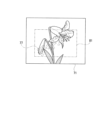
次に、S17において、CPU11は、受信したスキャンデータに基づいて、背景画像となる原稿の画像71をメモリ12上に生成し(図6(A)参照)、また、画像71をコピーしたコピー画像72をメモリ12上に生成する(図6(B)参照)。なお、S16の処理が、コピー画像生成処理の一例である。
Next, in S17, the
次に、S18において、CPU11は、文字の色で全面塗りつぶした長方形の文字色画像73をメモリ12上に生成する(図6(C)参照)。なお、ここで言う文字の色とは、図4に示すDigital Imprinter詳細設定画面6上の文字色選択欄66において選択された文字の色である。また、文字色画像73のサイズは、画像71のサイズと同じであるが、合成される文字を描画できる領域以上のサイズであればよく、厳密に同じである必要はない。文字色画像73が画像71のサイズと異なる場合の具体例は第2実施形態として後述する。なお、S17の処理が、特定色画像生成処理の一例である。
Next, in S18, the
なお、本形態では、文字色画像73のサイズは、画像71のサイズと同じであるので、トリミングなどの処理を必要とせず、処理が簡単となる。
In this embodiment, the size of the text color image 73 is the same as the size of the
次に、S19において、CPU11は、OS21の一部であって、OS21のメーカによって提供されるライブラリに含まれる機能(本形態ではWindows APIのAlphaBlend機能)を使用して、図6(B)に示すコピー画像72に、透明度を指定して図6(C)に示す文字色画像73を合成して文字色合成画像74をメモリ12上に生成する(図6(D)参照)。なお、ここで言う透明度は、図4に示すDigital Imprinter詳細設定画面6上の透明度設定欄67において設定された透明度が反映される。なお、S18の処理が、合成画像生成処理の一例である。また、文字色合成画像が合成画像の一例である。
Next, in S19, the
次に、S20において、CPU11は、黒地に白色で文字を描画したマスク画像75をメモリ12上に生成する(図6(E)参照)。なお、ここで言う文字は、図3に示すDigital Imprinter基本設定画面5上の文字入力欄53に、ユーザがユーザIF13を介して入力した文字であり、本形態では、「テキスト」との4個の文字が文字入力欄53に入力されているものとする。なお、S19の処理が、マスク画像生成処理の一例である。
Next, in S20, the
また、マスク画像75上における文字の位置、文字の表示方向、文字フォントの種類、文字のサイズ、文字のスタイルは、図4に示すDigital Imprinter詳細設定画面6上の挿入位置選択欄61において選択された文字の挿入位置、文字表示方向選択欄62において選択された文字の表示方向、フォント選択欄63において選択された文字のフォント名、文字サイズ選択欄64において選択された文字サイズ、文字スタイル選択欄65において選択された文字スタイルがそれぞれ反映される。 The character position, character display direction, character font type, character size, and character style on the mask image 75 reflect the character insertion position selected in the insertion position selection field 61 on the Digital Imprinter detailed setting screen 6 shown in FIG. 4, the character display direction selected in the character display direction selection field 62, the character font name selected in the font selection field 63, the character size selected in the character size selection field 64, and the character style selected in the character style selection field 65.
次に、S21において、CPU11は、同じくOS21のメーカによって提供されるライブラリに含まれる機能(本形態ではWindows APIのMaskBit機能またはPlgBit機能)を使用して、背景画像となる画像71(図6(A)参照)に、文字色合成画像74(図6(D)参照)を、マスク画像75(図6(E)参照)の白色部分(文字の部分)だけ描画することによって出力合成画像76をメモリ12上に生成する(図6(F)参照)。なお、出力合成画像が出力画像の一例である。
Next, in S21, the
このように本形態では、S21において、CPU11は、背景画像となる原稿の画像71上に、図3に示すDigital Imprinter基本設定画面5上の文字入力欄53に、ユーザがユーザIF13を介して入力した「テキスト」との4個の文字77が、図4に示すDigital Imprinter詳細設定画面6上の透明度設定欄67において設定された透明度に基づいて合成された出力合成画像76を生成する。なお、S21の処理が、出力画像生成処理の一例である。
In this embodiment, in S21, the
次に、S22において、CPU11は、出力処理を実行し、その後、S23に移行する。ここでの出力処理は、S21において生成された出力合成画像を出力する処理である。具体的には、スキャンデータを受信し画像処理を施した結果を、スキャンアプリ22側に渡して出力する。スキャンアプリ22は、受け取った画像データをユーザIF13に表示をしたり、指定された画像フォーマットに変換したうえで、メモリ12に保存したりする。
Next, in S22, the
次に、S23において、CPU11は、スキャンデータについて全頁受信完了か否かを判断する。ここで、次の頁のスキャンデータが存在する場合には、CPU11は、全頁受信を完了していないと判断し(S23:NO)、S12へ戻って次の頁のスキャンデータについて処理をする。
Next, in S23, the
一方、スキャンデータを全頁受信している場合には、キャンデータを全頁受信完了と判断し(S23:YES)、本処理を終了する。なお、S23おけるCPU11の判断は、スキャナ3から送信されてくるスキャンデータ終了情報に基づいて判断しても良い。
On the other hand, if all pages of the scan data have been received, it is determined that all pages of the scan data have been received (S23: YES), and this process ends. Note that the
このように本形態では、ユーザが、図3に示すDigital Imprinter基本設定画面5上の適用範囲選択ボタン52において、「First Page Only」を選択していた場合には、1枚目の原稿については、文字入力欄53に、ユーザがユーザIF13を介して入力した文字77が、ユーザが図4に示すDigital Imprinter詳細設定画面6上の透明度設定欄67において設定された透明度に基づいて、1枚目の原稿の画像上に合成されてファイルに出力され、2枚目以降の原稿については、その画像に文字77が合成されることがなく、原稿の画像のみがファイルに出力される。
In this manner, in this embodiment, if the user selects "First Page Only" in the application
一方、ユーザが、図3に示すDigital Imprinter基本設定画面5上の適用範囲選択ボタン52において、「All Pages」を選択していた場合には、文字入力欄53に、ユーザがユーザIF13を介して入力した文字77が、ユーザが図4に示すDigital Imprinter詳細設定画面6上の透明度設定欄67において設定した透明度に基づいて、全頁の原稿の画像上に合成されてファイルに出力される。
On the other hand, if the user selects "All Pages" in the application
図7に示す画像は、本形態のスキャン処理を経てファイルに出力される最終出力画像78の一例である。本形態では、S22の出力処理において、CPU11は、全頁の原稿の画像上に、図3に示すDigital Imprinter基本設定画面5上の連番選択欄54において設定された連番と、表示形式選択欄55において選択された日付や時間とから成る管理記録用文字79を合成する。この管理記録用文字79を合成する際に、ユーザが図4に示すDigital Imprinter詳細設定画面6上の透明度設定欄67において設定した透明度に基づいて合成するようにしても差し支えない。この場合には、管理記録用文字79についても、先に説明したS17~S21の処理を実行する必要がある。
The image shown in FIG. 7 is an example of a final output image 78 that is output to a file after the scan process of this embodiment. In this embodiment, in the output process of S22, the
(第2実施形態)
以下、スキャンシステムの第2実施形態に係るスキャン処理の手順について、簡単に説明する。前述したように、第1実施形態では、CPU11は、メモリ12上に生成した原稿の画像71(図6(A)参照)と同じサイズのコピー画像72(図6(B)参照)をメモリ12上に生成する。また、図5に示すS17において、原稿の画像71(図6(A)参照)と同じサイズで、文字色で塗りつぶした長方形の文字色画像73をメモリ12上に生成する(図6(C)参照)ように構成される。一方、第2実施形態では、図8に示すように、コピー画像82および文字色画像83のサイズが、文字が描画できる文字領域と同じサイズとなるように構成されており、その点において、第1実施形態と第2実施形態とは大きく相違している。なお、その説明中、第1実施形態と同じ作用効果を奏するものには、同じ符号を付して説明する。なお、コピー画像82および文字色画像83のサイズは、合成される文字を描画できる文字領域以上のサイズであればよく、厳密に同じである必要はないが、文字領域に近いほど、メモリ12上の占有率を低下させる効果が大きい。
Second Embodiment
The procedure of the scan process according to the second embodiment of the scan system will be briefly described below. As described above, in the first embodiment, the
すなわち、本形態では、図9に示すS30において、CPU11は、受信したスキャンデータに基づいて、原稿の画像71をメモリ12上に生成する(図8(A)参照)。また、文字が描画される領域となる文字描画領域81を画像71から抽出し、抽出した部分のコピーとなるコピー画像82をメモリ12上に生成する(図8(B)参照)。なお、文字描画領域81は、文字が描画される領域を含む長方形状又は正方形状をなしている。
That is, in this embodiment, in S30 shown in FIG. 9, the
次に、S31において、CPU11は、文字描画領域81と同じサイズで、文字の色で全面塗りつぶした文字色画像83をメモリ12上に生成する(図8(C)参照)。
Next, in S31, the
次に、S32において、CPU11は、OS21の一部であって、OS21のメーカによって提供されるライブラリに含まれる機能(本形態ではWindows APIのAlphaBlend機能)を使用して、図8(B)に示すコピー画像82に、透明度を指定して図8(C)に示す文字色画像83を合成して文字色合成画像84をメモリ12上に生成する(図8(D)参照)。
Next, in S32, the
このように本形態では、コピー画像82、文字色画像83および文字色合成画像84のサイズを文字描画領域81と同じサイズとしたので、それらのサイズが第1実施形態のものと比べて小さくなり、したがって、メモリ12上の占有率を低下させることができてメモリの負荷を低下させることが可能となる。
In this embodiment, the sizes of the copy image 82, the text color image 83, and the text color composite image 84 are the same as the
なお、文字描画領域81は、図3に示すDigital Imprinter基本設定画面5上の文字入力欄53にユーザがユーザIF13を介して入力した文字、図4に示すDigital Imprinter詳細設定画面6上の挿入位置選択欄61において選択された文字の挿入位置、文字表示方向選択欄62において選択された文字の表示方向、フォント選択欄63において選択された文字のフォント名、文字サイズ選択欄64において選択された文字サイズ、文字スタイル選択欄65において選択された文字スタイルなどの情報に基づいて設定される。
The
したがって、図10に示すように、ユーザが、文字表示方向選択欄62において文字の表示方向について「右上斜め45度」を選択した際には、文字が描画される領域となる文字描画領域81は、「Normal」が選択されている場合に比べて拡大される。
Therefore, as shown in FIG. 10, when the user selects "45 degrees diagonal to the upper right" as the character display direction in the character display direction selection field 62, the
以上、詳細に説明したように、本形態のスキャンシステム100によれば、OS21の一部であって、OS21のメーカによって提供されるライブラリに含まれる機能(本形態ではWindows APIのAlphaBlend機能)を使用して、背景画像となる原稿の画像のコピー画像に、文字の色で構成される文字色画像を、透明度に基づいて合成した文字色合成画像を生成し、さらに、同じくOS21のメーカによって提供されるライブラリに含まれる機能(本形態ではWindows APIのMaskBit機能またはPlgBit機能)を使用して、文字の位置に対応するマスク画像を利用して、原稿の画像に、文字色合成画像をマスク画像のマスク部分に対応する部分だけを描画することで、透明度を指定した文字を原稿の画像に合成した出力合成画像を示す出力画像データを出力できる。そのため、プログラム(スキャナドライバ)自身がテキスト部分に対応する画素ごとに合成後の色を計算する処理を行う場合と比較して、合成後の色を計算する手間をOS21に任せることになり、透明度を指定したテキストを合成した画像を出力する際のプログラムの処理をシンプルにできる。
As described above in detail, the
なお、本実施の形態は単なる例示にすぎず、本発明を何ら限定するものではない。したがって本発明は当然に、その要旨を逸脱しない範囲内で種々の改良、変形が可能である。例えば、スキャンシステム100を構成するPCやスキャナは、1台に限らず、複数台有ってもよい。
Note that this embodiment is merely an example and does not limit the present invention in any way. Naturally, the present invention can be improved and modified in various ways without departing from the spirit of the invention. For example, the number of PCs and scanners constituting the
また、例えば、スキャナ3は、ADF31を備えていないものでも良い。その場合、ユーザは、原稿台に1枚ずつ原稿をセットしてスキャン実行指示を行う必要がある。
Also, for example, the
また、実施の形態に開示されている任意のフローチャートにおいて、任意の複数のステップにおける複数の処理は、処理内容に矛盾が生じない範囲で、任意に実行順序を変更できる、または並列に実行できる。 In addition, in any of the flowcharts disclosed in the embodiments, the execution order of multiple processes in any of the steps can be changed or they can be executed in parallel as desired, as long as no inconsistencies occur in the process content.
また、実施の形態に開示されている処理は、単一のCPU、複数のCPU、ASICなどのハードウェア、またはそれらの組み合わせで実行されてもよい。また、実施の形態に開示されている処理は、その処理を実行するためのプログラムを記録した記録媒体、または方法等の種々の態様で実現することができる。 The processes disclosed in the embodiments may be executed by a single CPU, multiple CPUs, hardware such as an ASIC, or a combination of these. The processes disclosed in the embodiments may be realized in various ways, such as a recording medium on which a program for executing the processes is recorded, or a method.
1 PC
3 スキャナ
4 メイン設定画面
5 Digital Imprinter基本設定画面
53 文字入力欄
6 Digital Imprinter詳細設定画面
66 文字色選択欄
67 透明度設定欄
11 CPU
12 メモリ
13 ユーザIF
71 原稿の画像
72 コピー画像
73 文字色画像
74 文字色合成画像
75 マスク画像
76 出力合成画像
1 PC
3
12
71 Original image 72 Copy image 73 Text color image 74 Text color composite image 75 Mask image 76 Output composite image
Claims (5)
前記コンピュータに、
前記スキャナによって読み取られた原稿の画像を示す原稿画像データを取得する原稿画像取得処理と、
透明度および色情報が関連付けられたテキストデータを取得するテキストデータ取得処理と、
前記原稿画像取得処理にて取得した前記原稿画像データに示される前記原稿の画像のうち、少なくともテキストが描画される領域を含む部分のコピーとなるコピー画像を示すコピー画像データを生成するコピー画像生成処理と、
前記コピー画像生成処理にて生成した前記コピー画像データに示される前記コピー画像と同じサイズであって、前記テキストデータ取得処理にて取得した前記テキストデータに関連付けられた前記色情報に対応する色で構成される特定色画像を示す特定色画像データを生成する特定色画像生成処理と、
前記情報処理装置のオペレーティングシステムによって提供される機能を利用して、前記コピー画像生成処理にて生成した前記コピー画像データに示される前記コピー画像に、前記特定色画像生成処理にて生成した前記特定色画像データに示される前記特定色画像を、前記テキストデータ取得処理にて取得した前記テキストデータに関連付けられた前記透明度に基づいて合成した合成画像を示す合成画像データを生成する合成画像生成処理と、
前記コピー画像生成処理にて生成した前記コピー画像データに示される前記コピー画像と同じサイズであって、黒色のベタ画像に前記テキストデータ取得処理にて取得した前記テキストデータに示されるテキストを白色で描画したマスク画像を示すマスク画像データを生成するマスク画像生成処理と、
前記情報処理装置のオペレーティングシステムによって提供される機能を利用して、前記原稿画像取得処理にて取得した前記原稿画像データに示される前記原稿の画像に、前記合成画像生成処理にて生成した前記合成画像データに示される前記合成画像のうち、前記マスク画像生成処理にて生成した前記マスク画像データに示される前記マスク画像の白色部分に対応する部分を描画した出力画像を示す出力画像データを生成する出力画像生成処理と、
を実行させることを特徴とするプログラム。 A program executable by a computer of an information processing device and used to control a scanner,
The computer includes:
A document image acquisition process for acquiring document image data representing an image of a document read by the scanner;
A text data acquisition process for acquiring text data associated with transparency and color information;
a copy image generation process for generating copy image data representing a copy image which is a copy of a portion of the image of the document shown in the document image data acquired in the document image acquisition process, the copy image including at least an area in which text is drawn;
a specific color image generation process for generating specific color image data indicating a specific color image having the same size as the copy image shown in the copy image data generated in the copy image generation process and configured with colors corresponding to the color information associated with the text data acquired in the text data acquisition process; and
a composite image generation process that uses a function provided by an operating system of the information processing device to generate composite image data indicating a composite image obtained by combining the copy image indicated in the copy image data generated in the copy image generation process with the specific color image indicated in the specific color image data generated in the specific color image generation process based on the transparency associated with the text data acquired in the text data acquisition process;
a mask image generation process for generating mask image data showing a mask image having the same size as the copy image shown in the copy image data generated in the copy image generation process, the mask image being a black solid image on which text shown in the text data acquired in the text data acquisition process is drawn in white;
an output image generation process that uses a function provided by an operating system of the information processing device to generate output image data indicating an output image in which a portion of the composite image indicated in the composite image data generated in the composite image generation process, which corresponds to a white portion of the mask image indicated in the mask image data generated in the mask image generation process, is drawn on the image of the document indicated in the document image data acquired in the document image acquisition process;
A program characterized by executing the above.
前記コピー画像生成処理では、
前記原稿画像取得処理にて取得した前記原稿画像データに示される前記原稿の画像のうち、テキストが描画される領域となるテキスト領域の部分を抽出し、抽出した前記部分のコピーとなる前記コピー画像を示す前記コピー画像データを生成する、
ことを特徴とするプログラム。 The program according to claim 1,
In the copy image generation process,
extracting a text area, which is an area where text is drawn, from the image of the document shown in the document image data acquired in the document image acquisition process, and generating the copy image data indicating the copy image, which is a copy of the extracted area;
A program characterized by:
前記コピー画像生成処理では、
前記原稿画像取得処理にて取得した前記原稿画像データに示される前記原稿の画像全体のコピーとなる前記コピー画像を示す前記コピー画像データを生成する、
ことを特徴とするプログラム。 The program according to claim 1,
In the copy image generation process,
generating copy image data indicating a copy image which is a copy of the entire image of the document indicated in the document image data acquired in the document image acquisition process;
A program characterized by:
前記マスク画像生成処理にて生成される前記マスク画像データに示される前記マスク画像は、2値画像である、
ことを特徴とするプログラム。 A program according to any one of claims 1 to 3,
The mask image shown in the mask image data generated in the mask image generation process is a binary image.
A program characterized by:
前記コンピュータに、
前記透明度および前記色情報を、前記情報処理装置のユーザインタフェースを用いて受け付ける受付処理を実行させ、
前記テキストデータ取得処理では、
前記受付処理にて受け付けた前記透明度および前記色情報が関連付けられた前記テキストデータを取得する、
ことを特徴とするプログラム。 A program according to any one of claims 1 to 3,
The computer includes:
executing a reception process for receiving the transparency and the color information using a user interface of the information processing device;
In the text data acquisition process,
acquiring the text data associated with the transparency and the color information received in the reception process;
A program characterized by:
Priority Applications (1)
| Application Number | Priority Date | Filing Date | Title |
|---|---|---|---|
| JP2021123177A JP7651998B2 (en) | 2021-07-28 | 2021-07-28 | program |
Applications Claiming Priority (1)
| Application Number | Priority Date | Filing Date | Title |
|---|---|---|---|
| JP2021123177A JP7651998B2 (en) | 2021-07-28 | 2021-07-28 | program |
Publications (2)
| Publication Number | Publication Date |
|---|---|
| JP2023018850A JP2023018850A (en) | 2023-02-09 |
| JP7651998B2 true JP7651998B2 (en) | 2025-03-27 |
Family
ID=85158993
Family Applications (1)
| Application Number | Title | Priority Date | Filing Date |
|---|---|---|---|
| JP2021123177A Active JP7651998B2 (en) | 2021-07-28 | 2021-07-28 | program |
Country Status (1)
| Country | Link |
|---|---|
| JP (1) | JP7651998B2 (en) |
Citations (5)
| Publication number | Priority date | Publication date | Assignee | Title |
|---|---|---|---|---|
| JP2002254709A (en) | 2001-02-28 | 2002-09-11 | Canon Inc | Printer device and image processing device |
| JP2003058878A (en) | 2001-08-17 | 2003-02-28 | Ricoh Co Ltd | Synthetic image forming program |
| JP2005262537A (en) | 2004-03-17 | 2005-09-29 | Seiko Epson Corp | Recording device |
| JP2012530941A (en) | 2009-06-18 | 2012-12-06 | スケーラブル ディスプレイ テクノロジーズ インコーポレイテッド | System and method for injection of mapping function |
| JP2013012115A (en) | 2011-06-30 | 2013-01-17 | Canon Inc | Information processing apparatus, method and program |
-
2021
- 2021-07-28 JP JP2021123177A patent/JP7651998B2/en active Active
Patent Citations (5)
| Publication number | Priority date | Publication date | Assignee | Title |
|---|---|---|---|---|
| JP2002254709A (en) | 2001-02-28 | 2002-09-11 | Canon Inc | Printer device and image processing device |
| JP2003058878A (en) | 2001-08-17 | 2003-02-28 | Ricoh Co Ltd | Synthetic image forming program |
| JP2005262537A (en) | 2004-03-17 | 2005-09-29 | Seiko Epson Corp | Recording device |
| JP2012530941A (en) | 2009-06-18 | 2012-12-06 | スケーラブル ディスプレイ テクノロジーズ インコーポレイテッド | System and method for injection of mapping function |
| JP2013012115A (en) | 2011-06-30 | 2013-01-17 | Canon Inc | Information processing apparatus, method and program |
Also Published As
| Publication number | Publication date |
|---|---|
| JP2023018850A (en) | 2023-02-09 |
Similar Documents
| Publication | Publication Date | Title |
|---|---|---|
| US8861022B2 (en) | Image processing apparatus with preview display function, image processing method, and image processing program | |
| US8314964B2 (en) | Image processing apparatus and image processing method | |
| US9069514B2 (en) | Image processing apparatus, including conversion process judging, connectable to server via network | |
| US20100315681A1 (en) | Image processing apparatus, image processing method, and computer-readable storage medium | |
| CN101951452A (en) | Printing state set device, method, system and storage medium | |
| JP5890667B2 (en) | Image processing apparatus, control method thereof, and program | |
| JP2017156852A (en) | Image processing device and computer program | |
| JP7618420B2 (en) | Image processing device, image processing method, and program | |
| US8452045B2 (en) | Image processing method for generating easily readable image | |
| JP6175905B2 (en) | Information processing apparatus, information processing method, system, and program | |
| US11159689B2 (en) | Image processing apparatus for generating a preview image and non-transitory computer readable medium for image processing | |
| JP7022317B2 (en) | Control programs and information processing equipment | |
| JP6397183B2 (en) | Image processing apparatus, method, and program | |
| US8610943B2 (en) | Apparatus, method and program for customizing scanning an image | |
| JP2020175597A (en) | Image processing equipment, image processing methods, and programs | |
| JP7651998B2 (en) | program | |
| US10133518B2 (en) | Image forming apparatus and recording medium suitable for test copy | |
| JP2014017636A (en) | Image reader and program | |
| JP6260144B2 (en) | Image processing apparatus and computer program | |
| JP2008236521A (en) | Image processing apparatus, image processing method, image processing program, and storage medium storing image processing program | |
| US9936083B2 (en) | Image output system | |
| US20250039323A1 (en) | Storage medium, method of controlling image processing apparatus, and image processing apparatus | |
| JP6051526B2 (en) | Image processing system, image forming apparatus, image processing program, and image processing method | |
| US9001388B2 (en) | Imaging forming apparatus to merge print data with a rendering image, method of image forming, and computer-readable recording medium | |
| US20260006140A1 (en) | Scanner and non-transitory computer readable storage medium |
Legal Events
| Date | Code | Title | Description |
|---|---|---|---|
| A621 | Written request for application examination |
Free format text: JAPANESE INTERMEDIATE CODE: A621 Effective date: 20240709 |
|
| A977 | Report on retrieval |
Free format text: JAPANESE INTERMEDIATE CODE: A971007 Effective date: 20250124 |
|
| TRDD | Decision of grant or rejection written | ||
| A01 | Written decision to grant a patent or to grant a registration (utility model) |
Free format text: JAPANESE INTERMEDIATE CODE: A01 Effective date: 20250212 |
|
| A61 | First payment of annual fees (during grant procedure) |
Free format text: JAPANESE INTERMEDIATE CODE: A61 Effective date: 20250225 |
|
| R150 | Certificate of patent or registration of utility model |
Ref document number: 7651998 Country of ref document: JP Free format text: JAPANESE INTERMEDIATE CODE: R150 |