JP7635500B2 - マルチ端末連携表示更新方法及び装置 - Google Patents
マルチ端末連携表示更新方法及び装置 Download PDFInfo
- Publication number
- JP7635500B2 JP7635500B2 JP2023561125A JP2023561125A JP7635500B2 JP 7635500 B2 JP7635500 B2 JP 7635500B2 JP 2023561125 A JP2023561125 A JP 2023561125A JP 2023561125 A JP2023561125 A JP 2023561125A JP 7635500 B2 JP7635500 B2 JP 7635500B2
- Authority
- JP
- Japan
- Prior art keywords
- canvas
- terminal
- application interface
- application
- parameter
- Prior art date
- Legal status (The legal status is an assumption and is not a legal conclusion. Google has not performed a legal analysis and makes no representation as to the accuracy of the status listed.)
- Active
Links
Images







Classifications
-
- G—PHYSICS
- G06—COMPUTING OR CALCULATING; COUNTING
- G06F—ELECTRIC DIGITAL DATA PROCESSING
- G06F3/00—Input arrangements for transferring data to be processed into a form capable of being handled by the computer; Output arrangements for transferring data from processing unit to output unit, e.g. interface arrangements
- G06F3/01—Input arrangements or combined input and output arrangements for interaction between user and computer
- G06F3/048—Interaction techniques based on graphical user interfaces [GUI]
- G06F3/0487—Interaction techniques based on graphical user interfaces [GUI] using specific features provided by the input device, e.g. functions controlled by the rotation of a mouse with dual sensing arrangements, or of the nature of the input device, e.g. tap gestures based on pressure sensed by a digitiser
- G06F3/0488—Interaction techniques based on graphical user interfaces [GUI] using specific features provided by the input device, e.g. functions controlled by the rotation of a mouse with dual sensing arrangements, or of the nature of the input device, e.g. tap gestures based on pressure sensed by a digitiser using a touch-screen or digitiser, e.g. input of commands through traced gestures
-
- G—PHYSICS
- G06—COMPUTING OR CALCULATING; COUNTING
- G06F—ELECTRIC DIGITAL DATA PROCESSING
- G06F3/00—Input arrangements for transferring data to be processed into a form capable of being handled by the computer; Output arrangements for transferring data from processing unit to output unit, e.g. interface arrangements
- G06F3/01—Input arrangements or combined input and output arrangements for interaction between user and computer
- G06F3/048—Interaction techniques based on graphical user interfaces [GUI]
- G06F3/0484—Interaction techniques based on graphical user interfaces [GUI] for the control of specific functions or operations, e.g. selecting or manipulating an object, an image or a displayed text element, setting a parameter value or selecting a range
-
- G—PHYSICS
- G06—COMPUTING OR CALCULATING; COUNTING
- G06F—ELECTRIC DIGITAL DATA PROCESSING
- G06F3/00—Input arrangements for transferring data to be processed into a form capable of being handled by the computer; Output arrangements for transferring data from processing unit to output unit, e.g. interface arrangements
- G06F3/01—Input arrangements or combined input and output arrangements for interaction between user and computer
- G06F3/048—Interaction techniques based on graphical user interfaces [GUI]
- G06F3/0484—Interaction techniques based on graphical user interfaces [GUI] for the control of specific functions or operations, e.g. selecting or manipulating an object, an image or a displayed text element, setting a parameter value or selecting a range
- G06F3/04842—Selection of displayed objects or displayed text elements
-
- G—PHYSICS
- G06—COMPUTING OR CALCULATING; COUNTING
- G06F—ELECTRIC DIGITAL DATA PROCESSING
- G06F3/00—Input arrangements for transferring data to be processed into a form capable of being handled by the computer; Output arrangements for transferring data from processing unit to output unit, e.g. interface arrangements
- G06F3/01—Input arrangements or combined input and output arrangements for interaction between user and computer
- G06F3/048—Interaction techniques based on graphical user interfaces [GUI]
- G06F3/0484—Interaction techniques based on graphical user interfaces [GUI] for the control of specific functions or operations, e.g. selecting or manipulating an object, an image or a displayed text element, setting a parameter value or selecting a range
- G06F3/04845—Interaction techniques based on graphical user interfaces [GUI] for the control of specific functions or operations, e.g. selecting or manipulating an object, an image or a displayed text element, setting a parameter value or selecting a range for image manipulation, e.g. dragging, rotation, expansion or change of colour
-
- G—PHYSICS
- G06—COMPUTING OR CALCULATING; COUNTING
- G06F—ELECTRIC DIGITAL DATA PROCESSING
- G06F3/00—Input arrangements for transferring data to be processed into a form capable of being handled by the computer; Output arrangements for transferring data from processing unit to output unit, e.g. interface arrangements
- G06F3/01—Input arrangements or combined input and output arrangements for interaction between user and computer
- G06F3/048—Interaction techniques based on graphical user interfaces [GUI]
- G06F3/0487—Interaction techniques based on graphical user interfaces [GUI] using specific features provided by the input device, e.g. functions controlled by the rotation of a mouse with dual sensing arrangements, or of the nature of the input device, e.g. tap gestures based on pressure sensed by a digitiser
- G06F3/0488—Interaction techniques based on graphical user interfaces [GUI] using specific features provided by the input device, e.g. functions controlled by the rotation of a mouse with dual sensing arrangements, or of the nature of the input device, e.g. tap gestures based on pressure sensed by a digitiser using a touch-screen or digitiser, e.g. input of commands through traced gestures
- G06F3/04883—Interaction techniques based on graphical user interfaces [GUI] using specific features provided by the input device, e.g. functions controlled by the rotation of a mouse with dual sensing arrangements, or of the nature of the input device, e.g. tap gestures based on pressure sensed by a digitiser using a touch-screen or digitiser, e.g. input of commands through traced gestures for inputting data by handwriting, e.g. gesture or text
-
- G—PHYSICS
- G06—COMPUTING OR CALCULATING; COUNTING
- G06F—ELECTRIC DIGITAL DATA PROCESSING
- G06F3/00—Input arrangements for transferring data to be processed into a form capable of being handled by the computer; Output arrangements for transferring data from processing unit to output unit, e.g. interface arrangements
- G06F3/14—Digital output to display device ; Cooperation and interconnection of the display device with other functional units
- G06F3/1423—Digital output to display device ; Cooperation and interconnection of the display device with other functional units controlling a plurality of local displays, e.g. CRT and flat panel display
-
- G—PHYSICS
- G06—COMPUTING OR CALCULATING; COUNTING
- G06F—ELECTRIC DIGITAL DATA PROCESSING
- G06F3/00—Input arrangements for transferring data to be processed into a form capable of being handled by the computer; Output arrangements for transferring data from processing unit to output unit, e.g. interface arrangements
- G06F3/14—Digital output to display device ; Cooperation and interconnection of the display device with other functional units
- G06F3/1454—Digital output to display device ; Cooperation and interconnection of the display device with other functional units involving copying of the display data of a local workstation or window to a remote workstation or window so that an actual copy of the data is displayed simultaneously on two or more displays, e.g. teledisplay
-
- G—PHYSICS
- G06—COMPUTING OR CALCULATING; COUNTING
- G06F—ELECTRIC DIGITAL DATA PROCESSING
- G06F3/00—Input arrangements for transferring data to be processed into a form capable of being handled by the computer; Output arrangements for transferring data from processing unit to output unit, e.g. interface arrangements
- G06F3/14—Digital output to display device ; Cooperation and interconnection of the display device with other functional units
- G06F3/1454—Digital output to display device ; Cooperation and interconnection of the display device with other functional units involving copying of the display data of a local workstation or window to a remote workstation or window so that an actual copy of the data is displayed simultaneously on two or more displays, e.g. teledisplay
- G06F3/1462—Digital output to display device ; Cooperation and interconnection of the display device with other functional units involving copying of the display data of a local workstation or window to a remote workstation or window so that an actual copy of the data is displayed simultaneously on two or more displays, e.g. teledisplay with means for detecting differences between the image stored in the host and the images displayed on the remote displays
-
- G—PHYSICS
- G06—COMPUTING OR CALCULATING; COUNTING
- G06F—ELECTRIC DIGITAL DATA PROCESSING
- G06F3/00—Input arrangements for transferring data to be processed into a form capable of being handled by the computer; Output arrangements for transferring data from processing unit to output unit, e.g. interface arrangements
- G06F3/14—Digital output to display device ; Cooperation and interconnection of the display device with other functional units
- G06F3/147—Digital output to display device ; Cooperation and interconnection of the display device with other functional units using display panels
-
- G—PHYSICS
- G06—COMPUTING OR CALCULATING; COUNTING
- G06F—ELECTRIC DIGITAL DATA PROCESSING
- G06F9/00—Arrangements for program control, e.g. control units
- G06F9/06—Arrangements for program control, e.g. control units using stored programs, i.e. using an internal store of processing equipment to receive or retain programs
- G06F9/44—Arrangements for executing specific programs
-
- G—PHYSICS
- G06—COMPUTING OR CALCULATING; COUNTING
- G06F—ELECTRIC DIGITAL DATA PROCESSING
- G06F9/00—Arrangements for program control, e.g. control units
- G06F9/06—Arrangements for program control, e.g. control units using stored programs, i.e. using an internal store of processing equipment to receive or retain programs
- G06F9/44—Arrangements for executing specific programs
- G06F9/451—Execution arrangements for user interfaces
-
- G—PHYSICS
- G09—EDUCATION; CRYPTOGRAPHY; DISPLAY; ADVERTISING; SEALS
- G09G—ARRANGEMENTS OR CIRCUITS FOR CONTROL OF INDICATING DEVICES USING STATIC MEANS TO PRESENT VARIABLE INFORMATION
- G09G5/00—Control arrangements or circuits for visual indicators common to cathode-ray tube indicators and other visual indicators
- G09G5/12—Synchronisation between the display unit and other units, e.g. other display units, video-disc players
-
- G—PHYSICS
- G09—EDUCATION; CRYPTOGRAPHY; DISPLAY; ADVERTISING; SEALS
- G09G—ARRANGEMENTS OR CIRCUITS FOR CONTROL OF INDICATING DEVICES USING STATIC MEANS TO PRESENT VARIABLE INFORMATION
- G09G5/00—Control arrangements or circuits for visual indicators common to cathode-ray tube indicators and other visual indicators
- G09G5/14—Display of multiple viewports
-
- H—ELECTRICITY
- H04—ELECTRIC COMMUNICATION TECHNIQUE
- H04L—TRANSMISSION OF DIGITAL INFORMATION, e.g. TELEGRAPHIC COMMUNICATION
- H04L65/00—Network arrangements, protocols or services for supporting real-time applications in data packet communication
- H04L65/40—Support for services or applications
- H04L65/401—Support for services or applications wherein the services involve a main real-time session and one or more additional parallel real-time or time sensitive sessions, e.g. white board sharing or spawning of a subconference
- H04L65/4015—Support for services or applications wherein the services involve a main real-time session and one or more additional parallel real-time or time sensitive sessions, e.g. white board sharing or spawning of a subconference where at least one of the additional parallel sessions is real time or time sensitive, e.g. white board sharing, collaboration or spawning of a subconference
-
- H—ELECTRICITY
- H04—ELECTRIC COMMUNICATION TECHNIQUE
- H04L—TRANSMISSION OF DIGITAL INFORMATION, e.g. TELEGRAPHIC COMMUNICATION
- H04L65/00—Network arrangements, protocols or services for supporting real-time applications in data packet communication
- H04L65/40—Support for services or applications
- H04L65/403—Arrangements for multi-party communication, e.g. for conferences
-
- G—PHYSICS
- G09—EDUCATION; CRYPTOGRAPHY; DISPLAY; ADVERTISING; SEALS
- G09G—ARRANGEMENTS OR CIRCUITS FOR CONTROL OF INDICATING DEVICES USING STATIC MEANS TO PRESENT VARIABLE INFORMATION
- G09G2340/00—Aspects of display data processing
- G09G2340/04—Changes in size, position or resolution of an image
-
- G—PHYSICS
- G09—EDUCATION; CRYPTOGRAPHY; DISPLAY; ADVERTISING; SEALS
- G09G—ARRANGEMENTS OR CIRCUITS FOR CONTROL OF INDICATING DEVICES USING STATIC MEANS TO PRESENT VARIABLE INFORMATION
- G09G2340/00—Aspects of display data processing
- G09G2340/04—Changes in size, position or resolution of an image
- G09G2340/0442—Handling or displaying different aspect ratios, or changing the aspect ratio
-
- G—PHYSICS
- G09—EDUCATION; CRYPTOGRAPHY; DISPLAY; ADVERTISING; SEALS
- G09G—ARRANGEMENTS OR CIRCUITS FOR CONTROL OF INDICATING DEVICES USING STATIC MEANS TO PRESENT VARIABLE INFORMATION
- G09G2340/00—Aspects of display data processing
- G09G2340/04—Changes in size, position or resolution of an image
- G09G2340/045—Zooming at least part of an image, i.e. enlarging it or shrinking it
-
- G—PHYSICS
- G09—EDUCATION; CRYPTOGRAPHY; DISPLAY; ADVERTISING; SEALS
- G09G—ARRANGEMENTS OR CIRCUITS FOR CONTROL OF INDICATING DEVICES USING STATIC MEANS TO PRESENT VARIABLE INFORMATION
- G09G2340/00—Aspects of display data processing
- G09G2340/04—Changes in size, position or resolution of an image
- G09G2340/0464—Positioning
-
- G—PHYSICS
- G09—EDUCATION; CRYPTOGRAPHY; DISPLAY; ADVERTISING; SEALS
- G09G—ARRANGEMENTS OR CIRCUITS FOR CONTROL OF INDICATING DEVICES USING STATIC MEANS TO PRESENT VARIABLE INFORMATION
- G09G2340/00—Aspects of display data processing
- G09G2340/04—Changes in size, position or resolution of an image
- G09G2340/0492—Change of orientation of the displayed image, e.g. upside-down, mirrored
-
- G—PHYSICS
- G09—EDUCATION; CRYPTOGRAPHY; DISPLAY; ADVERTISING; SEALS
- G09G—ARRANGEMENTS OR CIRCUITS FOR CONTROL OF INDICATING DEVICES USING STATIC MEANS TO PRESENT VARIABLE INFORMATION
- G09G2354/00—Aspects of interface with display user
-
- H—ELECTRICITY
- H04—ELECTRIC COMMUNICATION TECHNIQUE
- H04N—PICTORIAL COMMUNICATION, e.g. TELEVISION
- H04N7/00—Television systems
- H04N7/14—Systems for two-way working
- H04N7/15—Conference systems
- H04N7/155—Conference systems involving storage of or access to video conference sessions
Landscapes
- Engineering & Computer Science (AREA)
- Theoretical Computer Science (AREA)
- General Engineering & Computer Science (AREA)
- Physics & Mathematics (AREA)
- General Physics & Mathematics (AREA)
- Human Computer Interaction (AREA)
- Software Systems (AREA)
- Computer Hardware Design (AREA)
- Multimedia (AREA)
- Computer Networks & Wireless Communication (AREA)
- Signal Processing (AREA)
- User Interface Of Digital Computer (AREA)
Description
例えば、各端末で会議連携ホワイトボードアプリケーションが実行され、講演者は、自分が使用する端末のコンテンツを同じ会議連携ホワイトボードプロセスにおける他の端末に転送することができ、講演者が使用する端末は、このプロセスで追従対象端末であり、他の端末は、追従端末である。追従端末のアプリケーションインターフェースは、追従対象端末のアプリケーションインターフェースを同期して表示することができ、これにより、会議連携ホワイトボードアプリにおける実演追従機能が実現される。
本実施例では、第1端末及び第2端末が説明のために使用され、第1端末と第2端末との間の同期表示を実現するために、第1端末及び第2端末の両方で連携ホワイトボードアプリケーションが実行され、この例で、第2端末が追従対象端末であり、第1端末が追従端末であることを例として説明し、第1端末は、1つ又は複数であってもよい。例えば、会議連携実演シナリオにおいて、第2端末は、会議実演者が使用する端末であり、第1端末は、視聴者が使用する端末であり、第1端末は、第2端末に追従して同期して表示する。
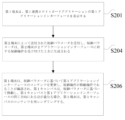
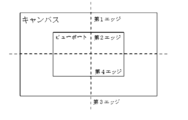
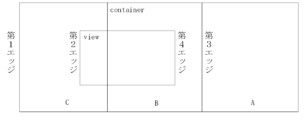
第1エッジが第2エッジと重なる場合、第1キャンバスを移動操作の逆方向に沿って第3エッジと第4エッジが重なる位置に移動させ、第1領域を第2コンテンツとしてレンダリングし、第2領域を第3コンテンツとしてレンダリングするようにトリガするステップを含む。
XB=XA*(B_Width/A_Width)、YB=YA*(B_Width/A_Width)。
第1端末が第1増分によって第1偏差を更新するステップと、第1端末が第2増分によって第2偏差を更新するステップと、第1偏差及び第1アプリケーションインターフェースの幅に基づいて第1キャンバスの水平オフセット量を決定するステップと、第2偏差及び第1アプリケーションインターフェースの高さに基づいて第1キャンバスの垂直オフセット量を決定するステップと、水平オフセット量で水平方向に移動し、垂直オフセット量で垂直方向に移動するように第1キャンバスを制御するステップと、を含む。
drawOrigin(drawOriginX1,drawOriginY1)は、第1アプリケーションインターフェースの左上隅から原点までの距離(及び上記開始座標)を表し、新しいdrawOrigin(drawOriginX2,drawOriginY2)が得られた後、キャンバスのオフセット量を再計算する。
drawOriginX<0の場合、left=‐(baseWidth+drawOriginPointX%baseWidth)
drawOriginY>0の場合、top=‐(drawOriginPointY%baseHeight)
drawOriginX<0の場合、top=‐(baseHeight+drawOriginPointY%baseHeight)
最後に、leftとtopは、canvasタグの実際の視角でのオフセット値であり、上記プロセスにより、第1連携ホワイトボードアプリケーションでの制御パラメータによる第2連携ホワイトボードアプリケーションの移動動作の追従が実現される。
canvasTranslateOffsetX1=canvasTranslateOffsetX*(B_Width/A_Width)、
canvasTranslateOffsetY1=canvasTranslateOffsetY*(B_Width/A_Width)、
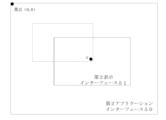
まず、原点に基づいて更新後のスケーリング比率パラメータに従ってスケーリングするように第1キャンバスを制御し、原点に基づいてスケーリングされた第1キャンバスを得て、即ち第1アプリケーションインターフェースの左上隅の原点の位置が変化しなく、更新後のスケーリング比率パラメータcurScale1に基づいてインターフェースの原点を除く他の画像点を拡大し、図8bに示すように、第1キャンバス52の第1アプリケーションインターフェース53で、点線内の画像が拡大された画像として得られる。この時、原点に基づいて拡大した結果が得られるが、このとき、目標点が原点ではないため、原点に基づいて拡大した結果をオフセットする必要がある。
posY=X1+drawOriginPointX+canvasTranslateOffset/curScale、
ここで、(posX,posY)は、絶対座標であり、curScaleは、今回のスケーリング操作の前の第1キャンバスのスケーリング比率である。
canvasTranslateOffsetY2=(curScale‐1)*posY‐(clickY+drawOriginPointY‐posY、
ここで、clickX+drawOriginPointX-posXが上記第1中間値を構成し、(curScale‐1)*posYが上記第2中間値を構成する。
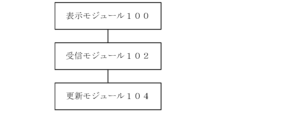
本出願の実施例によれば、マルチ端末連携表示更新装置の実施例が提供され、表示更新方法は、第1端末による第2端末への操作の同期表示を実現するために使用され、第1端末は、第1連携ホワイトボードアプリケーションの第1アプリケーションインターフェース、第1連携ホワイトボードアプリケーションの描画コンテンツを搬送するための第1キャンバス、及び第1キャンバスを搬送するための第1コンテナを提供し、第2端末は、第2連携ホワイトボードアプリケーションの第2アプリケーションインターフェース、第2連携ホワイトボードアプリケーションの描画コンテンツを搬送するための第2キャンバス、及び第2キャンバスを搬送するための第2コンテナを提供し、第1キャンバスの第1長さが第1アプリケーションインターフェースの長さより大きく、第1キャンバスの幅が第1アプリケーションインターフェースの幅より大きい。図10は本発明の実施例によるマルチ端末連携表示更新装置の概略図である。図10に示すように、このマルチ端末連携表示更新装置は、第1端末が第1連携ホワイトボードアプリケーションの第1アプリケーションインターフェースを表示するために使用され、第1連携ホワイトボードアプリケーションと第2端末の第2連携ホワイトボードアプリケーションが連携モードにあり、かつ第2端末が第2連携ホワイトボードアプリケーションの第2アプリケーションインターフェースを表示する表示モジュール100と、第2端末によって送信された制御パラメータを受信するために使用され、制御パラメータは、第2端末が第2アプリケーションインターフェースに対する制御操作を受け付けたときに生成される受信モジュール102と、第1端末が制御パラメータに基づいて第1アプリケーションインターフェースのコンテンツを更新するための更新モジュール104と、を含み、方法は、制御操作が移動操作であることを確認するために使用され、第1キャンバスが制御パラメータに基づいて移動し、第1キャンバスと第1アプリケーションインターフェースの同じ方向にある辺が重なる場合、第1端末が第1キャンバスのコンテンツを再レンダリングする移動モジュールをさらに含む。
本出願の実施例によれば、コンピュータ記憶媒体の実施例が提供され、コンピュータ記憶媒体は、複数の命令を記憶し、命令がプロセッサによってロードされて実施例1の任意の1項に記載の方法のステップを実行することに適する。本実施例では、第1端末は、第1表示インターフェースに第2端末の第2表示インターフェースと同じコンテンツを表示し、第2端末は、第2表示インターフェースでのユーザの制御操作に応じて制御パラメータを第1端末に送信し、第1端末は、第1解像度パラメータ及び第2解像度パラメータに基づいて制御パラメータを更新した後、更新後の制御パラメータに基づいて第1表示インターフェースのコンテンツを調整する。追従端末である第1端末は、第1端末によって送信された元の制御パラメータを、それぞれの解像度パラメータに基づいて更新することにより、第1端末とマッチングする制御パラメータを取得し、これにより、第1端末と第2端末の表示インターフェースの表示画像が常に一致するように維持するという目的を達成し、さらに追従端末と追従対象端末の等比視角追従を実現し、追従対象端末と追従端末の画素が異なるため、視角追従効果が良くないという問題を解決する。
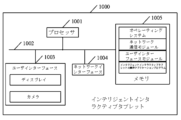
本出願の実施例によれば、プロセッサとメモリとを含み、メモリには、プロセッサによってロードされて実施例1の任意の1項に記載の方法のステップを実行することに適するコンピュータプログラムが記憶されるインテリジェントインタラクティブタブレットが提供される。
Claims (19)
- マルチ端末連携の表示更新方法であって、
前記表示更新方法は、第1端末による第2端末への操作の同期表示を実現するために使用され、前記第1端末は、第1連携ホワイトボードアプリケーションの第1アプリケーションインターフェース、前記第1連携ホワイトボードアプリケーションの描画コンテンツを搬送するための第1キャンバス、及び前記第1キャンバスを搬送するための第1コンテナを提供し、前記第2端末は、第2連携ホワイトボードアプリケーションの第2アプリケーションインターフェース、前記第2連携ホワイトボードアプリケーションの描画コンテンツを搬送するための第2キャンバス、及び前記第2キャンバスを搬送するための第2コンテナを提供し、前記第1キャンバスの第1長さが前記第1アプリケーションインターフェースの長さより大きく、前記第1キャンバスの幅が前記第1アプリケーションインターフェースの幅より大きく、前記表示更新方法は、
第1端末が前記第1連携ホワイトボードアプリケーションの第1アプリケーションインターフェースを表示し、前記第1連携ホワイトボードアプリケーションと前記第2端末の第2連携ホワイトボードアプリケーションが連携モードにあり、かつ前記第2端末が前記第2連携ホワイトボードアプリケーションの第2アプリケーションインターフェースを表示するステップと、
前記第2端末によって送信された制御パラメータを受信するステップであって、前記制御パラメータは、前記第2端末が前記第2アプリケーションインターフェースに対する制御操作を受け付けたときに生成されるステップと、
前記第1端末が前記制御パラメータに基づいて前記第1アプリケーションインターフェースのコンテンツを更新するステップであって、前記制御操作が移動操作であることが確認され、前記第1キャンバスが前記制御パラメータに基づいて移動し、前記第1キャンバスと前記第1アプリケーションインターフェースの同じ方向にある辺が重なる場合、前記第1端末が前記第1キャンバスのコンテンツを再レンダリングするステップと、を含むことを特徴とする方法。 - 前記第1キャンバスには、平行な第1エッジ及び第3エッジが含まれ、前記第1アプリケーションインターフェースには、平行な第2エッジ及び第4エッジが含まれ、前記第1エッジと前記第2エッジは、同じ側にあり、前記第3エッジと前記第4エッジは、同じ側にあり、前記第1キャンバスは、少なくとも前記第3エッジに近い第1領域及び前記第1エッジに近い第2領域を含み、前記第1領域は、前記第2領域に隣接し、前記第1領域には、第1コンテンツが描画され、前記第2領域には、第2コンテンツが描画され、前記移動操作の移動方向は、前記第1エッジがある側から前記第3エッジがある側への移動方向であり、前記第1キャンバスと前記第1アプリケーションインターフェースの同じ方向にある辺が重なる場合、前記第1端末が前記第1キャンバスのコンテンツを再レンダリングするステップは、
前記第1エッジが前記第2エッジと重なる場合、前記第1キャンバスを前記移動操作の逆方向に沿って前記第3エッジと前記第4エッジが重なる位置に移動させ、前記第1領域を前記第2コンテンツとしてレンダリングし、前記第2領域を第3コンテンツとしてレンダリングするようにトリガするステップを含むことを特徴とする請求項1に記載の方法。 - 第1端末が前記第1端末の第1アプリケーションインターフェースに第2端末の第2アプリケーションインターフェースと同じコンテンツを表示する前に、前記方法は、
少なくとも1つの前記第1端末と前記第2端末が同じ仮想ルームに加入するステップをさらに含むことを特徴とする請求項1に記載の方法。 - 前記制御パラメータが、前記第2端末が前記第2アプリケーションインターフェースに対する制御操作を受け付けたときに生成されるステップは、
前記第2端末が前記第2アプリケーションインターフェースで実行された前記制御操作を受け付けるステップであって、前記第2キャンバスは、前記制御操作に応じて変化するステップと、
前記第2端末が、前記制御操作に応じて生成された前記第2キャンバスにおける変化の変化パラメータを制御パラメータとして決定するステップと、
前記第2端末が前記制御パラメータを前記第1端末に送信するステップと、を含むことを特徴とする請求項1に記載の方法。 - 前記第1アプリケーションインターフェースの第1解像度パラメータと前記第2アプリケーションインターフェースの第2解像度パラメータが異なる場合、前記第1端末が前記制御パラメータに基づいて前記第1アプリケーションインターフェースのコンテンツを更新するステップは、
前記第1端末が前記第1解像度パラメータと前記第2解像度パラメータに基づいて前記制御パラメータを更新するステップと、
前記第1端末が更新後の制御パラメータに基づいて前記第1アプリケーションインターフェースのコンテンツを更新するステップと、を含むことを特徴とする請求項1に記載の方法。 - 前記第1端末が前記第1解像度パラメータと前記第2解像度パラメータに基づいて前記制御パラメータを更新するステップは、
前記第1端末が前記第2端末によって送信された前記第2解像度パラメータを読み取るステップと、
前記第1端末が前記第1解像度パラメータと前記第2解像度パラメータとの比率を取得するステップと、
前記第1端末が前記比率と前記制御パラメータとを乗算し、更新後の制御パラメータを得るステップと、を含むことを特徴とする請求項5に記載の方法。 - 前記制御パラメータには、開始座標と移動増分とが含まれ、前記開始座標は、前記第1アプリケーションインターフェースの左上隅の座標と前記第1キャンバスの絶対原点の座標、水平方向の第1偏差と垂直方向の第2偏差を含み、前記移動増分は、前記第2キャンバスが第2アプリケーションインターフェースで移動するときの水平方向の第1増分及び垂直方向の第2増分を含み、前記第1キャンバスが前記制御パラメータに基づいて移動するステップは、
前記第1端末が前記第1増分によって前記第1偏差を更新するステップと、
前記第1端末が前記第2増分によって前記第2偏差を更新するステップと、
前記第1偏差及び前記第1アプリケーションインターフェースの幅に基づいて前記第1キャンバスの水平オフセット量を決定するステップと、
前記第2偏差及び前記第1アプリケーションインターフェースの高さに基づいて前記第1キャンバスの垂直オフセット量を決定するステップと、
前記水平オフセット量で水平方向に移動し、前記垂直オフセット量で垂直方向に移動するように前記第1キャンバスを制御するステップと、を含むことを特徴とする請求項1に記載の方法。 - 前記第1偏差及び前記第1アプリケーションインターフェースの幅に基づいて前記第1キャンバスの水平オフセット量を決定するステップは、
更新後の前記第1偏差が0より大きい場合、前記更新後の第1偏差を前記第1アプリケーションインターフェースの幅で除算した第1余りを水平オフセット量として決定するステップと、
更新後の前記第1偏差が0より小さい場合、前記更新後の第1偏差を前記第1アプリケーションインターフェースの幅で除算した第2余りを取得し、前記第1アプリケーションインターフェースの幅と前記第2余りとの和を水平オフセット量として決定するステップと、を含み、
前記第2偏差及び前記第1アプリケーションインターフェースの高さに基づいて前記第1キャンバスの垂直オフセット量を決定するステップは、
更新後の前記第2偏差が0より大きい場合、前記更新後の第2偏差を前記第1アプリケーションインターフェースの高さで除算した第3余りを垂直オフセット量として決定するステップと、
更新後の前記第2偏差が0より小さい場合、前記更新後の第2偏差を前記第1アプリケーションインターフェースの高さで除算した第4余りを取得し、前記第1アプリケーションインターフェースの高さと前記第4余りとの和を垂直オフセット量として決定するステップと、を含むことを特徴とする請求項7に記載の方法。 - 前記第1キャンバスの任意の隅の横座標が前記第1アプリケーションインターフェースの任意の隅の横座標と同じであるか、又は前記第1キャンバスの任意の隅の縦座標が前記第1アプリケーションインターフェースの任意の隅の縦座標と同じである場合、前記第1キャンバスと前記第1アプリケーションインターフェースの同じ方向の辺が重なることを決定することを特徴とする請求項8に記載の方法。
- 前記第1キャンバスの幅は、前記第1アプリケーションインターフェースの幅の予め設定された倍数であり、前記第1キャンバスの高さは、前記第1アプリケーションインターフェースの高さの予め設定された倍数であり、前記予め設定された倍数は、1より大きくかつ3より小さいことを特徴とする請求項1に記載の方法。
- 前記第1キャンバスの幅は、前記第1アプリケーションインターフェースの幅の2倍であり、前記第1キャンバスの高さは、前記第1アプリケーションインターフェースの高さの2倍であることを特徴とする請求項10に記載の方法。
- 前記第1キャンバスと前記第1アプリケーションインターフェースの同じ方向にある辺が重ならない場合、前記第1キャンバスのコンテンツの再レンダリングを禁止することを特徴とする請求項1に記載の方法。
- 前記制御操作が1つの目標点に基づくスケーリング操作である場合、前記制御パラメータには、スケーリング比率パラメータとオフセットパラメータが含まれ、前記オフセットパラメータは、前記目標点の座標と前記第2キャンバスの左上隅の座標との偏差であり、前記第1端末が前記制御パラメータに基づいて前記第1アプリケーションインターフェースのコンテンツを更新するステップは、
前記第1キャンバスの原点に基づいて更新後の前記スケーリング比率パラメータに従ってスケーリングするように前記第1キャンバスを制御し、前記原点に基づいてスケーリングされた第1キャンバスを得るステップと、
前記スケーリング比率パラメータとオフセットパラメータに基づいて調整後のオフセットパラメータを決定するステップと、
前記調整後のオフセットパラメータに従って移動するように前記原点に基づいてスケーリングされた第1キャンバスを制御し、前記目標点に基づいてスケーリングされた第1キャンバスを得るステップと、
前記目標点に基づいてスケーリングされた第1キャンバスの要素を再レンダリングして、前記第1アプリケーションインターフェースのコンテンツを更新するステップと、を含むことを特徴とする請求項1に記載の方法。 - 前記スケーリング比率パラメータとオフセットパラメータに基づいて調整後のオフセットパラメータを決定するステップは、
前記第2アプリケーションインターフェースにおける前記目標点の相対座標を取得するステップと、
前記オフセットパラメータに基づいて前記目標点をシングルコンテナに投影し、前記シングルコンテナにおける前記目標点の絶対座標を得るステップであって、前記シングルコンテナは、スケーリングされていない場合の元のサイズのコンテナである、ステップと、
前記相対座標と前記第2アプリケーションインターフェースのオフセット座標との和から前記絶対座標を減算することにより、第1中間値を得るステップであって、前記第2アプリケーションインターフェースのオフセット座標は、前記第2アプリケーションインターフェースの左上隅と前記第2キャンバスの原点の座標との差を示すために使用されるステップと、
前記スケーリング比率パラメータと1との差を絶対座標で乗算し、第2中間値を得るステップと、
前記第2中間値から前記第1中間値を減算し、調整後のオフセットパラメータを得るステップと、を含むことを特徴とする請求項13に記載の方法。 - 前記制御操作が要素追加操作である場合、前記制御パラメータは、書き筆跡の座標パラメータを含み、前記第1端末が前記制御パラメータに基づいて前記第1アプリケーションインターフェースのコンテンツを更新するステップは、
前記第1端末が前記書き筆跡の座標パラメータに基づいて書き筆跡を生成し、前記書き筆跡の座標パラメータが書き筆跡を構成するための書き点の座標パラメータを含み、前記第2端末が新しい書き点を生成するたびに、現在の書き筆跡の生成されたすべての書き点の座標パラメータを前記第1端末に送信するステップを含むことを特徴とする請求項1に記載の方法。 - 前記第1端末が前記書き筆跡の座標パラメータに基づいて書き筆跡を生成するステップは、
前記書き筆跡が前記第1アプリケーションインターフェースの任意の辺に接触する場合、接触している辺の逆方向に移動するように前記第1キャンバスをトリガするステップであって、前記第1キャンバスと前記第1アプリケーションインターフェースの同じ方向にある辺が重なる場合、前記第1端末は、前記第1キャンバスのコンテンツを再描画するステップを含むことを特徴とする請求項15に記載の方法。 - マルチ端末連携の表示更新装置であって、
前記表示更新装置は、第1端末による第2端末への操作の同期表示を実現するために使用され、前記第1端末は、第1連携ホワイトボードアプリケーションの第1アプリケーションインターフェース、前記第1連携ホワイトボードアプリケーションの描画コンテンツを搬送するための第1キャンバス、及び前記第1キャンバスを搬送するための第1コンテナを提供し、前記第2端末は、第2連携ホワイトボードアプリケーションの第2アプリケーションインターフェース、前記第2連携ホワイトボードアプリケーションの描画コンテンツを搬送するための第2キャンバス、及び前記第2キャンバスを搬送するための第2コンテナを提供し、前記第1キャンバスの第1長さが前記第1アプリケーションインターフェースの長さより大きく、前記第1キャンバスの幅が前記第1アプリケーションインターフェースの幅より大きく、前記マルチ端末連携の表示更新装置は、
第1端末が前記第1連携ホワイトボードアプリケーションの第1アプリケーションインターフェースを表示するために使用され、前記第1連携ホワイトボードアプリケーションと前記第2端末の第2連携ホワイトボードアプリケーションが連携モードにあり、かつ前記第2端末が前記第2連携ホワイトボードアプリケーションの第2アプリケーションインターフェースを表示する表示モジュールと、
前記第2端末によって送信された制御パラメータを受信するために使用され、前記制御パラメータは、前記第2端末が前記第2アプリケーションインターフェースに対する制御操作を受け付けたときに生成される受信モジュールと、
前記第1端末が前記制御パラメータに基づいて前記第1アプリケーションインターフェースのコンテンツを更新するために使用され、前記制御操作が移動操作であることが確認され、前記第1キャンバスが前記制御パラメータに基づいて移動し、前記第1キャンバスと前記第1アプリケーションインターフェースの同じ方向にある辺が重なる場合、前記第1端末が前記第1キャンバスのコンテンツを再レンダリングする更新モジュールと、を含むことを特徴とする装置。 - コンピュータ記憶媒体であって、
複数の命令を記憶しており、前記命令がプロセッサによってロードされて請求項1から請求項16の任意の1項に記載の方法のステップを実行することに適することを特徴とするコンピュータ記憶媒体。 - インテリジェントインタラクティブタブレットであって、
プロセッサとメモリとを含み、前記メモリには、前記プロセッサによってロードされて請求項1から請求項16の任意の1項に記載の方法のステップを実行することに適するコンピュータプログラムが記憶されることを特徴とするインテリジェントインタラクティブタブレット。
Applications Claiming Priority (1)
| Application Number | Priority Date | Filing Date | Title |
|---|---|---|---|
| PCT/CN2021/086634 WO2022217433A1 (zh) | 2021-04-12 | 2021-04-12 | 多端协同的显示更新方法及装置 |
Publications (2)
| Publication Number | Publication Date |
|---|---|
| JP2024512164A JP2024512164A (ja) | 2024-03-18 |
| JP7635500B2 true JP7635500B2 (ja) | 2025-02-26 |
Family
ID=83639361
Family Applications (1)
| Application Number | Title | Priority Date | Filing Date |
|---|---|---|---|
| JP2023561125A Active JP7635500B2 (ja) | 2021-04-12 | 2021-04-12 | マルチ端末連携表示更新方法及び装置 |
Country Status (6)
| Country | Link |
|---|---|
| US (1) | US12260149B2 (ja) |
| EP (1) | EP4325344B1 (ja) |
| JP (1) | JP7635500B2 (ja) |
| KR (1) | KR102915272B1 (ja) |
| CN (1) | CN115552364A (ja) |
| WO (1) | WO2022217433A1 (ja) |
Families Citing this family (4)
| Publication number | Priority date | Publication date | Assignee | Title |
|---|---|---|---|---|
| CN116301532A (zh) * | 2023-01-06 | 2023-06-23 | 深圳市易检车服科技有限公司 | 信息的显示方法、装置、电子设备及存储介质 |
| CN116382613A (zh) * | 2023-06-05 | 2023-07-04 | 江西格如灵科技股份有限公司 | 虚拟现实环境下的白板同步方法、装置、设备及介质 |
| CN119475290A (zh) * | 2024-10-28 | 2025-02-18 | 广州朗国电子科技股份有限公司 | 一种电子白板的多角色管理方法、装置、设备及存储介质 |
| CN121349395B (zh) * | 2025-12-19 | 2026-03-13 | 数字青岛建设有限公司 | 一种跨设备协同处理方法及终端 |
Citations (4)
| Publication number | Priority date | Publication date | Assignee | Title |
|---|---|---|---|---|
| JP2006108911A (ja) | 2004-10-01 | 2006-04-20 | Canon Inc | 画像処理装置及び画像処理方法 |
| WO2016024330A1 (ja) | 2014-08-12 | 2016-02-18 | 株式会社 東芝 | 情報を表示するための電子機器および方法 |
| WO2017138233A1 (ja) | 2016-02-12 | 2017-08-17 | 株式会社リコー | 画像処理装置、画像処理システム及び画像処理方法 |
| US20200301644A1 (en) | 2019-03-19 | 2020-09-24 | Cisco Technology, Inc. | Active area of interest tracking in a multiuser digital whiteboard session |
Family Cites Families (9)
| Publication number | Priority date | Publication date | Assignee | Title |
|---|---|---|---|---|
| JPH10126758A (ja) * | 1996-10-15 | 1998-05-15 | Ricoh Co Ltd | 電子会議システム |
| US9142192B2 (en) | 2011-09-26 | 2015-09-22 | Intel Corporation | Simulation of web applications and secondary devices in a web browser, web application development tools, and methods using the same |
| US10282067B2 (en) * | 2013-06-04 | 2019-05-07 | Sony Corporation | Method and apparatus of controlling an interface based on touch operations |
| JP2015076068A (ja) * | 2013-10-11 | 2015-04-20 | アプリックスIpホールディングス株式会社 | 表示装置とその表示制御方法及びプログラム |
| CN103747027B (zh) | 2013-11-12 | 2018-01-09 | 广州三人行壹佰教育科技有限公司 | 白板信息同步显示方法和系统 |
| KR101718046B1 (ko) * | 2015-09-30 | 2017-03-20 | 엘지전자 주식회사 | 동적 해상도 제어를 수행하는 이동 단말기 및 그 제어방법 |
| US9864732B2 (en) * | 2016-05-02 | 2018-01-09 | Google Inc. | User interfaces that facilitate management of formatting of digital content |
| CN108762628B (zh) * | 2018-04-23 | 2020-10-02 | 广州视源电子科技股份有限公司 | 页面元素移动显示方法、装置、终端设备及存储介质 |
| CN110716680B (zh) * | 2019-10-09 | 2021-05-07 | 广州视源电子科技股份有限公司 | 智能交互平板的控制方法和装置 |
-
2021
- 2021-04-12 WO PCT/CN2021/086634 patent/WO2022217433A1/zh not_active Ceased
- 2021-04-12 JP JP2023561125A patent/JP7635500B2/ja active Active
- 2021-04-12 EP EP21936328.0A patent/EP4325344B1/en active Active
- 2021-04-12 KR KR1020237032017A patent/KR102915272B1/ko active Active
- 2021-04-12 CN CN202180006764.XA patent/CN115552364A/zh active Pending
- 2021-04-12 US US18/283,132 patent/US12260149B2/en active Active
Patent Citations (4)
| Publication number | Priority date | Publication date | Assignee | Title |
|---|---|---|---|---|
| JP2006108911A (ja) | 2004-10-01 | 2006-04-20 | Canon Inc | 画像処理装置及び画像処理方法 |
| WO2016024330A1 (ja) | 2014-08-12 | 2016-02-18 | 株式会社 東芝 | 情報を表示するための電子機器および方法 |
| WO2017138233A1 (ja) | 2016-02-12 | 2017-08-17 | 株式会社リコー | 画像処理装置、画像処理システム及び画像処理方法 |
| US20200301644A1 (en) | 2019-03-19 | 2020-09-24 | Cisco Technology, Inc. | Active area of interest tracking in a multiuser digital whiteboard session |
Also Published As
| Publication number | Publication date |
|---|---|
| KR20230145478A (ko) | 2023-10-17 |
| WO2022217433A1 (zh) | 2022-10-20 |
| EP4325344A1 (en) | 2024-02-21 |
| CN115552364A (zh) | 2022-12-30 |
| US20240303026A1 (en) | 2024-09-12 |
| EP4325344A4 (en) | 2024-07-17 |
| JP2024512164A (ja) | 2024-03-18 |
| KR102915272B1 (ko) | 2026-01-22 |
| EP4325344B1 (en) | 2026-04-29 |
| US12260149B2 (en) | 2025-03-25 |
Similar Documents
| Publication | Publication Date | Title |
|---|---|---|
| JP7635500B2 (ja) | マルチ端末連携表示更新方法及び装置 | |
| Reipschläger et al. | Designar: Immersive 3d-modeling combining augmented reality with interactive displays | |
| US9582142B2 (en) | System and method for collaborative computing | |
| CN109375980B (zh) | 基于Andriod系统的触控绘图方法 | |
| Li et al. | Cognitive issues in mobile augmented reality: an embodied perspective | |
| WO2018188499A1 (zh) | 图像、视频处理方法和装置、虚拟现实装置和存储介质 | |
| WO2017101441A1 (zh) | 远程批注移动、缩放的同步方法与系统 | |
| US10855481B2 (en) | Live ink presence for real-time collaboration | |
| CN108133454B (zh) | 空间几何模型图像切换方法、装置、系统及交互设备 | |
| Cotting et al. | Interactive environment-aware display bubbles | |
| CN105354031A (zh) | 基于Leap Motion的3D商品展示方法 | |
| CN104598035B (zh) | 基于3d立体图像显示的光标显示方法、智能设备及系统 | |
| Nakashima et al. | A 2D-3D integrated environment for cooperative work | |
| CN114138141B (zh) | 显示方法、装置和电子设备 | |
| Baldauf et al. | Snap target: Investigating an assistance technique for mobile magic lens interaction with large displays | |
| CN111046207A (zh) | 互动图像显示方法、装置、设备和存储介质 | |
| CN115514736B (zh) | 屏幕共享方法、装置及智能交互平板 | |
| CN114168060A (zh) | 电子白板渲染方法、装置、设备和存储介质 | |
| CN116136733A (zh) | 多屏显示方法、显示控制装置、设备以及多屏显示系统 | |
| US20240345712A1 (en) | Method and system for summoning adaptive toolbar items and digital assets associated therewith on a large format screen within a digital collaboration environment | |
| CN116681793A (zh) | 元素绘制方法、装置、存储介质及电子设备 | |
| CN120599117A (zh) | 一种渲染方法、装置、设备及存储介质 | |
| CN114764294A (zh) | 电子白板的页面元素操作方法、装置及设备 | |
| TW202423096A (zh) | 雲端系統及雲端系統的控制方法 | |
| Markusiewicz | ’From AR to Architecture: Searching for New Ways of Grasping the Digital’ |
Legal Events
| Date | Code | Title | Description |
|---|---|---|---|
| A621 | Written request for application examination |
Free format text: JAPANESE INTERMEDIATE CODE: A621 Effective date: 20231004 |
|
| A977 | Report on retrieval |
Free format text: JAPANESE INTERMEDIATE CODE: A971007 Effective date: 20240927 |
|
| A131 | Notification of reasons for refusal |
Free format text: JAPANESE INTERMEDIATE CODE: A131 Effective date: 20241001 |
|
| A521 | Request for written amendment filed |
Free format text: JAPANESE INTERMEDIATE CODE: A523 Effective date: 20241218 |
|
| TRDD | Decision of grant or rejection written | ||
| A01 | Written decision to grant a patent or to grant a registration (utility model) |
Free format text: JAPANESE INTERMEDIATE CODE: A01 Effective date: 20250114 |
|
| A61 | First payment of annual fees (during grant procedure) |
Free format text: JAPANESE INTERMEDIATE CODE: A61 Effective date: 20250123 |
|
| R150 | Certificate of patent or registration of utility model |
Ref document number: 7635500 Country of ref document: JP Free format text: JAPANESE INTERMEDIATE CODE: R150 |