JP7608874B2 - 表示装置、表示方法、プログラム - Google Patents
表示装置、表示方法、プログラム Download PDFInfo
- Publication number
- JP7608874B2 JP7608874B2 JP2021033451A JP2021033451A JP7608874B2 JP 7608874 B2 JP7608874 B2 JP 7608874B2 JP 2021033451 A JP2021033451 A JP 2021033451A JP 2021033451 A JP2021033451 A JP 2021033451A JP 7608874 B2 JP7608874 B2 JP 7608874B2
- Authority
- JP
- Japan
- Prior art keywords
- row
- column
- selection
- display device
- handwritten data
- Prior art date
- Legal status (The legal status is an assumption and is not a legal conclusion. Google has not performed a legal analysis and makes no representation as to the accuracy of the status listed.)
- Active
Links
Images



















Classifications
-
- G—PHYSICS
- G06—COMPUTING OR CALCULATING; COUNTING
- G06F—ELECTRIC DIGITAL DATA PROCESSING
- G06F3/00—Input arrangements for transferring data to be processed into a form capable of being handled by the computer; Output arrangements for transferring data from processing unit to output unit, e.g. interface arrangements
- G06F3/01—Input arrangements or combined input and output arrangements for interaction between user and computer
- G06F3/048—Interaction techniques based on graphical user interfaces [GUI]
- G06F3/0481—Interaction techniques based on graphical user interfaces [GUI] based on specific properties of the displayed interaction object or a metaphor-based environment, e.g. interaction with desktop elements like windows or icons, or assisted by a cursor's changing behaviour or appearance
- G06F3/0482—Interaction with lists of selectable items, e.g. menus
-
- G—PHYSICS
- G06—COMPUTING OR CALCULATING; COUNTING
- G06F—ELECTRIC DIGITAL DATA PROCESSING
- G06F3/00—Input arrangements for transferring data to be processed into a form capable of being handled by the computer; Output arrangements for transferring data from processing unit to output unit, e.g. interface arrangements
- G06F3/01—Input arrangements or combined input and output arrangements for interaction between user and computer
- G06F3/048—Interaction techniques based on graphical user interfaces [GUI]
- G06F3/0484—Interaction techniques based on graphical user interfaces [GUI] for the control of specific functions or operations, e.g. selecting or manipulating an object, an image or a displayed text element, setting a parameter value or selecting a range
- G06F3/04842—Selection of displayed objects or displayed text elements
-
- G—PHYSICS
- G06—COMPUTING OR CALCULATING; COUNTING
- G06F—ELECTRIC DIGITAL DATA PROCESSING
- G06F3/00—Input arrangements for transferring data to be processed into a form capable of being handled by the computer; Output arrangements for transferring data from processing unit to output unit, e.g. interface arrangements
- G06F3/01—Input arrangements or combined input and output arrangements for interaction between user and computer
- G06F3/048—Interaction techniques based on graphical user interfaces [GUI]
- G06F3/0487—Interaction techniques based on graphical user interfaces [GUI] using specific features provided by the input device, e.g. functions controlled by the rotation of a mouse with dual sensing arrangements, or of the nature of the input device, e.g. tap gestures based on pressure sensed by a digitiser
- G06F3/0488—Interaction techniques based on graphical user interfaces [GUI] using specific features provided by the input device, e.g. functions controlled by the rotation of a mouse with dual sensing arrangements, or of the nature of the input device, e.g. tap gestures based on pressure sensed by a digitiser using a touch-screen or digitiser, e.g. input of commands through traced gestures
- G06F3/04883—Interaction techniques based on graphical user interfaces [GUI] using specific features provided by the input device, e.g. functions controlled by the rotation of a mouse with dual sensing arrangements, or of the nature of the input device, e.g. tap gestures based on pressure sensed by a digitiser using a touch-screen or digitiser, e.g. input of commands through traced gestures for inputting data by handwriting, e.g. gesture or text
-
- G—PHYSICS
- G06—COMPUTING OR CALCULATING; COUNTING
- G06V—IMAGE OR VIDEO RECOGNITION OR UNDERSTANDING
- G06V10/00—Arrangements for image or video recognition or understanding
- G06V10/20—Image preprocessing
- G06V10/22—Image preprocessing by selection of a specific region containing or referencing a pattern; Locating or processing of specific regions to guide the detection or recognition
- G06V10/235—Image preprocessing by selection of a specific region containing or referencing a pattern; Locating or processing of specific regions to guide the detection or recognition based on user input or interaction
-
- G—PHYSICS
- G06—COMPUTING OR CALCULATING; COUNTING
- G06V—IMAGE OR VIDEO RECOGNITION OR UNDERSTANDING
- G06V30/00—Character recognition; Recognising digital ink; Document-oriented image-based pattern recognition
- G06V30/10—Character recognition
- G06V30/14—Image acquisition
- G06V30/142—Image acquisition using hand-held instruments; Constructional details of the instruments
- G06V30/1423—Image acquisition using hand-held instruments; Constructional details of the instruments the instrument generating sequences of position coordinates corresponding to handwriting
-
- G—PHYSICS
- G06—COMPUTING OR CALCULATING; COUNTING
- G06F—ELECTRIC DIGITAL DATA PROCESSING
- G06F2203/00—Indexing scheme relating to G06F3/00 - G06F3/048
- G06F2203/048—Indexing scheme relating to G06F3/048
- G06F2203/04807—Pen manipulated menu
Landscapes
- Engineering & Computer Science (AREA)
- Theoretical Computer Science (AREA)
- General Engineering & Computer Science (AREA)
- Physics & Mathematics (AREA)
- General Physics & Mathematics (AREA)
- Human Computer Interaction (AREA)
- Multimedia (AREA)
- Computer Vision & Pattern Recognition (AREA)
- User Interface Of Digital Computer (AREA)
- Processing Or Creating Images (AREA)
- Controls And Circuits For Display Device (AREA)
Description
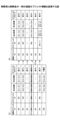
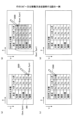
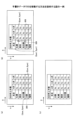
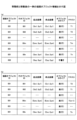
本実施形態の表の編集方法を説明するに当たり、表の編集方法の比較例を説明する。なお、比較例は従来技術とは限らないことに注意されたい。
・行の挿入の場合、ユーザーは挿入したい行を選択し、長押しで編集メニューを表示させる。ユーザーは編集メニューから「挿入」を選択する。
・行の削除の場合、ユーザーは削除したい行を選択し、長押しで編集メニューを表示させる。ユーザーは編集メニューから「削除」を選択する。
・行の移動の場合、ユーザーは移動したい行を選択し、長押しで編集メニューを表示させる。ユーザーは編集メニューから「切り取り」を選択する。次に、ユーザーは移動先の行を選択し、長押しで編集メニューを表示させる。ユーザーは編集メニューから「切り取った行の挿入」を選択する。
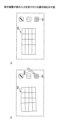
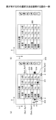
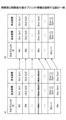
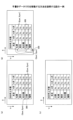
続いて、本実施形態の表示装置2における表の選択方法を説明する。まず、図1を参照して、表の作成手順を説明する。図1は、表示装置2が表の入力を受け付ける操作例を示す。
(1) ユーザーは表を入力するためのアイコン301を押下する(図1(a))。
(2) ユーザーは、フリーハンドで表302を手書きする。すなわち、ユーザーは手書きデータで表を作成する。
(3) 表示装置2は手書きデータを認識し、表303に変換する(図1(b))。すなわち、表示装置2は、縦と横、複数の平行な直線で形成される表303を表示する。
(1) ユーザーが手書きデータで表の一部を選択する。
(2) ユーザーが表の任意の行(列)を選択すると、ユーザーは簡単な操作で該行(列)の上(左)又は下(右)に行(列)を追加できる。
(3) 同様に、表の任意の行(列)を選択すると、ユーザーは簡単な操作で該行(列)を削除できる。
(4) 同様に、表の任意のX行(列)を選択すると、ユーザーは簡単な操作で任意のY行(列)目に移動できる。
(5) 同様に、表の任意のX行(列)を選択すると、ユーザーは簡単な操作で表の外の任意の位置にX行(列)を抜き出して表示できる。
入力手段とはタッチパネルに座標を指定して手書きが可能な手段であればよい。例えば、ペン、人の指や手、棒状部材などがある。
手書きデータが文字認識して変換された文字列には、テキストデータの他、「済」などの決まった文字やマークとして表示されるスタンプ、円や星などの図形、直線等、ユーザーの操作に基づいて表示されたデータも含まれてよい。
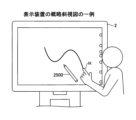
図3は、表示装置2の概略斜視図の一例を示す。表示装置2をユーザー(利用者)が利用している。本実施形態の表示装置2は、ユーザーが手又は電子ペン2500などの入力手段でディスプレー上に手書きを行うことができる。
図3の表示装置2は横置きされているが、縦置きすることも可能である。ユーザーは表示装置2をディスプレーの中心を軸に回転させて、横置きと縦置きを切り替えることができる。
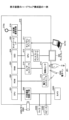
図4は、表示装置2のハードウェア構成の一例を示す図である。本実施形態の表示装置2は、CPU(Central Processing Unit)201、ROM(Read Only Memory)202、RAM(Random Access Memory)203、SSD(Solid State Drive)204、ネットワークコントローラ205、及び、外部機器接続I/F206(Interface)を備えており、複数の利用者により情報を共有するための共有端末である。
次に、図5を用いて表示装置2の機能について説明する。図5は、表示装置2が有する機能をブロック状に分けて説明する機能ブロック図の一例である。表示装置2は、接触位置検出部40、描画データ生成部41、描画オブジェクト管理部42、表オブジェクト管理部43、オブジェクト選択部44、表示制御部45、会議データ記憶部46、ネットワーク通信部47、記号認識部48、及び プレビュー画像生成部49を有している。表示装置2が有する各機能は、図4に示されている各構成要素のいずれかが、SSD204からRAM203上に展開されたプログラムに従ったCPU201からの命令によって動作することで実現される機能又は手段である。
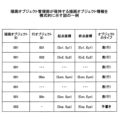
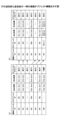
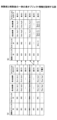
図6は描画オブジェクト管理部42が保持する描画オブジェクト情報を模式的に示す。描画オブジェクト情報は、表示装置2が表示する描画オブジェクトを管理する情報である。
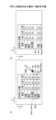
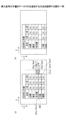
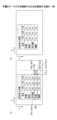
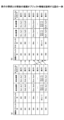
図8は、表が有する行の選択方法を説明する図である。まず、図8を参照して、描画オブジェクト管理部42が管理する行オブジェクトの表示位置について説明する。ディスプレーの表示画素の位置は、表示領域の左上の角にある画素位置を原点として、右方向をX軸の正の方向、下方向をY軸の正の方向とした表示座標で表現する。
座標=(原点位置の画素からのX軸方向の画素数,原点位置の画素からのY軸方向の画素数)
である。
行を選択する方法としては、ユーザーが行をストロークデータで囲む方法以外にも、行の隣に矢印を書く方法でもよい。
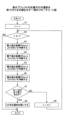
ユーザーが行を選択状態にすると、大阪の行の前後に、表示制御部45が行を追加するためのボタンや削除するためのボタンを表示する。
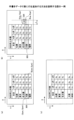
次に、図15を参照して、行の追加方法(その2)を説明する。図15は手書きデータで表に行を追加する方法を説明する図である。
次に、図18を参照して、行の追加方法(その3)を説明する。図18は、挿入記号の手書きデータで行を追加する方法を説明する図である。
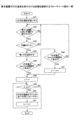
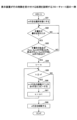
続いて、図21等を参照して行の削除方法について説明する。図21は、行の削除方法を説明する図である。行が選択状態となることでボタン321~323が表示されるまでは、図12と同じでよい。
次に、図24を参照して、行の削除方法(その2)を説明する。図24は、手書きデータで行を削除する方法を説明する図である。
次に、図27を参照して、行の削除方法(その3)を説明する。図27は、手書きデータで行を削除する方法を説明する図である。
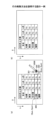
続いて、図30を参照して行のコピー又は移動方法について説明する。図30は、行のコピー又は移動方法を説明する図である。
次に、図33を参照して、手書きデータによる行の移動方法(その2)を説明する。図33は、手書きデータで行を移動する方法を説明する図である。
次に、図36を参照して、手書きデータによる行の移動方法(その3)を説明する。図36は、手書きデータで行を移動する方法を説明する図である。
続いて、図39を参照して、ユーザーが表の一部を分割する方法について説明する。図39は、表の分割方法を説明する図である。
以上説明したように、本実施形態の表示装置2は、行や列の追加、移動、削除、又は、分割などの編集を手書きデータで実行することができるので、操作性を向上させることができる。
本実施形態の表示装置2は大型のタッチパネルを有するものとして説明されているが、表示装置2はタッチパネルを有するものに限られない。
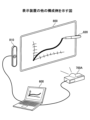
図43は、表示装置2の他の構成例を示す図である。図43の例では、表示装置2は、端末装置600、画像投影装置700A、及び、ペン動作検出装置810を有する。
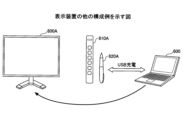
図44は、表示装置2の構成例を示す図である。図44の例では、表示装置2は、端末装置600と、ディスプレー800Aと、ペン動作検出装置810Aとを有する。
図45は、表示装置2の構成例を示す図である。図45の例では、表示装置2は、端末装置600と、画像投影装置700Aとを有する。
以上、本発明を実施するための最良の形態について実施例を用いて説明したが、本発明はこうした実施例に何等限定されるものではなく、本発明の要旨を逸脱しない範囲内において種々の変形及び置換を加えることができる。
Claims (9)
- 手書きで作成された表を表示する表示装置であって、
入力手段により手書きデータの入力を受け付ける受付手段と、
前記表の行又は列の選択を前記手書きデータにより受け付ける選択受付手段と、
前記選択受付手段により前記表の行又は列が選択された場合、ユーザー操作に応じて、選択された前記表の行又は列に関する前記表の編集を行う制御手段と、を有し、
前記制御手段は、前記選択受付手段が選択を受け付けた行又は列の付近に行又は列を追加するためのボタンを表示し、
前記受付手段が前記ボタンの押下を受け付けた場合、前記選択受付手段が選択を受け付けた行又は列の前又は後に、行又は列を追加する、
表示装置。 - 前記選択受付手段は、前記受付手段が受け付けた前記手書きデータで囲まれた行又は列の選択を受け付ける請求項1に記載の表示装置。
- 前記受付手段が受け付けた前記手書きデータを認識する認識手段を有し、
前記選択受付手段が選択を受け付けた行又は列の隣に手書きされた前記手書きデータを、予め定められている記号に前記認識手段が認識した場合、前記制御手段は、前記選択受付手段が選択を受け付けた行又は列の前又は後に、行又は列を追加する請求項1又は2に記載の表示装置。 - 前記受付手段が受け付けた前記手書きデータを認識する認識手段を有し、
前記選択受付手段が選択を受け付けた行又は列の境界に手書きされた前記手書きデータを、予め定められている記号に前記認識手段が認識した場合、前記制御手段は、前記境界に行又は列を追加する請求項1又は2に記載の表示装置。 - 前記制御手段は、前記選択受付手段が選択を受け付けた行又は列の付近に行又は列を削除するためのボタンを表示し、
前記受付手段が前記ボタンの押下を受け付けた場合、前記選択受付手段が選択を受け付けた行又は列を削除する請求項1~4のいずれか1項に記載の表示装置。 - 前記受付手段が受け付けた前記手書きデータを認識する認識手段を有し、
前記選択受付手段が選択を受け付けた行又は列の隣に手書きされた前記手書きデータを、予め定められている記号に前記認識手段が認識した場合、前記制御手段は、前記選択受付手段が選択を受け付けた行又は列を削除する請求項1~4のいずれか1項に記載の表示装置。 - 前記選択受付手段が選択を受け付けた行又は列に重畳し、前記行又は列を削除するための前記手書きデータを前記受付手段が受け付けた場合、
前記選択受付手段が選択を受け付けた行又は列を削除する請求項1~4のいずれか1項に記載の表示装置。 - 手書きで作成された表を表示する表示装置が行う表示方法であって、
受付手段が、入力手段により手書きデータの入力を受け付けるステップと、
選択受付手段が、前記表の行又は列の選択を前記手書きデータにより受け付けるステップと、
前記選択受付手段により前記表の行又は列が選択された場合、制御手段が、ユーザー操作に応じて、選択された前記表の行又は列に関する前記表の編集を行うステップと、
前記制御手段が、前記選択受付手段が選択を受け付けた行又は列の付近に行又は列を追加するためのボタンを表示するステップと、
前記受付手段が前記ボタンの押下を受け付けた場合、前記選択受付手段が選択を受け付けた行又は列の前又は後に、行又は列を追加するステップと、
を有する表示方法。 - 手書きで作成された表を表示する表示装置を、
入力手段により手書きデータの入力を受け付ける受付手段と、
前記表の行又は列の選択を前記手書きデータにより受け付ける選択受付手段と、
前記選択受付手段により前記表の行又は列が選択された場合、ユーザー操作に応じて、選択された前記表の行又は列に関する前記表の編集を行う制御手段、として機能させ、
前記制御手段は、前記選択受付手段が選択を受け付けた行又は列の付近に行又は列を追加するためのボタンを表示し、
前記受付手段が前記ボタンの押下を受け付けた場合、前記選択受付手段が選択を受け付けた行又は列の前又は後に、行又は列を追加する、
プログラム。
Priority Applications (2)
| Application Number | Priority Date | Filing Date | Title |
|---|---|---|---|
| JP2021033451A JP7608874B2 (ja) | 2021-03-03 | 2021-03-03 | 表示装置、表示方法、プログラム |
| US17/582,023 US11816327B2 (en) | 2021-03-03 | 2022-01-24 | Display apparatus, method for displaying, and non-transitory recording medium |
Applications Claiming Priority (1)
| Application Number | Priority Date | Filing Date | Title |
|---|---|---|---|
| JP2021033451A JP7608874B2 (ja) | 2021-03-03 | 2021-03-03 | 表示装置、表示方法、プログラム |
Publications (2)
| Publication Number | Publication Date |
|---|---|
| JP2022134370A JP2022134370A (ja) | 2022-09-15 |
| JP7608874B2 true JP7608874B2 (ja) | 2025-01-07 |
Family
ID=83117177
Family Applications (1)
| Application Number | Title | Priority Date | Filing Date |
|---|---|---|---|
| JP2021033451A Active JP7608874B2 (ja) | 2021-03-03 | 2021-03-03 | 表示装置、表示方法、プログラム |
Country Status (2)
| Country | Link |
|---|---|
| US (1) | US11816327B2 (ja) |
| JP (1) | JP7608874B2 (ja) |
Citations (8)
| Publication number | Priority date | Publication date | Assignee | Title |
|---|---|---|---|---|
| US20110078560A1 (en) | 2009-09-25 | 2011-03-31 | Christopher Douglas Weeldreyer | Device, Method, and Graphical User Interface for Displaying Emphasis Animations for an Electronic Document in a Presentation Mode |
| US20110163968A1 (en) | 2010-01-06 | 2011-07-07 | Hogan Edward P A | Device, Method, and Graphical User Interface for Manipulating Tables Using Multi-Contact Gestures |
| US20120013539A1 (en) | 2010-07-13 | 2012-01-19 | Hogan Edward P A | Systems with gesture-based editing of tables |
| US20120173963A1 (en) | 2010-09-21 | 2012-07-05 | Microsoft Corporation | Web page application controls |
| JP2012181708A (ja) | 2011-03-01 | 2012-09-20 | Ubiquitous Entertainment Inc | スプレッドシート制御プログラム、スプレッドシート制御装置及びスプレッドシートの制御方法 |
| US20140189482A1 (en) | 2012-12-31 | 2014-07-03 | Smart Technologies Ulc | Method for manipulating tables on an interactive input system and interactive input system executing the method |
| US20140372856A1 (en) | 2013-06-14 | 2014-12-18 | Microsoft Corporation | Natural Quick Functions Gestures |
| US20180121074A1 (en) | 2016-10-28 | 2018-05-03 | Microsoft Technology Licensing, Llc | Freehand table manipulation |
Family Cites Families (4)
| Publication number | Priority date | Publication date | Assignee | Title |
|---|---|---|---|---|
| US8773370B2 (en) * | 2010-07-13 | 2014-07-08 | Apple Inc. | Table editing systems with gesture-based insertion and deletion of columns and rows |
| JP5807699B1 (ja) | 2014-05-15 | 2015-11-10 | 合同会社Uxイノベーションズ | 情報処理装置及びプログラム |
| JP2016134014A (ja) | 2015-01-20 | 2016-07-25 | 株式会社リコー | 電子情報ボード装置、情報処理方法およびプログラム |
| US9965445B2 (en) * | 2015-08-06 | 2018-05-08 | FiftyThree, Inc. | Systems and methods for gesture-based formatting |
-
2021
- 2021-03-03 JP JP2021033451A patent/JP7608874B2/ja active Active
-
2022
- 2022-01-24 US US17/582,023 patent/US11816327B2/en active Active
Patent Citations (8)
| Publication number | Priority date | Publication date | Assignee | Title |
|---|---|---|---|---|
| US20110078560A1 (en) | 2009-09-25 | 2011-03-31 | Christopher Douglas Weeldreyer | Device, Method, and Graphical User Interface for Displaying Emphasis Animations for an Electronic Document in a Presentation Mode |
| US20110163968A1 (en) | 2010-01-06 | 2011-07-07 | Hogan Edward P A | Device, Method, and Graphical User Interface for Manipulating Tables Using Multi-Contact Gestures |
| US20120013539A1 (en) | 2010-07-13 | 2012-01-19 | Hogan Edward P A | Systems with gesture-based editing of tables |
| US20120173963A1 (en) | 2010-09-21 | 2012-07-05 | Microsoft Corporation | Web page application controls |
| JP2012181708A (ja) | 2011-03-01 | 2012-09-20 | Ubiquitous Entertainment Inc | スプレッドシート制御プログラム、スプレッドシート制御装置及びスプレッドシートの制御方法 |
| US20140189482A1 (en) | 2012-12-31 | 2014-07-03 | Smart Technologies Ulc | Method for manipulating tables on an interactive input system and interactive input system executing the method |
| US20140372856A1 (en) | 2013-06-14 | 2014-12-18 | Microsoft Corporation | Natural Quick Functions Gestures |
| US20180121074A1 (en) | 2016-10-28 | 2018-05-03 | Microsoft Technology Licensing, Llc | Freehand table manipulation |
Also Published As
| Publication number | Publication date |
|---|---|
| US11816327B2 (en) | 2023-11-14 |
| US20220283701A1 (en) | 2022-09-08 |
| JP2022134370A (ja) | 2022-09-15 |
Similar Documents
| Publication | Publication Date | Title |
|---|---|---|
| JP7556214B2 (ja) | 電子黒板、音声再生方法、プログラム及び画像処理システム | |
| US10572779B2 (en) | Electronic information board apparatus, information processing method, and computer program product | |
| JP7600781B2 (ja) | 表示装置、表示方法、プログラム | |
| US9454257B2 (en) | Electronic system | |
| JP7615805B2 (ja) | 表示装置、プログラム、表示方法、表示システム | |
| JP7559496B2 (ja) | 入力装置、入力方法、及びプログラム | |
| JP2023034010A (ja) | 表示装置、表示システム、表示制御方法、及びプログラム | |
| JP2025168516A (ja) | 表示装置、表示方法、プログラム | |
| JP2021036401A (ja) | 表示装置、表示方法、プログラム | |
| JP6773977B2 (ja) | 端末装置及び操作制御プログラム | |
| JP7855841B2 (ja) | 表示装置、プログラム、表示方法、表示システム | |
| JP2022057931A (ja) | 表示装置、表示方法、プログラム | |
| JP2021197024A (ja) | 表示装置、表示方法及びプログラム | |
| US11726654B2 (en) | Display apparatus capable of displaying icon corresponding to shape of hand-drafted input, display method, and non-transitory computer-executable medium storing program thereon | |
| JP7683253B2 (ja) | 表示装置、プログラム、変換方法、表示システム | |
| JP7619115B2 (ja) | 表示装置、表示方法、プログラム | |
| US11816327B2 (en) | Display apparatus, method for displaying, and non-transitory recording medium | |
| JP2023137822A (ja) | 表示装置、清書方法、プログラム、情報共有システム | |
| JP7615810B2 (ja) | 表示装置、表示方法、プログラム | |
| JP7613193B2 (ja) | 表示装置、表示方法、プログラム | |
| JP7480608B2 (ja) | 表示装置、表示方法、プログラム | |
| JP2022087633A (ja) | 表示装置、消去方法切替方法、プログラム | |
| JP6821998B2 (ja) | 電子黒板、プログラム、方法 | |
| JP7604974B2 (ja) | 表示装置、表示方法、プログラム | |
| US12159029B2 (en) | Display apparatus, display system, display method, and non-transitory recording medium |
Legal Events
| Date | Code | Title | Description |
|---|---|---|---|
| A621 | Written request for application examination |
Free format text: JAPANESE INTERMEDIATE CODE: A621 Effective date: 20240119 |
|
| A977 | Report on retrieval |
Free format text: JAPANESE INTERMEDIATE CODE: A971007 Effective date: 20240822 |
|
| A131 | Notification of reasons for refusal |
Free format text: JAPANESE INTERMEDIATE CODE: A131 Effective date: 20240827 |
|
| A521 | Request for written amendment filed |
Free format text: JAPANESE INTERMEDIATE CODE: A523 Effective date: 20241021 |
|
| TRDD | Decision of grant or rejection written | ||
| A01 | Written decision to grant a patent or to grant a registration (utility model) |
Free format text: JAPANESE INTERMEDIATE CODE: A01 Effective date: 20241119 |
|
| A61 | First payment of annual fees (during grant procedure) |
Free format text: JAPANESE INTERMEDIATE CODE: A61 Effective date: 20241202 |
|
| R150 | Certificate of patent or registration of utility model |
Ref document number: 7608874 Country of ref document: JP Free format text: JAPANESE INTERMEDIATE CODE: R150 |