JP7202571B2 - Screen transition information generation device, screen transition information generation method, screen transition information generation program, screen transition information generation system - Google Patents
Screen transition information generation device, screen transition information generation method, screen transition information generation program, screen transition information generation system Download PDFInfo
- Publication number
- JP7202571B2 JP7202571B2 JP2019130016A JP2019130016A JP7202571B2 JP 7202571 B2 JP7202571 B2 JP 7202571B2 JP 2019130016 A JP2019130016 A JP 2019130016A JP 2019130016 A JP2019130016 A JP 2019130016A JP 7202571 B2 JP7202571 B2 JP 7202571B2
- Authority
- JP
- Japan
- Prior art keywords
- screen
- button
- transition
- screen transition
- displayed
- Prior art date
- Legal status (The legal status is an assumption and is not a legal conclusion. Google has not performed a legal analysis and makes no representation as to the accuracy of the status listed.)
- Active
Links
Images



Classifications
-
- G—PHYSICS
- G06—COMPUTING OR CALCULATING; COUNTING
- G06F—ELECTRIC DIGITAL DATA PROCESSING
- G06F3/00—Input arrangements for transferring data to be processed into a form capable of being handled by the computer; Output arrangements for transferring data from processing unit to output unit, e.g. interface arrangements
- G06F3/01—Input arrangements or combined input and output arrangements for interaction between user and computer
- G06F3/048—Interaction techniques based on graphical user interfaces [GUI]
-
- B—PERFORMING OPERATIONS; TRANSPORTING
- B25—HAND TOOLS; PORTABLE POWER-DRIVEN TOOLS; MANIPULATORS
- B25J—MANIPULATORS; CHAMBERS PROVIDED WITH MANIPULATION DEVICES
- B25J9/00—Program-controlled manipulators
- B25J9/16—Program controls
- B25J9/1694—Program controls characterised by use of sensors other than normal servo-feedback from position, speed or acceleration sensors, perception control, multi-sensor controlled systems, sensor fusion
- B25J9/1697—Vision controlled systems
-
- B—PERFORMING OPERATIONS; TRANSPORTING
- B25—HAND TOOLS; PORTABLE POWER-DRIVEN TOOLS; MANIPULATORS
- B25J—MANIPULATORS; CHAMBERS PROVIDED WITH MANIPULATION DEVICES
- B25J13/00—Controls for manipulators
- B25J13/08—Controls for manipulators by means of sensing devices, e.g. viewing or touching devices
-
- B—PERFORMING OPERATIONS; TRANSPORTING
- B25—HAND TOOLS; PORTABLE POWER-DRIVEN TOOLS; MANIPULATORS
- B25J—MANIPULATORS; CHAMBERS PROVIDED WITH MANIPULATION DEVICES
- B25J9/00—Program-controlled manipulators
- B25J9/16—Program controls
- B25J9/1656—Program controls characterised by programming, planning systems for manipulators
- B25J9/1664—Program controls characterised by programming, planning systems for manipulators characterised by motion, path, trajectory planning
-
- G—PHYSICS
- G06—COMPUTING OR CALCULATING; COUNTING
- G06F—ELECTRIC DIGITAL DATA PROCESSING
- G06F11/00—Error detection; Error correction; Monitoring
- G06F11/36—Prevention of errors by analysis, debugging or testing of software
-
- G—PHYSICS
- G06—COMPUTING OR CALCULATING; COUNTING
- G06F—ELECTRIC DIGITAL DATA PROCESSING
- G06F3/00—Input arrangements for transferring data to be processed into a form capable of being handled by the computer; Output arrangements for transferring data from processing unit to output unit, e.g. interface arrangements
- G06F3/01—Input arrangements or combined input and output arrangements for interaction between user and computer
- G06F3/048—Interaction techniques based on graphical user interfaces [GUI]
- G06F3/0481—Interaction techniques based on graphical user interfaces [GUI] based on specific properties of the displayed interaction object or a metaphor-based environment, e.g. interaction with desktop elements like windows or icons, or assisted by a cursor's changing behaviour or appearance
- G06F3/04817—Interaction techniques based on graphical user interfaces [GUI] based on specific properties of the displayed interaction object or a metaphor-based environment, e.g. interaction with desktop elements like windows or icons, or assisted by a cursor's changing behaviour or appearance using icons
-
- G—PHYSICS
- G06—COMPUTING OR CALCULATING; COUNTING
- G06F—ELECTRIC DIGITAL DATA PROCESSING
- G06F3/00—Input arrangements for transferring data to be processed into a form capable of being handled by the computer; Output arrangements for transferring data from processing unit to output unit, e.g. interface arrangements
- G06F3/01—Input arrangements or combined input and output arrangements for interaction between user and computer
- G06F3/048—Interaction techniques based on graphical user interfaces [GUI]
- G06F3/0481—Interaction techniques based on graphical user interfaces [GUI] based on specific properties of the displayed interaction object or a metaphor-based environment, e.g. interaction with desktop elements like windows or icons, or assisted by a cursor's changing behaviour or appearance
- G06F3/0482—Interaction with lists of selectable items, e.g. menus
-
- G—PHYSICS
- G06—COMPUTING OR CALCULATING; COUNTING
- G06F—ELECTRIC DIGITAL DATA PROCESSING
- G06F3/00—Input arrangements for transferring data to be processed into a form capable of being handled by the computer; Output arrangements for transferring data from processing unit to output unit, e.g. interface arrangements
- G06F3/01—Input arrangements or combined input and output arrangements for interaction between user and computer
- G06F3/048—Interaction techniques based on graphical user interfaces [GUI]
- G06F3/0484—Interaction techniques based on graphical user interfaces [GUI] for the control of specific functions or operations, e.g. selecting or manipulating an object, an image or a displayed text element, setting a parameter value or selecting a range
-
- B—PERFORMING OPERATIONS; TRANSPORTING
- B25—HAND TOOLS; PORTABLE POWER-DRIVEN TOOLS; MANIPULATORS
- B25J—MANIPULATORS; CHAMBERS PROVIDED WITH MANIPULATION DEVICES
- B25J9/00—Program-controlled manipulators
- B25J9/16—Program controls
- B25J9/1679—Program controls characterised by the tasks executed
Landscapes
- Engineering & Computer Science (AREA)
- Theoretical Computer Science (AREA)
- General Engineering & Computer Science (AREA)
- Human Computer Interaction (AREA)
- Physics & Mathematics (AREA)
- General Physics & Mathematics (AREA)
- Robotics (AREA)
- Mechanical Engineering (AREA)
- Computer Hardware Design (AREA)
- Quality & Reliability (AREA)
- User Interface Of Digital Computer (AREA)
- Manipulator (AREA)
- Debugging And Monitoring (AREA)
Description
本発明は、ディスプレイに表示された画面上のボタン、アイコン等の操作対象要素が操作された際の画面遷移を検証するためのデータを生成する技術に関する。 The present invention relates to a technique for generating data for verifying screen transitions when operation target elements such as buttons and icons on a screen displayed on a display are operated.
従来、開発されたコンピュータシステムの画面遷移が設計どおりであるかを検証する方法として、例えば、画面上のボタン、アイコン等の操作対象要素の各々に対して人手でクリック、タップ等の操作を行い、遷移先の画面を逐次人手で記録することが行われていた。このような方法では、多大な人手による労力と手間がかかっていた。 Conventionally, as a method of verifying whether the screen transitions of a developed computer system are as designed, for example, manual operations such as clicking and tapping are performed on each of the operation target elements such as buttons and icons on the screen. , the transition destination screen was recorded manually one by one. Such a method requires a great deal of manual labor and time.
画面遷移図を自動で生成する手法として、例えば特許文献1には、コンピュータシステムのプログラムをさらに解析用のプログラムで解析することにより、画面遷移図を生成するシステムが記載されている。 As a method for automatically generating a screen transition diagram, for example, Patent Literature 1 describes a system that generates a screen transition diagram by further analyzing a computer system program using an analysis program.
しかしながら、特許文献1に記載のシステムを用いたとしても、プログラム解析用のプログラムにバグがないことを保証することはできないため、当該解析用のプログラムの検証もさらに必要となる。結局、実際に人手を用いて確かめないと画面遷移を検証することができないという問題があった。 However, even if the system described in Patent Literature 1 is used, it cannot be guaranteed that the program for program analysis is free of bugs, so verification of the program for analysis is also required. As a result, there is a problem that the screen transition cannot be verified unless it is actually checked manually.
本発明に係る具体的態様は、人手をかけずに画面遷移を検証するための情報を得ることができる技術を提供することを目的の1つとする。 A specific aspect of the present invention aims to provide a technology capable of obtaining information for verifying screen transitions without manpower.
[1]本発明に係る一態様の画面遷移情報生成装置は、(a)対象装置のディスプレイに表示された画面上の操作対象要素であるボタンが操作されることにより生じる画面遷移に関する情報を生成するための装置であって、(b)前記対象装置の前記ディスプレイに表示されている前記画面の画像データであってカメラによる当該画面の撮影若しくは前記対象装置での画面キャプチャによって得られる当該画像データを取得する画面データ取得部と、(c)前記画面データ取得部により取得された前記画面の画像データを画像認識処理によって解析して、前記画面に含まれる1つ以上の前記ボタンを抽出する画面遷移ボタン抽出部と、(d)前記画面遷移ボタン抽出部により抽出された前記ボタンの中から、操作対象とするボタンを選択する操作対象ボタン選択部と、(e)前記操作対象ボタン選択部により選択されたボタンを操作した際の信号を前記対象装置に発生させるボタン操作部と、(f)前記対象装置の前記ボタンの操作により生じた画面遷移の前後の前記画面の画像データと、当該画面遷移に際して操作された前記ボタンに関わるデータを含む画面遷移データを記録媒体へ記録する画面遷移記録部と、(g)前記画面遷移データを用いて画面遷移図を生成する画面遷移図生成部と、(h)前記ディスプレイに現在表示されている前記画面が、以前の画面遷移において既に表示された前記画面と実質的に同一であるか否かを判定する画面同一性判定部と、を有し、(i)前記画面同一性判定部は、前記ディスプレイに現在表示されている前記画面と以前の画面遷移において既に表示された前記画面とが完全に一致しない場合であっても一定の基準以上に類似していれば当該各画面が同一であると判定するものであり、(j)前記操作対象ボタン選択部は、前記画面同一性判定部により、現在表示されている前記画面が既に表示された前記画面と同一ではないと判定された場合に、現在表示されている前記画面の前記ボタンのうち未だ操作対象として選択されていない前記ボタンの1つを操作対象として選択するものであり、かつ、(k)前記操作対象ボタン選択部は、前記画面同一性判定部により、現在表示されている前記画面が既に表示された前記画面と実質的に同一であると判定された場合に、現在表示されている前記画面の前記ボタンのうち既に操作対象として選択された前記ボタンによる画面遷移先の前記画面に未操作の前記ボタンが存在する場合には、当該既に操作対象として操作された前記ボタンの1つを操作対象として選択する、画面遷移情報生成装置である。
[2]本発明に係る一態様の画面遷移情報生成方法は、(a)対象装置のディスプレイに表示された画面上の操作対象要素であるボタンが操作されることにより生じる画面遷移に関する情報を生成するための方法であって、(b)制御装置が、前記対象装置の前記ディスプレイに表示されている前記画面の画像データであってカメラによる当該画面の撮影若しくは前記対象装置での画面キャプチャによって得られる当該画像データを取得する第1ステップと、(c)前記制御装置が、前記第1ステップにて取得された前記画面の画像データを画像認識処理によって解析して、前記画面に含まれる1つ以上の前記ボタンを抽出する第2ステップと、(d)前記制御装置が、前記第2ステップにて抽出された前記ボタンの中から、操作対象とする前記ボタンを選択する第3ステップと、(e)前記制御装置が、前記第3ステップにて選択された前記ボタンを操作した際の信号を前記対象装置に発生させる第4ステップと、(f)前記制御装置が、対象装置の前記ボタン操作により生じた画面遷移の前後の前記画面の画像データと、当該画面遷移に際して操作された前記ボタンに関わるデータを含む画面遷移データを記録媒体へ記録する第5ステップと、(g)前記制御装置が、前記画面遷移データを用いて画面遷移図を生成する第6ステップと、(h)おいて既に表示された前記画面と実質的に同一であるか否かを判定する第7ステップと、を含み、(i)前記第7ステップは、前記ディスプレイに現在表示されている前記画面と以前の画面遷移において既に表示された前記画面とが完全に一致しない場合であっても一定の基準以上に類似していれば当該各画面が同一であると判定するものであり、(j)前記第3ステップは、前記第7ステップにより、現在表示されている前記画面が既に表示された前記画面と同一ではないと判定された場合に、現在表示されている前記画面の前記ボタンのうち未だ操作対象として選択されていない前記ボタンの1つを操作対象として選択するものであり、かつ、前記第7ステップにより、現在表示されている前記画面が既に表示された前記画面と実質的に同一であると判定された場合に、現在表示されている前記画面の前記ボタンのうち既に操作対象として選択された前記ボタンによる画面遷移先の前記画面に未操作の前記ボタンが存在する場合には、当該既に操作対象として操作された前記ボタンの1つを操作対象として選択する、画面遷移情報生成方法である。
[1] A screen transition information generation device according to one aspect of the present invention (a) generates information about screen transitions caused by operating a button, which is an operation target element on a screen displayed on a display of a target device. (b) image data of the screen displayed on the display of the target device, the image data obtained by photographing the screen with a camera or capturing the screen with the target device and (c) a screen for extracting one or more buttons included in the screen by analyzing image data of the screen acquired by the screen data acquisition unit by image recognition processing. (d) an operation target button selection unit that selects a button to be operated from among the buttons extracted by the screen transition button extraction unit; and (e) the operation target button selection unit. (f) image data of the screen before and after screen transition caused by the operation of the button of the target device, and the screen; (g) a screen transition diagram generating unit for generating a screen transition diagram using the screen transition data; (h) a screen identity determination unit that determines whether the screen currently displayed on the display is substantially the same as the screen already displayed in a previous screen transition; (i) The screen identity determination unit determines whether the screen currently displayed on the display and the screen already displayed in the previous screen transition are similar to or more than a certain standard even if they do not completely match. (j) the operation target button selection unit determines that the currently displayed screen has already been displayed by the screen identity determination unit; When it is determined that it is not the same as the screen, one of the buttons on the currently displayed screen that has not yet been selected as an operation target is selected as an operation target, and ( k) The operation target button selection unit selects the currently displayed screen when the screen identity determination unit determines that the currently displayed screen is substantially the same as the already displayed screen. the screen transition destination of the button that has already been selected as an operation target among the buttons on the screen that is The screen transition information generating device selects one of the buttons that have already been operated as an operation target when there is an unoperated button on the screen.
[2] A method for generating screen transition information according to one aspect of the present invention includes: (a) generating information about screen transition caused by operating a button, which is an operation target element on a screen displayed on a display of a target device; (b) a control device obtains image data of the screen displayed on the display of the target device by photographing the screen with a camera or capturing the screen on the target device; (c) the control device analyzes the image data of the screen acquired in the first step by image recognition processing to obtain one included in the screen; (d) a third step in which the control device selects the button to be operated from among the buttons extracted in the second step; e) a fourth step in which the control device causes the target device to generate a signal when the button selected in the third step is operated; a fifth step of recording, onto a recording medium, screen transition data including image data of the screen before and after the screen transition caused by the screen transition and data related to the button operated at the time of the screen transition; , a sixth step of generating a screen transition diagram using the screen transition data; and a seventh step of determining whether or not the screen already displayed in (h) is substantially the same. , (i) in the seventh step, even if the screen currently displayed on the display and the screen already displayed in the previous screen transition do not completely match, they are similar to or above a certain standard; (j) in the third step, the currently displayed screen is not the same as the already displayed screen in the seventh step; one of the buttons on the currently displayed screen that has not yet been selected as an operation target is selected as an operation target, and in the seventh step, When it is determined that the currently displayed screen is substantially the same as the already displayed screen, the button already selected as an operation target among the buttons of the currently displayed screen If there is an unoperated button on the screen to which the screen transitions, the button that has already been operated as an operation target In the screen transition information generation method, one of the buttons is selected as an operation target .
[3]本発明に係る一態様の画面遷移情報生成用プログラムは、(a)対象装置のディスプレイに表示された画面上の操作対象要素であるボタンが操作されることにより生じる画面遷移に関する情報をコンピュータシステムによって生成させるためのプログラムであって、(b)前記対象装置の前記ディスプレイに表示されている前記画面の画像データであってカメラによる当該画面の撮影若しくは前記対象装置での画面キャプチャによって得られる当該画像データを取得する第1ステップと、(c)前記第1ステップにて取得された前記画面の画像データを画像認識処理によって解析して、前記画面に含まれる1つ以上のボタンを抽出する第2ステップと、(d)前記第2ステップにて抽出された前記ボタンの中から、操作対象とするボタンを選択する第3ステップと、(e)前記第3ステップにて選択されたボタンを操作した際の信号を前記対象装置に発生させる第4ステップと、(f)対象装置の前記ボタンの前記操作により生じた画面遷移の前後の前記画面の画像データと、当該画面遷移に際して操作された前記ボタンに関わるデータを含む画面遷移データを記録媒体へ記録する第5ステップと、(g)前記画面遷移データを用いて画面遷移図を生成する第6ステップと、(h)前記ディスプレイに現在表示されている前記画面が、以前の画面遷移において既に表示された前記画面と実質的に同一であるか否かを判定する第7ステップと、をコンピュータシステムに実行させるものであって、(i)前記第7ステップは、前記ディスプレイに現在表示されている前記画面と以前の画面遷移において既に表示された前記画面とが完全に一致しない場合であっても一定の基準以上に類似していれば当該各画面が同一であると判定するものであり、(j)前記第3ステップは、前記第7ステップにより、現在表示されている前記画面が既に表示された前記画面と同一ではないと判定された場合に、現在表示されている前記画面の前記ボタンのうち未だ操作対象として選択されていない前記ボタンの1つを操作対象として選択するものであり、かつ、前記第7ステップにより、現在表示されている前記画面が既に表示された前記画面と実質的に同一であると判定された場合に、現在表示されている前記画面の前記ボタンのうち既に操作対象として選択された前記ボタンによる画面遷移先の前記画面に未操作の前記ボタンが存在する場合には、当該既に操作対象として操作された前記ボタンの1つを操作対象として選択する、画面遷移情報生成用プログラムである。
[4]本発明に係る一態様の画面遷移情報生成システムは、(a)対象装置のディスプレイに表示された画面上の操作対象要素であるボタンが操作されることにより生じる画面遷移に関する情報を生成するためのシステムであって、(b)前記ディスプレイを撮影するカメラと、(c)前記ディスプレイの画面上の指定位置を操作するロボットと、(d)前記カメラ及び前記ロボットを接続された制御装置と、を含み、(e)前記制御装置として上記した[1]に記載の画面遷移情報生成装置が用いられる、画面遷移情報生成システムである。
[3] A program for generating screen transition information according to one aspect of the present invention provides: (a) information about screen transition caused by operating a button that is an operation target element on a screen displayed on a display of a target device; (b) image data of the screen displayed on the display of the target device obtained by photographing the screen with a camera or capturing the screen on the target device; (c) analyzing the image data of the screen acquired in the first step by image recognition processing to extract one or more buttons included in the screen; (d) a third step of selecting a button to be operated from among the buttons extracted in the second step; (e) the button selected in the third step (f) image data of the screen before and after the screen transition caused by the operation of the button of the target apparatus; (g) a sixth step of generating a screen transition diagram using the screen transition data; (h) a current image on the display ; and a seventh step of determining whether the screen being displayed is substantially the same as the screen already displayed in a previous screen transition, wherein (i ) In the seventh step, even if the screen currently displayed on the display and the screen already displayed in the previous screen transition do not completely match, if they are similar to or above a certain standard (j) in the third step, it is determined in the seventh step that the currently displayed screen is not the same as the already displayed screen; one of the buttons on the currently displayed screen that has not yet been selected as an operation target is selected as an operation target; When it is determined that the screen currently displayed is substantially the same as the already displayed screen, the screen transition destination of the button already selected as an operation target among the buttons of the currently displayed screen. If the buttons that have not been operated are displayed on the screen of The program for generating screen transition information selects, as an operation target, one of the buttons that have already been operated as an operation target when the button exists.
[4] A screen transition information generation system according to one aspect of the present invention: (a) Generates information about screen transitions caused by operating a button, which is an operation target element on a screen displayed on a display of a target device. (b) a camera for photographing the display; (c) a robot for manipulating a specified position on the screen of the display; and (d) a controller connected to the camera and the robot. and (e) using the screen transition information generating device according to [1] as the control device.
なお、本明細書では、ディスプレイ(表示手段)に表示される映像(画像)のことを「画面」と定義するとともに、この画面上に含まれるボタン、アイコン、文字列などの操作対象要素を総称して「ボタン」と定義するものとする。 In this specification, the video (image) displayed on the display (display means) is defined as "screen", and the operation target elements such as buttons, icons, and character strings included on this screen are generically shall be defined as a "button".
上記構成によれば、ディスプレイに現在表示されている画面の画像データを解析して操作対象要素であるボタンを抽出し、その中から操作対象とするボタンを選択して操作するため、人手をかけずに画面遷移を検証することができる。 According to the above configuration, the image data of the screen currently displayed on the display is analyzed to extract the buttons that are the elements to be operated, and the buttons to be operated are selected and operated from among them. Screen transitions can be verified without
図1は、一実施形態の画面遷移情報生成システム1の全体構成を示す図である。画面遷移情報生成システム1は、画面遷移情報を生成する対象となるものである対象装置2のディスプレイに表示される各種画面の遷移状態を検証するためのデータを生成するものであり、制御装置(画面遷移情報生成装置)10と、対象装置2のディスプレイに対してタップ等の操作を行うためのロボット20と、対象装置2のディスプレイに表示される画面を撮影するためのカメラ30を含んで構成されている。
FIG. 1 is a diagram showing the overall configuration of a screen transition information generating system 1 of one embodiment. The screen transition information generation system 1 generates data for verifying the transition state of various screens displayed on the display of the
ここで、本実施形態における対象装置2とは、例えばスマートフォン、タブレット端末、カーナビゲーション装置など、ディスプレイ上に併設されるタッチパネルを介して操作を行うこと可能であり、その操作に対応してディスプレイ上に各種画面が表示される装置をいう。例えば、スマートフォンであれば、タッチパネルを介して操作入力することで、予めインストールされているアプリケーションソフトウェア(いわゆるアプリ)を動作させて種々の情報処理(例えば、メール送受信)を実行させることが可能であり、その際にアプリケーションソフトウェアによってディスプレイ上に表示される画面が随時切り換えて表示される。また、例えばカーナビゲーション装置であれば、タッチパネルを介して操作入力することで、予め組み込まれたソフトウェアを動作させて経路探索などの情報処理を実行させることが可能であり、その際にアプリケーションソフトウェアによってディスプレイ上に表示される画面が随時切り換えて表示される。
Here, the
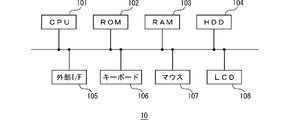
制御装置10は、例えばCPU、RAM、ROM、大容量記憶装置、通信インタフェースなどを含むコンピュータシステムを用いて構成される。図2に、制御装置を構成するためのコンピュータシステムの一例を示す。図示のコンピュータシステムは、CPU(中央演算ユニット)101、ROM(読み出し専用メモリ)102、RAM(一時記憶メモリ)103、HDD(ハードディスクドライブ)104、外部IF(インタフェース)105、キーボード106、マウス107、LCD(液晶表示装置)108を含んで構成されている。これらCPU101等の相互間はバスにより接続されている。CPU101は、プログラムを実行することにより情報処理を行う。ROM102は、CPU101の動作に必要な基本制御プログラムなどを格納する。RAM103は、CPU101の情報処理に必要なデータを一時記憶する。これらによって上記した制御装置10が構成される。HDD104は、データを記憶するための大容量記憶装置であり、上記した制御装置10の各機能を実現するためのアプリケーションプログラムやデータなどを格納する。
The
ロボット20は、制御装置10からの操作指令を受けてアームを動作させ、対象装置2のディスプレイに表示された画面上のボタン、アイコン等の操作対象要素に対して操作を行うことができるものである。ここで、本実施形態では「操作」としてディスプレイ上を触れる動作であるタップを前提にして説明する。図3にロボット20の模式図を示すように、本実施形態のロボット20は、少なくとも3軸方向に自在に移動可能な押圧部21を有して構成されており、この押圧部21により対象装置2のディスプレイ2a上の任意箇所をタップすることができる。なお、このようなロボット20は、産業用ロボット等として公知であり、例えば下記のURLによりアクセス可能なウェブサイトにて公開されているものを用いることができる。
https://www.jnovel.co.jp/service/qc/
The
https://www.jnovel.co.jp/service/qc/
カメラ30は、対象装置2のディスプレイ2aに表示された画面を撮影してその画像データを制御装置10へ出力する。なお、このカメラ30はロボット20と一体に構成されていてもよい。
The
図4は、制御装置10の機能構成を示すブロック図である。これらの機能は、制御装置10のCPU101がHDD104に記憶されたプログラムを読み込み、それを実行することで実現される。図示のように、制御装置10は、画面データ取得部11、画面遷移ボタン抽出部12、操作対象ボタン選択部13、ボタン操作部14、画面遷移記録部15、画面遷移図生成部16、画面同一性判定部17を含んで構成されている。
FIG. 4 is a block diagram showing the functional configuration of the
画面データ取得部11は、対象装置2のディスプレイ2aに現在表示されている画面の画像データをカメラ30から取得する。
The screen
画面遷移ボタン抽出部12は、画面データ取得部11により取得された画像データを公知の画像認識処理により解析して、画面上の表示要素であるボタン、アイコン、文字列等の操作対象要素を抽出する。ここで抽出される操作対象要素とは、それを操作された場合に画面遷移が発生すると予想される画像要素である。なお、上記のように本明細書では、ボタン、アイコン、文字列などの操作対象要素を総称して「ボタン」と定義する。
The screen transition
上記したボタンの抽出方法としては任意のルールを用いることができる。例えば、画面遷移ボタン抽出部12は、円や矩形の枠で囲まれた領域、周囲の領域と色彩や模様が異なる領域等を、操作された場合に画面遷移が発生すると予想されるボタンが表示されている領域と認識し、当該領域の画像データ並びにその位置座標(例えば画像の中心点座標)を抽出する。
Arbitrary rules can be used as the above-described button extraction method. For example, the screen transition
操作対象ボタン選択部13は、画面遷移ボタン抽出部12により抽出された1つ以上のボタンの中から、ロボット20による操作の対象とするボタンを選択する。
The operation target
ボタン操作部14は、操作対象ボタン選択部13により選択された、今回操作対象とするボタンをロボット20により操作するための制御を行う。具体的には、ボタン操作部14は、操作対象とするボタンの画面上の位置座標を含む操作指令をロボット20に対して送信する。ロボット20は、制御装置10のボタン操作部14からこの操作指令を受信すると、対象装置2のディスプレイ2aに表示されている画面上の各ボタンのうち、操作指令に含まれる位置座標で表される位置に表示されているボタンをタップする。
The
画面遷移記録部15は、ボタン操作部14の操作による画面遷移の結果を表す画面遷移データを制御装置10のHDD104に記録する。具体的には、画面遷移記録部15は、例えば、遷移前後の画面の画像データ、画面から抽出したボタンの画像データ及び位置座標、操作対象として選択したボタンの画像データ及び位置座標などをHDD104に記録する。
The screen
図5は、画面遷移記録部15により記録される画面遷移データの構造の一例を示す図である。例えば、フォルダAは、画面Aに関するデータが蓄積されたフォルダであり、当該フォルダ内には、画面Aの画像データ、画面Aから抽出されたボタンの画像データ及び位置座標、操作対象として選択されたボタンの画像データ及び位置座標等の関連付けを示す遷移情報データが記録されている。他のフォルダについても同様である。
FIG. 5 is a diagram showing an example of the structure of screen transition data recorded by the screen
また、フォルダAには、フォルダB、D、Eがサブフォルダとして関連付けられており、これにより遷移ルートが表されている。この例では、画面A上の所定のボタンが操作されることにより画面B、画面D、画面Eの各画面に遷移し、画面B上の所定のボタンが操作されることにより画面Cに遷移し、画面E上の所定のボタンが操作されることにより画面Fに遷移することが表されている。 In addition, folders B, D, and E are associated with folder A as subfolders, thereby representing a transition route. In this example, when a predetermined button on screen A is operated, screens B, D, and E are displayed, and when a predetermined button on screen B is operated, screen C is displayed. , a transition to a screen F when a predetermined button on the screen E is operated.
画面遷移図生成部16は、画面遷移記録部15に記録された画面遷移データに基づいて、画面遷移図を生成する。生成された画面遷移図は、HDD104に記録されるとともに、適宜、LCD108に表示される。
The screen
画面同一性判定部17は、画面遷移記録部15に記録された画像データを比較することにより、対象装置2のディスプレイ2aに現在表示されている画面と同一であるとみなされる画面が、今までたどってきた遷移ルートにおいて既に表示されているかを判定する。同一の画面か否かの判定方法としては、任意の公知の技術を用いることができる。例えば、画像データの画素同士を比較して、所定の割合(例えば、90%)以上の画素が一致していた場合に、同一の画面と判定することができる。遷移前後の画面は、一部要素(例えば時刻表示)の変化などにより完全に一致しないことがあるので、本実施形態では、一定の基準以上に類似していれば両画面を同一とみなすようにしている。
The screen
図6(A)は、画面遷移図の一例を示す図である。この画面遷移図は、ホーム画面である画面Aからの遷移ルートにあるボタンの操作が全て完了すると、そこまでに蓄積されたデータを用いて生成される。この画面遷移図をLCD108に表示し、あるいは図示しないプリンタにてプリントアウトすることで、ユーザが全体的な画面遷移の内容を検証することができる。また、操作の途中で画面遷移図を表示し、操作がどこまで終了したか確認できるようにしてもよい。図6(B)は、画面遷移図に含まれるボタンの一例を示す図である。画面遷移図には、アプリケーションソフトウェアのアイコン40a、何らかの機能を示す図形ボタン40b、同じく何らかの機能を示す記号ボタン40c、同じく何らかの機能を示す文字列40dなど種々の操作対象要素が含まれている。上記のように本明細書ではこれらを総称して「ボタン」と称している。
FIG. 6A is a diagram showing an example of a screen transition diagram. This screen transition diagram is generated using the data accumulated up to that point when all button operations on the transition route from screen A, which is the home screen, are completed. By displaying this screen transition diagram on the
図6(A)に示す本実施形態の画面遷移図では、ある画面から別の画面へ遷移したことを示す際に、各画面を示す画像の相互間に遷移方向を示す矢印画像を配置して各画面の繋がりを示すとともに、遷移の契機となったボタンの画像を各画面の相互間に配置している。例えば、画面Aと画面Bの各画像の間には、それらの間の遷移の契機となるボタンa1の画像が示されている。このように、各画面の画像間に遷移方向を示す矢印画像とともにボタンの画像を示すことで、画面遷移の状態をより把握しやすくなる。 In the screen transition diagram of this embodiment shown in FIG. 6A, an arrow image indicating the transition direction is arranged between the images indicating the respective screens to indicate the transition from one screen to another. The connection of each screen is shown, and the image of the button that triggered the transition is placed between each screen. For example, between the images of the screen A and the screen B, an image of a button a1 that triggers the transition between them is shown. In this way, by showing the button image together with the arrow image indicating the transition direction between the images of each screen, it becomes easier to grasp the state of the screen transition.
図7は、画面遷移情報生成システム1が行う画面遷移検証処理の動作について説明するためのフローチャートである。なお、各ステップの処理については、情報処理の結果に不整合を生じない限りにおいてそれらの順番を適宜変更してもよく、他の処理がさらに追加されてもよい。ここで、以下の処理を行うための準備として、予め、全ての画面に共通で表示されるホームボタンhmの位置座標が手動で設定されるとともに、このホームボタンhmが押された際の遷移先であるホーム画面として画面Aが設定され、HDD104に記録されているものとする。なお、ホーム画面に戻る操作については、例示する画像によるホームボタンhmのほか、ハードウェアボタンである場合や、特定の操作による場合なども考えられる。それらの場合にはハードウェアボタンの位置を予め設定し、あるいは特定の操作を予め設定しておけばよい。
FIG. 7 is a flow chart for explaining the operation of screen transition verification processing performed by the screen transition information generation system 1 . As for the processing of each step, the order thereof may be appropriately changed as long as the result of information processing is not inconsistent, and other processing may be added. Here, as a preparation for performing the following processing, the position coordinates of the home button hm displayed in common on all screens are manually set in advance, and the transition destination when this home button hm is pressed is set beforehand. It is assumed that the screen A is set as the home screen and recorded in the
制御装置10の画面データ取得部11は、対象装置2のディスプレイ2aに現在表示されている画面の画像データを取得する(ステップS11)。画面遷移ボタン抽出部12は、画面データ取得部11により取得された画像データを解析して、当該画面上のボタンの中から、操作された場合に画面遷移が発生すると予想される1つ以上のボタンを抽出する(ステップS12)。
The screen
操作対象ボタン選択部13は、画面遷移ボタン抽出部12により抽出された各ボタンの中から、今回の操作対象とするボタンを選択し(ステップS13)、当該ボタンの操作を指示する操作指令をロボット20に送信する。ロボット20は、制御装置10から操作指令を受信すると、対象装置2のディスプレイ2aに表示された画面上のボタンのうち、操作指令で指示されたボタンをタップする(ステップS14)。
The operation target
制御装置10の画面データ取得部11は遷移後の画面の画像データを対象装置2から取得する(ステップS15)。画面遷移記録部15は、画面遷移前後の画像データ、操作対象ボタンの画像データ及び位置座標等、画面遷移の結果を表す画面遷移データをHDD104に記録する(ステップS16)。
The screen
画面データ取得部11は、全画面の遷移の記録を完了したか否かを判定し(ステップS17)、全画面の遷移の記録が完了していない場合には(ステップS17のNo)、ステップS11に戻る。全画面の遷移の記録が完了した場合には(ステップS17のYes)は、制御装置10は、一連の処理を完了する。具体的には、ステップS17では、例えば、遷移後の画面がホーム画面である画面Aであり、かつ遷移ルート上の全てのボタンが既に操作されており、画面A上のボタンも全て既に操作されていた場合に、全画面の遷移の記録が完了したと判定できる。
The screen
図8は、図7に示すステップS13における操作対象ボタンの選択処理の手順について説明するためのフローチャートである。なお、各ステップの処理については、情報処理の結果に不整合を生じない限りにおいてそれらの順番を適宜変更してもよく、他の処理がさらに追加されてもよい。 FIG. 8 is a flowchart for explaining the procedure of the operation target button selection process in step S13 shown in FIG. As for the processing of each step, the order thereof may be appropriately changed as long as the result of information processing is not inconsistent, and other processing may be added.
画面同一性判定部17は、対象装置2のディスプレイ2aに現在表示されている画面が今までたどってきた遷移ルートにおいて既に表示された画面(既表示画面)と同一であるか否かを判定する(ステップS131)。
The screen
現在の画面が既表示画面と同一であると判定された場合には(ステップS131のYes)、操作対象ボタン選択部13は、画面上の既操作ボタンから遷移する下位の遷移ルートの画面上に、未操作ボタンが存在するか否かを判定する(ステップS132)。
If it is determined that the current screen is the same as the screen that has already been displayed (Yes in step S131), the operation target
未操作ボタンが存在すると判定された場合には(ステップS132のYes)、この未操作ボタンに対応する画面を再度表示させるために、既表示画面上の前回操作された既操作ボタンを今回の操作対象として再度選択する(ステップS133)。 If it is determined that there is an unoperated button (Yes in step S132), the previously operated button on the already displayed screen is changed to the current operation in order to display the screen corresponding to this unoperated button again. The object is selected again (step S133).
一方、ステップS132において既操作ボタンの下位の遷移ルートの画面上に未操作のボタンが存在しないと判定された場合には(ステップS132のNo)、現在表示されている画面上に未操作ボタンがあるか否かを判定し(ステップS134)、未操作ボタンが存在すると判定された場合には、(ステップS135のYes)、操作対象ボタン選択部13は、未操作ボタンのいずれか1つを今回の操作対象として選択する(ステップS135)。
On the other hand, if it is determined in step S132 that there is no unoperated button on the screen of the transition route below the operated button (No in step S132), there is no unoperated button on the currently displayed screen. (Step S134), and if it is determined that there is an unoperated button (Yes in Step S135), the operation target
一方、ステップS134において、未操作ボタンが存在しないと判定された場合には(ステップS134のNo)、ホーム画面に戻る操作により、ホーム画面に戻る(ステップS136)。具体的には、上記した通り、予め登録されているホームボタンhmが操作され、ホーム画面である画面Aへ戻るという処理がなされる。 On the other hand, if it is determined in step S134 that there is no unoperated button (No in step S134), the operation returns to the home screen (step S136). Specifically, as described above, the pre-registered home button hm is operated to return to the screen A, which is the home screen.
次に、図6(A)に示す画面遷移図を参照しながら、画面遷移を記録する動作の具体例について説明する。なお、主要な流れのみを説明し、フローチャートに沿った詳細な説明は省略する。前提として、画面Aはホーム画面であり、図6(A)に示すように、画面A上のボタンa1を操作すると画面Bに遷移し、ボタンa2を操作すると画面Dに遷移し、ボタンa3を操作すると画面Eに遷移するものとする。また、画面Bは、画面Aから遷移する画面であり、画面B上のボタンb1を操作すると画面Aに遷移し、ボタンb2を操作すると画面Cに遷移するものとする。画面Cは、画面Bから遷移する画面であり、画面C上のボタンc1を操作すると画面Bに遷移するものとする。画面Dは、画面Aから遷移する画面であり、画面D上のボタンd1を操作すると画面Aに遷移するものとする。画面Eは、画面Aから遷移する画面であり、画面E上のボタンe1を操作すると画面Fに遷移するものとする。画面Fは、画面Eから遷移する画面であり、画面F上のボタンf1を操作すると画面Aに遷移するものとする。 Next, a specific example of the operation of recording screen transitions will be described with reference to the screen transition diagram shown in FIG. Note that only the main flow will be described, and detailed description along the flow chart will be omitted. As a premise, the screen A is a home screen, and as shown in FIG. 6A, when the button a1 on the screen A is operated, the screen transitions to the screen B, and when the button a2 is operated, the screen transitions to the screen D, and the button a3 is pressed. It is assumed that the screen is changed to the screen E when operated. Further, the screen B is a screen to which the screen A transitions. When the button b1 on the screen B is operated, the screen B transitions to the screen A, and when the button b2 is operated, the screen B transitions to the screen C. The screen C is a screen that transitions from the screen B, and it is assumed that the screen transitions to the screen B when the button c1 on the screen C is operated. The screen D is a screen that transitions from the screen A, and it is assumed that the screen D transitions to the screen A when the button d1 on the screen D is operated. The screen E is a screen transitioned from the screen A, and the screen F is transitioned to when the button e1 on the screen E is operated. The screen F is a screen that transitions from the screen E, and it is assumed that the screen F transitions to the screen A when the button f1 on the screen F is operated.
まず、初期設定として、対象装置2のディスプレイ2aにホーム画面である画面Aを表示させる。画面データ取得部11は、対象装置2のディスプレイ2aに現在表示されている画面Aの画像データを取得する。画面遷移ボタン抽出部12は、画面Aの画像データを解析し、操作された場合に画面遷移が発生すると予想されるボタン(以下「操作対象候補となるボタン」という。)としてボタンa1、a2、a3の位置座標および画像を抽出する。この時点ではボタンa1はまだ操作されていないため、操作対象ボタン選択部13はボタンa1を操作対象ボタンとして選択し、ボタン操作部14はボタンa1の位置座標を含む操作指令をロボット20に送信する。これにより、ロボット20は、対象装置2に表示された画面A上のボタンa1のタップを行う。
First, as an initial setting, the
ボタンa1のタップにより画面Aから画面Bに遷移する。画面Bに遷移したため、画面遷移ボタン抽出部12は画面Bを解析し、操作対象候補となるボタンとしてボタンb1、b2の位置座標および画像を抽出する。ボタンb1はまだ操作されていないため、操作対象ボタン選択部13はボタンb1を操作対象ボタンとして選択し、ロボット20は画面B上のボタンb1をタップする。
The screen A transitions to the screen B by tapping the button a1. Since the screen transitions to screen B, the screen transition
ボタンb1のタップにより画面Bから画面Aに遷移する。画面Aに遷移したため、画面遷移ボタン抽出部12は画面Aの画像データを解析し、操作対象候補ボタンとしてボタンa1、a2、a3の位置座標および画像を抽出する。
The screen B is changed to the screen A by tapping the button b1. Since the screen has transitioned to screen A, the screen transition
また、画面同一性判定部17は、画面遷移記録部15により記録された画面遷移データを参照し、対象装置2のディスプレイ2aに現在表示されている画面Aは、今までたどってきた遷移ルートの画面Aと同一画面であると判断する。
Further, the screen
この場合、遷移ルート上の画面Bのボタンb1以外のボタンb2はまだ操作されていないため、操作対象ボタン選択部13は、画面Bを再度表示させるために、ボタンa1を操作対象ボタンとして再度選択する。ロボット20は、画面A上のボタンa1をタップする。
In this case, since the button b2 other than the button b1 of the screen B on the transition route has not been operated yet, the operation target
ボタンa1のタップにより画面Aから画面Bに遷移したため、画面遷移ボタン抽出部12は画面Bの画像データを解析し、操作対象候補となるボタンとしてボタンb1、b2の位置座標および画像を抽出する。この時点では、ボタンb2はまだ操作されていないため、ボタンb2が操作対象座標と選択され、ロボット20により画面B上のボタンb2がタップされる。
Since screen A transitions to screen B by tapping button a1, screen transition
ボタンb2のタップにより画面Bから画面Cに遷移する。画面Cに遷移したため、画面遷移ボタン抽出部12は画面Cの画像データを解析し、操作対象候補となるボタンとしてボタンc1の位置座標および画像を抽出する。この時点では、ボタンc1はまだ操作されていないため、ボタンc1が操作対象ボタンとして選択され、ロボット20により画面C上のボタンc1がタップされる。
The screen B is changed to the screen C by tapping the button b2. Since the screen has transitioned to the screen C, the screen transition
これにより、画面Bに遷移する。画面Bに遷移したため、画面遷移ボタン抽出部12は、当該画面Bの画像データを解析し、操作対象候補となるボタンとしてボタンb1、b2の位置座標および画像を抽出する。
As a result, the screen changes to screen B. Since the screen transitions to screen B, the screen transition
ここで、画面同一性判定部17は、対象装置2のディスプレイに現在表示されている画面Bが今までたどってきた遷移ルートにおいて既に表示された画面Bと同一画面と判断する。また、画面B上のボタンb1、b2もその先の遷移ルート上の画面C上のボタンc1も全て操作されているため、ホーム画面に戻る操作(ホームボタンhmの操作)により、ホーム画面である画面Aに戻る。
Here, the screen
これにより、画面Aに遷移したため、画面遷移ボタン抽出部12は画面Aの画像データを解析し、操作対象候補ボタンとしてボタンa1、a2、a3の位置座標および画像を抽出する。この時点では、ボタンa2はまだ操作されていないため、ボタンa2が操作対象ボタンとして選択され、ロボット20により画面A上のボタンa2がタップされる。
As a result, the screen transitions to screen A, and the screen transition
これにより、画面Dに遷移したため、画面遷移ボタン抽出部12は画面Dの画像データを解析し、操作対象候補ボタンとしてボタンd1の位置座標および画像を抽出する。この時点では、ボタンd1はまだ操作されていないため、操作対象ボタン選択部13は、ボタンd1を操作対象ボタンと選択する。ロボット20は、画面D上のボタンd1をタップする。
As a result, the screen transitions to the screen D, and the screen transition
これにより、画面Aに遷移したため、画面遷移ボタン抽出部12は、画面Aを解析し、操作対象候補ボタンとしてボタンa1、a2、a3の位置座標および画像を抽出する。
As a result, the screen transitions to screen A, and the screen transition
また、画面同一性判定部17は、この画面Aが今までのたどってきた遷移ルート上で既に表示された画面Aと同一画面と判断する。また、既に操作対象となったボタンa1、a2については、遷移ルート上のボタンをすべて操作しているため、操作対象ボタン選択部13は、ボタンa3を今回の操作対象ボタンとして選択する。ロボット20は、画面A上のボタンa3をタップする。
Further, the screen
これにより、画面Eに遷移したため、画面遷移ボタン抽出部12は、画面Eを解析し、操作対象候補ボタンとしてボタンe1の位置座標および画像を抽出する。この時点では、ボタンe1はまだ操作されていないため、操作対象ボタン選択部13は、ボタンe1を操作対象ボタンとして選択する。ロボット20は、画面E上のボタンe1をタップする。
As a result, the screen transitions to the screen E, so the screen transition
これにより、画面Fに遷移したため、画面遷移ボタン抽出部12は、画面Fを解析し、操作対象候補ボタンとしてボタンf1の位置座標および画像を抽出する。この時点では、ボタンf1はまだ操作されていないため、操作対象ボタン選択部13は、ボタンf1を操作対象ボタンとして選択する。ロボット20は、画面F上のボタンf1をタップする。
As a result, the screen transitions to the screen F, so the screen transition
これにより、画面Aに遷移したため、画面遷移ボタン抽出部12は、画面Aを解析し、操作対象候補ボタンとして、ボタンa1、a2、a3の位置座標および画像を抽出する。
As a result, the screen transitions to screen A, and the screen transition
また、画面同一性判定部17は、この画面Aが今までたどってきた遷移ルートにおいて既に表示されている画面Aと同一画面と判断する。遷移ルート上のボタンがすべてタップされており、かつ、画面A上のボタンがすべてタップされていることから、全遷移の記録が完了する。
Further, the screen
処理が終了した時点で、画面遷移図生成部16は、画面遷移記録部15によりHDD104に記録されたデータを用いて、図6(A)に示すような画面遷移図を生成し、この画面遷移図のデータをHDD104に記録するとともに、LCD108に表示する。
When the process is finished, the screen transition
以上説明したように、画面遷移情報生成システム1は対象装置2のディスプレイに現在表示されている画面の画像データを解析して操作対象候補ボタンを抽出し、その中から操作対象ボタンを選択してロボット20に操作指令を送信し、ロボット20が画面上の当該ボタンを操作するため、人手で操作する必要がなく手間や労力を削減することができる。また、操作シナリオを事前に作成する必要がないため、操作シナリオを作成する手間や労力を削減することができる。また、画面遷移結果を表すデータを蓄積し、当該データに基づいて画面遷移図を生成し、表示あるいはプリントアウトすることができるため、画面遷移の内容を容易に検証することができる。
As described above, the screen transition information generation system 1 analyzes the image data of the screen currently displayed on the display of the
なお、上述した実施形態は一例に過ぎず、本発明の要旨の範囲において各種変形が可能である。上述した実施形態で説明した画面遷移情報生成システム1の装置構成やデータ構成は一例に過ぎない。また、画面遷移の結果を表す画面遷移データは上記したようなフォルダ構造に限定されず、例えば、単に時系列的にデータを蓄積する等、種々のデータ構造が考えられる。 Note that the above-described embodiment is merely an example, and various modifications are possible within the scope of the gist of the present invention. The device configuration and data configuration of the screen transition information generation system 1 described in the above embodiment are merely examples. Further, the screen transition data representing the result of screen transition is not limited to the folder structure as described above, and various data structures such as simply accumulating data in chronological order are conceivable.
また、上記した実施形態では対象装置2の画面の画像データをカメラ30によって撮影して制御装置10へ取り込んでいたが、制御装置10と対象装置2を信号ケーブル(ないし無線通信手段)によって相互に接続し、ディスプレイ2aの画面をキャプチャして得られる画像データを直接的に制御装置10によって取り込むように制御装置10の画面データ取得部11を構成してもよい。
In the above-described embodiment, the image data of the screen of the
また、上記した実施形態では対象装置2のディスプレイ2aへの操作をロボット20により行っていたが、制御装置10と対象装置2を信号ケーブル(ないし無線通信手段)によって相互に接続し、ディスプレイ2aへの操作に応じた信号を対象装置2に発生させるようにしてもよい。この場合には、制御装置10から対象装置2に対して直接的(内部的)に信号を送信し、ディスプレイ2aのボタンへの操作に応じた信号を発生させるように制御部10のボタン操作部14を構成すればよい。
In the above-described embodiment, the
1:画面遷移情報生成システム、2:対象装置、2a:ディスプレイ、10:制御装置、11:画面データ取得部、12:画面遷移ボタン抽出部、13:操作対象ボタン選択部、14:ボタン操作部、15:画面遷移記録部、16:画面遷移図生成部、17:画面同一性判定部、20:ロボット、30:カメラ 1: screen transition information generation system, 2: target device, 2a: display, 10: control device, 11: screen data acquisition unit, 12: screen transition button extraction unit, 13: operation target button selection unit, 14: button operation unit , 15: screen transition recording unit, 16: screen transition diagram generation unit, 17: screen identity determination unit, 20: robot, 30: camera
Claims (9)
前記対象装置の前記ディスプレイに表示されている前記画面の画像データであってカメラによる当該画面の撮影若しくは前記対象装置での画面キャプチャによって得られる当該画像データを取得する画面データ取得部と、
前記画面データ取得部により取得された前記画面の画像データを画像認識処理によって解析して、前記画面に含まれる1つ以上の前記ボタンを抽出する画面遷移ボタン抽出部と、
前記画面遷移ボタン抽出部により抽出された前記ボタンの中から、操作対象とするボタンを選択する操作対象ボタン選択部と、
前記操作対象ボタン選択部により選択されたボタンを操作した際の信号を前記対象装置に発生させるボタン操作部と、
前記対象装置の前記ボタンの操作により生じた画面遷移の前後の前記画面の画像データと、当該画面遷移に際して操作された前記ボタンに関わるデータを含む画面遷移データを記録媒体へ記録する画面遷移記録部と、
前記画面遷移データを用いて画面遷移図を生成する画面遷移図生成部と、
前記ディスプレイに現在表示されている前記画面が、以前の画面遷移において既に表示された前記画面と実質的に同一であるか否かを判定する画面同一性判定部と、
を有し、
前記画面同一性判定部は、前記ディスプレイに現在表示されている前記画面と以前の画面遷移において既に表示された前記画面とが完全に一致しない場合であっても一定の基準以上に類似していれば当該各画面が同一であると判定するものであり、
前記操作対象ボタン選択部は、前記画面同一性判定部により、現在表示されている前記画面が既に表示された前記画面と同一ではないと判定された場合に、現在表示されている前記画面の前記ボタンのうち未だ操作対象として選択されていない前記ボタンの1つを操作対象として選択するものであり、かつ、
前記操作対象ボタン選択部は、前記画面同一性判定部により、現在表示されている前記画面が既に表示された前記画面と実質的に同一であると判定された場合に、現在表示されている前記画面の前記ボタンのうち既に操作対象として選択された前記ボタンによる画面遷移先の前記画面に未操作の前記ボタンが存在する場合には、当該既に操作対象として操作された前記ボタンの1つを操作対象として選択する、
画面遷移情報生成装置。 A device for generating information about screen transition caused by operating a button that is an operation target element on a screen displayed on a display of a target device,
a screen data acquisition unit that acquires image data of the screen displayed on the display of the target device and obtained by photographing the screen with a camera or capturing the screen with the target device;
a screen transition button extraction unit that analyzes image data of the screen acquired by the screen data acquisition unit by image recognition processing and extracts one or more of the buttons included in the screen;
an operation target button selection unit that selects a button to be operated from among the buttons extracted by the screen transition button extraction unit;
a button operation unit that causes the target device to generate a signal when the button selected by the operation target button selection unit is operated;
A screen transition recording unit for recording, onto a recording medium, image data of the screen before and after the screen transition caused by the operation of the button of the target device, and screen transition data including data related to the button operated at the time of the screen transition. When,
a screen transition diagram generation unit that generates a screen transition diagram using the screen transition data;
a screen identity determination unit that determines whether the screen currently displayed on the display is substantially the same as the screen already displayed in a previous screen transition;
has
The screen identity determination unit determines whether the screen currently displayed on the display and the screen already displayed in the previous screen transition are similar to or above a certain standard even if they do not completely match. For example, it is determined that each screen is the same,
When the screen identity determination unit determines that the currently displayed screen is not the same as the already displayed screen, the operation target button selection unit selects the currently displayed screen. One of the buttons that has not yet been selected as an operation target is selected as an operation target, and
When the screen identity determination unit determines that the currently displayed screen is substantially the same as the already displayed screen, the operation target button selection unit selects the currently displayed screen. When there is an unoperated button on the screen to which the button that has already been selected as the operation target among the buttons on the screen exists, one of the buttons that have already been operated as the operation target is operated. to select as a target,
Screen transition information generation device.
請求項1に記載の画面遷移情報生成装置。 The screen data acquisition unit receives a signal from the button operation unit when the screen after transition is a home screen set in advance, and all the buttons on the transition route and the buttons on the home screen are operated. terminating the acquisition of image data of the screen if it has been generated;
The screen transition information generating device according to claim 1.
請求項1に記載の画面遷移情報生成装置。 the button includes at least one of an icon, a graphic button, a symbol button and a character string;
The screen transition information generating device according to claim 1 .
前記画面遷移図生成部は、画面遷移の前後の前記画面の画像データの間に当該画面遷移に係る前記ボタンの画像データを配置して前記画面遷移図を生成する、
請求項1~3の何れか1項に記載の画面遷移情報生成装置。 The screen transition button extraction unit generates image data of the button from the image data of the screen, and the screen transition recording unit records the generated image data of the button as data related to the button. ,
The screen transition diagram generation unit generates the screen transition diagram by arranging the image data of the button related to the screen transition between the image data of the screens before and after the screen transition.
The screen transition information generation device according to any one of claims 1 to 3.
請求項4に記載の画面遷移情報生成装置。 The screen transition diagram generation unit generates the screen transition diagram by arranging an arrow image indicating the direction of the screen transition between the image data of the screens before and after the screen transition.
5. The screen transition information generation device according to claim 4.
を前記対象装置に発生させるものである、
請求項1~5の何れか1項に記載の画面遷移情報生成装置。 The button operation unit controls a robot that operates a specified position on the screen of the display, thereby causing the target device to generate a signal when the button selected by the operation target button selection unit is operated. be,
The screen transition information generation device according to any one of claims 1 to 5.
制御装置が、前記対象装置の前記ディスプレイに表示されている前記画面の画像データであってカメラによる当該画面の撮影若しくは前記対象装置での画面キャプチャによって得られる当該画像データを取得する第1ステップと、
前記制御装置が、前記第1ステップにて取得された前記画面の画像データを画像認識処理によって解析して、前記画面に含まれる1つ以上の前記ボタンを抽出する第2ステップと、
前記制御装置が、前記第2ステップにて抽出された前記ボタンの中から、操作対象とする前記ボタンを選択する第3ステップと、
前記制御装置が、前記第3ステップにて選択された前記ボタンを操作した際の信号を前記対象装置に発生させる第4ステップと、
前記制御装置が、前記対象装置の前記ボタンの操作により生じた画面遷移の前後の前記画面の画像データと、当該画面遷移に際して操作された前記ボタンに関わるデータを含む画面遷移データを記録媒体へ記録する第5ステップと、
前記制御装置が、前記画面遷移データを用いて画面遷移図を生成する第6ステップと、
前記制御装置が、前記ディスプレイに現在表示されている前記画面が以前の画面遷移において既に表示された前記画面と実質的に同一であるか否かを判定する第7ステップと、
を含み、
前記第7ステップは、前記ディスプレイに現在表示されている前記画面と以前の画面遷移において既に表示された前記画面とが完全に一致しない場合であっても一定の基準以上に類似していれば当該各画面が同一であると判定するものであり、
前記第3ステップは、前記第7ステップにより、現在表示されている前記画面が既に表示された前記画面と同一ではないと判定された場合に、現在表示されている前記画面の前記ボタンのうち未だ操作対象として選択されていない前記ボタンの1つを操作対象として選択するものであり、かつ、前記第7ステップにより、現在表示されている前記画面が既に表示された前記画面と実質的に同一であると判定された場合に、現在表示されている前記画面の前記ボタンのうち既に操作対象として選択された前記ボタンによる画面遷移先の前記画面に未操作の前記ボタンが存在する場合には、当該既に操作対象として操作された前記ボタンの1つを操作対象として選択する、
画面遷移情報生成方法。 A method for generating information about screen transition caused by operating a button, which is an operation target element on a screen displayed on a display of a target device, comprising:
a first step in which a control device acquires image data of the screen displayed on the display of the target device, the image data being captured by a camera or captured by the target device; ,
a second step in which the control device analyzes the image data of the screen acquired in the first step by image recognition processing to extract one or more of the buttons included in the screen;
a third step in which the control device selects the button to be operated from among the buttons extracted in the second step;
a fourth step in which the control device generates a signal in the target device when the button selected in the third step is operated;
The control device records, onto a recording medium, image data of the screen before and after the screen transition caused by the operation of the button of the target device, and screen transition data including data related to the button operated at the time of the screen transition. a fifth step to
a sixth step in which the control device generates a screen transition diagram using the screen transition data;
a seventh step in which the control device determines whether the screen currently displayed on the display is substantially the same as the screen already displayed in a previous screen transition;
including
In the seventh step, even if the screen currently displayed on the display and the screen already displayed in the previous screen transition do not completely match, if the similarity exceeds a certain standard, the relevant screen is displayed. It is determined that each screen is the same,
In the third step, if it is determined in the seventh step that the currently displayed screen is not the same as the already displayed screen, the buttons of the currently displayed screen are still displayed. One of the buttons not selected as an operation target is selected as an operation target, and the currently displayed screen is substantially the same as the already displayed screen in the seventh step. If it is determined that there is an unoperated button on the screen that is a transition destination of the button that has already been selected as an operation target among the buttons on the screen that is currently displayed, the button that has not been operated exists. selecting as an operation target one of the buttons that has already been operated as an operation target;
Screen transition information generation method.
前記対象装置の前記ディスプレイに表示されている前記画面の画像データであってカメラによる当該画面の撮影若しくは前記対象装置での画面キャプチャによって得られる当該画像データを取得する第1ステップと、
前記第1ステップにて取得された前記画面の画像データを画像認識処理によって解析して、前記画面に含まれる1つ以上のボタンを抽出する第2ステップと、
前記第2ステップにて抽出された前記ボタンの中から、操作対象とするボタンを選択する第3ステップと、
前記第3ステップにて選択されたボタンを操作した際の信号を前記対象装置に発生させる第4ステップと、
前記対象装置の前記ボタンの操作により生じた画面遷移の前後の前記画面の画像データと、当該画面遷移に際して操作された前記ボタンに関わるデータを含む画面遷移データを記録媒体へ記録する第5ステップと、
前記画面遷移データを用いて画面遷移図を生成する第6ステップと、
前記ディスプレイに現在表示されている前記画面が、以前の画面遷移において既に表示された前記画面と実質的に同一であるか否かを判定する第7ステップと、
をコンピュータシステムに実行させるものであって、
前記第7ステップは、前記ディスプレイに現在表示されている前記画面と以前の画面遷移において既に表示された前記画面とが完全に一致しない場合であっても一定の基準以上に類似していれば当該各画面が同一であると判定するものであり、
前記第3ステップは、前記第7ステップにより、現在表示されている前記画面が既に表示された前記画面と同一ではないと判定された場合に、現在表示されている前記画面の前記ボタンのうち未だ操作対象として選択されていない前記ボタンの1つを操作対象として選択するものであり、かつ、前記第7ステップにより、現在表示されている前記画面が既に表示された前記画面と実質的に同一であると判定された場合に、現在表示されている前記画面の前記ボタンのうち既に操作対象として選択された前記ボタンによる画面遷移先の前記画面に未操作の前記ボタンが存在する場合には、当該既に操作対象として操作された前記ボタンの1つを操作対象として選択する、
画面遷移情報生成用プログラム。 A program for causing a computer system to generate information about screen transitions caused by operating a button, which is an operation target element on a screen displayed on a display of a target device, comprising:
a first step of acquiring image data of the screen displayed on the display of the target device, the image data obtained by photographing the screen with a camera or capturing the screen with the target device;
a second step of analyzing the image data of the screen acquired in the first step by image recognition processing and extracting one or more buttons included in the screen;
a third step of selecting a button to be operated from among the buttons extracted in the second step;
a fourth step of causing the target device to generate a signal when the button selected in the third step is operated;
a fifth step of recording in a recording medium image data of the screen before and after the screen transition caused by the operation of the button of the target device and screen transition data including data related to the button operated at the time of the screen transition; ,
a sixth step of generating a screen transition diagram using the screen transition data;
a seventh step of determining whether the screen currently displayed on the display is substantially the same as the screen already displayed in a previous screen transition;
to a computer system ,
In the seventh step, even if the screen currently displayed on the display and the screen already displayed in the previous screen transition do not completely match, if the similarity exceeds a certain standard, the relevant screen is displayed. It is determined that each screen is the same,
In the third step, if it is determined in the seventh step that the currently displayed screen is not the same as the already displayed screen, the buttons of the currently displayed screen are still displayed. One of the buttons not selected as an operation target is selected as an operation target, and the currently displayed screen is substantially the same as the already displayed screen in the seventh step. If it is determined that there is an unoperated button on the screen that is a transition destination of the button that has already been selected as an operation target among the buttons on the screen that is currently displayed, the button that has not been operated exists. selecting as an operation target one of the buttons that has already been operated as an operation target;
Screen transition information generation program.
前記ディスプレイを撮影するカメラと、
前記ディスプレイの画面上の指定位置を操作するロボットと、
前記カメラ及び前記ロボットを接続された制御装置と、
を含み、
前記制御装置として請求項6に記載の画面遷移情報生成装置が用いられる、
画面遷移情報生成システム。
A system for generating information about screen transition caused by operating a button, which is an operation target element on a screen displayed on a display of a target device, comprising:
a camera that captures the display;
a robot that operates a specified position on the screen of the display;
a control device to which the camera and the robot are connected;
including
The screen transition information generation device according to claim 6 is used as the control device,
Screen transition information generation system.
Priority Applications (4)
| Application Number | Priority Date | Filing Date | Title |
|---|---|---|---|
| JP2019130016A JP7202571B2 (en) | 2019-07-12 | 2019-07-12 | Screen transition information generation device, screen transition information generation method, screen transition information generation program, screen transition information generation system |
| CN202080050612.5A CN114144287B (en) | 2019-07-12 | 2020-06-12 | Screen transition information generating device, screen transition information generating method, screen transition information generating program, and screen transition information generating system |
| US17/626,491 US12049015B2 (en) | 2019-07-12 | 2020-06-12 | Screen image transition information generation device, screen image transition information generation method, screen image transition information generation program, and screen image transition information generation system |
| PCT/JP2020/023239 WO2021010069A1 (en) | 2019-07-12 | 2020-06-12 | Screen image transition information generation device, screen image transition information generation method, screen image transition information generation program, and screen image transition information generation system |
Applications Claiming Priority (1)
| Application Number | Priority Date | Filing Date | Title |
|---|---|---|---|
| JP2019130016A JP7202571B2 (en) | 2019-07-12 | 2019-07-12 | Screen transition information generation device, screen transition information generation method, screen transition information generation program, screen transition information generation system |
Publications (3)
| Publication Number | Publication Date |
|---|---|
| JP2021015476A JP2021015476A (en) | 2021-02-12 |
| JP2021015476A5 JP2021015476A5 (en) | 2022-07-19 |
| JP7202571B2 true JP7202571B2 (en) | 2023-01-12 |
Family
ID=74210602
Family Applications (1)
| Application Number | Title | Priority Date | Filing Date |
|---|---|---|---|
| JP2019130016A Active JP7202571B2 (en) | 2019-07-12 | 2019-07-12 | Screen transition information generation device, screen transition information generation method, screen transition information generation program, screen transition information generation system |
Country Status (4)
| Country | Link |
|---|---|
| US (1) | US12049015B2 (en) |
| JP (1) | JP7202571B2 (en) |
| CN (1) | CN114144287B (en) |
| WO (1) | WO2021010069A1 (en) |
Families Citing this family (4)
| Publication number | Priority date | Publication date | Assignee | Title |
|---|---|---|---|---|
| JP7202571B2 (en) | 2019-07-12 | 2023-01-12 | 日本ノーベル株式会社 | Screen transition information generation device, screen transition information generation method, screen transition information generation program, screen transition information generation system |
| US12231802B2 (en) * | 2021-08-04 | 2025-02-18 | Theia Scientific, LLC | System and method for multi-modal microscopy |
| JP7503669B1 (en) | 2023-01-25 | 2024-06-20 | 株式会社 ミックウェア | Program, information processing method, and model generation method |
| JP2025073906A (en) * | 2023-10-27 | 2025-05-13 | 株式会社 ミックウェア | Program, information processing device |
Citations (8)
| Publication number | Priority date | Publication date | Assignee | Title |
|---|---|---|---|---|
| JP2002182914A (en) | 2000-12-18 | 2002-06-28 | Canon Inc | Screen transition display device, screen transition display method, and storage medium |
| JP2010079342A (en) | 2008-09-24 | 2010-04-08 | Hitachi Software Eng Co Ltd | System of generating operation instruction for web application |
| JP2012248097A (en) | 2011-05-30 | 2012-12-13 | Nippon Telegr & Teleph Corp <Ntt> | Automatic generation method for screen transition graph, and device therefor |
| WO2013157322A1 (en) | 2012-04-18 | 2013-10-24 | ソニー株式会社 | Information processing device and program |
| JP2014235699A (en) | 2013-06-05 | 2014-12-15 | 株式会社日立システムズ | Information processing apparatus, device setting system, device setting method, and program |
| JP2016048471A (en) | 2014-08-27 | 2016-04-07 | 日本電気株式会社 | Application development support device, data processing method and program therefor |
| JP2019004221A (en) | 2017-06-12 | 2019-01-10 | 三菱電機株式会社 | Control device and program |
| JP2019032719A (en) | 2017-08-08 | 2019-02-28 | 株式会社エス・エム・エス・データテック | Information processing system, information processing method, and program |
Family Cites Families (9)
| Publication number | Priority date | Publication date | Assignee | Title |
|---|---|---|---|---|
| JP3008872B2 (en) * | 1997-01-08 | 2000-02-14 | 日本電気株式会社 | GUI system automatic operation device and operation macro execution device |
| CN100498100C (en) * | 2007-09-30 | 2009-06-10 | 魏华 | Central air conditioner number control panel touch screen main menu design method |
| JP2008140408A (en) | 2007-12-28 | 2008-06-19 | Fujitsu Ltd | SPECIFICATION GENERATION PROGRAM, ITS RECORDING MEDIUM, SPECIFICATION GENERATION DEVICE, AND SPECIFICATION GENERATION METHOD |
| US9652077B2 (en) * | 2010-12-09 | 2017-05-16 | T-Mobile Usa, Inc. | Touch screen testing platform having components for providing conductivity to a tip |
| JP5516473B2 (en) * | 2011-03-24 | 2014-06-11 | コニカミノルタ株式会社 | Image forming apparatus, display method, and display program |
| JP2012248094A (en) | 2011-05-30 | 2012-12-13 | Denso Corp | Electronic equipment |
| CN102935288B (en) | 2012-10-31 | 2015-04-22 | 深圳市德力信科技有限公司 | Man-machine interaction game implementing device and method |
| US10994411B2 (en) * | 2018-10-10 | 2021-05-04 | Aipps, Llc. | Mobile phone robot |
| JP7202571B2 (en) | 2019-07-12 | 2023-01-12 | 日本ノーベル株式会社 | Screen transition information generation device, screen transition information generation method, screen transition information generation program, screen transition information generation system |
-
2019
- 2019-07-12 JP JP2019130016A patent/JP7202571B2/en active Active
-
2020
- 2020-06-12 CN CN202080050612.5A patent/CN114144287B/en active Active
- 2020-06-12 US US17/626,491 patent/US12049015B2/en active Active
- 2020-06-12 WO PCT/JP2020/023239 patent/WO2021010069A1/en not_active Ceased
Patent Citations (8)
| Publication number | Priority date | Publication date | Assignee | Title |
|---|---|---|---|---|
| JP2002182914A (en) | 2000-12-18 | 2002-06-28 | Canon Inc | Screen transition display device, screen transition display method, and storage medium |
| JP2010079342A (en) | 2008-09-24 | 2010-04-08 | Hitachi Software Eng Co Ltd | System of generating operation instruction for web application |
| JP2012248097A (en) | 2011-05-30 | 2012-12-13 | Nippon Telegr & Teleph Corp <Ntt> | Automatic generation method for screen transition graph, and device therefor |
| WO2013157322A1 (en) | 2012-04-18 | 2013-10-24 | ソニー株式会社 | Information processing device and program |
| JP2014235699A (en) | 2013-06-05 | 2014-12-15 | 株式会社日立システムズ | Information processing apparatus, device setting system, device setting method, and program |
| JP2016048471A (en) | 2014-08-27 | 2016-04-07 | 日本電気株式会社 | Application development support device, data processing method and program therefor |
| JP2019004221A (en) | 2017-06-12 | 2019-01-10 | 三菱電機株式会社 | Control device and program |
| JP2019032719A (en) | 2017-08-08 | 2019-02-28 | 株式会社エス・エム・エス・データテック | Information processing system, information processing method, and program |
Non-Patent Citations (1)
| Title |
|---|
| 西村 崇、玉置亮太,特集:本番RPA 働き方改革の切り札、電通も全社導入 (2)ツール充実、3つの選択ポイント,日経コンピュータ,日本,日経BP社,2017年11月23日,第952号,pp.030-033,ISSN 0285-4619 |
Also Published As
| Publication number | Publication date |
|---|---|
| CN114144287A (en) | 2022-03-04 |
| WO2021010069A1 (en) | 2021-01-21 |
| US20220281115A1 (en) | 2022-09-08 |
| JP2021015476A (en) | 2021-02-12 |
| US12049015B2 (en) | 2024-07-30 |
| CN114144287B (en) | 2024-07-23 |
Similar Documents
| Publication | Publication Date | Title |
|---|---|---|
| JP7202571B2 (en) | Screen transition information generation device, screen transition information generation method, screen transition information generation program, screen transition information generation system | |
| TW201322050A (en) | Electronic device and read guiding method thereof | |
| CN107092421B (en) | Method and device for displaying control of application | |
| EP3493064A1 (en) | A method and system for automated testing of a graphical user interface for customer devices | |
| TW201322049A (en) | Electronic device and read guiding method thereof | |
| US8947464B2 (en) | Display control apparatus, display control method, and non-transitory computer readable storage medium | |
| CN104427169A (en) | Remote support device, electronic device and remote support method | |
| US10282143B2 (en) | Information processing apparatus and control method of information processing apparatus | |
| CN112667212A (en) | Buried point data visualization method and device, terminal and storage medium | |
| WO2018121582A1 (en) | Script generation method and device | |
| US8405754B2 (en) | Image processing apparatus and control method for image processing apparatus | |
| JP2022137608A (en) | Information processing device, information processing method and program | |
| JP2021015476A5 (en) | ||
| US20210409550A1 (en) | Data input support apparatus, data input support method, and storage medium | |
| US10114518B2 (en) | Information processing system, information processing device, and screen display method | |
| US11240384B2 (en) | Information processing apparatus, method for information processing, and storage medium | |
| CN111796733B (en) | Image display method, image display device and electronic equipment | |
| WO2016047467A1 (en) | Information processing device and input support method | |
| JP2016091092A (en) | Browser, browser control method and program | |
| TWI411952B (en) | Displaying system for zoom content of document and method thereof | |
| JP2014197256A (en) | Editing device, editing method, and program | |
| JP2017204311A (en) | Information processing device, document management system, document management server, information processing method, and program therefor | |
| JP7237534B2 (en) | Information processing device, display control method for information processing device, and program | |
| JP6203613B2 (en) | Information processing apparatus, form management system, form management apparatus, information processing method, and program thereof | |
| KR20260017316A (en) | Information processing apparatus, information processing method, and storage medium |
Legal Events
| Date | Code | Title | Description |
|---|---|---|---|
| A621 | Written request for application examination |
Free format text: JAPANESE INTERMEDIATE CODE: A621 Effective date: 20220620 |
|
| A521 | Request for written amendment filed |
Free format text: JAPANESE INTERMEDIATE CODE: A523 Effective date: 20220708 |
|
| A871 | Explanation of circumstances concerning accelerated examination |
Free format text: JAPANESE INTERMEDIATE CODE: A871 Effective date: 20220715 |
|
| A131 | Notification of reasons for refusal |
Free format text: JAPANESE INTERMEDIATE CODE: A131 Effective date: 20220913 |
|
| A521 | Request for written amendment filed |
Free format text: JAPANESE INTERMEDIATE CODE: A523 Effective date: 20221026 |
|
| TRDD | Decision of grant or rejection written | ||
| A01 | Written decision to grant a patent or to grant a registration (utility model) |
Free format text: JAPANESE INTERMEDIATE CODE: A01 Effective date: 20221216 |
|
| A61 | First payment of annual fees (during grant procedure) |
Free format text: JAPANESE INTERMEDIATE CODE: A61 Effective date: 20221216 |
|
| R150 | Certificate of patent or registration of utility model |
Ref document number: 7202571 Country of ref document: JP Free format text: JAPANESE INTERMEDIATE CODE: R150 |