JP4635558B2 - Backup server device and program - Google Patents
Backup server device and program Download PDFInfo
- Publication number
- JP4635558B2 JP4635558B2 JP2004312013A JP2004312013A JP4635558B2 JP 4635558 B2 JP4635558 B2 JP 4635558B2 JP 2004312013 A JP2004312013 A JP 2004312013A JP 2004312013 A JP2004312013 A JP 2004312013A JP 4635558 B2 JP4635558 B2 JP 4635558B2
- Authority
- JP
- Japan
- Prior art keywords
- time
- backup
- traffic
- image data
- upload
- Prior art date
- Legal status (The legal status is an assumption and is not a legal conclusion. Google has not performed a legal analysis and makes no representation as to the accuracy of the status listed.)
- Expired - Fee Related
Links
Images





Landscapes
- Information Transfer Between Computers (AREA)
- Computer And Data Communications (AREA)
- Information Retrieval, Db Structures And Fs Structures Therefor (AREA)
- Signal Processing For Digital Recording And Reproducing (AREA)
- Management Or Editing Of Information On Record Carriers (AREA)
Description
この発明は、画像処理装置にネットワークを介して接続されているバックアップサーバ装置ならびにプログラムに関する。 The present invention relates to a backup server apparatus and a program connected to an image processing apparatus via a network.
従来、画像データをバックアップする技術としては、ハードディスクに記録された画像データをサーバに定期的に送信してバックアップした後、ハードディスク内の画像ファイルが破損した際には、サーバから画像データを取得して復元するようにしたハードディスクレコーダが知られている(特許文献1参照)。
しかしながら、上述した特許文献の技術にあっては、画像データをネットワーク経由でバックアップすることができるが、画像データのように大容量のデータをサーバに送信する場合、ネットワークが混雑していると、その込み具合によってはアップロード時間が相当長くなったり、バックアップ中に通信異常が発生したり、タイムアウトによるバックアップの失敗を招くという問題があった。 However, in the technology of the above-mentioned patent document, image data can be backed up via a network, but when transmitting a large amount of data like image data to a server, if the network is congested, Depending on how it is involved, there are problems that the upload time becomes considerably long, a communication error occurs during backup, and backup fails due to timeout.
ところで、一般に、各種のサービスを提供している企業側のサーバ装置に対して、インターネット経由で顧客端末からデータをアップロードする場合、インターネットサービスプロバイダ間でのトラフィックがボトルネックとなったり、サービス提供企業が契約しているバックボーンの容量不足がボトルネックとなって、通信障害が発生することがある。このような場合、サービス提供企業は多数の顧客からのアクセス集中によるボトルネックを解消するためにバックボーン容量を頻繁に増強するようにしているが、顧客数およびアクセスの集中度合いは刻々と変化し、将来予測の下、膨大な費用をかけて通信設備を増強したとしても無駄な出費となるケースも多く、どの程度の通信設備で足りるかの判断は、極めて困難を伴うものであった。 By the way, in general, when uploading data from a customer terminal via the Internet to a server device on the company side that provides various services, traffic between Internet service providers may become a bottleneck, Insufficient backbone capacity may become a bottleneck, causing communication failures. In such cases, service providers frequently increase their backbone capacity to eliminate bottlenecks caused by the concentration of access from many customers, but the number of customers and the degree of concentration of access change from time to time. Even if the communication equipment is increased by spending a huge amount of money under future forecasts, there are many cases where it is a wasteful expense, and it has been extremely difficult to determine how much communication equipment is sufficient.
本発明の課題は、画像処理装置からアップロードされたバックアップ対象の画像データを保管するバックアップサーバ装置において、アップロード要求を受けた時点のトラフィック状況に基づいてアップロードを即座に許可するか、トラフィック履歴を考慮した日時に制限するかを制御できるようにすることである。 An object of the present invention is to allow an immediate upload based on a traffic situation at the time of receiving an upload request or to consider a traffic history in a backup server device that stores backup target image data uploaded from an image processing device. It is possible to control whether to limit to the date and time.
本発明は、バックアップ対象の画像データを記録処理する画像処理装置にネットワークを介して接続されているバックアップサーバ装置であって、過去のトラフィック状況をトラフィック履歴として記憶管理するトラフィック履歴記憶手段と、前記画像処理装置からバックアップ要求を受けた際に、その時点のトラフィック状況に基づいてアップロードを適切に実行可能か否かを判別する判別手段と、この判別手段によって実行可能であると判別された場合には、現時点でのアップロードを許可し、実行不可能であると判別された場合には、前記トラフィック履歴を参照してトラフィック状況の少ない日時をアップロードの実行開始日時とするためのスケジュール情報を特定して要求元の画像処理装置に送信することによって現時点でのアップロードを制限するアップロード制御手段とを具備し、前記アップロード実行開始日時に前記画像処理装置からアップロードされた画像データをバックアップデータとして保管するようにしたことを特徴とする。
さらに、コンピュータに対して、上述した請求項1記載の発明に示した主要機能を実現させるためのプログラムを提供する(請求項2記載の発明)。
The present invention is a backup server device connected via a network to an image processing device for recording image data to be backed up, a traffic history storage means for storing and managing a past traffic situation as a traffic history , When a backup request is received from the image processing apparatus, a determination unit for determining whether or not the upload can be appropriately executed based on the traffic situation at that time, and a case where it is determined that the upload can be executed by the determination unit If it is determined that the current upload is permitted and execution is impossible, the schedule information for specifying the date / time when the traffic status is low as the execution start date / time of the traffic is identified with reference to the traffic history. By sending it to the requesting image processing device. ; And a upload control means for limiting the load, characterized by being adapted to store the uploaded image data from the image processing apparatus to the upload execution date and time as backup data.
Further, a program for realizing the main functions shown in the invention described in
本発明によれば、アップロード要求を受けた時点のトラフィック状況に基づいてアップロードを即座に許可するか、トラフィック履歴を考慮した日時に制限するかを制御することができ、通信設備を増強しなくても、トラフィック発生時、通信障害時などのようにアップロードが困難な状態下でのアップロードを回避することができ、画像データを円滑かつ正確にバックアップすることが可能となり、通信設備費の過剰投資を抑えることができる。
According to the present invention, it is possible to control whether to immediately permit uploading based on the traffic situation at the time of receiving the upload request or to limit the date and time in consideration of the traffic history, without increasing communication facilities. However, it is possible to avoid uploading under conditions where uploading is difficult, such as when traffic occurs or when there is a communication failure, making it possible to back up image data smoothly and accurately. Can be suppressed.
(実施例1)
以下、図1〜図9を参照して本発明の第1実施例を説明する。
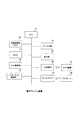
図1は、この実施例における画像データバックアップシステムの全体構成の概要を示したブロック図である。
このデータバックアップシステムは、電子アルバムを恒久的に保管可能なサービスを実施するもので、家庭内LANに接続された電子アルバム端末(画像処理装置)1と、電子アルバムをバックアップ保管するサービスを提供する企業側のデータセンタ2とがインターネット3を介して接続された広域通信システムであり、電子アルバム端末1とデータセンタ2側のアプリケーションサーバ21との間では、TCP/IP通信プロトコルを利用したHTTPプロトコル等によって、デジタル化(パケット化)された画像データを送受信するようにしている。
Example 1
A first embodiment of the present invention will be described below with reference to FIGS.
FIG. 1 is a block diagram showing an outline of the overall configuration of the image data backup system in this embodiment.
This data backup system implements a service capable of permanently storing an electronic album, and provides a service for backing up and storing an electronic album terminal (image processing apparatus) 1 connected to a home LAN. An HTTP protocol using a TCP / IP communication protocol between the
電子アルバム端末1は、カメラ撮影された画像データがメモリカードあるいはカメラ装置などから外部供給された際に、この画像データを内部記憶部(ハードディスク)に記録保存するもので、この内部記憶部に保存された画像データは、データセンタ2側にアップロード送信されることによってバックアップ保管される。すなわち、電子アルバム端末1は、アプリケーションサーバ21に対してバックアップ要求を通知することによって当該サーバ21から受信取得したバックアップ実行開始日時を設定した後、この設定日時に到達した際に、アプリケーションサーバ21をアクセスして画像データをアップロードするようにしている。データセンタ2側には、アプリケーションサーバ21およびストレージサーバ22が備えられており、アプリケーションサーバ21は、電子アルバム端末1との間で画像データなどの送受信を行い、電子アルバム端末1からアップロードされた画像データをストレージサーバ22に転送してそのバードディスク群(図示せず)内に記録保存させる。
The
なお、ISP4は、電子アルバム端末1側の顧客が契約したインターネットサービスプロバイダであり、家庭内LANとISP4とはADSL回線(上り:01.M〜1M〜10Mbps)5を介して接続されている。ISP6は、データセンタ2側の企業が契約したインターネットサービスプロバイダであり、データセンタ2とISP6とは、バックボーン(10M〜100M〜1Gbps)7を介して接続されている。
図2は、電子アルバム端末1の基本的な構成要素を示したブロック図である。
CPU11は、内部記憶部12内の各種プログラムに応じてこの電子アルバム端末の全体動作を制御する中央演算処理装置である。内部記憶部12は、プログラム領域およびデータ領域を有するハードディスク(HDD)である。この内部記憶部(内蔵ハードディスク)12内のプログラム領域には、後述する図5〜図7に示す動作手順に応じて本実施例を実現するためのプログラムが格納され、また、そのデータ領域には、撮影画像データを保管する画像フォルダなどが設けられている。この内蔵ハードディスク12内のプログラム、データは、必要に応じてRAM(たとえば、スタティックRAM)13にロードされたり、このRAM13内のデータが内蔵ハードディスク12にセーブされる。なお、RAM13は、プログラム実行領域と作業領域とを有している。
FIG. 2 is a block diagram showing basic components of the
The
さらに、CPU11は、その入出力周辺デバイスであるキー入力部14、表示部15、LAN通信部16、インターネット通信部17が接続されているほか、USB端子18を介してカメラ装置31、カードドライブ19を介してメモリカード32が接続可能となっている。LAN通信部16は、家庭内LANを介して他の電子機器との間でデータの送受信を行い、インターネット通信部17は、インターネット3を介してそのISP4との間でデータの送受信を行う通信インターフェイスである。
Further, the
メモリカード32は、SDカード、メモリステイクなどであり、デジタルカメラ装置31からの撮影画像データを電子アルバム端末1に外部供給する画像記録メディアであり、このメモリカード32がカードドライブ19のスロットに挿入セットされた際に、カードドライブ19は、カードセット有り信号を出力してCPU1に与えるほか、CPU11の制御下でメモリカード32をアクセスして画像データの読み込み動作を行う。
The
データセンタ2側のアプリケーションサーバ21およびストレージサーバ22の構成は、図示省略したが、CPU、内部記憶部(ハードディスク)、通信部、キー入力部、表示部などを有する構成となっている。なお、データセンタ2側は、電子アルバムをバックアップ保管するサービス以外のサービスも提供するが、この実施例においては、電子アルバムをバックアップ保管する場合について説明する。なお、ストレージサーバ22側には、大容量のハードディスク群などが備えられており、アプリケーションサーバ21の制御下で画像データの書き込み/読み出し動作が制御される。
The configurations of the
次ぎに、この第1実施例における画像データバックアップシステムの動作を説明する。
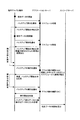
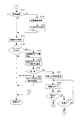
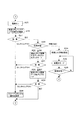
図3および図4は、電子アルバム端末1、アプリケーションサーバ21、ストレージサーバ22との間で行われる画像データのバックアップ手順を示したタイムチャートである。図5〜図7は、電子アルバム端末1側の動作を示したフローチャートであり、図8は、アプリケーションサーバ21が実行するスケジュール処理を示したフローチャートである。
なお、このタイムチャートで示したバックアップ手順、フローチャートに記述されている各機能は、読み取り可能なプログラムコードの形態で格納されており、このプログラムコードにしたがった動作が逐次実行される。また、伝送媒体を介して伝送されてきた上述のプログラムコードに従った動作を逐次実行することもできる。このことは後述する他の実施例においても同様であり、記録媒体の他に、伝送媒体を介して外部供給されたプログラム/データを利用してこの実施例特有の動作を実行することもできる。
Next, the operation of the image data backup system in the first embodiment will be described.
3 and 4 are time charts showing a backup procedure of image data performed between the
Each function described in the backup procedure and flowchart shown in the time chart is stored in the form of a readable program code, and operations according to the program code are sequentially executed. In addition, the operation according to the above-described program code transmitted via the transmission medium can be sequentially executed. This also applies to other embodiments described later, and in addition to the recording medium, operations specific to this embodiment can be executed using programs / data supplied externally via a transmission medium.
図5〜図7を参照して電子アルバム端末1の動作を説明する。
先ず、電子アルバム端末1においてCPU11は、電源オンに伴ってエラーフラグのオン/オフをチェックする(図5のステップA1)。このエラーフラグは、アプリケーションサーバ21にバックアップ要求を何回も試みても応答無しを検出した通信エラーなど、各種のエラー状態の有無を示すもので、エラーフラグがオフ(フラグ=“0”)であれば、バックアップ・フラグをオフする処理に移るが(ステップA2)、エラーフラグがオン(フラグ≠“0”)であれば、そのエラー内容を案内表示して エラーフラグをオフ(フラグ=“0”)した後に(ステップA3)、バックアップ・フラグをオフする処理に移る(ステップA2)。このバックアップ・フラグは、内蔵ハードディスク12に記録保存されている画像データをアプリケーションサーバ21に対してアップロードしてバックアップすべきことを示すフラグである。
The operation of the
First, in the
この状態において、上述したメモリカードドライブ19のスロットにメモリカード(SDカード)19が挿入されたか否かを示す検出信号に基づいてカードの挿入有無を判別し(ステップA4)、メモリカード32が挿入されている場合には、当該カードに記録されている画像データを内蔵ハードディスク12に保存済みか未保存かをチェックする(ステップA5)。ここで、カードが挿入されていない場合(ステップA4でNO)あるいはカードが挿入されていてもその画像が保存済みであれば(ステップA5でNO)、カメラ装置31がUSB端子18を介して接続されているかをチェックするステップA8に移るが、カード内の画像データが内蔵ハードディスク12に保存されていない未保存の画像データであれば(ステップA5でYES)、当該カード19から画像データを読み出し、内蔵ハードディスク12にコピーして記録保存させる(ステップA6)。この場合、新規画像の保存によって当該画像のバックアップを指示するためにバックアップ・フラグをオンしておく(ステップA7)。
In this state, it is determined whether or not a card is inserted based on a detection signal indicating whether or not the memory card (SD card) 19 is inserted into the slot of the
そして、カメラ装置31がUSB端子18を介して接続されているかをチェックし(ステップA8)、カメラ装置31が接続されている場合には、当該カメラ内部に記録されている画像データを内蔵ハードディスク12に保存済みか、未保存かをチェックし(ステップA9)、未保存であれば(ステップA9でYES)、カメラ内部の画像データを読み出し、内蔵ハードディスク12にコピーして記録保存させた後(ステップA10)、バックアップ・フラグをオンする(ステップA11)。その後、図6のステップA12に移り、内蔵ハードディスク12に記録保存されている画像データに対する編集処理が指示されたかを調べ、編集指示があれば、画像編集処理が実行されて内部記憶部(ハードディスク)の内容が書き換えられる(ステップA13)。この場合、編集後の当該画像データのバックアップを指示するためにバックアップ・フラグをオンしておく(ステップA14)。
Then, it is checked whether the
このようにバックアップ・フラグは、メモリカード(SDカード)19あるいはカメラ装置31から外部供給された画像データが新規保存されたり、保存画像が編集された際にオンされる。この状態において、電源のオフ操作が行われると(ステップA15)、バックアップ・フラグのオン/オフ状態を調べ(ステップA16)、フラグがオフされていれば、電源オフ操作に応答して電源を遮断してオフ状態となるが、フラグがオンされていれば、内蔵ハードディスク12に記録保存されている全画像のデータ量を算出すると共に(ステップA17)、指定URL(アプリケーションサーバ21のインターネットアドレス)を読み出し、アプリケーションサーバ21に対してバックアップ要求を行う(ステップA18)。この場合、電子アルバム端末1は、全画像のデータ量(バックアップ容量)を付加情報として、バックアップ要求と共に送信するようにしている。その後、アプリケーションサーバ21からの応答待ち状態となり、バックアップ要求を何回も試みても応答が無いタイムアップ時には(ステップA19)、エラーフラグに当該通信エラーを示す番号をセットした後に(ステップA20)、電源を遮断してオフ状態となる。
As described above, the backup flag is turned on when image data supplied from the memory card (SD card) 19 or the
ここで、アプリケーションサーバ21においては、図3に示すように、電子アルバム端末1から画像保存に伴うバックアップ要求を受け取ると、図8のフローチャートに示すスケジュール処理を実行することによってアップロード(バックアップ)の実行開始日時を特定し、この実行開始日時をスケジュール情報として要求元の電子アルバム端末1に対して送信するようにしている。すなわち、アプリケーションサーバ21は、電子アルバム端末1からのバックアップ要求有無をチェックし(ステップB1)、バックアップ要求を受けた際には、図9に示す時間帯別・曜日別トラフィック履歴テーブルTFTと電子アルバム端末1から送信されて来た全画像のデータ量(バックアップ容量)を参照することによって(ステップB2)、最適なバックアップ実行開始日時を示すスケジュール情報を決定し(ステップB3)、このバックアップ実行開始日時を要求元の電子アルバム端末1に対して応答送信する(ステップB4)。
Here, in the
ここで、時間帯別・曜日別トラフィック履歴テーブルTFTは、過去の各時間帯毎および曜日毎のトラフィック状況を考慮して予め設定された時間帯別・曜日別トラフィック履歴を記憶管理するテーブルである。すなわち、このトラフィック履歴テーブルTFTは、図9に示すように、その横軸に1時間単位に区分された時間帯を配置し、その縦軸に七曜日を配置した構成で、この時間帯と曜日とが交差するマトリックス状の各セル位置には、時間帯別・曜日別のトラフィック状況がセットされている。たとえば、カメラ撮影された画像データのバックアップ要求は、休日の翌日(月曜日)に集中し、かつ、月曜日の午前10時頃がピークであるという実情などを考慮して、月曜日の午前10時頃をピークとしたトラフィック状況が1時間単位および曜日単位毎にセットされている。 Here, the traffic history table for each time zone / day of week is a table for storing and managing the traffic history for each time zone / day of the week, which is preset in consideration of the traffic situation for each past time zone and each day of the week. . That is, as shown in FIG. 9, the traffic history table TFT has a configuration in which a time zone divided into units of one hour is arranged on the horizontal axis, and seven days of the week are arranged on the vertical axis. In each of the matrix cell positions where and intersect, traffic conditions for each time zone and each day of the week are set. For example, backup requests for image data taken by the camera are concentrated on the next day (Monday) of the holiday, and in consideration of the fact that the peak is around 10 am on Monday, the time is about 10 am on Monday. Peak traffic conditions are set for each hour and day of the week.
なお、時間帯別・曜日別トラフィック履歴テーブルTFTにおいて、上述した図示の例は、1時間単位および曜日単位毎にトラフィック状況をセットするようにしたが、10分単位、20分単位でトラフィック状況をセットしたり、クリスマス、正月などの翌日、運動会シーズン、入学・卒業シーズンなどに対応してトラフィック状況をセットするようにしてもよい。また、トラフィック履歴テーブルTFTに設定されているトラフィック状況をレベルによって示すようにしてもよい。たとえば、月曜日の午前10時頃をAレベル、月曜日の午前10時前後の時間帯をBレベル、その他の曜日、時間帯をCレベルとしてもよい。また、図示の例では、時間帯別・曜日別のトラフィック状況をマトリックステーブルで構成したが、時間帯別トラフィック履歴テーブルと曜日別トラフィック履歴テーブルに分けた構成であってもよい。また、トラフィック履歴テーブルTFTの内容は、定期的に更新するようにしているが、たとえば、トラフィック状況を自動的に検出分析しながら、この分析結果をトラフィック履歴テーブルに蓄積反映させるなど、その更新の仕方は任意である。さらに、トラフィック履歴テーブルTFTに設定されているトラフィック状況は、バックアップサービスを提供する施設を他のサービスと共有しているような場合には、他のサービスでのトラフィック状況をも考慮したものとなっている。 In the traffic history table TFT by time zone / day of the week, in the example shown in the figure, the traffic status is set for every hour and every day of the week, but the traffic status is set for every 10 minutes and every 20 minutes. The traffic situation may be set according to the next day such as Christmas or New Year, athletic meet season, admission / graduation season. Further, the traffic status set in the traffic history table TFT may be indicated by the level. For example, Monday around 10 am may be the A level, Monday around 10 am may be the B level, and other days and times may be the C level. In the example shown in the figure, the traffic situation for each time zone and each day of the week is configured by a matrix table. However, the traffic situation may be divided into a traffic history table for each time zone and a traffic history table for each day of the week. The contents of the traffic history table TFT are regularly updated. For example, while automatically detecting and analyzing the traffic situation, the analysis result is accumulated and reflected in the traffic history table. The way is arbitrary. In addition, the traffic status set in the traffic history table TFT takes into account the traffic status of other services when the facility providing the backup service is shared with other services. ing.
アプリケーションサーバ21は、バックアップ要求を受ける毎に、アクセスが集中する曜日・時間帯でのバックアップ要求を他の時間帯、他の曜日に分散させるために、時間帯別・曜日別トラフィック履歴テーブルTFTなどを参照してトラフィック状況の少ない最適なバックアップ実行開始日時を決定するようにしている。この場合、バックアップ要求を受けた時点のトラフィック状況が少なく、高速通信が可能な状態であれば、その時点をバックアップ実行開始日時として決定する。つまり、バックアップ要求時点をバックアップ実行開始日時として決定するが、その際、応答に要する若干の所要時間を考慮したり、先着順を考慮してバックアップ実行開始日時を決定するようにしている。また、アプリケーションサーバ21は、時間帯別・曜日別トラフィック履歴のほかに、バックアップ対象の全画像のデータ量(バックアップ容量)をも考慮してバックアップ実行開始日時を決定するようにしている。
Each time the
電子アルバム端末1は、アプリケーションサーバ21から送信されて来たバックアップ実行開始日時を設定した後に(図6のステップA21)、省電力モードに切り替える(ステップA22)。その後、設定したバックアップ実行開始日時に到達するまでの間あるいは電源がオンされるまでの間、必要最低限の電力である省電力モードのままの状態を保持する(ステップA22〜A24)。ここで、バックアップ実行開始日時に到達する前に、電源がオンされた場合には(ステップA24でYES)、最初のステップA1に戻り、以下、同様の動作が行われる。この場合においても、上述と同様、バックアップ実行開始日時に到達する前に内蔵ハードディスク12に記録保存されている画像データに新規画像が追加されたり、画像の削除、切り出しなどの編集が行われた際には、つまり、内蔵ハードディスク12の内容が再更新された際には、バックアップ・フラグがオンされるため、その後の電源オフ操作に応じて再度のバックアップ要求が行われる。
After setting the backup execution start date and time transmitted from the application server 21 (step A21 in FIG. 6), the
この場合、アプリケーションサーバ21は、図3に示すように、保存データの再更新に伴うバックアップ要求を受け取ると、上述したスケジュール処理を実行するが、その際、更新前における全画像のデータ量(バックアップ容量)と更新後のバックアップ容量とを比較し、その容量変化によって更新前のバックアップ実行開始日時を変更した新たなバックアップ実行開始日時を決定して、要求元の電子アルバム端末1に送信する。ここで、電子アルバム端末1は、前回設定したバックアップ実行開始日時を今回新たに受信したバックアップ実行開始日時に書き換えることによってその設定内容を変更する(図6のステップA21)。なお、図3の例では、前回設定したバックアップ実行開始日時よりも先の日時が新たな開始日時として再設定された場合を示している。
In this case, as shown in FIG. 3, when the
ここで、電子アルバム端末1は、バックアップ実行開始日時に達したことを検出すると(図6のステップA23)、図7のステップA25に移って電源をオンさせる。そして、上述の指定URLを読み出して、アプリケーションサーバ21に対してバックアップの実行を通知した後に(ステップA26)、応答待ち状態となる。ここで、バックアップ実行通知を何回も試みても応答が無いタイムアップ時には(ステップA27)、エラーフラグに当該通信エラーを示す番号をセットした後(ステップA28)、電源を遮断してオフ状態となるが、アプリケーションサーバ21からの応答を受信すると(ステップA27)、その応答内容は、肯定(OK)応答か、否定(NG)応答かを調べる(ステップA29)。
Here, when the
ここで、アプリケーションサーバ21は、図3に示すように、電子アルバム端末1からバックアップ実行通知を受信すると、現時点のアクセス数、通信速度を自動検出して経路上のボトルネックによる通信障害の発生有無を判別し、現時点のトラフィック状況はアップロードに適した状態か否かを調べ、現在のトラフィック状況に応じて肯定(OK)応答あるいは否定(NG)応答を行う。ここで、NG応答を行う場合には、たとえば、現在の日時から所定時間後(5分後、10分後など)の日時を新たなバックアップ実行開始日時として決定し、再度、要求元の電子アルバム端末1に対して新たなバックアップ実行開始日時を送信する。なお、この場合、上述した時間帯別・曜日別トラフィック履歴テーブルTFTの内容を加味して新たなバックアップ実行開始日時を決定するようにしてもよい。
Here, as shown in FIG. 3, when receiving a backup execution notification from the
電子アルバム端末1は、アプリケーションサーバ21から否定(NG)応答を受信した場合には(ステップA29)、その応答に付加されている新たなバックアップ実行開始日時を設定した後(ステップA34)、省電力モードに切り替える(ステップA35)。その後、設定したバックアップ実行開始日時に到達するまでの間(ステップA36)、必要最低限の電力である省電力モードのままの状態を保持する。ここで、実行開始日時に到達すると、ステップA25に戻り、電源をオンさせた後に、再度、バックアップ実行開始通知を行う(ステップA26)。
When receiving a negative (NG) response from the application server 21 (step A29), the
一方、電子アルバム端末1は、肯定(OK)応答を受信した場合には(ステップA29)、内蔵ハードディスク12に記録保存されている画像データのうち、アップロード済み(バックアップ済み)の画像データを重複してアップロードすることを避けるために、当該アップロード済みのデータを削除対象(バックアップ対象外)として指定するための削除データリストを作成し、アプリケーションサーバ21をアクセスして当該削除データリストの送信を行う(ステップA30)。
On the other hand, when receiving an affirmative (OK) response (step A29), the
ここで、図3および図4に示すように、アプリケーションサーバ21は、削除データリストを受信すると、ストレージサーバ22に対して当該指定データの削除を要求する。ストレージサーバ22は、この削除要求に応じて指定データを削除する処理を実行し、その処理が終了に伴って削除完了通知をアプリケーションサーバ21に対して行う。アプリケーションサーバ21は、この削除完了通知に応答して電子アルバム端末1をアクセスし、今回のバックアップ対象データ(更新データ)を送信すべきことを指示する更新データ送信要求を行う。
Here, as shown in FIGS. 3 and 4, when the
電子アルバム端末1は、更新データ送信要求の待ち状態において(ステップA31)、応答無しのタイムアップ時には、エラーフラグに当該通信エラーを示す番号をセットした後(ステップA28)、電源を遮断してオフ状態となるが、アプリケーションサーバ21からの更新データ送信要求を受信すると、内蔵ハードディスク12に記録保存されている画像データのうち、未アップロードの画像データ(更新データ)を読み出してアプリケーションサーバ21にアップロード送信する(ステップA32)。その後、応答待ち状態となり、バックアップの正常終了を示す応答を受けた場合には(ステップA33でYES)、電源を遮断してオフ状態となるが、 応答無しのタイムアップ時には(ステップA33)、エラーフラグに当該通信エラーを示す番号をセットした後(ステップA28)、電源を遮断してオフ状態となる。
When the
ここで、アプリケーションサーバ21は、電子アルバム端末1からアップロードされた更新データ(画像データ)を受信すると、この受信データを一時記憶した後に、バックアップの正常終了を示す正常応答を電子アルバム端末1に返信すると共に、ストレージサーバ22をアクセスし、この受信データをそのハードディスク群に記録保存すべきことを指示する記録保存の要求を行う。
Here, when the
以上のように、この第1実施例における電子アルバム端末1は、アプリケーションサーバ21に対してバックアップ要求を通知することによって当該サーバ21から受信取得したスケジュール情報に基づいてバックアップ実行開始日時を設定した後、この設定日時に到達した際に、アプリケーションサーバ21をアクセスして画像データをアップロードするようにしたから、画像データをアプリケーションサーバ21にバックアップするタイミングをサーバ21から取得したスケジュール情報(バックアップ実行開始日時)に基づいて制御することができ、通信設備を増強しなくても、トラフィック発生時、通信障害時などのようにアップロードが困難な状態下でのアップロードを回避することができ、画像データを円滑かつ正確にバックアップすることが可能となり、通信設備費の過剰投資を抑えることができる。
As described above, the
この場合、電子アルバム端末1は、バックアップ対象となる全画像分のデータ量をバックアップ要求と共に送信するようにしたから、アプリケーションサーバ21側では、この全画像分のデータ量に基づいてアップロードに必要な所要時間などを加味することができ、バックアップ実行開始日時を決定する際に、その決定をより適切に行うことができる。
また、画像データが編集されて再保存された際に、アプリケーションサーバ21に対してバックアップ要求を再度行う共に、編集後の全画像分のデータ量を送信し、これに応答してサーバ21から改めて送信されて来たバックアップ実行開始日時を再取得して設定内容を変更するようにしたから、画像編集によってデータ量が大きく増えたり、減った場合でも、サーバ21側では、その編集前後の変動データ量を加味することによってバックアップ実行開始日時を決定することができる。
In this case, since the
When the image data is edited and re-saved, a backup request is made again to the
電子アルバム端末1は、カメラ装置31あるいはメモリカード32からの画像データが内蔵ハードディスク12に記録保存された際に、そのことを示すバックアップ・フラグをセットし、電源オフ時にバックアップ・フラグのセット有無を判別し、フラグがセットされていれば、アプリケーションサーバ21に対してバックアップ要求を行い、これに応答して送信されて来たバックアップ実行開始日時を受信取得するようにしたから、画像データのバックアップを意識することなく、カメラ装置31あるいはメモリカード32からの画像データをバックアップさせることができる。この場合、電源オフ時にバックアップ実行開始日時を設定した後に省電力の待機状態に移行し、この待機状態においてバックアップ実行開始日時に到達したことを検出した際に、電源をオンして画像データをアップロードするようにしたから、無駄な電力消費を抑えることができる。
When the image data from the
電子アルバム端末1は、内蔵ハードディスク12の画像データが編集されて再保存された際に、画像編集が行われたことを示すバックアップ・フラグをセットし、電源オフ時にバックアップ・フラグのセット有無を判別し、フラグがセットされていれば、サーバ21に対してバックアップ要求を行い、これに応答して送信されて来たバックアップ実行開始日時を受信取得するようにしたから、画像編集を行った場合でもそのアップロードを意識することなく、編集後の画像データをアップロードさせることができる。
When the image data of the internal
また、バックアップ実行開始日時にサーバ21をアクセスした際に、アクセス数の増大などによってバックアップに適した状態でない場合にサーバ21から改めて送信されて来たバックアップ実行開始日時を再取得することによってその設定内容を延長変更するようにしたから、アップロードが困難な現状を回避することができる。
Further, when the
一方、アプリケーションサーバ21は、電子アルバム端末1からバックアップ要求を受けた際に、時間帯別・曜日別トラフィック履歴テーブルTFTを参照してトラフィック状況の少ない日時をバックアップ実行開始日時として特定して要求元に送信した後に、このバックアップ実行開始日時にアップロードされた画像データをバックアップデータとしてストレージサーバ22に保管させるようにしたから、過去のトラフィック履歴に基づいてアップロード実行開始日時を制限することができ、通信設備を増強しなくても、トラフィック発生時、通信障害時などのようにアップロードが困難な状態下でのアップロードを回避することができ、画像データを円滑かつ正確にバックアップすることが可能となり、通信設備費の過剰投資を抑えることができる。
(実施例2)
On the other hand, when receiving the backup request from the
(Example 2)
以下、この発明の第2実施例について図10および図11を参照して説明する。
なお、上述した第1実施例において、アプリケーションサーバ21は、電子アルバム端末1からバックアップ要求を受けた際に、時間帯別・曜日別トラフィック履歴テーブルTFTを参照してトラフィック状況の少ない日時をバックアップ実行開始日時として特定して要求元に送信するようにしたが、この第2実施例においては、バックアップ要求を受けた際に、その時点のトラフィック状況に基づいてアップロードを適切に実行可能か否かを判別し、実行可能であれば、現時点でのアップロードを許可し、実行不可能であれば、時間帯別・曜日別トラフィック履歴テーブルTFTなどを参照してトラフィック状況の少ない日時をバックアップ実行開始日時として特定して送信するようにしたものである。
ここで、両実施例において基本的あるいは名称的に同一のものは、同一符号を付して示し、その説明を省略すると共に、以下、第2実施例の特徴部分を中心に説明するものとする。
A second embodiment of the present invention will be described below with reference to FIGS. 10 and 11.
In the first embodiment described above, when the
Here, the same or the same names in both embodiments are denoted by the same reference numerals, the description thereof will be omitted, and the following description will focus on the features of the second embodiment. .
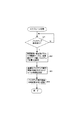
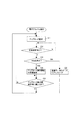
図10、図11は、第2実施例の特徴部分を示したフローチャートであり、図10は、電子アルバム端末1側の動作、図11は、アプリケーションサーバ21側の動作を示したフローチャートである。
先ず、電子アルバム端末1は、内蔵ハードディスク12に記録保持されている画像データをデータセンタ2側にバックアップさせるために、アップロードが可能か否かを問い合わせるアップロード要求をアプリケーションサーバ21に対して行い(ステップC1)、応答待ち状態となる(ステップC2)。
FIGS. 10 and 11 are flowcharts showing the features of the second embodiment, FIG. 10 is an operation on the
First, the
アプリケーションサーバ21は、電子アルバム端末1からのアップロード要求を受信すると(ステップD1)、現時点のアクセス数、通信速度を自動検出して経路上のボトルネックによる通信障害の発生有無を判別し、現時点のトラフィック状況はアップロードに適した状態か否かを調べ(ステップD2)、現在のトラフィック状況に応じて肯定(OK)応答あるいは否定(NG)応答を行う。すなわち、アップロードに適した状態でなければ、アップロードNGと判別して(ステップD3)、図9に示す時間帯別・曜日別トラフィック履歴テーブルTFTと電子アルバム端末1から送信されて来た全画像のデータ量(バックアップ容量)を参照することによって(ステップD4)、最適なバックアップ実行開始日時を示すスケジュール情報を決定し(ステップD5)、このバックアップ実行開始日時を要求元の電子アルバム端末1に対して応答送信する(ステップD6)。また、アップロードに支障がない状態であれば、アップロードOKと判別して(ステップD3)、アップロードの実行許可通知を要求元の電子アルバム端末1に対して応答送信する(ステップD7)。
Upon receiving the upload request from the electronic album terminal 1 (step D1), the
電子アルバム端末1は、アップロード要求に伴ってアプリケーションサーバ21からの応答を受信すると、OK応答かNG応答かの判別を行い(ステップC3)、NG応答であれば、バックアップ実行開始日時を受信して設定する(ステップC4)。その後、設定したバックアップ実行開始日時に到達したかを監視し(ステップC5)、実行開始日時に到達した際には、ステップC1に戻って、再度、アップロード要求を行う。一方、OK応答を受信した場合には(ステップC3)、内蔵ハードディスク12に記録保持されている画像データを読み出してアプリケーションサーバ21にアップロード送信する(ステップC6)。
ここで、アプリケーションサーバ21は、電子アルバム端末1からアップロードされた画像データを受信すると(ステップD8)、この受信データをストレージサーバ22に転送して記録保管させる(ステップD9)。
When receiving a response from the
When the
以上のように、この第2実施例におけるアプリケーションサーバ21は、電子アルバム端末1からアップロード要求を受けた際に、その時点のトラフィック状況に基づいてアップロードを適切に実行可能か否かを判別し、実行可能であれば、現時点でのアップロードを許可し、実行不可能であれば、時間帯別・曜日別トラフィック履歴テーブルTFTなどを参照してトラフィック状況の少ない日時をアップロード実行開始日時を決定して要求元の電子アルバム端末1に送信することによって現時点でのアップロードを制限した後に、このアップロード実行開始日時に電子アルバム端末1からアップロードされた画像データをバックアップデータとして保管するようにしたから、アップロード要求を受けた時点のトラフィック状況に基づいてアップロードを即座に許可するか、過去のトラフィック履歴を考慮した日時に制限するかを制御することができ、通信設備を増強しなくても、トラフィック発生時、通信障害時などのようにアップロードが困難な状態下でのアップロードを回避することができ、画像データを円滑かつ正確にバックアップすることが可能となり、通信設備費の過剰投資を抑えることができる。
As described above, when receiving the upload request from the
なお、上述した第1および第2実施例においては、電子アルバム端末1の内蔵ハードディスク内の画像データを一括してアップロードするようにしたが、たとえば、画像データ量が多いような場合には、画像データを複数に分割して各分割データ毎にアップロードするようにしてもよい。この場合、電子アルバム端末1は、分割データ毎に、対応するバックアップ実行開始日時をアプリケーションサーバ21から受信取得して設定しておけばよい。
In the first and second embodiments described above, the image data in the built-in hard disk of the
さらに、画像データの重要度、緊急度に応じて優先的にアップロードする画像データが指定されている場合に、電子アルバム端末1は、重要度、緊急度毎に、対応するバックアップ実行開始日時を受信取得して設定するようにしてもよい。
また、上述した実施例においては、言及しなかったが、外部供給する画像データは、静止画に限らず、動画であってもよく、また、音声データ付きの画像データであってもよい。
Furthermore, when image data to be preferentially uploaded is specified according to the importance and urgency of the image data, the
Although not mentioned in the above-described embodiments, the image data supplied externally is not limited to a still image but may be a moving image or image data with audio data.
その他、上述した第1および第2実施例においては、電子アルバム端末1を例示したが、カメラ撮影された画像データを電子アルバムとして収集保存するパーソナルコンピュータ(PC)あるいは携帯端末装置であってもよく、さらに、バードディスクレコーダ、通信機能付きのデジタルカメラ装置、カメラ付き携帯端末装置などにも同様に適用可能である。
In addition, in the first and second embodiments described above, the
一方、コンピュータに対して、上述した各手段を実行させるためのプログラムコードをそれぞれ記録した記録媒体(たとえば、CD−ROM、フレキシブルディスク、RAMカード等)を提供するようにしてもよい。すなわち、コンピュータが読み取り可能なプログラムコードを有する記録媒体であって、内部記憶部に記録された画像データをネットワーク経由でサーバ装置にアップロードするタイミングを示すスケジュール情報を当該サーバ装置から受信取得する機能と、受信取得したスケジュール情報に基づいてアップロードの実行開始日時を設定する機能と、設定されたアップロード実行開始日時に到達したことが検出された際に、前記サーバ装置をアクセスして前記内部記憶部に記録された画像データをアップロードする機能とを実現させるためのプログラムを記録したコンピュータが読み取り可能な記録媒体を提供するようにしてもよい。 On the other hand, a recording medium (for example, a CD-ROM, a flexible disk, a RAM card, etc.) on which program codes for executing the above-described units are recorded may be provided to the computer. That is, a recording medium having a computer-readable program code, and receiving and acquiring schedule information indicating the timing of uploading image data recorded in an internal storage unit to a server device via a network; A function of setting the execution start date and time of upload based on the received and acquired schedule information, and when it is detected that the set upload execution start date and time has been reached, the server device is accessed to the internal storage unit You may make it provide the computer-readable recording medium which recorded the program for implement | achieving the function to upload the recorded image data.
また、コンピュータが読み取り可能なプログラムコードを有する記録媒体であって、過去のトラフィック状況をトラフィック履歴として記憶管理する機能と、画像処理装置からバックアップ要求を受けた際に、前記トラフィック履歴を参照してトラフィック状況の少ない日時をアップロードの実行開始日時とするためのスケジュール情報を特定して要求元の画像処理装置に対して送信する機能と、前記アップロード実行開始日時に前記画像処理装置からアップロードされた画像データをバックアップデータとして保管する機能とを実現させるためのプログラムを記録したコンピュータが読み取り可能な記録媒体を提供するようにしてもよい。 In addition, the computer-readable recording medium has a program code, a function for storing and managing past traffic conditions as traffic history, and referring to the traffic history when receiving a backup request from the image processing apparatus. A function for specifying schedule information for setting the execution start date / time of the traffic situation as the date / time when the traffic situation is low and transmitting the schedule information to the requesting image processing device, and an image uploaded from the image processing device at the upload execution start date / time. You may make it provide the computer-readable recording medium which recorded the program for implement | achieving the function to preserve | save data as backup data.
また、コンピュータが読み取り可能なプログラムコードを有する記録媒体であって、過去のトラフィック状況をトラフィック履歴として記憶管理する機能と、画像処理装置からバックアップ要求を受けた際に、その時点のトラフィック状況に基づいてアップロードを適切に実行可能か否かを判別する機能と、実行可能であると判別された場合には、現時点でのアップロードを許可し、実行不可能であると判別された場合には、前記トラフィック履歴記を参照してトラフィック状況の少ない日時をアップロードの実行開始日時とするためのスケジュール情報を特定して要求元の画像処理装置に送信することによって現時点でのアップロードを制限する機能と、前記アップロード実行開始日時に前記画像処理装置からアップロードされた画像データをバックアップデータとして保管する機能とを実現させるためのプログラムを記録したコンピュータが読み取り可能な記録媒体を提供するようにしてもよい。 Further, the present invention is a recording medium having a computer readable program code, which stores and manages the past traffic situation as a traffic history, and based on the traffic situation at the time when a backup request is received from the image processing apparatus. If it is determined that the upload can be executed properly, and if it is determined that the upload is possible, the upload at the current time is permitted. A function for restricting uploading at the present time by specifying schedule information for setting the date and time when the traffic status is low as the execution start date and time of the traffic situation with reference to the traffic history record, and sending the request information to the requesting image processing apparatus; Image data uploaded from the image processing device at the upload execution start date and time It may be provided a recording medium readable recorded computer programs for realizing the storing function as backup data.
1 電子アルバム端末
2 データセンタ
3 インターネット
11 CPU
12 内蔵ハードディスク
14 キー入力部
17 インターネット通信部
18 USB端子
19 カードドライバ
21 アプリケーションサーバ
22 ストレージサーバ
31 カメラ装置
32 メモリカード
TFT 時間帯別・曜日別トラフィック履歴テーブル
1
12
TFT Traffic history table by time and day
Claims (2)
過去のトラフィック状況をトラフィック履歴として記憶管理するトラフィック履歴記憶手段と、
前記画像処理装置からバックアップ要求を受けた際に、その時点のトラフィック状況に基づいてアップロードを適切に実行可能か否かを判別する判別手段と、
この判別手段によって実行可能であると判別された場合には、現時点でのアップロードを許可し、実行不可能であると判別された場合には、前記トラフィック履歴を参照してトラフィック状況の少ない日時をアップロードの実行開始日時とするためのスケジュール情報を特定して要求元の画像処理装置に送信することによって現時点でのアップロードを制限するアップロード制御手段と、
を具備し、前記アップロード実行開始日時に前記画像処理装置からアップロードされた画像データをバックアップデータとして保管する、ようにしたことを特徴とするバックアップサーバ装置。 A backup server device connected via a network to an image processing device for recording image data to be backed up,
Traffic history storage means for storing and managing past traffic conditions as traffic history ,
When receiving a backup request from the image processing device, a determination unit for determining whether or not uploading can be appropriately executed based on the traffic situation at that time;
If it is determined by this determination means that it can be executed, uploading at the present time is permitted, and if it is determined that execution is not possible, the traffic history is referred to determine the date and time when the traffic condition is low. Upload control means for limiting the current upload by specifying schedule information for the execution start date and time of upload and sending it to the requesting image processing apparatus;
The backup server device is characterized in that image data uploaded from the image processing device at the upload execution start date and time is stored as backup data.
過去のトラフィック状況をトラフィック履歴として記憶管理する機能と、
画像処理装置からバックアップ要求を受けた際に、その時点のトラフィック状況に基づいてアップロードを適切に実行可能か否かを判別する機能と、
実行可能であると判別された場合には、現時点でのアップロードを許可し、実行不可能であると判別された場合には、前記トラフィック履歴を参照してトラフィック状況の少ない日時をアップロードの実行開始日時とするためのスケジュール情報を特定して要求元の画像処理装置に送信することによって現時点でのアップロードを制限する機能と、
前記アップロード実行開始日時に前記画像処理装置からアップロードされた画像データをバックアップデータとして保管する機能と、
を実現させるためのプログラム。 Against the computer,
A function to store and manage past traffic conditions as traffic history,
When receiving a backup request from the image processing apparatus, a function for determining whether or not uploading can be appropriately executed based on the traffic situation at that time; and
If it is determined that it is feasible, upload is permitted at the current time. If it is determined that it is not feasible, refer to the traffic history and start uploading when the traffic status is low. A function for restricting uploading at the present time by specifying schedule information for date and time and transmitting it to the requesting image processing apparatus;
A function of storing image data uploaded from the image processing apparatus at the upload execution start date and time as backup data;
A program to realize
Priority Applications (1)
| Application Number | Priority Date | Filing Date | Title |
|---|---|---|---|
| JP2004312013A JP4635558B2 (en) | 2004-10-27 | 2004-10-27 | Backup server device and program |
Applications Claiming Priority (1)
| Application Number | Priority Date | Filing Date | Title |
|---|---|---|---|
| JP2004312013A JP4635558B2 (en) | 2004-10-27 | 2004-10-27 | Backup server device and program |
Publications (2)
| Publication Number | Publication Date |
|---|---|
| JP2006127003A JP2006127003A (en) | 2006-05-18 |
| JP4635558B2 true JP4635558B2 (en) | 2011-02-23 |
Family
ID=36721728
Family Applications (1)
| Application Number | Title | Priority Date | Filing Date |
|---|---|---|---|
| JP2004312013A Expired - Fee Related JP4635558B2 (en) | 2004-10-27 | 2004-10-27 | Backup server device and program |
Country Status (1)
| Country | Link |
|---|---|
| JP (1) | JP4635558B2 (en) |
Families Citing this family (10)
| Publication number | Priority date | Publication date | Assignee | Title |
|---|---|---|---|---|
| JP2008022464A (en) * | 2006-07-14 | 2008-01-31 | Fuji Xerox Co Ltd | Image processor, storage system and program |
| JP4930031B2 (en) * | 2006-12-13 | 2012-05-09 | 富士通株式会社 | Control device and control system |
| JP2008172396A (en) * | 2007-01-10 | 2008-07-24 | Seiko Epson Corp | Control method of MFP and MFP communication management unit, MFP system including MFP and MFP communication management unit, MFP communication management unit |
| JP2008172398A (en) * | 2007-01-10 | 2008-07-24 | Seiko Epson Corp | Control method of MFP and MFP communication management unit, MFP system comprising MFP and MFP communication management unit, MFP, MFP communication management unit |
| JP5213359B2 (en) * | 2007-06-06 | 2013-06-19 | キヤノン株式会社 | Information processing apparatus, control method, and control program |
| JP5286855B2 (en) * | 2008-03-17 | 2013-09-11 | 富士通株式会社 | Remote copy method and storage system |
| EP2479684B1 (en) * | 2011-01-21 | 2013-09-25 | NTT DoCoMo, Inc. | Method and evaluation server for evaluating a plurality of videos |
| JP5859833B2 (en) * | 2011-12-02 | 2016-02-16 | 国立大学法人 東京大学 | Information processing apparatus, information processing system, server apparatus, and program |
| JP6019940B2 (en) * | 2012-08-30 | 2016-11-02 | 富士通株式会社 | Information processing apparatus, copy control program, and copy control method |
| JP7729854B2 (en) * | 2023-07-20 | 2025-08-26 | 日立ヴァンタラ株式会社 | STORAGE SYSTEM AND STORAGE SYSTEM BACKUP METHOD |
Family Cites Families (11)
| Publication number | Priority date | Publication date | Assignee | Title |
|---|---|---|---|---|
| JPH096664A (en) * | 1995-06-22 | 1997-01-10 | Ricoh Co Ltd | Network backup device |
| JPH1031562A (en) * | 1996-07-17 | 1998-02-03 | Hitachi Ltd | Information processing system |
| JPH1083364A (en) * | 1996-09-10 | 1998-03-31 | Fujitsu Ltd | Data transfer method |
| EP0985176A1 (en) * | 1997-05-01 | 2000-03-15 | Award Software Int., Inc. | Distributed mirroring of data volumes in networked systems |
| JP2000137636A (en) * | 1998-10-30 | 2000-05-16 | Hitachi Ltd | Backup device |
| JP2003308238A (en) * | 2002-04-17 | 2003-10-31 | Digion Inc | Storage network system |
| JP2004062418A (en) * | 2002-07-26 | 2004-02-26 | Fujitsu Ltd | Application reception method and application method |
| JP2004151824A (en) * | 2002-10-29 | 2004-05-27 | Vistapoint Technology Inc | Network system |
| JP2004151825A (en) * | 2002-10-29 | 2004-05-27 | Vistapoint Technology Inc | Network system |
| TW583538B (en) * | 2003-01-17 | 2004-04-11 | Yu-De Wu | Method of remote redundancy |
| GB0308121D0 (en) * | 2003-04-09 | 2003-05-14 | Ibm | Method and apparatus for data logging |
-
2004
- 2004-10-27 JP JP2004312013A patent/JP4635558B2/en not_active Expired - Fee Related
Also Published As
| Publication number | Publication date |
|---|---|
| JP2006127003A (en) | 2006-05-18 |
Similar Documents
| Publication | Publication Date | Title |
|---|---|---|
| US10826991B2 (en) | Downloading files from a cloud storage being used as temporary cache | |
| US8090917B2 (en) | Managing storage and migration of backup data | |
| US20070038680A1 (en) | Management of mobile-device data | |
| US8499190B2 (en) | Portable device and backup method thereof | |
| US20090276590A1 (en) | Maintaining checkpoints during backup of live system | |
| US20130290658A1 (en) | Storage Control Device, Data Archive Storage System, and Data Access Method | |
| JP2004227572A (en) | Remote data control method | |
| WO2013044785A1 (en) | User data backup method and apparatus | |
| JP2006127003A (en) | Image processing apparatus, backup server apparatus, and program | |
| US6052764A (en) | Computer data restoration assembly and associated method | |
| CN103562876A (en) | Redirecting requests to secondary location during temporary outage | |
| TWI263915B (en) | System and method for logging event of telecommunications devices | |
| JP3986346B2 (en) | Processing device, server, and program | |
| JP2002116945A (en) | Object distribution system and memory management method in portable terminal used for the same | |
| US20110231528A1 (en) | Language setting device, method for setting language of language setting device, and storage medium having stored therein language setting program | |
| CN105453518B (en) | Synchronization of metering networks | |
| JP6915345B2 (en) | Cloud management equipment, cloud management methods, and programs | |
| JP4574654B2 (en) | Personal information management apparatus, personal information management method, recording medium, and program | |
| CN104346101A (en) | Dynamic storage space allocation system and method | |
| JP2006323703A (en) | Assembly work support system, its server, worker terminal, and program | |
| WO2013168512A1 (en) | Cloud storage server | |
| CN110955391A (en) | A method and system for project management information backup | |
| JP2002229890A (en) | Information display method | |
| CN112764973B (en) | Data disaster tolerance method and device, electronic equipment and readable storage medium | |
| JP3859445B2 (en) | File backup system and recording medium |
Legal Events
| Date | Code | Title | Description |
|---|---|---|---|
| RD02 | Notification of acceptance of power of attorney |
Free format text: JAPANESE INTERMEDIATE CODE: A7422 Effective date: 20060210 |
|
| RD04 | Notification of resignation of power of attorney |
Free format text: JAPANESE INTERMEDIATE CODE: A7424 Effective date: 20060314 |
|
| A621 | Written request for application examination |
Free format text: JAPANESE INTERMEDIATE CODE: A621 Effective date: 20070411 |
|
| RD04 | Notification of resignation of power of attorney |
Free format text: JAPANESE INTERMEDIATE CODE: A7424 Effective date: 20080519 |
|
| A977 | Report on retrieval |
Free format text: JAPANESE INTERMEDIATE CODE: A971007 Effective date: 20100323 |
|
| A131 | Notification of reasons for refusal |
Free format text: JAPANESE INTERMEDIATE CODE: A131 Effective date: 20100427 |
|
| A521 | Request for written amendment filed |
Free format text: JAPANESE INTERMEDIATE CODE: A523 Effective date: 20100616 |
|
| A131 | Notification of reasons for refusal |
Free format text: JAPANESE INTERMEDIATE CODE: A131 Effective date: 20100727 |
|
| A521 | Request for written amendment filed |
Free format text: JAPANESE INTERMEDIATE CODE: A523 Effective date: 20100908 |
|
| TRDD | Decision of grant or rejection written | ||
| A01 | Written decision to grant a patent or to grant a registration (utility model) |
Free format text: JAPANESE INTERMEDIATE CODE: A01 Effective date: 20101026 |
|
| A01 | Written decision to grant a patent or to grant a registration (utility model) |
Free format text: JAPANESE INTERMEDIATE CODE: A01 |
|
| A61 | First payment of annual fees (during grant procedure) |
Free format text: JAPANESE INTERMEDIATE CODE: A61 Effective date: 20101108 |
|
| FPAY | Renewal fee payment (event date is renewal date of database) |
Free format text: PAYMENT UNTIL: 20131203 Year of fee payment: 3 |
|
| R150 | Certificate of patent or registration of utility model |
Ref document number: 4635558 Country of ref document: JP Free format text: JAPANESE INTERMEDIATE CODE: R150 Free format text: JAPANESE INTERMEDIATE CODE: R150 |
|
| LAPS | Cancellation because of no payment of annual fees |