JP2008009876A - Communication book system - Google Patents

Communication book system Download PDF

Info

Publication number
JP2008009876A
JP2008009876A JP2006181751A JP2006181751A JP2008009876A JP 2008009876 A JP2008009876 A JP 2008009876A JP 2006181751 A JP2006181751 A JP 2006181751A JP 2006181751 A JP2006181751 A JP 2006181751A JP 2008009876 A JP2008009876 A JP 2008009876A
Authority
JP
Japan
Prior art keywords
information
server
student
screen
classroom
Prior art date
Legal status (The legal status is an assumption and is not a legal conclusion. Google has not performed a legal analysis and makes no representation as to the accuracy of the status listed.)
Pending
Application number
JP2006181751A
Other languages
Japanese (ja)
Inventor
Kazunori Yamaichi
一典 山市
Koji Koike
幸司 小池
Current Assignee (The listed assignees may be inaccurate. Google has not performed a legal analysis and makes no representation or warranty as to the accuracy of the list.)
SHUNEIKAN CO Ltd
Original Assignee
SHUNEIKAN CO Ltd
Priority date (The priority date is an assumption and is not a legal conclusion. Google has not performed a legal analysis and makes no representation as to the accuracy of the date listed.)
Filing date
Publication date
Application filed by SHUNEIKAN CO Ltd filed Critical SHUNEIKAN CO Ltd
Priority to JP2006181751A priority Critical patent/JP2008009876A/en
Publication of JP2008009876A publication Critical patent/JP2008009876A/en
Pending legal-status Critical Current

Links

Images

Landscapes

  • Electrically Operated Instructional Devices (AREA)
  • Management, Administration, Business Operations System, And Electronic Commerce (AREA)

Abstract

<P>PROBLEM TO BE SOLVED: To provide a communication book system which allows students, their parents, teachers, and a room chief to browse class records and communicate with each other. <P>SOLUTION: Information terminals 100 to 400 of a room chief, teachers, students and parents, a server 500, and a database are connected through the Internet in a cram school or a culture center. The information terminal of the room chief creates room chief information to transmit it to the server, and receives information related to the room chief from the server. The information terminal of the teacher creates teacher information to transmit it to the server, and receives information related to the teacher from the server. The information terminal of the student creates student information to transmit it to the server, and receives information related to the student from the server. The information terminal of the parent creates parent information to transmit it to the server, and receives information related to the parent from the server. Thereby, the student, the parent, the teacher, and the room chief can communicate with each other, and view class records. <P>COPYRIGHT: (C)2008,JPO&INPIT

Description

本発明は、連絡帳システムに関し、特に、学習塾またはカルチャーセンターの教室長、講師、生徒、保護者のそれぞれの情報端末とサーバとデータベースがインターネットを介して接続され、教室長、講師、生徒、保護者4者間でサーバとデータベースを介して通信を行う連絡帳システムに関する。   The present invention relates to a contact book system, in particular, the information terminal and server and database of the classroom head, lecturer, student, and guardian of a cram school or culture center are connected via the Internet, and the classroom head, lecturer, student, The present invention relates to a contact book system that communicates between four parents via a server and a database.

従来、学習塾またはカルチャーセンターの教室長、講師、生徒、保護者の4者間での連絡は、口頭で伝えるか、プリント(ペーパー)や連絡帳(ノート)等の紙を媒体として行われている。また、授業の記録は、プリントやノート等に記載され、そのプリントを配布したり、ノートを閲覧したりしていた。そのため、学習塾やカルチャーセンター側でプリントを作成して印刷またはコピーし、生徒や保護者にそれぞれ配布するという手間と時間をかけている。また、生徒や保護者側からは、紙やノートに連絡したいことを書いて生徒が出席するときに、それを講師に渡すことによって連絡をするということをするため、連絡するために時間がかかった。さらに、媒体が紙であるため、紙代および印刷代の負担も大きくなっている。   Traditionally, communication between the classroom head of the cram school or the culture center, the instructor, the student, and the guardian is carried out verbally or using paper such as a print (paper) or contact book (notebook) as a medium. Yes. Class records were recorded on prints, notebooks, etc., and the prints were distributed or viewed. For this reason, it takes time and effort to create prints at the cram school or culture center, print or copy them, and distribute them to students and parents. Also, since students and parents write that they want to contact paper and notebooks and when students attend, they will contact them by giving them to the instructor, so it takes time to contact them. It was. Furthermore, since the medium is paper, the burden of paper and printing costs is also increased.

そこで、紙を媒体とせず、インターネット等の通信ネットワークに接続された端末によって学校施設と保護者との連絡を行うシステムが開示されている(例えば、特許文献1参照)。
特開2006−65721号公報
Therefore, a system is disclosed in which a school facility and a guardian are communicated by a terminal connected to a communication network such as the Internet without using paper as a medium (see, for example, Patent Document 1).
JP 2006-65721 A

特許文献1では、学校施設と保護者の間でのインターネットを介しての連絡のみであり、学校施設での授業に関する記録を生徒や保護者が閲覧できるというシステムではなく、教室長、講師、生徒、保護者4者間で授業の記録を見て、授業の内容などについて連絡をし合うということが可能ではなかった。   In Patent Document 1, only the communication between the school facility and the parent is made via the Internet, and it is not a system in which the student or the parent can view the records related to the lesson at the school facility. It was not possible to see the class records among the four parents and communicate with each other about the contents of the class.

本発明の目的は、上記の課題に鑑み、授業の記録等も閲覧でき、授業の内容等について連絡をし合うことが可能な連絡帳システムを提供することにある。   In view of the above-described problems, an object of the present invention is to provide a contact book system capable of browsing lesson records and the like and capable of communicating about lesson contents and the like.

本発明に係る連絡帳システムは、上記の目的を達成するために、次のように構成される。   In order to achieve the above object, the contact book system according to the present invention is configured as follows.

第1の連絡帳システム(請求項1に対応)は、学習塾またはカルチャーセンターの教室長、講師、生徒、保護者のそれぞれの情報端末とサーバとデータベースがインターネットを介して接続され、教室長、講師、生徒、保護者のそれぞれの情報端末とサーバとデータベースで通信を行う連絡帳システムであって、教室長の情報端末は、教室長情報を作成し、作成された教室長情報をサーバに送信し、サーバから教室長向け情報を受信し、講師の情報端末は、講師情報を作成し、作成された講師情報をサーバに送信し、サーバから講師向け情報を受信し、生徒の情報端末は、生徒情報を作成し、作成された生徒情報をサーバに送信し、サーバから生徒向け情報を受信し、保護者の情報端末は、保護者情報を作成し、作成された保護者情報をサーバに送信し、サーバから保護者向け情報を受信し、教室長、講師、生徒、保護者のそれぞれの情報端末で、サーバとデータベースを介して教室長情報と教室長向け情報と講師情報と講師向け情報と生徒情報と生徒向け情報と保護者情報と保護者向け情報に基づいて連絡のやりとりと授業の記録の閲覧を行うことで特徴づけられる。   The first contact book system (corresponding to claim 1) is the classroom head of the cram school or the culture center, the information terminals of the lecturer, students, and parents, the server and the database are connected via the Internet, the classroom head, It is a contact book system that communicates with each information terminal of instructor, student, and guardian using a server and a database. The information terminal of the classroom director creates classroom manager information and sends the created classroom manager information to the server. The instructor's information terminal receives information from the server, the instructor's information terminal creates instructor information, transmits the created instructor information to the server, receives information for the instructor from the server, and the student's information terminal Create student information, send the created student information to the server, receive student information from the server, the guardian's information terminal creates guardian information, and the created guardian information is To the parent and receive the information for the parents from the server, and the classroom head, the teacher, the student, and the parent's information terminal, the classroom manager information, the classroom manager information, the lecturer information, and the lecturer through the server and database It is characterized by performing communication and browsing of class records based on information, student information, student information, guardian information, and guardian information.

第1の連絡帳システムによれば、教室長、講師、生徒、保護者の間で授業の記録を見て、授業の内容などについて連絡をし合うということができる。   According to the first contact book system, it can be said that the class leader, the instructor, the student, and the guardian see the record of the class and communicate with each other about the contents of the class.

第2の連絡帳システム(請求項2に対応)は、上記の構成において、好ましくは、教室長情報は、授業の記録・指導報告書データ、コミュニケーションノート、教室長月次コメント、今週のひと言、連絡事項・お知らせ、業務連絡のうち少なくとも1つから成り、教室長向け情報は、指導報告書、月次報告書、生徒基本情報、職員情報、コミュニケーションノートのうち少なくとも1つから成り、講師情報は、授業の記録・指導報告書データ、コミュニケーションノート、月次報告書のうち少なくとも1つから成り、講師向け情報は、授業の記録、指導報告書、月次報告書、コミュニケーションノートのうち少なくとも1つから成り、生徒情報は、授業の記録とコミュニケーションノートの少なくとも1つから成り、生徒向け情報は、授業の記録とコミュニケーションノートの少なくとも1つから成り、保護者情報は、コミュニケーションノートから成り、保護者向け情報は、授業の記録とコミュニケーションノートの少なくとも1つから成ることで特徴づけられる。   The second contact book system (corresponding to claim 2) is preferably configured as described above, and the classroom manager information preferably includes class record / teaching report data, communication notes, classroom manager monthly comments, a word of the week, Consists of at least one of communication items / notifications and business communication. Information for classroom managers consists of at least one of instruction report, monthly report, basic student information, staff information, and communication notes. , Lesson records / teaching report data, communication notes, monthly reports, and information for lecturers is at least one of class records, teaching reports, monthly reports, communication notes The student information consists of at least one of a class record and a communication note. Made from at least one of the recording and communication notes, guardian information consists Communication notes, Parent's information is characterized by comprising at least one of recording and communication note class.

第3の連絡帳システム(請求項3に対応)は、上記の構成において、好ましくは、情報端末はコンピュータまたはインターネット接続可能な携帯電話であることで特徴づけられる。   The third contact book system (corresponding to claim 3) is preferably characterized in that, in the above configuration, the information terminal is a computer or a mobile phone that can be connected to the Internet.

本発明によれば、教室長、講師、生徒、保護者の間で授業の記録を見て、授業の内容などについて連絡をし合うということができる。また、本発明によれば、塾での学習の様子を保護者がタイムリーに確認でき、家庭学習や宿題の状況を塾側で管理できる。さらに、本発明によれば、保護者の不満を吸収する「目安箱」的な役割ができ、連絡事項や提出物を家庭でも確認できる。また、本発明によれば、時間講師への連絡事項・提出物等の情報伝達の簡易化を図ることができ、授業品質管理のシステム化ができ、社員と時間講師間の顧客情報の共有を図ることができる。   According to the present invention, it can be said that the class leader, the lecturer, the student, and the guardian see the record of the class and communicate with each other about the contents of the class. In addition, according to the present invention, a parent can check the state of learning at a cram school in a timely manner, and the cram school can manage the status of home study and homework. Furthermore, according to the present invention, it can act as a “reference box” that absorbs the dissatisfaction of the guardian, and the items to be communicated and the submitted items can be confirmed at home. In addition, according to the present invention, it is possible to simplify the communication of information such as matters to be communicated to time lecturers and submissions, to systemize class quality management, and to share customer information between employees and time lecturers. Can be planned.

以下に、本発明の好適な実施形態を添付図面に基づいて説明する。   Preferred embodiments of the present invention will be described below with reference to the accompanying drawings.

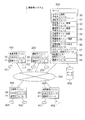
図1は、本発明の実施形態に係る連絡帳システムの構成を説明するための図である。図1に示すように、連絡帳システム1は教室長の情報端末としての教室長用パーソナルコンピュータ(以下、パソコンという)100と講師の情報端末としての講師用パソコン200と生徒の情報端末としての生徒用パソコン300と保護者の情報端末としての保護者用パソコン400とサーバ500とデータベース600がインターネット700で接続された構成をとる。教室長パソコン100は、入出力モジュール10と通信モジュール11を含む構成となっている。講師用パソコン200は、入出力モジュール20と通信モジュール21を含む構成となっている。生徒用パソコン300は、入出力モジュール30と通信モジュール31を含む構成となっている。保護者用パソコン400は、入出力モジュール40と通信モジュール41を含む構成となっている。サーバ500は、ログイン画面作成モジュール50と認証モジュール51と教室長メニュー画面作成モジュール52と講師用メニュー画面作成モジュール53と生徒用メニュー画面作成モジュール54と保護者用メニュー画面作成モジュール55と授業記録データ入出力・検索モジュール56とコミュニケーションノート入出力・検索モジュール57と報告書入出力・検索モジュール58と通信モジュール59を含む構成をとる。データベース600は、教室長、講師、生徒、保護者のユーザーIDとパスワードを記憶しており、また、授業の記録、コミュニケーションノート、各画面のレイアウト等を記憶している。さらに、教室長、講師、生徒、保護者のそれぞれがそれぞれのパソコンから入力し、送信した情報を記憶する。   FIG. 1 is a diagram for explaining a configuration of a contact book system according to an embodiment of the present invention. As shown in FIG. 1, the contact book system 1 includes a classroom manager personal computer (hereinafter referred to as a personal computer) 100 as a classroom manager information terminal, a lecturer personal computer 200 as a lecturer information terminal, and a student as a student information terminal. The personal computer 300, the personal computer 400 for the guardian as an information terminal for the guardian, the server 500, and the database 600 are connected via the Internet 700. The classroom manager personal computer 100 includes an input / output module 10 and a communication module 11. The instructor personal computer 200 includes an input / output module 20 and a communication module 21. The student personal computer 300 includes an input / output module 30 and a communication module 31. The guardian's personal computer 400 includes an input / output module 40 and a communication module 41. The server 500 includes a login screen creation module 50, an authentication module 51, a classroom manager menu screen creation module 52, an instructor menu screen creation module 53, a student menu screen creation module 54, a guardian menu screen creation module 55, and class record data. The configuration includes an input / output / retrieval module 56, a communication note input / output / retrieval module 57, a report input / output / retrieval module 58, and a communication module 59. The database 600 stores user IDs and passwords of classroom leaders, lecturers, students, and parents, as well as class records, communication notes, layouts of screens, and the like. Furthermore, each of the classroom head, the instructor, the student, and the guardian inputs information transmitted from each personal computer and stores the transmitted information.

図1において、各パソコン100,200,300,400には、入力装置101,201,301,401が接続されており、また、ディスプレイ等の出力装置102,202,302,402が接続されている。   In FIG. 1, input devices 101, 201, 301, 401 are connected to personal computers 100, 200, 300, 400, and output devices 102, 202, 302, 402 such as a display are connected. .

各パソコン100,200,300,400とサーバ500とデータベース600はインターネット700を介して情報の授受を行い、教室長、講師、生徒、保護者の4者間での連絡と授業の記録の閲覧用の入力と表示を行う。   The personal computers 100, 200, 300, 400, the server 500, and the database 600 exchange information via the Internet 700, and are used for communication between the classroom head, instructor, student, and guardian and for viewing class records. Input and display.

サーバ500のログイン画面作成モジュール50は、連絡帳システム1を利用するためのユーザーIDとパスワードを入力するための表示画面データを作成する。各パソコン100〜400で連絡帳システム1にアクセスしたときにその画面データが各パソコンに表示される。認証モジュール51は、各パソコン100〜400から送信されるユーザーIDとパスワードのデータから、データベース600に格納されたユーザーリスト、ユーザーIDリスト、パスワードリストに基づいて検索し、使用者の認証をする機能を有する。教室長メニュー画面作成モジュール52は、教室長用パソコン100からログインされたときに教室長用パソコン100に表示するメニュー画面データの作成を行う。講師メニュー画面作成モジュール53は、講師用パソコン200からログインされたときに講師用パソコン200に表示する講師メニュー画面データの作成を行う。生徒メニュー画面作成モジュール54は、生徒用パソコン300からログインされたときに生徒用パソコン300に表示する生徒メニュー画面データの作成を行う。保護者メニュー画面作成モジュール55は、保護者用パソコン400からログインされたときに保護者メニュー画面データの作成を行う。   The login screen creation module 50 of the server 500 creates display screen data for inputting a user ID and password for using the contact book system 1. When the personal computer 100 to 400 accesses the contact book system 1, the screen data is displayed on each personal computer. The authentication module 51 is a function for performing user authentication by searching based on the user list, user ID list, and password list stored in the database 600 from user ID and password data transmitted from the personal computers 100 to 400. Have The classroom head menu screen creation module 52 creates menu screen data to be displayed on the classroom head personal computer 100 when logged in from the classroom head personal computer 100. The instructor menu screen creation module 53 creates instructor menu screen data to be displayed on the instructor computer 200 when logged in from the instructor computer 200. The student menu screen creation module 54 creates student menu screen data to be displayed on the student personal computer 300 when logged in from the student personal computer 300. The guardian menu screen creation module 55 creates guardian menu screen data when logged in from the guardian's personal computer 400.

授業記録データ入出力・検索モジュール56は、各パソコン100〜400から授業記録の入出力を行うための表示画面の作成と、授業記録データのデータベース600への記憶と、データベース600からの授業記録データの検索を行う。コミュニケーションノート入出力・検索モジュール57は、コミュニケーションノートの入出力画面の作成と、コミュニケーションノートのデータベース600への記憶と、データベース600からのコミュニケーションノートの検索を行う。報告書入出力・検索モジュール58は、報告書データの入出力画面作成と、報告書データのデータベース600への記憶と、データベース600からの報告書の検索を行う。通信モジュール59は、各パソコン100〜400からインターネット700を介して送られる各情報を受信し、各パソコン100〜400へインターネット700を介して各情報を送信する。   The class record data input / output / search module 56 creates a display screen for inputting / outputting class records from the personal computers 100 to 400, stores class record data in the database 600, and class record data from the database 600. Search for. The communication note input / output / retrieval module 57 creates a communication note input / output screen, stores the communication note in the database 600, and searches the communication note from the database 600. The report input / output / retrieval module 58 creates an input / output screen for report data, stores the report data in the database 600, and retrieves reports from the database 600. The communication module 59 receives information transmitted from the personal computers 100 to 400 via the Internet 700 and transmits the information to the personal computers 100 to 400 via the Internet 700.

教室長用パソコン100の入出力モジュール10は、連絡帳システム1にアクセスするためのアドレスを入力し、連絡帳システム1のログイン画面を表示し、教室長メニュー画面を表示し、メニュー画面から選択した各画面の表示を行う。また、入出力モジュール10は、各画面表示に基づいて情報を入力する。通信モジュール11、インターネット700を介してその情報をサーバ500に送る。   The input / output module 10 of the classroom manager's personal computer 100 inputs an address for accessing the contact book system 1, displays the login screen of the contact book system 1, displays the classroom manager menu screen, and selects from the menu screen. Displays each screen. The input / output module 10 inputs information based on each screen display. The information is sent to the server 500 via the communication module 11 and the Internet 700.

講師用パソコン200の入出力モジュール20は、連絡帳システム1にアクセスするためのアドレスを入力し、連絡帳システム1のログイン画面を表示し、講師メニュー画面を表示し、メニュー画面から選択した各画面の表示を行う。また、入出力モジュール20は、各画面表示に基づいて情報を入力する。通信モジュール21、インターネット700を介してその情報をサーバ500に送る。   The input / output module 20 of the instructor personal computer 200 inputs an address for accessing the contact book system 1, displays the login screen of the contact book system 1, displays the instructor menu screen, and each screen selected from the menu screen. Is displayed. The input / output module 20 inputs information based on each screen display. The information is sent to the server 500 via the communication module 21 and the Internet 700.

生徒用パソコン300の入出力モジュール30は、連絡帳システム1にアクセスするためのアドレスを入力し、連絡帳システムのログイン画面を表示し、生徒メニュー画面を表示し、メニュー画面から選択した各画面の表示を行う。また、入出力モジュール30は、各画面表示に基づいて情報を入力する。通信モジュール31、インターネット700を介してその情報をサーバ500に送る。   The input / output module 30 of the student personal computer 300 inputs an address for accessing the contact book system 1, displays the login screen of the contact book system, displays the student menu screen, and displays each screen selected from the menu screen. Display. The input / output module 30 inputs information based on each screen display. The information is sent to the server 500 via the communication module 31 and the Internet 700.

保護者用パソコン400の入出力モジュール40は、連絡帳システム1にアクセスするためのアドレスを入力し、連絡帳システム1のログイン画面を表示し、保護者メニュー画面を表示し、メニュー画面から選択した各画面の表示を行う。また、入出力モジュール40は、各画面表示に基づいて情報を入力する。通信モジュール41、インターネット700を介してその情報をサーバ500に送る。   The input / output module 40 of the personal computer 400 for the guardian inputs an address for accessing the contact book system 1, displays the login screen of the contact book system 1, displays the guardian menu screen, and selects from the menu screen. Displays each screen. The input / output module 40 inputs information based on each screen display. The information is sent to the server 500 via the communication module 41 and the Internet 700.

上記の構成により、授業の記録等も閲覧でき、授業の内容等について連絡をし合うことができる。   With the above configuration, class records and the like can be viewed, and the contents of classes can be communicated with each other.

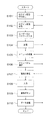
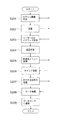
次に、本実施形態の連絡帳システムにおける連絡・授業記録閲覧処理を詳細に説明する。図2は教室長用パソコンの処理を示し、図3は、サーバの処理を示す。講師用パソコンの処理、生徒用パソコンの処理、保護者用パソコンの処理は、教室長用パソコンの処理内に含まれる処理と同様の処理を行うことができるので、説明を省略する。   Next, the contact / class record browsing process in the contact book system of this embodiment will be described in detail. FIG. 2 shows the processing of the classroom manager's personal computer, and FIG. 3 shows the processing of the server. The processing of the instructor's personal computer, the student's personal computer, and the guardian's personal computer can be performed in the same way as the processing included in the processing of the classroom manager's personal computer, and will not be described.

なお、連絡帳システムの連絡・授業記録閲覧処理は、教室長用パソコンとサーバ500が互いに通信して行われていくため、教室長用パソコン100の処理とサーバ500の処理をそれぞれ独立して説明しないで、本実施形態では上述した図2と図3を用いて連絡帳システム全体における処理の流れとして説明していく。   In addition, since the classroom manager's personal computer and the server 500 communicate with each other in the contact book system contact / class record browsing process, the classroom manager's personal computer 100 process and the server 500 process will be described independently. However, in this embodiment, the flow of processing in the entire contact book system will be described with reference to FIGS. 2 and 3 described above.

本実施形態の連絡帳システム1の処理を、教室長用パソコンを用いたときの例で説明する。まず、教室長は教室長用パソコン100の入力装置101より連絡帳システム1のログイン画面呼び出しの命令を入力し、通信モジュール11によりサーバ500に送信する。(図2のステップS101)。   The processing of the contact book system 1 of the present embodiment will be described using an example in which a classroom manager's personal computer is used. First, the classroom manager inputs a command for calling the login screen of the contact book system 1 from the input device 101 of the classroom manager's personal computer 100, and transmits it to the server 500 through the communication module 11. (Step S101 in FIG. 2).

ログイン画面呼び出しの命令を受信したサーバ500は、ログイン画面作成モジュール50により、ログイン画面を作成する(図3のステップS201)。サーバ500は作成したログイン画面を通信モジュール59により、教室長用パソコン100に送信する(図3のステップS202)。   The server 500 that has received the login screen call command creates a login screen by the login screen creation module 50 (step S201 in FIG. 3). The server 500 transmits the created login screen to the classroom manager's personal computer 100 through the communication module 59 (step S202 in FIG. 3).

教室長用パソコン100は、ログイン画面を受信し、出力装置102の画面上に表示する(図2のステップS102)。教室長は、出力装置102に表示されたログイン画面を見ながら、入力装置101によりユーザーIDとパスワードを入力する(図2のステップS103)。入力されたユーザーIDとパスワードを通信モジュール11により、サーバ500に送信する(図2のステップS104)。   The classroom manager's personal computer 100 receives the login screen and displays it on the screen of the output device 102 (step S102 in FIG. 2). The classroom manager inputs the user ID and password with the input device 101 while looking at the login screen displayed on the output device 102 (step S103 in FIG. 2). The input user ID and password are transmitted to the server 500 by the communication module 11 (step S104 in FIG. 2).

サーバ500は、ユーザーIDとパスワードを受信し(図3のステップS203)、認証モジュール51によりデータベース600の検索を実行し認証作業を行う(図3のステップS204)。サーバ500は、認証ができたならば、教室長メニュー画面作成モジュール52により教室長メニューを作成し、その教室長メニューを通信モジュール59により、教室長用パソコン100に送信する(図3のステップS205)。教室長用パソコン100は、教室長用メニューを受信し、表示する(図2のステップS105)。教室長用メニューには、その教室長からの連絡事項の入力画面と、授業の記録新規作成、授業の記録閲覧・入力、コミュニケーションノート出力、指導報告書出力、月次報告書出力、保守管理などのコマンドボタンを含んでいる。   The server 500 receives the user ID and password (step S203 in FIG. 3), and searches the database 600 by the authentication module 51 to perform authentication work (step S204 in FIG. 3). If the authentication is successful, the server 500 creates a classroom manager menu by the classroom manager menu screen creation module 52, and transmits the classroom manager menu to the classroom manager personal computer 100 by the communication module 59 (step S205 in FIG. 3). ). The classroom manager's personal computer 100 receives and displays the classroom manager's menu (step S105 in FIG. 2). The menu for the classroom manager includes an input screen for items to be communicated from the classroom manager, creation of new class records, browsing and entry of class records, communication note output, instruction report output, monthly report output, maintenance management, etc. Includes command buttons.

教室用パソコンから各項目を選択する(図2のステップS106)。各項目に対するコマンドがサーバに送られ、サーバ500はそのコマンドを受信する(図3のステップS206)。それに対応するモジュールが作動し、サーバ500から教室長用パソコン100にデータが送られる(図3のステップS207)。教室長用パソコン100は、画面を受信する(図2のステップS107)。教室長は、教室長用パソコン100に必要なデータを入力する(図2のステップS108)。登録ボタンをクリックする(図2のステップS109)。そのとき、データがサーバ500に送られる(図2のステップS110)。サーバ500は、データを受信し(図3のステップS208)、データベース600に記憶する。   Each item is selected from the classroom personal computer (step S106 in FIG. 2). A command for each item is sent to the server, and the server 500 receives the command (step S206 in FIG. 3). The corresponding module is activated, and data is sent from the server 500 to the classroom manager's personal computer 100 (step S207 in FIG. 3). The classroom manager's personal computer 100 receives the screen (step S107 in FIG. 2). The classroom head inputs necessary data to the classroom head personal computer 100 (step S108 in FIG. 2). A registration button is clicked (step S109 in FIG. 2). At that time, the data is sent to the server 500 (step S110 in FIG. 2). The server 500 receives the data (step S208 in FIG. 3) and stores it in the database 600.

講師用パソコン、生徒用パソコン、保護者用パソコンからも同様にログイン画面を表示することができ、メニューを表示させ、各メニュー画面から選択して画面を表示し、必要なデータを入力しサーバに送り、データベースに記憶させることができる。   Similarly, the login screen can be displayed from the instructor's computer, student's computer, and parent's computer. Menus can be displayed, selected from each menu screen to display the screen, and necessary data can be entered into the server. Can be sent and stored in a database.

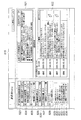
次に、実際に、教室長がパソコンにより連絡・閲覧するときのパソコン100の入出力装置101,102の操作方法の一例を図1と図4と図5と図6と図7を参照して説明する。図4に入力画面800を示す。入力画面800にはアドレスを入力するためのテキストボックス801と送信ボタン802が表示されている。教室長は、入力装置101により、テキストボックス801に予め指定された連絡帳システム1のアドレスを入力し、送信ボタンを図示しないマウスによりクリックする。それにより、入出力モジュール10から通信モジュール11により、インターネット700を介してサーバ500に送信され、サーバ500は、ログイン画面作成モジュール50によりデータベース600に記憶されている画面レイアウトを用いてログイン画面データを作成し、通信モジュール59によってインターネット700を介して教室長用パソコン100にログイン画面データを送信する。教室長用パソコン100は、通信モジュール11によってログイン画面データを受信し、入出力モジュール10によって出力装置102により、例えば図5に示す連絡帳システムのログイン画面810が表示される。ログイン画面810には、ユーザーIDとパスワードを入力するテキストボックス811,812があり、それらにユーザーIDとパスワードを入力し、ログイン命令ボタン813があり、その命令ボタン813を図示しないマウスによりクリックする。それにより、入出力モジュール10と通信モジュール11によってインターネット700を介してサーバ500にユーザーIDとパスワードが送信される。サーバ500の認証モジュール51は、受信したユーザーIDとパスワードをデータベース600に記憶されるデータを検索し、認証する。認証されたら、サーバ500は、教室長メニュー画面作成モジュール52によってデータベース600の画面レイアウトを用いて教室長メニュー画面データを作成し、通信モジュール59によりインターネット700を介して教室長用パソコン100に教室長メニュー画面データを送信する。教室長用パソコン100の通信モジュール11で教室長メニュー画面データを受信し、入出力モジュール10により出力装置102に教室長メニュー画面を表示する。   Next, an example of an operation method of the input / output devices 101 and 102 of the personal computer 100 when the classroom head actually contacts and browses with the personal computer is described with reference to FIG. 1, FIG. 4, FIG. 5, FIG. explain. FIG. 4 shows an input screen 800. On the input screen 800, a text box 801 for inputting an address and a send button 802 are displayed. The classroom head uses the input device 101 to input the address of the contact book system 1 designated in advance in the text box 801 and clicks the send button with a mouse (not shown). Thereby, the communication module 11 transmits the login screen data to the server 500 via the Internet 700 using the screen layout stored in the database 600 by the login screen creation module 50. The login screen data is transmitted to the classroom manager's personal computer 100 through the Internet 700 by the communication module 59. The classroom manager's personal computer 100 receives the login screen data by the communication module 11, and the input / output module 10 displays the login screen 810 of the contact book system shown in FIG. The login screen 810 includes text boxes 811 and 812 for inputting a user ID and a password. The user ID and password are input to the login screen 810, and a login command button 813 is clicked. The command button 813 is clicked with a mouse (not shown). As a result, the user ID and password are transmitted to the server 500 via the Internet 700 by the input / output module 10 and the communication module 11. The authentication module 51 of the server 500 searches the data stored in the database 600 and authenticates the received user ID and password. If authenticated, the server 500 creates classroom manager menu screen data using the screen layout of the database 600 by the classroom manager menu screen creation module 52, and sends the classroom manager to the classroom manager's personal computer 100 via the Internet 700 using the communication module 59. Send the menu screen data. The classroom manager menu screen data is received by the communication module 11 of the classroom manager personal computer 100, and the classroom manager menu screen is displayed on the output device 102 by the input / output module 10.

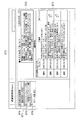
それにより、入力画面800は、図6で示すようにメニュー画面815となる。ここで、メニュー820と連絡事項テキストボックス821,822が記載された画面が表示される。メニュー820には、新しい授業の記録データを作るための授業の記録・新規作成ボタン823と授業の記録を見て、入力するための授業の記録・閲覧・入力ボタン824、教室長、講師、生徒、保護者間でのコミュニケーション用の文章データ書き込み閲覧用のコミュニケーションノートの画面の出力と印刷をするためのコミュニケーションノート出力ボタン825、指導報告書を表示、印刷するための指導報告書出力ボタン826、月次報告書の表示と印刷のための月次報告書出力ボタン827、ログイン画面に戻るためのログアウトボタン828、教室長が月ごとにコメントを書き込むための入力画面を表示するための室長月次コメントボタン829、教室長が週毎のひとことを書き込むための入力画面を表示するための今週のひとことボタン830、連絡事項とお知らせを書き込むための入力画面を表示する連絡事項・お知らせボタン831、業務連絡を書き込むための入力画面を表示するための室長からの業務連絡ボタン832、生徒基本情報を保守管理するための入力画面を表示するための生徒基本情報保守管理ボタン833、職員データを保守管理するための入力画面を表示するための職員マスター保守管理ボタン834が表示される。その画面上で、必要なメニューの各ボタンを図示しないマウスによりクリックすることにより、表示画面は、それぞれのボタンに対応する表示となる。例えば、授業の記録・新規作成ボタン823をクリックした場合、入出力モジュール10を介して通信モジュール11により、インターネット700を介してサーバ500にコマンドが送信され、サーバ500の授業記録データ入出力・検索モジュール56によってデータベース600からのデータを検索し、授業の記録データを通信モジュール59によって教室長用パソコン100に送られる。教室長用パソコン100では通信モジュール11により受信し、入出力モジュール10によって出力装置102に図7で示される授業の記録データ入力画面が表示される。   Thereby, the input screen 800 becomes a menu screen 815 as shown in FIG. Here, a screen on which a menu 820 and communication item text boxes 821 and 822 are described is displayed. The menu 820 includes a lesson record / new creation button 823 and a lesson record / view / input button 824 for viewing and inputting a lesson record / new creation button 823 for creating new lesson record data. A communication note output button 825 for outputting and printing a communication note screen for reading and writing text data for communication between parents, a guidance report output button 826 for displaying and printing a guidance report, Monthly report output button 827 for displaying and printing the monthly report, logout button 828 for returning to the login screen, and the room manager monthly for displaying the input screen for the classroom head to write comments monthly Comment button 829, this week's message for the classroom manager to display an input screen for writing a weekly comment Button 830, communication item / notification button 831 for displaying an input screen for writing communication items and notifications, business contact button 832 from the manager for displaying an input screen for writing business communication, and maintenance and management of basic student information A student basic information maintenance / management button 833 for displaying an input screen for performing an operation and a staff master maintenance / management button 834 for displaying an input screen for managing and managing staff data are displayed. By clicking each button of the necessary menu with a mouse (not shown) on the screen, the display screen becomes a display corresponding to each button. For example, when a class record / new creation button 823 is clicked, a command is transmitted to the server 500 via the Internet 700 by the communication module 11 via the input / output module 10, and class record data input / output / search of the server 500 is performed. Data from the database 600 is retrieved by the module 56, and lesson record data is sent to the classroom manager's personal computer 100 by the communication module 59. In the classroom manager's personal computer 100, the data is received by the communication module 11, and the input / output module 10 displays the class recording data input screen shown in FIG. 7 on the output device 102.

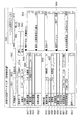
入力画面には、ログイン中であるかどうかを示すボックス840、学籍番号を入力または表示するテキストボックス841、生徒氏名を入力または表示するテキストボックス842、授業月・回を入力または表示するテキストボックス843、授業日を入力または表示するテキストボックス844、教科を入力または表示するテキストボックス845、担当を入力または表示するテキストボックス846、生徒本人の評価欄である宿題の実施状況を表示するテキストボックス847、理解度を表示するテキストボックス848、集中度を表示するテキストボックス849、復習テストの点数を表示するテキストボックス850、本日の宿題を表示するテキストボックス851、授業の感想を表示するテキストボックス852、講師評価欄である宿題の実施状況を表示するテキストボックス853、理解度を表示するテキストボックス854、集中度を表示するテキストボックス855、質問度を表示するテキストボックス856、定着度を表示するテキストボックス857、使用教材を表示するテキストボックス858、範囲・内容を表示するテキストボックス859、次回の内容を表示するテキストボックス860、次回の授業日を表示するテキストボックス861、次回の授業時刻を表示するテキストボックス862、講師コメントを表示するテキストボックス863、理解不足点を入力または表示するためのテキストボックス864、室長への報告事項や注意点を入力または表示するためのテキストボックス865、室長がコメントを入力するためのテキストボックス866、保護者コメントを表示するためのテキストボックス867、今月の授業報告を入力または表示するためのテキストボックス868が表示される。この画面から、学籍番号と生徒番号を入力すると、その生徒に関する記録がデータベースから呼び出され、授業月・回、授業日を入力するとそれに対応する授業の記録画面が表示される。保護者コメントを読んだときは、既読ボタン869を押すことにより、データベース600には、読んだことが登録される。また、この画面から、室長のコメントを書き込み、登録ボタン869を押すことにより、データはサーバ500に送られ、授業記録データ入出力・検索モジュール56によってデータベース600に記憶される。また、閉じるボタン870を押すことにより、メニュー画面815に戻る。   On the input screen, a box 840 indicating whether or not the user is logged in, a text box 841 for inputting or displaying a student ID number, a text box 842 for inputting or displaying a student name, and a text box 843 for inputting or displaying a lesson month / time are displayed. A text box 844 for inputting or displaying the class date, a text box 845 for inputting or displaying a subject, a text box 846 for inputting or displaying a charge, a text box 847 for displaying an implementation status of homework which is an evaluation column of the student himself, A text box 848 that displays an understanding level, a text box 849 that displays a concentration level, a text box 850 that displays a score for a review test, a text box 851 that displays today's homework, a text box 852 that displays an impression of a lesson, an instructor In the evaluation column A text box 853 that displays the status of homework, a text box 854 that displays the degree of understanding, a text box 855 that displays the degree of concentration, a text box 856 that displays the degree of question, a text box 857 that displays the degree of fixation, A text box 858 to display, a text box 859 to display the range / content, a text box 860 to display the next content, a text box 861 to display the next class date, a text box 862 to display the next class time, an instructor comment A text box 863 for displaying or a text box 864 for inputting or displaying a lack of understanding point, a text box 865 for inputting or displaying a report item or a caution to the room manager, a text box for the room manager to input a comment 866 Text box 867 for displaying the guardian comments, text box 868 for entering or displaying the month of classes report is displayed. When a student ID number and a student number are entered from this screen, a record relating to that student is called from the database, and when a lesson month / time and lesson day are entered, a corresponding lesson record screen is displayed. When the guardian's comment is read, the read is registered in the database 600 by pressing the read button 869. In addition, by writing the room manager's comment from this screen and pressing the registration button 869, the data is sent to the server 500 and stored in the database 600 by the lesson record data input / output / search module 56. Further, when the close button 870 is pressed, the screen returns to the menu screen 815.

次に、講師がパソコンにより連絡・閲覧するときのパソコン200の入出力装置201,202の操作方法の一例を図1と図4と図5と図8と図9を参照して説明する。講師用パソコン200においても図4で示した入力画面800と同様の画面が表示される。入力画面800にはアドレスを入力するためのテキストボックス801と送信ボタン802が表示されている。講師は、入力装置201により、テキストボックス801に予め指定された連絡帳システム1のアドレスを入力し、送信ボタンを図示しないマウスによりクリックする。それにより、サーバ500はログイン画面作成モジュール50によってデータベース600から画面レイアウトを検索し、ログイン画面データを作成し、通信モジュール59によって講師用パソコン200に送信する。講師用パソコン200は通信モジュール21によりログイン画面データを受信し、入出力モジュール20により出力装置202に表示する。例えば図5に示す連絡帳システムのログイン画面810が表示される。ログイン画面810には、ユーザーIDとパスワードを入力するテキストボックス811,812があり、それらにユーザーIDとパスワードを入力し、ログイン命令ボタン813があり、その命令ボタン813を図示しないマウスによりクリックする。それにより、入出力モジュール20と通信モジュール21によってインターネット700を介してサーバ500にユーザーIDとパスワードが送信される。サーバ500の認証モジュール51は、受信したユーザーIDとパスワードをデータベース600に記憶されるデータを検索し、認証する。認証されたら、サーバ500は、講師用メニュー画面作成モジュール53によってデータベース600の画面レイアウトを用いて講師用メニュー画面データを作成し、通信モジュール59によりインターネット700を介して講師用パソコン200に講師用メニュー画面データを送信する。講師用用パソコン200の通信モジュール21で講師用メニュー画面データを受信し、入出力モジュール20により出力装置202に講師用メニュー画面を表示する。   Next, an example of an operation method of the input / output devices 201 and 202 of the personal computer 200 when the instructor contacts and browses with the personal computer will be described with reference to FIGS. 1, 4, 5, 8, and 9. A screen similar to the input screen 800 shown in FIG. 4 is also displayed on the instructor personal computer 200. On the input screen 800, a text box 801 for inputting an address and a send button 802 are displayed. The instructor inputs the address of the contact book system 1 designated in advance in the text box 801 using the input device 201, and clicks the send button with a mouse (not shown). As a result, the server 500 searches the screen layout from the database 600 by the login screen creation module 50, creates login screen data, and transmits the login screen data to the instructor personal computer 200 by the communication module 59. The instructor's personal computer 200 receives the login screen data by the communication module 21 and displays it on the output device 202 by the input / output module 20. For example, a login screen 810 of the contact book system shown in FIG. 5 is displayed. The login screen 810 includes text boxes 811 and 812 for inputting a user ID and a password. The user ID and password are input to the login screen 810, and a login command button 813 is clicked. The command button 813 is clicked with a mouse (not shown). As a result, the user ID and password are transmitted to the server 500 via the Internet 700 by the input / output module 20 and the communication module 21. The authentication module 51 of the server 500 searches the data stored in the database 600 and authenticates the received user ID and password. Once authenticated, the server 500 creates lecturer menu screen data using the screen layout of the database 600 by the lecturer menu screen creation module 53, and the lecturer menu 200 on the lecturer personal computer 200 via the Internet 700 by the communication module 59. Send screen data. The communication module 21 of the instructor personal computer 200 receives the instructor menu screen data, and the input / output module 20 displays the instructor menu screen on the output device 202.

それにより、入力画面800は、図8で示すよう画面880になる。ここで、メニュー881と連絡事項テキストボックス882,883が記載された画面が表示される。メニュー881には、新しい授業の記録データを作るための入力画面を表示するための授業の記録・新規作成ボタン884と授業の記録を見て、入力するための入力画面を表示するための授業の記録・閲覧・入力ボタン885、コミュニケーションノートを表示、印刷するためのコミュニケーションノート出力ボタン886、指導報告書を表示、印刷するための指導報告書出力ボタン887、月次報告書を表示し、印刷するための月次報告書出力ボタン888、ログイン画面に戻るためのログアウトボタン889が表示される。その画面上で、必要なメニューの各ボタンを図示しないマウスによりクリックすることにより、表示画面は、それぞれのメニューに対する表示となる。例えば、授業の記録・新規作成ボタン884をクリックした場合、入出力モジュール20を介して通信モジュール21により、インターネット700を介してサーバ500にコマンドが送信され、サーバ500の授業記録データ入出力・検索モジュール56によってデータベース600からのデータを検索し、授業の記録データを通信モジュール59によって講師用パソコン200に送られる。講師用パソコン200では通信モジュール21により受信し、入出力モジュール20によって出力装置202に図9で示される授業の記録データ入力画面が表示される。   Thereby, the input screen 800 becomes a screen 880 as shown in FIG. Here, a screen on which a menu 881 and communication item text boxes 882 and 883 are described is displayed. The menu 881 includes a lesson record / new creation button 884 for displaying an input screen for creating record data of a new lesson and a lesson record for displaying an input screen for viewing and inputting the lesson record. Record / browse / input button 885, communication note output button 886 for displaying and printing communication notes, instruction report output button 887 for displaying and printing instruction reports, and monthly report displaying and printing A monthly report output button 888 for logging in and a logout button 889 for returning to the login screen are displayed. By clicking each button of a necessary menu with a mouse (not shown) on the screen, the display screen is displayed for each menu. For example, when a class record / new creation button 884 is clicked, a command is transmitted to the server 500 via the Internet 700 by the communication module 21 via the input / output module 20, and class record data input / output / search of the server 500 is performed. Data from the database 600 is retrieved by the module 56, and recorded data of the lesson is sent to the instructor personal computer 200 by the communication module 59. The instructor's personal computer 200 receives the data through the communication module 21, and the input / output module 20 displays the lesson record data input screen shown in FIG.

入力画面には、ログイン中であるかどうかを示すボックス890、学籍番号を入力または表示するテキストボックス891、生徒氏名を入力または表示するテキストボックス892、授業月・回を入力または表示するテキストボックス893、授業日を入力または表示するテキストボックス894、教科を入力または表示するためのテキストボックス895、担当を入力または表示するテキストボックス896、生徒本人の評価欄である宿題の実施状況を表示するテキストボックス897、理解度を表示するテキストボックス898、集中度を表示するテキストボックス899、復習テストの点数を表示するテキストボックス900、本日の宿題を表示するテキストボックス901、授業の感想を表示するテキストボックス902、講師評価欄である宿題の実施状況を入力または表示するテキストボックス903、理解度を入力または表示するテキストボックス904、集中度を入力または表示するテキストボックス905、質問度を入力または表示するテキストボックス906、定着度を入力または表示するテキストボックス907、使用教材を入力または表示するテキストボックス908、範囲・内容を入力または表示するテキストボックス909、次回の内容を入力または表示するテキストボックス910、次回の授業日を入力または表示するテキストボックス911、次回の授業時刻を入力または表示するテキストボックス912、講師コメントを入力または表示するテキストボックス913、理解不足点を入力または表示するテキストボックス914、室長への報告事項や注意点を入力または表示するテキストボックス915、室長からのコメントを表示するテキストボックス916、保護者コメントを表示するテキストボックス917、今月の授業報告を入力または表示するテキストボックス918が表示される。この画面から、学籍番号と生徒番号を入力すると、その生徒に関する記録がデータベースから呼び出され、授業月・回、授業日を入力するとそれに対応する授業の記録画面が表示される。教室長からのコメントを読んだときは、既読ボタン919を押すことにより、データベース600には、読んだことが登録される。保護者コメントを読んだときは、既読ボタン920を押すことにより、データベース600には、読んだことが登録される。また、この画面から、講師のコメントを書き込み、登録ボタン921を押すことにより、データはサーバ500に送られ、授業記録データ入出力・検索モジュール56によってデータベース600に記憶される。また、閉じるボタン922を押すことにより、メニュー画面に戻る。   On the input screen, a box 890 indicating whether or not the user is logged in, a text box 891 for inputting or displaying a student ID number, a text box 892 for inputting or displaying a student name, and a text box 893 for inputting or displaying a lesson month / time are displayed. A text box 894 for inputting or displaying the class date, a text box 895 for inputting or displaying the subject, a text box 896 for inputting or displaying the charge, a text box for displaying the implementation status of the homework which is the student's evaluation column 897, a text box 898 for displaying the degree of comprehension, a text box 899 for displaying the degree of concentration, a text box 900 for displaying the score of the review test, a text box 901 for displaying today's homework, and a text box 902 for displaying the impression of the lesson. , Teacher evaluation A text box 903 for inputting or displaying the implementation status of a homework, a text box 904 for inputting or displaying an understanding level, a text box 905 for inputting or displaying a degree of concentration, a text box 906 for inputting or displaying a question level, a fixing degree A text box 907 for inputting or displaying a text box, a text box 908 for inputting or displaying a teaching material, a text box 909 for inputting or displaying a range / content, a text box 910 for inputting or displaying a next content, and a next school day Or a text box 911 to display, a text box 912 to input or display the next lesson time, a text box 913 to input or display instructor comments, a text box 914 to input or display incomprehension points, a report to the room manager Text box 915 to enter or view the notes, text box 916 to display the comments from the Office, the text box 917 to display the guardian comments, the text box 918 to enter or display this month's lesson report is displayed. When a student ID number and a student number are entered from this screen, a record relating to that student is called from the database, and when a lesson month / time and lesson day are entered, a corresponding lesson record screen is displayed. When a comment from the classroom manager is read, the read is registered in the database 600 by pressing a read button 919. When the guardian's comment is read, the read is registered in the database 600 by pressing the read button 920. In addition, when the comment of the lecturer is written from this screen and the registration button 921 is pressed, the data is sent to the server 500 and stored in the database 600 by the lesson record data input / output / search module 56. Further, when the close button 922 is pressed, the menu screen is displayed again.

次に、生徒がパソコン300により連絡・閲覧するときのパソコン300の入出力装置301,302の操作方法の一例を図1と図4と図5と図10と図11を参照して説明する。入力画面は、教室長パソコン100と同様に図4に示した入力画面800となる。入力画面800にはアドレスを入力するためのテキストボックス801と送信ボタン802が表示されている。生徒は、入力装置301により、テキストボックス801に予め指定された連絡帳システム1のアドレスを入力し、送信ボタンを図示しないマウスによりクリックする。それにより、サーバ500はログイン画面作成モジュール50によってデータベース600から画面レイアウトを検索し、ログイン画面データを作成し、通信モジュール59によって生徒用パソコン300に送信する。生徒用パソコン300は通信モジュール31によりログイン画面データを受信し、入出力モジュール30により出力装置302に表示する。例えば図5に示す連絡帳システムのログイン画面810が表示される。ログイン画面810には、ユーザーIDとパスワードを入力するテキストボックス811,812があり、それらにユーザーIDとパスワードを入力し、ログイン命令ボタン813があり、その命令ボタン813を図示しないマウスによりクリックする。それにより、入出力モジュール30と通信モジュール31によってインターネット700を介してサーバ500にユーザーIDとパスワードが送信される。サーバ500の認証モジュール51は、受信したユーザーIDとパスワードをデータベース600に記憶されるデータを検索し、認証する。認証されたら、サーバ500は、生徒用メニュー画面作成モジュール54によってデータベース600の画面レイアウトを用いて生徒用メニュー画面データを作成し、通信モジュール59によりインターネット700を介して生徒用パソコン300に生徒用メニュー画面データを送信する。生徒用パソコン300の通信モジュール31で生徒用メニュー画面データを受信し、入出力モジュール30により出力装置302に生徒用メニュー画面を表示する。   Next, an example of an operation method of the input / output devices 301 and 302 of the personal computer 300 when the student contacts / views with the personal computer 300 will be described with reference to FIGS. 1, 4, 5, 10, and 11. The input screen is the input screen 800 shown in FIG. On the input screen 800, a text box 801 for inputting an address and a send button 802 are displayed. The student inputs the address of the contact book system 1 specified in advance in the text box 801 using the input device 301, and clicks the send button with a mouse (not shown). Accordingly, the server 500 searches the database 600 for a screen layout by using the login screen creation module 50, creates login screen data, and transmits it to the student personal computer 300 through the communication module 59. The student personal computer 300 receives the login screen data by the communication module 31 and displays it on the output device 302 by the input / output module 30. For example, a login screen 810 of the contact book system shown in FIG. 5 is displayed. The login screen 810 includes text boxes 811 and 812 for inputting a user ID and a password. The user ID and password are input to the login screen 810, and a login command button 813 is clicked. The command button 813 is clicked with a mouse (not shown). Thereby, the user ID and password are transmitted to the server 500 via the Internet 700 by the input / output module 30 and the communication module 31. The authentication module 51 of the server 500 searches the data stored in the database 600 and authenticates the received user ID and password. Once authenticated, the server 500 creates student menu screen data using the screen layout of the database 600 by the student menu screen creation module 54, and the student menu on the student personal computer 300 via the Internet 700 by the communication module 59. Send screen data. The communication module 31 of the student personal computer 300 receives the student menu screen data, and the input / output module 30 displays the student menu screen on the output device 302.

それにより、入力画面800は、図10で示すよう画面930になる。ここで、メニュー931と連絡事項テキストボックス932,933が記載された画面が表示される。メニュー931には、授業の記録を見て、入力するための入力画面を表示するための授業の記録・閲覧・入力ボタン934、コミュニケーションノートを表示し、印刷するためのコミュニケーションノート出力ボタン935、ログイン画面に戻るためのログアウトボタン936が表示される。その画面上で、必要なメニューの各ボタンを図示しないマウスによりクリックすることにより、表示画面は、それぞれのメニューに対応する表示となり、例えば、授業の記録・閲覧・入力ボタン934をクリックした場合、入出力モジュール30を介して通信モジュール31により、インターネット700を介してサーバ500にコマンドが送信され、サーバ500の授業記録データ入出力・検索モジュール56によってデータベース600からのデータを検索し、授業の記録データを通信モジュール59によって生徒用パソコン300に送られる。生徒用パソコン300では通信モジュール31により受信し、入出力モジュール30によって出力装置302に図11で示される授業の記録データ入力画面が表示される。   Thereby, the input screen 800 becomes a screen 930 as shown in FIG. Here, a screen on which a menu 931 and communication item text boxes 932 and 933 are described is displayed. In the menu 931, a class record / view / input button 934 for displaying an input screen for viewing and inputting a class record, a communication note output button 935 for displaying and printing a communication note, a login A logout button 936 for returning to the screen is displayed. By clicking each button of the required menu on the screen with a mouse (not shown), the display screen becomes a display corresponding to each menu. For example, when the record recording / browsing / input button 934 is clicked, A command is transmitted to the server 500 via the Internet 700 by the communication module 31 via the input / output module 30, and data from the database 600 is retrieved by the class record data input / output / retrieval module 56 of the server 500 to record the class. The data is sent to the student personal computer 300 by the communication module 59. In the student personal computer 300, the data is received by the communication module 31, and the input data module 30 displays the lesson record data input screen shown in FIG. 11 on the output device 302.

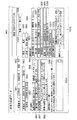
入力画面には、ログイン中であるかどうかを示すボックス940、学籍番号を入力または表示するテキストボックス941、生徒氏名を入力または表示するテキストボックス942、授業月・回を入力または表示するテキストボックス943、授業日を入力または表示するテキストボックス944、教科を入力または表示するテキストボックス945、担当を入力または表示するテキストボックス946、生徒本人の評価欄である宿題の実施状況を入力または表示するテキストボックス947、理解度を入力または表示するテキストボックス948、集中度を入力または表示するテキストボックス949、復習テストの点数を入力または表示するテキストボックス950、本日の宿題を入力または表示するテキストボックス951、授業の感想を入力または表示するテキストボックス952、講師評価欄である宿題の実施状況を表示するテキストボックス953、理解度を表示するテキストボックス954、集中度を表示するテキストボックス955、質問度を表示するテキストボックス956、定着度を表示するテキストボックス957、使用教材を表示するテキストボックス958、範囲・内容を表示するテキストボックス959、次回の内容を表示するテキストボックス960、次回の授業日を表示するテキストボックス961、次回の授業時刻を表示するテキストボックス962、講師コメントを表示するテキストボックス963が表示される。この画面では、学籍番号と生徒番号が表示されて、その生徒に関する記録がデータベースから呼び出され、授業月・回、授業日を入力するとそれに対応する授業の記録画面が表示される。また、この画面から、宿題の実施、理解度、集中度、復習テストの点数、本日の宿題、授業の感想を書き込み、登録ボタン963を押すことにより、データはサーバ500に送られ、授業記録データ入出力・検索モジュール56によってデータベース600に記憶される。また、閉じるボタン964を押すことにより、メニュー画面に戻る。   On the input screen, a box 940 indicating whether the user is logged in, a text box 941 for inputting or displaying a student ID number, a text box 942 for inputting or displaying a student name, and a text box 943 for inputting or displaying a lesson month / time are displayed. A text box 944 for inputting or displaying the class date, a text box 945 for inputting or displaying a subject, a text box 946 for inputting or displaying a charge, a text box for inputting or displaying an implementation status of homework which is a student's own evaluation column 947, text box 948 for inputting or displaying comprehension level, text box 949 for inputting or displaying concentration level, text box 950 for inputting or displaying review test scores, text box 951 for inputting or displaying today's homework, class Feeling of A text box 952 for inputting or displaying the text, a text box 953 for displaying the implementation status of the homework that is the teacher evaluation column, a text box 954 for displaying the comprehension level, a text box 955 for displaying the concentration level, and a text box for displaying the question level 956, a text box 957 for displaying the degree of fixation, a text box 958 for displaying the teaching material used, a text box 959 for displaying the range / content, a text box 960 for displaying the next content, and a text box 961 for displaying the next lesson date. A text box 962 for displaying the next class time and a text box 963 for displaying instructor comments are displayed. On this screen, the student ID number and the student number are displayed, and the record related to the student is called up from the database. When the lesson month / time and the lesson date are entered, the corresponding lesson record screen is displayed. Also, from this screen, the homework, understanding, concentration, review test scores, today's homework, and lesson impressions are written and the registration button 963 is pressed, and the data is sent to the server 500 and lesson record data The data is stored in the database 600 by the input / output / search module 56. Further, when the close button 964 is pressed, the menu screen is displayed again.

次に、保護者がパソコン400により連絡・閲覧するときのパソコン400の入出力装置401,402の操作方法の一例を図1と図4と図5と図12と図13を参照して説明する。保護者用パソコン400の入力画面も教室長用パソコン100と同様に図4で示された入力画面800が表示される。入力画面800にはアドレスを入力するためのテキストボックス801と送信ボタン802が表示されている。保護者は、入力装置401により、テキストボックス801に予め指定された連絡帳システム1のアドレスを入力し、送信ボタンを図示しないマウスによりクリックする。それにより、サーバ500はログイン画面作成モジュール50によってデータベース600から画面レイアウトを検索し、ログイン画面データを作成し、通信モジュール59によって保護者用パソコン400に送信する。保護者用パソコン400は通信モジュール41によりログイン画面データを受信し、入出力モジュール40により出力装置402に表示する。それにより、例えば図5に示す連絡帳システムのログイン画面810が表示される。ログイン画面810には、ユーザーIDとパスワードを入力するテキストボックス811,812があり、それらにユーザーIDとパスワードを入力し、ログイン命令ボタン813があり、その命令ボタン813を図示しないマウスによりクリックする。それにより、入出力モジュール40と通信モジュール41によってインターネット700を介してサーバ500にユーザーIDとパスワードが送信される。サーバ500の認証モジュール51は、受信したユーザーIDとパスワードをデータベース600に記憶されるデータを検索し、認証する。認証されたら、サーバ500は、保護者用メニュー画面作成モジュール55によってデータベース600の画面レイアウトを用いて保護者用メニュー画面データを作成し、通信モジュール59によりインターネット700を介して保護者用パソコン400に保護者用メニュー画面データを送信する。保護者用パソコン400の通信モジュール41で保護者用メニュー画面データを受信し、入出力モジュール40により出力装置402に保護者用メニュー画面を表示する。   Next, an example of an operation method of the input / output devices 401 and 402 of the personal computer 400 when the guardian contacts and browses with the personal computer 400 will be described with reference to FIG. 1, FIG. 4, FIG. 5, FIG. . The input screen 800 of the guardian's personal computer 400 is displayed as shown in FIG. On the input screen 800, a text box 801 for inputting an address and a send button 802 are displayed. The guardian inputs the address of the contact book system 1 designated in advance in the text box 801 using the input device 401, and clicks the send button with a mouse (not shown). Accordingly, the server 500 searches the database 600 for a screen layout by using the login screen creation module 50, creates login screen data, and transmits it to the personal computer 400 for the guardian through the communication module 59. The personal computer 400 for the guardian receives the login screen data by the communication module 41 and displays it on the output device 402 by the input / output module 40. Thereby, for example, a login screen 810 of the contact book system shown in FIG. 5 is displayed. The login screen 810 includes text boxes 811 and 812 for inputting a user ID and a password. The user ID and password are input to the login screen 810, and a login command button 813 is clicked. The command button 813 is clicked with a mouse (not shown). Thereby, the user ID and password are transmitted to the server 500 via the Internet 700 by the input / output module 40 and the communication module 41. The authentication module 51 of the server 500 searches the data stored in the database 600 and authenticates the received user ID and password. When authenticated, the server 500 creates guardian menu screen data by using the screen layout of the database 600 by the guardian menu screen creation module 55, and sends it to the guardian's personal computer 400 via the Internet 700 by the communication module 59. Send parental menu screen data. The communication module 41 of the parent computer 400 receives the parent menu screen data, and the input / output module 40 displays the parent menu screen on the output device 402.

それにより、入力画面800は、図12で示す画面970になる。ここで、メニュー971と連絡事項テキストボックス972,973が記載された画面が表示される。メニュー971には、授業の記録データを見るための授業の記録・閲覧・入力ボタン974、ココミュニケーションノートを表示し、印刷するためのミュニケーションノート出力ボタン975、ログイン画面に戻るためのログアウトボタン976が表示される。その画面上で、必要なメニューの各ボタンを図示しないマウスによりクリックすることにより、表示画面は、それぞれのメニューに対応する表示となる。例えば、授業の記録・閲覧ボタン974をクリックした場合、入出力モジュール40を介して通信モジュール41により、インターネット700を介してサーバ500にコマンドが送信され、サーバ500の授業記録データ入出力・検索モジュール56によってデータベース600からのデータを検索し、授業の記録データを通信モジュール59によって保護者用パソコン400に送られる。保護者用パソコン400では通信モジュール41により受信し、入出力モジュール40によって出力装置402に図13で示される授業の記録データ画面が表示される。   Thereby, the input screen 800 becomes a screen 970 shown in FIG. Here, a screen on which a menu 971 and communication item text boxes 972 and 973 are described is displayed. The menu 971 includes a lesson record / view / input button 974 for viewing lesson record data, a communication note output button 975 for displaying and printing co-communication notes, and a logout button 976 for returning to the login screen. Is displayed. By clicking each button of the necessary menu on the screen with a mouse (not shown), the display screen becomes a display corresponding to each menu. For example, when a class recording / viewing button 974 is clicked, a command is transmitted to the server 500 via the Internet 700 by the communication module 41 via the input / output module 40, and the class recording data input / output / search module of the server 500 is transmitted. 56, the data from the database 600 is retrieved, and the record data of the lesson is sent to the personal computer 400 for the guardian by the communication module 59. In the personal computer 400 for the guardian, the data is received by the communication module 41, and the recorded data screen of the lesson shown in FIG.

入力画面には、ログイン中であるかどうかを示すボックス980、学籍番号を表示するテキストボックス981、生徒氏名を表示するテキストボックス982、授業月・回を入力または表示するテキストボックス983、授業日を入力または表示するテキストボックス984、教科を入力または表示するテキストボックス985、担当を入力または表示するテキストボックス986、生徒本人の評価欄である宿題の実施状況を表示するテキストボックス987、理解度を表示するテキストボックス988、集中度を表示するテキストボックス989、復習テストの点数を表示するテキストボックス990、本日の宿題を表示するテキストボックス991、授業の感想を表示するテキストボックス992、講師評価欄である宿題の実施状況を表示するテキストボックス993、理解度を表示するテキストボックス994、集中度を表示するテキストボックス995、質問度を表示するテキストボックス996、定着度を表示するテキストボックス997、使用教材を表示するテキストボックス998、範囲・内容を表示するテキストボックス999、次回の内容を表示するテキストボックス1000、次回の授業日を表示するテキストボックス1001、次回の授業時刻を表示するテキストボックス1002、講師コメントを表示するテキストボックス1003、保護者コメントを入力または表示するテキストボックス1004が表示される。この画面では、学籍番号と生徒番号が表示され、その生徒に関する記録がデータベースから呼び出され、授業月・回、授業日を入力するとそれに対応する授業の記録画面が表示される。この画面から、保護者のコメントを書き込み、登録ボタン1005を押すことにより、データはサーバ500に送られ、授業記録データ入出力・検索モジュール56によってデータベース600に記憶される。また、閉じるボタン1006を押すことにより、メニュー画面に戻る。   On the input screen, a box 980 indicating whether or not the user is logged in, a text box 981 for displaying the student ID number, a text box 982 for displaying the student name, a text box 983 for inputting or displaying the class month / time, and the class date are displayed. A text box 984 for inputting or displaying, a text box 985 for inputting or displaying a subject, a text box 986 for inputting or displaying a charge, a text box 987 for displaying the implementation status of homework which is an evaluation column of the student himself, and a degree of understanding are displayed. A text box 988 for displaying a degree of concentration, a text box 990 for displaying a review test score, a text box 991 for displaying today's homework, a text box 992 for displaying an impression of a lesson, and an instructor evaluation column. Shows homework status A text box 993 for displaying an understanding level, a text box 995 for displaying a concentration level, a text box 996 for displaying a question level, a text box 997 for displaying a fixing level, a text box 998 for displaying a teaching material used, A text box 999 for displaying the range / content, a text box 1000 for displaying the next content, a text box 1001 for displaying the next lesson date, a text box 1002 for displaying the next lesson time, and a text box 1003 for displaying instructor comments A text box 1004 for inputting or displaying a guardian comment is displayed. On this screen, the student ID number and the student number are displayed, the record related to the student is called up from the database, and when the lesson month / time and lesson date are entered, the corresponding lesson record screen is displayed. By writing a guardian's comment from this screen and pressing the registration button 1005, the data is sent to the server 500 and stored in the database 600 by the lesson record data input / output / search module 56. Further, when a close button 1006 is pressed, the menu screen is displayed again.

このように、この連絡帳システムによって、学習塾やカルチャーセンターと保護者の間でのインターネットを介しての連絡だけでなく、学習塾やカルチャーセンターでの授業に関する記録を生徒や保護者が閲覧でき、教室長、講師、生徒、保護者4者間で授業の記録を見て、授業の内容などについて連絡をし合うことができる。   In this way, with this contact book system, students and their parents can view records related to classes at the cram school and culture center, as well as contact between the cram school and the culture center via the Internet. The class leader, the instructor, the students, and the parents can view the class records and communicate with each other about the class contents.

なお、本実施形態では、情報端末として、パーソナルコンピュータを用いて説明したが、それに限らず情報端末として、インターネット接続可能な携帯電話を用いることもできる。   In this embodiment, the personal computer is used as the information terminal. However, the present invention is not limited to this, and a mobile phone that can be connected to the Internet can also be used as the information terminal.

本発明は、学習塾やカルチャーセンターでの教室長、講師、生徒、保護者間での連絡と授業の内容の閲覧等を行うためのシステムとして利用される。   INDUSTRIAL APPLICABILITY The present invention is used as a system for communicating between classroom leaders, lecturers, students, and parents at a cram school or a culture center and browsing the contents of classes.

本発明の実施形態に係る連絡帳システムの構成図である。It is a block diagram of the contact book system which concerns on embodiment of this invention. 教室長用パソコンの処理のフローチャートである。It is a flowchart of a process of the personal computer for classroom managers. サーバの処理のフローチャートである。It is a flowchart of a process of a server. 教室長用パソコンの入力画面の表示画面を示す図である。It is a figure which shows the display screen of the input screen of a personal computer for classroom supervision. ログイン画面を示す図である。It is a figure which shows a login screen. 教室長メニュー画面を示す図である。It is a figure which shows a classroom manager menu screen. 教室長用パソコンでの授業の記録データ入力画面を示す図である。It is a figure which shows the recording data input screen of the lesson with the classroom personal computer. 講師用メニュー画面を示す図である。It is a figure which shows the menu screen for lecturers. 講師用パソコンで授業の記録データ入力画面を示す図である。It is a figure which shows the recording data input screen of a lesson with the instructor's personal computer. 生徒用メニュー画面を示す図である。It is a figure which shows the menu screen for students. 生徒用パソコンで授業の記録データ入力画面を示す図である。It is a figure which shows the recording data input screen of a lesson with a student's personal computer. 保護者用メニュー画面を示す図である。It is a figure which shows the menu screen for guardians. 保護者用パソコンで授業の記録データ入力画面を示す図である。It is a figure which shows the recording data input screen of a lesson with a personal computer for parents.

符号の説明Explanation of symbols

10 入出力モジュール
11 通信モジュール
20 入出力モジュール
21 通信モジュール
30 入出力モジュール
31 通信モジュール
40 入出力モジュール
41 通信モジュール
50 ログイン画面作成モジュール
51 認証モジュール
52 教室長メニュー画面作成モジュール
53 講師用メニュー画面作成モジュール
54 生徒用メニュー画面作成モジュール
55 保護者用メニュー画面作成モジュール
56 授業記録データ入出力・検索モジュール
57 コミュニケーションノート入出力・検索モジュール
58 報告書入出力・検索モジュール
59 通信モジュール
100 教室長用パソコン
101 入力装置
102 出力装置
200 講師用パソコン
201 入力装置
202 出力装置
300 生徒用パソコン
301 入力装置
302 出力装置
400 保護者用パソコン
401 入力装置
402 出力装置
500 サーバ
600 データベース
DESCRIPTION OF SYMBOLS 10 Input / output module 11 Communication module 20 Input / output module 21 Communication module 30 Input / output module 31 Communication module 40 Input / output module 41 Communication module 50 Login screen creation module 51 Authentication module 52 Classroom menu screen creation module 53 Instructor menu screen creation module 54 Student Menu Screen Creation Module 55 Parental Menu Screen Creation Module 56 Class Record Data Input / Output / Search Module 57 Communication Note Input / Output / Search Module 58 Report Input / Output / Search Module 59 Communication Module 100 Classroom Personal Computer 101 Input Device 102 Output device 200 Personal computer for lecturer 201 Input device 202 Output device 300 Student's personal computer 301 Input device 302 Output device PC 400 parents 401 input device 402 output device 500 Server 600 Database

Claims (3)

学習塾またはカルチャーセンターの教室長、講師、生徒、保護者のそれぞれの情報端末と、サーバとデータベースがインターネットを介して接続され、前記教室長、前記講師、前記生徒、前記保護者のそれぞれの前記情報端末と、前記サーバと前記データベースで通信を行う連絡帳システムであって、
前記教室長の情報端末は、教室長情報を作成し、作成された前記教室長情報を前記サーバに送信し、前記サーバから教室長向け情報を受信し、
前記講師の情報端末は、講師情報を作成し、作成された前記講師情報を前記サーバに送信し、前記サーバから講師向け情報を受信し、
前記生徒の情報端末は、生徒情報を作成し、作成された前記生徒情報を前記サーバに送信し、前記サーバから生徒向け情報を受信し、
前記保護者の情報端末は、保護者情報を作成し、作成された前記保護者情報を前記サーバに送信し、前記サーバから保護者向け情報を受信し、
前記教室長、前記講師、前記生徒、前記保護者のそれぞれの前記情報端末で、前記サーバと前記データベースを介して前記教室長情報と前記教室長向け情報と前記講師情報と前記講師向け情報と前記生徒情報と前記生徒向け情報と前記保護者情報と前記保護者向け情報に基づいて連絡のやりとりと授業の記録の閲覧を行うことを特徴とする連絡帳システム。
The information terminals of the classroom head, the lecturer, the student, and the guardian of the cram school or the culture center, the server and the database are connected via the Internet, and the classroom head, the lecturer, the student, and the guardian A contact book system that communicates between an information terminal, the server and the database,
The classroom manager information terminal creates classroom manager information, transmits the created classroom manager information to the server, receives information for the classroom manager from the server,
The information terminal of the lecturer creates lecturer information, transmits the created lecturer information to the server, receives information for the lecturer from the server,
The student information terminal creates student information, transmits the created student information to the server, receives student-oriented information from the server,
The information terminal of the guardian creates guardian information, transmits the created guardian information to the server, receives guardian information from the server,
At each information terminal of the classroom head, the lecturer, the student, and the guardian, the classroom manager information, the classroom manager information, the lecturer information, the lecturer information, and the teacher information via the server and the database A contact book system for performing communication and browsing of class records based on student information, student information, guardian information, and guardian information.
前記教室長情報は、授業の記録・指導報告書データ、コミュニケーションノート、教室長月次コメント、今週のひと言、連絡事項・お知らせ、業務連絡のうち少なくとも1つから成り、
前記教室長向け情報は、指導報告書、月次報告書、生徒基本情報、職員情報、コミュニケーションノートのうち少なくとも1つから成り、
講師情報は、授業の記録・指導報告書データ、コミュニケーションノート、月次報告書のうち少なくとも1つから成り、
前記講師向け情報は、授業の記録、指導報告書、月次報告書、コミュニケーションノートのうち少なくとも1つから成り、
前記生徒情報は、授業の記録とコミュニケーションノートの少なくとも1つから成り、
前記生徒向け情報は、授業の記録とコミュニケーションノートの少なくとも1つから成り、
前記保護者情報は、コミュニケーションノートから成り、
前記保護者向け情報は、授業の記録とコミュニケーションノートの少なくとも1つから成る
ことを特徴とする請求項1記載の連絡帳システム。
The classroom manager information comprises at least one of class record / instruction report data, communication notes, monthly comments from the classroom manager, words of the week, communication items / notifications, and business communications.
The information for the classroom manager comprises at least one of a guidance report, a monthly report, student basic information, staff information, and a communication note.
Instructor information consists of at least one of lesson record / instruction report data, communication notes, and monthly reports.
The instructor information comprises at least one of a class record, a guidance report, a monthly report, and a communication note.
The student information comprises at least one of a class record and a communication note,
The guardian information consists of a communication note,
The contact book system according to claim 1, wherein the information for parents includes at least one of a class record and a communication note.
前記情報端末はコンピュータまたはインターネット接続可能な携帯電話であることを特徴とする請求項1または2記載の連絡帳システム。   3. The contact book system according to claim 1, wherein the information terminal is a computer or a mobile phone that can be connected to the Internet.
JP2006181751A 2006-06-30 2006-06-30 Communication book system Pending JP2008009876A (en)

Priority Applications (1)

Application Number Priority Date Filing Date Title
JP2006181751A JP2008009876A (en) 2006-06-30 2006-06-30 Communication book system

Applications Claiming Priority (1)

Application Number Priority Date Filing Date Title
JP2006181751A JP2008009876A (en) 2006-06-30 2006-06-30 Communication book system

Publications (1)

Publication Number Publication Date
JP2008009876A true JP2008009876A (en) 2008-01-17

Family

ID=39068000

Family Applications (1)

Application Number Title Priority Date Filing Date
JP2006181751A Pending JP2008009876A (en) 2006-06-30 2006-06-30 Communication book system

Country Status (1)

Country Link
JP (1) JP2008009876A (en)

Cited By (6)

* Cited by examiner, † Cited by third party
Publication number Priority date Publication date Assignee Title
JP2012084087A (en) * 2010-10-14 2012-04-26 Just Syst Corp Information management system for faculty, information management method, information management program, and recording medium
CN109448475A (en) * 2018-12-24 2019-03-08 福州外语外贸学院 A kind of juvenile's Classroom Information management system and method
CN112133148A (en) * 2020-10-19 2020-12-25 吉林师范大学 Interactive classroom teaching system based on cloud education platform
JP2022069278A (en) * 2020-10-23 2022-05-11 株式会社アネムホールディングス Management device and management program
JP2022155222A (en) * 2021-03-30 2022-10-13 株式会社地域教育工房 Cram school educational affairs system
JP7672619B1 (en) * 2024-08-22 2025-05-08 日本ソフトウェアマネジメント株式会社 Encapsulation system, encapsulation method, and program

Cited By (7)

* Cited by examiner, † Cited by third party
Publication number Priority date Publication date Assignee Title
JP2012084087A (en) * 2010-10-14 2012-04-26 Just Syst Corp Information management system for faculty, information management method, information management program, and recording medium
CN109448475A (en) * 2018-12-24 2019-03-08 福州外语外贸学院 A kind of juvenile's Classroom Information management system and method
CN112133148A (en) * 2020-10-19 2020-12-25 吉林师范大学 Interactive classroom teaching system based on cloud education platform
JP2022069278A (en) * 2020-10-23 2022-05-11 株式会社アネムホールディングス Management device and management program
JP2022155222A (en) * 2021-03-30 2022-10-13 株式会社地域教育工房 Cram school educational affairs system
JP7378827B2 (en) 2021-03-30 2023-11-14 株式会社地域教育工房 Educational affairs system for cram schools
JP7672619B1 (en) * 2024-08-22 2025-05-08 日本ソフトウェアマネジメント株式会社 Encapsulation system, encapsulation method, and program

Similar Documents

Publication Publication Date Title
Adi Badiozaman et al. Embracing educational disruption: a case study in making the shift to a remote learning environment
Jack et al. What is educational technology and how is it being used to support teaching and learning in the early years?
US9342990B2 (en) Learning system and method that prevents communication of unauthorized content during a learning session
US20100151431A1 (en) Virtual learning
McFadden et al. Parent perspectives on the implementation of a digital documentation portal in an early learning centre
Mungania Employees' perceptions of barriers in e-learning: The relationship among barriers, demographics, and e-learning self-efficacy
Maguth The educative potential of cell phones in the social studies classroom
KR20130103928A (en) System and method for educational affair management using mobile device and computer readable medium containing the same
El-Bakry et al. Realization of E-University for distance learning
JP2023000982A (en) educational support software
US20040126749A1 (en) Educational method and system by utilizing historical informations
Twidale et al. Where am I and Who am I? Issues in collaborative technical help
Charles-Zalakoro Inclusive Education and Digital Literacy: Developing Essential Skills in the Digital Age in Selected Public Secondary Schools in Bayelsa State.
WO2015017364A2 (en) Interactive learning and communication system
JP2024037266A (en) Information processing device, information processing method, and program
Covili et al. Classroom in the cloud: Innovative ideas for higher level learning
JP2022097856A (en) Comment posting system
JP3982581B2 (en) Education system
JP4369460B2 (en) Education system
JP2003233297A (en) Multi functional time schedule system
Lopes E• CVoltera, Competence Assessment System
JP2004012813A (en) Method and device for supporting information exchange between student and teacher, computer program and recording medium
Petty » Technology Access in the Workplace and Higher Education for Persons with Visual Impairments
JP2025146834A (en) Information processing system and information processing method
Harris Email a11d Facebook™ Trai11i11g for Older American Perso11s i11 La Crosse Cou11ty, Wisconsi11