JP2005346309A - Information processing apparatus, control method therefor, and program - Google Patents
Information processing apparatus, control method therefor, and program Download PDFInfo
- Publication number
- JP2005346309A JP2005346309A JP2004163747A JP2004163747A JP2005346309A JP 2005346309 A JP2005346309 A JP 2005346309A JP 2004163747 A JP2004163747 A JP 2004163747A JP 2004163747 A JP2004163747 A JP 2004163747A JP 2005346309 A JP2005346309 A JP 2005346309A
- Authority
- JP
- Japan
- Prior art keywords
- window
- information
- display
- reference information
- processing apparatus
- Prior art date
- Legal status (The legal status is an assumption and is not a legal conclusion. Google has not performed a legal analysis and makes no representation as to the accuracy of the status listed.)
- Withdrawn
Links
Images

Landscapes
- Digital Computer Display Output (AREA)
Abstract
【課題】 他の情報を参照することが可能な参照情報を含む電子文書の閲覧時の視認性及び作業効率を向上することができる情報処理装置及びその制御方法、プログラムを提供する。
【解決手段】 処理対象の電子文書の内容を前記表示画面内の第1ウィンドウに表示する。第1ウィンドウの表示領域内で、他の情報に関連付けられた参照情報を抽出する。抽出した参照情報が指示する参照先情報を取得する。表示画面内で、取得した参照先情報を表示する第2ウィンドウを、第1ウィンドウとその第1ウィンドウ内の参照情報との位置関係に基づいて決定した表示位置に表示する。
【選択図】 図3PROBLEM TO BE SOLVED: To provide an information processing apparatus capable of improving visibility and work efficiency at the time of browsing an electronic document including reference information capable of referring to other information, a control method therefor, and a program.
The content of an electronic document to be processed is displayed in a first window in the display screen. Reference information associated with other information is extracted within the display area of the first window. The reference destination information indicated by the extracted reference information is acquired. On the display screen, the second window for displaying the acquired reference destination information is displayed at the display position determined based on the positional relationship between the first window and the reference information in the first window.
[Selection] Figure 3
Description
本発明は、表示画面上で電子文書を閲覧するために、前記電子文書の表示を制御する情報処理装置及びその制御方法、プログラムに関するものである。 The present invention relates to an information processing apparatus that controls display of an electronic document in order to view the electronic document on a display screen, a control method therefor, and a program.
IT時代におけるデジタル書類によるコミュニケーションを実現するために、電子文書が普及している。 In order to realize communication using digital documents in the IT era, electronic documents are widely used.
例えば、電子文書中の文字列や図形などに関連付けられた他の情報(参照情報先の情報)を、同文書が表示されているウィンドウ(主ウィンドウ)とは別のウィンドウ(副ウィンドウ)に表示する機能を有する電子文書閲覧システムが提案されている。 For example, other information (reference information destination information) associated with character strings or figures in an electronic document is displayed in a window (subwindow) that is different from the window (main window) in which the document is displayed. There has been proposed an electronic document browsing system having a function to do this.
例えば、特許文献1では、表示中の文章中に所望する文字列を選択した際、同一文書内にその文字列に関連付けられて記憶された図形や画像等の関連情報が存在する場合には、その関連情報を独立したウィンドウに表示する情報表示装置を提案している。
For example, in
また、特許文献2では、Webページを表示する際、元ページと複数のリンクページを同時に表示するページ表示処理装置を提案している。
さらには、特許文献3では、Webブラウザでリンクがはってある場合、マウスクリックすることなく、そのリンク情報を自動で連続的に表示する自動ページ表示装置を提案している。
しかしながら、従来技術の電子文書閲覧用のシステムでは、以下のような課題がある。 However, the conventional electronic document browsing system has the following problems.
すなわち、特許文献1では、副ウィンドウ上に表示する情報は同一文書内の情報に限られていた。また、Webページの情報への参照情報については何ら言及されていない。
That is, in
また、特許文献2では、常に元になるWebページ全体に含まれるすべてのリンク(参照情報)に対応するリンクページ(=参照先情報)を、複数の副ウィンドウに同時に表示していた。このため、現在の表示中の領域以外のリンクページまでもが画面上に表示されていた。このことは画面上を煩雑にし、視認性悪化の原因になっていた。また、これは、Webページに特化したものであることは言うまでもない。
In
また、特許文献3では、元となるWebページ全体のリンク先の情報を自動で連続的に表示していたため、現在の表示中の領域以外の参照先情報までもが画面上に表示されていた。また、所望のリンク先情報(参照先情報)を所望の時間確認することはできなかった。また、これについても、Webページに特化したものであることは言うまでもない。
Further, in
本発明は上記の課題を解決するためになされたものであり、他の情報を参照することが可能な参照情報を含む電子文書の閲覧時の視認性及び作業効率を向上することができる情報処理装置及びその制御方法、プログラムを提供することを目的とする。 The present invention has been made to solve the above-described problem, and is information processing capable of improving visibility and work efficiency when browsing an electronic document including reference information that can refer to other information. An object is to provide an apparatus, a control method thereof, and a program.
上記の目的を達成するための本発明による情報処理装置は以下の構成を備える。即ち、
表示画面上で電子文書を閲覧するために、前記電子文書の表示を制御する情報処理装置であって、
処理対象の電子文書の内容を前記表示画面内の第1ウィンドウに表示する表示手段と、
前記第1ウィンドウの表示領域内で、他の情報に関連付けられた参照情報を抽出する抽出手段と、
前記抽出手段で抽出した参照情報が指示する参照先情報を取得する取得手段と、
前記表示画面内で、前記取得手段で取得した参照先情報を表示する第2ウィンドウを、前記第1ウィンドウと該第1ウィンドウ内の前記参照情報との位置関係に基づいて決定した表示位置に表示する表示制御手段と
を備える。
In order to achieve the above object, an information processing apparatus according to the present invention comprises the following arrangement. That is,
An information processing apparatus that controls display of the electronic document in order to view the electronic document on a display screen,
Display means for displaying the contents of the electronic document to be processed in a first window in the display screen;
Extracting means for extracting reference information associated with other information within the display area of the first window;
Obtaining means for obtaining reference destination information indicated by the reference information extracted by the extracting means;
In the display screen, a second window for displaying the reference destination information acquired by the acquisition unit is displayed at a display position determined based on a positional relationship between the first window and the reference information in the first window. Display control means.
また、好ましくは、前記表示制御手段は、前記第1ウィンドウ内の前記参照情報の位置と同じ水平線上の位置に、前記第2ウィンドウを表示する。 Preferably, the display control means displays the second window at a position on the same horizontal line as the position of the reference information in the first window.
また、好ましくは、前記表示制御手段は、前記第2ウィンドウを、前記主ウィンドウと重ならない位置に表示する。 Preferably, the display control means displays the second window at a position not overlapping the main window.
また、好ましくは、前記表示制御手段は、前記第1ウィンドウに対する操作によって移動する該第1ウィンドウ内の前記参照情報に応じて、前記表示画面上の前記第2ウィンドウの位置を移動する。 Preferably, the display control means moves the position of the second window on the display screen in accordance with the reference information in the first window that is moved by an operation on the first window.
また、好ましくは、前記第1ウィンドウに対する操作は、前記第1ウィンドウの状態を変更するウィンドウ操作、あるいは前記第1ウィンドウ内の電子文書のページ操作である。 Preferably, the operation on the first window is a window operation for changing a state of the first window or a page operation of an electronic document in the first window.
また、好ましくは、前記ウィンドウ操作は、前記第1ウィンドウの表示位置の移動、前記第1ウィンドウのウィンドウサイズの変更の少なくとも1つを含む。 Preferably, the window operation includes at least one of movement of a display position of the first window and change of a window size of the first window.
また、好ましくは、前記ページ操作は、ページの順次送り、ページのジャンプ、ページの拡大・縮小の少なくとも1つを含む。 Preferably, the page operation includes at least one of sequential page feed, page jump, and page enlargement / reduction.
また、好ましくは、前記表示制御手段は、前記第1ウィンドウ内の前記参照情報の位置と同じ水平線に、前記第2ウィンドウの上辺とを揃えて該第2ウィンドウを表示する。 Preferably, the display control means displays the second window on the same horizontal line as the position of the reference information in the first window with the upper side of the second window aligned.
また、好ましくは、前記表示制御手段は、前記第1ウィンドウ内の前記参照情報の位置と同じ水平線に、前記第2ウィンドウの下辺とを揃えて該第2ウィンドウを表示する。 Preferably, the display control means displays the second window on the same horizontal line as the position of the reference information in the first window with the lower side of the second window aligned.
また、好ましくは、前記表示制御手段は、前記第1ウィンドウ内の前記参照情報の位置と同じ水平線に、前記第2ウィンドウの領域を上下に二等分する直線とを揃えて該第2ウィンドウを表示する。 Preferably, the display control means aligns the second window with a horizontal line that bisects the area of the second window in the same horizontal line as the position of the reference information in the first window. indicate.
また、好ましくは、前記表示制御手段は、前記第1ウィンドウの矩形領域の左辺と右辺の内、前記第1ウィンドウ内の前記参照情報の位置から近い方の辺の外側の位置に、前記第2ウィンドウを表示する。 In a preferred embodiment, the display control means is configured to place the second control unit at a position on the outer side of the left side and the right side of the rectangular area of the first window that is closer to the side of the reference information in the first window. Display a window.
また、好ましくは、前記表示制御手段は、前記第1ウィンドウ内の前記参照情報の中で、同一の参照先情報に関連付けられた複数の参照情報がある場合、該第1ウィンドウ内で最も上にある参照情報の水平線上の位置に、その参照先情報を表示する前記第2ウィンドウを表示する。 Preferably, when there is a plurality of pieces of reference information associated with the same reference destination information among the reference information in the first window, the display control unit is at the top in the first window. The second window for displaying the reference destination information is displayed at a position on the horizontal line of certain reference information.
また、好ましくは、前記表示制御手段は、前記第1ウィンドウ内の前記参照情報の中で、同一の参照先情報に関連付けられた複数の参照情報がある場合、該第2ウィンドウ内で最も下にある参照情報の水平線上の位置に、その参照先情報を表示する前記第2ウィンドウを表示する。 In a preferred embodiment, the display control means is the lowest in the second window when there is a plurality of reference information associated with the same reference destination information in the reference information in the first window. The second window for displaying the reference destination information is displayed at a position on the horizontal line of certain reference information.
また、好ましくは、前記表示制御手段は、更に、前記参照情報と、それと対応する前記第2ウィンドウの間を結ぶ補助線を前記水平線上に表示する。 Preferably, the display control means further displays an auxiliary line connecting the reference information and the corresponding second window on the horizontal line.
また、好ましくは、前記表示制御手段は、複数の前記第2ウィンドウが重なって、前記水平線上に表示した夫々の前記補助線と対応する第2ウィンドウとの接点が隠れる場合、前記接点が表示されるように、前記複数の第2ウィンドウの位置を前記水平線上で調整する。 Preferably, the display control means displays the contact point when a plurality of the second windows overlap to hide a contact point between each auxiliary line displayed on the horizontal line and the corresponding second window. In this manner, the positions of the plurality of second windows are adjusted on the horizontal line.
上記の目的を達成するための本発明による情報処理装置の制御方法は以下の構成を備える。即ち、
表示画面上で電子文書を閲覧するために、前記電子文書の表示を制御する情報処理装置の制御方法であって、
処理対象の電子文書の内容を前記表示画面内の第1ウィンドウに表示する表示工程と、
前記第1ウィンドウの表示領域内で、他の情報に関連付けられた参照情報を抽出する抽出工程と、
前記抽出工程で抽出した参照情報が指示する参照先情報を取得する取得工程と、
前記表示画面内で、前記取得工程で取得した参照先情報を表示する第2ウィンドウを、前記第1ウィンドウと該第1ウィンドウ内の前記参照情報との位置関係に基づいて決定した表示位置に表示する表示制御工程と
を備える。
In order to achieve the above object, a method for controlling an information processing apparatus according to the present invention comprises the following arrangement. That is,
An information processing apparatus control method for controlling display of an electronic document in order to view the electronic document on a display screen,
A display step of displaying the contents of the electronic document to be processed in the first window in the display screen;
An extraction step of extracting reference information associated with other information within the display area of the first window;
An acquisition step of acquiring reference destination information indicated by the reference information extracted in the extraction step;
In the display screen, a second window for displaying the reference destination information acquired in the acquisition step is displayed at a display position determined based on a positional relationship between the first window and the reference information in the first window. A display control process.
上記の目的を達成するための本発明によるプログラムは以下の構成を備える。即ち、
表示画面上で電子文書を閲覧するために、前記電子文書の表示を制御する情報処理装置の制御を実現するプログラムであって、
処理対象の電子文書の内容を前記表示画面内の第1ウィンドウに表示する表示工程のプログラムコードと、
前記第1ウィンドウの表示領域内で、他の情報に関連付けられた参照情報を抽出する抽出工程のプログラムコードと、
前記抽出工程で抽出した参照情報が指示する参照先情報を取得する取得工程のプログラムコードと、
前記表示画面内で、前記取得工程で取得した参照先情報を表示する第2ウィンドウを、前記第1ウィンドウと該第1ウィンドウ内の前記参照情報との位置関係に基づいて決定した表示位置に表示する表示制御工程のプログラムコードと
を備える。
In order to achieve the above object, a program according to the present invention comprises the following arrangement. That is,
A program for controlling an information processing apparatus for controlling display of the electronic document in order to view the electronic document on a display screen,
A program code of a display step for displaying the contents of the electronic document to be processed in the first window in the display screen;
In the display area of the first window, a program code of an extraction process for extracting reference information associated with other information;
A program code of an acquisition step for acquiring reference destination information indicated by the reference information extracted in the extraction step;
In the display screen, a second window for displaying the reference destination information acquired in the acquisition step is displayed at a display position determined based on a positional relationship between the first window and the reference information in the first window. A display control process program code.
本発明によれば、他の情報を参照することが可能な参照情報を含む電子文書の閲覧時の視認性及び作業効率を向上することができる情報処理装置及びその制御方法、プログラムを提供できる。 ADVANTAGE OF THE INVENTION According to this invention, the information processing apparatus which can improve the visibility at the time of browsing of the electronic document containing the reference information which can refer other information, and work efficiency, its control method, and a program can be provided.
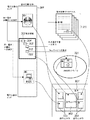
まず、本発明の電子文書閲覧システムの概念図について、図1を用いて説明する。 First, a conceptual diagram of an electronic document browsing system according to the present invention will be described with reference to FIG.
図1は本発明の電子文書閲覧システムの概念図である。 FIG. 1 is a conceptual diagram of an electronic document browsing system according to the present invention.
図1に示すように、本発明では、処理(表示)対象の電子文書(全体)301は、同一電子文書への参照情報302及び303、他の電子文書への参照情報312及びWebページへの参照情報322を含む。そして、電子文書301の表示中の表示領域302(画面321上の主ウィンドウ322内に表示されるもの)に含まれる複数の参照情報(他の情報に関連付けられた文字列、図表、画像等)の夫々が指示する参照先情報(図表、画像、章項節などの見出し区分等の情報)を、同一電子文書301、電子文書データベース311中の他の電子文書311、あるいはWWWネットワーク321内のWebサイトから取得して、主ウィンドウ322とは別の副ウィンドウ323上へ自動的に表示する構成において、特に、副ウィンドウ323の表示位置を表示制御することを特徴とする。また、この表示位置は、主ウィンドウ322と副ウィンドウ323が重ならないように表示制御される。
As shown in FIG. 1, in the present invention, an electronic document (whole) 301 to be processed (displayed) includes reference information 302 and 303 for the same electronic document,
以下、本発明の具体的な実施形態をいくつか説明するが、本発明は、説明される実施形態に限定されるものではない。 Hereinafter, some specific embodiments of the present invention will be described, but the present invention is not limited to the described embodiments.
以下、本発明の実施形態について図面を用いて詳細に説明する。 Hereinafter, embodiments of the present invention will be described in detail with reference to the drawings.
[実施形態1]
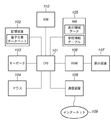
図2は本発明の実施形態1の電子文書閲覧システムを示すブロック図である。
[Embodiment 1]
FIG. 2 is a block diagram showing the electronic document browsing system according to the first embodiment of the present invention.
尚、この電子文書閲覧システムは、例えば、パーソナルコンピュータ等の情報処理装置によって実現される。 The electronic document browsing system is realized by an information processing apparatus such as a personal computer.
101はCPUであり、電子文書閲覧システム全体の動作を管理・制御する。102は複数の電子文書を格納するための電子文書データベースを記憶する記憶装置102であり、例えば、不揮発性のメモリや大容量記憶装置(例えば、ハードディスク)で構成される。
A
103はキーボードであり、オペレータが文字情報等のデータを入力するためのデータ入力装置として機能する。104はマウスであり、オペレータが各種指示をシステムへ入力するためのコマンド入力装置として機能する。尚、マウス104以外のポインティングデバイス(例えば、入力ペン、タッチパネル等)が用いられても良い。
A
110はROMであり、CPU101が実行する各種制御プログラムを記憶する。105はRAMであり、CPU101が処理を行うための作業領域として機能する。また、後述の表示領域データや参照情報テーブル等の各種データを一時的に記憶するためにも利用される。
106はVRAMであり、表示装置107に表示する情報を展開するビデオ用のRAMである。107は表示装置であり、本電子文書閲覧システムの処理状態や各種情報を表示する。この表示装置107は、例えば、CRTディスプレイや液晶ディスプレイが用いられる。
108は通信装置であり、通信回線を介してインターネット109に接続し、WorldWideWeb(WWW)サイトにある情報源(Webサイト)へのアクセスに用いられる。
A
尚、通信回線は、典型的にはインターネットやLANやWANや電話回線、専用デジタル回線、ATMやフレームリレー回線、通信衛星回線、ケーブルテレビ回線、データ放送用無線回線等のいずれか、またはこれらの組み合わせにより実現されるいわゆる通信ネットワークであり、データの送受信が可能であれば良い。 The communication line is typically the Internet, LAN, WAN, telephone line, dedicated digital line, ATM, frame relay line, communication satellite line, cable TV line, data broadcasting wireless line, or the like. It is a so-called communication network realized by a combination, and it is sufficient if data can be transmitted and received.
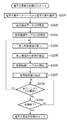
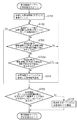
次に、図2の電子文書閲覧システムが実行する電子文書表示処理について、図3を用いて説明する。 Next, electronic document display processing executed by the electronic document browsing system of FIG. 2 will be described with reference to FIG.
図3は本発明の実施形態1の電子文書閲覧システムが実行する電子文書表示処理を示すフローチャートである。 FIG. 3 is a flowchart showing an electronic document display process executed by the electronic document browsing system according to the first embodiment of the present invention.
システムのオペレータが、例えば、マウス104によりシステム起動の指示を与えると、電子文書閲覧システムによる電子文書表示処理が開始される。
When the system operator gives an instruction to start the system using the
ステップS201(文書データベースから電子文書を選択):
まず、CPU101は、表示装置107上に、電子文書を選択するための電子文書選択ダイアログ(不図示)を表示する。その電子文書選択ダイアログ上には、記憶装置102内の電子文書データベースに格納されている電子文書名の一覧が表示されており、システムのオペレータがマウス104を用いてその中から所望の電子文書名を選択する、或いはキーボード103を用いてファイル名入力欄へ所望のファイル名を入力すると、CPU101はその該当する文書データをRAM105上に読み込む。
Step S201 (selecting an electronic document from the document database):
First, the
但し、読み込まれた電子文書を構成する文字列や図表等のオブジェクトの参照情報には、あらかじめ、同一電子文書内、他の電子文書内、或いはWebページの内の参照情報場所を示す適切な場所データが割り当てられているものとする。ここで、この場所データ(位置データあるいはアドレス)とは、参照情報先種別(1:同一電子文書内、2:他の電子文書、3:Webサイト)、及び参照情報領域(参照情報先の電子文書における参照情報領域を示すデータ)の2つから構成されるものとする。 However, in the reference information of objects such as character strings and charts constituting the read electronic document, an appropriate place indicating the reference information place in the same electronic document, in another electronic document, or in a Web page in advance. Assume that data is allocated. Here, the location data (position data or address) refers to a reference information destination type (1: in the same electronic document, 2: another electronic document, 3: Web site), and a reference information area (reference information destination electronic). It is assumed that the data is composed of two pieces of data indicating the reference information area in the document.
ステップS202(表示領域データの初期化):
次に、CPU101は、電子文書の先頭の適当な領域を表示領域データとして設定し、RAM105内へ格納する。但し、この表示領域データは、電子文書中の部分領域が適切な形式で示されたデータであるとする。
Step S202 (initialization of display area data):
Next, the
ステップS203(参照情報データテーブルの初期化):
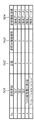
次に、CPU101は、RAM105内の参照情報テーブルの内容をリセットする。ここで、参照情報テーブルの一例について、図4を用いて説明する。
Step S203 (reference information data table initialization):
Next, the
図4は本発明の実施形態1の参照情報テーブルの一例を示す図である。 FIG. 4 is a diagram showing an example of the reference information table according to the first embodiment of the present invention.
図4において、参照情報テーブルは、各行が、参照情報(文書内から抽出した参照情報を示す文字列)、状態(0:表示終了、1:情報取得後に表示、2:表示中)、参照情報先種別(場所データの一項目)及び参照情報領域(場所データの一項目)を格納している。 In FIG. 4, in the reference information table, each line includes reference information (character string indicating reference information extracted from the document), state (0: display end, 1: displayed after information acquisition, 2: displayed), reference information. A destination type (one item of location data) and a reference information area (one item of location data) are stored.
図3の説明に戻る。 Returning to the description of FIG.
ステップS204(表示対象領域の主ウィンドウ上への表示):
次に、CPU101は、表示領域データに基づいて、電子文書中の表示対象領域を主ウィンドウに表示する。ここで、主ウィンドウの一例を、図5に示す。
Step S204 (display of the display target area on the main window):
Next, the
CPU101は、本システムの起動後に、最初に、ステップ204を実行する場合、即ち、まだ、画面901上に主ウィンドウが表示されていない場合、まず、画面901(表示装置107)上へ主ウィンドウ902を表示する。次に、CPU101は、RAM105内の表示領域データを元に、電子文書内の表示対象領域を、主ウィンドウ902上へ表示する。
When the
ステップS205(表示領域から参照情報を抽出):
次に、CPU101は、主ウィンドウ902上の表示領域に含まれる参照情報、例えば、場所データが割り当てられている文字列(図5の場合、903a、903b、904及び905)及びその場所データを抽出する。
Step S205 (extracts reference information from the display area):
Next, the
ステップS206(参照情報テーブルの更新):
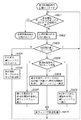
次に、CPU101は、参照情報テーブルを更新する。この更新処理の詳細について、図6を用いて説明する。
Step S206 (Update of the reference information table):
Next, the
図6は本発明の実施形態1の更新処理の詳細を示すフローチャートである。 FIG. 6 is a flowchart showing details of the update processing according to the first embodiment of the present invention.
まず、ステップS701で、CPU101は、ステップS205で抽出した複数の参照情報を示す文字列について重複の有無をチェックし、重複するものについては一つだけにする。尚、実施形態1では、説明を簡単にするため、同一の文字列には、同一の参照先情報が関連付けられているものとする。
First, in step S701, the
次に、重複チェック後の文字列(複数)の夫々と、参照情報テーブル上の参照情報欄501の文字列とを比較し、次のように、参照情報テーブルのデータを更新する。
Next, each character string (plurality) after the duplication check is compared with the character string in the
まず、ステップS702で、参照情報(文字列)のすべてに対して処理が終了したか否かを判定する(ステップS702)。処理が終了した場合(ステップS702でYES)、ステップS703に進む。 First, in step S702, it is determined whether or not processing has been completed for all reference information (character strings) (step S702). When the process is completed (YES in step S702), the process proceeds to step S703.
一方、処理が終了していない場合(ステップS702でNO)、処理対象を次の参照情報(文字列)に移し、処理対象の参照情報が参照情報テーブルの参照情報欄に既に存在しているか否かを判定する。存在している場合(ステップS703でYES)、ステップS702に戻る。一方、存在しない場合(ステップS703でNO)、ステップS703aに進む。 On the other hand, if the processing has not ended (NO in step S702), the processing target is moved to the next reference information (character string), and whether the processing target reference information already exists in the reference information column of the reference information table. Determine whether. If it exists (YES in step S703), the process returns to step S702. On the other hand, if it does not exist (NO in step S703), the process proceeds to step S703a.
ステップS703aで、処理対象の参照情報の参照先情報が表示中の領域(ページ)に存在するか否かを判定する。存在する場合(ステップS703aでYES)、ステップS702に戻る。一方、存在しない場合(ステップS703aでNO)、ステップS704に進み、参照情報テーブルへ新しい行を追加し、その行へ必要な参照情報を設定する。 In step S703a, it is determined whether or not the reference destination information of the reference information to be processed exists in the displayed area (page). If it exists (YES in step S703a), the process returns to step S702. On the other hand, if it does not exist (NO in step S703a), the process proceeds to step S704, where a new line is added to the reference information table, and necessary reference information is set in the line.
例えば、重複チェック後の参照情報(文字列)が参照情報テーブルの参照情報欄501に存在しない場合は、参照情報欄501へは参照情報を示す文字列を、状態欄502へは「1」を、参照情報先種別欄503へは場所データ中の参照情報先種別のデータを、また、参照情報領域欄には同場所データ中の参照情報領域のデータを代入する(図4では、例えば、「No.4」と「No.5」の行)。
For example, when the reference information (character string) after the duplication check does not exist in the
一方、重複チェック後の参照情報(文字列)が既に参照情報テーブルの参照情報欄501に存在する場合は、その行は変更しないでそのままにする(図4では、例えば、「No.2」と「No.3」の行)。
On the other hand, if the reference information (character string) after the duplicate check already exists in the
そして、ステップS702において、重複チェック後の参照情報(文字列)のすべてに対して上記処理を終了した場合、ステップS705で、CPU101は、参照情報欄501の文字列の中で重複チェック後の参照情報(文字列中)に存在しないものがあるか否かを判定する。存在する場合(ステップS705でYES)、ステップS706に進み、該当するすべての行に対して、その状態欄502を「0」(=情報表示終了)に変更する(例えば、図4の「No.1」の行)。一方、存在しない場合(ステップS705でNO)、処理を終了する。
In step S702, when the above processing is completed for all reference information (character strings) after duplication check, in step S705, the
図3の説明に戻る。 Returning to the description of FIG.
ステップS207(参照先情報の表示):
次に、CPU101は、参照情報が指示する参照先情報を表示する。この参照先情報表示処理の詳細について、図7を用いて説明する。
Step S207 (display of reference destination information):
Next, the
図7は本発明の実施形態1の参照先情報表示処理の詳細を示すフローチャートである。 FIG. 7 is a flowchart showing details of the reference destination information display process according to the first embodiment of the present invention.
まず、ステップS801で、CPU101は、RAM105内の参照情報テーブル(図4)の各行についての処理が終了したか否かを判定する。処理を終了した場合(ステップS801でYES)、参照先情報表示処理を終了する。一方、処理を終了していない場合(ステップS801でNO)、ステップS802に進み、処理対象の行を次に進める。その後、ステップS803で、その行の状態欄502の値(「0」、「1」、「2」)に応じて、以下のように分岐する。
First, in step S801, the
まず、ステップS803において、状態欄の値が「0」(=情報表示終了)の場合(図4では、例えば、「No.1」の行)、ステップS804で、CPU101は、画面901上の既に参照先情報を表示している副ウィンドウをクローズする。その後、ステップS805で、この参照情報テーブル上のその行を削除する(ステップS805)。
First, in step S803, if the value in the status column is “0” (= end of information display) (for example, “No. 1” in FIG. 4), the
また、ステップS803において、状態欄502の値が「1」(=情報取得後に表示)の場合(図4では、例えば、「No.4」や「No.5」の行)、その参照情報先種別欄503の値(「1」、「2」、「3」)に応じて、夫々、ステップS807、ステップS808、ステップS809(後述)へ分岐する(ステップS806)。
In step S803, if the value in the
また、ステップS803において、状態欄502が「2」(=表示中)の場合(図4では、例えば、「No.2」や「No.3」の行)は、何もしないで、ステップS801へ戻る(即ち、既に参照先情報が副ウィンドウ上に表示されているため、その副ウィンドウについてはそのままの状態を保持する)。
In step S803, if the
ステップS806において、参照情報先種別欄503の値が「1」(=同一電子文書)の場合、ステップS807で、CPU101は、参照情報領域欄504の情報を元に、RAM105上に展開されている同一文書の文書データからその参照情報501が指示する表示対象領域の参照先情報を取得する。次に、表示装置107を介して画面901上に新しく適切な大きさの副ウィンドウを作成し、ステップS810で、副ウィンドウ配置処理を実行する。
If the value of the reference information
この副ウィンドウ配置処理によって、副ウィンドウの配置(表示)位置が決定され、その位置に、取得した参照先情報を含む副ウィンドウが表示される。その後、参照情報テーブル上のこの参照情報(参照情報欄501内)の状態欄502を「2」(=表示中)に変更する。
By this subwindow arrangement processing, the subwindow arrangement (display) position is determined, and the subwindow including the acquired reference destination information is displayed at the position. Thereafter, the
ステップS806において、参照情報先種別欄503の値が「2」(=他の電子文書)の場合、ステップS808で、CPU101は、参照情報領域欄504の情報を元に、参照情報欄501内の参照情報が指示する電子文書データベース(記憶装置102内)における他の電子文書中の表示対象領域の参照先情報を取得する。次に、表示装置107を介して画面901上に新しく適切な大きさの副ウィンドウを作成し、ステップS810で、副ウィンドウ配置処理を実行する。
If the value of the reference information
この副ウィンドウ配置処理によって、副ウィンドウの配置(表示)位置が決定され、その位置に、取得した参照先情報を含む副ウィンドウが表示される。その後、参照情報テーブル上のこの参照情報(参照情報欄501内)の状態欄を「2」(=表示中)に変更する。 By this subwindow arrangement processing, the subwindow arrangement (display) position is determined, and the subwindow including the acquired reference destination information is displayed at the position. Thereafter, the status column of the reference information (in the reference information column 501) on the reference information table is changed to “2” (= displayed).
ステップS806において、参照情報先種別欄503の値が「3」(=Webサイト)の場合、ステップS809で、CPU101は、参照情報領域欄504の情報を元に(あるいは参照情報を示す文字列(URL)から領域を決定してもよい)、通信装置108を介して、その参照情報(参照情報欄501内)が指示するWebページの表示対象領域の参照先情報を、インターネット109上のWWWサイトから取得する。
If the value in the reference information
ここで、Webページを取得するために仕組みとしては、次のような典型的なものである。 Here, a typical mechanism for acquiring a Web page is as follows.
即ち、まず、クライアントとしての通信装置108が、インターネット上にWebサイトを公開しているWebサーバ(httpd)に対して、HTTP(Hyper Text Transfer Protocol)用のTCP/IPのポート番号80でコネクションを張り、所望の場所(URL)にあるWebページを要求する(PUTする)。
That is, first, the
これに対し、Webサーバは、要求された場所(URL)にある、HTML(Hyper Text Modeling Language)で記述されたWebページを、HTTPの応答としてクライアント側へ返す(POSTする)。 On the other hand, the Web server returns a Web page described in HTML (Hyper Text Modeling Language) at the requested location (URL) to the client side as an HTTP response (POST).
クライアント側では、受信したWebページ(HTML)の情報を解釈して、適切なレイアウトで画面上に表示する。 On the client side, the received Web page (HTML) information is interpreted and displayed on the screen in an appropriate layout.
このようにして、Webページの情報を取得した後、CPU101は、表示装置107を介して画面901上に新しく適切な大きさの副ウィンドウを作成し、ステップS810で、副ウィンドウ配置処理を実行する。
After acquiring the information of the Web page in this way, the
この副ウィンドウ配置処理によって、副ウィンドウの配置(表示)位置が決定され、その位置に、取得した参照先情報を含む副ウィンドウが表示される。尚、この際、副ウィンドウの代わりに、既存のWebブラウザ(例えば、Netscape NavigatorやInternet Explorer等)を用いて参照先情報を表示してもよい。その後、参照情報テーブル上のこの参照情報(参照情報欄501内)の状態欄502の値を「2」(=表示中)に変更する。
By this subwindow arrangement processing, the subwindow arrangement (display) position is determined, and the subwindow including the acquired reference destination information is displayed at the position. At this time, the reference destination information may be displayed using an existing Web browser (for example, Netscape Navigator or Internet Explorer) instead of the sub-window. Thereafter, the value in the
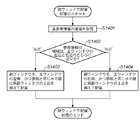
次に、副ウィンドウ配置処理の詳細について、図8及び図9を用いて説明する。 Next, details of the sub-window arrangement processing will be described with reference to FIGS.
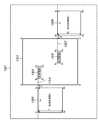
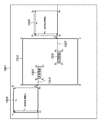
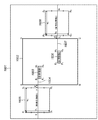
図8は本発明の実施形態1の副ウィンドウ配置処理の詳細を示すフローチャートである。図9は本発明の実施形態1の副ウィンドウの配置方法を説明するための図である。 FIG. 8 is a flowchart showing details of the sub-window arrangement processing according to the first embodiment of the present invention. FIG. 9 is a diagram for explaining a sub-window arrangement method according to the first embodiment of the present invention.
ステップS1401で、CPU101は、まず、主ウィンドウ1302中の参照情報(参照情報1(1303)、参照情報2(1306))の占有領域(図13のE1F1G1H1、及びE2F2G2H2)の位置座標を取得する。
In step S1401, the
ステップS1402で、次に、CPU101は、各参照情報の占有領域が主ウィンドウ1302の矩形領域の左辺ABあるいは右辺CDのどちらに近いかを判定する。
Next, in step S1402, the
例えば、左辺ABに近い参照情報1(1303)の場合、ステップS1403において、対応する副ウィンドウ1305を、主ウィンドウ1302の左側の所定位置(例えば、主ウィンドウ1302の左辺から所定長dだけ間隔を空けた位置)に、参照情報1(1303)の占有領域E1F1G1H1の上辺E1H1から伸ばした水平線1(1304)に副ウィンドウ1305の上辺P1S1を揃えた状態で、表示装置107を介して画面1301上に配置する。
For example, in the case of the reference information 1 (1303) close to the left side AB, in step S1403, the
また、例えば、右辺CDに近い参照情報2(1306)の場合、ステップ1404において、対応する副ウィンドウ2(1308)を、主ウィンドウ1302の右側の所定位置(例えば、主ウィンドウ1302の右辺から所定長dだけ間隔を空けた位置)に、参照情報2(1306)の占有領域E2F2G2H2の上辺E2H2から伸ばした水平線2(1304)に副ウィンドウ1308の上辺P2S2を揃えた状態で、表示装置107を介して画面1301上に配置する。
For example, in the case of reference information 2 (1306) close to the right side CD, in step 1404, the corresponding sub window 2 (1308) is moved to a predetermined position on the right side of the main window 1302 (for example, a predetermined length from the right side of the main window 1302). (the position spaced by d)) on the horizontal line 2 (1304) extended from the upper side E 2 H 2 of the occupied area E 2 F 2 G 2 H 2 of the reference information 2 (1306) to the upper side P 2 S of the
但し、実施形態1では、副ウィンドウの配置の際、主ウィンドウ内に同一の参照先情報に関連付けられた参照情報が複数存在する場合(例えば、図10の参照情報903bと参照情報903cの場合)、その主ウィンドウ内で最も上に位置する参照情報(この場合、参照情報903b)の水平線上に対応する副ウィンドウを表示しているが、本発明は、この限りではなく、最も下に位置するあるいは任意の場所に位置する参照情報を基準として、その水平線上に副ウィンドウを表示してもよい。
However, in the first embodiment, when the sub-window is arranged, a plurality of reference information associated with the same reference destination information exists in the main window (for example, in the case of the
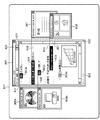
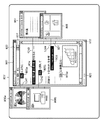
参照先情報の表示結果として、図10のように、主ウィンドウ902の表示領域に含まれる、同一文書内への参照情報903a及び903b、電子文書データベース中の他の電子文書への参照情報904、Webサイトへの参照情報905が指示する参照先情報が、夫々の情報源から取得され、各参照情報の水平線上の適切な位置に配置された副ウィンドウ906a、906b、907及び908に表示される。
As a display result of the reference destination information, as shown in FIG. 10,
また、図10に示したように、各参照情報903a、903b、904及び905と同じ水平線上に、それと対応する副ウィンドウ906a、906b、907及び908を結ぶ補助線941、942、943及び944を描画するように構成しても良い。
Also, as shown in FIG. 10,
また、図10では、参照情報を示す文字列とその参照先情報副のウィンドウのタイトルバーを参照情報先種別に応じて色分けして構成しても良い。 In FIG. 10, the character string indicating the reference information and the title bar of the reference destination information sub window may be color-coded according to the reference information destination type.
図3の説明に戻る。 Returning to the description of FIG.
ステップS208(主ウィンドウ上での操作の判定):
CPU101は、主ウィンドウ902上で、主ウィンドウに対する操作の有無を判定する。
Step S208 (determination of operation on the main window):
The
この主ウィンドウに対する操作には、例えば、図10において、ページの順次送り(マウス104でスクロールバー921を操作)、ページの拡大(+)・縮小(−)(マウス104でズームボタン931を操作)、ページのジャンプ(キーボード103を用いて、ページ表示欄923へジャンプするページを入力)等のページ操作、あるいは、ウィンドウの移動(マウス104でタイトルバー923を操作)、ウィンドウサイズの変更(マウス104でウィンドウサイズ変更ハンドル922を操作)等のウィンドウの状態を変更するウィンドウ操作がある。
For the operation on the main window, for example, in FIG. 10, the pages are sequentially sent (the
主ウィンドウに対する操作がある場合(ステップS208でYES)、操作後の表示領域に対してRAM105内の表示領域データを更新した後、ステップS204へ進む。一方、主ウィンドウに対する操作がない場合(ステップS208でNO)、ステップS209へ進む。
If there is an operation on the main window (YES in step S208), the display area data in the
ここで、主ウィンドウの操作の一つであるページ操作の一例として、ページの順次送り操作を行った場合の表示画面の更新について、図11を用いて説明する。 Here, as an example of the page operation which is one of the operations of the main window, the update of the display screen when the sequential page feed operation is performed will be described with reference to FIG.
図11は本発明の実施形態1のページの順次送り操作による副ウィンドウへの参照先情報の表示の変化の様子を示す図である。 FIG. 11 is a diagram illustrating a change in the display of the reference destination information on the subwindow by the sequential page feed operation according to the first embodiment of the present invention.
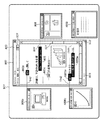
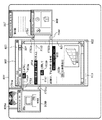
図11は、図10の状態から、スクロールバー921の操作により、ページが少し後方に送られた状態を示している。この場合、CPU101は、ステップS204〜ステップS207の処理によって、主ウィンドウ902上の表示領域から外れた参照情報903a及び904の参照先情報を表示していた副ウィンドウ906a及び907を閉じている(非表示の状態にする)。
FIG. 11 shows a state in which the page is slightly moved backward by the operation of the
また、CPU101は、同じく、ステップS204〜ステップS207の処理によって、それに代わって新しく主ウィンドウ902上の表示領域に含まれた参照情報1003d及び1003eについては、まず、各々の参照先情報を表示するための副ウィンドウ1006c及び1009を新規に作成し、夫々の参照情報1003d及び1003eの占有領域の水平線上の所定位置に配置した後、各々の参照先情報を、各副ウィンドウ1006c及び1009上に表示する。
Similarly, the
また、図11に示したように、各参照情報1003d及び1003eと同じ水平線上に、それと対応する副ウィンドウ1006c及び1009を結ぶ補助線1142及び1144を描画するように構成しても良い。
Further, as shown in FIG. 11,
また、CPU101は、同じく、ステップS204〜ステップS207の処理によって、継続して主ウィンドウ902上の表示領域に含まれている参照情報903b及び参照情報905については、ページ送り後のこの両参照情報903b及び905の水平線上の位置に、夫々に対応する副ウィンドウ906b及び908を移動している。
Similarly, the
このように、実施形態1では、電子文書の表示領域がページ操作あるいはウィンドウ操作により変化した際、参照先情報を表示するための副ウィンドウの表示/非表示の切替、及びその副ウィンドウの画面上での位置の移動を動的に行う。 As described above, in the first embodiment, when the display area of the electronic document is changed by the page operation or the window operation, the display / non-display switching of the sub window for displaying the reference destination information and the screen of the sub window are displayed. The position is moved dynamically.
図3の説明に戻る。 Returning to the description of FIG.
ステップS209(処理終了の判定):
CPU101は、コマンド入力装置であるマウス104によって、処理終了の指示が入力されたか否かを判定する。終了処理でない場合(ステップS209でNO)、ステップS208に戻る。一方、終了処理である場合(ステップS209でYES)、電子文書表示処理を終了する。
Step S209 (determination of process end):
The
以上説明したように、実施形態1によれば、電子文書の表示中のページ(領域)に含まれる参照情報を抽出し、抽出した参照情報に関連付けられた参照情報先の情報の内、表示中のページ(領域)に含まれないものについては、適宜、参照先情報である同一電子文書、電子文書データベース内の他の電子文書あるいはWWWネットワークのWebページを取得する。そして、取得した単数以上の参照先情報を自動的に副ウィンドウに表示する。 As described above, according to the first embodiment, the reference information included in the page (area) being displayed of the electronic document is extracted, and the reference information destination information associated with the extracted reference information is being displayed. For those not included in the page (area), the same electronic document as reference destination information, another electronic document in the electronic document database, or a Web page of the WWW network is appropriately acquired. Then, the acquired reference destination information of one or more is automatically displayed on the subwindow.
これにより、電子文書の閲覧時に、表示中の領域に含まれる参照先情報を、容易に取得することが可能となる。 Accordingly, it is possible to easily acquire the reference destination information included in the displayed area when browsing the electronic document.
また、主ウィンドウに対する操作(ページ送りやウィンドウリサイズ等)により、表示中のページ(領域)に含まれる参照情報の構成が変化した場合、それに応じて副ウィンドウに表示する参照先情報を動的に切り替えることで、常に表示中の領域に関連付けられた参照情報先の情報のみを副ウィンドウ上に表示することができる。 In addition, when the configuration of the reference information included in the displayed page (area) changes due to operations on the main window (page feed, window resizing, etc.), the reference destination information displayed in the subwindow is dynamically changed accordingly. By switching, only the information of the reference information destination associated with the currently displayed area can be displayed on the sub window.
また、主ウィンドウ内に含まれる参照情報の位置と同じ水平線上に、その参照情報に関連付けられた参照先情報を表示するための副ウィンドウを配置することで、オペレータが、主ウィンドウ中の所望の参照情報に関連付けられた参照先情報を表示している副ウィンドウを、画面上から即座に特定することができる。 Also, by arranging a sub-window for displaying the reference destination information associated with the reference information on the same horizontal line as the position of the reference information included in the main window, the operator can select a desired information in the main window. The subwindow displaying the reference destination information associated with the reference information can be immediately identified from the screen.
また、主ウィンドウに対する操作に応じて、画面上の副ウィンドウの位置を移動することで、主ウィンドウに対する操作(ウィンドウの移動、ウィンドウのリサイズ、ページ送り等)を行った場合でも、各々の副ウィンドウが、常に主ウィンドウ内の対応する参照情報と同じ水平線上に表示することができる。 In addition, by moving the position of the subwindow on the screen according to the operation on the main window, even when operations on the main window (window movement, window resizing, page feed, etc.) are performed, each subwindow Can always be displayed on the same horizontal line as the corresponding reference information in the main window.
以上のように、実施形態1は、オペレータの作業負担を軽減する視認性が良い電子文書閲覧システムを実現することができる。 As described above, the first embodiment can realize an electronic document browsing system with good visibility that reduces the burden on the operator.
[実施形態2]
実施形態1では、主ウィンドウ中の参照情報の占有領域の水平線上に参照先情報を表示するための副ウィンドウを配置する際、その副ウィンドウの上辺をその水平線に揃えて配置制御(表示制御)する構成について説明したが、これに限定されるものではない。
[Embodiment 2]
In the first embodiment, when a subwindow for displaying reference destination information is arranged on the horizontal line of the area occupied by the reference information in the main window, the upper side of the subwindow is aligned with the horizontal line and the arrangement control (display control) is performed. Although the structure to perform was demonstrated, it is not limited to this.
実施形態2では、副ウィンドウの下辺を参照情報の占有領域の水平線に揃えて配置する例について説明する。 In the second embodiment, an example will be described in which the lower side of the sub-window is aligned with the horizontal line of the reference information occupation area.
図12は本発明の実施形態2の副ウィンドウの配置方法を説明するための図である。 FIG. 12 is a diagram for explaining a sub-window arrangement method according to the second embodiment of the present invention.
図12に示すように、例えば、参照情報1(1503)については、その占有領域E1F1G1H1の上辺E1H1から伸ばした水平線1(1504)に、対応する副ウィンドウ1(1505)の下辺Q1R1を揃えて、副ウィンドウ1(1505)を配置する。
As shown in FIG. 12, for example, for reference information 1 (1503), the occupied area E 1 F 1 G 1 H
但し、この際、参照情報1(1503)の領域E1F1G1H1が、主ウィンドウ1502の右辺CD側より左辺AB側に近いため、副ウィンドウ1505の配置位置を主ウィンドウ1502の左側に、所定長d間隔を空けた位置としている。
However, at this time, since the area E 1 F 1 G 1 H 1 of the reference information 1 (1503) is closer to the left side AB than the right side CD side of the
また、参照情報2(1506)については、その占有領域E2F2G2H2の上辺E2H2から伸ばした水平線2(1507)に、対応する副ウィンドウ2(1508)の下辺Q2R2を揃えて、副ウィンドウ2(1508)を配置する。 Also, the reference information 2 (1506), in the occupied region E 2 F 2 G 2 H 2 of the upper side E 2 H 2 from the extended horizon 2 (1507), the corresponding lower Q 2 of the sub window 2 (1508) Sub-window 2 (1508) is arranged with R 2 aligned.
但し、この際、参照情報2(1503)の領域E2F2G2H2が、主ウィンドウ1502の左辺AB側より右辺CD側に近いため、副ウィンドウ2(1508)の配置位置を主ウィンドウ1502の右側の、所定長d間隔を空けた位置としている。
However, at this time, since the area E 2 F 2 G 2 H 2 of the reference information 2 (1503) is closer to the right side CD side than the left side AB side of the
CPU101が、実施形態1における処理フロー(図3、図6〜図8)におけるステップS810、ステップS1403及びステップS1404に、この図12による副ウィンドウの配置方法を適用し、同様の処理を実行した結果、画面上での副ウィンドウの配置の様子は、例えば、図13のようになる。
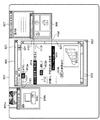
The result of the
この図13では、4種の参照情報903a、903b、904及び905の占有領域の水平線に、夫々の参照先情報を表示するための副ウィンドウ906a、906b、907及び908の下辺を揃えて、副ウィンドウ906a、906b、907及び908を配置している。
In FIG. 13, the sub-windows 906 a, 906 b, 907, and 908 for displaying the respective reference destination information are aligned with the horizontal lines of the occupied areas of the four types of
さらには、この図13に示したように、各参照情報903a、903b、904及び905と同じ水平線上に、それと対応する副ウィンドウ906a、906b、907及び908を結ぶ補助線1141、1142、1143及び1144を描画するように構成しても良い。
Further, as shown in FIG. 13,
以上説明したように、実施形態2によれば、実施形態1と同様の効果を得ることができる。 As described above, according to the second embodiment, the same effect as that of the first embodiment can be obtained.
[実施形態3]
実施形態1及び2では、主ウィンドウ中の参照情報の占有領域の水平線上に参照先情報を表示するための副ウィンドウを配置する際、その副ウィンドウの上辺あるいは下辺をその水平線に揃えて配置する構成について説明したが、これに限定されるものではない。
[Embodiment 3]
In the first and second embodiments, when the subwindow for displaying the reference destination information is arranged on the horizontal line of the reference information occupation area in the main window, the upper side or the lower side of the subwindow is arranged so as to be aligned with the horizontal line. Although the configuration has been described, the present invention is not limited to this.
実施形態3では、副ウィンドウの領域を上下に二等分する線分を参照情報の占有領域の水平線に揃えて配置する例について説明する。 In the third embodiment, an example will be described in which a line segment that bisects the area of the sub window is aligned with the horizontal line of the occupied area of the reference information.
図14は本発明の実施形態3の副ウィンドウの配置方法を説明するための図である。 FIG. 14 is a diagram for explaining a sub-window arrangement method according to the third embodiment of the present invention.
図14に示すように、例えば、参照情報1(1603)については、その占有領域E1F1G1H1の上辺E1H1から伸ばした水平線1(1604)に、対応する副ウィンドウ1(1605)の上下に二等分する線分T1U1を揃えて、副ウィンドウ1(1605)を配置する。
As shown in FIG. 14, for example, for reference information 1 (1603), the occupied area E 1 F 1 G 1 H
但し、この際、参照情報1(1603)の領域E1F1G1H1が、主ウィンドウ1602の右辺CD側より左辺AB側に近いため、副ウィンドウ1605の配置位置を主ウィンドウ1602の左側の、所定長d間隔を空けた位置としている。
However, at this time, since the area E 1 F 1 G 1 H 1 of the reference information 1 (1603) is closer to the left side AB than the right side CD side of the
また、参照情報2(1606)については、その占有領域E2F2G2H2の上辺E2H2から伸ばした水平線2(1607)に、対応する副ウィンドウ2(1608)の上下に二等分する線分T2U2を揃えて、副ウィンドウ2(1608)を配置する。 Further, with respect to the reference information 2 (1606), the horizontal line 2 (1607) extended from the upper side E 2 H 2 of the occupied area E 2 F 2 G 2 H 2 is displayed above and below the corresponding sub window 2 (1608). The sub-window 2 (1608) is arranged with the line segments T 2 U 2 to be equally divided.
但し、この際、参照情報2(1603)の領域E2F2G2H2が、主ウィンドウ1602の左辺AB側より右辺CD側に近いため、副ウィンドウ2(1608)の配置位置を主ウィンドウ1602の右側の、所定長d間隔を空けた位置としている。
However, at this time, since the area E 2 F 2 G 2 H 2 of the reference information 2 (1603) is closer to the right side CD side than the left side AB side of the
CPU101が、実施形態1における処理フロー(図3、図6〜図8)におけるステップS810、ステップS1403及びステップS1404に、この図14による副ウィンドウ配置方法を適用し、同様の処理を実行した結果、画面上での副ウィンドウの配置の様子は、例えば、図15のようになる。
As a result of the
この図15では、4種の参照情報903a、903b、904及び905の占有領域の水平線に、夫々の参照先情報を表示するための副ウィンドウ906a、906b、907及び908の領域を上下に二等分する線分を揃えて、副ウィンドウ906a、906b、907及び908を配置している。
In FIG. 15, the areas of the sub-windows 906a, 906b, 907, and 908 for displaying the respective reference destination information on the horizontal line of the occupied area of the four types of
さらには、この図15に示したように、各参照情報903a、903b、904及び905と同じ水平線上に、それと対応する副ウィンドウ906a、906b、907及び908を結ぶ補助線1241、1242、1243及び1244を描画するように構成しても良い。
Further, as shown in FIG. 15,
以上説明したように、実施形態3によれば、実施形態1と同様の効果を得ることができる。 As described above, according to the third embodiment, the same effect as that of the first embodiment can be obtained.
[実施形態4]
上記実施形態1〜3において、参照先情報を表示するための副ウィンドウが画面上で重なり合った場合、各水平線上に描画した補助線と対応する副ウィンドウとの接点が見えない場合がある。
[Embodiment 4]
In the first to third embodiments, when the subwindows for displaying the reference destination information overlap on the screen, the contact between the auxiliary line drawn on each horizontal line and the corresponding subwindow may not be visible.
例えば、実施形態2の図13では、副ウィンドウ906aと906b、907と908はそれぞれ重なり合っており、この場合、補助線1141と副ウィンドウ906aの接点1151、および補助線1143と副ウィンドウ907の接点1152が、夫々副ウィンドウ906bと908に隠れて見えない。
For example, in FIG. 13 of the second embodiment, the
そこで、実施形態4では、このような場合には、図16に示すように、副ウィンドウ906b及び908を夫々の水平線上で適当量ずらして(例えば、主ウィンドウ902からの距離を2d(=1751b、1752b)として)配置することで、接点1753と1754が見えるように構成しても良い。もちろん、配置位置をずらす副ウィンドウは、副ウィンドウ906b及び908ではなく、副ウィンドウ906a及び907としても良い。
Therefore, in the fourth embodiment, in such a case, as shown in FIG. 16, the
いずれにしても上下方向で補助線と副ウィンドウの接点が隠れているような場合には、その接点が表示される(見える)ように、関係する副ウィンドウの配置位置を適宜ずらして調整すれば良い。 In any case, if the contact point between the auxiliary line and the sub window is hidden in the vertical direction, adjust the position of the related sub window so that the contact point is displayed (visible). good.
この結果、主ウィンドウ内の各参照情報に対応付けられた副ウィンドウをより明確に識別できるようになる。 As a result, the subwindow associated with each reference information in the main window can be more clearly identified.
以上説明したように、実施形態4によれば、実施形態1〜3で説明した効果に加えて、参照先情報を表示する副ウィンドウ同士が重なった場合でも、各副ウィンドウに対応する参照情報を明確に識別することができる。 As described above, according to the fourth embodiment, in addition to the effects described in the first to third embodiments, the reference information corresponding to each subwindow is displayed even when the subwindows displaying the reference destination information overlap each other. It can be clearly identified.
尚、上記実施形態1〜4において、副ウィンドウの配置(表示)位置は、参照情報の占有領域の水平方向の辺(長辺)と主ウィンドウの矩形領域の左辺ABあるいは右辺CDとに基づいて決定する構成としているが、参照情報の占有領域の垂直方向の辺(短辺)と主ウィンドウの矩形領域の上辺ADあるいは下辺BEに基づいて、副ウィンドウの配置(表示)位置を決定するようにしても良い。 In the first to fourth embodiments, the arrangement (display) position of the sub window is based on the horizontal side (long side) of the occupied area of the reference information and the left side AB or the right side CD of the rectangular area of the main window. In this configuration, the position (display) position of the sub window is determined based on the vertical side (short side) of the occupied area of the reference information and the upper side AD or the lower side BE of the rectangular area of the main window. May be.
また、これ以外にも、例えば、参照情報の占有領域の頂点と、主ウィンドウの矩形領域の頂点A〜Eのいずれかとに基づいて、副ウィンドウの配置(表示)位置を決定するようにしても良い。 In addition to this, for example, the arrangement (display) position of the sub window may be determined based on the vertex of the occupied area of the reference information and one of the vertices A to E of the rectangular area of the main window. good.
いずれにしても、参照情報とその参照情報先を含む副ウィンドウが容易に視認することができる位置であれば、どのような構成でも良い。換言すれば、参照情報の占有領域と主ウィンドウの矩形領域の位置関係に基づいて、副ウィンドウの配置(表示)位置を決定すれば良い。 In any case, any configuration may be used as long as the sub window including the reference information and the reference information destination can be easily visually recognized. In other words, the arrangement (display) position of the sub window may be determined based on the positional relationship between the occupied area of the reference information and the rectangular area of the main window.
以上、実施形態例を詳述したが、本発明は、例えば、システム、装置、方法、プログラムもしくは記憶媒体等としての実施態様をとることが可能であり、具体的には、複数の機器から構成されるシステムに適用しても良いし、また、一つの機器からなる装置に適用しても良い。 Although the embodiments have been described in detail above, the present invention can take an embodiment as, for example, a system, an apparatus, a method, a program, or a storage medium, and specifically includes a plurality of devices. The present invention may be applied to a system that is configured, or may be applied to an apparatus that includes a single device.
尚、本発明は、前述した実施形態の機能を実現するソフトウェアのプログラム(実施形態では図に示すフローチャートに対応したプログラム)を、システムあるいは装置に直接あるいは遠隔から供給し、そのシステムあるいは装置のコンピュータが該供給されたプログラムコードを読み出して実行することによっても達成される場合を含む。 In the present invention, a software program (in the embodiment, a program corresponding to the flowchart shown in the figure) that realizes the functions of the above-described embodiment is directly or remotely supplied to the system or apparatus, and the computer of the system or apparatus Is also achieved by reading and executing the supplied program code.
従って、本発明の機能処理をコンピュータで実現するために、該コンピュータにインストールされるプログラムコード自体も本発明を実現するものである。つまり、本発明は、本発明の機能処理を実現するためのコンピュータプログラム自体も含まれる。 Accordingly, since the functions of the present invention are implemented by computer, the program code installed in the computer also implements the present invention. In other words, the present invention includes a computer program itself for realizing the functional processing of the present invention.
その場合、プログラムの機能を有していれば、オブジェクトコード、インタプリタにより実行されるプログラム、OSに供給するスクリプトデータ等の形態であっても良い。 In that case, as long as it has the function of a program, it may be in the form of object code, a program executed by an interpreter, script data supplied to the OS, or the like.
プログラムを供給するための記録媒体としては、例えば、フロッピー(登録商標)ディスク、ハードディスク、光ディスク、光磁気ディスク、MO、CD−ROM、CD−R、CD−RW、磁気テープ、不揮発性のメモリカード、ROM、DVD(DVD−ROM,DVD−R)などがある。 As a recording medium for supplying the program, for example, floppy (registered trademark) disk, hard disk, optical disk, magneto-optical disk, MO, CD-ROM, CD-R, CD-RW, magnetic tape, nonvolatile memory card ROM, DVD (DVD-ROM, DVD-R) and the like.
その他、プログラムの供給方法としては、クライアントコンピュータのブラウザを用いてインターネットのホームページに接続し、該ホームページから本発明のコンピュータプログラムそのもの、もしくは圧縮され自動インストール機能を含むファイルをハードディスク等の記録媒体にダウンロードすることによっても供給できる。また、本発明のプログラムを構成するプログラムコードを複数のファイルに分割し、それぞれのファイルを異なるホームページからダウンロードすることによっても実現可能である。つまり、本発明の機能処理をコンピュータで実現するためのプログラムファイルを複数のユーザに対してダウンロードさせるWWWサーバも、本発明に含まれるものである。 As another program supply method, a client computer browser is used to connect to an Internet homepage, and the computer program of the present invention itself or a compressed file including an automatic installation function is downloaded from the homepage to a recording medium such as a hard disk. Can also be supplied. It can also be realized by dividing the program code constituting the program of the present invention into a plurality of files and downloading each file from a different homepage. That is, a WWW server that allows a plurality of users to download a program file for realizing the functional processing of the present invention on a computer is also included in the present invention.
また、本発明のプログラムを暗号化してCD−ROM等の記憶媒体に格納してユーザに配布し、所定の条件をクリアしたユーザに対し、インターネットを介してホームページから暗号化を解く鍵情報をダウンロードさせ、その鍵情報を使用することにより暗号化されたプログラムを実行してコンピュータにインストールさせて実現することも可能である。 In addition, the program of the present invention is encrypted, stored in a storage medium such as a CD-ROM, distributed to users, and key information for decryption is downloaded from a homepage via the Internet to users who have cleared predetermined conditions. It is also possible to execute the encrypted program by using the key information and install the program on a computer.
また、コンピュータが、読み出したプログラムを実行することによって、前述した実施形態の機能が実現される他、そのプログラムの指示に基づき、コンピュータ上で稼動しているOSなどが、実際の処理の一部または全部を行ない、その処理によっても前述した実施形態の機能が実現され得る。 In addition to the functions of the above-described embodiments being realized by the computer executing the read program, the OS running on the computer based on the instruction of the program is a part of the actual processing. Alternatively, the functions of the above-described embodiment can be realized by performing all of them and performing the processing.
さらに、記録媒体から読み出されたプログラムが、コンピュータに挿入された機能拡張ボードやコンピュータに接続された機能拡張ユニットに備わるメモリに書き込まれた後、そのプログラムの指示に基づき、その機能拡張ボードや機能拡張ユニットに備わるCPUなどが実際の処理の一部または全部を行ない、その処理によっても前述した実施形態の機能が実現される。 Furthermore, after the program read from the recording medium is written in a memory provided in a function expansion board inserted into the computer or a function expansion unit connected to the computer, the function expansion board or The CPU or the like provided in the function expansion unit performs part or all of the actual processing, and the functions of the above-described embodiments are realized by the processing.
101 CPU
102 記憶装置
103 キーボード
104 マウス
105 RAM
106 VRAM
107 表示装置
108 通信装置
109 インターネット
110 ROM
101 CPU
102
106 VRAM
Claims (17)
処理対象の電子文書の内容を前記表示画面内の第1ウィンドウに表示する表示手段と、
前記第1ウィンドウの表示領域内で、他の情報に関連付けられた参照情報を抽出する抽出手段と、
前記抽出手段で抽出した参照情報が指示する参照先情報を取得する取得手段と、
前記表示画面内で、前記取得手段で取得した参照先情報を表示する第2ウィンドウを、前記第1ウィンドウと該第1ウィンドウ内の前記参照情報との位置関係に基づいて決定した表示位置に表示する表示制御手段と
を備えることを特徴とする情報処理装置。 An information processing apparatus that controls display of the electronic document in order to view the electronic document on a display screen,
Display means for displaying the contents of the electronic document to be processed in a first window in the display screen;
Extracting means for extracting reference information associated with other information within the display area of the first window;
Obtaining means for obtaining reference destination information indicated by the reference information extracted by the extracting means;
In the display screen, a second window for displaying the reference destination information acquired by the acquisition unit is displayed at a display position determined based on a positional relationship between the first window and the reference information in the first window. An information processing apparatus comprising: a display control unit that performs:
ことを特徴とする請求項1記載の情報処理装置。 The information processing apparatus according to claim 1, wherein the display control unit displays the second window at a position on the same horizontal line as the position of the reference information in the first window.
ことを特徴とする請求項1に記載の情報処理装置。 The information processing apparatus according to claim 1, wherein the display control unit displays the second window at a position that does not overlap the main window.
ことを特徴とする請求項1に記載の情報処理装置。 The display control means moves the position of the second window on the display screen in accordance with the reference information in the first window that is moved by an operation on the first window. The information processing apparatus described in 1.
ことを特徴とする請求項4に記載の情報処理装置。 The information processing apparatus according to claim 4, wherein the operation for the first window is a window operation for changing a state of the first window or a page operation for an electronic document in the first window.
ことを特徴とする請求項5に記載の情報処理装置。 The information processing apparatus according to claim 5, wherein the window operation includes at least one of movement of a display position of the first window and change of a window size of the first window.
ことを特徴とする請求項5に記載の情報処理装置。 The information processing apparatus according to claim 5, wherein the page operation includes at least one of sequential page feed, page jump, and page enlargement / reduction.
ことを特徴とする請求項1に記載の情報処理装置。 2. The display control unit according to claim 1, wherein the display control unit displays the second window on the same horizontal line as the position of the reference information in the first window with the upper side of the second window aligned. Information processing device.
ことを特徴とする請求項1に記載の情報処理装置。 2. The display control unit according to claim 1, wherein the display control unit displays the second window on the same horizontal line as the position of the reference information in the first window with the lower side of the second window aligned. Information processing device.
ことを特徴とする請求項1に記載の情報処理装置。 The display control means displays the second window with the same horizontal line as the position of the reference information in the first window aligned with a straight line that bisects the area of the second window vertically. The information processing apparatus according to claim 1.
ことを特徴とする請求項1に記載の情報処理装置。 The display control means displays the second window at a position on the outer side of the left side and the right side of the rectangular area of the first window that is closer to the side of the reference information in the first window. The information processing apparatus according to claim 1.
ことを特徴とする請求項1に記載の情報処理装置。 When there is a plurality of reference information associated with the same reference destination information among the reference information in the first window, the display control means is configured to set the horizontal reference information at the top in the first window. The information processing apparatus according to claim 1, wherein the second window for displaying the reference destination information is displayed at a position on the line.
ことを特徴とする請求項1に記載の情報処理装置。 When there is a plurality of reference information associated with the same reference destination information in the reference information in the first window, the display control means is configured to set the horizontal reference information at the bottom in the second window. The information processing apparatus according to claim 1, wherein the second window for displaying the reference destination information is displayed at a position on the line.
ことを特徴とする請求項2に記載の情報処理装置。 The information processing apparatus according to claim 2, wherein the display control unit further displays an auxiliary line connecting the reference information and the second window corresponding to the reference information on the horizontal line.
ことを特徴とする請求項14に記載の情報処理装置。 The display control means is configured to display the contact point when a plurality of the second windows overlap to hide a contact point between each auxiliary line displayed on the horizontal line and the corresponding second window. The information processing apparatus according to claim 14, wherein positions of a plurality of second windows are adjusted on the horizontal line.
処理対象の電子文書の内容を前記表示画面内の第1ウィンドウに表示する表示工程と、
前記第1ウィンドウの表示領域内で、他の情報に関連付けられた参照情報を抽出する抽出工程と、
前記抽出工程で抽出した参照情報が指示する参照先情報を取得する取得工程と、
前記表示画面内で、前記取得工程で取得した参照先情報を表示する第2ウィンドウを、前記第1ウィンドウと該第1ウィンドウ内の前記参照情報との位置関係に基づいて決定した表示位置に表示する表示制御工程と
を備えることを特徴とする情報処理装置の制御方法。 An information processing apparatus control method for controlling display of an electronic document in order to view the electronic document on a display screen,
A display step of displaying the contents of the electronic document to be processed in the first window in the display screen;
An extraction step of extracting reference information associated with other information within the display area of the first window;
An acquisition step of acquiring reference destination information indicated by the reference information extracted in the extraction step;
In the display screen, a second window for displaying the reference destination information acquired in the acquisition step is displayed at a display position determined based on a positional relationship between the first window and the reference information in the first window. A display control step for controlling the information processing apparatus.
処理対象の電子文書の内容を前記表示画面内の第1ウィンドウに表示する表示工程のプログラムコードと、
前記第1ウィンドウの表示領域内で、他の情報に関連付けられた参照情報を抽出する抽出工程のプログラムコードと、
前記抽出工程で抽出した参照情報が指示する参照先情報を取得する取得工程のプログラムコードと、
前記表示画面内で、前記取得工程で取得した参照先情報を表示する第2ウィンドウを、前記第1ウィンドウと該第1ウィンドウ内の前記参照情報との位置関係に基づいて決定した表示位置に表示する表示制御工程のプログラムコードと
を備えることを特徴とするプログラム。 A program for controlling an information processing apparatus for controlling display of the electronic document in order to view the electronic document on a display screen,
A program code of a display step for displaying the contents of the electronic document to be processed in the first window in the display screen;
In the display area of the first window, a program code of an extraction process for extracting reference information associated with other information;
A program code of an acquisition step for acquiring reference destination information indicated by the reference information extracted in the extraction step;
In the display screen, a second window for displaying the reference destination information acquired in the acquisition step is displayed at a display position determined based on a positional relationship between the first window and the reference information in the first window. And a display control process program code.
Priority Applications (1)
| Application Number | Priority Date | Filing Date | Title |
|---|---|---|---|
| JP2004163747A JP2005346309A (en) | 2004-06-01 | 2004-06-01 | Information processing apparatus, control method therefor, and program |
Applications Claiming Priority (1)
| Application Number | Priority Date | Filing Date | Title |
|---|---|---|---|
| JP2004163747A JP2005346309A (en) | 2004-06-01 | 2004-06-01 | Information processing apparatus, control method therefor, and program |
Publications (1)
| Publication Number | Publication Date |
|---|---|
| JP2005346309A true JP2005346309A (en) | 2005-12-15 |
Family
ID=35498637
Family Applications (1)
| Application Number | Title | Priority Date | Filing Date |
|---|---|---|---|
| JP2004163747A Withdrawn JP2005346309A (en) | 2004-06-01 | 2004-06-01 | Information processing apparatus, control method therefor, and program |
Country Status (1)
| Country | Link |
|---|---|
| JP (1) | JP2005346309A (en) |
Cited By (3)
| Publication number | Priority date | Publication date | Assignee | Title |
|---|---|---|---|---|
| JP2009009360A (en) * | 2007-06-28 | 2009-01-15 | Brother Ind Ltd | Data structure, language file, information processing apparatus and printing apparatus |
| JP2011008600A (en) * | 2009-06-26 | 2011-01-13 | Konica Minolta Business Technologies Inc | Apparatus and method for processing image, image forming apparatus, and image processing program |
| JP2012525652A (en) * | 2009-05-01 | 2012-10-22 | クアルコム,インコーポレイテッド | Method and apparatus for providing a scraped web page within a graphical user interface |
-
2004
- 2004-06-01 JP JP2004163747A patent/JP2005346309A/en not_active Withdrawn
Cited By (6)
| Publication number | Priority date | Publication date | Assignee | Title |
|---|---|---|---|---|
| JP2009009360A (en) * | 2007-06-28 | 2009-01-15 | Brother Ind Ltd | Data structure, language file, information processing apparatus and printing apparatus |
| US9182929B2 (en) | 2007-06-28 | 2015-11-10 | Brother Kogyo Kabushiki Kaisha | Computer readable medium, information processing device, and printing device |
| JP2012525652A (en) * | 2009-05-01 | 2012-10-22 | クアルコム,インコーポレイテッド | Method and apparatus for providing a scraped web page within a graphical user interface |
| US8645849B2 (en) | 2009-05-01 | 2014-02-04 | Qualcomm Incorporated | Method and apparatus for providing portioned web pages in a graphical user interface |
| JP2011008600A (en) * | 2009-06-26 | 2011-01-13 | Konica Minolta Business Technologies Inc | Apparatus and method for processing image, image forming apparatus, and image processing program |
| US8452796B2 (en) | 2009-06-26 | 2013-05-28 | Konica Minolta Business Technologies, Inc. | Image processing apparatus, image processing method, image forming apparatus and recording medium |
Similar Documents
| Publication | Publication Date | Title |
|---|---|---|
| JP5592594B2 (en) | Digital mapping system | |
| CN101288076B (en) | Interactive drawing method and system | |
| CN101014831B (en) | Digital Mapping System | |
| CN1752979B (en) | Graphical User Interface of Web Browser and Its Realization Method | |
| US8204950B2 (en) | Webpage search | |
| JP2002140731A (en) | Picture processor, picture processing system and recording medium | |
| JP6618127B2 (en) | Display device, display method, and display program | |
| JP2005346309A (en) | Information processing apparatus, control method therefor, and program | |
| JP2002230569A (en) | Electronic map display | |
| JP2006003999A (en) | Information processing method and apparatus | |
| KR20020080270A (en) | Personalized portal service method and system | |
| JP5193969B2 (en) | Map display apparatus and method for simultaneously displaying different maps | |
| JP2001154777A (en) | Hypertext browsing apparatus, display control method therefor, and recording medium | |
| KR100852617B1 (en) | Atlas display device and method | |
| JPH1097637A (en) | How to edit information | |
| JP5570200B2 (en) | Image data display output device and program | |
| JP2009053845A (en) | Screen creation device and screen creation program | |
| CN121326194A (en) | Itinerary editing methods, devices and electronic equipment | |
| JP2001324336A (en) | Map information display device | |
| JP2002215654A (en) | Document processing device | |
| JP2000330678A (en) | Browser device, display control method for browser device, and storage medium storing computer-readable program | |
| JP2002091653A (en) | Browser display device | |
| JP2003178052A (en) | Text modification method and recording medium | |
| JPH06318146A (en) | Manual display system |
Legal Events
| Date | Code | Title | Description |
|---|---|---|---|
| A300 | Withdrawal of application because of no request for examination |
Free format text: JAPANESE INTERMEDIATE CODE: A300 Effective date: 20070807 |