EP4579660A2 - Screencast-aufzeichnungsverfahren, screencast-wiedergabeverfahren, bildschirmaufzeichnungsendgerät und wiedergabeendgerät - Google Patents
Screencast-aufzeichnungsverfahren, screencast-wiedergabeverfahren, bildschirmaufzeichnungsendgerät und wiedergabeendgerät Download PDFInfo
- Publication number
- EP4579660A2 EP4579660A2 EP25157976.9A EP25157976A EP4579660A2 EP 4579660 A2 EP4579660 A2 EP 4579660A2 EP 25157976 A EP25157976 A EP 25157976A EP 4579660 A2 EP4579660 A2 EP 4579660A2
- Authority
- EP
- European Patent Office
- Prior art keywords
- screen recording
- screen
- terminal
- content
- specified
- Prior art date
- Legal status (The legal status is an assumption and is not a legal conclusion. Google has not performed a legal analysis and makes no representation as to the accuracy of the status listed.)
- Pending
Links
Images








Classifications
-
- H—ELECTRICITY
- H04—ELECTRIC COMMUNICATION TECHNIQUE
- H04N—PICTORIAL COMMUNICATION, e.g. TELEVISION
- H04N5/00—Details of television systems
- H04N5/76—Television signal recording
-
- G—PHYSICS
- G11—INFORMATION STORAGE
- G11B—INFORMATION STORAGE BASED ON RELATIVE MOVEMENT BETWEEN RECORD CARRIER AND TRANSDUCER
- G11B27/00—Editing; Indexing; Addressing; Timing or synchronising; Monitoring; Measuring tape travel
- G11B27/02—Editing, e.g. varying the order of information signals recorded on, or reproduced from, record carriers
- G11B27/031—Electronic editing of digitised analogue information signals, e.g. audio or video signals
-
- H—ELECTRICITY
- H04—ELECTRIC COMMUNICATION TECHNIQUE
- H04N—PICTORIAL COMMUNICATION, e.g. TELEVISION
- H04N21/00—Selective content distribution, e.g. interactive television or video on demand [VOD]
- H04N21/40—Client devices specifically adapted for the reception of or interaction with content, e.g. set-top-box [STB]; Operations thereof
- H04N21/47—End-user applications
- H04N21/472—End-user interface for requesting content, additional data or services; End-user interface for interacting with content, e.g. for content reservation or setting reminders, for requesting event notification, for manipulating displayed content
- H04N21/47217—End-user interface for requesting content, additional data or services; End-user interface for interacting with content, e.g. for content reservation or setting reminders, for requesting event notification, for manipulating displayed content for controlling playback functions for recorded or on-demand content, e.g. using progress bars, mode or play-point indicators or bookmarks
-
- G—PHYSICS
- G06—COMPUTING OR CALCULATING; COUNTING
- G06F—ELECTRIC DIGITAL DATA PROCESSING
- G06F21/00—Security arrangements for protecting computers, components thereof, programs or data against unauthorised activity
- G06F21/10—Protecting distributed programs or content, e.g. vending or licensing of copyrighted material ; Digital rights management [DRM]
- G06F21/12—Protecting executable software
- G06F21/121—Restricting unauthorised execution of programs
-
- G—PHYSICS
- G06—COMPUTING OR CALCULATING; COUNTING
- G06F—ELECTRIC DIGITAL DATA PROCESSING
- G06F3/00—Input arrangements for transferring data to be processed into a form capable of being handled by the computer; Output arrangements for transferring data from processing unit to output unit, e.g. interface arrangements
- G06F3/01—Input arrangements or combined input and output arrangements for interaction between user and computer
- G06F3/048—Interaction techniques based on graphical user interfaces [GUI]
- G06F3/0481—Interaction techniques based on graphical user interfaces [GUI] based on specific properties of the displayed interaction object or a metaphor-based environment, e.g. interaction with desktop elements like windows or icons, or assisted by a cursor's changing behaviour or appearance
- G06F3/04812—Interaction techniques based on cursor appearance or behaviour, e.g. being affected by the presence of displayed objects
-
- G—PHYSICS
- G06—COMPUTING OR CALCULATING; COUNTING
- G06F—ELECTRIC DIGITAL DATA PROCESSING
- G06F3/00—Input arrangements for transferring data to be processed into a form capable of being handled by the computer; Output arrangements for transferring data from processing unit to output unit, e.g. interface arrangements
- G06F3/01—Input arrangements or combined input and output arrangements for interaction between user and computer
- G06F3/048—Interaction techniques based on graphical user interfaces [GUI]
- G06F3/0484—Interaction techniques based on graphical user interfaces [GUI] for the control of specific functions or operations, e.g. selecting or manipulating an object, an image or a displayed text element, setting a parameter value or selecting a range
-
- G—PHYSICS
- G06—COMPUTING OR CALCULATING; COUNTING
- G06F—ELECTRIC DIGITAL DATA PROCESSING
- G06F3/00—Input arrangements for transferring data to be processed into a form capable of being handled by the computer; Output arrangements for transferring data from processing unit to output unit, e.g. interface arrangements
- G06F3/01—Input arrangements or combined input and output arrangements for interaction between user and computer
- G06F3/048—Interaction techniques based on graphical user interfaces [GUI]
- G06F3/0484—Interaction techniques based on graphical user interfaces [GUI] for the control of specific functions or operations, e.g. selecting or manipulating an object, an image or a displayed text element, setting a parameter value or selecting a range
- G06F3/04842—Selection of displayed objects or displayed text elements
Definitions
- the process of performing the at least one operation may be implemented by using different implementation processes based on whether current screen content is the same as screen content on which a specified operation is generated. If the current screen content is the same as the screen content on which the specified operation is generated, the specified operation is performed. If the current screen content is different from the screen content on which the specified operation is generated, interface matching is performed until the current screen content is the same as the screen content on which the specified operation is generated, and then the specified operation is performed.
- the playing method may further include: if the screen recording file has no permission to access the application, generating prompt information, where the prompt information is used to prompt a user to enable the permission to access the application; and after the screen recording file has the permission to access the application, determining, based on the class name, the specified interface corresponding to the specified operation, and jumping to the specified interface.
- the playing terminal before starting the entire intelligent playback process, the playing terminal first jumps to the interface corresponding to the specified input event, so that after starting the intelligent playback, the playing terminal can directly complete, based on content recorded in the screen recording operation intelligent playback part, an operation corresponding to the at least one input event.
- the screen recording operation intelligent playback part may further include a voice auxiliary bit identifier, and when the specified operation is being performed, if the voice auxiliary bit identifier is valid, audio corresponding to the specified operation is played.
- the screen recording file further includes a voice auxiliary bit identifier.
- the playing terminal may choose, based on information recorded in the voice auxiliary bit, whether to play audio corresponding to an operation that is being performed, and play the audio when the audio needs to be played.
- the playing terminal may jump from a current interface to an interface existing before the at least one operation is performed. In this way, after performing the at least one operation, based on a requirement of the user, the playing terminal may jump from the current interface to the display interface existing before the at least one operation is performed.
- an embodiment of the present invention provides a playing terminal, and the playing terminal can implement functions performed in the foregoing method embodiment.
- the functions may be implemented by hardware, or may be implemented by hardware by executing corresponding software.
- the hardware or software includes one or more modules corresponding to the functions.
- a structure of the playing terminal includes a processor and a transceiver.
- the processor is configured to support the playing terminal in performing a corresponding function in the foregoing method.
- the transceiver is configured to support communication between the apparatus and another device such as a screen recording terminal.
- the playing terminal may further include a memory, and the memory is coupled to the processor and stores a program instruction and data required by the apparatus.
- an embodiment of the present invention provides a computer storage medium.
- the computer storage medium is configured to store a computer software instruction used by the foregoing playing terminal, and the computer software instruction includes a program designed for executing the foregoing aspects.
- the event content of the at least one input event in the obtained screen recording file can be performed. It can be learned that the foregoing implementation process is performed by the playing terminal based on the screen recording file, while the user does not need to manually complete each operation step presented in a recorded video after watching the video. In this way, a manual operation process of the user can be simplified, thereby resolving a problem of a misoperation caused by a manual operation performed by the user.
- the embodiments of the present invention may be applied to a terminal.
- the terminal may be a screen recording terminal or a playing terminal, and may be specifically a mobile terminal such as a smartphone or a tablet computer, or another terminal on which operations similar to tapping, sliding, and the like can be performed.
- the screen recording terminal is a terminal that generates a screen recording file
- the playing terminal is a terminal that plays the screen recording file.
- the screen recording terminal and the playing terminal are two different terminals, but may be a same terminal. For example, different users separately generate and play a screen recording file on a same terminal, or a same user uses a same terminal to demonstrate a process of a same operation for different users.
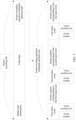
- FIG. 1 shows a change of a possible display interface of a playing terminal when different operations are performed.
- a user may obtain, by performing a tapping operation, a screen recording file sent by another user, a screen recording file locally stored in the playing terminal, or a screen recording file obtained by the playing terminal from a database or a network side device over a network or the like.
- the tapping operation may be specifically tapping, double tapping, a tapping operation performed at a specific frequency and/or for a specific quantity of times, and/or a tapping operation with a specific pressing force. This is not limited herein.
- a manner of obtaining the screen recording file is not limited to the tapping operation, and may be another implementation such as dragging or sliding. This is not limited herein.
- a presentation status of the display interface of the playing terminal is also one of examples.
- Another possible display manner of the playing terminal is further presented below, but a display manner is not limited to the display manners mentioned in the embodiments of the present invention.
- An embodiment of the present invention provides a screencast recording method, and the method is applied to a screen recording terminal. As shown in FIG. 2 , the method specifically includes the following steps.
- Step 101 Obtain an operation performed by a screen recording user on the screen recording terminal, and determine screen content and event content that are corresponding to the operation.
- the event content includes at least content used to indicate a manner of generating the operation.
- the screen recording terminal obtains an action performed by the user when a current operation is triggered, that is, the event content, and also obtains a display status of a current interface, that is, the screen content. Further details of the event content and the screen content are described below, and details are not described herein again.
- the screen recording operation intelligent playback part includes at least corresponding screen content and event content that are used to indicate all operations in the video data.
- Step 103 Generate a screen recording file that includes the video data and the screen recording operation intelligent playback part.
- FIG. 3 is a schematic diagram of composition of a screen recording file and a schematic diagram of composition of a screen recording operation intelligent playback part in the screen recording file. It should be noted that content shown in FIG. 3 is merely a possible implementation, and all parts of content included in the screen recording file or the screen recording operation intelligent playback part may be arranged in a manner shown in FIG. 3 , or may be arranged in another combination manner. A location of each part is not limited in this embodiment of the present invention.
- the screen recording file includes not only the video data and the screen recording operation intelligent playback part, but also media meta information.
- the media meta information is used to record information received by an audio information collection device such as a microphone (microphone, MIC) when the screen recording terminal records a screencast.
- the video data is used to record content presented on a screen of the screen recording terminal during screencast recording.
- the screen recording operation intelligent playback part is used to record each input event and screen content corresponding to the input event, and the input event includes at least event content.
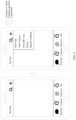
- FIG. 4 is a schematic diagram of a display interface of a screen recording terminal when a user performs screen recording on the screen recording terminal. In an operation procedure shown in FIG.
- an interface initially displayed on the screen recording terminal is a display interface of WeChat.
- the user taps "+” on an upper right corner of the display interface, then a menu bar pops up, and the user taps "Add Contacts".
- the screen recording operation intelligent playback part includes two input events: a first input event and a second input event.
- the first input event is generated before the second input event, and both event content of the first input event and event content of the second input event are tapping operations.
- Screen content corresponding to the first input event is a main display interface of WeChat, for example, a display interface shown on the left of FIG. 4 .
- Screen content corresponding to the second input event is a display interface in which the menu bar pops up, for example, a display interface shown on the right of FIG. 4 .
- the input event may further include a voice auxiliary bit
- a current terminal may determine, based on the voice auxiliary bit identifier, whether to play audio corresponding to the event content.
- a screen recording file generated by using the foregoing implementation is played on a playing terminal, not only a playing mode in which a user watches the screen recording file in the background can be used, but also the playing terminal can directly complete, for the user, some or all input events recorded in the screen recording file.
- event content of each input event and corresponding screen content on which the input event is generated can be recorded, so that during subsequent intelligent playback, all operations performed during screen recording can be effectively restored.
- the screen recording operation intelligent playback part further includes a voice auxiliary bit identifier, to help the user know operation steps in the entire intelligent playback process. If audio exists for an operation corresponding to the voice auxiliary bit identifier in a process of generating the operation, the voice auxiliary bit identifier is set to be valid. For example, if a first input event has corresponding audio, to be specific, the user describes or explains the first input event, or the operation triggers the screen recording terminal to generate a piece of audio, a voice auxiliary bit of the first input event may be set to be valid, to effectively restore the audio in an intelligent playback process.
- the voice auxiliary bit is invalid by default. If a voice auxiliary bit is required, the voice auxiliary bit is set during generation of a corresponding operation.
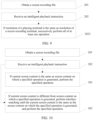
- An embodiment of the present invention provides a screencast playing method, and the method is applied to a playing terminal. As shown in FIG. 5 , the method specifically includes the following steps.
- Step 201 Obtain a screen recording file.
- the screen recording file includes at least video data and a screen recording operation intelligent playback part
- the screen recording operation intelligent playback part includes at least corresponding screen content and event content that are used to indicate at least one operation in the video data
- the event content includes at least content used to indicate a manner of generating the at least one operation.
- Step 202 Receive an intelligent playback instruction.
- the intelligent playback instruction is used to trigger playing of the screen recording operation intelligent playback part and performing of the at least one operation on the playing terminal.
- intelligent playback is performed on the screen recording operation intelligent playback part from a to-be-generated input event.
- intelligent playback may be performed starting from a first input event or starting from any one of a second input event to a last input event.
- a specific input event starting from which intelligent playback is performed mainly depends on a time of receiving the intelligent playback instruction.
- a user or an operator may set in advance that intelligent playback is performed starting from which input event after the intelligent playback instruction is received, and a specific occasion for performing intelligent playback is not limited herein.
- the playing terminal can prompt, in a form of a suspend button, in a manner of a composite key, or in another form that can be used to select a screen recording file sent from the screen recording terminal, the user to enter the intelligent playback instruction.
- the playing terminal may provide no prompt for the user, and the user independently enters the intelligent playback instruction, to trigger a playback process of the screen recording file.
- FIG. 6 shows an implementation in which a playing terminal presents, in a form of a suspend button, options for playing a screen recording file.
- a dialog box for selecting a playing mode by the user pops up in a display interface of the playing terminal.
- the user may choose, by performing a tapping operation, to perform common playback of the screen recording file in a conventional manner, or may use an implementation mentioned in this embodiment of the present invention, that is, intelligent playback. If the user attempts to select the common playback, the pop-up dialog box may further provide a plurality of playing software options for the user to select.
- the user may switch a playing mode during the common playback, to be specific, switch the common playback to the intelligent playback. For example, the user may still complete the switching function by using the options in the suspend button.
- Step 203 Perform at least one operation according to the intelligent playback instruction.
- event content of at least one input event in the obtained screen recording file may be performed after the intelligent playback instruction is received. It can be learned that a process of performing the event content of the at least one input event is performed by the playing terminal based on the screen recording file, while the user does not need to manually complete each operation step presented in a recorded video after watching the video. In this way, a manual operation process of the user can be simplified, thereby resolving a problem of a misoperation caused by a manual operation performed by the user.
- step 202 of receiving the intelligent playback instruction is performed, step 204 and step 205 may be further performed, and step 203 of performing the at least one operation according to the intelligent playback instruction may be specifically implemented as step 2031.
- the screen recording terminal is a terminal that generates the screen recording file.
- the playing terminal may directly obtain the resolution of the screen recording terminal from the screen recording file, or the playing terminal may determine the resolution of the screen recording terminal based on a resolution status of the video data in the screen recording file, and then locally obtain the resolution of the playing terminal. It should be noted that a manner of obtaining the resolution is not limited to the foregoing implementation, and may be another means that can be used to extract resolution information. This is not limited herein. In addition, the resolution may be specifically screen resolution of the playing terminal and screen resolution of the screen recording terminal.
- the quadrangle area is an area formed by using coordinates (1, 9), (1, 7), (3, 7), and (3, 9) that are used as vertices, and therefore, in the playing terminal, a corresponding quadrangle area is also an area formed by using coordinates (1, 9), (1, 7), (3, 7), and (3, 9) that are used as vertices. It can be learned that, in FIG. 8 , if the location on which the operation is generated is a location, shown on the playing terminal, on which a tapping operation is generated, functions such as an interface jump function and a menu pop-up function cannot be successfully triggered on the playing terminal.
- quantities of unit lengths by which the two x-axes are divided are the same and quantities of unit lengths by which the two y-axes are divided are the same; or it is possible that quantities of unit lengths by which the two x-axes are divided are different, and quantities of unit lengths by which the two y-axes are divided are different; or it is possible that only quantities of segments into which the x-axes are divided are the same or only quantities of segments into which the y-axes are divided are the same.
- the coordinate system is not limited only to the rectangular coordinate system, and may be a coordinate system of another type, and details are not described one by one herein.
- a location may be represented by using a vector or another form in addition to coordinates.
- a conversion manner is not limited to the foregoing implementation, and may be another implementation that can implement the coordinate conversion. This is not limited herein.
- Step 205 Perform the at least one operation on the playing terminal based on the specified coordinates.
- Step 2032 If the resolution of the playing terminal is the same as the resolution of the screen recording terminal, successively perform all of the at least one operation.
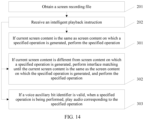
- Performance of the screen recording terminal and the playing terminal may be different, and this means that reaction times of the screen recording terminal and the playing terminal in a process such as an interface jump process or a menu pop-up process are different. Such a time delay may also cause a misoperation. Therefore, in a process of performing the at least one operation, an interface matching relationship also needs to be considered, and a corresponding operation can be further performed only when the two interfaces are the same. Therefore, based on the implementations shown in FIG. 5 , FIG. 7 , and FIG. 9 , for example, based on the implementation shown in FIG. 5 , an implementation shown in FIG. 10 may be further implemented. Step 203 of performing the at least one operation according to the intelligent playback instruction may be specifically implemented as step 301 and step 302.
- Step 302 If the current screen content is different from the screen content on which the specified operation is generated, perform interface matching until the current screen content is the same as the screen content on which the specified operation is generated, and perform the specified operation.
- the specified operation may be a currently to-be-performed operation, that is, any one of the at least one operation.
- a currently to-be-performed operation that is, any one of the at least one operation.
- Step 3021 If the current screen content is different from the screen content on which the specified operation is generated, obtain display content of a specified area in an interface in which the specified operation is generated.
- Step 3022 Detect, based on a specified interval, whether an area that is the same as the display content exists in the current screen content, and when the area that is the same as the display content exists, determine that the current screen content is the screen content on which the specified operation is generated.
- the specified interval may be a preset fixed time interval or a preset irregular time interval, or detection may be performed in real time.
- the specified interval may be set to a relatively long or short time based on a requirement of the user, and may be specifically preset by the user based on historical data or an empirical value. For example, when the specified interval is set to a relatively short time, the foregoing detection process may be considered as real-time monitoring, so as to reduce a time wasted in a matching process, but this causes excessive resource wastes. Therefore, the user may choose to set the specified interval to a suitable time length.
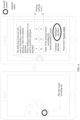
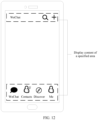
- a display interface of WeChat is used as an example.
- Parts circled by dashed-line boxes may be considered as display content of a specified area in the display interface. If a current interface is the same as the parts circled by the dashed-line boxes in the interface in which the specified input event is generated, the current interface is considered as the interface in which the specified input event is generated.
- content of a fixed user interface in a display interface is usually used as a basis for comparison. In this case, even if there is a difference between types, models, or the like of the playing terminal and the screen recording terminal, the foregoing process of determining whether the interfaces are the same can be completed.
- the parts circled by the dashed-line boxes are content of a fixed user interface in the display interface of WeChat, that is, content that is presented when the display interface is displayed on any terminal.
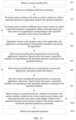
- the playing terminal may find, based on a package name and a class name of an application, the application that is running or that is not started. After the application is started, the playing terminal finds a specific display interface in the application based on the class name, so as to implement a jump to the interface of the specified input event. Therefore, based on the implementation shown in FIG. 11 , an implementation shown in FIG. 13 may be further implemented. Before step 3021 of obtaining the display content of the specified area in the interface in which the specified operation is generated is performed, the playing terminal further needs to jump to the specified interface. Therefore, step 3021 may be specifically implemented as step 401 to step 405.
- Step 401 If the current screen content is different from the screen content on which the specified operation is generated, obtain a package name and a class name of an application corresponding to the specified operation in the screen recording file.
- Step 402 Determine, based on the package name of the application, the application corresponding to the specified operation, and access the application.
- Step 403 If the screen recording file has permission to access the application, determine, based on the class name, a specified interface corresponding to the specified operation, and jump to the specified interface.
- Step 404 If the screen recording file has no permission to access the application, generate prompt information.
- Step 405 After the screen recording file has the permission to access the application, determine, based on the class name, the specified interface corresponding to the specified operation, and jump to the specified interface.
- the playing terminal may first jump to the interface corresponding to the specified input event, to be specific, jump to the interface in which the specified operation of the specified input event is generated, that is, the foregoing specified interface, so that after starting the intelligent playback, the playing terminal can directly complete the event content of the at least one input event based on content recorded in the screen recording operation intelligent playback part.
- the screen recording operation intelligent playback part further includes a voice auxiliary bit identifier.
- Step 303 If a voice auxiliary bit identifier is valid, when the specified operation is being performed, play audio corresponding to the specified operation.
- the voice auxiliary bit identifier is 1, it is considered that the voice auxiliary bit identifier is valid, and when specified event content of a specified input event is performed, audio corresponding to the specified event content is played, to notify the user of a currently performed operation. If the voice auxiliary bit identifier is 0, it is considered that the voice auxiliary bit identifier is invalid, and only specified event content of a specified input event is performed, that is, a specified operation is performed, but audio corresponding to the specified operation is not played.
- the screen recording process may be triggered in a manner such as touching and holding a power button or a volume button. After the screen recording process starts, the user may complete a series of operations on the playing terminal to implement corresponding functions.
- FIG. 15 shows a complete payment process.
- a current interface is the display interface of WeChat
- a user taps a "+" button on an upper right corner of the display interface, selects a "Money” option, and then touches an area used to represent a payment operation after a jump to a payment/money receiving interface is performed, and then a jump to an interface for entering a payment password is performed.
- a current display interface is also an interface for entering a payment password.
- the playing terminal may jump from a current interface to a display interface existing before the at least one operation is performed.
- a direct jump from the payment interface to the main interface of WeChat is performed.
- the screen recording terminal and the playing terminal include corresponding hardware structures and/or software structures for performing the functions.
- a person skilled in the art should easily be aware that, in combination with the examples described in the embodiments disclosed in this specification, units and algorithm steps may be implemented by hardware or a combination of hardware and computer software in the embodiments of the present invention. Whether a function is performed by hardware or hardware driven by computer software depends on particular applications and design constraints of the technical solutions. A person skilled in the art may use different methods to implement the described functions for each particular application, but it should not be considered that the implementation goes beyond the scope of the embodiments of the present invention.
- each functional module may be obtained through division based on each corresponding function, or two or more functions may be integrated into one processing module.
- the integrated module may be implemented in a form of hardware, or may be implemented in a form of a software functional module. It should be noted that the module division in the embodiments of the present invention is an example, and is merely logical function division, and there may be another division manner in actual implementation.
- FIG. 16 is a possible schematic structural diagram of a screen recording terminal in the foregoing embodiments.
- a screen recording terminal 50 includes an obtaining module 51, a determining module 52, a generation module 53, and a setting module 54.
- the obtaining module 51 is configured to support the screen recording terminal 50 in performing the obtaining operation in step 101 in FIG. 2 .
- the determining module 52 is configured to support the screen recording terminal 50 in performing the determining operation in step 101 in FIG. 2 .
- the generation module 53 is configured to support the screen recording terminal 50 in performing step 102 and step 103 in FIG. 2 .
- the setting module 54 is configured to support a process in which the screen recording terminal 50 gradually generates a screen recording operation intelligent playback part and a screen recording file. All related content of each step in the foregoing method embodiments may be cited in function description of a corresponding functional module, and details are not described herein.
- FIG. 17 is a possible schematic structural diagram of a playing terminal in the foregoing embodiments.
- a playing terminal 60 includes an obtaining module 61, a receiving module 62, an execution module 63, a conversion module 64, an access module 65, a generation module 66, a playing module 67, and a restoration module 68.
- the obtaining module 61 is configured to support the playing terminal 60 in performing step 201 in FIG. 5 , FIG. 7 , FIG. 9, FIG. 10 , FIG. 11 , FIG. 13 , and FIG. 14 , step 3021 in FIG. 11 , and step 401 in FIG. 13 .
- the receiving module 62 is configured to support the playing terminal 60 in performing step 202 in FIG. 5 , FIG. 7 , FIG. 9, FIG.
- the execution module 63 is configured to support the playing terminal 60 in performing step 203 in FIG. 5 , step 2031 and step 205 in FIG. 7 , step 2032 in FIG. 9 , step 301 and step 302 in FIG. 10 , step 301 and step 3021 to step 3023 in FIG. 11 , step 301, step 403, step 405, step 3022, and step 3033 in FIG. 13 , and step 301 and step 302 in FIG. 14 .
- the conversion module 64 is configured to support the playing terminal 60 in performing step 204 in FIG. 7 .
- the access module 65 is configured to support the playing terminal 60 in performing step 402 in FIG. 13 .
- the generation module 66 is configured to support the playing terminal 60 in performing step 404 in FIG. 13 .
- the playing module 67 is configured to support the playing terminal 60 in performing step 303 in FIG. 14 .
- the restoration module 68 is configured to support the playing terminal 60 in jumping, after at least one operation is performed, to an interface existing before the at least one operation is performed. All related content of each step in the foregoing method embodiments may be cited in function description of a corresponding functional module, and details are not described herein.
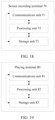
- FIG. 18 is a possible schematic structural diagram of a screen recording terminal 70 in the foregoing embodiments.
- the screen recording terminal 70 includes a communications unit 71 and a processing unit 72.
- the communications unit 71 is configured to support the screen recording terminal 70 in performing the obtaining operation in step 101 in FIG. 2 , and is further configured to support communication between the screen recording terminal 70 and another device such as a playing terminal, or is configured to collect a corresponding instruction or the like triggered by a user.
- the processing unit 72 is configured to support the screen recording terminal 70 in performing the determining operation in step 101, step 102, and step 103 in FIG.
- the screen recording terminal 70 may further include a storage unit 73, configured to store program code and data of a base station.
- FIG. 19 is a possible schematic structural diagram of a playing terminal 80 in the foregoing embodiments.
- the playing terminal 80 includes a communications unit 81 and a processing unit 82.
- the communications unit 81 is configured to support the playing terminal 80 in performing step 201 and step 202 in FIG. 5 , FIG. 6 , FIG. 9, FIG. 10 , FIG. 11 , FIG. 13 , and FIG. 14 , step 3021 in FIG. 11 , and step 401 in FIG. 13 , and is further configured to support communication between the playing terminal 80 and another device such as a screen recording terminal, or is configured to collect a corresponding instruction or the like triggered by a user.
- the processing unit 82 is configured to support the playing terminal 80 in performing step 203 in FIG.
- the playing terminal 80 may further include a storage unit 83, configured to store program code and data of a base station.
- the processing units in the screen recording terminal and the playing terminal each may be a processor or a controller, for example, may be a central processing unit (Central Processing Unit, CPU), a general-purpose processor, a digital signal processor (Digital Signal Processor, DSP), an application-specific integrated circuit (Application-Specific Integrated Circuit, ASIC), a field programmable gate array (Field Programmable Gate Array, FPGA) or another programmable logic component, a transistor logic component, a hardware component, or any combination thereof.
- the processing units may implement or execute various example logical blocks, units, and circuits described with reference to content disclosed in the embodiments of the present invention.
- the processor may be a combination of processors implementing a computing function, for example, a combination of one or more microprocessors, or a combination of a DSP and a microprocessor.
- the communications unit in the screen recording terminal and the playing terminal each may be implemented as a transceiver, a transceiver circuit, a communications interface, or the like.
- the storage units in the screen recording terminal and the playing terminal each may be implemented as a memory.
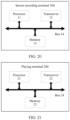
- a screen recording terminal 100 in an embodiment of the present invention may be shown in FIG. 20 .
- the screen recording terminal 100 includes a processor 11, a transceiver 12, a memory 13, and a bus 14.
- the processor 11, the transceiver 12, and the memory 13 are connected to each other by using the bus 14.
- a playing terminal 200 in an embodiment of the present invention may be shown in FIG. 21 .
- the playing terminal 200 includes a processor 21, a transceiver 22, a memory 23, and a bus 24.
- the processor 21, the transceiver 22, and the memory 23 are connected to each other by using the bus 24.
- the bus 14 and the bus 24 each may be a Peripheral Component Interconnect (Peripheral Component Interconnect, PCI) bus, an extended industry standard architecture (Extended Industry Standard Architecture, EISA) bus, or the like.
- PCI Peripheral Component Interconnect
- EISA Extended Industry Standard Architecture
- the bus may be classified into an address bus, a data bus, a control bus, and the like. For ease of indication, the bus is indicated by using only one bold line in FIG. 20 and FIG. 21 . However, it does not indicate that there is only one bus or only one type of bus.
- the methods or algorithm steps described with reference to the content disclosed in the embodiments of the present invention may be implemented in a hardware manner, or may be implemented in a manner of executing a software instruction by a processor.
- the software instruction may include a corresponding software module.
- the software module may be stored in a random access memory (Random Access Memory, RAM), a flash memory, a read-only memory (Read-Only Memory, ROM), an erasable programmable read only memory (Erasable Programmable ROM, EPROM), an electrically erasable programmable read only memory (Electrically EPROM, EEPROM), a register, a hard disk, a removable hard disk, a compact disc read-only memory (CD-ROM), or a storage medium in any other forms well-known in the art.
- RAM Random Access Memory
- ROM read-only memory
- EPROM erasable programmable read only memory
- Electrically erasable programmable read only memory Electrically erasable programmable read only memory
- An example storage medium is coupled to the processor, so that the processor can read information from the storage medium, and can write information into the storage medium.
- the storage medium may be a part of the processor.
- the processor and the storage medium may exist in a core network interface device as discrete components.
- the functions described in the embodiments of the present invention may be implemented by using hardware, software, firmware, or any combination thereof.
- these functions may be stored in a computer-readable medium or transmitted as one or more instructions or code in the computer-readable medium.
- the computer-readable medium includes a computer storage medium and a communications medium, where the communications medium includes any medium that enables a computer program to be transmitted from one place to another.
- the storage medium may be any available medium accessible to a general-purpose or dedicated computer.
Landscapes
- Engineering & Computer Science (AREA)
- Theoretical Computer Science (AREA)
- General Engineering & Computer Science (AREA)
- Human Computer Interaction (AREA)
- Physics & Mathematics (AREA)
- General Physics & Mathematics (AREA)
- Multimedia (AREA)
- Software Systems (AREA)
- Computer Security & Cryptography (AREA)
- Signal Processing (AREA)
- Databases & Information Systems (AREA)
- Technology Law (AREA)
- Computer Hardware Design (AREA)
- User Interface Of Digital Computer (AREA)
- Television Signal Processing For Recording (AREA)
- Two-Way Televisions, Distribution Of Moving Picture Or The Like (AREA)
Applications Claiming Priority (3)
| Application Number | Priority Date | Filing Date | Title |
|---|---|---|---|
| CN201611073867 | 2016-11-29 | ||
| EP17875173.1A EP3537278A4 (de) | 2016-11-29 | 2017-02-24 | Aufzeichnungs- und wiedergabeverfahren für bildschirmvideo sowie bildschirmaufzeichnungsendgerät und wiedergabeendgerät |
| PCT/CN2017/074751 WO2018098912A1 (zh) | 2016-11-29 | 2017-02-24 | 屏幕录像的录制、播放方法、录屏终端及播放终端 |
Related Parent Applications (1)
| Application Number | Title | Priority Date | Filing Date |
|---|---|---|---|
| EP17875173.1A Division EP3537278A4 (de) | 2016-11-29 | 2017-02-24 | Aufzeichnungs- und wiedergabeverfahren für bildschirmvideo sowie bildschirmaufzeichnungsendgerät und wiedergabeendgerät |
Publications (2)
| Publication Number | Publication Date |
|---|---|
| EP4579660A2 true EP4579660A2 (de) | 2025-07-02 |
| EP4579660A3 EP4579660A3 (de) | 2025-08-27 |
Family
ID=62241197
Family Applications (2)
| Application Number | Title | Priority Date | Filing Date |
|---|---|---|---|
| EP25157976.9A Pending EP4579660A3 (de) | 2016-11-29 | 2017-02-24 | Screencast-aufzeichnungsverfahren, screencast-wiedergabeverfahren, bildschirmaufzeichnungsendgerät und wiedergabeendgerät |
| EP17875173.1A Withdrawn EP3537278A4 (de) | 2016-11-29 | 2017-02-24 | Aufzeichnungs- und wiedergabeverfahren für bildschirmvideo sowie bildschirmaufzeichnungsendgerät und wiedergabeendgerät |
Family Applications After (1)
| Application Number | Title | Priority Date | Filing Date |
|---|---|---|---|
| EP17875173.1A Withdrawn EP3537278A4 (de) | 2016-11-29 | 2017-02-24 | Aufzeichnungs- und wiedergabeverfahren für bildschirmvideo sowie bildschirmaufzeichnungsendgerät und wiedergabeendgerät |
Country Status (4)
| Country | Link |
|---|---|
| US (1) | US10785541B2 (de) |
| EP (2) | EP4579660A3 (de) |
| CN (2) | CN111526312B (de) |
| WO (1) | WO2018098912A1 (de) |
Families Citing this family (23)
| Publication number | Priority date | Publication date | Assignee | Title |
|---|---|---|---|---|
| CN111526312B (zh) * | 2016-11-29 | 2024-07-09 | 华为技术有限公司 | 屏幕录像的录制、播放方法、录屏终端及播放终端 |
| CN108924582B (zh) * | 2018-09-03 | 2021-07-06 | 深圳市东微智能科技股份有限公司 | 视频录制方法、计算机可读存储介质及录播系统 |
| CN109521935A (zh) * | 2018-10-24 | 2019-03-26 | 维沃移动通信有限公司 | 一种录屏、基于录屏的复现方法、终端 |
| CN109819311B (zh) * | 2019-01-29 | 2022-03-18 | 法信公证云(厦门)科技有限公司 | 一种终端视频取证方法和装置 |
| CN110602544B (zh) * | 2019-09-12 | 2021-06-04 | 腾讯科技(深圳)有限公司 | 视频展示方法及装置、电子设备、存储介质 |
| CN110830651B (zh) * | 2019-11-04 | 2024-02-13 | 深圳传音控股股份有限公司 | 终端控制方法、终端设备以及存储介质 |
| CN113031838B (zh) * | 2019-12-25 | 2023-03-24 | 花瓣云科技有限公司 | 屏幕录制方法、装置及电子设备 |
| WO2021134237A1 (zh) * | 2019-12-30 | 2021-07-08 | 深圳市欢太科技有限公司 | 一种视频录制方法、装置及计算机可读存储介质 |
| CN111599386B (zh) * | 2020-04-28 | 2022-05-31 | 维沃移动通信有限公司 | 录屏方法及录屏装置 |
| CN111666024B (zh) * | 2020-05-28 | 2022-04-12 | 维沃移动通信(杭州)有限公司 | 屏幕录制方法、装置及电子设备 |
| CN113946257A (zh) * | 2020-06-30 | 2022-01-18 | 中兴通讯股份有限公司 | 操作集合的获取、执行方法及装置、存储介质和终端设备 |
| CN112286617B (zh) * | 2020-10-30 | 2023-07-21 | 维沃移动通信有限公司 | 操作指导方法、装置及电子设备 |
| CN114979744B (zh) * | 2021-02-25 | 2024-03-19 | 腾讯科技(深圳)有限公司 | 界面处理方法、装置、服务器及存储介质 |
| CN113079332B (zh) * | 2021-03-16 | 2023-04-07 | 青岛海信移动通信技术股份有限公司 | 移动终端及其录屏方法 |
| US20220374585A1 (en) * | 2021-05-19 | 2022-11-24 | Google Llc | User interfaces and tools for facilitating interactions with video content |
| CN113992878B (zh) * | 2021-09-30 | 2023-07-07 | 阿里巴巴(中国)有限公司 | 远程桌面操作审计方法、装置及设备 |
| CN114168878B (zh) * | 2021-11-23 | 2022-11-04 | 上海鸿米信息科技有限责任公司 | 动效播放方法、装置、设备、存储介质和程序产品 |
| CN114205447B (zh) * | 2021-12-16 | 2023-09-12 | Oppo广东移动通信有限公司 | 电子设备的快捷设置方法、装置、存储介质及电子设备 |
| CN114666668B (zh) * | 2022-03-18 | 2024-03-15 | 上海艺赛旗软件股份有限公司 | 一种视频回放方法、系统、设备及存储介质 |
| CN114979115B (zh) * | 2022-05-05 | 2024-03-26 | 北京精一强远科技有限公司 | 一种基于Guacamole的远程操作屏幕录制与回放系统和方法 |
| CN115243098B (zh) * | 2022-07-19 | 2024-05-24 | 上海联影医疗科技股份有限公司 | 屏幕录制方法、装置、计算机设备和存储介质 |
| CN115586941A (zh) * | 2022-11-08 | 2023-01-10 | 平安壹钱包电子商务有限公司 | 一种移动端rn页面录屏回放的方法及装置 |
| CN116048363B (zh) * | 2023-04-03 | 2023-08-25 | 数孪模型科技(北京)有限责任公司 | 基于人工智能的软件界面的显示方法、系统、设备和介质 |
Family Cites Families (23)
| Publication number | Priority date | Publication date | Assignee | Title |
|---|---|---|---|---|
| US5816820A (en) | 1996-09-18 | 1998-10-06 | Kelly Properties, Inc. | Simulation generation system |
| JP4325071B2 (ja) | 2000-04-07 | 2009-09-02 | ソニー株式会社 | デジタルビデオ再生方法及びデジタルビデオ再生装置 |
| US20050198353A1 (en) * | 2004-03-05 | 2005-09-08 | Robert Zmrzli | Method and apparatus for providing dynamic network content to target devices |
| US7870487B2 (en) * | 2004-07-29 | 2011-01-11 | International Business Machines Corporation | Inserting into a document a screen image of a computer software application |
| WO2007055612A1 (en) * | 2005-11-11 | 2007-05-18 | Intel Corporation | Graphical user interface (gui) noise reduction in a cognitive control framework |
| WO2009057153A2 (en) * | 2007-11-04 | 2009-05-07 | Rajendra Kumar Khare | System and method to use social network profiles for targeted delivery of data/content |
| CN101511071A (zh) | 2008-02-15 | 2009-08-19 | 三星电子株式会社 | 录制终端的按键操作的方法及采用该方法的终端 |
| US20120131456A1 (en) * | 2010-11-22 | 2012-05-24 | Microsoft Corporation | Capture and Playback for GUI-Based Tasks |
| CN102012818B (zh) | 2010-12-01 | 2014-03-26 | 广东威创视讯科技股份有限公司 | 屏幕录制方法与装置 |
| CN102279739B (zh) * | 2011-06-10 | 2016-12-21 | 大连佳音科技有限公司 | 屏幕操作的记录方法和应用 |
| KR102007749B1 (ko) | 2012-08-29 | 2019-08-06 | 삼성전자주식회사 | 단말에서의 화면 녹화 방법 및 장치와 그 방법에 대한 프로그램 소스를 저장한 기록 매체 |
| CN103678106A (zh) | 2012-09-19 | 2014-03-26 | 腾讯科技(深圳)有限公司 | 一种内容录制方法和装置 |
| CN103870141B (zh) * | 2012-12-13 | 2017-12-26 | 联想(北京)有限公司 | 一种信息处理方法及电子设备 |
| CN103970533B (zh) * | 2014-04-14 | 2018-01-30 | 深信服科技股份有限公司 | 屏幕录制的信息记录方法及装置 |
| CN105302424A (zh) * | 2014-05-26 | 2016-02-03 | 周莹 | 一种多维动态标记的录制并回放的方法与系统 |
| US20150378561A1 (en) * | 2014-06-30 | 2015-12-31 | Genesys Telecommunications Laboratories, Inc. | System and method for recording agent interactions |
| CN105763926A (zh) | 2014-12-18 | 2016-07-13 | 中兴通讯股份有限公司 | 屏幕录制的方法及装置 |
| CN105791951A (zh) | 2014-12-26 | 2016-07-20 | Tcl海外电子(惠州)有限公司 | 音视频码流的录制方法和装置 |
| US20170017700A1 (en) * | 2015-07-17 | 2017-01-19 | International Business Machines Corporation | Creating a dynamic visual display of social network activity |
| CN105828166A (zh) * | 2015-09-10 | 2016-08-03 | 维沃移动通信有限公司 | 一种终端屏幕显示内容的录制方法及终端 |
| CN106024009B (zh) * | 2016-04-29 | 2021-03-30 | 北京小米移动软件有限公司 | 音频处理方法及装置 |
| CN106055205B (zh) * | 2016-05-30 | 2019-10-29 | 北京金山安全软件有限公司 | 录屏方法及装置 |
| CN111526312B (zh) * | 2016-11-29 | 2024-07-09 | 华为技术有限公司 | 屏幕录像的录制、播放方法、录屏终端及播放终端 |
-
2017
- 2017-02-24 CN CN202010266543.3A patent/CN111526312B/zh active Active
- 2017-02-24 EP EP25157976.9A patent/EP4579660A3/de active Pending
- 2017-02-24 US US16/464,852 patent/US10785541B2/en active Active
- 2017-02-24 EP EP17875173.1A patent/EP3537278A4/de not_active Withdrawn
- 2017-02-24 CN CN201780003381.0A patent/CN108323239B/zh active Active
- 2017-02-24 WO PCT/CN2017/074751 patent/WO2018098912A1/zh not_active Ceased
Also Published As
| Publication number | Publication date |
|---|---|
| US20190327533A1 (en) | 2019-10-24 |
| CN108323239A (zh) | 2018-07-24 |
| CN111526312B (zh) | 2024-07-09 |
| EP4579660A3 (de) | 2025-08-27 |
| EP3537278A4 (de) | 2019-11-27 |
| CN108323239B (zh) | 2020-04-28 |
| WO2018098912A1 (zh) | 2018-06-07 |
| EP3537278A1 (de) | 2019-09-11 |
| CN111526312A (zh) | 2020-08-11 |
| US10785541B2 (en) | 2020-09-22 |
Similar Documents
| Publication | Publication Date | Title |
|---|---|---|
| US10785541B2 (en) | Screencast recording method, screencast playing method, screen recording terminal, and playing terminal | |
| CN108595137B (zh) | 无线投屏方法、装置和投屏器 | |
| CN110531920B (zh) | 侧边工具栏的显示方法、装置、终端及存储介质 | |
| CN104536666B (zh) | 一种快速切换应用程序及其界面的方法及装置 | |
| EP2645685A1 (de) | Verfahren und mobiltelefon zur aufnahme von audio- oder videodateien | |
| US11431182B2 (en) | Resource statistics collection method and apparatus and terminal | |
| CN103544021A (zh) | 一种移动终端屏幕内容的截屏方法及其装置 | |
| TW201518933A (zh) | 測試裝置及其測試方法 | |
| JP2019533251A (ja) | 端末のスクリーンショット方法、装置及びモバイル端末、記憶媒体 | |
| CN110704202B (zh) | 多媒体录制数据共享方法及终端设备 | |
| CN112231021A (zh) | 软件新功能的引导方法和装置 | |
| US20120053937A1 (en) | Generalizing text content summary from speech content | |
| CN105468504B (zh) | 程序测试方法及装置 | |
| CN109656639B (zh) | 一种界面滚动方法、装置、设备及介质 | |
| CN113986186A (zh) | 一种音频切换系统、方法、电子设备及存储介质 | |
| WO2017166685A1 (zh) | 外接扬声器切换方法及装置 | |
| CN111026651B (zh) | 测试方法、装置、存储介质及电子设备 | |
| WO2026001316A1 (zh) | 车辆方控按键仲裁方法、控制器、存储介质及程序产品 | |
| JP2021530905A (ja) | ビデオ処理方法、装置、端末及び記憶媒体 | |
| CN108513216B (zh) | 一种信息处理的方法及一种线控耳机 | |
| US8922491B2 (en) | Method and apparatus enabling keystroke acceleration | |
| CN110362353A (zh) | 外设控制方法、外设控制装置、存储介质与电子设备 | |
| WO2022170731A1 (zh) | 行车记录仪的视频显示方法、系统和计算机存储介质 | |
| CN112035271B (zh) | 用户操作信息的处理方法、装置、电子设备及存储介质 | |
| CN114089837A (zh) | 设备的控制方法、装置及计算机可读存储介质 |
Legal Events
| Date | Code | Title | Description |
|---|---|---|---|
| PUAI | Public reference made under article 153(3) epc to a published international application that has entered the european phase |
Free format text: ORIGINAL CODE: 0009012 |
|
| STAA | Information on the status of an ep patent application or granted ep patent |
Free format text: STATUS: REQUEST FOR EXAMINATION WAS MADE |
|
| 17P | Request for examination filed |
Effective date: 20250218 |
|
| AC | Divisional application: reference to earlier application |
Ref document number: 3537278 Country of ref document: EP Kind code of ref document: P |
|
| AK | Designated contracting states |
Kind code of ref document: A2 Designated state(s): AL AT BE BG CH CY CZ DE DK EE ES FI FR GB GR HR HU IE IS IT LI LT LU LV MC MK MT NL NO PL PT RO RS SE SI SK SM TR |
|
| REG | Reference to a national code |
Ref country code: DE Ref legal event code: R079 Free format text: PREVIOUS MAIN CLASS: G11B0027031000 Ipc: G06F0003048400 |
|
| PUAL | Search report despatched |
Free format text: ORIGINAL CODE: 0009013 |
|
| AK | Designated contracting states |
Kind code of ref document: A3 Designated state(s): AL AT BE BG CH CY CZ DE DK EE ES FI FR GB GR HR HU IE IS IT LI LT LU LV MC MK MT NL NO PL PT RO RS SE SI SK SM TR |
|
| RIC1 | Information provided on ipc code assigned before grant |
Ipc: G06F 3/0484 20220101AFI20250721BHEP Ipc: G11B 27/031 20060101ALI20250721BHEP |