EP4485154A1 - Steuergerät für audiometer - Google Patents
Steuergerät für audiometer Download PDFInfo
- Publication number
- EP4485154A1 EP4485154A1 EP24184352.3A EP24184352A EP4485154A1 EP 4485154 A1 EP4485154 A1 EP 4485154A1 EP 24184352 A EP24184352 A EP 24184352A EP 4485154 A1 EP4485154 A1 EP 4485154A1
- Authority
- EP
- European Patent Office
- Prior art keywords
- control device
- user
- user interface
- dial
- touch screen
- Prior art date
- Legal status (The legal status is an assumption and is not a legal conclusion. Google has not performed a legal analysis and makes no representation as to the accuracy of the status listed.)
- Pending
Links
Images



Classifications
-
- A—HUMAN NECESSITIES
- A61—MEDICAL OR VETERINARY SCIENCE; HYGIENE
- A61B—DIAGNOSIS; SURGERY; IDENTIFICATION
- A61B5/00—Measuring for diagnostic purposes; Identification of persons
- A61B5/12—Audiometering
- A61B5/121—Audiometering evaluating hearing capacity
-
- A—HUMAN NECESSITIES
- A61—MEDICAL OR VETERINARY SCIENCE; HYGIENE
- A61B—DIAGNOSIS; SURGERY; IDENTIFICATION
- A61B5/00—Measuring for diagnostic purposes; Identification of persons
- A61B5/12—Audiometering
- A61B5/121—Audiometering evaluating hearing capacity
- A61B5/123—Audiometering evaluating hearing capacity subjective methods
-
- A—HUMAN NECESSITIES
- A61—MEDICAL OR VETERINARY SCIENCE; HYGIENE
- A61B—DIAGNOSIS; SURGERY; IDENTIFICATION
- A61B5/00—Measuring for diagnostic purposes; Identification of persons
- A61B5/74—Details of notification to user or communication with user or patient; User input means
- A61B5/7405—Details of notification to user or communication with user or patient; User input means using sound
-
- A—HUMAN NECESSITIES
- A61—MEDICAL OR VETERINARY SCIENCE; HYGIENE
- A61B—DIAGNOSIS; SURGERY; IDENTIFICATION
- A61B5/00—Measuring for diagnostic purposes; Identification of persons
- A61B5/74—Details of notification to user or communication with user or patient; User input means
- A61B5/742—Details of notification to user or communication with user or patient; User input means using visual displays
-
- A—HUMAN NECESSITIES
- A61—MEDICAL OR VETERINARY SCIENCE; HYGIENE
- A61B—DIAGNOSIS; SURGERY; IDENTIFICATION
- A61B5/00—Measuring for diagnostic purposes; Identification of persons
- A61B5/74—Details of notification to user or communication with user or patient; User input means
- A61B5/742—Details of notification to user or communication with user or patient; User input means using visual displays
- A61B5/7435—Displaying user selection data, e.g. icons in a graphical user interface
-
- A—HUMAN NECESSITIES
- A61—MEDICAL OR VETERINARY SCIENCE; HYGIENE
- A61B—DIAGNOSIS; SURGERY; IDENTIFICATION
- A61B5/00—Measuring for diagnostic purposes; Identification of persons
- A61B5/74—Details of notification to user or communication with user or patient; User input means
- A61B5/742—Details of notification to user or communication with user or patient; User input means using visual displays
- A61B5/7445—Display arrangements, e.g. multiple display units
-
- A—HUMAN NECESSITIES
- A61—MEDICAL OR VETERINARY SCIENCE; HYGIENE
- A61B—DIAGNOSIS; SURGERY; IDENTIFICATION
- A61B5/00—Measuring for diagnostic purposes; Identification of persons
- A61B5/74—Details of notification to user or communication with user or patient; User input means
- A61B5/7455—Details of notification to user or communication with user or patient; User input means characterised by tactile indication, e.g. vibration or electrical stimulation
-
- A—HUMAN NECESSITIES
- A61—MEDICAL OR VETERINARY SCIENCE; HYGIENE
- A61B—DIAGNOSIS; SURGERY; IDENTIFICATION
- A61B5/00—Measuring for diagnostic purposes; Identification of persons
- A61B5/74—Details of notification to user or communication with user or patient; User input means
- A61B5/7475—User input or interface means, e.g. keyboard, pointing device, joystick
-
- G—PHYSICS
- G06—COMPUTING OR CALCULATING; COUNTING
- G06F—ELECTRIC DIGITAL DATA PROCESSING
- G06F1/00—Details not covered by groups G06F3/00 - G06F13/00 and G06F21/00
- G06F1/16—Constructional details or arrangements
- G06F1/1613—Constructional details or arrangements for portable computers
- G06F1/1626—Constructional details or arrangements for portable computers with a single-body enclosure integrating a flat display, e.g. Personal Digital Assistants [PDAs]
-
- G—PHYSICS
- G06—COMPUTING OR CALCULATING; COUNTING
- G06F—ELECTRIC DIGITAL DATA PROCESSING
- G06F1/00—Details not covered by groups G06F3/00 - G06F13/00 and G06F21/00
- G06F1/16—Constructional details or arrangements
- G06F1/1613—Constructional details or arrangements for portable computers
- G06F1/1633—Constructional details or arrangements of portable computers not specific to the type of enclosures covered by groups G06F1/1615 - G06F1/1626
- G06F1/1684—Constructional details or arrangements related to integrated I/O peripherals not covered by groups G06F1/1635 - G06F1/1675
- G06F1/169—Constructional details or arrangements related to integrated I/O peripherals not covered by groups G06F1/1635 - G06F1/1675 the I/O peripheral being an integrated pointing device, e.g. trackball in the palm rest area, mini-joystick integrated between keyboard keys, touch pads or touch stripes
-
- G—PHYSICS
- G06—COMPUTING OR CALCULATING; COUNTING
- G06F—ELECTRIC DIGITAL DATA PROCESSING
- G06F3/00—Input arrangements for transferring data to be processed into a form capable of being handled by the computer; Output arrangements for transferring data from processing unit to output unit, e.g. interface arrangements
- G06F3/01—Input arrangements or combined input and output arrangements for interaction between user and computer
- G06F3/016—Input arrangements with force or tactile feedback as computer generated output to the user
-
- G—PHYSICS
- G06—COMPUTING OR CALCULATING; COUNTING
- G06F—ELECTRIC DIGITAL DATA PROCESSING
- G06F3/00—Input arrangements for transferring data to be processed into a form capable of being handled by the computer; Output arrangements for transferring data from processing unit to output unit, e.g. interface arrangements
- G06F3/01—Input arrangements or combined input and output arrangements for interaction between user and computer
- G06F3/03—Arrangements for converting the position or the displacement of a member into a coded form
- G06F3/033—Pointing devices displaced or positioned by the user, e.g. mice, trackballs, pens or joysticks; Accessories therefor
- G06F3/0354—Pointing devices displaced or positioned by the user, e.g. mice, trackballs, pens or joysticks; Accessories therefor with detection of two-dimensional [2D] relative movements between the device, or an operating part thereof, and a plane or surface, e.g. 2D mice, trackballs, pens or pucks
- G06F3/03547—Touch pads, in which fingers can move on a surface
-
- G—PHYSICS
- G06—COMPUTING OR CALCULATING; COUNTING
- G06F—ELECTRIC DIGITAL DATA PROCESSING
- G06F3/00—Input arrangements for transferring data to be processed into a form capable of being handled by the computer; Output arrangements for transferring data from processing unit to output unit, e.g. interface arrangements
- G06F3/01—Input arrangements or combined input and output arrangements for interaction between user and computer
- G06F3/03—Arrangements for converting the position or the displacement of a member into a coded form
- G06F3/033—Pointing devices displaced or positioned by the user, e.g. mice, trackballs, pens or joysticks; Accessories therefor
- G06F3/0362—Pointing devices displaced or positioned by the user, e.g. mice, trackballs, pens or joysticks; Accessories therefor with detection of one-dimensional [1D] translations or rotations of an operating part of the device, e.g. scroll wheels, sliders, knobs, rollers or belts
-
- G—PHYSICS
- G06—COMPUTING OR CALCULATING; COUNTING
- G06F—ELECTRIC DIGITAL DATA PROCESSING
- G06F3/00—Input arrangements for transferring data to be processed into a form capable of being handled by the computer; Output arrangements for transferring data from processing unit to output unit, e.g. interface arrangements
- G06F3/01—Input arrangements or combined input and output arrangements for interaction between user and computer
- G06F3/048—Interaction techniques based on graphical user interfaces [GUI]
- G06F3/0484—Interaction techniques based on graphical user interfaces [GUI] for the control of specific functions or operations, e.g. selecting or manipulating an object, an image or a displayed text element, setting a parameter value or selecting a range
- G06F3/04847—Interaction techniques to control parameter settings, e.g. interaction with sliders or dials
-
- G—PHYSICS
- G06—COMPUTING OR CALCULATING; COUNTING
- G06F—ELECTRIC DIGITAL DATA PROCESSING
- G06F3/00—Input arrangements for transferring data to be processed into a form capable of being handled by the computer; Output arrangements for transferring data from processing unit to output unit, e.g. interface arrangements
- G06F3/01—Input arrangements or combined input and output arrangements for interaction between user and computer
- G06F3/048—Interaction techniques based on graphical user interfaces [GUI]
- G06F3/0487—Interaction techniques based on graphical user interfaces [GUI] using specific features provided by the input device, e.g. functions controlled by the rotation of a mouse with dual sensing arrangements, or of the nature of the input device, e.g. tap gestures based on pressure sensed by a digitiser
- G06F3/0488—Interaction techniques based on graphical user interfaces [GUI] using specific features provided by the input device, e.g. functions controlled by the rotation of a mouse with dual sensing arrangements, or of the nature of the input device, e.g. tap gestures based on pressure sensed by a digitiser using a touch-screen or digitiser, e.g. input of commands through traced gestures
- G06F3/04886—Interaction techniques based on graphical user interfaces [GUI] using specific features provided by the input device, e.g. functions controlled by the rotation of a mouse with dual sensing arrangements, or of the nature of the input device, e.g. tap gestures based on pressure sensed by a digitiser using a touch-screen or digitiser, e.g. input of commands through traced gestures by partitioning the display area of the touch-screen or the surface of the digitising tablet into independently controllable areas, e.g. virtual keyboards or menus
-
- G—PHYSICS
- G06—COMPUTING OR CALCULATING; COUNTING
- G06F—ELECTRIC DIGITAL DATA PROCESSING
- G06F3/00—Input arrangements for transferring data to be processed into a form capable of being handled by the computer; Output arrangements for transferring data from processing unit to output unit, e.g. interface arrangements
- G06F3/16—Sound input; Sound output
- G06F3/165—Management of the audio stream, e.g. setting of volume, audio stream path
-
- A—HUMAN NECESSITIES
- A61—MEDICAL OR VETERINARY SCIENCE; HYGIENE
- A61B—DIAGNOSIS; SURGERY; IDENTIFICATION
- A61B2560/00—Constructional details of operational features of apparatus; Accessories for medical measuring apparatus
- A61B2560/04—Constructional details of apparatus
- A61B2560/0406—Constructional details of apparatus specially shaped apparatus housings
- A61B2560/0425—Ergonomically shaped housings
Definitions
- the present application relates to a control device.
- the present application further relates to a system comprising a control device and an audiological test instrument.
- the present application further relates to a method of operating one or more types of audiological tests.
- the present application further relates to a computer program comprising instructions which, when the program is executed by a control device or a system, cause the control device or system to carry out the method.
- Traditional standalone audiometers usually have several physical pressure keys as well as two dials each including a rotatable wheel to enable a user, such as a hearing care professional, to carry out a hearing test on a patient (i.e., a test subject).
- a user such as a hearing care professional
- the number of buttons and therefore also the size of the audiometer may be high/large.
- this can lead to a complex user flow.
- a variety of different designs and labelling of the keys and dials may be needed.
- a control device is provided.
- a keyboard is provided.
- control device may be a keyboard, such as an audiometer keyboard.
- the control device may be suitable for operating one or more types of audiological tests on a test subject.
- the control device may be suitable for interacting/communicating with an auxiliary device, such as an audiological test instrument.
- the control device (or keyboard) may be suitable for remotely controlling an auxiliary device.
- the control device (or keyboard) may comprise a housing.
- the housing may contain/enclose at least part of the elements of the control device (or keyboard).
- the housing may form at least part of the outer shell of the control device (or keyboard).
- the control device may comprise at least one dial comprising a rotatable part.
- the control device may comprise two dials each comprising a rotatable part.
- said rotatable part may be a rotatable wheel.
- the housing may comprise a touch screen.
- the touch screen may comprise a touch panel e.g., a capacitive touch screen panel, and a display element.
- the touch screen may comprise a first user input unit.
- the first user input unit may comprise the touch panel.
- the touch screen may comprise a user output unit.
- the user output unit may comprise the display element.
- the touch panel may be layered on the top of the (electronic visual) display element of the control device (or keyboard).
- the first user input unit and the user output unit may form part of a user interface.
- the user interface may be presented/provided on said touch screen (at least during operation of said control device (or keyboard)).
- the first user input unit may be configured to receive a touch input from the user.
- the touch input may be provided via the user interface.
- the first user input unit may be configured to provide a corresponding first input signal.
- the first user input unit may be configured to provide a first input signal in response to receiving a touch input from the user.
- the first user input unit may detect the touch as a touch input and generate a corresponding first input signal.
- the first input signal may at least comprise information about position, movement, and/or duration of the touch input from the user (on the touch panel).
- the first input signal may comprise data including at least positional, movement and/or durational input parameters.
- the user output unit may be configured to provide an output on said touch screen based on an output signal.
- the user output unit may provide an output on the display element in response to receiving an output signal.
- the user interface may display an output on the touch screen in response to receiving an output signal.
- the at least one dial may comprise a second user input unit.
- the dial may be configured to control magnitude and/or size and/or intensity of one or more audiological parameters of an audiological test via said rotatable part.
- the second user input unit may be configured to provide a second input signal in response to the user rotating said rotatable part.
- the user may rotate the rotatable part to e.g. increase or decrease intensity of a stimulus signal provided to a patient during an audiological hearing test.
- the second user input unit may generate a second input signal.
- the control device may further comprise a communication module.
- the communication module may comprise an antenna and a transceiver circuitry for establishing a communication link.
- the communication module may be suitable for establishing a communication link between the control device (or keyboard) and at least one auxiliary device.
- the communication link may provide/facilitate that information and/or data is transmitted to and/or received from said auxiliary device.
- the communication link may be a wireless communication link.
- the wireless link may be based on Bluetooth technology (e.g., Bluetooth Low-Energy technology), or Ultra WideBand (UWB) technology.
- Bluetooth technology e.g., Bluetooth Low-Energy technology
- UWB Ultra WideBand
- the information and/or data may comprise configuration data enabling an audiological test instrument to modulate and/or adjust an acoustic stimulus and present it to a patient.
- the user interface may be configured to provide one of a plurality of user interface layouts.
- User interface layouts may refer to user interface designs and/or user interface configurations.
- the user interface layouts may be presentable on said touch screen (display element).
- the user interface may be configured to adaptively adjust/modify said provided user interface layout.
- the user interface may be configured to adaptively adjust/modify said provided user interface layout in response to the first input signal and/or in response to the second input signal.
- the control device may comprise a processor.
- the processor may be connected to (communicating with) the first user input unit and the second user input unit.
- the processor may be configured to receive a first input signal from said first user input unit.
- the processor may be configured to receive a second input signal from said second user input unit.
- the processor may be connected to (communicating with) the user output unit.
- the processor may be configured to send an output signal to said user output unit.
- the control device may comprise a memory.
- the memory may be connected to (communicating with) the processor.
- the memory may be configured to store a plurality of user interface layouts.
- control device or keyboard which provides an easy user flow for controlling an auxiliary device, such as an audiological test instrument, is provided.
- the auxiliary device may be an audiological test instrument.
- the auxiliary device may be a computing device connected to an audiological test instrument.
- the control device or keyboard
- the control device may function as a control device (or keyboard) for (remotely controlling) an audiological test instrument and/or for (remotely controlling) a computing device connected to an audiological test instrument.
- Each of said user interface layouts may display an option for selecting one out of a plurality of types of audiological tests and corresponding user interface layout.
- the option may be represented by a button or menu on the user interface layouts.
- the user may touch the button or menu presented on the user interface in order to select a type of audiological test.
- each user interface layout may comprise e.g., a drop-down menu which lists a plurality of types of audiological tests.
- the user may have the possibility of selecting one of the types of audiological tests.
- a plurality of types of audiological tests may refer to a pediatric test, or may refer to a hearing test, such as a pure tone assessment test or a speech audiometry test.
- Each of the user interface layouts may be configured to present/display options each representing a parameter selectable by a user.
- the options may be related to the type of audiological test selected by the user.
- each type of audiological test may comprise parameters that are common to all the test types, e.g., intensity, channel selection, etc, but may also comprise parameters that are specific to that type of test selected.
- the parameters may comprise ear selection.
- the parameters may comprise transducer selection.
- the parameters may comprise stimulus type.
- the parameters may comprise frequency level.
- the parameters may comprise channel selection.
- the control device may be configured to transmit the information and/or data via the communication link to the auxiliary device in response to the user providing an input to the first user input unit.
- the control device may be configured to transmit the information and/or data via the communication link to the auxiliary device in response to the user providing an input to the second user input unit.
- the at least one dial may be arranged at an outer edge of said housing.
- the at least one dial may protrude at least partly from said outer edge.
- the rotatable wheel of the at least one dial may be arranged at an angle relative to a plane of the touch screen.
- the dial may comprise a first longitudinal axis extending from a first end to a second end of said dial.
- the first end of the dial may rest on the table thereby increasing the stability of the control device (or keyboard) on the table.
- the second end of the dial may be located at distance from the table, and said distance may be larger than a distance an adjacently placed part of the housing (and therefore of the touch screen) is located from the table.
- the dial may protrude from said housing both along said first longitudinal axis and perpendicular to said first longitudinal axis.
- the rotatable wheel may be arranged at the second end of said dial.
- the rotatable wheel may have an axis of rotation parallel to said first longitudinal axis.
- the rotatable wheel may be configured to rotate in a plane perpendicular to said first longitudinal axis.
- the dial may comprise at least one key (e.g., a push-button), where said at least one key is dedicated for operating one predefined function of said type of audiological test.
- at least one key e.g., a push-button
- the dial may comprise a first key, such as a primary key, and a second key, such as a secondary key.
- a first key such as a primary key
- a second key such as a secondary key.
- Each of the first key and the second key may be dedicated for controlling an essential function of the type of audiological test chosen by the user.
- a function to be controlled by the first or second key may be a store function or a talk forward function.
- the at least one key may be configured to operate a store function.
- the store function may be for storing a present parameter setting.
- the at least one key may be configured to operate an activation of a talk forward function.
- the at least one key may be configured to operate a deactivation of a talk forward function.
- a talk forward function may be configured to enable the user to communicate with said patient.
- the user interface may be deactivated for user input in response to activation of said talk forward function.
- the user interface may be activated for user input in response to deactivation of said talk forward function.
- the at least one rotatable wheel may be configured to provide feedback to the user in response to the user rotating the rotatable wheel.
- Feedback may refer to providing audio feedback (e.g., via a loudspeaker), visual feedback (e.g., via a light), or haptic feedback.
- Feedback may refer to amending the functionality of the rotatable wheel.
- amending the functionality of the rotatable wheel may include adjusting the resistance required for the user to rotate the wheel.
- the rotatable wheel may be configured to adjust the intensity of channel 1.
- a light indicator may provide visual feedback around the wheel (e.g., by flashing a number of times). Additionally, or alternatively, when an extended intensity range is reached, turning the rotatable wheel further in the same direction may require that you use more force to turn the wheel.
- the control device may comprise a light (light indicator) arranged adjacent each of the at least one rotatable wheel.
- the light (light indicator) may be configured to change colour, intensity, and/or appearance of the light depending on a control signal from the processor.
- the control device may comprise two dials, where each dial may comprise a rotatable wheel.
- Each dial may be configured for operating a channel of said audiological test instrument.
- one channel may be configured for presenting a stimulus signal to the ear(s) of the test subject.
- one channel may be configured for presenting a masking signal to the ear(s) of the test subject.
- the control device may be configured to activate one or both channels at the same time. Thereby, it may be the case that only a channel for presenting a stimulus signal is activated. It may also be the case that one channel presents a stimulus signal, and another channel presents a masking signal for masking the stimulus signal.
- a system comprising a control device (or keyboard) and an audiological test instrument as described above, in the ⁇ detailed description' and in the claims, is moreover provided.
- the system may be configured to establish a communication link between the control device (or keyboard) and the audiological test instrument.
- the communication link may provide that information and/or data is transmitted between said control device (or keyboard) and said audiological test instrument.
- a method of operating one or more types of audiological tests is furthermore provided by the present application.
- the method may comprise providing a control device (or keyboard) comprising a housing and at least one dial.
- the method may comprise providing a first user input unit and a user output unit both forming part of a user interface presented on a touch screen of said housing.
- the method may comprise receiving a touch input from a user via the first user input unit.
- the method may comprise providing a corresponding first input signal.
- the method may comprise providing an output on said touch screen based on an output signal.
- the output on said touch screen may be provided via the user output unit.
- the method may comprise providing a second user input unit on said at least one dial.
- the at least one dial may comprise a second user input unit for detecting that the user touches (e.g., rotates) the dial.
- the method may comprise controlling magnitude and/or size and/or intensity of one or more audiological parameters of said audiological test via a rotatable part of said at least one dial.
- the method may comprise providing a second input signal in response to the user rotating said rotatable part.
- the method may comprise transmitting information and/or data to an auxiliary device via a communication link.
- the method may comprise receiving information and/or data from an auxiliary device via a communication link.
- the method may comprise providing one of a plurality of user interface layouts on said touch screen.
- the method may comprise adaptively adjusting/modifying said provided user interface layout in response to said first and/or second input signals.
- control device or keyboard
- system described above, in the ⁇ detailed description of embodiments' or in the claims, can be combined with embodiments of the method, when appropriately substituted by a corresponding process and vice versa.
- Embodiments of the method have the same advantages as the corresponding control device (or keyboard) and/or system.
- control device or keyboard
- system as described above, in the ⁇ detailed description' and in the claims, is moreover provided.
- a computer program comprising instructions which, when the program is executed by a computer, e.g., a control device (or keyboard) or a system (as disclosed above), cause the computer to carry out (steps of) the method described above and in the claims is furthermore provided by the present application.
- a computer program comprising instructions which, when the program is executed by a control device (or keyboard), comprising a touch screen, a processor for receiving a first input signal from a first user input unit and a second input signal from a second user input unit, and a communication module, cause the control device (or keyboard) to function as a control device (or keyboard) (as disclosed above) for an auxiliary device, is furthermore provided by the present application.
- the instructions may cause the control device (or keyboard) to translate at least said first and second input signals into information and/or data.
- the instructions may cause the control device (or keyboard) to send information and/or data to an auxiliary device.
- the information and/or data may comprise at least said first and second input signals.
- the first and second input signals can be interpreted by the auxiliary device as one of a plurality of potential commands in a provided one of a plurality of user interface layouts.
- the auxiliary device may be configured for interpreting said first and second input signals in combination with said provided user interface layout to determine an appropriate command for the provided user interface layout, and updating (e.g., adaptively adjust/modify) the user interface layout in response to said appropriate command.
- the instructions may cause the control device (or keyboard) to receive the appropriate command from said auxiliary device.
- the instructions may cause the control device (or keyboard) to adaptively adjust/modify the provided user interface layout in response to the appropriate command.
- the adaptive adjustment/modification may be carried out via the processor and/or a control unit.
- the adaptive adjustment/modification may be carried out at least partly based on parameters stored in the memory.
- the parameters stored in the memory may represent ear selection, transducer selection, stimulus type, frequency level, and/or channel selection.
- a data-processing system comprising a processor and program-code means for causing the processor to perform at least some (such as a majority or all) of the steps of the method described above, and in the claims, is furthermore provided by the present application.
- a non-transitory application termed an APP
- the APP comprises executable instructions configured to be executed on a control device (or keyboard) to implement a user interface of the control device (or keyboard) described above in the ⁇ detailed description', and in the claims.
- FIG. 1 shows an exemplary system according to the present application.
- the system 1 is shown to comprise an audiological test instrument 2, an audio device 3, a monitor 43, and a control device (or keyboard) 4.
- the audiological test instrument 2 may comprise a stimulus generator SG and an analysis unit AU.
- the audio device 3 may comprise at least one audio output unit 5. In the example of FIG. 1 , the audio device 3 is shown to have two audio output units 5.
- the monitor 43 may be connected to the audiological test instrument 2 via either a wired or wireless connection 6 so that the monitor can present the software program for running an audiological test.
- the stimulus generator SG may be configured to generate at least one stimulus 7, such as a stimulus signal and a masking signal, and to transmit said at least one stimulus to the audio device 3.
- the stimulus generator SG may be configured to provide a plurality of consecutive stimuli 7 according to a test protocol of a specific (chosen) test type.
- the stimulus generator SG may transmit the stimuli 7 via a wired or wireless connection 8 to the audio device 3.
- the audio device 3 is illustrated as being a headset that is placed at the ears of a test subject 9, but the audio device 3 may instead be placed at/in only one of the ears, and other earphones or other devices comprising a transducer may alternatively be used.
- the two output units 5 of the audio device 3 may (each) comprise a transducer, and the acoustic output units 5 may each be configured to provide the at least one stimulus into the ear(s) of the test subject 9 via said transducer. Accordingly, consecutive stimuli 7 may be transmitted to the audio device 3 and each of the output units 5 may present the stimuli 7 into the ears of the test subject 9 via said transducers.
- the analysis unit AU may be suitable for analysing e.g., a correspondence between each of the provided stimuli 7 and a following test subject input, e.g., detected by the auxiliary device such as a test subject remote control or as expressed verbally by the test subject.
- the analysis unit AU may be configured to adjust the test protocol of the selected test type according to said analysed correspondence.
- the control device (or keyboard) 4 may be connected to the audiological test instrument 2 via either a wired or wireless connection 10. In case of a wireless connection 10, the control device (or keyboard) 4 can be moved around by the user operating the audiological test instrument 2.
- the control device (or keyboard) 4 may comprise a housing 11 and at least one dial 12 comprising a rotatable part 13. In FIG. 1 , the control device (or keyboard) 4 comprises two dials 12.
- the housing 11 of the control device (or keyboard) 4 is shown to comprise a touch screen 14 presenting a user interface 15.
- the user interface 15 is shown to present a plurality of parameters or objects on the touch screen 14.
- the parameters or objects may either represent a parameter selectable by the user and giving the user the possibility of amending the size/magnitude of, or may present the current settings and type of test selected by the user.
- the parameters or objects may represent ear selection, transducer selection, stimulus type, frequency level, and/or channel selection.
- the parameters may represent an option for the user to select that a stimulus is transmitted in a first 16 and/or a second channel 17.
- the parameters may additionally, or alternatively, represent a button 18 between a plurality of user interface layouts, and/or represent a button 19 the type of audiological test to be carried out. Further options/buttons/menus 20 representing other selections relating to the test may be presented.
- FIG. 2 shows an exemplary control device (or keyboard) according to the present application.
- FIG. 2 the control device (or keyboard) as also shown in FIG. 1 , is seen from above in more detail.
- the control device or keyboard
- FIG. 1 the control device (or keyboard) as also shown in FIG. 1 , is seen from above in more detail.
- similar reference numbers are used for similar features as shown in FIG. 1 .
- one or more of the parameters may comprise a drop-down menu 21 listing a number of further options/buttons/menus 22 selectable by the user.
- the options/buttons/menus 22 may provide the user the option of selecting a pediatric test or a hearing test, such as a pure tone assessment test or a speech audiometry test.
- the touch screen 14 may comprise a first user input unit and a user output unit both forming part of a user interface 15 presented on the touch screen 14.
- the first user input unit may be configured to receive a touch input from the user, when the user touches the (e.g., capacitive) touch panel of the touch screen 14.
- the first input unit may generate a corresponding first input signal that may be send to a processor of the control device (or keyboard).
- the touch screen 14 may comprise a user output unit configured to provide an output on a display element of the touch screen 14 based on an output signal.
- Each of the two dial 12 is shown to be arranged at an outer edge 23 of said housing 4 and protruding at least partly from said outer edge 23.
- each of the two dials 12 comprises a first key 24 and a second key 25 each dedicated for operating one predefined function of the selected type of audiological test.
- the first key 24 could for example be configured to operate a store function for storing a present parameter
- the second key 25 could for example be configured to operate activation/deactivation of a talk forward function enabling the user to communicate with a test subject.
- the user interface 15 can be deactivated for further user input in response to activation of said talk forward function.
- the user interface 15 may present/display one of a plurality of user interface layouts on the touch screen 14.
- Each of the user interface layouts presents/displays parameters selectable by the user, where the parameters are related to the type of audiological test selected by said user.
- a user interface layout specifically designed for the selected test is presented, and a number of parameters and objects related to the selected test is displayed, e.g., so that the user can activate/deactivate a parameter and/or adjust the size of the parameter.
- FIG. 3 shows an exemplary control device (or keyboard) according to the present application, seen from the side.
- the control device (or keyboard) is in a resting position on e.g., a table.
- a dial 12 is seen from the side.
- the dial 12 is shown to comprise the rotatable part 13 arranged on top of a tower part 26.
- the tower part 26 of the dial 12 may have a plane lower surface 27 contacting a surface e.g., a table, when the control device (or keyboard) 4 is resting on the surface thereby supporting the stability of the control device (or keyboard) 4. It is shown that the sides of the tower part 26 may have a conical frustum shape, other shapes, such as tubular, oval, or many edged shapes, are foreseen. Accordingly, it is shown that the tower part 26 may have a front surface part 28 leaning with a smaller angle than a back surface part 29 relative to the plane lower surface 27. As also shown in FIG. 3 , the dial (i.e., both the tower part 26 and the rotatable part 13) is leaning away from the touch screen 14. In other words, a longitudinal axis (see FIG. 6 ) of the dial 12 has an angle relative to a norm of a surface 30 on which the control device (or keyboard) 4 is placed.
- the dial 12 is angled towards the user and away from the touch screen 14, which facilitates an ergonomic position of the user's hands.
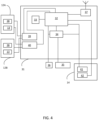
- FIG. 4 shows an exemplary block diagram of the control device (or keyboard) according to the present application.
- the lines indicate the connections/communication lines between the elements in the block diagram.
- the control device may comprise a mainboard 31 comprising a processor 32 and a memory 33 for storing parameters.
- the control device may further comprise a power controller 34 connected to a battery 35 and a power supply 36 for providing power e.g., via a USB cable.
- the control device may further comprise a communication module 37 for establishing a communication link (wireless or wired) between the control device (or keyboard) and at least one auxiliary device, where the communication link provides that information and/or data is transmitted to and/or received from said auxiliary device.
- a communication link wireless or wired
- a first dial 12A and a second dial 12B may each comprise at least one key 38 and a rotatable part 13.
- the at least one keys 38 and rotatable parts 13 together with a encoder filter 39 and button logic and debounce 40 form part of a second user input unit for providing a second input signal to the processor 32.
- a touch screen 14 may comprise a touch panel 41 forming part of a first user input unit for providing a first input signal in response to receiving a touch input from the user.
- the touch screen 14 may further comprise a display element 42 forming part of a user output unit configured to provide an output on the display element 42 of the touch screen 14 in response to receiving an output signal from the processor 32.
- FIG. 5 shows an exemplary control device (or keyboard) according to the present application, seen from in perspective.
- the control device (or keyboard) is in a resting position on e.g., a table.
- FIG. 6 shows an exemplary control device (or keyboard) according to the present application, seen from the back.
- the control device (or keyboard) is in a resting position on e.g., a table.
- a longitudinal axis A1, A2 of the two dials 12 are shown.
- the longitudinal axes A1, A2 are arranged with an angle relative to a norm of a surface 30 on which the control device (or keyboard) 4 is placed.
- the dials 12 are angled away from the touch screen 14.
Landscapes
- Engineering & Computer Science (AREA)
- Health & Medical Sciences (AREA)
- Life Sciences & Earth Sciences (AREA)
- Physics & Mathematics (AREA)
- Theoretical Computer Science (AREA)
- General Engineering & Computer Science (AREA)
- General Health & Medical Sciences (AREA)
- Human Computer Interaction (AREA)
- Veterinary Medicine (AREA)
- Biomedical Technology (AREA)
- Surgery (AREA)
- Animal Behavior & Ethology (AREA)
- Medical Informatics (AREA)
- Public Health (AREA)
- Heart & Thoracic Surgery (AREA)
- Biophysics (AREA)
- Molecular Biology (AREA)
- Pathology (AREA)
- General Physics & Mathematics (AREA)
- Audiology, Speech & Language Pathology (AREA)
- Multimedia (AREA)
- Acoustics & Sound (AREA)
- Otolaryngology (AREA)
- Computer Hardware Design (AREA)
- User Interface Of Digital Computer (AREA)
- Input From Keyboards Or The Like (AREA)
- Measurement Of The Respiration, Hearing Ability, Form, And Blood Characteristics Of Living Organisms (AREA)
- Position Input By Displaying (AREA)
Applications Claiming Priority (1)
| Application Number | Priority Date | Filing Date | Title |
|---|---|---|---|
| EP23181442 | 2023-06-26 |
Publications (1)
| Publication Number | Publication Date |
|---|---|
| EP4485154A1 true EP4485154A1 (de) | 2025-01-01 |
Family
ID=87047796
Family Applications (1)
| Application Number | Title | Priority Date | Filing Date |
|---|---|---|---|
| EP24184352.3A Pending EP4485154A1 (de) | 2023-06-26 | 2024-06-25 | Steuergerät für audiometer |
Country Status (6)
| Country | Link |
|---|---|
| US (1) | US20240423506A1 (de) |
| EP (1) | EP4485154A1 (de) |
| JP (1) | JP2025004772A (de) |
| CN (1) | CN119184679A (de) |
| AU (1) | AU2024204343A1 (de) |
| CA (1) | CA3244472A1 (de) |
-
2024
- 2024-06-25 JP JP2024102099A patent/JP2025004772A/ja active Pending
- 2024-06-25 AU AU2024204343A patent/AU2024204343A1/en active Pending
- 2024-06-25 US US18/752,841 patent/US20240423506A1/en active Pending
- 2024-06-25 EP EP24184352.3A patent/EP4485154A1/de active Pending
- 2024-06-25 CA CA3244472A patent/CA3244472A1/en active Pending
- 2024-06-26 CN CN202410837799.3A patent/CN119184679A/zh active Pending
Non-Patent Citations (5)
| Title |
|---|
| ANONYMOUS: "Audiometer Keyboard | Audiometer-Tastatur | Interacoustics", 6 June 2023 (2023-06-06), XP093098522, Retrieved from the Internet <URL:https://web.archive.org/web/20230606232634/https://www.interacoustics.com/de/audiometer-keyboard> [retrieved on 20231106] * |
| BEACN: "BEACN Mix Create Audio Mixer | Best USB Audio Controller for Windows", 24 March 2023 (2023-03-24), XP093099244, Retrieved from the Internet <URL:https://web.archive.org/web/20230324163122/https://www.beacn.com/pages/beacn-mix-create> [retrieved on 20231108] * |
| SIBEL S.A.U MANUAL DE: "USER'S MANUAL SIBELSOUND DUO Rev 1.01 - 2019-11", 1 November 2019 (2019-11-01), pages 1 - 134, XP093098982, Retrieved from the Internet <URL:https://www.sibelmed.com/wp-content/uploads/520-800-MUM_ES_EN_IT_1.01_Sibelsound_DUO.pdf> [retrieved on 20231107] * |
| SIBELMED: "Audiometer Sibelsound DUO", 1 December 2019 (2019-12-01), XP093098800, Retrieved from the Internet <URL:https://www.sibelmed.com/wp-content/uploads/Audiometer_SIBELSOUND-DUO.pdf> [retrieved on 20231107] * |
| SIBELMED: "Sibelsound DUO. Functions", 14 July 2020 (2020-07-14), XP093098809, Retrieved from the Internet <URL:https://www.youtube.com/watch?v=EZMd5d2d62o> [retrieved on 20231107] * |
Also Published As
| Publication number | Publication date |
|---|---|
| AU2024204343A1 (en) | 2025-01-16 |
| CN119184679A (zh) | 2024-12-27 |
| JP2025004772A (ja) | 2025-01-15 |
| US20240423506A1 (en) | 2024-12-26 |
| CA3244472A1 (en) | 2025-06-06 |
Similar Documents
| Publication | Publication Date | Title |
|---|---|---|
| AU2007224297B2 (en) | Portable audiometer enclosed within a patient response mechanism housing | |
| US11675437B2 (en) | Measurement of facial muscle EMG potentials for predictive analysis using a smart wearable system and method | |
| CN110018471B (zh) | 多功能雷达系统及其操作方法和耳机装置 | |
| CN107205879B (zh) | 手康复运动系统及方法 | |
| US11065133B2 (en) | Prosthesis that can be actuated by external force | |
| US9612661B2 (en) | Closed loop feedback interface for wearable devices | |
| KR102335766B1 (ko) | 생체 신호를 검출하는 센서를 착탈할 수 있는 웨어러블 디바이스 및 웨어러블 디바이스를 제어하는 방법 | |
| EP2406698B1 (de) | Tragbare steuergeräte auf elektromyographiebasis für mensch-maschinen-schnittstellen | |
| CN108540899B (zh) | 包含用户交互式听觉显示器的听觉设备 | |
| AU2023203651B2 (en) | A hearing assistance system | |
| US20100119093A1 (en) | Personal listening device with automatic sound equalization and hearing testing | |
| WO2011055326A1 (en) | Universal input/output human user interface | |
| CN107277661B (zh) | 压感耳机和压感耳机的工作方法 | |
| KR20150069238A (ko) | 스마트폰을 이용한 주파수 물리 치료기 및 그 운용방법 | |
| EP4485154A1 (de) | Steuergerät für audiometer | |
| CN207117882U (zh) | 压感耳机 | |
| CN103916497A (zh) | 一种移动终端的辅助设备及移动终端产品 | |
| US20080300016A1 (en) | Aural feedback apparatus for user controls | |
| US20080049946A1 (en) | Self-paced in-situ audiometry | |
| CN114071305B (zh) | 无线耳机结构及无线耳机结构的触控方法 | |
| CN113539258A (zh) | 按摩设备的控制方法、装置、存储介质以及按摩设备 | |
| KR20220078426A (ko) | 확장 가능한 디스플레이를 포함하는 전자 장치 및 전자 장치의 컨텐츠 제공 방법 | |
| JP2021132356A (ja) | 音検出装置及び音検出システム | |
| CN110244856B (zh) | 基于智能手环的操控设备 | |
| CN210871512U (zh) | 一种视力检测设备 |
Legal Events
| Date | Code | Title | Description |
|---|---|---|---|
| PUAI | Public reference made under article 153(3) epc to a published international application that has entered the european phase |
Free format text: ORIGINAL CODE: 0009012 |
|
| STAA | Information on the status of an ep patent application or granted ep patent |
Free format text: STATUS: THE APPLICATION HAS BEEN PUBLISHED |
|
| AK | Designated contracting states |
Kind code of ref document: A1 Designated state(s): AL AT BE BG CH CY CZ DE DK EE ES FI FR GB GR HR HU IE IS IT LI LT LU LV MC ME MK MT NL NO PL PT RO RS SE SI SK SM TR |
|
| STAA | Information on the status of an ep patent application or granted ep patent |
Free format text: STATUS: REQUEST FOR EXAMINATION WAS MADE |
|
| 17P | Request for examination filed |
Effective date: 20250701 |