EP4425331A1 - Seitenanzeigeverfahren und -vorrichtung, elektronische vorrichtung, speichermedium und programmprodukt - Google Patents
Seitenanzeigeverfahren und -vorrichtung, elektronische vorrichtung, speichermedium und programmprodukt Download PDFInfo
- Publication number
- EP4425331A1 EP4425331A1 EP23739836.7A EP23739836A EP4425331A1 EP 4425331 A1 EP4425331 A1 EP 4425331A1 EP 23739836 A EP23739836 A EP 23739836A EP 4425331 A1 EP4425331 A1 EP 4425331A1
- Authority
- EP
- European Patent Office
- Prior art keywords
- video
- video play
- region
- interactive control
- page
- Prior art date
- Legal status (The legal status is an assumption and is not a legal conclusion. Google has not performed a legal analysis and makes no representation as to the accuracy of the status listed.)
- Pending
Links
Images


Classifications
-
- G—PHYSICS
- G06—COMPUTING OR CALCULATING; COUNTING
- G06F—ELECTRIC DIGITAL DATA PROCESSING
- G06F3/00—Input arrangements for transferring data to be processed into a form capable of being handled by the computer; Output arrangements for transferring data from processing unit to output unit, e.g. interface arrangements
- G06F3/01—Input arrangements or combined input and output arrangements for interaction between user and computer
- G06F3/048—Interaction techniques based on graphical user interfaces [GUI]
- G06F3/0481—Interaction techniques based on graphical user interfaces [GUI] based on specific properties of the displayed interaction object or a metaphor-based environment, e.g. interaction with desktop elements like windows or icons, or assisted by a cursor's changing behaviour or appearance
- G06F3/04817—Interaction techniques based on graphical user interfaces [GUI] based on specific properties of the displayed interaction object or a metaphor-based environment, e.g. interaction with desktop elements like windows or icons, or assisted by a cursor's changing behaviour or appearance using icons
-
- G—PHYSICS
- G06—COMPUTING OR CALCULATING; COUNTING
- G06F—ELECTRIC DIGITAL DATA PROCESSING
- G06F3/00—Input arrangements for transferring data to be processed into a form capable of being handled by the computer; Output arrangements for transferring data from processing unit to output unit, e.g. interface arrangements
- G06F3/01—Input arrangements or combined input and output arrangements for interaction between user and computer
- G06F3/048—Interaction techniques based on graphical user interfaces [GUI]
- G06F3/0487—Interaction techniques based on graphical user interfaces [GUI] using specific features provided by the input device, e.g. functions controlled by the rotation of a mouse with dual sensing arrangements, or of the nature of the input device, e.g. tap gestures based on pressure sensed by a digitiser
- G06F3/0488—Interaction techniques based on graphical user interfaces [GUI] using specific features provided by the input device, e.g. functions controlled by the rotation of a mouse with dual sensing arrangements, or of the nature of the input device, e.g. tap gestures based on pressure sensed by a digitiser using a touch-screen or digitiser, e.g. input of commands through traced gestures
-
- G—PHYSICS
- G06—COMPUTING OR CALCULATING; COUNTING
- G06F—ELECTRIC DIGITAL DATA PROCESSING
- G06F3/00—Input arrangements for transferring data to be processed into a form capable of being handled by the computer; Output arrangements for transferring data from processing unit to output unit, e.g. interface arrangements
- G06F3/01—Input arrangements or combined input and output arrangements for interaction between user and computer
- G06F3/048—Interaction techniques based on graphical user interfaces [GUI]
- G06F3/0481—Interaction techniques based on graphical user interfaces [GUI] based on specific properties of the displayed interaction object or a metaphor-based environment, e.g. interaction with desktop elements like windows or icons, or assisted by a cursor's changing behaviour or appearance
-
- G—PHYSICS
- G06—COMPUTING OR CALCULATING; COUNTING
- G06F—ELECTRIC DIGITAL DATA PROCESSING
- G06F3/00—Input arrangements for transferring data to be processed into a form capable of being handled by the computer; Output arrangements for transferring data from processing unit to output unit, e.g. interface arrangements
- G06F3/01—Input arrangements or combined input and output arrangements for interaction between user and computer
- G06F3/048—Interaction techniques based on graphical user interfaces [GUI]
- G06F3/0484—Interaction techniques based on graphical user interfaces [GUI] for the control of specific functions or operations, e.g. selecting or manipulating an object, an image or a displayed text element, setting a parameter value or selecting a range
- G06F3/04845—Interaction techniques based on graphical user interfaces [GUI] for the control of specific functions or operations, e.g. selecting or manipulating an object, an image or a displayed text element, setting a parameter value or selecting a range for image manipulation, e.g. dragging, rotation, expansion or change of colour
-
- G—PHYSICS
- G06—COMPUTING OR CALCULATING; COUNTING
- G06F—ELECTRIC DIGITAL DATA PROCESSING
- G06F3/00—Input arrangements for transferring data to be processed into a form capable of being handled by the computer; Output arrangements for transferring data from processing unit to output unit, e.g. interface arrangements
- G06F3/01—Input arrangements or combined input and output arrangements for interaction between user and computer
- G06F3/048—Interaction techniques based on graphical user interfaces [GUI]
- G06F3/0487—Interaction techniques based on graphical user interfaces [GUI] using specific features provided by the input device, e.g. functions controlled by the rotation of a mouse with dual sensing arrangements, or of the nature of the input device, e.g. tap gestures based on pressure sensed by a digitiser
- G06F3/0488—Interaction techniques based on graphical user interfaces [GUI] using specific features provided by the input device, e.g. functions controlled by the rotation of a mouse with dual sensing arrangements, or of the nature of the input device, e.g. tap gestures based on pressure sensed by a digitiser using a touch-screen or digitiser, e.g. input of commands through traced gestures
- G06F3/04883—Interaction techniques based on graphical user interfaces [GUI] using specific features provided by the input device, e.g. functions controlled by the rotation of a mouse with dual sensing arrangements, or of the nature of the input device, e.g. tap gestures based on pressure sensed by a digitiser using a touch-screen or digitiser, e.g. input of commands through traced gestures for inputting data by handwriting, e.g. gesture or text
-
- G—PHYSICS
- G06—COMPUTING OR CALCULATING; COUNTING
- G06F—ELECTRIC DIGITAL DATA PROCESSING
- G06F9/00—Arrangements for program control, e.g. control units
- G06F9/06—Arrangements for program control, e.g. control units using stored programs, i.e. using an internal store of processing equipment to receive or retain programs
- G06F9/44—Arrangements for executing specific programs
- G06F9/451—Execution arrangements for user interfaces
-
- G—PHYSICS
- G06—COMPUTING OR CALCULATING; COUNTING
- G06F—ELECTRIC DIGITAL DATA PROCESSING
- G06F2203/00—Indexing scheme relating to G06F3/00 - G06F3/048
- G06F2203/048—Indexing scheme relating to G06F3/048
- G06F2203/04804—Transparency, e.g. transparent or translucent windows
-
- G—PHYSICS
- G06—COMPUTING OR CALCULATING; COUNTING
- G06F—ELECTRIC DIGITAL DATA PROCESSING
- G06F2203/00—Indexing scheme relating to G06F3/00 - G06F3/048
- G06F2203/048—Indexing scheme relating to G06F3/048
- G06F2203/04808—Several contacts: gestures triggering a specific function, e.g. scrolling, zooming, right-click, when the user establishes several contacts with the surface simultaneously; e.g. using several fingers or a combination of fingers and pen
Definitions
- Embodiments of the present disclosure relate to the field of computer technology, such as a page display method, an apparatus, an electronic device, a storage medium and a program product.
- Embodiments of the present disclosure provide a page display method, an apparatus, an electronic device, a storage medium, and a program product to simplify the operations required to view a complete video image.
- the embodiments of the present disclosure provide a page display method, and the method comprises:
- the embodiments of the present disclosure further provide a page display apparatus, and the apparatus comprises:
- the embodiments of the present disclosure further provide an electronic device, the electronic device comprises:
- the embodiments of the present disclosure further provide a computer-readable storage medium, on which a computer program is stored, and when the computer program is executed by a processor, the page display method as described in the embodiments of the present disclosure is implemented.
- the embodiments of the present disclosure further provide a computer program product, and when the computer program product is executed by a computer, the computer is caused to implement the page display method as described in the embodiments of the present disclosure.
- the term “include” and its variations are open-ended, i.e., “include but not limited to.”
- the term “based on” means “at least partially based on.”
- the term “an embodiment” means “at least one embodiment”; the term “another embodiment” means “at least one other embodiment”; and the term “some embodiments” means “at least some embodiments”. Relevant definitions of other terms will be given in the description below.
- FIG. 1 is a schematic flowchart of a page display method provided by the embodiments of the present disclosure.
- the method can be performed by a page display apparatus, the apparatus can be implemented by software and/or hardware, and can be configured in an electronic device, for example, can be configured in a mobile phone or a tablet computer.
- the page display method provided by the embodiments of the present disclosure is suitable for the scenario of completely viewing the video image. As illustrated in FIG. 1 , the page display method provided by this embodiment may include following operations.
- S101 displaying a video play page.
- An original video image of a currently played video, video information, and a first interactive control are displayed in the video play page, the original video image is displayed in a video play region of the video play page, and the video information and at least one first interactive control are displayed on an upper layer of the original video image.
- the currently played video can be the video currently played on the video play page.
- the original video image may be the video image of the original size contained in the currently played video, that is, the video image that has not been magnified.
- the first interactive control may be a control displayed on the video play page for the user to interact, such as a page switching control for switching the current page from the video play page to another page and/or controls for the user to like, comment, share or collect the currently played video, etc.
- the video play region may be a region on the video play page used for playing videos, that is, a region used for displaying video images.
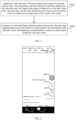
- the electronic device can display a video play page based on the user's triggering operation, and play the currently played video in the video play page, that is, display the original video image (not illustrated in the figure) of the currently played video in the video play region 20 of the video play page.
- Some or all of the first interactive controls are displayed on the upper layer of the original video image.
- the publisher's personal homepage control 200 like control 201, comment control 202, share control 203, etc. can be displayed on the upper layer of the original video image, and the video information of the currently played video is displayed in the video play region, such as the user name of the publisher of the currently played video, posting time, video name and/or background music information, etc.
- some of the first interactive controls can also be displayed outside the video play region.
- the local control 210, follow control 211, recommendation control 212, and search control 213 can be displayed above the video play region, and/or, the homepage control 220, friend control 221, capturing control 222, message control 223, user's personal homepage control 224, etc. are displayed below the video play region.
- the first multi-finger operation gesture can be a multi-finger magnification gesture or a multi-finger minification gesture, such as a two-finger magnification gesture/two-finger minification gesture or a three-finger magnification gesture/three-finger minification gesture, etc.
- the description takes the first multi-finger operation gesture being a two-finger magnification gesture as an example.
- the two-finger magnification gesture may be a touch gesture in which the distance between two touch points gradually increases.
- the second interactive control may be interactive controls that are completely different from, partially the same as, or completely the same as the first interactive control.
- the second interactive control may include controls for the user to interact with the currently played video, such as a like control, a comment control, a share control, etc. of the currently played video, and can also include a speed control and a restore control.
- users can watch the currently played video on the video play page, and when they want to completely view the video image of the currently played video, the use performs the first multi-finger operation gesture on the video play page.
- the electronic device stops displaying the first interactive control in the video play region, such as stopping displaying the first interactive control located within the video play region, or , stopping displaying all the first interactive controls displayed in the video play page, and stops displaying the video information displayed in the video play page, and displays the second interactive control in a preset region outside the video play region.
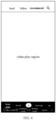
- the like control 201, comment control 202 and sharing control 203 of the currently played video can be displayed below the video play region, as illustrated in FIG. 3 , so as to facilitate users to interact with the currently played video.
- the speed control 30 and the restore control 31 can also be displayed in a preset region outside the video play region, so that users can adjust the play speed of the currently played video by triggering the speed control 30, and/or, by triggering the restore control 31 to instruct the electronic device to display the plurality of interactive controls again at the original display positions of the plurality of interactive controls.
- the user can instruct the electronic device to cancel the display of the interactive controls and video information displayed in the video play region by performing a simple multi-finger magnification gesture on the video play page, and completely view the video image displayed in the video play region without permanently displaying the clear screen control on the video play page, and there is no need to instruct the electronic device to display the screen clear control through a series of operations on the video play page, which can reduce the number of controls displayed on the video play page, and simplify the operations required to fully view the video image, achieve quick screen clearing, and improve the user's video viewing experience.
- all the first interactive controls and video information in the video play page can be stopped to be displayed, that is, stopping displaying the first interactive controls located within the video play region and the first interactive controls located outside the video play region, and stopping displaying the video information displayed in the video play region.
- stopping displaying the first interactive control and the video information in the video play region includes: stopping displaying all the first interactive controls and the video information displayed in the video play page.
- the method of stopping displaying the first interactive control and video information displayed in the video play page can be flexibly set, for example, the display of the first interactive control displayed in the video play region can be directly canceled.
- stopping displaying all the first interactive controls and the video information displayed in the video play page includes: controlling the first interactive controls and the video information to move out of the video play page along the corresponding movement direction. That is, the first interactive controls and video information located at different positions on the video play page can be controlled to move out of the video play page along different directions, so as to stop displaying multiple first interactive controls and video information.
- multiple first interactive controls located above the video play region can be controlled to move up and move out of the video play page
- multiple first interactive controls located below the video play region can be controlled to move down and move out of the video play page
- multiple first interactive controls located on the right inside the video play region can be controlled to move to the right and move out of the video play page
- first interactive controls and the second interactive controls contain the same interactive control, such as when a certain interactive control is displayed in the video play region and is displayed in the preset region, this interactive control can be displayed in different display states, such as displaying this interactive control in different display styles and/or different display sizes.
- the interactive controls that are only included in the first interactive controls but not included in the second interactive controls are stopped to be displayed, and the interactive controls included in both the first interactive controls and the second interactive controls displayed on the video play page are controlled to be moved from the original display position within the video play region to a preset region outside the video play region for display, and the display state of multiple video interactive controls can be adjusted before, during, and/or after the movement.
- stopping displaying the first interactive control and the video information in the video play region includes: stopping displaying the first interactive control and the video information located within the video play region.
- a video play page is displayed.
- An original video image of a currently played video, video information, and a first interactive control are displayed in the video play page, the original video image is displayed in a video play region of the video play page, and the video information and at least one first interactive control are displayed on an upper layer of the original video image.
- the first interactive control and the video information in the video play region are stopped to be displayed, and a second interactive control is displayed in a preset region outside the video play region.
- FIG. 5 is a schematic flowchart of another page display method provided by embodiments of the present disclosure.
- the solutions in this embodiment can be combined with one or more example solutions in the above embodiments.
- the method further includes: in response to a control display gesture, re-displaying the first interactive control and the video information in the video play region, and stopping displaying the second interactive control in the preset region.
- the control display gesture comprises a second multi-finger operation gesture or a single-point sliding gesture along a preset direction.
- the second interactive control includes a restore control, after stopping displaying the first interactive control in the video play region, the method further includes: in response to a triggering operation on the restore control, re-displaying the first interactive control and the video information in the video play region, and stopping displaying the second interactive control in the preset region.
- stopping displaying the first interactive control and the video information in the video play region and displaying the second interactive control in the preset region outside the video play region includes: if a triggering duration of the first multi-finger operation gesture is less than a preset duration, stopping displaying the first interactive control and the video information in the video play region, and displaying the second interactive control in the preset region outside the video play region.
- the page display method provided by this embodiment also includes: if the triggering duration of the first multi-finger operation gesture is greater than or equal to the preset duration, performing an amplification process on the original video image to obtain a target video image, and displaying the target video image in the video play region.
- the page display method provided by this embodiment may include following operations.
- S201 displaying a video play page.
- An original video image of a currently played video, video information, and a first interactive control are displayed in the video play page, the original video image is displayed in a video play region of the video play page, and the video information and at least one first interactive control are displayed on an upper layer of the original video image.
- the second interactive control includes a restore control.
- the display of the first interactive control and video information in the video play region is stopped.
- the triggering duration of the first multi-finger operation gesture can also be considered, and display of the first interactive control and the video information in the video play region is stopped only when the triggering duration of the first multi-finger operation gesture performed by the user is less than the preset duration.
- the triggering duration of the operation gesture is greater than or equal to the preset duration, the video image is magnified based on the first multi-finger operation gesture to simultaneously meet the user's screen clearing needs and screen magnification needs, this embodiment takes this situation as an example to illustrate.
- the preset duration can be set as needed.
- the preset duration can be set to 200ms.
- the triggering duration of the first multi-finger operation gesture performed by the user is less than 200ms, display of the first interactive control and video information in the video play area is stopped, and the second interactive control is displayed in a preset region outside the video play region; when the triggering duration of the second multi-finger magnification gesture performed by the user is greater than or equal to 200ms, the video image can be magnified based on the second multi-finger operation gesture.
- the video image may be initially magnified, and when the triggering is completed, different responses may be performed based on the triggering duration of the first multi-finger operation gesture.
- a first multi-finger operation gesture acting on the video play page stopping displaying the first interactive control and the video information in the video play region, and displaying a second interactive control in a preset region outside the video play region, includes: during the execution process of the first multi-finger operation gesture acting on the video play page, magnifying the original video image based on a magnification proportion coefficient and a distance increment between two touch points corresponding to the first multi-finger operation gesture to obtain the target video image, and displaying the target video image in the video play region; when the execution of the first multi-finger operation gesture ends, if the triggering duration of the first multi-finger operation gesture is less than a preset duration, stopping displaying the first interactive control and the video information in the video play region, and displaying a second interactive control in a preset region outside the video play region, and restoring the target video image displayed in the video play region to the original video image before the magnification process.
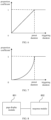
- the magnification proportion coefficient can be determined based on a preset magnification proportion coefficient curve, and the preset magnification proportion coefficient curve can be a curve of the magnification proportion coefficient varying with the triggering duration.
- the magnification proportion coefficient curve when the triggering duration is less than the preset duration, the magnification proportion coefficient is less than 1; when the triggering duration is greater than or equal to the preset duration, the magnification proportion coefficient is greater than or equal to 1.
- the preset magnification proportion coefficient curve can be a linear curve, as illustrated in FIG. 6 , or it can be a nonlinear curve, as illustrated in FIG. 7 .
- the distance increment between two touch points corresponding to the first multi-finger operation gesture can be understood as the increased amount of the distance value between the two touch points, which can be calculated based on the distance between the two touch points at the current moment and the initial distance between the two touch points, that is, by calculating the difference between the two.
- Different distance increments correspond to different magnification ratios, and there can be a proportional relationship between the two. That is, the greater the distance increment, the greater the magnification ratio.
- the corresponding relationship between the distance increment and the magnification ratio can be preset by the developer.
- the target video image is a video image obtained by magnifying the original video image in the currently played video based on the first multi-finger operation gesture.
- the current magnification proportion coefficient at the current moment can be determined according to the preset magnification proportion coefficient curve, and the current magnification ratio can be determined according to distance increment between the two touch points corresponding to the first multi-finger operation gesture; the current magnification multiple of the current original video image is determined according to the current magnification proportion coefficient and the current magnification ratio; whether the current magnification multiple is greater than 1 is determined, and if so, the current original video image displayed in the video play region is magnified based on the current magnification multiple; if not, the original video image of the currently played video continues to be displayed in the video play region, that is, the current original video image displayed in the video play region is not magnified.
- the interactive controls can be stopped to be displayed in the video play region, and it can be determined whether the original video image of the currently played video is displayed in the video play region is determined. If so, then the original video image of the currently played video continues to be played in the video play region; if not, the magnified target video image displayed in the video play region can be restored to the original video image before magnification, and the original video image of the currently played video continues to be played in the video play region.
- control display gestures include the second multi-finger operation gesture or a single-point sliding gesture along a preset direction.
- the control display gesture may be a gesture that instructs the electronic device to display multiple interactive controls in the video play page again at the original display position, such as a second multi-finger operation gesture or a single-point sliding gesture along a preset direction.
- the second multi-finger operation gesture may be a gesture different from the first multi-finger operation gesture.
- the first multi-finger operation gesture is a multi-finger magnification gesture
- the second multi-finger operation gesture may be a multi-finger minification gesture
- the first multi-finger operation gesture is a multi-finger minification gesture
- the second multi-finger operation gesture may be a multi-finger magnification gesture.
- the preset direction can be set as needed, for example, the preset direction can be set to upward.
- the user when the user wants to instruct the electronic device to display the first interactive control and video information again in the video play region, the user can perform a second multi-finger operation gesture or a single-point sliding gesture along a preset direction on the video play page. Therefore, when the electronic device detects the user's second multi-finger operation gesture or single-point sliding gesture along the preset direction, it can re-display the first interactive control and video information in the video play region, and stop displaying the second interactive control in the preset region, which is illustrated in FIG. 2 .
- the second interactive control including the restore control 31 can be displayed in a preset region outside the video play region. Therefore, when the user wants to instruct the electronic device to display the first interactive control and video information in the video play region again, the user can also trigger the restore control 31 displayed on the video play page. Therefore, when the electronic device detects that the user triggers the restore control 31 displayed on the video play page, the first interactive control and video information can be re-displayed in the video play region, and display of the second interactive control in the preset region is stopped, as illustrated in FIG. 2 .
- the user can also instruct the electronic device to increase the transparency of multiple interactive controls displayed in the video play page by performing a single-point sliding operation along a preset direction in the video play page, so as to view the video image blocked by interactive controls on the video play page.
- the electronic device detects the user's single-point sliding operation along the preset direction, it can determine whether interactive controls are displayed in the video play region, that is, determining whether the interactive controls in the video play region are in a display state.
- the transparency of multiple interactive controls and/or video information displayed in the video play region is increased, such as increasing the transparency of multiple interactive controls and/or video information displayed in the video play region from the original transparency to the preset transparency; if not, multiple interactive controls and/or video information are displayed in the video play region again, such as using original transparency to display multiple interactive controls and/or video information in the video play region.
- the user can watch the currently played video in the video play page, and when the user wants to magnify the video image displayed in the video play region, the use can execute the first multi-finger operation gesture on the video play page with a triggering duration greater than or equal to the preset duration.
- the electronic device receives the user's first multi-finger operation gesture, if it determines that the triggering duration of the first multi-finger operation gesture is greater than or equal to the preset duration, then the original video image displayed in the video play region can be magnifed based on the first multi-finger operation gesture, so as to obtain the target video image, and the target video image is displayed in the video play region.
- the first multi-finger operation gesture is a two-finger operation gesture as an example
- the electronic device detects the first multi-finger operation gesture acting on the video play page
- the original video image displayed in the video play region can be magnified, and the magnified target video image can be displayed in the video play region.
- the execution of the first multi-finger operation gesture ends, it is determined whether the execution duration of the first multi-finger operation gesture is less than the preset duration.
- the display of the first interactive control and video information in the video play region is stopped, and the second interactive control is displayed in the preset region outside the video play region, and the video image displayed in the video play region is switched to the original video image without magnification; if not, the magnified video image remains displayed in the video play region, and the original displayed first interactive control and video information are kept to be displayed in the video play region.
- the method of magnifying the original video image can be flexibly set.
- the original video image can be magnified based on the magnification proportion coefficient and the distance increment between the two touch points.
- the first multi-finger operation gesture is a two-finger operation gesture
- magnifying the original video image includes: magnifying the original video image based on a magnification proportion coefficient and a distance increment between two touch points corresponding to the first multi-finger operation gesture.
- magnifying the original video image based on a magnification proportion coefficient and a distance increment between two touch points corresponding to the first multi-finger operation gesture includes: determining a current magnification proportion coefficient according to a current triggering duration and a preset magnification proportion coefficient curve, and determining a current magnification ratio according to a current distance increment between the two touch points corresponding to the first multi-finger operation gesture, where the preset magnification proportion coefficient curve is a curve of magnification proportion coefficient varying with triggering duration; determining a current magnification multiple of a current original video image according to the current magnification proportion coefficient and the current magnification ratio; and magnifying the current original video image based on the current magnification multiple.
- the current magnification proportion coefficient corresponding to the current triggering duration can be determined based on the current triggering duration of the first multi-finger operation gesture at the current moment and the preset magnification proportion coefficient curve; and the current distance between two touch points corresponding to the first multi-finger operation gesture is obtained, the current distance increment is calculated based on the current distance and the initial distance between the two touch points, and the magnification ratio corresponding to the current distance increment serves as the current magnification multiple. Then, the current magnification multiple of the current original video image is determined according to the magnification proportion coefficient and the current magnification ratio. For example, the product of the current magnification proportion coefficient and the current magnification ratio is calculated as the current magnification multiple.
- the current original video image displayed in the video play region is magnified based on the current magnification multiple.
- the current original video image can be magnified by the current magnification multiple to obtain the target video image, and the target video image is displayed in the video play region.
- the current original video image displayed in the video play region can be magnified only when the current magnification multiple is greater than 1; and when the current magnification multiple is less than or equal to 1, the current original video image is directly displayed in the video play region to avoid the situation where the video image displayed in the video play region is reduced when the user performs the first multi-finger operation gesture.
- performing the magnification process on the current original video image based on the current magnification multiple includes: if the current magnification multiple is greater than 1, then magnifying the current original video image based on the current magnification multiple.
- the user can instruct the electronic device to stop displaying interactive controls in the video play region through a simple first multi-finger operation gesture, or to magnify the video image; through a simple second multi-finger operation gesture, a single-point sliding gesture along a preset direction or a triggering gesture on the restore control, the electronic device can be instructed to re-display the interactive controls in the video play region, which can simplify the operations required by the user and improve the user's video viewing experience on the premise of meeting the user's screen clearing needs, video image magnification and restoration needs.
- FIG. 8 is a structural block diagram of a page display apparatus provided by embodiments of the present disclosure.
- the apparatus can be implemented by software and/or hardware, and can be configured in an electronic device, for example, in a mobile phone or tablet computer, and can display the video play page by executing the page display method.
- the page display apparatus provided by this embodiment may include: a page display module 801 and a response module 802.
- the page display module 801 is configured to display a video play page.
- An original video image of a currently played video, video information, and a first interactive control are displayed in the video play page, the original video image is displayed in a video play region of the video play page, and the video information and at least one first interactive control are displayed on an upper layer of the original video image.
- the response module 802 is configured to, in response to a first multi-finger operation gesture acting on the video play page, stop displaying the first interactive control and the video information in the video play region, and display a second interactive control in a preset region outside the video play region.
- the video play page is displayed through the page display module.
- An original video image of a currently played video, video information, and a first interactive control are displayed in the video play page, the original video image is displayed in a video play region of the video play page, and the video information and at least one first interactive control are displayed on an upper layer of the original video image.
- the response module in response to the first multi-finger operation gesture acting on the video play page, display of the first interactive control and the video information in the video play region is stopped, and a second interactive control is displayed in a preset region outside the video play region.
- the response module 802 may be configured to: stop displaying all first interactive controls and the video information displayed in the video play page; or, stop displaying the first interactive control and the video information located within the video play region.
- the response module 802 may be configured to: control the first interactive controls and the video information to move out of the video play page along a corresponding movement direction.
- the page display apparatus may further include: a first control display module, which is configured to, after stopping displaying the first interactive control and the video information in the video play region, in response to a control display gesture, re-display the first interactive control and the video information in the video play region, and stop displaying the second interactive control in the preset region.
- the control display gesture includes a second multi-finger operation gesture or a single-point sliding gesture along a preset direction.
- the second interactive control may include a restore control
- the page display apparatus provided by this embodiment may further include: a second control display module, which is configured to, after stopping displaying the first interactive control in the video play region, in response to a triggering operation on the restore control, re-display the first interactive control and the video information in the video play region, and stop displaying the second interactive control in the preset region.
- the response module 802 may be configured to: if a triggering duration of the first multi-finger operation gesture is less than a preset duration, stop displaying the first interactive control and the video information in the video play region, and display a second interactive control in a preset region outside the video play region.
- the response module 802 may be further configured to: if the triggering duration of the first multi-finger operation gesture is greater than or equal to the preset duration, magnify the original video image to obtain a target video image, and display the target video image in the video play region.
- the first multi-finger operation gesture can be a two-finger operation gesture
- the response module 802 may be configured to: magnify the original video image based on a magnification proportion coefficient and a distance increment between two touch points corresponding to the first multi-finger operation gesture.
- the response module 802 can include: a coefficient determination unit, which is configured to determine a current magnification proportion coefficient according to a current triggering duration and a preset magnification proportion coefficient curve, and determine a current magnification ratio according to a current distance increment between the two touch points corresponding to the first multi-finger operation gesture, where the preset magnification proportion coefficient curve is a curve of magnification proportion coefficient varying with triggering period; a multiple determination unit, which is configured to determine a current magnification multiple of a current original video image according to the current magnification proportion coefficient and the current magnification ratio; a magnification processing unit, which is configured to magnify the current original video image based on the current magnification multiple.
- a coefficient determination unit which is configured to determine a current magnification proportion coefficient according to a current triggering duration and a preset magnification proportion coefficient curve, and determine a current magnification ratio according to a current distance increment between the two touch points corresponding to the first multi-finger operation gesture, where the prese
- the magnification proportion coefficient when a triggering duration of the first multi-finger operation gesture is less than the preset duration, the magnification proportion coefficient can be less than 1; when a triggering duration of the first multi-finger operation gesture is greater than or equal to the preset duration, the magnification proportion coefficient can be greater than or equal to 1.
- the magnification processing unit can be configured to magnify the current original video image based on the current magnification multiple when the current magnification multiple is greater than 1.
- the response module 802 may be configured to: during the execution process of the first multi-finger operation gesture acting on the video play page, magnify the original video image based on a magnification proportion coefficient and a distance increment between two touch points corresponding to the first multi-finger operation gesture to obtain the target video image, and display the target video image in the video play region; when the execution of the first multi-finger operation gesture ends, if the triggering duration of the first multi-finger operation gesture is less than the preset duration, stop displaying the first interactive control and the video information in the video play region, display a second interactive control in a preset region outside the video play region, and restore the target video image displayed in the video play region to the original video image before the magnification process.
- the page display apparatus provided by the embodiments of the present disclosure can execute the page display method provided by any embodiment of the present disclosure, and has corresponding functional modules and beneficial effects for executing the page display method.
- the page display method provided by any embodiment of this disclosure can be referred to.
- Terminal devices in the embodiments of the present disclosure may include, but are not limited to, mobile terminals such as mobile phones, notebook computers, digital broadcast receivers, personal digital assistants (PDAs), tablets computer (PADs), portable multimedia players (PMPs), vehicle-mounted terminals (such as vehicle-mounted navigation terminals) and fixed terminals such as digital TVs, desktop computers, etc.
- PDAs personal digital assistants
- PADs tablets computer
- PMPs portable multimedia players
- vehicle-mounted terminals such as vehicle-mounted navigation terminals
- fixed terminals such as digital TVs, desktop computers, etc.
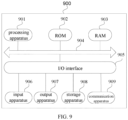
- the electronic device illustrated in FIG. 9 is only an example and should not impose any limitations on the functions and scope of use of the embodiments of the present disclosure.
- the electronic device 900 may include a processing apparatus (e.g., a central processing unit, a graphics processing unit, etc.) 901, which may execute various appropriate actions and processing according to a program stored in a read-only memory (ROM) 902 or a program loaded from a storage apparatus 908 into a random access memory (RAM) 903.
- the RAM 903 further stores various programs and data required for operation of the electronic device 900.
- the processing apparatus 901, the ROM 902, and the RAM 903 are connected with each other through a bus 904.
- An input/output (I/O) interface 905 is also coupled to the bus 904.
- apparatuses below may be coupled to the I/O interface 905: input apparatuses 906 including, for example, a touch screen, a touch pad, a keyboard, a mouse, a camera, a microphone, an accelerometer, a gyroscope, etc.; output apparatuses 907 including, for example, a liquid crystal display (LCD), a speaker, a vibrator, etc.; storage apparatuses 908 including, for example, a magnetic tape, a hard disk, etc.; and a communication apparatus 909.
- the communication apparatus 909 may allow the electronic device 900 to perform wireless or wired communication with other device to exchange data.
- FIG. 9 illustrates the electronic device 900 including various apparatuses, it should be understood that it is not required to implement or have all the apparatuses illustrated, and the electronic device 900 may alternatively implement or have more or fewer apparatuses.
- the process described above with reference to the flow chart may be implemented as computer software programs.
- the embodiments of the present disclosure provide a computer program product, which includes a computer program carried on a non-transitory computer readable medium, and the computer program includes program codes for executing the method illustrated in the flow chart.
- the computer program may be downloaded and installed from the network via the communication apparatus 909, or installed from the storage apparatus 908, or installed from the ROM 902.
- the computer program may execute the above-described functions defined in the method provided by the embodiments of the present disclosure.
- the above-mentioned computer-readable medium in the present disclosure may be a computer-readable signal medium or a computer-readable storage medium or any combination thereof.
- the computer-readable storage medium may be, but not limited to, an electric, magnetic, optical, electromagnetic, infrared, or semiconductor system, apparatus or device, or any combination thereof.
- Examples of the computer-readable storage medium may include but not be limited to: an electrical connection with one or more wires, a portable computer disk, a hard disk, a random-access memory (RAM), a read-only memory (ROM), an erasable programmable read-only memory (EPROM or flash memory), an optical fiber, a compact disk read-only memory (CD-ROM), an optical storage device, a magnetic storage device, or any appropriate combination of them.
- the computer-readable storage medium may be any tangible medium containing or storing a program that can be used by or in combination with an instruction execution system, apparatus or device.
- the computer-readable signal medium may include a data signal that propagates in a baseband or as a part of a carrier and carries computer-readable program codes.
- the data signal propagating in such a manner may take a plurality of forms, including but not limited to an electromagnetic signal, an optical signal, or any appropriate combination thereof.
- the computer-readable signal medium may also be any other computer-readable medium than the computer-readable storage medium.
- the computer-readable signal medium may send, propagate or transmit a program used by or in combination with an instruction execution system, apparatus or device.
- the program code contained on the computer-readable medium may be transmitted by using any suitable medium, including but not limited to an electric wire, a fiber-optic cable, radio frequency (RF) and the like, or any appropriate combination of them.
- RF radio frequency
- the client and the server may communicate with any network protocol currently known or to be researched and developed in the future such as hypertext transfer protocol (HTTP), and may communicate (via a communication network) and interconnect with digital data in any form or medium.
- HTTP hypertext transfer protocol
- Examples of communication networks include a local area network (LAN), a wide area network (WAN), the Internet, and an end-to-end network (e.g., an ad hoc end-to-end network), as well as any network currently known or to be researched and developed in the future.
- the above-mentioned computer-readable medium may be included in the above-mentioned electronic device, or may also exist alone without being assembled into the electronic device.
- the above-mentioned computer-readable medium carries one or more programs, and when the one or more programs are executed by the electronic device, the electronic device is caused to: display a video play page, wherein an original video image of a currently played video, video information, and a first interactive control are displayed in the video play page, the original video image is displayed in a video play region of the video play page, and the video information and at least one first interactive control are displayed on an upper layer of the original video image; and in response to a first multi-finger operation gesture acting on the video play page, stop displaying the first interactive control and the video information in the video play region, and display a second interactive control in a preset region outside the video play region.
- the computer program codes for performing the operations of the present disclosure may be written in one or more programming languages or a combination thereof.
- the above-mentioned programming languages include but are not limited to object-oriented programming languages such as Java, Smalltalk, C++, and also include conventional procedural programming languages such as the "C" programming language or similar programming languages.
- the program code may be executed entirely on the user's computer, partly on the user's computer, as a stand-alone software package, partly on the user's computer and partly on a remote computer, or entirely on the remote computer or server.
- the remote computer may be connected to the user's computer through any type of network, including a local area network (LAN) or a wide area network (WAN), or the connection may be made to an external computer (for example, through the Internet using an Internet service provider).
- LAN local area network
- WAN wide area network
- each block in the flowcharts or block diagrams may represent a module, a program segment, or a portion of codes, including one or more executable instructions for implementing specified logical functions.
- the functions noted in the blocks may also occur out of the order noted in the accompanying drawings. For example, two blocks shown in succession may, in fact, can be executed substantially concurrently, or the two blocks may sometimes be executed in a reverse order, depending upon the functionality involved.
- each block of the block diagrams and/or flowcharts, and combinations of blocks in the block diagrams and/or flowcharts may be implemented by a dedicated hardware-based system that performs the specified functions or operations, or may also be implemented by a combination of dedicated hardware and computer instructions.
- the modules or units involved in the embodiments of the present disclosure may be implemented in software or hardware. Among them, the name of the module or unit does not constitute a limitation of the unit itself under certain circumstances.
- FPGA field programmable gate array
- ASIC application specific integrated circuit
- ASSP application specific standard product
- SOC system on chip
- CPLD complex programmable logical device
- the machine-readable medium may be a tangible medium that may include or store a program for use by or in combination with an instruction execution system, apparatus or device.
- the machine-readable medium may be a machine-readable signal medium or a machine-readable storage medium.
- the machine-readable medium includes, but is not limited to, an electrical, magnetic, optical, electromagnetic, infrared, or semi-conductive system, apparatus or device, or any suitable combination of the foregoing.
- machine-readable storage medium examples include electrical connection with one or more wires, portable computer disk, hard disk, random-access memory (RAM), read-only memory (ROM), erasable programmable read-only memory (EPROM or flash memory), optical fiber, portable compact disk read-only memory (CD-ROM), optical storage device, magnetic storage device, or any suitable combination of the foregoing.
- example 1 provides a page display method, which comprises:
- stopping displaying the first interactive control and the video information in the video play region comprises:
- stopping displaying all first interactive controls and the video information displayed in the video play page comprises: controlling the first interactive controls and the video information to move out of the video play page along a corresponding movement direction.
- the method further comprises: in response to a control display gesture, re-displaying the first interactive control and the video information in the video play region, and stopping displaying the second interactive control in the preset region, wherein the control display gesture comprises a second multi-finger operation gesture or a single-point sliding gesture along a preset direction.
- the second interactive control comprises a restore control
- the method further comprises: in response to a triggering operation on the restore control, re-displaying the first interactive control and the video information in the video play region, and stopping displaying the second interactive control in the preset region.
- stopping displaying the first interactive control and the video information in the video play region and displaying the second interactive control in the preset region outside the video play region comprises: in response to determining that a triggering duration of the first multi-finger operation gesture is less than a preset duration, stopping displaying the first interactive control and the video information in the video play region, and displaying the second interactive control in the preset region outside the video play region.
- the method of example 7 according to example 6 further comprises: in response to determining that the triggering duration of the first multi-finger operation gesture is greater than or equal to the preset duration, performing an amplification process on the original video image to obtain a target video image, and displaying the target video image in the video play region.
- the method of example 8 according to example 6, the first multi-finger operation gesture is a two-finger operation gesture, and performing the amplification process on the original video image comprises: performing the amplification process on the original video image based on a magnification proportion coefficient and a distance increment between two touch points corresponding to the first multi-finger operation gesture.
- the method of example 10 according to example 9 in the preset magnification proportion coefficient curve, in response to determining that the triggering duration of the first multi-finger operation gesture is less than the preset duration, the magnification proportion coefficient is less than 1; in response to determining that the triggering duration of the first multi-finger operation gesture is greater than or equal to the preset duration, the magnification proportion coefficient is greater than or equal to 1.
- performing the amplification process on the current original video image based on the current magnification multiple comprises: in response to determining that the current magnification multiple is greater than 1, performing the amplification process on the current original video image based on the current magnification multiple.
- the method of example 12 according to example 8 in response to the first multi-finger operation gesture acting on the video play page, stopping displaying the first interactive control and the video information in the video play region, and displaying the second interactive control in the preset region outside the video play region, comprises:
- example 13 provides a page display apparatus, which comprises:
- example 14 provides an electronic device, which comprises:
- example 15 provides a computer-readable storage medium, on which a computer program is stored, wherein when the computer program is executed by a processor, the page display method according to any one of examples 1-12 is implemented.
- example 16 provides a computer program product, wherein when the computer program product is executed by a computer, the computer is caused to implement the page display method according to any one of examples 1-12.
Landscapes
- Engineering & Computer Science (AREA)
- Theoretical Computer Science (AREA)
- General Engineering & Computer Science (AREA)
- Human Computer Interaction (AREA)
- Physics & Mathematics (AREA)
- General Physics & Mathematics (AREA)
- Software Systems (AREA)
- User Interface Of Digital Computer (AREA)
- Two-Way Televisions, Distribution Of Moving Picture Or The Like (AREA)
Applications Claiming Priority (2)
| Application Number | Priority Date | Filing Date | Title |
|---|---|---|---|
| CN202210028254.9A CN114385297A (zh) | 2022-01-11 | 2022-01-11 | 页面的显示方法、装置、电子设备、存储介质和程序产品 |
| PCT/CN2023/070042 WO2023134492A1 (zh) | 2022-01-11 | 2023-01-03 | 页面的显示方法、装置、电子设备、存储介质和程序产品 |
Publications (2)
| Publication Number | Publication Date |
|---|---|
| EP4425331A1 true EP4425331A1 (de) | 2024-09-04 |
| EP4425331A4 EP4425331A4 (de) | 2025-03-05 |
Family
ID=81202495
Family Applications (1)
| Application Number | Title | Priority Date | Filing Date |
|---|---|---|---|
| EP23739836.7A Pending EP4425331A4 (de) | 2022-01-11 | 2023-01-03 | Seitenanzeigeverfahren und -vorrichtung, elektronische vorrichtung, speichermedium und programmprodukt |
Country Status (5)
| Country | Link |
|---|---|
| US (1) | US12353704B2 (de) |
| EP (1) | EP4425331A4 (de) |
| JP (1) | JP2024543224A (de) |
| CN (1) | CN114385297A (de) |
| WO (1) | WO2023134492A1 (de) |
Families Citing this family (8)
| Publication number | Priority date | Publication date | Assignee | Title |
|---|---|---|---|---|
| CN114385297A (zh) | 2022-01-11 | 2022-04-22 | 北京字跳网络技术有限公司 | 页面的显示方法、装置、电子设备、存储介质和程序产品 |
| CN117339203A (zh) * | 2022-06-29 | 2024-01-05 | 北京字跳网络技术有限公司 | 视频交互方法、装置、电子设备和存储介质 |
| CN115426531B (zh) * | 2022-08-30 | 2024-06-04 | 北京字跳网络技术有限公司 | 一种直播间访问方法、装置、设备及介质 |
| CN115484490B (zh) * | 2022-09-15 | 2024-06-11 | 北京字跳网络技术有限公司 | 一种视频处理方法、装置、设备及存储介质 |
| CN115604500A (zh) * | 2022-11-10 | 2023-01-13 | 北京字跳网络技术有限公司(Cn) | 直播间页面显示方法、装置、电子设备及存储介质 |
| CN116055783B (zh) * | 2022-12-20 | 2025-04-11 | 北京达佳互联信息技术有限公司 | 一种视频播放方法、装置、电子设备及存储介质 |
| CN119200907A (zh) * | 2024-09-25 | 2024-12-27 | 北京字跳网络技术有限公司 | 媒体内容的展示方法、设备及存储介质 |
| CN119562003A (zh) * | 2024-11-12 | 2025-03-04 | 北京达佳互联信息技术有限公司 | 播放处理方法及装置 |
Family Cites Families (26)
| Publication number | Priority date | Publication date | Assignee | Title |
|---|---|---|---|---|
| US9134756B2 (en) * | 2010-10-01 | 2015-09-15 | Z124 | Dual screen application visual indicator |
| US9075441B2 (en) * | 2006-02-08 | 2015-07-07 | Oblong Industries, Inc. | Gesture based control using three-dimensional information extracted over an extended depth of field |
| US20110010626A1 (en) * | 2009-07-09 | 2011-01-13 | Jorge Fino | Device and Method for Adjusting a Playback Control with a Finger Gesture |
| US9052926B2 (en) * | 2010-04-07 | 2015-06-09 | Apple Inc. | Device, method, and graphical user interface for managing concurrently open software applications |
| US9239674B2 (en) * | 2010-12-17 | 2016-01-19 | Nokia Technologies Oy | Method and apparatus for providing different user interface effects for different implementation characteristics of a touch event |
| KR101199618B1 (ko) * | 2011-05-11 | 2012-11-08 | 주식회사 케이티테크 | 화면 분할 표시 장치 및 방법 |
| US8842057B2 (en) * | 2011-09-27 | 2014-09-23 | Z124 | Detail on triggers: transitional states |
| US20140033040A1 (en) * | 2012-07-24 | 2014-01-30 | Apple Inc. | Portable device with capability for note taking while outputting content |
| CN103019594A (zh) * | 2012-12-06 | 2013-04-03 | 鸿富锦精密工业(深圳)有限公司 | 电子装置及其页面缩放方法 |
| US10133472B2 (en) * | 2013-03-15 | 2018-11-20 | Disney Enterprises, Inc. | Gesture based video clipping control |
| US20150100885A1 (en) * | 2013-10-04 | 2015-04-09 | Morgan James Riley | Video streaming on a mobile device |
| KR102410212B1 (ko) * | 2015-09-18 | 2022-06-17 | 엘지전자 주식회사 | 이동 단말기 및 그 제어 방법 |
| CN105554553B (zh) * | 2015-12-15 | 2019-02-15 | 腾讯科技(深圳)有限公司 | 通过悬浮窗口播放视频的方法及装置 |
| WO2018152437A1 (en) * | 2017-02-17 | 2018-08-23 | Vid Scale, Inc. | Systems and methods for selective object-of-interest zooming in streaming video |
| CN108762634B (zh) * | 2018-05-15 | 2022-04-15 | 维沃移动通信有限公司 | 一种控制方法及终端 |
| CN108924633B (zh) * | 2018-07-16 | 2021-04-27 | 腾讯科技(深圳)有限公司 | 视频播放速率控制方法、装置、系统及存储介质 |
| CN109343916A (zh) * | 2018-08-10 | 2019-02-15 | 北京微播视界科技有限公司 | 显示界面切换方法、装置及电子设备 |
| CN109529319B (zh) | 2018-11-28 | 2020-06-02 | 腾讯科技(深圳)有限公司 | 界面控件的显示方法、设备及存储介质 |
| CN110032326A (zh) * | 2019-03-29 | 2019-07-19 | 网易(杭州)网络有限公司 | 移动终端显示画面的控制方法、装置、设备和存储介质 |
| CN110647286A (zh) * | 2019-10-09 | 2020-01-03 | 北京字节跳动网络技术有限公司 | 屏幕元素控制方法、装置、设备、存储介质 |
| CN111078112A (zh) * | 2019-12-27 | 2020-04-28 | 上海闻泰电子科技有限公司 | 终端设备控制方法、装置、计算机设备及存储介质 |
| CN111263170B (zh) * | 2020-01-17 | 2021-06-08 | 腾讯科技(深圳)有限公司 | 一种视频播放方法、装置、设备及可读存储介质 |
| CN111294637A (zh) * | 2020-02-11 | 2020-06-16 | 北京字节跳动网络技术有限公司 | 视频播放方法、装置、电子设备和计算机可读介质 |
| CN111475070B (zh) * | 2020-04-01 | 2022-04-01 | 维沃移动通信有限公司 | 一种应用界面的显示方法及电子设备 |
| CN112104915B (zh) * | 2020-09-14 | 2022-08-26 | 腾讯科技(深圳)有限公司 | 一种视频数据处理方法、装置及存储介质 |
| CN114385297A (zh) * | 2022-01-11 | 2022-04-22 | 北京字跳网络技术有限公司 | 页面的显示方法、装置、电子设备、存储介质和程序产品 |
-
2022
- 2022-01-11 CN CN202210028254.9A patent/CN114385297A/zh active Pending
-
2023
- 2023-01-03 JP JP2024532992A patent/JP2024543224A/ja active Pending
- 2023-01-03 EP EP23739836.7A patent/EP4425331A4/de active Pending
- 2023-01-03 WO PCT/CN2023/070042 patent/WO2023134492A1/zh not_active Ceased
-
2024
- 2024-06-06 US US18/736,426 patent/US12353704B2/en active Active
Also Published As
| Publication number | Publication date |
|---|---|
| WO2023134492A1 (zh) | 2023-07-20 |
| EP4425331A4 (de) | 2025-03-05 |
| US12353704B2 (en) | 2025-07-08 |
| JP2024543224A (ja) | 2024-11-19 |
| US20240319865A1 (en) | 2024-09-26 |
| CN114385297A (zh) | 2022-04-22 |
Similar Documents
| Publication | Publication Date | Title |
|---|---|---|
| US12353704B2 (en) | Page display method and apparatus, electronic device, storage medium and program product | |
| JP7585517B2 (ja) | コントロールの表示方法、装置、電子機器および記憶媒体 | |
| EP4333440A1 (de) | Videointeraktionsverfahren und -vorrichtung, elektronische vorrichtung und speichermedium | |
| CN114416261B (zh) | 一种信息展示方法、装置、设备及介质 | |
| EP4528458A1 (de) | Interaktionsverfahren und -vorrichtung sowie elektronische vorrichtung und speichermedium | |
| US11863835B2 (en) | Interaction method and apparatus, and electronic device | |
| JP2025522335A (ja) | コメント情報の投稿方法、装置、電子機器、記憶媒体及びコンピュータプログラム | |
| US12360653B2 (en) | Control display method and apparatus, electronic device, storage medium, and program product | |
| CN114760515A (zh) | 媒体内容的显示方法、装置、设备、存储介质和程序产品 | |
| WO2023216936A1 (zh) | 视频播放方法、装置、电子设备、存储介质和程序产品 | |
| CN115314747B (zh) | 媒体内容的控制方法、装置、电子设备和存储介质 | |
| CN118042205A (zh) | 界面交互方法、装置、介质、电子设备及程序产品 | |
| JP2025540813A (ja) | インタラクション方法、装置、機器、記憶媒体、及びコンピュータプログラム | |
| WO2025092765A1 (zh) | 互动信息的发送方法、装置、电子设备和存储介质 | |
| JP7769153B2 (ja) | 情報の表示方法、装置、電子機器、記憶媒体、及びプログラム | |
| EP4435596A1 (de) | Arbeitsanzeigeverfahren und -vorrichtung, elektronische vorrichtung, speichermedium und programmprodukt | |
| WO2024012451A1 (zh) | 显示控制方法、装置、电子设备和存储介质 | |
| CN115190368A (zh) | 播放控制方法、装置、电子设备和存储介质 | |
| WO2022095932A1 (zh) | 直播间页面跳转方法、返回方法、装置及电子设备 | |
| US12248672B2 (en) | Progress adjustment method and apparatus, electronic device and storage medium | |
| CN118747052A (zh) | 媒体内容的展示方法、装置、电子设备、存储介质和程序产品 | |
| CN114554292A (zh) | 视角的切换方法、装置、电子设备、存储介质和程序产品 | |
| CN111294656A (zh) | 用于调节视频播放的方法、装置和电子设备 | |
| WO2024255850A1 (zh) | 交互方法、装置、电子设备和存储介质 | |
| CN120066352A (zh) | 事件执行方法、装置、电子设备、存储介质和程序产品 |
Legal Events
| Date | Code | Title | Description |
|---|---|---|---|
| STAA | Information on the status of an ep patent application or granted ep patent |
Free format text: STATUS: THE INTERNATIONAL PUBLICATION HAS BEEN MADE |
|
| PUAI | Public reference made under article 153(3) epc to a published international application that has entered the european phase |
Free format text: ORIGINAL CODE: 0009012 |
|
| STAA | Information on the status of an ep patent application or granted ep patent |
Free format text: STATUS: REQUEST FOR EXAMINATION WAS MADE |
|
| 17P | Request for examination filed |
Effective date: 20240529 |
|
| AK | Designated contracting states |
Kind code of ref document: A1 Designated state(s): AL AT BE BG CH CY CZ DE DK EE ES FI FR GB GR HR HU IE IS IT LI LT LU LV MC ME MK MT NL NO PL PT RO RS SE SI SK SM TR |
|
| A4 | Supplementary search report drawn up and despatched |
Effective date: 20250203 |
|
| RIC1 | Information provided on ipc code assigned before grant |
Ipc: G06F 3/04883 20220101ALI20250128BHEP Ipc: G06F 3/0488 20220101ALI20250128BHEP Ipc: G06F 3/04817 20220101ALI20250128BHEP Ipc: G06F 9/451 20180101AFI20250128BHEP |
|
| DAV | Request for validation of the european patent (deleted) | ||
| DAX | Request for extension of the european patent (deleted) | ||
| GRAP | Despatch of communication of intention to grant a patent |
Free format text: ORIGINAL CODE: EPIDOSNIGR1 |
|
| STAA | Information on the status of an ep patent application or granted ep patent |
Free format text: STATUS: GRANT OF PATENT IS INTENDED |
|
| INTG | Intention to grant announced |
Effective date: 20251008 |
|
| GRAS | Grant fee paid |
Free format text: ORIGINAL CODE: EPIDOSNIGR3 |
|
| GRAA | (expected) grant |
Free format text: ORIGINAL CODE: 0009210 |
|
| STAA | Information on the status of an ep patent application or granted ep patent |
Free format text: STATUS: THE PATENT HAS BEEN GRANTED |