EP4379638A1 - Shopping support apparatus, shopping cart, and method for shopping support - Google Patents
Shopping support apparatus, shopping cart, and method for shopping support Download PDFInfo
- Publication number
- EP4379638A1 EP4379638A1 EP23189195.3A EP23189195A EP4379638A1 EP 4379638 A1 EP4379638 A1 EP 4379638A1 EP 23189195 A EP23189195 A EP 23189195A EP 4379638 A1 EP4379638 A1 EP 4379638A1
- Authority
- EP
- European Patent Office
- Prior art keywords
- commodity
- dish
- recipes
- list
- control unit
- Prior art date
- Legal status (The legal status is an assumption and is not a legal conclusion. Google has not performed a legal analysis and makes no representation as to the accuracy of the status listed.)
- Pending
Links
Images





Classifications
-
- G—PHYSICS
- G06—COMPUTING OR CALCULATING; COUNTING
- G06Q—INFORMATION AND COMMUNICATION TECHNOLOGY [ICT] SPECIALLY ADAPTED FOR ADMINISTRATIVE, COMMERCIAL, FINANCIAL, MANAGERIAL OR SUPERVISORY PURPOSES; SYSTEMS OR METHODS SPECIALLY ADAPTED FOR ADMINISTRATIVE, COMMERCIAL, FINANCIAL, MANAGERIAL OR SUPERVISORY PURPOSES, NOT OTHERWISE PROVIDED FOR
- G06Q30/00—Commerce
- G06Q30/06—Buying, selling or leasing transactions
- G06Q30/0601—Electronic shopping [e-shopping]
- G06Q30/0633—Managing shopping lists, e.g. compiling or processing purchase lists
-
- G—PHYSICS
- G06—COMPUTING OR CALCULATING; COUNTING
- G06Q—INFORMATION AND COMMUNICATION TECHNOLOGY [ICT] SPECIALLY ADAPTED FOR ADMINISTRATIVE, COMMERCIAL, FINANCIAL, MANAGERIAL OR SUPERVISORY PURPOSES; SYSTEMS OR METHODS SPECIALLY ADAPTED FOR ADMINISTRATIVE, COMMERCIAL, FINANCIAL, MANAGERIAL OR SUPERVISORY PURPOSES, NOT OTHERWISE PROVIDED FOR
- G06Q30/00—Commerce
- G06Q30/06—Buying, selling or leasing transactions
- G06Q30/0601—Electronic shopping [e-shopping]
- G06Q30/0633—Managing shopping lists, e.g. compiling or processing purchase lists
- G06Q30/0635—Managing shopping lists, e.g. compiling or processing purchase lists replenishment orders; recurring orders
-
- B—PERFORMING OPERATIONS; TRANSPORTING
- B62—LAND VEHICLES FOR TRAVELLING OTHERWISE THAN ON RAILS
- B62B—HAND-PROPELLED VEHICLES, e.g. HAND CARTS OR PERAMBULATORS; SLEDGES
- B62B3/00—Hand carts having more than one axis carrying transport wheels; Steering devices therefor; Equipment therefor
- B62B3/14—Hand carts having more than one axis carrying transport wheels; Steering devices therefor; Equipment therefor characterised by provisions for nesting or stacking, e.g. shopping trolleys
- B62B3/1408—Display devices mounted on it, e.g. advertisement displays
- B62B3/1424—Electronic display devices
-
- B—PERFORMING OPERATIONS; TRANSPORTING
- B62—LAND VEHICLES FOR TRAVELLING OTHERWISE THAN ON RAILS
- B62B—HAND-PROPELLED VEHICLES, e.g. HAND CARTS OR PERAMBULATORS; SLEDGES
- B62B3/00—Hand carts having more than one axis carrying transport wheels; Steering devices therefor; Equipment therefor
- B62B3/14—Hand carts having more than one axis carrying transport wheels; Steering devices therefor; Equipment therefor characterised by provisions for nesting or stacking, e.g. shopping trolleys
- B62B3/1428—Adaptations for calculators, memory aids or reading aids
-
- B—PERFORMING OPERATIONS; TRANSPORTING
- B62—LAND VEHICLES FOR TRAVELLING OTHERWISE THAN ON RAILS
- B62B—HAND-PROPELLED VEHICLES, e.g. HAND CARTS OR PERAMBULATORS; SLEDGES
- B62B5/00—Accessories or details specially adapted for hand carts
-
- G—PHYSICS
- G06—COMPUTING OR CALCULATING; COUNTING
- G06F—ELECTRIC DIGITAL DATA PROCESSING
- G06F3/00—Input arrangements for transferring data to be processed into a form capable of being handled by the computer; Output arrangements for transferring data from processing unit to output unit, e.g. interface arrangements
- G06F3/01—Input arrangements or combined input and output arrangements for interaction between user and computer
- G06F3/048—Interaction techniques based on graphical user interfaces [GUI]
- G06F3/0481—Interaction techniques based on graphical user interfaces [GUI] based on specific properties of the displayed interaction object or a metaphor-based environment, e.g. interaction with desktop elements like windows or icons, or assisted by a cursor's changing behaviour or appearance
- G06F3/04817—Interaction techniques based on graphical user interfaces [GUI] based on specific properties of the displayed interaction object or a metaphor-based environment, e.g. interaction with desktop elements like windows or icons, or assisted by a cursor's changing behaviour or appearance using icons
-
- G—PHYSICS
- G06—COMPUTING OR CALCULATING; COUNTING
- G06F—ELECTRIC DIGITAL DATA PROCESSING
- G06F3/00—Input arrangements for transferring data to be processed into a form capable of being handled by the computer; Output arrangements for transferring data from processing unit to output unit, e.g. interface arrangements
- G06F3/01—Input arrangements or combined input and output arrangements for interaction between user and computer
- G06F3/048—Interaction techniques based on graphical user interfaces [GUI]
- G06F3/0481—Interaction techniques based on graphical user interfaces [GUI] based on specific properties of the displayed interaction object or a metaphor-based environment, e.g. interaction with desktop elements like windows or icons, or assisted by a cursor's changing behaviour or appearance
- G06F3/0482—Interaction with lists of selectable items, e.g. menus
-
- G—PHYSICS
- G06—COMPUTING OR CALCULATING; COUNTING
- G06F—ELECTRIC DIGITAL DATA PROCESSING
- G06F3/00—Input arrangements for transferring data to be processed into a form capable of being handled by the computer; Output arrangements for transferring data from processing unit to output unit, e.g. interface arrangements
- G06F3/01—Input arrangements or combined input and output arrangements for interaction between user and computer
- G06F3/048—Interaction techniques based on graphical user interfaces [GUI]
- G06F3/0484—Interaction techniques based on graphical user interfaces [GUI] for the control of specific functions or operations, e.g. selecting or manipulating an object, an image or a displayed text element, setting a parameter value or selecting a range
-
- G—PHYSICS
- G06—COMPUTING OR CALCULATING; COUNTING
- G06F—ELECTRIC DIGITAL DATA PROCESSING
- G06F9/00—Arrangements for program control, e.g. control units
- G06F9/06—Arrangements for program control, e.g. control units using stored programs, i.e. using an internal store of processing equipment to receive or retain programs
- G06F9/44—Arrangements for executing specific programs
- G06F9/451—Execution arrangements for user interfaces
-
- G—PHYSICS
- G06—COMPUTING OR CALCULATING; COUNTING
- G06Q—INFORMATION AND COMMUNICATION TECHNOLOGY [ICT] SPECIALLY ADAPTED FOR ADMINISTRATIVE, COMMERCIAL, FINANCIAL, MANAGERIAL OR SUPERVISORY PURPOSES; SYSTEMS OR METHODS SPECIALLY ADAPTED FOR ADMINISTRATIVE, COMMERCIAL, FINANCIAL, MANAGERIAL OR SUPERVISORY PURPOSES, NOT OTHERWISE PROVIDED FOR
- G06Q20/00—Payment architectures, schemes or protocols
- G06Q20/30—Payment architectures, schemes or protocols characterised by the use of specific devices or networks
- G06Q20/32—Payment architectures, schemes or protocols characterised by the use of specific devices or networks using wireless devices
- G06Q20/327—Short range or proximity payments by means of M-devices
- G06Q20/3276—Short range or proximity payments by means of M-devices using a pictured code, e.g. barcode or QR-code, being read by the M-device
-
- G—PHYSICS
- G06—COMPUTING OR CALCULATING; COUNTING
- G06Q—INFORMATION AND COMMUNICATION TECHNOLOGY [ICT] SPECIALLY ADAPTED FOR ADMINISTRATIVE, COMMERCIAL, FINANCIAL, MANAGERIAL OR SUPERVISORY PURPOSES; SYSTEMS OR METHODS SPECIALLY ADAPTED FOR ADMINISTRATIVE, COMMERCIAL, FINANCIAL, MANAGERIAL OR SUPERVISORY PURPOSES, NOT OTHERWISE PROVIDED FOR
- G06Q20/00—Payment architectures, schemes or protocols
- G06Q20/38—Payment protocols; Details thereof
- G06Q20/40—Authorisation, e.g. identification of payer or payee, verification of customer or shop credentials; Review and approval of payers, e.g. check credit lines or negative lists
- G06Q20/401—Transaction verification
- G06Q20/4014—Identity check for transactions
-
- G—PHYSICS
- G06—COMPUTING OR CALCULATING; COUNTING
- G06Q—INFORMATION AND COMMUNICATION TECHNOLOGY [ICT] SPECIALLY ADAPTED FOR ADMINISTRATIVE, COMMERCIAL, FINANCIAL, MANAGERIAL OR SUPERVISORY PURPOSES; SYSTEMS OR METHODS SPECIALLY ADAPTED FOR ADMINISTRATIVE, COMMERCIAL, FINANCIAL, MANAGERIAL OR SUPERVISORY PURPOSES, NOT OTHERWISE PROVIDED FOR
- G06Q30/00—Commerce
- G06Q30/06—Buying, selling or leasing transactions
- G06Q30/0601—Electronic shopping [e-shopping]
- G06Q30/0623—Electronic shopping [e-shopping] by investigating goods or services
-
- G—PHYSICS
- G06—COMPUTING OR CALCULATING; COUNTING
- G06Q—INFORMATION AND COMMUNICATION TECHNOLOGY [ICT] SPECIALLY ADAPTED FOR ADMINISTRATIVE, COMMERCIAL, FINANCIAL, MANAGERIAL OR SUPERVISORY PURPOSES; SYSTEMS OR METHODS SPECIALLY ADAPTED FOR ADMINISTRATIVE, COMMERCIAL, FINANCIAL, MANAGERIAL OR SUPERVISORY PURPOSES, NOT OTHERWISE PROVIDED FOR
- G06Q30/00—Commerce
- G06Q30/06—Buying, selling or leasing transactions
- G06Q30/0601—Electronic shopping [e-shopping]
- G06Q30/0631—Recommending goods or services
-
- G—PHYSICS
- G06—COMPUTING OR CALCULATING; COUNTING
- G06Q—INFORMATION AND COMMUNICATION TECHNOLOGY [ICT] SPECIALLY ADAPTED FOR ADMINISTRATIVE, COMMERCIAL, FINANCIAL, MANAGERIAL OR SUPERVISORY PURPOSES; SYSTEMS OR METHODS SPECIALLY ADAPTED FOR ADMINISTRATIVE, COMMERCIAL, FINANCIAL, MANAGERIAL OR SUPERVISORY PURPOSES, NOT OTHERWISE PROVIDED FOR
- G06Q30/00—Commerce
- G06Q30/06—Buying, selling or leasing transactions
- G06Q30/0601—Electronic shopping [e-shopping]
- G06Q30/0639—Locating goods or services, e.g. based on physical position of the goods or services within a shopping facility
-
- G—PHYSICS
- G06—COMPUTING OR CALCULATING; COUNTING
- G06Q—INFORMATION AND COMMUNICATION TECHNOLOGY [ICT] SPECIALLY ADAPTED FOR ADMINISTRATIVE, COMMERCIAL, FINANCIAL, MANAGERIAL OR SUPERVISORY PURPOSES; SYSTEMS OR METHODS SPECIALLY ADAPTED FOR ADMINISTRATIVE, COMMERCIAL, FINANCIAL, MANAGERIAL OR SUPERVISORY PURPOSES, NOT OTHERWISE PROVIDED FOR
- G06Q30/00—Commerce
- G06Q30/06—Buying, selling or leasing transactions
- G06Q30/0601—Electronic shopping [e-shopping]
- G06Q30/0641—Electronic shopping [e-shopping] utilising user interfaces specially adapted for shopping
-
- G—PHYSICS
- G06—COMPUTING OR CALCULATING; COUNTING
- G06Q—INFORMATION AND COMMUNICATION TECHNOLOGY [ICT] SPECIALLY ADAPTED FOR ADMINISTRATIVE, COMMERCIAL, FINANCIAL, MANAGERIAL OR SUPERVISORY PURPOSES; SYSTEMS OR METHODS SPECIALLY ADAPTED FOR ADMINISTRATIVE, COMMERCIAL, FINANCIAL, MANAGERIAL OR SUPERVISORY PURPOSES, NOT OTHERWISE PROVIDED FOR
- G06Q30/00—Commerce
- G06Q30/06—Buying, selling or leasing transactions
- G06Q30/0601—Electronic shopping [e-shopping]
- G06Q30/0641—Electronic shopping [e-shopping] utilising user interfaces specially adapted for shopping
- G06Q30/0643—Electronic shopping [e-shopping] utilising user interfaces specially adapted for shopping graphically representing goods, e.g. 3D product representation
Definitions
- Embodiments described herein relate generally to an information processing apparatus for shopping support purposes, a shopping cart incorporating such an apparatus, and a method for such an apparatus.
- a customer may refer to a guide diagram or map of the sales floor posted at a predetermined position within the store.
- a customer may purchase unnecessary commodities.
- One of the objects of the present invention is to improve prior art techniques and overcome at least some of the prior art problems as for instance above illustrated.
- a shopping support apparatus comprising a display screen and a control unit configured to cause a store map for a store to be displayed on the display screen; acquire a commodity code for a commodity for sale in the store; register the commodity corresponding to the acquired commodity code in a sales transaction list; display the sales transaction list on the display screen along with a button for requesting a recipe for a dish including the commodity; acquire one or more recipes for a dish including the commodity when the button is pressed; display images associated with the acquired one or more recipes on the display screen along with an ingredient list button for each of the one or more recipes; display a list of ingredients for a selected dish when the ingredient list button for the selected dish is selected on the display screen; and cause a location of an unregistered commodity on the list of ingredients for the selected dish to be displayed on the store map.
- control unit is further configured to acquire one or more recipes for a dish including a plurality of registered commodities if more than one commodity has been registered in the sales transaction list.
- control unit is further configured to acquire one or more recipes for a dish including any remaining commodities on the sales transaction list after the selected dish has been selected.
- control unit is further configured to acquire a customer identification via a logon operation, wherein the one or more recipes are acquired based at least in part on customer information associated with the acquired customer identification.
- the display screen is a touch screen panel.
- the images associated with the acquired one or more recipes are arranged via selectable tabs by recipe classification.
- the shopping support apparatus further comprises a storage device storing a dish database, wherein the one or more recipes are acquired from the dish database.
- control unit is further configured to acquire position information indicating the present position of the shopping support apparatus in the store; and display an icon indicating the present position of the shopping support apparatus on the store map.
- a cart for shopping comprising a carrier portion on which commodities for sale in a store can be placed; and a shopping support apparatus including a display screen; and a control unit configured to cause a store map for the store to be displayed on the display screen; acquire a commodity code for a commodity for sale in the store; register the commodity corresponding to the acquired commodity code in a sales transaction list; display the sales transaction list on the display screen along with a button for requesting a recipe for a dish including the commodity; acquire one or more recipes for a dish including the commodity when the button is pressed; display images associated with the acquired one or more recipes on the display screen along with an ingredient list button for each of the one or more recipes; display a list of ingredients for a selected dish when the ingredient list button for the selected dish is selected on the display screen; and cause a location of an unregistered commodity on the list of ingredients for the selected dish to be displayed on the store map.
- control unit is further configured to acquire one or more recipes for a dish including a plurality of registered commodities if more than one commodity has been registered in the sales transaction list.
- control unit is further configured to acquire one or more recipes for a dish including any remaining commodities on the sales transaction list after the selected dish has been selected.
- control unit is further configured to acquire a customer identification via a logon operation, wherein the one or more recipes are acquired based at least in part on customer information associated with the acquired customer identification.
- the display screen is a touch screen panel.
- the images associated with the acquired one or more recipes are arranged via selectable tabs by recipe classification.
- the cart according to the second aspect of the invention further comprises a storage device storing a dish database, wherein the one or more recipes are acquired from the dish database.
- control unit is further configured to acquire position information indicating the present position of the cart in the store; and display an icon indicating the present position of the cart on the store map.
- a shopping support method comprising causing a store map for a store to be displayed on a display screen; acquiring a commodity code for a commodity for sale in the store; registering the commodity corresponding to the acquired commodity code in a sales transaction list; displaying the sales transaction list on the display screen along with a button for requesting a recipe for a dish including the commodity; acquiring one or more recipes for a dish including the commodity when the button is pressed; displaying images associated with the acquired one or more recipes on the display screen along with an ingredient list button for each of the one or more recipes; displaying a list of ingredients for a selected dish when the ingredient list button for the selected dish is selected on the display screen; and causing a location of an unregistered commodity on the list of ingredients for the selected dish to be displayed on the store map.
- the method according to the third aspect of the invention further comprises acquiring one or more recipes for a dish including a plurality of registered commodities if more than one commodity has been registered in the sales transaction list.
- the method according to the third aspect of the invention further comprises acquiring one or more recipes for a dish including any remaining commodities on the sales transaction list after the selected dish has been selected.
- the method according to the third aspect of the invention further comprises acquiring a customer identification via a logon operation, wherein the one or more recipes are acquired based at least in part on customer information associated with the acquired customer identification.
- an information processing apparatus for providing shopping support services to a customer on a store sales floor, a shopping cart incorporating such an apparatus, and a method for supporting shopping on a store sales floor are provided.
- a shopping support apparatus includes a display screen and a control unit.
- the control unit is configured to cause a store map for a store to be displayed on the display screen.
- the control unit is configured to acquire a commodity code for a commodity for sale in the store and register the commodity corresponding to the acquired commodity code in a sales transaction list.
- the control unit is configured to cause the sales transaction list to be displayed on the display screen along with a button for requesting a recipe for a dish including the commodity.
- the control unit is configured to acquire one or more recipes for a dish including the commodity for when the button is pressed and display images associated with the acquired one or more recipes on the display screen along with an ingredient list button for each of the one or more recipes.
- the control unit is configured to display a list of ingredients for a selected dish when the ingredient list button for the selected dish is selected on the display screen.
- the control is also configured to cause a location of an unregistered commodity on the list of ingredients for the selected dish to be displayed on the store map.
- a commodity registration apparatus is mounted on a shopping cart.
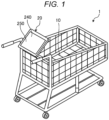
- FIG. 1 is an external perspective view of a shopping cart 1 according to the present embodiment.
- the shopping cart 1 is a cart on which commodities collected by a customer in a store can be placed.
- the shopping cart 1 includes a carrier portion 10 and a commodity registration apparatus 20. A commodity or the like to be purchased by a customer is placed on/in the carrier portion 10.
- a wireless tag is attached to the commodities sold by the store.
- the wireless tag is a tag that transmits stored information by wireless communication.
- the wireless tag is a radio frequency (RF) tag or "RFID" tag.
- the wireless tag stores a commodity code, which is identification information for identifying the commodity to which the wireless tag is attached.
- the wireless tag transmits the commodity code when interrogated or the like.
- the commodity registration apparatus 20 can be an information processing apparatus such as a smart phone or a tablet terminal.
- the commodity registration apparatus 20 receives the commodity code from the wireless tag attached to the commodity placed on the carrier portion 10. Accordingly, the commodity registration apparatus 20 registers the commodity as an item (commodity) to be sold to the customer.
- the commodity registration apparatus 20 also includes a display unit 240 that displays various images.
- the commodity registration apparatus 20 can display a map showing a position where particular commodities are displayed in the store (item display location).
- the commodity registration apparatus 20 may also display a dish (a "suggested dish") which incorporates the particular commodity as an ingredient. Accordingly, the commodity registration apparatus 20 supports shopping of the customer by providing item display locations and suggested dishes.
- the commodity registration apparatus 20 is one example of an information processing apparatus.
- FIG. 2 is a diagram showing an example of the hardware configuration of the commodity registration apparatus 20.
- the commodity registration apparatus 20 includes a control unit 210, a storage unit 220, a communication unit 230, a display unit 240, an operation unit 250, a connection unit 260, and an imaging unit 270. These units are interconnected via a system bus 280 such as a data bus or an address bus.
- the control unit 210 is a computer that controls an overall operation of the commodity registration apparatus 20 to implement the various described functions of the commodity registration apparatus 20.
- the control unit 210 includes a processor, a read only memory (ROM), and a random access memory (RAM).
- the processor is a processing circuit such as a central processing unit (CPU), which controls the commodity registration apparatus 20.
- the ROM is a storage medium that stores various programs and data.
- the RAM is a storage medium that temporarily stores various programs and various data.
- the processor executes a program stored in the ROM, the storage unit 220, or the like using the RAM as a work area.
- the storage unit 220 is a storage device such as a flash memory.
- the storage unit 220 stores a control program 221, a dish master 222, and the like.
- the dish master 222 may be stored in another storage medium.
- the dish master 222 may be stored in a server accessible by the commodity registration apparatus 20.
- the control program 221 may operate in conjunction with an operating system, other programs, or the like to provide the described functions and/or processing of the commodity registration apparatus 20.
- the dish master 222 is an information database or the like in which dish information for a plurality of different dishes is stored.
- each piece of dish information is associated with a dish classification, a dish name, ingredients, quantities, and the like.
- the dish classification identifies which particular class/group a dish belongs.
- the dish classifications include "recommended”, “low calorie”, “low sugar”, and "low fat”.
- the dish name is a common name of a dish.
- the "ingredient” or “ingredients” portion of the dish information identifies those commodities (items) to be used in the making of the dish.
- the "quantity” or “quantities portion” of the dish information provides the amount of each ingredient required to make the dish (of the nominal serving size).
- the communication unit 230 is an interface that communicates with an external apparatus via a network.
- the display unit 240 is a display device that displays various images.
- the display unit 240 is a liquid crystal display.
- the operation unit 250 is an input device that receives various user operations or inputs.
- the operation unit 250 is a touch panel or hardware buttons arranged on the display unit 240.
- the connection unit 260 is an interface for connection with a reading device 30.
- the connection unit 260 communicates with the reading device 30 according to a standard of a universal serial bus (USB) or the like.
- the reading device 30 is a device that reads a wireless tag by a short-range wireless communication protocol.
- the commodity registration apparatus 20 acquires information read from the wireless tag by the reading device 30.
- the imaging unit 270 is a camera including an imaging element such as a complementary metal-oxide semiconductor (CMOS) or a charge coupled device (CCD).
- CMOS complementary metal-oxide semiconductor
- CCD charge coupled device
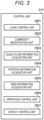
- FIG. 3 is a block diagram showing an example of a functional configuration of the commodity registration apparatus 20.
- the processor provided in the control unit 210 of the commodity registration apparatus 20 loads the control program 221 stored in the storage unit 220 into the RAM, and operates according to the control program 221 to generate each functional unit as depicted in FIG. 3 .
- the control unit 210 of the commodity registration apparatus 20 thus provides the functions of a login control unit 2001, a commodity registration unit 2002, a sales floor information acquisition unit 2003, a position information acquisition unit 2004, a dish information acquisition unit 2005, an operation control unit 2006, and a display control unit 2007.
- the login control unit 2001 controls login operations of a user/operator of the commodity registration apparatus 20. More particularly, the login control unit 2001 acquires customer information for identifying a customer who uses the apparatus.
- the login control unit 2001 is an example of an acquisition unit.
- the customer information includes a customer code, which is identification information for identifying the customer, customer attribute information such as age and sex, and history information.
- history information includes a purchase history, which is a history of commodities purchased by the customer, a selection history of dishes selected by the customer, and the like.
- the commodity registration unit 2002 registers a commodity to be sold to the customer.
- the commodity registration unit 2002 is an example of a registration unit.
- the commodity registration unit 2002 registers a commodity identified by a commodity code read by the reading device 30. That is, the commodity registration unit 2002 registers a commodity having a commodity code received from a wireless tag when the commodity is placed on the carrier portion 10.
- the commodity registration unit 2002 may acquire a commodity code by capturing an image of a code symbol (such as a bar code) with the imaging unit 270. The commodity registration unit 2002 may then register the commodity identified by the acquired commodity code in the customer transaction.
- commodity registration unit 2002 may register a commodity identified by an input operation received by the operation unit 250 (e.g., a typing in of commodity code or a selection of a commodity from a displayed menu of options).
- the sales floor information acquisition unit 2003 acquires information about the sales floor such as a sales floor image 310 (see FIG. 4 ), advertisement information, and display information.
- the sales floor information acquisition unit 2003 acquires sales floor image 310, advertisement information, and display information from a server apparatus.
- the sales floor image 310 depicts an arrangement of display areas on the sales floor (a store layout or store map).
- the sales floor is divided into display areas for each commodity classification, such as a fresh fish area, a meat area, and a fruit and vegetable area.
- each commodity is displayed in the corresponding display area according to the commodity classification to which the commodity belongs.
- the possible display areas are not necessarily limited to the commodity classification groupings, and the display areas may be distinguished or divided according to a commodity shelf number, aisle number, or the like.
- advertisement information is advertising for a commodity sold in the store.
- the advertisement information is an image of a leaflet, print ad, or a flyer for the store.
- advertisement information is associated with display area identification information for identifying a display area in the store.
- the commodity registration apparatus 20 displays the advertisement information associated with particular display area identification information when selected.
- the sales floor information acquisition unit 2003 may acquire the advertisement information according to the customer information acquired by the login control unit 2001. More specifically, the sales floor information acquisition unit 2003 may acquire the advertisement information for a commodity according to a selection made based on attributes of the customer as indicated by the customer information. The sales floor information acquisition unit 2003 may also select or acquire the advertisement information based on the history information. The sales floor information acquisition unit 2003 may acquire or select the advertisement information for a particular commodity based on the purchase history of the customer as indicated by the customer information.
- the display information is indicates a display area where a commodity is displayed. That is, the display information includes commodity information indicating a particular commodity and display area identification information indicating the display area where this commodity is displayed. The display information may further include more detailed position information indicating where within a particular display area the commodity is located.
- the commodity information includes information such as a commodity code, a commodity classification, a commodity item, a quantity, a price, and an appearance image.
- the commodity code is identification information for identifying the commodity.
- the commodity classification is information indicating a classification of the commodity.
- the commodity classification is one of the classifications: "meat", “fruit and vegetable", “fresh fish”.
- the "commodity item” information indicates certain details or aspects related to different versions or the like of the commodity available (or potentially so) at the store.
- the commodity item information can indicate different sizes, brands, manufacturers, or the like.
- the commodity item information indicates each of the different types of curry powder available at the store.
- the quantity information indicates a required amount of the commodity.
- the price information indicating a present price of the commodity at the store.
- the appearance image is a photograph or the like of the commodity.
- the position information acquisition unit 2004 acquires position information indicating a present position of the apparatus in the store. For example, the position information acquisition unit 2004 acquires an IP address of a wireless router or the like in the store, then acquires the position information for the apparatus based on a known/registered position of the router. In other examples, position information acquisition unit 2004 may acquire the position information using a positioning system such as a global navigation satellite system (GNSS). In general, the position information acquisition unit 2004 may acquire the position information by any available method.
- GNSS global navigation satellite system
- the dish information acquisition unit 2005 may acquire dish information from a server apparatus or the like and register the dish information in the dish master 222.
- the dish information acquisition unit 2005 acquires/selects dish information for a dish based on the customer information acquired by the login control unit 2001. More specifically, the dish information acquisition unit 2005 acquires the dish information corresponding to the attributes of the customer indicated by the customer information and/or the purchase history of the customer. The dish information acquisition unit 2005 can acquire or select the dish information according to a preference of the customer that has been estimated based on the purchase history. The dish information acquisition unit 2005 may also or instead acquire the dish information according to the selection history of the dishes as indicated by the customer information. That is, the dish information acquisition unit 2005 attempts to acquire dish information corresponding to the taste preferences of the customer as estimated based on the selection history of the dishes.
- the operation control unit 2006 receives various input operations from the operation unit 250. For example, the operation control unit 2006 receives an operation of selecting a dish from a list of dishes such as a dish list image 500 (see FIG. 6 ) and an additional dish image 800 (see FIG. 9 ).
- the operation control unit 2006 is an example of a selection unit.
- the display control unit 2007 displays various images on the display unit 240.
- the display control unit 2007 displays the sales floor image 310.
- FIG. 4 is a diagram showing an example of a first guide image 300.
- the first guide image 300 is the sales floor image 310 on which an advertisement image 330 is superimposed.
- the display control unit 2007 displays the sales floor image 310 showing an arrangement of display areas.
- the display control unit 2007 displays an icon 320 indicating a present position of the apparatus in the store based on position information acquired by the position information acquisition unit 2004. More specifically, the display control unit 2007 identifies a position on the sales floor image 310 corresponding to the acquired position information. The display control unit 2007 displays the icon 320 to mark the identified position.
- the display control unit 2007 may superimpose the advertisement image 330 on the sales floor image 310. More specifically, when an operation of tapping a display area on the sales floor images 310 is received by the operation control unit 2006, the display control unit 2007 generates the advertisement image 330 showing a commodity name, a price, an appearance, and the like of an advertisement target based on advertisement information associated with the tapped display area. The display control unit 2007 displays the advertisement image 330 near the tapped area, for example.
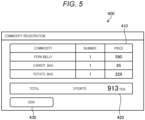
- FIG. 5 is a diagram showing an example of the commodity registration image 400.
- the commodity registration image 400 includes a commodity list image 410, a total amount image 420, and a dish button 430.
- the commodity list image 410 is an image showing a list of commodities registered by the commodity registration unit 2002.
- the total amount image 420 is an image showing a total amount (summed prices) for the commodities registered by the commodity registration unit 2002.
- the dish button 430 is a button for displaying a list of dishes (recipes) each using at least one of the already registered commodities as an ingredient.
- FIG. 6 is a diagram showing an example of the dish list image 500.
- the dish list image 500 provides a list of dishes each using at least one of the commodities registered by the commodity registration unit 2002.
- the dish list image 500 can show dishes for each of several dish classification tags 510.
- a dish classification tag 510 is tab or the like for a particular dish classification.
- the dish classification tags 510 are for classifications of "recommendation", “low calorie”, “low sugar”, and “low fat”.
- the dish list image 500 includes an ingredient button 520 for each of the dishes.
- the ingredient button 520 is a button for displaying a list of commodities to be used as ingredients in the associated dish.
- the dish information acquisition unit 2005 acquires dish information for dishes corresponding to customer information including attribute information and history information, and registers the dish information in the dish master 222. Then, the display control unit 2007 displays the dish list image 500 based on dishes stored in the dish master 222. In general, the display control unit 2007 displays the dish list image 500 set based on the customer information acquired by the login control unit 2001. That is, the display control unit 2007 displays the dish classification tags 510 corresponding to the attribute information of the customer, purchase history of the customer, selection history of dishes of the customer, and the like.
- the display control unit 2007 may update the dish list image 500 showing dishes each using the registered commodity as an ingredient.
- the display control unit 2007 may update the dish list image 500 to show dishes using a plurality of registered commodities. That is, the display control unit 2007 may narrow down dishes in the dish master 222 to only those dishes using multiple registered commodities as ingredients.
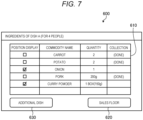
- FIG. 7 is a diagram showing an example of a dish ingredient image 600.
- the dish ingredient image 600 includes an ingredient list image 610, a sales floor button 620, and an additional dish button 630.
- the ingredient list image 610 is a list of commodities to be used as ingredients in the selected dish.
- the ingredient list image 610 indicates position display, a commodity name, a quantity, and collection necessity for each commodity on the ingredient list.
- a position display field includes a check box for setting whether to display, on the sales floor image 310 or the like, a position where the commodity is located.
- the position display field of the ingredient list image 610 as shown in FIG. 7 is set to display positions where "onion" and "curry powder" are located.
- a commodity name field is for displaying a name of the commodity.
- a quantity field is for displaying a quantity of the commodity to be used as an ingredient of the dish.
- a collection necessity field is for displaying whether the commodity is collected. In other words, the collection necessity field is for displaying whether collection of the commodity is still required.
- the sales floor button 620 is a button for receiving a request for displaying of the sales floor image 310. That is, the sales floor button 620 is a button for receiving an operation for displaying the sales floor image 310 showing a position of a commodity for which the check box of the position display field is checked.
- the additional dish button 630 is a button for receiving a request to display other dishes which can be prepared using commodities estimated to still remain after the present dish has been prepared. That is, the additional dish button 630 is a button for receiving an operation for displaying dishes that might be prepared using any remaining commodities after the dish indicated by the dish ingredient image 600 has been prepared.
- the dish ingredient image 600 is not limited to just inclusion of a listing of commodities to be used as ingredients for the dish, but may additionally include recipe details related to the cooking method for the dish or the like.
- the dish ingredient image 600 is not necessarily limited to ingredients sold in the store, and may include other ingredients, such as common items (household staples) expected to be available to the customer at home or the like.
- FIG. 8 is a diagram showing an example of a second guide image 700.
- the second guide image 700 is a diagram showing an example of the sales floor image 310 on which commodity images 340 are superimposed. That is, the display control unit 2007 displays a position where a commodity (ingredient) not yet registered by the commodity registration unit 2002 is displayed.
- the display control unit 2007 is an example of the second display control unit.
- the display control unit 2007 displays the commodity image 340 for a commodity in association with a position where the commodity is located in the sales floor image 310.
- the commodity image 340 can be a picture of the commodity or other representation.
- the display control unit 2007 generates the commodity image 340 based on commodity information including an appearance image. Accordingly, the customer can grasp the position where the particular commodity indicated by the commodity image 340 is located within the store.
- the display control unit 2007 displays the commodity image 340 for any commodity with a checked check box in the position display field of the ingredient list image 610. In other words, the display control unit 2007 does not display the commodity images 340 for any ingredient without a checked check box. Accordingly, the display control unit 2007 prevents the commodity images 340 for items not selected by the customer from being displayed.
- the display control unit 2007 may display the commodity image 340 for each item (option).
- the display control unit 2007 since there are four items of curry powder, the display control unit 2007 display the commodity image 340 with the four items (options). Accordingly, the customer can select a commodity according to personal preference.
- FIG. 9 is a diagram showing an example of the additional dish image 800.
- the additional dish image 800 displays dishes which can be prepared using those registered commodities remaining after the dish indicated by the dish ingredient image 600 is prepared.
- the additional dish image 800 includes an ingredient button 520 for each dish.
- the ingredient button 520 is a button for receiving an operation for displaying ingredients of the corresponding dish. For example, when the ingredient button 520 is pressed, the display control unit 2007 displays a dish ingredient image 600 for the selected dish.
- FIG. 10 is a flowchart of the shopping support processing executed by the commodity registration apparatus 20.
- the login control unit 2001 executes login processing for a customer (ACT 1). In other words, the login control unit 2001 acquires customer information including history information and attribute information based on the login operation of the customer.
- the display control unit 2007 then displays the sales floor image 310 with the icon 320 showing a position of the commodity registration apparatus 20 (ACT 2).
- the display control unit 2007 displays an advertisement image 330 based on advertisement information associated with the tapped display area.
- the commodity registration unit 2002 determines whether commodity registration processing for registering a commodity code has been executed (ACT 3).
- the display control unit 2007 displays the commodity registration image 400 showing a list of commodities registered in the transaction (ACT 4).
- the operation control unit 2006 determines whether the dish button 430 has been pressed (ACT 5). When the dish button 430 has not been pressed (ACT 5; No), the commodity registration apparatus 20 returns to ACT 3.
- the display control unit 2007 displays a dish list image 500 showing a list of dishes, each of which can be prepared using the commodities already registered by the commodity registration unit 2002 as ingredients (ACT 6).
- the operation control unit 2006 next determines whether the ingredient button 520 has been pressed (ACT 7). When the ingredient button 520 has not been pressed (ACT 7; No), the commodity registration apparatus 20 waits.
- the display control unit 2007 displays a dish ingredient image 600 showing commodities to be used as ingredients of the dish (ACT 8).
- the operation control unit 2006 determines whether the additional dish button 630 has been pressed (ACT 9). When the additional dish button 630 has been pressed (ACT 9; Yes), the display control unit 2007 displays an additional dish image 800 showing a list of dishes, each of which can be prepared using remaining commodities (ACT 10). Then, the commodity registration apparatus 20 returns to ACT 7.
- the operation control unit 2006 determines whether an operation the sales floor button 620 has been pressed (ACT 11). If not received (ACT 11; No), the commodity registration apparatus 20 returns to ACT 9.
- the display control unit 2007 identifies the commodity image 340 of any commodity with a checked check box in the position display field of the ingredient list image 610 as a display target (ACT 12). Then, in ACT 2, the display control unit 2007 displays a sales floor image 310 with the added display target commodity images 340 superimposed.
- a commodity registration apparatus 20 registers a commodity to be sold to the customer.
- the commodity registration apparatus 20 displays a list of dishes each using, as an ingredient, at least one of the commodities to be sold to the customer. Then, when a dish is selected, the commodity registration apparatus 20 displays a position where a commodity not yet registered among the ingredients of the dish is located in the store. Accordingly, even if the customer does not create a list of commodities to be purchased (shopping list) before visiting the store, the customer can identify the necessary commodities to be purchased for preparation of various dishes. Further, even if the customer unfamiliar with store layout or item locations on the sales floor, the customer can be provided information indicating the relevant item locations of the commodities to be purchased. Therefore, the commodity registration apparatus 20 can support shopping on the sales floor to improve convenience for the customers.
- the commodity registration apparatus 20 includes the login control unit 2001, the commodity registration unit 2002, the sales floor information acquisition unit 2003, the position information acquisition unit 2004, the dish information acquisition unit 2005, the operation control unit 2006, and the display control unit 2007.
- all or some of the functions of the login control unit 2001, the commodity registration unit 2002, the sales floor information acquisition unit 2003, the position information acquisition unit 2004, the dish information acquisition unit 2005, the operation control unit 2006, and the display control unit 2007 may be provided in an external server apparatus or the like.
- the commodity registration apparatus 20 may, in essence, function as a browser or the like.
- a commodity registration apparatus 20 may transmit customer information and position information to a server apparatus.
- the server apparatus may then generate all or some of the first guide image 300, the commodity registration image 400, the dish list image 500, the dish ingredient image 600, the second guide image 700, and the additional dish image 800, and cause the commodity registration apparatus 20 to display these generated images as appropriate.
- the commodity registration apparatus 20 transmits each input to the server apparatus. In this manner, the commodity registration apparatus 20 may implement the above functions by cooperating with a server apparatus or the like.
- the commodity registration apparatus 20 is mounted on a shopping cart 1.
- the commodity registration apparatus 20 may be an information processing apparatus such as a smart phone or a tablet terminal that is not fixed to the shopping cart 1.
- the commodity registration apparatus 20 may be a smart phone or a tablet terminal owned by the customer and brought to the store.
- the program executed by apparatuses according the described embodiments and modifications may be incorporated in advance in a storage medium (ROM or storage device) of the apparatus itself an provided to a user, but the embodiments are not limited thereto.
- the program may be separately provided by being recorded in a non-transitory, computer-readable recording medium such as a CD-ROM, a flexible disk (FD), a CD-R, or a digital versatile disk (DVD) as a file in an installable format or an executable format.
- the program(s) of an embodiment may be provided separately from the apparatus and downloaded, distributed, or accessed through a LAN, the Internet, or other communication network.
Landscapes
- Engineering & Computer Science (AREA)
- Business, Economics & Management (AREA)
- Accounting & Taxation (AREA)
- Theoretical Computer Science (AREA)
- Finance (AREA)
- Physics & Mathematics (AREA)
- General Physics & Mathematics (AREA)
- General Business, Economics & Management (AREA)
- Strategic Management (AREA)
- Marketing (AREA)
- Economics (AREA)
- Development Economics (AREA)
- General Engineering & Computer Science (AREA)
- Human Computer Interaction (AREA)
- Chemical & Material Sciences (AREA)
- Mechanical Engineering (AREA)
- Transportation (AREA)
- Combustion & Propulsion (AREA)
- Software Systems (AREA)
- Computer Networks & Wireless Communication (AREA)
- Computer Security & Cryptography (AREA)
- Management, Administration, Business Operations System, And Electronic Commerce (AREA)
- Cash Registers Or Receiving Machines (AREA)
Abstract
Description
- This application is based upon and claims the benefit of priority from
Japanese Patent Application No. 2022-193785, filed December 2, 2022 - Embodiments described herein relate generally to an information processing apparatus for shopping support purposes, a shopping cart incorporating such an apparatus, and a method for such an apparatus.
- In the related art, if a customer does not know where a target commodity is displayed on a sales floor of an unfamiliar store, and the customer may refer to a guide diagram or map of the sales floor posted at a predetermined position within the store. When going shopping without first deciding which commodity to purchase, a customer may purchase unnecessary commodities.
- However, often a customer may not be able to check the layout of commodities on the sales floor or create a list of commodities to purchase before arriving for shopping at the store sales floor.
- One of the objects of the present invention is to improve prior art techniques and overcome at least some of the prior art problems as for instance above illustrated.
- According to a first aspect of the invention, it is provided a shopping support apparatus, comprising a display screen and a control unit configured to cause a store map for a store to be displayed on the display screen; acquire a commodity code for a commodity for sale in the store; register the commodity corresponding to the acquired commodity code in a sales transaction list; display the sales transaction list on the display screen along with a button for requesting a recipe for a dish including the commodity; acquire one or more recipes for a dish including the commodity when the button is pressed; display images associated with the acquired one or more recipes on the display screen along with an ingredient list button for each of the one or more recipes; display a list of ingredients for a selected dish when the ingredient list button for the selected dish is selected on the display screen; and cause a location of an unregistered commodity on the list of ingredients for the selected dish to be displayed on the store map.
- Optionally, in the shopping support apparatus according to the first aspect of the invention, the control unit is further configured to acquire one or more recipes for a dish including a plurality of registered commodities if more than one commodity has been registered in the sales transaction list.
- Optionally, in the shopping support apparatus according to the first aspect of the invention, the control unit is further configured to acquire one or more recipes for a dish including any remaining commodities on the sales transaction list after the selected dish has been selected.
- Optionally, in the shopping support apparatus according to the first aspect of the invention, the control unit is further configured to acquire a customer identification via a logon operation, wherein the one or more recipes are acquired based at least in part on customer information associated with the acquired customer identification.
- Optionally, in the shopping support apparatus according to the first aspect of the invention, the display screen is a touch screen panel.
- Optionally, in the shopping support apparatus according to the first aspect of the invention, the images associated with the acquired one or more recipes are arranged via selectable tabs by recipe classification.
- Optionally, the shopping support apparatus according to the first aspect of the invention further comprises a storage device storing a dish database, wherein the one or more recipes are acquired from the dish database.
- Optionally, in the shopping support apparatus according to the first aspect of the invention, the control unit is further configured to acquire position information indicating the present position of the shopping support apparatus in the store; and display an icon indicating the present position of the shopping support apparatus on the store map.
- According to a second aspect of the invention, it is provided a cart for shopping, the cart comprising a carrier portion on which commodities for sale in a store can be placed; and a shopping support apparatus including a display screen; and a control unit configured to cause a store map for the store to be displayed on the display screen; acquire a commodity code for a commodity for sale in the store; register the commodity corresponding to the acquired commodity code in a sales transaction list; display the sales transaction list on the display screen along with a button for requesting a recipe for a dish including the commodity; acquire one or more recipes for a dish including the commodity when the button is pressed; display images associated with the acquired one or more recipes on the display screen along with an ingredient list button for each of the one or more recipes; display a list of ingredients for a selected dish when the ingredient list button for the selected dish is selected on the display screen; and cause a location of an unregistered commodity on the list of ingredients for the selected dish to be displayed on the store map.
- Optionally, in the cart according to the second aspect of the invention, the control unit is further configured to acquire one or more recipes for a dish including a plurality of registered commodities if more than one commodity has been registered in the sales transaction list.
- Optionally, in the cart according to the second aspect of the invention, the control unit is further configured to acquire one or more recipes for a dish including any remaining commodities on the sales transaction list after the selected dish has been selected.
- Optionally, in the cart according to the second aspect of the invention, the control unit is further configured to acquire a customer identification via a logon operation, wherein the one or more recipes are acquired based at least in part on customer information associated with the acquired customer identification.
- Optionally, in the cart according to the second aspect of the invention, the display screen is a touch screen panel.
- Optionally, in the cart according to the second aspect of the invention, the images associated with the acquired one or more recipes are arranged via selectable tabs by recipe classification.
- Optionally, the cart according to the second aspect of the invention further comprises a storage device storing a dish database, wherein the one or more recipes are acquired from the dish database.
- Optionally, in the cart according to the second aspect of the invention, the control unit is further configured to acquire position information indicating the present position of the cart in the store; and display an icon indicating the present position of the cart on the store map.
- According to a third aspect of the invention, it is provided a shopping support method, comprising causing a store map for a store to be displayed on a display screen; acquiring a commodity code for a commodity for sale in the store; registering the commodity corresponding to the acquired commodity code in a sales transaction list; displaying the sales transaction list on the display screen along with a button for requesting a recipe for a dish including the commodity; acquiring one or more recipes for a dish including the commodity when the button is pressed; displaying images associated with the acquired one or more recipes on the display screen along with an ingredient list button for each of the one or more recipes; displaying a list of ingredients for a selected dish when the ingredient list button for the selected dish is selected on the display screen; and causing a location of an unregistered commodity on the list of ingredients for the selected dish to be displayed on the store map.
- Optionally, the method according to the third aspect of the invention further comprises acquiring one or more recipes for a dish including a plurality of registered commodities if more than one commodity has been registered in the sales transaction list.
- Optionally, the method according to the third aspect of the invention further comprises acquiring one or more recipes for a dish including any remaining commodities on the sales transaction list after the selected dish has been selected.
- Optionally, the method according to the third aspect of the invention further comprises acquiring a customer identification via a logon operation, wherein the one or more recipes are acquired based at least in part on customer information associated with the acquired customer identification.
-
-
FIG. 1 is an external perspective view showing an example of a shopping cart according to an embodiment. -
FIG. 2 is a diagram of a commodity registration apparatus. -
FIG. 3 is a block diagram depicting certain functional aspects of a commodity registration apparatus. -
FIG. 4 is a diagram showing an example of a first guide image. -
FIG. 5 is a diagram showing an example of a commodity registration image. -
FIG. 6 is a diagram showing an example of a dish list image. -
FIG. 7 is a diagram showing an example of a dish ingredient image. -
FIG. 8 is a diagram showing an example of a second guide image. -
FIG. 9 is a diagram showing an example of an additional dish image. -
FIG. 10 is a flowchart of shopping support processing executed by a commodity registration apparatus. - In general, an information processing apparatus for providing shopping support services to a customer on a store sales floor, a shopping cart incorporating such an apparatus, and a method for supporting shopping on a store sales floor are provided.
- According to one embodiment, a shopping support apparatus includes a display screen and a control unit. The control unit is configured to cause a store map for a store to be displayed on the display screen. The control unit is configured to acquire a commodity code for a commodity for sale in the store and register the commodity corresponding to the acquired commodity code in a sales transaction list. The control unit is configured to cause the sales transaction list to be displayed on the display screen along with a button for requesting a recipe for a dish including the commodity. The control unit is configured to acquire one or more recipes for a dish including the commodity for when the button is pressed and display images associated with the acquired one or more recipes on the display screen along with an ingredient list button for each of the one or more recipes. The control unit is configured to display a list of ingredients for a selected dish when the ingredient list button for the selected dish is selected on the display screen. The control is also configured to cause a location of an unregistered commodity on the list of ingredients for the selected dish to be displayed on the store map.
- Hereinafter, certain example embodiments of an information processing apparatus, a shopping cart (cart), and a method will be described with reference to the accompanying drawings. The embodiments described below are non-limiting. In an example application of an embodiment, a commodity registration apparatus is mounted on a shopping cart.
-
FIG. 1 is an external perspective view of ashopping cart 1 according to the present embodiment. Theshopping cart 1 is a cart on which commodities collected by a customer in a store can be placed. Theshopping cart 1 includes acarrier portion 10 and acommodity registration apparatus 20. A commodity or the like to be purchased by a customer is placed on/in thecarrier portion 10. - In the present example, a wireless tag is attached to the commodities sold by the store. The wireless tag is a tag that transmits stored information by wireless communication. For example, the wireless tag is a radio frequency (RF) tag or "RFID" tag. The wireless tag stores a commodity code, which is identification information for identifying the commodity to which the wireless tag is attached. The wireless tag transmits the commodity code when interrogated or the like.
- The
commodity registration apparatus 20 can be an information processing apparatus such as a smart phone or a tablet terminal. Thecommodity registration apparatus 20 receives the commodity code from the wireless tag attached to the commodity placed on thecarrier portion 10. Accordingly, thecommodity registration apparatus 20 registers the commodity as an item (commodity) to be sold to the customer. - The
commodity registration apparatus 20 also includes adisplay unit 240 that displays various images. In the present example, thecommodity registration apparatus 20 can display a map showing a position where particular commodities are displayed in the store (item display location). Thecommodity registration apparatus 20 may also display a dish (a "suggested dish") which incorporates the particular commodity as an ingredient. Accordingly, thecommodity registration apparatus 20 supports shopping of the customer by providing item display locations and suggested dishes. Thecommodity registration apparatus 20 is one example of an information processing apparatus. - Next, a hardware configuration of the
commodity registration apparatus 20 will be described. -
FIG. 2 is a diagram showing an example of the hardware configuration of thecommodity registration apparatus 20. Thecommodity registration apparatus 20 includes acontrol unit 210, astorage unit 220, acommunication unit 230, adisplay unit 240, anoperation unit 250, aconnection unit 260, and animaging unit 270. These units are interconnected via asystem bus 280 such as a data bus or an address bus. - The
control unit 210 is a computer that controls an overall operation of thecommodity registration apparatus 20 to implement the various described functions of thecommodity registration apparatus 20. Thecontrol unit 210 includes a processor, a read only memory (ROM), and a random access memory (RAM). The processor is a processing circuit such as a central processing unit (CPU), which controls thecommodity registration apparatus 20. The ROM is a storage medium that stores various programs and data. The RAM is a storage medium that temporarily stores various programs and various data. The processor executes a program stored in the ROM, thestorage unit 220, or the like using the RAM as a work area. - The
storage unit 220 is a storage device such as a flash memory. Thestorage unit 220 stores acontrol program 221, adish master 222, and the like. In other examples, thedish master 222 may be stored in another storage medium. For example, thedish master 222 may be stored in a server accessible by thecommodity registration apparatus 20. - The
control program 221 may operate in conjunction with an operating system, other programs, or the like to provide the described functions and/or processing of thecommodity registration apparatus 20. - The
dish master 222 is an information database or the like in which dish information for a plurality of different dishes is stored. In this context, each piece of dish information is associated with a dish classification, a dish name, ingredients, quantities, and the like. The dish classification identifies which particular class/group a dish belongs. For example, in the present embodiment, the dish classifications include "recommended", "low calorie", "low sugar", and "low fat". The dish name is a common name of a dish. The "ingredient" or "ingredients" portion of the dish information identifies those commodities (items) to be used in the making of the dish. The "quantity" or "quantities portion" of the dish information provides the amount of each ingredient required to make the dish (of the nominal serving size). - The
communication unit 230 is an interface that communicates with an external apparatus via a network. - The
display unit 240 is a display device that displays various images. For example, thedisplay unit 240 is a liquid crystal display. - The
operation unit 250 is an input device that receives various user operations or inputs. For example, theoperation unit 250 is a touch panel or hardware buttons arranged on thedisplay unit 240. - The
connection unit 260 is an interface for connection with areading device 30. For example, theconnection unit 260 communicates with thereading device 30 according to a standard of a universal serial bus (USB) or the like. For example, thereading device 30 is a device that reads a wireless tag by a short-range wireless communication protocol. Via theconnection unit 260, thecommodity registration apparatus 20 acquires information read from the wireless tag by thereading device 30. - The
imaging unit 270 is a camera including an imaging element such as a complementary metal-oxide semiconductor (CMOS) or a charge coupled device (CCD). - Next, certain functions of the
commodity registration apparatus 20 will be described. -
FIG. 3 is a block diagram showing an example of a functional configuration of thecommodity registration apparatus 20. The processor provided in thecontrol unit 210 of thecommodity registration apparatus 20 loads thecontrol program 221 stored in thestorage unit 220 into the RAM, and operates according to thecontrol program 221 to generate each functional unit as depicted inFIG. 3 . Thecontrol unit 210 of thecommodity registration apparatus 20 thus provides the functions of alogin control unit 2001, acommodity registration unit 2002, a sales floorinformation acquisition unit 2003, a positioninformation acquisition unit 2004, a dishinformation acquisition unit 2005, anoperation control unit 2006, and adisplay control unit 2007. - The
login control unit 2001 controls login operations of a user/operator of thecommodity registration apparatus 20. More particularly, thelogin control unit 2001 acquires customer information for identifying a customer who uses the apparatus. Thelogin control unit 2001 is an example of an acquisition unit. For example, the customer information includes a customer code, which is identification information for identifying the customer, customer attribute information such as age and sex, and history information. In this example, history information includes a purchase history, which is a history of commodities purchased by the customer, a selection history of dishes selected by the customer, and the like. - The
commodity registration unit 2002 registers a commodity to be sold to the customer. Thecommodity registration unit 2002 is an example of a registration unit. For example, thecommodity registration unit 2002 registers a commodity identified by a commodity code read by thereading device 30. That is, thecommodity registration unit 2002 registers a commodity having a commodity code received from a wireless tag when the commodity is placed on thecarrier portion 10. In some instances, thecommodity registration unit 2002 may acquire a commodity code by capturing an image of a code symbol (such as a bar code) with theimaging unit 270. Thecommodity registration unit 2002 may then register the commodity identified by the acquired commodity code in the customer transaction. In some other instances,commodity registration unit 2002 may register a commodity identified by an input operation received by the operation unit 250 (e.g., a typing in of commodity code or a selection of a commodity from a displayed menu of options). - The sales floor
information acquisition unit 2003 acquires information about the sales floor such as a sales floor image 310 (seeFIG. 4 ), advertisement information, and display information. For example, the sales floorinformation acquisition unit 2003 acquiressales floor image 310, advertisement information, and display information from a server apparatus. - The
sales floor image 310 depicts an arrangement of display areas on the sales floor (a store layout or store map). For example, the sales floor is divided into display areas for each commodity classification, such as a fresh fish area, a meat area, and a fruit and vegetable area. In general, each commodity is displayed in the corresponding display area according to the commodity classification to which the commodity belongs. The possible display areas are not necessarily limited to the commodity classification groupings, and the display areas may be distinguished or divided according to a commodity shelf number, aisle number, or the like. - In this context, advertisement information is advertising for a commodity sold in the store. For example, the advertisement information is an image of a leaflet, print ad, or a flyer for the store. In this example, advertisement information is associated with display area identification information for identifying a display area in the store. The
commodity registration apparatus 20 displays the advertisement information associated with particular display area identification information when selected. - In some examples, the sales floor
information acquisition unit 2003 may acquire the advertisement information according to the customer information acquired by thelogin control unit 2001. More specifically, the sales floorinformation acquisition unit 2003 may acquire the advertisement information for a commodity according to a selection made based on attributes of the customer as indicated by the customer information. The sales floorinformation acquisition unit 2003 may also select or acquire the advertisement information based on the history information. The sales floorinformation acquisition unit 2003 may acquire or select the advertisement information for a particular commodity based on the purchase history of the customer as indicated by the customer information. - The display information is indicates a display area where a commodity is displayed. That is, the display information includes commodity information indicating a particular commodity and display area identification information indicating the display area where this commodity is displayed. The display information may further include more detailed position information indicating where within a particular display area the commodity is located.
- The commodity information includes information such as a commodity code, a commodity classification, a commodity item, a quantity, a price, and an appearance image. The commodity code is identification information for identifying the commodity. The commodity classification is information indicating a classification of the commodity. For example, the commodity classification is one of the classifications: "meat", "fruit and vegetable", "fresh fish". The "commodity item" information indicates certain details or aspects related to different versions or the like of the commodity available (or potentially so) at the store. For example, the commodity item information can indicate different sizes, brands, manufacturers, or the like. For example, in a particular instance, the commodity item information indicates each of the different types of curry powder available at the store. The quantity information indicates a required amount of the commodity. The price information indicating a present price of the commodity at the store. The appearance image is a photograph or the like of the commodity.
- The position
information acquisition unit 2004 acquires position information indicating a present position of the apparatus in the store. For example, the positioninformation acquisition unit 2004 acquires an IP address of a wireless router or the like in the store, then acquires the position information for the apparatus based on a known/registered position of the router. In other examples, positioninformation acquisition unit 2004 may acquire the position information using a positioning system such as a global navigation satellite system (GNSS). In general, the positioninformation acquisition unit 2004 may acquire the position information by any available method. - The dish
information acquisition unit 2005 may acquire dish information from a server apparatus or the like and register the dish information in thedish master 222. - For example, the dish
information acquisition unit 2005 acquires/selects dish information for a dish based on the customer information acquired by thelogin control unit 2001. More specifically, the dishinformation acquisition unit 2005 acquires the dish information corresponding to the attributes of the customer indicated by the customer information and/or the purchase history of the customer. The dishinformation acquisition unit 2005 can acquire or select the dish information according to a preference of the customer that has been estimated based on the purchase history. The dishinformation acquisition unit 2005 may also or instead acquire the dish information according to the selection history of the dishes as indicated by the customer information. That is, the dishinformation acquisition unit 2005 attempts to acquire dish information corresponding to the taste preferences of the customer as estimated based on the selection history of the dishes. - The
operation control unit 2006 receives various input operations from theoperation unit 250. For example, theoperation control unit 2006 receives an operation of selecting a dish from a list of dishes such as a dish list image 500 (seeFIG. 6 ) and an additional dish image 800 (seeFIG. 9 ). Theoperation control unit 2006 is an example of a selection unit. - The
display control unit 2007 displays various images on thedisplay unit 240. - For example, the
display control unit 2007 displays thesales floor image 310.FIG. 4 is a diagram showing an example of afirst guide image 300. Thefirst guide image 300 is thesales floor image 310 on which anadvertisement image 330 is superimposed. For example, thedisplay control unit 2007 displays thesales floor image 310 showing an arrangement of display areas. - The
display control unit 2007 displays anicon 320 indicating a present position of the apparatus in the store based on position information acquired by the positioninformation acquisition unit 2004. More specifically, thedisplay control unit 2007 identifies a position on thesales floor image 310 corresponding to the acquired position information. Thedisplay control unit 2007 displays theicon 320 to mark the identified position. - The
display control unit 2007 may superimpose theadvertisement image 330 on thesales floor image 310. More specifically, when an operation of tapping a display area on thesales floor images 310 is received by theoperation control unit 2006, thedisplay control unit 2007 generates theadvertisement image 330 showing a commodity name, a price, an appearance, and the like of an advertisement target based on advertisement information associated with the tapped display area. Thedisplay control unit 2007 displays theadvertisement image 330 near the tapped area, for example. - When a commodity is registered in the sales transaction by the
commodity registration unit 2002, thedisplay control unit 2007 displays acommodity registration image 400.FIG. 5 is a diagram showing an example of thecommodity registration image 400. Thecommodity registration image 400 includes acommodity list image 410, atotal amount image 420, and adish button 430. Thecommodity list image 410 is an image showing a list of commodities registered by thecommodity registration unit 2002. Thetotal amount image 420 is an image showing a total amount (summed prices) for the commodities registered by thecommodity registration unit 2002. Thedish button 430 is a button for displaying a list of dishes (recipes) each using at least one of the already registered commodities as an ingredient. - The pressing/selection of the
dish button 430 is received by theoperation control unit 2006, thedisplay control unit 2007 displays the dish list image 500 (seeFIG. 6 ) based on thedish master 222.FIG. 6 is a diagram showing an example of thedish list image 500. Thedish list image 500 provides a list of dishes each using at least one of the commodities registered by thecommodity registration unit 2002. - The
dish list image 500 can show dishes for each of several dish classification tags 510. Adish classification tag 510 is tab or the like for a particular dish classification. For example, thedish classification tags 510 are for classifications of "recommendation", "low calorie", "low sugar", and "low fat". Thedish list image 500 includes aningredient button 520 for each of the dishes. Theingredient button 520 is a button for displaying a list of commodities to be used as ingredients in the associated dish. - In this example, the dish
information acquisition unit 2005 acquires dish information for dishes corresponding to customer information including attribute information and history information, and registers the dish information in thedish master 222. Then, thedisplay control unit 2007 displays thedish list image 500 based on dishes stored in thedish master 222. In general, thedisplay control unit 2007 displays thedish list image 500 set based on the customer information acquired by thelogin control unit 2001. That is, thedisplay control unit 2007 displays thedish classification tags 510 corresponding to the attribute information of the customer, purchase history of the customer, selection history of dishes of the customer, and the like. - When a commodity is registered by the
commodity registration unit 2002, thedisplay control unit 2007 may update thedish list image 500 showing dishes each using the registered commodity as an ingredient. Thedisplay control unit 2007 may update thedish list image 500 to show dishes using a plurality of registered commodities. That is, thedisplay control unit 2007 may narrow down dishes in thedish master 222 to only those dishes using multiple registered commodities as ingredients. - When a pressing of the
ingredient button 520 is received by theoperation control unit 2006, thedisplay control unit 2007 displays adish ingredient image 600. In other words, when a dish is selected by use of aningredient button 520, thedisplay control unit 2007 displays thedish ingredient image 600 corresponding to the selected dish.FIG. 7 is a diagram showing an example of adish ingredient image 600. Thedish ingredient image 600 includes aningredient list image 610, asales floor button 620, and anadditional dish button 630. - The
ingredient list image 610 is a list of commodities to be used as ingredients in the selected dish. Theingredient list image 610 indicates position display, a commodity name, a quantity, and collection necessity for each commodity on the ingredient list. A position display field includes a check box for setting whether to display, on thesales floor image 310 or the like, a position where the commodity is located. The position display field of theingredient list image 610 as shown inFIG. 7 is set to display positions where "onion" and "curry powder" are located. A commodity name field is for displaying a name of the commodity. A quantity field is for displaying a quantity of the commodity to be used as an ingredient of the dish. A collection necessity field is for displaying whether the commodity is collected. In other words, the collection necessity field is for displaying whether collection of the commodity is still required. When the corresponding commodity is registered by thecommodity registration unit 2002, thedisplay control unit 2007 displays that the commodity has been collected in the collection necessity field. - The
sales floor button 620 is a button for receiving a request for displaying of thesales floor image 310. That is, thesales floor button 620 is a button for receiving an operation for displaying thesales floor image 310 showing a position of a commodity for which the check box of the position display field is checked. - The
additional dish button 630 is a button for receiving a request to display other dishes which can be prepared using commodities estimated to still remain after the present dish has been prepared. That is, theadditional dish button 630 is a button for receiving an operation for displaying dishes that might be prepared using any remaining commodities after the dish indicated by thedish ingredient image 600 has been prepared. - The
dish ingredient image 600 is not limited to just inclusion of a listing of commodities to be used as ingredients for the dish, but may additionally include recipe details related to the cooking method for the dish or the like. Thedish ingredient image 600 is not necessarily limited to ingredients sold in the store, and may include other ingredients, such as common items (household staples) expected to be available to the customer at home or the like. -
FIG. 8 is a diagram showing an example of asecond guide image 700. Thesecond guide image 700 is a diagram showing an example of thesales floor image 310 on whichcommodity images 340 are superimposed. That is, thedisplay control unit 2007 displays a position where a commodity (ingredient) not yet registered by thecommodity registration unit 2002 is displayed. Thedisplay control unit 2007 is an example of the second display control unit. - The
display control unit 2007 displays thecommodity image 340 for a commodity in association with a position where the commodity is located in thesales floor image 310. Thecommodity image 340 can be a picture of the commodity or other representation. For example, thedisplay control unit 2007 generates thecommodity image 340 based on commodity information including an appearance image. Accordingly, the customer can grasp the position where the particular commodity indicated by thecommodity image 340 is located within the store. - The
display control unit 2007 displays thecommodity image 340 for any commodity with a checked check box in the position display field of theingredient list image 610. In other words, thedisplay control unit 2007 does not display thecommodity images 340 for any ingredient without a checked check box. Accordingly, thedisplay control unit 2007 prevents thecommodity images 340 for items not selected by the customer from being displayed. - When there are a plurality of items (options) of the corresponding commodity, the
display control unit 2007 may display thecommodity image 340 for each item (option). InFIG. 8 , since there are four items of curry powder, thedisplay control unit 2007 display thecommodity image 340 with the four items (options). Accordingly, the customer can select a commodity according to personal preference. -
FIG. 9 is a diagram showing an example of theadditional dish image 800. Theadditional dish image 800 displays dishes which can be prepared using those registered commodities remaining after the dish indicated by thedish ingredient image 600 is prepared. - The
additional dish image 800 includes aningredient button 520 for each dish. Theingredient button 520 is a button for receiving an operation for displaying ingredients of the corresponding dish. For example, when theingredient button 520 is pressed, thedisplay control unit 2007 displays adish ingredient image 600 for the selected dish. - Next, certain aspects of a shopping support processing method executed by a
commodity registration apparatus 20 according to an embodiment will be described.FIG. 10 is a flowchart of the shopping support processing executed by thecommodity registration apparatus 20. - The
login control unit 2001 executes login processing for a customer (ACT 1). In other words, thelogin control unit 2001 acquires customer information including history information and attribute information based on the login operation of the customer. - The
display control unit 2007 then displays thesales floor image 310 with theicon 320 showing a position of the commodity registration apparatus 20 (ACT 2). When a display area is tapped on thesales floor image 310, thedisplay control unit 2007 displays anadvertisement image 330 based on advertisement information associated with the tapped display area. - The
commodity registration unit 2002 determines whether commodity registration processing for registering a commodity code has been executed (ACT 3). - The
display control unit 2007 displays thecommodity registration image 400 showing a list of commodities registered in the transaction (ACT 4). - The
operation control unit 2006 determines whether thedish button 430 has been pressed (ACT 5). When thedish button 430 has not been pressed (ACT 5; No), thecommodity registration apparatus 20 returns toACT 3. - When the
dish button 430 has been pressed (ACT 5; Yes), thedisplay control unit 2007 displays adish list image 500 showing a list of dishes, each of which can be prepared using the commodities already registered by thecommodity registration unit 2002 as ingredients (ACT 6). - The
operation control unit 2006 next determines whether theingredient button 520 has been pressed (ACT 7). When theingredient button 520 has not been pressed (ACT 7; No), thecommodity registration apparatus 20 waits. - When the
ingredient button 520 has been pressed (ACT 7; Yes), thedisplay control unit 2007 displays adish ingredient image 600 showing commodities to be used as ingredients of the dish (ACT 8). - The
operation control unit 2006 determines whether theadditional dish button 630 has been pressed (ACT 9). When theadditional dish button 630 has been pressed (ACT 9; Yes), thedisplay control unit 2007 displays anadditional dish image 800 showing a list of dishes, each of which can be prepared using remaining commodities (ACT 10). Then, thecommodity registration apparatus 20 returns toACT 7. - When the
additional dish button 630 has not been pressed (ACT 9; No), theoperation control unit 2006 determines whether an operation thesales floor button 620 has been pressed (ACT 11). If not received (ACT 11; No), thecommodity registration apparatus 20 returns toACT 9. - If the
sales floor button 620 has been pressed (ACT 11; Yes), thedisplay control unit 2007 identifies thecommodity image 340 of any commodity with a checked check box in the position display field of theingredient list image 610 as a display target (ACT 12). Then, inACT 2, thedisplay control unit 2007 displays asales floor image 310 with the added displaytarget commodity images 340 superimposed. - As described above, a
commodity registration apparatus 20 according to the present embodiment registers a commodity to be sold to the customer. Thecommodity registration apparatus 20 displays a list of dishes each using, as an ingredient, at least one of the commodities to be sold to the customer. Then, when a dish is selected, thecommodity registration apparatus 20 displays a position where a commodity not yet registered among the ingredients of the dish is located in the store. Accordingly, even if the customer does not create a list of commodities to be purchased (shopping list) before visiting the store, the customer can identify the necessary commodities to be purchased for preparation of various dishes. Further, even if the customer unfamiliar with store layout or item locations on the sales floor, the customer can be provided information indicating the relevant item locations of the commodities to be purchased. Therefore, thecommodity registration apparatus 20 can support shopping on the sales floor to improve convenience for the customers. - In an embodiment, the
commodity registration apparatus 20 includes thelogin control unit 2001, thecommodity registration unit 2002, the sales floorinformation acquisition unit 2003, the positioninformation acquisition unit 2004, the dishinformation acquisition unit 2005, theoperation control unit 2006, and thedisplay control unit 2007. However, in other examples, all or some of the functions of thelogin control unit 2001, thecommodity registration unit 2002, the sales floorinformation acquisition unit 2003, the positioninformation acquisition unit 2004, the dishinformation acquisition unit 2005, theoperation control unit 2006, and thedisplay control unit 2007 may be provided in an external server apparatus or the like. In such instances, thecommodity registration apparatus 20 may, in essence, function as a browser or the like. - A
commodity registration apparatus 20 may transmit customer information and position information to a server apparatus. The server apparatus may then generate all or some of thefirst guide image 300, thecommodity registration image 400, thedish list image 500, thedish ingredient image 600, thesecond guide image 700, and theadditional dish image 800, and cause thecommodity registration apparatus 20 to display these generated images as appropriate. Then, upon receiving various input operations from the customer, thecommodity registration apparatus 20 transmits each input to the server apparatus. In this manner, thecommodity registration apparatus 20 may implement the above functions by cooperating with a server apparatus or the like. - In an embodiment, the
commodity registration apparatus 20 is mounted on ashopping cart 1. However, in other examples, thecommodity registration apparatus 20 may be an information processing apparatus such as a smart phone or a tablet terminal that is not fixed to theshopping cart 1. Furthermore, in some examples, thecommodity registration apparatus 20 may be a smart phone or a tablet terminal owned by the customer and brought to the store. - The program executed by apparatuses according the described embodiments and modifications may be incorporated in advance in a storage medium (ROM or storage device) of the apparatus itself an provided to a user, but the embodiments are not limited thereto. For example, the program may be separately provided by being recorded in a non-transitory, computer-readable recording medium such as a CD-ROM, a flexible disk (FD), a CD-R, or a digital versatile disk (DVD) as a file in an installable format or an executable format. The program(s) of an embodiment may be provided separately from the apparatus and downloaded, distributed, or accessed through a LAN, the Internet, or other communication network.
- While certain embodiments have been described, these embodiments have been presented as examples and are not intended to limit scopes of the embodiments. These novel embodiments can be implemented in various other forms, and various omissions, replacements, and changes can be made without departing from the scope of the disclosure as defined by the appended claims. The accompanying claims and their equivalents are intended to cover such forms or modifications as would fall within the scope of the disclosure.
Claims (14)
- A shopping support apparatus, comprising:a display screen; anda control unit configured to:cause a store map for a store to be displayed on the display screen;acquire a commodity code for a commodity for sale in the store;register the commodity corresponding to the acquired commodity code in a sales transaction list;display the sales transaction list on the display screen along with a button for requesting a recipe for a dish including the commodity;acquire one or more recipes for a dish including the commodity when the button is pressed;display images associated with the acquired one or more recipes on the display screen along with an ingredient list button for each of the one or more recipes;display a list of ingredients for a selected dish when the ingredient list button for the selected dish is selected on the display screen; andcause a location of an unregistered commodity on the list of ingredients for the selected dish to be displayed on the store map.
- The shopping support apparatus according to claim 1, wherein the control unit is further configured to acquire one or more recipes for a dish including a plurality of registered commodities if more than one commodity has been registered in the sales transaction list.
- The shopping support apparatus according to claim 2, wherein the control unit is further configured to acquire one or more recipes for a dish including any remaining commodities on the sales transaction list after the selected dish has been selected.
- The shopping support apparatus according to any of claims 1 to 3, wherein the control unit is further configured to:acquire a customer identification via a logon operation, whereinthe one or more recipes are acquired based at least in part on customer information associated with the acquired customer identification.
- The shopping support apparatus according to any of claims 1 to 4, wherein the display screen is a touch screen panel.
- The shopping support apparatus according to any of claims 1 to 5, wherein the images associated with the acquired one or more recipes are arranged via selectable tabs by recipe classification.
- The shopping support apparatus according to any of claims 1 to 6, further comprising:a storage device storing a dish database, whereinthe one or more recipes are acquired from the dish database.
- The shopping support apparatus according to any of claims 1 to 7, wherein the control unit is further configured to:acquire position information indicating the present position of the shopping support apparatus in the store; anddisplay an icon indicating the present position of the shopping support apparatus on the store map.
- A cart for shopping, the cart comprising:a carrier portion on which commodities for sale in a store can be placed; anda shopping support apparatus according to any of claims 1 to 8.
- The cart according to claim 9, wherein the control unit is further configured to:acquire position information indicating the present position of the cart in the store; anddisplay an icon indicating the present position of the cart on the store map.
- A shopping support method, comprising:causing a store map for a store to be displayed on a display screen;acquiring a commodity code for a commodity for sale in the store;registering the commodity corresponding to the acquired commodity code in a sales transaction list;displaying the sales transaction list on the display screen along with a button for requesting a recipe for a dish including the commodity;acquiring one or more recipes for a dish including the commodity when the button is pressed;displaying images associated with the acquired one or more recipes on the display screen along with an ingredient list button for each of the one or more recipes;displaying a list of ingredients for a selected dish when the ingredient list button for the selected dish is selected on the display screen; andcausing a location of an unregistered commodity on the list of ingredients for the selected dish to be displayed on the store map.
- The method according to claim 11, further comprising:acquiring one or more recipes for a dish including a plurality of registered commodities if more than one commodity has been registered in the sales transaction list.
- The method according to claim 12, further comprising:
acquiring one or more recipes for a dish including any remaining commodities on the sales transaction list after the selected dish has been selected. - The method according to any of claims 11 to 13, further comprising:acquiring a customer identification via a logon operation, whereinthe one or more recipes are acquired based at least in part on customer information associated with the acquired customer identification.
Applications Claiming Priority (1)
| Application Number | Priority Date | Filing Date | Title |
|---|---|---|---|
| JP2022193785A JP2024080519A (en) | 2022-12-02 | 2022-12-02 | Information processing device, cart, and program |
Publications (1)
| Publication Number | Publication Date |
|---|---|
| EP4379638A1 true EP4379638A1 (en) | 2024-06-05 |
Family
ID=87554489
Family Applications (1)
| Application Number | Title | Priority Date | Filing Date |
|---|---|---|---|
| EP23189195.3A Pending EP4379638A1 (en) | 2022-12-02 | 2023-08-02 | Shopping support apparatus, shopping cart, and method for shopping support |
Country Status (4)
| Country | Link |
|---|---|
| US (1) | US12522269B2 (en) |
| EP (1) | EP4379638A1 (en) |
| JP (1) | JP2024080519A (en) |
| CN (1) | CN118134583A (en) |
Citations (2)
| Publication number | Priority date | Publication date | Assignee | Title |
|---|---|---|---|---|
| US20170186068A1 (en) * | 2015-12-28 | 2017-06-29 | AuVitCus Inc. | In-store portable location-aware shopping and merchandising system |
| US20180260885A1 (en) * | 2017-03-09 | 2018-09-13 | Tyler Binafard | System for Shopping Assistance |
Family Cites Families (6)
| Publication number | Priority date | Publication date | Assignee | Title |
|---|---|---|---|---|
| JP2012168836A (en) * | 2011-02-16 | 2012-09-06 | Seiko Epson Corp | Information provision device and information provision system |
| JP2012180065A (en) * | 2011-03-02 | 2012-09-20 | Toshiba Tec Corp | Shopping cart and program |
| JP2013037428A (en) * | 2011-08-04 | 2013-02-21 | Toppan Printing Co Ltd | Article sale support system and article sale support method |
| WO2019111436A1 (en) * | 2017-12-07 | 2019-06-13 | 日本電気株式会社 | Processing device, terminal device, buying assistance system, processing method, and program |
| JP7044646B2 (en) | 2018-06-22 | 2022-03-30 | 東芝テック株式会社 | Information processing equipment and programs |
| JP7426241B2 (en) * | 2020-01-10 | 2024-02-01 | サトーホールディングス株式会社 | Article management system and article management method |
-
2022
- 2022-12-02 JP JP2022193785A patent/JP2024080519A/en active Pending
-
2023
- 2023-06-22 US US18/339,919 patent/US12522269B2/en active Active
- 2023-08-01 CN CN202310958156.XA patent/CN118134583A/en active Pending
- 2023-08-02 EP EP23189195.3A patent/EP4379638A1/en active Pending
Patent Citations (2)
| Publication number | Priority date | Publication date | Assignee | Title |
|---|---|---|---|---|
| US20170186068A1 (en) * | 2015-12-28 | 2017-06-29 | AuVitCus Inc. | In-store portable location-aware shopping and merchandising system |
| US20180260885A1 (en) * | 2017-03-09 | 2018-09-13 | Tyler Binafard | System for Shopping Assistance |
Also Published As
| Publication number | Publication date |
|---|---|
| CN118134583A (en) | 2024-06-04 |
| US12522269B2 (en) | 2026-01-13 |
| US20240182097A1 (en) | 2024-06-06 |
| JP2024080519A (en) | 2024-06-13 |
Similar Documents
| Publication | Publication Date | Title |
|---|---|---|
| US8146799B2 (en) | Product information systems and methods | |
| US8219584B2 (en) | User access to item information | |
| JP6070705B2 (en) | Information processing apparatus, data processing method thereof, and program | |
| AU2018253509A1 (en) | System and method for assisting in locating and choosing a desired item in a storage location | |
| JP2020021419A (en) | Immediate purchase system, user terminal, product information management server, immediate purchase method, and program | |
| US20170186068A1 (en) | In-store portable location-aware shopping and merchandising system | |
| JP6224947B2 (en) | Information system, information processing method, and program | |
| JP2006518070A (en) | Product or service selection system | |
| JP7150944B2 (en) | SALES SUPPORT DEVICE, SALES SUPPORT METHOD AND SALES SUPPORT PROGRAM | |
| JP2020027394A (en) | Merchandise information providing system, merchandise information management server, information terminal, merchandise information providing method, and program | |
| JP2005025684A (en) | Commodity information providing system | |
| JP2015191576A (en) | Information output device, information output method, information output system, terminal, and program | |
| JP6592054B2 (en) | Information processing apparatus, information processing method, information processing program, terminal apparatus, terminal control method, and terminal control program | |
| US12522269B2 (en) | Shopping support apparatus, shopping cart, and method for shopping support | |
| JP6073687B2 (en) | Purchase history presentation system, purchase history presentation method, server device, and program | |
| JP2019192185A (en) | Display control system, and display control device | |
| JP2017204211A (en) | Terminal device, electronic tag, server device, display system, and program | |
| JP6422545B1 (en) | Information processing apparatus, information processing method, and information processing program | |
| EP3486620A2 (en) | Measuring device and information processing program for control of measuring device | |
| JP7447592B2 (en) | Information processing equipment, mobile terminals and programs | |
| JP2013117775A (en) | System, method, device, and program for providing cooking recipe | |
| US20190362404A1 (en) | Server and method for avoiding registered materials | |
| JP2011170797A (en) | Order support system and order support method | |
| US12572972B2 (en) | Store system apparatus | |
| US20240202775A1 (en) | Information processing device and information processing method |
Legal Events
| Date | Code | Title | Description |
|---|---|---|---|
| PUAI | Public reference made under article 153(3) epc to a published international application that has entered the european phase |
Free format text: ORIGINAL CODE: 0009012 |
|
| STAA | Information on the status of an ep patent application or granted ep patent |
Free format text: STATUS: THE APPLICATION HAS BEEN PUBLISHED |
|
| AK | Designated contracting states |
Kind code of ref document: A1 Designated state(s): AL AT BE BG CH CY CZ DE DK EE ES FI FR GB GR HR HU IE IS IT LI LT LU LV MC ME MK MT NL NO PL PT RO RS SE SI SK SM TR |
|
| STAA | Information on the status of an ep patent application or granted ep patent |
Free format text: STATUS: REQUEST FOR EXAMINATION WAS MADE |
|
| 17P | Request for examination filed |
Effective date: 20240710 |
|
| RBV | Designated contracting states (corrected) |
Designated state(s): AL AT BE BG CH CY CZ DE DK EE ES FI FR GB GR HR HU IE IS IT LI LT LU LV MC ME MK MT NL NO PL PT RO RS SE SI SK SM TR |