EP4375600A1 - Intelligenter kühlschrank - Google Patents
Intelligenter kühlschrank Download PDFInfo
- Publication number
- EP4375600A1 EP4375600A1 EP22846036.6A EP22846036A EP4375600A1 EP 4375600 A1 EP4375600 A1 EP 4375600A1 EP 22846036 A EP22846036 A EP 22846036A EP 4375600 A1 EP4375600 A1 EP 4375600A1
- Authority
- EP
- European Patent Office
- Prior art keywords
- refrigerator
- display
- time
- night
- user
- Prior art date
- Legal status (The legal status is an assumption and is not a legal conclusion. Google has not performed a legal analysis and makes no representation as to the accuracy of the status listed.)
- Pending
Links
Images







Classifications
-
- F—MECHANICAL ENGINEERING; LIGHTING; HEATING; WEAPONS; BLASTING
- F25—REFRIGERATION OR COOLING; COMBINED HEATING AND REFRIGERATION SYSTEMS; HEAT PUMP SYSTEMS; MANUFACTURE OR STORAGE OF ICE; LIQUEFACTION SOLIDIFICATION OF GASES
- F25D—REFRIGERATORS; COLD ROOMS; ICE-BOXES; COOLING OR FREEZING APPARATUS NOT OTHERWISE PROVIDED FOR
- F25D29/00—Arrangement or mounting of control or safety devices
- F25D29/005—Mounting of control devices
-
- F—MECHANICAL ENGINEERING; LIGHTING; HEATING; WEAPONS; BLASTING
- F25—REFRIGERATION OR COOLING; COMBINED HEATING AND REFRIGERATION SYSTEMS; HEAT PUMP SYSTEMS; MANUFACTURE OR STORAGE OF ICE; LIQUEFACTION SOLIDIFICATION OF GASES
- F25D—REFRIGERATORS; COLD ROOMS; ICE-BOXES; COOLING OR FREEZING APPARATUS NOT OTHERWISE PROVIDED FOR
- F25D29/00—Arrangement or mounting of control or safety devices
-
- F—MECHANICAL ENGINEERING; LIGHTING; HEATING; WEAPONS; BLASTING
- F25—REFRIGERATION OR COOLING; COMBINED HEATING AND REFRIGERATION SYSTEMS; HEAT PUMP SYSTEMS; MANUFACTURE OR STORAGE OF ICE; LIQUEFACTION SOLIDIFICATION OF GASES
- F25D—REFRIGERATORS; COLD ROOMS; ICE-BOXES; COOLING OR FREEZING APPARATUS NOT OTHERWISE PROVIDED FOR
- F25D27/00—Lighting arrangements
- F25D27/005—Lighting arrangements combined with control means
-
- F—MECHANICAL ENGINEERING; LIGHTING; HEATING; WEAPONS; BLASTING
- F25—REFRIGERATION OR COOLING; COMBINED HEATING AND REFRIGERATION SYSTEMS; HEAT PUMP SYSTEMS; MANUFACTURE OR STORAGE OF ICE; LIQUEFACTION SOLIDIFICATION OF GASES
- F25D—REFRIGERATORS; COLD ROOMS; ICE-BOXES; COOLING OR FREEZING APPARATUS NOT OTHERWISE PROVIDED FOR
- F25D29/00—Arrangement or mounting of control or safety devices
- F25D29/008—Alarm devices
-
- G—PHYSICS
- G06—COMPUTING OR CALCULATING; COUNTING
- G06Q—INFORMATION AND COMMUNICATION TECHNOLOGY [ICT] SPECIALLY ADAPTED FOR ADMINISTRATIVE, COMMERCIAL, FINANCIAL, MANAGERIAL OR SUPERVISORY PURPOSES; SYSTEMS OR METHODS SPECIALLY ADAPTED FOR ADMINISTRATIVE, COMMERCIAL, FINANCIAL, MANAGERIAL OR SUPERVISORY PURPOSES, NOT OTHERWISE PROVIDED FOR
- G06Q10/00—Administration; Management
- G06Q10/20—Administration of product repair or maintenance
-
- G—PHYSICS
- G06—COMPUTING OR CALCULATING; COUNTING
- G06Q—INFORMATION AND COMMUNICATION TECHNOLOGY [ICT] SPECIALLY ADAPTED FOR ADMINISTRATIVE, COMMERCIAL, FINANCIAL, MANAGERIAL OR SUPERVISORY PURPOSES; SYSTEMS OR METHODS SPECIALLY ADAPTED FOR ADMINISTRATIVE, COMMERCIAL, FINANCIAL, MANAGERIAL OR SUPERVISORY PURPOSES, NOT OTHERWISE PROVIDED FOR
- G06Q50/00—Information and communication technology [ICT] specially adapted for implementation of business processes of specific business sectors, e.g. utilities or tourism
- G06Q50/10—Services
-
- H—ELECTRICITY
- H04—ELECTRIC COMMUNICATION TECHNIQUE
- H04L—TRANSMISSION OF DIGITAL INFORMATION, e.g. TELEGRAPHIC COMMUNICATION
- H04L12/00—Data switching networks
- H04L12/28—Data switching networks characterised by path configuration, e.g. LAN [Local Area Networks] or WAN [Wide Area Networks]
- H04L12/2803—Home automation networks
- H04L12/2823—Reporting information sensed by appliance or service execution status of appliance services in a home automation network
-
- H—ELECTRICITY
- H04—ELECTRIC COMMUNICATION TECHNIQUE
- H04L—TRANSMISSION OF DIGITAL INFORMATION, e.g. TELEGRAPHIC COMMUNICATION
- H04L65/00—Network arrangements, protocols or services for supporting real-time applications in data packet communication
- H04L65/10—Architectures or entities
- H04L65/102—Gateways
-
- H—ELECTRICITY
- H04—ELECTRIC COMMUNICATION TECHNIQUE
- H04L—TRANSMISSION OF DIGITAL INFORMATION, e.g. TELEGRAPHIC COMMUNICATION
- H04L67/00—Network arrangements or protocols for supporting network services or applications
- H04L67/50—Network services
- H04L67/52—Network services specially adapted for the location of the user terminal
-
- F—MECHANICAL ENGINEERING; LIGHTING; HEATING; WEAPONS; BLASTING
- F25—REFRIGERATION OR COOLING; COMBINED HEATING AND REFRIGERATION SYSTEMS; HEAT PUMP SYSTEMS; MANUFACTURE OR STORAGE OF ICE; LIQUEFACTION SOLIDIFICATION OF GASES
- F25D—REFRIGERATORS; COLD ROOMS; ICE-BOXES; COOLING OR FREEZING APPARATUS NOT OTHERWISE PROVIDED FOR
- F25D2323/00—General constructional features not provided for in other groups of this subclass
- F25D2323/121—General constructional features not provided for in other groups of this subclass the refrigerator is characterised by a water filter for the water/ice dispenser
-
- F—MECHANICAL ENGINEERING; LIGHTING; HEATING; WEAPONS; BLASTING
- F25—REFRIGERATION OR COOLING; COMBINED HEATING AND REFRIGERATION SYSTEMS; HEAT PUMP SYSTEMS; MANUFACTURE OR STORAGE OF ICE; LIQUEFACTION SOLIDIFICATION OF GASES
- F25D—REFRIGERATORS; COLD ROOMS; ICE-BOXES; COOLING OR FREEZING APPARATUS NOT OTHERWISE PROVIDED FOR
- F25D2400/00—General features of, or devices for refrigerators, cold rooms, ice-boxes, or for cooling or freezing apparatus not covered by any other subclass
- F25D2400/36—Visual displays
- F25D2400/361—Interactive visual displays
-
- F—MECHANICAL ENGINEERING; LIGHTING; HEATING; WEAPONS; BLASTING
- F25—REFRIGERATION OR COOLING; COMBINED HEATING AND REFRIGERATION SYSTEMS; HEAT PUMP SYSTEMS; MANUFACTURE OR STORAGE OF ICE; LIQUEFACTION SOLIDIFICATION OF GASES
- F25D—REFRIGERATORS; COLD ROOMS; ICE-BOXES; COOLING OR FREEZING APPARATUS NOT OTHERWISE PROVIDED FOR
- F25D2500/00—Problems to be solved
- F25D2500/06—Stock management
-
- F—MECHANICAL ENGINEERING; LIGHTING; HEATING; WEAPONS; BLASTING
- F25—REFRIGERATION OR COOLING; COMBINED HEATING AND REFRIGERATION SYSTEMS; HEAT PUMP SYSTEMS; MANUFACTURE OR STORAGE OF ICE; LIQUEFACTION SOLIDIFICATION OF GASES
- F25D—REFRIGERATORS; COLD ROOMS; ICE-BOXES; COOLING OR FREEZING APPARATUS NOT OTHERWISE PROVIDED FOR
- F25D2700/00—Means for sensing or measuring; Sensors therefor
- F25D2700/12—Sensors measuring the inside temperature
-
- F—MECHANICAL ENGINEERING; LIGHTING; HEATING; WEAPONS; BLASTING
- F25—REFRIGERATION OR COOLING; COMBINED HEATING AND REFRIGERATION SYSTEMS; HEAT PUMP SYSTEMS; MANUFACTURE OR STORAGE OF ICE; LIQUEFACTION SOLIDIFICATION OF GASES
- F25D—REFRIGERATORS; COLD ROOMS; ICE-BOXES; COOLING OR FREEZING APPARATUS NOT OTHERWISE PROVIDED FOR
- F25D2700/00—Means for sensing or measuring; Sensors therefor
- F25D2700/12—Sensors measuring the inside temperature
- F25D2700/121—Sensors measuring the inside temperature of particular compartments
-
- H—ELECTRICITY
- H04—ELECTRIC COMMUNICATION TECHNIQUE
- H04L—TRANSMISSION OF DIGITAL INFORMATION, e.g. TELEGRAPHIC COMMUNICATION
- H04L12/00—Data switching networks
- H04L12/28—Data switching networks characterised by path configuration, e.g. LAN [Local Area Networks] or WAN [Wide Area Networks]
- H04L12/2803—Home automation networks
- H04L2012/284—Home automation networks characterised by the type of medium used
- H04L2012/2841—Wireless
-
- H—ELECTRICITY
- H04—ELECTRIC COMMUNICATION TECHNIQUE
- H04L—TRANSMISSION OF DIGITAL INFORMATION, e.g. TELEGRAPHIC COMMUNICATION
- H04L67/00—Network arrangements or protocols for supporting network services or applications
- H04L67/01—Protocols
- H04L67/12—Protocols specially adapted for proprietary or special-purpose networking environments, e.g. medical networks, sensor networks, networks in vehicles or remote metering networks
Definitions
- the present disclosure relates to a smart refrigerator and, more particularly, to a smart refrigerator that has a function of providing information needed by a user through an app by using control data inside the refrigerator.
- a refrigerator is a home appliance that allows food to be stored at low temperatures in an internal storage space shielded by a door.
- a refrigerator is configured to keep stored food in an optimal condition by cooling the inside of the storage space by using cold air generated through heat exchange with a refrigerant circulating in a refrigeration cycle.
- an ice-making function that makes and provides ice and various functions for controlling the ice-making function are being added to such a refrigerator as disclosed in Korean Patent Nos. 10-0358581 and 10-1636230 .
- the present disclosure has been made to solve the problems occurring in the prior art as described above and is intended to propose a smart refrigerator that prevents glare at night by allowing a user to appropriately adjust the brightness of an internal light of the refrigerator at night.
- the present disclosure is intended to propose a smart refrigerator that displays an internal temperature state of the refrigerator, a filter usage state, and an energy usage state in real time on a display window of the refrigerator or on a mobile app (application) of a user through wired/wireless communication.
- the present disclosure is intended to propose a smart refrigerator that has a function that induces a user to take a specific action when the state of the refrigerator is outside a normal state through real-time monitoring of the state of the refrigerator.
- a smart refrigerator of the present disclosure may be provided with a night function that allows a user to set a mode required at night. Accordingly, glare and disruption of nighttime sleep are prevented.
- the refrigerator of the present disclosure may include an app display function that displays state information of the refrigerator on a display window of the refrigerator or on a mobile app (application) of a user through wired/wireless communication. Accordingly, a user may check and adjust the state of the refrigerator even at a position away from the refrigerator.
- the smart refrigerator of the present disclosure may have an inducing function that induces a user to take a specific action when the state of the refrigerator is outside a normal state through the real-time monitoring of the state of the refrigerator. That is, a user may be induced to take a specific action through a push notification.
- the smart refrigerator of the present disclosure may include the night function that allows a user to set a mode required at night, the app display function that display the state information of the refrigerator on the display window of the refrigerator or on a mobile app (application) of a user through wired/wireless communication, and the inducing function that induces a user to take a specific action when the state of the refrigerator is outside a normal state through the real-time monitoring of the state of the refrigerator.
- the night function may include a night anti-glare mode of preventing a user's glare by allowing the user to adjust internal brightness of the refrigerator to be darker at set night time than during the day, and a night silent mode of preventing an ice separation function of an ice maker from operating at set silent time.
- the set night time in the night anti-glare mode may be time from sunset to sunrise.
- the time from sunset to sunrise may be calculated from sunset time and sunrise time for each day preset in a mobile or mobile app of a user.
- the time from sunset to sunrise may be supplied from a sunset time and sunrise time provider through a mobile or mobile app of a user.
- data about the sunset and sunrise time supplied from the provider may be based on an installation location of the refrigerator preset in the app of the user.
- a user may perform a preview function to experience a state of the brightness in advance.
- Internal brightness of the refrigerator in the night anti-glare mode may be set to be at least one brightness among 10%, 30%, 50%, and 70% of normal brightness during the day.
- the set night time in the night silent mode may be set by a user.
- the set silent time in the night silent mode may be set not to exceed a total of 9 hours.
- the app display function may include: a temperature display configured to display a temperature state inside the refrigerator; a filter display configured to display a remaining amount or remaining period of time of a filter used in the refrigerator; and an energy display configured to display an energy consumption state including an amount of electricity used in the refrigerator.
- the app display function may further include: an ice condition display configured to display a state of an ice maker; and a storage state display configured to display a state of food in the refrigerator.
- the temperature display may display a state of a current temperature compared to a target temperature in the refrigerator.
- 'very high', 'high', 'adequate', and 'low' may be used.
- the temperature display of a refrigerating compartment may be divided into four levels of 'very high', 'high', 'adequate', and 'low', and the temperature display of a freezer compartment may be divided into three levels of 'very high', 'high', and 'adequate'.
- the temperature display may display 'temperature stabilizing' when a target temperature has not been reached for up to 72 hours after power is turned on.
- the filter display may include displaying the remaining amount of a sterilization filter and displaying the remaining amount of a water purification filter.
- Displaying of the remaining amount of the sterilization filter may be set to display a period of remaining usable time of the sterilization filter in a percentage (%).
- the displaying of the remaining amount of the water purification filter may be set to display a lower value, in a percentage (%), of a period of remaining usable time of the water purification filter and a remaining water discharge amount.
- the energy display may include displaying power usage, door opening formation, or water/ice usage.
- the door opening information may display the number of door openings or a period of door opening time by day, week, month, or year.
- the water/ice usage display may display water usage or ice usage by day, week, month, or year.
- the ice condition display may display at least one of 'off', 'creating ice', 'full of ice', and 'running a night silent mode'.
- the storage state display may be divided into levels of 'attention', 'caution', 'warning', and 'danger'.
- the storage state display may include displaying whether 'smart fresh storage operation is in progress' and 'fresh storage operation finished' or a schedule of 'fresh storage operation scheduled' by date.
- the temperature display may display a temperature state before defrosting until a target temperature range is reached or four hours have elapsed after the defrosting when a defrost mode is performed.
- the inducing function may guide filter replacement through a push notification when a filter reaches a replacement cycle thereof or remaining usable time/remaining amount of the filter reaches a predetermined level.
- the inducing function may guide door opening checking or food location changing through a push notification when a temperature inside the refrigerator is outside a normal range.
- the inducing function may provide a push notification when water or ice is not used for a predetermined period or more.
- the push notification may be provided when water or ice is not used for 7 days.
- the smart refrigerator of the present disclosure has the following effects.
- the smart refrigerator of the present disclosure has a function of providing information, which a user needs, through an app by using control data inside the refrigerator. Accordingly, the smart refrigerator has an advantage in that a user can check a state of the refrigerator and an internal storage state in real time and take action even at a position spaced apart from the refrigerator.
- brightness inside the refrigerator may be adjusted to be darker at night than during the day. Accordingly, glare can be prevented when a user opens a refrigerator door at night.
- the night anti-glare mode can be set from sunset time to sunrise time, so time at which an anti-glare function is activated is automatically adjusted regardless of regions or seasons.
- a temperature inside the refrigerator is displayed for each storage compartment, and is displayed in a text such as 'high', 'adequate', and 'low' and a color. Accordingly, there is the advantage of improving convenience of use as a user can easily visually recognize the temperature inside the refrigerator.
- the remaining amount of the sterilization filter and the remaining amount of the water purification filter are displayed on an app.
- filter replacement is notified through a push notification. Accordingly, a user can prepare a filter and replace with the filter when a filter replacement cycle approaches or when a push notification is sent.
- the usage check of the water purification filter is determined by considering water usage as well as usage time, so the notification is provided by calculating a more accurate filter replacement cycle.
- power usage, door opening information, or water/ice usage can be displayed in real time, and usage by period is displayed in a graph. Accordingly, a user can check energy usage.
- a push notification is provided to check door opening or change the location of food. Accordingly, when the temperature of the refrigerator is abnormal, a user can check whether a refrigerator door is open or closed, or change the location of food to ensure that cold air is evenly distributed inside the refrigerator.
- a push notification is provided when water or ice is not used for a predetermined period or more. That is, when water or ice has not been used for 7 days, a push notification is provided to allow a user to remove the water or ice, thereby preventing bacterial growth.
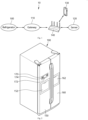
- FIG. 1 is a configuration view illustrating the configuration of the state notification system of the smart refrigerator according to one exemplary embodiment of the present disclosure.
- the state notification system 10 of a refrigerator status may include a refrigerator 100, a gateway 110, a server 120, a terminal 130, and an access point 140, etc.
- 'inside a refrigerator' is sometimes referred to as 'a refrigerator inside'. That is, 'a refrigerator inside' used in the present disclosure is preferably understood to mean ⁇ inside of a refrigerator'.
- the refrigerator 100 may include an event for opening or closing at least one of a freezer compartment door, a freezer compartment pull-out door, a refrigerating compartment door, and a refrigerating compartment pull-out door.
- the event may include various types of events, such as an event for receiving a remaining amount measurement request signal or an event for inducing a user's action.
- the refrigerator 100 may transmit state information of food stored in the refrigerator or an energy usage state such as a temperature, the state of a filter, the number of opening times of door, and water usage to the gateway 110 or the server 120.
- state information may be displayed on the front surface of the refrigerator 100, and may be transmitted to a mobile phone of a user or a specific registered person.
- the gateway 110 may receive, from the refrigerator 100, at least one of the state information of food stored in the refrigerator or the energy usage state such as a temperature, the state of a filter, the number of opening times of door, and water usage.
- the gateway 100 may transmit information such as a received image, weight, quantity, or remaining amount to the server 120.
- the gateway 110 may transmit data to the refrigerator 100 and receive data therefrom by using communication methods such as Bluetooth, ZigBee, and power line communication (PLC).
- communication methods such as Bluetooth, ZigBee, and power line communication (PLC).
- the access point 140 may serve to relay data transmission and reception between the refrigerator 100, the gateway 110, the server 120, and the terminal 130.
- the access point 140 may support Bluetooth, Zigbee, power line communication (PLC), an IEEE802.11 communication method, IEEE802.11n communication method, an IEEE802.11g communication method, an IEEE802.15.4 communication method, a WiFi communication method, and an Ethernet communication method.
- PLC power line communication
- the access point may support data transmission and reception between different types of communication methods.
- the server 120 may receive and store, from the refrigerator 100 or the gateway 110, at least one of the state information of food stored in the refrigerator and an energy usage state such as a temperature, the state of a filter, the number of the opening times of a door, and water usage.
- an energy usage state such as a temperature, the state of a filter, the number of the opening times of a door, and water usage.
- the server 120 may transmit information or data corresponding to the request signal from the terminal 130 to the terminal 130.
- the server 120 may transmit the request signal to the refrigerator 100 in response to the request signal reception. Additionally, the request signal from the terminal 130 may be directly transmitted to the refrigerator 100, or may be transmitted through the gateway 110 to the refrigerator 100.
- the terminal 130 may download and install a refrigerator application and execute this application.
- a user may manipulate the terminal 130 to transmit a refrigerator state information request signal to the server 120 or the refrigerator 110 through the executed refrigerator application.
- the terminal 130 may include various types of mobile terminals, such as mobile phones, smart phones, laptop computers, digital broadcasting terminals, personal digital assistants (PDAs), portable multimedia players (PMPs), and navigation devices.
- mobile terminals such as mobile phones, smart phones, laptop computers, digital broadcasting terminals, personal digital assistants (PDAs), portable multimedia players (PMPs), and navigation devices.
- PDAs personal digital assistants
- PMPs portable multimedia players
- navigation devices such as mobile phones, smart phones, laptop computers, digital broadcasting terminals, personal digital assistants (PDAs), portable multimedia players (PMPs), and navigation devices.
- PDAs personal digital assistants
- PMPs portable multimedia players
- the terminal 130 which is an intelligent display device that adds a computer support function to a broadcast reception function, may be faithful to the broadcast reception function and have additional internet functions, and may be provided with an easy-to-use interface such as a manual input device, touch screen, touch pad, or magic remote control.
- the terminal 130 may be a network TV, HBBTV, smart TV, and open hybrid TV (OHTV), and in some cases, may be applied even to PCs and home appliances.
- user actions are recognized by selection of a physical button of a display device or remote controller, performance of a predetermined gesture or selection of a soft button on a touch screen display surface, performance of a predetermined gesture recognized from an image captured by an imaging device, and performance of predetermined vocalization recognized by voice recognition.
- the gestures may include touch gestures and spatial gestures.
- FIG. 2 illustrates a perspective view of the smart refrigerator according to the exemplary embodiment of the present disclosure.
- the freezer compartment door 150 configured to open and close a freezer compartment inside a refrigerator body
- the refrigerating compartment door 160 configured to open and close the refrigerating compartment may be disposed on the front surface of the refrigerator 100.
- the freezer compartment and the refrigerating compartment are arranged on the left and right, respectively, but the arrangement is not limited to the embodiment of the present disclosure.
- the freezer compartment may be arranged in various configurations, such as being arranged up, down, left, and right with respect to the refrigerating compartment.
- the refrigerator may include one storage compartment.
- the freezer compartment door 150 may have a display 170 arranged thereon. Additionally, in the present disclosure, although the display 170 is disposed on the freezer compartment door 150, the display 170 may be disposed on the refrigerating compartment door 160, or may be disposed on at least one of the left surface, right surface, and rear surface of the refrigerator 100. That is, the display may be variously disposed.
- the display 170 may include a display panel 172 and manipulation buttons 174.
- the display panel 172 may be a touchscreen.
- the display panel 172 may display the state of the refrigerator, various signals, or notifications.
- the manipulation buttons 174 may include buttons for receiving control commands of the refrigerator 100 from a user. A user may take an action requesting the internal state of the refrigerator by pressing one of the manipulation buttons 1740.
- the freezer compartment door 150 and the refrigerating compartment door 160 may include the freezer compartment pull-out door 152 and the refrigerating compartment pull-out door 162, respectively.
- the pull-out doors 152 and 162 are intended to open and close a home bar.
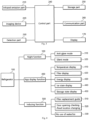
- FIG. 3 is a block diagram illustrating the configuration of the control system of the smart refrigerator according to the exemplary embodiment of the present disclosure.
- the refrigerator 100 may include an infrared emission part 210, an imaging device 220, a detection part 230, a control part 240, a storage part 250, a communication part 260, and the display 170.
- the infrared emission part 210 may emit infrared rays to a dedicated storage space, and the imaging device 220 may be installed to image the dedicated storage space.
- the detection part 230 may include various sensors installed inside and outside the refrigerator, and may detect various internal states of the refrigerator such as an internal temperature of the refrigerator, filter usage, water or ice usage, and door opening/closing.
- the control part 240 may detect various events or signals from the above-described parts and send control commands.
- the events may include an event for opening or closing at least one of the freezer compartment door, the freezer compartment pull-out door, the refrigerating compartment door, and the refrigerating compartment pull-out door, or an event for receiving a refrigerator state measurement request signal.
- control part 240 may detect and control the internal environment of the refrigerator or the state of food, and may control the dedicated storage space to be illuminated with infrared rays or control the imaging device 220 to image the infrared-illuminated dedicated storage space.
- the communication part 260 may transmit data or images of the various internal states of the refrigerator detected by the detection part 230, and values (data) calculated by the control part 240 wiredly or wirelessly.
- the storage part 250 may store data of the internal states of the refrigerator detected by the detection part 230 or values calculated by the control part 240.
- the display 170 may display at least one of the internal states of the refrigerator, that is, the internal temperature state of the refrigerator, the state of a filter, values measured by various sensors, images photographed by the imaging device 250, and values (data) calculated by the control part 240 to be recognized from the outside.
- control part 240 may respond to this request signal and may control data detected by various sensors, images captured by the imaging device 250, or values calculated by the control part 240 to be displayed to the outside.
- FIG. 4 illustrates a block diagram illustrating functions performed in the smart refrigerator according to the exemplary embodiment of the present disclosure.
- the function of the smart refrigerator may include a night function 300 of allowing a user to set a mode required at night, an app display function 400 of displaying the state information of the refrigerator 100 on the display window of the refrigerator 100 or on mobile app (application) of a user through wired/wireless communication, and an inducing function 500 of inducing a user to take a specific action when the state of the refrigerator is outside a normal state through the real-time monitoring of the state of the refrigerator 100.
- the night function 300 may include a night anti-glare mode 310 of preventing a user's glare by allowing the user to adjust the internal brightness of the refrigerator to be darker during set night time than during the day, and a night silent mode 320 of preventing the ice-separation function of the ice maker from operating during set silent time.
- the app display function 400 may include a temperature display 410 configured to display a temperature state inside the refrigerator, a filter display 420 configured to display a remaining amount or remaining period of time of a filter used in the refrigerator, and an energy display 430 configured to display an energy consumption state including an amount of electricity used in the refrigerator 100.
- the app display function 400 may further include an ice condition display 440 configured to display the state of an ice maker, and a storage state display 450 configured to display the state of food in the refrigerator.
- the inducing function 500 may include a function 510 that guides filter replacement through a push notification when the filter reaches its replacement cycle or a remaining period of filter use time/remaining amount reaches a predetermined level.
- the inducing function 500 may further include a function 520 that guides checking if a door is opened or the changing of location of food through a push notification when a temperature inside the refrigerator is outside a normal range.
- the inducing function 500 may include a function 530 that provides a push notification about the non-use of water or ice when there is no use of water or ice for a predetermined period or more.
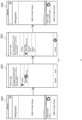
- FIGS. 5 to 16 show configuration diagrams of screens illustrating the functions of the smart refrigerator according to the present disclosure. That is, FIG. 5 is a configuration diagram of a home screen to explain the functions of the smart refrigerator according to the present disclosure, and FIG. 6 is a configuration diagram of a screen illustrating an embodiment of setting a night anti-glare function of the smart refrigerator according to the present disclosure.
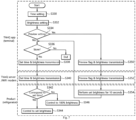
- FIGS. 7 and 8 respectively illustrate flowcharts for the time setting and sunrise/sunset time setting of the night anti-glare function of the smart refrigerator according to the present disclosure.
- FIGS. 9 and 10 respectively illustrate a configuration diagram of a screen setting the night silent function and a flowchart illustrating the execution process of the night silent function in the smart refrigerator according to the present disclosure, FIGS.
- FIGS. 11 and 12 respectively illustrate configuration diagrams of screens illustrating the execution state of temperature information and an example of use of a filter management menu of the smart refrigerator according to the present disclosure
- FIG. 13 illustrates a configuration diagram of a screen illustrating an example of the energy monitoring of the smart refrigerator according to the present disclosure
- FIGS. 14 and 15 respectively illustrate configuration diagrams of screens illustrating an example of a menu configuration of the ice maker of the smart refrigerator according to the present disclosure and an example of the execution state of the night silent mode in the menu configuration
- FIG. 16 is a configuration diagram of a screen illustrating an example of a state display of a smart care of the smart refrigerator according to the present disclosure.
- the home screen 600 of the smart refrigerator may be configured to allow a user to select various menus or set customized functions, and may display the temperatures of the refrigerating compartment and the freezer compartment in real time.
- the home screen 600 of the refrigerator may be provided on the front surface of the door of the refrigerator 100, or on a user's the mobile terminal 130.
- the home screen may be displayed on the front surface of the refrigerator 100 and the terminal 130 at the same time.
- FIG. 6 illustrates a setting for the night anti-glare mode 310.
- a 'night anti-glare' menu in the home screen 600 of the refrigerator is touched or clicked, an operation screen 610 is displayed as illustrated in FIG. 6 , and a 'night anti-glare' function may be set.
- the 'night anti-glare' function may be set by selecting 'Disable', 'From sunset to sunrise' or 'time setting'.
- night time set in the night anti-glare mode 310 may be 'time from sunset to sunrise'.
- the 'time from sunset to sunrise' may be calculated from sunset time and sunrise time for each date preset on a user's mobile device (a mobile terminal, etc.) or mobile app.
- the 'time from sunset to sunrise' may be supplied from a sunset time and sunrise time provider through a user's terminal (mobile) or mobile app. That is, sunset time and sunrise time for a corresponding day provided in real time from a sunset time and sunrise time provider such as Korea Meteorological Administration may be used.
- the sunset time and sunrise time data supplied from the provider may be based on the installation location of the refrigerator preset in a user's app. That is, when registering the app, a user may receive the location information, and a time zone may be checked by using this location information to apply the time information to the product (the refrigerator).
- the night anti-glare function may be set to be performed by matching this time information to the sunset time and sunrise time of a relevant date.
- the night anti-glare mode 310 is intended to prevent glare caused by the internal light of the refrigerator.
- a user may perform a preview function to experience the state of the brightness in advance.
- the internal brightness of the refrigerator in the night anti-glare mode 310 may be set to be at least one brightness of 10%, 30%, 50%, and 70% of normal brightness during the day. That is, a user may set the internal brightness of the refrigerator by selecting one of 10%, 30%, 50%, and 70% in a ⁇ light in the refrigerator' menu on the operation screen 610.
- the temporarily selected brightness may be reflected in the internal light of the refrigerator. That is, at the same time at which a preview screen 612 is displayed, corresponding brightness may be previewed for about 10 seconds.
- FIG. 7 an example of a flowchart time setting in the night anti-glare mode 310 and the internal brightness setting of the refrigerator is illustrated in a flowchart.
- a time setting step S330 is performed to set time at which the anti-glare function is activated.
- the time setting step S330 is a step at which a user can arbitrarily specify the desired activation time of the anti-glare function.
- a brightness setting step S332 which sets brightness inside the refrigerator may be performed.
- the normal brightness (during the day) of the internal brightness of the refrigerator is considered to be 100%, how much brightness to maintain is set to prevent glare, and any one of 10%, 30%, 50%, 70% may be set.
- the brightness setting step S332 is followed by a preview judgment step S334 that determines whether 'preview', which enables the experience of set brightness in advance, has been selected. That is, since a user can choose whether to preview, a process of determining whether the preview has been selected may be performed.
- a storage judgment step S336 for determining whether to save the set brightness may be performed.
- a server transmission step S338 at which time set at the time setting step S330 and brightness set at the brightness setting step are transmitted to the server 120 may be performed. That is, each of the above steps may be mainly performed in a mobile app such as a user's terminal 130, and selections made in the terminal 130 may be transmitted to the server 120 and stored.
- the setting of the anti-glare function may stop.
- a product transmission step S340 is performed to transmit information received through the server transmission step S338 back to the refrigerator 100.
- a time judgment step S342 is performed in the refrigerator 100 to determine whether current time corresponds to time at which the anti-glare function set at the time setting step S330 is activated.
- a brightness control step S344 is performed to control the internal light of the refrigerator to set brightness.
- a basic control step S346 is performed to control the internal light of the refrigerator to preset illuminance, that is, brightness of 100%.
- a preview server transmission step S350 is performed to transmit the 'preview flag and brightness' to the server 120. That is, when 'preview' is selected through a mobile app of a user such as the terminal 130, brightness set by a user, along with a signal indicating that this information is for 'preview', is transmitted to the server 120.
- a preview product transmission step S352 is performed to transmit the received information to an actual operating product, such as the refrigerator 100.
- a preview performance step S354 is performed in the refrigerator 100 to display light of corresponding brightness for about 10 seconds according to the brightness information set by a user.
- this preview time may be changed to 5 seconds, etc.
- FIG. 8 an example of 'setting from sunset to sunrise' in the night anti-glare mode 310 and setting the interior brightness of the refrigerator is illustrated in a flowchart. That is, a flowchart for selecting 'from sunset to sunrise' is illustrated in the operation screen 610 of FIG. 6 , and this is similar to the case of selecting 'time setting' illustrated in FIG. 7 , only different contents will be explained herein.
- an automatic setting step S330' is performed to automatically set time at which the anti-glare function is activated.
- the automatic setting step S330' allows a user to set the activation time of the anti-glare function desired by the user from sunset to sunrise, so that the illuminance of the internal light of the refrigerator is automatically changed in response to the sunset and sunrise times that change by date. It is a process of selection.
- an automatic server transmission step S338' is performed instead of the server transmission step S338. That is, when the 'storage' is selected as a result of the judgment at the storage judgment step S336, the automatic server transmission step S338' is performed to transmit the 'flag from sunset to sunrise and brightness' to the server 120.
- the automatic server transmission step S338' is a step of transmitting a signal indicating that the information is the anti-glare setting time 'from sunset to sunrise' and brightness set by a user to the server 120.
- an automatic product transmission step S340' is performed to secure data according to information received through the automatic server transmission step S338' and transmit the data back to the refrigerator 100.
- the information that the start time of the anti-glare function is sunset time and the end time thereof is sunrise time (of the next day) may be stored, and data on sunset time and sunrise time by date may be supplied from an external agency. That is, an information provision step (S340"), which provides sunset time and sunrise time information for each date of a corresponding region to the server 120, is further performed and may be linked to the automatic product transmission step S340'.
- the site of 'Accuweather' https://www.accuweather.com
- which provides regional sunset and sunrise times by date it is preferable that regional information is entered in advance and the sunset time and sunrise time for each date of a corresponding region provided by external organizations or Internet sites is automatically updated by the regional information.
- the sunset time and sunrise time for each date may be stored in advance in a user's terminal 130, and the automatic product transmission step S340 may be performed by using the sunset time and sunrise time.
- steps here are different from the above-described steps at which a user arbitrarily sets the activation time of the anti-glare function to use 'sunset time and sunrise time', so the steps described with reference to FIG. 7 may be used for steps other than the steps described here.
- FIF. 9 illustrates an example of the setting of the night silent mode 320, and as illustrated in the drawing, when a 'night silent' menu is selected (touched) on the home screen 600 of the refrigerator, a setting screen 620 for the night silent mode 320 may be displayed, and in this setting screen 620, 'disable' or 'time setting' may be selected. In addition, when the time setting is completed, set time of 'night silent' is displayed on the home screen 600.
- the night time set for the night silent mode 320 can be set by a user setting.
- the set silent time of the night silent mode 320 may be set not to exceed a total of 9 hours. This is based on the results of a typical user's statistical analysis that it is difficult to respond to demand for ice if ice separation is not performed for 9 hours or more.
- the night silent mode 320 includes a function of preventing generation of noise by preventing 'ice separation' for separating ice from the ice maker and storing the ice after ice is made in the ice maker.
- the setting time of the night silent mode 320 exceeds 9 hours, it is impossible to respond to a user's demand for ice, so the set silent time of the night silent mode 320 may be prevented from exceeding 9 hours.
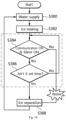
- FIG. 10 is a flowchart illustrating an example of the process of performing the night silent function of the smart refrigerator according to the present disclosure. That is, this is a flowchart showing a process in which an ice separation operation is restricted according to the night silent mode 320 described above.
- a water supply step S380 at which water is supplied to the ice maker of the refrigerator 100, is performed first, an ice making step S382 at which ice is made in the ice maker is performed.
- a silence judgment step S384 is performed to determine whether communication is on and whether the night silent mode 320 is set.
- the silence judgment step S384 may be performed on the basis of only whether the night silent mode 320 is set. That is, even if communication is not turned on, ice separation may be restricted when the night silent mode 320 is set.
- a set time judgment step S386 may be performed to determine whether current time corresponds to the set time of the night silent mode 320.
- an ice separation step S388 at which ice is separated is performed.
- the ice separation step S388 may be performed immediately.
- the ice separation step S388 is not performed, and the process returns to the silence judgment step S384.
- the temperature display 410 of the refrigerator may display a current temperature compared to a target temperature inside the refrigerator as the running state thereof is illustrated in FIG. 11 .
- the temperature display may display temperature information for each compartment within the refrigerating compartment or the freezer compartment. That is, as illustrated in FIG. 11 , when 'temperature information' is touched (selected) on the home screen 600, the temperature information screen 412 may be displayed as shown and may display temperature information for each compartment.
- 'very high', 'high', 'adequate', and 'low' may be used. That is, a current temperature compared to a target temperature may be displayed numerically, but the comparison result may be displayed as 'very high', 'high', 'adequate', and' low'.
- the temperature display of the refrigerating compartment may be divided into four levels of 'very high', 'high', 'adequate', and 'low', and the temperature display of the freezer compartment may be divided into three levels of 'very high', 'high', and 'adequate'.
- the temperature display 410 may display 'temperature stabilizing' when a target temperature has not been reached for up to 72 hours after power is turned on.
- FIG. 12 illustrates an example of the filter display 420. That is, an example of the use of the filter management menu of the smart refrigerator according to the present disclosure is illustrated.
- a menu selection box 604 including 'the energy monitoring', 'smart diagnosis', 'product manual', 'setting', and 'filter management' is displayed, and when 'filter management' is selected (touched) on the menu selection box 604, a filter management screen 422 may be seen.
- management states and usage states of various filters such as a sterilization filter (a sterilization and deodorization filter) and a water purification filter may be displayed, and the amount of use or remaining amount of the filters may be displayed in percentage (%).
- the filter display 420 may include the display of the remaining amount of the sterilization filter (the sterilization and deodorization filter) and the display of the remaining amount of the water purification filter.
- Displaying of the remaining amount of the sterilization filter may be set to display a period of remaining usable time of the sterilization filter in a percentage (%), and displaying of the remaining amount of the water purification filter may be set to display a lower value, in a percentage (%), of a period of remaining usable time of the water purification filter and a remaining water discharge amount.
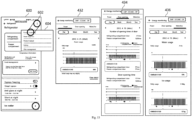
- the energy display 430 may include power usage, door opening information, or water/ice usage display, and FIG. 13 illustrates a configuration diagram of a screen illustrating an example of the energy monitoring.
- the menu selection box 604 including 'the energy monitoring', 'smart diagnosis', 'product manual', 'setting', and 'filter management' is displayed, and when 'the energy monitoring' is selected (touched) in the menu selection box 604, an energy monitoring screen may be seen.
- the energy monitoring screen may be displayed by being divided into a power quantity monitoring screen 432, a door opening monitoring screen 434, and a water/ice monitoring screen 436.
- the door opening information may be configured to display the number of door openings or a period of door opening time by day, week, month, or year, and the water/ice usage display may be configured to display water usage or ice usage by day, week, month, or year.
- the ice condition display 440 may display at least one of 'off', 'creating ice', 'full of ice', and 'running the night silent mode'.
- FIG. 14 is a configuration diagram of a screen illustrating an example of a menu configuration of an ice maker of the smart refrigerator according to the present disclosure.
- an ice making screen 442 such as 'off', 'creating ice', or 'full of ice' may appear with an image.
- the screen of 'the ice maker' may be provided with 'craft ice maker' that makes ice in a sphere shape in addition to 'auto ice maker' that makes ice in a general shape (such as a cube) .
- a night silent mode screen 444 is displayed.
- an image indicating the state of the night silent mode 320 may be displayed, and a phrase of "running a night silent mode" may also be displayed.
- the storage state display 450 may display 'attention', 'caution', 'warning', and 'danger' stages divided from each other, and may include displaying whether 'smart fresh storage operation is in progress' and 'fresh storage operation finished' or a schedule of 'fresh storage operation scheduled' by date.
- FIG. 16 is a screen diagram illustrating an example of a state display of the smart care of the smart refrigerator according to the present disclosure.
- FIG. 16(b) illustrates an example of a safe storage screen 452.
- 'food poisoning index around refrigerator' may appear in color and numerical value, and a warning phrase such as ⁇ Be careful to prevent food poisoning in the case of food at room temperature' may also be displayed.
- At least one of the 'Concern', 'Caution', 'Warning', and 'Danger' stages may be displayed by being divided by color.
- Each of these step-by-step screens 452' are illustrated in FIG. 16(c) .
- a fresh storage screen 454 of FIG. 16(d) may be displayed.
- 'smart fresh storage operation is in progress' and 'fresh storage operation finished' or a schedule of 'fresh storage operation scheduled' may be displayed by date, and 'smart fresh storage operation scheduled time' may be displayed or various storage states and plans such as 'there is no smart fresh storage operation schedule today' may be displayed.
- the temperature display 410 may display a temperature state before defrosting until a target temperature range is reached or four hours have elapsed after the defrosting when the defrost mode of the refrigerator is performed.
- a reason for which the elapsed time after defrosting is 4 hours is based on experimental results.
- the inducing function 500 includes guiding filter replacement through a push notification when a filter reaches its replacement cycle or when a remaining filter usage time/remaining amount reaches a predetermined level. Accordingly, filter replacement notification is provided to a user at time set by the user or at time preset at product launch, so a user can receive the push notification and prepare for filter replacement.
- a filter replacement cycle it is preferable to guide a filter replacement cycle by considering filter usage time and filter usage amount for a remaining filter amount. Even if a filter usability period (for example, 6 months) has not elapsed, a push notification for replacement of the water purification filter may be provided when water usage is high.
- a push notification as the inducing function 500 may guide door opening checking or food location changing when a temperature inside the refrigerator is outside a normal range. That is, when a temperature inside the refrigerator is outside a normal range for a predetermined period of time or does not reach a target temperature for a predetermined period of time, an abnormal condition has occurred in the refrigerator, and thus a push notification may be provided to a user to induce the user to check door opening. For example, a user's action may be induced through a notification such as 'please check if a door is closed.'
- a temperature inside the refrigerator may be outside a normal range, so a user's action may be induced through a notification informing the user to change the location of food, etc.
- messages such as 'please organize the upper part of the refrigerating compartment' may be used to induce a user to change the location of food inside the refrigerator or check the cold air passage.
- the provision of the push notification may be performed even when water or ice has not been used for 7 days. That is, as a result of the experiment, when water or ice is left for about 7 days, the risk of bacterial growth increases, and after about 7 days has elapsed while ice repeats the process of melting and refreezing after the ice is made, the ice is firmly attached to the ice maker device, thereby making ice separation difficult.
- a push notification to allow a user to take out or remove the water or ice.
- a user may be induced to take an action by providing a push notification such as 'Drain water' or 'empty an ice box.
Landscapes
- Engineering & Computer Science (AREA)
- Physics & Mathematics (AREA)
- Business, Economics & Management (AREA)
- General Engineering & Computer Science (AREA)
- Mechanical Engineering (AREA)
- Thermal Sciences (AREA)
- Combustion & Propulsion (AREA)
- Chemical & Material Sciences (AREA)
- Tourism & Hospitality (AREA)
- Signal Processing (AREA)
- Computer Networks & Wireless Communication (AREA)
- Automation & Control Theory (AREA)
- Human Resources & Organizations (AREA)
- Theoretical Computer Science (AREA)
- Strategic Management (AREA)
- Economics (AREA)
- General Business, Economics & Management (AREA)
- General Physics & Mathematics (AREA)
- Marketing (AREA)
- General Health & Medical Sciences (AREA)
- Health & Medical Sciences (AREA)
- Primary Health Care (AREA)
- Operations Research (AREA)
- Entrepreneurship & Innovation (AREA)
- Quality & Reliability (AREA)
- Multimedia (AREA)
- Cold Air Circulating Systems And Constructional Details In Refrigerators (AREA)
Applications Claiming Priority (2)
| Application Number | Priority Date | Filing Date | Title |
|---|---|---|---|
| KR1020210094115A KR20230013410A (ko) | 2021-07-19 | 2021-07-19 | 스마트 냉장고 |
| PCT/KR2022/007943 WO2023003164A1 (ko) | 2021-07-19 | 2022-06-03 | 스마트 냉장고 |
Publications (2)
| Publication Number | Publication Date |
|---|---|
| EP4375600A1 true EP4375600A1 (de) | 2024-05-29 |
| EP4375600A4 EP4375600A4 (de) | 2025-11-12 |
Family
ID=84980245
Family Applications (1)
| Application Number | Title | Priority Date | Filing Date |
|---|---|---|---|
| EP22846036.6A Pending EP4375600A4 (de) | 2021-07-19 | 2022-06-03 | Intelligenter kühlschrank |
Country Status (6)
| Country | Link |
|---|---|
| US (1) | US20240344763A1 (de) |
| EP (1) | EP4375600A4 (de) |
| KR (1) | KR20230013410A (de) |
| CN (1) | CN117751266A (de) |
| AU (1) | AU2022313672B2 (de) |
| WO (1) | WO2023003164A1 (de) |
Families Citing this family (5)
| Publication number | Priority date | Publication date | Assignee | Title |
|---|---|---|---|---|
| CN119585578A (zh) | 2022-07-28 | 2025-03-07 | 真实制造有限公司 | 用于制冷设备的资产管理和物联网装置 |
| US20240195859A1 (en) * | 2022-12-12 | 2024-06-13 | Adapdix Corporation | Addition of devices in a mobile cluster |
| DE102023113306A1 (de) | 2023-03-30 | 2024-10-02 | Liebherr-Hausgeräte Ochsenhausen GmbH | Lagermanagementsystem |
| US20250116452A1 (en) * | 2023-10-04 | 2025-04-10 | Haier Us Appliance Solutions, Inc. | Drawer in door assembly for a refrigerator appliance |
| EP4650697A1 (de) * | 2024-05-17 | 2025-11-19 | Indel B S.p.A. | Kühlschrank und verfahren zur steuerung |
Family Cites Families (23)
| Publication number | Priority date | Publication date | Assignee | Title |
|---|---|---|---|---|
| JPH1130468A (ja) * | 1997-07-08 | 1999-02-02 | Fujitsu General Ltd | 電気冷蔵庫の制御方法およびその装置 |
| KR100358581B1 (ko) | 2000-07-11 | 2002-10-25 | 삼성전자 주식회사 | 자동제빙기 및 그 제어방법 |
| CA2453606C (en) * | 2001-07-16 | 2007-01-09 | Maytag Corporation | Electronic message center for a refrigerator |
| KR200299890Y1 (ko) * | 2002-10-07 | 2003-01-06 | 주식회사 리노텍 | 도어열림 경보기능을 구비한 김치냉장고 |
| JP2007285642A (ja) * | 2006-04-19 | 2007-11-01 | Matsushita Electric Ind Co Ltd | 冷蔵庫 |
| WO2008030023A1 (en) * | 2006-09-04 | 2008-03-13 | Lg Electronics Inc. | Control apparatus for taking out ice of refrigerator and method thereof |
| US8617316B2 (en) * | 2008-09-15 | 2013-12-31 | General Electric Company | Energy management of dishwasher appliance |
| KR101636230B1 (ko) * | 2008-10-30 | 2016-07-07 | 삼성전자주식회사 | 냉장고 및 그 제어방법 |
| KR101517083B1 (ko) * | 2009-05-11 | 2015-05-15 | 엘지전자 주식회사 | 냉장고를 제어하는 휴대 단말기 및 그 동작 방법 |
| KR20120116207A (ko) * | 2011-04-12 | 2012-10-22 | 엘지전자 주식회사 | 디스플레이 장치 및 이를 구비하는 냉장고 |
| DE202011000856U1 (de) * | 2011-04-13 | 2011-08-10 | Flextronics Automotive Gmbh & Co.Kg | Anzeigevorrichtung für die Kühlschranktemperatur |
| JP5431444B2 (ja) * | 2011-12-19 | 2014-03-05 | シャープ株式会社 | 冷蔵庫 |
| CA2882637C (en) * | 2012-08-23 | 2022-04-19 | Trumed Systems, Inc. | Smart storage of temperature sensitive pharmaceuticals |
| JP2014185843A (ja) * | 2013-02-19 | 2014-10-02 | Panasonic Corp | 冷蔵庫 |
| JP6403366B2 (ja) * | 2013-07-08 | 2018-10-10 | 東芝ライフスタイル株式会社 | 冷蔵庫 |
| CN103776236A (zh) * | 2014-02-25 | 2014-05-07 | 合肥美菱股份有限公司 | 一种冰箱食品新鲜度分段提醒系统及其应用 |
| CN103900341B (zh) * | 2014-03-21 | 2016-02-03 | 河南新飞制冷器具有限公司 | 风冷冰箱温度值的显示控制方法 |
| KR20160099939A (ko) * | 2015-02-13 | 2016-08-23 | 주식회사 대유위니아 | 냉장고의 야간모드 제어 시스템 |
| KR101723169B1 (ko) * | 2015-06-18 | 2017-04-05 | 동부대우전자 주식회사 | 주변 조도에 따라 냉장고를 제어하는 장치 및 방법 |
| CN205090720U (zh) * | 2015-11-04 | 2016-03-16 | 郭昊玥 | 一种带有状态监控报警装置的冰箱 |
| KR20170076992A (ko) * | 2015-12-26 | 2017-07-05 | 삼성전자주식회사 | 냉장고 |
| KR101843639B1 (ko) * | 2016-06-09 | 2018-05-14 | 엘지전자 주식회사 | 상황인식에 기반하여 신선도를 관리하는 냉장고, 서버, 포터블 장치 및 신선도를 관리하는 방법 |
| KR102929628B1 (ko) * | 2019-07-23 | 2026-02-23 | 엘지전자 주식회사 | 식물 재배 장치의 제어 방법 |
-
2021
- 2021-07-19 KR KR1020210094115A patent/KR20230013410A/ko active Pending
-
2022
- 2022-06-03 EP EP22846036.6A patent/EP4375600A4/de active Pending
- 2022-06-03 US US18/580,007 patent/US20240344763A1/en active Pending
- 2022-06-03 AU AU2022313672A patent/AU2022313672B2/en active Active
- 2022-06-03 WO PCT/KR2022/007943 patent/WO2023003164A1/ko not_active Ceased
- 2022-06-03 CN CN202280051175.8A patent/CN117751266A/zh active Pending
Also Published As
| Publication number | Publication date |
|---|---|
| US20240344763A1 (en) | 2024-10-17 |
| AU2022313672B2 (en) | 2025-07-10 |
| WO2023003164A1 (ko) | 2023-01-26 |
| AU2022313672A1 (en) | 2024-02-01 |
| KR20230013410A (ko) | 2023-01-26 |
| CN117751266A (zh) | 2024-03-22 |
| EP4375600A4 (de) | 2025-11-12 |
Similar Documents
| Publication | Publication Date | Title |
|---|---|---|
| EP4375600A1 (de) | Intelligenter kühlschrank | |
| US10055117B2 (en) | Refrigerator including a terminal to provide content related to the refrigerator | |
| TWI530648B (zh) | 冰箱、冰箱管理系統以及冰箱控制方法 | |
| JP6080655B2 (ja) | 冷蔵庫 | |
| KR101843639B1 (ko) | 상황인식에 기반하여 신선도를 관리하는 냉장고, 서버, 포터블 장치 및 신선도를 관리하는 방법 | |
| EP2662651A2 (de) | Kühlschrank und fernbedienung | |
| JP6314288B2 (ja) | 炊飯器の起動方法、装置、プログラム及び記録媒体 | |
| US9429925B2 (en) | Method for operating an appliance and a refrigerator appliance | |
| JP5341032B2 (ja) | 車両補助装置の制御方法および制御システム | |
| US20170102723A1 (en) | Hvac thermostat | |
| WO2018042851A1 (ja) | 情報端末装置、稼動情報提供システム、および稼動情報提供プログラム | |
| EP2733432A2 (de) | Vorrichtung zur Steuerung einer Klimaanlage | |
| CN105698479A (zh) | 应用于冰箱的温度异常提示装置及其提示方法 | |
| CN114636274B (zh) | 家电系统 | |
| JP7144515B2 (ja) | 機器状態通知制御装置、機器状態通知システム、機器状態通知方法およびプログラム | |
| US20030000233A1 (en) | Methods and system for cooling device control | |
| JP2021042861A (ja) | 冷蔵庫 | |
| JP2014222127A (ja) | 冷却庫の予冷方法及び冷却庫 | |
| KR20130010980A (ko) | 디스플레이부를 구비하는 냉장고 | |
| JP2017120178A (ja) | 冷蔵庫、冷蔵庫管理システムおよび冷蔵庫制御方法 | |
| KR20180000512A (ko) | 냉장고 및 냉장고의 제어 방법 | |
| US20250334328A1 (en) | Refrigerator appliance and method of operating the same during a vacation mode | |
| KR101725244B1 (ko) | 단말기를 구비하는 냉장고의 제어방법 | |
| US20170219232A1 (en) | Improved command for thermal device | |
| JPH06265259A (ja) | 冷蔵装置の動作情報表示装置 |
Legal Events
| Date | Code | Title | Description |
|---|---|---|---|
| STAA | Information on the status of an ep patent application or granted ep patent |
Free format text: STATUS: THE INTERNATIONAL PUBLICATION HAS BEEN MADE |
|
| PUAI | Public reference made under article 153(3) epc to a published international application that has entered the european phase |
Free format text: ORIGINAL CODE: 0009012 |
|
| STAA | Information on the status of an ep patent application or granted ep patent |
Free format text: STATUS: REQUEST FOR EXAMINATION WAS MADE |
|
| 17P | Request for examination filed |
Effective date: 20240216 |
|
| AK | Designated contracting states |
Kind code of ref document: A1 Designated state(s): AL AT BE BG CH CY CZ DE DK EE ES FI FR GB GR HR HU IE IS IT LI LT LU LV MC MK MT NL NO PL PT RO RS SE SI SK SM TR |
|
| DAV | Request for validation of the european patent (deleted) | ||
| DAX | Request for extension of the european patent (deleted) | ||
| RIC1 | Information provided on ipc code assigned before grant |
Ipc: F25D 29/00 20060101AFI20250620BHEP Ipc: F25D 27/00 20060101ALI20250620BHEP Ipc: H04L 12/28 20060101ALI20250620BHEP Ipc: H04L 67/52 20220101ALI20250620BHEP Ipc: G06Q 50/10 20120101ALI20250620BHEP |
|
| A4 | Supplementary search report drawn up and despatched |
Effective date: 20251013 |
|
| RIC1 | Information provided on ipc code assigned before grant |
Ipc: F25D 29/00 20060101AFI20251007BHEP Ipc: F25D 27/00 20060101ALI20251007BHEP Ipc: H04L 12/28 20060101ALI20251007BHEP Ipc: H04L 67/52 20220101ALI20251007BHEP Ipc: G06Q 50/10 20120101ALI20251007BHEP |