EP4366338A1 - Systeme, verfahren und vorrichtungen zur drahtlosen kommunikation - Google Patents
Systeme, verfahren und vorrichtungen zur drahtlosen kommunikation Download PDFInfo
- Publication number
- EP4366338A1 EP4366338A1 EP22205878.6A EP22205878A EP4366338A1 EP 4366338 A1 EP4366338 A1 EP 4366338A1 EP 22205878 A EP22205878 A EP 22205878A EP 4366338 A1 EP4366338 A1 EP 4366338A1
- Authority
- EP
- European Patent Office
- Prior art keywords
- devices
- subject matter
- user
- action
- connections
- Prior art date
- Legal status (The legal status is an assumption and is not a legal conclusion. Google has not performed a legal analysis and makes no representation as to the accuracy of the status listed.)
- Pending
Links
Images




Classifications
-
- H—ELECTRICITY
- H04—ELECTRIC COMMUNICATION TECHNIQUE
- H04W—WIRELESS COMMUNICATION NETWORKS
- H04W4/00—Services specially adapted for wireless communication networks; Facilities therefor
- H04W4/30—Services specially adapted for particular environments, situations or purposes
-
- H—ELECTRICITY
- H04—ELECTRIC COMMUNICATION TECHNIQUE
- H04N—PICTORIAL COMMUNICATION, e.g. TELEVISION
- H04N21/00—Selective content distribution, e.g. interactive television or video on demand [VOD]
- H04N21/40—Client devices specifically adapted for the reception of or interaction with content, e.g. set-top-box [STB]; Operations thereof
- H04N21/43—Processing of content or additional data, e.g. demultiplexing additional data from a digital video stream; Elementary client operations, e.g. monitoring of home network or synchronising decoder's clock; Client middleware
- H04N21/436—Interfacing a local distribution network, e.g. communicating with another STB or one or more peripheral devices inside the home
- H04N21/4363—Adapting the video stream to a specific local network, e.g. a Bluetooth® network
- H04N21/43637—Adapting the video stream to a specific local network, e.g. a Bluetooth® network involving a wireless protocol, e.g. Bluetooth®, RF or wireless LAN [IEEE 802.11]
-
- H—ELECTRICITY
- H04—ELECTRIC COMMUNICATION TECHNIQUE
- H04N—PICTORIAL COMMUNICATION, e.g. TELEVISION
- H04N21/00—Selective content distribution, e.g. interactive television or video on demand [VOD]
- H04N21/40—Client devices specifically adapted for the reception of or interaction with content, e.g. set-top-box [STB]; Operations thereof
- H04N21/47—End-user applications
- H04N21/478—Supplemental services, e.g. displaying phone caller identification, shopping application
- H04N21/4788—Supplemental services, e.g. displaying phone caller identification, shopping application communicating with other users, e.g. chatting
Definitions
- Various embodiments relate to wireless communication.
- Wireless technologies such as Bluetooth version 5 (v5), and later versions, support multipoint technology in which a single device can be wirelessly connected to multiple other devices, e.g., through multipoint Bluetooth, and interact simultaneously with both.
- One of the most common uses of multipoint Bluetooth is wireless multipoint Bluetooth headsets.
- Multipoint Bluetooth headsets can connect to two devices and output sound from both devices simultaneously, which is sometimes an annoying experience for a user.
- To counter the annoyance of having two simultaneous outputs many manufacturers select one output that appears in the background, and the other takes center stage. But this approach is not user-friendly and requires user intervention to select the right input source to get the right sound output.
- Bluetooth-enabled devices like headphones, headsets, or speakers, when paired to multiple devices like a laptop, mobile phone, etc., require manual intervention to establish a specific connection and to deselect the existing connection in one device.
- At least one and “one or more” may be understood to include a numerical quantity greater than or equal to one (e.g., one, two, three, four,tinct, etc.).
- a plurality may be understood to include a numerical quantity greater than or equal to two (e.g., two, three, four, five,tinct, etc.).
- any phrases explicitly invoking the aforementioned words expressly refers to more than one of the said elements.
- phrases "at least one of' with regard to a group of elements may be used herein to mean at least one element from the group, including the elements.
- the phrase "at least one of' with regard to a group of elements may be used herein to mean a selection of: one of the listed elements, a plurality of one of the listed elements, a plurality of individual listed elements, or a plurality of a multiple of individual listed elements.
- data may be understood to include information in any suitable analog or digital form, e.g., provided as a file, a portion of a file, a set of files, a signal or stream, a portion of a signal or stream, a set of signals or streams, and the like. Further, the term “data” may also be used to mean a reference to information, e.g., in the form of a pointer. However, the term “data” is not limited to the examples mentioned above and may take various forms and represent any information as understood in the art.
- processor or “controller” as, for example, used herein may be understood as any kind of technological entity that allows handling of data.
- the data may be handled according to one or more specific functions executed by the processor or controller.
- a processor or controller as used herein may be understood as any kind of circuit, e.g., any kind of analog or digital circuit, and may also be referred to as a "processing circuit,” “processing circuitry,” among others.
- a processor or a controller may thus be or include an analog circuit, digital circuit, mixed-signal circuit, logic circuit, processor, microprocessor, Central Processing Unit (CPU), Graphics Processing Unit (GPU), Digital Signal Processor (DSP), Field Programmable Gate Array (FPGA), integrated circuit, Application Specific Integrated Circuit (ASIC), etc., or any combination thereof.
- interface may be a device, circuit, circuitry, and/or program enabling communication with another device, circuit, program, etc.”
- any other kind of implementation of the respective functions may also be understood as a processor, controller, or logic circuit. It is understood that any two (or more) of the processors, controllers, or logic circuits detailed herein may be realized as a single entity with equivalent functionality, among others, and conversely that any single processor, controller, or logic circuit described herein may be realized as two (or more) separate entities with equivalent functionality, among others.
- memory is understood as a computer-readable medium in which data or information can be stored for retrieval. References to “memory” included herein may thus be understood as referring to volatile or non-volatile memory, including random access memory (RAM), read-only memory (ROM), flash memory, solid-state storage, magnetic tape, hard disk drive, optical drive, among others, or any combination thereof. Registers, shift registers, processor registers, data buffers, among others, are also embraced herein by the term memory.
- software refers to any type of executable instruction, including firmware.
- the term “transmit” encompasses both direct (point-to-point) and indirect transmission (via one or more intermediary points).
- the term “receive” encompasses both direct and indirect reception.
- the terms “transmit,” “receive,” “send,” “communicate,” and other similar terms encompass both physical transmission (e.g., the transmission of radio signals) and logical transmission (e.g., the transmission of digital data over a logical software-level connection).
- a processor or controller may transmit or receive data over a software-level connection with another processor or controller in the form of radio signals, where the physical transmission and reception is handled by radio-layer components such as RF transceivers and antennas, and the processors or controllers perform the logical transmission and reception over the software-level connection.
- the term "communicate” encompasses one or both of transmitting and receiving, i.e., unidirectional or bidirectional communication in one or both of the incoming and outgoing directions.
- the term “calculate” encompasses both 'direct' calculations via a mathematical expression/formula/relationship and 'indirect' calculations via lookup or hash tables and other array indexing or searching operations.
- a signal that is "indicative of" a value or other information may be a digital or analog signal that encodes or otherwise communicates the value or other information in a manner that can be decoded by and/or cause a responsive action in a component receiving the signal.
- the signal may be stored or buffered in a computer-readable storage medium prior to its receipt by the receiving component.
- the receiving component may retrieve the signal from the storage medium.
- a "value” that is "indicative of" some quantity, state, or parameter may be physically embodied as a digital signal, an analog signal, or stored bits that encode or otherwise communicate the value.
- a signal may be transmitted or conducted through a signal chain in which the signal is processed to change characteristics such as phase, amplitude, frequency, and so on.
- the signal may be referred to as the same even as such characteristics are adapted.
- the signal may be considered the same signal.
- a transmit signal may refer to the transmit signal in baseband, intermediate, and radio frequencies.
- FIG. 1 shows an exemplary diagram illustrating an environment including devices 100a-c that can communicate wirelessly with other devices or networks.
- Each of the devices 100a-d may implement one or more of various types of wireless communications protocols.
- the computing device 100a can wirelessly communicate with at least device 100c.
- device 100b can also wirelessly communicate with device 100c.
- the devices 100a-c may communicate with each other or with other devices through a Bluetooth protocol. In some cases, the devices 100a-c may also communicate with other devices or networks using other protocols, such as, for example, through a Wi-Fi protocol, or a cellular protocol, to name a couple.
- the devices 100a and 100b can be host devices. Further, the devices 100a and 100b are host devices capable of providing and streaming media content to other peripheral devices. For example, the devices 100a and 100b can each be configured to stream content, e.g., media in the form of music, video, etc., at least the device 100c.
- the devices 100a and 100b can each be configured to stream content, e.g., media in the form of music, video, etc., at least the device 100c.
- the device 100c can be a peripheral or accessory device, which in FIG. 1 , can be headphones.
- the accessory device 100c can be configured to obtain or receive streaming content.
- the device 100c may obtain streaming content through wireless technology, e.g., Bluetooth protocol, from one or both devices 100a and 100c.
- the host device 100a can be a laptop capable of or configured to stream media content, while the host device 100b may be a smartphone similarly capable of or configured to stream media content.
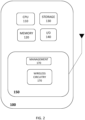
- FIG. 2 shows an exemplary electronic device 100.
- the devices may include at least one processor 110, a memory 120, a storage device 130, and an I/O controller 140.
- the storage device 130 can include, without limitation, an operating system, software, drivers, and/or applications.
- One or more applications may be implemented or executed by the electronic device 100. These applications may include programs that communicate wirelessly to another device or, for example, to a network, e.g., using the network adaptor 150.
- the electronic device 100 includes one or more data buses (not shown) to operably connect the various components of the electronic device 100.
- the at least one processor 110 can interface with the network adaptor and/or the wireless circuitry 150.
- the network adaptor 150 may be a component with circuitry that enables the electronic device 100 to communicate with a network or other devices.
- the electronic device 100 may be any device including at least one processing circuit and configured to communicate wirelessly, e.g., a smartphone, a tablet device, a desktop or personal computer, a mobile phone, a laptop, a netbook computer, a workstation, a server, a mobile medical device, a camera, a wearable device, an Internet-of-Things (IoT) device, etc.
- a smartphone e.g., a smartphone, a tablet device, a desktop or personal computer, a mobile phone, a laptop, a netbook computer, a workstation, a server, a mobile medical device, a camera, a wearable device, an Internet-of-Things (IoT) device, etc.
- IoT Internet-of-Things
- the network adaptor 150 can include electronic components (e.g., hardware and/or software) for realizing communication and can implement a physical layer and a data link layer (e.g., including a Medium Access Control (MAC) layer).
- the network adaptor 150 can include components, e.g., wireless circuitry, to communicate using a plurality of wireless communication protocols.
- the network adaptor 150 can at least include a wireless circuitry or a wireless communication circuit 160 to communicate using one or more wireless communication protocols.
- the network adaptor 150 or network interface card (NIC) is capable of or configured to wirelessly transmit and receive data, e.g., packets of data to connect the device 100 to other devices or computer networks.
- the network adaptor 150 can include electronic components for communication and implement a physical layer and a data link layer (e.g., including a Medium Access Control (MAC) layer). Components, such as a receiver, transmitter, processing circuitry, and other network adaptor components, are omitted for simplification.
- the network adaptor 150 may include a manager circuitry 170 responsible for managing or scheduling communication operations, e.g., transmission or reception by each wireless circuit. For example, the manager circuitry or manager 170 may communicate using the wireless circuitry 160.
- the manager 170 may be a component in the form of hardware and/or software (e.g., processor/controller executing instructions) for interfacing or communicating, at least with the wireless circuitry 160.
- wireless devices for receiving streaming media content may automatically switch between sources or devices streaming or configured to stream media content.
- the device 100c may be configured to receive or obtain streaming media content from device 100a or device 100b.
- the device may receive media content directly through a wireless protocol from the host device 100a or 100b.
- a Bluetooth protocol may be used.
- Bluetooth technology may allow streaming content to be received by the device 100c from the host device 100a and host device 100b.
- the headphones/headset 100c receiving streaming content such as music from both devices 100a and 100b can be undesirable because it would result in simultaneously playing music from two sources.
- the device 100c can be configured to automatically switch between streaming devices (e.g., streaming sources) based on a plurality of factors.
- streaming devices e.g., streaming sources
- an accessory device for receiving streaming content may connect (e.g., pair) with one out of a plurality of host devices (devices configured to stream content) based on determined proximities to the host devices.
- FIG. 3 shows a method 300 according to at least one example of the present disclosure.
- the method 300 can be performed by a wireless user device, e.g., an accessory device configured to communicate wirelessly for connecting to a streaming or host device.
- the method may be performed where the accessory device is not connected and not streaming any content from a host device.
- the method 300 may be performed by one or more accessory device processors coupled to a wireless circuitry interface.
- the wireless circuity for example, may be configured to implement a wireless technology such as Bluetooth.
- the method 300 may be implemented by an application or software executing on a wireless user device.
- One or more processors of the device may execute instructions stored on a non-transitory computer-readable medium of the wireless user device to perform the method 300.
- the method 300 includes detecting a plurality of streaming/host devices at 310, determining a proximity distance to each of the plurality of streaming devices at 320, selecting for connection a device from the plurality of streaming devices to connect based on at least the determined proximity distances at 330, and connecting to the selected device streaming device at 340.
- the detection of streaming/host devices by the accessory devices can be done by pairing, e.g., a Bluetooth pairing process.
- the selected streaming device can be the streaming device determined to be the closest based on the determined proximities or proximity distances. In other instances, additional factors or considerations may be determined and used in addition to the determined proximity distances for selecting a streaming device for connection.
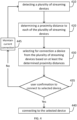
- FIG. 4 shows an exemplary method 400 for a device to select a hosting or streaming device and connect to a selected device when the device is already connected to a streaming device.
- an accessory device can perform the method 400 while connected to a streaming device.
- the accessory device 100c may be connected to and wirelessly receiving streaming content from the device 100a.
- other connectable devices namely devices 100b and 100-d may have become located within the vicinity of device 100c.
- the device 100c while currently connected and streaming content from the device 100a, may perform the method 400.
- the method 400 may also be implemented by an application or software executing on a wireless user device.
- One or more processors of the device may execute instructions stored on a non-transitory computer-readable medium of the wireless user device to perform the method 400.
- the method 400 includes 410, detecting a plurality of streaming/host devices at 410.
- the detected devices may be devices that have become connectable or within a connectable vicinity of the accessory device and may include the device to which the accessory device is currently connected.
- the method 400 includes 420, determining a proximity distance to each detected plurality of streaming devices at 420.
- the method 400 further includes selecting for connection one device from the detected plurality of streaming devices based on at least the determined proximity distances at 430.
- the accessory device the user confirms whether the accessory device is to connect to the selected device. If the user confirms connection to the selected device at 435, then the method 400 proceeds to connecting to the selected device streaming device at 440.
- the method maintains the current connection at 445.
- the user may confirm or not the selection using the accessory device or the selected streaming/hosting device. For example, if the selected hosting device is the tablet 100d, the user confirms the connection by pressing a confirmation message indication appearing on the screen of the tablet 100d. Similarly, the user may select a suitable or appropriate input, e.g., a button, on the accessory device to indicate confirmation or denial of the connection to the selected host device.
- a suitable or appropriate input e.g., a button
- the accessory device implementing the method 400 can switch connections from the previous device it was connected to the selected device. This switch may include disconnecting from the previous connection.
- the accessory device 100b if the accessory device 100b is connected to the device 100a, implements the method 400, and, as a result, decides to connect to device 100c, then the connection to device 100a may be terminated.
- connection methods 300 and 400 it may be useful not to consider all detected devices in performing the connection methods 300 and 400. That is, some devices may be detected, for example, at 320 of FIG. 3 or 420 of FIG. 4 have only been recently active or present. Devices with a transient presence or a relatively short active presence may not be realistically considered as a device for streaming. As such, the methods such as method 300 and method 400 may be modified to exclude from consideration some devices with a short, determined presence to the accessory device.
- methods such as method 300 and the method 400 may include determining a presence duration for each of the plurality of detected streaming devices.
- the determined presence duration can indicate the time or duration the device has been available for connection, e.g., to the accessory device.
- the selection of a device from the detected plurality of streaming devices can be limited to a subset of devices with a presence duration greater than a threshold amount.
- the subset may be all or a smaller portion of the detected plurality of streaming devices.
- the threshold may be predefined and have a very short duration, such as 10 seconds or less, 5 seconds or less, or 2 seconds or less.
- the selection of a device for connection may be based on the determined proximity distances.
- the proximity distances may be determined using signal power. More specifically, the proximity distances for each detected device may be determined by performing a distance measurement using a received signal strength indicator (RSSI) value for each of the detected devices.
- RSSI value may be determined using a transmit power independent scaling method for each detected plurality of devices.
- Different electronic devices may belong to different power classes (for Bluetooth, there are three defined power classes, e.g., class 1, 2, 3) and may have different maximum transmit power capabilities. Hence, a transmit power-independent method will be more accurate for distance computation from such devices.
- the method of determining proximity distances may be implemented using Bluetooth technology.
- a receiver or accessory device e.g., a headset
- the transmitter (hosting) device can be, for example, a mobile phone, a tablet, laptop, desktop, etc.
- the receiver/accessory device e.g., headphones, headset, speaker, etc.
- the K value can be empirically derived and stored in the receiver/accessory device for that particular transmitter device, which can be considered as paired device Mobile phone-1. This K value can be stored against the devices' MAC-ID (each device has its unique MAC (medium access control) ID.
- the K value is available in the signal from the accessory device. For example, during pairing, each device transmits its MAC ID. In other words, a first pairing or calibration may need to be performed before performing the transmit power independent scaling method, e.g., by an accessory device.
- Table 1 Showing Exemplary K values for device pairings Paired Device K value Mobile phone-1 0.6 Tablet 0.9
- the obtained K value is stored and later used for computation of scaled received power value from the transmitters device using the above equation because now K is known, Pr is known, and therefore distance R can be computed or determined dynamically.
- the proximity distances can be determined with other devices.
- R may be expressed in terms of absolute distance unit or absolute value.
- a distance is between one host to multiple devices or one accessory to multiple hosts.
- Bluetooth technology supports transmit powers from -20 dBm (0.01 mW) to +20 dBm (100 mW).
- the K values for BT class-1, class-2, and class-3 devices can be precomputed empirically during the initial device setup time. Later, during the pairing time, once the device class is known, then the appropriate K value will be applied and remembered/stored against its MAC ID. The devices are uniquely identified by their unique MAC ID. So, later, once the MAC ID is detected, the respective K value will be applied as stored.
- a proximity sensor may be used, and the proximity sensor may receive signals from devices that can be used to determine the proximities.
- an ultra-wideband (UWB) technology can be implemented with the accessory and streaming devices.
- a UWB sensor of the accessory device can be used to determine the proximity to different connected devices. That is, a UWB ranging method can be implemented with a device that transmits and receives UWB pulses and measures the time of flight, e.g., propagation delay, and based on that, it measures the range or the distance between the two devices.
- an accessory device may rely on determined proximities or proximity distances to connect to streaming devices.
- the accessory device may also rely on user settings or preferences for selecting and connecting to a streaming device.
- the accessory device may rely on a connection or user profile which can be used in conjunction with the determined proximities to select and connect to a streaming device.
- the connection profile can include information indicating the priority of devices to connect to. This priority may be reflective of user preferences for connection. Accordingly, some devices may be ranked higher for connection than other devices.
- the connection profile may be loaded based on user input-based selection.
- connection profile may indicate which of the two devices to select. In other instances, the connection profile may also indicate priority in terms of other factors, such as the streaming content of the streaming devices (e.g., audio, video, etc.).
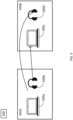
- FIG. 5 shows an exemplary diagram 500 illustrating an environment including devices 500a-d capable of communicating wirelessly with other devices or networks.
- Each of the devices 500a-d may have components similar to the device 100a-d and have components or configurations the same as or similar to the wireless device 100 described in FIG. 2 .
- the devices 500a-d may wireless communicate using one or more communication protocols or technologies, such as Bluetooth.
- the devices 500a-d may be arranged as shown.
- the laptops 500a and 500c can be considered hosting devices, that is, devices that can stream or provide content to other devices, such as headsets, speakers, etc.
- the devices 500b and 500d can be considered accessory devices, configured to obtain and use (e.g., consume) content from a hosting device.
- the device 500a (laptop) and device 500b (headset) may be arranged together in one room or section 505A while the device 500c (laptop) and device 500d (headset) are arranged in section or room 505B.
- the device 500b may be located or arranged closer to the hosting device 500a than to the hosting device 500c.
- the device 500d is arranged closer to the hosting device 500c than the hosting device 500a.
- the devices 500b and 500d may not establish desired connections. For example, suppose the accessory device 500b attempts to establish a connection to a hosting device, and in that case, the accessory device 500b may undesirably establish a connection to the hosting device/laptop 500c despite its closeness to device 500a. This connection may occur if the device 500b was previously paired and connected to the hosting device 500c. Similarly, the accessory device 500d may automatically connect to hosting device 500a despite its proximity to device 500c because of a previously established connection to device 500a.
- the devices described herein can be configured to establish connections automatically.
- the accessory devices 500b and 500b may automatically connect to hosting devices and vice versa.
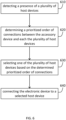
- FIG. 6 shows an exemplary method 600, which can be performed by a wireless device, e.g., an accessory device or user device configured to communicate wirelessly for connecting to a streaming or host device.
- the method may be performed where the accessory device has not connected and is not yet receiving streaming content from a host device.
- the method 600 may be performed by one or more accessory device processors coupled to a wireless circuitry interface.
- the wireless circuity for example, may be configured to implement a wireless technology such as Bluetooth.
- the accessory device may be represented by the device 100 of FIG. 2 or variations thereof.
- the method 600 may also be implemented by an application or software executing on a wireless user device.
- One or more processors of the device may execute instructions stored on a non-transitory computer-readable medium of the wireless user device to perform the method 600.
- the method 600 includes, at 610, detecting a presence of a plurality of host devices.
- the detection may include detecting devices configured to stream media or content and are available for establishing a connection to the electronic or accessory device.
- the method includes determining a prioritized order of connections between the accessory device and each of the plurality of host devices.
- the method includes at 630 selecting one of the plurality of host devices based on the determined prioritized order of connections, at 640, connecting the electronic device to a selected host device.
- the method 600 may include selecting the highest priority or highest ranked connection of the determined prioritized order of connections.
- the method 600 may be implemented when the accessory device is turned on or exits a standby mode and is prompted to initiate a pairing process.
- connecting the electronic/accessory device to the selected one of the plurality of host devices based on the determined prioritized order of connections is selecting the host device with the highest priority connection.
- the accessory device connects to the device associated with the determined highest priority connection.
- the prioritized order of connections to the plurality of host devices can be determined by determining proximity distances between the accessory/electronic device and the plurality of host devices. Further, in determining or generating and prioritizing the order of connections, a higher priority may be given to connections with host devices having shorter determined proximity distances to the accessory device, and a lower priority may be given to connections with host devices with greater proximity distances to the host device. In other words, the proximity distance can be at least one factor or consideration in determining the prioritized order of connections. In one instance, it can be the sole consideration.
- Any suitable method described herein can be implemented to determine the distances between the accessory device and the host devices.
- the accessory device may implement and use Bluetooth technology, specifically Bluetooth Low Energy (BLE), to connect to a host device. Further, the accessory device may determine proximity distances using wireless beacons, such as BLE beacons.
- the beacon support or BLE beacon support hardware or technology may be integrated into the accessory device and the host devices. In such a case, the proximity distance can be based on various parameters, including RSSI, advertising interval, measured power, and environmental factors.
- a Bluetooth beacon can be realized from a small wireless device or hardware transmitter that works based on Bluetooth Low Energy. It repeatedly transmits a constant signal that other devices can detect.
- a Bluetooth beacon can be configured to broadcast a radio signal, including a combination of letters and numbers transmitted at short, regular intervals.
- a Bluetooth-equipped device like a smartphone, gateway, or access point can "see” a beacon once it is in range.
- RSSI Received Signal Strength Indicator
- a beacon's or BLE beacon's broadcasting interval may range from a few hundred milliseconds to a few seconds. In general, the smaller the interval, the better the accuracy of distance detection due to stable signals.
- Measured Power can be a factory-calibrated, read-only constant that indicates what's the expected RSSI at 1 meter to the beacon.
- RSSI and measured power can be expressed in dBm or Watts.
- determined or calculated proximity distances can be the sole factor in prioritizing connections. In other cases, other factors or considerations can be used to determine the prioritized order of connections.
- determining the prioritized order of connections between the accessory device and each of the plurality of host devices at 620 may further include determining user engagement for each of the host devices. In such a case for determining the prioritized order of connections, a higher priority may be given or weighted to connections with host devices having greater user engagement. A lower priority may be given or weighted to connections with host devices having lower user engagement or user activity.
- determining the prioritized order of connections between the accessory device and each of the plurality of host devices at 620 may be based on a determined user intent or obtained user intent indication for each of the plurality of devices. In one case, this may include determining whether a user is attached, e.g., wearing or holding a host device. In such a case, this determination can indicate a user's intent and priority, or a higher priority in the prioritized order of connections is given or weighted to devices that are attached to a user.
- determining the prioritized order of connections between the accessory device and each of the plurality of host devices at 620 may be based on the device type for each detected host device. Accordingly, determining the prioritized order of connections can include determining a device type for each detected host device, and the connections can be prioritized based on the determined device types. Said differently, connections to host devices of certain types may be given higher priority. For example, connections to laptops may be given higher priority than those to tablet or smartphone devices.
- the accessory device may disconnect or deprioritize existing connections to the extent they exist.
- the method 600 described in FIG. 6 may be repeated, e.g., for one or more iterations. However, to avoid unintentional switching of connections, the method 600 may include determining that the selected host device is currently idle after establishing the selected connection to the selected host device. That is, if the host device is idle, e.g., no longer streaming content to the accessory device, the method may proceed to performing: detecting a presence of a second plurality of host devices are configured to stream media and are each available for establishing a connection; determining a second prioritized order of connections to the second plurality of host devices; selecting a second host device from the second plurality of host devices based on the second prioritized order of connections; and connecting the electronic device to the second selected host device.
- the pairing or connection between the accessory device and host device should be maintained or honored despite other connections possibly having higher prioritized connections in the manner previously determined, e.g., other devices are now closer because of movement by the accessory device away from the host.
- the connections should be maintained, such as video or audio calls with the paired or connected accessory device and the host device.
- FIG. 7 shows an exemplary method 700, which can be performed by a host device, e.g., a wireless device configured to provide and transmit and stream content to an accessory device.
- the method 700 may be performed where the host device has not connected to an accessory device and has not yet begun streaming content.
- the method 700 may be performed by one or more processors of the host device coupled to an interface of a wireless circuitry of the host device.
- the wireless circuity for example, may be configured to implement a wireless technology such as Bluetooth.
- the host device may be represented as the device 100 of FIG. 2 or variations thereof.
- the method 700 may also be implemented by an application or software executing on a device configured to communicate wirelessly.
- One or more processors of the device may execute instructions stored on a non-transitory computer-readable medium of the wireless user device to perform the method 700.
- the method 700 may include, at 710, detecting a presence of a plurality of accessory devices, wherein the plurality of (user) devices each are available for establishing a connection to the host device.
- the method 700 includes determining a prioritized order of connections between the host device and the plurality of (user) devices.
- the method 700 includes selecting one of the plurality of (user) devices based on the determined prioritized order of connections; and includes, at 740, connecting the host device to the selected device.
- determining the prioritized order of connections to the plurality of accessory devices in the method 700 can include determining proximity distances between the host device and the plurality of accessory devices. Again, in determining or generating the prioritized order of connections, a higher priority may be given (or weighted) to connections with accessory devices having shorter determined proximity distances to the host device. A lower priority may be given (or weighted) to connections with accessory devices with greater or longer proximity distances to the host device. As before, the proximity distance can be at least one factor or consideration in determining the prioritized order of connections. In some cases, it may be the sole consideration or sole factor. Any suitable method described herein can be implemented to determine the distances between the accessory device and the host devices.
- the host device and accessory device can implement and use Bluetooth technology and Bluetooth Low Energy (BLE) to connect to a host device.
- BLE Bluetooth Low Energy
- the host device implementing the method 700 may determine proximity distances; hence, BLE or beacon support is integrated with the host device and accessory devices.
- the proximity distance can be based on parameters including RSSI, advertising interval, measured power, and environmental factors, as indicated in the preceding equation above.
- determining the prioritized order of connections between the accessory device and each of the plurality of host devices at 720 may be based on determining a user intent or obtaining a user intent indication for each of the plurality of devices. In one case, this may include determining whether a user is attached, e.g., wearing or holding an accessory device.
- the accessory device indicates, e.g., provides a signal to the host device that the accessory device is being worn.
- the user intent indication may be determined in other manners.
- the host device e.g., a desktop, laptop, tablet, etc.
- LCH lid controller hub
- the host device may include face detection circuitry and/or hardware to determine whether the user is attached or wearing an accessory device such as headphones, earphones, etc.
- the hosting device can assume the default connection to the nearest headphone and make the connection to headphones a higher priority (weighted more) than other connections or the highest priority connection.
- these determinations can help in further solving the connection priority between multiple devices.
- a determined user's intent can result in a higher priority in the prioritized order of connections given or weighted to devices to which the user is attached.
- determining the prioritized order of connections between the host device and each of the plurality of accessory devices at 720 may be based on the device type for each of the detected plurality of host devices. Accordingly, determining the prioritized order of connections may include determining a device type for each of the detected plurality of accessory devices. Again, connections can be prioritized based on the determined device type, with connections to certain types of accessory devices given a higher priority than connections to other types of accessory devices. For example, a connection to a headset may be prioritized (given higher priority) over a pair of speakers or vice versa.
- the host device may disconnect or deprioritize any existing connections to the extent they exist.
- the method 700 may be repeated, e.g., for one or more iterations. However, to avoid unintentional switching of connections, the method 700 may include determining that the selected accessory device or connection is currently idle after establishing the selected connection to the selected host device. For example, suppose the accessory is no longer streaming content from the host device or is no longer being worn for a predefined period of time. In that case, the method may proceed to performing:
- the pairing or connection between the accessory device and host device should be maintained or honored despite other connections possibly having higher prioritized connections in a manner previously determined, e.g., other devices are now closer because of movement by the accessory device away from the host.
- the connection should be maintained, such as video or audio calls occurring with the paired or connected accessory device and hosting device.
- certain applications may be of lower priority and may allow the switching to a new connection, as described in examples herein.
- FIG. 8 shows an environment diagram 800, including a plurality of user devices 810a-810e.
- the devices may have wireless communication capabilities and include components such as those described in connection with the device 100 of FIG. 2 .
- Those devices may include cameras and microphones for capturing media content.
- the user devices may be, for example, smartphones, tablets, media players, cameras, and the like, to name a few.
- the user devices 810a-810e may be directed toward a general area 820, though not necessarily focused on the same spot or section, to capture an image.
- photos taken by individual user devices are subjected to various amounts of shake, viewing angles, obstructions, brightness, and movement of the objects, etc.
- every user device faces these challenges and there is no synergy amongst all the devices to get the best possible shot.
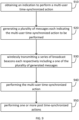
- method 900 in FIG. 9 shows a multi-user synchronizing action method.
- the method 900 can be performed by a wireless user device which can be any device described herein, such as, e.g., device 100 of FIG. 1 .
- the method 900 may be performed by the user or wireless device initiating or originating the multi-synchronized action.
- the method may be implemented by an application or software executing on the wireless user device.
- One or more processors of a device may execute instructions stored on a non-transitory computer-readable medium to perform the method 900.
- the method 900 can cause synchronization image capturing by different wireless users or their electronic/wireless devices.
- the devices and users may target a common area.
- the synchronization e.g., of imaging or image capturing, may be accomplished using wireless beacons, including, for example, Bluetooth (BT) Broadcast Beacons.
- BT Bluetooth
- the devices participating in the multi-device or multi-user synchronization may be part of a virtual network. These user devices in the virtual network may collaborate in a general vicinity to gather and enhance the photos, videos, audio, etc., captured in a time-synchronized manner.
- the method 900 can be implemented to realize time synchronization across multiple devices and share application-specific data across the devices using wireless technology, such as Bluetooth technology.
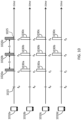
- FIG. 10 shows time diagrams 1000 representing an example of the performance of the method 900.
- the device 1010a may be the originating device that performs the method 900, and the devices 1010b-1010d can be participating devices.
- the devices 1010a-d may have already joined a network, e.g., a virtual network and/or an ad hoc wireless network.
- the method 900 includes, at 910, obtaining an indication to perform a multi-user synchronized action.
- the device 1010a of FIG. 10 may obtain the indication to perform the multi-user synchronized action at t 0 .
- the indication to perform the multi-user synchronized action may be the device determining an initiation action for the multi-user synchronized action.
- the initiation action may be a request to image capture, audio capture, and/or video capture.
- a user may input a request to perform a media image capture, e.g., press a button or input a command (e.g., through a key or touchscreen). This initiation action may occur when a software application executes on the device 1010a.
- a media capture may capture or recording of audio, image, video, or combinations thereof, (e.g., audio only, audio and video only, image and audio, etc.)
- the method 900 generates a plurality of messages, each message indicating the multi-user synchronized action to be performed.
- it includes wireless transmitting a series of broadcast beacons with each broadcast beacon including one of the plurality of generated messages.
- the device 1010a generates a message and transmits the message with the beacons 1020a, 1020b, and 1020c.
- the beacons, including the messages can be transmitted at predefined intervals, e.g., t 1 , t 2 , t 3 , etc. In one or more examples, the predefined intervals may be equally spaced apart by a predefined spacing or time period ⁇ .
- the beacons with the messages can be transmitted to devices part of a virtual network. In FIG. 10 , the devices 1010a-d may be part of the virtual network and can be configured to or capable of receiving the beacons.
- the broadcast beacons transmitted include messages which contain information regarding the performance of the multi-user synchronization action.
- each transmitted message can indicate what and when the multi-user synchronization action is to occur.
- Each transmitted message can indicate the particular action and the scheduled time for devices participating in the multi-user synchronization action.
- a message can indicate that a time when the last or terminal of the series of broadcast beacons is transmitted is for when the multi-user synchronized action is to be performed.
- a message may indicate this scheduled time in terms of intervals offset from the transmission of the message.
- the messages sent with the first beacon 1020a, the second 1020b and third beacon 1020c may each indicate this time.
- the messages may indicate the scheduled time for performance, in any suitable manner.
- each message may indicate the scheduled time in terms of offset beacons or intervals from the transmission of the message (or transmission of the respective beacon including the message) and the terminal message/beacon.
- the message included with the first beacon 1020a may indicate an offset of two beacon intervals (two ⁇ s) between the transmission of the beacon 1020a and the performance of the synchronization action (which corresponds to transmission of the last or third beacon 1020).
- the offsets thus indicate when in the future, the performance of the synchronized action is to occur.
- the message transmitted with the second beacon 1020b may indicate an offset of 1 beacon or 1 interval (one ⁇ ).
- the transmission of the third beacon may include a message that indicates the synchronization action is to occur and be performed with its transmission.
- the message may indicate the spacing or size of the intervals ⁇ .
- This interval size ⁇ may be expressed in a quantity of time.
- the messages transmitted include information for the performance of the multi-user action.
- the messages may include one or more parameters for performing the multi-user time-synchronized action. These parameters are for the devices receiving the broadcast beacons, which will participate and perform the multi-user time-synchronized action. These parameters can depend on the type of multi-user action to be performed.
- the parameters may also be application-specific parameters. For example, applications may be used to perform methods described herein (e.g., method 900). That is an originating device and other participating devices may each execute an application for executing a time-synchronized multi-user action.
- the multi-user synchronized action may be done through applications on user devices, e.g., devices 1010a-d in FIG. 10 .
- An application may be responsible for sending messages (e.g., from an originating device) and an application may be responsible for obtaining and interpreting broadcast beacon messages sent from the originating device.
- the messages sent in the broadcast beacons may be include application specific parameters.
- the application on participating devices may automatically perform the multi-user action according to the information in the broadcast beacons, e.g., automatically execute the action in a time-synchronized manner (e.g., at the terminal broadcast beacon).
- the application may inform or indicate to the user when to manually perform the multi-user action (e.g., media capture) in a time synchronized manner according to the messages received in the broadcast beacons.
- Some examples of application specific parameters may include, but is not limited to: Target object details (e.g., text/coordinates/direction pointer, etc.), Commands to the application (like single shot mode/burst mode / Imaging parameter settings (ISO, HDR, etc.), post-capture actions, like the destination address for image export, applying a unique name tag prefix for all the images captured, compression commands, etc. Virtual Network ID and parameters for logging Source Identifier (i.e., details about 1010a) for any further references to be used by participating devices.
- Target object details e.g., text/coordinates/direction pointer, etc.
- Commands to the application like single shot mode/burst mode / Imaging parameter settings (ISO, HDR, etc.
- post-capture actions like the destination address for image export, applying a unique name tag prefix for all the images captured, compression commands, etc.
- Virtual Network ID and parameters for logging Source Identifier i.e., details about 1010a
- the parameters may indicate image capture settings. These parameters may include things such as exposure settings, zoom settings, shutter speed, aperture settings, ISO settings, HDR mode, image size, and light balance, to name a few. Similar settings or parameters may be indicated or included for capturing video content, e.g., frames per second, video resolution, bitrate, white balance, etc. Similarly, settings may be provided for recording or capturing audio (e.g., the sample rate).
- the method 900 includes performing the multi-user time synchronized action.
- the device performing the method 900 is configured to perform the action time-synchronized with the scheduled time.
- the device 1010a performs the multi-user time synchronized action at t3 or at or during transmission of the third or terminal transmitted broadcast beacon 1020c.
- the method 900 includes performing one or more post-time-synchronized actions.
- media capture e.g., audio, image, and/or video capture
- the captured media may be transferred or transmitted to another device or network for further processing.
- the processed media content may be obtained, e.g., from the device or network to which the capture media was previously sent.
- the method 900 applies an originating, e.g., device 1010a in the context of FIG. 10
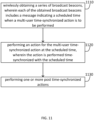
- the method 1100 of FIG. 11 applies to other devices, e.g. participating devices that do not initiate or originate the multi-user action.
- these devices may be devices 1010b-1010c.
- the devices performing the method 1100 may have joined a virtual network or an ad-hoc wireless network.
- the method 1100 may also be implemented by an application or software executing on the wireless user devices.
- One or more processors of the device may execute instructions stored on a non-transitory computer-readable medium to perform the method 1100.
- the method 1100 includes at 1110, wirelessly obtaining a series of broadcast beacons, wherein each of the obtained broadcast beacons includes a message indicating a scheduled time when a multi-user time-synchronized action is to be performed.
- the messages indicate what action (e.g., image capture, audio capture, video capture, etc.) is to be performed and when the action is to be performed in a time-synchronized manner with other participating devices.
- the devices 1010b-d may receive a series of broadcast beacons from device 1010a.
- the devices 1010b and 1010c may respectively receive broadcast beacons 1030a-1030c at times t 1 , t 2 , and t 3 .
- Device 1010d may only receive the later broadcast beacons 1030b and 1030c.
- the messages can indicate when the performance of the multi-user synchronization action is to occur. Further, as described above in connection with the method 900, the messages can also indicate or provide one or more parameters for performing the multi-user time-synchronized action.
- the method 1100 includes, at 1120, performing an action for the multi-user time-synchronized action at the scheduled time, wherein the action is performed time-synchronized with the scheduled time.
- the devices performing the action can perform the action in a time-synchronized manner with the last or terminal broadcast and according to the parameters indicated in the messages included with the broadcast beacons.
- the devices 1110b-d can be configured to, at t3 or upon reception of the indicated beacon 1020c, to perform an action.
- the method 1100 includes, at 1130, performing one or more post time-synchronized actions.
- media captured e.g., audio, image, and/or video capture
- the captured media may be transferred or transmitted to another device or network for processing.
- processed media content may be obtained, e.g., from the device or network to which the capture media was sent.
- processed media content received may be media content that has been processed based on all the media simultaneously captured.
- the media or content captured at t3 by devices 1010a-d can be uploaded to another device or network that processes.
- Processed or enhanced media content can be generated from all the uploaded content.
- the devices may each obtain enhanced media content produced by a combination of multiple media captures.
- the media captured can be images or photos
- the generated enhanced media content can be a composite image formed by the multiple images captured from the participating devices, e.g., a composite fused or photo-stitched image.
- enhanced media content can be produced in audio and video formats. Audio content can be produced, e.g., enhanced audio content can be audio of enhanced or improved sound quality, or some include a composite audio mashup from audio captures.
- Enhanced video content can be generated based on all captured videos. The result may be one or more videos with enhanced quality and/or may include some video mashup from all the captured video captures
- a device corresponding to a method detailed herein may include one or more components configured to perform each aspect of the related method.
Landscapes
- Engineering & Computer Science (AREA)
- Computer Networks & Wireless Communication (AREA)
- Signal Processing (AREA)
- Multimedia (AREA)
- General Engineering & Computer Science (AREA)
- Mobile Radio Communication Systems (AREA)
Priority Applications (1)
| Application Number | Priority Date | Filing Date | Title |
|---|---|---|---|
| EP22205878.6A EP4366338A1 (de) | 2022-11-07 | 2022-11-07 | Systeme, verfahren und vorrichtungen zur drahtlosen kommunikation |
Applications Claiming Priority (1)
| Application Number | Priority Date | Filing Date | Title |
|---|---|---|---|
| EP22205878.6A EP4366338A1 (de) | 2022-11-07 | 2022-11-07 | Systeme, verfahren und vorrichtungen zur drahtlosen kommunikation |
Publications (1)
| Publication Number | Publication Date |
|---|---|
| EP4366338A1 true EP4366338A1 (de) | 2024-05-08 |
Family
ID=84359183
Family Applications (1)
| Application Number | Title | Priority Date | Filing Date |
|---|---|---|---|
| EP22205878.6A Pending EP4366338A1 (de) | 2022-11-07 | 2022-11-07 | Systeme, verfahren und vorrichtungen zur drahtlosen kommunikation |
Country Status (1)
| Country | Link |
|---|---|
| EP (1) | EP4366338A1 (de) |
Citations (3)
| Publication number | Priority date | Publication date | Assignee | Title |
|---|---|---|---|---|
| US20120249806A1 (en) * | 2011-03-31 | 2012-10-04 | Gong Michelle X | Collaborative image control |
| US20150365582A1 (en) * | 2014-06-12 | 2015-12-17 | David Edward Eramian | Synchronized media capturing for an interactive scene |
| US20160094773A1 (en) * | 2014-09-29 | 2016-03-31 | Apple Inc. | Collaborative Image Collection And Processing Using Portable Cameras |
-
2022
- 2022-11-07 EP EP22205878.6A patent/EP4366338A1/de active Pending
Patent Citations (3)
| Publication number | Priority date | Publication date | Assignee | Title |
|---|---|---|---|---|
| US20120249806A1 (en) * | 2011-03-31 | 2012-10-04 | Gong Michelle X | Collaborative image control |
| US20150365582A1 (en) * | 2014-06-12 | 2015-12-17 | David Edward Eramian | Synchronized media capturing for an interactive scene |
| US20160094773A1 (en) * | 2014-09-29 | 2016-03-31 | Apple Inc. | Collaborative Image Collection And Processing Using Portable Cameras |
Similar Documents
| Publication | Publication Date | Title |
|---|---|---|
| US9277321B2 (en) | Device discovery and constellation selection | |
| CN108882228B (zh) | 电子设备系统的无线网格网络建立方法、装置和系统 | |
| US10805613B2 (en) | Systems and methods for optimization and testing of wireless devices | |
| CN105872654B (zh) | 音频播放系统中的蓝牙连接切换方法、装置及系统 | |
| EP3982641A1 (de) | Bildschirmprojektionsverfahren und -vorrichtung | |
| WO2020134720A1 (zh) | 数据传输控制方法及相关产品 | |
| JP7590553B2 (ja) | サウンドボックス位置調整方法、オーディオレンダリング方法、および装置 | |
| CN116671114B (zh) | 多媒体回放同步 | |
| US20250258643A1 (en) | Method, apparatus, computer program, and recording medium thereof for managing sound exposure in wireless communication system | |
| KR102632536B1 (ko) | 블루투스 네트워크 환경에서 응답 메시지를 전송하기 위한 전자 장치 및 그에 관한 방법 | |
| CN105103618A (zh) | 用于无线修改便携式设备的检测特征的系统和方法 | |
| JP2015144430A (ja) | 位置データを用いる聴覚装置、音声システム、および関連する方法 | |
| US10660148B1 (en) | Methods and systems for pairing electronic devices based upon proximity | |
| CN116057926A (zh) | 处理音频数据的电子装置及其运行方法 | |
| CN115278625B (zh) | 蓝牙多媒体包的传输方法、装置、设备和系统 | |
| US20170273129A1 (en) | Transmission apparatus and method of controlling the same | |
| JP2022507520A (ja) | 同期信号ブロックの構成情報のブロードキャスト、受信方法及び装置 | |
| CN113316173A (zh) | 联网设备确定方法、装置、设备及存储介质 | |
| EP4366338A1 (de) | Systeme, verfahren und vorrichtungen zur drahtlosen kommunikation | |
| US12207036B2 (en) | System and method for control of audio switching at a linked input/output device between two active hosts | |
| WO2023050049A1 (zh) | 信息上报、波束切换方法及装置、存储介质 | |
| US20250133340A1 (en) | Method and system for reproducing sound | |
| US20240223994A1 (en) | Apparatus for controlling output of media content, system, and method for controlling output of media content | |
| CN116669193A (zh) | 一种通信方法、装置、设备及存储介质 | |
| US20240053460A1 (en) | Device location determining method, apparatus, and system |
Legal Events
| Date | Code | Title | Description |
|---|---|---|---|
| PUAI | Public reference made under article 153(3) epc to a published international application that has entered the european phase |
Free format text: ORIGINAL CODE: 0009012 |
|
| STAA | Information on the status of an ep patent application or granted ep patent |
Free format text: STATUS: THE APPLICATION HAS BEEN PUBLISHED |
|
| AK | Designated contracting states |
Kind code of ref document: A1 Designated state(s): AL AT BE BG CH CY CZ DE DK EE ES FI FR GB GR HR HU IE IS IT LI LT LU LV MC ME MK MT NL NO PL PT RO RS SE SI SK SM TR |
|
| STAA | Information on the status of an ep patent application or granted ep patent |
Free format text: STATUS: REQUEST FOR EXAMINATION WAS MADE |
|
| 17P | Request for examination filed |
Effective date: 20241105 |
|
| RBV | Designated contracting states (corrected) |
Designated state(s): AL AT BE BG CH CY CZ DE DK EE ES FI FR GB GR HR HU IE IS IT LI LT LU LV MC ME MK MT NL NO PL PT RO RS SE SI SK SM TR |