EP4177722B1 - Tastaturanzeigeverfahren, faltbare bildschirmvorrichtung und computerlesbares speichermedium - Google Patents
Tastaturanzeigeverfahren, faltbare bildschirmvorrichtung und computerlesbares speichermedium Download PDFInfo
- Publication number
- EP4177722B1 EP4177722B1 EP22846878.1A EP22846878A EP4177722B1 EP 4177722 B1 EP4177722 B1 EP 4177722B1 EP 22846878 A EP22846878 A EP 22846878A EP 4177722 B1 EP4177722 B1 EP 4177722B1
- Authority
- EP
- European Patent Office
- Prior art keywords
- region
- app
- interface
- screen
- keyboard
- Prior art date
- Legal status (The legal status is an assumption and is not a legal conclusion. Google has not performed a legal analysis and makes no representation as to the accuracy of the status listed.)
- Active
Links
Images













Classifications
-
- G—PHYSICS
- G06—COMPUTING OR CALCULATING; COUNTING
- G06F—ELECTRIC DIGITAL DATA PROCESSING
- G06F3/00—Input arrangements for transferring data to be processed into a form capable of being handled by the computer; Output arrangements for transferring data from processing unit to output unit, e.g. interface arrangements
- G06F3/01—Input arrangements or combined input and output arrangements for interaction between user and computer
- G06F3/048—Interaction techniques based on graphical user interfaces [GUI]
- G06F3/0484—Interaction techniques based on graphical user interfaces [GUI] for the control of specific functions or operations, e.g. selecting or manipulating an object, an image or a displayed text element, setting a parameter value or selecting a range
- G06F3/04847—Interaction techniques to control parameter settings, e.g. interaction with sliders or dials
-
- G—PHYSICS
- G06—COMPUTING OR CALCULATING; COUNTING
- G06F—ELECTRIC DIGITAL DATA PROCESSING
- G06F3/00—Input arrangements for transferring data to be processed into a form capable of being handled by the computer; Output arrangements for transferring data from processing unit to output unit, e.g. interface arrangements
- G06F3/01—Input arrangements or combined input and output arrangements for interaction between user and computer
- G06F3/048—Interaction techniques based on graphical user interfaces [GUI]
- G06F3/0487—Interaction techniques based on graphical user interfaces [GUI] using specific features provided by the input device, e.g. functions controlled by the rotation of a mouse with dual sensing arrangements, or of the nature of the input device, e.g. tap gestures based on pressure sensed by a digitiser
- G06F3/0488—Interaction techniques based on graphical user interfaces [GUI] using specific features provided by the input device, e.g. functions controlled by the rotation of a mouse with dual sensing arrangements, or of the nature of the input device, e.g. tap gestures based on pressure sensed by a digitiser using a touch-screen or digitiser, e.g. input of commands through traced gestures
- G06F3/04886—Interaction techniques based on graphical user interfaces [GUI] using specific features provided by the input device, e.g. functions controlled by the rotation of a mouse with dual sensing arrangements, or of the nature of the input device, e.g. tap gestures based on pressure sensed by a digitiser using a touch-screen or digitiser, e.g. input of commands through traced gestures by partitioning the display area of the touch-screen or the surface of the digitising tablet into independently controllable areas, e.g. virtual keyboards or menus
-
- G—PHYSICS
- G06—COMPUTING OR CALCULATING; COUNTING
- G06F—ELECTRIC DIGITAL DATA PROCESSING
- G06F3/00—Input arrangements for transferring data to be processed into a form capable of being handled by the computer; Output arrangements for transferring data from processing unit to output unit, e.g. interface arrangements
- G06F3/01—Input arrangements or combined input and output arrangements for interaction between user and computer
- G06F3/048—Interaction techniques based on graphical user interfaces [GUI]
- G06F3/0481—Interaction techniques based on graphical user interfaces [GUI] based on specific properties of the displayed interaction object or a metaphor-based environment, e.g. interaction with desktop elements like windows or icons, or assisted by a cursor's changing behaviour or appearance
-
- G—PHYSICS
- G06—COMPUTING OR CALCULATING; COUNTING
- G06F—ELECTRIC DIGITAL DATA PROCESSING
- G06F3/00—Input arrangements for transferring data to be processed into a form capable of being handled by the computer; Output arrangements for transferring data from processing unit to output unit, e.g. interface arrangements
- G06F3/01—Input arrangements or combined input and output arrangements for interaction between user and computer
- G06F3/048—Interaction techniques based on graphical user interfaces [GUI]
- G06F3/0481—Interaction techniques based on graphical user interfaces [GUI] based on specific properties of the displayed interaction object or a metaphor-based environment, e.g. interaction with desktop elements like windows or icons, or assisted by a cursor's changing behaviour or appearance
- G06F3/04817—Interaction techniques based on graphical user interfaces [GUI] based on specific properties of the displayed interaction object or a metaphor-based environment, e.g. interaction with desktop elements like windows or icons, or assisted by a cursor's changing behaviour or appearance using icons
-
- G—PHYSICS
- G06—COMPUTING OR CALCULATING; COUNTING
- G06F—ELECTRIC DIGITAL DATA PROCESSING
- G06F3/00—Input arrangements for transferring data to be processed into a form capable of being handled by the computer; Output arrangements for transferring data from processing unit to output unit, e.g. interface arrangements
- G06F3/01—Input arrangements or combined input and output arrangements for interaction between user and computer
- G06F3/048—Interaction techniques based on graphical user interfaces [GUI]
- G06F3/0481—Interaction techniques based on graphical user interfaces [GUI] based on specific properties of the displayed interaction object or a metaphor-based environment, e.g. interaction with desktop elements like windows or icons, or assisted by a cursor's changing behaviour or appearance
- G06F3/0482—Interaction with lists of selectable items, e.g. menus
-
- G—PHYSICS
- G06—COMPUTING OR CALCULATING; COUNTING
- G06F—ELECTRIC DIGITAL DATA PROCESSING
- G06F3/00—Input arrangements for transferring data to be processed into a form capable of being handled by the computer; Output arrangements for transferring data from processing unit to output unit, e.g. interface arrangements
- G06F3/01—Input arrangements or combined input and output arrangements for interaction between user and computer
- G06F3/048—Interaction techniques based on graphical user interfaces [GUI]
- G06F3/0484—Interaction techniques based on graphical user interfaces [GUI] for the control of specific functions or operations, e.g. selecting or manipulating an object, an image or a displayed text element, setting a parameter value or selecting a range
- G06F3/0486—Drag-and-drop
-
- G—PHYSICS
- G06—COMPUTING OR CALCULATING; COUNTING
- G06F—ELECTRIC DIGITAL DATA PROCESSING
- G06F9/00—Arrangements for program control, e.g. control units
- G06F9/06—Arrangements for program control, e.g. control units using stored programs, i.e. using an internal store of processing equipment to receive or retain programs
- G06F9/44—Arrangements for executing specific programs
- G06F9/451—Execution arrangements for user interfaces
-
- G—PHYSICS
- G06—COMPUTING OR CALCULATING; COUNTING
- G06F—ELECTRIC DIGITAL DATA PROCESSING
- G06F1/00—Details not covered by groups G06F3/00 - G06F13/00 and G06F21/00
- G06F1/16—Constructional details or arrangements
- G06F1/1613—Constructional details or arrangements for portable computers
- G06F1/1633—Constructional details or arrangements of portable computers not specific to the type of enclosures covered by groups G06F1/1615 - G06F1/1626
- G06F1/1637—Details related to the display arrangement, including those related to the mounting of the display in the housing
- G06F1/1652—Details related to the display arrangement, including those related to the mounting of the display in the housing the display being flexible, e.g. mimicking a sheet of paper, or rollable
-
- G—PHYSICS
- G06—COMPUTING OR CALCULATING; COUNTING
- G06F—ELECTRIC DIGITAL DATA PROCESSING
- G06F2203/00—Indexing scheme relating to G06F3/00 - G06F3/048
- G06F2203/048—Indexing scheme relating to G06F3/048
- G06F2203/04803—Split screen, i.e. subdividing the display area or the window area into separate subareas
-
- G—PHYSICS
- G06—COMPUTING OR CALCULATING; COUNTING
- G06F—ELECTRIC DIGITAL DATA PROCESSING
- G06F3/00—Input arrangements for transferring data to be processed into a form capable of being handled by the computer; Output arrangements for transferring data from processing unit to output unit, e.g. interface arrangements
- G06F3/14—Digital output to display device ; Cooperation and interconnection of the display device with other functional units
Definitions
- This application relates to the field of electronic technologies, and specifically, to a keyboard display method, a foldable-screen device and a computer-readable storage medium.
- foldable-screen devices have advantages of large screen sizes and good display effects, and therefore are more widely used by people.
- a keyboard region is displayed on a lower position of a screen for use.
- a user may tap a key in the keyboard region for input.
- the foldable-screen device starts the keyboard application and displays the keyboard region on a lower position of the entire screen.
- displaying the keyboard region on the lower position of the entire screen may obstruct interfaces of the two apps, which hinders the user from viewing the screen, resulting in poor user experience.
- embodiments of the present application provide a keyboard display method, a foldable-screen device, a computer-readable storage medium, and a computer program product according to the enclosed independent claims.
- Advantageous features of the present invention are defined in the corresponding subclaims. In the following, parts of the description and drawings referring to embodiments, which are not covered by the claims, are not presented as embodiments of the invention but as examples useful for understanding the invention.
- a keyboard display method applied to a foldable-screen device and including: displaying a first interface, where the first interface includes a first region and a second region, the first region is used to display an interface of a first app, the second region is used to display an interface of a second app, the first region includes a first input box of the first app, and the second region includes a second input box of the second app; when the first region and the second region are distributed from left to right, receiving a first operation performed by a user on the first input box, where the first operation is used to determine that an input cursor is located in the first input box; displaying a keyboard region in the first region in response to the first operation; receiving a second operation performed by the user on the second input box, where the second operation is used to determine that the input cursor is located in the second input box; and in response to the second operation, displaying the keyboard region in the second region, and stopping displaying the keyboard region in the first region.
- the foregoing first interface may be an interface of vertical split-screen display of the first app and the second app.
- the first region on a left side of a screen may display the interface of the first app
- the second region on a right side of the screen may display the interface of the second app.
- the first region may alternatively be located on the right side of the screen
- the second region may alternatively be located on the left side of the screen.
- the foldable-screen device displays the keyboard region on a lower position of the second region, the keyboard region is no longer displayed in the first region.
- the manner of displaying a keyboard region in a region of a corresponding app in the foregoing method occupies a smaller area of the screen.
- a position of the keyboard region does not affect a display interface of another app.
- a video play interface of a video app is not obstructed by the keyboard region, and the user can watch the video play interface completely, thereby improving user experience.
- the method further includes: receiving a third operation performed by the user on a third app, where the third operation is used to open the third app; displaying the third region in the form of a floating window in response to the third operation, where the third region is used to display an interface of the third app, and the third region includes a third input box of the third app; receiving a fourth operation performed on the third input box, where the fourth operation is used to determine that the input cursor is located in the third input box; and displaying the keyboard region in the form of a floating window in response to the fourth operation.
- the user may perform the third operation of opening the third app. For example, when the user uses the first app and the second app in a vertical split-screen form, the third app receives a notification message, and the notification message pops up on an upper position of the screen in the form of a banner notification. If the user wants to view the received notification message, the user may tap on a window of the banner notification to open the third app so as to view the notification message. In this case, the foldable-screen device may display the interface of the third app in the form of a floating window.
- the user may slide leftward from a right side of the screen and then pause to pull out a sidebar, and then tap an icon of the third app in the sidebar to open the third app.
- the interface of the third app may be displayed in the form of a floating window.
- a region in which the interface of the third app is distributed is used as the third region. If the interface of the third app with a floating window is displayed, when the user taps on the first input box, the keyboard region can be displayed on a lower position the first region, or when the user taps on the second input box, the keyboard region can be displayed on a lower position of the second region.
- the keyboard region When the third region is located on an upper position of the second region, the keyboard region is vertically adjacent to the third region and the keyboard region is located on a lower position of the second region.
- Most users are accustomed to an operation region located on a lower position of a display region, which is convenient for the user to input when holding a terminal device.
- the manner of displaying the keyboard region in this method can help the user recognize that the keyboard region displayed in a floating manner is input for the app displayed in a floating manner, and further it is convenient for the user to operate the keyboard region. Therefore, this manner is more appropriate.
- the foldable-screen device can display the keyboard region in the second region for both cases, but does not display the keyboard region in the first region. Usually when a person holds a foldable-screen device, the person is accustomed to holding it at a lower end of the foldable-screen device. Therefore, regardless of which app the input is performed for, the keyboard region is displayed in the second region on the lower position of the screen, so that it is convenient for an input operation if the user holds the foldable-screen device, thereby improving user experience.
- the keyboard region is located on a right side of the second region. Displaying the keyboard region on the right side of the second region can avoid a part of the interface of the second app for display, which can avoid excessively obstructing the screen, thereby improving user experience.
- the method further includes: receiving a seventh operation performed by the user on a third app, where the seventh operation is used to open the third app; displaying the third region in the form of a floating window in response to the seventh operation, where the third region is used to display an interface of the third app, and the third region includes a third input box of the third app; receiving an eighth operation performed on the third input box, where the eighth operation is used to determine that the input cursor is located in the third input box; and displaying the keyboard region in the form of a floating window in response to the eighth operation.
- the foldable-screen device displays interfaces of two apps in a horizontal split-screen form
- the user may perform the seventh operation of opening the third app.
- the interface of the third app may be displayed in the form of a floating window.
- a region in which the interface of the third app is distributed is used as the third region. If the interface of the third app with a floating window is displayed, when the user taps on the first input box, the keyboard region can be displayed on the second region, or when the user taps on the second input box, the keyboard region can be displayed on the second region.
- the foldable-screen device starts the keyboard application and displays the keyboard region in the form of a floating window.
- a form of displaying a floating window occupies a smaller area than a form of displaying a non-floating window.
- displaying the keyboard region in the form of a floating window occupies a smaller area of the screen when compared a conventional manner of displaying the keyboard region on a lower position of the entire screen.
- the keyboard region is vertically adjacent to the third region and the keyboard region is located on the right side of the second region.
- a height of an original third region needs to be reduced to avoid the keyboard region, so that the keyboard region can be completely displayed in the interface.
- obstruction of the screen can be reduced while facilitating input of the user, thereby improving user experience.
- the keyboard region is horizontally adjacent to the third region and the keyboard region is located on the right side of the second region.
- the user may further drag the floating window to adjust a display position of the floating window.
- the third region can be dragged from the first region to the left side of the second region to avoid the video play interface.
- the keyboard region can be displayed on the right side of the second region, so as to satisfy a requirement of the user for watching a video, thereby improving user experience.
- the main interface may be a desktop of the foldable-screen device, including icons of a plurality of apps.
- the user can operate the main interface to first operate the icon of the first app to open the first app, and then operate the icon of the second app, so that the interfaces of the first app and the second app are displayed in a vertical split-screen form, thereby displaying the first interface.
- An operation manner in this method can achieve vertical split-screen display of two apps, which is convenient for the user to use the two apps at the same time, and avoids inconvenience caused by repeatedly switching between the interfaces of the apps.
- the tenth operation is an operation of sliding from a side edge of the screen toward the middle of the screen and then pausing.
- the eleventh operation is an operation of dragging the icon of the second app from the sidebar to a left side of the screen or a right side of the screen.
- the user may tap the icon of the first app on the main interface to open the first app, then slide from the left or right side of the screen to the middle of the screen and pause to pull out the sidebar, and then drag the icon of the second app in the sidebar to the left or right side of the screen to open the first interface.
- An operation manner in this method can achieve vertical split-screen display of two apps, which is convenient for the user to use the two apps at the same time, and avoids inconvenience caused by repeatedly switching between the interfaces of the apps.
- a combination of the tenth operation and the eleventh operation can achieve vertical split-screen display of two apps, which is convenient for the user to use the two apps at the same time, and avoids inconvenience caused by repeatedly switching between the interfaces of the apps.
- such an operation manner is easier for users to grasp and more convenient to operate than a manner of opening a split-screen mode from a settings interface and then selecting different apps for different display regions for split-screen display.
- the user may tap the icon of the first app on the main interface to open the first app, then slide from the left or right side of the screen to the middle of the screen and pause to pull out the sidebar, and then drag the icon of the second app in the sidebar to an upper position or a lower position of the screen to open the second interface.
- the foldable-screen device displays the second interface.
- the first app is a conference app
- the interface of the first app is an interface of a participant attendance status.
- the foregoing method can make the keyboard region not obstruct or less obstruct the interface of the participant attendance status, so as to ensure that a conference of the user is not affected by use of another app such as a chat app by the user, thereby improving user experience.
- the foregoing method can make the keyboard region not obstruct or less obstruct the video play interface, so as to ensure that video watching by the user, such as live video watching, is not affected by use of another app by the user, thereby improving user experience.
- the foregoing method can make a pop-up keyboard region for entering an amount or a password during a payment process not obstruct or less obstruct the interface of the first app, thereby improving user experience.
- a foldable-screen device includes: a processor, a memory, an interface, and a foldable screen.
- the processor, the memory, and the interface cooperate with each other, so that the foldable-screen device performs any one of the methods in the technical solutions described in the first aspect or the second aspect.
- the chip further includes the memory, and the memory is connected to the processor through a circuit or a line.
- the chip further includes a communications interface.
- a computer-readable storage medium stores a computer program, and when the computer program is executed by a processor, the processor is enabled to perform any one of the methods in the technical solutions described in the first aspect or the second aspect.
- a computer program product includes computer program code, and when the computer program code is run on a foldable-screen device, the foldable-screen device is enabled to perform any one of the methods in the technical solutions described in the first aspect or the second aspect.
- first”, “second”, “third”, ..., and “eleventh” are used merely for descriptive purposes, and cannot be understood as indicating or implying relative importance or implicitly indicating the quantity of indicated technical features. Therefore, a feature limited by “first”, “second”, “third”, ..., or “eleventh” may expressly or implicitly include one or more of such features.
- a keyboard display method applied to a foldable-screen device and provided in the embodiments of this application may be applied to a terminal device such as a mobile phone, a tablet computer, a wearable device, a vehicle-mounted device, an augmented reality (augmented reality, AR)/virtual reality (virtual reality, VR) device, a notebook computer, an ultra-mobile personal computer (ultra-mobile personal computer, UMPC), a netbook, or a personal digital assistant (personal digital assistant, PDA).
- a specific type of the terminal device is not limited in the embodiments of this application.
- FIG. 1 is a schematic diagram of a structure of a terminal device 100 according to an embodiment of this application.
- the terminal device 100 may include a processor 110, an external memory interface 120, an internal memory 121, a universal serial bus (universal serial bus, USB) interface 130, a charging management module 140, a power management module 141, a battery 142, an antenna 1, an antenna 2, a mobile communication module 150, a wireless communication module 160, an audio module 170, a speaker 170A, a receiver 170B, a microphone 170C, a headset jack 170D, a sensor module 180, a button 190, a motor 191, an indicator 192, a camera 193, a display 194, a subscriber identity module (subscriber identification module, SIM) card interface 195, and the like.
- SIM subscriber identity module
- the sensor module 180 may include a pressure sensor 180A, a gyroscope sensor 180B, a barometric pressure sensor 180C, a magnetic sensor 180D, an acceleration sensor 180E, a distance sensor 180F, an optical proximity sensor 180G, a fingerprint sensor 180H, a temperature sensor 180J, a touch sensor 180K, and an ambient light sensor 180L, a bone conduction sensor 180M, and the like.
- the terminal device 100 may include more or fewer components than those shown in the figure, or some components may be combined, or some components may be split, or a different component arrangement may be used.
- the components shown in the figure may be implemented in hardware, software, or a combination of software and hardware.
- a wireless communication function of the terminal device 100 may be implemented through the antenna 1, the antenna 2, the mobile communication module 150, the wireless communication module 160, the modem processor, the baseband processor, and the like.
- the terminal device 100 may implement a shooting function through the ISP, the camera 193, the video codec, the GPU, the display 194, the application processor, and the like.
- the external memory interface 120 may be configured to connect to an external memory card, for example, a micro SD card, to extend a storage capability of the terminal device 100.
- the external memory card communicates with the processor 110 by using the external memory interface 120, to implement a data storage function. For example, files such as music and videos are stored in the external storage card.
- the internal memory 121 may include a high-speed random access memory, and may further include a non-volatile memory, for example, at least one magnetic disk storage device, a flash memory device, and a universal flash storage (universal flash storage, UFS).
- a non-volatile memory for example, at least one magnetic disk storage device, a flash memory device, and a universal flash storage (universal flash storage, UFS).
- the terminal device 100 may implement an audio function such as music play and recording through the audio module 170, the speaker 170A, the receiver 170B, the microphone 170C, the headset jack 170D, the application processor, and the like.
- an audio function such as music play and recording through the audio module 170, the speaker 170A, the receiver 170B, the microphone 170C, the headset jack 170D, the application processor, and the like.
- a software system of the terminal device 100 may use a layered architecture, an event-driven architecture, a microkernel architecture, a micro service architecture, or a cloud architecture.
- an Android system of a layered architecture is used as an example to describe the software structure of the terminal device 100.
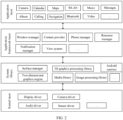
- FIG. 2 is a block diagram of a software structure of a terminal device 100 according to an embodiment of this application.
- Software is divided into several layers by using the layered architecture, and each layer has a clear role and task.
- the layers communicate with each other by using a software interface.
- the Android system is divided into four layers: an application layer, an application framework layer, an Android runtime (Android runtime) and system library layer, and a kernel layer from top down.
- the application layer may include a series of application packages.
- the application framework layer provides an application programming interface (application programming interface, API) and a programming framework for application programs at the application layer.
- the application framework layer includes some predefined functions.
- the application framework layer may include a window manager, a content provider, a view system, a phone manager, a resource manager, a notification manager, and the like.
- the content provider is used to store and obtain data, and enables these data to be accessible to an application.
- the data may include a video, an image, audio, calls that are made and received, browsing history and bookmarks, a phonebook, and the like.
- the view system includes visual controls, such as a control for displaying text, a control for displaying pictures, and the like.
- the view system may be used to construct an application.
- a display interface may include one or more views.
- a display interface including a message notification icon may include a view for displaying text and a view for displaying pictures.
- the phone manager is configured to provide a communication function of the terminal device 100, for example, management of a call status (including answering, declining, or the like).
- the resource manager provides resources for applications, such as localized strings, icons, images, layout files, and video files.
- the notification manager enables an application to display notification information in the status bar, which can be used to convey a notification-type message, and can automatically disappear after a short stay without user interaction.
- the notification manager is used for notifying download completion or as a message reminder.
- the notification manager may alternatively be a notification that appears in the status bar at the top of the system in the form of a chart or scroll bar text, such as a notification for an application running in the background, or a notification that appear on the screen in the form of a dialog window.
- text information is displayed in the status bar, an announcement is given, the terminal device vibrates, or an indicator light blinks.
- the kernel library includes two parts: one part is a function that needs to be invoked by a Java language, and the other part is a kernel library of Android.
- the application layer and the application framework layer run on a virtual machine.
- the virtual machine executes java files at the application layer and the application framework layer as binary files.
- the virtual machine is configured to implement functions such as object lifecycle management, stack management, thread management, security and exception management, and garbage collection.
- the system library may include a plurality of function modules such as, a surface manager (surface manager), a media library (media libraries), a three-dimensional graphics processing library (for example, OpenGL ES), and a 2D graphics engine (for example, SGL).
- a surface manager surface manager
- media libraries media libraries
- a three-dimensional graphics processing library for example, OpenGL ES
- 2D graphics engine for example, SGL
- the surface manager is configured to manage a display subsystem and provide fusion of 2D and 3D layers for a plurality of applications.
- the media libraries support multiple common audio and video formats for playback and recording, as well as static image files.
- the media libraries may support a variety of audio and video encoding formats, such as MPEG4, H.264, MP3, AAC, AMR, JPG, PNG, and the like.
- the 2D graphics engine is a graphics engine for 2D graphics.
- the kernel layer is a layer between hardware and software.
- the kernel layer includes at least a display driver, a camera driver, an audio driver, and a sensor driver.
- the following embodiments of this application uses the terminal device having the structure shown in FIG. 1 and FIG. 2 as an example to describe, in detail with reference to the accompanying drawings and application scenarios, a keyboard display method provided in embodiments of this application.
- the foregoing terminal device may be a foldable-screen device related to the embodiments of this application.
- the following uses the foldable-screen device as an execution body to describe in detail the technical solutions of this application.
- the directions “upper”, “lower”, “left”, and “right” in the embodiments of this application are directions “upper”, “lower”, “left”, and “right” that are perceived by a user when the user faces a screen of the foldable-screen device.
- a right side of the screen is a direction of approaching the right side of the user in the screen when the user faces the screen of the foldable-screen device.
- an upper position of the screen is a direction of approaching an upper position of the user in the screen when the user faces the screen of the foldable-screen device.
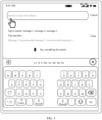
- a keyboard region may be displayed on a lower position of the screen, as shown in FIG. 3 .
- FIG. 3 an example in which the keyboard region displays the form of a QWERTY keyboard is shown.
- a blank region can be set in the middle of the keyboard region, as shown in FIG. 3 . This blank region can separate keys in the keyboard from left to right, so that some keys are close to the left side of the screen, and other keys are close to a right side of the screen.
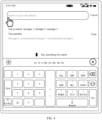
- the keyboard region may alternatively be displayed in the form of 9-key Pinyin.
- the foldable-screen device may display some punctuation keys in the middle of the keyboard region from top to bottom, display number keys on the left side of the screen, and display letter keys on the right side of the screen.
- the left hand is closer to the number keys, and the right hand is closer to the letter keys. Because the punctuation keys are used less frequently than the number keys and letter keys, in most cases, the user can implement tapping more easily when tapping keys, and it is more convenient to operate, thereby improving user experience.
- an interface of a memo is displayed in the floating window and an interface of a browser is displayed in a background is used as an example.
- An operation of triggering the memo to be displayed in the form of a floating window may be: when the foldable-screen device displays the interface of the browser, the user uses a single finger to slide from a left side edge or right side edge of the screen to the middle and pause so as to pull out a sidebar, and then the user taps an icon of the memo in the sidebar to open the memo. After the memo is opened, the interface may be shown in FIG.
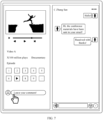
- FIG. 7 is a schematic diagram of an interface of vertical split-screen display of two apps according to an embodiment.
- the screen of the foldable-screen device is divided into a first region and a second region.
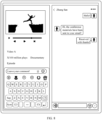
- the first region on the left side displays a play interface of a video app
- the second region on the right side displays a chat interface of a chat app
- the first region displays an interface of a first app
- the second region displays an interface of a second app.
- left and right positions of the first region and the second region may alternatively be interchanged.
- the foldable-screen device starts a keyboard application.
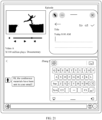
- a keyboard region may be displayed on a lower position of the first region on the left side, as shown in FIG. 8 , instead of occupying the second region of the second app.
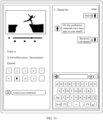
- the foldable-screen device starts the keyboard application.
- the keyboard region may be displayed on a lower position of the second region on the right side, as shown in FIG. 10 , instead of occupying the first region of the first app.
- the manner of displaying a keyboard region in a region of a corresponding app occupies a smaller area of the screen.
- a position of the keyboard region does not affect a display interface of another app.
- a video play interface of the video app is not obstructed by the keyboard region, and the user can watch the video play interface completely, thereby improving user experience.
- the foldable-screen device displays interfaces of two apps in a vertical split-screen form
- the user may perform a third operation of opening the third app.
- the third app receives a notification message, and the notification message pops up on an upper position of the screen in the form of a banner notification.
- the user may tap on a window of the banner notification to open the third app so as to view the notification message.
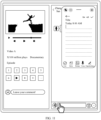
- the foldable-screen device may display an interface of the third app in the form of a floating window.
- the user may slide leftward from a right side of the screen or slide rightward from a left side of the screen and then pause to pull out a sidebar, and then tap an icon of the third app in the sidebar to open the third app.
- the interface of the third app may be displayed in the form of a floating window.
- a region in which the interface of the third app is distributed is used as the third region.
- that the third region is displayed in the second region is used as an example.
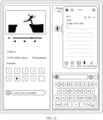
- the keyboard region can be displayed on a lower position the first region, or when the user taps on the second input box, the keyboard region can be displayed on a lower position of the second region, as shown in FIG. 12 .
- the user taps on a third input box of the third application in the third region as shown in FIG. 13 it indicates that an intention of the user is to enter text in the third input box.
- the foldable-screen device starts the keyboard application and displays the keyboard region in the form of a floating window.
- the third region may be displayed on an upper position of the second region as shown in FIG. 14 , and in this case, the keyboard region may be displayed in the form of a floating window on a lower position of the second region, where an interface of an app displayed in a floating manner is vertically adjacent to the keyboard region.
- Most users are accustomed to an operation region located on a lower position of a display region, which is convenient for the user to input when holding a terminal device.
- the manner of displaying the keyboard region shown in FIG. 14 can help the user recognize that the keyboard region displayed in a floating manner is input for the app displayed in a floating manner, and further it is convenient for the user to operate the keyboard region. Therefore, this manner is more appropriate.
- the keyboard region displayed in the form of a floating window in FIG. 14 occupies a smaller area than the keyboard region in FIG. 12 , which can reduce an area of the keyboard region covering the screen.
- displaying the keyboard region in the form of a floating window occupies a smaller area of the screen when compared a conventional manner of displaying the keyboard region on a lower position of the entire screen.
- differentiated display of the keyboard region can improve the user's recognition of a position of the input cursor, which is convenient for the user to identify which app the input is currently performed for, thereby improving user experience.
- the screen of the foldable-screen device is divided into a first region and a second region.
- the first region is distributed in an upper half of the screen
- the second region is distributed in a lower half of the screen.
- the first region displays an interface of a first app
- the second region displays an interface of a second app.
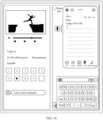
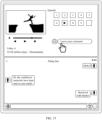
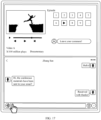
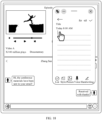
- that the first region in the upper half of the screen displays a play interface of a video app
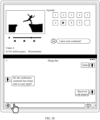
- the second region on the lower half of the screen displays a chat interface of a chat app is used as an example. If the user taps a first input box of the first app as shown in FIG.
- the foldable-screen device starts the keyboard application.
- the keyboard region may be displayed in the second region in the lower half of the screen, as shown in FIG. 16 . If the user taps a second input box of the second app as shown in FIG. 17 , the foldable-screen device starts the keyboard application. In this case, the keyboard region may still be displayed in the second region in the lower half of the screen, as shown in FIG. 16 .
- the person is accustomed to holding it at a lower end of the foldable-screen device.
- the keyboard region is displayed in the second region on the lower position of the screen, so that it is convenient for an input operation if the user holds the foldable-screen device, thereby improving user experience.
- displaying the keyboard region on the right side of the second region can avoid a part of the interface of the second app for display, which can avoid excessively obstructing the screen, thereby improving user experience.
- the foldable-screen device displays interfaces of two apps in a horizontal split-screen form
- the user may perform an operation of opening the third app.
- the interface of the third app is displayed in the form of a floating window.
- a region in which the interface of the third app is distributed is used as the third region. If the interface of the third app with a floating window is displayed, when the user taps on the first input box, the keyboard region can be displayed on the second region, or when the user taps on the second input box, the keyboard region can be displayed on the second region.
- the user taps on the third input box of the third application in the third region it indicates that an intention of the user is to enter text in the third input box.
- the foldable-screen device starts the keyboard application and displays the keyboard region in the form of a floating window.
- a form of displaying a floating window occupies a smaller area than a form of displaying a non-floating window.
- displaying the keyboard region in the form of a floating window occupies a smaller area of the screen when compared a conventional manner of displaying the keyboard region on a lower position of the entire screen.
- differentiated display of the keyboard region can improve the user's recognition of a position of the input cursor, which is convenient for the user to identify which app the input is currently performed for, thereby improving user experience.
- the foldable-screen device displays interfaces of two apps on a horizontal split-screen form
- the third app is a memo
- the third region may be located in the first region, or may be located in the second region, or may be partially located in the first region and partially located in the second region.
- the third region is partially located in the first region and partially located in the second region is used as an example.
- the keyboard region may be displayed on the right side of the second region as shown in FIG. 19 , where the keyboard region is vertically adjacent to the interface of the third app in the third region.
- the third region may be reduced in height as shown in FIG. 19 to avoid the keyboard region.
- the keyboard region may alternatively be shown in FIG.
- the third region is located on a right side of the first region, and the keyboard region is located on the right side of the second region, so that the keyboard region can be completely displayed in the interface and obstruction of the screen can be reduced while facilitating input of the user, thereby improving user experience.
- the user when two apps are displayed in a horizontal split-screen form and an interface of an app with a floating window is displayed, if the user needs to enter text for the second input box, the user can tap on the second input box as shown in FIG. 20 to start the keyboard application.
- the keyboard region may be displayed on the right side of the second region, and the third region may be reduced in height to avoid the keyboard region.
- obstruction of the screen is reduced while facilitating input of the user, thereby improving user experience.
- the user may also drag the floating window to move the third region of the third app.
- the user drags the floating window of the memo to the left side of the second region.
- the interface of the memo is displayed on the left side of the second region, and if the user needs to enter a character for the memo app, the user taps on the third input box.
- the foldable-screen device may display the keyboard region on the right side of the second region, as shown in FIG. 23 . In this case, the keyboard region is horizontally adjacent to the third region, viewing the video by the user is not affected, and the memo can be further operated, which is convenient for use by the user.
- the foldable-screen device may also be used in the form of a notebook computer and run in a notebook computer mode. In this case, the foldable-screen device is in a horizontal split-screen mode.
- a folding portion of a foldable screen may be used to distinguish between a display screen part (an upper half of the screen) and a keyboard part (a lower half of the screen). That is, the first region (namely, a region of the upper half of the screen) is used as a display screen, and the second region (a region of the lower half of the screen) is used as a keyboard.
- the screen may be folded about 90 degrees and placed in the form of a notebook computer for use.
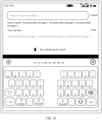
- FIG. 24 is a schematic diagram of an interface in which a keyboard region is displayed in the form of a QWERTY keyboard when a foldable-screen device runs a single application in the mode of a notebook computer.
- FIG. 25 is a schematic diagram of an interface in which a keyboard region is displayed in a 9-key Pinyin form when a foldable-screen device runs a single application in the mode of a notebook computer.
- the black region in FIG. 24 and FIG. 25 is a folding portion.
- the foldable-screen device when the foldable-screen device operates in the mode of a notebook computer, if interfaces of the two apps are displayed on a split-screen form, as shown in FIG. 26 , the interface of the first app is displayed in the upper half of the screen, and the interface of the second app is displayed in the lower half of the screen.
- the keyboard application when the keyboard application is started, the keyboard region is displayed in a right region in the lower half of the screen, as shown in FIG. 27 , to reduce obstruction of the screen while facilitating input of the user.
- the interface of the floating window and the keyboard region may be displayed in the first region or the second region, and instead of being displayed across the first region and the second region. That is, an interface of a same app, or a same display region is not displayed in a region of the folding portion to avoid that the interface of the same app is displayed at a crease position of the foldable-screen device. Such a display manner is more appropriate.
- the keyboard display method provided in this embodiment of this application may also be applied to a terminal device with a non-foldable screen, such as a tablet computer or a terminal device with another screen size.
- a terminal device with a non-foldable screen such as a tablet computer or a terminal device with another screen size.
- the corresponding apparatus includes a corresponding hardware structure and/or a software module that performs each function.
- units and algorithm steps can be implemented in a form of hardware or a combination of hardware and computer software in this application. Whether a function is implemented in a manner of hardware or hardware driven by computer software depends on a specific application and a design constraint of a technical solution. A person skilled in the art may use different methods to implement the described functions for each specific application, but such implementation should not be considered to be beyond the scope of this application.
- function module division may be performed on a keyboard display apparatus according to the foregoing method example.
- function modules may be obtained through division based on functions, or two or more functions may be integrated into one module.
- the integrated module may be implemented in a form of hardware, or may be implemented in a form of a software function module. It should be noted that the module division in this application is an example, and is merely logical function division and may be other division in actual implementation.
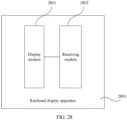
- FIG. 28 is a schematic diagram of a structure of a keyboard display apparatus 2800 according to this application.
- the apparatus 2800 includes a display module 2801 and a receiving module 2802.
- the display module 2801 is configured to display a first interface, where the first interface includes a first region and a second region, the first region is used to display an interface of a first app, the second region is used to display an interface of a second app, the first region includes a first input box of the first app, and the second region includes a second input box of the second app.
- the receiving module 2802 is configured to: when the first region and the second region are distributed from left to right, receive a first operation performed by a user on the first input box, where the first operation is used to determine that an input cursor is located in the first input box.
- the display module 2801 is further configured to display a keyboard region in the first region in response to the first operation.
- the receiving module 2802 is further configured to receive a second operation performed by the user on the second input box, where the second operation is used to determine that the input cursor is located in the second input box.
- the display module 2801 is further configured to: in response to the second operation, display the keyboard region in the second region, and stop displaying the keyboard region in the first region.
- the receiving module 2802 is further configured to receive a third operation performed by the user on a third app, where the third operation is used to open the third app.
- the display module 2801 is further configured to display the third region in the form of a floating window in response to the third operation, where the third region is used to display an interface of the third app, and the third region includes a third input box of the third app.
- the receiving module 2802 is further configured to receive a fourth operation performed on the third input box, where the fourth operation is used to determine that the input cursor is located in the third input box.
- the display module 2801 is further configured to display the keyboard region in the form of a floating window in response to the fourth operation.
- the keyboard region is vertically adjacent to the third region and the keyboard region is located on a lower position of the second region.
- the receiving module 2802 is further configured to: when the first region and the second region are distributed from top to bottom, receive a fifth operation performed by the user on the first input box, where the fifth operation is used to determine that the input cursor is located in the first input box.
- the display module 2801 is further configured to display the keyboard region in the second region in response to the fifth operation.
- the receiving module 2802 is further configured to receive a sixth operation performed by the user on the second input box, where the sixth operation is used to determine that the input cursor is located in the second input box.
- the keyboard region is located on a right side of the second region.
- the receiving module 2802 is further configured to receive a seventh operation performed by the user on a third app, where the seventh operation is used to open the third app.
- the first region is located on an upper position of the screen, and the second region is located on a lower position of the screen; when the third region is located on a right side of the first region, the keyboard region is vertically adjacent to the third region and the keyboard region is located on the right side of the second region.
- the keyboard region is horizontally adjacent to the third region and the keyboard region is located on the right side of the second region.
- the display module 2801 is specifically configured to display a main interface, where the main interface includes an icon of the first app and an icon of the second app.
- the receiving module 2802 is further configured to receive a ninth operation performed by the user on the first app, where the ninth operation is used to open the first app.
- the receiving module 2802 is further configured to receive a tenth operation performed by the user, where the tenth operation is used to open a sidebar, a list of a plurality of apps is displayed on the sidebar, and the plurality of apps include the second app.
- the receiving module 2802 is further configured to receive an eleventh operation performed by the user on the second app on the sidebar, where the eleventh operation is used to open the second app in a split-screen form.
- the display module 2801 is specifically configured to display the first interface.
- the tenth operation is an operation of sliding from a side edge of the screen toward the middle of the screen and then pausing.
- the eleventh operation is an operation of dragging the icon of the second app from the sidebar to a left side of the screen or a right side of the screen.
- the first app is a video play app
- the interface of the first app is a video play interface
- the first app is a conference app
- the interface of the first app is an interface of a participant attendance status.
- the second app is a chat app
- the interface of the second app is a chat interface
- the second app is a payment app
- the interface of the second app is a payment interface
- FIG. 29 is a schematic diagram of a structure of another keyboard display apparatus 2900 according to this application.
- the apparatus 2900 includes a display module 2901 and a receiving module 2902.
- the display module 2901 is configured to display a main interface, where the main interface includes an icon of a first app and an icon of a second app.
- the receiving module 2902 is further configured to receive a ninth operation performed by a user on the first app, where the ninth operation is used to open the first app.
- the receiving module 2902 is further configured to receive a tenth operation performed by the user, where the tenth operation is an operation of sliding from a side edge of a screen toward the middle of the screen and then pausing to open a sidebar, a list of a plurality of apps is displayed on the sidebar, and the plurality of apps include the second app.
- the receiving module 2902 is further configured to receive an eleventh operation performed by the user on the second app on the sidebar, where the eleventh operation is an operation of dragging the icon of the second app from the sidebar to a left side of the screen or a right side of the screen.
- the display module 2901 is further configured to display a first interface, where the first interface includes a first region and a second region, the first region is used to display an interface of the first app, the second region is used to display an interface of the second app, the first region includes a first input box of the first app, and the second region includes a second input box of the second app.
- the first app is a video play app
- the interface of the first app is a video play interface
- the first app is a conference app
- the interface of the first app is an interface of a participant attendance status.
- the second app is a chat app
- the interface of the second app is a chat interface
- the second app is a payment app
- the interface of the second app is a payment interface.
- the receiving module 2902 is configured to: when the first region and the second region are distributed from left to right, receive a first operation performed by the user on the first input box, where the first operation is used to determine that an input cursor is located in the first input box.
- the display module 2901 is further configured to display a keyboard region in the first region in response to the first operation.
- the receiving module 2902 is further configured to receive a second operation performed by the user on the second input box, where the second operation is used to determine that the input cursor is located in the second input box.
- the display module 2901 is further configured to: in response to the second operation, display the keyboard region in the second region, and stop displaying the keyboard region in the first region.
- the receiving module 2902 is further configured to receive a third operation performed by the user on a third app, where the third operation is used to open the third app.
- the display module 2901 is further configured to display the third region in the form of a floating window on an upper position of the second region in response to the third operation, where the third region is used to display an interface of the third app, and the third region includes a third input box of the third app.
- the receiving module 2902 is further configured to receive a fourth operation performed on the third input box, where the fourth operation is used to determine that the input cursor is located in the third input box.
- the display module 2901 is further configured to display the keyboard region in the form of a floating window on a lower position of the second region in response to the fourth operation, where the keyboard region is vertically adjacent to the third region.
- the display module 2901 is further configured to: when the foldable-screen device satisfies a condition of horizontal split-screen display of the first app and the second app, display a second interface, where the second interface includes the first region and the second region.
- the receiving module 2902 is further configured to: when the first region and the second region are distributed from top to bottom and the first region is located on the upper position of the second region, receive a fifth operation performed by the user on the first input box, where the fifth operation is used to determine that the input cursor is located in the first input box.
- the display module 2901 is further configured to display the keyboard region on a right side of the second region in response to the fifth operation.
- the receiving module 2902 is further configured to receive a sixth operation performed by the user on the second input box, where the sixth operation is used to determine that the input cursor is located in the second input box.
- the display module 2901 is further configured to display the keyboard region on a right side of the second region in response to the sixth operation.
- An embodiment of this application further provides a computer program product.
- the computer program product When the computer program product is run on a computer, the computer is enabled to perform the foregoing related steps, so as to implement the keyboard display method in the foregoing embodiment.
- the disclosed apparatuses and methods may be implemented in another manner.
- the described apparatus embodiment is merely an example.
- the module or unit division is merely logical function division and may be other division in actual implementation.
- a plurality of units or components may be combined or integrated into another apparatus, or some features may be ignored or not performed.
- the displayed or discussed mutual couplings or direct couplings or communication connections may be implemented by using some interfaces.
- the indirect couplings or communication connections between the apparatuses or units may be implemented in electronic, mechanical, or other forms.
- the units described as separate parts may or may not be physically separate, and parts displayed as units may be one or more physical units, may be located in one place, or may be distributed in different places. Some or all of the units may be selected based on actual needs to achieve the objectives of the solutions of the embodiments.
- functional units in the embodiments of this application may be integrated into one processing unit, or each of the units may exist alone physically, or two or more units are integrated into one unit.
- the integrated unit may be implemented in a form of hardware, or may be implemented in a form of a software function unit.
- the integrated unit When the integrated unit is implemented in the form of a software function unit and is sold or used as an independent product, the integrated unit may be stored in a readable storage medium. Based on such an understanding, the technical solutions in the embodiments of this application essentially, or the part contributing to the prior art, or all or a part of the technical solutions may be implemented in the form of a software product.
- the software product is stored in a storage medium and includes several instructions for instructing a device (which may be a single-chip microcomputer, a chip, or the like) or a processor (processor) to perform all or some of the steps of the methods described in the embodiments of this application.
Landscapes
- Engineering & Computer Science (AREA)
- Theoretical Computer Science (AREA)
- General Engineering & Computer Science (AREA)
- Human Computer Interaction (AREA)
- Physics & Mathematics (AREA)
- General Physics & Mathematics (AREA)
- Software Systems (AREA)
- User Interface Of Digital Computer (AREA)
Claims (15)
- Tastaturanzeigeverfahren, das auf eine Vorrichtung (100) mit faltbarem Bildschirm angewendet wird und umfassend:Anzeigen einer ersten Schnittstelle, wobei die erste Schnittstelle einen ersten Bereich und einen zweiten Bereich umfasst, der erste Bereich verwendet wird, um eine Schnittstelle einer ersten App anzuzeigen, der zweite Bereich verwendet wird, um eine Schnittstelle einer zweiten App anzuzeigen, der erste Bereich ein erstes Eingabefeld der ersten App umfasst und der zweite Bereich ein zweites Eingabefeld der zweiten App umfasst;wenn der erste Bereich und der zweite Bereich von links nach rechts verteilt sind, Empfangen einer ersten Operation, die durch einen Benutzer in dem ersten Eingabefeld durchgeführt wird, wobei die erste Operation verwendet wird, um zu bestimmen, dass sich ein Eingabecursor in dem ersten Eingabefeld befindet;Anzeigen eines Tastaturbereichs in dem ersten Bereich als Reaktion auf die erste Operation;Empfangen einer zweiten Operation, die durch den Benutzer auf dem zweiten Eingabefeld durchgeführt wird, wobei die zweite Operation verwendet wird, um zu bestimmen, dass sich der Eingabecursor in dem zweiten Eingabefeld befindet;als Reaktion auf die zweite Operation, Anzeigen des Tastaturbereichs in dem zweiten Bereich und Beenden des Anzeigens des Tastaturbereichs in dem ersten Bereich;Empfangen einer dritten Operation, die durch den Benutzer auf einer dritten App durchgeführt wird, wobei die dritte Operation verwendet wird, um die dritte App zu öffnen;Anzeigen eines dritten Bereichs durch ein schwebendes Fenster als Reaktion auf die dritte Operation, wobei der dritte Bereich verwendet wird, um eine Schnittstelle der dritten App anzuzeigen und der dritte Bereich ein drittes Eingabefeld der dritten App umfasst;Empfangen einer vierten Operation, die auf dem dritten Eingabefeld durchgeführt wird, wobei die vierte Operation verwendet wird, um zu bestimmen, dass sich der Eingabecursor in dem dritten Eingabefeld befindet;Anzeigen des Tastaturbereichs durch ein schwebendes Fenster als Reaktion auf die vierte Operation; undwenn sich der dritte Bereich auf einer oberen Position des zweiten Bereichs befindet, der Tastaturbereich an den dritten Bereich vertikal angrenzt und der Tastaturbereich sich auf einer unteren Position des zweiten Bereichs befindet.
- Verfahren nach Anspruch 1, wobei das Verfahren ferner umfasst:wenn die Vorrichtung (100) mit faltbarem Bildschirm eine voreingestellte Bedingung erfüllt, Anzeigen einer zweiten Schnittstelle, wobei die zweite Schnittstelle den ersten Bereich und den zweiten Bereich umfasst und die voreingestellte Bedingung eine Bedingung zum Erfüllen einer horizontalen Anzeige mit geteilten Bildschirm der ersten App und der zweiten App ist;wenn der erste Bereich und der zweite Bereich von oben nach unten verteilt sind, Empfangen einer fünften Operation, die durch den Benutzer in dem ersten Eingabefeld durchgeführt wird, wobei die fünfte Operation verwendet wird, um zu bestimmen, dass sich der Eingabecursor in dem ersten Eingabefeld befindet;Anzeigen des Tastaturbereichs in dem zweiten Bereich als Reaktion auf die fünfte Operation;Empfangen einer sechsten Operation, die durch den Benutzer in dem zweiten Eingabefeld durchgeführt wird, wobei die sechste Operation verwendet wird, um zu bestimmen, dass sich der Eingabecursor in dem zweiten Eingabefeld befindet; und als Reaktion auf die sechste Operation, Anzeigen des Tastaturbereichs in dem zweiten Bereich.
- Verfahren nach Anspruch 2, wobei
der Tastaturbereich sich auf der rechten Seite des zweiten Bereichs befindet. - Verfahren nach Anspruch 2 oder 3, wobei das Verfahren ferner umfasst:Empfangen einer siebten Operation, die durch den Benutzer auf einer dritten App durchgeführt wird, wobei die siebte Operation verwendet wird, um die dritte App zu öffnen;Anzeigen des dritten Bereichs durch ein schwebendes Fenster als Reaktion auf die siebte Operation, wobei der dritte Bereich verwendet wird, um eine Schnittstelle der dritten App anzuzeigen, und der dritte Bereich ein drittes Eingabefeld der dritten App umfasst;Empfangen einer achten Operation, die auf dem dritten Eingabefeld durchgeführt wird, wobei die achte Operation verwendet wird, um zu bestimmen, dass sich der Eingabecursor in dem dritten Eingabefeld befindet; undAnzeigen des Tastaturbereichs durch ein schwebendes Fenster als Reaktion auf die achte Operation.
- Verfahren nach Anspruch 4, wobeider erste Bereich sich auf einer oberen Position eines Bildschirms befindet und der zweite Bereich sich auf einer unteren Position des Bildschirms befindet; undwenn sich der dritte Bereich auf einer rechten Seite des ersten Bereichs befindet, der Tastaturbereich an den dritten Bereich vertikal angrenzt und der Tastaturbereich sich auf einer rechten Seite des zweiten Bereichs befindet.
- Verfahren nach Anspruch 5, wobei
wenn sich der dritte Bereich auf einer linken Seite des zweiten Bereichs befindet, der Tastaturbereich an den dritten Bereich horizontal angrenzt und der Tastaturbereich sich auf der rechten Seite des zweiten Bereichs befindet. - Verfahren nach einem der Ansprüche 1 bis 6, wobei das Anzeigen einer ersten Schnittstelle umfasst:Anzeigen einer Hauptschnittstelle, wobei die Hauptschnittstelle ein Symbol der ersten App und ein Symbol der zweiten App umfasst;Empfangen einer neunten Operation, die durch den Benutzer auf der ersten App durchgeführt wird, wobei die neunte Operation verwendet wird, um die erste App zu öffnen;Empfangen einer zehnten Operation, die durch den Benutzer durchgeführt wird, wobei die zehnte Operation verwendet wird, um eine Seitenleiste zu öffnen, eine Liste einer Vielzahl von Apps auf der Seitenleiste angezeigt wird und die Vielzahl von Apps die zweite App umfassen;Empfangen einer elften Operation, die durch den Benutzer auf der zweiten App auf der Seitenleiste durchgeführt wird, wobei die elfte Operation verwendet wird, um die zweite App in einer Form des geteilten Bildschirms zu öffnen; undAnzeigen der ersten Schnittstelle.
- Verfahren nach Anspruch 7, wobeidie zehnte Operation eine Operation zum Gleiten von einem Seitenrand des Bildschirms zu der Bildschirmmitte und dann Pausieren ist; unddie elfte Operation eine Operation zum Ziehen des Symbols der zweiten App aus der Seitenleiste auf eine linke Seite des Bildschirms oder eine rechte Seite des Bildschirms ist.
- Verfahren nach einem der Ansprüche 1 bis 8, wobei
die erste App eine App zum Abspielen von Videos ist, und die Schnittstelle der ersten App eine Schnittstelle zum Abspielen von Videos ist. - Verfahren nach einem der Ansprüche 1 bis 9, wobei
die ersten App eine Konferenz-App ist, und die Schnittstelle der ersten App eine Schnittstelle eines Teilnehmeranwesenheitsstatus ist. - Verfahren nach einem der Ansprüche 1 bis 10, wobei
die zweite App eine Chat-App ist und die Schnittstelle der zweiten App eine Chat-Schnittstelle ist. - Verfahren nach einem der Ansprüche 1 bis 10, wobei
die zweite App eine Zahlungs-App ist, und die Schnittstelle der zweiten App eine Zahlungsschnittstelle ist. - Vorrichtung (100) mit faltbarem Bildschirm, umfassend einen Prozessor (110), einen Speicher (121), eine Schnittstelle und einen faltbaren Bildschirm (194), wobei
der Prozessor (110), der Speicher (121), die Schnittstelle und der faltbare Bildschirm (194) konfiguriert sind, um miteinander zu kooperieren, sodass die Vorrichtung (100) mit faltbarem Bildschirm das Verfahren nach einem der Ansprüche 1 bis 12 durchführt. - Computerlesbares Speicherungsmedium, wobei das computerlesbare Speicherungsmedium ein Computerprogramm speichert, und wenn das Computerprogramm durch einen Prozessor ausgeführt wird, der Prozessor aktiviert wird, um das Verfahren nach einem der Ansprüche 1 bis 12 durchzuführen.
- Computerprogrammprodukt, wobei das Computerprogrammprodukt einen Computerprogrammcode umfasst, und wenn der Computerprogrammcode auf einer elektronischen Vorrichtung laufen gelassen wird, die elektronische Vorrichtung aktiviert wird, um das Verfahren nach einem der Ansprüche 1 bis 12 durchzuführen.
Applications Claiming Priority (2)
| Application Number | Priority Date | Filing Date | Title |
|---|---|---|---|
| CN202111111234.XA CN113986072B (zh) | 2021-09-18 | 2021-09-18 | 键盘显示方法、折叠屏设备和计算机可读存储介质 |
| PCT/CN2022/116207 WO2023040666A1 (zh) | 2021-09-18 | 2022-08-31 | 键盘显示方法、折叠屏设备和计算机可读存储介质 |
Publications (3)
| Publication Number | Publication Date |
|---|---|
| EP4177722A1 EP4177722A1 (de) | 2023-05-10 |
| EP4177722A4 EP4177722A4 (de) | 2024-03-06 |
| EP4177722B1 true EP4177722B1 (de) | 2025-03-05 |
Family
ID=79736292
Family Applications (1)
| Application Number | Title | Priority Date | Filing Date |
|---|---|---|---|
| EP22846878.1A Active EP4177722B1 (de) | 2021-09-18 | 2022-08-31 | Tastaturanzeigeverfahren, faltbare bildschirmvorrichtung und computerlesbares speichermedium |
Country Status (4)
| Country | Link |
|---|---|
| US (1) | US12153792B2 (de) |
| EP (1) | EP4177722B1 (de) |
| CN (2) | CN115495003A (de) |
| WO (1) | WO2023040666A1 (de) |
Families Citing this family (4)
| Publication number | Priority date | Publication date | Assignee | Title |
|---|---|---|---|---|
| CN115495003A (zh) | 2021-09-18 | 2022-12-20 | 荣耀终端有限公司 | 键盘显示方法、折叠屏设备和计算机可读存储介质 |
| CN115291828B (zh) * | 2022-08-26 | 2026-02-27 | 联想(北京)有限公司 | 一种显示方法及装置、电子设备、存储介质 |
| CN116166173A (zh) * | 2023-02-28 | 2023-05-26 | 北京梧桐车联科技有限责任公司 | 软键盘的显示方法、装置、设备及计算机可读存储介质 |
| CN117492609B (zh) * | 2023-12-29 | 2024-05-17 | 荣耀终端有限公司 | 一种显示方法、可读存储介质、程序产品及电子设备 |
Family Cites Families (18)
| Publication number | Priority date | Publication date | Assignee | Title |
|---|---|---|---|---|
| KR101770207B1 (ko) * | 2011-06-01 | 2017-08-22 | 엘지전자 주식회사 | 무선 통신 시스템에서 단말의 멀티미디어 메시지 제어 방법 및 이를 위한 장치 |
| KR101850821B1 (ko) * | 2011-09-15 | 2018-04-20 | 엘지전자 주식회사 | 이동 단말기 및 이동 단말기의 메시지 표시 방법 |
| KR102049855B1 (ko) * | 2013-01-31 | 2019-11-28 | 엘지전자 주식회사 | 이동 단말기 및 이의 제어 방법 |
| US9300645B1 (en) * | 2013-03-14 | 2016-03-29 | Ip Holdings, Inc. | Mobile IO input and output for smartphones, tablet, and wireless devices including touch screen, voice, pen, and gestures |
| CN104699404A (zh) * | 2015-03-26 | 2015-06-10 | 努比亚技术有限公司 | 一种软键盘的显示方法及装置 |
| US20160364085A1 (en) | 2015-06-15 | 2016-12-15 | Cisco Technology, Inc. | Instant messaging user interface |
| CN107526494B (zh) | 2017-09-06 | 2021-02-09 | 北京小米移动软件有限公司 | 键盘显示方法、装置、终端及存储介质 |
| CN108519850A (zh) * | 2018-04-09 | 2018-09-11 | 维沃移动通信有限公司 | 一种键盘界面显示方法和移动终端 |
| CN109491738B (zh) * | 2018-10-30 | 2022-03-01 | 维沃移动通信有限公司 | 一种终端设备的控制方法及终端设备 |
| CN110515510B (zh) * | 2019-08-20 | 2021-03-02 | 北京小米移动软件有限公司 | 数据处理方法、装置、设备及存储介质 |
| CN110471611B (zh) * | 2019-08-20 | 2021-06-29 | 广州视源电子科技股份有限公司 | 键盘启动的方法、装置、终端设备和存储介质 |
| CN112583957A (zh) * | 2019-09-30 | 2021-03-30 | 华为技术有限公司 | 电子设备的显示方法、电子设备与计算机可读存储介质 |
| CN111078091A (zh) * | 2019-11-29 | 2020-04-28 | 华为技术有限公司 | 分屏显示的处理方法、装置及电子设备 |
| CN111338555B (zh) * | 2020-02-19 | 2022-03-15 | 昆明闻泰通讯有限公司 | 通过虚拟键盘实现输入的方法、装置、设备及存储介质 |
| CN111669459B (zh) * | 2020-04-23 | 2022-08-26 | 华为技术有限公司 | 键盘显示方法、电子设备和计算机可读存储介质 |
| CN111857532B (zh) * | 2020-07-30 | 2022-04-29 | 京东方科技集团股份有限公司 | 虚拟键盘显示方法、装置及电子设备 |
| WO2022119053A1 (ko) * | 2020-12-02 | 2022-06-09 | 삼성전자 주식회사 | 어플리케이션을 프리로드하는 방법 및 이를 지원하는 전자 장치 |
| CN115495003A (zh) * | 2021-09-18 | 2022-12-20 | 荣耀终端有限公司 | 键盘显示方法、折叠屏设备和计算机可读存储介质 |
-
2021
- 2021-09-18 CN CN202210943285.7A patent/CN115495003A/zh active Pending
- 2021-09-18 CN CN202111111234.XA patent/CN113986072B/zh active Active
-
2022
- 2022-08-31 EP EP22846878.1A patent/EP4177722B1/de active Active
- 2022-08-31 US US18/040,952 patent/US12153792B2/en active Active
- 2022-08-31 WO PCT/CN2022/116207 patent/WO2023040666A1/zh not_active Ceased
Also Published As
| Publication number | Publication date |
|---|---|
| US20240302955A1 (en) | 2024-09-12 |
| CN113986072B (zh) | 2022-09-30 |
| CN115495003A (zh) | 2022-12-20 |
| EP4177722A1 (de) | 2023-05-10 |
| US12153792B2 (en) | 2024-11-26 |
| EP4177722A4 (de) | 2024-03-06 |
| WO2023040666A1 (zh) | 2023-03-23 |
| CN113986072A (zh) | 2022-01-28 |
Similar Documents
| Publication | Publication Date | Title |
|---|---|---|
| CN118642622B (zh) | 窗口切换方法、电子设备及可读存储介质 | |
| EP4177722B1 (de) | Tastaturanzeigeverfahren, faltbare bildschirmvorrichtung und computerlesbares speichermedium | |
| US11853526B2 (en) | Window display method, window switching method, electronic device, and system | |
| CN111966252A (zh) | 应用窗口显示方法和电子设备 | |
| CN113805745B (zh) | 一种悬浮窗的控制方法及电子设备 | |
| WO2021120914A1 (zh) | 一种界面元素的显示方法及电子设备 | |
| US20230362294A1 (en) | Window Display Method and Device | |
| US12585744B2 (en) | Method for performing biometric feature authentication when multiple application interfaces are simultaneously displayed | |
| EP4339765A1 (de) | Verfahren zur anzeige mehrerer schnittstellen und elektronische vorrichtung | |
| US20250251891A1 (en) | Display method for foldable screen and electronic device | |
| EP4468690B1 (de) | Fensteranzeigeverfahren und zugehörige vorrichtung | |
| US20250362785A1 (en) | Application management method and electronic device | |
| WO2024027504A1 (zh) | 一种应用显示方法及电子设备 | |
| WO2024017145A1 (zh) | 显示方法和电子设备 | |
| CN114461312B (zh) | 显示的方法、电子设备及存储介质 | |
| EP4163774A1 (de) | Aufforderungsverfahren und endgerätevorrichtung | |
| WO2024152747A1 (zh) | 屏幕显示方法、电子设备及可读存储介质 | |
| CN116719587A (zh) | 屏幕显示方法、电子设备及计算机可读存储介质 | |
| CN116048349B (zh) | 一种图片显示方法、装置及终端设备 | |
| EP4517520A1 (de) | Anzeigeverfahren und elektronische vorrichtung | |
| CN112653788A (zh) | 一种用户界面显示方法以及移动终端 | |
| US20250348265A1 (en) | Methods and user interfaces for managing screen content sharing | |
| WO2022037247A1 (en) | Device, method and system for operating device | |
| WO2026086252A1 (zh) | 一种显示方法及电子设备 | |
| WO2025092106A9 (zh) | 界面显示方法、电子设备及存储介质 |
Legal Events
| Date | Code | Title | Description |
|---|---|---|---|
| STAA | Information on the status of an ep patent application or granted ep patent |
Free format text: STATUS: UNKNOWN |
|
| STAA | Information on the status of an ep patent application or granted ep patent |
Free format text: STATUS: THE INTERNATIONAL PUBLICATION HAS BEEN MADE |
|
| PUAI | Public reference made under article 153(3) epc to a published international application that has entered the european phase |
Free format text: ORIGINAL CODE: 0009012 |
|
| STAA | Information on the status of an ep patent application or granted ep patent |
Free format text: STATUS: REQUEST FOR EXAMINATION WAS MADE |
|
| 17P | Request for examination filed |
Effective date: 20230130 |
|
| AK | Designated contracting states |
Kind code of ref document: A1 Designated state(s): AL AT BE BG CH CY CZ DE DK EE ES FI FR GB GR HR HU IE IS IT LI LT LU LV MC MK MT NL NO PL PT RO RS SE SI SK SM TR |
|
| A4 | Supplementary search report drawn up and despatched |
Effective date: 20240202 |
|
| RIC1 | Information provided on ipc code assigned before grant |
Ipc: G06F 1/16 20060101ALI20240130BHEP Ipc: G06F 3/04886 20220101ALI20240130BHEP Ipc: G06F 3/04817 20220101AFI20240130BHEP |
|
| GRAP | Despatch of communication of intention to grant a patent |
Free format text: ORIGINAL CODE: EPIDOSNIGR1 |
|
| STAA | Information on the status of an ep patent application or granted ep patent |
Free format text: STATUS: GRANT OF PATENT IS INTENDED |
|
| DAV | Request for validation of the european patent (deleted) | ||
| DAX | Request for extension of the european patent (deleted) | ||
| INTG | Intention to grant announced |
Effective date: 20240729 |
|
| GRAJ | Information related to disapproval of communication of intention to grant by the applicant or resumption of examination proceedings by the epo deleted |
Free format text: ORIGINAL CODE: EPIDOSDIGR1 |
|
| STAA | Information on the status of an ep patent application or granted ep patent |
Free format text: STATUS: REQUEST FOR EXAMINATION WAS MADE |
|
| GRAP | Despatch of communication of intention to grant a patent |
Free format text: ORIGINAL CODE: EPIDOSNIGR1 |
|
| STAA | Information on the status of an ep patent application or granted ep patent |
Free format text: STATUS: GRANT OF PATENT IS INTENDED |
|
| INTC | Intention to grant announced (deleted) | ||
| INTG | Intention to grant announced |
Effective date: 20241127 |
|
| GRAS | Grant fee paid |
Free format text: ORIGINAL CODE: EPIDOSNIGR3 |
|
| GRAA | (expected) grant |
Free format text: ORIGINAL CODE: 0009210 |
|
| STAA | Information on the status of an ep patent application or granted ep patent |
Free format text: STATUS: THE PATENT HAS BEEN GRANTED |
|
| AK | Designated contracting states |
Kind code of ref document: B1 Designated state(s): AL AT BE BG CH CY CZ DE DK EE ES FI FR GB GR HR HU IE IS IT LI LT LU LV MC MK MT NL NO PL PT RO RS SE SI SK SM TR |
|
| REG | Reference to a national code |
Ref country code: GB Ref legal event code: FG4D |
|
| REG | Reference to a national code |
Ref country code: CH Ref legal event code: EP |
|
| REG | Reference to a national code |
Ref country code: DE Ref legal event code: R096 Ref document number: 602022011544 Country of ref document: DE |
|
| REG | Reference to a national code |
Ref country code: IE Ref legal event code: FG4D |
|
| REG | Reference to a national code |
Ref country code: NL Ref legal event code: FP |
|
| PG25 | Lapsed in a contracting state [announced via postgrant information from national office to epo] |
Ref country code: RS Free format text: LAPSE BECAUSE OF FAILURE TO SUBMIT A TRANSLATION OF THE DESCRIPTION OR TO PAY THE FEE WITHIN THE PRESCRIBED TIME-LIMIT Effective date: 20250605 |
|
| PG25 | Lapsed in a contracting state [announced via postgrant information from national office to epo] |
Ref country code: FI Free format text: LAPSE BECAUSE OF FAILURE TO SUBMIT A TRANSLATION OF THE DESCRIPTION OR TO PAY THE FEE WITHIN THE PRESCRIBED TIME-LIMIT Effective date: 20250305 |
|
| PG25 | Lapsed in a contracting state [announced via postgrant information from national office to epo] |
Ref country code: ES Free format text: LAPSE BECAUSE OF FAILURE TO SUBMIT A TRANSLATION OF THE DESCRIPTION OR TO PAY THE FEE WITHIN THE PRESCRIBED TIME-LIMIT Effective date: 20250305 |
|
| REG | Reference to a national code |
Ref country code: LT Ref legal event code: MG9D |
|
| PG25 | Lapsed in a contracting state [announced via postgrant information from national office to epo] |
Ref country code: NO Free format text: LAPSE BECAUSE OF FAILURE TO SUBMIT A TRANSLATION OF THE DESCRIPTION OR TO PAY THE FEE WITHIN THE PRESCRIBED TIME-LIMIT Effective date: 20250605 |
|
| PG25 | Lapsed in a contracting state [announced via postgrant information from national office to epo] |
Ref country code: HR Free format text: LAPSE BECAUSE OF FAILURE TO SUBMIT A TRANSLATION OF THE DESCRIPTION OR TO PAY THE FEE WITHIN THE PRESCRIBED TIME-LIMIT Effective date: 20250305 |
|
| PG25 | Lapsed in a contracting state [announced via postgrant information from national office to epo] |
Ref country code: LV Free format text: LAPSE BECAUSE OF FAILURE TO SUBMIT A TRANSLATION OF THE DESCRIPTION OR TO PAY THE FEE WITHIN THE PRESCRIBED TIME-LIMIT Effective date: 20250305 |
|
| PG25 | Lapsed in a contracting state [announced via postgrant information from national office to epo] |
Ref country code: GR Free format text: LAPSE BECAUSE OF FAILURE TO SUBMIT A TRANSLATION OF THE DESCRIPTION OR TO PAY THE FEE WITHIN THE PRESCRIBED TIME-LIMIT Effective date: 20250606 Ref country code: BG Free format text: LAPSE BECAUSE OF FAILURE TO SUBMIT A TRANSLATION OF THE DESCRIPTION OR TO PAY THE FEE WITHIN THE PRESCRIBED TIME-LIMIT Effective date: 20250305 |
|
| REG | Reference to a national code |
Ref country code: AT Ref legal event code: MK05 Ref document number: 1773509 Country of ref document: AT Kind code of ref document: T Effective date: 20250305 |
|
| PGFP | Annual fee paid to national office [announced via postgrant information from national office to epo] |
Ref country code: NL Payment date: 20250704 Year of fee payment: 4 |
|
| PG25 | Lapsed in a contracting state [announced via postgrant information from national office to epo] |
Ref country code: SE Free format text: LAPSE BECAUSE OF FAILURE TO SUBMIT A TRANSLATION OF THE DESCRIPTION OR TO PAY THE FEE WITHIN THE PRESCRIBED TIME-LIMIT Effective date: 20250305 |
|
| PG25 | Lapsed in a contracting state [announced via postgrant information from national office to epo] |
Ref country code: SM Free format text: LAPSE BECAUSE OF FAILURE TO SUBMIT A TRANSLATION OF THE DESCRIPTION OR TO PAY THE FEE WITHIN THE PRESCRIBED TIME-LIMIT Effective date: 20250305 |
|
| PG25 | Lapsed in a contracting state [announced via postgrant information from national office to epo] |
Ref country code: PT Free format text: LAPSE BECAUSE OF FAILURE TO SUBMIT A TRANSLATION OF THE DESCRIPTION OR TO PAY THE FEE WITHIN THE PRESCRIBED TIME-LIMIT Effective date: 20250707 |
|
| PGFP | Annual fee paid to national office [announced via postgrant information from national office to epo] |
Ref country code: DE Payment date: 20250702 Year of fee payment: 4 |
|
| PG25 | Lapsed in a contracting state [announced via postgrant information from national office to epo] |
Ref country code: IT Free format text: LAPSE BECAUSE OF FAILURE TO SUBMIT A TRANSLATION OF THE DESCRIPTION OR TO PAY THE FEE WITHIN THE PRESCRIBED TIME-LIMIT Effective date: 20250305 Ref country code: PL Free format text: LAPSE BECAUSE OF FAILURE TO SUBMIT A TRANSLATION OF THE DESCRIPTION OR TO PAY THE FEE WITHIN THE PRESCRIBED TIME-LIMIT Effective date: 20250305 |
|
| PG25 | Lapsed in a contracting state [announced via postgrant information from national office to epo] |
Ref country code: AT Free format text: LAPSE BECAUSE OF FAILURE TO SUBMIT A TRANSLATION OF THE DESCRIPTION OR TO PAY THE FEE WITHIN THE PRESCRIBED TIME-LIMIT Effective date: 20250305 |
|
| PG25 | Lapsed in a contracting state [announced via postgrant information from national office to epo] |
Ref country code: CZ Free format text: LAPSE BECAUSE OF FAILURE TO SUBMIT A TRANSLATION OF THE DESCRIPTION OR TO PAY THE FEE WITHIN THE PRESCRIBED TIME-LIMIT Effective date: 20250305 Ref country code: EE Free format text: LAPSE BECAUSE OF FAILURE TO SUBMIT A TRANSLATION OF THE DESCRIPTION OR TO PAY THE FEE WITHIN THE PRESCRIBED TIME-LIMIT Effective date: 20250305 |
|
| PG25 | Lapsed in a contracting state [announced via postgrant information from national office to epo] |
Ref country code: RO Free format text: LAPSE BECAUSE OF FAILURE TO SUBMIT A TRANSLATION OF THE DESCRIPTION OR TO PAY THE FEE WITHIN THE PRESCRIBED TIME-LIMIT Effective date: 20250305 |
|
| PG25 | Lapsed in a contracting state [announced via postgrant information from national office to epo] |
Ref country code: SK Free format text: LAPSE BECAUSE OF FAILURE TO SUBMIT A TRANSLATION OF THE DESCRIPTION OR TO PAY THE FEE WITHIN THE PRESCRIBED TIME-LIMIT Effective date: 20250305 |
|
| PG25 | Lapsed in a contracting state [announced via postgrant information from national office to epo] |
Ref country code: IS Free format text: LAPSE BECAUSE OF FAILURE TO SUBMIT A TRANSLATION OF THE DESCRIPTION OR TO PAY THE FEE WITHIN THE PRESCRIBED TIME-LIMIT Effective date: 20250705 |
|
| REG | Reference to a national code |
Ref country code: DE Ref legal event code: R097 Ref document number: 602022011544 Country of ref document: DE |
|
| PLBE | No opposition filed within time limit |
Free format text: ORIGINAL CODE: 0009261 |
|
| STAA | Information on the status of an ep patent application or granted ep patent |
Free format text: STATUS: NO OPPOSITION FILED WITHIN TIME LIMIT |
|
| PG25 | Lapsed in a contracting state [announced via postgrant information from national office to epo] |
Ref country code: DK Free format text: LAPSE BECAUSE OF FAILURE TO SUBMIT A TRANSLATION OF THE DESCRIPTION OR TO PAY THE FEE WITHIN THE PRESCRIBED TIME-LIMIT Effective date: 20250305 |
|
| REG | Reference to a national code |
Ref country code: CH Ref legal event code: L10 Free format text: ST27 STATUS EVENT CODE: U-0-0-L10-L00 (AS PROVIDED BY THE NATIONAL OFFICE) Effective date: 20260114 |
|
| 26N | No opposition filed |
Effective date: 20251208 |
|
| REG | Reference to a national code |
Ref country code: CH Ref legal event code: H13 Free format text: ST27 STATUS EVENT CODE: U-0-0-H10-H13 (AS PROVIDED BY THE NATIONAL OFFICE) Effective date: 20260324 |
|
| PG25 | Lapsed in a contracting state [announced via postgrant information from national office to epo] |
Ref country code: MC Free format text: LAPSE BECAUSE OF FAILURE TO SUBMIT A TRANSLATION OF THE DESCRIPTION OR TO PAY THE FEE WITHIN THE PRESCRIBED TIME-LIMIT Effective date: 20250305 |
|
| PG25 | Lapsed in a contracting state [announced via postgrant information from national office to epo] |
Ref country code: LU Free format text: LAPSE BECAUSE OF NON-PAYMENT OF DUE FEES Effective date: 20250831 |