EP4113264A1 - Anzeigesteuerverfahren, vorrichtung und wäschevorrichtung - Google Patents
Anzeigesteuerverfahren, vorrichtung und wäschevorrichtung Download PDFInfo
- Publication number
- EP4113264A1 EP4113264A1 EP21760717.5A EP21760717A EP4113264A1 EP 4113264 A1 EP4113264 A1 EP 4113264A1 EP 21760717 A EP21760717 A EP 21760717A EP 4113264 A1 EP4113264 A1 EP 4113264A1
- Authority
- EP
- European Patent Office
- Prior art keywords
- display
- instruction
- identification
- control
- remote
- Prior art date
- Legal status (The legal status is an assumption and is not a legal conclusion. Google has not performed a legal analysis and makes no representation as to the accuracy of the status listed.)
- Pending
Links
Images




Classifications
-
- G—PHYSICS
- G06—COMPUTING OR CALCULATING; COUNTING
- G06F—ELECTRIC DIGITAL DATA PROCESSING
- G06F3/00—Input arrangements for transferring data to be processed into a form capable of being handled by the computer; Output arrangements for transferring data from processing unit to output unit, e.g. interface arrangements
- G06F3/01—Input arrangements or combined input and output arrangements for interaction between user and computer
- G06F3/048—Interaction techniques based on graphical user interfaces [GUI]
- G06F3/0484—Interaction techniques based on graphical user interfaces [GUI] for the control of specific functions or operations, e.g. selecting or manipulating an object, an image or a displayed text element, setting a parameter value or selecting a range
- G06F3/04847—Interaction techniques to control parameter settings, e.g. interaction with sliders or dials
-
- D—TEXTILES; PAPER
- D06—TREATMENT OF TEXTILES OR THE LIKE; LAUNDERING; FLEXIBLE MATERIALS NOT OTHERWISE PROVIDED FOR
- D06F—LAUNDERING, DRYING, IRONING, PRESSING OR FOLDING TEXTILE ARTICLES
- D06F34/00—Details of control systems for washing machines, washer-dryers or laundry dryers
- D06F34/28—Arrangements for program selection, e.g. control panels therefor; Arrangements for indicating program parameters, e.g. the selected program or its progress
- D06F34/32—Arrangements for program selection, e.g. control panels therefor; Arrangements for indicating program parameters, e.g. the selected program or its progress characterised by graphical features, e.g. touchscreens
-
- G—PHYSICS
- G06—COMPUTING OR CALCULATING; COUNTING
- G06F—ELECTRIC DIGITAL DATA PROCESSING
- G06F3/00—Input arrangements for transferring data to be processed into a form capable of being handled by the computer; Output arrangements for transferring data from processing unit to output unit, e.g. interface arrangements
- G06F3/01—Input arrangements or combined input and output arrangements for interaction between user and computer
- G06F3/048—Interaction techniques based on graphical user interfaces [GUI]
- G06F3/0481—Interaction techniques based on graphical user interfaces [GUI] based on specific properties of the displayed interaction object or a metaphor-based environment, e.g. interaction with desktop elements like windows or icons, or assisted by a cursor's changing behaviour or appearance
- G06F3/04817—Interaction techniques based on graphical user interfaces [GUI] based on specific properties of the displayed interaction object or a metaphor-based environment, e.g. interaction with desktop elements like windows or icons, or assisted by a cursor's changing behaviour or appearance using icons
-
- G—PHYSICS
- G06—COMPUTING OR CALCULATING; COUNTING
- G06F—ELECTRIC DIGITAL DATA PROCESSING
- G06F3/00—Input arrangements for transferring data to be processed into a form capable of being handled by the computer; Output arrangements for transferring data from processing unit to output unit, e.g. interface arrangements
- G06F3/01—Input arrangements or combined input and output arrangements for interaction between user and computer
- G06F3/048—Interaction techniques based on graphical user interfaces [GUI]
- G06F3/0481—Interaction techniques based on graphical user interfaces [GUI] based on specific properties of the displayed interaction object or a metaphor-based environment, e.g. interaction with desktop elements like windows or icons, or assisted by a cursor's changing behaviour or appearance
- G06F3/0482—Interaction with lists of selectable items, e.g. menus
-
- G—PHYSICS
- G06—COMPUTING OR CALCULATING; COUNTING
- G06F—ELECTRIC DIGITAL DATA PROCESSING
- G06F3/00—Input arrangements for transferring data to be processed into a form capable of being handled by the computer; Output arrangements for transferring data from processing unit to output unit, e.g. interface arrangements
- G06F3/01—Input arrangements or combined input and output arrangements for interaction between user and computer
- G06F3/048—Interaction techniques based on graphical user interfaces [GUI]
- G06F3/0484—Interaction techniques based on graphical user interfaces [GUI] for the control of specific functions or operations, e.g. selecting or manipulating an object, an image or a displayed text element, setting a parameter value or selecting a range
- G06F3/04842—Selection of displayed objects or displayed text elements
-
- G—PHYSICS
- G06—COMPUTING OR CALCULATING; COUNTING
- G06F—ELECTRIC DIGITAL DATA PROCESSING
- G06F3/00—Input arrangements for transferring data to be processed into a form capable of being handled by the computer; Output arrangements for transferring data from processing unit to output unit, e.g. interface arrangements
- G06F3/01—Input arrangements or combined input and output arrangements for interaction between user and computer
- G06F3/048—Interaction techniques based on graphical user interfaces [GUI]
- G06F3/0487—Interaction techniques based on graphical user interfaces [GUI] using specific features provided by the input device, e.g. functions controlled by the rotation of a mouse with dual sensing arrangements, or of the nature of the input device, e.g. tap gestures based on pressure sensed by a digitiser
- G06F3/0488—Interaction techniques based on graphical user interfaces [GUI] using specific features provided by the input device, e.g. functions controlled by the rotation of a mouse with dual sensing arrangements, or of the nature of the input device, e.g. tap gestures based on pressure sensed by a digitiser using a touch-screen or digitiser, e.g. input of commands through traced gestures
-
- D—TEXTILES; PAPER
- D06—TREATMENT OF TEXTILES OR THE LIKE; LAUNDERING; FLEXIBLE MATERIALS NOT OTHERWISE PROVIDED FOR
- D06F—LAUNDERING, DRYING, IRONING, PRESSING OR FOLDING TEXTILE ARTICLES
- D06F2103/00—Parameters monitored or detected for the control of domestic laundry washing machines, washer-dryers or laundry dryers
- D06F2103/68—Operation mode; Program phase
-
- D—TEXTILES; PAPER
- D06—TREATMENT OF TEXTILES OR THE LIKE; LAUNDERING; FLEXIBLE MATERIALS NOT OTHERWISE PROVIDED FOR
- D06F—LAUNDERING, DRYING, IRONING, PRESSING OR FOLDING TEXTILE ARTICLES
- D06F2105/00—Systems or parameters controlled or affected by the control systems of washing machines, washer-dryers or laundry dryers
- D06F2105/52—Changing sequence of operational steps; Carrying out additional operational steps; Modifying operational steps, e.g. by extending duration of steps
-
- D—TEXTILES; PAPER
- D06—TREATMENT OF TEXTILES OR THE LIKE; LAUNDERING; FLEXIBLE MATERIALS NOT OTHERWISE PROVIDED FOR
- D06F—LAUNDERING, DRYING, IRONING, PRESSING OR FOLDING TEXTILE ARTICLES
- D06F2105/00—Systems or parameters controlled or affected by the control systems of washing machines, washer-dryers or laundry dryers
- D06F2105/58—Indications or alarms to the control system or to the user
-
- D—TEXTILES; PAPER
- D06—TREATMENT OF TEXTILES OR THE LIKE; LAUNDERING; FLEXIBLE MATERIALS NOT OTHERWISE PROVIDED FOR
- D06F—LAUNDERING, DRYING, IRONING, PRESSING OR FOLDING TEXTILE ARTICLES
- D06F34/00—Details of control systems for washing machines, washer-dryers or laundry dryers
- D06F34/04—Signal transfer or data transmission arrangements
- D06F34/05—Signal transfer or data transmission arrangements for wireless communication between components, e.g. for remote monitoring or control
Definitions
- a laundry device such as a washing machine
- a washing machine has become an essential household appliance for every family. More and more people choose to use the laundry device to wash clothes instead of traditional hand washing.
- the method further includes:
- the display panel includes a touch area
- the controlling module is further configured to control the identification display area of the display panel to display an identification of a program corresponding to the target drum and control the numerical value display area to display the running time if the second instruction is not received by the receiving module within a preset time and a fourth instruction for selecting the target drum sent by a user through the touch area is received by the receiving module.
- controlling module is further configured to control the identification display area of the display panel to display a door lock identification if the second instruction for starting the target program sent by the terminal is received by the receiving module within a preset time.
- the present invention provides a laundry device including a memory, a processor, and a display device;
- a user can remotely control the laundry device through an application program on a terminal. For example, the user puts clothes to be washed into the washing machine before going out, and remotely controls the washing machine through a mobile phone to start washing one hour before going home. In this way, the washing machine completes the washing just after the user comes home, and the user can immediately dry or store the clothes.
- the user can only view a running status of the laundry device through the terminal, which will lead to a problem that other people at home, except a terminal holder, cannot learn about the running status of the laundry device.
- the present invention provides a display control method, where when the laundry device is under a remote-control mode, a corresponding prompt of the remote control is displayed on the display panel of the laundry device, so that the user can clearly learn about that the laundry device is currently under the remote-control mode.
- a running time of washing program is also displayed on the display panel, so as to avoid a suspension of the current running program or an occurrence of a safety problem caused by a misoperation of a user before the running time ends.
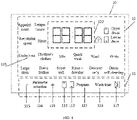
- FIG. 1 is a first interface diagram of a display panel provided by the present invention.
- the display panel 10 includes a touch area 11 and a display area 12.
- the touch area 11 includes a plurality of touch buttons for selecting an upper drum or a lower drum, selecting a program, selecting and adjusting a parameter, setting running time, and starting and pausing.
- the user can select an upper drum by touching an upper drum selection button 111, select a lower drum by touching a lower drum selection button 112, select a washing program by touching a program selection button 113, select a washing parameter by touching a parameter selection button 114, adjust parameter magnitude by a parameter adjustment button 115, and set a running time by a washing-time button 116, and start or pause a washing program by a start-pause button 117.
- the user may select, set, start, and pause the washing program through the touch area 11, and may also perform a remote control through a terminal, for example, an application program (APP) installed on a mobile phone.
- APP application program
- the display area 12 includes an identification display area 121 and a numerical value display area 122.
- the identification display area 121 is configured to display upper and lower drum identification, program identification and parameter identification. Optionally, it is also configured to display a door lock identification.
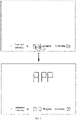
- the numerical value display area 122 is configured to display the running time and a parameter value. In addition, under a remote-control mode, the numerical value display area 122 is further configured to display a remote-control identification character, such as a word "APP".
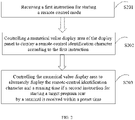
- the first instruction for starting the remote-control mode can be sent by a user through the laundry device itself.
- the laundry device enters the remote-control mode.
- the first instruction can also be sent by the user through a terminal. Please refer to FIG. 4 , the user clicks a start remote-control button on a mobile phone application program to send the first instruction to the laundry device, and the laundry device can enter the remote-control mode after receiving the instruction.
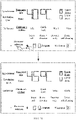
- the laundry device After receiving the first instruction, the laundry device enters the remote-control mode. At this time, the user can set the washing program and the parameter through the terminal. At the same time, the laundry device further controls the numerical value display area of the display panel to display the remote-control identification character. Exemplarily, please continue to refer to FIG. 3 , the numerical value display area displays the word "APP" to prompt other people except the terminal holder.
- the user can set the washing program through a terminal.
- a terminal For example, the user may choose a default program, such as one of underwear, children's clothes, mix, quick wash, wool, shirts, large item, down feather, super soft, rinse + dewater, dewater only, and drum self-cleaning.
- the user may set one or more parameters, such as wash time, heat temperature, rinse times, dewater revolution speed, stop-washing time, water level for washing, water level for rinsing, stop-rinsing time, appointment, additional function, dry and other parameters.
- the user sends the set program and/or parameter to the laundry device through the terminal, and then may send a second instruction for starting a target program to the laundry device by clicking a start button on the terminal, and after receiving the second instruction, the laundry device can start the washing program.
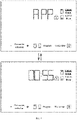
- the running time of the target program is displayed in the numerical value display area of the display panel, and the remote-control identification character and the running time can be alternatively displayed, so that other people expect a terminal holder can learn about the running status in time, thus avoiding a suspension of a current running program or an occurrence of a safety problem caused by a misoperation before an end of the running time.
- the remote-control identification character "APP" and the running time are alternately displayed in the numerical value display area, so that other people expect the terminal holder can learn about that the laundry device is currently under a remote-control mode and how long the running time is.
- the user will select a target drum to be used, that is, an upper drum or a lower drum, before setting a washing program through a terminal device. That is, the laundry device receives a third instruction for selecting a target drum sent by the user through the terminal; and the identification display area is controlled to display an identification of the target drum according to the third instruction.
- a display way of the target drum is not limited, for example, the identification of the target drum is displayed with a first brightness, and the identification of the other drum is displayed with a second brightness, and the first brightness is greater than the second brightness. Or, the identification of the target drum is flashing or is always on, and the identification of the other target drum is not displayed.
- the user sends a second instruction for starting a target program through a terminal.
- the laundry device can also display an identification of the target program in the identification display area. That is, if the second instruction for starting the target program sent by the terminal is received within a preset time, the identification display area is controlled to display the identification of the target program.
- the laundry device controls the identification display area of the display panel to display an identification of the quick wash.
- the laundry device after receiving the second instruction for starting a program sent by the terminal, the laundry device further controls the identification display area to display a door lock identification.
- the door lock of the laundry device is closed during the washing process.
- the laundry device controls the identification display area to display an identification of the door lock to prompt the user.
- the laundry device controls the numerical value display area to display a remote-control end identification character.
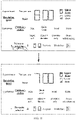
- the laundry device controls the numerical value display area to display the word "End” to prompt other people expect a terminal holder. In this way, other people expect the terminal holder can carry out other operation on the laundry device after seeing the word "End", and do not worry about causing a suspension of the running program or other safety problem.
- the display control method of the display panel is described in the case where the user selects a target drum, sets a program and/or parameter through a terminal and starts the operation of the target program after the laundry device receives the first instruction for starting the remote-control mode and enters the remote-control mode.
- the user sends the first instruction through the laundry device itself or a terminal to make the laundry device perform the remote-control mode, but after that, the user may not continue to send the second instruction for starting the target program through the terminal.
- the laundry device controls the display panel to turn off the display.
- the user sends the first instruction through the laundry device itself or a terminal to make the laundry device perform the remote-control mode, and then, the user does not send the second instruction for starting the program through the terminal, but selects the target drum through the touch area of the display panel, that is, the washing setting is carried out by operating the laundry device itself; and at this time, the laundry device exits the remote-control mode.
- the laundry device does not receive the second instruction within a preset time but receives a fourth instruction for selecting a target drum sent by the user through the touch area
- the identification display area is controlled to display an identification of a program corresponding to the target drum
- the numerical value display area is controlled to display a running time.
- the laundry device after the laundry device enters the remote-control mode, the numerical value display area of the display panel displays the word "APP". Then, the user touches an upper drum selection button of the display panel to select the upper drum. At this time, the laundry device exits the remote-control mode, the laundry device controls the numerical value display area to no longer display the word "APP", and the identification display area is controlled to display an identification of a selectable program corresponding to the upper drum, such as underwear, children's clothes, mix, quick wash, wool, shirt, super soft, risen + dewater, dewater only and drum self-cleaning. At the same time, the laundry device further controls the numerical value display area to display the running time corresponding to the selectable program.
- a selectable program such as underwear, children's clothes, mix, quick wash, wool, shirt, super soft, risen + dewater, dewater only and drum self-cleaning.
- the selectable programs corresponding to the upper drum include underwear, children's clothes, mix, quick wash, wool, shirt, super soft, rinse + dewater, dewater only and drum self-cleaning.
- the program selection button for the first time, the first program, underwear, is selected as a target program, and at this time, a program identification of the underwear is displayed in a first way, and other programs in the upper drum selectable program are displayed in a second way, where the first way is different from the second way.
- the present embodiment does not limit the specific display way, as long as it is convenient for the user to distinguish.
- the user touches the program selection button for the second time, and then the second program, children's clothes, is selected as the target program, and at this time, the program identification of children's clothes is displayed in a first way, and other programs in the upper drum selectable program are displayed in a second way.
- the user can touch the program selection button many times to sequentially select corresponding programs on the upper drum as target programs.
- the numerical value display area of the display panel displays a corresponding running time of the target program.
- the laundry device after the laundry device enters the remote-control mode, if an instruction for starting a target program sent by a user through a terminal is not received within a preset time, the laundry device exits the remote-control mode, so that the terminal holder or other people expect the terminal holder can continue to operate the laundry device through the laundry device itself without worrying about misoperation.
- user can further set parameters of the program, such as appointment time, temperature, revolution speed and rinse times, and etc. After setting the parameters, user can start the program to wash clothes, or the user can directly start the program to wash clothes after selecting the program.
- parameters of the program such as appointment time, temperature, revolution speed and rinse times, and etc.
- a default value of temperature in the numerical value display area is 40 °C.
- the user can increase or decrease the temperature value by touching the "+” and "-" buttons in parameter adjustment buttons.
- the user touches the "+” or "-” button each time, an increased or decreased value can be set as required. For example, the user touches the "+” button each time, the temperature increases by 1 °C.
- the user needs to set the temperature to 45 °C, the user touches the "+” button five times; if the temperature increases by 5 °C when the user touches the "+” button each time, then the user touches the "+” button once when the user needs to set the temperature to 45 °C.
- the numerical range of temperature that can be set by user is related to the target program selected by the user, with different programs corresponding to different temperature ranges.
- the revolution speed decreases by 50 when the user touches the "-" button each time, then the user may touch the "-" button twice when he needs to set the revolution speed to 700; if the revolution speed decreases by 100 r/min when the user touches the "-" button each time, then the user may touch the "-" button once when he needs to set the speed to 700 r/min.
- the numerical range of the revolution speed that can be set by a user is related to a target program selected by the user, with different programs corresponding to different revolution speed ranges.
- the numerical value display area can always display a parameter value, or the numerical value display area can alternately display the parameter value and running time.
- FIG. 12 is a structural diagram of a display control apparatus provided by the present invention. As shown in FIG. 12 , the apparatus 120 includes:
- the receiving module 1201 is further configured to receive a third instruction for selecting a target drum sent by the terminal, where the target drum is an upper drum of a laundry device or a lower drum of the laundry device; correspondingly, the controlling module 1202 is further configured to control an identification display area of the display panel to display an identification of the target drum according to the third instruction.
- controlling module 1202 is further configured to control the identification display area of the display panel to display an identification of a target program if the second instruction for starting the target program sent by a terminal is received by the receiving module 1201 within a preset time.
- controlling module 1202 is further configured to control the display panel to turn off the display if the second instruction is not received by the receiving module 1201 within the preset time.
- the display panel includes a touch area
- the controlling module 1202 is further configured to control the identification display area of the display panel to display an identification of a program corresponding to the target drum and control the numerical value display area to display the running time if the second instruction is not received by the receiving module 1201 within a preset time and a fourth instruction for selecting the target drum sent by a user through the touch area is received.
- controlling module 1202 is further configured to control the identification display area of the display panel to display a door lock identification if the second instruction for starting the target program sent by the terminal is received by the receiving module 1201 within a preset time.
- the display control apparatus provided by the present embodiment can be used to implement the display control method in any one of the above method embodiments. Its implementation principle is similar to the technical effect, and will not be repeated here.
- the memory 1301 is configured to store a computer program.
- the processor 1302 is configured to control the display device 1303 to implement the method as in any one of the above embodiments when the computer program is executed.
- the present invention provides a computer-readable storage medium having a computer program stored thereon, and the computer program implements the method in any one of the above embodiments when executed by a processor.
Landscapes
- Engineering & Computer Science (AREA)
- General Engineering & Computer Science (AREA)
- Theoretical Computer Science (AREA)
- Human Computer Interaction (AREA)
- Physics & Mathematics (AREA)
- General Physics & Mathematics (AREA)
- Textile Engineering (AREA)
- Control Of Washing Machine And Dryer (AREA)
Applications Claiming Priority (2)
| Application Number | Priority Date | Filing Date | Title |
|---|---|---|---|
| CN202010121518.6A CN113311980A (zh) | 2020-02-26 | 2020-02-26 | 显示控制方法、装置及洗衣设备 |
| PCT/CN2021/074868 WO2021169753A1 (zh) | 2020-02-26 | 2021-02-02 | 显示控制方法、装置及洗衣设备 |
Publications (2)
| Publication Number | Publication Date |
|---|---|
| EP4113264A1 true EP4113264A1 (de) | 2023-01-04 |
| EP4113264A4 EP4113264A4 (de) | 2024-03-06 |
Family
ID=77369969
Family Applications (1)
| Application Number | Title | Priority Date | Filing Date |
|---|---|---|---|
| EP21760717.5A Pending EP4113264A4 (de) | 2020-02-26 | 2021-02-02 | Anzeigesteuerverfahren, vorrichtung und wäschevorrichtung |
Country Status (3)
| Country | Link |
|---|---|
| EP (1) | EP4113264A4 (de) |
| CN (1) | CN113311980A (de) |
| WO (1) | WO2021169753A1 (de) |
Families Citing this family (2)
| Publication number | Priority date | Publication date | Assignee | Title |
|---|---|---|---|---|
| CN115821521B (zh) * | 2021-09-18 | 2026-02-24 | 青岛胶州海尔洗涤电器有限公司 | 洗衣程序应急调整方法及洗衣机 |
| CN121473103A (zh) * | 2024-08-05 | 2026-02-06 | 南京石头创新科技有限公司 | 一种衣物处理设备控制方法及相关设备 |
Family Cites Families (16)
| Publication number | Priority date | Publication date | Assignee | Title |
|---|---|---|---|---|
| JP2003189377A (ja) * | 2001-12-14 | 2003-07-04 | Hitachi Ltd | 電話機による遠隔制御システム |
| CN102535094A (zh) * | 2012-02-29 | 2012-07-04 | 合肥荣事达三洋电器股份有限公司 | 一种可遥控式洗衣机 |
| KR20140032262A (ko) * | 2012-09-06 | 2014-03-14 | 엘지전자 주식회사 | 가전제품 및 이를 포함하여 이루어지는 온라인 시스템 |
| KR101797493B1 (ko) * | 2012-09-06 | 2017-11-15 | 엘지전자 주식회사 | 가전제품 및 이를 포함하여 이루어지는 온라인 시스템 |
| TWI521117B (zh) * | 2013-03-19 | 2016-02-11 | 東芝股份有限公司 | washing machine |
| CN106032625B (zh) * | 2015-03-11 | 2019-12-13 | 青岛海尔滚筒洗衣机有限公司 | 一种洗衣机和洗衣机的控制方法 |
| CN106319833B (zh) * | 2015-06-17 | 2020-12-22 | 青岛海尔洗衣机有限公司 | 一种洗衣机远程控制方法及洗衣机 |
| CN106637805B (zh) * | 2015-10-30 | 2020-05-22 | 青岛海尔滚筒洗衣机有限公司 | 一种物联网洗衣机控制方法、控制系统及洗衣机 |
| CN108625094B (zh) * | 2017-03-23 | 2021-07-09 | 青岛海尔洗涤电器有限公司 | 一种洗衣机控制方法及洗衣机 |
| CN108625112A (zh) * | 2017-03-23 | 2018-10-09 | 青岛海尔滚筒洗衣机有限公司 | 一种洗衣机控制系统 |
| CN108625096B (zh) * | 2017-03-24 | 2021-07-09 | 青岛海尔洗涤电器有限公司 | 一种洗衣机及洗衣机远程控制系统 |
| CN108729113B (zh) * | 2017-04-24 | 2021-07-06 | 重庆海尔滚筒洗衣机有限公司 | 一种洗衣机控制方法及洗衣机 |
| CN109537242B (zh) * | 2017-09-21 | 2021-05-28 | 上海小吉互联网科技有限公司 | 一种洗衣机控制显示结构 |
| CN108011788A (zh) * | 2017-12-12 | 2018-05-08 | 宁波智轩物联网科技有限公司 | 一种基于智能家居的开关显示系统 |
| CN112227012A (zh) * | 2019-06-27 | 2021-01-15 | 青岛海尔洗衣机有限公司 | 一种衣物处理设备及其控制方法 |
| WO2020259331A1 (zh) * | 2019-06-27 | 2020-12-30 | 青岛海尔洗衣机有限公司 | 一种衣物处理设备及其控制方法 |
-
2020
- 2020-02-26 CN CN202010121518.6A patent/CN113311980A/zh active Pending
-
2021
- 2021-02-02 EP EP21760717.5A patent/EP4113264A4/de active Pending
- 2021-02-02 WO PCT/CN2021/074868 patent/WO2021169753A1/zh not_active Ceased
Also Published As
| Publication number | Publication date |
|---|---|
| EP4113264A4 (de) | 2024-03-06 |
| WO2021169753A1 (zh) | 2021-09-02 |
| CN113311980A (zh) | 2021-08-27 |
Similar Documents
| Publication | Publication Date | Title |
|---|---|---|
| US10920357B2 (en) | Washing apparatus | |
| EP3663454B1 (de) | Elektronische vorrichtung und verfahren zur steuerung davon | |
| CN102684952B (zh) | 智能家电的控制方法 | |
| EP3199685A1 (de) | Anzeigeverfahren für gerätebedienungsoberfläche und waschmaschinensteuerungsverfahren | |
| CN102657471B (zh) | 一种可依据菜谱数据进行烹饪的烹饪电器 | |
| CN107523964A (zh) | 一种洗衣机操作界面及程序控制方法 | |
| CN112430977A (zh) | 多筒洗衣机的控制方法、移动终端以及存储介质 | |
| EP4113264A1 (de) | Anzeigesteuerverfahren, vorrichtung und wäschevorrichtung | |
| CN111996738B (zh) | 一种衣物洗涤控制方法及洗衣机 | |
| CN112227000B (zh) | 一种衣物处理设备控制方法 | |
| WO2017215566A1 (zh) | 洗衣机控制方法及洗衣机 | |
| CN102637000A (zh) | 烹饪电器及其系统、移动式个人数字终端和手机的应用 | |
| CN105430465A (zh) | 电视桌面系统的切换方法及切换控制系统 | |
| CN106245267B (zh) | 一种基于洗/干衣机用编码器与显示屏的控制方法 | |
| CN107346115A (zh) | 一种智能设备的控制方法、控制终端和智能设备 | |
| CN111172705A (zh) | 家用电器的程序推荐控制方法 | |
| JP2014033765A (ja) | 洗濯機通信システム | |
| EP3989016A1 (de) | Elektrisches haushaltsgerät und steuerungsverfahren dafür | |
| CN113308849B (zh) | 显示控制方法、装置及洗衣设备 | |
| JPWO2018003319A1 (ja) | 洗濯装置の操作方法、およびそのプログラム | |
| CN107488988A (zh) | 洗衣机触控显示方法、装置及洗衣机 | |
| CN106547210A (zh) | 家用电器控制系统及其控制装置和控制方法 | |
| CN106896747B (zh) | 家电控制方法、装置及移动终端 | |
| CN109487501B (zh) | 一种操作面板、洗衣设备及洗衣设备的控制方法 | |
| EP4696827A1 (de) | Steuerungsverfahren und -vorrichtung für eine wäschevorrichtung sowie wäschevorrichtung und speichermedium |
Legal Events
| Date | Code | Title | Description |
|---|---|---|---|
| STAA | Information on the status of an ep patent application or granted ep patent |
Free format text: STATUS: THE INTERNATIONAL PUBLICATION HAS BEEN MADE |
|
| PUAI | Public reference made under article 153(3) epc to a published international application that has entered the european phase |
Free format text: ORIGINAL CODE: 0009012 |
|
| STAA | Information on the status of an ep patent application or granted ep patent |
Free format text: STATUS: REQUEST FOR EXAMINATION WAS MADE |
|
| 17P | Request for examination filed |
Effective date: 20220905 |
|
| AK | Designated contracting states |
Kind code of ref document: A1 Designated state(s): AL AT BE BG CH CY CZ DE DK EE ES FI FR GB GR HR HU IE IS IT LI LT LU LV MC MK MT NL NO PL PT RO RS SE SI SK SM TR |
|
| DAV | Request for validation of the european patent (deleted) | ||
| DAX | Request for extension of the european patent (deleted) | ||
| A4 | Supplementary search report drawn up and despatched |
Effective date: 20240207 |
|
| RIC1 | Information provided on ipc code assigned before grant |
Ipc: D06F 105/58 20200101ALN20240201BHEP Ipc: D06F 105/52 20200101ALN20240201BHEP Ipc: D06F 103/68 20200101ALN20240201BHEP Ipc: D06F 34/05 20200101ALN20240201BHEP Ipc: G06F 3/04842 20220101ALI20240201BHEP Ipc: G06F 3/0488 20220101ALI20240201BHEP Ipc: G06F 3/0482 20130101ALI20240201BHEP Ipc: D06F 34/32 20200101ALI20240201BHEP Ipc: G06F 3/0484 20220101AFI20240201BHEP |
|
| STAA | Information on the status of an ep patent application or granted ep patent |
Free format text: STATUS: EXAMINATION IS IN PROGRESS |
|
| 17Q | First examination report despatched |
Effective date: 20260129 |