EP4047902A1 - Fernunterstützungsverfahren, elektronische vorrichtung und system - Google Patents
Fernunterstützungsverfahren, elektronische vorrichtung und system Download PDFInfo
- Publication number
- EP4047902A1 EP4047902A1 EP20897195.2A EP20897195A EP4047902A1 EP 4047902 A1 EP4047902 A1 EP 4047902A1 EP 20897195 A EP20897195 A EP 20897195A EP 4047902 A1 EP4047902 A1 EP 4047902A1
- Authority
- EP
- European Patent Office
- Prior art keywords
- terminal
- target device
- operation interface
- control
- user
- Prior art date
- Legal status (The legal status is an assumption and is not a legal conclusion. Google has not performed a legal analysis and makes no representation as to the accuracy of the status listed.)
- Granted
Links
Images


Classifications
-
- H—ELECTRICITY
- H04—ELECTRIC COMMUNICATION TECHNIQUE
- H04N—PICTORIAL COMMUNICATION, e.g. TELEVISION
- H04N21/00—Selective content distribution, e.g. interactive television or video on demand [VOD]
- H04N21/40—Client devices specifically adapted for the reception of or interaction with content, e.g. set-top-box [STB]; Operations thereof
- H04N21/47—End-user applications
- H04N21/478—Supplemental services, e.g. displaying phone caller identification, shopping application
- H04N21/4788—Supplemental services, e.g. displaying phone caller identification, shopping application communicating with other users, e.g. chatting
-
- G—PHYSICS
- G06—COMPUTING OR CALCULATING; COUNTING
- G06F—ELECTRIC DIGITAL DATA PROCESSING
- G06F9/00—Arrangements for program control, e.g. control units
- G06F9/06—Arrangements for program control, e.g. control units using stored programs, i.e. using an internal store of processing equipment to receive or retain programs
- G06F9/44—Arrangements for executing specific programs
- G06F9/451—Execution arrangements for user interfaces
- G06F9/452—Remote windowing, e.g. X-Window System, desktop virtualisation
-
- H—ELECTRICITY
- H04—ELECTRIC COMMUNICATION TECHNIQUE
- H04L—TRANSMISSION OF DIGITAL INFORMATION, e.g. TELEGRAPHIC COMMUNICATION
- H04L65/00—Network arrangements, protocols or services for supporting real-time applications in data packet communication
- H04L65/40—Support for services or applications
- H04L65/403—Arrangements for multi-party communication, e.g. for conferences
-
- H—ELECTRICITY
- H04—ELECTRIC COMMUNICATION TECHNIQUE
- H04N—PICTORIAL COMMUNICATION, e.g. TELEVISION
- H04N21/00—Selective content distribution, e.g. interactive television or video on demand [VOD]
- H04N21/20—Servers specifically adapted for the distribution of content, e.g. VOD servers; Operations thereof
- H04N21/23—Processing of content or additional data; Elementary server operations; Server middleware
- H04N21/234—Processing of video elementary streams, e.g. splicing of video streams or manipulating encoded video stream scene graphs
- H04N21/23418—Processing of video elementary streams, e.g. splicing of video streams or manipulating encoded video stream scene graphs involving operations for analysing video streams, e.g. detecting features or characteristics
-
- H—ELECTRICITY
- H04—ELECTRIC COMMUNICATION TECHNIQUE
- H04N—PICTORIAL COMMUNICATION, e.g. TELEVISION
- H04N21/00—Selective content distribution, e.g. interactive television or video on demand [VOD]
- H04N21/40—Client devices specifically adapted for the reception of or interaction with content, e.g. set-top-box [STB]; Operations thereof
- H04N21/41—Structure of client; Structure of client peripherals
- H04N21/414—Specialised client platforms, e.g. receiver in car or embedded in a mobile appliance
- H04N21/41407—Specialised client platforms, e.g. receiver in car or embedded in a mobile appliance embedded in a portable device, e.g. video client on a mobile phone, PDA, laptop
-
- H—ELECTRICITY
- H04—ELECTRIC COMMUNICATION TECHNIQUE
- H04N—PICTORIAL COMMUNICATION, e.g. TELEVISION
- H04N21/00—Selective content distribution, e.g. interactive television or video on demand [VOD]
- H04N21/40—Client devices specifically adapted for the reception of or interaction with content, e.g. set-top-box [STB]; Operations thereof
- H04N21/41—Structure of client; Structure of client peripherals
- H04N21/422—Input-only peripherals, i.e. input devices connected to specially adapted client devices, e.g. global positioning system [GPS]
- H04N21/4223—Cameras
-
- H—ELECTRICITY
- H04—ELECTRIC COMMUNICATION TECHNIQUE
- H04N—PICTORIAL COMMUNICATION, e.g. TELEVISION
- H04N21/00—Selective content distribution, e.g. interactive television or video on demand [VOD]
- H04N21/40—Client devices specifically adapted for the reception of or interaction with content, e.g. set-top-box [STB]; Operations thereof
- H04N21/43—Processing of content or additional data, e.g. demultiplexing additional data from a digital video stream; Elementary client operations, e.g. monitoring of home network or synchronising decoder's clock; Client middleware
- H04N21/436—Interfacing a local distribution network, e.g. communicating with another STB or one or more peripheral devices inside the home
- H04N21/43615—Interfacing a Home Network, e.g. for connecting the client to a plurality of peripherals
-
- H—ELECTRICITY
- H04—ELECTRIC COMMUNICATION TECHNIQUE
- H04N—PICTORIAL COMMUNICATION, e.g. TELEVISION
- H04N7/00—Television systems
- H04N7/14—Systems for two-way working
- H04N7/141—Systems for two-way working between two video terminals, e.g. videophone
-
- G—PHYSICS
- G06—COMPUTING OR CALCULATING; COUNTING
- G06F—ELECTRIC DIGITAL DATA PROCESSING
- G06F9/00—Arrangements for program control, e.g. control units
- G06F9/06—Arrangements for program control, e.g. control units using stored programs, i.e. using an internal store of processing equipment to receive or retain programs
- G06F9/44—Arrangements for executing specific programs
- G06F9/451—Execution arrangements for user interfaces
- G06F9/453—Help systems
-
- H—ELECTRICITY
- H04—ELECTRIC COMMUNICATION TECHNIQUE
- H04N—PICTORIAL COMMUNICATION, e.g. TELEVISION
- H04N7/00—Television systems
- H04N7/14—Systems for two-way working
- H04N7/141—Systems for two-way working between two video terminals, e.g. videophone
- H04N7/142—Constructional details of the terminal equipment, e.g. arrangements of the camera and the display
- H04N2007/145—Handheld terminals
Definitions
- the present invention relates to the field of augmented reality technologies, and in particular, to a remote assistance method and system, and an electronic device.
- AR augmented reality
- MYOTee and AR games at the beginning to AR measurement, AR home, AR communication, and the like, AR applications have been more closely integrated with mobile terminals, and provide consumers with better experience on the combination of virtual and reality.
- a user may use a mobile phone to connect, manage, and control a household appliance, so that a state of the household appliance can be controlled by one tap, and control and management can be easily performed at home or outside.
- the user does not know how to use a function of the appliance, or if the user does not know how to operate the appliance, or in other cases, the user can only obtain assistance generally through a call or a video call to learn how to operate, but if the operation is complicated and may not be easy to understand, or if the user requiring assistance has specific difficulties such as vision and hearing impairment, this type of guidance does not provide effective assistance.
- embodiments of this application provide a remote assistance method and system, and an electronic device.
- this application provides a remote assistance method.
- the method is performed by a first terminal in a video call process between the first terminal and a second terminal, and includes: sending an image including a target device to a server; receiving device information corresponding to the target device sent by the server; virtualizing an operation interface based on the received device information, and displaying the operation interface on a current video call screen, where the operation interface is an operation interface of a control panel or a remote control of the target device; and displaying, on the current video call screen based on data from the second terminal, one or more operations performed on the operation interface by a user of the second terminal on the second terminal.
- a video stream including the target device is obtained, and the device information related to the device is obtained based on the video stream.
- the virtual control interface is presented in a video of the first terminal by using an AR technology, so that the first terminal 20 obtains, by parsing based on operation information sent by the second terminal, operation actions of performing an operation on the operation interface, and then the first terminal restores these operation actions on the video screen based on the operation information.
- a user corresponding to the first terminal learns a method for operating and controlling the target device, and can perform an operation directly on the control panel on the first terminal or on a real remote control device.
- An assisted user can see, on a terminal of the user, a specific operation performed on the real control panel or remote control. This is very intuitive, and improves efficiency of communication between the two parties.
- the method further includes: binding the operation interface to the target device. This prevents the terminal from still using a virtual operation interface of a previous device after the device in the video stream changes.
- the displaying the operation interface on a current video call screen includes: displaying the operation interface on or near the target device on the current video call screen, where the operation interface is the operation interface of the remote control of the target device; or overlaying or replacing the control panel of the target device on the current video call screen with the operation interface, where the operation interface is the operation interface of the control panel of the target device.
- the method further includes: receiving at least one first operation sent by the second terminal, and sending a control instruction to the target device, where the control instruction is used to control the target device.
- a control party performs an operation on a virtual interface in a video, and then sends a control instruction corresponding to the operation to the first terminal.
- the first terminal has a function of directly controlling the target device
- the first terminal directly sends the control instruction to the target device. In this way, an assisting party directly controls the target device, thereby helping the assisted party more effectively.
- the method further includes: receiving at least one second operation performed by the user on the operation interface; determining a visual effect corresponding to the at least one second operation, and displaying the visual effect on the current video call screen; and synchronizing the visual effect to the second terminal.
- the method further includes: determining, based on the received at least one second operation, a control instruction corresponding to the at least one second operation, and sending the control instruction to the target device, where the control instruction is used to control the target device.
- an embodiment of this application provides a terminal device, including a transceiver, a processor, and a memory.
- the transceiver is configured to receive and send data.
- the memory stores one or more programs, the one or more programs include an instruction, and when the instruction is executed by the processor, the electronic device is enabled to perform the method according to the possible implementations of the first aspect.
- an embodiment of this application provides a remote assistance method.
- the method is performed by a second terminal in a video call process between the second terminal and a first terminal.
- the method includes: receiving device information of a target device, where the target device is a device displayed on a current video call screen; virtualizing an operation interface based on the received device information, and displaying the operation interface on the current video call screen, where the operation interface is an operation interface of a control panel or a remote control of the target device; receiving at least one third operation performed by a user on the operation interface on the current video call screen; and displaying a visual effect corresponding to one or more operations performed on the operation interface, and synchronizing the visual effect to the first terminal.
- the video call screen including the virtual operation interface is presented on the second terminal.
- a user corresponding to the second terminal performs an operation on the virtual operation interface on the second terminal.
- the first terminal synchronously presents the operation performed by the user on the virtual operation interface, to assist a user corresponding to the first terminal in controlling the target device.
- the method further includes: binding the operation interface to the target device.
- the displaying the operation interface on the current video call screen includes: displaying the operation interface on or around the target device on the current video call screen, where the operation interface is a control interface of the remote control of the target device; or overlaying or replacing the control panel of the target device on the current video call screen with the operation interface, where the operation interface is a control interface of the control panel of the target device.
- the method further includes: displaying, on the current video call screen based on data from the first terminal, one or more operations performed on the virtual operation interface by a user of the first terminal on the first terminal.
- an embodiment of this application provides a terminal device, including a transceiver, a processor, and a memory.
- the transceiver is configured to receive and send data.
- the memory stores one or more programs, the one or more programs include an instruction, and when the instruction is executed by the processor, the electronic device is enabled to perform the method according to the possible implementations of the third aspect.
- an embodiment of this application provides a remote assistance system, including a target device that needs to be controlled, a cloud server, a terminal device performing the method according to the possible implementations of the first aspect, and a terminal device performing the method according to the possible implementations of the third aspect.
- an embodiment of this application provides a readable storage medium, configured to store an instruction.
- the instruction When the instruction is executed, the method according to the possible implementations of the first aspect and the method according to the possible implementations of the third aspect are implemented.
- an embodiment of this application provides a computer program device including an instruction.
- the terminal is enabled to perform the method according to the possible implementations of the first aspect and the method according to the possible implementations of the third aspect.
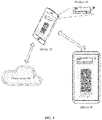
- FIG. 1 is a schematic structural diagram of a remote assistance system according to an embodiment of this application. As shown in FIG. 1 , the system includes a target device 10, a terminal 20, a terminal 30, and a cloud server 40.
- the target device 10 in this embodiment of this application is a device (target device) on which a control operation needs to be performed, and includes but is not limited to an electronic device such as an air conditioner, a television, a mobile phone, or a computer, a mechanical device, a vehicle, or another type of device, or is a remote control of the foregoing device.
- an air conditioner is used as an example to describe the technical solution.
- the terminal 20 and the terminal 30 in this embodiment of this application include but are not limited to electronic devices such as mobile phones, tablets, or notebooks.
- the terminal 20 photographs the target device 10 by using a camera, to obtain an image of the target device 10, and generate a video stream including the image of the target device 10.
- the terminal 20 sends the obtained video stream including the image of the target device 10 to the terminal 30, and also sends the video stream to the cloud server 40.
- the cloud server 40 identifies the target device 10 in the video stream in real time, and based on the identified target device 10, matches a data model and controllable configuration file data that are corresponding to the target device 10, and then sends the data model and the controllable configuration file data that are corresponding to the target device 10 to the terminal 20 and the terminal 30.
- the terminal 20 and the terminal 30 virtualize an operation interface in a video based on the received data model.
- the operation interface is an image corresponding to a real remote control device or control panel that controls the target device 10, and is presented at a position such as a position around or right above the target device 10 in the video.
- a button, a knob, and the like on the virtualized operation interface are associated with corresponding control instructions, so that when a user operates a control such as the button or the knob on the operation interface, the terminal 20 can determine a control instruction corresponding to each operation.
- the terminal 20 sends a video including the air conditioner or an image of the air conditioner to the server, and the server identifies a brand and a model of the air conditioner through, for example, artificial intelligence (artificial intelligence, AI), obtains a two-dimensional or three-dimensional image model of a remote control corresponding to the air conditioner of the brand and the model, and obtains a controllable configuration file of an instruction corresponding to each button on the remote control.
- AI artificial intelligence
- a controllable configuration file corresponding to an "ON/OFF" button is that an instruction for turning off or turning on the air conditioner is executed after the "ON/OFF" button is pressed.
- the server sends both the remote control model and the controllable configuration file to the terminal 20.
- the terminal 20 virtualizes a corresponding remote control image, and displays the remote control image on a current video screen.
- the video screen with the virtual remote control image may be synchronized to the terminal 30 by using an audio and video synchronization technology.
- the server may alternatively send the remote control model and the controllable configuration file to the terminal 30.
- the former is simpler and more economical during implementation.
- the terminal 30 determines an instruction corresponding to the virtual button (different operations on a same button may correspond to different instructions, for example, a touch and hold operation and a short tap operation correspond to different instructions), sends information corresponding to the instruction, such as an operation position, an operation type, and a timestamp, to the peer terminal 20, and presents a visual effect corresponding to the operation on the virtual remote control image on the current video screen of the terminal 30.
- the button is recessed downward as the user presses, and is recovered as the user raises the hand.
- the visual effect may be included in the controllable configuration file.
- the terminal determines a corresponding visual effect based on a current user operation and the controllable configuration file.
- the visual effect is also synchronized to the terminal 20. In this way, the user of the terminal 20 can intuitively see how to control the remote control.
- the terminal 20 may further send a control instruction for controlling the target device, to implement remote control on the target device.
- the server 40 may not send the controllable configuration file, or the sent controllable configuration file does not include a control instruction (an instruction for directly controlling the target device). Based on an operation that is displayed on the terminal 20 and that is performed by a remote assisting party on the remote control model, the user can learn an operation of controlling the target device 10, and can directly perform an operation on the target device 10 or on a physical remote control, to control the target device 10.
- the terminal 20 or the terminal 30 When the user performs an operation on the virtual operation interface on the terminal 20 or the terminal 30, the terminal 20 or the terminal 30 records operation information in an operation process, for example, information such as a coordinate point, a timestamp, a quantity of times, and duration, determines a corresponding visual effect, presents the visual effect on the current video call screen, and synchronizes the visual effect to the peer end of the video call.
- operation information for example, information such as a coordinate point, a timestamp, a quantity of times, and duration
- determines a corresponding visual effect presents the visual effect on the current video call screen, and synchronizes the visual effect to the peer end of the video call.
- user A corresponding to the terminal 20 does not know how to operate the air conditioner
- user B corresponding to the terminal 30 assists user A in controlling the air conditioner, and user A informs, by using an audio and a video, user B that user A wants to "turn on the air conditioner and adjust a temperature to 21 degrees (assuming that a startup temperature is
- the terminal 30 records operation information such as a coordinate point of a sliding operation, an operation time, and a quantity of taps in the operation process. Then, user B performs an operation on a virtual temperature button "+" of the virtual remote control displayed on the terminal 30, to adjust the temperature to "21 degrees" by tapping four times. In this case, the terminal 30 records operation information such as a coordinate point of a sliding operation, an operation time, and a quantity of taps in the operation process. In a user operation process, the terminal 20 determines and presents visual effects of these operations based on received input.
- a button of the virtual remote control is pressed, and a display window displays a corresponding icon, number, and the like.
- These visual effects are displayed on a currently ongoing video call screen and synchronized to the peer end of the video call.
- the terminal 20 presents the visual effects of the user operations, to inform, in an intuitive manner, user A of how to perform an operation on the terminal 20, so as to perform an operation on the air conditioner to turn on the air conditioner and adjust the temperature to 21 degrees.
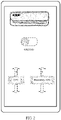
- FIG. 2 is a schematic diagram of a virtual operation interface displayed on a terminal according to an embodiment of this application.
- a terminal 20 and a terminal 30 are performing a video call by using a mobile phone, and a user of the terminal 20 points a camera of the mobile phone to an air conditioner. In this way, an image of the air conditioner is displayed on a video call screen, as shown in FIG. 2 .
- the terminal 20 has a transmission function such as infrared, Wi-Fi, Bluetooth, or data traffic, or has a function of directly controlling a target device.
- the terminal 20 After receiving a data model (and a controllable configuration file) corresponding to the air conditioner, the terminal 20 virtualizes a virtual control interface, and the control interface includes some virtual buttons such as a virtual "ON/OFF" button, a virtual temperature button, and a virtual humidity button.
- the virtual control interface is presented near the air conditioner in a video stream.
- the terminal 30 presents visual effects of these operations on the interface of the terminal 30, synchronizes the visual effects to the peer end of the video call, namely the terminal 20, and also sends obtained control information corresponding to the operation information to the terminal 20.
- User A of the terminal 20 can intuitively learn, by watching, how to perform an operation on the control interface.
- the terminal 20 sends a control instruction corresponding to each virtual button to the air conditioner in a transmission mode such as infrared, Wi-Fi, Bluetooth, or data traffic.
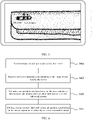
- FIG. 3 is a schematic diagram of a virtual operation interface displayed on a terminal according to an embodiment of this application.
- a terminal 20 after receiving a data model corresponding to an air conditioner, constructs a three-dimensional structural diagram of a virtual air conditioner of the same size as the air conditioner in a video stream, and then overlays or replaces the air conditioner in the video stream with the three-dimensional structural diagram of the virtual air conditioner.
- the virtual air conditioner is synchronized to a terminal 30 by using an audio and video call synchronization technology.
- the terminal 30 When user B performs an operation on an operable button on the three-dimensional structural diagram of the virtual air conditioner on the terminal 30, the terminal 30 synchronizes, to the terminal 20 in real time, a visual effect corresponding to the operation on the three-dimensional structural diagram of the virtual air conditioner on a current video screen.
- the terminal 20 presents the visual effect.
- the terminal After receiving the operation performed by the user on the virtual operation interface, the terminal needs to determine an operation object based on coordinates, and determine a display effect based on information such as a time, pressure, a direction, and a distance, and a controllable configuration file. For example, if the user presses a touch button or a virtual button, a cursor or a shadow is displayed on the button to indicate that the user selects the button, or an animation effect such as a light circle or a special symbol is displayed on the button to indicate a corresponding operation such as touching and holding the button or tapping the button.
- There is a correspondence among operation information, an operation object, and a display effect and the correspondence needs to be prestored locally or in the cloud.
- the correspondence may be a controllable configuration file, or may be obtained by the terminal from a network or another device after the terminal obtains a brand and a model of a target device.
- a terminal 20 obtains two-dimensional or three-dimensional data of a control interface, such as a control device or a control panel, corresponding to a target device 10, and presents a virtual control interface corresponding to the data on a screen of a video call between the terminal 20 and a terminal 30.
- the virtual control interface is also synchronized to the terminal 30.
- the terminal 30 receives an operation performed by an assisting party (user B) on the virtual control interface presented on the terminal 30, and then sends the operation information to the terminal 20.
- the terminal 20 restores these operation actions on the video screen based on the received operation information.
- the terminal 30 determines and presents the user operation, and synchronizes the user operation to the peer end.
- user A corresponding to the terminal 20 can learn a method for operating and controlling the target device, and can perform an operation directly on the control panel on the terminal 20 or on a real remote control device.
- Assisted user A can see, on the terminal of user A, a specific operation performed on the real control panel or remote control. This is very intuitive as if the assisting party gives guidance in person on the scene, and improves efficiency of communication between the two parties.
- FIG. 4 is a flowchart of a remote assistance method according to an embodiment of this application. As shown in FIG. 4 , an embodiment of this application provides a remote assistance method. The method is performed by a terminal 20 corresponding to an assisted person. In a video call process between the terminal 20 and a terminal 30, implementation steps of the method are as follows:
- Step S401 Send an image including a target device to a server.
- a communication connection is established between the terminal 20 and the terminal 30, to transmit data such as a video, device information, and operation information.
- a communication connection may be directly established between the terminal 20 and the terminal 30, for example, by using a D2D communication technology.
- a connection may be established between the terminal 20 and the terminal 30 by using a video server.
- the video server sends a video stream of the terminal 20 to the terminal 30 for presentation.
- a specific implementation is not limited in this application.
- the communication connection between the terminal 20 and the terminal 30 may be initiated by the terminal 20.
- user A corresponding to the terminal 20 cannot perform an operation on a current target device 10
- user B corresponding to the terminal 30 is specified to assist user A in performing an operation on the target device 10.
- User A establishes a video connection by initiating a request to the terminal 30.
- the terminal 20 photographs the target device 10 by using a camera, to obtain an image of the target device 10, generate a video stream including the image of the target device 10, and send the video stream to the terminal 30 in real time.
- the terminal 20 sends the video stream to a cloud server 40.
- the terminal 20 may send the cloud server 40 a picture, a short video, or the like that includes the target device 10.
- the terminal 20 sets a video stream to be obtained. For example, the terminal 20 captures pictures of N frames every several seconds or minutes, and then sends the captured pictures to the cloud server 40.
- the cloud server 40 identifies the target device 10 in the pictures in real time. This reduces running load of the terminal 20 and reduces traffic, compared with the manner of sending the video stream to the cloud server 40 in real time.
- Step S403 Receive device information corresponding to the target device sent by the server.
- the cloud server 40 performs AI recognition to identify information such as a brand and a model of the target device 10, and then determines a device type of the target device 10. After the device type is determined, the device information corresponding to the device is matched.
- the device information includes a data model of the target device 10, and may further include controllable configuration file data.
- the data model may be a real remote control used to control the target device 10 in FIG. 1 , a virtual operation interface used to control the target device 10 in FIG. 2 , a control panel of the target device 10 in FIG. 3 , or the like.
- the controllable configuration file may be control instructions such as "turn on", “turn off”, “turn up”, “turn down", and "channel”.
- Each control instruction in the controllable configuration file is associated with a button, a knob, or the like on an operation interface in the data model.
- the terminal 20 can determine a control instruction corresponding to each operation.
- a controllable configuration file corresponding to the "OFF" button is that an instruction for turning off the target device 10 is executed after the "OFF" button is pressed.
- Step S405 Virtualize an operation interface based on the received device information, and display the operation interface on a current video call screen.
- the terminal 20 does not have a function of controlling the target device 10 (for example, the terminal 20 does not have an infrared emission function, or is not connected to the target device), or if the user does not need to use the terminal 20 to directly control the target device 10, or in other cases, the user may select data content to be requested or received from the server, for example, by using a provided menu option or voice prompt.
- the cloud server 40 may send only the data model corresponding to the target device 10. After receiving the data model, the terminal 20 presents, on a current video screen, an image of a physical object such as a real remote control device, a real control panel on the target device 10, or a control device corresponding to the target device 10.
- the terminal 20 may choose to virtualize, on the terminal 20, an air conditioner remote control matching the air conditioner (a control interface displayed on a video screen may be selected by the user or may be the default).
- the virtual air conditioner remote control is the same as a real air conditioner remote control, and includes buttons such as a virtual "ON/OFF" button used to control startup or shutdown of the air conditioner, and virtual buttons "-" and "+” used to control a temperature of the air conditioner.
- the terminal 20 synchronizes the displayed air conditioner remote control to the terminal 30, and user B corresponding to the terminal 30 can operate a button of the air conditioner remote control displayed on the video screen.
- the terminal 20 and the terminal 30 do not obtain a controllable configuration file, when the user operates the button of the air conditioner remote control on the video screen, the terminal still presents a visual effect corresponding to the operation, and then sends the visual effect to the peer terminal in real time, so that user A can view an operation effect and learn an operation for controlling the target device 10.
- user A performs an operation on the virtual air conditioner remote control of the terminal 20
- user B can also view the operation of user A, and therefore can provide guidance and assistance for user A in real time.
- the terminal 20 receives a data model and a controllable configuration file of an air conditioner, and chooses to virtualize, on the terminal 20, a virtual operation interface used to control the air conditioner.
- the virtual operation interface includes buttons such as a virtual "ON/OFF" button used to control startup or shutdown of the air conditioner, and upward and downward virtual buttons used to control a temperature of the air conditioner.
- the terminal 20 sends the displayed virtual operation interface to the terminal 30, and user B corresponding to the terminal 30 can operate a button on the virtual operation interface.
- the terminal 20 receives the controllable configuration file of the air conditioner, if user A operates a button on the virtual operation interface on the video screen, the terminal 20 sends, based on an instruction for controlling the air conditioner of a controllable configuration file corresponding to the button, the instruction to the air conditioner in a transmission mode such as infrared, Wi-Fi, Bluetooth, or data traffic, to directly control the air conditioner.
- a transmission mode such as infrared, Wi-Fi, Bluetooth, or data traffic
- the terminal 20 needs to bind the received device information to the target device 10 in the video stream, so that the virtual operation interface displayed by the terminal 20 based on the device information corresponds to the target device 10, to prevent the terminal 20 from still using a virtual operation interface of a previous device after the target device 10 in the video stream changes.
- the terminal 20 continuously or intermittently sends the image of the target device 10 to the cloud server 40. If the device image identified by the cloud server 40 does not change, the device information of the target device 10 sent to the terminal 20 is not to be changed. If the cloud server cannot identify the image of the target device 10, the cloud server sends notification information to the terminal 20, so that the terminal 20 stops displaying the virtual operation interface in the video.
- Step S407 Display, on the current video call screen, an operation performed on the virtual operation interface by a user of a second terminal.
- the terminal 20 After receiving the device information sent by the cloud server 40, the terminal 20 presents the virtual operation interface in the video stream.
- the device information is sent to the terminal 30 (synchronized to the peer end by using an audio and video synchronization algorithm or sent separately), so that the video call screen including the virtual operation interface is synchronized to the terminal 30.
- This step is to ensure that content displayed on the terminal 20 and the terminal 30 is the same. In this way, the virtual operation interface is also presented on the terminal 30 to assist user A in controlling the device.
- the cloud server 40 may directly deliver the device information to the terminal 20 and the terminal 30.
- the terminal 20 does not need to forward the device information, thereby reducing workload of the terminal 20.
- the manner in which the terminal 20 synchronizes the virtual operation interface is simpler during implementation.
- the terminal 30 After user B corresponding to the terminal 30 performs an operation on the virtual operation interface, the terminal 30 records operation information such as a coordinate point of a sliding operation, an operation time, a quantity of taps, and pressing duration in the operation process, and sends the operation information to the terminal 20.
- operation information such as a coordinate point of a sliding operation, an operation time, a quantity of taps, and pressing duration in the operation process
- a visual effect corresponding to the operation is presented on the virtual operation interface on the current video call screen of the terminal 30.
- a button is recessed downward as the user presses, and is recovered as the user raises the hand.
- the visual effect is synchronized to the terminal 20, so that the user of the terminal 20 can intuitively see how to operate the remote control.
- a specific synchronization algorithm is the prior art. For example, synchronization is implemented by using an audio and video synchronization algorithm or a timestamping manner. Details are not described herein.
- the terminal 20 establishes a smart home interconnection protocol with the target device. After receiving the operation information sent by the terminal 30, the terminal 20 parses the operation information, converts the operation information into an instruction by using the smart home interconnection protocol, and sends the instruction to the air conditioner in a transmission mode such as infrared, Wi-Fi, Bluetooth, or data traffic. In this way, user A corresponding to the terminal 20 does not need to perform an operation again.
- the terminal 30 may determine, based on the operation of the user, a control instruction corresponding to the operation of the user, and send the control instruction to the terminal 20. Accordingly, the terminal 20 sends the control instruction to the target device by using, for example, an infrared instruction, a Bluetooth instruction, a Wi-Fi instruction, or a point-to-point instruction, to control the target device.
- the terminal 30 presents, on the virtual operation interface on the current video screen, a visual effect corresponding to the operation, and sends the visual effect to the terminal 20 in real time.
- a visual effect corresponding to the operation By viewing the visual effect corresponding to the operation, the user corresponding to the terminal 20 can learn a method for operating and controlling the air conditioner, and then directly perform an operation on a physical object such as a physical remote control, a control panel on the target device 10, or a control device corresponding to the target device 10.
- the terminal 20 presents, on the virtual operation interface on the current video screen, a visual effect corresponding to the operation, and sends the visual effect to the terminal 30 in real time.
- user B corresponding to the terminal 30 determines whether the operation performed by user A corresponding to the terminal 20 is correct, and can provide guidance in a timely manner, for example, by using a voice and/or by performing an operation on the virtual operation interface.
- user A needs to send the operation information to the terminal 30.
- user A draws a marked circle on a screen of the terminal 20 for an area, and the terminal 20 needs to record operation information such as a series of coordinate points, a timestamp, a quantity of times, and pressing duration that are on the screen at that time, to present a corresponding visual effect.
- the visual effect is synchronized to the peer end. For example, a video sent by the terminal 20 is matched by using the timestamp, to ensure that content seen by the two parties on the screen is the same.
- This application provides the remote assistance method performed by the terminal 20.
- a virtual control interface is presented in a video on the terminal 20 by using an AR technology, and the virtual control interface is presented on video call screens of terminals of all parties in communication by using an audio and video synchronization technology.
- a visual effect of an operation performed by a user of any terminal on the virtual control interface is synchronized to all parties in the video call. In this way, by watching these operation actions, a user that needs assistance, for example, user A corresponding to the terminal 20, can learn a method for operating and controlling the target device, and can perform an operation directly on the control panel on the terminal 20 or on a real remote control device.
- Assisted user A can see, on the terminal of user A, a specific operation performed on the real control panel or remote control. This is very intuitive as if the assisting party gives guidance in person on the scene, improves efficiency of communication between the two parties, and reduces the difficulty of remote assistance.
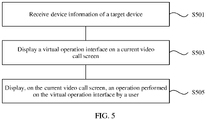
- FIG. 5 is a flowchart of another remote assistance method according to an embodiment of this application. As shown in FIG. 5 , an embodiment of this application provides another remote assistance method. The method is performed by a terminal 30 corresponding to an assisting person. In a video call process between a terminal 20 and the terminal 30, implementation steps of the method are as follows: Step S501: Receive device information of a target device.
- a communication connection is established between the terminal 20 and the terminal 30.
- the communication connection between the terminal 20 and the terminal 30 may be initiated by the terminal 30.
- user B corresponding to the terminal 30 learns that user A corresponding to the terminal 20 cannot perform an operation on a device, user B establishes a video connection by initiating a request to the terminal 20.
- the communication connection between the terminal 20 and the terminal 30 may alternatively be initiated by the terminal 20.
- the device information obtained by the terminal 30 may not be sent by the terminal 20.
- a cloud server 40 After identifying a target device 10 and obtaining device information corresponding to the device, a cloud server 40 directly delivers the device information to the terminal 20 and the terminal 30. The terminal 20 does not need to forward the device information, thereby reducing workload of the terminal 20.
- Step S503 Display a virtual operation interface on a current video call screen.
- the terminal 30 can virtualize an operation interface based on the received device information. If the device information received by the terminal 30 only includes a data model corresponding to the target device 10, after receiving the data model, the terminal 30 presents the virtual operation interface on a current video screen, and the operation interface may correspond to an image of a physical object such as a real remote control device, a real control panel on the target device 10, or a control device corresponding to the target device 10.
- the terminal 30 after receiving a data model of an air conditioner, the terminal 30 virtualizes, on the terminal 30, an air conditioner remote control matching the air conditioner.
- the virtual air conditioner remote control is the same as a real air conditioner remote control, and includes buttons such as a virtual "ON/OFF" button used to control startup or shutdown of the air conditioner, and virtual buttons "-" and "+” used to control a temperature of the air conditioner.
- the terminal 20 sends the displayed air conditioner remote control to the terminal 30, and user B corresponding to the terminal 30 can operate a button of the air conditioner remote control on the video screen.
- a virtual operation interface displayed on the terminal 20 may be synchronized to the terminal 30 by using an audio and video synchronization technology.
- the terminal 30 When user B operates the button of the virtual air conditioner remote control on the video screen, the terminal 30 presents a visual effect corresponding to the operation, and sends the visual effect to the terminal 20 in real time, so that user A can view an operation effect and learn an operation for controlling the target device 10.
- the air conditioner remote control or another control device such as a control panel of the air conditioner is virtualized on the terminal 30 needs to be determined based on selection by user A corresponding to the terminal 20. If presentation selected by user A is the air conditioner remote control, the air conditioner remote control is also presented on the terminal 30. This ensures that operation interfaces of control device images presented on the terminal 20 and the terminal 30 are the same. Therefore, in this implementation, when sending the device information to the terminal 30, the terminal 20 selects a data model in the device information, so that only an operation interface of a control device image displayed on the terminal 20 can be presented on the terminal 30.
- the terminal 30 If the terminal 30 receives a controllable configuration file of the air conditioner, the terminal 30 generates a corresponding control instruction based on an operation of the user, and sends the control instruction to the terminal 20.
- the terminal 20 may send the control instruction to the air conditioner in a transmission mode such as infrared, Wi-Fi, Bluetooth, or data traffic, to directly control the air conditioner.
- the terminal 30 needs to bind the received device information to a corresponding real device in a video stream, so that the virtual operation interface displayed by the terminal 30 based on the device information corresponds to the device, to prevent the terminal 30 from still using a virtual operation interface of a previous device after the device in the video stream changes. Details are described above, and are not described herein again.
- Step S505 Display, on the current video call screen, an operation performed on the virtual operation interface by a user.
- User B corresponding to the terminal 30 performs an operation on the virtual operation interface, and the terminal 30 records operation information such as a coordinate point of a sliding operation, an operation time, a quantity of taps, and pressing duration in the operation process, and sends the operation information to the terminal 20.
- a visual effect corresponding to the operation is presented on the virtual operation interface on the current video screen of the terminal 30. For example, a button is recessed downward as the user presses, and is recovered as the user raises the hand. The visual effect is synchronized to the terminal 20, so that the user of the terminal 20 can intuitively and synchronously see an operation performed on the remote control.
- An operation performed by user B on the virtual operation interface on the terminal 30 may alternatively be sent to the terminal 20 in another manner or by using another algorithm, to ensure that content seen by the two parties on the screen is the same.
- This application provides the remote assistance method performed by the terminal 30.
- the video call screen including the virtual operation interface is presented on the terminal 30.
- User B corresponding to the terminal 30 performs an operation on the virtual operation interface on the terminal 30.
- the terminal 20 synchronously presents the operation performed by user B on the virtual operation interface, to assist user A corresponding to the terminal 20 in controlling the target device 10.
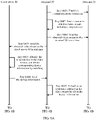
- FIG. 6A and FIG. 6B are a schematic flowchart of a communication process between a first terminal and a second terminal according to an embodiment of this application.
- the communication process between the first terminal and the second terminal is specifically as follows: Step S601: Establish a communication connection between a terminal 20 and a terminal 30.
- the communication connection is established to transmit data such as a video, device information, and operation information.
- the communication connection between the terminal 20 and the terminal 30 may be initiated by the terminal 20.
- user A corresponding to the terminal 20 cannot perform an operation on a current target device 10
- user B corresponding to the terminal 30 is specified to assist user A in performing an operation on the target device 10.
- User A establishes a video connection by initiating a request to the terminal 30.
- the communication connection between the terminal 20 and the terminal 30 may be initiated by the terminal 30.
- user B corresponding to the terminal 30 learns that user A corresponding to the terminal 20 cannot perform an operation on a device, user B establishes a video connection by initiating a request to the terminal 20.
- a communication connection may be directly established between the terminal 20 and the terminal 30, for example, by using a D2D communication technology.
- a connection may be established between the terminal 20 and the terminal 30 by using a video server.
- the video server sends a video stream of the terminal 20 to the terminal 30 for presentation.
- a specific implementation is not limited in this application.
- Step S602 Start a camera of the terminal 20 to obtain a video stream including the target device 10.
- the terminal 20 After the communication connection is established between the terminal 20 and the terminal 30, the terminal 20 starts the camera to photograph the target device 10, to obtain an image of the target device 10 and generate a video stream including the image of the target device 10.
- Step S603 The terminal 20 sends the obtained video stream to the terminal 30 in real time.
- the video stream of the terminal 20 may be sent to the terminal 30 in real time for presentation, so that content displayed on the terminal 20 and the terminal 30 is the same.
- Step S604 The terminal 20 sends the obtained video stream to a cloud server 40 in real time.
- the terminal 20 may send the cloud server 40 a picture, a short video, or the like that includes the target device 10.
- the terminal 20 sets a video stream to be obtained. For example, the terminal 20 captures pictures of N frames every several seconds or minutes, and then sends the captured pictures to the cloud server 40.
- the cloud server 40 identifies the target device 10 in the pictures in real time. This reduces running load of the terminal 20 and reduces traffic, compared with the manner of sending the video stream to the cloud server 40 in real time.
- Step S605 The cloud server 40 identifies the target device 10 in the image based on the received image that includes the target device 10, and obtains, by matching, device information corresponding to the device based on the target device 10.
- the cloud server 40 performs AI recognition to identify information such as a brand and a model of the target device 10, and then determines a device type of the target device 10. After the device type is determined, the device information corresponding to the device is matched.
- the device information includes a data model of the target device 10, and may further include controllable configuration file data.
- the data model may be a real remote control used to control the target device 10 in FIG. 1 , a virtual operation interface used to control the target device 10 in FIG. 2 , a control panel of the target device 10 in FIG. 3 , or the like.
- the controllable configuration file may be control instructions such as "turn on", “turn off', "turn up", “turn down", and "channel”.
- Each control instruction in the controllable configuration file is associated with a button, a knob, or the like on an operation interface in the data model.
- the terminal 20 can determine a control instruction corresponding to each operation.
- a controllable configuration file corresponding to the "OFF" button is that an instruction for turning off the target device 10 is executed after the "OFF" button is pressed.
- Step S606 The cloud server 40 sends the device information to the terminal 20.
- the cloud server 40 may send only the data model corresponding to the target device 10. If the terminal 20 has a transmission function such as infrared, Wi-Fi, Bluetooth, or data traffic, or has a function of directly controlling a target device, the cloud server 40 sends the data model and the controllable configuration file that are corresponding to the target device 10.
- Step S607 The terminal 20 virtualizes an operation interface in the video stream based on the device information.
- the terminal 20 After receiving the data model, the terminal 20 presents, on a current video screen, an image of a physical object such as a real remote control device, a real control panel on the target device 10, or a control device corresponding to the target device 10.
- a data model of an air conditioner the terminal 20 chooses to virtualize, on the terminal 20, an air conditioner remote control matching the air conditioner (a control interface displayed on a video screen may be selected by the user or may be the default).
- the virtual air conditioner remote control is the same as a real air conditioner remote control, and includes buttons such as a virtual "ON/OFF” button used to control startup or shutdown of the air conditioner, and virtual buttons "-" and “+” used to control a temperature of the air conditioner.
- the terminal 20 sends the displayed air conditioner remote control to the terminal 30, and user B corresponding to the terminal 30 can operate a button of the air conditioner remote control on the video screen.
- the terminal 20 and the terminal 30 do not have a controllable configuration file, when the user operates the button of the air conditioner remote control on the video screen, the terminal still presents a visual effect corresponding to the operation, and then sends the visual effect to the peer terminal in real time, so that user A can view an operation effect and learn an operation for controlling the target device 10.
- user B can also view an operation of user A, and therefore can provide guidance and assistance for user A in real time.
- the terminal 20 may not only present, on a current video screen, an image of a physical object such as a real remote control device, a real control panel on the target device 10, or a real control device corresponding to the target device 10, but also present the virtual operation interface shown in FIG. 2 .
- the terminal 20 receives a data model and a controllable configuration file of an air conditioner, and chooses to virtualize, on the terminal 20, a virtual operation interface used to control the air conditioner.
- the virtual operation interface includes buttons such as a virtual "ON/OFF" button used to control startup or shutdown of the air conditioner, and upward and downward virtual buttons used to control a temperature of the air conditioner.
- the terminal 20 sends the displayed virtual operation interface to the terminal 30, and user B corresponding to the terminal 30 can operate a button on the virtual operation interface.
- the terminal 20 receives the controllable configuration file of the air conditioner, if user A operates a button on the virtual operation interface on the video screen, the terminal 20 sends, based on an instruction for controlling the air conditioner of a controllable configuration file corresponding to the button, the instruction to the air conditioner in a transmission mode such as infrared, Wi-Fi, Bluetooth, or data traffic, to directly control the air conditioner.
- a transmission mode such as infrared, Wi-Fi, Bluetooth, or data traffic
- the terminal 20 needs to bind the received device information to the target device 10 in the video stream, so that the virtual operation interface displayed by the terminal 20 based on the device information corresponds to the target device 10, to prevent the terminal 20 from still using a virtual operation interface of a previous device after the target device 10 in the video stream changes.
- the terminal 20 continuously or intermittently sends the image of the target device 10 to the cloud server 40. If the device image identified by the cloud server 40 does not change, the device information of the target device 10 sent to the terminal 20 is not to be changed. If the cloud server cannot identify the image of the target device 10, the cloud server sends notification information to the terminal 20, so that the terminal 20 stops displaying the virtual operation interface in the video.
- Step S608 The terminal 20 sends the device information to the terminal 30.
- the device information obtained by the terminal 30 may not be sent by the terminal 20.
- the cloud server 40 After identifying the device and obtaining the device information corresponding to the device, the cloud server 40 directly delivers the device information to the terminal 20 and the terminal 30. The terminal 20 does not need to forward the device information, thereby reducing workload of the terminal 20.
- Step S609 The terminal 30 virtualizes an operation interface in the video stream based on the device information.
- the terminal 30 If the device information received by the terminal 30 only includes the data model corresponding to the target device 10, after receiving the data model, the terminal 30 presents, on a current video screen, an image of a physical object such as a real remote control device, a real control panel on the target device 10, or a control device corresponding to the target device 10.
- a physical object such as a real remote control device, a real control panel on the target device 10, or a control device corresponding to the target device 10.
- the terminal 30 after receiving a data model of an air conditioner, the terminal 30 virtualizes, on the terminal 30 based on selection by the terminal 20, an air conditioner remote control matching the air conditioner.
- the virtual air conditioner remote control is the same as a real air conditioner remote control, and includes buttons such as a virtual "ON/OFF" button used to control startup or shutdown of the air conditioner, and virtual buttons "-" and "+” used to control a temperature of the air conditioner.
- the terminal 20 sends the displayed air conditioner remote control to the terminal 30, and user B corresponding to the terminal 30 can operate a button of the air conditioner remote control on the video screen.
- the terminal 30 When user B operates the button of the air conditioner remote control on the video screen, the terminal 30 presents a visual effect corresponding to the operation, and sends the visual effect to the terminal 20 in real time, so that user A can view an operation effect and learn an operation for controlling the target device 10.
- the air conditioner remote control or another control device such as a control panel of the air conditioner is virtualized on the terminal 30 needs to be determined based on selection by user A corresponding to the terminal 20. If presentation selected by user A is the air conditioner remote control, the air conditioner remote control is also presented on the terminal 30. This ensures that operation interfaces of control device images presented on the terminal 20 and the terminal 30 are the same. Therefore, in this implementation, when sending the device information to the terminal 30, the terminal 20 selects a data model in the device information, so that only an operation interface of a control device image displayed on the terminal 20 can be presented on the terminal 30.
- the terminal 30 may not only present, on a current video screen, an image of a physical object such as a real remote control device, a real control panel on the target device 10, or a real control device corresponding to the target device 10, but also present the virtual operation interface shown in FIG. 2 .
- the terminal 30 after receiving a data model and a controllable configuration file of an air conditioner, the terminal 30 virtualizes, on the terminal 30 based on selection by the terminal 20, a virtual operation interface used to control the air conditioner.
- the virtual operation interface includes buttons such as a virtual "ON/OFF" button used to control startup or shutdown of the air conditioner, and upward and downward virtual buttons used to control a temperature of the air conditioner.
- the terminal 20 sends the displayed virtual operation interface to the terminal 30, and user B corresponding to the terminal 30 can operate a button on the virtual operation interface.
- the terminal 30 receives the controllable configuration file of the air conditioner, if user B operates a button on the virtual operation interface on the video screen, after generated operation information is sent to the terminal 20, the terminal 20 sends, based on an instruction for controlling the air conditioner of a controllable configuration file corresponding to the button, the instruction to the air conditioner in a transmission mode such as infrared, Wi-Fi, Bluetooth, or data traffic, to directly control the air conditioner.
- a transmission mode such as infrared, Wi-Fi, Bluetooth, or data traffic
- the terminal 30 needs to bind the received device information to a real device in a video stream, so that the virtual operation interface displayed by the terminal 30 based on the device information corresponds to the device, to prevent the terminal 30 from still using a virtual operation interface of a previous device after the device in the video stream changes.
- Step S610 The terminal 30 records operation information of an operation performed by the user on the virtual operation interface.
- User B corresponding to the terminal 30 performs an operation on the virtual operation interface, and the terminal 30 records operation information such as a coordinate point of a sliding operation, an operation time, a quantity of taps, and pressing duration in the operation process. After determining that user B completes the operation in the control process, the terminal 30 sends the recorded operation information to the terminal 20.
- a visual effect corresponding to the operation is presented on the virtual operation interface on the current video screen of the terminal 30. For example, a button is recessed downward as the user presses, and is recovered as the user raises the hand. The visual effect is also synchronized to the terminal 20, so that the user of the terminal 20 can intuitively see how to operate the remote control.
- Step S611 The terminal 30 sends operation information and/or a video to the terminal 20.
- Step S612 The terminal 20 parses the operation information, and converts a parsing result into an operation action of performing an operation on the operation interface.
- the terminal 20 After receiving and parsing the operation information, the terminal 20 informs, in a manner such as video demonstration, user A of how to perform an operation on the terminal 20, to control the target device 10.
- a visual effect corresponding to the operation is presented on the virtual operation interface on the current video screen of the terminal 30. For example, a button is recessed downward as the user presses, and is recovered as the user raises the hand. The visual effect is also synchronized to the terminal 20, so that the user of the terminal 20 can intuitively see how to operate the remote control.
- a plurality of methods may be used to control the target device 10.
- the terminal 20 establishes a smart home interconnection protocol with the target device. After receiving the operation information sent by the terminal 30, the terminal 20 parses the operation information, converts the operation information into an instruction by using the smart home interconnection protocol, and sends the instruction to the air conditioner in a transmission mode such as infrared, Wi-Fi, Bluetooth, or data traffic. In this way, user A corresponding to the terminal 20 does not need to perform an operation again.
- the terminal 30 presents, on the virtual operation interface on the current video screen, a visual effect corresponding to the operation, and sends the visual effect to the terminal 20 in real time.
- a visual effect corresponding to the operation By viewing the visual effect corresponding to the operation, the user corresponding to the terminal 20 can learn a method for operating and controlling the air conditioner, and then directly perform an operation on a physical object such as a physical remote control, a control panel on the target device 10, or a control device corresponding to the target device 10.
- Step S613 The terminal 20 sends operation information and/or a video to the terminal 30.
- Step S614 The terminal 30 presents the operation interface on the terminal 20.
- the terminal 20 After user A performs an operation on the video stream on the terminal 20, the terminal 20 presents, on the virtual operation interface on the current video screen, a visual effect corresponding to the operation, and sends the visual effect to the terminal 30 in real time.
- user B corresponding to the terminal 30 determines whether the operation performed by user A corresponding to the terminal 20 is correct.
- user A needs to send the operation information to the terminal 30.
- user A draws a marked circle on a screen of the terminal 20 for an area, and the terminal 20 needs to record operation information such as a series of coordinate points, a timestamp, and a quantity of times that are on the screen at that time. Then, the operation information is sent to the terminal 30 by using a dedicated communications channel, and a video sent by the terminal 20 is matched by using the timestamp, to ensure that content seen by the two parties on the screen is the same.
- a remote assistance system configured to implement the foregoing method embodiments. Specifically, after obtaining a video stream including a target device 10, a terminal 20 sends the video stream to a terminal 30 and a server 40.
- the server 40 obtains two-dimensional or three-dimensional data of a real control interface, such as a control device or a control panel, corresponding to the target device 10, and then sends the two-dimensional or three-dimensional data to the terminal 20 and the terminal 30.
- a virtual control interface is presented in videos on the terminal 20 and the terminal 30 by using an AR technology.
- the terminal 30 receives an operation performed by an assisting party (user B) on the virtual control interface, and then sends the operation information to the terminal 20.
- the terminal 20 restores these operation actions on a video screen based on the received operation information.
- user A corresponding to the terminal 20 can learn a method for operating and controlling the target device, and can perform an operation directly on the control panel on the terminal 20 or on a real remote control device.
- Assisted user A can see, on the terminal of user A, a specific operation performed on the real control panel or remote control. This is very intuitive as if the assisting party gives guidance in person on the scene, and improves efficiency of communication between the two parties.
- this application lists an embodiment to facilitate understanding: It is assumed that an elderly person at home is user A corresponding to the terminal 20, and a son in an office is user B corresponding to the terminal 30.
- An "AR Remote Assistance” application is installed on smartphones of the two people. When elderly person A needs to turn on a sleep mode of an air conditioner but cannot find a remote control or does not know how to operate the remote control, elderly person A opens the "AR Remote Assistance” application on the mobile phone to seek help from son B.
- Elderly person A points (a camera of) the mobile phone at the air conditioner. An image of the air conditioner is displayed on the mobile phone screen of son B, and a remote control of the air conditioner is displayed on the screen.
- Son B operates a corresponding button on the remote control interface, and an instruction is returned to the mobile phone of elderly person A.
- elderly person A watches the son operating the remote control on the mobile phone of elderly person A
- the mobile phone of elderly person A turns on the sleep mode of the air conditioner by using a smart home interconnection protocol after receiving the air conditioner control instruction.
- An embodiment of this application further provides a remote control system, configured to implement the foregoing method embodiments.
- the system includes a target device 10 that needs to be controlled, a cloud server 40, a remote control apparatus 70 performed by a terminal 20, and a remote control apparatus 80 performed by a terminal 30.
- the system can superimpose a virtual operation interface on a video stream obtained by the terminal 20. This facilitates communication between an assisting party and an assisted party, and makes it easier for the assisting party to assist the assisted party in operating a device.
- FIG. 7 is a schematic diagram of a working procedure between devices in a remote assistance system according to an embodiment of this application.
- a process of implementing remote assistance by the system mainly includes a communication establishment phase, an AI recognition phase, an AR recognition phase, and a smart home interconnection phase.
- Party A represents a terminal 20
- party B represents a terminal 30
- a cloud represents a cloud server 40
- an object represents a target device 10.
- Step 1 Establish a communication connection between party A and party B.
- the communication connection is established to transmit data such as a video, device information, and operation information.
- the communication connection between the terminal 20 and the terminal 30 may be initiated by the terminal 20.
- user A corresponding to the terminal 20 cannot perform an operation on a current target device 10
- user B corresponding to the terminal 30 is specified to assist user A in performing an operation on the target device 10.
- User A establishes a video connection by initiating a request to the terminal 30.
- the communication connection between the terminal 20 and the terminal 30 may be initiated by the terminal 30.
- user B corresponding to the terminal 30 learns that user A corresponding to the terminal 20 cannot perform an operation on a device, user B establishes a video connection by initiating a request to the terminal 20.
- a communication connection may be directly established between the terminal 20 and the terminal 30, for example, by using a D2D communication technology.
- a connection may be established between the terminal 20 and the terminal 30 by using a video server.
- the video server sends a video stream of the terminal 20 to the terminal 30 for presentation.
- a specific implementation is not limited in this application.
- Step 2 Party A uses a camera to obtain an object that needs to be controlled.
- the terminal 20 After the communication connection is established between the terminal 20 and the terminal 30, the terminal 20 starts the camera to photograph the target device 10, to obtain a two-dimensional or three-dimensional structural diagram of the target device 10 and generate a video stream including the two-dimensional or three-dimensional structural diagram of the target device 10.
- Step 3 In a video call process between party A and party B, party B obtains, in real time, video content photographed by party A.
- the video stream of the terminal 20 may be sent to the terminal 30 in real time for presentation, so that content displayed on the terminal 0 and the terminal 30 is the same.
- Step 1 The cloud identifies an object in the video in real time.
- the terminal 20 may send the cloud server 40 a picture, a short video, or the like that includes the target device 10.
- the terminal 20 sets a video stream to be obtained. For example, the terminal 20 captures pictures of N frames every several seconds or minutes, and then sends the captured pictures to the cloud server 40.
- the cloud server 40 identifies the target device 10 in the pictures in real time. This reduces running load of the terminal 20 and reduces traffic, compared with the manner of sending the video stream to the cloud server 40 in real time.
- Step 2 Match operation information corresponding to the object after information about the object is identified, where the operation information includes information such as turn on, turn off, turn up, turn down, or a channel.
- the cloud server 40 After the terminal 20 sends the video stream that includes the target device 10, the cloud server 40 performs AI recognition to identify information such as a brand and a model of the target device 10, and then determines a device type of the target device 10. After the device type is determined, the device information corresponding to the device is matched.
- the device information includes a data model of the target device 10, and may further include controllable configuration file data.
- the data model may be a real remote control used to control the target device 10 in FIG. 1 , a virtual operation interface used to control the target device 10 in FIG. 2 , a control panel of the target device 10 in FIG. 3 , or the like.
- the controllable configuration file may be control instructions such as "turn on", “turn off', "turn up", “turn down", and "channel".
- Each control instruction in the controllable configuration file is associated with a button, a knob, or the like on an operation interface in the data model.
- the terminal 20 can determine a control instruction corresponding to each operation.
- a controllable configuration file corresponding to the "OFF" button is that an instruction for turning off the target device 10 is executed after the "OFF" button is pressed.
- Step 1 Party A obtains the information about the object from the cloud, implements a virtual operation panel, and binds the operation panel to the object in the video.
- the cloud server 40 may send only the data model corresponding to the target device 10.
- the terminal 20 presents, on a current video screen, an image of a physical object such as a real remote control device, a real control panel on the target device 10, or a control device corresponding to the target device 10.
- a real remote control device for example, the terminal 20 does not have an infrared emission function, or is not connected to the target device
- the cloud server 40 may send only the data model corresponding to the target device 10.
- the terminal 20 presents, on a current video screen, an image of a physical object such as a real remote control device, a real control panel on the target device 10, or a control device corresponding to the target device 10.
- the terminal 20 after receiving a data model of an air conditioner, the terminal 20 chooses to virtualize, on the terminal 20, an air conditioner remote control matching the air conditioner (a control interface displayed on a video screen may be selected by the user or may be the default).
- the virtual air conditioner remote control is the same as a real air conditioner remote control, and includes buttons such as a virtual "ON/OFF" button used to control startup or shutdown of the air conditioner, and virtual buttons "-" and "+” used to control a temperature of the air conditioner.
- the terminal 20 sends the displayed air conditioner remote control to the terminal 30, and user B corresponding to the terminal 30 can operate a button of the air conditioner remote control on the video screen.
- the terminal 20 and the terminal 30 do not have a controllable configuration file, when the user operates the button of the air conditioner remote control on the video screen, the terminal still presents a visual effect corresponding to the operation, and then sends the visual effect to the peer terminal in real time, so that user A can view an operation effect and learn an operation for controlling the target device 10.
- user B can also view an operation of user A, and therefore can provide guidance and assistance for user A in real time.
- the cloud server 40 sends the data model and the controllable configuration file that are corresponding to the target device 10.
- the terminal 20 may not only present, on a current video screen, an image of a physical object such as a real remote control device, a real control panel on the target device 10, or a real control device corresponding to the target device 10, but also present the virtual operation interface shown in FIG. 2 .
- the virtual operation interface displayed on the terminal in FIG. As shown by the virtual operation interface displayed on the terminal in FIG.
- the terminal 20 receives a data model and a controllable configuration file of an air conditioner, and chooses to virtualize, on the terminal 20, a virtual operation interface used to control the air conditioner.
- the virtual operation interface includes buttons such as a virtual "ON/OFF" button used to control startup or shutdown of the air conditioner, and upward and downward virtual buttons used to control a temperature of the air conditioner.
- the terminal 20 sends the displayed virtual operation interface to the terminal 30, and user B corresponding to the terminal 30 can operate a button on the virtual operation interface.
- the terminal 20 receives the controllable configuration file of the air conditioner, if user A operates a button on the virtual operation interface on the video screen, the terminal 20 sends, based on an instruction for controlling the air conditioner of a controllable configuration file corresponding to the button, the instruction to the air conditioner in a transmission mode such as infrared, Wi-Fi, Bluetooth, or data traffic, to directly control the air conditioner.
- a transmission mode such as infrared, Wi-Fi, Bluetooth, or data traffic
- Step 2 Party B obtains the object information sent by party A, and also virtualizes an operation panel in the video, to obtain the same content as that displayed on a display interface of party A.
- the device information obtained by the terminal 30 may not be sent by the terminal 20.
- the cloud server 40 After identifying the device and obtaining the device information corresponding to the device, the cloud server 40 directly delivers the device information to the terminal 20 and the terminal 30.
- the terminal 20 does not need to forward the device information, thereby reducing workload of the terminal 20.
- the terminal 30 after receiving a data model of an air conditioner, the terminal 30 virtualizes, on the terminal 30 based on selection by the terminal 20, an air conditioner remote control matching the air conditioner.
- the virtual air conditioner remote control is the same as a real air conditioner remote control, and includes buttons such as a virtual "ON/OFF" button used to control startup or shutdown of the air conditioner, and virtual buttons "-" and "+” used to control a temperature of the air conditioner.
- the terminal 20 sends the displayed air conditioner remote control to the terminal 30, and user B corresponding to the terminal 30 can operate a button of the air conditioner remote control on the video screen.
- the terminal 30 still presents a visual effect corresponding to the operation, and then sends the visual effect to the terminal in real time, so that user A can view an operation effect and learn an operation for controlling the target device 10.
- the terminal 30 after receiving a data model and a controllable configuration file of an air conditioner, the terminal 30 virtualizes, on the terminal 30 based on selection by the terminal 20, a virtual operation interface used to control the air conditioner.
- the virtual operation interface includes buttons such as a virtual "ON/OFF" button used to control startup or shutdown of the air conditioner, and upward and downward virtual buttons used to control a temperature of the air conditioner.
- the terminal 20 sends the displayed virtual operation interface to the terminal 30, and user B corresponding to the terminal 30 can operate a button on the virtual operation interface.
- the terminal 30 receives the controllable configuration file of the air conditioner, if user B operates a button on the virtual operation interface on the video screen, after generated operation information is sent to the terminal 20, the terminal 20 sends, based on an instruction for controlling the air conditioner of a controllable configuration file corresponding to the button, the instruction to the air conditioner in a transmission mode such as infrared, Wi-Fi, Bluetooth, or data traffic, to directly control the air conditioner.
- a transmission mode such as infrared, Wi-Fi, Bluetooth, or data traffic
- Step 3 Party B performs a remote operation on the virtual operation panel, and records operation information such as coordinate information, a timestamp, and a quantity of taps.
- User B corresponding to the terminal 30 performs an operation on the virtual operation interface, and the terminal 30 records operation information such as a coordinate point of a sliding operation, an operation time, a quantity of taps, and pressing duration in the operation process. After determining that user B completes the operation in the control process, the terminal 30 sends the recorded operation information to the terminal 20.
- a visual effect corresponding to the operation is presented on the virtual operation interface on the current video screen of the terminal 30. For example, a button is recessed downward as the user presses, and is recovered as the user raises the hand. The visual effect is also synchronized to the terminal 20, so that the user of the terminal 20 can intuitively see how to operate the remote control.
- Step 4 After obtaining the operation information of party B, party A obtains, by parsing based on the operation information, a specific button operation such as turn on, turn off, turn up, turn down, or a channel.
- a specific button operation such as turn on, turn off, turn up, turn down, or a channel.
- the terminal 20 After receiving and parsing the operation information sent by the terminal, the terminal 20 informs, in a manner such as video demonstration, user A of how to perform an operation on the terminal 20, to control the target device 10.
- a visual effect corresponding to the operation is presented on the virtual operation interface on the current video screen of the terminal 30. For example, a button is recessed downward as the user presses, and is recovered as the user raises the hand. The visual effect is also synchronized to the terminal 20, so that the user of the terminal 20 can intuitively see how to operate the remote control.
- Step 1 Party A controls the corresponding object based on the button operation.
- the terminal 20 establishes a smart home interconnection protocol with the target device. After receiving the operation information sent by the terminal 30, the terminal 20 parses the operation information, converts the operation information into an instruction by using the smart home interconnection protocol, and sends the instruction to the air conditioner in a transmission mode such as infrared, Wi-Fi, Bluetooth, or data traffic. In this way, user A corresponding to the terminal 20 does not need to perform an operation again.
- the terminal 30 presents, on the virtual operation interface on the current video screen, a visual effect corresponding to the operation, and sends the visual effect to the terminal 20 in real time.
- a visual effect corresponding to the operation By viewing the visual effect corresponding to the operation, the user corresponding to the terminal 20 can learn a method for operating and controlling the air conditioner, and then directly perform an operation on a physical object such as a physical remote control, a control panel on the target device 10, or a control device corresponding to the target device 10.
- FIG. 8 is a schematic structural diagram of a terminal device according to an embodiment of the present invention.
- the terminal device is configured to implement the foregoing method embodiments.
- FIG. 8 shows a terminal target device 800.
- the terminal target device 800 may be the terminal 20 or the terminal 30, and includes a sensor 801, a display 802, a processor 803, a memory 804, a communications interface 805, and a bus 806.
- the processor 803, the memory 804, and the communications interface 805 in the terminal device can establish a communication connection by using the bus 806.
- the sensor 801 is configured to obtain a video stream including a device and device information corresponding to the device.
- the sensor 801 may include a camera or the like.
- the display 802 is configured to display processed data, such as a video and a virtual operation interface.
- the processor 803 may be a central processing unit (central processing unit, CPU).
- the memory 804 may include a volatile memory (volatile memory), for example, a random access memory (random-access memory, RAM); or include a non-volatile memory (non-volatile memory), for example, a read-only memory (read-only memory, ROM), a flash memory, a hard disk drive (hard disk drive, HDD), or a solid state drive (solid state drive, SSD); or include a combination of the foregoing types of memories.
- volatile memory volatile memory
- RAM random access memory
- non-volatile memory non-volatile memory
- ROM read-only memory
- flash memory for example, a read-only memory (read-only memory, ROM), a flash memory, a hard disk drive (hard disk drive, HDD), or a solid state drive (solid state drive, SSD); or include a combination of the foregoing types of memories.
- the remote control methods provided in the foregoing embodiments are all performed by the processor 803.
- Data such as a video stream, device information, and operation information is stored in the memory 804.
- the memory 804 is further configured to store a corresponding program instruction or the like to be executed by the processor 803 to perform the remote control method in the foregoing embodiment.
- aspects or features in the embodiments of this application may be implemented as a method, an apparatus or a product that uses standard programming and/or engineering technologies.
- product used in this application covers a computer program that can be accessed from any computer readable component, carrier or medium.
- the computer-readable medium may include but is not limited to: a magnetic storage component (for example, a hard disk, a floppy disk, or a magnetic tape), an optical disc (for example, a compact disc (compact disc, CD) or a digital versatile disc (digital versatile disc, DVD)), a smart card, or a flash memory (for example, an erasable programmable read-only memory (erasable programmable read-only memory, EPROM), a card, a stick, or a key drive).
- various storage media described in this specification may represent one or more devices and/or other machine-readable media for storing information.
- the term "machine-readable medium" may include, but is not limited to, a radio channel and various other media capable of storing, including, and/or carrying an instruction and/or data.
- All or some of the foregoing embodiments may be implemented by using software, hardware, firmware, or any combination thereof.
- the embodiments may be implemented completely or partially in a form of a computer program product.
- the computer program product includes one or more computer instructions.
- the computer may be a general-purpose computer, a dedicated computer, a computer network, or other programmable apparatuses.
- the computer instructions may be stored in a computer-readable storage medium or may be transmitted from a computer-readable storage medium to another computer-readable storage medium.
- the computer instructions may be transmitted from a website, computer, server, or data center to another website, computer, server, or data center in a wired (for example, a coaxial cable, an optical fiber, or a digital subscriber line (DSL)) or wireless (for example, infrared, radio, or microwave) manner.
- the computer-readable storage medium may be any usable medium accessible by a computer, or a data storage device, such as a server or a data center, integrating one or more usable media.
- the usable medium may be a magnetic medium (for example, a floppy disk, a hard disk, or a magnetic tape), an optical medium (for example, a DVD), a semiconductor medium (for example, a solid-state drive (solid state drive, SSD)), or the like.
- a magnetic medium for example, a floppy disk, a hard disk, or a magnetic tape
- an optical medium for example, a DVD
- a semiconductor medium for example, a solid-state drive (solid state drive, SSD)
- sequence numbers of the foregoing processes do not mean execution sequences.
- the execution sequences of the processes should be determined based on functions and internal logic of the processes, and should not constitute any limitation on the implementation processes of the embodiments of this application.
- the disclosed system, apparatus, and method may be implemented in other manners.
- the described apparatus embodiment is merely an example.
- the unit division is merely logical function division and may be other division during actual implementation.
- a plurality of units or components may be combined or integrated into another system, or some features may be ignored or not performed.
- the displayed or discussed mutual couplings or direct couplings or communication connections may be implemented through some interfaces.
- the indirect couplings or communication connections between the apparatuses or units may be implemented in electrical, mechanical, or other forms.
- the units described as separate parts may or may not be physically separate, and parts displayed as units may or may not be physical units, in other words, may be located in one position, or may be distributed on a plurality of network units. Some or all of the units may be selected according to actual requirements to achieve the objectives of the solutions of the embodiments.
- the functions When the functions are implemented in a form of a software functional unit and sold or used as an independent product, the functions may be stored in a computer-readable storage medium. Based on such an understanding, the technical solutions of this application essentially, or the part contributing to the prior art, or some of the technical solutions may be implemented in a form of a software product.
- the computer software product is stored in a storage medium, and includes several instructions for instructing a computer device (which may be a personal computer, a server, a network device, or the like) to perform all or some of the steps of the methods described in the embodiments of this application.
- the foregoing storage medium includes any medium that can store program code, such as a USB flash drive, a removable hard disk, a read-only memory (read-only memory, ROM), a random access memory (random access memory, RAM), a magnetic disk, or an optical disc.
- program code such as a USB flash drive, a removable hard disk, a read-only memory (read-only memory, ROM), a random access memory (random access memory, RAM), a magnetic disk, or an optical disc.
Landscapes
- Engineering & Computer Science (AREA)
- Multimedia (AREA)
- Signal Processing (AREA)
- General Engineering & Computer Science (AREA)
- Software Systems (AREA)
- Theoretical Computer Science (AREA)
- Human Computer Interaction (AREA)
- Computer Networks & Wireless Communication (AREA)
- Physics & Mathematics (AREA)
- General Physics & Mathematics (AREA)
- Telephonic Communication Services (AREA)
- Selective Calling Equipment (AREA)
- Telephone Function (AREA)
Applications Claiming Priority (2)
| Application Number | Priority Date | Filing Date | Title |
|---|---|---|---|
| CN201911230080.9A CN112911190A (zh) | 2019-12-04 | 2019-12-04 | 一种远程协助的方法、电子设备和系统 |
| PCT/CN2020/122844 WO2021109745A1 (zh) | 2019-12-04 | 2020-10-22 | 一种远程协助的方法、电子设备和系统 |
Publications (3)
| Publication Number | Publication Date |
|---|---|
| EP4047902A1 true EP4047902A1 (de) | 2022-08-24 |
| EP4047902A4 EP4047902A4 (de) | 2022-12-07 |
| EP4047902B1 EP4047902B1 (de) | 2024-09-25 |
Family
ID=76110804
Family Applications (1)
| Application Number | Title | Priority Date | Filing Date |
|---|---|---|---|
| EP20897195.2A Active EP4047902B1 (de) | 2019-12-04 | 2020-10-22 | Fernunterstützungsverfahren, elektronische vorrichtung und system |
Country Status (4)
| Country | Link |
|---|---|
| US (1) | US12126856B2 (de) |
| EP (1) | EP4047902B1 (de) |
| CN (1) | CN112911190A (de) |
| WO (1) | WO2021109745A1 (de) |
Families Citing this family (13)
| Publication number | Priority date | Publication date | Assignee | Title |
|---|---|---|---|---|
| CN113595867A (zh) * | 2021-06-22 | 2021-11-02 | 青岛海尔科技有限公司 | 基于远程交互的设备操作方法及装置 |
| CN113821287B (zh) * | 2021-09-06 | 2022-09-20 | 深圳太力生物技术有限责任公司 | 基于机器人的细胞操作任务处理方法、装置、设备和介质 |
| WO2023030518A1 (zh) * | 2021-09-06 | 2023-03-09 | 深圳太力生物技术有限责任公司 | 基于机器人的细胞操作任务处理方法、装置、设备及介质 |
| CN114070834A (zh) * | 2021-10-26 | 2022-02-18 | 深圳市商汤科技有限公司 | 一种远程协助方法、装置及其相关设备和存储介质 |
| CN114201645A (zh) * | 2021-12-01 | 2022-03-18 | 北京百度网讯科技有限公司 | 对象标注方法、装置、电子设备以及存储介质 |
| US11678002B1 (en) * | 2021-12-31 | 2023-06-13 | Universal Electronics Inc. | Systems and methods for configuration of a controlling device to enable selection of one or more media streams |
| US11677863B1 (en) * | 2022-03-10 | 2023-06-13 | ServiceBell, Inc. | Mediated active call initiation in browsers |
| US12273647B2 (en) | 2022-05-27 | 2025-04-08 | Motorola Mobility Llc | Non-mirrored preview of text based demonstration object in mirrored mobile webcam image |
| US12277742B2 (en) | 2022-05-27 | 2025-04-15 | Motorola Mobility Llc | Virtual action center based on segmented video feed for a video communication session |
| US12019943B2 (en) | 2022-05-27 | 2024-06-25 | Motorola Mobility Llc | Function based selective segmented video feed from a transmitting device to different participants on a video communication session |
| US11825237B1 (en) * | 2022-05-27 | 2023-11-21 | Motorola Mobility Llc | Segmented video preview controls by remote participants in a video communication session |
| CN116301548A (zh) * | 2023-03-17 | 2023-06-23 | 中国船舶集团有限公司第七〇九研究所 | 一种云终端远程触控交互控制系统及方法 |
| DE102023124470A1 (de) * | 2023-09-11 | 2025-03-13 | Fm Marketing Gmbh | Vorrichtung zum Erfassen der Aufmerksamkeit eines Zuschauers, beispielsweise bei der Anzeige einer Katastrophennachricht |
Family Cites Families (16)
| Publication number | Priority date | Publication date | Assignee | Title |
|---|---|---|---|---|
| CN102664944A (zh) | 2012-04-17 | 2012-09-12 | 杨建忠 | 网络远程协助方法 |
| KR102105463B1 (ko) * | 2013-09-02 | 2020-04-28 | 엘지전자 주식회사 | 이동 단말기 및 그것의 제어 방법 |
| US10951683B2 (en) | 2015-07-13 | 2021-03-16 | Projector.Is, Inc. | Systems and methods for remote interaction |
| CN106254462B (zh) * | 2016-08-05 | 2020-03-27 | 北京奇虎科技有限公司 | 一种实现移动终端的远程协助的方法、服务器和系统 |
| WO2018095366A1 (zh) * | 2016-11-24 | 2018-05-31 | 腾讯科技(深圳)有限公司 | 视频推荐确定、信息显示、基于帧同步的数据处理方法 |
| CN106502118A (zh) | 2016-12-21 | 2017-03-15 | 惠州Tcl移动通信有限公司 | 一种基于ar摄像头的智能家居控制方法及系统 |
| CN108415635A (zh) * | 2017-02-10 | 2018-08-17 | 广州森成和信息技术有限公司 | 一种图片分享系统 |
| US10887195B2 (en) * | 2017-04-28 | 2021-01-05 | Optim Corporation | Computer system, remote control notification method and program |
| CN208207534U (zh) | 2017-07-28 | 2018-12-07 | 美的智慧家居科技有限公司 | 一种基于虚拟显示技术的智能家电控制系统 |
| CN107547554A (zh) | 2017-09-08 | 2018-01-05 | 北京枭龙科技有限公司 | 一种基于增强现实的智能设备远程协助系统 |
| CN107817701B (zh) * | 2017-09-20 | 2020-09-29 | 珠海格力电器股份有限公司 | 设备控制方法、装置、计算机可读存储介质及终端 |
| CN109587536A (zh) | 2017-09-29 | 2019-04-05 | 中兴通讯股份有限公司 | 一种远程遥控方法、设备、服务器和系统 |
| CN108931924B (zh) | 2018-08-06 | 2020-02-28 | 珠海格力电器股份有限公司 | 智能家居系统的控制方法及装置、处理器、存储介质 |
| CN109451141B (zh) | 2018-09-26 | 2021-06-04 | 维沃移动通信有限公司 | 一种操作控制方法及相关终端 |
| US10679420B2 (en) * | 2018-11-02 | 2020-06-09 | General Motors Llc | Augmented reality (AR) remote vehicle assistance |
| CN109541948A (zh) | 2018-11-06 | 2019-03-29 | 黄冠强 | 一种智能家居智能控制系统及使用方法 |
-
2019
- 2019-12-04 CN CN201911230080.9A patent/CN112911190A/zh active Pending
-
2020
- 2020-10-22 WO PCT/CN2020/122844 patent/WO2021109745A1/zh not_active Ceased
- 2020-10-22 EP EP20897195.2A patent/EP4047902B1/de active Active
- 2020-10-22 US US17/782,016 patent/US12126856B2/en active Active
Also Published As
| Publication number | Publication date |
|---|---|
| US20230008199A1 (en) | 2023-01-12 |
| WO2021109745A1 (zh) | 2021-06-10 |
| US12126856B2 (en) | 2024-10-22 |
| CN112911190A (zh) | 2021-06-04 |
| EP4047902B1 (de) | 2024-09-25 |
| EP4047902A4 (de) | 2022-12-07 |
Similar Documents
| Publication | Publication Date | Title |
|---|---|---|
| EP4047902B1 (de) | Fernunterstützungsverfahren, elektronische vorrichtung und system | |
| US11388453B2 (en) | Method for processing live-streaming interaction video and server | |
| JP6254718B2 (ja) | スマートホーム設備の運転状態の調整方法、その装置、プログラム、及び記録媒体 | |
| EP4277287A1 (de) | Verfahren und vorrichtung zur verarbeitung von multimediainformationen, elektronische vorrichtung und speichermedium | |
| CN111966314B (zh) | 图像投屏方法、图像投屏装置、移动终端以及投屏设备 | |
| CN109068161B (zh) | 一种设备连接建立方法和装置 | |
| WO2015143880A1 (zh) | 智能家电控制方法、装置及终端 | |
| CN104010222A (zh) | 评论信息展示方法、装置及系统 | |
| CN103997676A (zh) | 信息显示方法、装置和系统 | |
| CN104834665A (zh) | 目标图片获取方法及装置 | |
| CN105828201A (zh) | 视频处理方法及装置 | |
| JP2016535351A (ja) | 動画情報共有方法、装置、プログラム、及び記録媒体 | |
| JP5982079B2 (ja) | 画像伝送の方法、装置、プログラム及び記録媒体 | |
| CN115314728B (zh) | 信息展示方法、系统、装置、电子设备及存储介质 | |
| CN110798622B (zh) | 一种共享拍摄方法及电子设备 | |
| US20180035170A1 (en) | Method and device for controlling playing state | |
| CN112269505B (zh) | 音视频控制方法、装置及电子设备 | |
| CN105094539B (zh) | 参考信息显示方法和装置 | |
| CN108986803B (zh) | 场景控制方法及装置、电子设备、可读存储介质 | |
| CN106358064A (zh) | 控制电视机的方法及设备 | |
| US12457535B2 (en) | Connection method and apparatus for wireless smart wearable device and storage medium | |
| CN106598217B (zh) | 显示方法、显示装置和电子设备 | |
| CN106658102B (zh) | 文件管理方法、文件管理装置和电子设备 | |
| CN106453872A (zh) | 显示控制方法和装置 | |
| CN116074432A (zh) | 多媒体数据的处理方法、装置和存储介质 |
Legal Events
| Date | Code | Title | Description |
|---|---|---|---|
| STAA | Information on the status of an ep patent application or granted ep patent |
Free format text: STATUS: THE INTERNATIONAL PUBLICATION HAS BEEN MADE |
|
| PUAI | Public reference made under article 153(3) epc to a published international application that has entered the european phase |
Free format text: ORIGINAL CODE: 0009012 |
|
| STAA | Information on the status of an ep patent application or granted ep patent |
Free format text: STATUS: REQUEST FOR EXAMINATION WAS MADE |
|
| 17P | Request for examination filed |
Effective date: 20220516 |
|
| AK | Designated contracting states |
Kind code of ref document: A1 Designated state(s): AL AT BE BG CH CY CZ DE DK EE ES FI FR GB GR HR HU IE IS IT LI LT LU LV MC MK MT NL NO PL PT RO RS SE SI SK SM TR |
|
| REG | Reference to a national code |
Ref country code: DE Ref legal event code: R079 Free format text: PREVIOUS MAIN CLASS: H04L0029080000 Ipc: H04L0065403000 Ref document number: 602020038501 Country of ref document: DE |
|
| A4 | Supplementary search report drawn up and despatched |
Effective date: 20221108 |
|
| RIC1 | Information provided on ipc code assigned before grant |
Ipc: G06F 9/00 20060101ALI20221102BHEP Ipc: H04L 65/403 20220101AFI20221102BHEP |
|
| DAV | Request for validation of the european patent (deleted) | ||
| DAX | Request for extension of the european patent (deleted) | ||
| GRAP | Despatch of communication of intention to grant a patent |
Free format text: ORIGINAL CODE: EPIDOSNIGR1 |
|
| STAA | Information on the status of an ep patent application or granted ep patent |
Free format text: STATUS: GRANT OF PATENT IS INTENDED |
|
| RIC1 | Information provided on ipc code assigned before grant |
Ipc: G06F 9/00 20060101ALI20240424BHEP Ipc: H04L 65/403 20220101AFI20240424BHEP |
|
| INTG | Intention to grant announced |
Effective date: 20240508 |
|
| GRAS | Grant fee paid |
Free format text: ORIGINAL CODE: EPIDOSNIGR3 |
|
| GRAA | (expected) grant |
Free format text: ORIGINAL CODE: 0009210 |
|
| STAA | Information on the status of an ep patent application or granted ep patent |
Free format text: STATUS: THE PATENT HAS BEEN GRANTED |
|
| AK | Designated contracting states |
Kind code of ref document: B1 Designated state(s): AL AT BE BG CH CY CZ DE DK EE ES FI FR GB GR HR HU IE IS IT LI LT LU LV MC MK MT NL NO PL PT RO RS SE SI SK SM TR |
|
| REG | Reference to a national code |
Ref country code: GB Ref legal event code: FG4D |
|
| REG | Reference to a national code |
Ref country code: CH Ref legal event code: EP |
|
| REG | Reference to a national code |
Ref country code: DE Ref legal event code: R096 Ref document number: 602020038501 Country of ref document: DE |
|
| REG | Reference to a national code |
Ref country code: IE Ref legal event code: FG4D |
|
| REG | Reference to a national code |
Ref country code: NL Ref legal event code: FP |
|
| REG | Reference to a national code |
Ref country code: LT Ref legal event code: MG9D |
|
| PG25 | Lapsed in a contracting state [announced via postgrant information from national office to epo] |
Ref country code: NO Free format text: LAPSE BECAUSE OF FAILURE TO SUBMIT A TRANSLATION OF THE DESCRIPTION OR TO PAY THE FEE WITHIN THE PRESCRIBED TIME-LIMIT Effective date: 20241225 |
|
| PG25 | Lapsed in a contracting state [announced via postgrant information from national office to epo] |
Ref country code: GR Free format text: LAPSE BECAUSE OF FAILURE TO SUBMIT A TRANSLATION OF THE DESCRIPTION OR TO PAY THE FEE WITHIN THE PRESCRIBED TIME-LIMIT Effective date: 20241226 Ref country code: FI Free format text: LAPSE BECAUSE OF FAILURE TO SUBMIT A TRANSLATION OF THE DESCRIPTION OR TO PAY THE FEE WITHIN THE PRESCRIBED TIME-LIMIT Effective date: 20240925 |
|
| PG25 | Lapsed in a contracting state [announced via postgrant information from national office to epo] |
Ref country code: BG Free format text: LAPSE BECAUSE OF FAILURE TO SUBMIT A TRANSLATION OF THE DESCRIPTION OR TO PAY THE FEE WITHIN THE PRESCRIBED TIME-LIMIT Effective date: 20240925 |
|
| PG25 | Lapsed in a contracting state [announced via postgrant information from national office to epo] |
Ref country code: LV Free format text: LAPSE BECAUSE OF FAILURE TO SUBMIT A TRANSLATION OF THE DESCRIPTION OR TO PAY THE FEE WITHIN THE PRESCRIBED TIME-LIMIT Effective date: 20240925 |
|
| PG25 | Lapsed in a contracting state [announced via postgrant information from national office to epo] |
Ref country code: RS Free format text: LAPSE BECAUSE OF FAILURE TO SUBMIT A TRANSLATION OF THE DESCRIPTION OR TO PAY THE FEE WITHIN THE PRESCRIBED TIME-LIMIT Effective date: 20241225 |
|
| PG25 | Lapsed in a contracting state [announced via postgrant information from national office to epo] |
Ref country code: RS Free format text: LAPSE BECAUSE OF FAILURE TO SUBMIT A TRANSLATION OF THE DESCRIPTION OR TO PAY THE FEE WITHIN THE PRESCRIBED TIME-LIMIT Effective date: 20241225 Ref country code: NO Free format text: LAPSE BECAUSE OF FAILURE TO SUBMIT A TRANSLATION OF THE DESCRIPTION OR TO PAY THE FEE WITHIN THE PRESCRIBED TIME-LIMIT Effective date: 20241225 Ref country code: LV Free format text: LAPSE BECAUSE OF FAILURE TO SUBMIT A TRANSLATION OF THE DESCRIPTION OR TO PAY THE FEE WITHIN THE PRESCRIBED TIME-LIMIT Effective date: 20240925 Ref country code: GR Free format text: LAPSE BECAUSE OF FAILURE TO SUBMIT A TRANSLATION OF THE DESCRIPTION OR TO PAY THE FEE WITHIN THE PRESCRIBED TIME-LIMIT Effective date: 20241226 Ref country code: FI Free format text: LAPSE BECAUSE OF FAILURE TO SUBMIT A TRANSLATION OF THE DESCRIPTION OR TO PAY THE FEE WITHIN THE PRESCRIBED TIME-LIMIT Effective date: 20240925 Ref country code: BG Free format text: LAPSE BECAUSE OF FAILURE TO SUBMIT A TRANSLATION OF THE DESCRIPTION OR TO PAY THE FEE WITHIN THE PRESCRIBED TIME-LIMIT Effective date: 20240925 |
|
| REG | Reference to a national code |
Ref country code: AT Ref legal event code: MK05 Ref document number: 1727599 Country of ref document: AT Kind code of ref document: T Effective date: 20240925 |
|
| PG25 | Lapsed in a contracting state [announced via postgrant information from national office to epo] |
Ref country code: PT Free format text: LAPSE BECAUSE OF FAILURE TO SUBMIT A TRANSLATION OF THE DESCRIPTION OR TO PAY THE FEE WITHIN THE PRESCRIBED TIME-LIMIT Effective date: 20250127 Ref country code: IS Free format text: LAPSE BECAUSE OF FAILURE TO SUBMIT A TRANSLATION OF THE DESCRIPTION OR TO PAY THE FEE WITHIN THE PRESCRIBED TIME-LIMIT Effective date: 20250125 |
|
| PG25 | Lapsed in a contracting state [announced via postgrant information from national office to epo] |
Ref country code: SM Free format text: LAPSE BECAUSE OF FAILURE TO SUBMIT A TRANSLATION OF THE DESCRIPTION OR TO PAY THE FEE WITHIN THE PRESCRIBED TIME-LIMIT Effective date: 20240925 Ref country code: RO Free format text: LAPSE BECAUSE OF FAILURE TO SUBMIT A TRANSLATION OF THE DESCRIPTION OR TO PAY THE FEE WITHIN THE PRESCRIBED TIME-LIMIT Effective date: 20240925 |
|
| PG25 | Lapsed in a contracting state [announced via postgrant information from national office to epo] |
Ref country code: ES Free format text: LAPSE BECAUSE OF FAILURE TO SUBMIT A TRANSLATION OF THE DESCRIPTION OR TO PAY THE FEE WITHIN THE PRESCRIBED TIME-LIMIT Effective date: 20240925 |
|
| PG25 | Lapsed in a contracting state [announced via postgrant information from national office to epo] |
Ref country code: AT Free format text: LAPSE BECAUSE OF FAILURE TO SUBMIT A TRANSLATION OF THE DESCRIPTION OR TO PAY THE FEE WITHIN THE PRESCRIBED TIME-LIMIT Effective date: 20240925 Ref country code: EE Free format text: LAPSE BECAUSE OF FAILURE TO SUBMIT A TRANSLATION OF THE DESCRIPTION OR TO PAY THE FEE WITHIN THE PRESCRIBED TIME-LIMIT Effective date: 20240925 |
|
| PG25 | Lapsed in a contracting state [announced via postgrant information from national office to epo] |
Ref country code: PL Free format text: LAPSE BECAUSE OF FAILURE TO SUBMIT A TRANSLATION OF THE DESCRIPTION OR TO PAY THE FEE WITHIN THE PRESCRIBED TIME-LIMIT Effective date: 20240925 Ref country code: CZ Free format text: LAPSE BECAUSE OF FAILURE TO SUBMIT A TRANSLATION OF THE DESCRIPTION OR TO PAY THE FEE WITHIN THE PRESCRIBED TIME-LIMIT Effective date: 20240925 |
|
| PG25 | Lapsed in a contracting state [announced via postgrant information from national office to epo] |
Ref country code: SK Free format text: LAPSE BECAUSE OF FAILURE TO SUBMIT A TRANSLATION OF THE DESCRIPTION OR TO PAY THE FEE WITHIN THE PRESCRIBED TIME-LIMIT Effective date: 20240925 Ref country code: IT Free format text: LAPSE BECAUSE OF FAILURE TO SUBMIT A TRANSLATION OF THE DESCRIPTION OR TO PAY THE FEE WITHIN THE PRESCRIBED TIME-LIMIT Effective date: 20240925 |
|
| REG | Reference to a national code |
Ref country code: CH Ref legal event code: PL |
|
| REG | Reference to a national code |
Ref country code: DE Ref legal event code: R097 Ref document number: 602020038501 Country of ref document: DE |
|
| PG25 | Lapsed in a contracting state [announced via postgrant information from national office to epo] |
Ref country code: MC Free format text: LAPSE BECAUSE OF FAILURE TO SUBMIT A TRANSLATION OF THE DESCRIPTION OR TO PAY THE FEE WITHIN THE PRESCRIBED TIME-LIMIT Effective date: 20240925 |
|
| PG25 | Lapsed in a contracting state [announced via postgrant information from national office to epo] |
Ref country code: DK Free format text: LAPSE BECAUSE OF FAILURE TO SUBMIT A TRANSLATION OF THE DESCRIPTION OR TO PAY THE FEE WITHIN THE PRESCRIBED TIME-LIMIT Effective date: 20240925 |
|
| PG25 | Lapsed in a contracting state [announced via postgrant information from national office to epo] |
Ref country code: BE Free format text: LAPSE BECAUSE OF NON-PAYMENT OF DUE FEES Effective date: 20241031 Ref country code: LU Free format text: LAPSE BECAUSE OF NON-PAYMENT OF DUE FEES Effective date: 20241022 |
|
| PG25 | Lapsed in a contracting state [announced via postgrant information from national office to epo] |
Ref country code: CH Free format text: LAPSE BECAUSE OF NON-PAYMENT OF DUE FEES Effective date: 20241031 |
|
| PLBE | No opposition filed within time limit |
Free format text: ORIGINAL CODE: 0009261 |
|
| STAA | Information on the status of an ep patent application or granted ep patent |
Free format text: STATUS: NO OPPOSITION FILED WITHIN TIME LIMIT |
|
| REG | Reference to a national code |
Ref country code: BE Ref legal event code: MM Effective date: 20241031 |
|
| GBPC | Gb: european patent ceased through non-payment of renewal fee |
Effective date: 20241225 |
|
| 26N | No opposition filed |
Effective date: 20250626 |
|
| PG25 | Lapsed in a contracting state [announced via postgrant information from national office to epo] |
Ref country code: SE Free format text: LAPSE BECAUSE OF FAILURE TO SUBMIT A TRANSLATION OF THE DESCRIPTION OR TO PAY THE FEE WITHIN THE PRESCRIBED TIME-LIMIT Effective date: 20240925 |
|
| PGFP | Annual fee paid to national office [announced via postgrant information from national office to epo] |
Ref country code: NL Payment date: 20250912 Year of fee payment: 6 |
|
| PG25 | Lapsed in a contracting state [announced via postgrant information from national office to epo] |
Ref country code: GB Free format text: LAPSE BECAUSE OF NON-PAYMENT OF DUE FEES Effective date: 20241225 |
|
| PG25 | Lapsed in a contracting state [announced via postgrant information from national office to epo] |
Ref country code: FR Free format text: LAPSE BECAUSE OF NON-PAYMENT OF DUE FEES Effective date: 20241125 |
|
| PG25 | Lapsed in a contracting state [announced via postgrant information from national office to epo] |
Ref country code: IE Free format text: LAPSE BECAUSE OF NON-PAYMENT OF DUE FEES Effective date: 20241022 |
|
| PGFP | Annual fee paid to national office [announced via postgrant information from national office to epo] |
Ref country code: DE Payment date: 20250902 Year of fee payment: 6 |
|
| PG25 | Lapsed in a contracting state [announced via postgrant information from national office to epo] |
Ref country code: HR Free format text: LAPSE BECAUSE OF FAILURE TO SUBMIT A TRANSLATION OF THE DESCRIPTION OR TO PAY THE FEE WITHIN THE PRESCRIBED TIME-LIMIT Effective date: 20240925 |
|
| PG25 | Lapsed in a contracting state [announced via postgrant information from national office to epo] |
Ref country code: CY Free format text: LAPSE BECAUSE OF FAILURE TO SUBMIT A TRANSLATION OF THE DESCRIPTION OR TO PAY THE FEE WITHIN THE PRESCRIBED TIME-LIMIT; INVALID AB INITIO Effective date: 20201022 |
|
| PG25 | Lapsed in a contracting state [announced via postgrant information from national office to epo] |
Ref country code: HU Free format text: LAPSE BECAUSE OF FAILURE TO SUBMIT A TRANSLATION OF THE DESCRIPTION OR TO PAY THE FEE WITHIN THE PRESCRIBED TIME-LIMIT; INVALID AB INITIO Effective date: 20201022 |