EP4009624B1 - Bildanzeigeverfahren, mobiles endgerät und entsprechendes computerprogramm - Google Patents
Bildanzeigeverfahren, mobiles endgerät und entsprechendes computerprogramm Download PDFInfo
- Publication number
- EP4009624B1 EP4009624B1 EP20874409.4A EP20874409A EP4009624B1 EP 4009624 B1 EP4009624 B1 EP 4009624B1 EP 20874409 A EP20874409 A EP 20874409A EP 4009624 B1 EP4009624 B1 EP 4009624B1
- Authority
- EP
- European Patent Office
- Prior art keywords
- size
- target image
- transparency value
- image
- thumbnail
- Prior art date
- Legal status (The legal status is an assumption and is not a legal conclusion. Google has not performed a legal analysis and makes no representation as to the accuracy of the status listed.)
- Active
Links
Images


Classifications
-
- H—ELECTRICITY
- H04—ELECTRIC COMMUNICATION TECHNIQUE
- H04N—PICTORIAL COMMUNICATION, e.g. TELEVISION
- H04N5/00—Details of television systems
- H04N5/222—Studio circuitry; Studio devices; Studio equipment
- H04N5/262—Studio circuits, e.g. for mixing, switching-over, change of character of image, other special effects ; Cameras specially adapted for the electronic generation of special effects
- H04N5/2621—Cameras specially adapted for the electronic generation of special effects during image pickup, e.g. digital cameras, camcorders, video cameras having integrated special effects capability
-
- G—PHYSICS
- G06—COMPUTING OR CALCULATING; COUNTING
- G06T—IMAGE DATA PROCESSING OR GENERATION, IN GENERAL
- G06T11/00—Two-dimensional [2D] image generation
- G06T11/60—Creating or editing images; Combining images with text
-
- G—PHYSICS
- G06—COMPUTING OR CALCULATING; COUNTING
- G06T—IMAGE DATA PROCESSING OR GENERATION, IN GENERAL
- G06T7/00—Image analysis
- G06T7/10—Segmentation; Edge detection
- G06T7/13—Edge detection
-
- H—ELECTRICITY
- H04—ELECTRIC COMMUNICATION TECHNIQUE
- H04N—PICTORIAL COMMUNICATION, e.g. TELEVISION
- H04N23/00—Cameras or camera modules comprising electronic image sensors; Control thereof
- H04N23/60—Control of cameras or camera modules
- H04N23/62—Control of parameters via user interfaces
-
- H—ELECTRICITY
- H04—ELECTRIC COMMUNICATION TECHNIQUE
- H04N—PICTORIAL COMMUNICATION, e.g. TELEVISION
- H04N23/00—Cameras or camera modules comprising electronic image sensors; Control thereof
- H04N23/60—Control of cameras or camera modules
- H04N23/63—Control of cameras or camera modules by using electronic viewfinders
- H04N23/631—Graphical user interfaces [GUI] specially adapted for controlling image capture or setting capture parameters
- H04N23/632—Graphical user interfaces [GUI] specially adapted for controlling image capture or setting capture parameters for displaying or modifying preview images prior to image capturing, e.g. variety of image resolutions or capturing parameters
-
- H—ELECTRICITY
- H04—ELECTRIC COMMUNICATION TECHNIQUE
- H04N—PICTORIAL COMMUNICATION, e.g. TELEVISION
- H04N23/00—Cameras or camera modules comprising electronic image sensors; Control thereof
- H04N23/60—Control of cameras or camera modules
- H04N23/63—Control of cameras or camera modules by using electronic viewfinders
- H04N23/633—Control of cameras or camera modules by using electronic viewfinders for displaying additional information relating to control or operation of the camera
-
- H—ELECTRICITY
- H04—ELECTRIC COMMUNICATION TECHNIQUE
- H04N—PICTORIAL COMMUNICATION, e.g. TELEVISION
- H04N5/00—Details of television systems
- H04N5/222—Studio circuitry; Studio devices; Studio equipment
- H04N5/262—Studio circuits, e.g. for mixing, switching-over, change of character of image, other special effects ; Cameras specially adapted for the electronic generation of special effects
- H04N5/2628—Alteration of picture size, shape, position or orientation, e.g. zooming, rotation, rolling, perspective, translation
Definitions
- the present disclosure relates to the field of mobile terminal technologies, and in particular, to an image display method, a mobile terminal and a computer-readable storage medium.
- a mobile terminal such as taking pictures.
- a user can take pictures or videos using the mobile terminal with a photographing function.
- a photographing function For example, in a conference room, it is convenient for the user to to take information on whiteboards, slides or documents at any time by using a mobile phone instead of writing down these information by hand.
- the mobile terminal captures an image, the image will be directly updated at a thumbnail position, and a whole photographing process lacks interest.
- JP2007088959A discloses an image output apparatus and program.
- a CPU 1 When displaying and outputting an image (output object image) such as a camera photographic image or a television broadcast reception image to a main display unit 9, a CPU 1 specifies a portion of the output object image as a target region, and operates image working processing for enhancing a region to the target region for displaying and outputting the image.
- CN110083418A discloses a processing method, a device and a computer-readable storage medium for pictures in an information stream.
- the embodiment of the application obtains the picture display effect information of the information flow before the picture to be displayed in the information flow enters the designated area on the display interface, so that if the picture starts to enter the designated area, the picture can be displayed to the designated area according to the picture display effect information of the information flow, Thus, the flexible display of pictures in the information flow is realized.
- WO2019039760A1 discloses an electronic device and a character recognition method therefor.
- the electronic device includes: a housing; a touch screen display exposed through a first portion of the housing; an image sensor exposed through a second portion of the housing; a processor operatively coupled to the touch screen display and the image sensor; and a memory operatively coupled to the processor, wherein the memory may store instructions that, when executed, cause the processor to display a user interface including an image, which is obtained from the image sensor or stored in the memory; to detect a boundary of an area containing text in the image so as to recognize the area, for optical character recognition; to compare the size of the area with a specified size and to select the area for the optical character recognition on the basis, at least in part, of the result of comparison.
- Other various embodiments are possible.
- US20150294447A1 discloses image acquisition using level-indicator.
- visual suitability indicators may be displayed to a user of the electronic device to assist the user in acquiring an image of a document that is suitable for subsequent extraction of textual information.
- an imaging application executed by the electronic device may display, in a window associated with the imaging application, a visual suitability indicator of a tilt orientation of the electronic device relative to a plane of the document.
- the electronic device may modify the visual suitability indicators to provide visual feedback to the user.
- the electronic device may acquire the image of the document using an imaging device, which is integrated into the electronic device.
- the electronic device may extract the textual information from the image of the document using optical character recognition.
- US20180198974A1 discloses a mobile terminal, by which an image can be easily attached.
- the present invention includes a 1st camera, a touchscreen, and a controller controlling the touchscreen to output a running screen of a prescribed application and a preview screen of the 1st camera to a 1st region and a 2nd region on the touchscreen, respectively, the controller, if a photograph command is received, attaching an image data photographed through the 1st camera to the prescribed application, wherein a data size of the attached image data is based on a size of the 2nd region.
- the present disclosure provides an image display method as defined in claim 1, a mobile terminal as defined in claim 12 and a computer-readable storage medium as defined in claim 13 to increase the interest of the mobile terminal in a photographing process.
- the present disclosure provides an image display method for a mobile terminal.
- the method includes: acquiring a target image in a preview picture in response to a photographing instruction; displaying the target image at a preset position on a screen of the mobile terminal, and gradually increasing a size of the target image from a first size to a second size during the displaying.
- the method further includes: displaying (S301) a text box in the preview picture when a camera in the mobile terminal is started.
- the displaying (S301) a text box in the preview picture when the camera in the mobile terminal is started includes: acquiring four coordinate points of the text box in the preview picture through an edge detection; and drawing the text box in real time according to the four coordinate points, wherein when lens of the camera in the mobile terminal move, content in the preview picture changes constantly, a result of edge detection changes constantly, and a position of the text box in the preview picture change constantly.
- the present disclosure provides a mobile terminal.
- the mobile terminal includes a memory, a processor, and a computer program stored in the memory and configured to be executed by the one processor.
- the processor is configured to execute the computer program to realize operations of the image display method described in the first aspect.
- the present disclosure provides a computer-readable storage medium storing a computer program.
- the computer program is executed by a processor, operations of the image display method described in the first aspect are realized.
- a mobile terminal described in the embodiments of the present disclosure includes, but is not limited to, a mobile phone, a laptop, a tablet computer, or other portable devices with a touch sensitive surface (e. g., a touch screen display and/ or a touch pad). It should also be understood that in some embodiments, the device is not a portable communication device, but a desktop computer with the touch sensitive surface (e.g., the touch screen display and/ or the touch pad).
- the mobile terminal with a display and the touch sensitive surface is described.
- the mobile terminal may include one or more other physical user interface devices such as a physical keyboard, a mouse and/ or a joystick.
- the mobile terminal supports various applications, such as one or more of the following: a drawing application, a presentation application, a word processing application, a website creation application, a disc burning application, a spreadsheet application, a game application, a telephone application, a video conference application, an e-mail application, an instant messaging application, an exercise support application, a photo management application, a digital camera application, a digital video camera application, a web browsing application, a digital music player application, and/ or a digital video player application.
- applications such as one or more of the following: a drawing application, a presentation application, a word processing application, a website creation application, a disc burning application, a spreadsheet application, a game application, a telephone application, a video conference application, an e-mail application, an instant messaging application, an exercise support application, a photo management application, a digital camera application, a digital video camera application, a web browsing application, a digital music player application, and/ or a digital video player application.
- Various applications that can be executed on the mobile terminal can use at least one common physical user interface device such as the touch sensitive surface.
- One or more functions of the touch sensitive surface and corresponding information displayed on the terminal can be adjusted and/ or changed between applications and/ or within corresponding applications.
- a common physical architecture of the terminal e. g., the touch sensitive surface
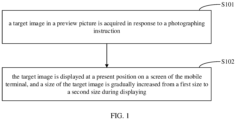
- FIG. 1 is a flowchart of an image display method provided by a first embodiment of the present disclosure.
- the image display method is for a mobile terminal. As shown in FIG. 1 , the image display method can include the following operations.
- a target image in a preview picture is acquired in response to a photographing instruction.
- an edge detection function can be added to camera setting of the mobile terminal. If the edge detection function is enabled, the target image in the preview picture is obtained through edge detection and a non-target image in the preview picture can be eliminated in response to the photographing instruction.
- the non target image refers to an image other than the target image in the preview picture.
- the target image is usually an image with a specific shape, such as documents, slide handouts or the like in the preview picture. The specific shape is usually quadrilateral.
- the edge detection function usually refers to a function of acquiring the target image in the preview picture in response to taking pictures.
- the photographing instruction can be triggered by a user by touching a photographing button on a photographing interface. For example, the photographing instruction is triggered when it is detected that the user touches the photographing button on the photographing interface.
- the preview picture is a picture displayed in a preview box of the mobile terminal.
- the method further includes: correcting tilt of the target image.
- the target image may be tilted due to limitation of a shooting angle. After acquiring the target image in the preview picture, it can be first detected whether the target image is tilted. The tilt of the target image can be corrected in response to the target image being tilted, and then subsequent display operations are performed after correction. The subsequent display operations can be directly performed in response to the target image being not tilted.
- the target image is displayed at a preset position on a screen of the mobile terminal, and a size of the target image is gradually increased from a first size to a second size during displaying.
- the preset position is any position on the screen of the mobile terminal.
- the preset position can be set to a middle position on the screen of the mobile terminal.
- the target image may be floated and displayed at the preset position on the mobile terminal screen.
- the floating and displaying of the target image at the preset position on the screen of the mobile terminal includes: acquiring a floating layer control; floating and displaying the floating layer control at the preset position on the screen of the mobile terminal; and displaying the target image in the floating layer control.
- the floating layer control can refer to a floating layer box configured to display the target image.
- the floating and displaying can refer to displaying above a current preview picture on the screen of the mobile terminal.
- the target image can be floated and displayed at the preset position of the screen of the mobile terminal by floating and displaying the floating layer control at the preset position of the screen of the mobile terminal.
- the second size is a size of the target image during imaging, that is, a size in the preview picture.
- the first size is less than the second size.
- the user can set the first size according to actual needs. For example, the first size is 0.72 times of the second size.
- a size increasing speed of the target image can be acquired according to a difference between the second size and the first size and a total time for gradually increasing the size of the target image from the first size to the second size.
- the size of the target image can be gradually increased from the first size to the second size according to the size increasing speed.
- the user can set the total time for gradually increasing the size of the target image from the first size to the second size according to actual needs, such as 0.4 seconds.
- the difference between the second size and the first size can refer to a value obtained by subtracting the first size from the second size.
- a value obtained by dividing the difference between the second size and the first size by the total time for gradually increasing the size of the target image from the first size to the second size is the size increasing speed of the target image.
- the target image in order to increase interest of the mobile terminal in the photographing process, can be presented with a visual effect of gradually increasing the size of the target image in the process of floating and displaying the target image at the preset position on the screen of the mobile terminal.
- the embodiment of the present disclosure further includes: gradually increasing a transparency value of the target image from a first transparency value to a second transparency value.
- the transparency value usually ranges from 0 to 1.
- the target image is completely transparent.
- the transparency value is 1, the target image is completely opaque.
- the transparency value of the target image can be gradually increased in the process of displaying the target image at the preset position on the screen of the mobile terminal. For example, when the first transparency value is 0 and the second transparency value is 1, the display effect of the target image gradually changes from completely transparent to completely opaque.
- the user can set the first transparency value and the second transparency value according to the actual needs, and the first transparency value is less than the second transparency value.
- a increasing speed of the transparency value of the target image can be acquired according to a difference between the second transparency value and the first transparency value and a total time for gradually increasing the transparency value of the target image from the first transparency value to the second transparency value.
- the transparency value of the target image can be increased from the first transparency value to the second transparency value according to the increasing speed of the transparency value.
- the difference between the second transparency value and the first transparency value can refer to a value obtained by subtracting the first transparency value from the second transparency value.
- a value obtained by dividing the difference between the second transparency value and the first transparency value by the total time for gradually increasing the transparency value of the target image from the first transparency value to the second transparency value is the increasing speed of the transparency value of the target image.
- the total time for gradually increasing the size of the target image from the first size to the second size is the same as the total time for gradually increasing the transparency value of the target image from the first transparency value to the second transparency value.
- the embodiment of the present disclosure can increase the interest in the photographing process by gradually increasing the size and the transparency in the displaying of the target image.
- FIG. 2 is a flowchart of an image display method provided by a second embodiment of the present disclosure.
- the image display method is for the mobile terminal. As shown in FIG. 2 , the image display method can include the following operations.
- a target image in a preview picture is acquired in response to a photographing instruction.
- Operations at this block is the same as operations at block S101.
- relevant description of operations at block S101 can be referred to, which will not be repeated here.
- the target image is displayed at a preset position on a screen of a mobile terminal, and a size of the target image is gradually increased from a first size to a second size during displaying.
- Operations at this block is the same as operations block S102.
- operations block S102 Operations at this block is the same as operations block S102.
- the relevant description of operations at block S102 can be referred to, which will not be repeated here.
- the target image is moved from a current position to a thumbnail position, a size of the target image is gradually decreased from the second size to a thumbnail size during moving, and the thumbnail size refers to a size of the image displayed at the thumbnail position.
- the current position can be a position of the target image currently on the screen of the mobile terminal, that is a position of the target image in the second size on the screen of the mobile terminal.
- a geometric center of the position of the target image in the second size coincides with a geometric center of the preset position.
- the thumbnail position can refer to a position where a thumbnail of a most recently photographed image and is usually located in a lower left corner of the photographing interface.
- the most recently photographed image can refer to an image whose photographing time is closest to the current time among all images captured by a camera stored in the mobile terminal.
- the user can enter a display interface of the most recently photographed image by touching the thumbnail currently displayed at the thumbnail position.
- the thumbnail size is smaller than the second size.
- a total time for gradually decreasing the size of the target image from the second size to the thumbnail size can be preset.
- a size decreasing speed of the target image can be acquired according to difference between the second size and the thumbnail size and the total time for gradually decreasing the size of the target image from the second size to the thumbnail size.
- the size of the target image is gradually decreased from the second size to the thumbnail size according to the size decreasing speed.
- the user can set the total time for gradually decreasing the size of the target image from the second size to the thumbnail size according to actual needs, for example 0.3 seconds.
- the difference between the second size and the thumbnail size can refer to a value obtained by subtracting the thumbnail size from the second size.
- a value obtained by dividing the difference between the second size and the thumbnail size by the total time for gradually decreasing the size of the target image from the second size and the thumbnail size is the size decreasing speed of the size of the target image.
- a distance between the current position of the target image and the thumbnail position can be obtained according to the current position of the target image and the thumbnail position.
- a moving speed of the target image (that is, a value obtained by dividing the distance between the current position of the target image and the thumbnail position by the total time for gradually decreasing the size of the target image from the second size to the thumbnail size) can be obtained according to the distance between the current position of the target image and the thumbnail position and the total time for gradually decreasing the size of the target image from the second size to the thumbnail size.
- the target image can be moved from the current position of the target image to the thumbnail position according to the moving speed, so that the target image with the size of thumbnail coincides with the thumbnail, so as to decrease the size of the target image during the moving.
- an image currently displayed at the thumbnail position is updated to the target image.
- the image currently displayed at the thumbnail position is updated to the target image after moving the target image from the current position to the thumbnail position, indicating that the target image is an image finally stored in an album of the mobile terminal.
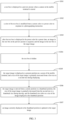
- FIG. 3 is a flowchart of an image display method provided by a third embodiment of the present disclosure.
- the image display method is for the mobile terminal. As shown in FIG. 3 , the image display method can include the following operations.
- a text box is displayed in a preview picture when a camera in the mobile terminal is started.
- a start operation of a camera application in the mobile terminal when a start operation of a camera application in the mobile terminal is detected, the camera in the mobile terminal is started, a photographing interface appears, the preview picture in a preview box is displayed on the photographing interface, four coordinate points of the text box in the preview picture are acquired through an edge detection, a corresponding text box can be drawn in real time according to the four coordinate points, and a view is customized to draw text boxes.
- lens of the camera in the mobile terminal move, content in the preview picture changes constantly, a result of edge detection also changes constantly, a position of the text box in the preview picture will also change constantly, and then a real-time following effect of the text box can be realized.
- the four coordinate points of the text box in the preview picture are acquired through edge detection.
- the corresponding text box can be drawn in real time according to the four coordinate points.
- a color of the text box is modified from a current color to a preset color in response to a photographing instruction.
- the edge detection is stopped and the position of the text box is stopped moving in response to the photographing instruction.
- the text box can be frozen (that is, the text box is fixed), the color of the text box is changed to the preset color (for example, the color of the text box is changed from yellow to green).
- the text box can be frozen for a preset time. After a freeze time reaches the preset time, the image in the text box is acquired and the text box is hidden. In this way, the user's impression can be enhanced and it is facilitated for the user to know the position of the text box.
- the color of the text box can refer to a color of border of the text box. In the process of changing the color of the text box from the current color to the preset color, the color can be set as gradient to realize a gradient effect of color.
- the preset color can be a preset color different from the current color of the text box.
- the image in the text box in the preview picture can be first acquired in response to the photographing instruction, and then the color of the text box is changed. Or after the color of the text box is changed from the current color to the preset color, the image in the text box in the preview picture is first acquired, and then the text box is hidden after the text box displays in the preset colors for the preset time. There are no limitations here.
- the target image is displayed at a preset position on a screen of the mobile terminal, and a size of the target image is gradually increased from a first size to a second size during displaying.
- Operations at this block is the same as operations block S102.
- relevant description of operations at block S102 can be referred to, which will not be repeated here.
- the target image is moved from a current position to a thumbnail position, the size of the target image is gradually decreased from the second size to a thumbnail size during moving, and the thumbnail size refers to a size of the image displayed at the thumbnail position.
- Operations at this block is the same as operations at block S203.
- relevant description of operations at block S203 can be referred to, which will not be repeated here.
- an image currently displayed at the thumbnail position is updated to the target image.
- Operations at this block is the same as operations at block S204.
- relevant description of operations at block S204 can be referred to, which will not be repeated here.
- the target image in the preview picture can be acquired by displaying the text box in the preview picture before the photographing instruction is received, and a color change effect of the text box can be presented by changing the border color of the text box in response to the photographing instruction.
- the interest of the photographing process is further increased.
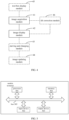
- FIG. 4 is a schematic view of an image display apparatus provided by a fourth embodiment of the present disclosure. In order to facilitate the illustration of the present disclosure, only parts related to the embodiment of the present disclosure are shown.
- the image display apparatus includes an image acquisition module 41 configured to acquire a target image in a preview picture in response to a photographing instruction and an image display module 42 configured to display the target image at a preset position on a screen of a mobile terminal, and gradually increase a size of the target image from a first size to a second size during the displaying.
- the image display apparatus may further include a moving and changing module 43 configured to move the target image from a current position to a thumbnail position and gradually decreasing a size of the target image from the second size to a thumbnail size during moving, wherein the thumbnail size refers to the size of the image displayed at the thumbnail position, and an image updating module 44 configured to update an image currently displayed at the thumbnail position to the target image.
- a moving and changing module 43 configured to move the target image from a current position to a thumbnail position and gradually decreasing a size of the target image from the second size to a thumbnail size during moving, wherein the thumbnail size refers to the size of the image displayed at the thumbnail position
- an image updating module 44 configured to update an image currently displayed at the thumbnail position to the target image.
- the image display apparatus may further include a text box display module 45 configured to display a text box in the preview picture when a camera in the mobile terminal is started.
- a text box display module 45 configured to display a text box in the preview picture when a camera in the mobile terminal is started.
- the image acquisition module 41 may include a modification unit configured to change a color of the text box from a current color to a preset color in response to the photographing instruction, a target acquisition unit configured to acquire an image in the text box in the preview picture after the text box displays in the preset color for a preset time, wherein image in the text box is the target image, and a hiding unit configure to hide the text box.
- a modification unit configured to change a color of the text box from a current color to a preset color in response to the photographing instruction
- a target acquisition unit configured to acquire an image in the text box in the preview picture after the text box displays in the preset color for a preset time, wherein image in the text box is the target image
- a hiding unit configure to hide the text box.
- the image display apparatus may further include a tilt correction module 46 configured to correct tilt of the target image.
- a tilt correction module 46 configured to correct tilt of the target image.
- the image display module 42 may include a control acquisition unit configured to acquire a floating layer control, a first display unit configured to float and display the floating layer control at the preset position on the screen of the mobile terminal, and a second display unit configured to display the target image in the floating layer control.
- the image display module 42 is further configured to gradually increase a transparency value of the target image from a first transparency value to a second transparency value in the displaying.
- the image display apparatus provided by the embodiments of the present disclosure can be applied to the first embodiment, the second embodiment and third embodiment of the above method.
- the description of the first embodiment, the second embodiment and the third embodiment of the above method can be referred to, which will not be repeated here.
- FIG. 5 is a schematic view of a mobile terminal provided by fifth embodiment of the present disclosure.
- the mobile terminal may include one or more processors 501 (only one is shown in FIG. 5 ), one or more input devices 502 (only one is shown in FIG. 5 ), one or more output devices 503 (only one is shown in FIG. 5 ), and a memory 504.
- the processor 501, the input device 502, the output device 503 and the memory 504 are connected through a bus 505.
- the memory 504 is configured to store instructions
- the processor 501 is configured to execute instructions stored in the memory 504.
- the processor 501 is configured to acquire a target image in a preview picture in response to a photographing instruction, display the target image at a preset position on a screen of the mobile terminal, and gradually increase a size of the target image from a first size to a second size during displaying.
- the processor 501 is further configured to move the target image from a current position to a thumbnail position and gradually decrease a size of the target image from a second size to a thumbnail size during moving, wherein the thumbnail size refers to a size of an image displayed at the thumbnail position, and update an image currently displayed at the thumbnail position to the target image.
- the processor 501 is further configured to display a text box in the preview picture when a camera in the mobile terminal is started.
- the processor 501 is specifically configured to change a color of the text box from a current color to a preset color in response to the photographing instruction, acquire an image in the text box of the preview picture, wherein the preview picture is the target image after the text box in the preset color displays for a preset time, and hide the text box.
- the processor 501 is further configured to correct tilt of the target image.
- the processor 501 is configured to acquire a floating layer control, float and display the floating layer control at the preset position on the screen of the mobile terminal, and display the target image in the floating layer control.
- the processor 501 is further configured to gradually increase a transparency value of the target image from a first transparency value to a second transparency value.
- the processor 501 may be a central processing unit (CPU), and the processor may also be other general-purpose processors, digital signal processors (DSP), application specific integrated circuits (ASIC), field-programmable gate array (FPGA) or other programmable logic devices, discrete gate or transistor logic devices, discrete hardware components, or the like.
- the general-purpose processor may be a microprocessor or may also be any conventional processor or the like.
- the input device 502 may include a touch panel, a fingerprint acquisition sensor (configured to collect user's fingerprint information and direction information of the fingerprint), a microphone, a data receiving interface, and the like.
- the output device 503 may include a LCD, a speaker, a data transmission interface, and the like.
- the memory 504 may include a read-only memory and a random access memory, and provide instructions and data to the processor 501.
- a part of the memory 504 may also include a non-volatile random access memory.
- the memory 504 may also store information about the device type.
- the processor 501, the input device 502, the output device 503 and the memory 504 described in the embodiment of the present disclosure can perform the implementation described in the embodiments of the image display method provided by the embodiments of the present disclosure, and the implementation described in the image display apparatus of the fourth embodiment, which will not be repeated here.
- FIG. 6 is a schematic view of a mobile terminal provided by a sixth embodiment of the present disclosure.
- the mobile terminal 6 of the embodiment includes a processor 60, a memory 61, and a computer program 62 stored in the memory 61 and run on the processor 60.
- the processor 60 can realize operations of the image display method in each of the above embodiments when executing the computer program 62.
- the processor 60 executes the computer program 62, the processor 60 realizes the functions of each module/ unit of the image display apparatus in the above embodiment.
- the mobile terminal 6 may be a camera device such as a mobile phone, a tablet computer, a camera, or the like.
- the mobile terminal may include, but is not limited to, a processor 60 and a memory 61.
- FIG. 6 is only an example of the mobile terminal 6 and does not constitute a limitation to the mobile terminal 6.
- the mobile terminal can include more or fewer components than the illustration, or combine some components or different components.
- the mobile terminal can further include an input and output device, a network access device, a bus, or the like.
- the processor 60 may be a central processing unit CPU, and may also be other general-purpose processors, digital signal processors (DSP), application specific integrated circuits (ASIC), field-programmable gate array (FPGA) or other programmable logic devices, discrete gate or transistor logic devices, discrete hardware components, or the like.
- DSP digital signal processors
- ASIC application specific integrated circuits
- FPGA field-programmable gate array
- the general-purpose processor may be a microprocessor or may also be any conventional processor or the like.
- the memory 61 may be an internal storage unit of the mobile terminal 6, such as a hard disk or an internal storage of the mobile terminal 6.
- the memory 61 may also be an external storage device of the mobile terminal 6, such as a plug-in hard disk, a smart media card (SMC), a secure digital (SD) card, a flash card, or the like equipped on the mobile terminal 6.
- the memory 61 may also include both the internal storage unit of the mobile terminal 6 and the external storage device.
- the memory 61 is configured to store the computer program and other programs and data required by the mobile terminal.
- the memory 61 may also be configured to temporarily store data that has been output or to be output.
- each functional unit and module in the embodiment can be integrated in one processing unit, or each unit can exist separately physically, or two or more units can be integrated in one unit.
- the integrated unit can be realized in the form of hardware or software functional unit.
- specific names of each functional unit and module are only for mutual distinction and are not used to limit the protection scope of the present disclosure.
- the specific working process of units and modules in the above system can refer to the corresponding process in the above method embodiments, which will not be repeated here.
- the disclosed apparatus/ mobile terminal and method can be implemented in other ways.
- the apparatus/ mobile terminal described in the above embodiment is only schematic.
- division of the above units is only a logical function division.
- there may be another division method for example, a plurality of units or components may be combined or integrated into another system, or some features may be ignored or not implemented.
- mutual coupling or direct coupling or communication connection shown or discussed can be through some interfaces
- indirect coupling or communication connection between devices or units can be electrical mechanical or other forms.
- Units described as separate units may or may not be physically separated.
- Components as displayed units may or may not be physical units, that is, the components may be located in one place or distributed to a plurality of network units. Some or all of the units can be selected according to actual needs to achieve the purpose of the embodiments.
- each functional unit in each embodiment of the present disclosure can be integrated in one processing unit, each unit can exist physically alone, or two or more units can be integrated in one unit.
- the integrated unit can be realized in a form of hardware or software function unit.
- the embodiment of the present disclosure also provides a computer-readable storage medium.
- the computer-readable storage medium stories a computer program.
- operations in the above method embodiments can be realized.
- the embodiment of the present disclosure provides a computer program product.
- the computer program product runs on a mobile terminal, the mobile terminal perform operations in the above method embodiments.
- the integrated unit can be stored in a computer-readable storage medium.
- the computer program can be stored in the computer-readable storage medium.
- the computer program includes computer program code.
- the computer program code can be in source code form, object code form, executable file, some intermediate form, or the like.
- the computer-readable medium may include any entity or apparatus capable of carrying the computer program code, a recording medium, a U disk, a mobile hard disk, a magnetic disk, an optical disk, a computer memory, ra ead-only memory (ROM), a random access memory (RAM), an electric carrier signal, a telecommunication signal, a software distribution medium, or the like.
- a recording medium a U disk, a mobile hard disk, a magnetic disk, an optical disk, a computer memory, ra ead-only memory (ROM), a random access memory (RAM), an electric carrier signal, a telecommunication signal, a software distribution medium, or the like.
- ROM ra ead-only memory
- RAM random access memory
- an electric carrier signal a telecommunication signal
- a software distribution medium or the like.
Landscapes
- Engineering & Computer Science (AREA)
- Multimedia (AREA)
- Signal Processing (AREA)
- Human Computer Interaction (AREA)
- Physics & Mathematics (AREA)
- General Physics & Mathematics (AREA)
- Theoretical Computer Science (AREA)
- Computer Vision & Pattern Recognition (AREA)
- User Interface Of Digital Computer (AREA)
- Controls And Circuits For Display Device (AREA)
- Studio Devices (AREA)
- Telephone Function (AREA)
Claims (13)
- Bildanzeigeverfahren für ein mobiles Endgerät, umfassend:Erfassen (S101, S201) eines Zielbildes in einem Vorschaubild in Reaktion auf eine Fotografieranweisung;Anzeigen (S102, S202, S305) des Zielbildes an einer voreingestellten Position auf einem Bildschirm des mobilen Endgeräts; undallmähliches Vergrößern einer Größe des Zielbildes von einer ersten Größe auf eine zweite Größe während des Anzeigens;dadurch gekennzeichnet, dass das Verfahren ferner Folgendes umfasst:Anzeigen (S301) eines Textfeldes im Vorschaubild, wenn eine Kamera im mobilen Endgerät gestartet wird, bevor das Zielbild im Textfeld erfasst wird und das Textfeld ausgeblendet wird,wobei das Anzeigen (S301) eines Textfeldes im Vorschaubild, wenn die Kamera im mobilen Endgerät gestartet wird, Folgendes umfasst:Erfassen von vier Koordinatenpunkten des Textfeldes im Vorschaubild durch eine Kantenerkennung; undZeichnen des Textfeldes in Echtzeit gemäß den vier Koordinatenpunkten, wobei, wenn das Objektiv der Kamera im mobilen Endgerät sich bewegt, Inhalt im Vorschaubild sich ständig ändert, ein Ergebnis der Kantenerkennung sich ständig ändert und eine Position des Textfeldes im Vorschaubild sich ständig ändert.
- Bildanzeigeverfahren nach Anspruch 1, wobei das Verfahren nach dem allmählichen Vergrößern der Größe des Zielbildes von der ersten Größe auf die zweite Größe ferner Folgendes umfasst:Bewegen (S203, S306) des Zielbildes von einer aktuellen Position in eine Miniaturbildposition und allmähliches Verkleinern der Größe des Zielbildes von der zweiten Größe auf eine Miniaturbildgröße während des Bewegens, wobei sich die Miniaturbildgröße auf eine Größe eines Bildes bezieht, das an der Miniaturbildposition angezeigt wird;Aktualisieren (S204, S307) eines Bildes, das gegenwärtig an der Miniaturbildposition angezeigt wird, auf das Zielbild.
- Bildanzeigeverfahren nach Anspruch 2, wobei das Verfahren vor dem Bewegen des Zielbildes von der aktuellen Position in die Miniaturbildposition und allmählichen Verkleinern der Größe des Zielbildes von der zweiten Größe auf die Miniaturbildgröße während des Bewegens ferner Folgendes umfasst:Erfassen eines Abstands zwischen der aktuellen Position des Zielbildes und der Miniaturbildposition gemäß der aktuellen Position des Zielbildes und der Miniaturbildposition;Erfassen einer Bewegungsgeschwindigkeit des Zielbildes gemäß dem Abstand zwischen der aktuellen Position des Zielbildes und der Miniaturbildposition und einer Gesamtzeit für das allmähliche Verkleinern der Größe des Zielbildes von der zweiten Größe auf die Miniaturbildgröße;Erfassen einer Differenz zwischen der zweiten Größe und der Miniaturbildgröße gemäß der zweiten Größe und der Miniaturbildgröße;Erfassen einer Größenverkleinerungsgeschwindigkeit des Zielbildes gemäß der Differenz zwischen der zweiten Größe und der Miniaturbildgröße und der Gesamtzeit für das allmähliche Verkleinern der Größe des Zielbildes von der zweiten Größe auf die Miniaturbildgröße;wobei das Bewegen des Zielbildes von einer aktuellen Position in eine Miniaturbildposition Folgendes umfasst:Bewegen des Zielbildes von der aktuellen Position in die Miniaturbildposition gemäß der Bewegungsgeschwindigkeit;wobei das allmähliche Verkleinern der Größe des Zielbildes von einer zweiten Größe auf die Miniaturbildgröße während des Bewegens Folgendes umfasst:
allmähliches Verkleinern der Größe des Zielbildes von der Größe der zweiten Größe auf die Miniaturbildgröße gemäß der Größenverkleinerungsgeschwindigkeit während des Bewegens. - Bildanzeigeverfahren nach einem der Ansprüche 1 bis 3, wobei das Verfahren vor dem allmählichen Vergrößern der Größe des Zielbildes von der ersten Größe auf die zweite Größe ferner Folgendes umfasst:Erfassen einer Differenz zwischen der zweiten Größe und der ersten Größe gemäß der ersten Größe und der zweiten Größe;Erfassen einer Größenvergrößerungsgeschwindigkeit des Zielbildes gemäß der Differenz zwischen der zweiten Größe und der ersten Größe und einer Gesamtzeit für das allmähliche Vergrößern der Größe des Zielbildes von der ersten Größe auf die zweite Größe;wobei das allmähliche Vergrößern einer Größe des Zielbildes von einer ersten Größe auf eine zweite Größe Folgendes umfasst:
allmähliches Vergrößern der Größe des Zielbildes von der ersten Größe auf die zweite Größe gemäß der Größenvergrößerungsgeschwindigkeit. - Bildanzeigeverfahren nach einem der Ansprüche 1 bis 4, wobei das Erfassen (S101, S201) eines Zielbildes in einem Vorschaubild in Reaktion auf eine Fotografieranweisung Folgendes umfasst:Modifizieren (S302) einer Farbe des Textfeldes von einer aktuellen Farbe in eine voreingestellte Farbe in Reaktion auf die Fotografieranweisung;Erfassen (S303) eines Bildes im Textfeld im Vorschaubild nach dem Anzeigen des Textfeldes für eine voreingestellte Zeitspanne in der voreingestellten Farbe, wobei das Bild im Textfeld das Zielbild ist; undAusblenden (S304) des Textfeldes.
- Bildanzeigeverfahren nach einem der Ansprüche 1 bis 4, wobei das Modifizieren (S302) einer Farbe des Textfeldes von einer aktuellen Farbe in eine voreingestellte Farbe in Reaktion auf die Fotografieranweisung Folgendes umfasst:Stoppen der Kantenerkennung und Stoppen der Bewegung der Position des Textfeldes in Reaktion auf die Fotografieranweisung; undModifizieren der Farbe des Textfeldes von der aktuellen Farbe in die voreingestellte Farbe.
- Bildanzeigeverfahren nach einem der Ansprüche 1 bis 6, wobei das Verfahren nach dem Erfassen des Zielbildes in einem Vorschaubild ferner Folgendes umfasst:
Korrigieren einer Neigung des Zielbildes. - Bildanzeigeverfahren nach einem der Ansprüche 1 bis 7, wobei das Anzeigen des Zielbildes an einer voreingestellten Position auf einem Bildschirm des mobilen Endgeräts Folgendes umfasst:Erfassen einer Schwebeschichtsteuerung;Schwebenlassen und Anzeigen der Schwebeschichtsteuerung an der voreingestellten Position auf dem Bildschirm des mobilen Endgeräts;Anzeigen des Zielbildes in der Schwebeschichtsteuerung.
- Bildanzeigeverfahren nach einem der Ansprüche 1 bis 8, wobei das Verfahren beim Anzeigen ferner Folgendes umfasst:
allmähliches Erhöhen eines Transparenzwerts des Zielbildes von einem ersten Transparenzwert auf einen zweiten Transparenzwert, wobei der erste Transparenzwert kleiner als der zweite Transparenzwert ist. - Bildanzeigeverfahren nach Anspruch 9, wobei das Erhöhen eines Transparenzwerts des Zielbildes von einem ersten Transparenzwert auf einen zweiten Transparenzwert Folgendes umfasst:Erfassen einer Differenz zwischen dem zweiten Transparenzwert und dem ersten Transparenzwert;Erfassen einer Erhöhungsgeschwindigkeit des Transparenzwerts des Zielbildes gemäß der Differenz zwischen dem zweiten Transparenzwert und dem ersten Transparenzwert und einer Gesamtzeit für das Erhöhen des Transparenzwerts des Zielbildes vom ersten Transparenzwert auf den zweiten Transparenzwert; undErhöhen des Transparenzwerts des Zielbildes vom ersten Transparenzwert auf den zweiten Transparenzwert gemäß der Erhöhungsgeschwindigkeit des Transparenzwerts.
- Bildanzeigeverfahren nach Anspruch 10, wobei die Gesamtzeit für das Vergrößern der Größe des Zielbildes von der ersten Größe auf die zweite Größe gleich ist wie die Gesamtzeit für das Erhöhen des Transparenzwerts des Zielbildes vom ersten Transparenzwert auf den zweiten Transparenzwert.
- Mobiles Endgerät, umfassend einen Speicher (61), einen Prozessor (60) und ein Computerprogramm (62), das im Speicher (61) gespeichert ist und auf dem Prozessor (60) ausgeführt wird, wobei, wenn das Computerprogramm (62) vom Prozessor (60) ausgeführt wird, der Prozessor (60) zum Durchführen von Operationen des Bildanzeigeverfahrens nach einem der Ansprüche 1 bis 11 veranlasst wird.
- Computerlesbares Speichermedium, das ein Computerprogramm (62) speichert, wobei, wenn das Computerprogramm von einem Prozessor (60) ausgeführt wird, Operationen des Bildanzeigeverfahrens nach einem der Ansprüche 1 bis 11 realisiert werden.
Applications Claiming Priority (2)
| Application Number | Priority Date | Filing Date | Title |
|---|---|---|---|
| CN201910953793.1A CN110677586B (zh) | 2019-10-09 | 2019-10-09 | 图像显示方法、图像显示装置及移动终端 |
| PCT/CN2020/117823 WO2021068766A1 (zh) | 2019-10-09 | 2020-09-25 | 图像显示方法、图像显示装置及移动终端 |
Publications (3)
| Publication Number | Publication Date |
|---|---|
| EP4009624A1 EP4009624A1 (de) | 2022-06-08 |
| EP4009624A4 EP4009624A4 (de) | 2022-10-19 |
| EP4009624B1 true EP4009624B1 (de) | 2025-01-29 |
Family
ID=69081094
Family Applications (1)
| Application Number | Title | Priority Date | Filing Date |
|---|---|---|---|
| EP20874409.4A Active EP4009624B1 (de) | 2019-10-09 | 2020-09-25 | Bildanzeigeverfahren, mobiles endgerät und entsprechendes computerprogramm |
Country Status (4)
| Country | Link |
|---|---|
| US (1) | US11770603B2 (de) |
| EP (1) | EP4009624B1 (de) |
| CN (1) | CN110677586B (de) |
| WO (1) | WO2021068766A1 (de) |
Families Citing this family (3)
| Publication number | Priority date | Publication date | Assignee | Title |
|---|---|---|---|---|
| CN110677586B (zh) | 2019-10-09 | 2021-06-25 | Oppo广东移动通信有限公司 | 图像显示方法、图像显示装置及移动终端 |
| CN113497888B (zh) * | 2020-04-07 | 2023-05-02 | 华为技术有限公司 | 照片预览方法、电子设备和存储介质 |
| CN115782757B (zh) * | 2022-10-10 | 2025-06-17 | 深圳市鑫信腾科技股份有限公司 | 一种后视镜显示功能的检测方法、装置、设备及存储介质 |
Family Cites Families (28)
| Publication number | Priority date | Publication date | Assignee | Title |
|---|---|---|---|---|
| US7464110B2 (en) * | 2004-06-30 | 2008-12-09 | Nokia Corporation | Automated grouping of image and other user data |
| JP2007088959A (ja) * | 2005-09-26 | 2007-04-05 | Casio Comput Co Ltd | 画像出力装置及びプログラム |
| CN101459769B (zh) * | 2007-12-14 | 2010-06-02 | 鸿富锦精密工业(深圳)有限公司 | 数码相机及图像管理方法 |
| JP4640470B2 (ja) * | 2008-08-18 | 2011-03-02 | ソニー株式会社 | 画像処理装置、画像処理方法、プログラム、および撮像装置 |
| US20120120277A1 (en) * | 2010-11-16 | 2012-05-17 | Apple Inc. | Multi-point Touch Focus |
| CN103718172A (zh) * | 2011-09-21 | 2014-04-09 | 株式会社尼康 | 图像处理装置、程序、图像处理方法及摄像装置 |
| CN103297595A (zh) * | 2012-02-27 | 2013-09-11 | 阿里巴巴集团控股有限公司 | 照片拍摄并显示的方法及装置 |
| KR101911870B1 (ko) * | 2012-05-21 | 2018-10-25 | 에스케이플래닛 주식회사 | 메시지 표시 방법 및 이를 위한 장치 |
| KR101935039B1 (ko) * | 2012-09-11 | 2019-01-03 | 엘지전자 주식회사 | 이동 단말기 및 이동 단말기의 제어 방법 |
| KR102079174B1 (ko) * | 2012-10-15 | 2020-02-19 | 삼성전자 주식회사 | 휴대단말기의 정보 표시장치 및 방법 |
| CN104781779B (zh) * | 2012-11-06 | 2018-06-15 | 诺基亚技术有限公司 | 用于创建针对图像的运动效果的方法和装置 |
| KR20140100727A (ko) * | 2013-02-07 | 2014-08-18 | 엘지전자 주식회사 | 전자 기기 및 전자 기기의 제어 방법 |
| KR102101850B1 (ko) * | 2013-06-04 | 2020-04-17 | 삼성전자주식회사 | 전자 장치에서 이미지를 편집하기 위한 장치 및 방법 |
| US9245341B2 (en) * | 2014-04-14 | 2016-01-26 | Intuit Inc. | Image acquisition using a level-indication icon |
| KR102105961B1 (ko) * | 2014-05-13 | 2020-05-28 | 엘지전자 주식회사 | 이동단말기 및 그 제어방법 |
| KR20160018268A (ko) * | 2014-08-08 | 2016-02-17 | 삼성전자주식회사 | 라인 인터랙션을 이용하여 컨텐트를 제어하는 방법 및 장치 |
| CN106354376B (zh) * | 2015-07-13 | 2020-12-04 | 腾讯科技(深圳)有限公司 | 一种信息处理方法及客户端 |
| CN108604374B (zh) | 2016-09-22 | 2020-03-10 | 华为技术有限公司 | 一种图像检测方法及终端 |
| CN106937055A (zh) * | 2017-03-30 | 2017-07-07 | 维沃移动通信有限公司 | 一种图像处理方法及移动终端 |
| CN106980449A (zh) * | 2017-03-31 | 2017-07-25 | 北京小米移动软件有限公司 | 图像切换过渡效果的呈现方法及装置 |
| CN107343149B (zh) * | 2017-07-31 | 2019-08-20 | 维沃移动通信有限公司 | 一种拍照方法和移动终端 |
| KR102402148B1 (ko) * | 2017-08-22 | 2022-05-26 | 삼성전자주식회사 | 전자 장치 및 그의 문자 인식 방법 |
| CN107864335B (zh) * | 2017-11-20 | 2020-06-12 | Oppo广东移动通信有限公司 | 图像预览方法、装置、计算机可读存储介质和电子设备 |
| JP6431227B1 (ja) * | 2018-03-20 | 2018-11-28 | ヤフー株式会社 | 情報表示プログラム、情報表示装置、情報表示方法および配信装置 |
| CN109361874B (zh) * | 2018-12-19 | 2021-05-14 | 维沃移动通信有限公司 | 一种拍照方法及终端 |
| CN109948525A (zh) * | 2019-03-18 | 2019-06-28 | Oppo广东移动通信有限公司 | 拍照处理方法、装置、移动终端以及存储介质 |
| CN110083418A (zh) * | 2019-04-04 | 2019-08-02 | 上海掌门科技有限公司 | 信息流中图片的处理方法、设备及计算机可读存储介质 |
| CN110677586B (zh) * | 2019-10-09 | 2021-06-25 | Oppo广东移动通信有限公司 | 图像显示方法、图像显示装置及移动终端 |
-
2019
- 2019-10-09 CN CN201910953793.1A patent/CN110677586B/zh active Active
-
2020
- 2020-09-25 EP EP20874409.4A patent/EP4009624B1/de active Active
- 2020-09-25 WO PCT/CN2020/117823 patent/WO2021068766A1/zh not_active Ceased
-
2022
- 2022-02-22 US US17/678,002 patent/US11770603B2/en active Active
Also Published As
| Publication number | Publication date |
|---|---|
| EP4009624A1 (de) | 2022-06-08 |
| US11770603B2 (en) | 2023-09-26 |
| US20220182554A1 (en) | 2022-06-09 |
| EP4009624A4 (de) | 2022-10-19 |
| CN110677586A (zh) | 2020-01-10 |
| CN110677586B (zh) | 2021-06-25 |
| WO2021068766A1 (zh) | 2021-04-15 |
Similar Documents
| Publication | Publication Date | Title |
|---|---|---|
| CN109064390B (zh) | 一种图像处理方法、图像处理装置及移动终端 | |
| US9774778B2 (en) | Electronic camera, image display device, and storage medium storing image display program, including filter processing | |
| US20250094028A1 (en) | Wallpaper display method, electronic device, and storage medium | |
| CN108737739B (zh) | 一种预览画面采集方法、预览画面采集装置及电子设备 | |
| CN110100251B (zh) | 用于处理文档的设备、方法和计算机可读存储介质 | |
| US11770603B2 (en) | Image display method having visual effect of increasing size of target image, mobile terminal, and computer-readable storage medium | |
| WO2022002053A1 (zh) | 拍照方法、装置及电子设备 | |
| CN104238739A (zh) | 基于眼睛跟踪的可见度提高方法和电子装置 | |
| EP3547098B1 (de) | Anzeigesteuerungsvorrichtung und steuerungsverfahren | |
| CN110290426B (zh) | 展示资源的方法、装置、设备及存储介质 | |
| CN108965835A (zh) | 一种图像处理方法、图像处理装置及终端设备 | |
| CN106815809B (zh) | 一种图片处理方法和装置 | |
| EP4096211A1 (de) | Bildverarbeitungsverfahren, elektronische vorrichtung und computerlesbares speichermedium | |
| CN112230908A (zh) | 一种对齐组件的方法、装置、电子设备及存储介质 | |
| CN111223045A (zh) | 一种拼图方法、装置及终端设备 | |
| US20130229330A1 (en) | Controlling images at hand-held devices | |
| CN110457963A (zh) | 显示控制方法、装置、移动终端及计算机可读存储介质 | |
| CN112825040A (zh) | 用户界面的显示方法、装置、设备及存储介质 | |
| CN111190677A (zh) | 信息显示方法、信息显示装置及终端设备 | |
| CN104994287A (zh) | 一种基于广角摄像头的拍摄方法及移动终端 | |
| CN110493514B (zh) | 图像处理方法、存储介质及电子设备 | |
| CN110377220B (zh) | 一种指令响应方法、装置、存储介质及电子设备 | |
| CN108305262A (zh) | 文件扫描方法、装置及设备 | |
| CN111563402B (zh) | 车牌识别方法、装置、终端及存储介质 | |
| WO2020107186A1 (en) | Systems and methods for taking telephoto-like images |
Legal Events
| Date | Code | Title | Description |
|---|---|---|---|
| STAA | Information on the status of an ep patent application or granted ep patent |
Free format text: STATUS: THE INTERNATIONAL PUBLICATION HAS BEEN MADE |
|
| PUAI | Public reference made under article 153(3) epc to a published international application that has entered the european phase |
Free format text: ORIGINAL CODE: 0009012 |
|
| STAA | Information on the status of an ep patent application or granted ep patent |
Free format text: STATUS: REQUEST FOR EXAMINATION WAS MADE |
|
| 17P | Request for examination filed |
Effective date: 20220301 |
|
| AK | Designated contracting states |
Kind code of ref document: A1 Designated state(s): AL AT BE BG CH CY CZ DE DK EE ES FI FR GB GR HR HU IE IS IT LI LT LU LV MC MK MT NL NO PL PT RO RS SE SI SK SM TR |
|
| A4 | Supplementary search report drawn up and despatched |
Effective date: 20220921 |
|
| RIC1 | Information provided on ipc code assigned before grant |
Ipc: G06F 3/0484 20220101ALI20220915BHEP Ipc: H04N 5/262 20060101ALI20220915BHEP Ipc: H04N 5/232 20060101AFI20220915BHEP |
|
| DAV | Request for validation of the european patent (deleted) | ||
| DAX | Request for extension of the european patent (deleted) | ||
| STAA | Information on the status of an ep patent application or granted ep patent |
Free format text: STATUS: EXAMINATION IS IN PROGRESS |
|
| 17Q | First examination report despatched |
Effective date: 20231221 |
|
| REG | Reference to a national code |
Ref country code: DE Ref legal event code: R079 Free format text: PREVIOUS MAIN CLASS: H04N0005232000 Ipc: H04N0023630000 Ref country code: DE Ref legal event code: R079 Ref document number: 602020045634 Country of ref document: DE Free format text: PREVIOUS MAIN CLASS: H04N0005232000 Ipc: H04N0023630000 |
|
| GRAP | Despatch of communication of intention to grant a patent |
Free format text: ORIGINAL CODE: EPIDOSNIGR1 |
|
| RIC1 | Information provided on ipc code assigned before grant |
Ipc: G06T 11/60 20060101ALI20240905BHEP Ipc: G06F 3/0484 20220101ALI20240905BHEP Ipc: H04N 5/262 20060101ALI20240905BHEP Ipc: H04N 23/63 20230101AFI20240905BHEP |
|
| STAA | Information on the status of an ep patent application or granted ep patent |
Free format text: STATUS: GRANT OF PATENT IS INTENDED |
|
| INTG | Intention to grant announced |
Effective date: 20241010 |
|
| GRAS | Grant fee paid |
Free format text: ORIGINAL CODE: EPIDOSNIGR3 |
|
| GRAA | (expected) grant |
Free format text: ORIGINAL CODE: 0009210 |
|
| STAA | Information on the status of an ep patent application or granted ep patent |
Free format text: STATUS: THE PATENT HAS BEEN GRANTED |
|
| AK | Designated contracting states |
Kind code of ref document: B1 Designated state(s): AL AT BE BG CH CY CZ DE DK EE ES FI FR GB GR HR HU IE IS IT LI LT LU LV MC MK MT NL NO PL PT RO RS SE SI SK SM TR |
|
| REG | Reference to a national code |
Ref country code: GB Ref legal event code: FG4D |
|
| REG | Reference to a national code |
Ref country code: CH Ref legal event code: EP |
|
| REG | Reference to a national code |
Ref country code: DE Ref legal event code: R096 Ref document number: 602020045634 Country of ref document: DE |
|
| REG | Reference to a national code |
Ref country code: IE Ref legal event code: FG4D |
|
| P01 | Opt-out of the competence of the unified patent court (upc) registered |
Free format text: CASE NUMBER: APP_9811/2025 Effective date: 20250226 |
|
| REG | Reference to a national code |
Ref country code: NL Ref legal event code: MP Effective date: 20250129 |
|
| PG25 | Lapsed in a contracting state [announced via postgrant information from national office to epo] |
Ref country code: NL Free format text: LAPSE BECAUSE OF FAILURE TO SUBMIT A TRANSLATION OF THE DESCRIPTION OR TO PAY THE FEE WITHIN THE PRESCRIBED TIME-LIMIT Effective date: 20250129 |
|
| PG25 | Lapsed in a contracting state [announced via postgrant information from national office to epo] |
Ref country code: RS Free format text: LAPSE BECAUSE OF FAILURE TO SUBMIT A TRANSLATION OF THE DESCRIPTION OR TO PAY THE FEE WITHIN THE PRESCRIBED TIME-LIMIT Effective date: 20250429 |
|
| PG25 | Lapsed in a contracting state [announced via postgrant information from national office to epo] |
Ref country code: FI Free format text: LAPSE BECAUSE OF FAILURE TO SUBMIT A TRANSLATION OF THE DESCRIPTION OR TO PAY THE FEE WITHIN THE PRESCRIBED TIME-LIMIT Effective date: 20250129 |
|
| PG25 | Lapsed in a contracting state [announced via postgrant information from national office to epo] |
Ref country code: PL Free format text: LAPSE BECAUSE OF FAILURE TO SUBMIT A TRANSLATION OF THE DESCRIPTION OR TO PAY THE FEE WITHIN THE PRESCRIBED TIME-LIMIT Effective date: 20250129 |
|
| PG25 | Lapsed in a contracting state [announced via postgrant information from national office to epo] |
Ref country code: ES Free format text: LAPSE BECAUSE OF FAILURE TO SUBMIT A TRANSLATION OF THE DESCRIPTION OR TO PAY THE FEE WITHIN THE PRESCRIBED TIME-LIMIT Effective date: 20250129 |
|
| REG | Reference to a national code |
Ref country code: LT Ref legal event code: MG9D |
|
| PG25 | Lapsed in a contracting state [announced via postgrant information from national office to epo] |
Ref country code: IS Free format text: LAPSE BECAUSE OF FAILURE TO SUBMIT A TRANSLATION OF THE DESCRIPTION OR TO PAY THE FEE WITHIN THE PRESCRIBED TIME-LIMIT Effective date: 20250529 Ref country code: NO Free format text: LAPSE BECAUSE OF FAILURE TO SUBMIT A TRANSLATION OF THE DESCRIPTION OR TO PAY THE FEE WITHIN THE PRESCRIBED TIME-LIMIT Effective date: 20250429 |
|
| REG | Reference to a national code |
Ref country code: AT Ref legal event code: MK05 Ref document number: 1764586 Country of ref document: AT Kind code of ref document: T Effective date: 20250129 |
|
| PG25 | Lapsed in a contracting state [announced via postgrant information from national office to epo] |
Ref country code: HR Free format text: LAPSE BECAUSE OF FAILURE TO SUBMIT A TRANSLATION OF THE DESCRIPTION OR TO PAY THE FEE WITHIN THE PRESCRIBED TIME-LIMIT Effective date: 20250129 |
|
| PG25 | Lapsed in a contracting state [announced via postgrant information from national office to epo] |
Ref country code: LV Free format text: LAPSE BECAUSE OF FAILURE TO SUBMIT A TRANSLATION OF THE DESCRIPTION OR TO PAY THE FEE WITHIN THE PRESCRIBED TIME-LIMIT Effective date: 20250129 Ref country code: PT Free format text: LAPSE BECAUSE OF FAILURE TO SUBMIT A TRANSLATION OF THE DESCRIPTION OR TO PAY THE FEE WITHIN THE PRESCRIBED TIME-LIMIT Effective date: 20250529 |
|
| PG25 | Lapsed in a contracting state [announced via postgrant information from national office to epo] |
Ref country code: GR Free format text: LAPSE BECAUSE OF FAILURE TO SUBMIT A TRANSLATION OF THE DESCRIPTION OR TO PAY THE FEE WITHIN THE PRESCRIBED TIME-LIMIT Effective date: 20250430 Ref country code: BG Free format text: LAPSE BECAUSE OF FAILURE TO SUBMIT A TRANSLATION OF THE DESCRIPTION OR TO PAY THE FEE WITHIN THE PRESCRIBED TIME-LIMIT Effective date: 20250129 |
|
| PG25 | Lapsed in a contracting state [announced via postgrant information from national office to epo] |
Ref country code: AT Free format text: LAPSE BECAUSE OF FAILURE TO SUBMIT A TRANSLATION OF THE DESCRIPTION OR TO PAY THE FEE WITHIN THE PRESCRIBED TIME-LIMIT Effective date: 20250129 |
|
| PG25 | Lapsed in a contracting state [announced via postgrant information from national office to epo] |
Ref country code: SE Free format text: LAPSE BECAUSE OF FAILURE TO SUBMIT A TRANSLATION OF THE DESCRIPTION OR TO PAY THE FEE WITHIN THE PRESCRIBED TIME-LIMIT Effective date: 20250129 |
|
| PG25 | Lapsed in a contracting state [announced via postgrant information from national office to epo] |
Ref country code: SM Free format text: LAPSE BECAUSE OF FAILURE TO SUBMIT A TRANSLATION OF THE DESCRIPTION OR TO PAY THE FEE WITHIN THE PRESCRIBED TIME-LIMIT Effective date: 20250129 |
|
| PG25 | Lapsed in a contracting state [announced via postgrant information from national office to epo] |
Ref country code: DK Free format text: LAPSE BECAUSE OF FAILURE TO SUBMIT A TRANSLATION OF THE DESCRIPTION OR TO PAY THE FEE WITHIN THE PRESCRIBED TIME-LIMIT Effective date: 20250129 |
|
| PGFP | Annual fee paid to national office [announced via postgrant information from national office to epo] |
Ref country code: DE Payment date: 20250923 Year of fee payment: 6 |
|
| PG25 | Lapsed in a contracting state [announced via postgrant information from national office to epo] |
Ref country code: IT Free format text: LAPSE BECAUSE OF FAILURE TO SUBMIT A TRANSLATION OF THE DESCRIPTION OR TO PAY THE FEE WITHIN THE PRESCRIBED TIME-LIMIT Effective date: 20250129 |
|
| PG25 | Lapsed in a contracting state [announced via postgrant information from national office to epo] |
Ref country code: EE Free format text: LAPSE BECAUSE OF FAILURE TO SUBMIT A TRANSLATION OF THE DESCRIPTION OR TO PAY THE FEE WITHIN THE PRESCRIBED TIME-LIMIT Effective date: 20250129 Ref country code: CZ Free format text: LAPSE BECAUSE OF FAILURE TO SUBMIT A TRANSLATION OF THE DESCRIPTION OR TO PAY THE FEE WITHIN THE PRESCRIBED TIME-LIMIT Effective date: 20250129 |
|
| PG25 | Lapsed in a contracting state [announced via postgrant information from national office to epo] |
Ref country code: RO Free format text: LAPSE BECAUSE OF FAILURE TO SUBMIT A TRANSLATION OF THE DESCRIPTION OR TO PAY THE FEE WITHIN THE PRESCRIBED TIME-LIMIT Effective date: 20250129 |
|
| PG25 | Lapsed in a contracting state [announced via postgrant information from national office to epo] |
Ref country code: SK Free format text: LAPSE BECAUSE OF FAILURE TO SUBMIT A TRANSLATION OF THE DESCRIPTION OR TO PAY THE FEE WITHIN THE PRESCRIBED TIME-LIMIT Effective date: 20250129 |
|
| REG | Reference to a national code |
Ref country code: DE Ref legal event code: R097 Ref document number: 602020045634 Country of ref document: DE |
|
| PLBE | No opposition filed within time limit |
Free format text: ORIGINAL CODE: 0009261 |
|
| STAA | Information on the status of an ep patent application or granted ep patent |
Free format text: STATUS: NO OPPOSITION FILED WITHIN TIME LIMIT |
|
| 26N | No opposition filed |
Effective date: 20251030 |