EP3979055B1 - Verfahren und vorrichtung zur verarbeitung von anwendungsassoziationen - Google Patents
Verfahren und vorrichtung zur verarbeitung von anwendungsassoziationen Download PDFInfo
- Publication number
- EP3979055B1 EP3979055B1 EP21183615.0A EP21183615A EP3979055B1 EP 3979055 B1 EP3979055 B1 EP 3979055B1 EP 21183615 A EP21183615 A EP 21183615A EP 3979055 B1 EP3979055 B1 EP 3979055B1
- Authority
- EP
- European Patent Office
- Prior art keywords
- application
- icon
- content
- control
- visual
- Prior art date
- Legal status (The legal status is an assumption and is not a legal conclusion. Google has not performed a legal analysis and makes no representation as to the accuracy of the status listed.)
- Active
Links
Images



Classifications
-
- G—PHYSICS
- G06—COMPUTING OR CALCULATING; COUNTING
- G06F—ELECTRIC DIGITAL DATA PROCESSING
- G06F3/00—Input arrangements for transferring data to be processed into a form capable of being handled by the computer; Output arrangements for transferring data from processing unit to output unit, e.g. interface arrangements
- G06F3/01—Input arrangements or combined input and output arrangements for interaction between user and computer
- G06F3/048—Interaction techniques based on graphical user interfaces [GUI]
- G06F3/0481—Interaction techniques based on graphical user interfaces [GUI] based on specific properties of the displayed interaction object or a metaphor-based environment, e.g. interaction with desktop elements like windows or icons, or assisted by a cursor's changing behaviour or appearance
- G06F3/04817—Interaction techniques based on graphical user interfaces [GUI] based on specific properties of the displayed interaction object or a metaphor-based environment, e.g. interaction with desktop elements like windows or icons, or assisted by a cursor's changing behaviour or appearance using icons
-
- G—PHYSICS
- G06—COMPUTING OR CALCULATING; COUNTING
- G06F—ELECTRIC DIGITAL DATA PROCESSING
- G06F3/00—Input arrangements for transferring data to be processed into a form capable of being handled by the computer; Output arrangements for transferring data from processing unit to output unit, e.g. interface arrangements
- G06F3/01—Input arrangements or combined input and output arrangements for interaction between user and computer
- G06F3/017—Gesture based interaction, e.g. based on a set of recognized hand gestures
-
- G—PHYSICS
- G06—COMPUTING OR CALCULATING; COUNTING
- G06F—ELECTRIC DIGITAL DATA PROCESSING
- G06F3/00—Input arrangements for transferring data to be processed into a form capable of being handled by the computer; Output arrangements for transferring data from processing unit to output unit, e.g. interface arrangements
- G06F3/01—Input arrangements or combined input and output arrangements for interaction between user and computer
- G06F3/048—Interaction techniques based on graphical user interfaces [GUI]
- G06F3/0484—Interaction techniques based on graphical user interfaces [GUI] for the control of specific functions or operations, e.g. selecting or manipulating an object, an image or a displayed text element, setting a parameter value or selecting a range
- G06F3/04847—Interaction techniques to control parameter settings, e.g. interaction with sliders or dials
-
- G—PHYSICS
- G06—COMPUTING OR CALCULATING; COUNTING
- G06F—ELECTRIC DIGITAL DATA PROCESSING
- G06F3/00—Input arrangements for transferring data to be processed into a form capable of being handled by the computer; Output arrangements for transferring data from processing unit to output unit, e.g. interface arrangements
- G06F3/01—Input arrangements or combined input and output arrangements for interaction between user and computer
- G06F3/048—Interaction techniques based on graphical user interfaces [GUI]
- G06F3/0487—Interaction techniques based on graphical user interfaces [GUI] using specific features provided by the input device, e.g. functions controlled by the rotation of a mouse with dual sensing arrangements, or of the nature of the input device, e.g. tap gestures based on pressure sensed by a digitiser
- G06F3/0488—Interaction techniques based on graphical user interfaces [GUI] using specific features provided by the input device, e.g. functions controlled by the rotation of a mouse with dual sensing arrangements, or of the nature of the input device, e.g. tap gestures based on pressure sensed by a digitiser using a touch-screen or digitiser, e.g. input of commands through traced gestures
-
- G—PHYSICS
- G06—COMPUTING OR CALCULATING; COUNTING
- G06F—ELECTRIC DIGITAL DATA PROCESSING
- G06F3/00—Input arrangements for transferring data to be processed into a form capable of being handled by the computer; Output arrangements for transferring data from processing unit to output unit, e.g. interface arrangements
- G06F3/01—Input arrangements or combined input and output arrangements for interaction between user and computer
- G06F3/048—Interaction techniques based on graphical user interfaces [GUI]
- G06F3/0487—Interaction techniques based on graphical user interfaces [GUI] using specific features provided by the input device, e.g. functions controlled by the rotation of a mouse with dual sensing arrangements, or of the nature of the input device, e.g. tap gestures based on pressure sensed by a digitiser
- G06F3/0488—Interaction techniques based on graphical user interfaces [GUI] using specific features provided by the input device, e.g. functions controlled by the rotation of a mouse with dual sensing arrangements, or of the nature of the input device, e.g. tap gestures based on pressure sensed by a digitiser using a touch-screen or digitiser, e.g. input of commands through traced gestures
- G06F3/04883—Interaction techniques based on graphical user interfaces [GUI] using specific features provided by the input device, e.g. functions controlled by the rotation of a mouse with dual sensing arrangements, or of the nature of the input device, e.g. tap gestures based on pressure sensed by a digitiser using a touch-screen or digitiser, e.g. input of commands through traced gestures for inputting data by handwriting, e.g. gesture or text
Definitions
- the present invention relates to communications technologies, and in particular, to an application association processing method and apparatus.
- touchscreen terminal devices such as mobile phones and tablets also tend to develop rapidly. Researches show that over ten thousand new devices are activated worldwide on a daily basis; therefore, applications used on these devices are increasingly diversified and improved as user demands become different.
- Applications can help a user know about news events, capture a note, engage in socialization, listen to music, have entertainment, play games, and the like at any time.
- functions provided by current applications are increasingly improved and diversified, and currently, many applications can all provide two forms: a control and an application icon for a user to select and use.
- An application icon is generally a main entry to enter the application, and a control can display some functions of the application, for example, the control can make, by using a visual window, it convenient for a user to intuitively know about related functions provided by the application.
- a main interface of the weather forecast can be entered by using an application icon, and a control can display information such as a temperature and a wind force today on a desktop.
- the present invention provides an application association processing method and apparatus, according to the indepedent claims, which can reduce user operation complexity
- the dependent claims provide alternative advantageous embodiments.
- EP 2 568 372 Al relates to a method for displaying information related to an icon by acting upon it with a particular touch gesture.
- the information might be presented as a floating bubble containing icons to trigger related control functions and which can be activated with a simple tap.
- US 2009/058821 A1 relates a method for activating an editing state for an icon layout by using a particular gesture (e.g. long-pressing) on one of the icons.
- the present invention is applicable to a touchscreen apparatus, and can also be used in other apparatuses that have a touchscreen function and can have an application installed therein.
- the embodiments of the present invention use an example in which an application association processing apparatus is a touchscreen apparatus for
- FIG. 1 is a flowchart of an embodiment of an application association processing method related to the present invention. As shown in FIG. 1 , the method includes:
- S101 An application association processing apparatus detects a first operation instruction entered by a user.
- a touchscreen apparatus detects a sliding operation instruction entered by a user.
- the touchscreen apparatus may determine a specific implementation form of the first operation instruction by using a position change of a touch point.
- the first operation instruction is a curved sliding gesture or a gesture of quickly taping for multiple times, and the first operation instruction may be detected according to a moving track or a moving manner of the touch point, where the touch point is formed on a touchscreen during a touch operation of the user by using thermal capacitance of a touching body or a falling point after pressing.
- the first preset operation is an operation gesture preset by the user, and the prompt information is used to inform the user that an association relationship exists between the first content and the second content.
- the first content is an application icon, and the second content is an icon of at least one control included in an application corresponding to the application icon; or the first content is an icon of a control, and the second content is an icon of an application to which the control belongs.
- the first preset operation may be a sliding operation within a preset area surrounding the first content.
- the sliding operation is an operation that uses, as a start point, a position at which the first content is located; or the sliding operation is an operation that uses, as a fixed point, a position at which the first content is located, and uses a preset area surrounding the first content as a sliding area.
- the application association processing apparatus may preset a first preset operation; and if the first operation instruction of the user is the same as the first preset operation, it may be determined that the first operation instruction is input by the user for the first content displayed on the display interface, and an objective of the first operation instruction is that the application association processing apparatus displays the prompt information of the second content associated with the first content.
- the first preset operation may be a sliding operation within the preset area surrounding the first content.
- the application association processing apparatus can detect multiple touch points; and start points of these touch points may be all at the position of the first content, and subsequently, a finger leaves the position of the first content and continues to move within the preset area; or one fixed point in these touch points is at the position of the first content, and other moving points are at any positions within the preset area surrounding the first content, and a finger moves within the preset area starting from the any positions.
- an area that uses the first content as a geometric center and whose covering radius outward is 4 cm to 6 cm is the preset area, within the area starting from the first content, the user makes a zoom-in gesture within the area by using two fingers, and the application association processing apparatus detects that a distance between the two touch points becomes longer, and the first preset operation is the operation of the user; in this case, the application association processing apparatus may determine that the first operation instruction is specific to the first content, and request to display the prompt information of the second content associated with the first content.
- the first content is an application icon
- prompt information of icons of all controls included in an application corresponding to the application icon is displayed on the screen, for example, a floating window of the screen; or if the first content is an icon of a control, prompt information of an icon of an application to which the control belongs is displayed on the screen, for example, a floating window of the screen.
- an area that uses the first content as a geometric center and that covers all ranges of the touchscreen outward is the preset area
- the user performs an operation within the area by using three fingers, where one finger is always on the first content, and the other two fingers make a zoom-in gesture within the area
- the application association processing apparatus detects that one fixed point is on the first content and a distance between other two sliding touch points becomes longer, and the first preset operation is the operation of the user; in this case, the application association processing apparatus may determine that the first operation instruction is specific to the first content, and may further determine that the first operation instruction requests to display the prompt information of the second content associated with the first content.
- the first content is an application icon
- prompt information of icons of all controls included in an application corresponding to the application icon is displayed on the screen, for example, a floating window of the screen; or if the first content is an icon of a control, prompt information of an icon of an application to which the control belongs is displayed on the screen, for example, a floating window of the screen.
- the first preset operation and the preset area are both used as an example for description, but do not constitute any limitation, and another operation gesture and different preset area settings all fall within the protection scope.
- the another operation gesture is an operation of shortening a distance by using two fingers, or an operation of pressing and holding by using one finger, and shortening a distance by using other multiple fingers.
- a control encapsulates data and a method.
- a control is a basic visual component block and is included in an application, and each control controls partial data processed by the application and an interactive operation related to the data.
- a control may be a visual window for a temperature today, another control may be a visual window for air quality, wearing reminding, and a high temperature or rainstorm warning, still another control may be a visual window for a current room temperature, and the like.
- An icon of the control may be a thumbnail, a partial screenshot, or the like of the visual window, or may be a framework icon of the control.
- an application icon is an entry to access the application to acquire all functions of the application, and may be considered as a shortcut that is commonly referred to as.
- the user may select, by using a correspondence, which has been determined by the application association processing apparatus, between a control and an application icon, for example, one application icon corresponds to several controls, a control or an application icon provided by the application association processing apparatus.
- the application association processing apparatus detects a first operation instruction entered by a user; and when it is determined that the first operation instruction is to perform, by the user, a first preset operation on first content displayed on a display interface, displays prompt information of second content associated with the first content, where the first preset operation is an operation gesture preset by the user, and the prompt information is used to inform the user that an association relationship exists between the first content and the second content, where when the first content is an application icon, the second content is an icon of at least one control included in an application corresponding to the application icon; or when the first content is an icon of a control, the second content is an icon of an application to which the control belongs.
- FIG. 2 is a flowchart of an embodiment of another application association processing method related to the present invention. As shown in FIG. 2 , the method includes:
- S201 An application association processing apparatus detects a second operation instruction entered by a user.
- the second preset operation is an operation gesture preset for switching the first content to the editable state.
- the second preset operation may be a pressing operation exceeding preset duration.
- the user presses a control icon, a control, or an application icon for more than three seconds, and all applications on the page on the application association processing apparatus enter an editable mode, or only the control icon, the control, or the application icon enters an editable mode.
- an example in which there is only the control icon, the control, or the application icon is used for description, but does not constitute any limitation.
- the editable mode refers to that the control icon, the control, or the application icon can be deleted or moved, or may merely be a premode for searching for associated second content in this embodiment, and the editable state may specifically be a capturing state, that is, an icon enters a floating state after being pressed for a long time.
- the application association processing apparatus detects a first operation instruction entered by the user for the first content in the editable state.
- the first operation instruction that is detected by the application association processing apparatus when the first content is in the editable state is specific to the first content.
- the application association processing apparatus determines, according to an application package file, second content that has an association relationship with the first content, and displays prompt information of the second content.
- the first content is an application icon
- the second content is an icon of at least one control included in an application corresponding to the application icon; or the first content is an icon of a control, and the second content is an icon of an application to which the control belongs.
- the application package file is a source file of the first content and the second content, for example, both the first content and the second content run on the application association processing apparatus after the application package file is decompressed and installed.
- the first preset operation may be a sliding operation within a preset area surrounding the first content.
- a start point of a sliding operation is at a position of the first content; or a fixed point of a sliding operation is at a position of the first content, and a sliding point is at any position within the preset area surrounding the first content.
- the first preset operation is set to be similar to the foregoing two types of operations; in this way, the application association processing apparatus can conveniently determine the first content on which an operation needs to be performed.
- the first preset operation may further be the following several operation manners.
- the user performs a click operation, for example, one finger slides within a preset area, where the preset area is described by using an example in the foregoing embodiment and is not described herein again.
- a touchscreen detects that a position of a touch point formed by the finger changes, for example, a value of a horizontal coordinate and/or a value of a vertical coordinate of the touch point changes, determines, according to the application package file, the second content that has the association relationship with the first content, and displays the prompt information of the second content.
- the first preset operation may also be set according to a position of the single point, for example, a sliding operation is performed on the first content along a diagonal direction from the single point.
- the user performs a zoom-in or zoom-out operation by using at least two fingers; if the application association processing apparatus detects that positions of at least two touch points formed by this operation change, the application association processing apparatus continuously detects a distance between two neighboring touch points; and if the distance increases, or the distance decreases, the application association processing apparatus determines, according to the application package file, the second content that has the association relationship with the first content, and displays the prompt information of the second content.
- the user slides within a preset area by using at least three fingers, changes of positions of at least three touch points are detected, a size of an area surrounded by all the touch points is determined according to the changes of the positions, and if the size increases or decreases, the second content that has the association relationship with the first content is determined according to the application package file, and the prompt information of the second content is displayed.
- the foregoing operations are performed within preset duration, for example, if the second operation instruction detected within 3 seconds conforms to one of the foregoing second preset operations, the prompt information of the second content associated with the first content may be displayed.
- the application association processing apparatus may display, in a form of a floating window, the prompt information of the second content associated with the first content.
- the second content that has the association relationship with the first content according to the application package file it may be further determined, according to buffered information about the first content and buffered application information corresponding to the second content, such as a control attribute and an application attribute, or in another manner, whether the first content is associated with the second content.
- the application association processing apparatus detects a first operation instruction entered by a user; and when it is determined that the first operation instruction is to perform, by the user, a first preset operation on first content displayed on a display interface, displays prompt information of second content associated with the first content, where the first preset operation is an operation gesture preset by the user, and the prompt information is used to inform the user that an association relationship exists between the first content and the second content, where when the first content is an application icon, the second content is an icon of at least one control included in an application corresponding to the application icon; or when the first content is an icon of a control, the second content is an icon of an application to which the control belongs.
- FIG. 3 is a flowchart of an application association processing method according to the present invention. As shown in FIG. 3 , after S204, the method further includes:
- the application association processing apparatus detects a third operation instruction entered by the user.
- the third preset operation is an operation gesture preset for displaying the second content.
- the third preset operation may be at least one tap operation on the second content, for example, a tap or double-tap operation or the like performed on a control icon or an application icon on a floating window.
- the application association processing apparatus displays the second content on the interface. If the second content is an application icon, the application icon is displayed on a desktop, or an application program corresponding to the application icon is entered. If the second content is an icon of a control, a visual window of the control may be displayed on a desktop.
- the application association processing apparatus detects a first operation instruction entered by a user; and when it is determined that the first operation instruction is to perform, by the user, a first preset operation on first content displayed on a display interface, displays prompt information of second content associated with the first content, where the first preset operation is an operation gesture preset by the user, and the prompt information is used to inform the user that an association relationship exists between the first content and the second content, where when the first content is an application icon, the second content is an icon of at least one control included in an application corresponding to the application icon; or when the first content is an icon of a control, the second content is an icon of an application to which the control belongs.
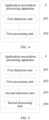
- FIG. 4 is a schematic structural diagram of an embodiment of an application association processing apparatus related to the present invention. As shown in FIG. 4 , the application association processing apparatus 4 includes:
- the first processing unit 402 may be configured to display, in a form of a floating window, the prompt information of the second content associated with the first content.
- the first preset operation may be a sliding operation within a preset area surrounding the first content.
- the sliding operation is an operation that uses, as a start point, a position at which the first content is located; or the sliding operation is an operation that uses, as a fixed point, a position at which the first content is located, and uses a preset area surrounding the first content as a sliding area.
- FIG. 5 is a schematic structural diagram of an embodiment of another application association processing apparatus related to the present invention. As shown in FIG. 5 , the application association processing apparatus 4 further includes:
- the second preset operation may be a pressing operation exceeding preset duration.
- the first detection unit 401 may be configured to detect the first operation instruction entered by the user for the first content in the editable state, so that, if it is determined that the first operation instruction is to perform, by the user, the first preset operation on the first content displayed on the display interface, the first processing unit 402 displays the prompt information of the second content associated with the first content.
- the first processing unit 402 may be configured to: if it is determined that the first operation instruction is to perform, by the user, the first preset operation on the first content displayed on the display interface, determine, according to an application package file, the second content that has the association relationship with the first content, and display the prompt information of the second content, where the application package file is a source file of the first content and the second content.
- FIG. 6 is a schematic structural diagram of an embodiment of still another application association processing apparatus related to the present invention. As shown in FIG. 6 , the application association processing apparatus further includes:
- the third preset operation may be at least one tap operation on the second content, for example, a tap or double-tap operation or the like.
- the application association processing apparatus 4 may work by using the methods provided by the foregoing embodiments, and details are not described herein again.
- the application association processing apparatus detects a first operation instruction entered by a user; and when it is determined that the first operation instruction is to perform, by the user, a first preset operation on first content displayed on a display interface, displays prompt information of second content associated with the first content, where the first preset operation is an operation gesture preset by the user, and the prompt information is used to inform the user that an association relationship exists between the first content and the second content, where when the first content is an application icon, the second content is an icon of at least one control included in an application corresponding to the application icon; or when the first content is an icon of a control, the second content is an icon of an application to which the control belongs.
- the program may be stored in a computer-readable storage medium. When the program runs, the steps of the method embodiments are performed.
- the foregoing storage medium includes: any medium that can store program code, such as a ROM, a RAM, a magnetic disk, or an optical disc.
Landscapes
- Engineering & Computer Science (AREA)
- General Engineering & Computer Science (AREA)
- Theoretical Computer Science (AREA)
- Human Computer Interaction (AREA)
- Physics & Mathematics (AREA)
- General Physics & Mathematics (AREA)
- User Interface Of Digital Computer (AREA)
Claims (15)
- Anwendungsassoziations-Verarbeitungsverfahren, das durch eine Einrichtung durchgeführt wird und Folgendes umfasst:Detektieren (S201) einer zweiten Bedienungsgeste, die an einem Anwendungssymbol durchgeführt wird, das auf einer Anzeigeschnittstelle der Einrichtung angezeigt wird, wobei das Anwendungssymbol einem Anwendungsprogramm entspricht; undSchalten (S202) des Anwendungssymbols in einen editierbaren Zustand in Reaktion auf das Detektieren der zweiten Bedienungsgeste, wobei der editierbare Zustand einen Gleitzustand umfasst;Detektieren (S203) einer ersten Bedienungsgeste, nachdem das Anwendungssymbol in den editierbaren Zustand geschaltet wurde;in Reaktion auf das Detektieren der ersten Bedienungsgeste Anzeigen (S204) des assoziierten Steuersymbols in einem gleitenden Fenster, wobei das assoziierte Steuersymbol einer visuellen Steuerung entspricht, die mit dem Anwendungsprogramm assoziiert ist, und die visuelle Steuerung eine Funktion des Anwendungsprogramms anzeigt; undDetektieren (S205) einer dritten Bedienungsgeste, die am assoziierten Steuersymbol durchgeführt wird; undAnzeigen (S206) der visuellen Steuerung, die dem assoziierten Steuersymbol entspricht, auf der Anzeigeschnittstelle in Reaktion auf das Detektieren der dritten Bedienungsgeste.
- Verfahren nach Anspruch 1, wobei die zweite Bedienungsgeste eine Drückbedienung ist, die eine voreingestellte Dauer überschreitet.
- Verfahren nach Anspruch 1 oder 2, wobei das assoziierte Steuersymbol ein Miniaturbild oder eine teilweise Bildschirmkopie eines visuellen Fensters der visuellen Steuerung ist, oder das assoziierte Steuersymbol ein Rahmensymbol der visuellen Steuerung ist.
- Verfahren nach einem der Ansprüche 1 oder 3, wobei die erste Bedienungsgeste Folgendes umfasst: eine Gleitbedienung in einem das Anwendungssymbol umgebenden voreingestellten Bereich.
- Verfahren nach einem der Ansprüche 1 bis 4, wobei das Anzeigen (S204) des assoziierten Steuersymbols im gleitenden Fenster Folgendes umfasst:
Bestimmen des assoziierten Steuersymbols, das eine Assoziationsbeziehung mit dem Anwendungssymbol aufweist, gemäß einer dekomprimierten Anwendungspaketdatei des Anwendungsprogramms und Anzeigen des assoziierten Steuersymbols im gleitenden Fenster. - Verfahren nach einem der Ansprüche 1 bis 5, wobei das Anwendungsprogramm eine Wettervorhersageanwendung ist.
- Verfahren nach Anspruch 6, wobei die visuelle Steuerung ein visuelles Fenster für mindestens eines von einer heutigen Temperatur, einer Luftqualität, einem Kleidungshinweis, einer Warnung zu einer hohen Temperatur oder einem Regensturm oder einer aktuellen Raumtemperatur umfasst.
- Verfahren nach einem der Ansprüche 1 bis 7, wobei die visuelle Steuerung eine interaktive Operation steuert, die vom Anwendungsprogramm verarbeitete Teildaten betrifft.
- Verfahren nach einem der Ansprüche 1 bis 8, wobei die visuelle Steuerung im Anwendungspaket des Anwendungsprogramms beinhaltet ist.
- Verfahren nach einem der Ansprüche 1 bis 9, wobei das Anzeigen (S206) der visuellen Steuerung, die dem assoziierten Steuersymbol entspricht, auf der Anzeigeschnittstelle Folgendes umfasst:
Anzeigen eines visuellen Fensters der visuellen Steuerung auf der Anzeigeschnittstelle. - Verfahren nach einem der Ansprüche 1 bis 10, wobei das assoziierte Steuersymbol ein erstes Steuersymbol ist, das im gleitenden Fenster enthalten ist und einer ersten mit dem Anwendungsprogramm assoziierten visuellen Steuerung entspricht, und das gleitende Fenster ferner ein zweites Steuersymbol enthält, und das zweite Steuersymbol einer zweiten mit dem Anwendungsprogramm assoziierten visuellen Steuerung entspricht.
- Verfahren nach einem der Ansprüche 1 bis 11, wobei das gleitende Fenster alle mit dem Anwendungsprogramm assoziierten Steuersymbole umfasst.
- Verfahren nach einem der Ansprüche 1 bis 12, wobei die visuelle Steuerung vom Anwendungsprogramm verarbeitete Teildaten steuert.
- Verfahren nach einem der Ansprüche 1 bis 13, wobei die Anzeigeschnittstelle ein Desktop ist.
- Anwendungsassoziations-Verarbeitungsvorrichtung, die dazu ausgelegt ist, eines der Verfahren nach den Ansprüchen 1 bis 14 durchzuführen.
Applications Claiming Priority (4)
| Application Number | Priority Date | Filing Date | Title |
|---|---|---|---|
| CN201310382155.1A CN103455278B (zh) | 2013-08-28 | 2013-08-28 | 应用关联处理方法及装置 |
| PCT/CN2014/083512 WO2015027790A1 (zh) | 2013-08-28 | 2014-08-01 | 应用关联处理方法及装置 |
| EP14840205.0A EP2998844A4 (de) | 2013-08-28 | 2014-08-01 | Verfahren und vorrichtung zur verarbeitung von anwendungsassoziationen |
| EP18174250.3A EP3451134B1 (de) | 2013-08-28 | 2014-08-01 | Verfahren und vorrichtung zur verarbeitung von anwendungsassoziationen |
Related Parent Applications (3)
| Application Number | Title | Priority Date | Filing Date |
|---|---|---|---|
| EP18174250.3A Division-Into EP3451134B1 (de) | 2013-08-28 | 2014-08-01 | Verfahren und vorrichtung zur verarbeitung von anwendungsassoziationen |
| EP18174250.3A Division EP3451134B1 (de) | 2013-08-28 | 2014-08-01 | Verfahren und vorrichtung zur verarbeitung von anwendungsassoziationen |
| EP14840205.0A Division EP2998844A4 (de) | 2013-08-28 | 2014-08-01 | Verfahren und vorrichtung zur verarbeitung von anwendungsassoziationen |
Publications (2)
| Publication Number | Publication Date |
|---|---|
| EP3979055A1 EP3979055A1 (de) | 2022-04-06 |
| EP3979055B1 true EP3979055B1 (de) | 2023-11-15 |
Family
ID=49737704
Family Applications (3)
| Application Number | Title | Priority Date | Filing Date |
|---|---|---|---|
| EP21183615.0A Active EP3979055B1 (de) | 2013-08-28 | 2014-08-01 | Verfahren und vorrichtung zur verarbeitung von anwendungsassoziationen |
| EP18174250.3A Active EP3451134B1 (de) | 2013-08-28 | 2014-08-01 | Verfahren und vorrichtung zur verarbeitung von anwendungsassoziationen |
| EP14840205.0A Ceased EP2998844A4 (de) | 2013-08-28 | 2014-08-01 | Verfahren und vorrichtung zur verarbeitung von anwendungsassoziationen |
Family Applications After (2)
| Application Number | Title | Priority Date | Filing Date |
|---|---|---|---|
| EP18174250.3A Active EP3451134B1 (de) | 2013-08-28 | 2014-08-01 | Verfahren und vorrichtung zur verarbeitung von anwendungsassoziationen |
| EP14840205.0A Ceased EP2998844A4 (de) | 2013-08-28 | 2014-08-01 | Verfahren und vorrichtung zur verarbeitung von anwendungsassoziationen |
Country Status (6)
| Country | Link |
|---|---|
| US (3) | US11269482B2 (de) |
| EP (3) | EP3979055B1 (de) |
| CN (2) | CN108388401B (de) |
| DE (1) | DE202014011564U1 (de) |
| ES (1) | ES2901823T3 (de) |
| WO (1) | WO2015027790A1 (de) |
Families Citing this family (27)
| Publication number | Priority date | Publication date | Assignee | Title |
|---|---|---|---|---|
| CN108388401B (zh) * | 2013-08-28 | 2021-01-29 | 华为终端有限公司 | 应用关联处理方法及移动终端 |
| CN104969163B (zh) * | 2014-06-20 | 2019-03-19 | 华为技术有限公司 | 应用界面的展示方法、装置及电子设备 |
| CN104281453A (zh) * | 2014-09-23 | 2015-01-14 | 深圳市金立通信设备有限公司 | 一种多任务处理方法 |
| CN104281452A (zh) * | 2014-09-23 | 2015-01-14 | 深圳市金立通信设备有限公司 | 一种终端 |
| CN104915224B (zh) * | 2015-04-24 | 2019-01-04 | 青岛海信电器股份有限公司 | 一种关联应用程序的处理方法及装置 |
| CN105808094B (zh) * | 2015-06-30 | 2019-07-26 | 维沃移动通信有限公司 | 一种应用调用方法及终端 |
| CN105549810A (zh) * | 2015-10-28 | 2016-05-04 | 东莞酷派软件技术有限公司 | 一种应用图标处理的方法、装置以及终端 |
| CN105407040A (zh) * | 2015-11-11 | 2016-03-16 | 掌赢信息科技(上海)有限公司 | 即时通讯方法及设备 |
| CN106855772A (zh) * | 2015-12-09 | 2017-06-16 | 阿里巴巴集团控股有限公司 | 一种信息展示方法及装置 |
| CN106484479B (zh) * | 2016-10-10 | 2019-08-27 | Oppo广东移动通信有限公司 | 一种多开应用的管理方法、装置及智能终端 |
| JP6208837B1 (ja) * | 2016-10-12 | 2017-10-04 | 株式会社エイチアイ | ユーザインタフェースを制御する方法、プログラム及び装置 |
| CN107092421B (zh) * | 2017-04-12 | 2020-03-27 | 广州三星通信技术研究有限公司 | 显示应用的控件的方法及装置 |
| WO2018195730A1 (zh) * | 2017-04-24 | 2018-11-01 | 北京小米移动软件有限公司 | 屏幕控制方法及装置 |
| JP6938232B2 (ja) * | 2017-06-09 | 2021-09-22 | キヤノン株式会社 | 情報処理装置、情報処理方法及びプログラム |
| CN107479785A (zh) * | 2017-07-31 | 2017-12-15 | 珠海市魅族科技有限公司 | 一种控件的控制方法、装置、计算机装置及可读存储介质 |
| CN108319436A (zh) * | 2018-01-18 | 2018-07-24 | 努比亚技术有限公司 | 双屏移动终端屏幕显示方法、移动终端及存储介质 |
| CN108446156B (zh) * | 2018-03-16 | 2021-01-08 | 维沃移动通信有限公司 | 一种应用程序控制方法及终端 |
| CN109388302B (zh) * | 2018-09-17 | 2021-07-13 | 珠海格力电器股份有限公司 | 一种日程显示方法及终端设备 |
| CN111352499B (zh) * | 2018-12-24 | 2022-08-23 | 中移(杭州)信息技术有限公司 | 一种应用控制的方法、装置、终端设备和介质 |
| CN109782976B (zh) * | 2019-01-15 | 2020-12-22 | Oppo广东移动通信有限公司 | 文件处理方法、装置、终端及存储介质 |
| CN110109585A (zh) * | 2019-05-09 | 2019-08-09 | 成都终身成长科技有限公司 | 学习内容的确定方法、装置、存储介质及电子设备 |
| CN110502163B (zh) * | 2019-07-18 | 2021-04-13 | 维沃移动通信有限公司 | 终端设备的控制方法及终端设备 |
| CN112445317A (zh) * | 2019-08-28 | 2021-03-05 | 西安中兴新软件有限责任公司 | 一种提示方法、电子设备和可存储介质 |
| CN111176506A (zh) * | 2019-12-25 | 2020-05-19 | 华为技术有限公司 | 一种屏幕显示方法及电子设备 |
| CN111240549B (zh) * | 2020-01-13 | 2021-07-02 | 维沃移动通信有限公司 | 显示控制方法、电子设备及介质 |
| CN113190365B (zh) * | 2021-04-30 | 2023-12-22 | 维沃移动通信有限公司 | 信息处理方法、装置以及电子设备 |
| CN115878232A (zh) * | 2021-09-27 | 2023-03-31 | 华为技术有限公司 | 显示方法及电子设备 |
Citations (1)
| Publication number | Priority date | Publication date | Assignee | Title |
|---|---|---|---|---|
| US20110289456A1 (en) * | 2010-05-18 | 2011-11-24 | Microsoft Corporation | Gestures And Gesture Modifiers For Manipulating A User-Interface |
Family Cites Families (27)
| Publication number | Priority date | Publication date | Assignee | Title |
|---|---|---|---|---|
| JPS6416255A (en) | 1987-07-10 | 1989-01-19 | Toshiba Corp | Gate signal generator |
| US7546555B2 (en) * | 2006-02-24 | 2009-06-09 | Sony Ericsson Mobile Communications Ab | Method and apparatus for matching a control with an icon |
| US8095476B2 (en) * | 2006-11-27 | 2012-01-10 | Inquira, Inc. | Automated support scheme for electronic forms |
| US8619038B2 (en) * | 2007-09-04 | 2013-12-31 | Apple Inc. | Editing interface |
| KR101012300B1 (ko) | 2008-03-07 | 2011-02-08 | 삼성전자주식회사 | 터치스크린을 구비한 휴대 단말기의 사용자 인터페이스장치 및 그 방법 |
| CN101345941A (zh) * | 2008-07-16 | 2009-01-14 | 宇龙计算机通信科技(深圳)有限公司 | 一种移动终端及其信息呈现方法及系统 |
| JP4632102B2 (ja) * | 2008-07-17 | 2011-02-16 | ソニー株式会社 | 情報処理装置、情報処理方法及び情報処理プログラム |
| KR101597553B1 (ko) * | 2009-05-25 | 2016-02-25 | 엘지전자 주식회사 | 기능 실행 방법 및 그 장치 |
| EP2362615A1 (de) * | 2010-02-15 | 2011-08-31 | Research In Motion Limited | Methode, Programm und System zur Darstellung eines Kontakt-Ikons und des entsprechenden Status des Kontakts auf einen oder mehrere Kommunikationsdienste in einer Anzeige eines mobilen Kommunikationsgeräts |
| US9134897B2 (en) * | 2010-04-26 | 2015-09-15 | Via Technologies, Inc. | Electronic system and method for operating touch screen thereof |
| US8799815B2 (en) * | 2010-07-30 | 2014-08-05 | Apple Inc. | Device, method, and graphical user interface for activating an item in a folder |
| US20120150446A1 (en) * | 2010-12-10 | 2012-06-14 | Google Inc. | Interactive User Interface for Weather Data |
| CN102065178A (zh) * | 2010-12-28 | 2011-05-18 | 东莞宇龙通信科技有限公司 | 应用功能的快捷启动方法和移动终端 |
| EP4344163A3 (de) * | 2011-06-05 | 2024-04-24 | Apple Inc. | Systeme und verfahren zur anzeige von aus mehreren anwendungen empfangenen benachrichtigungen |
| TWI475470B (zh) * | 2011-09-07 | 2015-03-01 | Acer Inc | 電子裝置及應用程式操作方法 |
| CN103019662B (zh) * | 2011-09-23 | 2016-06-01 | 比亚迪股份有限公司 | 移动终端以及用于其的功能键的图标处理方法 |
| CN107577505B (zh) * | 2011-11-26 | 2021-01-05 | 华为技术有限公司 | 应用程序的操作、生成、启动的方法及其装置 |
| KR101873744B1 (ko) * | 2011-11-29 | 2018-07-03 | 엘지전자 주식회사 | 이동단말기 및 그 제어방법 |
| CN103257792A (zh) * | 2012-02-17 | 2013-08-21 | 宇龙计算机通信科技(深圳)有限公司 | 一种图标的操作方法、装置及移动终端 |
| CN102799348A (zh) * | 2012-06-13 | 2012-11-28 | 北京小米科技有限责任公司 | 使用触摸屏的终端上的图标编辑方法和装置 |
| CN102819345A (zh) * | 2012-06-25 | 2012-12-12 | 赵旭阳 | 双窗口触摸屏设备 |
| US9495069B2 (en) * | 2012-08-31 | 2016-11-15 | Paypal, Inc. | Expanded icon functionality |
| CN103067577B (zh) * | 2012-12-21 | 2014-11-19 | 东莞宇龙通信科技有限公司 | 终端和信息显示方法 |
| CN103235781A (zh) * | 2013-03-27 | 2013-08-07 | 深圳市爱渡飞科技有限公司 | 一种信息显示方法及装置 |
| CN103218133B (zh) * | 2013-03-28 | 2016-12-28 | 东莞宇龙通信科技有限公司 | 关联应用程序的启动方法和终端 |
| CN103246398B (zh) * | 2013-05-03 | 2017-02-08 | 彭苑健 | 一种触控操作的实现方法 |
| CN108388401B (zh) * | 2013-08-28 | 2021-01-29 | 华为终端有限公司 | 应用关联处理方法及移动终端 |
-
2013
- 2013-08-28 CN CN201810089791.8A patent/CN108388401B/zh active Active
- 2013-08-28 CN CN201310382155.1A patent/CN103455278B/zh active Active
-
2014
- 2014-08-01 EP EP21183615.0A patent/EP3979055B1/de active Active
- 2014-08-01 EP EP18174250.3A patent/EP3451134B1/de active Active
- 2014-08-01 WO PCT/CN2014/083512 patent/WO2015027790A1/zh not_active Ceased
- 2014-08-01 US US14/901,557 patent/US11269482B2/en active Active
- 2014-08-01 ES ES18174250T patent/ES2901823T3/es active Active
- 2014-08-01 EP EP14840205.0A patent/EP2998844A4/de not_active Ceased
- 2014-08-01 DE DE202014011564.8U patent/DE202014011564U1/de not_active Expired - Lifetime
-
2022
- 2022-01-28 US US17/587,839 patent/US11604560B2/en active Active
-
2023
- 2023-01-20 US US18/157,736 patent/US11966558B2/en active Active
Patent Citations (1)
| Publication number | Priority date | Publication date | Assignee | Title |
|---|---|---|---|---|
| US20110289456A1 (en) * | 2010-05-18 | 2011-11-24 | Microsoft Corporation | Gestures And Gesture Modifiers For Manipulating A User-Interface |
Also Published As
| Publication number | Publication date |
|---|---|
| US11966558B2 (en) | 2024-04-23 |
| CN103455278B (zh) | 2018-02-06 |
| US11604560B2 (en) | 2023-03-14 |
| EP3451134B1 (de) | 2021-10-06 |
| ES2901823T3 (es) | 2022-03-23 |
| CN108388401B (zh) | 2021-01-29 |
| EP2998844A1 (de) | 2016-03-23 |
| WO2015027790A1 (zh) | 2015-03-05 |
| EP2998844A4 (de) | 2016-06-22 |
| EP3451134A1 (de) | 2019-03-06 |
| US20220221979A1 (en) | 2022-07-14 |
| CN103455278A (zh) | 2013-12-18 |
| US20160170605A1 (en) | 2016-06-16 |
| CN108388401A (zh) | 2018-08-10 |
| EP3979055A1 (de) | 2022-04-06 |
| US11269482B2 (en) | 2022-03-08 |
| US20230266860A1 (en) | 2023-08-24 |
| DE202014011564U1 (de) | 2022-03-21 |
Similar Documents
| Publication | Publication Date | Title |
|---|---|---|
| US11966558B2 (en) | Application association processing method and apparatus | |
| KR101735902B1 (ko) | 터치 스크린 장치에 사용되는 사용자 인터페이스의 인터랙션 방법, 장치, 터치 스크린 장치, 프로그램 및 기록매체 | |
| JP5970086B2 (ja) | タッチスクリーンホバリング入力処理 | |
| EP2508972B1 (de) | Tragbare elektronische Vorrichtung und Kontrollverfahren dafür | |
| US9013422B2 (en) | Device, method, and storage medium storing program | |
| KR101929316B1 (ko) | 터치스크린을 구비한 단말기에서 키패드 표시 방법 및 장치 | |
| KR101998941B1 (ko) | 사용자 인터페이스 및 타일의 의미 스케일을 조정하기 위한 방법 | |
| US9335925B2 (en) | Method of performing keypad input in a portable terminal and apparatus | |
| CN103488419A (zh) | 通信终端的操作方法及通信终端 | |
| CN103793176A (zh) | 一种应用程序间快速切换的方法及装置 | |
| KR20130097331A (ko) | 터치 스크린을 구비하는 전자기기에서 객체를 선택하기 위한 장치 및 방법 | |
| WO2015192763A1 (zh) | 一种触摸屏控制方法及装置 | |
| CN105528148A (zh) | 移动终端及其操作方法及装置 | |
| US20170068374A1 (en) | Changing an interaction layer on a graphical user interface | |
| KR20130082352A (ko) | 터치스크린을 구비하는 전자기기에서 화면을 확대하기 위한 장치 및 방법 | |
| US20160170596A1 (en) | Image display apparatus, image display method, and image-display program product | |
| CN105988707A (zh) | 一种控制电子设备的方法及装置 | |
| KR20150022598A (ko) | 제스처 인식에 따른 기능 실행 방법, 장치 및 기록매체 | |
| CN104461332A (zh) | 一种信息处理方法和电子设备 |
Legal Events
| Date | Code | Title | Description |
|---|---|---|---|
| PUAI | Public reference made under article 153(3) epc to a published international application that has entered the european phase |
Free format text: ORIGINAL CODE: 0009012 |
|
| STAA | Information on the status of an ep patent application or granted ep patent |
Free format text: STATUS: REQUEST FOR EXAMINATION WAS MADE |
|
| 17P | Request for examination filed |
Effective date: 20210705 |
|
| AC | Divisional application: reference to earlier application |
Ref document number: 2998844 Country of ref document: EP Kind code of ref document: P Ref document number: 3451134 Country of ref document: EP Kind code of ref document: P |
|
| AK | Designated contracting states |
Kind code of ref document: A1 Designated state(s): AL AT BE BG CH CY CZ DE DK EE ES FI FR GB GR HR HU IE IS IT LI LT LU LV MC MK MT NL NO PL PT RO RS SE SI SK SM TR |
|
| STAA | Information on the status of an ep patent application or granted ep patent |
Free format text: STATUS: EXAMINATION IS IN PROGRESS |
|
| 17Q | First examination report despatched |
Effective date: 20221129 |
|
| GRAP | Despatch of communication of intention to grant a patent |
Free format text: ORIGINAL CODE: EPIDOSNIGR1 |
|
| STAA | Information on the status of an ep patent application or granted ep patent |
Free format text: STATUS: GRANT OF PATENT IS INTENDED |
|
| INTG | Intention to grant announced |
Effective date: 20230615 |
|
| GRAS | Grant fee paid |
Free format text: ORIGINAL CODE: EPIDOSNIGR3 |
|
| GRAA | (expected) grant |
Free format text: ORIGINAL CODE: 0009210 |
|
| STAA | Information on the status of an ep patent application or granted ep patent |
Free format text: STATUS: THE PATENT HAS BEEN GRANTED |
|
| AC | Divisional application: reference to earlier application |
Ref document number: 2998844 Country of ref document: EP Kind code of ref document: P Ref document number: 3451134 Country of ref document: EP Kind code of ref document: P |
|
| AK | Designated contracting states |
Kind code of ref document: B1 Designated state(s): AL AT BE BG CH CY CZ DE DK EE ES FI FR GB GR HR HU IE IS IT LI LT LU LV MC MK MT NL NO PL PT RO RS SE SI SK SM TR |
|
| REG | Reference to a national code |
Ref country code: CH Ref legal event code: EP Ref country code: GB Ref legal event code: FG4D |
|
| REG | Reference to a national code |
Ref country code: DE Ref legal event code: R096 Ref document number: 602014088921 Country of ref document: DE |
|
| REG | Reference to a national code |
Ref country code: IE Ref legal event code: FG4D |
|
| RAP2 | Party data changed (patent owner data changed or rights of a patent transferred) |
Owner name: BEIJING KUNSHI INTELLECTUAL PROPERTY MANAGEMENT CO., LTD. |
|
| REG | Reference to a national code |
Ref country code: NL Ref legal event code: PD Owner name: BEIJING KUNSHI INTELLECTUAL PROPERTY MANAGEMENT CO., LTD.; CN Free format text: DETAILS ASSIGNMENT: CHANGE OF OWNER(S), ASSIGNMENT; FORMER OWNER NAME: HUAWEI DEVICE CO., LTD. Effective date: 20231219 |
|
| REG | Reference to a national code |
Ref country code: NL Ref legal event code: FP |
|
| REG | Reference to a national code |
Ref country code: LT Ref legal event code: MG9D |
|
| PG25 | Lapsed in a contracting state [announced via postgrant information from national office to epo] |
Ref country code: GR Free format text: LAPSE BECAUSE OF FAILURE TO SUBMIT A TRANSLATION OF THE DESCRIPTION OR TO PAY THE FEE WITHIN THE PRESCRIBED TIME-LIMIT Effective date: 20240216 |
|
| PG25 | Lapsed in a contracting state [announced via postgrant information from national office to epo] |
Ref country code: IS Free format text: LAPSE BECAUSE OF FAILURE TO SUBMIT A TRANSLATION OF THE DESCRIPTION OR TO PAY THE FEE WITHIN THE PRESCRIBED TIME-LIMIT Effective date: 20240315 |
|
| PG25 | Lapsed in a contracting state [announced via postgrant information from national office to epo] |
Ref country code: LT Free format text: LAPSE BECAUSE OF FAILURE TO SUBMIT A TRANSLATION OF THE DESCRIPTION OR TO PAY THE FEE WITHIN THE PRESCRIBED TIME-LIMIT Effective date: 20231115 |
|
| REG | Reference to a national code |
Ref country code: AT Ref legal event code: MK05 Ref document number: 1632374 Country of ref document: AT Kind code of ref document: T Effective date: 20231115 |
|
| PG25 | Lapsed in a contracting state [announced via postgrant information from national office to epo] |
Ref country code: AT Free format text: LAPSE BECAUSE OF FAILURE TO SUBMIT A TRANSLATION OF THE DESCRIPTION OR TO PAY THE FEE WITHIN THE PRESCRIBED TIME-LIMIT Effective date: 20231115 |
|
| PG25 | Lapsed in a contracting state [announced via postgrant information from national office to epo] |
Ref country code: ES Free format text: LAPSE BECAUSE OF FAILURE TO SUBMIT A TRANSLATION OF THE DESCRIPTION OR TO PAY THE FEE WITHIN THE PRESCRIBED TIME-LIMIT Effective date: 20231115 |
|
| PG25 | Lapsed in a contracting state [announced via postgrant information from national office to epo] |
Ref country code: LT Free format text: LAPSE BECAUSE OF FAILURE TO SUBMIT A TRANSLATION OF THE DESCRIPTION OR TO PAY THE FEE WITHIN THE PRESCRIBED TIME-LIMIT Effective date: 20231115 Ref country code: IS Free format text: LAPSE BECAUSE OF FAILURE TO SUBMIT A TRANSLATION OF THE DESCRIPTION OR TO PAY THE FEE WITHIN THE PRESCRIBED TIME-LIMIT Effective date: 20240315 Ref country code: GR Free format text: LAPSE BECAUSE OF FAILURE TO SUBMIT A TRANSLATION OF THE DESCRIPTION OR TO PAY THE FEE WITHIN THE PRESCRIBED TIME-LIMIT Effective date: 20240216 Ref country code: ES Free format text: LAPSE BECAUSE OF FAILURE TO SUBMIT A TRANSLATION OF THE DESCRIPTION OR TO PAY THE FEE WITHIN THE PRESCRIBED TIME-LIMIT Effective date: 20231115 Ref country code: BG Free format text: LAPSE BECAUSE OF FAILURE TO SUBMIT A TRANSLATION OF THE DESCRIPTION OR TO PAY THE FEE WITHIN THE PRESCRIBED TIME-LIMIT Effective date: 20240215 Ref country code: AT Free format text: LAPSE BECAUSE OF FAILURE TO SUBMIT A TRANSLATION OF THE DESCRIPTION OR TO PAY THE FEE WITHIN THE PRESCRIBED TIME-LIMIT Effective date: 20231115 Ref country code: PT Free format text: LAPSE BECAUSE OF FAILURE TO SUBMIT A TRANSLATION OF THE DESCRIPTION OR TO PAY THE FEE WITHIN THE PRESCRIBED TIME-LIMIT Effective date: 20240315 |
|
| PG25 | Lapsed in a contracting state [announced via postgrant information from national office to epo] |
Ref country code: SE Free format text: LAPSE BECAUSE OF FAILURE TO SUBMIT A TRANSLATION OF THE DESCRIPTION OR TO PAY THE FEE WITHIN THE PRESCRIBED TIME-LIMIT Effective date: 20231115 Ref country code: RS Free format text: LAPSE BECAUSE OF FAILURE TO SUBMIT A TRANSLATION OF THE DESCRIPTION OR TO PAY THE FEE WITHIN THE PRESCRIBED TIME-LIMIT Effective date: 20231115 Ref country code: PL Free format text: LAPSE BECAUSE OF FAILURE TO SUBMIT A TRANSLATION OF THE DESCRIPTION OR TO PAY THE FEE WITHIN THE PRESCRIBED TIME-LIMIT Effective date: 20231115 Ref country code: NO Free format text: LAPSE BECAUSE OF FAILURE TO SUBMIT A TRANSLATION OF THE DESCRIPTION OR TO PAY THE FEE WITHIN THE PRESCRIBED TIME-LIMIT Effective date: 20240215 Ref country code: LV Free format text: LAPSE BECAUSE OF FAILURE TO SUBMIT A TRANSLATION OF THE DESCRIPTION OR TO PAY THE FEE WITHIN THE PRESCRIBED TIME-LIMIT Effective date: 20231115 Ref country code: HR Free format text: LAPSE BECAUSE OF FAILURE TO SUBMIT A TRANSLATION OF THE DESCRIPTION OR TO PAY THE FEE WITHIN THE PRESCRIBED TIME-LIMIT Effective date: 20231115 |
|
| PG25 | Lapsed in a contracting state [announced via postgrant information from national office to epo] |
Ref country code: DK Free format text: LAPSE BECAUSE OF FAILURE TO SUBMIT A TRANSLATION OF THE DESCRIPTION OR TO PAY THE FEE WITHIN THE PRESCRIBED TIME-LIMIT Effective date: 20231115 |
|
| PG25 | Lapsed in a contracting state [announced via postgrant information from national office to epo] |
Ref country code: CZ Free format text: LAPSE BECAUSE OF FAILURE TO SUBMIT A TRANSLATION OF THE DESCRIPTION OR TO PAY THE FEE WITHIN THE PRESCRIBED TIME-LIMIT Effective date: 20231115 |
|
| PG25 | Lapsed in a contracting state [announced via postgrant information from national office to epo] |
Ref country code: SK Free format text: LAPSE BECAUSE OF FAILURE TO SUBMIT A TRANSLATION OF THE DESCRIPTION OR TO PAY THE FEE WITHIN THE PRESCRIBED TIME-LIMIT Effective date: 20231115 |
|
| PG25 | Lapsed in a contracting state [announced via postgrant information from national office to epo] |
Ref country code: SM Free format text: LAPSE BECAUSE OF FAILURE TO SUBMIT A TRANSLATION OF THE DESCRIPTION OR TO PAY THE FEE WITHIN THE PRESCRIBED TIME-LIMIT Effective date: 20231115 Ref country code: SK Free format text: LAPSE BECAUSE OF FAILURE TO SUBMIT A TRANSLATION OF THE DESCRIPTION OR TO PAY THE FEE WITHIN THE PRESCRIBED TIME-LIMIT Effective date: 20231115 Ref country code: RO Free format text: LAPSE BECAUSE OF FAILURE TO SUBMIT A TRANSLATION OF THE DESCRIPTION OR TO PAY THE FEE WITHIN THE PRESCRIBED TIME-LIMIT Effective date: 20231115 Ref country code: IT Free format text: LAPSE BECAUSE OF FAILURE TO SUBMIT A TRANSLATION OF THE DESCRIPTION OR TO PAY THE FEE WITHIN THE PRESCRIBED TIME-LIMIT Effective date: 20231115 Ref country code: EE Free format text: LAPSE BECAUSE OF FAILURE TO SUBMIT A TRANSLATION OF THE DESCRIPTION OR TO PAY THE FEE WITHIN THE PRESCRIBED TIME-LIMIT Effective date: 20231115 Ref country code: DK Free format text: LAPSE BECAUSE OF FAILURE TO SUBMIT A TRANSLATION OF THE DESCRIPTION OR TO PAY THE FEE WITHIN THE PRESCRIBED TIME-LIMIT Effective date: 20231115 Ref country code: CZ Free format text: LAPSE BECAUSE OF FAILURE TO SUBMIT A TRANSLATION OF THE DESCRIPTION OR TO PAY THE FEE WITHIN THE PRESCRIBED TIME-LIMIT Effective date: 20231115 |
|
| REG | Reference to a national code |
Ref country code: DE Ref legal event code: R097 Ref document number: 602014088921 Country of ref document: DE |
|
| PLBE | No opposition filed within time limit |
Free format text: ORIGINAL CODE: 0009261 |
|
| STAA | Information on the status of an ep patent application or granted ep patent |
Free format text: STATUS: NO OPPOSITION FILED WITHIN TIME LIMIT |
|
| 26N | No opposition filed |
Effective date: 20240819 |
|
| PG25 | Lapsed in a contracting state [announced via postgrant information from national office to epo] |
Ref country code: SI Free format text: LAPSE BECAUSE OF FAILURE TO SUBMIT A TRANSLATION OF THE DESCRIPTION OR TO PAY THE FEE WITHIN THE PRESCRIBED TIME-LIMIT Effective date: 20231115 |
|
| PG25 | Lapsed in a contracting state [announced via postgrant information from national office to epo] |
Ref country code: SI Free format text: LAPSE BECAUSE OF FAILURE TO SUBMIT A TRANSLATION OF THE DESCRIPTION OR TO PAY THE FEE WITHIN THE PRESCRIBED TIME-LIMIT Effective date: 20231115 |
|
| REG | Reference to a national code |
Ref country code: CH Ref legal event code: PL |
|
| PG25 | Lapsed in a contracting state [announced via postgrant information from national office to epo] |
Ref country code: LU Free format text: LAPSE BECAUSE OF NON-PAYMENT OF DUE FEES Effective date: 20240801 |
|
| PG25 | Lapsed in a contracting state [announced via postgrant information from national office to epo] |
Ref country code: MC Free format text: LAPSE BECAUSE OF FAILURE TO SUBMIT A TRANSLATION OF THE DESCRIPTION OR TO PAY THE FEE WITHIN THE PRESCRIBED TIME-LIMIT Effective date: 20231115 Ref country code: CH Free format text: LAPSE BECAUSE OF NON-PAYMENT OF DUE FEES Effective date: 20240831 |
|
| REG | Reference to a national code |
Ref country code: BE Ref legal event code: MM Effective date: 20240831 |
|
| PG25 | Lapsed in a contracting state [announced via postgrant information from national office to epo] |
Ref country code: BE Free format text: LAPSE BECAUSE OF NON-PAYMENT OF DUE FEES Effective date: 20240831 |
|
| PG25 | Lapsed in a contracting state [announced via postgrant information from national office to epo] |
Ref country code: IE Free format text: LAPSE BECAUSE OF NON-PAYMENT OF DUE FEES Effective date: 20240801 |
|
| PGFP | Annual fee paid to national office [announced via postgrant information from national office to epo] |
Ref country code: NL Payment date: 20250716 Year of fee payment: 12 |
|
| PG25 | Lapsed in a contracting state [announced via postgrant information from national office to epo] |
Ref country code: FI Free format text: LAPSE BECAUSE OF FAILURE TO SUBMIT A TRANSLATION OF THE DESCRIPTION OR TO PAY THE FEE WITHIN THE PRESCRIBED TIME-LIMIT Effective date: 20231115 |
|
| PGFP | Annual fee paid to national office [announced via postgrant information from national office to epo] |
Ref country code: DE Payment date: 20250708 Year of fee payment: 12 |
|
| PGFP | Annual fee paid to national office [announced via postgrant information from national office to epo] |
Ref country code: GB Payment date: 20250703 Year of fee payment: 12 |
|
| PGFP | Annual fee paid to national office [announced via postgrant information from national office to epo] |
Ref country code: FR Payment date: 20250708 Year of fee payment: 12 |
|
| PG25 | Lapsed in a contracting state [announced via postgrant information from national office to epo] |
Ref country code: CY Free format text: LAPSE BECAUSE OF FAILURE TO SUBMIT A TRANSLATION OF THE DESCRIPTION OR TO PAY THE FEE WITHIN THE PRESCRIBED TIME-LIMIT; INVALID AB INITIO Effective date: 20140801 |
|
| PG25 | Lapsed in a contracting state [announced via postgrant information from national office to epo] |
Ref country code: HU Free format text: LAPSE BECAUSE OF FAILURE TO SUBMIT A TRANSLATION OF THE DESCRIPTION OR TO PAY THE FEE WITHIN THE PRESCRIBED TIME-LIMIT; INVALID AB INITIO Effective date: 20140801 |