EP3729263B1 - Procédé et système de rendu d'affichage - Google Patents
Procédé et système de rendu d'affichage Download PDFInfo
- Publication number
- EP3729263B1 EP3729263B1 EP18842835.3A EP18842835A EP3729263B1 EP 3729263 B1 EP3729263 B1 EP 3729263B1 EP 18842835 A EP18842835 A EP 18842835A EP 3729263 B1 EP3729263 B1 EP 3729263B1
- Authority
- EP
- European Patent Office
- Prior art keywords
- content
- image
- experience
- substitution
- display
- Prior art date
- Legal status (The legal status is an assumption and is not a legal conclusion. Google has not performed a legal analysis and makes no representation as to the accuracy of the status listed.)
- Active
Links
Images








Classifications
-
- G—PHYSICS
- G06—COMPUTING OR CALCULATING; COUNTING
- G06F—ELECTRIC DIGITAL DATA PROCESSING
- G06F9/00—Arrangements for program control, e.g. control units
- G06F9/06—Arrangements for program control, e.g. control units using stored programs, i.e. using an internal store of processing equipment to receive or retain programs
- G06F9/44—Arrangements for executing specific programs
- G06F9/451—Execution arrangements for user interfaces
-
- G—PHYSICS
- G06—COMPUTING OR CALCULATING; COUNTING
- G06F—ELECTRIC DIGITAL DATA PROCESSING
- G06F40/00—Handling natural language data
- G06F40/10—Text processing
- G06F40/103—Formatting, i.e. changing of presentation of documents
- G06F40/117—Tagging; Marking up; Designating a block; Setting of attributes
-
- G—PHYSICS
- G06—COMPUTING OR CALCULATING; COUNTING
- G06F—ELECTRIC DIGITAL DATA PROCESSING
- G06F3/00—Input arrangements for transferring data to be processed into a form capable of being handled by the computer; Output arrangements for transferring data from processing unit to output unit, e.g. interface arrangements
- G06F3/01—Input arrangements or combined input and output arrangements for interaction between user and computer
- G06F3/048—Interaction techniques based on graphical user interfaces [GUI]
- G06F3/0484—Interaction techniques based on graphical user interfaces [GUI] for the control of specific functions or operations, e.g. selecting or manipulating an object, an image or a displayed text element, setting a parameter value or selecting a range
- G06F3/04845—Interaction techniques based on graphical user interfaces [GUI] for the control of specific functions or operations, e.g. selecting or manipulating an object, an image or a displayed text element, setting a parameter value or selecting a range for image manipulation, e.g. dragging, rotation, expansion or change of colour
-
- G—PHYSICS
- G06—COMPUTING OR CALCULATING; COUNTING
- G06F—ELECTRIC DIGITAL DATA PROCESSING
- G06F3/00—Input arrangements for transferring data to be processed into a form capable of being handled by the computer; Output arrangements for transferring data from processing unit to output unit, e.g. interface arrangements
- G06F3/01—Input arrangements or combined input and output arrangements for interaction between user and computer
- G06F3/048—Interaction techniques based on graphical user interfaces [GUI]
- G06F3/0484—Interaction techniques based on graphical user interfaces [GUI] for the control of specific functions or operations, e.g. selecting or manipulating an object, an image or a displayed text element, setting a parameter value or selecting a range
- G06F3/0485—Scrolling or panning
-
- G—PHYSICS
- G06—COMPUTING OR CALCULATING; COUNTING
- G06F—ELECTRIC DIGITAL DATA PROCESSING
- G06F40/00—Handling natural language data
- G06F40/10—Text processing
- G06F40/103—Formatting, i.e. changing of presentation of documents
- G06F40/106—Display of layout of documents; Previewing
Definitions
- This invention relates to the field of digital visual rendering ("user-experiences") based on images and video, and more particularly computer-implemented methods offering digital user experiences with animated images based on input information comprising end-user scrolling on a web page or a native mobile application, and/or device orientation in case of a smartphone, tablet or any device equipped with a gyroscope, and or user position detection.
- user-experiences digital visual rendering
- computer-implemented methods offering digital user experiences with animated images based on input information comprising end-user scrolling on a web page or a native mobile application, and/or device orientation in case of a smartphone, tablet or any device equipped with a gyroscope, and or user position detection.
- US2014040423A1 discloses systems, methods and apparatus including a method that identifies when a content item that was presented to a user in association with a slot on a resource is not visible to the user, wherein the slot presenting the content item is rendered wholly or partially not visible as a result of user activity.
- the method further includes receiving a request to provide an alternative content item to be presented to the user when user activity enables representation of the slot and delivering the alternative content item to a device associated with the user responsive to the request.
- the present invention aims at expanding the dynamic display possibilities in such framework and also at allowing to make promotional contents accessible in an attractive but a mini-invasive manner.
- Preferred but optional features of the method include the following features, taken individually or in any technically-compatible features:
- Preferred but optional features of the system include the following features, taken individually or in any technically-compatible features:
- This device can be further featured for defining a system as defined above, including in a non-limiting manner its optional features.
- the present invention is preferably implemented in an architecture where a smart device (desktop computer, laptop, tablet, phablet, smartphone, etc.) has the usual processing means, storage means, a display screen and input devices (touch screen, touch pad, mouse, etc.).
- a smart device desktop computer, laptop, tablet, phablet, smartphone, etc.
- processing means storage means
- storage means storage means
- display screen input devices
- touch screen touch pad, mouse, etc.
- the smart device has communications capacities for connecting to various kinds of servers.
- a content server is capable of providing contents including illustration images, and said contents (e.g. news, documentary, etc.) can be viewed on the screen of the smart device by progressively scrolling through the content (in general vertically from top to bottom).
- the RePictur server communicates with a so-called "ReDisplay” server which is the fundamental part for implementing the dynamic display renderings according to the invention as will be explained below.
- SDK Software Development Kit
- the various experiences described herein are designed for running on any device equipped with an Internet browser which supports the HTML5 standard (or higher), equipped with a digital screen, touch-based or equipped with a mouse or a pad which enables to scroll up and down the content of a web page or a mobile application, that is named here "scroller".
- Each experience displays a visual content (image) on the screen, embedded in the content of a web page or a mobile application, which is animated according to vertical scrolling movement applied by the end-user to the content via the scroller, or following the orientation of the device in case it is equipped with a gyroscope or other movement detector.
- various input data can be used for controlling the animation rendering, including time.
- a user-experience or simply "experience” consists in displaying in an Internet browser or a mobile application one or more images within the boundaries of a frame on a digital screen of any smart device - a computer, a smartphone, a tablet, any device - equipped with such screen.
- the way the images are rendered in the frame depend on a substitution variable, e.g. the vertical position of the frame within its wrapping content, the device movement provided it is equipped with a gyroscope, or other input stimuli, or else time, while it is being visible, partially or totally, on the screen, and on alternative content of various natures.
- an experience may play a graphical animation over the frame, and may display texts, shapes, images and motions over it, which may change over time. The experience is made up of all the things that happen within its frame.
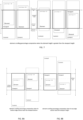
- Figure 2 shows how the above-mentioned entities, i.e. the digital screen, the Internet browser or mobile application window, the content, the scroller, the viewport, the viewable content, the "non-viewable content and the frame, are bound one to each other.
- the viewport is the physical space on the digital screen which displays the portion of the content according to the "scroller" position: because the content height might oversize the viewport height, it only displays the viewable content, by contrast to the non-viewable content which may be progressively displayed in the viewport as the end-user scrolls up or down via the scroller.
- the images are displayed within the frame boundaries.
- the scroller is the device which enables to change the vertical fragment of the content being displayed in the viewport (in case the content is higher than the viewport height). As previously stated, it is either actioned by a touch event of devices equipped with touch screens, or by a mouse, a pad or any device which usually enables to scroll content vertically.
- the sysem and method rely on three metrics regarding an element present on a content displayed in a viewport with a scroller, namely:
- the JavaScript SDK of the invention offers three corresponding methods which compute those three percentages, which are widely used per se, as well as methods which expose the cached results of these computations, in order to avoid recomputing them unless the element vertical position has changed or the viewport height has changed.
- this percentage ranges from 0 when the element is totally out of the viewport, and 100 when it is totally visible in the viewport. It is equal to the ratio between the visible surface of the element and its total surface. Note that if the element height is greater than the viewport height, its visibility percentage will always be less than 100. In the opposite case, the visibility percentage is positive and less than 100 when it intersects the viewport top edge or bottom edge.
- the display percentage is a combination of these two percentages and enables knowing precisely the position of the element within the viewport. It ranges from -100 to +200 and offers a continuous function varying with the element vertical scrolling position.
- This percentage enables knowing precisely the position of the element within the viewport while it intercepts the viewport surface.
- the display percentage is computed the following way:
- the SDK offers a function which computes a value named the element "scroll-ranged percentage", a floating number between 0 and 100: it takes as parameters the element scrolling percentage scrollingPercentage and a scroll range, which is a pair of two integers between 0 and 100, the second, maximumPercentage being greater than the first, minimumPercentage, and outputs a value scrollRangedPercentage equal to "Math.min(1, Math.max(0, scrolling Percentage-minimum Percentage) / (maximum Percentage - minimumPercentage))" where the "Math.min” and “Math.max” functions outputs respectively the lowest and the greatest of two given numbers.
- the element “scroll-ranged percentage” a floating number between 0 and 100: it takes as parameters the element scrolling percentage scrollingPercentage and a scroll range, which is a pair of two integers between 0 and 100, the second, maximumPercentage being greater than the first, minimumPercentage
- This scroll-ranged percentage introduces the concept of virtual top and bottom viewport edges and determines where the element is located between those virtual bottom and top edges.
- the way the JavaScript SDK determines whether and where an experience should be run comprises parsing the HTML Document Object Model (DOM) (cf. https://www.w3.org/TR/WD-DOM/introduction.html) and detecting the HTML " ⁇ img>" nodes that fulfil certain criteria: for every " ⁇ img>” HTML tag which meets these criteria, the SDK will initialize and run an experience. These criteria will be described below. Among the criteria, the " ⁇ img>" HTML element must refer to an experience description entity. Each matching " ⁇ img>" tag is actually a "placeholder" for an experience, which enables to use a built-in HTML tag to insert experiences within a HTML page.
- DOM HTML Document Object Model
- each parameter it may be named indifferently “parameter”, “attribute” or “property”.
- the “attr” parameter of an experience it is meant the “attr” parameter of its description.
- the invention may also implement a back-office web service which takes an experience description string as a parameter and returns the same semantical description migrated it to the latest version of the schema. This allows addressing any back-compatibility issue.
- Each rendering description comprises a "schemaVersion” property, which is an integer indicating what version of the schema description it complies with: as the grammar of the experience description evolves over time, because the implementation may introduce new concepts and new features, the schema is versioned along with the JavaScript and Java parsers.
- JavaScript SDK which in a particular embodiment is the core of the implementation, is also versioned, and supports experience descriptions having a "schemaVersion" belonging to a range of schema versions, for backward compatibility reasons.
- Each description comprises a "type” property, which is a string that can take a value among a number of values, and in the present embodiment: “overlay” (the “Overlay”), “overfly” (the “Overfly”), “understitial” (the “Understitial”), “lenticular” (the “Lenticular”), “scrolltoon” (the “Scrolltoon”) and “scravelling” (the “Scravelling”), this type describing the nature of the experience:
- These six experiences models that will be described in detail below, each offer additional specific rendering and behavioral features, which can be seen as formats.
- the invention offers a universal way for describing experiences via the "Understitial” model.
- the SDK scans all the incoming HTML document to search for the " ⁇ img>” content and creates an experience for those fulfilling certain criteria.
- this latter must meet at least one the following conditions, namely:
- the retrieved description may be optionally validated dynamically by the SDK via a "validate" Boolean property belonging to the "redisplay-params" JSON object: if enabled, then before loading the experience the SDK will check that it has the proper syntax, namely that it is a valid JSON object and that it complies to the description grammar corresponding to its declared "schemaVersion". Furthermore, the SDK will inspect and check each parameter of the description, i.e. that it has the right type, is valid and consistent, is present when mandatory, otherwise the experience will not be loaded. This offers a preliminary checking process.
- the present invention may provide an iOS ® and Android ® SDKs, which enable to run all experiences within a native mobile application developed with the classical iOS ® and Android ® operating systems frameworks.
- the iOS and Android SDKs preferably use and rely on the JavaScript SDK. This is done by using to the native iOS “UIWebView” and Android “WebView” graphical widget elements, which act as HTML browsers displaying content within the graphical space allocated to them.
- the mobile SDK introduces a "reDisplayView" graphical widget element, which contains a UIWebView for iOS and a WebView for Android: this component contains the code which injects the JavaScript SDK within the embedded UIWebView or WebView, and which runs the initialization phase with a special flag parameter indicating to the JavaScript SDK that it is being executed within a mobile application.
- the reDisplayView widget also ensures a communication bridge between the JavaScript SDK and the native code: certain messages may be transmitted from the JavaScript code to the native code and vice versa. These messages enable the JavaScript SDK to:
- the first three messages enable the JavaScript SDK to compute a virtual position of the " ⁇ img>" node, as if it were hosting within an HTML document which contains an empty " ⁇ div>” node the height of which is equal to the reDisplay vertical offset position and followed by a " ⁇ div>” node, the eight of which is equal to the ContentView height minus the reDisplayView height, minus the first " ⁇ div>” height.
- this virtual position from the point of view of the JavaScript code executed in the reDisplayView widget, the HTML document behaves like the ContentView widget.
- an internal object "handler" representing the experience is created in memory, responsible for orchestrating the experience user experience.
- the SDK maintains an internal "load” state for the experience, in order to keep track of its internal loading progress and status.
- the experience displays a sticker icon, e.g. as shown in Fig. 11 , in the upper right corner of the overlay frame, which acts like a watermark for the hereby product.
- This icon displayed over the overlay frame must be clickable and open a dialog box when clicked, which delivers some information about the product.
- the SDK according to the invention offers an engine which renders texts, shapes, images and motions over the frame on which the experience is displayed: those elements are called content elements or "particles”.
- the particles are parameters of the experience.
- frameWidth and “frameHeight” respectively designate the width and height of the frame.
- This animation percentage is a floating number which should be greater or equal to -100 and less than or equal to +200. Since the rendering of a particle depends on the animation percentage, the fact that the animation percentage value may vary over time enables to design and declare animations on those particles, hence contributing to a more overall animation associated to the experience.
- the animation percentage value depends on the way the experience is currently configured, namely its "mode":
- each "score” indicates its "conditions” attribute, which is a logical expression evaluated in real-time, indicating whether the score should be starting.
- the previous score "conditions” is a boolean expression: it takes as arguments the following parameters: “visibilityPercentage”, “scrollingPercentage”, “displayPercentage”, “idleDurationinMilliseconds” (which is the duration in milliseconds since the end-user vertical scrolling has not been changing), and”displayDurationinMilliseconds” which the cumulated duration of the time frames while the "visibilityPercentage” is equal to 100, i.e. the experience frame is totally visible.
- the score is considered to be started, the previous score being stopped and the engine sending simultaneously a "triggering event" for the newly started score. From this moment, the score is considered to be running, one score being running at most at the same time.
- the experience may be designed so as to provide a series of succeeding and interruptible end-user inner experiences which behave and react differently to the end-user stimuli and to time on one side, and which renders totally differently on the other side, because its rendering depends on the score particles defined in its associated track.
- the progression of the animation is freely configurable in real-time by the person in charge of integration, which enables to mix situations where the animation percentage is computed in a totally autonomous way by the SDK, or when this computing is defined by a custom routine, but also to mix the positioning and anchoring of the "img" HTML element using as the experience placeholder.
- Each particle is rendered according to the animation percentage, i.e. their position, size, color, opacity, orientation depend on that value.
- Each particle can adopt one among two states which indicate how it should be rendered, each state corresponding to a display percentage value, and the engine is responsible for computing the state of the particle for a display percentage value different from either of the two states via a mathematical interpolation.
- the particle rendering is performed at the penultimate stage of the rendering process of the experience, i.e. after the images of the experience have been displayed over the frame, but before the click-to-open or click-to-action animations, so that the latter are overlaid.
- Each particle is given an "order" attribute, which enables the engine to compute the order in which all particles should all be rendered, and hence provides an additional layer-based rendering mechanism.
- the engine uses this value in order to know in what order the particles should be displayed, whatever their kind: it iterates over all the particles, render each of them sequentially, the one with the lowest value will be rendered first.
- each particle is given two references via the "from” and "to” attribute, which are two JSON objects having the same structure, indicating respectively the initial and final states of its rendering:
- this JSON object state object contains attributes which are all numerical values, like its position, dimensions, orientation, opacity and color. In the case of the color, it can be considered as a triple of numerical value, each channel color, i.e. red, green, blue, being a numerical value.
- the "from” and the “to” parameters always contain at least the inner parameter “percentage”: it is a number ranging from -100 to +200, which represents a display percentage.
- the “from” and “to” contains other attributes which describe the state of the particle rendering: when the display percentage is equal to "percentage", the particle is rendered according to its corresponding state.
- each state defines a “reference point”, via its “x” and “y” coordinates, along with the way this "reference point” will be used when displaying the particle: hence, the state contains the following attributes:
- Each state also defines the following attributes:
- the way the size and the color of the particle is expressed depends on the particle nature.
- the SDK defines interpolators, which are mathematical functions which take a number between 0 (0%) and 100 (100%) as an input and which outputs a number:
- Each function is continuous.
- Each interpolator is given a name among the values “linear”, “easelnQuart”, “easeOutQuart”, “easeInOutQuart”, “easeInOutQuad”, “easeInOutBack”, “easelnBackOutQuad”, “easelnQuadOutBack”, “easelnOutSine”, “easelnOutCubic”, “easeOutCubic”, “easeOutCirc”, “easeOutQuad”, “easelnOutSmooth”, “easelnOutSmoothBack”, “easeOutSmoothBack”, “easeOutElastic”, “easeOutBounce” corresponding to a CSS animation-timing-function.
- a further implementation can provide that the four cubic Bézier curve coordinates are inputted to compute the interpolation.
- An interpolator may be defined for each particle, and when not defined, the "linear" one is selected as a default implicit value, the "linear” interpolator being the identity function.
- the interpolator is used to compute the state of a particle being two defined states, each state corresponding to a display percentage value, and being defined by the "from” and "to” attributes.
- the display percentage is greater than or equal to "from.percentage” and less than or equal to "to.percentage”
- the percentage used to compute the particle attributes state is computed with the "function((displayPercentage - from.percentage) / (to.percentage - from.percentage))” formula, where "function” is the function corresponding to the interpolator.
- the SDK rendering engine Given the defined states “from” and “to” for a particle and a display percentage greater than or equal to “from.percentage” and less than or equal to “to.percentage”, the SDK rendering engine will compute the values of each numerical value of its attributes of the particle by applying the interpolator function: for the attribute "attr”, its computed value will be equal to "(1 - interpolator) * from.attr + interpolator * to.attr”. This way, the SDK is able to compute and then render each particle for any display percentage value.
- a "text” is to be understood as a series of characters displayed from the left to right, using a specific font for its rendering.
- the "texts” experience parameter is an array of JSON objects which describe each text.
- JSON objects which describe each text.
- attributes of a single “text” element in addition to the "order”, “interpolator”, “from” and”to” attributes common to all particles:
- a “shape” is to be understood as a geometrical regular shape.
- the “shapes” experience parameter is an array of JSON objects which describe each shape: the possible shapes are e.g. rectangles, ellipses and polygonal lines.
- the attributes of a single “shape” element in addition to the "order”, “interpolator”, “from” and “to” attributes common to all particles:
- the "from” and “to” parameters contain the following inner parameters, in addition to the "percentage”, "x”, “y”, “xAlign”, “yAlign”, “rotation” and "opacity” attributes:
- An "image” is to be understood as a bitmap, i.e. a series of pixels in a rectangle frame, each pixel having a color expressed in the RGBA color model.
- the “images” experience parameter is an array of JSON objects which describe each image.
- attributes of a single “image” element in addition to the "order”, “interpolator”, “from” and “to” attributes common to all particles:
- a "motion” is to be understood as a series of ordered frames of the same dimensions, each frame being a bitmap being a series of pixels in a rectangle frame, each pixel having a color expressed in the RGBA color model.
- the motion may be embodied via an animated GIF image or by any video, whatever its format and encoding.
- the SDK engine will only render one frame of the motion, the computation of the selected frame being defined via the state "motionCursor" attribute, which offers a video scrubbing experience as the end-user scrolls vertically.
- the "motions” experience parameter is an array of JSON objects which describe each motion.
- attributes of a single “motion” element in addition to the "order”, “interpolator”, “from” and “to” attributes common to all particles:
- the "from” and the “to” parameters contain the following inner parameters, in addition to the "percentage”, "x”, "y”, “xAlign", “yAlign”, “rotation”, "opacity” attributes:
- the SDK according to the invention monitors in real-time the position of the experience frame in its viewport, as well as the end-user interactions: this is necessary for its internal rendering process and to properly react to the end-user input stimuli.
- the SDK takes benefit of this real-time monitoring and is able to collect and send metrics events for each experience. It is also possible to subscribe to all those events except for the "Request" one which is triggered on server side, via a JavaScript callback mechanism which enables to subscribe in real-time to those events: this enables to plug the metrics to any outer analytics system the integrator may need to resort to.
- actionUrl when the end-user clicks on the frame, the SDK will open the content related to the URL referred by the "actionUrl” parameter, via a new Internet browser tab or a dedicated mobile application screen if the actionUrl is a "deep link”. Any existing click-to-action animation is immediately stopped.
- the illustration image is defined via a native "img” HTML element, hence leaving the responsibility of the Internet browser to load it.
- the promotional image is defined via its URL, through the "source” parameter.
- the promotional image dimensions may not be the same as the illustration's: the experience will use the rePictuR service with the "render” parameter set to "outbox”, to retrieve a form of the promotional image with either the same width or the same height as the illustration image, and the other dimension greater or equal, that we name the "resized promotional image”.
- the experience will use the rePictuR service with the "render” parameter set to "outbox”, to retrieve a form of the promotional image with either the same width or the same height as the illustration image, and the other dimension greater or equal, that we name the "resized promotional image”.
- the resized promotional image will have a larger or equal surface than the illustration image, but it is ensured than one of its dimensions is equal to its corresponding dimension on the illustration image. Consequently, when the illustration image will be replaced / overwritten by the resized promotional image, only a fragment of it will be displayed, given that the experience will keep the exact same room as the illustration image to display the resized promotional image
- the SDK maintains two internal additional states for the experience, the "display” and “extension” states, in order to determine what possible workflow state transition may be applied to incarnate the experience, once it has been properly loaded.
- the created HTML5 canvas has the same dimensions as the "img" HTML element, which is the illustration image.
- the overlay image is displayed over the illustration image, its surface totally covers the overlay frame: we say that the "promotion is visible”. Note that each pixel which has some transparency on the promotion image will let the illustration image pixel currently positioned under it visible. This means that the illustration image is replaced by a portion of the overlay image, this portion dynamically depending on the scroller position. Indeed, the experience measures in pseudo real-time, by listening to the events which reveal a change in the scroller vertical position, the overlay frame scrolling percentage:
- this "offset” depends on two numbers extracted from the "scrollRanges” parameter, which is an array of increasing numbers ranging from 0 to 100, that we name “minimumPercentage” and “maximumPercentage", “maximumPercentage” being greater than “minimumPercentage”:
- this offset will be set to 0 when the scrolling percentage is equal to 0, when the scrolling percentage is equal to 100, its value will be equal to the difference between the overlay and the illustration images dimension, the dimension to consider being the width in the case of the larger ratio, the height in the case of the smaller ratio; let's name "maximumOffset" this value.
- the overlay image will always be displayed within the illustration image frame, which means that it will be truncated it its dimensions exceeds it.
- this animation is described via a JSON format designed in the JavaScript bodymovin library (cf. https://github.com/bodymovin/bodymovin, released under a MIT licence), which is able to interpret an Adobe After Effects animation (cf. http://www.adobe.com/products/aftereffects.html), previously translated via the Lottie plug-in (cf. https://medium.com/airbnb-engineering/introducing-lottie-4ff4a0afac0e).
- This animation needs to have been downloaded before the experience state switches to the "Ready” state.
- This animation is run by the bodymovin library runtime, configured so that at each animation frame displaying a specific SDK callback function is invoked so as to erase and display the overlay frame display, in order to prevent from any animation overwriting issue.
- the experience When the end-user focuses back on the experience, that is to say if the experience is run through an Internet browser when the selected tab is the one which encompasses the originated experience, if the experience is run through a native mobile application when the end-user comes back to the screen the experience was originally displayed on, the experience will skip to the sequence described in the "Opened promotion closing animation" section, as if an action was performed to close it and to provide the visual effect that the experience resumes.
- the illustration image is displayed back, it is displayed as if no overlay image had been displayed, except if it has a "reminder” parameter, as described on the "Reminder display” section.
- the overlay image will not be displayed any longer, i.e. the experience "display” state will remain in the "OnElement” state, as long as the illustration image visibility percentage is greater than 0, i.e. as long as a single pixel of it is visible to the end-user in the viewport. As soon as this percentage is equal to 0, the experience may be run again.
- the "maximumDisplayCount” parameter which is a positive integer, controls how many times the experience may occur: every time the experience starts running, an internal counter (starting with the 0 value) is increased by 1, and when this counter is greater that this parameter, the experience will not be run anymore, provided the content is not reloaded.
- the experience displays this image - previously downloaded during the loading phase - over the overlay frame on the right-bottom corner when the "display” state is set to "OnElement” and if it went through the "OnPromotion” state in the past.
- This reminder image must be clickable by the end-user, and in the case she clicks on its region, the experience will perform the action described in the "Promotion clicking" section. This feature enables the end-user to see the "actionUrl” content.
- This experience displays a "promotional image” above an “illustration image”; its “type” parameter is “overlay”.
- the illustration image is immediately displayed in the content and, depending on conditions, a portion of the promotional image will appear above the illustration image, fitting exactly the illustration frame, totally covering it, with an transition animation and will remain displayed during a specific amount of time, the position displayed will change while the scroller position changes, and will eventually disappear with an transition animation if the scroller position does not change for a certain amount of time.
- the end-user may click on it (via a touch-screen event or a mouse click), which will expanse it, revealing its entire estate. If the end-user clicks again on it while being expended, a content will be opened. Otherwise, if no action is taken by the end-user, the promotional image will disappear and will be replaced by the initial illustration image, with an optional reminder.
- the two animations are the same, the only thing which changes is the order of the two images they rely upon and their duration, the second being preferably set to a shorter value so that the end-user can return more quickly to the illustration image.
- the "display” state is promoted to "TransitionToPromotion"
- an transition animation is run, which initially displays the illustration and eventually displays the overlay image.
- the "display” state is "OnPromotion” and the “extension” state is "None”.
- transition animation depends on a parameter, referred to as the "transition" parameter.
- the SDK computes its “rendering”, which is the visual result of the animation state at every step, consisting in an image bitmap of the same dimensions as the overlay frame, named the "animation rendered image”, i.e. a series of pixels colors organized in a row- and-column grid, being displayed over the overlay frame, previously cleared at every rendering.
- Each pixel is given the traditional red-blue-green-alpha value ranging from 0 to 255, which indicates that the pixel holds an "alpha" value, which is transparency/opacity factor.
- the alpha of a pixel ranges from 0, meaning that it is totally transparent, hence invisible which involves that the background it is displayed on is totally visible, to 1, meaning that it is totally opaque, hence totally eclipsing the background it is being displayed on.
- the transparency is the opposite of the opacity.
- This "animation rendered image” is the result of the displaying in a frame of the same size as the overlay frame initialized with transparent pixels, of the first image on which a transformation is applied, and then over, the displaying of the second image on which another transformation is applied, the two transformations depending on the progress percentage.
- a timer is set so that an event is triggered at regular intervals, each event allowing to compute the rendering: to this event is attached a "progress percentage” value, referred as “progressPercentage”, ranging from 0, the start of the animation, to 1, the completion of the animation, this parameter being time-proportionally incremented.
- the duration of this animation is customizable via a parameter named the "transitionDurationlnMilliseconds": a new computing of the animation rendered image is performed at 60 Hz. - in order to ensure a smooth visual effect -, hence the number of renderings will increase linearly with this duration parameter.
- the images are being displayed with an opacity, noted “opacity” according.
- opacity the formula is the following:
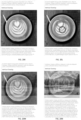
- Figure 23 shows different examples of opacity transition animations.
- Figure 24 shows different examples of grey transition animations.
- the pixelation of an image is a two-step process, which is used for this animation, and which we now explain.
- This pixelation process provides a visual effect that the input image has been enlarged with a resolution loss.
- the animation effect displays the two images with an "opacity” and a pixelation effect with a "factor”: this is the same process as the "opacity” animation, plus a pixelation effect.
- the formula is the following:
- Figure 25 shows different examples of pixelation transition animations.
- Figure 26 shows different examples of noise transition animations.
- the "promotionMinimumDisplaylnMilliseconds" parameter of this experience is a positive integer expressed in millisecond, which affects the conditions for the experience to close the visible promotion.
- a reminder may be displayed over the illustration image, as described in the above "Reminder display” section.
- This experience integrates a promotion closing action mechanism, as described in the above "Opened promotion closing action" section dedicated to the Overlay and Overfly experiences.
- This experience integrates a promotion closing animation, as described in the above "Opened promotion closing animation" section dedicated to the Overlay and Overfly experiences.
- this experience displays a "promotional image” above an “illustration image”.
- "type” parameter is equal to "overfly”.
- the illustration image is immediately displayed in the content and, as the end-user scrolls up or down the content, a portion of the promotional image will appear above the illustration image, fitting exactly either the width or the height of the illustration frame.
- the portion of the promotion image displayed will increase as the illustration frame is being centered on its wrapping content vertically, and as long as the promotional image does not fully covers the illustration image frame, a graphical filter may be applied on it.
- the frame When the frame is vertically centered on the content, it totally covers it and in that case the end-user may click on it (via a touch-screen event or a mouse click), which will expanse it, revealing its entire estate. If the end-user clicks again on it while being expended, a content will be opened. If the end-user scrolls again while the promotional image is expended, the promotional image disappears, revealing an optional reminder.
- a portion of the overlay image will be displayed over the illustration image according to the scroller position.
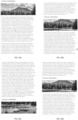
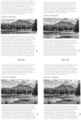
- the portion of the overlay image depends on the illustration image frame scrolling percentage, named “scrollingPercentage”, as illustrated in Figure 29 , and on the “scrollRanges" experience parameter, which an array of four increasing numbers, representing percentages, belonging to the [0, 100] range:
- the overlay image When the "display” state is set to "TransitionToPromotion", the overlay image will only cover a part of the illustration image, as shown in Figure 30 : it displayed over it from an offset relative to the overlay frame - let's name it "printOffset” -, which is vertical in case of a “larger ratio” case (recall that this happens when the image width / height ratio is greater for the illustration than for the promotion), and which is horizontal in case of "smaller ratio” case.
- This "printOffset” value is computed the following way:
- This experience integrates a promotion closing action mechanism, as described above in the "Opened promotion closing action" section dedicated to the Overlay and Overfly experiences.
- This experience integrates a promotion closing animation, as described in the "Opened promotion closing animation" section dedicated to the Overlay and Overfly experiences.
- This experience displays a portion of an "image", that portion depending on the scroller position, i.e. as the end-user scrolls up and down the content on which it is displayed.
- Its "type” parameter is equal to "understitial”.
- the end-user may click on it, which will expanse it, revealing its entire estate. If the end-user clicks again on it while being expended, a content will be opened. If the end-user scrolls again while the image is expended, the image shrinks again to its original size, revealing an optional reminder.
- the experience image is defined via its URL, through the "source” parameter, which means that the SDK does not take into account the "img” "src” attribute, which should not be defined in order to prevent from experiencing a flickering effect when the SDK will replace this HTML element by the newly created HTML canvas.
- the SDK maintains the common "load” state described above in the "The "load” state” section.
- the created HTML5 canvas has the same width "imageWidth” as the "img” HTML element, its height being equal to imageWidth * percentage where "percentage” is a parameter dedicated to the Understitial experience, a number greater than 0 and less than or equal to 100. This means that the canvas frame height which is used to display the experience is smaller than the image height.
- the SDK maintains another internal additional “extension” state for the experience, which indicates whether it is extended.
- the portion of the image displayed i.e. displayed over the frame, depends on the scroller position, a "gravityPercentage” experience parameter which is a number belonging to ]0, 100[ representing the percentage from the image top edge where its visual gravity center is supposed to be located, and on the "scroll Ranges” parameter, which an array of three increasing numbers representing percentages, belonging to [0, 100].
- the experience displays a kind of vertical parallax effect:
- This experience integrates a promotion click-to-open animation, similar to the Overlay and Overfly experiences, described in the "Promotion click-to-open animation” section.
- This experience integrates a opening animation, similar to the Overlay and Overfly experiences, described in the "Promotion opening animation” section.
- This experience integrates a click-to-action animation, similar to the Overlay and Overfly experiences, described in the "Promotion click-to-action animation” section.
- This experience integrates a clicking mechanism, similar to the Overlay and Overfly experiences, described in the "Promotion clicking action" section.
- This experience integrates a closing action mechanism, similar to the one used in the Overlay and Overfly experiences as described above in the "Opened promotion closing action" section.
- This experience integrates a closing animation, similar to the one used in the Overlay and Overfly experiences described above in the "Opened promotion closing animation" section.
- This experience consists in reproducing the physical lenticular effect (e.g. as described at https://en.wikipedia.org/wiki/Lenticular_lens), namely that the image displayed to the end-user progressively changes as the user looks at it from different angles. Its "type” parameter is equal to "lenticular”.
- This experience uses the orientation on devices equipped with a gyroscope, uses the scroller position otherwise. If the end-user clicks on the image, a content will be opened.
- this experience from an end-user point of view is illustrated in Figs. 34A-34G .
- the experience exposes a "sources" parameter which contains a series of images instead of a single "source” parameter: this "sources” parameter is an array of image URLs which compose the lenticular effect images. Those images are supposed to have all the same width over height ratio but do not necessarily need to have the same dimensions.
- the SDK maintains the common "load” state described in the "The "load” state” section. However, during the 2.a. step, the SDK downloads in parallel the "sources” images with a rePictuR “render” parameter set to "inbox", with a width set to the HTML "img" width and a 0 height.
- the HTML5 canvas frame dimensions on which the experience will run have a width equal to the "img” HTML element with and a height which is equal to the first "sources” downloaded image via the rePictuR service.
- the experience will start listening to the device gyroscope, if available: if the device has a gyroscope, the scroller position is ignored, if not, the experience will listen to the scroller position.
- the experience displays on its frame a composition of two consecutive images depending on the gyroscope orientation when the device is equipped with one, and on the scroller position for the other devices: at every rendering of the experience, which occurs whenever the gyroscope gamma (cf.
- the experience exposes an additional "steps" parameter, an integer ranging from 1 to 100, which enables to tune how many different intermediate compositions must be rendered between two consecutive images.
- each rendering is a composition of the display of the two images, one over the other, with an opacity such as the end-user switches from one image to another with a smoothing effect.
- This experience consists in displaying a short video animation with no sound (an animated GIF imageor a video), which is played at a speed depending on the scroller position change speed and reversely if the scroller position decreases, which offers a video scrubbing effect and makes the reader responsible for playing the video sequence in response to vertical scrolling.
- type is equal to "Scrolltoon”. If the end-user clicks on the image, a content will be opened.
- the SDK maintains the common "load” state described above in the "The "load” state” section.
- the "source” parameter must be an animated image encoded as an animated GIF animated (cf. https://fr.wikipedia.org/wiki/Graphics_Interchange_Format), made of at least two images (frames).
- the SDK downloads the resized animated image with a rePictuR "render” parameter set to "inbox", with a width set to the HTML "img” width and a height set to the HTML “img” height.
- the HTML5 canvas frame dimensions on which the experience will run have a width equal to the "img” HTML element with and a height which is equal to the "source” downloaded image via the rePictuR service.
- imageCount is the number of images within the animated GIF image, which depends on the scroller position and on the “scrollRanges” experience parameter, which is an array of two increasing numbers “minimumPercentage” and “maximumPercentage” belonging to ]0, 100[ representing the lower and upper percentages from which the experience starts being animated, and which enable to compute the frame scroll-ranged percentage "scrollRangedPercentage”.
- imagelndex is equal to Math.round((imagesCount - 1) * scroll Ranged Percentage): this means that when the "scrollingPercentage” is less than “minimumPercentage” the first animation image is displayed, when the "scrollingPercentage” is greater than “maximumPercentage” the last animation image is displayed, otherwise the interpolated image index is displayed.
- This experience consists in displaying the fragment of an image depending on the scroller position, focusing successively on some declared points of interest. Its "type” parameter is equal to "Scravelling". If the end-user clicks on the image, a content will be opened.
- the SDK maintains the common "load” state described in the "The "load” state” section.
- the SDK downloads the resized animated image with a rePictuR "render” parameter set to "outbox", with a width set to the HTML "img” width and a height set to the HTML "img” height.
- the HTML5 canvas frame dimensions on which the experience will run have a width equal to the "img” HTML element with and a height which is equal to the "source” downloaded image via the rePictuR service. This means that the frame width over height ratio may not be the same as the image width over height ratio.
- frameWidth the frame width and “frameHeight” the frame height.
- This portion is a sub-rectangle of the image having the same width-over-height ratio as the frame, defined by the coordinates of a top-left corner and a width and height pair which indicate its width and height: this sub-rectangle is displayed over the entire frame, by stretching it, while preserving its width-over-height ratio: let's name "x” and “y” the coordinates of the top-left corner and “width” and “height” the two previous dimensions.
- the end user is given the impression that she performs a travelling inside the image while zooming successfully on the points of interest as she scrolls up and down the content.
Landscapes
- Engineering & Computer Science (AREA)
- Theoretical Computer Science (AREA)
- General Engineering & Computer Science (AREA)
- Physics & Mathematics (AREA)
- General Physics & Mathematics (AREA)
- Human Computer Interaction (AREA)
- Software Systems (AREA)
- Health & Medical Sciences (AREA)
- Artificial Intelligence (AREA)
- Audiology, Speech & Language Pathology (AREA)
- Computational Linguistics (AREA)
- General Health & Medical Sciences (AREA)
- User Interface Of Digital Computer (AREA)
- Processing Or Creating Images (AREA)
Claims (15)
- Procédé de génération d'un rendu d'affichage dynamique dans une zone de visualisation d'un affichage d'un dispositif intelligent, comprenant les étapes ci-dessous :fournir un contenu principal à partir d'une source à des fins d'affichage dans la zone de visualisation ;afficher ledit contenu principal ;fournir des données d'entrée en vue d'occasionner un déplacement du contenu principal affiché dans la zone de visualisation ;fournir au moins un contenu alternatif distinct du contenu principal et comprenant une pluralité de particules de contenu qui sont chacune associées à leur propre ensemble de paramètres de substitution ;en réponse à une variable d'entrée de substitution en combinaison avec des paramètres de substitution intégrés dans ledit contenu principal et associés aux particules de contenu respectives, substituer dynamiquement, à au moins un élément du contenu principal, un élément modifié contenant au moins une partie dudit contenu alternatif ; etafficher ledit contenu principal avec l'élément modifié.
- Procédé selon la revendication 1, dans lequel ladite variable de substitution est dérivée de la position actuelle d'une partie donnée du contenu principal par rapport à la zone de visualisation lorsque le contenu se déplace à l'intérieur de la zone de visualisation en réponse à des données d'entrée.
- Procédé selon la revendication 2, dans lequel ledit élément du contenu principal est une image ou un pointeur vers une image, intégrée dans le contenu principal, et dans lequel ladite étape de substitution dynamique comprend le fait de fournir des substitutions d'éléments prédéterminées pour des valeurs données de la variable de substitution, et comprend en outre une étape d'interpolation entre lesdites substitutions d'éléments prédéterminées pour une valeur intermédiaire de la variable de substitution.
- Procédé selon l'une quelconque des revendications 1 à 3, dans lequel ladite variable de substitution est dérivée de données sélectionnées dans un groupe comprenant des données d'entrée d'utilisateur et des données temporelles.
- Procédé selon la revendication 4, comprenant une étape comprenant le fait de remplacer sélectivement une variable de substitution liée au temps par une variable de substitution liée à une entrée d'utilisateur.
- Procédé selon la revendication 4 ou 5, dans lequel lesdites données d'entrée d'utilisateur sont sélectionnées dans un groupe comprenant des données de défilement de contenu, des données de position ou de déplacement d'utilisateur, et des données de position ou de déplacement d'appareil intelligent occasionnées par un utilisateur.
- Procédé selon la revendication 6, dans lequel lesdites données d'entrée d'utilisateur comprennent des données de défilement de contenu, ledit contenu alternatif comprend du contenu vidéo, et ladite substitution dynamique comprend le fait de fouiller ledit contenu vidéo en réponse à une variation de la variable de substitution.
- Procédé selon l'une quelconque des revendications 1 à 7, dans lequel ledit contenu principal comprend un contenu balisé tel qu'un contenu HTML, lesdits paramètres de substitution sont intégrés dans ledit contenu balisé en association avec au moins une balise d'image de l'élément dans ledit contenu principal, et l'étape de substitution dynamique comprend une étape initiale visant à substituer, à ladite balise d'image, une balise de contenu d'image à l'intérieur de laquelle la substitution dynamique est mise en œuvre.
- Procédé selon l'une quelconque des revendications 1 à 8, dans lequel ladite étape de substitution dynamique est mise en œuvre par un programme de rendu dédié téléchargé à partir d'une source associée au contenu principal.
- Système de rendu d'affichage dynamique, comprenant :- une source destinée à fournir un contenu principal ;- une source destinée à fournir un contenu alternatif distinct du contenu principal, ledit contenu alternatif comprenant une pluralité de particules de contenu qui sont chacune associées à leur propre ensemble de paramètres de substitution ;- un dispositif intelligent en communication avec lesdites sources et présentant un affichage définissant une zone de visualisation, un processeur d'affichage destiné à afficher et à déplacer le contenu principal dans la zone de visualisation en réponse à des données d'entrée, ledit dispositif intelligent comprenant en outre un moteur de rendu apte à, en réponse à une variable d'entrée de substitution en combinaison avec des paramètres de substitution intégrés dans ledit contenu principal et associés aux particules de contenu respectives, substituer dynamiquement, à au moins un élément dudit contenu principal, un élément modifié contenant au moins une partie dudit contenu alternatif, à des fins d'affichage au moyen dudit processeur d'affichage.
- Système selon la revendication 10, dans lequel ledit moteur de rendu est apte à, à partir de substitutions d'éléments prédéterminées pour des valeurs données de la variable de substitution, interpoler entre lesdites substitutions d'éléments prédéterminées pour une valeur intermédiaire de la variable de substitution.
- Système selon l'une quelconque des revendications 10 et 11, dans lequel ledit moteur de rendu est un programme de rendu dédié téléchargé à partir d'une source associée au contenu principal.
- Dispositif intelligent doté d'une capacité de rendu d'affichage, ledit dispositif étant apte à communiquer avec une source destinée à fournir un contenu principal et une source destinée à fournir un contenu alternatif distinct du contenu principal, ledit contenu alternatif comprenant une pluralité de particules de contenu qui sont chacune associées à leur propre ensemble de paramètres de substitution, ledit dispositif intelligent comprenant un affichage définissant une zone de visualisation, un processeur d'affichage destiné à afficher et à déplacer le contenu principal dans la zone de visualisation en réponse à des données d'entrée, et un moteur de rendu apte à, en réponse à une variable d'entrée de substitution en combinaison avec des paramètres de substitution intégrés dans ledit contenu principal et associés aux particules de contenu respectives, substituer dynamiquement à au moins un élément du contenu principal un élément modifié contenant au moins une partie dudit contenu alternatif, à des fins d'affichage par ledit processeur d'affichage.
- Contenu numérique balisé, contenant au moins un élément affichable ou un pointeur vers un tel élément, et, associé à celui-ci, au moins une description d'un contenu numérique alternatif, et/ou un pointeur vers un contenu numérique alternatif, et un ensemble de paramètres de substitution, à utiliser par un dispositif intelligent selon la revendication 13 pour générer dans celui-ci une substitution dynamique dudit contenu, dans lequel lesdits paramètres de substitution comprennent un type de substitution et des paramètres de rendu de substitution.
- Contenu numérique balisé selon la revendication 14, dans lequel lesdits paramètres de substitution sont contenus dans une zone balisée associée à l'élément affichable.
Applications Claiming Priority (2)
| Application Number | Priority Date | Filing Date | Title |
|---|---|---|---|
| US201762607016P | 2017-12-18 | 2017-12-18 | |
| PCT/IB2018/060196 WO2019123213A1 (fr) | 2017-12-18 | 2018-12-17 | Procédé et système de rendu d'affichage |
Publications (2)
| Publication Number | Publication Date |
|---|---|
| EP3729263A1 EP3729263A1 (fr) | 2020-10-28 |
| EP3729263B1 true EP3729263B1 (fr) | 2025-04-23 |
Family
ID=65278409
Family Applications (1)
| Application Number | Title | Priority Date | Filing Date |
|---|---|---|---|
| EP18842835.3A Active EP3729263B1 (fr) | 2017-12-18 | 2018-12-17 | Procédé et système de rendu d'affichage |
Country Status (4)
| Country | Link |
|---|---|
| US (1) | US12182495B2 (fr) |
| EP (1) | EP3729263B1 (fr) |
| ES (1) | ES3036268T3 (fr) |
| WO (1) | WO2019123213A1 (fr) |
Families Citing this family (13)
| Publication number | Priority date | Publication date | Assignee | Title |
|---|---|---|---|---|
| CN110708596A (zh) * | 2019-09-29 | 2020-01-17 | 北京达佳互联信息技术有限公司 | 生成视频的方法、装置、电子设备及可读存储介质 |
| CN111124579B (zh) * | 2019-12-24 | 2023-12-19 | 北京金山安全软件有限公司 | 一种特效渲染方法、装置、电子设备及存储介质 |
| FR3113348B1 (fr) * | 2020-08-07 | 2023-03-17 | Sublime Skinz Labs | Affichage ergonomique d’un contenu video promotionnel |
| CN112184860A (zh) * | 2020-09-25 | 2021-01-05 | 浪潮云信息技术股份公司 | 一种粒子动画实现方法 |
| CN113760154B (zh) * | 2020-10-26 | 2024-10-22 | 北京沃东天骏信息技术有限公司 | 页面元素展示的方法和装置 |
| CN112269961A (zh) * | 2020-11-12 | 2021-01-26 | 携程旅游网络技术(上海)有限公司 | 基于关联报表的网页生成方法、系统、设备及存储介质 |
| CN115442639B (zh) * | 2021-06-03 | 2024-01-16 | 北京字跳网络技术有限公司 | 一种特效配置文件的生成方法、装置、设备及介质 |
| CN119211617A (zh) * | 2021-06-15 | 2024-12-27 | 博泰车联网科技(上海)股份有限公司 | 焦点居中的方法、存储介质和电子设备 |
| CN114782605B (zh) * | 2022-05-06 | 2026-02-06 | 网易(杭州)网络有限公司 | 毛发虚拟模型的渲染方法、装置、计算机设备及存储介质 |
| CN115426517B (zh) * | 2022-08-10 | 2024-07-26 | 杭州网易云音乐科技有限公司 | 渐变动画帧的生成方法、装置、电子设备及存储介质 |
| US12373174B2 (en) * | 2022-08-16 | 2025-07-29 | Lenovo (Singapore) Pte. Ltd. | Identification of callback from 2D app to render 3D model using 3D app |
| CN116339706B (zh) * | 2022-10-18 | 2024-05-14 | 杭州比智科技有限公司 | 基于数据可视化场景下实现可视化组件联动的方法及系统 |
| CN119202420A (zh) * | 2023-06-25 | 2024-12-27 | 华为技术有限公司 | 页面显示方法、电子设备及存储介质 |
Family Cites Families (9)
| Publication number | Priority date | Publication date | Assignee | Title |
|---|---|---|---|---|
| US7415666B2 (en) * | 2005-03-04 | 2008-08-19 | Microsoft Corporation | Method and system for navigating paginated content in page-based increments |
| US20110035263A1 (en) * | 2009-08-10 | 2011-02-10 | Kumaresan Ramanathan | Process for increasing user-interaction rates for document elements |
| JP5451684B2 (ja) * | 2011-05-31 | 2014-03-26 | 楽天株式会社 | 情報処理装置、情報処理方法、及び情報処理プログラム |
| US20130198610A1 (en) * | 2012-01-20 | 2013-08-01 | Vistaprint Limited | Defining external website content sources |
| US20140040423A1 (en) * | 2012-08-01 | 2014-02-06 | Google Inc. | Obtaining and Presenting Data to Web Properties |
| US9870344B2 (en) * | 2012-10-02 | 2018-01-16 | Google Inc. | Reassigning ordinal positions of content item slots according to viewport information during resource navigation |
| US8793573B2 (en) * | 2012-10-29 | 2014-07-29 | Dropbox, Inc. | Continuous content item view enhanced through smart loading |
| US9348496B2 (en) * | 2013-06-28 | 2016-05-24 | Google Inc. | Selecting content based on performance of a content slot |
| JP6310955B2 (ja) * | 2016-04-07 | 2018-04-11 | ヤフー株式会社 | 配信装置、表示制御装置、表示制御方法およびプログラム |
-
2018
- 2018-12-17 EP EP18842835.3A patent/EP3729263B1/fr active Active
- 2018-12-17 WO PCT/IB2018/060196 patent/WO2019123213A1/fr not_active Ceased
- 2018-12-17 ES ES18842835T patent/ES3036268T3/es active Active
- 2018-12-17 US US17/606,576 patent/US12182495B2/en active Active
Also Published As
| Publication number | Publication date |
|---|---|
| US12182495B2 (en) | 2024-12-31 |
| US20230367953A1 (en) | 2023-11-16 |
| EP3729263A1 (fr) | 2020-10-28 |
| ES3036268T3 (en) | 2025-09-16 |
| WO2019123213A1 (fr) | 2019-06-27 |
Similar Documents
| Publication | Publication Date | Title |
|---|---|---|
| EP3729263B1 (fr) | Procédé et système de rendu d'affichage | |
| US10497086B2 (en) | Methods and apparatuses for providing a hardware accelerated web engine | |
| US10740945B2 (en) | Animation control methods and systems | |
| US8091030B1 (en) | Method and apparatus of graphical object selection in a web browser | |
| US6950993B2 (en) | System and method for automatic and dynamic layout of resizable dialog type windows | |
| US7924285B2 (en) | Exposing various levels of text granularity for animation and other effects | |
| US20080303827A1 (en) | Methods and Systems for Animating Displayed Representations of Data Items | |
| US20080303826A1 (en) | Methods and Systems for Animating Displayed Representations of Data Items | |
| CN111951356B (zh) | 基于json数据格式的动画渲染方法 | |
| CN107707965B (zh) | 一种弹幕的生成方法和装置 | |
| US20070061733A1 (en) | Pluggable window manager architecture using a scene graph system | |
| US8645822B2 (en) | Multi-platform presentation system | |
| US20020101449A1 (en) | System and method for developing and processing a graphical user interface for a computer application | |
| US8640055B1 (en) | Condensing hierarchies in user interfaces | |
| US7743387B2 (en) | Inheritance context for graphics primitives | |
| US20250335533A1 (en) | Systems and methods for generating and displaying webpages | |
| CN118394312B (zh) | 基于three.js的3d大屏转动展示方法及设备 | |
| Hunt | Building Games with pygame | |
| US20080104528A1 (en) | Capturing a GUI Display Environment | |
| Baruah | Up and Running with WebGL | |
| CN119545108A (zh) | 用于显示弹幕特效的方法、装置、介质和程序产品 | |
| CN118349306A (zh) | 多媒体内容展示方法、设备及计算机可读介质 | |
| CN121072464A (zh) | 一种富文本渲染方法、程序产品与电子设备 | |
| CN119473470A (zh) | 页面打开方法、电子设备、程序产品及储存介质 | |
| CN118331549A (zh) | 页面渲染的方法、装置、设备以及存储介质 |
Legal Events
| Date | Code | Title | Description |
|---|---|---|---|
| STAA | Information on the status of an ep patent application or granted ep patent |
Free format text: STATUS: UNKNOWN |
|
| STAA | Information on the status of an ep patent application or granted ep patent |
Free format text: STATUS: THE INTERNATIONAL PUBLICATION HAS BEEN MADE |
|
| PUAI | Public reference made under article 153(3) epc to a published international application that has entered the european phase |
Free format text: ORIGINAL CODE: 0009012 |
|
| STAA | Information on the status of an ep patent application or granted ep patent |
Free format text: STATUS: REQUEST FOR EXAMINATION WAS MADE |
|
| 17P | Request for examination filed |
Effective date: 20200717 |
|
| AK | Designated contracting states |
Kind code of ref document: A1 Designated state(s): AL AT BE BG CH CY CZ DE DK EE ES FI FR GB GR HR HU IE IS IT LI LT LU LV MC MK MT NL NO PL PT RO RS SE SI SK SM TR |
|
| AX | Request for extension of the european patent |
Extension state: BA ME |
|
| DAV | Request for validation of the european patent (deleted) | ||
| DAX | Request for extension of the european patent (deleted) | ||
| STAA | Information on the status of an ep patent application or granted ep patent |
Free format text: STATUS: EXAMINATION IS IN PROGRESS |
|
| RAP1 | Party data changed (applicant data changed or rights of an application transferred) |
Owner name: OGURY FRANCE |
|
| 17Q | First examination report despatched |
Effective date: 20220407 |
|
| GRAP | Despatch of communication of intention to grant a patent |
Free format text: ORIGINAL CODE: EPIDOSNIGR1 |
|
| STAA | Information on the status of an ep patent application or granted ep patent |
Free format text: STATUS: GRANT OF PATENT IS INTENDED |
|
| INTG | Intention to grant announced |
Effective date: 20241121 |
|
| GRAS | Grant fee paid |
Free format text: ORIGINAL CODE: EPIDOSNIGR3 |
|
| GRAA | (expected) grant |
Free format text: ORIGINAL CODE: 0009210 |
|
| STAA | Information on the status of an ep patent application or granted ep patent |
Free format text: STATUS: THE PATENT HAS BEEN GRANTED |
|
| AK | Designated contracting states |
Kind code of ref document: B1 Designated state(s): AL AT BE BG CH CY CZ DE DK EE ES FI FR GB GR HR HU IE IS IT LI LT LU LV MC MK MT NL NO PL PT RO RS SE SI SK SM TR |
|
| REG | Reference to a national code |
Ref country code: GB Ref legal event code: FG4D |
|
| REG | Reference to a national code |
Ref country code: CH Ref legal event code: EP |
|
| RAP4 | Party data changed (patent owner data changed or rights of a patent transferred) |
Owner name: OGURY FRANCE |
|
| REG | Reference to a national code |
Ref country code: DE Ref legal event code: R096 Ref document number: 602018081374 Country of ref document: DE |
|
| REG | Reference to a national code |
Ref country code: IE Ref legal event code: FG4D |
|
| REG | Reference to a national code |
Ref country code: NL Ref legal event code: MP Effective date: 20250423 |
|
| PG25 | Lapsed in a contracting state [announced via postgrant information from national office to epo] |
Ref country code: NL Free format text: LAPSE BECAUSE OF FAILURE TO SUBMIT A TRANSLATION OF THE DESCRIPTION OR TO PAY THE FEE WITHIN THE PRESCRIBED TIME-LIMIT Effective date: 20250423 |
|
| REG | Reference to a national code |
Ref country code: AT Ref legal event code: MK05 Ref document number: 1788438 Country of ref document: AT Kind code of ref document: T Effective date: 20250423 |
|
| REG | Reference to a national code |
Ref country code: ES Ref legal event code: FG2A Ref document number: 3036268 Country of ref document: ES Kind code of ref document: T3 Effective date: 20250916 |
|
| PG25 | Lapsed in a contracting state [announced via postgrant information from national office to epo] |
Ref country code: FI Free format text: LAPSE BECAUSE OF FAILURE TO SUBMIT A TRANSLATION OF THE DESCRIPTION OR TO PAY THE FEE WITHIN THE PRESCRIBED TIME-LIMIT Effective date: 20250423 Ref country code: PT Free format text: LAPSE BECAUSE OF FAILURE TO SUBMIT A TRANSLATION OF THE DESCRIPTION OR TO PAY THE FEE WITHIN THE PRESCRIBED TIME-LIMIT Effective date: 20250825 |
|
| REG | Reference to a national code |
Ref country code: LT Ref legal event code: MG9D |
|
| PG25 | Lapsed in a contracting state [announced via postgrant information from national office to epo] |
Ref country code: NO Free format text: LAPSE BECAUSE OF FAILURE TO SUBMIT A TRANSLATION OF THE DESCRIPTION OR TO PAY THE FEE WITHIN THE PRESCRIBED TIME-LIMIT Effective date: 20250723 Ref country code: GR Free format text: LAPSE BECAUSE OF FAILURE TO SUBMIT A TRANSLATION OF THE DESCRIPTION OR TO PAY THE FEE WITHIN THE PRESCRIBED TIME-LIMIT Effective date: 20250724 |
|
| PG25 | Lapsed in a contracting state [announced via postgrant information from national office to epo] |
Ref country code: PL Free format text: LAPSE BECAUSE OF FAILURE TO SUBMIT A TRANSLATION OF THE DESCRIPTION OR TO PAY THE FEE WITHIN THE PRESCRIBED TIME-LIMIT Effective date: 20250423 |
|
| PG25 | Lapsed in a contracting state [announced via postgrant information from national office to epo] |
Ref country code: BG Free format text: LAPSE BECAUSE OF FAILURE TO SUBMIT A TRANSLATION OF THE DESCRIPTION OR TO PAY THE FEE WITHIN THE PRESCRIBED TIME-LIMIT Effective date: 20250423 |
|
| PG25 | Lapsed in a contracting state [announced via postgrant information from national office to epo] |
Ref country code: HR Free format text: LAPSE BECAUSE OF FAILURE TO SUBMIT A TRANSLATION OF THE DESCRIPTION OR TO PAY THE FEE WITHIN THE PRESCRIBED TIME-LIMIT Effective date: 20250423 |
|
| PG25 | Lapsed in a contracting state [announced via postgrant information from national office to epo] |
Ref country code: AT Free format text: LAPSE BECAUSE OF FAILURE TO SUBMIT A TRANSLATION OF THE DESCRIPTION OR TO PAY THE FEE WITHIN THE PRESCRIBED TIME-LIMIT Effective date: 20250423 |
|
| PG25 | Lapsed in a contracting state [announced via postgrant information from national office to epo] |
Ref country code: RS Free format text: LAPSE BECAUSE OF FAILURE TO SUBMIT A TRANSLATION OF THE DESCRIPTION OR TO PAY THE FEE WITHIN THE PRESCRIBED TIME-LIMIT Effective date: 20250723 |
|
| PG25 | Lapsed in a contracting state [announced via postgrant information from national office to epo] |
Ref country code: IS Free format text: LAPSE BECAUSE OF FAILURE TO SUBMIT A TRANSLATION OF THE DESCRIPTION OR TO PAY THE FEE WITHIN THE PRESCRIBED TIME-LIMIT Effective date: 20250823 |
|
| PG25 | Lapsed in a contracting state [announced via postgrant information from national office to epo] |
Ref country code: LV Free format text: LAPSE BECAUSE OF FAILURE TO SUBMIT A TRANSLATION OF THE DESCRIPTION OR TO PAY THE FEE WITHIN THE PRESCRIBED TIME-LIMIT Effective date: 20250423 |
|
| PGFP | Annual fee paid to national office [announced via postgrant information from national office to epo] |
Ref country code: DE Payment date: 20251126 Year of fee payment: 8 |
|
| PGFP | Annual fee paid to national office [announced via postgrant information from national office to epo] |
Ref country code: GB Payment date: 20251119 Year of fee payment: 8 |
|
| PG25 | Lapsed in a contracting state [announced via postgrant information from national office to epo] |
Ref country code: DK Free format text: LAPSE BECAUSE OF FAILURE TO SUBMIT A TRANSLATION OF THE DESCRIPTION OR TO PAY THE FEE WITHIN THE PRESCRIBED TIME-LIMIT Effective date: 20250423 Ref country code: SM Free format text: LAPSE BECAUSE OF FAILURE TO SUBMIT A TRANSLATION OF THE DESCRIPTION OR TO PAY THE FEE WITHIN THE PRESCRIBED TIME-LIMIT Effective date: 20250423 |
|
| PGFP | Annual fee paid to national office [announced via postgrant information from national office to epo] |
Ref country code: IT Payment date: 20251119 Year of fee payment: 8 |
|
| PGFP | Annual fee paid to national office [announced via postgrant information from national office to epo] |
Ref country code: FR Payment date: 20251120 Year of fee payment: 8 |
|
| PG25 | Lapsed in a contracting state [announced via postgrant information from national office to epo] |
Ref country code: CZ Free format text: LAPSE BECAUSE OF FAILURE TO SUBMIT A TRANSLATION OF THE DESCRIPTION OR TO PAY THE FEE WITHIN THE PRESCRIBED TIME-LIMIT Effective date: 20250423 |
|
| PG25 | Lapsed in a contracting state [announced via postgrant information from national office to epo] |
Ref country code: EE Free format text: LAPSE BECAUSE OF FAILURE TO SUBMIT A TRANSLATION OF THE DESCRIPTION OR TO PAY THE FEE WITHIN THE PRESCRIBED TIME-LIMIT Effective date: 20250423 |
|
| PG25 | Lapsed in a contracting state [announced via postgrant information from national office to epo] |
Ref country code: RO Free format text: LAPSE BECAUSE OF FAILURE TO SUBMIT A TRANSLATION OF THE DESCRIPTION OR TO PAY THE FEE WITHIN THE PRESCRIBED TIME-LIMIT Effective date: 20250423 Ref country code: SK Free format text: LAPSE BECAUSE OF FAILURE TO SUBMIT A TRANSLATION OF THE DESCRIPTION OR TO PAY THE FEE WITHIN THE PRESCRIBED TIME-LIMIT Effective date: 20250423 |